Enterprise SEO: Everything You Need to Know
SEO. While this is a strategy we’ve been aware of for a while, did you know that 89% of marketers say SEO is successful?
And since more than 50 percent of all website traffic comes from organic search and 93 percent of online experiences begin with a search engine, it’s not surprising.
However, what do upmarket companies, with thousands of web pages and keywords, do when they’re in the maturation phase of implementing SEO?
Instead of focusing on the small business and mid-market SEO strategies, they’ll need to begin focusing on enterprise SEO.
In this post, let’s review what enterprise SEO is, what tools to use, and what it looks like in practice.

What makes enterprise SEO different?
The main difference between small business/mid-market SEO and enterprise SEO strategies is that the tactics for larger organizations need to be scalable for thousands of web pages.
While a small business or mid-market company might have a few pages, or a couple hundred, larger organizations have thousands of web pages on their site. And it makes sense that the strategies that work for a small number of pages might not necessarily work for larger sites.
Why is enterprise SEO important?
Enterprise SEO is important because strategies that work for smaller businesses won’t work for larger ones.
One of the main strategic differences between the two is that small businesses usually aren’t targeting highly competitive, short tail keywords, while larger enterprise organizations are.
Additionally, larger companies need a specialized enterprise SEO team to keep track and maintain organic rankings. At smaller companies, the person in charge of SEO is usually also the content marketer and might even be in charge of social media.
When you’re targeting more competitive keywords, and have thousands of pages on your site, you need a dedicated team working on your SEO, instead of one jack-of-all-trades that’s spread too thin.
If you’ve worked at companies and felt like SEO just wasn’t working for you, it’s probably because you didn’t have a dedicated team with experts when your company needed it.
Enterprise SEO will benefit large organizations because their SEO issues will be more complex due to the number of web pages on the site, the number of backlinks already acquired, domain authority already acquired, etc.
As a larger site, enterprise companies usually have great brand authority. But that means you can’t undermine that authority by deleting or redirecting pages that have acquired backlinks and high page authority. You also need to keep this content up to date and fresh. And as you can imagine, the larger the company, the harder that is.
Ultimately, enterprise SEO needs to be smarter, scalable, and more sophisticated.
Now that we know why enterprise SEO is important, let’s discuss some of the more sophisticated strategies you’ll need to implement as a larger company.
1. Maintain page speed.
One of the technical SEO elements that becomes more complex with larger sites is maintaining page speed.
First, you’ll need to test your website speed with a tool like Google PageSpeed Insights to see how quickly your website loads for users.
Then, to improve the page speed of individual pages you can compress images, reduce redirects, and cache your web pages.
2. Group content in subdomains.
Another strategy for enterprise SEO is to group your content into subdomains.
A subdomain is a type of website hierarchy under a root directory, but instead of using folders to organize content on a website, it kind of gets a website of its own.
This subdomain is still closely associated with the root directory, but it will usually have a separate content management system, template, analytics tools, and more.
See the image below to get an idea:

This is helpful for enterprise SEO because subdomains can house a lot of content that would be difficult to manage all on one website.
While some SEO experts believe that Google’s crawlers could confuse a subdomain for an entirely different website from the main domain, others say its crawlers can recognize subdomains as extensions of parent domains.
Essentially, subdomains lead to a better user experience, which could result in better engagement rates, therefore improving your SEO. Ultimately, you’ll have to decide what works best for your company and have your enterprise SEO team discuss what would be best.
3. Refresh old content, but protect domain authority and backlinks.
One of the challenges for enterprise SEO teams is keeping content up to date, accurate, and refreshed for current industry standards.
However, you don’t want to delete old content that has high page authority and backlinks. Instead, you’ll want to refresh your content, while balancing the line of adding new information, without taking away secondary keywords that content is ranking for.
With an enterprise company, refreshing content is a delicate process. But it also needs to be scalable for your SEO team to find out which pages need to be updated and what would make them more competitive. The entire point of enterprise SEO is to have a process that’s scalable.
4. Quality content creation at scale.
Of course with SEO, quality content creation is one of the most important components of your site.
Again, on an enterprise level, this needs to be scalable for your SEO team to find new keywords to rank for and handoff to a content creation team.
Usually, your enterprise SEO team will choose target keywords and give writers guidelines on how to make the post competitive, whether that’s including secondary keywords, tips on image alt-text, including snippets, etc.
To implement enterprise SEO, you’ll need a team that is dedicated to creating content instructions and doing keyword research at scale.
5. Strategic keyword selection.
As we’ve been talking about, keyword selection becomes more difficult the more you’ve written about a topic. Sometimes it can feel like you’ve said everything there is to say.
That’s why you need a dedicated enterprise SEO team to conduct regular keyword research and content gap analysis to find new topics to write about.
6. Automation.
So we’ve talked a lot about doing things “at scale.” But how can you do that? One of the best ways for an enterprise SEO team to scale its processes is to use automation.
Automation can help with SEO tasks like keyword research, identifying problematic areas on your site, monitoring the quality of backlinks, analyzing title tags and meta descriptions, and more.
Additionally, you can use workflows to simplify project management. With larger organizations, you might have several locations with distinct websites and SEO needs. This means that your SEO teams should be using the same workflows so the process is scalable.
7. Don’t forget about technical SEO.
Besides page speed, there are more technical SEO elements that your enterprise SEO team will need to manage.
This means that your SEO team will need a scalable process for using 301 redirects, eliminating technical issues that hamper crawlability, etc.
8. Link building.
Again, one of the most important elements of SEO is link building. On an enterprise level, this becomes more complex (as does everything, I suppose).
The more backlinks a page has, the more organic traffic it gets from Google. You can use outreach strategies to find unlinked mentions and request to turn the mention into a backlink.
Additionally, you can always do cold outreach as well if you find articles where your site naturally fits. As a larger company, you’ll have the benefit of already having brand authority and recognizability.
9. Internal pillar/cluster content linking.
Another SEO task that will need to be done at scale is internal pillar and cluster content linking. Your enterprise SEO team could either find these internal links for your content creators during the keyword research process or could advise your writers to link to the pillar and any necessary internal content.
10. Create templates for your pages.
When creating new pages for your site, SEO plays a large role. That’s why your team can create templates that your developers can replicate over and over again in line with enterprise SEO needs.
So, now you might be wondering, “What does this look like in action?” Let’s look at some examples below.
Enterprise SEO Examples
1. HubSpot
HubSpot is a great example of enterprise SEO because while we might not have the same amount of employees as other big tech companies, we have over 35,000 pages on our site.
Additionally, our site ranks on the first page of several hundred thousand keywords, and in position 1 for over 30,000 keywords.
Because of the number of pages and keywords we target, this means that we need a highly specialized, dedicated enterprise SEO team to focus on backlinks, comarketing, technical SEO, and to protect our domain authority.
With enterprise SEO, we need to be careful about updating keywords on content that has high domain authority while keeping our content fresh and updated.
2. GitHub
GitHub has an estimated 81 million pages on its site. And the impressive part is that it ranks in position 1 on Google for over 80,000 keywords.
This means that the company is able to manage its site in bulk and focus on maintaining old pages, while still earning links to reinforce its organic rankings for hundreds of thousands of keywords.
3. Microsoft
Enterprise company Microsoft has more than 8 million pages on its site. With several varying products, it’s no surprise that the company ranks on the first page for over 1 million keywords. Additionally, it ranks in the number 1 position for over 450,000 keywords.
A major difficulty with Microsoft’s enterprise SEO is that the team is targeting very different types of keywords because of the variety of products. And they need to protect their domain authority across several industries from business tools to video gaming consoles.
The Future of Enterprise SEO
For large organizations, enterprise SEO is the future. To protect current domain authority and backlinks, while keeping content fresh and updated on thousands of pages, you’ll need a dedicated, sophisticated team of experts.
This means an enterprise SEO team will focus on strategizing how to enhance content, working on comarketing, attaining backlinks and protecting those backlinks, and more. The more pages your site has, the harder and more complex it becomes to maintain your SEO.

Persuasive Advertising: What It Is & How to Do It [+Examples]
What are some advertisements that live rent-free in your mind? As a millennial, ads that will always have a place in my heart include Britney Spears’ iconic run as a Pepsi spokesperson, the enduring”got milk?” campaign (which is ironic considering myself and many others now prefer non-dairy alternatives), and the classic iPod silhouettes.
These ads were not only compelling, but they were also incredibly influential. As marketers, we know that if we want to persuade an audience, we need to evoke an emotional response from them. But how do you actually do that?

Before we discuss how to refine your persuasive advertising strategy, let’s review what it is.
Below, we’ll examine key persuasive advertising techniques you can use in your advertisements, examples you can reference if you ever need some inspiration and informative advertisement examples that are surprisingly just as compelling as the persuasive advertising examples.
1. The Carrot and The Stick
Humans are hardwired to move towards pleasure, like a horse towards a carrot, and away from pain, like a donkey avoids a stick. When people read or watch your advertisements, “carrots”, or promises of gain, can fill your prospects with hope and compel them to pursue that potential feeling of pleasure. “Sticks”, possibilities of loss, evoke fear in your prospects, which will compel them to flee from that potential feeling of pain.
Both tactics can pull your prospects into a narrative and evoke emotions that inspire your desired action. Carrots, like a product’s benefit, entice people to take the desired action. Sticks, on the other hand, like anti-smoking campaigns, evoke fear in people to stop doing a certain action and start doing the alternative. To better understand how to craft advertisements that feature a carrot or stick, check out these insurance copywriting examples below.
Carrot: “15 minutes could save you 15% on car insurance.” — Geico
Stick: “Get All-State. You can save money and be better protected from Mayhem like me.” — All-State
As you can see, Geico’s ad uses a small-time investment that could potentially produce big gains as a lure to get you to buy their product. Conversely, All-State’s ad uses the character”Mayhem” to evoke fear into people to stop using their”inferior” insurance and start using All-State’s.
2. The Scarcity Principle
People value objects and experiences that are rare — having something that most people want but can’t have, boosts our sense of self-worth and power. If you use words and phrases that imply scarcity and evoke a sense of urgency, like”Exclusive offer” or”Limited availability”, you can skyrocket your product’s perceived scarcity and consumer demand.
3. One Message Per Advertisement
To immediately hook people and persuade them to read or watch the rest of your advertisement, try sticking to only one message. Spotlighting your product or offer’s main benefit or feature will make it easy for your customers to understand its value and increase the likelihood of their conversion because you’re only conveying one message to your audience: your product’s main feature will benefit your customer’s life somehow, someway.
4. Write in the Second Person
Since your prospects primarily care about how you can help them, and pronouns like “you” and “your” can engage them on a personal level and help them insert themselves in the narrative you’re creating, writing advertisements in the second person can instantly grip their attention and help them imagine a future with your product or service bettering their lives.
5. Give Your Audience a Sense of Control
According to a research study conducted by three psychology professors at Rutgers University, the need for control is a biological and psychological necessity. People have to feel like they have control over their lives.
If you want to give your audience a sense of control, you need to give them the ability to choose. In other words, after reading or watching your advertisement, they must feel like they can choose between the option you suggest or another path. If they feel like you’re trying to force them to buy your product, they’ll get annoyed and disengage from your message.
To give your audience the ability to choose, and in turn, a sense of control, use phrases like “Feel free” or “No pressure” in your advertisements, like this example from Hotwire.com below.
6. Use a Call-to-Value Instead of a Call-to-Action
Call-to-actions are crucial for getting prospects to take the next step, but a “Download Now” or “Call Now” CTA isn’t always going to convince the more skeptical prospects to take your desired action. You need to make sure your ad’s last line of copy or quip is the best of them all.
So instead of writing an uninspiring, final line of copy like “Download Now”, write one that clearly communicates your offer’s value and gives a glimpse into your prospects’ potential life if they take your desired action, like this call-to-value prompting readers to download a blogging eBook: “Click today and be a blogger tomorrow.”
Persuasive Advertising Examples
Ready to see persuasive advertising in action? Check out these examples.
1. Nikol
Showing — not telling — your audience about your product’s benefits is one of the best ways to capture attention and get an emotional response. Obviously, Nikol’s paper towels can’t actually turn grapes into raisins, but this ad highlights the product’s absorbent powers in such a clear and clever way, they didn’t need to write a single line of copy.

2. Heinz
In relation to food, the word “hot” has multiple meanings: having a high temperature and being spicy. Heinz brilliantly used the connotation of high temperature to highlight the spiciness of their ketchup, and their creative method of communicating the value of their product helped them instantly attract people’s attention.

3. Mondo Pasta
With this crafty use of guerrilla marketing, Mondo Pasta perfectly aligns their copy with their creative — the guy slurping the noodle literally “can’t let go” because it’s a rope tied to a dock. By designing such a visual, unexpected, and literal ad with a seemingly one-dimensional prop, people’s eyes can’t let go of this ad either.

4. Bic
Another example of guerrilla marketing, Bic takes advantage of an unkempt field to highlight the power of their razors. By just mowing a small strip of grass on a field, this ad is an unconventional, simple, and extremely creative way to catch people’s attention and spotlight a razor’s shaving capabilities.

5. Siemens
Siemens’ skillful ad shows the benefits of their product by unexpectedly placing their washers and dryers in a library to show you that they’re so quiet, even a librarian wouldn’t need to shush them.

6. Pepsi
“More Than OK” poked fun at how Pepsi usually takes a back seat to Coke, especially at restaurants. And by featuring a star-studded cast that included Steve Carell, Lil Jon, and Cardi-B (who hilariously and fervently backed up Pepsi’s OKness) their boldness to call people out for undermining Pepsi’s quality got a lot of laughs and persuaded a massive audience to reconsider their own perception of the soft drink.
7. Match.com
The year 2020 was challenging for countless reasons. Online dating company Match.com channeled the collective feeling towards the year with an ad depicting Satan meeting his perfect match – 2020.
Informative Advertising
Informative advertising is a form of persuasive advertising that focuses more on the facts. The main goal of informative advertising is to educate the audience on why they need your product instead of appealing to their desires.
It highlights how your product’s features and benefits solve your customers’ problems and can even compare your product to your competitors’ products. Although this type of advertising relies on facts and figures to trigger the desired action, the ad’s message is usually framed in a compelling way.
To better understand the difference between informative and persuasive advertising, check out these examples.
1. Miller Lite
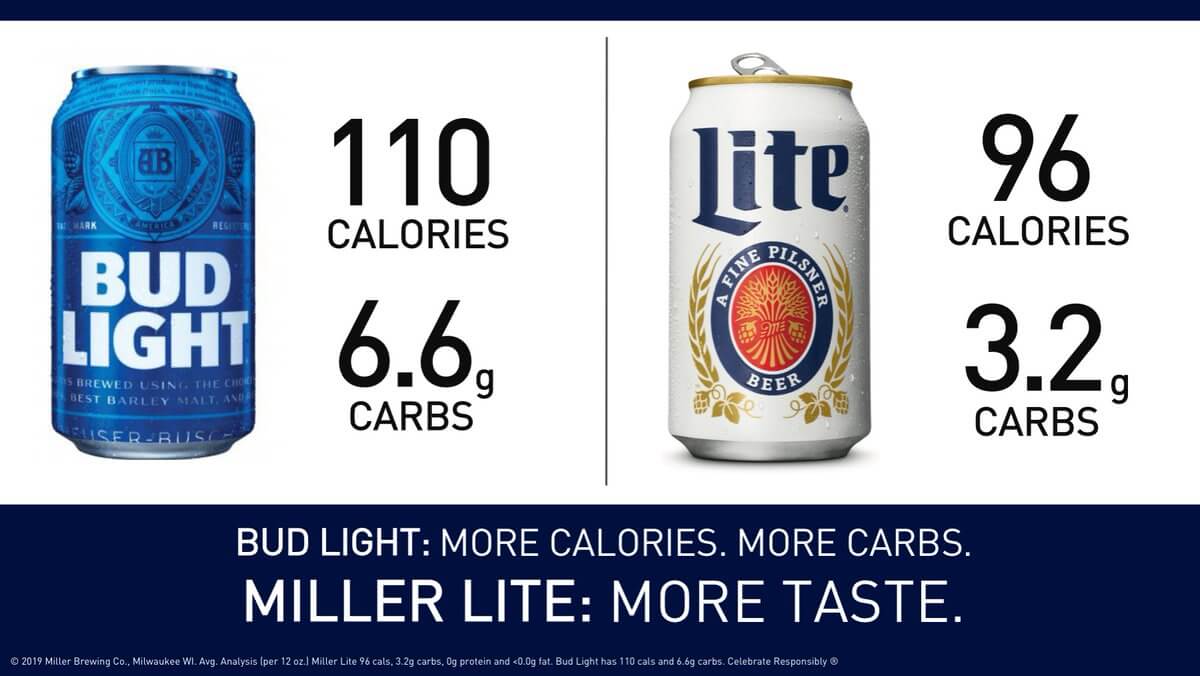
After Bud Light took some jabs at Miller Lite for using corn syrup in their beer during their Super Bowl 53 ads, Miller Lite decided to throw a few punches back. A day later on Twitter, they revealed that their beer actually has fewer calories and carbs than Bud Light, which helped them persuade people that drinking Bud Light and Miller Lite actually have similar health benefits.
2. Siskiyou Eye Center
There’s an old folk tale that carrots can improve your eyesight, but science has actually debunked this myth. That’s why this Siskiyou Eye Center ad is such a creative informative advertisement.
While it pokes fun at this common fable, it’s still relying on the facts of carrots not being able to improve your vision and the Eye Center’s ability to provide quality treatment for your eyes to persuade people to do business with them.

3. Burger King
In 2020, Burger King released an ad showing a time-lapse of its famous Whopper over the course of 34 days. While it may seem like an odd choice to show its product in such an unappetizing light, the goal of this ad was to announce the company planned to remove preservatives and other artificial ingredients from its products to differentiate itself from key competitors.
4. Calm
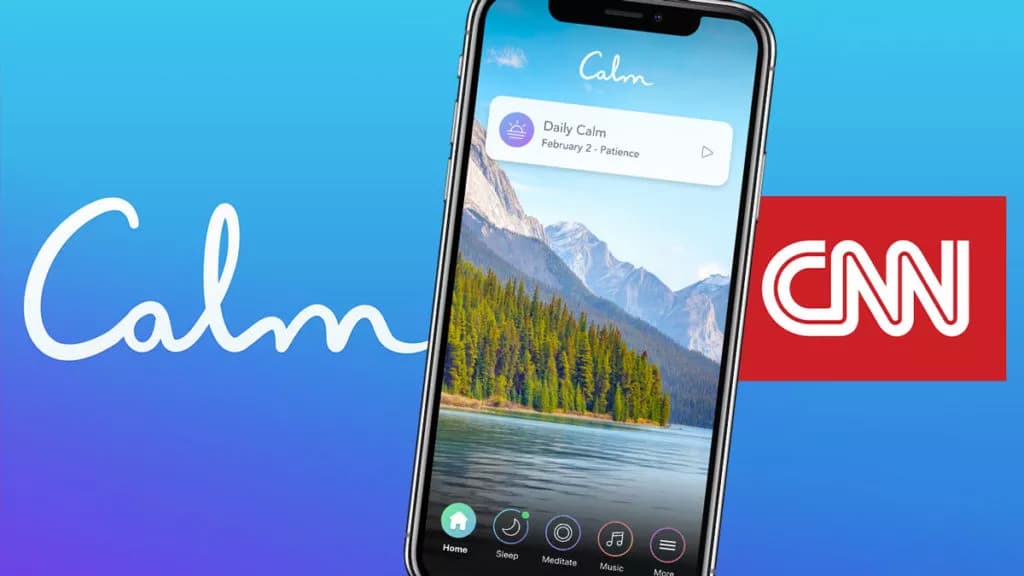
Popular meditation app Calm experienced an increase in downloads by sponsoring CNN’s coverage of the 2020 US Presidential Campaign. Through clever product placement in front of an audience that was experiencing stress, the app was positioned as helpful a resource ready to educate on mindfulness during a turbulent time.
5. Dove
In addition to creating popular body and skincare products, Dove has set out to educate its audience on the importance of body confidence, and the harmful impact fabricated social media imagery can have on the self-esteem of young people.
In the reverse selfie campaign, Dove depicts how social media users may be inclined to change their appearance for public approval. Other materials provided by Dove also share facts and statistics related to social media usage and body image.
6. Google
Last year, Google released a Black History Month ad called “The Most Searched” that was equally informative and inspiring. Showing clips of famous Black figures, each clip read “most searched” to indicate each person shown and event shown was a history-maker.
Persuasive advertising vs. informative advertising: which one is better?
Persuasive advertising and informative advertising definitely focus on different aspects of persuasion, but they still aim to achieve the same goal: convincing your audience to take the desired action. So whether you pursue one advertising strategy or another, remember that if you can trigger an emotional response, regardless of the stimuli, your ad will be a success.
Editor’s note: This post was originally published in October 2019 and has been updated for comprehensiveness.


20 Marketing Collaboration Tools to Improve Productivity and Teamwork
As your business scales, your marketing team will grow and evolve too.
While this growth is happening, it’s important to maintain reliable avenues for collaboration and communication on your marketing team. Otherwise, your business won’t be able to perform at the highest level. The good news is that marketing collaboration software can help with this.

In this article, we’ll cover what marketing collaboration software is, why it’s important, and 20 of the best tools currently on the market.
Marketing Collaboration Software
Marketing collaboration software helps marketing teams maintain easy communication, manage projects and campaigns, prioritize tasks, establish schedules and editorial calendars, promote organization and productivity, and more.
Why is marketing collaboration software important?
No matter which industry your business is in, what size your team is, whether you’re in-office, remote, or a mix of both, marketing collaboration can help your team improve in a number of areas — all of which impact your bottom line. Some examples include improved and streamlined…
- Communication
- Teamwork
- Productivity
- Organization
- Efficiency
- Task management
- Scheduling
- Data sharing
- Transparency
- Content creation
Marketing Collaboration Features
Here are some common features found across many marketing collaboration tools today.
- Group communication
- Shared files, documents, calendars, notes, and other assets
- Task management and time/ progress tracking
- Document management
- Campaign management
- Editorial calendar
- Content creation capabilities
- Content, file, and data organization
- Integrations (to connect the marketing collaboration software to your other marketing and business tools)
- Audio and video conferencing
- Marketing automation
- Reporting and analytics
Marketing Collaboration Software
Here are 20 of the best marketing collaboration software available today.
1. HubSpot Marketing Hub
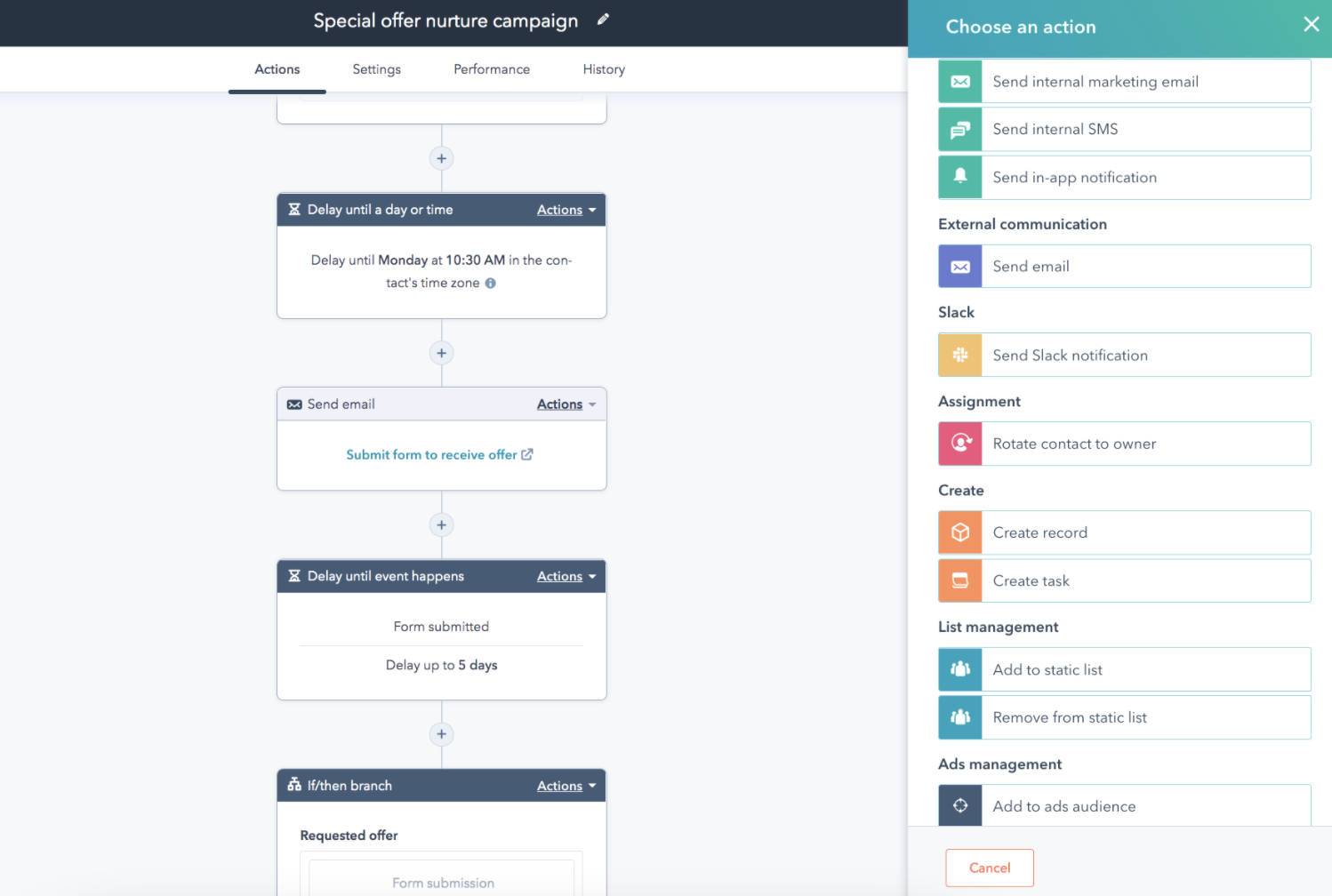
HubSpot Marketing Hub is a marketing automation platform that allows you to attract your target audience, convert website visitors, and run inbound marketing campaigns at scale. Marketing teams can seamlessly collaborate to plan and execute large-scale, omnichannel marketing campaigns.
Marketing Hub also allows for frictionless collaboration with other teams — such as sales — in order to offer delightful customer experiences. This is known as CRM-powered Marketing — HubSpot makes it possible by pairing marketing automation tools with an all-in-one CRM platform.
2. Slack
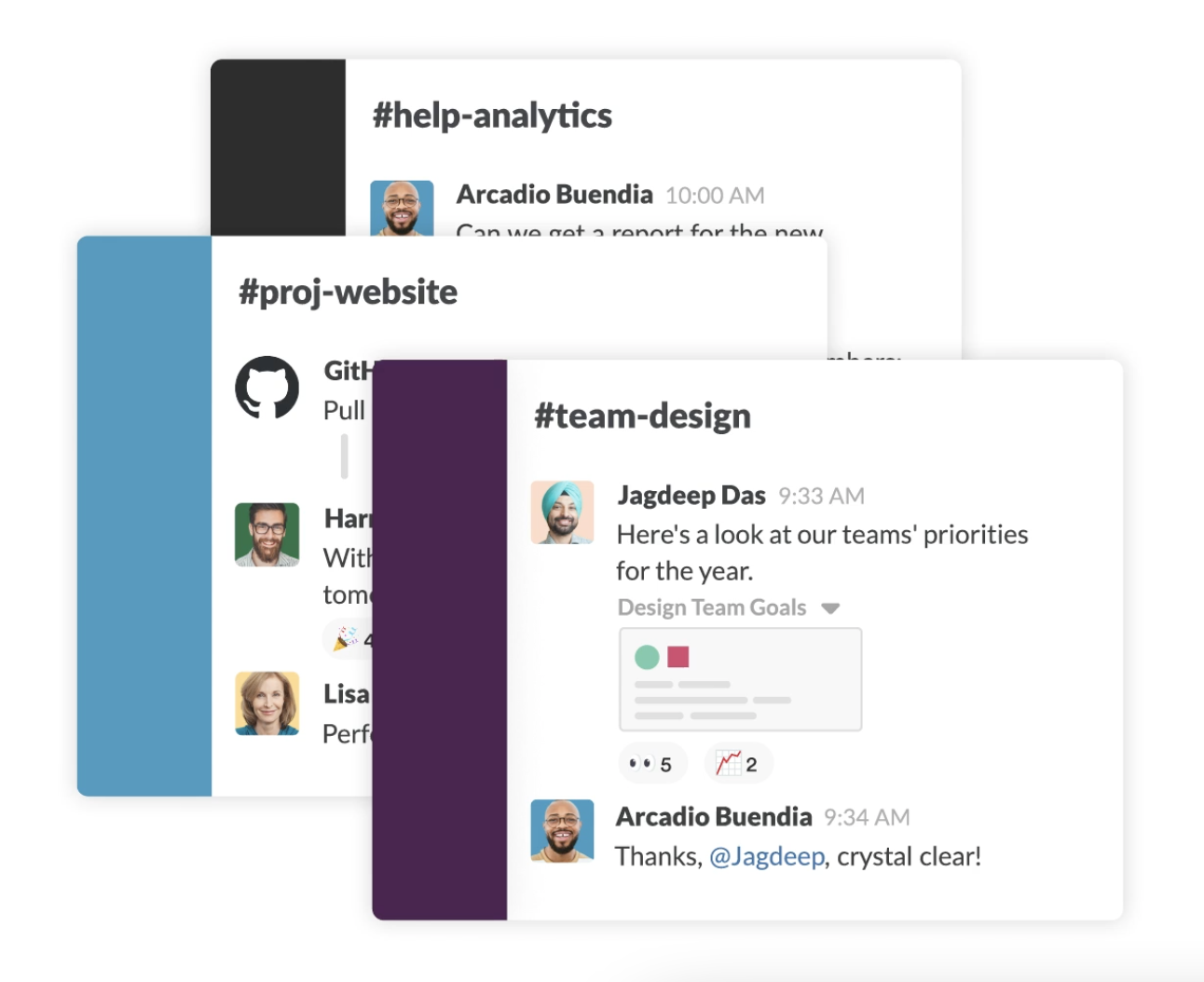
Slack is a platform that allows for easy communication and collaboration on any scale. Slack Channels serve as central communication areas where you and your team can chat with one another and share relevant information, files, tools, and more.
Send messages via chat, host video calls, or speak with your team via voice call all without leaving the tool. There are also over 2,200 integrations and apps, such as Google Drive and Office 365, to help your team streamline workflows.
Additionally, the Slack Connect feature makes it possible to communicate and collaborate with teams at other companies the way you do with your own.
3. Trello
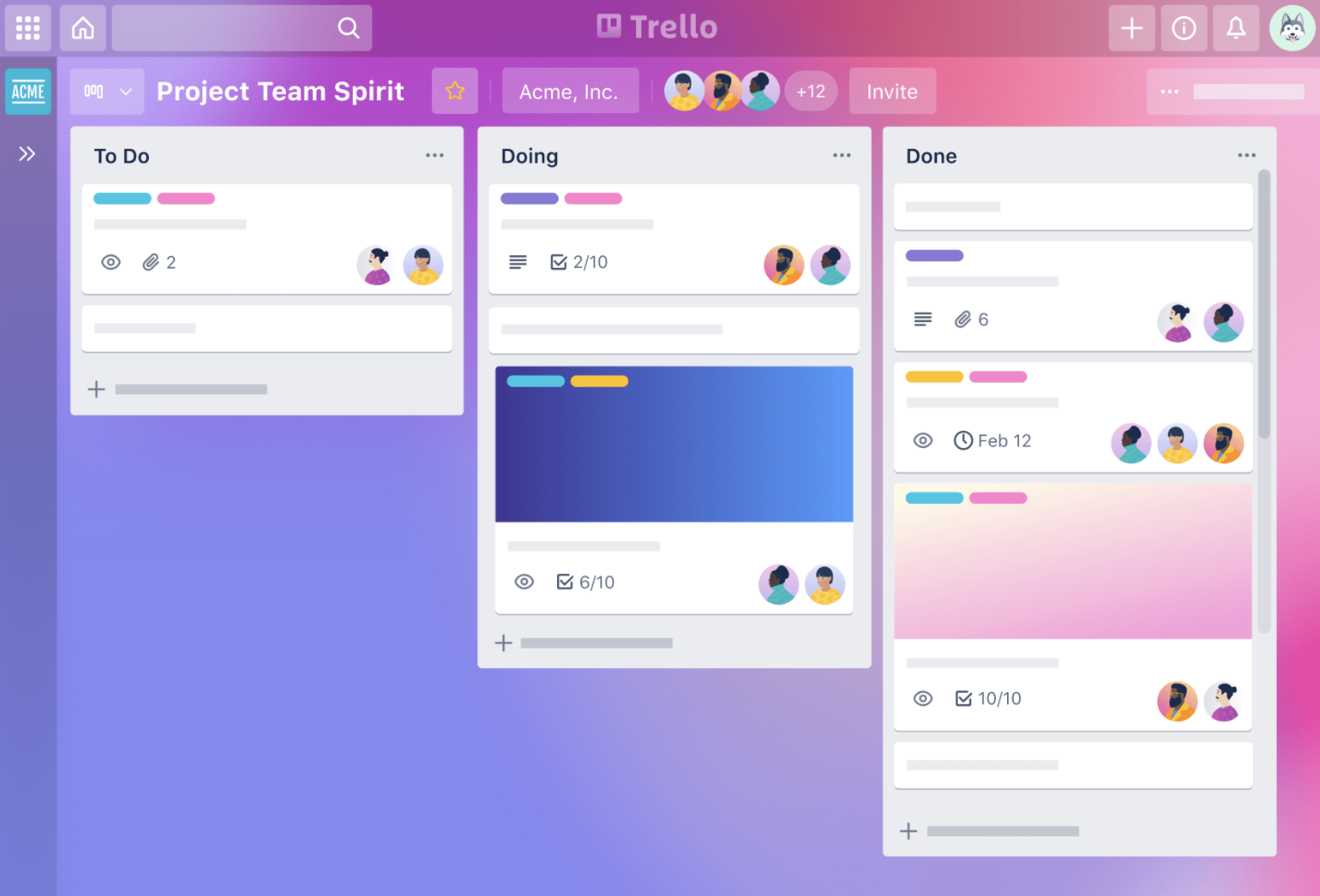
Trello is a collaboration and productivity tool for managing, tracking, and sharing work projects and tasks. The tool organizes your work into Kanban-style lists — that means your work is separated into categories for an easier workflow (such as to-do, work in progress, and complete).
Your team can communicate and tag each other on each project card, share and attach files, add due dates, move cards into different Kanban-style lists to track work, and archive cards once they’re complete.
4. Asana

Asana is a task and project management platform that allows both remote and distributed teams to organize and manage work. Teammates can collaborate on project lists, timelines, or boards, all of which have individual tasks and stages that you can customize, share, and archive. The tool’s messaging feature makes it easy to distribute, assign, and manage work.
Automate various project management tasks to save your team time and integrate your tool with one of 100+ apps that bring together all of your work to improve collaboration and coordination across your team.
5. Monday.com
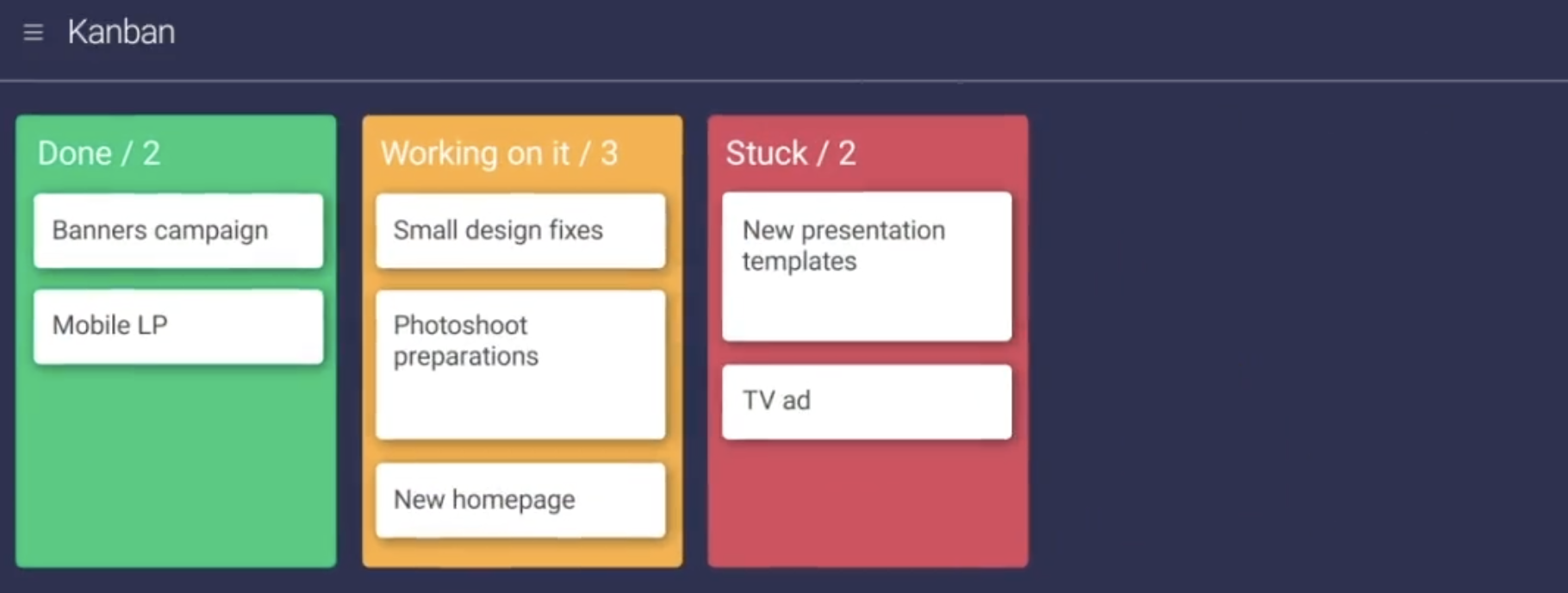
Monday.com is a work operating system and project management tool that allows you to create workflows for any project. There are over 200 templates workflows available that marketing can use, as well as other departments such as IT, sales, design, web development, operations, and HR and recruiting.
Your team can manage and collaborate on all aspects of a project from a single location. The 200+ templates mentioned above are completely customizable and allow all team members to visualize your project, and its different stages, in a way that’s preferable to your team (e.g. map, calendar, timeline, Kanban-style list).
You can also integrate Monday.com with your other tools and apps to access and manage all parts of your projects and campaigns without leaving the tool.
6. Teamwork
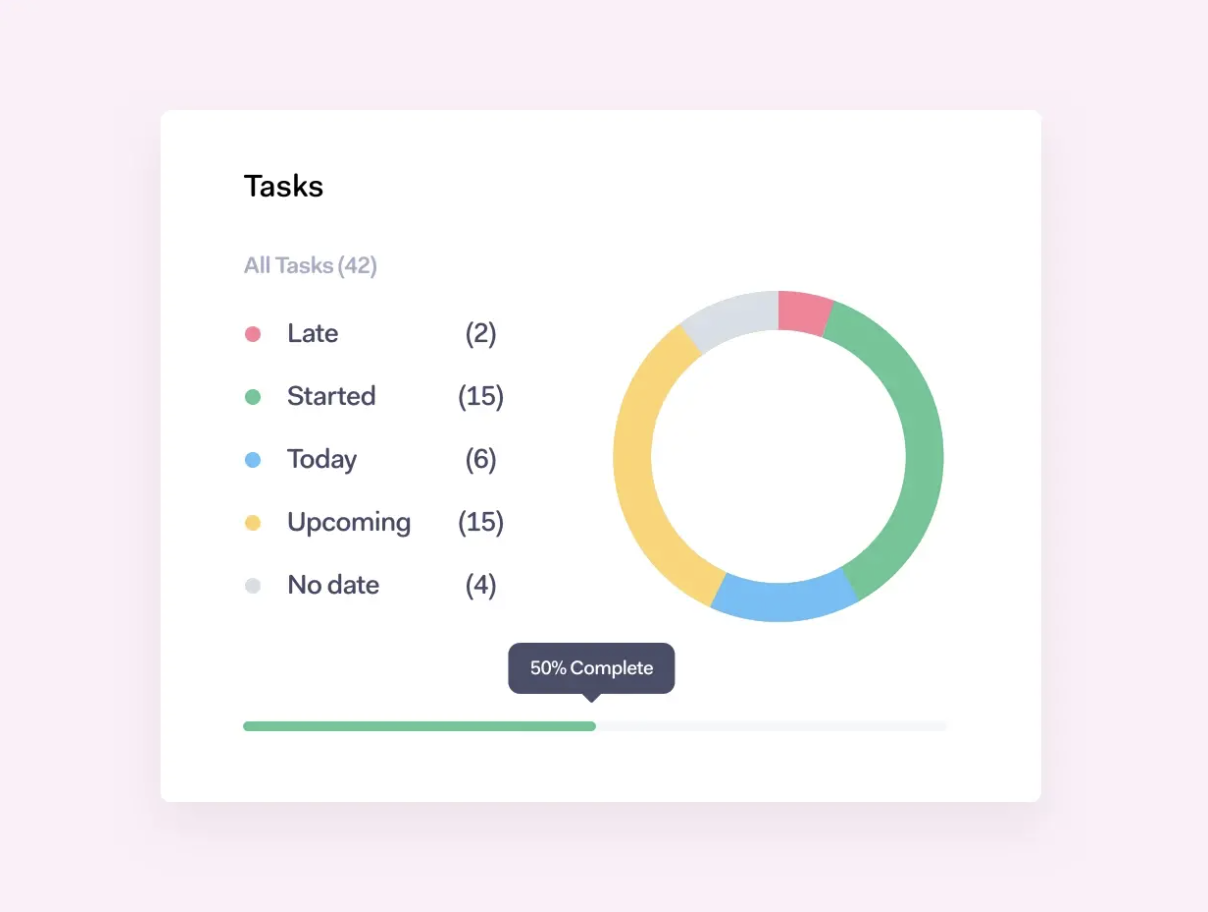
Teamwork is a collaborative project management software meant for managing and delivering client work on time and on budget. You can simultaneously manage multiple projects of varying complexity with Teamwork’s Board View, dashboards, and project health status updates.
Hold all team members accountable for their part of a project or campaign by assigning responsibilities and using time tracking to determine how long certain tasks are taking.
7. CoSchedule
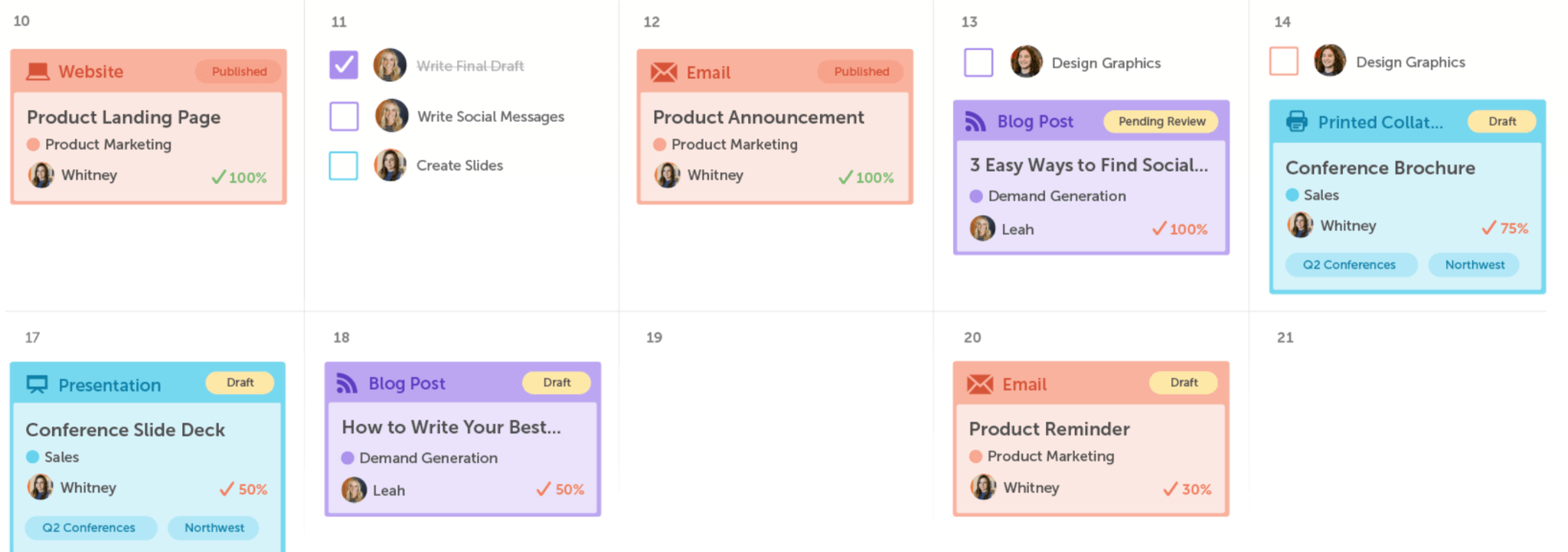
Rather than collaborating and handling your marketing via various spreadsheets, tools, calendars, and emails, CoSchedule’s actionable Marketing Calendar is where your team can see, schedule, and share all aspects of your marketing jobs and campaigns.
You can also share your calendar in a read-only format so higher-ups and other teams can view your project plans and trajectory without having to worry about someone accidentally making an edit.
8. Evernote Teams
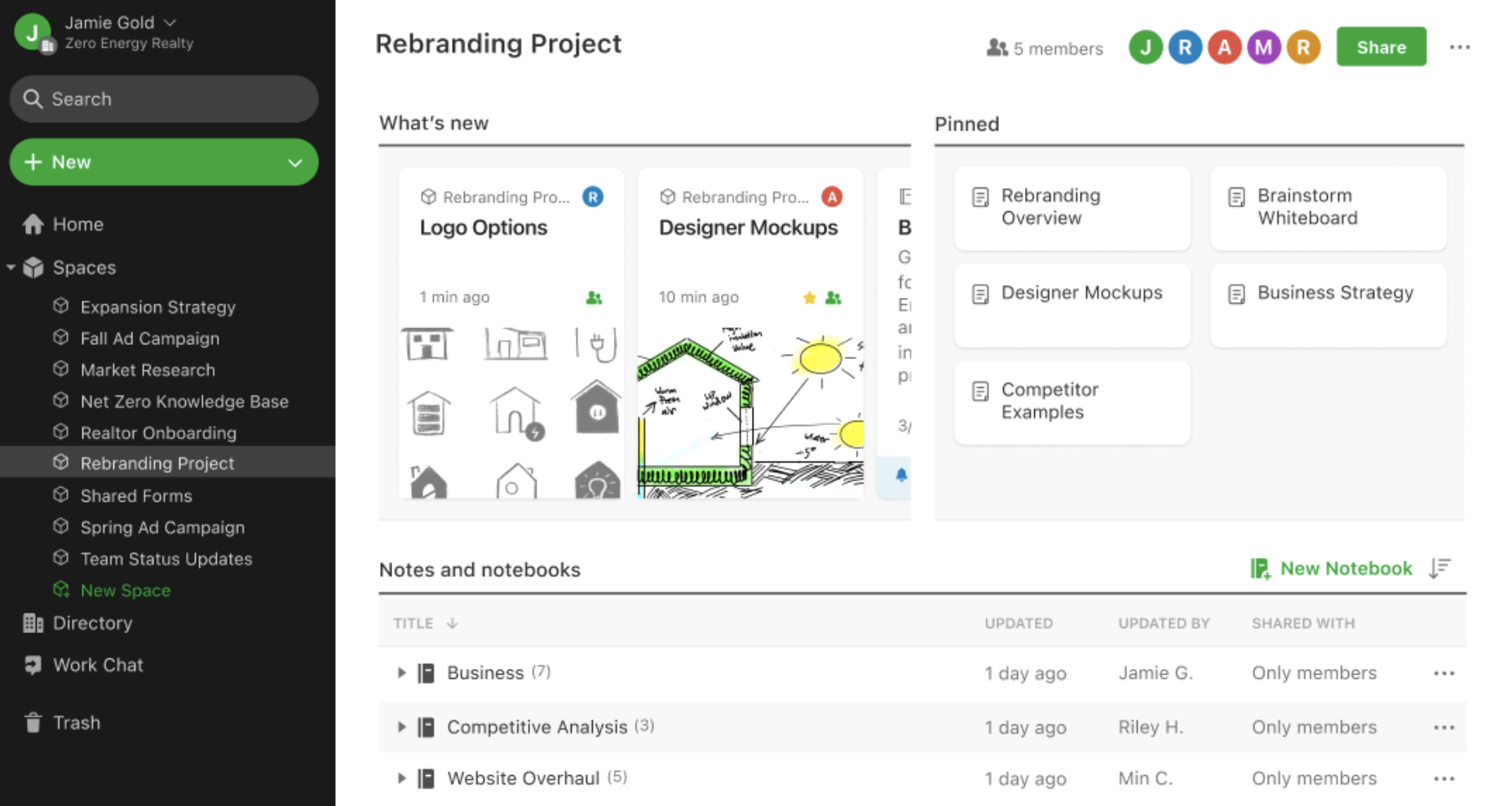
Evernote Teams is a collaborative note-taking app ideal for managing, arranging, and organizing your thoughts, ideas, to-do lists, and more. The tool makes it easy to collaborate, sync, and share knowledge, as well as ensure progress is being made on certain projects and tasks.
Evernote’s Spaces provide visibility into progress on team projects as well as relevant workflows and documents. You can make, leave, and search across Spaces for notes and notebooks that you created or other team members created.
9. Sharelov
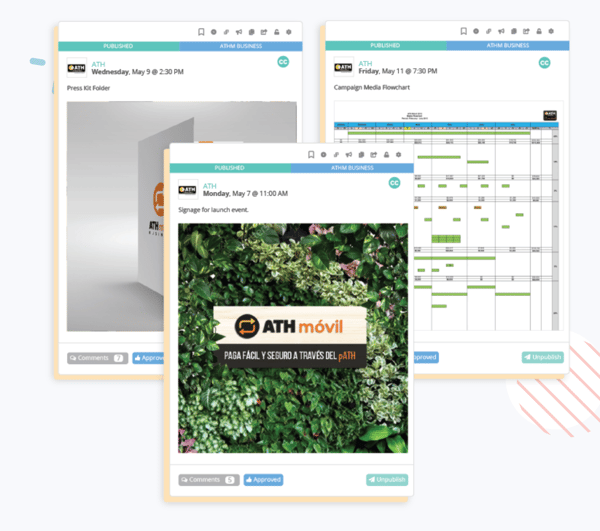 Sharelov is a cloud-based marketing collaboration platform for brands and agencies to manage their teams, campaigns, assets, projects, and work. No matter what you’re working on or what your creative assets include, Sharelov makes it easy to collaborate, share feedback, and approve assets, plans, and projects.
Use the tool to establish your teams, improve ease of collaboration within those teams, and track team and individual progress in real-time. Team members can provide feedback for each other for every creative — this simplifies the process of managing internal and client feedback and change requests across individual projects.
10. Acoustic
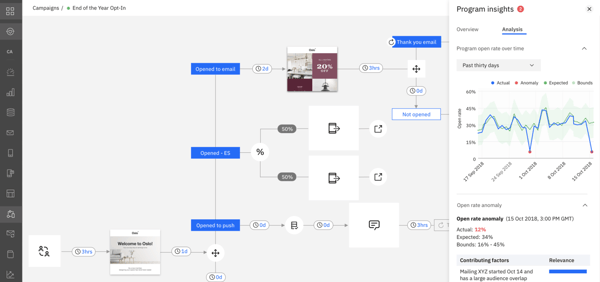
Acoustic is a digital marketing experience platform — the platform’s Marketing Cloud tool helps you better understand your customers and their behaviors at scale.
Acoustic allows your entire marketing team to manage and collaborate on campaigns, content, insights, and personalization, all via a single tool. There are AI-powered analytics and insights features to help you understand customer behaviors and experiences.
11. Zoom
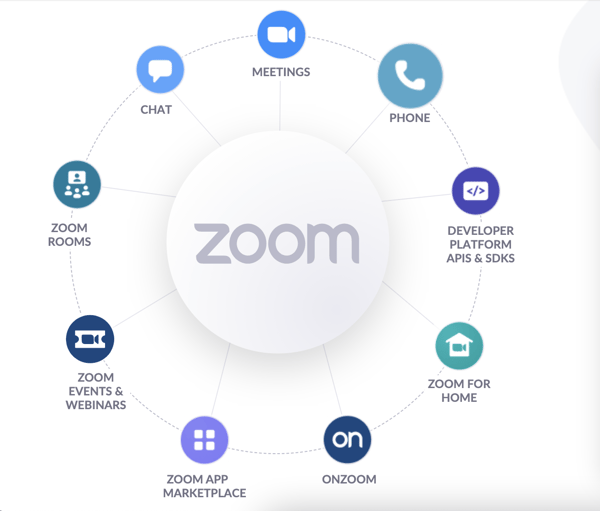
Zoom is a video conferencing, cloud phone, webinar, and online events software. It makes team collaboration and communication easy, no matter the industry or whether your team is in office, remote, or a mix of both.
Use one of Zoom’s many available integrations to connect the software with your other business tools (e.g. HubSpot, Google Workspace, Slack, etc.).
Host Zoom Webinars or Events depending on the level of collaboration and engagement you’re looking for. You can also follow up on a discussion topic, share links, or communicate with others in real-time using Zoom’s Chat feature.
12. Lucid Chart
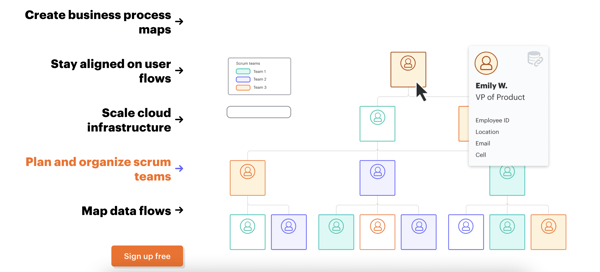
Lucid Chart is an intelligent diagramming software that makes it easy for teams to collaborate on the visualization of complex ideas related to your team’s processes, systems, and organizational structure.
Individuals and teams can map out progress around a certain task and determine what needs to be done next and what’s missing. Then your team can align on and apply all resulting insights using Lucid Chart’s common visual language, which streamlines collaboration.
You can also use Lucid Chart to create, manage, and collaborate on business process maps, user flows, cloud architecture diagrams, scrum teams, and data flows.
13. Canva
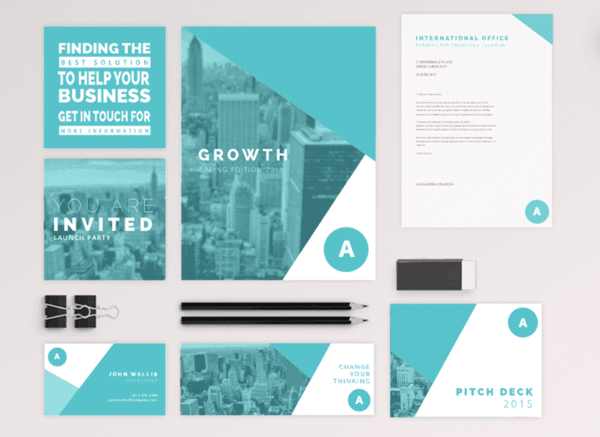
Canva is a graphic design and publishing tool that allows your team to collaboratively plan, design, create, publish, and share a variety of content types including logos, social media posts, documents, graphs and charts, prints, and more.
The tool makes it easy to invite team members to review and edit designs via shareable links, email, or Canva folders. Canva also ensures your team has everything they need to use brand-ready and team-approved assets — there’s a Brand Kit feature where your team can establish and save templates, fonts, colors, images, logos, and more.
14. Click Up
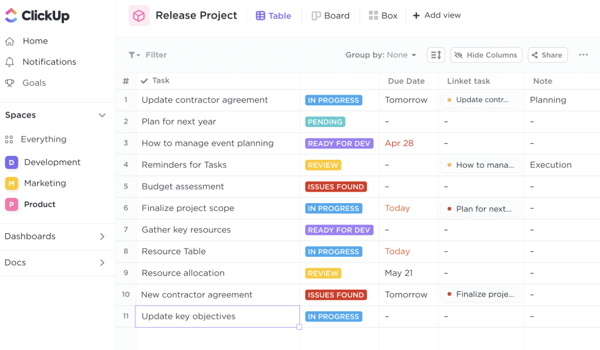
Click Up is a cloud-based collaboration and project management tool that aims to bring all of your team’s work — docs, chat, goals, insights, and tasks — together in one place.
Within Click Up, your team can establish, refer to, collaborate on, and customize all aspects of every project including to-do lists, wikis and documents, emails, spreadsheets, events, reminders, goals, time-tracking, screenshots, recordings, resource management, and more.
Then, organize these project elements into one of 15 different views (e.g. list, box, mind map, Gantt) based on your team’s needs and preferences.
15. Funnel.io
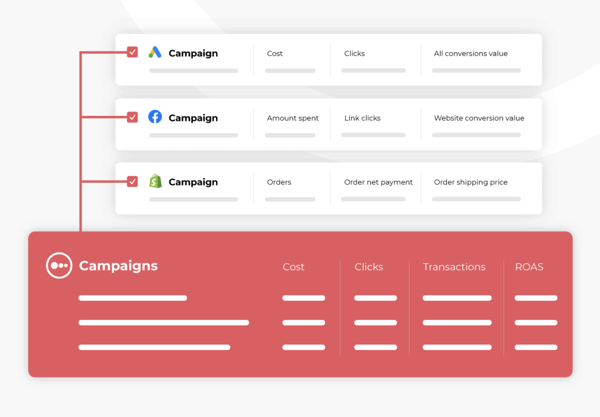
Funnel.io is a data mapping and collection tool — it transforms collected data into automated marketing reports for your team to analyze, share, and build off of.
Once you connect all of your data sources — a process that Funnel.io makes easy with its over 500 marketing app integrations — it will be cleaned, organized, and mapped for you.
Then, decide where you want your finalized data and reports to go — whether in Google Data Studio, a data warehouse of your choosing, Google Sheets, etc. There, your entire team can identify insights and collaborate on how you’ll apply the information.
16. Domo
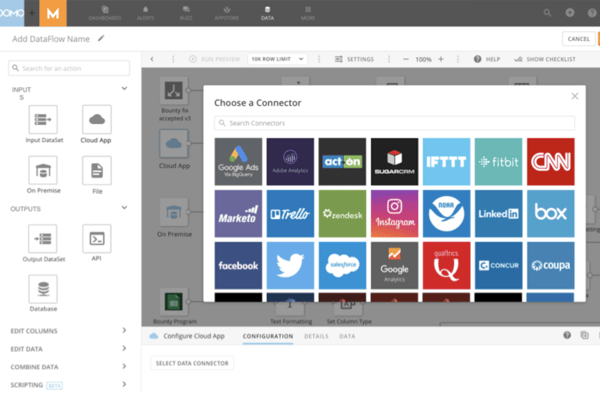
Domo for Marketing combines your marketing team’s data with data from sales, finance, and other departments within your company so you’re able to increase transparency, improve collaboration, and maximize ROI across the company.
Data visualizations and predictive analytics and alerts help marketers identify and pull out the most important insights from the data.
Set alerts for data that deviates and/or hits your goals to accurately track progress. Your team can then create real-time visualizations of data (without any code), and access and collaborate on those insights via any device.
17. Dropbox
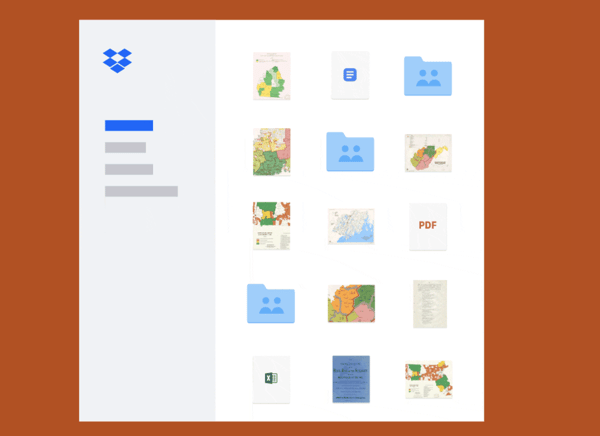
Dropbox is a file hosting software that centralizes your team’s content and tools. It gives your team secure access to all of your files via one location. Your marketing team can collaborate with each other in Dropbox by storing, organizing, sharing, referencing, and downloading files.
Use the tool to manage team tasks, track file updates, and remain in contact with team members and even clients on projects. You can also deliver completed projects to higher-ups, other teams, or clients — whether they’re large files or a collection of files — with passwords, expiration dates, and delivery confirmation.
18. Wrike
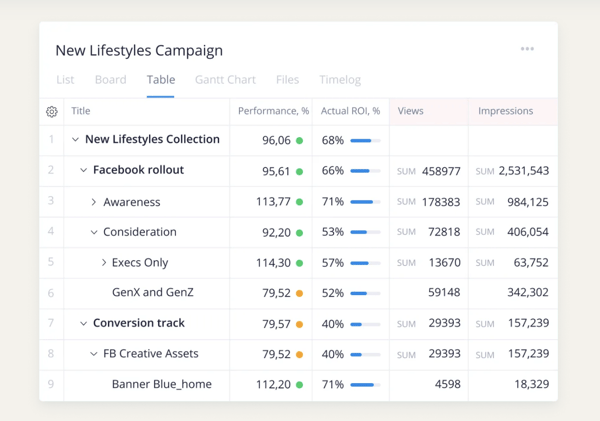
Wrike is a project management software with features meant for increasing transparency and improving team-wide as well as cross-departmental collaboration. It allows you tocollaborate on work in real-time — no more communication across various channels such as email, meetings, and instant messages.
No matter the project, your team can use Wrike to make comments, edit work, set notifications, and build reports, and share insights with each other — all in real-time. You can also view your individual tasks, the responsibilities of other team members, as well as the status of specific projects to track progress.
19. Google Drive
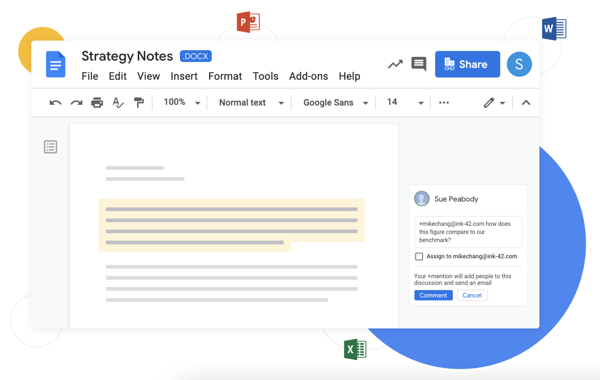
Google Drive is secure, cloud-based storage software that allows you to store, share, and access files and folders — from Google Docs, Sheets, Slides, and more — via your mobile device, tablet, and computer.
Once you upload your content or files to Google Drive, you can create a shared folder for them to live in — this way, your team can access and collaborate on anything in the folder.
Edit and add comments to any of the files in the shared folder in real-time — if your team members aren’t already in the Doc, Slides, or Sheet, they’ll still receive an email notification about your edits or comments. You can also review the edit history on any of your files. And it’s alright if your files aren’t Google files — that’s because the platform supports over 100 file types including Microsoft Office.
20. Brightpod for Marketing
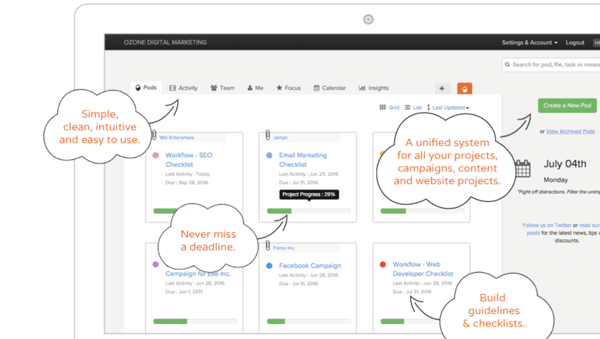
Brightpod is a tool that simplifies marketing collaboration and planning — it’s a project management and time tracking software meant for digital marketing and creative teams.
The tool provides clarity around your team’s projects, campaigns, tasks, workflows, and deadlines. Individual teams can collaborate with each other as well as reference and communicate about other projects that are going on across the team via a single dashboard.
All projects that are listed on your dashboard have milestones and tasks so everyone on the team knows what’s expected of them what progress on each task looks like.
Grow Better With Marketing Collaboration Software
Marketing collaboration software can help your team easily communicate, manage projects, prioritize tasks, organize content, and more. Start using one of these tools to increase team-wide productivity and teamwork.
Editor’s note: This post was originally published in September 2014 and has been updated for comprehensiveness.

20 Marketing Collaboration Tools to Improve Productivity and Teamwork
As your business scales, your marketing team will grow and evolve too.
While this growth is happening, it’s important to maintain reliable avenues for collaboration and communication on your marketing team. Otherwise, your business won’t be able to perform at the highest level. The good news is that marketing collaboration software can help with this.
In this article, we’ll cover what marketing collaboration software is, why it’s important, and 20 of the best tools currently on the market.
Marketing Collaboration Software
Marketing collaboration software helps marketing teams maintain easy communication, manage projects and campaigns, prioritize tasks, establish schedules and editorial calendars, promote organization and productivity, and more.
Why is marketing collaboration software important?
No matter which industry your business is in, what size your team is, whether you’re in-office, remote, or a mix of both, marketing collaboration can help your team improve in a number of areas — all of which impact your bottom line. Some examples include improved and streamlined…
- Communication
- Teamwork
- Productivity
- Organization
- Efficiency
- Task management
- Scheduling
- Data sharing
- Transparency
- Content creation
Marketing Collaboration Features
Here are some common features found across many marketing collaboration tools today.
- Group communication
- Shared files, documents, calendars, notes, and other assets
- Task management and time/ progress tracking
- Document management
- Campaign management
- Editorial calendar
- Content creation capabilities
- Content, file, and data organization
- Integrations (to connect the marketing collaboration software to your other marketing and business tools)
- Audio and video conferencing
- Marketing automation
- Reporting and analytics
Marketing Collaboration Software
Here are 20 of the best marketing collaboration software available today.
1. HubSpot Marketing Hub
HubSpot Marketing Hub is a marketing automation platform that allows you to attract your target audience, convert website visitors, and run inbound marketing campaigns at scale. Marketing teams can seamlessly collaborate to plan and execute large-scale, omnichannel marketing campaigns.
Marketing Hub also allows for frictionless collaboration with other teams — such as sales — in order to offer delightful customer experiences. This is known as CRM-powered Marketing — HubSpot makes it possible by pairing marketing automation tools with an all-in-one CRM platform.
2. Slack
Slack is a platform that allows for easy communication and collaboration on any scale. Slack Channels serve as central communication areas where you and your team can chat with one another and share relevant information, files, tools, and more.
Send messages via chat, host video calls, or speak with your team via voice call all without leaving the tool. There are also over 2,200 integrations and apps, such as Google Drive and Office 365, to help your team streamline workflows.
Additionally, the Slack Connect feature makes it possible to communicate and collaborate with teams at other companies the way you do with your own.
3. Trello
Trello is a collaboration and productivity tool for managing, tracking, and sharing work projects and tasks. The tool organizes your work into Kanban-style lists — that means your work is separated into categories for an easier workflow (such as to-do, work in progress, and complete).
Your team can communicate and tag each other on each project card, share and attach files, add due dates, move cards into different Kanban-style lists to track work, and archive cards once they’re complete.
4. Asana
Asana is a task and project management platform that allows both remote and distributed teams to organize and manage work. Teammates can collaborate on project lists, timelines, or boards, all of which have individual tasks and stages that you can customize, share, and archive. The tool’s messaging feature makes it easy to distribute, assign, and manage work.
Automate various project management tasks to save your team time and integrate your tool with one of 100+ apps that bring together all of your work to improve collaboration and coordination across your team.
5. Monday.com
Monday.com is a work operating system and project management tool that allows you to create workflows for any project. There are over 200 templates workflows available that marketing can use, as well as other departments such as IT, sales, design, web development, operations, and HR and recruiting.
Your team can manage and collaborate on all aspects of a project from a single location. The 200+ templates mentioned above are completely customizable and allow all team members to visualize your project, and its different stages, in a way that’s preferable to your team (e.g. map, calendar, timeline, Kanban-style list).
You can also integrate Monday.com with your other tools and apps to access and manage all parts of your projects and campaigns without leaving the tool.
6. Teamwork
Teamwork is a collaborative project management software meant for managing and delivering client work on time and on budget. You can simultaneously manage multiple projects of varying complexity with Teamwork’s Board View, dashboards, and project health status updates.
Hold all team members accountable for their part of a project or campaign by assigning responsibilities and using time tracking to determine how long certain tasks are taking.
7. CoSchedule
Rather than collaborating and handling your marketing via various spreadsheets, tools, calendars, and emails, CoSchedule’s actionable Marketing Calendar is where your team can see, schedule, and share all aspects of your marketing jobs and campaigns.
You can also share your calendar in a read-only format so higher-ups and other teams can view your project plans and trajectory without having to worry about someone accidentally making an edit.
8. Evernote Teams
Evernote Teams is a collaborative note-taking app ideal for managing, arranging, and organizing your thoughts, ideas, to-do lists, and more. The tool makes it easy to collaborate, sync, and share knowledge, as well as ensure progress is being made on certain projects and tasks.
Evernote’s Spaces provide visibility into progress on team projects as well as relevant workflows and documents. You can make, leave, and search across Spaces for notes and notebooks that you created or other team members created.
9. Sharelov
Sharelov is a cloud-based marketing collaboration platform for brands and agencies to manage their teams, campaigns, assets, projects, and work. No matter what you’re working on or what your creative assets include, Sharelov makes it easy to collaborate, share feedback, and approve assets, plans, and projects.
Use the tool to establish your teams, improve ease of collaboration within those teams, and track team and individual progress in real-time. Team members can provide feedback for each other for every creative — this simplifies the process of managing internal and client feedback and change requests across individual projects.
10. Acoustic
Acoustic is a digital marketing experience platform — the platform’s Marketing Cloud tool helps you better understand your customers and their behaviors at scale.
Acoustic allows your entire marketing team to manage and collaborate on campaigns, content, insights, and personalization, all via a single tool. There are AI-powered analytics and insights features to help you understand customer behaviors and experiences.
11. Zoom
Zoom is a video conferencing, cloud phone, webinar, and online events software. It makes team collaboration and communication easy, no matter the industry or whether your team is in office, remote, or a mix of both.
Use one of Zoom’s many available integrations to connect the software with your other business tools (e.g. HubSpot, Google Workspace, Slack, etc.).
Host Zoom Webinars or Events depending on the level of collaboration and engagement you’re looking for. You can also follow up on a discussion topic, share links, or communicate with others in real-time using Zoom’s Chat feature.
12. Lucid Chart
Lucid Chart is an intelligent diagramming software that makes it easy for teams to collaborate on the visualization of complex ideas related to your team’s processes, systems, and organizational structure.
Individuals and teams can map out progress around a certain task and determine what needs to be done next and what’s missing. Then your team can align on and apply all resulting insights using Lucid Chart’s common visual language, which streamlines collaboration.
You can also use Lucid Chart to create, manage, and collaborate on business process maps, user flows, cloud architecture diagrams, scrum teams, and data flows.
13. Canva
Canva is a graphic design and publishing tool that allows your team to collaboratively plan, design, create, publish, and share a variety of content types including logos, social media posts, documents, graphs and charts, prints, and more.
The tool makes it easy to invite team members to review and edit designs via shareable links, email, or Canva folders. Canva also ensures your team has everything they need to use brand-ready and team-approved assets — there’s a Brand Kit feature where your team can establish and save templates, fonts, colors, images, logos, and more.
14. Click Up
Click Up is a cloud-based collaboration and project management tool that aims to bring all of your team’s work — docs, chat, goals, insights, and tasks — together in one place.
Within Click Up, your team can establish, refer to, collaborate on, and customize all aspects of every project including to-do lists, wikis and documents, emails, spreadsheets, events, reminders, goals, time-tracking, screenshots, recordings, resource management, and more.
Then, organize these project elements into one of 15 different views (e.g. list, box, mind map, Gantt) based on your team’s needs and preferences.
15. Funnel.io
Funnel.io is a data mapping and collection tool — it transforms collected data into automated marketing reports for your team to analyze, share, and build off of.
Once you connect all of your data sources — a process that Funnel.io makes easy with its over 500 marketing app integrations — it will be cleaned, organized, and mapped for you.
Then, decide where you want your finalized data and reports to go — whether in Google Data Studio, a data warehouse of your choosing, Google Sheets, etc. There, your entire team can identify insights and collaborate on how you’ll apply the information.
16. Domo
Domo for Marketing combines your marketing team’s data with data from sales, finance, and other departments within your company so you’re able to increase transparency, improve collaboration, and maximize ROI across the company.
Data visualizations and predictive analytics and alerts help marketers identify and pull out the most important insights from the data.
Set alerts for data that deviates and/or hits your goals to accurately track progress. Your team can then create real-time visualizations of data (without any code), and access and collaborate on those insights via any device.
17. Dropbox
Dropbox is a file hosting software that centralizes your team’s content and tools. It gives your team secure access to all of your files via one location. Your marketing team can collaborate with each other in Dropbox by storing, organizing, sharing, referencing, and downloading files.
Use the tool to manage team tasks, track file updates, and remain in contact with team members and even clients on projects. You can also deliver completed projects to higher-ups, other teams, or clients — whether they’re large files or a collection of files — with passwords, expiration dates, and delivery confirmation.
18. Wrike
Wrike is a project management software with features meant for increasing transparency and improving team-wide as well as cross-departmental collaboration. It allows you tocollaborate on work in real-time — no more communication across various channels such as email, meetings, and instant messages.
No matter the project, your team can use Wrike to make comments, edit work, set notifications, and build reports, and share insights with each other — all in real-time. You can also view your individual tasks, the responsibilities of other team members, as well as the status of specific projects to track progress.
19. Google Drive
Google Drive is secure, cloud-based storage software that allows you to store, share, and access files and folders — from Google Docs, Sheets, Slides, and more — via your mobile device, tablet, and computer.
Once you upload your content or files to Google Drive, you can create a shared folder for them to live in — this way, your team can access and collaborate on anything in the folder.
Edit and add comments to any of the files in the shared folder in real-time — if your team members aren’t already in the Doc, Slides, or Sheet, they’ll still receive an email notification about your edits or comments. You can also review the edit history on any of your files. And it’s alright if your files aren’t Google files — that’s because the platform supports over 100 file types including Microsoft Office.
20. Brightpod for Marketing
Brightpod is a tool that simplifies marketing collaboration and planning — it’s a project management and time tracking software meant for digital marketing and creative teams.
The tool provides clarity around your team’s projects, campaigns, tasks, workflows, and deadlines. Individual teams can collaborate with each other as well as reference and communicate about other projects that are going on across the team via a single dashboard.
All projects that are listed on your dashboard have milestones and tasks so everyone on the team knows what’s expected of them what progress on each task looks like.
Grow Better With Marketing Collaboration Software
Marketing collaboration software can help your team easily communicate, manage projects, prioritize tasks, organize content, and more. Start using one of these tools to increase team-wide productivity and teamwork.
Editor’s note: This post was originally published in September 2014 and has been updated for comprehensiveness.
38 Account-Based Marketing Stats to Know in 2021
As marketers, we become experts in our target audiences. We know their typical demographic, what they like, the platforms they spend time on, and what they value in a product.
But unlike sales reps — who talk to and learn from their biggest prospects each day — we don’t always know tiny, but crucial, details about the brands or people we most want to sell to. So, how do we bridge the gap to better help our sales teams sell to high-priority clients? The answer to this question could be account-based marketing (or ABM).
While inbound marketing is vital for pulling general audiences and demographics to your site, service, or store, account-based marketing can help you to reel in prospects or qualified leads that are most likely to buy your product.
To show you just how beneficial account-based marketing can be, while also informing you of the challenges it comes with, here are 38 stats you should know in 2021.

37 Account-Based Marketing Stats to Know in 2021
General ABM Stats
- In 2021, 70% of marketers report using ABM, up 15% from 2020.
- 67% of brands leverage account-based marketing.
- “Researching Accounts” and “Identifying Target Contacts” are the top two tactics used by marketers within an ABM model.
- In 2019, the top five account-based tactics were sales development rep outreach, digital advertising, direct mail, marketing email, and events.
- Additionally, marketers strongly agree that personalized content (56%) and advanced data management (43%) are keys to ABM’s success.
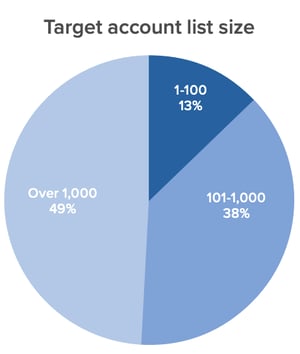
- 57% of professionals say their companies target 1,000 accounts or under with ABM.
- 90% of companies say the top goal of their ABM efforts is new business generation.
- Most organizations intentionally only pursue 38% of their target accounts at one time.
- By 2019, 55% of marketers rated their ABM strategy as “established” compared to just 43% in 2018.
- Primary tactics companies are using around ABM include identifying target contacts, creating custom content, researching accounts, and measuring results.
- Companies dedicated 29% of their marketing budgets to ABM in 2019.
- It’s estimated that ABM budgets saw an average increase of 41% in 2019.
- The most common metric marketers use to track ABM is revenue won.

- Two other metrics marketers most commonly track to measure ABM efforts are the number of pipelines created and account engagement.
- In 2019, 7% of marketers reported a decrease in dedicated headcount for ABM teams, showing that this strategy is going mainstream and being implemented within regular processes.
- In 2019, 40% of the average marketing team was dedicated to ABM.
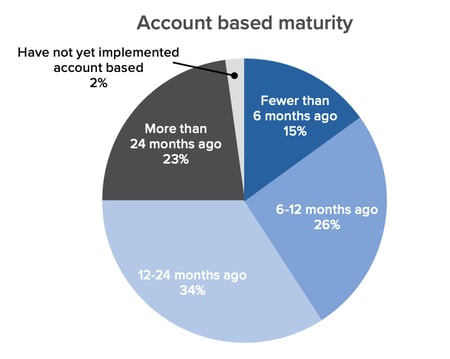
- 43% of companies implementing an ABM strategy are in the early stages.
- 57% of marketers say their organizations have implemented ABM for more than one year.
Benefits and Challenges of ABM
- Marketing and sales teams that take an ABM approach together can be up to six percent more likely to exceed their revenue goals than teams less ABM-advanced.
- According to Rollworks, 87% of marketers say ABM outperforms other marketing activities.
- 62% of marketers say they can measure a positive impact since adopting ABM.
- 80% of marketers say ABM improves customer lifetime values, while 86% say it improves win rates.
- One in five accounts targeted through ABM becomes considered a qualified sales opportunity.
- Organizations with a strong Ideal Customer Profile (ICP) — which is similar to a buyer persona — achieve 68% higher account win rates.
- More than two-thirds (69%) of top-performing account-based organizations now have a dedicated account-based marketing leader.
- 70% of companies that started account-based initiatives in the first six months of 2019 have dedicated ABM leaders.
- Companies with mature ABM strategies credit 79% of opportunities and 73% of total revenue to ABM efforts.
- 42% of companies that missed their account-based objectives don’t have dedicated leadership.
- The most common challenge with ABM is delivering a personalized experience.
- The top three challenges of implementing ABM are delivering a personalized customer experience, knowing how to choose target accounts, and knowing what content to use.

ABM Technology
- By 2021, over half of all sales phone calls will be analyzed by software.
- The conversational intelligence market was estimated to grow by 3x in 2019.
- Voice assistants will account for at least half of automated data entry by mid-2020.
- An estimated 55% of sales data entry was eliminated by automation by 2020.
Smarketing Benefits and Challenges
- The most common measurement of success for content marketing programs is Total Sales.
- 85% of marketers with an SLA think their marketing strategy is effective.
- Only 7% of salespeople said the leads they received from marketing were very high quality.
- Only 28% of salespeople said marketing was their best source of leads.
Create an Effective ABM Strategy
As a marketer, it’s important to know what makes ABM techniques successful and how they differ from other target audience marketing tactics.
Additionally, you’ll want to learn about the companies you’re interested in marketing to, similar to how you learn about a target audience. For example, before creating an ABM campaign, you’ll want to learn about the pain points of companies in your industry, company missions, and what their top decision-makers value in a product or service.
Once you discover valuable data about the accounts you’d like to market to and feel ready to create a campaign, check out our account strategy templates below.
Editor’s note: This post was originally published in May 2020 and has been updated for comprehensiveness.

The Top Business Podcasts You Need to Be Listening To
Love learning about business and how some of today’s most successful entrepreneurs and companies are operating? Business podcasts serve as a great way to stay informed (and inspired) on the happenings.
All you need is your smartphone and a pair of headphones to tune in to everything from one-on-one interviews with today’s top leaders to recaps of the day’s most pressing business news.
So whether you’re a seasoned executive looking for something to listen to during your commute or just someone who’s always itching to learn something new, this list of the best business podcasts is for you. From Kai Ryssdals’ Marketplace to Tim Ferriss’ self-titled collection of wisdom, the following seven business podcasts will teach how to strategize, lead, and grow your business.

12 Best Business Podcasts
1. iDigress Podcast
Troy Sandidge, host of iDigress Podcast, has a track record of generating over $100M for various business ventures. He’ll use his experience to expertly guide you through the world of marketing, moving you away from confusion and towards the techniques and tools that will help you forge a path to business success. iDigress is a great fit for all marketers seeking across the board advice, from how to identify a business direction to finding clarity in your messaging.
Episodes are 30 minutes or less, making it a great snackable podcast for on-the-go listening.
2. Radical Candor
Radical Candor is all about how to succeed at work without sacrificing your humanity and happiness. Amy Sandler hosts discussions about why it’s important to have honest communication when working (with yourself, management, and coworkers), and how honesty will help you build relationships that will lift you up and help you succeed.
Topics discussed on the podcast include how to have candid conversations at work, how managers and business leaders can create a culture of guidance and feedback, and how to stand up for yourself in the workplace.
3. Duct Tape Marketing Podcast
Duct Tape Marketing Podcast features interviews with expert authors and thought leaders who share actionable business marketing tips and resources. As a listener, you’ll learn about various topics like how to maintain happiness at work and best-practices for retaining customers. Fast Company named this podcast “One of the Best Podcasts for Business-Savvy Listeners.”
4. The Goal Digger Podcast
Jenna Kutcher, host of The Goal Digger Podcast, is an experienced educator and digital marketer. Described as a live workshop, the show helps businesspeople learn first-hand about how to define their own personal success and chase after their dreams.
Topics covered include productivity hacks, creating business pitches, improving your website’s SEO, social media tips, and how to build the job of your dreams. Kutcher is often joined by notable guests and industry experts, like entrepreneur Lori Harder.
5. CodePen Radio
CodePen is an online tool for web developers to test HTML, CSS, and JavaScript code snippets. Hosted by CodePen employees, CodePen Radio contains personal stories about successes and failures they’ve come across when scaling their company. It’s great for professionals in the software industry, as you’ll gain valuable insight into everything involved in starting and maintaining a web software business.
6. Choose Inclusion
Three hosts, Mike Hess, Nina Baliga, and UB Ciminieri, have authentic and honest conversations about the different ways diversity, equity, and inclusion impact businesses. It’s a great listen for all professionals as they discuss everything from developing a DEI program at your own business to being an active participant in workplace events.
7. The MarTech Podcast
The MarTech Podcast, hosted by Benjamin Shapiro, shares the stories of marketers and the different ways they use technology to achieve growth and business success. Each episode features a different business leader and marketing professional, making it suitable for listeners in all industries. All guests provide insight into MarTech best practices through real-life experiences and recommend tools and tips for success.
8. Brown Ambition
Brown Ambition Podcast features financial advice from two professional finance reporters, Mandi Woodruff-Santos and Tiffany Aliche. Listeners can leverage the host’s experience and learn how to make smart career choices that contribute to financial success personally and in business.
The hosts also tackle issues commonly faced by communities of color, acting as a resource for groups often left out of financial wellness conversations. They also have entire Q&A episodes dedicated to answering listener questions, helpful for those with a unique situation they want advice about.
9. Happiness At Work
Happiness At Work is an interview-based podcast featuring authors, entrepreneurs, coaches, and leading industry experts that discuss, well, happiness at work.
It is great for business professionals looking to create a better work-life balance or those simply looking to maintain their happiness levels on the job. As a listener, you’ll learn actionable tips for creating a positive and uplifting workplace culture and the benefits it brings to the workplace. The best summary of the show comes from the creators themselves — “We believe that happiness at work should be the ‘norm’ and not the exception.”
10. Inclusion Works
Inclusion Works focuses on discussing the importance of creating a workplace culture that is inclusive to all communities. Hosts speak to seasoned DEI business professionals, like Jiquanda Nelson and Margot Slattery, who provide actionable advice on DEI strategies that work and help businesses thrive.
11. HBR IdeaCast
HBR IdeaCast is a weekly podcast that features notable leaders in business and business management. Rotating hosts give listeners a different experience, and topics range from workplace innovation and productivity to creating a better work-life balance to managing employees. Running between 20 and 30 minutes, episodes are snackable and easy to consume on-the-go, or during work breaks where you’re looking to decompress.
12. TED Business
TED Business is a great podcast for high-quality snackable business content. Host Modupe Akinola talks listeners through getting a promotion, setting realistic goals, and forming positive workplace relationships. You’ll leave with actionable tips for forging your path, as, at the end of every show, Akinola gives a mini-lesson on how to apply the tips discussed within the episode.
Ready to Listen?
Select the show that best fits your needs, and start listening from wherever you are, whenever you want.


How Advertisers are Navigating iOS 14’s Mobile Tracking Changes
It’s been several months since Apple’s iOS 14 update went into effect and the dust has begun to settle. One of the main questions has been, “How are advertisers handling the mobile tracking changes?”
Earlier this year, we talked about how this change could impact advertisers, but now, we want to follow up. Have any new strategies evolved? What have advertisers been doing to reach their target audiences?
In this post, we’ll discuss how advertisers have navigated the iOS 14 mobile tracking changes and give you a few tips on how to have continued success with social media and online advertising.

Wait, what happened with the iOS 14 update?
To summarize, at the beginning of 2021 Apple released a new update that would impact the way that advertisers reach their audience. With the iOS 14 update users needed to opt-in, or give permission, to an app to track their activity outside of the platform.
So, why were advertisers and marketers concerned? Well, a lot of ad campaigns target audiences based on their behavior online. If an app can’t track that information, ads will become less personalized, and in turn, could be less effective.
The concern for marketers was that they wouldn’t be able to deliver their ads to people based on certain activities, like if they’d visited their website, for example. This meant that ads would likely have smaller audience sizes and less accurate reporting.
Additionally, with this update advertisers are only allowed to use up to eight conversion events from a single website domain. This means if you run a campaign and track several different conversion types (like Lead, Landing Page Views, Purchase) you’ll now be capped at eight at any given time.
Now, you might be wondering, “What have advertisers been doing?” Let’s discuss it below.
How Advertisers are Navigating the iOS 14 Mobile Tracking Changes
While the iOS 14 update has made advertisers jump through some more hoops in setting up their ad campaigns (getting domain verification and aggregated event management), the update ultimately hasn’t been the death of retargeting or Facebook ads.
Of course, there have been changes. So far, it looks like more than 90% of users are opting out of data tracking. This is more than industry experts were predicting.
So, what have advertisers been doing?
1. Diversifying ad spend.
The main story of how advertisers are navigating the latest iOS tracking update is diversifying ad spend.
This means companies have shifted some ad spend that was previously allocated to Facebook to other platforms like Google because of the remarketing features and the ability to target users based on search intent.
2. Reporting Facebook success with Google Analytics.
While some money is still being used to advertise on Facebook, there are different ways of reporting.
Companies have begun using UTM parameters on their site’s URLs to generate data tracked by Facebook to Google Analytics. This means you can use Google Analytics to track some of the activity on your Facebook ad campaigns.
3. Using owned data for lookalike audiences and retargeting.
Strategies such as using lookalike audiences or retargeting an email list have continued to drive results. With privacy updates becoming a norm for the big tech companies, marketers will need to begin focusing on owned data to inform their campaigns.
With your owned data (such as an email list), you can target lookalike audiences or retarget those very people.
Keep in mind, you can still use the old method of retargeting campaigns because not all of your audience is on iOS devices. You can still use the channel as a cost-effective way to see some return on ad spend (ROAS).
4. Using other Facebook advertising options.
Besides these new ways of approaching ad campaigns, some advertisers are investing in other ways to reach audiences on Facebook.
For example, you can use the messaging objective to create a lead-generating chatbot on Facebook Messenger. There are options to retarget users who reach out to you on messenger and start conversations with new leads who click on an ad of yours.
Additionally, Facebook has another strategy that advertisers have explored: the Facebook lead ads (in-app lead form).
While using your own landing pages is definitely the preferred method, in a cookieless world, using lead forms on Facebook can help you generate leads and capture first-party data.
The iOS 14 mobile tracking changes have made Facebook ads less effective, but there are still ways for advertisers to target their audience and generate leads on the platform.


How Google’s Head of Startups LATAM Helps Brands Globalize Their Business [+Tips for Marketers]
Nike. McDonald’s. Airbnb.
What do these three brands have in common?
All three have developed a strong global presence. It’s why you hear about the Whopper in Spain, or spot Nike Jordan’s on the streets of Indonesia.
Fortunately, global marketing isn’t just for big corporations anymore — nowadays, technology has significantly shrunken the ‘cost per entry’ when it comes to developing an international brand.
With social media and search engines closing the information gap between countries, I’m willing to bet some international consumers have already stumbled across your business’ website.
But the question remains: How can you properly market and sell to international audiences? And how can you ensure product-market fit with communities outside your own?
To investigate how startups and small businesses can scale their marketing efforts for a worldwide audience, I sat down with André Barrence, Head of Google for Startups LATAM.
Keep reading to learn Barrence’s tips for how startups can effectively sell to international audiences.
Let’s dive in.

4 Tips for Globalizing Your Marketing Strategy
1. Start with an understanding of your global user.
When developing a global brand, you want to start by identifying the most important factor: To whom are you marketing?
Your user(s) might vary in preferences or lifestyle from country to country, but their challenges — and how your product can meet those challenges — will remain consistent cross-globally.
In other words, how your product can help a user in the U.S. likely mirrors how your product can help a user in Europe or Asia.
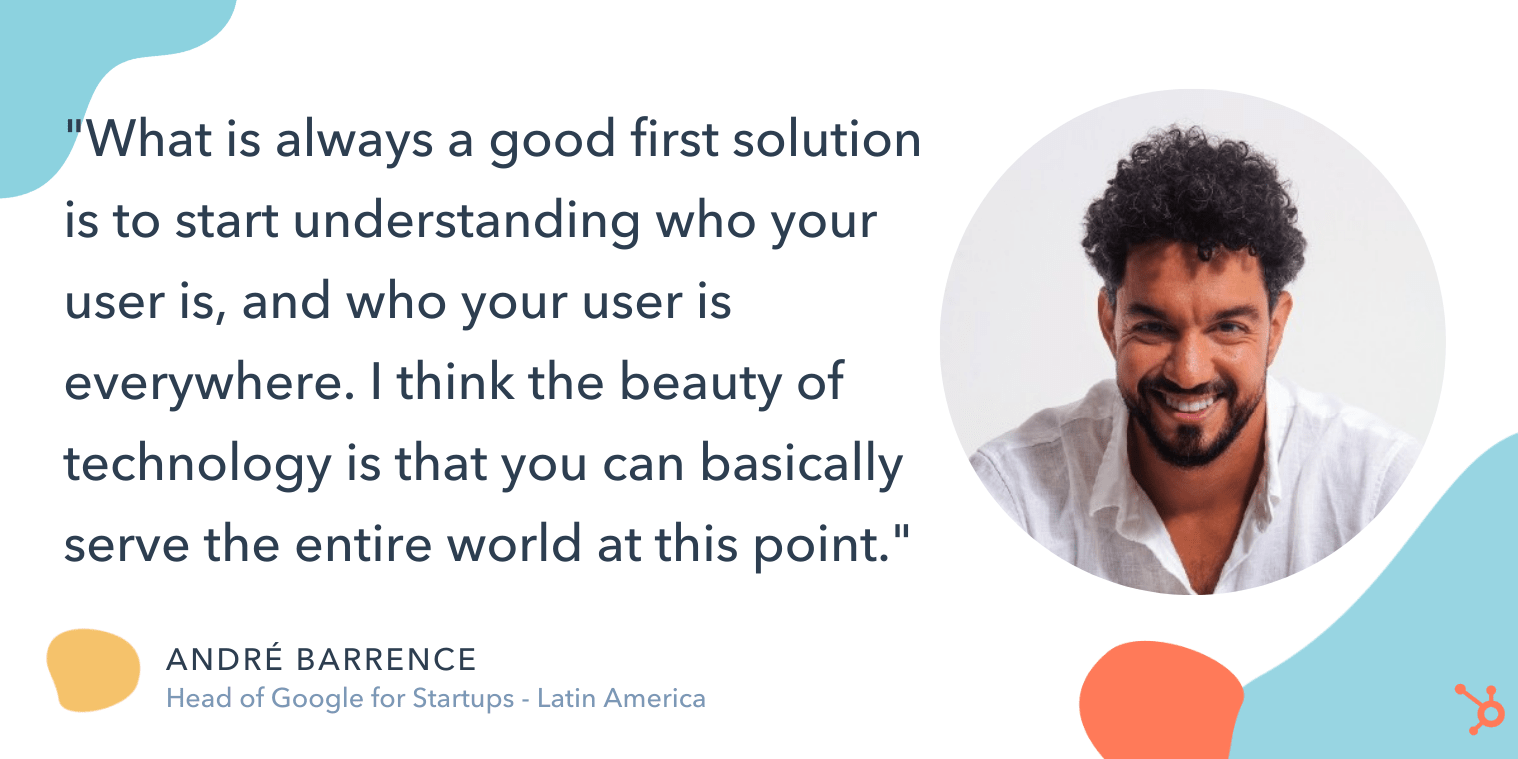
As Barrence points out, “What is always a good first solution is to start understanding who your user is, and who your user is everywhere, you know?”
Barrence adds, “I think that startups begin building a product with a specific user in-mind — and startups operate on this idea of serving on a match need, or serving some particular challenge that hasn’t been sold yet. And I think the beauty of technology is that you can basically serve the entire world at this point.”
At this stage, using highly effective analytics tools is key to ensuring you understand your global target persona.
Additionally, you’ll want to use data to determine which region(s) seem most interested in your products or services. This information will help you select a few countries for which you want to create a targeted, localized marketing strategy.
2. Figure out which stories appeal to different audiences globally.
While your product might serve the same needs across the globe, the stories you tell to highlight your product’s key benefits will vary significantly.
As Barrence puts it, “Once you’ve formed a hypothesis on who your user is and why they’re searching for your product, you’ll want to build a marketing strategy that is locally relevant, because the worst experience is when you’re trying to solve for a local need of yours, and for something you’re facing in your own country — but the product that you’re searching for is built for a different experience entirely.”
This is where it’s vital to build credibility in local regions.
Credibility, Barrence adds, is a critical component that is oftentimes forgotten in the hustle of scaling a startup. Startups are often driven by performance — such as traffic, or user acquisition — and building a brand is usually an afterthought.
This is a mistake, particularly when globalizing your business.
“Startups are great at a performance mindset,” Barrence says, “but each time you’re attempting to reach new markets, you want to make sure you’re building a brand, as well.”
Barrence adds, “Once you test a few ways to position your brand in a local market, you’ll want to start developing a more robust strategy for acquiring those users or creating stronger relationships with them.”
3. Pay attention to local flavors when taking your product to the market.
There are a few key factors Barrence encourages every startup to take into consideration before expanding into new, international markets.
First, it’s critical your marketing team understands how to position your product in a new regional space.
As Barrence told me, “It’s very hard for a startup to easily take a position in the [Latin American] market, for instance, because startups in LATAM already understand the user, and they know how to communicate with them and position themselves in the market … So ignoring the local flavors in how you take your product to the market is a big mistake.”

While he acknowledges this doesn’t have to be perfect, Barrence does tell me the bare minimum requirements when marketing to new international audiences includes:
- Designing a localized version of your product — including language, user interface, and experience.
- Translating your materials into the local language, and using more relevant, local examples or references in your marketing messages.
- Offering support in the local language so users can access help easily when they have questions.
If you don’t have the time or resources to follow the above tips, you might want to reconsider whether it’s a good idea to globalize — since without these fundamentals, your users will have a poor user experience and your brand value will suffer.
Which leads me to my next point …
4. Know when globalizing isn’t a good idea for your business.
There are plenty of startups and small businesses that likely have untapped potential in markets outside of their native countries … but there are still others who should focus their efforts locally, at least for the time being.
So — how do you know which category your business falls into?
Ultimately, Barrence says it comes down to whether or not you have a strong foundation. As he puts it, “One big mistake startups make are scaling prematurely; and the second big mistake is ignoring the signs that you haven’t found product-market fit.”
If you try scaling prematurely, he warns, you risk compromising your existing user’s experience and the health of your entire company. So it’s better to be cautious here.
He continues, “I think testing the waters and making sure you know how to navigate not only the market, but also how to navigate your product and operations within that market, is key.”
Barrence advises, “Not having enough strong evidence for product-market fit is the potential dark side of globalizing your marketing efforts … [If that’s the case], you should focus on building a successful business within your own country first.”
As the world becomes increasingly connected, you’ll want to dive deeper into your analytics to determine whether there is already a demand for your product or service outside of the U.S. — and, if there is, how you can address that demand with fresh, localized content or even revamp your marketing messages to ensure they’re global-first.
Ultimately, the decision to globalize your marketing efforts isn’t an easy one, but it could have big pay-offs in the long run. Among other benefits, globalizing your marketing materials expands your consumer-base and provides you with more opportunities to reach — and sell — to more customers.


278 Social Media Holidays for Your 2021 Content Calendar [+Template]
Do you celebrate International Cat Day, Pizza Day, or Talk Like a Pirate Day?
There are a plethora of observance days worldwide during which marketers can share content relevant to their industries, get involved in a movement, or simply generate more awareness. But odds are, you probably don’t acknowledge these days until you see your favorite brand posting about it.

These social media “holidays” are a fun way to connect with new and existing followers who share an affinity for a specific food, fictional character, or pet.
While we don’t suggest sharing content on social media and then adding an irrelevant holiday hashtag to it, these holidays can be a chance to promote your brand in a relevant way. Not doing so could cause you to miss valuable opportunities where your brand can join the conversations taking place among members of your target audience.
To help you plan for trending holidays, we created a list that you can bookmark, as well as a downloadable calendar so you can receive automatic reminders.
Downloadable Holiday Calendar
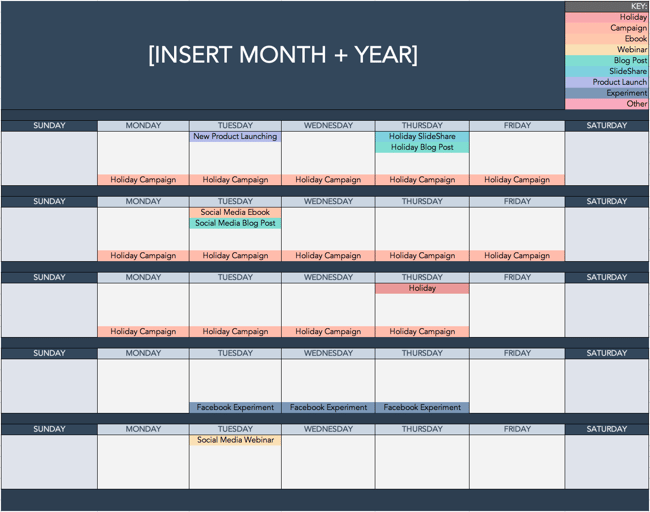
To help you keep track of all these unique holidays, here’s a Social Media Holiday Google Calendar.
Aside from 2021 holidays, we’ve also set dates on the calendar to repeat annually — either on the exact date they occur or the weekday they occur within the month.
Want to finish out your 2021 calendar with some upcoming holiday posts? Tap the + symbol in the lower right-hand corner of the calendar below to add it to your own Google calendar.
 Use the Above Template to Plan Out Your Social Media Holiday Posts
National & Global Holiday Calendar: 2021
The list isn’t exhaustive (there are a lot of food-specific holidays out there), and these dates and hashtags may still be subject to change. But this is a great starting point for social media marketers who want to learn more about what’s trending and how they can plan their content in a way that will be fun and engaging on social platforms.
- January 2021 Social Media Holidays
- February 2021 Social Media Holidays
- March 2021 Social Media Holidays
- April 2021 Social Media Holidays
- May 2021 Social Media Holidays
- June 2021 Social Media Holidays
- July 2021 Social Media Holidays
- August 2021 Social Media Holidays
- September 2021 Social Media Holidays
- October 2021 Social Media Holidays
- November 2021 Social Media Holidays
- December 2021 Social Media Holidays
January 2021 Social Media Holidays
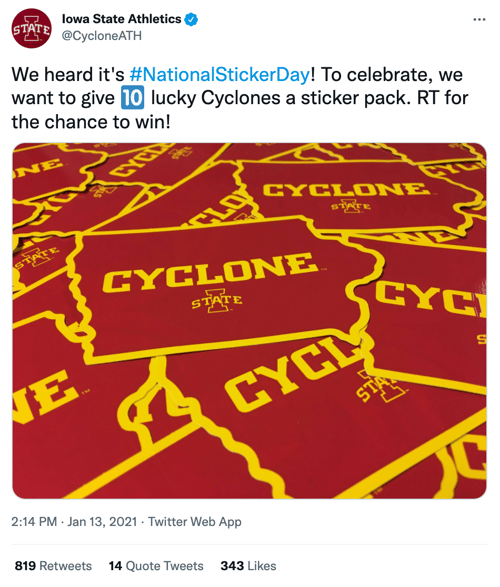
- January 1: New Year’s Day #NewYearsDay
- January 2: Science Fiction Day #ScienceFictionDay
- January 4: National Trivia Day #NationalTriviaDay
- January 5: National Bird Day #NationalBirdDay
- January 11: Human Trafficking Awareness Day #HumanTraffickingDay
- January 11: Clean Off Your Desk Day #CleanOffYourDeskDay
- January 13: National Sticker Day #NationalStickerDay
- January 15: National Hat Day #NationalHatDay
- January 18: Martin Luther King, Jr. Day (Third Monday of January) #MLKDay
- January 20: Cheese Lovers Day #CheeseLoversDay
- January 21: National Hugging Day #NationalHuggingDay
- January 21: Get to Know Your Customers Day (third Thursday of every quarter) #GetToKnowYourCustomersDay
- January 24: National Compliment Day #NationalComplimentDay
- January 25: Opposite Day #OppositeDay
- January 25: Community Manager Appreciation Day (Last Monday of January) #CMAD
- January 28: Data Privacy Day #PrivacyAware
February 2021 Social Media Holidays

- February 1 – 28: Black History Month
- February 2: Groundhog Day #GroundhogDay
- February 2: World Wetlands Day #WorldWetlandsDay
- February 4: World Cancer Day #WorldCancerDay
- February 5: National Weatherperson’s Day #NationalWeatherpersonsDay
- February 7: Super Bowl LV (Varies each year based on the U.S. Football season) #SBLV #SuperBowlSunday #SuperBowl
- February 7: National Send a Card to a Friend Day #SendACardToAFriendDay
- February 8: National Boy Scouts Day #BoyScoutsDay
- February 9: National Pizza Day #NationalPizzaDay
- February 9: Safer Internet Day #SID2021
- February 11: Inventors Day #InventorsDay
- February 12: Chinese New Year #ChineseNewYear
- February 13: World Radio Day #WorldRadioDay
- February 14: Valentine’s Day #ValentinesDay
- February 15: Presidents Day (Third Monday of February) #PresidentsDay
- February 16: Mardi Gras #MardiGras
- February 17: Random Acts of Kindness Day #RandomActsOfKindnessDay
- February 18: National Battery Day #NationalBatteryDay
- February 20: World Day of Social Justice #SocialJusticeDay
- February 20: Love Your Pet Day #LoveYourPetDay
- February 21: International Mother Language Day #IMLD
March 2021 Social Media Holidays

- March 2: National Read Across America Day #ReadAcrossAmerica & #DrSeuss
- March 3: World Wildlife Day #WorldWildlifeDay
- March 4: National Grammar Day #NationalGrammarDay
- March 5: National Employee Appreciation Day (First Friday of March) #EmployeeAppreciationDay
- March 5: National Day of Unplugging (First Friday of March) #NationalDayOfUnplugging
- March 6: National Dentist’s Day #DentistsDay
- March 7: National Be Heard Day #NationalBeHeardDay
- March 7: National Cereal Day #NationalCerealDay
- March 8: International Women’s Day #BeBoldForChange
- March 8: National Proofreading Day #NationalProofreadingDay
- March 10: National Pack Your Lunch Day #NationalPackYourLunchDay
- March 10: National Women and Girls HIV/AIDS Awareness Day #NWGHAAD
- March 11: National Worship of Tools Day #WorshipOfToolsDay
- March 11: Popcorn Lover’s Day #PopcornLoversDay
- March 12: National Girl Scout Day #GirlScoutDay
- March 14: Potato Chip Day #NationalPotatoChipDay
- March 14: Pi Day #PiDay (To go the extra mile, post this at 1:59, as Pi equals 3.14159…)
- March 14: Daylight Savings #DaylightSavings
- March 15: National Napping Day #NationalNappingDay
- March 15: World Consumer Rights Day #WorldConsumerRightsDay
- March 16: National Freedom of Information Day #FreedomOfInformationDay
- March 17: St. Patrick’s Day #StPatricksDay
- March 18: Awkward Moments Day #NationalAwkwardMomentsDay
- March 19: National Let’s Laugh Day #NationalLetsLaughDay
- March 19: World Sleep Day #WorldSleepDay
- March 19: Red Nose Day #RedNoseDay
- March 20: International Day of Happiness #InternationalDayofHappiness
- March 20: World Storytelling Day #WorldStorytellingDay
- March 20: First Day of Spring #FirstDayofSpring
- March 21: International Day for the Elimination of Racial Discrimination #RacialDiscriminationDay
- March 21: World Poetry Day #WorldPoetryDay
- March 22: World Water Day #WorldWaterDay
- March 23: National Puppy Day #NationalPuppyDay
- March 23: American Diabetes Association Alert Day #AmericanDiabetesAssociationAlertDay
- March 25: Tolkien Reading Day #TolkienReadingDay
- March 26: National Spinach Day #NationalSpinachDay
- March 26: Purple Day #PurpleDay
- March 27: Earth Hour Day #EarthHour
- March 30: Doctor’s Day #NationalDoctorsDay
- March 30: National Take a Walk in the Park Day #NationalWalkInTheParkDay
- March 31: World Backup Day #WorldBackupDay
- March 31: Transgender Day of Visibility #TDOV
- March 31: Equal Pay Day #EqualPayDay
April 2021 Social Media Holidays

- April 1 – 30: National Stress Awareness Month
- April 1: April Fools Day #AprilFools
- April 2: World Autism Awareness Day #WAAD
- April 3: Find a Rainbow Day #FindARainbowDay
- April 4: Hug a Newsperson Day #HugANewsperson
- April 5: World Health Day #LetsTalk
- April 6: National Walking Day #NationalWalkingDay
- April 10: National Siblings Day #NationalSiblingsDay
- April 10: Encourage a Young Writer Day #EncourageAYoungWriterDay
- April 11: National Pet Day #NationalPetDay
- April 12: International Day of Human Space Flight #InternationalDayOfHumanSpaceFlight
- April 15: National Tax Day #TaxDay
- April 15: Get to Know Your Customers Day (third Thursday of every quarter) #GetToKnowYourCustomersDay
- April 15: National High-Five Day #NH5D
- April 16: National Stress Awareness Day #StressAwarenessDay
- April 16: National Wear Your Pajamas to Work Day #PJDay
- April 17: Haiku Poetry Day #HaikuPoetryDay
- April 18: National Columnists’ Day #NationalColumnistDay
- April 20: National Look-Alike Day #NationalLookAlikeDay
- April 21: National Administrative Professionals Day #AdministrativeProfessionalsDay
- April 22: Earth Day #EarthDay2021
- April 23: National Take Our Daughters and Sons to Work Day #COUNTONME
- April 23: National Picnic Day #NationalPicnicDay
- April 23: World Book Day #WorldBookDay
- April 23: Arbor Day #ArborDay
- April 25: National Telephone Day #NationalTelephoneDay
- April 25: World Malaria Day #EndMalariaForGood
- April 28: Denim Day #DenimDay
- April 29: International Dance Day #InternationalDanceDay
- April 30: National Honesty Day #NationalHonestyDay
- April 30: National Adopt a Shelter Pet Day #AdoptAShelterPetDay
- April 30: International Jazz Day #JazzDay
May 2021 Social Media Holidays

- May 1: May Day #MayDay
- May 1: International Workers Day #IntWorkersDay
- May 3: World Press Freedom Day #WPFD2021 #PressFreedom
- May 4: Star Wars Day #StarWarsDay & #Maythe4thBeWithYou
- May 4: International Firefighters Day #InternationalFirefightersDay
- May 4: World Asthma Day #WorldAsthmaDay
- May 4: Thank a Teacher Day #ThankATeacher
- May 5: Cinco de Mayo #CincoDeMayo
- May 6: National Nurses Day #NursesDay
- May 7: World Password Day #WorldPasswordDay
- May 7: Space Day #SpaceDay
- May 9: Europe Day #EuropeDay
- May 9: Mother’s Day #MothersDay
- May 12: National Limerick Day #NationalLimerickDay
- May 12: National Receptionist Day #NationalReceptionistDay
- May 15: International Day of Families #FamilyDay
- May 16: Love a Tree Day #LoveATreeDay
- May 17: International Day Against Homophobia and Transphobia #IDAHOT2021
- May 21: National Memo Day #NationalMemoDay
- May 21: National Bike to Work Day #BTWD
- May 21: Endangered Species Day #EndangeredSpeciesDay
- May 24: National Scavenger Hunt Day #NationalScavengerHuntDay
- May 28: Hamburger Day #NationalHamburgerDay
- May 28: Heat Awareness Day (Last Friday of May) #NoFryDay
- May 29: Paperclip Day #PaperclipDay
- May 31: Memorial Day (Fourth Monday of May) #MemorialDay #MDW
- May 31: World No-Tobacco Day #NoTobacco
June 2021 Social Media Holidays
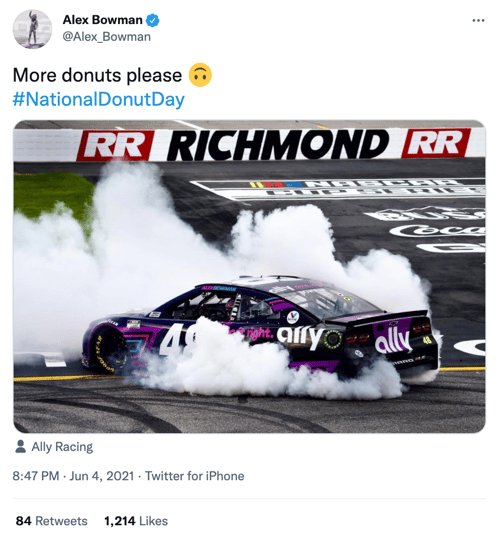
- June 1: Global Day of Parents #GlobalDayOfParents
- June 4: National Donut Day #NationalDonutDay
- June 5: World Environment Day #WorldEnvironmentDay
- June 6: National Cancer Survivor’s Day #NCSD2021
- June 6: Higher Education Day #HigherEducationDay
- June 8: World Oceans Day #WorldOceansDay
- June 8: Best Friends Day #BestFriendsDay
- June 13: International Children’s Day #ChildrensDay
- June 14: World Blood Donor Day #GiveBlood
- June 14: National Flag Day #FlagDay
- June 19: Juneteenth (Freedom Day) #Juneteenth
- June 20: World Refugee Day #WithRefugees
- June 20: First Day of Summer
- June 20: Father’s Day #FathersDay
- June 21: National Selfie Day #NationalSelfieDay
- June 21: World Music Day #WorldMusicDay
- June 21: International Yoga Day #InternationalYogaDay
- June 24: National Handshake Day #HandshakeDay
- June 25: Take Your Dog to Work Day #TakeYourDogToWorkDay
- June 27: National Sunglasses Day #NationalSunglassesDay
- June 30: Social Media Day #SMDay
July 2021 Social Media Holidays

- July 1: National Postal Worker Day #NationalPostalWorkerDay
- July 2: World UFO Day #WorldUFODay
- July 4: Independence Day (United States)
- July 7: World Chocolate Day #WorldChocolateDay
- July 11: Cheer Up the Lonely Day #CheerUpTheLonelyDay
- July 12: Malala Day #MalalaDay
- July 15: Give Something Away Day #GiveSomethingAwayDay
- July 15: Get to Know Your Customers Day #GetToKnowYourCustomersDay
- July 17: World Emoji Day #WorldEmojiDay
- July 18: Nelson Mandela International Day #MandelaDay
- July 30: Talk in an Elevator Day #TalkInAnElevatorDay
- July 30: International Day of Friendship #DayOfFriendship
August 2021 Social Media Holidays
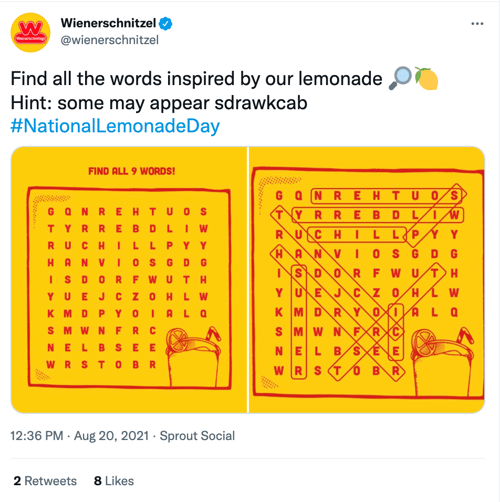
- August 1: Respect for Parents Day #RespectForParentsDay
- August 2: National Coloring Book Day #NationalColoringBookDay
- August 8: International Cat Day #InternationalCatDay
- August 9: National Book Lovers Day #NationalBookLoversDay
- August 10: National Lazy Day #LazyDay
- August 11: National Sons and Daughters Day #SonsAndDaughtersDay
- August 12: International Youth Day #YouthDay
- August 12: World Elephant Day #WorldElephantDay
- August 13: International Lefthanders Day #LefthandersDay
- August 15: National Relaxation Day #NationalRelaxationDay
- August 16: National Tell a Joke Day #NationalTellAJokeDay
- August 19: World Photo Day #WorldPhotoDay
- August 19: World Humanitarian Day #WorldHumanitarianDay
- August 20: National Lemonade Day #NationalLemonadeDay
- August 26: National Dog Day #NationalDogDay
- August 26: National Women’s Equality Day #WomensEqualityDay
September 2021 Social Media Holidays
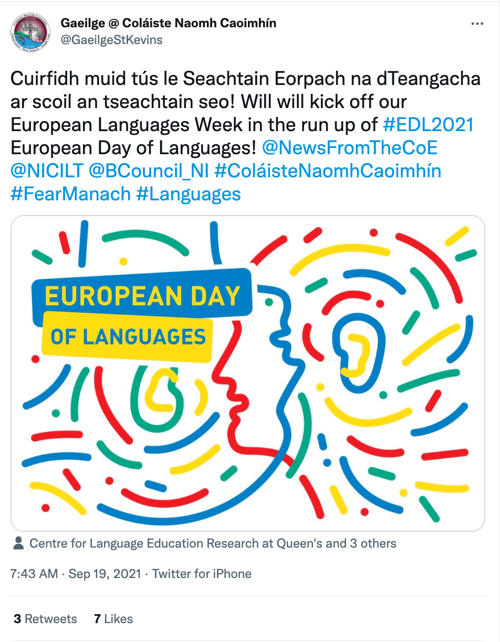
- September 4: National Wildlife Day #NationalWildlifeDay
- September 5: International Day of Charity #CharityDay
- September 6: Labor Day #LaborDay
- September 6: Read a Book Day #ReadABookDay
- September 8: International Literacy Day #LiteracyDay
- September 10: Stand Up To Cancer Day #KissCancerGoodbye
- September 11: National Day of Service and Remembrance #911Day
- September 12: Civic Day of Hacking #HackForChange
- September 12: National Grandparents Day #NationalGrandparentsDay
- September 12: National Day of Encouragement #DayOfEncouragement
- September 12: National Video Games Day #NationalVideoGamesDay
- September 15 – October 15: Hispanic Heritage Month #hispanicheritagemonth
- September 19: Talk Like a Pirate Day #TalkLikeAPirateDay
- September 21: International Day of Peace #PeaceDay
- September 21: Miniature Golf Day #MiniGolfDay
- September 22: Car-Free Day #CarFreeDay
- September 22: Hobbit Day #HobbitDay
- September 22: First Day of Fall
- September 26: National Pancake Day #NationalPancakeDay
- September 26: European Day of Languages #EDL2021
- September 27: World Tourism Day #WTD2021
- September 28: World Rabies Day #WorldRabiesDay
- September 28: National Good Neighbor Day #GoodNeighborDay
- September 29: National Women’s Health and Fitness Day #FitnessDay
- September 30: International Podcast Day #InternationalPodcastDay
October 2021 Social Media Holidays

- October 1: International Day of Older Persons #UNDOP
- October 1: International Coffee Day #InternationalCoffeeDay
- October 1: World Vegetarian Day #WorldVegetarianDay
- October 1: World Smile Day #WorldSmileDay
- October 2: International Day of Nonviolence #InternationalDayOfNonviolence
- October 3: National Techies Day #TechiesDay
- October 4: World Animal Day #WorldAnimalDay
- October 4: National Taco Day #NationalTacoDay
- October 4: World Habitat Day #WorldHabitatDay
- October 5: World Teachers Day #WorldTeachersDay
- October 10: World Mental Health Day #WorldMentalHeathDay
- October 11: International Day of the Girl #DayOfTheGirl
- October 14: World Sight Day #WorldSightDay
- October 14: National Dessert Day #DessertDay
- October 15: Global Handwashing Day #GlobalHandwashingDay
- October 16: World Food Day #FoodDay
- October 16: Bosses Day #BossesDay
- October 17: International Day for the Eradication of Poverty #EndPoverty
- October 20: World Statistics Day #StatisticsDay
- October 21: Reptile Awareness Day #ReptileAwarenessDay
- October 21: Get to Know Your Customers Day (third Thursday of every quarter) #GetToKnowYourCustomersDay
- October 24: United Nations Day #UNDay
- October 25: Greasy Foods Day #GreasyFoodsDay
- October 30: National Publicist Day #NationalPublicistDay
- October 30: Checklist Day #ChecklistDay
- October 31: Halloween #Halloween
November 2021 Social Media Holidays

- November 1: World Vegan Day #WorldVeganDay
- November 1: National Authors Day #NationalAuthorsDay
- November 1: National Cook For Your Pets Day #CookForYourPetsDay
- November 3: National Sandwich Day #NationalSandwichDay
- November 4: National Candy Day #NationalCandyDay
- November 7: Daylight Saving Time Ends #DaylightSavings
- November 8: National Cappuccino Day #CappuccinoDay
- November 8: Science, Technology, Engineering, and Medicine (STEM) Day #STEMDay
- November 11: Veterans Day #VeteransDay
- November 13: World Kindness Day #WKD
- November 14: World Diabetes Day #WDD
- November 15: Clean Out Your Refrigerator Day #CleanOutYourRefrigeratorDay
- November 15: America Recycles Day #BeRecycled
- November 16: International Day for Tolerance #ToleranceDay
- November 16: National Entrepreneurs Day #EntrepreneursDay
- November 17: International Students Day #InternationalStudentsDay
- November 19: International Men’s Day #InternationalMensDay
- November 20: Universal Children’s Day #UNChildrensDay
- November 21: World Hello Day #WorldHelloDay
- November 25: Thanksgiving Day #Thanksgiving
- November 26: National Cake Day #NationalCakeDay
- November 26: National Day of Listening #DayOfListening
- November 27: Small Business Saturday (The last Saturday of November) #ShopSmall
- November 29: Electronic Greeting Card Day #ElectronicGreetingCardDay
- November 30: Computer Security Day #ComputerSecurityDay
December 2021 Social Media Holidays

- December 1: World AIDS Day #WAD2021
- December 3: International Day of Persons with Disabilities #IDPWD
- December 4: National Cookie Day #NationalCookieDay
- December 5: World Soil Day #WorldSoilDay
- December 6: Microwave Oven Day #MicrowaveOvenDay
- December 8: Pretend to Be a Time Traveler Day #PretendToBeATimeTravelerDay
- December 10: Human Rights Day #HumanRightsDay
- December 10: Nobel Prize Day #NobelPrize
- December 10: National Salesperson Day #SalespersonDay
- December 11: International Mountain Day #InternationalMountainDay
- December 21: Crossword Puzzle Day #CrosswordPuzzleDay
- December 21: First Day of Winter #WinterSolstice
- December 27: No Interruptions Day #NoInterruptionsDay
- December 31: New Year’s Eve #NYE
Sources: National Day Calendar, Sprout Social, TrackMaven, Holiday Insights, Brownielocks, National Peace Corps Association, Sparkflow, There’s a Day for That
Editor’s Note: This post was originally published in January 2017 but is updated annually for comprehensiveness. The most recent update of this post was March 2021.


The Best Free Business Budget Templates
Whether you’re a solopreneur or running a massive corporation, you need a business budget to understand where your money is coming from and going. A business budget template can help keep the numbers organized, making it easy for you to track revenue, plan for expenses, and save for future growth.

You don’t have to be an accountant to organize your business budget. There are thousands of business budget templates out there to make the process easy. Once you understand what a business budget is and how it can work for you, you can use one of the following free templates to start organizing your finances.
The business budget follows a set template, which you can fill in with estimated revenues, plus any recurring or expected business expenses.
For example, if you run a digital marketing business, you might know that you typically make about $10,000 for your work creating campaigns, plus an extra $5,000 for your digital courses. You’d list the estimated revenue from all of your business’ revenue streams as incoming money for the business.
Then, you have your recurring expenses, which you would list as outgoing money. This could include employee salaries, office expenses, and software and technology costs.
How to Create a Business Budget
Creating a business budget is a straightforward process, but it can be more complex for larger companies. Here are the basic steps to creating a business budget.
1. Find a Template or Make a Spreadsheet
There are many free or paid budget templates online these days, so you can either use one of those to start, or make a simple spreadsheet with custom rows and columns based on your business. We list a few helpful templates below.
2. Fill in Revenues
Once you have your template, you’ll start by listing all the sources of your business’ income. With a budget, you’re planning for the future, so you’ll need to estimate this based on previous months’ or years’ revenues. For a new small business budget, you’ll rely on your market research to estimate the first revenues for your company.
3. Subtract Fixed Costs for the Time Period
Fixed costs are the recurring costs you have during each month, quarter, or year. Examples include insurance, rent for office space, website hosting, and internet.
4. Consider Variable Costs
Variable costs will change from time to time. Examples include utility bills, advertising costs, office supplies, and new software or technology. While you may always need to pay some variable costs, like utility bills, you can also shift how much you spend toward things like advertising expenses when you have lower-than-average estimated income.
5. Business Budget Planning
Unexpected expenses might come up, or you might want to save to expand your business. Either way, you need to review your budget after including all expenses, fixed costs, and variable costs to find out how much money you can save. It’s wise to create multiple savings accounts for emergencies and for money meant to go back into the business to drive growth.
How to Manage a Business Budget
There are a few key components to managing your business budget to keep it healthy.
Budget Preparation
The process all starts with properly preparing and planning the budget at the start of each month, quarter, or year. You can also create multiple budgets, some short-term and some long-term. During this stage, you will also set spending limits and create a system to regularly monitor the budget.
Budget Monitoring
For larger businesses, you might delegate budget tracking to multiple supervisors, but even if you are a one-person show, you need to regularly monitor the budget. That means setting a time in your schedule each day or week to review the budget and track actual income and expenses, then compare the actual numbers to the estimates.
Budget Forecasting
With regular budget tracking, you can always know how your business is doing. Check-in regularly to determine how you are doing in terms of revenue, where you have losses, where you can minimize expenses, and how you can move more money into savings. You can use well-tracked budgets to create more accurate budgets for future time periods.
Why is a Budget Important for a Business?
A budget is crucial for businesses. Without one, you could easily be drowning in expenses or unexpected costs compared to incoming money.
The business budget helps with several operations. You can use a business budget to keep track of your finances, save money to help you grow the business or pay bonuses in the future, and prepare for unexpected expenses or emergencies.
You can also review the business budget to determine when to take the next leap for your business. For example, you might be dreaming of a larger office building or the latest software, but you want to make sure you have a healthy net revenue before you make the purchase.
Best Free Business Budget Templates
1. Marketing Budget Template

Knowing how to manage a marketing budget can be a challenge, but with helpful free templates like this marketing budget template bundle, you can track everything from advertising expenses to events and more.
This free bundle includes eight different templates, so you can create multiple budgets to help you determine how much money to put toward marketing plus the return on your investment.
2. Small Business Budget Template

For small businesses, it can be hard to find the time to draw up a budget, but it’s crucial to help keep the business in good health.
Capterra offers a budget template specifically for small businesses. It works with Excel, and you input projections for the year. Then, the spreadsheet will project the month-to-month budget, and you can input your actual revenue and expenses to compare and easily see profits and losses.
3. Startup Budget Template

What if you don’t have any previous numbers to rely on to create profit and expense estimates? If you are a startup, this Gusto budget template will help you draw up a budget before your business is officially in the market. This will help you track all the expenses you need to get your business up and running, estimate your first revenues, and determine where to pinch pennies.
4. Free Business Budget Template

You might be familiar with Intuit, as many companies big and small rely on Intuit’s services like Quickbooks and TurboTax. Even if you don’t use the company’s paid financial services, you can take advantage of Intuit’s free budget template, which works in Google Sheets or Excel.
It features multiple spreadsheet tabs and simple instructions. You enter your revenue in one specific tab and expenses in another. You can also add additional tabs as needed. Then, like magic, the spreadsheet uses the data in the income and expense tabs to summarize the information and even determine net savings and the ending balance.
5. Department Budget Sheet
A mid-to large-size company will have multiple departments, all with different budgetary needs. These budgets will all be considered into a massive, company-wide budget sheet, but having a specific template for each department can help teams keep track of spending and plan for growth.
This free template from Template.net works in either document or spreadsheet formats and can help different departments keep track of their income and spending.
Create a Business Budget to Help Your Company Grow
Making your first business budget can be daunting, especially if you have several revenue streams and expenses. But once you get it set up, it’s easy to replicate regularly, and it’s even easier to get started if you have a business budget template to follow.
With a helpful business budget template, a little planning, and regular monitoring, you can plan for the future of your business, including bonuses, new product or service offerings, and expansions.