Best Goal Setting Worksheet to Help You Plan & Achieve
Accomplishing your goals is an incredibly gratifying feeling.
However, it can sometimes be challenging to get that feeling, as achieving your goals takes time, effort, and a structured process. This is why it’s important to create plans of action for meeting the goals that will help you stay motivated and ensure you’re on the right path.
In this post, we’ll go over a goal-setting worksheet created by HubSpot to help you outline your goals with the SMART framework and create a plan for achieving them. The template is broken down into relevant sections to help you through the process, and if you download it, you can follow along throughout the post.

Goal Setting Steps
1. Identify your initial goal.
The first step of the process is to simply identify what your goal is. It doesn’t have to be convoluted, just merely the objective you’re hoping to achieve. For example, if you’re hoping to grow your website, your baseline goal could be “I want to generate more site traffic.”
2.Define your SMART goals.
The second step in the process is to use the SMART framework to elaborate your goals to ensure that they’re clear, measurable and that the process will help you get there. Here are is what each of the element in the acronym stands for:
- Specific: A specific goal clearly outlines what you’re hoping to improve. If you share your specific goals with your team, it should be clear what your intention is.
- Measurable: Making your goal measurable means attaching numbers to your objective that will help you understand what you have to meet, track your progress, and see how long it will take you to reach your end goal.
- Attainable: Making sure that your goals are attainable means that they are realistic and that you have a chance of achieving them. Your goal is not too out of left field or so unrelated to your current practices that you wouldn’t be able to succeed.
- Relevant: Ensuring that your goal is relevant involves answering the question of “Why are you setting the goal that you’re setting?” Your goal should directly relate to your business’ needs and help your business grow.
- Time-Bound: The final aspect of your goal-setting process is to set a timeline. It helps you understand what your schedule should be and stay on track in terms of achieving your ultimate goal.
Goal Setting Template
It’s always helpful to have a worksheet guide you through your process, and the image below is an example.
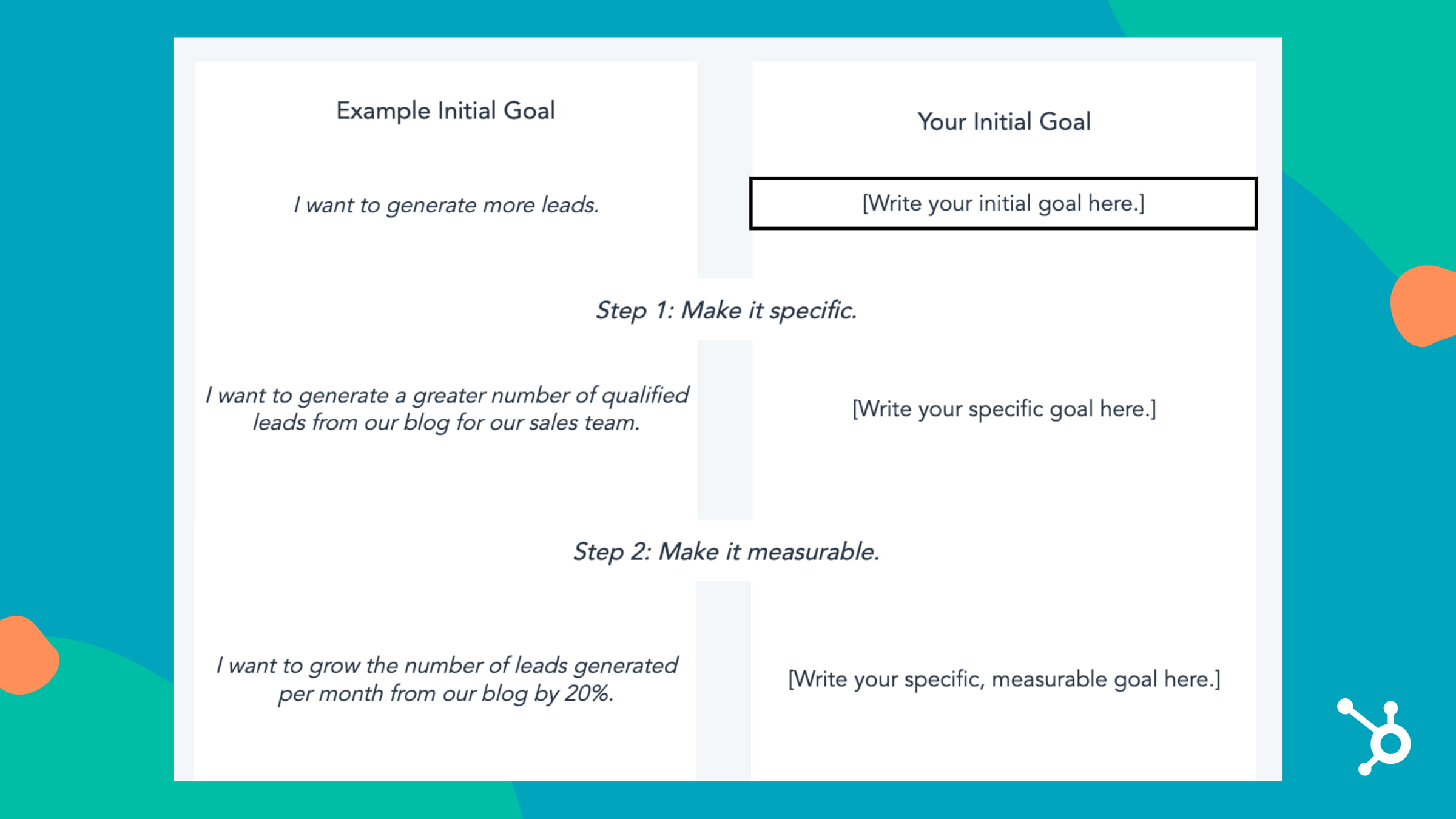
Once you’ve finished defining your goals, the next step is to calculate your targets so you know what your final numbers should be and so you can plan your process accordingly, so you’re able to meet those final numbers.
2. Calculate your goal outcomes.
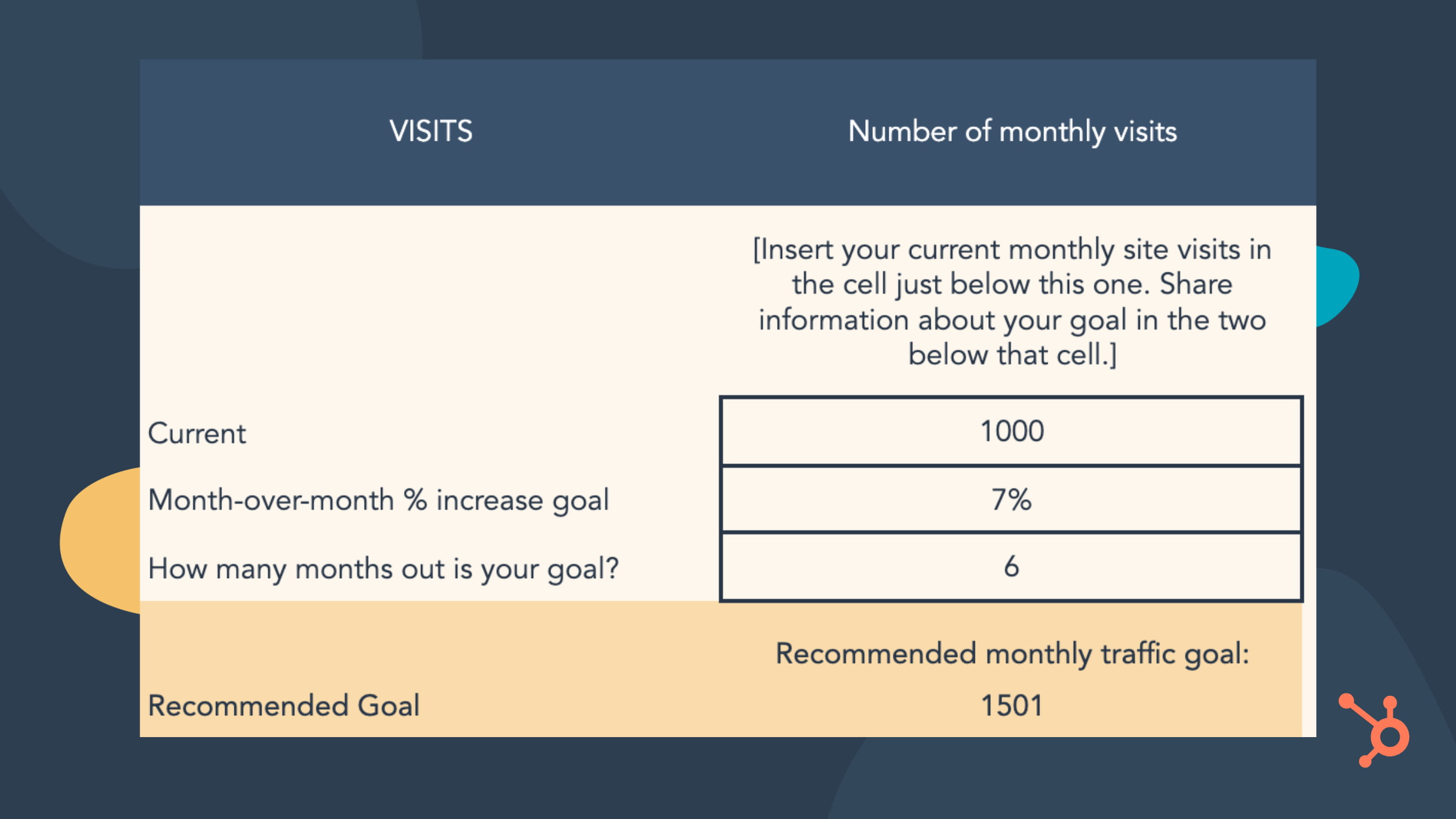
The most challenging part of your plan might be coming up with numerical targets that coincide with achieving your goals. You can just say, “We want to increase blog leads by 25%,” but what would the 25% increase be in numerical form?
When you have these numbers, you can set milestones for yourself and monitor your progress and make changes along the way if necessary.
The image below is an example of a SMART goal calculation.
3. Evaluate your SMART goals.
The template’s final step is to evaluate your goals, which helps you anticipate possible roadblocks and develop action plans for dealing with them. If you have multiple goals, aim to ask these questions for each one that you have:
- What is your SMART marketing goal?
- Do you feel that this goal is realistically attainable in the time frame you’ve set?
- How many hours per week can you dedicate to achieving your goal/your goal process?
- What is the biggest challenge preventing you from achieving this goal? What are possible challenges you may face in achieving this goal? What is the biggest roadblock(s) to achieving this goal?
- What three steps can you take to reduce or remove that challenge and succeed in reaching this goal?
All in all, following this framework makes your goals explicitly clear for yourself and helps you communicate their importance to all necessary stakeholders, so everyone is on the same page. To get started, download our template for free and start achieving your goals.

Variable Cost Explained in 200 Words (& How to Calculate It)
There’s a frustrating truth that every business deals with early into its growth: More money, more problems.
It seems counterintuitive — if sales and revenue are up, isn’t that a good thing? How are bigger profits a potential problem?
Put simply, it all comes down to the fact that the more you sell, the more money you need to spend. This includes marketing and sales campaigns to reach more customers, the production costs of more goods, and the time and money required for new product development.
Known as variable cost, this sales/spend ratio is something every business owner should understand, but online advice listicles and action plans often assume readers have an intrinsic knowledge of this concept rather than providing a working definition.
In this piece, we’ll clear up variable cost confusion: Here’s what you need to know about variable costs, how to calculate them, and why they matter.

Let’s examine each of these components in more detail.
Variable Cost Per Unit
The variable cost per unit is the amount of labor, materials, and other resources required to produce your product. For example, if your company sells sets of kitchen knives for $300 but each set requires $200 to create, test, package, and market, your variable cost per unit is $200.
Number of Units Produced
The number of units produced is exactly what you might expect — it’s the total number of items produced by your company. So in our knife example above,if you’ve made and sold 100 knife sets your total number of units produced is 100, each of which carries a $200 variable cost and a $100 potential profit.
Variable costs earn the name because they can increase and decrease as you make more or less of your product. The more units you sell, the more money you’ll make, but some of this money will need to pay for the production of more units. So, you’ll need to produce more units to actually turn a profit.
And, because each unit requires a certain amount of resources, a higher number of units will raise the variable costs needed to produce them.
Variable costs aren’t a “problem,” though — they’re more of a necessary evil. They play a role in several bookkeeping tasks, and both your total variable cost and average variable cost are calculated separately.
Total Variable Cost
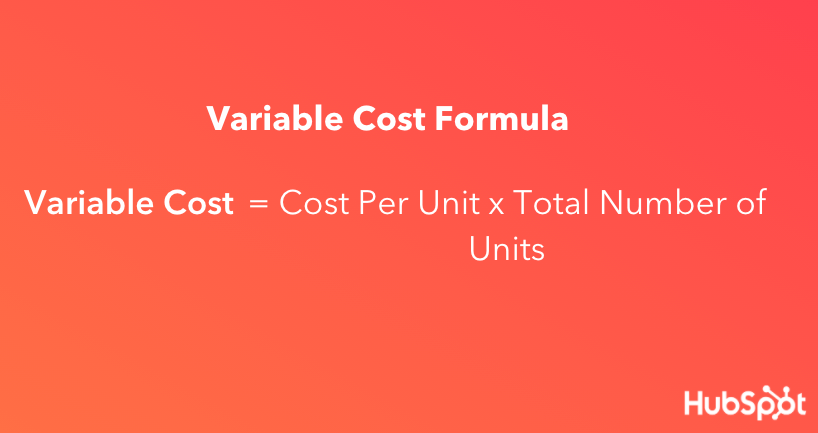
Your total variable cost is the sum of all variable costs associated with each individual product you’ve developed. Calculate total variable cost by multiplying the cost to make one unit of your product by the number of products you’ve developed.

For example, if it costs $60 to make one unit of your product and you’ve made 20 units, your total variable cost is $60 x 20, or $1,200.
Average Variable Cost
Your average variable cost uses your total variable cost to determine how much, on average, it costs to produce one unit of your product. You can calculate it with the formula below.
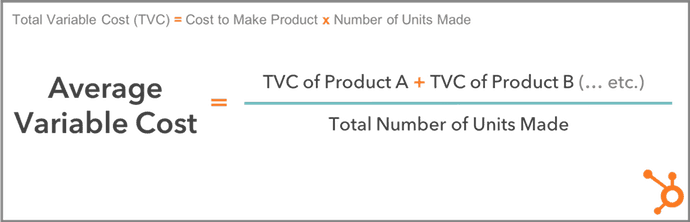
Total Variable Cost vs. Average Variable Cost
If the average variable cost of one unit is found using your total variable cost, don’t you already know how much one unit of your product costs to develop? Can’t you work backward, and simply divide your total variable cost by the number of units you have? Not necessarily.
While total variable cost shows how much you’re paying to develop every unit of your product, you might also have to account for products that have different variable costs per unit. That’s where average variable cost comes in.
For example, if you have 10 units of Product A at a variable cost of $60/unit, and 15 units of Product B at a variable cost of $30/unit, you have two different variable costs — $60 and $30. Your average variable cost crunches these two variable costs down to one manageable figure.
In the above example, you can find your average variable cost by adding the total variable cost of Product A ($60 x 10 units, or $600) and the total variable cost of Product B ($30 x 15 units, or $450), then dividing this sum by the total number of units produced (10 + 15, or 25).
Your average variable cost is ($600 + $450) ÷ 25, or $42 per unit.
Variable vs. Fixed Cost
The opposite of variable cost? Fixed cost. Fixed costs are costs that don’t change in response to the number of products you’re producing.
Some common fixed costs include renting or leasing a building, utility bills, website hosting, business loan repayments, and property taxes.
Worth noting? These costs aren’t static — meaning, your rent may increase year over year. Instead, they remain fixed only in reference to product production.
To calculate the average fixed cost, use this formula:
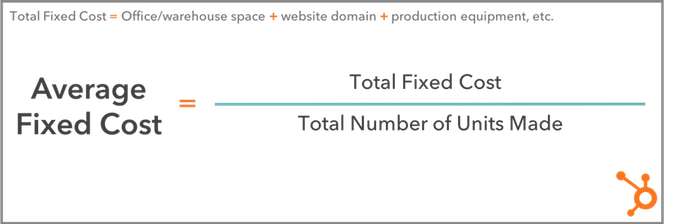
Both variable and fixed costs are essential to getting a complete picture of how much it costs to produce an item — and how much profit remains after each sale.
To calculate variable cost ratio, use this formula:

Let’s put it into practice. If you’re selling an item for $200 (Net Sales) but it costs $20 to produce (Variable Costs), you divide $20 by $200 to get 0.1. Multiply by 100 and your variable cost ratio is 10%. This means that for every sale of an item you’re getting a 90% return with 10% going toward variable costs.
Combining variable and fixed costs, meanwhile, can help you calculate your break-even point — the point at which producing and selling goods is zeroed out by the combination of variable and fixed costs.
Consider our example above again. If your variable costs are $20 on a $200 item and your fixed costs account for $100, your total costs now account for 60% of the item’s sale value, leaving you with 40%.
Put simply? The higher your total cost ratio, the lower your potential profit. If this number becomes negative, you’ve passed the break-even point and will start losing money on every sale.
So, what’s considered a variable cost to the business?
Some of the most common variable costs include physical materials, production equipment, sales commissions, staff wages, credit card fees, online payment partners, and packaging/shipping costs.
Let’s examine each in more detail.
Physical Materials
These can include parts, cloth, and even food ingredients required to make your final product.
Production Equipment
If you automate certain parts of your product’s development, you might need to invest in more automation equipment or software as your product line gets bigger.
Sales Commissions
The more products your company sells, the more you might pay in commission to your salespeople as they win customers.
Staff Wages
The more products you create, the more employees you might need, which means a bigger payroll, too.
Credit Card Fees
Businesses that receive credit card payments from their customers will incur higher transaction fees as they deliver more services.
Online Payment Partners
Apps like PayPal typically charge businesses per transaction so customers can check out purchases through the app. The more orders you receive, the more you’ll pay to the app.
Packaging and Shipping Costs
You might pay to package and ship your product by the unit, and therefore more or fewer shipped units will cause these costs to vary.
Expect the Unexpected
While variable costs, total variable costs, average variable costs, and the variable cost ratio often seem complicated on the surface, these terms are simply ways to represent the changing nature of costs to produce new items as your business grows.
By understanding the nature of these costs and how they impact your current and projected revenue, it’s possible to better prepare for evolving market forces and reduce the impact of variable costs on your bottom line.

SEO vs. PPC: When to Optimize and When to Pay for Traffic
Imagine you’ve just created an excellent new product, and you’re excited to share your business with the world.
Unfortunately, you have no idea how to share this revolutionary product with as many of your target users as possible.
You’re not alone. Like you, many businesses face a similar problem regarding how to get their products in front of potential customers.

Most of the time, the solution to your problem boils down to choosing between two marketing strategies: search engine optimization (SEO) or pay-per-click (PPC) campaigns.
But which method is suitable for you? Is it better to pursue an organic-first approach and find consumers through search engine rankings, or is it better to invest in an advertisement at the top of a keyword results page?
In this article, we’ve explored what you can expect to achieve from each of these two acquisition strategies. We’ve also provided some pros and cons of SEO and PPC along with descriptive statistics and real-life examples to help you decide whether your business is best suited for SEO or PPC — or both.
What is SEO?
Search engine optimization is the process of enhancing your website’s visibility to make it rank and gain organic traffic from search engines.
Just as you turn to your favorite search engines, such as Google or Bing, to look up a new marketing acronym or where to get good pizza, so do your consumers. When you invest in SEO, you’re increasing the likelihood of your target audience finding you when they make a Google search for keywords related to your product or service.
For example, here’s Hubspot appearing at the top of Google’s organic results page for the term “inbound marketing,” thanks to the SEO strategy we have in place.
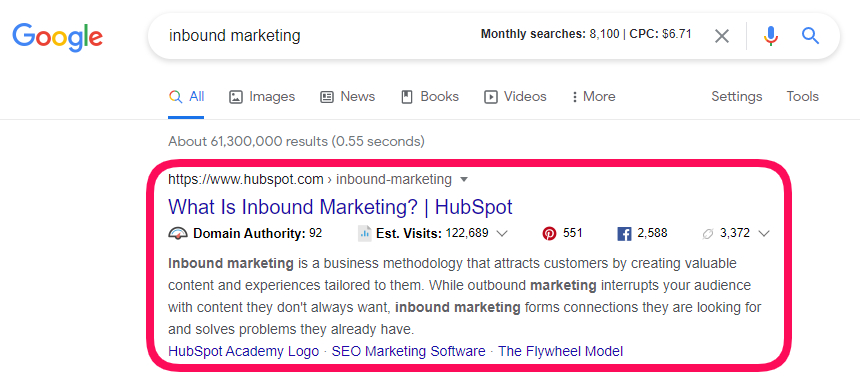
Most SEO strategies center around Google because it holds 92.24% of the search engine market share. As such, you’ll need to learn about Google’s 200 ranking factors, technical SEO, link building, content creation, and so much more if you want to appear higher up on the search engine results page.
Pros of SEO
Here are some advantages of SEO:
1. SEO is cheaper in the long run.
Although SEO might cost time and money —to pay freelancers or agencies, and for SEO tools — it’s still cheaper than PPC in the long run.
When you create content that ranks and drives traffic to your website, you no longer have to keep spending money to make your target customers see it. And when these customers decide to click on your link, it comes at zero cost, unlike a PPC campaign where you pay per click.
In the following image, you see that according to Ahrefs, Hubspot’s traffic value is a little over $22 million. Imagine we had to pay for every click we get.

Organic traffic is also very scalable and cost-effective.
2. You can target different funnel stages with SEO.
Not all of your audience is at the same stage of the sales funnel.
Some are just getting to know your brand at the top of the funnel. And others are already at the bottom of the funnel, ready to pull out their wallets.
With SEO, you can create different content types (blog posts, guides, case studies) that meet each segment of your audience exactly where they are in the sales funnel.
3. Search traffic is more stable.
Once you rank on Google, you can be sure of free traffic to your website or web pages as long as you keep optimizing them.
There’s also no off-and-on switch with SEO, unlike PPC marketing, where your website stops appearing on search results once your marketing budget dries up.
4. Organic listings build brand authority.
Appearing consistently on search results for keywords related to your products and services helps build trust and brand authority with your target audience.
It also signifies to Google that you’re an expert on that topic or subject.
Cons of SEO
Here are some reasons why you might not love SEO:
1. Search engine algorithms change.
Search engines, especially Google, have changed their algorithm many times over the years. These changes mean that you’ll have to keep a close eye on your marketing strategy and organic results.
2. You’ll need to optimize your website regularly.
Your job doesn’t end when you get your website to rank for target keywords. Over time, you’ll have to regularly optimize your content and web pages so that it continues to rank.
Optimization might include refreshing old articles and removing old/expired links.
3. SEO takes time to show results.
If your website or domain is new, it’s unlikely that you’ll enjoy immediate results from SEO. The reason is that many factors affect how Google ranks websites.
2. It requires high-level skills and expertise.
If you’re not hiring a professional, you’ll need to be an excellent writer and SEO expert to optimize your site for search engines properly.
It’s undoubtedly time-consuming and overwhelming to run a business while taking technical SEO, writing, and link-building classes.
What is PPC?
PPC, or pay-per-click, is a form of search engine marketing (SEM) where an advertiser pays a publisher (such as Google or Facebook) every time someone clicks on the ad. This model allows advertisers to pay only when consumers interact with their ads — meaning you attract people interested in your offer and ready to make a purchase.
This method is mainly associated with search engines as advertisers bid on search keywords relevant to their target markets. You may have noticed that the top search results are tagged with an “Ad” marker.

The cost of PPC ads usually depends on your industry and the search volume of the keyword you’re targeting.
PPC advertising can help your business stay competitive in a crowded market and quickly get in front of their target consumers if you don’t have the domain authority to get your site ranking organically on search engines.
Pros of PPC
1. PPC offers quick results.
While it can take months to see results from your SEO strategy, it can take a few hours to see results from your PPC campaign.
2. PPC ads appear above organic rankings.
When you run a PPC campaign for your target keyword, your website would appear first on the search engine result page. This ranking makes your audience notice you first before scrolling to see other results.
3. PPC allows you to pinpoint your target audience.
While setting up a PPC campaign, you get to choose who you want to target with your ads.
Do you want people from a specific geographic area? Or people of a particular age? Marital status? Or interest? If so, then you should use PPC.
3. You can quickly run A/B tests on a PPC ad.
With a PPC campaign, you can run two different ads simultaneously to measure the one that converts better.
All you’ll have to do is change some ad elements like the ad copy and allow them to run for a period. Depending on the performance, you can decide to either “kill” the Google ads or continue optimization to improve your results.
Cons of PPC
1. PPC ads are expensive.
Without money, you cannot run a PPC campaign.
You have to pay for every link that your audience clicks, meaning once your budget dries up, so does your traffic.
Also, a PPC ad can get even more expensive (as high as $40) when you’re in a competitive industry like legal or insurance.
2. Lower profit margins.
While a PPC campaign might bring short-term wins, it’ll usually result in lower profit margins. Because PPC is a “pay to play” system, your customer acquisition costs (CAC) would continue to get higher without a significant increase in the prices of your products and services.
3. PPC ads become stale after a while.
You have limited control over your paid ad because of the rule set by ad platforms like Google. As such, your copy might have similar wording to your competitors, which makes it easy for your audience to pass over quickly.
SEO vs. PPC
Search engine optimization (SEO) can help your content rank high on search engines, making it more likely that your audience would click and trust your content.
SEO is also more effective for local searches and can grow your online presence for longer. Pay-per-click (PPC), on the other hand, is an acquisition strategy that requires you to spend ad money to get your content in front of an audience when they search for specific keywords online.
SEO vs. PPC: Which is better?
Asking which is better between SEO and PPC is like asking whether it’s better to eat with a fork or spoon — it depends.
Serving pasta? Sure, I’d love a fork. Soup? I’d rather have a spoon.
In the same way, different situations exist where SEO is better than PPC and vice versa.
Let’s now look at some of these situations.
Use SEO if…
- Your marketing budget is low.
- You want to build your brand authority.
- You’re looking to maximize your long-term return-on-investment (ROI).
- You want to create content that reaches your audience at different stages of the sales funnel.
Use PPC if…
You’d get better results with PPC in situations where:
- You want quick results.
- Your product is novel or first-of-its-kind.
- You’re promoting a time-sensitive offer, like a holiday sale.
- You want to direct your audience to a sales or landing page.
How to Make SEO and PPC Work For You
Instead of choosing between SEO or PPC, why not combine the two strategies and make them work for you?
Here’s how you can get the best of both worlds.
1. Create retargeting ads.
Did someone visit your site, probably the pricing or check-out page, without buying?
You can easily use a retargeting ad to prompt these visitors, even after they’ve left your site, to come back and make a purchase.
2. Promote website content with social media ads.
While you want your content to rank organically, you can give it a quick boost by promoting it on social media.
Not only do these kinds of ads help with content distribution, but they could potentially help you acquire essential backlinks that’d boost your rankings.
Also, it’s going to be a shame not to promote your latest blog post, guide, report, or case study after spending hours creating it.
3. Collect data From ads to improve your SEO strategy.
PPC campaigns grant you access to a lot of data — keyword search volumes, keywords your competitors are bidding for, highest converting calls-to-action, and so on.
Aimed with all of this data, you’d be able to create better SEO strategies with less effort.
SEO vs. PPC Statistics
SEO
- Google is responsible for over 92% of global web traffic.
- 90.63% of online content get zero traffic from Google, with only 0.21% getting over 1000 visits per month.
- 46.40% of browser-based Google searches resulted in an organic link click.
- 99.2% of website pages have less than 100 backlinks.
- Google processes over 7 billion searches per day (or 2.5 trillion searches per year.)
- SEO drives almost 100% more traffic than paid traffic.
- 60% of smartphone users have contacted a business directly using the search results (e.g., “click to call” option).
- 64% of marketers actively invest in SEO.
- 76% of B2B search traffic is trackable.
- 18% of local smartphone searches led to a purchase within a day, whereas only 7% of non-local searches led to a sale.
PPC
- 390 out of 506 surveyed by Clutch say they recognize a paid search ad when they see it.
- The Google Display Network reaches 90% of Internet users worldwide.
- Search advertising spend is expected to exceed $170 billion in 2021.
- More than 763 million devices use Adblock. As a consumer, Adblock is amazing. It stops all those eerily targeted ads from popping up on your Facebook feed. However, as a marketer, it can be frustrating to invest in PPC if vast numbers of your target consumers will never see your ad. Additionally, ad blocking has increased 15-30% in the last four years.
- PPC Ads can boost awareness by 80%. Despite ad blockers, PPC is still effective in increasing your brand’s reach and awareness.
- The highest average monthly cost-per-click (CPC) in Google Ads search advertising is in the insurance industry at $18.57 per click.
- The cheapest CPC in Google Ads search advertising is in the electronics industry at 83 cents per click.
- The average Facebook Ads Click-Through Rate across all industries is 0.89%. The Pets and Animals industry has the highest CTR while the lowest rates come from the Science industry.
- The average Facebook Ads cost-per-click (CPC) is $1.68 across industry. Advertisers in the Finance industry have the highest average CPC ($3.89), while Food and Drinks have the lowest average CPC ($0.42)
- Google’s algorithm updates don’t affect PPC. While not a stat per se, a significant benefit of PPC is that it’s immune to Google’s changing SERP ranking algorithm. In 2018, Google reported that they had updated their algorithm 3,234 times! If you’re using the SEO method, you have to adjust your content optimization to rank better according to the updated algorithm requirements.
- 75% of marketers from Clutch’s survey say it’s easier to find what they’re looking for from paid ads. The first page of search engine results — especially the few hits — gets the vast majority of clicks due to the combination of ease of use and finding what the searcher is looking for. Bidding on target keywords through PPC accomplishes both of these needs: the paid ads are easy to find at the top of the SERP, and they answer the searcher’s question.
Final Thoughts
Whether you choose to go with SEO or PPC ultimately depends on your business situation. So take your time to evaluate the pro and cons of both SEO and PPC to see which is the right fit for you. And if possible, integrate the two strategies to see even more outstanding results for your business.
Editor’s note: This post was originally published in July 2019 and has been updated for comprehensiveness.

How to Set & Achieve Marketing Objectives in 2021
In the marketing industry, setting objectives can be a double-edged sword. On the one hand, constantly raising the bar can incentivize your team to sustain your growth rate over long periods. On the other hand, it can incentivize your team to prioritize your company’s needs over your customers’ needs.
Contrary to popular belief, solely focusing on the results doesn’t actually produce results. Focusing on serving your customers is what produces results. Tim Cook, Apple’s CEO, is famous for sparking this customer-centric movement.
In 2015, he spoke at Goldman Sach’s Technology and Internet Conference in San Francisco, and a reporter asked him what some of Apple’s biggest accomplishments from the past year were. He responded, “We’re not focused on the numbers. We’re focused on the things that produce the numbers.”
In this blog post, we’ll show you how to set realistic marketing objectives that will help you craft audience-centric content, prioritize your customers’ needs, and hit your numbers, all at the same time.
Read on to learn how to identify your marketing objectives’ purpose and process and why it’s just as important as the numbers you aim to hit.
In his insightful blog post about setting goals, Jay Acunzo, the founder of Unthinkable Media, reveals a subtle yet potent problem that has pervaded the content marketing industry over the years — traditional goal-setting lets you measure what you do, but it doesn’t lend itself to gauging how you do it or why which is what ultimately gives your work meaning and resonates with prospects.
In marketing, you obviously need to aim for concrete targets. But, as we said earlier, only focusing on the results can sometimes incentivize you to take a course of action that prioritizes your organization’s needs over your customers’ needs.
To help you focus more on your purpose and process instead of just your results, Acunzo recommends considering two additional factors when setting a marketing objective — your hunger and your aspirational anchor.
Your hunger is your current dissatisfaction with your work today or why you want to achieve your goal. Your aspirational anchor is your vision of your work in the future or how you’ll achieve your goal.
These two factors drive your motivation and keep you on track to create work that better serves your customers. When you add your numerical goal to the equation, you’ll be able to simultaneously produce customer-centric work and create business impact.
How to Set Realistic Marketing Objectives
The first thing to understand is the subtle difference between a goal and an objective. A general goal is going to be your broader vision while your marketing objective is that more concrete specification of how that vision is achieved. In order to craft your marketing objective, you must start with vision first by defining three main things:
- Hunger – What is the driving force — or the “why” — behind what you want to achieve? What pain or problem has led you to this point, and why must it be solved?
- Aspirational Anchor – What does success look like — or “how” does the end vision solve that problem?
- Goal – What steps must be taken — or the “what” — for that aspiration to come to fruition?
Now that we understand the “why” and the “how” behind setting marketing objectives, let’s go over how you can root the “what” in reality with the SMART goal framework.
SMART goals are realistic, quantifiable, and focused targets that you can easily aim for. If you’re wondering what SMART means, it’s an acronym that helps you clearly define your goals.
Specific
In terms of marketing, you should choose the particular metric you want to improve upon, like visitors, leads, or customers. You should also determine what each team member will work on, the resources they’ll have, and their plan of action.
Measurable
If you want to gauge your team’s progress, you need to quantify your goals, like achieving an X% increase in visitors, leads, or customers.
Attainable
Make sure that X% increase is achievable in your specific situation. If your blog traffic increased by 5% last month, try to increase it by 8-10% this month, not 30%. It’s crucial to base your goals on your own analytics, not industry benchmarks, or else you might bite off more than you can chew.
Relevant
Your goal needs to relate to your company’s overall goal and account for current trends in your industry. For instance, will growing your Facebook following lead to more revenue? And is it actually possible for you to significantly boost your organic reach on Facebook after their most recent algorithm change? If you’re aware of these factors, you’ll be more likely to set goals that are realistic, achievable, and beneficial to your company.
Time-bound
Attaching deadlines to your goals puts pressure on your team to accomplish them. And this helps you make consistent and significant progress in the long term. If you don’t give yourself a deadline, you can very easily fall into the trap of procrastinating on action items, leading to a slower rate of success.
For example, which would you prefer: Increasing leads by 5% every month, leading to a 30-35% increase in half a year, or trying to increase leads by 15% with no deadline and achieving that goal in a year?
By analyzing two different goal-setting frameworks, we’ve learned how to identify the “why,” “how,” and “what” behind your marketing objectives. Now, we can blend the two frameworks to set a realistic goal that fulfills your customers’ needs and helps you hit your numbers at the same time. Check out the examples below for more detail.
Now that you know how to write a marketing objective, you can get ideas from some metaphorical samples. Below, we’ll start with one long example breaking out the above methodology step-by-step, and then we’ll provide other examples to fuel your inspiration.
1. Increase blog subscribers.
In this example, we’ll set a target of increasing blog subscribers by 25% month-over-month this year — it’s a substantive increase, but possible with the SMART framework.
- Hunger (Why) – Our blog educates our audience well but it doesn’t resonate emotionally with them enough.
- Aspirational Anchor (How) – Run a blog that consistently resonates with our audience and that people look forward to reading every time they receive our email digest.
- Goal (What) – Increase blog subscribers as an indication of our success.
With this goal-setting framework, you can see how the “why” and “how” behind a goal incentivizes behavior that better serves customers and hits numbers at the same time.
For instance, in the example above, this blog team refuses to just do whatever it takes to boost their blog subscription. They want to craft emotionally resonant stories that their audience actually values or content that’s worth subscribing to, and this is what will lead to their growth in subscribers and create long-term value for their business.
If this blog team didn’t identify their hunger or set an aspirational anchor, however, the only thing that would guide them toward the finish line is the finish line itself. And that could incentivize short-sighted behavior that helps them achieve their goal at the expense of prioritizing their audience’s needs over their own.
Once the aspirational vision and the general goal has been defined, now it’s time to pivot to a concrete objective using the SMART goal framework:
Specific
Our blog educates our audience well, but it doesn’t resonate emotionally with them enough. Let’s start running a blog that can consistently provide value, that people look forward to reading every time they receive our email digest, and that can attract more subscribers.
Measurable
Increase month-over-month blog subscribers by 25% this year.
Attainable
Last year, we increased month-over-month blog subscribers by 15%, so we know this is doable.
Relevant
If we can craft emotionally resonant stories that our audience actually values, we can build deeper relationships with them, attract more subscribers with whom we can also build deep relationships, and hopefully do business in the future.
Time-Bound
Monthly over the course of a year.
2. Reach more visitors with organic search traffic.
Let’s say our organization’s goal is to grow its online organic presence to attract more leads and reach 35,000 visitors via organic search monthly by the end of the year. These are Hunger and Aspirational anchors, so they must be translated into a SMART goal if we want to take steps to achieve it:
- Specific – Increase website visitors from organic search.
- Measurable – Reach 35,000 visitors monthly.
- Attainable – Must be sure that the number is reachable by increasing or improving variables within our control.
- Relevant – Must be the right traffic since the ultimate goal is to increase leads.
- Time-bound – By the end of the year.
3. Improve the mobile traffic conversion rate site-wide.
Traffic alone is not enough to generate leads and, ultimately, revenue. We need mechanisms in place to convert the traffic we’re already getting.
Let’s say we notice that our site converts a lot better on desktop than mobile. This means we could be losing a ton of lead opportunities who arrived at our site on a mobile device. That’s why we decide to enhance the mobile experience and set a goal of improving mobile traffic conversion rates site-wide from 2.3% to 5% by Q3 Here’s how we turn that goal into an objective:
- Specific – Improve mobile traffic conversion rate.
- Measurable – From 2.3% to 5%.
- Attainable – Must identify roadblocks to conversion and how we plan to remove them.
- Relevant – Must actually have enough mobile traffic to justify the effort.
- Time-bound – By Q3.
4. Increase MQL conversions.
With inbound marketing, it’s easy to get swept up in blogging, offer creation, and lead conversions. At the same time, if we don’t have mechanisms in place to move those leads closer to a purchasing decision, these efforts don’t pay off the way they could. Part of our jobs as marketers is to foster relationships with our leads while qualifying them so that the sales team focuses on prospects who are ready to buy.
Let’s say we have a top-of-the-funnel lead generation engine where website visitors convert on eBooks and guides. Our goal is now to bridge the gap between where they’re at in their journey vs. where we want them to go and so we aim to convert 500 leads to MQLs by the end of the year. We decide to do that through an ongoing educational email drip sequence, and we start with our objective:
- Specific – Convert Leads to MQLs.
- Measurable – From the existing number to 500.
- Attainable – Must ensure we already have a large enough pool to extract those MQLs from (or a fast-enough lead generation engine to supply them).
- Relevant – Must have a clear definition of what constitutes an MQL and a plan to obtain those parameters.
- Time-bound – By the year’s end.
5. Boost the average monthly open rate.
In order for us to effectively nurture leads, we want people to be reading our content… which they won’t do if they don’t get past the subject line of the email. Here’s how we position this concept into the concrete objective of increasing the monthly open rate from 25% to 40% in one quarter:
- Specific – Increase average monthly open rate.
- Measurable – From 25% to 40%.
- Attainable – Must analyze existing email tactics to identify gaps.
- Relevant – Must only include the most relevant marketing emails in the metrics to avoid skewing data.
- Time-bound – In one quarter
6. Increase our MQL to SQL conversion rate.
Never forget the primary goal of marketing, which is to promote an organization’s goods or services in the effort of generating more sales. At the same time, fewer than half of marketers consider their departments aligned with sales.
A relevant goal might be to improve the effectiveness of our marketing efforts by solidifying the marketing to sales hand-off. Specifically, we’re aiming to increase MQL to SQL conversion rate from 25% to 35% by Q2. Our concrete objective might break down like this:
- Specific – Increase the MQL to SQL conversion rate.
- Measurable – From 25% to 35%.
- Attainable – Must ensure we already have a large enough pool to extract those SQLs from (or a fast-enough lead generation engine to supply them).
- Relevant – Must have a clear agreement between the marketing and sales departments for what constitutes an SQL.
- Time-bound – By Q2.
7. Improve overall NPS score.
Marketing doesn’t end once the prospect becomes a customer, and that means also working on ways to fuel the flywheel i.e. turning customers into brand advocates who purchase from us and tell their friends to do the same.
NPS is a solid measurement of customer happiness, so improving that score — from 31 to 35 within 6 month — is a solid place to start building our objective:
- Specific – Improve the NPS score.
- Measurable – From 31 to 35.
- Attainable – Must analyze existing NPS roadblocks to identify gaps.
- Relevant – Must ensure there’s a mechanism for collecting and analyzing NPS input.
- Time-bound – In 6 months.
8. Enhance Facebook engagement.
One of the best ways to grow a brand’s marketing efforts exponentially is by investing in its community of customers and prospects. The goal might be to stay top of mind and energize the community by raising the bar on each social media platform. For example, we might look to improve Facebook engagement by 30% month-over-month:
- Specific – Improve engagement on Facebook.
- Measurable – By 30%.
- Attainable – Must identify the content that’s engaging our existing user base and see if 30% is a reasonable number to strive for.
- Relevant – Must ensure that there’s a solid definition of what metrics are being counted as engagement.
- Time-bound – On a monthly rolling basis.
9. Increase total market share.
As digital markets become more crowded, it’s critical for companies to claim as much market share as possible — pulling even a few percentage points away from the competition can have significant benefits for your bottom line.
Let’s set a reasonable goal: Increasing total market share a 5% by the end of the year:
- Specific – Improve total market share
- Measurable – By 5%
- Attainable – Must identify areas of potential loss, such as customer churn, and areas of gain such as targeted advertising
- Relevant – Must ensure there’s a reliable way to regularly measure market share
- Time-bound – By the end of the year
10. Evaluate ad impact.
Advertisements help your brand get noticed — but are your ads doing their job? Here, our marketing objective is to compare the cost-per-click and conversion rate of two different ads using A/B testing on social media over the period of a month to determine which one drives better ROI:
- Specific – Determine the highest ad impact
- Measurable – Evaluated using cost-per-click
- Attainable – Must assess the impact of each ad and how many click-throughs it generates
- Relevant – Must ensure the same metrics are used for each ad to ensure an accurate comparison
- Time-bound – In one month
- Marketing Objectives: Metrics and KPIs
Once marketing objectives have been established, companies must identify and track specific metrics and key performance indicators (KPIs) to provide both immediate insights and set the stage for long-term strategic planning. Some of the most common metrics and KPIs include:
Sales Growth
Sales growth is measured using total revenue volume, number of units sold, or both. Increasing numbers mean growing sales — for best effect, monitor sales growth as a baseline and then during new marketing campaigns to evaluate your impact.
Profit Variance
Profit — also called return on investment (ROI) — isn’t simply a factor of sales and revenue. Instead, it depends on the amount of money your brand makes after material costs, marketing expenses, and other spending is subtracted. If material costs increase but sales remain steady, for example, profit will decrease. Monitoring profit variance helps ensure product prices drive ROI.
Total Market Share
The bigger your market share, the better. To calculate this metric, you need the market size of your local industry and its approximate total revenue.
Multiple your brand’s revenue by 100 and divide by the market’s total revenue to get a percentage market share. Recalculate this regularly to see if your share has improved.
New Customer Volumes
More customers mean more sales and more revenue. Along with measuring the total number of new customers over a specific time frame, it’s also worth evaluating customer increases in comparison to other time frames — such as when you’re running a sales or marketing event — along with considering the cost per customer, which is the total amount of money spent to acquire a new customer.
Lifetime Customer Value
Higher lifetime customer values mean more reliable revenue streams. To calculate this metric, multiply the average number of purchases made by return customers over a specific period with the average total value of these purchases. This provides an approximation of lifetime customer value to help inform ongoing marketing strategy.
Conversion Rates
Conversion rates measure the percentage of people who take action when presented with the choice to opt-in for sales notifications, email newsletters, free trials, or who ultimately decide to make a purchase. It’s worth tracking conversion rates across all aspects of your website to see which marketing tools are delivering reliable results.
SEO Impact
Search engine optimization (SEO) helps your brand rank higher with popular engines such as Google, in turn making it easier for customers to find your site.
Tools such as Google’s Keyword Planner can help you identify ways to improve your SEO, and you can quickly test how you stack up by searching for your brand’s target keyword and seeing where you show up in current search rankings.
Social Media Performance
Social media marketing is now critical to generate organic engagement and customer referrals. As a result, it’s worth tracking metrics such as the increase in follower numbers on a certain platform over a specific period, the number of comments left on your posts, and the number of times your posts are shared.
Tools to Track Marketing Objectives
You’ve got the model. You’ve identified the objectives, and you’ve defined the metrics. Now you need the right tools to track marketing objective success across your organization.
1. HubSpot Marketing Hub
The HubSpot Marketing Hub offers all the marketing tools and data you need, and all under one roof. From SEO strategy tools to ad tracking, social media management and live chat support, and a robust content creation platform, HubSpot can help your brand reach more people more quickly and boost total ROI.
2. Real-time Dashboards
Real-time dashboard tools provide right-now, single-pane-of-glass analysis of current sales performance, KPI progress, and other key metrics. Often hosted in the cloud, real-time dashboards make it possible for everyone in the organization to view current marketing goals and ensure business operations are aligned with specific outcomes.
3. Spreadsheets
While spreadsheets are often considered relatively low-tech and legacy deployments when compared to more robust marketing tools, they nonetheless offer actionable value. Tools such as Google Sheets and Excel are easy to use, easy to view, and offer an understanding of specific metric performance at a glance that can help inform current marketing efforts.
4. Website Analytics Trackers
Tools such as Webtrends and Google Analytics provide in-depth statistics about the number and type of users that visit your web page, along with key data such as how long they stayed, what they clicked on, and which actions (if any) were taken.
While website analytics alone aren’t enough to inform marketing efforts, they’re essential to help marketing teams refine overall strategy for maximum effect.
Starting SMART
Once you understand the importance of vision, identifying broad goals, and using the SMART goal framework to make concrete marketing objectives for those goals, it’s time to identify the gaps in your marketing and begin outlining your objectives.
Once you do, it’s important to write those objectives down and commit to creating a solid plan of action to achieving them.
Editor’s note: This post was originally published in [Insert original publish date] and has been updated for comprehensiveness.

Facebook Analytics is Going Away: Should Marketers Really Worry?
As marketers, we crave data.
Each day, our analytics platforms help us define who our audience is, measure how well we’re tracking them, and determine what strategies we should take on next.
And, if an analytics platform is free or affordable to use, that’s an even bigger bonus to teams in SMBs or startups.
That’s why many marketers were caught off-guard when Facebook announced that it will be sunsetting its free Facebook Analytics tool on June 30th.
But, while Facebook’s announcement might seem a bit scary, it might only impact a small number of businesses.
“Even though this tool is going away, we continue to invest in measurement products that provide insights and data analysis capabilities,” the short Facebook announcement said.
Below, we’ll explain why Facebook’s removing its Analytics feature, why you might not need to panic, and alternatives you can use to get similar data about your audiences.

Why Facebook is Sunsetting Analytics
Facebook Analytics launched in 2018 as a free alternative to platforms like Google Analytics (GA). On top of tracking all your Facebook Business Page data in one place, users could also create and embed Facebook tracking pixels on their websites to see how audiences behaved and what their customer journey looked like.

Facebook Analytics could also give brands a look at your Facebook page’s details and audience demographics to help brands better inform their strategies.
Because much of the information shown on Facebook Analytics can now be found through other competitive and affordable data platforms — as well as Facebook’s Insights, Business Suite, Ads Manager, and Events Manager — Facebook decided to discontinue Analytics in an effort to consolidate its tools.
While Facebook hasn’t said if online privacy trends were a factor in its decision, the pivot comes at a time when Google and Apple have already begun to limit data tracking through the planned phase-out of third-party cookies and Apple’s recent IOS 14.5 opt-in requirements for mobile app tracking.
Because of the ongoing moves towards data privacy, it seems that Facebook could also prevent future data concerns with the streamlining of nearly extraneous Analytics tools.
How Marketers Can Prepare
Until June 30, brands can still access Facebook Analytics and download reports of all the data they might need.
To export data into a CSV file from Facebook Analytics on your desktop, click the [share icon] in the top-right corner of each chart or table,” Facebook advises.
Aside from downloading data, brands that used the tool should also consider alternatives that can highlight similar data. Although Facebook Analytics was a helpful tool for some businesses looking for free or cheap platforms, there are affordable alternatives that can help you track your customer’s journey from social media to on-site conversion.
Below is just a quick list of Facebook Analytics alternatives to consider.
Facebook Analytics Alternatives
Free Tools
Facebook Business Suite
Once Facebook Analytics is no more, Facebook will encourage Business Page admins to use its Business Suite, which allows users to connect and track multiple Instagram and Facebook Business Pages at once.
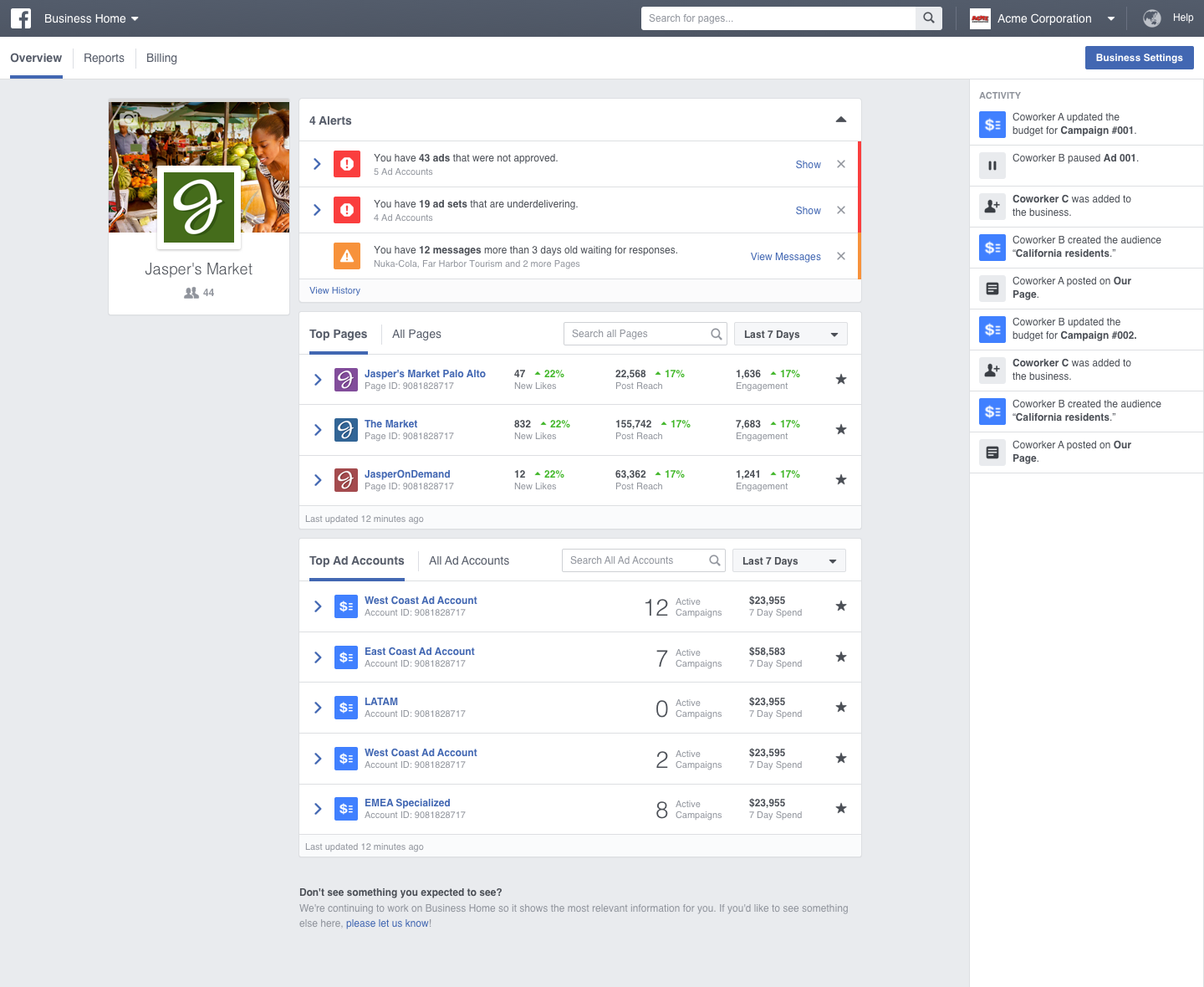
At the moment, Facebook Business Suite is still rolling out and might not be available for some admins just yet. However, the tools below can help you fill your data gaps as you wait.
Facebook Insights
Facebook Insights is an analytics dashboard where you can track business page user behavior and post performance. You can also see insights like page views, post reach for paid and organic posts, and competitor page data.
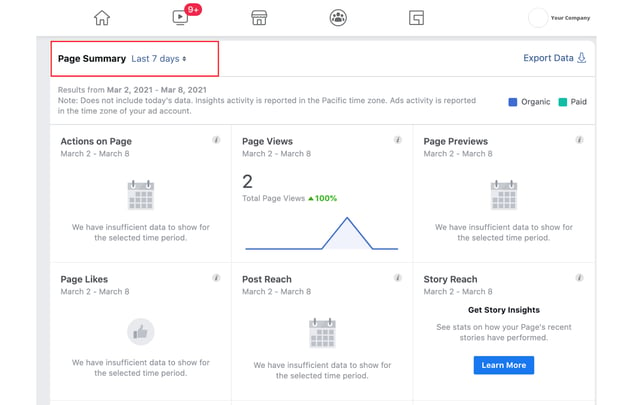
If you have a Facebook Business Page, you’ve probably used Facebook Insights to gather data that can fuel your social media tactics. Luckily, Facebook says Insights won’t be impacted by the removal of Facebook Analytics.
To learn more about Facebook Insights if you’ve never used it before, check out this blog post.
Facebook Ads and Events Managers
Facebook Ads Manager and Facebook Events Manager help you launch and track ads and website conversion events attached to your Facebook Business Page.
While Ads Manager lets you view, edit, and track your Facebook campaigns, ads, and ad sets, Events Manager lets you use Facebook’s pixel and Conversions API to track and report on actions visitors take on your website, app, or even in your physical store. To use Events Manager, you’ll need to add the Facebook Pixel code to your website to make it trackable. Instructions for this can be found on Facebook’s business knowledge base.
Paid Tools
HubSpot
HubSpot’s Social Media Management Software not only enables you to link and share posts on your Facebook account, but you can also track conversions and other engagements.
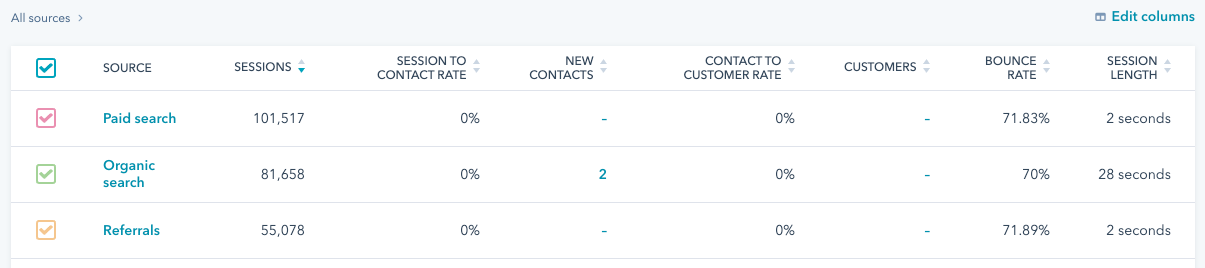
HubSpot’s social media tools can help you understand which of your marketing tactics are working best among your audience, determine how your marketing efforts are impacting your bottom line, see if your campaigns result in more paid or organic social media sessions, and learn about your search engine optimization (SEO)-related ROI.
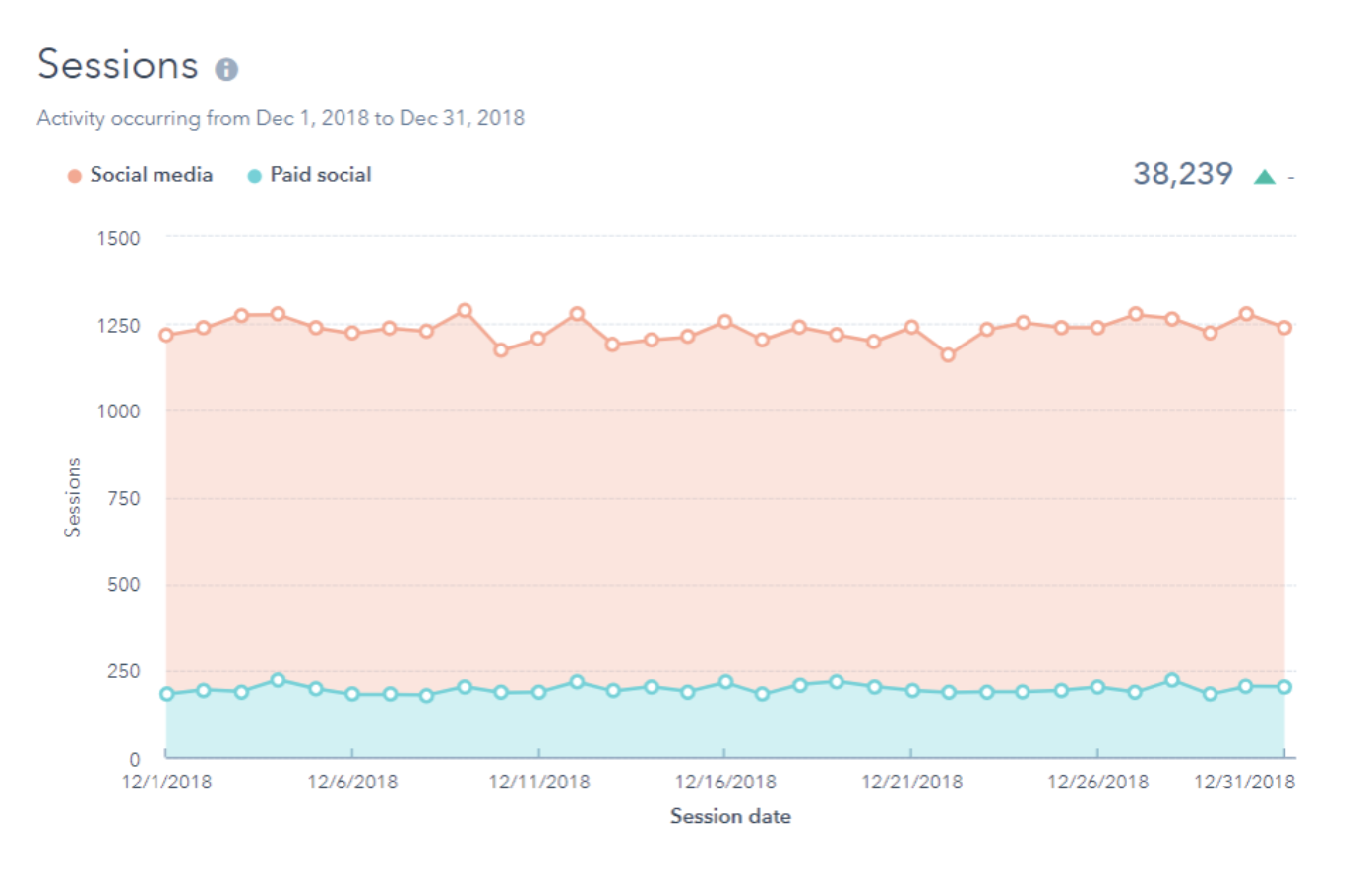
Additionally, if your website is built on HubSpot’s CMS or has a HubSpot tracking code installed, you can track site conversions, traffic, and traffic sources to learn more about where your audiences are coming from and what they engage with.
Google Analytics
While Google Analytics is often seen as a high-end analytics tool, it certainly has a lot of great features that have helped marketers around the globe to transform their strategy.
While it will likely take a bit of onboarding and training for your team GA allows you to see traffic patterns, traffic sources, visitor demographics, and visitor behavior among a plethora of other helpful insights.
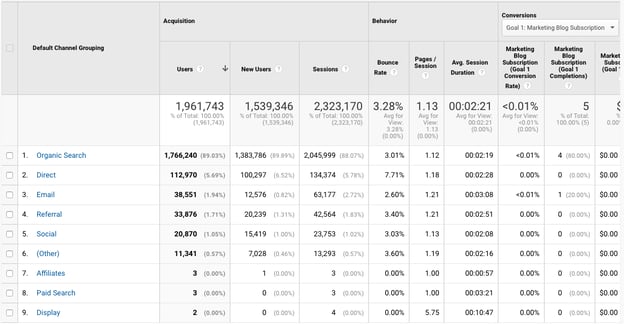
For a crash course on Google Analytics with photos, check out this Ultimate Guide.
Navigating Data Software Shifts
As the world evolves towards more online privacy and streamlined technology, Facebook probably isn’t the only platform that will change or evolve in years to come.
As a modern marketer, it’s important to know when to invest in new analytics platforms, alternatives, or workarounds if the tools you use are no longer relevant.
For tips on developing effective data-driven strategies, download the free resource below.

39 Simple Ways to Grow Your Email List
I have some bad news — your email marketing contact database degrades over time.
Your contacts’ email addresses change as they move from one company to another, opt-out of your email communication, or abandon an address they only used to fill out forms on websites.
As a marketer, it’s your job to make sure you’re constantly adding fresh contacts to your email lists so you can continue generating growth. While purchasing emails is an option, it’s not always the best way to go about this.
In this post, discover high-quality strategies to help you grow your email list to ensure that you have a large audience of subscribers eager to hear what you have to say and likely to make purchases and contribute to your business growth.

Sometimes called subscriber lists, email lists can get smaller if members unsubscribe and grow as you continue to collect more and more addresses through lead generation.
If you’re not working on building your email list already, or you’ve run out of ideas on how to do so, here are 39 simple ways to grow your email list. Please note that, with these methods, it’s essential to allow people to opt-in to receiving additional emails from your company, as some may not be interested.
39 Creative List Building Techniques
How To Grow Your Email List Using Email
1. Create unique email content.
Want to retain your current subscribers and have them help you grow your list? Create unique email content. If your emails are entertaining, informative, and valuable, recipients will always look forward to receiving them and will be more likely to forward them to their networks. This helps you gain exposure and obtain additional subscribers.
2. Encourage subscribers to share and forward your emails.
Include social sharing buttons and an “Email to a Friend” button on your marketing emails. By doing this, you’ll gain access to recipients’ friends, colleagues, and networks to expand your contact list. At the bottom of your emails, include a “Subscribe” CTA as a simple text-based link so that the people receiving the forwarded emails can easily opt-in too.
3. Segment your email lists by buyer persona.
Email recipients are more likely to click through emails that cater to their specific interests, so using varying types of email subscriptions to send targeted content to different segments of your audience is worth considering.
If you create multiple targeted subscriber types, you’ll increase the chance that visitors will subscribe to one of them. In fact, marketers who used segmented campaigns noted as much as a 760% increase in revenue.
4. Reinvigorate a stale email list with an opt-in campaign.
Do you have an older list that you suspect is mostly decayed? Create an engaging opt-in message and send it to your old list and encourage contacts to re-opt in if they’d like to, but also promising to remove all contacts who don’t respond.
Though it may seem counterintuitive to remove folks from your email list to grow them, emailing contacts that you know are engaged can improve your deliverability and increase the odds of your email being shared with those outside your current database.
5. Add an opt-in link to your employees’ signatures.
Hyperlinked email signatures can lead people to a landing page where they can sign up for your mailing list. Plus, if you’re already in a natural email conversation with them, subscribing to more emails can be a natural next step.
How To Grow Your Email List With New Content
6. Create a new lead-generation offer.
Create a new gated lead-generation offer, like a free ebook, and host it on a landing page that asks visitors to provide their email to download it.
7. Create a free online tool or resource that requires sign-up.
Free online tools make your users’ lives easier, especially if all they have to do is sign up with their email address. For example, we’ve created quite a few free tools, like Website Grader, to gather email addresses.
8. Create additional bonus content.
Not all gated content is worth it to a website visitor. Sometimes, to gain their interest, you need to give them free content first. You can begin with a blog post that offers beginner advice on a subject, then offer additional bonus content with more advanced tips that they can access by submitting their email address via a landing page.
How To Grow Your Email List Using Social Media
9. Promote an online contest.
Use your social media accounts to host a free giveaway that requires contact information to enter. You can encourage your followers to click through to your website and sign up using their email addresses.
10. Promote a lead gen offer on Twitter.
Create a Twitter campaign to promote an ebook or free resource to your followers that requires using an email address to redeem.
11. Use Pinterest to promote gated visual content.
Pinterest plays host to visual content that encourages visitors to sign up to see more content. Use this to your advantage, and promote your gated visual content on the platform, so users are eager to learn more from you and submit their email to get more high-quality information.
Featured Resource: 12 Pinterest Templates for Business
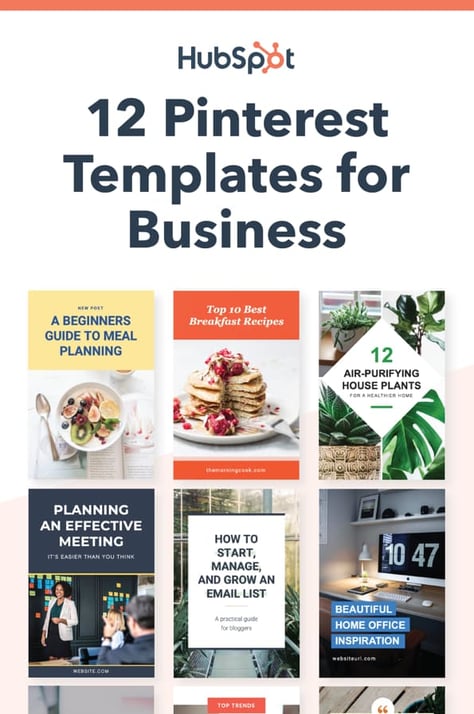
Download These Templates for Free
How To Grow Your Email List Using Facebook
12. Make your email newsletter the theme of your profile cover photo.
Your Facebook profile cover photos are a great place to call attention to something specific, especially your email newsletter. If you create a high-quality graphic that highlights and calls attention to its value, you can entice users to submit their email to gain further benefit from the content you offer.
Featured Resource: Five Free Facebook Cover Photo Templates
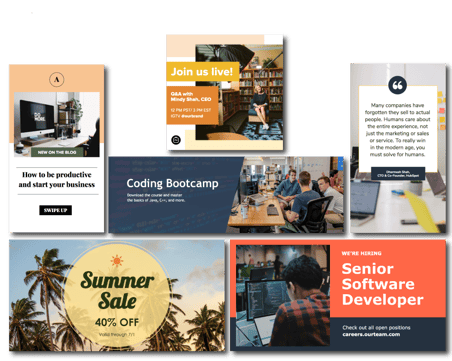 Get These Customizable Templates
If you do this, you should also consider leveraging our next tip, making it easy for users to seamlessly submit their emails once you’ve attracted their attention.
13. Add a call-to-action button to the top of your Business’s Facebook page.
The value of this list-building technique is in the destination: add a CTA button to your Facebook page that links users to your sign-up landing page or a gated featured resource that requires email access. We added CTAs to our HubSpot Academy Facebook page, as displayed in the image below.
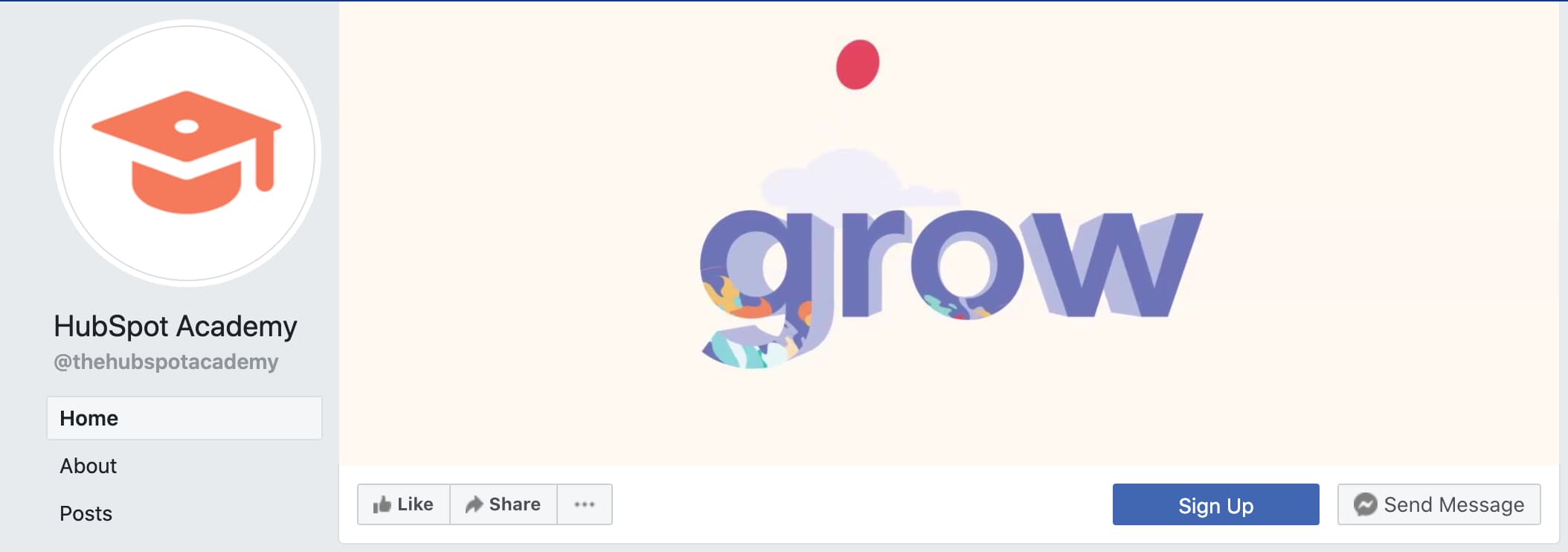
In addition, placing a sign-up CTA button within your profile makes it easier for users, as they won’t need to leave Facebook and go to your site — they simply click the link, and you take them there.
Here’s a guide from Facebook on how to add one to your profile.
14. Share newsletter previews on your profile.
Creating a Facebook post that showcases a snippet of your email newsletter is a great way to attract your audiences and entice them to join your email list. They’ll get a preview of what you have to offer, become eager to learn more, and sign up to continue generating value from your business. Within this post, you can include a link to your sign-up page for easy and quick sign-up.
15. Promote content through Facebook that requires an email address to access.
Promote content in your Facebook posts that encourage email submission to access. This content can be something like a gated ebook, joining a giveaway or contest, or even saying that email subscribers get early access to new products.
Be sure to add social sharing buttons to your landing and thank-you pages to encourage your leads to share within their networks.
How To Grow Your Email List Using YouTube
16. Add engagement features to your YouTube videos.
End screens, also called video outros, are a tool that YouTube offers creators to direct viewers to take additional action after finishing a video, like clicking on a link to your website or watching another video on your channel. As they are used to generate further engagement from your viewers, it’s worth considering adding hyperlinks to your sign-up landing page in your end cards to grow your email list.
This tip is beneficial if you have created an informative video with mostly surface-level content. A more advanced view is provided in a gated offer or your email newsletter.
17. Use your header and images to promote your email newsletter.
Capture leads by placing a link to your sign-up landing page in your channel header. This image is front and center on your profile, and if your banner is eye-catching, well designed, and calls attention to your content offer, users will be drawn to it, which places the CTA link in their direct line of sight.
The red arrow in the image below points to a CTA on the HubSpot Academy YouTube page that leads users to a course enrollment offer that requires an email to sign up.
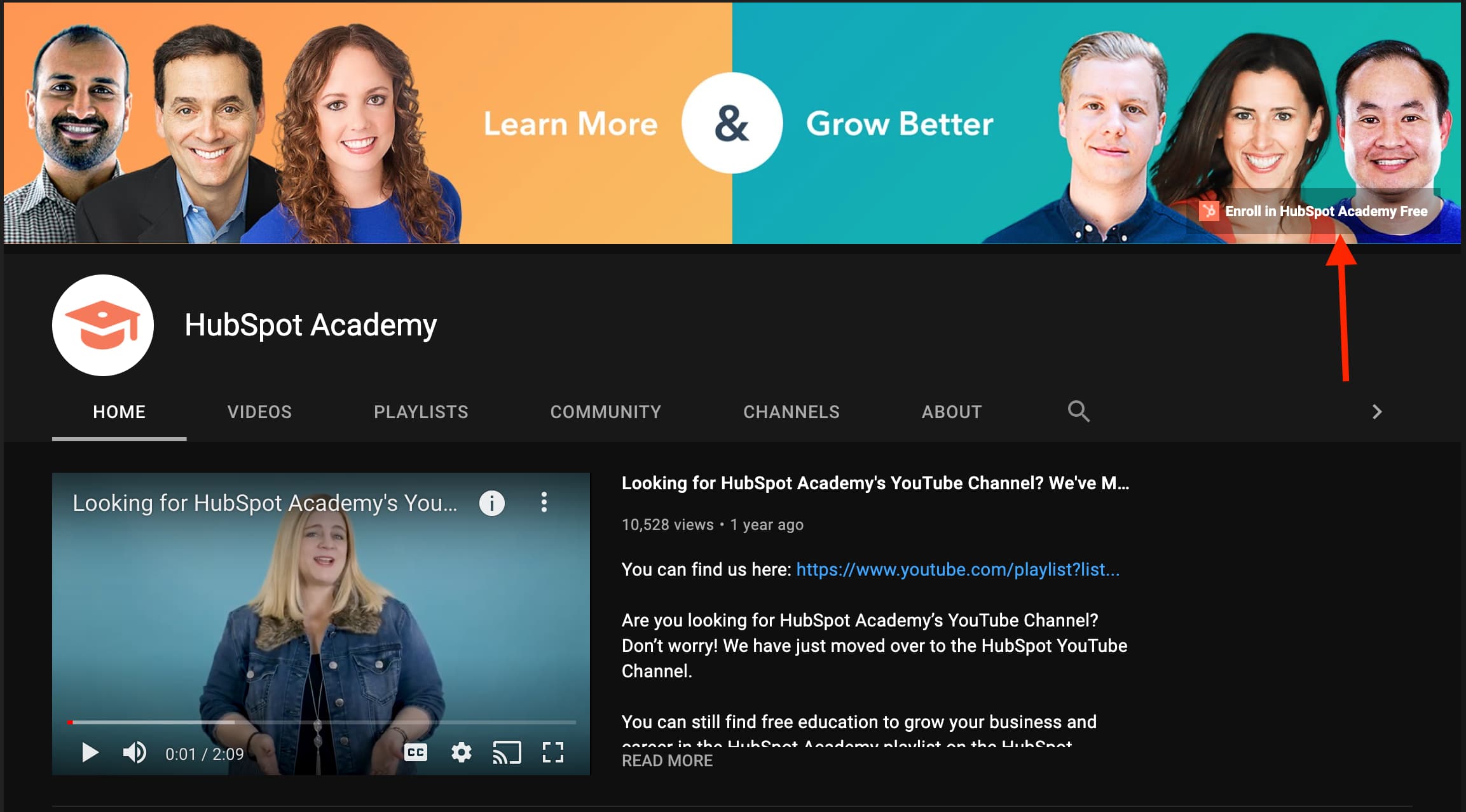
18. Promote your emails in your video descriptions.
Your YouTube video descriptions talk about the content within your videos, so viewers know what they’re about to watch. Each of your descriptions will likely contain unique elements, but it’s worth plugging your email sign-up landing page link within each of them.
This tip can be especially useful if you create how-to style videos, and you can entice users to sign up for more informative content and instruction by clicking the link in your description.
Featured Resource: 7 YouTube Description Templates [Free Prompts]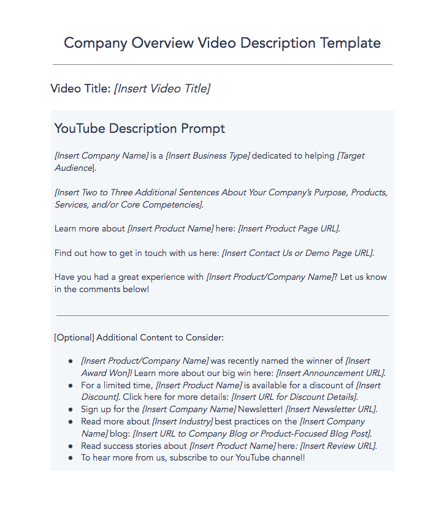
Download These Customizable Prompts
How To Grow Your Email List Using Instagram
19. Add a call to action to your Instagram bio.
Your Instagram bio is a great place to share information with your audience, like a CTA that calls attention to your email list and a link to your sign-up form.
Your CTA text should entice users by explaining the benefit they get from signing up, like obtaining bonus info, access to exclusive offers, or a general business newsletter. Placing the link directly in your bio also reduces customer effort, as they can simply click and sign up in a pop-up window within the app.
20. Share posts that lead users to click the call-to-action email link in your bio.
While you may not share posts that outright say “Give us your email,” you can certainly see success from sharing posts that entice users to share their contact info.
For example, you can advertise a giveaway and let users know that they can enter by clicking the link in your bio and submitting their email addresses. In another case, if you post an informative video about how to use your products, you can entice users to sign up because your emails will offer more informational content about how to use your products.
21. Use the swipe-up feature to share your landing page.
If you have an Instagram Business profile and more than 10k followers, you can add a clickable link to your Stories that users can access by swiping up on the story.
This feature is an excellent opportunity to share a link to your sign-up page or another offer on your site that collects email addresses in exchange for value, like a free trial. You can also use this feature to link to something like an informative blog post with a lead generation offer that your audience will be excited to sign up for.
Featured Resource: 8 Instagram Story Templates
22. Add an email button to your business profile.
A more direct way to get user emails is to add an email button to your business page. This tool is primarily used for service needs so that customers can reach out to you for support inquiries. Still, it gives you the opportunity for further lead nurturing by asking if customers want to opt-in to receiving more emails.
Here’s a guide on how to add one to your profile.
How To Grow Your Email List Using LinkedIn
23. Send readers to a landing page for email sign-up.
After having conversations on LinkedIn, you can share links to your sign-up pages. You’re allowing users to continue the interaction you’ve just had, as your email will provide them with further high-quality information and content related to your business.
You can send these links in InMail messages, comment threads, and personal 1:1 direct messages.
24. Post about your email newsletter.
If you have an email newsletter, you can post snippets of its content on LinkedIn and let users know that, if they sign up, they’ll get access to the entire piece and every newsletter from there on out.
25. Publish links to gated offers.
When you share a post on LinkedIn that contains high-quality information your audience can benefit from, round it out by encouraging users to sign up for your email list. If what you’ve said has resonated with them, they’ll recognize that receiving emails from you will give them additional access to the high-quality content you offer.
You can also do this in appropriate and relevant LinkedIn group discussions — just be mindful of the topic being discussed to ensure your offer is a welcome addition to the conversation.
How To Grow Your Email List On Your Website
26. Ask website visitors for feedback
People enjoy offering feedback on information that pertains to them. On your site pages, include a form that asks visitors what questions they might have about your business, and collect email addresses to follow up with them.
27. Shorten the length of your lead-capturing forms
It’s tempting to collect as much information on a user as possible right away, but adding too many fields to your landing pages and lead-capturing forms can drive people away. Reduce the length of your forms to just two to three fields — you can collect more information from them once you start a conversation.
28. Link to offers across your website that capture email signups
Create CTAs that link to your offers across your website that captures email sign-ups. Some key places to consider include your website’s homepage, your ‘About Us’ page, and your ‘Contact Us’ page.
29. A/B test different campaign copy
You might be doing all the right things to generate leads — landing pages, gated content, contests, and more, but not seeing the success you’re looking for. The problem may be that the design or copy itself isn’t driving the engagement you need.
A/B test different aspects of your list-building campaigns with different versions of the same content. This includes the call-to-action text, the color of the gated offer, and even where these sign-up forms are placed on your website. Sometimes a small change can drive hundreds more conversions.
Featured Resource: The Complete A/B Testing Kit
30. Create a blog that readers can subscribe to.
If you don’t already blog, you should. Blog posts help you increase your ranking on search engines and generate blog subscribers to upgrade to more actionable email campaigns over time.
31. Guest blog for other websites and share a call-to-action.
There are many websites and publishers out there that cater to your audience — and larger portions of it. Guest blogging for these websites helps you expand your contact list through exposure to a new audience.
When you create guest blogging content, include a CTA for readers to subscribe to your sites’ blog or email newsletter.
32. Include customer reviews on your sign-up landing pages.
It’s one thing for you to tell people to sign up for a campaign, but it’s another thing for your happiest customers to say it too. Customer reviews are the social proof that encourages people to join in on something, and you should publish these reviews on your website, especially landing pages with sign-up forms. Including reviews will add genuine value to your content when people are on the fence about submitting contact information.
How To Grow Your Email List With a Partner
33. Run a promotion on a partner website or email newsletter.
Similar to guest blogging, partner websites can help you target a new audience. Use this partner source to direct visitors to your website, where you’re already sharing sign-up forms.
34. Host a co-marketing offer with a partner.
Creating an ebook or webinar with a partner can split up the work of content creation and allow you to share the audience of a similar business. After you release your content, split the leads you generate with your partner.
Creating an ebook or webinar with a partner can split up the work of content creation and allow you to share the audience of a similar business. If the content is gated, you’ll collect email addresses from a new audience for nurturing.
How To Grow Your Email List With Traditional Marketing
35. Collect email addresses at a trade show.
Offline events like trade shows are highly anticipated growth opportunities for professionals in your industry. Demo your latest product at an appropriate conference and collect signups in person.
Once you’re back at the office, import these signups into your contact database, and be sure to send a welcome email that confirms their opt-in to your list.
36. Host your own offline, in-person events.
Meetups, seminars, hackathons, educational panels, and your conferences place you front and center of a networking event. Those who attend are often more qualified to be contacted because they came to your event. Take the opportunity to collect email addresses from attendees, and send a welcome email and encourage opt-in.
37. Host an online webinar.
Webinars are the perfect opportunity to talk about your industry and access the audience of thought leaders that you may want to present with. The best part? Webinars are normally registered for via email, so you have audience emails to add to your list for further nurturing upon registration.
38. Add QR codes to your display ad.
Incorporate a QR code into your print marketing collateral that people can scan for more information on the printer content. You can set it so that your codes require email addresses to access additional content so that you can grow your list.
39. Collect emails in-store.
If you have a brick-and-mortar store where you interact with customers face-to-face, launch a store membership that they can sign up for via email at the register. You can create an email campaign designated to walk-in customers, which can help you keep in touch and reward loyalty to your product.
The examples above are all things you can do to increase your business’s email list. The best way to do so is to leverage multiple strategies on this list, helping you reach your audiences from a wide variety of angles and increase the chances of growing your list.
As you grow your email list with fresh, opt-in contacts, you’ll be able to nurture them with middle-of-the-funnel offers that allow you to convert early-stage leads into sales-ready leads.

Color Theory 101: A Complete Guide to Color Wheels & Color Schemes
When you’re sifting through your News Feed, what tends to catch your attention? More likely than not, it’s YouTube videos, pictures, animated GIFs, and other visual content, right?
While text-based content is always important when seeking answers to a question, creating visuals such as infographics, charts, graphs, animated GIFs, and other shareable images can do wonders for catching your readers’ attention and enhancing your article or report.
I know what you might be thinking: “I don’t know how to design awesome visuals. I’m not creative.”
Hi. I’m Bethany, and I will be the first to tell you that I’m not naturally artistic. And yet, I found a strength in data visualization at HubSpot, where I’ve spent most of my days creating infographics and other visuals for blog posts.
So, while I wouldn’t say I’m naturally artistic, I have learned how to create compelling visual content. So can you.

And you can do this by learning color theory. Consider this your introductory course, and we’ll be covering the following topics:
- What Is Color Theory?
- Why Is Color Theory Important in Web Design?
- Color Theory 101
- Additive & Subtractive Color Theory
- The Meaning of Color
- The Seven Color Schemes
- How to Choose a Color Scheme
- Color Tools
What is color theory?
Color theory is the basis for the primary rules and guidelines that surround color and its use in creating aesthetically pleasing visuals. By understanding color theory basics, you can begin to parse the logical structure of color for yourself to create and use color palettes more strategically. The result means evoking a particular emotion, vibe, or aesthetic.
While there are many tools out there to help even the most inartistic of us to create compelling visuals, graphic design tasks require a little more background knowledge on design principles.
Take selecting the right color combination, for instance. It’s something that might seem easy at first but when you’re staring down a color wheel, you’re going to wish you had some information on what you’re looking at. Understanding how colors work together, the impact they can have on mood and emotion, and how they change the look and feel of your website is critical to help you stand out from the crowd — for the right reasons.
From effective CTAs to sales conversions and marketing efforts, the right color choice can highlight specific sections of your website, make it easier for users to navigate, or give them a sense of familiarity from the first moment they click through.
But it’s not enough to simply select colors and hope for the best — from color theory to moods and schemes, finding the right HTML color codes, and identifying web-accessible colors for products and websites, the more you know about using color, the better your chances are for success.
Read on for our designer’s guide to color theory, color wheels, and color schemes for your site.
Color Theory 101
Let’s first go back to high school art class to discuss the basics of color.
Remember hearing about primary, secondary, and tertiary colors? They’re pretty important if you want to understand, well, everything else about color.

Primary Colors
Primary colors are those you can’t create by combining two or more other colors together. They’re a lot like prime numbers, which can’t be created by multiplying two other numbers together.
There are three primary colors:
- Red
- Yellow
- Blue
Think of primary colors as your parent colors, anchoring your design in a general color scheme. Any one or combination of these colors can give your brand guardrails when you move to explore other shades, tones, and tints (we’ll talk about those in just a minute).
When designing or even painting with primary colors, don’t feel restricted to just the three primary colors listed above. Orange isn’t a primary color, for example, but brands can certainly use orange as their dominant color (as we at HubSpot know this quite well).
Knowing which primary colors create orange is your ticket to identifying colors that might go well with orange — given the right shade, tone, or tint. This brings us to our next type of color …
Secondary Colors
Secondary colors are the colors that are formed by combining any two of the three primary colors listed above. Check out the color theory model above — see how each secondary color is supported by two of the three primary colors?
There are three secondary colors: orange, purple, and green. You can create each one using two of the three primary colors. Here are the general rules of secondary color creation:
- Red + Yellow = Orange
- Blue + Red = Purple
- Yellow + Blue = Green
Keep in mind that the color mixtures above only work if you use the purest form of each primary color. This pure form is known as a color’s hue, and you’ll see how these hues compare to the variants underneath each color in the color wheel below.
Tertiary Colors
Tertiary colors are created when you mix a primary color with a secondary color.
From here, color gets a little more complicated, and if you want to learn how the experts choose color in their design, you’ve got to first understand all the other components of color.
The most important component of tertiary colors is that not every primary color can match with a secondary color to create a tertiary color. For example, red can’t mix in harmony with green, and blue can’t mix in harmony with orange — both mixtures would result in a slightly brown color (unless of course, that’s what you’re looking for).
Instead, tertiary colors are created when a primary color mixes with a secondary color that comes next to it on the color wheel below. There are six tertiary colors that fit this requirement:
- Red + Purple = Red-Purple (magenta)
- Red + Orange = Red-Orange (vermillion)
- Blue + Purple = Blue-Purple (violet)
- Blue + Green = Blue-Green (teal)
- Yellow + Orange = Yellow-Orange (amber)
- Yellow + Green = Yellow-Green (chartreuse)
The Color Theory Wheel
Okay, great. So now you know what the “main” colors are, but you and I both know that choosing color combinations, especially on a computer, involves a much wider range than 12 basic colors.
This is the impetus behind the color wheel, a circle graph that charts each primary, secondary, and tertiary color — as well as their respective hues, tints, tones, and shades. Visualizing colors in this way helps you choose color schemes by showing you how each color relates to the color that comes next to it on a rainbow color scale. (As you probably know, the colors of a rainbow, in order, are red, orange, yellow, green, blue, indigo, and violet.)
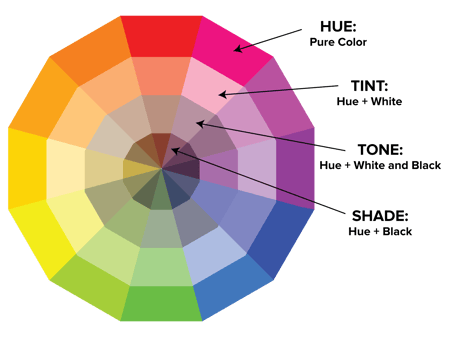
When choosing colors for a color scheme, the color wheel gives you opportunities to create brighter, lighter, softer, and darker colors by mixing white, black, and gray with the original colors. These mixes create the color variants described below:
Hue
Hue is pretty much synonymous with what we actually mean when we said the word “color.” All of the primary and secondary colors, for instance, are “hues.”
Hues are important to remember when combining two primary colors to create a secondary color. If you don’t use the hues of the two primary colors you’re mixing together, you won’t generate the hue of the secondary color. This is because a hue has the fewest other colors inside it. By mixing two primary colors that carry other tints, tones, and shades inside them, you’re technically adding more than two colors to the mixture — making your final color dependent on the compatibility of more than two colors.
If you were to mix the hues of red and blue together, for instance, you’d get purple, right? But mix a tint of red with the hue of blue, and you’ll get a slightly tinted purple in return.
Shade
You may recognize the term “shade” because it’s used quite often to refer to light and dark versions of the same hue. But actually, a shade is technically the color that you get when you add black to any given hue. The various “shades” just refer to how much black you’re adding.
Tint
A tint is the opposite of a shade, but people don’t often distinguish between a color’s shade and a color’s tint. You get a different tint when you add white to a color. So, a color can have a range of both shades and tints.
Tone (or Saturation)
You can also add both white and black to a color to create a tone. Tone and saturation essentially mean the same thing, but most people will use saturation if they’re talking about colors being created for digital images. Tone will be used more often for painting.
With the basics covered, let’s dive into something a little more complicated — like additive and subtractive color theory.
Additive & Subtractive Color Theory
If you’ve ever played around with color on any computer program, you’ve probably seen a module that listed RGB or CMYK colors with some numbers next to the letters.
Ever wondered what those letters mean?
CMYK
CMYK stands for Cyan, Magenta, Yellow, Key (Black). Those also happen to be the colors listed on your ink cartridges for your printer. That’s no coincidence.
CMYK is the subtractive color model. It’s called that because you have to subtract colors to get to white. That means the opposite is true — the more colors you add, the closer you get to black. Confusing, right?
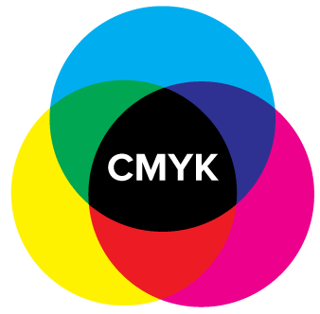
Think about printing on a piece of paper. When you first put a sheet in the printer, you’re typically printing on a white piece of paper. By adding color, you’re blocking the white wavelengths from getting through.
Then, let’s say you were to put that printed piece of paper back into the printer, and print something on it again. You’ll notice the areas that have been printed on twice will have colors closer to black.
I find it easier to think about CMYK in terms of its corresponding numbers. CMYK works on a scale of 0 to 100. If C=100, M=100, Y=100, and K=100, you end up with black. But, if all four colors equal 0, you end up with true white.
RGB
RGB color models, on the other hand, are designed for electronic displays, including computers.
RGB stands for Red, Green, Blue, and is based on the additive color model of light waves. This means, the more color you add, the closer you get to white. For computers, RGB is created using scales from 0 to 255. So, black would be R=0, G=0, and B=0. White would be R=255, G=255, and B=255.

When you’re creating color on a computer, your color module will usually list both RGB and CMYK numbers. In practice, you can use either one to find colors, and the other color model will adjust accordingly.
However, many web programs will only give you the RGB values or a HEX code (the code assigned to color for CSS and HTML). So, if you’re designing digital images or for web design, RGB is probably your best bet for choosing colors.
You can always convert the design to CMYK and make adjustments should you ever need it for printed materials.
The Meaning of Color
Along with varying visual impact, different colors also carry different emotional symbolism.
- Red — typically associated with power, passion, or energy, and can help encourage action on your site
- Orange — joy and enthusiasm, making it a good choice for positive messaging
- Yellow — happiness and intellect, but be wary of overuse
- Green — often connected to growth or ambition, green can help give the sense that your brand is on the rise
- Blue — tranquility and confidence, depending on the shade — lighter shades provide a sense of peace, darker colors are more confident
- Purple — luxury or creativity, especially when used deliberately and sparingly on your site
- Black — power and mystery, and using this color can help create necessary negative space
- White — safety and innocence, making it a great choice to help streamline your site
Worth noting? Different audiences may perceive colors differently. The meanings listed above are common for North American audiences, but if your brand moves into other parts of the world, it’s a good idea to research how users will perceive particular colors. For example, while red typically symbolizes passion or power in the United States, it’s considered a color of mourning in South Africa.
While it’s possible to create your website using a combination of every color under the rainbow, chances are the final product won’t look great. Thankfully, color experts and designers have identified seven common color schemes to help jumpstart your creative process.
Let’s examine each in more detail.
1. Monochromatic
Monochromatic color schemes use a single color with varying shades and tints to produce a consistent look and feel. Although it lacks color contrast, it often ends up looking very clean and polished. It also allows you to easily change the darkness and lightness of your colors.

Monochromatic color schemes are often used for charts and graphs when creating high contrast isn’t necessary.
Check out all the monochromatic colors that fall under the red hue, a primary color.

2. Analogous
Analogous color schemes are formed by pairing one main color with the two colors directly next to it on the color wheel. You can also add two additional colors (which are found next to the two outside colors) if you want to use a five-color scheme instead of just three colors.

Analogous structures do not create themes with high contrasting colors, so they’re typically used to create a softer, less contrasting design. For example, you could use an analogous structure to create a color scheme with autumn or spring colors.
This color scheme is great for creating warmer (red, oranges, and yellows) or cooler (purples, blues, and greens) color palettes like the one below.

Analogous schemes are often used to design images rather than infographics or bar charts as all of the elements blend together nicely.
3. Complementary
You may have guessed it, but a complementary color scheme is based on the use of two colors directly across from each other on the color wheel and relevant tints of those colors.

The complementary color scheme provides the greatest amount of color contrast. Because of this, you should be careful about how you use the complementary colors in a scheme.
It’s best to use one color predominantly and use the second color as accents in your design. The complementary color scheme is also great for charts and graphs. High contrast helps you highlight important points and takeaways.

4. Split Complementary
A split complementary scheme includes one dominant color and the two colors directly adjacent to the dominant color’s complement. This creates a more nuanced color palette than a complementary color scheme while still retaining the benefits of contrasting colors.

The split complementary color scheme can be difficult to balance because unlike analogous or monochromatic color schemes, the colors used all provide contrast (similar to the complementary scheme).
The positive and negative aspect of the split complementary color model is that you can use any two colors in the scheme and get great contrast … but that also means it can also be tricky to find the right balance between the colors. As a result, you may end up playing around with this one a bit more to find the right combination of contrast.

5. Triadic
Triadic color schemes offer high contrasting color schemes while retaining the same tone. Triadic color schemes are created by choosing three colors that are equally placed in lines around the color wheel.

Triad color schemes are useful for creating high contrast between each color in a design, but they can also seem overpowering if all of your colors are chosen on the same point in a line around the color wheel.
To subdue some of your colors in a triadic scheme, you can choose one dominant color and use the others sparingly, or simply subdue the other two colors by choosing a softer tint.
The triadic color scheme looks great in graphics like bar or pie charts because it offers the contrast you need to create comparisons.

6. Square
The square color scheme uses four colors equidistant from each other on the color wheel to create a square or diamond shape. While this evenly-spaced color scheme provides substantial contrast to your design, it’s a good idea to select one dominant color rather than trying to balance all four.

Square color schemes are great for creating interest across your web designs. Not sure where to start? Pick your favorite color and work from there to see if this scheme suits your brand or website. It’s also a good idea to try square schemes against both black and white backgrounds to find the best fit.

7. Rectangle
Also called the tetradic color scheme, the rectangle approach is similar to its square counterpart but offers a more subtle approach to color selection.

As you can see in the diagram above, while the blue and red shades are quite bold, the green and orange on the other side of the rectangle are more muted, in turn helping the bolder shades stand out.

No matter which color scheme you choose, keep in mind what your graphic needs. If you need to create contrast, then choose a color scheme that gives you that. On the other hand, if you just need to find the best “versions” of certain colors, then play around with the monochromatic color scheme to find the perfect shades and tints.
Remember, if you build a color scheme with five colors, that doesn’t mean you have to use all five. Sometimes just choosing two colors from a color scheme looks much better than cramming all five colors together in one graphic.
1. Prioritize the user experience, first.
Before you add color to your website, app, product, or packaging, get the basic design downpat in greyscale.
This lets you focus on what matters most: User experience. Instead of focusing on the color scheme of your overall site or the hue of specific buttons or links, make sure everything works like it’s supposed to. Make sure links aren’t broken, product pages are up-to-date and email opt-ins are ready to go.
Here’s why: Even the best-looking website or product with perfect color selection won’t be enough to keep visitors if they can’t find what they’re looking for.
2. Leverage natural inspiration.
Once your site operations are solid, it’s time to start selecting colors.
Not sure what looks good? Take a look outside. Nature is the best example of colors that complement each other — from the green stems and bright blooms of flowering plants to azure skies and white clouds, you can’t go wrong pulling context from natural colors and combinations.
3. Set a mood for your color scheme.
With a few color choices in mind, consider the mood you want your color scheme to set. If passion and energy are your priorities, lean more toward red or brighter yellows. If you’re looking to create a feeling of peace or tranquility, trend toward lighter blues and greens.
It’s also worth thinking negatively. This is because negative space — in either black or white — can help keep your design from feeling too cluttered with color.
4. Consider color context.
It’s also worth considering how colors are perceived in contrast.
In the image below, the middle of each of the circles is the same size, shape, and color. The only thing that changes is the background color.
Yet, the middle circles appear softer or brighter depending on the contrasting color behind it. You may even notice movement or depth changes just based on one color change.
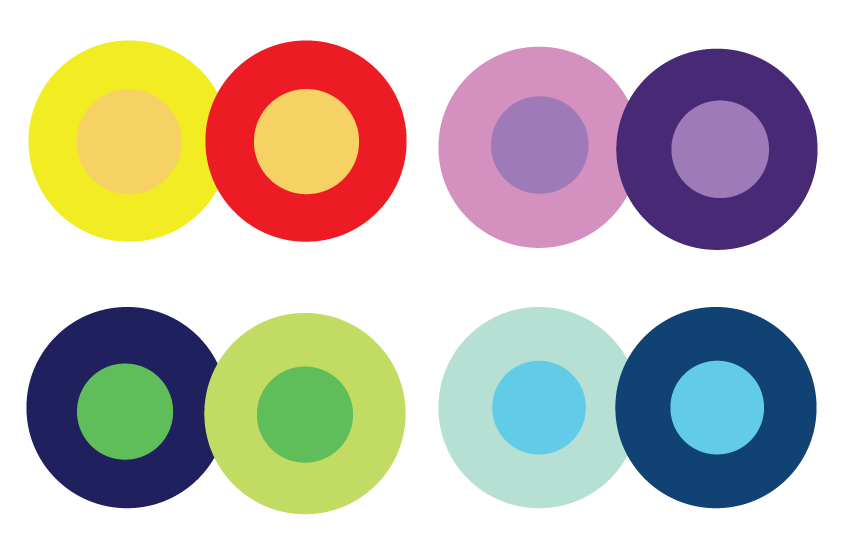
This is because the way in which we use two colors together changes how we perceive it. So, when you’re choosing colors for your graphic designs, think about how much contrast you want throughout the design.
For instance, if you were creating a simple bar chart, would you want a dark background with dark bars? Probably not. You’d most likely want to create a contrast between your bars and the background itself since you want your viewers to focus on the bars, not the background.
5. Refer to your color wheel.
Next, consider your color wheel and the schemes mentioned above. Select a few different color combinations using schemes such as monochrome, complementary, and triad to see what stands out.
Here, the goal isn’t to find exactly the right colors on the first try and create the perfect design, but rather to get a sense of which scheme naturally resonates with your personal perception and the look of your site.
You may also find that schemes you select that look good in theory don’t work with your site design. This is part of the process — trial and error will help you find the color palette that both highlights your content and improves the user experience.
6. Use the 60-30-10 rule.
Often used in home design, the 60-30-10 rule is also useful for website or app design. The idea here is to use three colors: A main color for 60% of your design, a secondary color for 30% of your design and an accent color for the last 10%.
While these aren’t hard-and-fast numbers, they help give a sense of proportion and balance to your site by providing a primary color with secondary and accent colors that all work together.
7. Draft multiple designs.
Draft and apply multiple color designs to your website and see which one(s) stand out. Then, take a step back, wait a few days and check again to see if your favorites have changed.
Here’s why: While many designers go in with a vision of what they want to see and what looks good, the finished product often differs on digital screens that physical color wheels — what seemed like a perfect complement or an ideal color pop may end up looking drab or dated.
Don’t be afraid to draft, review, draft again and throw out what doesn’t work — color, like website creation, is a constantly-evolving art form.
Put simply? Practice makes perfect. The more you play with color and practice design, the better you get. No one creates their masterpiece the first time around.
Color Tools
There’s been a lot of theory and practical information for actually understanding which colors go best together and why. But when it comes down to the actual task of choosing colors while you’re designing, it’s always a great idea to have tools to help you actually do the work quickly and easily.
Luckily, there are a number of tools to help you find and choose colors for your designs.
Adobe Color
One of my favorite color tools to use while I’m designing anything — whether it’s an infographic or just a pie chart — is Adobe Color (previously Adobe Kuler).
This free online tool allows you to quickly build color schemes based on the color structures that were explained earlier in this post. Once you’ve chosen the colors in the scheme you’d like, you can copy and paste the HEX or RGB codes into whatever program you’re using.
It also features hundreds of premade color schemes for you to explore and use in your own designs. If you’re an Adobe user, you can easily save your themes to your account.
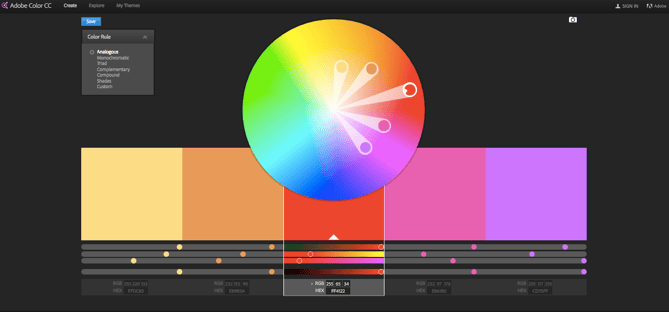
Illustrator Color Guide
I spend a lot of time in Adobe Illustrator, and one of my most-used features is the color guide. The color guide allows you to choose one color, and it will automatically generate a five-color scheme for you. It will also give you a range of tints and shades for each color in the scheme.
If you switch your main color, the color guide will switch the corresponding colors in that scheme. So if you’ve chosen a complementary color scheme with the main color of blue, once you switch your main color to red, the complementary color will also switch from orange to green.
Like Adobe Color, the color guide has a number of preset modes to choose the kind of color scheme you want. This helps you pick the right color scheme style within the program you’re already using.
After you’ve created the color scheme that you want, you can save that scheme in the “Color Themes” module for you to use throughout your project or in the future.

Preset Color Guides
If you’re not an Adobe user, you’ve probably used Microsoft Office products at least once. All of the Office products have preset colors that you can use and play around with to create color schemes. PowerPoint also has a number of color scheme presets that you can use to draw inspiration for your designs.
Where the color schemes are located in PowerPoint will depend on which version you use, but once you find the color “themes” of your document, you can open up the preferences and locate the RGB and HEX codes for the colors used.
You can then copy and paste those codes to be used in whatever program you’re using to do your design work.

Finding the Right Color Scheme
There’s a lot of theory in this post, I know. But when it comes to choosing colors, understanding the theory behind color can do wonders for how you actually use color. This can make creating branded visuals easy, especially when using design templates where you can customize colors.

Editor’s note: This post was originally published in October 2018 and has been updated for comprehensiveness.


How to Be a Good Manager [Data + Expert Tips]
Why do people really quit their jobs?
Before you say “salary,” “benefits,” or “workload,” take a second to think about the worst boss you’ve ever had.
Were they bad at giving feedback, not helpful, or just plain mean? Did they have you feeling unmotivated, too nervous to offer ideas, or fearing that you’d lose your job with the slightest miss-step?
Once you let those memories sink in, you probably won’t second guess the statement: “People quit their managers, not their jobs.”
Over the years, this fact hasn’t changed. Study after study has emphasized that companies need good managers to retain good employees.
But what makes for a good manager? And what skills or strategies can you develop to ensure you’re considered a good one?
To explore this issue, we polled people and asked them to check off all the qualities they felt were most important for a great manager.
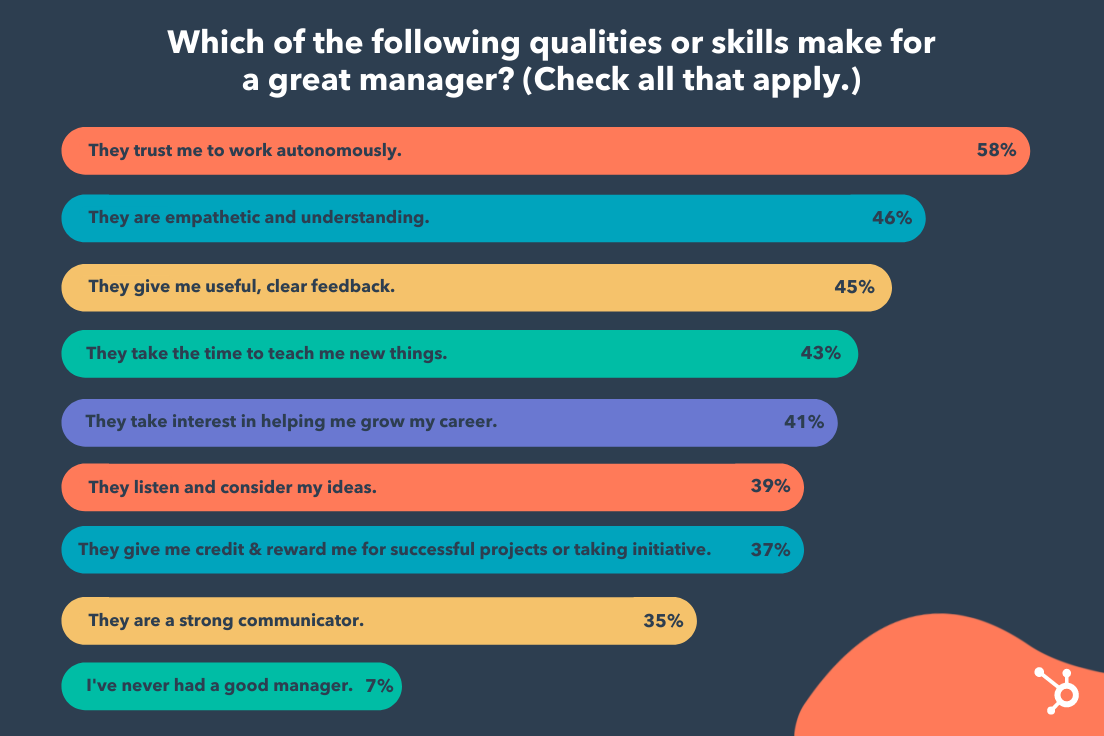 Recipients listed “they trust me to work autonomously”, “They are empathetic and understanding”, and “They give me useful, clear feedback”, as the three most important qualities a good manager needs to have.
Along with this data, I consulted my colleagues to get their thoughts on what makes a people manager effective. Regardless of whether you’re interested in managing a team, or just want to know if a prospective boss is actually a good manager, here are 7 crucial qualities of a great team leader.

7 Skills People Managers Must Master, According to HubSpot Employees
1. Good managers help employees navigate change.
Consider the last time you experienced change within your organization. Maybe a beloved leader retired, or perhaps your team experienced a reorg. Maybe you even acquired a new company.
Whatever the reason, I’m willing to bet the change felt daunting at times. Fortunately, good managers can mitigate the negative or ambivalent emotions that arise from change.
For instance, Christine McLaughlin, a Senior Project Manager on HubSpot’s Sales Leadership Enablement team, told me: “The strongest managers are ones who can help their teams navigate change in a very personal way. I’m a firm believer that every challenge presents an opportunity. But, because we’re human, we can’t always see the opportunity from the start.”
McLaughlin adds, “Our personal life, mental health, physical health, the last meeting we had, the next meeting we’re preparing for, all play a role in influencing how we perceive change. Do we view it as a challenge? An opportunity? A setback? A relief?”
“Strong managers can translate change for each individual on their team. They meet their teammate where they’re at and help to answer their questions and concerns to bring them to where they need to go.”
So … how can you do this? Start by fostering psychological safety, so your employees feel comfortable mentioning how they feel about a certain business change. Then, listen carefully to their concerns and work on providing solutions for those issues.
For instance, let’s say your team has experienced a reorg and one of your direct reports is concerned her role is going to change as a result.
To mitigate those concerns, consider creating a document that outlines which (if any) of her responsibilities might change as a result of the reorg — along with some new opportunities she can pursue to continue developing her professional skills.
2. Good managers are open and transparent.
Trust and transparency are undeniably critical components of good leaders — and, post-pandemic, this is continuing to rise in importance. In fact, Edelman’s most recent 2021 benchmark barometer on trust in leaders found employees ranked “good employee communication” 44 points higher than in the previous year.
Keri Polmonari, HubSpot’s Manager of Customer Success on the SMB team, believes transparency to be one of the most important attributes a good leader can possess.
She says, “Being transparent and forthcoming with your team creates an open and honest dialogue and ensures everyone is on the same page. Business changes — like changes in department goals, processes, or personnel — can be difficult and overwhelming. [But] when everyone understands the why behind these business changes, they are more open and understanding of implications this could have on their jobs, both positive and negative.”
Polmonari says,”Transparency builds trust, fosters relationships, and creates organizational alignment, all key components of a company’s, department’s, and individual’s success.”
3. Good managers encourage vulnerability.
Consider the last time your manager started your 1:1 with a slightly more personal question, like, “How was your birthday this past weekend?” or “Read any good books lately?”
These questions ultimately help encourage vulnerability by creating space for you to share information about your life outside of work — and they can go a long way towards creating stronger bonds.
As Jill Callan, VP of Marketing at Trusted Health, told me, “Whenever I start a new role or inherit a new team, I begin by enabling and encouraging vulnerability. This helps me forge strong bonds with my direct reports and allows them to be comfortable to share ideas and admit weaknesses.”
Callan adds, “I’m also very intentional about getting to know my team as individuals, and learn about their lives outside of work. Taking the time upfront to build a strong, authentic relationship with my direct reports helps us tackle inevitable tough challenges down the line.”
To encourage vulnerability, consider how you might increase your own openness with your team. For instance, perhaps you admit when you’re feeling overwhelmed with childcare duties, mention a Netflix show you’ve been binging, or simply chat about the gardening hobby you’ve picked up.
And embrace vulnerability by admitting when you’ve made a mistake or you’re feeling overwhelmed — it will help your employees feel comfortable admitting the same.
4. Good managers find ways to supplement their team member’s weaknesses.
I once had a manager who repeatedly sought out learning and development opportunities for the areas we’d determined as weaknesses of mine. She would often email me public speaking courses, or data & analytics workshops.
As a result, I continued to grow professionally, and I felt challenged. This is what a good manager does: Continues to keep a direct report’s weaknesses in-mind, and provides guidance to help that employee improve.
HubSpot Senior Manager Christina Perricone concurs, telling me, “Good managers find ways to supplement their team member’s weaknesses. Each of us has skills that come naturally to us, as well as skills we’re not so great at.”
“An attuned manager can identify an individual’s weak areas and will surface resources or offer guidance to assist in those areas.”
Consider how you might similarly foster growth by taking stock of your team’s weaknesses, and actively pursuing resources that can help your team develop their weaker skills.
Additionally, use the hiring process to create a more well-rounded team by identifying strengths and weaknesses of existing employees.
As Perricone says, “Good managers are skilled at balancing out their teams by recruiting talent that can fill in the skill and experience gaps, thereby creating a more well-rounded unit.”
5. Good managers work for their employees — not above them.
You might be thinking, “Managers work for their employees? Isn’t it the other way around?”
Actually, a manager, like an employee, is more effective when they’re an active team player.
But, while an employee’s job is to fulfill tasks within a job description, a manager’s job is to make his or her team successful. To do this, a manager shouldn’t be afraid to chime in during meetings, assist on projects, or help their team grow or succeed in other ways.
For instance, consider asking your direct reports during a 1:1, “Is there anything you need me to do?”
This question can be translated in multiple positive ways, including, “Are there any blockers I can remove for you?”, “Are you waiting on a decision from me on anything?”, “Are you working on an idea that you want to share with me?” or even, “Is there something going on in your world outside of work that’s competing for your time and attention?”
Ultimately, a good manager considers it her primary job to make her employees successful in their projects and careers.
6. Good managers are always aiming to improve their emotional intelligence.
Emotional intelligence — or the skill that requires you to understand your own emotions, learn how to manage them, and know how to respond to the emotions of others on your team — is a vital component of good leadership.
Emotional intelligence can help you ensure you’re giving clear directions, and allows you to be empathetic to the needs of others. In short, it can help you foster stronger professional relationships and communicate effectively.
Most importantly, emotional intelligence enables you to stay calm during high-stress or unexpected situations — which can prevent you from making rash decisions as a leader, or stressing your team out unnecessarily.
7. Good managers can establish and promote psychologically-safe environments.
The ability to cultivate psychological safety is a critical asset that Jennifer Stefancik, a HubSpot Academy Marketing Manager, values in her own people manager.
“Feeling supported, heard, and understood is the foundation I need to be able to come to work every day with the right mindset to do good work,” Stefancik says.
Stefancik adds, “Genuine empathy and psychological safety are hard to fake, and it’s something that I think everyone should master before they consider the people management path.”
Psychological safety fosters innovative thinking and the ability to adapt well to change — and yet, according to a 2020 McKinsey Global Survey, only a handful of business leaders often demonstrate the behaviors associated with psychological safety.
If you’re a manager or hoping to be a better leader, it’s important you take time to identify aspects of your management style or overall office culture that could benefit from psychological safety.
For example, rather than using language that makes your team members feel scared of missing deadlines or goals, keep an open and supportive dialogue with them so they can confidently come to you with successes, learnings from failure, or concerns while they’re working on high-pressure projects.
Alternatively, if a team member is having trouble with a project, you should offer advice or assistance to help them remove blockers, rather than telling them to just get it done.
Supportive communication with team members allows them to learn from mistakes and grow as employees, rather than work tirelessly on projects because they fear that they’ll lose their jobs.
How to Be a Good Manager
As outlined in the data above, there are a few key traits required of any good manager. These include:
- Providing coaching and mentoring when necessary, but enabling your team to work autonomously and trusting them to get the job done.
- Showing empathy towards your direct reports as people with lives outside of work, and creating a sense of psychological safety for your employees to feel comfortable admitting when they’re struggling or need help.
- Being clear and direct with feedback.
- Taking the time to go the extra mile to help foster your employees’ professional growth through trainings, learning & development opportunities, or 1:1 sessions in which you coach them on certain skills.
However, a good manager looks different depending on the department or role — a good sales manager, for instance, requires different skills than that of a good marketing manager. Let’s dive into those, now.
How to Be a Good Sales Manager
Being a good sales manager requires a few unique skills outside of those listed above.
Along with setting clear expectations, communicating effectively, and inspiring your sales reps to perform at their best, a good sales manager needs to demonstrate a positive mindset, build team unity, and learn how to best support each sales rep in the unique way that will serve him or her best.
A few other notes on being a good sales manager:
- Use a dashboard or task management tool to easily track metrics for each sales rep. This enables you to avoid taking up too much time in your meetings discussing metrics — instead, you can now use that time to identify how you can best help, support, and coach your reps.
- Plan team outings or events that allow your team to build relationships with one another. Sales can be high-pressure and stressful, so it’s important you provide dedicated time to enable your sales reps to connect with one another and feel that they’re part of a support system.
- Look for trainings and development opportunities so your sales reps can continue to improve. In 1:1 meetings, focus on how you can help them achieve their goals; in team meetings, figure out what types of trainings can help the entire team perform better.
- Motivate your team by focusing on the ‘bigger purpose’ to ensure they feel intrinsically motivated. Sales isn’t just about hitting quota and making money — it’s also (oftentimes) about selling a product or service that can help people in large or small ways. Remind your team of your company’s bigger purpose to ensure they feel fulfilled and motivated.
Looking for more sales manager tips? Take a look at Here’s What Sales Leaders Should Prioritize in 2021 According to a Sandler Expert or 10 Things I Wish I Knew Before Becoming a Sales Manager.
How to Be a Good Marketing Manager
Marketing managers are often in-charge of leading a team, but they’re typically also responsible for a content property or program, which means their tasks can vary greatly.
Here are a few skills of a good marketing manager:
- The ability to think big-picture; using metrics and data to create a strong long-term strategy, and knowing when to pivot when an existing strategy isn’t working out as expected.
- Communicating effectively with various stakeholders — this includes inspiring and motivating your direct reports, communicating team goals cross-functionally and to leadership, and creating clear external communications, as well.
- Delegating and organizing tasks effectively. Learn about your direct report’s strengths, interests, and areas for growth, and facilitate that growth by giving them projects when they align with their interests. This doesn’t mean handing off any unwanted tasks from your to-do list — if you find a project that aligns with your direct report’s interests and you feel it’s mutually beneficial with team goals, then you’ll want to shuffle some of their existing tasks to ensure you don’t burn your team out.
To learn more about managing a marketing team, take a look at What Is a Marketing Manager?
How to Be a Good Project Manager
To be a good project manager, you need a few additional technical skills compared to the other managers in this list. Project managers need a deep technical understanding of the project at-hand in order to understand which tasks need to be assigned to whom, and to keep the process running smoothly.
A few other project manager skills and responsibilities include:
- Being able to set realistic goals, and understanding what resources are required. A project manager needs to be able to set timelines on certain aspects of a project, and she also needs to understand what resources — including employees, external consultants, tools, or budgeting — are required to make it happen.
- Having good organization and communication skills. A good project manager needs to remain organized and detail-oriented in order to effectively delegate tasks to the right teams, and stay on-top of identifying what needs to happen next for the project to go smoothly. A good project manager also needs to be able to clearly articulate the full scope of a project to various stakeholders to ensure each team is aligned on bigger-picture strategy.
- Analyzing and determining potential risks. A good project manager needs to be able to foresee potential roadblocks in any given project, and analyze either internal metrics or industry data to determine the best way to mitigate those risks.
A good project manager also uses the best tools at his or her disposal to create a streamlined process, keep track of responsibilities and timeline, and delegate effectively. Take a look at 16 Free Project Management Software Options to Keep Your Team On Track to choose the best tool for your needs.
And that’s it! You’re well on your way to become a better manager yourself. Remember, like any other role, becoming a good manager requires time, patience, dedication, and a consistent desire for feedback from your direct reports to iterate and grow over time.


Which Social Media Channels Do Consumers Spend the Most Time On? [New Data]
Every day there’s something new on social media.
Recently, Twitter introduced Twitter Blue, a premium subscription-based version of its platform.

TikTok took the social media world by storm back in 2020 and still remains the most downloaded app of 2021, according to Social Media Today. Instagram is regularly adding new features to its platform, recently testing a new affiliate tool for influencers.
The question is, how are these changes impacting how consumers behave online? Are users moving away from Facebook?
Let’s see what the data says and what it means for brands.
We surveyed 301 people and asked, “Which social media platform do you spend the most time on each week?” The response was kind of surprising.
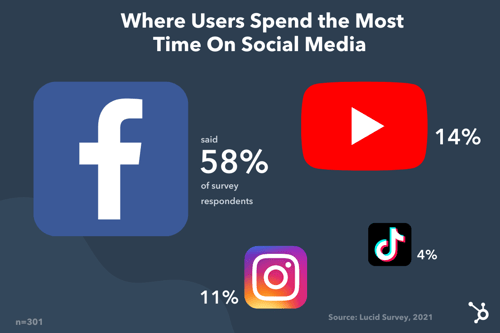
Despite YouTube’s steady growth over the past year and the rise of TikTok and Clubhouse, Facebook remains the top social media platform. YouTube follows, with the gap between the platform and Facebook much smaller in larger surveys.
So, what does this information really mean?
Well, in a broad sense, it means you should consider having a presence on these platforms. However, don’t delete your Instagram account just yet – better yet, don’t delete it at all.
I’ll explain why in the next section.
Should brands limit their efforts to the most popular platforms?
There’s no single, clear-cut answer to this… but typically, no.
While most consumers may spend most of their time on Facebook and YouTube, that doesn’t mean you should dedicate all your efforts entirely to those platforms.
Why? That may not be where your audience lives.
Generality is the enemy of marketing. Imagine running a social media ad that targets everyone. Or having a target audience comprising all of Gen Z.
This sort of one-size-fits-all isn’t conducive to your brand’s growth. In fact, it is likely keeping you from making progress, as you waste time and resources on broad strategies that may not work for your specific market.
It’s like going to a party and only getting an address for the neighborhood. Sure, you could drive around and knock on every door until you find the right one, but by that point, you might be tired, hungry, and out of gas.
When you zero in on a specific audience and strategy, you can gain more valuable insights and get a higher return on investment.
Data, just like the one above, should be used as a general guide to understand consumer behavior. However, it shouldn’t dictate your entire strategy. Your own consumer data and user persona(s) should.
For instance, let’s say you’ve discovered through market research that your audience enjoys consuming information mostly through blogs and podcasts. That’s a good indicator of where you should focus your efforts. In a few years, that data may change, in which case, your team should be flexible and move to where your audience is going.
Here’s what you should consider when determining where to direct your efforts:
- Where your audience lives
- The type of content you’ll be creating
- The channel that converts the best
There are a few ways to figure out where your audience “hangs out” online. First, you can check the demographics by platform – this will give you a general idea of the audience.
For instance, TikTok mostly caters to a younger audience between 10 to 29 years old while most Instagram users are between 18 to 34 years old.
You can also reach out to your target audience directly through polls and survey to find out where they spend their time. In addition, look to your competitors.
See where they’re focusing their efforts and if they are successful, that may be a good indication of where you should be. Like when you’re not sure you went to the right place but see someone you know parking and you can let out a sigh of relief.
Next is the type of content you’ll be creating.
Say your audience enjoys video content the most (think webinars, lives, video tutorials). In this case, your audience would be well suited for YouTube, Instagram, and TikTok, all of which have video editing and publishing features. You can then repurpose your content for each platform.
Another factor to consider is how each channel is contributing to your goals. This is where the importance of data comes in.
You may be posting every day on TikTok and find that the rare times you post on Facebook, you get much higher engagement and conversion rates. While there could be several reasons for this, you may want to redirect your attention to Facebook as it is providing the best return on investment.
Next, we’ll cover what software can help you keep track of your social media data.
Top Social Media Analytics Software
1. HubSpot
With HubSpot’s social media management software, you can track your social strategy from beginning to end.
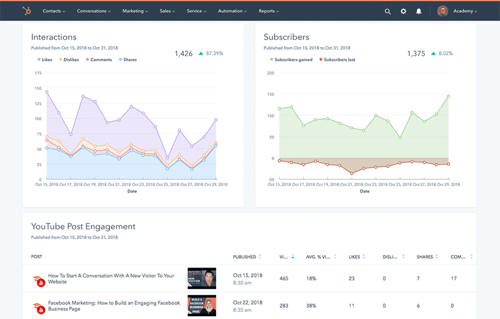
With a user-friendly dashboard, you can see exactly how your published posts are performing, which channels are bringing traffic to your website and generating leads, and more.
You can also filter your reports by campaign, account, and date range so you can narrow down the exact information you’re looking for.
In addition, HubSpot’s social media software allows you to:
- Schedule posts.
- See how your competitors measure up.
- Track and monitor conversations surrounding your brand on every platform.
- Export and analyze relevant reports.
The social media tool is available within HubSpot’s all-in-one CRM platform for mid- to large-size businesses.
2. HootSuite
HootSuite empowers your team to make decisions quickly with real-time data on your social strategy.
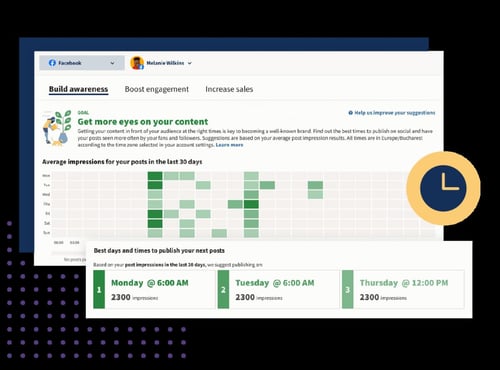
The social media software takes some of the guesswork out so that you can focus on the most important insights. With customizable dashboards, you can also get a quick overview of your key metrics and identify what’s driving traffic and sales.
Ranging from $49/month to custom pricing for enterprise-level businesses, you can find a plan that meets your needs and is scalable.
3. Sprout Social
If you have multiple social channels running at full speed and you’re overwhelmed with the data, Sprout Social can help.
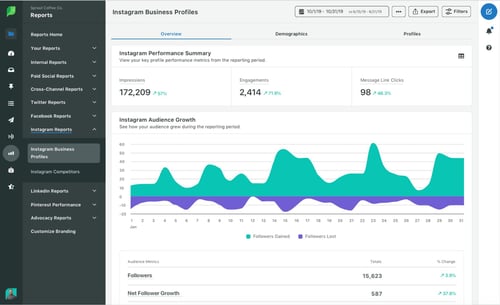
The platform helps you manage your data and create ready-to-go reports to share with stakeholders.
In addition, you can use competitive intelligence to benchmark your performance and make informed decisions that will promote your brand’s growth.
Sprout Social’s pricing is based on a subscription model and ranges from $99 to $249 a month.
Now that you know where consumers spend their time online, the real work begins. Experiment with various strategies to see what resonates best with your audience, always using data and your user personas to inform your decisions.

The Ultimate Guide to Instagram Stories Ads in 2021 [+ New Data]
Ah, Instagram Stories — the one-stop-shop to find short, engaging content from high school friends, celebrities, and major brands alike.
With over 500 million daily active users, Instagram Stories is an undeniably powerful opportunity to connect with new audiences.
And, if you’re not using Instagram Stories as a marketing tool, you should be. In fact, Instagram reports that of the 500 million accounts using Instagram Stories, one-third of the most viewed stories come from businesses.
I can personally attest to the power of Instagram Stories to incentivize purchasing decisions. For instance, the other day I was mindlessly scrolling through Stories when I came across an ad for Crest 3D whitestrips — with a $50 off coupon attached. I swiped up to purchase without ever leaving the app itself.
Here, let’s dive into what Instagram Story ads are, and how you can run Instagram Story ads for your own business. Plus, we’ll explore examples of Instagram Story ads and best practices to ensure your ads are as powerful as they can be.

What are Instagram Story ads?
Instagram Story ads are vertical ads you can run on Instagram’s Stories feature. (To recap, Instagram Stories are photos and videos visible to an Instagram account’s audience for 24-hours, and is published separately from the content found on your Instagram profile.)
Instagram allows you to target your ads by reach, video views, traffic, conversions, app installs, and brand awareness. Additionally, unlike an organic Instagram Story, an Instagram Story ad doesn’t disappear after 24-hours — instead, you can choose the length of the campaign and frequency of ads on Facebook’s ad platform, like any other ad created for Instagram or Facebook.
An Instagram Story ad is immersed seamlessly into a user’s Stories viewing experience. Additionally, a user doesn’t have to follow your account to see an ad from your brand. For instance, I don’t follow Crest on Instagram, but I was still shown a Crest ad.
You have a few different options for ad formatting, including video, photo, or carousel. A video ad plays for up to 15 seconds, an image ad will play for five seconds, and a carousel ad lets brands play three separate pieces of content (video, photos, or both) within one ad.
If you aren’t sold on running ads on Instagram Stories yet, consider these facts:
- Instagram users have high disposable income. In fact, 42% of U.S. Instagram users make more than 75k per year.
- Instagram is the social channel with the second-highest ROI among marketers.
- Videos on Instagram get 21.2% more interactions compared to images and 18.6% more interactions compared to carousels.
- 71% of U.S. businesses use Instagram. It surpassed Twitter in business users in 2017.
- 500 million Instagram users use the app daily.
If you’re convinced Instagram ads could be a good platform for you, let’s dive into how you can run your own Instagram Story ads, next.
For the full rundown on all things Instagram advertising, make sure to check out our guide below:
How to Run Instagram Story Ads
1. Go to your Ads Manager, and click “Create”, which will bring you to “Quick Creation”. If you’d prefer, you can switch to “Guided Creation”, instead.
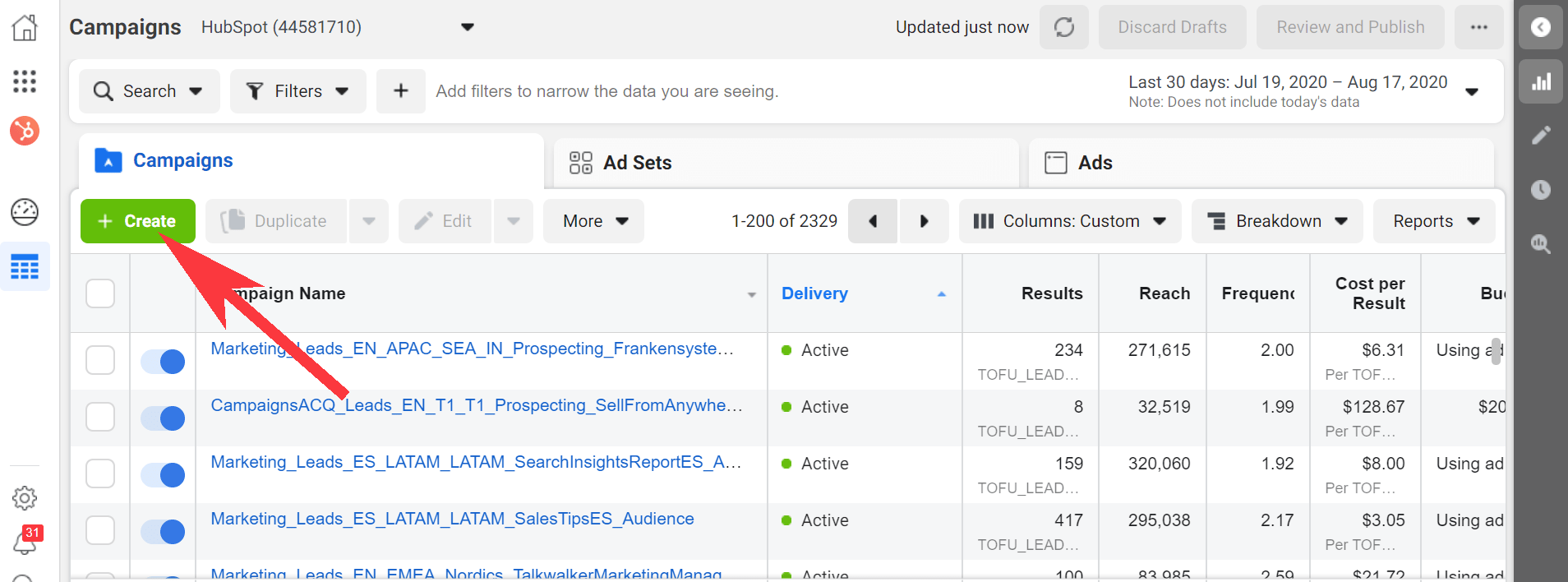
2. Next, select a marketing objective — your options for Instagram Stories include “Brand Awareness”, “Reach”, “Video views”, “Conversions”, “App installs”, “Lead Generation”, or “Traffic”.
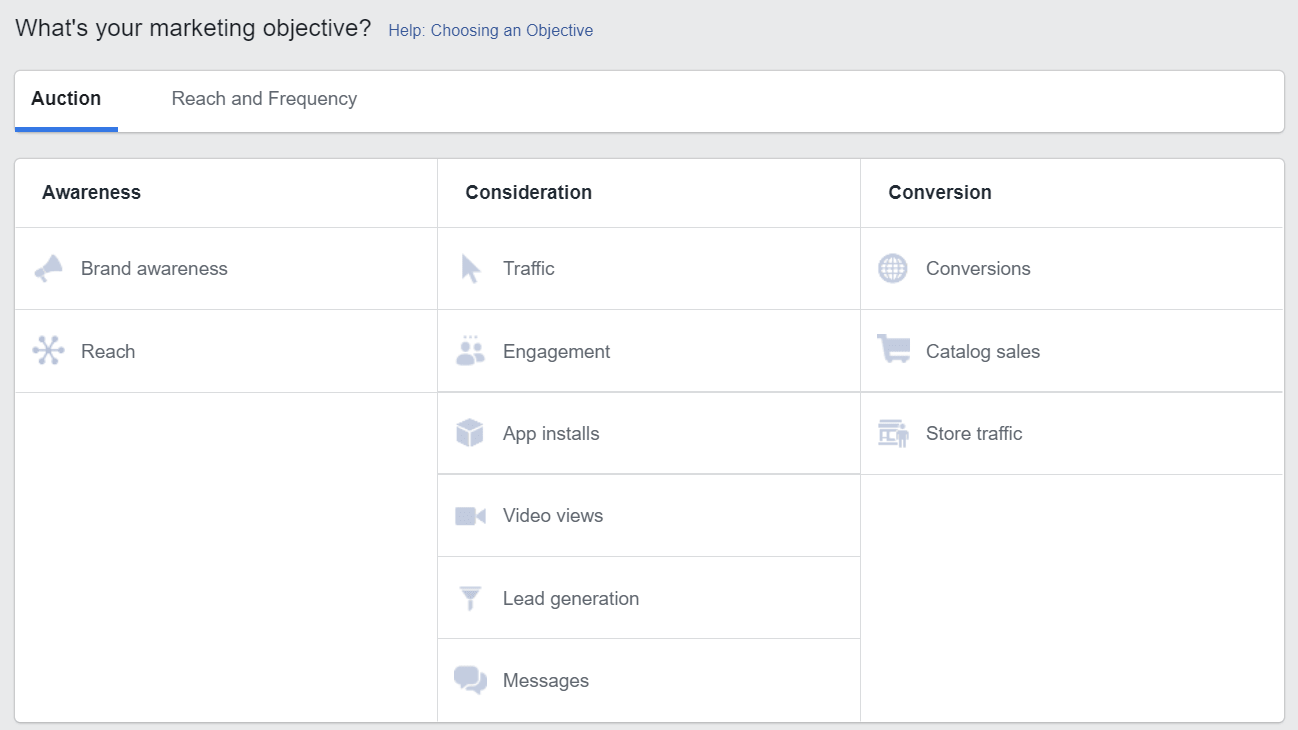
3. In the Placements section, you’ll want to select “Automatic Placements”, where Instagram Stories is selected by default. However, if you choose “Manual Placements”, check the box for “Stories” under Instagram.
4. Next, set your ad’s budget and schedule.
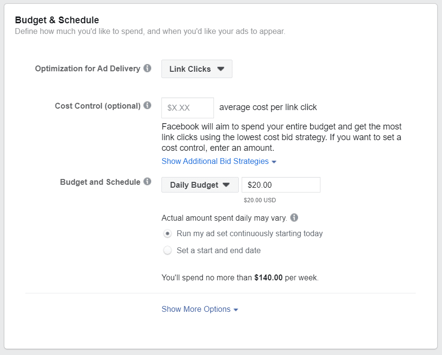
5. Next, you’ll want to choose “Single Image or Video” or “Carousel” as your ad’s format.
6. Add videos or images to your ad, and finish including any other details, including headline and description. If you’d prefer, you can use Stories Templates, which will transform your image into an ad automatically, and add movement to grab a viewer’s attention.
7. Once you’re happy with your ad, select “Confirm” to finish the process.
Instagram Story Ads: Cost, Specs, & Length
There are three separate areas you can place an ad on Instagram: Stories, Feed, and Explore.
For the purposes of this post, we’ll focus on the cost, specs, and length of an Instagram Stories ad.
First, all feed photo and video dimensions are supported in Stories (anywhere from 1:91 to 4:5). However, 9:16 ratio is encouraged to fit the full-screen, vertical format of Stories.
Additionally, .mp4 or .mov is recommended for video ads, and .jpg or .png file type is recommended for photo ads.
If you’re creating a video ad, 4GB file size is encouraged — and, for a photo, 30MG file size is suggested.
If you’re creating a video ad, the length can’t surpass 120 seconds. For a photo ad, five seconds is the default for how long the image will be shown.
Finally, the recommended resolution is 1080 x 1920, with a minimum dimension of 600 x 1067.
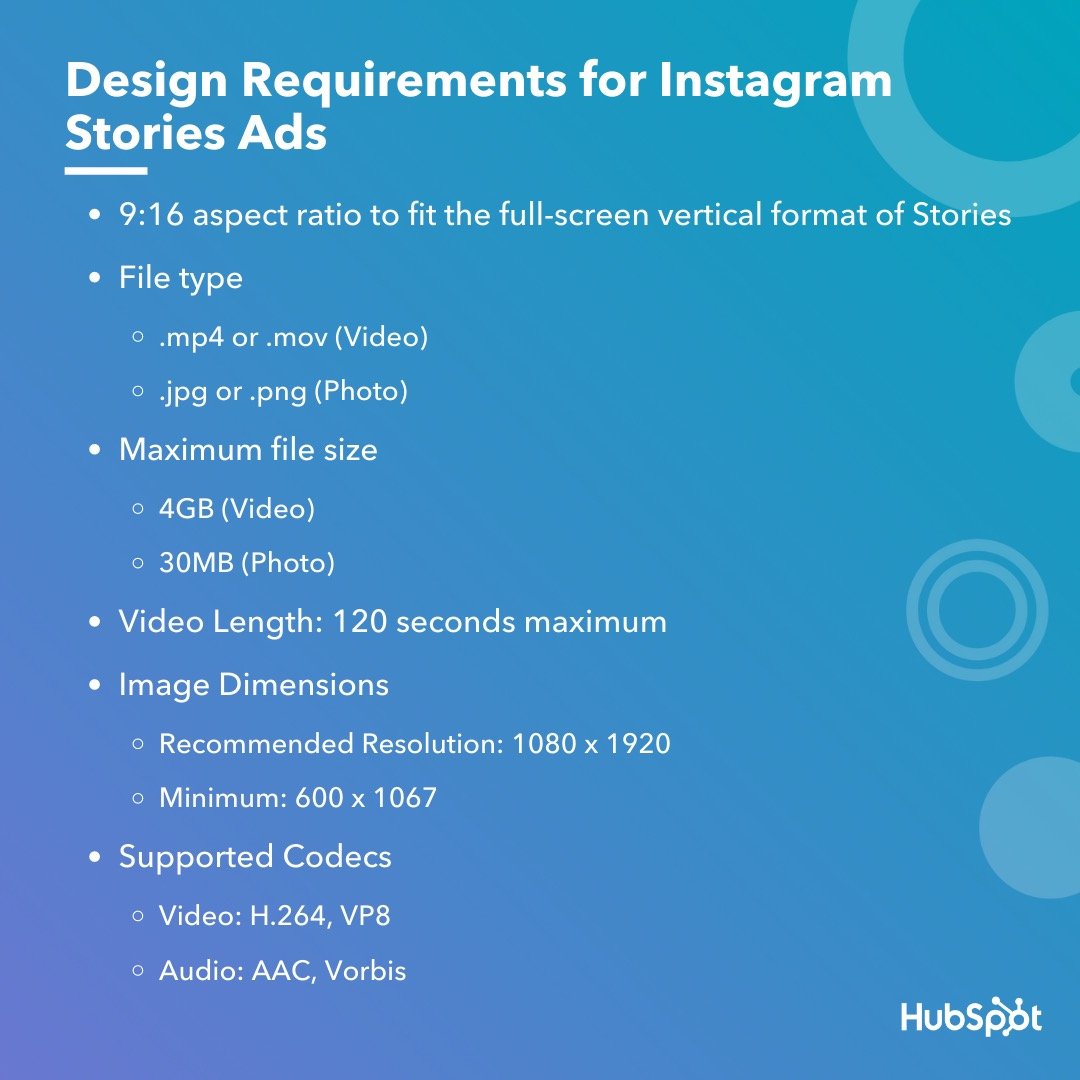 Instagram ads, including Instagram Story ads, cost between $0.70 to $1.00 per-click on average — although cost varies depending on industry, days of the week, time of year, targeted ages and sexes, ad placement, and plenty of other factors. In some cases, Instagram ads can exceed $5.00 per-click.
Fortunately, you have plenty of control over how much your ads cost by setting a pre-determined budget. You can choose your budget based on how much your company is willing to spend daily, or the total cost you’re willing to spend over a campaign’s lifecycle.
What Consumers Want to See in Instagram Story Ads [New Data]
It’s important to note — if you’re planning your own Instagram advertising campaign, you’ll want to consider the type(s) of ads that perform best on the platform.
For instance, in a recent survey HubSpot conducted, we found 50% of Instagram users prefer image-based ads that show product shots and light text — which is followed by 31% who prefer video-based ads that showcase real customers.
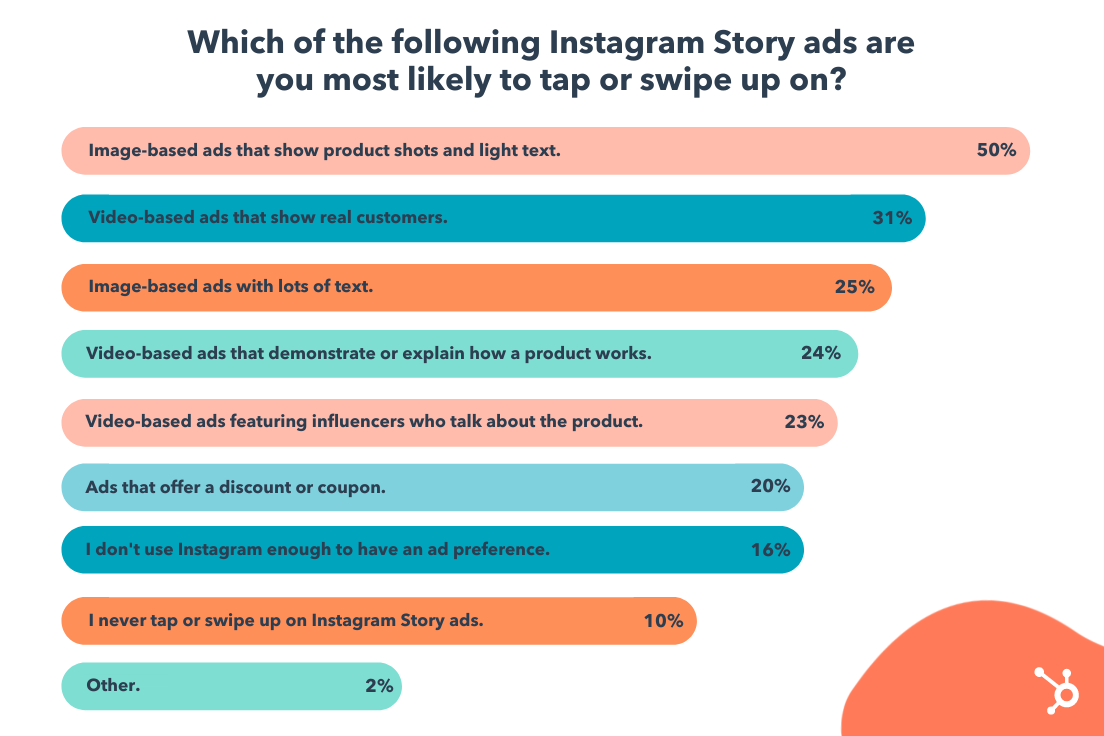
Perhaps most intriguing, the majority of people (80%) don’t necessarily care if an ad includes a discount or coupon. This suggests that Instagram users are more interested in appealing, engaging content that highlight a product’s benefits.
User preferences will vary depending on your audience, industry, and message, but consider keeping this data in-mind when preparing your own Story ad. When in doubt, try A/B testing to figure out which types of ads your own audience prefers.
Let’s dive into some other best practices, now.
Instagram Story Ads Best Practices
With four million active advertisers on Stories as of January 2020, it’s going to take a lot to ensure you’re able to stand out and drive results.
Here, let’s dive into a few best practices to follow when designing your own Instagram Story ad.
1. Pay attention to speed.
Facebook reports that Instagram Stories are consumed faster “than any other mobile format”. People’s attention is severely limited when perusing Stories, especially since the content has a 24-hour time limit before disappearing forever.
For that reason, you’ll want to ensure you get straight to the point and capture a viewer’s attention from the first frame. Unlike other forms of content, suspense isn’t usually effective here, especially since images can’t surpass five seconds, and videos have a 120-second limit. You’ll want to jump the viewer right into the message you’re hoping to deliver.
2. Include motion in your ad.
Facebook reports that “ads that use motion perform better.” Motion captivates the viewers’ attention and can help you tell a story faster than you could with a static image. Even if you’re using animation, consider how you might add motion to create more engaging content.
3. Ensure you’re using sound in your ad.
60% of Stories are viewed with the sound on, so you’ll want to ensure you use sound in your ad to provide optimal value to your audience. Consider how you might use music, sound effects, or voice-over to capture viewers’ attention in a new way. If you’re unsure which types of sound work best in your ad, try A/B testing to conclude what your audience prefers.
4. Create your ad for Stories first — rather than attempting to repurpose an existing ad made for another vertical.
It can be tempting to simply copy-and-paste the ad you’ve already created for Facebook or Instagram news feed, but that could result in a less-than-ideal experience for those viewing your ad in Instagram Stories. For one, your ad might not follow Instagram Story sizing best practices, resulting in key parts of your ad being cropped out. Additionally, you’ll want to play around with features exclusive to Stories to ensure your ad is as effective as possible.
5. Use your call-to-action wisely.
Ultimately, your Instagram Stories ad won’t be effective if you don’t include a clear call-to-action you want viewers to follow. You might use language like “Learn More”, “Shop Now”, or “Swipe Up” to encourage viewers to take action, depending on your goal — for instance, if your goal is brand awareness, “Learn More” tells viewers you simply want to educate them about your brand’s offerings, which is a very different CTA from “Shop Now”.
Take a look at the examples, mentioned above, for more CTA inspiration.
6. Include text to emphasize key message.
Including text is a best practice for accessibility in general, as it helps viewers’ who are hard-of-hearing decipher your ad’s message. Additionally, text can help emphasize your key points — for instance, Aveeno’s “Get Healthy Looking Skin Every Day” text illustrated their main point, and convinced me to purchase.
7. Test out mobile shots.
Facebook reports, “Mobile shots outperform studio shots for ad recall and intent, while studio shots tend to drive higher brand awareness.” For this reason, consider forgoing fancy studio equipment for video shot and edited straight from a mobile phone.
The majority of users consume Instagram’s content from their own smartphones, so you might as well try creating content on the same device. And, when in doubt, don’t be afraid to A/B test this theory for your own brand, as well.
For more best practices related to advertising in general, take a look at The Ultimate Guide to Mastering the Basics of Effective Social Media Advertising.
Examples of Instagram Story Ads
Below, I’ve collected a few impressive examples I found on my own Instagram Story feed. While most of these examples are bigger brand names, there are plenty of small-to-medium sized businesses using Instagram
1. Aveeno
Aveeno’s Instagram ads are clean and simple, with neutral colors — apart from the brand’s signature green — drawing attention to the brand’s daily moisturizer. The ad features a short clip of a hand pointing to a shopping cart, with a “Shop Now” swipe-up link. The ad focuses on the brand’s product and doesn’t distract with people, making it effective for anyone scrolling who’s in the mood to refill their moisturizer.

2. Miller Lite
This is an example of an ad that felt tailored towards me, a 27-year-old female in the Boston area. First, the ad features a call-out to the Boston Celtics, immediately capturing my attention. Once I’m intrigued, the ad segues into a picture of their Lite drink, with the text, “Great taste, only 96 calories, 3.2G carbs”. In this example, the ad does a good job drawing my attention to the things I care about most: namely, low-calorie alternatives to beer (and Celtics).
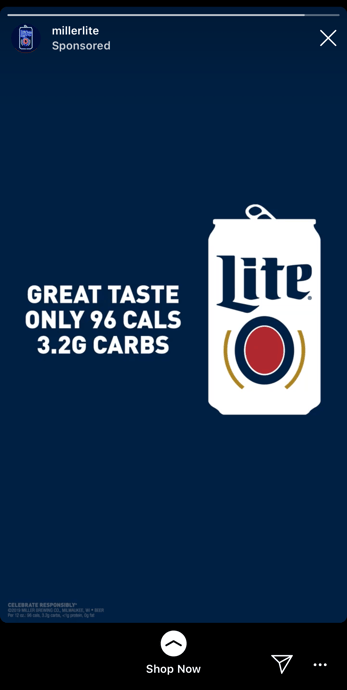
3. Trunk Club
This engaging, fast-moving ad shows a few different outfit options on the screen with the text, “Keep what you love, send the rest back”. The ad shows a few different outfits, ranging from dresses and cardigans to dress pants and heels, to capture the attention of a wider range of people than it could if it featured only one style. With the plain white background and easy-to-read black text, it’s simple, clean, and hard to miss.

4. Febreze
I mean, come on … who doesn’t love a puppy? This fun, clever Febreze ad shows an adorable puppy on a couch with the text, “Refresh wherever they roam”, with their Febreze product at the bottom of the screen. While most of the other ads in this list featured subdued, plain colors, Febreze goes all out with light blues, greens, and purples, inviting a sense of playfulness and fun into the user’s feed.

5. Tractor Beverage Co.
What I love most about Tractor Beverage Co.’s Instagram video is the end, which features a different call-to-action from most of the others in this list. Rather than “Shop Now,” this ad reads, “Now Available at Chipotle” with a “Learn More” swipe-up function. As a lesser-known brand, Tractor Beverage Co. wisely aims to use their ad space to increase brand awareness, so that next time you’re at your favorite nearby Chipotle, you might give their drink a try.

6. Crest
If you have the means, it makes a lot of sense to include a coupon or discount in your Instagram Story ad, like Crest does in its 3D Whitestrips ad. The $50 off encourages viewers to purchase immediately so they don’t miss out on the deal, and the fun, bright colors effectively capture viewers attention. With the limited time allotted in an Instagram Story, it makes sense for these brands to get straight to the point.

7. Kayak
Kayak, a travel search engine, created this impressive, engaging Instagram Story video ad to demonstrate how easy it is for Kayak users to filter flights depending on airline, price, cabin seating, and destination. Kayak served the ads to lookalike audiences based on the characteristics of its current website customers, and saw 5X increase in sales conversions, as well as a 50% increase in overall ROI, with combined ad placements on Instagram Stories, Instagram’s news feed, and Facebook’s news feed.

And there you have it! You’re all ready to begin creating an inspiring Instagram Story ad of your own. Just remember — you know your brand, and your audience, better than anyone. Use these best practices and examples as inspiration, but feel free to A/B test to figure out what works best for your unique business goals and social media objectives. Good luck!