
10 Benefits of Consistent, High-Quality Content Marketing
In this competitive B2B marketing landscape, businesses make substantial investments in building content marketing programs.
Why? Content marketing has been proven to deliver resounding success.
As one of the most effective methods of growing audience engagement, developing your brand presence, and driving sales, content marketing is a mission-critical growth method for most businesses.
Below, let’s review content marketing — the benefits of producing consistent, high-quality content, and how to measure success.

According to the State of Inbound report, content creation is a top priority for 53% of marketers. Moreover, on average, content marketing accounts for 29% of B2B marketing budgets.
Consistent, high-quality, and engaging content impacts audience decision-making more than any other technique.
Consistency in brand messaging is one of the many factors that determine the growth and success of your business. Big brands know how to portray their brand consistently and at every customer touchpoint.
The same reasoning applies to content marketing — your content needs to carry a unique and identifiable voice, style, and pitch across all distribution channels.
Content consistency establishes your credibility, builds trust, and strengthens your reputation.
So, we know the content you create has to be consistent. However, why is content marketing so beneficial in the first place? Here are the top benefits of content marketing.
Benefits of Content Marketing
1. Your audience will stick around longer.
Great content is an important asset. It has the ability to create positive experiences for your potential customers and compel them to come back for more. It’s your ticket to capturing your audience’s attention and continually reinforcing a positive brand impression.
2. You’ll have better traction on social media.
It’s one thing to increase your social media followers across channels, but it’s quite another to create trendy content. If you’re one of those businesses that doesn’t see much traction despite having a huge following, it’s time to use content marketing to your advantage. Quality content can help your business gain traction on social media.
Track the performance of your content campaigns using HubSpot’s analytics software.
3. Your audience will trust you.
Creating content helps your business build a relationship with your audience. You can answer their questions and interact with customers. When you create value without taking anything in return, your audience is more likely to trust your advice and recommendations.
Ultimately, when your content shows up at the right place and the right time with the right audience, it’ll improve your brand’s reputation.The more quality content customers see, the more likely they are to have a positive association with your company.
4. You’ll generate more and better leads.
Content marketing can also generate leads. When your audience views your content, they’re more likely to purchase from you in the future. Additionally, calls-to-action (CTA) placed directly in your content can generate new leads for your sales team.
So, how can content generate leads?
According to Lindsay Kolowich, the team manager of the HubSpot Academy Acquisition Content Team, “content is a great way to guide users to a landing page. Typically, you create content to provide visitors with useful, free information. You can include CTAs anywhere in your content — inline, bottom-of-post, in the hero, or even on the side panel. The more delighted a visitor is with your content, the more likely they are to click your call-to-action and move onto your landing page.”
5. Original content can improve conversions.
The content you post influences conversions. It helps your audience connect with you and gives them information needed to make educated purchases.
Even more, if you’re using blog content to bring in traffic, consider using unique images rather than stock photos for a potential 35% increase in conversions.
Additionally, your content should always include a CTA and guide your reader on what they should do next.
6. Your business will become more visible thanks to SEO.
The more consistent, high-quality content you produce, the better it’ll be for your SEO efforts.
For example, your content should help your business become visible online and build trust and authority with your audience. With a developed content strategy, such as the pillar/cluster model, your content should help you rank higher in search engines.
7. Great content can position your company as an authority in your industry.
Creating quality content will also help build your authority online. If your business is established as a credible place to get information, you’re more likely to rank higher in search engines.
Plus, your customers are more inclined to trust you if they view you as an industry expert. Your content should demonstrate your expertise in your field and provide valuable answers to your audience’s questions.
Overall, content marketing is important. But, how can you be successful at it?
One way to tell is to assess the quality of your content. One particularly beneficial assessment of quality is content scoring.
As more businesses are increasing their content marketing budget, there’s never been a better time to incorporate content scoring metrics into your marketing campaign.
With the help of content scoring, you can measure and improve your content marketing performance and offer great value to your audience.
8. Quality content can build brand awareness.
Sure, anything can build brand awareness, but content marketing can do it in a unique way.
Our HubSpot marketing experts have written about something called Surround Sound strategy.
In a nutshell, this content strategy does more than just rank your blog article on page one. It makes your content (and therefore your brand) appear everywhere your potential customers are looking for your product.
To execute this strategy, write about topics your customers are interested in so they begin to associate your great content with your brand.
9. You’ll cultivate loyal brand fans.
Taking brand awareness a step further, all the people who raved about your content and associated all those great feelings to your brand are very likely to become brand advocates before ever purchasing your product.
Wait, what?
It’s true, brand fans can be just as loyal and influence their friends’ and family’s buying decisions as much as a current customer can. This happens when potential consumers see that a business provides value to its current audience. One of the more successful ways businesses can do this is through content marketing.
For example, while I may not be in the market for children’s meal plans because I don’t have children yet, I am obsessed with the Kids Eat In Color blog and Instagram content. I recommend it to my friends and family who have children with picky eating habits. See how well that can work?
10. You’ll save money on your marketing strategy.
Since HubSpot first assessed the cost of content marketing ten years ago, the practice has remained the most cost-effective marketing strategy available.
Upfront costs for content appear steep, and that’s a fair point.
Estimates for blog content range from $150 a post to $3,000 for a freelance writer, but you could go the route of hiring a full-time staff writer to create content for you on a regular basis.
In the long term, when compared to paid advertisements, video marketing, and traditional marketing, content wins the battle with Frank from finance every time.
What is content scoring?
Content scoring is the process of assessing and quantifying the true potential of content by tracking how individual content pieces perform in generating and converting leads.
As an innovative content marketing metric, content scoring helps marketers prioritize only the assets that have a higher probability of generating and converting leads.
In addition to delivering a scientific method of assessment to writing, content scoring is a reliable and predictive method of evaluating the engagement potential of an individual piece of content before it’s published.
Improving the quality of your content is pivotal to the success of your marketing campaigns.
The quality of your content is relative to your audience’s profile. With a better understanding of your customer’s needs, you can offer content with higher resonance. But improving your content is a gradual process, and you need to continually measure and analyze your audience’s responses to understand and improve on the elements that matter most.
How to Score Your Content
Writers and content creators often find it difficult to quantify what recipe works for their content and their audience. By scoring your content, you’re able to objectify that process and use the same recipe repeatedly to create similarly successful content.
Here’s how to score your content:
- Establish scoring criteria. To develop an effective content scoring system, you need to establish a foundation built on whichever engagement metric has the greatest impact on your content. For some, it may be page views, for others it could be shares on social media.
- Create a campaign. Once you’ve identified which metric matters to you most, create a campaign and add the successful content that meets your threshold. For example, if you decide that 1,000 page views is high performing, include all the content assets that meet said criteria.
- Monitor content performance. Measure how each new piece of content you create is performing. As certain content assets meet your success metric — 1,000 page views, for example — add them to the campaign. Continue adding content to build a small sample size of high-performing content. Use HubSpot Analytics to track the performance of this content.
- Evaluate what works. Now that your high-performing content is segregated, you can further analyze what makes your content perform. Although it’s difficult to quantify, you can discover patterns within your content that you can then replicate.
- Rinse and repeat. Although these patterns are always changing, this manual process is an effective way to score your content and take action on your insights in the future.
This can be a tedious process, and it only scrapes the surface of a true content scoring system, but it’s a thorough and important process to implement. For more effective and efficient results, you can use an automated tool like Atomic AI to help you score your content in more granular patterns.
Content scoring helps your brand set a benchmark for itself, moving you closer to understanding customer’s buying stages and expectations. When you’ve established the content types that work for a specific customer segment, you can easily replicate your success over and over again.
Start Creating Consistent Content
Creating a content marketing strategy is one of the most important steps you can take for your marketing team. To do so, take an audit of your current content and figure out what works for your business.

21 Ways To Get More Followers on Facebook
On social media, your follower count gives you an idea of your brand awareness and reach.
That’s why gaining followers is often an important goal for brands, especially as they scale.

So, how do you gain followers? We know buying them doesn’t work because it rarely translates to engagement. The good news is that there are at least 20 ways to gain them organically.
Let’s cover them below.
1. Develop your Facebook marketing strategy.
Having a social media strategy for your Facebook Business Page is the first step in attracting followers to your brand. A robust strategy gives your team direction and a playbook from which to develop new ideas. It also helps you assess your performance from the right lens.
When developing your playbook, here are a few questions to consider:
- What does success look like?
- What does our audience want to see?
- How should we engage our audience?
- What tactics are our competitors using on Facebook?
Once you are clear on your approach, it will be easier to explore the growth methods outlined below.
2. Post often.
Your posting schedule is undoubtedly linked to your followers. Why? The more you post, the more visible you are to your target audience and the more likely you are to reach new users.
Here are two tools to streamline your publishing process:
- A content calendar – This is used to plan out what content you will post to your social media platforms and when they will be published. It’s especially helpful to have a content calendar to align your social media content with upcoming events, such as product or service launches.
- A social media publishing tool – Manually publishing to your Facebook Page can be time-consuming and take you away from more important tasks. With a publishing tool, you can schedule your posts to go live at a specific time and date, and have the peace of mind that your page will always be active.
3. Host giveaways.
Giveaways can be an effective and low-cost way to build brand awareness and attract new Facebook users to your Facebook Page.
To maximize the impact of your giveaway, set rules that encourage audience participation. For instance, your giveaway can require each user to tag a friend in the giveaway post and make a post of their own to qualify to win.
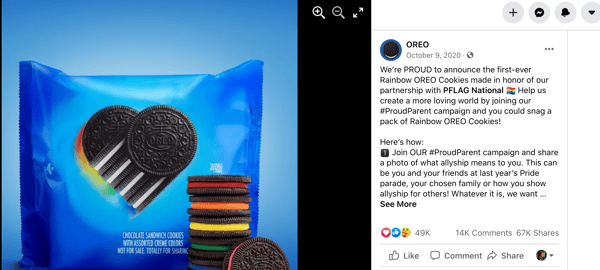
The more engagement you can get from your followers, the better chance your giveaway will reach new users.
4. Vary your posts.
One of the reasons why your follower count may have plateaued is because your content isn’t connecting with consumers.
Start experimenting with various types of posts to see what garners more shares, comments, and other forms of engagement. You may find that videos perform much better than images, or that covering certain topics get more shares than others.
As you notice trends in what’s working and what’s not, tweak your strategy, observe, and keep experimenting.
5. Post at the right time.
If you post something on Facebook but no one’s around to see it, does it make an impact?
With social media, visibility is key. The first part of increasing your visibility is posting regularly, but you also have to align your posting schedule with your audience’s scrolling habits.
If your users are most active on Facebook between 5:00 and 9:00 PM., that’s your time to publish your content. Publish outside of that window and you risk your content being missed altogether.
6. Create shareable content.
Whenever you see something that’s informative, entertaining, inspiring, or just interesting, what’s your first instinct nowadays? Mine is to hit the “share” button and send it to other people.
Making shareable content is one of the best ways to get followers because it expands your reach.
What makes something have that shareable quality? It varies, depending on the audience you’re targeting, but one common thread is that it has to resonate. Maybe your content addresses a concern they have, or it discusses a topic they’re interested in.
This viral video from HubSpot garnered over 760K views and shows how to take a buzzy topic, like Game of Thrones, and apply it to your brand.
Shareable content is also easy to digest – there’s a reason why the most viral videos are typically from TikTok and Instagram Reels. They’re short and get to the point.
For instance, this 40-second video by ASOS is weird, funny and has over 300K views.
Lastly, make sure your content is visually appealing. If your team doesn’t have the bandwidth to invest internal resources to create these creative assets, consider outsourcing them through independent contractors.
7. Interact with your audience.
Facebook users, like most social media users, like to feel seen and heard by the brands they engage with. Your brand should make it a priority to interact with your followers regularly, whether it’s answering a direct message or responding to a comment under your latest post.
These interactions not only boost your engagement rate but can also build brand loyalty. And we all know that a consumer who is loyal to a brand will spread the word and bring on more brand promoters, serving as unofficial influencers.
8. Promote your Facebook Page everywhere.
If your goal is to gain more followers on your business page, you should direct traffic to your page whenever possible. There are a few ways to do this:
- Add a Facebook plugin to your website.
- Include a CTA in your email newsletter to encourage your subscribers to visit your Facebook Page.
- Embed your Facebook posts whenever relevant in your blog posts.
- Host your giveaways only on Facebook.
- Promote your Facebook Page on other social media platforms.
9. Add your Facebook social link to all digital platforms.
Your Facebook link should be accessible everywhere you have an online presence. This includes your website, email, and social media platforms.
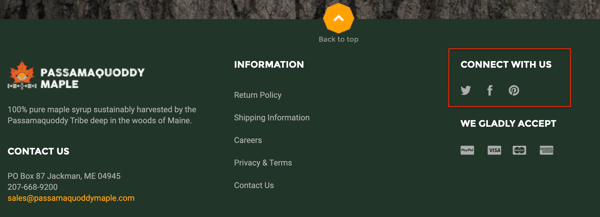
It’s as simple as putting “Follow Us,” or “Connect With Us” with the social icons, as shown in the business above.
The easier it is to find you, the better your chances of gaining followers.
10. Work with influencers.
Working with influencers is great for many reasons, the main one being the credibility they give to your brand. When an influencer promotes a brand, it’s social proof (i.e., a stamp of approval).
You can work with influencers to target an audience you haven’t yet connected with and drive traffic to your Facebook Page.
Beyond that, studies show consumers tend to trust the word of an influencer more than a brand’s word. So, by collaborating with influencers, you can earn new followers who already have a certain level of trust in your brand.
11. Partner up with another brand.
Co-marketing is a collaboration between two brands with similar audiences and marketing goals who team up for marketing efforts.
A co-marketing campaign on Facebook could look like a video series released over a month or week-long Facebook Live events hosted with your partner.
This strategy allows brands to use their individual distribution channels to reach new people and share the results of the campaign.
12. Offer a coupon.
In addition to giveaways, there are other ways to incentivize your audience to promote your brand, including offering coupons.
With a plugin like Shopify’s Facebook Likes Popup, for example, you can offer a discount code to consumers who like your Facebook Page as they are completing a purchase on your site.
You can also offer discount codes to encourage Facebook reviews, which serve as social proof and can help you gain more followers.
13. Join Facebook Groups.
Joining a Facebook Group can give you direct access to your target audience.
You can get direct insight into your audience’s needs, concerns, likes, and dislikes. In addition, it’s another channel to connect with them more intimately.
But keep in mind, it’s not a place for selling – use it as a way to introduce yourself to your target personas and build authentic connections.
14. Create your own Facebook Group.
Having your own Facebook Group is arguably the second-best channel you can have behind an email list.
Similar to email subscribers, a Facebook Group user has opted to join your group and stays in because it adds value to their lives.
It’s another way to attract your target audience, build a strong community, and provide value to your user personas.
15. Learn from your Facebook Insights dashboard.
Your Facebook Insights dashboard is where your page’s analytics live.
It tells you how users are behaving on your Facebook Business Page and how your posts are performing.
Use it as a resource to identify which strategies are earning you followers and what’s worth changing.
16. Use hashtags in your posts.
Hashtags are a great discoverability tool on Facebook. You can use them to help your target market find your post and increase your follower count.
It’s important to use a mix of popular and niche hashtags to ensure that your posts are getting enough visibility without disappearing in a sea of posts.
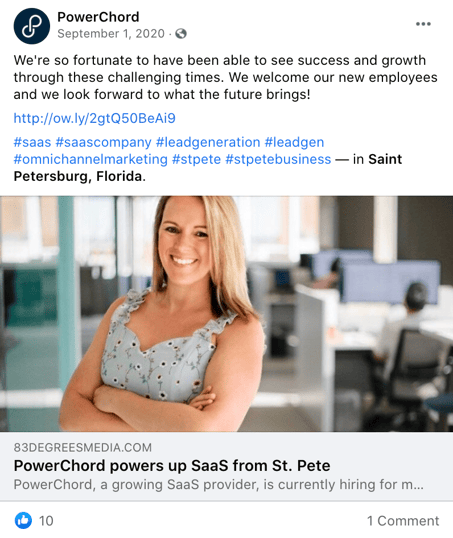
For instance, PowerChord used a mix of geo-specific hashtags to reach local Facebook users and topic-specific hashtags to reach audiences interested in the subject.
17. Make your page easier to find.
The last thing you want is someone who wants to follow your page but can’t seem to find it. While some may be persistent, others may give up once their initial search is unsuccessful.
To avoid this issue altogether, optimize your Facebook Page for search to ensure you’ll always be easy to find. Here are some ways to do so:
- Use the same username on all your social media profiles.
- Add your logo to your profile picture and add a cover photo that reflects your brand.
- Have a complete “About” section.
- Keep your contact information and business hours updated.
18. Don’t over-promote.
Your Facebook Page should be used to connect with your target audience and publish content that resonates with them.
While a certain level of promotion is expected, it shouldn’t be the majority of what you post. Depending on your industry, pushing your products and services could repel your audience and lead to high unfollow rates.
19. Authenticate your page.
Social media is rampant with bots and fake business pages aiming to deceive consumers. This can make Facebook users a little reluctant to follow brands they don’t recognize.
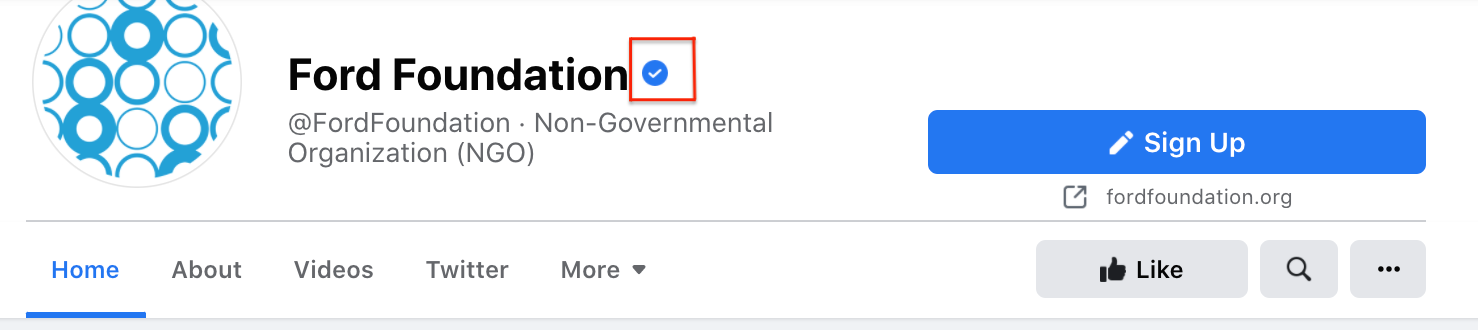
Authenticating your page can give your brand the credibility needed to both protect your audience against fraudulent pages and give them the reassurance they need. To request a verification badge on Facebook, you must fill out this form.
20. Create original content.
As new social media platforms gain popularity, it’s easy to recycle content from one platform to another. While that does make posting regularly easier, it may be hurting your engagement.
Every social media platform is different and so are its users. For instance, Facebook users tend to prefer videos over other forms of content, according to a 2019 Buffer study. The best performing content on Facebook is funny, entertaining, or practical.
With this in mind, it’s important to customize your content to the platform. Repurposing can stretch the life of your content. However, it shouldn’t be your only strategy. Be sure to listen to your audience and build content around their needs.
21. Run ads.
In addition to all the steps mentioned above, you can also run ads to reach more Facebook users.
Facebook Ads allows you to target users based on demographics, behaviors, and interests. This guarantees that you reach users who match your user persona and are more likely to convert.
Getting more followers on Facebook requires more than just posting regularly. You have to tap into what attracts your audience – through data analysis and community engagement – to develop sustainable strategies.


Five Lessons I Learned About Scaling a Business With Reid Hoffman
How great would it be if you had a panel of successful entrepreneurs and business leaders you could turn to whenever you needed help getting unstuck, or needed a daily dose of inspiration?
Fortunately, that’s exactly what the new Masters of Scale Courses App offers — expert advice from some of the world’s best and brightest minds, guided by Reid Hoffman.
The first course is all about The Mindset of Scale. Here’s what I learned from the first two lessons.

1. Ask “Why not?” and “What if?”
Start by asking two important questions — “Why not?” and “What if?” — whenever you encounter something that makes you feel a strong emotion.
For instance, think about the last time you experienced sticker shock or frustration over waiting in a long line. Those simple questions have sparked countless successful products and businesses — including Virgin Airlines. In his own words, here’s Richard Branson:
“35 years ago, when we started [Virgin Airlines], the big carriers were dreadful. And on one of those flights coming to the Virgin Islands, I got bumped, which is a sort of typical thing that airlines did in those days.”
Of course, being Richard Branson, he didn’t pass the time by staring woefully at the departures board. Instead, he asked one of those powerful questions: What if? What if he didn’t have to wait for the next flight? What if he created a flight of his own?
“So I hired a plane and filled it up with all the people who had been bumped and called it Virgin Airlines as a joke. And we arrived in the BVI, and during that flight, I just thought, ‘Airlines do bump people, maybe I should ring up Boeing the next day.’ Which I did, and asked if they had any secondhand 747s for sale.”
As you can probably guess, they did, and Virgin Airways was born. Now, you may not be in the market for used 747 jets, but that doesn’t mean these questions can’t create similarly impactful results for you. So next time you find yourself feeling any powerful emotion, pause for a second, think about the situation, and ask yourself, “What if?”
2. Have an idea, act on it, and never look back.
Even though many people talk about the power of ideas, what the world actually rewards is action.
Generating ideas is often the easy part — and with the right mindset, it’s a process that can become second nature. But, what separates daydreaming from living your dream is taking action.
Richard Branson has been an entrepreneur since he was 14 and launched his first business: a student magazine. After the magazine, he went on to found a record label, a video game publisher, and many other ventures — each one a product of taking action.
If you’re like me, even just reading that list of accomplishments sounds daunting. To overcome that feeling, Reid Hoffman offers this helpful advice: “Next time you have an idea that you can’t stop thinking about, act on it immediately.”
After asking yourself “Why not?” or “What if?”, identify the smallest or most immediate action you can do right now to act on your idea.
By starting small and taking action right away, you can avoid the dreaded “analysis paralysis” and start building momentum towards your goal instead.
3. Need a big idea? Get intentional about looking for one.
Before founding Spanx, Sarah Blakely was stuck in a dead-end job — making door-to-door fax machine sales were far from fulfilling. She knew she wasn’t on the right path, but she just wasn’t sure what that right path looked like.
After a challenging day, she decided to try something different. In her journal, she wrote down, “I want to invent a product that I can sell to millions of people that will make them feel good.” According to Blakely, “This was something that I set an intention for; I had really asked the universe to give me an idea that I could bring to the world.”
Blakely kept asking herself, “Is this my big idea?” until the answer was “Yes.”
With her newfound intention, Blakely began finding the opportunities and ideas all around her. One night, after getting frustrated with her undergarment options, she cut the feet off of her pantyhose and discovered that her DIY solution was exactly what she was looking for — in more ways than one.
4. Fill knowledge gaps with the people around you.
After discovering her big idea for Spanx, Blakely faced a new challenge: How to build a business in an industry she knew almost nothing about. It wasn’t an easy problem to solve, but Blakely wasn’t about to let a lack of domain expertise get in her way.
Instead, she started digging deeper. In the words of Reid Hoffman, “She knew that to succeed, she had to be continually open to information and ideas — always in search of the insights and people who could help her turn her idea into a reality.”
It’s okay not to know everything about your business, as long as you get help from people who can fill in your knowledge gaps. You’ll go faster and further with the help of other people.
Ask lots of questions to find your idea — and then keep asking them.
5. Find a place or time where you do your best thinking, and set aside time to be in that space.
Creating a successful business, launching a new product or campaign, or just keeping up with a highly demanding job all require a lot of decision-making. And good decision-making rests on a foundation of good thinking.
According to Hoffman, “Wherever, whenever and however, the point is this: an idea won’t come looking for you, and it won’t perfect itself. You have to put yourself in spaces and places and frames of mind, where you can find and shape the idea.”
For more lessons about scale, download the Masters of Scale Courses app for 50% using the code HUBSPOT at join.mastersoscale.com/hubstpot. Offer is valid through 5/15/21.

A Marketer’s Quick Guide to Dynamic Ads
Remember when you’d go to the mall, see something you liked, but then leave without it? Then you’d leave the mall and think about it the whole drive home, wondering if you made the right decision until you forgot about it. That was until you saw someone else with the exact item we wanted. Ah, the good ol’ days.
Today, you can’t leave an item in your cart without it following you everywhere online. Who do we have to thank for that? Technically, a lot of people – marketers, retargeting tools, Al Gore’s internet – but for the purpose of this article, we’ll focus on one: dynamic ads.

Dynamic ads allow brands to change the ads shown to users based on their behavior.
Let’s dive into what exactly dynamic ads are, their benefits, and how to use them on social media platforms like LinkedIn and Facebook.
Dynamic ads are often used in remarketing campaigns to reach users who have already interacted with a brand. More on that here.
Static ads, on the other hand, do not adapt based on external data, so they tend to target broader audience groups for brand awareness or product launches.
A banner ad can look like this:
 Or like this:
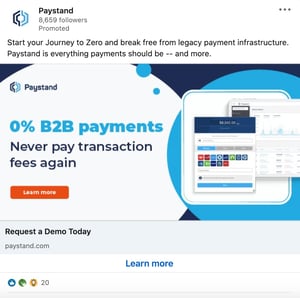
They range in size and placement depending on the platform on which they’re displayed.
The Benefits of Dynamic Ads
Ad personalization is one of the biggest advantages of using dynamic banner ads. In a 2020 study by Innovid, 43% of respondents agreed that ads should be personalized.
What’s more, 30% of respondents said they liked brands more when ads were personalized. It’s easy to understand why – there’s nothing more annoying than getting an irrelevant ad that doesn’t relate to you or your interests. In fact, it’s a major reason why people get adblockers.
In 2020, AudienceProjects surveyed people in the US, UK, Denmark, Sweden, Norway, and Finland and found that avoiding offensive or irrelevant ads was the second most popular reason why they got adblockers.
The more personalized the ad, the better the chances it will resonate with the audience. This brings us to the next benefit of dynamic ads: relevance.
While an ad may be personalized, it may not be relevant to that user’s current stage in the buyer’s journey.
For instance, imagine you’ve heard of a brand but aren’t exactly sure what they do or what they offer. Getting an ad to request a product demo may be too big of a jump. You may need more nurturing before you reach that level of interest in their products.
With this in mind, dynamic ads can help you only present ads that will meet the user where they are. Doing so can move them further down the funnel and help generate more revenue for your brand.
This brings us to return on investment (ROI). Because of the reasons outlined above, your dynamic ads can optimize your return on ad spend (ROAS) because they are more targeted and relevant to each user.
How Dynamic Search Ads Work
What are dynamic search ads?
Dynamic search ads (DSAs) are dynamic ads that show up on search engines like Google and Bing based on the content of your website, not keywords.
When marketers set up search campaigns, they bid on specific keywords and create ads that match the intent behind the keywords. For instance, let’s say you’re a website operations company and you want to rank for the keyword “best WebOps platforms,” you’ll need to bid on it and win to show up on the search engine when a user searches that keyword.
With dynamic search ads, you don’t have to bid on the keywords. The search engine will analyze the user’s search query and scan your website for relevant content. If the search engine determines it’s a match for what the user is looking for, it will automatically generate the ad with a headline and text based on a relevant landing page from your website.
The main benefit of using DSAs is that it allows marketers to target audiences who may fall outside of the keywords they’re already targeting in their campaign.
Think of a dynamic search as a safety net; even a well-designed search campaign won’t target all of the keywords your user persona might search for. The dynamic ad identifies new targeting opportunities and fills that gap by aligning your content with the right users – earning you extra traffic and more reach.
It’s also a time-saver. With dynamic ads, you don’t have to go through the process of mapping out keywords, setting up bids, and creating copy for every single ad.
My latest browsing sessions have involved a lot of furniture and home decor websites. This is why my Facebook feed includes ads like this:
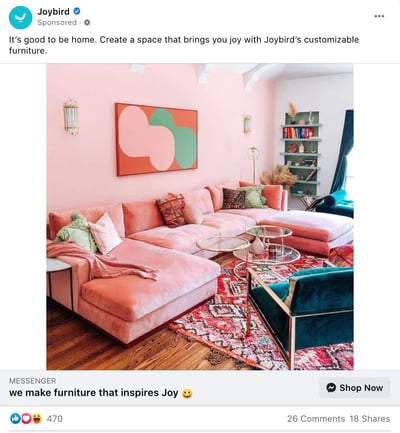 And why I see ads like this when browsing online.
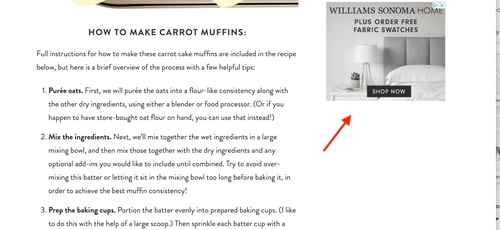 They work just as regular dynamic ads do, adapting their content to the user for better results.
You can take your display ads one step further by creating responsive dynamic display ads. It’s a mouthful, I know but the concept is simple to understand: A responsive ad adjusts its size based on the space on the page.
For example, you’re on a website and you minimize the page to make space for another window. A responsive ad would adapt its shape based on that new space – just like a responsive website.
This creates a better user experience and ensures your ad will be displayed correctly no matter the screen size.
Dynamic Remarketing Ads
Let’s say I visit the Sabai Design website to look at furniture. Then, I put a beautiful emerald green couch in my cart but don’t complete the purchase.
If the brand sets up dynamic remarketing ads, I’d see that couch, and similar styles, as I’m scrolling through social media or browsing through websites over the next few days or weeks.
The way dynamic remarketing works is by pulling the product feed from your website and leveraging user data to show your visitors ads that will move them down your funnel.
You can target various ad groups, ranging from visitors who’ve only visited your product pages to those who have already purchased items from you.
Then, once you generate the ad copy and the offers, the ad platform you use will do the rest. This means pulling the relevant product information to show that specific user.
LinkedIn Dynamic Ads
When creating a dynamic ad on LinkedIn, you will target users based on their profile, including demographics such as location, work experience, company, and job title.
There are three main formats to use when creating ads on the professional network:
Follower Ads
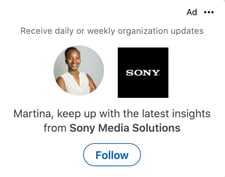 If you want to gain more followers on your LinkedIn Company Page, create a Follower Ad. This will encourage users in your ad group to follow your Page and learn more about your brand.
Spotlight Ads
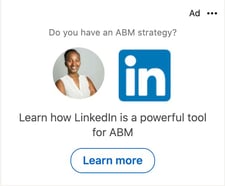
Want to drive traffic to your website or landing page? Use a spotlight ad. You can also use it to promote upcoming events, highlight your products or services, or gain new email subscribers.
Content Ads
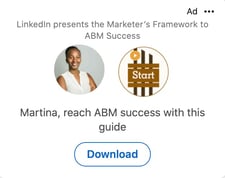 Content offers are great lead magnets. This dynamic ad format allows you to generate leads through downloadable offers. You can manage those leads in the LinkedIn Campaign Manager or export them to a CRM like the HubSpot Marketing Hub’s Ads Software.
You’ll notice that none of these ads show up as a carousel image, single image ad, video, or text ad. That’s because dynamic ads on LinkedIn are only formatted to show up on the right sidebar on desktop view. Like this:
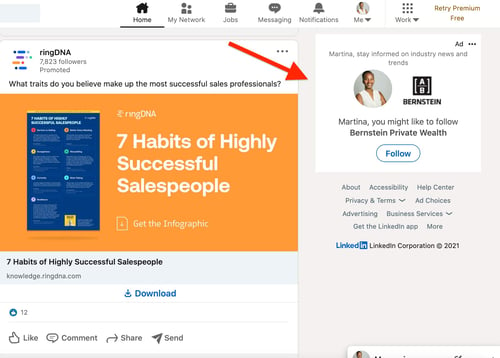
Facebook Dynamic Ads
On Facebook, things work a little differently. In this case, dynamic ads are ideal for brands with a large inventory of products and/or services. Unlike LinkedIn ads, when creating a dynamic ad on Facebook, you can choose any ad format, including single image, carousel, stories, or collection.
Here’s how Facebook dynamic ads work: You can create a retargeting campaign to reach consumers who’ve had previous interactions with your brand, or reach a broader audience that matches your user persona and may be interested in your products or services.
To set up a dynamic ad on Facebook, you’ll need:
- A catalog – This contains the products and services you want to promote, with descriptions, prices, images, availability, and other relevant information.
- Facebook pixel or DSK – You must install a Facebook pixel on your website or SDK for your mobile app to capture how your users are behaving on your webpages or app.
From there, you will set up your campaign in the Ads Manager to outline your ad objectives, ad format, copy, and calls-to-action (CTA) by product set.
Every time a user fits your targeting parameters, the machine learning program will use the pixel to gather user data and pick relevant products or services from your catalog to display the ad on mobile, tablet, or desktop.
This saves marketers time, as they don’t have to create an ad for every single product or ad group.
You may no longer need those drives home from the mall to decide if you really should have bought something. With dynamic ads, you get multiple chances to reconsider your decisions.
Whether that’s a good thing varies from person to person, but from a marketing standpoint, it’s another opportunity to win over a consumer. Why not take it?

A Marketer’s Quick Guide to Dynamic Ads
Remember when you’d go to the mall, see something you liked, but then leave without it? Then you’d leave the mall and think about it the whole drive home, wondering if you made the right decision until you forgot about it. That was until you saw someone else with the exact item we wanted. Ah, the good ol’ days.
Today, you can’t leave an item in your cart without it following you everywhere online. Who do we have to thank for that? Technically, a lot of people – marketers, retargeting tools, Al Gore’s internet – but for the purpose of this article, we’ll focus on one: dynamic ads.
Dynamic ads allow brands to change the ads shown to users based on their behavior.
Let’s dive into what exactly dynamic ads are, their benefits, and how to use them on social media platforms like LinkedIn and Facebook.
Dynamic ads are often used in remarketing campaigns to reach users who have already interacted with a brand. More on that here.
Static ads, on the other hand, do not adapt based on external data, so they tend to target broader audience groups for brand awareness or product launches.
A banner ad can look like this:
Or like this:
They range in size and placement depending on the platform on which they’re displayed.
The Benefits of Dynamic Ads
Ad personalization is one of the biggest advantages of using dynamic banner ads. In a 2020 study by Innovid, 43% of respondents agreed that ads should be personalized.
What’s more, 30% of respondents said they liked brands more when ads were personalized. It’s easy to understand why – there’s nothing more annoying than getting an irrelevant ad that doesn’t relate to you or your interests. In fact, it’s a major reason why people get adblockers.
In 2020, AudienceProjects surveyed people in the US, UK, Denmark, Sweden, Norway, and Finland and found that avoiding offensive or irrelevant ads was the second most popular reason why they got adblockers.
The more personalized the ad, the better the chances it will resonate with the audience. This brings us to the next benefit of dynamic ads: relevance.
While an ad may be personalized, it may not be relevant to that user’s current stage in the buyer’s journey.
For instance, imagine you’ve heard of a brand but aren’t exactly sure what they do or what they offer. Getting an ad to request a product demo may be too big of a jump. You may need more nurturing before you reach that level of interest in their products.
With this in mind, dynamic ads can help you only present ads that will meet the user where they are. Doing so can move them further down the funnel and help generate more revenue for your brand.
This brings us to return on investment (ROI). Because of the reasons outlined above, your dynamic ads can optimize your return on ad spend (ROAS) because they are more targeted and relevant to each user.
How Dynamic Search Ads Work
What are dynamic search ads?
Dynamic search ads (DSAs) are dynamic ads that show up on search engines like Google and Bing based on the content of your website, not keywords.
When marketers set up search campaigns, they bid on specific keywords and create ads that match the intent behind the keywords. For instance, let’s say you’re a website operations company and you want to rank for the keyword “best WebOps platforms,” you’ll need to bid on it and win to show up on the search engine when a user searches that keyword.
With dynamic search ads, you don’t have to bid on the keywords. The search engine will analyze the user’s search query and scan your website for relevant content. If the search engine determines it’s a match for what the user is looking for, it will automatically generate the ad with a headline and text based on a relevant landing page from your website.
The main benefit of using DSAs is that it allows marketers to target audiences who may fall outside of the keywords they’re already targeting in their campaign.
Think of a dynamic search as a safety net; even a well-designed search campaign won’t target all of the keywords your user persona might search for. The dynamic ad identifies new targeting opportunities and fills that gap by aligning your content with the right users – earning you extra traffic and more reach.
It’s also a time-saver. With dynamic ads, you don’t have to go through the process of mapping out keywords, setting up bids, and creating copy for every single ad.
My latest browsing sessions have involved a lot of furniture and home decor websites. This is why my Facebook feed includes ads like this:
And why I see ads like this when browsing online.
They work just as regular dynamic ads do, adapting their content to the user for better results.
You can take your display ads one step further by creating responsive dynamic display ads. It’s a mouthful, I know but the concept is simple to understand: A responsive ad adjusts its size based on the space on the page.
For example, you’re on a website and you minimize the page to make space for another window. A responsive ad would adapt its shape based on that new space – just like a responsive website.
This creates a better user experience and ensures your ad will be displayed correctly no matter the screen size.
Dynamic Remarketing Ads
Let’s say I visit the Sabai Design website to look at furniture. Then, I put a beautiful emerald green couch in my cart but don’t complete the purchase.
If the brand sets up dynamic remarketing ads, I’d see that couch, and similar styles, as I’m scrolling through social media or browsing through websites over the next few days or weeks.
The way dynamic remarketing works is by pulling the product feed from your website and leveraging user data to show your visitors ads that will move them down your funnel.
You can target various ad groups, ranging from visitors who’ve only visited your product pages to those who have already purchased items from you.
Then, once you generate the ad copy and the offers, the ad platform you use will do the rest. This means pulling the relevant product information to show that specific user.
LinkedIn Dynamic Ads
When creating a dynamic ad on LinkedIn, you will target users based on their profile, including demographics such as location, work experience, company, and job title.
There are three main formats to use when creating ads on the professional network:
Follower Ads
If you want to gain more followers on your LinkedIn Company Page, create a Follower Ad. This will encourage users in your ad group to follow your Page and learn more about your brand.
Spotlight Ads
Want to drive traffic to your website or landing page? Use a spotlight ad. You can also use it to promote upcoming events, highlight your products or services, or gain new email subscribers.
Content Ads
Content offers are great lead magnets. This dynamic ad format allows you to generate leads through downloadable offers. You can manage those leads in the LinkedIn Campaign Manager or export them to a CRM like the HubSpot Marketing Hub’s Ads Software.
You’ll notice that none of these ads show up as a carousel image, single image ad, video, or text ad. That’s because dynamic ads on LinkedIn are only formatted to show up on the right sidebar on desktop view. Like this:
Facebook Dynamic Ads
On Facebook, things work a little differently. In this case, dynamic ads are ideal for brands with a large inventory of products and/or services. Unlike LinkedIn ads, when creating a dynamic ad on Facebook, you can choose any ad format, including single image, carousel, stories, or collection.
Here’s how Facebook dynamic ads work: You can create a retargeting campaign to reach consumers who’ve had previous interactions with your brand, or reach a broader audience that matches your user persona and may be interested in your products or services.
To set up a dynamic ad on Facebook, you’ll need:
- A catalog – This contains the products and services you want to promote, with descriptions, prices, images, availability, and other relevant information.
- Facebook pixel or DSK – You must install a Facebook pixel on your website or SDK for your mobile app to capture how your users are behaving on your webpages or app.
From there, you will set up your campaign in the Ads Manager to outline your ad objectives, ad format, copy, and calls-to-action (CTA) by product set.
Every time a user fits your targeting parameters, the machine learning program will use the pixel to gather user data and pick relevant products or services from your catalog to display the ad on mobile, tablet, or desktop.
This saves marketers time, as they don’t have to create an ad for every single product or ad group.
You may no longer need those drives home from the mall to decide if you really should have bought something. With dynamic ads, you get multiple chances to reconsider your decisions.
Whether that’s a good thing varies from person to person, but from a marketing standpoint, it’s another opportunity to win over a consumer. Why not take it?
Facebook Ads vs. Google Ads: Which is Better for Your Brand?
If you’re reading this article, it’s likely because you’re considering running digital ads.
You’ve heard about Facebook Ads and Google Ads but you’re still unclear on the difference between the two platforms.

In this article, we’ll cover each platform’s unique features, the key differences to keep in mind, and the factors to consider when deciding which ad platform to use.
Let’s get started.
These platforms are often pitted against each other but in fact, Facebook Ads and Google Ads are complementary, each offering unique benefits to marketers.
If your team can only focus on one, there are a few things you’ll want to consider.
Your Campaign Goal
What do you want to accomplish with your campaign? Is it brand awareness, leads, sales, or something else? Knowing this answer can already steer you in the right direction.
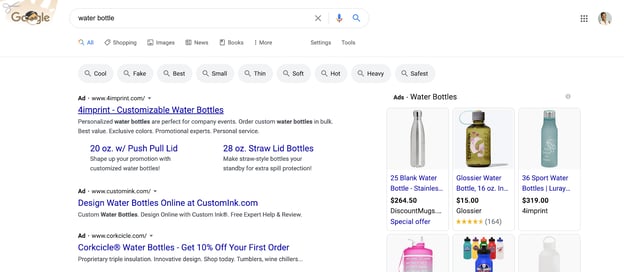
Google Ads is ideal for demand capture – meaning reaching users who have high purchase intent. For instance, if I’m looking up the keyword “water bottle,” this may signal an interest in purchasing one.
With that in mind, the ads below align well with search intent and can lead to sales.
Facebook Ads, on the other hand, is ideal for reaching consumers who are near the top of the funnel, (i.e., great for brand and product awareness). 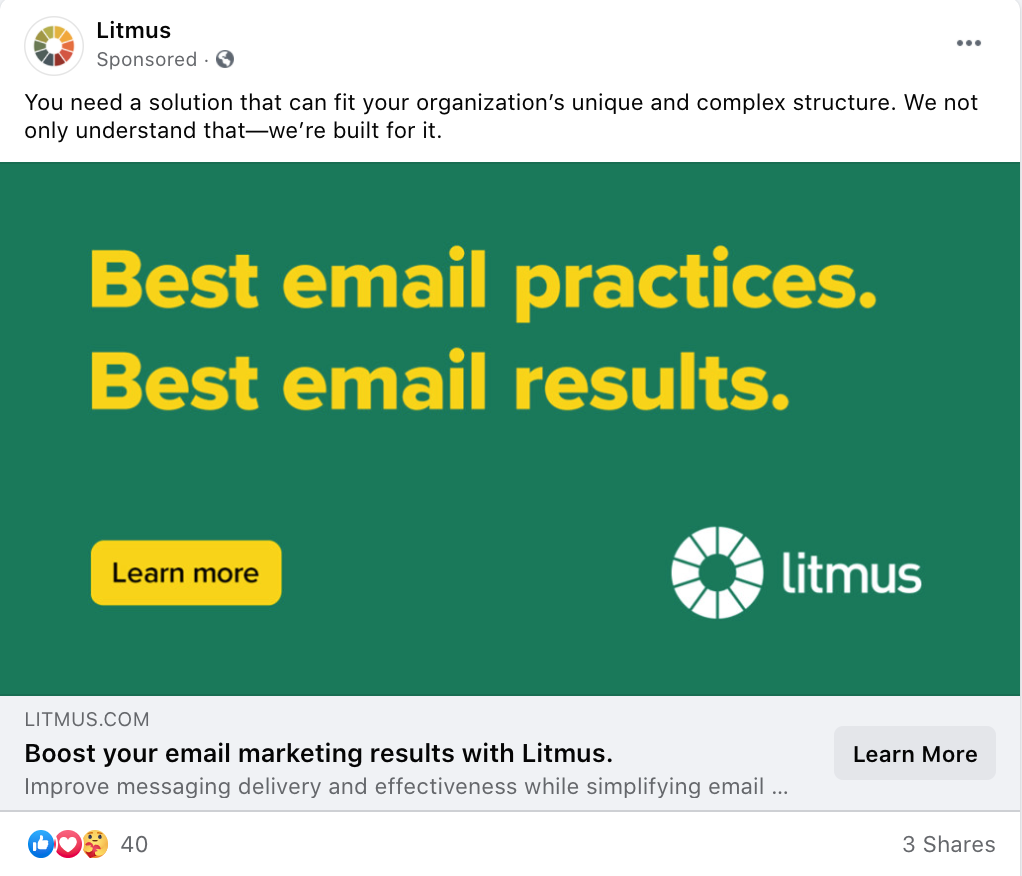
So, you could use both platforms at the same time to target users at every stage of the journey. But if that doesn’t align with your broader objectives, knowing the main goal of your campaign will help you determine which platform is better suited to achieve it.
Your Budget
With any ad campaign, your goal is to maximize your return on ad spend (ROAS). It’s easier to do that on some platforms than others.
With Google Ads, you’ll have to look at keyword competition and keyword price. If the keywords you’re targeting have high cost-per-click (CPC) and you have a small budget, it may not be the best place for you to invest your money.
For instance, let’s say you have a $100 daily budget. You want to rank for “hardware store” in your local area but the cost for that keyword is $20. This means that you’d get a maximum five clicks per day – pretty limiting.
With that same $100 budget, you could potentially reach more people on Facebook Ads and conduct experiments to learn more about which strategies work for your target audience.
It’s all about finding where your dollar will go the furthest in relation to your goals. Tools like HubSpot’s ads software can help you measure your campaign’s ROI and allow you to make adjustments to optimize its performance.
Stages in the Buyer’s Journey
As mentioned above, certain platforms align better with certain stages in the buyer’s journey.
With Facebook being a social media platform, most users are not actively looking to purchase products. However, they do explore and share their interests on the platform. With that in mind, it’s a great place for users to discover your brand, especially if you don’t think it relates to a topic users will be searching.
In contrast, it’s estimated that Google receives over 5 billion searches every single day. These searches can fall anywhere on the buyer’s journey stage, but certain keywords indicate a high purchase intent.
For example, if I search “best water bottle” or “water bottle price,” this suggests that I am interested in purchasing this item. With this approach, marketers can reach users they know are near the bottom of the funnel.
Historical and/or Competitor Data
As you develop your playbook for your next campaign, it will be helpful to look at historical data to inform your strategy. Knowing what has worked in the past, what hasn’t and what is left to explore can serve as a reference and benchmark.
If you’ve never run a campaign before, look at your competitors. What ads are they running? Where are they running them? What do their creative assets look like? What’s their messaging?
This competitive intel may highlight some areas for opportunity and give you insight into the strategies your competitors are using.
Benefits of Facebook Ads
In a 2019 HubSpot State of Marketing Report, marketers revealed that the paid channel offering the highest ROI was Facebook. Let’s dive into some of the reasons why.
For starters, Facebook is the number one social media platform with over 2.7 billion monthly active users, according to a 2021 Statista report. In addition to its large audience base, the platform offers granular targeting capabilities, allowing marketers to reach users based on demographics, behaviors, life events and interests.
Before launching a campaign on the platform, you can create a “lookalike audience,” which is essentially your user persona. Facebook Ads will then show your ads to audiences who match your description.
That’s one advantage the platform has over Google Ads – it’s much more detailed in who you’re able to target for your ads.
Beyond that, you may also be able to reach more users and get a better clickthrough rate (CTR) through Facebook Ads. Smart Insights reported found that in Q1 of 2020, the median CTR for a Facebook ad on the newsfeed was 1.11% – compared to .47% for Google Display ads in the same time period.
Benefits of Google Ads
In 2019, Google estimated that for every dollar a business spends on ads, it earns $8 in profit. Let’s see why that may be and how the platform can be useful for brands.
Google Ads, formerly known as Google Adwords, initially offered only very simple text-based ads on the search engine. Now, it’s evolved to include features that can drastically improve clickthrough rates, such as reviews, detailed contact information, a shopping function, and mobile optimization.
In Q1 of 2020, Smart Insights found that Google search ads had the highest CTR at 1.55% when compared to display ads and Facebook ads. This is likely because Google prioritizes ads based on relevance.
While you do have to bid on keywords, the highest bid doesn’t necessarily always win. Your bid gets your foot in the door, your ad’s relevance to the keyword the user’s search intent gets you in the house.
Remarketing, which is reconnecting with users who have interacted with your brand before, is now much easier using Google Ads. So, let’s say someone visited your site and added something to their shopping cart but didn’t complete their purchase. You can now re-engage users as they search on Google, watch a YouTube video or navigate a site within Google’s Display Network.
In addition, the platform’s simple interface and advanced features like search term report, ads editor and auction insights make it easy to build, launch and track campaigns.
With Facebook Ads and Google Ads, one isn’t inherently better than the other. Once you account for your goals, budget and target audience, you will find that each one offers unique features that can be useful to your brand at various points in its growth.

How the News Feed Algorithms Work on Facebook, Twitter & Instagram
You’re connected with hundreds of people — maybe even thousands — on Facebook, Twitter, and Instagram. But when you log in to each of these social networks, it’s likely that you don’t want to be bombarded by every single update from every single connection. That’d be pretty overwhelming, wouldn’t it?
That’s how the folks from each of these social networks feel — and they’ve done plenty of user research to validate that feeling. In fact, that’s exactly why the news feeds — and the algorithms behind them — exist.
All three of today’s most popular social networks have gravitated toward an algorithm-based feed in the effort to create better experiences for their users. The trouble is, each algorithm works differently. What’s worse, they’re constantly changing, making it hard for marketers like us to keep up.
To help get it all straight, we’ve put together this simple guide on how the news feed works on the three most popular social networks: Facebook, Twitter, and Instagram. Let’s dive in.
Note: Keep in mind that the algorithms are constantly changing. We’ll continue to write about major social algorithm changes as they happen.

Facebook’s News Feed Algorithm
Since the inception of the largest social media platform to date, Facebook’s news feed has been focused on personalizing the social media app’s user experience. According to eMarketer, we spend about 34 minutes each day using the platform.
To give users the best experience possible, Facebook’s team of engineers are constantly studying user behavior and picking up signals that show what kind of content each user is most interested in.
How It Works
The Like button has always been the epicenter of Facebook’s user experience — not only because we see it on everyone’s posts, but because it allows us to personalize our experience (and influence everyone else’s). Since it was first introduced in November 2007, it’s helped Facebook’s engineers figure out which posts were delighting users, boring them, offending them, and so on.
Nowadays, the algorithm that governs Facebook’s News Feed has become much more sophisticated. It isn’t just about the Like button anymore — and not just because reaction buttons are now in the mix. In fact, Facebook’s algorithm is by far the most complicated of the three social networks covered in this post.
Here’s a quick rundown of the most important things Facebook’s algorithm takes into account.
Relevancy Score
When picking posts for each person who logs on to Facebook, the News Feed algorithm takes into account hundreds of variables — and can predict whether a given user will Like, click, comment, share, hide, or even mark a post as spam.
More specifically, the algorithm predicts each of these outcomes with a certain degree of confidence. This prediction is quantified into a single number called a “relevancy score” that’s specific both to you and to that post.
Once every post that could potentially show up in your feed has been assigned a relevancy score, Facebook’s sorting algorithm ranks them and puts them in the order they end up appearing in your feed. This means that every time you log in, the post you see at the top of your News Feed was chosen over thousands of others as the one most likely to make you react and engage.
Ads are given relevancy scores, too, so that Facebook can show users the ads that could matter most to them. Again, this is supposed to give users a better experience — but it’s also helpful for the businesses that are paying for the ads. It’s calculated based on the positive feedback (video views, conversions, etc.) and negative feedback Facebook expects an ad to receive from its target audience. (Learn more about relevancy score for Facebook ads here.)
Prioritizing Friends
Before 2015, Facebook was predicting what users want to see on the News Feed based on more indirect signals, like Likes, comments, and shares of others. Eventually, it added options for users to filter out posts they don’t want to see. But what about helping boost the posts users do want to see?
Through studies and surveys, Facebook found that many users were concerned about missing important updates from friends they cared about the most. In response to these concerns, the social media platform began changing the News Feed algorithm to give more control to the users themselves.
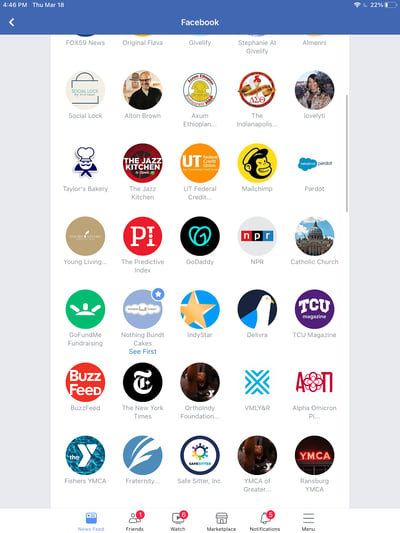
It started in April 2015, when the company began giving priority (in the form of higher relevancy scores) to posts from friends over the Pages they follow and promotional posts. Later that year, in July, Facebook introduced the “See First” feature, which lets you actually hand-pick which accounts — whether friends or followed Pages — you want to see first at the top of your News Feed.
Now, when you want to prioritize a person or page to “see first,” their posts will appear at the top of your News Feed. To prioritize the people or pages you want to “see first”: click the downward facing arrow in the top-right corner of any Facebook page and select Settings.
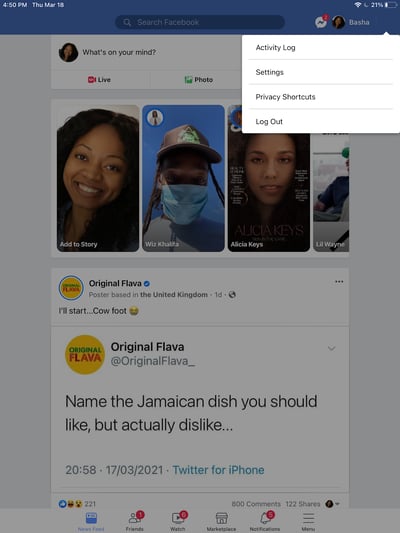
In the window that appears, scroll until you find News Feed Preferences and select it.
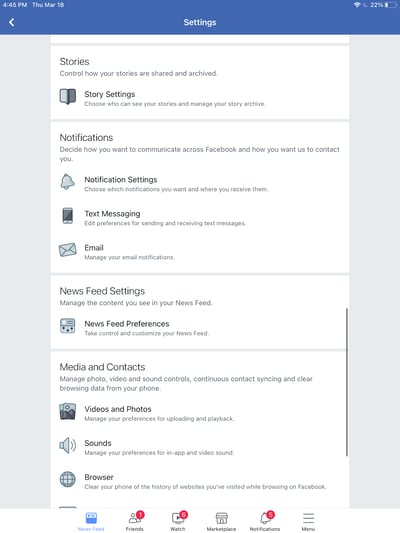
Next, select Prioritize who to see first.
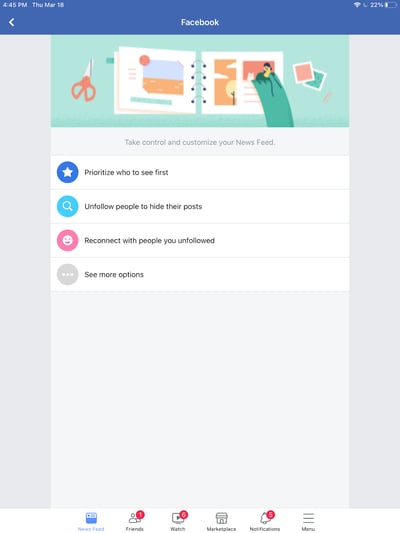
Finally, select up to 30 of your Facebook friends to add as favorites. You’ll now see posts from these individuals first.
Time Spent on a Post
Facebook started monitoring how much time users spend viewing certain posts. Of course, the time you spend on a post can vary depending on your internet speed, the length of the post, and so on — and the folks at Facebook are aware of that.
However, the platform’s strategists found that dwell time, the act of spending a lot more time on a particular post in their feed compared to the majority of other posts they look at, is a good sign that the content was relevant to them.
How does this play out in the feed? If you spend more time on a particular post, Facebook is more likely to show that post on your friends’ News Feeds.
Video Engagement
In summer 2015, Facebook surveyed users on how they interacted with video on their News Feeds and found that that many people who were interested in a given video didn’t necessarily Like it, comment on it, or share it with their friends. Since engagement is one of the primary ways Facebook measures people’s interest in posts, it had to come up with other ways to figure out whether people enjoyed the videos they were seeing.
To do that, the company started monitoring other forms of video engagement — like turning on the audio, switching to full-screen mode, or enabling high definition. So if you turn up the volume on a video or make it full-screen, the algorithm will interpret that as you enjoying the video, and will show you similar videos higher up in your feed.
The update doesn’t mean users will see more videos in their News Feed — only those who already engage more with video-related content.
Facebook’s algorithm is very, very complex, but we hope that gives you a good idea of what it considers important so you can tweak your Facebook marketing strategy accordingly. Now, let’s move on to Twitter.
Twitter’s Timeline Algorithm
Whereas Facebook makes most of the decisions about what will show up in your Facebook News Feed, Twitter’s historically taken a very different approach with what it calls the “Timeline.”
Your Timeline is the stream of tweets from the users you follow that shows up on your account home page when you first log in. It used to be that your Timeline was made up of every single tweet from every user you follow, in chronological order. But the folks at Twitter found that, similarly to what was happening on Facebook, users felt they were missing all the best tweets from the people they care about most.
The changes made to the Twitter algorithm aren’t nearly as platform-changing as the ones Facebook have made, but they are somewhat of a departure from the real-time element that has defined Twitter since the beginning.
How It Works
The engineers at Twitter have attempted two different approaches for surfacing the “best” tweets first on your Timeline: the “While You Were Away” feature and the even newer “Show me the best Tweets first” feature.
The “While You Were Away” Feature
This feature was added as an attempt to rid users of whatever FOMO (fear of missing out) they might have been feeling from the chronological nature of the original Timeline.
Basically, it’s a recap of some of the best tweets you may not have seen otherwise. How do these tweets make the cut? It’s determined by “user engagement”.
You can’t turn off the feature, but how often you see it depends on how often you use Twitter. The recaps pop up more frequently for users who check the app less often.
The “Show Me the Best Tweets First” Feature
The “Show me the best Tweets first” feature is a little more similar to Facebook’s News Feed. Why? Because it actually changes the content on your Timeline based on a tweet’s relevancy, rather than listing tweets chronologically.
By default, Twitter’s algorithm puts the tweets it thinks you’ll find most interesting at the top of your Timeline, these posts are still recent and in reverse chronological order. These tweets are chosen based on accounts you interact with most, tweets you engage with, and much more.
The “Best Tweets” Feature
The rest of the tweets will be displayed right underneath, also in reverse chronological order. Unlike the “While you were away” feature, these “best tweets” won’t be highlighted or indicated in any way — so you won’t be able to tell where the “best tweets” stop and the rest of the tweets begin.
There are two ways to remove these “best tweets” from the top of your Timeline. One is a quick fix: You can always refresh your Timeline to see all new tweets at the top in the live way you might have been used to seeing in the past.
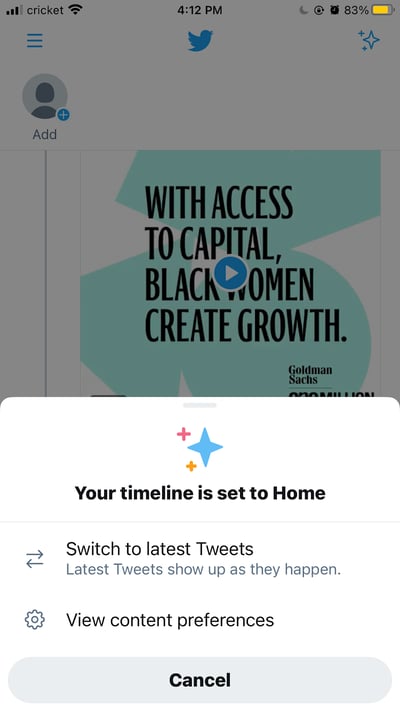
But if you want to always see your Timeline live, then Twitter does allow you to opt out of this feature if you’d like — unlike Facebook’s News Feed.
To opt out of this feature: Tap the three-star iconin the top right corner of your screen. Then tap Switch to latest Tweets.
Is Twitter Moving Away From a Real-Time Timeline?
There’s no reason to believe so — at least not right now. One of the three sections of your Twitter timeline is composed of tweets displayed in reverse-chronological order. After you scroll through the “While you were away” Tweets and “Best Tweets” you’ll be left with the tweets from your followers starting with the most recent.
What might be an emerging trend on Twitter is the opportunity to subscribe to people’s tweets. While this feature wouldn’t disrupt the timeline’s mostly reverse-chronological order, it could add just one more section to your feed that you’ll need to scroll through before seeing the latest updates from your followers.
Twitter isn’t the only social media platform iterating its algorithm to show the most interesting content first — Instagram’s algorithm is giving Facebook and Twitter a run for their money.
The Instagram Feed’s Algorithm
As of January 2021, Instagram has more than 1.2 million active users on the platform making it a hotspot for marketers in nearly any industry. However, it’s a newer platform compared to the other two on this list, so many of us marketers are still trying to figure it out. The best place to start is from the bottom up — with the algorithm.
Instagram’s algorithm has evolved since 2016 when it first began sorting users’ news feeds in order of relevance rather than recency. Now, the algorithm works similarly to its parent company’s — Facebook. Using machine learning to aggregate six factors, Instagram can determine what content you’ll appreciate the most and influence your news feed to prioritize that content.
These six factors shared by TechCrunch are:
Interest: This is a prediction Instagram makes about how interested you’ll be in a particular post.
Frequency: How often you use the app that will determine what posts you see first when you open the app again.
Following: The more people you follow, the less likely you’ll be able to see everyone in your news feed.
Recency: How recently was a post published? This impacts when you’ll see a post in your news feed.
Relationship: Who shared the post and your connection to them will be a significant factor in how often you’ll see their content. This is influenced by tagged photos, engagement, and even how often you direct message them.
Usage: The time you spend on Instagram affects the content you see as well.
What about the Reels, Shop, and Explore pages?
With the advent of Reels, Shop, and the Explore page, there are several opportunities for Instagram users to naturally affect the factors listed above by interacting with content outside of their news feeds. If you enjoy cooking videos, for example, you may see more of those types of videos and reels in your news feed.
Is Instagram removing likes?
We’d be remiss if we didn’t mention the latest Instagram algorithm update in the works — removing likes. Removing one of the most popular features of the app is being tested right now as a measure against bullying and increased pressure to post content that garners more and more social approval for young Instagrammers.
The change has already taken effect in several countries including Canada, Brazil, and Australia. While it hasn’t made its way to the United States in a widespread way yet, don’t get too comfortable with your news feed engagement appearing for all to see. There could soon come a time when only you will see how many likes your posts receive.
It’s All About Content Quality
The key takeaway for brands and individuals alike is this: Quality is Queen.
These algorithms are meant to filter out irrelevant and poor-quality posts so that the highest-quality content gets through. Control over what users see and don’t see is a collaboration between the social platform and the user. The user interacts with what they find interesting and the social media platform takes note and shows you more of that the next time you open the app.
The big lesson for Facebook, Twitter, and Instagram marketers like us is to remember that it’s our job to post content to social that’s interesting, entertaining, helpful, and/or relevant to our audiences. This means picking relevant topics, writing delightful copy, and posting compelling images and videos.
By following these best practices, your posts will have a better chance of getting shown to users — so you can continue to inspire, delight, and educate them.
Editor’s note: This post was originally published in April 2016 and has been updated for comprehensiveness.

How to Embed a Facebook Feed On Your Website [Quick Tutorial]
Facebook is an undeniably powerful channel for marketing purposes. In fact, 91% of B2B and 96% of B2C marketers currently use it for advertising and marketing.
The success of your social media marketing strategy depends on engagement, typically in the form of Likes, comments, or shares. But high engagement rates are easier said than done.
One opportunity to increase engagement on your business’ Facebook Page is by embedding your Page on your website — which could increase likes and comments on your posts without driving viewers away from your site.
Here, we’ll explore how to embed a Facebook feed on a website. Whether you host your website on HubSpot, WordPress, Squarespace, or Wix, we’ve got you covered.
How to Embed a Facebook Feed on a Website
1. HubSpot
If you want to embed a Facebook feed on your HubSpot-hosted site, it’s incredibly easy to do.
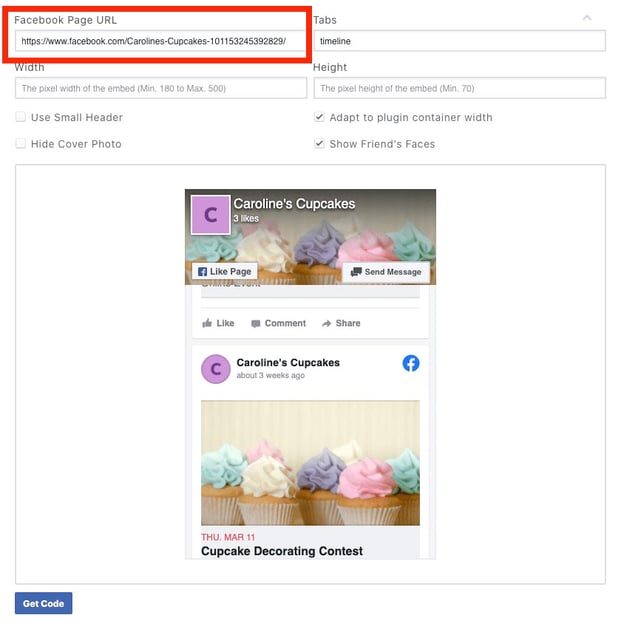
1. First, go to Facebook’s Plugin Page.
2. Copy-and-paste your business’ Business Page into the “Facebook Page URL” box.
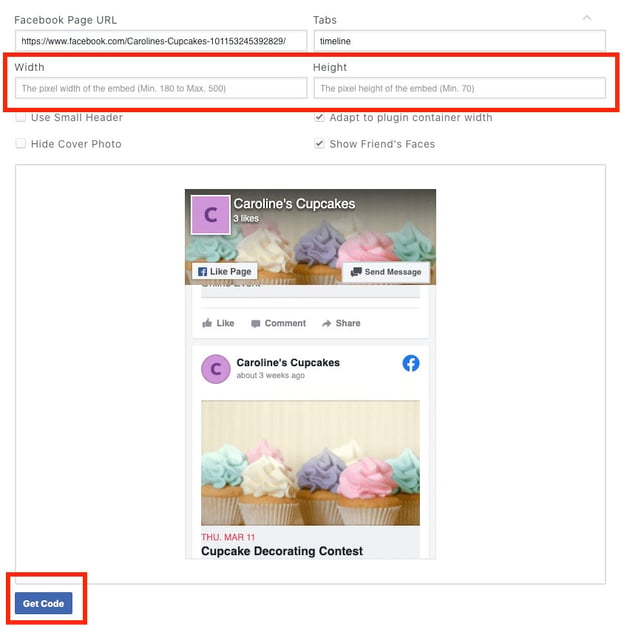
3. Then, adjust the width and height to suit your preferences depending on your website and placement. Once you’ve adjusted the timeline, click the “Get Code” button.
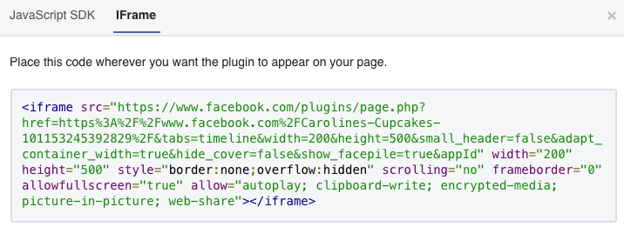
4. Switch to the IFrame tab, and copy the custom module.
5. Next, open the Editor tool on your HubSpot Landing Page, and select “Source Code”.
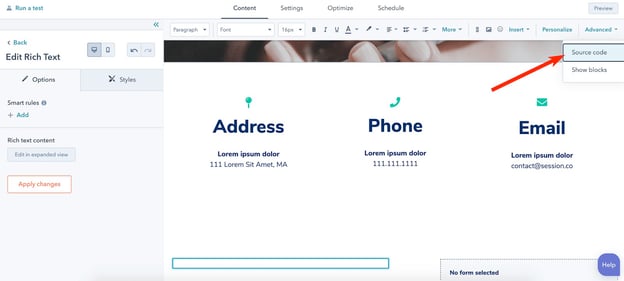
6. Now, paste your IFrame code into the Source Code section of your page. Then click, “Save Changes”.
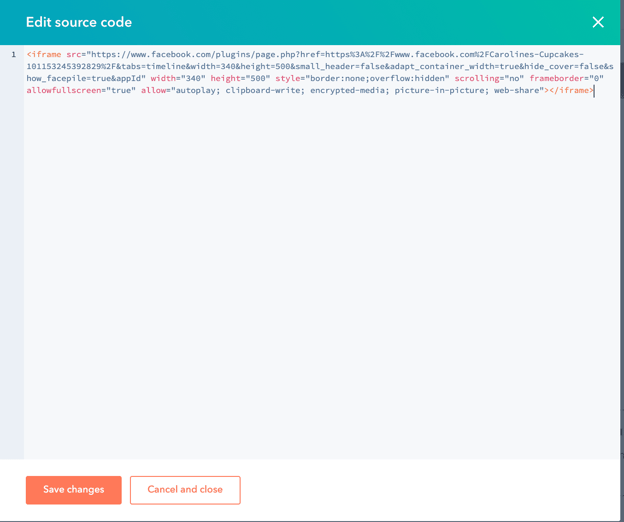
And voila! Your timeline is officially embedded on the HubSpot landing page of your choosing.
2. Squarespace
If you host your website on Squarespace, you’re going to follow most of the instructions listed above. However, the third step varies for this website hosting platform.
Let’s explore how to embed a Facebook feed on Squarespace. It’s important to note: Adding JavaScript or IFrames to Code Blocks is a Premium feature available in Business and Commerce plans, so you’ll need a Premium account to proceed.
1. First, go to Facebook’s Plugin Page.
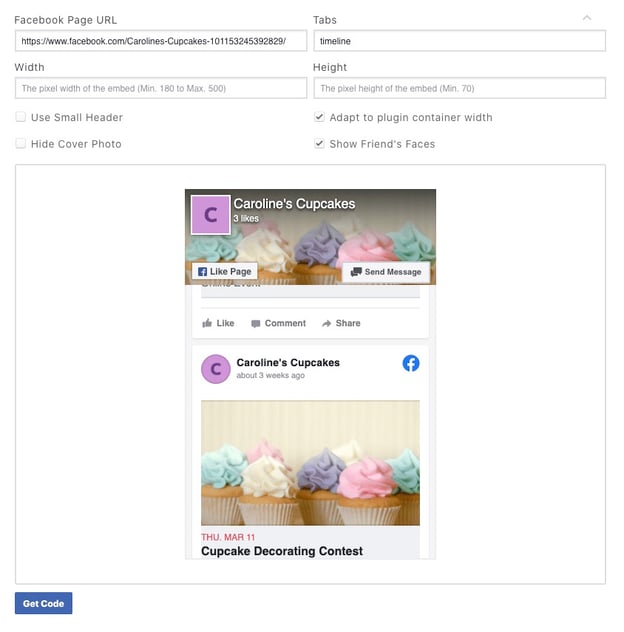
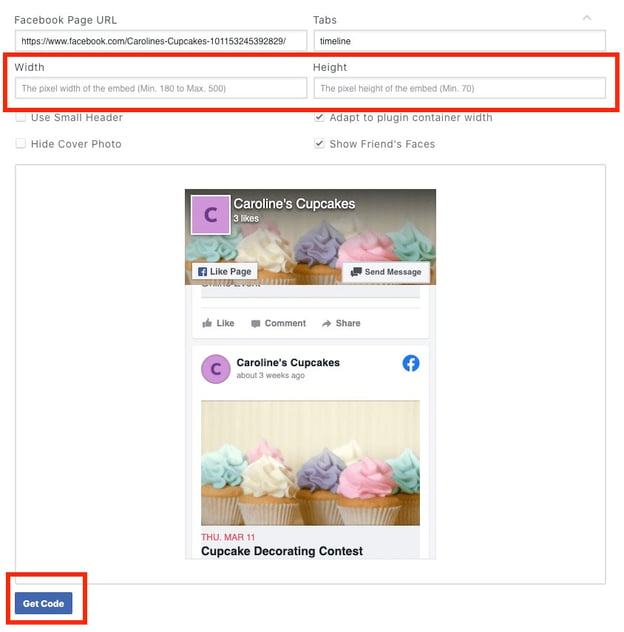
2. Copy-and-paste your business Page URL into the “Facebook Page URL” box. Then, adjust the width and height to suit your preferences depending on your website and placement.
Once you’ve adjusted the timeline, click the “Get Code” button. Copy the code in JavaScript form.
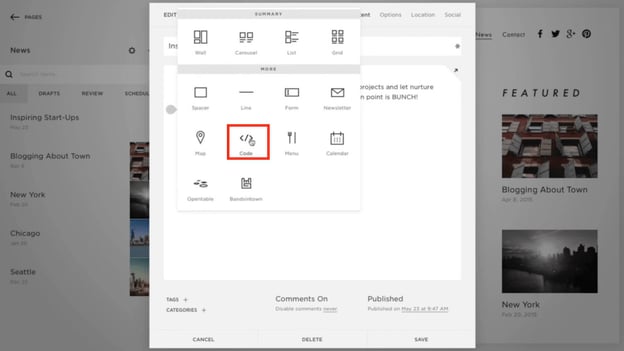
3. Next, click “Edit Post” on a Squarespace page, then click an Insert point and choose “Code” from the menu:
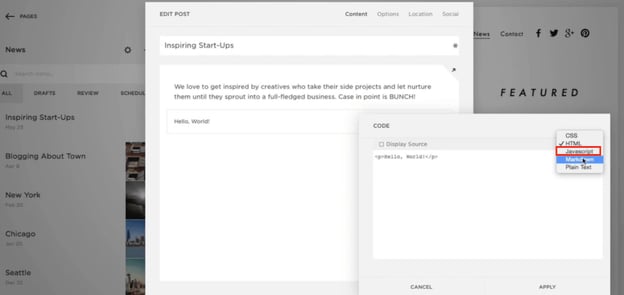
4. Next, choose Javascript from the dropdown menu, and then copy-and-paste your Facebook code into the box. Then click “Apply”.
If you have additional questions on adding unique code into your Squarespace page, take a look at Squarespace’s Code Blocks FAQ page.
3. WordPress
WordPress varies slightly from the instructions listed above.
Instead of using Facebook’s custom code, you can use a WordPress plugin. (Note: You will need to upgrade to the Business plan on WordPress to use this plugin feature.)
For our purposes, let’s use this Smash Balloon Social Post Feed plugin, which is 5-star rated and has over 200,000 active installations.
Before proceeding with the following steps, ensure you install the plugin on your Business plan WordPress account. You can install either via the WordPress plugin directory, or by uploading the files to your web server (in the /wp-content/plugins/ directory). Then click “Activate”.
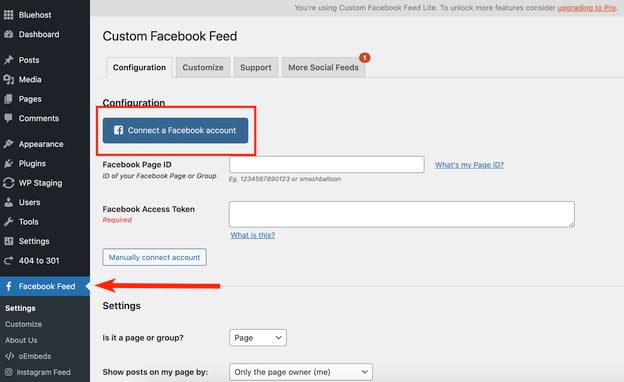
1. Navigate to the ‘Facebook Feed’ tab within WordPress to configure your feed. Then click “Connect a Facebook account” and choose your Business page.
2. Next, copy the shortcode [custom-facebook-feed] to embed your feed on your site. (You can also display multiple feeds of different Facebook pages by specifying a Page ID directly in the shortcode: [custom-facebook-feed id=smashballoon num=5].)

3. Paste it into the body text on your new or existing WordPress page.
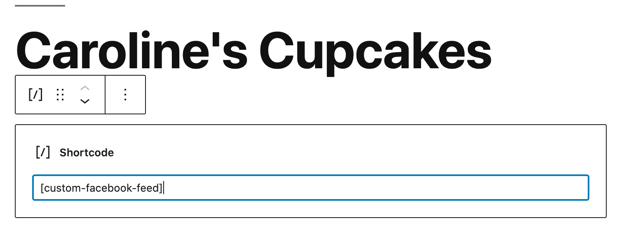
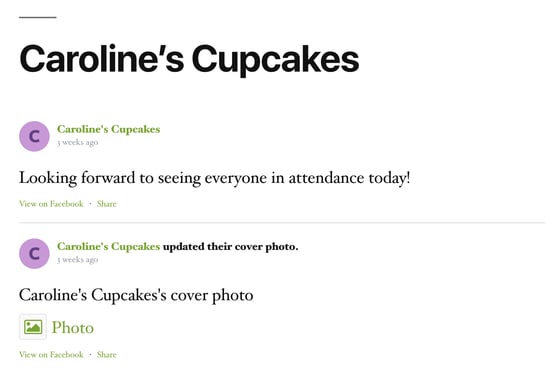
4. All set! Once you preview your page you’ll see how the timeline looks in Live mode.
4. Wix
For Wix customers, you’ll use a third-party tool — Elfsight — to create the unique code that you can use on your Wix website, which is why there are a few additional steps in this list.
1. Create your own Elfsight Apps account, or login to your existing account. (It’s free to embed one Facebook feed code. If you need to use Elfsight often, consider the Basic plan, which is $18/month for startups and new businesses.)
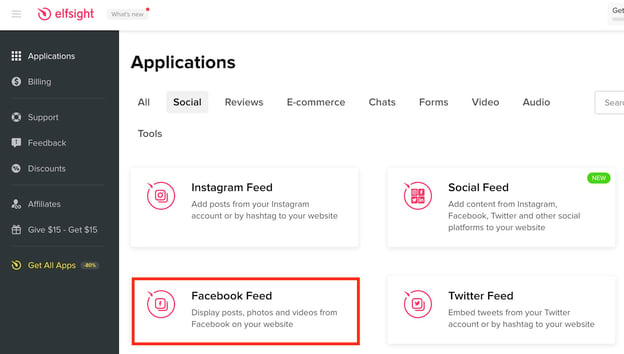
2. Click on the “Facebook Feed” application, under the Social Tab.
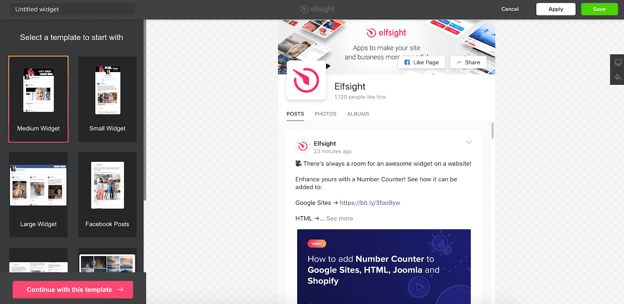
3. Select the template you want to use, which will determine how your Facebook feed looks on your Wix site. For instance, you can choose to have a small-widget Facebook feed, or a full-screen Facebook feed. Click “Continue with this template…” when you’re ready.
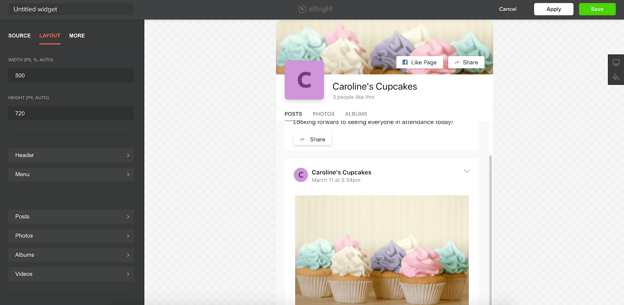
4. Next, click the “Connect to Facebook” button to connect your business’ Facebook Page with Elfsight. You can also click on the “Layout” tab to change the height and width of your widget.
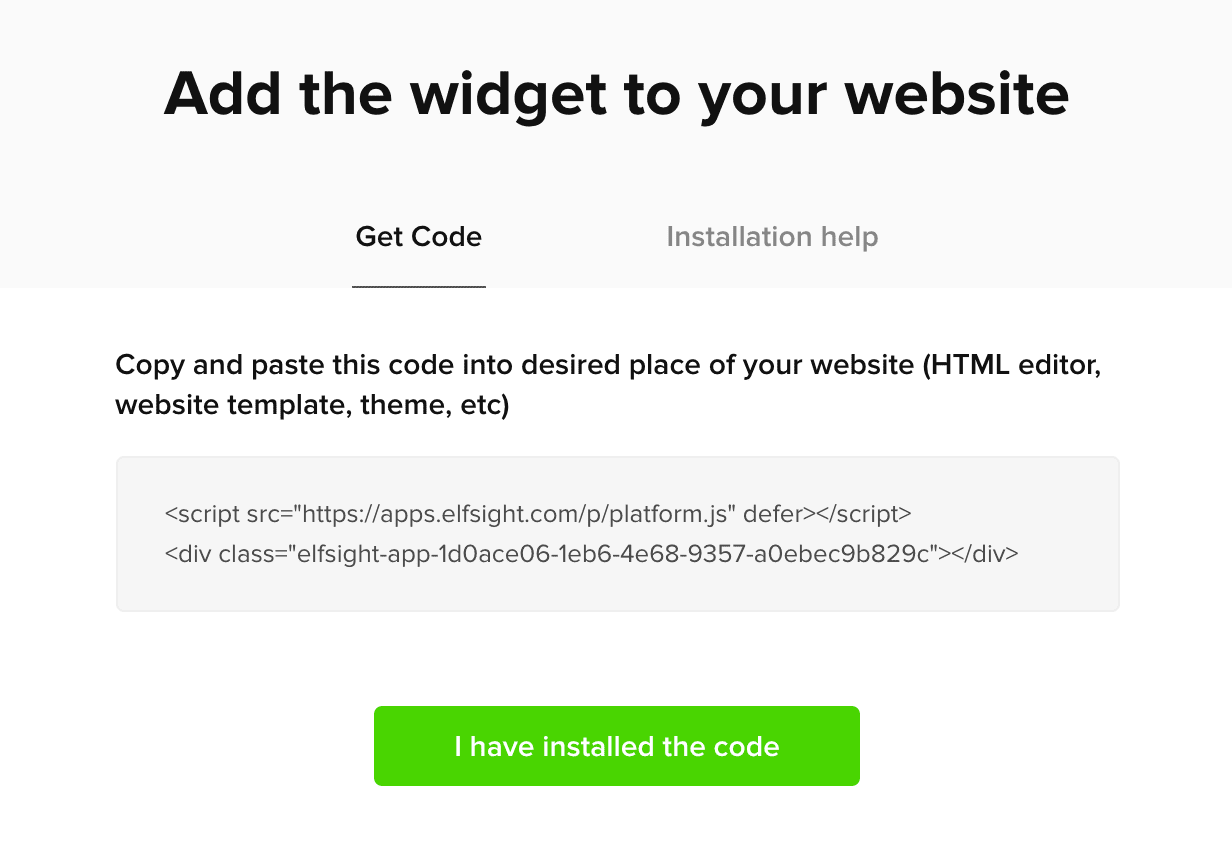
5. When you’re ready, click “Save”. A pop-up will appear that provides you with the code you need to embed your page on your Wix website.
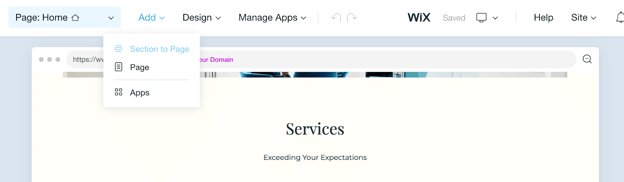
6. Now, open your Wix ADI and select “Add” at the top of your Wix page. Click “Section to Page”.
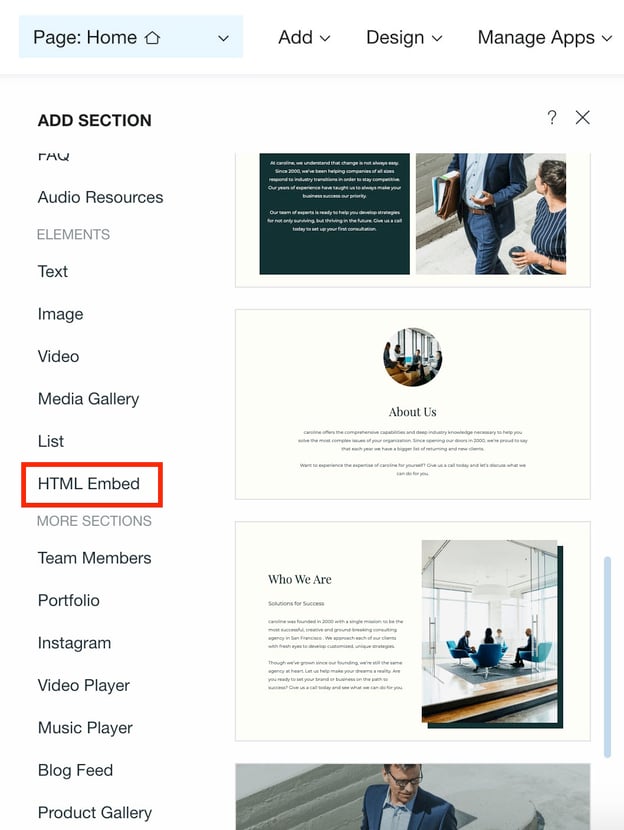
7. Choose “HTML Embed” in the navigation bar.
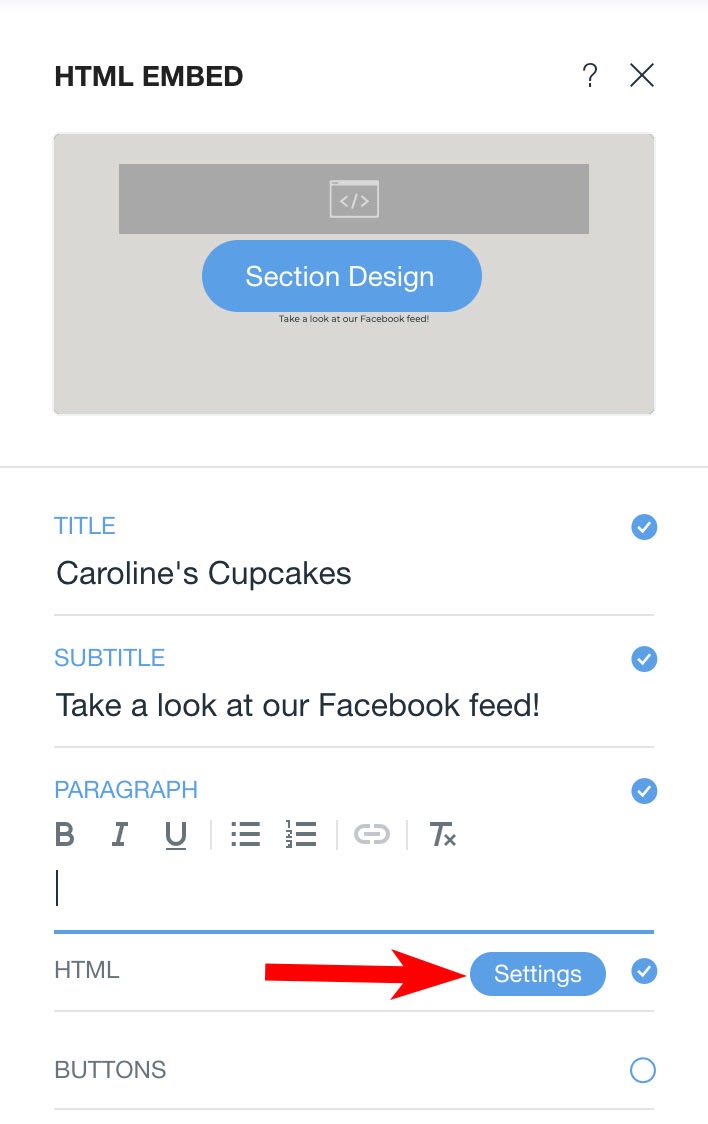
8. Now, click on the section design you prefer. Then fill in the title, subtitle, and paragraph. When you’re ready, click the blue “Settings” button on HTML.
9. Choose the embed type — in this case, you’ll want “HTML code”. Then, paste the HTML code you got from Elfsight into this section.
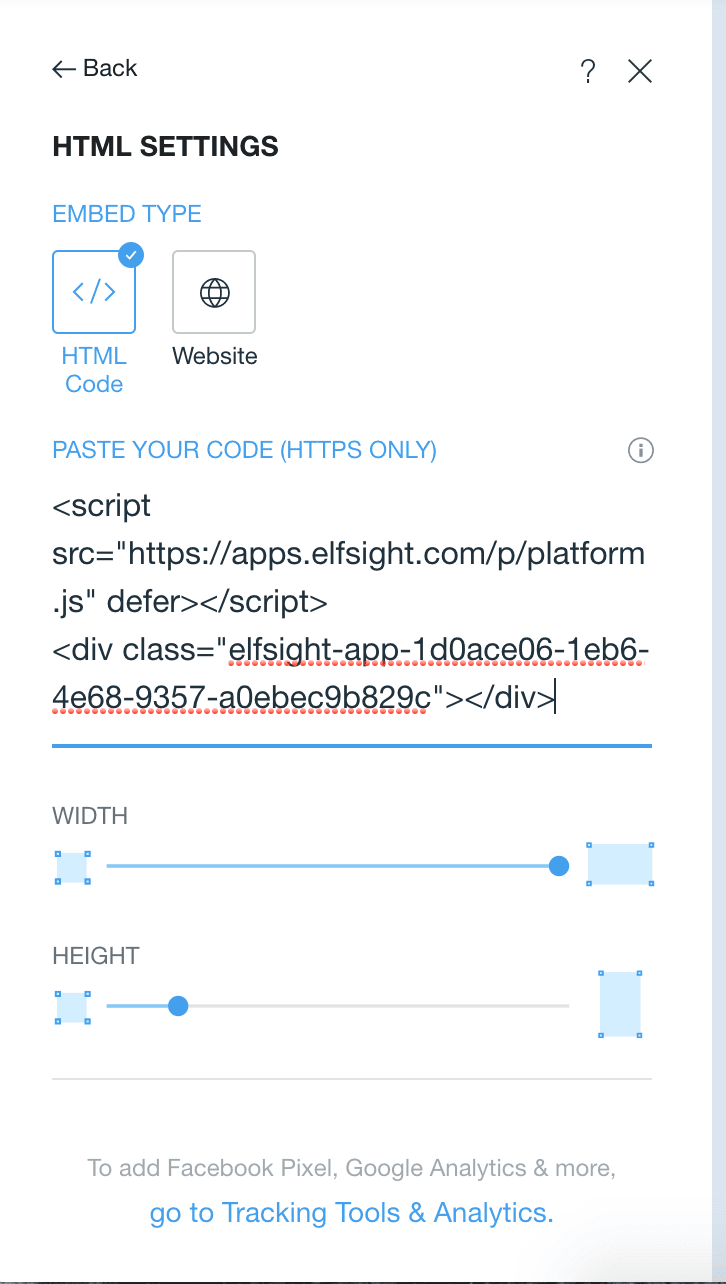
10. Finally, click “Publish” on your Wix page to add your Facebook feed to your live Wix site.
How to Embed Facebook Event Feed on Website
To embed a Facebook Event Feed on your website, go to the Page Plugin and paste your Facebook Page URL into the box. Then, type “events” into the Tabs section.
Now, click “Get Code” and copy-and-paste that code into your existing site using the steps outlined above.
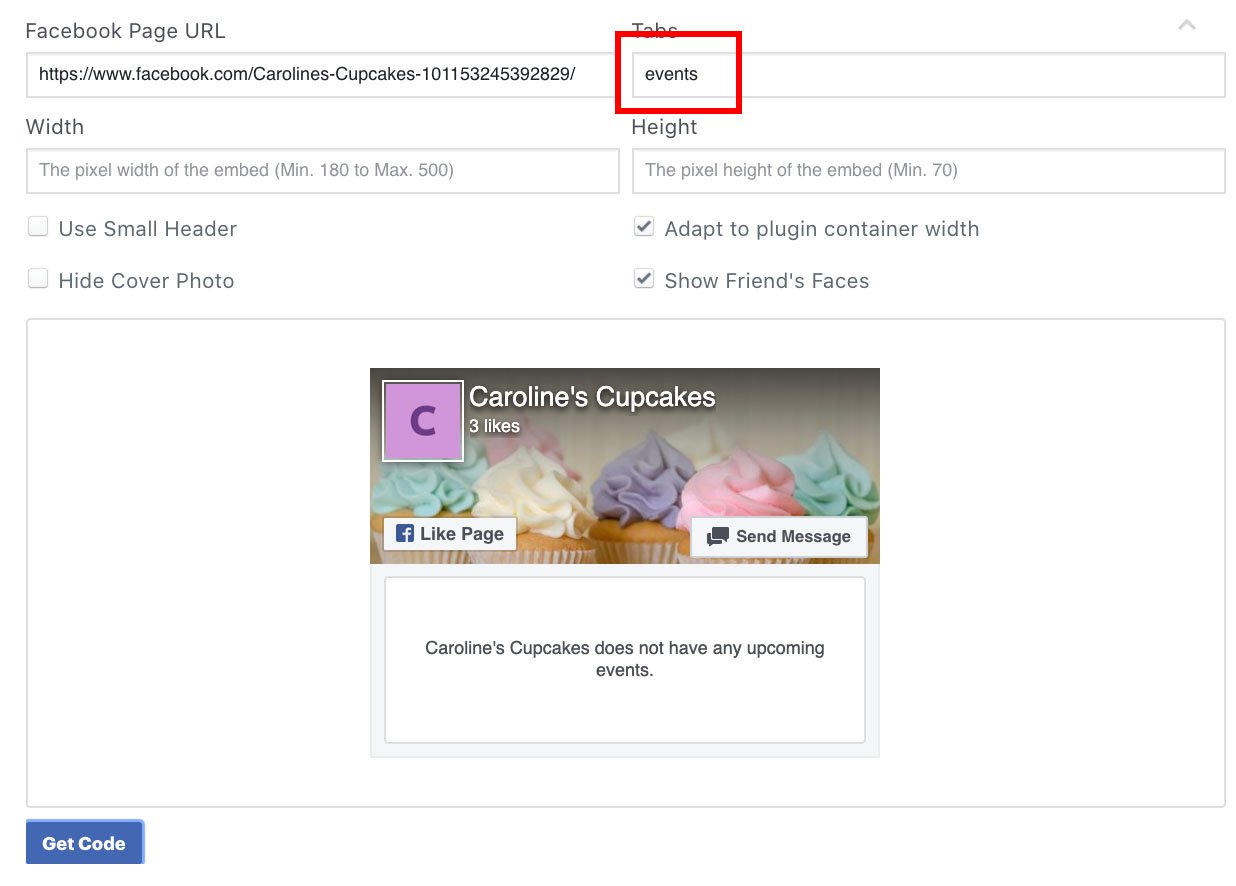 And there you have it! You’re now ready to embed any post, timeline, or event onto your website to increase engagement to your social pages.

Why P2P Marketing Might Be a Good Alternative to Influencer Marketing
To understand what peer-to-peer (P2P) marketing is, let’s start with an example.
Recently, I was looking for a new face moisturizer. Of course, I could’ve trusted the numerous influencers I follow on Instagram, all with strong opinions regarding the “best, most effective” options available.
But I wasn’t convinced these influencers had my best interest in-mind. Yes, most influencers’ (and micro-influencers) are successful because they promote valuable products. But they’re getting commission off those posts, too.
So I handled my problem the old-fashioned way — I texted my friends and asked what products they use.
This isn’t to say influencer marketing is ineffective. Quite the opposite: When done right, influencer marketing is a fantastic opportunity to expand your brand’s reach and increase sales.
But depending on your team’s budget, influencer marketing could be limiting. Plus, influencer marketing inhibits your brand from reaching those consumers who still trust their peers above all else.
Enter: P2P marketing.

Given 93% of consumers trust friends and family over all other influences (including review sites, blogs, and social media platforms), it makes sense why P2P marketing works.
And P2P marketing, a form of word-of-mouth marketing, isn’t new. People have been giving personal opinions about their favorite — and least favorite — brands, products, and services long before social media.
Some older forms of P2P marketing include Yelp, reviews on personal business’ websites, and good old-fashioned conversations between your consumers and their friends and family.
However, there are some new tools that help businesses leverage P2P marketing on a broader scale. Amazing Brands, for instance, helps businesses generate customer reviews and referrals, guarantee event attendance, or even increase in-store foot traffic.
The tool ultimately relies on the premise of P2P marketing, which is that there’s nothing more powerful than peer recommendations.
Other tools, like Higher Logic, work to establish a sense of community among existing consumers, and increase brand loyalty — a critical component of P2P marketing. (Since consumers won’t refer products or services towards which they don’t feel loyal.)
However, if you’re learning about P2P marketing for the first time, you might be wondering — why invest in P2P marketing, instead of more traditional forms of influencer marketing?
And what’s the difference, anyway?
What’s the difference between P2P marketing and influencer marketing?
Over the past couple years, influencer marketing has been one of the most popular and effective opportunities for brands to reach new audiences by leveraging those influencers’ built-in communities.
However, as mentioned above, consumers still trust their own peers more than anyone else. And influencers can often feel like celebrities to the general public — in fact, sometimes, they are actual celebrities, like George Clooney with Nespresso. This removes a level of authenticity you might be striving for as a brand.
Additionally, many small and medium-sized businesses can’t afford the typical influencer cost. Celebrity or macro-influencers charge between $3,000 and $500,000 for a single post — and while micro-influencers are undoubtedly cheaper, they can also charge upwards of $500 per post.
Ultimately, P2P is a form of marketing that can feel increasingly trustworthy and authentic through real, genuine reviews from peers who have no incentive to promote businesses they don’t care about.
To further explore the difference between P2P marketing and influencer marketing, let’s consider an example.
Jessica Alba’s business, The Honest Company, has a referral program in which they credit existing customers $20 for each invited friend who makes a purchase.
This is an example of P2P marketing.
Influencer marketing, on the other hand, refers to the influencers on Instagram (as well as other social platforms) who tag posts with #honestambassador, signifying the post is sponsored by The Honest Company.
These are both equally valuable marketing options, but they achieve different goals. The P2P marketing initiative (in this case, the referral program), aims to tap into The Honest Company’s existing consumers to reach new prospects.
The P2P program is likely more narrow in reach, but has the potential to convert more quickly than influencer marketing, since it’s leveraging the power of an existing relationship between customers and their friends or family.
The influencer marketing program, alternatively, is meant to spread brand awareness about Honest Company to a wider audience.
P2P marketing can take many different forms depending on your brand and business goals — including creating a referral program, encouraging reviews on your site in exchange for a small discount or prize, or organizing events meant to increase brand awareness to the larger community.
Ultimately, P2P marketing comes down to increasing the incentive for your consumers to share your product or service with friends and family, which is undoubtedly one of the best long-term strategies for success.

How 7 Brands Use Facebook Stories for Business
Whenever a new feature comes out on social media, I am usually a late adopter.
Back when Instagram launched Stories, a worthy Snapchat opponent, I thought, “Hm, I don’t know about this.” Perhaps it’s because change, even if slight, is uncomfortable or just because I’m naturally a cautious person.
But here we are a few years after its launch and I barely look at my newsfeed. Where am I? You guessed it, endlessly swiping through Stories.
The feature gained steam on Instagram but was then integrated on Facebook. Now, every brand with a Facebook Business Page has gained another marketing tool to reach users.
So, what exactly can you post on Facebook Stories? Get inspired by these eight brands.
Examples of Facebook Stories for Business
A Look Behind the Scenes
Back when Facebook only allowed brands to publish posts, brands were probably more selective about their content, knowing it would stay there permanently.
Now that Facebook Stories is here, brands can have a little bit more fun with what they post knowing the content will only be available for the next 24 hours.
That’s why behind-the-scenes content is perfect for Facebook Stories. It’s not necessarily important enough to be featured on the news feed but it can be a great way to create some buzz around an upcoming release.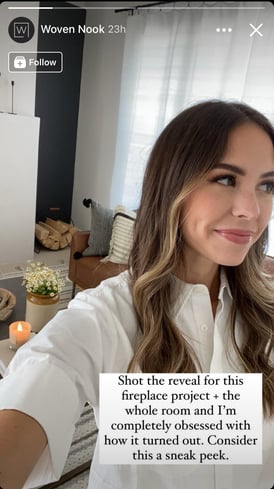 In this example, Woven Nook, a home decor company, posts a Story to tease an upcoming project. The Story allows the brand to create some anticipation around the project and also gauge the audience’s interest in this type of content.
Another important element in this Story is that it features one of the founders of the company. In recent years, studies have shown that consumers connect more with brands who pull back the curtains and show the faces behind the business.
Woven Nook could have posted the sneak peek without the founder. However, having a human featured in the image can leave a stronger impression than just a setting.
Polls and Surveys
Facebook Stories isn’t just another publishing channel, it also has great features that help brands connect with and engage their audience. Engagement is vital for building brand loyalty and understanding your consumers.
The better you understand them, the better equipped you are to deliver content that resonates.
The grocery delivery company Instacart hosted its own trivia game on Facebook Stories to test its audience’s food knowledge.

While this may not necessarily give the brand valuable insight into their audience, their engagement with the post may tell them a lot about the type of content their followers enjoy.
Want another way to use polls? Tie them to a product or service.
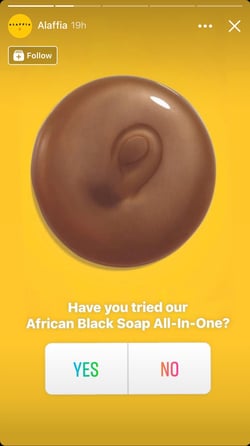
Alaffia posted a simple poll asking its audience about its product.
This accomplished two things at once: It introduced followers to a product they may not yet know and it had an interactive element that encouraged audience engagement.
User-Generated Content
One of the most popular uses for Facebook Stories is user-generated content (UGC). UGC provides what’s known as social proof, a psychological phenomenon where we tend to look to others for guidance on what to do.

Adjourn Teahouse leverages UGC to show the various ways in which consumers use its products. Because of the Facebook Stories repost feature, the brand can fill its Stories with content already created by others, saving both time and money.
One thing to note is that because Facebook now owns Instagram, you can repost another user’s Instagram content to your Facebook Stories – something that’s not available between other social media platforms.
The brand Curls uses this same approach to promote its products.
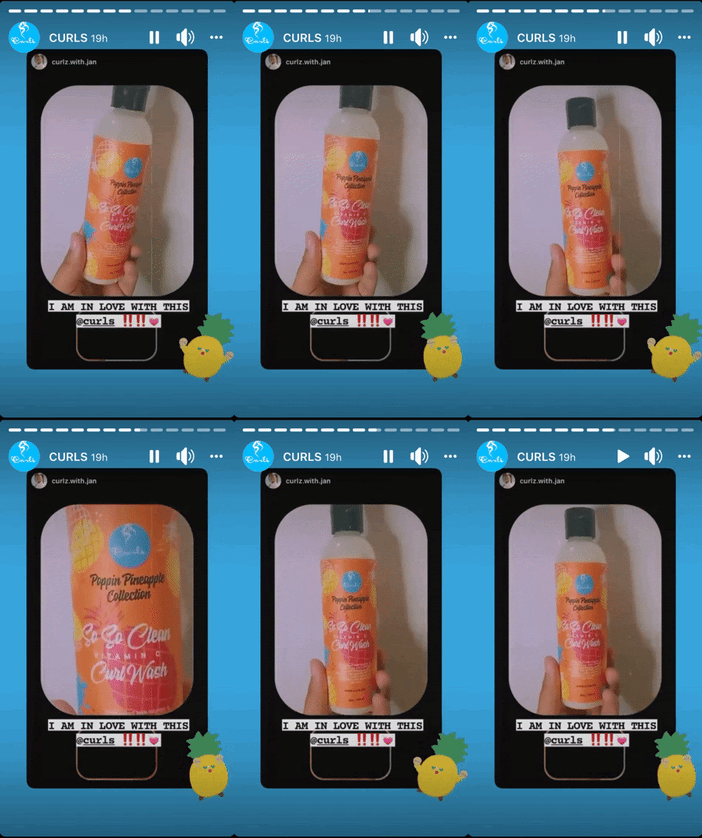
What brand doesn’t love free promotion? This type of UGC helps brands gain credibility and earn new customers.
Direct to Website Traffic
Have an article on your website you want your Facebook followers to read? Take advantage of the “‘See More” feature on Facebook Stories.  Blavity, a news and media company, often uses this feature to lead Facebook users to its blog posts.
While this brand mostly directs traffic to its blog posts, businesses can use this feature to lead their followers to landing pages, product pages, or any other webpage.
What’s great about this tool is that it makes it easy for users to navigate to other channels from the brand without ever leaving the Facebook platform.
Giveaways
If you’re hosting a giveaway, you’ll likely create a Facebook post so that users can access it beyond the 24-hour window. However, it’s important to promote the giveaway on other channels to give it more visibility.
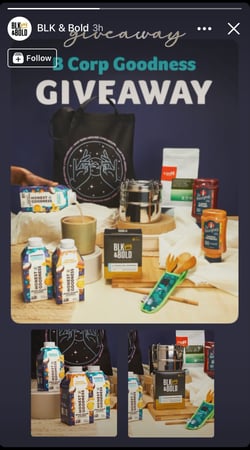 Note how beverage company BLK & Bold promoted its giveaway on Facebook Stories. Instead of posting all of the giveaway details, like the rules and eligibility requirements, the brand highlighted what its audience is most excited most: the giveaway itself.
If your giveaway is hosted on another social media platform – say Instagram or Twitter – you can still promote it on your Facebook Story and use the “See More” feature.
There’s no right or wrong way to post on Facebook Stories. It’s all about finding what stories resonate best with your audience.
Every Story you post is an opportunity to connect with your audience and learn more about them.
While some of these strategies may not work for your brand, they’re worth trying out. Because even stories that don’t perform well give you as much insight as those that do.
