11 Webinar Etiquette Tips for Presenters & Attendees
Now that we’re spending more time than ever at home on our computers, it’s a great time to brush up on webinar etiquette.
Webinars give brands the chance to connect directly with their audiences. On the flip side, consumers get to increase their knowledge on a topic. It’s a win-win when done correctly, but not all webinars go smoothly. I once attended a webinar on email automation tips that was actually a full product demo. Yikes.

Then, you have situations where the presenter is late, or the attendees are having a little too much fun in the chatroom.It doesn’t exactly make for the best experience for either side.
So let’s find out how presenters and attendees can contribute to more productive webinars.
1. Set the tone.
Every webinar format is different. For example, some are education-based, with the presenter only engaging with the audience for questions. In other cases, the setting is more interactive.
That said, let your audience know what you expect of them early on.
Send a reminder email to your attendees a few days before the webinar and include a section on guidelines. Be sure to answers the following questions:
- Are attendees expected to have their cameras and microphones on or off?
- Is participation encouraged? If so, how?
- Is there any prep work?
You can also remind your attendees of these instructions at the beginning of the webinar, as people are logging on.
2. Present what’s expected.
Imagine you order a medium-well steak at a restaurant and instead, you get a piece of chicken. That piece of chicken might be delicious, but it won’t matter because that’s not what you ordered.
Meeting expectations is very important when attempting to gain trust from your audience. For webinars, there are few things more frustrating than anticipating a presentation on one thing and getting something completely different. Switching gears can cause confusion, and lead to high drop off rates and low engagement.
In addition, each webinar type serves a purpose and caters to a unique audience. For instance, workshop attendees likely don’t have the same intentions as the ones attending product demos.
With this in mind, resist the temptation of turning your webinar into a promotional opportunity (or anything else) if it’s not on the agenda.
3. Do a practice round.
Technical difficulties are a bummer. They interrupt the flow of the presentation and can be hard to recover from. One way to prevent them is by practicing beforehand.
First, get familiar with the hosting platform you’ll be using. Learn where the key features are, such as how to:
- Share your screen.
- Play audio and/or video clips.
- Spotlight attendees and adjust their audio/video settings.
You may consider having a moderator who will assist you during your presentation to monitor the chatroom and help move things along.
Once you feel confident navigating the platform, do a trial run for the presentation from start to finish. Doing so will let you know how much time to dedicate to each section to stay on schedule.
4. Read Q&As out loud.
When you attend a presentation in person, there’s typically no guessing game involved when someone asks a question because you can hear it being asked. Online, things work differently.
Depending on the hosting platform you use, you will likely have a Q&A feature that allows attendees to ask questions directly to the host. This means that other attendees won’t know who asked a question and what the question was.
As such, presenters should always repeat questions out loud before answering them, so that the audience understands the context of the answer. However, keep the attendee’s name anonymous unless the attendee has requested otherwise.
5. Make the webinar accessible.
Webinars can be great sources of information but can lack the accessibility features needed to reach all audiences, including those who are deaf, hard of hearing (HoH), and visually impaired.
Start by reviewing your hosting platforms. Applications like Zoom and Google Hangouts have built-in live captioning and transcription features. You can also send your attendees the presentation slides ahead of time, which makes it easier for non-native speakers to familiarize themselves with the content.
Depending on your budget, you can hire an interpreter to sign your presentation for your deaf and/or HoH audience. If that’s not possible, look into video relay service providers that will connect your audience to interpreters during your presentation.
For the presentation itself, use high-contrast colors to make it easier for visually impaired attendees to see your slides.
6. Record the session.
When hosting a webinar, you may only have a percentage of your registrants attend the live session. Due to scheduling conflicts, many people rely on video recordings to review the sessions they missed.
While it’s not absolutely necessary, it’s a great way to provide value to users who are interested in your brand but are unable to attend live sessions. You can limit access to the recording for a week or two following the live session and add a password to access the footage for added security.
1. Be on time.
Webinars typically follow strict agendas, which means there’s very little room to catch up if you’ve missed a part of the presentation.
To take full advantage of the webinar, be sure to be on time. There is usually a one- to three-minute grace period for attendees to log onto the hosting platform.
To play it safe, join the webinar a few minutes early in case you have trouble logging in. This will give enough time to reach out to the webinar organizer for help. You can also set reminders in the days leading up to the webinar to ensure you’re ready when the event starts.
2. Chat to amplify, not distract.
Think of the “Chat” box in a webinar like a classroom. Except, in this case, you can’t whisper to the person right next to you. Everything you say is loud enough for everyone in the room to hear and engage with.
With that in mind, your input should only be to amplify what the presenter is saying.
For instance, let’s say you’re attending a webinar on email marketing automation. The presenter is explaining the benefits of setting up email sequences once a lead takes a specific action. You could chime in the chat to add how effective that practice has been for your brand.
However, it wouldn’t be so helpful to introduce a conversation about email click-through rates or dive into your experience using a particular automation platform.
As a rule of thumb, if it’s not in line with the presentation, leave it out of the chatroom.
3. Don’t interrupt.
As a presenter, interruptions can really throw you off your game. It disrupts your thought process and it can take you a second to get back on track, no matter how seasoned you are.
Un-muting yourself to add your input should only be done if the presenter has opened the floor to it. As a professional courtesy, do not interrupt the presenter unless they explicitly state it is welcome.
Instead, wait for a call-to-action. The presenter might have a dedicated slide for questions and comments, or they might ask out loud if anyone has anything to add.
4. Avoid self-promotion.
Self-promoting during someone else’s webinar is like blowing out someone else’s birthday candles, it’s in poor taste.
If prompted, it’s appropriate to mention your brand as it relates to the content of the presentation. What you should avoid is attempting to direct other attendees to your brand through your website and social links or other strategies.
By following a few simple steps, you can help create a more positive webinar experience that everyone enjoys.


How To Download & Repurpose Your Facebook Live Content
Your brand’s team went on Facebook Live and now the live has ended. Instead of leaving that footage to collect dust in your video library, you can repurpose it.
Think of live content like an item of clothing in your closet. You wouldn’t wear a shirt once and throw it out, right? That’s because you know you can style it in many different ways depending on the look and feel you’re going for.

Live content follows the same idea. You may think that once your live Facebook video has ended, it’s no longer usable. But in fact, you can use that same video to produce 10 more pieces of content. It’s all about reframing it to fit your goals.
With that in mind, let’s dive into how to download your live videos on Facebook and extend their shelf life.
Can you download Facebook Live videos?
Yes, you can download Facebook Live videos but only on a computer. Facebook does not currently allow users to download their live videos to their phones or other mobile devices.
The first thing you can do after downloading your video is share it on your timeline for followers who may have missed the live session. You can then use a transcription app, like Descript, to get a written version of the content, adding to your audio and visual formats. From there, you can brainstorm ways to extend the video’s shelf life.
The main benefit of repurposing live content is saving time and money.
“Live can be a great way for businesses who are light on resources to make video content. While lives can be complicated, they can also be as simple as a person in front of a camera,” says Kelly Hendrickson, social media marketing manager at HubSpot. “The biggest benefit of a live is the low cost and low production needs.”
You can save a lot on production costs by re-using past footage and building from it instead of starting from scratch.
Tips On Repurposing Your Facebook Live Content
1. Don’t force it.
Repurposing content only works if it’s valuable to your audience.
Hendrickson highlights that the question to ask when repurposing any content is, “Is this valuable to my audience?” With live content, there’s a second layer to it. You now have to ask if live content is the most effective way for your audience to get this value.
“There is a balance between providing value in the most digestible way and creating content in a sustainable way for your business,” she says. “If your audience could take the value easier in a still image or a quick text post, that will be a better option.”
She also adds that before you decide to use the live content to create another video, dig into your data.
“If the answer isn’t video, don’t force it because the algorithms won’t give you brownie points for putting your best effort forward,” Hendrickson says. “They are going to serve your audience what performs best for them.”
While you may know where your audience consumes media, they may have different expectations and behaviors on each platform. So, before scheduling that post on social, make sure it aligns with what your audience is looking for.
2. Get usage rights from talent.
Before you start repurposing, make sure your team has gotten prior approval from the talent featured in the live video.
“You often cannot repurpose live content without a contract from the talent who agrees to this, either going into the live record or after the fact,” says Jamee Sheehy, director of video at HubSpot. “If someone has agreed to one live piece of content and then there’s 20 different cut downs of it from Instagram to YouTube, that’s not a good thing, you need to agree on usage.”
The contract should include the following details:
- The timeframe of the usage – Usage rights can range anywhere from one to 12 months.
- Where the content will be repurposed – Brands will need to specify if the content will be used for organic social media posts, paid social campaigns or on digital marketing channels.
Once you have these details ironed out, it’s important to share them with your marketing team to ensure compliance across all channels.
3. Create a blog post.
One of the best ways to repurpose live Facebook videos is by creating blog posts from the key points discussed during the live.
For instance, let’s say Bike World sells bicycles and hosts a live with an influencer known for their outdoor adventures. Let’s say you mainly discussed bikepacking tips, biking communities and the best biking trails in the world during the live. You can take each topic and turn it into a blog post for your audience, including quotes from that influencer.
You could also include a video and/or audio snippets in the article to add more depth to your posts.
4. Get snippets for social media.
Just because your live video was originally on Facebook doesn’t mean it has to stay there.
You can reformat your content to fit on other platforms where your audience lives, like Instagram or TikTok. Instead of reposting the full video, take snippets of the best moments from the video.
“During a live, you’re there for the live feel, the random trailing off topics, the moments. Find the substance of the talk and edit to those,” said Sheehy. “Once you make an edit out of that, add graphics to fill out the story if something got lost in translation, or to add something that wasn’t talked about in the live.”
One thing to keep in mind when repurposing content on other platforms is formatting. You want to make sure you adapt the video frame to the platform so it fits the screen accordingly. For instance, the dimensions for Facebook Live videos are different from those on Instagram Reels. As such, you’ll need to create a platform-specific version.
You may also need to adapt the content for the platform. While a video snippet with cool graphics may work well for a short TikTok video, that approach may not work so well on Twitter. For that platform, it may be better to write out a stand-out quote from the video instead, as it’s a text-heavy app.
To generate the best results, you’ll have to adapt the content to the platform.
5. Use the audio for a podcast.
What better way to use audio than incorporate it into a podcast? It’s one of the most popular ways people are consuming information these days.
While your video may not work well as a full podcast episode, you can use snippets from the video to include in your podcast series. For instance, if you interviewed someone in your live video and your podcast series has an interview segment, it could be a great way to integrate that audio.
However, if the audio from your live isn’t so great or the conversation relies heavily on visual elements, a podcast may not be appropriate.
6. Upload to YouTube.
If you want your live video to be easily accessible to your audience for a long time, upload the video to YouTube.
Similar to social media, it allows those who are newly introduced to your YouTube channel to freely explore your past content. They’ll also get to enjoy the off-the-cuff feel that you only get through live videos.
Keep in mind that YouTube has strict copyright rules. If your live video features music or other content not permitted under fair use laws, you may have to edit that out of your video before uploading it.
In most cases, it’s best to plan out what content you will repurpose before you start your live video. That will give you direction on what to cover during your live to maximize the material you’ll get to use on other platforms.

Are Blogs Dead in 2021? We Asked 10 Marketing Experts
It seems we all have an obsession with killing things off.
Every couple of years, we revisit something and place it on the chopping block. In the new millennium, we had the Y2K computer scare. In 2012, we feared the world would end and we would all just poof. When technology took a more important role in our lives, we assumed all print publications would go bankrupt. Now, with the rise of video and podcasts, it’s blogging’s turn to feel the heat.

I reached out to marketers with backgrounds in product marketing, SEO, YouTube, podcasting, and more and asked them, “Are Blogs dead? ” Here’s what they said.
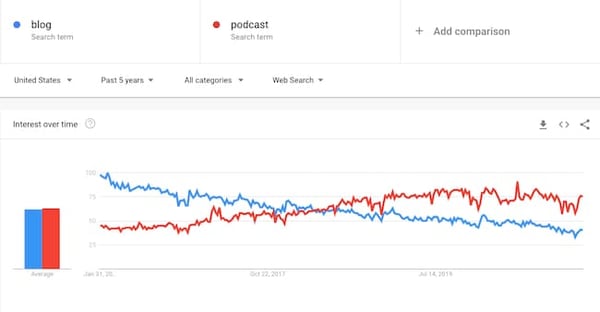
In all fairness, this question surrounding blogs is not without reason. Google Trends shows that in the last five years, the interest in blogs has steadily declined worldwide.

In the U.S. within the same five-year span, podcasts have risen in popularity and surpassed blogs in searches.
However, marketers still consider blogging a top marketing channel. Ross Simmonds, a B2B marketer and the founder of the content marketing agency Foundation, says blogging has helped his clients triple their traffic and accelerate their sales close rates.
“At Foundation, blogging with intent has helped us generate millions of dollars in the pipeline for both us and our clients,” says Simmonds. “It’s also armed us with the ability to elevate our brand’s position in the market and, most importantly, truly help others in our industry learn and unlock new opportunities.”
With that said, the blogging landscape has changed over the years. Lisa Toner, director of content at HubSpot, says it’s not enough to just have a blog nowadays.
“You need to consistently create content that is more valuable than your competition’s content. You need to be an SEO expert to get your articles ranking on page one of Google, and you need a distribution strategy to promote your content across all the channels your audience likes to consume content on,” says Toner. “It’s a lot more complex to win at blogging now, but if you can master it, it’s worth the investment.”
Transparency is a bigger responsibility, especially as social justice becomes more important to consumers.
“You need to think about how people see your brand compared to your competition. Everyone has their own unique selling position (USP) and what they want to put forward, but what users do is compare,” says Sandra Mpouma, head of digital marketing at RationalFX. “So, in terms of business strategy, create loyalty, trust, [and] be transparent and competitive, which is very important nowadays.”
Blogs vs. Other Marketing Channels
Now that other content marketing channels – namely video and podcasting – have surpassed blogs, will blogs soon become redundant? Well, it all depends on the user personas you’re targeting. But even as other platforms grow, blogs still offer many advantages.
“Podcasting is not without its own set of limitations. There are plenty of discoverability and audience growth challenges. At this point, blogs have a pretty well-dusted playbook for scaling. That’s not true for podcasts,” says Matthew Brown, senior podcast producer at HubSpot. “A company can use its likely limited resources to invest in a blog that will basically give consistent, easily measurable, and reliable performance. Blogs also have a direct line to the company’s bottom dollar, podcasts do not.”
Nelson Chacon, principal marketing manager for YouTube at HubSpot, highlights that there’s no reason to choose between two platforms if your team has the bandwidth to tackle both. If it aligns with your user personas, you can engage your audience from several angles.
“Creating a blog constructed of articles around the benefits of your product will be helpful. Having a video showcasing its use or how to install it would be beneficial for your audience,” says Chacon. “Home Depot has done a fantastic job of doing this. While they inform and educate their customers on their products, they also add a quick ‘how-to’ for the more knowledgeable person who just needs a short answer explained in a video.”
As for social media, Annabelle Nyst, a senior content strategist who focuses on social media initiatives at HubSpot, says it’s hard to compare it to blogs as each platform serves different purposes.
“Social content doesn’t always have the shelf life or the discoverability of blog posts,” says Nyst. “It’s more about consistently meeting your audience where they are, in the right moments, engaging with them one-on-one, and establishing trust via community building.”
She adds that social media can be a great way to amplify your blog posts. And vice versa, blog posts can serve as inspiration for social content. If using both, Nyst recommends pulling the most compelling points from your blog posts, creating social-first content, and using it to drive traffic back to your blog.
With all that said, blogs don’t come without their disadvantages. AJ Beltis, a content and acquisition manager at HubSpot, mentions the high drop-off rates often seen in blog posts.
“Blogs lack the interactivity that many crave due to its nature as written content,” says Beltis. “This challenges blog writers to hook their readers in a few short sentences without having the benefit of special effects or audio engineers available to their video and podcast creating counterparts.”
What it often comes down to is your brand goals and which channels will help you meet them. Podcasts, for example, are better for branding while blogs serve better for top-of-the-funnel engagement.
“Blog posts are an acquisition juggernaut. There’s a clear path that any seasoned marketer can follow. Podcasts, however, best serve as a brand opportunity,” says Brown. “You wouldn’t measure a series of blog posts on their brand uplift ability, just like you wouldn’t measure a podcast show’s lead generation. That is unless you like gray hairs and a serious lack of sleep.”
Why Blogs are Still Impactful
From an investment perspective, blogs may be a better long-term investment for lead generation.
“I could spend $200K to hire a full-time writer, SEO expert, and conversion rate optimization (CRO) specialist to work on my blog. By combining those skill sets, I’m going to be able to create a blog that drives organic traffic to my website and converts it into leads for my business all year long,” says Toner. “Or, I could put the same $200K into an advertising campaign and maybe get a couple thousand leads over the course of the ad campaign. But once the campaign ends, so does my lead flow.”
Toner adds that the majority of HubSpot’s blog-generated leads come from older blog posts. This means that blogging can be a great lead source long after posts are published. Aja Frost, who leads the English SEO team at HubSpot, echoes this sentiment.
“Organic traffic is more important than ever. Unlike paid traffic, which stops coming in the second your budget runs out, organic traffic is mostly self-sustaining after you’ve put in the time and effort to create a blog post,” she says.
She adds that most content management systems (CMS) have SEO tools integrated into their platforms, which makes it easier to optimize your posts.
Blogging can also be valuable in shaping a brand’s product positioning.
“Blogs are still one of the best channels we have to create narratives around our product,” says HubSpot Product Marketing Manager Alex Girard. “They offer us the opportunity to address trends we see in the market, how those trends impact the reader, and how our product might be able to help them meet that trend successfully. They’re also great for telling customer success stories.”
He adds that when using your blog to market your product, the content doesn’t have to be promotional. When you establish yourself as a thought leader and gain trust from your audience, they will organically look into your products and services.
With that said, it’s going to take more than good content to have a successful blog.
“Growth without a goal isn’t going to help your business – if 10,000 people are reading your blog, but none of them fit your persona, that’s not going to do anything for your company,” says HubSpot’s Senior Blog Manager Karla Cook. “Focus on something attainable, like generating new contacts, and make sure every post you’re putting out has that goal in mind.”
She adds that one of the biggest mistakes brands make is creating content only for people at the decision-making stage. With so many stages between reading a blog and making a purchase, marketers should have posts geared at users in every stage with corresponding offers. Learn more about that through HubSpot’s business blogging course.
From an SEO perspective, brands may also struggle with generating traffic because they’re thinking blog first, link building second.
“What I often notice is that marketers see ‘blogging’ and ‘link building’ as two different disciplines. First, they write the blog posts, then they think about how to earn backlinks to them,” says Irina Nica, a senior marketing manager at HubSpot who works on product awareness through outreach initiatives. “Instead, they should include linkable assets into their regular content calendar, alongside other types of articles that are maybe designed for generating organic or social media traffic.”
Despite the many benefits we’ve gone over, blogging isn’t always the best strategy for every brand. Why? Well, what if your ideal user persona doesn’t read blogs? What if they prefer emails instead?
“Some brands have great email communication and workflows where they provide people with downloadable offers where they don’t have to go somewhere else to get the information, it’s just in their inbox straight away,” says Mpouma. “You don’t necessarily need a blog as long as you’re offering something in exchange. I think the blog has always been that: Offer something for free in exchange for that user interaction.”
So, in that case, blogs wouldn’t exactly be dead, more so irrelevant.
Why Marketing Isn’t Dead
Looking at things from a broader perspective, blogs are just an extension of marketing. Some have suggested that marketing is dead, which makes marketers like me wonder if there’s something we don’t know.
Based on recent data, marketing is still influential. And that applies to both traditional strategies and digital initiatives. Statista reported that in 2019, content marketing generated over $42 billion in revenue worldwide.
“There’s a reason why Nike and McDonalds continue to invest millions every month in marketing even though they’re already household names. There’s a reason why the top musicians and artists still do promotion prior to their latest album release,” says Simmonds. “Marketing isn’t to be seen as just an expense. It’s an investment. And if you make an investment that is rooted in a strategic plan — that investment should return dividends for years (maybe decades) to come.”
The key takeaway is that while not all marketing tactics work for every brand, it’s unlikely that blogs will stop being valuable to brands in the foreseeable future. So for now, blogs, you can rest and step off the chopping block.

How to Use Clubhouse: A Step-by-Step Guide
Recently, Clubhouse — an invite-only, audio social media app — has gained viral levels of awareness.
In just a few weeks, Clubhouse, which allows members to host and join audio chat rooms, has jumped from 600,000 to 2 million active users, gained a $100-million valuation, and hosted some of the world’s top thought leaders.
Because of Clubhouse’s growing awareness, popularity, and chat-style interface, brands interested in building communities are getting more curious about how they could use it in their marketing strategies
But because Clubhouse is still invite-only and not available for Android users, many marketers are just logging on for the first time now. And, as with any new social media app, learning about all of Clubhouse’s features — and trying to catch up with its earliest adopters — can feel a bit overwhelming.
If you just got your Clubhouse invitation — or want to be ready to use the app when you do — read this guide to learn how to set up your account, follow others, and attend or host your first audio chats (also known as “rooms”).

1. Track down and accept an invite.
At this point, Clubhouse is still invite-only and only available for iPhone users. Luckily, because of its growing audience, you might have a friend or colleague who’s already on it and willing to give you one of their invitations.
If you aren’t sure if you know anyone on Clubhouse, you can still register for an account on the app. Once you set up a basic profile, give your contact information, and select a few topics you’re interested in (as noted in Step 2), you’ll see a screen that says you’ve joined the waitlist.
From there, contacts who are on Clubhouse will be notified that you’ve joined the waitlist and they can give you an invite to move you up to full user status. Here’s a text I received from Clubhouse when my HubSpot colleague, Amanda, bumped me up to the top of the waitlist.
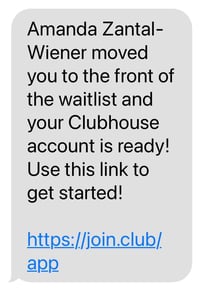
If and when you receive an invite from someone, be sure to register with the phone number they texted your invitation to — otherwise, the app might not register that you’re the same contact.
When you register, you’ll be prompted to add an email address. You’ll also choose a photo, username, and password. Alternatively, you can connect your Twitter to have the same username, photo, and profile information flow into the app.
2. Pick topics of interest and follow users.
After giving some basic information during registration, you can also choose topics you’re most interested in from a long list to help customize the content the app will suggest to you.
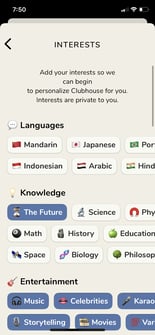
Then, Clubhouse will ask you to access your contacts and use your topic preferences to suggest both people you might know and influencers you might be interested in following.
If you don’t want to select any topics or follow any people just yet, that’s okay. You can do all of these things later.
3. Set up your profile.
If you didn’t link your Clubhouse account to Twitter to auto-generate a profile, you can set up your profile by adding or changing your photo and writing a description that notes your hobbies, interests, companies you work for, or industry.
While we aren’t quite sure if your profile description will optimize your page for the app’s search feature, it will be helpful for prospective followers to see when they decide whether or not to follow you.
Lastly, you can complete your profile by linking Twitter and Instagram. Once you do this, Twitter and Instagram icons linked to your profiles on those channels will appear under your description.
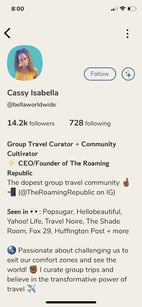
Here’s a great profile example from Cassy Isabella, a prominent influencer, entrepreneur, and travel expert on the platform:
4. Scroll through the homepage.
Once you’re all set up, start exploring. The first place to check out is Clubhouse’s homepage. While there isn’t an icon for it, you can access it by clicking the back button in the upper left corner of any other page on the app.
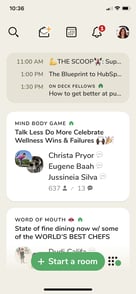
5. Use the Explore page to find other users, clubs, and rooms.
Not interested in what your homepage is showing you? Tap the magnifying glass icon to see Clubhouse’s Explore page.
From there, you can get suggestions of people to follow and click on certain topics to see ongoing rooms, people, or clubs related to them.
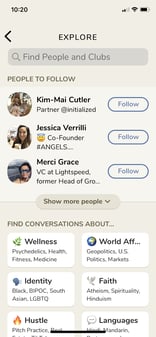
You can also use this tab’s search feature to look for specific users or clubs, which we’ll discuss in the next step.
6. Join Clubs.
Clubs are groups of users interested in the same specific topics, similar to the Facebook or LinkedIn Groups feature. Once you join a club, you can see notifications of Rooms hosted by it. You can also use clubs to find or connect with Clubhouse users that have similar interests.
To find clubs, you can either sift through the Explore tab or tap its search bar, select clubs and search a topic, as I did with “Growth Marketing” below:
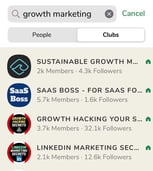
You can join a club by going to its profile page and tapping “Follow.” After doing this, you’ll be notified whenever its admins launch a room.
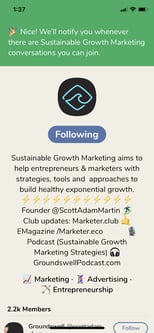
No longer interested in a club you joined? To leave it, just go to the club page and tap the “Following” button. This will unfollow you and the button will switch back to just saying “Follow.”
7. Start a Club.
Once you’ve hosted three discussions, or rooms, on Clubhouse, you can start applying for clubs. To do this, you’ll go to your profile and tap the gear in the top right corner to get to your settings.
From the settings page, you’ll click to Clubhouse’s FAQ page, or this Clubhouse Knowledge Center link, where you’ll find club rules and application instructions, as well as a Club application link.
Once Clubhouse approves the Club, you’ll see an app notification and get the ability to edit the club profile and launch rooms on behalf of the Club.
One important thing to note is that the Clubhouse team manually approves club applications. Because of the popularity of Clubs, the company is only allowing one club per user right now. This means you should be sure about the club you apply for as it might be the only one you’ll manage in the future.
8. Drop into a room.
When you see a room, or audio chatroom, you want to join (or “drop-in” on), all you have to do is tap it to start listening. Upon entering a room, you’ll be automatically muted as a listener. You’ll also see the room speakers and moderators at the top of the screen.
The unlabeled area of the room screen that highlights the speakers is referred to as “the stage” by moderators.
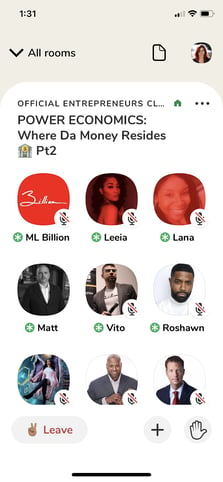
Below the “stage,” you’ll see attendees the speakers follow under the “Followed by speakers” heading, and a list of general attendees under “Others in the room.” All attendees who are not on the stage are muted and cannot speak unless they’re brought to the stage.
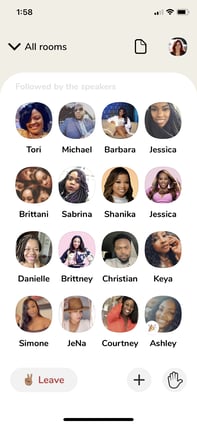
If you see a party popper emoji (or 🎉) on someone’s image, it means they’re new to Clubhouse.
9. Request to speak.
Want to speak? Press the hand icon in the lower right to be added to a speaker request list.

When you raise your hand, the moderator will be notified of your request to speak and can either unmute or ignore you.
If a moderator unmutes you, which will move your name and icon up to the speaker stage, ask your question or stay on topic with any points you add. You should also avoid hogging the mic, let others have time to speak, and follow any room rules that have been given by the moderator(s). This will help you stay marked as a speaker as long as possible.
As you enter rooms and raise your hand, keep in mind that hundreds of other users might also be requesting to speak. If you’re ignored, don’t be offended as a moderator can only allow so many people to the stage before losing control of the conversation.
10. Add friends to a room.
Love a room you’re listening to and want your friends to hear the discussion too? Press the “+” button in the lower navigation of a room to select and add followers.
11. Leave a room.
Because of the way Clubhouse is built, rooms with multiple moderators can go on for hours — or even days, so there’s no shame in leaving one before it ends. To do this, all you have to do is tap “Leave.”
If you’d like to surf the app a bit more without turning off the audio, you can alternatively tap “All rooms” at the top of the screen to minimize your room and tap through other screens.
If you click into another discussion, you’ll leave the minimized room automatically so you don’t hear two discussions at once.
12. See upcoming rooms.
Don’t have time to listen to a room right now, but want to explore Clubhouse later? Tap the calendar icon to see upcoming room suggestions.
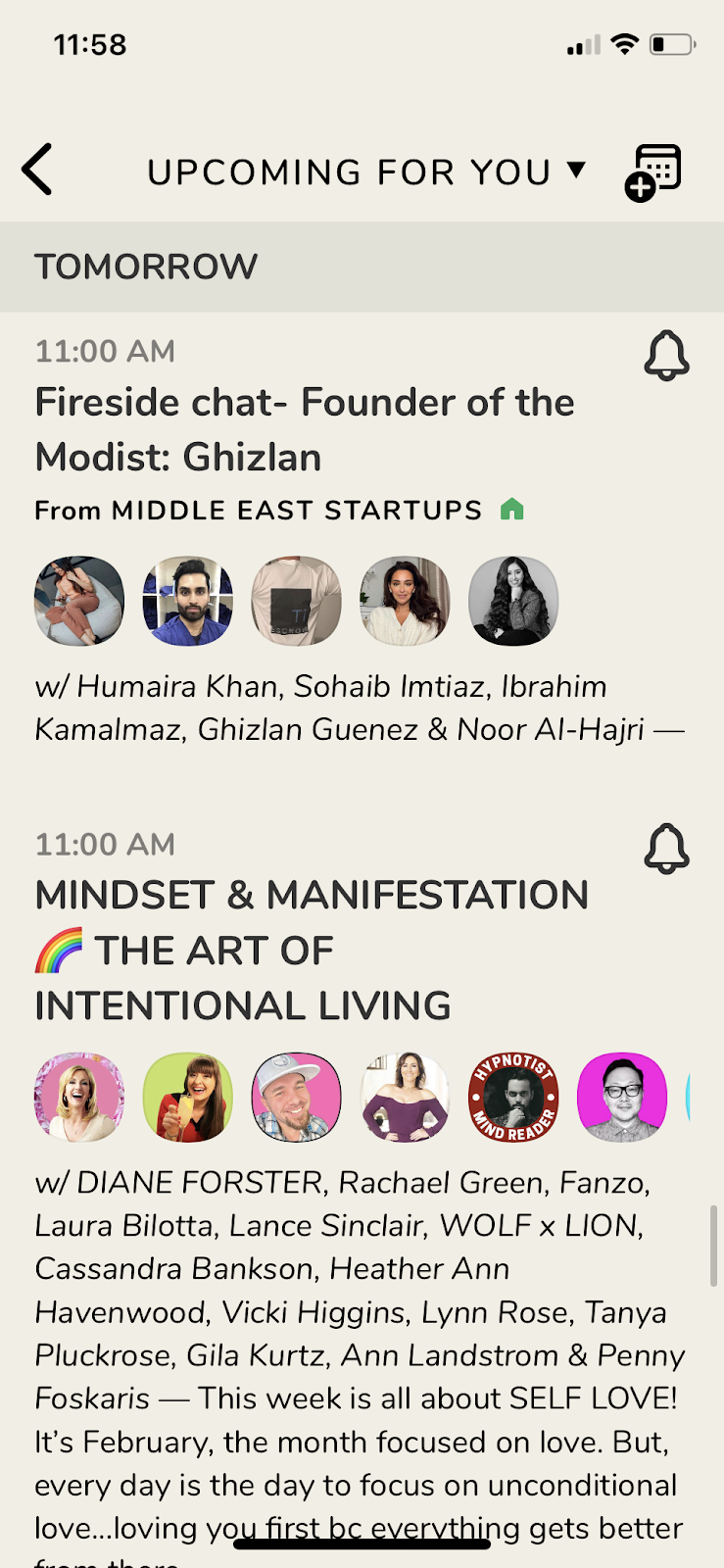
If you see a room you’re interested in, tap the notification symbol on it to get a phone alert when the event starts.
By tapping on the scheduled room, you can also share about it on social media or add a reminder to your calendar.
13. Invite friends.
When I started my Clubhouse account, I and many of my friends received just two invites. Then, about two days later, I received three more. While it’s unclear if everyone starts or continues to receive the same amount of invites, you’ll likely get at least two to start with.
If you have a phone contact that’s excited to join Clubhouse, tap on the icon that looks like an opened invitation to search and invite your contact list.
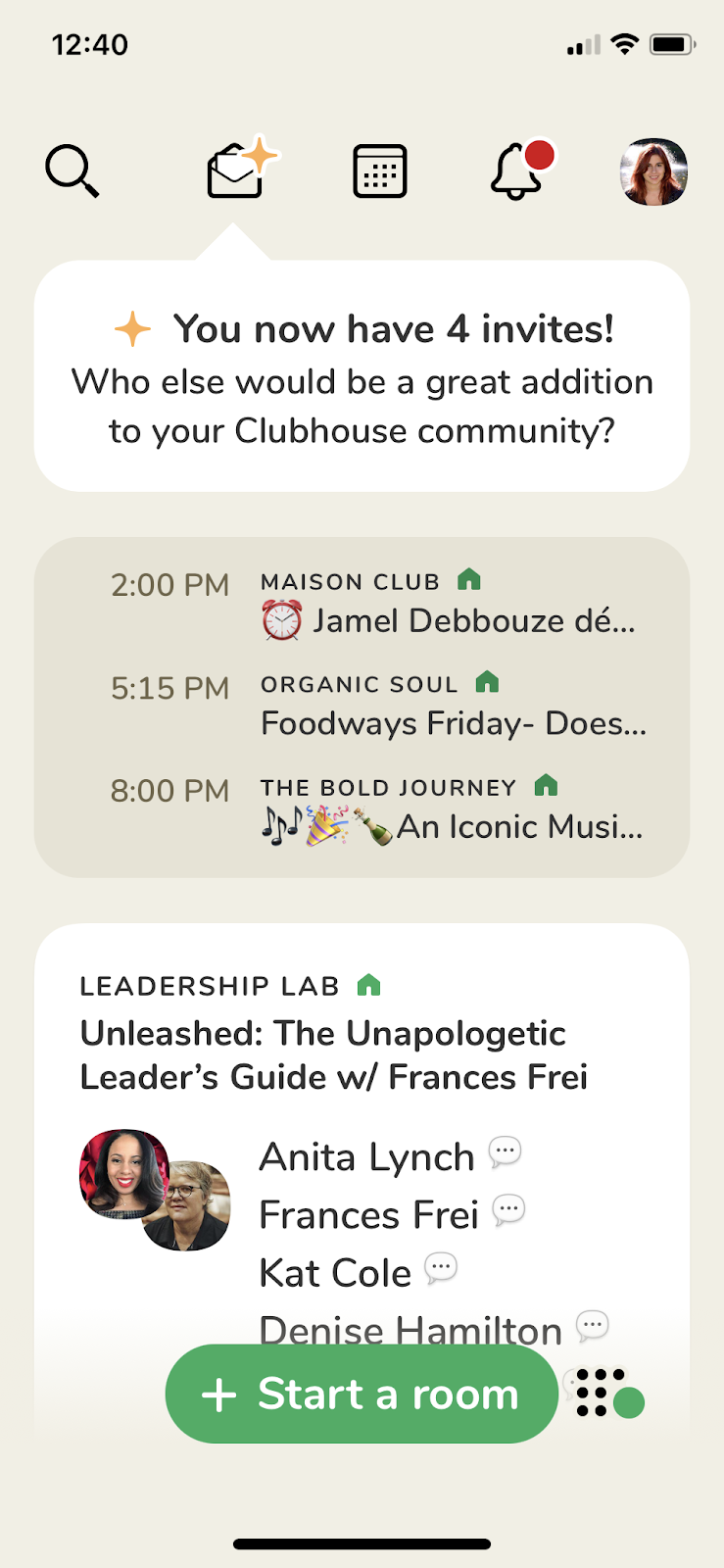
Once you invite someone, they should receive a message with instructions for how to join, similarly to the one I’ve shown in step one of this list.
Additionally, their profile will note that you nominated them to join Clubhouse which could help their friends or followers find you later.
1. Start or schedule a room.
Anyone on Clubhouse can start or schedule one of the following Rooms:
- Closed: Only open to people you invite to the room.
- Social: A room that’s only open to your followers.
- Open: A room that’s open to anyone on the Clubhouse app.
To start a room automatically. you can either click the “Start a room” button at the bottom of multiple Clubhouse app pages.
You can also tap the icon next to the “Start a room” button to see which of your followers are online and start rooms directly with them.

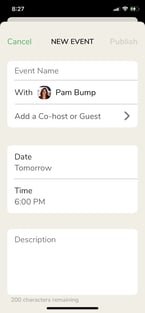
If you’d like to schedule a room, go to the Upcoming for You tab and tap the top right calendar button to preschedule one.

Below I’ll go over some differences between starting and scheduling rooms.
Starting a Room
To instantly start a room, you’ll tap the “Start a room” button, add a topic, and select your privacy setting. Once the room starts, you can expand the privacy settings from Closed to Social or completely Open. However, you cannot change the topic.
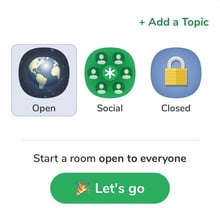
As the room launches, you’ll instantly be assigned as a moderator. You’ll retain these moderator privileges even if you leave the room and come back later.
Scheduling a Room
When you tap the calendar icon to schedule a room, you’ll see a page that allows you to determine an event name, co-hosts or moderators, an initial guest list, a date, and full description. When you press publish, the event will show up in the Upcoming tab.
When the time comes, you or your moderators will simply enter the room to start it.
2. Introduce yourself and your moderators to your audience.
When your room begins, your icon will show up at the top of the screen and you won’t be on mute. At this point, you should start introducing yourself, your moderators (if you have any), and other speakers.
At this time, you might also want to highlight what the room aims to discuss and any ground rules of the room. For example, if you’d only like people to raise their hands with questions, letting the audience know of that could be a ground-rule.
3. Look for hand raises — or requests to speak.
If your conversation is engaging, people in the audience might raise their hands to request to speak. When this happens, you’ll get a notification and the option to assign them to speaker mode.
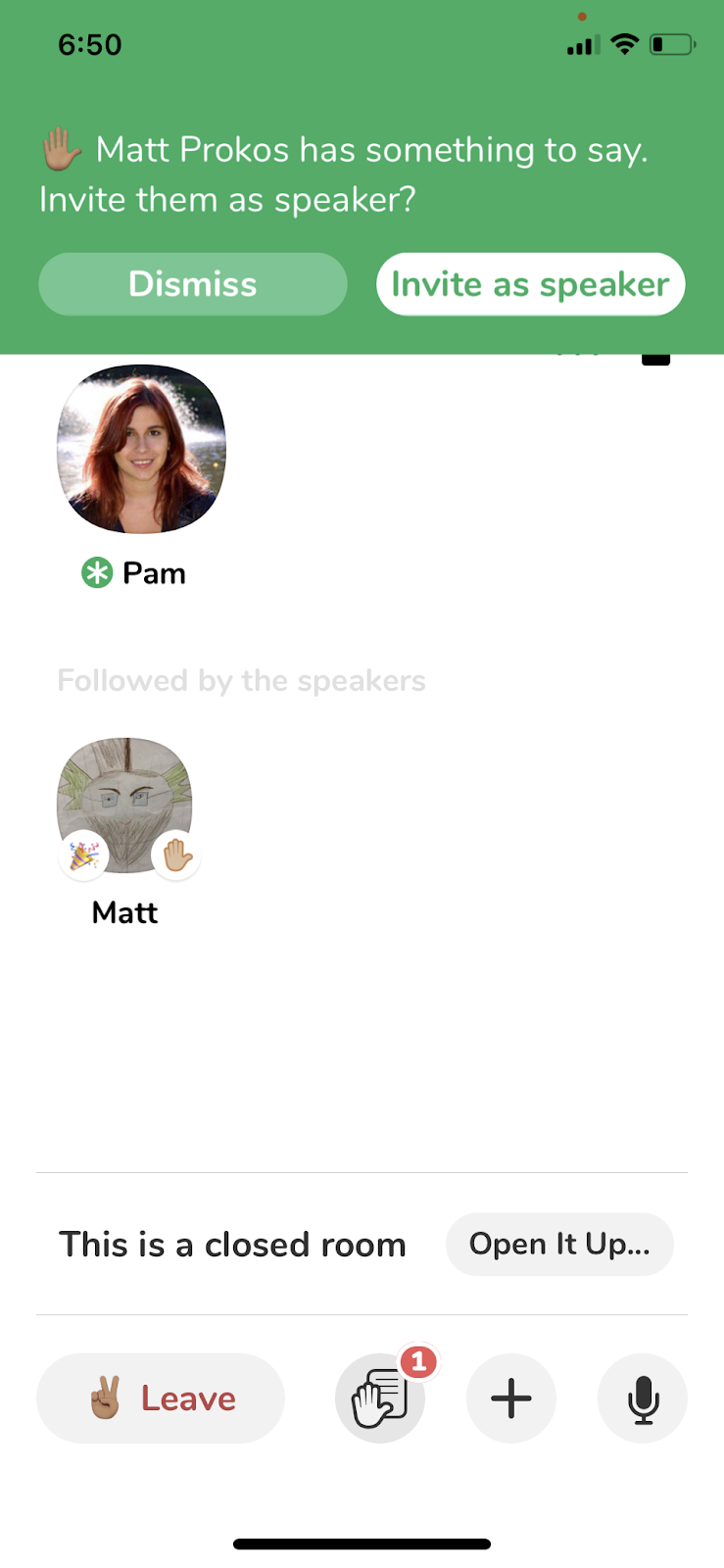
4. Bring attendees to the stage as speakers.
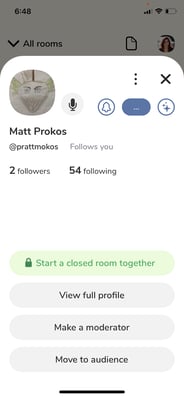
Even if someone doesn’t raise their hand, you can still invite them to speak. To do this, just tap their icon. You’ll then see options to “Make a moderator,” “Make a speaker,” or “Move to audience,” which will unmute them if they’re already speaking.
If you make the person a speaker, they’ll just be able to speak until you move them back to the audience. However, if you make them a moderator, they gain co-hosting privileges and can also allow speakers and hand raises.
5. Own the conversation.
Because you can’t change a room topic once it starts, an off-topic conversation might cause guest churn when people tune in and hear a completely different discussion. So, if you start or moderate a conversation, it’s important to take ownership to ensure it stays on track.
To own the conversation, make sure you only make seasoned speakers or friends who are good at managing conversations. Additionally, while you should let others speak, don’t let speakers hog the mic.
If you do feel like the conversation is going off-course, politely refresh audiences by reminding them of the room topic and ground rules.
6. Check out your attendee list.
If your other moderators or speakers have the room under control, give your attendee list a quick skim to see who’s listening. When you do this, look for high-profile listeners or Clubhouse members with a large following.
If someone interesting is in the audience, invite them to the stage if you feel they could contribute to the conversation. If they accept your invitation to speak, introduce them to the room.
7. Ask listeners to add their friends.
While room moderators can add more people to the discussion, or change privacy from Closed to Open at any time, room moderators can also encourage listeners to invite a few friends that would also enjoy the conversation.
8. Remove inactive moderators or speakers.
Occasionally, some speakers or moderators will leave the room but the Clubhouse app won’t automatically refresh. When this happens, I’ve seen moderators move inactive speakers back down into the audience. This helps control the number of moderators and speakers as well as the conversation.
9. Leave or end the room.
If you don’t have any other moderators, you can simply leave a room to end it. However, if you leave a room with other moderators assigned, it will keep going until all the moderators leave — or one of them ends the room.
If you need to end a room with moderators, you will need to do this manually by tapping the three dots in the top right corner and selecting “End Room.”

If you want to leave a room you launched, but don’t want it to end for audiences, you can designate a moderator before you leave.
Because multiple moderators can keep a room going, it can last for hours or days. But, if you return to a room you started after leaving it, you will still regain your moderator privileges and your ability to speak and take over.
Mastering Clubhouse
While it’s still a bit early to determine Clubhouse best practices, here are a few things you can do to learn more about the app and how to use it:
- Check out a few rooms related to your industry for discussion-topic inspiration.
- Take note of how moderators manage room conversations while still allowing audience members to speak.
- Join clubs and follow users with similar interests as you to build your Clubhouse network.
- Gain awareness and more followers by participating in rooms, raising your hand, or hosting your own chats.
Want to learn more about Clubhouse’s short history and how it became one of the newest viral social media apps? Check out this post.

The Future of Content Strategy
Content marketing has seen a lot of changes during the past few years.
Many of these changes can be attributed to the rapidly evolving search landscape as well as a huge shift in the way people are actually discovering content.
New, more sophisticated search algorithms, changes in how people use search engines, and new ways that marketers go about actually developing their content are just a few of the contributing factors and outcomes.
All that said, many marketers still experience the same pain points that were commonplace more than five years ago:
- “I struggle to measure the ROI of the content I create.”
- We create great content, but we still don’t seem to rank high in Google for our target keywords.”
- “So, I’ve done my keyword research. Now what?”
As a response to these problems — specifically the second one — a lot of marketers will create more and more content. Unfortunately, creating larger volumes of the same underperforming content will often result in the same underwhelming results — just at a greater expense.
In fact, adding more content to a poor existing site architecture can make it even harder for Google to find and rank your content. That’s not a situation any marketer wants to find themselves in.
The answer to these problems spans way beyond the number of blog posts being pushed out each week; the real problem lies in the way that most content strategies are being developed and organized.
SEO is evolving, and marketers need to change with it.
Fortunately, there are ways to overcome these obstacles and drive high-performing results for your marketing team.
Here, we’ll discuss the changing state of search and how marketers can keep up. Continue reading this page or use the links below to jump to a specific section.

Search Engines are Changing
Before we jump into solutions for finding success in the changing world of content marketing, let’s dive a bit deeper into the driving forces behind that change.
First, we need to chat about search engines. Updates to how search engines process and evaluate content have created drastic changes in recent years for SEO. As a result, the old metrics of success aren’t as reliable as they once were.
For example, one of the ways in which content producers evaluate the performance of content is by looking at keyword rankings within the search engines. However, there’s been a lot of debate around the actual credibility of keyword rankings as a metric, and the reason for this largely stems from the fact that rank changes depending on context.
To put it simply, depending on how and where you’re searching from, you’ll see different search results, which makes it difficult to evaluate success based on keyword rankings alone.
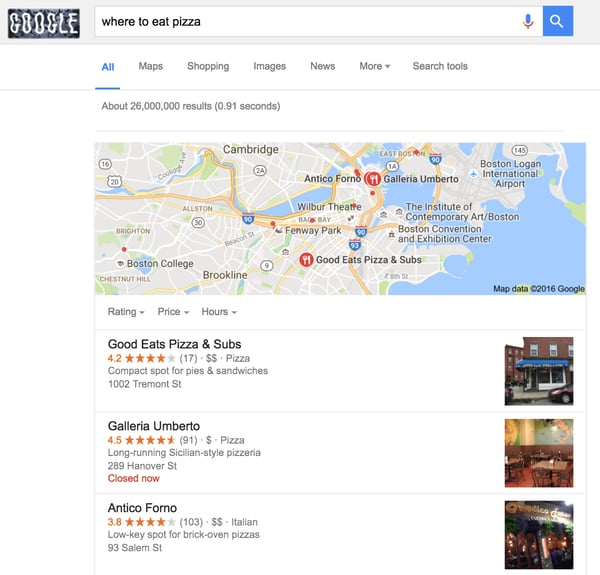
A simple search for the term “where to eat pizza” illustrates this perfectly. If you’re searching for this query from Boston, you’ll receive a completely different set of results compared to someone searching in San Francisco. In fact, the results page for this query probably has thousands of different variations at any one moment in time.
With this in mind, how do you accurately determine your ranking for this keyword?
Outside of keyword ranking problems, the search engines have also been dictating how content should be structured, most notably with the increased appearance of featured snippets.
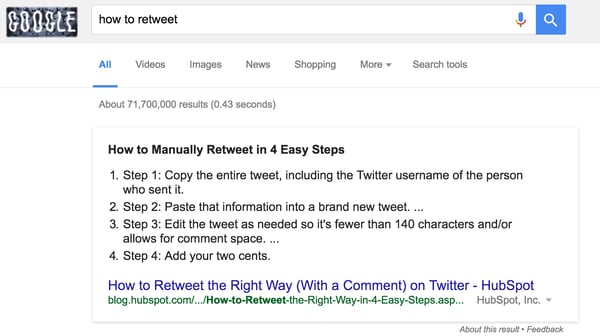
Google has been rolling out more and more featured snippets within the search results — one 2017 study found that of 1.4 million queries, 30% showed a featured snippet. These numbers have likely increased since then.
These boxes try to answer the question that the searcher has without them needing to navigate through to the content.
The reality is that content ranking within the featured snippet section often gets a much greater share of the traffic for the given query when compared to non-featured snippet SERPs.
Publishers now have to restructure their content to try and appear within these featured snippets, of which Wikipedia reigns supreme — owning an estimated 11.2% of all featured snippets.
On a more general level, Google in particular has been making big investments in machine learning and has introduced RankBrain into the core algorithm it uses to index and rank content. Ultimately, RankBrain enables Google to better understand the intent behind specific queries without the search query explicitly stating them — all with the goal of providing more relevant results to the searcher.
This brings us to the next big change in search: the searcher.
How People Search
More significant than the way in which search engines themselves are evolving is the way that searchers are communicating with search engines.
Amplified by the rise of mobile and voice search, queries have become more and more conversational. A few years ago many people entered fragmented terms into search engines. Now, it’s more common for people to ask complex questions using full sentences. Google’s updates over the past two to three years have focused on understanding these types of queries better through natural language processing, most notably with the rollout of Hummingbird in 2013.
The introduction of this new search algorithm, which began analyzing phrases instead of solely relying on keywords, marked a major switch for the search giant from keyword to topic-focused SEO. In 2016, Google CEO Sundar Pichai announced that one out of five queries on its mobile app and on Android devices were voice searches. Based on these new developments, the increasing importance of search topics shows no signs of slowing.
The takeaway here for content marketers? The traditional view of “keywords” in search has changed. Where a few years ago there were maybe 10-20 “big keywords” that would be sought after for ranking within a topic, there are now hundreds or thousands of long-tail variations that are regularly searched within a topic and change based on location. Simply dominating a few words is no longer enough to produce successful results.
Content Strategy in 2021 and Beyond
Considering the advancements in the ways that both the search engines and searchers are evolving, there needs to be a shift in the way marketers determine their content strategy — especially when focused on driving organic search.
The way we approach this at HubSpot is to look at our visibility across a topic, as opposed to a specific keyword. By organizing content within topic clusters instead of individual disjointed posts, we’re able to capture a large amount of search traffic across an ever-increasing pool of relevant keywords. This also allows us to align our brand with several recognizable core topics. Embracing the topic cluster model has allowed us to completely transform how we create and organize our content.
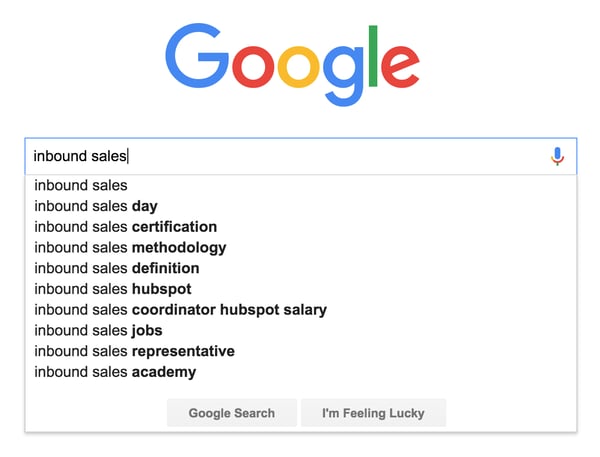
A great example of this is around “inbound sales,” an area that we’ve been covering a lot. You can see from Google’s autocomplete section that there are a number of big links to HubSpot — with our Inbound Sales Day, Certification, and Methodology being the top three, as well as a direct mention of the HubSpot brand.
We’ve managed to align our brand with topics that directly relate to our buyer personas, and as a result of this topic cluster model, we generate millions of relevant visits to our web properties.
What’s a topic cluster?
The basic premise behind building a topic cluster content program is to enable a deeper coverage across a range of core topic areas, while creating an efficient information architecture in the process.
You’re probably thinking, “This sounds difficult to implement? How can I start using this strategy for my own content marketing?” Don’t worry, it sounds more complicated than it really is.
In simpler terms, a pillar page is a broad overview of a specific topic. You can think of it like a summary or road map. We built pillar pages for each of our major focus areas. Linking into the pillar content is a range of content that covers individual, more specific subtopics, otherwise known as cluster content. Each cluster topic page for the pillar focuses on providing more detail for a specific long-tail keyword related to the main topic. The pillar links to each cluster page and each cluster page links back to the pillar with the same hyperlinked keyword.
The benefit of this model, in addition to organizing your site architecture, is that one high performing cluster page can elevate search rankings for all the other pages linked to the same pillar.
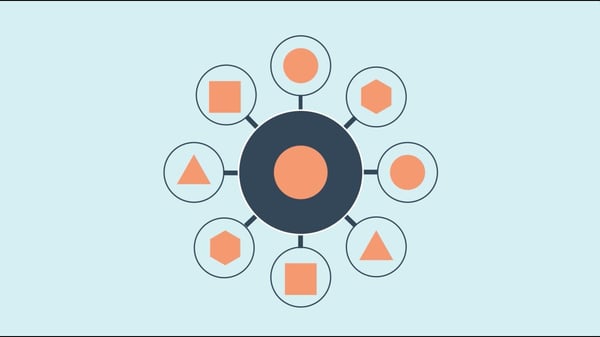
By aligning sets of web pages this way into topic clusters, you can manage the internal linking between each page more efficiently, boost your search ranking, and also provide a better user experience for visitors.
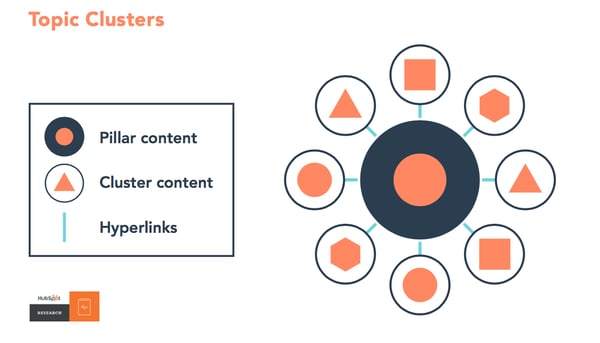
Building a solid information architecture is incredibly important for ranking well in organic search across a broad topic area. Creating hyper-focused clusters of content geared around a specific topic will not only help solve for that, but also enable you to keep focused on creating content that your target audience actually cares about. That means higher efficiency for your search marketing and less time wasted on producing repetitive content that doesn’t help advance your search goals.
The typical way to structure a topic cluster of content, which we outlined earlier, is with one larger piece of content that broadly covers the core topic, otherwise known as pillar content. Here’s an example to illustrate this:
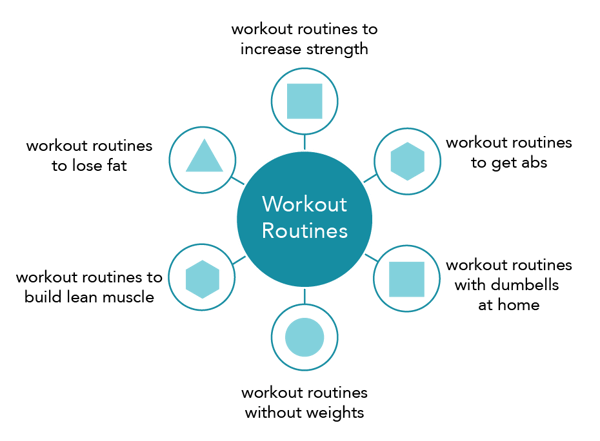
In the above example, the core topic is “workout routines.” Each of the surrounding subtopics focuses on a more specific branch of the core topic, for example, “workout routines to build lean muscle.”
The role of the pillar content is to cover the core topic broadly while also converting visitors into leads (or whatever your conversion goal is). The cluster organization also signals to search engines that the content has more in depth information on the topic, in turn giving your pillar page a higher level of authority on the topic while gaining higher search placement from orderly linking.
The beauty of this model is that you can spend a lot more time optimizing your pillar content for conversions and your cluster content for traffic. This saves a lot of time compared to the traditional model of optimizing each individual post. It also makes it easier for you to give a better user experience while sending a positive signals to the search engines with this site architecture.
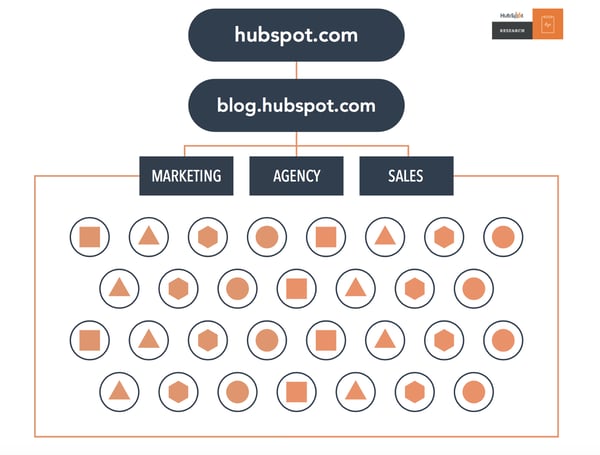
For example, the typical organization of a blog may look like the below, with lots of overlapping and repetitive posts on a few focus topics:
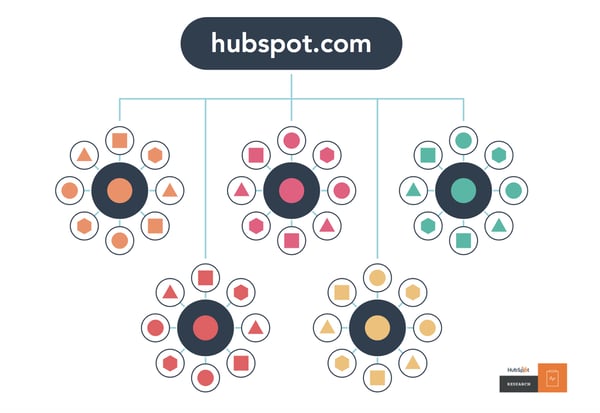
A blog using topic clusters would look like this, with multiple posts all linking back to their respective pillar pages for each core topic:
 An example of pillar content that we’ve produced at HubSpot would be our Blog Topic Generator tool.
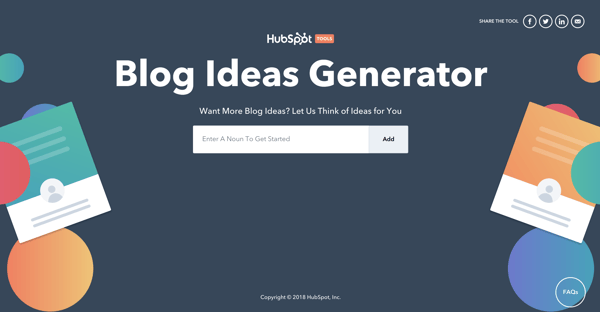
This pillar content brings in a substantial amount of new leads every month and gets a considerable amount of traffic. Tools work particularly well for pillar content because they’re often evergreen content and get shared a lot.
We’ve built out a wide range of cluster content that ties into specific subtopics. An example of this would be our blog post titled, “How to Think Up a Year’s Worth of Blog Post Topics in an Hour,” which has an internal link pointing to the Blog Topic Generator tool. For more inspiration, check out these great pillar page examples.
This content will drive traffic to the pillar content and push positive link signals to the search engines in the process, increasing both the organic search visibility and leads generated from the overall topic cluster.
How to Create a Topic Cluster Plan
Before you get started creating new topic clusters of your own it’s important to determine if this is the right approach for your site. You can figure this out by asking yourself three simple questions outlined in the chart below.
- Does the topic you want to rank for have enough search volume to be worth the time and effort?
- Do you already have content covering the topic? If so, you may be better off using what you have and adding internal links.
- Is the topic something you want to cover in detail? If you’ve made it this far and the answer is “yes”, you can start creating your own topic cluster.
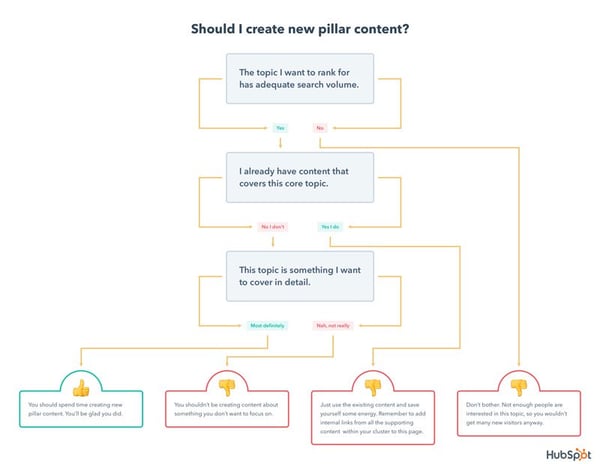
When it comes to actually mapping out topic clusters, there’s a general process that works particularly well. Follow these steps to create your own pillar page:
- Map out 5-10 of the core problems that your buyer persona has (use surveys, run interviews, and do some secondary research within online communities).
- Group each of the problems into broad topic areas.
- Build out each of the core topic with subtopics using keyword research.
- Map out content ideas that align with each of the core topics and corresponding subtopics.
- Validate each idea with industry and competitive research.
- Create, measure, and refine.
This is a simple overview but should help you to begin to prioritize content ideation and production. Following this process will help you to structure your editorial calendar for the topic cluster content model.
But how do you figure out what content to focus on? This is where keyword research comes into play. Keyword research is a helpful way to determine what content your target audience already is looking for so you can reach them in a way that is relevant and impactful to them.
To get started, create a list of broad topics that are important to your business. Then fill in each topic with potential keywords you think your audience will search for. It’s better to not self-edit during this stage and write out as many keywords as you can think of. For example, if your main topic is Instagram marketing, your subtopics might include Instagram business accounts, Instagram captions, Instagram hashtags, and Instagram analytics.
Once you have your list, search for these terms or use a tool such as Ubersuggest to find related keywords and terms you may not have initially included in your list. Make sure you have a mix of long-tail and short-tail keywords.
Now that you’ve finalized your keyword list, see how your competitors rank for each of them using a service like SEMRush. This will allow you to find gaps in their search strategy as well as single out important words and phrases to aim for in the pillar content you create. After all of those steps are complete, use Google’s Keyword Planner or HubSpot’s keywords tool to narrow down the keyword list.
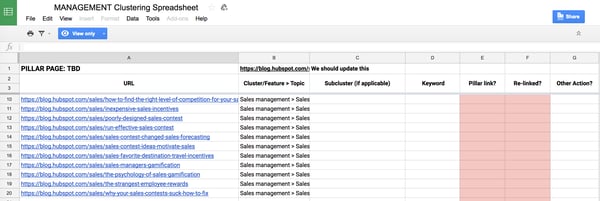
Once you’ve developed your core topic and cluster content, create a tracking document to keep track of your existing content and cluster strategy. Tracking documents can help organize your clustering process to make sure all of your content has been linked correctly. For HubSpot customers, you can automate clustering using HubSpot’s content strategy tool.
How to Measure the Success of Your Topic Cluster
You’re probably wondering, “how do I measure the success of a piece of content?”
The answer to this question is complicated because, for the most part, it’s not a great idea to evaluate the success of your campaign on a content-by-content basis. Just looking at the success of one blog post is difficult at the best of times, but more often than not, the definition of success is too narrow to account for indirect benefits that it has.
A good example of this would be with more brand-driven content. The focus here isn’t around generating sales or even capturing email addresses, but instead it can be around elevating the brand, attracting new talent, or even earning backlinks or press coverage.
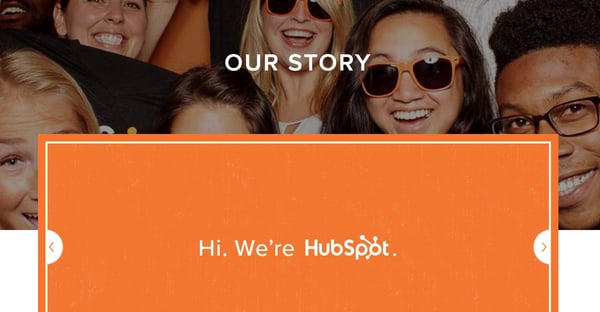
If we based the success of our “Our Story” page on the number of leads it generated, it would appear to be performing terribly. However, this page has over 5,000 backlinks from external websites and gets a huge amount of traffic from potential hires looking to join our company.
Luckily, this problem can be solved by evaluating success on a topic cluster level instead.
Measuring the entire topic cluster against all of your core business metrics will enable you to include residual benefits coming from content that doesn’t align with direct conversion goals. Let’s say one of your blog posts is a study with a bunch of original data that gets thousands of backlinks — this page will pass on authority across all the pages in the topic cluster and grow the search visibility across the cluster. That’s difficult to measure in isolation, but can be done on a topic level.
Using this framework for measurement, you’ll be able to understand the following:
- Which topics perform better at driving traffic to your web properties?
- Which topics earn you the most leads?
- Which topics drive the most revenue to the business?
- Which topics earn the most backlinks/coverage?
Search Engines Aren’t Searching for Your Content, People Are
What this all works towards is ensuring that you’re actually creating content that people want to see, as opposed to content that’s designed specifically for the search engines. Don’t forget, search engines are pretty smart. In most cases, they don’t require you to ever mention a specific keyword in the copy of your content to understand that it’s relevant.
Shifting your focus to building content on a keyword-by-keyword basis and moving to owning topics is going to help you create better content, increase your visibility in the search engines, and provide a more positive experience for visitors.
Editor’s note: This post was originally published in October 2018 and has been updated for comprehensiveness.

Media Planning: The Ultimate Guide
Today’s digital landscape is a competitive one. For any business to find success today, it must create and share media content (such as images, videos, written content, and podcasts) with its audience.
Publishing new media is how you boost brand awareness, engagements, conversions, and revenue for your business. Not to mention, media content helps you stand out from competitors.
Over time, though, it can become confusing to keep track of, plan, organize, distribute, and analyze all that media content.
The best way to combat these issues is through media planning.

Media planning has many moving parts, and the process can be difficult to get right.
By working through the media planning steps as well as implementing media planning templates, you’ll keep any media-related challenges at bay.
What is a media plan?
A media plan details what kind of media you will create and where and how you’ll publish it to best engage and convert your audience. Some media plans align with larger company initiatives and campaigns, following along with pre-approved messaging and content.
Other media plans are standalone strategies that detail how organizations plan to leverage media (written, video, audio, etc.) to connect with followers and customers.
There are a number of benefits to media planning.
Benefits of Media Planning
Media planning aids with parts of content creation and distribution, including:
- Getting to know your target audience on a deeper level so you can effectively reach them through your media content
- Deciding which media channels and platforms on which you’ll share your content
- Determining the timing and frequency of the media and content you publish and share
- Keeping up with the latest media trends and technology
- Sticking to your budget as you work to create, publish, and share high-quality and engaging media content
- Conducting analyses to measure the success of your media planning process
In addition to the benefits of media planning, it’s important to note how it differs from media buying. Although the processes are related, they have different purposes and are often confused with one another.
Media Planning and Buying
Media planning and media buying are closely related and work in tandem with one another. Depending on the size of your business and your budget, your team members who plan your media may also handle the media buying process.
So, what makes these processes unique?
Well, media planning focuses on the strategy behind the media content that’s created, published, and shared among your customers and target audience. The media referred to here is all-encompassing, meaning it doesn’t always include paid ads and paid content.
This is where media planning and media buying differ.
What is media buying?
Media buying is related to paid media — whether that means your business is buying campaign or ad space on various channels, paying to share targeted campaigns and ads, or negotiating with media vendors.
In a world where your business can create and share media and successfully reach your audience for free, media planning can happen without media buying.
However, media buying requires media planning. (It’s like that “a square is a rectangle, but a rectangle is not a square” lesson that baffled us all in elementary school.)
Media planning sets the tone and direction for the buying that needs to occur. Once ad space is purchased or content distribution plans have been negotiated, there needs to be a strategy (or media plan) for getting that media to your audience and customers.
Next, let’s review the steps in the media planning process so you can begin developing your business’s strategy.
As you work through the following media planning steps, keep in mind that how your business applies the results and conclusions derived from each step will be unique based on your audience and needs.
1. Conduct market research.
The first thing you’ll want to do when developing your media planning process is conduct market research. Market research will allow you to tailor the content you create and the media plan you implement to your target audience and customers.
Start by creating (if you haven’t already) and studying your buyer personas as well as developing an understanding of who your target audience and current customers are.
With this information, you can determine what media will reach, resonate with, and convert your audience. Additionally, it’ll help you decide what platforms and channels through which to share your content.
2. State your media planning objective.
When developing your media plan, keep a goal (or a few) in mind to help you effectively navigate the process. Moreover, goals can help you know what content types and platforms you can say “no” to.
Here are some examples of media planning objectives you might have:
- Strengthen cross-team collaboration (e.g. content, graphic design, animation, video, blog, social media) while creating and sharing media.
- Enhance and streamline the publication and distribution processes for all media.
- Improve media distribution timeline to ensure our content is shared efficiently so it’s relevant to our target audience.
- Amplify the success of our media content by allowing for ample time to analyze its impact and reach our audience.
For instance, say you’re looking to create a media plan for your Facebook and Instagram social content. Your objective may be to streamline the content creation process in a timely fashion and then schedule posts on both platforms in advance.
This way, you ensure your posts are relevant to your audience so you can boost engagement and stay top of mind.
3. Determine which media planning templates you’ll use.
There are a number of easy-to-use templates available to help with your media planning strategy, such as editorial calendar templates and social media strategy templates. We’ll cover these options, and several others, in detail below.
Media planning templates ensure you stay efficient and effective while working on all aspects of your media content. They keep your media content organized while publishing and sharing it among your audience members.
Due to the variety of templates available for different types and parts of the media planning process, the templates you incorporate will be unique to your business. Don’t be afraid to experiment with or combine different templates.
For example, if your business is looking to create a media plan for your Facebook and Instagram social media, you might choose to implement a social media calendar template.
This type of template will help you coordinate your content across both channels, boost engagement, and improve productivity among your team members — and therefore, achieve the objective you set in step two.
4. Implement your media plan.
Ensure all parties who should be aware of the plan have the necessary details to help you execute accordingly.
Additionally, share the contact details of the media-planning point person at your company in case anyone has questions or comments.
To get a better understanding of what I mean, let’s refer back to our example in the above step about your social media plan for Facebook and Instagram.
If you implement a social media calendar template as part of your media plan, ensure everyone who will be working on or creating the content and publication schedule for both platforms has access to it.
5. Evaluate your success.
Whether your media plan revolves around individual posts on Instagram or a month-long, company-wide campaign, be sure to measure the success of your plan.
Ask yourself and your team questions like, “Did this media plan help us achieve our specific goals?” and “Did the media planning templates and tools we used add value to our media creation and publication processes?”
The way you evaluate your media plan’s success should be directly tied to your business’s specific goals regarding your media and content, the teams who create the media, and the value you hope to derive from the media (e.g. boost conversions, engagements, revenue, etc.).
Let’s look back at our example from above one last time. Think about whether or not your social media content plan and the calendar template you implemented have helped you reach your target audience and achieve the objective you set.
Ask yourself whether or not your media plan helped you boost engagement on the social platforms you focused on as well as collaborate and coordinate more effectively to increase team-wide productivity.
What to Consider for Your Media Planning Strategy
After following the media planning steps above, there are a few additional things to consider.
First, what’s your media planning budget? If you’re aiming for free media, you can disregard this question. But if part of your media planning involves media buying (as we discussed above), you’ll need to sit down with your marketing leadership to understand what funds you have to work with.
Set this budget before you start researching platforms and creating content. You don’t want to start formulating a campaign that you can’t afford down the road.
Second, consider your key messaging points you want your media to communicate. You don’t have to pre-write all your media content, per se, but you should establish the main themes at the beginning so all media is consistent and on theme.
These messaging points will come from from your audience research and may also influence what content types and platforms you pursue, so be sure to establish these early on.
Now, let’s review some resources available to simplify the media planning process.
Media Planning Templates
There are a plethora of media planning templates available online that you can purchase or download for free. The great part about using media planning templates is that you can customize and tailor them to your business’s specific needs and goals.
Depending on the media software your business uses, such as HubSpot’s (free) CRM, Marketing Hub, or Sprout Social, there may be customizable planning templates included (similar to this menu of options from HubSpot).
You may also elect to create templates on your own with the help of Google Sheets.
Either way, how you choose to implement and use media planning templates will be unique to your business and needs — so don’t be afraid to modify your templates over time as your goals evolve or audience grows.
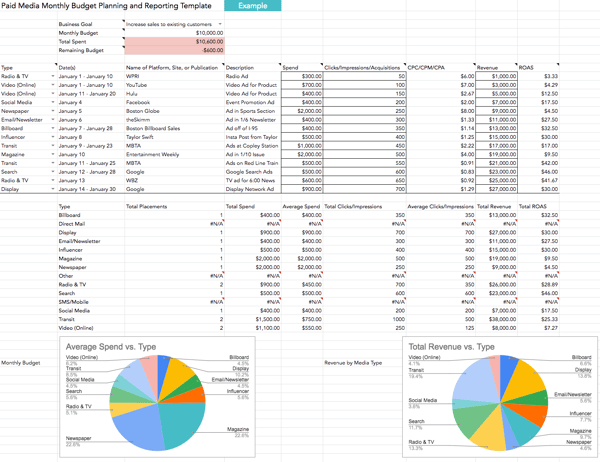
Free Media Planning Template [Download Now]
Types of Media Planning Templates
To help get you started, here’s a list of common types of media creation and planning templates. (Click the links to be directed to an associated template resource.)
You might use one or several media templates based on your needs. Remember, there’s no right or wrong answer to which template you should use — it’s about preference and what works best for your business.
- Use a media planning template to organize your paid media efforts and expenses in one visual location.
- Use a social media strategy template to align your media content with your audience in a way that provides value for your business.
- Use a social media calendar template to customize a timeline for when you’ll share your social media posts in a simple, organized, manageable, and effective format.
- Use an editorial calendar template to plan and optimize all of the marketing content you’ll publish and share including blogs, social media, and campaigns.
- Use a blog post template to simply fill-in-the-blanks and begin writing engaging, relevant, and well-optimized blog content for your audience (all while avoiding writer’s block!).
- Use an ebook design template to take the guesswork out of how to make your ebook professional, eye-catching, and beautiful all while saving yourself valuable time.
- Use an infographic template in Powerpoint or Illustrator to quickly customize the way you present data, share insights, and promote offers in a way that looks and feels professional.
- Use an analytics and reporting template for Excel, PowerPoint, and Google Drive to make the processes of pulling, organizing, and sharing data simple no matter which metrics you track.
- Use a budget template to manage and review your spending and budget with Excel or Google Sheets.
- Use an advertising template to help you plan and manage advertising campaigns in a way that’s sure to convert audience members into leads and customers.
Begin Your Media Planning Process
Media planning is an integral part of your business’s ability to successfully create, publish, and share media content. It’s how you streamline cross-team communication and collaboration around your media as well as ensure it’s shared with your audience in a timely fashion.
So, work through the media planning process steps above and choose which templates you’ll use to begin reaching and converting more audience members.
Editor’s note: This post was originally published in February 2020 and has been updated for comprehensiveness.

14 of the Best Slack Alternatives for 2021
For more than 12 million people, Slack has become the tool they open first thing in the morning to get the workday started. And it’s become the leader of the team collaboration industry, simplifying people’s work and boosting their productivity.

But not everyone is completely elated with Slack. Some prefer not to pay a premium for unlimited search functionality (the free version caps it at the most recent 10,000 messages). Others prefer a self-hosted solution, which Slack doesn’t offer, to gain more control over their team’s communication.
Remote teams are becoming more mainstream, and because of this more people are looking for affordable team chat tools that meet their needs.
If you’re in the same boat, take a look at this list of the best Slack alternatives out there.
1. Google Chat
- Available On: Android, Computer, iPhone & iPad
- Price: Free to Gmail Users
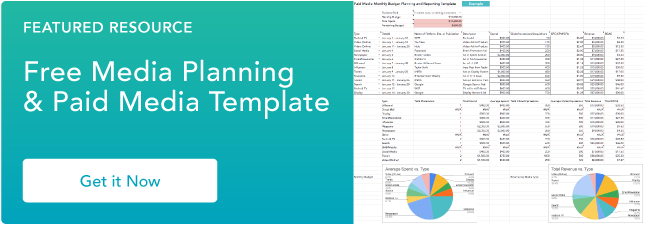
Google Chat is a Slack alternative built into Gmail, and you can chat with anyone who also has a Gmail account, whether that account is paid or free. You’ll also be able to use Google Meet with Google Chat in order to conduct audio and video calls. These tools are replacing Google Hangouts, which had similar functionality.
2. Chanty
- Available On: Mac, Windows, Android, iPhone & iPad
- Price: Free for up to 10 members, $3 per user per month for additional features and unlimited members
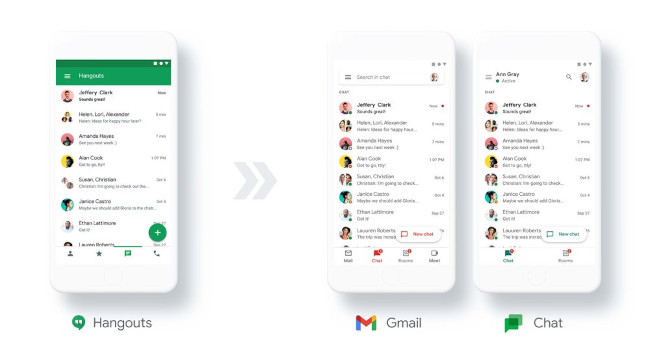
Chanty is a simple team chat tool for small and medium-sized teams that doesn’t limit its searchable message history. Similar to Slack, you can communicate in public and private channels and through one-to-one conversations. Chanty also organizes all your files, links, tasks, and conversations into folders in a feature called Teambook.
In general, Chanty’s built-in task manager and intuitive interface makes the chat tool a solid Slack alternative for the less tech savvy. But that being said, if you’re a techie, you can connect Chanty with a ton of apps through Zapier, making the team chat platform more robust.
3. Microsoft Teams
- Available On: iOS, Android, Windows, macOS, and Web
- Price: Free for up to 100 video participants and 500K chat users, premium plans available starting at $5.00 per user per month.
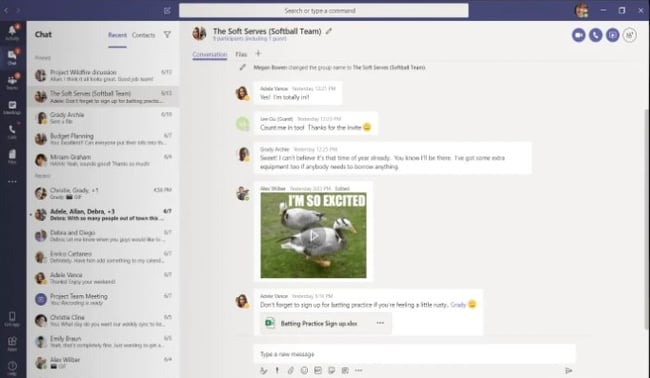
Microsoft Teams is a business chat tool mostly targeted towards enterprise companies. But if you happen to subscribe to one of the Microsoft Office 365 plans, you’ll already have access to Microsoft Teams.
If you don’t have one these plans, though, you can start with the freemium version of the tool. It includes all the essential team chat features like instant chats, audio/video calls, and integrations. It also offers integrations across all Office 365 products and more than 250 apps and services.
It’s also important to note that Microsoft Teams is not the easiest app to deploy, so make sure your team admin is tech-savvy.
4. RocketChat
- Available On: iOS, Android, Windows, macOS, Linux, and Web
- Price: Free up to 1K users,$3 per user per month for additional features and unlimited members
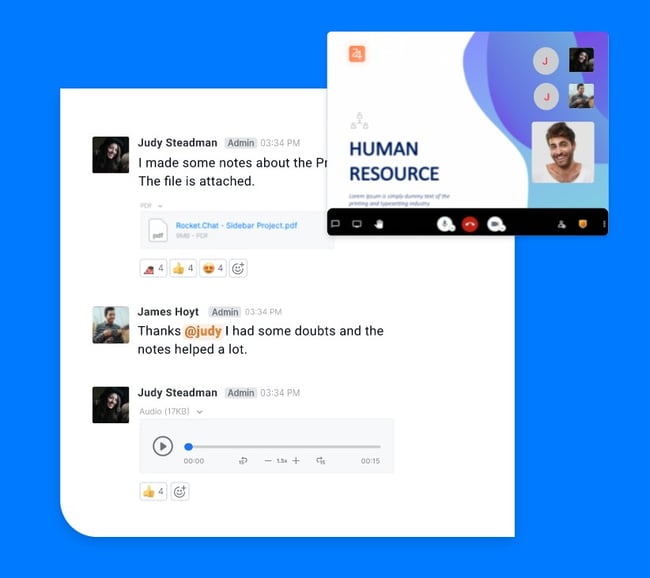
RocketChat is a free, open-source Slack alternative that lets you tailor its look and feel to your own requirements. One of RocketChat’s best features is that it’s easy to migrate to — all you need to do is export your files from Slack or HipChat and upload them to RocketChat.
RocketChat also has useful features like real-time translation, live chat client, and E2E encryption, making it a Slack alternative that’s definitely worth a look.
5. Discord
- Available On: iOS, Android, Windows, macOS, Linux, and Web
- Price: Free, $9.99 per month for advanced features such as bigger uploads and hi-res video and screen share features
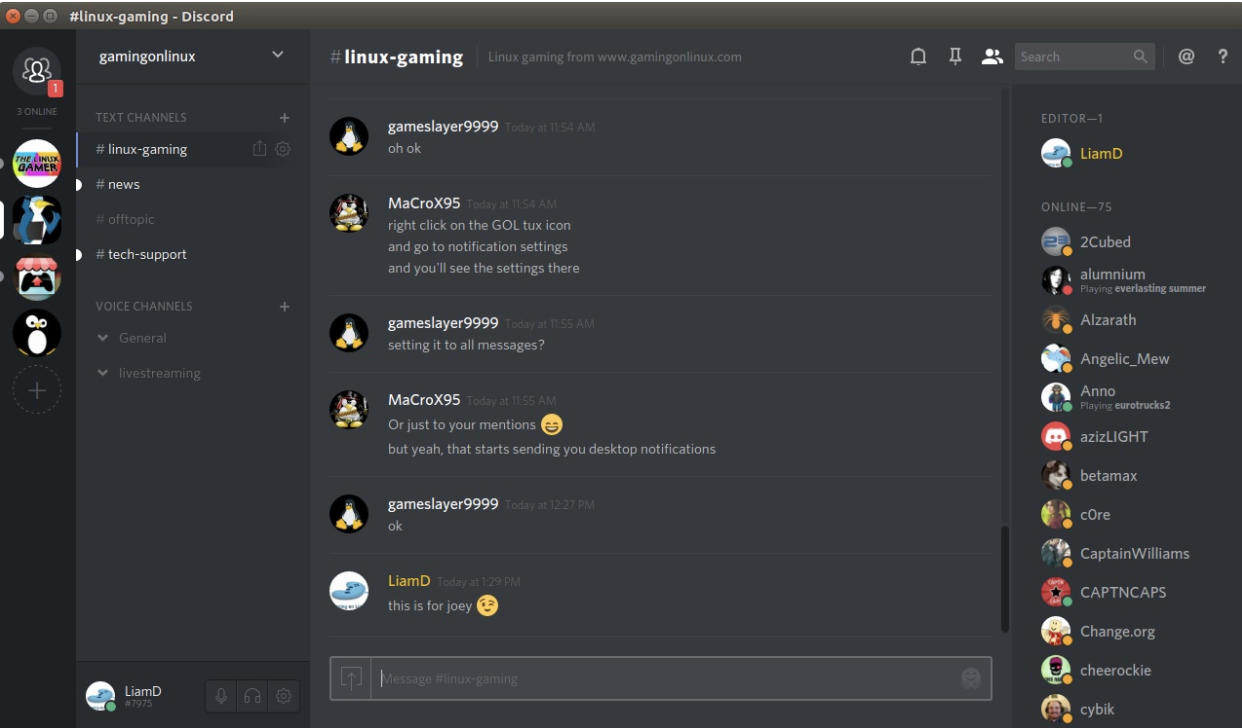
Discord is actually an industry-leading team communication app for gamers. But thanks to its rich functionality and unlimited message history, many people make good use of it for their teams at work.
When you first start using Discord, the app divides your channels by text and voice. But you can easily implement the concept of Slack’s private and public channels using Discord’s channel settings. It’s also the only app in this list that offers push-to-talk features.
Keep in mind, though, Discord may not have integrations with apps you might use at work, like most team chat tools on this list. But if you need a free space to communicate via text, voice, or video, Discord could be a good option for you.
6. Mattermost
- Available On: iOS, Android, Windows, macOS, Linux, Web
- Price: Free up to 10 users, $10 per user per month for distributed organizations.
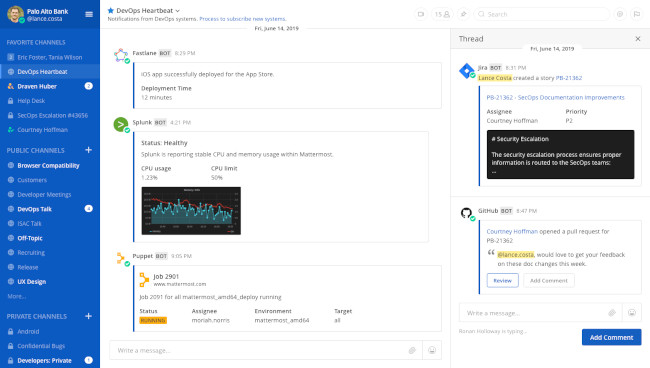
Mattermost is an open-source solution that is fully customizable to meet your company’s needs. You can also implement Mattermost with private cloud hosting or a self-managed server.
Mattermost offers freemium pricing plans for small teams that feature unlimited message history and integrations. Additionally, Mattermost supports more than a dozen languages, making a great fit for global teams.
7. Flock
- Available On: iOS, Android, Windows, macOS, Linux, and Web
- Price: Free up to 20 users, $4.50 per user per month up to 100 members and advanced features
Flock is a workplace chat software that claims to run faster than Slack. In addition to regular communication features like instant chat, audio, and video calls, it also offers built-in polls, reminders, notes, and to-dos snippets.
Flock’s freemium version is limited to 10,000 searchable messages. Paid plans unlock useful features like screen sharing and unlimited message history.
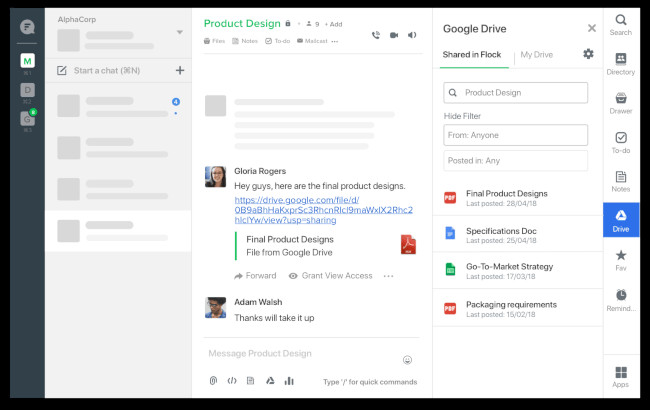
8. Ryver
- Available On: iOS, Android, Windows, macOS, and Web
- Price: $49 per month up to 12 users, more advanced plans available
Ryver is a team communication tool known for its Trello-like built-in task manager, allowing you to turn messages into tasks and manage them with Kanban boards.
Similar to Slack, Ryver lets you communicate through open forums, private groups, and direct messages. It also makes voice and video calls for up to 5 users per call. And if you have a Zapier account, you can also connect Ryver to your favorite apps.
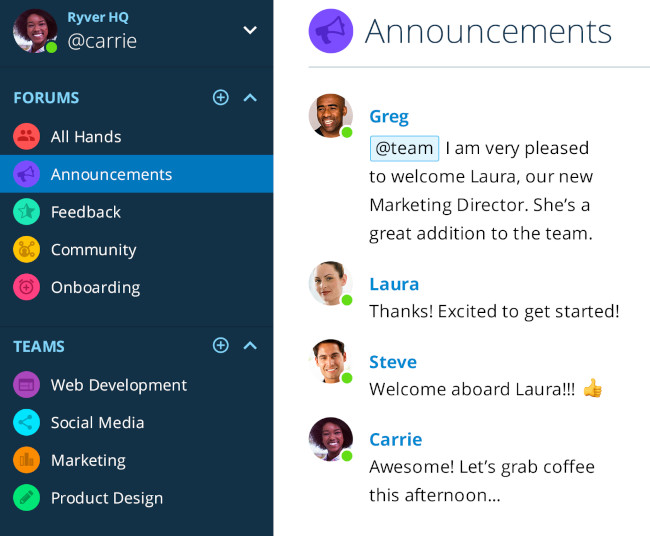
9. Glip
- Available On: iOS, Android, Windows, macOS, and Web
- Price: Free up to 100 participants, $14.99 per user per month for up to 200 participants and more advanced features
Glip is a team collaboration tool developed by RingCentral. While Slack has configurable features, making it a one-size-fits-all team chat app, Glip has built-in features like tasks, calendar, and notes.
You can connect Glip to other apps through Zapier or one of its more than 20 custom integrations.
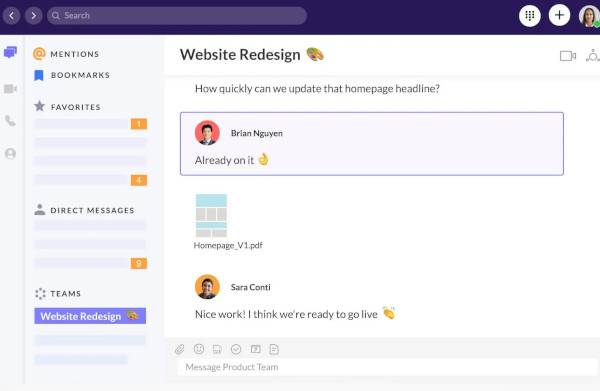
10. Flowdock
- Available On: iOS, Android, Windows, macOS, Linux, and Web
- Price: $3 per user per month, more advanced features available
Flowdock is a Slack alternative that organizes conversation by threads. Their threads are color-coded so you can easily navigate between topics and organize your team’s communication.
Similar to Slack, Flowdock features open, invite only, and one-to-one chats. Additionally, you can connect Flowdock to more than 100 of your favorite apps.
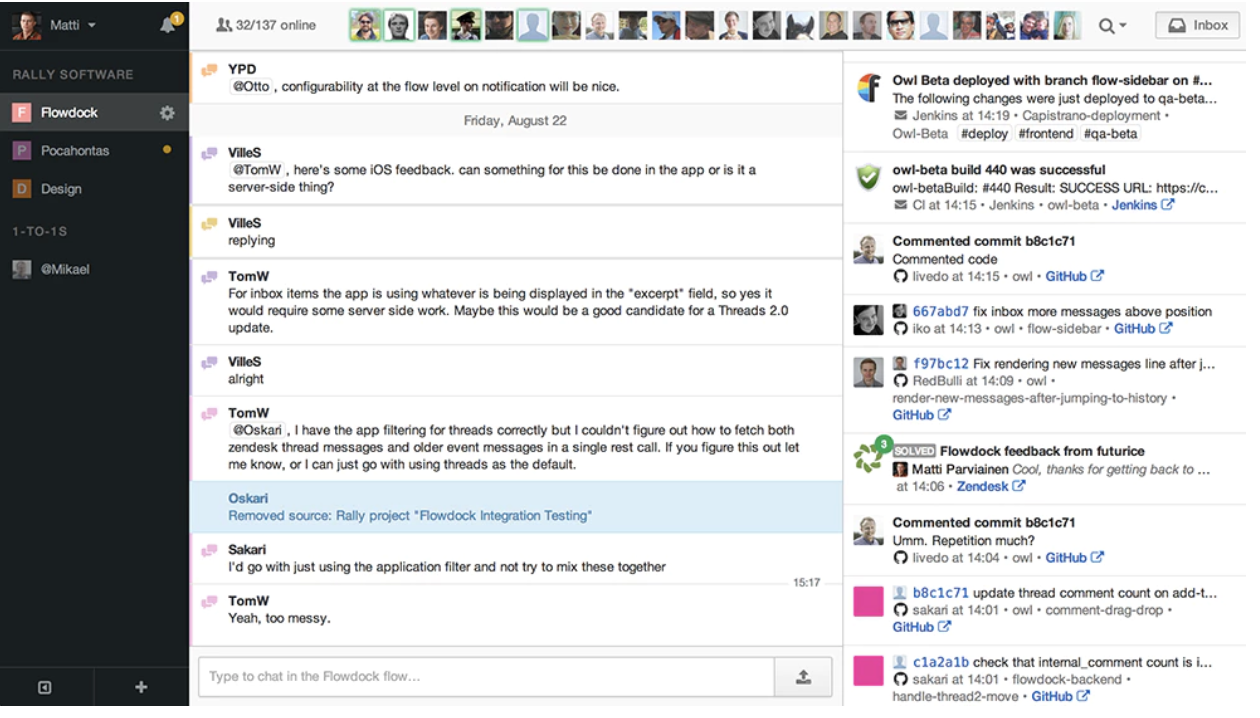
11. Fleep
- Available On: Windows, MacOS, Linux, Android, and iOS
- Price: Free up to 10GB of file storage, $5 per user per month (billed annually) for 100GB storage
Fleep is constructed on the idea of “conversations” where users can participate in a discussion on a certain topic. To make these conversations more actionable, Fleep has included “Task” features for assigning and coordinating work as well as the “Pinboard” feature, which allows users to pin important messages, details, or announcements to the side for easy access.
While 1:1 conversations are unlimited across the board, the freemium version has limited storage capacity and can only support 3 group conversations. For unlimited group conversations, you’ll need to update to the Business plan.
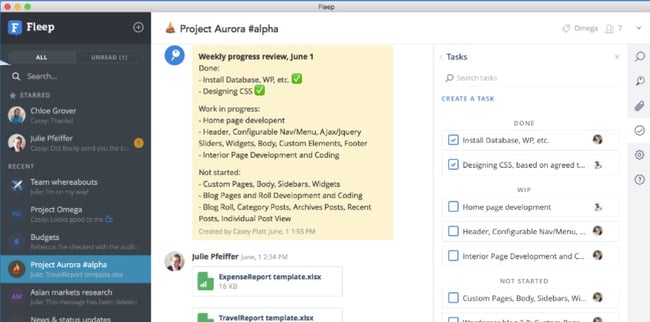
12. Twist
- Available On: MacOS, Windows, Linux, iOS, Android, Web
- Price: Free, $5 per user per month for unlimited history, integrations, and storage
Twist is the communication software ideal for asyncronous teams. Its model moves away from real-time conversations into “deeper, structured communication” via their “Threads” feature. Instead of a group chat, users must designate a specific “thread” for conversations related to that topic. One-on-one and small group chat is also available for conversations that don’t require threads.
The freemium version comes with a one-month limitation on search history and 5GB maximum file storage. However, the more advanced plans remove these limitations.
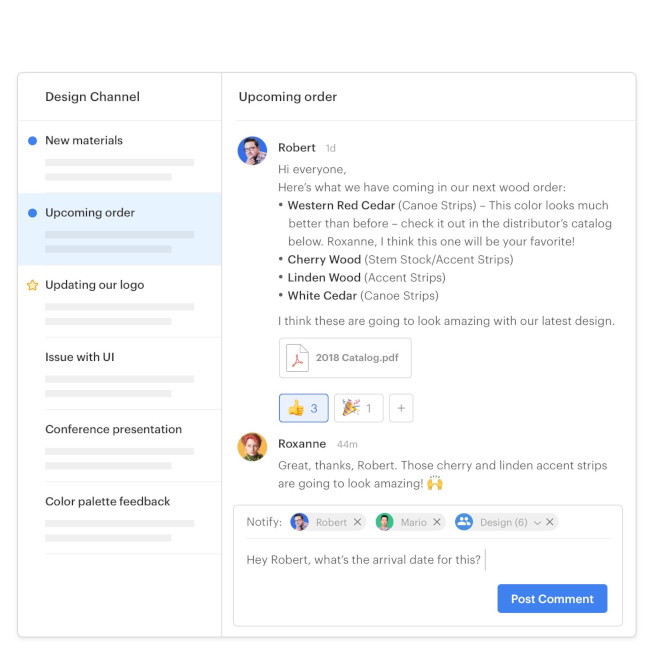
13. HighSide
- Available On: Windows, MacOS, Ubuntu, iPhone, Android
- Price: $4.67 per user per month, $12.50 per user per month for advanced admin and compliance requirements
HighSide is a great choice for organizational communication with advanced security needs. HighSide offers end-to-end encryption, authentication, and secure cloud storage. Its infrastructure can even help you ensure compliance with HIPAA, GDPR, and more. It also has a Microsoft Teams extension to help you work securely across apps.
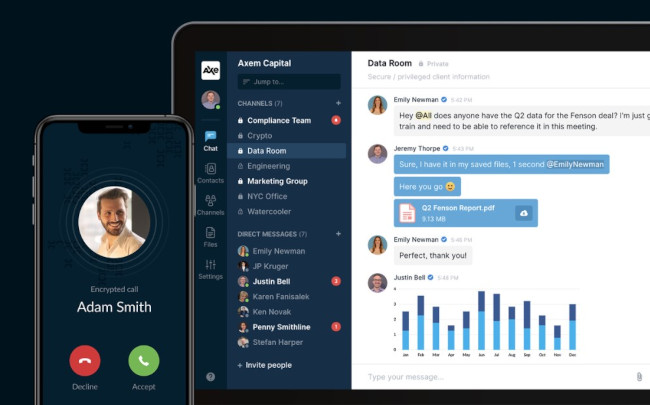
14. Troop Messenger
- Available On: Windows, MacOS, Linux, Android, iOS
- Price: $2.5 per user per month up to 150 GB of storage, $5 per user per month for more advanced features and increased storage
Troop Messenger offers chat, audio and video calling, and screen sharing like many other communication apps. However, it even offers audio messaging and remote desktop control, which allows your team to enjoy a wide range of use cases within one solution. The premium version includes interesting features such as “Burnout” (which allows users to collaborate confidentially for a specified amount of time before the history is removed) and “Respond Later” to help you prioritize your communication without forgetting anything.
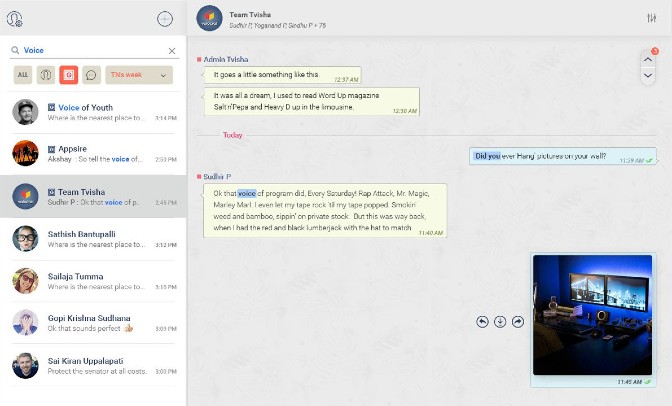
Luckily, when it comes to choosing the right communication tool for your team, you have a variety of options. I’ve briefly covered the best apps your team might enjoy, but if you need more in-depth information on team chat tools like Slack, check out Chanty’s Slack alternatives review. It shares Chanty’s experience and feedback from testing seven different team chat software during a span of eight weeks.
Olga Mykhoparkina is the Chief Marketing Officer at Chanty, a team messaging platform and customer of HubSpot.
Editor’s note: This post was originally published in September 2018 and has been updated for comprehensiveness.

7 Examples of Influencer Marketing on YouTube
In a 2019 MediaKix report, 71% of marketers agreed that the quality of customers or traffic from influencer marketing was better than other marketing channels. So, we know influencer marketing can be a very profitable marketing strategy.
If you have been thinking about using this tactic but are unsure where to start, consider YouTube.
Unlike other platforms that are usually restricted by time (think TikTok and Instagram), YouTube celebrates long-form content. This creates space for influencers to deep dive into topics and give detailed reviews on products and services.
Beyond that, engagement rates on YouTube are the highest when compared to Instagram, Facebook, and Twitter, according to a 2020 Influencer Marketing Hub report.
Now that consumers are turning more to YouTube for uplifting content, this gives brands a huge opportunity to leverage the power of influencers on a platform known for high engagement.
So, what type of videos can influencers and brands collaborate on? Let’s go through seven examples.
1. Day-in-the-Life Vlogs
One of the most natural ways influencers incorporate sponsored products into their YouTube videos is through day-in-the-life vlogs.
Usually done with a morning or daily routine video, the influencer will take viewers through their day and mention the product or service as part of their ritual.
In this video, Natalie Barbu gives her audience a peek into her daily routine, emphasizing her planning process. She covers the benefits of software like Asana and Google Calendar, and in the middle of her video, at the 9:03 mark, she introduces Skillshare.
What’s effective about this style of product integration is that it fits in organically with the influencer’s content. Some ads can be quite jarring and disrupt the user experience, which can lead to ad skips and video drop offs.
The video title sets the expectation that the focus of the video will be planning. So, when Barbu introduces Skillshare as a platform to learn new skills (including how to use Asana for planning), it’s a smooth transition.
Another approach influencers take is mentioning the sponsor toward the end of the video.
This video shows influencer, Mayuko, showing her version of a productive work day. Near the end of the video (at the 7:08 mark), she thanks the brand, Nord VPN, for sponsoring the video and presents the benefits of using the software.
With this method, there’s a risk that some viewers may not stick around to hear more about the sponsor, given that engagement rates fall toward the end of videos. However, the sponsor is mentioned at the beginning of the video and in the description box, providing additional opportunities for viewers to learn more about the brand.
2. Hauls
Shopping hauls and unboxing videos are some of the most popular videos on YouTube among fashion and lifestyle influencers. They can also be an effective way of showcasing sponsored products.
What’s great about this type of video is that it doesn’t require influencers to dedicate an entire video to a single product, but rather include that product within a broader category.
In this video, UK-based Influencer Patricia Otegwu, known as Patricia Bright on her channel, covers a wide range of luxury items that are great for the autumn season.
She starts the video by framing the importance of occasional “treat yo self” behavior. She then goes through a few items, explaining the reasoning behind each purchase. At the 5:01 mark, she introduces products from Lily Silk, which fits in perfectly with the theme of the video.
In addition, mentioning the product in the first half of the video gives the brand better odds of reaching more viewers.
3. Behind-the-Scene Tutorials
Another opportunity for seamless product integration is in behind-the-scenes content.
In this video, popular YouTube illusionist, Zack King, gives viewers a full breakdown of some of his illusions. So, how exactly does Google fit into this?
Well, King first uses Google Meet and a cool hand-through-TV illusion to introduce his conference room segment at the 1:59 mark. Because Google’s platform promotes virtual conference meetings, it’s a nice, subtle touch.
Then at the 3:53 mark, he introduces Google’s Password Manager app to transition into his next trick. It’s an example of how quickly and efficiently you can highlight sponsored content without distracting from the main purpose of the video.
4. How-Tos
It’s one thing to explain to viewers how to do something. It’s another to use a tool that will help them do it. Brands and influencers often use this approach to introduce new product lines to the public.
In a very meta example, Sean Cannell, from the popular channel Video Influencers, gives viewers tips on how to get sponsors on YouTube using the sponsored product, FameBit.
FameBit, recently rebranded to YouTube BrandConnect, helps connect brands with influencers and vice versa. With that in mind, the channel – and its viewership – likely aligns very well with the sponsored product.
Cannell does a quick overview of the platform’s key features and spends the rest of the video detailing his personal experience with the product. The review is a great example of social proof, as that often carries more value than a simple product overview.
5. Comedy Sketches
People love to laugh, and some brands, like GEICO, are skilled at turning sour topics into funny ads that leave an impression.
In this video, comedian influencer Caleb Glass, of CalebCity, does a hilarious sketch in which he asks a psychic to prove their abilities by guessing what he ate that day. If the psychic gets the answer right, he agrees to commission the psychic to find a hidden inheritance and split the money with them.
This is where it gets good. The psychic guesses all the right ingredients but assumes that a dish that good had to be cooked by a chef. Glass slams the sponsored product, Devour Foods, on the table and tells the psychic they are wrong as the dish was prepared in the microwave. A screaming match ensues and the video ends with a product display.
Here’s why this video works: It plays on the idea that microwavable food can’t be delicious in the context of something completely different. Brands with playful identities can greatly benefit from using comedic influencers to promote their products.
6. Product Unboxing and Reviews
Nothing brings me as much joy as receiving a new product in the mail and opening it.
It seems a lot of us share that trait, as unboxing videos are very popular videos on YouTube. In this video style, viewers live vicariously through the influencer as they open up a product box and explore its features.
The success of this approach lies in the ability to attract viewers at or close to the decision-making stage.
When PlayStation released the new PS5, the brand collaborated with Justine Ezarik of iJustine, a tech, travel, and gaming influencer on YouTube, for this video. Often, brands will send influencers free products in exchange for unboxing videos and/or honest reviews on their platforms.
With much of Ezarik’s channel focused on gaming technology, her subscribers likely fit PlayStation’s target market and made her an ideal influencer to promote this new product. In the video, she comments on the product’s futuristic look and lightweight controllers while adding B-roll footage for close-up shots of the PS5.
There are many ways to use this type of marketing on YouTube. What brands should prioritize when considering an influencer is whether the influencer’s brand and values align with their own. Secondly, to produce influencer marketing campaigns that convert, it’s also important that the influencer’s audience fits the brand’s user persona.

The 7 Best Music Playlists for Productivity, According to Science
Not long after I first started at HubSpot, I was welcomed with a fresh pair of orange, noise-canceling headphones. At the time, I had no clue that these headphones would carry me through many long work days and some of the deepest, darkest levels of writer’s block.
Over three years later, they are truly the gift that keeps on giving.
You see, for me, listening to music while working is the secret to my productivity. All it takes is the right Beyoncé track, and I go from idle to uber productive. (Seriously, it works like a charm.)
The trouble is, finding the perfect playlist isn’t always easy. With endless streaming music possibilities at my fingertips, it can be hard to nail down just the right tunes to get the wheels turning. So, I did what we do best around here — a little research.
As it turns out, there are a ton of studies that explore the influence of specific types of music as they relate to your productivity levels.
To help you find just the right mix, we’ve sourced and curated seven Spotify playlists designed with specific studies in mind. Whether you’re into Mozart or Chance The Rapper, we’re confident that there’s something on this list that will do the trick.
Note: Some of the playlists contain tracks with explicit language that might not be suitable for the office.
7 Science-Backed Office Music Playlists for Productivity
1. Classical Music
One of the most frequently cited studies related to music and productivity is the “Mozart Effect,” which concluded that listening to Mozart for even a brief period each day can boost “abstract reasoning ability.”
The study — led by researchers Gordon Shaw, Frances Rauscher, and Katherine Ky — employed 36 Cal-Irvine students who were divided into three groups. Group one listen to a Mozart selection, while group two listened to a relaxation tape, and group three endured 10 minutes of silence.
After the listening activity, all 36 students were issued the same test, in which the Mozart group averaged an eight-to-nine point increase in their IQs, compared to the remaining groups.
Since then, the “Mozart Effect” has been hotly contested, but many researchers have gone on to explore the mental benefits of learning and listening to classical music. One recent study, for example, found that elementary-school-aged children who participated in music composition education outperformed students in a control group on reading comprehension.
Think classical music might work for you? Check out this classical-influenced playlist to find out for yourself:
2. Video Game Soundtracks
“Choosing the right video game soundtrack to work to is all about understanding what type of music motivates vs. distracts you when you need to concentrate,” says HubSpot’s VP of Acquisition (and former video game marketing consultant) Emmy Jonassen.
“For example, if you’re the type who gets amped and focused listening to high-energy music, rhythm game soundtracks, like those from Thumper or Klang, could work well. Conversely, if you need calm to concentrate, the serene soundtracks from exploration games, like ABZÛ and Journey, may do the trick. With thousands of games releasing every year, including many independent titles, there is a soundtrack to suit everyone’s ear,” she went on to explain.
Think about it: Playing a video game requires a lot of focus. To make it to the next level, players commonly have to avoid traps, dodge obstacles, and discover secret tools that will help them progress to the next level. As a result, the music selection for video games is often very strategic, in that modern soundtracks tend to reflect epic, inspiring cinematic scores rather than just basic sound effects.
And while studies have revealed mixed results, there is evidence to support that gamers can experience improved performance by playing a game with the volume on.
For example, when psychology professor Siu-Lan Tan and her colleagues John Baxa and Matt Spackman specifically honed in on the game “Twilight Princess (Legend of Zelda),” they found that participants who played with both music and sound effects off performed worse than those who played with it on.
Want to try it on for size? Check out the playlist below:
3. Nature Sounds
According to psychophysical data and sound-field analysis published in The Journal of the Acoustical Society of America, listening to “natural” sounds could enhance cognitive functioning, optimize your ability to concentrate, and increase your level of satisfaction.
Think: Waves crashing, birds chirping, streams trickling, and the like.
That could explain why more consumer-facing brands — from Google Home to the newer Noisli — are introducing such ambient sound features to help listeners relax or focus. It might also be behind Spotify’s multiple nature-themed playlists, like this soothing one:
4. Pump Up Songs
After observing that many athletes arrive at the stadium wearing headphones, Kellogg School of Management professor Derek Rucker and three of his colleagues — Loran Nordgren, Li Huang, and Adam Galinsky — set out to answer the question: Does listening to the right kind of music make us feel more powerful or in control?
So, back in 2014, the group of researchers set up a study to gauge how music might influence motivation and subsequent behavior. First, they played several songs for participants in a lab, and asked them — on a scale of one to seven — how powerful, dominant, and determined they felt after listening to each song. There were three “high power” winners: Queen’s “We Will Rock You,” 2 Unlimited’s “Get Ready for This,” and 50 Cent’s “In Da Club.”
Then, to gauge how the music would influence their behavior, they asked participants to listen to the music and then determine whether or not they’d like to go first or second in a debate. As it turned out, those who listened to the high-power playlist volunteered to go first almost twice as often as those who listened to a less powerful playlist.
The lesson? “Just as professional athletes might put on empowering music before they take the field to get them in a powerful state of mind,” Rucker explained, “you might try [this] in certain situations where you want to be empowered.”
Next time you’re looking to feel empowered before a big presentation, interview, or salary review, check out this roundup:
Want more? Check out my colleague Amanda Zantal-Wiener’s picks here.
5. Instrumental Songs
In 2015, Middle Tennessee State University researchers Carol A. Smith and Larry W. Morris discovered that students who listened to “sedative” music during a test scored higher than those who listened to lyrical music. (That somewhat contrasts their initial findings 39 years earlier, which showed that while music didn’t reveal an impact on test scores, those who listened to “stimulative music” showed a significant increase in worry and highly emotional reactions.)
That isn’t to say that it’s entirely impossible to cross things off your list while listening to songs with words — I actually prefer lyrical music, but my colleague, Amanda Zantal-Wiener, has joked about hip hop verses accidentally slipping into her first drafts when she listens to songs with words. If you’re like she is and find that lyrics are too distracting, you may want to experiment with some instrumental options.
For those times, check out these lyric-less tunes — we promise they won’t put you to sleep:
6. “Feel Good” Songs
Buried in deadlines? Trying to unearth yourself from an email mountain after some time off? Whatever’s bugging you, sometimes, the best remedy for productivity loss is a solid dose of “feel good” tunes — you know, the kind that make you spontaneously use a pen as a pantomimed microphone.
But scientifically speaking, music can stimulate the same part of the brain as delicious food and other physical pleasures. Researchers at McGill University, for example, discovered that when participants received the opiod-production-blocking drug naltrexone, they didn’t respond as positively to their favorite tunes as they might normally.
The verdict? Our brains are trained to naturally produce these chemicals when we hear our preferred playlist.
And while “feel good” songs vary from person to person, a search for Spotify playlists with those very keywords yields dozens of results. That said, here’s one of our favorites:
Can’t get enough? Here are a few more suggestions from my colleague Amanda.
7. White Noise
According to a study led by Yamaguchi University, “When carrying out intellectual activities involving memory or arithmetic tasks, it is a common experience for noise to cause an increased psychological impression of ‘annoyance,’ leading to a decline in performance.”
Whether you’re remote working with roommates or working in an office space with noisy colleagues, it can be tricky to focus with conversations happening around you. Neutral, non-verbal background sounds like white noise, which is not the same as nature sounds, can help block out these distractions — things like the din of a restaurant or shopping mall, an electric fan, or even laundry machines.
And in case you’re wondering — yes. Like all of the above, there is a playlist for that:
So go forth — focus, get pumped, feel good, and rock out.
What are your favorite songs for getting work done? Let us know in the comments.
Editor’s Note: This post was originally published in March 2015 and has been updated for accuracy and comprehensiveness.

19 Social Media Marketing Myths to Leave Behind in 2021
Like any major marketing strategy of the past decade, social media has had plenty of time to accumulate some big myths.
And despite the fact that data has disproven a number of marketing myths today, some marketers will still hold onto a few, simply because it’s hard to keep up-to-date on what’s really going on with social media.
Yes, social media landscapes change dramatically every day. However, as a marketer, it’s important to identify myth from reality in order to create an effective social media strategy.

To help you separate fact from fiction, I put my MythBusters hat on and drudged up some of the most common social media myths out there.
Let’s dive into some social media myths we’ve all probably heard from colleagues or friends. Then, I’ll explain why you need to leave these old ways of thinking behind.
19 Social Media Myths to Leave Behind in 2021
1. My customers aren’t on social media.
In 2021, over 3.7 billion people worldwide are active on social media. Today, it seems like there’s a social platform for everything and everyone. While family and friends connect on sites like Facebook, Instagram, or Twitter, professionals are networking on LinkedIn.
Odds are, at least one social media platform has an audience that will align with your brand. Not sure which one is the best for you? Check out this blog post to explore which social platform(s) are best-suited for your brand — and which probably won’t work for your needs.
2. You should join every single social media network immediately.
Just because I can name a lot of social networks, it doesn’t mean I should set up a profile on all of them.
By all means, research other social networks. Set up a company profile or page and give ’em the old college try. But you may find that some aren’t really worth your time. If that’s the case, consider removing your profile and move on. You should only devote time and resources to the platforms that align most with your audience and marketing tactics.
The best marketers use data to identify which marketing activities yield the best results — if a social network isn’t helping you out, cut it loose.
3. Pinterest is only for B2C organizations.
Pinterest is totally awesome for B2C marketers, to be sure. But usually when someone says a channel is only for B2C, the B2B marketer in me takes that as a challenge to prove it’s not so.
Turns out some of my colleagues feel the same way, because one of them wrote an entire guide to using Pinterest for business. You can also check out the accounts of brands like GE, Microsoft, Econsultancy, and yours truly for some B2B Pinterest inspiration!
4. You should only try to get fans and followers that will become customers.
Quality is important, yes, but don’t underestimate the power of a large social reach. Remember some of these points next time you bemoan acquiring a fan or follower that lives outside of your sales territory or target demographic:
- More fans and followers means you’re gaining access to their fans and followers.
- If they’re an influencer, their clout transfers to you by association.
- When they share your content, your SEO improves.
- They may still refer business your way.
Of course, that doesn’t mean you shouldn’t also target a specific, high-converting audience on your social channels — to figure out your ideal target audience on social media, check out this post.
5. You should only schedule posts during the work week.
While you shouldn’t force your social media manager to work on the weekends, you certainly can schedule posts or launch social media ads on the weekends ahead of time — and, depending on your audience, it might be a good idea.
Of course, you’ll need to identify when your audience uses certain social platforms the most. While pique social media engagement times occur around the middle of the week, most platforms also have high engagement times during the weekends and evenings as well.
6. You’ll have amazing social media engagement if you ask your friends and family “Like” every post.
You can’t just have your mom and uncle Like every post you put up on Facebook. Although it might feel like you see a lot of posts that your friends or family members like, Facebook and other social media algorithms are a bit more sophisticated than that when it comes to determining which posts get seen.
To get social media feeds to favor your content, you’ll need a variety of people interacting with your content — both to grow your reach, and to show up in users’ news feeds.
So, rather than encouraging just your friends or family members to Like or heart your posts, encourage your followers to Like, comment, or share to encourage further discussion and spread your brand awareness.
7. You have to respond to social activity immediately.
There’s no doubt a speedy response is appreciated, but it isn’t always required. People understand that you’re running a business. There are other things going on. If you get back in a timely manner, but not in mere seconds, it’s alright.
There are exceptions, of course. For instance, Verizon runs a few Twitter accounts. One is @VerizonSupport. While Verizon will share blog posts and educational marketing materials on this Twitter, it also uses it to respond to questions or concerns from prospects or customers.
Because Verizon’s support account is for customer service rather than marketing, reps who manage this channel should be responding immediately to inquiries.
Another example could be if you’re running a social media account that receives a complaint which is public to all users and could hurt your credibility. In that scenario, you should consult your service team as soon as possible and write a thoughtful reply that shows you’re taking the feedback seriously.
8. Social media is only about engaging conversation — and not a place to share branded content.
It’s not that conversations aren’t important. You can’t just ignore your fans. But, while it’s beneficial to stimulate conversations and discussions with your audience, it’s not the only point to social media marketing.
Aside from allowing you to virtually connect with people, social media is a lead generator, a non-organic traffic tool, and a great place to share your best content.
If you publish valuable posts, they might not always stimulate conversation, but they could lead people to your website and products.
9. Social media marketing tactics don’t drive bottom-line results.
Piggybacking off of the last myth, you can actually generate value beyond just “engagement” and “brand equity” from social media. Social media drives leads and customers, period.
Don’t believe me? Here are a few stats you should know:
- 54% of social browsers use social media to research products.
- Facebook ads are used by 70% of marketers, and there were 9 million active advertisers on the platform in Q2 2020.
- 83% of people use Instagram to discover new products and services and 87% said they took specific action, like making a purchase, after seeing product information.
- Answering a complaint on social media can increase customer advocacy by 25%.
- 54% of Gen Z and 49% of Millennials say social media is their preferred channel for ad influence.
- 79% of people say that user-generated content on social media significantly impacts their purchasing decisions.
Ultimately, particularly through advertising or influencer marketing strategies, social media can be a viable opportunity for increasing sales. (Just check my bank account every time I scroll Instagram and “Swipe Up to Buy”.)
10. It looks tacky to seem relatable as a brand on social media.
The content you publish on social media should always keep your target audience in mind — but that doesn’t mean you can’t also publish content that shows your brand’s personality. Or, frankly, even your community manager’s personality.
There are people behind your company; don’t be afraid to show that with your own special brand of humor, pictures of people that work at your company, and links to news content that you find particularly entertaining … even if it’s not directly related to your industry.
11. Hashtags are essential for every post.
You know those tweets that look like this?
Love this article on #socialmedia #marketing that talks about #pinterest and has an image of a #puppy #lol
The point of hashtags is that they join together common conversation threads. So while it’s nice to have a hashtag for an event, like a webinar or a trade show, don’t lose your mind if it doesn’t become a trending topic. It’s not necessarily going to blow your leads goal out of the water if it does … think of hashtags as a way to be more user-friendly for those following the hashtag, not a way to make all your marketing dreams come true.
12. Social media monitoring takes forever.
One social media monitoring scenario: Glue your eyes to your computer screen, open five tabs for each of your social networks, chug three espressos, click between tabs, and hit refresh like a maniac.
Alternate social media monitoring scenario: Use social media monitoring software that alerts you when important terms are mentioned; check back to your accounts briefly every hour or two to see if you need to respond to anyone, follow someone back, etc.
That second one takes you, in aggregate, maybe 30 minutes a day. No big deal. Everybody breathe. Everything’s gonna be alright.
13. Social media managers should be new graduates or have years of experience.
This isn’t just a myth. It’s actually an ageist theory that should be completely abandoned — if it hasn’t been already.
Being good at social media marketing, or any job for that matter, has absolutely nothing to do with how young or old you are. You can learn the tools and strategies at any age, and make mistakes at any age, too.
Instead of considering a social media manager’s age range, look for the candidate who’s both creative and analytically-minded enough to manage your presence. To learn more about how to hire the best social media manager for your brand, check out this post.
14. Only young people use social media.
Think that the only people on social media are Gen Z and millennials? Think again.
Consider this: 40% of internet users age 46 to 55 are on LinkedIn by the end of 2020; roughly 55% of Facebook users are over the age of 35 as of 2021; and in 2019, over 80% of 45-64 year old U.S. internet users watched videos on YouTube.
More than likely, your audience (at any age!) is on social media — the key is figuring out which one they prefer the most.
15. Newer platforms, like Snapchat and TikTok, aren’t worth taking seriously.
Snapchat and TikTok are both mobile social media apps that have pulled in millennials and Gen Z due to their unique platforms. While Snapchat thrives on ephemeral content, AR filters, and Bitmoji features, TikTok highlights goofy, fun, or musical 10 to 60-second videos similar to Vines.
Despite the fact that these platforms pull in odd content created by users, it doesn’t necessarily mean that brands can’t use the apps to gain credibility and awareness.
At this point, a plethora of brands — from publishers to B2C companies — have created profiles or ads for TikTok. One of the most surprising and oldest brands to build a TikTok strategy is The Washington Post. Although the publication has a very formal social media presence on other platforms, they use TikTok to highlight the funny, yet human, side of working in a newsroom.
Similarly, a number of larger businesses have also launched paid promotions or long-form Stories on Snapchat Discover. To learn more about these companies and the content they’ve launched, check out this blog post.
At this point, you can certainly take any popular social media platform seriously. But, as we noted when debunking previous myths in this post, you should identify which platforms best match your audience and your goals before spending time and money to build a strategy for them.
16. You don’t have enough content to have a social media channel.
The thing with social media is that it moves really fast. What’s posted today might very well be forgotten about tomorrow. It’s easy to think of this as a problem by saying, “I don’t have enough content to post.” But, alternatively, you could just repurpose content or re-share great content regularly.
If the topic your post discusses is evergreen, it will almost always be useful, even if you repurpose or repost it later. This doesn’t mean you should share the exact same link and update commentary day after day, but if a few weeks go by and you want to re-promote something, go for it. Just do your loyal fans a favor and find a new interesting nugget of information to call out in your update.
17. Social media gives people a venue to publicly bash your company.
The truth is, angry customers already have plenty of venues: word of mouth, Google reviews, Yelp reviews, and many other places on the internet that will allow them to give feedback when they aren’t happy. Not creating a Facebook page simply for fear of negative feedback isn’t protecting you from an angry wrath.
Instead, get ahead of the conversation by being aware when negative reviews are taking place, reading them, responding to the customer, and coming up with solutions for their problems. Additionally, when customers are pleased, encourage them to share their positive stories.
18. Social media is too “fluffy” to have solid metrics around.
Again, social media isn’t about fluffy things we talked about earlier, like “brand equity” and “engaging conversation.”
Yes, those things happen, but it doesn’t mean you can’t measure the effectiveness of your social media activities.
With HubSpot marketing tools, you can identify exactly how much traffic social media drives to your website, how many leads social media generates, and how many of those leads become customers.
From there, you can even calculate things like the average cost-per-lead and customer — across individual social media networks, and in aggregate — just like you do with every other marketing channel (right?).
19. Social media is completely free marketing.
It’s free to join, but it’s still a resource investment. Even if you are posting for free, you’ll likely need to pay an employee to manage your channels and build strategies. And, as your social media strategy grows more successful, you might decide to up time and money investments.
Luckily, social media is still one of the most affordable ways to boost audiences, brand awareness, and ultimately leads. This makes the investment worth your while.
Navigating Social Media Marketing
Now that you’ve learned about the falsehoods and myths behind social media, it’s time to start looking at the actual research-back tactics that could make your brand successful on a given network.
For more data that backs why you need a social media marketing strategy in 2021, check out this list of stats. For tactical advice on various social media tactics and platforms, read our Ultimate Guide to Social Media Marketing.
Editor’s Note: This post was originally published in October 2012 but was updated in February 2021 for comprehensiveness and freshness.