How Micromarketing Can Take Your Strategy to the Next Level [+ Examples]
Good news: on the internet, your business can connect with hundreds of millions of potential customers.
Bad news: your competitors have the same access, and they’re already throwing money at the problem.
Also not so good: your mighty, scrappy team has to figure out how to connect with, well, hundreds of millions of potential customers.
Or do you?
For your business to go big, sometimes it helps to think small – especially when it comes to your marketing strategy.
We’re talking about micromarketing — targeting a small group from your customer-base — which can be a transformative strategy for your business.
Let’s dive into what micromarketing is, and why it’s important. Plus, we’ll explore examples to inspire your first micromarketing campaign.

What is micromarketing?
For your business, micromarketing means drilling down past the level of niche marketing (targeting a specific segment within the larger market) to target specific individuals or micro (“extremely small”) groups.
By targeting smaller, more specific audiences, you’re able to customize your outreach and use audience insights to tailor your messaging for more personalized, effective marketing.
Yes, this requires a different type of time and effort than more traditional mass marketing — and it’s worth it.
Why invest time and resources in micromarketing?
Micromarketing requires more resources — if you measure your efforts by potential customers reached.
However, targeting specific, segmented audiences is often more effective in the long-run towards acquiring high-quality leads and turning those leads into customers.
Sure, your first micromarketing campaign is unlikely to reach the same number of individuals as a Super Bowl Ad. But you’ll certainly spend far less than the required $5.6M for a 30-second spot.
And, just as importantly, you don’t want to reach every Super Bowl viewer, when you can create targeted ads that inspire and delight a smaller pool of very interested consumers.
With micromarketing, your efforts are aimed at crafting personalized messages, and talking directly to the individuals most likely to respond to your pitch. The benefits are in your ROI.
Mass Marketing vs. Micromarketing: Benefits and Drawbacks
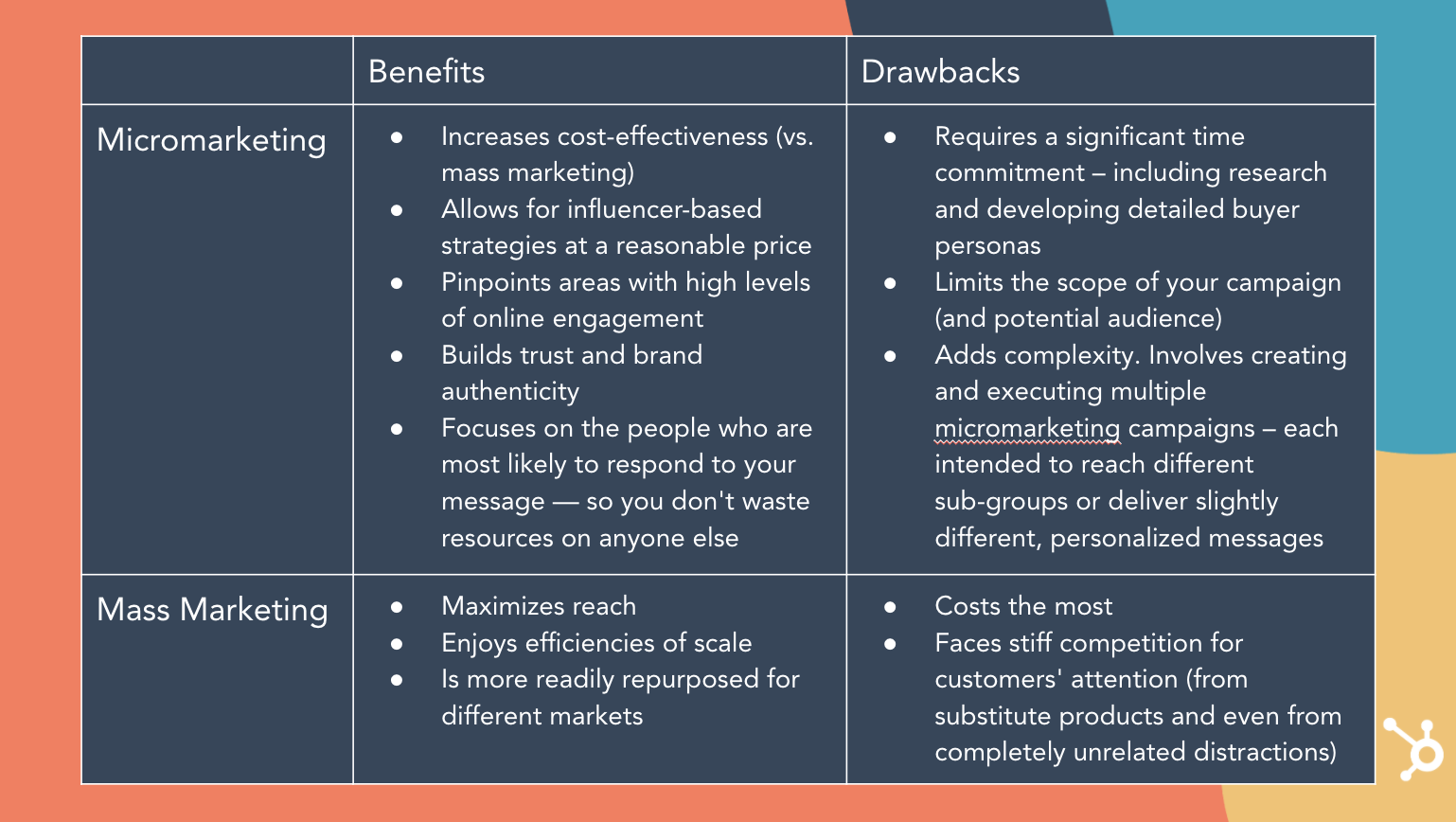
As you can see, micromarketing requires a greater investment to target each individual, but a greater return on investment since each individual is much more likely to respond positively to your call-to-action.
Think of it this way: you might see your CPC (cost-per-click) rise with an online micromarketing strategy. But, when executed well, you’re also going to see an encouraging decline in your cost-per-conversion — a much more important KPI.
Micromarketing Opportunities
Considering and creating a micromarketing strategy is an opportunity to step back, consider alignment between your sales and marketing efforts, and make sure you’re first-and-foremost solving for your customers’ success.
Are you selling complex enterprise software or massive industrial machinery? There may only be a small number of potential customers in your region or industry. In this case, micromarketing is likely the most effective strategy for your needs –– you need to find your potential customers, and only your potential customers. Anything else is a waste of time and resources.
Here are some questions you should ask yourself when considering a potential micromarketing strategy for your business:
- Who buys your product?
- Who’s the decision maker who buys it for their company?
- Who does your product help the most –– and why is it so perfect for them?
- What are your customers’ needs, fears, hopes, and dreams? What are their interests and passions, and what makes them happy?
- Who do your customers follow online?
- Who does your ideal customer aspire to be?
- Who does your ideal customer most admire?
These questions, along with an ongoing grasp of your buyer personas, should lead you towards the answer to the two key questions that drive micromarketing decisions and campaigns:
1. Who is most likely to respond to your messages?
2. How can you best talk to them — and no one else?
For instance, if you know your product requires CMO buy-in, you can use strategic micromarketing to appeal to CMOs via a targeted marketing campaign on LinkedIn.
Ultimately, micromarketing helps you get your product directly in front of the eyes that matter most.
To see micromarketing in-action, let’s take a look at a few examples next.
Micromarketing Examples
1. Coke creates a “Share a Coke” campaign.
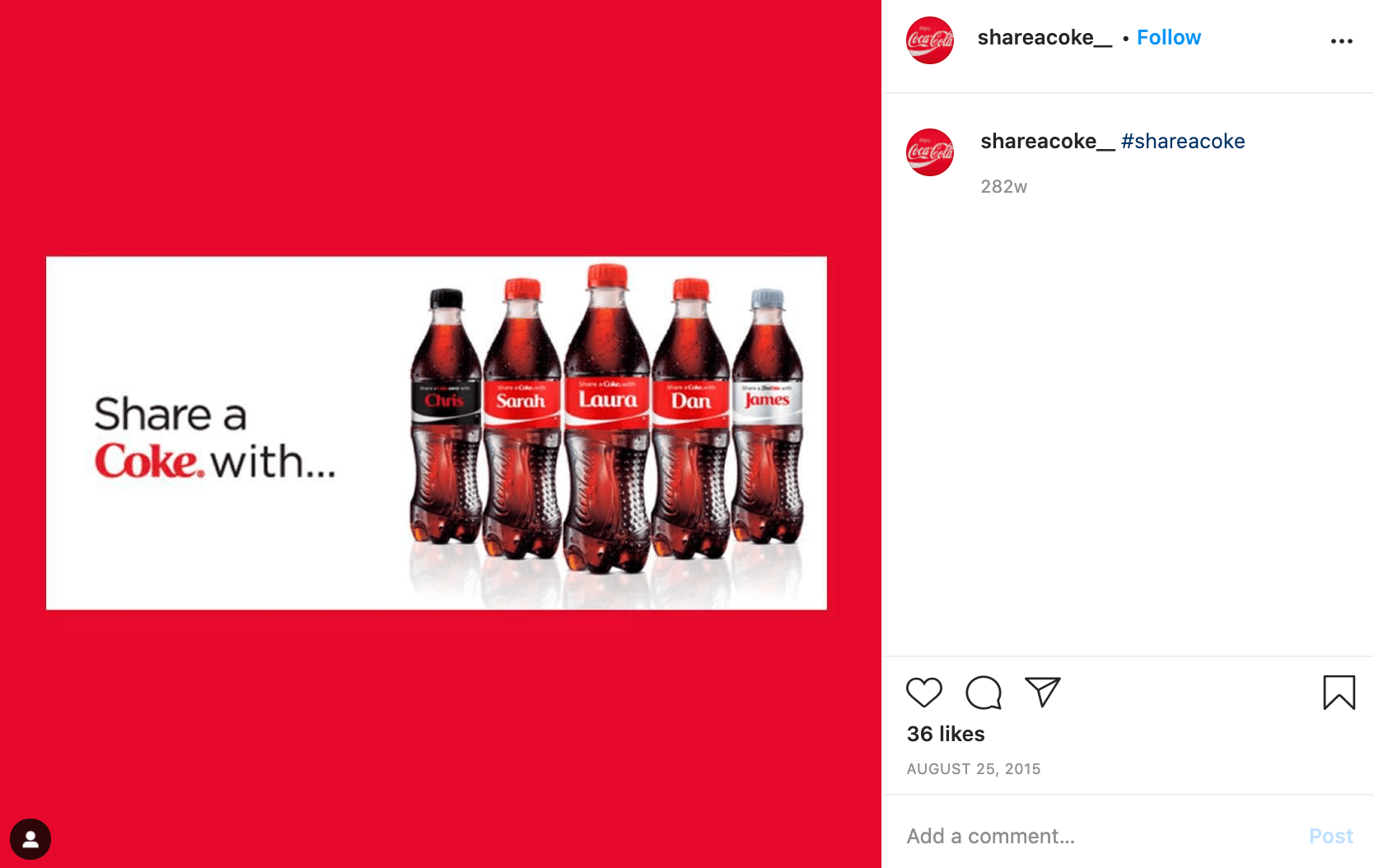
Coke’s “Share a Coke” campaign started in Australia, but has since expanded to over 70 countries. If you haven’t already seen a name on a Coke bottle, here’s the gist: the marketing team in Australia chose 150 of the country’s most popular names, and printed those names on Coke bottles with the command to “share the Coke” with friends and family.
The campaign is a fantastic example of micromarketing. The campaign enables Coke to connect locally with people in specific regions by identifying a group of names most popular in that area. And the results were astounding: the summer it first launched in Australia, Coke sold more than 250 million named bottles in a country with roughly 23 million people.
2. L’Oreal Malaysia leverages local, user-generated content.
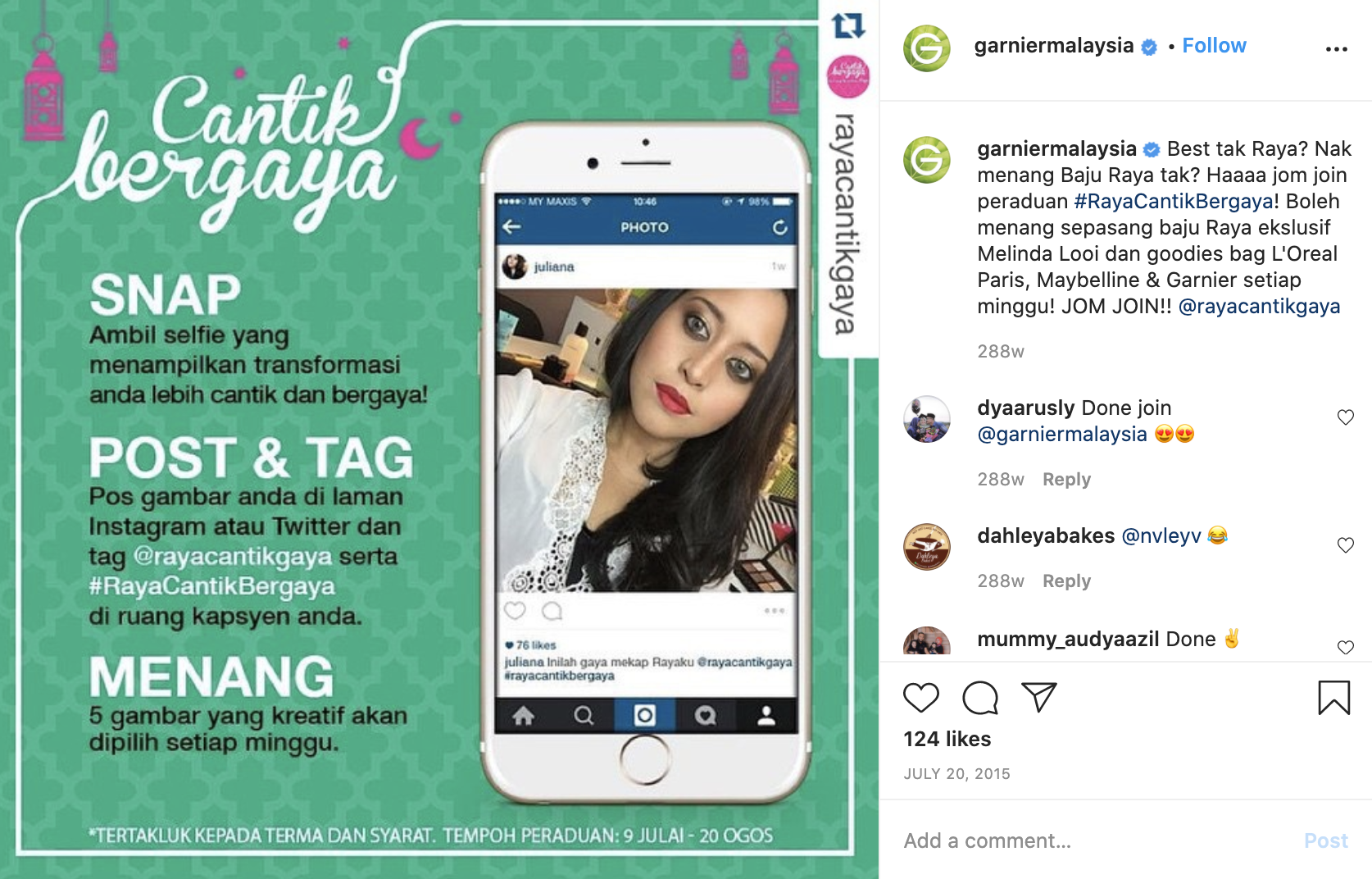
L’Oreal uses micro-influencers and user-generated content to help break down geographical barriers for products, opening markets in an authentic, engaging – and personal – way.
For instance, L’Oreal Malaysia worked with local micro-influencers to create video tutorials of products for L’Oreal, Maybelline, and Garnier. The videos were shared directly to the influencers’ own audiences. As a result of the campaign, L’Oreal Malaysia saw a 12.9% increase in engagement rates, and 1.9 million trend impressions.
Instead of agonizing over individualizing content internally and navigating cultural differences, L’Oreal leveraged local influencers to increase interests in its products for each local market.
3. La Croix uses branded hashtags to find micro-influencers’ content and reach new audiences.
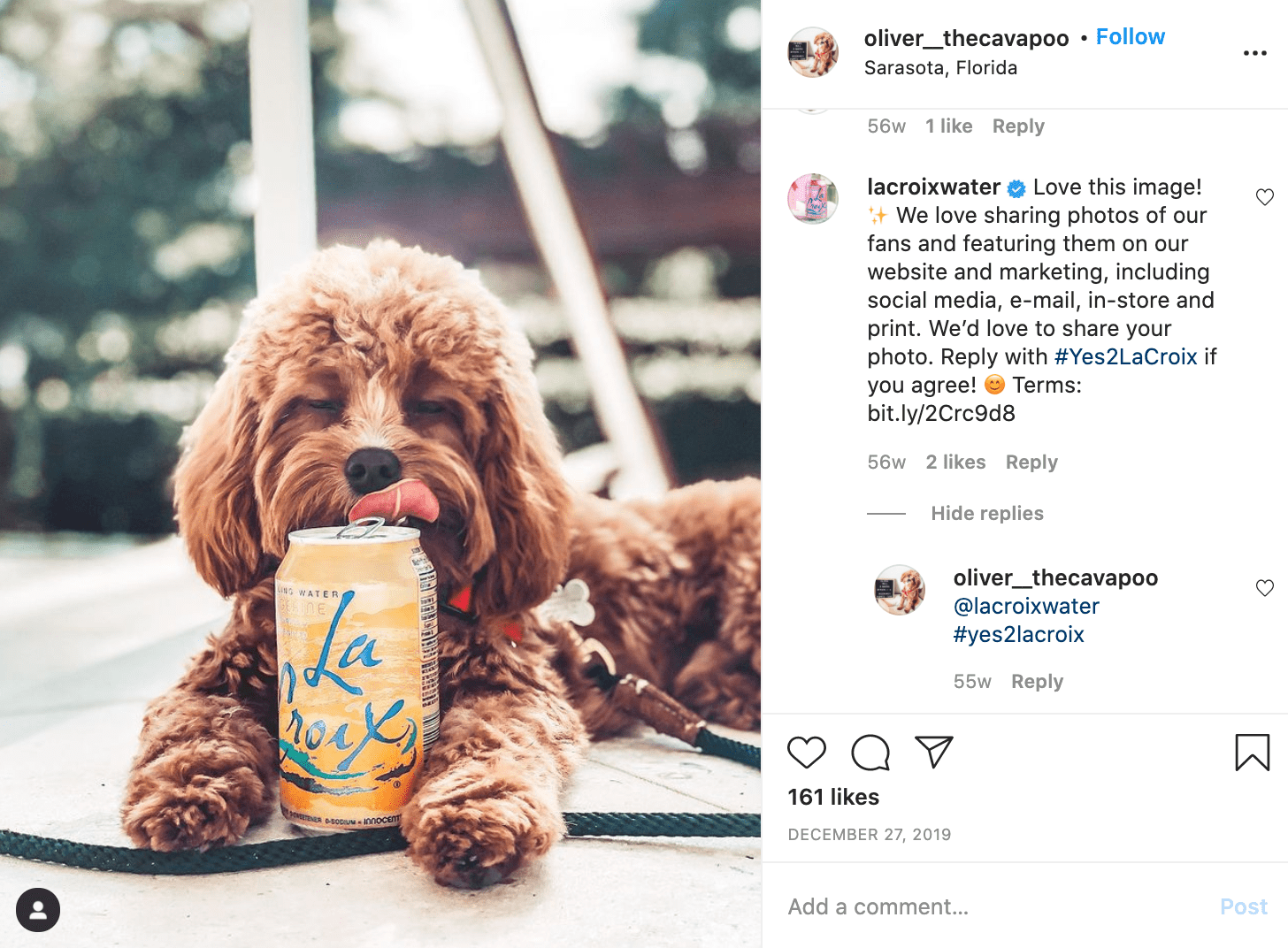
La Croix leverages micro-influencers by searching for Instagram users who’ve used branded hashtags such as #LiveLaCroix — and then asking those micro-influencers for permission to use the user-generated content in La Croix’s marketing materials.
This greatly cuts costs since La Croix doesn’t need to produce the materials, and it also enables La Croix to target each of the micro-influencers’ audiences for more personalized, effective content.
4. Sperry reposts influencers’ content on its own account.

Sperry identifies influencers around sharing Sperry products on various social channels, and reposts those images to the official Sperry account.
This enables Sperry to leverage on-brand content with a pre-built segmented audience, while foregoing a more official influencer strategy that would require more budget and resources. Instead, these micro-influencers are satisfied with recognition and exposure as a form of compensation.


How HubSpot’s Blog Team Comes Up With High-Performing Post Ideas
When I used to work at a marketing agency, I would read expert industry blogs, such as HubSpot, Marketing Brew, and Backlinko (to name a few).
One of my main questions every day was, “How do these brands do it? How do they constantly come up with brilliant blog ideas?”
Now, obviously, I work at HubSpot and I know what a blog strategy looks like at a big company with a recognizable brand.
By taking the time to do solid research and idea brainstorming, you can come up with blog topics that drive thousands of readers, like me, in — while boosting traffic, authority, and credibility.
Today, I want to pull the curtain back for you. We’ll discuss how the HubSpot blog continuously comes up with high-performing blog ideas.

How the HubSpot Blog Comes Up With Ideas
Before we get started, it’s important to know that when the HubSpot team comes up with blog ideas, several teams are involved (SEO, blog, and lead generation). Because of this, we divide our brainstorming process into two parts: trend research and SEO topic research. We then combine these efforts in our Insights Report on a quarterly basis (which you can download a copy of below).
Featured Resource: Search Insights Report Template

Let’s dive into both those processes below.
How the HubSpot Blog Generates Trend-Responsive Blog Post Ideas
Blog topics that relate to trends, research, or thought leadership yield bursts in non-organic traffic that can help you gain visitors while you’re waiting for SEO-driven posts to rank. Because they often include data, quotes, or other exclusive information, these posts can also earrn backlinks, which indirectly boost your search authority.
However, finding trendy non-organic post topics isn’t always straightforward and often requires brainstorming.
Pamela Bump, HubSpot’s Audience Growth Manager, leads the charge with our team’s brainstorming efforts while also managing the blog’s non-organic content strategy.
She says, “While our SEO team uses specialized tools to identify blog posts that will pull in organic traffic, I leverage a number of trend research tactics to identify post ideas that will pull in non-organic traffic from sources like email, social media, and referrals.”
Below is the process she asks bloggers to use during our virtual idea brainstorms.
1. Focus on your blog categories.
Before you get started, it’s important to have some sort of road map in mind. Choose the most important clusters, or blog categories, that you want to focus on for the quarter and develop ideas around them.
Immediately, just knowing the clusters you want to focus on could spark a few ideas for thought-leadership or data-driven research posts.
Each quarter, the HubSpot acquisition team chooses seven to ten clusters for each blog property — for us, that’s marketing, sales, service, and website. Usually the clusters relate to things like business goals or industry trends.
Additionally, we include other categories besides those clusters, such as Audience Growth, Lead Acquisition, and User Acquisition to help us brainstorm topics that are related to our lead generation goals.
2. Review the content you’ve already written to inspire new topics.
Now that you’ve done a quick brainstorm of some new ideas, let’s see what’s already been written in each cluster that you’re focusing on.
To do this, search your site for the cluster. We do site searches at HubSpot, but just typing in “site:blog.hubspot.com/service customer experience” in Google. With this formatting, you can change the link and change the keyword to be whatever you’re looking for. Then, Google will find posts on that keyword on that site specifically.
When you’re coming up with blog ideas, searching the site to see if the topic has been covered is very important. The reason you’ll want to do this is that you can find high-performing posts that give you inspiration for new angles or you can find posts that you want to update with more quotes, data, or new research. Additionally, this will help you avoid keyword cannibalization.
Caroline Forsey, the HubSpot Marketing Blog property manager, says. “Think of different angles for popular topics you’ve already covered. For instance, let’s say you have plenty of content regarding LinkedIn — but you have none from a thought leader in the space. Perhaps you could conduct an interview with a LinkedIn employee for a thought leadership angle, like ‘Top X Tips from a LinkedIn Marketer’.”
3. See what the competition is doing.
While you never want to copy your competitors, it’s important to see what topics they’re writing about. This will help you fill in gaps that your competitors are missing and perhaps improve on blog topics they’re discussing.
This also lets you know what’s going on in your industry. What’s the latest news and should you be writing about it?
Additionally, you can browse social media for this reason as well. Social media can let you know the pain points of your audience and check-in with what’s going on with your target audience.
Staying up on industry news is one of the best ways to brainstorm blog ideas.
Forsey adds, “When new features become available for a social media platform or tool, there’s often plenty of opportunities to explore new angles there, as well — recently, LinkedIn released its own version of Stories, so perhaps you brainstorm a topic like ‘X Best LinkedIn Stories We’ve Seen’, or ‘LinkedIn, Instagram, or Facebook Stories: Which is Best?'”
4. Have a checklist of blog topic idea criteria.
Once you’ve created some blog ideas, you should check and make sure each blog post topic is aligned with your overall blog criteria. If you don’t have blog criteria yet, maybe it’s time to set some standards around what each blog topic should cover.
For example, at HubSpot, all our blog posts need to provide value to your blog audience, align with a cluster or lead-gen goal, provide non-organic opportunities, be either trend-responsive or evergreen, and have some keyword opportunities.
5. Stay organized.
You should track your blog ideas in an organized fashion. At HubSpot, we use an idea generation spreadsheet where writers and editors can brainstorm ideas for quarterly clusters, or just write down ongoing ideas.
Ultimately, this process helps keep us organized when it comes to generating consistent blog post ideas.
Jay Fuchs, a blog writer at HubSpot, describes his process. He says, “I try to find topics that reconcile engaging subject matter with practicality when coming up with research or trend-based blog topics. That means finding buzzy, intriguing subject matter that lends itself to an article with a compelling title, interesting supporting materials, and — perhaps most importantly — actionable advice.”
Fuchs explains, “That could mean a piece about something like avoiding common pricing mistakes or sales strategies that will become prominent in the near future. One way or another, you need to pick topics that hook and help — ones that command your reader’s attention and let you make the most of it with insight that they’ll be able to apply, going forward.”
Now that you know the HubSpot process when it comes to generating non-organic blog ideas, let’s dive into the SEO side.
Brainstorming SEO-Optimized Ideas
While Bump and the blog writers brainstorm non-organic ideas, our SEO team is hard at work creating blog topics that have an organic goal in mind. This is their process:
1. Look at your company’s products, goals, and customer base.
To start, HubSpot’s SEO team will review our products, goals, and customer base.
Amanda Kopen, an SEO Strategist at HubSpot, says, “When coming up with blog post ideas, first you need to look at your company’s products, goals, and customer base. At HubSpot, we brainstorm blog posts as they relate to our different products (marketing, sales, service, etc.). Then, we narrow it down to topics where we have expertise but are potential pain points for our customers (social media marketing).”
During this phase, our SEO team is reviewing our personas, prioritizing blog clusters (decided by SEO and lead-gen teams), and brainstorming what would be helpful to our audience.
Additionally, the SEO team will identify large topics, underperforming topics, and old but high-performing topics.
2. Conduct keyword research and run a content gap analysis.
After the initial brainstorm, it’s time to do your keyword research and content gap analysis.
Kopen explains, “Once we have a potential pain point in mind, we use SEO best practices — like conducting keyword research and running content gap analyses — to see exactly what people want to learn about (how often should I post on LinkedIn), and we start writing from there.”
During this part of the process, our SEO team will gather domains with similar audiences and conduct a content gap analysis (find out what these sites are ranking for that HubSpot isn’t).
We’ll also look at related searches on Google to see what people are searching for. Then, we’ll identify opportunities where we can update old blog posts or recycle the URL (so we don’t lose the SEO juice, but have updated content for that topic).
3. See if there are any linking opportunities.
Finally, the SEO team will also communicate with HubSpot’s product and academy teams to see if there are linking opportunities such as any courses or products of ours we should be linking to.
Creating Traffic-Generating Ideas
And that’s how the HubSpot blog comes up with high-performing blog post ideas consistently. To learn more about our process, you can learn how SEO works for the HubSpot Blog with our Insights Report course on HubSpot Academy.


20 Creative Ways To Repurpose Content
As a marketer, you definitely have a lot of work to do (and not enough time to get it done). You might also feel occasionally struck by writer’s block when it comes to creating fresh, unique content.
Given these challenges, you’re always searching for ways to make your job easier while continuing to produce high-quality content on a regular schedule. Fortunately, content repurposing is here to take some of the weight off your shoulders.
At first glance, content repurposing may seem like a way to cheat the system, but it’s not. You’re reworking your existing, high-quality content and presenting it in a different form on new channels. In this post, we’ll cover the basics of content repurposing, outline the benefits it can bring to your business, and discuss specific strategies to repurpose content you’ve already created. We’ll also talk about how to create new content with future repurposing in mind.

As I mentioned above, content repurposing might feel like a cop-out if you’re unfamiliar with the strategy. You don’t want your audiences to feel like your content is repetitive, or that you don’t care about creating unique content on every channel. You also may think that content repurposing means taking something that someone else has created and reworking it to fit your brand message. Content repurposing is neither of these things. You’re not being repetitive, you’re using content you and your teams have purposely created, giving it new life, and ensuring that all segments of your audience can gain value from what you have to offer.
For more clarity, let’s briefly go over what content repurposing is and what it isn’t.
|
Content repurposing is… |
Content repurposing isn’t… |
|
Sharing an old blog post that you’ve updated with new, relevant data and thought leadership quotes. |
Sharing an old blog post on your Twitter profile without updating content for relevancy and simply changing the description. (This could certainly be seen as lazy.) |
|
Taking heavy-hitting key statistics from an Ebook and creating an infographic to post on Twitter. |
Taking a news article from another site and editing it to fit your brand or business image. (Technically this could be repurposing, but it’s mostly stealing.) |
|
Creating video clips of podcast recording sessions to post on Instagram to generate hype and excitement for an upcoming episode. |
Posting a campaign on different social media channels. (This isn’t repurposing, it’s cross-channel marketing.) |
Why should I repurpose content?
When repurposing old content, or creating new content with repurposing in mind, you’re saving yourself time. You already have the data to point you towards high-performing pieces of content to reshape and redistribute, or you’re already in the process of creating a blog post that you know will do well as a podcast episode, quote snippet on your Instagram account, or part of an Ebook collection.
Repurposing content can also potentially give you an SEO boost. When you have multiple pieces of content centered around similar targeted keywords, search engine crawlers will generally recognize you as a source of authority. You’re not just creating content for the sake of it — you’re putting out valuable resources, in multiple different forms, that provide value to your users.
Additionally, repurposing content helps you scale, both in terms of content amount and audience reach. Simply creating a blog post gives you a presence, but creating a blog post that can be turned into an email newsletter or a how-to YouTube video gives you three different types of content in one, and a presence on three separate platforms with three separate and diverse audience groups.
The HubSpot Academy’s free content repurposing mini-course discusses the benefits of content repurposing in more depth if you’re interested in learning more.
Given the benefits that it can bring to your marketing efforts, let’s go over various ways to repurpose your content.
How to Repurpose Content
As mentioned above, repurposing content means taking one asset and reusing it somewhere else. If your goal is to repurpose existing content for different channels, start by taking a look at your metrics. Take note of what has performed well, and brainstorm ways to continue to provide value to your different target audiences with the same content in different forms.
If you feel as though there’s no possible way to repurpose the content you have or will have, there probably is a solution. We’ll go over some options below.
How To Repurpose Blog Content
If you run a blog, you likely have a significant amount of high-quality blog posts. While it may not seem like there is a way to convert your text-heavy pieces into different formats, there are certainly ways to do so.
1. Create a YouTube video.
How-to posts are great to convert in to visual guides on YouTube, especially with graphics-heavy pieces. Suppose you’re a business that coaches salespeople on mastering a sales call. You can write a script to include in a blog post, but it could also be converted into a YouTube video where an actual salesperson runs through the script.
2. Create a SlideShare.
This is one of the easier ways to repurpose your blog content, as you’re simply converting it into presentation form. Identify a piece of high-performing content, and reproduce it into a SlideShare. SlideShares are beneficial because they’re easily shareable, and it introduces audiences to your words in a different, palatable way. Plus, presentations allow you to incorporate other graphic elements that aren’t always present in long-form blog posts.
Copyblogger, a content marketing company, went this route with one of their high-performing blog posts, as shown in the image below.
 3. Create an infographic.
Have a blog post full of statistics or data? Consider creating an infographic.
Consumers appreciate visuals, so creating a summary of the most hard-hitting statistics from your posts is a new, engaging way to give meaning to your content. You can place these infographics within the blog post, but they can also be repurposed and posted on social media (which we’ll cover below).
4. Create an ebook.
Creating an ebook is a great option for long-form blog content that provides educational value to your audience. In your blog post, you can touch on specific key elements of your subject and offer the ebook as a more in-depth discussion of the content you’ve created. Search Engine Journal, a well-known SEO resource, went this route with their blog post series about Content Marketing. They have ten free-to-access articles about the subject but offer a more in-depth ebook guide.

5. Extract thought leadership quotes.
Do you often recruit industry experts or thought leaders to contribute to your pieces? If you do, you recruit these people because you know they have valuable insight (and your audience will think so as well). Take heavy-hitting quotes from articles and post them on your social media accounts, create infographics, or use them as snippets in email newsletters. Here’s an example from the HubSpot Academy Instagram account.
6. Create a podcast episode.
In the same vein as extracting quotes from thought leadership or industry leader posts, consider creating podcasts out of these high-performing posts. You can use the copy as a script, invite thought leaders back for more in-depth discussions of the insight they’ve given for the posts, or simply discuss the blog post in its original form.
So, there are various ways to repurpose your text-heavy blog posts to give them new life and expose their content to different audiences. We’ve briefly mentioned it above, but we’ll cover more examples of repurposing content for social media below.
Repurposing Content for Social Media
Social media sites can accommodate many different content types, many of which can be repurposed from your existing content. Let’s go over six options below.
1. Use old images as post backgrounds.
Have high-quality visuals that you’ve only used once? Try using them as post backgrounds. As long as you’re following the Instagram size requirements, you can use these images as the background for quotes you extract from blog posts or simply post the images on their own to draw audience attention to a past project.
2. Post snippets of existing video content.
Do you have YouTube videos or any type of business-related video content? Post snippets on social media.
Most platforms allow you to post video content, so if you edit it down to fit within their video-length requirements, you can easily repurpose a video for each of the platforms you have a presence on. If you’re hesitant to go this route, or new to video overall, consider the following stats from Wyzol: 86% of video marketers say that video has a high return on investment (ROI), and 85% of businesses already use video as a marketing tool.
3. Post user-generated content.
User-generated content can be anything from reviews on your product pages to one-off tweets from a satisfied customer. Although it may seem like these only provide value in their original channel, they can be repurposed for social media. Here’s an example from beauty brand Black Girl Sunscreen where they’ve used customer reviews in an Instagram video for a new product launch.
Here’s an example from Starface, using their Twitter account to Retweet customer testimonials.
4. Repost social media content from your other profiles.
It may seem rather convoluted, but you can repost content from your social media profiles to your other social media profiles.
This could look like taking a screenshot of a Facebook post to share on LinkedIn, a picture of a YouTube thumbnail to promote a new video on your Instagram Story, or a screenshot of a Tweet for your Instagram page. Here’s an example of the latter from Stacey Abrams, former Congressional Representative and Atlanta-based activist.
5. Create new infographics.
As mentioned before, creating infographics from your existing content is a valuable repurposing strategy, especially when it comes to data.
While your audience can read about your findings in blog posts or ebooks, data visualizations, and visualizations in general, increase the impact of your words. Your audiences quite literally get a picture of the significance of the information you’re giving them, and images are more likely to be retained. In fact, images are 65% more memorable after a period of three days.
The post below is a data infographic from the HubSpot Instagram account.
6. Extract quotes from existing content.
I mentioned this earlier on, but the strategy of extracting quotes from top-performing content, especially when they contain insight from industry leaders, is particularly impactful on social media channels like Instagram or Twitter. Extract these quotes, create social media posts, and re-use them on all your favorite social platforms.
How To Repurpose Webinars and Videos
Webinars and videos are unique forms of content. They’re an exciting way for your users to connect with what you have to offer, but, unfortunately, they aren’t always accessible to all members of your target audience. Thankfully, there are ways to repurpose them so everyone can benefit from what you have to offer. Below, we’ll go over how to repurpose video content to meet the different needs of your audience.
1. Create text transcripts of your videos.
One of the easiest ways to ensure that your videos and webinars are accessible to everyone is to create transcripts. While you can certainly create captions for your content, creating transcripts creates an additional way for your audience members that use Assistive Technology to enjoy what you have to offer.
2. Turn video transcripts into blog posts.
Another benefit to creating transcripts is that they can also be repurposed as blog posts. If you create a scripted video that follows a logical structure, a transcript likely won’t need much editing before it can become a blog post. For example, Moz, an SEO tool, produces a weekly video series called Whiteboard Friday. Each video is its own piece of content but they also use a transcription tool to turn the videos into blog posts.
3. Create a podcast episode.
Aside from accessibility methods, you can also repurpose webinars and videos into podcasts. Simply extract the audio file, use your preferred tool to clean it up (here’s a guide from Adobe), and post it on your preferred podcasting platform.
How To Repurpose Podcasts
Many small-to-medium-sized businesses have just recently begun riding the podcast wave. If you’re new to podcasts, or you simply want a refresher, consider checking out HubSpot’s guide to starting a podcast for your business. The resource will teach you how to build your feed, organize content, and market to your target audience.

Podcasts are unique in that they allow creators to connect with their audience on a personal level, as hosts humanize a brand or business with their own personal experiences and anecdotes, often with lighthearted conversations. Podcasts are also a great way to reach younger audiences, specifically Millennials and Generation Z. Given this, let’s go over a few ways to repurpose your podcasts to reach wider audiences.
1. Record your podcast sessions for social media.
One of the draws to podcasts is that they feel human. Use this to your benefit and consider taking video of your recording sessions. When you have upcoming episodes, you can release video snippets on social media to generate excitement in your audience, or simply post snippets of recent episodes. Queen Business, a podcast created by Black women for Black women, does this and posts their snippets on Instagram. They invite well-known guests to participate in the podcasts, which adds an element of excitement to their listeners and followers.
You can also post full-length sessions on YouTube, or create smaller video snippets of heavy-hitting sections.
2. Pull out quotes for social media.
This has been mentioned multiple times, but pull out relevant quotes for social media, especially if you have invited guests on your show. Quotes from industry experts or celebrities that your audience look up to and view as valuable resources can be posted on different social media platforms, or even within your blog posts.
3. Create transcripts of your podcasts.
Just as you can for your videos and webinars, you can create transcripts of your podcast audio for accessibility purposes and for blog posts. However, it’s important to note that the podcast audio may require more editing than a scripted video or webinar if the conversational tone of your episodes doesn’t mirror your blogging style.
4. Embed your podcasts into your blog posts.
Almost anything can be embedded these days. Not only does it help you share different forms of content, but it’s a great way to provide additional value and context to your users. If you’re a HubSpot CMS user, you can embed podcasts episodes directly into your blog posts. Here’s an example from a HubSpot blog post.

Repurpose by Updating Older Content
Let’s face it: things change.
Could some of your older posts use updating? Probably. There may be new developments or advice you can share on a topic you’ve already written about in the past. So, take your old post, make some adjustments and additions, and re-publish it. You shouldn’t have to do a complete overhaul,(although that’s also an option) just make sure that it appeals to today’s audience.
Another trick is to analyze your content and identify top-performing blog posts. If you notice that a blog article isn’t as up-to-date as it could be but is still generating a ton of traffic, leads, or is ranking highly for a competitive keyword, don’t publish as a new post.
Instead, update the content within the same post so you keep the existing URL and SEO value, and promote the updates you’ve made. Some blogging platforms even allow you to change the publish date, enabling to display it on your blog as a brand new post.
It’s also worth considering updating (or adding new) calls-to-action to articles that are still generating traffic to increase lead generation potential.
You can do the same with Ebooks. Whether you’ve published it last year or five years ago, make some refreshing updates and re-promote it! This will save you the time of creating a blog post or Ebook from scratch while you still obtain the benefits that a new Ebook has to offer.
Should you choose to go this route, consider using UpContent to create email digests and social media posts to share updated, high-performing pieces with your audience (displayed in the gif below).

Leverage Your Existing Content to Drive Further Engagement
All-in-all, as a content creator, you do what you do because you know you can provide value to your audiences. Unfortunately, creating high-quality content doesn’t just happen overnight. It takes time, care, and resources — which can sometimes be a tedious process.
Repurposing your existing content isn’t meant to be an alternative to creating new content, but rather a supplementary strategy. You can continue to create new content while at the same time giving new life to your existing, high-quality pieces and providing your audience with relevant, timeless information.

5 Marketing Alternatives to High-Priced Super Bowl Ads
This year, CBS opened the bidding for a 30-second Super Bowl ad slot cost roughly $5.6 million — plus $300,000 if brands wanted their ads on CBS’ Super Bowl live stream.
And, although the price above is about the same as it was for 2020, it took until January for all of CBS’ slots to sell out.
This isn’t shocking. Due to the ongoing global pandemic and times of financial uncertainty, many big brands that used to rush to buy ad slots are now trying to avoid spending millions of dollars on commercials that last only 30 seconds.
While $5.6 million seems like a lot of money for just a slot, think about how much advertisers are spending on the additional costs of producing these commercials, often known for having A-list talent, crazy special effects, or even award-winning directors.

Three notable brands that won’t be airing Super Bowl ads on CBS this year are Budweiser, Coca-Cola, and Pepsi.
While Budweiser will donate its Super Bowl budget to charity this year, Coke, which will also be donate some of its budget, opted out to conserve its advertising budget.
“This difficult choice was made to ensure we are investing in the right resources during these unprecedented times. We’ll be toasting to our fellow brands with an ice-cold Coke from the sidelines,” read a statement Coke sent to CBS News.
Meanwhile, Pepsi Co. opted out of ad slots for Pepsi, in order to direct more budget to its sponsored halftime show.
But, this isn’t the first time major brands have opted out of the big game. In past years, a number of big companies have spent their Super Bowl budget on all sorts of interesting alternatives.
Take Skittles for example. In 2018, Skittles decided they didn’t want to shell out millions of dollars on a Super Bowl ad. Instead, they used the money to create a full-length Broadway musical.
What could the Skittles musical possibly have been about? Well, it was described as a musical commercial that discussed the insincere and high-priced world of advertising.
The musical was never aired on TV or streaming services, but here’s a look at the musical’s main ballad, “Advertising Ruins Everything:”
https://www.youtube.com/watch?v=FNR1crnyRFk
While what Skittles did was both creative and clever, it was still pretty expensive. And, as a small to medium-sized business marketer, you likely can’t afford a Super Bowl ad or a Broadway musical alternative just yet.
But, having a small budget doesn’t mean you can’t create a high-quality campaign or advertisement like the pros.
Below, I’ll list four common advertising strategies that brands use during the Super Bowl, or other major events, then walk you through how you can take advantage of each on a much smaller scale while still effectively gaining brand awareness.
5 Alternatives to Super Bowl Advertising
1. Buy video ad space on social platforms.
As a small business marketer, you don’t need to pay for a high-priced televised ad slot to get seen by the right audiences.
With the growth of online platforms and social media networks, like YouTube, Facebook, and Twitter, we’ve also seen the growth in opportunities for in-stream advertising. If you’re less familiar with this form of advertising, it allows you to submit a video-based ad to a service like YouTube or Facebook. Then, the ad will usually be seen as pre-roll or mid-roll within longer videos.
Investing in online on in-stream video ads might also be a better bet than investing in traditional television commercials. Aside from the Super Bowl and other major televised events, people are tuning in less and less to live television. Meanwhile, consumers are streaming video, surfing the internet, and logging into social media channels more than ever before.
Additionally, while Super Bowl or TV ads usually have one up-front cost, online ad placements have more flexible costs that can be higher or lower depending on how long they are, how long you’d like to circulate the ads, and the size or scope of your target audience. To put it plainly, while brands pay millions for just 30-seconds during the Super Bowl, ad platforms like Facebook or YouTube allow you to spend less while targeting audiences that are most likely to engage with your content.
Another perk? While televised commercials require a consumer to remember and look up your brand later, online ads often allow audiences to click on them directly when they’re interested in your product or offer. This automatically adds a greater chance of ROI and decreases friction between the brand and the customer.
If you decide to take advantage of online video ads, you’ll want to drill down on your buyer persona before putting money behind an ad platform. Ask yourself questions like, “Which social media platforms do they use?”, or “What’s their gender and age range?” The answers to these questions will help you determine which social media platforms you should run ads on and which audience targets you should set for your ads.
After defining your audience, you’ll also want to create attention-grabbing content targeted specifically for your target buyers.
On online platforms, you’ll often be able to purchase an ad slot between six seconds to one minute long. However, because the internet is so fast-paced, your audience’s attention span could be much less than your allotted time. For example, on average, Gen Z and millennials will only pay attention to online content for eight to 12 seconds.
If you purchase a more budget-friendly skippable ad placement, drawing attention will be an even more crucial strategy as uninterested viewers will press the “Skip Ad” button to watch the video they’ve searched as soon as they’re able to.
Here’s a great example of a pre-roll ad from the job search site Reed.co.uk. The ad immediately draws attention with a video of meowing kittens. Then it embraces its pre-roll placement by calling out YouTube viewers for watching videos because they’re “distracted from their job.” At the end, Reed, the site’s founder, tells the viewer to click on the video, which will send them to the job site:
As you create an ad, take a note from Reed.co.uk by ensuring that it draws attention immediately.
Don’t have a box of kittens like the ad above? Consider using other techniques to draw attention, such as presenting a relatable pain point, offering a value proposition, or placing viewers into an action-filled scene when the video starts playing.
2. Dive deeper into a video narrative.
Aside from traditional commercials that establish a basic pain point and offer a simple product-based solution, Super Bowl ads are also known to have a unique storyline or feel like miniature movies.
Here’s one historic Super Bowl example that sits in the Clio Hall of Fame. During its 1984 ad spot, Apple announced the Macintosh with a commercial themed around the George Orwell novel, “1984.”
The novel, written in 1948, told the story of a dystopian society where all people followed one leader, dressed the same and conformed to the same ideologies.
The Apple commercial stays in line with the George Orwell classic as it begins with thousands of men walking in a lined formation as they enter an auditorium where an all-powerful leader preaches about their society on a giant screen. The ad’s narrative gets interesting when a woman in colorful clothing suddenly runs into the room and hurls a hammer into the superior leader’s screen, figuratively destroying the bland conformist society.
At the end of the commercial, a narrator announces, “On January 20th, 1984, Apple will introduce the Macintosh. And you’ll see why 1984 won’t be like 1984.”
Why was the Apple ad so fascinating and iconic? At the time, Apple was considered a young disruptive underdog company while the PC world was monopolized by IBM — a much more traditional big corporation. This commercial is a deep metaphor for how Apple’s brand, innovative products, and mission would free computer users from the monopolies of past tech giants.
Yes, Apple did have more resources than the average startup when producing this ad. In fact, it was directed by Ridley Scott — known for his work on award-winning films like Alien and The Martian.
But, on a smaller scale, all it takes to create an attention-grabbing narrative ad is one or two creative team members and affordable video equipment.
Additionally, commercials that tell a great story don’t necessarily have to discuss a deep or intense topic, like Apple’s. Alternatively, they can also be quick and funny anecdotes.
This smaller-scale example from Bernie & Phyl’s Furniture simply tells the story of a bulldog getting behind at his office job. The storyline encourages people to spend more money on crucial things, like job candidates, while still saving money on furniture at the store chain:
https://www.youtube.com/watch?v=dBMjOh7XObQ
Interested in crafting a compelling advertisement script? Check out this template. If you have a great idea but aren’t sure where to start production-wise, read this step-by-step guide.
3. Leverage major events or holidays.
Whenever there’s a major event, like the Super Bowl, big brands jump to create campaigns that leverage trends related to it. This is because people who are interested in the event might also enjoy the content or ads that discuss it.
Although big brands air commercials during major events, you can instead create campaigns that make pop culture or event references. These could include blog posts about how an event relates to your industry, a social media post that leverages topical hashtags, or a marketing video about how your customers might be celebrating an event.
Here’s an example where the energy drink brand G-Fuel asks Twitter users to reply to their tweet with who they think will win the 2020 “#SuperBowl.” In the tweet, they include an image of two G-Fuel drinks in front of a football field:

This is smart because those who are interested in the Super Bowl might click the #SuperBowl hashtag or search the topic and find this post. Although it doesn’t directly advertise the drink and doesn’t have an endorsement from the NFL, the post still leverages the trend and enables Super Bowl fans to learn more about the sporty energy drink.
However, while leveraging a holiday and social media trends might seem like low-hanging fruit, you should keep in mind that each event has certain legalities around it.
For example, the NFL has trademarked the term Super Bowl and does not allow brands to say the event name in content with commercial intent. So, if G-Fuel were to promote its drinks as “official Super Bowl beverages,” it would infringe upon this trademark. However, by showing a picture of their product in front of a football field and simply asking fans about their thoughts on the actual game, they aren’t saying that their product is in any way endorsed by the NFL.
To avoid any further blurred lines when referencing the Super Bowl in a paid ad or commercial, brands usually call it, “the big game” or “the football game,” instead.
4. Lean into co-marketing.
Sometimes, even for big brands, it’s more budget-friendly and engaging to create a co-marketed Super Bowl ad. With this strategy, two or more brands put money, time, effort, or resources into creating a joint piece of content that cleverly highlights all brands involved.
Here’s a great example of a 2015 ad where Newcastle pooled its money with 37 other brands to buy a Super Bowl ad slot that mentions all the companies at some point. The ad was appropriately titled, “Band of Brands:”
The example above is one of the most insane examples of co-marketing, but this is a strategy that is incredibly scaleable to small businesses and has been used as a tactic for ages.
Below is an example of how Louis Vuitton and BMW joined forces as luxury travel and transportation product providers by launching a series of ads that show their sleek, black products together. The campaign was titled, “The Art of Travel.”

The co-branding example above is effective because it features two companies that complement each other rather than competing against each other. Their audiences, which are made up of upper-class professionals, also mesh well together and will engage similarly with this type of promotion.
5. Consider influencer marketing.
Aside from high-budget productions and interesting storylines, Super Bowl commercials are also known for their star-studded casts. Remember this Amazon Echo commercial where Alexa is voiced by a handful of popular celebrities?
Although you probably can’t hire stars like Cardi B, you might be able to budget content from a micro-influencer who’s heavily followed or considered credible in your industry.
When you sponsor an influencer that really understands their audience and your industry, they’ll create and publish content that intrigues their audience while also highlighting your product.
Influencer marketing is similar to co-branding. But, instead of increasing the chances of two branded audiences learning about both companies featured in one piece of content, influencer marketing enables the influencer’s audience to learn about your product while your audience can learn more about the influencer.
An influencer marketing strategy can also be especially effective on social media channels like Facebook, Instagram, YouTube, or TikTok.
In this example, the smartphone game “Run Around” sponsored a TikTok user who’s gained more than 15,000 followers simply by recording herself playing mobile games.
In the effective TikTok example above, the brand identified that gaming-oriented audiences were on TikTok and sponsored an influencer who’s audience anticipates her mobile gaming reviews and demonstrations.
Creating a (Somewhat) Super Bowl-Quality Ad
As you work towards creating a quality ad on a budget, keep these scaleable big brand tips in mind:
- Tell a great story. Pull your viewers in, allow them to relate to your brand, and hook them by presenting how your product can help them.
- Embrace current events: Craft campaigns that touch on highly-discussed on trendy events, such as the Super Bowl, award shows, or holidays — especially if they relate strongly to your brand.
- Leverage brands and influencers: Partnering with brands and influencers can allow your product or company to get attention from similar audiences that you haven’t already reached. To get started, research and build relationships with brands and influencers that your audiences or industries look to for credible tips.
Want to see more effective big brand campaign strategies that you can learn from? Check out this post where we reveal our favorite Super Bowl ads of all time.
Editor’s Note: This piece was originally published in February 2020, but was updated in 2021 for comprehensiveness and freshness.


The Best Super Bowl Ads of All Time
The next Super Bowl is coming. And as we get closer to the big game, Americans aren’t just looking forward to the football — they’re also excited to see what the nation’s big-budget brands will come up with for this year’s ads.
While much is still unknown about 2021’s Super Bowl commercials, a few leaked ads hint that a lot of content will heir on the relatable and comedic side, while still giving viewers the high-budget excitement the Super Bowl ads we know and love.
Here’s just one example of an ad we can expect on Super Bowl Sunday for Bud Lite’s new Lemon beverage. The ad uses the metaphor of “When life gives you lemons,” to symbolize how 2020 went:
But leaked ads aren’t the only thing we can watch to prepare for the marketing marvels we might see on Sunday.
To amp you up for this year’s “Ad Bowl,” I’ve collected some the best ads from the last decade and before.
Be sure to check back each year, as we’ll continue to add to this list as new teasers are released.
Without further ado, please enjoy these attention grabbing, emotion-inducing, and sometimes award-winning ads.
The Best Super Bowl Ads from the Past Decade
1. “Loretta” – Google (2020)
Google’s Super Bowl ad tells the story of a man who doesn’t want to forget the memories he had with his wife. To the sounds of FUN’s “Say Something,” the man types “how to not forget” into Google and sees search results about how to improve memory. He then uses voice search to say, “Hey Google. Show me photos of me an Loretta.”
As he clicks through photos, he explains some of the fond memories he had with his wife. For example, at one point he laughs and tells the Google Assistant, “Remember. Loretta hated my mustache.” Then text from the Assistant says “Ok. I’ll remember that.”
As the man Google’s things related to his life and marriage, viewers get a glimpse of the precious moments that made up his life.
At the end of the ad, after viewers have felt a wide range of emotions, Google promises to provide users, “A little help with the little things.”
While many Super Bowl ads focus on throwing viewers into the action, highlighting celebrities, or comedy, Google took a more emotional approach to remind viewers how its products can help people at different points in their lives. While search helped the man learn tips for remembering things, Drive and Assistant were able to help him relive memories related to his marriage.
2. “Joust” – HBO and Budweiser (2019)
Prior to the 2019 Super Bowl, Budweiser launched a funny series of ads that followed a medieval kingdom where the king and townspeople would cheer, “Dilly Dilly!” when offered the beer. The series also featured a hero called the Bud Knight. In some advertisements, he would ride in on his horse and fight in battles clad in armor covered in Budweiser logos.
At the beginning of Budweiser’s 2019 Super Bowl ad, you see a handful of happy medieval characters waiting excitedly for the Bud Knight to arrive at a jousting match
As the Bud Knight heroically rides his horse on screen, the audience cheers, “Dilly Dilly!” as the competition begins.
But. things get grim quickly. Shocking, the Bud Knight loses and is knocked off his horse by the opponent. As the tall, masked opponent walks up to the knight, most Game of Thrones fans will begin to recognize him Gregor Clegane, a.k.a. “The Mountain” — one of the show’s most monstrous villains.
As Clegane towers over the Bud Knight, it becomes apparent — especially to GoT fans — that the ad is mimicking a dramatic death scene from the HBO series where The Mountain physically squished another heroic figure with his bare hands.
Clegane dramatically, but comedically, reaches down to grab the Knight with both hands. As townspeople react over-dramatically to what’s going on, it’s apparent that Clegane’s killed yet another knight by squishing him off screen.
Suddenly, the Game of Thrones theme music begins to play as a dragon flies over Clegane and takes him down with a blow of fire. As the dragon escapes into clouds and smoke, the music gets louder as the show’s logo and air date appears instead of a Budweiser logo. In a sense, Game of Thrones and HBO hijacked and destroyed the Budweiser ad series.
This ad is hilarious as it comedically mimics an incredibly intense and notable scene from Game of Thrones. More interestingly, it surprises audiences who are just expecting it to be a standard Budweiser ad. This is a great example of how one ad combined cross promotion with a memorable storyline.
The ad, produced by Droga5 and Wieden+Kennedy, was so humorous and clever that it even won the 2019 Super Clio, a Clio Award for Super Bowl ad participants.
3. “We All Win” – Microsoft (2019)
After it came to Microsoft’s attention that people with missing limbs or limited mobility were having trouble holding and pressing buttons on video game controllers, the tech company developed an adaptive controller with touch pads rather than buttons.
After the controller’s launch, Microsoft highlighted this story of how they solved for the customer in a 2019 Super Bowl ad titled, “We All Win.”
n the Gold Clio-winning campaign, Microsoft interviewed children with mobility issues and missing limbs about why they loved video games, but how they still faced difficulties with game controllers due to their disabilities.
Many of the children and parents featured in the ad explain that gaming helps them connect with friends in ways that they might not be able to otherwise. However, because of the current line of controllers, they have difficulty playing or competing in many games.
“I never thought it was unfair. I just thought ‘Hey, this is the way it is and it’s not going to change,” says one boy.
After demonstrating the problem with game controllers, the ad shows the children using Microsoft’s new adaptive video game controller as they explain how it makes gaming easier and more accessible for them.
For example, one girl excitedly says, “I can hit the buttons just as fast as they can,” while a boy exclaims, “Now everyone can play!”
“‘We All Win’ hit all the marks in terms of emotion, starting a dialogue, and fun. It wasn’t an ad about disabilities, it was about kids wanting to play video games,” says Dmitry Shamis, Senior Director of Creative. “I loved it back in February and still love it now.”
Not only does “We All Win” tug on your heartstrings, but it also encourages solving for the customer and accessibility by explaining how Microsoft took the time to develop a product that fixed a major problem faced by a unique group of customers. This ad makes you believe that Microsoft genuinely cares about its customers and will make extra efforts to ensure that everyone has a great experience with its products.
You can read more about this particular campaign and get inspired by a few more empowering ads in this blog post on inclusive marketing.
4. “It’s a Tide Ad” – Tide (2018)
Another Super Clio winner was, “It’s a Tide Ad,” created by the clothing detergent company, Tide, as well as the agency Saatchi & Saatchi New York.
In 2017 and 2018, Tide released a number of commercials with storylines that had nothing to do with Tide, except for the actors’ noticeably clean clothes. When viewers were at the edge of their seats, someone in the ad would say, “It’s just another Tide ad.” Then, they’d see the Tide logo and text that said, “If it’s clean, it’s Tide.”
This campaign started with a long Super Bowl ad, which also received an Emmy nomination. In the ad, Stranger Things’ David Harbour shows up in several common ad scenes, including in the bathroom with a buff deodorant model, driving a sports car, and laughing on the couch with a fake family.
As he appears into each commercial, he explains that all of them have one thing in common: clean clothes that were washed by Tide detergent. In the end, he says, “So, does this make every Super Bowl commercial a Tide ad? I think it does.”
Since Tide has one job of keeping clothes clean, they show off the brand’s strength in multiple versatile and silly scenarios. Humor like this can also be a great way to make a simple product more memorable. If you go to the store to get detergent shortly after seeing this commercial, Tide might be the first thing to pop into your head because of the ridiculous ads.
5. “Band of Brands” – Newcastle (2015)
What do you do when you can’t afford a Super Bowl ad? Cross-promote with other brands who will pay for it. That’s what Newcastle, a popular beer company, did back in 2015.
Prior to the 2015 Super Bowl, Newcastle launched a call to action video where Parks and Recreation actress Aubrey Plaza encouraged brands to pool their money for one big ad. Because Super Bowl ads that year were well over $4.7 million — not including production — a number of big and small brands reached out to Newcastle to join in for a chance to be featured — even for just a few seconds — in the ad
The one-minute ad is filled with product placements as it tells the story of a couple that’s sharing Newcastle beers together to celebrate moving into a new home. As they walk through their new house, you can see brand logos hung on the walls like paintings, family photos, or decorations.
As they unpack the boxes, they not-so-subtly talk about all the appliances they have while holding them up to the camera. Aside from the obvious visual product placements, they also work brands into their conversations. For example, at one point, the man tells his girlfriend that he can’t believe they’re moving in together after “meeting on Match.com.”
Although the ad starts off with more clever obvious product placements, it gets funnier as the couple starts pointing out every single product they have in their house as quickly as possible.
This ad is an incredibly clever example of a brand that took product placement and co-marketing to the extreme, while benefiting from a virtually free Super Bowl commercial.
6. “Keep Your Hands Off My Doritos” – Doritos (2010)
“Keep Your Hands Off My Doritos” hilariously tells the story of an overconfident man meeting his love interests son for the first time. In the ad, the man walks into his date’s home with flowers and sits with her child as the mother gets ready. When she leaves the living room, the man is seen noticeably checking her out.
He sits down with swag as he starts talking to her infant son. Without thinking to ask the child if he can have one of his Doritos, he grabs a chip. The boy immediately and loudly slaps him, stares him down in the most intimidating way a child can, and angrily exclaims, “Keep your hands off of my momma. Keep your hands off of my Doritos!”
The overconfident boyfriend ends the commercial cowering in fear as the screen fades. As the logo appears, you hear the boy’s mother ask, “Are you playing nice?”
This ad was so funny that it’s still seared into many of our minds. Even though it launched nearly a decade ago, I still tell friends to “keep their hands off my Doritos” when they grab one of mine without asking.
Although it’s only 30 seconds, the ad is hilarious, relatable, a little bit shocking, and heartwarming, which makes it so memorable.
The Best Super Bowl Ads Before 2010
7. “Wassup” – Budweiser (1999)
If you grew up in the late ’90s or early 2000s, you might have a memory of kids at your school yelling the word “WASSUP?” to each other. I know I do.
If not, you’ve probably seen the Budweiser ad that the now outdated greeting comes from:
In the ad, a man answers the phone while watching a big game. His friend on the other line asks, “Wassup?” The man on the couch says, “Nothing. Just watchin’ the game and drinkin’ a Bud.” The conversation escalates when the man’s roommate unexpectedly walks in and yells, “WASSSSUPPPPP?!”
In true 1990s fashion, the roommate rushes to pick up the other house phone to join the conversation. The three men then just start yelling, “Wassup!” in louder and more bizarre ways until they suddenly get quiet. One of the friends then asks, “So, wassup?” The two others on the phone again say, “Nothing. Just watchin’ the game and drinkin’ a Bud.” Then, everyone says, “True.”
This video might seem like a waste of millions of dollars on a Super Bowl slot, but it definitely wasn’t. As a viewer and consumer, all you need to know when watching is that the three friends are all watching the game and drinking Budweiser. The “Wassup?” marathon was essentially a tool meant to make the commercial funny and memorable. Based on the fact that, “Wassup” was still getting referenced in the second half of the 2010s, it’s easy to see that this ad was a success.
8. “Your Cheatin’ Heart” – Pepsi (1996)
This old Pepsi commercial highlights the consequences of what could happen if you “cheat” on your company’s brand.
The short and sweet ad simply shows fake security footage of a Coca-Cola delivery employee placing Coca-Cola cans in a store refrigerator to the Hank Williams Sr. song, “Your Cheatin’ Heart.” Things get interesting when the delivery man looks to make sure no one’s watching and then opens the fridge with Pepsi in it.
Suddenly, the shelves in the fridge collapse as all of the Pepsi cans noticeably barrel out of the fridge and on to the floor. The ad makes a short and simple point: Even Coca-Cola employees love Pepsi:
9. “1984” – Apple (1984)
At the dawn of 1984, Apple leveraged the George Orwell classic,“1984,” in an award-winning Super Bowl campaign.
The 1948 George Orwell novel, followed a 1984 dystopian society where everyone dressed the same and conformed to the same leader, views, and ideologies.
As an innovative company, Apple has always tried to be “different” from competitors. The tech giant’s approach to Super Bowl advertising stood by this same mission even back in 1983.
The Super Bowl ad brings the conformist community in 1984 to life as you see men marching in straight lines towards a room where their leader is on a giant screen, telling them, “We are one people, with one whim, one resolve, and one cause.”
At the climax of the commercial, a woman with a hammer and colorful clothing starts running towards the screen. She launches her hammer into the screen as it explodes.
A narrator concludes, “On January 24th, Apple Computer will introduce the Macintosh. And you’ll see why 1984 won’t be like 1984.”
Not only did the ad, directed by Ridley Scott, highlight a well-known book. But it was boldly symbolic of early tensions and monopolies in Silicon Valley. At the time, Apple was considered a young, disruptive company while IBM was the only tech giant in the PC industry. Tech journalists and innovators in Silicon Valley often thought about IBM as a soulless corporation.
In this ad, Apple explains why innovation, disruption, and tech unique tech underdogs would destroy monopolies of the future. It also reiterated and enforced the brand’s positioning as a company that wanted to make products that would allow people to embrace their unique qualities and skills. This is a strategy that they’ve continued to use in their campaigns today.
10. “I’d Like to Buy the World a Coke” – Coca-Cola (1971)
On the hills of Italy in 1970, Coca-Cola pulled together a group of young adults from a number of countries and filmed them sing a jingle called, “I’d Like to Buy the World a Coke.”
This resulted in one of the most notable ads from Coca-Cola, let alone a popular ad from the 1971 Super Bowl:
This commercial is a great form of early inclusive marketing as it shows that everyone has something in common, despite the fact that we all come from different or diverse backgrounds.
In particular, this ad shows that millions of people from all around the world can agree on the fact that they enjoy Coca-Cola. Not only does it embrace the beauty of diversity and world peace, but it also highlights the international popularity of the soda beverage.
Super Bowl Ad Takeaways
Even if you’re a small business marketer. you can learn from these ads for your own video or content marketing strategies. Here are a few things that many of these ads have in common.
- Emotion: Whether they leave you feeling happy, sad, or optimistic, most of these ads drew your attention with a topic and storyline that built emotion.
- Pop Culture: As you saw with Budweiser, HBO, Newcastle, and Apple, some of the most memorable ads acknowledged notable pop culture or literature and weaved a memorable story around them.
- Relatability: Emotional ads don’t often work without relatability. Many of these ads do an excellent job of putting you into their protagonist’s shoes. Whether you’re seeing children able to access gaming in a Microsoft ad, or laughing at the child who’s protective of his mother in the Doritos ad, you identify with the characters or people featured on a deeper level.
For more examples of big brand ads you can learn from, check out these rosters of Emmy nominees, Clio Award winners, and our marketers favorite campaigns of 2019.
Editor’s Note: This blog post was originally published in January 2015. It was updated for comprehensiveness and freshness in 2021.

How to Write a Webinar Script [+ Template]
Whether or not you enjoy public speaking, I’d bet you don’t like hopping on stage without preparing for a speech or keynote address.
Running through slides, practicing in front of a mirror, or pre-writing a script — whatever type of preparation you prefer, it’s key to calming nerves and delivering an engaging, valuable presentation.
The same goes for a webinar. You and your panelists may be at home and behind a screen, but that doesn’t mean webinars are any less important to prepare for (or that they can be any less nerve-wracking).
To help your preparation and quell your nerves, consider writing a webinar script.
Not only will this guarantee your webinar presenters and panelists stay on topic, but it will also ensure you deliver a relevant, actionable webinar that doesn’t waste your audience’s time.

What is a webinar script?
A webinar script is a pre-written dialogue of what you plan to share and teach during your webinar. At a minimum, your webinar script should include an introduction, an agenda of what you and your panelists plan to discuss, the specific points that your panelists will cover, and a closing call-to-action.
Webinar scripts can also include timing details (to ensure your guests don’t veer off course or take time from another presenter), navigational instructions (such as when to share a screen, direct attendees to a certain website, or at what point certain panelists may join or drop off), and certain terms or discussion points to avoid.
Why write a webinar script?
Webinar scripts are valuable because they help keep your webinar valuable. Without proper planning, it’s easy to lose your train of thought due to nervousness, excitement, or perhaps an audience question.
Writing a script for your webinar ahead of time also allows you to decide on the goal of your webinar. Think:
- What do you want your audience to learn?
- Who do you want to invite to speak that would help teach your audience?
- What actions do you want your audience to take during and after your webinar?
By answering these questions before your webinar (and before you write the script), you can tailor your webinar script and angle its speakers and content to stay focused on these deliverables. You can also share your webinar script with your speakers so they have an idea of the presentation flow.
Let’s say I was teaching a webinar on content marketing. There are so many topics and stories I could share — from freelance writing to building a strategy to SEO- vs. non-SEO-driven content.
If I sat down to write my webinar content ahead of time, I’d be forced to face how vast (and ambiguous) just “content marketing” is as a topic. Writing the script would require me to hone the purpose and goal of my webinar, which would then inspire my guest panel and subsequent CTA.
Webinar scripts keep your webinar focused, confident, and audience-centric. Finally, webinar scripts can inspire much of your webinar marketing, saving you significant work for writing up emails, social media copy, and promotional blog posts.
How to Write a Webinar Script
In this section, we’ll talk about what to consider when writing your script. I’ll also touch on when you should certainly use a script, and when a webinar script may be more limiting than liberating.
First, open a blank Google Doc or pull out a fresh notebook. Jot down why you want to run a webinar, what some main points or takeaways you want to feature, and any other ideas you may have. You may see a flow begin to form — what points you’ll open with, how to support your takeaways with panelists or research, and where they may be some gaps you can fill with further brainstorming. Consider this your webinar script “outline.”
(I encourage you to do this in a Google Doc versus slide deck as a slide deck will force you to parse up and order your ideas before you’re ready, which can interfere with the brainstorming process.)
Once you have a script outline, you’re ready to start fleshing out the script. Yes, I mean writing verbatim what you plan to say and what points you want to cover—your webinar talk track. If you’ll have panelists on your webinar, encourage them to do the same as it pertains to their sections.
While you can’t script the Q&A section, writing your webinar content ahead of time also allows you to understand what you plan to cover from start to finish. Therefore, if an audience member asks a question about a topic you know you or a guest speaker will be covering later on, you can ask them to wait versus derailing the presentation.
Now, let’s unpack the important components of a webinar script.
1. Webinar Introduction
The webinar introduction sets the stage (albeit digital) for your whole presentation. The introduction script should include a brief introduction of yourself and your business, explain why you’re equipped to teach, and touch on the webinar agenda — including what speakers your audience can expect to see.
Be sure you thank your audience in the introduction, too. If you plan to ask for audience engagement through polls or the webinar chat feature, make note of that for your attendees and briefly explain how they can participate if they so choose.
2. Webinar Agenda
You might’ve touched on the webinar agenda in your introduction, but this section is your chance to explain more of what your audience members will see and learn. You can break up your webinar into sections (e.g., What, Why, How, etc.) or, if you have guest speakers, outline what your speakers will be discussing.
This is also where you can mention how long each section and/or presentation will take, as well as how much time will be left at the end for questions. As I mentioned before, the goal of your webinar script is to keep your presentation on track and avoid wasting your audience’s time — a webinar agenda will do just that.
3. Webinar Goal and Purpose
Next, feature a section that discusses the “why” of your webinar. Perhaps you have a single, punchy sentence that will grab the attention of your audience. Or, you may choose to feature a bulleted list of ways your audience will benefit from the webinar.
However you choose to present your webinar goal or purpose, be sure to script supporting content to discuss during the section or slide. Don’t forget to mention what your audience can expect after the webinar, too, be it a CTA or bonus for attending.
4. Webinar Educational Content
For your webinar, you may be bringing in panelists, or you may be presenting the webinar alone
If the former applies to your webinar, ask your panelists to script their sections ahead of time and send them over for your review. (You can also provide one of the recommended templates below or share your script as an example.)
If the latter applies, this section is the crux of your webinar script. It contains the valuable, educational information that your audience likely signed up to see. According to how you organized your presentation in the agenda section, develop the talk track for each section — down to the transitions. If you plan to include imagery, engage your audience, or share your screen to demonstrate a concept, make note of these actions in your script.
Don’t forget to incorporate stories and examples in your webinar lessons, as these will help your audience relate your concepts and takeaways to real-life scenarios. If you don’t want your anecdotes to feel too scripted or forced, perhaps make a note where you will tell that story (instead of writing it out word-for-word). This is an example of where a script can limit you.
Tip: If you’ve written blog content about your webinar topic, consider pulling in some of that content and reworking it to fit your lessons and main takeaways.
5. Webinar Conclusion and Q&A
The conclusion to your webinar is crucial; it helps anchor your lessons for your audience and recaps important takeaways. You can also script an engagement activity, such as a short concept quiz or brief feedback session when your attendees can share something new they learned.
This section serves as the TL;DR, so the script should be short and concise, too. After you’ve recapped your presentation, open the floor for questions.
6. Webinar Next Steps and Close
After you and/or your speakers have shared your webinar content and answered any questions, it’s time to wrap up. First, script your closing comments — thanking the audience and sharing any important contact or follow up information.
Then, share the next steps. What would you like your audience to do now that they’ve attended your webinar? Close the webinar presentation with a strong call-to-action and concise instructions on how your audience can follow suit.
Congratulations! You just wrote a webinar script. Now, I have a few final tips for you:
- Write your script as you talk, in a conversational tone and with everyday language. It helps to write the script with full sentences so you don’t get lost in a sea of bullet points or fragmented sentences.
- Practice your script from top to bottom, verbatim. Time yourself to see if the script is too long. Ask your presenters to do the same with their scripts.
- Only when you’ve read your script aloud a few times through should you begin to design your webinar slides. Don’t copy and paste your script to your slides; use the script to inspire important bullets and talking points.
Above, I encouraged you to start with a blank Doc or notebook as a starting point for your webinar script. If you need some help organizing your thoughts and ideas, consider using the following webinar script template as a starting point.
Webinar Script Template
This template serves as an example webinar script — not one to copy and plug the appropriate details. Even if you use this as a starting point, I encourage you to personalize the content to match your presentation, speakers, and audience.
Hello, everyone! Welcome, and thank you for dialing in for our webinar today. My name is [name] and I’m the [role] at [company]. At [company], we help [audience] like you [unique value proposition / product or service mention]. Today, we’ll be discussing [topic] and featuring [speaker], [speaker], and [speaker].
You can expect each speaker to have the floor for about 10 minutes, and we’ll conduct a short Q&A at the end of each session. If you have any questions during the webinar, please type them into the chat window — we’ll address them during the Q&A.
By the end of our time today, we hope you feel more comfortable and confident about [topic]. We’re very passionate about [topic] and have many exciting stories and learnings to share here today. Our goal is to [goal].
We’ll start with [speaker], who will be speaking on [topic]. [speaker] is [details and bio for credibility].
[Insert speaker’s webinar script here when I receive it.]
Thank you, [speaker]! Who has questions for her?
[I read questions from the chat window for the speaker to answer.]
Those are all of our questions. [speaker], anything else you want to touch on before we move onto our next guest?
[All speakers present and take questions.]
Well, that’s all we’ve got for you here today. Thank you for joining [company] to discuss [topic]. We appreciate you signing in and hope you learned [goal].
Before we sign off, I’d love to tell you about [main announcement or call-to-action]. Feel free to reach out to me via email if you’re interested or want to know more. We’ll see you next time!
How much you prepare for your webinar has a direct impact on its quality and benefit to your audience.
Writing a webinar script ahead of time helps you get aligned and focused on your topic, inform your guests of the purpose and flow of your webinar, and practice, practice, practice until you’re confident in your presentation. Use this guide to help you get started writing your next webinar script.


TAM SAM SOM: What Do They Mean & How Do You Calculate Them?
With all the excitement that comes with starting a new company and gauging its industry’s profit potential or forecasting a revenue goal for your business, you must remember to root these figures in reality.
If you don’t, you could enter a market that doesn’t have a large enough market size to convince investors to back you, or you could set an unrealistic revenue goal for your business and burn your employees out.

To help you avoid these issues, we’ve put together a guide that’ll teach you exactly how to calculate your industry’s total addressable market, serviceable addressable market, and share of market.
TAM SAM SOM
TAM, SAM, and SOM are acronyms for three metrics to describe the market your organization operates in. These metrics are key components of a business plan, particularly as you craft your marketing and sales strategy, set realistic revenue goals, and choose to enter the markets that are worth your time and resources.
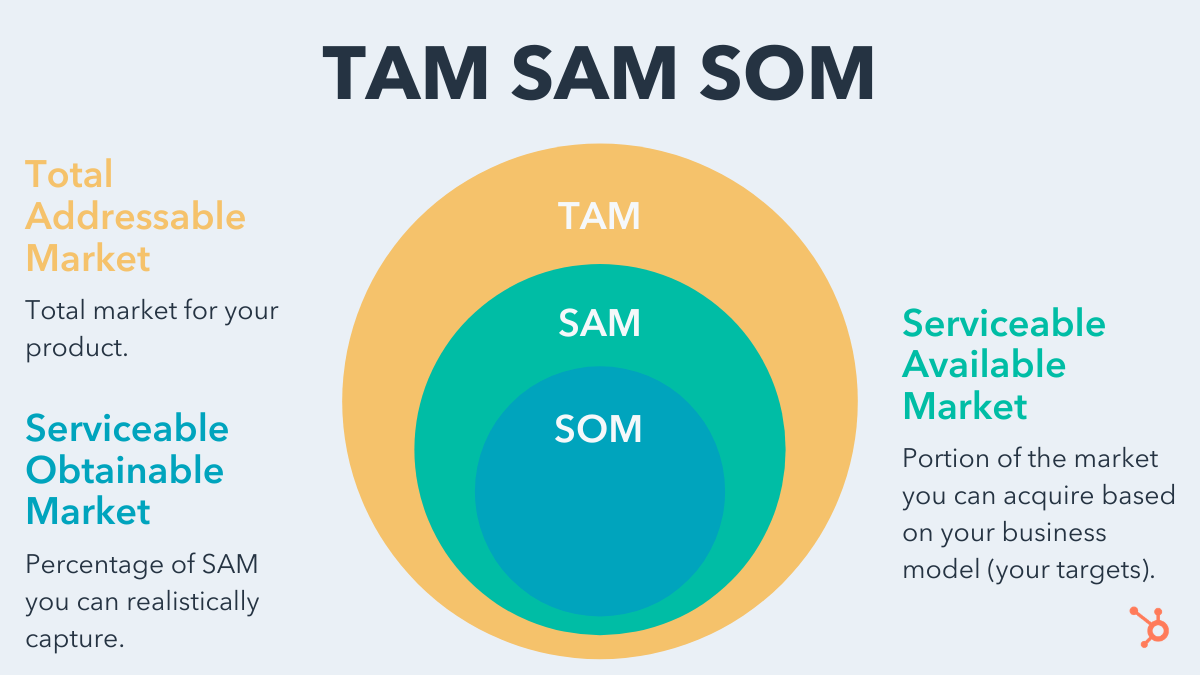
TAM (Total Addressable Market)
Total addressable market or TAM refers to the total market demand for a product or service. It’s the maximum amount of revenue a business can possibly generate by selling their product or service in a specific market.
Total addressable market is most useful for businesses to objectively estimate a specific market’s potential for growth.
SAM (Serviceable Addressable Market)
Due to the limitations of your business model (such as specialization or geographic limitations), you will not likely be able to service your total addressable market.
Serviceable addressable market is most useful for businesses to objectively estimate the portion of the market they can acquire to determine their targets.
SOM (Serviceable Obtainable Market)
Unless you’re a monopoly, you most likely can’t capture 100% of your serviceable addressable market. Even if you only have one competitor, it would still be extremely difficult to convince an entire market to only buy your product or service. That’s why it’s crucial to measure your serviceable obtainable market to determine how many customers would realistically benefit from buying your product or service.
Serviceable Obtainable market is most useful for businesses to determine short-term growth targets.
TAM SAM SOM Template
Now that you know what each of these acronyms are and what they’re used for, let’s get into the nitty gritty on how to calculate TAM, SAM, and SOM. Doing so requires advanced market research ahead of time, but here are the formulas once you’re able to obtain those figures:
Total Addressable Market (TAM) Calculation
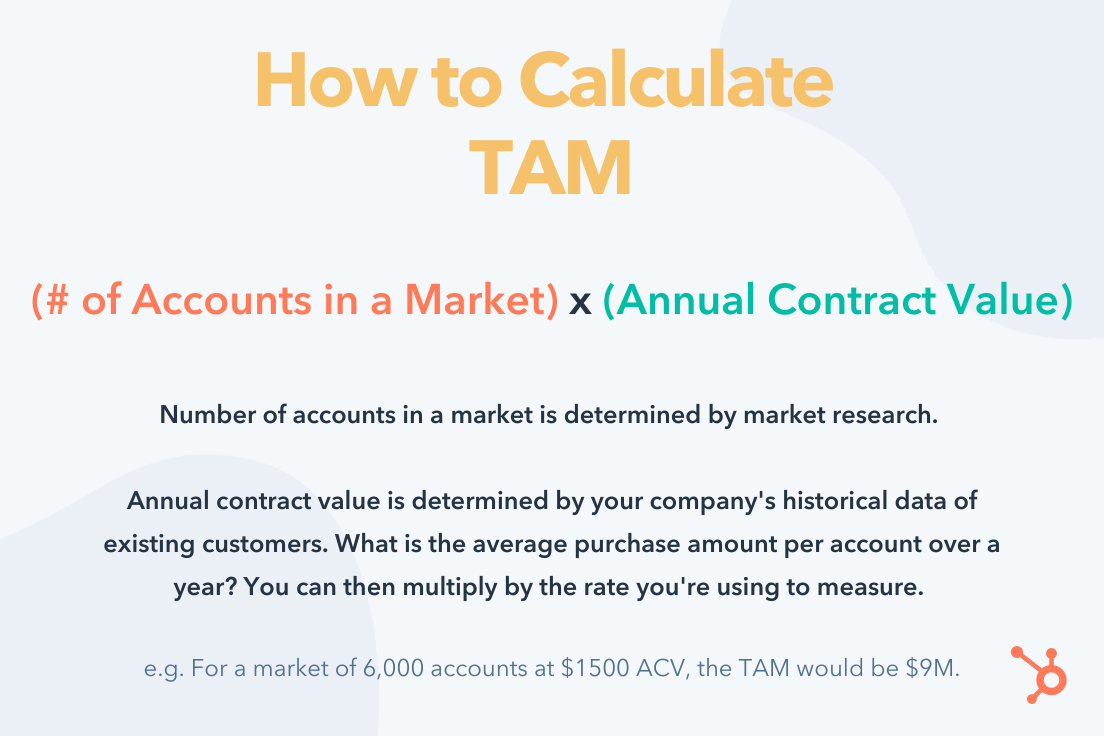
The best way to calculate total addressable market is by running a bottom-up analysis of an industry. A bottom-up analysis involves counting the total number of customers in a market and multiplying that number by the average annual revenue of each customer in this market.
Serviceable Addressable Market (SAM) Calculation
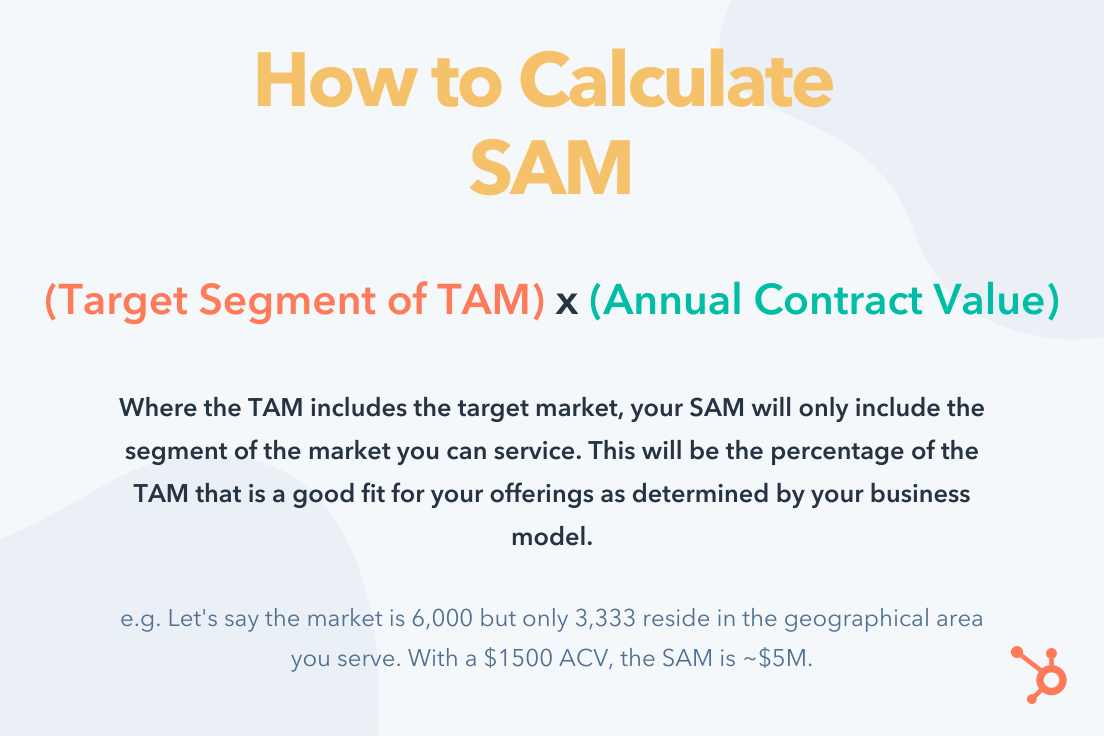
To calculate your serviceable addressable market, count up all the potential customers that would be a good fit for your business and multiply that number by the average annual revenue of these types of customer in your market.
Serviceable Obtainable Market (SOM) Calculation

Divide your revenue from last year by your industry’s serviceable addressable market from last year. This percentage is your market share from last year. Then, multiply your market share from last year by your industry’s serviceable addressable market from this year.
Keep in mind that these figures will largely be estimates to inform your strategy. The more market research you do and the more historical data you build up, the more precise your planning will be.
Editor’s note: This post was originally published in March 2019 and has been updated for comprehensiveness.


What Is an SRT File, & Why Is It So Important for Video?
Nowadays, subtitles are becoming increasingly common, particularly as businesses expand their marketing efforts and aim to reach a broader, global market. Additionally, subtitles are often necessary to ensure your video and audio files are as inclusive as possible.
Fortunately, there’s an easy solution to adding subtitles to video — an SRT file.
To ensure your videos are inclusive and easily digestible for any audience, it’s critical you include an option to watch with subtitles. Here, we’ll explain what an SRT file is, and how to create and edit one for your marketing videos moving forward.

What is an SRT File?
An SRT file (otherwise known as a SubRip Subtitle file) is a plain-text file that contains critical information regarding subtitles, including the start and end timecodes of your text to ensure your subtitles match your audio, and the sequential number of subtitles.
It’s important to note, an SRT file is just a text file you would use alongside video or audio — it does not also include the video or audio you’re subtitling.
How to Create an SRT File
- You can create an SRT file in any text editor, including Notepad, TextEdit, and Notepad++.
- Open a text editor of your choice, and order each line of your subtitles, starting with 1.
- Next, put the time the subtitle begins, then “–>”, and the time it ends.
- Format your timestamp like this — “hours:minutes:seconds,milliseconds”.
- Below your start and end timestamp, put your first line of text.
SRT files can be created from scratch or downloaded and edited. Before we get into the basics of editing SRT files, let’s take a look at what an SRT file looks like and how it’s formatted.
SRT File Example
Generally, Wordpad or Notepad are the easiest programs to open SRT files with because you can view them in plain text. However, you can also use software specific to SRT files such as Subtitle Workshop (more on this later).
In order for an SRT file to work in conjunction with the video or audio file it’s paired with, it must follow a specific format consisting of:
- The line number
- The time range where the line should appear in the video
- The text that should appear on the line
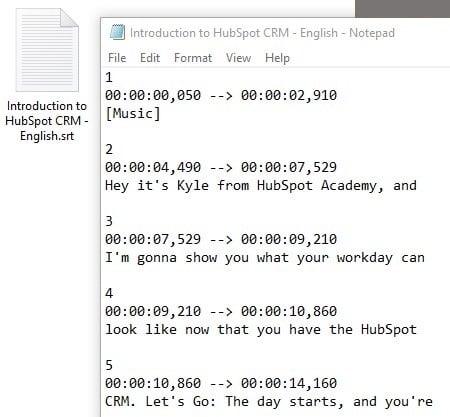
The timestamp is formatted like so with the milliseconds rounded to three decimal points:
Hours:Minutes:Seconds,Milliseconds
The timeframe is formatted like so with an arrow denoting range:
[First Timestamp] –> [Second Timestamp]
The arrow must consist of two hyphens and a right-pointing angle bracket (also known as the greater-than sign or carrot).
If you’re creating one from scratch, feel free to copy and paste this sample SRT formatting:
00:00:00,000 –> 00:00:00,000
[Insert your first line of text here, and don’t forget to change the timestamps.]
2
00:00:00,000 –> 00:00:00,000
[Insert your second line of text here, and don’t forget to change the timestamps.]
If you notice your subtitles don’t align with your audio, or you need to change the phrasing, it’s easy enough to edit your SRT file. Consider using Subtitle Workshop or another subtitle editor of your choice.
Alternatively, if you don’t want to download an editor, you can open your SRT file in Notepad. You can change the time and phrases within the file, but don’t change the punctuation. Then, click “File” → “Save as”, and choose the SRT file extension.
How to Edit an SRT File
- Download Subtitle Workshop.
- Find “File” and then select “Load Subtitle” to insert your SRT file.
- Click “Movie” and then “Open”, and select the corresponding video file.
- Next, select “Edit”. You can choose from Timings, Texts, Subtitles, or Translations.
- Adjust the time or the text on each line.
Captions are one element that you can include in your video marketing strategy that makes your content more inclusive and valuable to your audience.
Editor’s note: This post was originally published in December 2018 and has been updated for comprehensiveness.

Why HubSpot is Acquiring The Hustle
The battle for customer attention has never been so fierce.
We’ve seen an explosion in brands using online channels to promote their services and products to potential customers.
The problem with this model is that you’re not only battling other competitors for that attention; you’re competing against every site that publishes informative videos, the latest trends, and educational content that serves the needs of their audiences.
We’ve built HubSpot on the belief that you earn attention by being of value. That belief is at the very heart of HubSpot’s success; creating remarkable content is what makes a remarkable brand. It’s why we’ve invested in publishing blogs, courses, ebooks, templates, and videos that help generate millions of visits to HubSpot every month.
We can’t stop there, though. Just as the product requirements of growing companies have changed over time, so have their content needs. Newsletters, podcasts, premium content, and other media have exploded in popularity for startups and scaleups looking for best practices and tech news.
So how can companies adapt to this change? We believe that the next generation of software companies will invest in media that earns the attention of their audience. Instead of the traditional model of having a software company embedded inside of a media company, we predict that the next generation of tech companies will have the opposite – a media company embedded inside a software company.
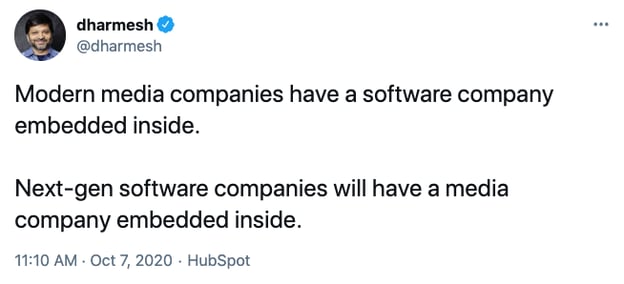
We’re taking our first steps in that direction today with an acquisition that we believe will help HubSpot deliver on the diverse content needs of entrepreneurs, startups, and scaleups across the mediums they love.
HubSpot has signed an agreement to acquire The Hustle, a much-loved media company whose mission is to inspire the next generation of entrepreneurs and innovators.
Traditionally, a B2B company’s marketing plan was focused on getting their product into decision-makers’ hands and convincing them to buy it. The majority of content published were whitepapers, functional specs, and content that helped their buyers make a purchase decision. Companies spent their time and resources building relationships with a small group of people who were actively looking for a product to buy.
Over the past decade, we’ve seen huge changes in how B2B companies approach media, with an explosion in popularity of those developing media products paired with inbound marketing to build relationships with large audiences across all stages of their business flywheel (attract, engage, convert, delight).
Today, B2B brands can be a daily part of their customers’ lives before they even use their product. They can become a daily source of education and information for their customers. They can grow a large audience for that content by creating it for the people who buy their product and the many more who will use it. They can earn the attention of their audience by continually creating value for them.
As we considered how we could keep meeting our customers’ needs, we knew there was an opportunity to diversify the content we published and the mediums through which we delivered that content.
We started looking for potential opportunities to acquire media companies who had the talent and experience in the mediums we wanted to invest in. It became obvious to us that The Hustle perfectly met all those needs.
We loved The Hustle’s content. They have a daily newsletter that reaches over 1.5 million subscribers each day with the latest tech and business news. They’ve recently launched a premium content subscription named Trends, offering thousands of business ideas for the next generation of entrepreneurs and innovators. And they have a very successful business podcast, “My First Million.”
We were also incredibly impressed by the entire Hustle team – led by founder Sam Parr. Together the Hustle team has built an incredible product and loyal customer base. You can expect the same great content you’ve become accustomed to getting from The Hustle and HubSpot is excited to be a part of that.
We live in a busy world; it’s not easy trying to grow a scaling business and to keep on top of all the critical content that can help you be more successful. With this acquisition, we want to give our audience and customers the content they need in the medium they engage with most, whether that’s blogs, YouTube, newsletters, or podcasts. We’re excited about the current media products The Hustle has and the new ones we plan to launch together in the coming year.
It’s never been a more exciting time for a software company to become a daily part of their customer’s lives through media, and we can’t wait to continue innovating on how we earn the attention of our audience.
Learn more here.

How HubSpot Content Strategists Improve SEO
If you need help building a website, creating a company blog, or getting webpages discovered by search engines, there’s plenty of SEO training that can help you get started.
But, once your website is built and your customers find your content online, how do you improve your search ranking and reach a larger audience?
While keyword research, overlap tests, and link-building, are a must for creating an online presence, there’s much more you can do to increase the amount of traffic coming to your webpages.
That’s why we spoke to experts on HubSpot’s SEO team to learn how they’ve improved content strategy over time. Read on for a list of their tips that can help you rank higher on search engines and optimize the accessibility of your marketing campaigns.
How to Improve SEO Like HubSpot
1. Encourage visitors to search for your brand.
When your business is growing, it’s important to increase the share of unbranded searches coming to your website. These are keywords that aren’t specific to your brand, but they may be relevant to your industry.
For example, if you were a power-washing company located in Massachusetts, then you would want to rank for a search like, “best power-washing companies in New England.” While the name of your company isn’t included in this search, you would still want your website to appear in the search results when someone is looking for power-washing services in the New England area.
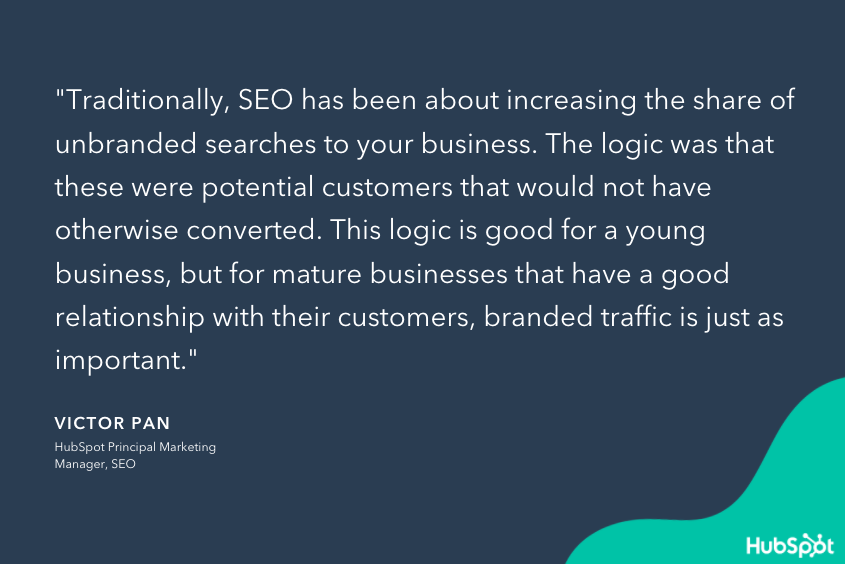
Once your company grows and develops stronger relationships with its customers, you can encourage branded traffic to your webpages. In fact, companies like Amazon have even influenced their buyers’ search habits, and now its customers add “amazon” to their search queries when researching products on Google. This ensures that the top result on the SERP is most likely a link to an Amazon page.
Your company can have a similar effect on its customers by becoming a thought leader and resource for topics related to your industry. For instance, if customers had questions about how powerwashing works, its benefits, when you should do it, etc. then our powerwashing company might have a blog that answers all of these questions. As people read these articles and become familiar with our content, they might amend their search queries to include the name of our company so they can access our content faster.
2. Update your content.
Search engines are constantly updating their algorithms and improving their tools to provide better search results for their users. This means that your content can become outdated within months to a year and the keyword research that you did when you first created a piece may change as search engines adapt over time. That’s why it’s important to regularly update your content, so you can keep tabs on its performance and ensure it continues to rank high on search engines.
When updating content, you should replace old statistics and outdated terminology, and fill in any content gaps that you may have missed when you first created the piece. You should also fix any broken links or images and make sure that the formatting and branding is consistent with your current content. Do this at a cadence that makes sense for you — for many teams, it’s every few months.
3. Analyze keywords beyond search volume.
When analyzing keywords, it’s easy to locked in on search volume and prioritize keywords with the most potential traffic. However, it’s important to look beyond just search volume and consider the intent of the keyword before you create content that’s targeted towards it.
Open an incognito window and search for your keyword. Look at the content that’s currently ranking for it and ask yourself if your content would fit with this SERP. If it doesn’t, then it might be hard to rank for this topic with the content you’re currently using.
Here’s an example. Let’s say our powerwashing company recently revamped its support team and we wanted to rank for the term, “progressive customer service.” While we could write alot about our new and improved service team, we probably won’t beat the insurance company, Progressive, from winning over this keyword. That’s because the intent behind this keyword is for Progressive’s service team and not for content related to the customer service industry.
4. Prioritize internal linking.
It’s easy to grow organic authority when publishing content consistently, but it’s just as easy to plateau if you don’t consider where it should be published. This is a form of SEO “tech debt” that can hamper your growth the bigger your site gets.
To avoid this setback, it’s important to audit your internal linking structure and identify different pieces of content that should be linked together. Adding links between internal pages helps search engines understand which content is related to one another as well as the keywords that these pages are targeting. It can also help Google index new pages faster if they’re linked from the right pages to begin with.
You can use a number of SEO tools to systematically find these opportunities and update the pages that matter most to your sales efforts.
5. Form strong relationships with your developers and designers.
As your online presence grows, you might be surprised to find your SEO team is working closely with your web developers and designers. This is expected, though, since SEO is influenced significantly by how your content is designed and maintained.
The better relationship between your SEO team and web designers, the higher your content will rank. After all, if your web developers understand the importance of SEO, then they’re more likely to listen to your SEO team’s advice when creating and designing new content.
At the very least, open communication between these two teams can be the key to more consistent digital growth. For example, if your web developers want to delete a page that has 500 backlinks, they should first check in with your SEO team to see if there would be any negative repercussions. Effective communication between your developers and your SEO team can help you avoid SEO headaches and maintain high search rankings.
6. Prune content after long periods of growth.
Not all of your content is going to hit it out of the park — and, that’s okay. Some content will fall shorter than expected and even though you update it, it might not obtain the amount of traffic you were originally hoping for.
As this content piles up, it can impact the speed and performance of your website. If it does, then you might want to consider pruning these pages so that they don’t adversely affect user experience. Even though you’ll forfeit a small amount of traffic from these pages, you’ll likely save alot more by improving the user experience on your other, more popular pages.
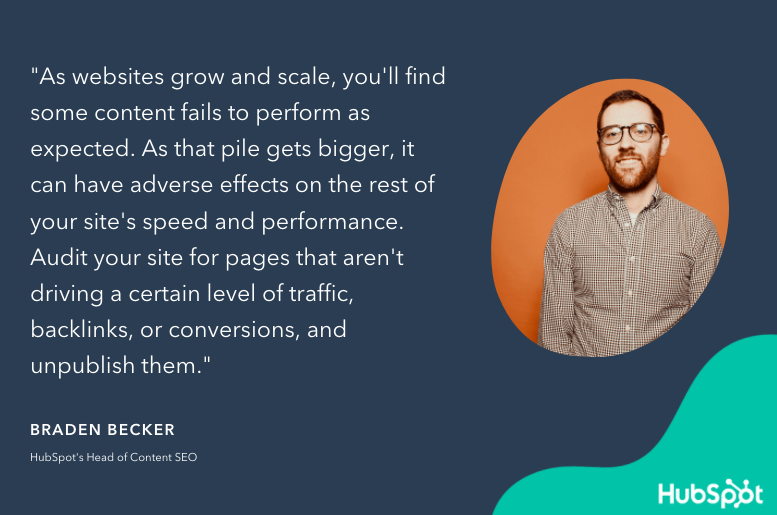
7. Optimize Search-Friendly Content.
Not everything that you publish is going to be search-friendly — like ad landing pages, thank-you pages, internal sales enablement pages, and login pages. These pages aren’t typically target by search engines and therefore aren’t as important to optimize for search.
Instead, you should focus your attention on pages that are search-friendly. These are the ones that search engines are looking for and they play a much bigger role in the customer experience. If you can get this content in front of your target audience, they’ll eventually discover your other pages as they continue to explore your site.
Optimizing Your Content Strategy
SEO is always a work in progress. So long as search engines continue to update their algorithms, marketing teams will have to create content that’s not only relevant to their audience but can be easily discovered, too.
While SEO marketing software can help brands shape their content strategies, ultimately it will be up to marketers to create effective content that ranks high on search engines and attract new leads for their business.
For more ways to improve your content’s search ranking, read these SEO tips.