
Experts Share Their Top 8 Holiday Email Marketing Tips for 2020
Ready or not, the holidays are right around the corner. And that means it’s time for email marketers to start planning one of their biggest email campaigns of the year.
To help you prep for all the holiday madness to come, the team at Uplers asked a group of seasoned email experts and industry insiders to share their insights on Holiday Email Marketing Tips and Trends for 2020.
Check out their advice for holiday email trends below, and get inspired to tackle your company’s holiday campaign with style.
The Top 8 Holiday Email Marketing Tips of 2020
1. Start planning way before you think you should.
Planning well in advance goes a long way, giving you enough time to ensure your email really stands out.
“Do get started on your holiday email marketing strategy and planning early,” advises Christopher Donald, the President of Operations & Managing Partner at InboxArmy. “Create planning, creative, production, and deployment calendars to better execute your campaigns. Don’t wait until the last minute to decide what to do.”
2. Focus on the customer, not an aggressive sales agenda.
Marketers send more emails than usual during the holiday season, but it’s important to remember that there’s a real person at the other end of your email communication. The holidays are a busy, hectic time for everyone (not just marketers!) and they probably won’t appreciate having their inbox flooded with hard-sell emails. Respect their time, and adopt a helpful, customer-centric approach.
Kara Trivunovic, VP/GM Client Services, Global Industry Evangelist at Epsilon, believes you need to find out what the subscriber expects from you during the holidays rather than driving your agenda of selling.
It’s the holiday season, after all, so you can’t just pen down some sales-oriented copy and call it a day. Tap into your subscribers’ emotions, and focus the copy on how you can help them spread joy through the gifts they can buy from you. Even a simple holiday greeting can go a long way in building trust with your customers.
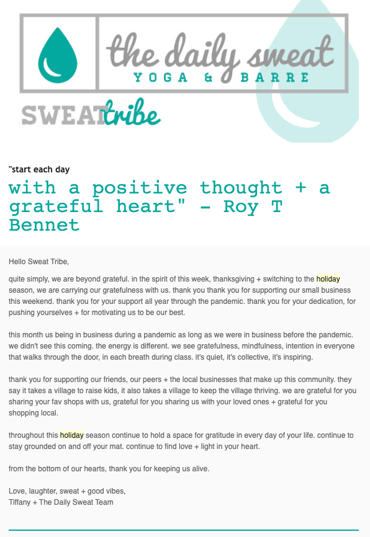
For instance, take a look at this email from Kennebunk-based yoga and barre studio The Daily Sweat, which expresses gratitude towards consumers and wishes recipients’ a happy and safe holiday season:
3. Interactivity and fallback go hand in hand.
Visual, interactive elements like GIFs, cinemagraphs, and gamification will add interest and flair to your holiday messages this year.
Interactivity in emails is an engagement tactic that will help to drive attention and generate excitement during this holiday season, according to Uplers Director Jaymin Bhuptani.
Innovate content with the help of a drop-down Menu, Accordion, Slider, Flip Effect or maybe gamification in your email. However, with limited email client compatibility, it is essential that you provide fallback support, says Lauren Gentile, VP Creative, Digital solutions at Epsilon. And yes, test, test, and test some more before you send out the emails.
4. Segment and rule.
Segmenting your lists to ensure the content appeals to the recipient is essential all year long, but it becomes even more important during the holidays, when emotions run high.
If you’ve been keeping track of information like what your subscribers browse for on your website and what they’ve purchased from you, segmenting will not seem like a Herculean task. The better you know your subscribers’ preferences the better you can segment them and send targeted emails during the holidays, which will ultimately lead to better, more qualified conversions.
“Data is obviously key all year round, but when it comes to the holiday season, focusing your efforts on key customer groups could be more fruitful and a better use of resources,” explains Tink Taylor, the Founder and President of Dotmailer.
5. Get personal.
According to Shanon Strahl, Senior Digital Marketing Leader at Shaw + Scott, personalization will play a pivotal role in the success of your email campaign this holiday season.
Dynamic content created on the basis of subscribers’ likes and needs is bound to create a great impression of your brand in the minds of the subscriber and also generate a better ROI for you.
Customize your offers and deals according to the behavioral data you have at hand, or if you don’t have any, ask them what they like or what they would like to see in your holiday emails.
Update the content of your triggered emails. What if someone is signing up to receive your emails around the holiday season? You wouldn’t want to send them your regular welcome template, would you? Don’t let your new subscriber miss out on the holiday fever and holiday-specific promotions.
6. Take the responsive route (it’s not just an ‘option’ anymore!).
Imagine a subscriber opens your email on a smartphone or iPad and sees a broken design. This is certainly not the user experience you are wanting to provide, especially not during the peak holiday season! What if the subscriber unsubscribes?
Dennis Dayman, Chief Privacy Officer at ReturnPath, is of the opinion that since 46% emails are now opened on mobile devices, there’s no option but to create a responsive design. If you’ve never designed a responsive email before and don’t have a developer at your disposal, these tips can help you keep it streamlined and simple:
- Single column layout
- Minimalist design
- User-friendly navigation and CTA buttons
- Compact images with proper alt-text
7. Get real with real-time content.
The use of real-time content is increasing, powered by the robust technology to support its integration into emails. “Real-time content can let your emails reflect changes in inventory, among other benefits, which is a major concern for holiday shopping,” explains Ryan Phelan, Vice President, Marketing Insights at Adestra. “Having more control over the message means we can make email a more realistic experience instead of the moment-in-time experience it is now.”
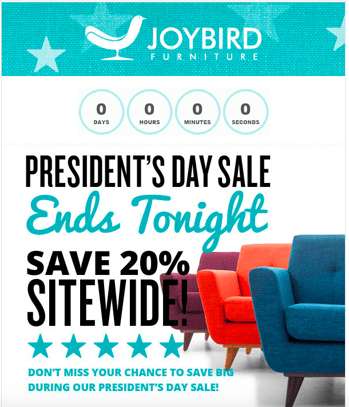
Adding a dynamic countdown timer is a great way to create urgency in emails, and there’s no better time to use them than the holidays. Use a timer to promote your sales, shipping deadlines, etc.
Take a look at this countdown timer in Joybird’s email. Doesn’t it create urgency?
8. Break the boundaries of email and go social.
Your subscribers are looking for gifts for their loved ones (and maybe even themselves too!). But as any holiday shopper knows, you need to browse around for the perfect gift. Offer your subscribers multiple ways to connect and stay in touch, reminding them of your product at every stage of the shopping season.
“Combine social media with email marketing and you’re onto a winner! However, don’t hijack any trending hashtags without robust prior planning and outcome analysis,” advises Sam Hurley, Founder, OPTIM-EYEZ.
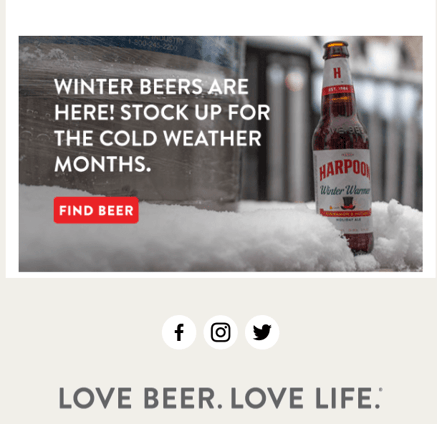
For instance, this holiday-themed Harpoon Brewery email includes its social buttons, so subscribers can connect with them on the platform of their choice.
 Ultimately, you’ll want to drive additional value and a sense of empathy for email subscribers this holiday season for a lasting effect year-round. From all of us here at HubSpot, happy holidays.

31 Secret Santa Gift Ideas Your Coworkers Will Love
They see you when you’re Slacking. They know when you come in late. They know if you’ve been bad or good, so be good for your work’s Secret Santa exchange …
But that’s not how the song — or the Secret Santa exchange — really goes …
You spend all day with your coworkers, but come time for your annual gift exchange, you’re stuck trying to figure out exactly what Suzie will want that’s also in your price range.
We want to help, so we’ve compiled a list of awesome Secret Santa gift ideas that are bound to meet all different budgets and personality types. From hot sauce kits to leather mouse pads, this roundup should take some of the stress out of your shopping experience.
31 Secret Santa Gift Ideas for Your Coworkers
$10 and Under
1. Engraved Pencil Set
Price: $8.00
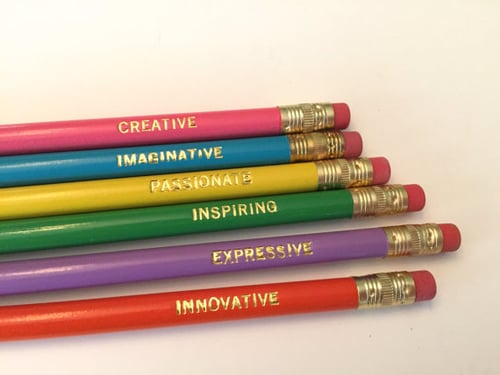
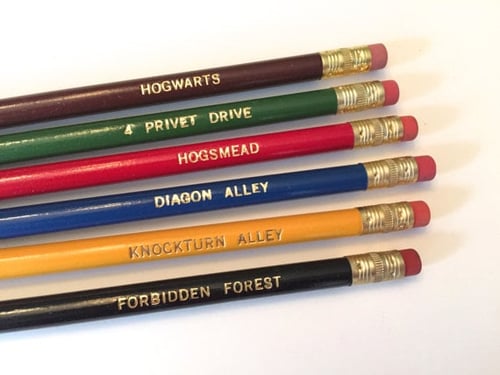
Whether you type your notes or take them by hand, these hand stamped pencils are just plain cool. The sets come in a variety of different themes — from motivational words to Harry Potter references — and they’re guaranteed to make putting together a to-do list a lot more fun.
Willing to chip in a few extra bucks? Pair a set of these pencils with a journal for a thoughtful and practical gift.
2. Toaster Grilled Cheese Bags
Price: $9.99
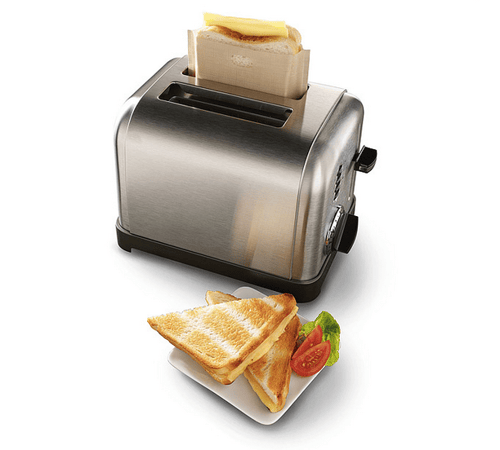
While almost every office has a toaster, few have a stovetop. This rules fresh, delicious grilled cheese off the list of lunch options … or does it? When you give the gift of toaster grilled cheese bags, your recipient can toast up the perfect sandwich in minutes. The reusable, Teflon-coated bags can also be used for heating up other foods like pastries and leftover pizza.
Got a gluten-free coworker? They can even protect their food from cross contamination using these handy bags.
3. Printed Socks
Price: $8.00
Nothing beats a great pair of socks, am I right? Not only does everyone need them, but there’s also such a wide variety of options available online that you’re bound to find a pair for any and every personality.
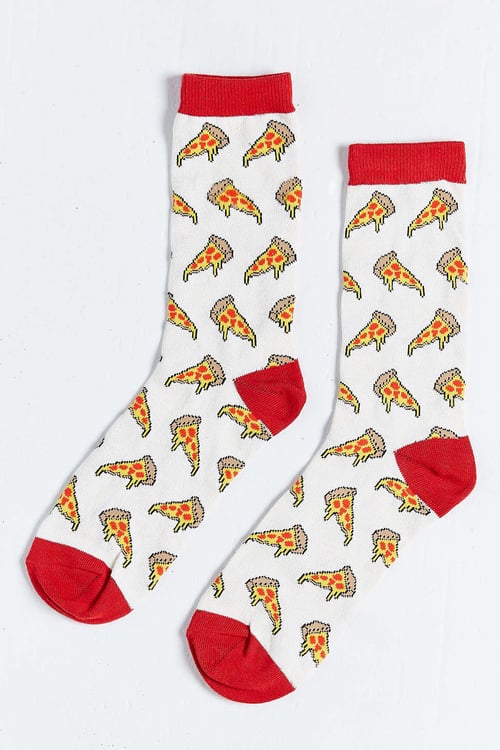
Know of a few pizza lovers in the office? This pepperoni-clad pair would make the perfect gift.
4. Sushi Pushpins
Price: $9.00
Shopping for the office sushi addict? Look no further than this trendy desk trinket.
Stuck in a maki cushion, each pearl-shaped fish egg is a pushpin in disguise. Pin up your favorite notes, photos, and menus using these handy tacks — or just admire the holder on your desk.

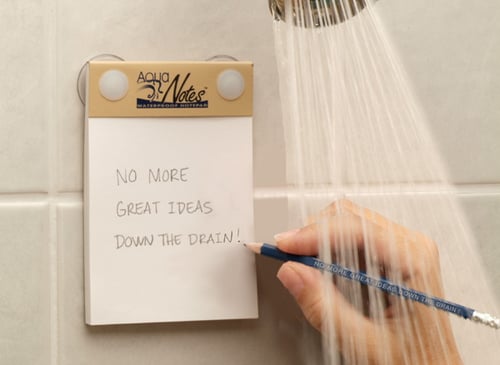
5. Waterproof Notepad
Price: $7.00
You never know when your next great idea is going to strike. In fact, it might even be the shower.
With a waterproof notepad from AquaNotes, you can jot down important shower notes before they slip your mind — perfect for whipping up impromptu grocery or to-do lists.
6. Tech Cloth
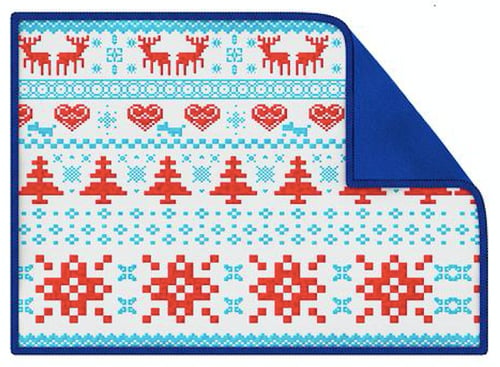
Price: $9.99
Between oil, dust, spills, and smudges, our devices take a beating. But with a Smart Cloth on hand, you can polish up the screen on your smartphone, tablet, camera, or computer without having to worry about scratching the surface. No liquids or sprays needed.
You can even toss The Smart Cloth in the wash, making it easy to keep germ-free.
7. Reusable To Go Box
Price: $9.99
There’s no shame in brown bagging your lunch at work, but why opt for a brown bag when you can reheat last night’s homemade Pad Thai in style?
This eco-friendly container is reusable, microwavable, and dishwasher safe. What more could you want?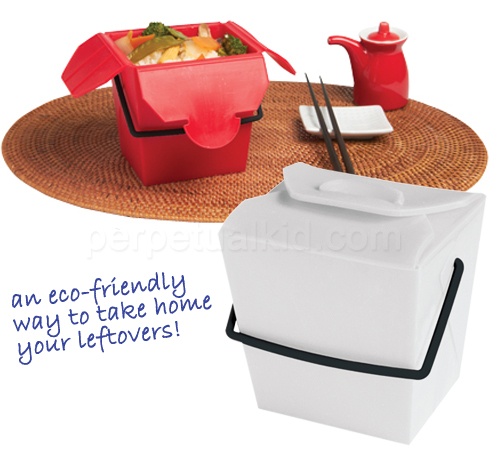
8. Portable Hot Sauce
Price: $9.99
Coming from a hot sauce addict, there’s nothing worse than suffering through a bland meal without access to your favorite spicy condiment.
Thanks to this convenient set of Sriracha2Go key chains, you can carry a personal stash of the good stuff around with you at all times. Simply toss it in your purse or attach it to your keys to ensure you’ve got access to heat when you need it most.

9. Dry Erase Sheets
Price: $6.16
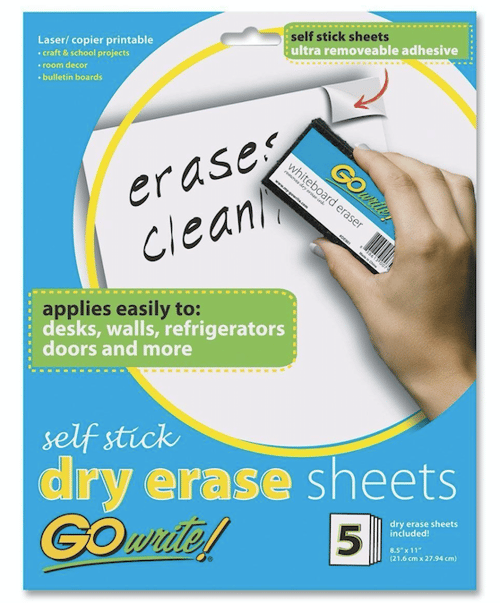
Use these sheets as an impromptu discussion tool, a place to post motivational quotes, or a home for your to-do list. Each sheet has a full-adhesive backing that leaves behind no residue, making them easy and convenient to tack up in the office or at home.
10. Cord Keeper
Price: $9.99
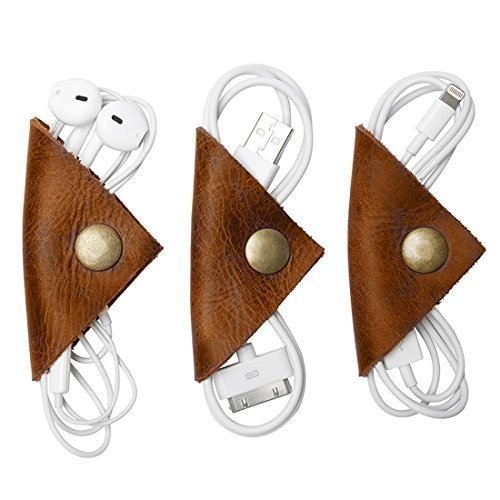
While the world of technology continues to push us in the direction of a more wireless world, we’ve all got a pair of standard headphones we keep holding on to — no matter how tangled the cord gets.
Lucky for all of us, these handmade cord “wontons” exist to help keep our headphones, USB cords, and other accessory wires nice and neat. They come in a pack of three, so you can throw one in your car, keep one on your desk, and toss one in your bag.
$25 and Under
11. Salsa Grow Kit
Price: $12.00
Got a coworker with a green thumb? Gift them this awesome salsa growing kit, complete with six seed packets for Roma tomatoes, jalapeños, verde tomatillos, cilantro, scallions, and beefsteak tomatoes.
Once the seeds sprout in the recycled egg carton planter, transfer them into larger pots until they’re ready for picking.

12. Wine Infused Coffee
Price: $19.95
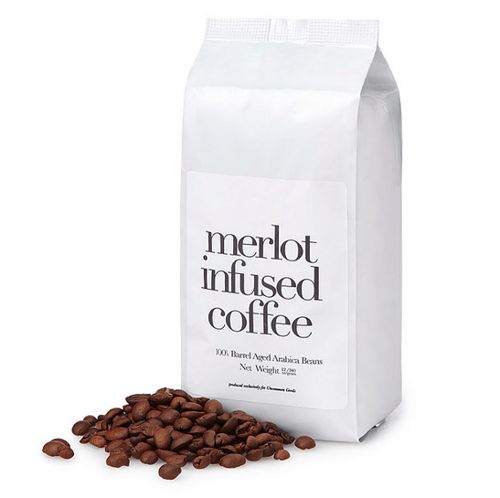
Gift hunting for a coffee drinker who also loves wines? Why not pick up a bag of Merlot-infused coffee beans.
This brew is made with 100% Arabica beans that are aged in oak wine barrels. Serving as the perfect post-meal treat, this unique gift will be a hit with any adventurous coffee enthusiast.
13. Plant Nanny
Price: $16.95
Don’t let the burden of watering plants keep your coworker from taking time off to relax and recharge. With the help of these terracotta watering stakes, they can throw on their OOO message and hit the road without having to hire a plant sitter.
How does it work? It’s simple: The stakes house a recycled bottle that’s designed to release just enough water to keep plants alive and well.

14. Smartphone Card Game
Price: $19.99
The name of the game is “Game of Phones.” And the rules are pretty straightforward: Grab your smartphone and have one player (the judge for the round) draw a card. Everyone else gets 60 seconds to dig up a funny response to the prompt on the card using their phone. It’s like a digital scavenger hunt — and it’s bound to be hilarious.
This one’s perfect for anyone who loves to host friends or family for game night.

15. Travel Cup
Price: $14.99–$19.99 (+$3.99 for travel lid)
There are a ton of travel mugs out there to choose from, but Tervis tumblers seem to offer it all: customization, portable cooling, self-warming system, dishwasher armor, and a lifetime guarantee.
Whether you’re buying a gift for an avid golfer, shopper, foodie, or Patriots super fan, there’s bound to be a Tervis that lines up with their interests and personality.

16. Adult Coloring Book
Price: $12.18 (Paperback)
Coloring isn’t just for kids anymore. Believe it or not, this trendy hobby offers more than a dose of nostalgia — adult coloring books are actually believed to relieve stress, too. In fact, while The American Art Association doesn’t think these books are enough to replace therapy for those who need it, it does support the use of coloring books for “pleasure and self-care.”
There are a wide variety of books to choose from, but we recommend “Color Me Calm” by Lacy Mucklow: a Zen coloring book that supports meditation and relaxation. Trust us, your stressed out deskmate will thank you.

17. Fruit Infuser Water Bottle
Price: $18.65
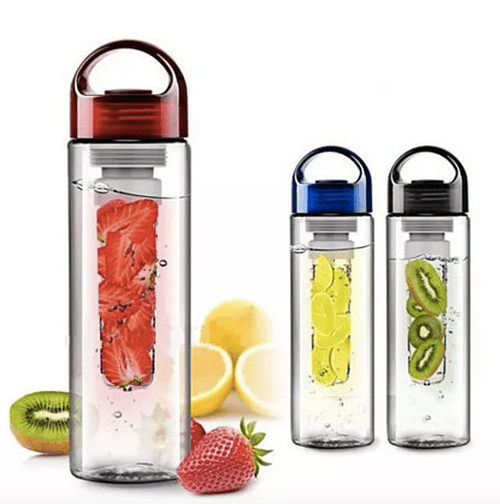
Stay hydrated and enjoy the sweet taste of your favorite fruits with this handy water bottle from Fruitzola.
Fill the inside tube with fruit or a combination of your choice — strawberries, lemons, kiwis, watermelon, and mint all work well — and enjoy the taste of fresh, flavored H20 all day.
18. Musical Pillow
Price: $19.19
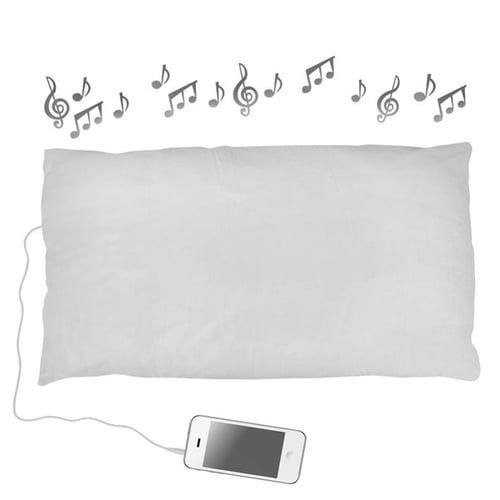
For many, listening to music, a meditation app, or a podcast before bed can make it easier to drift off to sleep. Trouble is, it’s tough to get comfortable with a pair of headphones in.
Enter: The Sound Asleep Pillow.
Deep inside this unique pillow lies a built-in speaker that connects to your phone or music player via a headphone jack. The coolest part? The sound from the speaker is only audible to the person resting their head on it, which is great if you don’t want to disturb your spouse or significant other.
19. Espresso Sampler
Price: $23.00
Treat your coworker to this four-part specialty espresso sampler from Seattle’s world-renowned roasters. Each sampler comes with tasting notes, roaster profiles, and brewing tips. (If you’re lucky, maybe they’ll share.)

$50 and Under
20. Smartphone Projector
Price: $31.95
Transform your smartphone into a big screen projector with this retro-inspired cardboard structure. Simply slide your device into the compartment for an instant cinema-like feel.
You can make this gift even better by throwing in a box of popcorn to complete the viewing experience.

21. Make Your Own Hot Sauce Kit
Price: $34.95
Whether you’re making chili for a rainy day, wings for the big game, or tacos for Tuesday’s dinner, a little homemade hot sauce can make all the difference.
With this awesome kit, recipients can whip up six signature sauces that are seasoned to their exact liking. The kit even includes customizable labels for a fun, personalized touch.

22. Bottle Loft
Price: $38.00
Seriously, how cool is this? These handy storage strips adhere to the ceiling of your refrigerator and can hold up to a six pack of bottles of your choice. Plus, the magnets are super strong: they can hold over 3X the weight of an average 12 oz. bottle.
With all the space you’ll save, you’ll have plenty of room for snacks. It’s the perfect gift for your office beer enthusiast.

23. Leather Mouse Pad
Price: $36.00
Looking for a sophisticated, practical gift option? Grab a leather mouse pad from Ugmonk’s shop.
Not only does this sleek pad provide a smooth surface for your mouse, but the leather is also known to weather and darken slowly over time to take on a one-of-a-kind look. How cool.

24. Gourmet Marshmallows
Price: $30.00
Step your hot chocolate game up with a box of gourmet marshmallows. From boozy flavors like bourbon to sweet flavors like eggnog, these handcrafted marshmallows are good enough to eat straight from the box.

25. Streaming Stick
Price: $49.99
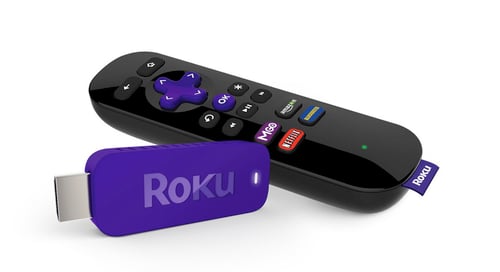
The Roku Streaming Stick works with any television that has an HDMI port, and offers over 1,200 apps, including Netflix, HBO Go, Hulu Plus, Pandora, and many more. It’s a perfect gift for nearly any coworker.
26. Tea Drops
Price: $34.00
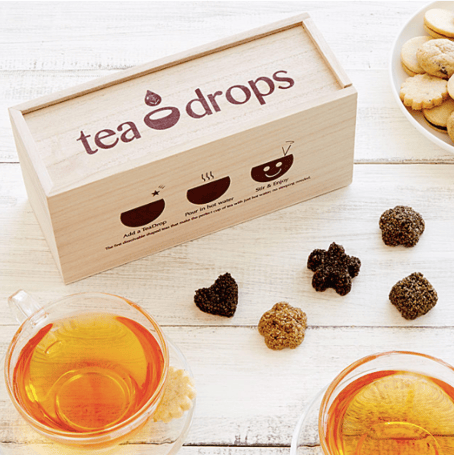
Enjoy hot and fresh tea on the go thanks to these dissolvable, pressed tea drops. Made from just a few simple ingredients — finely-sourced tea, sugar, and spices — these tiny morsels are perfect for a busy coworker looking for an easy, healthy beverage to sip on.
This particular sampler set includes five drops of each of the following flavors: citrus ginger, vanilla white, rose earl grey, sweet peppermint, and matcha green tea.
27. Insulated Stainless Steel Water Bottle
Price: $35.00 (17 oz.) / $45.00 (25 oz.)
We’ll admit it, we actually have a crush on this water bottle from S’well. Yes, a water bottle crush. Not only is it sleek and stylish — it comes in tons of colors and prints — but it’s non-toxic, non-leaching, vacuum sealed, and BPA free.
What’s more, it keeps your drinks cold for 24 hours, and hot for 12.

28. Wireless Speaker
Price: $39.99
Wireless speakers are the perfect gift for anyone in your office. Whether they use it to listen to podcasts while they cook, bring tunes to the beach, or create a custom surround sound movie experience, this little Jam Plus speaker packs a big punch. (Full disclosure: I love this speaker so much I bought another one … and one for my brother.)

29. Cacti Coasters
Price: $31.00
Help your coworkers keep their desk nice and neat with this buildable set of cacti coasters.
The set comes complete with six green leaf coasters that you can mix and match to create different landscapes within the pot. Build them up or stack them close, they’re there when you need a place to put your drink — and still look really cool when you don’t.

30. Mobile Lens Kit
Price: $26.00
If you pulled your social media manager’s name out of the Secret Santa hat, we’ve got just the thing: Help them up their Instagram game with this handy mobile lens kit. The kit includes fisheye, wide angle, and macro lenses, complete with a universal clip that’s compatible with most smartphones and tablets.

31. Couch Cup Holder
Price: $23.00
Here’s an idea you might not know existed, but that everyone you work with can benefit from. With as much time as we spend curled up on a couch this season, you’d think more upholstery would have built-in drink holders. Until they do, buy a CouchCoaster. This item costs less than $25 and fits over most couch and chair arms.

Pollyanna Gift Ideas
Now, we don’t recommend “pollyanna gift” exchanges for every workplace — especially those with tight-knit friendships. Sometimes you want to pair up with a colleague who just you know will love what you get them.
Pollyanna gifts are a bit more unpredictable than the classic Secret Santa, but can be fun if you go in with an open mind. Also known as Yankee Swap, this version of Secret Santa calls for each employee to purchase an item that could be of common interest to everyone participating. Then, each person wraps their purchased gift in gift wrap and places it underneath the Christmas tree. One by one, each person is given the opportunity to open a new gift from under the tree or claim a gift that was already opened by somebody else.
It’s not the most personal gift-giving ritual, but with a grab-bag of generic gifts to choose from, nobody really gets hurt (tip: it’s encouraged to go into this game with a price limit, wherein nobody spends more than a certain amount on the gift they buy).
Here are some pollyanna gift ideas for your colleagues if this is more your company’s style.
- Insulated thermos
- Deck of cards
- Cast iron skillet
- Incense kit
- Carabiner kit
- Scented candle
- Selfie stick
- Wooden cutting board
- French press coffee maker
- Apple App Store Gift Card
- Leather notebook
No matter what you get and what you give this Christmas, it’s time to have as much fun with your colleagues this month as you do with your family on December 25. From all of us at HubSpot, have a safe and merry Christmas, happy holidays, and a happy New Year.
Editor’s note: This post was originally published in December 2015 and has been updated for comprehensiveness.

Most Consumers Changed Brands in 2020: Research Explains Why
Now that 2020’s global pandemic has taught most of the world how to live and work completely from home, marketers planning their 2021 strategy are asking one big question:
“Will this uncertain time change the way people spend money?”
McKinsey — which recently polled consumers in over 48 countries about their 2020 spending habits — says, “Yes.”
One of the biggest findings in the McKinsey study was that 75% of consumers have changed brands at least once during the pandemic.
McKinsey’s research also noted four other key shifts in consumer spending behavior that could majorly impact brands in the near or far future.
In this blog post, we’ll walk you through all five shifts noted in the McKinsey study, while giving our insights on how marketers and brands can navigate them.
How Purchasing Behaviors are Changing in 2020
1. Brand loyalty is being tested.
At the beginning of the pandemic, as entire cities began to close non-essential businesses, consumers raced to stores or hopped online to order essential products they’d need in the coming months. This caused a major disruption in supply chains and product shortages around the world.
And, even in the earliest days of the pandemic, consumers were paying heavy attention to how companies handled shortages and bursts in product demand.
While some brands saw an influx of new customers that they once lost to bigger competitors, other companies lost customers to because they simply couldn’t keep up with a high demand.
“Over 60% of global consumers have changed shopping behavior, many of them for convenience and value. In the US, the percentage was 75%,” the McKinsey study notes.
When it comes brand shifts outside the U.S., a whopping 91% of Indian consumers and 82% of Chinese consumers say they’ve changed brands at least once since the beginning of the pandemic.
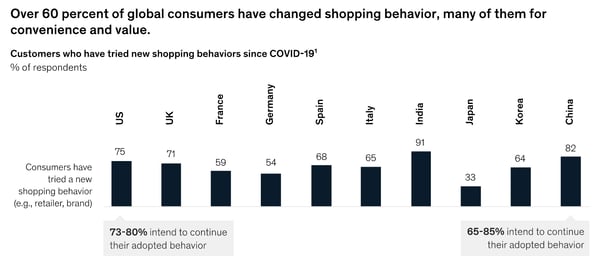
According to McKinsey, the top three reasons consumers changed their habits or brands were value, availability, and convenience.
As you can guess from the data points above, the risk of losing a customer to another brand is higher than usual in 2020. Even if a product appears essential or valuable to a prospect, they might not buy it if another brand can deliver a similar item faster.
How Brands are Navigating
At this point, some large brands are working to better align teams to ensure that products can be discovered, ordered, and delivered quickly — even in times of high demand. Meanwhile, some smaller brands are making their products more available online and in-stores to prospective customers who can’t get an item quickly enough from brands they’ve used in the past.
According to a post from Repsly, which included data from anonymous name brands, companies that thrived in 2020 used data and company-wide communication strategies to identify areas at risk of high product demand around March and continued to align with teams including marketing, service, and supply chain teams to ensure their shelves and warehouses stayed stocked.
In another recent report from McKinsey, researchers similarly predict that successful high-demand brands will develop an integrated approach between their supply teams, sales, and marketing departments. McKinsey also discourages brands from raising prices in times of high demand and focusing on other vital business and customer experience strategies instead.
“Operational concerns may be even more important than pricing strategy, including stabilizing the supply chain, keeping products on the shelves, addressing customers’ urgent needs, and maintaining quality,” the McKinsey report explains.
2. Consumers aren’t rushing to grab their wallets.
Before the pandemic, Gen Z was the major age group that prioritized essential products over other purchases. Meanwhile, other generations were more likely to splurge on products based on their brand name or non-essential perks.
But, after business closures and financial uncertainty related to the pandemic, consumers in all generations are reconsidering spending habits.
Even as cities, businesses, and workplaces slowly reopen, shoppers plan to stay cautious about their budgets.
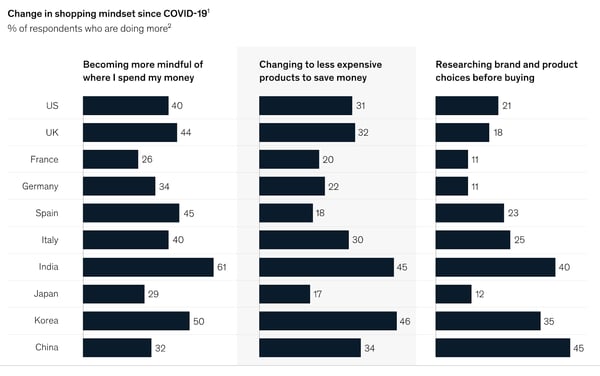
In the U.S. alone, 40% of consumers say they’ll continue to be mindful of where they spend money, while 31% plan to buy less expensive versions of items to save money. And, whenever they make those purchases, 21% of consumers aim to do more brand and product research than they had for pre-pandemic purchases.
How Brands are Navigating
While consumers might have made purchases with motives related to fun, entertainment, brand name, or other perks before the pandemic, many are now more budget-conscious than ever.
For the most part, consumers are primarily zoning in on essential product purchases. And, if someone does buy a less essential product, such as an item that entertains them, they’ll do thorough research to ensure they’re getting the best value for their money.
At this point, many essential and non-essential product companies have caught on to consumer budget concerns and have begun to leverage online marketing strategies to ensure that consumers can discover their products, learn about their value, and determine that they’re worth purchasing.
Particularly, companies that sell essential products have created campaigns, advertisements, and messaging reminding consumers of how important the items are. Meanwhile, companies that sell less essential items are getting creative to identify new value propositions for their products or brands.
For example, in the ad below, Procter & Gamble acknowledges the COVID-19 crisis, explains how it will be donating products to families and philanthropies in need, emphasizes the importance of their household and health items, and reminds viewers of how its brand has helped consumers disinfect their homes for generations:
https://www.youtube.com/watch?v=M4xF40TnlS0
The P&G ad is effective because it highlights that the brand offers affordable and available products that people trust for cleanliness, shows how the company is actively aiming to help people impacted by the pandemic, and reminds audiences of how essential its products are to global households.
In another example, Ice Breakers, a mint company that sells products that might be considered less essential, made an ad to highlight how eating mints before you put on a mask can prevent smelling your breath.
https://www.youtube.com/watch?v=yXU7JFKaSJQ
While the P&G campaign acknowledges why its brand’s products are essential to people around the globe, the Ice Breakers ad cleverly places new value into a non-essential mint product that people might not be rushing out to buy at this time.
3. Shoppers need ecommerce.
McKinsey notes that “most [product] categories have seen more than 10 percent growth in their online customer base during the pandemic.”
Additionally, across most product categories, at least 30% of U.S. and U.K. consumers expect to make even more online purchases after the pandemic.
How Brands are Navigating
While many bigger brands are amping up their ecommerce strategies, a few prominent tech giants have begun to offer solutions that can help smaller or medium-sized brands, such as boutiques, retailers, or restaurants, generate revenue online.
For example, Facebook recently launched a tool called Facebook Shops, which enables any company with a Facebook or Instagram Business page to create a mini-online store that links with all platforms owned by the social media brand. Meanwhile, meal delivery apps like DoorDash temporarily reduced commissions of local restaurant orders so those business owners could sell food virtually while earning fee-free revenue for each order.
4. Health plays a role in purchasing decisions.
With the pandemic impacting thousands of Americans, people began to consider their health and safety more than ever before — even when purchasing products.
In the past, health-conscious consumers might have glanced at back labels of various products, the interest in health and safety has gotten even deeper. Now, they might ask, “What’s the packaging process for these products?”, “Are the cashiers in the grocery store given PPE?”, or “How are businesses actively preventing the spread of germs?”
While health and safety of consumers and brand employees might not be the biggest purchasing motivator, it’s one people are thinking about much more in 2020.
Ultimately, when big or small businesses take action to show that they genuinely care about people, consumers might identify with, trust, and value them more.
How Brands are Navigating
Although it might sound easy to buy an ad spot with a commercial that simply says, “Our brand cares about you,” this approach might not convince your audiences that the message is authentic.
Many of the brands that are thriving in this time demonstrate how they care, rather than just saying it.
For example, as global mask shortages occurred in the early days of the pandemic, fashion companies like Louis Vuitton and Burberry diverted clothing production to make face coverings.
Aside from creating PPE, other companies have donated to causes related to the pandemic or taking extra steps to keep their customers and staff safe.
Target, which is considered an essential business, has been publishing online content about how the company’s aiming to help customers, employees, and communities at this time.
Rather than centering its YouTube page around content that highlights products, sales, and deals, Target features a playlist aimed to help shoppers and communities during COVID-19.
Along with health and safety tips related to shopping, videos on the playlist explain how Target is working to create safe in-store experiences and smooth online shopping options for customers.
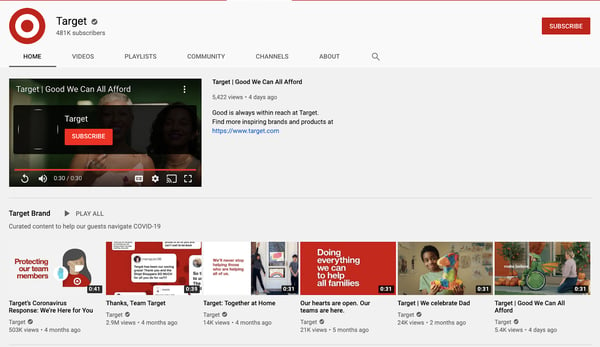
Aside from creating videos on how the chain is aiming to help customers navigate COVID-19, the brand has also created a $10 million pandemic relief fund which dedicates $1 million to assisting Target employees. This demonstrates that Target is taking action to help its community, customers, and employees who work in essential in-store roles.
5. Shoppers have become homebodies.
According to the survey, 70% of consumers don’t want to resume activities or work outside of their homes just yet, despite pushes to reopen the economy. If they won’t leave home to work, travel, or dine out, McKinsey notes that many won’t leave home to shop either.
When looking into the near future, “More than 3 out of 4 [consumers] who adjusted their behaviors due to the pandemic said that easing government restrictions will not change their cautious behaviors. Consumers are following guidance from medical experts for reassurance,” notes McKinsey.
How Brands are Navigating
Brands can’t just assume that people will flock back to stores as businesses reopen. While some consumers might not feel comfortable or safe leaving the house immediately after a pandemic, others won’t want to shop in physical stores because they know they can buy almost any product they want online.
At this point, successful brands are trying to continue to meet customers where they are, even if they don’t leave the house.
While some brands are building out online stores and digital services, others that don’t sell a physical product are launching online events or virtual experiences to gain awareness, continue to generate revenue, and delight their customers.
One example of a brand that made an in-person experience into a virtual offering was an animal sanctuary called Sweet Farm. When the California-based farm, which runs on donation revenue, closed to the public amidst the pandemic, its owners created a virtual offering where businesses or individuals could pay $65 to $750 for a farm animal to guest star in their virtual hang out or meeting.
The campaign was cleverly titled, “Goat-2-Meeting,” a play on GoToMeeting — a popular video meeting software.

According to Sweet Farm, the campaign, which began in March, was so successful that there was a waitlist for animal meet and greets by April, Sweet Farm has also partnered with more sanctuaries to increase meeting availability and share donation revenue with other organizations that care for animals.
How Marketers Can Navigate 2021 — and Beyond
This year, marketers and businesses were tested by the global pandemic and economic landscape. As you consider what’s next for your brand, keep these consumer behavior trends in mind:
Consumers crave value and availability.
More than ever, consumers will choose to shop from a company because of product value and availability, rather than brand loyalty. Business owners who’ve relied on loyalty and credibility to make sales should also monitor their supply chain and pricing to ensure that their products are worth the price and accessible to customers. Meanwhile, lesser-known brands can use a competitive analysis or other tactics to learn where they can help consumers that are struggling to find affordable or high-demand products.
Digital transformation is key.
Brands can no longer assume a billboard or foot traffic will generate vital revenue. At this point, many companies that were once mostly physical are building online stores, leveraging different online channels for marketing, and thinking outside of the box to create virtual offerings that will delight and retain customers.
“Human” brands will reap benefits.
In 2020, customers began to care more about how businesses treated employees, how they kept customers safe, and how companies stepped up to help others in times of uncertainty. Ultimately, brands with leaders who genuinely care about people will get better reviews, word of mouth, and positive awareness than brands that throw caution to the wind.
Looking to learn more about how businesses are evolving in 2020? Below you’ll find content from HubSpot’s Adapt 2020 series:
- Adapt 2020: An Educational Series
- 5 Ways Go-to-Market Strategies Will Change in the Post-Pandemic Economy
- 4 Pivots Companies are Making in Light of COVID-19 [New Data]

What Is a Micro Niche … and Do You Need One?
A micro niche is a business offering that’s highly specific. You may also encounter the term sub-niche to describe these laser-focused products or services. Micro niches drill down from niches, which are already segmented out from a larger market.
Here are a few quick examples to clarify the difference between a market, a niche, and a micro niche:
- Market, outdoor gear; Niche, camping supplies; Micro Niche, high-end mountaineering tents
- Market, tech; Niche, social media platforms; Micro Niche, social platforms targeted to specific interests, such as Ravelry for knitters
- Market, beauty supplies; Niche, cosmetics; Micro Niche, organic vegan cosmetics
Micro niches generally have more adjectives attached (not just ‘food truck,’ but ‘artisan grilled cheese truck featuring locally sourced cheese and bread’) and have a highly specific audience in mind (people who love grilled cheese with fancy additions).
Would your business benefit from a micro niche?
Among the greatest benefits of micro niches is that they pre-qualify customers and clients early in the marketing funnel. People who are looking for outdoor gear may be looking for anything from hiking boots to fly-fishing rods to harnesses for mountain climbing. But people searching specifically for camping supplies can have very different ‘wants’ as well. They may prioritize:
- Affordability
- Ease of use
- Eco-friendly production
- Aesthetics
- Better, best glamping quality
- Mountain-ready ruggedness
Often there will be an overlap of preferred qualities. But if your niche is producing and selling high-quality mountaineering tents, you won’t have to worry about capturing the attention of frugal families or people who want a luxurious camping experience.
The other benefits of a micro niche branch off from there. They include:
- A passionate customer community. People interested in high-quality tents are often interested in clear topic areas related to your offering. This makes it easier to create a content strategy for organic traffic; there’s less guessing what will appeal to your customers. People who want exceptional quality tents for hiking are knowledgeable already. They would likely be interested in a blog or podcast offering specific, expert, or off-the-beaten path advice and recommendations.
- Less competition. In broad markets and even niches, gaining visibility and brand awareness can be a challenge. In a micro niche, it’s easier to earn attention and differentiate yourself because you have fewer competitors. You still have to specify your unique value in the space and clarify that among your discerning audience.
- Brand loyalty. While this isn’t a given and requires meeting the demands of your audience, a sub-niche can foster long-term interest. That’s because micro niches are built on expertise, passion, and customization. It’s more challenging to bring a personal touch to broad markets
Companies can start up with a single micro niche. For example, Bite offers sustainable toothpaste tablets called ‘bits,’ mouthwash bits, floss, and toothbrushes through a subscription plan. Their focus is zero-waste, plastic-free, vegan, and cruelty-free production.
Drybar is another micro niche company that carved a customer base from the hair salon industry. The ‘want’ they leveraged was people interested in a ‘just-from-the-salon’ look between full haircuts and coloring.
Alternatively, companies can add a micro niche after establishing their brand in a larger niche market. The mattress company, Casper, added dog beds to their niche offering. Mattresses, for most of us, are large and infrequent purchases. Although dog beds have a far smaller price point, dog owners are likely to replace them more often. Offering dog beds is also a way to introduce a new audience to the overall Casper brand and the quality of its craftsmanship.
How to discover the best micro niche(s) for your business
1. Identify your strengths.
To discover a micro niche worth developing, start by looking at your strengths — either as an individual, a team, or a company. You’re more likely to find sustainable success in areas that excite you and your team.
Consider a business offering employee recruitment support to companies. Perhaps their team excels when recruiting executives or helping mid-career changers climb the ladder? This could spark a micro niche B2B offering, such as mid-level leadership development services or executive compensation consulting.
2. Focus on the problem.
What issues need solving in your industry or your life? Think about the times you’ve thought “If only we had _____ ” to help with a common problem in day-to-day life, at work, or with a recreational activity. Fill in that blank for a promising micro-niche business idea. Problems you face are likely issues for others as well. Brainstorm different problems and creative solutions, and see which one gets you and trusted peers the most excited.
3. Do your micro-niche market research.
You want to make sure your micro niche has a customer base. Here are some areas on which to focus your research:
- Informal and formal market research. Talk with friends and family about consumer ideas, or reach out to industry peers about business services needs. If you have the budget, send out email or social media surveys about the topic to gauge interest.
- Google Trends. This tool can help you discover micro niches within larger niches, and the overall interest in your micro niche. Search various terms related to your sub-niche and then explore the related topics and queries. You can also find out regional variations in interest.
- Social media and industry organizations. Explore hashtags on social media related to your sub-niche or industry. Also check out associations, professional groups, and organizations within your target industry. What are they discussing or excited about? Do you notice an emerging area of expertise? Do you notice a missing link in the discussions that might be an opportunity?
For example, a search for ‘mountain tent’ reveals strong (and unsurprising) regional interest in Colorado and Idaho. It also shares that ‘hyperlite mountain gear’ is a related topic, which can guide your product development and future marketing content.
4. Check out the competition.
It’s possible you’ll have a eureka moment and land on an untapped idea. But, more often, you’ll find your skills and interests lead you to micro niches with existing businesses. Now, you’ll have to toggle back to research and brainstorming mode. Here’s what you’ll need to figure out:
- Is the market big enough for the two, four, or 15 of you?
- How can you differentiate yourself from the competition? With white-glove service? With a lower or higher price point?
- Where are they falling short?
- How can you do better?
5. Test the waters.
You don’t have to dive into the deep end immediately. It’s smart to test the waters first with a single product offering. The apparel company Bombas launched in 2013 with a single product: comfortable performance socks. It has expanded to other items of clothing, but socks remain at the center of the brand.
Another way to test your idea is with a landing page, which is a simple process with drag-and-drop tools like HubSpot’s Landing Page Builder. Once you have a personalized landing page, begin advertising your product or service with paid search and social media ads. Your proof-of-concept is in the pudding — if the pudding were steady traffic, completed email forms, inbound sales calls, and product pre-orders.
On the landing page, and in your ads, use keywords that clearly define your offering. This way you draw people with authentic interest or buying intent in your micro niche.
6. Trust your instincts.
If you dream up a product or service idea that hasn’t been done before, or hasn’t been done particularly well, in your opinion, consider trusting your gut.
- The company Untuckit was built on the simple premise that men wanted button-front shirts that looked neat untucked, and they were hard to find.
- The e-commerce store Lefty’s sells common kitchen, gardening, school, and work tools designed specifically for people who are left handed.
- Olive & June is a nail polish company that sells kits that make home manicures easy and fun. Their kits come with a holder for your phone, so you can watch a video while your polish dries.
These micro-niche companies often have one thing in common: When they hit the market, people often wonder how the products or services weren’t available before. Find your micro niche, and follow these steps to bring your business to life.

The 5 Types of Social Media and Pros & Cons of Each
Marketers commonly use social media to increase brand awareness, generate leads, and improve traffic. If you’re tasked with starting a social media strategy for your company, you might be wondering which type of platforms you should be on. Your platform choice will likely change based on your audience.
The list of social media platforms is growing, and well-known platforms like Facebook are always evolving and adding new features. With a greater and greater need for a social presence and an overwhelming amount of platform choices, it can be hard to pick which social channels to use.
You might not want to spread yourself too thin by managing a channel on every imaginable platform, but you also don’t want to miss great brand-awareness opportunities.
To help you make informed decisions about which platforms to use, this post will guide you through some of the core types of social media, examples of platforms within each category, and the pros and cons that each type might present. By the end, you should have a much clearer idea of what kind of social media strategy will work for your business.
Social Networking
Examples of Major Platforms
- Facebook: 2.6 billion monthly active users
- Twitter: 166 million daily active users
- LinkedIn: 160 million users in the U.S. alone
Social networking is possibly the most traditional form of social media.
Platforms like Facebook, Twitter, and LinkedIn are often called “networking” platforms because they allow user accounts to interact with each other in a variety of different ways.
Professional Uses
If you’re a small business, like a restaurant, a platform like Facebook could be a great place to start your social strategy. With Facebook, you can build a business profile that includes links to your website and details about your menu.
Once your profile is all set up, you can post regular updates about your business, “like” other pages, and answer customer post comments or messages. Business profiles also allow other Facebook users to give you reviews.
For companies looking to offer a professional service, B2B or publishing companies, LinkedIn is another great way to grow your following. LinkedIn emphasizes career-related networking.
Brands looking to build an audience of professionals from a certain industry can create a business profile there, categorize it with an industry type, and then use posts and messaging to publish updates. They can also use messaging and comment features to interact with their audiences, or users who comment on their posts.
A Twitter account could be helpful to companies in a wide spectrum of industries, from entertainment to e-commerce. This platform similarly allows you to create a profile where you can list and link company information.
You can then use Twitter to post about company updates, tag companies or customers in posts, retweet positive customer tweets, and respond to customer questions via tweet or direct messages. Like Facebook, you can also post content like photos or videos.
On all three networks, users can easily communicate with others through simple actions like tagging, hashtagging, commenting, private messaging, reacting to posts, and re-sharing content.
Aside from social interaction, newsfeeds on common social networking platforms are designed to show off a mix of text and visuals, rather than one primary content type.
This flexibility makes social networking platforms easy to begin a social strategy on because you can experiment with different forms of content before branching out to platforms that require more specific content types.
Here’s an example of Facebook’s newsfeed:
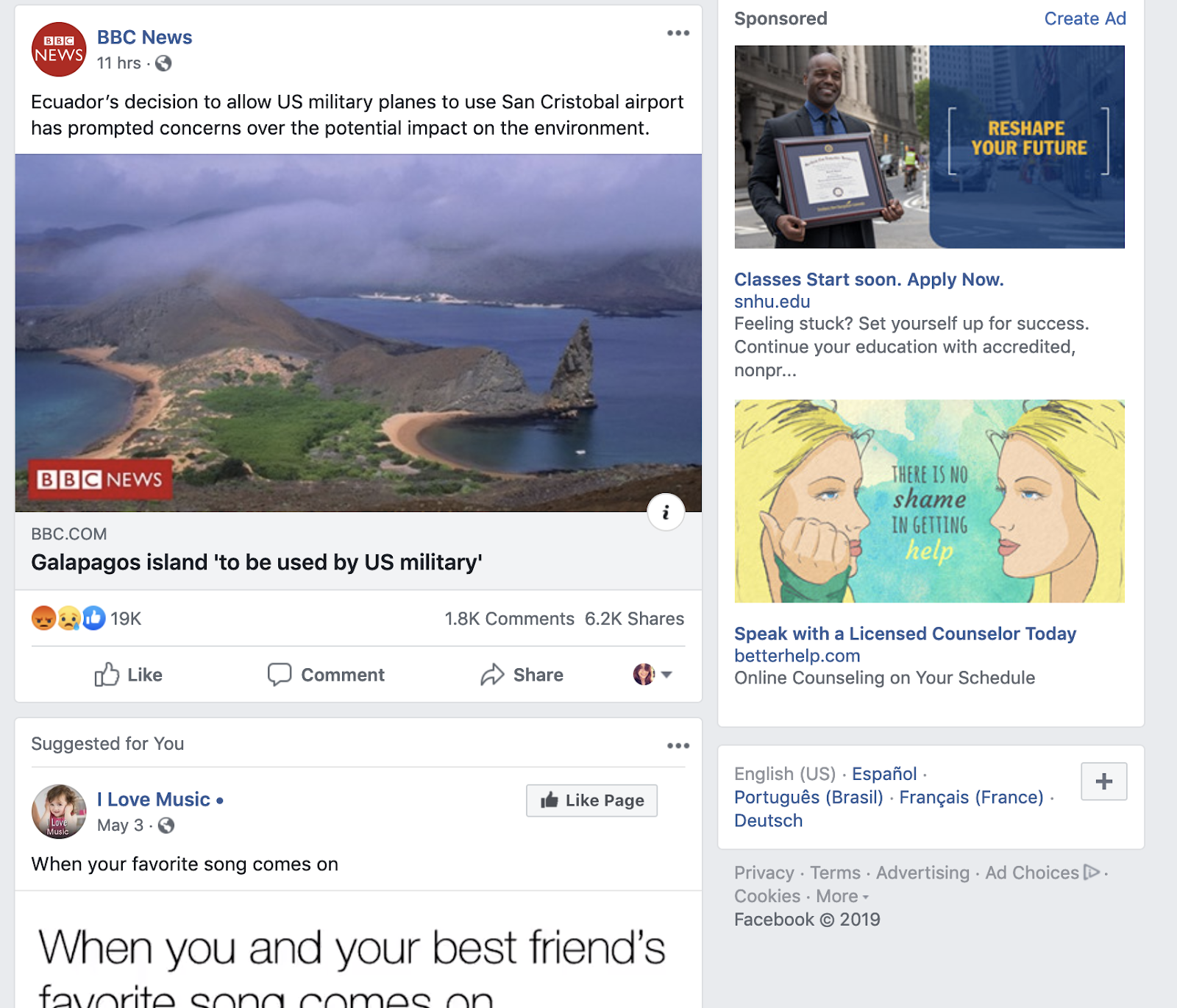
For those who want to dabble in video or graphics, these platforms could be a great place to test this new content. With the growth of video marketing, many have begun to launch more advanced features like Facebook Stories and Twitter’s live streams.
Platforms like Facebook and Twitter have also started to encourage native video and photo uploads more heavily. Recently, Facebook even adjusted its algorithms to favor live video and image uploads. This has caused these types of native content to gain greater user engagement.
If you’re still not sure where to get started, check out our beginner’s guides for Facebook, Twitter, and LinkedIn.
Pros and Cons
Pros
- Facebook, Twitter and LinkedIn are some of the most prominently used forms of social media
- Social networking sites often integrate with scheduling tools like HubSpot, Hootsuite, and TweetDeck software
- All platforms have capabilities for photo and video.
Cons
- Those interested in just posting links may have a harder time getting engagement than those uploading photo and video.
- Some platforms, like Facebook, put individual user posts higher than business posts in newsfeeds.
Photo Sharing
Examples of Major Platforms
- Instagram: 1 billion monthly active users
- Pinterest: 367 million monthly active users
Two of the biggest platforms that specialize in photo sharing are Instagram and Pinterest.
Instagram offers a visual feed with posts showing photos and short videos followed by a caption. Users can also post live video or create Instagram Stories that disappear after one day. Like the social networking platforms above, users can interact with others through tags, likes, comments, or direct message.
Professional Uses
This platform would be helpful to companies like restaurants or stores that want to photograph and display and update followers about their food, goods, or products in a crisp, clean way.
Instagram has become a home to influencer marketing, as 93% of influencer campaigns took place on the platform in 2018. It also offers opportunities for advertising and ecommerce because of its highly-visual layout.
Unlike some social platforms, Instagram emphasize visuals and doesn’t allow link sharing directly in posts. Basic users on Instagram can only share links in their bio. Verified users, or accounts with over 10,000 followers, can post links in their Stories.
To show you how visual the platform is, here’s a look at Instagram’s search feed:

Although basic users have minimal linking options, Instagram has tried to make the platform even more friendly for ecommerce businesses with the addition of Shoppable posts.
Pinterest is well-suited for ecommerce companies, such as those who sell home goods, and businesses that would like a place to share crisp standalone product images with links.
It similarly offers a photo-based feed with posts that can include a photo and short description. Unlike Instagram, it allows all users to link directly to websites or product landing pages in posts.
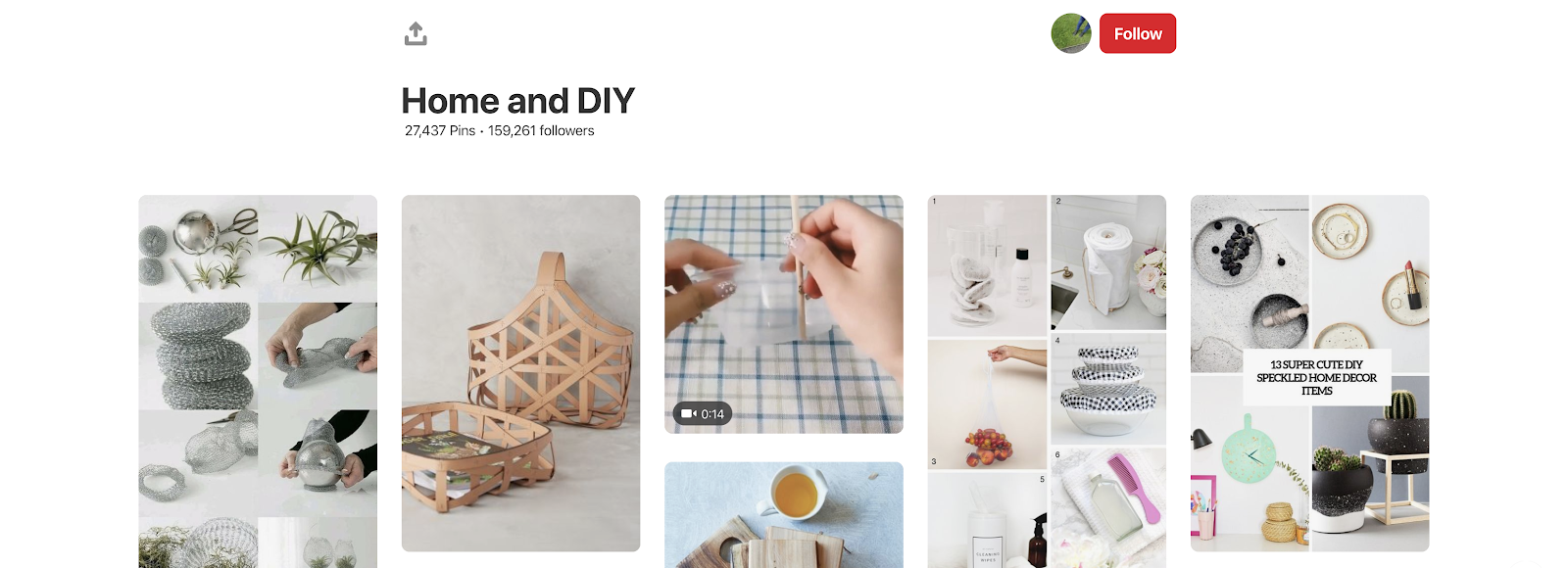
One interesting aspect of the platform is that users can heart posts from others, or assign them to a themed “board.” For example, users might make boards centered around topics like “Inspirational Quotes” or “Bedroom products.”
Once a board is created, other users can also follow it. A business could potentially make a board with their own product posts, or find their products on another user’s board.
Here’s an example of what a board looks like:
Before getting started on one or both of these platforms, you’ll want to determine whether your goal is to gain brand awareness or link-based traffic.
While Instagram and Pinterest can both be helpful tools for product shots and brand awareness, Instagram’s active audience is much larger than Pinterest’s. Instagram has also hosted over 25 million business profiles.
When choosing a platform, you may want to consider your content-related bandwidth. Both require visual imagery, but you might also need to include video creation within your Instagram strategy. Here’s a great guide that demonstrates what it takes to gain followers on Instagram.
Pros and Cons
Pros
- Platforms like Instagram help with brand awareness. Approximately 60% of people say they’ve learned about products or services on Instagram.
- Pinterest and Instagram provide an outlet for showing off visual content or product shots.
- Platforms like Instagram also allow you to experiment with visual or short video content
Cons
- Upkeep on these platforms might require a photo budget or dedicated production time.
- Some platforms, like Instagram, require you to post from a mobile app.
Video Sharing
Examples of Major Platforms
- Youtube: Over 2 billion monthly active users
- Vimeo: 240 million monthly viewers
Professional Uses
Roughly 88% of marketers say video gives them a strong ROI and 90% feel the level of video competition has increased. Adding a video platform to your social strategy could make your brand look relevant and keep you up to speed with your competitors.
Video can be helpful to a wide range of industries. While a restaurant could have a vlog with cooking tips, a technology company might focus its video strategy around product demos.
To help you pin down a strategy that’s right for your industry and service, check out our video marketing guide.
When it comes to long-form video, Youtube and Vimeo are the leading platforms. While Youtube has the bigger audience base and better SEO capabilities, Vimeo’s smaller platform is very community driven.
Youtube also seems to have better opportunities for advertisers and monetization, while Vimeo offers viewers the perk of no pre-roll ads.
For a longer list of similarities and differences, check out this head-to-head piece where we compare the business capabilities of Vimeo and YouTube.
Along with Youtube and Vimeo, the more traditional social networking platforms have also begun to embrace video marketing more aggressively. In the last few years, Facebook launched Facebook Stories and Facebook Live, and added a tab on their mobile app dedicated to video. Meanwhile, Twitter has allowed users to launch live video streams which are powered by its Periscope software.
Pros and Cons
Pros
- Videos can be longer than on other social platforms.
- Both platforms have website linking capabilities.
- Platforms like Youtube and Vimeo often offer analytics.
- Both Youtube and Vimeo have search optimization features.
Cons
- Content might take more time and money to create.
- These platforms require more backend tasks like SEO.
Interactive Media
Examples of Major Platforms
- Snapchat: 229 daily active users
- TikTok: 100 million monthly active users in the U.S. alone
Apps like Snapchat and TikTok allow users to share photos and videos, they also have a variety of unique interactive and highly experimental features. These two apps include AR/VR filters, musical overlays, and interactive games. Their audience bases are also prominently Gen-Z.
Professional Uses
Because mainly large companies are just starting to experiment with these new applications, marketers who are just beginning a social strategy don’t need to prioritize these interactive apps before traditional social networking platforms.
The large companies on these platforms tend to produce high production-level content. Brands with large followings might also publish Snapchat Stories, or videos that are curated from fans. Without a high-budget or giant online following, these strategies might be difficult for a company that’s just starting out on social.
Brands and influencers on these apps tend to cater their content to the platforms’ younger audiences. For example, on Snapchat, you might see stories that present beauty tutorials, wellness tips, news, or trendy new products.
If you’re really interested in interactive media, there are still a few viable ways you could get involved with Snapchat or TikTok.
While major brands, like VICE and BuzzFeed have become Snapchat Discover partners, the average business can still create a Snapchat business account that can be searched and friended by users. This account allows you to send publish temporary stories, just like individual accounts can. However, those with a business account can also purchase ad space.
Here’s a comprehensive video that explains how to use Snapchat:
If you’ve set up an account, check out this guide to getting started on Snapchat.
TikTok, an app based around short, repetitive clips — similar to Vine — offers five types of advertising options for businesses. While large businesses may find value in all five, smaller businesses may lean more towards “In-Feed Ads.” These ads are 9-15 second clips that can be skipped by the user.
Guess is one notable brand that has used its account to create trending campaigns with trendy hashtags. Universal Pictures has also had influencers create posts to promote its films.
If you do test out these platforms, you might want to make sure your industry and content fits in with the young age demographic. You should also try to properly estimate the time and money that might go into keeping these accounts up to date and relevant.
Pros and Cons
Pros
- These platforms are very creative and experimental.
- They have young audiences, which can help brands better target Gen-Z.
- Stories can be used to give your following a behind-the-scenes look at your brand.
Cons
- Producing regular content could be expensive and time-consuming.
- Business accounts aren’t promoted up-front on the Snapchat interface. You may want to promote your channel on your website or other social channels because users will need to search for you with your Snapcode or username.
- Snapchat and TikTok are limited to mobile and aren’t as easy to use.
Blogging/Community
Examples of Major Platforms
- Tumblr
Tumblr and Reddit both allow users to post about interesting niche topics, like memes, events, politics, and pop-culture. When users publish a post, these platforms allow other users to share them or add to the conversation with their own commentary.
Professional Uses
Both blogging and community building platforms could be helpful to those who want to encourage discussion around very niche industries or topics. For example, on these platforms, you might see discussion about anything from alternative health to machine learning.
By blogging, you can write posts about topics in your company’s industry and link them to your product or site. While many people have a blog on their website, platforms like Tumblr might be great to use if you haven’t set this feature up — or just want to see what others in your industry are blogging about.
With a discussion site like Reddit, you could share a link or a post about a specific topic on a discussion board related to your industry and see how users respond. You could also start your own board if a topic you’re looking to encourage discussion on doesn’t have one yet.
These two platforms specifically encourage web chatter and post shares from users that care about the same topics.
Both also allow users to follow you or subscribe to your blogs or Reddit boards so your content could show up on their feeds. Here’s an example of what Reddit’s feed looks like.
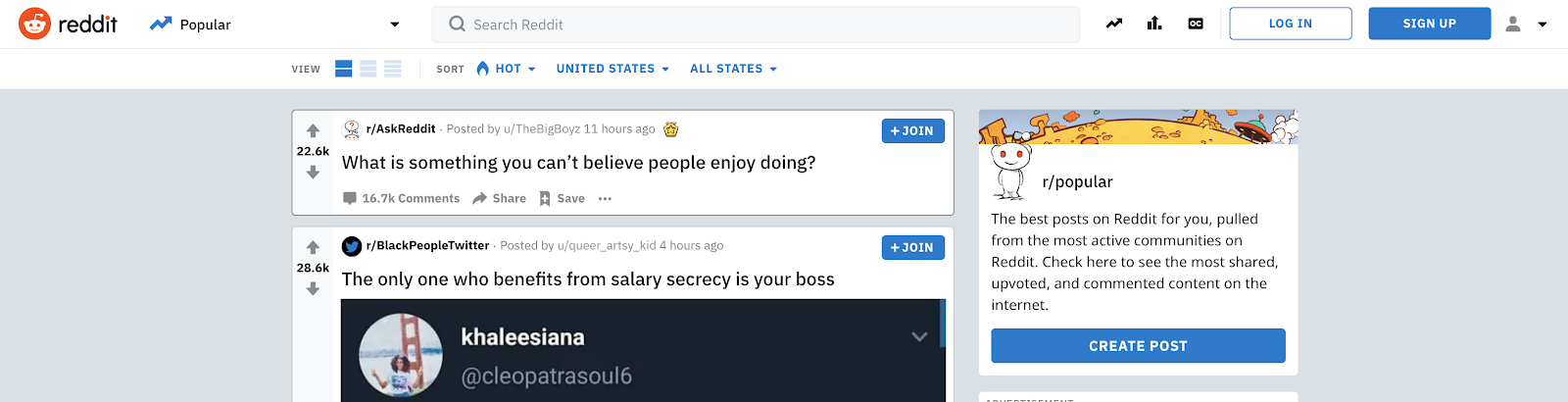
When someone publishes something on Reddit, other users can up-vote or down-vote it. Up-voting makes a post show up higher in Reddit feeds while down-voting does the opposite.
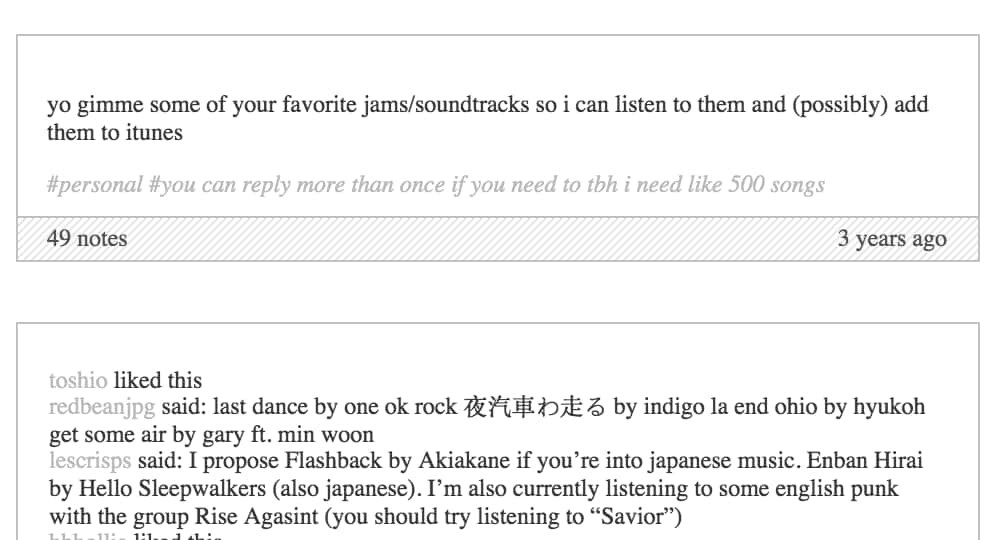
On Tumblr, the feeds are organized by time. However, a post can show up higher when it is re-shared by other users. When a user shares or interacts with your Tumblr content, they give it a note. When they reshare, they have the option to post a comment with the post that gets added to a thread.
Here’s an example of how notes and threads can be used to encourage discussion:
Pros and Cons
Pros
- Both platforms allow you to share text posts, photos, and videos about your business, brand, or individual thoughts.
- These platforms enable you to start conversations about a topic.
- Both platforms allow linking to outside websites.
Cons
- Longer blog posts might take time to craft or write.
- Getting downvoted on Reddit or no reaction from Tumblr users means your posts may go unseen.
- Your audience might be too niche or limited to just those on the specific platform you use.
A Few Things to Consider
Before you start logging in and setting up your accounts on a bunch of platforms, be sure to consider these factors:
- How much time do you have to devote to strategizing around a social platform?
- Do you have resources for creating graphics or videos?
- Do your goals involve boosting brand awareness, or traffic and revenue?
- Will you need an additional staff member to run this platform, or will it be easy to maintain?
Once you’re on a platform or two, be sure to stay in the know of how it’s changing and what marketers are doing. For a current outlook, check out our Ultimate Guide to Social Media Marketing.

Removing Gatekeepers From Your Marketing
Every marketer has run into one of these roadblocks before:
- They wanted to create an ads audience off of recently closed lost deals, but didn’t have access to the customer data in their CRM.
- They needed to change some of the copy on their homepage, but their developers couldn’t fit it into their next sprint.
- They needed a quick graphic to illustrate a point they were making in a blog post, but their design team was wrapped up in other projects.
In these scenarios, marketers aren’t held back by a lack of good ideas. Instead, marketers are struggling with gatekeepers.
Gatekeepers are unnecessary areas of friction within your growth machine that prevent marketers from providing customers with the best experience possible.
Gatekeepers can be anything from unusable data that’s spread across different tools, to a CMS or design solution that’s powerful but requires technical expertise to use.
When marketers encounter a gatekeeper, the customer experience inevitably suffers.
Take your website, for instance. HubSpot research shows that a business website is the most used distribution channel for marketers today.
When trying to provide your customers with an amazing experience, nothing is more important than your website. But when asked who is responsible for keeping a website up to date, many marketers pointed to their IT team as owners of their company’s site.
This is a classic example of gatekeepers inserting unnecessary friction into your marketing. Your IT team isn’t goaled on generating leads, or how customers perceive your brand — so when marketers approach them with an update that needs to be made to their website, it isn’t prioritized.
Inevitably, your customers’ experience suffers. Imagine if your IT team owned your email marketing, or your social media accounts — how might your customer experience suffer as a result?
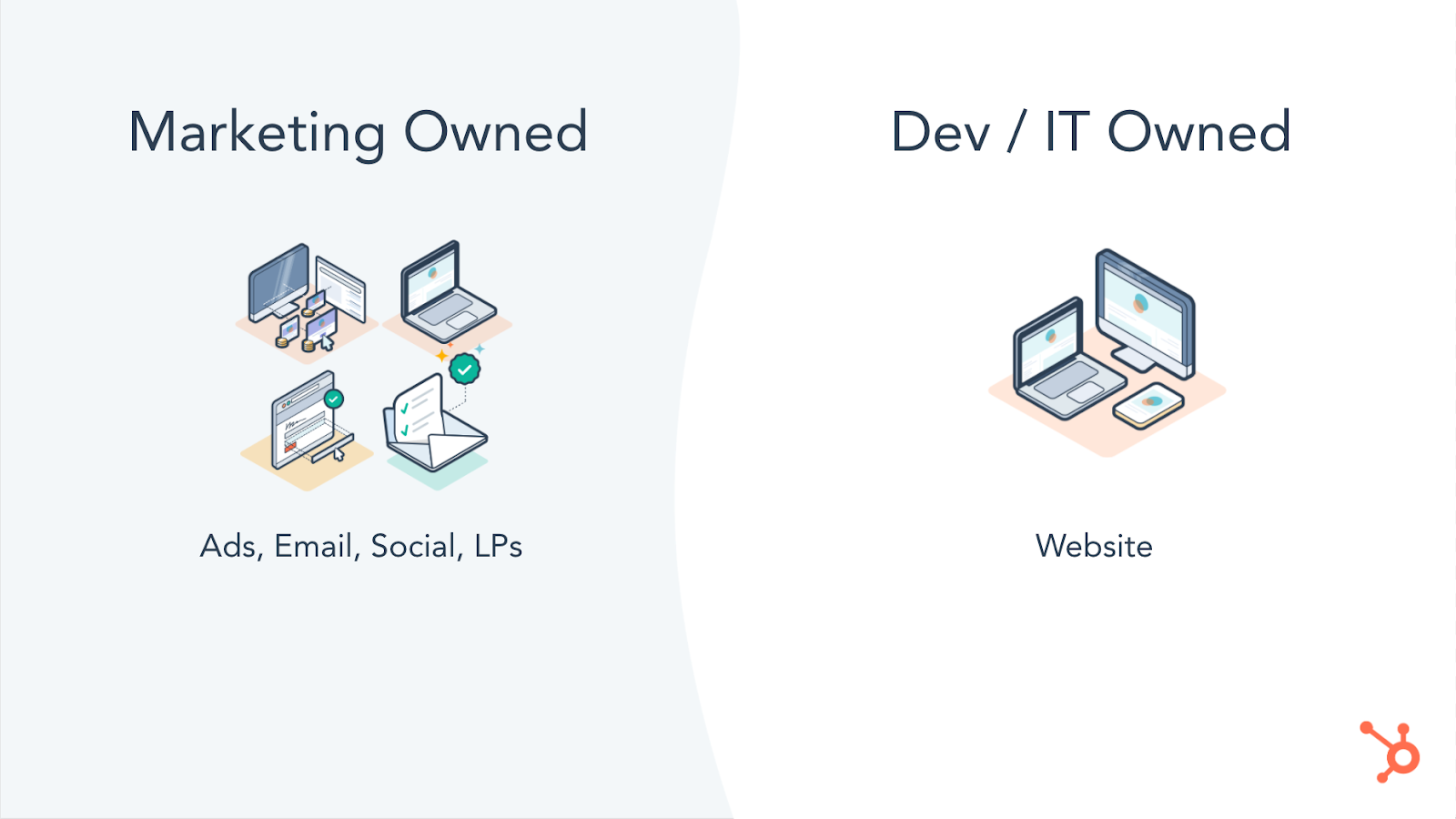
Marketers at growing companies need to be the owner of their organization’s growth machine. This used to be a given, but as customer journeys have gotten more complex, so have the systems we use to reach our customers.
We’ve added unnecessary complexity into our internal processes and tools — to the point where only specific people within your organization have access to data that could be used to improve a campaign or the technical ability to update content as needed.
Today’s fastest growing companies are doing three things:
1. They’re leveraging customer data across all their marketing channels.
2. They’re optimizing their marketing efforts by leveraging comprehensive reporting.
And maybe most importantly,
3. They’re putting marketers in the driver’s seat — removing gatekeepers at every turn so they can act quickly and decisively to best serve their customers.
The need for a clear owner of your business’ growth machine has only been heightened by the global pandemic. As external factors force leaders to pivot quickly at a time where collaboration and strategic planning is more difficult than ever before, gatekeepers cannot be tolerated.
By leveraging tools that centralize your data, remove gatekeepers, and make it easy to see what’s resonating with your audience, you’ll make it easy for your marketers to iterate on the customer experience.
Take stock of your current tech stack. What systems do only certain teams have access to? Is that team best-suited to understand what your customers are looking for from your brand? Are gatekeepers forcing you to make unnecessary tradeoffs between using a powerful tool and one that will empower your marketers to take ownership of your organization’s growth machine?
Answering these questions will help ensure that you’re able to adapt to whatever 2020 (or 2021) has in store for you.

How COVID-19 Changed the Way We Think About Office Technology [New Research]
The recent COVID-19 pandemic has changed how we think about a lot of things.
From the size of our weddings and special events to the comfort level of our pajamas and stay-at-home clothes, we’ve reconsidered the size, shape, and necessity of many, many elements in our lives.
Work is one of these elements, if not the main one. We’ve asked ourselves (and our employers) questions like:
- “Can I get as much done at home as I would in the office?”
- “How do I stay connected to my team if we’re all remote?”, and
- “Is it really necessary to have as many meetings as I did before?”
While we’ve all found different answers to these questions, one thing is consistent: COVID-19 has forced us to learn how to stay connected, motivated, and productive in new ways.
Canva + HubSpot Marketing Survey
In October, we teamed up with Canva to better understand how the COVID-19 pandemic has affected marketing leaders, their resources, and their teams. We surveyed 502 marketing leaders (mostly senior-level marketing managers, directors, VPs, and CMOs) from across the United States and asked them how COVID-19 has affected their teams, processes, and priorities.
The results are in, and our findings are pointing towards a new way of thinking about work — especially the tools and technologies we use to get stuff done.
Download the research here, and keep reading to unpack some of our most important findings.
How COVID-19 Changed the Way We Think and Use Office Technology
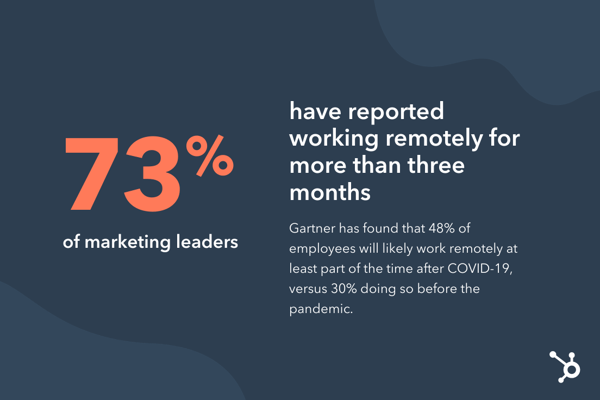
It’s no surprise that the COVID-19 pandemic has massively impacted where we now work. Out of 500+ marketing leaders, 73% reported that they’ve been working remotely for over three months.
This will likely be the “new normal” for some. A recent Gartner poll revealed that 48% of employees will likely work remotely at least part of the time after COVID-19, versus 30% doing so before the pandemic.
But COVID-19 hasn’t just affected where we work — it has also changed how we work. Many of the respondents reported new challenges in their day-to-day projects and processes:
- Decision-making: Over 50% agreed that their team’s ability to make decisions has been negatively impacted.
- Planning: 72% agreed that their planning process has been more difficult, and over 70% have seen their planning framework dramatically change with the impact of COVID.
- Feedback: Over 70% agreed that it’s become more difficult to give and receive effective feedback while working remotely.
- Productivity: Over 66% agreed that their team’s productivity has dropped, and nearly 50% said they’ve struggled to motivate their teams.
If you resonate with these findings, you’re not alone. It’s clear the COVID-19 has been tough all around, regardless of your team size or industry. Let’s unpack some more detailed trends — and potentially permanent changes — we’re seeing as a result of the COVID-19 pandemic.
Some organizations are outsourcing more marketing projects.
Gartner found that the COVID-19 pandemic has led 32% of organizations to replace full-time employees with contingent workers and contractors.
We see some of this reflected in our survey respondents’ post-pandemic resource planning:
| Resource | Pre-Pandemic | Post-Pandemic |
| Growth marketing | Majority in-house (64%) | Shift to more in-house (68%) |
| Design | Majority outsourced (48%) | Small shift to even more outsourced |
| Content marketing | Majority in-house (48%) | Evened out |
| Web development | Majority outsourced (50%) | Shift to more in-house |
| Social media marketing | Majority in-house (50%) | Shift to more outsourced |
| Media buying | Majority in-house (51%) | No change |
| Affiliate marketing | Majority in-house (55%) | Shift to more in-house (58%) |
| SEO | Majority in-house (55%) | Shift to more outsourced |
| PR | Majority in-house (55%) | No change |
Why might this be? For one, outsourcing is a common cost-saving measure. It can also help meet demand.
50% of respondents reported that it’s been more difficult for their teams to come up with creative content — perhaps outsourcing projects like content marketing and design has helped teams maintain their production cadence during times of stress and burnout (which we’ll explain below).
However, hiring contractors and external agency services requires increased communication and collaboration.
Gone are the days when we could walk across the hall for a chat at a coworker’s desk or host in-person meetings with agencies. During the pandemic, we’ve learned to replace these conversations with quick messages or video calls — most likely using a tool like Slack or Zoom.
Our respondents would agree. 75% reported that instant messaging platforms like Slack were “good” and “exceptional” at supporting collaboration. 72% rated the same for the level of usability for these tools.
If companies and teams weren’t using an instant messaging platform before the pandemic, it’s highly likely that they are now. The need for a tool like this also arises when outsourcing projects. It’s more important than ever to stay aligned — especially when working with third-party contractors.
For those keeping marketing in-house, new tools are needed.
You’ll see in the table above that many of our survey respondents still reported keeping or shifting many resources in-house. This could also be in an effort to save money and meet demand — by using new tools and technologies to compensate for a lack of labor.
For example, 44% of respondents reported that their need for new visual assets and graphic design has increased since the start of the pandemic. 39% reported the demand has mostly stayed the same.
Regardless, this is a vast majority of marketers who need to maintain or boost their graphic design production — in the middle of a pandemic, no less. A similar number of respondents (38%) reported that their graphic design software did a “neutral,” “poor,” or “terrible” job of supporting collaboration within their team.
This presents a unique opportunity to use office technology and tools like Canva — to support increased customer demand while saving costs and supporting remote collaboration.
Another set of respondents (50%) reported seeing traffic to their website increase and the need for regular updates also increase. Our study also revealed that 16% of marketers find the usability and collaboration of their website content management system (CMS) either “neutral,” “poor,” or “terrible.”
For those keeping website management in-house, incorporating a tool like HubSpot CMS can vastly improve your team’s remote collaboration and productivity — all while meeting the increased demand from your customers (which is a good thing!).
Organizations are using technology to monitor and support employees.
We’ve confirmed so far that marketing teams have been pressed for productivity and collaboration while being asked to create more creative content to meet customer needs, employer demand — all in an ever-changing, pandemic-soaked market.
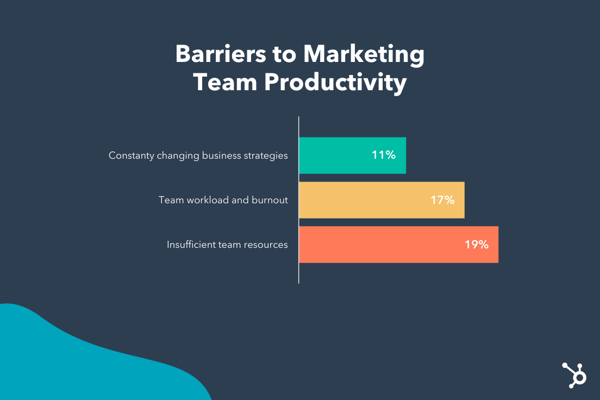
While office technology has never been more critical, neither has recognizing and acknowledging the barriers COVID-19 has created, such as an increased team workload and employee burnout (17%).
This rise in employee burnout has led to more discussion around the responsibility of employers to their staff. A Deloitte study found that, as the “pandemic has put more hours into the working day,” organizations should do more than just foster open dialogue and open practices around well-being. Gartner agrees — they theorize that COVID-19 has expanded employee expectations of their employer as a “social safety net.”
Technology has come in handy for non-work related needs, too. Zoom has equipped teams to host online happy hours, virtual holiday parties, and even team-building activities. Companies are also sponsoring free telehealth and virtual therapy sessions.
Gartner also found that, in a less digital sense, employers are also offering “support includ[ing] enhanced sick leave, financial assistance, adjusted hours of operation and child care provisions.”
The COVID-19 pandemic has changed how employers use office technology to understand not only the employee experience but also remote employee performance. A Gartner study found that 16% of employers are using tools to monitor employees through virtual clocking in and out, tracking work computer usage, and observing employee emails or internal communications.
This trend started well before the pandemic, but it will continue to grow in popularity as more folks opt to permanently work remotely.
Over to You
As large and difficult as these COVID-19 shifts have been, for the time being, they are here to stay.
Listen to these emerging trends and invest in new processes, tools, and technology in 2021. Doing so will help you combat these challenges and better motivate, monitor, and equip your remote teams. Remember, it’s your responsibility to help them be productive at home, stay connected to their teams, and make room for how the pandemic is affecting their personal lives, too.

How to Nail Interactive Presentations, According to HubSpot Experts
I can distinctly remember being extremely excited to attend a presentation from a speaker whose book I had read and loved in class. Unfortunately, the speaker was not as engaging as I’d hoped, and I found myself getting bored and distracted.
Marketers know better than anyone that capturing audience attention goes hand in hand with keeping people engaged. If people are bored, their thoughts will drift somewhere else, and you’ll miss out on the opportunity to impact their behavior. This is true regardless of the marketing medium, from advertisements to presentations.
That being said, marketers need to create effective ways to gain audience attention during their presentations — one of those is interactivity. According to the Oxford Dictionary, interactivity is defined as how two people work together and influence each other. Therefore, creating interactive presentations means using strategies that will capture and hold audience attention. It makes it easier to leave lasting, meaningful impressions about the content you’re sharing with them.
This post will outline the importance of interactive presentations and share tips from HubSpot experts for giving engaging, interactive presentations.
Why are interactive presentations important?
Interactive presentations are those where audience members and presenters feel like they’re in conversation with each other. It’s a pivot away from the lecture and listeners feel, as presenters entice audiences to participate and interact with them.
The reason for creating interactive presentations is simple: marketers who make a connection with their audience are more likely to have them leave feeling as though they’ve learned something from you.
All marketers want to leave good impressions, so understanding how to do this during presentations is important. Below we’ve listed nine interactive presentation ideas that you can use when planning your next virtual or in-person events.
Use a PowerPoint.
PowerPoints help you incorporate various media into your presentations, like text, images, and even videos. This ensures that there is an aspect of your presentation that appeals to every audience member, as everyone learns differently.
For example, someone may have an easier time digesting your content when they can see visual examples. In contrast, their neighbor may retain more information if they can follow along by reading a brief summary. When you tailor your presentation to meet the differing needs of your audience, it’s easier for everyone to interact with your content and learn from your talk.
Should you choose to use a PowerPoint, this HubSpot download gives you four different slide templates to choose from that can be used to create high-quality presentations.
Draw comparisons to your passions.
It’s probably safe to say that the presentation you’re giving is about a topic you’re an expert in. It’s also probably safe to say that your audience isn’t necessarily as informed as you are, so they’ll need more context to catch up to your level of understanding.
Content Creation and Lead Acquisition Marketing Manager AJ Beltis says that drawing comparisons to your passions during presentations can engage your audience and enhance their understanding of new concepts, especially if they aren’t contextually related. This could look like drawing in references to sports, movies, and pop culture.
Beltis says, “Help your audience better understand what you’re presenting by referencing something outside of the context — sports, movies, and pop culture references can work really well if they make sense.”
This keeps your audience engaged because you’re relating the information to real-life examples that may be more readily available to them. Bonus points if you use a humorous reference, which can cause your audience to create a positive association with the information and retain more of what you’re saying. If you begin with a cheerful anecdote, you’ll set the tone for the rest of the presentation.
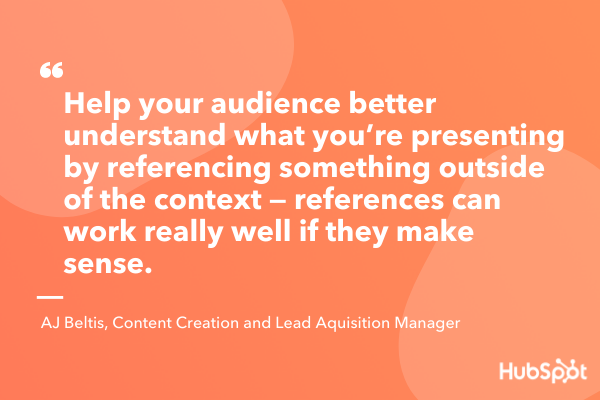
Use an ice breaker.
One way to ensure that your presentation is interactive is to generate rapport with your audience with an ice breaker.
Ice breakers are short activities that audience members can participate in that are meant to inspire a sense of community and help audience members meet their neighbors. Ice breakers can also diffuse any sort of tension or anxiety from being around unfamiliar people.
If you’re at a loss for ideas, you can always try Two Truths and a Lie. Every audience member comes up with two factual statements about their life and one lie, and the rest of the audience works together to pick out the false statement.
Ice breakers are great because they are adaptable to both in-person and virtual meetings. For in-person events, per safety regulations, presenters can pre-select an ice breaker, and small audiences can go around the room responding to a question. For larger audiences, participants can simply introduce themselves to a neighbor.
For virtual events with small audiences, you can use the same structure as in-person presentations, but larger audiences can be broken down into smaller, more intimate break-out rooms. Either way, people are still breaking the ice, so to speak, and interacting with each other.
Tell a story.
Use your presentations to interact with your audience by telling a story. It could be a personal anecdote, a story from a customer, or a well known-story that you adapt to illustrate your presentation’s message.
Senior Marketing Director Emmy Jonassen recalls one of the most memorable presentations from a HubSpot Marketing Team planning session: “There was a group that used Goldilocks and the Three Bears to illustrate how they went about solidifying the perfect strategy. The story paired with the imagery kept the audience engaged, and people were listening and laughing.” Jonassen says that, almost a year later, that was one of the most memorable presentations of the two-day session.
By telling a story, you’re using interactivity to influence your audience and help them remember what you’re sharing with them. A story gives your audience something to associate the information with, which may make the information you’re sharing easier to recall. You’ve used a story to influence their retention of the information you’re presenting.
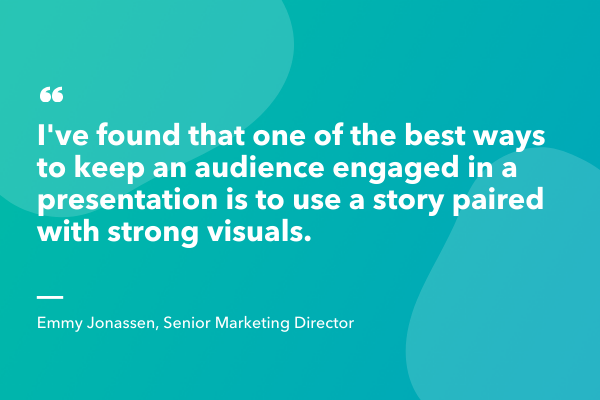
Use data representations.
Using data representations is a valuable way to showcase your content in a digestible format. For reference, data visualization is using things like charts and diagrams to help viewers understand the significance of the information you’re showing them. It’s easy to say the words out loud, but using pictures gives the audience a visual representation of your words.
Say you’re a marketer giving a presentation on the benefits your business has found from advertising on different social media sites. You can certainly verbalize how Twitter was the best, but using a chart that shows the difference in return on investment (ROI) between different platforms gives audience members a visual representation of your success.
If you’re a HubSpot user, Marketing Hub allows you to create visualizations from the data in your HubSpot analytics reports. The image below is a pie chart that was created using HubSpot reports.
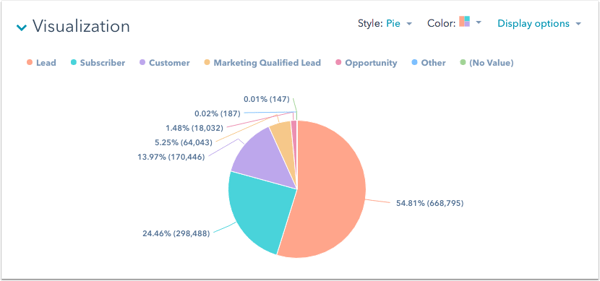
All-in-all, data visualization increases the impact of your words because audience members get a picture of the significance of the information you’re giving them.
Breakaway from the “expected” format.
The disappointing presentation I mentioned earlier followed the typical structure of an introduction, content presentation, brief Q&A, and then it was over. I expected more interactivity from the author, but it really felt like a regular college lecture. I wish the author had mixed it up and varied their structure, maybe by asking us questions about our interpretations of the book, but she didn’t.
Many presenters follow this structure, and there’s nothing wrong with it, but the framework can become boring to your audience. If you mix it up and vary your style in a way that your audience wouldn’t expect, you can capture their attention by throwing them off (in a good way), and they’re likely to stay attentive because they don’t know what’s coming next.
Amanda Sellers, Historical Optimization Writer, says that breaking away from expected format could mean playing a game, or subverting expectations. She recalls giving a presentation on a Monday afternoon where she knew that the audience would likely be a bit quiet. For part of her presentation, she had the audience stand up and repeat the words she was saying; “Standing up got their blood flowin’, and I encouraged them to participate at full volume. This shook up the presentation, and it helped with information retention because the attendees were listening and repeating back the information.”
Breaking away from the expected format doesn’t necessarily mean that you should do something at the beginning that you’d usually do at the end — get creative with what this means to you personally and how it would benefit your presentations’ interactivity.
Have Q&A or AMA sessions.
A great way to interact with your audience is to have question and answer (Q&A) or ask me anything (AMA) sessions during your presentation.
When you do this, audience members can ask clarifying questions about what you’ve already said to gain a full understanding before moving on to the next concept. For example, if you’re presenting your recent marketing campaign, consider stopping after each step of your plan (like plan goals, measurement, target audience, etc) to allow the audience to ask clarifying questions before you move on to the next section.
You can also switch it up and ask audience members questions, as they likely have valuable input into the topic at hand. Consider creating quizzes and polls where they can respond to your questions and submit feedback. You can make submissions anonymous so audience members feel comfortable to share anything (within reason) that they have on their mind.
Weaving Q&A and AMA opportunities throughout your presentation is also a great way to re-capture audience attention if they have become distracted, as it requires them to think critically about your content and their own information retention.
During virtual presentations, audience members may not feel as comfortable interrupting you to ask clarifying questions, so purposely taking the time to ask participants questions or have them ask you questions is worth considering. Becca Stamp, Senior Learning & Development Operations, says “It’s important to give everyone space to come off mute and contribute throughout the session. The participants add so much value to the session, either through discussion or over the zoom chat.”
Get off the stage.
During in-person presentations, getting off the stage and quite literally leveling yourself with your audience is worth considering.
Most people expect presenters to remain on stage and separated from them, so varying your delivery style and being closer to your audience may inspire a sense of interaction that is different from simply standing in front of a podium for 20 minutes.
If you employ this strategy, you can also have Q&As and where you walk over to audience members and respond to their questions as if you’re having a one on one conversation. Referring back to the definition of interactivity, you’re leaving an effect on your audience by being more approachable than they’d expect.
Share resources for later.
A useful way to inspire continuous interaction with your audience is to leave them with something to take away from your presentation. Depending on the content you’re sharing, maybe you’ll hand out brochures to advertise your service, provide them with a link to your website, or have them sign up for an email list.
Whatever your desired action is, giving them a way to remember you and your presentation is a great way to inspire continuous interaction with them.
Spend Time Making Your Presentations Interactive
All-in-all, the goal of creating interactive presentations is to influence your audience members. Whatever your presentation content is, using strategies that center audience engagement is a valuable way to connect with them and teach them something new.
Feeling like they’ve been in conversation with you rather than being talked at can help you fulfill the ultimate goal of marketing: to leave a lasting impression.

How to Use Pinterest Advertising to Promote Products and Attract Customers
Pinterest is often undervalued by social media marketers and considered an unnecessary component of a marketing strategy — unfortunately, if this isn’t the case for your team, you could be missing out on a major source of traffic and income.
Pinterest offers plenty of unique opportunities for marketers to reach leads and influence consumer purchasing behavior. In fact, Pinners are more likely to grocery shop online. If you’re interested in exploring how Pinterest advertising can help you attract customers, keep reading.
Pinterest Advertising
With over 442 million monthly active users, Pinterest is a great place for businesses to advertise products. Ads show up on users’ feeds and searches in the same format as a regular Pin, making the experience unobtrusive for users while putting your content right in front of them.
There is a large potential reach when you create ads for Pinterest audiences — and, best of all, users are also actively searching the site for products like yours to buy.
Why Advertise on Pinterest
- The reach can be incredible. If your content is engaging and valuable, it can be re-pinned again and again to different users’ boards and continue to drive consumers back to your website.
- Pins have a much longer lifespan than Tweets or Instagram posts. This longevity makes them a particularly powerful asset. Pins can show up in a user’s feed months after initially posted.
- Pinterest users spend 27% more for click and collect shopping — meaning your Pinterest ads, or Promoted Pins, are being shown to a remarkably responsive audience.
All of which is to say — a paid advertising strategy for Pinterest isn’t such a bad idea, and could help bolster your organic presence by gaining traction with potential buyers, and improving brand recognition.
Pinterest Ad Types
There are a few ways to promote your content on Pinterest. To determine which ad format is best for your business, it’s important to know the goals of your campaign and the attributes of each Pinterest promotion format.
1. Pins
At first glance, Promoted Pins look and act just like a regular static Pin, but they have a small “Promoted” label to set them apart. Promoted Pins are boosted and targeted to reach more people. Users can even Pin your Promoted Pins to their boards, share them, and comment on them.
Once a user shares a Promoted Pin, the “Promoted” label disappears, and subsequent re-pins are considered earned media — meaning, after the first pin, organic exposure to the content is free.
Here are some guidelines to follow when creating a Promoted Pin advertisement:
- The file has to be PNG or JPEG.
- Your content cannot go over 10 MB.
- There is a description copy limit of 500 characters.
- Your aspect ratio must be 2:3 and should be vertically oriented.
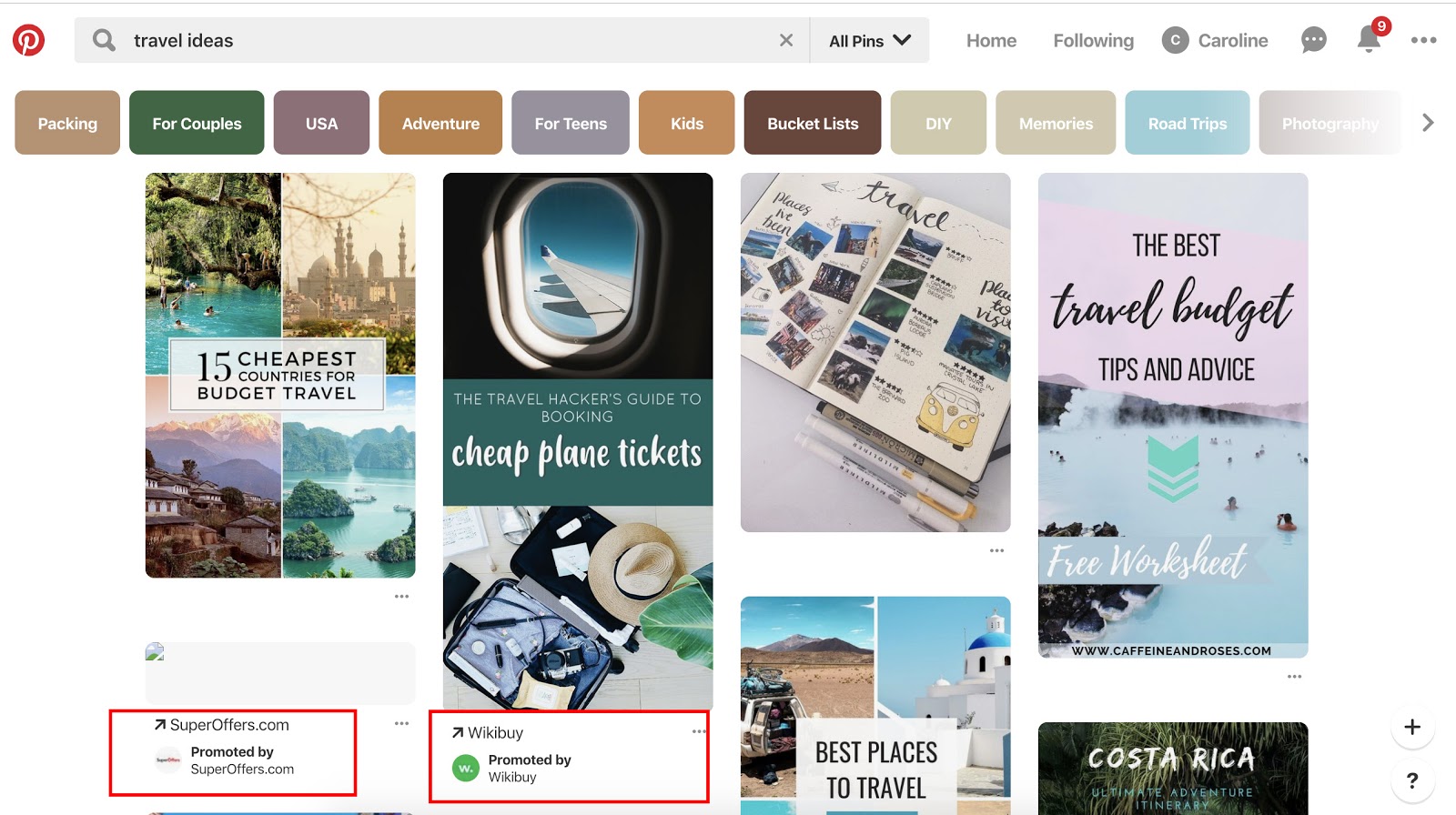
2. Video Pins
Promoted Video Pins are exactly like Promoted Pins — except the static image is replaced with a video.
90% of customers say video helps them make buying decisions, and that same percentage of weekly Pinterest users are on the platform to make purchasing decisions. Therefore, Pinterest and video advertising go hand-in-hand.
Pinterest offers two options for video sizing: max width, or standard. Standard videos are the same size as regular Pins and cost less than a max width Pin, which spreads across a user’s entire feed.
No matter what size you choose, Pinterest videos auto-play once they’re 50 percent in view. Plus, the Promoted Video Pins have a conversion optimization option to better serve advertisers with traffic or conversion goals. This new option brings the user to a landing page on the advertiser’s website, as well as a close-up of the video.
Here are some guidelines to follow when creating a Promoted Video Pin advertisement:
- The file has to be either an MP4 or MOV.
- Your video cannot exceed 2 GB.
- The video must meet a minimum of four seconds, and cannot go over 30 minutes.
- Your aspect ratio must fall between 1:91:1 and 1:2.
- There is a description copy limit of 500 characters.
- Make sure to create video that’s not dependent on audio for greater accessibility and those who scroll with sound off.
3. Carousels
Promoted Carousels contain up to five images that users can swipe through. Carousels are used to give a deeper brand story within one Pin.
This feature behaves the same as other Pins, except it will have dots beneath the images that signal additional content. Each carousel image can be different and have a different title, description, and link to another landing page.
Here are some guidelines to follow when creating a Promoted Carousel advertisement:
- File type: PNG or JPEG
- Ideal aspect ratio: 1:1 or 2:3
- File size: Max 10 MB
- Title copy: Max 100 characters
- Description copy: Max 500 characters
4. App Pins
Promoted App Pins are mobile-only advertisements that allow users to download your app directly from Pinterest.
Available on iOS and Android devices, these ads include an “Install” CTA that allows for a seamless transition from Pinterest to your app.
While most of the guidelines remain the same for these Pins, your copy, image, or video should convey important attributes about your app.
Below are some Pinterest ads in action.
Pinterest Ad Examples
Each of these ads are an example of Pinterest advertising done right with actionable tips that you can take away as you create your own:
1. Ruggable

In this ad, the image speaks for itself, which lends well to the visual nature of the Pinterest platform. The rug is front and center in an attractive home space that draws the eye (and probably triggers the shopping tendencies of those who like decorating). It does come with a catchy tagline: “Back to Homeschool.” Because who needs a back-to-school sale to buy cool stuff?
2. Love Sweat Fitness

A big audience on Pinterest is the foodies who love to find and share recipes. Love Sweat Fitness, a fitness brand, is appealing to that crowd with easy and healthy holiday sides. The best part of the ad is how it combines high-quality imagery with attractive typography.
3. Acuity Scheduling
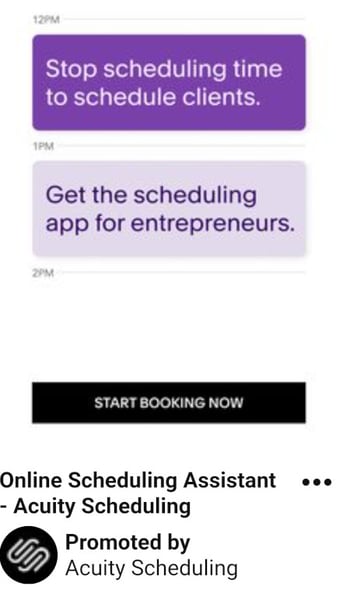
One thing to take away from this ad is that Pinterest advertising isn’t just for home goods, recipes, and ecommerce. Those in the B2B space can definitely take advantage of the advertising opportunities… and who knows, your audience might be browsing for home goods, too.
This ad sets up the value proposition in a text format and gets right at the heart of the audience’s pains: “Stop scheduling time to schedule clients.” They then pair it with a call-to-action: “Start Booking Now.”
4. MissNowMrs

MissNowMrs quantifies the amount of time that brides spend changing their name so that they can use it as their value proposition in this ad. The benefit to the audience is clear and compelling for this reason.
5. Torrid
In this Pinterest ad, Torrid is using retargeting options to put their products in front of people who already visited the Torrid website. After visiting this product’s page on torrid.com, the ad “followed” me to Pinterest to stay top of mind and earn the sale.
Now that you have seen what Pinterest ads can look like, take the inspiration from the examples above and put it to action on your own advertising efforts.
1. Choose your campaign objective.
Each of your Pinterest campaigns starts with an objective. Choosing your campaign goal is what determines what ad formats are available to you. There are three categories to choose from — Build Awareness, Drive Consideration, and Conversions.
Conversion optimization is a new campaign objective that optimizes your advertisements for specific actions outside of clicks. Now, advertisers have a way to directly inspire people to take action — like leading a user to an online checkout or newsletter sign-up with no extra steps.
If you want people to discover your business, choose Brand awareness for standard Pins or Video views for Promoted Video Pins as your campaign objective. For these two objectives, you can set a maximum cost for every 1,000 impressions your ad receives.
If your Pinterest goals are to drive qualified leads to your website or improve traffic, choose Traffic or App install for your campaign objective.
For these campaigns, you set a maximum cost-per-click — which means you are only charged when people click through your Promoted Pin to visit your website.
2. Set your campaign budget.
If you want to spend your campaign money evenly over a specific time period, select lifetime. Select daily to choose the amount spent each day. You’ll have to automatically adjust the budgets based on how long you want your ad to deliver.
Next, you’ll set a maximum bid. A bid determines the highest amount of money you’d like to pay for an action, like an engagement or click, on Pinterest. Pinterest will recommend an amount for you depending on your target audience, and what competitors are spending.
Make sure your budget for Pinterest ads reflect your overall marketing goals and the importance of the platform for your business.
3. Maximize your SEO efforts.
By adding an interest and keywords to your descriptions, they become more relevant to people who are actively searching for that content. Keep in mind that hashtags don’t add any ranking value.
On Pinterest, categories of interest are already sorted and categorized. You should explore the available topics that are relevant to your business and target those queries — if you need inspiration, check out the seven categories that do exceptionally well on Pinterest.
Your boards also provide an opportunity for SEO. Boards inform Pinterest’s search engine on how to categorize your Pins, which improves visibility. Focusing on both will support your SEO efforts.
4. Choose your target audience.
Targeting allows you to reach people who are searching for your content and who are ready to actively engage. Targeting is an important part of promoted ads because, without it, you’ll have less interest.
Pinterest has six targeting options that you can use singularly or combine together for a unique targeting approach.
- Audiences combine your customer knowledge with behavioral insights from Pinterest. If someone has recently bought something from your site or engaged with your Pinterest content, this allows you to target that person for an ad.
- Keywords show your ad to someone who is searching for that kind of content. If you set specific keywords like “tropical vacation” or “apple pie recipes”, your ads will target people searching for those things.
- Interests target people based on the types of content they regularly engage with. Your apple pie recipe ads would most likely be served to people who have an interest in baking or preparing for Thanksgiving.
- Expanded will provide you with additional interest and keywords based on your ad’s content and who you’re trying to reach.
- Demographics allows you to select a specific location, language, device, or gender.
- Placements gives you the option to choose where your ad is delivered. If you don’t want your promoted Pins to show up when someone is browsing, and only appear in search results, you can specify that here.
5. Add value.
Endless product promotions on a Pinterest feed aren’t the best way to get an audience’s attention — and keep it. More than likely, you’ll just become a disruption and get unfollowed. You have to add value to every touchpoint with your customer for them to engage with your content.
To add value on Pinterest, try adding Pins that your audience will want to engage with that don’t include your product or business. You might offer added value by showcasing services or interests that compliment your own.
For example, if you sell cars, share content about upkeep or car accessories. Alternatively, if you’re running a Pinterest page for a coffee shop, try Pinning playlist ideas for people to listen to while they work. There is plenty of content available to curate for your audience’s benefit.
6. Mix up your content.
If you’re busy targeting your content to a persona, you’ll miss out on the organic connections and interests of your audience. While helpful for first steps, personas don’t give you everything you need to know about the people who are interacting with your ads.
Keep your content seasonal and relevant. Yes, it is good to make evergreen content — but don’t miss out on pop culture or holiday opportunities to spark interest. In fact, research has shown Pins featuring holiday copy or images have a 22% increase in online sales.
7. Monitor campaign performance
Finally, you need to keep an eye on your campaign performance to determine the success of your ads, or why they didn’t perform as you expected.
When you’re in Pinterest Ads Manager, click on Analytics and you’ll be shown an overview of all your campaigns and key metrics. These metrics include impressions, total clicks, earned cost-per-impression, effective cost-per-click, and more.
Every campaign has the opportunity to increase brand awareness or inspire purchases. After looking at your analytics, you can determine whether or not you need to widen your audience, increase your budget, or try a different ad format. Pinterest advertisements are not an exact science, so experiments are key to being successful on the platform.
Editor’s note: This post was originally published in April 2019 and has been updated for comprehensiveness.

What Is Demographic Segmentation, & How Do You Do It?
One of the greatest music videos ever made (according to MTV) was released in 1990, winning Best Choreography and the hearts of fans and parody-creators alike: “U Can’t Touch This” by MC Hammer. This rap video (and those harem pants) made reverberations that are felt throughout pop culture today. But why am I talking about it on HubSpot’s Marketing blog?
In 2020, Cheetos bought a Super Bowl ad spot to promote their brand, and they knew it had to resonate with as much of their target market as possible, which was most likely Gen Xers and older Millennials.
Before you dive further into this post, take a gander at the video below:
If you laughed at the absurd idea that MC Hammer came up with the lyrics for “U Can’t Touch This” while his Cheetos prevented him from touching the keyboard, this commercial is for you. But if you have no idea what I’m talking about, then you’re not part of the audience Cheetos was targeting with the ad.
Now, if their target market consisted of young kids or older adults, they probably wouldn’t have gone in this direction. Fortunately, they had a powerful tool at their disposal: demographic segmentation.
What is demographic segmentation?
Demographic segmentation separates your target market into specific, accessible groups of people based on personal attributes like geography, age, education, occupation, and income. By leveraging demographic segmentation, you can create personalized marketing campaigns for each slice of your target market.
Demographic segmentation can also optimize your resources and time because distributing personalized marketing messages to each slice of your target market will resonate with more people and lead to more conversions than spraying a generic message to your entire target market.
Why is demographic segmentation important?
Demographic segmentation allows you to provide a more personalized experience, complete with messaging that better resonates with your audience.
In effect, you’re able to be more specific with pop culture references and slang to elicit a specific emotion. You’ll also be better equipped to craft the topic of your messaging as well because the desires, needs, fears, and pains can vary from segment to segment.
It comes down to this idea:
When you speak to everyone, you speak to no one.
– Meredith Hill
According to Accenture, “91% of consumers are more likely to shop with brands who recognize, remember, and provide relevant offers and recommendations.” In other words, when a prospect sees themselves in your messaging (because it’s personalized to them), they are more likely to react positively.
This doesn’t just apply to ads. In fact, MailChimp found that open rates and click rates soar when using segmentation in email marketing.
However, it’s important to be extremely intentional about the way you use demographic segmentation in your marketing. After all, you don’t want to:
- Make false assumptions about a particular segment
- Alienate current or potential customers
- Stray too far from your brand voice
- Fail to monitor trends that are happening with other segments
To learn how most brands segment their target market, check out some examples of demographic segmentation factors that can be used:
Demographic Segmentation Examples
1. Geography
Geographic segmentation slices up your target market based on their geographic location. Since people have different needs and interests across geographies, like the need for cold weather outerwear in Minnesota or the demand for swimwear in South Florida during the winter, it’s important to understand exactly how your target market’s different climates, landscapes, and cityscapes impact their preferences.
2. Age
Age segmentation slices up your target market by specific age ranges or generations, like Generation Z, Millennials, and Baby Boomers. The people in each of these groups grew up during the same time, encounter comparable experiences today, and share similar traits, habits, and opinions, so it’s crucial to distribute personalized campaigns catered for each generation.
For instance, targeting Gen Xers with a nostalgic ad about The Princess Bride might receive an outpour of praise, but targeting the same ad to Gen Zers might not even get a mention on Twitter.
3. Education
Education segmentation slices up your target market by school, area of study, and degree. A lot of brands target by education because most people have deep feelings of loyalty for their alma mater.
In fact, BuzzFeed leverages education segmentation to write articles about a specific college’s tidbits that only their alumni would know. And by writing these types of articles about almost every college in the United States, they can relate to the majority of people who went to college in the country.
4. Occupation
Occupation segmentation slices up your target market by job function, job seniority, and job title. A lot of B2B brands target their audience by occupation because they need to attract specific types of professionals who have the authority to make buying decisions on their team or at their company.
5. Income
Income segmentation slices up your target market by income range. By knowing how much discretionary income your potential customers have, you can market to the people who can actually afford your product or service, set your prices according to their income, and design pricing tiers for each slice of your target market.
Getting Personal
Nowadays, generic, spray-and-pray marketing campaigns don’t fly with consumers anymore. If you can’t relate to each segment of your target market, then you might as well pause all your campaigns.
However, if you can harness the power of demographic segmentation, you can create personalized marketing campaigns for each slice of your target market and resonate with them as much as MC Hammer did with Cheetos’s target market.
Editor’s note: This post was originally published in March 2019 and has been updated for comprehensiveness.
