
24 Quotes About Social Media to Inspire Your Marketing Strategy
With all the algorithm updates, changing content preferences, and memes sprouting up on social media, it can be more challenging to adapt your social media marketing strategy than it was acclimating to the awkwardness of puberty.
Despite its perpetual evolution, though, social media will always have one constant — people. For the most part, human behavior has stayed the same for thousands of years, which means the principles of psychology are unwavering. So if you want to succeed on social media, you need to focus more on the people using it than the trends changing it.
To help you develop an audience-centric social media strategy, we’ve compiled these insightful quotes about social media from executives, marketers, and even celebrities. Read on to get inspired.
Social Media Quotes
1. “People want to go on the Internet and check out their friends so why not build a website that offers that? Friends, pictures, profiles, whatever you can visit, browse around, maybe it’s someone you just met at a party. I’m not talking about a dating site. I’m talking about taking the entire social experience of college and putting it online.” – Jesse Eisenberg as Mark Zuckerberg in The Social Network
2. “It’s a dialogue, not a monologue, and some people don’t understand that. Social media is more like a telephone than a television.” – Amy Jo Martin, Author of Renegades Write The Rules
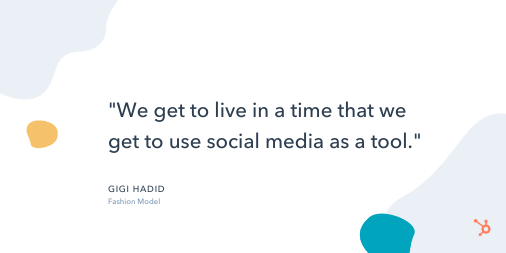
3. “We get to live in a time that we get to use social media as a tool. It’s not just a face on a piece of paper, and that’s what makes you someone’s favorite model. We can have a very similar sense of humor as someone, and that’s why we’re their favorite model, or our personal style, off the runway, is why we’re their favorite.” – Gigi Hadid, Fashion Model
4. “I’m very active on social media and see the huge impact it has on engaging with fans and being able to have a voice.” – Stephen Curry, Professional Basketball Player
5. “A lot of people who are ‘social media’ stars aren’t considered to be ‘real’ stars, and people underestimate the amount of work it takes to edit and upload a video every single day and document your life like that.” – Shawn Mendes, Singer
Positive Social Media Quotes
6. “Social media is not just an activity; it is an investment of valuable time and resources. Surround yourself with people who not just support you and stay with you, but inform your thinking about ways to WOW your online presence.” – Sean Gardner, Forbes Social Media Power Influencer, AI specialist
7. “Don’t use social media to impress people; use it to impact people.” – Dave Willis, Author and Speaker
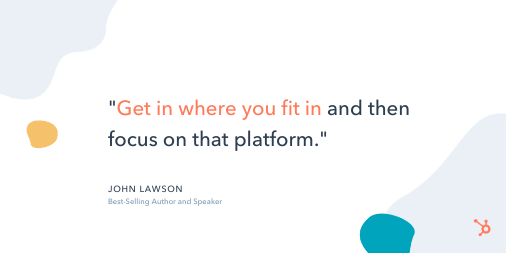
8. “Get in where you fit in and then focus on that platform.” – John Lawson, Best-Selling Author and Speaker
9. “You don’t need a corporation or a marketing company to brand you now: you can do it yourself. You can establish who you are with a social media following.” – Ray Allen, Professional Basketball Player
10. “A brand is no longer what we tell the consumer it is – it is what consumers tell each other it is.” – Scott Cook, Co-Founder of Intuit
Social Media Marketing Quotes
11. “When I hear people debate the ROI of social media? It makes me remember why so many businesses fail. Most businesses are not playing the marathon. They’re playing the sprint. They’re not worried about lifetime value and retention. They’re worried about short-term goals.” – Gary Vaynerchuk, CEO of VaynerMedia
12. “A large social-media presence is important because it’s one of the last ways to conduct cost-effective marketing. Everything else involves buying eyeballs and ears. Social media enables a small business to earn eyeballs and ears.” – Guy Kawasaki, Chief Evangelist, Canva
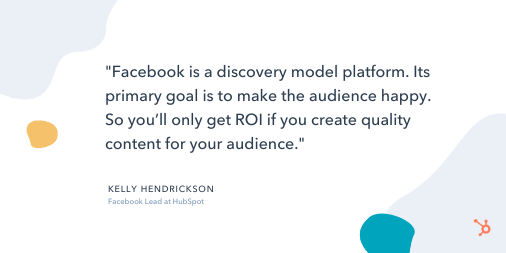
13. “Facebook is a discovery model platform. Its primary goal is to make the audience happy. So you’ll only get ROI if you create quality content for your audience.” –
Kelly Hendrickson, Facebook Lead at HubSpot
14. ‘Instead of getting discouraged when a promising tweet doesn’t rack up the likes and retweets, pay attention to the clicks and check how long people stay on the page after coming from social. If your post is generating strong engagement, don’t worry so much about the superficial stats.” – Tallie Gabriel, Producer at Unthinkable Media
15. “When pitching to press outlets, you need to help drive traffic through social to make it worth the effort of PR professionals. In addition to traditional outlets, publications are now generating traffic from native content within social platforms. So if you want to engage with members of the press and PR professionals today, you need to analyze their social media pages to learn what kind of content they’re sharing — before pitching.” – Ryan Bonnici, CMO at G2Crowd
16. “When it comes to social media marketing, you don’t have to post 3 times a day. It’s never about how often you post but the quality of your content.” – Janet Benson Amarhavwie, Social Media Manager
17. “You have to stop doing what everyone else is doing. Listen to your gut, go in a new direction, do something you’ve never done before. Learn from the best. Success is yours if you go in your own direction.” – Amanda Weinraub, Business Owner, Social Media Manager, Web Designer
Funny Social Media Quotes
Quick Note:
We found these quotes on Pinterest. The authors are unknown, but they’ll still give you a good laugh.
18. “What happens on social media stays on Google forever.”
19. “Being famous on Instagram is basically the same thing as being rich on Monopoly.”
20. “I do not have a fake social media personality. I am genuinely this ridiculous in real life.”
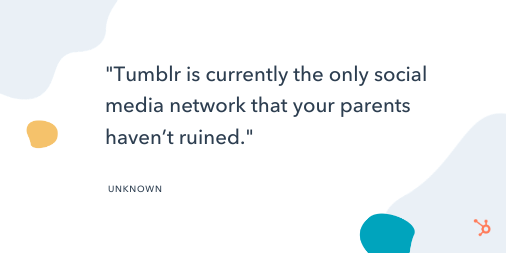
21. “Tumblr is currently the only social media network that your parents haven’t ruined.”
22. “I log off because I’m bored. I log back on in five minutes because I’m bored.”
23. “For every action, there is an equal and opposite reaction, plus a social media overreaction.”
24. “Thank God for Facebook or I’d have to call 598 people and tell them how far I ran today.”
Editor’s note: This post was originally published in February 2019 and has been updated for comprehensiveness.

21 Mind-Blowing Black Friday Statistics for 2020 [New Data]
Ah, Black Friday — the biggest shopping weekend of the year is around the corner.
In 2020, Black Friday is going to exist primarily online. Which means, as a marketer, it’s critical you prepare marketing materials ahead of time to ensure you’re able to break through the noise.
Additionally, a few major retailers — including Home Depot, Walmart, and Target — have chosen to redefine Black Friday as a couple of days or even weeks to cater to shopper’s changing buying habits. Consider following suite with your own re-imagined version of Black Friday.
To inspire your 2020 Black Friday advertisements, emails, and social media posts, take a look at some mind-blowing statistics and predictions around the use of mobile devices, online coupons, and email marketing this holiday season.
21 Black Friday Statistics for Marketers
1. In 2019, Black Friday beat Cyber Monday as the busiest online shopping day: 93.2 million shopped online on Black Friday vs. 83.3 million on Cyber Monday. (Source: National Retail Federation)
2. Amazon was the most-anticipated Black Friday ad in 2019 — despite the fact that it doesn’t release an official Black Friday ad, just a list of deals. (Source: BlackFriday.com)
3. 50% of 2020 holiday shoppers say the sales offered over the last six months have lessened their interest in Black Friday and Cyber Monday sales this year. (Source: NerdWallet)
4. Electronics typically have the best deals on Black Friday, followed by home goods and home appliances. (Source: Nationwide.com)
5. On Black Friday 2019, more people shopped online than in stores — 142.2 million shopped online, while 124 million shopped in-store. (Source: National Retail Federation)
6. 65% of shoppers will choose to buy products online instead of in-store to avoid crowds in 2020, while 64% choose to purchase online for the comfort of shopping from home. (Source: Deloitte)
7. 66% of shoppers will increase their online purchases this year. (Source: Brightedge)
8. Online holiday spend will surpass $189B in 2020 — up 33% YoY. (Source: Adobe)
9. As consumers make the most of being at home, they plan to treat themselves to beverages (33%), food (30%), and clothes (30%). (Source: Deloitte)
10. In 2020, 42% of all online shopping is done from smartphones (up 55%), and $28B more than last year will be spent on smartphones. (Source: Adobe)
11. Millennials were the biggest Black Friday spenders in 2019, shelling out an average of $509.50 on Black Friday purchases, compared to an average of just $382.40 in 2018. (Source: PYMNTS)
12. 75% of all retailers are offering discounts before Black Friday, and many major retailers are reinventing Black Friday deals to last days … or even weeks (including Home Depot and Walmart). (Source: Adobe)
13. 39% of consumers looked to emails from retailers for information on deals and promotions, and 38% used online search to find deals. (Source: National Retail Federation)
14. More than 50% of all Black Friday shoppers chose credit when checking out at the physical store or online in 2019. Roughly a quarter of all Black Friday online shoppers used PayPal to make a purchase, as well. (Source: PYMNTS)
15. Women make up the majority of Black Friday shoppers — but men are quickly closing the gap, with 45.1% male this year. (Source: Much Needed)
16. Small businesses can experience a +107% revenue boost over holiday season, and 38% of consumers will make a deliberate effort to shop at
smaller retailers throughout the holiday season. (Source: Adobe)
17. The five top states planning to spend money on Black Friday sales include Georgia at 52%, Wisconsin at 51%, Illinois at 50%, Virginia at 48%, and New York at 47%. (Source: Much Needed)
18. More than 201 million Americans (79%) plan to purchase gifts this holiday season, spending an estimated $167 billion — a little less than the $184 billion Americans planned to spend last holiday season. (Source: NerdWallet)
19. Mobile devices are used by 75% of shoppers to research products, compare prices, and make purchases — up from 66% last year. (Source: National Retail Federation)
20. Free or fast shipping expectations are increasing, with 64% of consumers refusing to pay extra for expedited shipping. (Source: NerdWallet)
21. 82% of consumers plan to finish purchasing holiday gifts after Black Friday, with 6% saying they will not be done until after Christmas. (Source: PYMNTS)
If you haven’t finished putting together your online coupons, your mobile site optimization isn’t quite complete, or your email marketing campaigns aren’t quite nailed down yet, ask your marketing elves to get hopping! Even if you miss the Black Friday shopping rush, the rest of the holiday season will still be busy for retailers, especially those who can cater to the last-minute shoppers.

What Is a Focus Group in 100 Words or Less [+ Pros and Cons]
In an ideal world, you’d know just how your product or business idea would be perceived before it’s released. This knowledge could help you make alterations to what you’re offering for the best possible reception, and better inform your sales projections and marketing strategy.
Sadly, you’ll never know exactly how what you’re selling will be received by your target audience, which is why companies conduct market research.
But, while mass data collection through surveys provides you with necessary quantitative information, it doesn’t offer as much qualitative insight into your target market’s view or opinion of what you’re selling.
This is where a focus group comes in.
So, what is a focus group, and how can it help you navigate your market research? Let’s explore those two questions, next.
What is a focus group?
In the context of market research for businesses, a focus group is a cohort of individuals participating in a guided discussion about a business, brand, product, and/or service.
Typically, a focus group is facilitated by representatives from the business and is composed of individuals in the business’s target market who share their thoughts and opinions on the topic or offering in question.
A focus group is usually moderated by a representative or representatives of the company, who ask 5-10 questions to the participants over the course of 30-60 minutes, with another facilitator keeping notes on the focus group questionnaire.
Follow Along With a Free Focus Group Questionnaire Template
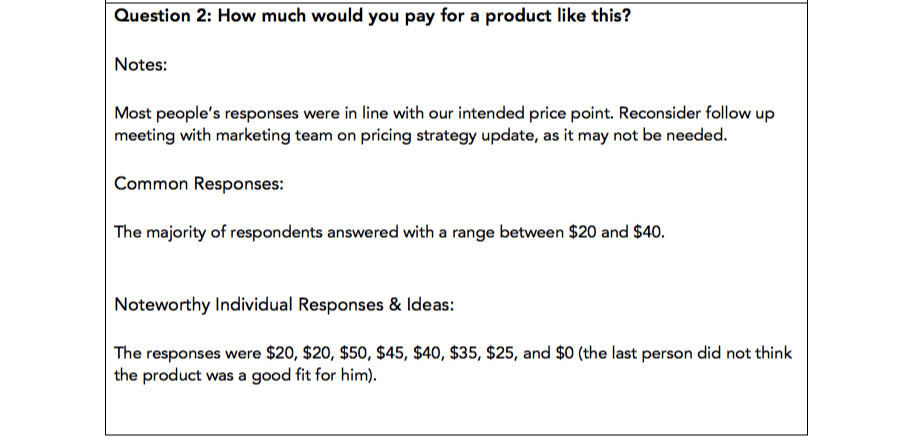
HubSpot’s Market Research Kit includes a questionnaire template to use in your focus groups, as well as four more templates to aid you in your market research efforts. You can download the kit here to help you plan your focus group and market research.
You can also read more about the process of conducting an effective focus group in our blog post, How to Run a Focus Group for Your Business.
Next, let’s explore the pros and cons of a focus group.
The Pros of a Focus Group
1. You get the story behind the data.
In focus groups, qualitative data takes center stage. Survey data is unbelievably powerful, but it’s hard to understand the rationale for the numbers without context. Focus groups are a way to understand how someone truly feels about your business and provide the why behind the data.
If someone answers a question in a way that interests you, you’ll have the chance to dig deeper. Ask “Why?” See how the other participants feel about the specific answer. Gauge facial expressions and tone of voice to see how people react to what you’re talking about. You’ll end up with the emotional input from your target market that your surveys may not be able to provide.
2. Focus groups are interactive.
Those responding to a survey or a questionnaire can’t pick up your products or use them, but they can in a focus group. If the subject of your focus group is tangible, observe and ask questions about how participants use the product and feel about the packaging and design.
Here, you’ll see your product through the end-users’ eyes, which can help you realize something you hadn’t before.
3. They’re more efficient than interviews.
Interviewing individuals can take much longer than running focus groups with the same amount of people. Say you want to interview 100 people, and each interview or focus group takes one hour. Getting the opinions of those 100 people would take 100 hours if interviewed, but only 20 hours if participants were broken up into groups of five.
This way, you can get qualitative feedback from multiple people in a shorter amount of time — an enormous time saver, especially if most of your participants think alike.
The Cons of a Focus Group
1. They’re not entirely representative.
What you gain from depth of opinion from focus groups, you lose in sample size.
Because focus groups take longer than surveys, you’ll hear from dozens or hundreds of people in more time than it could take you to hear from thousands of people through your own surveys or exploring secondary research, such as previously conducted studies or surveys.
This constricts the amount of people whose input you’ll receive, which means your findings may not represent the opinions of your entire target market.
2. They could encourage groupthink.
Have you ever been in a meeting where one or two people voice an idea you disagree with, but everyone else agrees with the idea before you have the chance to say your piece?
As a result, maybe you decide to go along with the idea … even though you’re not its biggest fan?
That’s called groupthink, and it happens when a group rallies behind a vocalized idea that not everyone believes is correct for the sake of moving on or attempting to avoid a conflict.
Focus groups can quickly turn into one or two participants providing the bulk of the answers while the other four or five silently nod in agreement. The problem is you’re now only getting input from two participants – not the entire focus group, as intended.
You can avoid this by calling on specific group members to answer in-depth, but some may be reluctant due to shyness or disinterest.
3. Your focus group moderators may have confirmation bias.
Focus group moderators are often attached to the project in question, and can come into the session with an idea of where they think it will — or want it to — go.
For example, one moderator may want a product to be priced, packaged, or colored a certain way, and can lead the discussion towards that conclusion. This is known as observer dependency.
For instance, let’s say one moderator wants a product to be colored blue, and poses the open question to the group: “What color should this be?”
After everyone responds — and no one says blue — she might ask, “What about blue, would that work?” Everyone silently nods, and she notes that the group agreed blue would be a good color, despite that being far from the perfect truth.
To overcome this, focus group moderators should be explicitly instructed to put their personal preferences aside and act as an objective group facilitator. You could also work with a market research firm, which typically has less interest in the product or subject than those from the business who are actually creating it.
Focus groups may not be the most efficient source of gathering data, but when used appropriately, they can put a face and an emotion behind the statistics and quantitative data you’ve gathered to better inform your business, marketing, and product development.
Remember, focus groups are most effective when moderators organize their thoughts ahead of time and take notes during the session on a focus group questionnaire — which you can access for free here in our Market Research Kit.

The 7 Best Free Resume Builders We’ve Ever Discovered
A couple weeks ago, my brother Max sent me his resume in a text message, and asked me to ‘spruce it up a bit’ for him.
Undoubtedly, I needed to do more than copy-and-paste the text into a Word document. To truly stand out, I knew the resume needed to demonstrate a level of professionalism and effort — something content alone can’t always convey.
Fortunately, with the help of Zety, I was able to input Max’s resume information, choose a template, and have Zety design the piece for me, within a span of 20 minutes:
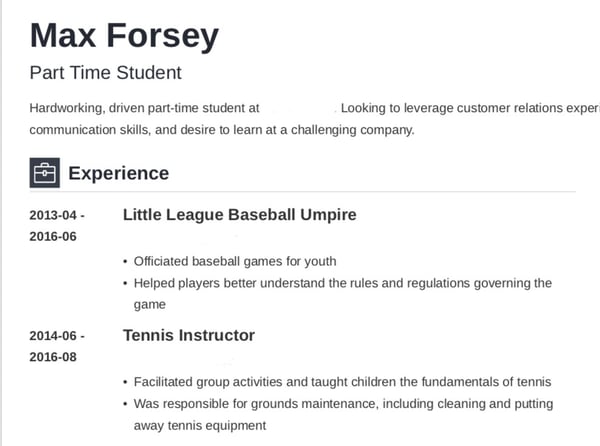
Looks a little better than a text message, doesn’t it?
Resume builders are incredibly helpful when creating a resume, and can help you showcase your unique personality. Best of all, they look a lot sleeker than whatever you can design in a Google Doc.
To ensure you can create a resume for free, we’ve compiled this list of the best free resume builders we’ve discovered. Keep reading, and then get to work designing your own — trust me, with these tools, it’s almost as easy as sending a text.
Featured Resource: HubSpot Resume Templates
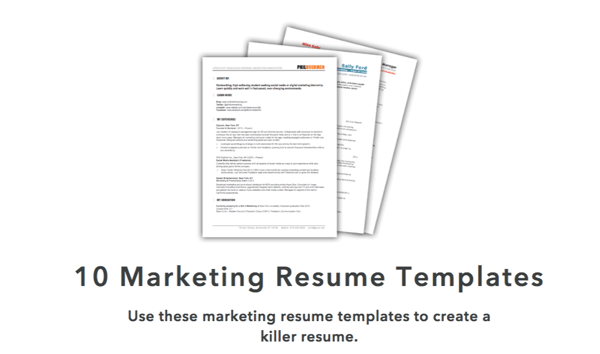
Download these free templates and plug in your experience and information for a custom, well-crafted resume.
1. Resume Genius
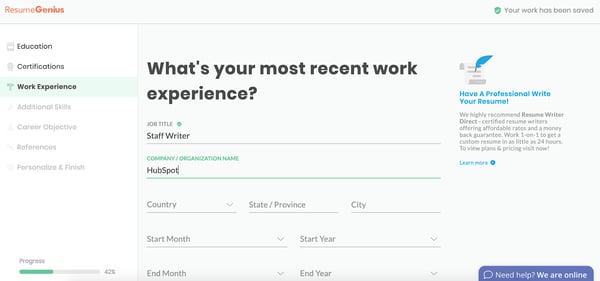
Resume Genius is undoubtedly one of the easiest and fastest free resume tools you have at your disposal. With a clean and easy-to-use interface, the tool walks you (speedily) through categories including education, work experience, and references, and offers eight different templates varying from ‘Taj Mahal’ to ‘Classic’. Resume Genius provides you with easy fill-in-the-blank sections, so you can have an impressive, comprehensive resume in no time.
2. My Perfect Resume
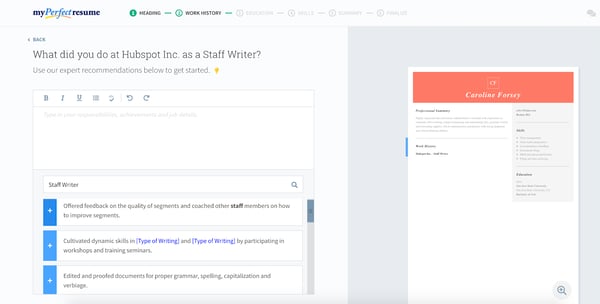
My Perfect Resume allows you to either start from scratch and input information into a blank template, or upload a pre-existing resume if you already have one. Additionally, the tool provides you with expert recommendations as you move throughout the process, including suggested phrases you can include for specific roles.
My Perfect Resume also enables you to include optional sections like certifications, accomplishments, and affiliations, which is vital particularly if you’re just starting out, or switching industries. This tool is particularly useful if you’re applying for a creative role and want to add color or a unique design to your resume.
To use My Perfect Resume for free, click “Download” on the left toolbar once you reach the final step of the builder — instead of selecting “Save and next”. Then, choose “Plain Text (.txt)” to download your resume for free.
3. Standard Resume
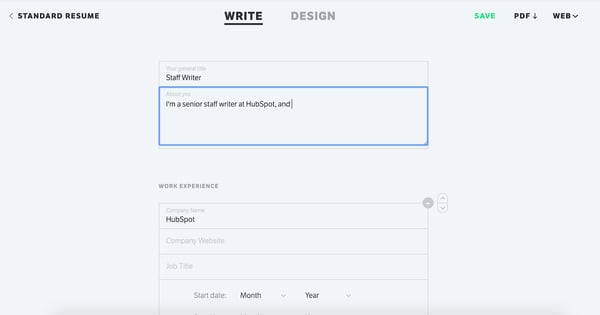
Standard Resume allows you to import your information straight from LinkedIn, making it an ideal time-savor if your LinkedIn profile is up-to-date. Plus, the white background and minimalist features enable you to focus on what really matters — your content. You can switch back and forth between “Write” and “Design” to see how your resume looks as you go along, and download as a PDF when you’re finished. Best of all, the tool also makes your resume mobile-responsive, so you can view it on your smartphone.
4. Canva
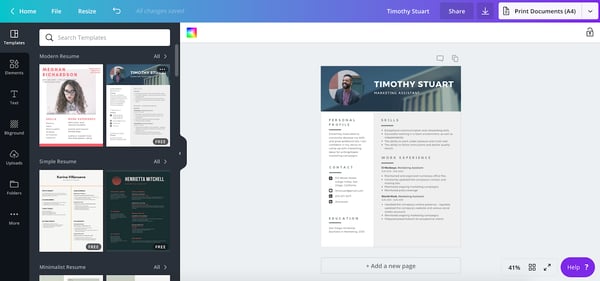
If you’re applying for a creative role or want a resume that truly lets you stand out, you might consider using one of Canva’s hundreds of free, designer-made templates. Canva’s selections are incredibly varied and unique, so you’ll undoubtedly find one you like, and inputting resume sections can be as easy as copy-and-paste. Additionally, the templates are separated into categories, such as ‘Graphic Design’, ‘Corporate’, and ‘Creative’, making it easier to choose based on your preferred industry.
5. Indeed
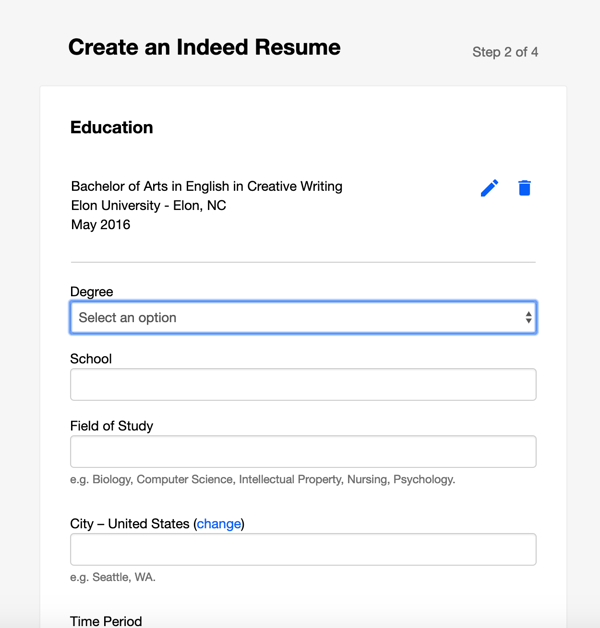
Creating an Indeed resume is an incredibly quick process, and best of all, the site allows you to automatically share your resume with employers on Indeed as soon as you’re finished. If you’ve already completed a resume, it’s still a good idea to upload to the site for exposure to potential employers. While it admittedly doesn’t offer as many options for creativity as some of the others in this list, Indeed is an impressive option if you want to create a more traditional resume and start sharing it immediately.
6. Zety
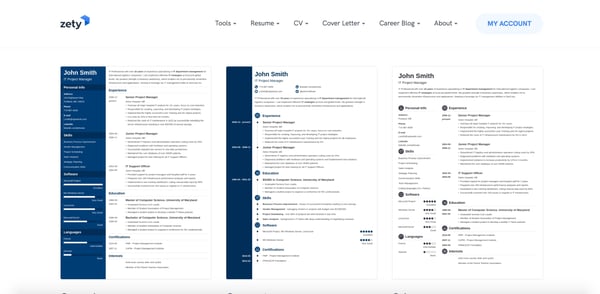
Zety is an excellent online resume builder because of the state-of-the-art templates. You can easily start from scratch and input your information. My favorite element of this tool is that the site will walk you through the process. All you need to do is fill out the information and then voila — you have a resume. While this tool is free, you will need to make an online account.
To use Zety for free, click “Download” on the left toolbar once you reach the final step of the builder — instead of selecting “Save and next”. Then, choose “Plain Text (.txt)” to download your resume for free.
7. Resume.com
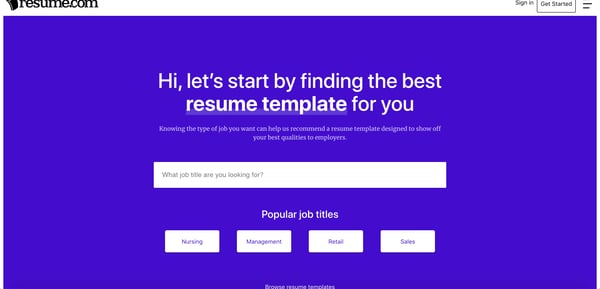
With Resume.com you can build a beautiful resume in minutes. This tool is a great option if you’re looking for recommendations on what to include in your resume. Additionally, the site has popular templates for various job categories to help you stand out among the competition.
To use this for free, when you’re at the last stage, you’ll see a pop-up that says to create an account — instead, just click “Skip for now.” Then, in the top right-hand corner, you can click the download button.
Building a resume can feel like you’re staring at a blank canvas. But with an online resume builder, you can get recommendations and build a beautiful document that will stand out without needing a graphic design degree.
Editor’s note: This post was originally published in March 2019 and has been updated for comprehensiveness.

How to Market an Ebook: Don’t Let Your Content Offers Collect Dust
We all know that traffic alone doesn’t pay the bills. Ultimately, our traffic must do its job to convert prospects who have problems that we can solve. One way of getting the right people into the pipeline is by creating compelling content offers that practically beg for the opt-in. There’s just one problem: Making sure we generate enough demand for the offer to be successful.
So if your content is just sitting on your website not getting too many downloads or leads, your promotion might be the problem. That being said, read on to discover the best techniques for marketing your ebook, whitepaper, guide, or other lead-generating resource.
1. Consider a co-marketing campaign.
Before your create your helpful content offer, consider if there’s any partnerships that you can leverage. Co-marketing provides an opportunity for cross-collaboration on content so that two parties “own” that content and benefit from it.
Here are some reasons why co-marketing is a good idea:
- Sharing resources for the offer’s creation doubles the value of the content and diminishes the cost/effort of its production
- Promoting to two networks increases the reach of the campaign exponentially
- Both partners have vested interest in the results of the promotion because both reap the benefits (the leads generated from it)
2. Utilize industry influencers for their thought leadership and reach.
Whether you decide to do co-marketing or not, you can’t deny the power of good old-fashioned personalized outreach. Think through your existing partnerships as well as other major players in the industries or social circles you want to reach.
Consider these thought leaders’ goals: finding relevant articles to share with their fan base, increase their reach, and further establish themselves as an authority.
You can appeal to these goals by featuring them in your content offer. For example, ask them for a quote that you can incorporate into your content offer or link to another article they wrote. When you finish the piece, send them a complimentary copy. I’d suggest telling them how much you’ve appreciated their expertise and that you were delighted to include them.
Don’t forget to mention that you’ll be promoting the offer to your network. Because they’re featured in the content, this acts as an incentive for them to share your offer to their audience as well.
The key to this tactic is to make your personalized outreach unique and worth their while. After all, they likely get bombarded with messages asking them to share content.
3. Use email marketing to promote the ebook with your existing audience.
Admittedly, outreach is arduous. Don’t forget about the network you already have. Your email subscribers have already expressed interest in similar content offers, and if this new ebook continues to provide value for problems they need help with, this is another opportunity to continue engaging them.
As you continue to provide value, you’re establishing more credibility and authority in their eyes. As you stay top of mind in this way, you’ll be first on their list when they are ready to make a purchasing decision.
To achieve maximum success with this tactic, it helps to have a segmented audience so that you’re always providing relevant, timely, and personalized content.
You don’t want to email a specific ebook to your entire contact database because it probably doesn’t relate to all your contact lists. When you don’t segment emails, your engagement will be lower and your success will be diminished.
Here’s what I mean:
On one of your opt-in forms, you could have visitors identify what they need help with. For an inbound marketing agency, it might say, “What Does Your Business Want to Improve?” with options to select:
- Grow our web presence
- Rank higher on Google
- Generate more leads
That way, if an ebook was created around SEO, it could be sent to all the subscribers who have already shown interest in ranking higher on Google.
4. Promote your ebook on your highest trafficked (but still relevant) blog posts.
In addition to your other methods of promotion, you want to make sure that you’re converting organic traffic as well. But here’s the problem: A user can’t convert on a landing page they never land on. They can never be interested in a content offer they don’t know about.
Content offers aren’t an “If you build it, they will come” scenario. Instead, see how you can capitalize on the traffic you’re already getting for its promotion.
By putting the CTA (call to action) on new blog posts, all you’re doing is making a gamble. Mainly because you don’t know if that blog post will ever generate traffic. After all, it’s brand new.
However, you can put a CTA on an existing blog post that has proven success, pushing that ebook to a known source of demand.
Promote your offer on relevant blog posts that already get traffic to put your ebook in front of the audience you have.
5. Create a PPC campaign to advertise your content offer.
If you know your content offer has a clear path to revenue, organic plays alone are not always the best route for promotion, especially if there is clear demand as people search for resources just like yours.
PPC is a quicker tactic than SEO and is a great way to promote not just your company and its services but also campaigns to offers you create. A successful PPC campaign boosts visibility and downloads to your offer by driving high-intent users to the landing page.
6. Announce your content offer on social media.
Email is a great tactic for promoting to an existing audience, and so is social media. An additional benefit is that social media promotion can reach beyond that existing audience much more easily.
Be sure to post on your social channels once your offer is live, conveying the value it contains for the reader and including an image to attract their attention. Mix these posts in with your other content so that your readers aren’t put off by too much promotional content.
7. Consider putting advertising budget behind it.
On some social channels (I’m looking at you, Facebook), organic reach isn’t what it used to be. Boosting posts helps to increase reach to both your followers and beyond. Alternatively, you can also create an ad that promotes your ebook and do paid promotion to a targeted audience.
Just keep in mind that people don’t browse social media with buying intent, so you’ll have to ensure that the offers you promote and the way you promote them piques interest and conveys value. Otherwise, they’ll just see it as an ad and scroll on past.
8. Repurpose your content into different formats.
The first time they see your post, they may not click and convert right away. Like with anything, it can take multiple “impressions” to attract attention and pique interest. At the same time, if you continue posting the same thing over and over, your content gets stale.
Enter repurposing.
Your ebook can easily be turned into a slideshare, infographic, quiz, or other format. By having multiple “versions” of your content for promotion, your ebook can go farther while getting more eyeballs on it.
9. Connect with niche readers on social media.
Look on Twitter and LinkedIn for users that have been sharing similar content to what you have created. Just by searching on Twitter for #inboundmarketing, I can see who is sharing inbound marketing blogs, guides, and resources. Plus, I can see who is getting the biggest reach in terms of likes and retweets.
Reach out to these individuals with a simple message that encapsulates “Hey! I saw you shared [this article] and I thought you might like [this related content offer]”. This way you know that the individual is probably interested in what you’re writing because they’ve been interested in similar content before.
This tactic might not work as well as the influencer tactic in tip #2 since you’re not providing mutual value, but many of these individuals spend a lot of time curating content for their audience, and you might just be helping them out.
10. Submit to a content community or online group.
Chances are, search engines and their social feeds are not the only places your audience hangs out. If your ebook contains specialized or niche information, you might be able to target these niches through content communities and online groups. For example:
- Niche Facebook groups
- Niche LinkedIn groups
- Quora
- Slack groups
- NextDoor neighborhoods
- Industry forums
For example, if you’re a roofer in St. Louis, join your community group on NextDoor.com and offer your content there. When your neighborhood gets hit by a hailstorm, your infographic on “Assessing Storm Damage as a Homeowner” can come in handy to the community’s residents.
Content communities are also a great resource for getting feedback, starting discussion, and sharing your passion for your services with others.
11. Find other linking opportunities.
Using tools like Arel=”noopener” target=”_blank” HREFs, you can see other websites who have linked to content like yours. Reach out to them with your content offer link and see if they want to include a link to your resource. I find that this is most helpful when you can find a broken link that your new link can replace. Webmasters generally appreciate when someone lets them know of a problem with their website links, and if you can provide a link to replace the broken one, it might get placed.
Alternatively, use a tool like BuzzSumo or Mention.net to find mentions of your company online. You’ll be able to see who has mentioned you or your content offer and determine whether they have linked back to you or not. If they haven’t included your link, reach out to that website and explain it might provide their readers a better experience if they could find the article that is being mentioned.
If you’re looking for more backlink opportunities, I highly recommend Backlinko’s “17 Powerful (Yet Untapped) Backlink Sources” to find other places you could get a link from!
12. Guest blog on popular websites with your ebook as CTA.
You may also have an opportunity to capitalize on a third party website’s organic traffic and promotions through guest blogging. If your buyer persona goes to a popular website that provides solutions to the problems they’re experiencing, your content offer should be there too (as long as it’s similarly relevant and helpful, of course).
Once you nail down which websites your buyer persona is reading to get information, see if these websites offer the opportunity for industry leaders to guest blog. Some websites will require an application or an article proposal, but once you get accepted blogging for one website, it becomes much easier to get accepted on other websites.
When you write your articles, keep them educational and don’t self-promote. Remember, you’re trying to help the reader solve a problem with your expertise and industry knowledge. A the conclusion of the article, use your ebook as a next step CTA so if a reader finishes the article and wants more information, your content offer is there.
Content that just sits on your website can’t properly do its job and bring in leads. But worry not, by using these promotion tips you’ll see a little bit of extra effort can really take a content offer from zero to hero.
If you’re interested in creating attractive ebooks that capture attention and bring more leads to your business, check out the FREE resource below (see what we did there?).
Editor’s note: This post was originally published in September 2016 and has been updated for comprehensiveness.

The Surround Sound Series: How We Built a Bespoke SERP Tracker and Measured the Results of Our New Content Program (Part 3 of 3)
This post is a part of Made @ HubSpot, an internal thought leadership series through which we extract lessons from experiments conducted by our very own HubSpotters.
As our three-part series comes to an end, there’s one last question (or two) we need to address:
Does the surround sound strategy really work? And what results have we seen since we started using it?
The TL;DR answer is yes. It’s working and we’re sharing our preliminary results in this article.
So if you’re looking to use surround sound in 2021, the two of us (that’s Irina Nica and Alex Birkett) thought we’d end this short series with a handful of resources: the formula HubSpot uses to measure progress, our proprietary surround sound tracker (aka the SERP Tracker), and a sample of results to hopefully inspire your own endeavor.
What is the surround sound strategy?
At HubSpot, “surround sound” is the name Alex Birkett gave to a content marketing approach that aims to make HubSpot products visible every time someone searches for a product-related keyword (e.g. “best help desk software” or “best live chat software”).
The goal is for potential users to see HubSpot mentioned in all or most of the pages that rank in Google top results for those keywords. Check out the first two articles in the series for a deeper-dive into what is the “surround sound” effect and how we scaled the program at HubSpot.
Surround Sound vs. SEO
Here’s where a lot of people get confused: The definition of surround sound says its goal is to improve visibility in search engines, but isn’t that what SEO does, too?
The answer is surround sound includes SEO results, but doesn’t stop there.
Here’s an example: say we want to increase our visibility in search engines for the keyword “free CRM.”
A first step would be to make sure our own domain ranks well for that keyword. That’s the “job” of the SEO function.
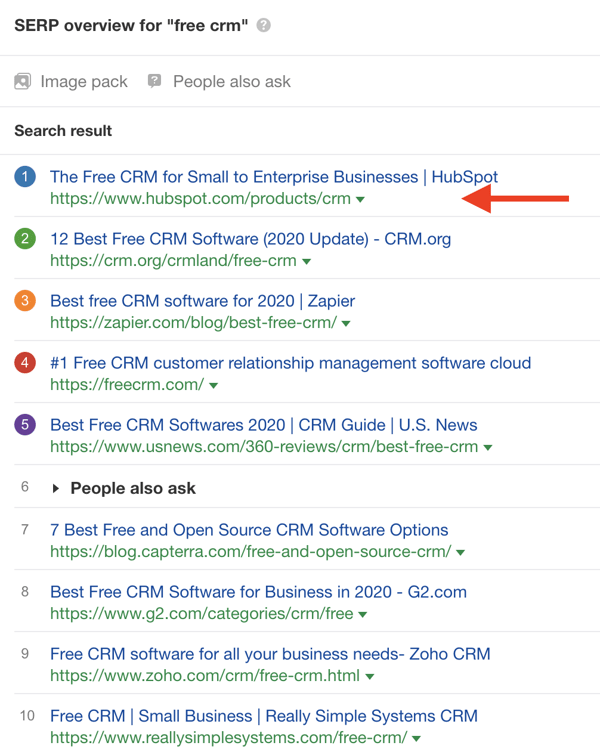
But visibility in SERP doesn’t stop there.
When potential customers are looking for a free CRM, they might not stop at the first results. Instead, they click through different suggestions of curated lists that they find in search results.
Our product awareness goal is to make sure HubSpot is visible in as many results as possible, especially on third-party domains. The level of SERP real estate that HubSpot is mentioned in (including owned and third-party domains) is what surround sound measures.
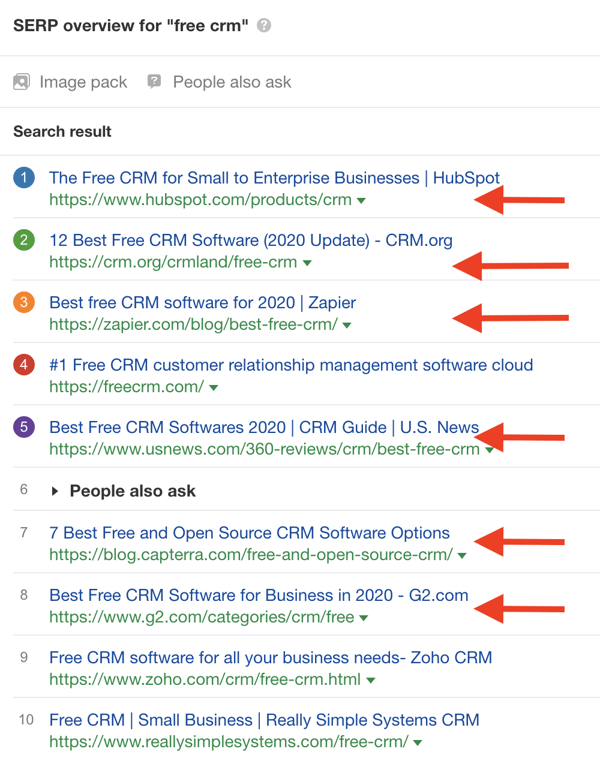
That’s why we say that in order to measure surround sound results, we need to measure our visibility in SERP, for a particular keyword or topic, beyond SEO.
But surround sound isn’t really a “mainstream” product awareness tactic — yet. So there are no methods or tools to measure visibility in SERP, beyond rankings (as far as we looked). That’s why, in order to scale our efforts, we had to build our own systems from scratch.
How HubSpot Measures Surround Sound Results
Let’s talk about scale.
If HubSpot were to have only one high intent keyword in our purview (say, “best marketing automation software”), it wouldn’t be insane to measure our visibility manually.
Once per month, you could simply open Google, search “best marketing automation software,” and count how many of the top 20 pages mention HubSpot.
This clearly becomes a problem when you add more than one keyword, however. Imagine the frustration of doing that for 600+ keywords per month.
In order to make this strategy “scalable” (a phrase I dislike, by the way, because it has been weaponized by curmudgeons who can all too easily shut down interesting ideas by saying ‘this won’t scale’), we needed to do a few things:
- Build custom tools and infrastructure to automate aspects of the strategy
- Educate others on the surround sound process and playbook
- Evangelize and excite others into buying into the idea
The latter was easiest; once you get some results, others can easily grasp the importance of an idea.
I’ll focus here on building custom tools. First, I want to explain the value of investing in custom tools, automation, and infrastructure, because I can already sense the objections:
- “We don’t have the technical resources to build our own tools and automations!”
- “Won’t building custom tools cost us a lot of money and time?”
To address the first point, there’s always a creative solution. If you don’t have internal resources to code up new tools, you can easily outsource this as long as you have good specifications. Sites like Code Mentor or even Upwork are great for this. Additionally, this is a good excuse for (mythical) non-technical marketers to build some new skills.
Second, building tools to reduce the marginal cost or effort in the long run increases the expected value of the program.
Lots of jargon in that sentence, so let me unpack that with an example from experimentation.
Why invest in tools, automation, and infrastructure?
Imagine the expected value (the “predicted value of a variable, calculated as the sum of all possible values each multiplied by the probability of its occurrence”) of an A/B test is $1,000.
Some proportion of A/B tests will fail, which means you only “lose” during the time of the experiment, some will do nothing, and some will win (and those that win will do so by varying levels). All in, if you averaged out these values, a given A/B test could be predicted at a $1,000 value.
Now imagine every time you wanted to run an A/B test, you needed to get two engineers, one designer, and an analyst not only to set up the test from scratch (you’ve got no testing tool here), but also, you have to do minimum one month of research, wait two weeks for approval after you submit your hypothesis, and then you have to sit through, on average, four meetings with this crew.
What’s the cost of all that? Over $1,000? Congratulations, the expected value of your A/B test is now negative.
But what if, on the other hand, you had a testing tool that made it easy to set up and analyze experiments (with trustworthy data), and also imagine you prioritize to focus on only high impact tests. Now you lower the upfront cost of each additional test you run (the marginal cost), which increases the expected value of each test (just slightly). On a program level, though, now you are rewarded for running more tests, since the expected value is positive, and you’ve got very low marginal costs. You spent a little time investing in tools and automation, and you’ve drastically increased the ROI of your program without even improving your win rate.
This is exactly what we needed to do to make the surround sound strategy economically viable.
The amount of effort to manually audit, measure, and store SERP visibility, as well as the manual cost of outreach and relationship management, would forever outweigh the positive benefits of the placements we could get on a SERP. That is, unless we could lower the costs of data collection and storage as well as outreach and relationship management.
Enter: the SERP Tracker
Now we have a functional tool that does all this for us! We call it the “SERP Tracker.”
Here’s the aesthetically-gorgeous interface:

(For any fellow nerds, it was written in R and it’s hosted and deployed with Shiny. We’re using serpapi.com to get Google’s search results, and we’re also using Bing’s API [free up to a certain number of credits]. I have an older version of the generic script here available for viewing — we’ve since updated it many times, but this version will still be functional.)
I’ll walk you through how it works, but you can also watch this Loom tutorial if you prefer video:
Here’s a quick tutorial on how you can use the tool and what kind of data it can give you.
First, you have to validate by entering a password. Since we use various APIs, we want to limit the usage to converse credits (again, we track some 600+ keywords, so it’s a weighty endeavor)
Then you can enter whatever keyword you’d like (like “best form builder” or “best help desk software”).
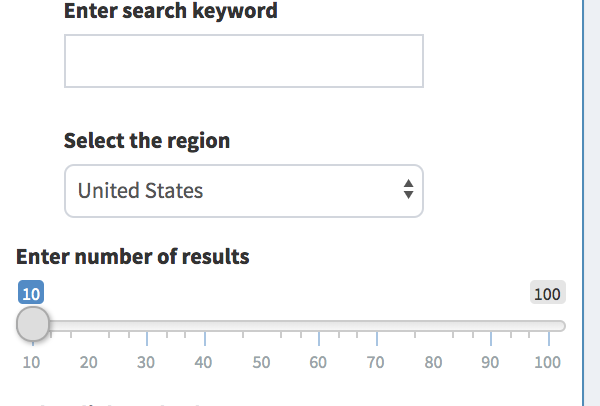
Then you can select a region and the number of search results you want to pull (up to 10 pages, or 100 results).
Finally, you need to enter the URL that you want to check the search results against.
In other words, if you want to check for the search keyword “best live chat software,” then you could enter “hubspot.com” or “drift.com” to see how many of the URLs that rank for the search keyword “best live chat software” mention that URL.
I have preset options for HubSpot URLs to check our product page, blog posts, or generic hubspot.com pages:
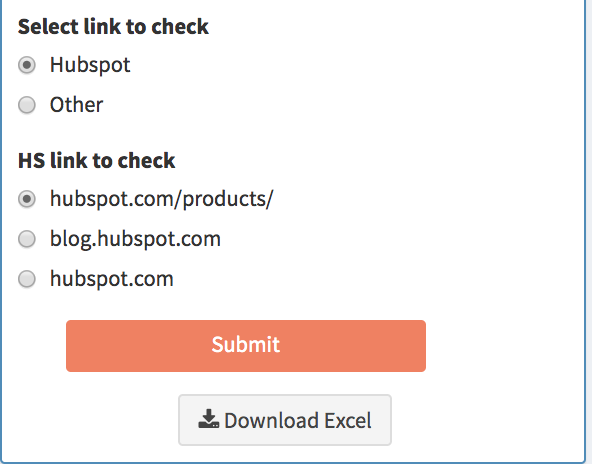
You can also enter a custom link by clicking “other.”
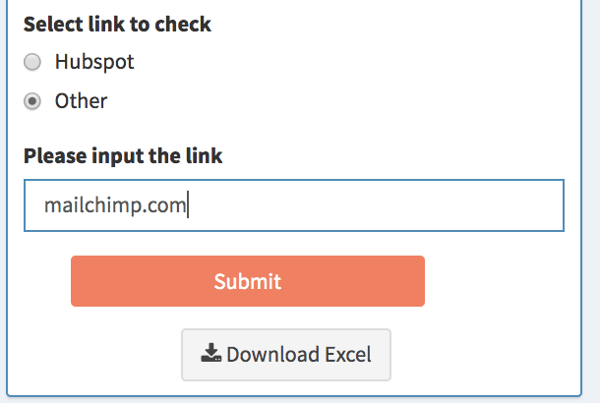
This allows for, among other things, competitor searches and custom HubSpot URLs (for example, if you just wanted to see who mentions our Forms product page or who mentions Academy pages – it’s also a workaround to check affiliate links, because they’re often structured like “affiliatesite.com/ref/hubspot” so you could just enter “hubspot” in the URL to check for those):
We use SEMRush’s API to pull keyword search volume, but there are times that SEMRush doesn’t have values for search volume. In this case, it just prints an error message:
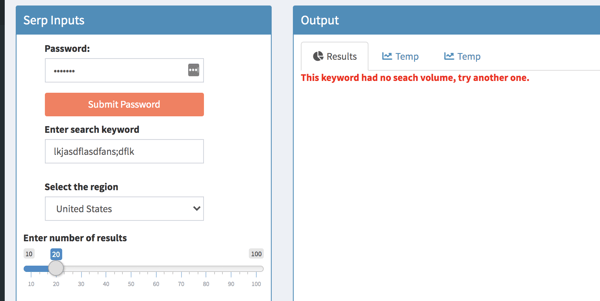
If all information is entered correctly, click “Submit” and it will start computing. After some processing time, this is the report it will create:
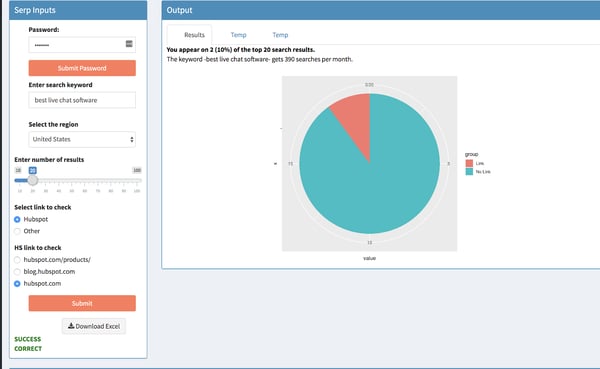
You get a nice visual pie chart, beloved by analysts and data visualizers worldwide, representing how many ranking URLs contain the link (and how many don’t). This shows that, of the top 20 search results for the term “best live chat software,” our URL “hubspot.com” appears on 2 of them.
I also made it pull keyword level data as well (in the above example it shows that “best live chat software” gets 390 searches a month). This helps weigh the relative importance of a given keyword (ie if a keyword gets 10000 searches a month or 100, that matters strategically)
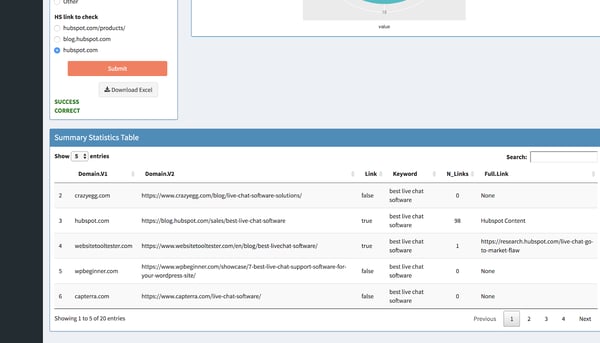
Then below that, you get a full data table that contains the domain and URL of all pages that rank for that keyword, whether or not the link you chose to check against is included (TRUE or FALSE), the keyword you searched (just for reference and if you want to pull the data to Excel), the number of links included, and the full link (so if you checked “hubspot.com” and the ranking page references “blog.hubspot.com/marketing/form-builder-tools,” it will pull that full link URL for you):
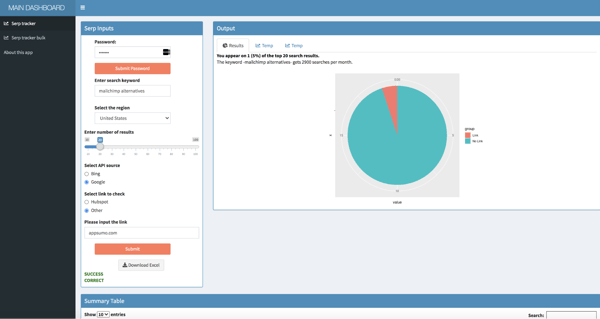
Like I mentioned above, you can use this to check other websites’ links as well. This one shows how many of the top 20 ranking pages for “mailchimp alternatives” mention appsumo.com (which makes SendFox, an email marketing tool):
And like I mentioned above, you can choose the region. Currently, I have options for Germany, France, Spain, and Japan, though we can add more regions fairly easily. This is going to be incredible for international expansion (more on that later)
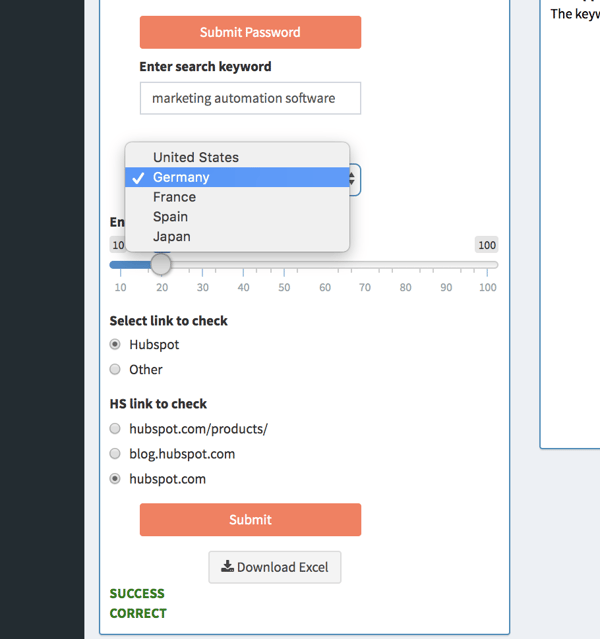
This just changed the database to a different region (ie if you choose German, it will show what ranks in google.de). This report shows how many hubspot.com links appear on pages that rank for “marketing automation software” in Germany:
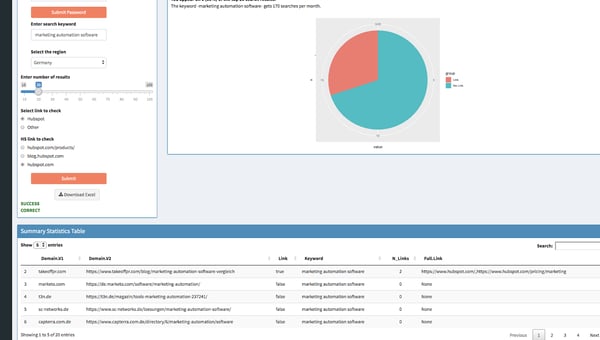
Next Level: Automating Report for 600+ Keywords with Google Data Studio and Scripts
This data from the SERP Tracker, on its own, is valuable. One can quickly audit the search results pages for product mentions, compare to other websites, and even do a bulk audit.
However, to truly get the wheels turning on the surround sound Strategy, it’s imperative to store and access data across time in order to track results and identify gaps and opportunities.
To do this, we extract data from the SERP Tracker, transform it and blend it, and load it to BigQuery so we can visualize it and create reports using Google Data Studio.
All of this is done automatically with an R script that runs once per month. It pulls all SERP data for our list of keywords, stores the data in Sheets (in the future we’ll write directly to BigQuery). BigQuery is connected to Sheets, so we filter, clean, and blend the data with a quick SQL script. This is then connected to Data Studio, where all filters are applied and we visualize our reports.
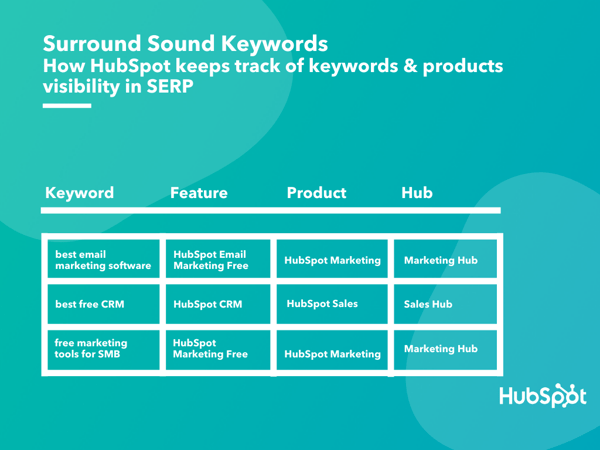
Our reports start with the way we map our target-keywords against the features, products and Hubs. This database is the source for the SERP tracker as well and the Google Data Studio reports which we use to track progress and communicate with stakeholders.
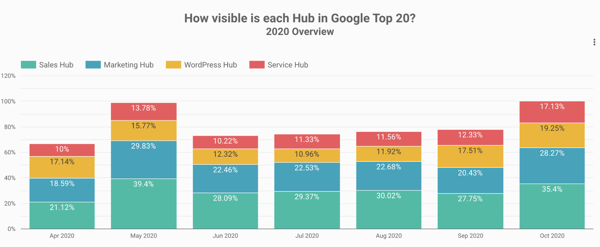
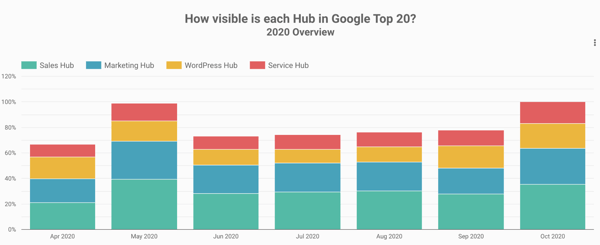
First, we use a birds-eye view of all of our product Hubs to understand overall progress and how each Hub stacks against the others. If you’re familiar with HubSpot’s products, it won’t come as a surprise that our Sales and Marketing Hubs lead the way when it comes to surround sound Visibility.
Our reports go one layer deeper and we can see in one chart how different features (e.g. HubSpot Email Marketing vs HubSpot Forms) perform against each other.
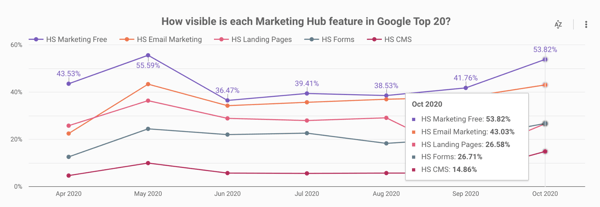
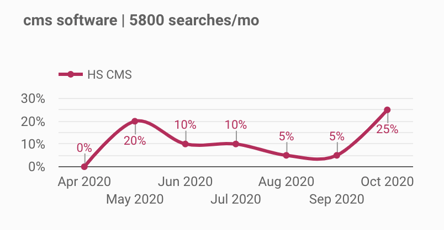
For a deeper analysis, we have feature-dedicated dashboards. In the example below, we see how one isolated feature (HubSpot CMS) evolved, as well as how our visibility changed for the most important keywords related to that feature.
1. Surround Sound: The First 6 Months
The main thing that you need to accept before starting a surround sound program is that you can never be fully in control of your visibility.
There are many factors that play a role into how your visibility evolves:
- Search engine updates cause the Top 20 results to fluctuate (sometimes quite dramatically)
- New content appears in Top 20 for the keywords that you’re focusing, maybe outranking you or results that mention your brand
- Competitors and other third-party pages appear in Top 20 results, but don’t mention your brand
Even despite these challenges, the results we’ve seen in the first 6 months of our surround sound program prove you can make a change in your visibility by partnering with other websites.
If you want to learn more about how to execute a surround sound program, check out the previous article in this series.
In the chart below you can see how HubSpot’s visibility in SERP changed since April. The Google May 2020 core update changed the SERP landscape quite dramatically, causing a lot of articles that used to mention HubSpot to disappear from the Top 20. After that, our visibility started climbing gradually, as we built more partnerships (e.g. more websites joined our Affiliate program).
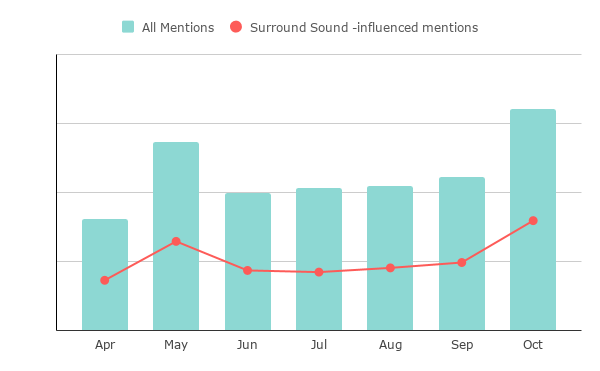
If we only look at all the pages that mention HubSpot, for the 600+ keywords we’re monitoring for surround sound, about 50% of these are now influenced by our surround sound program.
Conclusion: Final Thoughts
There is still a lot of work and opportunities to tap into for our product awareness program. But the most important learning we had so far is that surround sound is a marathon, not a sprint.
It takes time and effort to build genuine partnerships and, as Brian Halligan always “add value > extract value”.
Also, having a strong brand name helps a lot, at least when first reaching out to a potential partner. In fact, it’s fair to say that if HubSpot were a startup, this progress wouldn’t have been possible in just 6 months. It takes time to build a brand and get others to recommend it.
As with everything, there’s no silver-bullet solution. While we share a lot of our process and tools, the way we do surround sound at HubSpot might not work exactly the same for other brands. The main thing we hope you take away from this is: there’s another way of looking at your visibility in SERP that’s not just SEO.
Have you thought about adding surround sound to your content marketing and acquisition strategies in 2021?
Want to learn more about the strategy and execution behind the surround sound strategy? Read part one and two of this series.

Beyond Responsive Design: How to Optimize Your Website for Mobile Users
Everyone can acknowledge the importance of a mobile-friendly website, especially after Google’s Mobilegeddon algorithm update.
Mobile optimization is here to stay, and it’s demanding more and more of businesses and their websites. But mobile optimization is about more than just a responsive website design.
In this article, we tell you why and how to adopt a mobile-first mindset for your website.
Google’s mobile-friendly algorithm change in 2015 (and a few more since then) was evidence that the search engine recognizes its responsibility to surface websites that painlessly get users what they need at the time that they need it.
Google doesn’t want to send mobile users to websites that provide a frustrating browsing experience — that would damage its promise to its users to always deliver helpful, relevant content.
Moreover, this algorithm change was and is a signal of a much larger shift that’s afoot — consumer behavior is changing, and it’s your job to adapt.
Building a mobile-friendly website is step one, but tweaking your website will not keep you ahead of consumers’ changing behavior and expectations.
In short, you have to infuse your marketing strategy with a mobile-first mindset. Here’s how.
1. Map your customer journey.
Imagine the experience of Sally, a young marketer who has just moved to Chicago. While out for a walk, Sally passes by a hair salon and realizes she needs a haircut. She pulls out her phone a search for hairstylists in Chicago who specialize in curls and color. Her Google search pops up Joann’s Stylez.
She flips through the website quickly and wants to research more, but it’s too hard while on the move — so she texts herself a link. When she gets home, she opens her texts on her tablet and quickly checks Yelp reviews, examines her calendar, and then books an appointment using the simple form on the Joann’s website.
When Sally loads up her laptop later that night to check her email, she discovers an email from Joann’s that confirms her appointment and gives her the option to add it to her calendar. The next day, 30 minutes before her appointment, she receives a push notification on her work computer reminding her of the appointment.
The next day, Sally receives a mobile email asking for feedback on the cut and offering to set up a recurring appointment at a discounted rate. She’s sold.
Sally’s experience is illustrative of the cross-device, omnichannel journey that many customers now make as they move through the marketing funnel. Every day, consumers switch a handful of different devices when completing common tasks such as online shopping, readying blog posts, booking appointments, or communicating with each other.
Consumers now expect this type of experience from all of their digital interactions. They want to be able to accomplish whatever fits their fancy on whatever device is at hand. This means that simply adapting your site to look nice on different devices is not enough. As a marketer, you must dig deeper into your customers’ and prospects’ lives.
For example, at HubSpot, we know that a visitor on a mobile device is very unlikely to fill out a long form on one of our landing pages. So we started using Smart Content to automatically shorten the form when a mobile viewer is looking at it. By doing this, our mobile prospects increased by 5x.
2. Seize intent-rich micro-moments.
You’ve likely already developed a strong set of buyer personas. You’ve conducted user research and testing to understand which content and CTAs to present to each persona as they move down the funnel. You must now go a step further. You must understand both the rhythm and rhyme to when, why, with what, and from where people are interacting with your website and content.
Google encourages marketers to identify the “micro-moments” in a customer’s journey:
Micro-moments occur when people reflexively turn to a device — increasingly a smartphone — to act on a need to learn something, do something, discover something, watch something, or buy something. They are intent-rich moments when decisions are made and preferences shaped.
A number of brands have figured out how to anticipate and capitalize on these micro-moments. Apple Passbook loads up your Starbucks card when you’re near a coffee shop. Hertz sends you an email when your plane lands to let your know that your car is ready. Starwood allows you to check in and open your hotel room with your smartphone.
Consumers are increasingly becoming acclimated to companies offering such intimately responsive experiences. 59% of shoppers say that being able to shop on mobile is important when deciding which brand or retailer to buy from, and 39% of smartphone users are more likely to browse or shop a company or brand’s mobile app because it’s easier or faster to make a purchase.
How can you figure out these micro-moments and design your content to meet prospects’ intent? Tap into your data. Here are three analyses you should start with:
- Search: Which queries, ads and keywords are bringing users on different devices to your website and landing pages? Once they land on your site, what types of searches are users on different devices performing?
- Content: Examine the content that users access by stage in the funnel and by device. Is there a trend around what prospects on their phones are downloading? Sharing?
- Flow: Dig into a flow analysis segmented by device. What is the path mobile-using prospects follow? What is the path tablet-using customers follow? From what sites and sources are these visitors arriving?
After building your trove of micro-moments, it would be easy to think: “Okay, we just need to strip our website down to the specific things our visitors will mostly likely want to access on the go.”
But mobile users are not limited to completing short, simple tasks. The device does not directly imply location or intent.
A busy professional may use her commute time to conduct in-depth industry research on her phone, process her email inbox on her tablet while watching a movie with her family, and browse the websites of potential contractors while flying across the country.
Confirming this intuition, the Pew Research Center’s study of U.S. smartphone found that 99% of smartphone owners use their phone at home, 82% use their phones while in transit, and 69% use their phone at work each week. (This study was conducted in 2015, but we believe it’s still relevant, if not more so, today.)
People don’t want a stripped down set of content. Instead, they want quick and easy access to the materials they need on whatever device they happen to be using.Thus, while you want to optimize your site, landing pages, emails, etc. for micro-moments, you do not want to force visitors into a box from which they cannot escape.
3. Consider (and reconsider) your metrics.
The metrics you established in the desktop-centric days may not seamlessly translate to our new multi-device, micro-moment world. For example, you might have fought tirelessly to find ways to increase visitors’ time on your site, recognizing that more time means higher engagement, which translates to higher conversion.
The micro-moments you identify for mobile visitors, however, might suggest that you want a lower time-on-site. A prospect visiting the website of a consulting firm may be looking for:
- An infographic they want to show a coworker
- The bio of a partner with whom they are about to meet
- A case study to read while traveling
In order to meet this prospect’s expectations for their mobile experience, you must design your website to quickly and intuitively help them find the specific piece of information for which they are looking. If their mobile visit is distracting, frustrating, or too time consuming, you’ve damaged their perception of your brand.
4. Embrace the intimacy of mobile.
For better or worse, I go to bed with my phone (reviewing tomorrow’s schedule and reading a nighttime meditation) and I wake up with my phone (silencing the alarm and checking the weather). I communicate with my partner and my best friends everyday — all through my phone. When my MBA classmate sends a GIF of Tyra Banks being sassy, I turn my phone to the person next to me, and we have a good laugh together.
Day-in and day-out, these interactions create an intimate connection between my phone and me. And I’m not alone: Most consumers imbue their mobile experiences with more intimacy than desktop experiences. The Pew Research Center found that Americans view their smartphones as freeing, connecting, and helpful, and associate their phones with feelings of happiness and productivity. These associations can inspire greater engagement with and interest in content.
As marketers, we should take advantage of these trends and consider how to make our prospects’ mobile experience more personal and social. Perhaps change your website to increase the proportion of social CTAs you display when someone arrives on mobile.
5. Remember the basics and think ahead.
Overall, embracing the mobile mindset means ensuring that the entire customer journey is responsive, relevant, actionable, and frictionless. As a marketer, you want to help consumers quickly and easily find what they want to find and do what they want to do. Again, this means thinking ahead, understanding when, with what device, and from where your prospects will interact with your content.
This can seem daunting, but mostly it means diligently applying the basics across channels. For example, since nearly half of all emails are opened on mobile, ensure your emails are mobile optimized. We recommend doing the following:
- Use large, easy-to-read text.
- Use large, clear images and reduce file sizes.
- Keep layouts simple and invest in responsive templates.
- Use large, mobile-friendly calls-to-action and links.
Recognizing the personal associations people have with their phones, you’ll want to ensure that the “From” name is familiar and that the preview text is inviting. And think ahead: Don’t email a link to a form or an event registration landing page that is not mobile-friendly.
Over to You: Time to Optimize
Follow these tips and you will be well on your way to living the mobile mindset and weathering the change in consumers’ digital behavior. Move quickly and your organization could be at the head of the pack.
Editor’s note: This post was originally published in June 2015 and has been updated for comprehensiveness.

150 Power Words to Add Some Oomph To Your Copy & Deliver Results
I can guarantee you that this article will be absolutely eye-opening.
It will provide actionable, research-backed insight that’s proven to take your marketing copy from mind-numbing to mind-blowing.
I know what you’re thinking — “Wow! The language you just used was absolutely electric! I’m totally engaged and emotionally invested! I need to read this article and learn more about whatever it’s discussing! Wow!”
Well, the words I used there — the ones that have you totally spellbound and intrigued — are designed to trigger emotional responses and capture attention. They’re known as power words, and they’re strong resources for getting more out of your marketing copy.
Here, we’ll explore the concept of power words a bit further and see a list of 150 of the most effective ones.
Power words are evocative — that’s the key to their appeal and efficacy. They subconsciously urge readers to take action. Words like “amazing”, “definitive”, and “jaw-dropping” give some extra oomph to your copywriting.
They’re over-the-top enough to play on strong feelings and trigger high-arousal emotions. Taken together, those factors can put a certain urgency behind your copy — one that consumers have been known to respond to.
It’s also worth noting that power words’ utility extends beyond traditional marketing copy. These words can be used in sales or marketing emails, to urge consumers to read blog posts, or to flesh out successful CTAs. In all those cases — among several others — power words have been known to prompt action and increase conversion.
Power words tend to play on emotions related to fear, encouragement, anger, lust, greed, safety, and taboos. For the sake of our list, we’ve condensed those components into three categories that are immediately relevant to business — urgency words, affirmation words, and security words.
Without further ado, here’s our list of the most effective business power words.
Urgency Words
Urgency words are meant to create the impression of an immediate, pressing need behind an offering. They’re used to push concepts like scarcity and value — to lead consumers to believe they only have so much time to capitalize on an excellent deal.
1. Bargain
2. Before
3. Big
4. Big Deal
5. Big Time
6. Billion
7. Bonus
8. Cash
9. Cheap
10. Deadline
11. Dollar
12. Double
13. Exclusive
14. Expiring
15. Extra
16. Fast
17. Final
18. First
19. Frenzy
20. Giveaway
21. Huge
22. Hurry
23. Immediate
24. Instant
25. Jackpot
26. Limited
27. Luxurious
28. Massive
29. More
30. New
31. Now
32. Premiere
33. Prize
34. Profit
35. Quick
36. Reduced
37. Rich
38. Running low
39. Running out
40. Save
41. Savings
42. Scarce
43. Special
44. Surge
45. Ultimate
46. Value
Affirmation Words
Affirmation words can be used in two main contexts — highlighting a product or service’s high esteem or boosting consumers’ self-perception. They can show that an offering goes above and beyond its competition or lead prospects to believe that a product or service will improve how they’re perceived by the world around them.
47. Amazing
48. A-Plus
49. Astonishing
50. Astounding
51. Awesome
52. Beautiful
53. Blissful
54. Breathtaking
55. Brilliant
56. Celebrate
57. Celebrated
58. Colossal
59. Courage
60. Daring
61. Delight
62. Effortless
63. Empower
64. Epic
65. Excellent
66. Excited
67. Extraordinary
68. Eye-Opening
69. Fabulous
70. Fantastic
71. Fearless
72. Fierce
73. Flawless
74. Glorious
75. Greatest
76. Grit
77. Happy
78. Heart
79. Hero
80. Hope
81. Incredible
82. Jaw-Dropping
83. Life-Changing
84. Lovable
85. Magic
86. Mind-blowing
87. Miraculous
88. Next-Level
89. Perfect
90. Phenomenal
91. Remarkable
92. Sensational
93. Spectacular
94. Splendid
95. Staggering
96. Striking
97. Stunning
98. Terrific
99. Thrive
100. Unbeatable
101. Unbelievable
Security Words
These words are generally used to put consumers at ease. They show that a product or service is well-tested, trusted, and safe. Security words are designed to show, first and foremost, that several other consumers reliably use the product or service in question.
102. Above and beyond
103. Accredited
104. Anonymous
105. Approved
106. Authentic
107. Automatic
108. Authoritative
109. Authority
110. Best
111. Best-selling
112. Better
113. Bonafide
114. Cancel anytime
115. Certified
116. Definitive
117. Dependable
118. Detailed
119. Endorsed
120. Ensured
121. Expert
122. Fail-proof
123. Foolproof
124. Genuine
125. Guaranteed
126. Guilt-free
127. Legit
128. Legitimate
129. Obvious
130. Patented
131. Professional
132. Protected
133. Proven
134. Refund
135. Reliable
136. Research-Backed
137. Results
138. Risk-Free
139. Scientific
140. Secure
141. Sensible
142. Surefire
143. Tested
144. Thorough
145. Trustworthy
146. Unconditional
147. Verified
148. Well-beyond
149. World Class
150. Worry-Free
If you want your copy to have some extra gusto and impact, consider referencing this list when writing it. Because now that you have an unequivocal, bonafide, authoritative understanding of power words, you can use them to elevate your copy to phenomenal, jaw-dropping, awesome, astounding heights.

7 of the Best Ad Management Tools for 2020
Time is one of the most valuable resources we have — that’s why efficiency is something so many people strive for. The good news is that there are a plethora of marketing tools available today with the power to help you boost productivity and streamline monotonous processes or tasks — ad management tools are among the many options.
Ad Management Tools
In this blog post, we’ll talk about what ad management tools are, why they’re beneficial for all businesses, and which ones you may want to use. Let’s dive in.
What are ad management tools?
Ad (advertising) management tools have the power to streamline and automate different aspects of advertising including ad and campaign planning, collaboration, execution, sharing, monitoring, and analysis.
Why use ad management tools?
Ad management tools have many benefits. Here are some examples:
- Save advertisers and marketers valuable time.
- Improve productivity and efficiency.
- Make collaboration simple.
- Run cross-channel campaigns with ease.
- Optimize your campaign structure.
- Create insightful and customized reports with powerful analytics and reporting tools.
- Visualize your data in a way that makes sense for your business and goals.
- Increase the chances of successful ads and campaigns among your target audience.
Now, let’s review seven powerful ad management tools, meant for different types of ads, goals, and teams.
7 Best Ad Management Tools
1. HubSpot Ad Tracking Software
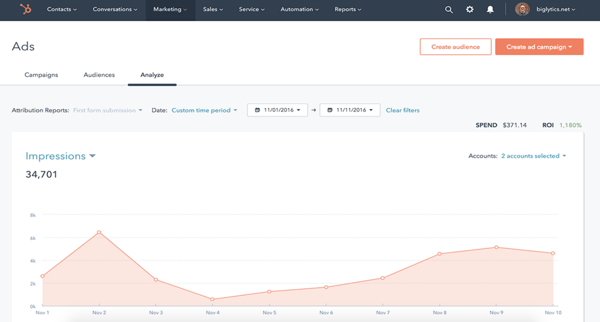
HubSpot’s Ad Tracking Software helps you with your inbound marketing strategy and campaigns. You can run all of your campaigns out of this tool from start to finish — meaning, the HubSpot supports ad creation, management, and reporting across different networks.
Other unique and notable features you get from HubSpot’s Ad Tracking Software are:
- Automate ad targeting using Lists which will sync your leads and audience for targeting opportunities.
- Manage ad campaigns on Facebook, Instagram, LinkedIn, and Google.
- Report on ROI and leads from the platforms you share your ads on (e.g. LinkedIn, Google).
- Understand audience behavior by identifying which contacts took action and engaged with your ads.
- Align ads with your other marketing efforts — this is simple because HubSpot Ads live with Marketing Hub.
- Use data from your HubSpot CRM to inform your campaigns and help you determine which ads are most likely to convert contacts into paying customers.
Price of HubSpot Ad Tracking Software
Free, or you can start with/ upgrade to a paid plan depending on your needs and goals.
2. AdRoll
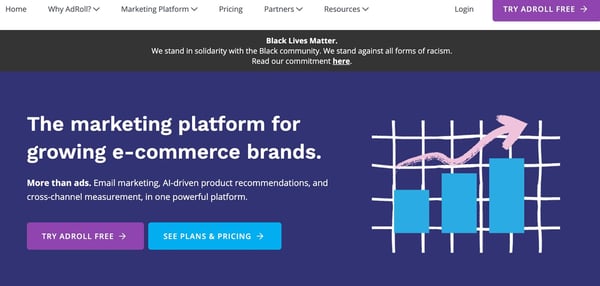
AdRoll is a platform for ecommerce businesses that focuses on ads, email marketing, AI-based product recommendations, and cross-channel measurement. The platform acts as a home base for all of your business’s marketing and advertising activity. Here are some of AdRoll’s other notable capabilities:
- Personalize dynamic ads using AI-powered product recommendations to target your audience members.
- Share targeted videos and display ads to foster emotional connections with your audience.
- Create relevant product offers, dynamic ads, emails, and other forms of outreach using data you’ve collected about your customers along with AdRoll’s 1.2 billion shopper profiles.
- Use advanced measurement and attribution to identify growth opportunities and determine customer lifetime value (CLV).
- Target your audience with paid digital media and account-based ad campaigns by integrating AdRoll with your CRM.
Price of AdRoll
Plans range from $0-$19 depending on your needs.
3. RollWorks
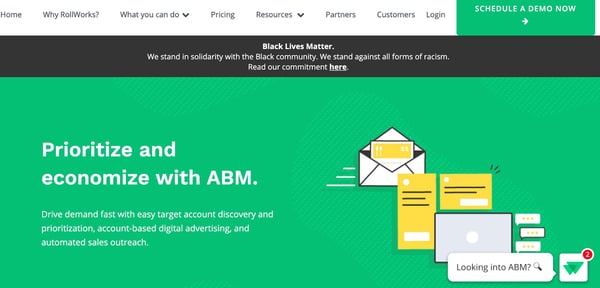
RollWorks is an account-based platform meant to help you identify target accounts, engage them via ads and various channels, and measure your impact and success in doing so. The tool is capable of target account identification, target account prioritization, automating various sales tasks, and account-based advertising. Here are some more things you can do with RollWorks:
- Reach and engage highly-qualified accounts with ads, lead-gen tactics, and targeted account-based marketing (ABM) programs.
- Use account-based ads to identify your target audience and encourage those people to visit your website.
- Create retargeting ads to bring leads back to your site.
- Integrate RollWorks with your HubSpot CRM to reach contacts that matter most to your business and view RollWorks data within the CRM.
- Use dynamic messages to personalize your ads and make them relevant.
- Automate your sales emails and follow-ups to save time and increase chances of engagement.
- Easily track the success of your campaigns, account-based programs, sales automation sequences.
Price of RollWorks
The Starter plan costs $975 per month, and you can upgrade from there.
4. Influ2

Influ2 is a person-based ad platform meant specifically for B2B. With the tool, show your ads to specific people and then measure the success of the ads among those targeted. Here are some other things you can do with Influ2:
- Select individuals to see your ads so they’re highly-relevant and targeted.
- Improve brand awareness and recognition by only displaying curated ads and information to hand-selected audience members.
- Connect Influ2 with your HubSpot CRM to sync contacts and targeting efforts with Sales and Marketing.
- Use the Name-by-Name Tracker feature to see the names, emails, titles, companies, LinkedIn profiles of the people who interact with your ads.
- Determine the best time to reach out to a prospect by tracking their engagement via views and clicks.
- Keep your current customers engaged with person-based ads by offering relevant and informative content when they need it.
Price of Influ2
Contact Influ2 for demo and quote.
5. Adstream
Adstream is an all-in-one digital asset management and ad delivery solution for broadcasters, publishers, and online services. It’s a Connectivity Suite, meaning it integrates and connects all aspects of your marketing including digital asset management and delivery, traffic management, media automation, and analytics. Here are some more notable capabilities:
- Use a single workflow across marketing teams for total transparency and easy collaboration while organizing, creating, and sharing digital content.
- Distribute your digital content among Adstream’s 79,000 global media destinations that the platform can connect you to.
- Auto-adjust your content so it suits the different areas it’s being shared in around the world.
- Add your incoming ads to the Traffic Management Inbox — here, you can easily review those ads as well as make edits, approve, and send them to another individual or team (e.g. Production).
- Automate different workflows, or aspects of your workflows, to increase efficiency such as processes related to clearance or usage rights.
- Measure the success of your digital campaigns and processes behind them with analytics, real-time reports, and tracking.
Price of Adstream
Contact Adstream for a quote.
6. 6Sesnse
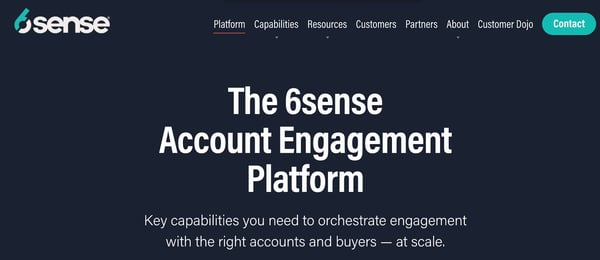
6Sense is an account-engagement platform with account-based advertising capabilities. The platform uses AI, big data, and machine learning to help you understand and identify your target audience’s buying behavior, prioritize accounts for Sales and Marketing, as well as create and share personalized and engaging campaigns/ content. Let’s look at some more features:
- Engage your target audience members at scale with highly-relevant, unique, cross-channel messages.
- Use account data to create targeted display ads that help you reach key players at target accounts.
- Align Sales and Marketing as a single revenue team on the platform to accurately measure your account-based success.
- Segment data about your target accounts for insight into the success of your campaigns among those specific accounts.
- Use AI to help you predict prospect and account behavior throughout the buyer’s journey so you know when to target them with your ads, campaigns, and personalized messaging.
- Refer to the platform’s Intent Data to discover which accounts are in the market for a product or service like yours with buying signals on first and third-party websites.
Price of 6Sense
Contact 6Sense for pricing information.
7. Celtra
Celtra is a cloud-based software that automates creative production. With the platform, all aspects of collaboration will be streamlined and more efficient thanks to its cloud-based nature — team members can design, approve, and share digital assets among markets, campaigns, and more. Here are some more features to be aware of:
- Use the Ad Builder’s templates to design unique and branded ads without any code — these ads can include ecommerce features as well as video and animation.
- Get real-time reports that include over 100 metrics and dimensions to better understand the success of your creative work, campaigns, and ads.
- Build user-friendly ad products to help you engage prospects.
- Customize your ad products to suit your business with features like shoppable video, product galleries, and text and graphic overlays.
- Gain access to Celtra’s support team and hundreds of on-demand videos and tutorials to help you achieve your goals on the platform.
Price of Celtra
Contact Celtra for pricing information.
Grow Better With Ad Management Tools
Your marketing team is bound to grow better with an effective ad management tool — don’t be afraid to experiment with various options to find the one that meets your needs and goals.

The 4 Key Signs Your Marketing and Sales Teams Aren’t Aligned
I like to think of marketing and sales as the leads in a buddy cop movie.
Sales is the grizzled veteran on the force who keeps reiterating that they’re “too old for this” whenever some zany misadventure gets started. And marketing is the hot-headed rookie with a chip on their shoulder looking to prove to everyone that they have what it takes to become the department’s first-ever bow-legged sergeant or something.
There’s a lot of potential for a pretty compelling story if the two of them get along, but let’s imagine a movie where they don’t.
In this film, the two have no chemistry nor mutual respect. They let most criminals get away due to lack of communication, and they don’t riff any back-and-forth wisecracks throughout the movie.
And worst of all, they don’t end the movie on a freeze-frame of them jumping in the air, locking into a perfect high-five before the credits roll.
No one would want to see that kind of dysfunction on film — just like no one wants to see that same kind of misalignment between sales and marketing in business. That’s why it’s crucial to stay on top of it when it comes to your company.
Here we’ll cover the key signs of marketing and sales misalignment and see some of the best ways to help remedy it.
1. Your marketing department only cares about MQLs.
According to Troy Arias, Marketing Operations Manager at Daxko, marketing departments often prioritize the wrong KPIs for optimal sales and marketing alignment. He says, “If your marketing team is solely focused on an MQL metric, it’s a huge barrier to alignment between departments.”
MQLs (or marketing qualified leads) are often hailed as a gold standard for measuring marketing teams’ performance, but that mentality isn’t fair to sales departments. A sales team isn’t judged by its ability to receive leads — it’s judged by its ability to convert those leads into customers.
A sales team’s success is measured by closed bookings, above all else — and there’s a sizable gap between those two KPIs in the context of most sales pipelines. Once an MQL is passed off, it has to transition to an SQL, be deemed an opportunity, and receive a proposal before closing.
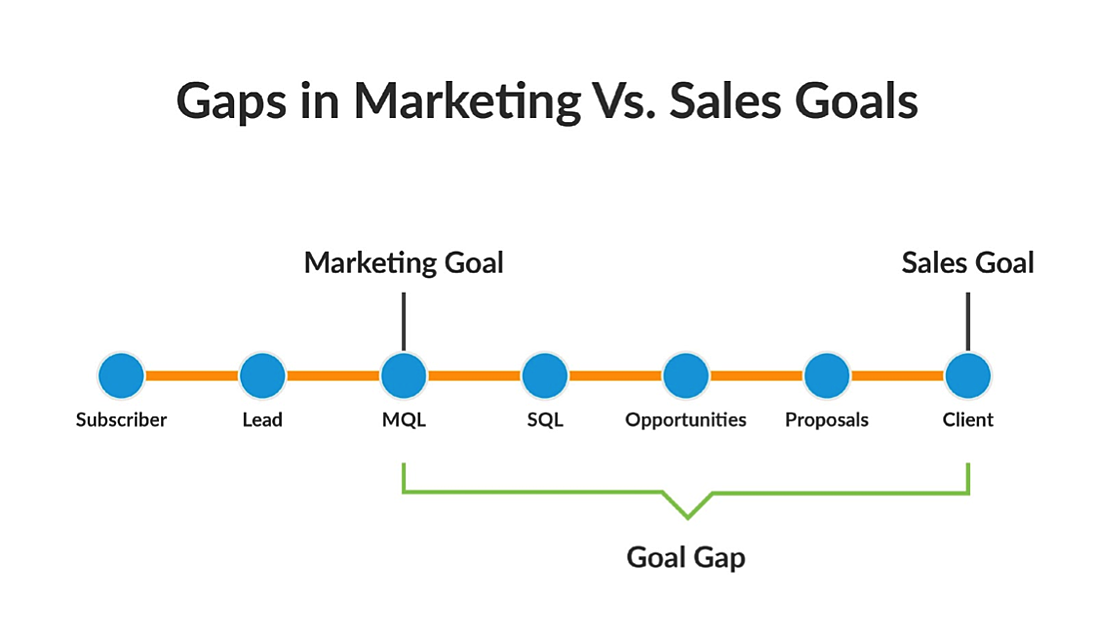
That makes for a massive discrepancy in departmental goals — one that burdens sales more than marketing. If your marketing department only cares about generating MQLs and not closed bookings, it won’t be held accountable for producing mediocre leads.
In this case, it can help to have your marketing department set a revenue goal, based on closed bookings, to ensure that your marketers keep your sales team in mind when gauging leads and go the extra mile to stay on the same page.
2. You don’t have consistent interdepartmental syncs to address results and planned campaigns.
Communication is key when trying to align your sales and marketing efforts. If you want your teams to be on the same page, you can’t keep them siloed. They have to meaningfully interact with each other consistently.
Your sales team needs to be able to discuss the results it’s seeing from the leads marketing is passing along. And both have to understand each other’s respective plans and strategies when it comes to messaging. Additionally, if you’re planning specific campaigns, both departments need to know what to expect from each other.
Ultimately, you need to maintain a mutual understanding between departments. If you don’t, you might create a rift that can lead to wayward smarketing efforts and tension between your sales and marketing teams.
3. Your marketers never ask, “What can I do to make the sales process easier for you?”
Sometimes a little thoughtfulness and legitimate interest can help smooth out some discord and misalignment between sales and marketing departments. One way to get there is for your teams to actively hash out ways to improve or expedite your company’s sales process and pipeline.
Marketers are in control of the first few stages of any smarketing efforts, so the onus is often on them to initiate discussions on how to improve the process. If your marketing team takes a second to better understand how your sales team is handling the MQLs it passes along, it might be able to adjust its efforts to help make the sales process a bit smoother.
From there, your teams can start an active and constructive dialogue on what they want or expect from each other. At the very least, it shows that your marketing team wants to hear your sales team out and keep both departments working as a cohesive unit.
4. Your sales department creates and uses its own sales content exclusively.
Marketing teams are often tasked with creating content to support sales efforts — including case studies, presentation decks, and one-pagers. That kind of collateral, known as sales content, is different from marketing content.
Where marketing content is more general and attention-grabbing, sales content is more pointed and brand-specific. That said, the term “sales” in “sales content” is a bit misleading — marketing departments often have a significant role in creating that kind of collateral. And if your marketing team has no place in that process, your departments probably aren’t on the same page.
Marketers are generally better-equipped to create content — that’s a big part of what they do — so if your sales department is monopolizing that role, it might mean there’s some tension or a lack of communication between teams.
Three Ways to Fix Poor Alignment
1. Encourage teams to listen to each other.
If you want your sales and marketing efforts to align, your teams need to listen to one another and — corny as this sounds — actually hear each other. Both departments need to have a comprehensive understanding of your sales process.
If they don’t, neither can make the kind of thoughtful, actionable recommendations needed to improve each department’s role in it. Sales and marketing both need to consider the other’s perspective — to listen and learn until they can thoroughly explain both sides of your sales process in full.
Doing so can at least partially remedy any of the points listed above. If your teams are willing and able to legitimately hear each other out, they can develop the empathy, knowledge, collaboration skills, and strategic vision necessary to bring the departments together.
2. Push for consistency in expectations, data, and technology.
One of the bigger parts of successfully aligning marketing and sales is promoting and sustaining consistency. You need to ensure that your teams are operating with an understanding of the same ultimate goals, from a baseline of the same information.
That point begs the question, “How do you keep things that cohesive?” Well, you can start by keeping lines of constant contact open — supplemented by frequent meetings and briefings between departments.
As I mentioned earlier, it’s important to have routine syncs between sales and marketing to keep both teams on the same page in terms of overall goals and day-to-day operations.
It’s also important that both sales and marketing have access to the same data as a reference point for their mutual and individual efforts. It helps a marketing department to see how its work is impacting sales and vice versa.
That kind of visibility can come from mutually accessible technology — like a CRM that covers both sales and marketing.
3. Consider your sales team’s input in content marketing.
There’s a solid chance that your content marketing efforts are more bloated than they need to be. You might be holding onto and promoting content that doesn’t actually help your sales reps.
You want to produce content that enriches your customers’ professional lives. Provide them with insight that educates and intrigues them, and that often takes an intimate understanding of your prospects’ interests and wants — salespeople can provide you with that information.
It’s their job to understand what makes your prospects and customers tick, so if you want your marketing department to produce solid content that your sales team can ultimately take advantage of, it’s important to involve some salespeople in your content creation process.
In doing so, you’re letting your salespeople steer your subject matter in the right direction, providing them with leads that they know have a personal interest in your offering, fostering interdepartmental collaboration, and giving both departments a stake in the other’s operations.
Marketing and Sales Alignment is a Must for Businesses
You might be wondering, “Is marketing and sales alignment really that important? Does my company actually need to go through the effort to make sure those departments are in sync?”
The answer is “Absolutely! Yes! Yes! A thousand times yes! Yes, again!”
Marketing and sales alignment is every bit as important as this article makes it out to be. It hurts your business across the board if you don’t have a grasp on it, and it doesn’t just hit one of your departments.
It undermines the effectiveness of both your marketing and sales efforts as a whole. A study from Forrester found that 43% of CEOs believed that misalignment had cost them sales.
If you want to get the most out of either of your teams, you have to make sure they’re on the same page and in constant contact. There are certain tips and tricks you can employ to get there — all of which are underlaid by one fundamental strategy: creating an environment that encourages openness and collaboration.
You need to have your sales and marketing departments constantly interacting with and learning from each other. If you can facilitate that kind of environment in your office, you’ll put yourself in the best position possible to have a consistent, fluid interchange of ideas and strategies between departments to get as much as possible from both teams.
Editor’s note: This post was originally published in June 2014 and has been updated for comprehensiveness.
