
Ghostwriting 101: Tips from Bloggers Who’ve Done It
As someone who has done it in the past, ghostwriting can certainly be a bit spooky at first.Wondering whether you’re doing your subjects and their ideas justice can run a chill down your spine.
From my perspective, taking the fear out of ghostwriting comes down to knowing when to use your subject’s voice or your own.And it should be a half-and-half blend — too much from column A, and the piece can lack structure; too much from column B, and you’re just writing, not ghostwriting.
I learned early on that some Frankenstein-esque combination voice where you try to write as yourself and your subject simultaneously isn’t really a thing, so save yourself the headache and divvy up their voice and your voice like so.
Essentially, ghostwriting is when someone else has the byline on a piece you wrote.
1. Interview the person you’re ghostwriting for.
The most important part of ghostwriting is understanding the material that you’re writing about. As a ghostwriter, you probably write about a variety of topics from industry blogs to memoirs. Before you dive into each piece, it’s essential to talk to the person you’re ghostwriting for and discuss the topic in depth.
Pam Bump, the Audience Growth Manager on the HubSpot blog team, says, “If you can, interview the person you’re ghostwriting for over the phone or on a video call. This will not only allow you to take down all the key details they want to cover in the content, but you’ll also learn more about how they speak or present tips. This can help you write content that naturally reads as if it was written by them.”
2. Make sure you understand the voice of the person you’re writing for.
Jumping off that last point, interviewing the person you’re ghostwriting for will help you get a sense of their voice. We’ll dive into when to use your voice or the client’s voice below, but each piece you write should have a distinct style and tone.
Bump adds, “If you can’t interview them to get a sense of how they talk or present their thoughts, you can alternatively read some of their other blog posts, social media posts, or published works to get a sense of how they write.”
3. Find the themes.
When you’re interviewing the person you’re ghostwriting for, it’s important to think about the narrative and structure of the piece you’re writing.
Karla Cook, HubSpot’s Senior Manager of the blog team, says, “It’s important to meet with the person you’re ghostwriting for at the beginning of the project and have a conversation about what they want the written piece to cover. This is their chance to share their brilliant, unfiltered thoughts with you, and it’s your job as the ghostwriter to identify themes, strong phrases, and potential narratives for when you approach producing the piece later on. This is also an opportunity to get a feel for how your subject approaches communicating, and can help inform how you represent their voice.”
4. Be flexible.
While interviewing the subject is the best way to learn about the topic you’ll be writing about, being adaptable and flexible is important to succeed.
Cook adds, “People who use ghostwriters are usually busy, so if you can’t meet with them in person, ask them to record a voice memo or even jot down a few notes in a document to get started.”
Now, let’s dive into one of the most important aspects of ghostwriting: when to use your own voice versus your client’s voice.
When to Use Their Voice
1. Main Ideas
The argument of the piece should be determined by your subject, no matter what your personal take on it is. Bear in mind that it’s going to be published under their byline. Your opinion is moot, and therefore should be mute.
Thesis aside, I also steer clear of adding or subtracting ideas. If a subject bothers to bring up an argument that means it’s important to them, and should be featured in the finished product in some way. Conversely, if the subject does not mention a topic, don’t bring it in, no matter how much you think it would bring the point home, clarify the argument, or sound awesome.
It’s simple: If they don’t say it, I don’t write it.
2. Signature Words or Phrases
If I were writing an article for Emeril Lagasse, you can bet it would be peppered with “BAM!”
You would be hard-pressed to find me using this phrase in my day-to-day life — heck, it’s not even my go-to exclamation. But Emeril says it, and for that reason, I would write it.
“Bam!” is a fairly innocuous example, but I bet you can think of some favorite turns of phrase that are senseless, silly sounding, or unnecessary. But if this is how the subject talks, then this is how the subject would presumably write. Including signature words makes the article seem more genuine, especially to readers familiar with the person.
The only time I would strike or edit a favorite phrase is if it’s unintentionally grammatically incorrect. All other instances of “BAM!” “fuggetaboutit,” “survey says,” and “that’s all folks!” stay in.
3. Data Points
Data is in almost every business article these days, and rightly so. Nothing can support an argument quite like the perfect statistic or chart.
The problem is there are plenty of statistics out there that aren’t perfect. Sometimes, a subject offers up great data to support their points, and other times … less great. But I try to keep in mind that I’m not the expert here — there’s a reason why the subject used this specific piece of data, and it’s not up to you to judge whether it’s up to par.
I aim to use the majority of data points that subjects give me, but I always inquire after the source. That way, if I really feel shaky about the numbers, I can go back and check into their accuracy on my own. If I find a problem, I bring it to my subject’s attention and let them determine if it should still be published.
When to Use Your Voice
1. Outline
Generally, people who use ghostwriters are busy doing fascinating stuff. That means that their minds are crammed with interesting information, and with so much on their plates, they may not always be the most organized speakers. They probably didn’t have time to document exactly what they would like to talk about, and they might interject an off-topic fact or two.
The subject’s ideas should be the meat of the piece, but it’s the writer’s responsibility to organize those thoughts in the most logical and effective way. Set the subject up for success by grabbing an anecdote they mentioned in the middle of your interview and moving it up to the opener if you think that’s where it belongs. Similarly, conclusions can come from anywhere — carefully listen for a solid closing thought, and bring it to the last paragraph.
List out the arguments presented, and arrange them in whatever way you think flows best. Odds are, your subject will be grateful for the organization help.
2. Transitions
Not many people move from one point to the next with perfectly crafted segues. Instead, they jump back and forth, interrupt themselves, or abruptly change directions.
That means it’s up to you to add the nice transitions. I find that these are easier to provide in your own voice, since everyone has their own way of making arguments flow. Trying to mimic someone else’s segue style might result in a garbled article.
3. Very Necessary Explanations
I try not to insert any points that weren’t at least referenced by my subject, but there is an important exclusion to this rule: explanations.
Some subjects are so embroiled in their area of expertise that it can be difficult for them to break down their arguments for laypeople. The writer should act as a proxy for the audience, and if they think a point could use some clarification, they should circle back to the subject. If the subject fails to deliver an adequate explanation, ghostwriters should then take it upon themselves to provide succinct supporting information — but it should be done in no more than a few sentences.
Bonus: When You Shouldn’t Use a Voice
Just as important as understanding which voice to use is knowing when to not use any voice — in other words, recognizing what should be cut.
As I mentioned above, subjects who rely on ghostwriters are often brilliant, passionate people. That said, they can sometimes go off on a tangent.
You don’t have to make the article representative of the time spent talking about each point. Maybe you covered one argument in five minutes, and another in twenty. You should include both in the piece, but try to allot each equal space by paring down the second. Cast an editorial eye to which details are important and which aren’t, and cut accordingly.
Editor’s note: This post was originally published in August 2014 and has been updated for comprehensiveness.

Ghostwriting 101: Tips from Bloggers Who’ve Done It
As someone who has done it in the past, ghostwriting can certainly be a bit spooky at first.Wondering whether you’re doing your subjects and their ideas justice can run a chill down your spine.
From my perspective, taking the fear out of ghostwriting comes down to knowing when to use your subject’s voice or your own.And it should be a half-and-half blend — too much from column A, and the piece can lack structure; too much from column B, and you’re just writing, not ghostwriting.
I learned early on that some Frankenstein-esque combination voice where you try to write as yourself and your subject simultaneously isn’t really a thing, so save yourself the headache and divvy up their voice and your voice like so.
Essentially, ghostwriting is when someone else has the byline on a piece you wrote.
1. Interview the person you’re ghostwriting for.
The most important part of ghostwriting is understanding the material that you’re writing about. As a ghostwriter, you probably write about a variety of topics from industry blogs to memoirs. Before you dive into each piece, it’s essential to talk to the person you’re ghostwriting for and discuss the topic in depth.
Pam Bump, the Audience Growth Manager on the HubSpot blog team, says, “If you can, interview the person you’re ghostwriting for over the phone or on a video call. This will not only allow you to take down all the key details they want to cover in the content, but you’ll also learn more about how they speak or present tips. This can help you write content that naturally reads as if it was written by them.”
2. Make sure you understand the voice of the person you’re writing for.
Jumping off that last point, interviewing the person you’re ghostwriting for will help you get a sense of their voice. We’ll dive into when to use your voice or the client’s voice below, but each piece you write should have a distinct style and tone.
Bump adds, “If you can’t interview them to get a sense of how they talk or present their thoughts, you can alternatively read some of their other blog posts, social media posts, or published works to get a sense of how they write.”
3. Find the themes.
When you’re interviewing the person you’re ghostwriting for, it’s important to think about the narrative and structure of the piece you’re writing.
Karla Cook, HubSpot’s Senior Manager of the blog team, says, “It’s important to meet with the person you’re ghostwriting for at the beginning of the project and have a conversation about what they want the written piece to cover. This is their chance to share their brilliant, unfiltered thoughts with you, and it’s your job as the ghostwriter to identify themes, strong phrases, and potential narratives for when you approach producing the piece later on. This is also an opportunity to get a feel for how your subject approaches communicating, and can help inform how you represent their voice.”
4. Be flexible.
While interviewing the subject is the best way to learn about the topic you’ll be writing about, being adaptable and flexible is important to succeed.
Cook adds, “People who use ghostwriters are usually busy, so if you can’t meet with them in person, ask them to record a voice memo or even jot down a few notes in a document to get started.”
Now, let’s dive into one of the most important aspects of ghostwriting: when to use your own voice versus your client’s voice.
When to Use Their Voice
1. Main Ideas
The argument of the piece should be determined by your subject, no matter what your personal take on it is. Bear in mind that it’s going to be published under their byline. Your opinion is moot, and therefore should be mute.
Thesis aside, I also steer clear of adding or subtracting ideas. If a subject bothers to bring up an argument that means it’s important to them, and should be featured in the finished product in some way. Conversely, if the subject does not mention a topic, don’t bring it in, no matter how much you think it would bring the point home, clarify the argument, or sound awesome.
It’s simple: If they don’t say it, I don’t write it.
2. Signature Words or Phrases
If I were writing an article for Emeril Lagasse, you can bet it would be peppered with “BAM!”
You would be hard-pressed to find me using this phrase in my day-to-day life — heck, it’s not even my go-to exclamation. But Emeril says it, and for that reason, I would write it.
“Bam!” is a fairly innocuous example, but I bet you can think of some favorite turns of phrase that are senseless, silly sounding, or unnecessary. But if this is how the subject talks, then this is how the subject would presumably write. Including signature words makes the article seem more genuine, especially to readers familiar with the person.
The only time I would strike or edit a favorite phrase is if it’s unintentionally grammatically incorrect. All other instances of “BAM!” “fuggetaboutit,” “survey says,” and “that’s all folks!” stay in.
3. Data Points
Data is in almost every business article these days, and rightly so. Nothing can support an argument quite like the perfect statistic or chart.
The problem is there are plenty of statistics out there that aren’t perfect. Sometimes, a subject offers up great data to support their points, and other times … less great. But I try to keep in mind that I’m not the expert here — there’s a reason why the subject used this specific piece of data, and it’s not up to you to judge whether it’s up to par.
I aim to use the majority of data points that subjects give me, but I always inquire after the source. That way, if I really feel shaky about the numbers, I can go back and check into their accuracy on my own. If I find a problem, I bring it to my subject’s attention and let them determine if it should still be published.
When to Use Your Voice
1. Outline
Generally, people who use ghostwriters are busy doing fascinating stuff. That means that their minds are crammed with interesting information, and with so much on their plates, they may not always be the most organized speakers. They probably didn’t have time to document exactly what they would like to talk about, and they might interject an off-topic fact or two.
The subject’s ideas should be the meat of the piece, but it’s the writer’s responsibility to organize those thoughts in the most logical and effective way. Set the subject up for success by grabbing an anecdote they mentioned in the middle of your interview and moving it up to the opener if you think that’s where it belongs. Similarly, conclusions can come from anywhere — carefully listen for a solid closing thought, and bring it to the last paragraph.
List out the arguments presented, and arrange them in whatever way you think flows best. Odds are, your subject will be grateful for the organization help.
2. Transitions
Not many people move from one point to the next with perfectly crafted segues. Instead, they jump back and forth, interrupt themselves, or abruptly change directions.
That means it’s up to you to add the nice transitions. I find that these are easier to provide in your own voice, since everyone has their own way of making arguments flow. Trying to mimic someone else’s segue style might result in a garbled article.
3. Very Necessary Explanations
I try not to insert any points that weren’t at least referenced by my subject, but there is an important exclusion to this rule: explanations.
Some subjects are so embroiled in their area of expertise that it can be difficult for them to break down their arguments for laypeople. The writer should act as a proxy for the audience, and if they think a point could use some clarification, they should circle back to the subject. If the subject fails to deliver an adequate explanation, ghostwriters should then take it upon themselves to provide succinct supporting information — but it should be done in no more than a few sentences.
Bonus: When You Shouldn’t Use a Voice
Just as important as understanding which voice to use is knowing when to not use any voice — in other words, recognizing what should be cut.
As I mentioned above, subjects who rely on ghostwriters are often brilliant, passionate people. That said, they can sometimes go off on a tangent.
You don’t have to make the article representative of the time spent talking about each point. Maybe you covered one argument in five minutes, and another in twenty. You should include both in the piece, but try to allot each equal space by paring down the second. Cast an editorial eye to which details are important and which aren’t, and cut accordingly.
Editor’s note: This post was originally published in August 2014 and has been updated for comprehensiveness.
4 Data-Driven Ways to Create More Targeted Ad Campaigns
Digital marketing is undergoing a revolution.
Agencies have more granular insight than ever before into how their campaigns are performing. The days of selecting media channels based on broad demographic data and relying on generalized ad impression numbers are over.
Marketers can now target specific audiences across multiple devices and measure engagement on each touch point, building comprehensive roadmaps to conversion. They can confirm the right users are seeing digital ads and even serve websites that are customized to each user with dynamically generated content.
The best part? Every engagement can be mapped to its respective touch point and measured. This empowers agencies to become better strategic advisors in letting clients know exactly what’s working (and what isn’t).
The driving force behind this seismic shift is data — the collection of it, tools to analyze it, and automation algorithms that use it to capture and nurture the best leads.
But how should agencies approach this new flux of data? What should they specifically focus on, and what can they afford to ignore?
This post will answer these questions and more. Let’s dive in.
4 Data-Driven Ways to Create Better Targeted Ad Campaigns
Crafting data-driven campaigns doesn’t have to be overly complicated or take months to implement. The foundation of a solid campaign that harnesses the power of data to reach the right audience can be built upon four primary tactics.
1. Get programmatic with media buying.
The old methods of buying media have been upended. The days of reviewing spreadsheets, endlessly negotiating rates, and committing to inflexible long-term contracts that you are stuck with — even after it becomes obvious that they aren’t working — are over.
Programmatic buying is an automated method of purchasing digital media in real-time that is easily adjustable. That means if budgets change, if you want to test new messaging, or if placements aren’t producing good results, media buys can be changed or scaled instantly.
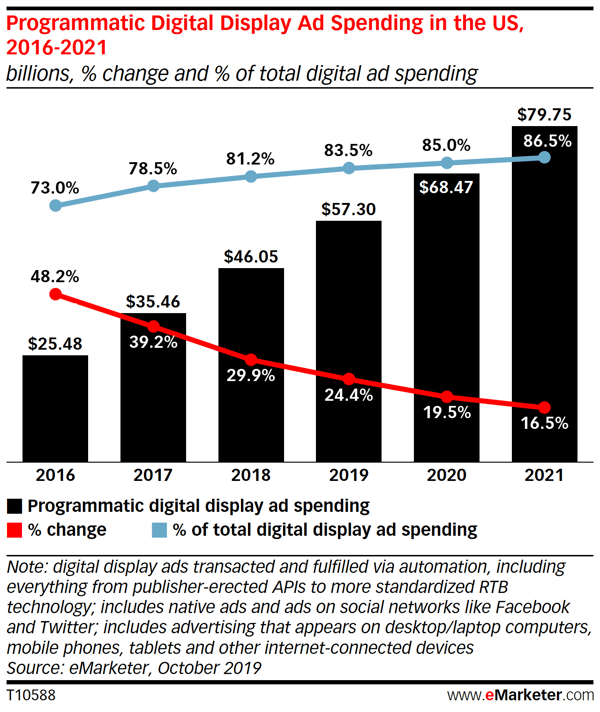
According to eMarketer, 83.5% of US digital display ad dollars were transacted using programmatic technology in 2019.
In 2021, that number will close in on 90%, and US digital display advertisers are expected to invest nearly $80 billion.
This process gives advertisers a direct avenue to be iterative with campaigns based on data received from first, second, and third party sources.
With access to enhanced data and the ability to implement changes based on what it reveals with no lead time, programmatic buying optimizes media placement quickly and gives advertisers the ability to make changes based on internal changes or external market forces immediately.
2. Verify the right people are seeing your ads.
Digital publishers and platforms have their own metrics for who views ads on specific channels, but the market changes quickly, and the data they offer is not always accurate.
If real prospects aren’t seeing your ads, then the money you spent placing them is a waste. It’s important to verify that the numbers and demographics you’ve been promised match the reality of what is delivered.
The best way to accomplish this is through third-party ad verification — but if you aren’t ready to make this investment, you can confirm for yourself that the tools and tactics used by advertising partners are working as promised.
Ensuring users actually see the ads that have been served to them can get tricky. Some platforms still use the legacy “impressions served” model where you pay for each impression the moment the ad loads — but how do you know it was seen?
This can get especially complex when it comes to videos — not only do you have to consider how much of the player is in view, you also need to know how much of the video was seen.
Guidelines from the Media Rating Council count a video ad as viewed when at least 50% of the ad is visible for two consecutive seconds.
3. Personalize websites with dynamic content.
Your client’s website is made of dozens, hundreds, or even thousands of unique visual elements — but there’s no reason they have to be presented the same way to every single visitor. They can, in fact, be customized to individual users based on what you know about them, providing dynamic content that is most likely to be relevant to them first.
You already expect your advertising partners to understand web visitors and only serve your ad to relevant targets. You can use the same logic to create different versions of your site that are displayed for each unique visitor.
Use the data that you have about each user to customize the experience. This data can come from browsing history, demographics, and your existing repository of consumer data.
Even if you have no data available on a specific user, your website can make intelligent customizations based on navigation behaviors starting with the first click. This personalization ensures that every user has the most engaging experience and sees relevant offers that guide them through the conversion funnel.
4. Use people-based measurement to track multiple devices.
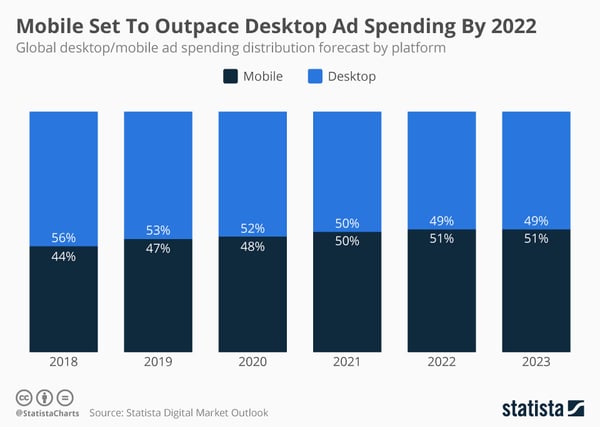
Statista estimates that, by 2022, mobile will outpace desktops for total ad spend. But that doesn’t mean you can concentrate exclusively on mobile.
The modern buying journey is not always linear — consumers enter and exit the funnel at will on different devices. They will interact with brands multiple times on computers, smartphones, and tablets before converting, and they expect a consistent experience the entire way. The only way to provide this is to track relevant data about each consumer — and you can’t entirely accomplish this with device-specific technology like cookies.
Instead, people-based measurement uses unique identifiers that can track engagement across devices. This gives you the ability to measure ROI by channel, obtain accurate reach and frequency measurement, and even tie offline conversions to online interactions.
With so many touch points in today’s sales funnels, attributing conversion to the “last click” is no longer an effective measure to base decisions on. The right messaging at every point is vital to keeping consumers moving on their journeys and you must tie it all to conversion.
Your Ad Campaign Shouldn’t Be a Shot in the Dark
Without the visibility of data-driven tactics, the customer journey is difficult to track, and attributing conversions to the right engagements is nearly impossible.
Using the correct information to advise media buying, messaging placement, website, and touch point mapping elevate all of your marketing campaigns from shots in the dark to highly targeted efforts with the power to right the course on any specific element that misses the mark the first time.
Editor’s note: This post was originally published in January 2017 and has been updated for comprehensiveness.

What Is Ad Fatigue? + How to Diagnose & Cure It
To consider what ad fatigue is, let’s start with an example.
Consider times you’ve changed the TV channel because you’ve seen the same ad ten times that night already.
Alternatively, think about occasions when you’re so tired of hearing a certain commercial that you switch off your radio completely.
These are both examples of ad fatigue — an issue that occurs when users become too accustomed to a specific type of ad, thus reducing its effectiveness.
As marketers, it’s crucial we continuously serve fresh, high-quality, and targeted ads to ensure your content continues to inspire your audience, rather than causing frustration.
Below, we’ll discuss what ad fatigue is, common symptoms attributed to ad fatigue, and what you can do to fix it. Let’s dive in.
What is ad fatigue?
Ad fatigue occurs when your audience sees your ads so often that they become bored with them and stop paying attention.
This, in turn, causes your campaigns to become less effective, prevents users from moving down the sales funnel, and ultimately hurts your company’s bottom line.
Ultimately, the purpose of advertising is to turn new viewers into customers, which can’t happen if you’re over-serving your ads to the same viewers, or creating low-quality ads.
Fortunately, if you recognize ad fatigue early on, you can reverse its effects by building new campaigns. It may be as simple as altering the image you use on your Facebook ads, or using Google ad features to adapt text based on your audience’s habits and preferences.
Alternatively, perhaps you need to employ a strategic schedule to make sure your ads are only served at the most relevant times so that you can achieve optimal ROI.
Whatever the case, we have a few tips and tricks to help you maximize your marketing success. Let’s explore those, next.
3 Signs Your Audience Has Ad Fatigue
Perhaps you suspect that ad fatigue is affecting your campaigns, but you’re not entirely sure how to detect it.
The following are some common symptoms that you might experience if your audience is growing tired of your ads:
1. Lower Click-Through Rates (CTRs)
Your click-through rates (CTR) are arguably among the most important metrics to measure when it comes to tracking and addressing ad fatigue. CTR demonstrates how engaging your ad is — and, in particular, whether it’s convincing enough to compel visitors to explore your brand further.
For instance, if your ad displays a 10% discount on your new fall shoe line and it has a high CTR, you can assume the ad is effectively encouraging visitors to stop what they’re doing, and take a look at your newly-discounted products.
If your CTR numbers fall considerably over time, it could be because you’re boring your audience, and they’re no longer willing to engage with your brand.
2. Less Engagement
Speaking of engagement, have you checked in to see how followers are interacting with your business on social media?
If people casually view your ads and move on, they’re not really engaged — and an engaged audience is key to yielding comments and shares. If you’re noticing reduced social engagement, it could be a sign that you’ve inflicted ad fatigue onto your followers in ways that make them less motivated to interact with all your content: both paid and organic.
3. Fewer Impressions
Social media algorithms are set up so that only the most relevant content appears at the top. The same goes for advertisements — paid social media ads will only appear if they’re applicable for that particular user. This means that, if people aren’t interacting with your paid posts, they’re not as likely to see them in the future. So, if your impressions have decreased over time, it might be time to revamp your ad campaigns.
Like most obstacles in life, you can’t remedy ad fatigue until you recognize that it’s a problem. By examining the aforementioned metrics continuously over time, you’ll get a better understanding of how your audience feels about your brand. Once you know that ad fatigue may be to blame for less-than-stellar campaign performance, you can make small-but-strategic improvements to breathe new life into your marketing strategy.
Let’s take a look at a few potential ad fatigue cures now.
How Can You Cure Ad Fatigue?
It doesn’t always take a ton of work to reduce ad fatigue. Sometimes, simple changes can be all you need to update the look and feel of your advertisements.
Here are three steps you can take to refresh your campaigns so that your audience will be more interested in the content you’re sharing.
1. Update the background color of your display ads.
Everyone needs a change of scenery now and then.
We’re often exposed to the same images over and over, which can be tiring and compel us to ignore the ads next time we see them.
Display ads can be particularly susceptible to ad fatigue because you’re showing the same audience the same advertisement multiple times.
Luckily, there’s a simple fix to avoid this conundrum: by changing the background color of your ads, you can refresh your audience’s interest in your content. This small change is often enough to make your advertisements appear brand-new.
2. Customize your ads using ad customizers.
Google’s ad customizers have been around for a few years now, and they’re powerful tools for increasing conversions and maintaining ad freshness.
If you’re running Pay-Per-Click (PPC) ads, you might not be aware of the power that customizers hold, but it’s time to change that — ultimately, Google’s ad customizers ensure your ads stay fresh and relevant, while simultaneously creating a sense of urgency that entices your followers to click on your calls-to-action.
In short, ad customizers dynamically update your advertisements with content that’s tailored to your audience, and deliver that content in a time-sensitive manner.
For instance, let’s say you have a limited time, end-of-year promotion happening right now. Ad customizers allow you to get the word out about your promotion in real-time when it’s most relevant to users. You can use this feature for one-time situations, recurring events, or location-specific opportunities. Even better, once you get them set up, ad customizations are pretty hands-off.
3. Rotate your ads frequently.
As a marketer, you know that schedules are important: you need a clear plan to keep all of your campaigns on-track.
That being said, showing an ad too many times to the same people can easily lead to ad fatigue.
Combat this issue by creating multiple ads and rotating them. These versions can all deliver the same content, but should include differences in text or design. This helps to keep your content fresh and allows you to optimize your campaigns based on which ads perform best. (A/B testing these ads can be an effective option for ensuring you’re serving the highest-performing ads to your visitors.)
Keep in mind that when you’re rotating your ads, you should also ensure that you’re only delivering your messages at the most relevant times of day (and on the most relevant days). Include your rotations in your marketing calendar for streamlined execution and better results.
4. Monitor your campaigns.
It’s not enough to write new copy or swap out your creative — you’ll need to continuously track your ads to ensure fatigue doesn’t set in with your updated campaigns. If you’re not monitoring your ads’ performance, you won’t be able to tell if your audience has lost interest in them.
To keep ad fatigue on your radar, be sure to monitor frequency (the number of times users see your ads) and CTR (the number of times people click on your ads divided by the number of impressions). This allows you to identify ad fatigue early on and adjust your strategy accordingly.
How One Marketing Agency Cured Ad Fatigue
Zero Gravity Marketing (ZGM), a full-service digital marketing agency located in Connecticut, was put to the test when it came to curing ad fatigue for one of its clients. In this case study, a client was running a paid social media campaign that hadn’t changed ad variations in over three months.
ZGM employed a strategic approach to improve organic traffic and turn visitors into loyal customers. To reduce the ad fatigue the client’s audience was experiencing, the agency first identified and scaled back ineffective campaigns. Then, they took the following steps to refresh the existing PPC strategy:
- Conducted Keyword Research: ZGM’s Search Engine Optimization (SEO) team conducted keyword research to pinpoint new, more effective search queries related to the client’s brand. The PPC team then used these terms within the ads.
- Rewrote Ad Content: Leaning on the new keyword research, ZGM refreshed the campaign’s messaging to be more relevant to the target audience.
- Set Up Goal Tracking: To better monitor progress, the team also set up goal tracking for social media button clicks, account log-in form fills, and more.
The results? ZGM’s strategy quickly lent itself to significant improvements in campaign ROI. In just three months, the client experienced a 17% increase in organic traffic, and a 10% increase compared to the previous year.
No matter what type of business you run, your ultimate goal is to build brand awareness and turn leads into loyal customers. Of course, one of the best ways to do this is through fresh, relevant paid ads. As you move forward with your digital advertising strategy, be sure to update your campaigns from time to time to ensure your audience remains engaged. That way, you can avoid the negative effects of ad fatigue and see greater marketing success.

Learning SEO? The Beginner’s List of Resources to Get Started
You can’t get a degree in SEO. Books on SEO quickly become out-of-date.
Plus, there are hundreds of thousands of self-professed “SEO experts” out there, but far fewer people who actually understand what they’re talking about, and can apply it.
And you can’t swing a spreadsheet without hitting an article about SEO that’s either misleading, or just plain wrong.
So — how do you learn about SEO? Luckily, there are resources you can count on to always have trustworthy, valuable, and well-researched information.
To help you find them, I’ve put together a huge list of credible SEO resources in every category. If it’s on this list, you can trust what it says.
Please note: If you try to listen, read, or engage with every resource on this list, you’ll never have time for anything else. Think of it like a buffet — take a few things from the podcast section, enroll in a course or two, subscribe to three or four blogs … you get the drift.
SEO Podcasts
In the past few years, there’s been an explosion of high-quality SEO-focused podcasts — which is great for anyone with a commute, dog who requires walking, partiality for learning on the go, or all of the above.
1. Skill Up
HubSpot’s first season of Skill Up is all about SEO. In this series, HubSpot Director of Acquisition (and co-founder of Traffic Think Tank) Matthew Howells-Barby and Academy professor Jorie Munroe dive into everything a search-oriented marketer or SEO needs to know this year. They start with searcher intent, move to modern ranking and conversion strategies, review international SEO, share successful link-building plays, and end with the future of SEO.
Not too shabby for less than six hours of content.
2. SEO 101
This beginner-friendly show is designed to familiarize you with SEO concepts and best practices without overwhelming you with information. Each episode covers a few different topics. For example, episode 350 goes over image search, the validity of Moz’s Domain Authority score, and JavaScript and SEO.
It’s a good pick if you’re just getting your feet wet.
3. Experts on the Wire
On this podcast, SEO expert and consultant Dan Shure interviews big names and fresh faces in search. Former guests include AJ Kohn, Dawn Anderson, Marie Haynes, Barry Schwartz, Kevin Indig, and more. And as that lineup suggests, Experts on the Wire covers a diverse range of topics — from mobile-first indexing and structured data to unique link-building strategies and even SEO for the music industry.
The episodes typically run an hour to an hour and a half. There are currently more than 110 in the archive, so if you enjoy this show, you’ve got a lot to listen to.
4. Authority Hacker
Is SEO just one piece of the puzzle for you? Authority Hacker might be the podcast for you. The hosts, Gael Breton and Mark Webster, draw heavily on their own experiences running effective online businesses.
You’ll learn how to drive traffic to your store or website, nurture those visitors, and convert them into customers. Breton and Webster drop tons of SEO nuggets, but there’s also lots of general advice, like how to hire a solid team, pick an expanding niche, or set your own salary.
SEO Newsletters
1. Tech Bound
I’m always excited to see a fresh edition of Kevin Indig’s Tech Bound newsletter in my inbox.
Each week, Indig dissects a trend, idea, or piece of marketing news. To give you an idea, past newsletters have covered Google’s push into the online travel agency (OTA) market, how to hire a great digital marketing team, and takeaways from Google’s near-constant algorithm tweaks.
He also shares several links from around the web worth reading.
Indig has also started doing a lot of interviews (which he shares with the Tech Bound audience weeks before publishing them elsewhere). Previous interviewees include the former Director of SEO for eBay and Nick Eubanks, co-founder of Traffic Think Tank and FromTheFuture (there’s some list overlap here!).
2. SparkToro Trending
Here’s how it goes most weeks:
- 10 a.m.: I see a cool link on SparkToro Trending
- 11 a.m.: Someone shares the same link in HubSpot’s SEO Slack channel
- 12 p.m.: I log onto Twitter and see several people I follow have tweeted the same link
- 4 p.m.: Someone shares the same link in one of the SEO Slack channels I’m in
In other words, if something appears on SparkToro’s list of buzzy articles or tools, it’s usually something I should be reading — which makes sense, as links are algorithmically chosen based on their popularity with the SEO and marketing Twitter community.
If you don’t want to get addicted to refreshing Trending, subscribe to the email newsletter. You’ll get the top links in your inbox every Tuesday and Friday.
3. #SEOForLunch
#SEOForLunch, a weekly newsletter from Nick LeRoy, has a great format. LeRoy shares a timely link, tells you what’s important about said article, then gives you his take.
Following that, he recommends four to five posts from around the web worth your time.
4. tl;dr Marketing
In newsletter years, tl;dr Marketing has definitely been around a while — this one’s been going strong since 2015. It’s a curated collection of articles and resources that’s perfect if you’re short on time: each link has a straightforward explanation tagged by topic, so if you’re not interested in, say, social media, you can skip over anything with that tag.
Absorb information best when you’ve got some visuals? Good news, there’s plenty of screenshots in tl;dr.
SEO Courses
1. How to Build a Search Insights Report to Grow Organic Traffic to Your Blog
Want to learn how to recreate the process that helped HubSpot grow organic traffic to its blog by several million users per month in just a year? In this Academy course, I’ll walk you through the exact workflow we use, sharing examples and actionable tips along the way.
It’s broken up into two sections: the fundamentals of an effective content strategy, and building your own Search Insights Report.
Each lesson includes a few interactive exercises, making the process of putting together a Search Insights Report for your own property much simpler and more straightforward.
2. SEO Training
For a higher-level intro to SEO, try HubSpot’s free SEO course.
It takes a little over an hour and a half to complete. In that time, you’ll discover how to determine your site’s SEO potential and develop a strategy, create content that’ll rank, and build links to that content.
3. Serpstat Academy
You don’t need to use Serpstat’s SEO platform to take any of its short courses, which include Advanced Competitor Research, Backlink Analysis, How to Cold Pitch SEO courses, and more. While most of the lessons incorporate Serpstat, you can easily recreate the processes in the tool of your own choice.
4. Google Analytics Academy
If you’re in SEO, you’re almost certainly using Google Analytics. Google provides several different courses for getting yourself up to speed or taking your skills to the next level:
- Google Analytics for Beginners
- Advanced Google Analytics
- Google Analytics for Power Users
- Getting Started With Google Analytics 360
Successfully completing these courses will earn you certifications, which will boost your application during the job search.
5. Moz Academy
Each of Moz’s 16 paid courses cover a different fundamental aspect of SEO: local SEO, reporting, on-page optimization, backlinks, keyword research, etc. The price of each course ranges from $49 (SEO fundamentals) to $595 (also SEO fundamentals, but with a certificate for completion).
6. SEMrush Academy
Like the other options on our list, SEMrush offers both courses and certifications. The cool thing about the latter? If you don’t want to take the course before getting certified, you can take the exam immediately. This is a fun way of testing your knowledge in different areas of SEO — especially if you’re preparing for an upcoming interview.
But back to the courses. Along with the usual suspects of topics (keyword research, link building, rank tracking, and so on), SEMrush also has courses on social media fundamentals, reporting and project management, and PPC.
7. DistilledU
Distilled’s online “SEO university” encompasses two courses: an intro to SEO course that covers topics like information architecture, competitive research, and on-page SEO, and an intermediate one that goes over Excel skills, HTML, international SEO, and more.
Examples and exercises are weaved in throughout the videos, which makes the content more engaging and sticky.
Access costs $33 to $44 per month, depending on your plan. That might sound steep (especially considering many of the other courses on this list are free), but you also get to see every presentation given at SearchLove events — a well-regarded series Distilled runs. It’s like a conference ticket that never expires.
SEO Blogs
Starting my career in blogging may have biased me, but blogs are by far my favorite way to keep up on SEO trends, new strategies, and interesting case studies.
For better or for worse, there’s far more great content out there than you could possibly read — even if you did nothing else. Below are my favorite blogs (but please keep in mind, just because one isn’t on this list doesn’t mean it’s unworthy of your time):
1. Search Engine Land
Whenever I’m looking for “breaking news” in the SEO world, I head to Search Engine Land. This website always has the latest information on all things search, from algorithm updates (both confirmed and unconfirmed) to Google My Business updates and DuckDuckGo changes.
There’s also a good mix of evergreen content and opinion pieces.
One last note: You know a site is great when its founder decides to move on — and take a job as Google’s Public Search Liaison. If that’s not a sign of authority, I don’t know what is.
Recommended articles:
- The Periodic Table of SEO Factors (updated for 2019) (This is downloaded over 50,000 times a year)
- How to prioritize SEO tasks by impact
- Here’s what happened when I followed Googlebot for 3 months
2. Search Engine Journal
Search Engine Journal is another reliable source for the latest news in SEO, SEM, and social media. Several posts are published each day — typically one more timely article, such as “Chrome May Warn Users of Slow Pages Before They Click,” and two or three evergreen pieces, like “11 Reasons Your Website Can Have a High Bounce Rate.”
Recommended articles:
- How to Choose a Domain Name That Will Stand the Test of Time
- The Three Pillars of SEO: Authority, Relevance, and Trust
- 140 Top SEO Experts You Should Be Following in 2019
3. Search Engine Roundtable
Barry Schwartz — who also contributes frequently to SEJ — runs this forum coverage site. What does “forum coverage” mean? Schwartz reports on the most relevant, interesting SEO discussions happening around the web.
And it’s not just a recap. He connects the conversation to a larger trend or idea, so you always understand how it fits into the big picture.
There are also lots of fun pictures from the Google offices (it’s nice to remember there are people behind the algorithm!).
Recommended articles:
- Vlog #25: Danny Sullivan On Working At Google & What He Sees Differently Now
- Vlog #22: Eric Enge On SEO Testing, Structuring Content & Managing Client Expectations
- Google: There Is Nothing To Optimize For With BERT
4. Distilled.net
Distilled, an online marketing agency, has a reputation for running a fantastic advanced SEO conference where every session is valuable and fresh — and its blog is no different.
From in-depth posts on technical SEO best practices and tool tutorials to thoughtful opinion pieces, Distilled’s blog is a gold mine.
Recommended articles:
- Comprehensive Technical SEO Audit
- Search basics: the difference between URL structure and Information Architecture
- How to Present a Recommendation (these tips completely changed how I deliver recommendations both at HubSpot and with freelance clients!)
5. Blind Five Year Old
I try to read everything written by AJ Kohn, owner of SEO agency Blind Five Year Old. It’s just that good. His posts are thought-provoking, insightful, and meaty. As if that weren’t enough, he’s funny!
Kohn doesn’t publish too often — probably because each post is typically a mini-thesis — so I recommend going through the archives and then making sure you keep up with his new stuff.
Recommended articles:
- Algorithm Analysis in the Age of Embeddings
- The Invisible Attribution Model of Link Acquisition
- Analyzing Position in Google Search Console
6. Moz
Who hasn’t cut their teeth on the Moz blog? It’s a classic for a reason. Imagine you’re in a meeting with your developers, and they hit you with a question about hreflang tags. You have no idea what an hreflang tag is — sounds like an unsuccessful sneeze — but you also know this is a tough crowd, and if you’re clueless, you’ll lose valuable internal capital.
So you quickly search “what are hreflang tags”, find a Moz post, skim it, and glean enough in 15 seconds to look up and announce confidently, “Yes, we should use hreflang tags to help users searching in different languages find the localized pages on our site.”
That’s what Moz content does: it saves the day when you need to know something, ASAP. In addition to clear, comprehensive, trustworthy content, you should also check out Whiteboard Fridays. These weekly videos always break down interesting and relevant topics.
Recommended articles:
- Beginner’s Guide to SEO (If you haven’t read this, are you really in SEO?)
- Machine Learning 101 – Whiteboard Friday
- How to Create 10x Content – Whiteboard Friday
7. HubSpot
Our team has doubled down on posts about SEO in the past two years, and I’m proud of the results. Content falls into two main categories: experiments/case studies and best practices/foundational concepts.
This seminal post on topic clusters influenced an industry-wide shift in how websites organized their content, while this early post on updating old content helped marketers optimize their existing pages before that was a tried-and-true conference topic.
You can browse all of our SEO-related content — organized by level of expertise — on our SEO Topic Learning Path or check out the recommended articles below.
Recommended articles:
- How We Octupled Image Search Traffic to the HubSpot Blog in 1 Year
- The Ultimate Guide to Technical SEO
- The Ultimate Guide to Google Analytics
8. Seer Interactive
Seer Interactive, a digital marketing agency, publishes new posts nearly every day—and proving that quantity doesn’t need to come at the expense of quality, all the content is helpful, easy to read, and most importantly, well-researched.
Many of their in-depth guides are in my bookmarks.
Recommended articles:
- Data Studio Tips for Non-Designers (this helped me put together some stunning reports)
- How to Calculate Your Own Click-Through Rate
- Screaming Frog Guide to Doing Almost Anything: 55+ Ways of Looking at a Tool (if you’re new to Screaming Frog, this article is gold)
9. SparkToro
Officially, this is the SparkToro blog — but it’s called Rand’s Blog, and Rand Fishkin is the only one who posts.
Which is cool, because it means you get a lot of (thoughtful, well-argued) opinions in the mix, along with interesting data and case studies.
Fishkin shoots from the hip, and the industry is better for it.
Recommended articles:
- Less than Half of Google Searches Now Result in a Click
- Why Web Marketers Should Invest in Demand Creation
- Can You Still Blog Your Way to Visibility & Credibility?
10. SEO by the Sea
A lot of SEO blogs regurgitate the same ol’ tips and tricks that everyone else is sharing. Not SEO by the SEA.
On this blog, Director of SEO Research at Go Fish Digital Bill Slawski summarizes and explains SEO-related patents. I won’t lie, sometimes I have to read his posts a few times for the information to sink in, but it’s always worth it.
Recommended articles:
- 20 Ways Search Engines May Rerank Search Results
- How Google May Handle Question Answering when Facts are Missing
- Using Ngram Phrase Models to Generate Site Quality Scores
11. Google Webmaster Central Blog
To stay on top of all the latest announcements from Google, check out the official webmaster blog. Every time a big change comes out — like when Google decreed you could only use the stars review schema for businesses that weren’t yours — the SEO community publishes hundreds of hot takes, analyses, and predictions.
Follow-up posts are definitely worth looking at, but I recommend always going to the Google announcement first. Some takes are less accurate than others. If you’ve read the original post, you won’t be misled.
Recommended articles:
- Rolling out mobile-first indexing
- What webmasters should know about Google’s core updates
- The new evergreen Googlebot
12. Marie Haynes
I discovered Marie Haynes in the aftermath of the August 2018 “core update” — a.k.a. The MEDIC update. Haynes published an incredible analysis of MEDIC that was shared, well, everywhere.
She’s become one of my go-to sources for learning more about specific algorithm updates and changes.
Recommended posts:
- E-A-T and SEO
- What can Google’s Updated QRG tell us about quality in 2019?
- The June 3, 2019 Core Quality Update was a big one
13. Builtvisible
Digital agency Builtvisible’s blog posts always manage to demystify confusing and technical topics in just a few thousand words.
The team also has a knack for publishing primers on interesting topics just as I’m thinking, “It would be useful to know how to do X,” or, “I waste so much time on Y.”
If you want to work smarter, this blog will be invaluable.
Recommended posts:
- An SEO’s guide to XPath
- The Ultimate Guide to Log File Analysis
- How to use Google advanced search operators to find indexation and technical SEO issues
14. Search Wilderness
Paul Shapiro posts new content to Search Wilderness a few times a year. And I don’t blame him — he’s got a full plate! He’s head of SEO for Catalyst, co-runs /r/BigSEO, and founded the Online Geniuses Slack community.
His credentials probably give you a good idea why the posts that do come out are worth every minute of your time.
Recommended articles:
- How to tag your keywords 10X faster and beat your SEO competition on insights
- Calculate Keyword Growth Using Google Trends, Python, and the Slope Formula
15. Onely
Confused by the impact JavaScript has on SEO? Yeah, me too. Onely’s blog has been a lifesaver. The technical SEO agency publishes a lot of JavaScript-related content, from introductory guides to experiments and case studies.
Because Onely does so much work around JavaScript SEO, they have plenty of current data and examples to share.
Recommended articles:
- How Much Content is Not Indexed in Google in 2019?
- JavaScript & SEO Backfire – A Hulu.com Case Study
- Giphy’s Visibility Drops: Conspiracy or Consequence?
16. Siege Media
The Siege Media blog sure is easy on the eyes. But even if the design looked straight out of 2009, I’d still read it: because the content is also really, really good.
Posts range from detailed case studies and expert round-ups to best practices and guides. You’ll also find a lot of videos and podcasts (with transcripts and time stamps, in case you prefer reading to watching or listening).
Recommended articles:
- How to Get Image Snippets on Mobile
- When and Why the Skyscraper Technique Can Fail
- Why You Need 2x Content Not 10x Content (interesting countertake to the Moz post I recommended above)
17. Portent
Portent, a digital marketing agency, puts out a great range of content. From podcasting and link-building to Amazon and PPC, its blog will be useful to every type of marketer.
We’re here, however, for the SEO posts, and luckily, Portent has that in spades. Like the best SEO advice, it’s simple (to read) but sophisticated (in practice).
Recommended articles:
- A Developer’s Guide To SEO (this should be required reading for every SEO, designer, and developer)
- How to Choose the Right Attribution Model for Your Vertical
- SEO 101: Defining the long tail (a critical concept that I don’t hear talked about much)
18. Annielytics
To brush up on your analytical skills — or take them to the next level — beeline to Annie Cushing’s blog. Cushing just released a book series called Making Data Sexy, so rest assured she knows her stuff.
While her blog was fairly quiet while she worked on the book, the archives are chock-full of great resources.
Recommended articles:
- Regular Expressions: Don’t Use Google Analytics Without Them (Everyone in SEO should know RegEx)
- How To Pull Domains Out Of A List Of URLs In Excel [VIDEO]
- Excel’s INDEX MATCH Alternative To VLOOKUP For Marketers [VIDEO] (Not to be hyperbolic, but Index Match has changed my life)
19. Go Fish Digital
This digital marketing and reputation management agency has educated SEOs and marketers since 2009.
Bill Slawski, the agency’s director of SEO research (and author of SEO by the SEA, which is also on this list) publishes lots of great technical SEO content, like Contextual Knowledge Panels at Google and A Crowdsourcing Evaluation of Clustered Search Results. (There’s no overlap between Slawski’s articles for Go Fish Digital and his own blog — he’s just prolific.)
You’ll also find posts from other members of the team, from intern Kalina McKay (An Intro to Your First Link Building Campaign) to COO Daniel Russell (What Does Article 11 or “The Link Tax” Mean for SEO in the EU).
Many companies say they have a content-driven culture; Go Fish Digital actually walks the walk.
Recommended article (in addition to the ones linked above):
20. Sterling Sky
Joy Hakwins is one of the foremost experts on local SEO and Google My Business — and luckily for everyone who works in local search, she frequently publishes her wisdom to her agency’s blog.
You’ll appreciate Hawkins and her team members’ clear, matter-of-fact writing style as they demystify confusing, often contradictory Google My Business policies and local SEO best practices.
Recommended articles:
- How to Interpret Google My Business (GMB) Insights
- When Can Service-Based Businesses Have Multiple Google My Business Listings?
- [Quiz] The 2019 Local SEO Black Belt Quiz
21. DeepCrawl
I’ve never attended a Google Webmaster Hangout live, but I’ve read nearly every recap DeepCrawl has posted. The company has recapped nearly virtual Hangout for more than five years.
These recaps alone are worth the price of admission (or subscription), but you’ll also find interviews with experts, best practices, and explanations of fundamental SEO concepts.
Recommended articles:
- Webmaster Hangout recaps
- How Do Search Engine Crawlers Work?
- Ask the Expert: Hamlet Batista Answers Your Automated Text Generation Questions
22. Botify
Want technical SEO and nothing but technical SEO? You’ll appreciate the Botify blog. Apart from the occasional product-focused announcement, every blog post is tactical, in-depth, and data-backed.
Most articles include step-by-step instructions and screenshots, as well as handy breakdowns of relevant ideas or terms. Check this blog out when you’re looking for inspiration or experiment ideas.
Recommended articles:
- Orphan Pages and SEO: Stop Hurting Yourself
- Is Page Depth a Ranking Factor?
- From Crawl Budget to Render Budget: How to Be an SEO in the Age of JavaScript
23. Merj
Hat tip to Ahrefs for introducing me to this blog. Every month, Merj publishes a roundup of technical SEO news, such as, “New Features Described in Chrome 76 Beta,” and “Wayback Machine Adds Changes Feature.”
If you’re coming back from vacation, an intense, heads-down work period, or a cruise with no internet access, it’s a fantastic resource for catching up again.
Recommended articles (in addition to the monthly roundup):
24. Internet Marketing Driver
Glenn Gabe, who leads the internet marketing agency GSQi, started this blog in 2012. Impressively, since then he’s published at least once a month — usually more. His posts are in-depth, conversational, and packed with informative screenshots.
Gabe specializes in Google algorithm changes and SERP updates, analyzing victims and victors with a true zeal. He also shares SEO tool recommendations, improvements, and use cases.
Recommended articles:
- When The Hammer Falls – Analyzing Lyrics in the Google SERPs and Its Impact on Traffic [Case Study] (From 2015, but still incredibly relevant)
- Should You Remove Low-Quality Or Thin Content Versus Improving It? Seeing The Forest Through The Trees
- How To Use Scroll Depth Tracking, Adjusted Bounce Rate, and Average Time On Page As A Proxy For User Engagement and Content Quality
25. iPullRank
The iPullRank blog comes to you from the fine folks at the eponymous digital marketing agency. It has a healthy mix of marketing content, from local SEO and link building to UX and PR, and features custom videos, infographics, and visuals.
New posts go up approximately three times per month.
Recommended articles:
- Your Analytics Data Isn’t Real And It’s Only Getting Worse (the analytics apocalypse is here — get ready!)
- Mobile UX: 75 Best Practices For A Masterful Mobile Web
- 10 Ways Brands Forfeit Their Branded Search
SEO Slack Groups
SEO Slack communities are fantastic platforms for meeting other professionals, hearing about job opportunities and/or recruiting for your own team, sharing and discovering resources, and, of course, learning.
In my experience, there is too much of a good thing. If you’re a member of several active groups, you might be overwhelmed by all the information and discussion. I’d recommend being an active participant in one or two groups versus a somewhat silent member of three or four.
1. Women in Tech SEO
I’m a member — and ardent supporter — of the Women in Tech SEO Slack group. Areej Abuali, the founder and leader, does a great job leading virtual meetups, moderating conversations, and keeping the group active.
Channels include Coding, Events, Analytics, Jobs, and Motivation.
2. Traffic Think Tank
Traffic Think Tank is a private community of SEOs that’s available for a monthly or yearly fee. The content is designed to more than pay for itself — in addition to a network of marketers, consultants, and business leaders, you also get access to Q&As and webinars with the founders, as well as 300+ hours of tutorials, templates, and other resources.
3. Online Geniuses
This free SEO and marketing-focused community has more than 20,000 members. That scale can be both overwhelming and invaluable — while you may need to log off every now and again, the size means you can join local events, learn from hundreds of other people with your job title or facing similar challenges, and participate in AMAs with the likes of Nir Eyal and Guy Kawasaki.
SEO Subreddits
1. /BigSEO
More than 43,000 people belong to this subreddit, which, despite the name, encourages discussion and debate about all things inbound marketing. However, I’ve noticed most people tend to stick to SEO.
The most popular posts get anywhere between 20 and 300 comments; not bad for a more niche subreddit. While the quality of the advice can vary (as you’d expect from any open community), the AMAs are consistently excellent. Previous guests include Rand Fishkin, Aleyda Solis, and Bill Slawski.
2. /TechSEO
TechSEO is far smaller than /BigSEO, hovering around 6,500 members. Its focus is “the tech nerd side of SEO.”
This subreddit also hosts a lot of AMAs. There’s some overlap with the guests on /BigSEO; however, /TechSEO has also gotten Alexis Sanders, Gary Illyes, and John Meuller.
If you’re looking for a good place to find and share technical resources, ask advanced questions, and learn from the tech SEO greats, join this subreddit.
3. /SEO
At 113,000 subscribers, /SEO is the largest subreddit of the group. That’s both a blessing and a curse: the typical posts gets more engagement, but there’s more misinformation.
/SEO does not host official AMAs, although occasionally someone will do an impromptu one (like AMA: SEO’d a site from $0/mo to $30,000/mo in earnings within 3 years).
Newer SEOs will get the most out of this subreddit.
I hope this helps you as you continue to learn more about SEO. If you’ve discovered a helpful resource from the list, let me know on Twitter @ajavuu.

How to Use Photoshop: The Bookmarkable Photoshop Tutorial for Beginners
When you open Adobe Photoshop for the first time, it’s easy to click around in confusion for a minute and then reach for your freelancer’s phone number instead. Trust us, you’re not alone in this.
It’s an incredibly powerful design software with a lot going on, including a wealth of tools that can seem overwhelming at times. But Photoshop isn’t just for the professionals.
With a little help, you can easily teach yourself how to use it to create beautiful, compelling graphics. All it takes is an introduction to core elements — in plain English.
To get you started, we’ve picked 12 of the most useful tools in Photoshop and explained what they do, where to find them, how to use them, and a few tips and tricks for getting the most out of them. We’ve also included some great resources in there in case you’d like to learn about a tool in more depth.
How to Use Photoshop
- The Layer Tool
- The Color & Swatches Tool
- Custom Fonts & The Text Tool
- Custom Brushes & The Brush Tool
- The Select Tool
- The Move Tool
- The Zoom Tool
- The Eraser
- The Crop Tool
- The Fill Tool
- The Eyedropper Tool
- Blending Options
1. The Layer Tool
What It Does: A layer can be used for an image, text, brush strokes, background colors, patterns, and filters.
I like to think of layers as sheets of glass stacked on top of one another that you’ll use to create a final product. Each sheet can be modified individually without affecting the project as a whole, which can save you tons of time when making edits to individual elements of your graphic.
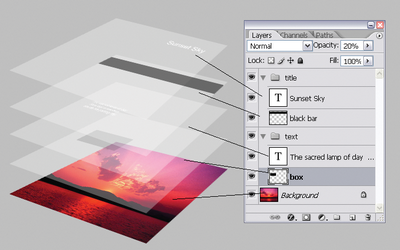
Image Credit: StackExchange
Layers are by far the most important element of Photoshop — and, in my opinion, they’re one of the reasons many people throw their arms up in frustration. But once you understand how they work, I promise they’ll make your life much easier.
Where It’s Located: It has its own module on the bottom right-hand corner of your Photoshop screen, by default. You can also access it by clicking “Layer” in the top menu bar.
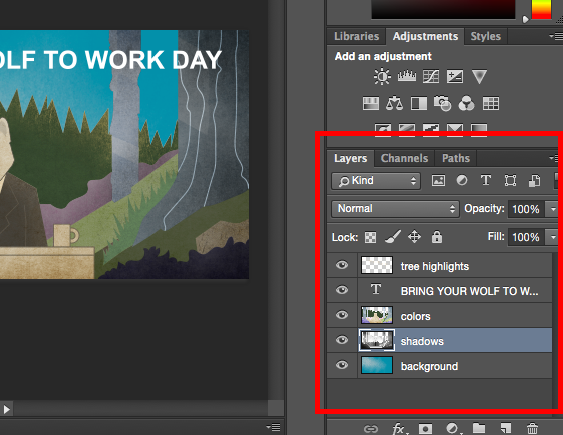
Pro Tip: Always name your layers. Keeping them organized will help keep you sane, especially if you find yourself working on a project with a large number of layers.
To add or delete a layer:
From the top menu bar, choose Layer > New > Layer…
To select a layer:
The selected layer is highlighted in blue. To edit a specific part of your image, you’ll need to select that specific layer.
You’ll also notice there’s an “eye” symbol next to each layer: Click that symbol to turn the eye on and off, thereby toggling the visibility of that layer as you work.
To duplicate a layer:
First, select a layer or group in the Layers panel. Next, either drag the layer or group to the Create a New Layer button, or right-click the layer to choose “Duplicate Layer” or “Duplicate Group.” Enter a name for the layer or group, and click OK.
Pro Tip: You can do all sorts of cool things with layers — and believe it or not, making animated GIFs is one of them. Check out our step-by-step tutorial here.
To learn more about adding, deleting, and duplicating layers in Photoshop, check out this video tutorial.
2. The Color & Swatches Tool
What It Does: The Color and Swatches tool lets you use, modify, copy, and save custom colors for your content. While this may seem like a pretty self-explanatory element, it actually has powerful features that will keep your visual content vibrant and unify your color schemes.
Where It’s Located: It has its own module on the top right-hand corner of your Photoshop screen, by default.
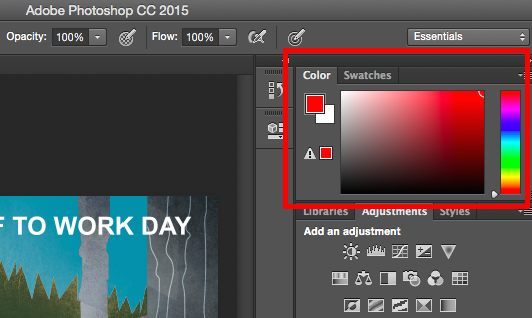
Another place to find the Color tool is at the bottom of the toolbar on the left, indicated by two overlapping boxes:
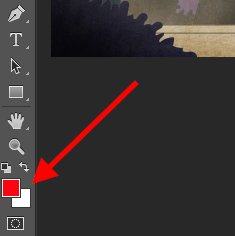
To create your own custom color:
Open the Color Picker by double-clicking on the top box either in the Color module, or in that menu on the left.
From there, you’ll see a vertical spectrum of color with a slider on it, which you can adjust to create your own custom color. Alternatively, if you already have a specific color of which you know the hex value (i.e. #1fb1ee), then enter it in the appropriate box to find that color automatically. You can also select your color swatch based on RGB or CMYK values.
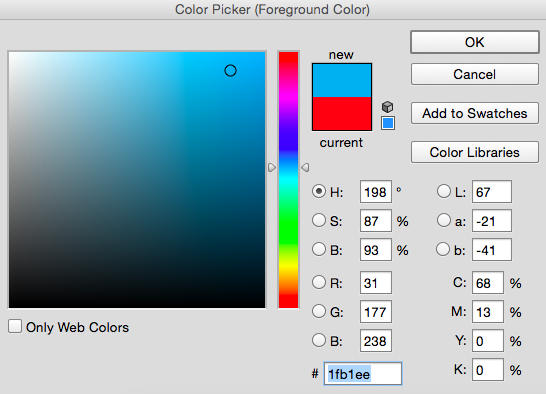
Any colors you create can be added to your “Swatches” if you click “Add To Swatches.”
Pro Tip: Take your company colors and save them as “Swatches” so that you can reference and reuse them whenever you’re designing your visual content.
3. Custom Fonts & The Text Tool
What It Does: The Text tool lets you add custom fonts to your database, and it gives you access to advanced font settings that give your text some serious style.
Where It’s Located: The toolbar on your left, near the bottom.
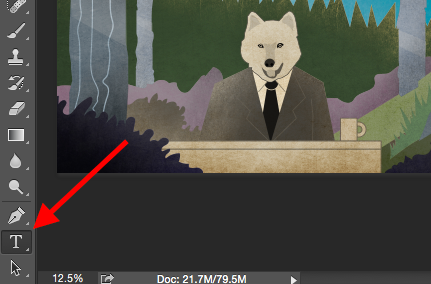
Once you click the Text tool icon, all of the settings and font options will pop up at the top of your screen. These settings let you change the font, font size, and spacing between characters, height, width, color, and style. Be sure to select the layer of your desired text to edit it.
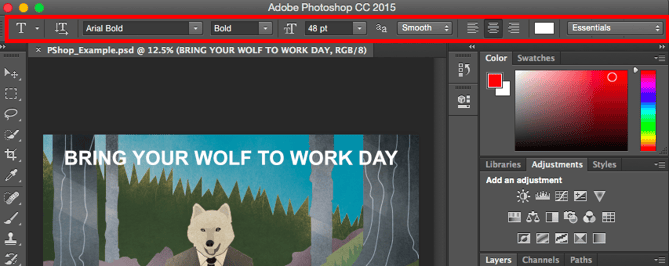
To add text to your graphic:
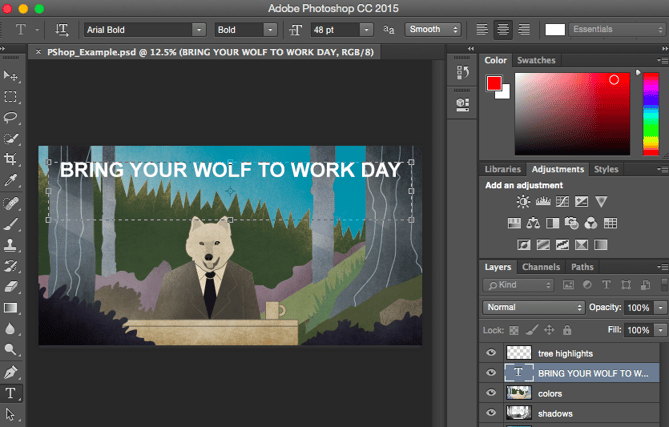
The text tool works like any other text tool you’ve used. Click the “T” icon on the left side bar, drag the text box over any particular area you want text to appear, and you’re set to go.
Whenever you create a text box, Photoshop will generate a layer for it. You can choose the color, size, stroke, font style, and a variety of other options to switch things up.
Pro Tip: While Photoshop offers a wide variety of fonts, you can also install your own fonts. Read this blog post for a list of 35 beautiful fonts you can download for free, and then read this post to learn how to install your new fonts in Photoshop so you can get to using ’em.
To learn more about fonts and the Text tool, check out this video tutorial.
4. Custom Brushes & The Brush Tool
What It Does: Just as with fonts, you can add your own, royalty-free, custom brush tips. With the brush settings, you can change the size, shape, and transparency of your brush strokes to achieve a number of different visual effects.
Brushes are a great way to add some visual accents to your content. Photoshop starts you off with a nice selection of brush tips that you can use to clean up your graphics and create some basic visual effects.
Where It’s Located: The toolbar on the left.
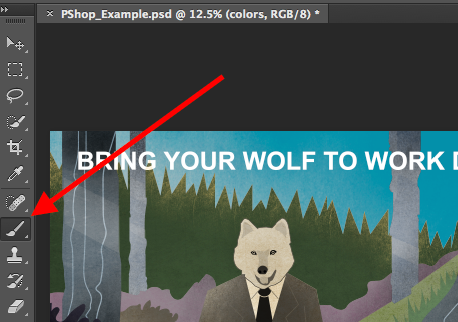
Once you click the Brush tool icon, all of the settings and brush options will pop up at the top of your screen. These settings let you change the brush size, opacity, flow, and so on. You’ll find a variety of pre-installed brush tips, as well as any custom brush tips you install to Photoshop. (You can find royalty-free brushes at www.brusheezy.com if you want to get really creative.)
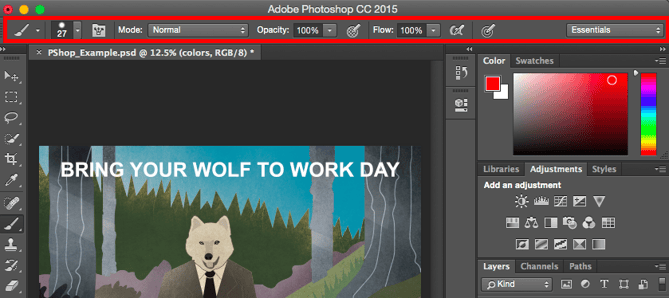
To use the brush tool:
The brush tool is perfect for adding design accents to your content content. When using the brush tool, I always suggest adding a new layer to work with so you don’t paint over any of your other elements. You can choose colors from your library of swatches, or use a custom color.
Changing the brush settings can give your brush a drastically different look and style. Don’t be afraid to play around a bit with all of your custom brushes.
5. The Select Tool
What It Is: When used correctly, this tool will let you select individual elements, entire graphics, and determines what is copied, cut, and pasted into your graphics.
Where It’s Located: The toolbar on the left.
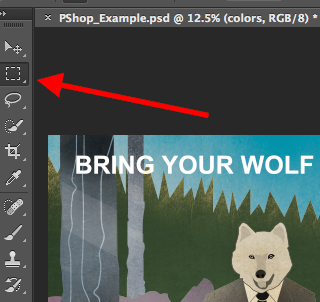
The Select tool is known as one of the most basic, yet frustrating tools to use in Photoshop. The first thing you should know is that it’ll only work if a layer is highlighted. So, if I want to cut or copy a piece of Layer 4, Layer 4 must be highlighted in my Layer’s tool bar. Highlighted areas are indicated by a flashing dotted line.
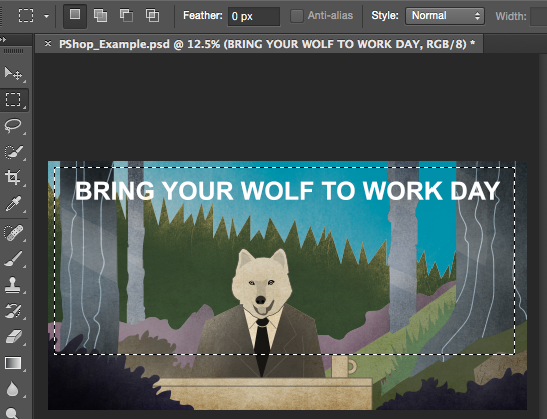
Once you remember to pay attention to which layer you are working with, the Select tool becomes much easier to use.
First, highlight your area of choice. Then, simply right-click and decide what you’d like to do from the pull-out menu. For example, you can cut out objects from a current layer and create a layer of your own.
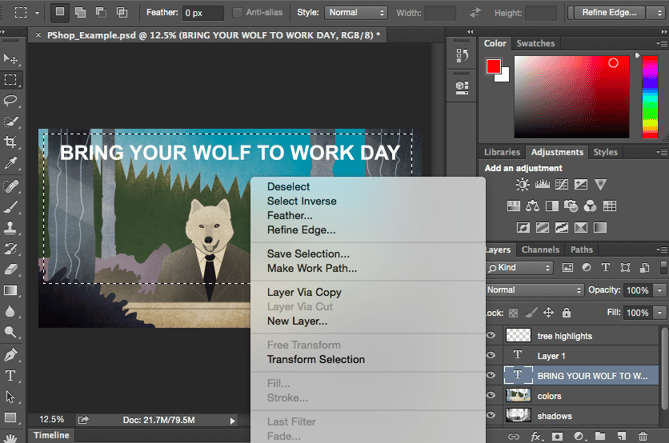
How to select an image to insert into your graphic:
Open the image you’d like to use in Photoshop, and use the Select Tool to determine how much of the image you want to copy. Once you’ve selected the area of the image, simply copy the area.
Next, open the tab for your current project and paste it in as a new layer. Highlight the layer of the object(s) you’d like to select. You can move multiple objects at once by highlighting multiple layers.
Then, right-click your selection, and then you have a few options, including:
A) Choosing “Layer via Copy” to copy the object(s) from this layer and create a layer of its own.
Pro Tip: To select your entire graphic and include all layers, highlight all layers and then use the Select tool. Once you’ve determined the area to copy, use the menu bar at the top and click “Edit” > “Copy Merged.” This will copy the entire graphic so you can paste it as its own layer.
B) Choosing “Free Transform” to scale, rotate, move, and flip your selections. (Refer to the Move tool in the next section of this post if you need more help on this.)
Pro Tip: One really nifty trick you can do with “Free Transform” is to overlay screenshots of a PDF to make a 3D-looking image, like the one below for our introductory Pinterest ebook. You can find a visual overview of the steps below, but read this blog post for the step-by-step tutorial.
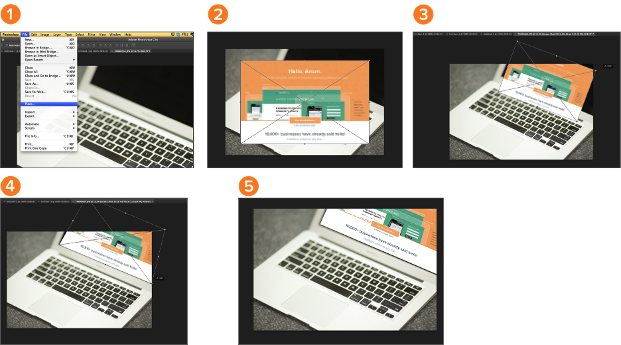
To learn more about all the Selection tools available in Photoshop, check out this video tutorial.
6. The Move Tool
What It Does: This is a fairly basic tool that allows you to move individual elements of your graphic.
The Move tool works on individual layers, and on the graphic as a whole — if (remember how to do this?) you highlight all of your layers. It comes in handy when you’re trying to reposition images, text, and other design elements.
Where It’s Located: The toolbar on the left, at the top.
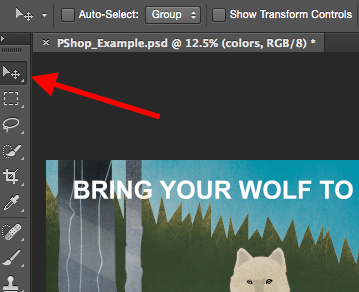
To use the Move tool:
Click the Move Icon from the left hand menu bar and simply drag the object(s) you would like to move. To move all objects in one layer, simply highlight the layer and use the Move tool. You can also right click the object for additional options.
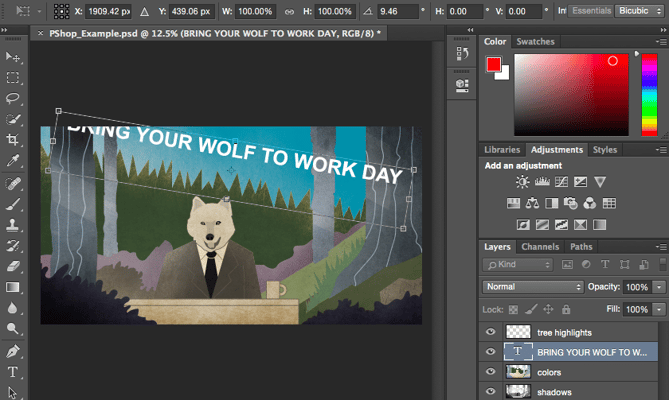
To scale, rotate, move, and flip things:
The Free Transform tool lets you scale, rotate, move, and flip any element in your select layer or layers. Use the shortcut CTRL + T or Command + T (for Macs) to initiate Free Transform, and check out the options that pop up at the top of your screen. Hold the SHIFT key while transforming to maintain the proportions of your elements.
7. The Zoom Tool
What It Does: The Zoom tool lets you zoom in close to certain areas of an image, and zoom out to get more of a bird’s eye view of what’s happening.
Where It’s Located: In the top menu bar, choose View > Zoom In or View > Zoom Out.
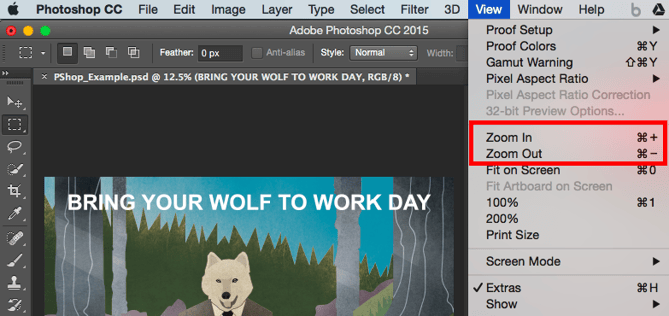
To use the Zoom tool:
Either select the zoom options from the “View” menu (as shown above). To use the keyboard shortcut, hold ALT (PC) or Command (Mac) and press + to zoom in, and ALT (PC) or Command (Mac) and press – to zoom out.
8. The Eraser
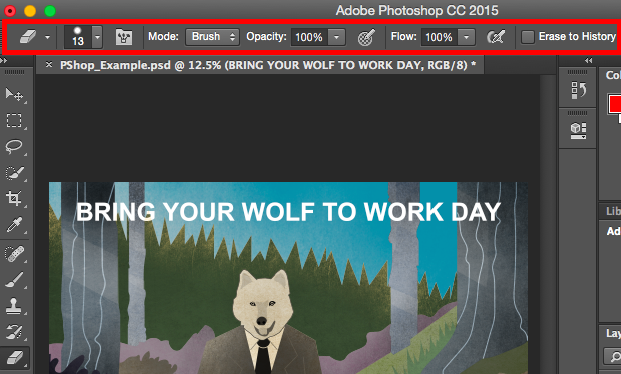
What It Does: The Basic Eraser functions a lot like the brush tool. You can change the size and hardness of the eraser tip to achieve a variety of effects, like blending and fades. The Background Eraser uses differences in color to help you erase unwanted background areas from your images.
The eraser is one of the most useful tools in Photoshop. Yes, I understand it’s technically just an eraser, but you’ve never used an eraser like this.
Where It’s Located: The toolbar on the left.
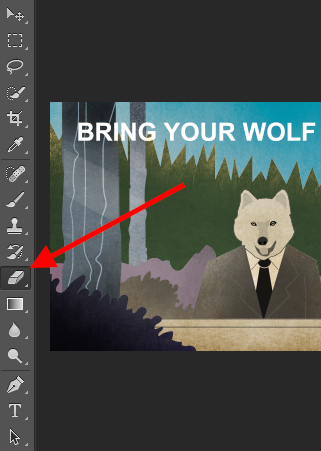
To use the Basic Eraser:
Once you click the Eraser icon, all of the settings will pop up at the top of your screen. These settings let you change the eraser size, hardness, and other aspects of the tool.
Like most tools in Photoshop, the eraser works only on a specifically selected layer. Make sure you’ve got the layer you want selected before you start erasing.
To use the Background Eraser:
This tool is a time-saving wonder. You can see how easily it eliminates background colors from images. This is especially helpful if you need an object with a transparent background.
To use the Background Eraser, click and hold the eraser icon until the slide out menu appears. Choose “Background Eraser.”

Now you’re ready to do some serious erasing. Adjust the size of the Background Eraser, and simply click the color you would like deleted from the selected layer. Remember to select the layer you want to erase on.
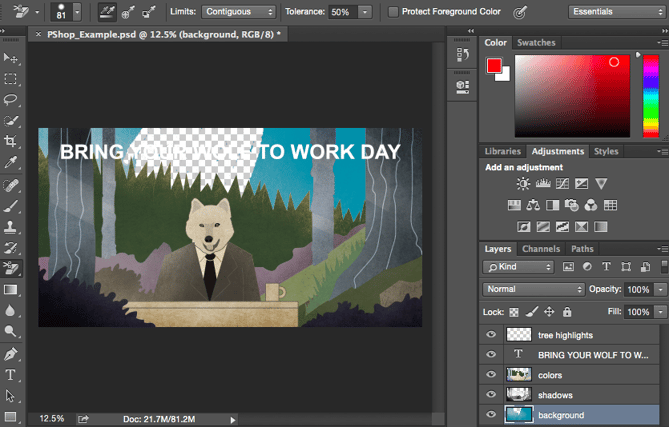
Pro Tip: Don’t be afraid to use an oversized eraser tip for the Background Eraser. Since it works by removing particular colors from the image, it won’t erase colors that aren’t selected.
To learn more about how to remove the background of a photo in Photoshop or PowerPoint, check out this step-by-step tutorial.
9. The Crop Tool
What It Does: The Crop tool lets you crop an image. It works like any crop tool you’ve ever encountered: Simply choose your area and crop it out.
I know this is a basic tool, but you’ll find yourself using this just as often as any other tool in Photoshop, especially when you’ve completed your graphic and need to clean up some of the free space around the edges.
Where It’s Located: The toolbar on the left.
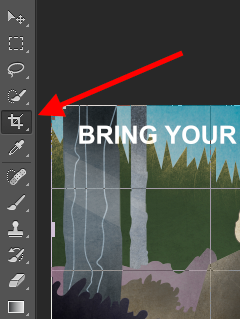
To use the Crop tool:
Select the icon indicated in the screenshot from the side menu bar, and drag the box over the area you would like to crop. To adjust the crop box, simply click and drag the small anchor boxes on the sides and corners of the crop box.
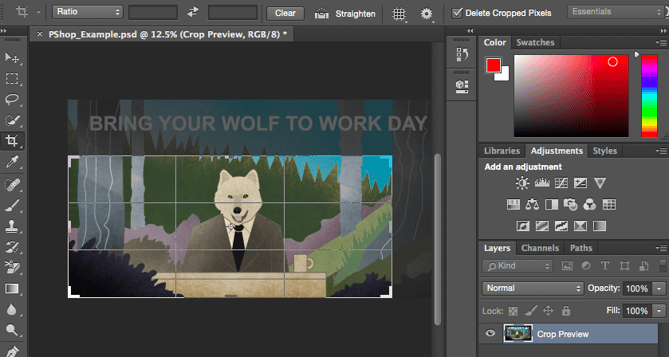
Pro Tip: You can make your canvas size larger than it needs to be so that you can give yourself more room to move your design elements, and crop it down to the proper size afterwards.
Read this blog post to learn how to crop images in Photoshop to a specific ratio. If you want to learn some cropping tricks — like how to rotate an image using the Crop tool — then check out this article from Digital Photography School.
10. The Fill Tool
What It Does: The Fill tool, formerly the Paint Bucket tool, fills any solid area with the color of your choice. It’s great for solid backgrounds or coloring large areas. It can also be used to apply patterns to your images. The Gradient tool within the Fill tool lets you create a nice, faded background effect of the color of your choice.
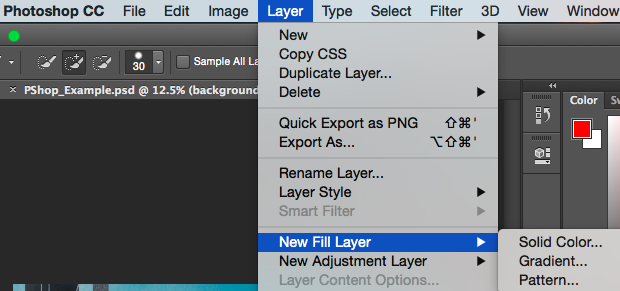
Where It’s Located: On the top menu bar, choose Layer > New Fill Layer. From there, you have the option to choose “Solid Color,” “Gradient,” or “Pattern.”
To fill a solid area with a color:
First, select the layer you’d like to fill with a solid color. Then, from the top menu bar, choose Layer > New Fill Layer > Solid Color… From there, a “New Layer” window will pop up and prompt you to name the new color fill layer. Don’t worry about choosing the color you want right then and there — simply name the layer and press “OK.”
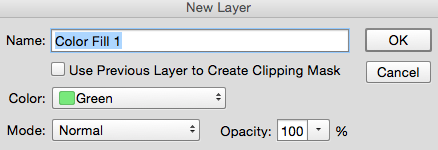
Next, the Color Picker window will pop up. Here, you can choose which solid color you’d like to fill. Since I’d selected my background layer to fill in (i.e. the color of the sky in my graphic), the color I select in the Color Picker dictates the color of the sky:
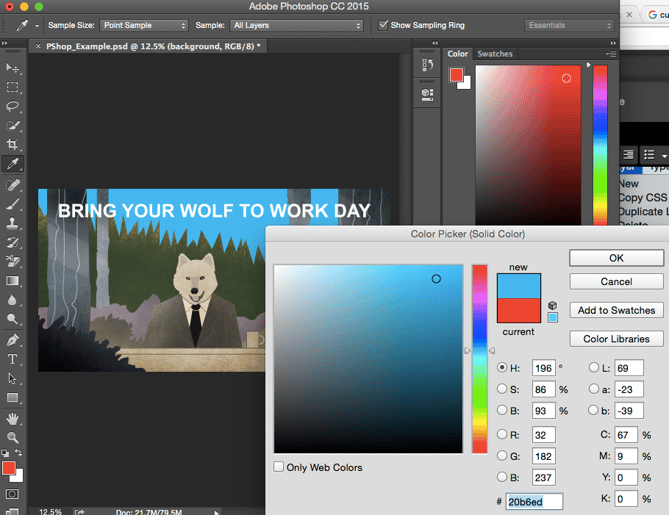
To apply patterns to your images:
These patterns can be manually created if you have the time and patience, or you can find a variety of royalty-free patterns available for download through a basic Google search.
To apply a pattern, first select the layer you’d like to fill with a pattern. Then, from the top menu bar, choose Layer > New Fill Layer > Pattern... From there, a “New Layer” window will pop up and prompt you to name the new color fill layer. Don’t worry about choosing the color you want right then and there — simply name the layer and press “OK.”
Next, you’ll see the “Pattern Fill” window pop up. From there, you can choose the pattern and its scale. Since I’d selected my background layer to fill in (i.e. the color of the sky in my graphic), the pattern I select in the Pattern Fill changes the sky:
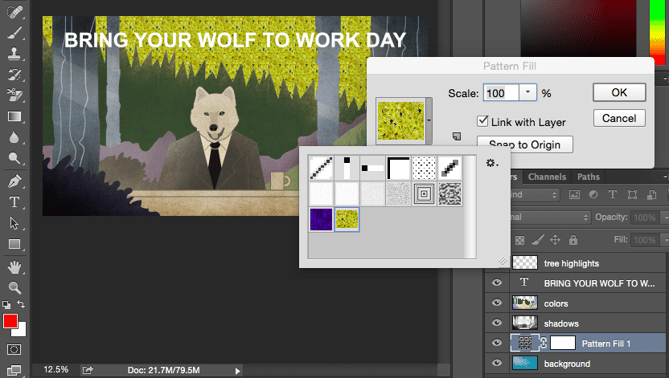
To use the Gradient tool:
To apply a gradient, first select the layer you’d like to fill with a pattern. Then, from the top menu bar, choose Layer > New Fill Layer > Gradient... From there, a “New Layer” window will pop up and prompt you to name the new color fill layer. Don’t worry about choosing the color you want right then and there — simply name the layer and press “OK.”
Next, a “Gradient Fill” window will pop up. Play around with these options, including the style, angle, and scale. To choose a different gradient than the one offered by default, click the arrow on the right-hand side of the default gradient to open the Gradient Editor, shown below:
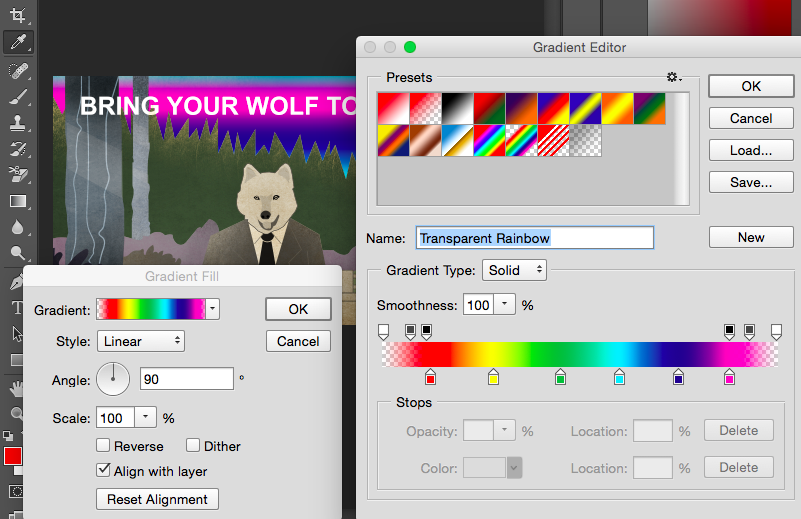
11. The Eyedropper
What It Does: This handy little tool lets you extract and use any color from any image in Photoshop.
Where It’s Located: The toolbar on the left.
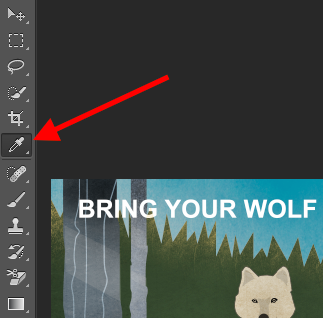
To use the Eyedropper tool:
Select the icon from the sidebar. Next, locate that color you would like to extract, and simply click that area to clone the color.
Once you’ve extracted the color, you’ll see it indicated both in the Color module at the top right of your screen, as well as the bottom of the left sidebar. You can double-click that color box to bring up the advanced color picker, where you can then adjust and save the color to a swatch for future use.
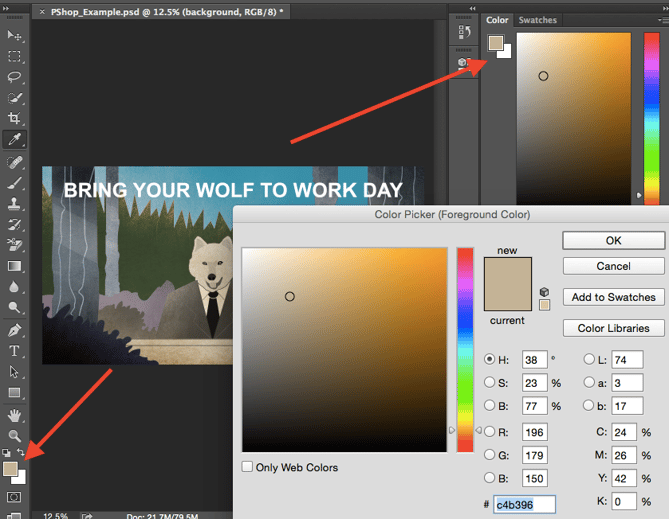
12. Blending Options
What It Does: Blending options include quite a number of features to enhance the look or your graphic. For example, you can use the “Outer Glow” effect to make letters appear like they’re glowing. Or you can use the “Drop Shadow” effect to add a shadow to your letters. Take some time to play around with all the layer effects and find out which ones tickle your fancy.
Where It’s Located: From the top menu bar, choose Layer > Layer Style > Blending Options… You can also double-click any layer to bring up the options for that particular layer.
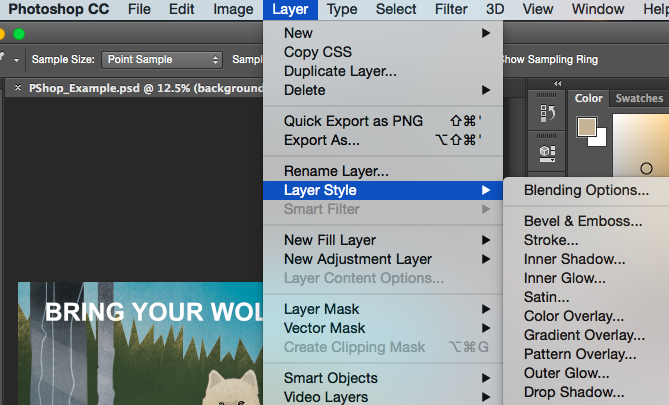
To use Blending Options:
First, select the layer you want to apply your blending options and effects to. Then, open up your blending options and choose the one you’d like to apply. With the variety of options available, you can achieve a number of great effects to finalize your graphics. Have fun with these and experiment on different layers, images, and texts. Here’s a look at what’s offered:
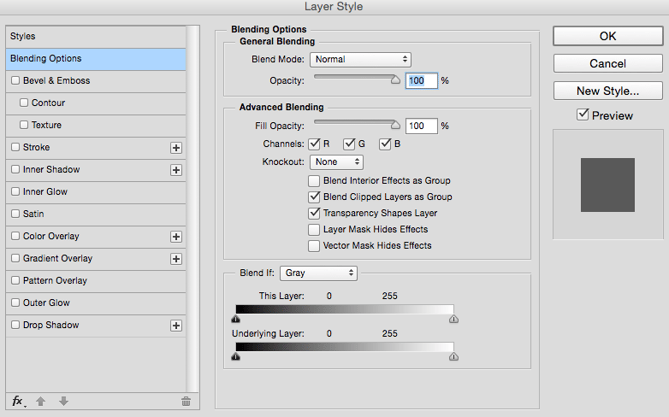
For example, in the image below, I selected my text layer and chose “Bevel & Emboss.” Looks pretty cool, eh?

Before we send you on your way, it’s worth noting that if you’re working with a limited budget and a tight schedule, you can save yourself tons of time and money by using free, royalty-free stock photos. Here’s a list of 17 of the best free stock photo sites you can look through.
Also, Photoshop offers a number of really helpful keyboard shortcuts for things like zooming in and out, changing canvas size, creating a new layer, and so on. Check out this blog post for a full list, including shortcuts for some of the tools mentioned above.
Now, it wouldn’t be realistic to guarantee that you’d be a Photoshop wiz at this point — but that isn’t what this guide designed to do. We hope we’ve provided you with the understanding you’ll need to use the powerful tools in Photoshop in a timely, efficient, non-hair-pulling manner, so that you can elevate your visual content game, like, today.
Happy Photoshopping!

11 of the Best Free Google Sheets Templates for 2020
Whether your marketing position requires you to send invoices to clients, track website analytics, or create budget and expense reports, you’ve undoubtedly found yourself working with spreadsheets in some form.
And if you’re anything like me, those spreadsheets can feel frustratingly tedious when you’re under a time crunch.
Fortunately, Google Sheets offers 26 pre-built templates, allowing you to create reports and analyze data in spreadsheets faster and more effectively.
Best of all, Google Sheets templates cater to specific categories — if you click the Paid Traffic Report template, for instance, your spreadsheet is already organized into Overview, 12-month Trends, and Medium Breakdown categories. It knows what you need, and offers it without any manual input.
Here, we’ll delve into 11 of the best free Google Sheets Templates for any marketing role in 2018, so you can create better spreadsheets while saving valuable time to focus on more important things — like the data itself.
To find these templates in your Google Sheets, go to your email and click Sheets in the drop-down menu.
Then, click the up and down arrow beside Template Gallery. This will show you all your template options.
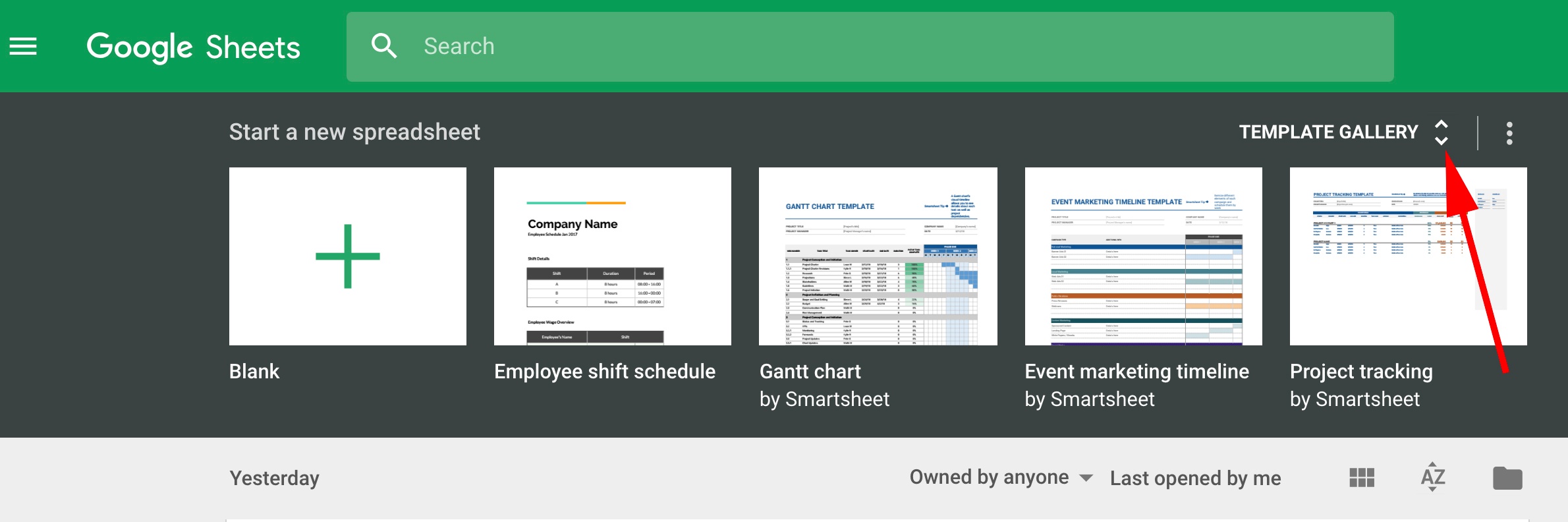
Google Sheets Templates for Finances
1. Invoices
If you’re a freelancer or work for a small business, you probably use invoices to bill clients for services. This invoice template makes the process simple — it provides space for all the necessary information, and looks more professional than a plain spreadsheet. Plus, the template is customizable, so you can create a theme that aligns well with your brand image.
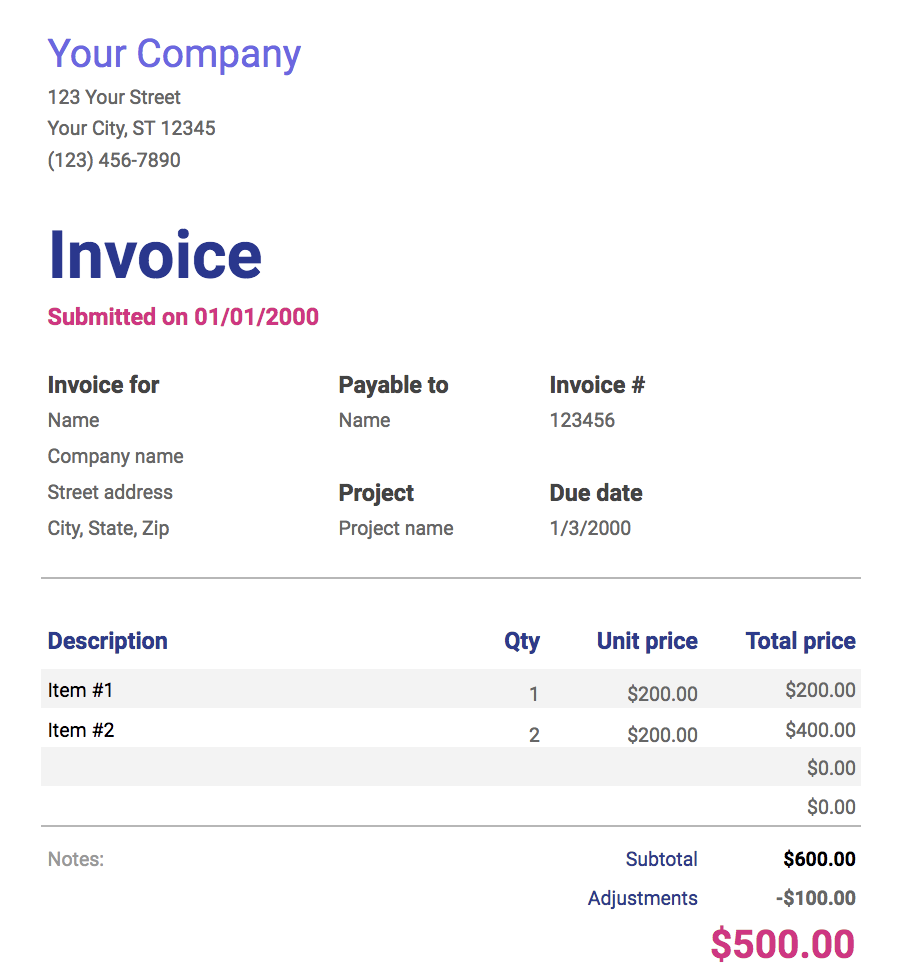
2. Annual Business Budget
This template is more in-depth than it initially appears. There are tabs at the bottom — setup, income, expenses, summary — and each one includes a number of subcategories. “Expenses”, for instance, covers everything from taxes and insurance, to travel and customer acquisition. The final tab, “summary”, takes your income, subtracts your expenses, and automatically updates to display your ending balance each month. This template is a good option if your budget requires a lot of customization and has a lot of moving parts.
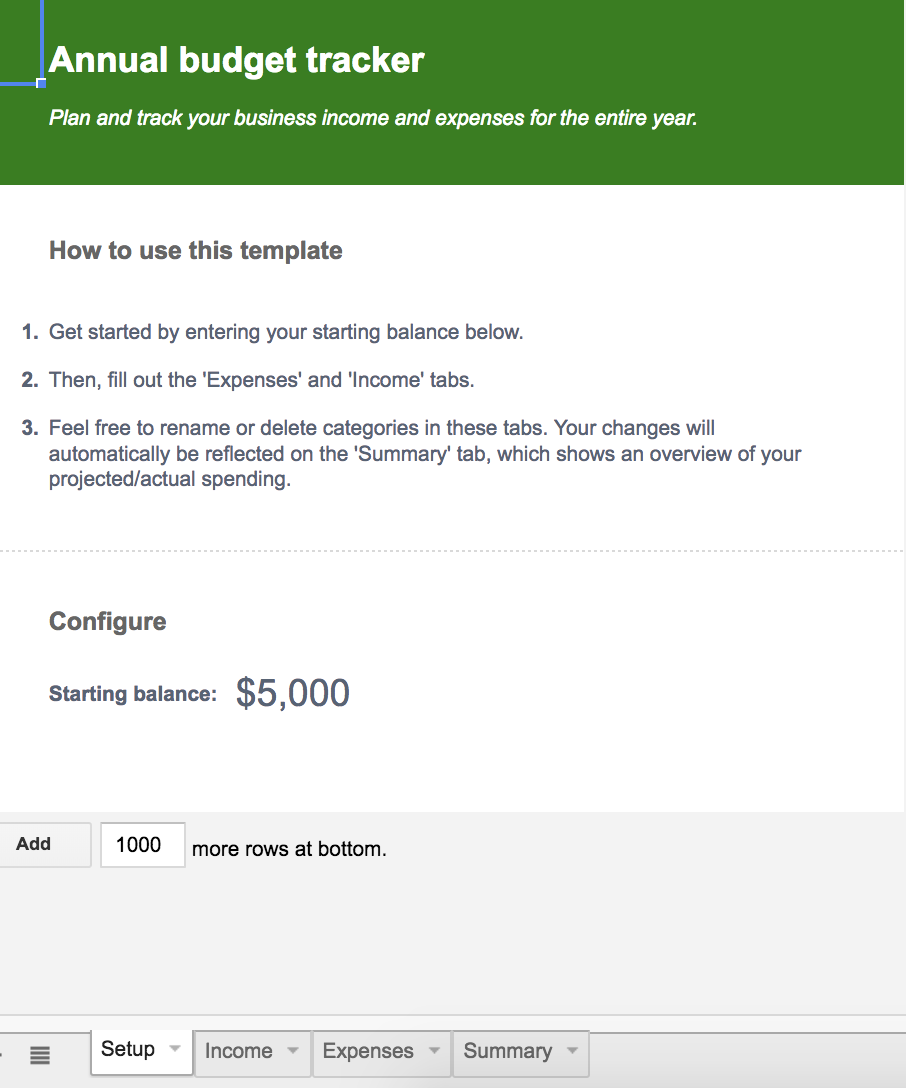
3. Financial Statements
The financial statements template truly is an all-in-one resource to keep track of business transactions, profits, and losses. The “profit & loss” tab automatically summarizes revenue, costs, and expenses for the year, and can display your growth rate percentage. If you work for a small business and need to manage much of your own finances, this template offers resources and guidance to make the process easier, and less prone to human error.
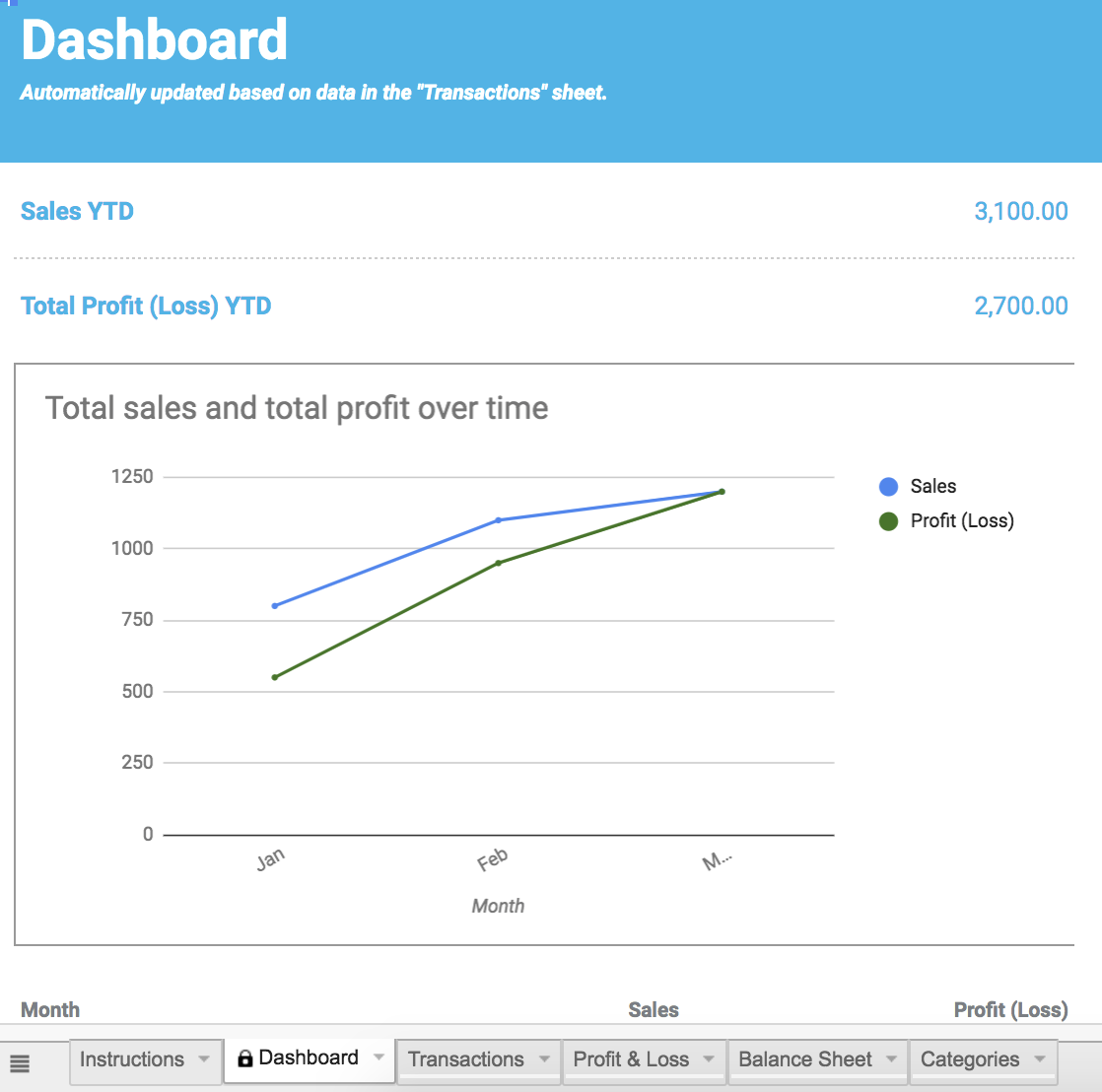
Google Sheet Templates for Reporting and Analytics
4. Website Traffic Dashboard
If your role requires you to analyze website traffic using Google Analytics, this template is a fantastic supplemental tool to pull that data into an organized report, saving you tons of time. Better still, you can use the template with Supermetrics Google Sheets add-on to monitor and analyze data from PPC, SEO, social media, and website analytics.
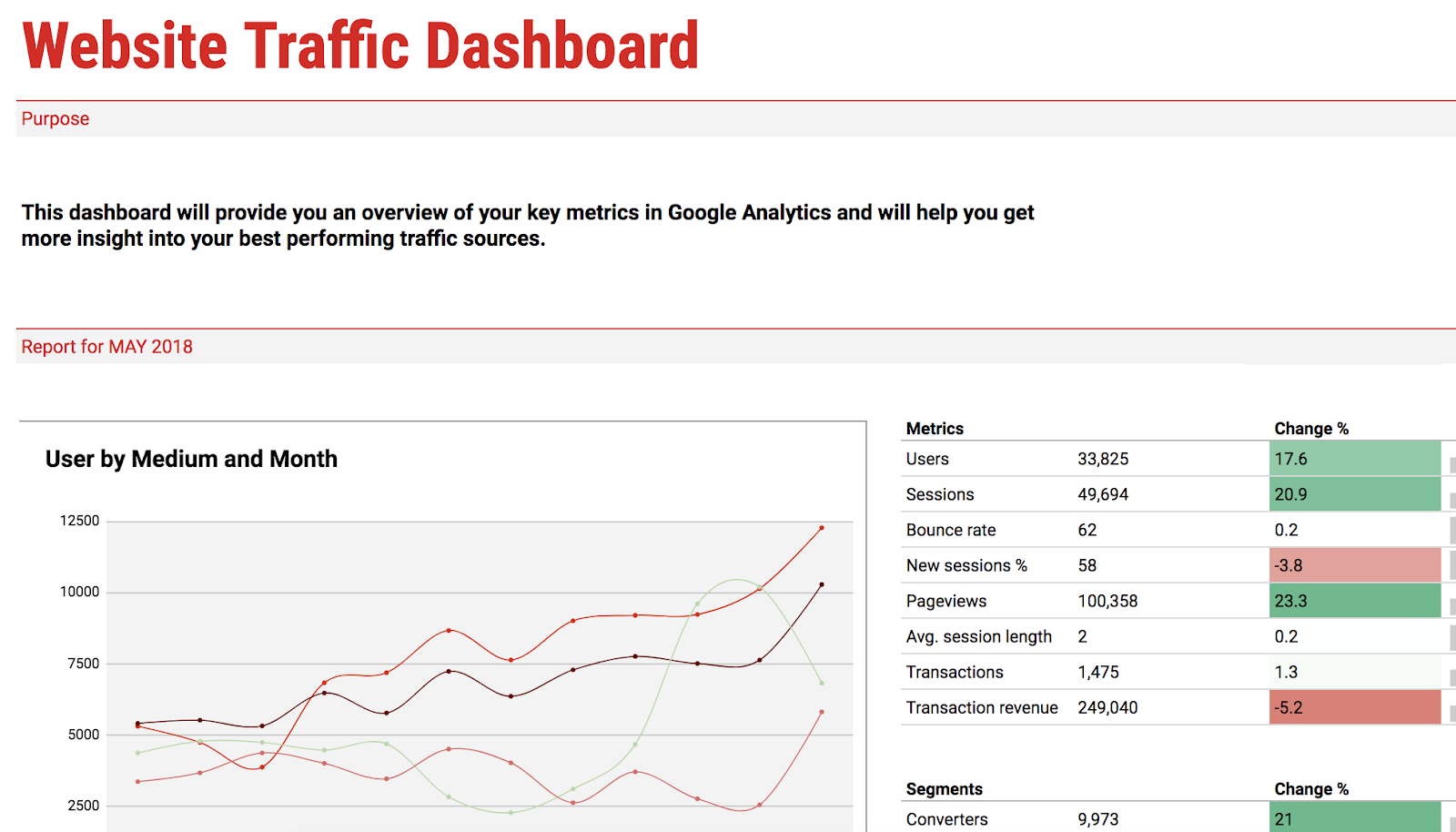
5. Website Paid Traffic Report
This template makes the process of analyzing and reporting on paid traffic relatively seamless. It automatically collects data on your paid sources from Google Analytics, and provides a clean chart with important information, including PPC’s percentage of goal conversions, total traffic, and bounce rate. You can also adjust it to compare different time periods, or different channels or segments. If you’re looking for a way to demonstrate paid’s influence on your business, this is the tool to do it.
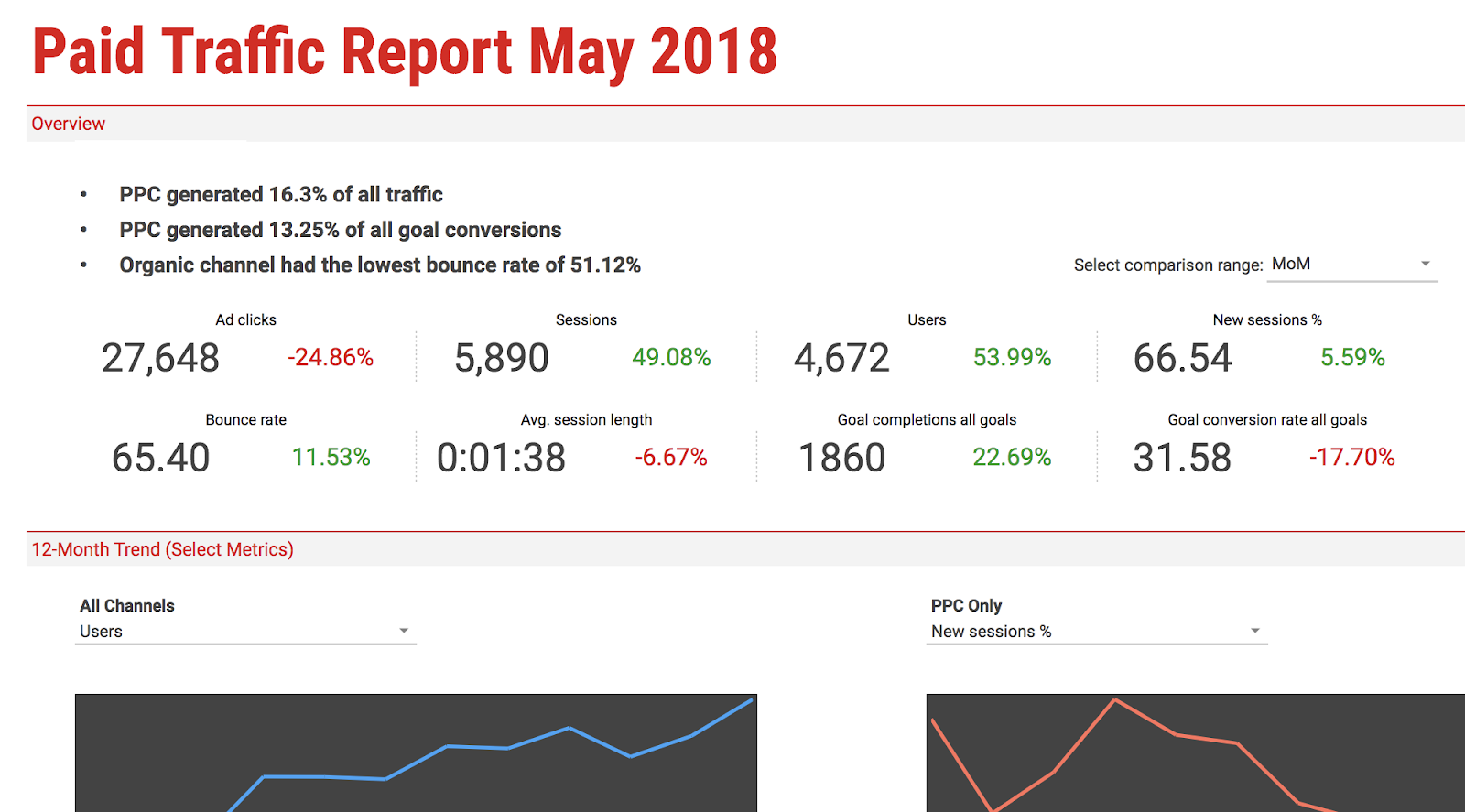
Google Sheet Templates for Customers
6. CRM
To organize your contacts and automate an effective sales and marketing process, it’s important you have a CRM — but if you’re a small company just starting out, you might not feel ready to implement a fully-established CRM with all the features. This CRM template is a great place to get your feet wet. It saves automatically so you never lose data, and the share feature allows you to work with coworkers within the CRM, which is helpful for encouraging collaboration between your sales and marketing departments.
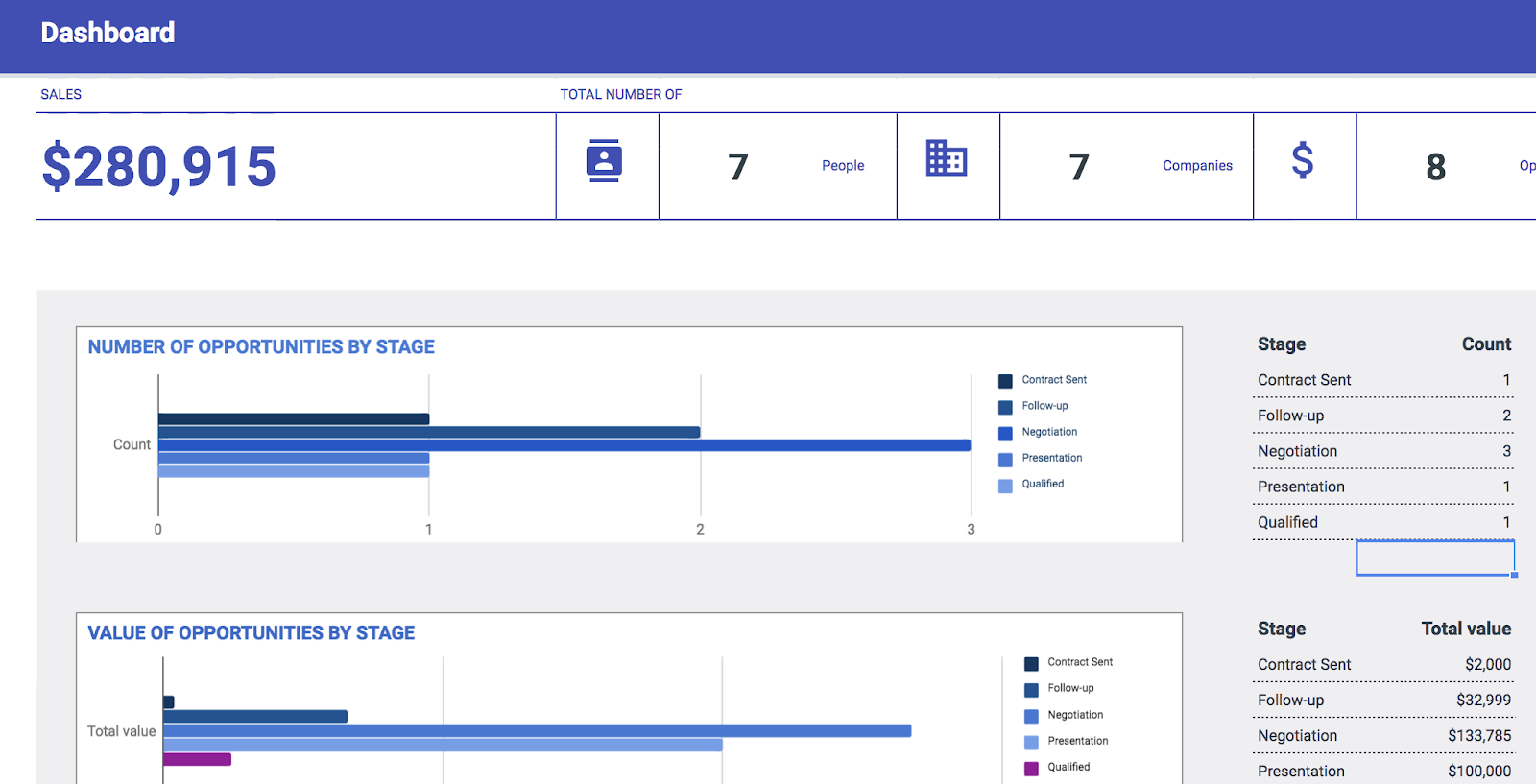
Google Sheet Templates for Project Management
7. Project Timeline
Whether this is your first major project or you’ve been managing projects for years, the project timeline template is a useful tool for organizing and implementing each project step. The template helps you visually break-up a daunting project into smaller pieces, ideally making it easier and less stressful to organize and delegate tasks.
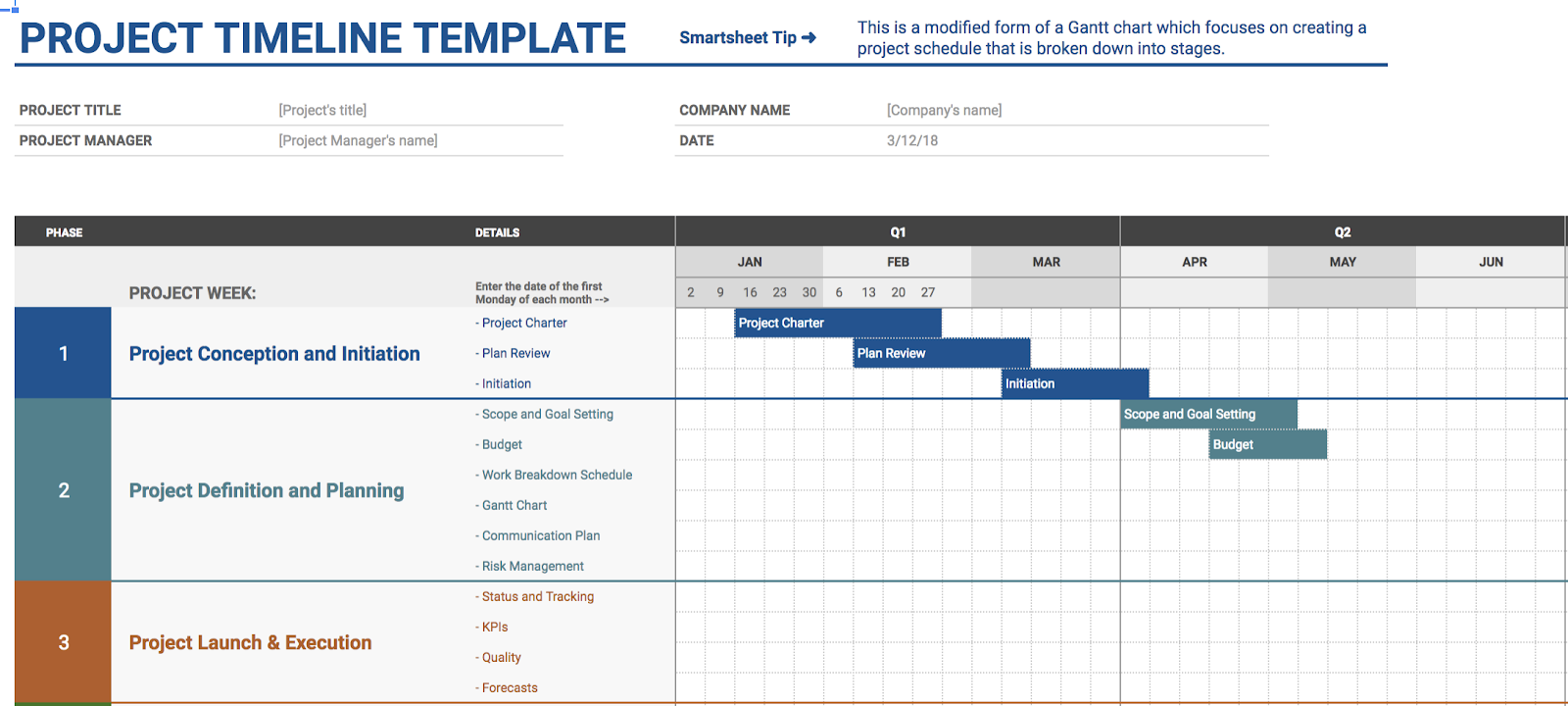
8. Project Tracking
If you’re juggling a bunch of projects simultaneously, this project tracking template could become your new best friend. It enables you to organize your projects into categories by date, deliverables, status, cost, and hours — best of all, it lets you prioritize your projects. Hopefully, simply visualizing what needs to get done first will alleviate time-management stress.
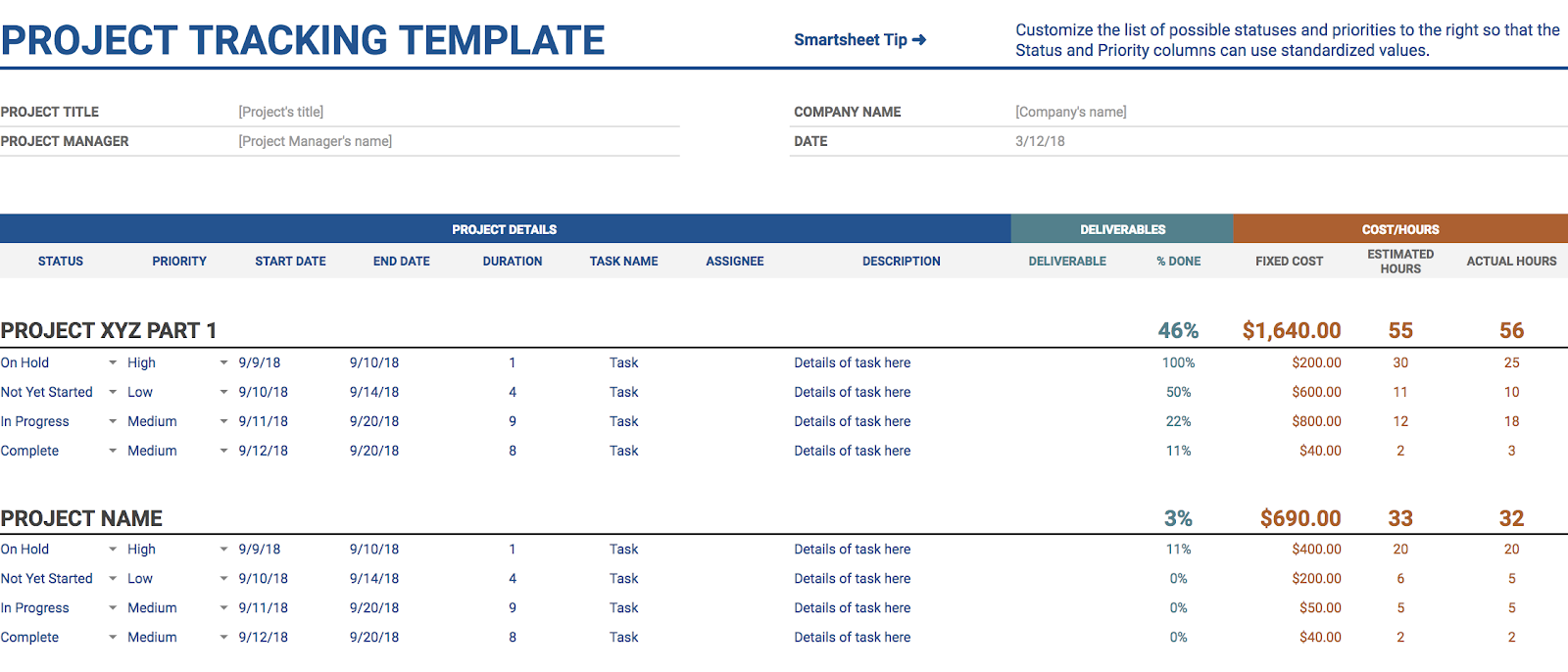
9. Event Marketing Timeline
The event marketing template offers organization and structure if you’re implementing an upcoming business event or campaign. It offers categories you might’ve forgotten to consider, including local and national marketing, PR, and web, with subcategories ranging from email newsletter to impact studies. The template is already organized with all necessary categories for planning an event, reducing the time you spend on tedious manual input.
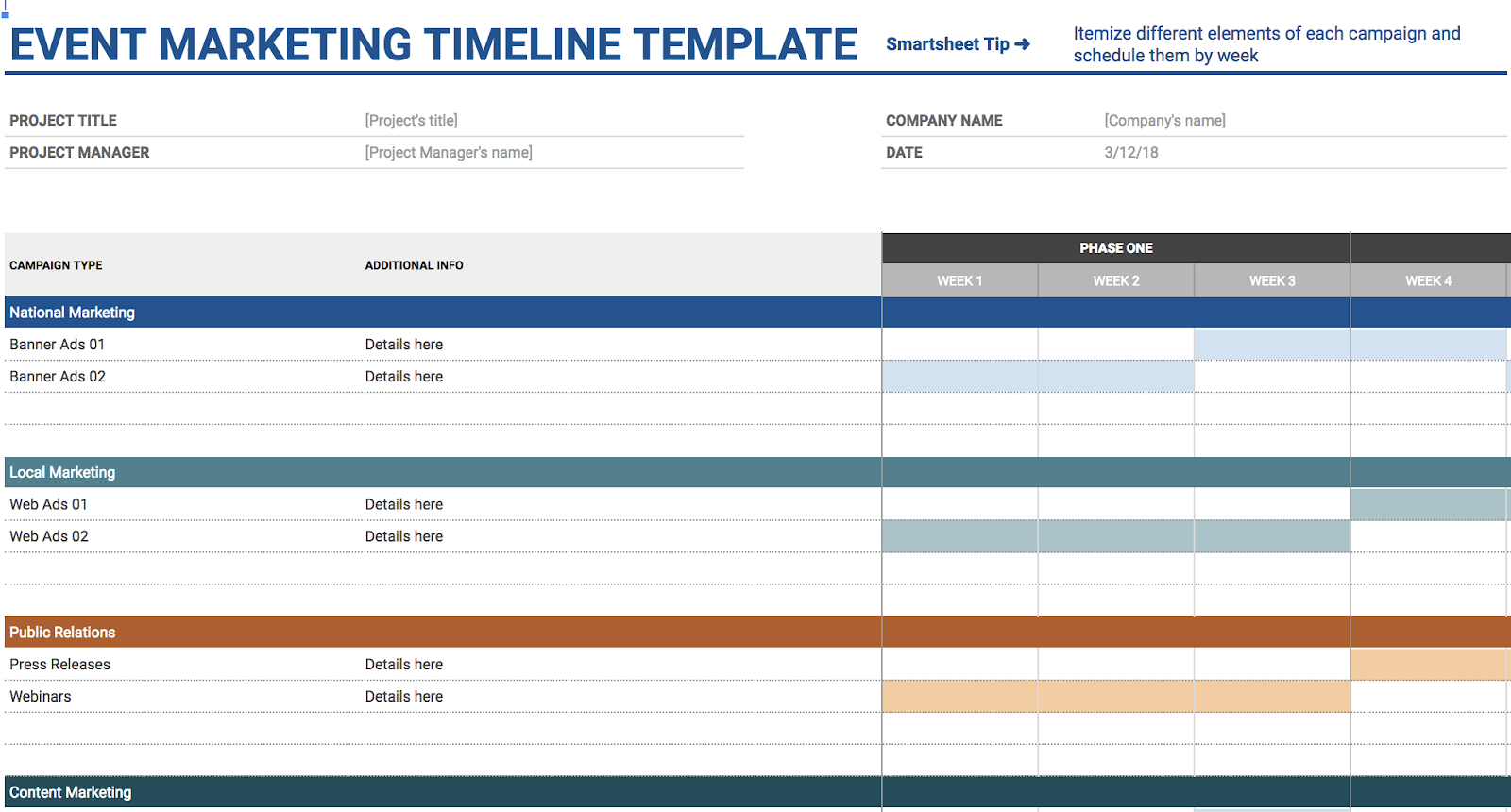
10. Gantt Chart Template
The Gantt chart template helps you alleviate any concern you might have over timing — and, when you’ve got a complex project with overlapping components, I’m willing to bet timing is one of your major concerns. Using the Gantt chart template helps you visualize all steps and delegate important tasks more efficiently — labelling the task with an owner on one chart is certainly easier than individually following up via email, and by sharing the template with coworkers, everyone is on the same page.
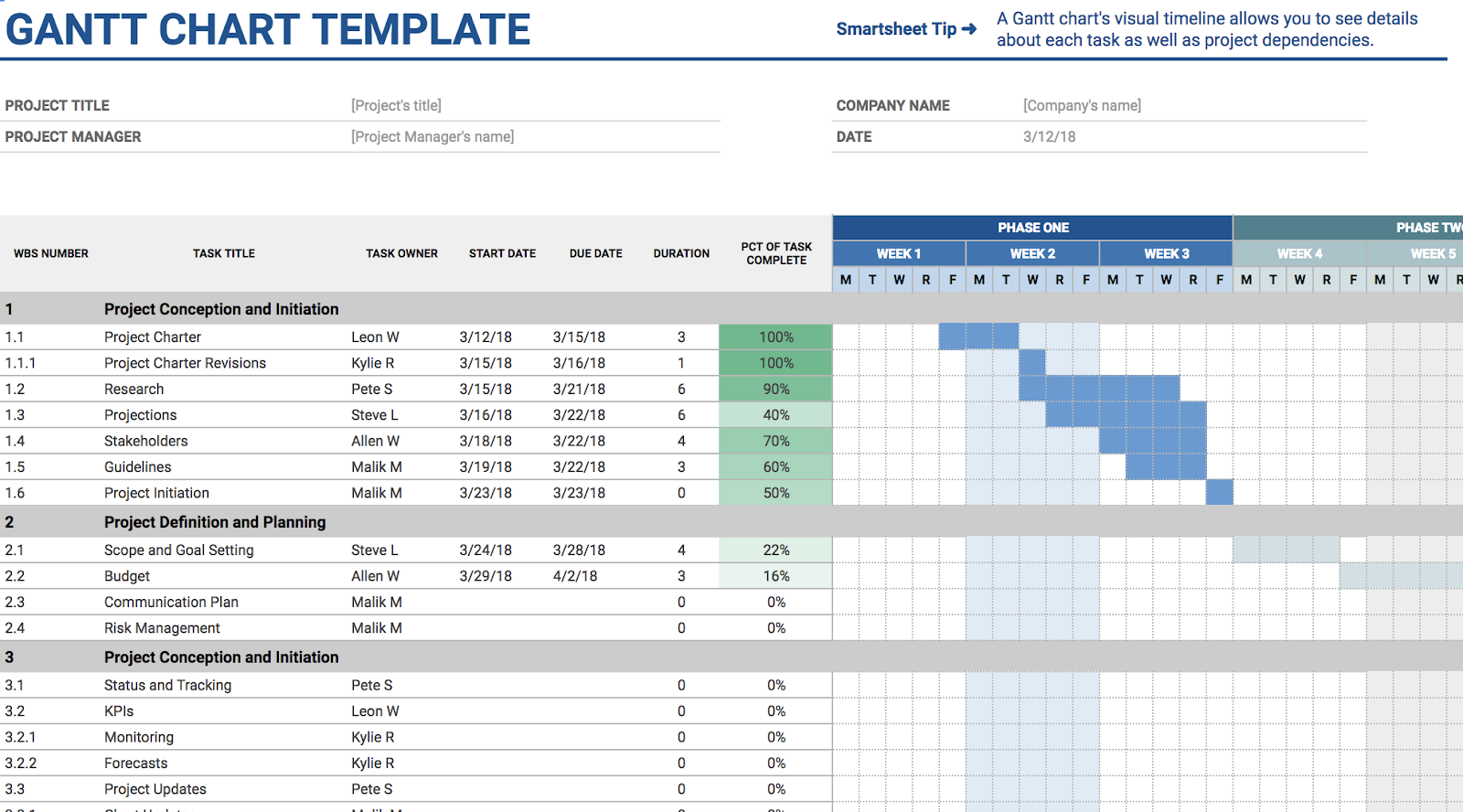
Google Sheet Templates for Leading a Team
11. Employee Shift Schedule
Keeping track of who works what hours, and how much each employee gets paid, can feel confusing, especially if you lead a team of part-time contractors or seasonal interns. This template includes slots for employee’s names, hours worked, and monthly wages, making your paycheck process straightforward and organized.

24 About Us & About Me Pages + Templates to Make Your Own
Building a website is, in many ways, an exercise of willpower. It’s tempting to get distracted by the bells and whistles of the design process, and forget all about creating compelling content.
It’s that compelling content that’s crucial to making inbound marketing work for your business.
So how do you balance your remarkable content creation with your web design needs? It all starts with the “About Us” page.
For a remarkable About page, all you need to do is figure out your company’s unique identity, and then share it with the world. Easy, right? Of course not. Your “About Us” page is one of the most important pages on your website, and it needs to be well crafted. This profile also happens to be one of the most commonly overlooked pages, which is why you should make it stand out.
The good news? It can be done. In fact, there are some companies out there with remarkable “About Us” pages, the elements of which you can emulate on your own website.
By the end of this post, you’ll be introduced to:
- The best About Us page examples (and what makes them great)
- Tips on how to write your About page
- The best About page templates (across multiple platforms)
Best About Us Page Examples
- Yellow Leaf Hammocks
- Eight Hour Day
- Joe Payton
- Apptopia
- Moz
- Aja Frost
- Cultivated Wit
- Kero One
- Nike
- Refinery29
- Sara Dietschy
- Marie Catribs
- Marc Ensign
- Bulldog Skincare
- Doomtree
- Bold Xchange
- Ceros
- Marketive
- Sweet Loren’s
- TalEx
- SkinnyDipped
- LoveBug Probiotics
- Brown and Coconut
- Kuno Creative
1. Yellow Leaf Hammocks
Why the “About Us” Page Rocks: It tells us a story.
When you have a great story about how your product or service was built to change lives, share it. The “About Us” page is a great place for it to live, too. Good stories humanize your brand, providing context and meaning for your product. What’s more, good stories are sticky — which means people are more likely to connect with them and pass them on.
Yellow Leaf Hammocks tells users about its product by describing how the hammocks empower artisan weavers and their families. The company breaks down different pieces of the story into sections that combine words and easily digestible graphics, painting a picture instead of big chunks of text. They’re clear about why they’re different: “Not a Charity,” the page reads. And then: “This is the basis for a brighter future, built on a hand up, not a handout.”
Every company has a story to tell, so break out your storytelling skills from that random English class you took years ago and put them to work on your “About Us” page. Using descriptive and emotive copy and gorgeous graphics, an “About Us” page with a story works harder for your business than a generic one.
2. Eight Hour Day
Why the “About Us” Page Rocks: It’s human.
People tend to think that “About Us” pages have to sound formal to gain credibility and trust. But most people find it easier to trust real human beings, rather than a description that sounds like it came from an automaton. Trying to sound too professional on your “About Us” page results in stiff, “safe” copy and design — the perfect way to make sure your company blends in with the masses.
Instead, Eight Hour Day showcases the people behind the company and humanizes its brand. Introducing the founders by name and featuring the photos of them on the “About Us” page drives home the point that Nathan and Katie are — as they so astutely put it — “two individuals with a passion for creativity — creativity makes us happy.”
When you’re designing your “About Us” page,avoid industry jargon and replace it with an authentic voice — yours — to describe your product or service. Sure, it needs to be polished and free of errors, but it should always sound friendly and real.
3. Joe Payton
Why the “About Me” Page Rocks: It’s confident, creative, and easy to skim.
“About Us” pages might encompass the values of more than one person or entity, but they’re no more important to the image of a business than your personal about page. Take Joe Payton’s “About Me” page, below.
Not only does Joe’s illustrative self-portrait give him a personal brand that customers will remember, but it also demonstrates his expertise as a designer and animator. His website visitors can learn not just what he does, but why he does it, in an easily digestible way. Being able to express his values as a creative professional in such a well-organized page is something to be desired by anyone creating their own about page.
4. Apptopia
Why the “About Us” Page Rocks: It skips the business babble.
We know — no industry jargon. If you think it makes you sound super smart on your “About Us” page, think again. People want and appreciate straight talk about what your business does. After all, if people can’t figure out what you do, how will they know they need your product or service?
So, skip the industry lingo — that’s what Apptopia does on its “About Us” page. The startup’s simple but polished language effectively communicates the company’s offering while still allowing the Average Joe to understand it.
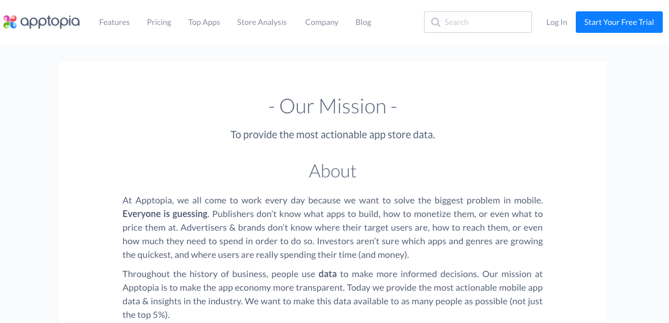
The moral of the story: Try to get rid of jargon on your “About Us” page whenever possible. Use short and punchy sentences to explain complex products and ideas in a way that isn’t patronizing, but rather, is empathetic.
5. Moz
Why the “About Us” Page Rocks: It’s humble.
Instead of following the classic “About Us” script and writing a few paragraphs about the company’s mission and origins, try something different — there are plenty of ways to make your brand more compelling to someone who doesn’t know about you.
Take Moz, for example. A lot has happened since it was founded in 2004, so the company chose to share those milestones using a fun and clean design that incorporates clear headers, concise blurbs, and little graphics to break up the text.
We especially love the humble references to how Moz received funding, how it switched its brand positioning — and most importantly, how it switched back to its original model. This speaks volumes to the value honesty and humbleness can play to your customers. Don’t be afraid to talk about your ups and downs; your customers will trust what you say that much more.
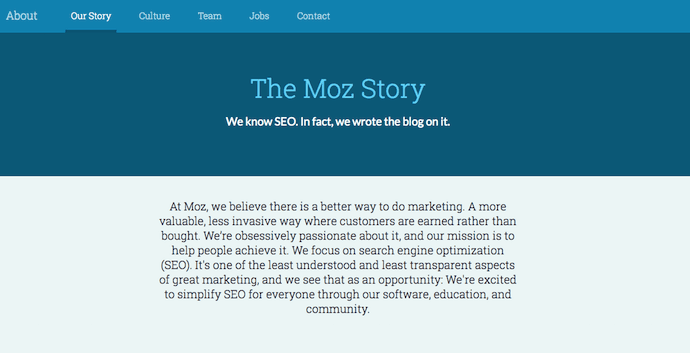
6. Aja Frost
Why the “About Me” Page Rocks: It’s data-driven.
Alright, we might be biased in highlighting this professional, as Aja is our very own SEO strategist at HubSpot. Nonetheless, the ingenuity she brings to the company isn’t lost on her website’s “About Me” page.
Being a data-driven professional, Aja knows her own clients as a freelance writer and strategist don’t just want to see what she’s written — they want to see how her content has performed. With that in mind, her “About Me” page tells a story of her career growth, which peaks — no pun intended — at an impressive line graph showing the result of an SEO strategy she implemented for the HubSpot Blog. (The graph’s sharp decline at September simply indicates when she stopped collecting data.)
Following the impressive chart, Aja closes out her about page with a personal note on what she does in her spare time — always a good way to humanize yourself in the eyes of your potential customers.
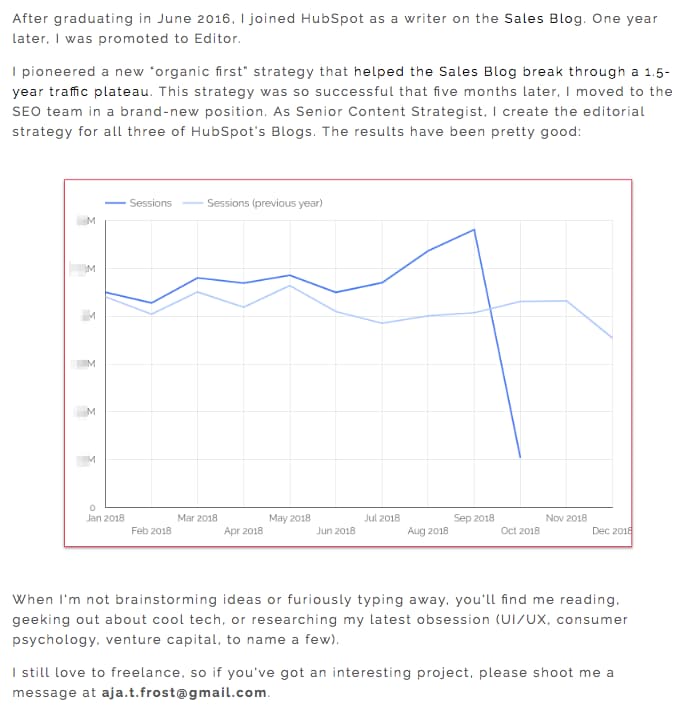
7. Cultivated Wit
Why the “About Us” Page Rocks: It breaks the mold.
Yes, this post is about, well, “About Us” pages. But sometimes, you don’t always need to wait for users to get there in order to make a statement. That’s part of breaking the mold to showcase your company’s personality.
That’s exactly what Cultivated Wit — a creative agency and media company — does, with both an edgy name and an incredibly fun story told through video and parallax scrolling … right on its homepage.

Below is the actual “About Us” page, which is a gem once you get there. But it’s great to see a company embrace its own brand of quirk throughout the site.
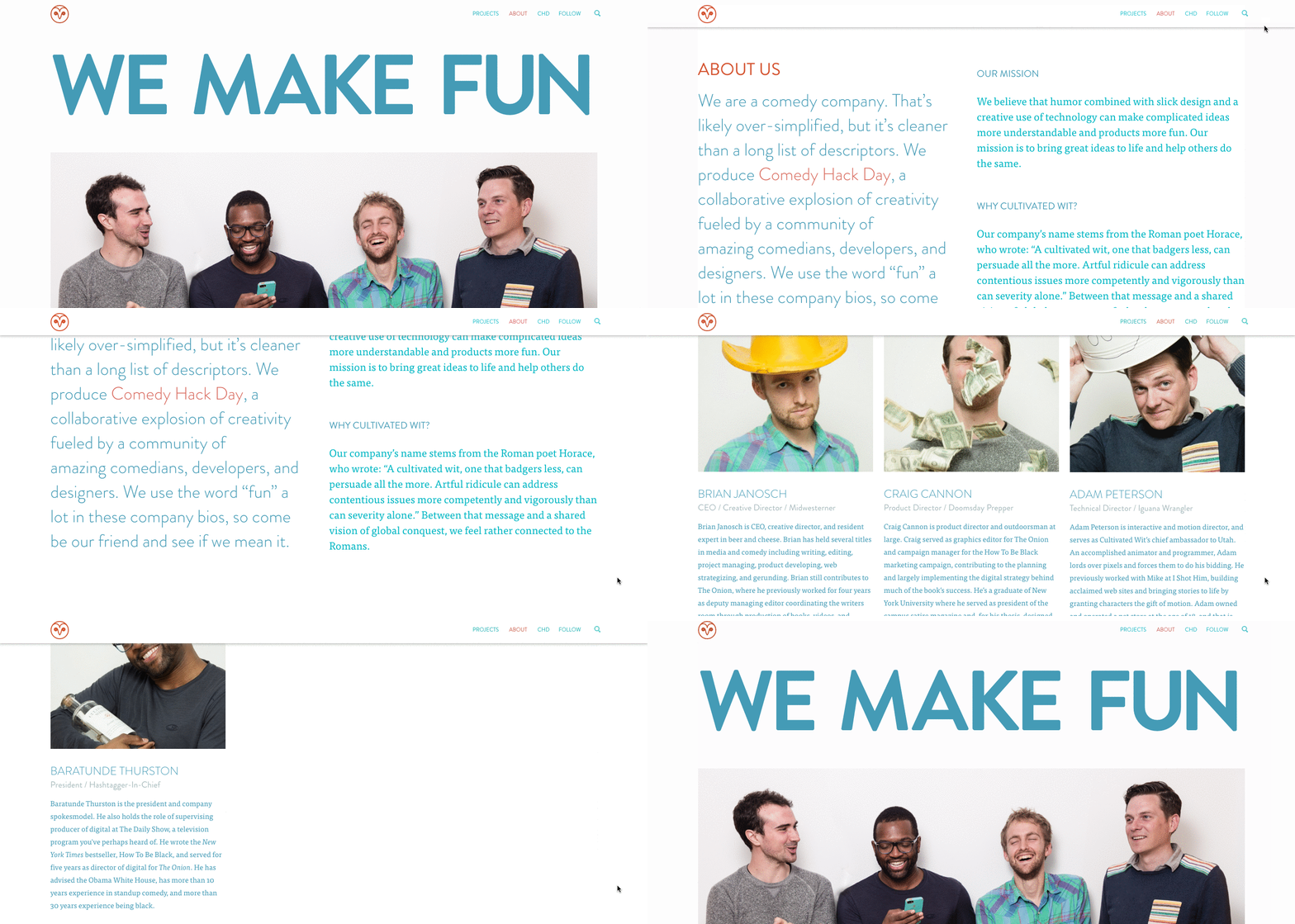
Even if you have a dedicated “About Us” page, there are plenty of ways to creatively showcase your company’s personality throughout your entire website. And yeah, that’s harder than filling a stock “About Us” template — but it can have a significant payoff for your brand.
8. Kero One
Why the “About Me” Page Rocks: It’s multilingual.
Kero One is a hip-hop artist and DJ from San Francisco, and his “About Me” page carries a valuable lesson to personal brands who cater to more than one audience — especially if those audiences speak different languages.
Kero One’s story starts at his childhood, when he was six years old and first discovered a passion for hip-hop. Knowing how old and genuine his love for the genre is adds tremendous value to his own music in the eyes of his listeners.
While this entrepreneur’s childhood interests help to deepen his audience, the second screenshot below helps Kero One widen it. His “About Me” page first tells his story in English, then in Japanese, then in Korean, then in Chinese. Accommodating these Southeast Asian audiences makes his brand more inclusive of all the audiences he identifies with.
…
9. Nike
Why the About Us Page Rocks: It knows its audience.
Nike might seem like a company that’s too big to inspire smaller businesses. You might even wonder if Nike even still has an “About Us” page. As a matter of fact, it does, and it hasn’t forgotten the company’s roots.
Nike began on the campus of the University of Oregon by the hand of the college’s track coach, Bill Bowerman. And even though he no longer works at the company, one of his beloved quotes still brands the bottom of Nike’s “About Us” page below: “If you have a body, you are an athlete.”
This bold sentence, referenced by the asterisked “Athlete” in the words right above it, sheds important light on Nike’s audience. The brand may be big today, but Nike is all about the rising stars — who Nike depends on to, according to the rest of its “About Us” page, “expand human potential.”
The takeaway for marketers? Know your audience, and make it obvious to that audience the instant they read about you on your website.
10. Refinery29
Why the “About Us” Page Rocks: It tells you what’s most important.
Here’s another instance where any area of your website — not just the “About Us” page — is an opportunity to break the mold.
Many companies add just a simple mission statement or company profile, but people often don’t want to ready a wall of text explaining what you do. So, Refinery29 broke it down to convey the intangible qualities that are tough to include in a basic “About Us” page.
Although Refinery29 does introduce its page with a description of its business, its goes out on a bang — four bangs, to be exact. The organization is on a “mission,” sure, but there’s also an “essence” of Refinery29, a “promise” it keeps, and a “vibe” it gives off.
These aren’t company traits you’d think to include when starting out, but they’re what your customers often make gut decisions on when buying.
11. Sara Dietschy
Why the “About Me” Page Rocks: It has variety but still aligns with her personal brand.
This professional YouTube content creator has an eclectic collection of videos related to technology and culture, and expresses that diversity all over her “About Me” page.
In addition to the vibrant self-portrait at the top of the page, Sara’s first sentence tells you just how many people subscribe to her channel: 350,000. This is an important number to know for her potential video advertisers and collaborators who want to know how much exposure they’d get by working with her or advertising on her channel.
The colored tiles lining the page — starting with the red one, as shown below — also do a terrific job segmenting her work by the types of projects she takes up and for whom she’s done them. That Intel logo in the second photo of Sara, below, is sure to turn some visitors’ heads as they’re perusing her website.
12. Marie Catribs
Why the “About Us” Page Rocks: It’s unexpected.
There’s a reason why these examples are exceptional — “About Us” pages aren’t always the most riveting parts of a company’s website. In fact, they often look like an afterthought. But even if you don’t have budget for juicy graphics, video, or parallax scrolling, there are other ways to make your “About Us” page unexpected with the copy alone.
Marie Catrib’s is a restaurant, so you might think their “About Us” page would be your typical “here’s how we started, here’s what we believe in, and here’s our food” story. Marie Catrib’s “About Us” page does tells us that — but it does so in an unconventional way. Immediately, the user’s eyes are drawn to a header that says, “It’s okay to make a mess, experiments can lead to beautiful things.” Quite philosophical, for a place to have dinner.
But next comes the story about the owner, which starts in an unexpected way — “It’s hard to imagine, but at one time Marie was banned from the family kitchen.” A line like that draws in the audience, because we know it’s not going to be typical.
So, how will you use copy to really draw readers in? It’s amazing what impression you can make on site visitors just by creatively telling your story with words alone.
13. Marc Ensign
Why the “About Me” Page Rocks: It’s funny but professional.
This branding expert does two things super well on his about page: He takes his work seriously, but doesn’t take himself too seriously. Marketers know there’s value to keeping a casual tone in the content they create, but in order to attract customers, you need to prove you have discipline and integrity. That’s a tough balance to get right.
Marc Ensign nails that balance between friendly and formal with a confident opening statement, followed by an amusing smiley photo of himself to set an inviting tone.
14. Bulldog Skincare
Why the “About Us” Page Rocks: It’s lovable and memorable.
What’s the difference between “average” marketing and lovable marketing? It’s the difference between creating generic webpages that provide great information, but in a straightforward, black-and-white kind of way — versus creating webpages that provide great information and are infused with color, personality, and stay true to a company’s unique brand voice. When you create lovable marketing, you can start a movement of brand evangelists and advocates who will help you grow.
Where does this fit into a company’s “About Us” page? The folks at Bulldog, a men’s skincare company that was named for the colloquial “man’s best friend” — a dog — could have typed up a few paragraphs about where the brand came from and how they were one of the first in the space to redefine and eliminate stereotypes around men’s grooming. But that text alone would have been a bit, well, average.
Instead, the “About Us” page is pithy, colorful, and leads with the lovable mug of an adorable bulldog — fitting the name and the brand. And it states the purpose of the products — to help customers from waking up with the (admittedly adorable) wrinkly face you see when you visit Bulldog’s website.
Play on your own words — it’s okay to have fun and pun with your brand, as it helps to inject personality and humor into your “About Us” page. It primes visitors for a story in a way that makes them immediately feel something. That’s how you create memorable, lovable marketing.
15. Doomtree
Why the “About Us” Page Rocks: Its shows, tells, and has a soundtrack.
One minute of video is worth 1.8 million words, according to Forrester Research’s Dr. James McQuivey. But what about audio and visual, too, all combined with a really cool story? Well, that’s one way to tell your story in an engaging way — through multimedia.
Doomtree is built on a bit of an innovative concept: That a group of talented artists can each have thriving solo careers, but can still come together on a regular basis to create great music. It’s not a band — it’s a crew. It’s an unconventional concept with an equally interesting backstory that “started as a mess of friends in Minneapolis, fooling around after school, trying to make music without reading the manual.” And as soon as you arrive on Doomtree’s ‘About Us’ page, you’re greeted with big, bold photos of those friends.
As you scroll down, users are treated to even more interaction with the crew’s tracks and music videos. That makes sense, because it gives visitors an instant sample of Doomtree’s product. What’s more, the entire “About Us” page is responsive, including the video. That’s important — not only because it offers site visitors a great mobile experience, but also for Google search ranking — especially now that such mobile usage has surpassed desktop.
16. Bold Xchange
Why the “About Us” Page Rocks: It’s sleek and focuses on the company’s mission.
Bold Xchange’s About Us page starts with a story of the co-founder’s initial inspiration for starting the company: “That summer, the two opened up to friends and family about doing what feels right despite obstacles that tell you to do otherwise.”
Sound familiar? The introduction immediately jumped out at me because of how relatable it felt.
The About Us page continues in story-format and is separated into three sections: “be bold”, “stay bold”, and “share bold”. Along with a moving origin story, the page has a sleek design, with a red-and-black color scheme and authentic images to support each of the three sections.
What I like best about this About Us page is that it doesn’t focus on what the company sells — instead, it uses the space to showcase the company’s ultimate mission. When creating your own About Us page, consider how you might draw visitors in with an inspiring message upfront.
17. Ceros
Why the “About Us” Page Rocks: It’s interactive and funny.
Ceros’ About Us page is interactive and engaging. As you scroll, the text slowly moves up the page, with bold — and humorous — statistics, like “4 beers on tap”. Additionally, Ceros’ uses images of their impressive, unique office space to further personalize the page.
Best of all, Ceros’ keeps the text on the page short-and-sweet, with powerful statements like “We exist to unlock creativity”. The Culture section further demonstrates Ceros’ playful brand voice, with core values like “We wear our chicken suits”.
18. Marketive
Why the “About Us” Page Rocks: It’s compelling, with fun scrollable features.
Rarely have I seen a more powerful opening statement than the one Marketive uses in their About Us page: “Got a solid product? We tell your target audience that you exist.”
Additionally, Marketive’s About Us page displays original designs rather than photos to support the text, and the page is simply fun to scroll through. Plus, I appreciated Marketive’s layout — starting with what they do, moving into which types of industries they help, and ending with the company’s earlier milestones.
The interactive milestone calendar at the bottom is especially impressive. It authentically represents some humble beginnings (including two unsuccessful startups that inspired present-day Marketive), and features a fun scroll element that highlights various dates throughout the calendar.
19. Sweet Loren’s
Why the “About Us” Page Rocks: It’s playful and reflects the brand’s personality.
Start-to-finish, Sweet Loren’s About Us page is playful, engaging, and colorful. The page starts with a 60-second video, and even incorporates cookie dough-scooping gifs. As you scroll, you’ll move through some of Sweet Loren’s impressive values, including inclusivity and refusing to compromise.
Best of all, Sweet Loren’s yummy products are last on the page, ensuring you’re fully primed to purchase only after learning about Sweet Loren’s mission and differentiating factor: creating non-GMO, gluten-free, plant-based, and delicious cookie dough.
20. TalEx
Why the “About Us” Page Rocks: It focuses on social responsibility.
TalEx has an interesting origin story, in which two women left a major recruiting firm to build their own and ended up landing AOL as a major client of theirs — which was previously their old employers’ client.
TalEx has since seen unprecedented growth at 4,900% in the three years since it began. You’ll learn all this and more on their About Us page, but what really makes their page stand out is the company’s emphasis on social responsibility, which takes up nearly half the page and explains the company’s dedication to giving 5% of its net profit annually to various philanthropic organizations.
21. SkinnyDipped
Why the “About Us” Page Rocks: It’s authentic and down-to-earth.
SkinnyDipped’s About Us page features a few sweet, polaroid images of the employees (including three of the co-founders as young children), and a moving nod to Josh Dickerson, a family friend whose death inspired the family to start the business.
Their About Us page is well-written and inspiring — for instance, they write, “We decided to start a business … That it would be centered around food was obvious. For us—family, friends, food and love are all tangled up.” By the time you finish reading their story (and the individual employee bios), you’ll be as impressed by SkinnyDipped’s brand values as you are by their delicious products.
22. LoveBug Probiotics
Why the “About Us” Page Rocks: It’s playful and informative.
LoveBug Probiotics’ About Us page features an image of the founder’s four young children wearing “Chief Fun Officer”, “Chief Giggle Officer”, “Chief Silly Officer” and “Chief Humor Officer” t-shirts. I’ll admit — there aren’t many About Us pages with cuter introductions than that.
The page effectively includes all the information you’d need on the company to make an informed purchasing decision — including how the founder came up with the idea, her personal ties to her vision, the science behind her probiotics, and even an opportunity to find local stores that carry LoveBug probiotics.
Plus, while the products are science-backed, the About Us page doesn’t confuse visitors with difficult-to-understand facts: instead, the page is simple, straightforward, and helpful.
23. Brown and Coconut
Why the “About Us” Page Rocks: It’s simple and no-fuss.
Sometimes, simpler is better — as is the case with Brown and Coconut’s About Us page, which features a photo of the two co-founders alongside a few paragraphs of text, outlining the purpose and vision behind Brown and Coconut.
Plus, the opening sentence is incredibly relatable and draws the reader in: “After years of suffering from severe acne and frustrated by the lack of effectiveness and further damage they experienced with popular skin care products, Brown and Coconut founders and sisters, Letisha and Zeena Brown embarked on a journey to heal their skin from the inside out.”
What I liked best about this About Us page is the simple, no-fuss language they used to describe their business. Plus, rather than ending with a CTA directing visitors to their products, the co-founders instead choose to include a CTA to follow their business on Instagram, promoting a likely more effective, long-term lead generation strategy that starts with brand awareness.
24. Kuno Creative
Why the “About Us” Page Rocks: It focuses on people rather than products.
Kuno Creative’s About Us page effectively focuses on what makes the company different: its people. While the first paragraph describes the origin of the digital marketing agency, the majority of the page is taken up by black-and-white shots of all its employees along with descriptions of each member, like a modern day yearbook.
Plus, the page looks sleek and clean, with plenty of white space and large blue lettering to draw attention without overwhelming visitors. If you’re unsure what you want to include in your About Us page, consider taking note of how Kuno Creative focuses on its people, rather than its product, in the About Us page — a great way to humanize your brand.
How to Write an About Page
- Establish a mission statement.
- Outline our company story.
- Reveal how you’ve evolved.
- State your “aha!” moment.
- Explain who you serve.
- Explain what you’re offering them.
- Cite examples of who you’ve served.
- Describe your values.
It’s tough to establish one all-encompassing template for your “About Us” page — there are just so many ways you can go about telling your company story. But, per the real “About Us” pages we’ve just highlighted, there are some steps you should keep in mind when getting started.
Here are five steps to writing an “About Us” page based on some of the things that impressed us about the examples above.
1. Establish a mission statement.
Your “About Us” page can and will be much longer than a single mission statement, but in order to draw people in, you need to succinctly state your goal in the industry up front. What are you here to do? Why should your website visitors care?
2. Outline your company story.
You might not have a long history of changes and growth your company has endured (yet), but it’s a nice touch to talk about where you came from in your “About Us” page. So, isolate the milestones prior your company’s founding, and use them to give readers some backstory on your current venture.
3. Reveal how you’ve evolved.
Even if you’re a young company, there’s no shame in admitting your business strategy — or even personal way of thinking — has changed since you began. In fact, in about pages, these evolutions can improve the story you tell to website visitors.
About pages are perfect spaces to talk about where you started, how you’ve grown, and the ideals that have helped your organization mature. Use these moments to further your company story and show people that you’re always ready to change and adapt to the needs of your industry.
4. State your “aha!” moment.
Every good company was founded on an idea — something the current marketplace might not yet offer. What was your idea? Use this “Aha!” moment as a pivot point when telling your company story. What was a challenge you faced while developing your company? How did this challenge or discovery shape what you are today?
5. Explain who you serve.
As much as you want as many eyeballs on your “About Us” page as possible, you won’t do business with every single one of them. That’s why it’s crucial that you identify and mention your core customer. Who should care you exist? Which eyeballs are you here to serve?
6. Explain what you’re offering them.
As you’re explaining who you serve, make it clear what it is you’re offering. Too often companies generalize their product or service in the language of their website, making it hard to understand what it is the customer is actually paying for. They’re afraid literal explanations of their products aren’t interesting enough, or will sound unappealing in writing. And that’s a fair concern.
However, by investing just a sentence or two into telling your potential customers exactly what they’ll receive can keep them on your website for longer and interested in learning more.
7. Cite examples of who you’ve served.
Got some loyal customers in your portfolio? Use your about page to let the world know who already trusts and benefits from your work.
Knowing about your company’s past successes can influence the purchasing decision of up to 90% of today’s B2B customers, according to Dimensional Research. Even if you don’t yet have case studies to expand on the problems you’ve helped buyers solve, it’s in your interest to briefly mention who you’ve done this for. And your about page is the perfect platform for it.
8. Describe your values.
Customers want to be treated like human beings. For that to happen, they need to feel that they’re being treated by human beings. When finishing your “About Us” page, describe who you are as a person or a team, and what your personal values are. What’s your company culture like? What bigger picture in life drives your business?
An LED lightbulb maker might sell 10 different lamp styles, for example, but that might not be the most important characteristic to its primary audience. Maybe this lightbulb developer was founded on a commitment to environmental protection, and every bulb the company makes was built by people who are dedicated to making the world more energy-efficient.
Keep in mind a secondary audience of your company’s “About Us” page consists of your future employees. This is another reason describing your personal values is a good idea — the key to your job candidates’ hearts is to show them you have one too.
About Us Page Templates That Rock
Copy is an important element of an About page. However, you’ll also want to keep user experience in mind as you showcase your brand story and identity to the world. Here are some of the top About Us and About Me page templates to use or draw inspiration from:
1. Sodium v2 (HubSpot)
Tell your prospects about you using bold color and by telling your story. This template can help with that with its bold color (that can be customized) and timeline-like layout. Website visitors will know where you’ve come and where you’re going.
2. Touraza Template (WordPress)
If you want something with a little flavor, the Touraza template is a good choice. With the “meet the team” section near the top with geometric designs and striking typography, you’ll be able to showcase the humans behind your brand.
3. Logan Template (Shopify)
This template makes use of large images in a modern layout to break up the ample white space. The result: A clean and enjoyable reading experience. The top of the page puts the brand story (or other introductory text) first, supported by a large image that speaks for itself. The pops of color can be customized to your brand style, drawing emphasis to the most important elements you want to highlight.
4. Mercuric Modular Premium (HubSpot)
Make a statement with a stylish slider and smooth 3D animations. This template can be edited using user-friendly modules and other effects to catch your website visitors’ attention. It comes with counter boxes, progress bars, and animated images for you to customize. There’s also a full template pack for the other pages of your site.
5. Coax Template (WordPress)
The advantage of the Coax template is that it’s powered by Elementor, a page builder that makes customization easy. Even if you want to keep some of the defaults, though, this template is beautiful, letting the typography and copy take center stage. Ideal for a personal brand, you can choose to lay out your content similarly to a resume with big subheads on the left and descriptive text on the right.
6. Clean (HubSpot)
This template is 100% drag-and-drop ready, making setup a breeze. With an elegant header and overlay, you’ll make a great first impression as you tell your brand story. Zero coding is required, it’s completely customizable, and it’s backed by a 100% happiness guarantee.
7. Negocis (HubSpot)
Do you think that your story is best told visually? This template supports icons and other elements that appeal to website visitors who want to understand your impact. It features image sliders, social sharing buttons, and more.
At this point, we hope that creating an “About Us” page doesn’t seem like a daunting task — rather, we hope you’re ready to have some fun with it. With a good story to tell, creative copy, humility, and digestible visuals, you’re on your way to an eye-catching user experience.
Even better? You’re becoming part of the exception — and standing out from a sea of “About Us” pages. What makes you different? We’re eager to learn more … about you.

Social Media Marketing: The Ultimate Guide
As I scroll through my Instagram feed every day (cough, cough…multiple times a day), I consistently notice new posts and stories by The Frye Company. I’ve always been a fan of their boots, clothing, and accessories, but I also love the content they share on their Instagram profile.
Their posts are on-brand, creative, and aesthetically pleasing. All of their photos have the same filter on them to ensure they match — this makes their Instagram profile look professional, artistic, and organized when visitors, like myself, browse their page.
Frye’s Instagram account also encourages interaction between the company and their followers by providing them with a specific hashtag to use so they can be featured on the account when they post a photo with a Frye product.
Frye’s Instagram account is a great example of successful social media marketing — it’s attractive, distinctly Frye, engages their 197K followers, and promotes their products.
But why is social media marketing so important? Why should you spend time creating social media accounts for your business? And how do you actually build a social media marketing strategy that’ll work for your specific type of business?
In this guide, we’ll cover the answers to all of these questions — but first, let’s define social media marketing.
Social media marketing is all about meeting your target audience and customers where they are and as they socially interact with each other and your brand.
While social media marketing as a whole is incredibly valuable and beneficial to your business growth (as you’ll see in the following section), your strategy will differ based on which social networks your audience spends their time on.
Before we dig deeper into social media marketing, let’s segment the strategy by platform.
- Users: 1.79 billion daily active users worldwide
- Audience: Generation X and millennials
- Industry impact: B2C
- Best for: Brand awareness; advertising
- Users: 186 million daily active users worldwide
- Audience: Primarily millennials
- Industry impact: B2B and B2C
- Best for: Public relations; customer service
- Users: 1 billion monthly active users
- Audience: Primarily millennials
- Industry impact: B2C
- Best for: Natural-looking media, behind-the-scenes, and user-generated content; advertising
- Users: 675 million monthly active users worldwide
- Audience: Baby boomers, Generation X, and millennials
- Industry impact: B2B
- Best for: B2B relationships, business development, and employment marketing
YouTube
- Users: Over 2 billion logged-in monthly users worldwide
- Audience: Millennials, closely followed by Generation Z
- Industry impact: B2C
- Best for: Brand awareness; entertainment, and how-to videos
Snapchat
- Users: 249 million daily active users worldwide
- Audience: Primarily Generation Z
- Industry impact: B2C
- Best for: Brand awareness; advertising
- Users: 416 million monthly active users worldwide
- Audience: Primarily older millennials and younger baby boomers
- Industry impact: B2C
- Best for: Visual advertising; inspiration
Now that we’ve detailed the fundamentals of each social media network, let’s discuss why social media marketing is beneficial for your business.
Benefits of Social Media Marketing
There are a variety of reasons why your company should use social media marketing. We’ve created a list of the four most beneficial reasons to consider.
Let’s dive in.
1. Increase Brand Awareness
In 2018, there were over 3.2 billion people on social media globally. Due to the sheer amount of people on social media, you can see why ensuring your business is sharing content related to your products as well as details about your company via a platform or two has the potential to help you improve brand awareness.
In fact, social media has been proven to boost brand awareness by driving up engagement. Social engagement includes things like comments, likes, shares, and re-posts. Social media also helps you increase brand awareness by directing traffic straight to your site. You can do this by including direct links to your website in your profile, bio, and posts.
Featured Resource
2. Generate Leads and Boost Conversions
Promoting and sharing your products on social media is a simple way to improve lead generation, boost conversions, and increase sales because you’re advertising to people who have opted to engage with you by following your account.
Here are some examples of ways you can use social media to generate more leads.
- Create contests for your visitors and followers to participate in on your social media profiles.
- Include links to your website and offers in the bio sections of your profiles.
- Host live videos to make announcements about products and provide updates or details about exciting news at your company.
- Implement a social media marketing campaign on one of your channels.
- Sell your products through your social profiles. For example, you can enable Facebook’s Shop Section or Instagram’s Shopping feature on your profiles. These features allow your visitors and followers to click on products you’ve shared in posts to view information such as price, material, and size. Then, visitors can easily proceed to checkout through the platform and buy the product directly from you.
3. Foster Relationships With Customers
By connecting and engaging with your social media followers, you’ll be able to build lasting relationships between them and your business. You can do this by interacting with them on your posts, responding to their questions and comments, and providing them with any help they may need.
You can also ask your followers questions about your products, their pain points, or create giveaways to help you build trust and show them how much you value their input and support.
4. Learn From Competitors
Social media is a great way to keep tabs on your competitors — whether that’s in reference to their social media tactics, the products they’re promoting, the campaigns they’re implementing, or their level of interaction with followers.
Social media allows you to get a look at what is and isn’t working for your competition, and therefore helps you decide what should or shouldn’t change in terms of your company’s approach. Lastly, reviewing the social accounts of your competitors can help you make sure your marketing stands out and is unique to your brand.
Learn how to conduct a competitive analysis to discover how you can beat the competition.
Now, let’s talk strategy — there are five steps to ensure your social media marketing plan is sustainable and positively impacts your business.
Let’s cover these steps in more detail so you can begin applying them to your business.
1. Research your buyer personas and audience.
The first step to creating a social media marketing strategy is to determine who your buyer personas and audience are so you can target their needs and interests appropriately. To do this, think about the people you’re trying to reach and why, and how you would classify them as a group. For example, if your company sells trendy leggings and joggers, you might classify your target audience as millennials who like to wear stylish athletic apparel regularly — a style known as athleisure.
By considering your buyer personas and audience, you’ll then be able to determine what content will attract the type followers and customers you hope to gain and how you can create engaging content to keep your followers interested.
Featured Resource
2. Determine which social platforms you’ll market on.
As a social media marketer, it’s crucial you determine which platforms you’re going to share your content on. There’s not necessarily a right or wrong answer when it comes to which social channels your business should use — it’s more about the needs of your target audience and where they tend to spend their time.
“It’s important to be where your audience of potential customers is today, and where they might be tomorrow. It’s better to be ahead of the curve than behind.” — Andrew Delaney, Social Media Marketing Manager at HubSpot
For example, if you are going for that target audience of athleisure-loving millennials, you may want to focus the majority of your social media efforts on Instagram — this is because millennials cover the largest portion of users on the platform.
Featured Resources
- A Marketer’s Guide to Snapchat for Business
- 50 Facebook Ad Examples We Actually Clicked
- YouTube for Business: A 30-Day Roadmap for Growth
- How to Use Twitter for Business (+ Follower Tracking Template)
- 12 Pinterest Templates for Business
3. Create unique and engaging content.
With the billions of social media users around the globe, there’s no question that at least some of your followers — or the people browsing your profile — have also seen your competitor’s content or that of other businesses in your industry. That’s why you must have engaging social media content that stands out and provides viewers with a reason to click that “Follow” button and interact with your brand.
To help you get creative, consider the content your competitors are sharing and how you can uniquely promote your products. Also, take advantage of the features offered by the platform you’re using. For example, you can create live videos on Facebook to share the latest details about a product launch or conduct a giveaway.
Lastly, use your current customers and promoters to help you generate content. You can do this by re-posting their content or encouraging them to use a hashtag to share their own experiences and pictures with your products (similar to Frye’s Instagram hashtag that I mentioned earlier).
4. Organize a schedule for your posts.
One of the easiest ways to ensure your content is shared as planned is to use a social media management solution. These tools allow you to write captions, prepare pictures and videos, and schedule posts in advance. They also automatically share your content on schedule and monitor all post interactions and engagement for you. Social media management solutions save you time and allow you to focus on your other tasks.
There are a number of solution options available — here are a few examples.
1) HubSpot
HubSpot offers a social media tool — as part of the marketing software — to help you publish and monitor your content and create real connections with your followers. You can schedule and publish your content in advance and compare in-depth reports on your posts’ engagement to understand the performance of various platforms, types of content, and posting times.
2) Sprout Social
Sprout Social is a social media marketing and management solution designed to help your team organize and plan content creation, manage campaigns, understand engagement, and review content reports and analysis.
3) Hootsuite
Hootsuite is a social media management platform for finding, scheduling, managing, and reporting on your content. You can schedule posts in advance on all of your channels at once and measure your ROI with comprehensive content analysis.
How often should you post on social media?
Now, you might be wondering how often you should post content on your social media channels.
As a rule of thumb, you should only post on social when you have quality content to share. Meaning, there’s a reason you’re posting the content. This is how you’ll strike the right balance when it comes to your posting frequency. If you post too infrequently, you’re bound to be forgotten by your followers. If you post too frequently, you’ll likely become annoying to your followers. Both situations could potentially lead to a loss in followers and a decrease in engagement.
To avoid this, there are plenty of studies and resources available explaining social media post frequency standards by industry and platform for you to follow. Every business is different, so find what works for your audience. Then, you can begin experimenting with more or fewer posts, as well as other factors such as the time of day you’re posting on social, to determine what provides the highest level of engagement.
5. Analyze your impact and results.
One of the most important aspects of social media marketing is ensuring your efforts are successful in helping you meet your goals. To determine this, you’ll need to keep track of all of your posts, on every channel. You can do this by reviewing and managing your social media metrics.
Social Media Metrics
Social media metrics are data related to the success of your posts and your impact on your audience and customers on various platforms. These metrics may include data about your level of engagement, likes, follows, shares, and all other interactions on each platform.
Here are 10 of the most important metrics for you to track:
- Engagement: This includes clicks, comments, likes, and replies on your social media posts. There are also platform-specific types of engagement such as “Saved” posts on Instagram and “Pinned” posts on Pinterest.
- Reach: The number of people who have seen any content associated with your page or profile is your reach.
- Followers: This is the number of people you have on your profile who have clicked your “Follow” button and see your content in their feeds regularly.
- Impressions: This is the number of times a post from your profile or page is seen, whether or not your audience members click on it. This is often what happens when someone is scrolling through their newsfeed, but not clicking on anything.
- Video views: On Facebook, Snapchat, Instagram, or any other social channel with video capabilities, this is the number of views each gets.
- Profile visits: The number of people who have opened your social media page is your number of profile visits.
- Mentions: This is the number of times your profile has been mentioned by audience members in their posts.
- Tags: This is when your audience adds the name of your company’s profile or your hashtag to another post.
- Reposts: This is when a member of your audience posts a piece of your content on their profile.
- Shares: These are the posts your followers and audience take from your profile and share with their network.
You can influence all of these metrics, increase your social following, and improve overall engagement on your profile by using the same tactics you would to generate leads and boost conversions. You can also interact with your followers more frequently by talking to them, tagging them in content, responding to their questions, liking their posts, encouraging them to use your hashtags, and share your content (and you can also repost user-generated content).
How to Measure Social Media Metrics
You can review social media metrics in a variety of ways, For example, you can use the analytics tools built into the various platforms you use. Here are a few examples:
You might also choose to use an analytics and tracking tool such as Google Analytics. This is a great option if you want to track your social media and website metrics. Lastly, many social media scheduling solutions — as we reviewed earlier — have monitoring and tracking features automatically built in. All of these metrics tracking tools will give you a better understanding of what your followers and audience respond well to and what you should consider modifying to improve engagement.
Now that we’ve reviewed the benefits of social media marketing and how to build your strategy, let’s talk about the various resources available to help you along the way.
Social Media Marketing Resources
There are a plethora of social media marketing resources you can use to build a social strategy for your company. You’re bound to feel more confident about working on your company’s social media marketing initiative with the help of the following courses, training, and books.
Social Media Marketing Courses and Training
Here are three ways to earn an education in the field of social media marketing if you feel it’s necessary for your specific business situation.
1. Earn a degree.
Although there isn’t necessarily a “social media marketing degree” for undergraduates, there are online courses offered at a number of different schools and institutions you can take to earn a certificate, MicroMaster’s or master’s degree in the field.
2. Use an online learning website.
Lynda is another great educational resource. This online learning website offers training, tutorials, and courses on a wide variety of topics within the field of social media marketing.
3. Earn a certificate administered by a company.
You might choose to earn a certificate from a company — such as HubSpot’s social media certification. This free certification teaches you how to engage with your customers and improve conversions. You’ll also get a better understanding of how to develop your strategy, extend your reach, and measure your social media ROI.
Social Media Marketing Books
Reading relevant content about social media marketing is another great way to learn more about the field. Here are a few examples of some highly-regarded books on the topic.
1. Likable Social Media: How to Delight Your Customers, Create an Irresistible Brand, and Be Generally Amazing on Facebook by Dave Kerpen
This New York Times Bestseller covers the reasons why being likable and engaging with followers on social media is one of the most powerful ways to grow your base of customers and promoters. The book teaches you how to make impactful content for your followers to interact with and share with their networks. Author Dave Kerpen also describes why you need to ensure you’re consistently delighting your followers to avoid losing them at any point in time.
2. Jab, Jab, Jab, Right Hook: How to Tell Your Story in a Noisy Social World by Gary Vaynerchuk
According to author Gary Vaynerchuk, the key to social media marketing success isn’t about pushing out a lot of content — it’s about pushing out specific content tailored towards your target audience and using the right platform to do so.
In his book, Vaynerchuk covers how to do this as well as connect with your followers and customers on a deeper level through social media. You’ll learn how to create memorable and unique content that stands out in comparison to competition’s content.
3. The B2B Social Media Book: Become a Marketing Superstar by Generating Leads with Blogging, LinkedIn, Twitter, Facebook, Email, and More by Kipp Bodnar
HubSpot’s CMO, Kipp Bodnar, writes about the ways B2B businesses can generate more leads and conversions through social media marketing. There are actionable methods you can take to increase your base of followers and drive leads as well as understand the ROI of various B2B social media marketing strategies.
Start Marketing on Social Media
Considering there are billions of people on social media today, it’s easy to see why so many businesses and marketers use the channel to promote their products and engage with customers.
Although determining your company’s social media course of action may seem daunting, you can avoid feeling overwhelmed by understanding social media marketing trends and using some of the many resources available about the topic. So, start working on your business’ social media marketing strategy today to increase your number of followers, improve engagement, and boost conversions.
Editor’s note: This post was originally published in March 2019 and has been updated for comprehensiveness.

The 9 Best Cover Letter Examples: What They Got Right
Let’s face it: A job search is, typically, anything but fun.
It’s almost as if it carries its own five stages of grief. At first, there’s denial of its demoralizing nature. Then comes the anger over either radio silence or rejection from prospective employers. Of course, there’s bargaining — “I promise to never complain about work again, if I can find a new job!”
That’s often followed by depression, and the idea that one is simply just unhireable. Then, there’s acceptance: “This is awful, but I have to keep trying, anyway.”
But we have good news. It is possible to have a little fun with your job search — and maybe even make yourself a better candidate in the process. The magic, it turns out, could be in your cover letter.
It may be true that only 26% of recruiters have deemed cover letters important, but that doesn’t mean yours has to contribute to that statistic. In fact, it might be that cover letters are deemed insignificant because so few of them stand out. Here’s an opportunity for you to exercise your creativity at the earliest stage of the recruitment process.
Personalization, after all, goes beyond replacing the title and company name in each letter you send to recruiters.
What does that look like in practice, and how can you make your cover letter stand out? We found six examples from job seekers who decided to do things a bit differently.
Note: Some of these cover letters contain real company names and NSFW language that we’ve covered up.
Best Cover Letter Examples
1. The Cover Letter That Explains ‘Why,’ Not Just ‘How’
We’ve already covered the importance of addressing how you’ll best execute a certain role in your cover letter. But there’s another question you might want to answer: Why the heck do you want to work here?
The Muse, a career guidance site, says that it’s often best to lead with the why — especially if it makes a good story. We advise against blathering on and on, but a brief tale that illuminates your desire to work for that particular employer can really make you stand out.

Source: The Muse
Here’s another instance of the power of personalization. The author of this cover letter clearly has a passion for this prospective employer — the Chicago Cubs — and if she’s lying about it, well, that probably would eventually be revealed in an interview.
Make sure your story is nonfiction, and relatable according to each job. While we love a good tale of childhood baseball games, an introduction like this one probably wouldn’t be fitting in a cover letter for, say, a software company. But a story of how the hours you spent playing with DOS games as a kid led to your passion for coding? Sure, we’d find that fitting.
If you’re really passionate about a particular job opening, think about where that deep interest is rooted. Then, tell your hiring manager about it in a few sentences.
2. The ‘We’re Meant for Each Other’ Cover Letter
This cover letter example is a special one because it was submitted to us here at HubSpot. What does the letter do well? It makes a connection with us before we’ve even met the letter’s author.

“Content Marketing Certified” indicates the applicant has taken the content marketing certification course in our HubSpot Academy (you can take the same course here). Our “records” indicate he/she did indeed give an interview with us before — and was a HubSpot customer.
The cover letter sang references to a relationship we didn’t even know we had with the candidate.
The letter ends with a charming pitch for why, despite him/her not getting hired previously, our interests complement each other this time around.
(Yes, the applicant was hired).
3. The Cover Letter with H.E.A.R.T.
HubSpot has a lot of H.E.A.R.T. — Humble, Empathetic, Adaptable, Remarkable, Transparent. Our Culture Code is the foundation of the company’s culture, the driving force behind our mission to help millions grow better, and serves as the scaffolding for our hiring practices. Recruiters at HubSpot look for applicants that demonstrate how they embody the Culture Code and job description, paying extra attention to cover letters that are super custom to HubSpot.
In another HubSpot submission, a HubSpot applicant writes about how she found out about HubSpot, why she likes the company, and how her professional experience aligns with H.E.A.R.T.
HubSpot’s recruiting team was impressed with her dedication to the company and how she went beyond what was asked for by link her portfolio in her closing paragraph.
Short Cover Letter Examples
4. The Short-and-Sweet Cover Letter
In 2009, David Silverman penned an article for Harvard Business Review titled, “The Best Cover Letter I Ever Received.” That letter contained three complete sentences, as follows:
Source: Harvard Business Review
One might argue that this particular letter is less than outstanding. It’s brief, to say the least, and the author doesn’t go into a ton of detail about what makes him or her qualified for the job in question. But that’s what Silverman likes about it — the fact that the applicant only included the pieces of information that would matter the most to the recipient.
“The writer of this letter took the time to think through what would be relevant to me,” writes Silverman. “Instead of scattering lots of facts in hopes that one was relevant, the candidate offered up an opinion as to which experiences I should focus on.”
When you apply for a job, start by determining two things:
- Who might oversee the role — that’s often included in the description, under “reports to.” Address your letter to that individual.
- Figure out what problems this role is meant to solve for that person. Then, concisely phrase in your cover letter how and why your experience can and will resolve those problems.
The key here is research — by looking into who you’ll be reporting to and learning more about that person’s leadership style, you’ll be better prepared to tailor your cover letter to focus on how you provide solutions for her. Not sure how to learn more about a leader’s personality? Check out any content she shares on social media, or use Growthbot’s Personality Profile feature.
Insert incredible compelling writing here
5. The Bare Bones Cover Letter
In today’s job market, cover letters aren’t always necessary. Even though many recruiters won’t ask for or even read them, cover letters can still be effective and convey personality to a reader. Writing a strong cover letter can help you better convey your interest in the position and company.
This template from The Balance Careers puts together the essential components of a short cover letter: excitement about the position, your qualifications, and a call-to-action for the recruiter to follow up with you. Combining these central aspects in a well-written, compelling narrative will go a long way in convincing readers to hire you.
 Source: The Balance Careers
Creative Cover Letter Examples
6. The Brutally Honest Cover Letter
Then, there are the occasions when your future boss might appreciate honesty — in its purest form. Livestream CEO Jesse Hertzberg, by his own admission, is one of those people, which might be why he called this example “the best cover letter” (which he received while he was with Squarespace):
Source: Title Needed
As Hertzberg says in the blog post elaborating on this excerpt — it’s not appropriate for every job or company. But if you happen to be sure that the corporate culture of this prospective employer gets a kick out of a complete lack of filter, then there’s a chance that the hiring manager might appreciate your candor.
“Remember that I’m reading these all day long,” Hertzberg writes. “You need to quickly convince me I should keep reading. You need to stand out.”
7. The Straw (Wo)man Cover Letter
When I was in the throes of my own job search and reached one of the later stages, a friend said to me, “For the next job you apply for, you should just submit a picture of yourself a stick figure that somehow represents you working there.”
Et voilà:
I never did end up working for the recipient of this particular piece of art, but it did result in an interview. Again, be careful where you send a cover letter like this one — if it doesn’t match the company’s culture, it might be interpreted as you not taking the opportunity seriously.
Be sure to pair it with a little bit of explanatory text, too. For example, when I submitted this picture-as-a-cover letter, I also wrote, “Perhaps I took the ‘sense of humor’ alluded to in your job description a bit too seriously.”
8. The Overconfident Cover Letter
I’ll admit that I considered leaving out this example. It’s rife with profanity, vanity, and arrogance. But maybe, in some settings, that’s the right way to do a cover letter.
A few years ago, Huffington Post published this note as an example of how to “get noticed” and “get hired for your dream job”:
Source: Huffington Post
Here’s the thing: if the Aviary cited in this letter is the same Aviary I researched upon discovering it, then, well, I’m not sure this tone was the best approach. I read the company’s blog and looked at the careers site, and neither one indicates that the culture encourages this — or lowercasing proper nouns like “Google,” for which I personally cannot forgive the applicant …
However, Aviary was acquired by Adobe in 2014, and this letter was written in 2011. So while it’s possible that the brand was a bit more relaxed at that time, we wouldn’t suggest submitting a letter with that tone to the company today. That’s not to say it would go unappreciated elsewhere — Doug Kessler frequently discusses the marketers and brands that value colorful language, for example.
The point is, this example further illustrates the importance of research. Make sure you understand the culture of the company to which you’re applying before you send a completely unfiltered cover letter — if you don’t, there’s a good chance it’ll completely miss the mark.
9. The Interactive Cover Letter
When designer Rachel McBee applied for a job with the Denver Broncos, she didn’t just write a personalized cover letter — she designed an entire digital, interactive microsite:
Source: Rachel McBee
This cover letter — if you can even call it that — checks off all of the boxes we’ve discussed here in a remarkable way. It concisely addresses and organizes what many hiring managers hope to see in any cover letter: how her skills lend themselves to the role, why she wants the job, and how to contact her.
She even includes a “traditional” body of text at the bottom, with a form that allows the reader to easily get in touch with her.
Take Cover
We’d like to add a sixth stage to the job search: experimentation.
In today’s competitive landscape, it’s so easy to feel defeated, less-than-good-enough, or like giving up your job search. But don’t let the process become so monotonous. Have fun discovering the qualitative data we’ve discussed here — then, have even more by getting creative with your cover letter composition.
We certainly can’t guarantee that every prospective employer will respond positively — or at all — to even the most unique, compelling cover letter. But the one that’s right for you will. That’s why it’s important not to copy these examples. That defeats the purpose of personalization.
So get creative. And, by the way — we’re hiring.
