
How to Make an Instagram Post Template for Your Business or Brand
Instagram is an undeniably powerful marketing tool, but with over 25 million businesses on the platform today, it’s critical you take the time to create well-designed and thoughtful Instagram posts to stand out.
You’ll need to apply a strategic design plan to your business’s Instagram to attract a loyal following and find success on the app, long-term.
However, creating a clean and cohesive Instagram feed takes design skills you might feel you lack. Plus, Instagram’s algorithm favors brands that post at least once a day — that time commitment could be adding to your stress.
If that’s the case, you’re in luck — there are ways you can create pre-made Instagram post templates, so you’ve got a stash ready-to-go. Plus, by ensuring you use the same templates for different posts, you’ll have an easier time creating a cohesive and aesthetically-pleasing feed.
1. Use Instagram Post Templates
Let’s face it — you don’t always have the time, resources, or personnel to design noteworthy Instagram posts. That’s why we recommend using Instagram Post Templates for Business which you can build from and customize.
Here are some options to create and save Instagram post templates, so you can have stunning posts on-hand whenever you’re ready to publish.
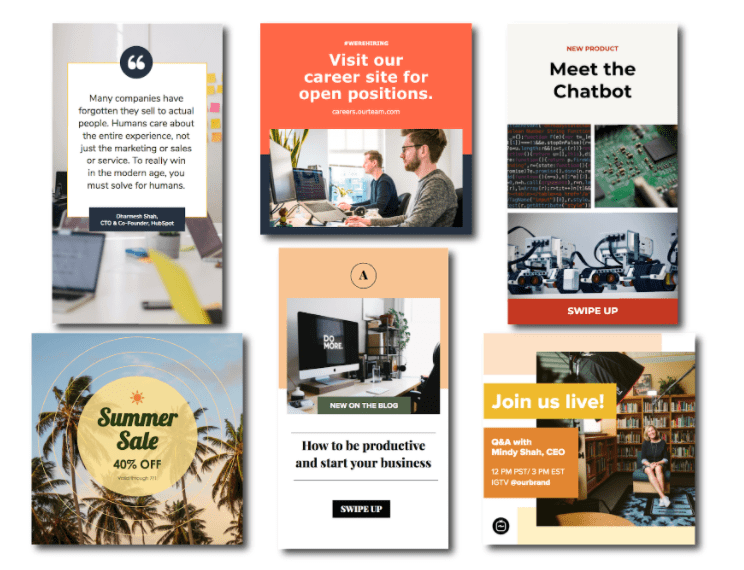
Featured Resource: 16 Free Instagram Post Templates for Business
Need templates to get started? Download HubSpot’s free Instagram post templates for both traditional posts and stories, which you can tailor as you see fit when it comes to your brand. You can alter any and all parts of the template – the image, the copy, and the design elements – to ensure you’re publishing posts to grow and engage your follower base.
2. Choose Your Post Format
While traditional Instagram posts to your permanent timeline are more long-lasting and allow for comments and likes, you shouldn’t underestimate the power of Instagram Stories, which can be used for more immediate needs and occasions.
In fact, 500 million accounts use the Instagram Stories feature daily. So, when you’re creating your post, ask yourself if it warrants publication as a story or as a traditional post.
3. Choose an Image
Maybe you’ve decided your post doesn’t need a photograph and that text overlay on a solid-color background will work for you. If that’s the case, hop over to the next step.
If you’ve decided you do want to use a photograph – particularly if you want one as the background for text overlay – you’ve got a few options.
- Take a photo on your phone or with a camera. No need to be a professional photographer for your Instagram posts – you can learn how to take great photos with your phone here.
- Use a photo from your company’s files. This works well if you need to utilize team photos or product photography, which may be better quality.
- Use a stock photo that pertains to your business (just make sure you don’t use the same one multiple times!).
Whichever photo you do decide to use, simply replace it as the background for the template you’re using in the HubSpot Instagram Post Template collection and resize the photo so it’s to your liking (and is good quality).
4. Add Design Elements
Instagram post templates come with design placeholders for text with special fonts and other elements. Your next step is to alter, add, or remove any elements that you see fit.
This includes updating the copy so it reflects the information you want followers to know and/or the action you want them to take.
5. Save the Photo
When you’ve done all you can in the template builder of your choosing, save your photo to be posted on Instagram. All you’ll have to do here is click “File” > “Download” > “PNG Image” or “JPEG Image.” Then, just name the photo file, email or message it to yourself, and save it on your phone so you can post it.
6. Upload to Instagram
Once you have your photo saved, it’s time to upload it to share with your followers. For a traditional post, open Instagram, click the “+” button in the bottom center, choose your photo, add any filter, description, or hashtags, and click “Share.” (Take a look at How to Post on Instagram: a Step-by-Step Guide if you’re still unsure.)
For an Instagram Story post, click on the camera icon in the top left of your screen, access your camera roll in the bottom left of the screen, choose your image, minimize the date that shows up to the point where it can’t be seen, and add any further design elements – like a GIF or additional copy – to the image. From there, click “Your Story” on the bottom left.
Other Ways to Design Instagram Posts
Here are some other options to create and save Instagram post templates, so you can have stunning posts on-hand whenever you’re ready to publish.
1. Canva
Canva offers thousands of customizable Instagram post templates. To create an Instagram post on Canva, go to Canva’s Create a Design page, click “Instagram Post”, and then follow these steps:
1. On the left side, you’ll see an array of template options — some cost money, while others are free. Choose one.
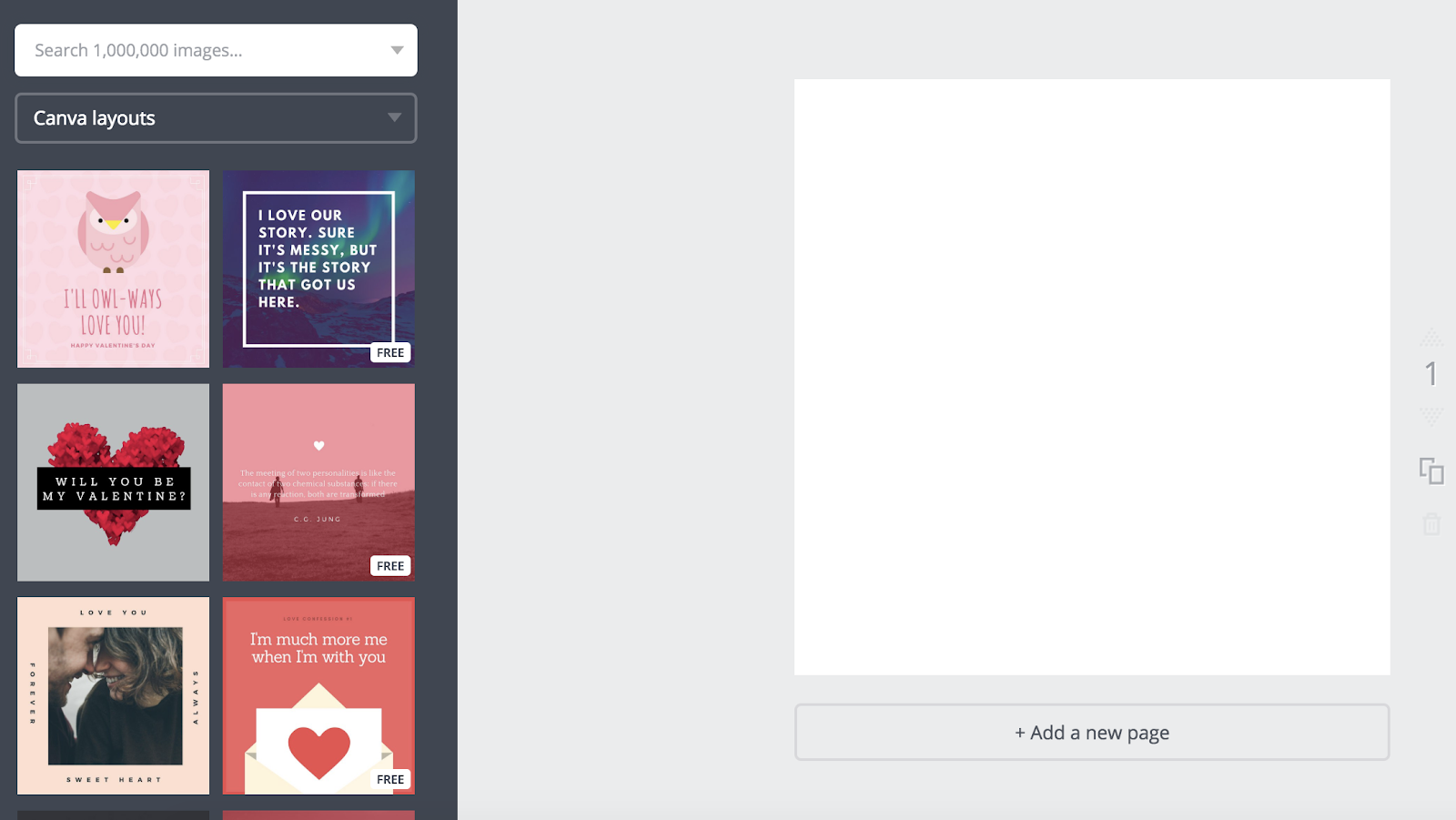
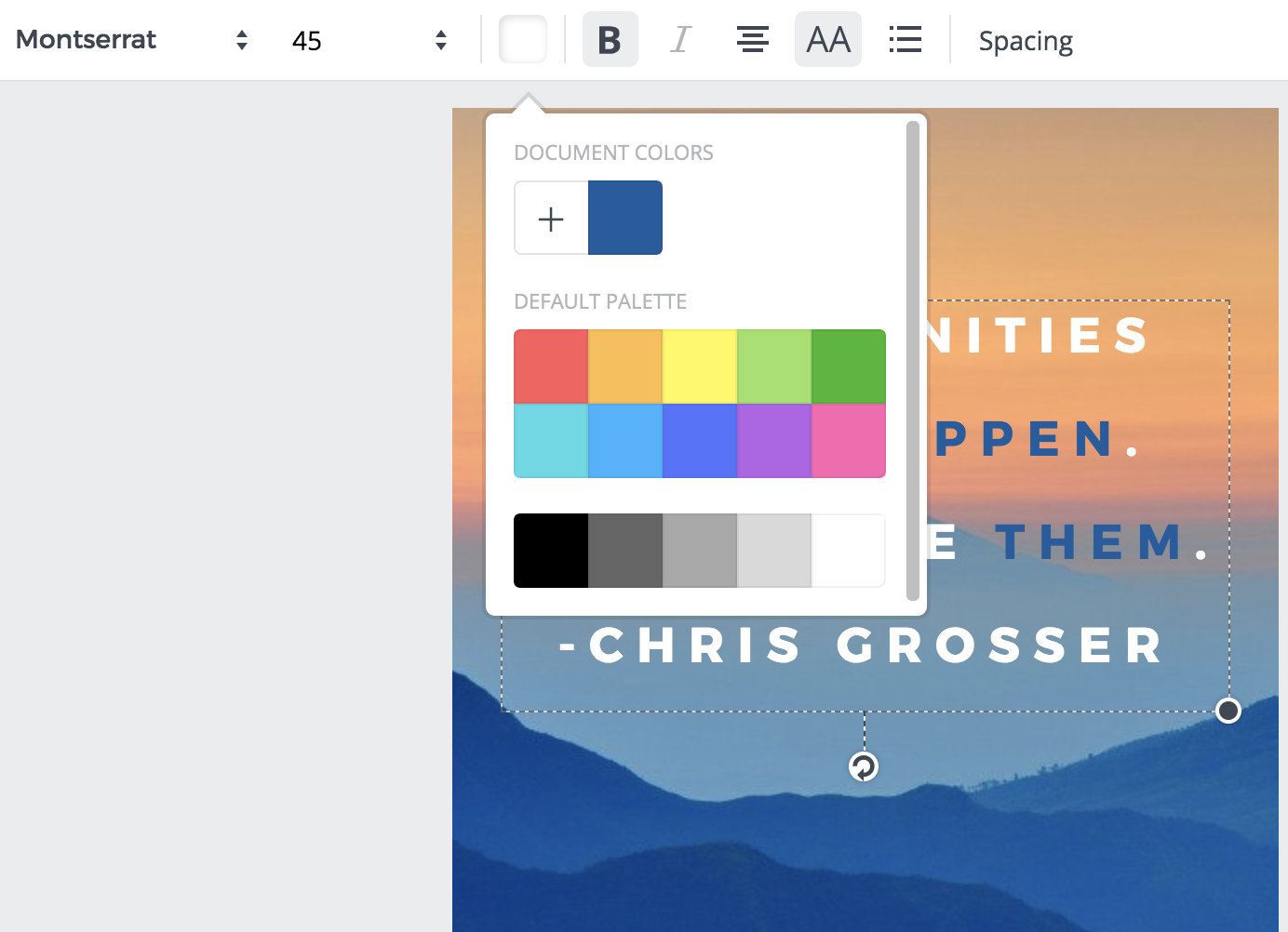
2. Once you choose a template, click on the text box to write something. There are colors at the top if you want to alternate your text color — you can also change font, size, and spacing.
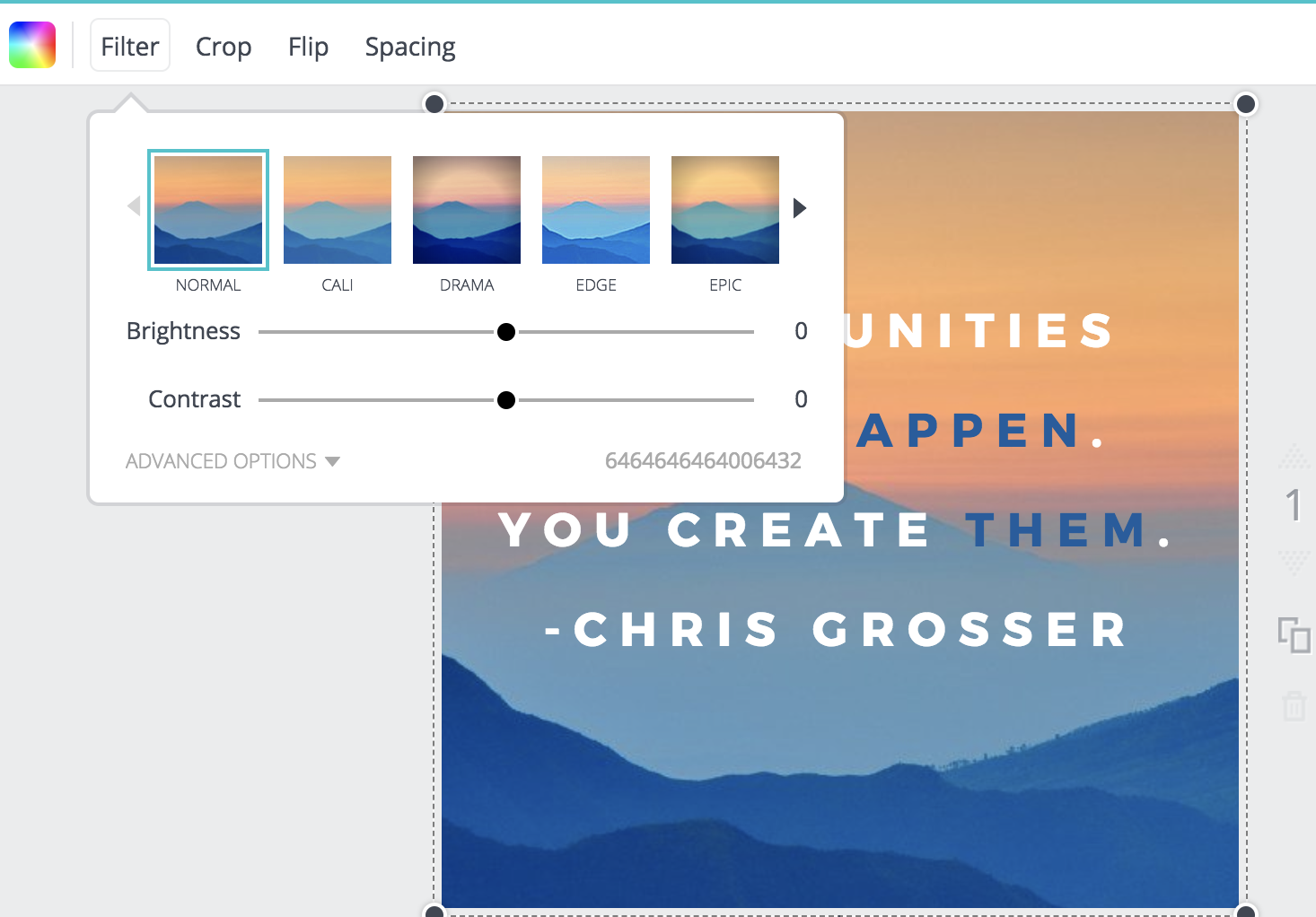
3. When you’re finished with your text, click the background of your image (outside the text box). This will allow you to filter your background, adjust the brightness and contrast of the image, and more.
4. When you’re happy with your template, open up the Canva app on your phone. Click on your Instagram post design.
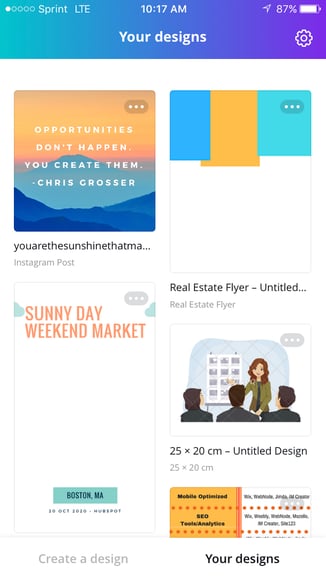
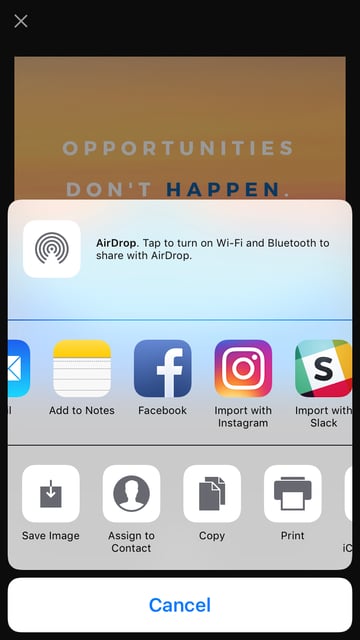
5. Click “Share” in the top right.

6. Now, you can post straight to Instagram by clicking “Import with Instagram”. If you aren’t ready to post it, you can also “Save Image” and it will appear in your camera roll for later.
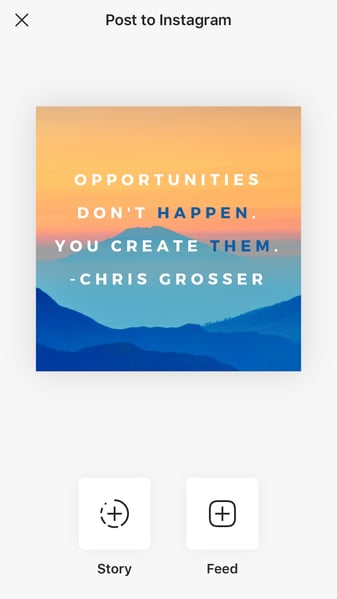
7. If you are immediately posting to Instagram, choose whether you want to upload to your “Story” or “Feed”.
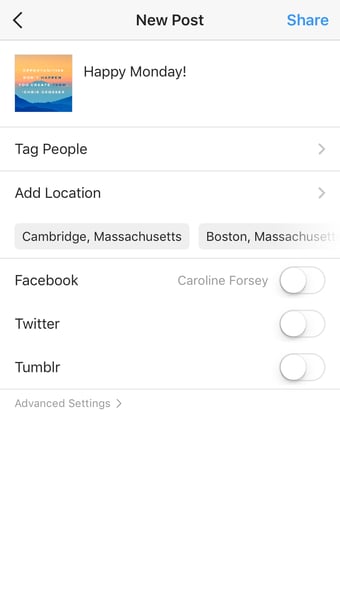
8. Edit the Instagram post like you would any other post — add tags, a caption, location, etc. When you’re ready, click “Share” in the top right.
Remember, your template is automatically saved to your Canva account. You can access it in the future, on both desktop and app versions of Canva, and edit it with new text to post the same design again.
Alternatively, you might consider creating a few posts now, and then saving them to your camera roll to post them in the future.
Besides Canva, there are a few other design editors that offer free pre-made Instagram templates. In particular, here are three tools you might consider:
2. ReciteThis
If you’re interested in creating a template for quote posts, it’s easy to do — in fact, we’ve already curated a list of nine apps to help you make quotes for Instagram.
For our purposes, we’ll try just one — ReciteThis.
To create a quote template for Instagram, go to ReciteThis, then follow these three easy steps:
1. Enter your quote in the text box.
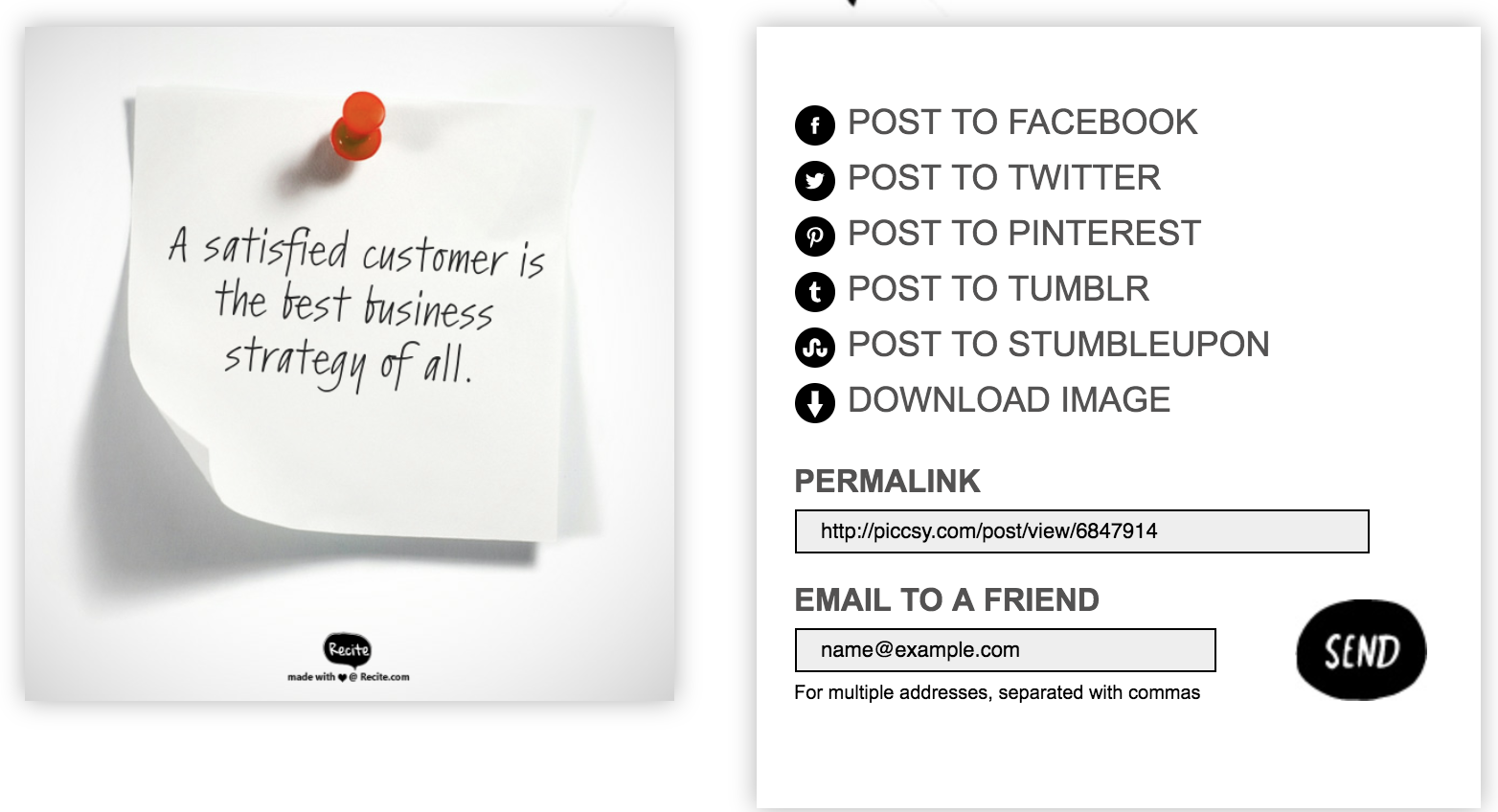
2. Below, click the left or right arrows to peruse templates and choose one you like. Once you’ve chosen a template and written your text, click the “Create” button in the text box.

3. Click “Download Image” to post to Instagram’s desktop version, or email it to yourself to post on your phone.
3. Creative Market
If you’re willing to shell out the cash, you might consider buying one of Creative Market’s Instagram Template bundles.
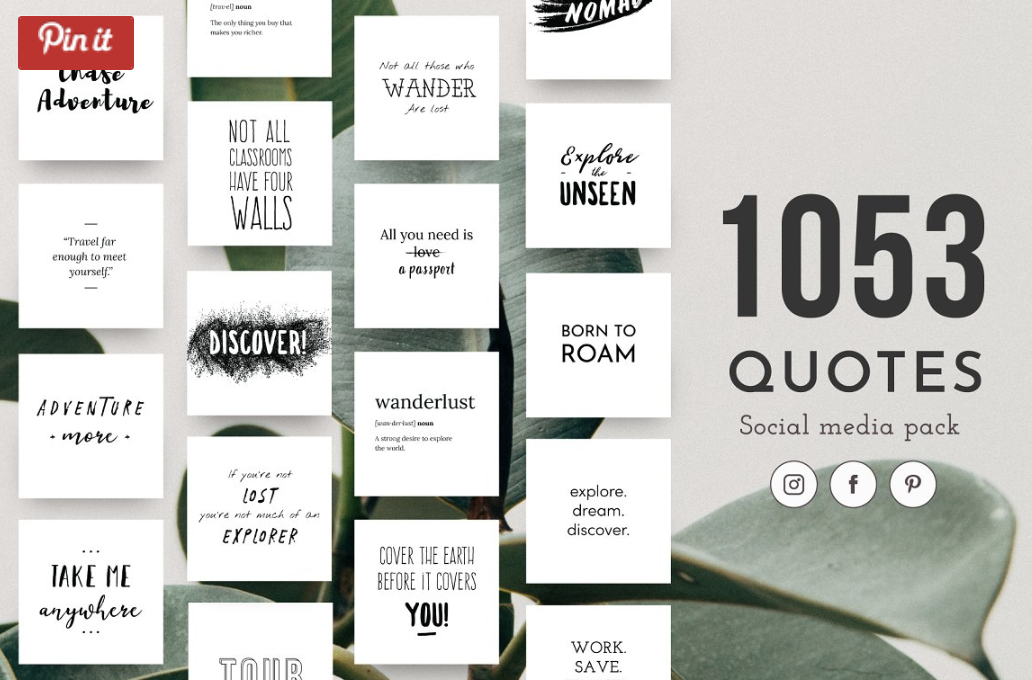
For instance, you could purchase this 1053 Quotes social media pack.
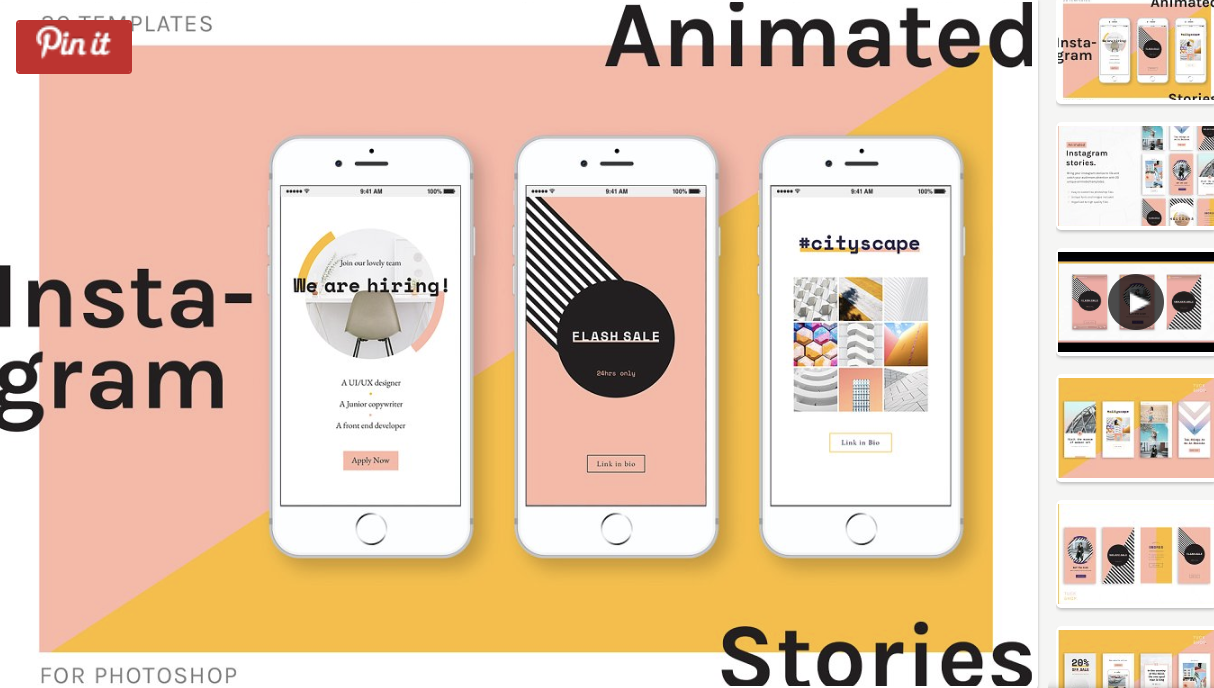
Alternatively, you can purchase a bundle with Instagram Story content, like this Animated Stories bundle.
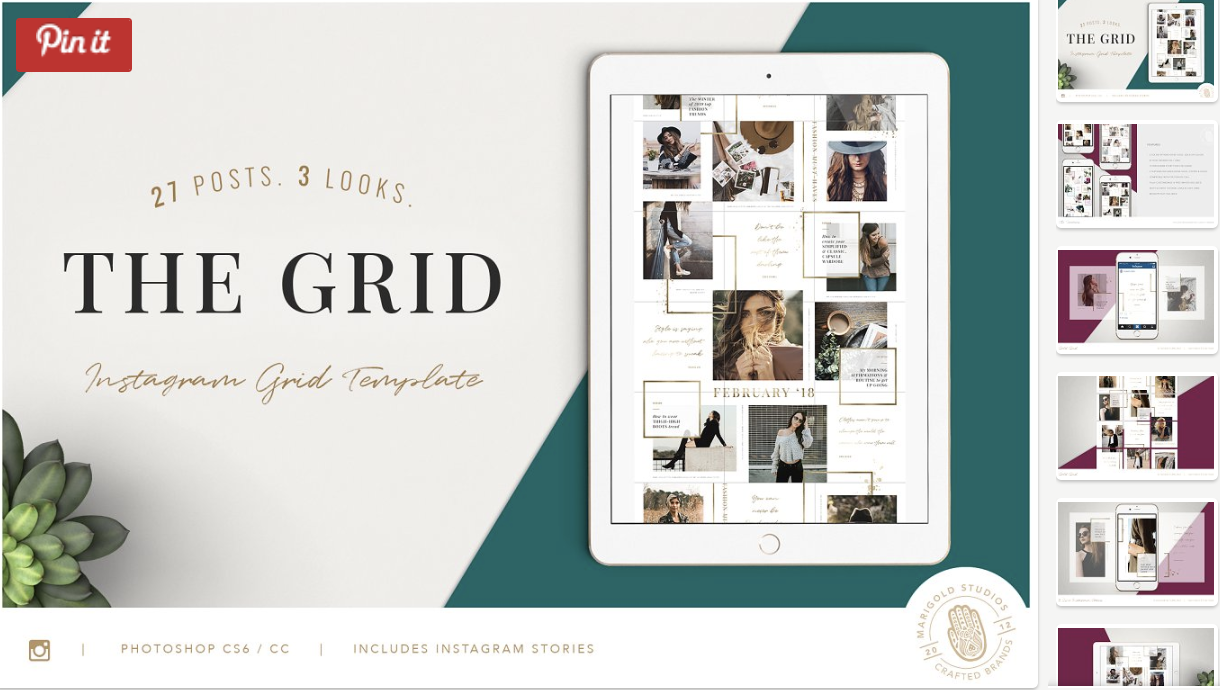
Finally, you might consider purchasing a bundle to help you create a cohesive theme for your Instagram feed, like this The Grid template.
And that’s it! You’re all set to create and save pre-made Instagram templates, so you can focus on attracting a loyal following without tediously designing a post from scratch every day.
Check out our Instagram Marketing: The Ultimate Guide for more Instagram tips and tricks.
Editor’s note: This post was originally published in October, 2018 and has been updated for comprehensiveness.

7 Tips for Hosting a Virtual Brainstorm, According to HubSpot Marketing Managers
At HubSpot, we love brainstorms
Getting your team together in one room to come up with ideas not only allows you to identify creative content or strategies that you might not have thought of, but it also can improve feelings of psychological safety as people who might not be high-level managers are invited and encouraged to offer their input.
Brainstorming is one of the most productive team-building activities we use at HubSpot. But, recently, when we had to leave our physical offices and embrace remote work, many managers wondered how they’d recreate the same in-person communication, productivity, and sense of psychological safety virtually.
Luckily, many of our managers were able to adapt quickly, leading a number of successful virtual brainstorms in 2020.
To help managers build solid idea-generation techniques — even from home — here are a few steps HubSpot employees on the blog, acquisition team, and DI&B team take when coordinating remote brainstorms.
How to Run a Virtual Brainstorm
1. Give your team a headstart.
If your teammates already know the goal of the brainstorm, the prompts they’ll be given, and their idea generation instructions, they’ll come ready and eager to immediately make suggestions.
Before the brainstorm, consider sending a detailed email or a creative brief about what you’d like to achieve during the session.
“I’ve found that giving members of your brainstorm a chance to prepare in advance results in higher quality ideas presented in the brainstorm,” says Emmy Jonassen, Sr. Director of Marketing at HubSpot. “A creative brief will also help you make the best use of your time, so you’ll focus on the act of brainstorming rather than discussing the assignment.”
2. Designate a facilitator before the brainstorm.
When you’re attending a brainstorm in person, it’s easier to determine who’s talking, who’s being asked questions, and who’s running the meeting simply by body language and other social cues.
When you’re on a video call, some cues can be harder to notice. You might not know who should be answering a question, who you should ask questions to, and who is trying to keep the meeting on schedule. That’s why it’s helpful to clearly designate a host or facilitator.
“The trick to having a great brainstorm is getting everyone involved,” Jonassen explains. “A facilitator can help create an environment where everyone feels comfortable chiming in. They can also help keep the conversation going through awkward silences, keep the group on track, and bring people into the conversation who tend to be more reserved.”
Once you’ve planned your brainstorm and designated yourself or someone else as a facilitator, be sure to note this information in the brainstorm’s creative brief, calendar invite, or at the beginning of the session. If you choose to use breakout rooms — which we’ll discuss in step four — consider having a facilitator for each of them.
3. Take virtual notes.
During in-person brainstorms, it’s easy to look down and type on your computer while still talking and engaging with others. But, on a video call, you might want to stare less at your notes and more at your camera so it doesn’t look like you’re losing interest. And, if you must take notes, you might worry about missing something as you toggle between screens. Because of these issues, notes can get pretty muffled.
That’s why Alexandra Garnier, a French automation marketing manager, says brainstorm coordinators should, “Either use a virtual whiteboard, a shared online notes document, or (if needed) a designated note-taker.”
By creating joint notes or designating a note-taker, everyone can have a shared source of information to look back on and can focus on the discussions at hand, When selecting a note-taker, it’s best to pick a fast typer or an attendee who isn’t tasked with coming up with ideas, such as a co-coordinator. This will allow them to focus on the notes without heavily missing out on a great team activity.
4. Embrace virual breakout rooms.
During a large in-person brainstorm, you might be asked to break into small groups, go to another room, and come back with a few ideas to offer from your group. Luckily, many video call tools have been able to mimic this experience with breakout room features.
“It’s harder to get everyone to participate if you have more than five or six people involved,” Jonassen says. “If I have a big group, I’ll typically use this feature to break people into smaller groups and brainstorm for a set period of time. After that time has ended, I’ll have everyone rejoin the larger group to share their ideas.”
Garnier similarly added, “If you do a brainstorm with a larger group, it’s better to then do breakout rooms. Some people tend to shy away when there are many participants.” This can be especially true in a virtual setting, where people might feel uncomfortable speaking up.
If you’re using Zoom for your meetings and interested in breakout rooms, here’s a great tutorial for how to activate them on your next call.
5. Use digital noises and other signals to transition between activities.
Some brainstorms might involve a combination of individual and group activities. However, when the ideas are flowing in one task, it can be naturally hard to stop and jump into a new portion of the session. According to Margot Lieblich, a Sr. UX Researcher who coordinates monthly brainstorms and ideation sessions, it’s even harder to manage time in a virtual meeting.
“Oftentimes in brainstorms, you are on a tight schedule and need to make quick transitions to the next activity. This can be especially hard in a remote setting, when you can’t always visually signal to get everyone’s attention at once,” Lieblich says.
“Use an audible timer to clearly mark the end of an activity. You can even get creative with the sound,” Lieblich advises. “I’ve used the Oscars’ theme music, and one of my coworkers uses the sound of a duck quacking.”
“After hearing the timer once, the group will quickly learn to wrap up and start transitioning to the next activity when they hear the sound again,” Lieblich explains.
6. Include both group and individual brainstorm activities.
Some people work better by themselves while others work much better in groups. In a virtual brainstorm, this can become more apparent when those who don’t respond to group activities zone out, and those who don’t like to give individual pitches will wait until the end hoping they run out of time. By doing two activities, you ensure that everyone can ideate in their own confort zone.
“I like to start out with an individual activity so people have a few minutes to explore their own approaches to the problem space without influencing each other,” Lieblich says. “After running an individual activity, I incorporate a group activity so people can inspire each other and come up with even richer, more interesting ideas.”
7. Remember, you don’t always need to schedule a video call.
While you might think all remote brainstorms must happen on video calls, this isn’t always true. Yes, many of them certainly will. But, if you’re asking teammates to come to a brainstorm prepared with something quick — like a blog post pitch or a one-off email idea, you might be able to cut a time-consuming video call out of your brainstorming process entirely.
Recently, when the blog team was drawing out our quarterly content strategy, we wanted to ask our writers to come up with ideas for blog posts. But, because each writer has an incredibly busy schedule, asking them to come to a very long brainstorm meeting where each person would offer five to 10 post suggestions didn’t make logistical sense.
So instead, I coordinated a virtual brainstorm that took place completely over Google Sheets. To kick off the brainstorm, I sent my team an email and an Idea Generation Spreadsheet with instructions on what content needs we’d have for the next quarter, how many post ideas to insert on the spreadsheet, and a deadline for submitting post suggestions.
From there, writers had two weeks to offer ideas for at least five blog posts. Here’s a quick look at the spreadsheet with an example post I gave writers to guide them through the elements of giving a post suggestion:

After the deadline, our editors went in and used the spreadsheet’s comment features to give feedback that writers could keep in mind for the next virtual brainstorm. Since this brainstorm, most of the blog posts suggested were added to our content calendar.
Planning Your Virtual Brainstorm
Many of the tips above relate to boosting one critical aspect of brainstorms: participation.
As you plan your next content or campaign brainstorm, ask yourself how you can make the brainstorm engaging for everyone.
By making it easier for your team to engage with others, give their thoughts, or suggest ideas in a brainstorm, you’ll get more participation and — ultimately — more winning ideas from teammates that might not offer them otherwise.
To learn about more brainstorming tactics, read this blog post. If you’re interested in how you can encourage psychological safety in other areas of your business, check out these expert tips.

The Ultimate Guide to Email Design and 13 Best Practices
By 2022, the number of email users around the world is expected to hit 4.3 billion.
Among all of those users are members of your target audience, a.k.a. quality leads and prospects you can work to reach and convert via email.
To ensure your emails stand out and grab the attention of these audience members, your email design needs to be on point.
In this guide, we’ll talk about what email design is, cover 13 best practices, examples of successful email design, and offer some tools you may be interested in experimenting with. Let’s get started.
Email Design
Email recipients often scan information and abandon emails that don’t offer them value or simply appear to be too dense. That’s why having great email design is so important — it’ll help you capture the attention of, and engage, your email recipients.
Your email design should be attention-grabbing, aesthetically-pleasing, and on-brand, among other things — let’s dive into those things next with these 13 best practices for email deign.
1. Craft a strong subject line.
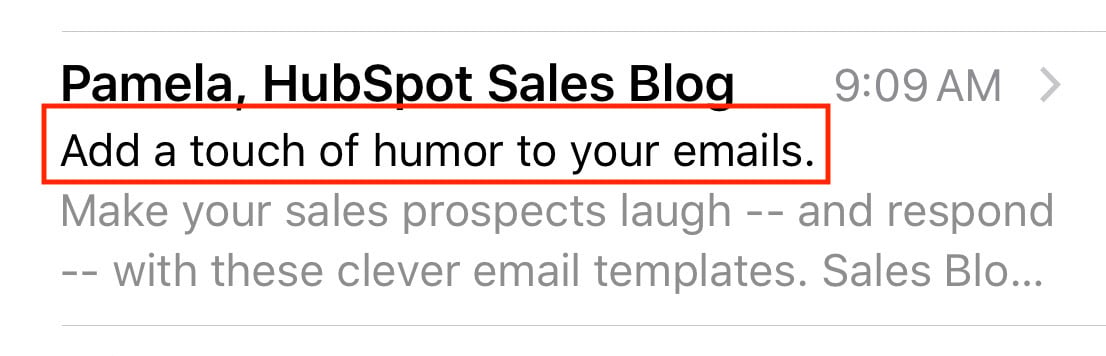
Your email subject line is the first thing anyone sees when you send them an email. It’s the brief statement that’s supposed to pique the interest of your recipients. It should capture their attention so they want to open your email and continue reading.
Here’s what a subject line looks like in your email inbox:

Here’s what a subject line looks like in your mobile device’s email inbox:
A great subject line will have these characteristics:
- Grab the attention of your readers in as few words as possible (remember: less is more).
- Provide value for the recipient that makes them want to open the email.
- Summarize what recipients are going to read and/ or see once they open the email.
2. Write an attention-grabbing pre-header.
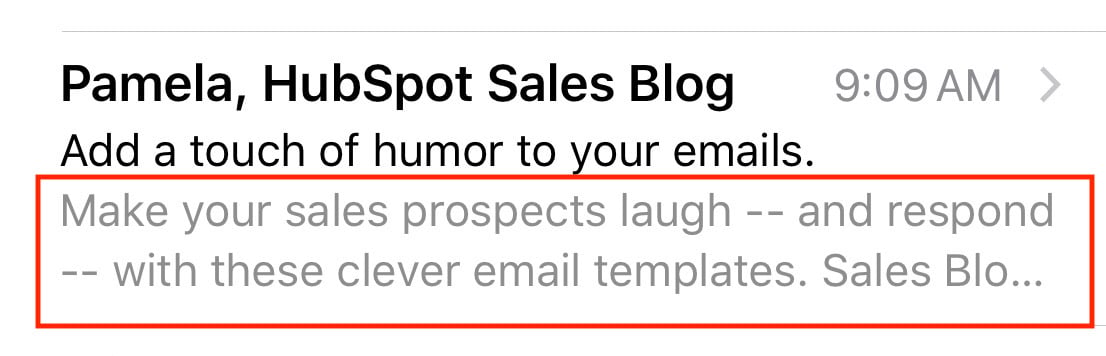
Your email pre-header is a preview of what the email is about, similar to the meta description of a web page. It’s the second thing recipients see.
Rather than rewriting the first sentence of your email, you can customize the pre-header to provide an inside look into what your recipients are about to read in your message.
Here’s what a pre-header looks like in your email inbox:

Here’s what a pre-header looks like in your mobile device’s email inbox:
3. Be concise.
How many times throughout the day do you find yourself opening an email thinking, I can’t wait to sit down and take the next 5-10 minutes to really dive into this email from Business X!
If you’re anything like me, your answer is likely rarely or never.
Give email recipients the information they want and need from you without getting into the weeds. This will show them you value their time which has the potential to help you improve email subscriber retainment.
4. Keep your email on-brand.
When your email recipients open your message, they should know the email was sent from your company. Meaning your email should be branded.
To keep your email on-brand, consider using the following tactics:
- Use a tone in your emails that complements your other content and marketing materials (like your website and social media).
- Incorporate the same colors and fonts that you use in your other branding and marketing materials.
- Include your logo, a link to your website, links to your social media accounts, and calls-to-action (CTAs) that are relevant to your products or services. This is a great way to increase brand awareness while also boost conversions.
5. Use the layout to enhance your email’s user experience.
Nobody wants to read a cluttered and unorganized email — this makes recipients feel overwhelmed and can lead to increased abandonment.
Instead, organize your layout with user experience (UX) in mind — meaning, leave empty/ white space and strategically place your written and visual content so it’s organized and easy to consume and navigate.
6. Personalize every email.
When you customize an email and tailor it to your recipient, it’ll feel more thoughtful, professional, and personal. Email personalization also helps you humanize your brand. This touch helps you foster a relationship between your business and email recipients and boost retention rates.
7. Incorporate unique visual content.
If recipients open an email and only see paragraphs of information, it’s likely going to be difficult to hold their attention and keep them interested in your message. Rather, incorporate on-brand and engaging images, videos, GIFs, animations, etc. to break up the written content and create a memorable experience.
And speaking of incorporating creative and unique visual content in your emails, let’s talk emojis.
8. Don’t be afraid to use emojis. 🧡
At first, emojis may seem like an unnecessary or unprofessional addition to an email. While this may be a fair assumption, it’s actually untrue in a number of scenarios.
In fact, when you add emojis to your email subject line and/ or email copy, you can increase your open and click-through rates. But remember: When using emojis for marketing purposes, make sure you know the meaning and connotation of the specific one(s) you incorporate. 😃
9. Use a responsive design.
A responsive design means your email changes format to fit the screen it’s being viewed on, whether it’s on a desktop, laptop, or mobile device. Recipients will be able to read your emails with ease no matter where or how they’re viewing them. By incorporating a responsive design, you’ll be able to enhance UX and improve email retention across all devices.
10. Optimize your email with CTAs.
Calls-to-action (CTAs) are used to convert your email recipients. For instance, you can use a CTA to get recipients to follow you on social media, visit your website, chat with a sales rep, or become paying customers.
CTAs should be visible, enticing, and clearly show why they’re valuable to click. Additionally, you might choose to personalize your CTAs to tailor them towards specific recipients — this tactic has been proven to increase conversions.
11. Add an “unsubscribe” button.
Email marketing is highly effective as long as you’re providing relevant content to your recipients. The unfortunate but true reality of email marketing is that your recipients and customers change over time — especially as your business grows and evolves. Therefore, your content may not always be relevant to certain audience members.
For this reason, allow your recipients to leave (or unsubscribe from your emails) on a good note so they can remember your business in a positive light — who knows, they may need your email content, products, or services again in the future. To do this, simplify their lives with an easy-to-use and visible “unsubscribe” button.
In addition to offering a better experience for users, you’re actually required by law to add that unsubscribe button.
According to the Federal Trade Commission and CAN-SPAM Act, you’re legally required to include a “clear and conspicuous explanation of how the recipient can opt-out of getting emails from you in the future”. Meaning, that unsubscribe button isn’t an option.
(If you need some inspiration, check out these effective unsubscribe pages.)
12. A/B test your design.
Similar to most marketing efforts, email design is an iterative process. You might determine you need to make changes and updates to get the most out of your email design.
Whether it’s modifying your CTA, colors, images, layout, or tone, don’t be afraid to A/B test designs to determine which one works best in terms of ability to reach, resonate with, and convert the greatest number of recipients.
13. Design an email signature.
Great email signature design is another way you can establish a professional and personal feel over email. Email signatures shouldn’t just include your name — they should contain other defining and memorable characteristics about you, your role, contact information, and company.
Here are some specifics you can include in your email signature:
- First and last name
- Contact information (and secondary contact information)
- Job Title / Role
- Company Name
- Link to your meeting calendar
- Social media links (e.g. LinkedIn profile)
- Pronouns
- Photo
- Industry disclaimer or legal requirements
And
here’s a free email signature generator tool to help you design your signature.
A great way to streamline the process of working on and incorporate all 13 of the above best practices is to use email design tools and software.
In fact, many of the best practices we reviewed will come up naturally while you’re designing, writing, and planning your messages with email design software.
Email Design Tools
There are a number of email design tools with a wide range of capabilities (some completely unrelated to email design!) — here are some popular examples.
1. HubSpot
HubSpot’s Email Marketing software allows you to create, design, personalize, and optimize all of your emails. You don’t need any IT or coding knowledge, and you can easily customize mobile-friendly emails. The software allows you to A/B test emails to determine which designs work best.
2. BEEPro
As a BEEPro user, you can design responsive emails in just minutes. Smart design tools provide you with a quick way to format your emails and ensure your layout complements your content. You can also customize and save various email design templates so your messaging and branding is consistent.
3. MailChimp
With over 100 templates offered, MailChimp allows you to customize your email design for your target audience. If you’re someone who does have coding experience, and you want to take your design a step further, MailChimp offers you the ability to code your template as well.
4. Stripo
Stripo requires no HTML knowledge to create and design professional email templates. All of their pre-made templates are responsive so readers can easily view them via any device. You can also sync your current email service provider (ESP) with the software to access all of your email and contact information from a central location.
5. Chamaileon
As a collaborative email builder, Chamaileon gives you the ability to invite members of your team to collaborate on your designs. The software ensures your emails will have a responsive design and automatically comes with over 100 pre-made templates to customize for specific recipients.
Email Design Examples
Let’s take a look at some successful email designs to inspire your work.
HubSpot Marketing Blog
HubSpot sends subscribers Marketing Blog emails every day. These include a few blog marketing-related articles to read and learn from. If recipients choose, they may also subscribe to HubSpot’s Sales Blog and Service Blog emails.
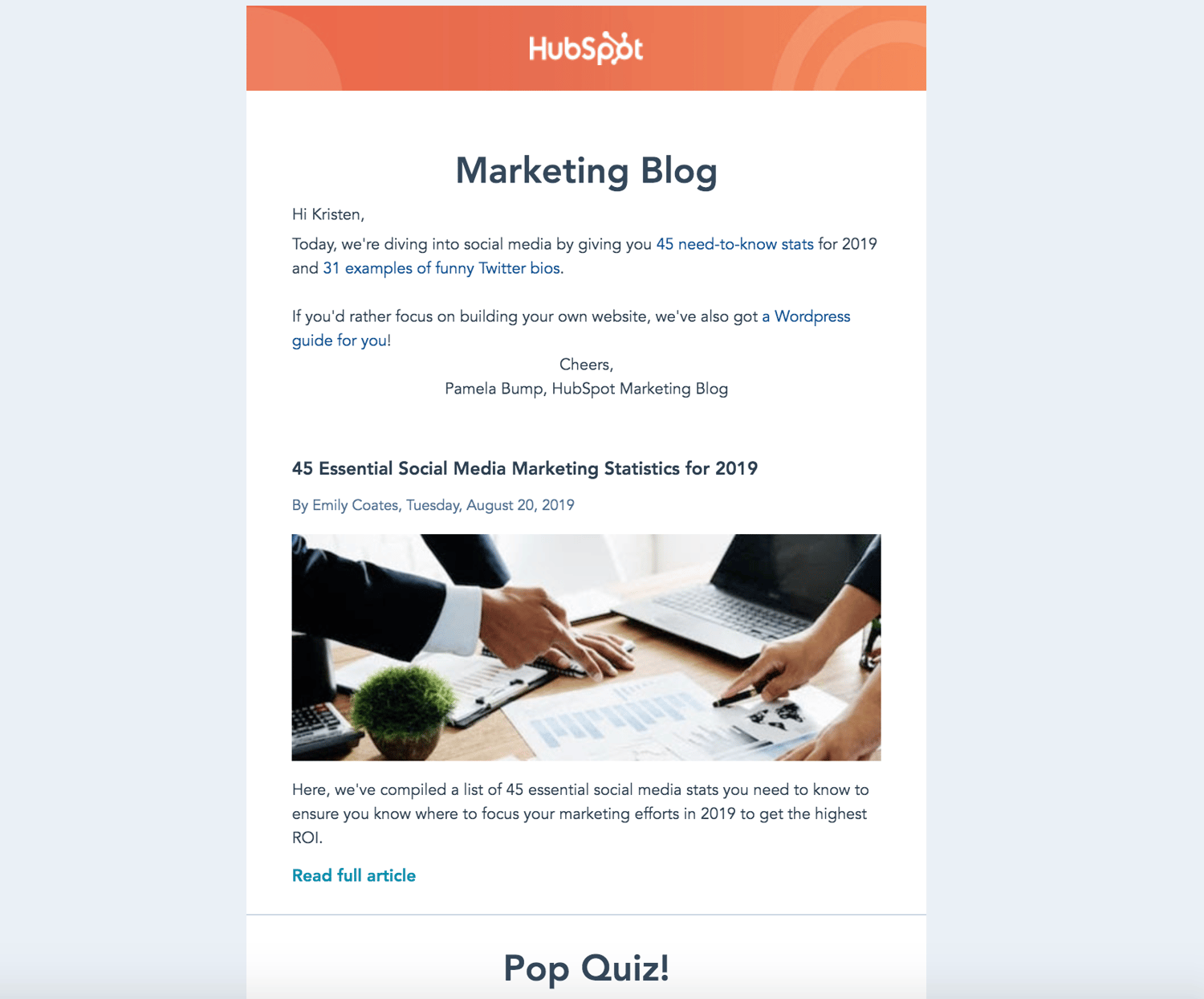
The emails are branded so readers immediately know who the email is from and what it will include. To make the daily emails engaging and unique, they include previews of the articles and an occasional quiz.
Starbucks Rewards
Starbucks customers and members may have seen this email, or something similar, in their inbox before:
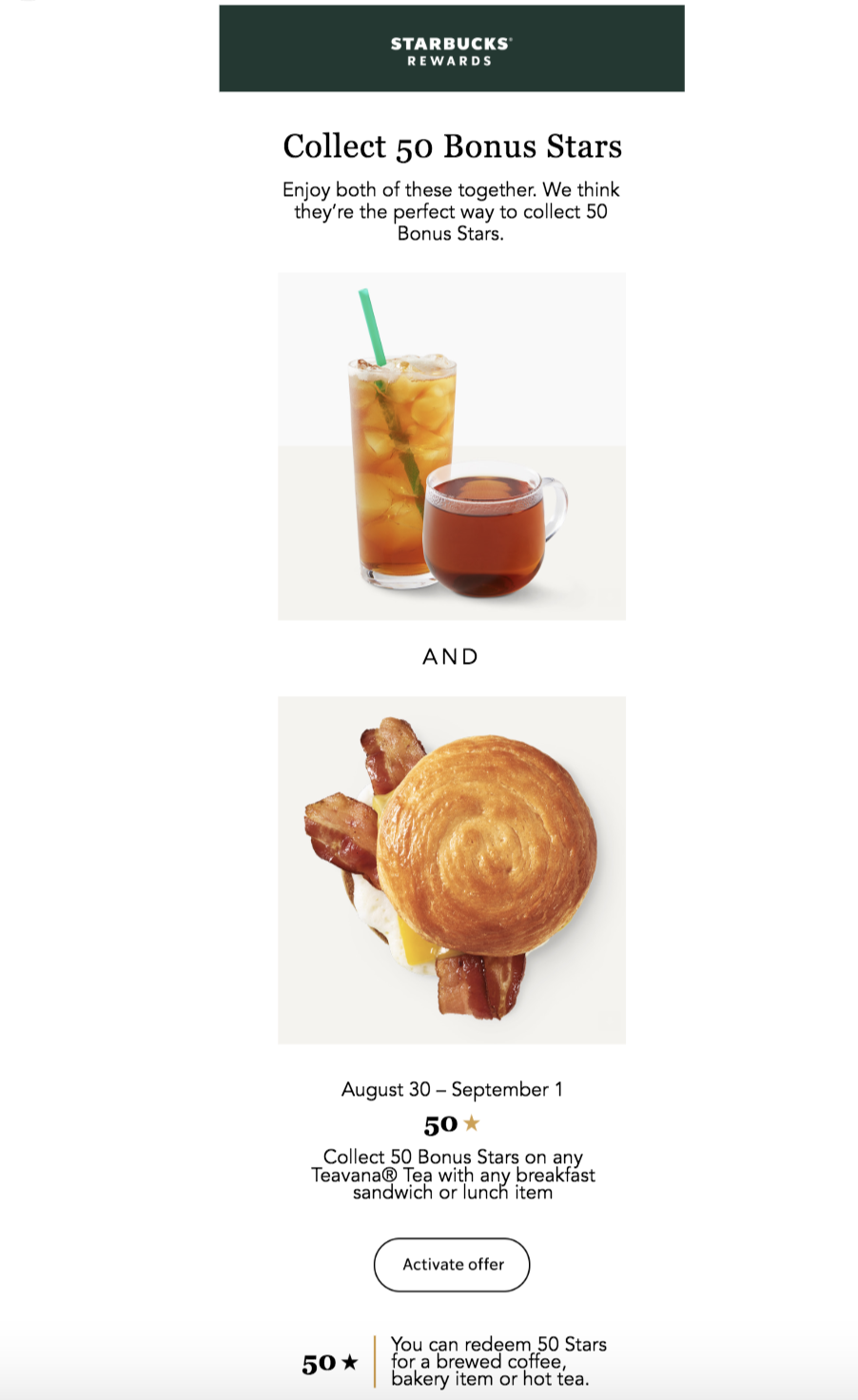
The email complements Starbucks’ marketing and branding, and there’s plenty of white space separating the written information from the engaging imagery. And the CTA that recipients can click on to activate the offer is clearly placed.
Vital Proteins Email Design
Although Vital Proteins’ email design contains many images and a lot of information, it’s neatly organized so it doesn’t feel overwhelming to recipients. The email’s colors, font, and visuals are on-brand and feature the company’s products.
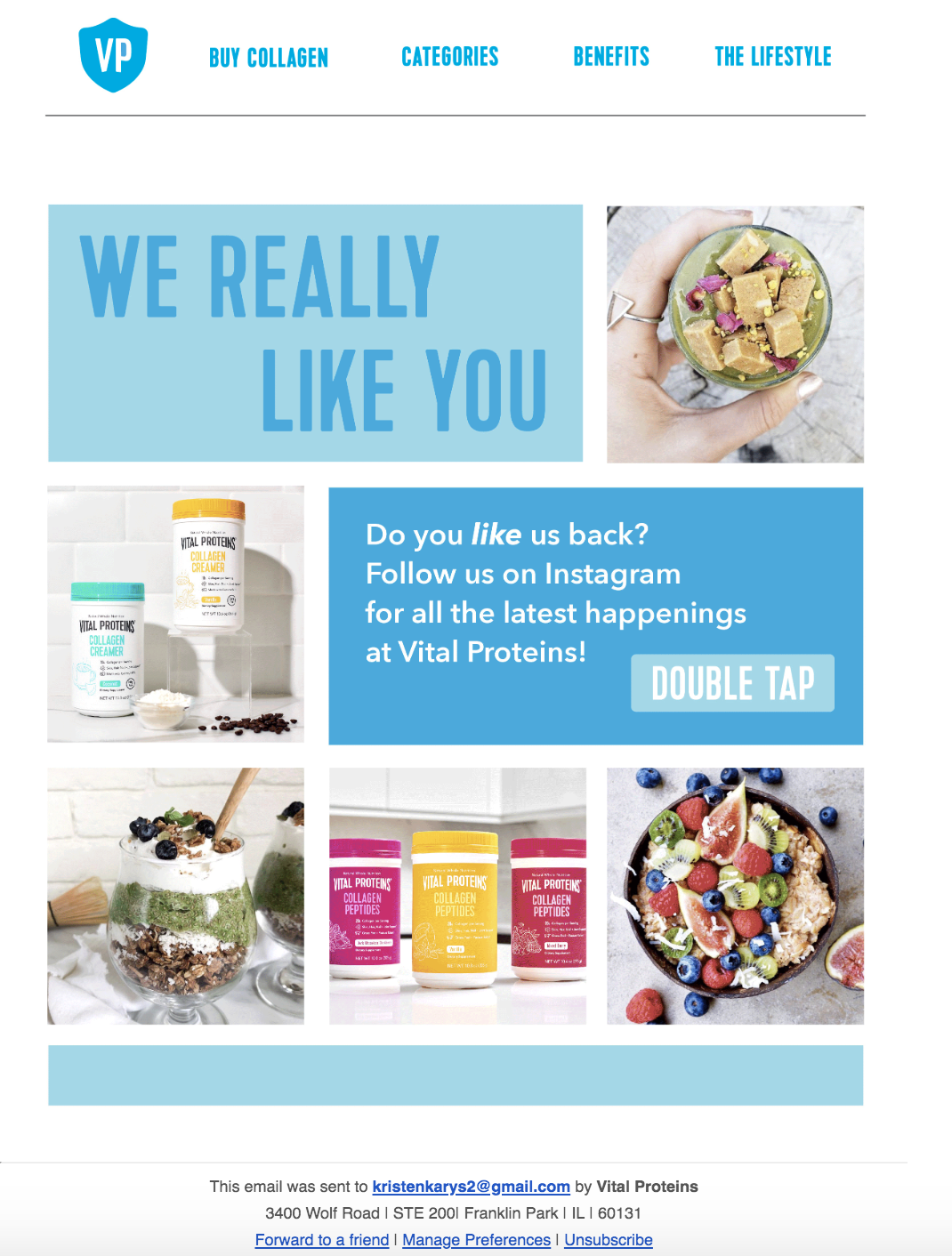
There’s an obvious CTA that redirects recipients to their Instagram page — in turn, this type of CTA helps the company increase their follower count and brand awareness on the social platform.
Grow Better With Really Good Email Design
With great email design, you’ll reach and resonate with your audience members more effectively, allowing you to grow better. Eye-catching and impactful emails will help you build long-lasting relationships and convert more people into paying customers and brand advocates. So, begin designing your emails while keeping the best practices and examples we reviewed in mind.
Editor’s note: This post was originally published in August, 2017 and has been updated for comprehensiveness.

8 Resources to Use to Ensure You’re Using Inclusive Language
We’ve talked about it before, but diversity, inclusion, and belonging shouldn’t be about filling a quota. Instead, the goal should be to foster a true sense of belonging among your team, which is likely filled with people from all backgrounds.
One way to do this is by using inclusive language.
Whether it’s intentional or not, we all carry implicit biases in our everyday language. However, it’s important to make a conscious effort to avoid this.
This isn’t just the right thing to do. It also makes good business sense.
Additionally, creating a sense of belonging can lead to greater retention rates and even result in higher customer satisfaction.
So, how can you use more inclusive language?
Below, we’ll review the top tools that can automate this process for you and resources that can help you use more inclusive language.
1. Better Allies
During an allyship meeting at HubSpot, we discussed tools that help people use more inclusive language.
A colleague brought up a Slackbot, Better Allies. This Slackbot can help you shift your language to be more inclusive.
The tool was inspired by the book Better Allies by Karen Catlin. This book can help you spot situations where you can create more inclusive culture.
The Slackbot will automatically flag non-inclusive language and make alternate suggestions. You can even customize the tool by adding your own words to avoid and alternate suggestions.
For example, I want to remove the words “guys” and “crazy” from my vocabulary. With this tool, I can put those words in the Slackbot and then include suggestions for myself to use instead.
2. Inclusive Language Guides
An inclusive language guide is a document that will advise you on terms to avoid and alternative terms to use. The goal is to use more inclusive language that doesn’t have biases, slang, or discriminatory terms.
While an inclusive language guide won’t help you automate this process, you can use this resource to inform your automation process. For example, you can add terms from an inclusive language guide to your Better Allies Slackbot.
If your team doesn’t have an inclusive language guide, we suggest you create one. Our inclusive language guides at HubSpot have sections on Gender, LGBTQIA+, Race, Ethnicity, Culture, and Accessibility.
Here are some great examples to get you started:
- Buffer’s Inclusive Language Guide for Startups and Tech
- Business Insider’s Race and Ethnicity Inclusive Language Guide
- Everyday Feminism’s Inclusive Language Guide on Ableism and Homophobia
- NASAA Inclusive Language Guide
- HubSpot’s Guide on Gender Neutral Pronouns
- How to Talk About Socioeconomic Status
- Religion Stylebook
- Self’s Weight and Health Style Guide
- Google’s Guide for Developers in Writing Inclusive Documentation
- Writing About Sexual Violence
- Gender-Based Violence Language Guide
- GLAAD Media Guide
3. Company Bots
To automate your inclusive language, you can create a bot that will alert you when you use exclusionary terms.
As you saw above, Better Allies created one to help you on Slack. However, you might want a bot when you’re using Google docs or other platforms.
In that case, you can create your own. At HubSpot, we have a bot that HubSpotters can download on Chrome that will review content for HubSpot’s style guide.
4. Textio
As a company, you produce a lot of content. Your employees have to write a lot. To automate your process, you can use Textio.
Textio is an augmented writing platform that can give your team a score on the content they write. Plus, it provides suggestions on how to improve.
This includes bias interruption, expanded language insights, and team analytics. The whole point is to help you write more insightful, inclusive content.
You can use this for recruiting purposes or just to review your company blogs.
5. Gender Decoder
A quick way to check your language for gender bias is to use this gender decoder. You can just copy and paste your content in it and get quick results.
While this was created to analyze job ads to ensure you use inclusive language, you can put any content in there.
I even put this blog content in to see the results. The tool told me, “This uses more words that are subtly coded as feminine than words that are subtly coded as masculine (according to the research). Fortunately, the research suggests this will have only a slight effect on how appealing this is to men, and will encourage women.”
6. TEDTalk with Kimberlé Crenshaw
While using tools to help automate your inclusive language process is important, it’s also necessary to focus efforts on continued learning.
That’s why we recommend watching this short (only 18 minutes) TEDTalk on the urgency of intersectionality. This talk discusses the reality of race and gender bias so we can understand how the two combine and create more harm.
Ultimately, the goal is to broaden your understanding of intersectionality and implicit bias so you can recognize it when it occurs and speak up for victims of prejudice.
7. MTV Decoded
For an even shorter way to continue your education (5 minutes), you can watch this great video from MTV on phrases that have a racist origin.
Again, this is an easy and quick way to continue learning about implicit bias so you can adjust your language to be more inclusive.
You can consider sending these types of short videos to your employees to encourage them to use more inclusive language and continue learning.
8. Implicit Bias Test
A great way to see if you’re using inclusive language is to test yourself on implicit biases. This test will measure unconscious bias.
This is an excellent step to take so you can examine, understand, and recognize your own biases and when you’re using exclusionary language.
We recommend sending this to people on your team as well. This will help your whole team begin to understand and use more inclusive language as a whole.
Taking active steps to use inclusive language is an important part of allyship. Additionally, it’s important for your employees and customers to see that you participate in and encourage others to continue learning about other people’s experiences.

3 Types of Blog Posts That Earn the Most Backlinks, According to HubSpot’s Link-Building Expert
As the HubSpot Blog’s Audience Growth Manager, one of my duties involves developing highly shareable blog posts that pull in non-organic traffic from sources like email, social media, and other websites.
Through building non-organic traffic tactics for my team, I’ve learned that referral traffic — which comes from other sites backlinking to our content — can majorly benefit the overall blog site.
It goes without saying that having another site highlight your content is great for brand awareness. But, additionally, backlinks can also increase your search engine authority.
When high-authority sites link to your content, search engine algorithms take this into account when ranking your content on result pages. This means that the more backlinks you get from credible websites, the higher your search rankings could get.
However, although referral traffic can be vital for your blog’s success, it’s also the hardest to earn.
Here’s why:
When a HubSpot Blog post gets a backlink, this typically means that a person has found our content, valued it, and shared the post’s URL on their own website. Then, when others find and click this shared URL, it results in referral traffic.
In short, a person working for a website or online publication has to find our content and determine that it’s valuable, credible, or engaging enough to share with their site’s audiences.
Because getting referrals can be challenging and complex, I’ve worked closely with Irina Nica, a Sr. Marketing Manager of Product Awareness — and HubSpot’s resident backlink expert — to develop the blog’s link-building playbook.
Although it takes time and solid research to create posts that earn quality backlinks, Nica and I find that the traffic returns are worth the effort.
To help other bloggers in their quest for referrals, search authority, and non-organic traffic, here are three types of blog posts that get the most backlinks, according to Nica.
3 Types of Blog Posts That Earn the Most Backlinks
Tell Stories Backed By Original Data
“The blog posts that typically get the most backlinks are backed by original research and data,” says Nica. “If these blog post angles speak to wide audiences, they can even increase the chance of press mentions.”
Why? People use data to make decisions, inspire their own content, and learn more about their industry. So, when you publish original data, it’s not shocking to think that other sites might be interested in sharing your research by citing, quoting, or directly linking to it.
But, while it might be tempting to just throw a handful of original stats into a blog post’s body and hit “publish”, Nica says the backlinks for a post will be even stronger if you tell a story about how those stats impact your readers.
“The key is to help readers find meaning in the data you present by telling a compelling story,” Nica says. “Stories make data appealing and memorable. A good story is often one that’s related to recent events that made the headlines, or provides context on an issue that affects a wide range of readers in your industry.”
“We recently launched a data-driven piece that’s relevant to recent news: How COVID-19 Is Impacting Sales and Marketing Performance,” Nica says. “Because it’s timely and it provides useful information for marketers and business owners around the world, this article earned more than 500 backlinks from over 200 referring domains,” Nica explains.
The HubSpot Blog also publishes informative, data-driven posts that relate to industry trends, common strategies, or topics related to our subject matter expertise, rather than just news or events. These types of posts are also very linkable because they aim to help readers with day-to-day tasks, tactics, or decisions.
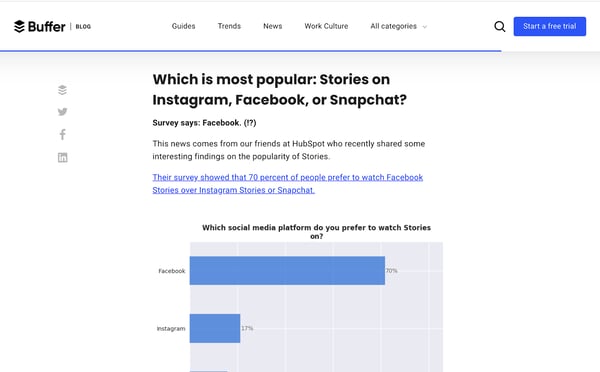
For example, I recently wrote a post called, Instagram, Facebook, or Snapchat: Which Stories Are People Actually Watching? In the post, I shared results from s survey of more than 300 consumers about their social media Story preferences.
“Pam’s article answers a relevant question for social media marketers — which are a major part of the HubSpot Blog audience,” Nica says. “To create this piece, Pam used a survey tool called Lucid to gather data. Then she used internal expertise to dig deeper into these results and explain how this impacts our work as marketers.”
Nica says that the post received more than 960 social shares in the past six months and over 500 backlinks from 100 Referring Domains. It was also mentioned in a post from another marketing blog, Buffer.
Molding Dull Data Sets into Intriguing Stories
Even if your data doesn’t relate to an event or viral social media trend, it can still be compelling to readers if your post clearly explains why it’s valuable.
When HubSpot bloggers are tasked with telling an intriguing story around data sets, we first try to explain how each major stat could impact marketers, sales reps, or service reps, depending on the audience we’re trying to reach. In some posts, we also might give tips on how to adjust or embrace business tactics based on major facts or figures.
Here’s an example of how we draw out a full story from a few basic stats about Black Friday ads. Although this post relates to a newsier topic, you can use the format as inspiration for data-driven posts related to almost anything in your industry.
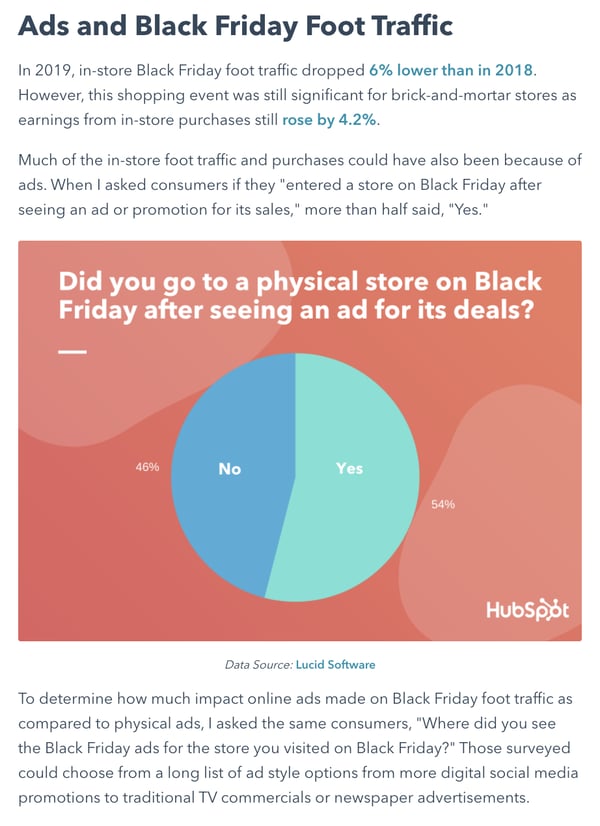
To make the data given in this post easy to consume and interesting to the reader, we created a list item and intriguing subhead around three major Black Friday survey data points. Then, we took the time to explain exactly what each point means for advertisers and marketers. To add visuals to the story, we also created quick infographics for each section:
By expanding on what each stat means for your reader, you’ll supply your audience with interesting data, establish your brand’s expertise, and — most importantly — provide your valuable takeaways that readers can share with others or use in daily life.
Can’t access original data? Try this alternative.
There are a number of free or affordable tools online that can help blog teams gain data quickly. But, if you don’t have a survey or polling tool at easy access, or the time to conduct research, we’ve found that external research compilation posts also work well.
Here’s just one example of a high-performing post where I compiled and discussed a number of studies that compared millennials and Gen Z. In the post’s first six months, HubSpot data shows that it drove over 5,000 views from social media alone, and more than 900 views from referral sources.
Thought Leadership or Expert Interview Posts
Odds are, people within your industry want to get tips from experts with high achievements in their field. If you have access to an industry expert or thought leader, publishing their original thoughts on your blog could benefit you.
For example, if your thought leader says something bold, profound, or even slightly tactical, another publication or blog might quote them and link to the post on your site. Additionally, the thought leader and their followers might share the post via email, social media, or on their own website.
Planning Out Strategic Thought Leadership
While you could technically accept guest posts from whoever wants to write for you, Nica encourages bloggers to consider finding experts that can write about high-interest topics in their industry.
“If you’re not sure where to start, look for high search volume topics in your area of expertise,” Nica says. “Then, use this information to pick the topic for your thought leadership piece.”
Picking thought leadership angles that have high search volume might help you build content that’s SEO friendly. But, according to Nica, this tactic most importantly helps you “ensure that you’re publishing about topics readers are actually interested in.”
By conducting search volume research, our blog team has identified a number of topics that could be covered by industry experts. For example, the idea for the blog post, “How HubSpot Academy Grew YouTube Subscribers by 450% in 17 Months” came from researching keywords related to YouTube marketing.
Once we defined a few potential YouTube angles, the blog team asked HubSpot acquisition marketing manager Bella Valentini to write about how her team implemented SEO tactics on HubSpot Academy’s channel.
“The keyword ‘Youtube SEO’ has over 3,000 searches per month. This means a lot of people are eager to learn about tactics that work for this channel,” Nica explains. “Our thought leadership piece talks about Youtube SEO in a practical context by telling the story of how Valentini’s strategy increased our subscribers by 450% in just 17 months,” Nica says.
Due to the YouTube SEO post’s practical tips and original data, “this article earned 96 backlinks from 51 referring domains without any targeted outreach to promote it,” according to Nica.
Thought Leadership Alternatives
Sometimes, you can’t get a busy thought leader or expert to sit down with you for an interview. But, you might be able to create a helpful, highly-linkable post by asking a number of thought leaders a quick question via email and compiling their quotes into a roundup.
Since we have a huge team at HubSpot, we love creating roundups with our internal experts. They’re easy to create and pull in solid non-organic traffic similarly to full thought leadership pieces. Additionally, we’ve also seen similar results from rounding up quotes from external experts.
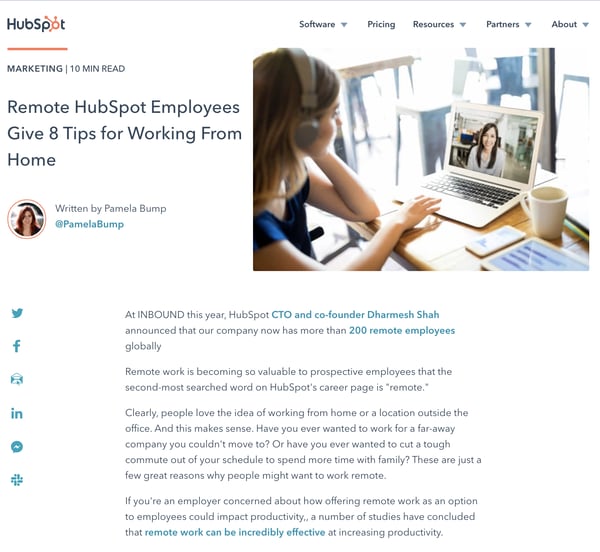
In a recent Marketing Blog post, we highlighted tips for working remotely directly sourced from seasoned members of our remote staff. This post has received over 17,000 total views with 204 referrals and more than 1,300 visits from social media platforms.
Posts That Serve as Foundational “Ultimate Guides”
Once we’ve written heavily about a topic, such as Instagram Marketing, we’ll compile all the data, information, tips, and advice our writers have collected into Ultimate Guides.
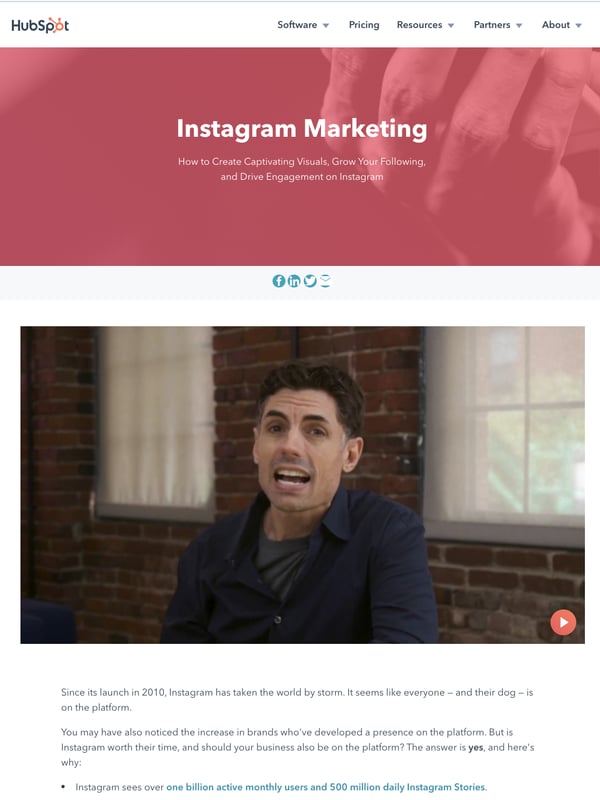
These long-form posts, which each include internal links to a handful of other blog posts on our website, aren’t just beneficial to SEO and direct traffic. They also can pull in solid backlinks, according to Nica.
“Usually, the most recommended blog types for getting backlinks have original research and data at their core. But this isn’t always the case,” Nica reveals. “For some blog sites, the blog types that get the most backlinks are actually ultimate guides.”
“If they are visible and easy to find on your website, these guides can easily serve as a supporting piece for other articles. This makes them a great link-magnet,” Nica explains.
Tips for Creating Highly Linkable Content
Along with testing out the content types above on your blog, you should also keep these tips in mind as you create web content:
Original content is key.
Web writers and journalists are more likely to link to original quotes and data that they can’t repeat or create on their own.
Even though you’re a blogger, your goal should be to publish content that no one can get anywhere else. This type of content could include original research, quotes, expert-written posts, images, and videos. Ask yourself, what will make journalists type, “According to [your brand]”?
Visibility is vital.
“One of the most frequent mistakes marketers make when creating linkable content is that they invest 90% of their resources in production and only 10% on promotion,” Nica warns. “Links need to be earned naturally to support the business’ SEO performance long-term, but no links can be earned if the target audience doesn’t know that content exists in the first place.”
“Whatever you publish, make sure it’s visible. You can start by promoting content on your company’s social media channels or through targeted outreach. Either way, your audience needs to find out about your content before they can link back to it,” Nica advises.
Nica says you’ll also want to optimize your posts for search engines. Here’s why:
If a blogger from another company is covering a topic like “email marketing trends,” they’ll need to find data to support the trends they list. They might begin their research by Googling, “email marketing statistics.” If your original email data post is one of the first results, there’s a strong chance that this writer will click it, find your data valuable, and share it in their own piece
Don’t forget about web design.
“Every time I stumble upon an old looking website, I don’t think it’s up to date. So, I don’t trust it enough to mention it in my article and link back to it,” Nica admits.
Although Nica can’t confirm or deny if web design can impact backlinks, many of us can relate to the experience of bouncing off of a poorly designed website. And, when we do this, we’re likely not sharing the content we saw or helping the blog’s search rankings.
“Whether it’s thought leadership or a research report, make sure you invest in the aesthetic ‘packaging’ of your content with a solid design. This will pay off.”
For example, Nextiva’s Customer Service Statistics and Trends in 2020 is not unique. However, it’s design and packaging guides the audience through a nice reading experience.
“What sets Nextiva’s guide apart from similar online content is its carefully crafted design and the experience they provide the reader. It’s no surprise they have over 700 backlinks to this page, from over 370 referring domains,” Nica notes, using data pulled from Ahrefs.
To learn more about why you should embrace a backlink strategy in 2020, check out these promising link-building stats.

20 Stats That Make the Case for Co-Marketing in 2020
As a billionaire inventor and CEO, the fictional Tony Stark, also known as Marvel’s Iron Man, worked his way to the top of the corporate ladder while repeatedly saving the world on the side.
Despite Stark’s impressive achievements, his career success and robotic super-suit weren’t what made him a legend.
In fact, Stark’s best Marvel Comics storylines began when he joined The Avengers to save the entire universe.
Although Stark was fully capable of saving Earth alone in his super-suit, he knew teaming up with other superheroes would allow him to save multiple planets.
Marketers can learn a lot from Tony Stark.
While our brands might be capable of reaching basic targets all on their own, pooling marketing resources, combining skill sets, and jointly creating campaigns with other non-competing companies could help us reach much broader audiences. This tactic is known as co-marketing.
Although co-marketing can be incredibly beneficial to you and your partner’s brands, it will still take time, planning, and coordination when it comes to finding a co-marketing partner and launching mutually beneficial campaigns.
Like any good marketer considering a new tactic, you’ll want to know that co-marketing can be effective before devoting resources to it. And yes, you’ll likely want to research more than just the superhero analogy I’ve made above.
To help you make the case for co-marketing, here’s a list of 20 statistics that prove why you should consider this strategy in 2020.
20 Co-Marketing Stats to Know in 2020
The State of Co-Marketing in 2020
- After seeing co-marketed campaigns, 68% of consumers are able to make buying decisions before even speaking to sales representatives. (PartnerPath, 2019)
- Virtually all companies surveyed in 2018 were already active in internet marketing partnerships and affiliate programs. The few that weren’t were active planning to be in the next 12 months. (Partnerize, 2018)
- 54% of companies say partnerships drive more than 20% of total company revenue. (Partnerize, 2018)
- 34% of marketers say that co-marketing or brand partnerships are the most effective ways to increase an email subscriber list. (Ascend2, 2017)
- 74% of companies say partnerships and affiliate marketing campaigns are a high or very high priority for their businesses. (Partnerize, 2018)
- In 2018, just 5% of companies said they’d invested less in partnerships than in 2017. (Partnerize, 2018)
- More than half of respondents in a 2018 partnership survey said partnerships were driving more customers and sales in that year than in 2017. (Partnerize, 2018)
Partnership and Co-Marketing Tactics
- Brand partnerships that leverage digital channels see 4X the pipeline of non-digital partnerships. (Impact, 2019)
- 84% of vendors with brand partners offer money to those partners for co-marketing expenses. (PartnerPath, 2019)
- 30% of vendors will offer co-marketing reimbursement if their brand partner can prove ROI. (PartnerPath, 2019)
- Roughly 11% of marketers say “partnership posts” are their brand’s most engaging type of social media content. (HubSpot, 2020)
- Many brands prioritize large partnerships, versus thousands of smaller partnerships. Roughly 34% of leading brands have 50 to 99 partners, while 67% of brands have less than 100. (Partnerize, 2018)
- Only 2% of brands surveyed by Partnerize in 2018 partner with more than 1,000 brands. (Partnerize, 2018)
- In 2018, 33% of CEOs said they planned to prioritize strategic partnerships, which could involve co-marketing partnerships, in 2019. (KPMG, 2018)
- The top brand leader priorities include finding more partners (27%) and strengthening relationships with existing partners (23%). (Partnerize, 2018)
Co-Marketing and Brand Partnership Success Stories
- The Yeezy shoe line, a collaboration between Adidas and Kanye West, enabled Adidas’ net annual rose by 19.5% to $1.9 billion in 2019. (Bloomberg, 2019)
- Buffer and Social Chain’s Brand 2019 Brand and Social Media Report resulted in 17,000 download page visits in just one week and more than 3,000 shares across social media. These results were higher than an average article shared on either of their sites. (Quuu, 2019)
- When Estée Lauder and a top U.S. retailer created joint Google Ads that promoted the retailer and the brand’s fragrance products, the average ad click share rose by 70%. (Google, 2020)
- In 2018, Coors Light teamed up with National Geographic to launch a series of video ads taking place in Iceland. The campaign reached 10.5 million people and resulted in a 6.8 percent lift in brand favorability. (Facebook, 2018)
- In a recent case study, a gaming app company partnered with another brand in a cross-promotional campaign that was coordinated by Aarki — a mobile marketing agency. The gaming app received a 32% rise in downloads shortly after remarketing ads to the partnering brand’s contact list on social media. (Aarki, 2020)
The Benefits of Co-Marketing
Co-marketing can provide a long list of benefits, especially if you want to pool your resources to create a large-scale marketing campaign. Along with the statistical benefits seen above, there are a number of other qualitative perks such as:
- Audience exposure: Through co-marketing and cross-promotion, your content or brand information will be shared with your audiences as well as your brand partner’s. This enables your brand to gain increased reach. For example, when local or online stores launch Google Ads showing that they carry Estée Lauder fragrances, fans of the perfume brand might visit or follow that store for the first time.
- Increased trust and favorability: If a prospect trusts the brand you partner with, they might trust you when that brand promotes your name, logo, or content. For example, when Adidas teamed up with Kanye West to create the Yeezy line, people might have bought a pair of Yeezys because they trusted Adidas’ quality and West’s sense of style.
- Cost-effective content: When you team up with another brand, you might be able to make an agreement where you split time or production costs, or you can trade one brand strength for another. For example, if you’re a small brand partnering with a larger brand, you might be able to utilize the bigger brand’s budget and gain more exposure on their channels. Meanwhile, the bigger brand might be able to leverage your niche social media audience..
Now that you’ve learned about the benefits and stats related to co-marketing, get inspiration from these successful real-world examples of the tactic. For more on how to find the right co-marketing partner, check out this handy guide.

The Ultimate Guide to Successfully Livestreaming From Home
This post is written by Kerry Shearer, “The Livestream Expert”. Kerry is a conference speaker, workshop presenter, online course creator and smartphone video trainer based in Sacramento, California.
In 2020, the way we work, shop and entertain ourselves has been completely up-ended.
Work and school transitioned online, placing many people in unfamiliar situations with frustrating technical challenges as they livestream from home.
The results have sometimes been cringe-worthy.
On live webinar meetings, for example, we’ve been treated to up-the-nose camera angles, inadvertently-shared bathroom breaks, echo-y audio and dark, grainy webcam video.
Not the best way to make an impression!
The good news is that it’s actually pretty easy to give your viewers an outstanding experience, whether you’re participating in an online meeting on Zoom or livestreaming on popular platforms like Facebook Live, Twitter Live, Periscope or Instagram Live.
When you have the right mindset, the right approach, and the right accessories, you can absolutely look and sound like a pro.
Here, I’ll share my best practices when it comes to live streaming, including the platform(s) you should consider when livestreaming, and all the equipment you need to get started.
But first — let’s dive into the benefits of livestreaming for businesses.
Benefits of Livestreaming
I’ve spoken with many entrepreneur and communications colleagues, and months of lockdown have definitely taken an emotional toll.
Staying motivated when your lifestyle and habits have been disrupted means it’s more important than ever to get exercise, eat well, and practice self-care so you can be your best self in these trying circumstances.
And it also means you need to put yourself in the place of your customer or client.
When livestreaming, it’s critical to remember that it’s not about you — it’s about the difference you’re going to make in the life of the person you’re impacting with the information you’re delivering!
Many of us are doing two types of livestreaming these days: online meetings or webinars with colleagues, and livestreams related to promoting our products or services.
For our purposes we’ll focus on the second type of livestreaming: promoting a product or service.
Livestreaming is a powerful tool to help entrepreneurs and small businesses differentiate themselves and connect with customers (or potential ones).
And doing it well can make a huge difference in your impact — and your earnings.
Vancouver therapist Julia Kristina, who holds a Master’s degree in Psychology, used live video as a springboard to create a thriving online business to compliment her existing in-person clinical practice.
She told me, “I began showing up live on Periscope and Facebook, nearly every day at first, doing short talks about different mental wellness topics.”
“Doing all those unscripted livestreams, either from home or from my office downtown, made me an even better public speaker. At the same time, it grew a loyal audience whose lives were being impacted by what I was teaching.”
Kristina eventually began creating and selling live online group coaching and recorded video courses on topics such as having healthy boundaries, overcoming anxiety, and building confidence.
Last fall, Kristina launched her membership program, “The Shift Society,” which features both live video coaching and recorded video content for members.
“Livestreams don’t need to be perfect,” Kristina says. “You just need to show up, be yourself, and let your passion for the topic be the magnet that draws your ideal audience in.”
Particularly in 2020 when many brick-and-mortar shops needed to shift largely online, livestreaming can provide opportunities for small businesses to connect with their customers and prospects in real-time.
Miranda Pinto, owner of La Piccolina Baby Boutique in Lincoln, CA, turned to Facebook Live in an effort to keep sales afloat after having to close her doors to walk-in customers.
Initial livestream attempts were hampered by poor internet upload speeds at her store, so she and an assistant grabbed piles of clothing and headed to Pinto’s house to do their first big online sale.
“I felt totally out of my element as a video host, but I know my product, so I just kept talking and describing each item.”
Pinto says the sales just kept coming in. “We use a subscription-based tool called ‘Comment Sold’ to track sales and send invoices.”
“I credit livestreaming with saving my business and giving homebound moms an easy and fun way to shop locally for baby clothing.”
Pinto says each sale she conducts on Facebook Live lasts 1-2 hours, and creates the income normally earned in 2-4 days of walk-in sales when the store is open.
Live Streaming Platforms
So if these stories have inspired you, it’s time to choose a livestreaming platform to focus on. That involves figuring out where your potential audience is (or, upon which platform you want to build a presence). There are more choices than ever, but it’s better to get started with one.
Next, let’s go over a brief overview of each popular livestreaming platform.
1. Facebook Live
Facebook is undeniably the most popular social platform worldwide, with more than 2.7 billion monthly active users.
Facebook Live allows you to broadcast to the world in real-time, and live video is more often prioritized by the algorithm and shown in your news feed.
Facebook Live is an effective way of providing training and information in Facebook Groups, and many Business Pages use it to reach out to followers with how-to demonstrations, product unboxings, trainings, and sales events.
It’s easy to go live via the Facebook app on your phone, or through Facebook Studio on a desktop or laptop.
2. Twitter and Periscope
Periscope is Twitter’s live broadcasting app, which launched in March 2015. When you go live, you broadcast to the app and your followers get a push notification that you’re live.
Your livestream is also shown in user’s Twitter feeds if your accounts are linked with the same username.
For this reason, use of hashtags in the broadcast title can result in a bigger audience.
You can also broadcast directly from the Twitter app using the “Live” button. Twitter is known as the place to go for “what’s happening now”, so livestreams involving timely events are popular.
3. Instagram Live
2020 marks Instagram’s 10th year of operation, and the service has about 1 billion active users.
That userbase could grow even more with Instagram’s recent release of Reels, its answer to Tik Tok for creating short videos that can go viral.
Instagram Live also offers a feature that lets you bring one guest at a time into the broadcast.
Instead of expiring after 24 hours, any Instagram Live broadcasts that you want to save can now be shared to your Instagram TV channel.
Best Livestreaming Equipment
Once you’ve chosen the right platform for your needs, you’ll need to ensure you have the equipment necessary to create high-quality live videos.
Livestreams don’t have to be perfect, but it is critical to have good lighting, great audio, and a steady shot. Here are some of the options I recommend regularly to clients who want to put on a great broadcast.
1. Lighting
Natural light on your face always looks great, so if your computer desk faces a window that lets in ambient outdoor light (rather than direct, harsh sunlight), it will provide a natural look.
If natural light isn’t available, you can add LED lighting. Dimmable LED ring lights are popular, and the better ones are bi-color.
That means they have control knobs to let you “warm” the color of the light to match the tone of the room, or “cool” the color to mimick the look of outdoor light.
Ring lights, such as the Dracast Halo 180, come in a popular 18″ size, which generally requires mounting on an aluminum light stand.
A smartphone or video camera can be mounted inside the ring and set at eye-level, giving your face a nice, even glow.
There are also smaller desktop ring lights available, such as the Neewer 10″ ring light, or GVM rectangular ring light, which can hold your smartphone or serve as a webcam light by peeking over the top of your computer monitor.
The Lume Cube company has created LED lighting specifically for video conferencing, including a rectangular light with a suction mount that sticks to the back of your computer monitor.
2. Audio
Viewers will often put up with less-than-perfect video quality, but if the audio is poor, don’t expect them to hang around your livestream for long.
Poor audio is an issue for either smartphone broadcasting — where the built-in microphone picks up lots of annoying background noise — or for streaming from a laptop computer, where the cheap internal mic often produces thin-sounding audio that’s hard to listen to for long periods of time.
One solution for smartphones is a simple wired lavaliere smartphone mic, such as the YouMic.
The mic clips onto your shirt, blouse or blazer, and the cord connects to the audio jack on your smartphone.
If you have an iPhone 7 or newer, you’ll also need the Lightning-to-3.5mm headphone adapter that came with your phone.
Connect your mic to the adapter, and the adapter to the Lightning port.
If you’d prefer to go wireless, a dependable lightweight system like the Rode Wireless Go is a great solution. The receiver and transmitter are very small and operate for seven hours on built-in rechargeable batteries.
Additionally, the transmitter has a built-in mic, so you can just clip it to your jacket.
Or, to be more discreet, Rode’s plug-in Lavaliere Go mic can be purchased separately so you can ditch the transmitter in a pocket and use the small clip-on microphone.
Another option is the similar Pixel wireless lavaliere microphone.
If you’ve had experiences sitting on a Zoom call for hours, you know how hard it can be on the brain to listen to tinny audio from participants speaking from echo-y home offices.
A solution for this is to use a plug-in USB microphone with your laptop or desktop computer so you can get your voice closer to a microphone.
One option is the Fifine wired clip-on lavaliere USB microphone. Simply plug the connector into any available USB port on your computer, and then change the audio selection in your webinar software or livestreaming app to the new audio source.
Another high-quality option would be a USB microphone typically used for recording podcasts.
The Audio-Technica ATR-2100X, the Fifine PC Microphone, and the Rode NT USB microphones are all examples of podcasting-style mics that connect quickly to your computer and will skyrocket the quality of your audio.
Note that although these microphones all come with small desktop stands, the best approach is to mount them to an articulating boom arm that clamps to the edge of your desk. That will prevent the mic stand from transmitting any thumps and bumps created by your hands or elbows tapping your desk surface.
3. Tripods
Shaky video can be incredibly distracting and frustrating when someone is watching a livestream.
Fortunately, there are lots of options to help you have a steady shot. If you already have a video or camera tripod and will be livestreaming from a smartphone, you can simply attach a smartphone mount.
My favorites are the Square Jellyfish metal smartphone mount, or the Arkon Road-Vise heavy duty smartphone mount.If you don’t have a tripod, one place to begin is with a mini-tripod that sits on a desk and has an extendable middle column.
The Benro BK-15, when placed on a desk, will extend to the equivalent of full standing height for standup presentations or interviews.
The advantage to a small tripod like this is that you can easily move it from room to room, walk with it while you talk, or throw it in your messenger bag so you’re always prepared to livestream.
For other uses, you might need a floorstanding tripod. The least expensive option is to buy a basic tripod like this Endurax aluminum tripod. It extends to 66 inches.
Tripods in this price range often have a plastic pan/tilt assembly, which is fine if your camera will be locked down and not moved, but often doesn’t allow for smooth camera movement.
If you’ll be panning and tilting and following the action during your livestream, go for a more expensive tripod that has a fluid head.
A fluid head mechanism gives very smooth camera movements which look professional. One of my personal favorites is the Manfrotto Be Free aluminum Lever Lock video tripod. It is only 16″ long when folded for transport.
And for livestreaming on the go, there’s nothing like a 3-axis electric smartphone gimbal. A gimbal holds your smartphone level and steady while you walk, giving you silky-smooth Steadicam-like results.
I use the Benro 3XS gimbal, and one of the main reasons I love it is because it does not block the Lightning port on a smartphone like many gimbals do — that’s important if you want to connect a microphone to the port do to a walk-and-talk narration during your livestream.
A single push of a button rotates the phone from horizontal to vertical, and the mounting arm also folds for compact storage.
New equipment is constantly coming out for smartphone video shooting and livestreaming, allowing you to ensure that your video will be wonderfully watchable.
On-Camera Confidence
Assuming you have selected your platform, have a smartphone mic, LED light and tripod, it’s time to curate your confidence so you come across well on video. Keep in mind the following tips:
- No, you don’t look weird or sound weird on video, so stop judging yourself!
- We usually need to ramp up our energy a bit for video. If it helps, before you go live play a favorite song from your playlist that gets you pumped up. Dance around like a crazy person for a couple of minutes. Anything to get the blood moving and get a dose of energy!
- Remember, like I told you earlier, it’s not about you. Focus on the people you’re helping.
- If you’re livestreaming from a laptop, do whatever you need to do to get the webcam lens at eye level. That may require propping your laptop up on a box or a stack of books if you’re using the unit’s internal webcam.
- Be sure to smile (as appropriate). You want to appear open, approachable, and authentic.
- If you normally gesture wildly as you talk, reel it in so your movements are appropriate for a tighter webcam image.
- If you’re in charge of the livestream and are primarily the one presenting information, do whatever you can to keep people engaged. Ask questions and tell viewers to put their answers in the chat. You can also “flag” important points, by saying things like: “If you’re multi-tasking right now, come back to me because I’m about to give you some really important information.”
Remember, livestreaming is a mix of using your best presentation skills and some smart tech to make sure that you’re communicating clearly and effectively.
It is also a skill that you can develop over time. If you’re looking for more tips related to livestreaming, take a look at our checklist for getting started with your first livestream.

How to Create Facebook Video Ads, According to HubSpot Advertisers
During the last few years, Facebook has emerged as a real contender for the online video platform throne. In wake of several new video features being introduced and a heavy video focus from Mark Zuckerberg, the social media giant has over 500 million people watching Facebook videos every day.
Facebook’s increased focus on video isn’t only because users like to watch it (although they clearly do) — it’s also because more marketers are shifting their budgets from TV to mobile video. The allure for advertisers lies in Facebook’s hyper-surgical targeting possibilities and the results Facebook videos can deliver.
If you’re one of those marketers who wants to dive into advertising with Facebook videos — but isn’t sure where to start — keep on reading.
Below we’ll review the types of Facebook video ads and how to create an effective ad with tips from HubSpot advertisers. Then, we’ll look at some examples to put it all into practice.
1. Slideshow
You might think that recording and creating a video for a Facebook ad is a daunting task. However, with slideshow ads, all you need to do is create a video using only photos and text.
Whether you use your own photos or stock images, slideshow ads are easier to put together and don’t take too much time.
This is a great way to engage audiences without spending time and money on creating a video.
2. Stories
If you’ve created a video for your Facebook feed, you can repurpose the same content as an ad that will play in Facebook stories.
Story ads are a great way to reach your audience where they’re at.
3. In-stream
In-stream ads are the closest way to replicate traditional TV advertising on social media.
For this type of ad, you’ll create a video that will play when people are watching Facebook videos. If you’ve ever watched native content that was interrupted by an ad, that was an in-stream ad.
Now that you know the type of ads, let’s discuss how you’ll create and launch an effective Facebook video.
1. Set your objectives.
The first step of any marketing effort is to decide what you want to accomplish. In your Facebook video ad campaign, are you trying to increase brand awareness or drive conversions? Choosing what you’re going to prioritize should affect what kind of video you should create and how you should distribute it.
So choose your KPIs and plan accordingly. Below I’ve organized some common KPIs around three categories: engagement, audience reach, and brand lift.
Conversion KPIs
- Clicks
- CTR
- Revenue Generated
Engagement KPIs
- Engagement (Share, likes, comments)
- Audience Retention (How much of your video the viewer watch)
- Relevance Score (How relevant your video is to your audience)
Audience Reach KPIs
- Impressions (How many people viewed your video)
- Percent of In-Target Audience (What percent of your target audience you reached)
- Brand awareness
By choosing which metrics you want to track and what goals you’re trying to reach before you actually start creating your video, you’re more likely to be successful.
2. Choose your target audience.
Who are you targeting with your video ad campaign? Yankee fans between 30-40? Newlyweds who shop at Costco? Millennials who play Minecraft? Or the people who already like your Facebook page?
The true power of video advertising on Facebook is the targeting capabilities. Forget spray and pray — you need a hyper-targeted group of people for your ad’s audience. Narrowing your target group will give you less overall views, but because you’re reaching only the people who are relevant, your CTR is likely to be higher.
Leticia De Bortoli, a principal video editor at HubSpot, says, “Think like a user. People don’t go on Facebook to watch ads, and most people actually want to avoid ads at all cost. With that in mind you have to invest in your ad. Take the time to create something very compelling that can act as a thumbstopper, otherwise people will scroll right by your ad.”
She adds, “Take the time to learn about your target audience. You might find specific interests and behaviors that can inform your creative and help you develop more compelling ads.”
Which targeting options you should have is dependent on what target audience you have, but here are some key targeting options for an effective Facebook video ad campaign:
- Gender
- Age
- Location
- Interests
- Behavior
- Relationship status
- Work (Job title, Office type)
- Financial income
- Home (Type, Value, Ownership)
- Market segment (Ethnicity, Generation, Household composition)
- Parents (Age of children)
- Life events
- Device owner
If you go to the “Audience Insights” page in the Facebook Ads Manager, you can play around with the different options to define your target audience. Hopefully you have a pretty good idea about who your target market is based on your buyer persona research, but finding the best audience for your video ads might require a few attempts.
This is a prime opportunity to really confirm your optimal target audience. What target audience has the highest CTR? What target audience has the highest LTV? Use the data you get from your campaigns to evaluate both your Facebook campaigns and your larger marketing strategy.
3. Plan the video creative.
With your KPIs and target audience decided, you know what you want to accomplish and the people you want to reach. Now it’s time to plan your video creation. A good, solid plan for your video will increase the chances of it coming out looking good. Here are the things you should decide before you even touch a camera.
- What is your topic? For example, if you’re in the boat paint business, you might choose a topic like “How to buy the right environmentally friendly boat paint.”
- What will your key takeaway be? What message do you want to convey to your audience? For example, “Our metal-free bottom paint lasts longer than normal paints and is more environmentally friendly.”
- What is your CTA? For example, “Use this code to buy our metal-free bottom paint for 20% before August 1st!”
De Bortoli says to keep in mind that less is more.
“In social media advertising, one second is a lot of time. Have one clear message and one clear story that will center all the other elements of your ad,” she says. “Focus on delivering that central message in a very interesting way, instead of having multiple messages fighting to coexist in a few seconds.”
Megan McCall, a motion designer at HubSpot, agrees.
“Make the first 5 seconds the most compelling part of the ad. It’s tempting to leave the pay-off of the ad until the end, but it’s likely a user will catch your ad while scrolling, so you want to appeal to them early and make it clear what your company is about,” McCall adds. “That’s why we often try to put the UI early, along with a mention of our brand and a clear value prop.”
Keeping all this in mind, it’s time to write the script. Write up what you want to say, how you’re going to say it (if you’re doing a voice-over), and what graphics and text you need. Make sure that your message is on point and not too long. It should sound natural when read aloud. And try to keep what you say to a minimum — when it comes to online video ads, “less is more” is a better approach.
4. Create the video.
This is where things can get a little bit complicated. What kind of gear you need all depends on your experience level and how often you’re planning to do videos in the future.
For most beginners, a good smartphone and a microphone could be enough to get some decent photos or videos. But if you are devoting more resources to video, you might consider trading up to some higher quality gear and thinking about lighting and studio set up.
McCall says, “When you create a video, include your logo or a mention of your brand in the first 5 seconds. Monday.com does a great job at this here.“
Additionally, she says to consider adding burned in captions for viewers who don’t use sound.
Rex Gelb, the director of acquisition analytics and paid advertising at HubSpot, says, “The best video ads on Facebook tend to grab people’s attention in the first couple of seconds. People are busy and scrolling through their feeds fast — you have about 2 seconds and 2 inches of real estate to engage them before they fly by. Make it count!”
If you are looking to easily create videos from the product photos you’ve already got, check out this guide. And if you’re looking to up your video game, check out Wistia’s DIY office studio guide.
5. Set up your Facebook campaign.
Once you’ve created your video, it’s time to set up your Facebook video ad campaign. Setting up a video ad on Facebook is relatively straight-forward process, especially if you’re used to setting up normal Facebook ads. Facebook does a good job of walking you through the process of setting up the campaign through either the Ad Manager or the Power Editor. Here are the basic steps you need to go through:
- Start creating an ad and choose “Video Views” as your objective. You could choose to “Boost Post” as well, but choosing “Video Views” will give you a lower cost per view.
- Choose your audience. Like I mentioned before, you have a wealth of targeting options at your disposal. You can also retarget previous website visitors or use any of the Custom Audiences you might already have, like your email list or app users. You can also target the fans of your Facebook page.
- Set budget and pricing. Choose how much you want to spend, over what time, and what you want to optimize your ad for.
- Upload your video. Be sure to choose your video thumbnail carefully — it could affect your views.
- Edit your ad copy. Add the text copy and your CTA. Choose where you want your ad to be served, on web or mobile or both.
6. Track your campaign.
Here are a few ways to track the different metrics I mentioned earlier in the post.
Conversion KPIs
Use a URL with UTM codes to track the traffic from the ad to your website. Your marketing software should make it easy for you to track incoming traffic and subsequent conversions, and compare your video campaign to other campaigns you’ve run.
You can also use Facebook Conversion Pixels to see the long-tail effect of your video campaign. For example, if someone visits your site after watching an ad, leaves, and then comes back, that information would be shown in the conversions column of your Facebook ad analytics.
Engagement KPIs
Tracking your engagement KPIs is a relatively straightforward process. Just go into the Ads Manager, choose “Campaigns,” and click on your ad to see how it performed.
Audience Reach KPIs
Similar to engagement, audience reach is simple to track on Facebook. On the “Campaign Report” page, see how many people viewed your ad and what your Relevance Score is. The Relevance Score will help you evaluate if your target audience actually liked your video. If your Relevance Score is poor compared to scores for other ads shown to your audience, Facebook will limit the reach of your video. The better the video and the better the targeting, the better your Relevance Score will be.
7. Evaluate your campaign.
After your video campaign is over, it is time to take a step back and evaluate how successful your campaign was. Go back and check your KPIs and see if you hit your goals.
Conversion KPIs
How many conversions did you get from your video campaign? Did people who clicked through to your website bounce quickly, or did they convert on your content? Did retargeted visitors convert at a later stage?
Engagement KPIs
Did people who saw your video engage with it? How many shares, likes, and comments did you get? How many of those were from organic sharing?
Audience Reach KPIs
Did you plan on reaching 10,000 people with your video/budget, but only reached 7,000 people because your Relevance Score was too low? You might want to think about how good your video is and how well it is aligned with your audience’s wants. A good idea is to keep track of your videos’ performance in a spreadsheet — Social Media Examiner has a great template you can use. That way, you can compare and evaluate your different campaigns, and figure out what kind of videos actually resonates with your audience.
8. Iterate.
After you’ve evaluated your video campaign’s performance, it is time to do it again! Think about what went well and what you could improve. Is the video content you’re putting out good enough? Is your targeting on point? When you have enough data from previous campaigns, you can easily compare them to see what works and what doesn’t — and then make changes on future ads.
To really dive in deep, you might consider taking some lessons or classes on Facebook video ads, like the one HubSpot has.
Examples of Compelling Facebook Video Ads
1. Monday.com
This is a great Facebook ad because it mentions the brand/logo in the first few seconds. As a user, you immediately know what you’re getting.
Additionally, the script is easy-to-understand. There are plenty of quick cuts, which makes it more interesting to watch.
2. Colgate
This is one of the best ads I’ve seen on Facebook. Colgate chose a very compelling topic, “What would you do with your Tooth Fairy money?” In the first few seconds, you’re introduced to an engaging question and you can see that kids are going to be the ones answering the question.
Besides puppies, showcasing wholesome content is a great way to get people to stop and watch your video.
3. Squarespace
This Squarespace ad is compelling because the company showcased a celebrity partner. When you’re fighting in the first 2 seconds to get people to stop scrolling, showcasing their favorite celebrities is a great tactic.
Ultimately, creating Facebook ads is an important marketing tactic to consider. You can reach a lot of people in your audience, because most people watch videos on the social media site every day.
Editor’s note: This post was originally published in July 2015 and has been updated for comprehensiveness.

The Ultimate Guide to Content Marketing in 2020
Your customers, leads, and audience members want valuable content from your business. And that content needs to reach audience members in a way that feels natural and organic versus being disruptive.
By honing in on effective content marketing, you can do just that — and as a result, increase conversions, improve brand awareness, boost revenue, establish yourself as an industry leader, and more.
In this guide, we’ll give you a birds-eye-view of content marketing, types of content marketing, content marketing examples, and how to get a strategy going.
Content Marketing
Today, outbound marketing strategies (or anything that interrupts your audience members) aren’t as effective at resonating with and converting audience members as they once were.
Today, your content needs to reach your audience in a way that feels natural (a.k.a. inbound). A common way of doing this is by creating a narrative for your content — or telling a story. In doing so, your content will feel more authentic, engaging, and tailored to your audience.
So, what defines content marketing anyway?
Why is content marketing important?
Content marketing can also help your business with the following:
- Educate your leads and prospects about the products and services you offer
- Boost conversions
- Build relationships between your customers and business that result in increased loyalty
- Show your audience how your products and services solve their challenges
- Create a sense of community around your brand
Now let’s look at the various types of content marketing.
Types of Content Marketing
There are many types of content marketing that you may choose to incorporate in your strategy — here are some of the most common:
1. Social Media Content Marketing
With over 3.6 billion global social media users, it’s easy to understand why so many businesses invest in social media marketing. There are a number of platforms (e.g. Facebook, Instagram, Pinterest, LinkedIn, Snapchat) to work with and several ways you can create and share content on each of them (e.g. photos, live videos, pre-recorded videos, stories).
Featured Resource: Social Media Content Calendar
2. Infographic Content Marketing
Infographics display content, information, and data in an easy-to-understand, graphic format. With a mix of simple wording, short statements, and clear images, infographics are a great way to effectively communicate your content. They work well if you’re trying to distill an educational and/ or complex topic down so all audience members can understand it.
Featured Resource: 15 Free Infographic Templates
3. Blog Content Marketing
Blogs are a powerful type of inbound content and allow for a lot of creativity in terms of their purpose and topic. With a blog, you can do things like promote other internal and external content and blog articles via links, add social share buttons, and incorporate product information.
Featured Resource: Start a Successful Blog
4. Podcast Content Marketing
In a 2020 survey, it was found that 37% of U.S. adults listened to a podcast within the last month. For this reason, many businesses and media outlets have began creating and sharing their own podcasts.
Podcasts allow for a lot of creativity as they can be about any topic of choice. Additionally, you determine other factors related to the podcast such as cadence of episodes, who’s on the podcast, where you advertise the podcast, and how long episodes are.
Featured Resource: How to Start a Podcast
5. Video Content Marketing
According to HubSpot research, over 50% of consumers say they want to see videos from the brands they interact with. Additionally, video marketing can boost conversions, improve ROI, and help you build relationships with audience members. You may choose to share your video content on social media platforms, landing pages, or on a co-marketer’s website.
Featured Resource: The Ultimate Video Marketing Starter Pack
6. Paid Ad Content Marketing
Paid ads can help you reach a broad audience and allow you to position yourself in all of the places you want to be seen — paid ads are especially beneficial when paired with inbound marketing. There are many places you can share paid ads including on social media, landing pages, banners, and sponsored content.
Featured Resource: The Ultimate Google Ads PPC Kit
Next, let’s look at some content marketing examples that are associated with those types of content marketing we just reviewed.
Content Marketing Examples
The following examples will give you a better understanding of how you can incorporate content in your greater marketing strategy.
1. Example of Social Media Content Marketing
Lush Cosmetics’ Instagram account is on-brand and complements the rest of their marketing content — if the page didn’t say “Lush Cosmetics” anywhere on the profile, customers would likely still know the profile belongs to Lush.
The Instagram page shares the Lush product line, displays different color and scent options for the products, and shows the various ways each product can be used. The profile feels and looks colorful and uniquely Lush, and depicts members of their wide customer base.
2. Example of Infographic Content Marketing
IBM created an infographic when they launched their Cloud marketplace. Their infographic is on-brand, well-organized, and easy to read. It clearly explains what they’re doing with their Cloud marketplace and how customers can benefit from it. It also tells audience members how they can access the marketplace and get started using it.
3. Example of Blog Content Marketing

Expedia has a blog called “[Out There Starts Here]” that shares travel-related information including hotel recommendations, great places to visit, and travel-related activities you can take part in around the globe.
Expedia regularly publishes their blog content to keep readers interested and engaged. It includes a wide range of topics related to any type of trip you could imagine. The blog is on-brand and all articles relate to the travel technology company’s goal and mission of gaining customers and boosting brand awareness. They do this by linking to their services and writing about customers who have already had positive experiences with the company.
4. Example of Podcast Content Marketing
Harvard Business Review (HBR) has a weekly podcast called HBR IdeaCast which features industry leaders in both business and management. You can either subscribe to consistently receive their hundreds of podcasts or pick and choose which ones you want to listen to.
The podcast is on-brand and complements the rest of HBRs published content. It also serves as a great way for HBR to connect with their target audience, enhance brand awareness, and gain a following of audience members through a medium that differs from their typical work (e.g. podcast versus HBR article).
5. Example of Video Content Marketing

Much of Dollar Shave Club’s video content has gone viral. Their marketing efforts are on-brand, humorous, and entertaining. In fact, one of their videos has over 26 million views on YouTube. By establishing a name for themselves via online video content, Dollar Shave Club has experienced impressive growth and brand recognition.
6. Example of Paid Ad Content Marketing
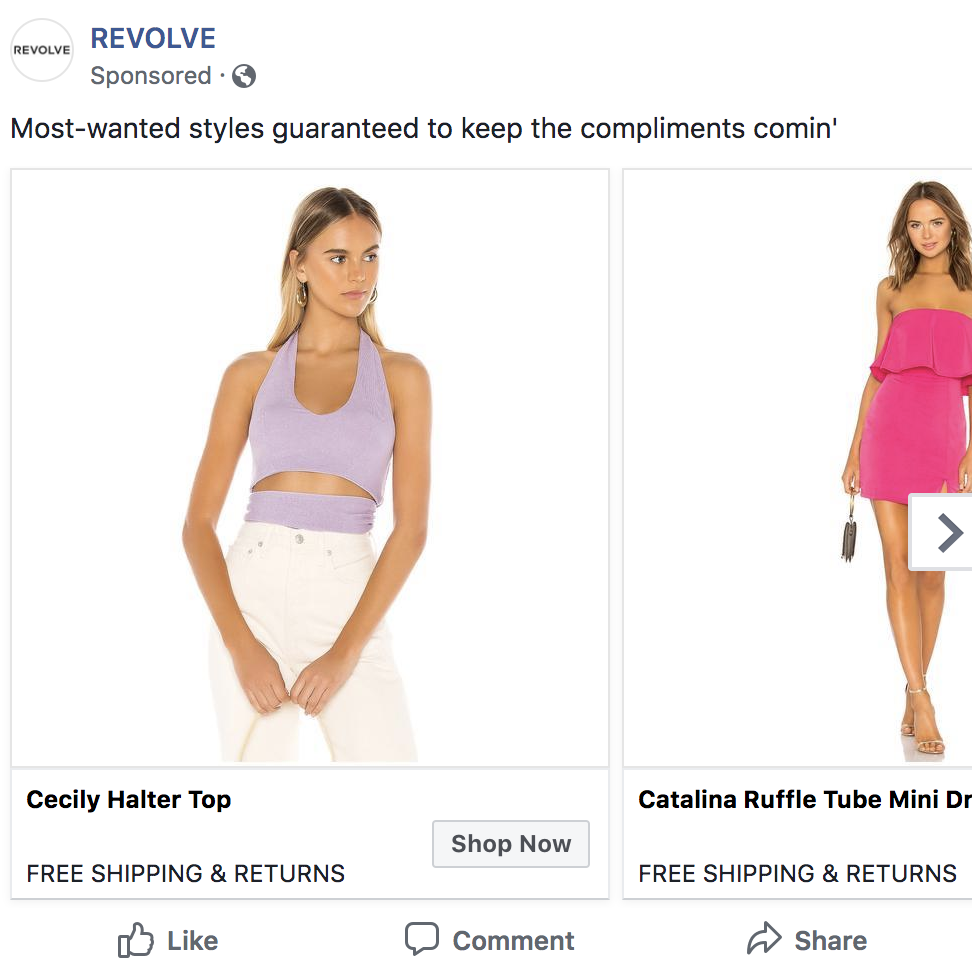
Revolve — a clothing and accessories company — uses paid and sponsored ads on social media (like this one on Facebook) to reach their target audience while they browse their news feeds.
The content ads feature some of their products as well as details about their free shipping and return policy to drive target audience members to their site (and, hopefully, convert them into paying customers).
Lastly, let’s cover your content marketing strategy. By implementing a strategy, your content marketing efforts will be impactful and effective in converting leads and reaching your target audience.
1. Set SMART goals.
The first part of your content marketing strategy is to set SMART goals. These should be specific to your business — they’ll likely complement your broader marketing and company goals.
Here are some SMART goal examples:
- Improve brand awareness
- Boost revenue
- Increase conversions
- Improve brand loyalty
- Increase customer engagement
- Build rapport and trust among prospects and customers
- Attract strategic partners
2. Determine your KPIs.
Next, set key performance indicators (KPIs) for your SMART goals. KPIs are quantifiable data points you can use to measure your actual performance against your goal.
| smart goal | related kpi |
| Brand awareness | Site traffic, social media followers, subscription sign-ups, mentions (by customers and partners) |
| Revenue | Daily sales, site traffic |
| Conversions | Conversion rate, shopping cart abandonment rate, associated shipping rate trends, competitive price trends |
| Brand loyalty | Returning customers, promoters, product reviews, referrals |
| Customer engagement | Likes, shares, follows, mentions, backlinks |
| Rapport and trust | Returning customers, promoters, followers, mentions |
| Strategic partners | New partnerships, mentions, backlinks |
3. Decide on the type of content.
Next, choose the type of content you’ll create. To do this, start by thinking about your target audience and buyer personas.
Answer the following questions about your target audience to help you narrow down the right types of content for them:
- What do they need from you?
- What challenges are they looking to overcome?
- Why do they need your product or service?
- How can you help them succeed?
- Where do they spend their time?
Then, take a look back at the various types of content we reviewed earlier to decide which types of content you’ll create.
4. Choose your content channels.
Once you’ve decided on the type of content you’ll market with, it’s time to choose your specific content channels. Where will you share your content? Where will it live and be shared from?
For some of the content types, the channel you need to work with will be obvious. For example, if you’re creating Facebook content, your channel will be the social platform itself.
5. Set a budget.
Now, set your budget. Think about the type of content you’re creating and which channels you’re marketing that content on.
Then, ask yourself the following questions to determine your budget:
- Do you need to purchase any software or technology to create the content (such as graphic design software like Adobe Photoshop, a subscription to Canva, a camera to take high-quality photos and videos)?
- Do you need to hire any content marketers or designers (such as artists, writers, editors, designers)?
- Do you need to pay for ad space?
- Do you need access to specific tools or resources to enhance or measure your specific type of content?
Make note of how your responses impact your budget — whether that’s an increase or decrease in what you may have already estimated.
6. Create and distribute the content.
Create and distribute your content so your audience members can consume it — and possibly convert. To ensure you’re consistently producing content and sharing it among your prospects and customers, use a social media calendar or an editorial content calendar. This will help your team stay on top of all of the content being created as well as allow you to schedule it ahead of time.
7. Analyze and measure results.
Lastly, analyze and measure your results so you can make any necessary changes to enhance your content marketing efforts and reach more audience members.
Look at your SMART goals and KPIs to determine the success of your content marketing strategy. Did you achieve your goals and KPIs? Were you close to reaching them, or were you off in your estimations?
Here are some tools to help you with your content marketing strategy analytics and results:
- HubSpot Marketing Analytics Software
- HubSpot Social Media Management Software
- Mention
- SharedCount
- Sprout Social
- Google Analytics
Engage Your Target Audience With Content Marketing
With effective content marketing, you can reach your target audience and increase conversions. There are several ways to market with content to boost revenue, grow your brand awareness and recognition, and build relationships with your prospects and customers.
And don’t forget to extract more value from every piece of content you create.
To get started, determine which type of content works best for your business and audience, and develop a content marketing strategy to begin boosting your bottom line today.
Editor’s note: This post was originally published in August, 2019 and has been updated for comprehensiveness.

What are Mini Apps & Why Marketers Should Care
With apps continuing to grow as a vital staple of everyday life, marketers continue to ask, “Do I need to have an app for my business?”
Luckily, unless your small business’ product is an app — or you have a skilled staff of developers, you probably don’t need to spend tons of time and money building one just yet. Brainstorming, developing, launching, and promoting an app is a lot of work for a small company. In that same amount of time, you can launch a mobile-optimized website or mobile email strategy that could earn you solid awareness and ROI.
But, if you’re a marketer at a digital startup, agency, or tech firm that thinks an app might be helpful for business, a more affordable development option could be on the horizon.
In 2020, some tech companies are starting to invest in “mini-apps.” And, as these programs expand, there might be room for companies to test the waters with a more compact app experience.
Mini-apps became a commodity on large-scale Chinese social media platforms as recently as 2017. During this year, WeChat’s founding company, Tencent, announced the launch of WeChat Mini Programs.
After showing success on apps like WeChat, miniature app-like experiences recently caught the attention of Western tech firms like Apple and Snapchat. These companies have begun to build out and launch similar programs to WeChat.
But what exactly do these apps look like, and how do they benefit the brands that launched them? Below, I’ll highlight a few major mini-program platforms and give you a look at what these mobile experiences look like for brands.
Early Mini-App Platforms
WeChat Mini Programs
A 2017 report from TechCrunch described Mini-Programs as basic app experiences that could be accessed via WeChat. Although tech journalists describe these as mini-apps, Tencent could not label them as “apps” because they worried about infringing upon Apple and Google trademarks.
To give you a visual perspective of how Mini-Programs look on WeChat, here’s a screenshot of what users see when accessing them. Although the text is in Chinese, the app’s native language, you can tell the programs are all sponsored by other companies:

When you tap on a Mini-Program, such as Tesla’s, you’ll stay on the WeChat app, but enter a new experience within it. With Tesla’s basic program, you can find charging stations for your car, or schedule test drives:
For users, a mini-program like Tesla’s gives them the ability to connect with friends on WeChat, while learning about Tesla in the same session. Meanwhile, Tesla’s content spreads awareness about its business to possible audiences or buyers who use WeChat.
At this point, the WeChat Mini Program is only available for the app’s original Chinese version, Weixin. However, if a marketer is trying to grow awareness on this platform, they can apply for a Mini Program account. Mini-program app creators will require a developer to create the experience. According to a WALKTHECHAT review of mini-programs, this aspect can be somewhat tricky:
“Mini-programs have to be developed in a specific ‘language’ (a JavaScript framework developed by Tencent). Developers have to write WXML, WXSS instead of traditional HTML and CSS, and leverage this framework for all their development,” the 2019 post noted.
Snap Minis
Snap Minis, announced in 2020, are miniature branded experiences within the Snapchat app. To access Snap Minis, a user opens a chat with a friend or group. Then they’ll click on the spaceship icon, which reveals a number of searchable mini-programs. These include a number of different branded experiences from games, to scheduling tools, to meditation applets.
When users click on a miniature program, such as Headspace, they can interact with it in basic ways, such as playing daily meditations. You can also share in-app experiences, such as the meditations you listened to or a score on a gaming app, with your Snapchat contacts.

While Tesla’s WeChat Mini-Program spreads awareness of the car brand and its physical store locations, Snap’s Minis take things a step further as they offer content that audiences can share with others, rather than just interacting with it. This is a great option for tech marketers or digital brands that want people in the Snapchat demographic to actively share branded content with others in their community.
According to Snapchat, some development work is required before launching a Mini on its platform, but it is unclear if Snap or the partnering company will do most of the app development. Snap does note that Minis are easy-to-use build with HTML5 code.
At this point, brands interested must apply for early access to the Minis program. In the Snap application, businesses must include their contact information and explain what they’d like the Mini to be used for.
Apple App Clips
At this point, Apple Clips will still be inaccessible for brands that can’t make their own Apple App Store app. However, they are still an interesting example of mini-apps that are worth noting, especially if your brand does have an app.
Apple App Clips, which launched with iPhone IOS 10.14 update in 2020, are small features of a larger app that’s currently available in the App Store. Users can access App Clips by scanning QR codes, walking near an App Clip business with an NFC tag, visiting the brand’s website, or clicking on a specially designed link, but users can also find them when using other apps, such as Apple’s Messenger or Maps apps.
When someone is discussing or searching for something related to a business that has an Apple App Clip, a call-to-action will pop up allowing a user to “Open” the Clip without downloading a full app. From there, a user can then take advantage of one of the app’s basic features.
For example, if two friends are talking about a restaurant chain that has an app via text message, an App Clip CTA might pop up encouraging them to open the restaurant’s Clip to see a menu. When the user enters the Clip experience, they can do a small task, such as scanning the menu or making a reservation. Users can also click a CTA in the App Clip to download the full program from the App Store.
While companies who can’t easily create an app probably won’t benefit from App Clips, digital startups and tech companies should keep on their radar. Along with literally allowing people to test out an app before they download it, the App Clip CTA options allow people to get notified about a brand’s app when they walk near its store, are messaging friends about products the brand offers, or while searching local businesses on Maps. This enables app promotions to literally meet audiences where they are.
Mini-App Takeaways for Marketers
Although some mini-app programs, such as Apple and Snapchat’s are more exclusive and less accessible to smaller brands right now, they could be a helpful marketing tool for more companies in the future. Here’s what marketers should keep in mind as mini-app programs grow and expand.
1. Brands that embrace digital transformation will get better “mini” opportunities.
First of all, your brand will likely need to offer a digital tool or store that will improve another major app’s experience. For example, Tesla’s website already allowed you to look up car charging stations and schedule test drives, so turning this into a mini-app experience would be much easier for developers.
Additionally, some of WeChat’s audiences had an interest in technologies, cars, and Tesla’s, which offered a business case for creating this experience. While audiences are zoning in on Tesla’s offerings, they are still spending time on the WeChat app.
Because you’ll need a strong digital presence and online business capabilities, mini-apps might not be possible for many small businesses yet — especially in the U.S. where they are just now being embraced. However, as the world becomes more connected to apps, this strategy could become more accessible to you later on.
2. Big apps will only host mutually beneficial mini-apps.
Think of mini-apps like a website integration or a brand partnership project. A major brand likely wouldn’t have an integration with a competitor’s tool or partner with a business that doesn’t target similar audiences. In the mini-app space, the thinking might be similar.
Ultimately, big app brands will opt to host mini-programs that spread awareness to businesses with similar audiences and offer digital experiences that keep users on their main app longer. This is likely why companies such as Snapchat and WeChat require brands to apply for their mini-programs, rather than just allowing them to buy space for a mini-app.
3. Brands will still need to do groundwork in creating mini-apps.
In some cases, you might not need your own in-house developer to have a mini-app. In WeChat’s case, the company offers a mini-program where brands can apply and pay to have a mini-app experience made and launched for them.
Despite the ease of working with some platforms, others like Apple will require you to already have developed an app. Meanwhile, Snapchat’s site is unclear (at time of publication) about what creating a Mini fully entails.
4. Not all brands will be able to access “mini” partnerships.
Despite the opportunities that might exist with mini-apps, marketers — especially at small companies — should still keep in mind that this might not be applicable to them or their strategy.
As noted above, large platforms that offer mini-programs will selectively look for partners who can offer digital tools or experiences that improve each user’s time on their main app. And, even though larger platforms might be more involved with producing a mini experience for smaller brands, these partners will still likely spend some time and money on ensuring that their program offers a glitchless experience.
The good news? Although many companies can’t launch a mini-app, just yet, they don’t necessarily need to. If you never see this tactic fitting into your strategy, there are plenty of ways you can boost mobile or online awareness without any sort of app.
If you’d like to harness on mobile marketing alternatives without an app, check out this Ultimate Guide.
