
How to Use Instagram: A Beginner’s Guide
Over the past few years, Instagram has seen exponential growth — from one million users in December 2010 to over one billion in 2020.
If you’re interested in getting an Instagram account, or just created one but aren’t sure how to use it, you’re in luck. Here, we’re going to cover all the basics, so you can see why Instagram is the top social media platform for engagement today.
It’s hard to remember a time before Instagram. “Do it for the ‘gram” has become a common saying, which means, essentially, “Do something so we can take a picture and post it to Instagram.”
If you’re not part of the one billion on Instagram, you might want to reconsider. The app is a great chance to stay apart of friends’ lives — when I want to see how my college friends are doing, I don’t check Facebook, I check Instagram. Plus, you can follow your favorite celebrities or political figures to see candid photos of their everyday lives.
Additionally, it’s a phenomenal platform for investigating what other brands are doing — for instance, Nike uses the Instagram Stories’ feature to promote inspirational athlete stories you won’t find anywhere else.
How to Sign Up for Instagram
- Go to the Instagram site on your desktop, or download the Instagram app from the App Store (iPhone) or Google Play Store (Android).
- If you’re on desktop, click “Log in with Facebook”, or fill in the form with mobile number or email, name, username, and password. Then click “Sign up”.
- On Android, click “Sign Up With Email or Phone Number”.
- On iPhone, select “Create New Account”.
- Enter your email address and phone number, then click “Next”. Alternatively, you can also sign up with your Facebook account on the app.
- Once you’ve filled out your username and password, you will be instructed to fill out your profile info. Then, tap “Done”.
- If you register with Facebook, you’ll need to log into your Facebook account if you’re currently logged out.
How Do Instagram Notifications Work?
When your account is created, you’ll want to adjust your notifications so you only receive the information you want. For instance, you can choose to receive notifications when you get likes from everyone — but, alternatively, you might decide to only receive notifications when you get a like from someone you follow. Or, you might turn off notifications for likes altogether.
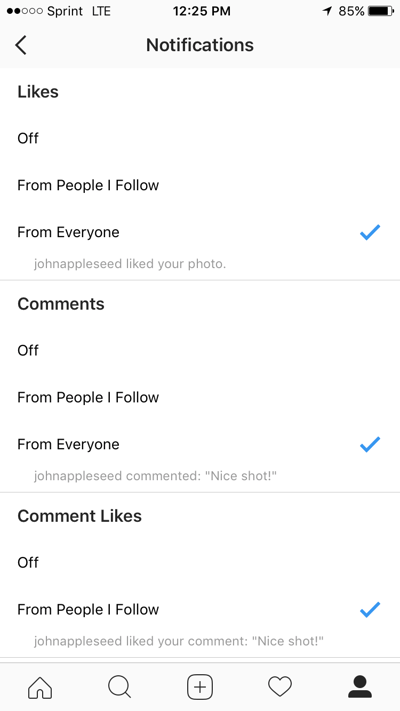
You can adjust notifications to “Off”, “From People I Follow”, or “From Everyone”, for the following categories — Comments, Comment Likes, Likes and Comments on Photos of You, Follower Requests, Accepted Follow Requests, Friends on Instagram, Instagram Direct, Photos of You, Reminders, First Posts and Stories, Product Announcements, View Counts, Support Requests, Live Videos, Mentions in Bio, IGTV Video Updates, and Video Chats.
If you’re overwhelmed by that list, I get it — I am, too. If you’re unsure what notifications you want to receive, you might start with your notifications on “From Everyone”, and if certain notifications begin to annoy you, you can turn them off later.
To customize which notifications you receive, follow these steps:
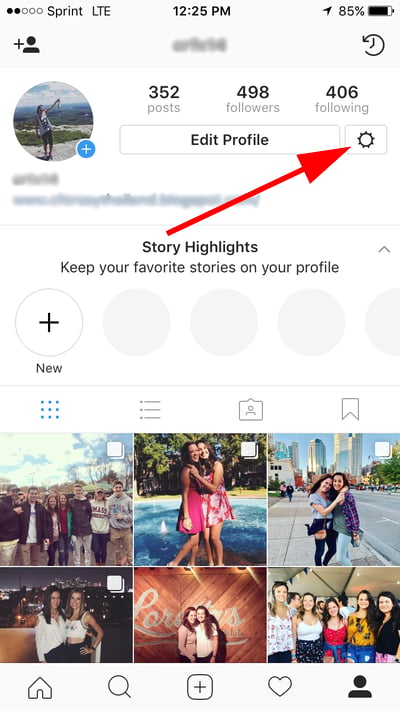
1. Go to your personal account (which you’ll find by pressing the person icon at the bottom right of your screen). Then, click the “Settings” icon (the circle icon beside “Edit Profile”).
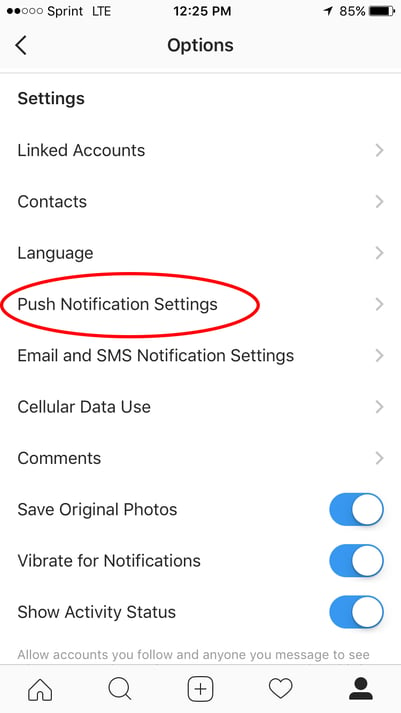
2. Scroll down to “Push Notification Settings”.
3. Check off the notifications you want to receive.
And that’s it! Next, let’s explore how to connect your other social media accounts to your Instagram, so when you post an image to Instagram, you can share it with your other online audiences, as well.
Connect to Other Social Accounts
When you post an image to Instagram, you have the option to share it on other social media accounts, like your Facebook or Twitter.
To link your other social media accounts to your Instagram, follow these steps:
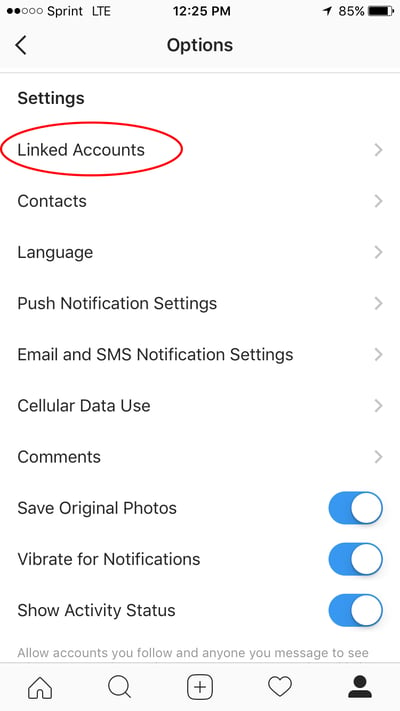
1. Go to “Settings” and click “Linked Accounts”.
2. Select whichever social media channels you’d like to link to, and input the necessary information to incorporate the channel with your Instagram.
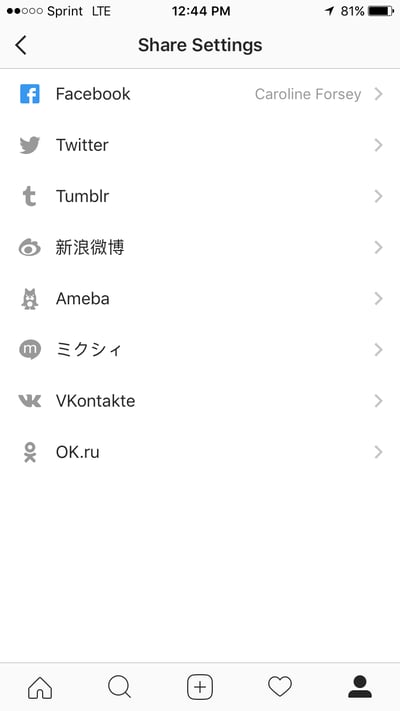
In the next section, “Upload, Edit, and Post an Image”, I’ll show you when a linked account comes in handy.
Upload, Edit, and Post an Image
Now, for the most important part of Instagram — how to upload and post an image.
Instagram is an entirely visual platform. Unlike Facebook, which relies on both text and pictures, or Twitter, which relies on text alone, Instagram’s sole purpose is to enable users to share images or videos with their audience.
On Facebook, you might choose to post 100 photos in an album. On Instagram, you need to be choosier about which photos you post. There are a few reasons for this — first, you don’t want to post more than once a day (typically). For the purpose of scarcity alone, you don’t want to post too many similar photos. For instance, it would be odd for you to post ten photos from the same beach vacation on your Instagram. Instead, you might choose one or two.
Additionally, you want your overall profile aesthetic to look diverse.
To learn more about Instagram account themes and get inspiration, take a look at “12 Stunning Instagram Themes (& How to Borrow Them for Your Own Feed)“.
Now that we’ve covered that, let’s explore how to upload, edit, and post an image.
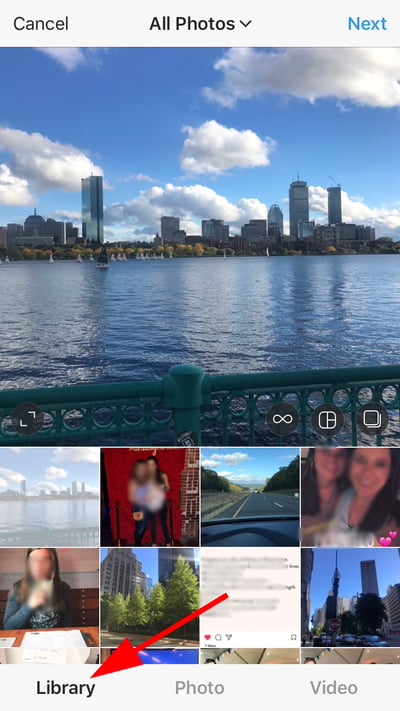
1. Click the “+” icon in the bottom center of your screen.

2. Here, you have three options. You can look through your Photos library on your phone, you can take a new picture from right within Instagram, or you can take a new video. For our purposes, I looked through my Photos library and found a picture of Boston I wanted to use. Then, I clicked “Next” in the top right.
3. There are two categories you can use to edit your image — “Filter” and “Edit”. Instagram automatically shows you filters first. You can scroll through the carousel and click any of the filters to apply it to your image. Additionally, if you want to use a filter but you want to tone it down, double tap the filter and move the cursor to the left to lessen the intensity of the filter.

4. Next, click “Edit”. Here, you can adjust contrast, brightness, structure, warmth, and more. When you’re happy with your edited image, or if you don’t want to edit it at all, click “Next” in the top right.

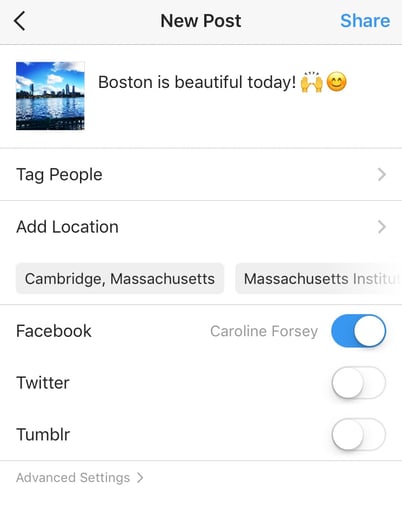
5. Now, you can add a caption, tag people (you can only tag someone if they also have an Instagram account), and add a location. Additionally, click the button beside Facebook or another linked social media account to share your image on that platform, as well. When you’re ready to publish, click “Share” in the top right.
Upload a Image or Video to Your Stories
In 2016, Instagram launched “Stories”, a feature that allows you to post videos or images that disappear after 24-hours. Instagram’s Stories feature is similar to Snapchat in terms of content — users often post more casual and candid videos and images, offering glimpses into their every day lives.
For instance, you might post a heavily-edited picture of yourself and friends at a baseball game. But you might post a more candid video to your Story of the stadium singing “Sweet Caroline”.
To learn how to upload an image or video to your Stories, follow these steps:
1. Click the camera icon in the top left.

2. Once your within the Stories feature, you can take a picture or video right from within the app. Alternatively, if you have an image saved to your phone that you’d like to use, click the small square in the bottom left corner.
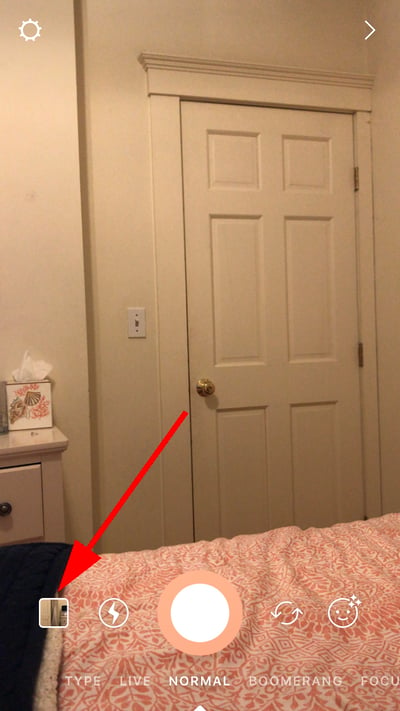
3. Click on a photo you’d like to use in your Stories.

4. In the top right, you have a few different editing features. The smiley face lets you add a location, hashtag, time, date, and other fun images or emojis to your picture. The pencil lets you handwrite or draw on your image. And the “Aa” icon is your text button. Once you click “Aa”, you have the option to change your font by clicking “Classic” at the top.

5. If you click the smiley face icon, you’ll see the following screen. Simply click on one of the icons to add them to your image. If you don’t like it, drag it to the bottom, and a trash can will appear so you can delete it.
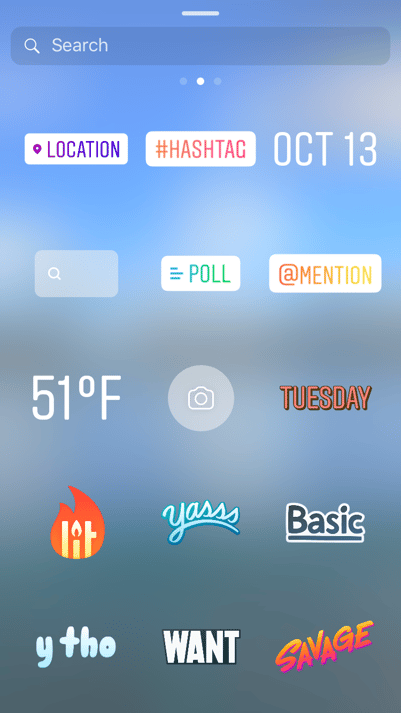
6. For instance, I clicked the smiley face icon to add a location and hashtag to my image. You can also swipe to the left or right to add filters to your photo or video. Once you’re happy with your content, you can either click the “+ Your Story” icon in the bottom left, which allows you to share your Story with everyone who follows you, or select “Send To” to send the post to someone specific.

Follow Users
It’s incredibly easy to find and follow users. Using Instagram’s search feature, you can find celebrities, brands, and friends. Additionally, you can search “Tags” or “Places”. “Tags” is particularly useful if you know what type of content you want to find, but you’re not sure who posts about it.
For instance, you might search “#familyrecipes” under tags — your results will include any images with that hashtag. As you peruse, you might find someone who posts content you really like, and you can choose to follow them so their content appears on your feed.
To follow someone, follow these three easy steps.
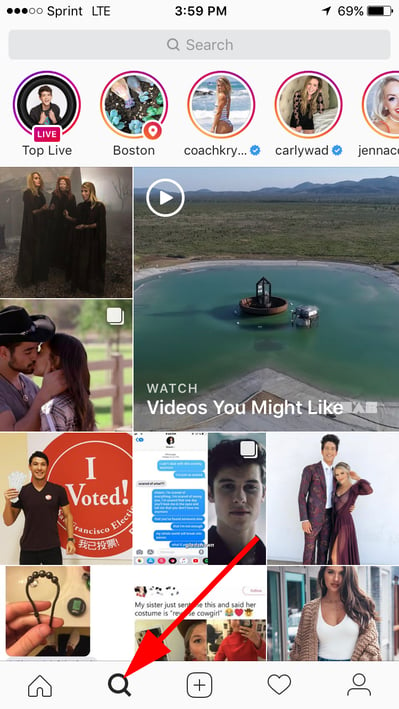
1. Click on the search icon on the bottom of your screen (it looks like a magnifying glass).
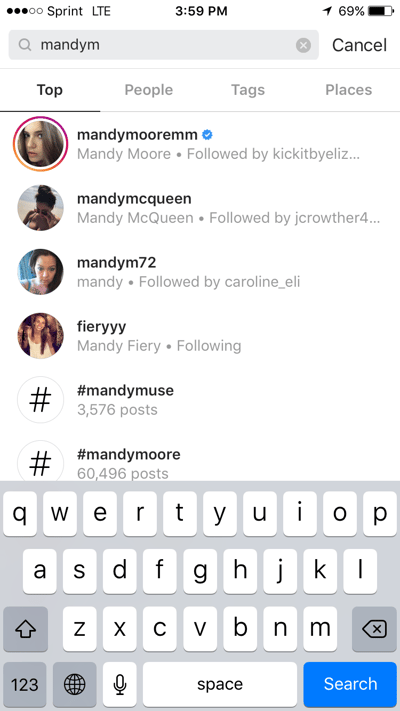
2. Next, type in a person or brand. For this example, I began searching “mandym” (Mandy Moore) and found her as #1 in the search results. Alternatively, I could’ve clicked “Tags” or “Places” to search those categories.
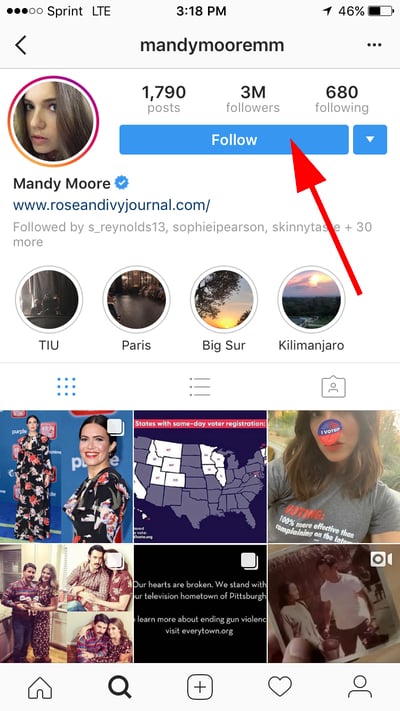
3. Once you’re on someone else’s account, you’ll see a blue “Follow” button at the top. For public profiles, you can click and immediately begin following that account. However, if the profile is private, you may need to wait for them to accept you first.
And that’s it! You’re on your way to becoming a pro. To take your account to the next level, plan out your next posts using an array of content ideas and templates.
Editor’s note: This post was originally published in November 2018 and has been updated for comprehensiveness.

The Marketer’s Guide to Using Pinterest to Grow a Business
When I was getting married, one of the main tools that helped me in my planning was Pinterest. In fact, that’s usually the number one place I go to when I’m planning a party.
However, Pinterest isn’t just used for event planning. You can use the social media platform as a way to market your business, drive traffic to your website, and increase sales.
I’m not the only one who goes to Pinterest when I need new ideas. In fact, more than 200 billion pins have been saved on Pinterest. And 90% of weekly Pinners make purchase decisions on Pinterest.
That’s why it’s important for businesses and marketers to be active on the platform.
Below, let’s learn how you can use Pinterest to meet your business and marketing goals.
How to Use Pinterest for Business
If you’re new to Pinterest, then you’ll need to create a business account to get started. Don’t worry, this is a pretty simple process as outlined below.
- Create a business profile. Instead of using a personal page, you’ll need to get set up with a business account. With this account you’ll get access to analytics and ad services.
- Claim and link to your business website. This is an important step in verifying your business page.
- Connect your social media accounts. This is helpful so you can cross-share content and refer people to your other pages.
- Edit your profile. Add engaging profile and cover images and write a catchy (yet, optimized) bio.
Once your profile is set up, it’s time to start diving into the strategy of how you’re going to use your page to grow your business.
Let’s review some of our top ideas below.
1. Determine the type of content you want to post.
As with any social media site, it’s important to understand your target audience. What type of content do they want to see on Pinterest?
More importantly, think about the type of content that they’ll engage with. Is it infographics, tips and tricks, or perhaps blog posts? To find this out, do some research into the type of content they currently pin on their pages.
Additionally, make sure that you don’t sell yourself with every pin. You should share relevant and helpful information on your page as well.
When you have a good idea of what your audience wants or needs to see, creating pins will be easier.
2. Consider your design.
Now that you know what you want to post, it’s important to consider what your images look like.
Your designs should be pleasing to the eye and stand out in a sea of images on your audience’s page.
Additionally, your images need to follow your brand guidelines. If you don’t have a designer on hand, you can utilize tools like Canva to get started.
3. Optimize your pins.
When you’re ready to start posting on Pinterest, remember to optimize your pins. You might be wondering, “How do I optimize my pins?”
Use the following checklist to get started:
- Include a URL (could be a link to a blog post)
- Use keywords in titles, descriptions, and image file names
- Create boards that are aligned with your keywords
- Arrange your boards and choose a board cover image
- Use hashtags
- Add a call to action
- Add a Pinterest widget to your site
- Respond to follower comments
- Follow popular boards and comment
- Create a board dedicated to your blog posts
These tactics will help you grow your business with Pinterest and help your posts be discovered.
4. Learn about categories.
On Pinterest, you can assign each board to one of 36 categories. These categories help your pins become discovered.
For example, since I was interested in finding wedding ideas when I was engaged, most of the pins that showed up on my feed were pins that were tagged in the wedding category.
You can scroll through the categories and see which ones are related to your business. This could even help you come up with board ideas.
Once you’ve thought about this strategy, it’s time to create your boards. If you blog, think about blog topics and create boards surrounding those topics.
Let’s dive a little deeper into how to use Pinterest for your blog.
1. Create infographics.
A great way to use Pinterest to promote your blog is through infographics. If you have blog posts centered around an infographic, post it on Pinterest.
Additionally, you can repurpose old blog posts into infographics.
Pinterest is a great place to repurpose content and reach a new audience that might not have read your post.
2. Choose the best blogs to post.
You don’t need to promote every single blog post on your Pinterest. Instead, just choose the ones that make the most sense for the platform.
For example, choose blogs that have engaging images, great downloadable offers, or have an infographic.
Additionally, think about your board topics. You should promote blogs that relate to your boards.
3. Customize your images.
When you create a pin, it’s important to use engaging, custom images. To promote a blog, you can use your featured image and include customized text.
For instance, many pins that promote blog posts include the title of the blog on the custom image. The title is a great way to draw people in and get them interested in your blog post.
4. Write an optimized pin description.
When you write the description for a pin promoting a blog post, it’s important to tell people what to expect in the post.
While you want to leave some mystery and pique their interest without giving away too much, they need to know what it’s about.
Additionally, you should include the appropriate search terms and keywords in your pin description.
When it comes to marketing your business, capitalize on Pinterest. Inspire your audience to use your products and services in their lives, or just inspire them in general.
If you use Pinterest correctly, it could be your products and services that users are pinning – and purchasing.

How Facebook Ads Have Evolved [+What This Means for Marketers]
According to a recent study from Statista, Facebook has an estimated 2.7 billion monthly active users worldwide, including roughly two-thirds of the US population. There’s no social media platform more prominent or ubiquitous. No other online destination offers you more potential exposure to prospects.
A well-maintained Facebook presence is central to many — if not most — companies’ social media strategies. It’s a key factor in processes like conducting outreach, projecting legitimacy, generating interest, and driving traffic to other content and company resources.
One avenue businesses can leverage to make effective use of Facebook as a marketing tool is paid advertisements — a format that has moved through several iterations over the years.
Here, we’ll get a timeline of some of the most important, interesting milestones in Facebook ads’ evolution, a picture of what the future might hold for the medium, and what this all means for marketers.
The History of Facebook Ads
2004: Facebook first starts generating ad revenue with its “Flyers” project.
Roughly two months after Mark Zuckerberg and Eduardo Saverin launched Facebook in February 2004, the two took some minor steps to monetize the platform — just enough for a small financial cushion to help while the company got off the ground.
As Zuckerberg said in an interview with the Harvard Crimson shortly after the platform went live, “It might be nice to get some ads going to offset the cost of the servers.”
That April, Facebook started selling bits and pieces of ad space to companies promoting moving services, T-Shirts, job listings, and other offerings for students.
The ads themselves weren’t particularly sophisticated, and the founders didn’t have much of a firm grasp on digital advertising. Still, the project represented a milestone in the history of Facebook advertising.
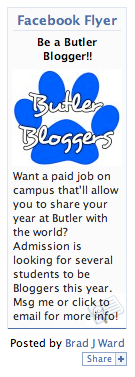
Image Source: Business 2 Community
It was the first time the platform tried to make money from the platform through ad sales. Unrefined and seemingly uncoordinated as it might have been, the Flyers project still helped keep the platform afloat during its early days and warrants a mention on this timeline.
2007: Facebook officially launches its Facebook Ads platform.
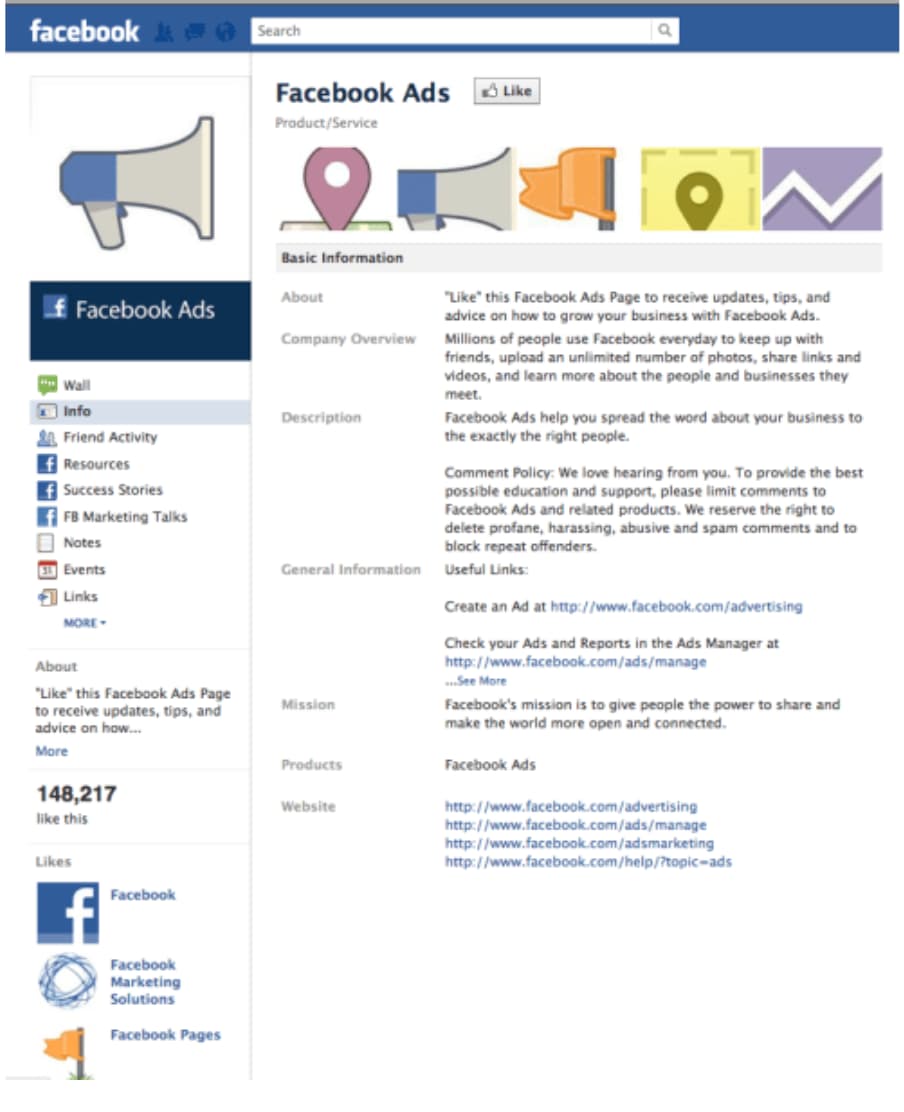
Some three years after Facebook’s initial launch, the company introduced a large-scale, official ads program to the platform. It gave businesses the space to create individual profiles — just like standard users — to post content, share photos, and engage with Facebook users.
As Zuckerberg put it, “The core of every user’s experience on Facebook is their page, and that’s where businesses are going to start as well…The first thing businesses can do is design a page to craft the exact experience they want people to see.”
The new program also introduced “Social Ads” — ads that combined social actions from a user’s friends, like a recent purchase or review of a business, with an advertiser’s message.
This allowed advertisers to deliver more specific, targeted ads to users that included information from their friends. These ads appeared either within a user’s news feed or in the site’s designated ad space.
At Facebook Ads’ official launch — 2007’s Facebook Social Advertising Event — Zuckerberg summed up his vision for the program, “Facebook Ads represent a completely new way of advertising online. For the last hundred years, media has been pushed out to people, but now marketers are going to be a part of the conversation.”
2011: Facebook launches its desktop ad program called “Sponsored Stories.”
In 2011, Facebook introduced its “Sponsored Stories” project — a program that placed paid advertisements directly on users’ news feeds. Initially, the company pledged to only show users just one sponsored story on their news feeds per day. Those stories also stemmed solely from friends or pages users already liked.

As a product manager from Facebook described it, “Anything that one of your friends is seeing as a sponsored story which features some of your content is actually something they would have already seen in their news feed. A sponsored story never goes to somebody who is not one of your friends.”
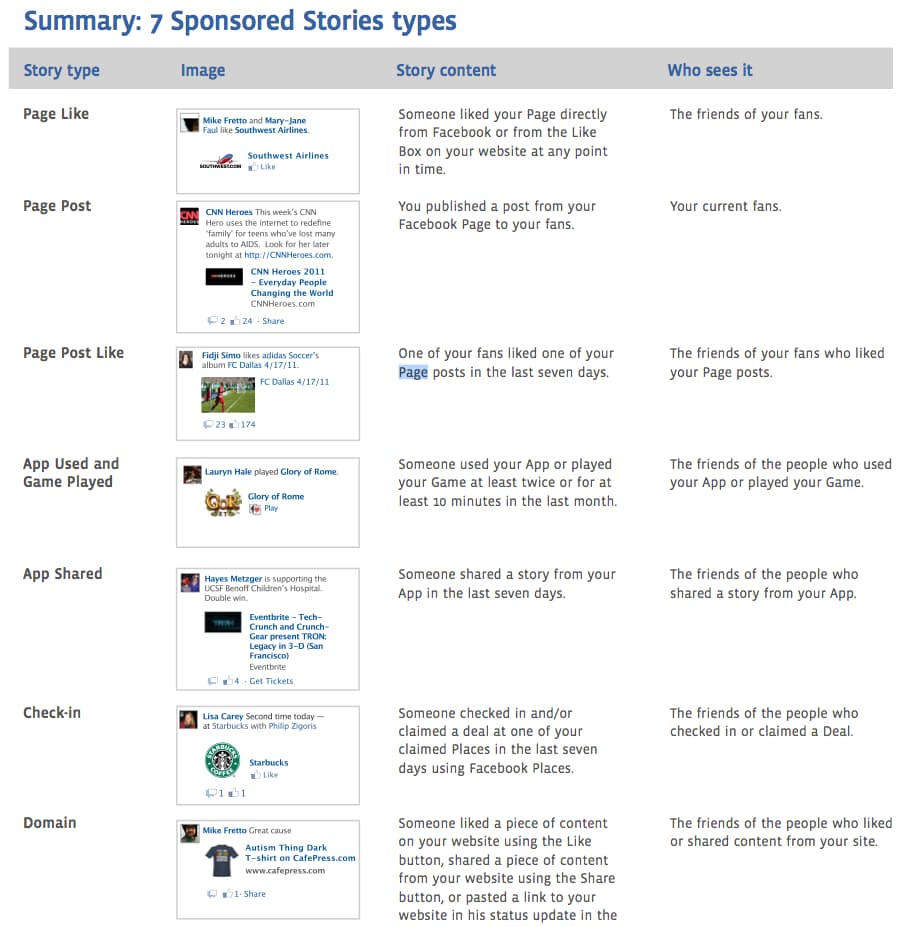
Though it was impossible for users to opt-out of the program entirely, they still had the option to close out individual ads. “Sponsored Stories” certainly rubbed some users the wrong way, but advertisers saw it as a big win. Finally, they had the space to display their ads directly in the mix of social content and consumers’ news feeds — a wildly valuable stretch of virtual real estate.
2012: Facebook launches its mobile ads program.
Up until 2012, Facebook’s mobile app didn’t actually make money. It didn’t feature ads, and the move to incorporate them was considered a risky play. Consumers weren’t exactly thrilled with the idea of having ads take up space on their mobile feeds.
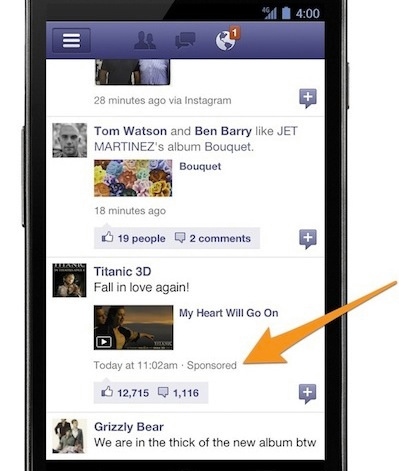
Facebook opted to subtly ease advertisements into users’ feeds. Its mobile ads plan borrowed heavily from the desktop platform’s “Sponsored Story” strategy — seamlessly blending in paid promotional content and having it look like standard statuses or other user-generated content.
The company’s mobile advertising strategy aimed to make ads as discreet as possible. It provided limited real estate to advertisers, pressing businesses to create engaging, interesting content to capture consumer attention within tight confines. The strategy ultimately proved successful and further drove advertisers’ collective need to optimize for mobile.
2014: Facebook rolls out its three-level advertising campaign structure, offering “campaigns” and “ad sets” — on top of standard ads.
In March 2014, Facebook introduced its new ad structure. Until that point, the platform’s campaign structure consisted of two levels: campaigns and ads.
Campaigns — the overarching plans that correspond to specific advertising objectives — were designed to help users optimize, and measure results of individual ads. With this new development in Facebook advertising’s evolution, a buffer was put between those two levels.
Ad sets — subsets of a campaign that could feature their own budgets and target separate audience segments — were introduced. Those sets gave advertisers a new level of structure for honing in on, best appealing to, and better understanding demographics of particular interest.
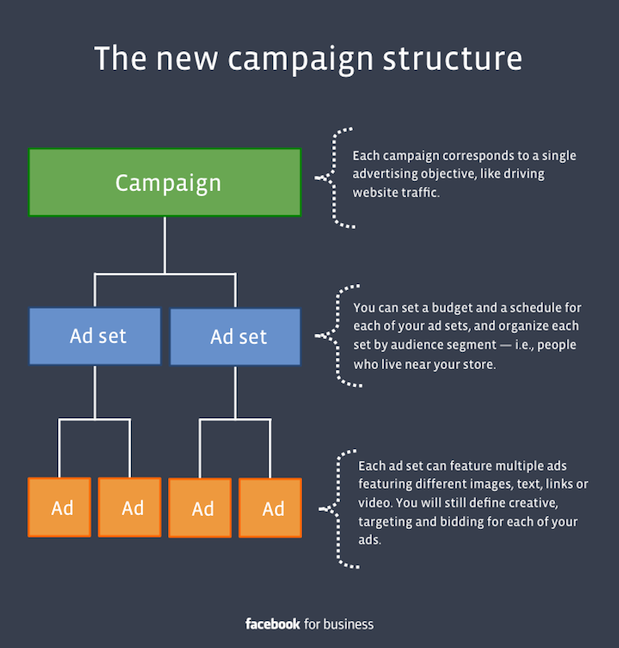
According to a Facebook press release, the program was designed to “make it easier for advertisers of every size to organize, optimize and measure their ads.” It was a game-changing milestone for the platform — one that made its advertising infrastructure more thoughtfully regimented and easier to navigate.
2016: Facebook introduces bots to its Messenger platform.
In 2016, Facebook made a push to capitalize on the tremendous advertising potential of its siloed mobile messaging function. One of the ways the company looked to take advantage of the system was through the incorporation of chatbots. Facebook offered businesses two paths for bot incorporation — “Sponsored Messages” and “Click-to-Messenger” ads.
“Sponsored Messages” are ads that appear directly in a user’s Messenger inbox — ones that allow users to automatically communicate with a chatbot by clicking them.
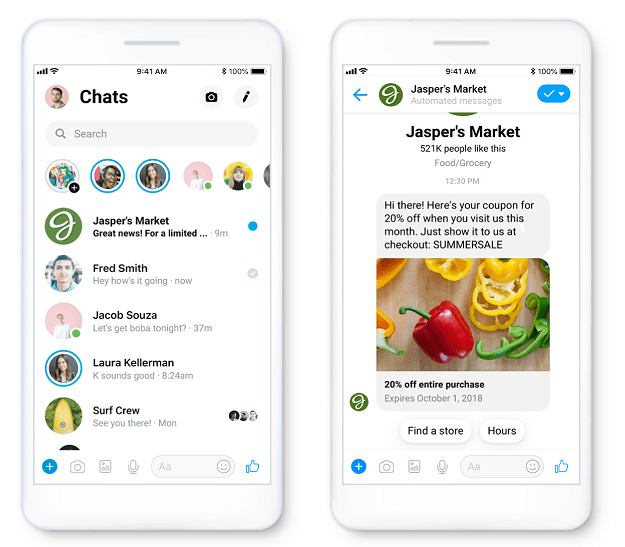
“Click-to-Messenger” ads leverage CTAs to place ads in users’ Messenger inboxes. A business will draw users in with some sort of incentive — like a discount or piece of content — on the original Facebook platform and automatically send them a message via chatbot once they click on the offer.
2018-2020: Facebook expands its ad formats, featuring eight separate advertising options.
Over its history, Facebook has consistently expanded its available advertising formats, aiming to effectively monetize the platform without compromising user experience. As of 2020, the company offers eight different advertising options:
As time goes on, you should expect to see this list expand and the nature of mediums it covers shift and progress. New technology and trends will bring new formats to explore and familiar processes to refine.
The Future of Facebook Advertising
If there’s anything to learn from Facebook advertising’s evolution, it’s that the processes and practices behind the concept will never remain stagnant. Mark Zuckerberg will never look at the platform’s advertising infrastructure and say, “Yeah, I think we nailed it. We’ll never need to change any of this ever again.”
Advertising on Facebook will continue to evolve and adapt as new ad formats emerge, privacy and data regulations loosen or constrict, its user base changes, and social media trends come and go. There are too many factors at play to expect anything but constant, likely significant changes in the practice as time goes on.
So, what can marketers take away from this article? Is there any recurring theme underlying success across every phase of Facebook advertising’s evolution?
As Facebook advertising has progressed, the companies that thrived in every stage were the ones that shared high-quality, engaging content that wasn’t too abrasive.
Consumers aren’t using the platform because they want to see ads. That’s why the content you share on the platform has to come across as natural, interesting, and not too jarring.
If you prioritize producing and sharing valuable, interesting advertisements that won’t overwhelm or frustrate your target audience, you’ll put yourself in the best position possible to thrive as Facebook advertising continues to progress.

Discover Your Writing Genius: 8 Tips for Doing Your Best Work in 2020
As marketers, it can be difficult to continue to produce high-quality content when we don’t feel creative or inspired.
And it can be especially challenging when we’re on a tight deadline.
Henneke Duistermaat, writer and founder of Enchanting Marketing, knows the feeling well — as she describes it in her latest infographic, we often believe writing simply means creating “great stuff”, when in reality, it entails research, multiple revisions, messy first drafts … and even time for procrastination.
Fortunately, there are strategies you can implement to relieve the pressures of writing, get outside your comfort zone, and befriend your inner critic.
If you’re in a writing slump or looking for some inspiraiton, take a look at Henneke’s hand-drawn infographic to learn 8 tips for creating your best work.


11 Ad Design Tips to Help Your Brand Cut Through the Noise
Before your copy can persuade an audience to buy your product, your design must persuade them to buy your copy. In advertising, your design catches your audience’s eye and points their attention to your copy. Then, it’s your copy’s job to hold your audience’s attention.
To help grab people’s attention in your advertisements, we’ve put together a list of seven ad tips, supported by examples, that’ll help give you ad design ideas to your brand cut through the noise.
Advertisement Design Tips
Read on to learn how to craft creatively refreshing ads that will convert your audience into customers.
1. Stand out from the crowd.

In a world where countless brands fight for a limited amount of attention, the only way your advertisement can grab people’s attention is by being original.
As a marketer, though, it can be tempting to leap onto the latest trend that all your competitors have already pounced on. If everyone else is implementing the latest tip or trick, it must work, right? To captivate an audience, though, you must resist this urge.
Cliches repel attention. They sap your advertisement’s creativity and can’t activate the prefrontal cortex, which is the part of the brain responsible for experiencing emotions. But how exactly do you create an original advertisement? Consider one of Estée Lauder’s print campaigns from the 1960s.
Back then, Estée Lauder’s main competitors like L’Oréal, Revlon, and Helena Rubinstein all ran vibrant, colorful ads in magazines. Every makeup ad was beautiful and rich. But even though they seemed eye-popping at first glance, audiences became accustomed to these types of ads — they all looked the same. They started blending in with each other.
Realizing that no one could differentiate between the brands running full-color makeup ads flooding magazines during that time period anymore, Estée Lauder did something so controversial it was deemed “radical”, “stupid”, and even “ugly”: they ran their ads in sepia.
Estée Lauder’s print advertising move received its fair share of criticism, but they’re ability to be original helped them immediately stand out from the crowd and rake in 25% more responses than their previous color print campaigns.
2. Focus on benefits and not just features.
A feature is an attribute or aspect of your business that distinguishes it from others in the space. Features are important for consumers as they compare providers and make purchasing decisions. However, in advertising, you are often marketing to a wide audience, many of whom may not be familiar with your organization or know they have need for your goods or services.
For this reason, advertising features can be ineffective and overly salesy. The benefits of a product, on the other hand, can be far more persuasive and impressionable to a wide audience.
Tide exhibits this idea well with their Superbowl commercial.
They could have demonstrated the features of their product by showing a dirty shirt becoming clean again.
Instead, they focus on the advantage: clean and crisp shirts.
They even use a bit of humor while calling out this approach as #NotaTideAd.
3. Use humor.
Speaking of humor, it is an effective tool in advertising because it evokes positive emotion.
The best thing advertising can do is make your solutions memorable. The second best thing it can do is associate that memory with positive emotions.
Zola uses this in their wedding website ad. Weddings are already associated with love and happy times, but Zola differentiates their approach by flipping the script on audience expectation with a silly situation.
Instead of imagining somber heartfelt “I dos,” the couple talks through logistics, which Zola can help with.
4. Convey one message — and one message only.

Sometimes, marketers think the more benefits and features they include in their ads, the higher their conversion rate will be. But trying to read a jumbled ad requires a lot of thought and energy, so cramming an ad with a bricks of copy doesn’t actually grab people’s attention. It repels it.
To immediately hook people and persuade them to read the rest of your ad, consider conveying one message per ad. Spotlighting your product or service’s main benefit or feature will make it easy for your audience to understand its value and increase the likelihood of doing business with you because they’ll leave your ad remembering only one message: your product’s or service’s main feature will benefit their lives somehow, someway.
For example, in Citizen’s ad for their Eco-Drive watch, they only use a single line of copy and a simple image to convey their product’s value to their audience — a watch that never needs a battery.
5. Make it visual.

When we were babies, we relied on vision to associate objects with behaviors, like a ball meaning play time. Vision was the only way to learn about the world.
That’s why you can understand visual information in 250 milliseconds and why your visual system activates over 50% of your brain. Visual storytelling is the best way for people to grasp concepts and data easily.
For instance, in LEGO’s ad, they only use two images, a simple lego creation and a shadow of a dinosaur, but you can instantly form a concrete understanding of its core idea — with Legos, you can create anything.
6. Know your market.
You can’t hope to capture your audience’s attention if you don’t know who they are.
Pop Fit is a leggings company that makes apparel for all sizes and body shapes. A good portion of their target audience is women who are rarely represented by models, particularly in the health and wellness space, and have difficulty finding athletic wear. For these women, an ad that shows people who look like them is a show stopper.
7. Leverage hyperbole.

Exaggerating your product’s benefits, in a clever and obvious way, is one of the best methods for slipping some humor into your advertisement, which can capture your audience’s attention and trigger an emotional response from them.
For instance, Nikol’s paper towels obviously can’t turn grapes into raisins, but this ad highlights the product’s absorbent powers in such a clear and artful way, they didn’t need to write a single line of copy.
8. Show, don’t tell.

Showing your audience something is much more engaging and interesting than telling them it. Relying on implication to convey a message is mysterious, making it more fun for your audience to figure out.
For example, in Siemens’ creative ad, they show the benefits of their product by unexpectedly placing their washers and dryers in a library to show you that they’re so quiet, even a librarian wouldn’t need to shush them.
9. Swap connotations.

In relation to food, the word “hot” has multiple meanings: having a high temperature and being spicy. Heinz brilliantly used the connotation of high temperature to highlight the spiciness of their ketchup, and their creative method of communicating the value of their product helped them instantly attract people’s attention.
10. Be authentic.
Planet Fitness is a brand that has long worked to make fitness less scary and more accessible to people, as evidenced by their “judgment-free zone” policies.
Part of that mission means encouraging people to be themselves. True to form, as many of their facilities open with new sanitizing procedures, they released this video ad announcing their policies. In it, Planet Fitness employees dance with inhibition. This fun and authentic ad supports who Planet Fitness is as a company.
11. Turn your ad into a game.

The brain is wired to predict things. It’s an evolutionary trait that allows us to anticipate what’s going to happen next and quickly react to it. That said, advertisements that are predictable only require a shred of thought to understand, so they’re too easy to grasp and, in turn, too boring to engage anyone.
With this in mind, if you can scrap predictability from your advertisements, you force your audience into a deeper level of thinking to digest your message, compelling them to pay more attention to it.
One of the best ways to ensnare your audience attention and get them to interact with your advertisement is by turning it into a game. By framing your advertisement like a game that can be beat, just like Mazda’s ad, above, your audience has the opportunity to earn an intellectual reward if they spend just the right amount of mental energy playing your brand’s game and grasping your advertisement’s message, which is something most people won’t ever pass up.
1. Canva
Canva is one of the premier free design platforms, available on both desktop and via a robust mobile app.
As an online ad maker, Canva provides a large library of pre-designed templates, 1 million stock images, and drag-and-drop design building. It can also integrate with HubSpot so that you can access Canva directly within the CMS.
2. DesignWizard
DesignWizard is another great option with integration capability. With pre-made templates across multiple sizes and dimensions, you’ll find attractive designs for any need — print and digital. Unlike other online ad makers, Design Wizard also offers free easy resizing so you can quickly create across multiple formats with less hassle.
3. Bannersnack
If you’re creating ads for PPC display campaigns, Bannersnack is a must. Since display ads come in so many shapes and sizes, Bannersnack allows you to create one ad and then generate several more based on the original design but with different dimensions, taking “resizing” features to another level. The only downside is that the free plan limits the number of designs you can create. However, the premium upgrade is reasonably priced.
4. Visme
Step up your social ads game by tapping into Visme’s library of templates for ads and posts for:
- YouTube
Pick from millions of free photos, icons, shapes, and animations to convey what your brand has to say.
5. Snappa
If you’ve ever struggled to remove a background from a brand photo in an expensive photo editor, you’ll be relieved to know that Snappa can do it in one click.
Add this capability to a library of templates, 3 million quality stock photos, 100,000 shapes, and over 200 fonts — you’re on your way to unhampered creativity.
6. Lucidpress
Lucidpress is one of the more versatile platforms on this list, with capabilities ranging from graphic ad design to asset management and direct mail. The free version does limit functionality and the number of designs, though, but Lucidpress’s design environment includes layouts for every type of print and digital use possible from social media ads to flyers and coupons.
7. BannerBoo
BannerBoo is unique in that you can make animated banner ads with their easy-to-use HTML5 ad builder. All ads are responsive, and you can choose from their library of animation effects and transitions. The free plan does contain a watermark, however.
With the inspiration from this list and tools that can help you create amazing ads, there’s nothing stopping you from creating an advertising plan that will help you drive brand awareness and generate revenue for your business.
Editor’s note: This post was originally published in May 2019 and has been updated for comprehensiveness.

8 Really Cool Ways to Use Video in Email Marketing
This morning, as usual, I started my day by checking my emails.
While this process doesn’t usually excite me and is just my method for waking up, I came across a subject line that made my heart race with excitement:

Knowing that I would be starting my day with a new music video from one of my favorite bands made me smile. It also made me feel valued as a subscriber to their record label’s emails — with just one video, Specialist Subject Records strengthened the consumer relationship I have with them.
This is why video email marketing is such an effective strategy. With a simple embed and subject line, you can build stronger relationships with customers, generate leads, and strengthen the content behind your brand.
Let’s talk a little more about it.
What is video email marketing?
Video email marketing is simply including videos in email marketing. If you’re unsure about how to do that, we have a quick how-to post here.
Because video is an extremely popular medium in marketing, (in fact, 83% of marketers feel its importance is only growing) including it in your email marketing can engage your subscribers and increase your conversions.
Additionally, did you know that over 80% of businesses use video in their marketing efforts? This is likely because of the results video implementation gives them. While using video in email can seem like a taboo topic, it can be very effective.
By using video, you can tap into the imagination of an audience that absorbs information visually — sometimes text just doesn’t do it. With video, you have a chance to make dense topics more compelling for your audience.
Next, let’s talk about ways you can use it in your next email campaign.
How to Use Video in Email Marketing
Videos can dramatically increase click-through rate (CTR).
For example, B2B software company Igloo Software decided to show off their workplace culture by creating 200 videos in three months for future email content. This approach doubled their CTR.
This is one way to use video in email marketing — showcase your brand in email and use it to increase CTR. We have six more, which we’ll explore now.
1. Use video for bonus content to delight your subscribers.
Consider using emails to give subscribers bonus content. Email subscribers are likely to enjoy a variety of your content, so going the extra mile with a surprise bonus could delight your audience.
For instance, if you share weekly newsletters about Instagram content, you can add a link for early access to a live webinar you’re hosting about Instagram Stories at the end of the month. That way, you can build interest for the event, keep subscribers in the loop about things going on within your company, and give them an incentive to keep checking your emails.
Alternatively, you can use emails to alert subscribers about bonus material you offer through other channels. For instance, this is an email I received from creators I subscribe to on Patreon, a subscription-based content service:

The email served as a reminder to check my Patreon dashboard to see other offers. I could also play the video directly in the email, which is a great method for email deliverability and personalization. It was a wonderful surprise, and kept the email format readable.
2. Make emails a more personalized experience.
Do you have a backlog of video content on your website? Consider using that to your advantage and sending personalized emails.
For instance, let’s say someone watches a portion of a video on your website that they don’t finish, and you’re noticing this is a pattern when you analyze your website data. Marketo‘s formula is to automatically send that video in an email to remind that user to finish.
By doing this, Vidyard reported that Marketo raised their CTR by over 144% due to the personalization of that email. If I were sent a video I meant to finish in an email, I’d surely open it to complete that video. I’d also feel pretty important to the company as a customer.
From a business perspective, this means more clicks for you, a better relationship with the customer, and more views on videos.
3. Display company culture with a video.
If you’re struggling with thinking of out-of-the-box ideas for email content that shows off company personality, consider heading to YouTube.
Yes, you read that right: YouTube.
What better way to show subscribers the culture in your company than going straight to the source? Let’s look at this email from beauty company, Glossier, to illustrate:

This email embeds a simple video from a Glossier influencer, showing viewers her morning routine using the company’s products. If you click on the video’s image, you’re taken to a YouTube playlist that highlights the makeup routines of Glossier affiliates, celebrities, and employees.
Getting a peek into how Glossier employees use the skincare and makeup in their daily routines adds a sense of normalcy and relatability to the company. I got to see the people behind the marketing emails, and what I saw were employees who were just like me.
Framed as a fun, “TGIF!” email, this messaging also had a promotion. If you click on the CTA, you’re brought to Glossier’s main product page with a reminder to spend Friday’s payday at the company’s ecommerce store.
Email marketing doesn’t have to be a blatant show of products. Sometimes, you can subtly promote your products within a display of company culture. Try experimenting with a blend of public-facing content to promote your brand, like Glossier.
For example, let’s say you want to bring attention to that new advertising metrics tool you’ve just launched. You might consider asking your marketing team to film a short video of the product’s daily value. Then, you can embed the product page in the video’s thumbnail. (Consider giving employees a heads-up that their response might be part of a marketing email).
4. Announce an event with a video.
If your company hosts events, whether internal or external, take videos of the events for a recap to send subscribers. This way, you can give subscribers a taste of how your brand works in-action and build interest in your company’s events overall.
For instance, do you host or participate in quarterly industry mixers? Try including a video in an email about the most recent one, along with a CTA for subscribers to learn more about the next one. The video can also serve as social proof that these events are well-attended and informative for other people in your industry.
5. Announce a product line or launch with a video.
Confession: I’m a little obsessed with makeup company, Fenty Beauty. When it was first announced, I immediately signed up for emails. It seems fitting, then, that the team at Fenty Beauty teamed up with Fenty Skin for its initial launch.
Fenty Beauty subscribers were sent an exclusive video from CEO, Rihanna, about the new company and what it would entail. It’s a great strategy to market complementary products through email, since subscribers are already interested in what your company offers.

If you’re launching a new product in the upcoming quarter, maybe it’s a good idea to include email subscribers in the pre-launch phase. For instance, if you’re launching a chatflow bot as part of a CRM update, let email subscribers know first. That way, dedicated customers can express their interest in the product and bring in that word-of-mouth marketing.
6. Send out newsletters with videos.
If you’re giving subscribers scheduled newsletters with no video, you’re missing out! There’s a lot of ways to include video in newsletters so they can be effective. Video-heavy businesses can benefit from newsletter video embeds so subscribers can catch up on content they may have missed — especially if your subscribers prefer watching over reading.
Another way to use video in newsletters is to round-up popular videos in your industry. If your company doesn’t do many videos, this is an excellent avenue for you. Alternatively, if a member of your team is interested in a routine video schedule, try filming a round-up of weekly content in video-form.
For instance, if there was a commercial that rocked your industry recently, include that video in your newsletter with a corresponding blog post about your thoughts to increase traffic on your blog.
7. Move leads along their customer journey.
Email marketing isn’t just limited to loyal customers — you can also use it to nurture leads. Just use workflows in your CRM to automate videos that will move them along the customer journey. This works with forms you can add right into that video.
These forms might give your sales team enough information to follow up with interested customers. Or, give leads an opportunity to watch your latest crash course in SEO link building — in exchange for the completed form fields, of course.
If you’re currently thinking, “I’m no tech wiz, how do I do that?”, don’t worry. HubSpot’s integration with Wistia makes it easy to add this widget into your marketing emails. Check with your CRM software to see if it offers something similar.

With this integration, you can add HubSpot forms into a Wistia video for higher engagement. If a lead converts within the video, their viewing data will sync with their contact record. This can be useful for future customer research with video marketing campaigns.
Think about piloting a video email marketing campaign for conversion. If you download viewing data, you can see how to tweak video content to further delight your customers.
8. Include video in email subject lines.
Formatting is super important in emails and it starts with the subject line. As a consumer, if I see an email with emojis in the subject line, I’m immediately more interested in the email because emojis stick out to me and feel more inviting.
Try including “Video” or a corresponding emoji in your subject line to entice subscribers to open it. You’ll likely want to A/B test a variety of subject lines in the beginning to figure out what your readers prefer.
Another important formatting tip is to embed the video in the email in a place that keeps readers interested. Putting videos at the beginning of an email is a good idea, but placing it near the end invites readers to keep reading to better understand the video.
Video is an incredible way to engage subscribers, old and new. I just received a new one in my inbox, and I’ll prioritize that over other emails. If it sounds pretty hectic to produce new videos for email campaigns, think about using the ones you already have. You may be able to repurpose them into great content for your audience.

How to Make All Your Accounts Safer With Two-Factor Authentication (2FA)
Nowadays, account security is a major concern for companies and their employees.
It can pose a major threat to your employer if you’re hacked — if someone hacks your Gmail account, for instance, he will have access to company contacts, as well as your calendar, Google Docs, Google Sheets, and other private company information.
For this reason, Duo Mobile and other two-factor authentication apps have risen in popularity.
Two-factor authentication (or 2FA) is a safety process you can enable on any of your devices, including your iPhone, Mac, Gmail account, or social media accounts like Facebook.
Here, we’re going to tell you what two-factor authentication is, and how you can enable (or disable) it on any of your accounts, to ensure your information is protected.
What is two-factor authentication?
To understand what two-factor authentication is, let’s start with an analogy.
Imagine you live in a dangerous neighborhood, and you only have one lock on your door. Alternatively, your neighbor down the street has a top and bottom lock, and each lock requires a separate key — which means, to break into his apartment, you need to break into two locks, not just one.
Who’s safer?
Ultimately, two-factor authentication is your neighbor’s top and bottom lock — but for your online accounts. It significantly decreases the risk of getting hacked by combining two methods of protection.
Two-factor authentication uses two methods to ensure you’re the correct user. It combines something you know (i.e. a password), with something you have (i.e. a mobile phone), or something you are (i.e. facial recognition).
For instance, to access my online school account, I need to open the Duo Mobile app on my phone, and input my school account’s password — while a hacker might be able to guess my password, he’s going to have a tougher time hacking into my phone, as well.
How to Turn Off Two-Factor Authentication
It’s relatively easy to turn off two-factor authentication on any of your accounts.
On Facebook, for instance, simply go to “Settings” and then “Security and Login”. Find “Use two-factor authentication”, click “Edit”, and then switch to “Off”.

Alternatively, on Gmail, you’ll want to go to http://myaccount.google.com. Then, select “Security”. Under the “Signing in to Google” section, you’ll see “2-Step Verification”. Click this section.
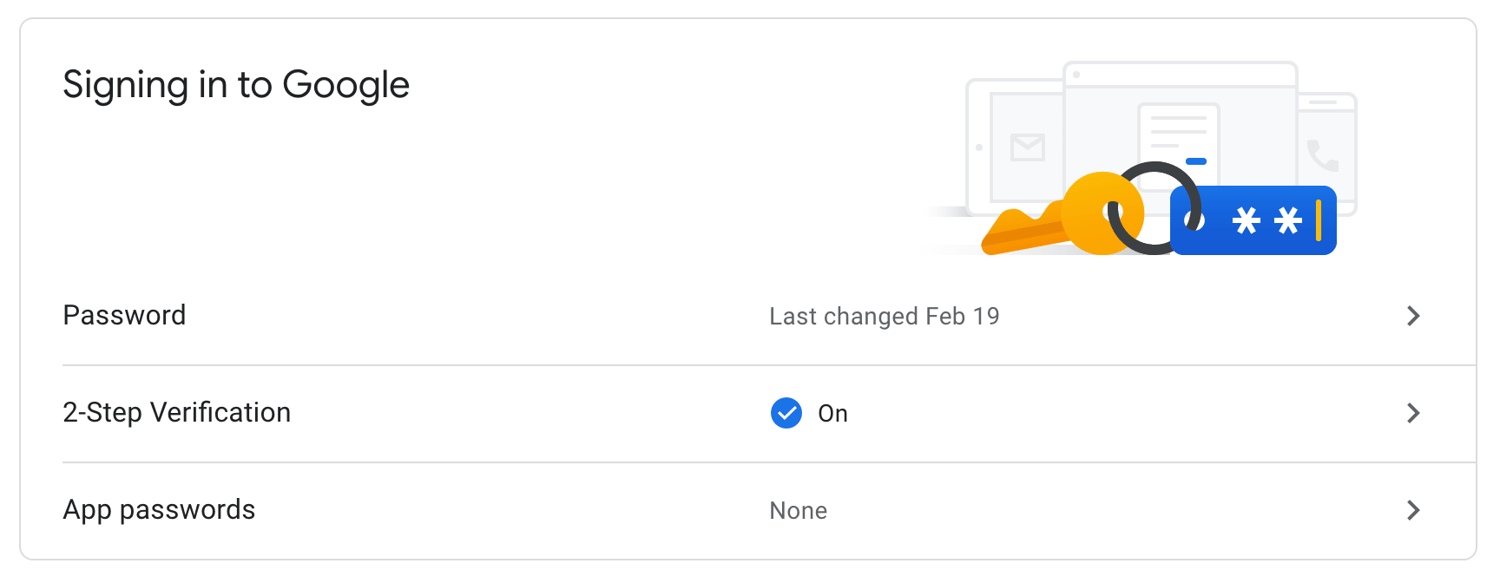 Next, select “Turn Off” to disable 2-Step Verification for your Gmail account.

It’s important to note, Apple removed the option to turn off two-factor authentication for Apple IDs created in iOS 10.3 or macOS 10.12.4 and later.
However, you have a two-week period during which you can still disable the function. Simply open your iCloud email account and find the enrollment confirmation email, then click the link to return to your previous security settings.
Editor’s note: This post was originally published in March, 2019 and has been updated for comprehensiveness.

Personal Firewalls Explained and The 5 Best Ones for 2020
No two computer viruses are the same, but the worst ones can enable cyber criminals to steal your most personal information, destroy your data, and even damage your computer’s hardware.
Macs and PCs both have built-in firewalls that help shield your computer from malicious cyber attacks, but if you want an extra layer of protection, you can purchase and download a personal firewall.
Check out the following personal firewalls to figure out which one is right for you.
5 of the Best Personal Firewalls for Mac and Windows
1. McAfee LiveSafe
Price: $104.99 Per Year For an Unlimited Amount of Devices
Available On: Mac and Windows
McAfee LiveSafe is an antivirus software that protects your computer from viruses and ransomware.
It offers a safe web browsing tool that warns you about risky websites, links, and files, a multi-factor password manager app, a digital file shredder, and encrypted storage, which protects your most sensitive information on your computer with 128-bit encryption.
McAfee LiveSafe performed well enough in recent third-party tests to be considered one of the best antivirus software out there, and since you can use it on an unlimited amount of devices, it’s also one of the most affordable options on the market.
2. Norton Security Premium
Price: $54.99 Per Year For Up to Five Devices
Available On: Mac and Windows
Norton Security Deluxe leverages one of the largest civilian cyber intelligence networks to protect your computer from viruses, spyware, malware, ransomware, and other advanced online threats.
Norton Security Deluxe also offers a Smart Firewall, which can shield your personal and financial information from hackers that gain unauthorized access to computers from seemingly “broken” sites that actually download viruses once people visit it.
Norton Security Deluxe scored high on Top Ten Reviews’ in-house testing, so if you’re looking for a powerful firewall solution, it’s the personal antivirus software for you.
3. Kaspersky Internet Security
Price: $47.99 Per Year For Up to Three Devices
Available On: Mac and Windows
In addition to shielding your computer from viruses, ransomware, and cyber attacks when you surf the web or download anything, Kaspersky Internet Security can also protect your bank and card details when you bank or shop online and safeguard your personal information from malicious links on social media.
The software constantly scores high on independent laboratory tests that assess its capability of detecting and stopping malware, and the cheapest plan can protect up to three computers in your household, so if you need an affordable antivirus solution for your family, consider choosing Kaspersky Internet Security.
4. Intego Mac Premium Bundle X9
Price: 69.99 Per Year For Up to Three Devices
Available On: Mac
After purchasing and downloading the latest version of Intego’s Mac Premium Bundle, you can leverage a real-time antivirus protection software that automatically scans your Mac, and an intelligent firewall and a hotspot network protection tool that blocks cyber criminals from accessing your computer through the internet.
You also get access to a Cleaner Software that can remove unnecessary files from your computer, a parental control tool, and a data backup tool.
Ranked as the best personal firewall for Mac by Top Ten Reviews and earning perfect scores on their in-house testing for blocking spyware, ransomware, and phishing attempts specifically designed to infect Macs, the Intego Mac Premium Bundle is one of the best antivirus softwares for Mac users.
5. Bitdefender Internet Security
Price: $79.99 Per Year For Up to Three Devices
Available On: PC
By constantly testing different types of protection in malware detection tests run by independent labs, Bitdefender Internet Security has refined their solution enough to offer some of the best web attack prevention, ransomware protection, real-time data protection, anti-fraud, and anti-phishing tools out there. They also offer access to their own VPN, webcam protection, and vulnerability assessments.
Ranked as the best overall personal firewall in 2019 by Top Ten Reviews and the most expensive solution on this list, Bitdefender Internet Security is perfect for people who make shielding their computers from the most advanced cyber attacks a top priority in their lives.
Editor’s note: This post was originally published in January, 2019 and has been updated for comprehensiveness.

What Is Phishing and How Can You Protect Your Business From an Attack?
Staff at MacEwan University, a school in Edmonton, Canada, received an email from a major vendor stating they had recently changed their electronic banking information and needed payments to be sent to a new account.
Assuming their trusted business partner was just going through some changes, the university complied and transferred three payments to the new bank account within a span of 10 days.
But four days later, MacEwan University received a phone call from this same vendor asking them why they hadn’t paid their fees yet. Perplexed by the call, the university told them they had just transferred the payments to their new bank account.
The vendor had no idea what they were talking about.
Unfortunately, this bank account didn’t actually belong to MacEwan’s vendor. It belonged to cyber criminals in Canada and Hong Kong. And MacEwan University had just transferred them $11.8 million.
Eventually, the university discovered the email requesting them to transfer their payments to the new bank account was actually fraudulent and a prevalent form of cyber attack that thousands of businesses fall victim to every year — phishing.
Examples of these credentials include passwords, credit card details, bank login information, and social security numbers.
Most cyber criminals deploy phishing attacks through email, like the picture below, but some have also started to exploit social media, messaging apps, and text message to steal people’s personal information.
Phishing instances have rose in number over recent years — in fact, there were over over
60,000 phishing sites reported in March of 2020 alone. This cybercrime could wreak havoc on your brand and bottom line.
So how do you defend your customers and employees from phishing without making them your brand’s first line of defense?
Here are three shields you can leverage to protect your brand from these prevalent attacks.
How to Protect Your Business From Phishing Attacks
1. Build a DMARC record.
DMARC (Domain-based Message Authentication Reporting and Conformance) is a cutting-edge email authentication protocol that leverages two other authentication protocols, SPF (Sender Policy Framework), and DKIM (DomainKeys Identified Mail) to verify legitimate messages sent from your domain and block fraudulent emails that appear to be sent from your domain.
These email authentication protocols are rather technical, so in a nutshell, SPF is a record of IP addresses that are authorized to send emails on your behalf that email service providers check against, and DKIM is a verification process that leverages cryptographic authentication.
DMARC is the only technology that can ensure your “header from” address (what your users usually look at first when they see your emails) is trustworthy.
To do this, they’ll only authenticate email messages that pass SPF authentication and SPF alignment or DKIM authentication and alignment. If an email message fails SPF authentication or alignment and DKIM authentication or alignment, it’ll fail DMARC.
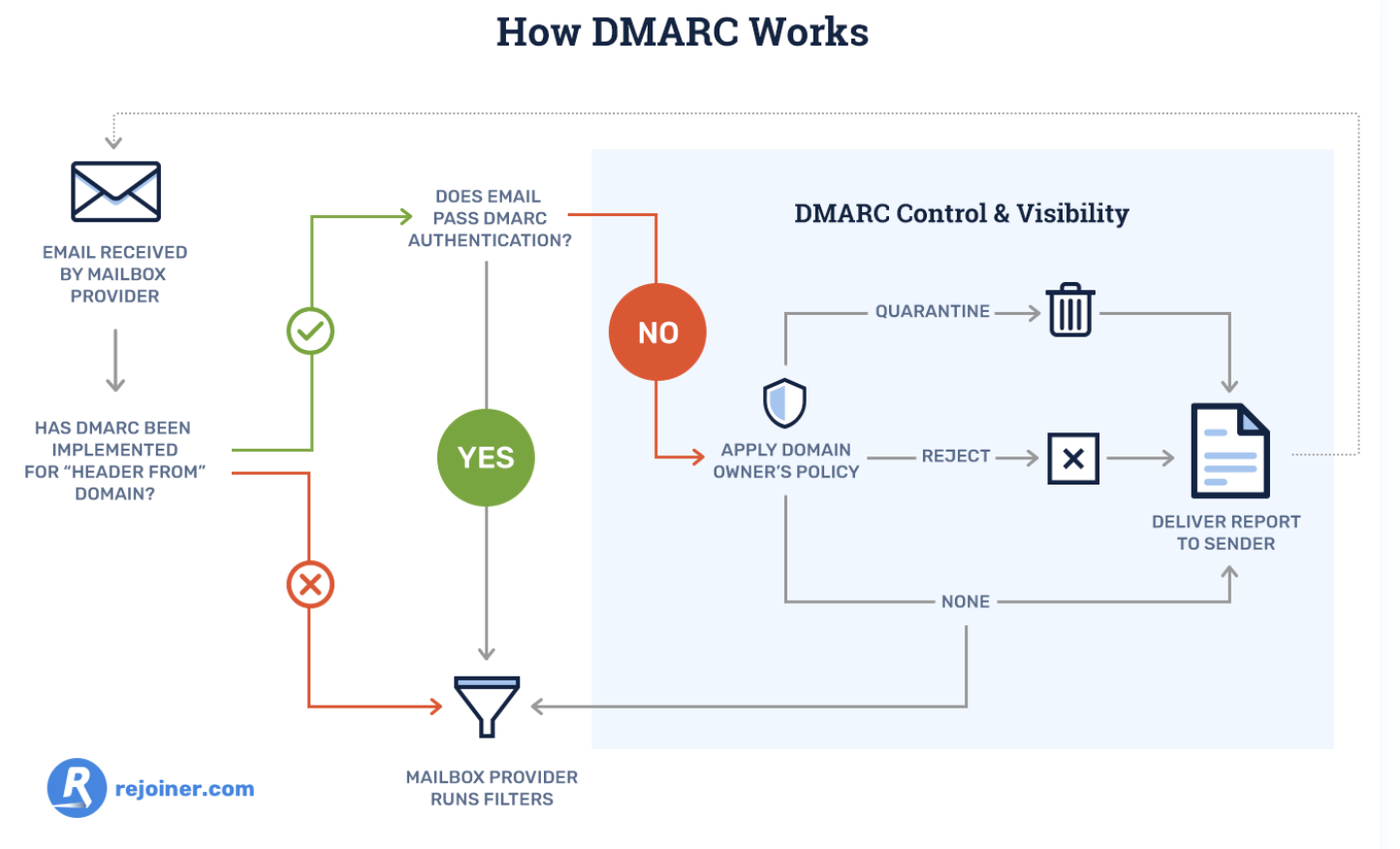
DMARC also allows you to tell email service providers what they should do with any fraudulent mail that appears to be sent from your domain. You can either monitor all of your emails, move unauthenticated messages to users’ spam folders, or decide not to deliver this type of mail at all to inboxes on your server.
Additionally, email service providers will regularly send you forensic DMARC reports, showing you which emails are authenticating, which ones are not, and why.
2. Train customers and employees to spot an attack.
According to PhishMe, a phishing defense solution, companies who train employees to identify and report attempted phishing attacks only have a 5% susceptibility rate to phishing.
To help employees and customers spot one of these attacks and better defend your business, teach them these common phishing markers:
Poor Spelling, Grammar, or Writing
A lot of amateur cyber criminals don’t take the time to craft clear and convincing emails, which brands always seem to do, and foreign cyber criminals will usually rely on Google Translate to translate their messages. So if you receive a poorly written email from a seemingly legitimate sender, take caution.
Suspicious URLs
Most phishing emails lure people into clicking through to a malicious or fake website. To do this, cyber criminals will usually spoof the website’s URL by creating a lookalike one, or they’ll mask their dodgy URL by shortening it.
Whenever you see a weird or shortened URL, make sure you hover your mouse over it to see if the landing page’s web address is different or fake.
Mismatched Sender Address
Even if a cyber criminal can perfectly imitate your brand’s voice, formatting, logo, address, and contact email address in their phishing email, there’s still a trait of yours they can’t copy — your sender address.
Cyber criminals will usually create a lookalike sender address or just use a string of characters in hopes that you won’t check it. To verify a brand’s sender address, check out the sender’s domain in the email’s “from” header and see if it matches the brand’s domain.
3. Invest in email security software.
If your company has the funds, email security software like Proofpoint and Barracuda are the most reliable and effective lines of defense against phishing.
Well-versed employees can still fall victim to cleverly-crafted phishing emails and cyber criminals constantly refine their malicious tactics, like sending phishing emails from the legitimate domains of compromised websites.
But since email security software can identify unusual traffic patterns and monitor fishy URLs, it can effectively detect, block, and respond to these sophisticated threats before they reach your customers and employees’ inbox.
Avoid Getting Snagged
Arm yourself with DMARC, thorough employee training, and the best-fit email security software for your specific systems and situation, to shield your customers, employees, and brand from phishing attacks — no matter how enticing the bait is.
Editor’s note: This post was originally published in December, 2018 and has been updated for comprehensiveness.


What Is Product Classification, and Why It Matters for Your Marketing Efforts
The other day, I roamed the aisles of CVS and picked up the same Crest toothpaste I’ve been buying for years.
I didn’t think twice about it. I made the purchase on auto-pilot. I didn’t consider testing out a different brand, or purchasing one from another retailer.
Toothpaste, as it turns out, is known as a “convenience good”, which matches my buying behavior.
Understanding product classification can help you understand your consumers’ general buying behaviors, which will help you market your product more effectively.
There are four types of product classification. Let’s dive into each type, so you can determine where your product falls in the list.
Consumer Product Classification
There are four types of product classification — convenience goods, shopping goods, specialty products, and unsought goods.
Let’s dive into each one in more detail.
1. Convenience Goods
Like the Crest toothpaste example, convenience goods are products that consumers’ purchase repeatedly and without much thought. Once consumers choose their convenience goods’ brand-of-choice, they typically stick to it unless they see a reason to switch — such as an interesting advertisement that compels them to try it, or mere convenience at the checkout aisle.
These products include toilet paper, soap, toothpaste, shampoo, milk, and other necessities that people buy over and over again.
To market a convenience good, you want to consider that most people will impulse buy these products. Placing your products near the checkout line at a store could be a good idea for these products — which is why you’ll often find candy and gum at the front of a store.
Since most convenience goods are low-price, pricing and discounting isn’t a major factor. I won’t switch my toilet paper brand just to save a few cents. For convenience goods, brand recognition is key, so you’ll want to implement wide-spread campaigns to spread awareness of your company if possible.
For instance, Charmin toilet paper is a popular brand in the United States — likely in part due to the company’s consistent and long-term advertising strategy, dating back to the 1960’s with the invention of “Mr. Whipple”, a Charmin character who appeared on TV, print, and radio.
2. Shopping Goods
Shopping goods are commodities you likely think of when you hear the word “shopping”. They might be higher-end items like cars or houses, or smaller items like clothing and electronics.
Consumers typically spend more time conducting research, comparing prices, and chatting with salespeople when they’re looking to purchase shopping goods. These are more one-off purchases, and are typically more important and higher economic-impact products compared to toilet paper or soap.
For instance, while you will buy toilet paper over and over again for the rest of your life, you’ll likely only purchase a house a few times at most. And, since it’s an expensive and important purchase, you’ll spend a good amount of time deliberating on it, attending different open houses, speaking with various retailers, and comparing pros and cons of your final selection.
The same can be said for smaller products. A nice t-shirt from the Gap, for instance, isn’t typically an “impulse” buy. Instead, you’ll want to try it on, consider whether the price is worth it, and even text a picture of it to a friend.
To market a shopping goods product, then, you’ll want to invest in content that helps persuade your buyer that your product is worth it. It’s important your marketing materials demonstrate how your product differs from the competition, and the unique value-add it provides consumers.
This will vary depending on your industry and product, but ultimately, marketing shopping goods entails helping consumers understand why they should choose your product over others in the marketplace.
3. Specialty Goods
A specialty good is the only product of its kind on the market, which means consumers typically don’t feel the need to compare-and-contrast or deliberate as much as they would with other products.
A good example of this? iPhones.
I’ve been purchasing new iPhones for years, and I haven’t paused to consider other smartphone models — not because an iPhone is an “impulse” buy, but because of the brand recognition and unique quality I feel I’m getting from an iPhone. It’s the same reason people buy Mercedes. There isn’t anything else on the market like it.
For this reason, if you’re marketing a specialty good, you don’t necessarily need to spend too much time convincing consumers that your product is different from competitors. They already know it’s different. Instead, your company should focus on constantly innovating on its previous products and producing the “next best thing”. This will ensure your customers will remain loyal to your brand.
For instance, if Apple stopped making impressive improvements on their iPhones and promoting new features, I might consider switching brands. But since they’ve continued to impress me over the years, I’ve continued to purchase from them.
4. Unsought Goods
Finally, unsought goods — a product that people aren’t typically excited to buy, and also don’t buy on impulse. Good examples of unsought goods include fire extinguishers, batteries, or life insurance.
People will typically buy an unsought good out of a sense of fear or danger. For instance, you wouldn’t go on the market looking for the “new and best” fire extinguisher. You’d only purchase one due to the fear of a potential fire. Alternatively, some unsought goods, like batteries, are bought simply because the old ones ran out.
When marketing an unsought good, you’ll want to focus on reminding consumers of the existence of your product, and convincing consumers that purchasing your product will leave them with a better sense of security.
For instance, Duracell’s Beach x Bear commercial encourages viewers to remember the importance of batteries in life-threatening situations, like impending bear attacks (as well as the everyday importance of batteries, like when using a metal detector … ).
Hopefully, you can find a clear fit with your product in one of these four classifications. Use consumers’ buyer behavior to inspire your next marketing campaign. How can you meet — and exceed — customers’ expectations of your product type?
