
How to Optimize Your Content for Google’s Featured Snippet Box
In the past few years Google have been refining the way that it displays results to users. In particular, Google has been increasing the number of Featured Snippets that it displays for queries. This actually pushes organic results further down the page. So what does that mean for SEOs?
Well, that’s what I set out to explore. Naturally, ranking in the Featured Snippet itself remedies the problem of positioning, but is this strategy something worth doing? What is a Featured Snippet, anyway? And more importantly, what do you have to do to appear there?
What Is a Featured Snippet?
Featured Snippets — also known as answer boxes — are selections of content displayed on the search engine results page (SERP) without the user having to visit the page where the content lives. Google puts these snippets above regular SERP results but below the ads in an effort of serving the user better.
For example, the Featured Snippet below displays the direct instructions pulled from the tasteofhome.com web page.

There are no ads for this query, so the Featured Snippet shown in the answer box is above position 1 of the SERPs for “how to make bread.” The directions are shown in four steps before the user has to click a single link.
Types of Featured Snippet
- Paragraph
- List
- Table
- Video
- Accordion
- Rich Answer
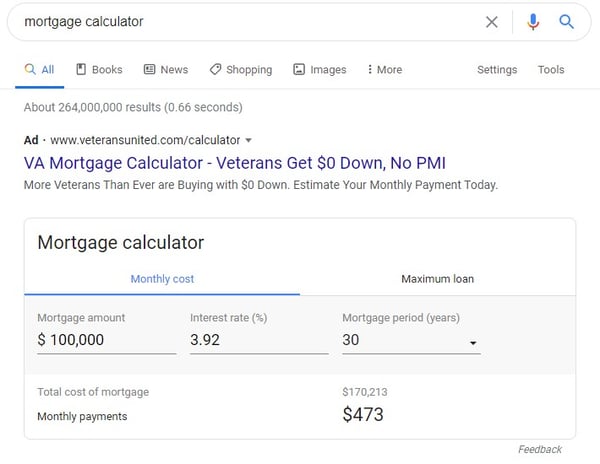
- Tool or Calculator
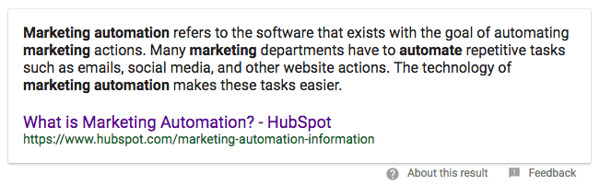
Paragraph
Paragraph-formatted answer to the searcher’s query. This is the most common type of Featured Snippet, encompassing 50% of all snippet results (Moz 2019).
List
Bulleted or numbered list that answers the searcher’s query (typically shows up for more process-driven, step-by-step, and list queries). This is the next most common type of Featured Snippet, encompassing 37% of snippet results (Moz).

List snippets can take the form of numbered or bulleted lists.
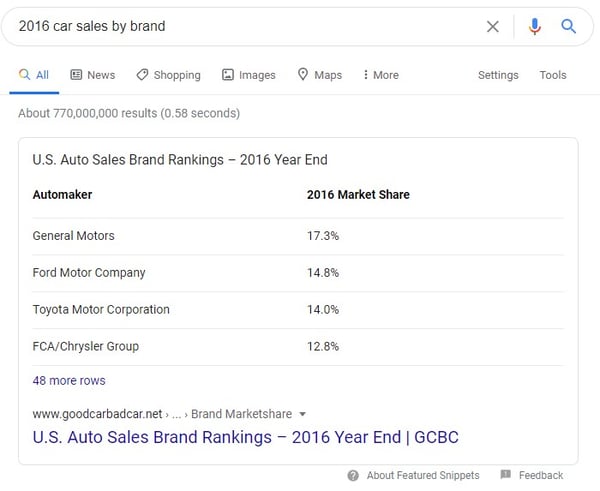
Table
Answer to the searcher’s query involving data or other information presented in a table format.
Video
Video result embedded on the page intended to answer the searcher’s query in a visual/auditory format.

Accordion
Answer to the searcher’s query presented with additional information that the searcher can choose to expand to learn more about.
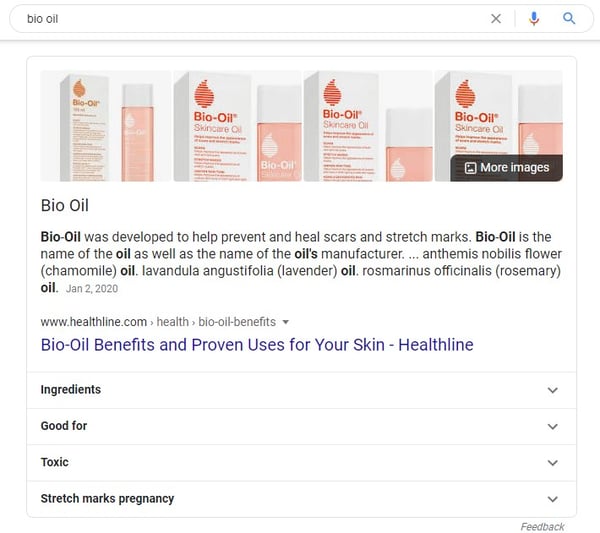
Rich Answer
Short call-out in which the answer to the searcher’s query is featured in bold along with additional information.
These often manifest for questions that have factual, metric-based answers:

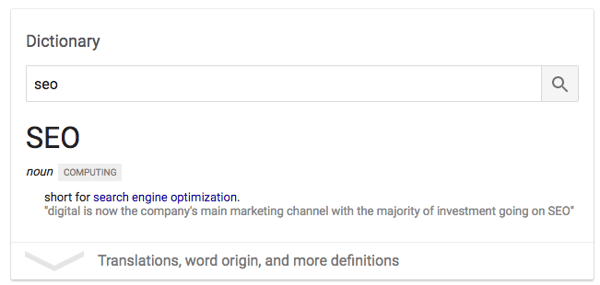
In addition, dictionary definitions are common rich answers:
Tool or Calculator
Answer to the searcher’s query in the form of an interactive tool that can output user-specific answers.
Tools can appear for very high-level and concrete queries. Examples of tools that Google shows are calculators, conversions, time zones, weather, game scores, and more.
Why Should You Care About Featured Snippets?
One of the first conclusions that a lot of people involved with SEO jumped to was that Featured Snippets would have a hugely negative impact on the amount of people that actually click through to the pages within the results. This actually hasn’t been the case. In fact, it’s dramatically increased the click-through rate (CTR) of results ranking within it.
From a sample of just under 5,000 queries, I found that the CTR to the HubSpot website for high volume keywords increased by over 114%, even when we ranked #1 (just below the Featured Snippet — like in the example below).
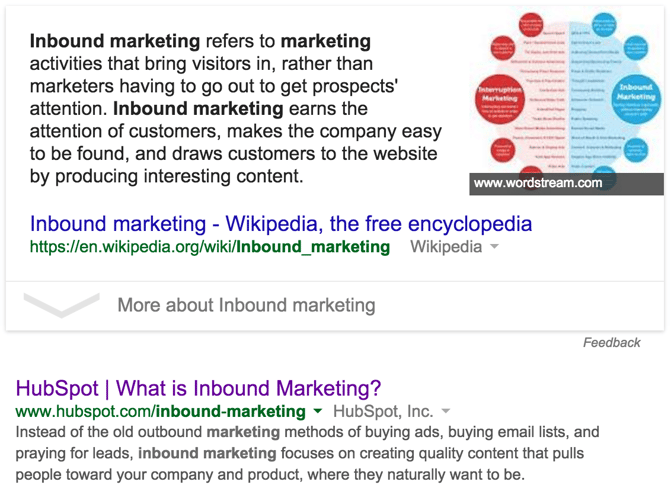
So to give you an example, let’s say you rank #1 (the first post below the snippet) on page one of Google for a keyword that’s searched for 10,000 times. From the data I’ve collected, you could expect roughly 1,700 visits, compared to the 3,700 you might see if you landed the Featured Snippet spot — and that’s just one keyword.
Here’s another interesting piece of data that illustrates how valuable it can be to rank in the Featured Snippet within Google:
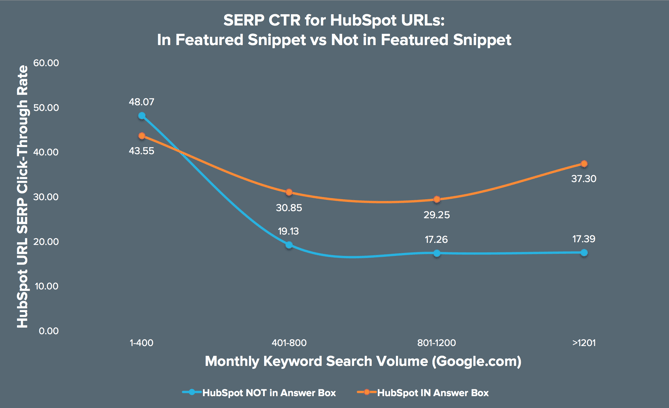
Again, to decipher this graph, here’s a brief overview:
- The x-axis relates to the monthly search volume for the search queries measured.
- The y-axis shows the click-through rate (CTR) of the ranking HubSpot URL from within Google (i.e. how many people clicked on our search result versus the rest of the results in the search results page for a query).
- The blue line plots the CTR from the SERPs for HubSpot URLs when we do not appear in the Featured Snippet, broken down by query search volume (x-axis).
- The orange line plots the CTR from the SERPs for HubSpot URLs when we do appear in the Featured Snippet, broken down by query search volume (x-axis).
By and large, we get much more clicks through to our content when we appear in the Featured Snippet, but this becomes increasingly important as the search volume for a query increases.
For high traffic keywords, ranking in the Featured Snippet saw an average increase in CTR of over 114%, and that’s even if we’re ranking #1 on page one.
Now that you know that featured snippet acquisition is a worthwhile SEO strategy, there are a few things that you should keep in mind as you attempt to win your own placements.
How to Get a Featured Snippet
- Target question-based queries.
- You don’t necessarily need to use schema.
- Organize the structure of your pages with headings and paragraph tags.
- For non question-based keywords, take a definition-style approach.
- When applicable, include steps for solving a problem or answering the question.
- The content should be between 54-48 words long.
- Don’t rule out an international approach.
- Don’t worry about backlinks as much for Featured Snippets.
If you’re looking to learn more about how to optimize your content for Featured Snippets, HubSpot Research has a full research report: HubSpot’s Guide to Winning Google’s Featured Snippet and HubSpot Academy has a free SEO course.
Featured Snippets have been a bit of a mystery for a lot of people involved with SEO, as it hasn’t been that easy to determine what influences getting your content to appear within them. Here’s what we know for sure:
1. Target question-based queries.
Stone Temple found that from 850,000 question-based queries, 19% of them had a Featured Snippet.
2. You don’t necessarily need to use schema.
There’s been a lot of conflicting advice out there about markup for snippets, including the idea that Schema.org data was the reason behind Google displaying this data. However, considering that more than 80% of the websites I’ve looked at that rank within the Featured Snippet don’t use any kind of Schema.org markup data, it’s safe to say that this isn’t the case.
Not only that but Gary Illyes, a Webmaster Trends Analyst at Google, has said outright that structured data has nothing to do with ranking in the Featured Snippet.
3. Organize the structure of your pages with headings and paragraph tags.
Markup aside, a clear page structure seems to be important as well as the semantic relevance to the keyword in question.
There should be an area on the page where the search query appears in a header (h2, h3, h4, etc.). The content you want to appear in the Featured Snippet should be placed in a <p> tag directly below the header.
4. For non question-based keywords, take a definition-style approach.
For shorter, less question-orientated keywords that display a Featured Snippet (e.g. “Inbound Sales”), it’s much more likely that Google will pull through a paragraph of text. Google tends to prefer ‘answers’ that begin logically as an answer would.
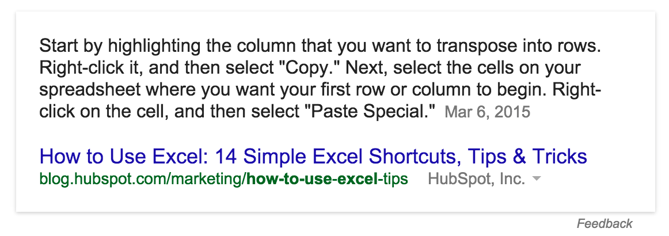
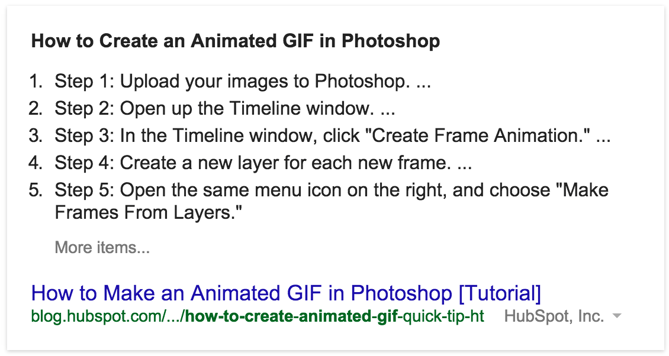
5. When applicable, include steps for solving a problem or answering the question.
Some answers require a more in-depth explanation, often involving a step-by-step process. Page structure is incredibly important here. Each step should be structured appropriately in a list format or represented on the page as heading (h3) tags.
6. The content should be between 54-58 words long.
For the paragraph-style answers (not the steps), content that’s between 54-58 words long tends to perform the best.
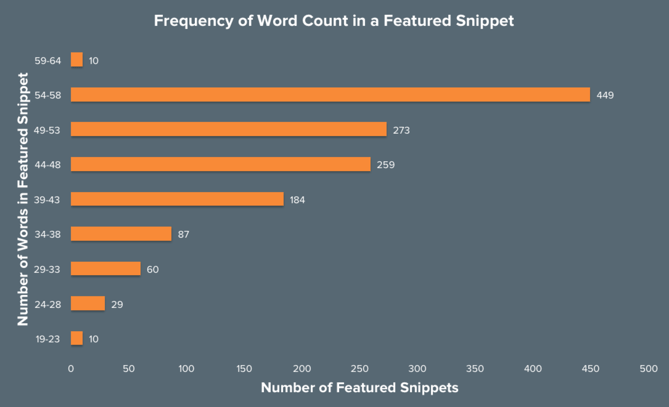
I extracted all of the content from within the Featured Snippets that I sampled. I did this to identify any trends in the content being displayed in order to better understand what Google is looking for.
As you can see, content between the length of 54-58 words in total seemed to appear by far the most frequently.
7. Don’t rule out an international approach.
Featured Snippets for the same query often have different content within Google.com, Google.co.uk, Google.com.au, and Google.ie. Try “how to search on Google” as one of many examples.
8. Don’t worry about backlinks as much for Featured Snippets.
During my analysis of 4,713 HubSpot queries for Featured Snippets, I uncovered something unusual, shown in the chart below.
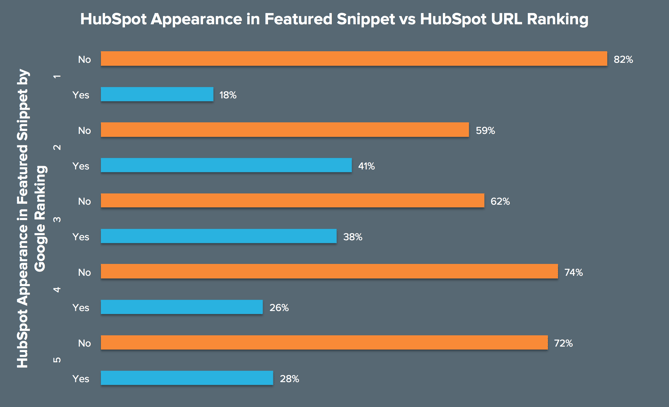
Allow me to explain what this chart is demonstrating:
- The numbers (1–5) in the y-axis relate to the position on page one that a HubSpot URL ranks for a given query.
- For each position HubSpot ranks for, there is a bar that shows how often we appear in the Featured Snippet (blue) and how often we don’t (orange).
So, for keywords that we rank #1 for on page one in Google SERPs, we only appear in the Featured Snippet 18% of the time. Contrastingly, we appear in the Featured Snippet 28% of the time when we rank #5. Strange, right?
Well, what this says to us is that once you’re in the top 5 results on page one, building backlinks and other authority signals matter much less for ranking in the Featured Snippet.
In fact, I’ve seen lots of occasions where relatively unknown websites with much less SEO authority than HubSpot have ranked above us, possibly due to more intentional use of page structure and other best practices described above.
My advice for anyone looking to increase their visibility within the Featured Snippet box is to first run a quick audit of the keywords that you’re ranking for within your current SEO campaign and how many of them are question-based queries. Once you’ve got this list, you can drill down on where you’re currently ranking, how well your content is structured, and then devise a plan to reoptimize your content based on the advice I’ve given above.
Editor’s note: This post was originally published in July 2020 and has been updated for comprehensiveness.

The Ultimate Guide to Managing Remote Marketing Teams
Behind many great teams are great managers.
Take my manager for example. Each day, she oversees a team of blog writers and editors, reports on the HubSpot Blog’s progress to stakeholders, and also manages many of the logistics and processes that keep our site running smoothly.
But, the blog’s editorial processes and traffic strategies aren’t the only things she focuses on. Most importantly, she takes time to empower each individual on our team. She mentors us as we lead projects that benefit the blog, plans team bonding activities, ensures that we’re getting the tools and training we need to do our jobs, and checks in with us regularly to make sure the work we’re doing is fulfilling.
It sounds like she does a lot, right? And the kicker? Half of the team she manages, mentors, and empowers isn’t even based in HubSpot’s Cambridge office.
By this point, you might know that managing a team, even isolated to one office, isn’t for everyone. On any given day, you need to balance your own workload, overall team success strategies, and working with individuals within your department. To do this, you must balance being a team player and a leader. You also must be highly organized, strategic, and have a high level of emotional intelligence.
In a company that’s primarily in-office, a manager can directly impact the success of their team. But, this role is even more important when it oversees a fully or partially remote team.
Why? When your team is widely dispersed, a manager is tasked with bringing together their employees and giving them the tools to work well together. In times of confusion, questions, or ambiguity related to remote work styles, the manager is expected to make calls or answer critical questions.
As the manager of a remote team, you need all the skills of an in-office manager — and more. Not only do you need to be tactical and organized, but you also need to take extra time to make sure that colleagues feel in the loop, included, and like they can succeed at your company. This takes added time, much more communication, and a strong sense of inclusion and empathy.
Whether you’re a new or experienced manager, moving from leading an in-office to a dispersed team can be a major transition. To help you, I’ve compiled a guide of 10 tips for remote team management. These tips relate to logistically planning your remote team’s processes, building an inclusive culture, and using emotional intelligence as a team leader.
How to Effectively Manage Remote Teams
Creating Processes Around Remote Work
1. Create an effective remote hiring and onboarding process.
Before you can manage a remote team, you’ll need to hire and onboard your talent.
To get started, use digital platforms such as Indeed or LinkedIn to announce and promote your new job position. Be sure to note that the position can be held remotely in any location. This descriptive language will make it easier for prospective candidates to find your listings via search engines, as well as your own promotions.
Our managers have seen that one of the best ways to interview and evaluate a remote candidate is through a virtual hiring process. While this process could include video interviews with hiring managers and the candidate, it could also include other steps such as a writing test to evaluate a candidate’s writing or other virtual tasks that allow a candidate to show off their level of skill in a given area.
If you can accept candidates in different locations and timezones, you should also take steps to accommodate them in the hiring process. This could include hosting an interview during their work hours.
When you interview remote talent, you’ll also want to put any judgments related to a candidate’s location aside and interview them in their natural work environment.
Additionally, “If you’re hiring for a position that is open to being remote or in office, conduct all interviews via video call to avoid any location biases in your hiring panel,” says HubSpot Marketing, Sales, and Service Managing Editor Meg Prater.
After you complete the hiring process, you’ll want to welcome your new hire with a smooth virtual onboarding process that teaches how the company works while allowing them to get to know their teammates remotely.
As you prepare an onboarding process for a remote employee, identify ways that you can digitize your current onboarding process. For example, if there are documents or resources an employee should read up on, make sure they are in a PDF, Google Doc, or online format. You might also want to create an internal training website, or knowledge base, where employees can find these documents even after they’ve completed a new-hire orientation.
If there’s an aspect of your onboarding that is too complex for a PDF format, consider doing a virtual training session where you walk your employee through various tasks. This will allow them to see a demonstration of a process they’ll do first-hand and ask you questions about it as they learn.
On the HubSpot Blog team, each employee’s onboarding process lasts roughly 100 days and can be fully virtual. During this process, remote employees receive virtual training sessions, links to blog posts, and digital resources that relate to their role, self-paced mini-online courses that familiarize them with our software, and informal virtual coffee chats which allow the new employee to get to know colleagues.
On top of virtual onboarding, every employee has regular check-ins, career chats, and ongoing training with his or her supervisor to ensure that they’re progressing in their role.
Ultimately, the goal any manager should have when onboarding remote employees is to make them feel supported, informed about how their company works, and more confident in their new role.
To start an employee off on the right foot, think about your current onboarding processes and where they can be improved to add more communication and decrease confusion. Then, determine how you can make these processes virtual.
As you identify elements of the onboarding process that can be made virtual, create an outline for your process. Then, to help you refine or improve on this process, ask new remote employees who undergo it for feedback at the end of their first few months. This will give you an idea of what’s working and what needs to be improved.
To learn more about the logistics behind onboarding, the paperwork you’ll need to have your employee filled out, and the things you can do to make their experience feel welcoming, check out this detailed onboarding checklist. If you’re looking to onboard an employee in a customer-facing role, you can also check out this remote onboarding guide.
2. Schedule and run effective virtual team meetings.
When you or your team members are remote, team meetings will be a crucial means of communication. Not only do they allow you to all join on one video call to talk about projects or goals, but they also enable teammates to get to know each other and stay visible.
Determining Which Meetings You Need
When you have a remote or global team, you’ll want to have at least one fairly regular meeting to regroup and get on the same page. For example, you might want a monthly meeting with your team and other stakeholders to discuss team performance and goals, and a weekly standup meeting to learn what your immediate team is doing.
“Conduct a weekly standup meeting for everyone on your team to be together in the same virtual room,” advises Prater. “It’s important to have that face-to-face time each week.”
“Our team starts by giving a one-word overview of how they’re feeling, followed by an ice breaker, a roundup of what everyone’s working on, and then a discussion article provided by a different member of the team each week.” Prater shares.
Preparing for a Virtual Meeting
If you haven’t already, you’ll want to designate a meeting software, such as Zoom or GoToMeeting based on your needs, budget, and how large your virtual meeting will be. Then, you’ll want to make sure that all of your team members have the program on their computers.
When you’re ready to schedule the meeting, be sure to pick a time that works for team members in different timezones. Stick to this meeting time and avoid canceling to ensure that remote employees who didn’t get a cancellation notice don’t tune in.
Send an email and calendar invitation to your team explaining why you’ve decided to hold the meeting and what they should do to prepare for it. You’ll also want to include meeting login information or a number they can call into if they aren’t near a computer.
If you’d like employees other than yourself to present at the meeting, it can also be helpful to create a slide deck ahead of time so each teammate asked to speak can submit and get their slides approved by you beforehand.
Allowing teammates to submit slides beforehand will help you ensure that each teammate will give the most valuable information to other remote employees in the time they have to present. Using one slide deck will also limit any issues related to switching screen-shares during the meeting.
Running the Meeting
Just before you launch the meeting, make sure that your computer’s sound and video are working and that you have a work-appropriate background. You should also ensure that the environment around you is quiet and not distracting to your teammates.
Once you launch the meeting, wait a minute or two before starting the discussion, just in case other remote employees are running late from another virtual meeting. During this time, feel free to mingle with teammates and get to know them.
If you have colleagues that can’t attend the meeting, plan to record it. This way, someone who wasn’t available or had technical difficulties can listen to the meeting discussion after to stay in the loop.
If the meeting includes a small group of people or a new employee, leave time in the beginning for everyone to introduce themselves and give a brief description of what they do at your company.
You can also consider a quick virtual ice-breaker. As Prater mentioned above, this is something that the blog team has embraced in our weekly meetings.
“Ice breakers might sound cringe-worthy, but they single-handedly transformed our meetings from transactional run-downs of everyone’s to-list to a fun, personal opportunity to get to know our teammates a little better,” Prater says.
Wrapping Up the Meeting
At the end of the meeting, leave time for questions. If you have some in-office employees and some remote employees, it can be helpful to invite remote employees to ask questions first to avoid teams accidentally speaking over each other.
Then, send the slide deck and meeting recording link to your team so they can reference these resources later on.
Refining Your Meeting Schedule
As you start to run multiple virtual meetings, Nataly Kelly, HubSpot’s VP of Localization, says you should continue to evaluate their effectiveness.
After each meeting, Kelly says you should try to answer questions like, “Are the right people in the meeting?”, “Is this the right frequency for meetings?”, “Is the meeting too long or too short?”, and “Is this the best use of everyone’s time?”
“Often, you only need to change one variable to make things work better for a remote team,” Kelly says.
While it might be tempting to book your team with tons of virtual meetings to stay on the same page, Kelly instead advises that you leave team members with some flexible calendar space each week.
“Make sure you’re not filling your calendar with eight hours of video calls per day. Encourage your team to block time to work on other projects,” Kelly adds. “Or, if the team lends itself to it, consider doing most of your meetings in the mornings and leaving afternoons for other work. Just make sure you give people time in their day that is unscheduled.”
To learn more about scheduling an effective virtual team meeting, check out this list of tips and strategies.
3. Check-in with individuals on your team regularly.
When you or your teammate is working remotely, you can’t easily turn to them to ask them a question, get to know them, or have a casual work conversation. This is why, on top of your roster of remote meetings, you should also consider booking one-on-ones or informal virtual coffee chats with people you don’t often see daily.
This will allow you to keep up with your employees, discuss their work with them, help them with any blockers they might be facing, and offer visibility so they can feel like you’re an accessible manager.
Aside from discussing work with each employee, Prater says you should also schedule times to discuss your employee’s career growth and progress.
“The biggest worry I hear from remote folks or those being managed by a remote manager is that they won’t have the same opportunities for advancement,” says Prater. “I over-communicate when it comes to career growth.”
“I have weekly check-ins with each of my direct reports where we talk about what they’re working on. But I also schedule quarterly career chats where I draw up a personalized growth plan for each of them, and we run through prompts to check their satisfaction in their current role and their aspirations for what’s next,” Prater explains.
Aside from scheduled one-on-ones, you should also consider leaving some areas of flexible time on your calendar. This way, if a remote colleague has a question or concern that’s easier to discuss in person than via text-based message, you’re able to quickly jump on a call.
“Be ready to jump on a phone call or video conference without having to schedule a time for it,” advises,” Susanne Ronnqvist Ahmadi, HubSpot’s VP of International Marketing advises. “Let your team know you’re available over your instant messaging software and build “air-time” into your calendar for check-ins and quick talks.”
4. Embrace and implement digital productivity tools.
On top of video call software, there are many helpful tools that you can use to manage remote or dispersed teams. Here just a few types of tools you should consider implementing:
Scheduling Tools
When everyone is remote, having an email or Slack discussion just to determine a good time for a meeting can be redundant and non-productive. Luckily, there are plenty of tools that allow you to request, manage, and schedule meetings with your team.
For example, if you have Microsoft Outlook or GSuite, you can see your teammate’s calendars, working hours, and availability. Then, you can send a meeting invite for a time that they’re free. From there, your teammate can accept, reject, or suggest a new time for an event.
Task Management Systems
With a task management system like Trello or Asana, you can create a joint team project and assign different team members to tasks virtually. You can also give tasks deadlines and check to see if they’re been marked as completed.
Instant Messengers
Ever got caught up in a giant email thread where multiple people were replying to the same message? An instant messaging app, such as Slack, will allow you to create group threads to discuss projects, upload assets within the conversation, and see when other team members have replied clearly. This is also a helpful way to communicate with your team about topics that don’t require a full video call to discuss.
Aside from quick conversations, you can also host mini-meetings on your instant messaging platform. For example, the HubSpot Blog has a weekly meeting where we submit blog titles to a group chat and request feedback on them virtually. This takes little time and provides us with an opportunity to work with in-office and remote employees.
To learn more about 35 remote work tools, check out this detailed guide.
5. Be mindful of timezones and remote employee boundaries.
Remote work options allow you to hire talent from every area of the world. This is a great way to boost the level of diverse thinking on your team and learn about different marketers.
However, one challenge global teams face is adapting to teammates in different timezones.
As a remote team manager, it’s important to navigate around your teammates’ differing work hours, while also encouraging teammates in your timezone to be mindful of other remote teammate schedules.
As you onboard employees or implement a team calendar, ask remote teammates to mark their working and non-working hours on their schedule. You can also have an intro conversation with teams to discuss timezones and preferred work hours, just to ensure that all team members are up to date with who will be working when.
If a large chunk of your team is in another timezone, you might also want to consider working on that timezone’s schedule one day a week or doing a split shift, where you complete half of your work hours when one chunk of your team is most active and another do another shift when a team in another timezone is online. This strategy could help you be more available to your global teammates and stay in the loop of what they’re up to.
6. Align with outside teams virtually.
At a company with remote or dispersed employees, you shouldn’t just focus on your own team. You should also be sure to communicate regularly with other departments to see where your team’s work can align with there’s and where you can benefit the bigger business.
One example of this is sales and marketing alignment. While marketers aim to reach goals related to traffic and brand awareness, salespeople are focused purely on the bottom line. While both teams are vital for their businesses, they can get disjointed due to their differing success metrics. However, when these two teams work well together, marketers can hit their KPIs while also benefiting the company’s overall sales.
As a marketing manager, you should try to plan virtual chats with sales managers and other teams to discuss goals and where your team can align with theirs. You can also use digital tools, like marketing attribution software, to get an idea of how your work impacts the greater company.
In the long run, these meetings will allow you to think of the company with a broader scope rather than just focusing on your team’s efforts all the time.
Creating an Inclusive Culture
7. Take steps to ensure all teammates feel included.
Commonly, remote employees struggle with feelings of disconnection and a lack of visibility.
Without an office filled with people, remote employees don’t have the opportunity to make small talk with colleagues, ask questions, or have a quick work-related chat. This can leave them feeling unincluded or out of the loop on team projects. They might also worry that it will be hard to excel at their company if they aren’t as visible as other employees.
To help each employee feel a sense of belonging, identify where you can make processes and group events more inclusive.
“We often remind managers that it truly is the little things that can make a difference in allowing a remote employee to feel included,” says Siobhán McGinty, a Principle Marketing Manager.
“That feeling of inclusion can make such a difference to employee retention, happiness, and performance — so the little things actually matter quite a lot,” McGinty adds. “During the remote week, we heard lots of examples of how managers and teams go above and beyond in ensuring that their remote counterparts are included in the day-to-day.”
In a recent post about the HubSpot marketing team’s experimental work-from-home week, McGinty offered a list of actions that could make remote teammates feel more included. These could include sending e-birthday cards, inviting remote teammates to in-person get-togethers via video call, or organizing a virtual gift exchange around the holidays.
Aside from making your remote employees feel included through simple actions, you can also schedule activities that allow them to offer ideas or work virtually with the rest of the broader team.
For example, you could host a campaign brainstorm where all remote members are invited to share their ideas. Or, before you leave for the holidays, you could expense your team’s dinners and host a virtual hack night where you work ahead to ensure the business still runs smoothly when everyone’s on vacation.
Not only do team bonding activities allow the team to work together, but they also allow remote members to feel included and get to know their colleagues.
8. Identify opportunities for virtual team bonding.
It can be easy to think that your team is bonding during business meetings and team celebrations. But, the truth is, your colleagues might only see each other during these times.
To build an even better team, consider virtual opportunities that allow teammates to get to know each other on a more human level.
Just the other day, my team took part in a virtual Pictionary-like game called Drawasaurus. While this meeting had nothing to do with work, it allowed us to chat, learn about each other, and have fun with teammates we don’t get to see daily.
If your schedule is incredibly limited, you can also make time for virtual bonding in regular team meetings. For example, as Prater, noted earlier each of our blog meetings begins with at least two icebreakers.
Aside from enabling teammates to get to know each other during virtual events, you should also identify opportunities where you can get to know the individuals on your team more personally. For example, rather than scheduling a one-on-one to discuss only work with a remote employee, you could schedule a remote coffee chat that’s just devoted to getting to know teammates.
“As with any relationship, time spent together is important. And if you’re remote, that time naturally is more limited. As a result, building rapport is even more challenging,” says Susanne Ronnqvist Ahmadi, HubSpot’s VP of International Marketing.
“I try and make an effort in getting to know the people I’m working with to understand how we can best work together, communicate, and interact with each other,” Ronnqvist Ahmadi explains.
Using Emotional Intelligence
9. Encourage empathy among in-office and out-of-office teammates.
When it comes to remote work, some of the biggest challenges that employees face are feelings of loneliness and disconnection. They also find it hard to unplug at the end of the day because their work is not clearly separated from their home life.
As a remote team manager, it’s important to recognize the challenges your employees might face and give them any other guidance when necessary. If you have any teammates who are in-office, you should also encourage them to consider the challenges a remote employee might go through on a regular basis.
Recently, to help in-office employees understand the benefits and challenges of working from home, HubSpot asked the entire marketing department to remote for one week. While some people really enjoyed the opportunity to work remotely, some struggled with staying focused, communicating with teammates, and finding an effective workspace. Although the experiment only lasted for a week, it gave in-office employees a taste of the workstyles benefits and challenges.
10. Use emotional intelligence at all times.
While you might be calm and collected when managing a team in the office, overseeing remote teams might feel different to you emotionally. Even though you can’t see a team and they can’t see you, you should still use emotional intelligence at all times.
Emotional intelligence, also called EQ, is a sought after skill that enables you to understand your emotions and train yourself to react in an appropriate way to certain scenarios.
For example, when managing a remote team, you might need to resist the urge to mistrust or micromanage colleagues that you can’t see every day.
In this scenario, leaders that lack emotional intelligence might panic about their team going off-course and begin to control every aspect of everyone’s work. Meanwhile, an emotionally intelligent leader might address this concern by scheduling check-ins with teammates to make sure a project is on the right track.
“Resist the temptation to micro-manage, even if you feel uncomfortable about having less visibility into the day-to-day,” says Kelly. “Autonomy and flexibility are hugely important for managing remotely.”
“Keep your team focused on the critical goals, and don’t worry about how they get there,” Kelly adds/ “Trust them to solve problems and make good decisions, but set a high bar to show you trust them to accomplish great things with the privilege of autonomy and flexibility.”
In another common team management scenario, you might find that your employee made a big mistake when you were offline.
While a less emotionally intelligent leader might send a long ranting email, someone who understands their emotions will take a minute to note what frustrated them about a situation and then plan a chat to discuss constructive feedback with the employee.
“No angry emails,” Kelly advises. “Trust and respect matter hugely for remote teams to operate well, and because email is more important for remote teams, it’s important to keep emotions out of it where possible.”
Kelly explains that email and other digital communication should be respectful and “not a place for venting.”
Emotional intelligence can also help you in scenarios when there’s a disagreement amongst your teammates, according to Kelly.
“When you sense someone is angry or disagrees with a decision on a remote team, jump on a call quickly to resolve it,” Kelly says. “Don’t let things fester.
“Sometimes, the lack of face to face interaction makes it easier for people to jump to conclusions or feel misunderstood. It’s important that you signal to your team that if they are upset or concerned, that you’re there for them,” Kelly advises.
While you should use emotional intelligence to manage your own responses, you should also encourage your team to use the skill in their work life, too.
For example, if you find that someone is inappropriately venting over a communication platform. “make it clear what people should do instead.” Alternatively, ask your teammates to schedule one-on-ones or send polite messages requesting a quick chat to discuss a situation.
“Give your team an option to vent about things that won’t be disruptive to others, and importantly, won’t lead to side chatter either,” Kelly says.
When you use emotional intelligence properly, your teammates will feel comfortable coming to you with questions and concerns more often. They’ll also develop a stronger sense of trust in you as their manager. Ultimately, a manager who understands their emotions and the emotions of others can manage teams in a number of different scenarios.
Navigating Remote Work
If you’ve never worked remotely or managed remote teammates, it might take time to develop the perfect dispersed team management strategy.
As you build up your management tactics, your most important goals should be to help the team to function smoothly, build an inclusive work culture that enables employees to succeed, and use emotional intelligence at all times. While building solid processes is key to ensuring work gets done, taking time to build a positive company culture will allow team members from every region to feel like they can contribute their diverse thoughts, ideas, and strategies.
Want to learn more about the remote work style? Check out this blog post on remote work stats or this post on work-from-home productivity tools. If you’re curious about how work styles like remote work could expand and evolve, this post will walk you through how the marketing workplace could change in the near future. You can also check out our Ultimate Guide to Management for more tips for running in-office and remote teams.

Instagram Influencer Marketing Myths, Debunked
Growing up for me, becoming an influencer wasn’t a job someone could aspire to be.
But nowadays, it’s a job that kids dream of and an industry that impacts young adults purchasing decisions.
At this point, you might be wondering, “What’s an influencer?”
According to Influencer Marketing Hub, “An influencer is someone who has the power to affect the purchasing decisions of others because of their authority, knowledge, position, or relationship with their audience.”
On the other hand, Andrew Delaney, a senior manager on the HubSpot social media team, says, “We are all influencers every time we choose to post. We could be suggesting or recommending a location, a business, an item, or another person by taking the action of sharing that content in the first place. In each of these instances, we are influential, even when we are not trying to directly influence.”
The influencer industry has been around for over a decade now, and a lot of myths about the industry have circulated in that time.
In this post, let’s review the top influencer marketing myths that have been debunked.
1. Influencer marketing is diminishing in popularity.
When social media first came on the scene, a lot of old-school businesses were hesitant to adopt it as a major marketing tactic. The influencer industry has been no different.
Many organizations haven’t adopted influencer marketing in their ongoing marketing strategy because they think it’s a fad that will diminish in popularity.
However, that isn’t correct.
In 2018 alone there were 3.7 million brand-sponsored influencer posts on Instagram.
Additionally, 49% of consumers today depend on influencer recommendations for their purchase decisions. 60% say they’ve been influenced by a recommendation when shopping in-store.
According to Krystal Wu, a social media community manager at HubSpot, “The Instagram influencer marketing trend is not and will not, in the near future be canceled. With businesses relying more on social media, now more than ever, influencer marketing is helping businesses reach larger audiences.”
She added, “Think about it like this — influencers on Instagram are the new model examples on how products wear, work, function, and are used rather than in-store experiences.”
2. You shouldn’t use smaller accounts.
One of the most prominent myths of influencer marketing is that you need to use large accounts to see results.
However, the opposite is often true.
While micro-influencers seem like a small player in the influencer marketing game, in a recent study, 82% of respondents said they were “highly likely to follow a micro-influencers’ recommendation.”
So, how does this work in practice?
Nicole Acosta, a social media and marketing manager at Iron Physical Therapy and Edison Innovation Foundation, says, “Instagram influencers don’t have to have a huge following to be effective. They only need an engaged following.”
This means that you don’t have to spend a large amount of money on your influencer marketing.
Acosta added, “Choose people who may not have hundreds of thousands of followers but have clear authority in their niche because their followers will trust their opinion and engage more with the content they make for you (which is the whole point!).”
Another expert, Raquel Swan, agreed with Acosta’s assessment.
Swan, a social media coordinator at Digital Standout, says, “Brands need to carefully select their influencers and ensure that the followers and the influencers relate to the product or service offering to have a successful marketing campaign.”
HubSpot’s social media campaign manager, Leslie Green, concurred.
Green says, “Partnering with an influencer with tons of followers doesn’t guarantee tons of sales. Don’t breeze over the power of nano-influencers who have built meaningful relationships with their audience and are incredible content creators and storytellers.”
The point here is that more followers don’t always equal more sales. If the key performance indicator (KPI) is conversion, then you should look into using micro-influencers.
“The trust micro-influencers have fostered is way more valuable than you think. And in the end, everyone is an influencer. As a brand, it’s so important to do your research and make sure the partnership makes sense for the audience and feels authentic to the influencer. Don’t just become starry-eyed from a massive following,” Green added.
3. Influencers will be hard to work with.
Another popular myth is that influencers aren’t professional. Many people think they’re shallow or untrustworthy.
On the contrary, influencers are actually entrepreneurs and content creators whose reputation impacts their ability to make a living.
Two digital content creators/influencers, Kimia Kalbasi and Martin Tettey, found this myth to be the most misleading.
Kalbasi, founder/influencer at Kimia’s Kravings, says, “A myth is that all influencers are shallow or disingenuous. There are people like that in all walks of life regardless of their job title but because influencers are at the forefront of social media, put themselves out there, and showcase their lifestyle, it’s perceived otherwise. But they’re human, too.”
Tettey, a successful writer, wears many hats. He’s a client consultant at McCann WorldGroup, a co-chair of diversity & inclusion at PRSA, and a digital content creator on Instagram.
He says, “Influencers are often ridiculed as self-absorbed people who try to sell things they don’t believe in when that’s not always true. A vast majority of influencers gave up their full-time careers as architects or engineers to pursue a life worth creating according to their passions.”
Essentially, influencers are entrepreneurs and content creators.
“Many people, like myself, love food, interior design, and travel. The best way to create inspiration for others was to create a personal brand on social media and a blog that is fully aligned and dedicated to my passion and various creative journeys that inspire myself and many others,” Tettey added.
4. You won’t see results if you work with influencers.
The name of the game is ROI and you might be thinking that you won’t see results if you work with influencers.
However, 80% of marketers say influencer marketing is effective, and 89% say it works just as well (if not better) than other marketing channels.
You might deduce that when you’re deciding on which marketing channels to use, it’s important to consider influencer marketing.
Almost 50% of customers say they follow influencers’ product or service recommendations.
Additionally, according to HubSpot’s Not Another State of Marketing Report, over 10% of respondents said influencer posts are among the most successful content for engaging your social audience.
5. You won’t get quality referrals from influencers.
Similar to the point above, many people inaccurately assume that referrals from influencers won’t be qualified leads.
However, 70% of businesses say the quality of traffic from influencers is better than from other sources.
That’s why it’s important to look at influencer marketing when you’re planning your marketing strategy for the year.
6. Success is hard to measure.
Calculating ROI is a major challenge in marketing. That’s why people assume it’s hard to measure success for influencer marketing as well.
However, that’s not exactly true.
Influencer marketing can be measured with normal KPIs including engagement, conversion rate, and impressions.
You could even run a brand awareness campaign. In fact, influencer marketing strategies focused on branding or engagements generate 8x the ROI.
7. My industry won’t do well with influencer marketing.
While you might think that influencer marketing is just for B2C companies in the beauty or fashion industry, there are influencers for every niche.
In fact, even a B2B company like HubSpot uses influencer marketing.
Samantha Giedris, a social media and video specialist at Frazer Consultants, says “There are influencers in every industry, no matter how niche it is. So it’s worth looking into who has influence in your industry even if they’re not exactly who you’d typically think of as influencers.”
Additionally, it’s important to consider influencer marketing as a strategy even if you don’t think it’s for you.
Diego Santos, a marketing manager at HubSpot, said in the Not Another State of Marketing Report, “Pay attention to private groups, micro-influencers and social movements that are relevant to your brand.”
8. Influencer marketing isn’t a legitimate form of marketing.
If I haven’t convinced you yet, influencer marketing is a legitimate strategy, even if you’ve been guilty of believing this myth.
In HubSpot’s Not Another State of Marketing Report, Lee Odden, the CEO of TopRank Marketing, is quoted saying, “To win the content marketing game, brands need to focus more on optimized, personalized and influencer activated content experiences.”
If you haven’t jumped on the influencer marketing bandwagon, it’s probably time that you think about doing so. To start, you can create a strategy and brainstorm who the influencers are in your industry.

How to Design Content Remarketing Campaigns That Actually Work
You know content marketing works, so you’ve been plugging away at blog posts, ebooks, and other valuable, educational content for your potential customers.
And people come — they find your content in search results and in their social media feeds. But they may not fill out a form and become a lead right then and there. It’s not always because they’re not interested in your message — so how do you recapture those viewers who left your site?
Recapturing audience attention to turn lookers into leads is an effective marketing tactic, and if you’re not doing it, you’re leaving money on the table.
Let me outline for you the sections I’m going to cover in this post:
- What the Heck is Remarketing?
- What Is the Google Display Network?
- Remarketing Campaign Examples
- How to Set Up a Remarketing Campaign
What the Heck Is Remarketing?
At its core, remarketing is the process of tagging your site visitors and targeting them with content after they leave your site in an effort to reengage them and bring them back to your site.
Remarketing gives you the opportunity to appear in front of people who have already expressed an interest in your website. They could be checking their email, reading the news, watching a YouTube video… and there you are, with something new and awesome to show them. It could be a reminder to complete an action they had started, or a new piece of content to further a buying decision, and so on.
Remarketing provides the opportunity to:
- Turn bounced website visitors into leads.
- Increase brand recall (and thus increase branded searches).
- Increase repeat visitor rates and engagement.
- Increase the effectiveness of search engine optimization (SEO) and content marketing.
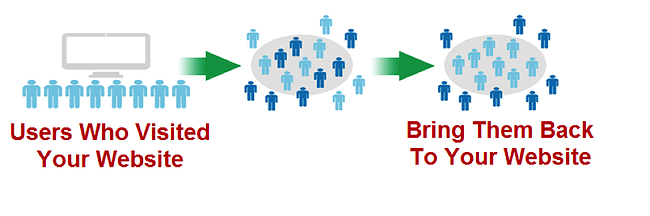
A common stat in the industry is that 96% of people who visit a website leave without completing the action the marketer would have liked them to take. Remarketing gives you a second chance to make that first impression (and even a third, and a fourth). We can’t afford to be forgettable — we have to make our content more sticky.
Alright, so we understand both the problem and the opportunity. Now, let’s dive into the solution. You’re going to learn how to use remarketing strategies with the Google Display Network to dramatically increase the effectiveness of your inbound marketing efforts.
What Is the Google Display Network?
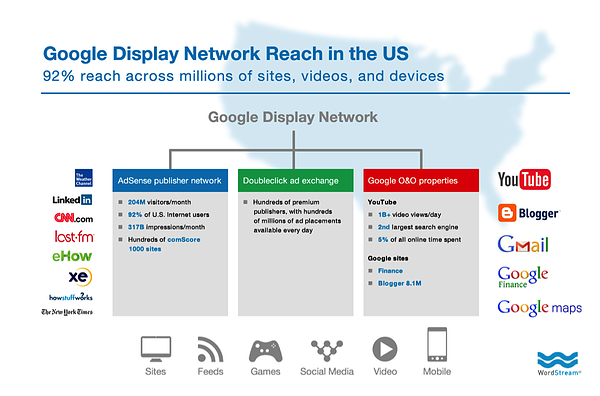
The Google Display Network is a group of websites where your Google display (banner) ads can appear.
More than 2 million sites are in the network, including heavily trafficked ones such as YouTube. Google estimates that the GDN can reach 90% of people on the internet.
Who you reach and how often will depend on your ad targeting (more on that later).
Remarking Campaign Examples
To further underscore the opportunity that remarketing has to offer, there are some really cool campaign types that you can dig into.
Online Activity
By far the most common remarketing tactic is creating an audience based on their behavior on your website. Your options here are virtually endless — with parameters such as by number of page views (indicating a high level of interest) or by which pages viewed (indicating intent).
Here are some ideas for using this type of campaign:
Targeting by Buyer’s Journey Stage
Your blog posts are earlier in the buyer’s journey than other pages on your site. That means you’d match their intent with an ad that moves them further down their journey rather than one that sells. Targeting by topic or category-say you run a bakery. Why run general ads to audiences that landed on your wedding-related content? Instead, you’d target them with more personalized ads around wedding cakes and desserts.
Targeting by Intent
Aside from just topic, there’s a lot you can learn from your audience’s site behavior. For example, visiting a product page indicates interest, but not making it to checkout could mean a price objection or other friction. This means you need to sweeten the deal in some way (like a promo or discount).
Past Purchases
You can also target those that did make it through your purchasing process and target them with ads to earn an upsell.
YouTube TrueView
The human race spends billions of hours every month watching YouTube ads. You may have your own YouTube content, but perhaps your viewing metrics aren’t quite as high as you’d like them to be, or perhaps your users have no idea you have interesting video content to share.
Using YouTube TrueView ads, you can target your audiences as they are watching other videos on YouTube.
Take the screenshot below, for example. I’m trying to watch a Teenage Mutant Ninja Turtle video and it’s showing me an ad for a tourism company in Italy. Why? Because I was planning a trip to Florence at the time I took this screenshot, and they’re remarketing to me.

The cool thing about TrueView videos is that you only pay if people view your video content. There’s no cost if the person clicks on the “skip ad” button. If you’re creating video content, why wouldn’t you pay a few bucks to promote it?
Video Views
Speaking of YouTube, your visitors don’t even need to make it to your website in order for you to retarget them. If you have a solid YouTube presence, you can create an audience based on video views. If someone watched one of your videos, you can create a display campaign that shows them your ads even beyond the YouTube platform.
Remarketing Lists for Search Ads (RLSA)
Here’s another interesting but advanced thing you can do. It’s a little complicated, but I promise it’s awesome. It’s called Remarking Lists for Search Ads.
RLSA lets you target people in your audiences with customized ads when they perform searches for specific keywords on Google.
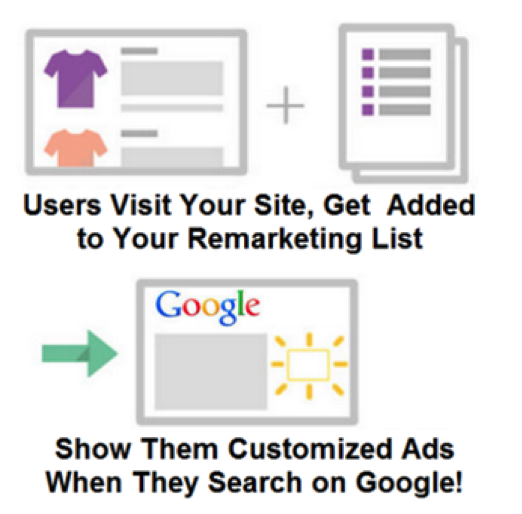
Say, for example, someone visits your site. You tag them, and now they’re in one of your audiences.
That person then searches for a competitor of yours. This probably means they’re doing some comparison shopping.
Using RLSA, you can target that comparison shopper with a specific ad, like a 10% discount code or something similar. Knowing that the person visited specific pages on your site and is now performing specific searches, it’s possible to come up with very specific and compelling ad copy.
Bonus: Remarketing With Facebook
Noticeably absent from the GDN is Facebook, the other big player on the web, and that’s because they have their own remarketing system through Facebook Custom Audiences.
It works in much the same way — the difference being that ads are shown to users within the Facebook platform.
How to Set Up a Remarketing Campaign With Google Ads
Like I said earlier, using the GDN for remarketing gives you a great deal of reach. Generally, you can find your tagged site visitors on the network many times per day, several days per week, and across many different sites.
1. Define your audience.
One of your first steps in remarketing is to define the specific audience(s) you want to remarket to. For example, you could create an audience for people who visited your blog or for people who visited specific pages on your website, like your pricing page. This will enable you to reach out to just those people with offers and messaging to suit their interests.
To define an audience, create a new remarketing list in Google Ad. Google will take care of setting all of the cookies; all you need to do is specify which website visitors to include or exclude from your audience.
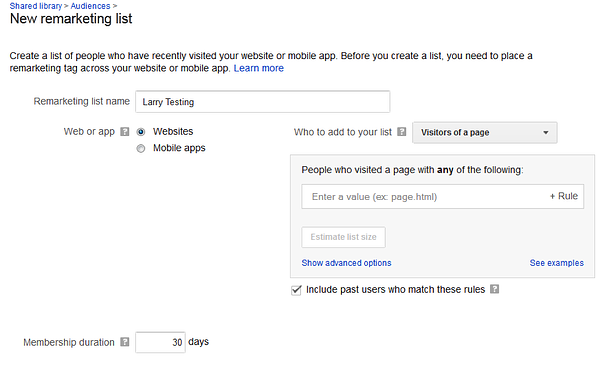
Segmenting different lists of users enables you to show different ads, depending on which section of your site they visited.
A secondary benefit is that you can bid more aggressively to get more impressions and higher ad positions, and to get visitors to the higher value sections of your website. For example, your data might show that visitors to your pricing or product page are more valuable than your blog visitors.
Another creative remarketing strategy for content marketers is to define audience categories in Google Ads based on the different post categories in your blog. If you already have a ton of blog content that is classified by topic, leverage those existing classifications in your remarketing audience definition strategy.
3. Set audience membership duration.
In remarketing, the audience membership duration is the number of days that you follow a user around with your ads. For example, if I set my audience membership duration to 60 days, then users who visit my site will see my ads for 60 days. You can test and tweak this number to see what’s right for your audience.
Ad fatigue is a real thing in every industry and across every medium: TV, radio, print … and, yes, display ads.
Now, I’d like to address a concern I’ve heard from some fellow marketers: that overly aggressive remarketing will make your prospective customer feel uncomfortable. Let’s look at a few facts and see just how “creepy” remarketing really is.
According to
Kenshoo, retargeting can lift ad engagement rates up to 400%, 60% of consumers are neutral about the topic of retargeting ads, and 25% say they actually like them.
Wishpond reports that the average click-through rate for retargeted ads is 10 times that of a regular display ad, and retargeting can lead to a 726% lift in site visitation after four weeks of exposure.
So, be bold! People visited your site for a reason, and past browsing history is among the strongest predictors of future purchasing intent. It’s worth testing out remarketing with relatively higher impression caps and membership durations and seeing what happens. As long as your offers and messaging are on target and you’re providing value, it’s not creepy. I would suggest:
- Try setting your audience membership duration to an amount equal to 3x your average sale cycle length.
- If it typically takes an average of one week to go from first touch to sale, set the audience membership duration to three weeks.
- Don’t worry too much about impression caps. (Remember, more impressions means higher conversion rates. Consider rotating though multiple ads per campaign to combat ad fatigue.)
3. Create a killer ad.
Now that we’ve talked about defining an audience to remarket to, let’s focus on how to create killer remarketing ads.
Understand Ad Formats on the GDN
There are several different display ad formats on the Google Display Network, some of which are shown below.
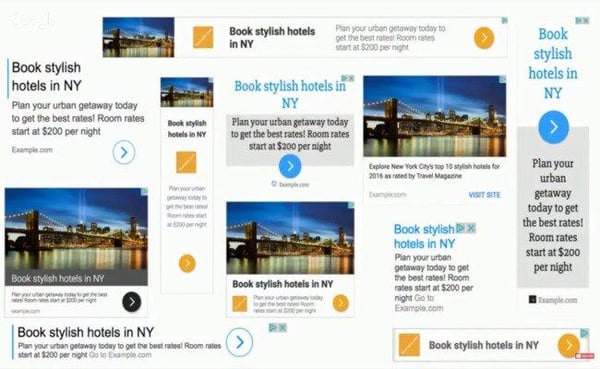
| Type | Dimensions |
| Mobile | 300×250, 320×50, 320×100, 250×250, 200×200 |
| Desktop | 300×250, 336×280, 728×90, 300×600, 160×600, 970×90, 468×60 |
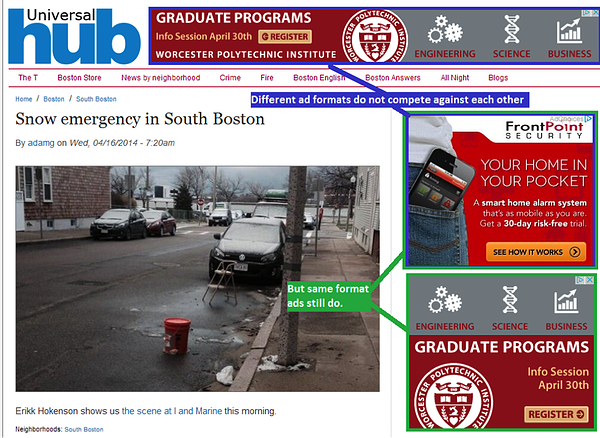
Ad formats matter to marketers because of how the ad auction works. Different ad formats do not compete against each other for positioning, as shown in this screenshot:
Write Copy That Resonates Emotionally
According to neurosciencemarketing.com, an emotional approach in advertising is nearly twice as effective as a rational approach. The same emotions that draw people to your content will drive people to click on your ads.
The key here is to create ads that resonate with users on an emotional level. Stay away from boring, plain, informational ads that look the same as every other ad out there. Instead, create ads that appeal to your audience on an emotional level.
Content marketers are uniquely qualified to become fabulous PPC marketers. Why? Because so much of the success and failure of PPC marketing relies on the creativity of your ads.
For example, look at these ads for a search of “Big Data Solutions” — the ads are essentially all the same:
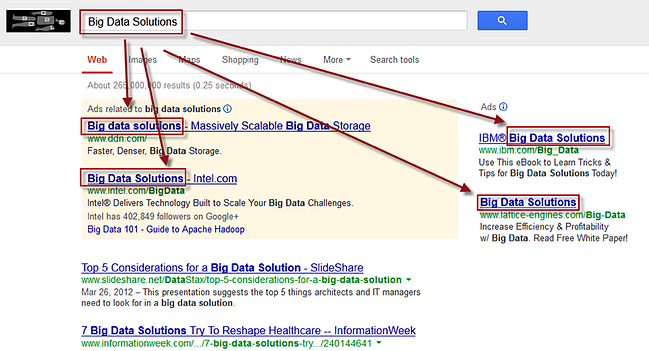
Content marketers, on the other hand, tend to have a few creative bones in their bodies. I call this a Google Ads Jackpot because it reminds me of hitting a row of lucky 7s in Vegas — I just hit a Big Data Solutions jackpot! If you can come up with an emotionally charged, totally different and stand-out ad, you can blow away the competition.
4. Perform ongoing CTR optimization.
Google doesn’t make money by showing ads no one clicks on, so it makes sense for them to show ads that are more likely to get clicks. They use an algorithm called Quality Score to determine which ads to show, what position each will display in, and how much to charge the advertiser for each ad click.
To provide an incentive for advertisers to create great ads, they give out huge discounts for ads with high clickthrough rates… and dish out huge penalties for ads with low clickthrough rates.
This all sounds good in theory, but how do you create an ad with high clickthrough rate?
1. Send people to your high-value offers.
What should you be featuring in your image ads? The most common tactic is to simply promote your highest value offers, like a free trial of your product, a request for a demo, etc. This is my top-performing ad:
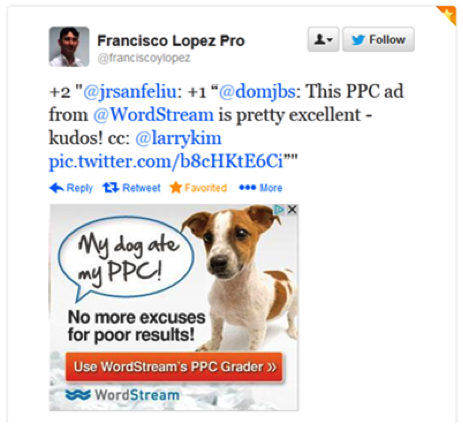
Of course it has a cute puppy. How could it not? Make people love your ads, not dread them.
2. Do a conversion path analysis.
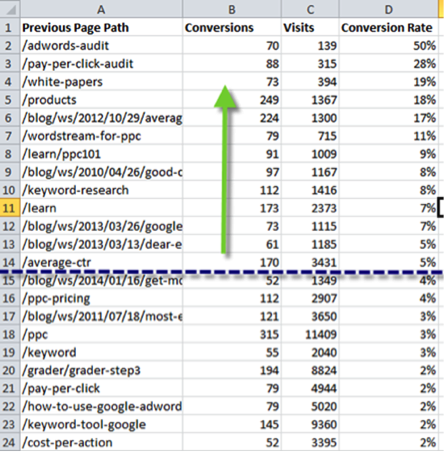
The goal here is to figure out which pages on your site, if visited during a user’s session, result in a much higher probability of the user converting to a lead or a sale. For example, the highest converting page on your site could be your product overview page. Come up with a list like this one and target those pages in your remarketing audience.
3. Send people to your best content.
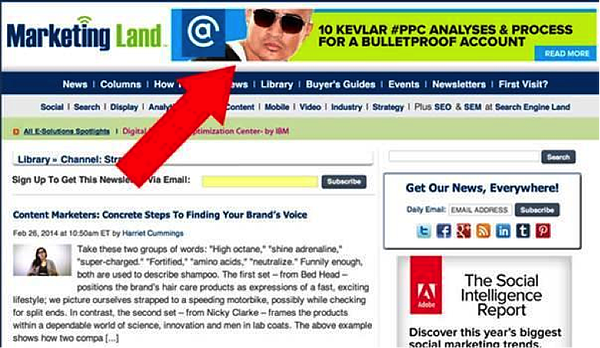
Check out this ad from my colleague Marty Weintraub at AimClear, which sends anyone who clicks to his PPC analyses.
But how do you know what content to feature in your ads?
4. Analyze social shares on your blog content.
If you analyze your blog content, what you’ll usually find is that around 5% of your pages generate half of the shares on social media.
For example, I analyzed all of the articles on one business blog over the last year and found that on average, a typical article gets several hundred shares on social media. However, the top 5% of articles gets tens of thousands of social shares. Not surprisingly, we found that the same stories that work well on social media also tend to do very well as featured content within ads.
5. Get strategic with bid management.
Now that you have remarketing audiences and ads down to a science, let’s turn our attention to bid management strategies.
Remember, in PPC marketing, you have to pay for each click. The advertiser specifies a maximum cost per click that they’re willing to pay, but the key here is not to buy every possible click. Rather, you want to be super picky and just cherry-pick the clicks that are the most relevant to your business. The way to do this is through bid management.
It doesn’t make any sense to remarket ads to everyone in your audience. Why? Because not everyone who visits your website is a qualified buyer.
With Google Ads, you can overlay user demographic information on top of your remarketing audiences to find the needles in the haystack. For example, someone from Zimbabwe could visit your site — but they can’t convert if you can’t ship there.
Here’s when it comes in handy to know a thing or two about your target customer persona.
- What are the ages?
- Parental status?
- Where do they live?
- Gender?
- What time do they search for your products?
- What is their income?
You can be very picky, and just bid for the people in your audience who also meet your demographic filters.
You’ve done your research, you know your topic, you have something interesting and entertaining to say — but sometimes you need that extra push. As individuals and brands have become publishers, the game has been upped big time. Competition is fierce.
With remarketing, we at WordStream increased our repeat visitors by 50%, tripled our average time on site, and saw a huge increase in direct visits to our site.
In short, content remarketing enabled us to maximize the value of every piece of content we put out. We were able to get each piece in front of the audience with the most intent, at the right time, and via the right channels.
You can achieve this kind of success too with a killer remarketing campaign and the right advertising plan.
Editor’s note: This post was originally published in October 2014 and has been updated for comprehensiveness.

What is a Business Plan? Definition, Tips, and Templates
The business plan is an undeniably critical component to getting any company off the ground. It’s key to securing financing, documenting your business model, outlining your financial projections, and turning that nugget of a business idea into a reality.
In an era where more than 50% of small enterprises fail in their first year, having a clear, defined, and well thought-out business plan is a crucial first step for setting up a business for long-term success.
Business plans are a required tool for all entrepreneurs, business owners, business acquirers, and even business school students. But … what exactly is a business plan?
In this post, we’ll explain what a business plan is, list the reasons why you’d need one, and identify different types of business plans.
What is a Business Plan?
A business plan is a documented strategy for a business that highlights its goals and its plans for achieving them.
Business plans outline a company’s go-to-market strategy, financial projections, market research, business purpose, and mission. The business plan is also a prominent tool used to secure investors and financing for a business.
Business Plan Template
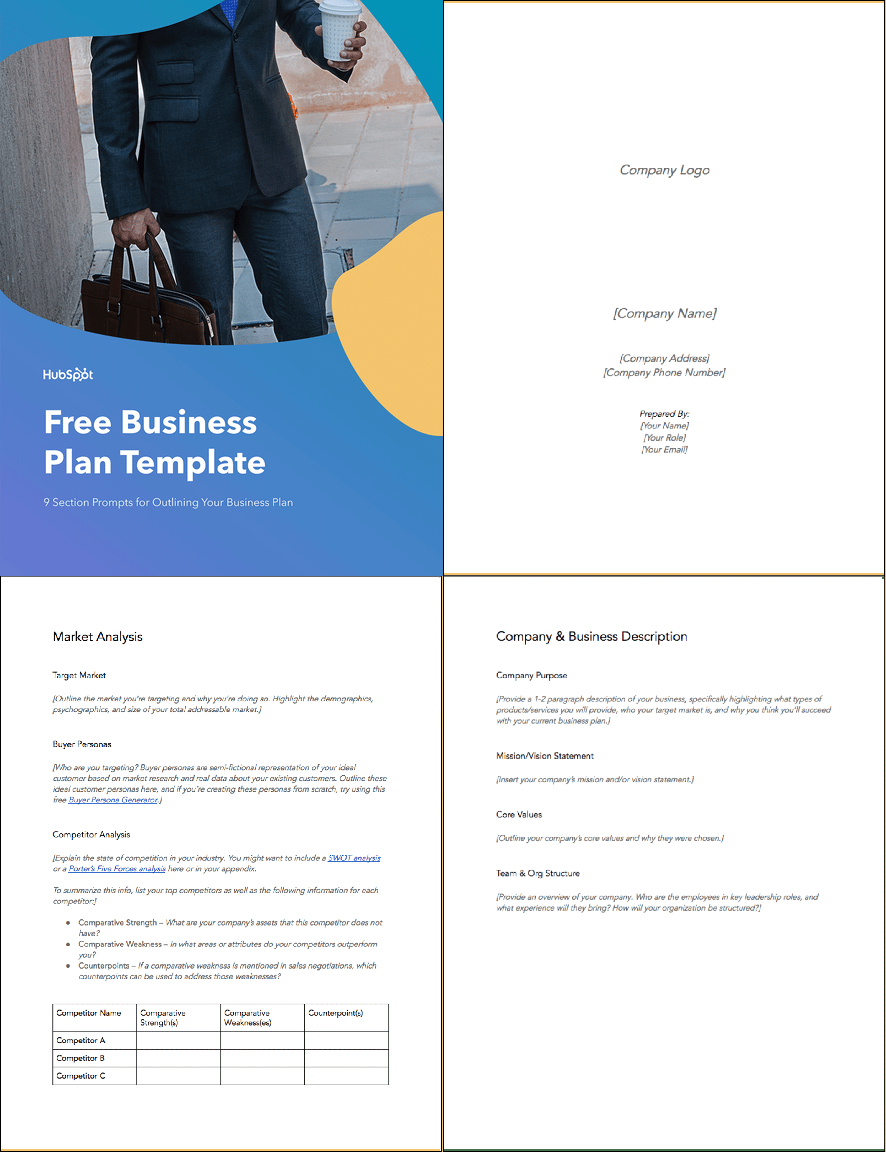 Working on your business plan? Try using our Business Plan Template. Pre-filled with the sections a great business plan needs, the template will give aspiring entrepreneurs a feel for what a business plan is, what should be in it, and how it can be used to establish and grow a business from the ground up.
Purposes of a Business Plan
Chances are, someone drafting a business plan will be doing so for one or more of the following reasons:
1. Securing financing from investors.
Since its contents revolve around how businesses succeed, break even, and turn a profit, a business plan is primarily used as a tool for sourcing capital. This document is an entrepreneur’s way of showing potential investors and/or loaners how their capital will be put to work and how it will help a business thrive.
All banks, investors, and venture capital firms will want to see a business plan before handing over their money, and investors typically want a 20-25% ROI from the capital they invest in a business.
Therefore, these investors need to know if – and when – they’ll be making their money back (and then some). Additionally, they’ll want to read about the process and strategy for how the business will reach those financial goals, which is where the context provided by sales, marketing, and operations plans come into play.
2. Documenting a company’s strategy and goals.
A business plan should leave no stone unturned.
Business plans can span dozens or even hundreds of pages, affording their drafters the opportunity to explain what a business’s goals are and how the business will achieve them.
To show potential investors that they’ve addressed every question and thought through every possible scenario, entrepreneurs should thoroughly explain their marketing, sales, and operations strategies – from acquiring a physical location for the business to explaining a tactical approach for marketing penetration.
These explanations should ultimately lead to a business’s break even point supported by a sales forecast and financial projections, with the business plan writer being able to speak to the why behind anything outlined in the plan.
3. Legitimizing a business idea.
Everyone’s got a great idea for a company – until they put pen to paper and realize that it’s not exactly feasible.
The business plan is an aspiring entrepreneur’s way to prove that a business idea is actually worth pursuing.
As entrepreneurs document their go-to-market process, capital needs, and expected return on investment, entrepreneurs likely come across a few hiccups that will make them second guess their strategies and metrics – and that’s exactly what the business plan is for.
It ensures an entrepreneur’s ducks are in a row before bring their business idea to the world and reassures the plan’s readers that whoever wrote the plan is serious about the idea, having put hours into thinking of the business idea, fleshing out growth tactics, and calculating financial projections.
4. Getting an A in your Business class.
Speaking from personal experience, there’s a chance you’re here to get business plan ideas for your Business 101 class project.
If that’s the case, might we suggest checking out this post on How to Write a Business Plan – providing a section-by-section guide on creating your plan?
Types of Business Plans
1. Startup Business Plan
Arguably the most common type of business plan, a startup business plan is used for brand new business ideas. This plan is used to take a business concept and lay the foundation for its eventual success.
The biggest challenge with the startup business plan is that it requires its writer to completely start from scratch. Startup business plans start with a blank word document, and before they are finished, need to reference existing industry data and explain unique business strategies and go-to-market plans.
2. Business Acquisition Plan
Investors will still want to see a business plan to acquire funding to purchase an existing business in order to see how its new owner will run the business.
What will change and what will stay the same under new ownership, and why? Additionally, the business plan should speak to what the current state of the to-be-acquired business is, and why it’s up for sale.
For example, if someone is purchasing a failing business, the business plan should explain why the business is being purchased and what the new owner will do to turn the business around, referencing previous business metrics, sales projections after the acquisition, and a justification for those projections.
3. Business Repositioning Plan
When a business wants to save itself, reposition its brand, or try something new, some CEOs or owners will want to develop a business repositioning plan.
This plan should:
- Acknowledge the current state of the company.
- State a vision for the future of the company.
- Explain why the business should (or must) be repositioned.
- Outline a process for how the company will adjust.
Companies planning for a business reposition do so – proactively or retroactively – due to a shift in market trends and customer needs. For example, Pizza Hut announced a plan to drastically overhaul its brand last year, as it sees the need to shift from dine-in to delivery – a decision resulting from observing years of industry and company trends and acknowledging the need to reposition itself for the future of its sector.
4. Expansion Business Plan
Building onto a successful business venture with another location typically requires its own business plan, as the project may require a new location, focus on a new target market, and demand more capital.
Fortunately, an expansion business plan allows its writers to reference sales, revenue, and successes from any previous location(s). However, as great as a reference as these points can be, it’s important to not be too reliant on them, since it’s still a new business that could succeed or fail for a myriad of reasons.
Getting Started With Your Business Plan
At the end of the day, a business plan is simply an explanation of a business idea and why it will be successful. The more detail and thought you put into it, the more successful your plan – and the business it outlines – will be.
If you need help starting your business plan, download Download HubSpot’s Free Business Plan Template and fill out the sections to meet your business idea’s concept.

The 11 Facebook Ad Campaign Objectives and How to Choose What’s Right For Your Business
Facebook ads are a great tool to get your message in front of the platform’s 2.5 billion monthly users. With such a large audience, you can understand why the platform is attractive to advertisers. Over 7 million advertisers to be exact.
To succeed and maximize your return on investment (ROI) among so many audience members and competitors, start with why you want to use Facebook ads and what you hope to achieve with them. After all, your campaign objective is the first thing Facebook will ask you about when you go to create an ad.
Your Facebook campaign objective — meaning the action you want someone to take after they see your ad — is one way the platform determines who should be shown your ad.
Within Facebook Ads Manager, there are 11 objectives spanning the three overarching categories of the buyer’s journey: awareness, consideration, and conversions.
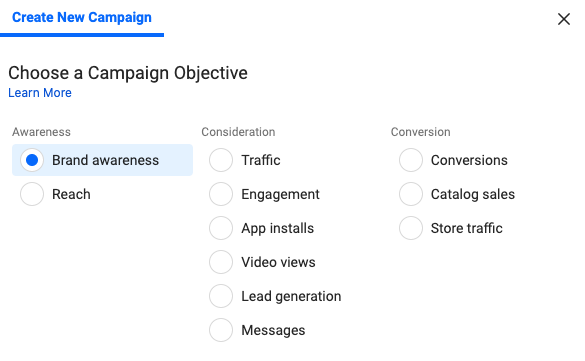
With so many options, the thought of determining which objective is best for you may feel a bit overwhelming, but no sweat — we’ll break them down below.
Check out HubSpot’s free course on Facebook Ads Training: How to Build Great Ads & Audiences
Awareness Facebook Campaign Objectives
Awareness objectives help generate interest in your product or service.
1. Brand Awareness
As you may have guessed, these ads help increase people’s awareness of your business. If you’re looking to introduce your brand to new audiences, this can be a great option. That’s because Facebook will show these ads to members of your target audience who are more likely to pay attention to and recall the ads.
Facebook predicts recall ability by polling users on whether they remember seeing an ad and analyzing their past behavior and interactions with ads.
Keep in mind the sole focus of these ads is to make people aware of your brand, so you shouldn’t expect significant engagement or click-throughs. However, they will help you establish brand familiarity and pique the interest of your target audience.
Use these ads to keep consumers aware of, and able to recall, your brand as well as highlight what makes your business and product/service unique.
TLDR: Choose this ad to increase the chances of your target audience recognizing and recalling your brand, and the features that make it stand out from competitors.
2. Reach
Facebook reach ads are shown to as many people in your target audience as possible while staying within your budget constraints. You can even specify the specific location you would like your audience to be in, so the ad only reaches people near your business. An added bonus is the ability to choose the frequency of these ads, meaning how many times someone will see the ad.
On one hand, this strategy maximizes the number of people who see your ad. On the other, Facebook doesn’t take into consideration the likelihood of the user paying attention to the ad. Meaning, you may end up paying for your ad to be displayed to audience members who tend to scroll past any form of advertisement on the platform.
TLDR: Choose this ad to send your business message to as many of your target audience members as possible, even if it means attempting to reach those who typically ignore ads. This objective can work well for local businesses.
Consideration Facebook Campaign Objectives
Consideration objectives encourage audiences to think and learn more about your business.
3. Traffic
The traffic objective aims to send people from Facebook to any URL of your choosing, such as your website’s homepage, online storefront, app, event page, etc.
Facebook does this by showing your ads to users who are likely to click based on their past behavior on the platform (newsflash: Facebook knows a lot about its users). By bringing more visitors to your featured destination, you’ll increase the likelihood of a user taking favorable actions on your landing page.
Note that, with the traffic objective, Facebook is only responsible for collecting clicks and does not measure any action(s) — or lack thereof — a user takes once they leave the platform.
TLDR: Choose this ad to direct viewers to a new URL destination so they can learn more about what you’re offering or promoting.
4. Engagement
Also based on past behavior, the platform shows engagement ads to those who they predict will engage with your ads in the form of likes, reactions, comments, and shares. The are 3 types of engagement ads: post engagement, page likes, and event responses.
Post engagement and page likes will boost engagement for your ad and Facebook business page respectively. Event response engagement ads are a unique way to promote your event to increase attendance and get people excited.
Engagement ads use social proof to determine where users are more likely to pay attention to, and be interested in, an ad after seeing how others interact with it.
Take yourself for example — would you spend more time considering an ad with 473 likes or an ad with 14 likes? I’ll take the former, please.
When others engage with your ads, their activity will also be shared with their Facebook friends, reaching even more people. Their validation will help your online word-of-mouth marketing.
TLDR: Choose this ad to establish brand credibility through likes, comments, and shares and increase interaction with your business on Facebook.
5. App Installs
This objective helps drive mobile app installs by taking users directly to the App Store or Google Play store to download your app. Facebook shows these ads to members of your target audience who have previously downloaded apps from ads to increase chances of your app installations.
TLDR: Choose app installs ads to increase app downloads for your business.
6. Video Views
Facebook will push video views ads to your target audience with the objective of getting as many views as possible. These ads can be a powerful way to tell your brand story or show your service in an engaging and consumable. After all, a HubSpot report found that over 50% of consumers want to see video content from brands.
What’s really valuable about video view ads is their ability to help you retarget those who watched your video. You can retarget people who watched your video content to remind them of your brand and product/service in hopes of boosting brand awareness and conversions.
TLDR: Choose this ad to use video to share information about your business and reach your audience via an engaging medium. Then, retarget your viewers to boost chances of conversion.
7. Lead Generation
Lead generation ads are a great way to embed lead magnets and collect leads while allowing the user to stay on Facebook. Users submit their personal information in exchange for an offer created by your business, such as an email newsletter or workbook.
The ability for the user to remain on Facebook is a huge advantage for this type of ad. This makes it easy for the user to fill in the ad’s form, while never leaving the page or straying too far from what it is they originally went to the platform for — this results in a seamless UX and can increase chances of conversion.
Facebook can even auto-fill these forms by pulling contact information from the user’s account details so all they have to do is click “Submit”.
TLDR: Choose this ad to collect leads for your business with an enticing offer. This works best when the user is already in the consideration stage of their buyer’s journey and is therefore willing to exchange their information for something of value in return.
8. Messages
With the messages objective, viewers can directly message your business through the ad using Facebook Messenger.
This is an effective way to personally connect with users to generate more interest in your business. Engaging with your audience through Messenger allows you to connect with your audience versus talking at them.
Leverage your conversations as an opportunity to answer any questions, offer customer support, build rapport with your audience, collect leads, and drive sales. Messenger is a great way to show your customers that there’s a human on the other end, ready to help them.
With these ads, it’s crucial that you’re ready to respond quickly and effectively once the messages flow in. Otherwise, prospective customers may lose interest if you’re not responsive to their inquiries.
TLDR: Choose this ad to encourage users to contact your business through Facebook Messenger, if you’re prepared to respond in a timely manner.
Conversion Facebook Campaign Objectives
Conversion objectives nudge audiences to buy or use your product or service.
9. Conversions
The goal of conversion ads is to encourage people to take valuable actions on your website or app, such as registering for an event, adding an item to cart, or making a purchase.
These ads are most successful when delivered to people who are already familiar with your product — likely, those who have gone through the awareness and consideration stages and need an extra push toward conversion.
Installing the Facebook pixel on your website will be required for these ads to help Facebook optimize your campaigns. The pixel is a piece of code for your site that tracks each time a user takes action and converts through a Facebook ad. With each conversion, Facebook learns who to target in the ads to maximize conversions.
TLDR: Choose this ad to increase conversion actions on your site or app. These ads should be served to those who are already knowledgeable about your business.
10. Catalog Sales
The catalog sales ad is made with a holistic view of ecommerce stores in mind. Instead of promoting a single product or service, ads with this objective will show relevant products from your store to people who have demonstrated interest in them before. Facebook is able to recognize this behavior based on its understanding of your offerings and the user through its pixel.
These ads require you to integrate your product catalog with Facebook so the platform can pull a selection from your store and adjust it as needed for audience members based on various factors, such as your latest arrivals.
Catalog sales ads are also more specific than conversion ads because the end goal is to generate sales, whereas the goal of conversions ads can vary from increasing registration or adding payment information.
TLDR: Choose this ad if you prefer Facebook select which products from your catalog are most relevant for your audience, based on their machine learning predictions, in order to increase sales.
11. Store Traffic
The store traffic objective is perfect for businesses with physical locations as the goal is to remove the digital barrier and bring in-person foot traffic to your store.
The ads are delivered to people who are physically near your store, so they are more likely to visit. It’s important to mention these ads target based on location only, which means audience demographics will not be considered.
There are two necessities for store traffic ads to work. As the advertiser, you must ensure that all your business locations are properly entered in Business Manager. For the consumer, their location services must be enabled so Facebook knows when to show the ad.
With those stars aligned, you’ll be able to track your store visits at each location from the ad.
TLDR: Choose this ad if your business has brick and mortar locations and you’re looking to increase store visits.
Now, when you log into Facebook Ads Manager, you should have a better idea what all the campaign objectives mean. If you’re ready to roll your sleeves up, we can help you step-by-step through the Facebook ad creation process.

How to Use Instagram Insights (in 9 Easy Steps)
It’s no secret that we love data.
Data helps you understand your audience. It tells you how they do things, what they prefer, and who they are.
And when it comes to social media, our love for data doesn’t fade.
That’s why we love analytics and insights. They help you measure the impact of your marketing efforts across different channels to see if there’s something you need to do differently — like target a different audience, post at a certain time of day, or experiment with a new content format.
Instagram Insights are no exception. Here are the analytics on this channel that marketers need to know and understand — and how to use them.
To use Instagram Insights, you must first have a business profile.
If you’re already using a personal account, you can switch to a business profile. In order to have a Business Account, you must also have a Facebook Page for your brand. Instagram will give you the option to create a new one during this process if you don’t already have one. Here’s how to convert your account in a few simple steps.
Once your set up as a Business Account, you can begin to use Instagram Insights. Here’s how to get started.
1. Click the insights icon.
To view insights into your overall Instagram account, start by visiting your profile. Then, at the top, click the icon of a bar chart, which will take you to your overall insights.
From there, you’ll see some general information about people are engaging with your profile, like how many followers you gained or lost in the past week.
Next, we’ll get into the more specific profile insights you can explore.
2. View your impressions and reach.
This insight represents how many times your ads appeared on users’ screens. Reach reflects the number of unique users that have seen any of your Instagram posts.
3. Determine website clicks.
This insight reflects the number of times any links you’ve included in your business profile have been clicked.
4. Track profile visits and followers.
Profile visits reflects the number of times your profile has been viewed. Followers reflect how many followers you’ve gained or lost over the past week, as well as the average times of day when your followers are using Instagram — data that can be highly beneficial when planning posts. To view insights for a specific Instagram post, start by visiting your profile. Tap on the post you’d like to look into, then click “View Insights” below the image.
5. Click view insights below a post for specifics.
You may have also promoted a certain post — if that’s the case, an arrow icon that looks like this will appear:

For these posts, you can either view insights on the original version of the post, or specific ones from its promotion. For the latter, tap “Promotion.”
Next, we’ll get into the more specific post insights you can explore.
6. View your posts likes, comments, and saves.
Likes speaks for itself, and reflects the number of users who liked your post. As with likes, comments reflects the number of comments left on your post. Saves highlights the number of unique users or accounts who saved your post, or clicked the bookmark-like icon that appeared below it in their feeds.
7. Learn which actions were taken on your post.
These insights indicate the number of actions that users took on your profile as a result of seeing your post — things like visiting your profile, then taking an action like clicking on your website link or following you.
Source: Instagram
8. Use Discover to see where your post showed up in feeds.
As the name might suggest, these insights indicate where your post was seen — or discovered — the most, including how many accounts weren’t already following you when they first saw the post.
This section includes metrics on Impressions, which reflect the number of times your post was discovered from a particular place within Instagram, like the user’s home feed, a search, your profile, a location tag, or a hashtag.
Source: Instagram
Discovery insights also include data on a post’s reach — which reflects the number of unique accounts that saw your post.
9. View Instagram Story Insights
Finally, Instagram users with a business profile are able to view insights into their ephemeral Stories. Instagram does not, however, offer such analytics for live videos.
To view your Story insights, start by visiting your profile. Then, at the top, tap the icon of the bar chart, which will take you to your overall profile insights.
Scroll down to the Stories section, and you’ll be able to see insights for older stories, as well as any that have not yet expired.
Next, we’ll get into the more specific Story insights you can explore.
Impressions
This insight represents how many times your Story was seen.
When viewing these insights, keep in mind that you’re able to add multiple images or videos to your Story. When you do this, every piece of visual content in your Story is counted as a single photo or video in your post.
Let’s say you add six photos to your Story. Whether someone only views one or views all six, Instagram only counts your entire Story having received one impression.
The same goes for Story content that has been viewed by a single user more than once. Instagram still only counts that interaction as the entire Story having received one impression.
Reach
This insight reflects the number of unique users that have seen your Story.
Taps Forward
This insight reflects the number of times a user taps your Story photo or video to skip to the next piece of media.
Taps Back
This insight reflects the number of time a user taps your Story photo or video to go back to the previous piece of media.
Replies
This insight reflects the number of times users send messages through the “Send Message” text box on your Story.
Swipe Aways
This insight reflects the number of times users swipe to skip to the next account’s Story — not to be mistaken for “tap forward,” which reflects users skipping ahead to your next piece of Story media.
Exits
This insight reflects the number of times a user leaves the Stories section entirely to return to the home feed.
Now that you know how to measure the effectiveness of your Instagram strategy using Insights, you can analyze that data and determine what’s working for your audience. From there, creating content that gets a ton of engagement will be a lot easier as you consider those benchmarks.
Editor’s Note: This post was originally published in January 2018 but has been updated for comprehensiveness.

How to Run Facebook Ads: A Step-by-Step Guide to Advertising on Facebook
When setting up a paid Facebook ad, there are a lot of boxes to be checked.
Are you targeting the right people? Are your image dimensions to scale? Are you running the right type of ad? If we’re being honest, it can get a little confusing.
With more than 2.6 billion people using Facebook every month, and nearly 1.7 billion users every day, Facebook offers up a unique opportunity for marketers to augment their organic efforts. The trouble is, with both an investment of time and money on the line, there’s not much room for oversight.
To help, we’ve put together a checklist to help you keep all of your campaign details straight. Or watch this short video on how to increase the effectiveness of your ads and budget. These will help ensure that you’re tapping into the right audience with the right ad at the right time.
Facebook offers a variety of paid ad options and placements, but all ads can be broken down into three elements:
- Campaigns. The campaign houses all of your assets.
- Ad sets. If you’re targeting separate audiences with different characteristics, you’ll need an individual ad set for each.
- Ads. Your actual ads live within your ad sets. Each ad set can hold a variety of ads that vary in color, copy, images, etc.
With that terminology out of the way, let’s dive in to creating an ad.
1. Create an account with Facebook Ads Manager.
Facebook’s Ad Manager is a sophisticated dashboard that provides users with an overview of all their campaigns.
Upfront, the dashboard highlights an estimate of how much you’re spending each day. The dashboard is organized by columns, which makes it easy to filter through your ads so you can create a custom view of your results. Key numbers like reach, frequency, and cost are readily available, making reporting on performance a no brainer.
In order to use the Facebook Ads Manager, you’ll need a Facebook Business Page (learn how to set one up here). This is because you can’t run ads through personal profiles.
Then, follow these steps:
- Navigate to https://www.facebook.com/business/tools/ads-manager.
- Click the button that says “Go to Ads Manager.”
- Confirm your information on the ad account setup page.
- Set up your payment method.
- Save changes.
Once set up, the Ads Manager becomes the control center for your Facebook ads.
2. Start creating an ad through Facebook’s Ads Manager.
Once you log into the Ads Manager, you’ll see a performance dashboard where all of your campaigns, ad sets, and ads will be listed including the results they’ve driven for your Facebook page. Unless you’ve already created an ad for your Facebook page, this dashboard will be empty.
To create a new campaign, ad set, or ad through the Facebook Ad Manager, tab over to the type of ad you want to create and click the green “Create” button to far left of these ad types, as shown below. You can see from this screenshot that we’re currently set to create a new campaign.
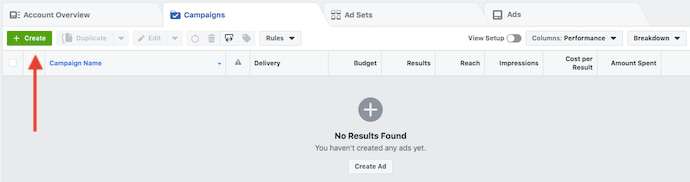
3. Choose an objective.
Facebook’s Ads Manager, like many social media advertising networks, is designed with your campaign objective in mind. Before getting started, Ads Manager will prompt you to choose an objective for your campaign:
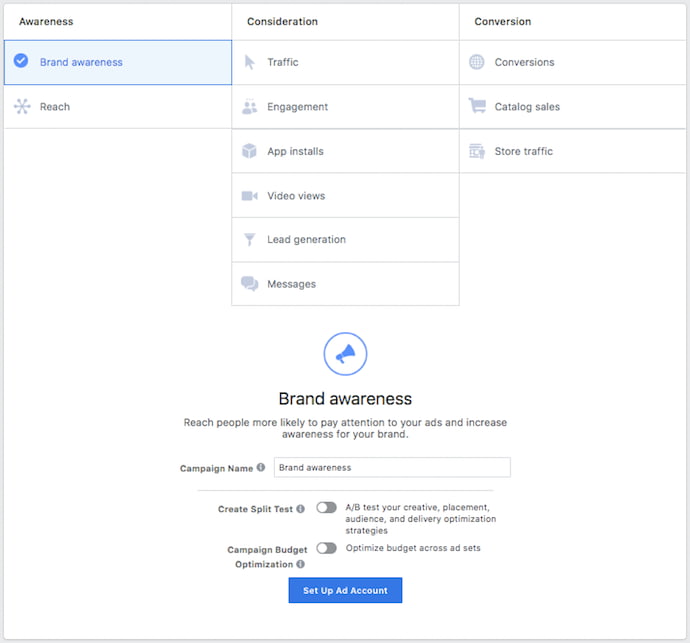
There are 11 different objectives to choose from. The list includes everything from general brand awareness, to getting installs of your app, to increasing traffic to your online store.
By choosing one of these objectives, you’re giving Facebook a better idea of what you’d like to do so they can present you with the best-suited ad options. As shown in the screenshot above, Facebook’s ad options include:
- Brand awareness
- Reach
- Website traffic
- Engagement
- App installs
- Video views
- Lead generation
- Messages
- Conversions
- Catalog sales
- Store traffic
Let’s say, for sake of this blog post, you’re looking to drive more traffic to your website. When you select this option, Facebook will prompt you to enter the URL you’re looking to promote. If you’re using marketing automation software, be sure to create a unique tracking URL with UTM parameters for this to ensure that you’ll be able to keep track of traffic and conversions from this ad. For HubSpot customers, this can be done using the Tracking URL Builder.
Once selected, Facebook will then display the ad option that makes the most sense in terms of achieving this objective.
4. Choose your audience.
Your next step is to configure your target audience — you can do this for each ad set that belongs to the same campaign. If you’re just starting out with paid advertising on Facebook, it’s likely that you’ll have to experiment with several different targeting options until you reach an audience that fits just right.
To help you narrow your focus, Facebook’s targeting criteria are accompanied by an audience definition gauge. This tool — located to the right of the audience targeting fields — takes all of your selected properties into consideration in order to come up with a potential reach number.
If you’re wavering between choosing a specific audience over a broad one, consider your objective. If you’re looking to drive traffic, you’ll probably want to focus on the type of people you know will be interested in your offering. However, if you’re looking to build brand awareness or promote a widely appealing offer, feel free to focus on a more general audience.
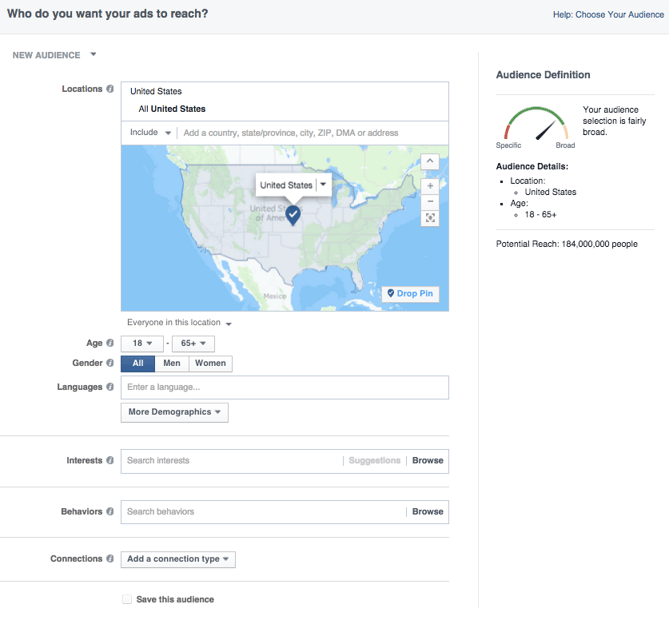
Facebook’s built-in targeting is vast, including options such as:
- Location
- Age
- Gender
- Languages
- Relationship
- Education
- Work
- Financial
- Home
- Ethnic Affinity
- Generation
- Parents
- Politics (U.S. only)
- Life Events
- Interests
- Behaviors
- Connections
You also have the option to select a Custom Audience — this allows you to target people on Facebook who are in your company’s contact database, visited a page on your website that has a tracking pixel, or use your app or game. To learn more about how to set up a Custom Audience on Facebook, check out these instructions. (And for more on the specifics of these criteria, visit this Facebook targeting resource.)
Once you find a group that responds well to your ads, Facebook allows you to save these audiences to be used again later — so you may not need to dive into this step once you’ve been running Facebook ads for a while.
5. Set your budget.
Facebook allows you to set either a daily budget or a lifetime budget. Here’s how they differ from each other:
- Daily budget. If you want your ad set to run continuously throughout the day, this is the option you’ll want to go for. Using a daily budget means that Facebook will pace your spending per day. Keep in mind that the minimum daily budget for an ad set is $1.00 USD and must be at least 2X your CPC.
- Lifetime budget. If you’re looking to run your ad for a specified length of time, select lifetime budget. This means Facebook will pace your spend over the time period you set for the ad to run.
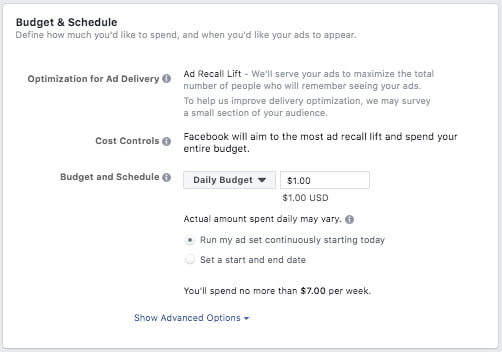
To further specify your budgeting, turn to the advanced options — this option is linked at the bottom of the screenshot shown above. This section allows you to specify a few things:
Schedule
Choose whether or not your want your campaign to run immediately and continuously or if you want to customize the start and end dates. You can also set parameters so that your ads only run during specific hours and days of the week.
Optimization & Pricing
Choose whether or not you want to bid for your objective, clicks, or impressions. (This will alter how your ad is displayed and paid for.) By doing so, you’ll pay for your ad to be shown to people within your target audience that are more likely to complete your desired action, but Facebook will control what your maximum bid is.
If you don’t want Facebook to set optimal bids for you, you’ll want to opt for manual bidding. This option awards you full control over how much you’re willing to pay per action completed. However, Facebook will provide a suggested bid based on other advertisers’ behavior to give you a sense of what you should shoot for.
Delivery
Delivery type falls under two categories: standard and accelerated. Standard delivery will show your ads throughout the day, while accelerated delivery helps you reach an audience quickly for time-sensitive ads (Note: this option requires manual bid pricing).
6. Create your ad.
What do you want your ad to look like? It all depends on your original objective.
If you’re looking to increase the number of clicks to your website, Facebook’s Ad Manager will suggest the Clicks to Website ad options. Makes sense, right?
This ad option is broken down into two formats: Links and Carousels. Essentially, this means that you can either display a single image ad (Links) or a multi-image ad (Carousel) with three to five scrolling images at no additional cost.
A Links ad will be displayed like this:
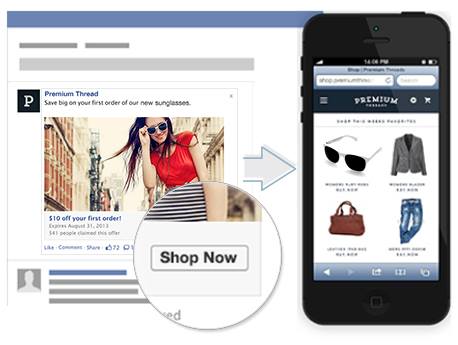
A Carousel ad will be displayed like this:

Once you decide between the two, you’ll need to upload your creative assets. It’s important to note that for each type of ad, Facebook requires users to adhere to certain design criteria.
For single image ads, Facebook asks that users adhere to the following design recommendations:
- Text: 125 characters
- Ad Headline: 25 characters
- Image ratio: 1.91:1
- Image resolution (including CTA): 1080 x 1080 pixels
For multi-image ads — also known as Carousel Ads — Facebook provides the following design recommendations:
- Recommended image size: 1080 x 1080 pixels
- Image ratio: 1:1
- Text: 125 characters
- Headline: 40 characters
- Link description: 20 characters
See how much text is on your image.
Keep in mind that these are the ad options for the “Traffic” objective.
If you selected “boost your posts,” you’d be presented with different ad options like the Page Post Engagement: Photo ad. This ad has a unique set of design recommendations. To explore all of the ad options and their design specifics, refer to this resource.
Once you select an ad type, the Ads Manager will prompt you to identify how you’d like to display your ad. The options they provide are as follows: Desktop News Feed, Mobile News Feed, and Desktop Right Column.
Here’s how each ad would appear:
Desktop News Feed

Mobile News Feed
Desktop Right Column
Be aware if your ad isn’t associated with a Facebook page, you’ll only be able to run Desktop Right Column ads. To leverage all three display locations, you can learn how to create a Facebook Page here.
7. Monitor your ad’s performance metrics.
Once your ads are running, you’ll want to keep an eye on how they’re doing. To see their results, you’ll want to look in two places: the Facebook Ad Manager and your marketing software.
According to Facebook, here are some of the key metrics to look for (and their definitions):
- Performance. Can be customized further to include metrics like results, reach, frequency and impressions
- Engagement. Can be customized further to include metrics like Page likes, Page engagement and post engagement
- Videos. Can be customized further to include metrics like video views and avg. % of video viewed
- Website. Can be customized further to include metrics like website actions (all), checkouts, payment details, purchases and adds to cart
- Apps. Can be further customized to include metrics like app installs, app engagement, credit spends, mobile app actions and cost per app engagement
- Events. Can be further customized to include metrics like event responses and cost per event response
- Clicks. Can be further customized to include metrics like clicks, unique clicks, CTR (click-through rate) and CPC (cost per click)
- Settings. Can be further customized to include metrics like start date, end date, ad set name, ad ID, delivery, bid and objective
Regardless of which of these metrics you use to measure the success of your advertising efforts, you can find the data in the Ads Manager.
As you analyze, you’ll be thinking about your data in four main ways, depending on how granular you need to get:
- The account level
- The campaign level
- The ad set level
- The ad level
The Account Level
This gives a high-level view of performance across all campaigns. You’ll find aggregate data that gives you a bird’s eye view.
Simply navigate to the ads manager and click Account Overview. From there, you’ll be able to customize the metrics you want to see drill down time ranges, and more.
The Campaign, Ad Set, or Ad Level
You can also get far more specific with your analysis by checking the performance of campaigns and even down to individual ads. This can help you figure out which messaging, audiences, and collateral are resonating the best.
All you have to do is navigate to the Campaigns, Ad Sets, or Ads tabs next to Account Overview in the ads manager.
8. Reporting on Facebook ad performance.
You can receive custom reports via email as well. Here’s how to set it up:
- Navigate to Analyze and Report through the upper main menu.
- Choose Ads Reporting.
- Select Create Custom Report.
- Select and open a saved report.
- Choose Save As next to the save icon. Give your report a name and check Schedule Email.
- Follow the prompts to edit and confirm your reporting preferences.
While there are certainly a lot of details to keep straight when planning a paid Facebook ad, it’s important that you don’t lose sight of the big picture. Reporting on clicks and conversions from Facebook is important. However, if you’re using URLs with specific UTM codes, you have an opportunity to measure your ads’ full-funnel effectiveness using your marketing software.
Tracking URLs will help your marketing software keep track of how many leads, or better yet, how many customers you’ve gained from your advertising efforts. This information is useful in determining the ROI of this source, and can also be used to inform your overall Facebook marketing strategy.
If you’re a HubSpot customer using our ads tool, this process is already taken care of for you. You can also create unique tracking codes for your Facebook campaign by navigating to the Tracking URL Builder on the Reports Home page. All you’ll need to do is plug in the URL, attach a campaign, and choose the source you want the URL to be attributed to in your Sources Report. Once your ad launches and you start getting traffic and conversions on your website, you’ll be able to easily track how many visits, contacts, and customers you’re generating.
Now that you know how to set up an ad, it’s time to create one of your own so that you can spread brand awareness on Facebook and generate traffic and leads from your ideal prospects on the platform.
Editor’s note: This post was originally published in September 2019 and has been updated for comprehensiveness.

How 3 HubSpot Managers Found Strong Co-Marketing Partnerships [+How You Can, Too]
A solid co-marketing partnership is one of the better ways to reach a previously untapped audience, generate positive publicity, and create a wealth of valuable marketing collateral. When done right, it’s a mutually beneficial, thoroughly productive way to boost your marketing efforts as a whole.
Aligning yourself with an industry peer can pay off in spades, but these kinds of relationships aren’t easy to start and sustain. Your partner’s interests and qualities need to complement yours, and the companies you work with have to be reliable enough to consistently pull their weight.
Finding a company that fits that bill is hard in its own right, but once you’ve identified one you want to work with, you’re faced with the challenges of successfully contacting them, corresponding with them, and convincing them to work with you.
Those processes can be hard to figure out on your own, so to offer you some help, we spoke with three HubSpot experts about how they found strong co-marketing partnerships and the steps you need to take to do the same.
What do you look for in a co-marketing partner?
When asked about what they look for in a co-marketing partner, our experts all seemed to agree that the number one priority is alignment in audience, messaging, and image. As HubSpot Senior Marketing Manager, Margot Mazur, put it, “We look for partners who speak to similar personas and address their needs. Specifically, we want to make sure our partners have a similar audience and voice — with similar values and goals to meet.”
Though finding a company that checks those boxes is central to a successful co-marketing partnership, there’s still a lot more to the process. You might identify a potential partner that lines up well with your brand identity and appeals to a similar audience, but co-marketing partnerships need to be productive and mutually beneficial — you need to know you’ll get something out of it.
According to HubSpot Marketing Manager, Diego Santos, “Once we are happy with [a potential partner’s] suitability, we classify them according to a co-marketing matrix — one that takes the partner’s popularity, relevance, and objective into consideration. This process helps us to prioritize collaborations and look at the big picture.”
Ideological and objective-oriented alignment isn’t enough. There needs to be hard, quantifiable potential behind a co-marketing partnership. As Mazur said, “We also look at a potential partner’s audience across social and email channels, making sure that our businesses are of a similar size.”
Co-marketing partnerships are, at their core, strategic plays. They can be invaluable assets in targeted marketing efforts. For instance, HubSpot Marketing Manager, Clara Landecy, spoke on how they can be leveraged to target specific areas, “I always look for partners who have a strong presence in targeted regions. Partnering with local partners is essential if your company does business in multiple languages and across the globe.”
Santos succinctly captured all those points when he laid out the key questions to consider when finding co-marketing partners, “We usually ask ourselves the following questions to make sure they are a good fit: Who are they? What is their area of expertise? And who — and how big — is their audience?”
It’s important to have a firm understanding of what you want out of a co-marketing partnership before approaching potential partners. Find a company with similar values that will enhance your ability to effectively reach your target audience — one that will pull its weight, complement your messaging, and ultimately suit your long term goals.
How do you approach and connect with potential co-marketing partners?
Our experts stressed the importance of a personal touch in connecting with potential co-marketing partners. As Santos put it, “A more personal, network-oriented approach is usually much more effective than a cold introductory email or message.”
Co-marketing partnerships are inherently personal, so it’s only fitting that you start your relationship with your partner off on a personal note. But how do you get there?
Well, according to our experts, your best bet is leveraging resources and co-workers from within your own company. Landecy said, “To increase your response rate, ask your colleagues if they have any contacts at the companies you’re looking to partner with, warm outreach always helps.”
Santos agreed, “We always try to leverage the connections we already have in HubSpot. When we are looking for partners in a particular area, we reach out to everyone in the relevant regional team and encourage them to send ideas of potential collaborations.”
Mazur reiterated their points but added some insight about what she does when she can’t reach potential partners through her colleagues, “Generally, I’ll see if anyone at HubSpot already has a connection to someone at the partner company. If not, I’ll reach out to a partnership, BD, or marketing person at the company on LinkedIn, using their InMail tool.” As I mentioned earlier, no matter how you reach potential partners you need to do so with a personal touch.
Do your homework. Make sure you have a firm grasp on the nature of the company you’re contacting, what it might need out of a co-marketing partnership, and what you can do to suit its objectives and interests. Or as Landecy said, “Make sure your outreach is personalized! Showing you did the research before reaching out shows you are invested in the potential partnership and makes their work feel special!”
But let’s say you don’t have the know-how and personal connections to identify and reach potential co-marketing partners. You’re at a loss when it comes to finding interested companies whose size, values, and interests line up with your own.
What can you do? Well, there are certain tools designed to expedite the process. For instance, Crossbeam is a resource that leverages CRM data to help you find and connect with potential co-marketing partners with overlapping customer bases and other complementary attributes.
Ultimately, a solid co-marketing partnership has tremendous potential that’s only seen after tremendous effort. It often takes extensive research and critical thought just to identify the companies that suit your values, goals, and qualities. And actually conducting the necessary outreach and communication to establish one adds a whole new, often exhausting layer to the process.
Still, there’s a lot to be gained from these kinds of arrangements. If your business is looking for a shot of life to your marketing efforts, pursuing a co-marketing partnership is something to consider.

The Plain-English Guide to Data Deduplication
Nowadays, with so much critical information saved on our computer systems, we’ve learned to backup data regularly — including our email inboxes, our Word documents, our photos, and entire folders of old work.
It’s typically a ton of data. And, since we usually backup and save our data on auto-pilot, we might not realize just how much has been re-copied and re-saved, time and time again.
Unfortunately, over time, our data storage becomes unnecessarily burdened with redundant copies of data — this could cost your company money, as data requirements become larger, or time, as processing time becomes slower.
This is where data deduplication comes in.
Andrew Le, an IT Helpdesk Technician at HubSpot, further explains the importance of data deduplication for a business looking to grow — “[Data deduplication] really improves scaling and efficiency when pulling data from one source. If you have lots of the same data in different spaces, your entire system can be slowed down.”
So, you might be wondering, “How does this work?” Let’s dive into it below.
How does data deduplication work?
The data deduplication process might seem intimidating, but it’s actually a simple process.
You can use data deduplication software when you backup your computer. Additionally, some marketing automation software, like HubSpot, might have a deduplication feature to keep track of your marketing contacts.
To ensure you’re optimizing your data backup storage, we’ve cultivated a list of the best data deduplication software you can use to minimize unnecessary data copies, today.
Examples of Data Deduplication Software
1. HubSpot’s Deduplication Feature
If you use HubSpot’s CRM to manage your contacts, you’ll be impressed to find out you can also use HubSpot’s machine learning-powered deduplication feature to keep your contact database clean. HubSpot contacts can be deduplicated by a user token set with a cookie in their web browser or email address — additionally, contacts, companies, deals, and tickets can be deduplicated using a unique object ID.
2. Barracuda Backup Deduplication
With a 9.1 user rating out of 10 on TrustRadius, Barracuda Backup is a good option, offering a robust, secure, fully-integrated data deduplication solution. Their tool can help your business reduce bandwidth requirements and backup costs. Additionally, Barracuda is a good option if your business needs to protect multiple sites, since its cloud storage technology helps distributed networks stay protected.
3. Avamar
Avamar, a solution from Dell EMC, provides variable-length deduplication, which reduces backup time by only storing unique daily changes while simultaneously maintaining daily backups. Avamar is an efficient, secure option and is particularly useful for virtual environments, remote offices, and enterprise applications.
4. HPE StoreOnce
HPE StoreOnce, a solution from Hewlett-Packard Enterprise, offers disk-based backup, deduplication, and secure long-term data storage. Their deduplication software is equipped for virtual backup machines in small remote offices, and equally capable of handling high-performance dedicated applications for larger businesses. Ultimately, this is an impressive tool to help you keep your data secure and efficient as you scale-up.
5. Exagrid EX Series
Exagrid implements a highly efficient approach to data deduplicaton that allows six times the backup performance, and up to 20 times the restore and VM boot performance. With Exagrid, you can backup your data straight onto a disk without inline deduplication processing, enabling a shorter backup window.
If your company stores a lot of data, it’s important to begin the data deduplication process. By using software, you can simply automate this process.
Editor’s note: This post was originally published in April 2019 and has been updated for comprehensiveness.
