9 Types of Organizational Structure Every Company Should Consider
Choosing the best organizational structure for your company, division, or team is a lot like picking out a new car.
At the most basic level, you’re always looking for something road-worthy — something that can take you (and your passengers) from point A to point B without a hitch.
But beyond that, there are a lot of options to consider. Automatic or manual? Four-wheel drive or two? Built-in GPS? Leather interior? Flux capacitor? (Only if you’re going back in time, of course.)
In the world of organizational structures, the options you have to choose from include things like chain of command (long or short?), span of control (wide or narrow?), and centralization (centralized or decentralized decision-making?), just to name a few.
![→ Download Now: The Illustrated Guide to Org Charts [Free Guide + Templates]](https://no-cache.hubspot.com/cta/default/53/7cbd0328-6c8c-40e0-98dd-c3b6e6be96f0.png)
Organizational structures can use functions, markets, products, geographies, or processes as their guide, and cater to businesses of specific sizes and industries.
What’s the point of an organizational structure? As a business leader, do you even need one? As your company gets bigger, an organizational structure can also be helpful for new employees as they learn who manages what processes at your company.
Then, if you need to pivot or shift your leadership, you can visualize how the workflows would work by adjusting your organizational structure diagrams.
To put it simply, an organizational structure is like a map that simply explains how your company works and how its roles are organized.
Four Basic Elements of Organizational Structure
An organizational structure typically has four essential elements; you can add more building blocks or components, depending on your business needs.
No matter what, ensure you include the following basic elements:
Chain of Command
Your chain of command is how tasks are delegated and work is approved. An org structure allows you to define how many “rungs of the ladder” a particular department or business line should have. In other words, who tells whom to do what? And how are issues, requests, and proposals communicated up and down that ladder?
Departmentation
Departmentation is one of the most important elements of your organizational structure. It clusters your teams by similar roles and responsibilities and allows you to understand how each department connects to one another.
Span of Control
Your span of control can represent two things: who falls under a manager’s, well, management … and which tasks fall under a department’s responsibility. Having a defined span of control not only avoids double-work from your different teams, but helps you identify gaps in your structure.
Centralization
Centralization describes where decisions are ultimately made. Once you’ve established your chain of command, you’ll need to consider which people and departments have a say in each decision. A business can lean toward centralized, where final decisions are made by just one or two entities; or decentralized, where final decisions are made within the team or department in charge of carrying out that decision.
You might not need an org structure right away, but the more products you develop and people you hire, the harder it’ll be to lead your company without this crucial diagram.
Below, we’ll explore how you can combine those components to form different types of organizational structures. We’ll also highlight the benefits and drawbacks of different structure types so you can evaluate which is the best option for your company, division, or team. Let’s dive in.
Mechanistic vs. Organic Organizational Structures
Organizational structures fall on a spectrum, with “mechanistic” at one end and
“organic” at the other.
Take a look at the diagram below. As you’ll probably be able to tell, the mechanistic structure represents the traditional, top-down approach to organizational structure, whereas the organic structure represents a more collaborative, flexible approach.
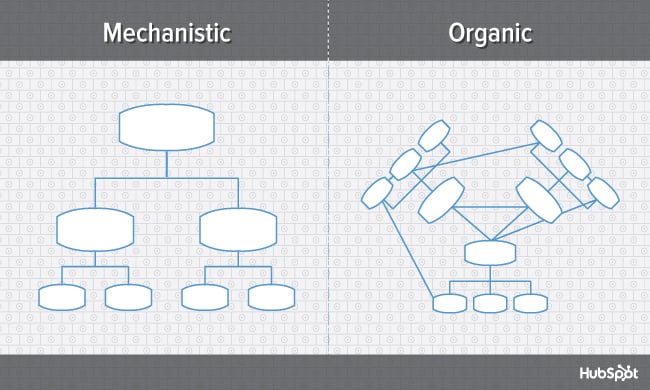
Here’s a breakdown of both ends of the structural spectrum, their advantages and disadvantages, and which types of businesses are suited for them.
Mechanistic Structure
Mechanistic structures, also called bureaucratic structures, are known for having narrow spans of control, as well as high centralization, specialization, and formalization. They’re also quite rigid in what specific departments are designed and permitted to do for the company.
This organizational structure is much more formal than organic structure, using specific standards and practices to govern every decision the business makes. And while this model does hold staff more accountable for their work, it can become a hindrance to the creativity and agility the organization needs to keep up with random changes in its market.
As daunting and inflexible as mechanistic structure sounds, the chain of command, whether long or short, is always clear under this model. As a company grows, it needs to make sure everyone (and every team) knows what’s expected of them. Teams collaborating with other teams as needed might help get a business off the ground in its early stages, but sustaining that growth — with more people and projects to keep track of — will eventually require some policymaking. In other words, keep mechanistic structure in your back pocket … you never know when you’ll need it.
Organic Structure
Organic structures (also known as “flat” structures) are known for their wide spans of control, decentralization, low specialization, and loose departmentalization. What’s that all mean? This model might have multiple teams answering to one person and taking on projects based on their importance and what the team is capable of — rather than what the team is designed to do.
As you can probably tell, this organizational structure is much less formal than mechanistic, and takes a bit of an ad-hoc approach to business needs. This can sometimes make the chain of command, whether long or short, difficult to decipher. And as a result, leaders might give certain projects the green light more quickly but cause confusion in a project’s division of labor.
Nonetheless, the flexibility that an organic structure allows for can be extremely helpful to a business that’s navigating a fast-moving industry, or simply trying to stabilize itself after a rough quarter. It also empowers employees to try new things and develop as professionals, making the organization’s workforce more powerful in the long run. Bottom line? Startups are often perfect for organic structure, since they’re simply trying to gain brand recognition and get their wheels off the ground.
Now, let’s uncover more specific types of organizational structures, most of which fall on the more traditional, mechanistic side of the spectrum.
Depending on the size of a business and its goals, the organizational structure of the team will vary. Each type has its advantages and disadvantages; however, there is a universal benefit to establishing a clear organizational structure. It helps employees understand their role within a company, which enables them to manage expectations and goals.
A business needs to have an organizational structure in place to be successful. There are several types of organizational structures commonly used by companies, nine of which we expand upon below.
1. Functional Organizational Structure
One of the most common types of organizational structures, the functional structure departmentalizes an organization based on common job functions.
An organization with a functional org structure, for instance, would group all of the marketers together in one department, group all of the salespeople together in a separate department, and group all of the customer service people together in a third department.
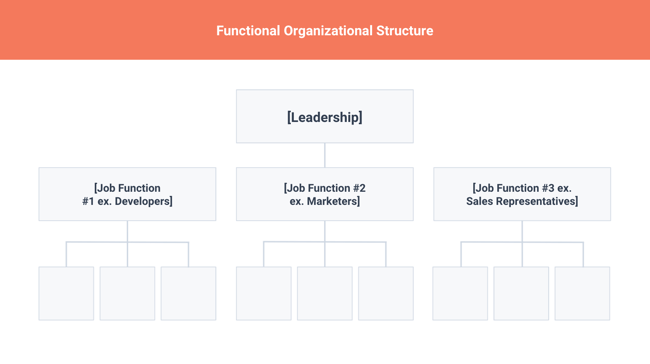
The functional structure allows for a high degree of specialization for employees, and is easily scalable should the organization grow. Also this structure is mechanistic in nature — which has the potential to inhibit an employee’s growth — putting staff in skill-based departments can still allow them to delve deep into their field and find out what they’re good at.
Disadvantages
- Functional structure has the potential to create barriers between different functions — and it can be inefficient if the organization has a variety of different products or target markets.
- The barriers created between departments can also limit peoples’ knowledge of and communication with other departments, especially those that depend on other departments to succeed.
Advantages
- Functional organization increases efficiency, provides stability, and boosts accountability.
- It also allows departments — with employees who share similar skills and knowledge — to focus on their specialized tasks within their respective fields.
- Because the roles and responsibilities of this organizational structure example rarely change, department employees can consistently work on similar assignments and hone their skills.
The fixed structure of functional organization also operates through management. It provides employees with a chain of command. It guides communication between the team and keeps the team accountable.
2. Product-Based Divisional Structure
A divisional organizational structure is comprised of multiple, smaller functional structures (i.e. each division within a divisional structure can have its own marketing team, its own sales team, and so on). In this case — a product-based divisional structure — each division within the organization is dedicated to a particular product line.
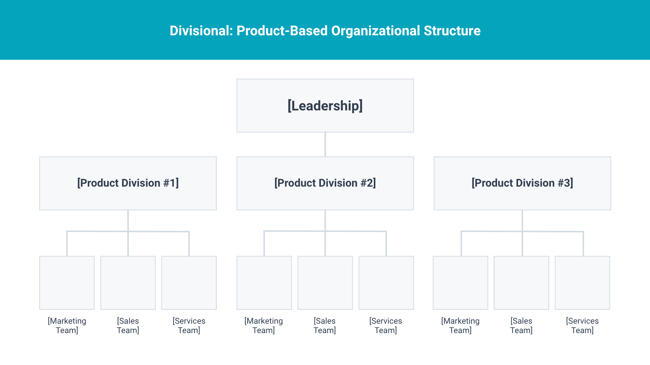
This type of structure is ideal for organizations with multiple products and can help shorten product development cycles. This allows small businesses to go to market with new offerings fast.
Disadvantages
- It can be difficult to scale under a product-based divisional structure.
- The organization could end up with duplicate resources as different divisions strive to develop new offerings.
Advantages
- Companies and their employees can experience the benefits of the product-based divisional structure.
- If one division performs poorly, this does not automatically translate across the organization.
- Because of their separation, divisions may flourish (or fail) concurrently. This system allows companies to mitigate risk.
3. Market-Based Divisional Structure
Another variety of the divisional organizational structure is the market-based structure, wherein the divisions of an organization are based around markets, industries, or customer types.
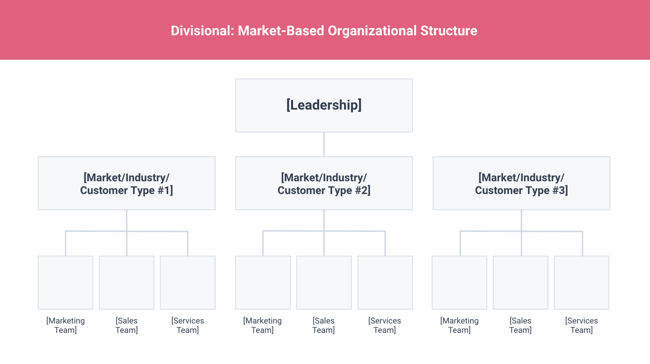
The market-based structure is ideal for an organization that has products or services that are unique to specific market segments, and is particularly effective if that organization has advanced knowledge of those segments. This organizational structure also keeps the business constantly aware of demand changes among its different audience segments.
Disadvantages
- Too much autonomy within each market-based team can lead to divisions developing systems that are incompatible with one another.
- Divisions might also end up inadvertently duplicating activities that other divisions are already handling.
Advantages
- Because this organizational structure focuses on specific market segments, it provides each division with autonomy.
- The divisions work separately, which allows employees to work independently and enables them to focus on the needs of their particular industry.
4. Geographical Divisional Structure
The geographical organizational structure establishes its divisions based on — you guessed it — geography. More specifically, the divisions of a geographical structure can include territories, regions, or districts.
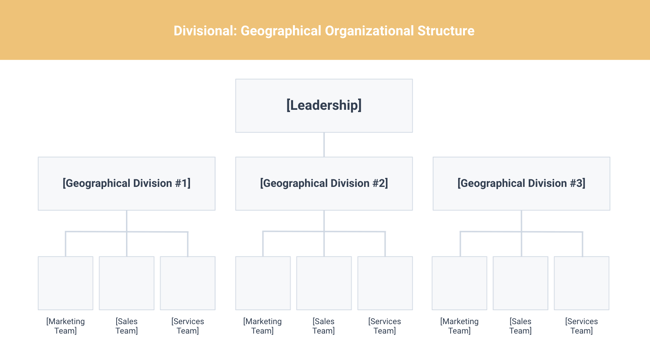
This type of structure is best-suited to organizations that need to be near sources of supply and/or customers (e.g. for deliveries or for on-site support). It also brings together many forms of business expertise, allowing each geographical division to make decisions from more diverse points of view.
Disadvantages
- It can be easy for decision- making to become decentralized, as geographic divisions (which can be hundreds, if not thousands of miles away from corporate headquarters) often have a great deal of autonomy.
- When you have more than one marketing department — one for each region — you run the risk of creating campaigns that compete with (and weaken) other divisions across your digital channels.
Advantages
- Geographical divisions allow companies the advantage of catering to a specific customer. Based on the differences in language, culture, and customs one would find across the world, companies cannot necessarily expect the same operations to work in different locations.
- Not only does it allow organizations to tailor their approach based on geography, but it allows the division to react quickly and efficiently to any geographical market changes.
5. Process-Based Structure
Process-based organizational structures are designed around the end-to-end flow of different processes, such as “Research & Development,” “Customer Acquisition,” and “Order Fulfillment.” Unlike a strictly functional structure, a process-based structure considers not only the activities employees perform, but also how those different activities interact with one another.
In order to fully understand the diagram below, you need to look at it from left to right: The customer acquisition process can’t start until you have a fully developed product to sell. By the same token, the order fulfillment process can’t start until customers have been acquired and there are product orders to fill.
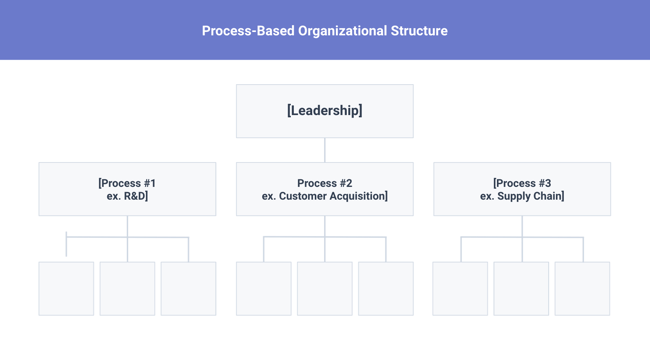
Process-based organizational structure is ideal for improving the speed and efficiency of a business, and is best-suited for those in rapidly changing industries, as it is easily adaptable.
Disadvantages
- Similar to a few other structures on this list, process-based structure can erect barriers between the different process groups.
- It may lead to problems communicating and handing off work to other teams and employees.
Advantages
- As mentioned, one of the most significant benefits of the process-based structure is that it increases efficiency and speed. If Department B cannot start its processes until Department A finishes, this compels Department A to work promptly and proficiently.
- This organizational model also promotes intradepartmental (within the department) and interdepartmental (across multiple departments) teamwork.
6. Matrix Structure
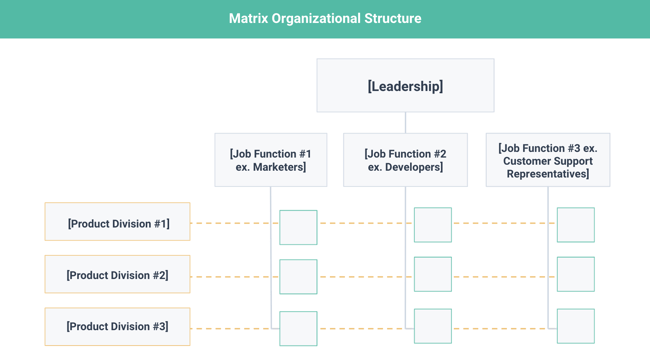
Unlike the other structures we’ve looked at so far, a matrix organizational structure doesn’t follow the traditional, hierarchical model. Instead, all employees (represented by the green boxes) have dual reporting relationships. Typically, there is a functional reporting line (shown in blue) as well as a product- based reporting line (shown in yellow).
When looking at a matrix structure org chart, solid lines represent strong, direct-reporting relationships, whereas dotted lines indicate that the relationship is secondary, or not as strong. In our example below, it’s clear that functional reporting takes precedence over product-based reporting.
 Download the Template
The main appeal of the matrix structure is that it can provide both flexibility and more balanced decision-making (as there are two chains of command instead of just one). Having a single project overseen by more than one business line also creates opportunities for these business lines to share resources and communicate more openly with each other — things they might not otherwise be able to do regularly.
Disadvantages
- The primary pitfall of the matrix organizational structure? Complexity. The more layers of approval employees have to go through, the more confused they can be about who they’re supposed to answer to.
- This confusion can ultimately cause frustration over who has authority over which decisions and products — and who’s responsible for those decisions when things go wrong.
Advantages
- An advantage of a matrix structure is that it promotes collaboration and communication.
- This open line of communication ultimately allows businesses to share resources and allows employees to develop new skills from working with different departments.
7. Circular Structure
While it might appear drastically different from the other organizational structures highlighted in this section, the circular structure still relies on hierarchy, with higher-level employees occupying the inner rings of the circle and lower-level employees occupying the outer rings.
That being said, the leaders or executives in a circular organization aren’t seen as sitting atop the organization, sending directives down the chain of command. Instead, they’re at the center of the organization, spreading their vision outward.
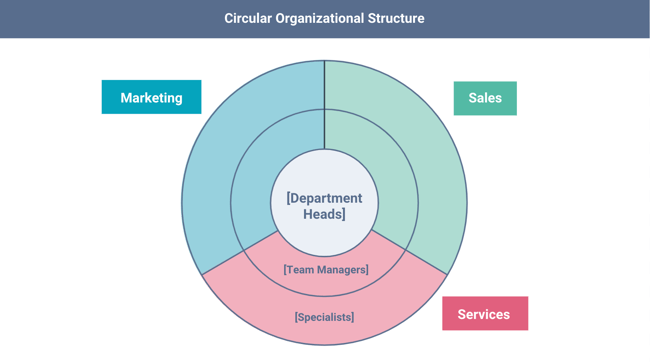
From an ideological perspective, a circular structure is meant to promote communication and the free flow of information between different parts of the organization. Whereas a traditional structure shows different departments or divisions as occupying individual, semi-autonomous branches, the circular structure depicts all divisions as being part of the same whole.
Disadvantages
- From a practical perspective, the circular structure can be confusing, especially for new employees.
- Unlike with a more traditional, top-down structure, a circular structure can make it difficult for employees to figure out who they report to and how they’re meant to fit into the organization.
Advantages
- Most examples of organizational structure have a top-down hierarchy. Alternatively, this type of structure follows an outward flow and contributes to information flowing freely across the business.
- Its benefits include keeping all employees aligned with the processes and goals of the company and encouraging employees to collaborate between departments.
8. Flat Structure
While a more traditional organizational structure might look more like a pyramid — with multiple tiers of supervisors, managers and directors between staff and leadership, the flat structure limits the levels of management so all staff are only a few steps away from leadership. It also might not always take the form or a pyramid, or any shape for that matter. As we mentioned earlier, It’s also a form of the “Organic Structure” we noted above.
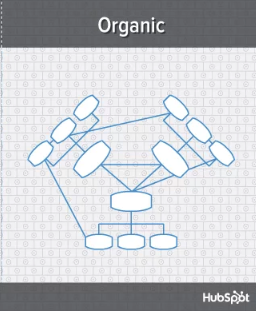 This structure is probably one of the most detailed, It’s also thought that employees can be more productive in an environment where there’s less hierarchy-related pressures. This structure might also make staff feel like the managers they do have are more like equals or team members rather than intimidating superiors.
Disadvantages
- If there’s a time when teams in a flat organization disagree on something, such as a project, it can be hard to get aligned and back on track without executive decisions from a leader or manager.
- Because of how complicated the structure’s design is, it can be tricky to determine which manager an employee should go to if they need approval or an executive decision for something.
- If you do choose to have a flat organization, you should have a clearly marked tier of management or path that employers can refer to when they run into these scenarios.
Advantages
- The elimination of middle management employees defines the flat structure type. Its advantages are instantaneous. First, it reduces the expenses of the company.
- Second, it allows staff to build direct relationships with upper management.
- Lastly, it shortens the decision-making process.
9. Network Structure
A network structure is often created when one company works with another to share resources — or if your company has multiple locations with different functions and leadership. You might also use this structure to explain your company workflows if much of your staffing or services is outsourced to freelancers or multiple other businesses.
The structure looks nearly the same as the Divisional Structure, shown above. However, instead of offices, it might list outsourced services or satellite locations outside of the office.
If your company doesn’t do everything under one roof, this is a great way to show employees or stakeholders how outsourcing of off-site processes work. For example, if an employee needs help from a web developer for a blogging project and the company’s web developers are outsourced, the could look at this type of chart and know which office or which person to contact outside of their own work location.
Disadvantages
- The shape of the chart can vary based on how many companies or locations you’re working with. If it’s not kept simple and clear, there may be a lot of confusion if multiple offices or freelancers do similar things.
- If you do outsource or have multiple office locations, make sure your org chart clearly states where each specific role and job function lies so someone can easily understand your basic company processes.
Advantages
- The outsourcing nature of the network structure provides companies with the advantages of lower costs, more focus, and increased flexibility.
- Outsourcing allows organizations to save money, as they don’t have to bear the expense of setting up a department for the same purpose.
- It also gives companies the flexibility to change their processes and the ability to focus on their core functions.
Organizational Structure Examples
Organizational structure can both refer to your company’s structure at large, or your individual teams. No matter what, you usually want to have a different structure for each department, due to the distinct needs and functions of each one.
We’ll start with organizational structure examples for both companies and nonprofits, then delve into team-specific charts.
1. Company Organizational Structure Example: Matrix Type
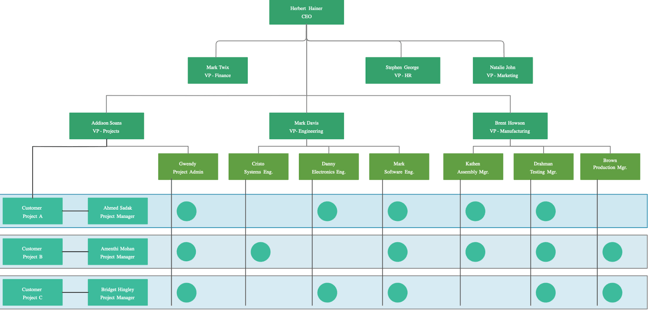
This matrix organizational structure example for an imaginary engineering company starts with the CEO at the helm. However, instead of including a C-suite (such as a chief marketing officer, a chief finance officer, a chief technology officer, and so on), it includes vice presidents who then oversee individual contributors.
Each contributor works cross-collaboratively with members of others teams on a specific customer project. This is a good example to follow if you run a small-to-medium company in a project-based or region-based firm.
2. Nonprofit Organizational Structure Example: Flat Type
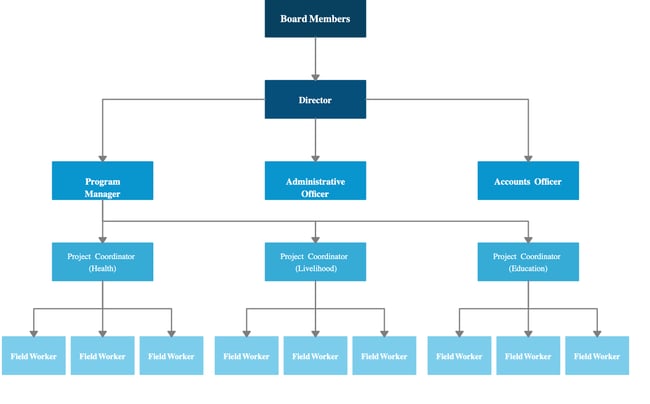
Nonprofits are structured differently than a company, and are usually much smaller and scrappier. In this nonprofit organizational structure example, we see a flat-type of structure, where every employee is only just a few steps away from the director. There are no internal movement opportunities, which works well at most nonprofits. Instead, the focus is on steering the organization to meet its program goals.
Notice that the leader is not the director, but rather the board, who interfaces directly with the director to relay organizational decisions.
3. Marketing Organizational Structure Example: Functional Type
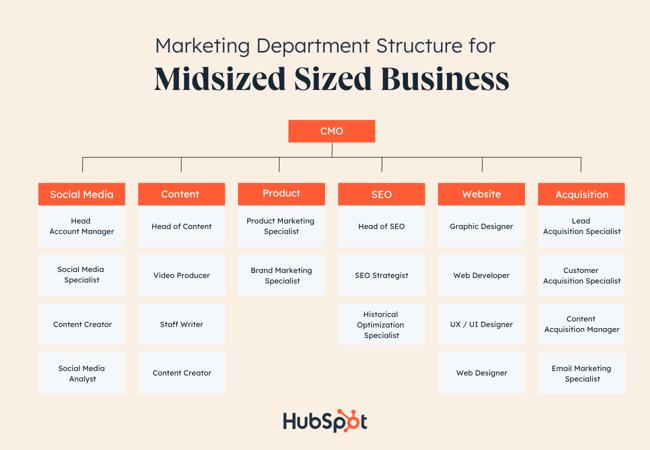
A marketing team’s organizational structure will vary depending on the size of a company. In this example, we see a functional structure type, where the teams are split based on job function. Here, the marketing team is headed by a chief marketing officer (CMO), who overlooks smaller departments divided into six functions: Social media, content, product, SEO, website, and acquisition.
Your marketing team, however, can also adopt a matrix organizational structure if you laterally divide your individual contributors and managers based on region, country, project, or another factor.
4. Sales Organizational Structure Example: Functional Type
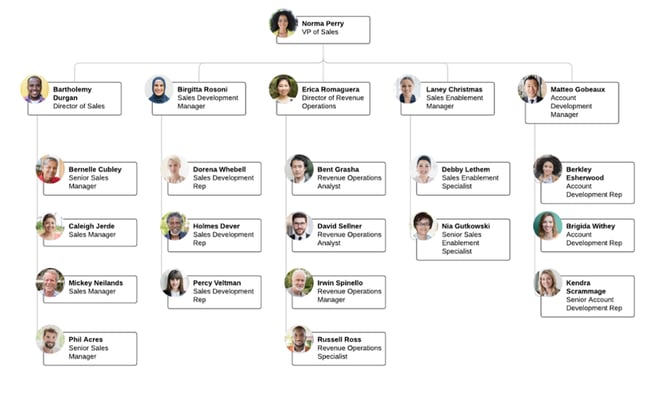
In many sales organizations, organizational structures are deeply hierarchical, where a vice president of sales overlooks a director of sales, and then the director of sales overlooks a team of sales managers, and the sales managers overlook a team of sales representatives, and so on.
In this example of a sales organizational structure, roles are not as hierarchically structured, and instead divided based on function. The VP of sales overlooks a varied team, which includes a director of sales, a sales development manager, a director of revenue operations, a sales enablement manager, and an account enablement manager.
While these are each at different stages of their careers, they are all at the same level and are responsible for a specific function within the team.
5. IT Organizational Structure Example: Functional Type
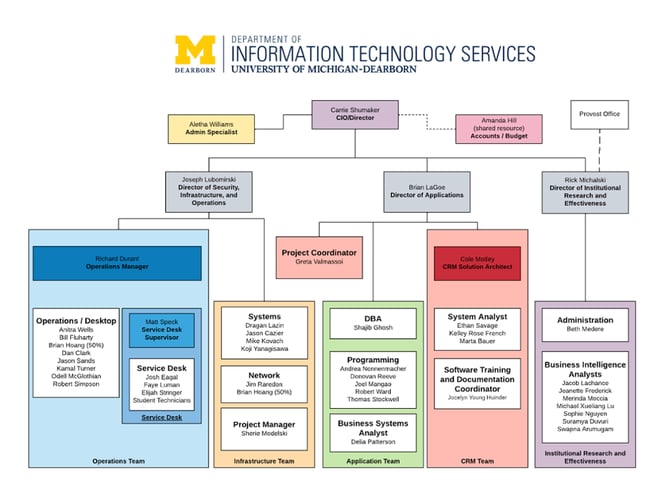
This is another functional org chart example, but this time, it’s for IT. In this example from the University of Michigan, the IT department is divided based on function. Overseen by a Chief Technology Officer, three directors supervise security, infrastructure, and operations; applications; and institutional research and effectiveness.
Within each team is a specialization. For instance, the director of applications oversees both the application team and the CRM team. If you run an IT org, you can take a similar approach, or divide your leadership based on specific processes, such as system maintenance or IT services.
6. Product Organizational Structure Example: Divisional Type
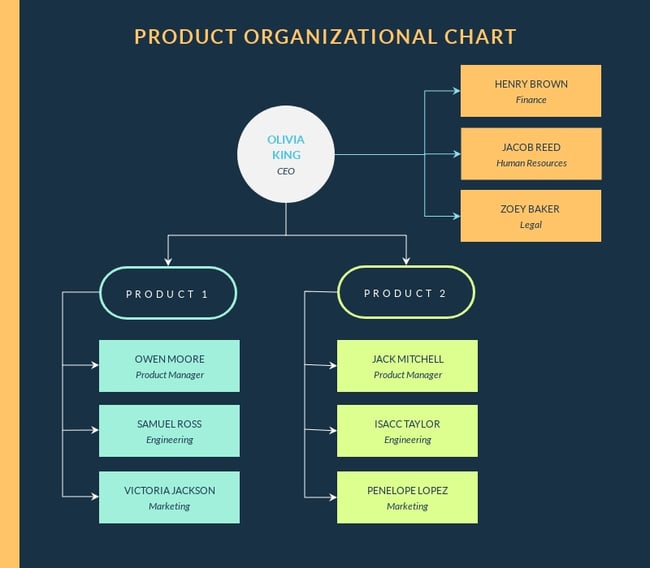
For product organizations, the most common organizational structure is divisional, where teams are divided based on the product they’re working on. Within each product team, there’s typically a product manager, an engineer, a marketer, and even a customer support manager. Depending on how big or small your company is, you may have multiple product managers for one product.
Conversely, if there’s only one product, then the entire company may be a product organization. This time, the organization would be structured based on process, like the example below.
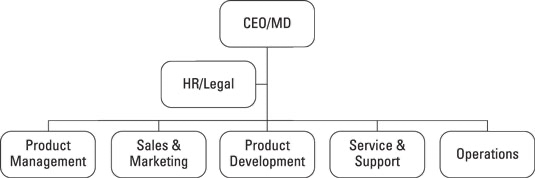
In the above example, the company is divided by processes such as product management, sales and marketing, product development, service and support, and operations. This is a good example to follow if your company is small.
7. HR Organizational Structure Example: Matrix Type
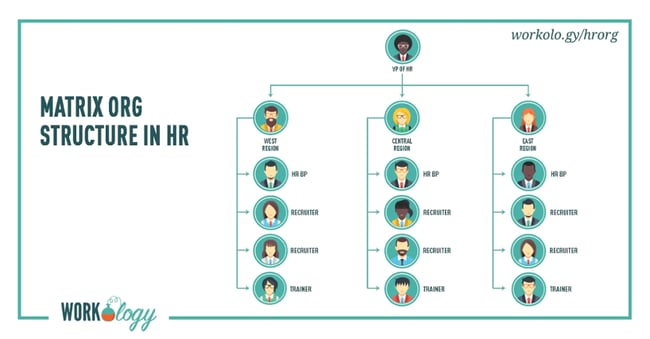
This HR organizational chart is an excellent example of the matrix structure type. Here, the VP of HR oversees three different regions, all of which have an HRBP, two recruiters, and one trainer. Horizontally, the HRBPs, recruiters, and trainers are all aligned.
This is an excellent example to follow if your company is a large enterprise with hiring operations in different regions. It’s especially useful if there are different hiring laws in each region where you operate.
Organizational Structure: Things to Know
What is an organizational structure chart?
An organizational structure chart is a diagram that shows your departments, starting from C-Suite leaders to individual contributors, as well as your company’s order of command and decision-making flow.
Why is having an organizational structure important?
Imagine a business that has no organizational structure. Instantly, questions arise about the systems and processes. Who makes the decisions? How are employees held accountable? What are the company’s goals? These questions are practically impossible to answer without a functional organizational structure.
Organizational structure is necessary for running a successful business because it improves workflow and efficiency, promotes communication, identifies company needs, and aligns employees with company goals. It directly affects how a business operates daily. When a company establishes a structure that works, the combined efforts of its employees, in conjunction with its systems and processes, allow the company to make better decisions for its future.
What is the best organizational structure?
The best organizational structure varies from business to business and largely depends on your team size, company type, and product offerings. That said, a functional organizational structure (also named “traditional line organizational structure” or “hierarchical structure”) is an excellent place to start if you’re not sure which org structure is right for you.
What are the four basic forms of organizational structure?
The four basic forms of organizational structure are functional, divisional, matrix, and flat structures.
Functional organizational structures divide your company teams based on job functions and responsibilities.
Divisional organizational structures groups your teams based on products, markets, or regions, with smaller organizational structures for each division of your business.
Matrix organizational structures divide your company teams in a grid-based fashion, where every team has dual reporting relationships with the C-Suite and another team.
A flat organizational structure keeps hierarchy to a minimum by eliminating middle management and keeping individual contributors as close as possible to leadership.
How do businesses determine organizational structure?
Businesses determine organizational structure by taking stock of their current workforce and teams, then carefully aligning their company strategy, employee feedback, and leadership goals with a specific structure.
Some companies may have naturally fallen into a functional org structure, in which case it’s only a matter of creating an org diagram. Others may be in the process of creating one. Here are the steps to determine an org structure from scratch:
- Audit your organization’s teams and roles. First, it’s essential to understand which teams and roles already exist within your business. If your business is new, create a list of planned teams and hires.
- Draft a company strategy. Your org structure should support your strategy, not detract from it. If your strategy is to launch X new products in the market, then a product-based divisional structure might work well for you.
- Gather feedback from existing employees. Your existing employees are a gold mine of information when creating an organizational structure. Some employees might want to be closer to leadership; others might want advancement opportunities. For the first, a flat structure would fit, and for the second, a functional structure would be best.
- Gather feedback from other leaders. Just as employees’ voices matter, so, too, do leaders’ voices matter. Understand their key goals and the support they need to do their best work at your firm.
- Align your company strategy, employee feedback, and leadership feedback with an org structure. Take a look at organizational structure types and try to align them with the data and observations you’ve collected. Sometimes, the decision will be clear; other times, you’ll need to continue interviewing and gathering data to find the best structure for you.
- Create an org chart. Now that you’ve chosen the right org structure, it’s time to create a visual chart that shows your company’s chain of command, departmentation, span of control, and centralization at a minimum. Share this chart over email and be sure to keep it in an easy place for all employees to access.
Navigating Organizational Structures
Organizational structures are central to a successful team. Employees can move comfortably, confidently, and efficiently when given a clear definition of their role within an organization.
Structure types will vary from business to business, so it’s important to remember that these structures are not one size fits all. Every type may not suit your organization, but chances are, one of them will. Use this post to determine which organizational structure works for you, and then it’s time for the real work to begin.
Editor’s note: This post was originally published in December 2014 and has been updated for comprehensiveness.

1 In 3 Marketers Say the Recession Will Surpass COVID’s Marketing Impacts: 3 Data Points to Know
The COVID-19 era was notoriously a rollercoaster for marketers, who had to pivot their strategies constantly as the world changed.
As if one unprecedented event wasn’t enough, marketers are now faced with a looming recession that’s already having major impacts on their industry.
Will the recession shake things up as much as COVID-19 did?
![Download Now: Free State of Marketing Report [Updated for 2023]](https://no-cache.hubspot.com/cta/default/53/b0f73a5e-16e4-41fd-9511-8564efc560a7.png)
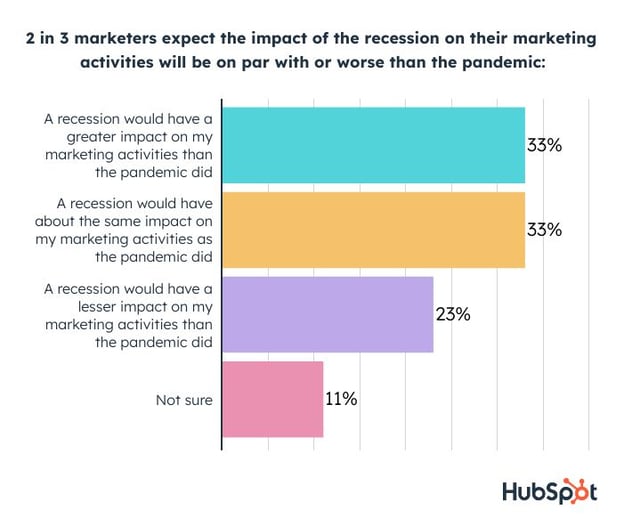
While we can’t truly predict the future, one-third of marketers think a recession will have an even bigger impact on their marketing activities than the pandemic, while another 33% say it will be about the same.
While you should still take the data above with a grain of salt as it is just one of many studies and the economy is always quickly evolving, here are three things you need to know to prepare for whatever the coming months bring:
1. Most Marketer Say the Recession Is Here
While the world debates whether the recession is looming or arrived months ago, 78% of marketers say we’re already living in it.
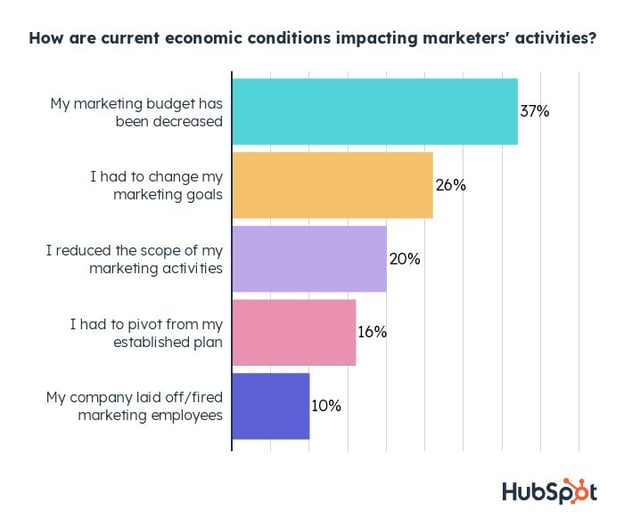
Marketers are already seeing budget cuts, hiring freezes, and other unpleasant effects. At the same time, their plans and goals for 2023 are constantly being adjusted as the economic situation progresses.
For a deeper dive into the macroeconomic reasons marketers are being hit so hard, check out our blog post on how the recession is already impacting marketers.
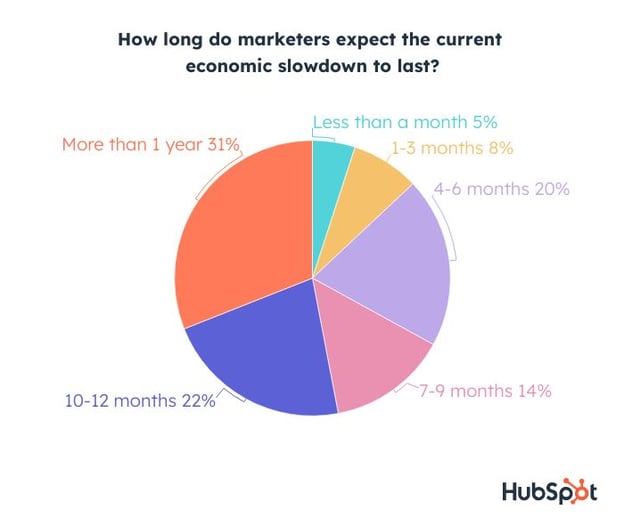
2. 67% of marketers expect an economic slowdown for more than six months:
Not only is it already here, but our survey shows that marketers aren’t expecting the recession to end anytime soon. As one marketer put it:
“Between COVID-19 uncertainty, high prices due to inflation, supply chain and venue availability issues, people are hesitant to plan large events for the next 12 months. I expect that will continue at least for another year or until there is some sense of stability in the market.”
3. Some marketing channels are losing effectiveness, requiring more spend.
Being expected to make a huge impact with a small budget is nothing new for marketers. But what happens when your usual marketing channels aren’t as effective as they used to be?
According to a marketer in our survey, “we’re needing to spend more to get similar results from 6 months ago.” Meanwhile, 37% of marketers have already seen budget cuts.
We asked industry leaders for the most effective marketing strategies to cut costs in their marketing budgets. These made the top of the list:
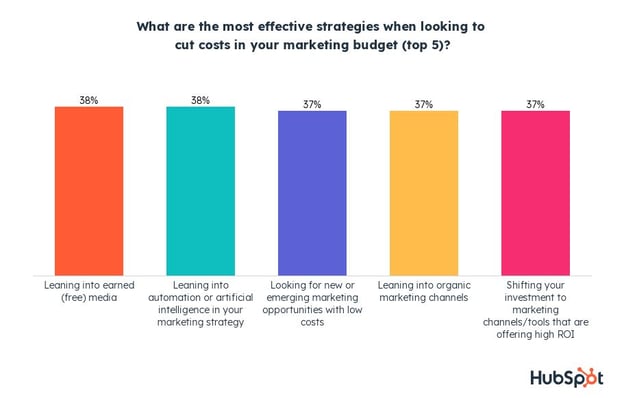
At #1, tapping into earned media is a great (and free) opportunity to expand your reach and cut your budget. Also tied for first is leveraging automation and AI.
Thirdly, finding new or emerging marketing opportunities can also be huge. For example, embracing BeReal, a new social media platform popular among Gen Z, is completely free. Being among the first brands to hop on the trend presents a massive opportunity.
For more insights on how marketing leaders are planning to navigate these times, see our full report here.
What’s Next?
We plan on surveying marketers throughout 2023 to keep tabs on how the recession is impacting them as responsive as possible.
Whether the recession ends up milder than expected or continues to cause challenges, we’ll keep you posted and give you the tips you need to succeed in difficult times.
To learn more about the overarching opportunities, challenges, and trends in marketing today, check out our free State of Marketing Report below.


650+ Best Instagram Captions for 2023: Good, Cool, Funny, & Cute
Finding a good Instagram caption is a challenge, especially if you run the Instagram profile of a business. Why? Because if you want to build a consistent brand on Instagram, it’s important to maintain a distinctive voice on every post, video, or reel. That’s harder than it sounds.

If you’re tired of writing captions from scratch, there’s no need to keep searching. We’ve compiled the best Instagram captions for every type of brand and for every type of post.
Whether you want to sound cool, make a funny quip, or come across as cute, you can incorporate many of these captions into an Instagram business strategy. Just make sure your audience would find your caption funny, clever, or the right amount of sassy.
Click one of the following links to jump through some of our best IG captions:
Next time you’re contemplating a witty line of text to go with your Instagram photo, take a look at our complete list of captions that suit any mood or occasion you’ll be sharing with the world. You can also customize these captions to make them perfect for your feed. First, we recommend saving some time by downloading our kit of additional IG caption examples, which you can use to inspire your caption creation process.
Instagram Captions for Business
Your Instagram business account is one of the best places to showcase your brand personality while still delivering business updates in an engaging way. You can use the captions below for most social media content ideas, but feel free to customize them depending on your specific post.
Skip to the list of Instagram captions you’re most interested in:
- Business Instagram Captions
- Small Business Captions
- Coming Soon Captions for Instagram
- Catchy Instagram Captions for Business
- Business Meeting Captions for Instagram
- Quote Instagram Captions
Business Instagram Captions
If you’re running a business account, you should use your captioning to humanize your business more than your average paid ad.
Your business Instagram captions are an opportunity to give your brand some personality while getting the word out about your product or service offering. Here are some of our go-to captions that prospects and customers will love.

-
Good evening, [city]! We’re in town for [event] at Booth [#]. Stop by and say hi!
-
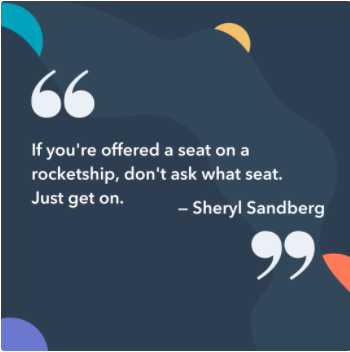
“If you’re offered a seat on a rocket ship, don’t ask what seat. Just get on.” -Sheryl Sandberg, COO of Facebook
-
Our [#]-person squad completed the [road race name]! And we did it all for the post-run sneaker selfie. 👟
-
We got product in the pipeline … check back for an exciting announcement on [date]!
-
Diversity isn’t a recruitment metric — it’s an ingredient for success. At [company], we thrive on the unique backgrounds, experiences, and perspectives of our people.
-
Spot the CEO. 😉
-
Keep going.
-
At [company name], our best asset is our people.
-
We had a great time with our customers at [meeting/event]! @[client/partner], you guys rock.
-
Thrilled to have [customer] at our office today! Come back any time. 😊
-
[Company name] is off for [holiday]! We hope you all have a safe long weekend.
-
Big things have small beginnings. [Company]’s HQ began right here.
-
“It is better to fail in originality than to succeed in imitation.” –Herman Melville
-
How many [company name] employees does it take to spell “TEAM”?
-
Want to work with these awesome people, working on a lot of awesome things? We’re hiring! Click the link in our bio to see our current openings.
-
Check, check, one, two … is this thing on? [Company name] is now on Instagram! Follow us to learn about our culture, product, and (awesome) people.
-
Tired of [customer pain point]? We’ve got good news. Click the link in our bio to learn about [product]’s latest feature.
-
[Company] presents our latest product — made with love just for you. ❤️ Link in bio to learn more.
-
Stop wasting time with [customer pain point]. Our [product] will help you achieve [X] more efficiently — just ask our current customers. Check out our latest case study here: [Link]
-
Handmade in [location] and delivered to your door. That’s the [Company] promise.
-
When life gives you lemons, you make lemonade. When [company name] gives you [type of product], you make money.
Small Business Captions
Running a small business? You can use a friendlier, more personable tone in your Instagram posts, emphasizing your products’ better quality and advertising the benefits of purchasing from local or small businesses. We love the captions below for businesses that focus on handmade or locally sourced products.
-
“Made with love and care in [city]. Order yours online.”
-
“Every order and customer means the world to us — thank you for your support!”
-
“The best things start small and simple. Learn about our process at the link in bio.”
-
“We put our heart and soul into every product we create, and we hope you can taste the difference.”
-
“Join our revolution — we promise it’s worth the buzz.”
-
“Shop small, save big.”
-
“Passion fuels our business, creativity drives our journey.”
-
“Small business, big heart.”
-
“From our small business to your doorstep, delivered with ♥.”
-
“Handcrafted perfection.”
-
“Shop small, support your local economy.”
-
“Shop local, feel good.”
-
“Quality > quantity.”
-
“Treat yourself with a [product/service] made just for you.”
-
“Create connections and spread joy. Come in today to experience the [business name] difference.”
Coming Soon Captions for Instagram
If you have something new coming down the line, why not generate some buzz with a series of Instagram posts? Here are some captions to get the conversation going and increase anticipation for new products, releases, or business expansions.
-
“Mark your calendars. Something amazing is coming your way on [date].”
-
“The countdown is on.”
-
“Stay tuned for something special.”
-
“Join us on our mission to make a difference starting from [date].”
-
“You won’t want to miss this. We partnered with [company] to bring you the latest in [industry].”
-
“Get ready to meet our latest creation.”
-
“The wait is almost over. Launching on [date].”
-
“We’ve got something incredible in the works, and we can’t wait to share more with you.”
-
“No need for binoculars. Something big is on the horizon.”
10.”We’re brewing up something exciting, and we can’t wait for you to be a part of it.”
-
“Something special is in the works — can you guess what it is?”
-
“We’ve been keeping a little secret from you… Stay tuned.”
-
“A new adventure is about to begin. New [city] location opening on [date].”
-
“Keep your eyes peeled for our big announcement on [date].”
-
“Can’t wait to share our latest project with you. Sign up on our website for updates.”
Catchy Instagram Captions for Business
Showcase your brand personality a little more with a catchy caption or saying. A catchy caption can convey your brand ethos, your entrepreneurial spirit, or your company values. The below options can effectively be used for business updates or news.
-
“We’re here to make a difference, not just a profit.”
-
“No matter how small, every success counts.”
-
“Good things come to those who hustle.”
-
“Expect the unexpected.”
-
“Small business, big heart.”
-
“Keeping it simple with our latest launch.”
-
“Service is not just a transaction, it’s an experience.”
-
“It’s never too late to start — just do it.”
-
“Believe in your dreams, and the rest will fall into place.”
-
“Make waves in your business, or get lost in the sea of competition.”
-
“Whatever you do, do it with all your heart.”
-
“Success is not final, failure is not fatal: it’s the courage to continue that counts.”
-
“Creating experiences, one [product] at a time.”
-
“Small things can make a big difference in a business.”
-
“Find your happy place here.”
Business Meeting Captions for Instagram
Feel like a business meeting isn’t Instagram-worthy? Think again. Not only can posting about your meeting show your company culture, but it can also show your followers that you’re hard at work trying to make better products and services for them. Here are a few of our favorite business meeting captions that you can customize.
-
“Generating our next big idea with the brightest minds we know. P.S. We’re hiring!”
-
“When we come together, we achieve great things.”
-
“Collaboration is the key to success.”
-
“The only way to do great work is to love what you do.”
-
“Meetings that matter, for a purpose that counts.”
-
“In the right company, your ideas will flourish.”
-
“Everything is possible when you have the right people in the room.”
-
“There’s no substitute for hard work and determination.”
-
“When passion meets purpose, great things happen.”
-
“We believe there are no bad ideas. We love facing challenges head-on.”
-
“The best ideas come to life in a room full of great minds.”
-
“Surround yourself with positive people who lift you higher.”
-
“We may have different perspectives, but we’re working towards a common goal.”
-
“Even a ten-minute business meeting can be the key to unlocking limitless possibilities.”
-
“We work hard, we play hard, and we achieve great things together.”
Quote Instagram Captions
If you can’t find the words yourself, there’s a quote out there to help you convey that idea.
Using quotes for your Instagram caption is a great way to evoke and share your emotions. Quotes can propel people to think more open-mindedly, and optimistically — or even motivate them to do something great. Below is a list of some of our favorites.
-
“The greatest glory in living lies not in never falling, but in rising every time we fall.” –Nelson Mandela
-
“Always remember that you are absolutely unique. Just like everyone else.” -Margaret Mead
-
“You change the world by being yourself.” -Yoko Ono
-
“In the end, it’s not the years in your life that count. It’s the life in your years.” -Abraham Lincoln
-
“What I know for sure is that speaking your truth is the most powerful tool we all have.” – Oprah Winfrey
-
“The purpose of our lives is to be happy.” -Dalai Lama
-
“You only live once, but if you do it right, once is enough.” -Mae West
-
“Live in the sunshine, swim the sea, drink the wild air.” -Ralph Waldo Emerson
-
“I would rather die of passion than of boredom.” -Vincent van Gogh
-
“Success isn’t about the end result, it’s about what you learn along the way.” -Vera Wang
-
“It does not matter how slowly you go as long as you do not stop.” -Confucius
-
“Everything you’ve ever wanted is on the other side of fear.” -George Addair
-
“You become what you believe.” -Oprah Winfrey
-
“Believe you can and you’re halfway there.” -Theodore Roosevelt
-
“The way to get started is to quit talking and begin doing.” -Walt Disney
-
“Love the life you live. Live the life you love.” -Bob Marley
-
“My mission in life is not merely to survive, but to thrive; and to do so with some passion, some compassion, some humor, and some style.” -Maya Angelou
-
“Embrace what makes you unique, even if it makes others uncomfortable.” – Janelle Monae
-
“Success is a collection of problems solved.” – I.M. Pei
-
“To be beautiful means to be yourself. You don’t need to be accepted by others. You need to accept yourself.” -Thich Nhat Hanh
-
“In a gentle way, you can shake the world.” -Gandhi
-
“I dream. Sometimes I think that’s the only right thing to do.” -Haruki Murakami
-
“We become what we think about.” -Earl Nightingale
-
“Success is not final, failure is not fatal: it is the courage to continue that counts.” –Winston Churchill
-
“You are never too old to set another goal or to dream a new dream.” -C.S. Lewis
-
“If you are depressed you are living in the past. If you are anxious you are living in the future. If you are at peace you are living in the present.” -Lao Tzu
-
“Life is like riding a bicycle. To keep your balance, you must keep moving.” -Albert Einstein
-
“If you are working on something that you really care about, you don’t have to be pushed. The vision pulls you.” -Steve Jobs
-
“Security is mostly a superstition. Life is either a daring adventure or nothing.” – Helen Keller
-
“Stay true to yourself and never let what somebody else says distract you from your goals.” -Michelle Obama
Personal Captions for Instagram
If you’re looking for Instagram captions for your personal Instagram profile, we’ve got you covered. The good news? The captions below are also a great option for businesses with a more casual or personable brand voice.
Skip to the Instagram captions you’re most interested in:
- Short Instagram Captions
- Funny Instagram Captions
- Clever Instagram Captions
- Cute Instagram Captions
- Wedding Instagram Captions
- Couple Instagram Captions
- Friends Instagram Captions
- Sassy Instagram Captions
- Song Lyrics for Instagram Captions
- Holiday Instagram Captions
- Seasonal Instagram Captions
- Selfie Instagram Captions
- Baddie Instagram Captions
- Travel & Vacation Instagram Captions
- Beach Instagram Captions
- Birthday Instagram Captions
- Prom Instagram Captions
- Graduation Instagram Captions
- Food Instagram Captions
- Pet & Dog Instagram Captions
Short Instagram Captions

A picture is already worth a thousand words — there’s no need to go on and on in your captions. Let the photo or video speak for itself and keep it brief. Take the captions below and change them to suit your exact post. It may be enough to tag someone who’s in the photo, give credit if you’re reposting, or prompt people to check out your bio.
-
@[account]
-
Credit: @[account]
-
This week’s photo dump.
-
Photo dump sacrifice for the algorithm god.
-
Scroll →
-
More info in bio.
-
Link in bio.
-
Sneak peek →
-
[Product] in production at our factories.
-
@[account] x @[account]. Coming soon.
-
Loading…
-
[The most dominant color in your post, ie “Red,” “Blue,” etc]
-
[Hashtag relevant to your post]
-
[Emoji relevant to your post]
-
[Relevant word 1] + [Relevant word 2]
-
Happy [weekday]! [hashtag]
-
Happy [holiday of the day]! [hashtag]
-
You can find me at [place you most often frequent].
-
In [place where the photo was taken].
-
An ode to [item in the image or video].
-
Thinking about [relevant word].
-
Weekend.
-
[Month].
-
2:38 pm. [Or time when the photo was taken]
-
Time passing.
-
From the archives.
-
Mentally here.
-
Couldn’t pick one.
-
That’s all for now.
-
I can’t. I simply cannot. [Emoji]
-
Sunset.
-
Spring.
-
Summer.
-
Winter.
-
Fall.
-
Midnight.
-
Immediately yes.
-
Immediately no.
-
Say more.
-
Say less.
-
Mood.
-
My go-to.
-
My favorite hour.
-
Taking it slow.
-
Grateful.
-
Once upon a time…
-
We/I/You/@[account] know(s) what’s up.
-
The only thing stopping you is you.
-
Good food, good mood.
-
And the boredom award goes to…
-
My life, my rules. At least 62% of the time.
-
We’re all still healing.
-
Be the type of person you want to meet.
-
It starts with you.
-
Call it what you want.
-
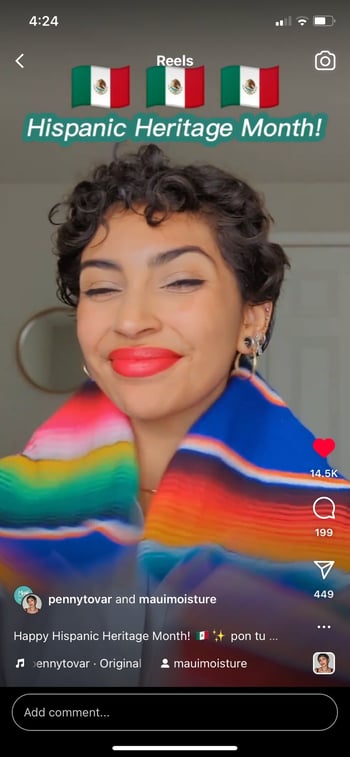
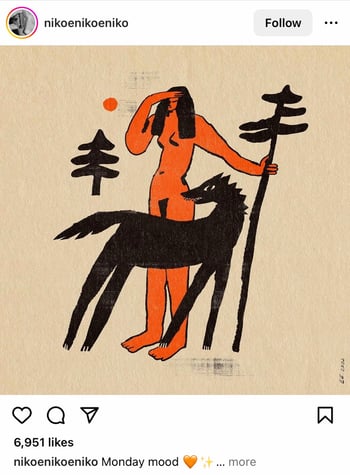
I’ve never been a fan of change, but I’d follow you anywhere.
Funny Instagram Captions

We don’t always have to take social media so seriously, so explore some funny Instagram captions for your upcoming posts.
Instagram can be a tool to convey aesthetic picture taking or stoic model shoots, it can also be a fun place to share a laugh or lighthearted content, too. Sharing a funny caption can boost your page’s personality, and potentially brighten someone else’s day. We hope the following captions make you crack a smile.
-
Glitch in the matrix.
-
My favorite exercise is a cross between a lunge and a crunch … I call it lunch.
-
I need a six-month holiday, twice a year.
-
We tried to be normal once. Worst two minutes of our lives!
-
There are 16-year-olds competing at the Olympics and some of us (me) still push on “pull” doors.
-
That awkward moment when you’re wearing Nike’s and you can’t do it.
-
I’m just a girl, standing in front of a salad, asking it to be a cupcake.
-
What if we told you … you can eat without posting it on Instagram?
-
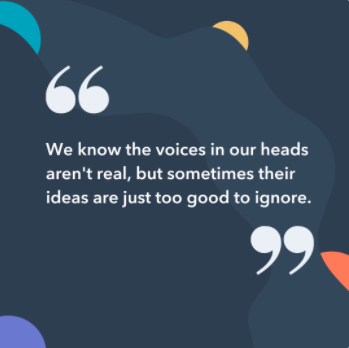
I know the voices in my head aren’t real, but sometimes their ideas are just too good to ignore.
-
We don’t know what’s tighter: Our jeans or our company culture.
-
Friday … Our second-favorite F word.
-
We don’t care what people think of us. Unless they’re our customers. We definitely care what customers think of us.
-
All you need is love … and investors. All you need is love and investors.
-
Hi, we’re [company name]. We build amazing apps and eat amazing apps.
-
They say “Do what you love and money will come to you.” Let’s see what happens, I just ordered tamales.
-
My favorite subject in school was recess.
-
No thoughts brain empty just tacos and cats.
-
[Food item] so good it’s got me weak in the knees.
-
The best part about waking up is going to sleep eighteen hours later.
-
For legal reasons, this is not a joke.
-
The older you get, the better you get, unless you’re a banana.
-
Bring the alcohol! Because no great story started with someone eating a salad.
-
Don’t worry if plan A fails. There are 25 more letters in the alphabet.
-
If you’re not supposed to eat at night, why is there a light bulb in the refrigerator?
-
First rule of Sundays: If you can’t reach it from your couch, you don’t need it.
-
If you fall, I will be there. Signed, Floor.
-
The first thing I do after coming to work is logging off.
-
I used to think I was indecisive, but now I am not so sure.
-
Friends buy you lunch. Best friends eat your lunch.
-
Darn it, just accidentally had another thought again.
-
My goal this weekend is to move… just enough so people don’t think I’m dead.
-
You think nothing is impossible? Try getting me out of bed before 12 PM.
-
Looking at these pictures won’t fix all your problems, but it’s a good start.
-
My sauce is too hot that’s why you’ll never ketchup.
-
Google Maps said it’s MY TURN.
-
I got my haters seasick, they see me and get sick.
-
If there would be an award for being lazy, I would send someone to pick it up for me.

Clever Instagram Captions
Trying to come up with some clever IG captions on your own can be a lot of work, so we’ve done it for you. Below we’ve compiled a list of our favorite clever Instagram captions for all your witty caption needs.

-
Patience — what you have when there are too many witnesses.
-
Maybe she’s born with it, maybe it’s the Clarendon filter.
-
“Life is short.” False — it’s the longest thing you do.
-
Happy Sunday! There may be no excuse for laziness, but I’m still looking.
-
Rejection is just redirection.
-
Better an “oops” than a “what if.”
-
Anyone looking for a heart? Selling mine for $2. (Used, good condition)
-
The world is changed by your example, not your opinion.
-
Seven billion smiles and these are my favorite.
-
Stop working hard and start working smart.
-
I found your nose. It was in my business.
-
Imposter complex is just a byproduct of success.
-
Life is simple. It’s just not easy.
-
There’s a big difference between being alive and living.
-
The best times begin at the end of your comfort zone. So you can catch me on the opposite end of the end of my comfort zone.
-
When nothing goes right, go left.
-
“Success is making those who believed in you look brilliant.” -Dharmesh Shah
-
“If you can’t convince them, confuse them.” -Harry Truman
-
The world changes by your example, not your opinion. So get acting right.
-
It’s always a good idea to be on the right side of history.
-
When you learn, teach. When you get, give.
-
Don’t quit your daydream.
-
Legend has it that if you look hard enough you’ll see the weekend approaching!
-
It’s time to make new memories. But first, five tequila shots.
-
I’m on a seafood diet. I see food, I eat it.
-
Sorry I didn’t get back to your text. I was too busy converting oxygen into CO2.
-
Living on Earth is expensive, but it does include a free trip around the sun.
-
“Arguing with a fool proves there are two.” -Doris M. Smith
-
Well, enough about me. Let’s talk about you. What do you think about me?
-
We’re all one more minute closer to dying. What’s one more shot going to do?
-
There’s a pot of gold at the end of the rainbow. If you find it, let me know so I can get some.

Cute Instagram Captions
If there’s one thing people on the internet love to see — it’s anything and everything that falls into the category of cute. Whether you’re posting your adorable pet, your significant other, or a picnic by the park, we’ve got all the cute Instagram captions that you need to complement them.

-
Through all seasons and through all time.
-
Don’t give up on your dreams. Keep sleeping.
-
My fave sound is you snoring next to me.
-
Here’s to a hundred more years with you.
-
Happiness is watching you do what you love 💗 Hopefully that’s me.
-
I like you more than [food]. And I looove [food].
-
Wearing a onesie to bed just in case my SO steals the covers again.
-
Cuddle time with the pup 💞
-
Just showing off my [item] a little. Be jealous.
-
Always wear cute pajamas to bed; you never know who you’ll meet in your dreams.
-
You got me like 🥴️
-
I’d move to [state] for you. And I hate [state].
-
🥺️👉👈
-
I have no idea what I was doing before you came around. Sleeping, probably.
-
No one can touch my books or my tacos 😤
-
Not me standing there like🧍
-
Don’t mind me while I drink my tea 🍵
-
Did someone say [something you like]? 🏃💨
-
They say elephants have a perfect memory. So do I when it comes to you.
-
My pup is the salsa to my whole enchilada.
-
I hate it when I’m singing a song and the artist gets the words wrong.
-
MY HEART
-
Being an adult is like folding a fitted sheet. No one really knows how.
-
Here’s a🥇for being the cutest human to walk this earth.
-
Me before you:🌱 Me after you: 🌻
-
🤟
-
Just got that Friday feeling.
-
Are you a timekeeper? ‘Cause time slows down when I’m with you.
-
I can’t see heaven being much better than this.
-
I’m not lazy, I’m on energy-saving mode.
-
My pillow is my best friend (sorry, [best friend’s name])
-
A day doing [activity] is a day well-spent.
-
I don’t know who’s cuter, me or my reflection?
-
Being a full-time angel is so exhausting.
-
With you, everything is twice the fun and half the trouble.
-
Sweeter than a cupcake.
-
Put me on your wishlist.

Wedding Instagram Captions
If you’re getting married, congratulations! Now, it’s time to post your gorgeous wedding photos, but what do you put in the caption? Here are a few ideas to help you get started.
-
“The start of forever.”
-
“Worth the wait.”
-
“Finally found my happily ever after.”
-
“You’re my best friend — here’s to many, many more years.”
-
“I never want to stop making memories with you.”
-
“I promise to love, honor, and cherish you forever.”
-
“I never knew true happiness until I met you.”
-
“Forever and always, I choose you.”
-
“Our beginning.”
-
“Life is an adventure, and I can’t wait to embark on this one with you.”
-
“And so the adventure begins…”
-
“Together is a wonderful place to be.”
-
“Today I marry my soulmate, my partner in life, and my best friend.”
-
“From this moment on, everything changes.”
-
“All I need is you (and some cake). Here’s to forever.”
Couple Instagram Captions
If you’ve yet to tie the knot with your partner, you should still share all the love. Here are some of our favorite couple Instagram captions to pair with the perfect picture.
-
“Forever and always.”
-
💞💞💞
-
“Together we make the perfect team.”
-
“Two hearts. One tray of tacos.”
-
“I never want to stop making memories with you.”
-
“You stole my heart, but I’ll let you keep it.”
-
“You’re my favorite notification.”
-
“The good things in life are even better with you.”
-
“Billions of humans and you’re my favorite.”
-
“Some things just get better with age. Like us.”
-
“It’s not about finding the person you can live with, it’s about finding the person you can’t live without.”
-
“The exception to every rule.”
-
“After all these years, it’s still you.”
-
“I don’t need a filter when I’m with you.”
-
“Tried and true.”
Friends Instagram Captions
Posting a photo or reel with friends? Pair it with the perfect caption to express your love for your closest confidantes.
-
“Good friends, great memories.”
-
“Besties.”
-
“Friends who laugh together, stay together.”
-
“Friendship isn’t a big thing, it’s a million little things.”
-
“In the cookie of life, friends are the chocolate chips.”
-
“My sunshine on a rainy day.”
-
“Friends are the family we choose for ourselves.”
-
“Laughter is the sound of friendship.”
-
“Together we can conquer anything.”
-
“The three musketeers.”
-
“Sun? What sun? You guys make every day a little brighter.”
-
“You bring out the best in me. 💞”
-
“Making life a little sweeter with my girls.”
-
“Like we were never apart.”
-
“Inseparable.”
Sassy Instagram Captions
Your Instagram posts are your way to express yourself, so if you’re bold, sassy, and not afraid to show it — let your caption do the talking.
For those that want to give their Instagram posts some more pizzazz, try throwing in one of these sassy captions.

-
Alexa, let them know I don’t give a —
-
What’s a queen without her king? Historically speaking, more powerful.
-
Be a little more you, and a lot less them.
-
We’re an acquired taste. If you don’t like us, acquire some taste.
-
Well-behaved people don’t make it into history books.
-
Be sunshine mixed with a little hurricane.
-
We got 99 problems, but an awesome marketing team ain’t one.
-
Sometimes you just need to do a thing called “what you want.”
-
You can’t do epic stuff with bad people. And we got the best in the biz.
-
It’s not called being bossy, it’s called having leadership skills.
-
You did not wake up today to be mediocre.
-
You’re italic, I’m in bold.
-
A bad attitude is like a flat tire. You can’t go anywhere until you change it.
-
We’re entrepreneurs. They call us dreamers, but we’re the ones who never sleep.
-
All of us have the capacity to light up a room. Some when they enter, others when they leave it.
-
Brains are awesome. I wish everybody would have one.
-
Common sense is like deodorant. The people who need it most never use it.
-
You see that? That’s my patience leaving.
-
I’ll have you know, I’ve completed plenty of marathons. [Show 1], [Show 2], and [Show 3], to name a few.

-
Everyone has that one annoying friend. If you don’t have one, then it’s probably you.
-
Above: A photo of me pretending to be listening.
-
Oh, you sent me an email? Expect a response in approximately never.
-
Everyone is entitled to be stupid, but some abuse the privilege.
-
If you like me, raise your hand. If not, then raise your standard.
-
If you don’t succeed the first time, then burn all the evidence you tried.
-
Underestimate me. That’ll be fun.
-
I like my coffee how I like myself: Dark, bitter and too hot for you.
-
We move regardless.
-
People say I act like I don’t care. It’s not an act.
-
They say good things take time … that’s why I’m always late.
-
Focused. Intelligent. Motivated. Oh, and cute.
-
“The question isn’t who is going to let me: it’s who is going to stop me.” -Ayn Rand
-
It’s okay if you don’t like me. Not everyone has good taste.
-
I’m a work of art, showing you the art or working.
-
I only show up wearing my best and you shouldn’t expect less.
-
You couldn’t even outshine my shadow.
-
Please don’t call me, I’m out of your range.
-
If you’re sleeping on me I hope you’re tossing and turning.


Song Lyrics for Instagram Captions
People of all different backgrounds can relate to music. Beyond the different chords and melodies are lyrics that tell a story, echo a feeling, or inspire others.
To convey the message or emotion you want in your Instagram caption, use one of these iconic song lyrics.

-
“I’m gonna live like tomorrow doesn’t exist.” — Sia, “Chandelier”
-
“I live for the nights that I can’t remember, with the people that I won’t forget.” — Drake, “Show Me a Good Time”
-
“I hope you never lose your sense of wonder.” — Lee Ann Womack, “I Hope You Dance”
-
“You may say I’m a dreamer, but I’m not the only one.” — John Lennon, “Imagine”
-
“If you give, you begin to live.” — Dave Matthews Band, “You Might Die Trying”
-
“Outlining my findings, using life as a stencil.” — Kero One, “In All the Wrong Places”
-
“Feeling good living better.” — Drake, “Over My Dead Body”
-
“Say oh, got this feeling that you can’t fight, like this city is on fire tonight.” — OneRepublic, “Good Life”
-
“Time makes you bolder.” — Fleetwood Mac, “Landslide”
-
“If I fail, if I succeed, at least I’ll live as I believe.” — Whitney Houston, “The Greatest Love of All”
-
“The rest of the world was in black and white, but we were in screaming color.” — Taylor Swift, “Out of the Woods”
-
“Lightning strikes every time she moves.” — Calvin Harris, “This Is What You Came For”
-
“We aren’t ever getting older.” — Chainsmokers, “Closer”
-
“Sing with me, sing for the years, sing for the laughter, sing for the tears.” — Aerosmith, “Dream On”
-
“Life is good.” — Future & Drake, “Life is Good”
-
“Life without dreaming is a life without meaning.” – Wale, “Aston Martin Music”
-
“But like the sun, know you know I find my way back ‘round.” — J. Cole, “Crooked Smile”
-
“I will overcome any hurdle or obstacle that’s in my path.” — OutKast, “Knowing”
-
“I’m way up, I feel blessed.” — Drake, “Blessings”
-
“Eat, sleep, and breathe it. Rehearse and repeat it.” — Dua Lipa, “New Rules”
-
“I’d rather be dry but at least I’m alive. Rain on me.” — Lady Gaga, “Rain On Me”
-
“And I know that I gotta be above it now. And I know that I can’t let them bring me down.” — Tame Impala, “Be Above It”
-
“I’m on the pursuit of happiness and I know everything that shine ain’t always gonna be gold, hey, I’ll be fine once I get it, yeah, I’ll be good.” — Kid Cudi, “Pursuit of Happiness (Nightmare)”
-
“There’s much more to life than dyin’ over your past mistakes and people who threw dirt on your name.” — Lil Nas X, “Sun Goes Down”
-
“They say the loudest in the room is weak, that’s what they assume, but I disagree.” — Tyler the Creator, “911/Mr. Lonely”
-
“You don’t have to be like everybody else, you don’t have to fit into the norm, you are not here to conform.” — Marina, “Ancient Dreams in a Modern Land”
-
“Throw me in the fire, baby, I’ll survive.” — BROCKHAMPTON, “RENTAL”
-
“When you being real, you ain’t worried ’bout who fake.” —Megan Thee Stallion, “Money Good”
-
“We’re so young, boy, we ain’t got nothin’ to lose.” -Doja Cat, “Kiss Me More”
-
“If someone talked to you the way you do to you, I’d put their teeth through. Love Yourself!” -IDLES, “Television”
Holiday Instagram Captions
Around the holidays, you want to post and share the memories you’ve made throughout the years. For whichever one you’re celebrating, take some inspiration from our favorite Instagram captions and spread some holiday cheer.

New Year’s Instagram Captions
-
“Always bear in mind that your own resolution to succeed is more important than any other.” — Abraham Lincoln
-
Didn’t make it to midnight.
-
Resolutions are made to be broken.
-
Ringing in the new year — like a bell.
-
“Tomorrow is the first blank page of a 365-page book. Write a good one.” — Brad Paisley
-
New year, same me.
-
Time to show off my bubbly personality.
-
Any excuse to wear glitter.
-
Starting off the year on the right foot.
-
There are 12 months ahead of us to make a difference.
-
Day 1 of 365
-
Sip, sip, hooray!
-
All you need is a fresh start.
-
Save water, drink champagne.
-
The best has yet to come.
Valentine’s Day Instagram Captions
-
Roses are red. Violets are blue. Consider this post my Valentine to you.
-
Don’t tell me you love me. Tell me you’re outside with pizza.
-
All I need is you. (And maybe wine + chocolate too.)
-
Cupid called, he wants his arrow back.
-
99% of my socks are single, and you don’t see them crying about it.
-
I will do anything for love. Except that. And that. Or that. Or…
-
I followed my heart and it led me to the fridge.
-
Look at us. Hey. Look at us. Who woulda thought? Not me!
-
In love with my best friend.
-
I’m better when I’m with you.
Halloween Instagram Captions
-
Creepin’ it real.
-
I brake for Reese’s Peanut Butter Cups.
-
Oh my gourd, Becky, look at her bat.
-
You’re just my (blood) type.
-
How to eat candy corn: don’t.
-
#squadghouls
-
Double, double toil and trouble; Fire burn and cauldron bubble.
-
Driving me batty.
-
“Scary hours.” — Drake
-
Resting Witch Face
Thanksgiving
-
I’m wearing my elastic pants.
-
“For those of you who cannot be with family this Thanksgiving, please resist the urge to brag.” — Andy Borowitz
-
On a veggie diet this Thanksgiving: Carrot cake and pumpkin pie.
-
“Be thankful for what you have; you’ll end up having more. If you concentrate on what you don’t have, you will never, ever have enough.” — Oprah Winfrey
-
I think, therefore I cran.
-
Bad day to be a turkey.
-
Need fuel for Black Friday.
-
“Okay, guys. I have exactly 28 minutes before I have to baste again.” — Monica
-
Grateful. Thankful. Blessed.
-
Who made the potato salad?
-
There’s always something to be thankful for.
-
To-do list: eat, drink, nap.
-
I only have pies for you.
-
Gobble ’til you wobble.
-
Love at first bite.
Christmas & Hannukah Instagram Captions
-
You sleigh me.
-
Fa la la la llama.
-
“O Christmas tree, O Christmas tree, your ornaments are history.” — The Cat
-
“It’s not what’s under the Christmas tree that matters. It’s who’s around it.” — Charles M. Schulz
-
Dear Santa, let’s not talk about this.
-
Rebel Without a Claus
-
Doesn’t Santa have anything better to do than watch us while we’re sleeping?
-
All I want for Christmas is you (and wine would be nice).
-
Say it ain’t snow.
-
Drop it like a top.
-
Wishing you a latke love this Hanukkah.
-
I want to eat 8 latkes for the calories of one.
-
One little candle can light up an entire room.
-
Keep calm and spin that dreidel.
-
Deck the halls with matzo balls!
-
It’s Christmas time and I’m the gift.
-
The best gift is to be present with the ones you love.
-
Baby, it’s cold outside.
-
Merry everything and happy always.
-
Treat yo elf.
Seasonal Instagram Captions
As the seasons come and go, why not share your joy for the next one on your Instagram? Whether you love the sunshine in the Summer, or snowfall in the winter, you can share that excitement with others.
Ring in the new season with some of these witty, seasonal captions.
Spring Instagram Captions
-
Hello, spring!
-
“And I think to myself, what a wonderful world.” — Louis Armstrong
-
April showers bring May flowers.
-
I think I just experienced all the seasons in a single day.
-
I love allergy season, said no one ever.
-
Currently soaking up the sun and smelling the roses. Please leave a message after the beep.
-
I owe a lot to the inventor of flip-flops.
-
“Here comes the sun, and I say… It’s all right.” — The Beatles
-
“Warm winds in the springtime.” — SZA, “Warm Winds”
-
Springing into the new season.
Summer Instagram Captions

-
“Live in the sunshine. Swim in the sea. Drink in the wild air.” — Ralph Waldo Emerson
-
Life’s a beach.
-
School’s out, sun’s out, guns out.
-
“A little bit of summer is what the whole year is all about.” — John Mayer
-
90% happy, 10% burnt.
-
Girls just want to have sun.
-
“Summer lovin’ had me a blast, summer lovin’ happened so fast.” — Grease
-
Happiness is a cold popsicle.
-
Life is better by the pool.
-
“Summertime and the livin’ is easy.” — Ella Fitzgerald, “Summertime”
-
“Here comes the sun, and I say… It’s all right.” — The Beatles, “Here Comes the Sun”
-
Tans, tans, tans across the board.
Fall Instagram Captions
-
My favorite color is October.
-
“Wild is the music of autumnal winds amongst the faded woods.” — William Wordsworth
-
My favorite kind of weather.
-
It’s never too early for pumpkin spice.
-
Meet me in the corn maze.
-
Crisp air. Apple cider. Flaming foliage.
-
Pumpkin spice and everything nice.
-
“Anyone who thinks fallen leaves are dead has never watched them dancing on a windy day.” — Shira Tamir
-
Leaves are falling, and autumn is calling.
-
“Days in the sun and nights in the rain. Summer is over, simple and plain.” — Drake & Majid Jordan, “Summer’s Over”
-
Falling never felt so good.
-
Painted in the colors of fall.
-
Sweater weather.
-
Even the leaves fall for you.
-
Channel the flannel.
Winter Instagram Captions
-
“In the depths of winter, I finally learned that within me there lay an invincible summer.” — Albert Camus
-
If it’s snowing, I’m not going.
-
Cozy nights. Good books. Hot chocolate.
-
Do you want to build a snowman?
-
Running on caffeine and holiday cheer.
-
“Winter is not a season; it’s a celebration.” — Anamika Mishra
-
Merry and brrrrrrright.
-
Having snow much fun.
-
‘Tis the season to be freezin’.
-
“Timb’ laces get tighter and parka hoods flip up.” — Drake, “Come Winter”
Selfie Instagram Captions

Selfies are a celebration of something unique, beautiful, and full of life — you! So when you share your next selfie, complement it with one of our favorite selfie Instagram captions.
-
Golden hour.
-
Me, myself, and I.
-
Be yourself, there’s no one better.
-
It’s the happiness for me.
-
Smile! The happiness is right under your nose.
-
My favorite filter is reality.
-
Self-care selfie!
-
Conquer the world one smile at a time.
-
It’s a great day to have a great day.
-
The greatest gift you can give someone is a smile.
-
Self-love is the best love.
-
The only rose that blooms in winter.
-
“But she looked powerful. She wore the sun like a shiny pin on the side of her hair.” –Lilian Li
-
I don’t need a hairstylist. My pillow gives me a new hairstyle every morning.
-
All-natural.
-
No filter.
-
Morning hair, don’t care.
-
Quick #OOTD
-
Anything but basic.
-
Welcome [age]!
-
Hard to be down to earth when you look out of this world.
-
Looking like I don’t know how to lose.
-
Beautiful from halo to toe.
-
I’m ready for my close-up.



Baddie Instagram Captions
That OOTD or travel photo with the beautiful lighting, impeccable attire, and je ne se quois makes a great addition to your Instagram feed. Here are some captions to convey “baddie” energy.
-
“She who dares, wins.”
-
“Don’t let anyone dim your shine.”
-
“Stay focused, stay fierce.”
-
“I’m not bossy, I’m the boss.”
-
“I’m not always right, but I’m never wrong.”
-
“Chasing my dreams in Chanel.”
-
“Not afraid to break the rules.”
-
“Be the girl that decided to go for it.”
-
“I refuse to be anything less.”
-
“Confidence isn’t walking into a room thinking you’re better than anyone, it’s just walking in and not having to compare yourself to anyone at all.”
-
“A perfect work-in-progress.”
-
“Improvement is a journey.”
-
“My standards are high because I know my worth.”
-
“Some girls are just born with glitter in their veins.”
-
“I am not a one in a million kind of girl. I am a once in a lifetime kind of woman.”
Travel & Vacation Instagram Captions
When you want to treat yourself, a vacation is always a great reward.
It’s a chance to experience different cultures, food, music and scenery. When you’re out exploring the world, share some of your favorite travel moments with these awesome Instagram captions.

-
Majestic moments in [place].
-
A chance to get away from the everyday.
-
Work. Save. Travel. Repeat.
-
Staycation loading…
-
Collect the moments, not the materials.
-
Another destination off the bucket list.
-
An adventure to fill the soul.
-
The scenic route is always better.
-
I need a six-month vacation, twice a year.
-
Be back never.
-
Catch flights, not feelings.
-
Always take the scenic route.
-
I’ve never met a vacation I didn’t like.
-
An adventure a day keeps the doctor away.
-
Travel is an investment in yourself.
-
Some call it vacation, I call it heaven.
-
“I hate traveling.” said no traveler ever.
-
If you need me, call me on my shell phone.
-
I can sea clearly now.
-
Happiness comes in waves.
-
A change in latitude helps my attitude.
Beach Instagram Captions
-
“Enjoying the waves.”
-
“Sandy toes, sun-kissed nose.”
-
“Pure, sunburned happiness.”
-
“Life’s a 🏖️.”
-
“No worries. No thoughts.”
-
“There’s nothing more healing than the sound of the ocean.”
-
“My happy place.”
-
“Time at the beach is never wasted.”
-
“Live in the sunshine, swim in the sea, drink in the wild air.”
-
“See ya when I’m back on earth. ✌️”
-
“The beach is always a good idea.”
-
“Paradise found.”
-
“Agenda today: Do nothing. Get sunburnt.”
-
“The beach: where doing absolutely nothing, is doing everything.”
-
“Life is too short, go on that beach vacation.”
Birthday Instagram Captions
-
“Another year wiser.”
-
“A whole year older and still young at heart.”
-
“[Age].”
-
“Celebrating another spin around the sun.”
-
“A new year of life, a new chapter to write.”
-
“Growing old is mandatory, but growing up is optional.”
-
“Here’s to one more year of blessings and adventures.”
-
“Happy day of emergence to me.”
-
“Here’s to another year of making memories together.”
-
“Age is just a number, it’s the memories that count.”
-
“Another year to shine bright.”
-
“Celebrating a day filled with love, laughter, and of course, cake!”
-
“[Previous age], you were good to me. Now it’s time for another year of shenanigans.”
-
“Cheers to one more year on this planet called Earth.”
-
“Another year more grateful.”
Prom Instagram Captions
-
“A night to remember.”
-
“Dancing the night away with my favorite people.”
-
“Memories to last a lifetime.”
-
“Tonight, we’re young.”
-
“Ready to have the time of our lives.”
-
“Prom photo dump.”
-
“Prom [current year].”
-
“Let prom night begin!”
-
“The night is young and so are we.”
-
“Feeling like a prince/princess tonight.”
-
“Started from the bottom, now we’re all fancy and stuff.”
-
“Prom ✨”
-
“Here’s to a night of memories we’ll cherish forever.”
-
“Who needs a limo?”
-
“Let the party begin!”
Graduation Instagram Captions
-
“The tassel was worth the hassle.”
-
“The beginning of a new adventure.”
-
“Today is the first day of the rest of our lives.”
-
“I feel like I was in ninth grade JUST yesterday?”
-
“Keeping it on 💯”
-
“Onward and upward.”
-
“Class of [year], can’t believe we did it!”
-
“It’s not the end, it’s just the beginning.”
-
“[Class year] is the best class, no 🧢”
-
“Cheers to new beginnings, and to ending what we started.”
-
“The future belongs to those who believe.”
-
“The best is yet to come.”
-
“Ready to seize the world.”
-
“Look back on your accomplishments with pride, and look forward to the future with excitement.”
-
“We did it — it’s time to celebrate!”
Food Instagram Captions
-
“Good food, good life.”
-
“Eating may be a necessity, but cooking is an art.”
-
“Life is short, eat dessert first.”
-
“Food is not just fuel, it’s information. It talks to your DNA and tells it what to do. So… you’d better bet I’m gonna eat.”
-
“Food is love made visible.”
-
“Good food with even better people.”
-
“Eating my favorite with my favorites.”
-
“The only thing better than talking about food is eating it.”
-
“@[restaurant]”
-
“A night of [food item]: the ultimate stress reliever.”
-
“Nothing more romantic than eating [food item] and [food item] in sweatpants with crumbs on our chests.”
-
“My favorite hole-in-the wall place.”
-
“Good food equals good mood.”
-
“A party without cake is just a meeting.”
-
“Let food be thy medicine and medicine be thy food. Anyway, who wants fries?”
Pet & Dog Instagram Captions
-
“My heart is full of paw prints.”
-
“Who needs a therapist when you have a dog?”
-
“Dogs are not our whole life, but they make our lives whole.”
-
“Life is too short to not have a dog.”
-
“#1 family member (sorry, mom).”
-
“I woof you more than words can express.”
-
“Every day is an adventure with my four-legged buddy.”
-
“The best kind of love.”
-
“Adopt, don’t shop.”
-
“Everything’s better with your little paws by my side.”
-
“My [pet] is the king/queen of my heart.”
-
“The only thing better than coming home after a long day is being greeted by you.”
-
“My dog is smarter than most politicians.”
-
“The best things in life are furry and have four legs.”
-
“I didn’t choose the dog life, the dog life chose me.”
Features of Good Instagram Captions
Want to write a caption from scratch? I totally get it. If you’re anything like me, you take about four minutes choosing a filter for your Instagram photo, and about four hours deciding on a caption.
Worst of all, after much creative effort and advice from friends, I’m usually barely able to write a caption that goes beyond, “Had a fun day with friends!” And I’m a writer — go figure.
The point is, writing a good caption is hard. Whether you create one from scratch or choose a pre-written one, it should fulfill a few requirements.
1. Your caption is on-brand.
Whether your Instagram page is personal or for your business, your captions should be on-brand, or reflective of your brand identity.
This encapsulates the nature of your Instagram’s branding and tone of voice. For example, if your page is based on self-love, you should use captions that are friendly in tone, and use inclusive language to make people feel good when they scroll through your Instagram profile.
2. Your caption is simple.
Instagram captions can fit up to 2,200 characters, but you don’t have to use all of them for your caption to be considered a good one. You ideally want to keep your captions clear, short, and simple for easy readability. You also want to keep your audience’s attention enough to read it to finish.
The exception to this is if you’re making posts that champion storytelling or other lengthy formats. Ultimately, it comes down to what your audience is looking for.
3. Your caption is memorable.
While your Instagram caption doesn’t have to be a profound piece of literature, you can make it memorable in a number of ways. Depending on the type of post you’re sharing, you can make it hilarious, thought-provoking, inspiring, or anything you want it to be.
Want more inspiration? Check out our Instagram page to see how we incorporate fun, witty, and engaging captions into our social media content. The captions often complement the post itself and prompt engagement from users. Instagram Insights metrics such as comments, likes, and saves show you how well you’re engaging users and whether your captions are effective in prompting likes and comments.
Here’s one example from HubSpot with the caption “You can’t spell ‘CRM’ without ‘R’”:
Don’t underestimate the power of a good caption. They can help you generate more engagement and turn your followers into customers.
How to Make Engaging IG Captions
Instagram captions can actually be used strategically, and in many cases help personal or business pages to increase engagement on the platform — and here’s how.
1. Ask your followers questions.
If you’re looking to entice your followers to interact or like your posts more, you could ask them for their opinion, recommendations, or even personal stories to make your page more interactive.
For example, if you’re running an Instagram page for fashion, ask your followers to comment under your newest post about their favorite designers, collections, or trends buzzing in the industry.
Or if you’re promoting a product or service, ask your followers to chime in on what they’d like to see, a problem they need solved, or even ask for a product review or testimonial on how your business has positively impacted them.
2. Add a CTA.
If you advertise your business, product, or free resource, add a clear and enticing call to action.
It doesn’t have to be the entire IG caption, but including it on the tail end of your post’s description can lead your followers from simply liking your post to visiting your online storefront or website.
3. Incorporate relevant hashtags.

You can use up to a maximum of 30 hashtags on a typical Instagram post, these give you a lot of possibilities to attract viewers based on your topic, location, industry, product, or service. Though, you shouldn’t feel pressured to use that many, just choose the ones you find essential, or even come up with your own personally branded one.
Capture the Feeling with an Instagram Caption
Even though an image is worth 1,000 words, a well-written caption couldn’t hurt. These days, the caption can make just as much of a statement as the image! For all of the occasions that are worthy of a post to your feed, use one of the quotes from this list and customize it to make it your own.
Editor’s note: This post was originally published in June 2020 and has been updated for comprehensiveness.

The 17 Best Marketing Automation Tools Available to You
A majority of businesses use marketing automation tools nowadays — in fact, studies cite around 56% of businesses currently use the technology, and that number continues to grow.
 While marketing automation software can help companies increase efficiency by streamlining their workflows, there are so many options to choose from, full of different solutions with various features and use cases.
In this article, we’ll cover:
- What are marketing automation tools?
- How to Choose the Best Marketing Automation Software
- Marketing Automation Software Options to Consider
What are marketing automation tools?
Marketing automation tools use software to automate repetitive marketing tasks. Some platforms only offer email actions, drip sequences, and CRM updates. Others may help with lead scoring, sales lead rotation, SMS, and more.
Automating your marketing tasks can benefit your business by increasing overall efficiency and allowing you more time to work on high-level projects. For example, you can use marketing automation tools to collect valuable data that can be used to create more personalized marketing campaigns and increase conversion rates.
How to Choose the Best Marketing Automation Software
A more niche marketing automation product may be better for SMB and B2C environments, but B2B and enterprise companies may need a platform with wider capability. Here are some key areas to consider as you evaluate marketing automation software products to choose the one that’s right for you:
1. Determine Your Budget and Business Needs
If automation’s benefit can be summed up with one statement, it’s this: It will make you more efficient so you can focus on the tasks you enjoy and that have the highest return. With that in mind, you’ll want to evaluate price as you consider capability.
For SMBs and B2C organizations focusing primarily on email, a scaled-down system might be sufficient. However, with more advanced needs, enterprise (and thus higher ticket) software is more cost-efficient in the long run.
Be sure to choose a provider that’s reasonably priced but can also grow with you as your needs change. After all, reducing bloated operations is critical to scaling effectively.
2. Evaluate the Software’s Ease of Use
Automation isn’t a simple thing to implement, so make sure the interface of the software will work with you, not against you. See if you can find screenshots of the UX so you can determine if it looks simple and easy to navigate.
Automation can be technical, so look for providers that have robust knowledge bases, tutorials, and other customer support options.
3. Explore Analytics and Reporting Options
You’ll want to be able to measure the success of any drip campaigns you have running, so make sure your automation software will keep track of the metrics that matter most to you.
In B2B and enterprise environments with many stakeholders, you may also need advanced reporting abilities such as personalized dashboards or automatic reporting via email.
4. Research Integrations
How well does the marketing automation software play with your existing stack? Integrations allow you to manage data and get more from your tools.
Pro-tip: You can find our essential apps for marketers in HubSpot’s App Marketplace.
5. Consider Potential Limitations
Some automation software platforms may limit the number of actions in a month or the database size you’re allowed.
Going into any evaluation, know how many contacts you have, how many emails you send on average, and what you want the software to accomplish. This will prevent you from underestimating the cost of your automation software.
6. Request a Demo
Before making a final decision, consider reaching out to each provider’s sales team to request a demo or sign up for free trial offers. Trying out a marketing automation tool before you buy it can help you determine which features best serve your needs.
Here, we’ve cultivated a list of marketing automation tools examples to help you sort through your options and feel confident choosing the best solution for you and your team.
1. HubSpot Marketing Automation
.png?width=1280&height=813&name=marketing%20automation%20tools-hubspot%20(1).png)
HubSpot’s marketing automation functionality is one of the most powerful tools on this list in terms of features. It’s also one of the most popular in terms of customer sentiment, according to the G2 Grid for Marketing Automation.
Of course, HubSpot has a full growth suite that includes sales software, marketing software, and support software, which all integrate automatically with HubSpot’s CRM.
The combined effect of having all of your data and growth activity in one place can unleash tons of creative automation possibilities that would be difficult or impossible if you use separate tools.
As a standalone, HubSpot’s marketing automation functionality includes an easy-to-use visual board where you can craft simple or highly sophisticated conditional workflows.
It can take time to master the tool (you’ll scale up more quickly with the help of HubSpot Academy), but once you get a grasp on it, the creative possibilities are endless.
You can set up simple email list autoresponders, or build a smart and complex network of rules designed to target specific users with the exact right email, live chat, website experience, and more.
Basically, HubSpot’s automation tools go far beyond email, so you can scale your growth and spend less time on repetitive tasks.
Price: HubSpot’s email and form marketing automation tools are free. Increased access and features are available in paid versions of Marketing Hub, which start at $45 per month.
2. ManyChat
%20(1)-png.png)
Marketing automation isn’t just about email. Imagine automating some of the most repetitive conversations you have with customers on other platforms. ManyChat functions as a chatbot that can do just that on Facebook Messenger, Instagram Direct Messages, WhatsApp, and SMS.
A bot can be built in minutes with ManyChat’s templates and easy-to-use interface. In addition, the information you learn about your users can be synced to your CRM and other tools.
Price: ManyChat offers a free monthly plan that allows engagement with up to 1,000 contacts via Instagram Direct Messages, Facebook Messenger, and WhatsApp. Additional access and features are available through ManyChat’s paid plans, which start at $15 per month.
3. SendPulse
Having started out as an email marketing service, SendPulse gradually evolved into a full-scale marketing automation platform with a variety of channels to reach existing and potential customers.
Established brands and small businesses alike can build highly personalized message flows that combine emails, chatbots, and SMS notifications. The visual chatbot builder itself is very versatile as it allows users to create chatbots for Facebook, Instagram, WhatsApp, Telegram, and Viber. It also supports ChatGPT integration, which will make the chatbot even more human-like.
Price: SendPulse provides a monthly free plan. Paid plans start at around $10 per month.
4. Moosend
.jpeg?width=1280&height=604&name=Moosend%20(1).jpeg)
Moosend is an email marketing automation platform that caters to various industries, including ecommerce and SaaS.
The automation feature uses advanced website tracking and triggers that allow you to send the right email campaign to those in your contacts who are interested in a specific product or service. For example, you can set up a cart abandonment series to target potential customers who left their shopping carts without making a purchase.
Collecting and managing customer data can also come in handy as you can use them to craft product recommendation campaigns based on product views. This data also allows you to create detailed reports of the campaign’s progress and the users’ activity so you can optimize the effectiveness of your promotional messages
Price: Moosend offers a 30-day free trial so you can try before you buy. After that, Pro plans start at $9 per month.
5. Snov.io
.webp)
Snov.io is a must-have for businesses and sales teams looking to streamline their lead generation and cold outreach efforts. It’s an all-in-one toolset designed for small businesses and solopreneurs to find, verify, and reach out to leads, with a range of features, including Email Finder, Email Verifier, Email Warm-Up, free CRM, and more.
One of the standout features of Snov.io is its email automation tool, Email Drip Campaigns. You can create highly personalized email campaigns to engage your audience. It also comes with a robust reporting and analytics suite, enabling you to track the performance of your campaigns and optimize your outreach efforts for maximum impact.
Price: Snov.io offers both forever-free and premium plans. The premium plans start at $39 per month.
6. Omnisend
.webp)
Omnisend is an omnichannel marketing automation platform built for ecommerce. Offering powerful automation workflows, you can get started quickly with pre-built templates that keep online merchants in mind.
With Omnisend, you can add several channels within the same automation workflow: email, SMS, Facebook Messenger, push notifications, and more. Omnisend also uses a user-friendly visual builder and templates which make creating workflows, forms, landing pages, pop ups, and emails quick and easy.
Price: Omnisend offers a free plan with basic email marketing automation that is best suited for small businesses just starting out. Medium to larger-sized businesses will most likely benefit from Omnisend’s paid plans, which start at $16 per month.
7. EngageBay
.png?width=2828&height=1330&name=Screenshot%202023-04-23%20at%207.52.20%20PM%20(1).png)
EngageBay is another marketing automation platform designed specifically for small to medium-sized businesses.
This software comes with a wide range of features including email marketing, social media management, and website chat.
Other commendable features include drag-and-drop builders for landing pages and emails, A/B testing, SMS marketing, push notifications, abandoned cart retrieval and reminders, autoresponders, canned responses, and more.
Price: EngageBay offers a free plan for small businesses, as well as three advanced paid plans that scale with your business needs, starting at $10.39 per user per month.
8. Ontraport
Unlike other marketing automation tools, Ontraport is a business automation software specifically designed for entrepreneurs, solopreneurs, and small businesses.
While it has a CRM and marketing automation functionality, it also has several other features to run and grow a small business, including but not limited to email marketing, landing pages, reporting, and ecommerce.
One of the most valuable things Ontraport offers is its focus on reporting and insights. While some tools can be a bit of a black box, Ontraport gives you a clear look at the performance of your campaigns.
Price: Though Ontraport does not have a free plan, it does offer a free 14-day trial with each of its four paid plans. Pricing for Ontraport’s basic plan starts at $29 per month, which includes unlimited email sending and drag-and-drop marketing automation.
9. SendinBlue
.webp)
SendinBlue is a digital marketing platform that features well-liked automation software suited for both beginner and advanced marketers.
With SendinBlue, you can design mobile-friendly email campaigns either from scratch or through customizable templates. You can also run SMS campaigns from SendInBlue. Advanced features include reporting and lead scoring.
Price: SendinBlue offers a pretty impressive free plan, which includes basic marketing automation functionality, unlimited contacts, and up to 300 emails per day. Paid plans start at $25 per month.
10. ActiveCampaign
-png.png)
ActiveCampaign is an integrated email marketing, marketing automation, and small business CRM.
The strongest point of ActiveCampaign is its powerful and flexible marketing automation functionality. It’s one of the most comprehensive solutions on the market. Its deliverability is rated as one of the best in the market, as well.
This probably isn’t a good tool for beginners or those with low technical capabilities. It takes a bit more time and effort to learn — but when you do learn the platform, it’s pretty powerful.
Price: Though ActiveCampaign does not have a free plan or trial, it does offer a variety of paid plans that can be suited for B2B, B2C, or ecommerce businesses starting at $29 per month.
11. Salesforce Marketing Cloud Account Engagement
Formerly known as Pardot, Salesforce Marketing Cloud Account Engagement is a cloud automation solution that mostly serves enterprise clients that have the technical resources and time to learn the platform.
It has a ton of features that automate communication to existing contacts, from CRM integration to email marketing, lead nurturing, and an ROI reporting functionality to make sure your campaigns are working.
You can track all interactions on your website and build predictive lead scoring based on the parameters you set. All of this helps improve marketing efficiency and remove wasted time and effort from your sales team.
It’s important to note that while it is incredibly powerful, this software may not be as accessible or affordable for smaller businesses or entrepreneurs as there is not a free plan or trial.
Price: Plans for Marketing Cloud Account Engagement start at $1,250 per month.
12. Keap
-webp.webp)
Keap (formerly known as Infusionsoft) has been around since 2001 and has helped thousands of marketers deliver on leads, revenue, and customer acquisition targets.
Keap really flourishes in the small business and solopreneur crowd, and in my experience, I’ve noticed it has a pretty sophisticated user base.
You can set up relatively complex decision trees depending on which lead magnet someone signs up for, how many (and which) emails they open and click, or other contact property data.
As Keap’s features continue to evolve, long-time customers may prefer Keap’s Max Classic plan since it is most similar to Infusionsoft’s original platform.
Price: Keap offers a free 14-day trial and three different paid plans based on customer needs, starting as low as $129 per month.
13. Ortto
Originally known as Autopilot, Ortto is one of the most visually appealing marketing automation solutions on the market.
Ortto’s automation software allows you to create emails with its easy-to-use, visual campaign builder. Other features include audience segmentation, comprehensive data analytics, and activity tracking.
Of course, this platform is typically used for more sophisticated messaging and targeting, but you can also create a simple autoresponder based on a time sequence.
Price: Ortto offers a free plan for those who are new to marketing automation. It also offers free 14-day trials for all of its paid plans, which start at $29 per month.
14. Marketo
Marketo was founded in 2006 as a marketing automation software company. It was later acquired by Adobe and incorporated into its enterprise marketing cloud.
The Adobe integration means that, if you use Adobe Analytics for data measurement and Adobe Target for experimentation and personalization, you’ll have a powerful enterprise marketing automation and optimization suite.
The tool is typically geared toward enterprise customers — it’s a bit out of range for most small business owners.
Price: Adobe does not offer a free trial or plan for Marketo. Since Marketo’s plan prices are determined by your database size, you will need to reach out to the sales department for a quote.
15. GetResponse
GetResponse is a marketing automation software that has many different layers and features. Its affordable Email Marketing plan includes basic autoresponders, templates, and a list size of 1,000 contacts.
GetReponse’s more premium plans include powerful features like drip campaigns, contact scoring, event-based automation, ecommerce tracking, and more.
In general, this software is easy-to-use. You’ll typically find good results from the tool, although it works best with the simpler features, like email newsletters. It can become trickier to work with the platform if you plan on implementing complicated conditional logic and marketing automation.
Price: GetResponse offers a free plan that’s great for sending out newsletters. However, GetResponse’s marketing automation features are only included in its paid plans, which start at $13.30 per month.
16. Drip
-jpeg.jpeg)
Drip is one of the few marketing automation tools in this list that is primarily focused on ecommerce marketing automation. It provides one of the more “open” platforms, claiming that it plays well with “pretty much any marketing strategy you want to put in motion.”
Additionally, email is one of its strengths. Some email marketing and automation features include unlimited email sends, pre-built workflows, and multi-channel marketing.
It also excels in personalization and analytics. Overall, Drip is a powerful tool for ecommerce marketing automation.
Price: Though Drip does not have a free plan, it does offer a free 14-day trial. Paid plans are based on your number of email contacts and start at $39 per month.
17. Mautic
Mautic is the only open-source marketing automation platform on this list. It’s also a relatively new player, only founded in 2014. Mautic has grown quickly, though, and is seemingly picking up steam with high-tech companies.
Currently, over 200,000 organizations use Mautic and it is available in over 35 languages.
Price: Free.
Getting Started with Marketing Automation
There are tons of options for marketing automation software. It’s all about choosing the right one for your business purposes, budget, and technical expertise.
Want something incredibly powerful and limitless? It may end up costing more and taking time and effort to learn. The cheaper options, by comparison, might have too limited a scale. Ultimately, it’s a trade-off.
Editor’s note: This post was originally published in April 2019 and has been updated for comprehensiveness.

The Ultimate Guide to Google Ads [Examples]
Given Google’s expansive reach, with somewhere with over 8.5 billion searches per day, chances are you’ve seen (and probably clicked on) a Google ad, and so have your potential customers.
And if you’ve landed on this blog post, you’re probably looking to get in on the Google Ads action for your own business. You’re in luck!

In this guide, we give you the nitty gritty about how to start advertising on Google. We’ll even cover features specific to the platform and teach you how to optimize your campaigns to achieve the best results with your ads.
What is Google Ads?
Google Ads is a pay-per-click (PPC) advertising platform, where advertisers pay per click (or impression) on an ad.
Google Ads is an effective way to drive qualified traffic, or good-fit customers, to your business because they’re searching for products and services like the ones you offer. With Google Ads, you can boost your website traffic, receive more inquiries, and increase in-store visits.
Over time, Google Ads will also help you analyze and optimize those ads to reach more people.
Discover how HubSpot can help you better manage your Google Ads.
Why advertise on Google?
- Google is the most used search engine, receiving billions of searches per day made by millions of users. Not to mention, the Google Ads platform has been around for nearly two decades, giving it some seniority and authority in paid advertising.
- Your competitors are using Google Ads (and they might even be bidding on your branded terms). Hundreds of thousands of companies use Google Ads to promote their businesses, which means that even if you’re ranking organically for a search term, your results are being pushed down the page beneath your competitors.
1. Ad Extensions
Ad Extensions allow you to supplement your ad with additional information at no extra cost. These extensions fall under one of five categories: Sitelink, Call, Location, Offer, or App.
2. AdRank
Your AdRank determines your ad placement. The higher the value, the better you’ll rank, the more eyes will fall on your ad, and the higher the probability of users clicking your ad. Your AdRank is determined by your maximum bid multiplied by your Quality Score.
3. Bidding
Google Ads is based on a bidding system, where you, as the advertiser, select a maximum bid amount you’re willing to pay for a click on your ad. The higher your bid, the better your placement. You have three options for bidding: CPC, CPM, or CPE.
- CPC, or cost-per-click, is the amount you pay for each click on your ad.
- CPM, or cost per mille, is the amount you pay for one thousand ad impressions; that is when your ad is shown to a thousand people.
- CPE, or cost per engagement, is the amount you pay when someone takes a predetermined action with your ad.
And, yes, we’ll review bidding strategies below.
4. Campaign Type
Before you begin a paid campaign on Google Ads, you’ll select between seven campaign types: search, display, video, shopping, app, smart, or performance max.
- Search ads are text ads that are displayed among search results on a Google results page.
- Display ads are typically image-based and are shown on web pages within the Google Display Network.
- Video ads are between six and 15 seconds and appear on YouTube.
- Shopping campaigns appear on search results and the Google shopping tab.
- App campaigns use information from your app to optimize ads across websites.
- Smart campaigns have Google finding the best targeting to get you the most bang for your buck.
- Performance Max is a new campaign type that lets advertisers access all Google Ads inventory from a single campaign.
5. Click-Through Rate (CTR)
Your CTR is the number of clicks you get on your ad as a proportion of the number of impressions your ad gets. A higher CTR indicates a quality ad matching search intent and targeting relevant keywords.
6. Conversion Rate (CVR)
CVR is a measure of form submissions as a proportion of total visits to your landing page. Simplistically speaking, a high CVR means that your landing page presents a seamless user experience that matches the ad’s promise.
7. Display Network
Google ads can be displayed on either search results pages or a web page within Google’s Display Network (GDN). GDN is a network of websites that allow space on their web pages for Google Ads — these ads can be text- or image-based and are displayed alongside content relevant to your target keywords. The most popular Display Ad options are Google Shopping and app campaigns.
8. Impressions
Every Time your ad is shown on the SERP, it receives an impression. Some advertisers and marketers like to refer to this informally as “eyeballs” on the ad.
Impressions make up one half of the CTR equation we mentioned above.
You can use this insight from impressions to understand how many people who see your ad are clicking through to your landing page and optimize your ad to get a higher CTR.
Keep in mind that it’s virtually impossible to have all impressions convert to clicks and achieve a 100% CTR. People may click off the SERP (zero click search), click on a competitor’s ad, or even click on an organic search result instead of clicking your ad.
9. Keywords
When a Google user types a query into the search field, Google returns a range of results that match the searcher’s intent. Keywords are words or phrases that align with what a searcher wants and will satisfy their query. You select keywords based on which queries you want to display your ad alongside. For example, a searcher that types “how to clean gum off shoes” will see results for advertisers that targeted keywords like “gum on shoes” and “clean shoes.”
Negative keywords are a list of keyword terms that you do not want to rank for. Google will pull you from the bid on these keywords. Typically, these are semi-related to your intended search terms but fall outside of the realm of what you offer or want to rank for.
10. PPC
Pay-per-click, or PPC, is a type of advertising where the advertiser pays per click on an ad. PPC is not specific to Google Ads, but it is the most common type of paid campaign. It’s important to understand the ins and outs of PPC before launching your first Google Ads campaign.
11. Quality Score (QS)
Your Quality Score measures the quality of your ad by your click-through rate (CTR), the relevance of your keywords, the quality of your landing page, and your past performance on the SERPs. QS is a determining factor in your AdRank.
How does Google Ads work?
There are three players in the Google Ads process: the searcher, the advertiser, and the Google Ads platform. Each one has a role to play in making Google Ads work so that advertisers and businesses can make money and customers see (and potentially buy) products and services that meet their needs.
Here’s a breakdown of what happens behind the scenes with Google Ads:
1. Advertisers bid on keywords in Google ads.
Bidding on keywords is how advertisers let Google know which keywords they want their ads to show up for on the SERPs. Keyword bids can range from a few bucks to hundreds of dollars per keyword. Advertisers typically set a daily budget which is used to fund the individual keyword bids.
Additionally, no matter the size of your business or your available resources, you can tailor your ads to suit your budget. The Google Ads tool allows you to stay within your monthly cap and even pause or stop your ad spending at any point in time.
2. The potential customer searches for a keyword in Google.
Next, the potential customer searches for a keyword that an advertiser has bid on. On the SERP, they’ll see ads for products or services that closely align with the intent of their query. The order of the ads they see largely depends on ad rank.
3. Google shows ads for that keyword based on ad rank.
Between the time it takes for the user to type their search into Google’s search bar and the moment the SERP for that keyword appears, Google is working quickly in the background to perform a process called ad rank.
Within seconds, Google ranks advertisers in positions one through the total number of ad spaces available on the SERP. They use keyword quality score and the amount the advertisers have bid on the keyword to determine who gets the number one spot, number two, three, and so on.
4. The potential customer clicks through to one of the websites listed on the SERP.
Once the customer sees the ads for the keyword they searched, they may decide to click through on one that they believe best matches the intent of their search.
From there, they may decide to make a purchase, or click back to the SERP and choose another ad or an organic SERP result to click on. They may also choose to end the search without a click or a purchase.
Factors That Influence Google Ads
Many factors impact your ability to create effective and high-performing Google Ads. Let’s cover them below.
AdRank
AdRank determines the placement of your ads. It’s determined by a formula that takes into account Quality Score and the amount you bid on a keyword.
Quality score is based on the quality and relevance of your ad, and Google measures that by how many people click on your ad when it’s displayed — i.e., your CTR. Your CTR depends on how well your ad matches searcher intent, which you can deduce from three areas:
- How relevant your keywords are
- Whether your ad copy and CTA meet the searcher’s intent
- The user experience of your landing page
Your quality score is where you should focus most of your attention when you first set up your Google Ad campaign — even before you increase your bid amount. The higher your QS, the lower your acquisition costs will be and the better placement you’ll get without having to pay more money.
Location
When you first set up your Google ad, you’ll select a geographical area where your ad will be shown. If you have a storefront, this should be within a reasonable radius around your physical location. If you have an ecommerce store and a physical product, your location should be set in the places where you ship. If you provide a service or product that is accessible worldwide, then the sky’s the limit.
Your location settings will play a role in placement. For instance, if you own a yoga studio in San Francisco, someone in New York that enters “yoga studio” will not see your result, no matter your AdRank. That’s because Google’s main objective is to display the most relevant results to searchers.
Keywords
Keyword research is just as important for paid ads as it is for organic search. Your keywords need to match searcher intent as much as possible. That’s because Google matches your ad with search queries based on the keywords you selected.
Each ad group that you create within your campaign will target a small set of keywords (one to five keywords is optimal), and Google will display your ad based on those selections.
Match Types
Match Types give you a little wiggle room when it comes to your keyword selections — they tell Google whether you want to match a search query exactly or if your ad should be shown to anyone with a search query that’s semi-related. There are four match types to choose from:
- Broad Match is the default setting that uses any word within your keyword phrase in any order. For example, “goat yoga in Oakland” will match “goat yoga” or “yoga Oakland.”
- Modified Broad Match allows you to lock in certain words within a keyword phrase by denoting them with a “+” sign. Your matches will include that locked-in word at the very least. For example, “+goats yoga in Oakland” could yield “goats,” “goats like food,” or “goats and yoga.”
- Phrase Match will match with queries that include your keyword phrase in the exact order but may include additional words before or after it. For example, “goat yoga” can yield “spotted goat yoga” or “goat yoga with puppies.”
- Exact Match maintains your keyword phrase as it is written in the exact order. For example, “goat yoga” will not show up if someone types “goats yoga” or “goat yoga class.”
If you’re just starting out and don’t know precisely how your persona will be searching, move from a broad match to a more narrow approach so you can test which queries yield the best results. However, since your ad will be ranking for many queries (some unrelated), you should keep a close eye on your ads and modify them as you can gain new information.
Headline and Description
Your ad copy can be the difference between a click on your ad and a click on your competitor’s ad. Therefore, it’s important that your ad copy matches the searcher’s intent, is aligned with your target keywords, and addresses the persona’s pain point with a clear solution.
To illustrate what we mean, let’s review an example.

A search for “baby swim lessons” yielded this result. The copy is concise and uses limited space wisely to convey its message and connect with its target audience.
The Swim Revolution knew to put the keyword in their headline, so we instantly know that this ad matches what we’re looking for. Furthermore, the description tells us why this is the best option for swim lessons because it addresses the concerns of their persona — a parent looking to enroll their baby in a swim class.
They use words like “skills,” “fun,” “confidence,” and “comfort in the water” to ease our nerves about putting a baby in a pool and to prove to us that we will get what we want out of this class — an infant that can swim.
This kind of ad copy will get you clicks, but conversions will result from carrying this level of intention into your landing page copy.
Ad Extensions
If you’re running Google Ads, you should be using Ad Extensions for two reasons: they’re free, and they give users additional information and another reason to interact with your ad. These extensions fall within one of these five categories:
- Sitelink Extensions extend your ad — helping you stand out — and provide additional links to your site that offer users more enticing reasons to click.
- Call Extensions allow you to incorporate your phone number in your ad, so users have an additional (and instant) way to reach out to you. If you have a customer service team that is ready to engage and convert your audience, then include your phone number.

- Location Extensions include your location and phone number within your ad so Google can offer searchers a map to find you easily. This option is great for businesses with a storefront, and it works well for the search query “…near me.”

- Offer Extensions work if you’re running a current promotion. It can entice users to click your ad over others if they see that your options are discounted compared to your competitors.
- App Extensions provide a link to an app download for mobile users. This reduces the friction of performing a new search to find and download the app in an AppStore.
Google Ads Retargeting
Retargeting (or remarketing) in Google Ads is a way to advertise to users who have previously interacted with you online but have not yet converted. Tracking cookies will follow users around the web and target these users with your ads. Remarketing is effective since most prospects need to see your marketing multiple times before becoming a customer.
How to Use Google Ads
Convinced that you should start using Google Ads? Good. Getting started is simple, but requires a few steps. Here’s a step-by-step guide for setting up your first campaign on Google Ads.
1. Use a Google Ads planning template.
You don’t have to start from scratch when using Google Ads. Using a Google Ads PPC Kit takes the guesswork out of the platform and gives you a running start on the competition.
Featured Resource: The Ultimate Google Ads PPC Kit
Whether you’re using a template or going for it on your own, follow the remaining steps to start your Google Ads campaign.
2. Set up your Google Ads account.
First, go to the Google Ads homepage. On the top right-hand corner, click on ‘Start Now.’
You’ll be directed to sign in with a Google account or set up a new one.
3. Choose your business name and website.
After signing in, you’ll be taken to a page where you’ll provide your business name and website. The domain you provide is where anyone who clicks on your ad will be taken.
4. Select your advertising goal.
Next, select your main advertising goal. You have four options: Get more calls, get more website sales or sign-ups, get more visits to your physical location, and get more views and engagement on YouTube.
5. Craft your ad.
The next step is to create your ad. This requires creativity and can be a bit challenging.
Thankfully, Google gives you tips on what to write. But, of course, the most important thing is to write an ad that’ll attract and convert your audience.
6. Add keyword themes.
On the next page, you can choose keywords that match your brand. Google will suggest a few for you; if you’re not familiar with keyword research, we suggest selecting the ones Google has suggested to start. After selecting the right keywords, click ‘Next.’
7. Set your ad location.
The next page lets you choose the location or locations where you want your ad to appear. It can be near your physical address or anywhere else.
8. Set your budget.
Here, you’ll either use the budget options offered by Google or enter a specific budget.
9. Confirm payment.
Lastly, provide your billing information.
And that’s how easy it is to create your first Google ad!
As you can see, setting up your paid campaigns on Google is relatively easy (and quick), mostly because the platform takes you through the setup and provides helpful hints along the way. If you have your ad copy and/or images created, the setup should take you no more than 10 minutes.
What may be less obvious are all the additional things you need to do to make sure your ads are optimally set up and easily trackable. Let’s cover these next. These are the steps you’ll take once your ads are submitted for review.
10. Link your Google Analytics account.
You likely have Google Analytics set up on your website (if not, here’s how to do it on WordPress) so you can track traffic, conversions, goals, and any unique metrics. You also need to link your Analytics account to Google Ads. Linking these accounts will make tracking, analyzing, and reporting between channels and campaigns much easier because you can view these events in one place.
11. Add UTM codes.
Urchin Tracking Module (UTM) codes are used by Google to track any activity associated with a specific link. You’ve probably seen them before — it’s the part of a URL that follows a question mark (“?”). UTM codes will tell you which offer or ad led to a conversion so you can track the most effective parts of your campaign. UTM codes make it easier to optimize your Google Ads since you know exactly what’s working.
The trick, though, is to add your UTM codes at the campaign level when you set up your Google Ads, so you don’t have to do so manually for each ad URL. Otherwise, you can add them manually with Google’s UTM builder.
12. Set up conversion tracking.
Conversion tracking tells you exactly how many customers or leads you’ve acquired from your ad campaigns. It’s not mandatory to set up, but, without it, you’ll be guessing the ROI of your ads. Conversion tracking allows you to track sales (or other activities) on your website, app installs, or calls from your ads.
Manage and organize your ads with our free Google Ads Kit and Templates.
13. Integrate your Google Ads with your CRM.
There is something to be said about keeping all of your data in one place where you can track, analyze, and report on it. You already use your CRM to track contact data and lead flows. Integrating Google Ads with your CRM gives you the ability to track which ad campaigns are working for your audience so you can continue marketing to them with offers that are relevant.
Click to get our free guide on how to use Google Ads.
You can select from one of five campaign types on Google Ads. Let’s cover the optimal uses for each and why you might choose one over the other.
1. Search Ad Campaigns
Search ads are text ads that are displayed on Google results pages. As an example, a search for “pocket squares” returns sponsored results:
The benefit of search ads is that you’re displaying your ad in the place where most searchers look for information first — on Google. And Google shows your ad in the same format as other results (except for denoting it as an “Ad”), so users are accustomed to seeing and clicking on results.
Responsive Search Ads
Responsive search ads allow you to enter multiple versions of headlines and ad copy (15 and four variations, respectively) for Google to select the best performers to display to users. With traditional ads, you create one static version of your ad, using the same headline and description each time.
Responsive ads allow for a dynamic ad that is auto-tested until you arrive at the version that is best suited for your target audience — for Google, that means until you get the most clicks.
2. Display Ad Campaigns
Google has a network of websites in various industries and with an array of audiences that opt in to display Google Ads, known as the Google Display Network. The benefit to the website owner is that they’re paid per click or impression on the ads. The benefit to advertisers is that they can get their content in front of audiences that are aligned with their personas.
These are typically image ads that draw users’ attention away from the content on the webpage:
3. Video Ad Campaigns
videos. Remember, YouTube is a search engine, too. So the right keywords will place you in front of a video, disrupting the user’s behavior just enough to grab their attention.
Here’s a video advertisement that pops up in the middle of another video on how to tie a tie:
4. App Ad Campaigns
Google App Campaigns promote your mobile application through an ad displayed on Google Search Network, YouTube, Google Play, Google Display Network, and more.
You can run ads that encourage your audience to install your app or, if they already use it, to take a certain action within your app.
Unlike other ad types, you don’t design an App ad campaign. Instead, provide Google with your app’s information and audience, and place a bid. Google does the rest to get your app in front of the right eyes:
5. Shopping Ad Campaigns
Another type of Google Ad is Google Shopping Ad Campaigns. Shopping campaigns, like these other types of ads, are displayed on SERPs and include detailed product information such as price and product imagery. You can run a Shopping campaign through Google Merchant Center, where you input specific product information that Google pulls from to create your shopping ads.
Instead of marketing your brand as a whole, Shopping Ads allow you to promote specific products and product lines. That’s why, when you search for a particular product on Google, you’ll see ads for different brands pop up along the top and/or side. This is what I see when I search for “running shoes.” The ads at the top are Google Search ads, but the specific products advertised on the side are Shopping ads optimized for the keyword “running shoes”:
Google Ads Bidding Strategies
Once you’ve set up your ad campaigns and have tracking in place, it’s time to start bidding. Remember, your ability to rank in Google Ads depends on how you bid. While your bid amount will depend on your budget and goals, there are a few strategies and bid settings you should be aware of when launching your paid campaign.
1. Automated vs. Manual Bidding
You have two options when it comes to bidding on your keywords — automated and manual. Here’s how they work:
- Automated Bidding puts Google in the driver’s seat and allows the platform to adjust your bid based on your competitors. You can still set a maximum budget, and Google will work within a range to give you the best chance at winning the bid within those constraints.
- Manual Bidding lets you set the bid amounts for your ad groups and keywords, giving you the chance to reduce spending on low-performing ads.
2. Bidding on Branded Search Terms
Branded terms are those with your company or unique product name in them, like “HubSpot CRM.” There is much debate on whether to bid on your branded terms or not. On one side of the debate, bidding on terms that will likely yield organic results could be seen as a waste of money.
On the other side, bidding on these terms gives you domain over these search results pages and helps you convert prospects that are further along the flywheel. For instance, if I’ve been researching live chat tools and am heavily considering HubSpot’s Live Chat, then a simple search for “HubSpot live chat software” will yield precisely the result I’m looking for without the effort of scrolling.
The other argument in favor of bidding on your branded terms is that competitors may bid on them if you don’t, thereby taking up valuable real estate that should belong to you.
3. Cost Per Acquisition (CPA)
If the idea of spending money to convert prospects into leads makes you uneasy, then you can set a CPA instead and only pay when a user converts into a customer. While this bidding strategy could cost more, you can take comfort in knowing that you only pay when you acquire a paying customer. This strategy makes it easy to track and justify your ad spend.
Google Ads Best Practices
If you’ve tried unsuccessfully to advertise on Google, don’t give up. There are many reasons why your Google Ads could be underperforming. But, first, let’s cover some standard Google Ads best practices.
1. Use a PPC planning template.
Download this Template for Free
Using a planner keeps your PPC projects organized. With Google and HubSpot’s PPC Planning Template, you can view how your ads will appear online, see your character counts, and manage your campaigns all in one place.
2. Avoid broad keyword terms.
You really need to nail it for your keywords, which is why testing and tweaking should be a part of your strategy. If your keywords are too broad, Google will be placing your ad in front of the wrong audience, which means fewer clicks and a higher ad spend.
Review what’s working (i.e., which keywords generate clicks) and adjust them to best match your ads with your target audience. You likely won’t get the mix right the first time, but you should keep adding, removing, and tweaking keywords until you do.
Tip: Review the keyword strategies that we cover below.
3. Don’t run irrelevant ads.
If your ad doesn’t match the searcher’s intent, you won’t get enough clicks to justify your ad spend. Your headline and ad copy need to match the keywords you’re bidding on, and the solution your ad is marketing needs to solve whatever pain point that searcher is experiencing.
It’s a combination that will yield the results you’re looking for, and it may just be a few tweaks away. You have the option to create multiple ads per campaign — use this feature to split test which ads work best. Or, better yet, use Google’s Responsive Search Ads feature.
Tip: Read our best practices for ad copy.
4. Improve your Quality Score (QS).
Your Quality Score (QS) is how Google determines how your ad should rank.
The higher your QS, the better your rank and placements on the Search Engine Results Page (SERP). If your quality score is low, you’ll have fewer eyeballs on your ad and fewer chances to convert.
Although Google lets you know your Quality Score, it’s your responsibility to improve it.
Tip: Keep reading to learn how to improve your QS.
5. Optimize your ad landing page.
Your efforts shouldn’t stop with your ad — the user experience after a click is equally essential.
What does your user see once they click your ad? Is your landing page optimized for conversions? Does the page solve your user’s pain point or answer their question? Your user should experience a seamless transition through the conversion process.
Tip: Review landing page best practices and implement them to increase your conversion rate.
Google Ads Tips
Now that you know how to use and set up a Google Ad campaign, here are a few short tips or best practices to follow to help you create successful campaigns.
We’ve covered these at length throughout this post, but their importance can’t be overstated. Use this as a checklist you can refer to again and again.
1. Have a clear goal.
It’s vital to define your objectives before you create your ad, instead of creating an ad first and then tweaking it to fit your objectives. Sit down with your marketing team to prepare an advertising plan and create SMART goals for your Google Ads campaigns.
2. Create a relevant landing page.
When prompted to add your URL when creating your ad, ensure that the URL you provide leads to a relevant landing page. If your ad is interesting enough to get clicked, you could undo all that great work if it directs them to a poor landing page.
Therefore, optimize your landing pages so that your ad will help convert a curious visitor into a paying customer. Check out our landing page guide so you know exactly how to create great landing pages.
3. Use the right keywords.
Keywords are super important, so it’s only right that you choose the best ones for your ad.
Long-tail keywords are some of the best types of keywords because they are very specific and can target one business.
For example, say you run a cat clinic. A generic keyword like ‘cat clinic’ won’t target people in your area, but something like ‘cat clinic in belvedere’ is more likely to attract the right audience.
4. Automate the process.
You can maximize conversions by optimizing the bidding process. Tools like Smart Bidding can increase or reduce bids for you, depending on the chance of success.
Therefore, you’ll spend money only when there’s a higher chance of success.
5. Use Ad Extensions.
Extensions can take your ad performance up a notch. These extensions allow you to specify your locations, services, goods, or sales promotions.
For example, you could include a telephone number in your ad so people can call you to inquire about your services right away.
6. Use negative keywords.
Google Ads allows you to include negative keywords. Using these keywords indicates what your product or service is not, thus preventing you from showing up in irrelevant SERPs.
Using the cat clinic example, you might only cater to cats and not dogs or other pets. In this case, you can exclude terms like ‘dogs’ and other qualifiers.
7. Measure and improve upon your strategy.
When you integrate your ads with Google Analytics, you can track important metrics like page popularity, the keywords that drive the most traffic, and more.
Collecting and analyzing these and other metrics will help you improve the quality of your ads, boost your conversions, and increase revenue over time.
Additional Resources to Optimize Your Google Ads
Your ad copy and headline is not the only component that will make your paid campaign successful. Getting a user to click is only the beginning … they should arrive on a landing page that’s optimized for conversion and then be taken to a Thank You page that tells them what to do next.
If you want your Google Ads to produce qualified leads and customers, then check out these additional resources and use them as guidelines as you set up your Google Ads campaign.
- Landing Page Best Practices will teach you how to set up a landing page that’s prime for conversions so you don’t waste those precious clicks.
- Optimized “Thank You” Pages shows you what to do with your new lead post-conversion, how to keep them on your site, and ways to maintain their attention.
- Tips for Mobile Google Ads teaches you the key differences between desktop and mobile ads and how to optimize both.
- Optimizing Google Ads Costs will show you how we, at HubSpot, maximize our Google Ads spend to get the best ROI.
- Quality Google Ads Examples That Convert shares examples of Google advertising campaigns that got it right.
Start Your Google Ads Campaign
Given its reach and authority, Google Ads should be a part of your paid strategy. Use the tips we covered to get started, and remember to refine and iterate as you go.
There’s no such thing as a Google Ads campaign that doesn’t work — there are only ones that need a bit more work. Using the strategy and information provided above, you have what you need to create a successful Google Ad campaign that drives clicks and converts leads.
Editor’s note: This post was originally published in November 2015 and has been updated for comprehensiveness.

Parts of a URL: A Short Guide
If your website is structured like a house, then your website’s URL is like that house’s address. It defines where your website lives online, similar to how your home address determines where you live in a neighborhood, helping your visitors easily find your site. URLs also help Google understand what your website’s pages are about.
There are several URL parts, and they’re discreetly important for optimizing your site’s user experience (UX) and SEO. To help you develop a concrete understanding of every part of a URL, let’s explore each of them in detail.

Below is an illustration of the basic parts of a URL. A URL will always have a scheme or protocol, a domain name, and path.
.jpg) However, URLs may contain more attributes than the basic components listed above. Let’s take a comprehensive look at URL structure below.
However, URLs may contain more attributes than the basic components listed above. Let’s take a comprehensive look at URL structure below.
URL Structure
1. Scheme
 The scheme (also called protocol) tells web servers which protocol to use when it accesses a page on your website.
Nowadays, HTTPS — which stands for Hypertext Transfer Protocol Secure — is the most common scheme. It tells your web browser to encrypt any information you enter onto the page, like your passwords or credit card information, so cybercriminals can’t access it. This security protocol protects your website visitors and implementing it will help your site rank better on Google. That’s why implementing SSL is a must-do on any technical SEO guide.
Other schemes you might see are mailto://, which can open your computer’s default email service provider to help you draft an email to the email address you entered in the URL, and ftp://, which is a standard protocol for transferring computer files between a client and server on a computer network.
2. Subdomain
 If your website is like a house, your subdomains are like specific rooms in that house. A subdomain in a URL indicates which particular page of your website the web browser should serve up. For instance, subdomains like “blog” or “offers” will provide your website’s blog page or offers page.
Subdomains also bucket your website into its main content categories and shows Google and your visitors that there’s more information on your site than just a homepage.
3. Second-level Domain
 Your second-level domain (SLD) is the name of your website. It helps people know they’re visiting a certain brand’s site. For instance, people who visit “mlb.com” know they’re on Major League Baseball’s website, without needing any more information.
4. Top-level Domain
 The top-level domain (TLD) specifies what type of entity your organization registers as on the internet.
For example, “.com” is intended for commercial entities in the United States, so a lot of American businesses register with a top-level domain of “.com”. Similarly “.edu” is intended for academic institutions in the United States, so a lot of American colleges and universities register with a top-level domain of “.edu”.
5. Subdirectory
 A subdirectory — also known as a subfolder — helps people as well as web crawlers understand which particular section of a webpage they’re on.
For instance, if you own an online store that sells t-shirts, hats, and mugs, one of your website’s URLs could look like “https://shop.yourstore.com/hats”. Notice that the subdomain is “shop” and the subdirectory is “hats.” That means this URL would serve up the “Hats” page, which is a subfolder of the “Shop” page. T-shirts and mugs would be other subfolders of this page.
6. Port
The port is a number used to specify a connection endpoint and to direct data to a specific service. Different servers will use different port numbers. This number is always associated with a host network address, like an IP address. For example an HTTP server is identified using 80, while an HTTPS server uses 443 as its port number.

7. Path
The path specifies the location of the file or resource that the user wants to access. In the example below, the specified path would be the article “parth-url.”

8. Query
Ever noticed a question mark displayed in some URLs when Google displays your search results? That question mark says that a specific query is being performed and is used to precede a query string. A query string specifies the parameters of the data being asked from a website’s database. We’ll dig into parameters next.

9. Parameters
Parameters are the values being queried during a search. The parameter can be a number, encrypted value, search term or other data that can be found on the website. URL parameters contain a key and value, separated by an equal sign (=). A URL can contain multiple parameters, which are then each separated with an ampersand (&).
Written out, the structure would look like this:
https//https://ift.tt/XZAns7g

UTM parameters are used to track your marketing or promotional efforts. Added to the ends of URLs these parameters can track how visitors are coming to your site and if they’re interacting with an associated marketing campaign.
10. Fragments
Fragments are an optional component of URLs that are typically placed at the end with a hash (#). They indicate a specific location on the webpage like an ID or name attribute, but can also direct to other resources like a footer, or sidebar.

URL Structure: Subtle Yet Essential
Even though URLs might seem simple and arbitrary, they’re actually important for your website’s UX and SEO. And now that you understand each of the URL parts, check out the blog posts below to learn more about technical SEO.
Editor’s note: This article was originally published in October 2021 and has been updated for comprehensiveness.


10 AI Tools to Streamline Your Social Media Strategy
As algorithms and trends evolve, managing social platforms effectively has become one of the biggest challenges for marketers.
Fortunately, social media AI tools have emerged as powerful solutions that can streamline the process and enhance overall performance.
In this blog post, we’ll introduce you to 10 cutting-edge social media AI tools that can help you optimize your social media strategy, boost productivity, and drive positive ROI.
From social listening and analysis tools to AI-powered content creation platforms, these tools can help you gain deeper insights into your audience.
So, let’s dive in and discover how these innovative AI tools can transform your social media strategy.
3 Ways to Implement AI in Your Social Media Strategy
The 10 Best Social Media AI Tools![Free Guide: How to Use AI in Content Marketing [Download Now]](https://no-cache.hubspot.com/cta/default/53/3e25e192-30c3-40c1-a7da-a4d054c9e157.png)
3 Ways to Implement AI in Your Social Media Strategy
As a social media marketer, you wear many hats. You’re a content creator, analytics expert, and advertiser. Luckily, AI can help with each of these roles. Below we’ll explore how AI can augment your work and free up your time.
1. Use AI software to create basic post content.
Are you stuck writing filler posts instead of filming viral videos and creating detailed Instagram stories? Creating the right captions and tweets uses brainpower that can be better spent elsewhere.
Many marketers are using generative AI like ChatGPT to write full blog posts. However, there are specialized AI tools that can help social media marketers create the content they share online.
So how can AI craft and suggest a tweet for you? One subset of AI is called natural language generation (NLG). It can be trained to create written narratives out of data, like simple reports or fact sheets.
So let’s say your department produced a huge, data-driven report, and you want to create a few high-impact social shares from it. You can put your copy into AI platforms, like Copy.ai, and make sort posts with your critical data.
2. Monitor and analyze your social media channels with AI.
Writing content and responses is only half the battle of social media management. A huge portion of social media marketing is managing and monitoring social channels.
Luckily, AI can shoulder data-heavy tasks and help you make better marketing decisions. That’s because AI tools can collect information from millions of posts at scale and use that data to make predictions.
“Managing” a channel is a loaded term. A few of those tasks, like discovering high-impact influencers, can be handled by tools like Emplifi.
3. Create, optimize, and manage paid social media advertising.
As mentioned above, AI is capable of developing social media posts. The same can be said for ad copy that resonates with different audiences. AI can help you write ads optimized for clicks and conversions using predictive technology.
The 10 Best Social Media AI Tools
1. Lately
Lately makes generating posts easy. This tool can recognize context from a larger piece of content and create social media posts for promotion.
Within the Lately dashboard, you can use a simple form to generate a number of tweets at once related to a URL, document, or information posted in a text box.
You can also include campaign information and hashtags that you’d like to work into your social posts.
When you click “Generate Content,” the tool will create tweets related to it. Once your content is created, you can schedule your work and manage your projects.
Lately also analyzes the historical metrics of your pages to recommend the best posting times for maximum impact.
Best for: Creating post content.
What we like: Lately offers a standout AI feature that lets you quickly and easily generate social media by repurposing any long-form content.
Pricing: Lately offers three different plans. The Startly plan costs $29 per month. The Litely plan costs $49 per month, and you can opt for the Professional plan for $129 per month, which includes additional features.
Case Study
Erica Mitchell, the Director of Marketing at Supporting Strategies, has successfully used Lately’s dashboard to enhance the company’s online presence.
Initially, she faced the challenge of managing over 179 social media channels for her company, which provides outsourced bookkeeping services with over 90 locations in the United States.
To simplify her workflow while ensuring compliant messaging at scale, Erica implemented Lately.
By using 35 Lately dashboards linked to all 179 social media channels, Erica was able to amplify Supporting Strategies’ organic social content.
This effort yielded impressive results, with the company experiencing a remarkable 2x increase in web traffic within just one year.
2. Sprout Social
If you use your social platforms for community management, Sprout Social’s automated technology can help you reply to fans, customers, or followers.
You can see and respond to posts directed at your company all through the Sprout Social dashboard. Sprout admins also have the power to manage direct messages through the platform.
In both the dashboard and direct message view, Sprout can analyze the wording and sentiment of a message and suggest an auto-response that you can use or tweak.
Although AI is not having a full conversation with all of your followers, automation makes the process faster.
Best for: Managing messages from customers.
What we like: Sprout Social’s Social Listening solution is a great feature that leverages the power of global conversations using AI-driven technology.
You can extract valuable insights from thousands of unfiltered thoughts, opinions, and feedback to enhance your strategy.
Pricing: Sprout Social’s Standard plan starts at $249 per month. The Professional plan is priced at $399 per month, and the Advanced plan is priced at $499 per month.
Case Study
Goally, a company that offers a skill-building app and electronic devices for kids, has experienced success with Sprout Social’s Smart Inbox.
By leveraging the personalized customer care and engagement features of Smart Inbox, Goally has been able to maintain a 100% action rate on TikTok content, ensuring a high level of responsiveness and satisfaction among their target audience.
3. HubSpot
.jpg?width=1876&height=948&name=social-media-hubspot%20(2).jpg)
We can’t ignore HubSpot, either: HubSpot’s social media software is designed to simplify your social media content creation and posting process with the help of AI.
The software automatically creates engaging social media posts by analyzing the provided link’s metadata.
Anyone subscribed to HubSpot’s Marketing Hub or higher can use the tool, which can be found in the platform’s Social section.
Click “Create Post” and choose a social channel. Once the text box opens, attach a URL from your own site or another location.
.jpg?width=1230&height=648&name=social-media-ai-hubspot-url%20(1).jpg) Once you insert post attachments, like the URL, you’ll either see a short headline or a meta description of the page along with its link and a photo.
Once you insert post attachments, like the URL, you’ll either see a short headline or a meta description of the page along with its link and a photo.
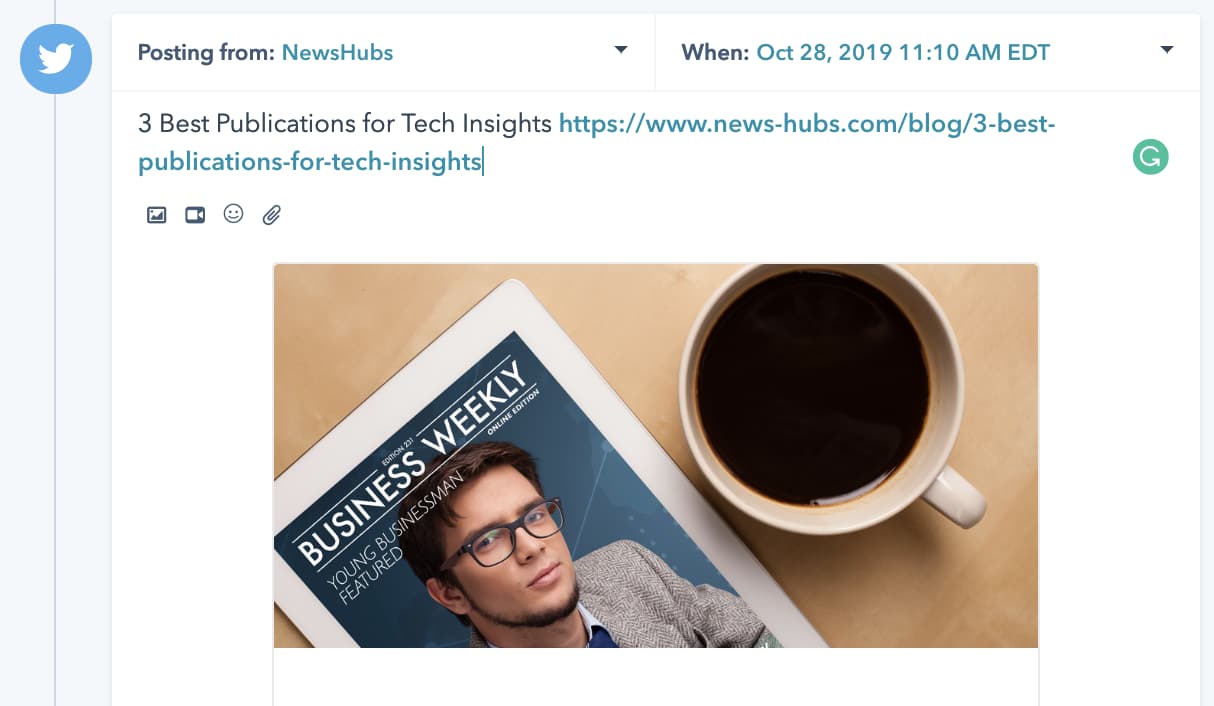 After the post copy is pulled and generated into the text box, you can tweak the copy to fit your social voice or add more depth or comprehensiveness to the overall post.
Best for: Creating post content.
What we like: HubSpot’s social media management tool facilitates seamless content publishing across LinkedIn, Facebook, Instagram, and Twitter.
Moreover, the software enables you to connect your social media accounts to your blog, automatically sharing content as it’s published.
Pricing: HubSpot’s pricing varies depending on how many users you have and whether you want to purchase just the Marketing or other Hubs.
However, HubSpot’s Starter pack begins at $50 per month and includes Marketing Hub functions plus the free features of HubSpot’s CRM.
Case Study
Aermec North America is a leading brand that offers innovative HVAC solutions in the North American market. However, despite their high-quality products, they struggled with low social media engagement and few followers.
The company’s marketing team leveraged HubSpot Marketing to enhance its social efforts to address this issue.
Over one year, the company saw a remarkable 44% increase in its collective followers across all social media and a significant 60% surge in social media shares.
4. Copy.ai
Writing the perfect copy, with the right word count for each platform, can take hours of your day. Copy.ai helps automate the process. All you need to do is follow these three steps.
- Specify what platform the copy will be for, including Twitter, LinkedIn, and Facebook.
- Give the AI context for your post. That could be a command related to the topic of your post or a larger portion of text, like a section of a blog post.
- Choose from multiple options and make the tweaks you see fit.
Best for: Creating post content.
What we like: If you need to write multiple posts for the same campaign, Copy.ai gives you multiple options that you can choose from — or you can schedule them all.
Pricing: Pro plans start at $36 per month.
Case Study
Copy.ai can help you feature keywords that generate traffic and help your users find your posts.
Lucy Werner, PR and branding expert at The Wern Agency, is a frequent user of Copy.ai. She uses the rewrite with keyword function to help optimize her content for search.
“It will pop them in for you with a rejig at the click of a button,” she writes.
5. Emplifi
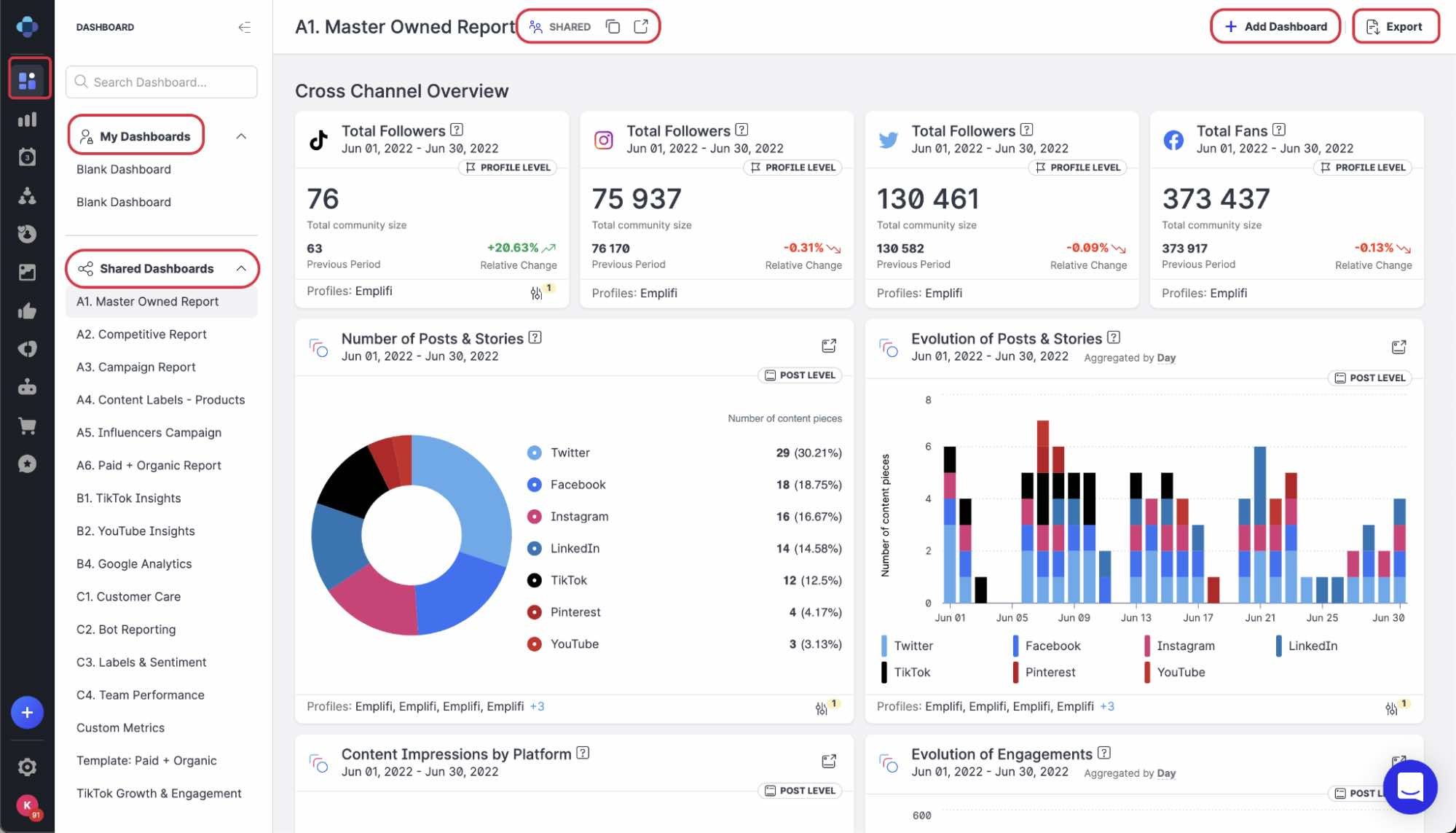
Emplifi, previously known as Socialbakers, is an AI-driven social media management platform that provides advanced audience insights.
The platform includes a unified content feed, an analytics dashboard, and smart scheduling tools.
If you’ve found that it takes too much time and resources to find, vet, track, and keep up relationships with influencers, Emplifis’ AI-driven influencer dashboard will streamline the processes.
.jpg?width=1400&height=1100&name=social-media-ai-emplify-2%20(1).jpg)
When you click into the influencer dashboard, you can toggle between different social media platforms and categories, like “Food” or “Health.”
You can then see influencers that match the most with your audience, which Emplifi continuously analyzes.
Best for: Finding influencers to work with.
What we like: Emplifi Social Marketing Cloud offers top-of-the-line analytics and insights capabilities. The software allows you to generate custom reports to uncover actionable insights that drive real business results.
Pricing: Emplifi Social Marketing Cloud costs $200 per month, billed annually with a 10-profile limit. If you’d like to run 20 platforms, you can subscribe to Essential’s second tier for $400 per month, billed annually.
The Complete Social Marketing Cloud plan, which offers influencer tools, is available upon request.
Case Study
Organix, the UK’s premier baby and toddler finger food brand, collaborated with influencers for their WonderDen campaign. The goal was to establish authentic and trustworthy connections between the brand and its community.
.jpg?width=841&height=516&name=social-media-ai-emplify-3%20(1).jpg)
To manage the campaign, Organix leveraged the powerful Emplifi Social Marketing Cloud.
The software allowed the brand to track content performance across all social media touchpoints, including both influencer and brand-generated content.
As a result, Organix achieved a remarkable 34x engagement efficiency.
6. Cortex
.jpg?width=1282&height=768&name=social-media-ai-cortex%20(1).jpg)
When it comes to sharing content, you can use Cortex to receive recommendations on when and how often to post based on historical metrics. Cortex can also generate detailed analyses of your competitors.
Cortex has a dashboard that shows off your posts and your social schedule. When you create a post, Cortext uses data to suggest posting times.
If you upload one or more photos, the software will also note colors that are most engaging for your audience to help you pick the best image for the post.
Best for: Analyzing your social media performance.
What we like: Cortex’s ability to monitor content trends and identify emerging keywords and layouts can help you stay ahead of the curve.
Additionally, you can leverage their advanced analytics and insights to better understand your audience.
Pricing: Prices are available upon request.
Case Study
St. Regis, a luxury hospitality brand with a strong visual focus, recognized the need to improve their images to better connect with both existing and potential future guests.
By leveraging the advanced insights provided by Cortex, St. Regis saw an astounding 72x increase in engagement on Facebook. Their Instagram page also saw a significant 61% increase in followers on Instagram.
7. Linkfluence Radarly
.jpg?width=1600&height=994&name=social-media-ai-radarly%20(1).jpg)
You can also use something like Linkfluence‘s Radarly software to assess the mountains of data social media audiences produce daily.
That means measuring your brand impact, detecting trends, and pulling specific insights on your most important target audience.
With Radarly, you’re able to log on and see a dashboard that connects data from all of your accounts. In the first column, you can see a live feed of posts and tweets that acknowledge your brand name or handle in some way.
Then in the next columns, you can see scoring that explains how negatively or positively people are talking about you on social.
You’ll also view which platforms people are discussing you most on and data about your audiences, such as interests, languages, or hashtags they’re using.
Best for: Analyzing your social media performance.
What we like: The social listening platform analyzes live streams of social data to give you a better understanding of your customers, including their behavior and sentiment.
Pricing: Prices are available upon request.
Case Study
Pernod Ricard, one of the world’s largest spirits brands, wanted to leverage social data and consumer insights to drive business decisions.
With the help of Linkfluence’s advanced social listening and contextual analysis platform, Pernod Ricard gained a comprehensive understanding of its target audience.
This enabled the company to tailor its products and marketing efforts accordingly. This customer-centric approach drove Pernod Ricard’s annual sales to a staggering €8,987 Million in 2018.
8. Phrasee
Phrasee pulls data from past marketing assets, including emails, social media copy, and other online posts, to determine the most and least effective.
From there, Phrasee can show you the weak or strong copy-related aspects of past ads. You can then draft prospective copy and test its effectiveness within the software. You can also use ad copy that the software suggests for you.
Best for: Optimizing social media advertising.
What we like: Phrasee’s AI-powered technology allows you to generate, optimize, automate, and analyze marketing messages in real time.
Pricing: Prices are available upon request.
Case Study
Wowcher, a prominent ecommerce brand in the UK, partnered with Phrasee to enhance its social media marketing.
Wowcher used Phrasee’s AI-driven content creation software to optimize its Facebook and Instagram ad campaigns. Within a few campaigns, the company achieved a remarkable 31.2% decrease in cost per lead (CPL).
9. Pattern89
.jpg?width=1356&height=1314&name=social-media-ai-pattern89%20(2).jpg)
AI can tackle some of the nitty-gritty ad management tasks, like optimizing bids, divvying up a budget, and recommending channels to help your ad perform.
Pattern89 is an AI marketing tool that provides recommendations on almost every aspect of your ads, including recommendations for adjusting your spend and audience targeting to massively increase performance.
When you log into the tool, you’ll see a screen filled with alerts and suggestions related to improving your ad’s effectiveness. If you’d like to follow the platform’s suggestions, you can click “Show me how” to learn how to make ad adjustments.
If the platform shows you a “Do this automatically” button next to a suggestion, you can click that to have the platform make the adjustment.
Aside from allowing you to monitor live and completed ads, the tool also offers a Creative Ads Manager. This allows you to search and analyze past ads with filters including ad set, campaign objective, audience, and other ad targets.
Best for: Optimizing social media advertising.
What we like: Pattern89 is a top pick if you want to conduct in-depth analyses of customer behaviors on social media, particularly on platforms like Facebook and Instagram.
Pricing: Prices are available upon request.
Case Study
SnapShyft is a marketplace that offers flexible staffing solutions for the food service and hospitality industries. The company partnered with Pattern89 to enhance its marketing efforts and increase conversions.
Using Pattern89’s marketing AI, SnapShyft was able to analyze ad creative and audience engagement in real time, optimizing its in-flight campaigns for maximum impact.
In just four months, Pattern89 drove 75% of new add-to-carts and 96% of new checkout for SnapShyft.
10. LocaliQ
LocaliQ, previously known as Wordstream, is an innovative social media marketing tool designed to help you reach potential customers through social ads.
With LocaliQ, you can collaborate with their team to create a tailored social ad strategy that aligns with your unique objectives.
The LocaliQ platform provides a unified lead dashboard, allowing you to monitor and analyze your campaign’s performance.
Additionally, you can use the platform to generate leads, connect with prospects, access reports, and automate your marketing initiatives with ease.
Best for: Optimizing social media advertising.
What we like: Using LocaliQ’s XMO technology, you can allocate one budget for your business objectives and automatically adjust spending across multiple channels based on real-time performance data.
Pricing: Pricing is available upon request.
Case Study
Aubuchon Homes is a leading luxury home design company based in Southwest Florida. Despite its reputation for exceptional design, the company faced challenges in generating new leads.
To address this issue, Aubuchon Homes sought the expertise of LocaliQ.
Leveraging LocaliQ’s Smart Social ads tools, Aubuchon Homes drove remarkable results quickly. The targeted advertising campaigns drove a 300% increase in leads, with the new leads being of higher quality.
As a result, the company saw a 42% increase in the average home sale price, leading to greater revenue and profitability.
AI for Every Social Media Marketer
If artificial intelligence still seems like an overwhelming topic, you’re not the only one who might be intimidated by it. After all, we’re marketers, not data scientists.
Good news: You don’t need to be a data scientist to understand, start using, and make a massive impact with the help of various AI. You just need to start using AI platforms for social media. Get started with these tools today.

5 Challenges Marketers Face in Understanding Audiences [New Data + Market Researcher Tips]
As customer behavior constantly changes, marketers face an ongoing challenge to keep up with their audiences. Personalization and need fulfillment are essential to the success of any marketing campaign, and failing to understand what your customers want could result in lost revenue for your business.
Marketers must stay in touch with evolving customer behavior and preferences to ensure their campaigns resonate with their customers. In this blog post, we’ll highlight the top challenges marketers face in understanding audiences from HubSpot’s very own 2023 State of Marketing Report to provide data-driven tips for overcoming them.
Challenges Marketers Face in Understanding Audiences
1. Identifying the target audience.
Surveyed marketers reported that their biggest social media challenges are consistently creating engaging content (22%), gaining and keeping followers (22%), and reaching their target audience (21%).
The special thing about these challenges is that the first two are contingent on the third.
Creating engaging content that grows your following is nearly impossible without understanding the target audience. Knowing exactly who you’re making content for is a foundational understanding marketers need.
Marketers can conduct more thorough market research to gather data on their target audience to gain a more concise understanding. They can use this data to create buyer personas and plan content for your ideal customer. These personas should be based on recent data and insights from trustworthy surveys, interviews, and other research methods.
2. Understanding customer behavior.
Another challenge that marketers face is understanding their customers’ behaviors. Understanding where they spend their time online, what they like, and what they don’t like is essential to creating effective marketing campaigns. You want to see how they prefer to view your content, the frequency with which they do it, and what will keep them returning to your business.
To overcome this challenge, marketers can use tools like Google Analytics or heat maps to gather data on customer behavior. They can use this data to analyze their customers’ website actions, track engagement, and identify areas for improvement. Marketers can also use social listening tools like Hootsuite to monitor conversations around their brand on social media.
3. Creating content that resonates with the audience.
Creating content that resonates with the audience is a significant challenge for many marketers. They may struggle to find topics their target audience is interested in or may not know how to write content that speaks to them.
For example, many customers in recent years have been looking for brands that share content that reflects corporate social responsibility on topics like social justice, sustainability, or ethical workplace practices. Current-day consumers, especially Millennials and Gen Z, want to buy from companies that display values and a purpose that resonates with them.
There’s proven potential in sharing values-based content with customers. According to HubSpot’s State of Marketing Report, 16% of marketers plan to get their company talking about values this year for the first time, and 89% of those who already do plan to increase or maintain their investment in this approach.
Marketers can use the data gathered on their target audience to better connect with the customer to create content that speaks to their interests and values. And to make things easier, they can also leverage tools like surveys or customer feedback to see what they want from your marketing content. Once you’ve identified topics your target audience is interested in, create high-quality content such as blog posts, videos, infographics, or ebooks based on the responses.
4. Measuring the success of marketing campaigns.
Measuring the success of marketing campaigns is another challenge faced by marketers. Without tracking the performance of their campaigns, it is impossible to know if they are effectively targeted towards their audience.
Marketers can set specific, measurable, and achievable campaign goals. They can use tools like HubSpot’s Marketing Analytics to track the performance of their campaigns and adjust them as necessary to achieve their goals. By monitoring key performance indicators (KPIs) like website traffic, lead conversions, click-through rates, and social media engagement, marketers can measure the success of their campaigns and optimize their strategies accordingly.
5. Keeping up with the latest marketing trends
Finally, keeping up with the latest marketing trends can be tedious for marketers. Digital marketing innovation and news is constantly changing, and marketers must keep up to ensure their campaigns are relevant and useful to the audience they’re trying to reach.
To keep up with these trends, marketers can follow industry blogs and social media accounts to stay informed of the latest developments in their niche. By keeping up-to-date on the latest marketing trends and implementing best practices, marketers can stay ahead of the competition.
Understanding your audience helps you cater to them.
Understanding the audience is critical to the success of any marketing campaign. By overcoming these roadblocks, marketers can create campaigns that resonate with their target audience and potentially drive engagement and conversions. Remember to conduct market research, monitor customer behavior, and stay up-to-date on the latest marketing trends. Marketers can overcome these challenges by following these best practices and achieving marketing success.

32 Mission and Vision Statement Examples That Will Inspire Your Buyers
Think about the brands you purchase from over and over. Why do you choose to buy products and or services from them even when cheaper options exist?

Well, there’s a good reason for it — because of their values which are expressed in their mission statement. As consumers, we like to patronize businesses that have values we believe in.
Still, Loyalty doesn’t happen overnight. Building brand loyalty, like creating mission and vision statements, takes time. If you’re in a bit of a time crunch, use this table of contents to find precisely what you’re looking for to inspire the development of your company’s mission:
This brief description helps customers, employees, and leadership understand the organization’s top priorities.
As a company grows, it may reach its early goals, and they’ll change. So, it’s important to revise mission statements as needed to reflect the business’s new culture as it achieves its goals and develops new targets.
What makes a good mission statement?
The best brands combine physical, emotional, and logical elements into one exceptional customer (and employee) experience that you value as much as they do. A good mission statement will not only explain your brand’s purpose, but will also foster a connection with customers.
When your brand creates a genuine connection with customers and employees, they’ll stay loyal to your company, thereby increasing your overall profitability.
Mission statements also help you stand out in the marketplace, differentiating your brand from the competition.
What are the 3 parts of a mission statement?
Your mission statement should clearly express what your brand does, how it does it, and why the brand does it. You can quickly sum this up in your mission statement by providing the following:
- Brand Purpose: What does your product or service do, or aim to offer and for whom?
- Brand Values: What does your company stand for? For example, are you environmentally conscious and provide a more sustainable solution to solve a problem? Values are what make your company unique.
- Brand Goals: What does your company accomplish for customers? Why should they purchase from you instead of other competitors?
With these three components, you can create a mission that is unique to your brand and resonates with potential customers. Next, we’ll guide you step by step on how to write a proper mission statement to build on as your company evolves.
1. Explain your company’s product or service offering.
You want prospects to understand what your company does in a literal sense. This means explaining your offering in basic, clear terms. Your explanation should answer the most basic questions like:
- Are you selling a product or service?
- Why would customers buy it?
- How does your offering solve for the customer?
Record your answers and focus on how your product or service brings value to your buyer personas, otherwise known as your target audience.
2. Identify the company’s core values.
Now, this is where you can start thinking bigger. You didn’t just make a product or service at random. Instead, you’re most likely motivated by a set of core values.
Core values are deeply ingrained principles that guide a company’s actions. Take HubSpot’s culture code, HEART, for example:
- Humble
- Empathetic
- Adaptable
- Remarkable
- Transparent
These are principles that not only company employees respect, but are principles that our customers appreciate as well. By identifying core values that hold meaning on personal and organizational levels, you’ll have an appealing set to add to your mission statement.
3. Connect how your company’s offering aligns with your values.
So how can your company offering serve your core values? You need to draw a connection between the two in a way that makes sense to the public.
For example, if one of your core values centers on innovation, you want to frame your product or service as pushing boundaries and explaining how it helps customers innovate their lives or business practices. Essentially, you’re taking the literal benefit of the offering and expanding it to serve a higher purpose.
4. Condense these statements into one.
A mission statement can be as short as a single sentence, or as long as a paragraph, but it’s meant to be a short summary of your company’s purpose. You need to state the what, who, and why of your company:
- What: The company offering
- Who: Who you’re selling to
- Why: The core values you do it for
Once you have successfully conveyed your message, it’s time to refine and perfect your statement.
5. Make sure it’s clear, concise, and free of fluff.
Above all, your mission statement is a marketing asset that is meant to be clear, concise, and free of fluff. It should clearly outline the purpose of your company offering and show the common goals the company is working to achieve. You should also have other team members or advisors read the mission statement and make adjustments if needed according to their recommendations.
What makes a good vision statement?
A good vision statement should be bold and ambitious. They’re meant to be inspirational, big-picture declarations of what your company strives to be in the future. They give customers a peek into your company’s trajectory and build customer loyalty by allowing them to align their support with your vision because they believe in the future of your brand as well.
What are the 3 parts of a vision statement?
Your company vision is meant to be inspirational while also aligning with the company’s mission. A vision statement should have the following characteristics:
- Aspirational and Ambitious: Have a lofty outlook for what you want your business to accomplish? Here’s the place to put it. Your vision statement should be aspirational and showcase how your business will grow in the future.
- Practical and Achievable: While your statement should be ambitious, it shouldn’t be impossible. Set a goal that is both challenging and practical.
- General: Your vision should be broad enough to encompass all of your brand’s overall goals. Think of it as umbrella for your mission statement and company objectives to nest under.
Both mission and vision statements are often combined into one comprehensive “mission statement” to define the organization’s reason for existing and its outlook for internal and external audiences — like employees, partners, board members, consumers, and shareholders.
The difference between mission and vision statements lies in the purpose they serve.
A mission statement is a literal quote stating what a brand or company is setting out to do. This lets the public know the product and service it offers, who it makes it for, and why it’s doing it. A vision statement is a brand looking toward the future and saying what it hopes to achieve through its mission statement. This is more conceptual, as it’s a glimpse into what the brand can become in the eyes of the consumer and the value it will bring in longevity.
In summary, the main differences between a mission statement and a vision statement are:
- Mission statements describe the current purpose a company serves. The company’s function, target audience, and key offerings are elements that are often mentioned in a mission statement.
- Vision statements are a look into a company’s future or what its overarching vision is. The same elements from the mission statement can be included in a vision statement, but they’ll be described in the future tense.
Now that we know what they are, let’s dive into some useful examples of each across different industries.
Mission and Vision Statement Template
Free Guide: 100 Mission Statement Templates & Examples

Need more examples to build your mission statement? Download our free overview of mission statements – complete with 100 templates and examples to help you develop a stand-out mission statement.
Create a mission statement with these useful templates, like this example below:
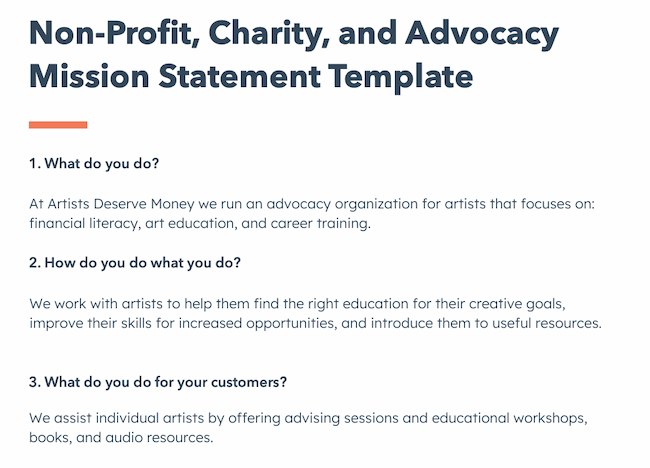
1. Life Is Good: To spread the power of optimism.

The Life is Good brand is about more than spreading optimism — although, with uplifting T-shirt slogans like “Seas The Day” and “Forecast: Mostly Sunny,” it’s hard not to crack a smile.
There are tons of T-shirt companies in the world, but Life is Good’s mission sets itself apart with a mission statement that goes beyond fun clothing: to spread the power of optimism.
This mission is perhaps a little unexpected if you’re not familiar with the company’s public charity: How will a T-shirt company help spread optimism? Life is Good answers that question below the fold, where the mission is explained in more detail using a video and with links to the company’s community and the Life is Good Playmaker Project page. We really like how lofty yet specific this mission statement is — it’s a hard-to-balance combination.
2. sweetgreen: Building healthier communities by connecting people to real food.

Notice that sweetgreen’s mission is positioned to align with your values — not just written as something the brand believes. We love the inclusive language used in its statement.
The language lets us know the company is all about connecting its growing network of farmers growing healthy, local ingredients with us — the customer — because we’re the ones who want more locally grown, healthy food options.
The mission to connect people is what makes this statement so strong. And, that promise has gone beyond sweetgreen’s website and walls of its food shops: The team has made strides in the communities where it’s opened stores as well. Primarily, it offers education to young kids on healthy eating, fitness, sustainability, and where food comes from.
3. Patagonia: Build the best product, Cause no unnecessary harm, Use business to protect nature, Not bound by convention.

Patagonia’s mission statement spotlights the company’s commitment to help the environment and save the earth. The people behind the brand believe that among the most direct ways to limit ecological impacts is with goods that last for generations or can be recycled so the materials in them stay in use.
In the name of this cause, the company donates time, services, and at least 1% of its sales to hundreds of environmental groups worldwide.
If your company has a similar focus on growing your business and giving back, think about talking about both the benefit you bring to customers and the value you want to bring to a greater cause in your mission statement.
4. American Express: Become essential to our customers by providing differentiated products and services to help them achieve their aspirations.

Customers will never love a company until the employees love it first.
The tweet above is from Simon Sinek, and it’s one that we repeat here at HubSpot all the time. American Express sets itself apart from other credit card companies in its list of values, with an ode to excellent customer service, which is something it’s famous for.
We especially love the emphasis on teamwork and supporting employees so that the people inside the organization can be in the best position to support their customers.
5. Warby Parker: To inspire and impact the world with vision, purpose, and style.

In one sentence, the brand takes us to the root of why it was founded while also revealing its vision for a better future.
The longer-form version of the mission reads: “We’re constantly asking ourselves how we can do more and make a greater impact—and that starts by reimagining everything that a company and industry can be. We want to demonstrate that a business can scale, be profitable, and do good in the world—without charging a premium for it. And we’ve learned that it takes creativity, empathy, and innovation to achieve that goal.” This further shows how Warby Parker doesn’t hold back on letting its unique personality shine through. Here, the mission statement’s success all comes down to spot-on word choice.
6.InvisionApp: Transform the way people work together by helping them collaborate better. Faster. On everything. From anywhere.
We love the way this statement is emphasized by bringing it back to InVision’s customers — top brands like Google, Zillow, and Slack — and linking to those stories. This mission statement is brief, authentic, and business babble-free — which makes the folks at InvisionApp seem trustworthy and genuine.
7. Honest Tea: To create and promote great-tasting, healthy, organic beverages.

Honest Tea’s mission statement begins with a simple punch line connoting its tea is real, pure, and therefore not full of artificial chemicals. The brand is speaking to an audience that’s tired of finding ingredients in its tea that can’t be pronounced and has been searching for a tea that’s exactly what it says it is.
Not only does Honest Tea have a punny name, but it also centers its mission around the name. For some time, the company even published a Mission Report each year in an effort to be “transparent about our business practices and live up to our mission to seek to create and promote great-tasting, healthier, organic beverages.”
8. IKEA: To offer a wide range of well-designed, functional home furnishing products at prices so low that as many people as possible will be able to afford them

The folks at IKEA dream big. The vision-based mission statement could have been one of beautiful, affordable furniture, but instead, it’s to make everyday life better for its customers. It’s a partnership: IKEA finds deals all over the world and buys in bulk, then we choose the furniture and pick it up at a self-service warehouse.
“Our business idea supports this vision … so [that] as many people as possible will be able to afford them,” the brand states.
Using words like “as many people as possible” makes a huge company like IKEA much more accessible and appealing to customers.
9. Nordstrom: Offering customers the very best service, selection, quality, and value.

When it comes to customer commitment, few companies are as hyper-focused as Nordstrom is. Although clothing selection, quality, and value all have a place in the company’s mission statement, it’s clear that it’s all about the customer: “Nordstrom works relentlessly to give customers the most compelling shopping experience possible.”
If you’ve ever shopped at a Nordstrom, you’ll know the brand will uphold the high standard for customer service mentioned in its mission statement, as associates are always roaming the sales floors, asking customers whether they’ve been helped, and doing everything they can to make the shopping experience a memorable one.
10. Cradles to Crayons: Provides children from birth through age 12, living in homeless or low-income situations, with the essential items they need to thrive – at home, at school, and at play.

Cradles to Crayons divided its mission and model into three sections that read like a game plan: The Need, The Mission, and The Model. The “rule of three” is a powerful rhetorical device called a tricolon that’s usually used in speechwriting to help make an idea more memorable. A tricolon is a series of three parallel elements of roughly the same length — think “I came; I saw; I conquered.”
11. Universal Health Services, Inc.: To provide superior quality healthcare services that: PATIENTS recommend to family and friends, PHYSICIANS prefer for their patients, PURCHASERS select for their clients, EMPLOYEES are proud of, and INVESTORS seek for long-term returns.

A company thrives when it pleases its customers, its employees, its partners, and its investors — and Universal Health Services endeavors to do just that, according to its mission statement. As a healthcare service, it specifically strives to please its patients, physicians, purchasers, employees, and investors. We love the emphasis on each facet of the organization by capitalizing the font and making it red for easy skimming.
12. JetBlue: To inspire humanity – both in the air and on the ground.

JetBlue’s committed to its founding mission through lovable marketing, charitable partnerships, and influential programs — and we love the approachable language used to describe these endeavors. For example, the brand writes how it “set out in 2000 to bring humanity back to the skies.”
For those of us who want to learn more about any of its specific efforts, JetBlue offers details on the Soar With Reading program, its partnership with KaBOOM!, the JetBlue Foundation, environmental and social reporting, and so on. It breaks down all these initiatives really well with big headers, bullet points, pictures, and links to other web pages visitors can click to learn more. JetBlue also encourages visitors to volunteer or donate their TrueBlue points.
13. Workday: Our core values guide everything we do — Employees, Customer Service, Innovation, Integrity, Fun, Profitability.

Workday, a human resources (HR) task automation service, doesn’t use its mission statement to highlight the features of its product or how it intends to help HR professionals improve in such-and-such a way.
Instead, the business takes a stance on values. There’s a lot of great tech out there. But at Workday, it revolves around the people. We love how confident yet kind this mission statement is. It observes the state of its industry — which Workday believes lacks a human touch — and builds company values around it.
14. Lowe’s: Together, deliver the right home improvement products, with the best service and value, across every channel and community we serve.
Sometimes the best way to communicate is direct. Lowe’s mission statement hones in on the who, how, what, and why behind this powerful home improvement brand.
It’s also a great lesson in how the words and phrases you choose show your audience the force behind your mission. This mission statement begins with the word “together.” So, no matter what location, products, or channel, the top priority of its mission is that it happens as a team.
That focus on togetherness also creates a foundation for the volunteer, scholarship, and charitable work that this organization does.
15. Tesla: Accelerating the world’s transition to sustainable energy.

A car company’s punny use of the word “accelerating” is just one reason this mission statement sticks out. But Tesla makes this list because of how its mission statement describes the industry.
It may be a car company, but Tesla’s primary interest isn’t just automobiles — it’s promoting sustainable energy. And, sustainable energy still has a “long road” ahead of it (pun intended) — hence the world’s “transition” into this market.
Ultimately, a mission statement that can admit to the industry’s immaturity is exactly what gets customers to root for it — and Tesla does that nicely.
16. Invisible Children: Partners with local peacebuilders across central Africa to end violent conflict through locally-led solutions.

Invisible Children is a non-profit that raises awareness around the violence affecting communities across Central Africa, and the company takes quite a confident tone in its mission.
The most valuable quality of this mission statement is that it has an end goal. Many companies’ visions and missions are intentionally left open-ended so that the business might always be needed by the community. But Invisible Children wants to “end” violent conflict facing African families with local solutions. It’s an admirable mission that all businesses — not just nonprofits — can learn from when motivating customers.
17. TED: Spread ideas, foster community and create impact.

We’ve all seen TED Talks online before. Well, the company happens to have one of the most concise mission statements out there.
TED, which stands for “Technology Education and Design,” has a succinct mission statement that shines through in every Talk you’ve seen the company publish on the internet. That mission statement starts with “Spread ideas.” Sometimes, the best way to get an audience to remember you is to zoom out as far as your business’s vision can go. What do you really care about? TED has recorded some of the most famous presentations globally. Then, it hones in on what great ideas can do — foster community and create impact.
18. Microsoft: To empower every person and every organization on the planet to achieve more.
Microsoft is one of the most well-known technology companies in the world. It makes gadgets for work, play, and creative purposes on a worldwide scale, and its mission statement reflects that. Through its product offering and pricing, it can empower every person and organization.
19. Disney: To entertain, inform and inspire people around the globe through the power of unparalleled storytelling.

Disney’s mission statement goes beyond providing ordinary entertainment. It intends to tell stories and drive creativity that inspires future generations through its work. This is an exceptional mission statement because it goes beyond giving consumers programs to watch, but ones that excite and change the way people see them and the world around them.
20. Meta: Giving people the power to build community and bring the world closer together.
Meta, formerly known as Facebook, is a major social media platform with a concise vision statement. It provides a platform to stay in touch with loved ones and potentially connect to people around the world.
21. Vista Equity Partners: By providing technology expertise, operational guidance and capital for sustainable growth, we empower organizations across all industries to stay ahead in the digital economy.
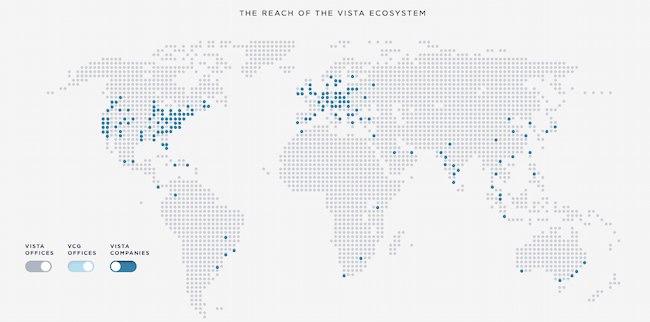
Some businesses sell a clear and easy-to-understand product or service. But many companies need to combine branding with product education. This means that some mission statements need to not only communicate how a brand does business but also make it easy to see what it’s selling.
Vista Equity Partners is a leading technology brand that supports a wide range of people, technologies, and products. In its mission statement, it clarifies what its company offers and why. It does this using the terms its audience uses most often to describe how it can help.
22. Dunkin’: Everything we do is about you. We strive to keep you at your best, and we remain loyal to you, your tastes and your time. That’s what America runs on.
Dunkin’s mission goes beyond remaining a large coffee chain. Rather, the brand wants to be the consummate leader in the coffee and donut industry. It wants to become a place known for fun, food, and recreation.
Now that we’ve gone over successful mission statements, what does a good vision statement look like? Check out some of the following company vision statements — and get inspired to write one for your brand.
1. Alzheimer’s Association: A world without Alzheimer’s and all other dementia.

The Alzheimer’s Association conducts global research and gives quality care and support to people with dementia. This vision statement looks into the future where people won’t have to battle this now incurable disease. With the work that it’s doing in the present, both employees and consumers can see how the organization achieves its vision by helping those in need.
2. Teach for America: One day, all children in this nation will have the opportunity to attain an excellent education.

Teach for America creates a network of leaders to provide equal education opportunities to children in need. This organization’s day-to-day work includes helping marginalized students receive the proper education they otherwise wouldn’t have access to. Its vision statement is what it hopes to see through its efforts — a nation where no child is left behind.
3. Creative Commons: Help others realize the full potential of the internet.
This nonprofit’s vision statement is broad. It helps overcome legal obstacles to share knowledge and creativity around the world. By working closely with major institutions, its vision is an innovative internet that isn’t barred by paywalls.
4. Chipotle: We believe that food has the power to change the world.
Delicious tacos, burritos, and bowls aren’t the only things that Chipotle is passionate about. Many fast food brands differentiate with products. But Chipotle offers a belief instead. This idea fuels practices like using local and organic produce, using responsibly raised meat, and cutting greenhouse emissions. Chipotle’s vision statement makes it clear what inspires and drives the actions of this international brand.
5. Australia Department of Health: Better health and wellbeing for all Australians, now and for future generations.

This government department has a clear vision for its country. Through health policies, programs, and regulations, it has the means to improve the healthcare of Australian citizens.
6. LinkedIn: Create economic opportunity for every member of the global workforce.
LinkedIn is a professional networking service that gives people the opportunity to seek employment. Its vision statement intends to give employees of every level a chance to get the job they need.
7. Purely Elizabeth: We believe that food can heal.
Purely Elizabeth is a food brand selling granola, oatmeal, and cereal products. Its extended vision statement reads: “When you eat better, you feel better. It’s that simple. That’s why we use superfoods with vibrant flavors and rich textures to create delicious foods to help you thrive on your wellness journey.”
Food brands have a lot of competition, and this brand’s broad and inspiring vision offers a chance to connect more deeply with customers. Its podcast, blog, and recipe resources offer useful tools and tips for anyone looking to heal their bodies with their food choices.
8. AllHere: Connecting All Families with the Right Support at the Right Time

Attendance is a big challenge for schools and families, especially with students in middle and high school. AllHere offers AI services like mobile messaging to overcome administrative and communication challenges. This helps students, parents, and teachers get the support they need for student success.
This vision statement emphasizes that this challenge is bigger than individual habits. It’s an empowering vision of an educational system that works for everyone.
9. Southwest: To be the world’s most loved, most efficient, and most profitable airline.

Southwest Airlines is an international airline that strives to serve its flyers with a smile. Its vision statement is unique because it sees itself not just excelling in profit but outstanding customer service, too. Its vision is possible through its strategy and can lead its employees to be at the level they work toward.
10. Supergoop!: Change the way the world thinks about sunscreen.
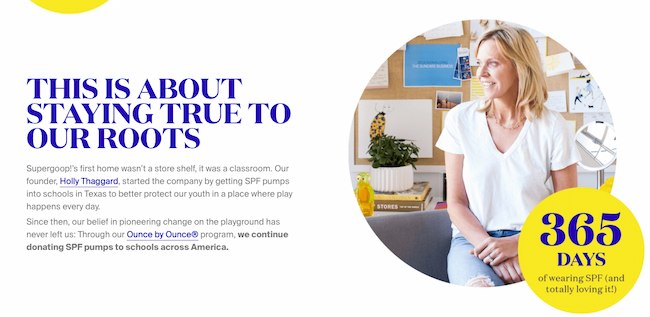
For a vision statement to excite, but not overwhelm, it should be both broad and specific. Company mission statement examples like the one above from Supergoop! show that it may be tricky, but it’s also possible to balance those two extremes.
This vision says that sunscreen is important AND that sunscreen is more than sunscreen. This simple statement helps the audience think more about what its products are and what they should expect from those products. It’s about education, awareness, and quality. And this vision statement keeps the tone positive, bright, and direct.
Inspire Through Brand Values
Brand values play a much more significant role in customer loyalty than you think. Showing that your business understands its audience — and can appeal to them on an emotional level — could be the decision point for a customer’s next purchase. We hope you found some insight in this post that can help you brainstorm your inspiring vision and mission statements for your business.
Editor’s note: This post was originally published in August 2014 and has been updated for comprehensiveness.

How to Edit YouTube Videos: A Beginner’s Guide
As a video marketer, knowing how to edit YouTube videos is a crucial skill, especially when it comes to post-production.
If you can’t seamlessly weave your shots together or get your cut to hit the right frame, your video will seem unpolished and disengage your viewers.
That said, if you’re operating on a shoestring budget, you might not be able to afford video editing software. So what’s a video marketer to do without editing software?
Fortunately, YouTube offers a web-based video editor that is entirely free and accessible through its platform.
In this post, learn how to use YouTube’s nativevideo-editingtools, as well as best practices to keep in mind when editing your videos to ensure you’re keeping your audience engaged and interested in watching more.
![→ Free Templates: How to Use YouTube for Business [Download Now]](https://no-cache.hubspot.com/cta/default/53/b33cfd44-133a-49e3-a943-086c5679d485.png)
How to Use YouTube’s Video Editor
YouTube’s video editor is an extremely basic editing tool, butit can still let you trim clips out of any part of your video, so read on to learn how to chop up your videos right in the video platform.
1. Sign in to YouTube Studio.
YouTube Studio is a platform provided by YouTube for creators to control their presence, edit and upload videos, and track performance. The studio is accessible via desktop or app.
2. Click Content.
If you’re using the desktop version, go to the sidebar on the left and click Content. If you’re using the app, the Content tab is at the bottom.
3. Click the thumbnail of the video you want to edit.
While YouTube is compatible with multiple formatting types (3GPP, AVI, FLV, MOV, MPEG4, MPEGPS, WebM and WMV), YouTube recommends format is MPEG4 or “MP4” when uploading any videos to retain the highest quality possible.
If you’re currently using another format, you can use tools like Veed’s video converter to change any video to MP4. This will allow you to upload the video to YouTube without compromising video quality.
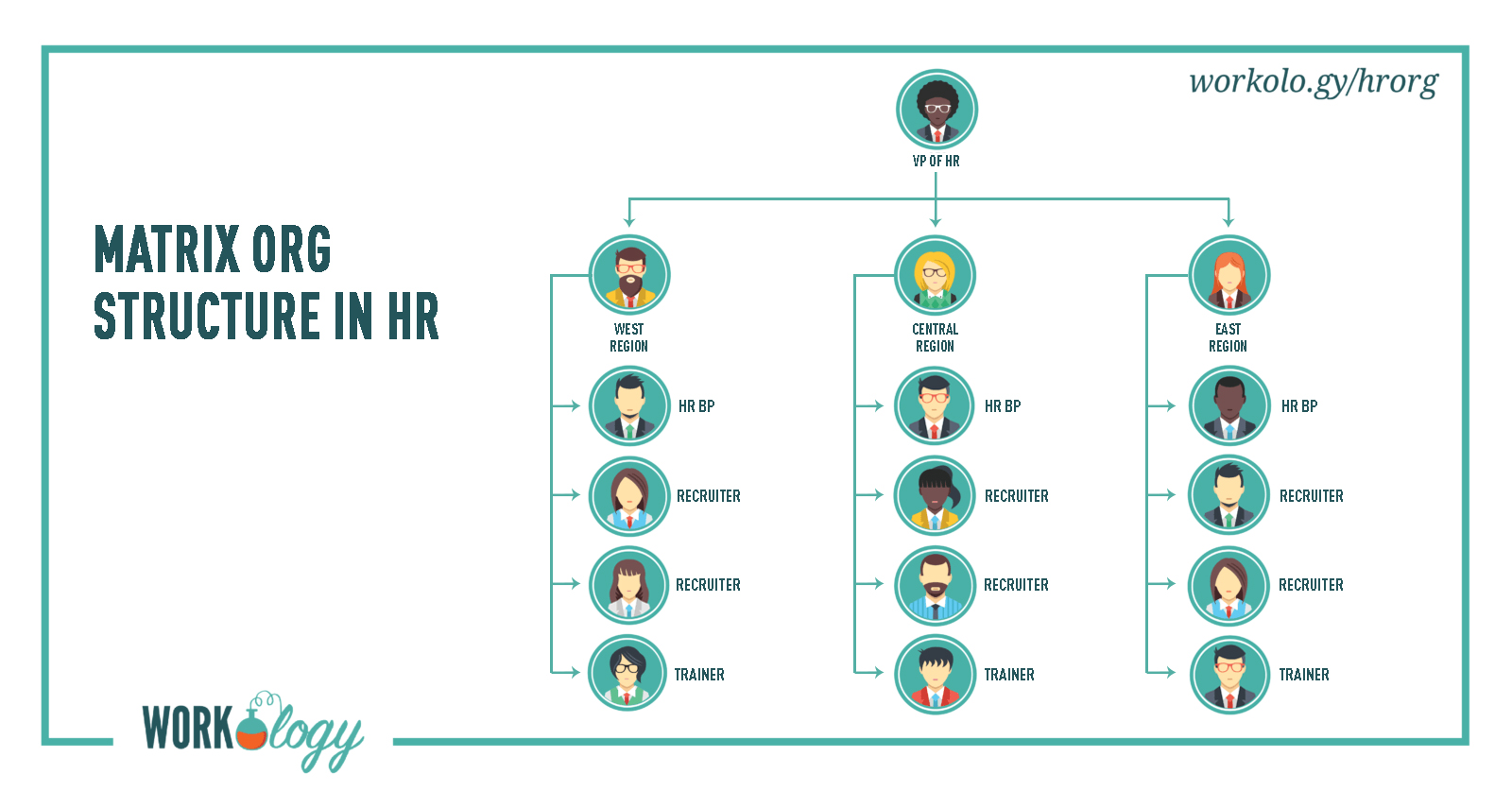
4. In the left sidebar, click Editor.
5. Trim the beginning or end of your video.
If you want to trim the beginning or end of your video, select Trim, which is next to your video’s timer and right above your timeline panel.
You should see a blue box around the sides of your video timeline panel. Drag them to chop off the parts of the beginning or end of your rough cut that you don’t want to include in your final published version. Click Preview to view the edit, and click Save on the top right-hand corner if you’re satisfied.
6. Trim clips out of the middle of your video.
If you want to trim a specific clip out of the middle of your video, select Trim. Next, in your timeline panel, click the beginning of the portion of the clip you’d like to remove and press Split.
Next, in your timeline panel, click the end of the clip that you’d like to remove and press Split again.
Finally, click on the blue line at either the beginning or end of your clip and drag it to the other side to trim it out of your video. Click Preview to view your edited video, and click Save if you’re satisfied.
7. Add an end screen to your video.
If you want to give your viewers the option to watch one of your related videos or playlists or subscribe to your channel, click the end screen icon shown at the bottom of your timeline panel.
The image below displays the end screen icon outlined in red.
You can upload your existing end-screen template by clicking Apply template in the pop-up menu (this is a helpful guide for creating your own) or choose from the editor’s native options: Video, Playlist, Subscribe, Channel, or Link.
While YouTube’s video-editing tool in Creator Studio can be helpful, you may be looking for a more robust editing tool. If this sounds like you, check out our post on some of the best YouTube video editor alternatives.
How To Edit Videos For YouTube
While understanding how to edit your videos is essential, it’s also important to make sure you’re editing videos into a final product that users are interested in. Let’s discuss best practices to keep in mind when editing your videos during post-production.
Create engaging thumbnails for each video.
Thumbnails are the first thing your viewers see before watching your video, so they’re your first chance to capture attention and draw in your audience.
Your thumbnails can be screenshots of specific moments from your videos or even text-based titles, but they should be exciting and leave your audience intrigued and wanting to learn more.
Here is a helpful guide to creating YouTube thumbnails.
Tell a story.
Just as we do when we read a book, we want the videos we watch to tell a story. This means that your videos should have a flow and follow the fundamental elements of storytelling: having a beginning, middle, and end.
You’ll want your story to guide viewers through what you’re sharing with them, and they won’t be left confused and wondering how one clip is related to another.
This post is a thorough explanation of the basics of storytelling and how you can apply its principles when editing your videos.
Use engaging elements in all your videos.
In addition to telling a story, adding engaging elements to your videos during editing is a great way to keep your audience engaged.
Engaging elements can be things like images, text and shapes, animations, music, and fun transitions.
Be sure to choose an element that makes sense and complements your videos, as you don’t want to take the focus away from your high-quality content.
Create a baseline video editing style.
One of the best ways to streamline your editing process and keep your audience engaged is to develop a baseline editing style that you’ll use and apply to every video.
This means a consistent way of editing your videos, thumbnail style, music, transitions, and any other added elements that you’ll always use.
You’ll spend less time finding new elements every time you sit down to edit, and your audience will come to recognize your consistent style.
For example, maybe you always give a snippet at the beginning of your videos of the most dramatic or exciting moment that will happen later on to draw in your audience.
Keep up this consistent style with all your videos, as it will give you a consistent framework to work from and keep your audience engaged and wanting more.
Keep it simple.
Although it can be tempting to do as much as you can to draw in your audience, it’s also important to keep it simple and not overwhelm your viewers.
Too many unnecessary transitions, loud music, images, and text can distract from your video content and have the opposite effect.
Aim to find a careful balance of original video content and supplemental elements.
Take time to step away and come back.
Editing video can be stressful, especially if you sit in front of a computer for hours at a time.
It can become easy to second-guess your work, so it can be beneficial to step away for a while so you can come back fresh, energized, and ready to make a final cut.
You can think of it like this: if you’ve been sitting at a desk for six hours editing a video, you’ve been hyperfocused on that and nothing else. You may start to feel stuck or like you’ve hit a wall and that your video is bad.
If you step away for a few hours or days, you can come back to it with a fresh pair of eyes to make final edits and realize that your video is good; you just needed to take a break and come back refreshed.
Editing YouTube Videos for Beginners: A Checklist
Keep this checklist in mind before, during, or after editing your YouTube videos:
- Include SEO-optimized tags and titles for your videos. TubeBuddy, Ahrefs, and HubSpot all contain tools you can use to optimize your videos to help them rank high SERPs.
- Have a realistic and consistent production timeline. For example, if you want to upload videos every two weeks, make sure you allot enough time to meet your deadlines.
- Include an eye-catching thumbnail.
- Make sure you have good-quality audio. It doesn’t matter how well-edited your videos are — if the audio is poor, audiences won’t tune in or share.
- Share to all the proper social media channels. Make sure to promote your videos on your brand’s social media platforms to reach as many people as possible.
- Track your post-uploaded analytics. You need to keep track of your video’s performance so that you know what you need to improve or focus on next time.
Keep an eye out for trends, such as when your audience is most active or what videos they enjoy the most.
Whether you use YouTube’s native tools or third-party software, editing your videos should be fun. Take the time to understand what works for the content you produce, create a consistent editing strategy, and watch the views roll in.
Editor’s note: This post was originally published in March 2019 and has been updated for comprehensiveness.