
How (& Where) Consumers Discover Products on Social Media [New Data]
Marketing is all about meeting people where they are — and more often than not, they’re on social media. For this reason, it’s the perfect vehicle for product discovery.

Of course, not all social media platforms are created equal, especially when it comes to product discovery. So, if you’re looking to pinpoint the platforms consumers use the most for product research, you’ve come to the right place.
Here, we’ll dive into:
- The top social media channels consumers use for product discovery
- What types of content consumers watch and engage with
- Social media research habits
- Which platforms you should market your products on
Let’s dive in.
Shopper research is critical for a better understanding of the customer journey from initial searches to website visits and eventual purchases. Plus, the advent of digital- and mobile-first interactions has made this research even more important as the customer journey now includes multiple paths and touchpoints from start to finish.
For example, prospective buyers might hear about your brand from a friend, do their research on social media, and then interact with your ecommerce store through their mobile device.
Understanding all touchpoints along this journey can help companies create more seamless and streamlined experiences for consumers and increase overall ROI.
The Top Social Media Channels Consumers Use For Product Discovery
22% of consumers prefer to discover new products via social media, according to HubSpot’s 2022 State of Consumer Trends Report. Let’s take a closer look at the channels they leverage for product discovery:
Gen Z
57% of Gen Z have discovered new products on social media in the past three months, and 71% say it’s where they most often discover products.
Almost half (49%) of Gen Z consumers prefer to discover new products via Instagram Stories. This isn’t too surprising when you consider 90% of people follow a business on Instagram. On top of that, Gen Z ranks Instagram as their favorite social media app.
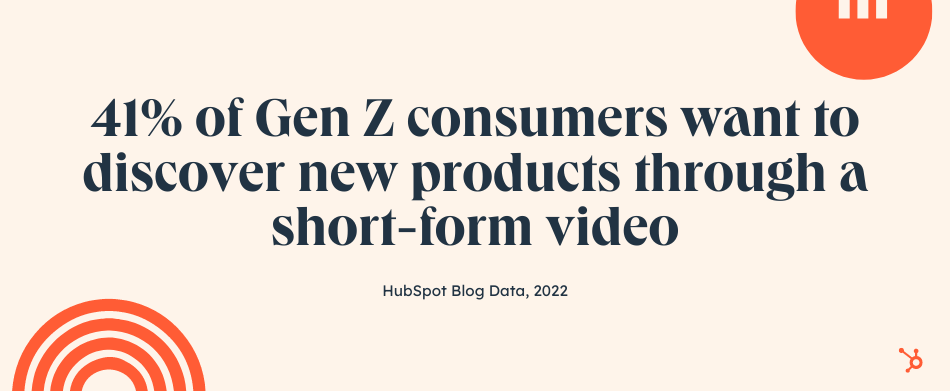
In second place, 41% want to discover new products through a short-form video — such as a TikTok or Instagram Reel. Since these platforms pull a younger audience, this adds up.
 Millennials
 prefer to discover new products via feed or story posts. This could be anything from an Instagram Story to a Facebook post. Facebook, in particular, is the social app Millennials visit the most, followed closely by YouTube.
On top of that, Millennials also like to discover new products through short-form videos (36%).
Gen X
Gen X discovers new products on social media more frequently than any other channel, even though it isn’t preferred. Like Millennials, they’re most likely to find new products via feed or story posts.
Interestingly, this age group likes to discover new products through short-form videos (41%) in equal measure to Gen Z. It’s clear that short, snackable content is appealing to this demographic. In fact, 36% of TikTok users in 2021 were between 35 and 54 years old, a 10% increase from the year before.
Baby Boomers
Social media falls flat for boomers — a slim 17% have discovered a product on it in the past three months, and only 4% have purchased a product on a social app in that time.
That said, of those who use social media, 42% prefer to discover new products via feed posts. The platforms they visit the most are Facebook, YouTube, Instagram, and Pinterest.
What Types of Product Content Do Consumers Watch or Engage With?
If you’re looking to leverage social media, it’s a good idea to know what types of branded content consumers enjoy.
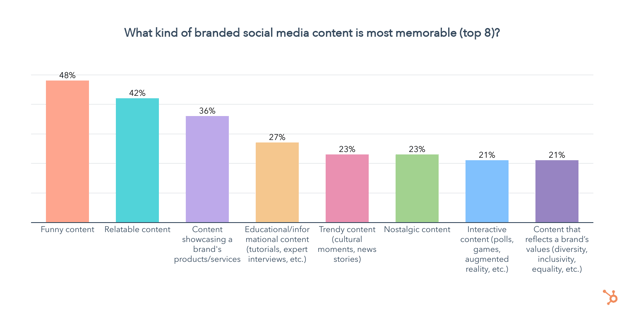
Nearly half of consumers (48%) find funny content the most memorable, followed by relatable content. Additionally, making content that showcases your product or service — such as a demo, review, or tutorial — is also highly memorable to 36% of consumers.
Social Media Research Habits
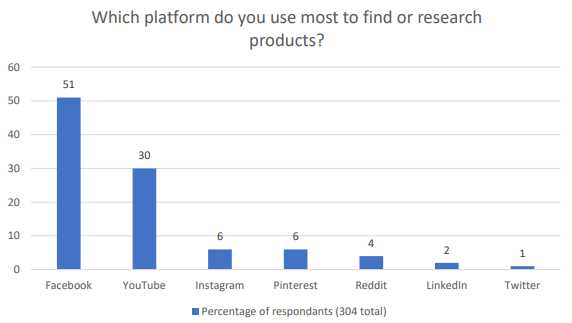
To learn more about the social networks people prefer to surf for product research, I conducted a poll of 304 people using Lucid Software.
Source: Lucid Software
At first glance, the survey data seems simple: Facebook is far and away the market leader when it comes to product research and eventual purchasing, followed by YouTube.
But that’s not the whole story. Part of the reason Facebook and YouTube rank so highly is because of their massive user base — for example, Facebook has three times the user base of Instagram, despite being owned by the same company.
It’s also worth noting that while Facebook marketing appeals to a broader audience, volume alone doesn’t guarantee conversion. Users on Pinterest, TikTok, and Reddit tend to be much more engaged with their social community — meaning that if your brand can capture their attention you can create substantive consumer loyalty.
LinkedIn, meanwhile, relies on authenticity and authority to inspire confidence, while Twitter is all about what’s trending right now.
1. Facebook
Facebook has a whopping 2.7 billion active daily users and has been around since the early 2000s. Its audience includes multiple age groups and spans the globe, making it a solid place for most brands to market themselves.
Most importantly, 78% of US consumers discover new products on Facebook, more than any than other platform.
When it comes to marketing your product, you have many free and paid options on Facebook. Here are a few examples of each.
Free Promotion
By now, you probably know that any company can create a Facebook Business Page. Once you create a business page, you can share posts about your products and offerings. If you have happy customers, you can even ask them to review your business on Facebook so prospects researching you can see how you’ve pleased your customers in the past.
Aside from creating a page to highlight your brand, you can also post your products in Facebook’s Marketplace. Marketplace listings can include product shots, pricing, product specifications, and purchasing information. Although individual users often use the Marketplace to sell items they no longer want to other people, Facebook Business pages are also eligible to use this feature.
You should also consider talking about your products or offerings on Facebook Stories. This might take a little extra effort because it will require you to film or create content in the Story format, but it can help you better connect with prospective buyers who want a better sense of what your brand is about.
Paid Promotion
Because Facebook’s feed algorithmically favors posts from individual accounts over businesses, you might decide that you want to put money into Facebook Ads.
Facebook Ads has a solid track record. It’s estimated that 10 million businesses were advertising on the platform in 2021.
With Facebook Ads, you can create advertisements with a certain goal in mind, such as conversions or in-store foot traffic. The detailed ads software also allows you to target specific audience demographics.
As a Facebook advertiser, you can either promote a post you’ve already created to ensure that it shows up on feeds of users in your demographic, or you can create native ads that might show up in feeds or on Facebook’s sidebars. While promoted posts look like an average post with a simple tag stating they’re promoted, the native ads look more like traditional ads to make it clear to users that the content they’re seeing is paid for.
If you want to launch video-based ads, Facebook also allows you to promote video content or buy in-stream ad placements that appear in Facebook Live videos or longer videos that other users have uploaded.
2. YouTube
If how-tos or video tutorials are part of your content marketing strategy. YouTube will be a natural fit for your brand. This is because YouTube users are three times more likely to prefer watching a YouTube tutorial video compared to reading the product’s instructions.
YouTube is also popular across multiple age groups. In the last three months, 83% of Millennials have visited YouTube, followed by 81% of Gen Z, and 79% of Gen X. For Baby Boomers, YouTube is their second favorite social media app, just behind Facebook.
With a branded YouTube channel, you can publish video content such as demos, tutorials, or customer testimonial videos that give insightful details about why your product is valuable. By filming your own videos, you can insure that you’re highlighting all the great aspects of your product that make it stand out from its competitors.
Alternatively, if you don’t have time to create your own videos, sponsoring an influencer’s content, tutorial, or review related to your product allows you to tap into that content creator’s audience as they tell their followers more about your offerings.
Aside from creating your own account or hiring an influencer to give a review or tutorial, you could also consider paid advertisements. YouTube offers a few ad styles including TrueView, Preroll, and Bumpers.
These ads allow you to submit a short video ad to YouTube which is then placed at the beginning or in the middle of videos with metrics and demographics that match your brand’s target. To learn the ins and outs of setting up an ad and determining which style is right for you, check out this guide.

3. Instagram
Although Instagram ranked in third place in the poll above, you shouldn’t disregard it — especially if you’re targeting Gen-Z or millennials who make up the platform’s primary audience.
For years, Instagram’s visual layout has made it a hot spot for influencer marketing. Influencers regularly post sponsored photos and videos about their experiences with products. Like YouTube, these influencers also regularly publish video posts or Stories that present tutorials, reviews, and unboxings related to a product.
Aside from influencer marketing, many brands also promote their products on Instagram Stories, Instagram Live, and through standard video or photo posts on Instagram Feed.
Here’s an example where Kylie Jenner, the CEO and Founder of Kylie Cosmetics, films a Story-based product tutorial for her company’s Instagram account:

Along with free strategies, Instagram now offers Shoppable posts. With Shoppable posts, you can promote a product in an Instagram post that links to your Facebook Catalog. Here’s an example of what a Shoppable Post looks like:

To be eligible for Shoppable posts, you must have an Instagram Business page that’s linked to a Facebook Catalog. This feature is also only for businesses selling physical goods.
Here’s a blog post that goes into detail about how to use and optimize Shoppable posts.
4. Pinterest
Pinterest encourages people to pin image-based posts that inspire them to digital boards, mimicking the process of creating a physical inspiration board.
Because people come to this platform to be inspired to do something, such as travel or home decorating, they might find themselves pinning all sorts of product-oriented images to a themed board. For example, someone who wants to redecorate their office might create an “Office Inspiration” board and pin photos of furniture or decorative items that they’d like to buy.
Here’s an example of what these boards look like:

To make it easier for people to find your products, you could consider starting a Pinterest account and making a few boards to highlight your products. For example, if you’re marketing a travel company, you could make a board for each country that you offer packages to. On each board, you could place images of trip activities that link to your website.
Then, if someone is trying to plan a trip to a country you sell a package for, they might come across one of your posts and pin it to their own “Travel Inspiration” board.
To give you a real-world example of how brands use Pinterest, below is a Wedding Registry board created by Target which features images of products that a bride and groom might want to add to their gift registry.
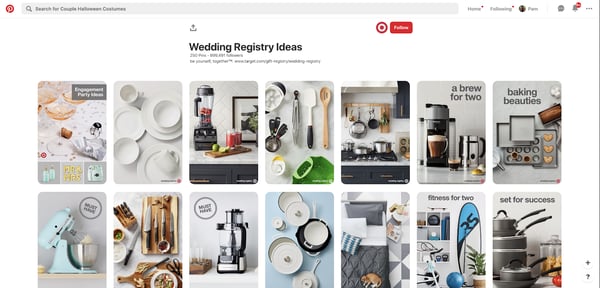
Each of Target’s pinned images links to the company website so users can share the pin on their own Pinterest board, or click straight through the post to buy or register the product.
If you have an advertising budget, you can also consider launching pay-per-click ads on Pinterest. Pinterest Ads enables your posts to be seen by people in a specific demographic that matches your own. The platform also allows you to A/B test photos and target ads to Pinterest users on your contact lists.
Want to learn more about Pinterest Ads and effective experiments to run? Check out this blog post from a PPC and Pinterest expert.
5. Reddit
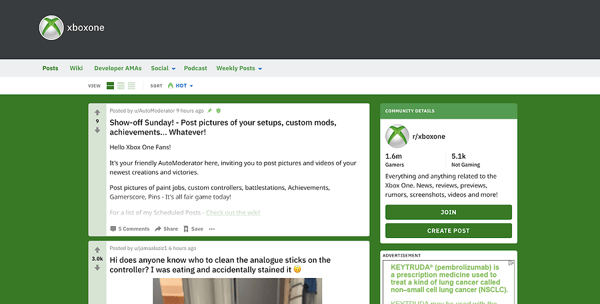
Reddit encourages users to create discussion threads in themed online communities, called subreddits. As the platform has evolved, many users have created both threads and subreddits devoted to talking about products, like fast-food restaurants or video games.
Below is an example of a subreddit, or online community, that Reddit users created to talk about all things related to Xbox One.
However, because comments with promotional language in them often get downvoted or buried in feeds by more engaging Reddit threads, you’ll need to be creative if you want to engage with audiences on this platform.
While you might want to keep an eye on Reddit or experiment with it, don’t put all of your time and resources into it — at least right now. As it evolves, the platform may become an easier platform to market your brand on, but at the moment, Reddit marketing strategies still require more brainstorming and time than tactics on other social platforms.
Although this platform has been called one of the “trickiest” for marketers to crack, some bigger brands have figured out how to reach the platform’s discussion-oriented users.
For example, some brands will create subreddits related to their product, while others will interact by commenting on threads related to their industry.
Aside from creating content for free on Reddit, you can alternatively pay into sponsored posts or ads, similarly to Facebook or Twitter. These ads will appear in a user’s feed or as a promoted comment in a thread or subreddit.
To learn more about the ins and outs of Reddit marketing, click here for tips and examples of how other brands have cultivated the platform.
6. LinkedIn
LinkedIn’s platform, which emphasizes networking and career-related chatter, might be well-suited for product marketing in B2B, academic, or professional industries. People who do product research on this platform might be looking for a service, tool, or software that can either escalate their careers or make their workdays easier.
If you’re marketing products like software, online courses, business-related publications, or anything that can help a professional or student do their job better, LinkedIn will be a great fit for you. However, if you sell more general, consumer-facing products like makeup or home decorations, you might want to put more marketing effort into other platforms on this list — like Facebook or Instagram.
While the professional nature of LinkedIn and its audience might not be suited for all brands, the platform still offers a variety of opportunities for brands to leverage it. For example, research shows that 80% of B2B leads come straight from LinkedIn.
LinkedIn is very similar to Facebook in that you can post about your product or service for free, or purchase ads or post promotion to get information about your business front and center on feeds. To see a few great ad examples, check out this post.
7. Twitter
Twitter has approximately 200 million daily users from a variety of backgrounds, geographic locations, and industries. Its broad demographic might provide solid marketing opportunities to many different types of businesses. Because of its broad user base, you might want to create an account on Twitter and post regularly for brand awareness.
If you’re interested in video marketing, you can also experiment with Twitter’s live video feature and use it to film a tutorial or Q&A related to your product.
Aside from posting about your product for free, you can also pay into targeted ads or promoted tweets. Twitter claims that its advertising ROI is 40% higher than some other social channels.
While the ROI of Twitter advertising and its user base sounds promising, you might be wondering why it ranked so low on the poll shown above.
Ultimately, what might make Twitter rank last is its trend-oriented nature. The platform encourages people to connect with each other and post tweets or comments about current events, trending hashtags, or their thoughts on other specific topics.
Brands and product discussion are both prevalent on the platform, but users might go to Twitter to learn more about what’s going on in the world, rather than new products. When people are asked to pick which platform they do the most product research on, it’s not surprising that Facebook or YouTube might seem like a more obvious choice than Twitter.
While you should be on Twitter due to its sheer user base and advertising ROI, you’ll want to keep its audience’s need to stay trendy and informed in mind as you’re creating posts and advertisements for the platform. This might help you make social content that both engages these audiences while still weaving in information about how valuable your product is.
Identifying the Right Platforms for Product Marketing
While running ads and product promotions on any social platform can help drive conversion, it’s a good idea to focus on platforms with audiences that already align well with your brand.
For example, broader audiences are actively looking for products or researching brands on Facebook, Instagram, YouTube, and Pinterest while Reddit and Twitter users tend to be more trend-focused. Similarly, if you’re marketing a B2B company, you might see a better ROI from ads on a professional network — like LinkedIn — than ads on a more consumer-friendly platform like Instagram.
Use the information provided above, and start leveraging social media for lead conversion and product marketing.

How to Write a LinkedIn Recommendation in 2020 [Quick Tip]
When you get a recommendation from someone you respect and admire, you may feel honored and want to return the favor. But figuring out how to write a LinkedIn recommendation that is specific, honest, succinct, and helpful isn’t easy.
Most people get stuck. You might not know how to start or what to say. But with some simple templates and tips, you’ll be writing stellar testimonials on LinkedIn for your favorite people.

Keep reading to learn how to write a LinkedIn recommendation. Then check out some recommendation examples and a quick recommendation letter template.
You can use these tools to write authentic and useful LinkedIn endorsements that can help move someone’s job search in the right direction. Let’s get started.
1. Explain the nature of your professional relationship.
That sounds really serious, but it’s simply a helpful piece of context that acts as an intro for your recommendation. Whether it’s a coworker you’ve worked closely with for years or a recent agency point of contact, it sets the stage for the reader to learn why you’re writing this recommendation.
For Example:
I’ve worked alongside Lisa for close to two years now.
2. Offer details about the position this person is working toward.
Are you recommending this person for their work in one position? Or are you writing about their work across multiple jobs they’ve held while you worked with them?
Either way, a great next step is to explain some of the notable parts of their job. It may feel strange — kind of like you’re listing out their job description. But this is helpful for anyone reading the recommendation, looking to get a feel for what they did in their job.
Resist the urge to create a laundry list of their job duties. If they’ve really worn that many hats, I recommend contacting them to see if there’s a certain part of their role they’d like emphasized over others.
For Example:
In those two years, I’ve seen her not only excel at the core elements of her job — like copywriting and copyediting — but also learn other tasks that extend well beyond the scope of her role. These include email marketing, event planning, and even championing our company’s internal communications.
3. Explain how they’ve grown at the company.
If this person reports (or once reported) to you, this aspect of a LinkedIn recommendation can go a long way. Explaining how the person you’re recommending has grown — either in their role or from one role to another — can show an ability to adapt as the organization expands.
Just be careful not to overstate any low points in the person’s career that can dilute the value of the growth you’re trying to highlight.
For Example:
Lisa has grown as quickly as our business has, and her willingness to learn and take on these new responsibilities is something sought-after in any professional.
4. Show how their contribution helped grow the team or company.
This could be an explanation of how their performance helped hit hard metrics. You could also talk about contributions like leading their teammates or fostering new initiatives.
For Example:
Lisa’s mastery of both her core role and extra projects have been critical to the company’s growth. In fact, her taking on internal company communication aligned with a sharp increase in employee happiness.
5. Explain what these achievements reveal about that person.
By now, you’ve included some specifics — so let’s explain what those specifics mean for the larger theme of your recommendation. Do the examples you’ve detailed reveal that person is hard-working? Ambitious? Great for team morale? Connect their accomplishments with their attributes.
For Example:
This rare mix of productivity and ambition sets a great example for the rest of the team. It also explains why everyone loves working with Lisa — no matter where they fall on the org chart.
6. End with a note about the personal aspect of working with them.
In this section, hit the message home with a mention of how you felt working with the person, your hopes for their career, or a prediction about their future.
For Example:
Lisa’s work has continued to pay dividends long past her tenure here and I still miss working with her every day. I can’t wait to see what she does with the next step in her career trajectory.
LinkedIn Recommendation Examples
Recommendation From an Employee
According to a 2021 SHRM report, over 40% of employees are looking for a new job. And according to a 2022 Gartner survey, 50% of employees have different employer expectations than they did before the pandemic.
Employee recommendations show that a stakeholder respects the opinions of the people they manage. It also shows how they lead from the bottom up.
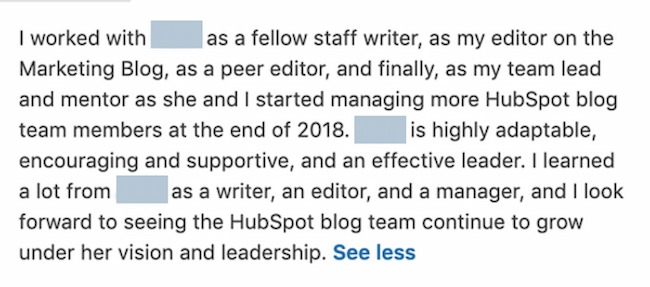
In the recommendation below, a person discusses how their supervisor progressed at the company and how this person mentored them so they too could grow as an employee.
Example 1:
Why we like this LinkedIn recommendation:
This recommendation shows how the relationship between employee and manager evolved over time. Work relationships that shift from peer to manager can be tough. They can sometimes create power struggles, miscommunication, and more. But this LinkedIn recommendation example highlights mutual respect, care, and professional growth.
Example 2:

Why this is a good LinkedIn recommendation:
Soft skills can be difficult for recruiters and employers to assess. So the recommendation above is valuable because it talks about a manager/employee relationship that was essential to this employee. This gives them a sense of how this manager might engage their new team.
Example 3:

Why we like this LinkedIn recommendation:
An authentic recommendation is much more useful than a form letter. The letter above shows how this manager balanced kindness, critique, and composure on his team.
Recommendation from an Employer
Employer recommendations may be a replacement or a complement to the job requirements for many positions. This makes employer recommendations an important LinkedIn addition. Unlike most standard letters of recommendation, LinkedIn letters are usually short and to the point. Instead of a full page, most are short but dense paragraphs like the examples below.
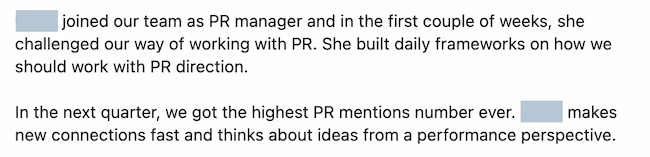
For example, in this recommendation, an employer explains how an employee progressed and executed projects that made a big impact on their company.
Example 1:

Why we like this LinkedIn recommendation:
This letter jumps immediately into specific job functions, technical skills, and soft skills. A quick scan of this letter can show any employer what this person does best and how those skills can translate to other jobs or employers.
Example 2:
Why this is a good LinkedIn recommendation:
Connecting actions to outcomes can make it easier for prospective employers to understand the value an employee can bring to their team. This quick letter clearly connects what this new hire did, how she approached changes and the results that came from her actions.
Example 3:

Why we like this LinkedIn recommendation:
This recommendation letter uses industry-specific terms to show the activities and outcomes this employee was responsible for. This makes it easy for employers to understand how that performance could translate to their business and team.
Recommendation from a Coworker
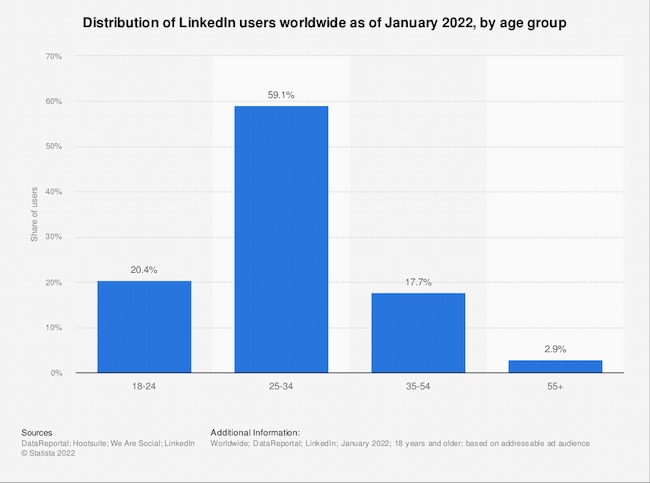
Over 20% of LinkedIn users are 18-24 years old. This means that many LinkedIn users are recent graduates who might have limited job experience.
Employers are looking to LinkedIn for a sense of your commitment, engagement, and soft skills at work. Coworkers are a great source to highlight these areas. Let’s look at some excellent coworker recommendations from LinkedIn.
Example 1:

Why we like this LinkedIn recommendation:
This letter quickly highlights how long these two have worked together, what they did, and what this candidate’s strongest soft skills are. It stays positive but also showcases how this person responds to pressure.
Example 2:
Why this is a good LinkedIn recommendation:
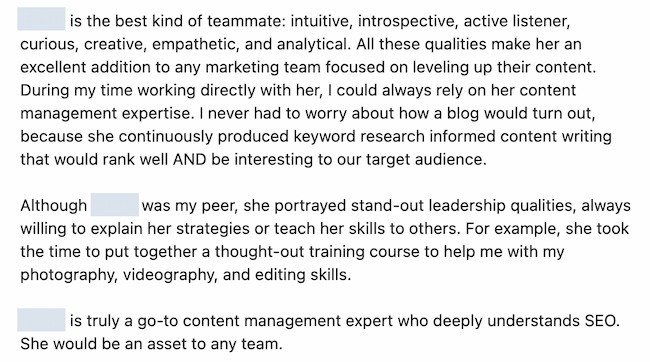
A recommendation full of job-specific details that emphasize abilities is always useful. At the same time, this letter shows off qualities that may not come into a job interview, depending on the role. By outlining teaching skills and continuing education, this recommendation shows potential employers how this candidate is preparing for the future.
LinkedIn Recommendation Sample (for a Manager)
Now, writing a LinkedIn recommendation can seem easy, but it’s not. What if the employee you’re recommending is your superior? This can make it more difficult to recommend the person — even if you’re saying stellar things about them.
Here’s a sample LinkedIn recommendation — written in full — that a manager would be proud to receive.
I’ve worked for Lisa for two years. During that time I’ve seen her quickly take on new responsibilities while making time to teach these new skills to her employees.
By inheriting tasks like campaign analytics and email A/B testing — both of which extend beyond the scope of our team — she’s made our department much more agile and set me up for promotion last month. Lisa is a great person and manager, and her next employer will be lucky to have her.
Now proofread, and hit send. Remember, the person you’re writing your recommendation for can review and request changes. So, you’ll have a chance to make changes and submit a recommendation that they’ll appreciate.
Write a Recommendation on LinkedIn Today
LinkedIn isn’t just job hunting and your professional reputation. It’s about building relationships. The sooner you start writing recommendations with the steps above, the better your professional relationships can be.
Editor’s note: This post was originally published in July 2018 and has been updated for comprehensiveness.

How Apple iOS 15 is Impacting Email Marketers [New Data]
Back in September 2021, the announcement of Apple’s iOS 15 data privacy changes triggered a mass hysteria among email marketers, with some even proclaiming that email marketing as we know it could come to an end.
Considering that Apple Mail and Apple mobile devices make up over 35% of the global email provider market share, those fears didn’t seem too far-fetched.
But the question remains – were these fears well-founded or were they false alarms?
Now that enough time has passed to see the impact of data privacy changes, I surveyed 300 email marketers to understand how iOS 15 and GDPR changes have affected their marketing strategies and the steps they took to adapt.

The Impact of Data Privacy Changes
Change can be scary for all of us, but when that change includes reduced visibility into email analytics, it’s no surprise that email marketers were shaking in their boots when iOS15 was announced.
Surprisingly, my survey shows that the changes, while definitely impactful, were not all bad.
While two-thirds of email marketers surveyed report a moderate-to-significant impact on their email marketing strategy, whether the impact was positive, neutral, or negative, is not as clear-cut as you might assume.
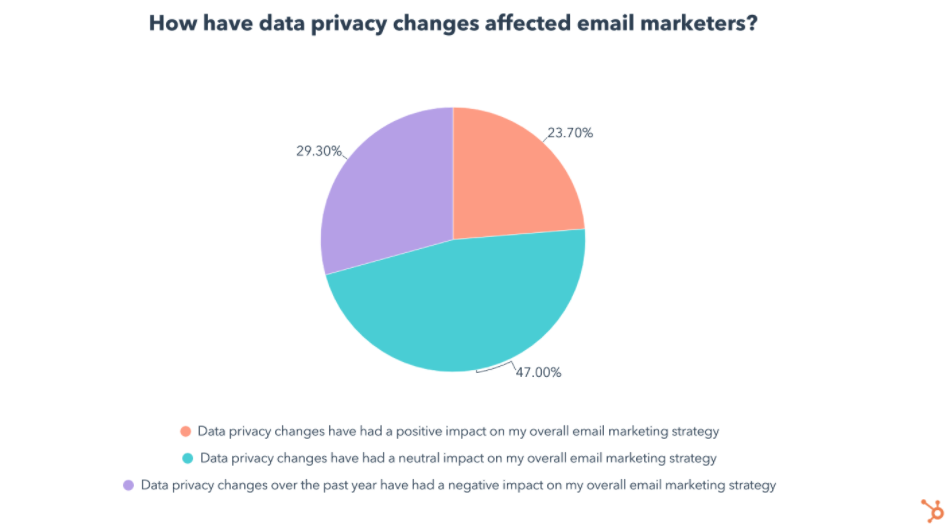 For starters, 47% of email marketers say the impact of data privacy changes was neutral on their email marketing strategy. Admittedly, 29% said the changes had a negative impact, but 24% said the contrary, claiming data privacy changes had a positive impact on their marketing strategy.
How is this possible?
To answer this, let’s break down our survey data on the specific ways data privacy changes affected email marketers, and the strategies they took to adapt.
This will help us understand how some marketers made the most out of the situation and came out on top, while others weren’t able to keep up.
How Are Data Privacy Changes Affecting Email Marketing Strategies?
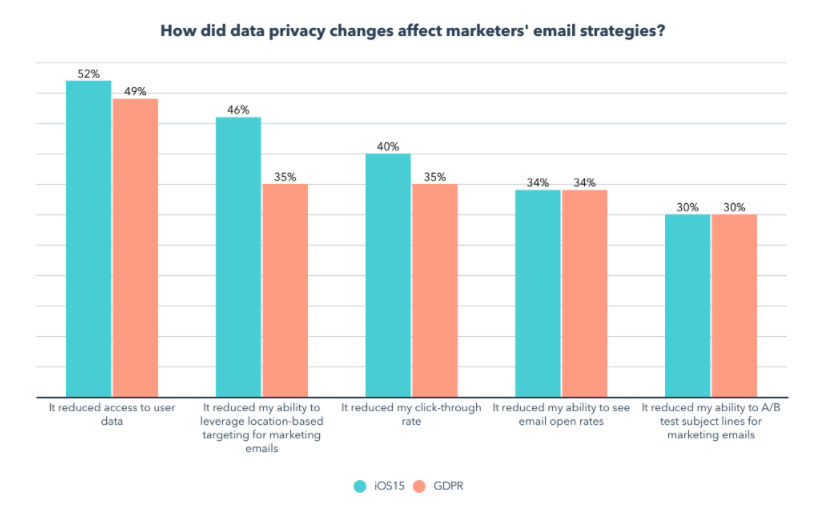
In the survey, I found that 65% of email marketers say they’ve been impacted by both Apple’s iOS 15 updates and GDPR.
I also asked them to share how their email marketing strategy has been affected by each, and interestingly enough, the results were very similar.
Email marketers in both camps were most impacted by the same factors, in the same order:
 So what can we take away from this?
For one, these changes have a similar impact whether you are affected by Apple iOS15, GDPR, or both.
More importantly, data privacy changes clearly have a meaningful impact on certain functions that have been core to email marketers’ jobs.
With location-based targeting, click-through rates, open rates, and A/B testing taking a hit, many email marketers have no choice but to adapt. So let’s explore how exactly they did that.
4 Ways Email Marketers Are Adapting to Data Privacy Changes
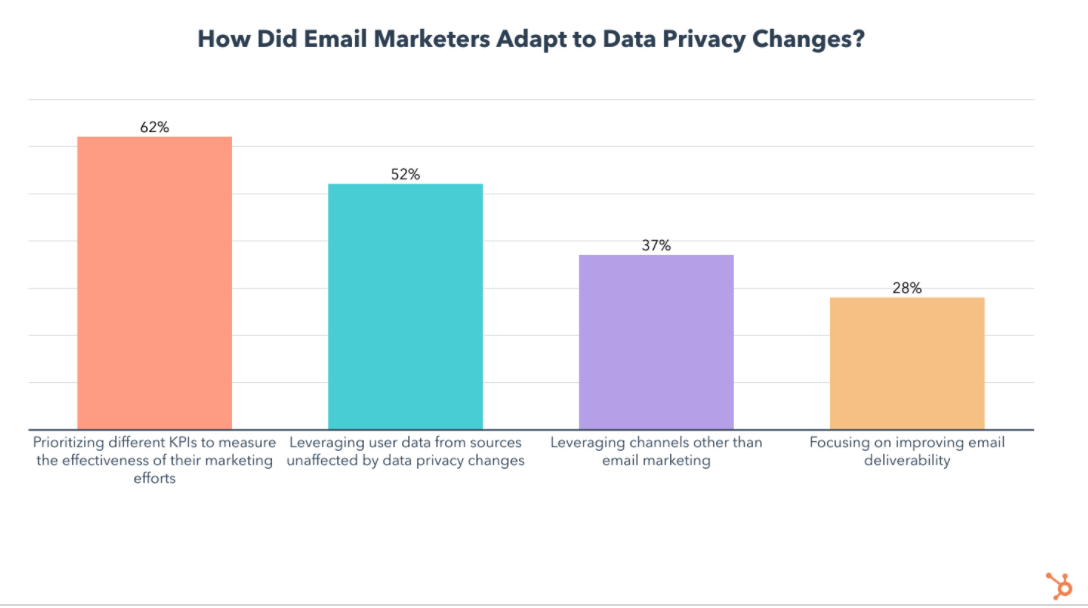
After the initial panic, email marketers began finding creative ways to reach their target audience and measure the impact of their marketing efforts. These are the most popular strategies they used:
1. Prioritizing Different KPIs
At #1, 62% of impacted email marketers started prioritizing different KPIs to measure the effectiveness of their marketing efforts.
To HubSpotters, this isn’t surprising. In fact, it’s one of the first strategies our own email team used when navigating the changes.
So let’s take a closer look at which KPIs became more and less important in a post-iOS15 and GDPR world.
The KPI hit the hardest by iOS 15 is email open rates. With the update, users can prevent email marketers from seeing when and if they opened a marketing email.
But don’t worry, this just means it’s time to turn to other KPIs like clicks, click-through rates, web traffic, click maps, unsubscribe rates, and audience surveys:
Clicks, Click Rate, and Clickthrough Rate
Ultimately, KPIs like clicks and click-through rates can tell you how engaging your content is. And, aside from those metrics, features like click maps, let you see exactly where people are clicking in your email, offering you a glimpse of what portions of your email are most (and least) engaging.
In a previous blog post, Jordan Pritikin, who leads HubSpot’s Email and Growth Marketing teams, similarly explained, “[Focusing on clicks, click rates, and conversions] is the right course of action. Looking at clicks and conversions is much more closely tied to how your database is engaging with your email programs,”
Website Traffic and Leads
For email marketers, engagement isn’t their only goal. For example, while HubSpot’s acquisition team might send emails with goals of landing page conversion, our Blog team sends emails filled with blog posts to encourage traffic to our blog.
That’s why website traffic and even conversions from your marketing emails can be tracked when sending through software like HubSpot. High email traffic indicates your email content is succeeding at getting recipients to visit your site. Meanwhile, high lead counts from emails indicate that you’ve successfully nurtured contacts to a landing page.
Unsubscribe and Spam Rates
Spiking unsubscribe rates can indicate that the content you are sending, or the frequency, has caused you to lose more of your audience than usual. On the other hand, a low unsubscribe rate means you are retaining your readers.
Similarly, getting one spam report here and there doesn’t necessarily mean everyone dislikes your content – but seeing a rise in spam rates could mean that subscribers suddenly see no value in your content, find it annoying, or aren’t getting what they signed up for.
Open Rates (with a Grain of Salt)
As Pritikin wrote, “Open rates will not be going away. They will just be — different.”
And, while you could say, “We will never look at open rates again,” you could still be doing yourself a disservice by ignoring them completely. At this point, you should continue to monitor your average open rate (and how it changes). This way, you can create a new Open Rate benchmark for your team that’s adjusted to meet new tracking standards.
While an adjusted open rate benchmark won’t be 100% accurate, it will still tell you when you’ve successfully gotten a large chunk of subscribers to open an email, and when your subject line might need work.
HubSpot’s Adjusted Open Rate feature can help you achieve a better estimate of email opens. The features uses the following formula:
Adjusted open rate = Unique reliable opens / (Unique delivered – Unique unreliable opens)
Adjusted open rate can also be used as backup evidence if you’re using all of your KPIs to determine the success of a new strategy or email campaign.
Surveys or Feedback Forms
Each time the HubSpot Blog tests a major email experiment or a new type of content in our emails, we try to include a feedback survey where readers can let us know what they thought. Meanwhile, The Hustle and other HubSpot emails offer a rating scale where you can rate your email experience and give feedback.
While this doesn’t always lead to make-or-break data, surveying, polling, or seeking feedback from your audience can also be a great way to understand their interests and what they want to see more or less of in the future.
2. Gaining User Data From Other Sources
The second most popular strategy is leveraging user data from sources unaffected by data privacy changes, used by 52% of impacted email marketers.
An example of this would be analyzing email data coming from non-Apple users, which can still give you a clear idea of an email’s open rate, among other metrics.
3. Expanding on Messaging Channels
Coming in at #3, 37% of impacted email marketers started leveraging channels other than email marketing, like SMS.
Before you scoff at the idea, consider these facts. 3.8 billion people currently carry a cell phone with them everywhere they go and 48 million opted in to receive marketing messages over text in 2020.
Still not convinced? Here’s the kicker – SMS has a 98% open rate, while our survey shows that only 3% of marketing emails have an open rate above 50%. Furthermore, 65% of marketing emails have an open rate that falls in the 16-35% range, significantly lower than the open rate of SMS correspondences.
If you’re ready to add SMS to your marketing strategy, you can find 30 SMS templates here.
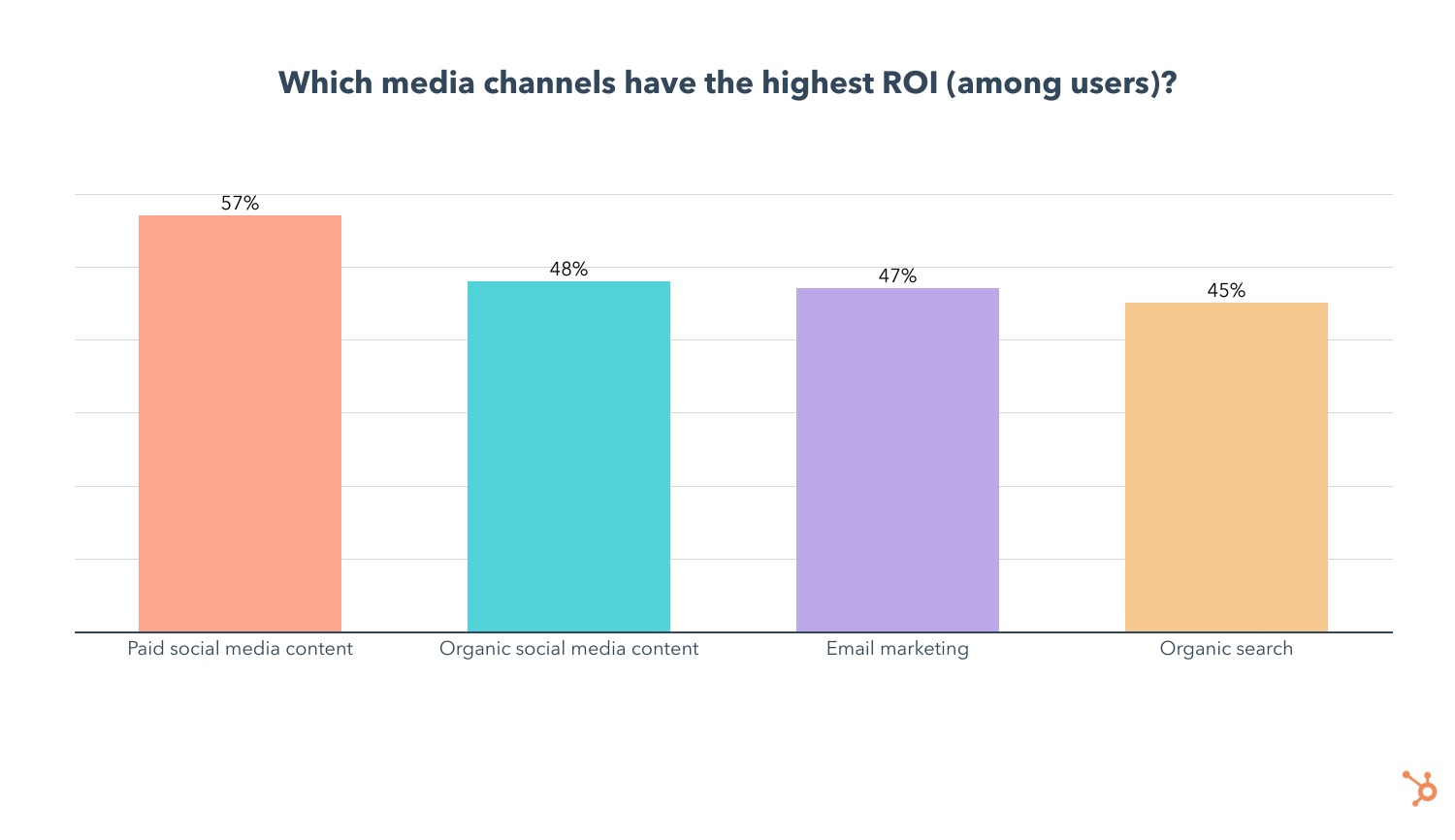
But there are plenty of channels marketers can lean on. In our recent media planning survey, we found that while email marketing is the most popular channel marketers leverage, it comes in #3 for ROI, and doesn’t see high engagement.
Paid social media content, however, has the highest ROI and engagement of any marketing channel, followed by organic social media content at #2 for both ROI and engagement. Organic search (SEO) also has comparable ROI and engagement levels when compared to email marketing.
4. Improving Email Deliverability
Lastly, 28% of email marketers responded to privacy changes by focusing on improving email deliverability.
That means leveraging strategies like maintaining a healthy email list, providing easy unsubscribe options, personalizing emails, using engaging subject lines and preview text, and making sure your emails and mailing list are GDPR compliant.
While this data on how email marketers adapted to privacy changes tells us which strategies are most popular, we also want to know which are most effective.
Want more tips and tricks for navigating iOS 15? Check out this video:
The Email Strategy Pivots That Help Most
So let’s compare these strategies by splitting our data by those who say privacy changes had a positive impact on their email marketing strategy vs. those who report a negative impact:
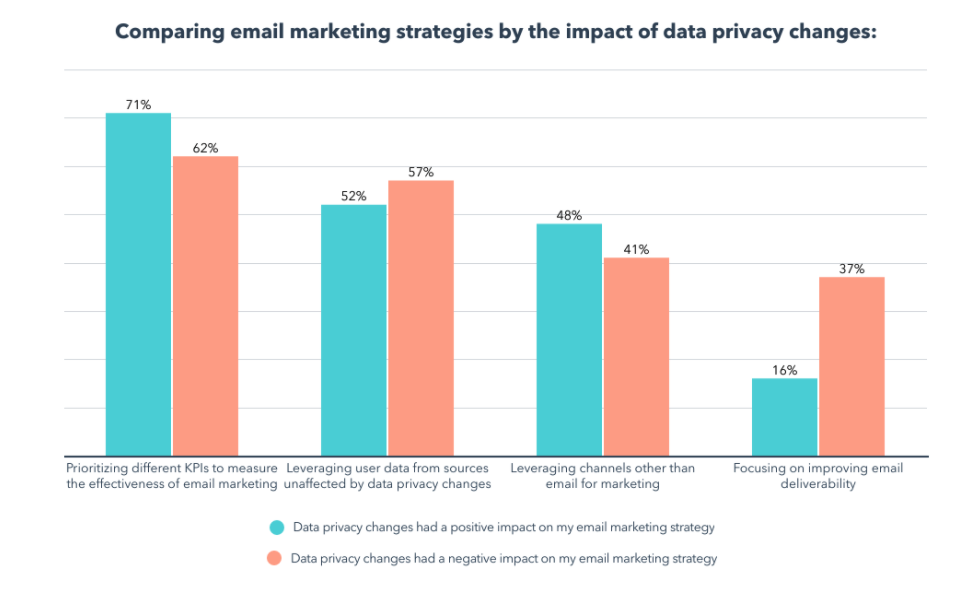 Looking at the data above, we can see that those who say the data privacy changes had a positive impact on their email marketing strategy are:
- 9% more likely to prioritize different KPIs to measure the effectiveness of email marketing
- 7% more likely to leverage channels other than email for marketing
- 21% less likely to focus on improving email deliverability
- 5% less likely to leverage user data from sources unaffected by data privacy changes.
While the differences between these groups can give you an idea of where to get started, remember that these strategies can all be effective, and every situation is unique.
For example, if a majority of your customers use Apple mail, it may not be as effective to study email data of the handful of your clients who use Gmail or Outlook.
Navigating Email Privacy Impacts
All in all, email privacy protection is not even close to “the end of the world” for email marketers. That said, it does and will continue to require some creative pivoting.
Like any major online marketing strategy, email marketers must learn how to adapt to a changing world that continues to prioritize consumer privacy. And, although privacy features will continue to evolve and pose new challenges for brands, companies that navigate them successfully will still be able to create experiences that feel personalized, memorable, and – importantly – secure for online audiences.
Ultimately, that’s good for everyone.
Want to learn more about Apple iOS 15’s email privacy protection updates? Get the backstory here, learn how HubSpot’s email team has responded, or this Community thread if you’re a HubSpot user.
Looking to find a tool that offers transparent email data estimates and can help you optimize your messaging for the most engagement possible? Check out HubSpot’s own Email tools

10 Expert Tips to Improve Lead Quality
Quality leads create more conversions.
But what exactly does “quality” mean when it comes to leads? Put simply, quality leads are those with a higher likelihood of moving down the sales funnel from awareness to interest to intent to conversion.
Finding quality leads doesn’t happen by accident. To achieve this goal, brands need a lead qualification process that effectively pinpoints key characteristics that make potential customers more likely to become loyal buyers.
To help you get started, we’ve got 10 expert tips for improving lead quality.
Lead qualification typically takes the form of stock questions that depend on your offering. For example, if you’re selling insurance you might ask questions about age, current health conditions, and previous medical histories. If you’re selling a B2B service, you might ask a lead if they’re the one in charge of the decision-making. If not, you may need to speak with someone else.
An effective lead qualification process helps eliminate leads that aren’t currently in a position to buy, in turn allowing sales teams to focus their efforts more likely prospective purchasers. This also lets businesses funnel prospects that aren’t quite ready for sales into future marketing campaigns so they can stay in the loop about any updates and reach out again when they’re ready to take the next step.
3 Reasons Why You’re Getting Bad Leads
So why are you getting bad leads in the first place? If prospective customers are interested in your product, what’s standing in the way?
Three causes are common culprits of bad leads:
1. Poor quality pay-per-click (PPC) leads
Are your PPC purchases returning leads that are actually qualified to make purchases or just providing more generic lead details? If so, consider more specific PPC guidelines or changing PPC providers.
2. Ineffective offers and calls to action
Have you covered your entire sales funnel, or are you only offering early-funnel conversion opportunities? Are your offers for free materials that have nothing to do with your business? Do you have calls to action on your website? Are they shiny and compelling?
3. Lack of targeted landing pages
Do your landing pages conform to best practices? Does the text actually describe the offer? Does the text help to qualify WHO should be filling out the form? If the answer to those questions is “yes”, you should consider adding more qualifying fields to your forms. Find out from sales what their top 3 qualifying questions are, and put them on your forms.
1. Define Your Audience
Getting more qualified leads means making sure you know who your audience is and what they’re looking for. Start by creating your ideal buyer persona. Maybe you’re looking for a business decision-maker with access to capital and the drive to solve specific pain points within their organization.
While the ideal audience will differ for every company, defining this audience goes a long way toward improving lead quality.
Here, tools like Google Analytics can help pinpoint your audience.
2. Choose Your Keywords
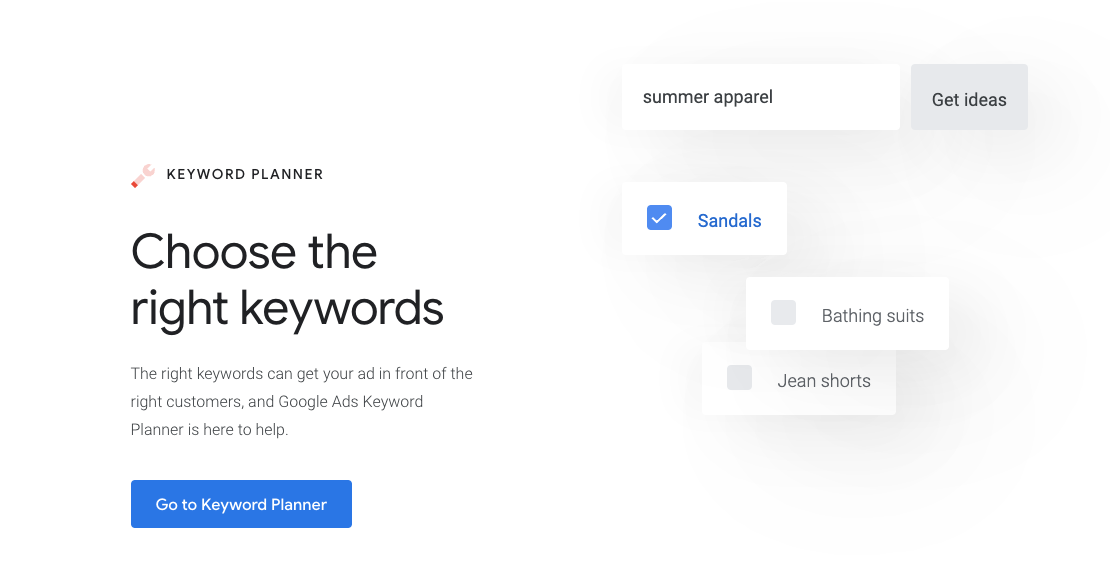
Along with your audience, choose keywords that align with what your brand is trying to sell and what qualified leads want. Achieve this goal with keyword research: See what comes up when you search your target keywords, such as the top-ranking posts and the most popular questions.
Using this data, create content, forms, and offers that reflect buyer preferences and align with your offerings.
Consider solutions like Google Ads to find your ideal keywords.
3. Create Targeted Content
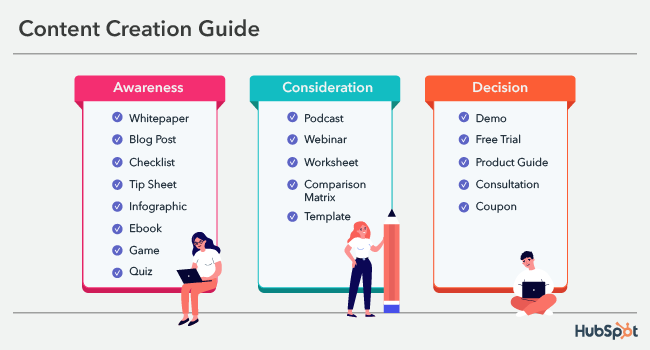
Targeted content helps you get ahead of potential questions or concerns. By creating landing pages and FAQs that address common issues and answer common questions before your sales team connects with leads, you can reduce the amount of time staff spend covering common ground and instead let them focus on the details of making a sale.
Try HubSpot’s survey tools to find out what your audience wants.
4. Develop Detailed Forms
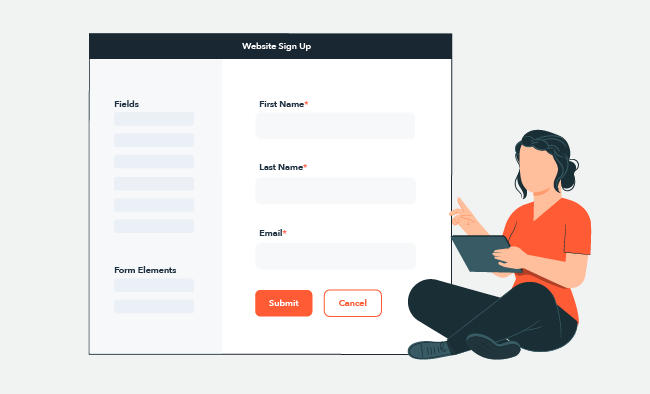
By developing detailed contact forms, marketing teams can reduce the risk of sending unqualified leads to sales times.
First, ensure that all relevant form fields are required. These may include company name, contact email address, the full name of a potential lead, and their position within the organization.
It’s also worth creating forms that allow potential customers to describe their current pain points along with the type of solution or service they’re looking to find.
Use HubSpot’s Free Online Form Builder to create targeted forms.
5. Identify Decision-Makers
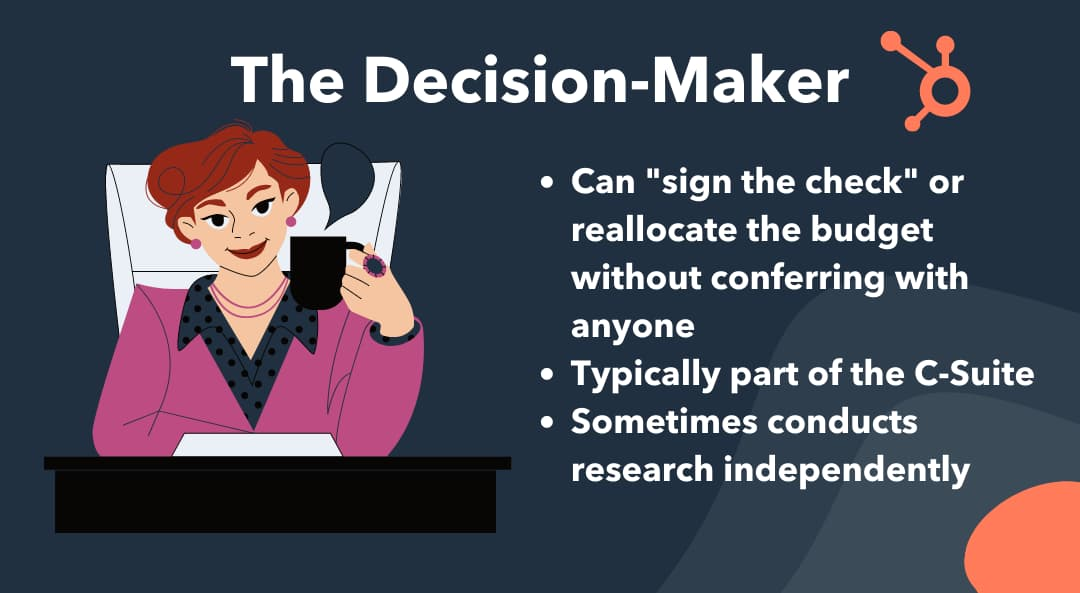
While more detailed forms can help increase total lead quality, they can’t guarantee that decision-makers are the ones reaching out.
Instead, companies can boost lead quality by proactively identifying decision-makers and initiating conversations. Start with a look at your current clientele: What role(s) do decision-makers in these companies usually hold? Then, do some research on prospective clients to see who holds similar positions and reach out to them directly. Not only does this increase the overall quality of the lead — provided you create compelling content — but also streamlines the sales process.
Solutions like people.ai can help you find decision-makers.
6. Automate Where Possible
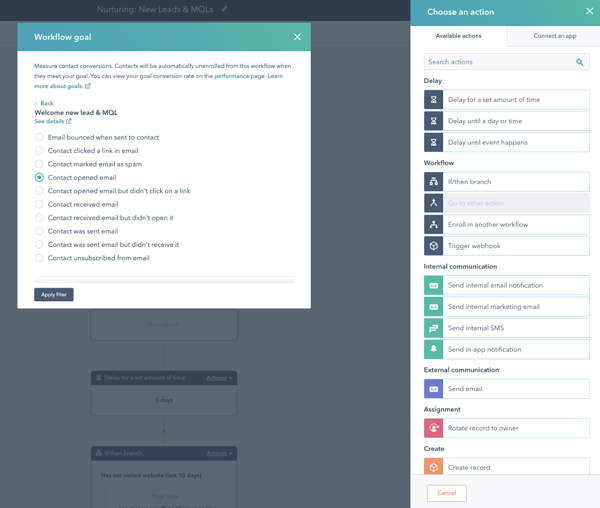
The sheer amount of leads that companies can now generate from both traditional marketing campaigns and PPC efforts means that it’s easy to get overwhelmed and lose the plot on who’s qualified and who’s not
As a result, it’s worth automating both contact and evaluation processes where possible. For example, email automation tools can help take care of reaching out to potential prospects without having staff compose hundreds and hundreds of messages, while automated evaluation software can pinpoint potential issues with collected data that may indicate a prospect is not ready to buy.
Check out HubSpot’s Marketing Automation Software to streamline key tasks.
7. Align Sales and Marketing
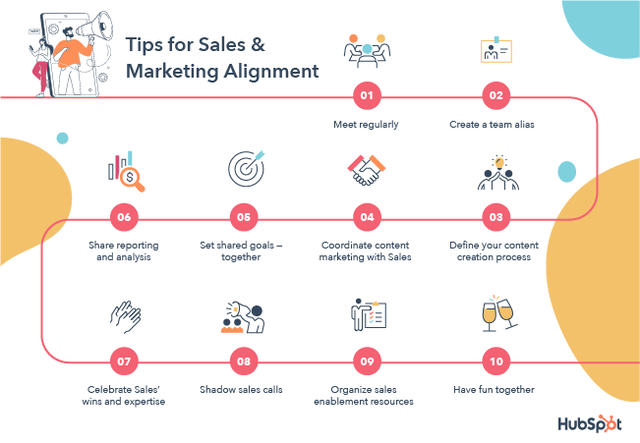
Sales and marketing are two sides of the same coin, but often end up on opposite sides of the lead qualification process.
While marketing focuses on bringing in new leads, sales wants to make sure these leads are qualified before putting in the time and effort required for conversion. If sales teams feel like marketing isn’t delivering quality leads, and marketing thinks that sales is being too picky, the result is a disaster waiting to happen.
Instead, align sales and marketing from the get-go. Sit both teams down in a room and hash out what a great lead looks like, what getting these leads required, the process of handing off leads from marketing to sales.
Products like Ruler Analytics help with this alignment at scale.
8. Ask for Referrals
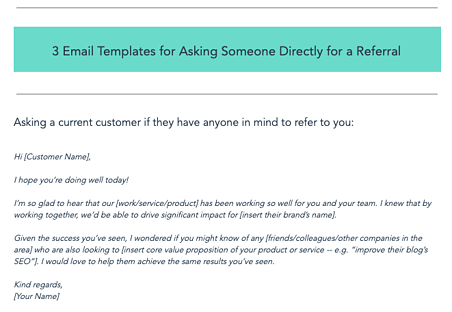
Sometimes it’s OK to take the easier route. Instead of building a new lead roster from scratch, it’s worth asking current customers for referrals. You can offer them discounts or other benefits, but if they like what you’re doing it shouldn’t take much convincing to have them pass on the contact data of decision-makers in similar companies, or to reach out on your behalf.
Consider a solution like Referral Factory to streamline this process.
9. Track Your Data
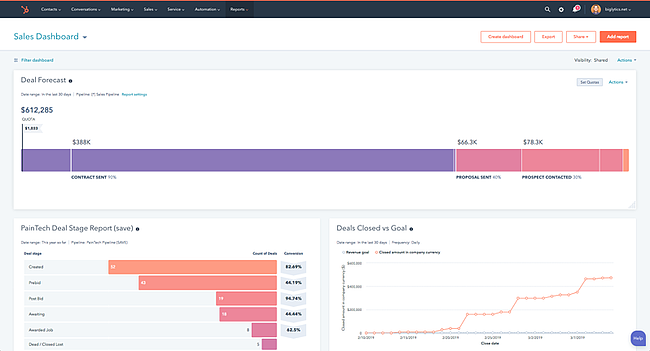
To ensure your lead quality is stable, track your initial and repeat sales conversions. If you notice that either one of these metrics is falling, it may be worth reexamining lead qualification processes to ensure that the leads you’re generating have the means and motive to make a purchase.
Act-On can help you track relevant lead data across your organization.
10. Make Changes as Needed
Last but not least? Don’t get stuck in a rut. If current lead generation tactics aren’t delivering the quality you want, make changes. Rethink your keyword strategy, create new content, or broaden your target market. In other words, focus on the outcome, not the operations, to inform your lead generation.
Take charge of your changes with HubSpot’s Marketing Software.
Taking the Lead
Higher quality leads help boost the quantity of sales conversions. But quality leads don’t just fall in your lap — to get the best leads for your business, you need to find the right audience, target your content, track your data, and make changes as needed to keep quality high and sales steady.
Editor’s note: This post was originally published in July 2010 and has been updated for comprehensiveness.

What is a KPI? How To Choose the Best KPIs for Your Business
The question “what is a KPI?” comes up at many meetings. If you want to scale your company, you might be wondering about KPIs and how they can help your business grow.
Reviewing performance through key performance indicators (KPIs), tells your team when you’ve met the mark or fallen short. But how do you pick the right KPIs for your business?

In this post, we’ll walk you through what a KPI is, which KPIs you should focus on, and how you can hone in on the metrics that matter most for your business.
Keep reading, or jump to the section you’re looking for:
- What is a KPI?
- Why are KPIs important?
- Types of Key Performance Indicators
- KPIs vs. Metrics
- OKR vs. KPI
- How To Determine KPIs
- KPI Examples
- How To Measure KPIs
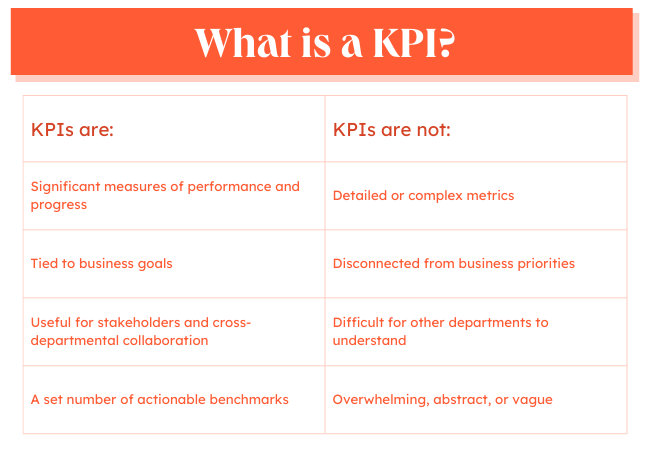
Whether a KPI is for a one-off campaign or a long-term initiative, it can help teams track their progress, improve results, and stay on track.
Businesses use KPIs to figure out whether they are reaching their top goals. These KPIs usually track the overall health and performance of the organization.
Departments use KPIs to show the value of their efforts to the business. These performance indicators help teams work toward set outcomes and solve issues that stand in the way of those goals.
And employees use KPIs to understand how their individual efforts contribute to project, team, and organizational goals.
KPIs can also help track the effectiveness of:
- Projects
- Processes
- Campaigns
- Strategic changes
A KPI is also useful for cross-departmental collaboration, as it makes it simple to see what other teams are working toward at a glance. KPIs tell companies if their hunches are right and if what they are doing is working.
Important note: KPIs should measure your most essential indicators.
For instance, your social media team may have a ton of data points that can serve as KPIs. However, they should only choose the ones that align with the broader business goals. Let’s say it’s brand awareness. In this case, follower count, post reach, and impressions will likely be the social media KPI metrics to measure.
With that in mind, having KPIs means narrowing your focus to a few vital metrics that will influence your business the most.
Why are KPIs important?
People around the world generated and consumed 64.2 zettabytes in 2020. And according to Statista, that number should reach 181 zettabytes by 2025.
How much is a zettabyte? One billion terabytes. And how much is a terabyte? About one trillion bytes. That’s a lot of information. That means that your business is processing more information than ever before.
As you process that ever-growing mass of data, it can start to feel overwhelming. For example, this post on sales metrics outlines over 140 metrics that one sales manager might track in a month. These are valuable metrics that can help salespeople excel. But add in weekly metrics, and it’s no surprise that 80% of workers are suffering from information overload.
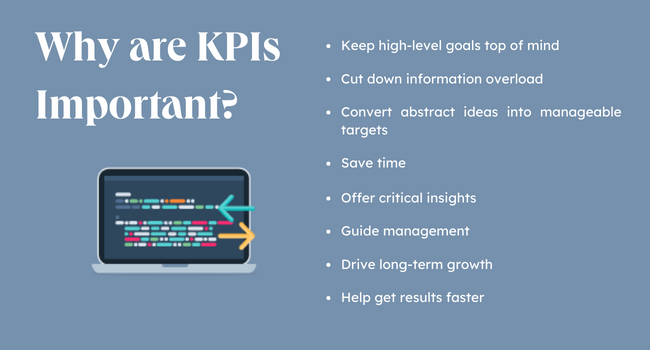
Enter the KPI. When you select a KPI for your business or team, it narrows the focus of your efforts. This one strategy can help your team rally around what’s most meaningful. It can push teams to get results faster, be more productive, and make useful changes when they’re needed.
A KPI is more than a number. It’s a message, a story that quickly shows your team whether you are moving toward the goals you’ve set together. Key performance indicators can help:
- Keep high-level goals top of mind
- Convert abstract ideas into manageable targets
- Cut down on data overload
Strong KPIs can help your business save time, get critical insights, guide management, and keep your business on a long-term path of growth.
Because KPIs are so critical, it’s essential to set the right KPIs for your business. The wrong KPI can disrupt even the strongest team.
For example, say your marketing team is selecting a KPI for its growth goals. Ranking in search engine results is important for a blog, so the amount of #1 keyword rankings could seem like a good KPI.
But what if your blog’s top-ranking keywords don’t relate to your business goals? What if those keywords have low traffic volume or don’t connect to qualified leads? In this situation, organic traffic is probably a better KPI.
Choosing the right KPI might take some extra research, so let’s talk about the different types of KPIs.
Types of Key Performance Indicators
While there are many different indicators of performance that a business can measure, most fall under two categories:
Quantitative KPIs
A quantitative KPI uses numbers to measure progress toward a goal. The majority of KPIs are quantitative, like the number of closed sales, customer service tickets, or annual revenue.
Qualitative KPIs
A qualitative KPI tracks non-numerical data, like customer comments or employee engagement. While there are ways to get quantitative data from qualitative research, these KPIs focus on non-numerical data.
For example, say a company just released a new product online. As soon as the product listing goes live they’ll track quantitative metrics like:
- Product sales
- Abandoned carts
- Product page views
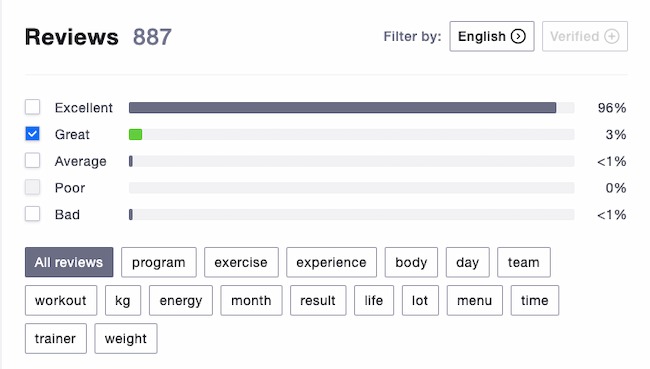
At the same time, the company would also track qualitative data like product reviews and customer surveys. This can help the team figure out how people are responding to the product and how to keep improving it.
Most businesses use more than one KPI to track performance and may combine KPIs to reach a set goal.
There are other measures that companies use to hone in on their business goals.
Other Key Performance Indicators
Leading KPIs: This is quantitative data that helps a business measure potential responses to a change. For example, if a SaaS business plans to launch a new feature, leading indicators can help it project future results.
Lagging KPIs: These measure results after a change to track whether that change is meeting expectations. These are sometimes also called output indicators. For example, after the SaaS business launch above, lagging indicators will show the actual outcomes of the release.
Leading and lagging KPIs can help teams make corrections early. This can save the business time, effort, and investment over time.
Input KPIs: These track the resources a business needs for a campaign, project, or process.
Process KPIs: Process KPIs track how well a new process is working and help target potential changes. For example, a common process KPI is the time it takes to close a support ticket.
Practical KPIs: These track current internal company processes and how they impact other parts of the business.
Directional KPIs: These KPIs look at overall company performance. They may focus on trends within the company or in comparison to competitors.
Actionable KPIs: Indicators like this track how well a company commits to and carries out internal business changes. Examples include KPIs that track culture changes, employee sentiment, or DEI initiatives. These often measure progress within a set period of time.
KPIs vs. Metrics
When you were in school, you might have learned that a square can be a parallelogram, but not every parallelogram is a square. The same is true of KPIs and metrics.
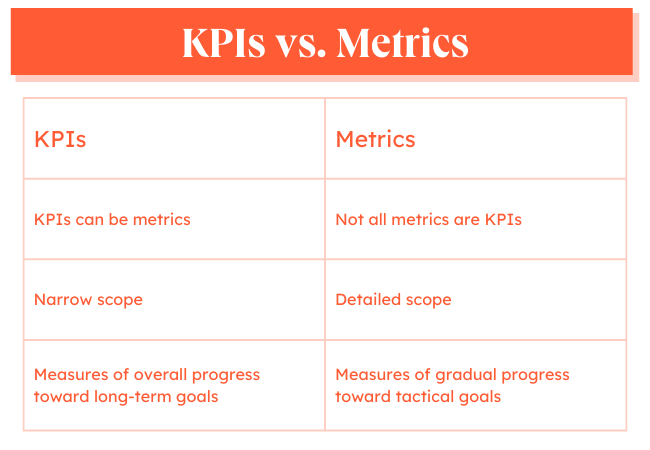
While a KPI can be a metric, not every metric is a KPI. This is because KPIs track progress toward a specific goal. A KPI is a significant measure of performance.
When your team selects a KPI, they commit to a specific metric and how meeting that goal can lead to business growth. KPIs also narrow the scope of information to data that everyone needs to know — from interns to stakeholders.
This doesn’t mean that metrics aren’t impactful. As your team solves specific problems and creates processes, there are many metrics you will track. In turn, these metrics can help your team meet your KPIs.
KPI Metrics Example
Here’s an example. Say that your team is creating a blog for your sales team to generate more qualified leads. The KPIs for this project are:
- Traffic
- New users
- Leads
Those are the key performance indicators that your team believes will show that the time and effort of launching a new blog is worth it to the business.
At the same time, if you’ve ever started a blog, you know that there are many other metrics to track like:
- Engagement time
- Bounce rate
- Views per user
- Backlinks
- Domain authority
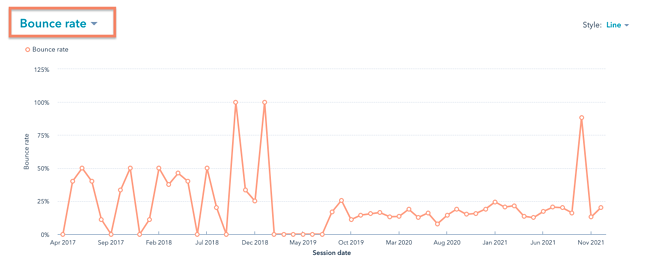
These metrics will help your team solve problems, choose the right blog topics, and make changes that improve the user experience.
Metrics are essential to the team that works on the blog so they can make it better. At the same time, metrics are often too much detail for every stakeholder. In this example, your blog team needs other metrics to help meet its KPIs.
OKR vs. KPI
Objectives and Key Results (OKR) and KPIs are often used interchangeably because both terms refer to goals that are tracked and measured. However, they differ in intention.
Put simply, KPIs show whether your business is hitting its targets. They are often called health metrics as they tell you how the company is doing to meet an objective that’s already set.
OKRs, on the other hand, are broad objectives for your business with the key results that will signify achievement in meeting those objectives. They are aggressive and ambitious goals that speak to the business’s big-picture vision.
For instance, let’s say a technology company has the objective of becoming one of the top 10 providers in their industry in 2021. Their key results could be:
- Acquire 1,000 new customers by Q3.
- Generate 3,000 leads every month.
- Increase annual membership sales by 30%.
While KPIs are ideal for scaling, OKRs are designed for dramatic growth. They’re more ambitious and push teams to stretch their capabilities.
It’s also important to note that while KPIs can be the key results in your OKR, the opposite is generally not true.
For example, your marketing team could have a KPI of 3,000 leads as mentioned in the example above. However, it’s unlikely that any department would list the “Top 10” goal as their KPI as that speaks to a broader vision and has a more flexible timeline.
Before you can measure your KPIs, you’ll need to determine which metrics to track. This will greatly depend on your goals and your team.
Once you narrow that down, set your targets. They’re usually based on a combination of factors, including historical performance and industry standards.
You’ll also have to answer the who, when, and why. Who is responsible for this KPI? Identify the person on your team who is managing this KPI, so they can be the go-to when addressing roadblocks that may affect performance. They will also be responsible for reporting on progress.
As for the “when,” you’ll need to know the timeline to reach these targets. Many businesses set them on a monthly or quarterly basis, but your timeline can be shorter or longer depending on your team.
Lastly: the why. It’s the most important thing to keep in mind when measuring your KPIs. Having your goals clearly identified can help motivate your team and make sure everyone is aligned on the direction you’re going in.
Let’s go over a few steps that can help make this process more simple.
1. Choose KPIs directly related to your business goals.
KPIs are quantifiable measurements or data points used to gauge your company’s performance relative to a goal. For instance, a KPI could be related to your goal of increasing sales, improving the return on investment of your marketing efforts, or improving customer service.
What are your company goals? Have you identified any major areas for improvement or optimization? What are the biggest priorities for your management team?
Answering these questions will bring you one step closer to identifying the right KPIs for your brand.
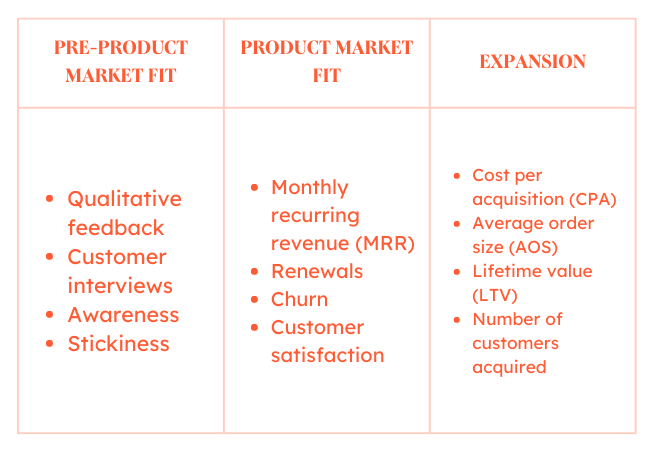
2. Consider your company’s stage of growth.
Depending on the stage of your company – startup vs. enterprise – certain metrics will be more critical than others.
Early-stage companies typically focus on data related to business model validation while more established organizations focus on metrics like cost per acquisition and customer lifetime value.
Here are a few examples of potential key performance indicators for companies in various stages of growth:
3. Identify both lagging and leading performance indicators.
The difference between lagging and leading indicators is essentially knowing how you did, versus how you are doing. Leading indicators aren’t necessarily better than lagging indicators, or vice versa. You should just be aware of the differences between the two.
Lagging indicators measure the output of something that has already happened. Total sales last month, or the number of new customers or hours of professional services delivered, are examples of lagging indicators. These types of metrics are good for purely measuring results, as they focus on outputs.
On the other hand, leading indicators measure your likelihood of achieving a goal in the future. These serve as predictors of what’s to come. Conversion rates, sales opportunity age, and sales rep activity are just a few examples of leading indicators.
Traditionally most organizations have solely focused on lagging indicators. One of the main reasons for this is they tend to be easy to measure since the events have already happened. For instance, it’s easy to pull a report of the number of customers acquired last quarter.
But measuring what happened in the past can only be so helpful.
You can think of leading indicators as business drivers because they come before trends emerge, which can help you identify whether or not you are on track to reaching your goals. If you can identify which leading indicators will impact your future performance you will have a much better shot at success.
With every business, growth is the goal. KPIs help you track your progress and scale progressively to grow in whichever way that matters to your company.
4. Focus on a few key metrics, rather than a slew of data.
As you begin to identify KPIs for your business, less is worth more. Rather than choosing dozens of metrics to measure and report on you should focus on just a few key ones.
If you track too many KPIs, you might become overwhelmed with the data and lose focus.
As you can imagine, every company, industry, and business model is different so it’s difficult to pinpoint an exact number for the amount of KPIs you should have. However, a good number to aim for is somewhere between two to four KPIs per goal. Enough to get a good sense of where you stand but not too many where there’s no priority.
KPI Examples
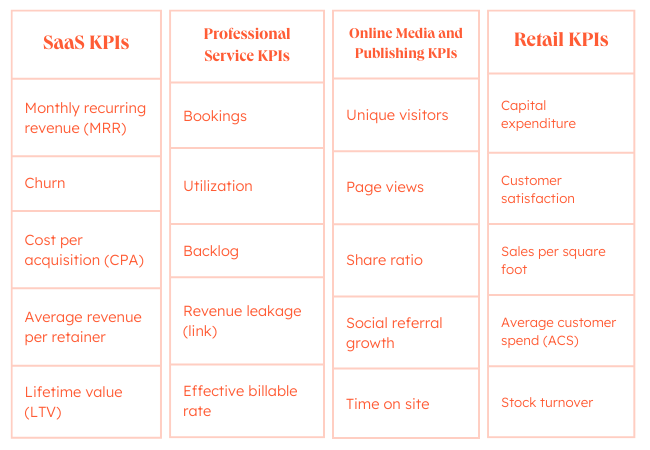
Your organization’s business model and the industry in which you operate will influence the KPIs you choose.
For example, a B2B software-as-a-service (SaaS) company might choose to focus on customer acquisition and churn, whereas a brick-and-mortar retail company might focus on sales per square foot or average customer spend.
Here are a few examples of some industry-standard KPIs:
While some KPIs are simple, KPIs that can help your business target specific goals can be tougher to create. These examples of key performance indicators for businesses can inspire the right KPI for your business.
Marketing KPIs
KPIs for marketing can help you track the effectiveness of marketing efforts. It can help you figure out the value of specific campaigns and initiatives, and assess different media channels.
For example, this video outlines how to set KPIs for social media:
These are some of the top marketing KPIs:
- Return on Investment (ROI)
- Lifetime Value of a Customer (LTV)
- Customer Acquisition Cost (CAC)
- Conversion Rate
For more KPI ideas, check out these resources:
- Marketing KPIs
- Business blogging metrics
- SEO KPIs
- Email marketing metrics
- Marketing KPIs for CEOs
- Content marketing metrics
Sales KPIs
Sales is a numbers-driven activity and this makes KPI selection even more important. Sales KPIs can measure individual, team, departmental, or organizational efforts. They can also help sales teams make shifts and respond to goal and priority changes.
These are some common sales KPIs:
- Monthly sales growth
- Monthly calls (or emails) per rep
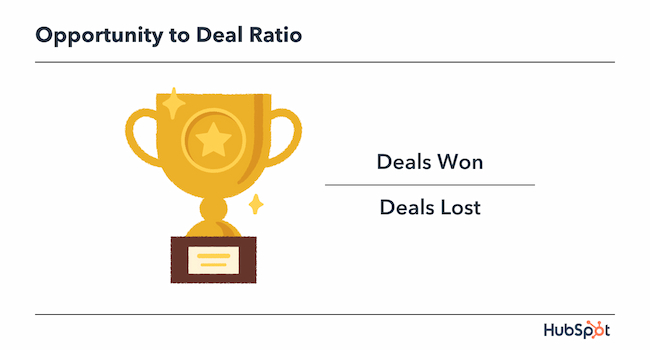
- Opportunity to deal ratio
- Average purchase value
For more KPI ideas, check out these resources:
Service KPIs
Customer service KPIs can track the performance of support teams. They also help service managers understand, analyze and optimize the customer experience.
Here are some of the top service KPIs:
- Number of resolved tickets
- Customer satisfaction score (CSAT)
- First response time
- Net promoter score (NPS)
For more KPI ideas, check out these resources:
Website KPIs
A website KPI can connect the performance of your website to marketing, sales, and service goals. Website data can help businesses understand how to connect siloed departments and fix gaps in the buyer journey. This type of KPI is especially useful for ecommerce sites.
Here are some common website KPIs:
- Traffic
- Traffic sources
- Number of sessions
- Number of transactions
This post also has some great suggestions for website engagement metrics.
Now that you know what a KPI is and how to choose the right KPIs for your business, it’s time to act. Measuring a KPI can be simple or complex depending on your KPIs, your tech stack, and the way your team works.
Some companies end up tracking the wrong KPI because it’s the easiest data to track. This isn’t a satisfying solution, and it can lead to bigger business challenges long term.
Let’s walk through the best practices for measuring your KPIs.
1. Identify the tools or software you need to measure your KPIs.
KPI measurement starts with your data sources and the tools your business uses to track data. There are a few things you’ll want to look for in the right software.
Integrations
According to 2021 research from Productiv, the average company uses over 200 apps. This means that you’ll need a software solution that connects to a range of tools to pull together accurate data.
Dashboards
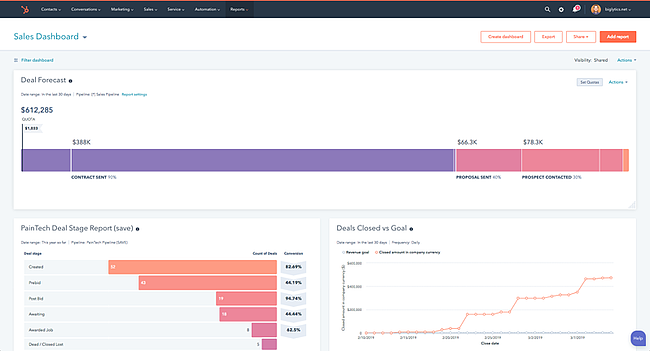
Dashboards are also useful for tracking KPIs because they make it easy to visualize insights. Visualization can make complicated information simpler and quicker to understand and act on.
Custom and standard reports
It’s also helpful to use KPI software with both standard and custom reporting. While some KPIs are effective alone, others may need supporting metrics to clarify the story of the data. For example, say your KPI is social media engagement. You may also want to present data on every social media tool your team is using.
Read here if you’re looking for the right data tracking software.
2. Narrow down your final list of KPIs.
Focus is the top reason to limit the number of KPIs you track. If KPIs are the most critical measure of business success, you want to track just two or three KPIs, not 10-20.
First, make sure there is a clear separation of KPIs from metrics. Next, revisit your goals to make sure that the KPIs you’ve selected show clear progress toward that goal.
As you research software you might notice that some KPIs are easier to track than others.
For example, tracking customer lifetime value by marketing channel is easy if your revenue and marketing systems connect. But what if these are two different systems? Maybe your marketing platform shows that most of your leads come from the blog. At the same time, your customer platform analytics show that most of your leads come from a landing page.
This kind of issue leads to a lot of manual work, and a KPI your team can’t trust. Until you can unify your systems, you may want to choose a KPI that you can measure accurately.
Be sure to watch your KPIs in the first few months and take note of how often you check each KPI. Sometimes you’ll need real data to figure out if that performance indicator is useful.
For example, say at the beginning of a co-marketing partnership, you and your partner set a KPI for shared leads. But in the first two months, the only shared leads come from a webinar that your companies host together. At the same time, you both notice increased lead volumes from referral links.
If you want your KPIs to measure the effectiveness of your partnership, you may want to change this KPI.
3. Create standard reports and timing for reporting.
One way to help stakeholders invest in KPIs is to create a consistent reporting schedule and format. You can measure and report on KPIs each week, month, quarter, or year depending on your business needs.
For example, if you have a monthly lead goal, it’s a good idea to track your KPIs weekly. If performance tracks with expectations, you can gather insights into what your team is doing well. If not, you have a chance to ask for resources, troubleshoot, and make changes.
A standard report has the same structure every time. You can often automate these reports and they usually don’t need much manual data analysis. Depending on your industry and KPIs you may want to customize your standard reports. This can help you make sure that your reports clearly show the most useful information.
4. Design visualizations in your dashboard for your most important KPIs.
Scanning numbers is satisfying for some. But most people process and retain visuals best. So, you’ll want to make the most of your data with a visual dashboard that makes your KPIs easier for stakeholders to understand and remember.
As you build your dashboards, there are a few helpful things to think about. First, try to group your KPIs to create audience-specific dashboards. For example, you might want to build one KPI dashboard for C-suite presentations and another for meetings with your team.
Next, keep your visuals simple. Choose the best chart for the information you’re presenting and don’t add small text or extra graphics that could distract from your data.
5. Share KPIs reports with other teams for quality checks.
It may take some time before your KPIs are a reliable source of information. There is a lot that you can do with digital tools, but don’t forget another crucial resource for making sure your KPIs are accurate — your team.
Whether you check in with your friends in Accounting every other day or hold weekly check-ins with people in your department, it’s smart to reach out. Even small issues can lead to big errors over time.
For example, do you want to base your KPI on the average daily call volume of customer service seven days a week or just Monday through Friday? If you don’t talk to your CS team about their structure and schedule, you might pull the wrong data. This can lead to skewed numbers, poor strategic decisions, and more.
The more your business can trust your KPIs, the more benefits they’ll get from them.
6. Choose a reporting cadence for stakeholders.
Most decision-makers in business organize reporting around the business calendar. But you’ll still want to think about the right reporting cadence for your specific KPIs.
For example, a monthly cadence might not be frequent enough to troubleshoot problems. At the same time, a weekly cadence might create information overload. Too frequent meetings can also lead to conversations about metrics instead. This takes the focus away from your key performance indicators.
If you are new to this process, it may make sense to meet more frequently in the beginning, then create more space between meetings later.
You want to build a culture and structure around support for your KPIs. Remember that it’s about the business using this tool to reach your goals.
7. Set new goals and KPIs based on your results.
Some KPIs are forever, but you’ll want to continue to review and update your KPIs based on results. So, schedule time at least once a year to review your KPIs.
As you make updates, organize your data in a way that makes it easy to compare useful KPIs with indicators that aren’t helping.
Next, make some time to plan and research the changes you might want to make. Changing KPIs can sometimes create unintended issues. For example, a slack KPI can show consistent strong results, even if performance isn’t in line with growth goals.
As you make adjustments, keep in mind that KPIs should come from business goals, not the other way around.
Use Your KPIs to Fuel Growth
With every business, growth is the goal. KPIs help you track your progress and scale progressively to grow in whichever way that matters to your company.
Powerful KPI creation and tracking can give you and your business a strategic advantage. They can help you prioritize, focus, and scale processes toward your goals.
Some KPIs are easy. But if you want to push to the next level, you may need to take some extra time to find the exact KPIs that your company needs.
This post was originally published in March 2021 and has been updated for comprehensiveness.


Creator Economy: Everything Marketers Need to Know
The media landscape has changed significantly over the years thanks to the rise of the internet and social media. With platforms like YouTube and TikTok, anyone can go online, create content, and find their niche audience. As a result, media has become more decentralized than ever, and millions of content creators have created a new space in the entertainment industry — the creator economy.
But what exactly is the creator economy, and why should marketers care? Here’s everything marketers need to know:
Social Media’s Role in the Creator Economy
Platforms with Content Creator Funds and Programs
How Brands Should Use the Creator Economy

What is the creator economy?
The creator economy is an online-facilitated economy comprised of millions of content creators, such as social media influencers, videographers, bloggers, and other digital creatives. The creator economy also includes software and tools designed to help these creators grow and profit from their content.
The creator economy is a relatively new addition to the media and entertainment industry, and it’s something that anyone from any generation can be a part of. Whether you’re a millennial with a true crime podcast or a Gen Z fashionista with a style blog — you can be a part of the creator economy in whatever niche you choose.
Think about it — if a TikTok account rating bathroom sinks around New York City can go viral, then there really is no limit to what’s possible in the content creation business.
Social Media’s Role in the Creator Economy
The rise of social media has fueled growth in the creator economy. According to Forbes, there are about 50 million content creators across multiple platforms, including YouTube, TikTok, Instagram, and Twitch. That’s about 50 million people participating in the creator economy.
The creator economy saw significant growth during the start of the COVID-19 pandemic. During this time, many people found themselves working from home or looking for new income streams due to budget cuts and layoffs. This resulted in more people having more time or incentives to create content on platforms like TikTok, Twitch, and YouTube.
In fact, TikTok saw a significant increase in users during the height of the pandemic, which directly contributed to a boom in the content creator economy. According to Statista, TikTok experienced a growth of 180% among users ages 15-25 after the pandemic broke out in the U.S. in 2020.
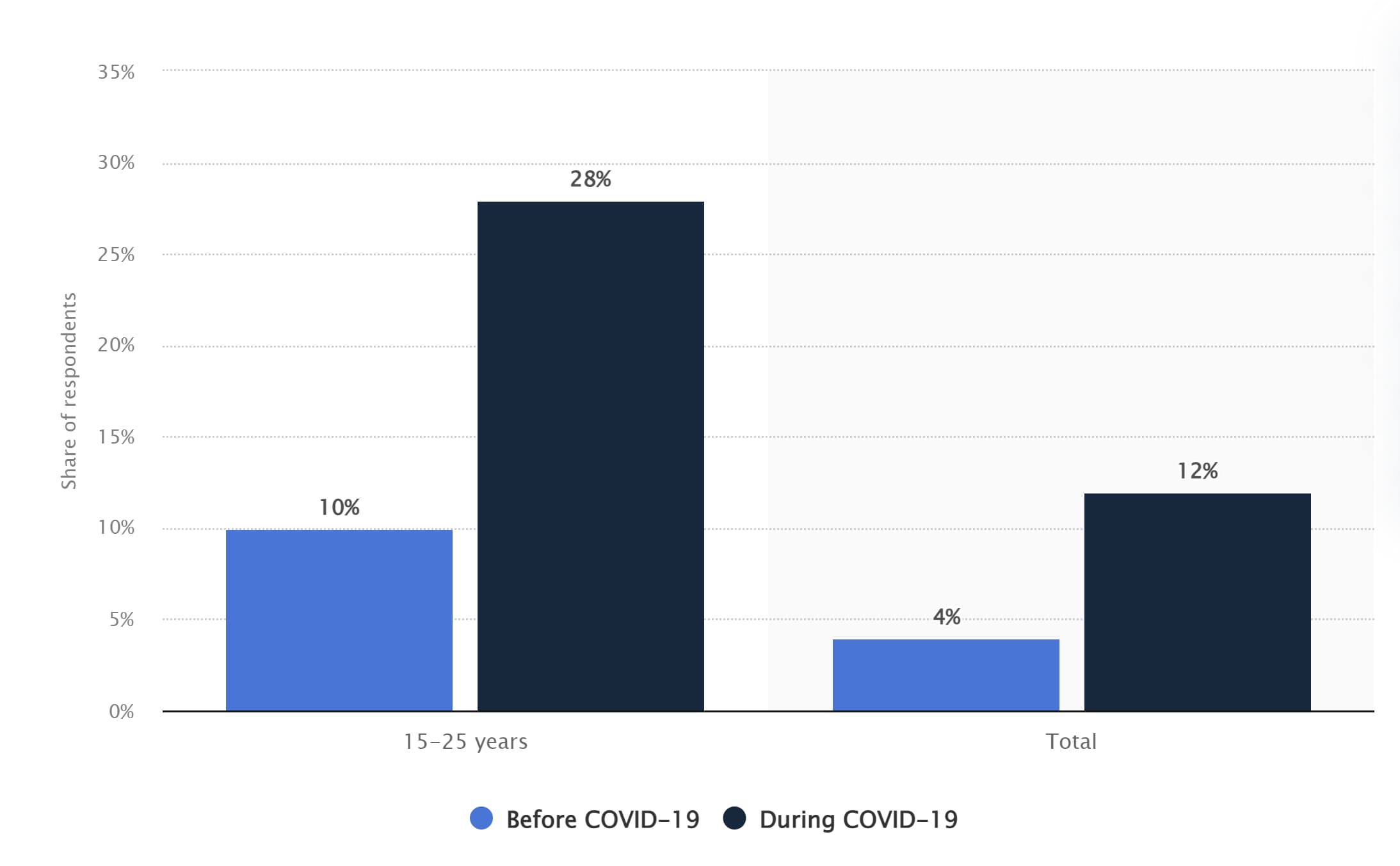
Aside from financial opportunities (and an escape from boredom), social media provides a digital space for almost anyone to post their content, promote their work, and build a loyal fanbase. In the creator economy, you can be a creator without investing in expensive equipment or getting the backing of major studios.
For example, Kyle Prue rose to fame on TikTok with videos showcasing his dry humor. All his videos are shot from his apartment using his iPhone and the mic on his Apple headphones. Despite his simple setup, Prue has over 1 million followers on TikTok and 32.5 million likes.
He also wrote and starred in his dark comedy-drama web series, “The Rabbit,” which he posted to YouTube for viewers to watch for free. Prue put the series together with his own money and without the help of any major studios or production companies. Each episode has between 20,000 to 71,000 views.
Platforms with Content Creator Funds and Programs
As I mentioned, many people turned to the creator economy to earn money — especially at the start of the pandemic when companies were experiencing hiring freezes and layoffs. Many digital platforms contribute to this economy via their creator funds and programs, including:
YouTube
For years, content creators on YouTube have made money via ad revenue from video advertisements. YouTube also has the YouTube Partner Programs, which gives creators access to exclusive features and various monetization opportunities. To compete with TikTok, YouTube also launched the YouTube Shorts Fund, dedicating a total of $100 million to creators from 2021 to 2022.
To keep up with the growing creator economy, Instagram has rolled out many new opportunities for creators to earn money off their posts to the app. One opportunity is the Instagram Live Badges, which allows users to send monetary tips to their favorite creators during live streams. Another opportunity is the Instagram Reels Play Bonus Program, where creators earn money based on the performance of their Reel.
Other monetary opportunities include:
- Branded content
- Shops for creators to sell directly to their followers
- In-stream video ads
- Affiliate programs
TikTok
TikTok’s Creator Next Program includes its $200 million creator fund, tipping and gifting opportunities, and a creator marketplace to connect creators with brands. The creator fund is accessible to many creators, including those with only 10,000 followers — so long as they have at least 100,000 video views within 30 days.
Twitch
Streaming platform Twitch has its Twitch Partner Program, where creators can earn income in multiple ways. One way is through channel subscriptions. With channel subscriptions, streamers earn revenue when their viewers subscribe via the following options: Tier 1, Tier 2, Tier 3, or Prime.
Bits is another feature of the program, allowing viewers to purchase virtual goods to “cheer” on streamers. Streamers get a percentage of the revenue Twitch receives from these purchases. And finally, Twitch streams can earn money via ad revenue from ads run during their streams.
Other Ways Content Creators Make Money
Though many social media platforms provide creators opportunities to make money through creator funds and programs, content creator earnings typically aren’t very high.
According to a survey by NeoReach and Influencer Marketing Hub, only 1.4% of the 2,000 content creators surveyed earn over $1.4 million annually. Only a little over 20% make a livable wage of $50K or more a year. To combat this issue, content creators will often supplement their income by other means, such as:
- Brand deals and partnerships
- Sponsored content
- Paid subscriptions
- VIP meet-ups
- Event hosting
- Merchandise
- Live and virtual events
Some content creators may also use their online presence as a stepping stone toward more lucrative ventures. For instance, Tabitha Brown is a social media personality and actress who became famous on TikTok for her calming videos of affirmations and recipes.
Her fame on social media led her to being cast in popular television shows like Showtime’s “The Chi.” Brown also has her own show, “All Love,” on Ellen DeGeneres’ digital platform EllenTube as well as a bestselling cookbook and an ongoing partnership with Target.
How Brands Should Use the Creator Economy
Viewers tend to care more about people and personalities than brands in the creator economy. As a result, many major brands have struggled to find their footing on platforms like TikTok or Twitch. However, there is still a way brands should tap into the creator economy to grow their audience and gain revenue — influencer marketing.
Brands should reach out to influencers with a loyal social media following to spread the word about their products or services. A great example of influencer marketing would be the work of TikTok personality Drew Afualo. Afualo is famous on TikTok for creating videos that poke fun at misogynists and uplift women.
Since gaining millions of followers on the app, Afualo has been tapped to promote films like “The Lost City,” starring Sandra Bullock and Channing Tatum.
Online fashion retailer Shein has also worked with Afualo to promote the company’s SheinX collection.
There are many ways to leverage Influencer marketing. Popular tactics include social media takeovers in which an influencer “takes over” a brand’s social media account for a day. Some brands like Genius will host live Q&As with influencers or celebrities on platforms like Instagram Live or Twitter Spaces. Additionally, paid partnerships, product placement, and sponsorships are considered tried and true methods.
Just remember — if you’re leveraging influencer marketing, you’ll need to ensure the influencer’s content and image align with that of your brand. After all, you should always practice discernment with who or what is associated with your brand or organization.
The creator economy is how influencers and creatives earn income by creating content that is unique to them and taps into their niche audience. However, it’s also an excellent avenue for brands to generate awareness and remain relevant in an ever-changing media landscape. Now that you know about this growing economy, you can find new and innovative ways to incorporate it into your marketing strategy.

Why B2B Companies are Entering the Editorial Space [& What You Can Learn From Them]
What do HubSpot, Mailchimp, and Wistia have in common? They’re all B2B companies with high-traffic, lead-generating media engines that support their products.
Wondering why so many companies are entering the editorial space? Industry experts cover that and more below.
1. The B2B marketing industry is shifting.
Marketing SVP at HubSpot Kieran Flanagan says the B2B marketing industry has gone through four major phases in the last decade.
What started as a focus on decision-makers has now evolved into a community-led approach that leverages media and publishing.
[image of b2b marketing evolution]
Many brands follow a product-led growth approach, in which the product itself attracts consumers and drives retention.
Any Atluru, former head of community at Clubhouse, says that this works great for utility-based products that have already been validated socially or don’t require a network of users to thrive. Think Slack and Calendly.
She highlights that a community-led model may be more conducive to brands whose products aren’t particularly unique and gain value through community. Think Peloton and Figma.
In this case, entering the editorial space will be a key part of your success.
Media & Community-Led
The next stage is B2B companies become a destination for their audience. Media (text, video, and audio) & developing an ongoing relationship through a community.
It will be a hard moat to disrupt.
— Kieran Flanagan 🤘 (@searchbrat)
March 24, 2021
2. The ad space is oversaturated.
On an episode of Marketing Against the Grain, CEO and co-founder of Notus, Yuliya Bel argues that ads no longer have the impact they used to.
“Like anything in marketing, there comes a point where it becomes saturated. Where people start to be like ‘Ok, we’ve seen this before, it’s no longer authentic or really speaking to us,’” she said.
She references an eBay study that revealed that brand search ad effectiveness was overestimated by over 4,000%.
With the incredibly high costs of running ads and rampant competition, this begs the question: Is the focus on ads for customer acquisition and engagement the best play?
She argues that investing in producing high-quality content and distribution tactics is the only way to ensure longevity in the online space.
Think about it this way: You could invest $100K into an advertising campaign but once it ends, so does your lead generation. Instead, you could invest that money into building a content team that will produce evergreen content that will bring in leads long after they’re published.
3. You meet your audience where they’re at.
Every brand wants to attract its audience organically.
While social media is the most popular way to achieve this – and the strategy that offers the quickest response – building a media engine is by far the most reliable and most sustainable.
Why? The first is that it removes the reliance on third-party applications to reach your audience. If you’re solely relying on TikTok and Facebook, what happens if they are down for a few days? Or consumers lose interest and transition to a new app?
You’ll constantly be adjusting your strategy based on the platform and trying to hit a moving target.
When you build your own engine, your audience comes to you.
But, you can compete as a publisher.
You can create things that help educate and inform your audience.
Sure, not all of them will buy your product or service, but all of them will remember that you helped them in some way.
That matters!
— Kieran Flanagan 🤘 (@searchbrat)
February 4, 2021
The second reason is that you’re able to attract several personas using varying mediums.
For instance, those who listen to your podcast may have different needs and challenges from those who read your blog posts.
When you’re in the editorial space, you can tailor your content to each user type and where they are in the buyer’s journey. Whereas on social media, you’re throwing out content and hoping that it reaches the audience that will resonate with it the most.
The issue is that the editorial space is a long-term play whereas social media is a quicker turnaround. When building a media arm, you won’t see results overnight – it can take months to years to see the impact of your work so for many businesses, the wait can seem like a waste of time.
However, in the long run, attracting your audience organically through thoughtful content will be the most cost-effective and sustainable method for audience growth.
4. You establish yourself as an industry thought leader.
One of the best ways to stand out in the B2B space is to become a thought leader, a brand others go to for guidance on trends, innovative strategies, and more.
HubSpot CMO Kipp Bodnar way to differentiate yourself from the competition.
“There are a lot of technology industries where the pace of being able to innovate and create technologies is actually very fast,” he said on the Marketing Against the Grain podcast, “so, you need content and storytelling to differentiate.”
For HubSpot, media has been integral to our success – with our blog being a common first point of contact for many of our leads. Now, we’ve expanded to podcasts, videos, and newsletters.
Flanagan believes it’s crucial when growing your B2B brand.
“The most underrated skill in B2B tech in the future is editorial taste,” he says.
This refers to the ability to know what will resonate with your audience and how to execute it.
Once you’ve gained your audience’s attention and added value to their lives, they will trust the products you recommend to them – even if it’s your own. That’s reason enough for any company to enter the editorial space.

Content Mapping 101: The Template You Need to Personalize Your Marketing
When prospects first come to your business page, they probably won’t just click and buy your offering immediately. They’ll most likely be searching through your site to learn more about it, gauge the level of trust people have in your company, and be on the lookout for resources to help them achieve their goals. You can create this experience by content mapping.
Content mapping allows you to create highly targeted, personalized content at every stage of the buyer’s journey, helping to nurture leads and prospects toward a purchase decision. In this post, we’ll go over what a content map is and how you can start content mapping for your brand.
Let’s get started.

For example, if your business is building a brand new website, you’ll have to begin creating a content map based on why the customer is going to your page. If customers are coming to your website looking for a credible solution worth paying for, they’ll want to trust the company.
The marketing team can then align the goal to build trust, and apply it to their marketing portfolio.
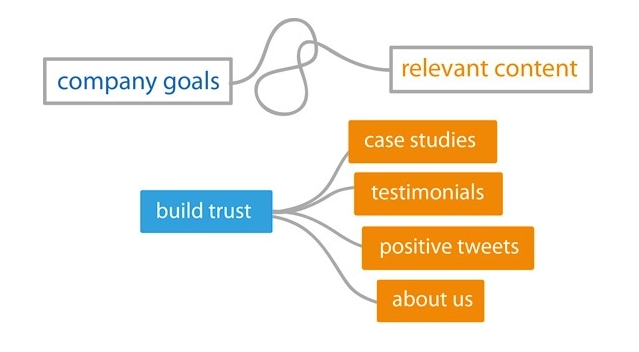
Why is content mapping important?
Content mapping helps you plan for content creation that supports the customer journey and creates a more cohesive, personalized customer experience.
When it comes to content, one size rarely fits all. They have to serve different purposes as prospects are looking for varying information as they progress in the buyer’s journey. To ensure that your company’s content is effective at generating leads, you need to deliver diversified content that covers different topics that they’re searching for each step of the way. Content mapping is the process of doing just that.
But coming up with the actual topics that make for a highly targeted content strategy isn’t that easy. However, content mapping with the audience in mind can help you put together a strategy in a more manageable way.
How to Create a Content Map
1. Download a content map template.
To help you brainstorm and map out content ideas for targeting specific segments of your audience, we’ve created a new free template resource: The Content Marketing Planning Template.
Download Your Free Template Now
The template includes an introduction to content mapping, a crash course on buyer personas and lifecycle stages, a content mapping template (plus examples), a website content map template, and bonus buyer persona templates.
With the template, you’ll:
- Learn how to understand buyer personas and lifecycle stages.
- Identify problems and opportunities that your audience needs help with.
- Brainstorm highly targeted content ideas that incorporate personas and lifecycle stages.
2. Identify the buyer persona you want to target.
Buyer personas are fictional, generalized representations of your ideal customers. They help you understand your customers (and prospective customers) better, and make it easier for you to tailor content to the specific needs, behaviors, and concerns of different groups.
The strongest buyer personas are based on market research as well as on insights you gather from your actual customer base (through surveys, interviews, etc.). Depending on your business, you could have as few as one or two personas or dozens. If you’re just getting started with personas, don’t go crazy! You can always develop more personas later if needed.
3. Consider that persona’s path to purchase (lifecycle stages).
The buyer persona you target with your content is only half of the content mapping equation. In addition to knowing who someone is, you need to know where they are in the buying cycle (i.e. how close they are to making a purchase). This location in the buying cycle is known as a lifecycle stage.
For our Content Mapping Template, we’re divvying up the buying cycle into three lifecycle stages: Awareness, Consideration, and Decision.
- Awareness: In the awareness stage, a person has realized and expressed symptoms of a potential problem or opportunity.
- Consideration: In the consideration stage, a person has clearly defined and given a name to their problem or opportunity and is looking for a solution.
- Decision: In the decision stage, a person has defined their solution strategy, method, or approach and is looking for a provider.
By combining buyer personas with lifecycle stages, you can hone in on specific segments of your audience and tailor content to resonate with each of those segments.
4. Brainstorm questions the personas have in the awareness stage.
Your awareness stage content should target early in the buying cycle. People in this segment are just becoming aware that they have a problem. At this stage, think of how your content can help people become more informed about the problem in general, and you’ll (hopefully) find that they continue moving closer to a purchasing decision.
Important questions to start thinking about:
- What problem are they likely trying to solve, and what are the symptoms that are causing this problem?
- What information will help them to identify their problem(s) and that our product or service is designed to solve them?
- How can we build trust and provide more value than our competitors from this early stage in the journey?
5. Identify awareness stage content.
Taking your buyer personas’ questions into account, you can turn them into topics for awareness stage content.
The content you want to provide them should speak to their current needs, not jump straight into product-focused content. This can take the form of insightful blog posts, webinars, ebooks, or social media posts that give information to solve initial concerns and slowly familiarize prospects with how your product can help them.
6. Brainstorm ways to position your solution as your persona enters the consideration stage.
At this point, you’ve provided your prospect with enough information to become fully aware of their problem, and they know it can be remedied.
This is when you should begin trying to move them closer to a purchasing decision and become more interested in your product offering, using consideration stage content.
7. Identify consideration stage content.
Your consideration stage content can more explicitly mention how your product or service could potentially solve a problem. At this point in the buying cycle, people are still evaluating their options. Your purpose now is to help them narrow down the solution that works the best and provides them the most value.
The types of content used for the consideration stage can look like this:
- Videos comparing and contrasting offerings
- Whitepapers
8. Brainstorm objections that would stop them from buying in the decision stage.
Now that you’ve identified the “why”s behind your prospect choosing your solution, it’s time to consider the “why not”s.
Some competitors may have a more affordable solution, different methods of remedying issues, or more authority (popularity) in the market. While some of these aspects cannot be changed, you can still appeal to the prospect and move them closer to purchase if your offering is a real value add, regardless of the rest.
9. Identify decision stage content.
At the decision stage of the buyer journey, you can primarily lean into marketing your products or services. If someone has reached this stage, they’ve already identified a problem and a solution, and are now getting ready to pull the proverbial trigger toward a purchase decision.
This is where you can directly present the prospect with examples of positive experiences or success derived from your product or service offering, with decision stage content like:
- Case studies (social proof)
- Customer testimonials
- Product demos
10. Determine how these content pieces work together.
Now that you’ve identified all the different types of content that buyers of each stage are looking for, it’s time to map the ideas.
Content Mapping Template
This content mapping visualization keeps the marketing strategy focused on the goal specified with all the steps necessary to gradually reel in buyers. Our template can also help you to schedule when you want content published on a monthly or quarterly basis if you want to manage it in one place.
You can approach content mapping to serve more specific strategies this way, too, as we’ll discuss content mapping for your website in more detail.
Website Content Mapping
Website content mapping is the process of planning the pages, blog posts, and offers you’ll publish on your site and identifying which buyer personas those pages and posts will serve. Website content mapping also identifies which pages and posts address different lifecycle stages.
Website content mapping is a key element of website personalization. In essence, you’ll create different pages, posts, and offers to address different buyers at different points in the buyer’s journey.
To give you a better idea of website content mapping, let’s run through a simple example of one.
Content Map Example
The buyer persona (and a key problem or opportunity that persona is struggling with) is at the start of the grid. Jenny is a gym owner and her problem is that she needs gym equipment, but has a limited budget and has taken to the internet for a solution.
In the awareness life cycle stage, she’ll be looking for introductory content to gain knowledge about the types of equipment necessary to bring customers into her gym.
In the consideration life cycle stage, she’ll have a better understanding of her need for equipment and price expectations and will be looking to create a more clear budget for different items and consider how long this investment will last — seeking templates that outline that information.
Finally, in the decision stage, Jenny has identified her needs and is looking for a provider to fill them. She will feel inclined to request demos, consults, or quotes from a company that has guided her through her journey to their solution of cost-effective gym equipment.
This type of content map works because of how it segments personas as they progress through the buyer lifecycle, and if you have more than one persona to cater to, then you can expand your map into a segmentation grid.
Content Segmentation Grid
A content segmentation grid is a tool to help businesses plan the content they will produce based on the different types of audiences they want to reach.
A common mistake marketers make when it comes to content planning is that they’ll understand the need to make personalized content for customers as they navigate the buyer stages — but ignore the need for individualized messaging.
A content segmentation grid solves that problem as marketers will be able to better serve every customer segment at each stage they reach. So instead of writing messaging for one buyer persona, you can potentially increase engagement and conversions across different audiences.
So you now know what content mapping is, and you’ve seen how you can get started. What type of tools can you use to start content mapping?
Content Mapping Tools
Content mapping may seem like a difficult task that requires highly specialized software. It’s not true — it requires simple business tools you may already be using in your day-to-day.
We’ll start with the most basic tools you need to start content mapping, such as word processors and visualization tools.
1. Google Docs
Pricing: Free
First up in your content mapping tech stack is your preferred word processor, Google Docs. It has the feature to draw and insert different types of diagrams into documents, which can be translated into a content map to align your marketing mix with your goals. We highly recommend this tool because it makes it easier to share work across your team, and you never have to worry about backing up your content map once you’ve created it.
2. Lucidchart
Pricing: Free Basic Plan; Individual Plan;$7.95/month, Team Plan; $9/month, Enterprise Plan available upon request
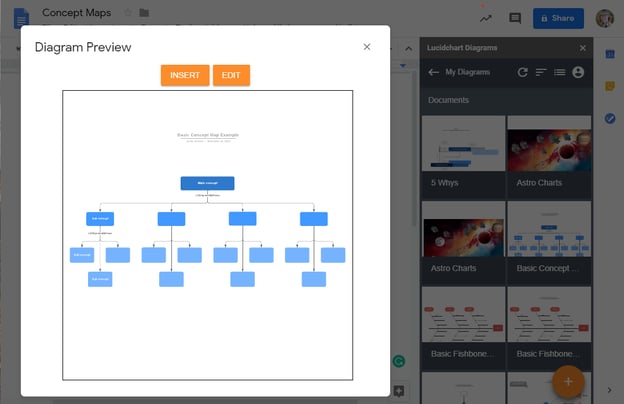
If you’re more of a visual person, then a flowchart tool is a must. Also, if you’d prefer to create a content map with lines and diagrams, then you need a more sophisticated tool than Google Docs. Lucidchart’s flowchart maker is a top-of-the-line tool that also allows you to connect different apps and services. Like Google Docs, it allows you to work collaboratively, but Lucidchart takes it a step further and provides users with more visually appealing formatting.
3. Buyer Persona Tool
Pricing: Free

Before you can even begin to create a content map, you need to identify the buyer persona(s) you’re creating content for. HubSpot has a buyer persona tool made to build and save professional buyer persona documents with its intuitive generator.
And if you want to take it a step further, HubSpot has a list containing even more buyer persona resources to build out your customer profiles for your business, too.
4. Marketing Hub
Pricing: Free Basic Plan, Starter Plan; $45/month, Professional Plan; $800/month, Enterprise Plan; $3,200/month
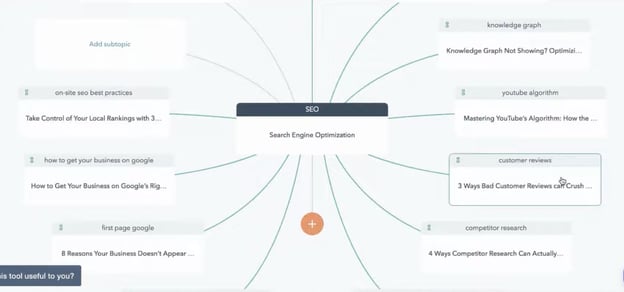
In the Marketing Hub, there is an SEO Topics tool that provides content mapping capabilities to help users organize their ideas for organic-focused awareness stage content. With this capability, your team will be able to collaborate and execute your content map once it’s ready for deployment.
Tools to Help Implement Your Content Map
1. HubSpot CRM
Pricing: Free
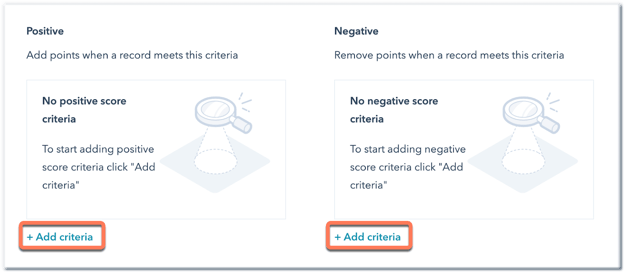
HubSpot’s CRM is the one tool you need to compile all of your data from current and prospective customers. The CRM will allow you to discern different lifecycle stages and pinpoint commonalities between customers who are ready to purchase based on lead scoring. Your content map can help someone build a lead scoring system to identify high-value leads who have consumed the content close to a purchasing decision.
3. CMS Hub
Pricing: Starter Plan; $23/month, Professional Plan; $360/month, Enterprise Plan; $1,200/month
A content management system is probably the most important tool for your content mapping efforts. A CMS will allow you to publish personalized content that targets different site visitors at — you guessed it — different stages of the buyer’s journey.
CMS Hub is fully integrated with HubSpot’s CRM platform and Marketing Hub, allowing you to create a seamless experience for your customers as they receive the content you’ve designed for them. It will help you execute your content map flawlessly. Even more importantly, with CMS Hub, you can continue testing and retesting your content for better results.
So are you ready to begin creating your own content map? Before you start, let’s hear some tips from marketers who attribute part of their success to this strategy.
Content Mapping Tips From the Pros
1. Educate your audience.

“We all have to create compelling content to attract our ideal clients, build an active and engaged audience, and get daily sales. Spend time building your audience by educating them and engaging with them. No one has built a business by posting the same image or type of image every day on socials and not having convoys with their audience. It is not just about showing up, but doing so with intention so you can attract your ideal clients who will buy from you.”
– Adanna Austin (Business Coach and Consultant, Marketing Dynamics Business Solutions)
2. Give your prospects the information they need before they ask for it.
“With content mapping, you can give your prospects the information they are asking for before they even ask for it. Buyer personas and lifecycle stages allow you to be one step ahead of the game by mapping out what your prospect’s next steps are and delivering them the content from numerous different avenues.
We create buyer personas as part of our onboarding process and everything we do from content offer to daily tweets is centered around that document. We also always ask ourselves, ‘Would business owner Bob open this email, click this tweet, or download this offer?'”
– Laura Hogan (Founder, Digital Atlas Marketing)
3. Provide different conversion paths for different personas.
“When mapping out content for your site’s visitors, it’s important to remember that when it comes to purchasing decisions (BOFU conversions, especially for B2B and high-priced items), there are some personas out there who would rather speak to someone on their terms rather than fill out a form for a consultation. Understanding how they are most comfortable when it comes to making decisions can help you understand what points of conversion will be the most relevant and successful for that persona.
Optimizing your site pages (landing and thank you pages, as well), TOFU & MOFU offers, and workflows with direct contact information (phone #, email, etc.) is a great way to ensure that visitors, prospects, and leads who may shy away from form submissions still have readily available, alternate means of converting.”
– Marc Herschberger (Director of Operations, Revenue River Marketing)
4. Create specific content that appeals to specific personas.
“Mapping out buyer personas and lifecycle stages is extremely important when creating content. In terms of buyer personas, it’s easy to see that a Marketing Director will have different questions, information needs, and interests compared to a CEO. Both of these personas may be searching for your product or service, but they’ll be looking for different topics. By creating content that appeals to each audience, you can be more effective in attracting that specific audience.
By the same token, each persona of yours may be in a different stage of the buying process, so it’s important to think through and create content that appeals to someone looking for basic, high-level information such as an ebook, as well as specific information like a pricing guide or case study.
One tip I’d suggest for anyone with pretty different personas would be to dedicate an entire section of your site to each audience. That way, when you pull in your audience, all the content is directed toward them.
We actually took this concept and went a step further by creating unique brands for each one of our vertical markets. Each brand has its own section of the website, its own blog content, and its own premium content (downloadable offers). It’s really helped us attract and convert visitors at a higher rate because all the content is more relevant to that persona.”
– Spencer Powell (Chief Executive Officer, Builder Funnel)
4. Pull content topics from your sales process.
“By taking the buyer and buying stage into account when creating content, you can be sure that you’re designing content to help move them through the buying process.
In addition to mapping content to the buyer profile and buying stage, we regularly pull topics from the sales process. Then we offer the content in later sales calls. This helps us not only evaluate the relevancy of the content but also the interest of the buyer. We encourage clients to do the same.”
– Diona Kidd (Managing Partner, Knowmad)
Content Mapping is Key to Your Company’s Growth
Delivering the right content at the right time can do wonders for your company’s growth. By meeting prospects’ needs based on their persona and lifecycle stage, you’re delighting them at every turn, boosting your chances of winning a loyal customer and turning them into a brand evangelist.
Editor’s Note: This post was originally published in March 2014 and has been updated for accuracy and comprehensiveness.


Topical Content vs. Evergreen Content: How Both can Boost Traffic
The more traffic your blog or site receives, the better. But drive-bys aren’t enough to drive user engagement and ultimately boost sales — instead, you need to convince potential customers that it’s worth sticking around. Topical content and its counterpart, evergreen content, can help you achieve this goal.Consider that 38% of people will leave your site if the content or layout is unattractive. In other words, if they don’t find anything of value ASAP, they won’t stay.
 Of course, this raises an important question: When it comes to topical content vs. evergreen content, which delivers the best bang for your virtual buck? Which type drives more visitors to stay? Here’s what you need to know about boosting traffic with these common content types.
Topical content focuses on current events or information to deliver targeted and relevant content to visitors. For example, a local roofing company might use the event of a large storm rolling through the city or county as a jumping-off point for a blog post about handling hail or wind damage. This type of topical content is relevant to their target audience in the moment, offers actionable advice, and may help drive conversions.
HubSpot’s recent State of Consumer Trends blog is a good example of topical content. The statistics provided are timely, relevant, and actionable in the near future.
Like the evergreen tree, this type of content is always around and relevant. Unlike the time-based nature of topical content that requires regular updating to stay compelling, evergreen content has a longer-term appeal that lets you post it and (mostly) forget about it.
Common types of evergreen content include how-to articles, tips, or listicles that are broadly applicable. HubSpot’s list of 15 Customer Success Metrics That Actually Matter is a great example of actionable evergreen content.
Topical Content Pros and Cons
Considering using topical content on your site? Here are two pros and two cons to this approach.
Pro #1: Less legwork
Topical content is there for the taking. A quick review of relevant industry websites or digital news outlets can provide inspiration for your next post, meaning your team can cut down the amount of time required to find your next content focus.
Pro #2: Multiple traffic opportunities
Relevant stories can gain traction across multiple points of content. In practice, this means you can drive traffic from social media sites, emails, and web searches simultaneously to your site.
Con #1: It’s Not Just You
Interesting content is interesting to everyone. This means that other sites are also posting their own take on topical content, making it harder to stand out from the crowd.
Con #2: Trust is Built, not Posted
Just because you make a great post and get traffic to your site, it doesn’t mean that visitors automatically become buyers. Instead, it takes time to build up trust, meaning you’ll need more than just topical content to drive conversion.
Evergreen Content Pros and Cons
Thinking of an evergreen effort on your website? Here are some common pros and cons.
Pro #1: Stays Fresher, Longer
Evergreen content naturally stays fresher for longer, in turn driving steady traffic to your site. You can also update rather than replace this content as needed to keep users coming back.
Pro #2: Ideal for Entry-Level Content
How-to’s and listicles that cater to beginners learning a new skill or understanding a topic are great choices for evergreen content, since there’s always someone looking to learn.
Con #1: Brainstorms can Run Dry
The more evergreen content you post, the harder it can be to think of new topics. This creates a situation where your team may spend more time work-shopping posts rather than creating evergreen content.
Con #2: Success is a Slow Process
Where topical content posts can drive big spikes in traffic over short time periods, evergreen content is more slow and steady. While this is great for long-term growth, it won’t help if you’re looking to capitalize on seasonal or event-driven demand.
Ideally, topical and evergreen content work in concert to help boost your website traffic. Not sure what that looks like in practice? Here are six tips to get you started.
1. Use content planning templates for your topical and evergreen content
When it comes to getting the most from topical and evergreen content, planning templates are a great place to start, since they provide a solid foundation for your long-term traffic strategy.
Check out HubSpot’s free Content Marketing Planning Template to get your content creation campaign off the ground.
2. Set a schedule for regular topical refreshes
To keep topical content relevant, schedule regular refreshes. The length of time between refreshes depends on the type of content — for social media posts, any more than a week can start to get stale. For blog posts, two weeks to a month at most.
3. Get the right tools
Before creating your content, make sure you’re on the right SEO track. Tools like Google AdWords and Google Trends can help you find keywords that are on the way up or have sustained search volume to inform your content strategy.
4. Topical content: Don’t hold back
Swing for the fences when it comes to topical content. Given the number of other sites doing the same thing, it’s worth going all-in with content that’s relevant to your target audience. Even if it doesn’t land as intended, it’s ephemeral enough that you can recover quickly.
5. Evergreen content: Think about the long-term
For evergreen content, think about long-term traffic potential. Is the content useful to your current user base? Can it be updated as the market changes to remain relevant?
6. Find a content balance
Finally, find a balance between topical and evergreen. While a totally topical approach can produce quick-win results, it won’t provide sustained success. Evergreen efforts, meanwhile, offer steady progress but aren’t enough to jump-start customer interest or capitalize on market trends.
Directing Traffic: The Double Benefit of Evergreen and Topical Content
Put simply? Both topical and evergreen content offer benefits for your site. Where evergreen efforts can help boost SEO and deliver steady visitor numbers, topical content helps your site get noticed when relevant and timely events have customers looking for answers.
In other words, it’s not about topical vs evergreen content: It’s about finding a way to balance both that gets visitors interested and keeps them coming back.
Editor’s note: This post was originally published in April 2010 and has been updated for comprehensiveness.

What Consumers Think About the Metaverse & What Brands Need to Know [New Data]
The term “metaverse” may have been coined back in 1992, but it could hold new and adventurous opportunities for both consumers and even brands that engage with them.
The only problem is many of us aren’t too sure what the metaverse actually is. Who is using it? Why do they use it? Which of the seemingly infinite metaverses are worth including in your marketing strategy? And how can the metaverse help marketers navigate data privacy regulations?
To get some clarity, we surveyed over 1,000 consumers in the U.S. to learn about their takes, preferences, and behaviors around today’s biggest trends.
In that survey, 8% of participants said they’d ever visited a metaverse. But that’s not the full story. Keep reading to learn why the metaverse might not be a passing trend.
What Consumers Think About the Metaverse [New Data]
The Metaverse is New to Many — but Still Growing
Today 33%, or one-third, of our total survey-takers don’t quite get the concept of the metaverse. Still, 40% understand it and 30% think more brands should leverage it.
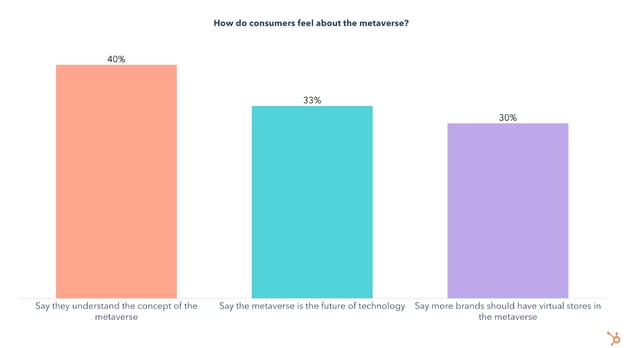
While only a small percentage of people have stepped into the metaverse, half of those that have did so in the past three months.
On top of that, these early adopters aren’t just popping in once to check it out – they’re actually invested in these virtual worlds. Of those who have ever used the metaverse:
- 64% own virtual currency in the metaverse
- 61% own virtual items that can be bought and sold in the metaverse
- 55% own land that can be bought and sold in the metaverse
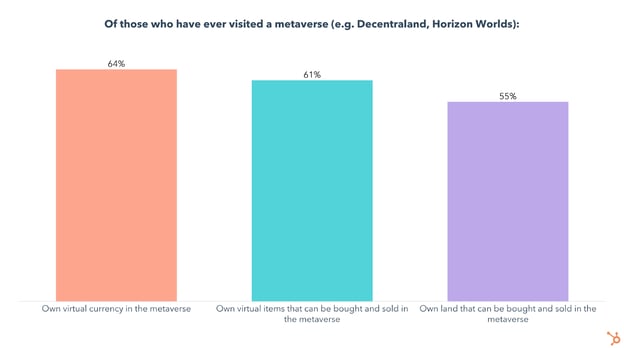
How the Metaverse Intersects With Consumers’ Real Lives
We also asked those who have ever done metaverse-related activities (visited a metaverse, played online games, attended virtual events, or bought virtual items/NFTs) about how these intersect with their “real” lives, which produced some surprising results:
- 60% say their virtual items are just as important as their real-life possessions
- 54% say their online relationships are just as important as in-person relationships
- 51% say they can more easily be their authentic self in virtual worlds than in-person
- 40% say they understand the concept of the metaverse
- 33% say the metaverse is the future of technology
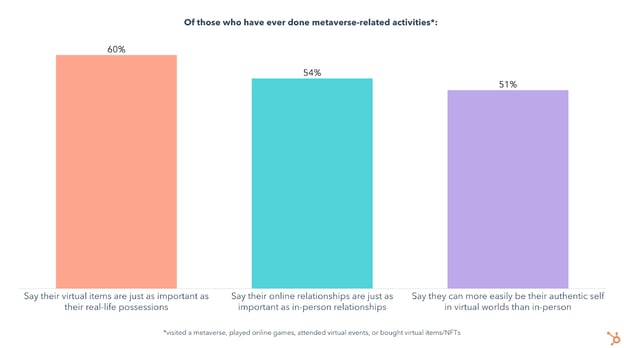
Who’s using the Metaverse?
Our research shows that opinions on the metaverse differ sharply by age group.
At the moment, Gen Z and Millennials are the most excited about exploring the metaverse, with around 15% of them having visited a metaverse at some point.
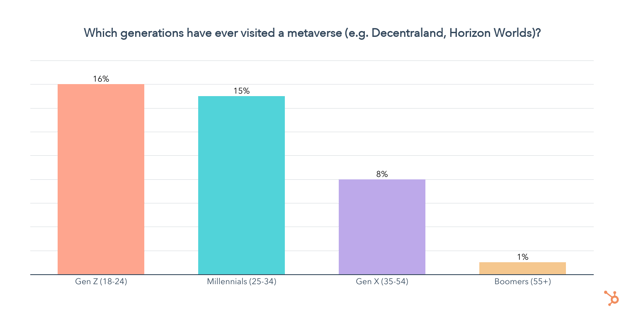
Gen Z and Millennials are also more likely than any other generation to have done metaverse-related activities, other than buying crypto (likely due to Gen Z having less disposable income):
- 40% of Gen Z/Millennials have played an online game
- 28% of Gen Z/Millennials have used a VR headset
- 22% of Gen Z/Millennials have bought virtual items other than NFTs or crypto, like a skin in a video game
- 18% of Gen Z/Millennials have attended a virtual reality event
- 23% of Gen Z/Millennials have bought cryptocurrency
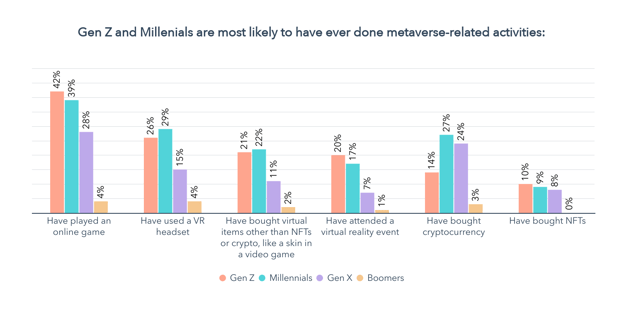
So now that we know Gen Z and Millennials are the primary users of the metaverse and related technology, let’s take a look at why people go to the metaverse in the first place.
What Do People Do In the Metaverse?
Why People Visit the Metaverse
The most popular reasons for visiting the metaverse are to play games, hang out with friends, work a virtual job, and for virtual meetings and events.

Keep in mind the metaverse is all about empowering users to create their own experiences. As people continue innovating in virtual worlds, the number of activities and use cases will likely grow.
What motivates metaverse regulars?
Because the metaverse itself is loosely defined, to some extent it’s up to the users to shape its future. And those users are invested, with over 50% owning virtual currency, land, and items that can be bought and sold in the metaverse.
Additionally, with 31% of metaverse users saying they log on to earn virtual currency or work a virtual job, it’s important to touch on another selling point of the metaverse – users can earn currency by playing games or working virtual jobs.
We asked the general population whether they would be more likely to use a platform if they got virtual currency as an incentive, and 27% say they would. This number jumps up to 36% for Gen Z and 40% for Millennials.
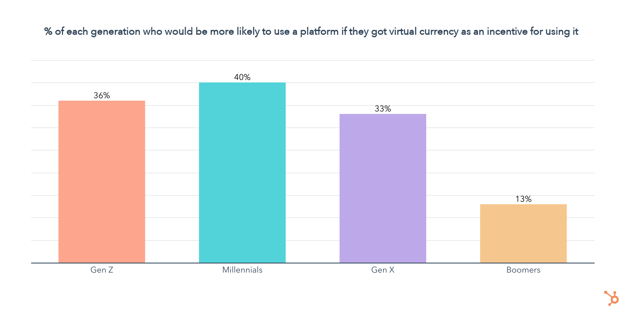
On top of that, 60% of those who have ever used the metaverse say they would be more likely to use a platform if they got paid in virtual currency.
Offering incentives for using a platform can also help address a problem many marketers are currently struggling with – gathering consumer data in a way that provides value to both parties.
The Most Visited Metaverses
The Sandbox, Meta’s Horizon Worlds, and VRChat are the most visited, followed by Axie Infinity, Decentraland, and Illuvium. Keep in mind that many of these worlds are in early development, and some aren’t even accessible to the public yet. 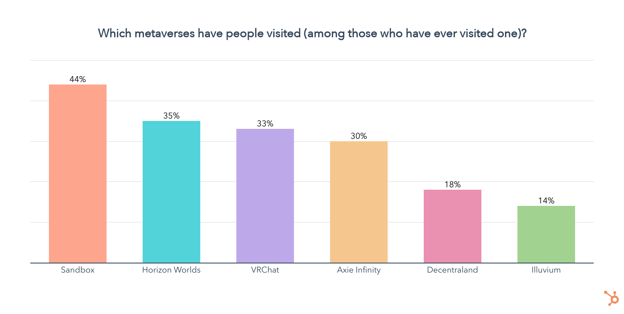
Data Privacy and the Metaverse
Currently, many platforms like social media track, analyze, and sell personal data, but the user gets nothing in return. In response to this, privacy protections are being developed by governments and corporations alike to give consumers more power over their data.
This means offering incentives for people to not only spend time on your platform but also share their data will become more important in the future.
So let’s take a closer look at how consumers currently think of data privacy, and whether they think the metaverse has the potential to tip the scales in their favor.
Consumers are unified in their demands for ownership over their personal information. Our survey found that:
- 80% of consumers agree that data privacy is a human right
- 80% of consumers agree that they should have complete control over how companies use their data
- 79% of consumers say they are concerned about how companies use their data
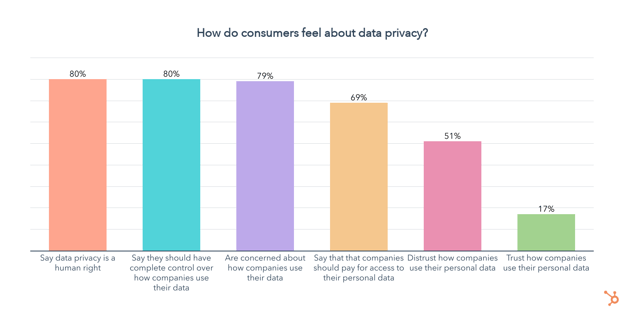
On the other hand, when it comes to the metaverse, 53% of those who have ever used it say they trust how data on their activities in virtual worlds will be stored and used, while 29% distrust it. This is quite fascinating as many metaverses are decentralized, built on relatively emerging blockchain technology, and still a mystery to many — even when they’ve visited them a few times.
What’s Next for the Metaverse?
So you might be wondering what to expect next for the metaverse, and in all honesty, nobody knows.
We’ll keep running our Consumer Trends Survey regularly, to stay up to date on all the latest trends, from the metaverse to social media, workplace trends, and much more.
In the meantime, check out our State of Consumer Trends Report which includes the full results of our survey, as well as the downloadable PDF below.
