
Email Sign Up Forms: How to Increase Email Sign Ups With Better Forms
In 2019, there were 3.8 billion estimated email users across the globe. With half of the world’s population on email, and the ability to reach people at any time of day, email marketing remains a crucial technique to build a customer base.
So how do you attract people to your email list? There are a few important steps, but it all starts with an email sign up web form.
What Is An Email Sign Up Form?
An email sign up form is used to collect email addresses from leads and potential customers. These forms are are embedded on a web page where a visitor can enter their email address in a form field to be added to your email newsletter.
The best thing about email opt-ins is that you can build a pipeline of leads to nurture and communicate with. Over time, your email list can turn into a valuable source of revenue as cold prospects get to know and trust you while you stay top of mind (or top of inbox).
But what do you do if you’re not getting enough subscribers into that pipeline? After all, email marketing is only as good as its list. Here are our tips for how to get more mailing list signups.
How to Get More Subscribers for Your Email List
- Monitor your metrics.
- Place calls to action on high-traffic pages.
- Be mindful that your conversion rate may not be the problem.
- Use contrasting colors.
- Consider placement.
- Offer something of value.
- Reduce the friction.
- Try out different offers.
- Consider user intent.
- Reduce the number of forms and calls to action on a page.
- Use a form builder with smart field capability.
- Use pop-ups.
- Test everything.
1. Monitor your metrics.
Conversion rate refers to the percentage of website visitors who converted on your opt-in. In order to calculate conversion rate, you divide the number of conversions from that form or offer by the amount of traffic to the page or post it’s on.
If you have a form or offer that coverts 3% of the website visitors that see it, that form or offer is more valuable than one converting at a rate of .75%. With 1000 website visitors, the first form would generate around 22 more leads than the second (all other things being equal). That’s why conversion rate optimization is so important.
2. Place calls to action on high-traffic pages.
Conversions to your email signup form only happen if the form is seen. For this reason, you should be putting the opportunity in front of your website visitors. Identify your highly visited pages and put your form or calls to action (CTAs) on them to maximize visibility.
3. Be mindful that your conversion rate may not be the problem.
If you don’t have a large amount of traffic, finding ways to increase traffic may be a more worthwhile activity. As previously mentioned, conversions only happen when there’s an opportunity to convert. With no traffic, there’s no opportunity. You won’t have the means to increase conversion rate if the starting number is zero, and if traffic is low, your conversion rates may not be statistically significant.
4. Use contrasting colors.
The last thing you want is for a potential subscriber to miss the opportunity to convert simply because they didn’t notice it was there. You want to draw attention to your conversion elements, making them attention-grabbing and bold. One way to do this is by using contrasting colors that stand out on the page.
5. Consider placement.
Prominent page placement is a game-changer when it comes to increasing conversion rates on email signup forms. A form or call-to-action can go in a number of places, including:
- The top of the page
- Within the text of the page
- In the sidebar
- At the bottom of the page
- As a popup generated from a user action
You’ll want to test which placements work for your conversion rates. For example, if people aren’t making it to the bottom of a page or post, they may not see your call-to-action. Through testing, you’ll be able to determine the placements that work best for your audience.
6. Offer something of value.
The majority of today’s internet users know that giving up their email address may result in email solicitation or, in some cases, spam. That may not be your intention, but that doesn’t erase their caution. To overcome their caution, you must incentivize them to give it up.
Promising high-value content that they want, providing social proof that your newsletter is valuable, holding giveaways or contests, and being transparent about what they can expect signing up are all ways to provide the incentive.
7. Reduce the friction.
“Dollars flow where friction is low.”
— Brian Halligan, INBOUND 2019
The more friction that a visitor encounters, the less likely they’ll sign up. Ultimately, you want to keep the momentum going to completion.
One way that you can reduce friction is by removing form fields and making the process of signing up faster. The amount of required form fields should be proportional to the amount of value you’re providing. Too many will cause the user to bounce. Instead, ask for less up front and have your team gather what they need after the individual has become a lead.
8. Try out different offers.
Don’t be afraid to scrap an offer if it seems to be under-performing. Maybe the word “newsletter” fails to appeal to your specific audience. Switch it out with something different and monitor your metrics to see what happens.
9. Consider user intent.
Your website visitors landed on a particular page for a reason. If your offer doesn’t help them meet that need in some way, they may not be incentivized to convert.
Here’s an example to illustrate this point:
Let’s say you have a blog post that compares your product/service to a competitors. The visitor arrived here because they want to see how well you match up with others in the industry.
But if your offer is something like “Reasons Why You Should Buy [Product/Service],” you may fall flat. If the user is already comparing providers, they already know they the value of the product or service; they’re just figuring out which provider to go with.
In this scenario, an offer suited to this intent, such as a free sample or product demo, may work much better.
Consider the intent on your pages and craft offers that match up with that intent.
10. Reduce the number of forms and calls to action on a page.
As the old saying goes, “A confused mind says no.” If you present a website visitors with too many choices, you run the risk of driving them away completely. Consider presenting one offer or conversion element per page. If that’s not possible, find other ways to reduce the confusion and make it clear exactly what you want the website visitor to do.
11. Use a form builder with progressive field capability.
Some form builders (like HubSpot’s) have the ability to remove form fields if the CRM already knows the information. For users who may be converting a second time, HubSpot may already already know some of the information, and it will remove those unnecessary forms, removing the friction for the user to type that information again. After all, dollars flow where friction is low.
12. Use pop-ups.
Pop-ups may seem intrusive, especially if used incorrectly, but the fact of the matter is that they convert! By using a pop-ups tool, offering something of value, and using specific triggers (such as exit intent), you can create a pop-up experience that isn’t annoying and generates leads.
13. Test everything.
Testing has been mentioned already in a few of the tips above, but it stands to get its own section. Improvement doesn’t happen in a vacuum, and leads don’t increase because of intuition. By testing hypothesis and continuing to iterate improvements, you’ll learn about your audience, be mindful about your metrics, and increase email signups as a result.
A lead might provide their email address for any number of reasons — to receive details about sales, blog post notifications, a discount code or information about your business. Either way, that makes your email sign up form one of the most important things on your site. And while they’re simple to create with the help of a form builder, you’ll still need to put some time and thought into how you build, format and embed your form.
Let’s go over some ways to create a sign up form that will get more leads on your email list.
Email Sign Up Form Best Practices
Whether you’re looking to reach ten people or ten million, you’ll need to create a sign up form that gets people excited to sign up.. Here are some best practices that will help you create a high-converting email sign up form
1. Make the Value Exchange Clear
Your leads should be able to answer the question, “What’s in it for me?” when they complete your form. An email address is a valuable commodity and it should be worth their while to sign up. Add a short description to the top of your email sign up form that describes what your lead will get in return for signing up and make it good. For example, instead of saying, ”Sign up for our weekly newsletter” you should say, “sign up for our newsletter and receive exclusive deals and offers.” A strong incentive means your website visitors are more likely to convert.
2. Use a Double Opt-In
You don’t necessarily need more sign-ups as you need quality sign-ups. You need people who actually want to receive your emails — more is not always better. Ensuring quality sign-ups means less fake leads wasting your time and less chances that you’ll end up in the SPAM folder or blacklisted.
To ensure quality sign-ups on your form, consider using a double opt-in. This is the type of email subscription that confirms your lead wants to be added to your email list twice. The first time is when the lead enters and submits their information using your web form, and the second time requires the lead to click an additional CTA (usually in their inbox) that confirms their submission. A double confirmation means a high-quality relationship with your leads.
3. Keep It Simple
A lead should be able to look at the form, enter their information, hit “submit” and carry on with their lives within a matter of seconds. Successful email sign up forms are straightforward and clear. If your form is too complex, you risk losing the interest of your website visitors.
Don’t get greedy and ask for too much information right away — if you do, there is a large chance you will turn people off and drive them away from your website. Keep your email sign up form as a way for visitors to sign up for emails.
4. Consider Place and Time
The placement of your email sign up form on your website matters. You should think about how you want your website visitors to find your form. For example, do you want your form to pop-up on the page the second someone lands on your website? Do you want them to scroll down to the bottom of your homepage to find your form? Or do they need to land on a specific page on your site?
Form placement isn’t one-size-fits-all. Think about where most visitors land on your site, how your buyer personas want to interact with your brand and the overall user experience.
Consider questions like, “Will my target audience get frustrated with a pop-up the second they enter our site, or will they find it helpful?”
5. Send a Kickback Email After Submission
Once someone completes your form, thank and welcome them.
A kickback email is an email that gives your new lead something in return for their information. In the case of an email sign up form kickback email, you’ll want to welcome your new lead and perhaps offer them links to useful content. Thank them for their interest and get them excited about their decision to give you their personal information. This is also where you can provide your new leads with their discount codes, details on future sales, why you value their interest in your business, and how you will support them in the future.
Great Email Newsletter Signup Form Examples
Now that we’ve reviewed email sign up form best practices, let’s dive into some examples to provide you with some inspiration while creating your own form.
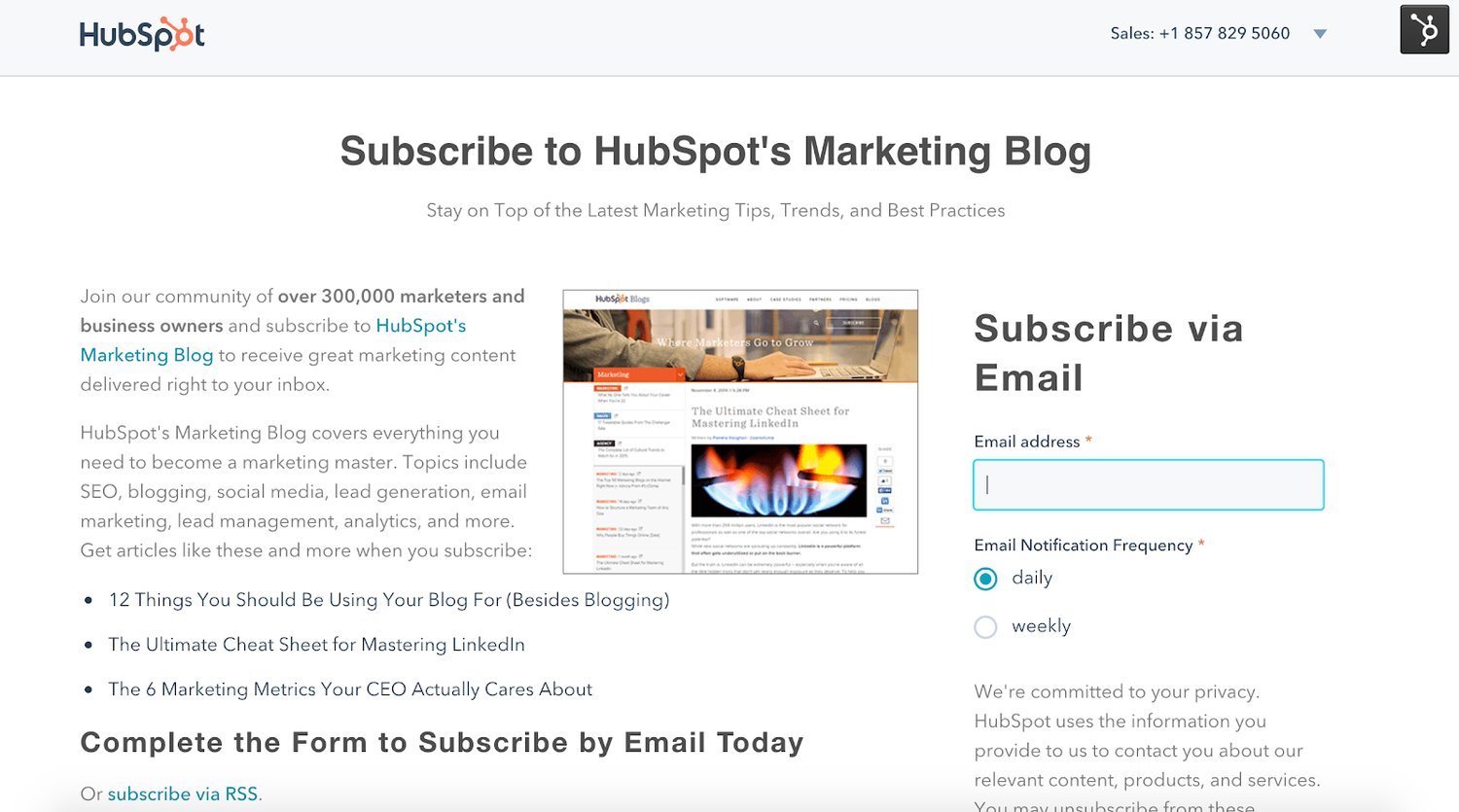
1. HubSpot’s Marketing Blog
Source: HubSpot
HubSpot’s marketing blog has an email sign up form with clear benefit statement. Any website visitor could look at this subscription landing page and understand what they will get from signing up in a matter of seconds.
By using a separate landing page for this form, HubSpot is able to eliminate any confusion about what leads are signing up for.
There is also a feature on the form that requires leads to determine whether or not they want to sign up for a daily or weekly subscription. This provides clarity for the lead signing up and ensures a quality subscription for HubSpot.
2. theSkimm
Source: theSkimm
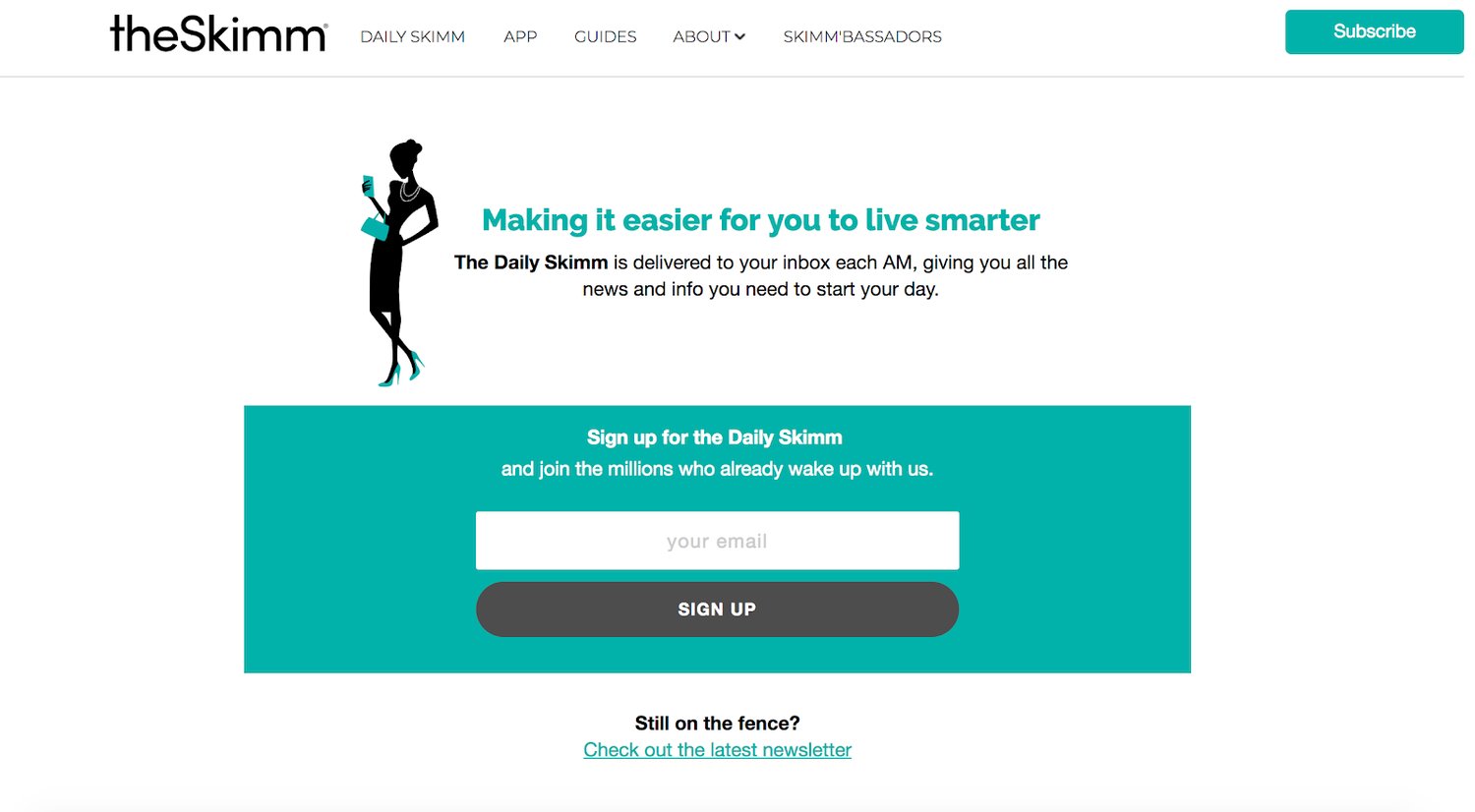
When you head to theSkimm’s website, the first thing you see is their email sign up form. That’s because their entire business revolves around a subscription. theSkimm is a daily email about the top news stories around the globe, so it would only make sense for their homepage to contain their sign up form.
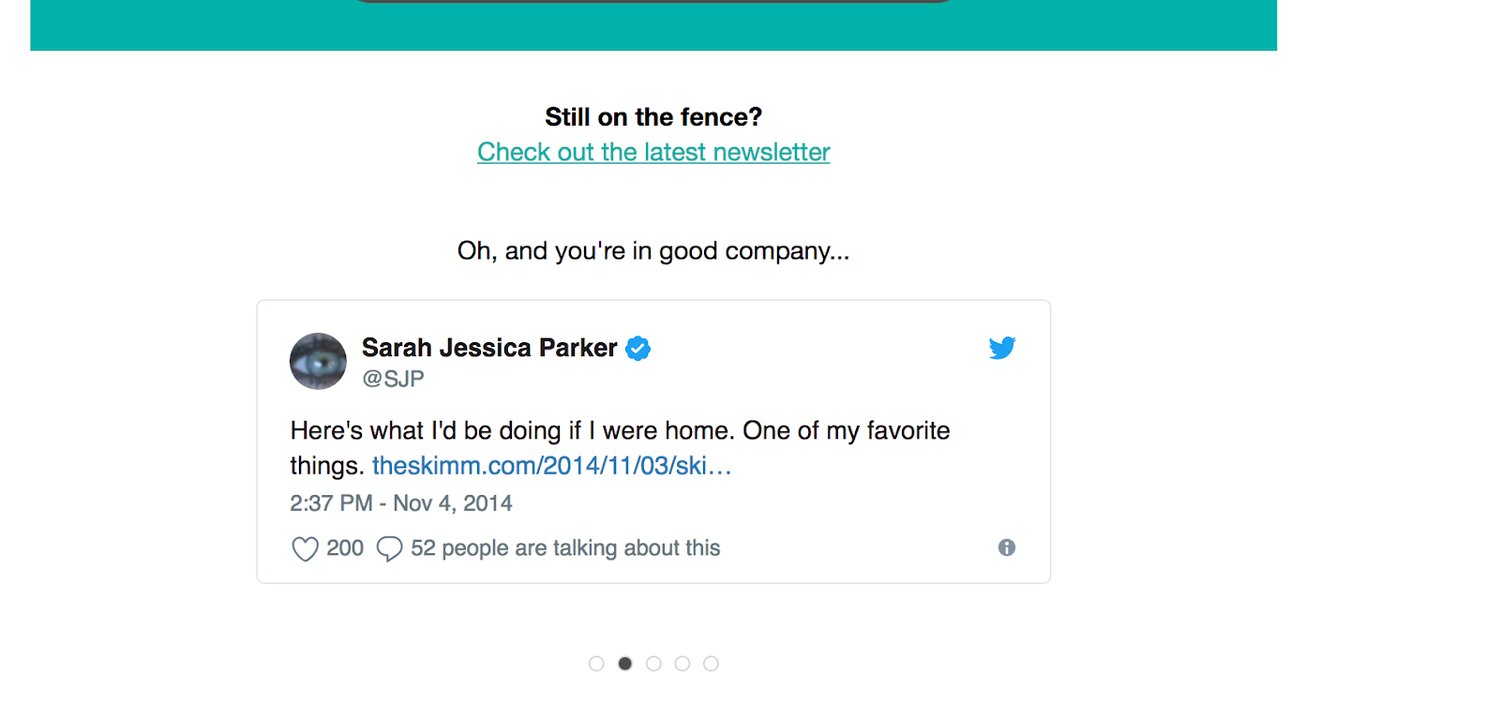
Above their email sign up, there is a short, straightforward description about how theSkimm works. They provide leads with social proof by mentioning the “millions” of other people who have subscribed to their emails. And lastly, they show a bit of personality and humor with a line beneath the form that says “Still on the fence?” and allows potential leads to read their latest newsletter as well as check out a few celebrity Tweets about how great theSkimm is.
Source: theSkimm
3. Anthropologie
Source: Anthropologie
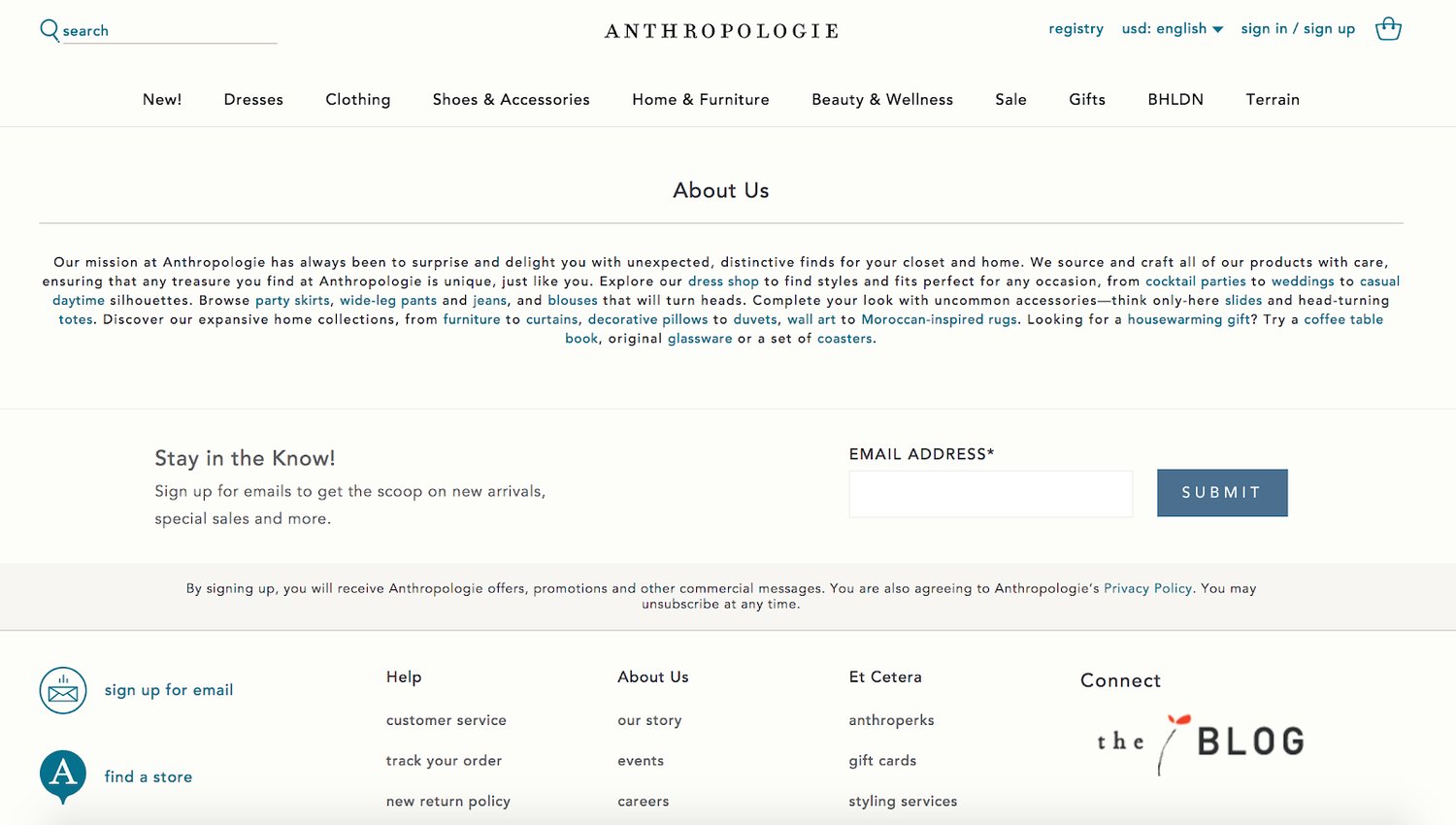
Anthropologie places their email sign up form towards the bottom of their homepage after users have had a chance to look around and become familiar with the site. Their signup form has a short description about what leads can expect once they sign up . Anthropologie also respects their visitors’ time by simply asking for an email address to sign up.
4. Lulus
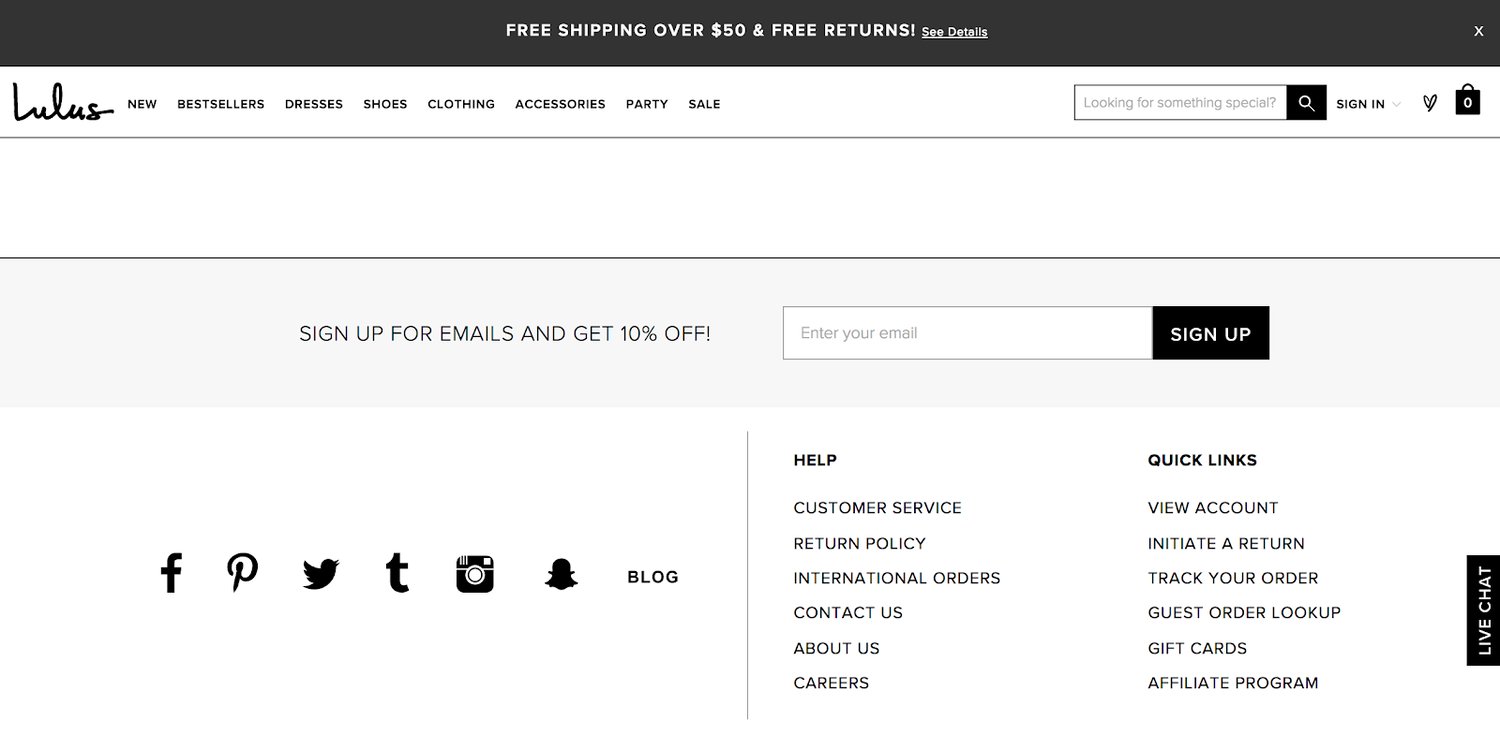
Source: Lulus
Lulus form is located towards the bottom of their homepage. Their email sign up form gets website visitors excited about converting with an offer: a 10% discount code upon sign up. The form is simple and only requires an email address. After form submission, new leads receive a kickback email that welcomes them and also provides them with the code, as promised.
5. Quest Nutrition
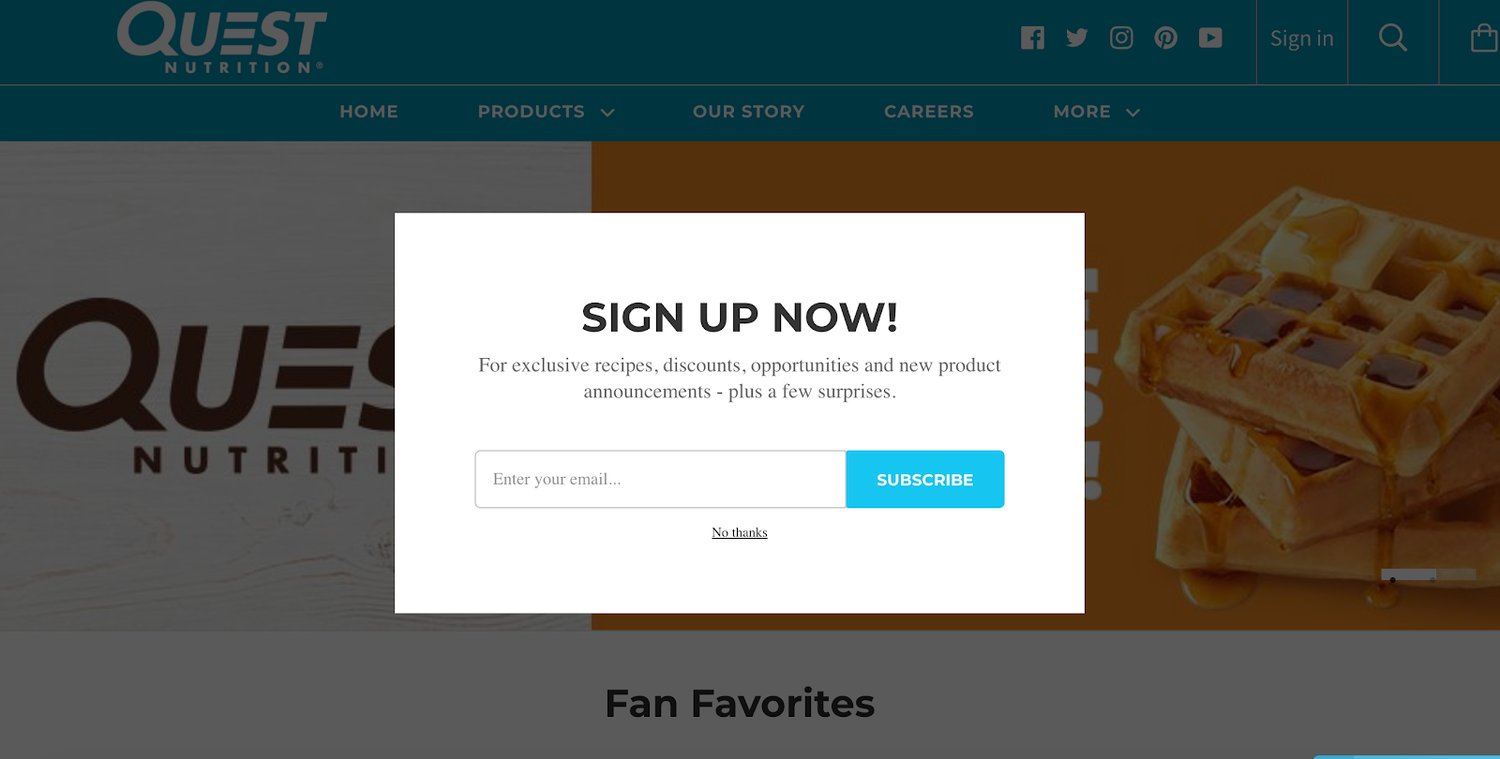
Source: Quest Nutrition
Quest Nutrition’s form is in a pop-up window that dims the background, eliminating any distractions. The form offers incentives like recipes, discounts and surprises for visitors to sign up. Only an email address is required to sign up. Website visitors have the option to bypass the pop-up and look around the site instead.
Email sign up forms are a simple, efficient and effective way to obtain leads, create more conversions, and increase your overall sales. You’ll reach your audience with email sign up forms that are straightforward and embedded on a convenient location on your website.
So, take a few minutes to create your own email sign up form and get started broadening your customer base, developing relationships with your potential customers and increasing your number of leads today. From there, you can close the gap between lead and customer by doing email marketing.
Editor’s note: This post was originally published in October 2018 and has been updated for comprehensiveness.

6 Tips for Creating Content That Spreads Naturally
We’ve all been there — you hit publish on a blog post and expect the social shares, page views, and agreeable comments to start rolling in. But sometimes you get pure silence (or crickets 🦗) in response.
Using social media and content to market your business isn’t a new concept, so doing the bare minimum won’t cut it.
Don’t believe me? Think about how often content is shared across the web — for instance, there are over 2.45 billion Facebook users and over 500 million Tweets shared per day on Twitter — and that’s only two of the several popular social platforms. Needless to say, there’s a lot of content everywhere … and as a result, a ton of noise.
It takes more than simply publishing content to stand out among your target audience and competitors. To prepare you for success from the get-go, here are six ways to cut through all of that noise and make sure your content comes out on top every time — no additional marketing effort required.
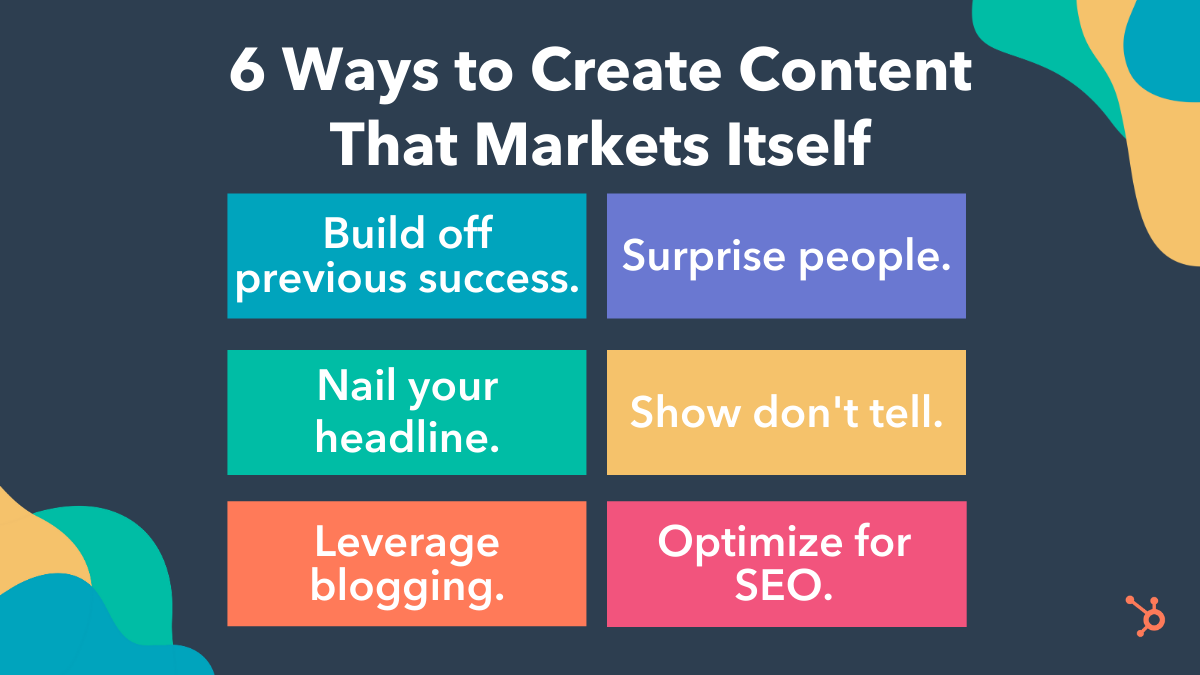
6 Ways to Create Content That Markets Itself
Follow these tips to ensure your business’s content stands out, spreads naturally, and markets itself among your target audience, buyer personas, leads, and customers.
1) Don’t try something new.
Wait. What?
Seriously. There’s no reason you’d need to start from scratch with a completely new content approach every time you create blog.
You already have content that’s getting discovered on its own — so, learn from those efforts. (Remember, sometimes you can simply work smarter rather than harder.)
Review your analytics and look for the posts that are generating the most views, shares, and leads, to determine how you can replicate that success.
For instance, use web analytics to identify your blog’s sweet spots. From there, create a blog editorial calendar with topics that will help you replicate past successes — whether it’s a post’s format, subject matter, title, author, or something else entirely.
2) Surprise people.
… Or make them happy, sad, afraid, angry, even disgusted!
Why? Because, in content, there’s a strong relationship between virality and emotion.
While I’m sure disgust or anger aren’t really the kinds of reactions you want associated with your brand, that’s not exactly the point here. The lesson is that content will be able to market itself if it provokes a strong emotional reaction with the audience. After they consume your content, they’ll feel like they have to share it with others so they have the opportunity to feel the same emotion.
Consider content you’ve read or created that provoked an emotion and action in the past — use this as inspiration for your content.
3) Nail your headline.
How can you increase the likelihood someone will click on a link to open your content?
A great headline that’s attention-grabbing and intriguing. No matter the subject of your content, a great headline will help a piece of content get opened more and spread further.
So … what makes a great headline? It’s similar to writing a great subject line for email marketing. Think about these four U’s in regards to your subject lines and headlines:
- Useful: Why is the blog post valuable?
- Ultra-specific: What can I expect to learn from the blog post?
- Unique: Why is this blog post compelling and unique?
- Urgent: Why should I read this now?
Be sure to incorporate all four of these qualities in every headline that you write so your audience will want to open and share your content.
4) Show don’t tell.
Today’s social media platforms reward visual content — this should be a major element of your content strategy. After all, visuals are proven to increase shares and engagement.
Whether it’s unique photos, graphic design content, video content, or branding visuals you share via blog, site page, email, social media, etc., they will help you increase conversions while offering an engaging and appealing presentation of your content.
Not to mention, these days you don’t need to be a designer to create and share professional-looking visuals. In fact, there are plenty of easy-to-use design tools on the market for people with any level of design knowledge.
5) Enable your blog to market your content.
More social media referral traffic coming to your site means more new visitors arriving via that content for the very first time.
However, these new visitors likely don’t know much about your business — meaning, you need to capture their interest and gain their trust before they’re ready to become evangelists of your content, too.
Consider how you can use your blog’s real estate to improve the presentation of your content and offer further recommendations that will earn new visitors’ attention and loyalty.
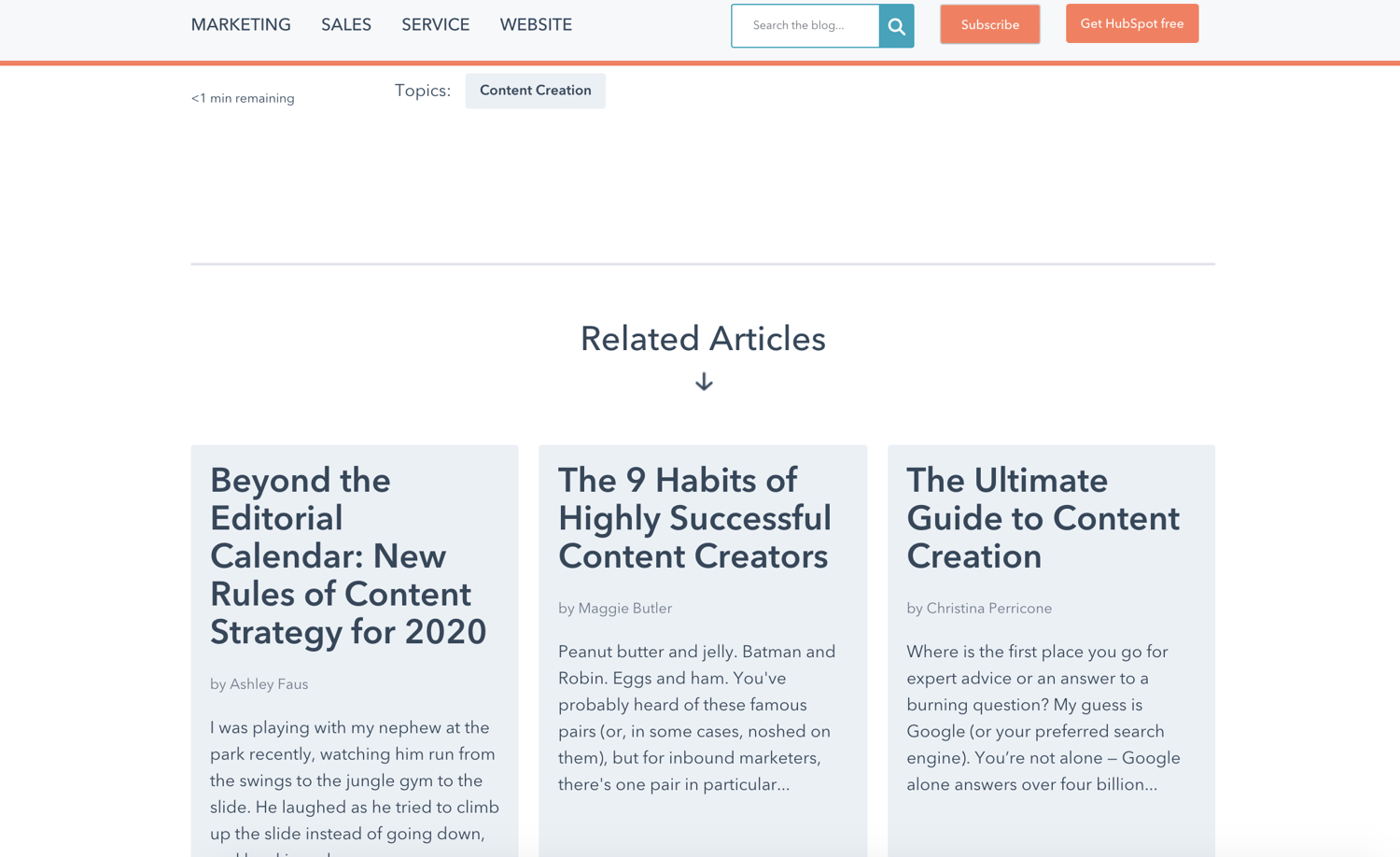
For example, add related-content recommendations at the bottom of every post. By tailoring recommendations to audience members, you’ll increase page views, time-on-site, and engagement.
This is what the “Related Articles” section at the bottom of HubSpot’s Blog posts look like:
In addition to recommendation widgets, add social follow and sharing buttons and modules to your content. This allows your audience members to click a button, no matter where they’re consuming your content, and immediately share that content among their personal networks.
Making this process simple is critical to your content spreading. I mean, have you every tried to Tweet an article that didn’t have a Tweet button?
It’s a total pain: 1) copy a URL, 2) open another tab, 3) go to a link shortener, 4) paste that link, 5) click the shorten button, 6) copy that link, 7) go to their Twitter account, 8) paste that link in there, 9) look up the Twitter handle of the publisher, 10) and then add custom copy for the tweet.
I’m exhausted just typing it out. So, make life easier on your audience and, in return, they’ll do a lot of your content marketing for you.
Finally, make sure you’re making content subscription easy. For example, your blog should have a customized CTA so people can choose to “Subscribe” and receive email alerts when you publish new content.
What better way to drive email traffic to your content without lifting a finger (except for the finger you use to press “Publish”, of course) than growing a giant base of followers and subscribers?
6) Don’t forget about search engine optimization (SEO).
Every time you publish a blog post, you create a new page on your site that’s being indexed in the search engine results page (SERP). At that point, Google is marketing content for you. For free. Forever.
If you pay attention to SEO, hone in on keyword research, and optimize your content, and update your current content, it’ll surface more frequently SERPs and you’ll drastically improve your traffic, conversions, brand awareness, and more.
Editor’s note: This post was originally published in December, 2012 and has been updated for comprehensiveness.


9 Ways to Deal With Imposter Syndrome Before It Hinders Your Success
“I got lucky.”
“I don’t belong here.”
“I’m a fraud, and it’s just a matter of time before everyone finds out.”
Sound familiar?
Most of us have experienced feelings of doubt and unworthiness at some point in our lives. But when your accomplishments are a result of your own knowledge, hard work, and preparation and you still feel inadequate … you’re probably suffering from impostor syndrome.
People who suffer from this syndrome often feel like frauds — despite being smart, skilled, capable professionals who actually deserve whatever commendations and praise they’re given. Rather than celebrating their accomplishments, they worry that they’ve somehow tricked people into thinking they’re good enough. As a result, they live in fear of being “found out” or “exposed.”
Impostor syndrome is actually fairly common: Researchers believe that up to 70% of people have suffered from it at one point or another. But that doesn’t make it any less damaging to a person’s confidence and career growth.
So if you feel like you’re suffering from impostor syndrome or something like it, know that there are ways to curb these feelings in a healthy, proactive way. Here are 11 tips to help you get started.
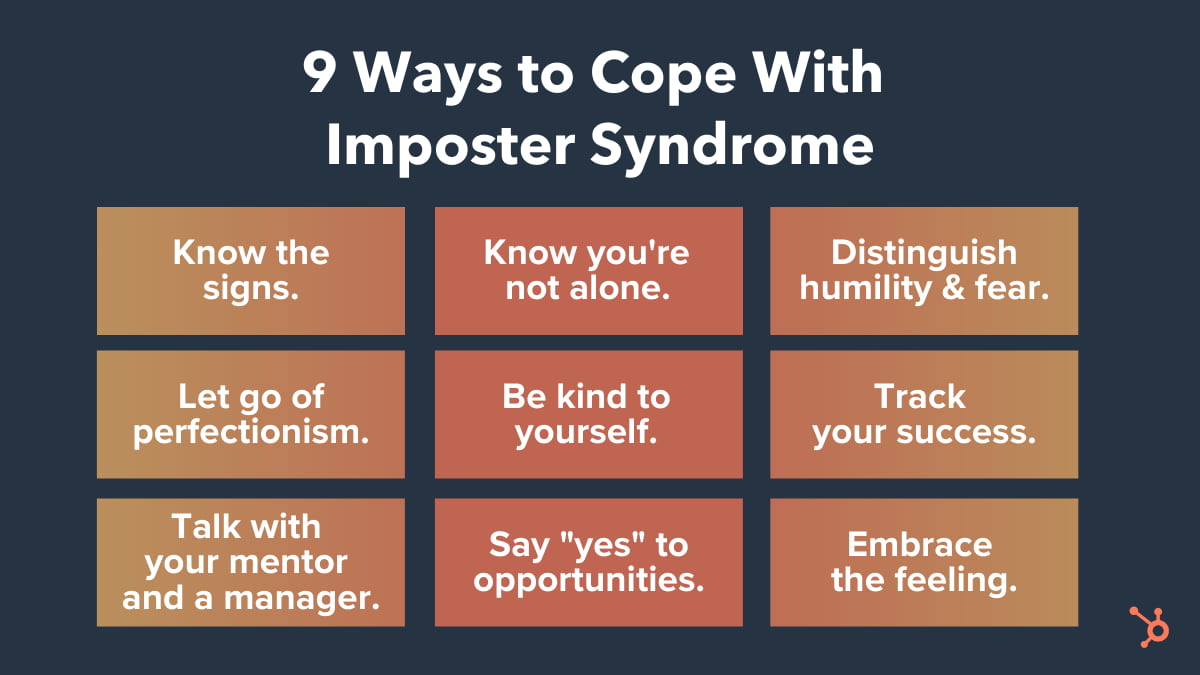
9 Tips for Coping With Impostor Syndrome
1. Know the signs.
We often overlook the signs of impostor syndrome that come up in our day-to-day lives. However, recognizing these signs is the first step toward overcoming them.
You might suffer from impostor syndrome if:
- You feel like you “got lucky” when you actually prepared well and worked hard.
- You find it hard to accept praise.
- You apologize for yourself when you didn’t actually do something wrong.
- You hold yourself to incredibly — sometimes impossibly — high standards.
- You find the fear of failure paralyzing.
- You avoid expressing confidence because you think people will see it as overcompensating or obnoxious.
- You’re convinced you’re not enough.
Pay attention to your language choices, both when you’re talking to other people and when you’re talking to yourself — especially when it comes to talking about work. If you find your own success or the praise others give you uncomfortable, do some reflective thinking on where those types of thoughts came from and what it means in your professional life.
2. Know you’re not alone.
When you have impostor syndrome, some of the most important encouragement comes from realizing how many hugely successful people, both male and female, have built amazing careers even while regularly coping with it.
Which highly accomplished people have spoken about their impostor syndrome? Here are some quotes from The New York Times and Forbes:
“I have written eleven books, but each time I think, ‘uh oh, they’re going to find out now. I’ve run a game on everybody, and they’re going to find me out.'” – Author, Poet & Civil Rights Activist Maya Angelou:
All I can see is everything I’m doing wrong that is a sham and a fraud.”
“All I can see is everything I’m doing wrong that is a sham and a fraud.” Actor Don Cheadle
“The beauty of the impostor syndrome is you vacillate between extreme egomania and a complete feeling of: ‘I’m a fraud! Oh God, they’re on to me! I’m a fraud!’ So you just try to ride the egomania when it comes and enjoy it, and then slide through the idea of fraud.” – Actress, Writer & Producer Tina Fey, from her book Bossypants
3. Distinguish humility and fear.
There’s taking humility in your hard work and accomplishments, and then there’s feeling overcome with fear because of them. Sometimes, simply being good at something can cause is to discount its value. But as Carl Richards wrote in a New York Times article, “After spending a lot of time fine-tuning our ability, isn’t it sort of the point for our skill to look and feel natural?”
It all boils down to feeling unworthy. I like how Seth Godin put it in a blog post: “When you feel unworthy, any kind response, positive feedback or reward feels like a trick, a scam, the luck of the draw.”
But it is possible to feel worthy without feeling entitled, and overcoming impostor syndrome is all about finding a healthy balance between the two. Godin goes on to write, “Humility and worthiness have nothing at all to do with defending our territory. We don’t have to feel like a fraud to also be gracious, open or humble.”
4. Let go of your inner perfectionist.
I recently wrote about how perfectionism, while helpful in certain contexts, can be a major roadblock for productivity. Turns out it can be a major roadblock for overcoming impostor syndrome, too.
Many people who suffer from impostor syndrome are high achievers; people who set extremely high standards for themselves and are committed to doing their best and being the best.
But perfectionism only feeds into your impostor syndrome. When you feel like a fraud, it’s usually because you’re comparing yourself to some *perfect* outcome that’s either impossible or unrealistic.
Not only can no one do everything perfectly, but holding yourself to that standard can actually be super counterproductive. At some point, you need to take a step back and ask yourself: When is good enough good enough?
Read this blog post to see what a formula for “good enough” might look like. And if you need further encouragement, read this article from The Guardian.
Bottom line? While striving for perfection is certainly noble, it’s usually not realistic — and often, it’s counterproductive and will only make you feel more like a fraud.
5. Be kind to yourself.
“Take the pressure off yourself and stop trying to be the expert on day one.” advises HubSpot marketing manager Jennifer Stafancik.
Impostor syndrome often manifests itself as a voice in our heads, berating us with negative messages like “you’re not smart enough” or “you’re a fraud.”
Negative self-talk is a bad habit, and it can heavily influence our stress and anxiety levels.
“Being kind to yourself” simply means changing the way you talk to yourself in your head by practicing positive self-talk. Not only can it help you become less stress and anxious, but it can also help you build the courage to do things that’ll bring you greater rewards.
Maria Klawe, the president of Harvey Mudd College, suffered from what she called “impostoritis” for most of her career. While she found it hard to silence the negative thoughts completely, she practiced hard to add positive thoughts to her inner voice. “Now I wake up most days with a voice on the left side of my head telling me what an incredible failure I am,” she wrote. “But the voice on the right side tells me that I can change the world — and I try to pay more attention to it.”
First, try to catch yourself whenever you have a negative thought. Then, turn around and challenge your own claim. For example, if you find yourself thinking, “I just got lucky,” challenge that by thinking, “What steps did I take and what work did I put in to get to this point?”
Then, you can answer your own question using affirmations, which are short, focused, positive statements about a goal you have. In this case, one might be as simple as, “I worked hard – and I always work hard.”
“For me, I put a lot of pressure on myself when joining HubSpot since it was a lateral move, which ended up sparking imposter syndrome — something I honestly thought I was immune to.” Stefancik explains. “Once I realized there was no reason to rush and to give myself more realistic milestones the imposter syndrome symptoms started to melt away.
Psychologists have found that repeating affirmations like this can improve stress and anxiety levels, perhaps because these positive statements build a bridge into your subconscious mind.
6. Track and measure your successes.
When you feel like an impostor, one of the hardest things to grasp is how much of a role you have in your own successes. You might default them to luck or others’ hard work, when in fact, your own work, knowledge, and preparation had a lot to do with it.
To help show yourself that you’re actually doing well, keep track of your wins in a private document.
There are a lot of different ways to track these successes, and the metrics you use will depend entirely on your job. If you’re a blogger, you might keep track of your posts’ monthly average page views and watch them go up, or compare them to the team average. You might also keep a separate tab to paste kind words people have written to you via email, Twitter, blog comments, and so on.
In the same vein as keeping track of your success metrics, keep a file on your computer of wins and positive reinforcement both at work and in your personal life. One of the best things I’ve done is created a folder on my personal Gmail account called “Happy,” where I’ve stored everything from my college acceptance email to praise from my colleagues and bosses. Whenever I need a lift, I open that Gmail folder and scroll through them.
You can create an email folder for these emails like I did, or create something like a “swipe file” (i.e. a digital file) on your computer or phone to store screenshots of emails, tweets, dashboard metrics … whatever makes you feel good about your hard work and preparation.
7. Talk about it with a mentor and your manager.
No one should suffer in silence. Sharing your thoughts and experiences with someone else will make you better equipped to deal with your impostor syndrome. We recommend sharing them with both a mentor and your direct manager.
Your mentor will be able to help you talk candidly about your struggles with impostor syndrome, while giving you a more objective point of view — especially if they work on a different team or at a different company. When you share your experience with them, you might ask if they’ve ever felt that way, or if they know someone who has.
The best mentors are forthcoming about the struggles they’ve gone through and the mistakes they’ve made in their careers, and you may find that they have some helpful stories or advice for how to deal with what you’re feeling.
We’d also suggest that you talk with your direct manager about your experiences, too. Why? Because they’re more likely to have the knowledge and tools to help you overcome your impostor syndrome in the context of your current job.
For example, you might ask them to help you find a system for tracking your successes, or figure out which metrics you should measure. Knowing what they know about both you and your role, they may also help you seek out more opportunities to shine and gain visibility on your team or at your company in general.
Finding a mentor or manager to talk to is a strategy that Krystal Wu, HubSpot’s Social Media Community Manager highly recommends.
“I’ve learned the best way to deal with imposter syndrome was to find a mentor to help guide me through my career choices,” Wu says.
As an example, Wu reflects, “I was new to my social community role and to marketing and I wanted to do my best work but I didn’t know what that meant all the time.”
“When I put myself out there to find people in roles similar to mine, attended events to learn more about my industry and learned from my mentor it helped me gain confidence in my career,” Wu explains. “The more confidence and education I had the more the imposter syndrome started to fade.”
“I won’t say it’s completely gone — because let’s be real, I’m always learning,” Wu admits. “But it’s not something hanging over my head all the time. It comes and goes and I know that surrounding myself with people that are more knowledgeable in my field has helped me grown.”
Speaking of opportunities …
8. Say “yes” to new opportunities.
It’s impossible to say “yes” to everything, especially when you’re feeling stressed or spread thin. But it’s all too common for people who have impostor syndrome to turn down career-making opportunities because they don’t feel like they’d do a good job.
When you’re presented with a new opportunity, it’s important to distinguish between the voice in your head saying you can’t do it because you’re not worthy and the one saying you can’t do it because you have too much on your plate. The former is your impostor syndrome speaking.
But remember: Taking on challenging new work and doing well at it can open a lot of doors for you. Don’t let your inner impostor turn down these game-changing opportunities. They can do wonders to help you learn, grow, and advance your career.
Keep Richard Branson’s famous quote in mind: “If someone offers you an amazing opportunity and you are not sure you can do it, say yes. Then learn how to do it later.”
While it might be intimidating to take on a role you’re not sure you can succeed in, know that you were asked to do it for a reason, and there’s nothing wrong with learning new things and asking questions along the way.
9. Embrace the feeling, and use it.
It’s really hard to get rid of impostor syndrome completely — especially if you’ve had it for years and years. The fact that hugely successful people like Maya Angelou and Don Cheadle feel that way after all they’ve accomplished is evidence that it can sometimes be a lifelong condition.
That’s why the best angle from which to tackle your impostor syndrome isn’t getting rid of it completely; it’s stopping it from hindering your success.
Taking on Imposter Syndrome
I like the way Richards put it: “We know what the feeling is called. We know others suffer from it. We know a little bit about why we feel this way. And we now know how to handle it: Invite it in and remind ourselves why it’s here and what it means.”
Richards says he’s been invited to speak about his work and career all over the world, and yet he still hasn’t been able to get rid of his impostor syndrome. What he has learned to do is think of it “as a friend.”
Whenever he hears that negative voice in his head, he pauses for a minute, takes a deep breath, and says to himself, “Welcome back, old friend. I’m glad you’re here. Now, let’s get to work.”
Editor’s Note: This blog post was originally published in January 2016, but was updated in March 2020 for comprehensiveness and freshness.

Your Blueprint to Create the Perfect Content Marketing Strategy
Creating content can feel discouraging.
For instance, you might spend hours producing something that’s amazing, only to get little engagement, traffic, or leads. What’s more, later, you’ll have to explain that ROI to your boss — talk about a dreadful workday.
If you’re feeling frustrated or burnt out with your content creation process, you’re in luck. Here, we’ve created a complete blueprint to a successful content marketing strategy.
In this post, I’ll walk you through the different aspects of the content blueprint and why each facet is so important for marketers to include in an overall strategy. For more information on content marketing strategies, we’ve created a content marketing workbook that’s free to download.
Otherwise, let’s dive into creating a content marketing strategy that will bring you that ROI you’re looking to earn.
How to Develop and Implement a Successful Content Marketing Strategy
We’re going to look at three different stages that make up the blueprint. These stages will outline the main steps you can take to create your strategy. Then, we’ll go into depth with details about making that happen.
Let’s start with step one — getting decision-makers on-board with your strategy.
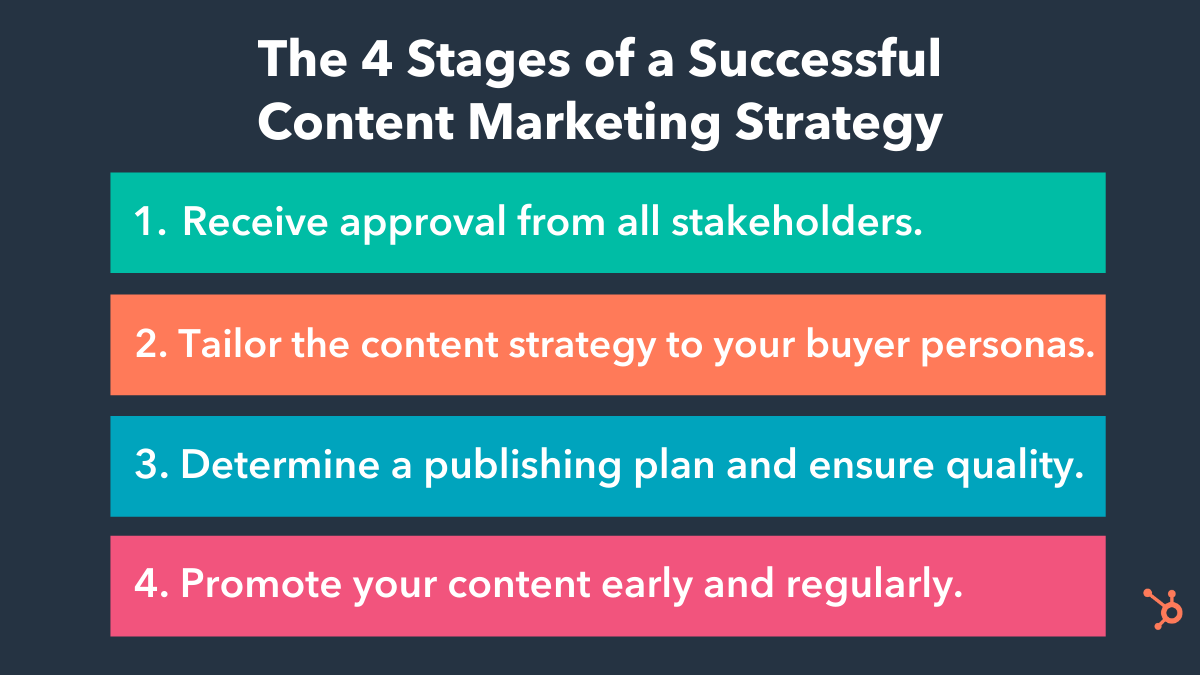
Stage 1: Getting buy-in from your stakeholders in order to green light your strategy.
All great content marketing plans start with getting people within the company to buy into your vision — basically, the people who can give you the resources, budget, or information that’s required to make your plans a successful reality.
For example, internal customer-facing teams, such as customer support, can share their expertise and help fuel your content creation efforts. Because they have regular contact with customers, they’ll know some of your audience’s biggest challenges or what they care most about — which comes in handy when you need to create content those customers care about.
Additionally, your marketing team likely has a limited budget. To implement certain strategies and forgo others, it’s vital you’re able to get leadership on board with your vision.
To make this happen, you’ll need a pretty awesome pitch. Generally, this pitch should do three things:
1. Talk about key challenges you will solve with your strategy.
You’ll want to give an overview of the key challenges your content marketing plan will solve. Instead of complicating this step with an overload of data points, keep it simple and concise. Summarize your key challenges in just a couple of charts so it’s more comprehensive.
For example, in this chart below, the marketer’s key challenge is that their overall CPL (cost per lead) is being inflated by the amount of money they are spending to acquire leads through paid programs.
 By implementing a solid content strategy, CPL can be reduced. Notice how this chart states the need for a strategy, presents key supporting data, and makes that information easy to comprehend.
2. Talk about how your strategy will relate to business metrics.
Try to always keep your audience in mind. Senior management will be focused on cost and revenue. How can your marketing strategy help with those metrics?
In the example above, the answer is clear: Reducing the CPL reduces the cost it takes to acquire a customer, which can increase profit down the road.
When you present your pitch to decision makers, make sure to outline how reaching your goal will also help reach the greater goals of your business.
3. Give high-level details on your strategy to achieve these goals.
Finally, you might consider talking through how your content strategy is going to help solve these key challenges and influence those business metrics. You can use this template generator to help you organize your ideas. The goal of this step is to prove to senior-level management that you’ve thought through your plan and what resources you need to make it a reality.
Now, you’ve created your pitch and you’re ready to present to upper-level management. Remember, this pitch will help you convince the right people that your content marketing strategy will be successful.
You should have a pitch before you begin planning your content strategy because you’ll stakeholders will be aware of what campaign you plan to run to achieve your business goals. However, while you don’t need to fully develop your strategy until you get support from leadership, it’s still critical you spend time reviewing metrics and making a tentative game-plan for when you do develop the strategy.
Next, we’re going to talk about how to develop that aforementioned winning strategy.
Stage 2: Develop your content strategy.
In a HubSpot report, it was found that 56% of survey respondents said they were doing content marketing without a plan. Content creation can definitely be difficult, but having a content plan helps. It takes into account key challenges, business goals, and metrics, which will make you more successful in the long term.
Let’s talk about what a winning content strategy should include.
1. Include the buyer personas you are targeting.
At HubSpot, we align content around different buyer personas. This allows us to stay really focused on for whom we’re creating content. We keep our buyer personas’ goals and challenges in mind so we can address these at each stage of the buying process.
As an example, here is a persona I’ve built for a company software company that provides tools that streamline day-to-day business processes, offers inbound marketing courses, and makes reporting easier.
Meet “Marketing Macy”:
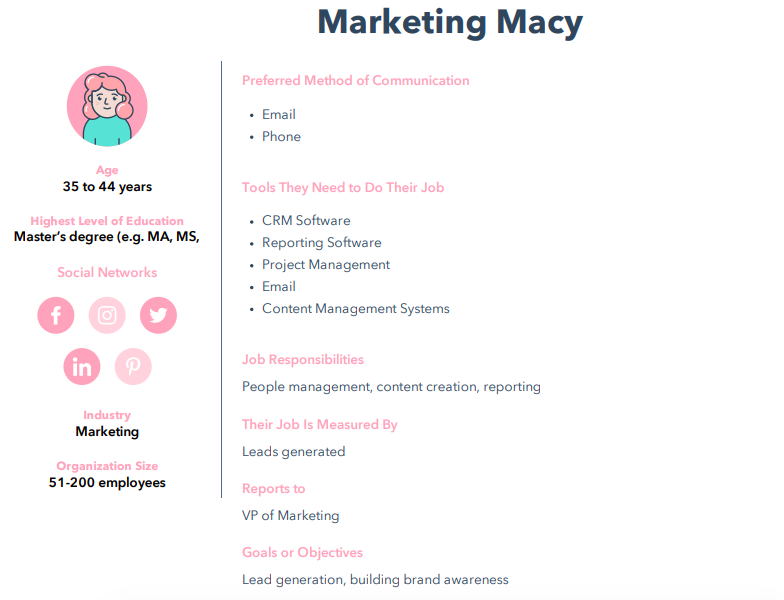
To make this persona, I used a free persona builder that made the process incredibly fun. In addition, I was able to point out exactly how to connect with a target audience by identifying why they would love a company and what challenges they were looking to solve.
To create content that’s going to be relevant to Macy at each stage of the buying cycle, we’ve included key information about her goals, challenges, and why she would love a company that offers CRM and CMS software. Knowing an ideal target customer like Macy makes it easier to connect with them.
2. Understand where the content gaps are in your buying cycle.
Make sure you understand where the content gaps are in the buying cycle for your buyer personas. To achieve this, you should conduct a content audit. Additionally, ask yourself if your buyer persona has the information they need at each point of the buying cycle.
For example, at HubSpot, content is created that attracts Mary to our site and helps her evaluate our software based upon what we know about her goals and challenges. We then ask ourselves if she has everything necessary to feel confident in purchasing our product based on those goals and challenges.
If you identify those gaps, you can focus on making sure that content is in your strategy. For instance, let’s say that you have a gap in content for the evaluation stage. Identifying that is the first step in creating helpful content for that stage.
Next, we’ll talk about how to create and push the content that will bridge those gaps.
3. Create relevant content ideas and stick to an editorial calendar.
Once you have identified your personas and understand what content you need to move them through the buyer process, it’s time to brainstorm content ideas to fill in those holes.
When you understand to whom you’re marketing, it can be easier to come up with relevant content. To ease the process further, check out our post about how to map out content. Ultimately, though, make sure every piece of content you create is engaging, delightful, and created with intent.
Ask yourself during the creation process if your content achieves those three things. Let’s look at this social media post as an example:
This post is engaging because it includes a graphic that attracts the attention of audiences. It’s delightful, because the graphic and supporting copy are easy to comprehend and uses emojis to illustrate a point. Additionally, it’s created with the intent to provide value to customers who may be looking for remote working tips.
Creating content is half the battle, though. Another thing to figure out is when to schedule the publishing of that content so it gets seen by the right people and is delivered consistently.
That is why all great content plans have an editorial calendar so that people within the company can see what content is being published and what dates that content is going live. Editorial calendars keep teams in sync and organized — as far as visual workflows go, it’s a necessity.
When you’ve identified your persona, created content for them, and have finalized a calendar-based schedule, this stage is complete. The next stage is to figure out the publishing details.
Stage 3: Determine a publishing plan for your content strategy.
One of the biggest shifts in marketing today is transforming our mindset from that of a traditional marketer to that of a publisher. Sometimes, as marketers, we think in terms of immediate wins, which is why we tend to prioritize our ad budget for paid media. We invest a certain amount of spend in return for an approximate number of leads and customers.
Moving to a publisher model means investing more upfront to start creating content assets that will have a far greater impact over a longer period of time. For example, the HubSpot blog generates most of its traffic from blog posts not published in that month. This is because the content we’ve created in the past has long-term value for the company in both the leads and customers they generate each month.
A lot of companies talk themselves out of publishing before they even get started due to a lack of immediate resources. However, a content team of one can be successful if they know how to source content effectively.
Here are two tips to keep in mind to become a publishing rockstar:
1. Think about scaling your content by repackaging in several formats.
Consumers today connect with brands across different channels, whether that be on social media, through email marketing, or on your website. When developing a new piece of content, think about how you can repurpose that content into various formats.
For example, if you’ve developed a series of blog posts, such as a series about customer retention, you could turn them into a comprehensive customer service ebook.
2. Make sure the quality of your content always remains high.
Whether you’re creating a single piece of content a week or several pieces a day, the quality of your content should always remain extremely high if you want it to pay off in the long run.
Creating an editorial checklist will help you manage this process. With a checklist, you can quickly check each piece of content for quality issues and educate your team on what it takes to publish content for your company.
In HubSpot’s content blueprint, you’ll find a range of templates that make scaling content really easy and provides an intuitive, ready-made editorial checklist.
Stage 4: Promote your content early and regularly.
So, you know about your target audience and you’ve created content specifically tailored to them. The task now is how to distribute that content to your audience effectively.
The key to effective distribution is to increase the number of distribution channels, such as blogs, email, and social properties. Additionally, you have to expand the reach of that content to a broader audience.
Promotion is a critical part of a content blueprint and something marketers should think about at great length during their planning phase.
To become an expert at promotion, you should:
1. Make promotion an essential part of the planning process.
When my team is planning out a content campaign, we put as much thought into the distribution of that content as we do into the campaign development. We want to know who that content is for and how can we make sure they get it.
For instance, if you are distributing content on social media platforms, discuss in great length how to prioritize budget, posting schedule, and using the tools offered by social channels to expand the reach of your content.
2. Make sure your team is equipped with promotional skills.
Being able to promote content to the right audience isn’t an easy job. Over time, the skills to distribute content effectively will be critical to long-term success.
If you want to learn more about how you can be effective at promoting your content, we have lots of information on outreach, seeding your content, and even the best way to repackage it for different networks to increase its exposure right inside — you’ve guessed it —our content blueprint.
Sometimes, learning the proper promotional skills comes with trial and error. You have to figure out what your audience responds to the most. For instance, you can create an A/B test with the content you want to push on social channels to see what types of messaging your audience prefers.
Additionally, you can experiment with multiple content types to get a gauge of what targeted content really resonates with your audience. To get an idea, check out what your competition is doing, and what works for them. You can also do some social listening to observe the patterns in web behavior of your target customers.
How are you doing with your content strategy so far in 2020? Where do you hope to improve your content marketing the most this year? With this guide, you’ll be fully prepared to take on the world of content marketing, and do it successfully.

Why You Should SEO-Optimize Your Content, Even if Your Goal Isn’t Organic Traffic
Nowadays, you can’t conduct a successful content marketing strategy without incorporating SEO methods.
Neil Patel explained it well when he wrote: “Good SEO … means consistent output of content. Consistent output means that you’re doing content marketing, and you’re doing it right. There isn’t any way around it.”
I can imagine you might be thinking — “OK, but my goal for content marketing isn’t just SEO. It’s also creating thought leadership content, and lead generation, as well.”
Of course, every marketer should consider more than organic traffic when analyzing success metrics. After all, SEO isn’t the only component of a successful marketing strategy.
But SEO efforts don’t just help you reach organic traffic goals — they can also help you achieve your brand awareness and lead generation goals, as well.
Here, let’s explore how SEO can help you meet all your marketing goals, even if those goals don’t require organic traffic.
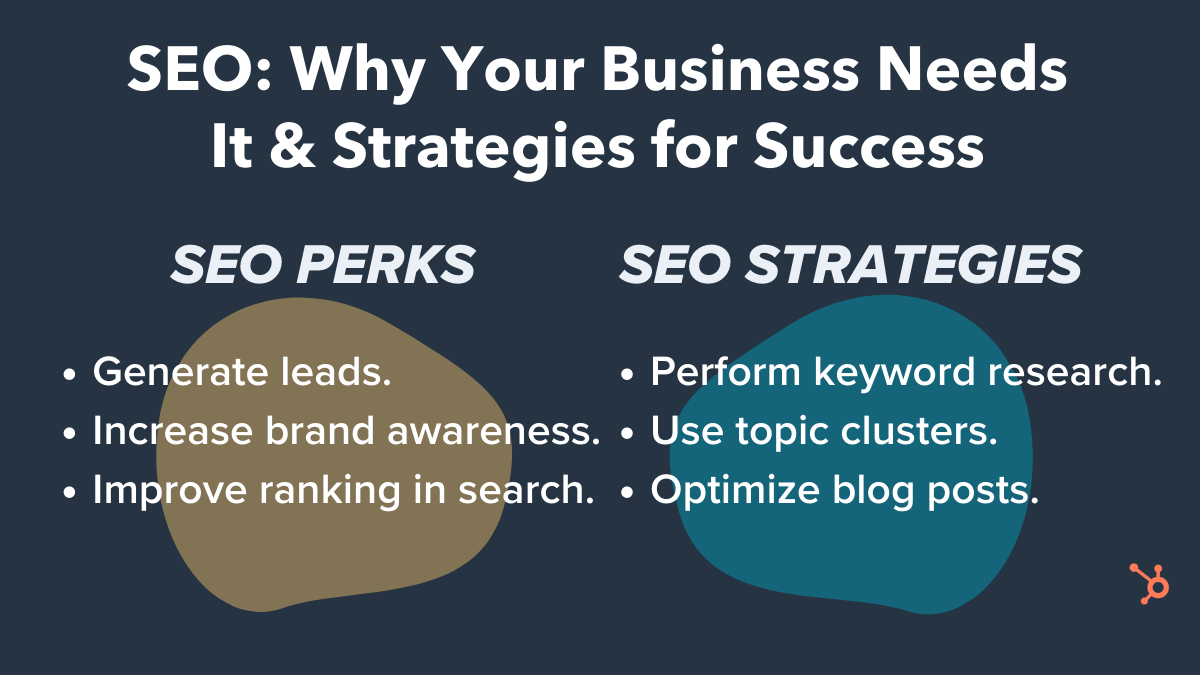
How SEO Can Help You Reach the 3 Main Content Marketing Goals
Before we dive into how marketers can use SEO strategies to reach their content marketing goals, let’s take a short detour and refresh ourselves on three of the primary reasons for doing content marketing:
- Lead generation. If you have salespeople ready to close sales but need to fill their pipeline with more qualified leads, the primary goal for your content marketing is probably lead generation. Lead generation is the process of converting people who’ve heard of your company into people who want to hear from your company more often. And then when those leads trust you and view you as an expert in your industry, they’re more likely to convert into customers.
- Thought leadership/brand awareness. If you’re hoping to position your company as a knowledgeable expert within your industry, your primary content marketing goal is probably thought leadership. Consistently getting thought leadership content published in trusted publications — whether through guest-contributed articles or press mentions — is a fantastic way to build credibility with your audience.
- SEO. If there’s a lot of competition in your space and you’re gunning for the top spot in your target audience’s mind, your primary goal for content marketing is probably SEO. SEO works to get your website to the top of the list when your audience looks for certain keywords in search engines. The content on your site and the pages that link to your site give your website a better score, boosting your overall credibility with the search engine.
If you didn’t have a specific content marketing goal in mind before you started reading, pick the one from the list above that’s most important to you right now. Keep that goal in mind as you keep reading.
SEO Strategies to Reach Any Content Marketing Goal
Now that you have a specific goal in mind, let’s take a look at a few SEO strategies that can help you improve your content marketing results, as well as how you can apply these SEO strategies to reach your content marketing goals.
1. Keyword Research
To put it simply, keyword research lets you see what search terms you’re currently ranking for, what others in your industry are ranking for, and which keywords could use more of your attention.
For example, you might discover that your audience is looking for “guides on creating a content marketing strategy.” While a certain publication you want to partner with might not be looking for an article that spells this out in a lengthy, detailed how-to guide, you could write a higher-level article for that publication that links to a white-paper on your site that dives deeper into the process of developing an effective content marketing strategy.
This would allow you to create content that your audience is looking for, while also publishing in an important publication that helps demonstrate your brand as a thought leader in the industry. Of course, researching your keywords will look the same regardless of your content marketing goal — but the way you use that information will differ.
If your primary goal is lead generation, keyword research can enable you to identify pain points or sales objections you might want to cover in your content. This will allow you to tailor your content to what your audience actually wants to know and strategically use keywords related to your audiences’ searches so you can reach them in search results. Once you reach them there, you can hopefully lead them to your site to engage with your company further.
Focusing on thought leadership? Keyword research can help you find out what questions your audience has so you can provide answers and position your company as authorities in your industry. You can include short-tail (e.g., “AI”) and long-tail (e.g., “what is artificial intelligence”) keywords in your content to rank for those keywords and further solidify your place as a thought leader online. After all, if your audience members don’t find you when they search for information related to your expertise, they probably won’t consider you a credible expert.
If SEO is your focus, keyword research lets you see how you stack up against the competition when it comes to ranking for important keywords in your industry. It will give you insight into what keywords your content initiatives should focus on so you can improve those rankings and be more competitive on search engine results pages.
To conduct keyword research, analyze your website’s current rankings, identify keywords your competition doesn’t rank for but that might be good opportunities, look for question-based keywords you can focus on to answer your audience’s queries, and cluster your findings so you can identify trends. Google’s autocomplete, similar searches, or Keyword Planner are accessible ways to explore what your audience is searching for. If you want to go deeper, you can use a keyword tool like Ahrefs, SEMrush, or Moz to get a more well-rounded picture.
2. Topic Clusters
Search engines’ algorithms favor topic-based content, so it can be beneficial to link related content under “topic clusters.” Basically, building topic clusters allows you to provide deeper coverage across a range of core topics and create an efficient information architecture.
You can develop a pillar page for each of your company’s main focus areas. Then you’ll build out more specific subtopics, or “cluster content.” These pieces of cluster content will provide more detail related to a specific long-form keyword that’s related to the main topic you covered on the pillar page. The pillar links to each cluster page, and each piece of cluster content links back to the pillar with the same hyperlinked keyword.
For example, at my company, Influence & Co., we created a pillar page titled “The Ultimate Guide to Content Marketing.” This is a longer piece of content that covers six ways readers can take their content marketing to the next level, diving deep into how to achieve the advice in each section. This pillar page links out to multiple cluster pages (and the cluster pages link back), which results in that solid architecture I just mentioned.
We also produced a couple of guest-contributed articles related to this pillar page to create a comprehensive content plan that provides a wide range of specific, tactical content to help our audience better understand content marketing — and how to do it well.
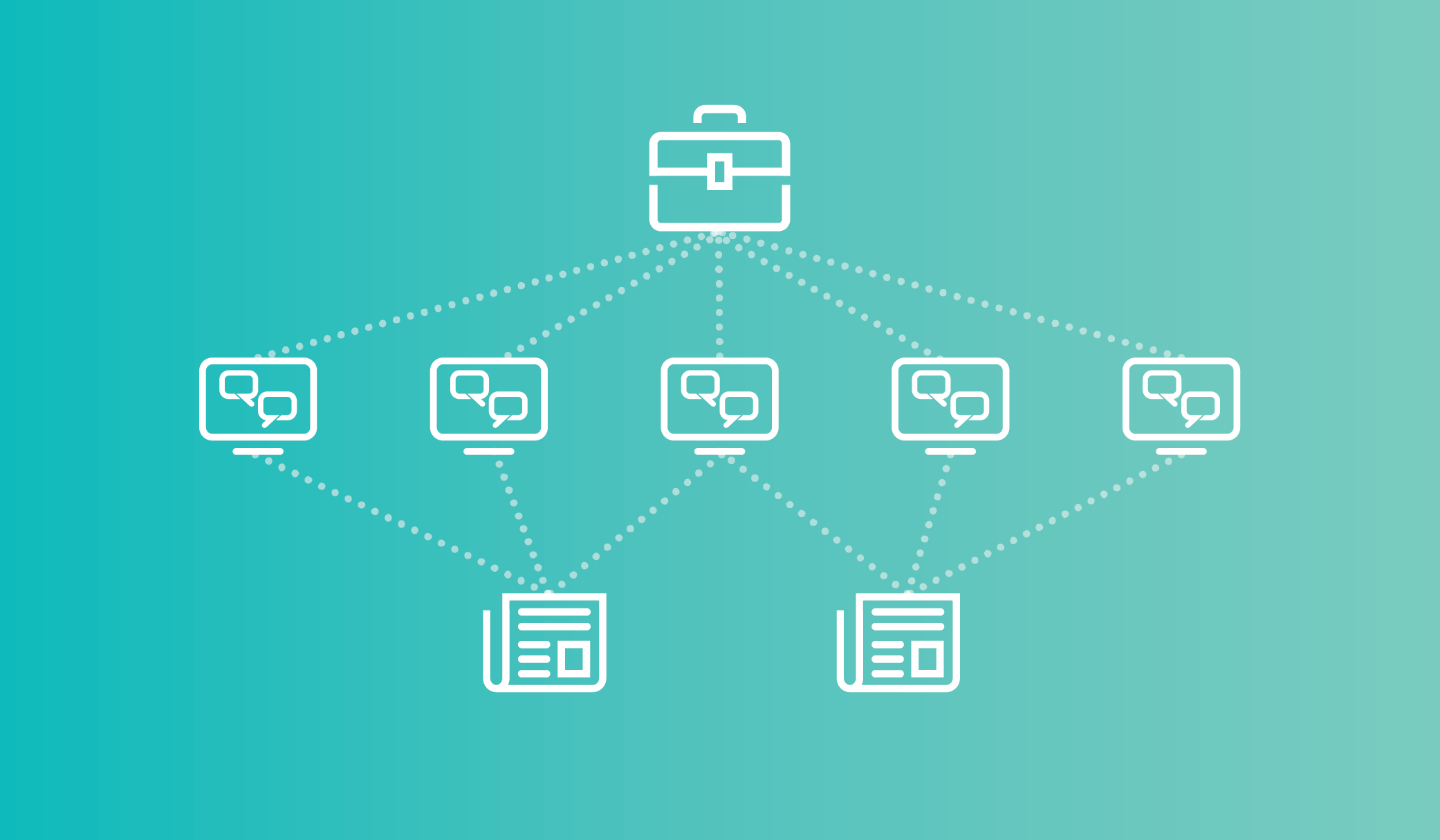
If you’re focusing on lead generation, this linking ecosystem enables you to keep your audience members engaged with your content longer, which boosts the likelihood that they’ll fill out a form or reach out to you. Plus, as your audience members spend more time on your site, they learn more about your company, making them more qualified leads once they do decide to take the leap and give you their information.
Topic clusters can benefit a thought leadership strategy as well, because this approach lets you create overview content and in-depth content, which positions you as a thorough expert on the subject matter that your audience is interested in and cares about.
Finally, working to achieve SEO goals? This model can help you organize your site’s structure.
Building a strong information architecture can lead to better rankings in organic search across a broad subject area. Those hyper-focused pieces of cluster content will allow you to work toward that strong architecture while also maintaining your focus on producing content that your audience cares about. Plus, creating one high-performing cluster page can elevate search rankings to all of the other pages that are linked to the same pillar.
A great way to plan out your topic clusters is to develop a content map. Before you even begin creating content, decide what your pillar page will focus on. Then nail down topics for a few cluster pages. You can even take it a step further and identify what subjects you’d like to cover in guest-contributed articles related to that overarching topic. We’ve put together a free content map template that you can use to get started.
3. Optimizing Blog Posts
Blogging can position your website as a relevant answer to your target audience’s burning questions. And optimizing those posts for search can help you actually reach your audience members so you can provide the value they’re looking for.
Blog post optimization can advance both thought leadership and lead generation goals because if the content you’re producing for your site isn’t ranking well, it isn’t showing up as a relevant answer to your audience’s questions. This means you won’t be perceived as an expert, and you most definitely won’t generate more leads.
If you’re focusing on SEO as your primary goal, optimizing blog posts is a given. Your content isn’t going to rank well if you’re not including relevant short- and long-tail keywords that your audience cares about.
To optimize your blog content, focus on one or two long-tail keywords that line up with the intent of your target readership, and include those keywords in your post where they fit in naturally. For example, if your audience has been searching for information on creating a predictive analytics strategy, you’ll want to publish a blog post about the strategy and techniques behind predictive analytics.
When writing that post, you’ll need to include long-tail keywords for which people are searching. Those might include “how to do predictive analytics,” “predictive analytics strategies,” and “predictive analytics techniques.” This way, your blog post will show up in search results for people who are looking for more detailed insights on developing a predictive analytics strategy.
In addition, make sure your blog is responsive and mobile-friendly. Creating a meta description that’s keyword-rich, optimizing your images with alt text, and linking to other pages on your blog whenever possible will also help you rank.
These are just a few SEO strategies that can help you reach your content marketing goals, whether you’re focusing on SEO itself, thought leadership, or lead generation. This certainly isn’t an exhaustive list, but it’ll get you started on your journey of optimizing your way to better content marketing results.

Everything You Need to Know About Starting a Podcast in 2020
I’ve become a morning walking companion to people I may never meet.
How is this possible? They take me along in their earbuds as they stream my podcast, Build a Better Agency
It’s a wonderful sign of things to come for marketers willing to venture into the podcasting universe.
Once a fringe platform, podcasts are now surprisingly mainstream. According to Nielsen, six out of 10 people understand what they are, and 112 million Americans — 40 percent of the nation’s population — have listened to at least one. Though podcast listeners lean male, it isn’t by much: 56 percent are men, while 44 percent are women.
Marketing professionals must not only be aware of these statistics, but they must also leverage them in their own campaigns. When 67 million men and women are monthly podcast consumers, it’s a niche that deserves serious contemplation. Add to that fact the amazing statistic that 63 percent of podcast listeners made a purchase based on something the host recommended, and you have yourself a veritable gold mine.
Of course, you have to crawl, then walk, then break into a steady trot to glean the benefits.
A no-nonsense primer from a podcast experimenter.
In my case, I’d written blog posts, conducted webinars, and published articles in places like Forbes and Fast Company for some time. These content producers worked, but I felt a different portal would help connect with more agencies and leaders in an accessible, easy to find, on-demand format.
As a longtime podcast listener myself, I recognized that the podcasting platform was the next logical step for me — especially if I wanted to reach a narrow audience of mid-sized agency owners and leaders as an authority in my field for more than 23 years. And as a long-time professional, I hired Predictive ROI, an Agency Management Institute agency, to produce the podcast so I wouldn’t make as many rookie technical mistakes.
Still, opening yourself up to podcasting is a little like breaking the lid on Pandora’s box. Until you do it, you have no idea what to expect. Still, that doesn’t mean you can’t head off issues before you go live.
Expect a certain amount of learning as you go, but be ready to explore the technology before fully launching your podcast. You wouldn’t open a bakery with your very first pie, so don’t hit “publish” until you get the lay of the land and make a plan. (Being a podcast guest prior to launching your own is a smart idea, too.)
Podcasting in the beginner’s circle.
Even if you’ve never been in front of a mic before, you can map out the first phase of a solid podcast schedule. From there, you’ll be able to branch out.
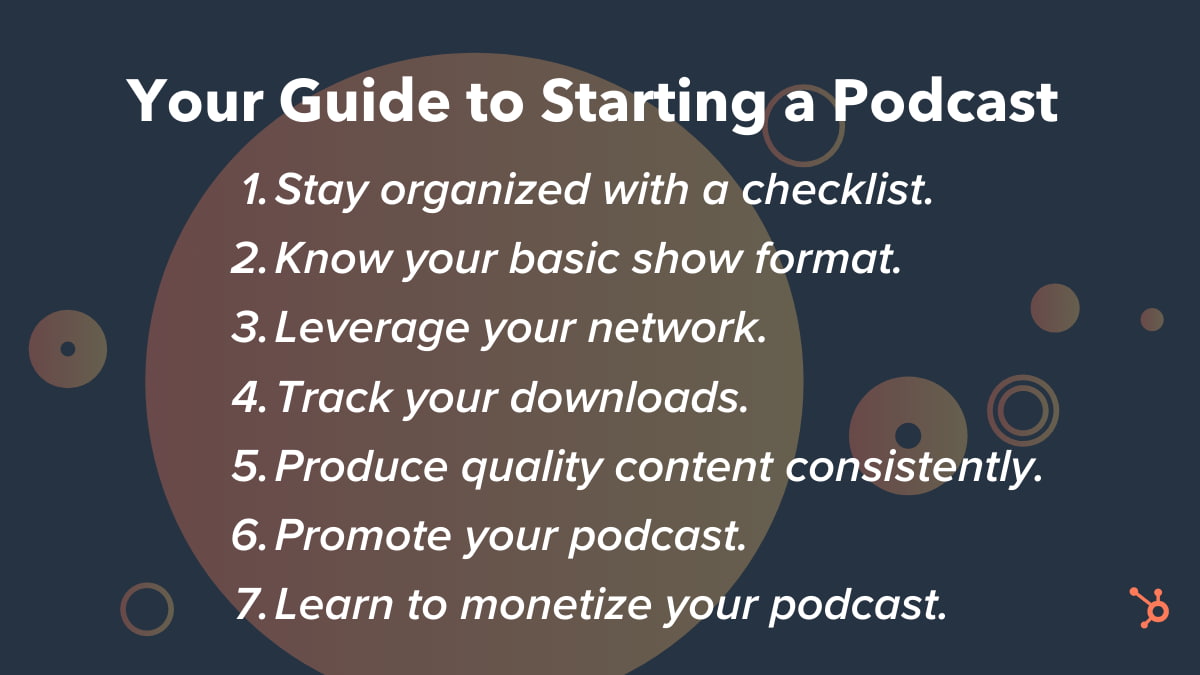
1. Create a checklist to keep yourself on task.
I asked myself tons of questions repeatedly before committing to podcasting. They included everything from the niche audience I wanted to reach to whether being the host of a podcast was a short-term fad or a long-term interest. I also considered what podcast style I preferred to offer the public, including a show prep and publishing schedule.
Obviously, your checklist will be individualized, but be sure it includes a section on technical elements. Setting up audio, iTunes, accounts, and interviews can be tricky if you haven’t done your homework.
2. Set up your basic show format.
Every interviewer prefers to run his or her podcast in a particular way. Many podcasters ask guests the same questions, but as a listener, I find that gets stale in a hurry. Sure, it’s less prep work, but it makes the host look lazy. I preferred interviewing subject matter experts but wanted to occasionally keep the door open to produce a solocast. My compromise was a 4–1 ratio of interviews to solocasts.
I was reasonably confident that I could have a few questions on hand and then launch into a conversation on the fly from there. A big risk? Maybe. But I believed I could pull off a 45-minute to 60-minute conversation without a safety net.
3. Leverage the heck out of your network.
The first 10 episodes set the tone for any podcast launch, so make sure you line up high-profile, interesting, engaging guests who won’t be turned off if you have very few — or no — listeners. My friends came through in a big way for me, offering me rock stars from day one. Not only did they help publicize the podcast, but they also generously allowed me to ride on their social media coattails.
4. Track your downloads.
Rob Walch was one of my recent podcast guests who offered an important consideration for any podcasters: You have to stay on top of your downloads. Rob’s suggestion is to hit at least 500 downloads an episode to feel sure you’ve broken the cycle of only having people in your inner circle tune in.
What’s a reasonable download number for your, quote, “success”? Only you can determine this, but it helps to keep a steady eye on the numbers. Starting to see a downward trend in listenership? Go back to square one and ask those tough questions again so you can pivot before your podcast loses traction.
5. Produce great content consistently.
Does everyone have a bad episode once in a while? Sure. And if you’ve planned in advance and have great content in the bag, you can simply not release it in lieu of a better one. Before you release your podcasts publicly, try to have several on hand. That way, you get the relief of a buffer zone.
Don’t try to start too quickly. You can always ramp up your delivery later. With my travel schedule that sees me on no fewer than 200 planes a year, I decided to get 10 episodes in before I proved to myself I could sustain the effort. August and September 2015 were a flurry of set-up and recordings, and we opened our podcast doors — virtually — in October 2015. Since then, we’ve published a new episode weekly without fail.
6. Prepare to become a podcast promoter.
Your target personas won’t find your podcast without a little help, so promote it like your life depends on it. I utilized our company’s email list, my personal social channels, and myriad other platforms. In addition, I requested that each guest promote his or her episode.
We were fortunate to get on iTunes New and Noteworthy, landing us in the top five of several of its subject-specific lists during our first month.
7. Learn how to monetize your podcast.
Finally, it’s important to figure out how to earn an income based on your podcasting. One way is to promote your book, workshop, or online course, creating thought leadership at the same time.
If you have a narrow audience lacking depth or width and you just can’t sell advertisements or sponsorships, you can still make numbers work in your favor.
Sound like hard work? It is, but it’s totally worth it if you strategize. Two years after unveiling my first episode, we have 110 five-star reviews, and episodes are downloaded in more than 125 countries. I’m pleased to say we’ve also earned a presenting sponsorship from HubSpot. Podcasting hasn’t just been a feeder for the business, but a phenomenal marketing opportunity as well.
Have you thought about taking the podcasting plunge? The water’s a bit choppy at first, but there’s plenty of room for another swimmer!

38 Free Online Marketing Classes to Take This Year
I don’t know about you, but I miss taking classes. I miss taking notes, studying, and most of all, learning a ton of new skills.
That’s not to say I don’t learn a lot on the job here at HubSpot — because I absolutely do. But sometimes, there’s nothing quite like listening to a lecture, taking notes, and doing homework.
Given the frequency at which new technologies and software are developed, it can be overwhelming to try to keep up your knowledge by only reading blog posts and ebooks. That’s where self-paced online learning comes in.
I’ve taken a few awesome courses and certifications through HubSpot Academy, including an inbound marketing certification and a content marketing certification. These classes helped me be better at my job, so I started making a list of other classes I could take to learn more skills. When I finished the list, I realized that you, dear readers, might have similar skill gaps, so I wanted to share it in a blog post.
Below is a long list of free online courses you can take to beef up your skill set. These offerings vary in time commitment, but many are self-paced so you can work on your own schedule. The topics these courses cover include:
- Content Marketing
- Social Media Marketing
- SEO Marketing
- Email Marketing
- Web Development and Site Design
- Online Advertising Courses
- Other Digital Marketing Courses
Want to learn more about brands and organizations that offer the courses on the list below? Scroll to the end of this post, or click here, to jump to a section on where to find affordable online marketing courses.
Free Online Marketing Courses
- Inbound Marketing Certification – HubSpot Academy
- Content Marketing Certification – HubSpot Academy
- Internet Marketing for Smart People – Copyblogger
- Viral Marketing and How to Craft Contagious Content – Coursera
- The Strategy of Content Marketing – Coursera
- Copywriting Blunders: Do You Make these 10 Common Mistakes? – Udemy
- Content Marketing for B2B Enterprises – Udemy
- Content Marketing – QuickSprout
- Social Media Certification – HubSpot Academy
- Developing an End-to-End Instagram Marketing Strategy For Your Business – HubSpot Academy
- Social Media Marketing – edX
- Diploma in Social Media Marketing – Alison
- Blueprint – Facebook
- Social Media Analytics – quintly
- Social Media Week of Webinars – Buffer
- Digital Marketing Course – Google
- SEO Training Course – HubSpot Academy
- SEO Training Course by Moz – Udemy
- Advanced SEO: Tactics and Strategy – Udemy
- SEO – Quicksprout
- Email Marketing Certification – HubSpot Academy
- Email Marketing – QuickSprout
- Make a Website – Codeacademy
- Learn Javascript – Codeacademy
- Learn Ruby – Codeacademy
- Learn Python – Codeacademy
- Learn HTML & CSS – Codeacademy
- Learn to Code Awesome Websites – General Assembly
- What Digital Advertising Is & How to Do It – HubSpot Academy
- How to Build a Paid Media Strategy – HubSpot Academy
- Paid Advertising – QuickSprout
- Wordstream PPC University
- Advertising Your Business Online – Alison
- Copywriting 101: Crafting Your First Ad Campaign – Skillshare
- Advertising Foundations – Lynda
- Basic Graphic Design Course – Canva
- Photoshop 2020: One-on-One Fundamentals – LinkedIn Learning
- InDesign 2020: Essential Training – LinkedIn Learning
Content Marketing Courses
1. HubSpot Inbound Marketing Certification – HubSpot Academy
2. HubSpot Content Marketing Certification – HubSpot Academy
3. Internet Marketing for Smart People – Copyblogger
4. Viral Marketing and How to Craft Contagious Content – Coursera
5. The Strategy of Content Marketing – Coursera
6. Copywriting Blunders – Udemy
7. Content Marketing for B2B Enterprises – Udemy
8. Content Marketing – Udemy
Social Media Marketing Courses
9. Free Social Media Certification – HubSpot Academy
10. Developing an End-to-End Instagram Marketing Strategy For Your Business – HubSpot Academy
11. Strategic Social Media Marketing – edX
12. Diploma in Social Media Marketing – Alison
13. Facebook Blueprint – Facebook
14. Social Media Analytics – Quintly
15. Social Media Week of Webinars – Buffer
SEO Marketing Courses
16. SEO Training Course – HubSpot Academy
17. Google Digital Marketing Course – Google
18. SEO Training Course by Moz – Udemy
19. Advanced SEO: Tactics and Strategy – Udemy
20. SEO – QuickSprout
Email Marketing Courses
21. HubSpot Email Marketing Certification – HubSpot Academy
22. Email Marketing – QuickSprout
Web Development and Site Design Courses
23. Make a Website – CodeAcademy
24. Learn Javascript – CodeAcademy
25. Learn Ruby – CodeAcademy
26. Learn Python – CodeAcademy
27. Learn HTML & CSS – CodeAcademy
28. Learn to Code Awesome Websites – General Assembly
Online Advertising Courses
29. What Digital Advertising Is and How to Do It – HubSpot Academy
30. How to Build a Paid Media Strategy – HubSpot Academy
31. Paid Advertising – QuickSprout
32. Wordstream PPC University
33. Advertising Your Business Online – Alison
34. Copywriting 101: Crafting Your First Ad Campaign – Skillshare
35. Advertising Foundations – Lynda
Other Digital Marketing Courses
36. Basic Graphic Design – Canva
37. Photoshop 2020: One-on-One Fundamentals – LinkedIn Learning
38. InDesign 2020: Essential Training – LinkedIn Learning
Where to Find Free or Affordable Courses
HubSpot Academy
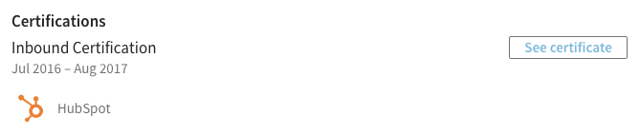
HubSpot Academy offers certification and training courses to teach people how inbound marketing and HubSpot software work. Classes are often taught by marketers at HubSpot and are made up of video lessons, quizzes, and tests. Most HubSpot Academy classes are available free of charge, and if you pass the certifications, such as the two below, you get a nifty certificate and badge to share on your social media profiles. Check out mine on LinkedIn:
Copyblogger
Copyblogger is a content marketing company that creates content about content (so meta). Its blog provides a ton of great resources about digital marketing, and this class, “Internet Marketing for Smart People,” is made up of ebooks and emailed lessons and other course materials. Copyblogger espouses four pillars of content marketing success, which it delves into over the course of this class.
Coursera
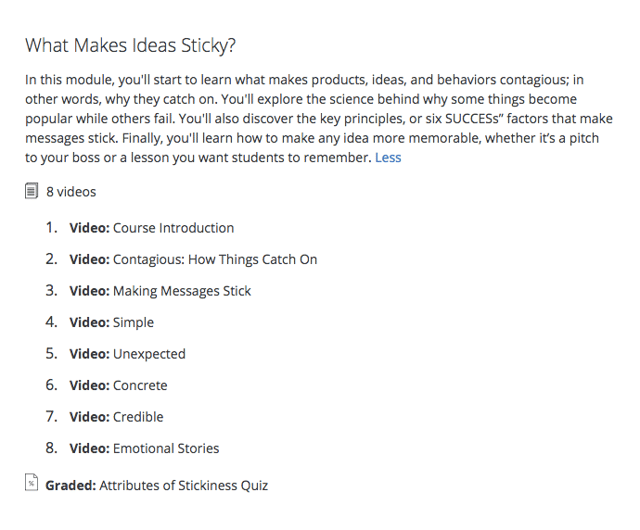
Coursera offers MOOCs (massive online open courses) created and taught online by universities such as Northwestern University, the University of Pennsylvania, and the University of California system. These courses start at various times throughout the year, so browse the catalog to see when one lines up with your schedule. Below are a couple courses that are perfect for content marketers — here’s what a module for #4 looks like:
QuickSprout
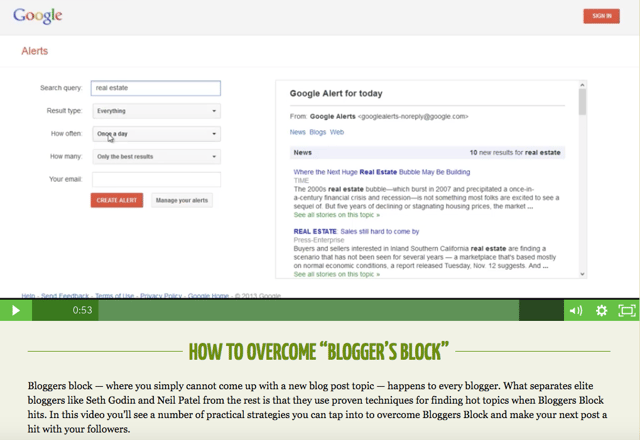
QuickSprout is Neil Patel’s content and business marketing blog, and QuickSprout University features a ton of helpful videos breaking down and explaining a myriad of concepts and best practices. Each video also includes a transcript in case reading is more your learning style than watching a video. Here’s what one course video looks like:
Udemy
Udemy is another online learning platform that focuses specifically on courses related to skill building for working professionals. One thing to note about Udemy: The classes we’ve highlighted are free, but it offers a myriad of other paid options for as little as $10, in some cases. If you have a good experience with a free course, it could be worth a small investment to deepen your skills, too.
Wordstream
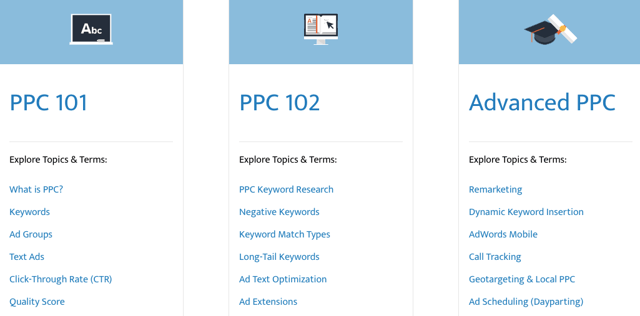
Wordstream is a search engine and social media marketing software company that helps marketers drive the greatest ROI from their paid search and social media campaigns. These free guides and ebooks distill learnings and best practices for users with varying levels of expertise running pay-per-click (PPC) campaigns. Here are some of its topics and offerings:
edX
edX is another MOOC provider that features courses offered by top-tier universities, including Harvard University, Massachusetts Institute of Technology, and Boston University. Like Coursera, classes are taught online and start at specific times throughout the year. Here’s a class we think you’ll find valuable:
Alison
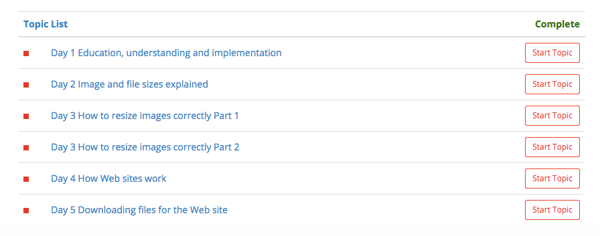
Alison offers free online classes in various professional skills users can take at their own pace. In the Diploma in Social Media Marketing course below, students can get into the nitty-gritty and big picture views of different skills of different topics — just check out one of the many modules:
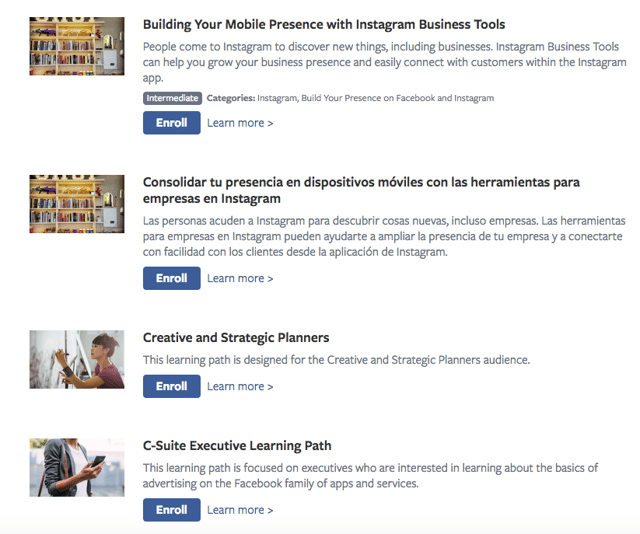
At this point, you probably already know what Facebook is and what it does. What you might not know? It has a training and certification program. Facebook Blueprint offers self-paced and live e-learning courses for marketers seeking to grow their organizations using Facebook. Blueprint offers classes in different languages on how to use Facebook and Instagram — here’s a peek at the course catalog.
quintly
quintly is a social media analytics tool that offers courses through quintly Academy. The self-paced course provides an overview of social media analytics, benchmarking, and goaling using downloadable written materials and video lessons.
Buffer
Buffer’s Social Media Week of Webinars isn’t exactly a course — it’s a series of live webinar recordings on YouTube — but the videos are chock-full of current and valuable information for social media marketers from the experts. Topics include Instagram and Facebook marketing and how to do public relations on social media.
Google is another company you’ve probably heard of before, and its digital marketing course offers a ton of valuable information if you plan to advertise and rank on the search engine. You can even take a Google AdWords certification at the end of the process that helps you beef up your resume (and your Google+ profile).
CodeAcademy
CodeAcademy offers free, interactive coding classes that take you from lesson one to building a fully-functioning website. The courses we’ve highlighted below are just a few of the courses; CodeAcademy offers many more, depending on your organization’s needs. CodeAcademy classes feature lectures and a workspace in the same browser window so you can see the effect of your work live, as it’s created.
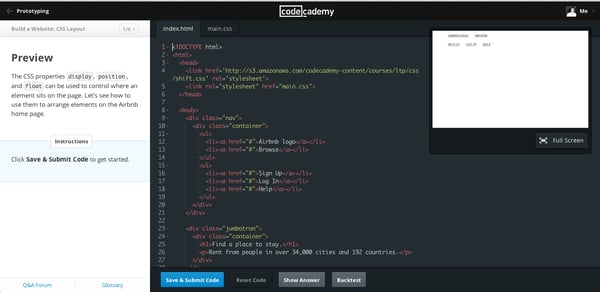
General Assembly
General Assembly offers live and online paid and free courses for a variety of technical skills and disciplines. General Assembly’s Dash offers a free online coding class that teaches the fundamentals of HTML5, CSS3, and Javascript — watch the course overview below:
Canva
Canva helps people easily make beautiful images for web design, and Canva Learn offers design courses that are valuable for any kind of storyteller. The Creativity course explores the challenges of constant creation and innovation and how to do it well — with visuals, of course.
Editor’s Note: This blog post was originally published in May 2018, but was updated in July 2020 for comprehensiveness and freshness.

How Video Consumption is Changing in 2020 [New Research]
In 2020, video is more important to consumers than ever before.
Each day, we stream our favorite shows, watch explainer videos on YouTube to learn something new, or follow events, Q&As, and interviews via live video.
Unsurprisingly, video content’s current popularity is due in part to millennial and Gen Z consumers. These age groups are more connected to the internet than older age groups,, and prefer to be entertained or learn new things from online videos.
At this point, marketers know that they should be leveraging video in their marketing strategy. According to HubSpot’s 2020 State of Marketing report, video beat out heavyweight contenders like email, blogging, and infographics as the most used type of marketing content.
The interest in video isn’t surprising or new. Throughout the last century, we’ve seen video move from black and white televisions to smartphones and tablets. As consumers have seen this content become more available at our fingertips, brands have discovered a number of new ways to implement video in their marketing.
Now, rather than relying on a commercial during our favorite sitcoms to learn about a product, we’re inundated with marketing videos all over social media, streaming apps, and search result pages.
Video isn’t going anywhere, but it is always expanding, changing, and evolving to fit new consumer needs and new platforms.
As this content continues to evolve with each new generation, marketers should continue researching video consumers’ interests, hobbies, and behaviors.
In this blog post, I’ll highlight six research-backed ways video consumption habits are changing and how marketers can respond strategically.
How Video Consumption is Changing in 2020
1. Consumers are beginning to rely on marketing videos from brands.
In the past, consumers would visit websites, look at online reviews, watch commercials, and maybe search out a few YouTube videos to learn about a product. Now, with video being accessible on every major social media network, they are learning to rely more heavily on this type of content in their research phase.
While brands are seeing higher engagement than ever from video marketing, consumers increasingly expect to see this type of content from brands. Even back in 2018, a whopping 87% of consumers said they wanted to see more video from brands in the next year.
In 2020, it’s likely that the expectation of brands to provide marketing videos has gotten even stronger. Each day, consumers use product demos, video reviews, and unboxings to learn about products before they buy them.
What do increasing video content expectations mean for you as a marketer? Well, if a prospect is interested in a product or service in your industry, looks for video reviews or tutorials, and can’t find any related to your brand’s offering, they might buy a product from another brand.
Why? Videos give consumers the opportunity to see how a product or service works in real life, discover any flaws before purchasing the item, and identify perks that they might not learn about in the text-based description. This content might also appear to be more authentic than a heavily edited product shot, which can boost a consumer’s trust in a brand or offering.
2. Half of Gen Z and Millennials “don’t know how they’d get through life without video.”
To some, this isn’t that much of a shock. Each new generation has watched more online video than the last. However, when it comes to those under the age of 34, videos have more of an impact on daily life than ever before. In YouTube’s survey, 50% of people in both generations said they “couldn’t live” without video in their daily lives.
Aside from using video for entertainment, both millennials and Gen Z prefer to watch videos for information gathering purposes. Even when it comes to learning about a new brand or product, these age groups prefer video explainers, product demos, or other marketing videos to simply reading about a company online.
With millennials nearing 40 and Gen Z beginning to gain full purchasing power, there’s a good chance that these two age groups will take up a major portion of your audience soon if they aren’t already.
At this point, marketers aiming to attract these two generations should consider testing out video strategies on social media or their own websites. While these age groups might regularly use video for entertainment purposes, it’s also likely that they’ll use it to learn more about products or brands worth investing in. If there’s a great video recommendation or tutorial out there for a product they’re interested in, they might find it, watch it, and use that content to confirm that this purchase is right for them.
3. Video consumers want to relax — or escape — from daily life.
In the past, older generations might have turned on their favorite TV sitcom or gone to the movies to escape from the stresses of daily life. While the platforms have changed as younger consumers take over the video market, the instinctive need for relaxing or entertaining content hasn’t.
When asked to rank the reasons why consumers watch video content, YouTube survey participants said they primarily watch videos in order to, “relax and unwind.” Additionally, the fourth most common reason that people watch videos is that the content makes them laugh. Additionally, people cited, “Makes me forget about the world around me,” as the seventh most common reason for watching videos.
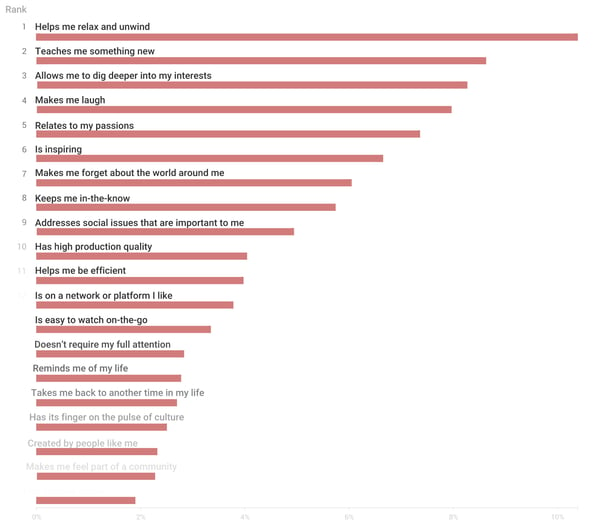
As a marketer, you shouldn’t put all of your time and money into just creating mindless content that will relax your viewers or give them a laugh. But, you can keep in mind that many viewers are still looking to be entertained or intrigued by your content.
Even when you’re creating an informative marketing video, you can consider experimenting with funny anecdotes or adding other entertaining qualities. Interested in adding fun elements to your next marketing video? Get inspired by major brands that effectively used humor in their marketing.
4. Consumers want to learn more about their niche and passions.
Aside from looking for escapism, YouTube viewers are motivated to watch content that teaches them new things, especially when related to their passions, interests, hobbies, or social causes. While the second most common reasoning for watching a video was it, “teaches me something new,” people also said they prioritize content that allows them to “dig deeper” into their interests or “relates to” their passions.
Odds are your product relates to someone’s interests, hobbies, passions, or career. This is the type of person you’ll want to watch and enjoy your videos.
Creating a buyer persona and target audience around this type of person will help you identify video topics that they’ll value, benefit from, and remember your brand for publishing.
5. Consumers don’t care if your video looks like it has a big budget.
There’s a common misconception that marketing videos need to feature the biggest Hollywood stars and must be shot in a high-priced studio. In 2020, as marketers are increasingly producing video remotely, this myth has definitely been debunked.
But, if the evolving video marketing workforce hasn’t convinced you that low-budget videos can still be effective, here’s what YouTube discovered in its survey:
When asking consumers to rank the top reasons they watched videos, surprisingly “high production quality,” and “famous actors” neared the bottom of the list.
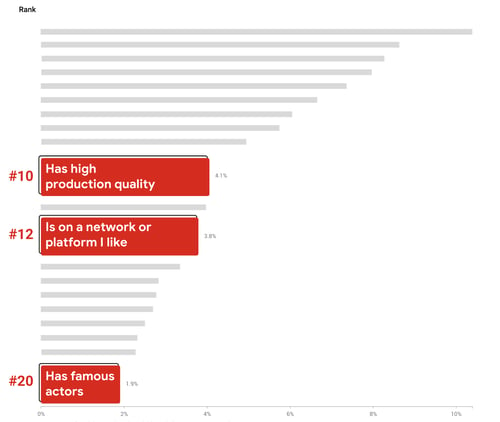
Aside from ranking high-budget video features as the least likely reasons for watching videos, millennials and Gen Z differ from older age groups in that they’re more accepting of user-generated content over professionally made videos. This might hint that brands can leverage content created by their own customers or fans when creating marketing videos:
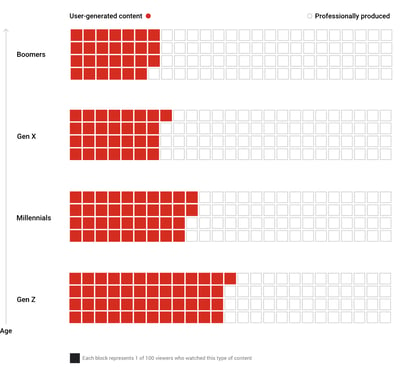
At this point, there are plenty of ways to produce an affordable video with solid quality from any home or workspace. And, while it will still take time and money to launch this content, effective marketing videos made anywhere can boost your level of brand awareness.
6. Younger generations are watching longer content.
The average Gen Z member has an online attention span of eight seconds. That’s four seconds less than millennials. But although Gen Z’s attention span for general online surfing might be quite short, long-form videos that interest them can grasp their attention — and keep it.
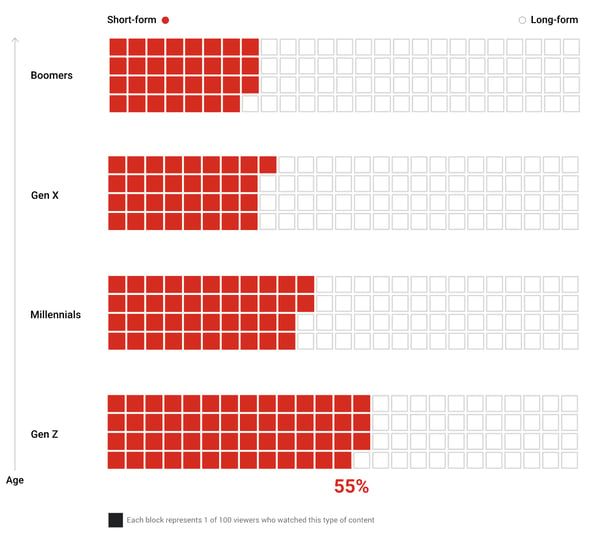
The adoption of long-form content with each new generation isn’t new. According to YouTube’s study, millennials also watched longer-form videos more often than their Gen X predecessors.
As a marketer, you’ll need to keep the attention spans of each new generation in mind as you set the pace for your video content.
Your video has mere seconds to catch a millennial or Gen Z member’s attention as they’re aimlessly scrolling through a social media feed. However, if your video captures viewers immediately and then continues to offer entertaining, valuable, or interesting information throughout, these age groups might watch the whole thing — even if it is on the longer side.
Before you put a marketing video online, re-watch it from the point-of-view of a somewhat busy consumer. Then, ask yourself, “Does this video pull viewers into the action quickly and keep their attention?” If you’re worried that parts of your video seem dull, you might want to shorten it. But, if your team thinks it’s entertaining or informative the entire time, you can experiment with publishing your longer-form video and learning from its results.
Navigating Video in 2020
With each new generation, the video world will continue to evolve.
However, at this point, the video landscape is changing in favor of marketers. Not only do consumers prefer to learn about brands via video content, but they use it as a necessary tool in the information-gathering phase of their buyer’s journey.
Additionally, the vast majority of video consumers now strive to learn something new about an interest or hobby, rather than just using video to entertain themselves. This means marketers can harness educational videos in their strategy and offer consumers content that relates to their niche, while also marketing a brand or product.
In 2020, you don’t need a high-priced video budget to succeed as a marketer. You just need to create content that engages, educates, and intrigues your audience.
To learn more about how to create a winning marketing video — even on a budget — check out this how-to post. For tactical promotional tips, check out The Ultimate Guide to Video Marketing.

The Plain-English Guide to Brand Equity
Before I buy anything that goes on my face, like skincare or makeup, I pour over the reviews. The only exception is when I’m shopping from a brand I trust. In some cases, I don’t even question a new launch from those businesses — I purchase the new items knowing I’ll be satisfied.
It’s not that hard to trust a company that has never disappointed you. But today, I was skeptical.
A makeup company I like is releasing a skincare extension. I was on the fence, so I wanted to see what my favorite YouTubers were saying. Most of them had the same reaction: “I don’t care about the price. When it comes to this brand, I know it’s gonna be great.”
They will purchase from the new line, regardless of reviews.
This is known as brand equity. Consumers influence the public perception of businesses, building positive or negative brand equity. But let’s take a closer look.
If you’ve ever decided against buying from a specific company based on a review from your friends, you’ve seen negative brand equity at work. Negative brand equity might result from poor customer service, lack of transparency, or inaccurate pricing.
Think of that one product you don’t mind shelling out a few extra dollars to have because you know you’ll be satisfied. In your opinion, that business has positive brand equity. Brand equity determines value because positive brand equity can justify higher prices.
Now that you know what brand equity is, you’re probably thinking about how to find out your company’s. To save you that time, let’s talk about measuring brand equity.
How to Measure Brand Equity
Measuring brand equity involves customer knowledge, public perception, and finances. Customers are a no-brainer; Their opinion is the number one source of brand equity, but it shouldn’t be the sole indicator. Let’s look at a few others.
1. Focus on brand awareness.
We’ve gone over how important customers are to brand equity. It starts with awareness. If your audience doesn’t know about your company, they won’t be able to develop an opinion of it.
So if you haven’t already, take note of how you’re handling brand awareness. How are you communicating your company’s story? More importantly, how are they responding?
Leverage consumer response to your brand as an action to create more brand awareness. Content offers, web traffic, and social media performance will give you the data you need to assess brand awareness.
For instance, if you’ve found that you generate the most leads by making informative ebooks, create one about a topic that’s your company’s bread and butter. For a social media agency, that might be creating compelling Instagram stories.
That way, when a lead sees the ad on Facebook, they’ll have an idea of what your company does. The offer is an incentive for them to learn more, and the subject matter will keep them engaged.
2. Analyze your company’s overall finances.
Are you currently analyzing purchase metrics? These metrics will tell you what products are popular among customers and identify shopping patterns that could influence future campaigns.
Look at how your business interacts with audiences — this influences purchasing behavior. If a customer comments under an Instagram post about poor customer service, it can contribute to negative brand equity. To avoid this, make sure customer service protocol involves answering the consumer comments and concerns.
If you notice sales are dipping after a few negative comments, revisit customer service protocol. It might be contributing to a lower brand equity and decrease in sales. But by studying how your business interacts with its audiences, you’ll quickly identify ways to improve that messaging.
Make sure you’re telling your audience why your price is worth it. Alternatively, give your audience a chance to see for themselves. In your next ad, announce a sale, boost an offer, or create a free trial.
That way, your audience can give your company a test run before they commit, and you can begin to measure how this inbound marketing tactic performs among customers. If it increases brand equity, you might have a new winning strategy.
3. Identify the public perception of your brand.
So far, we’ve talked about why brand awareness is important to brand equity. But corporate image is also crucial.
Ask customers to leave reviews. Product reviews are extremely powerful in cementing brand equity. A sushi restaurant with 4.5 stars on Yelp will most likely get more business than the one down the street with 3.9, even if the food is more affordable.
Analyze what customers are already saying and if they’d recommend your company to a friend.
At this point, you know how to measure public perception. But it’s likely you’ve run into a problem … You have no idea how to build equity. Let’s get the ball rolling with a few ideas.
1. Research public perception of your brand.
Customers aren’t the only group that contributes to brand equity. Audiences are just as important.
Approaching public perception is going to look slightly different than reaching your customers. The audience you’re targeting doesn’t know as much about your company as the ones purchasing from your company regularly, so NPS surveys probably won’t do the trick.
However, your market contributes to brand equity from an outward perspective. So, researching their opinion is going to be helpful in figuring out a few things.
First, by understanding what your audience thinks of your business, you can learn why or why not people are buying your offerings. Second, you’ll understand the challenges your audience is looking for companies like yours to solve. This will inform better business and marketing decisions.
Public perception is essential to brand equity, but let’s face it: We probably don’t have the time to spend hours Googling our company to gain insight. So, what can you do to research public perception in a way that saves you time?
The short answer is software. For instance, Smart Watch looks at follower activity on social media channels. Then, you’ll get a customized report that breaks down comments, replies, and likes to tell you a response consensus.
Additionally, Brandwatch can point out where your branded images are appearing. For instance, if you upload a marketing photo into the tool, it’ll crawl the web for that image and pull out results. This can help you identify the spaces where your company is the most prevalent — and what people are saying.
If you’re looking for a couple more resources, say, 10 more, this sentiment analysis tool round-up is your answer.
2. Communicate your brand beliefs in marketing.
One of the biggest ways to begin building brand equity is to emphasize branding when you execute marketing campaigns. Every visual asset you make should speak to your brand in some way.
Use colors, images, and copy to your benefit, and introduce a tone that makes sense to your company and audience. If you can look across all customer-facing content and recognize patterns in those three areas, you’re likely communicating a strong brand message.
Customers and audiences will begin to pick up on the details that define your company. For instance, when you look at this Instagram feed, you can notice similar details, imagery, and tone:
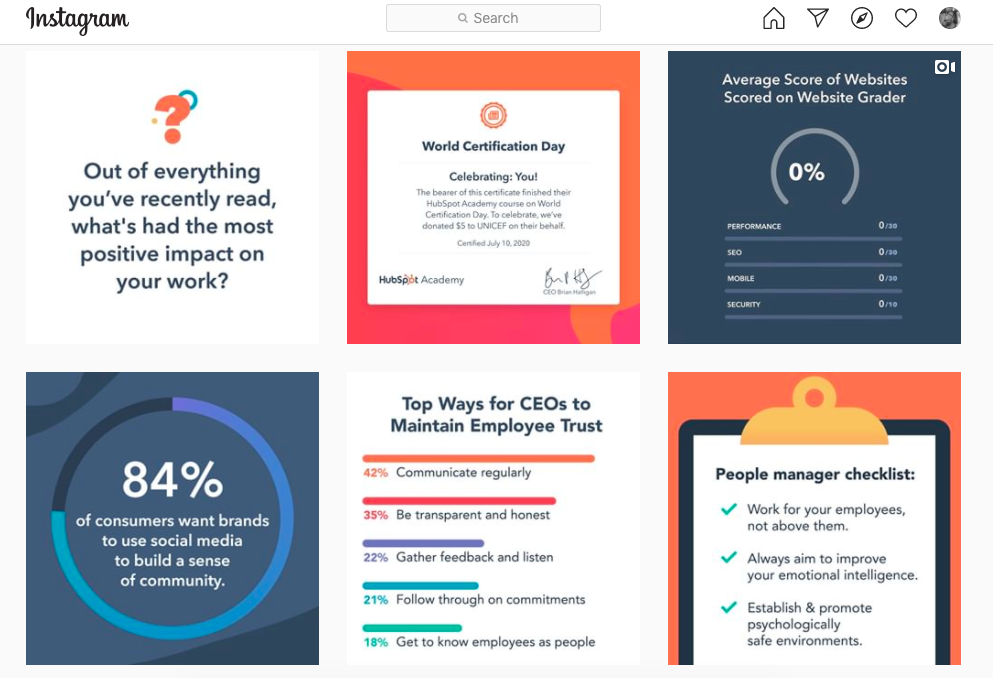
In the image above, you can point to colors, industries, and audiences that relate to HubSpot’s brand. Valuable content, like helpful statistics, make this account one to look for in terms of industry insights. As a result, a marketing professional is likely to associate this account with meaningful marketing-based content.
To build a positive brand equity, speak to what’s important to your company and audience.
3. Turn what customers say into action.
If you’ve been collecting customer stories and data, see how you can use that information to boost equity. For example, if customer reviews have been mentioning a new addition to your software, teasing its release could be a great way to earn positive reception. Customers that see they’re being listened to contribute to excellent equity.
It could also be a good idea to step up customer interaction. If your company doesn’t interact with customers on social channels or email, or reach out for feedback, you probably don’t know what they are expecting. Revamp how you get in touch with customers because they hold the most value when it comes to equity.
Maybe there’s a feature upgrade you know customers are really interested in, but you don’t have the bandwidth to build. In that case, focus on improving a customer favorite, or a much-anticipated restock of a bestselling product.
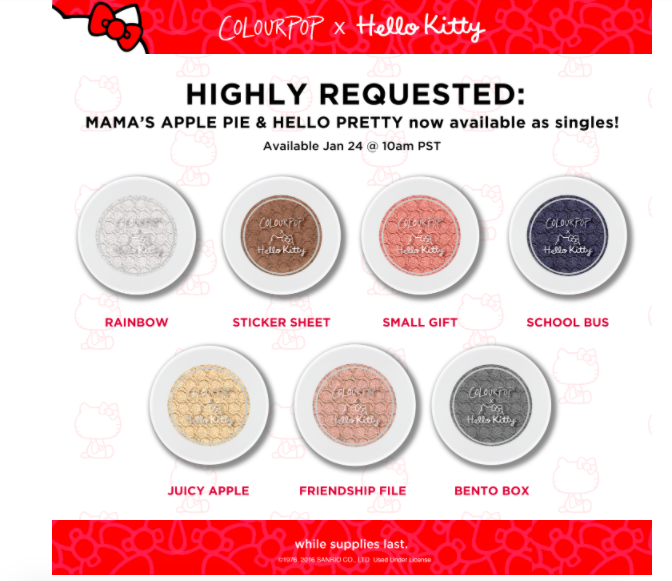
This is a marketing email I got a while ago. Instead of restocking the eyeshadow collection with these shades, ColourPop decided to split up the collections according to customer suggestions. This move was made to show customers that the company values their opinion — it also builds brand equity.
4. Emphasize how you’re different from competitors.
Do you remember the “Get a Mac” campaign? If not, how about the commercials with two actors introducing themselves as either a Mac or a PC? These clips sparked the infamous 2006 debate about which computer choice was better:
Apple released the commercials to emphasize why iMacs were the cool, modern, powerful choice for young adults. Commercials would show a hip, relatable actor talking about the different capabilities of the computer. Then, an older, out-of-touch actor would talk about why they love their limited PC.
The commercials were wildly successful and profitable for Apple. They also established brand equity against competitors. Apple’s team took the time to name computer specs in a way their audience would understand. They spoke directly to the customer about why Macs were the favorable option.
To gain that market edge, use campaigns to explicitly state why your product is the best suited for your customer. Maybe it’s because you offer a more streamlined way of doing things, like in the Apple commercial.
Remember not to attack your competition. The goal here is to build your brand without tearing another down. Tell your customers about the features others don’t offer, and use that feature to define part of your brand.
5. Keep up a helpful presence on social media.
This sounds like a no-brainer, but it’s so important to actively devote yourself to excellent customer service. I can’t count how many times I follow a company on Instagram because of a product, then ultimately decide against buying it because of poor communication from the brand.
I’ve seen comments about not receiving orders, trouble cancelling memberships, and misleading products. That’s a red flag, but if a company handles these comments in a negative way, that’s a deal-breaker. Not only that, but it reflects poorly on my opinion on the brand, as well as other audiences’.
Whether you’re talking to customers in person or online, make sure you’re handling concerns with urgency and care. Others take note of how you treat customers and make their own opinions based on what they see.
If you want a full-guide about how to ace social media customer service, check out this post.
As a consumer, I’m still unsure about the skincare launch I mentioned earlier, but that doesn’t mean I won’t buy the new lip gloss that launched today. I know and trust this company with cosmetics.
This company’s brand equity doesn’t hurt, either. If I need any more convincing, I can just look at the glowing reviews of other lip glosses on the website, on YouTube, and on Instagram. I’ll also take note of how others rave about the quick shipment and product quality.
Brand equity can be the make or break for your company, but after reading this post, you’re ready to make it a positive one for your entire audience. Good luck, and happy branding.

The Ultimate Guide to Managing Remote Marketing Teams
Behind many great teams are great managers.
Take my manager for example. Each day, she oversees a team of blog writers and editors, reports on the HubSpot Blog’s progress to stakeholders, and also manages many of the logistics and processes that keep our site running smoothly.
But, the blog’s editorial processes and traffic strategies aren’t the only things she focuses on. Most importantly, she takes time to empower each individual on our team. She mentors us as we lead projects that benefit the blog, plans team bonding activities, ensures that we’re getting the tools and training we need to do our jobs, and checks in with us regularly to make sure the work we’re doing is fulfilling.
It sounds like she does a lot, right? And the kicker? Half of the team she manages, mentors, and empowers isn’t even based in HubSpot’s Cambridge office.
By this point, you might know that managing a team, even isolated to one office, isn’t for everyone. On any given day, you need to balance your own workload, overall team success strategies, and working with individuals within your department. To do this, you must balance being a team player and a leader. You also must be highly organized, strategic, and have a high level of emotional intelligence.
In a company that’s primarily in-office, a manager can directly impact the success of their team. But, this role is even more important when it oversees a fully or partially remote team.
Why? When your team is widely dispersed, a manager is tasked with bringing together their employees and giving them the tools to work well together. In times of confusion, questions, or ambiguity related to remote work styles, the manager is expected to make calls or answer critical questions.
As the manager of a remote team, you need all the skills of an in-office manager — and more. Not only do you need to be tactical and organized, but you also need to take extra time to make sure that colleagues feel in the loop, included, and like they can succeed at your company. This takes added time, much more communication, and a strong sense of inclusion and empathy.
Whether you’re a new or experienced manager, moving from leading an in-office to a dispersed team can be a major transition. To help you, I’ve compiled a guide of 10 tips for remote team management. These tips relate to logistically planning your remote team’s processes, building an inclusive culture, and using emotional intelligence as a team leader.
How to Effectively Manage Remote Teams
Creating Processes Around Remote Work
1. Create an effective remote hiring and onboarding process.
Before you can manage a remote team, you’ll need to hire and onboard your talent.
To get started, use digital platforms such as Indeed or LinkedIn to announce and promote your new job position. Be sure to note that the position can be held remotely in any location. This descriptive language will make it easier for prospective candidates to find your listings via search engines, as well as your own promotions.
Our managers have seen that one of the best ways to interview and evaluate a remote candidate is through a virtual hiring process. While this process could include video interviews with hiring managers and the candidate, it could also include other steps such as a writing test to evaluate a candidate’s writing or other virtual tasks that allow a candidate to show off their level of skill in a given area.
If you can accept candidates in different locations and timezones, you should also take steps to accommodate them in the hiring process. This could include hosting an interview during their work hours.
When you interview remote talent, you’ll also want to put any judgments related to a candidate’s location aside and interview them in their natural work environment.
Additionally, “If you’re hiring for a position that is open to being remote or in office, conduct all interviews via video call to avoid any location biases in your hiring panel,” says HubSpot Marketing, Sales, and Service Managing Editor Meg Prater.
After you complete the hiring process, you’ll want to welcome your new hire with a smooth virtual onboarding process that teaches how the company works while allowing them to get to know their teammates remotely.
As you prepare an onboarding process for a remote employee, identify ways that you can digitize your current onboarding process. For example, if there are documents or resources an employee should read up on, make sure they are in a PDF, Google Doc, or online format. You might also want to create an internal training website, or knowledge base, where employees can find these documents even after they’ve completed a new-hire orientation.
If there’s an aspect of your onboarding that is too complex for a PDF format, consider doing a virtual training session where you walk your employee through various tasks. This will allow them to see a demonstration of a process they’ll do first-hand and ask you questions about it as they learn.
On the HubSpot Blog team, each employee’s onboarding process lasts roughly 100 days and can be fully virtual. During this process, remote employees receive virtual training sessions, links to blog posts, and digital resources that relate to their role, self-paced mini-online courses that familiarize them with our software, and informal virtual coffee chats which allow the new employee to get to know colleagues.
On top of virtual onboarding, every employee has regular check-ins, career chats, and ongoing training with his or her supervisor to ensure that they’re progressing in their role.
Ultimately, the goal any manager should have when onboarding remote employees is to make them feel supported, informed about how their company works, and more confident in their new role.
To start an employee off on the right foot, think about your current onboarding processes and where they can be improved to add more communication and decrease confusion. Then, determine how you can make these processes virtual.
As you identify elements of the onboarding process that can be made virtual, create an outline for your process. Then, to help you refine or improve on this process, ask new remote employees who undergo it for feedback at the end of their first few months. This will give you an idea of what’s working and what needs to be improved.
To learn more about the logistics behind onboarding, the paperwork you’ll need to have your employee filled out, and the things you can do to make their experience feel welcoming, check out this detailed onboarding checklist. If you’re looking to onboard an employee in a customer-facing role, you can also check out this remote onboarding guide.
2. Schedule and run effective virtual team meetings.
When you or your team members are remote, team meetings will be a crucial means of communication. Not only do they allow you to all join on one video call to talk about projects or goals, but they also enable teammates to get to know each other and stay visible.
Determining Which Meetings You Need
When you have a remote or global team, you’ll want to have at least one fairly regular meeting to regroup and get on the same page. For example, you might want a monthly meeting with your team and other stakeholders to discuss team performance and goals, and a weekly standup meeting to learn what your immediate team is doing.
“Conduct a weekly standup meeting for everyone on your team to be together in the same virtual room,” advises Prater. “It’s important to have that face-to-face time each week.”
“Our team starts by giving a one-word overview of how they’re feeling, followed by an ice breaker, a roundup of what everyone’s working on, and then a discussion article provided by a different member of the team each week.” Prater shares.
Preparing for a Virtual Meeting
If you haven’t already, you’ll want to designate a meeting software, such as Zoom or GoToMeeting based on your needs, budget, and how large your virtual meeting will be. Then, you’ll want to make sure that all of your team members have the program on their computers.
When you’re ready to schedule the meeting, be sure to pick a time that works for team members in different timezones. Stick to this meeting time and avoid canceling to ensure that remote employees who didn’t get a cancellation notice don’t tune in.
Send an email and calendar invitation to your team explaining why you’ve decided to hold the meeting and what they should do to prepare for it. You’ll also want to include meeting login information or a number they can call into if they aren’t near a computer.
If you’d like employees other than yourself to present at the meeting, it can also be helpful to create a slide deck ahead of time so each teammate asked to speak can submit and get their slides approved by you beforehand.
Allowing teammates to submit slides beforehand will help you ensure that each teammate will give the most valuable information to other remote employees in the time they have to present. Using one slide deck will also limit any issues related to switching screen-shares during the meeting.
Running the Meeting
Just before you launch the meeting, make sure that your computer’s sound and video are working and that you have a work-appropriate background. You should also ensure that the environment around you is quiet and not distracting to your teammates.
Once you launch the meeting, wait a minute or two before starting the discussion, just in case other remote employees are running late from another virtual meeting. During this time, feel free to mingle with teammates and get to know them.
If you have colleagues that can’t attend the meeting, plan to record it. This way, someone who wasn’t available or had technical difficulties can listen to the meeting discussion after to stay in the loop.
If the meeting includes a small group of people or a new employee, leave time in the beginning for everyone to introduce themselves and give a brief description of what they do at your company.
You can also consider a quick virtual ice-breaker. As Prater mentioned above, this is something that the blog team has embraced in our weekly meetings.
“Ice breakers might sound cringe-worthy, but they single-handedly transformed our meetings from transactional run-downs of everyone’s to-list to a fun, personal opportunity to get to know our teammates a little better,” Prater says.
Wrapping Up the Meeting
At the end of the meeting, leave time for questions. If you have some in-office employees and some remote employees, it can be helpful to invite remote employees to ask questions first to avoid teams accidentally speaking over each other.
Then, send the slide deck and meeting recording link to your team so they can reference these resources later on.
Refining Your Meeting Schedule
As you start to run multiple virtual meetings, Nataly Kelly, HubSpot’s VP of Localization, says you should continue to evaluate their effectiveness.
After each meeting, Kelly says you should try to answer questions like, “Are the right people in the meeting?”, “Is this the right frequency for meetings?”, “Is the meeting too long or too short?”, and “Is this the best use of everyone’s time?”
“Often, you only need to change one variable to make things work better for a remote team,” Kelly says.
While it might be tempting to book your team with tons of virtual meetings to stay on the same page, Kelly instead advises that you leave team members with some flexible calendar space each week.
“Make sure you’re not filling your calendar with eight hours of video calls per day. Encourage your team to block time to work on other projects,” Kelly adds. “Or, if the team lends itself to it, consider doing most of your meetings in the mornings and leaving afternoons for other work. Just make sure you give people time in their day that is unscheduled.”
To learn more about scheduling an effective virtual team meeting, check out this list of tips and strategies.
3. Check-in with individuals on your team regularly.
When you or your teammate is working remotely, you can’t easily turn to them to ask them a question, get to know them, or have a casual work conversation. This is why, on top of your roster of remote meetings, you should also consider booking one-on-ones or informal virtual coffee chats with people you don’t often see daily.
This will allow you to keep up with your employees, discuss their work with them, help them with any blockers they might be facing, and offer visibility so they can feel like you’re an accessible manager.
Aside from discussing work with each employee, Prater says you should also schedule times to discuss your employee’s career growth and progress.
“The biggest worry I hear from remote folks or those being managed by a remote manager is that they won’t have the same opportunities for advancement,” says Prater. “I over-communicate when it comes to career growth.”
“I have weekly check-ins with each of my direct reports where we talk about what they’re working on. But I also schedule quarterly career chats where I draw up a personalized growth plan for each of them, and we run through prompts to check their satisfaction in their current role and their aspirations for what’s next,” Prater explains.
Aside from scheduled one-on-ones, you should also consider leaving some areas of flexible time on your calendar. This way, if a remote colleague has a question or concern that’s easier to discuss in person than via text-based message, you’re able to quickly jump on a call.
“Be ready to jump on a phone call or video conference without having to schedule a time for it,” advises,” Susanne Ronnqvist Ahmadi, HubSpot’s VP of International Marketing advises. “Let your team know you’re available over your instant messaging software and build “air-time” into your calendar for check-ins and quick talks.”
4. Embrace and implement digital productivity tools.
On top of video call software, there are many helpful tools that you can use to manage remote or dispersed teams. Here just a few types of tools you should consider implementing:
Scheduling Tools
When everyone is remote, having an email or Slack discussion just to determine a good time for a meeting can be redundant and non-productive. Luckily, there are plenty of tools that allow you to request, manage, and schedule meetings with your team.
For example, if you have Microsoft Outlook or GSuite, you can see your teammate’s calendars, working hours, and availability. Then, you can send a meeting invite for a time that they’re free. From there, your teammate can accept, reject, or suggest a new time for an event.
Task Management Systems
With a task management system like Trello or Asana, you can create a joint team project and assign different team members to tasks virtually. You can also give tasks deadlines and check to see if they’re been marked as completed.
Instant Messengers
Ever got caught up in a giant email thread where multiple people were replying to the same message? An instant messaging app, such as Slack, will allow you to create group threads to discuss projects, upload assets within the conversation, and see when other team members have replied clearly. This is also a helpful way to communicate with your team about topics that don’t require a full video call to discuss.
Aside from quick conversations, you can also host mini-meetings on your instant messaging platform. For example, the HubSpot Blog has a weekly meeting where we submit blog titles to a group chat and request feedback on them virtually. This takes little time and provides us with an opportunity to work with in-office and remote employees.
To learn more about 35 remote work tools, check out this detailed guide.
5. Be mindful of timezones and remote employee boundaries.
Remote work options allow you to hire talent from every area of the world. This is a great way to boost the level of diverse thinking on your team and learn about different marketers.
However, one challenge global teams face is adapting to teammates in different timezones.
As a remote team manager, it’s important to navigate around your teammates’ differing work hours, while also encouraging teammates in your timezone to be mindful of other remote teammate schedules.
As you onboard employees or implement a team calendar, ask remote teammates to mark their working and non-working hours on their schedule. You can also have an intro conversation with teams to discuss timezones and preferred work hours, just to ensure that all team members are up to date with who will be working when.
If a large chunk of your team is in another timezone, you might also want to consider working on that timezone’s schedule one day a week or doing a split shift, where you complete half of your work hours when one chunk of your team is most active and another do another shift when a team in another timezone is online. This strategy could help you be more available to your global teammates and stay in the loop of what they’re up to.
6. Align with outside teams virtually.
At a company with remote or dispersed employees, you shouldn’t just focus on your own team. You should also be sure to communicate regularly with other departments to see where your team’s work can align with there’s and where you can benefit the bigger business.
One example of this is sales and marketing alignment. While marketers aim to reach goals related to traffic and brand awareness, salespeople are focused purely on the bottom line. While both teams are vital for their businesses, they can get disjointed due to their differing success metrics. However, when these two teams work well together, marketers can hit their KPIs while also benefiting the company’s overall sales.
As a marketing manager, you should try to plan virtual chats with sales managers and other teams to discuss goals and where your team can align with theirs. You can also use digital tools, like marketing attribution software, to get an idea of how your work impacts the greater company.
In the long run, these meetings will allow you to think of the company with a broader scope rather than just focusing on your team’s efforts all the time.
Creating an Inclusive Culture
7. Take steps to ensure all teammates feel included.
Commonly, remote employees struggle with feelings of disconnection and a lack of visibility.
Without an office filled with people, remote employees don’t have the opportunity to make small talk with colleagues, ask questions, or have a quick work-related chat. This can leave them feeling unincluded or out of the loop on team projects. They might also worry that it will be hard to excel at their company if they aren’t as visible as other employees.
To help each employee feel a sense of belonging, identify where you can make processes and group events more inclusive.
“We often remind managers that it truly is the little things that can make a difference in allowing a remote employee to feel included,” says Siobhán McGinty, a Principle Marketing Manager.
“That feeling of inclusion can make such a difference to employee retention, happiness, and performance — so the little things actually matter quite a lot,” McGinty adds. “During the remote week, we heard lots of examples of how managers and teams go above and beyond in ensuring that their remote counterparts are included in the day-to-day.”
In a recent post about the HubSpot marketing team’s experimental work-from-home week, McGinty offered a list of actions that could make remote teammates feel more included. These could include sending e-birthday cards, inviting remote teammates to in-person get-togethers via video call, or organizing a virtual gift exchange around the holidays.
Aside from making your remote employees feel included through simple actions, you can also schedule activities that allow them to offer ideas or work virtually with the rest of the broader team.
For example, you could host a campaign brainstorm where all remote members are invited to share their ideas. Or, before you leave for the holidays, you could expense your team’s dinners and host a virtual hack night where you work ahead to ensure the business still runs smoothly when everyone’s on vacation.
Not only do team bonding activities allow the team to work together, but they also allow remote members to feel included and get to know their colleagues.
8. Identify opportunities for virtual team bonding.
It can be easy to think that your team is bonding during business meetings and team celebrations. But, the truth is, your colleagues might only see each other during these times.
To build an even better team, consider virtual opportunities that allow teammates to get to know each other on a more human level.
Just the other day, my team took part in a virtual Pictionary-like game called Drawasaurus. While this meeting had nothing to do with work, it allowed us to chat, learn about each other, and have fun with teammates we don’t get to see daily.
If your schedule is incredibly limited, you can also make time for virtual bonding in regular team meetings. For example, as Prater, noted earlier each of our blog meetings begins with at least two icebreakers.
Aside from enabling teammates to get to know each other during virtual events, you should also identify opportunities where you can get to know the individuals on your team more personally. For example, rather than scheduling a one-on-one to discuss only work with a remote employee, you could schedule a remote coffee chat that’s just devoted to getting to know teammates.
“As with any relationship, time spent together is important. And if you’re remote, that time naturally is more limited. As a result, building rapport is even more challenging,” says Susanne Ronnqvist Ahmadi, HubSpot’s VP of International Marketing.
“I try and make an effort in getting to know the people I’m working with to understand how we can best work together, communicate, and interact with each other,” Ronnqvist Ahmadi explains.
Using Emotional Intelligence
9. Encourage empathy among in-office and out-of-office teammates.
When it comes to remote work, some of the biggest challenges that employees face are feelings of loneliness and disconnection. They also find it hard to unplug at the end of the day because their work is not clearly separated from their home life.
As a remote team manager, it’s important to recognize the challenges your employees might face and give them any other guidance when necessary. If you have any teammates who are in-office, you should also encourage them to consider the challenges a remote employee might go through on a regular basis.
Recently, to help in-office employees understand the benefits and challenges of working from home, HubSpot asked the entire marketing department to remote for one week. While some people really enjoyed the opportunity to work remotely, some struggled with staying focused, communicating with teammates, and finding an effective workspace. Although the experiment only lasted for a week, it gave in-office employees a taste of the workstyles benefits and challenges.
10. Use emotional intelligence at all times.
While you might be calm and collected when managing a team in the office, overseeing remote teams might feel different to you emotionally. Even though you can’t see a team and they can’t see you, you should still use emotional intelligence at all times.
Emotional intelligence, also called EQ, is a sought after skill that enables you to understand your emotions and train yourself to react in an appropriate way to certain scenarios.
For example, when managing a remote team, you might need to resist the urge to mistrust or micromanage colleagues that you can’t see every day.
In this scenario, leaders that lack emotional intelligence might panic about their team going off-course and begin to control every aspect of everyone’s work. Meanwhile, an emotionally intelligent leader might address this concern by scheduling check-ins with teammates to make sure a project is on the right track.
“Resist the temptation to micro-manage, even if you feel uncomfortable about having less visibility into the day-to-day,” says Kelly. “Autonomy and flexibility are hugely important for managing remotely.”
“Keep your team focused on the critical goals, and don’t worry about how they get there,” Kelly adds/ “Trust them to solve problems and make good decisions, but set a high bar to show you trust them to accomplish great things with the privilege of autonomy and flexibility.”
In another common team management scenario, you might find that your employee made a big mistake when you were offline.
While a less emotionally intelligent leader might send a long ranting email, someone who understands their emotions will take a minute to note what frustrated them about a situation and then plan a chat to discuss constructive feedback with the employee.
“No angry emails,” Kelly advises. “Trust and respect matter hugely for remote teams to operate well, and because email is more important for remote teams, it’s important to keep emotions out of it where possible.”
Kelly explains that email and other digital communication should be respectful and “not a place for venting.”
Emotional intelligence can also help you in scenarios when there’s a disagreement amongst your teammates, according to Kelly.
“When you sense someone is angry or disagrees with a decision on a remote team, jump on a call quickly to resolve it,” Kelly says. “Don’t let things fester.
“Sometimes, the lack of face to face interaction makes it easier for people to jump to conclusions or feel misunderstood. It’s important that you signal to your team that if they are upset or concerned, that you’re there for them,” Kelly advises.
While you should use emotional intelligence to manage your own responses, you should also encourage your team to use the skill in their work life, too.
For example, if you find that someone is inappropriately venting over a communication platform. “make it clear what people should do instead.” Alternatively, ask your teammates to schedule one-on-ones or send polite messages requesting a quick chat to discuss a situation.
“Give your team an option to vent about things that won’t be disruptive to others, and importantly, won’t lead to side chatter either,” Kelly says.
When you use emotional intelligence properly, your teammates will feel comfortable coming to you with questions and concerns more often. They’ll also develop a stronger sense of trust in you as their manager. Ultimately, a manager who understands their emotions and the emotions of others can manage teams in a number of different scenarios.
Navigating Remote Work
If you’ve never worked remotely or managed remote teammates, it might take time to develop the perfect dispersed team management strategy.
As you build up your management tactics, your most important goals should be to help the team to function smoothly, build an inclusive work culture that enables employees to succeed, and use emotional intelligence at all times. While building solid processes is key to ensuring work gets done, taking time to build a positive company culture will allow team members from every region to feel like they can contribute their diverse thoughts, ideas, and strategies.
Want to learn more about the remote work style? Check out this blog post on remote work stats or this post on work-from-home productivity tools. If you’re curious about how work styles like remote work could expand and evolve, this post will walk you through how the marketing workplace could change in the near future. You can also check out our Ultimate Guide to Management for more tips for running in-office and remote teams.
