
The 5 Key Components of a Killer Customer Marketing Strategy
It’s easy to see marketing as a process specific to attracting and converting prospects — the practice of generating and capitalizing on potential customers’ interest.
But once that potential has successfully been removed from the equation, and the prospect of winning a prospect’s business is no longer prospective, are you supposed to stop marketing to them altogether?
Absolutely not.
Your current customer base is a perfectly lucrative wellspring of new and sustained business opportunities that you should constantly be tapping into. That’s where the concept of customer marketing comes in — a school of marketing that allows you to get much more out of your customers than their initial business.
Let’s take a more thorough look at what customer marketing is and a picture of the five key elements of a successful customer-driven marketing strategy.
Customer marketing is, in large part, the art of building customer loyalty and enthusiasm in the hope that those elements will ultimately translate to new business. And in the context of the practice, the term “new” takes on multiple meanings.
“New” business could mean existing customers buying new products or services as you develop them. It could mean current customers upgrading the products of yours they currently leverage or upping the tier of your service they subscribe to.
Or, and perhaps most importantly, it could mean customers being enthusiastic enough about your business to evangelize to their friends and family about how awesome your company is to attract new customers for you.
Ultimately, a solid customer-driven marketing strategy is a way to leverage your current customers as marketing assets. The process is incredibly useful — but often tricky to navigate. Here are some of the key components of an effective customer-driven marketing strategy.
1. Leverage buyer personas to segment and understand your customers.
This point applies to virtually every kind of marketing, and a customer-driven marketing strategy is no exception. The success of these kinds of efforts inevitably leans on your ability to understand and approach the people you’re trying to appeal to. That’s why it’s in your best interest to use detailed buyer personas to guide your customer marketing efforts.
As per HubSpot’s own definition, a buyer persona is “a semi-fictional representation of your ideal customers based on data and research.” Who are your customers? Can you identify multiple segments with different interests and sensitivities? What kind of customer marketing will best suit those various bases?
For instance, say you’re in the B2B SaaS space, and various iterations of your software are consistently bought by both freelance developers and decision-makers at midsize businesses.
Those two groups would warrant the creation of two separate personas — ones that will probably be fundamentally different in how they approach your product and can be best appealed to.
Say you’ve recently released a new paid add-on to your program tailored to appeal to companies with over 100 employees and want to sell to established customers.
If you wanted to create an email campaign to support your customer-driven marketing efforts, you would refer to your midsize business decision-maker persona for cues on appropriate messaging and specific contacts.
That way, your customer marketing effort would be adeptly targeted. You would reach the most interested customers with appropriate content — all without bothering or alienating your other base.
One way or another, you have to know your customers before you can market to them effectively. Creating, maintaining, and referring to detailed buyer personas is central to that process. You can learn more about the nature and process of creating buyer personas here.
2. Provide exemplary customer service.
Two of the primary endgames of a customer-driven marketing strategy are garnering customer loyalty and facilitating customer evangelism. Those factors tend to hinge upon your customers’ experiences — their experiences with your product or service and their experiences with your company as a whole.
The latter tends to be easier to control than the former, so investing in customer service is always a must. Make sure your customer support infrastructure is sound.
Be thorough and responsive when addressing individual customers’ problems and concerns with your product — whether that be through email, over live chat, on the phone, or in person.
Have that structure in place and those resources on-hand to ensure that any potential problems your customers might have are immediately, patiently, and thoughtfully addressed.
They’ll help you delight your customers and provide specific insight into what you could be doing better — two actions that will inform your customer marketing strategy and allow you to maintain a happier customer base that will be more receptive to it.
3. Listen to and engage with your customers.
Customer feedback is central to the efficacy of any customer marketing strategy. How can you know what your customers want and expect out of your company if you don’t listen to them? If you ignore their thoughts and input, you’re undermining your ability to appeal to them as meaningfully as possible.
Pay careful attention to how customers are interacting with your brand on social media. Hear what they say over those platforms and be willing to adjust your product development, messaging, outreach, and customer-driven marketing strategies accordingly.
In many cases, just looking and listening won’t be enough. Engage with your customers online. Actively interact with them on social media. Ask for their feedback and insight yourself. Address issues and concerns that they might be raising personally.
Your customer-driven marketing strategy, at its core, is a means of cultivating and capitalizing on customer satisfaction. One of the best ways to do both is to let customers know that you care, are willing to listen, and will act on the feedback they offer.
Consistently demonstrating that you’re willing to do all that can be huge in the context of a successful customer-driven marketing strategy.
4. Incentivize loyalty.
Sustaining — if not consistently improving — impressive customer retention needs to be at the heart of your customer-driven marketing efforts. Your customers need to be loyal if you want to sell them on any new products or keep them on board as long as possible. But how can you help develop and foster that kind of loyalty?
The two prior points — providing exceptional customer service and engaging with your customers — are significant parts of that process. But there are certain programs and strategies you can implement to give your pushes for customer loyalty a little extra oomph.
Customer loyalty programs — incentivizing long term business with current customers through avenues like offering free merchandise, rewards, coupons, or even advance released products — are always worth considering when it comes to customer marketing.
Give your customers tangible, immediate reasons to remain loyal. Again, this point ties into the overarching theme this article keeps touching on — letting customers know you care.
The customers who have remained with your business want to know they’re not being taken for granted. And newer customers could always use a few extra reasons to plan on staying with you in the long run.
Customer loyalty programs are one of the better, more straightforward ways to supplement an effective customer-driven marketing strategy. So no matter the nature of your business, give some serious thought to incorporating one into your customer marketing efforts.
5. Have systems and strategies in place to generate referrals.
This point is where customer marketing and traditional marketing intersect. It’s one of the most clear-cut ways to translate general loyalty into new business — all while keeping current customers enthusiastic about your company.
There’s tremendous utility, versatility, and value in a well-constructed customer referral program. It’s essentially an official channel through which you can turn customers into evangelists — a program that incentivizes the projection of positive, customer-generated publicity.
If you can put together a referral program with simple instructions and attractive rewards, you can give your customers a personal stake in promoting your business.
It keeps them engaged, makes them articulate the value of your product or service to their friends, and ultimately wins you new customers while making the current ones that much happier with your business.
One of the main — or perhaps the main — endgames to implementing a customer-driven marketing strategy is to turn your customers into spokespeople. A customer referral program expedites that process.
Regardless of the size or nature of your business, you stand to gain a lot from carrying out effective customer marketing. Once you have customers on board, the last thing you should do is cast them by the wayside. There’s tremendous potential in meaningfully engaging with and appealing to them, so it’s worth your time to research and construct a solid customer-driven marketing strategy.

7 Tips for Working Remotely with Roommates or Family, From HubSpot Marketers
While working remotely offers challenges of low visibility, loneliness, and feeling out of the loop, the ability to work from home also comes with major perks.
For example, if you worked remotely in the past, you might have had the whole house to yourself, could pick the perfect workspace for your needs, and had almost total flexibility in your day.
As someone who worked remotely part-time before 2020, the pure silence was something I absolutely loved about remote workdays. While I’d still go to my office for in-person meetings during the first few days of the week, I’d usually work remotely on Thursdays and Fridays to avoid noise or interruptions while focusing on heads-down projects. These turned out to be some of my most productive days of the week.
But now, as more workplaces are going partially or fully remote, employees like me are finding themselves working with family or roommates nearby for the first time. At this point, this change of environment has become a surprising and unique challenge for even the most experienced remote employees.
Even when you get along with family or roommates, putting your professional needs before personal life needs during work hours can feel uncomfortable or tense.
Aside from dealing with this new sense of discomfort, your workday also changes in a number of logistical ways. For example, the house might get louder during the day, planning uninterrupted video calls might feel strenuous, you might have to share your precious workspace, and some roommates or family members might have trouble adapting to remote work boundaries.
In fact, no matter how well you plan out your daily household routine, there’s always room for unexpected mishaps.
Remember the viral video where a CNN correspondent’s children strutted into their father’s video interview? If not, here it is:
While the man in the video might have felt horrified at the time, many people who’ve been in similar situations actually found the incident to be adorable and relatable.
In 2020, a lot of us are thinking about the CNN contributor’s video call as we navigate working remotely with family or roommates.
To help you navigate a shared remote work experience, here’s a list of tips from HubSpot employees who’ve mastered working from home with loved ones or roommates in close proximity.
How to Work Remotely With Roommates or Family
1. Give roommates or working family members as much space as you can.
Remember, you should always have empathy and respect for your roommates or loved ones and their personal space. That doesn’t stop when you all have to work from home together. In this situation, you should start to think of your roommates and adult family members like co-workers.
Rather than sitting right next to a roommate, distracting them, or doing something loudly as you would after work hours, create an environment that allows everyone to work well at the same time.
If you have a desk in your room or your own office space already set up, try to work there as much as possible to prevent encroaching on the workspace of roommates that don’t have the same space in their room. If no one has a desk or a room they can work in, have each roommate designate where they’ll be working each day so that everyone is at a proper distance. You might also want to consider days where you’ll relocate to new workspaces in case anyone needs a change of scenery.
2. Communicate about your schedules and expectations.
Almost all the colleagues that I spoke to explained that communication is key when working remotely with roommates and family.
With strong communication, you can prevent someone from accidentally walking into the background of your meeting, two video calls happening in one room or other at-home issues that can impact your workday.
“Before each workday, have a conversation on what your roommates, partners, or family members schedule that day is going to look like. This way, you’ll have a good sense of when their day starts, ends, and when they will be taking a break so you can plan accordingly,” says Jennifer Stefancik, a marketing manager on our HubSpot Academy team.
If you have children at home, you can also use a morning conversation to talk with adult family members or partners to determine who’ll be watching them at different points of the day, helping them with schoolwork, or making them lunch while other family members are in meetings or tuned into work.
While you’re discussing schedules with family members or colleagues, you should also discuss your expectations and professional boundaries.
“If you don’t communicate your expectations for behavior during your meetings, they won’t know how to behave,” says Rebecca White, a junior staff writer for the HubSpot Blog. “For example, you can say something like ‘I have meetings from 8 a.m. to 9 a.m. and 10 a.m. to 11 a.m. tomorrow. During these meetings, please no cooking or TV. You can walk around, but no talking or sound. I’ll let you know when the meeting is over!’”
3. Avoid interrupting roommate or family-member meetings at all costs.
Think of your roommate or adult family member like a coworker. Would you barge into a colleague’s meeting to ask them a quick question? Would you walk into a meeting room when the door is closed and people are talking inside? I really hope not!
“To avoid interrupting (or potential embarrassment), always assume your roommate, partner, or family member is in a meeting before talking or making loud sounds. You can communicate with them via text or Slack. Or, my personal favorite has been waving my arms in the air to get their attention!) to check and see if they are on a call,” says Stefancik.
As Stefancik mentions, there are many ways to communicate with roommates aside from knocking on the door, yelling their name, or walking up and talking to them. For example, use Facebook Messenger, WhatsApp, or text messages to ask a roommate a question. Or, if it can wait, write it down in your phone’s Notes and plan to ask the question later.
Additionally, if your roommate or loved one is working in a common space, like a dining room or a kitchen, be quiet and remain out of the camera’s view if you must enter the room.
On the other hand, if you’re the roommate who’s been forced to work in the kitchen or living room, you should also set boundaries to ensure your housemates don’t cause any interruptions.
If you’re stuck working in a common space, you might also want to consider setting designated times where roommates can walk freely into common areas, cook, eat, or watch TV each day. However, try to be somewhat flexible. Your roommates are still human and might need to cook an early dinner, grab a quick snack, or watch a show to relax after they finish work.
4. Know when to make compromises.
Yes, your housemates should respect your space and try to avoid interrupting you at all costs. But, at the same time, you’ll want to make sure your schedule isn’t interrupting them too much.
For example, if one roommate is sitting at the kitchen table and the rest of the house is empty, find a place to sit where you can do your video calls far away from them rather than taking over their territory or interrupting their day.
As you approach your workday, remember that your roommate might be making compromises to make you comfortable, so you should also make compromises for them.
Being empathetic to housemates is something Anna Fitzgerald, a HubSpot Blog staff writer, strongly advises.
“I’m working in an apartment with three roommates where the Wi-Fi really only works in the living room and kitchen, so we’ve had to practice a lot of empathy,” says Fitzgerald
“One day, my roommate was on a Zoom call in front of our silverware drawer, so I ended up eating my lunch without a fork. The next day when she was on a call, I tripped over my computer charger, catapulting my laptop from a high-top table to the floor with a shockingly loud thump,” Fitzgerald shares. “We know we’re doing our best and are quick to forgive as we learn to be coworkers as well as roommates.”
To add to the sense of empathy and understanding, be sure to make time to bond with your roommates after you spend the day keeping your distance during work hours.
“We try to stay out of each other’s way as much as possible during the day and then eat ‘family dinner’ together. It’s a great way to make sure we stay productive during the day and disconnect at the end,” Fitzgerald adds.
5. Avoid overlapping meetings or presentations.
As mentioned above, communicating with your family and roommates will help you prevent embarrassing moments during meetings or interruptions that could affect your work. Aside from this, you should also communicate to make sure each roommate can participate in, host, or present in meetings successfully during the week. If you don’t have multiple rooms in your house, this also means making sure your meetings don’t overlap.
“We have a small space that isn’t easy to soundproof. Early in the week and at the beginning of every day, my husband and I go over our schedule to determine if we have meetings that overlap,” says Crystal King, a senior marketing manager. “If one meeting is really important — like a presentation for a webinar — we’ll shift schedules to accommodate. We’ve found that our colleagues are all pretty understanding.”
Stafancik echoed this statement by advising, “If you are sharing a working space, look at your schedule and see if you’ll be presenting or talking a lot in any meetings. If so, plan ahead to either work in a different space or see if your ‘coworker’ can move to another space during that time.”
6. Create a realistic daily routine.
When you’re working with family or roommates, having a household routine will help keep everyone aligned and allow everything to run smoothly.
If you have roommates, this routine could include things like cleaning times or roommate bonding times that prevent apartment messes or socialization from cutting into your work hours.
If you’re working with family or have children at home, a family routine can be even more important. For example, this routine could determine activities that your children will do while you are occupied in a meeting, or which parent will watch a child during different times of the day.
According to Nataly Kelly, HubSpot’s VP of Localization, “Kids thrive on routine. We all know this, but it’s hard to not have a schedule for them when you yourself are working on the clock and have scheduled meetings.”
While a routine can be an important guideline for each day, Kelly adds that it’s important to remain flexible if your daily plan goes off track.
“I believe a routine is great. But, don’t stress too much about sticking to a strict schedule with children, because they might not always want to move along.” Kelly shares.
To help her children stay on a schedule, and avoid interrupting her own work, Kelly provides them with visual signals to show that she’s focusing on work or in a meeting.
“I set up a timer in each major area of my house so that my kids can see the clock counting down without having to ask me how much time is left on my work calls,” Kelly explains. “Then, when the timer goes off (one minute after the end of my meetings), they know it’s time to change to their next daily activity.”
“This doesn’t always work. My kids are like everyone else’s and don’t always listen,” Kelly notes. “But, it helps.”
7. Don’t forget to bond with your roommates or loved ones.
Colleagues that work well together often take time for team bonding and non-work related activities. So, why shouldn’t you practice the same tactics with the roommates or family members you live with?
Being sure to tune out at the end of the day, planning activities with roommates, or spending time with family after you’ve clocked out will further help you communicate with them, work better alongside them, and maintain your work-life balance.
“It’s important to carve out mental separations between work and family time,” says Sherry Ng, a senior marketing manager. “I recommend always scheduling time to decompress after work so that you don’t jump right into time with family and friends while still thinking about emails or projects. It allows you to be more present with those you love.”
Embracing Your “New Coworkers”
Working in the same house with roommates or family can be a major challenge, especially if you’ve never worked in this type of environment before. As you continue to navigate this work style, keep these overarching tips in common.
- Be empathic: Remember, although you might be compromising to help your roommates, they might be compromising for you. Be sure to think about what you’re going through, their needs, and how you can both work well together.
- Set boundaries: Although you should be empathetic and respectful to your roommates or family members, it’s important to set boundaries such as when you need silence for meetings, how your roommates should behave to avoid disruption or your personal space needs.
- Maintain work-life balance: Even though you should think of your roommates like coworkers during the day, keep things casual like usual during the nights and weekends. This helps to prevent work from sucking the fun out of your family or roommate relationships and also leaves you time to pleasantly bond with them.
To learn more about successfully working from home, check out these tips from some of our remote staff. Interested in learning about how to achieve work-life balance? You might also enjoy this blog post.

Social Media Definitions: The Ultimate Glossary of Terms You Should Know
For many people, posting a tweet, hashtagging an Instagram caption, and sending out an invite for a Facebook event on Facebook has become common practice.
(In fact, if you’re highly experienced, you probably do all three at once.)
But with new social media networks and innovative software cropping up almost daily, even seasoned social media users are bound to run into a term or acronym that leaves them thinking, “WTF?”
For those head-scratching moments, we’ve created the ultimate glossary of social media marketing terms.
Whether you’re still hung up on the difference between a mention and a reply on Twitter or you just want to brush up on your social knowledge, check out the following roundup of social media terms to keep yourself in the know.
Social Media Terms to Know, Listed Alphabetically
- Social Media Terms – A
- Social Media Terms – B
- Social Media Terms – C
- Social Media Terms – D
- Social Media Terms – E
- Social Media Terms – F
- Social Media Terms – G
- Social Media Terms – H
- Social Media Terms – J
- Social Media Terms – K
- Social Media Terms – L
- Social Media Terms – M
- Social Media Terms – N
- Social Media Terms – O
- Social Media Terms – P
- Social Media Terms – Q
- Social Media Terms – R
- Social Media Terms – S
- Social Media Terms – T
- Social Media Terms – V
- Social Media Terms – W
- Social Media Terms – X
- Social Media Terms – Y
- Social Media Terms – Z
A
- AddThis – AddThis is a web-tracking technology company that offers a wide range of social media and content tools — from responsive sharing buttons to custom follow buttons to recommended content plugins — designed to help you increase engagement on your website and earn more followers on social media.
- AMA – AMA is an acronym for “ask me anything,” which originated in a popular subreddit where users will use the term to prompt questions from other users. Since its inception, the term has gone on to be used in other online social settings, such as this discussion on Inbound.org.
- Analytics – Analytics is data that helps you track the performance of your social media content. Analytical data could include page views, time on page, clickthrough rate, and engagement rate.
- Algorithm – An algorithm is a set of formulas developed for a computer to perform a certain function. This is important in the social sphere as the algorithms sites like Facebook and Google use are critical for developing content promotion strategies.
- Application Programming Interface (API) – An API is a documented interface that allows one software application to interact with another application. An example of this is the Twitter API.
- Avatar – An avatar is an image or username that represents a person online, most often within forums and social networks.
B
- Bitly – Bitly is a free URL shortening service that provides statistics for the links users share online. Bitly is popularly used to condense long URLs to make them easier to share on social networks such as Twitter.
- Bitmoji – A Bitmoji is an avatar or emoji that users can create to look like them. Bitmojis can then be added to your personal or Snapchat keyboards so you can send them to fiends or use them in place of profile pictures.
- Bio – A bio on social media refers to a short bit of explainer text that explains who the user is. To see some examples, check out this roundup of some of the most amusing bios on Twitter.
- Blog – Blog is a word that was created from two words: “web log.” Blogs are usually maintained by an individual or a business with regular entries of content on a specific topic, descriptions of events, or other resources such as graphics or video. “Blog” can also be used as a verb, meaning to maintain or add content to a blog.
- Blogger – Blogger is a free blogging platform owned by Google that allows individuals and companies to host and publish a blog typically on a subdomain. Example: yourblogname.blogspot.com
- Blog Talk Radio – Blog Talk Radio is a free web application that allows users to host live online radio shows.
- BoardReader – BoardReader is a free search engine that allows users to search for keywords only in posts and titles of online forums, a popular form of social networking.
- Bookmarking – Bookmarking online follows the same idea of placing a bookmark in a physical publication — you’re simply marking something you found important, enjoyed, or want to continue reading later. The only difference online is that it’s happening through websites using one of the various bookmarking services available, such as Pocket, or right within your browser.
C
- Canva – Canva is an easy-to-use design tool for non-designers and designers alike. The tool offers several templates that adhere to the required dimensions for sharable social images on Twitter, Facebook, Instagram, etc.
- Chat – Chat can refer to any kind of communication over the internet but traditionally refers to one-to-one communication through a text-based chat application, commonly referred to as instant messaging (IM) applications.
- Circles – Circles are clusters of a user’s friends, colleagues, family, or connections on the now-discontinued Google+. On the platform, you got to choose who went in what Circle, and what you shared with those individuals.
- Clickbait – Clickbait is a term to describe marketing or advertising material that employs a sensationalized headline to attract clicks. They rely heavily on the “curiosity gap” by creating just enough interest to provoke engagement.
- Clickthrough Rate – Clickthrough rate is a common social media metric used to represent the number of times a visitor clickthrough divided by the total number of impressions a piece of content receives.
- Collective Intelligence – Collective intelligence is a shared intelligence that emerges from the collaboration and competition of many individuals and appears in consensus decision-making in social networks.
- Comment – A comment is a response that is often provided as an answer or reaction to a blog post or message on a social network.
- Compete – Compete is a web-based application that offers users and businesses web analytics. It also enables people to compare and contrast the statistics for different websites over time.
- Community Manager – The community manager is responsible for building and managing the online communications for a business in an effort to grow an online community.
- Connections – The LinkedIn equivalent of a Facebook ‘friend’ is a ‘connection.’ Because LinkedIn is a social networking site, the people you are connecting with are not necessarily people you are friends with, but rather professional contacts that you’ve met, heard speak, done business with, or know through another connection. Connections are categorized by: 1st degree, 2nd degree, and 3rd degree.
- Conversion Rate – Conversion rate refers to a common metric tracked in social media that is the percentage of people who completed an intended action (i.e. filling out a form, following a social account, etc.).
- Craigslist – Craigslist is a popular online commerce site in which users sell a variety of goods and services to other users. The service has been credited for causing the reduction of classified advertising in newspapers across the United States.
- Creative Commons – Creative Commons is a nonprofit corporation dedicated to making it easier for people to share and build upon the work of others, consistent with the rules of copyright. It provides free licenses and other legal tools to mark creative work with the freedom the creator wants it to carry, so others can share, remix, use commercially, or any combination thereof.
- Crowdsourcing – Crowdsourcing, similar to outsourcing, refers to the act of soliciting ideas or content from a group of people, typically in an online setting.
D
- Delicious – Delicious is a free online bookmarking service that lets users save website addresses publicly and privately online so they can be accessed from any device connected to the internet and shared with friends.
- Digg – Digg is a social news website that allows members to submit and vote for articles. Articles with the most votes appear on the homepage of the site and subsequently are seen by the largest portion of the site’s membership, as well as other visitors.
- Direct Message (or DM) – Direct messages — also referred to as “DMs” — are private conversations that occur on Twitter. Both parties must be following one another to send a message.
- Discover (or Snapchat Discover) – Discover is a section of Snapchat’s app dedicated to large brands, influencers, and longer form story content.
- Disqus – Disqus is a comment system and moderation tool for your site. This service lets you add community management and social web integration to any site on any platform.
E
- Ebook – An ebook is an electronic version of a book. However, most ebooks are not actually available in print (unless you print them). These are typically published in PDF form. For marketers, ebooks commonly serve as lead generating content — people must fill out a form to receive their ebook copy.
- Employee Advocacy – Employee advocacy refers to the act of employees using their own social presence to increase the reach of the company and its content.
- Emoji – Emojis are small cartoonish images that can be sent along with text in social media and private messages.
- Endorsement – An endorsement on LinkedIn refers to an instance in which another LinkedIn user recognizes you for one of the skills you have listed on your profile.
- Engagement Rate – Engagement rate is a popular social media metric used to describe the amount of interaction — likes, shares, comments — a piece of content receives.
- Eventbrite – Eventbrite is a provider of online event management and ticketing services. Eventbrite is free if your event is free. If you sell tickets to your event, Eventbrite collects a fee per ticket.
F
- Facebook – Facebook is a social media platform founded by Mark Zuckerberg in 2004. The site connects people with friends, family, acquaintances, and businesses from all over the world and enables them to post, share, and engage with a variety of content such as photos and status updates. The platform currently boasts around 1.49 billion active users.
- Fans – Fans is the term used to describe people who like your Facebook Page.
- Favorite – Represented by the small star icon on Twitter, favoriting a tweet signals to the creator that you liked their content or post.
- Finsta – Short for “fake insta” this term describes one’s secret or fake Instagram page that’s hidden from their employers.
- Flash Mob – A flash mob is a large group of people who assemble suddenly in a public place, perform an unusual and pointless act for a brief time, then quickly disperse. The term flash mob is generally applied only to gatherings organized via telecommunications, social media, or viral emails.
- Flickr – Flickr is a social network for online picture sharing. The service allows users to store photos online and then share them with others through profiles, groups, sets, and other methods.
- Forums – Also known as a message board, a forum is an online discussion site. It originated as the modern equivalent of a traditional bulletin board, and a technological evolution of the dial-up bulletin board system.
- Follower – In a social media setting, a follower refers to a person who subscribes to your account in order to receive your updates.
- Follow Friday (#ff) – Follow Friday is a trend via the hashtag #ff every Friday on Twitter. Users select other usernames and tweet them with #ff in their post, meaning they recommend following those Twitter users. There is debate whether this trend is past its prime.
- Friends – Friends is the term used on Facebook to represent the connections you make and the people you follow. These are individuals you consider to be friendly enough with you to see your Facebook profile and engage with you.
- #FYP (For Your Page) – #FYP is a hashtag that TikTok users place in their videos to prioritize their content on other users’ “Your Page” feed. This feed algorithmically sends users content from people you follow or related to hashtags you might be interested in.
G
- GaggleAMP – GaggleAMP is a social media marketing platform that provides businesses with the ability to leverage its employee’s online presence to increase brand awareness and expand its reach.
- Geotag – A geotag is the directional coordinates that can be attached to a piece of content online. For example, Instagram users often use geotagging to highlight the location in which their photo was taken.
- GIF – GIF is an acronym for Graphics Interchange Format. In social media, GIFs serve as small-scale animations and film clips. (Check out this round up of reaction GIFs used to illustrate our excitement when Facebook announced that they were supporting their functionality.)
- Google Chrome – Google Chrome is a free web browser produced by Google that fully integrates with its online search system as well as its other applications.
- Google Documents – Google Documents is a group of web-based office applications that includes tools for word processing, presentations, spreadsheet analysis, etc. All documents are stored and edited online and allow multiple people to collaborate on a document in real-time.
- Google+ – Google+ is Google’s discontinued social network. It served as a platform for users to connect with friends, family, and professionals while enabling them to share photos, send messages, and engage with content. Google uses the “+1” to serve as the equivalent to a Like on Facebook or Instagram.
- Groups – Facebook and LinkedIn offer a Groups feature where people in similar industries or with similar passions can join a group and discuss topics related to it.
H
- Handle – Handle is the term used to describe someone’s @username on Twitter. For example, HubSpot’s Twitter handle is @HubSpot.
- Header image – A header image refers to the large photo displayed at the top of your profile on Twitter. The header image is also commonly referred to as the banner image on LinkedIn or the cover image on Facebook.
- Hangout – A Hangout is a video service on Google+ that allows you to video chat with up to 10 Google+ users are a time. You can name these chats, watch YouTube videos during them, open a Google Doc with colleagues, and much more.
- Hashtag – A hashtag is a tag used on a variety of social networks as a way to annotate a message. A hashtag is a word or phrase preceded by a “#” (i.e. #InboundMarketing). Social networks use hashtags to categorize information and make it easily searchable for users.
- Houseparty – Houseparty is an app that Gen Z has notably used to connect with friends over video calls.
- HTML – HyperText Markup Language (HTML) is a programming language for web pages. Think of HTML as the brick-and-mortar of pages on the web. It provides content and structure while CSS supplies style. HTML has changed over the years, and it is on the cusp of its next version: HTML5.
I
- IGTV – IGTV is where verified businesses and accounts can host long-form videos or place longer live streams after they’ve aired.
- Impressions – An impression refers to a way in which marketers and advertisers keep track of every time ad is “fetched” and counted.
- Inbound Marketing – Inbound marketing is a style of marketing that uses permission-based marketing techniques to get found by potential customers, convert them into leads, customers, and advocates, and analyze the process along the way. Inbound marketing leverages tactics and tools such as SEO, blogging, social media, lead generation, email marketing, lead nurturing, marketing automation, surveys, personalization, and CRM.
- Insights – Many social media networks, like Facebook or Instagram, offer insights pages to their business account holders. These pages often allow the user’s to see valuable analytics about their page and how they’re performing compared to similar pages.
- Instagram – Instagram is a photo sharing application that lets users take photos, apply filters to their images, and share the photos instantly on the Instagram network and other social networks like Facebook, Flickr, Twitter, and Foursquare. The app is targeted toward mobile social sharing, and has gained more than 300 million users.
- Instant Messaging – Instant messaging (IM) is a form of real-time, direct text-based communication between two or more people. More advanced instant messaging software clients also allow enhanced modes of communication, such as live voice or video calling.
- Instagram Live – Instagram Live is the platform where individuals and businesses on Instagram can share a live feed of what’s going on in their lives.
K
- Kik – Kik is a social media network where people can send short video messages to each other via the Kik mobile app.
- Klout – Klout is a measure of social influence. The service allows users to connect various social accounts such as Facebook, Flickr, YouTube, etc., and then provides every user with his or her Klout score. The score is out of 100 — the higher the score, the more influence it estimates you have in the social world.
L
- Like – A Like is an action that can be made by a Facebook or Instagram user. Instead of writing a comment or sharing a post, a user can click the Like button as a quick way to show approval.
- Link Building – Link building is an aspect of search engine optimization in which website owners develop strategies to earn links to their site from other websites with the hopes of improving their search engine ranking. Blogging has emerged as a popular method of link building.
- LinkedIn – LinkedIn is a business-oriented social networking site with over 380 million members in over 200 countries and territories. Founded in December 2002 and launched in May 2003, it is mainly used for professional networking.
- LinkedIn Publishing – LinkedIn’s publishing platform functions as a place where members can publish long-form posts that related to their professional interests and expertise. While this capability used to be limited to LinnkedIn Influencers only, the platform was opened up to everyone in 2014.
- LinkedIn SlideShare – LinkedIn SlideShare is an online social network for sharing presentations and documents. Users can favorite and embed presentations as well as share them on other social networks such as LinkedIn, Twitter, and Facebook.
- Listed – The act of being “listed” on Twitter refers to when a user curates a custom list of Twitter users to more easily keep tabs on their tweets.
- Live streaming – Live streaming is the act of delivering content over the internet in real-time. This term was popularized in social media by apps such as Meerkat and Periscope.
- Lurker – A lurker online is a person who reads discussions on a message board, newsgroup, social network, or other interactive system, but rarely or never participates in the discussion.
M
- Mashup – A content mashup contains multiple types of media drawn from pre-existing sources to create a new work. Digital mashups allow individuals or businesses to create new pieces of content by combining multiple online content sources.
- Meme – A meme on the internet is used to describe a thought, idea, joke, or concept that’s widely shared online. It is typically an image with text above and below it, but can also come in video and link form. A popular example is the “I Can Has Cheezburger?” cat meme that turned into an entire site of memes.
- Mention – A mention is a Twitter term used to describe an instance in which a user includes someone else’s @username in their tweet to attribute a piece of content or start a discussion.
N
- Native Advertising – Native content refers to a type of online advertising in which the ad copy and format adheres to the format of a regular post on the network it’s being published on. The purpose is to make ads feel less like ads, and more like part of the conversation.
- News Feed – A news feed is literally a feed full of news. On Facebook, the News Feed is the homepage of users’ accounts where they can see all the latest updates from their friends. The news feed on Twitter is called Timeline.
- Newsjacking – Newsjacking refers to the practice of capitalizing on the popularity of a news story to amplify your sales and marketing success.
P
- Pandora – Pandora is a social online radio station that allows users to create stations based on their favorite artists and types of music.
- Periscope – Periscope is a social video app that allows users to broadcast live video from wherever they are. App users also have the ability to engage with others videos, browse live or recent broadcasts, and follow users to receive notifications.
- Permalink – A permalink is an address or URL of a particular post within a blog or website that remains indefinitely unchanged.
- Pinterest – Pinterest is a photo sharing social network that provides users with a platform for uploading, saving, and categorizing “pins” through collections called “boards.” Boards are typically organized by theme, such as: Food & Drink, Women’s Fashion, Gardening, etc. Users have the ability to “pin” and “repin” content that they like to their respective boards.
- Podcast – A podcast is a series of digital media files, usually audio, that are released episodically and often downloaded through an RSS feed.
- Pocket – Pocket is an app that enables users to manage a reading list of articles they’ve saved from the internet to read later. Pocket has an open API that allows it to integrate with over 500 applications including social networks like Twitter.
- PPC – PPC is an acronym for pay per click. Pay per click is an online advertising model in which advertisers display ads on various websites or search engines and pay when a visitor clicks through. Bid-based PPC involves an auction in which advertisers compete with other advertisers by setting the max bid — or highest amount they’re willing to pay — for each click. Each time a visitor triggers the ad spot, the auction process pans out to select which ad will be displayed.
Q
- Quantcast – Quantcast provides website traffic and demographics for websites. The tool is primarily used by online advertisers looking to target specific demographics.
R
- Real-Time Search – Real-time search is the method of indexing content being published online into search engine results with virtually no delay.
- Real-Time Marketing – Real-time marketing is a strategy that requires marketers to publish timely content as news breaks. For example, Oreo tweeted this quick-witted response to the 2013 Super Bowl blackout as it was unfolding.
Recommendation – A recommendation on LinkedIn is a term used to describe a written note from another LinkedIn member that aims to reinforce the user’s professional credibility or expertise.
- Reddit – Reddit is a social news site that contains specific, topic-oriented communities of users who share and comment on stories.
- Reply – A reply is a Twitter action that allows a user to respond to a tweet through a separate tweet that begins with the other user’s @username. This differs from a mention, because tweets that start with an @username only appears in the timelines of users who follow both parties.
- Retargeting – Retargeting is an online marketing and advertising technique that allows marketers to display ads to people who have visited their website or are part of their contacts database. For more on how a retargeting campaign works, check out this beginner’s guide.
- Retweet – A retweet is when someone on Twitter sees your message and decides to re-share it with his or her followers. A retweet button allows them to quickly resend the message with attribution to the original sharer’s name.
- RSS Feed – RSS is a family of web feed formats used to publish frequently updated content such as blogs and videos in a standardized format. Content publishers can syndicate a feed, which allows users to subscribe to the content and read it when they please from a location other than the website (such as Feedly or other RSS readers).
- RSS Reader – An RSS reader allows users to aggregate articles from multiple websites into one place using RSS feeds. The purpose of these aggregators is to allow for a faster and more efficient information consumption.
S
- Search Engine Optimization – Search engine optimization is the process of improving the volume or quality of unpaid traffic to a website from search engines.
- Selfie – A selfie is a self-portrait that is typically taken using the reverse camera screen on a smartphone or by using a selfie stick (a pole that attaches to your camera). Selfies are commonly shared on social media networks like Instagram, Twitter, and Facebook using the hashtag #selfie.
- Skype – Skype is a free program that allows for text, audio, and video chats between users. Additionally, users can purchase plans to place phone calls through their Skype account.
- Snapchat – Snapchat is a social app that allows users to send and receive time-sensitive photos and videos known as “snaps,” which are hidden from the recipients once the time limit expires (images and videos still remain on the Snapchat server). Users can add text and drawings to their snaps and control the list of recipients in which they send them to.
- Snap Map – The Snap Map is a feature of Snapchat that allows you to see where your friends are as well as hot spots where people are publicly posting stories.

- Story – A Snapchat, Facebook, or Instagram story is a string of videos or images that lasts for 24 hours. Users can create stories to be shared publicly or just a customized group of recipients.
- Social Inbox – Social Inbox is an app in the HubSpot software that plugs into your contacts database and allows users to optimize their social monitoring, publishing, and analysis.
- Social Media Monitoring – Social media monitoring is a process of monitoring and responding to mentions related to a business that occur in social media.
- Social Proof – Social proof refers to a psychological phenomenon in which people seek direction from those around them to determine how they are supposed to act or think in a given situation. In social media, social proof can be identified by the number of interactions a piece of content receives or the number of followers you have. The thought is that if others are sharing something or following someone, it must be good.
- Social Selling – Social selling is a sales concept in which representatives leverage the power of social communication to engage with prospects by answering their questions, providing helpful content, clarifying information, etc.
- Spotify – Like Pandora, Spotify is a music streaming service with a social media twist. Not only can you share what you’re listening to with other social networks, but you can also see what your friends are listening to or listen to their playlists directly from the platform.
- StumbleUpon – StumbleUpon is a free web-browser extension that acts as an intelligent browsing tool for discovering and sharing web sites.
- Subreddit – Discussion board dedicated to a specific topic on reddit.
T
- Tag – Tagging is a social media functionality commonly used on Facebook and Instagram that allows users to create a link back to the profile of the person shown in the picture or targeted by the update.
- Thread – A series of comments or discussion posts on a post or in a subreddit.
- TikTok – TikTok is one of the fastest-growing social media platforms of all time, The app, beloved by Gen Z, is similar to Vine in that it highlights bitesized looping videos that can also have musical overlays.
- Trending Topic – Trending topics refer to the most talked about topics and hashtags on a social media network. These commonly appear on networks like Twitter and Facebook and serve as clickable links in which users can either click through to join the conversation or simply browse the related content.
- Troll – A troll or internet troll refers to a person who is known for creating controversy in an online setting. They typically hang out in forums, comment sections, and chat rooms with the intent of disrupting the conversation on a piece of content by providing commentary that aims to evoke a reaction.
- Tumblr – Tumblr is a microblogging platform that allows users to post text, images, video, audio, links, and quotes to their blog. Users can also follow other blogs and repost other users’ content to their own blog.
- Twitch – Twitch is a live streaming social platform which gained notoriety when gamers used it to stream their video game skills. Recently, brands have also begun to experiment with the platform.
- Twitter – Twitter is a real-time social network that allows users to share 140-character updates with their following. Users can favorite and retweet the posts of other users, as well as engage in conversations using @ mentions, replies, and hashtags for categorizing their content.
- Twitter Topics – A recently launched Twitter feature that allows users to follow specific topic categories from marketing, to politics, to birdwatching. Once users follow topics, they’ll see more content related to these categories on their feeds.
- Tweepi – Tweepi is a social media management tool that provides users with a platform for simplifying the way they manage their social following. It’s typically used for mass following or unfollowing a group of people based on certain criteria.
- Tweetdeck – Tweetdeck is a Twitter tool that provides users with a way to manage their Twitter presence through custom columns. The platform integrates with the Twitter API to allow users to both send and receive tweets.
- Twitterverse – Also referred to as the Twittersphere, Twitterverse is a nickname for the community of users who are active on Twitter.
U
- User-Generated Content (or UGC) – User-generated content is content — blogs, videos, photos, quotes, etc. — that is created by consumers. Marketers typically tap into their audience in an online setting to collect this type of content to support a campaign or initiative.
V
- Vine – Founded in 2012 and discontinued in 2017, Vine was a social video sharing service where users could create and engage with short-form, six-second video clips. Videos published through the service were easily shared across other social platforms such a Twitter and Facebook.
- Viral – Viral is a term used to describe an instance in which a piece of content — YouTube video, blog article, photo, etc. — achieves noteworthy awareness. Viral distribution relies heavily on word of mouth and the frequent sharing of one particular piece of content all over the internet.
- Vlogging – Vlogging or a vlog is a piece of content that employs video to tell a story or report on information. Vlogs are common on video sharing networks like YouTube.
W
- Webinar – A webinar is an online seminar or presentation that is hosted by an individual or a company. Most often, the host requires attendees to fill out a form before granting them access to stream the audio and slides. In marketing, webinars are held to educate audiences about a particular topic while opening up the floor for a discussion to occur on social media using the webinar’s unique hashtag.
- WhatsApp – WhatsApp is a messaging, phone, and social media app that allows people to connect internationally over a Wi-Fi network.
Y
- Yelp – Technically Yelp isn’t a social media platform. But, it is a great way to spread awareness if you’re a business owner. The platform one of the leading sites for online recommendations.
Z
- Zapier – Zapier is a software that leverages “zaps” to connect apps and provides users with a way to automate tasks. Zaps are automations that contain both Triggers and Actions. For example, you can connect your Twitter with your Evernote to save your favorited tweets to a folder, or connect Facebook and Twitter to tweet posts from a Facebook Page.
Editor’s Note: This blog post was originally published in July 2018, but was updated for comprehensiveness and freshness in July 2020.

33 of the Best Social Media Marketing Blogs of 2020
The great thing about the internet is that it’s full of brilliant marketers sharing great information — all for free.
Social media is no exception.
If you have some extra time in your week to add more blogs to your reading list, we recommend you consider subscribing to some of these 33 blogs specifically about social media marketing.
33 of the Best Social Media Blogs
1. HubSpot Marketing Blog
On the HubSpot Marketing blog, we strive to cover every topic that a modern-day marketer would need to know about. This includes social media. Not only can you find general posts about social media marketing, but you can also find content and original research about specific platforms, like Instagram.
2. Social Media Explorer
Social Media Explorer, founded by Jason Falls, is constantly pumping out great posts on social media’s impact on marketing and public relations.
3. The Future Buzz
Adam Singer’s blog, The Future Buzz, takes a clear approach to social media marketing and SEO topics, and isn’t afraid to take a stance against ideas and tactics he thinks are bad for marketers.
4. Duct Tape Marketing
If you’re a small business owner, Duct Tape Marketing is a must-read for strategic and tactical advice about leveraging online marketing and social media to grow your business.
5. Social Media Today
Social Media Today offers a diverse mix of news on social networks’ latest developments and cutting-edge tips to perfect your use of each platform. The blog also hosts live Twitter chats from its Twitter hashtag, #SMTLive, on various social media topics twice a month.
6. Small Business Trends
The Social Media section of Small Business Trends, a large news property for entrepreneurs, is filled with expert social media advice and multimedia content for the small business.
7. Web Ink Now
Author and speaker, David Meerman Scott shares great theories and real-life examples of social media’s impact on marketing, as well as easy-to-understand content that is great for non-marketing executives.
8. Rebekah Radice
Rebekah Radice is an award-winning social media influencer, and her blog is evidence of her expertise in this industry. Her blog packages common social media topics into solution-based content that tells marketers what they need to know. She also hosts a podcast called Brand Authority, further expanding on the challenges she examines on her blog.
9. Mari Smith
Mari Smith has been called the “Queen of Facebook,” and her Facebook-specific blog is a testament to this generous title. Smith uses the latest Facebook trends to create up-to-date insights for the modern social media marketer — with ample video marketing advice to boot.
10. The Social Media Hat
From social media to email marketing, this simple-looking property is an all-in-one resource for content marketers. The Social Media Hat also includes a recommended list of marketing tools, giving you opportunities to apply what you learn from the blog to your marketing operations.
11. Jon Loomer
Jon Loomer is a blogger and podcaster whose website offers both articles and video tutorials on all things Facebook marketing.
12. TopRank Online Marketing Blog
The TopRank blog has a long history of delivering a great blend of search engine and social media marketing information in easily digestible lists and posts.
13. SocialMedia.biz
This comprehensive blog breaks down its social media content into News, Business, How-To, and Marketing topics — providing a reader experience that is sorted according to the unique social media challenges you might face in your career.
14. DreamGrow
DreamGrow is dedicated to social media in the context of content marketing. The blog caters to both content creators and marketing strategists, showing readers how to use social media to grow as businesses and as individuals.
15. MarketingProfs Daily Fix
While MarketingProfs reserves some of its content for paid members, its Daily Fix blog offers great daily marketing content for free.
16. Social Business
Eileen Brown’s blog, a property of ZDNet, is an expansive resource for emerging trends relating to social media’s impact on business.
17. Ask Aaron Lee
Aaron Lee is a social media manager from Malaysia, who uses his experience as an entrepreneur to educate half a million readers worldwide on using social media to grow a business.
18. Altitude Branding
For thoughtful and honest commentary and advice on social media and conducting business on the web, check out Amber Naslund’s blog.
19. Dave Fleet
Dave’s blog provides valuable information regarding how social media has an impact on brands and traditional communications functions like public relations and advertising.
20. Social Media Examiner
With tons of great guest authors and consistent how-to content, Social Media Examiner offers a ton of free advice for marketers across industries.
21. Convince & Convert
Jay Baer provides actionable information about the best ways to use social media to improve reach and convert new customers.
22. Web Strategy by Jeremiah Owyang
For an analyst’s perspective on high-level social media concepts and emerging trends like social CRM, take a minute to check out Jeremiah’s blog.
23. Search Engine Land
Long-time search engine marketing resource Search Engine Land provides expert advice on search marketing.
24. ProBlogger
For those who are interested in improving and expanding their blog across all their digital channels, ProBlogger discusses the strategies and tactics needed to become a successful blogger.
25. Sprout Social
Sprout Social is a social media management tool whose Insights blog is always tuned to the latest best practices in social media marketing — from what content to post to using chatbots for better customer service.
26. Bad Pitch Blog
The Bad Pitch Blog points out mistakes other marketers have made so that you won’t make them, too. You’ll find some important perspective on media relations — across all digital channels — in these posts.
27. The Moz Blog
Moz is known for offering expert tools and advice on search engine optimization (SEO). What you might not know is that the famous Moz Blog also gives you social media advice from the unique perspective of SEO.
28. Peg Fitzpatrick
Peg Fitzpatrick is the author of the best-selling book, “The Art of Social Media,” and her blog is an equally creative take on social media marketing for today’s content producers.
29. RazorSocial
RazorSocial’s social media blog is one of nine content categories that shows you different ways of thinking about content strategy, as well as how to perfect your use of certain marketing tools.
30. Socially Sorted
This award-winning marketing blog comes from Donna Moritz, an Australian content strategist who writes about using social media to become a better storyteller.
31. Neil Patel
Neil Patel is a marketing expert, entrepreneur, and consultant who’s worked with a number of major companies like Amazon, NBC, and GM.
While Patel’s research and insights have been featured on our own blog a handful of times, he also publishes content on his own site. While many of his posts relate to SEO, you can also find content around other digital marketing topics, including social media.
32. Later
Later is primarily known for its Instagram scheduling platform. However, they also have a pretty comprehensive social media blog that HubSpot’s social manager, Kelly Hendrickson, personally loves to read.
33. Buffer
Similar to other blogs on this list, Buffer posts a handful of social-media related posts per day. Buffer, which is a personal favorite of our social media community manager, Krystal Wu, also use videos, original data, and infographics to tell visual stories about social media tactics.
Reading Up on Social Media Trends
The list of social media blogs is endless, and could be quite overwhelming to you. You might be asking yourself, “How do I keep up with all 33 blogs on this list?”
The truth is that you don’t need to read every single blog on this list every day. You just need to skim the ones that value your team and strategies most.
To eliminate the need for constant surfing, when you find a blog you love, subscribe to its email list for daily notifications in your inbox.
To learn more about social media marketing, be sure to check out our ultimate guide.
Editor’s Note: This blog post was originally published in September of 2018 but was updated in July 2020 for freshness and comprehensiveness.

The Ultimate Guide to Google Analytics in 2020
Are you confused — even intimidated — by Google Analytics? Good news: you’re not alone. GA is notoriously complicated.
In fact, when I first started to delve into GA’s waters, I wondered if I’d ever truly get it. There were so many concepts to learn and reports to run. How did people ever conquer this thing?!?!
Lots and lots of reading plus some trial and error, it turns out.
I’m not saying I’ve reached total mastery — there’s always something new to pick up — but I’m vastly more comfortable.
And I want you to be, too. So, here’s the cheat sheet to everything I’ve learned over the years. This guide might be long, but it’ll take you from zero to hero in ~6,000 words. And if you still have questions, let me know! I’m @ajavuu on Twitter.
What is Google Analytics?
Google Analytics, or GA, is an analytics tool that gives you an extremely in-depth look at your website and/or app performance. It integrates with Google’s marketing and advertising platforms and products (including Google Ads, Search Console, and Data Studio) making it a popular choice for anyone using multiple Google tools.
What other types of people is GA popular among?
Other marketing analytics options, such as HubSpot, can give you all the data you need with much less work. Oh, and here’s another aspect of GA you’ll want to take into consideration:
Is Google Analytics free?
There’s a free and a paid version of GA (the latter is called Analytics 360). Small and medium-sized businesses will likely get all the features you need from the free version. Enterprise businesses need to upgrade if you want:
- Advanced funnel reporting and attribution modeling
- Roll-up reporting
- More views, dimensions, and metrics per property
- Unlimited and unsampled data
Paying for 360 also gives you access to dedicated support, including your own account manager. This alone can make the subscription fee worth it.
And about that subscription fee? It’s not cheap. Analytics 360 begins at $150,000 per year (invoiced monthly) and increases after your site receives more than one billion monthly hits.
360’s cost will price out many businesses. However, if you have the budget for both the service and an agency or in-house analyst to manage your analytics operations, consider investing.
Now, what steps will you need to follow when setting up GA? Good question.
How to Set Up Google Analytics
Before you start using Google Analytics, you’ll have to set up a Google account. This means you must have a registered Google Account email address and password.
Once you’ve created a Google account, that doesn’t mean you automatically have access to GA — rather, you have to register for Analytics (which we’ll review how to do in the next section). But the important thing to note as you go to set up GA is that you can only access the tool by using a valid Google account.
Additionally, to set up GA properly, you’ll want to understand the various layers of the tool — specifically, the hierarchy.
Google Analytics Hierarchy
Here’s a look at the GA hierarchy:
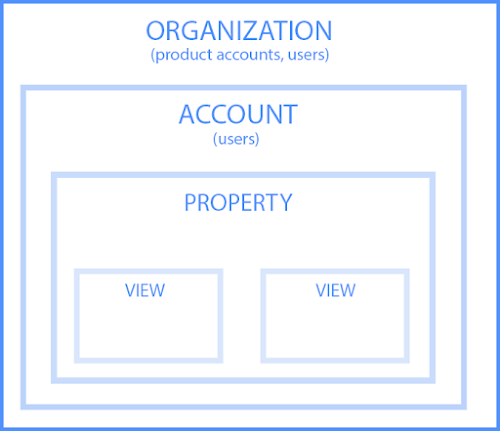
Let’s dive into each of the sections within the hierarchy.
1. Organization
The organization is the highest level. It represents a company. For example, our organization is HubSpot, Inc. One organization can encompass multiple GA accounts.
Organizations are recommended for larger businesses, but not mandatory.
2.Account(s)
Accounts are not optional. Using Google Analytics requires at least one (sometimes several) accounts.
An account doesn’t mean a user account. I can log into the HubSpot Google Analytics accounts using my Google email ID. HubSpot’s head of technical SEO can also log into the same account using his Google email ID. Our historical optimization specialist can also log into the same account using his Google email ID.
Important details:
- You can assign one property to each account or multiple properties to one account. Every account can hold up to 50 properties.
- You can give user permissions for an entire Analytics account, a property in an account, or a view in a property.
You might be wondering, “What’s better: creating a new account for every property or adding every account to the same property?”
It depends on your use case and goals.
For example, suppose you have one website — the Stark Industries corporate site — and five subdirectories, including the Stark Industries blog, careers section, media resources, case studies, and investor relations information.
You want to create separate properties for each subdirectory so the people on each team can look at how their portion of the site is performing, as well as the larger site.
But maybe you have another site that discusses Tony Stark’s work with S.H.I.E.L.D. You want the S.H.I.E.L.D. team to see data for this subdirectory, but you don’t want them to see data for the rest of the website. You create a new account and property for the S.H.I.E.L.D. site.
Property
A property is a website or app. Each property can support up to 25 views.
View
At the minimum, you need two views per property:
- One with zero configuration — essentially the “raw” version of the view
- One with filters set up to exclude any traffic from within your company (i.e. a filter for your IP address) as well as bots and spam traffic
A view only captures the information after your filters and configured settings have been applied. And once you delete a view, that data is gone forever. For those reasons, it’s critical to keep an unfiltered view of your data.
Now that you have completed the basis for how how to set up GA, here are the steps involved in using the tool.
Here are the steps involved in using your GA account.
1. Create a Google Analytics account.
First, you’ll have to create a Google Analytics account. Or, sign in to your current account.
2. Add the name, URL, and industry of the website you want to track.
Choose which account you want to add the property to. You should create and name your Property at this point and enter the website’s URL as well as industry and reporting time zone. Then you’ll be able to Create and Finish this step of the process.
3. Add a view to your property.
Go to the account and property you want to add a view to — use the menu to Create a View, name your view, select the type of view (web or app), and answer a few other questions. Remember, you can add up to 25 views to a property in GA.
4. Add your tracking code directly after the <head> tag of your site.
When you create a property, you’ll have access to a unique ID for tracking and a global site tag (code you need to add to each site page you want to measure). This is how you’ll be able to collect data in your property.
Then, paste your global site tag right after the opening <head> tag on each site page you plan on measuring.
You’ll be asked to choose your type of site (static, dynamic, web hosting, Google Tag Manager) so that you can set up the data collection accurately.
(For more, read our guide to installing the Google Analytics tracking code on your site.)
5. Visit your GA portal and verify the code is working.
Lastly, verify your code is working. You can do this by looking at the Real-Time reports section while clicking around on your site in a different tab or on your phone. The report should show at least one visitor to the site (that’s you!)
And that’s pretty much it! After that review, you may be wondering the following:
Do you need to add the GA code to every page of your site?
That’s a lot of manual work — especially if your website has more than 50 pages. Plus, what happens when you create new pages? Do you need to add the tag every time?!
Relax, because the short answer is: no.
The longer answer: you only need to add the tag to every page template. So, if you have one page type on your site (meaning every individual page uses the same header module), you only need to add it to that module — and it’ll be applied to every page.
If you have two page types, you’d need to paste the code into the two separate header modules. Three page types? Three header modules.
And if you use a CMS like HubSpot, this task is even easier. These tools come with a separate field where you paste your tracking code just once. HubSpot users can follow these simple instructions for adding GA.
Additionally, to use GA successfully, you need to understand dimensions versus metrics.
Google Analytics Dimensions and Metrics
I’ve found the easiest way to think about it is:
- Dimensions = categorical variables. Simple examples include names, colors, and places.
- Metrics = quantitative variables. Basic examples include age, temperature, and population.
Or as my Data Analytics professor put it, “Metrics are what you can do math on.” Not the most eloquent phrasing, but it works.
Dimension Examples
- Browser
- Location
- Landing page
- Device
- Customer type
Metric Examples
- Sessions
- Pageviews
- Conversions
- Bounce rate
- Session duration
In any GA report, your dimensions are your rows and your metrics are your columns.
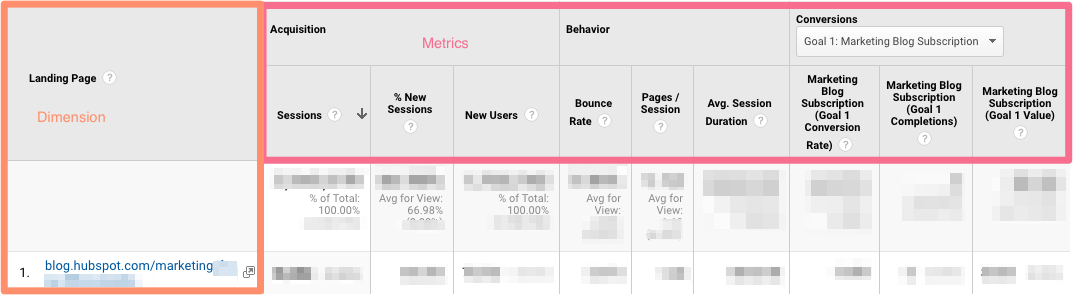
Custom Dimensions and Metrics
GA lets you create custom dimensions and metrics from Analytics data plus non-Analytics data. To give you an idea, suppose you track the membership type of customers who have created an account in your CRM. You could combine this information with page views to see page views by member type.
Or maybe you run a blog. If you want to understand how audience engagement impacts other metrics (like conversions, pages per session, etc.), you could create three custom dimensions for each type of reader:
- Advocate: user who shared one-plus posts on social media
- Subscriber: user who signed up for your email list
- Customer: user who purchased premium access
Using these dimensions will give you invaluable information.
What’s a Google Analytics audience?
An audience is a group of users that have something in common. That commonality could be anything: maybe you’re targeting consumers in Australia, so you have an “Australian audience,” or you want to sell to millennials, so you have a “25-34 audience.”
GA comes with several built-in audiences (including the two I just mentioned, location and age). You don’t need to do a thing to set these up — once you have the tracking code installed, GA will automatically break down your visitor data into these audience reports.
However, you can also create custom audiences. Perhaps you’re only interested in “Australian millennials”; you’d need to make a custom audience that only includes visitors who are A) in Australia and B) between the ages of 25 and 34.
Creating an audience is fairly easy. Honestly, the hardest part is figuring out what you’re trying to accomplish and then identifying the user characteristics that’ll help you do that.
Once you’ve done that, follow these instructions to create a new audience segment. From there you can import a segment to use as the basis for your Audience Report.
That brings us to the next question:
What’s a Google Analytics segment?
A segment is a subset of your data. I like to picture an entire pizza made up of all different slices — one slice has pesto and mozzarella, another has sausages and spicy peppers, another has ham and pineapple, and so on. Metaphorically speaking, each slice is a segment.
You can create segments based on:
- Users (e.g. users who have bought something on your site before, users who have signed up for a consultation, etc.)
- Sessions (e.g. all sessions that were generated from a specific marketing campaign, all sessions where a pricing page was viewed)
- Hits (e.g. all hits where the purchase exceeded $85, all hits where a specific product was added to the cart)
Like audiences, GA provides you with several segments. I wouldn’t stop there: you can get incredibly granular with your segments.
To give you some inspiration, here are a few of HubSpot’s segments:
- Users who viewed a specific product page and watched the demo video
- Users who viewed the same product page and didn’t watch the demo video
- Users who view a specific Academy course page
- Users who view a specific Academy lesson page
- Users who view a blog post and a product page
The sky is your limit — well, that, and GA’s segment cap.
Alright, now let’s look at GA Reports. Remember, you can apply up to four segments at a time to any report.
Google Analytics Reports
GA’s left-hand sidebar can be a bit overwhelming. You’ve got six reporting options (all with confusing, vague names), and clicking on any of those only gives you more options.
Let’s walk through each report together.
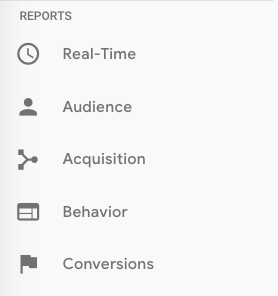
Google Analytics Real-Time Report
As the name suggests, the Real-Time report gives you insight into what’s happening on your site at this very moment. You can see how many visitors are on your site, which pages they’re visiting, which social platforms they’re coming from, where they’re located, and more.
While this report is fun to look at occasionally, it’s probably the least valuable. Here are some ways to use Real-Time:
- See how much traffic you’re getting from a new social or blog post
- Know immediately if a one-day sale or event is driving views and/or conversions
- Make sure tracking URLs and custom events that you’ve just set up are working as they should
These are useful, but as you’ll see, the other reports pack a far greater punch.
Google Analytics Audience Report
The GA Audience report gives you a high-level overview for the property you’re currently looking at. Check this report once a day to get a sense of how you’re trending overall.
Underneath “Overview,” you’ll see “Audiences,” as well as expandable menus for “Demographics,” “Interests,” “Geo,” “Behavior,” “Technology,” “Mobile,” “Cross-Device,” “Custom,” and “Benchmarking.”
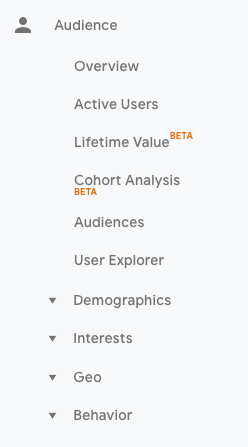
Explore each of these sections to get a sense of what they can tell you about your visitors.
Every section describes an audience.
Active Users
Whoever named this report belongs in the same group as the person who named guinea pigs: “active users” doesn’t refer to users currently on your site — that’s the Real-Time report — and guinea pigs are neither pigs nor from Guinea.
The Active Users report shows you the number of users who visited in the last day (1-day active users), week (7-day active users), two weeks (14-day active users), and four weeks (28-day active users.)
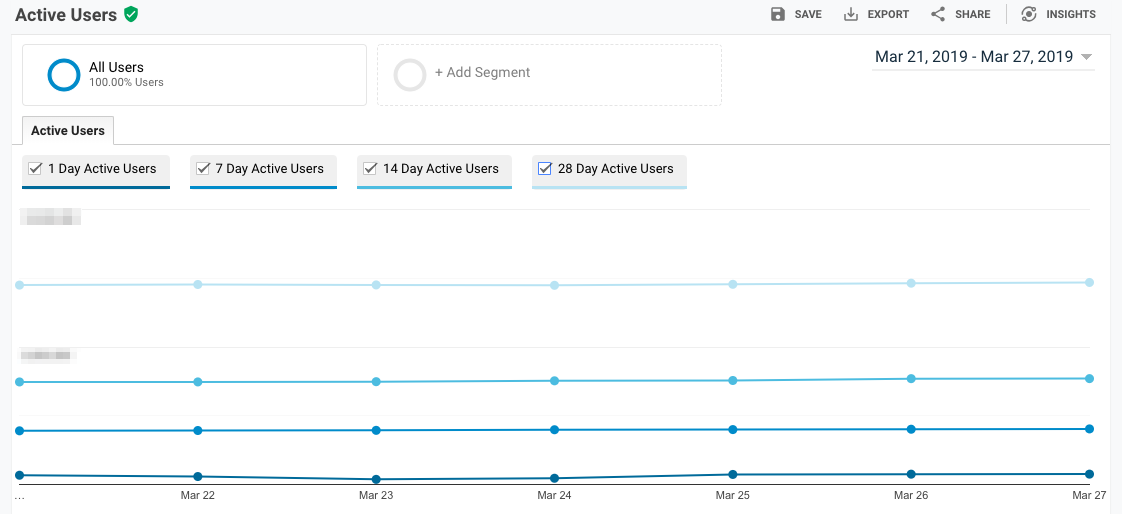
What’s the value of this report, you ask?
If you have more one-day users than longer-term ones, you’re struggling with retention. People aren’t coming back to your site or app — you need to figure out why.
I’d also recommend looking at this report with various segments; for instance, perhaps you see that users in a certain age bracket have much better retention than the average.
Lifetime Value
First things first: do you need a refresher on Customer Lifetime Value (CLV) and how to calculate it? We’ve got you.
The Lifetime Value report gives you a sense of how valuable users are to your company. You can see lifetime value for, say, the users you generated from email marketing versus the ones you acquired from organic search. Armed with this information, you can decide which channel to invest more in.
A few notes: Lifetime Value is capped at 90 days. The Acquisition date range, however — which you can adjust — reflects all the users you acquired in that time frame.
Imagine you’re interested in looking at transactions per user for users you acquired in the week before Black Friday. You’d adjust the date range to that week specifically. Then you’d see the average transactions per user for that cohort over the following 90 days.
Because HubSpot is a SaaS company, not an ecommerce business, I look at goal completions per user, page views per user, and sessions per user by Acquisition Channel.
If my team has recently wrapped up a marketing campaign, I’ll look at the same metrics by Acquisition Campaign.
But if you are in ecommerce and want to see transaction and revenue data, you’ll need to have ecommerce tracking set up.
(By the way, here’s how to track revenue in HubSpot.)
Cohort Analysis
Some people have gone so far as to call Cohort Analysis “the single most powerful report in GA.”
So, how does it work? This report groups users by one characteristic — so far, “Acquisition Date” is the only “Cohort Type” you can use. By the way, Acquisition Date is the day a user first visited your website.
You have several options from there.
- First, pick your cohort size: day, week, or month.
- Next, pick your metric, or what you want to explore for this cohort. It can be further broken down into Per user, Retention, and Total.
- Per user means the total count of that metric divided by the cohort size. So if you choose Transactions per user, for example, you’ll see the average number of transactions per user for that cohort.
- Retention is simple: user retention, or the number of users who returned that day, week or month (determined by the cohort size you selected) divided by the total number of users in that cohort.
- Total: the total number of sessions, transactions, etc. that occurred for that cohort size.
- Choose your date range. GA lets you see up to three months of data.
Now let’s dive into reading the report, because it’s not obvious.
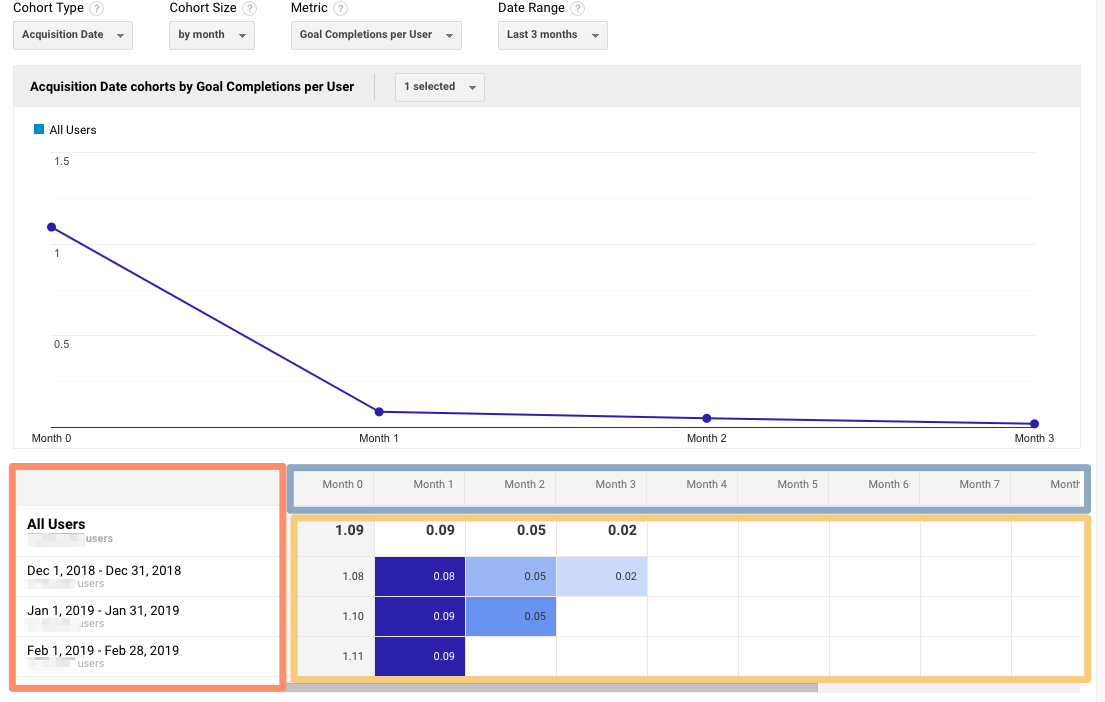
The left-hand column shows you the Cohort Type you picked — Acquisition date, by default — broken down by Cohort Size (day, week, or month).
The first row shows you the totals for all the users in that cohort. Each row underneath that represents the activity in that day, week, or month (in this example, we’re looking at month.)
The row outlined in light blue reflects the Cohort Size you’ve chosen. Remember that data only goes back three months at the max.
The row outlined in yellow shows you the values for the metric you chose (in this case, Goal Completions per User). In the eternal words of Calvin Harris: baby, this what you came for.
Look at the first row. This tells you the average goal completions for the entire cohort in the first month after they were acquired was 1.09. Average goal completions for the entire cohort in the second month after they acquired dropped to 0.09. By the last month, it’s 0.02.
Now look at the next three rows. It looks like average goal completions per user in the first month after they were acquired increased slightly from December to January and again from January to February.
This is pretty usual behavior. Let’s imagine that instead, this report tells us average goal completions per user for February 1-28, 2019 (the last row) was 4.07. Woah! That’s nearly four times as high as December and January.
We’d definitely want to investigate further. And to do so, all we have to do is right-click on the cohort we’re interested in.
Make sure you click on the column if you want the entire day, week, or month analyzed. Click on a cell if you want to analyze only the users who, for example, completed a goal three days after they were acquired on February 27, 2019.

When you right-click, this box will pop up:
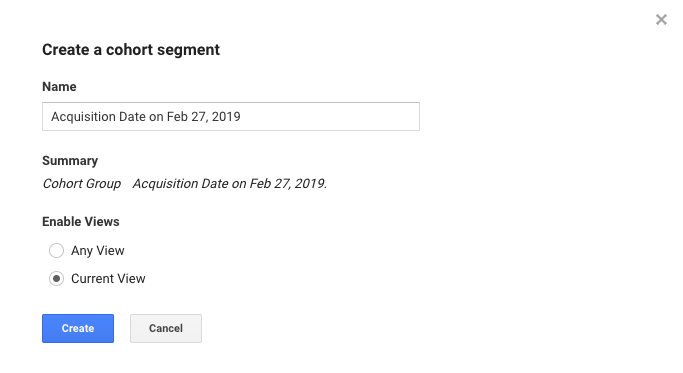
Give this cohort a descriptive name. Change the views to “Any View” if you want to use this segment across your entire property (which I usually recommend), then click “Create.”
Voila — now you can compare this cohort to any other segment in any report you choose.
Google Analytics Acquisition Reports
The Acquisition report breaks down your traffic by source: organic, direct, referral, email, social, paid search, display, affiliate, and (Other). (GA uses the (Other) category when it doesn’t know how to categorize a subset of traffic.)
From All Traffic, you can click into Channels.
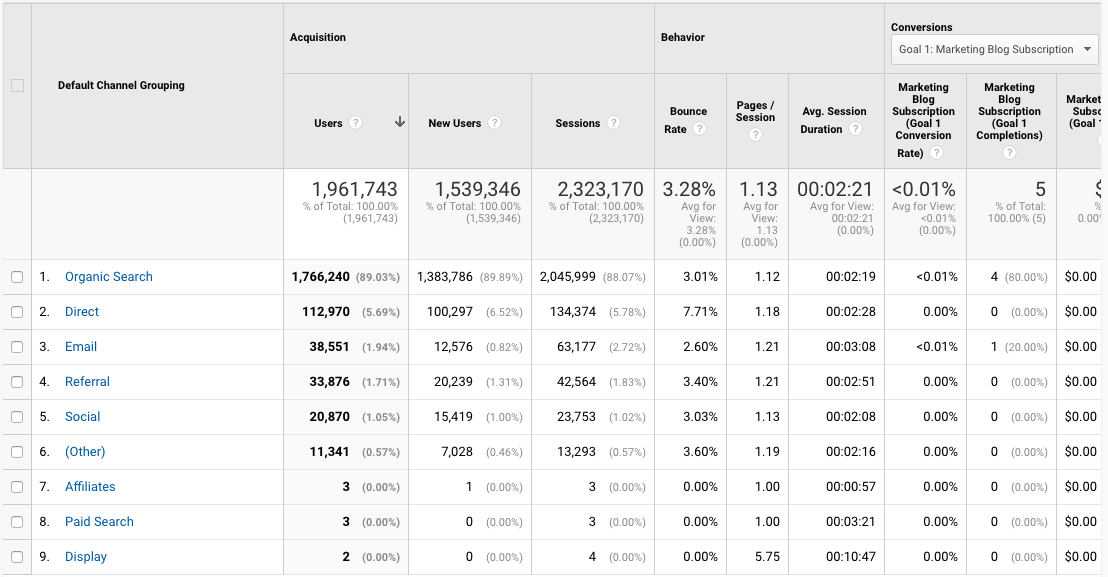
Click on any category to explore each source in detail.
Depending on the category, you’ll see landing pages (which URLs your visitors entered the site on), source (which website brought them to yours), or keyword (which query took them to your site.)
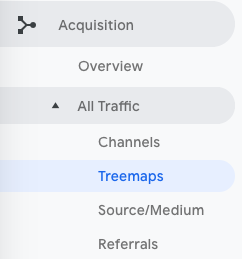
To see this information presented visually, click on All Traffic > Treemaps. This post walks you through how to read and adjust the Treemaps report.
The next report, Source/Medium, breaks down the general category of traffic (which you saw in “Channels”) into the search engine or domain.
It’s useful if you want to get more granular insight into the ways people are coming to your site. For example, you might notice that a whopping 70% of your referral traffic is coming from LinkedIn, while just 5% is coming from Pinterest. Depending on your marketing team’s priorities it may be time to shift focus.
The last report, Referrals, reveals the specific URLs that sent people to your site, e.g. your referral traffic.
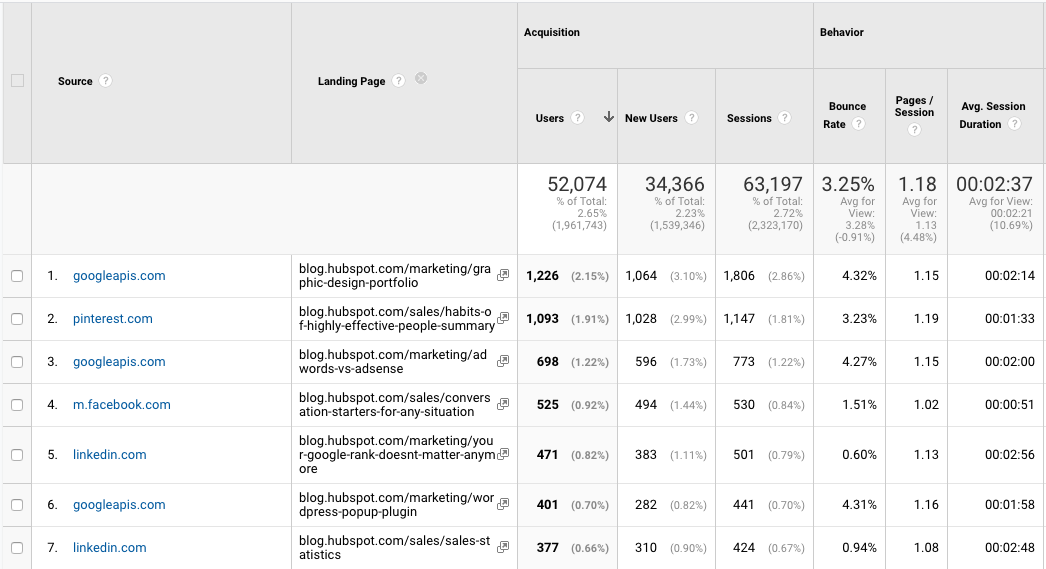
I like to add “Landing page” as a secondary dimension so you can see which pages on your site are receiving the referral traffic.
Google Analytics Behavior Reports
Out of all the reports in GA, I use the Behavior ones the most.
Site Content
This report gives you a review all of the blog posts, landing pages, web pages on your site.
All Pages
Let’s start with Site Content > All Pages. This shows the top-trafficked pages for your current view and/or segment. It’s useful in and of itself — you should always keep a careful eye on your most viewed URLs — but I especially like it when I’m analyzing traffic growth or declines.
To give you an idea, maybe total traffic to my website has dropped 10% month over month. I’d navigate to Site Content > All Pages and change the date range to this month compared to the last month (making sure the days of the week match up).
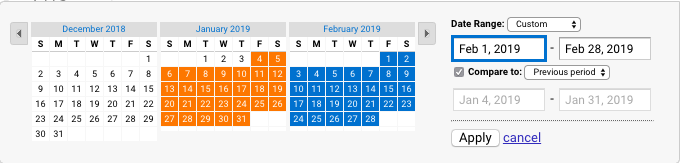
Then I can see the differences in page views by URL:
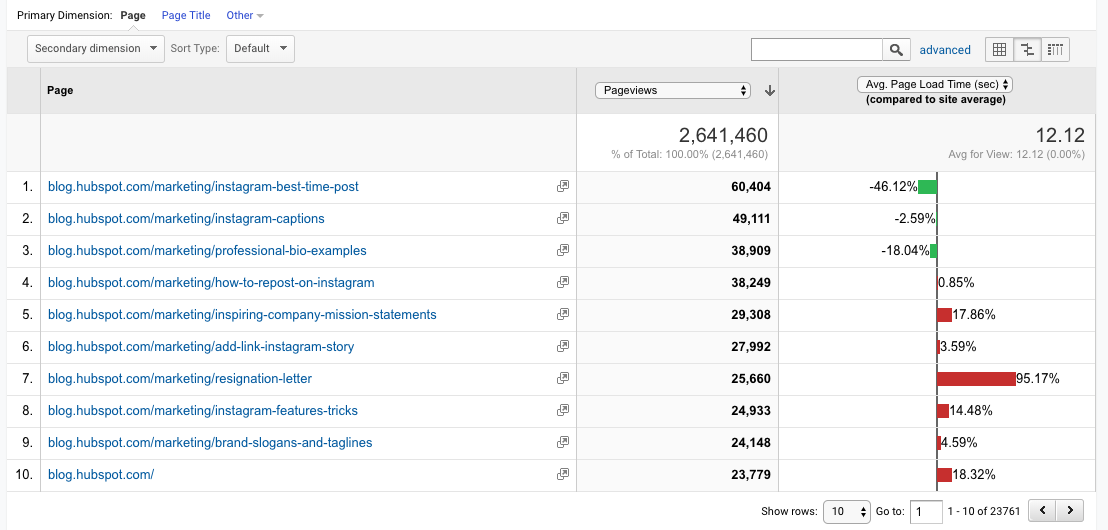
This helps me identify which pages received less traffic and contributed to that decline.
Helpful tip: I like to change the “Sort Type” from “Default” to “Absolute Change” so I see the results sorted by the greatest differences in percentage rather than total views.

I also add Page Title as a secondary dimension so I can see the name of each page alongside its URL.
Content Drilldown
This report breaks down the structure of your site by subdomain and then subfolder. To give you an idea, for HubSpot we can see data for each of our subdomains, including:
- blog.hubspot.com
- developers.hubspot.com
- community.hubspot.com
And so on. If I clicked into blog.hubspot.com, I could then see aggregated data for:
- blog.hubspot.com/sales
- blog.hubspot.com/marketing
- blog.hubspot.com/service
You get the drift. This report is probably most valuable for those managing highly complex properties.
Landing Pages
Landing pages is another one of my favorite reports. GA defines a landing page as the first page in a session — in other words, the visitor’s first interaction with your website.
There are a few ways to slice and dice this report.
First, if you’re interested in the sources (organic, paid social, direct, etc.) driving users to the landing page, you can add Source/Medium as a secondary dimension.
This is basically the opposite version of the report we added earlier.
Second, if you only want to see which landing pages users visited from a specific source, on a specific platform, or within a specific category, you can add the appropriate system segment:
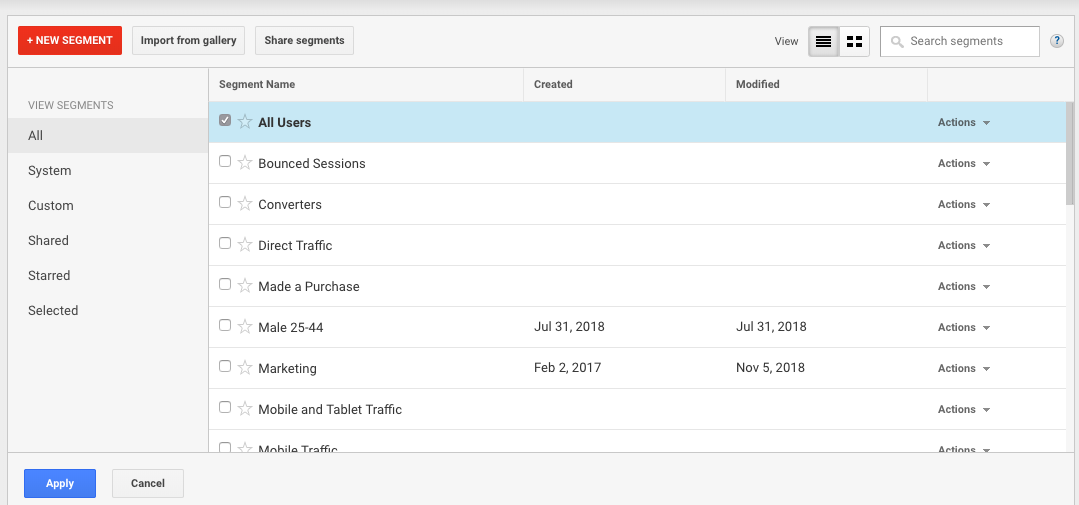
Maybe you’re most interested in the landing pages that mobile and tablet users see — so you choose the Mobile and Tablet Traffic.
Or perhaps you’re curious about users who ended up buying something, so you choose the “Made a Purchase” segment. There are lots of possibilities here.
Exit Pages
This report shows the last pages users visited in their sessions before they left your site.
That’s a little confusing, so let’s use an example.
I want to find a place to grab dinner with my friends so I search, “Mediterranean restaurants near me.” A place that looks good pops up, so I click on it. First, I check out the menu. They have a hummus sampler — yum. Then I click on their press page. It links to a recent article on Eater, so I leave the site to read it. The reviewer loved the food. I’m sold.
The Press page would be my exit page.
You may hear that you should analyze your exit pages to understand why users are leaving your site — I think this example reveals why that strategy doesn’t always make sense. Just because someone has left doesn’t mean anything is wrong with the content.
Check this report out but take the data with a grain of salt.
Site Speed
This report is pretty self-explanatory: it tells you how quickly your site is loading for users. Obviously, the faster the better — not only do faster pages correlate with higher revenue, but Google’s algorithm takes page load time into account.
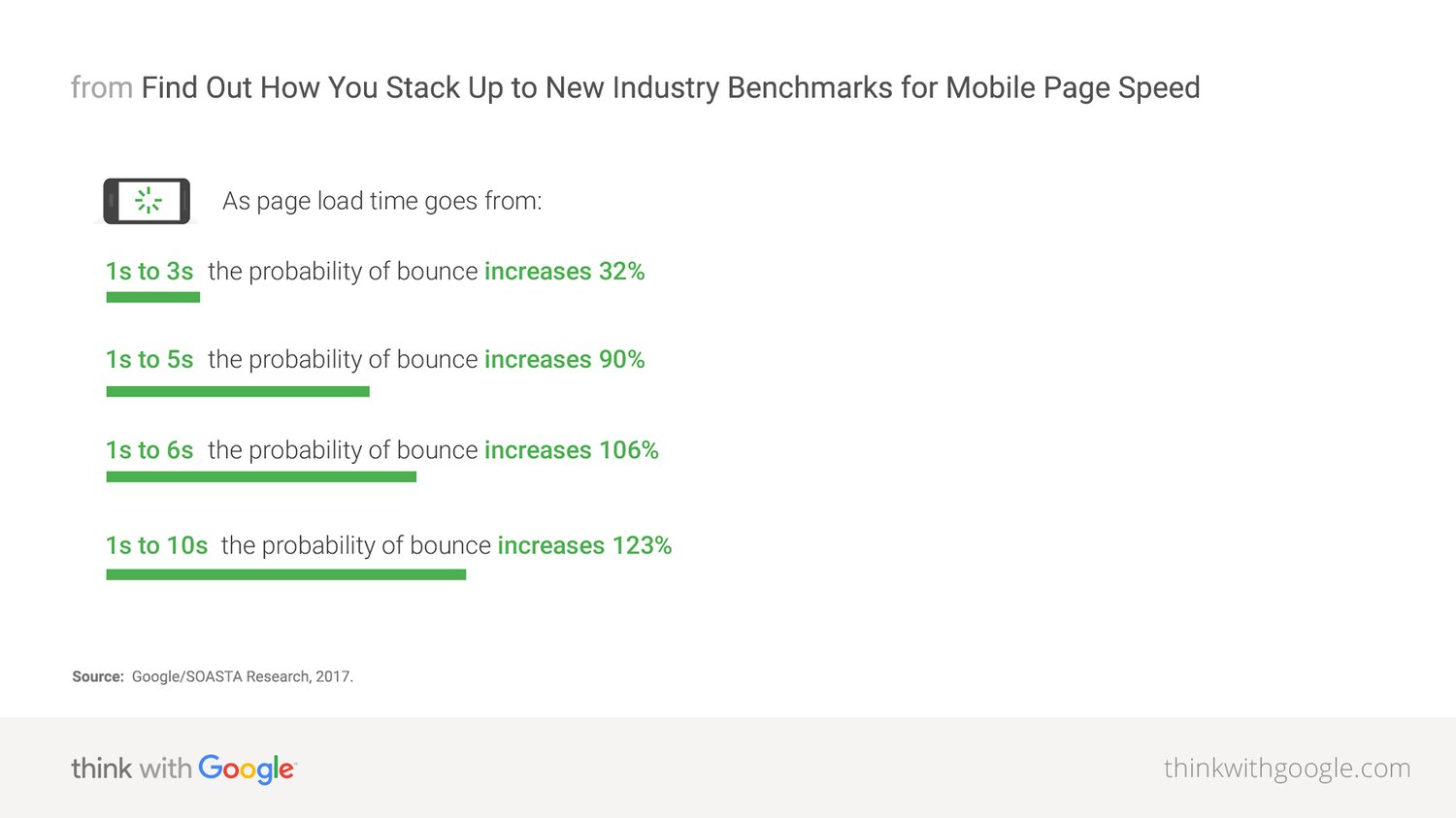
Site Speed Page Timings
This report delves into the average page load times for each URL. I use it to identify the slowest-loading pages on HubSpot’s site with the ultimate goal of figuring out why they’re taking their sweet, sweet time and how to speed them up.
The default metrics are page views and average page load time, but I also recommend looking at:
- Avg. page load time and bounce rate
- Change the Sort Type to “Weighted” so you see the blog posts with the highest page views first
- Avg. page load time and page value
- The latter gives you a sense of how much a specific page contributes to your total revenue
- Looking at these two together helps you find slow-loading pages that are valuable to your bottom line (even if they don’t get a ton of traffic), making them a high priority to fix
Site Search
First things first: if users can search your website, make sure you’ve set up Site Search in GA. You must enable it for every view separately (here are the step-by-step instructions).
Usage
I typically start with the “Usage” report, which tells me how many sessions occurred with and without one-plus searches. In other words, I learn how frequently people used site search for the view and time period I specified.
Search Terms
Here’s where you learn what people are searching for. Look for themes: if you see the same search terms coming up multiple times, there are a few conclusions you could draw.
Either you need to create new content that gives users the information they’re looking for, and/or you need to better surface existing content so it’s easier to find.
Pay attention to the “% Search Exits” column, as this tells you how many users clicked away from the search results page rather than choosing a result. You can usually infer there wasn’t a good answer for their question (or it wasn’t appropriately titled.)
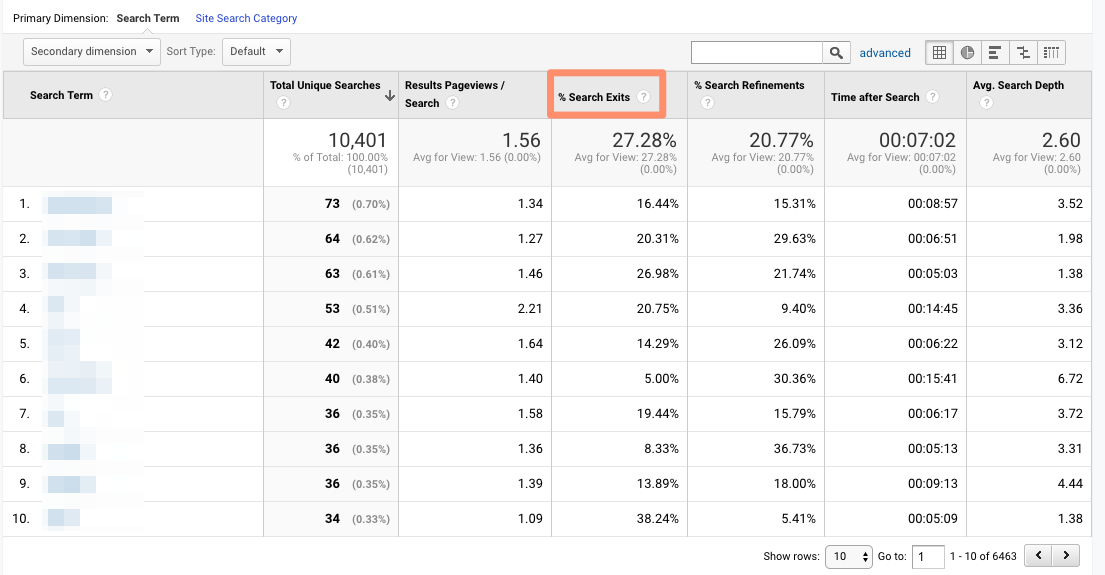
Search Pages
This report displays which pages users are starting searches from. It’s important to think about this contextually. Maybe people are commonly beginning searches from your 404 page — that makes sense and isn’t anything to be alarmed about.
If, on the other hand, they’re starting searches from a product landing page, something’s wrong. The content clearly isn’t living up to the expectations they had when they clicked the ad link.
Loves Data provides a solid overview of GA’s Site Search reports if you want to explore them even further.
Events
A user clicks a button. Then they download a file. Next they watch a video.
No, this isn’t the world’s most boring bedtime story — it’s an example of a GA event. Three events, to be specific.
GA defines events as, “user interactions with content that can be measured independently from a web page or a screen load.”
Those user interactions are up to you; you’ll need to add special code to your site or app that tracks the specific actions you’re interested in. Here are the instructions.
If you’re not excited about events tracking already, I want you to get excited. There are infinite possibilities here: if you have an event set up for watching a product demo, and another for clicking a link to an external review of your tool, you can measure how many times each event happened.
Maybe you discover your video isn’t getting many plays. It’s probably time to optimize the current video, make it easier to find on your site, or create a new one. Or perhaps you see that way more users than you expected are checking out the third-party review of your product.
That tells you users want more social proof and testimonials. Since the review is favorable, you might want to put it front and center on your site.
Top Events
This report tracks the events taking place most frequently — pretty straightforward. You’ll see total events (e.g. how many times that event happened) and unique events (how many sessions included one or more occurrences of that event).
If you’ve set values for your events, this report also shows you how the total value of each event and its average value (or the total value divided by the frequency.)
Pages
In this report, you can see which pages generate the most actions. I typically add “Event Category” as the secondary dimension, then filter for the event I’m most interested in.
To give you an idea, my team tracks “Blog CTA.” This event fires whenever a user clicks a CTA embedded in a blog post. To get to the report below, I added “Event Category” as the second dimension, then filtered for “Page begins with blog.hubspot.com” (so I’d only see URLs on the blog) and “Event Category equals Blog CTA.”
Now I can see which posts generate the most CTA clicks. Hopefully you’re starting to see the power of event tracking!
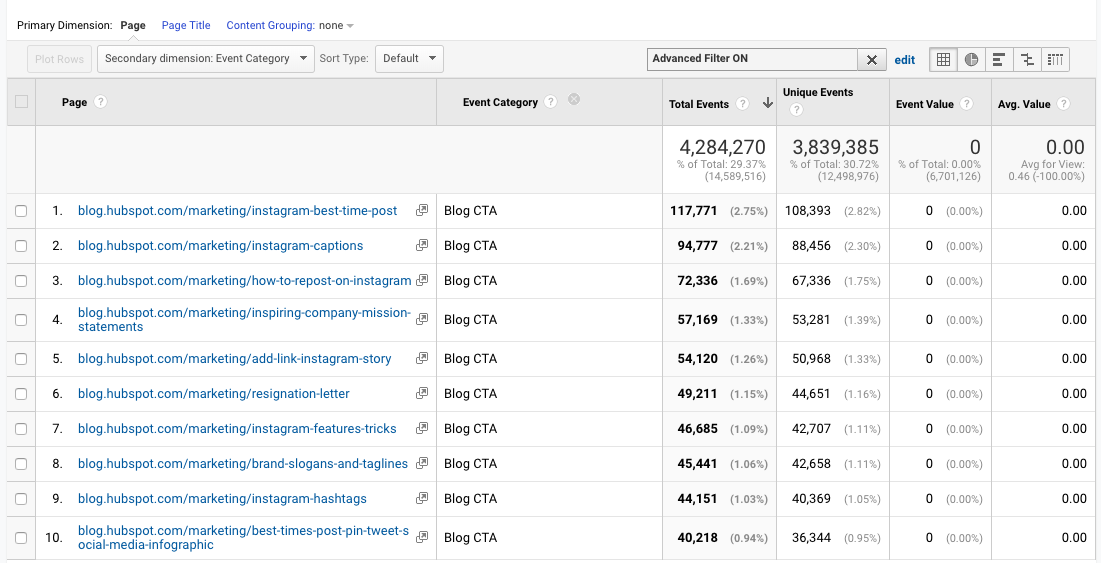
Events Flow
The Events Flow report tracks the order in which events take place on your site. It can tell you:
A) Whether particular events tend to happen first — and if they trigger other events
To give you an idea, maybe users frequently watch your demo video, then click the CTA to schedule a call with a salesperson.
B) Whether certain event categories are more common than others
Imagine you see that videos are played far more often than PDFs are downloaded.
C) Whether users act differently based on segment
For example, perhaps people coming in via organic scroll to the bottom of your pricing page far more than people coming in via social media.
Note: This report is very subject to sampling. (Read more about GA’s data sampling practices here.) Sampled data is usually pretty accurate, but it means the more important the conclusion you’re drawing, the less uncertainty you’ll be able to tolerate.
To reduce the level of sampling, make the date range smaller.
Publisher
If you monetize your website with Google AdSense or Ad Exchange, you can use the Ad Manager and Google Analytics integration to bring information on how your ad units are performing into GA.
I won’t go into any more detail here, but I recommend reading the following resources if you want to know more:
Google Analytics Conversion Reports
If you have a website, you have an objective — probably several — for the people who visit your site.
Ecommerce store owners want their visitors to subscribe to their mailing list, make a user account, add something to their cart, and/or complete the order confirmation process.
Media companies want their visitors to stay on their site for as long as possible and/or view a certain number of pages (all the better to maximize their ad revenue.)
B2B businesses want their visitors to download an ebook, sign up for a webinar, or book a call with a sales rep.
Google Analytics makes it possible to measure all of these things — plus many more.
A goal is essentially a conversion that you’ve defined (which is why this info shows up under the Conversion section.)
There are four main types of goals:
- Destination: This goal is completed when a user reaches a specific page, like a product page, order confirmation page, or thank you page
- Event: This goal is completed when a predefined event fires (like the Events you can set up as, well, Events — think watching a video or sharing something to social media)
- Duration: This goal is completed when a user’s session lasts longer than a pre-set time
- Pages/screens per session: This goal is completed when a user views a specific number of pages (or screens for an app) per session
The first two are insanely useful. The last two are pretty useless. (If you have an interesting use case for Duration or Pages/screens per session, let me know on Twitter @ajavuu. I’d love to be proven wrong.)
Once you’ve identified your goals, take a look at these instructions for creating, editing, and sharing them. This guide on choosing goal values is also quite helpful.
Overview
Head here to learn how you’re doing goal-wise across the board. I get the most from this report when I compare date ranges and/or look at goal completions by segment.
For example, quickly looking at goal completions by device reveals mobile visitors sign up for the blog newsletter much less frequently than desktop and tablet visitors. That could be because it’s hard to sign up for the newsletter on a phone — or it could be mobile users are looking for one thing and ending their session as soon as they’ve found it. I should dig in more to decide which case it is.
Goal URLs
Knowing a goal was completed isn’t helpful in and of itself; you also need to know where it happened. Suppose you’ve embedded the same form in three separate pages on your site.
It’s great that Daenerys Stark from Dragonstone, Blackwater Bay just filled out your form to get in touch with a consultant, but which page did she fill it out on?
The Goal URLs report shows you. It breaks down conversions by “Goal Completion URL” (read: where it went down.)
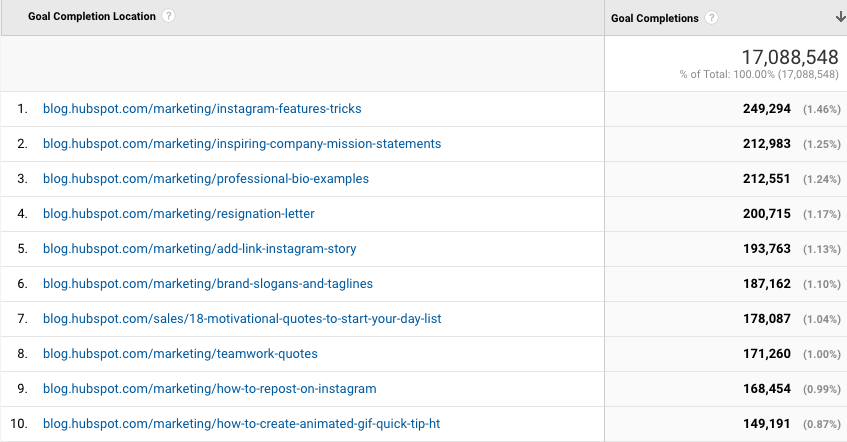
Reverse Goal Path
Reverse Goal Path is the unsung hero of the Conversion section. Well, I’m singing its praises now. This report allows you to see the last three pages a user visited before completing the goal.
It’s useful for goals that aren’t sequential. Maybe you have a contact form that appears in multiple places on your site, or there are two different paths that lead users into buying your ebook. Thanks to this report, you can understand the various ways people arrive at the end destination — and there’s no need to set up a funnel.
I usually filter down to a specific goal completion location or goal previous step 1, 2, or 3.
For example, since I’m interested in seeing which blog posts generated leads from content downloads, I added “Goal Previous Step – 1 containing blog.hubspot.com” to the filter.

Here’s what I got:
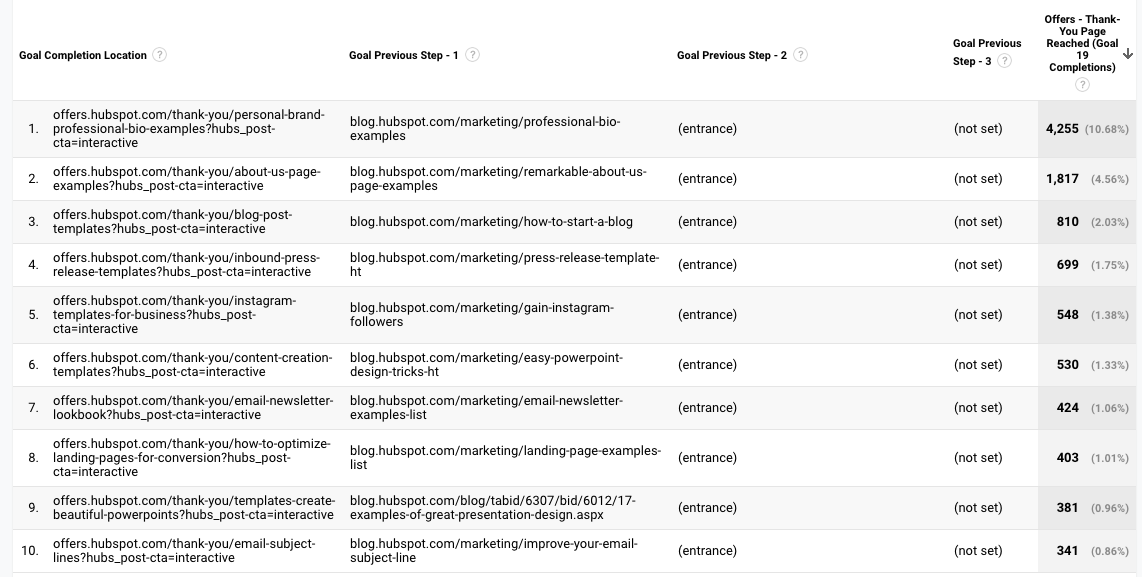
“(Entrance)” means the user came to the site on that step; “(not set)” means the user didn’t complete any steps prior to that one — because they weren’t on the website yet.
For a comprehensive exploration of Reverse Goal Path, take a look at OnlineMetrics’s guide.
Funnel Visualization
For sequential goals, Funnel Visualization is your go-to report.
Going back to the ecommerce example, the last goal would be “Arrived at the order confirmation page.” The goal before that, or goal #3, would be “Clicked checkout.” The goal before that, goal #2, would be “Added something to cart.” And the goal before that, goal #1, would be “Looked at product listing page.”
At each stage, you can see user drop-off. That lets you identify areas where you can improve conversion rates; for example, maybe you lose a lot of users during the checkout process. You change the flow so they can check out as a guest (versus needing to create an account), which dramatically reduces checkout abandonment.
To see this level of detail, you’ll need to map out your goals as a series. If all of your goals are simply the end objective, like “Arrived at the order confirmation page,” you won’t be able to reverse-engineer how users progress.
The Funnel Visualization report also requires you to mark the first step in the goal path as required or not. If you tell GA that yes, the first goal needs to be completed, Funnel Visualization will only show you the sessions where the user first finished goal #1. If a user skips goal #1 and goes straight to goal #2, their session won’t be represented here.
Goal Flow
If Funnel Visualization is the uptight relative who always made you take your elbows off the table and wash your hands before you ate, Goal Flow is the laid-back, fun relative who’d randomly take you out of school to go to the zoo.
All that to say: Goal Flow gives you a lot more freedom than Funnel Visualization. Unlike the latter, Goal Flow shows you all sessions that led to the completed end goal — regardless of whether the user completed the required goal #1 or not.
Another difference from Funnel Visualization: Goal Flow also shows you loopbacks — i.e. when a user goes back to a previous page or refreshes their current one.
If the user skips a step, Funnel Visualization “backfils” it. Goal Flow doesn’t.
If you edit an existing funnel or create a new one, Funnel Visualization will show you all your data from that moment onward. Goal Flow, on the other hand, can show you data from the past.
You can also toggle the Dimension and Level of detail of the report, as well as the segment, to get even more granular.
I recommend looking at various segments to see which convert at the highest and lowest rates — plus where they commonly drop out.
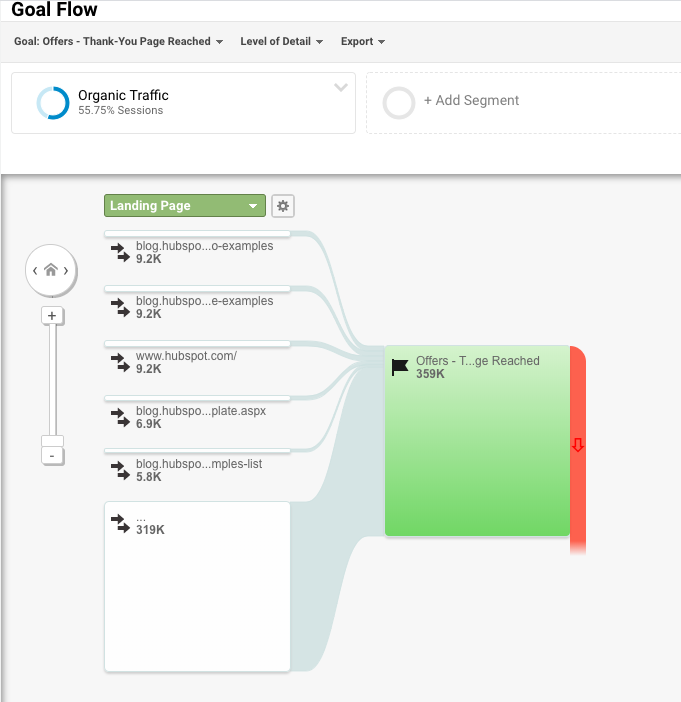
Note: This report is subject to sampling. (Read more about GA’s data sampling practices here.) Sampled data is usually pretty accurate, but it means the more important the conclusion you’re drawing, the less uncertainty you’ll be able to tolerate.
To reduce the level of sampling, make the date range smaller.
Smart Goals
This report is helpful if you’re A) using Google Ads and B) not measuring conversions. Basically, Google uses machine learning to identify your “best” sessions — or those likeliest to generate conversions — and then translates those themes into Smart Goals.
Once you have Smart Goals, you can use them in Google Ads to optimize your ads performance.
Smart Goals are controversial within the marketing community because the data is minimal and businesses will be far better served by setting up their own conversion tracking. Keep that in mind if you decide to use them.
Now You’re Ready to Track
Google Analytics is a highly valuable tool for any business as it gives you tangible data that you can apply to grow your business. Bookmark this guide and come back to it as your data tracking becomes more sophisticated.
Good luck on your Google Analytics journey.
Editor’s note: This post was originally published in August, 2017 and has been updated for comprehensiveness.

How to Gain Your First (or Next) 1,000 Instagram Followers
It’s no secret that business opportunities are quickly growing on Instagram.
In fact, approximately 90% of Instagram’s 1 billion active monthly users follow a business account on the platform. And, while Instagram hasn’t reported its current number of business users, the platform reportedly hosted more than 25 million of these accounts in late 2017.
As the platform continues to grow and develop more interactive features, such as Instagram Stories and Instagram Live, businesses are regularly using it as a tool to humanize brands, recruit future employees, showcase products and company culture, delight customers, and generate new business.
But here’s the deal: Unless you’re famous, it’s really hard to amass a huge following on Instagram without some hard work.
For the average person or business, growing your following takes time and attention on a daily basis.Luckily, there are a few things you can do right away to collect at least 1,000 quality followers for your personal or professional Instagram account. It’s all about knowing where to invest your time and effort.
Let’s discuss a few strategies that will help you gain those followers, from creating a follow-worthy Instagram profile, to using contests, to staying true to your brand. Whether you’re gathering your first 1,000 followers or you just want 1,000 more, keep reading.
1. Create and optimize your profile.
First things first: customize your Instagram profile to make it look good, tell your potential followers who you are, and give them a reason to follow you.
How? Start by making sure your username is recognizable and easily searchable — like your business name. If your business name is already taken, try keeping your business name as the first part of your username so that people searching for your business are more likely to come across you. For example, the Australian activewear line Lorna Jane uses the username @lornajaneactive.
Setting Up Your Account
Step 1. Make sure to add your full business name to the “Name” fieldin the “Options” section. To find “Options,” tap the three lines in the top right corner of the IOS app, followed by “Settings” which will appear at the bottom of the screen next to a gear. If you’re on Android, tap the three dots in the corner. Your business or name will appear under your profile picture and under your username in search.
Step 2. Make sure your profile is public. To make your profile public, open Instagram, open “Options,” and make sure “Private Account” is turned off.
Step 3. Choose a profile picture that’s on-brand with your other social networks, like your company logo.
Step 4. Fill your bio with delightful, actionable, and informative information about your brand. Information like this lets people know what you’re about and gives them a reason to follow you. Include who you are and what you do, and be sure to add a hint of personality.
Here are a few examples for inspiration:
- @WeWork: “Make a life, not just a living.”
- @Oreo: “Playful moments from your favorite cookie.”
- @CalifiaFarms: “Something different, something better. Let us show you what plants can do.”
- @Staples: “We help teams find fulfillment in Worklife by connecting people, ideas and solutions.”
Step 5. Add a link to your bio to make it easy for people to go straight from Instagram to your website if they want to. The space allotted for URLs is precious real estate. When you receive 10,000 followers, you can add swipe up links to your Instagram Stories. Until then, your bio is the only place within Instagram where you can place a clickable link, so use it wisely. We recommend using a shortened, customized Bitly link to make it more clickable.
Step 6. Finally, enable notifications so you can see when people share or comment on your photos. This’ll let you engage with them more quickly— just like a lot of companies do on Twitter. To enable notifications, go to “Options” and then “Push Notification Settings.” Select “From Everyone” for every category.
A word to the wise: We don’t recommend you link your Instagram account to Twitter and Facebook so your Instagram posts are automatically published on those other accounts. Post types are different.
2. Designate a content creator.
Just like there should be one (maybe two) people managing your other social media accounts, there should only be one or two people managing your Instagram account. If possible, choose someone who has experience using a personal Instagram account, and therefore “gets” the platform — and be sure they know all the handy features Instagram has to offer.
If you work for a large organization, you might find that a lot of people want to have a say in what’s posted. That’s when an organized request or guidelines document comes in hand. This document should inform people how to request a post on your Instagram account, when, the value of the post, and why.
3. Follow photography and editing best practices.
On Instagram, post quality matters. A lot. Your Twitter followers might forgive a few bad tweets, but a bad photo on Instagram is a big no-no.
Fortunately, you don’t have to take a photography course to be a good Instagram poster — nor do you have to practice for weeks before you start. But you should get familiar with basic photography tips and photo editing apps.
Photography Best Practices
Since Instagram is a mobile app, chances are, most of the photos you post to Instagram will be taken on your mobile device. That’s not just okay; it’s expected. While some brands use professional photography for their Instagram photos, most use smartphones — and that’s the vibe that Instagram is meant for, anyway.
Here are some highlights:
- Focus on one subject at a time.
- Embrace negative space.
- Find interesting perspectives.
- Look for symmetry.
- Capture small details.
- Make your followers laugh.
Edit photos before you post.
Instagram has some basic editing capabilities, but oftentimes, they aren’t adequate to make a picture really, really great. Most of your photos should go through at least one or two other photo editing apps on your mobile phone before you open them in Instagram for the first time.
Additionally, consider creating a cohesive Instagram theme across your feed, so anyone visiting your account for the first time can get a sense for your brand.
4. Set a regular posting schedule.
Once you’ve created and optimized your profile, have someone manning it, and know a thing or two about phone photography and photo editing, it’s time to start posting.
It’s a good idea to have a solid number of great posts up — maybe 15 or so— before you start really engaging people and working down this list. That way, when people visit your profile, they’ll see a full screen of photos instead of just a handful, so they know you’ll be posting great content regularly.
To start posting on Instagram, first download this social media content calendar template and start planning out your Instagram posts. Over time, you’ll want to build up a backlog of photos for times of need, like the weekends or when you go on vacation.
Keep your target persona in mind when you first start planning out your posting schedule, as that can drastically change your posting timing and frequency— especially if you’re targeting an audience in a different time zone. (Download this free template for creating buyer personas if you don’t have a few already.)
Optimizing your schedule for your specific audience might take time and experimentation.
Here are a few of our best practices:
- The very best times to post on Instagram seem to beMondays and Thursdays at any time except between 3:00–4:00 p.m.in the time zone of your target persona. (For a United States audience, your best bet is to combine Eastern and Central time zones, For audiences located outside the U.S., use whichever time zones your target audience uses.)
- Posting at 5:00 a.m. CDT from Tuesday to Friday generates some of the highest engagement. This is because people tend to check their phones when they wake up.
- If you post on weekends, try to do so around 11:00 a.m, CDT on Saturday.
Because Instagram is primarily an app for use on mobile devices, users tend to use the network all the time, any time. According to a recent Pew Research study, a majority of U.S. Instagram users are on the app daily, although many users engage with content more during off-work hours than during the workday.
Some businesses have also seen success with posting at 2:00 a.m., 5:00 p.m., and Wednesdays at 7:00 p.m. Experiment with these to see if they work with your audience.
5. Curate some of your content.
Although it’s best to have only one or two people manning your account, one or two people can’t be everywhere at once taking photos. What about that fun sushi night the engineers had last night? Or the event your head of sales spoke at earlier this week?
There’s a whole breadth of content you’ll want to post to Instagram, and more often than not, one person won’t be able to keep track of it all.
One solution? Create a system where you can curate photos and content from members of your team. There are a few ways to do this. One is to create a specific email address for employees to send their photos, short videos, memes, hyper-lapses, and so on.
Just encourage people to put a subject line on these emails so you can more easily sort through the photos they’re sending. While this doesn’t seem like the smoothest way to curate photos, it’s actually the easiest for the people sending you photos— and the easier you can make it for them to send content, the more content you’ll get.
If your team shares a Box or Dropbox account, you could also create a shared folder where people can automatically drop their photos and videos. This just makes a few more steps for the people sending you the content, and not everyone might have that app downloaded on their phones.
6.Use a consistent, platform-specific brand voice.
Photos and videos might be the most important part of your Instagram posts, but captions, comments, and other text should never be an afterthought. If you’re managing a channel for a brand or have more than one Instagram manager, consider developing a consistent voice that humanizes your brand.
This shows potential followers that you are credible and relatable, rather than formal or intimidating.
When developing a voice, you should keep the platform and your audience in mind. For example, many influencers and prominent accounts on Instagram have a very casual voice and style, but still remain professional and on-brand. Once you’ve got your voice down, make sure it stays consistent and natural in your captions, comments, messages and your bio.
7. Write engaging, shareable captions.
Captions are an essential part of your post—the icing on the cake, if you will. Consistently great captions can do wonders for humanizing your brand, winning over followers, and making your content more shareable— thereby giving you more exposure.
Here are a few things you might see in a winning Instagram caption:
- Clever or Witty Comments
- Calls to Action
- Relevant Emojis
- Hashtags
Clever or Witty Comments
Some brands and influencers have used clever or witty captions, or even audience-appropriate jokes to further humanize themselves on Instagram.
My colleague Kelly Hendrickson, HubSpot’s Social Media Manager, says that she loves Netflix’s account and sub-accounts, particularly because of the post captions: “They have such a clear brand voice, and you laugh along with them. They’re in on the joke, just like one of your friends.”
Here’s one example where Netflix makes a meme to describe what it’s like “watching my friends’ stories … [and] hoping to catch a glimpse of myself”:
 Netflix’s voice is casual, trendy, and humorous while still staying on brand. In the post above, the caption is funny, authentic, and relatable: who hasn’t flipped through a friend’s Instagram Story with the hope that you’ll be featured?
Calls to Action
Another way to increase the shareability of your caption and engage your followers is to ask questions or have some sort of call-to-action in the captions of your photos. For example, you might say, “Double-tap if you find this funny,” or “Share your story in the comments.”
In the example below, we asked followers of the @HubSpot Instagram account to leave a comment with a book that’s had a positive impact on their work, along with tagging the author:
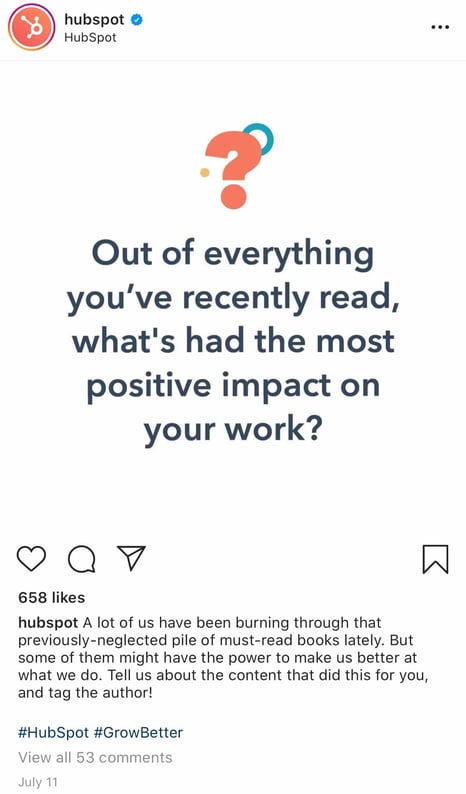
Relevant Emojis
According to a recent study, certain emojis can actually spike engagement such as likes, comments, and shares on platforms including Instagram.
Adding just a few relevant emojis can add even more personality to your posts. It could also make them even more noticeable on an Instagram feed. In the post below, Danielle Gray, a beauty expert with over 50K followers, (@Stylenbeautydoc) includes witty text with relevant emojis to make the post pop.

Along with the three items listed above, you’ll also want to include hashtags.
8. Optimize posts with relevant hashtags.
On Instagram, a hashtag ties the conversations of different users who wouldn’t already be connected into a single stream. If you use relevant hashtags, your posts will get exposure to a wider audience than the people who already follow you or know about your brand.
The key to using hashtags effectively is to use them smartly and sparingly. Try to limit the number of hashtags per caption to around three. Similarly, don’t use “like for like” hashtags, like #like4like or #like4likes. This is a dirty tactic that’ll leave you with a whole bunch of low-quality followers.
To find the hashtags your audience might be using, do a little research on relevant hashtags in your niche or industry. The easiest way to do this research is in the Instagram app itself, in the “explore” tab (i.e. the magnifying glass icon).
When you search for one hashtag, it’ll show you a list of related hashtags at the top of your screen. For example, when I search for #digitalmarketingstrategy on Instagram, it shows me relevant hashtags like #digitalmarketingexpert, #digitalmarketing, and so on.
 To help relate to your followers on a personal level, you might consider hopping on hashtag trends like #tbt (“Throwback Thursday”), #MotivationMonday, #TransformationTuesday, or hashtags that are trending at any given time.
Here’s a post from @updogkombucha, a kombucha company with over 10K followers on its Instagram account, using the #InternationalWomensDay hashtag:

Once you build up a bit of a following, you can try creating your own hashtags — like your company name or a slogan that applies to a lot of your photos. This is a great way to build up your brand on the platform and build a more cohesive presence.
1. Engage with users through follows, likes, and comments.
Instagram is very much a community, and one great way to get involved in that community is to find people who post pictures that interest you, and follow their accounts and interact with their content. It’s the most natural way to draw attention to your own Instagram account. It may also get your foot in the door in the platform’s community.
That does two things for you: for one, when they get the notification that you’ve followed them, they might check out your account and decide whether or not to follow you. (This is why it’s important to have some great content on there before you start reaching out to others.)
Secondly, it means you’ll be seeing their recent posts in your feed, so you can Like and interact with them if you choose to.
As you build a following, celebrate your followers and show you appreciate them by responding to their comments, and even following them and engaging with their own posts.
2. Cross-promote with users who have audiences similar to your own.
Once you build a solid relationship with some of the folks behind these accounts that have a similar audience to your own, you might ask to do some co-promotion on each others’ accounts.
The more natural and less spammy you can make the content of these cross-promotions— especially the captions — the better. It also helps to be picky about them, and don’t do them very often.
For instance, influencer @Belleoftheball45, who has more than 70K followers, posted a sponsored image of herself on the beach with Coppertone sunscreen. @CoppertoneUSA then re-posted the image. By cross-promoting, both Abigail and Coppertone can reach new audiences and grow their followings.

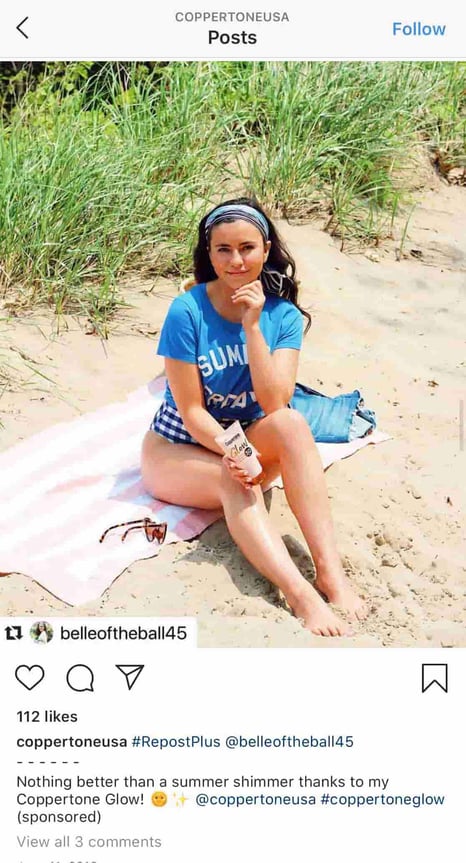
When someone searches for the hashtag #Coppertoneusa, or takes a look at Coppertone USA’s Instagram, they’ll find Abigail’s account and might choose to follow her. At the same time, any followers of Abigail might click on the post and send Coppertone a follow, as well, particularly since Abigail is promoting Coppertone products. It’s a win-win for both accounts.
3. Run Instagram contests to encourage engagement.
Another great way to expand your reach while increasing engagement on your photos is to publish a post promoting a contest, and then ask people to follow your account and Like or comment on the photo in order to enter.
I mean, come on … who doesn’t love to win free stuff?
You might add a UGC (User-Generated Content) element to the contest, too, where people post a photo of their own and use a specific hashtag along with following your account.
Here’s an example of a post from @PlayaBowlsNortheastern, where followers were asked to follow each of Playa Bowls’ three business accounts, and tag a friend to follow each account, as well. In exchange, follower’s have the chance to win a free bowl:

4. Use Instagram Stories and explore its interactive features.
Instagram has always offered the opportunity to post beautiful, curated photos to represent your brand. However, with the introduction of ephemeral Instagram Stories, brands can also share on-the-fly, behind-the-scenes looks for 24 hours that may not be as polished as a published photo, but give your brand more personality on the platform.
One look at Snapchat’s explosion in popularity demonstrates that social media users are clearly responding positively to ephemeral photo and video sharing. Instagram Stories let brands engage with users in different ways to cultivate brand loyalty and appeal.
Although Snapchat pioneered this feature, Instagram Stories now has over400 million daily users, which is double the amount ofSnap’s user base.
Along with sharing video clips and static images through Instagram Stories, users can also use interactive features like polls to gain more engagement and learn more about their Instagram audiences. Once a user is verified or has over 10,000 followers, they can even include a link to a webpage within a story.
How Brands Can Use Instagram Stories
Instagram Stories disappear after 24 hours, unless they are marked as a “Featured Story.” Featured stories will show up at the top of your profile between the photo feed and your bio. We can’t embed Instagram Stories just yet, but you can view HubSpot’s Instagram page to see what we’ve featured.
Here are a few other brands we recommend following to see what they’re sharing:
Rachel Brathen (@yoga_girl) is a yoga teacher and entrepreneur in Aruba who uses Instagram Stories to document the behind-the-scenes action of building a yoga studio. While her Instagram portfolio features beautiful, professional photos and videos of her in yoga poses, her Stories feature her dog sitting in on staff meetings, her team unwrapping amethyst crystals to decorate her studio, and artists painting the walls.
She uses Stories to showcase the other side of her brand to her 2 million followers in an authentic and unpolished way, and to keep her followers apprised of what she does every day (besides yoga, of course).
Dana Shultz (@miniamlistbaker) publishes easy vegan and gluten-free recipes on her blog. Her Stories feature neat how-to videos of her making breakfast and testing out new recipes in her kitchen. The behind-the-scenes aspect of her Stories provide a lot of human context for her blog’s brand, and everybody loves a good how-to video.
Casper (@casper) publishes quirky Instagram content to advertise their mattresses — without overtly doing so. The main theme of their content? Staying in is better than going out (because you can stay in and lay on a comfy Casper mattress, naturally).
They’ve even created a gallery for followers to use as backdrops for their Snapchat and Instagram stories to make it look like they’re out at a party, when they’re really laying in bed. One of their latest Instagram Stories featured someone watching “The Sopranos” in bed, with the caption:”Who needs plans when you have five more seasons?” This video supports Casper’s campaign to stay in bed with a very real look at what millions of people do when they’re hanging out at home.
Here are our tips for using Instagram Stories for your brand:
- Whether it’s funny, sad, or unique, be authentic. Your photo gallery is where content can be perfect and polished. Instagram Stories are for the raw, unscripted, and un-retouched. Use Stories to share the other side of your brand that followers might not be able to glean elsewhere. Do you have a dog-friendly office? Is your team trying out the Mannequin Challenge? Start filming to showcase the more human side of your brand.
- Go behind-the-scenes. These are by far our favorite type of content for ephemeral video sharing. Show followers what goes into the planning of an event or the launching of a product, and make it fun. Your followers want to feel included and in-the-know, and you could use Stories to cultivate a brand loyalty program that only rewards people who check out your content.
- Embrace interactivity. As mentioned above, Instagram allows you to add interactive stickers to your stories. For example, you can ask your audience to vote in a poll, rate something on a sliding scale, or send you burning questions.These features might help you learn about your audience while also engaging with them.
5. Use the Live Video feature.
Instagram also lets users record and share live videos, another content format that’s proven to be hugely popular on other social networks. What’s unique about live videos on Instagram? They disappear when users stop filming.
This authentic, bi-directional experience lets brands share unscripted, raw moments with their audience to incorporate human elements into a social media platform that’s highly edited and polished in its traditional use.
Since the Live feature launched, Instagram has added even more features that may enable more engagement or interactions from viewers. For example, users can now launch live video Q&As or add music to live streams.
6. Share your profile link on your website and social media channels.
Place a follow button on your homepage, your “About Us” page, and various other places on your website. Consider adding an Instagram badge to your website that hyperlinks to your account.
Here’s what the badge could look like:

If your brand has brick-and-mortar locations, put out a good ol’ print call-to-action letting people know you have an Instagram account and encouraging them to follow you.
Also, be sure to promote your Instagram account on your other social media accounts. Chances are, the folks who already follow you on Facebook and Twitter will also follow you on Instagram without much prodding. Let those followers know you’re on Instagram and encourage them to follow you there by including a link to your Instagram account in the bios and posts of those other social media accounts.
So give it a shot: Make a profile and start posting, testing, tweaking, and promoting your account. Garnering a following on Instagram won’t happen overnight, but the stronger of a foundation you create on your account in in your niche Instagram community, the higher quality your followers will be.
7. Post user-generated content.
Similar to cross-promotion, brands can publish user-generated content to show appreciation for existing customers, while appealing to that follower’s audience.
If I see a regular person endorsing a product on Instagram, I’m more likely to believe they actually really like the product — but if I see a celebrity on TV promoting the product, I’m more doubtful. Ultimately, user-generated content can be an excellent strategy when trying to increase brand awareness and trust in your products or services.
For instance, @Daveskillerbread posted an image of a customer holding one of the company’s products — but not just any customer. They posted an image of @Caitlynhunter_nutrition, a registered dietitian with 1,730 followers of her own:
 Posting an Caitlyn holding Dave’s bread is a smart move. First, she’s a dietician with an Instagram account full of actionable health-oriented tips. She’s unlikely to endorse a product she doesn’t truly believe will serve her audience, who are most likely looking for tips related to health and wellness — which means her audience is the perfect demographic for Dave’s Killer Bread to reach.
Plus, Dave’s Killer Bread’s audience, another group of health-minded individuals, will likely be interested in following Caitlyn for more health-related tips. Simply put, the two brands have similar audiences and brands that align well, which is why it’s a good opportunity for Dave’s Killer Bread to use Caitlyn’s content as content for their own account.
8. Diversify your audience to resonate with different types of users.
As your followers grow, it can be tricky to identify what types of content will appeal to them. This is why it might be a good idea to divide your audience into sub-groups and target your content to various demographics.
For instance, if you have 200K followers, those followers probably come from different regions of the world, have different interests and hobbies, and even different careers. Rather than trying to post all-encompassing content that will satisfy all your followers at once, consider conducting some analytics research to separate them into smaller sub-groups.
Take Starbucks as a good example of this. @Starbucks has 18 million followers. There’s no way the global coffee brand can post content to satisfy 18 million people at once — and it doesn’t try to. Instead, Starbucks regularly posts more exclusive content geared towards particular groups, such as this post they published recently celebrating #TeacherAppreciationWeek:
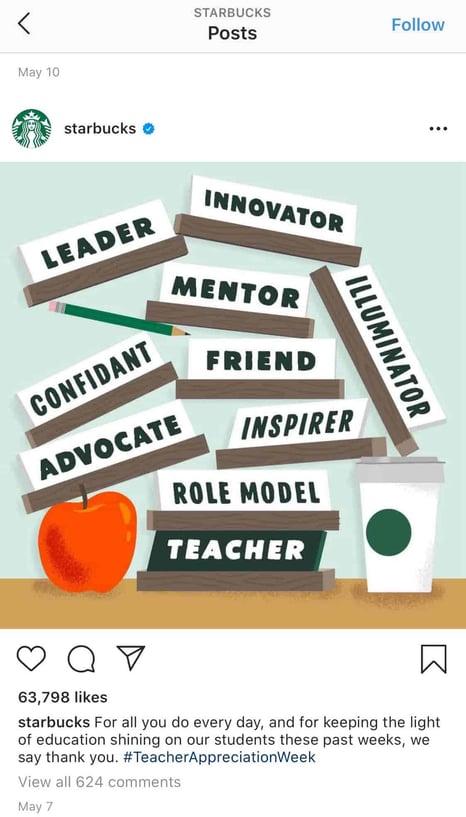
This post won’t appeal to the majority of Starbucks followers who aren’t teachers, but that’s okay. You don’t always need to post content to please everyone. Instead, you want to consistently demonstrate your brand’s ability to connect and engage with sub-groups and post what aligns with your own brand’s values.
Education is something that matters to Starbucks, so by posting about teachers, they’re doing more to demonstrate their own values than they are appealing to everyone. Which is kind of the point, isn’t it?
9. Apply for a verification badge.
When an account on Instagram is verified, it has a blue dot, called a badge, next to the username. When another user comes across this profile or finds the verified username in search, the blue dot confirms to them that the account is the business, individual, or brand that it’s claiming to be.
While Instagram has a list of eligibility requirements for the badge, the platform does allow users to apply for one. You can learn more about that process inInstagram’s help center.
Quality Over Quantity Still Matters
Ultimately, it’s important to focus less on the number of followers you have, and more on the quality of content you create. Your audience will grow naturally over the long-haul if you put effort and time into creating engaging, informative, or inspirational content without worrying about “quick fixes” for boosts in followers.
Plus, if you think about it, your followers don’t continue to follow you because of the size of your audience. They continue to follow you because of the content you create.
Sure, maybe I’ve initially followed an influencer because she had 200K followers, which signified to me that she was worth following — otherwise, why would 200K people be looking at her content?
But that doesn’t mean I’ve continued to follow influencers or brands because of the size of their audience. I’ve unfollowed plenty of mega-influencers or brands with thousands — if not millions — of followers, simply because I was no longer impressed with their posts.
You want to play the long game on Instagram, and that starts with focusing on what you can control — namely, the quality of the content you produce, the messages you promote, and the brand you build.
Ironically, I’m willing to bet the less you worry about the number of followers you have, the more community members you’ll attract.

4 Major Ways Your Creative Agency Can Make Money
Every once in a while, I see a commercial that makes me think, “Well, who did they get to do that?”
As a marketer, it’s something I can’t really help. I immediately strategize about target audiences and selling tactics — especially during commercials for the Super Bowl.
When a video really impresses me, I research the advertising agency that conceptualized the campaign for its clients — like this one, from Sarto Restaurant:
I loved how this commercial mixed funky music with action shots. Plus, it was intertwined with an interview with the Chef Du Cuisine. Hearing about the menu, inspirations about the restaurant, and seeing the type of food being made gave me a good idea of the atmosphere in Sarto.
My admiration for the commercial led me to Erba, a creative agency offering a full range of marketing and advertising services. Companies leverage agencies like Erba to produce professional, effective campaigns.
It’s likely that the team at Sarto wanted to use an agency like Erba to raise awareness of their restaurant. But what else can creative agencies offer? And how do they make money? Let’s explore those questions next.
What is a creative agency? What do they do?
An agency is an organization that offers a list of services for one specific industry. A creative agency, then, is one that offers services related to marketing and advertising.
For instance, some creative agencies you’ll see are ones that offer marketing services, social media scheduling, advertising and branding, influencer marketing, and more. These agencies usually have different tiers or models for how they operate, and what they offer.
Creative agencies take on a large workload. They usually have a client base and execute different projects for them from start-to-finish. For instance, an influencer agency might find brand deals that relate to their niche.
If this sounds pretty broad, that’s because marketing agencies usually are — there’s so many niches and specialties agencies can tackle. Because of the slight ambiguity, you might be wondering how these agencies operate, or even … how they make money.
Agencies are a business. Businesses have plans in place to earn revenue, but there are some exceptions that are unique to agencies. Next, let’s dive into a list of ways agencies stay afloat.
1. Pricing Models
Every company needs a pricing model in order to charge for their services, and agencies are no exception. Pricing models are determined by the agency and should reflect the value of the services offered, as well as industry standards.
Some pricing models are more beneficial to agencies than others — it differs from company to company. Maybe your pricing model is based on one you’ve seen from a different agency, but it doesn’t quite work for your business goals.
If you’re struggling to come up with a pricing model, or your agency is outgrowing your current strategy, refer to this rundown of common ones for agencies.
Fixed Rate
If you’ve ever put down a deposit for a service, and then paid the rest of the rate after completion, you’ve participated in a fixed-rate model. This model is determined by calculating how many hours a project takes, combined with the hourly rate. That amount is split into two fees: One upfront, and one due after the project.
For instance, let’s say I charge $125 for social media services for one campaign. In a fixed rate model, this price is made up of projected hours needed and how much I charge per hour. In the beginning, my client and I agree to a $50 deposit, with the rest due after.
This pricing model can be useful if your agency works case by case, as this method also includes the retainer approach. In a nutshell, you wouldn’t need to think about how much to charge for each client because it would already be determined.
However, agencies can run into an issue if the project takes much more than the projected hour amount. If that happens, the pricing should reflect the work, but that’s difficult if the fee is already set. To alleviate this, specify your offerings — for instance, one Twitter campaign for one month could be its own rate.
Value-based
This pricing model is determined after a project’s completion. Based on ROI, the price will be determined according to what the agency and clients agree on, sharing risk and rewards.
To implement this model, you need to work through a few steps. First, you’ll determine the clients’ goals and make sure they’re measurable. In this case, let’s say the client wants to boost conversion rates with an ad campaign.
After identifying the client’s goals, estimating a price, and reminding the client that it’s subject to change upon completion. Failing to meet goals might negate a lower price, while exceeding them would have the opposite effect.
For this pricing model to work, agencies need a proven track record of exceeding customer expectations. That’s why, it can be hard to sell this model if you work for a startup — you’d have little history to show past work.
This model is a good choice for agencies with a solid reputation and history of high-performing projects. Showing proof of the value you give clients reinforces your rate and makes them more comfortable when choosing your agency.
Hourly Rate
An hourly rate is determined by the amount of hours a company spends working on a project for a client. In this scenario, if my social media agency ran a client’s social media channels for the duration of a campaign, I would charge based on the amount of hours spent doing that.
If I spent 40 hours working on a campaign at a rate of $125/hr, then I would earn $5,000 from that client. Generally, agencies come up with their hourly rate based on the seniority of the employee(s) involved, or agree on a set price across the board.
This is a useful pricing model if your organization has multiple specializations. You can offer one price for the same set of services across the board. Or, you can assign the best employees for certain projects based on bandwidth.
However, it can be hard to predict cash flow with this model. It can also place weariness on the client — the longer it takes to do the work, the more you get paid. So clients might be unsure about efficiency during the length of their project.
2. Advertising
Agencies often offer advertising services to help the client broadcast the campaign they’ve helped the client create … Typically, agencies will take a percentage of the ROI from those ads, which is one way to make extra revenue.
In the same vein, agencies can also run ads for their own company. In this case, all revenue from ads would go back directly to the organization. Let’s look at those options more in-depth here.
Paid Media
Agencies can charge clients based on ROI of paid media. Ads, search results, and sponsored content that’s paid to be promoted are common examples of this ad type. Usually, they’re used to expand reach and traffic.
For example, If I were running a social media campaign for a client, and one of my content marketing strategies included paid ads, I might consider including the cost it takes to run them in the total price I charge the client. Alternatively, I could also choose to take a percentage of the ROI after the campaign is over.
The inclusion of paid ad return in projects ensures the work gets paid for, regardless of results. You can also use paid media to promote your company. Because paid media supports waiting until the end of a campaign to charge, this strategy works well with a value-based pricing model.
Owned Media
Owned media simply means all the content created by your agency. So if my social media company makes blog posts, tweets, main feed posts, pins, and other multimedia elements, those are all considered “owned”. The purpose of this type of media is to nurture leads.
Agencies can charge based on the amount of owned media created per campaign, or by agreeing on a percent of ROI with the client. For example, my social media campaign might involve 15 owned media that I can charge for all at once, or based on the client’s goal.
You’ll want to consider using owned media to promote your brand. It’ll convey the value of your company to prospects, and ideally convince them to convert.
3. Projects
Here, “projects” means how you offer your services. While pricing models determine how much you’ll charge, this aspect focuses on what you’ll provide. Agencies tackle projects in a couple of different ways, and some are unique to their own rules.
Next, let’s review the most common ways agencies can tackle projects.
One-off
This is a case-by-case basis. For one-off projects, the client and agency agree on a set of services and price. Generally, one-offs call for pricing models that can be flexible, so that prices can be set individually.
Agencies can offer simple campaigns, content creation, or other services that meet client goals with this method. For instance, my social media company might offer ad campaigns by social media channel or duration at a fixed rate.
One-off structures are useful for agencies that can sustain a flexible pricing model. Additionally, if companies offer many services that clients can choose from, one-offs keeps goals focused. This approach allows clients full customization.
Contracted Clients
Agencies can execute projects based on an agreed-upon contract signed by both parties. This contract would outline the services provided, the length of the agreement, and a rate. Typically, contracted clients are for long-term projects.
Let’s say my social media company signs a client with the intent of running their Facebook and Instagram accounts for a fixed monthly rate. The length of the contract is one year and includes a bundle of services that correlate, such as monthly analytics reporting.
This scenario is common, and a lot of agencies set their client relationships up with contracts.
Contacted clients can be a good avenue for your agency if you want a set income and deep client relationships. Over time, your team will get to know the client and their needs as they evolve. This can lead to improved ROI.
However, clients may be hesitant to sign a long-term contract. Make sure you show the client previous long-term successful campaigns to alleviate their worries. You can also introduce a trial run for a shorter amount of time.
Inbound Marketing
Agencies can make money from their marketing efforts. Of course, your agency most likely runs marketing campaigns for clients. However, there are ways to monetize marketing for your agency — for instance, if you run PPC ads on your website.
Inbound marketing is one of the best ways to save money from branding your company. If you provide value for your target audience upfront, you won’t have to waste time and resources cold calling and emailing. Additionally, your leads will be more valuable.
When you run ads, consider looking for PPC options, so you can earn money with every click. Additionally, produce content, for example, ebooks and white papers, that promote your brand. This can be included in offers for prospective clients.
Referrals
You probably rely on referrals at some capacity for new clients. The referrals from happy customers give you quality contacts and new potential customers. Essentially, this form of word-of-mouth marketing helps you generate leads.
Other than gaining more business, referrals help strengthen the relationship you have with clients. Ask them for their input on your offerings, and if they would recommend your company to a friend. That way, you’re being proactive about lead generation.
4. Partnerships
Agencies can benefit from partnering with other organizations to generate revenue and leads. Think about influencers, clients, and other agencies in your industry that have potential to be in a campaign with your company.
Partnerships are mutually beneficial relationships that earn both parties leads and generate revenue. Thought leaders are going to reach out to even if you don’t secure a partnership; You can still expand your network and make new connections.
With Influencers
If your agency works with influencers, consider partnering with a few on a brand awareness campaign. They will be an advocate for your company, and maybe appear in a few ads or sponsored posts.
As you’re thinking about influencers with whom to partner, remember to choose one related closely to your industry if they’re not a client. Those influencers will have audience members that are interested in content similar to yours, and have great potential to be quality leads.
Check out this post from Twitch’s Instagram, for example. The post announces popular gaming YouTuber, lilsimsie, as an ambassador. Kayla Sims hosts streams on Twitch, where she often plays the computer game The Sims 4.
Because she has 200,000 followers, she’s likely an effective influencer for Twitch. Between her YouTube following and Instagram following, Sims has the potential to bring views and ad revenue to Twitch from streams.
With Clients
Similar to the last example, instead of partnering with an influencer, team up with a client. You can use their testimonials as part of a lead generation campaign. This is also a lower-cost alternative to the price of leveraging influencers.
You can obtain the testimonial for free, and use the visual assets you created for the client as the content for the ad. For instance, take a look at this post from influencer agency Viral Nation:
The post shows how one of their clients worked with Goldfish for a sponsorship. Ideally, this post will demonstrate the types of clients Viral Nation works with, so similar influencers will consider reaching out. This type of content is helpful for prospective agencies and influencers that are looking for campaign help and representation.
Additionally, fans from the influencer, Priscilla Ventura, and agencies that follow Goldfish, could come across this post and decide to inquire about services.
With other agencies
Maybe you run an agency that focuses solely on social media. Your team conceptualizes, creates, and implements campaigns solely for social media. It works, and it’s great.
But you know your agency would benefit from offering a little more to clients. For that, consider partnering with an agency that offers services that complement social media — perhaps this is a website branding company.
A partnership deal could include a bundled services offer: Clients can receive both services from each agency for a special price. This is a great way to obtain new leads and generate new business. Complementary agencies wouldn’t be direct competition, and there’s an advantage of tapping into their clientele.
Sometimes, creative agencies are the unsung heroes behind your favorite campaign. It’s always fun to look at which agencies produced a viral campaign. But in order to obtain the resources to create an effective campaign, you need revenue.
For extra inspiration, check out what your favorite agencies are doing. How are they managing pricing models, and how are they using their social channels? Do you come across ads for that agency?
Creative agencies can use a lot of the resources around them to pull in extra money. If you’re part of an agency that is struggling to make ends meet, consider some of the out-of-the-box ideas, above, to either restructure your pricing model or increase revenue through partnerships or additional services.

How to Optimize Your URLs for Search [Quick Tip]
Organic search is the most consistent, long-term way to drive traffic to your website — if you can perform well on the SERPs (Search Engine Results Pages). While many SEO factors are out of your control, such as who you’re competing with and what they’re doing, you can still benefit from on-page optimization, which is very much in your control.
One on-page best practice is optimizing your URL slug for each page and post you create. It’s one of those SEO best practices that’s actually stood the test of time, left relatively unscathed by violent little penguins and fuzzy-yet-aggressive pandas.
What Is a URL Slug?
A slug refers to the part of the URL that identifies the address of the individual page. The slug is located at the end of the URL after the domain and any subdirectories.
Let’s use a physical address as an analogy. If your website was a complex filled with offices, your domain is the address where the “complex” can be found. The slug, then, would be a box number or suite number that corresponds to a specific place in that complex.
Just as that box or suite number directs people to the correct office in the complex, a URL slug directs your browser to the correct page on your site, differentiating it from all the others on your domain.
URL Slug Example
Let’s take our URL for this post:
https://ift.tt/2s7r043
Here are the elements of this URL:
- Protocol: https
- Subdomain: blog.
- Domain: hubspot.com
- Subdirectory: marketing
- URL Slug: how-to-optimize-urls-for-search
At minimum, a URL is composed of the protocol and the domain. Other elements are added depending on the page and where it is within your site’s structure.
In this example, it’s really clear from the subdomain and subdirectory where you are — you’re on HubSpot’s blog in the Marketing section. From there, you can tell what you’re going to read about on the Marketing section of HubSpot’s blog — how to optimize URLs for search. Search engines get it. Readers get it. It doesn’t look like spam. All good.
URL Slug Best Practices
- Keep it as simple as possible.
- Take out the extra words in the page part of the URL slug.
- Include relevant keywords.
- Don’t keyword stuff.
- Make it reader-friendly.
- Separate words with hyphens.
- Don’t use slugs that already belong to other pages.
- Avoid using dynamically generated URLs.
- Standardize your URL naming conventions.
1. Keep it as simple as possible.
In SEO, where much is left to experimentation and theory, it doesn’t get much better than the search engine telling you exactly what it prefers. According to Google, “A site’s URL structure should be as simple as possible.”
A shorter URL also has the added benefit of being easier to remember should your website visitor want to return to the content without bookmarking it.
2. Take out the extra words in the page part of the URL slug.
In the spirit of keeping things simple, words that add little or no meaning to the URL — like “and” or “that” — can be removed for the sake of brevity and/or readability. Here’s a before & after of this post’s URL, for instance:
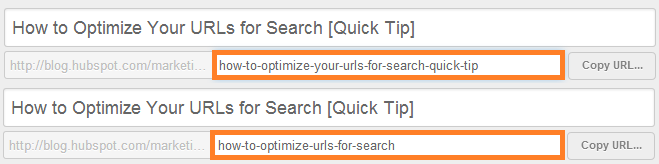
I removed “your” for brevity and the fact that it didn’t add any value for readers or search engines. I removed “quick tip” for the same reasons since most website visitors will know it’s a quick tip from the title or description.
I could go either way in keeping “for” in, but I decided to keep it in because it helps make the URL more readable for humans. If anyone stumbles on this URL elsewhere, I’d like it to be readable so they understand the contents of the page and feel they can trust the site.
In theory, I could’ve also chosen “url-slug” as the slug. This would’ve been more desirable in terms of simplicity, but ultimately, I wanted to URL to convey value to readers by explaining what they’re getting from the post.
3. Include relevant keywords.
One way search engines and humans learn about your page contents is through the keywords in the URL. Include keywords in your URL slug, but be sure they align with the actual page contents. Luckily, this URL is already pretty well-optimized as it is, because it’s a long-tail search term on its own.
4. Don’t keyword stuff.
Even though this article may be useful for a number of different keywords, that doesn’t mean I should have them all in the URL. Otherwise, you’re left with a mess like this:
https://ift.tt/39uT2wj
Wow, that looks ugly.
Keyword stuffing in content, titles, and URLs is an outdated tactic and only hurts your SEO and the experience on your site. Instead of cramming keywords into the slug, choose a single keyword for the URL and let the content on the page drive the rest of the conversation.
5. Make it reader-friendly.
We talked about this a little already, but it’s worth reiterating. Both search engines and readers should be able to look at your URL and understand what they might find should they click to the other side. That means when you add a bunch of keywords and delete those little extraneous words, you should end up with a URL that still makes sense.
6. Separate words with hyphens.
Don’t use underscores to separate words or try to squish a bunch of words together. The hyphens are meant to help with readability. Use them.
7. Don’t use slugs that already belong to other pages.
Your office/home only has one address, and only one office/home exists at that address. This goes for your website.
Using similar or duplicate slugs can result errors or Google seeing pages as duplicate content. Either scenario will hurt your SEO performance.
You can also consider updating the settings in your CMS to prevent this from happening accidentally.
8. Avoid using dynamically generated URLs.
A dynamic URL contains parameters that are automatically generated when the page is loaded. This is in contrast to a static URL that is consistent every time it’s accessed.
Dynamic URLs can cause crawling issues, which will result in poor performance.
9. Standardize your URL naming conventions.
Create a standard process for naming URLs, a system that can be applied to any of the pages and posts you create. This will help you develop a more consistent experience across your site and make navigation simpler and easier for your website visitors.
Your URLs are an important element of on-page SEO, and just one element to consider as you build your site’s foundation. By implementing the above best practices for URL slugs and optimizing pages according to additional SEO guidelines, you’re one step further to increasing your visibility on search engines such as Google.
Editor’s note: This post was originally published in April 2014 and has been updated for comprehensiveness.

Why Our Social Team Developed a Private Facebook Group and How It Impacted Our Audience
In 2019, the HubSpot Social Media Team set out to evaluate new opportunities for the brand to create and engage with the specific user communities on Facebook.
We know that today’s Facebook user behavior is shifting. While people still value video, image, and text content, they are finding authentic connections in shared interest groups instead of in their existing personal networks.
These community groups on Facebook are a major opportunity for HubSpot to provide value to our target personas around the world. This would not only help us foster connections and growth for our current, future, and potential growing audience, but it would also provide us with a unique insight into the various communities of people and their experiences today.
Since then, we have launched our first Facebook Group, Marketer to Marketer … because nobody knows marketing like marketers do.
Why a Facebook Group, and why now?
Facebook Groups allow our audience to connect with each other and have valuable discussions. Businesses who center a Group around their brand or industry can build a community around it — making our brand and products even more valuable to potential customers.
Groups also give us the chance to showcase our industry expertise and dedication to our members, especially since questions asked by members (and answers provided by us) are visible to others.
And what’s better than gathering a group of people who love you and the industry in which you’re the thought leader?
Organic reach for Facebook posts has been steadily declining. Facebook Group posts are a different story. At Facebook’s F8 conference in 2019, Mark Zuckerberg announced their plan to really focus on supporting and promoting Groups going forward. They’ve been explicit in their desire to prioritize meaningful content in people’s feeds.
That being said, we wanted to take this opportunity to create a Group as they are the perfect way to spark meaningful discussions with an audience.
How We Created the HubSpot Marketer to Marketer Facebook Group
When building out our Facebook Group strategy, we followed a number of steps to get our team aligned and working.
1. Research
To start, we researched the value of Facebook Groups and why businesses should create them. We did this to determine if this would be an opportunity for social growth and a benefit to our social audience.
Determining the value of this Group — not just for our audience, but also for HubSpot — was key in helping us identify the purpose of the Group.
One way we conducted this research was by gathering feedback from our audience across all social channels to see what topic they considered to be the biggest “missing link”. This was helpful because it showed us that marketing was the biggest topic in which they had an interest.
We also connected with other teams internally to see how they leveraged their Facebook Groups (like HubSpot Academy) and piece together their research. Lastly, we listed out all the potential risks of our Facebook Group. This helped us be prepared for any red flags if they were to come up.
2. Planning
Once in the planning phase, we outlined what resources were needed to create and maintain a Group. This included any header or profile images and what a daily workflow would look like for managing Marketer to Marketer. We also reviewed what steps we needed to take to create the Group, such as the smaller details for building it.
We put together a brief that compiled all the research and best practices we learned in order to map out the launch of this Facebook Group. This included a proposed timeline, necessary resourcing, and an overview of what the Group would look like.
We also crafted two months’ worth of content ideas for the Group. This content wasn’t set in stone but has helped create conversations when Group activity has lulled.
3. Reporting
In order to understand how we’d track and grow Marketer to Marketer, we defined how we would report on the data provided by the Group. This also helped us understand how it creates value for our audience and for HubSpot.
Lastly, we used that data gathered to inform future content areas in which to expand as well as other audiences to support through Groups.
The Impact of the Marketer to Marketer Facebook Group
We examined the impact of Marketer to Marketer in a few different ways.
In terms of the Facebook platform, our Marketer to Marketer Group hasn’t really had a significant impact on the broader HubSpot Facebook Page — the Group is probably too small to make a difference there.
The HubSpot Facebook Page has almost two million followers and Marketer to Marketer has just over 2,000. In this case, the pool of people in our Group is simply too small to impact such a large audience.
Instead, the Group gives us a more direct way to interact with a more engaged audience. The Group content gets preferential placement in followers’ news feeds, whereas our normal Page content is a different content angle — we share brand awareness content related to different areas of Marketing, Sales, and Customer Service. (View examples here and here.)
In short, we consider our Group followers as our VIPs.
The Facebook Group also gives our members an outlet for more niched conversations, providing security and privacy to open up about any struggles, techniques, opportunities, or new information they’ve discovered about their industry.
Learnings, Discoveries, and Next Steps
Since launching the Group in March 2020, it’s been successful. Due to the depth of the conversations we’re seeing there as well as the fact that the group has become a self-sustaining community, it’s continued to grow with a higher than expected average of posts per week — while only doing organic promotion.
During this tumultuous time for marketers, we’ve seen that people can use the Group as a resource to gather ideas or help from other marketers to work through their business needs. The first 90 days were specifically challenging due to national and global events, but even with the odds stacked against it, the Marketer to Marketer Facebook Group is still thriving with members participating in conversations and helping marketers along the way.
Our learnings on Facebook Group growth have shown that it’s important to do ongoing promotion to reach an audience that could benefit from the conversations — now more than ever. From there, establish a consistent admin posting cadence with questions of the week or thought starters for marketers.
We’ve established a dedicated day of the week to be “question day,” which has allowed the Group to function on its own while making our presence known and drumming up engagement. Since the Group started, it’s grown 2,000 members, and we plan to push it larger and larger for more marketers to take advantage of this outlet of community.

HubSpot Ran A Co-marketing Campaign: Here’s What We Learned
Co-marketing campaigns can be undeniably effective for increasing brand awareness, reaching new audiences, or creating amazing — and potentially delicious — new products.
For instance, consider the partnership between Doritos and Taco Bell, which resulted in Doritos Locos Tacos, a delicious product promoted in a brilliant co-marketing campaign. If you haven’t heard of the partnership, watch the story unfold in this promotional video:
In this case, the two B2C companies saw success in their venture — and now, the popular item is a mainstay on the Taco Bell menu. Marketers at the two companies can attribute the home-run to a certain tactic: co-marketing.
A wonderful way for two companies to partner together, co-marketing can create opportunities for businesses to reach new audiences and delight existing audiences at the same time.
For instance, HubSpot has the Partner program, which offers unique benefits, including co-marketing opportunities. Recently, the team decided to run a few tests to see if co-marketing could expand past content offers — and what that would look like.
Essentially, the team aimed to answer three questions:
- How do we move co-marketing programming forward?
- How do we keep providing top-notch education?
- How do we keep our lead number high while creating value for our audience?
HubSpot Academy gives educational value to its audiences, so it was a great channel for partners to get involved. It’s the home of hundreds of world-leading courses about marketing and sales. Lessons even include tools to help viewers take actionable steps as they learn.
“Maybe, to expand co-marketing opportunities,” the team hypothesized, “We could have partners upload their own lessons within courses and certification tracks. They can demo how their tools work with the current lesson in practice.”
This could mean more traffic from audiences with interests that align closely with partners’ target audiences.
Having settled on the experiment, HubSpot’s team then needed to stop and think through possible speed bumps. For starters, will partners be able to drive leads with Academy? Will HubSpot audiences even be interested in offers?
Here, let’s explore how HubSpot’s Academy team created and ran a co-marketing campaign, and lessons they learned that you can apply to your own co-marketing efforts.
HubSpot’s Co-marketing Campaign
To start, Moz hosted a video lesson for HubSpot Academy’s Content Marketing Course.
“Creating Topic Clusters and Pillar Pages” was a demo for Moz’s free Keyword Explorer tool.
Users can leverage the lesson’s content for keyword research, making finding value blog topics easy and organized.
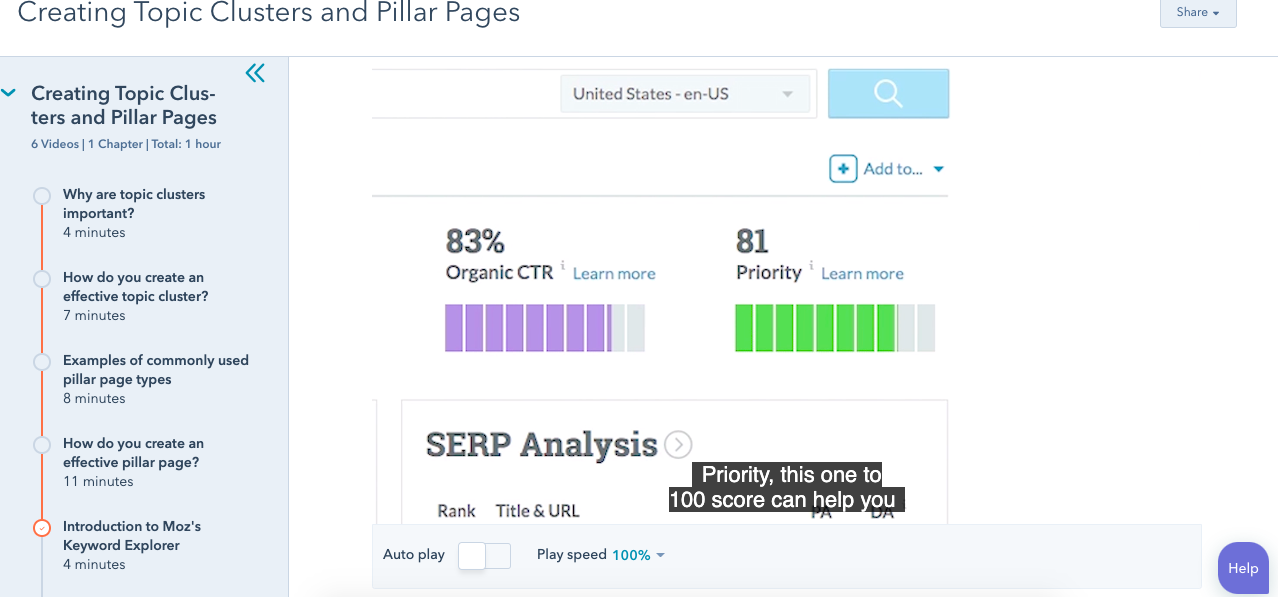
“Folks go through this course and see a video saying, ‘Hey, you can use this tool for free to do exactly what this course is teaching you,’” Margot Mazur, Senior Co-marketing Manager, told me.
It worked.
Results positively supported the questions HubSpot’s team asked. In four months, the video earned 8,000 lesson views, and 6,000 clicks to Moz. In total, Moz earned 1,460 new contacts.
Similar experiments also brought favorable results. After reaching out, partners could host a lesson, demo a relevant resource, and share a CTA with a direct link.
From this successful campaign, the co-marketing team guessed that the tactic could be beneficial in other areas of HubSpot.
For instance, the team considered trying the same experiment during Adapt 2020, a series of webinars that help audiences adapt to different business challenges.
“I reached out to partners to see if they wanted to lead weekly webinars,” recalls Mazur. “The experience for that has been really good — it’s positive for both parties.”
Webinars, similar to the lessons on Academy, were released for Adapt. This one featured Sally Woellner, Template Design Lead, talking about creating brand kits using Canva:
The webinar also explained how to use themes in HubSpot, the importance of website design and helpful design tools including Canva.
Another expansion of co-marketing opportunities comes from the HubSpot Blogs. Mazur thought blog posts could be an excellent way to add more value to partners and readers.
Posts like the one above display how partners can leverage HubSpot’s Blogs for guest posts. These posts tackled topics that interest audiences of both parties, and ultimately result in driving leads for partners and providing value for HubSpot readers.
At this point, the co-marketing team identified four tactics for improving partner involvement: Academy education courses, blogs, quarterly campaigns (Such as Adapt), and content offers.
So, what did the co-marketing team take away from this experiment? Let’s dive into four lessons they learned, next.
1. Co-marketing can expand — and should.
The purpose of HubSpot’s experiment was to find effective co-marketing opportunities across a range of teams and on various company platforms. The results demonstrate how co-marketing can be a strategy used company-wide to reach business goals.
With the inclusion of blogs, video, and content offers, partnerships can be leveraged to provide value for both parties. To try a similar tactic, you might consider running a co-marketing campaign for a team you normally wouldn’t.
For instance, maybe your company produces webinars and blog content. Those are channels that can benefit from a guest lesson or post about something that’s relevant to the industry.
2. Videos perform better than ebooks for partner content.
About two years ago, one of the highest-performing co-marketing avenues was an ebook offer.
Now, however, Mazur and her team have found that videos perform better than ebooks when it comes to partner content.
Take the Academy lessons and webinars, for instance. Results from those two tactics have proven more successful, averaging a thousand more submissions than ebooks. In a world where social audiences often prefer video to text, adapting to this shift has served the team well.
3. Driving partner leads through new channels is difficult.
Even though the experiment saw success, it wasn’t without some low moments. “Driving leads for partners is difficult, and we have to continue to work to make that easier for partners,” notes Mazur.
She says low performance could be a result of account sign-ups being confused with partner sign-ups. Now that there’s proof it’s possible, one of the next steps in this process is to make sure partners have a way to earn more leads.
4. Partners find value in product sign-ups from other channels.
Even though leads weren’t record-breaking from the first experiment, partners found value in those Academy signups. The excellent performance is because of the types of partners and content chosen.
Mazur’s team was tasked with finding the right partners to host lessons for Academy. The lessons had to make sense, be actionable, reputable, and a natural fit into the larger, existing course.
To illustrate, one of the courses on Academy is “The Importance of Website Performance.” One of the lessons, “Using Heatmaps to Optimize Performance,” is led by a Customer Experience professional at Hotjar. In the lesson, we see a tutorial about how to use Hotjar’s heatmaps to analyze web page engagement.
A lesson about using a helpful tool to analyze website performance in this course — great fit, right? Now, imagine if the Hotjar lesson was inserted into a Social Media Certification course — not as helpful.
Because the subjects fit, the audiences watching the course will most likely find content from both partners equally useful — which, ultimately, results in higher-quality leads.
Now that the Academy strategy has proven successful, Mazur’s team wants to keep it going. They’re going to continue identifying partners for more Academy lessons, and, in addition to Academy lessons, they will keep supporting Adapt with more partnership opportunities.
Ultimately, Mazur’s team will continue to offer creative partner driven solutions across HubSpot to reach business goals.
What are some co-marketing campaigns that you love? Personally, the Doritos Locos Taco is pretty up there (As is the Mountain Dew Baja Blast drink — also a permanent addition to the menu). How can you include some winning tactics into your next campaign?
