
5 Dos and Don’ts When Making a SMART Goal [Examples]
When I was 14, my dream was to play college baseball. But I had one small problem: I only weighed 100 pounds. And even though I still had four years to bulk up and improve my skills, I knew I had a long way to go. Fortunately, my coach always knew how to give me opportunities to shoot for that kept my drive alive.
I think of SMART goals like my former baseball coach.
After a grueling practice or workout, he would harp on how the long term is just a series of short terms. And to hammer that mentality into our heads, he would make us write down our off-season training goals every year. But he didn’t just accept the first draft of your goal sheet. He never did. He would make you edit it until you knew exactly what your goals were and how you were going to achieve them.
Setting a goal like “improve upper body strength” and planning to lift weights three times a week wasn’t enough. You had to write down how much you would improve your bench press by and how many times you would work out your upper body per week.
Every year, I set concrete off-season training goals, and since I had a plan and clear direction, I always achieved them. By the time I was a senior in high school, I had gained 70 pounds of muscle and earned a baseball scholarship.
In this post, you’ll learn exactly what a SMART goal is, why it reminds me of my baseball coach, and how you can set one today, Want to skip to the information you need most? Click on one of these headlines to jump to the relevant section.
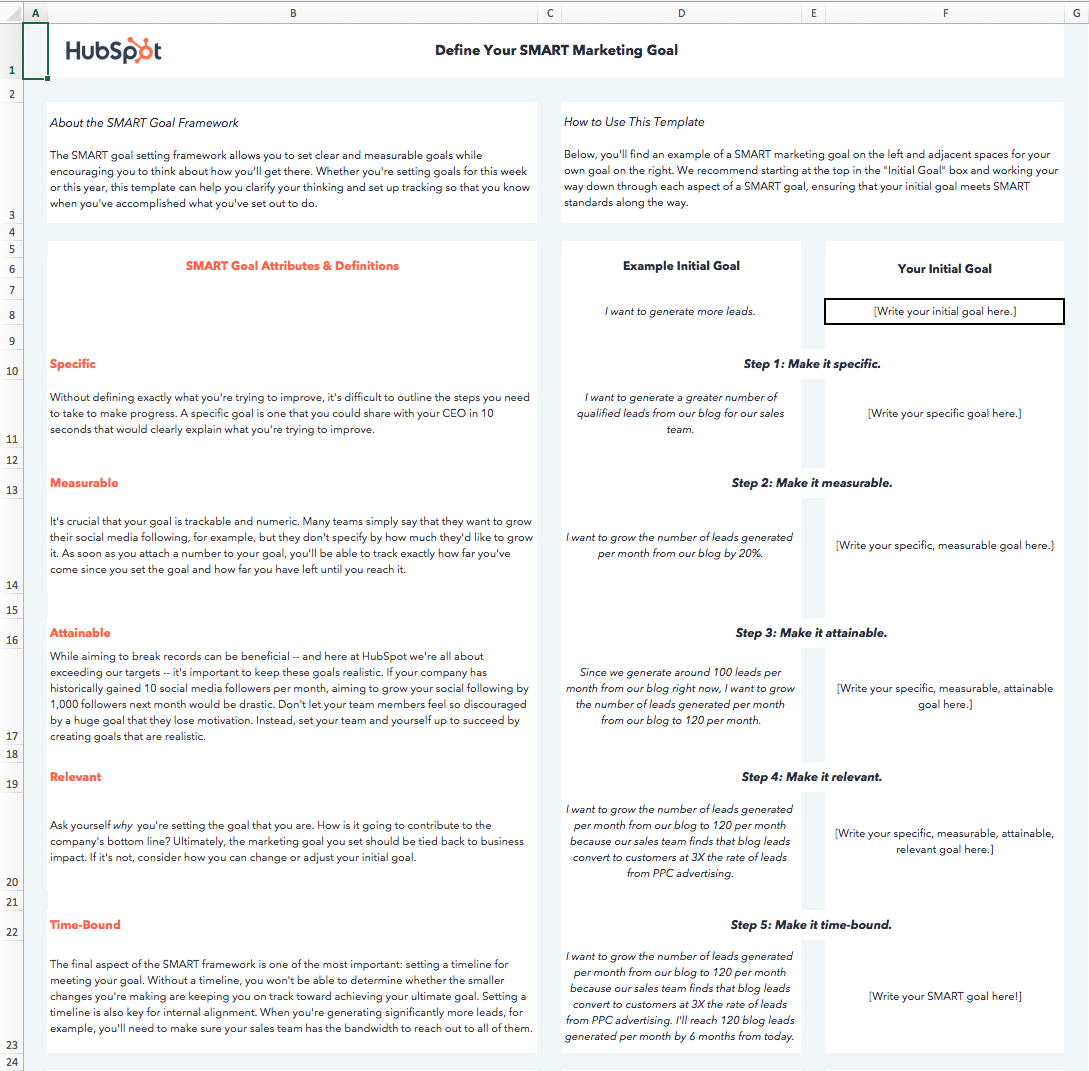
When I first learned about SMART goals, I had an epiphany. I realized the reason why I could keep improving my athleticism in high school was because my coach made me set SMART goals. But, to give you a more professional example, here’s a template that shows how HubSpot encourages users to create their own SMART goals:
 Download this Template for Free
In the working world, the influence of SMART goals continues to grow. The reason why successful marketing teams always hit their numbers is because they also set SMART goals.
What Are SMART Goals?
SMART goals are concrete targets that you strive to achieve over a certain period of time. These goals should be carefully drafted by a manager and his/her direct report to set them up for success. “SMART” is an acronym that describes the most important characteristics of each goal.
The “SMART” acronym stands for “specific,” “measurable,” “attainable,” “relevant,” and “time-bound.” Each SMART goal you create should have these five characteristics to ensure the goal can be reached and benefits the employee. Find out what each characteristic means below, and how to write a SMART goal that exemplifies them.
The thing I love about sports is the life lessons you learn playing them directly apply to your career. Setting SMART goals not only helps you get better at baseball, but it also makes you a better marketer.
Why Are SMART Goals Important?
When you make goals that are specific, measurable, attainable, relevant, and time-bound, you’re increasing your odds for success by verifying that the goal is achievable, identifying the metrics that define success, and creating a roadmap to get to those metrics.
If your goals are abstract, if you don’t know what it will take to achieve success, or if you don’t give yourself a deadline to complete steps to achieve the goal, you may lose focus and fall short of what you want to accomplish.
How to Make a Smart Goal
- Use specific wording.
- Include measurable goals.
- Aim for realistically attainable goals.
- Pick relevant goals that relate to your business.
- Make goals time-bound by including timeframe and deadline information.
1. Use specific wording.
When writing SMART goals, keep in mind that they are “specific” in that there’s a hard and fast destination the employee is trying to reach. “Get better at my job,” isn’t a SMART goal because it isn’t specific. Instead, ask yourself: What are you getting better at? How much better do you want to get?
If you’re a marketing professional, for example, your job probably revolves around key performance indicators, or KPIs. Therefore, you might choose a particular KPI or metric you want to improve on — like visitors, leads, or customers. You should also identify the team members working toward this goal, the resources they have, and their plan of action.
In practice, a specific SMART goal might say, “Clifford and Braden will increase the blog’s traffic from email …” You know exactly who’s involved and what you’re trying to improve on.
Common SMART Goal Mistake: Vagueness
While you may need to keep some goals more open-ended, you should avoid vagueness that could confuse your team later on. For example. instead of saying, “Clifford will boost email marketing experiences,” say “Clifford will boost email marketing click rates by 10%.”
2. Include measurable goals.
SMART goals should be “measurable” in that you can track and quantify the goal’s progress. “Increase the blog’s traffic from email,” by itself, isn’t a SMART goal because you can’t measure the increase. Instead, ask yourself: How much email marketing traffic should you strive for?
If you want to gauge your team’s progress, you need to quantify your goals, like achieving an X-percentage increase in visitors, leads, or customers.
Let’s build on the SMART goal we started three paragraphs above. Now, our measurable SMART goal might say, “Clifford and Braden will increase the blog’s traffic from email by 25% more sessions per month … ” You know what you’re increasing, and by how much.
Common SMART Goal Mistake: No KPIs
This is in the same light of avoiding vagueness. While you might need qualitative evidence or more open-ended evidence to prove your success, you should still come up with a quantifiable KPI. For example, instead of saying, “Customer service will improve customer happiness,” say, “We want the average post-customer service call satisfaction score from customers to be a seven out of ten or higher.”
3. Aim for realistically attainable goals.
An “attainable” SMART goal considers the employee’s ability to achieve it. Make sure that X-percentage increase is rooted in reality. If your blog traffic increased by 5% last month, for example, try to increase it by 8-10% this month, rather than a lofty 25%.
It’s crucial to base your goals off of your own analytics, not industry benchmarks, or else you might bite off more than you can chew. So, let’s add some “attainability” to the SMART goal we created earlier in this blog post: “Clifford and Braden will increase the blog’s traffic from email by 8-10% more sessions per month … ” This way, you’re not setting yourself up to fail.
Common SMART Goal Mistake: Unattainable Goals
Yes. You should always aim to improve. But reaching for completely unattainable goals may knock you off track and make it harder to track progress. Rather than saying, “We want to make 10,000% of what we made in 2019,” consider something more attainable, like, “We want to increase sales by 150% this year,” or “We have a quarterly goal to reach a 20% year-over-year sales increase.”
4. Pick relevant goals that relate to your business.
SMART goals that are “relevant” relate to your company’s overall business goals and account for current trends in your industry. For instance, will growing your traffic from email lead to more revenue? And is it actually possible for you to significantly boost your blog’s email traffic given your current email marketing campaigns?
If you’re aware of these factors, you’ll be more likely to set goals that benefit your company — not just you or your department.
So, what does that do to our SMART goal? It might encourage you to adjust the metric you’re using to track the goal’s progress. For example, maybe your business has historically relies on organic traffic for generating leads and revenue, and research suggests you can generate more qualified leads this way. Our SMART goal might instead say, “Clifford and Braden will increase the blog’s organic traffic by 8-10% more sessions per month.” This way, your traffic increase is aligned with the business’s revenue stream.
Common SMART Goal Mistake; Losing Sight of the Company
When your company’s doing well, it can be easy to say you want to pivot or grow in another direction. While companies can successfully do this, you don’t want your team to lose sight of how the core of your business works.
Rather than saying, “We want to start a new B2B business on top of our B2C business,” say something like, “We want to continue increasing B2C sales while researching the impact our products could have on the B2B space in the next year.”
5. Make goals time-bound by including timeframe and deadline information.
A “time-bound” SMART goal keeps you on schedule. Improving on a goal is great, but not if it takes too long. Attaching deadlines to your goals puts a healthy dose of pressure on your team to accomplish them. This helps you make consistent and significant progress in the long term.
For example, which would you prefer: increasing organic traffic by 5% every month, leading to a 30-35% increase in half a year? Or trying to increase traffic by 15% with no deadline and achieving that goal in the same time frame? If you picked the former, you’re right.
So, what does our SMART goal look like once we bound it to a timeframe? “Over the next three months, Clifford and Braden will work to increase the blog’s organic traffic by 8-10%, reaching a total of 50,000 organic sessions by the end of August.
Common SMART Goal Mistake: No Time Frame
Having no timeframe or really broad span of time noted in your goal will cause the effort to get reprioritized or make it hard for you to see if your team is on track. Rather than saying. “This year, we want to launch a major campaign,” say, “In quarter one, we will focus on campaign production in order to launch the campaign in quarter two.”
If you want a more concrete understanding of SMART goals, check out the examples below. You can always revisit this blog post and reference them when it’s time to set your goals.
6 SMART Goal Examples That’ll Make You a Better Marketer
1. Blog Traffic Goal
- Specific: I want to boost our blog’s traffic by increasing our weekly publishing frequency from 5 to 8 times a week. Our two bloggers will increase their workload from writing 2 posts a week to 3 posts a week, and our editor will increase her workload from writing 1 post a week to 2 posts a week.
- Measureable: An 8% increase is our goal.
- Attainable: Our blog traffic increased by 5% last month when we increased our weekly publishing frequency from 3 to 5 times a week.
- Relevant: By increasing blog traffic, we’ll boost brand awareness and generate more leads, giving sales more opportunities to close.
- Time-Bound: End of this month
- SMART Goal: At the end of this month, our blog will see an 8% lift in traffic by increasing our weekly publishing frequency from 5 posts per week to 8 post per week.
2. Facebook Video Views Goal
- Specific: I want to boost our average views per native video by cutting our video content mix from 8 topics to our 5 most popular topics.
- Measurable: A 25% increase is our goal.
- Attainable: When we cut down our video content mix on Facebook from 10 topics to our 8 most popular topics six months ago, our average views per native video increased by 20%.
- Relevant: By increasing average views per native video on Facebook, we’ll boost our social media following and brand awareness, reaching more potential customers with our video content.
- Time-Bound: In 6 months.
- SMART Goal: In 6 months, we’ll see a 25% increase in average video views per native video on Facebook by cutting our video content mix from 8 topics to our 5 most popular topics.
3. Email Subscription Goal
- Specific: I want to boost the number of our email blog subscribers by increasing our Facebook advertising budget on blog posts that historically acquire the most email subscribers.
- Measurable: A 50% increase is our goal.
- Attainable: Since we started using this tactic three months ago, our email blog subscriptions have increased by 40%.
- Relevant: By increasing the number of our email blog subscribers, our blog will drive more traffic, boost brand awareness, and drive more leads to our sales team.
- Time-Bound: In 3 months.
- SMART Goal: In 3 months, we’ll see a 50% increase in the number of our email blog subscribers by increasing our Facebook advertising budget on posts that historically acquire the most blog subscribers.
4. Webinar Sign-up Goal
- Specific: I want to increase the number of sign-ups for our Facebook Messenger webinar by promoting it through social, email, our blog, and Facebook Messenger.
- Measurable: A 15% increase is our goal.
- Attainable: Our last Facebook messenger webinar saw a 10% increase in sign-ups when we only promoted it through social, email, and our blog.
- Relevant: When our webinars generate more leads, sales has more opportunities to close.
- Time-Bound: By April 10, the day of the webinar.
- SMART Goal: By April 10, the day of our webinar, we’ll see a 15% increase in sign-ups by promoting it through social, email, our blog, and Facebook messenger.
5. Landing Page Performance Goal
- Specific: I want our landing pages to generate more leads by switching from a one column form to a two column form.
- Measurable: A 30% increase is our goal.
- Attainable: When we A/B tested our traditional one column form vs. a two column form on our highest traffic landing pages, we discovered that two column forms convert 27% better than our traditional one column forms, at a 99% significance level.
- Relevant: If we generate more content leads, sales can close more customers.
- Time-Bound: One year from now.
- SMART Goal: One year from now, our landing pages will generate 30% more leads by switching their forms from one-column to two columns.
6. Link-Building Strategy Goal
- Specific: I want to increase our website’s organic traffic by developing a link-building strategy that gets other publishers to link to our website. This increases our ranking in search engine results, allowing us to generate more organic traffic.
- Measurable: 40 backlinks to our company homepage is our goal.
- Attainable: According to our SEO analysis tool, there are currently 500 low-quality links directing to our homepage from elsewhere on the internet. Given the number of partnerships we currently have with other businesses, and that we generate 10 new inbound links per month without any outreach on our part, an additional 40 inbound links from a single link-building campaign is a significant but feasible target.
- Relevant: Organic traffic is our top source of new leads, and backlinks is one of the biggest ranking factors on search engines like Google. If we build links from high-quality publications, our organic ranking increases, boosting our traffic and leads as a result.
- Time-Bound: 4 months from now.
- SMART Goal: Over the next four months, I will build 40 additional backlinks that direct to www.ourcompany.com. To do so, I will collaborate with Ellie and Andrew from our PR department to connect with publishers and develop an effective outreach strategy.
Now that you know what a SMART goal is, why it’s important, and the framework to create one, it’s time to get inspired to put that information into practice. Whether you’re setting goals for a personal achievement or as part of hitting important marketing milestones, it’s good to start with what you want to achieve and then reverse-engineer into a concrete SMART goal.
Editor’s note: This post was originally published in December 2019 and has been updated for comprehensiveness.

Why Email Design is Important, and 12 Best Practices to Improve Yours
In 2018, there were over 3.7 billion email users around the world. By 2022, this number is expected to increase to 4.3 billion.
A group within that large number of users includes your business’s target audience, the people you want to market your brand, products, and services to via email.
To ensure your emails stand out and grab the attention of these target audience members, you must consider email design.
What is email design?
Email design is the process of strategically designing and creating an email that resonates with your business’s target audience, specifically your current email subscribers and customers. The design should be attention-grabbing, aesthetically-pleasing, and on-brand so recipients recognize it’s from your company.
Why is email design important?
The average recipient spends about 1.1 seconds scanning an email prior to deciding whether or not they want to stay or abandon the message.
That’s why email design — design that makes your email organized, attention-grabbing, on-brand, and valuable — is so important to the success of your marketing efforts. It’s how you effectively keep recipients reading and interacting with your email content.
Now you’re probably thinking: That sounds great, but how do I design my email to attract my target audience and keep their attention on my email?
To begin, keep these 12 email design best practices in mind.
1. Craft a strong subject line.
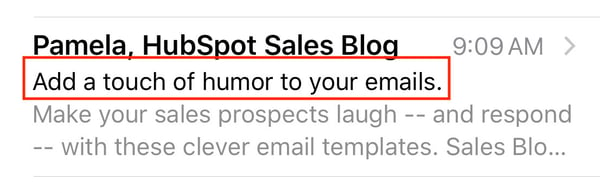
Your email subject line is the first thing anyone sees when you send them an email. It’s the brief statement that’s supposed to pique the interest of your recipients. It should capture their attention so they want to open the email and continue reading.
Your subject line should do three main things:
- Grab the attention of your readers in as few words as possible (less is more).
- Provide some sort of value and/ or information that makes them want to open the email.
- Summarize what recipients are going to read and/ or see once they open the email.
Here’s what a subject line looks like in your email inbox:

Here’s what a subject line looks like in your mobile device’s email inbox:
You can also review some of the best email subject line examples for more inspiration.
2. Write an attention-grabbing preheader.
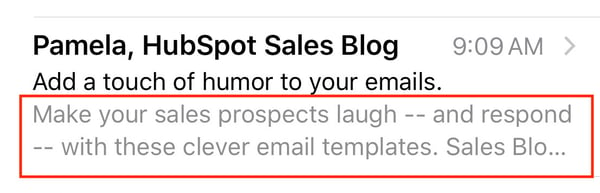
Your email preheader is a preview of what the email is about, similar to the meta description of a web page. It’s the second thing recipients see.
Rather than rewriting the first sentence of your email, you can customize the preheader to provide an inside look into what your recipients are about to read in your message.
For reference, here’s what a preheader looks like in your email inbox:

Here’s what a preheader looks like in your mobile device’s email inbox:
3. Be concise.
Remember the statistic above about how you have about 1.1 seconds to hook your audience with your email? This is precisely why your email copy needs to be concise and straightforward.
Think about it this way: How many times throughout the day do you find yourself opening an email thinking, I can’t wait to sit down and take the next 5-10 minutes to really dive into this email in-depth!
If you’re anything like me, the answer is never.
Give email recipients the information they want and need from you without getting into the weeds. This will show them you value their time which has the potential to help you improve email subscriber retainment.
4. Keep your email on-brand.
When your email recipients open your message, they should know the email was sent from your company … meaning your email should be branded to the point that they don’t need to look at who’s sending the message to know it’s from your business.
To keep your email on-brand, consider using the following tactics:
- Use a tone in your email content that complements your other branding and marketing materials (like your website and social media).
- Incorporate the same colors and fonts that you use in your other branding and marketing materials.
- Include your logo, a link to your website, links to your social media accounts, and calls-to-action (CTAs) relevant to your products or services. This is a great way to increase brand awareness and boost conversions.
5. Use the layout to enhance your email’s user experience.
Nobody wants to read a cluttered, unorganized email. Your email will appear too overwhelming and time-consuming to deal with, and you’ll increase your chances of abandonment.
Instead, organize your layout with user experience (UX) in mind — meaning, leave white space and strategically place your written and visual content in the email so it’s organized and easy to navigate. This will also improve your email’s professional, thoughtful feel, which ensures readers are able to find the information they want and need to enjoy their interactions with your business’s email content.
6. Personalize every email.
When you customize an email with your recipient’s name, the email feels more tailored, professional, and personal. This touch helps you foster a relationship between your business and email recipients. Additionally, it has the potential to help you humanize your brand and, in turn, improve email retention.
7. Incorporate unique visual content.
If your recipients and subscribers open an email and only see written content, it’s likely going to be difficult to hold their attention and keep them interested in your message. Include unique images, videos, GIFs, and animations to break up the written content. This is also a great way to complement your branding and enhance the purpose of your email.
Speaking of incorporating creative and unique visual content in your emails, let’s talk emojis.
8. Don’t be afraid to use emojis. 🧡
At first, emojis may seem like an unnecessary or unprofessional addition to an email. While this may be a fair assumption, it’s actually untrue. In fact, when you add emojis to your email subject line and/ or email copy, you can increase your open and click-through rates.
Note: When using emojis for marketing purposes, make sure you know the meaning and connotation of the specific one(s) you incorporate. 😃
9. Use a responsive design.
A responsive design means your email changes format to fit the screen it’s being viewed on, whether it’s on a desktop, laptop, or mobile device. Recipients will be able to read your emails with ease no matter where or how they’re viewing them. Responsive design enhances user experience and improves email subscriber retention.
10. Optimize your email with calls-to-action.
Calls-to-action (CTAs) are used to convert your email recipients — they may be used to get your recipients to follow you on social media, visit your website, or become paying customers. CTAs should be visible, enticing, and clearly show why they’re valuable to click. Additionally, you might choose to personalize your CTAs to tailor them towards specific recipients — this tactic has been proven to increase conversions.
11. Add an “unsubscribe” button.
Email marketing is highly effective as long as you’re providing relevant content to your recipients. The unfortunate but true reality of email marketing is that your recipients and customers change over time — in addition to various factors related to your business as you grow and evolve — making your content no longer relevant to some at different points in time.
For this reason, allow your recipients to leave (or unsubscribe from your emails) on a good note so they can remember your business in a positive light — who knows, they may need your email content, products, or services again in the future. To ensure these people are leaving on positive terms, simplify their lives with an easy-to-use and visible “unsubscribe” button.
Note: According to the Federal Trade Commission and CAN-SPAM Act, you’re legally required to include a “clear and conspicuous explanation of how the recipient can opt-out of getting emails from you in the future”. Meaning, that unsubscribe button isn’t an option.
If you need some inspiration, check out these effective unsubscribe pages.
12. A/B test your design.
Similar to most other marketing efforts, email design is an iterative process. You might determine you need to make changes and updates to get the most out of your email design. Whether it’s modifying your CTA, colors, font, or tone, don’t be afraid to A/B test designs to determine which one works best in terms of ability to convert, and resonate with, the highest number of recipients.
A great way to incorporate all 12 of these best practices is to use email design software. In fact, many of these best practices will come up naturally while you’re designing and planning your emails this way. Let’s take a look at some of the most common software options for email design along with a few of their features.
Email Design Software
The following commonly-used email design software options each offer capabilities related to your business’s website design as well as marketing and sales efforts. Take a deep look at their features to make the best decision for your overall business goals and email design needs.
HubSpot Email Design Software
HubSpot’s email software allows you to create, design, personalize, and optimize all of your emails. You don’t need any IT or coding knowledge, and you can easily customize mobile-friendly emails and design them to complement your branding. The software allows you to A/B test various email designs to determine which optimization and design efforts are most successful among your recipients.
BEEPro Email Design Software
As a BEEPro user, you can design responsive emails in just minutes. Smart design tools provide you with a quick way to format your emails and ensure your layout complements your content. You can also customize and save various email design templates so your email messaging and branding stays consistent among specific recipients.
MailChimp Email Design Software
With over 100 templates offered, MailChimp allows you to customize your email design for your target audience. If you’re someone who does have coding experience, and you want to take your design a step further, MailChimp offers you the ability to code your template as well.
Stripo.email Email Design Software
Stripo.email requires no HTML knowledge to create and design professional email templates. All of their pre-made templates are responsive so readers can easily view them via any device. You can also sync your current email service provider (ESP) with the software to access all of your email information from a central location.
Chamaileon Email Design Software
The collaborative email builder Chamaileon gives you the ability to invite members of your team to provide input on your designs. The software ensures your emails will have a responsive design and automatically comes with over 100 pre-made templates to customize for specific recipients.
Now that we’ve covered email design best practices as well as the software you can use to assist in designing your perfect email, let’s take a look at some well-crafted examples to inspire your work.
Email Design Inspiration
Email design inspiration provides you with a better idea of what it looks like to combine the best practices we discussed above — these will help you effectively reach your target audience. In addition to the examples we’re going to review here, you can check out this blog post about 13 great examples of email design.
1. Starbucks Rewards Email Design
Starbucks customers and members —the people who have converted and signed up to receive company-related information and rewards — may have seen this email, or something similar, in their inbox:
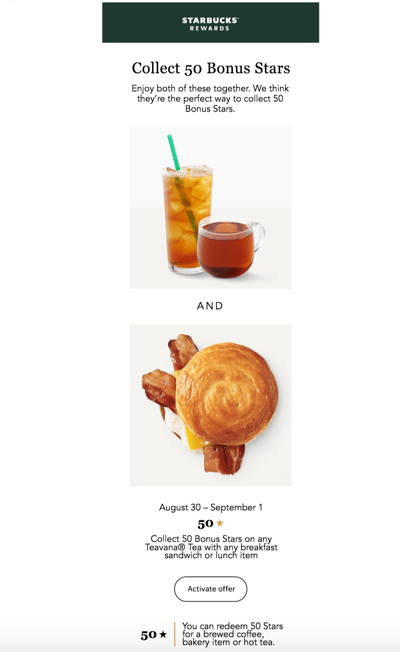
The email complements all of Starbucks’ marketing materials and branding. There’s plenty of white space to separate the concise yet helpful written information that’s paired with artistic and visually-pleasing photos of their products.
The email includes a CTA to activate their email rewards offer, a link to their website to help drive traffic there, and an unsubscribe button for those who’d like to stop receiving Starbucks emails altogether.
2. Vital Proteins Email Design
Vital Proteins’ emails are sent to current customers as well as anyone who has visited their site and signed up for their email newsletter.
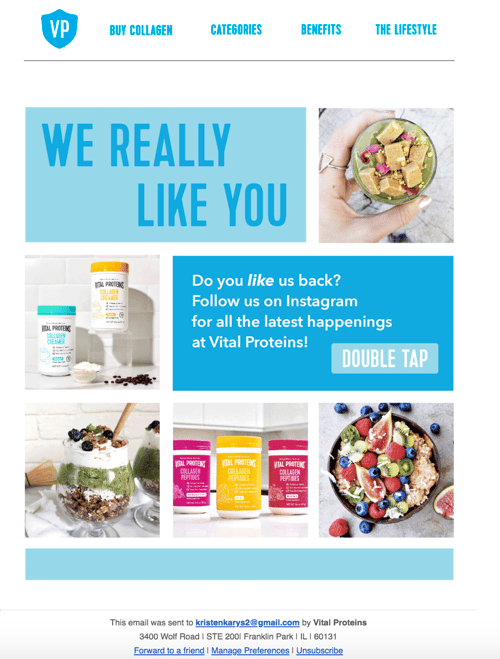
Although this email design contains many images and a lot of information, it’s neatly organized so it doesn’t feel overwhelming to visitors. The email’s colors, font, and unique images are on-brand and feature the company’s products.
It includes an obvious and large CTA that redirects recipients to their Instagram page to increase their number of followers and enhance brand awareness. Lastly, there are buttons at the bottom of the email for unsubscribing, changing email preferences, and forwarding the message to a friend.
3. HubSpot Marketing Blog Email Design
HubSpot sends subscribers Marketing Blog emails every day. These include a few blog marketing-related articles to read and learn from. If recipients choose, they may also subscribe to HubSpot’s Sales Blog and Service Blog emails.
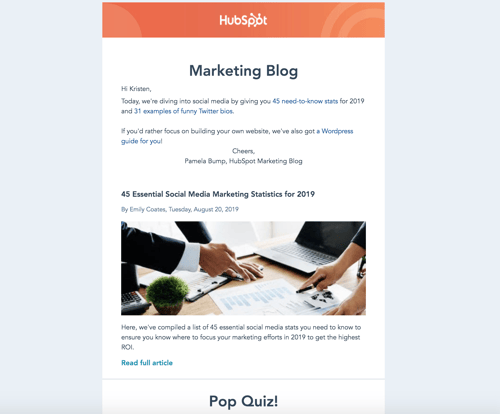
The marketing blog email feature HubSpot branding so readers immediately know who the email is from and what it’s going to include. There are previews and short descriptions of what each blog article in the email is about as well as an interactive pop quiz.
The email has plenty of white space to ensure it doesn’t feel or look cluttered and includes a personal note from the marketing blog editor to humanize the email and foster a personal relationship between readers and HubSpot.
Grow Better With Great Email Design
With great email design, you’ll grow better — meaning, you’ll reach and resonate with your audience members more effectively. Eye-catching and impactful emails will help you build long-lasting relationships and convert more people into paying customers and brand advocates. So, begin designing your emails while keeping the best practices and examples we reviewed in mind.

How Brand Management Has a Direct Impact on Your Bottom Line
If your business was a person, your brand would be its personality. It’d be how you introduce yourself to new friends (er, customers) and how you build a trusting relationship with them. Your brand is a living, breathing entity … and it’s your job to help it grow and improve.
This is what we call brand management.
Creating a brand is thrilling, but it’s not enough. As your business scales, grows, changes, and succeeds, your brand must follow suit. That’s why we created this guide — to cover the basics of brand management and equip you with the tools you need to manage and maintain a fantastic brand.
Shall we dive in?
What is brand management?
Brand management is the process of managing your brand reputation and improving your audience’s perception of your brand in a way that builds brand awareness, equity, and loyalty.
While branding is the process of building your brand, brand management is the process of monitoring and maintaining it.
Your brand is a living, breathing thing, which means it’s constantly changing. It’s also very susceptible to external factors like news, trends, and current events. In a world where journalists, influencers, and social media users (just to mention a few) influence virtually every narrative, brand management is how you can take control of your business’s story. It is using your branding and brand assets to communicate value and build loyal relationships with your followers, fans, and customers.
In short, your brand needs a manager to ensure its success. Don’t let your brand be like Kanye.
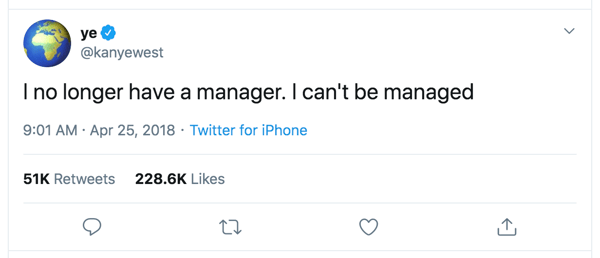
We’ve discussed in other blog posts how important word-of-mouth (WOM) marketing is in retaining and attracting new customers. While you can’t always control what others say about your brand, strategic brand management is the process of responding to them in a way that elevates your brand and remains true to your core brand values — all while remaining consistent across teams and channels.
As an example, read how Zappo’s used brand management to make the most of a $1.6 million mistake.
For that reason, brand management extends far beyond marketing. Brand management should be intertwined with sales, human resources, and customer service — basically, any department that “touches” your followers, customers, and even potential employees.
When done successfully, brand management can:
- Boost your brand awareness
- Allow you to charge more for your products or services
- Influence your audience’s purchase decisions
- Build customer loyalty
- Increase sales
- Create happy customers that become brand advocates
Principles of Brand Management
Brand management is comprised of both tangible and intangible components. We’ll discuss the tangibles in the following section.
The intangible components, however, include the principles that help you measure your brand management efforts and achieve those brand management success indicators that we discussed above.
You’ll also note that each of these principles can influence the others on this list. For example, heightened brand awareness can contribute to brand reputation, and increased brand loyalty can affect brand equity.
Brand Awareness
Brand awareness is how familiar the general public and your target audience is with your brand. Brand awareness is important because consumers can’t engage with or purchase products or services from your brand if they’re not aware of it.
Brand Equity
Brand equity is how consumers value your brand based on their experiences, perceptions, and associations. (This concept goes hand-in-hand with brand valuation, which is the commercial value of your brand as perceived by the market.) Brand equity is important because a valuable brand can support higher prices and increase your merit among investors, shareholders, and potential buyers.
Brand Loyalty
Brand loyalty refers to how consistently your customers and followers engage with and purchase from your brand. While your marketing can’t necessarily influence this, your customer service department can — focusing on satisfaction and relationship-building can bring customers back time and time again. Brand loyalty is important because it creates brand ambassadors who do your marketing for you.
Brand Recognition
Brand recognition is how well a consumer, ideally in your target audience, can recognize your brand — through your logo, tagline, packaging, etc. — without seeing your brand name. This concept goes hand-in-hand with brand recall, which is the ability to think of a brand without seeing or hearing any branding prompts. Brand recognition is important because, by recognizing and recalling your brand, consumers keep your brand top-of-mind and are more likely to choose your brand above the competition.
Brand Reputation
Brand reputation refers to how the general public and your target audience perceive the character, status, and quality of your brand. Your reputation can be influenced by internal factors (customer service, product quality, etc.) and external factors (customer reviews, WOM marketing, news mentions, etc.). Brand reputation is important because it can be some consumers’ first impression of your brand.
Brand Asset Management
Your brand assets are the tangible components of the brand management process, the parts of your branding that your audience can see, experience, and remember. Brand assets include any piece of your branding or marketing that is seen by the “outside world” — customers, employees, or the general public.
Brand asset management is the process of crafting and maintaining these tangible elements as well as keeping them consistent throughout your branding. This could look like:
- Organizing your brand assets (both digitally and physically)
- Creating an accessible digital and/or physical storage system for your brand assets, or implementing a tool that does this for you
- Instructing your team on how to access and use your brand assets
- Conducting routine checks for brand inconsistencies and correcting when necessary
What constitutes a brand asset? Let’s cover the assets you’re likely working with for your business.
Brand Name
Your brand name is the primary identity of your company. As your other brand assets evolve, your brand name likely won’t ever change. If you haven’t trademarked your brand name, we encourage you to do so.
By owning the rights to your brand name, you have better leverage over unauthorized use and any competitors who attempt to copy or steal your brand. Check out HubSpot’s trademarks and Trademark Usage Guidelines as an example.
Your brand name will also likely be reflected in your website domain and social media pages. Keeping these names, identities, and handles consistent will help customers discover and follow your business.
Logo and Color Palette
Your logo and color palette embody the creative representation of your brand. These assets are important parts of your branding as they tap into emotional marketing tactics. If designed properly, they can help you attract and convert customers.
Typography
Your typography refers to your fonts and text-based assets and how they’re used in your branding. These guidelines inform any branding or marketing asset that’s designed on behalf of your business, including your website, paid advertising, social media posts, and more — all the way down to the spacing between the letters.
Graphics
Your graphics include many different brand assets — basically anything specifically designed for your brand or marketing. These could be used on your digital marketing channels (which we’ll discuss next) or developed as standalone assets, such as external slide decks, letterheads, press releases, or even marketing videos.
Your brand graphics will likely be utilized by a wide variety of people (from designers to social media marketers to content writers), so they should be well-organized and have clear instructions on how to use them.
Digital Marketing Channels
Your website, social media, and paid advertising are a few of the most important iterations of your brand. Millions of people access the internet daily, and your digital channels are likely the branding assets the most viewed by potential customers. For this reason, they must reflect your branding, and they must be consistent.
Also included in this section is your employees’ and executives’ social media accounts, as these are a reflection of your brand and a fantastic marketing opportunity to give your audience an inside look at your company and the opportunity to connect with your brand on a personal level. If your employees desire to use their profiles to market your business, ensure their accounts reflect your brand assets and follow your style guide.
Note: If members of your leadership team also manage a personal brand, chat among your team about how to align (or separate completely) this brand with your business brand. If their brand is connected in any way to your company, it should complement yours.
Packaging
If your business sells a physical product, your packaging is a critical part of your branding. For some customers (if not most), your packaging might be their first impression of your brand. Also, one-third of customers say they make purchase decisions on the packaging itself.
Your packaging is also the most tangible, experiential way that customers interact with your brand. For that reason, your packaging should reflect your branding — in its design, colors, size, and feel.
Style Guide
Your style guide is a document that instructs employees, designers, and other businesses on how to use your branding. This is an important brand asset because it informs how all other brand assets should be utilized, designed, printed, and more — all the way down to what size your logo should be and what colors are and aren’t allowed in your marketing materials.
Not only does this help others create on-brand designs; but it also informs them of how to follow branding guidelines and legal/licensing restrictions. Take a look at HubSpot’s Brand Guidelines as an example.
Brand management can be a serious undertaking, especially when working with a large brand or perhaps a brand with multiple brand extensions. Also, if you’ve outsourced your branding to a creative agency or individual, it can be difficult to assume the task of managing it.
Check out these brand management companies and services that can help you maintain a successful brand.
Northeastern Region
1. Dirigo Design and Development
Dirigo Design and Development is a Maine-based marketing agency. The company offers various marketing services, including branding, strategy, and reputation management. Notable Dirigo clients include Dunkin’ Donuts, Harvard University, and The Wall Street Journal.
2. Jax Media Design Group
Jax Media Design Group is a D.C.-based agency focused on digital design and development. The company creates digital marketing assets using your brand guidelines and helps you implement them in campaigns. Notable Jax Media clients include Geico, AARP, and National Geographic.
3. RP3 Agency
RP3 Agency is a Maryland-based marketing agency. The company offers services for brand strategy and positioning, message strategy, and audience insights. Notable RP3 clients include Coca-Cola, Ripley’s Believe It or Not!, and Giant Food.
Midwestern Region
4. Hangar 12
Hangar 12 is a Chicago-based agency that specializes in consumer packaged goods (CPG) brands. The company focuses on marketing strategy and brand positioning, as well as digital and social media marketing. Notable Hangar 12 clients include Purdue, Conagra, and Hostess.
5. Brandgarten
Brandgarten is a Wisconsin-based agency focused on telling brand stories using customer insights. The company offers brand development and strategy services as well as brand training for your team. Notable Brandgarten clients include Johnson & Johnson, Alliant Energy, and Organic Valley.
6. DEKSIA
DEKSIA is a Michigan-based marketing agency. The company has cross-industry experience in marketing and brand development and management. Notable DEKSIA clients include Visa, Uber, and Twitter.
Southern Region
7. Matchstic
Matchstic is a Georgia-based brand identity agency. The company offers services that help you define, promote, and evolve your brand. Notable Matchstic clients include Chick-fil-A, Prudential, and Spanx.
8. Spire
Spire is a Dallas-based branding and marketing agency. The company specializes in B2B brands and offers brand audit, articulation, and integration services. Notable Spire clients include American Airlines, Texas Capital Bank, and Airbus.
9. Proof Branding
Proof Branding is a Nashville-based branding agency. The company offers services that distill, develop, and deploy brands. Notable Proof Branding clients include Vanderbilt University, Barista Parlor, and The Grand Ole Opry.
Western Region
10. BLVR
BLVR is a San Diego-based branding agency. The company works with customers on brand auditing, brand identity, brand development, and brand strategy. Notable BLVR clients include Andis, Tony Robbins, and World Vision.
11. BrandJuice
BrandJuice is a Denver-based branding agency. The company focuses on strategy, innovation, and design services. Notable BrandJuice clients include Denver International Airport, DISH Network, and Red Canary.
12. modern8
modern8 is a Salt Lake City-based design studio. The company offers services for brand strategy, identity design, and asset management. Notable modern8 clients include Yesco, Architecture Week, and School Improvement Network.
Pacific Northwest Region
13. Parliament
Parliament is a Portland-based brand-focused design studio. The company creates brands, products, and experiences for their customers. Notable Parliament clients include Olympia Beer, Nike, and Capital One.
14. States of Matter
States of Matter is a Seattle-based branding and design agency. The company helps you audit, develop, and deliver their customers’ brand assets. Notable States of Matter clients include Modbar, Dolly, and Blue Nile.
15. S’more Brands
S’more Brands is a Vancouver-based branding and marketing agency. The company offers a Brand Camp that helps businesses develop and manage their brands. Notable S’more Brands clients include Spring Lake Manor and Lemon Wing.
Brand Management Software
If you’d rather manage your brand in-house, there are plenty of tools available to help. These tools are either platform solutions or online software tools, and some provide free accounts or trials that allow you to test them out.
Brandfolder
Brandfolder is a digital asset management platform that helps you collect, organize, and share your brand assets with your team. It allows your team to easily collaborate when creating brand assets, launching new products, or working on marketing campaigns.
BrandVerity
BrandVerity is a brand monitoring tool that helps you monitor for noncompliance and trademark infringement. You can customize the BrandVerity crawler to search for your specific guidelines and trademarks and use the tool’s email templates for easy remedying.
BrandWorkz
BrandWorkz is a system purely dedicated to brand management. It features numerous tools that equip brand and marketing professionals to deliver consistent content through any channel, including digital asset management, workflow and annotation, and brand reporting and analytics.
Bynder
Bynder is a digital marketing asset solution that provides access to your company’s branding depending on your role within your team. It keeps your branding consistent and helps you keep your team up-to-date with any new or upgraded branding assets.
Canva
Canva is an online graphic design tool that helps you create simple, gorgeous designs. It’s helpful for brand management because, with a paid subscription, it allows you to upload your brand assets — your logo, colors, typography, and more — with which you can create designs. Regardless of how many team members you have working within Canva, you can be confident that they’re using the correct brand assets and creating on-brand designs.
Lucidpress
Lucidpress is a tool that offers multiple solutions — a design program, brand management platform, and marketing template library. Similar to Canva, you can upload your brand assets to Lucidpress and have your team create your brand and marketing materials within the software. From there, your team can re-use on-brand templates to ensure consistency in your branding.
TrustPilot
TrustPilot is a review software that can help you build your brand reputation, create brand equity, and build brand loyalty. Collect reviews from real customers and share them with followers and potential customers to harness the power of word-of-mouth marketing.
Wedia
Wedia is a marketing platform that allows you to manage your creative projects, create and store your digital assets, and distribute your marketing material across multiple channels. It acts as a central location for your team to access your brand assets and allows you to keep your team and creative projects aligned and consistent.
Brand Management Courses
If you’re interested in learning more about managing your brand, there are dozens of fantastic courses available online. We’ve collected some of the leading courses below.
- Measuring Brand Engagement and Emotional Connection by HubSpot Academy
- Design Foundations: Building Brand Guidelines and Consistency by HubSpot Academy
- Brand Management: Aligning Business, Brand and Behaviour by Coursera
- Strategic Brand Management by edX
- Brand Management: Build Successful Long Lasting Brands by Udemy
A Well-Managed Brand is a Successful One
Brand management, as auxiliary as it seems, does affect your bottom line.
Strong brands aren’t built by marketing or product alone but by constantly iterating on your customers’ brand experience. It’s easy to overlook the impact of consistent, intelligent brand experiences — and brand management can help you provide this for your followers, customers, and brand advocates.

Do Consumers Actually Engage With In-Stream Ads? [New Data]
In 2020, video outpaced blogging and infographics as the most common content marketing strategy.
As users increasingly turn to video content for entertainment and education, most social media platforms have become more focused on expanding their visual and video capabilities. Now, the average social media user sees videos in the form of live streams, Stories, or Newsfeed posts on a daily basis.
Consumer preference for video over other mediums is only expected to get stronger. Although millennials watch more videos on a regular basis than Gen X and the Boomer generation, the age group’s consumption still pales in comparison to Gen Z.
As a marketer, you likely already know how effective the combination of video and marketing tactics can be.
At this point, we’ve seen millions of brands boost awareness by going live on Facebook and LinkedIn. We’ve also seen brands report gaining traffic from video-based Instagram Stories with swipe-up links.
While video marketing seems like a winning tactic in 2020, you might ask, “What about video-based advertising?”
While posting a marketing video on social media or your website might cause you to gain traffic or brand awareness, launching an ad that encourages viewers to click to your store might provide both of those benefits — plus a more direct path to revenue.
When looking into paid video promotion, one of the common offerings you’ll hear about — especially if you plan to advertise on social media — is in-stream advertising.
An in-stream video ad is a promotion created by a brand that runs before or during a video on a streaming platform, such as YouTube. Aside from appearing in popular videos, these ads can also appear in Stories or live streams on platforms like Facebook.
To give you a visual of what an in-stream ad looks like, here’s a screenshot for an Olay ad that appeared before a YouTube video I recently viewed:

There are a handful of perks to in-stream advertising. The first is that your video can be targeted to audiences similar to your brand’s or can be placed in videos that match your ad’s keyword. With these types of targeting options, you can present your ad to viewers that match your audience’s demographics or interests. Because these viewers might have similar interests and purchasing motives as your customers, a well-targeted in-stream ad could ultimately result in a higher chance of purchases.
Another perk of in-stream ads is that these videos don’t need to be incredibly long or detailed. Depending on the platform you use, you can often launch ads as short as five seconds. While this gives marketers a limited amount of time to grab a viewer’s attention, it also means they’ll need to produce less content than they would for a long-form marketing video.
Aside from length and targeting capabilities, the last and most obvious perk of in-stream ads is their ROI potential. Even back in 2016, shortly before Facebook launched its in-stream ad offering, a Google study revealed that YouTube ads — which are usually in-stream — saw higher returns than television ads.
Sounds great, right?
Although the perks above might have you ready to invest in in-stream ads, there are still a few things you’ll need to research and keep in mind.
Even though in-stream ads are shorter and can be spoon-fed to your audience with ad targeting tools, your content will still need to convince those viewers to click on the ad’s link and buy your brand’s product. This in itself can be a major challenge for video advertisers.
How Consumers React to In-Stream Video Ads
While successful in-stream ads are possible, there are still important user-behavior barriers that you’ll want to keep in mind as you aim to create a winning promo. To help you determine some of the biggest barriers you might run into, I surveyed 400 consumers about how they interacted with in-stream ads.
Do Consumers Actually Click on In-Stream Ads?
Many in-stream ads include a call-to-action that you can click or tap to visit a brand’s website or ecommerce store.
But, do people actually click these CTAs?
To determine how often people clicked on in-stream video ads, I first asked the survey pool, “How often do you click on in-stream video ads that appear before or during a video?”
When you consider that in-stream video ads are sent to target audiences and demographics, rather than a wide pool of users, you might think that people will regularly click on this type of advertisement to learn more. However, the outlook was quite grim for in-stream ads in this particular survey:
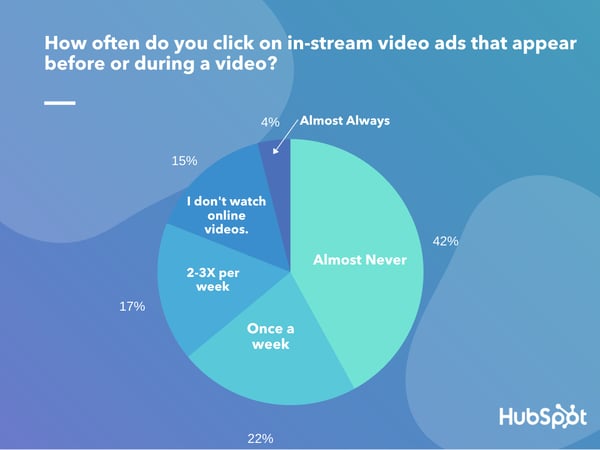
While 42% of people say they “almost never” click on in-stream video ads, another 22% say they’ll click on an ad “once a week.” Only 22% will click on two to three ads per week, while the remaining 15% say they don’t watch online videos.
As you plan your in-stream video strategy, remember that the results above are just from one small consumer pool. Had we asked this question to a particular demographic or a group of users on a specific platform, the numbers might have been different.
Although you should continue to do research about the pros and cons of in-stream ads, you should still keep the results above in mind. This data speaks to the age-old theory that people either completely avoid ads or mentally tune them out, regardless of their format or type.
While video advertising does offer the perk of audience targeting, you’ll still need to produce intriguing, interesting, or valuable video content to be successful.
In-Stream Ads and Purchase-Related Conversion
Before you start panicking about the results above, there were some optimistic findings in this survey. Although the consumers I polled are less interested in clicking on in-stream ads when they see them, they might still consider buying the promoted product.
When I asked, “Have you ever purchased a product that you learned about from an in-stream video ad?”, more than one-third of respondents — or 37% — say “Yes.” Meanwhile, 52% say, “No.”
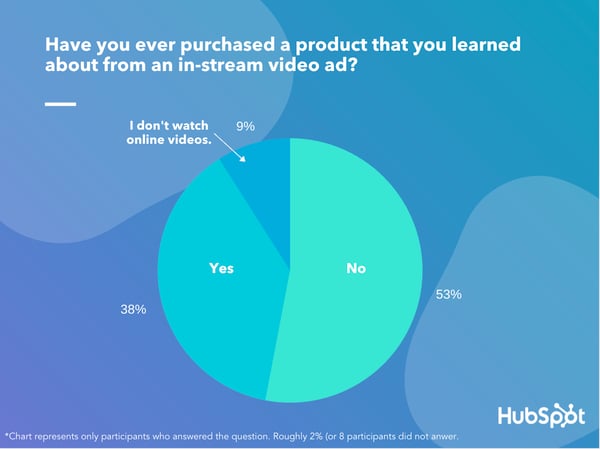
Of those who haven’t made a purchase related to an in-stream ad, 39% simply selected, “No” while 15% say, “No. I avoid in-stream ads at all costs.” Meanwhile, 9% say they “don’t watch online videos,” and thus wouldn’t have the option to see in-stream ads or make a related purchase.
While the percentage of people who won’t haven’t made a purchase after seeing an in-stream ad is quite large, this is somewhat expected when you consider online attention spans and how most of these consumers also say they don’t usually click on in-stream ads.
On the other hand, the percentage of people who’ve made a purchase after seeing an in-stream ad is still more than one-third of the group we surveyed. This might hint that there is a solid chance your in-stream ad could result in a purchase.
When do consumers click the “Skip” button?
When you look at the results above, you might think to yourself, “Consumers might not click on my ad, or purchase my product, but they’ll still watch the content. — Right?”
The truth is, most types of online content have just a few seconds to grab a consumer’s attention. Video content is not exempt.
As with any video marketing strategy, you can’t expect audiences to watch your content just because it’s right in front of them. Video ads, which often feature a “Skip” button, might have an even smaller window than the average marketing video.
When asked, “When given the option to skip an in-stream video ad that plays before or during your video, how long will you wait before skipping?”, a whopping 37% say they’ll “skip an ad as soon as possible,” while 20% say they’ll click skip in five seconds or less.
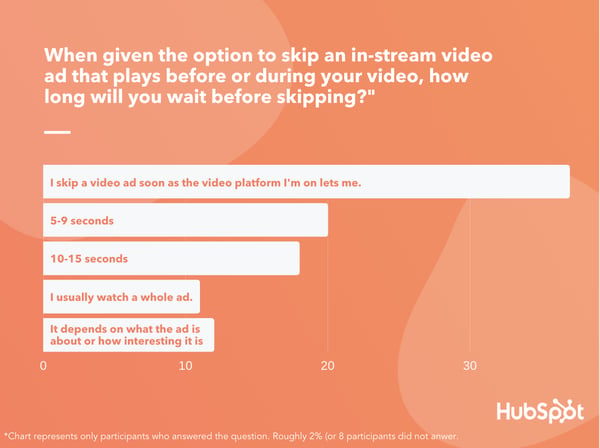
The interest in skipping isn’t a shocker. We’ve all done it. Sometimes, we just want to watch the video we planned to stream and don’t really care about the ads that are put in front of us.
Although the result above comes from just one small group of consumers, it aligns with mounting research which shows that global attention spans are narrowing — especially online.
While the average consumer’s attention span shouldn’t scare you away from an in-stream ad strategy, you should certainly keep it in mind.
To be successful with in-stream video ads — you’ll need to create content that grabs your viewer’s attention as soon as possible and is valuable enough to ease annoyances related to seeing an ad in their video.
In this example from the job search site Reed.co.uk. The ad immediately draws attention with a video of meowing kittens. Then it embraces its pre-roll placement by calling out YouTube viewers for watching videos because they’re “distracted from their job.” Towards the end of the ad, the site’s founder, tells the viewer to click on the video, which will send them to the job site:
https://www.youtube.com/watch?time_continue=9&v=8ErTZh9zEbg&feature=emb_title
How to Launch a Successful In-Stream Ad
As you’ve seen, there are solid pros and cons to in-stream advertising. While the cons shouldn’t scare you from trying this marketing tactic, you should still keep them in mind in order to create a video that can avoid constant skips from your audience. Here are a few tips to keep in mind
Throw viewers into the action.
Based on what consumers told us, you have anywhere from one to five seconds to grab your viewer’s attention before they zone out or skip your ad. You’ll rarely have more than 10 seconds to sway them.
So, begin your ad with an action-packed scene or concisely explain your product as quickly as possible. Don’t take time to get to the point — even if the ad platform you’re using allots a 30-to-60-second video.
Ask yourself, “Is this content valuable to prospects?”
Audiences will either skip your ad because they just don’t want to see a commercial, or they’re bored by your content and want to get to their video. This is why it’s important to create ads that either entertain your viewer or educate them about a product or brand-related topic they’ll value.
Use examples as inspiration.
Luckily, millions of brands have already tested out in-stream advertising. While this means the pool of advertising could be competitive, it also means that there are plenty of effective ads out there that you can watch for inspiration.
Next time you’re watching a video that begins or features an in-stream ad, watch the content. Take a mental note of why you do or don’t want to skip the ad. If you’re considering engaging with the ad and tapping to learn more about a product, ask yourself, “How did this content persuade me to click?”
If you don’t feel like searching out ads on social platforms, we’ve also got plenty of content to help you. Check out this rundown of effective short-form ads from small businesses and Super Bowl brands.

Why ABM Is Your Small Team’s Secret Weapon
We’re all too familiar with the dilemma most marketers face: higher expectations, and fewer resources.
This pressure can feel even greater if you’re already strapped with a leaner team.
Plus, there’s a lot of rhetoric around marketing strategies and buzzwords that seem complex and hard to implement, only making the water murkier.
One of those buzzwords we’re here to demystify is ABM — and especially the myth that it takes a large team, and tons of time, to scale. The truth is, having a leaner team may actually be your secret weapon to successfully implementing ABM.
Here, we’re going to explore how your small team can reap the ABM benefits that larger teams have been implementing for years.
ABM is a Mindset, Not an Isolated Tactic
Before we dive into how small teams can take those higher expectations and fewer resources and turn them into real results, it’s key to break ABM down to what it really is.
While ABM is often ranked among tactics like ’email marketing’ or ‘display advertising’ or ‘social media marketing’, it’s actually more of a mindset.
In essence, account-based marketing is just a smarter way to do B2B marketing. It’s choosing to reserve your budget for those high-value prospects most likely to convert, instead of throwing your budget at a large group of people with less insights into their chances of becoming a customer.
The method was just far more cumbersome to scale before data and AI caught up to make it possible for smaller teams, who needed to show results quicker and on a leaner budget.
If you could, why not reserve your budget for those most likely to convert to pipeline or revenue? That’s what ABM helps you do. That’s why it’s especially powerful for teams without overflowing budgets — because ABM enables you to start with ready-to-buy, high-fit accounts and tailor how you engage with them until you’re able to have a fast-tracked funnel from the first to last touch.
Kickstarting ABM for Small Teams
Now that you’re in the mindset, we can get to kickoff. The simplest way to approach ABM is to think in three straightforward steps. Let’s dive into those in more detail now.
1. Identify your best accounts and associated buying committees based on fit, intent, and engagement signals.
Build Your ICP
We get it, one of the aspects that held smaller teams back from ABM in the past was the ability to parse through data and understand their true ideal customer profile (ICP). For more traditional inbound or demand generation approaches, this usually got left at a persona.
Rather than rely on the buyer alone, this is instead a business-minded measure of who’s mostly likely to become a customer. This includes firmographic or technographic information like company size, revenue, industry, location, tech stack, and many other attributes.
Rather than use your ‘best guess’, you should rely on your CRM data or website traffic to analyze traits of your best customers in the past. This is where ABM tech comes in to help you distill information quickly, instead of relying on manual spreadsheets.
Develop Your Target Account List
Once you have this concept of your best ‘fit’, you can then begin to build your target account list (TAL) full of companies that are close matches to your developed ICP. Again, this is where you’ll want to leverage pre-existing databases with thousands of companies ready to fill your list.
If you want to get even more laser-focused with your marketing budget, you can begin to divide your new TAL into tiers based on how valuable they may be to your business. There’s a chance that some accounts are the best fit while others are a looser fit. AI can help save you the headache with predictive models that compare your list against your best customers. From there, you can work with a list of highest to lowest-fit accounts to help you decide where to invest the most time and money.
Beyond Fit
While making sure you begin building a TAL based on the right ICP is critical, there are also other measures of buyer readiness that should be layered on to make sure you’re approaching your strategy with the most information at hand.
Account Engagement is a first-party measure of which accounts are engaging with a business through activities such as email clicks, digital advertising impressions, website visits, webinar registrations, physical events attendance, blog post reads, and online product demos. Not all activity is equal (a product demo is probably a stronger signal than a blog visit). However, aggregating activity from all the people who are interacting with a company at the account level is critical so that marketing and sales teams can respond rapidly when engagement is spiking. Follow up speed matters in this digital, always-on world.
What to do:
- First, list your prospects that are showing clear signs of engagement for high-interest pages like pricing, product overviews, case studies, etc.
- Next, start to look in your CRM for sales stages that could be reworked like closed-lost opportunities, past demo requests, meeting no shows, etc.
- Finally, add colleagues of people who have historically exhibited high value engagement (nothing like name dropping to increase email open rates)!
Account Intent is a measure of which companies are engaging with your solution area but are not (yet) engaging with your business. Intent is measured through third parties (like Bombora) identifying buyers consuming business content relevant to a solution area or topic. These are the accounts that are traditionally invisible to marketers.
What to do:
- Work with your team to come up with a short list of topics your potential prospects would be looking for that are a fit for you and compile them.
- From there, work with intent signals that show surging topics for certain accounts, like how often they’re searching for topics related to your service.
- If you have partnerships with review sites, you can also tap into their database of companies searching for your category or visiting your profile.
2. Define your marketing mix and invest in the channels most likely to reach and engage your audience with the right messaging.
When you ask marketers what being ‘account-based’ means, some jump to in-person events, direct mail, special sporting events, or dinners with high-value prospects — you name it. These are also typically more challenging to scale as a more nimble team with tighter budgets. But more than ever, recent events (goodbye conferences, lunch and learns, happy hours) have called on marketers to reexamine how they view an account-based marketing mix and what can drive impact.
The resounding answer? Go digital. Even before the world changed, Forrester showed that 65% of B2B buyers prefer to conduct their purchase research online rather than work with a salesperson (and we know that’s who you had staffing your booths).
Now’s your chance to use that data to rethink your marketing mix and lean in where it makes sense. We know this much: People are spending more and more time online. Within our own internal data, we’ve seen that prices are going down (50%) inventory is going up (13%), and key measures of return on advertising spending (ROAS) are moving in the right direction.
Get Started With Air Cover
The best way to begin building momentum and alignment with your sales team (also known as, building pipeline) is to kick off an air cover play. Here’s how you can do it:
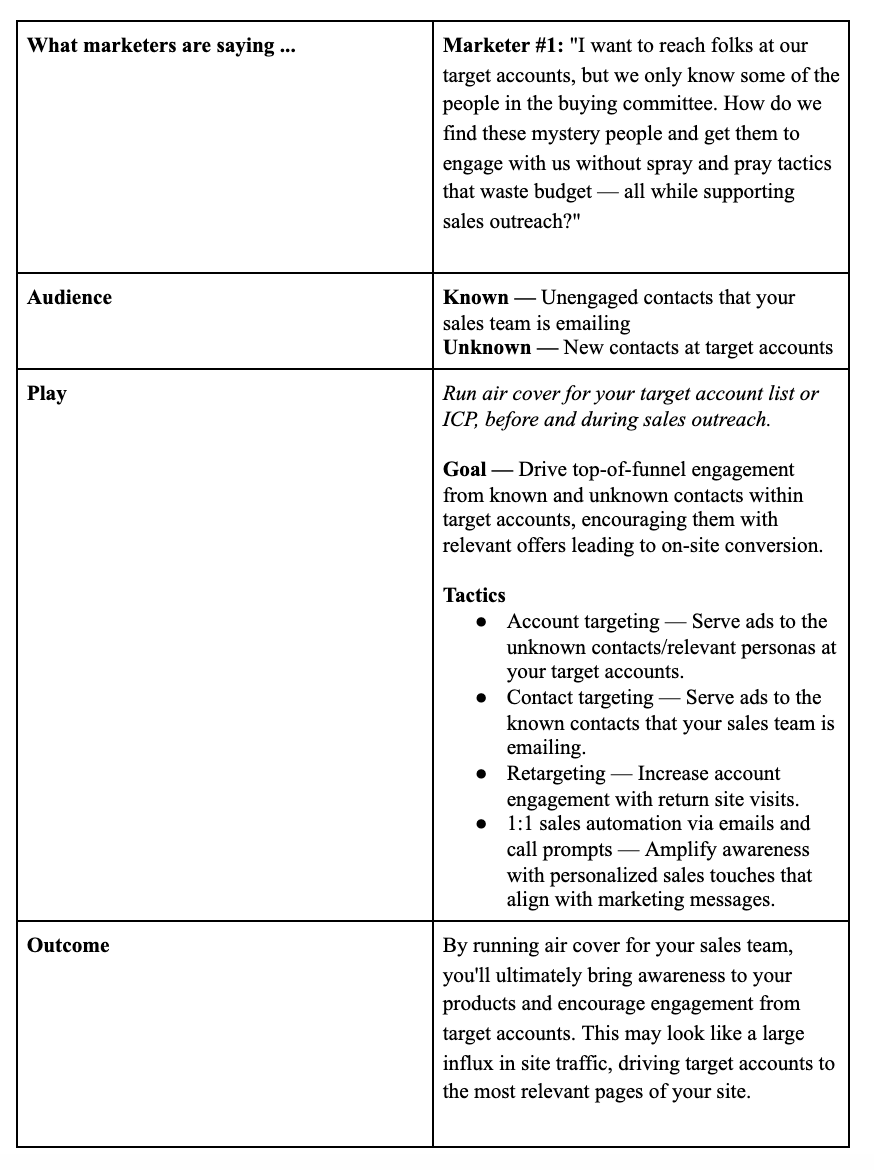 The real result you’re looking for? Increased site engagement increases the likelihood of your sales team booking a meeting or closing a deal.
In the real world: While running our own ABM program (in 2017), we found that accounts that had a marketing touch during sales outreach were 2X more likely to book a meeting.
3. Shift key metrics used to show impact, slowly moving from lead-based to account-based metrics with multi-touch attribution.
First, you’ll want to look at campaign metrics to make slight tweaks or optimizations. This will look like CTR, CPM, CPA, CTOR, etc. You may begin to prioritize spend on certain higher-value accounts and begin drilling down to engagement on the account level.
Here are a few other key metrics you’ll want to key your eye on to show demand impact:
Accounts Targeted — As a baseline, you should always be aware of just how many accounts are on your list. By keeping this number front and center, marketers can make sense of other metrics.
TAL Responses Generated — The number of targeted contacts that responded to the offers as measured by a form fill, page view, or email response.
TAL Meetings Booked — The number of meetings booked with your sellers that had a 3x3x3 play response as a preceding event prior to Opportunity creation.
LT TAL Opportunities Generated — The number of net new opportunities created with a 3x3x3 response as an event prior to opportunity creation.
LT TAL Pipeline Value $ — The dollar value of the net new opportunities generated as defined above.
Spend — Amount spent on all selected campaigns.
Value Over Volume
What you’ll want to dig into is a potential shift in the volume of demand moving more toward value in demand. This is a very typical shift when moving toward a higher fit/engagement/intent audience.
But with this more high-value over high-volume, you’ll start to see a faster conversion through the funnel from meeting to revenue thanks to being more selective with your audience. You can measure this, as well.

The Ultimate Social Media Holiday Calendar for 2020 [Template]
Whether it’s International Cat Day, Pizza Day, or Talk Like a Pirate Day, it seems like almost every day, the internet is celebrating a holiday.
Odds are, you don’t celebrate all of these social media holidays. Think about it. When was the last time you saw an obscure holiday or observance day trending and thought to yourself “Yup, I’m celebrating that”?
Some of these holidays might be simply too silly for your brand to engage with. But despite all of the oddities, social media managers are always eyeing trends and holidays that they can leverage for brand awareness.
While we certainly don’t suggest sharing content on social media and then tacking on a completely irrelevant hashtag on it, you should still take some time to recognize the brand opportunities that could come your way in the next year.
By ignoring all of the holiday opportunities you could be taking, you could be missing valuable opportunities to take advantage of trending topics with fun and relevant “holiday” content on social media.
From food to politics to animals and everything in between, there is a plethora of observance days worldwide during which marketers can share content relevant to their industries, get involved in a movement, or simply generate more awareness.
To help you plan for trending holidays, we created a list that you can bookmark, as well as a downloadable calendar so you can get automatic reminders.
The list isn’t exhaustive (there are a lot of food-specific holidays out there) and these dates and hashtags may still be subject to change. But this is a great starting point for social media marketers who want to learn more about what’s trending and how they can plan their content in a way that will be fun and engaging on Twitter and other social platforms.
Want to finish out your 2020 calendar with some upcoming holiday posts? Tap the “+” symbol in the lower righthand corner of the calendar below to add it to your own Google calendar.
Downloadable Holiday Calendar
To help you keep track of all the holidays, here’s a Social Media Holiday Google Calendar.
Aside from 2020 holidays, we’ve also set dates on the calendar to repeat annually — either on the exact date they occur or the weekday they occur within the month.
Reminder, click the plus sign below to add it to your own Google Calendar list.
National & Global Holiday Calendar: 2020-2021
- January 2020
- February 2020
- March 2020
- April 2020
- May 2020
- June 2020
- July 2020
- August 2020
- September 2020
- October 2020
- November 2020
- December 2020
January 2020
1. Wednesday, New Year’s Day #NewYearsDay
2. Thursday, Science Fiction Day #ScienceFictionDay
4. Saturday, National Trivia Day #NationalTriviaDay
5. Sunday, National Bird Day #NationalBirdDay
11. Saturday, Human Trafficking Awareness Day #HumanTraffickingDay
13. Monday, National Sticker Day #NationalStickerDay
13. Monday, Clean Off Your Desk Day #CleanOffYourDeskDay
15. Wednesday, National Hat Day #NationalHatDay
16. Thursday, Get to Know Your Customers Day (third Thursday of every quarter) #GetToKnowYourCustomersDay
20. Monday, Cheese Lovers Day #CheeseLoversDay
20. Monday, Martin Luther King, Jr. Day (Third Monday of January) #MLKDay
21. Tuesday, National Hugging Day #NationalHuggingDay
23. Thursday, National Pie Day #PieDay
24. Friday, National Compliment Day #NationalComplimentDay
25. Saturday, Opposite Day #OppositeDay
25. Saturday, Chinese New Year #ChineseNewYear
27. Monday, Community Manager Appreciation Day (Last Monday of January) #CMAD
28. Tuesday, Data Privacy Day #PrivacyAware
February 2020
2. Sunday, Groundhog Day #GroundhogDay
2. Sunday, World Wetlands Day #WorldWetlandsDay
2. Sunday, Super Bowl LIV (Varies each year based on the U.S. Football season) #SBLLIV #SuperBowlSunday #SuperBowl
4. Tuesday, World Cancer Day #WorldCancerDay
5. Wednesday, National Weatherperson’s Day #NationalWeatherpersonsDay
7. Friday, National Send a Card to a Friend Day #SendACardToAFriendDay
8. Saturday, National Boy Scouts Day #BoyScoutsDay
9. Sunday, National Pizza Day #NationalPizzaDay
11. Tuesday, Safer Internet Day #SID2020
11. Tuesday, Inventors Day #InventorsDay
13. Thursday, World Radio Day #WorldRadioDay
14. Friday, Valentine’s Day #ValentinesDay
17. Monday, Random Acts of Kindness Day #RandomActsOfKindnessDay
17. Monday, Presidents Day (Third Monday of February) #PresidentsDay
18. Tuesday, National Battery Day #NationalBatteryDay
20. Thursday, World Day of Social Justice #SocialJusticeDay
20. Wednesday, Love Your Pet Day #LoveYourPetDay
21. Friday, International Mother Language Day #IMLD
25. Tuesday, Mardi Gras #MardiGras
March 2020
2. Monday, National Read Across America Day #ReadAcrossAmerica & #DrSeuss
3. Tuesday, World Wildlife Day #WorldWildlifeDay
4. Wednesday, National Grammar Day #NationalGrammarDay
5. Thursday, National Pancake Day #NationalPancakeDay
6. Friday, National Dentist’s Day #DentistsDay
6. Friday, National Employee Appreciation Day (First Friday of March) #EmployeeAppreciationDay
6. Friday, National Day of Unplugging (First Friday of March) #NationalDayOfUnplugging
7. Saturday, National Be Heard Day #NationalBeHeardDay
7. Saturday, National Cereal Day #NationalCerealDay
8. Sunday, International Women’s Day #BeBoldForChange
8. Sunday, National Proofreading Day #NationalProofreadingDay
8. Sunday, Daylight Savings #DaylightSavings
10. Tuesday, National Pack Your Lunch Day #NationalPackYourLunchDay
10. Tuesday, National Women and Girls HIV/AIDS Awareness Day #NWGHAAD
11. Wednesday, National Worship of Tools Day #WorshipOfToolsDay
11. Wednesday, National Napping Day #NationalNappingDay
12: Thursday, National Girl Scout Day #GirlScoutDay
14. Saturday, Popcorn Lover’s Day #PopcornLoversDay
14. Saturday, Potato Chip Day #NationalPotatoChipDay
14. Saturday, Pi Day #PiDay (To go the extra mile, post this at 1:59, as Pi equals 3.14159…)
15. Sunday, World Consumer Rights Day #WCRD2020
15. Sunday, World Sleep Day #WorldSleepDay
16. Monday, National Freedom of Information Day #FreedomOfInformationDay
17. Tuesday, St. Patrick’s Day #StPatricksDay
18. Wednesday, Awkward Moments Day #NationalAwkwardMomentsDay
19. Thursday, National Let’s Laugh Day #NationalLetsLaughDay
20. Friday, International Day of Happiness #InternationalDayofHappiness
20. Friday, World Storytelling Day #WorldStorytellingDay
20. Friday, First Day of Spring #FirstDayofSpring
21. Saturday, International Day for the Elimination of Racial Discrimination #RacialDiscriminationDay
21. Saturday, World Poetry Day #WorldPoetryDay
22: Sunday, World Water Day #WorldWaterDay
23. Monday, National Puppy Day #NationalPuppyDay
25. Wednesday, Tolkien Reading Day #TolkienReadingDay
26. Thursday, National Spinach Day #NationalSpinachDay
26. Thursday, Purple Day #PurpleDay
26. Thursday, American Diabetes Association Alert Day #AmericanDiabetesAssociationAlertDay
28. Saturday, Earth Hour Day #EarthHour
30. Monday, Doctor’s Day #NationalDoctorsDay
30. Monday, National Take a Walk in the Park Day #NationalWalkInTheParkDay
31. Tuesday, World Backup Day #WorldBackupDay
31. Tuesday, Transgender Day of Visibility #TDOV
31. Tuesday, Equal Pay Day #EqualPayDay
April 2020
1. Wednesday, April Fools Day #AprilFools
2. Thursday, World Autism Awareness Day #WAAD
3. Friday, Find a Rainbow Day #FindARainbowDay
3. Friday, National Walking Day #NationalWalkingDay
4. Saturday, Hug a Newsperson Day #HugANewsperson
7. Tuesday, World Health Day #LetsTalk
10. Friday, National Siblings Day #NationalSiblingsDay
10. Friday, Encourage a Young Writer Day #EncourageAYoungWriterDay
11. Saturday, National Pet Day #NationalPetDay
12. Sunday, International Day of Human Space Flight #InternationalDayOfHumanSpaceFlight
15. Wednesday, National Tax Day #TaxDay
16. Thursday, National Stress Awareness Day #StressAwarenessDay
16. Thursday, National Wear Your Pajamas to Work Day #PJDay
17. Friday, Haiku Poetry Day #HaikuPoetryDay
18. Saturday, National Columnists’ Day #NationalColumnistDay
18. Saturday, Get to Know Your Customers Day #GetToKnowYourCustomersDay
18. Saturday, National High-Five Day #NH5D
20. Monday, National Look-Alike Day #NationalLookAlikeDay
22. Wednesday, Earth Day #EarthDay2018
23. Thursday, National Picnic Day #NationalPicnicDay
23. Thursday, World Book Day #WorldBookDay
24. Friday, National Administrative Professionals Day #AdministrativeProfessionalsDay
24. Friday, Denim Day #DenimDay
25. Saturday, National Telephone Day #NationalTelephoneDay
25. Saturday, World Malaria Day #EndMalariaForGood
25. Saturday, National Take Our Daughters and Sons to Work Day #COUNTONME
26. Sunday, Arbor Day #ArborDay
29. Wednesday, International Dance Day #InternationalDanceDay
30. Thursday, National Honesty Day #NationalHonestyDay
30. Thursday, National Adopt a Shelter Pet Day #AdoptAShelterPetDay
30. Thursday, International Jazz Day #JazzDay
May 2020
1. Friday, May Day #MayDay
1. Friday, International Workers Day #IntWorkersDay
2. Saturday, World Password Day #WorldPasswordDay
3. Sunday, World Press Freedom Day #WPFD2020 #PressFreedom
3. Sunday, Space Day #SpaceDay
4. Monday, Star Wars Day #StarWarsDay & #Maythe4thBeWithYou
4. Monday, International Firefighters Day #InternationalFirefightersDay
5. Tuesday, Cinco de Mayo #CincoDeMayo
6. Wednesday, National Nurses Day #NursesDay
7. Thursday, World Asthma Day #WorldAsthmaDay
7. Thursday, Thank a Teacher Day #ThankATeacher
8. Friday, National Receptionist Day #NationalReceptionistDay
9. Saturday, Europe Day #EuropeDay
10. Sunday, Mother’s Day #MothersDay
12. Tuesday, National Limerick Day #NationalLimerickDay
15. Friday, International Day of Families #FamilyDay
15. Friday, National Bike to Work Day #BTWD
16. Saturday, Love a Tree Day #LoveATreeDay
17. Sunday, International Day Against Homophobia and Transphobia #IDAHOT2020
17. Sunday, Endangered Species Day #EndangeredSpeciesDay
21. Thursday, National Memo Day #NationalMemoDay
21. Thursday, Red Nose Day #RedNoseDay
24. Sunday, National Scavenger Hunt Day #NationalScavengerHuntDay
25. Monday, Memorial Day (Fourth Monday of May) #MemorialDay #MDW
28. Thursday, Hamburger Day #NationalHamburgerDay
29. Friday, Paperclip Day #PaperclipDay
29. Friday, Heat Awareness Day (Last Friday of May) #NoFryDay
31. Sunday, World No-Tobacco Day #NoTobacco
June 2020
1. Monday, Global Day of Parents #GlobalDayOfParents
1. Monday, International Children’s Day #ChildrensDay
3. Wednesday, Leave The Office Early Day #LeaveTheOfficeEarlyDay
4. Thursday, National Donut Day #NationalDonutDay
5. Friday, World Environment Day #WorldEnvironmentDay
6. Saturday, National Cancer Survivor’s Day #NCSD2020
6. Saturday, Higher Education Day #HigherEducationDay
7. Sunday, World Oceans Day #WorldOceansDay
7. Sunday, Best Friends Day #BestFriendsDay
14. Sunday, World Blood Donor Day #GiveBlood
14. Sunday, National Flag Day #FlagDay
20. Saturday, World Refugee Day #WithRefugees
20. Saturday, First Day of Summer
21. Sunday, National Selfie Day #NationalSelfieDay
21. Sunday, World Music Day #WorldMusicDay
21. Sunday, Father’s Day #FathersDay
21. Sunday, International Yoga Day #InternationalYogaDay
26. Friday, Take Your Dog to Work Day #TakeYourDogToWorkDay
27. Saturday, National Sunglasses Day #NationalSunglassesDay
27. Saturday, National Handshake Day #HandshakeDay
30. Tuesday, Social Media Day #SMDay
July 2020
1. Wednesday, National Postal Worker Day #NationalPostalWorkerDay
2. Thursday, World UFO Day #WorldUFODay
4. Saturday, Independence Day (United States)
7. Tuesday, World Chocolate Day #WorldChocolateDay
11. Saturday, Cheer Up the Lonely Day #CheerUpTheLonelyDay
12. Sunday, Malala Day #MalalaDay
15. Wednesday, Give Something Away Day #GiveSomethingAwayDay
17. Friday, World Emoji Day #WorldEmojiDay
18. Saturday, Nelson Mandela International Day #MandelaDay
18. Saturday, Get to Know Your Customers Day #GetToKnowYourCustomersDay
30. Thursday, Talk in an Elevator Day #TalkInAnElevatorDay
30. Thursday, International Day of Friendship #DayOfFriendship
August 2020
1. Saturday, Respect for Parents Day #RespectForParentsDay
2. Sunday, National Coloring Book Day #NationalColoringBookDay
8. Saturday, International Cat Day #InternationalCatDay
9. Sunday, National Book Lovers Day #NationalBookLoversDay
10. Monday, National Lazy Day #LazyDay
11. Tuesday, National Sons and Daughters Day #SonsAndDaughtersDay
12. Wednesday, International Youth Day #YouthDay
12. Wednesday, World Elephant Day #WorldElephantDay
13. Thursday, International Lefthanders Day #LefthandersDay
15. Saturday, National Relaxation Day #NationalRelaxationDay
16. Sunday, National Tell a Joke Day #NationalTellAJokeDay
19. Wednesday, World Photo Day #WorldPhotoDay
19. Friday, World Humanitarian Day #WorldHumanitarianDay
20. Saturday, National Lemonade Day #NationalLemonadeDay
26. Friday, National Dog Day #NationalDogDay
26. Friday, National Women’s Equality Day #WomensEqualityDay
September 2019
Date Varies, Stand Up To Cancer Day #KissCancerGoodbye
4. Friday, National Wildlife Day #NationalWildlifeDay
5. Saturday, International Day of Charity #CharityDay
6. Sunday, Read a Book Day #ReadABookDay
6. Tuesday, National Grandparents Day (First Monday of September) #NationalGrandparentsDay
8. Tuesday, International Literacy Day #LiteracyDay
7. Monday, Labor Day #LaborDay
11. Friday, National Day of Service and Remembrance #911Day
12. Saturday, National Day of Encouragement #DayOfEncouragement
12. Saturday, National Video Games Day #NationalVideoGamesDay
19. Saturday, Talk Like a Pirate Day #TalkLikeAPirateDay
21. Monday, International Day of Peace #PeaceDay
21. Monday, Miniature Golf Day #MiniGolfDay
21. Monday, Civic Day of Hacking #HackForChange
22. Tuesday, Car-Free Day #CarFreeDay
22. Tuesday, Hobbit Day #HobbitDay
22. Tuesday, First Day of Fall
23. Wednesday, National Women’s Health and Fitness Day #FitnessDay
26. Saturday, European Day of Languages #EDL2020
27. Sunday, World Tourism Day #WTD2020
28. Monday, World Rabies Day #WorldRabiesDay
28. Monday, National Good Neighbor Day #GoodNeighborDay
30. Wednesday, International Podcast Day #InternationalPodcastDay
October 2020
1. Thursday, International Day of Older Persons #UNDOP
1. Thursday, International Coffee Day #InternationalCoffeeDay
1. Thursday, World Vegetarian Day #WorldVegetarianDay
2. Friday, International Day of Nonviolence #InternationalDayOfNonviolence
2. Friday, World Smile Day #WorldSmileDay
3. Saturday, National Techies Day #TechiesDay
4. Sunday, World Animal Day #WorldAnimalDay
4. Sunday, National Taco Day #NationalTacoDay
5. Monday, World Teachers Day #WorldTeachersDay
7. Wednesday, World Habitat Day #WorldHabitatDay
10. Saturday, World Mental Health Day #WorldMentalHeathDay
10. Saturday, World Sight Day #WorldSightDay
11. Sunday, International Day of the Girl #DayOfTheGirl
14. Wednesday, National Dessert Day #DessertDay
15. Thursday, Global Handwashing Day #GlobalHandwashingDay
16. Friday, World Food Day #FoodDay
16. Friday, Bosses Day #BossesDay
17. Saturday, International Day for the Eradication of Poverty #EndPoverty
20. Tuesday, World Statistics Day #StatisticsDay
21. Wednesday, Reptile Awareness Day #ReptileAwarenessDay
24. Saturday, United Nations Day #UNDay
25. Sunday, Greasy Foods Day #GreasyFoodsDay
30. Friday, National Publicist Day #NationalPublicistDay
30. Friday, Checklist Day #ChecklistDay
31. Saturday, Halloween #Halloween
November 2020
1. Sunday, World Vegan Day #WorldVeganDay
1. Sunday, National Authors Day #NationalAuthorsDay
1. Sunday, National Cook For Your Pets Day #CookForYourPetsDay
3. Tuesday, National Sandwich Day #NationalSandwichDay
3. Tuesday, Daylight Saving Time Ends #DaylightSavings
4. Wednesday, National Candy Day #NationalCandyDay
8. Sunday, National Cappuccino Day #CappuccinoDay
8. Sunday, Science, Technology, Engineering, and Medicine (STEM) Day #STEMDay
11. Wednesday, Veterans Day #VeteransDay
13. Friday, World Kindness Day #WKD
14. Saturday, World Diabetes Day #WDD
15. Sunday, Clean Out Your Refrigerator Day #CleanOutYourRefrigeratorDay
15. Sunday, America Recycles Day #BeRecycled
16. Monday, International Day for Tolerance #ToleranceDay
17. Tuesday, International Students Day #InternationalStudentsDay
19. Thursday, International Men’s Day #InternationalMensDay
19. Thursday, National Entrepreneurs Day #EntrepreneursDay
20. Friday, Universal Children’s Day #UNChildrensDay
21. Saturday, World Hello Day #WorldHelloDay
25. Wednesday, Thanksgiving Day #Thanksgiving
26. Thursday, National Cake Day #NationalCakeDay
28. Saturday, Small Business Saturday (The last Saturday of November) #ShopSmall
29. Sunday, National Day of Listening #DayOfListening
29. Sunday, Electronic Greeting Card Day #ElectronicGreetingCardDay
30. Monday, Computer Security Day #ComputerSecurityDay
December 2020
1. Tuesday, World AIDS Day #WAD2020
2. Wednesday, Cyber Monday #CyberMonday
3. Thursday, International Day of Persons with Disabilities #IDPWD
4. Friday, National Cookie Day #NationalCookieDay
5. Saturday, World Soil Day #WorldSoilDay
6. Sunday, Microwave Oven Day #MicrowaveOvenDay
8. Tuesday, Pretend to Be a Time Traveler Day #PretendToBeATimeTravelerDay
10. Thursday, Human Rights Day #HumanRightsDay
10. Thursday, Nobel Prize Day #NobelPrize
11. Friday, International Mountain Day #InternationalMountainDay
11. Friday, National Salesperson Day #SalespersonDay
21. Monday, Crossword Puzzle Day #CrosswordPuzzleDay
21. Monday, First Day of Winter #WinterSolstice
30. Wednesday, No Interruptions Day – Last Work Day of the Year #NoInterruptionsDay
31. Thursday, New Year’s Eve #NYE
Sources: National Day Calendar, Sprout Social, TrackMaven, Holiday Insights, Brownielocks, National Peace Corps Association, Sparkflow
Editor’s Note: This post was originally published in January 2017 but is updated annually for comprehensiveness. The most recent update of this post was July 2020.

11 Best Practices for Facebook Cover Photos & Videos [Templates]
When people arrive at your Facebook Page, where do you think they first look?
I’ll give you some hints. It’s a visual piece of content that sits at the top of your Page. Its dimensions are 820 pixels wide by 312 pixels tall. It takes up almost a quarter of the screen on most desktop browsers.
That’s right — it’s your Facebook cover photo.
Sometimes called your Facebook banner, this graphic is one of the most noticeable parts of your Page. It’s therefore crucial that you follow Facebook cover photo best practices.
Facebook Cover Photo Size
Optimize your cover photo for the right dimensions: 820 pixels wide and 312 pixels tall for desktop, 640 pixels wide by 360 pixels tall for mobile. If your uploaded image is smaller than these dimensions, Facebook will stretch it to fit — making it look blurry.
Whether you’re using Facebook to generate leads, close your next sale, or create a customer community, knowing how to make and optimize your cover photo is very important. And when you consider the Facebook cover photo dimensions above, it can be tough to balance creativity with the requirements of the platform.
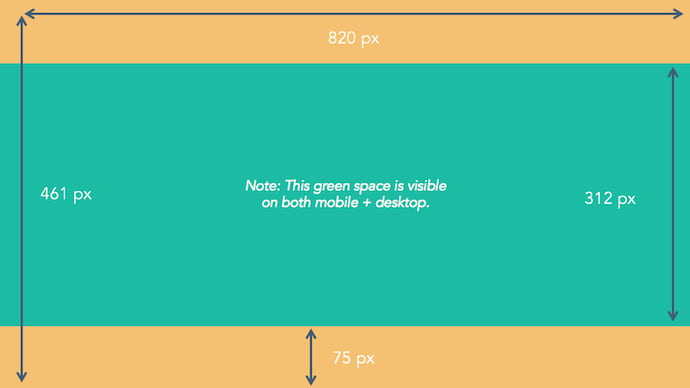
As you can see from the figure above, there’s a lot of space that you can risk cutting off of your final cover photo design depending on where your audience is viewing — mobile or desktop. Therefore, it’s best to focus the brunt of your content in that green space, where everyone can see your cover photo regardless of the device they’re using.
Need help getting started? Below, you’ll find 11 Facebook cover photo templates, and just as many best practices to guide you when designing your brand’s banner artwork. At the bottom of this post, find out how to turn your cover photo into a cover video, and check out a few examples to see what others have done.
11 Facebook Cover Photo Best Practices
1. Do abide by Facebook’s cover photo guidelines.
It seems like a no-brainer, but obeying Facebook guidelines is crucial to your Facebook Page existing in the first place. I’d highly suggest reading through the full Page Guidelines, but here are a few important things to keep in mind for your Facebook banner:
- Your cover is public.
- Covers can’t be deceptive, misleading, or infringe on anyone else’s copyright.
- You can’t encourage people to upload your cover to their personal timelines.
If you get caught violating the above terms, Facebook could take action against your Page. And while Facebook doesn’t explicitly say what will happen if you violate their Page guidelines, it’s probably not smart to get your Facebook Page taken down over a cover photo infraction, so read the guidelines in full and adhere to them.
2. Do make sure your Facebook cover photo size is right.
As stated at the beginning of this article, the best Facebook banner size is 820 pixels wide by 312 pixels tall for computers, and 640 pixels wide by 360 pixels tall on mobile devices.
You don’t want to spend all this time designing a cover photo only to have it look weird when you upload it to Facebook.
If you upload an image smaller than those dimensions, Facebook will stretch it to fit the right size, as long as it’s at least 399 pixels wide and 150 pixels tall.
If you want a no-hassle way to make sure your cover photos are the right size, download our pre-sized template for Facebook cover photos here.
3. Don’t worry about the old ‘20% text’ rule, but still try to stay visual.
Back in 2013, Facebook removed any reference to the 20% rule on text in cover photos … but that doesn’t mean you should go wild with using text in your cover photo. The previous rule said that only 20% of your cover photo could be text. Personally, I thought that was way too restrictive for marketers, but the sentiment behind the rule was a good one.
If you’re going to use text in your cover photo, keep that text concise. Your photo will be much more informative and engaging. You can see how we’ve tried to strike that balance on HubSpot’s Facebook Page below.
4. Do give your cover image a focal point and colors that match your brand.
Think of your cover photo as the portion of your Page that’s “above the fold.” If it’s distracting or confusing, people will be more likely to click off the Page.
Many of the best Facebook cover photos include a centerpiece to focus visitors’ attention, along with a color scheme that aligns with the rest of their brand. Remember, your social media accounts are extensions of your business, and should give that impression to visitors right away.
They also use negative white (i.e., empty) space as an advantage to make the subject, any copy on there, and other elements unique to Facebook (like the CTA button on Facebook business Pages) stand out even more.
Here’s an example from Makr:
And one from social media management platform Sprout Social:
5. Don’t try to blend the contents of your cover photo with your profile picture.
With some clever design tweaks, you used to be able to manipulate your profile picture and cover photo so they appear as if they’re two parts of the same canvas. You can still do this on your personal profile, but Facebook no longer sets up Business Pages this way.
One of Paris’ former cover photos did this nicely:
Now, as shown in the examples earlier in this article, the profile picture is completely separate from the cover photo.
We admire your creativity, but don’t prepare your design this way if you haven’t yet launched a Business Page — you’ll be disappointed.
6. Do draw attention to the action buttons on the bottom right.
You might’ve noticed in a few of the cover photo examples above that their primary call-to-action (CTA) buttons were different. Makr’s says “Shop Now,” while Sprout Social’s says “Sign Up.”
Depending on your business, you can launch a Page on Facebook with a unique CTA button to the bottom right of your cover photo. Take this button into consideration when designing your cover photo, and make it clear in the photo that this is a visitor’s next step.
Hotel Urbano does this is a charming way below, using the girl in goggles to draw your eyes toward the buttons she seems to be swimming toward …
Note: While it might seem like a good idea to add directional cues like an arrow to get people to click on the CTA buttons, note that those CTA buttons don’t appear the same way on the mobile app. In other words, it might be confusing to mobile users if you directly integrate the cover photo design with the buttons.
I’ll show you how Business Pages look on mobile devices in just a minute.
7. Do right-align the objects in your cover photo.
Since your profile picture is on the left, you want to add some balance to your Facebook cover photo design by having the focus of the image be on the right.
Take a look at these cover photos. Which one looks more aesthetically pleasing?
Right-aligned focus:
Left-aligned focus:
Doesn’t the right-aligned cover photo look better? The biggest design elements (the profile picture, the text, and the Statue of Liberty) are evenly spaced. In Samsung’s old cover photo, your attention goes immediately to the left side of the page, completely missing the name of the product on the upper-right side.
Not only is adding balance a crucial element of design, but it also allows for your cover photos to be more visually effective on mobile. Which brings me to my next point …
8. Do keep mobile users in mind.
As of 2019, reports Statista, 96% of Facebook’s user base accesses the social network from mobile devices like smartphones and tablets. That’s huge — and it’s exactly why it’s so important to keep mobile users top-of-mind when designing your Facebook cover photo.
On mobile, a much larger portion of your cover photo is blocked out because the profile picture and the Page name are on top of the cover photo.
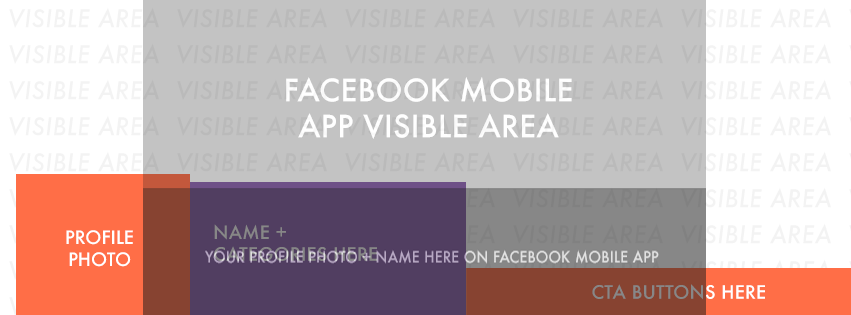 Image Credit: Twelveskip
Let’s take a look at a real-life example. Below, take a look at what Cisco’s Facebook Page looks like in a desktop browser versus on Facebook’s mobile app.
Desktop:
Mobile:
Notice that the sides of the photo are cut off on mobile. Whereas your cover photo displays at 820 pixels wide by 312 pixels tall on desktop, it displays only the center 640 pixels wide by 360 pixels tall on smartphones. Take a look at this Facebook help document for more information.
Notice, by the way, how the text in Adobe’s cover photo is cut off on the right-hand side. While it looks best to right-align your visual elements, be careful not to put important content so far to the right that it gets cut off on mobile.
9. Do include a shortened link in your cover photo description that aligns with your page CTA.
If you want to use your cover photo to support a Page CTA, make sure your cover photo description also includes a text CTA and link to the same offer. This way, any time people view your cover photo directly, they can access the download link.
Here’s this practice in action on Adobe’s Facebook Page:
Make sure you shorten your links and add UTM codes so you can track clicks on them. Shortening and tracking features are available in the HubSpot Marketing Platform and in tools like bitly.
(If you want to learn more about how to write effective call-to-action copy for your cover photo description, click here to download our free ebook on creating compelling CTAs.)
10. Do pin a related post right below your Facebook cover image.
Have you ever “pinned” a post to your Facebook Page’s Timeline? Basically, pinning a post allows you to highlight a typical Facebook post on the top of your Timeline for seven days. It’s signified by a small blue push pin on the top right of the post, like on Fashion Nova’s Page below:
How does this relate to optimizing your Facebook cover photo? Well, if you’re spending time aligning your Facebook Page CTA, your cover photo design, and your cover photo description copy, you should also make sure to post about the same thing directly to your page, and pin that post to the top of your Timeline.
That way, you’re giving people one very clear call-to-action when they arrive to your page (albeit in several different locations) — which should help conversions.
To pin a Facebook post: Simply publish the post to Facebook, then click the three dots on the top right corner of the post and choose “Pin to Top.”
11. Do consider publishing a Facebook cover video.
You read that right. Facebook Business Pages now have the option to add a video in lieu of a static cover photo, provided they meet certain requirements — which we dug up for you:
How to Make a Facebook Cover Video
Post a Facebook cover video by saving a video file at 820 pixels wide by 426 pixels tall to your desktop. Open your Facebook Business page, click “Change Cover” at the top-left of your cover photo, and select “Upload Photo/Video.” This allows you to format and publish the desktop file to your Facebook page.
Facebook currently supports cover videos that are between 20 and 90 seconds long, and a minimum of 820 pixels wide by 312 pixels tall. The maximum (and recommended) size is 820 by 462 pixels with a video resolution of 1080p.
Keep in mind that Facebook cover videos play on a loop — once it ends, it automatically starts over if the viewer is still on your Facebook page. With that in mind, make sure whatever you post is pleasant if seen more than once. Extreme, action-packed videos might appear exhausting when played over and over …
Once you pull the file from your desktop, you’ll click “Next” where you’ll be asked to select from 10 thumbnail versions of your video. The thumbnail you choose will display for users who hover their cursor over your profile photo before visiting your full Business Page.
Facebook Cover Video Examples
Cover videos are a terrific option for the video-inclined, and brands across numerous industries have already taken advantage of it to hold their visitors’ attention. Here are some great cover videos to inspire you:
REI
REI sells outdoor equipment for activities like camping, hiking, running, boating, and biking. The company’s subtle cover video reflects its products, all in one peaceful time lapse of the scenery it knows its audience craves.
Nokia
Nokia wants to be everywhere its users are — whether they’re paddle-boarding, scuba diving, skateboarding, or working. Its Facebook cover video embodies its core customer in a visually pleasing way.
WIRED Magazine
When your publication changes as fast as the news cycle, it can be hard to keep your readers focused on the stories you feel deserve extra attention. WIRED Magazine uses its Facebook cover video for just this purpose, as shown in the example below.
HubSpot Academy
Alright, maybe we’re biased, but our brilliant creative team crushed it with the video below, made for HubSpot Academy. Sometimes, animation is the best way to capture the essence of your brand.
As you can see from these examples, your video should be just as simple as a cover photo. Keep in mind the same guidelines outlined in best practice #1 apply to cover videos as well.
Want to see how HubSpot uses Facebook? Like our Facebook Page here.

How to A/B Test CTAs Like HubSpot Experts
The call to action is a put up or shut up moment that can turn curiosity into a legitimate business opportunity. It’s the bridge between visitors and leads — a point of entry that allows you to capitalize on the web traffic you generate.
Despite its potentially massive business implications, your average CTA is generally pretty small and unassuming — maybe a button or a line of text. It might seem like the blog post or product page the CTA is placed on is all that matters when it comes to how many leads it ultimately generates
It’s easy to think that the copy, color, or placement of a call to action doesn’t really matter, but that’s not the case. A lot goes into creating an effective CTA. The best ones have been carefully crafted and consistently tested. Here, we’ll focus on that process.
We’ll learn how to A/B test CTAs successfully and get some insight on the subject from some expert HubSpotters.
1. Decide on a specific factor you want to test.
A/B testing isn’t supposed to be some indiscriminately applied process. In this context, it’s designed to help you best optimize specific aspects of your CTAs. That means conducting a thoughtful, effective A/B test rests on you definitively selecting the individual variables you want to better understand.
Are you trying to zero in on the best word-choice for your CTA? Are you looking for its optimum visual characteristics? Do you want to identify where its most effective placement on your blog posts might be?
Try to lock in on one factor — above all others. You don’t want to A/B test multiple CTAs with different shapes, colors, and copy all at once.
2. Create multiple, distinct CTAs.
There’s a reason A/B testing is called “A/B” testing — not just “A” testing. The concept itself rests on comparing multiple options, so naturally, if you want to A/B test CTAs, you need more than one.
There are a variety of variables you can use to create unique, distinguishable CTAs, including color, position, size, shape, and wording. Here’s an example of the components of an A/B test with multiple variants HubSpot used to test the efficacy of some anchor text CTAs.
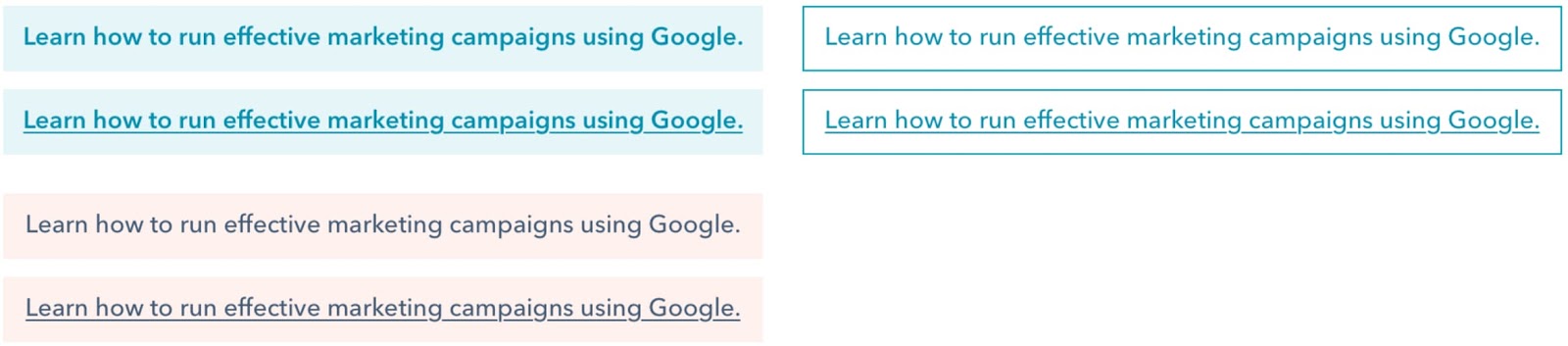
This A/B test took fundamentally similar CTAs that conveyed the same information in unique ways. It leveraged unique — but not outrageously different — options to help it hone in on the slight distinctions between choices blog readers would be most receptive to.
3. Measure your Results
Identify a date range you’d like to use as your reference point for your experiment. Once you’ve carried out your testing across that period, take the time to analyze and understand your results.
Get a feel for how your various choices performed in terms of metrics like overall views, clicks, and submissions to see which of your CTAs are garnering the most attention and converting the best. Here’s an example of what that looks like from HubSpot’s own experiment with including brackets in anchor CTAs.

Once you have your results, you can start to identify the more effective aspects of each option and start to piece together CTAs that will consistently deliver the results you need.
How to A/B Test CTAs like HubSpot Marketers
Avoid testing multiple variables at the same time.
It’s recommended that you don’t employ radically different variations of the same CTA when A/B testing. The hope in carrying out these tests is to identify the specific factors that make your CTAs most effective.
If you’re comparing CTAs with various aspects when A/B testing, your results might be muddled. You won’t have a clear idea of which aspects are most effective — you’ll lose out on the ability to identify the factors worth applying to your CTAs going forward.
As Carly Stec, Team Manager for Blog and Academy Acquisition at HubSpot, suggests you “avoid testing multiple variables at the same time.” She stresses the value of keeping things straightforward.
She discussed a recent series of A/B tests her team ran for HubSpot’s thank-you pages that involved changing the messaging, placement, and visuals of a CTA. She noticed strong increases in conversion but didn’t have a firm picture of the key factor at play, “While we saw a strong increase in conversion, we were left wondering, what exactly did the trick? Was it one of the elements or all three?”
Her team opted to partition the tests to identify what was making the difference. As she put it, “We reran the test as three separate single variable tests and found that placement actually had the most influence on conversion. The lesson? Keep it simple so success is easier to trace.”
Treat it as a marathon — not a sprint.
Slow and steady — that’s the name of the game when it comes to A/B testing CTAs. It’s a piece-by-piece process. Your most successful CTAs will be the sum of several minor adjustments, often carried out over somewhat substantial periods of time.
As AJ Beltis, HubSpot Marketing Manager for Content and Acquisition, put it, “Don’t be afraid to start testing incremental changes.” Minor tweaks to language, visual characteristics, placement, and other factors wind up making for the most effective CTAs. If every A/B test you run for your CTAs is based on a major overhaul, you might pass over the aspects that were working best for you.
Beltis went on to discuss an experience with some tests he and his team ran for the HubSpot blog, “For example, we did an entire series on testing our anchor text CTAs. While we saw marginal increases from every test, it was the combination of these results that resulted in the optimal version of this CTA, which has resulted in a significant increase in annual leads from the blog.”
What HubSpot Learned From A/B Testing CTAs
If there’s one lesson that HubSpot has taken away from A/B testing CTAs, it’s that there’s always room for improvement. A/B testing CTAs is an ongoing process. As Stec put it, “At HubSpot, we constantly iterate on our tests to make sure we’re not settling for the winner. Just because something won once, doesn’t mean it can’t be beat. Keep going.”
A/B testing CTAs is about zeroing in on the perfect option — the caveat here is that perfection isn’t real. Always aspire to consistently improve your CTAs, and A/B testing is central to that process.
It’s important to maintain focus and effort when it comes to this process, and Stec captured the essence of that mindset when she said, “Don’t underestimate the importance of persistence in A/B testing.”

HubSpot Marketers’ Favorite Integrated Marketing Campaigns
A tv show is returning, and I am pumped. “The Umbrella Academy” is a sci-fi show based on the comic book of the same name, and it’s nothing short of fantastic.
Superheroes, comedy, a talking animal, and saving the world from imploding — what more could you want?
When I first learned about the season, I was scrolling Twitter and came across the video announcement. I was stoked. A little later, I decided to check Facebook, and saw promo stills for the new season — only building my excitement.
A couple of weeks later, I saw the official trailer for the first time on Instagram, and again on YouTube. Up until that point, I’d come across promotional content from three different channels for the new season.
This rollout has become one of my favorite integrated marketing campaigns of 2020. The Netflix team is pulling out all the stops across multiple different fronts to keep users excited about the premiere.
It’s working for me — I can hardly wait. And in this post, we’re going to go over other integrated marketing examples that were extremely effective for them.
HubSpot’s Favorite Integrated Marketing Campaigns
Integrated marketing is any marketing campaign that uses multiple channels in execution. For example, you might see a popular new donut flavor in a commercial, then drive past the donut shop to see posters of the donut. And if you flip through Instagram once you get to your destination, you might see a GIF on your feed, displaying the donut.
This style of marketing is great for boosting leads and brand awareness. Using multiple sources to deliver the same campaign diversifies the audience that interacts with its content. Let’s look at some recent integrated marketing campaigns that delivered a great experience for customers and leads alike.
1. Hulu’s HAHA Awards
Channels: Twitter, LinkedIn, YouTube, Website
One of my favorite integrated marketing campaigns to come along is the launch of Hulu’s HAHA Awards. HAHA is a clever acronym, standing for “Hilarious Animated Hulu Awards,” which I love.
Initially, I saw the commercial during a regular ad break while watching — of course — Hulu:
Because there’s no awards show for animated content, the team at Hulu decided to change that — and get fans involved. Fans can vote for the awards on Twitter and Hulu’s website.
I appreciate that anyone with a Twitter account can participate in voting, regardless of if they are Hulu customers. Some of the categories are popular tv shows, like Archer and Bob Burgers, so the masses can vote. Additionally, people without a Twitter or Hulu account can vote, just by visiting the website.
The tactic of using YouTube to introduce the campaign, as well as alternate methods of voting, make this campaign a chance for Hulu to delight customers and earn more quality leads from social media.
2. Victoria Monet’s “Audience”
Channels: Instagram, Facebook, Billboards
For new single, “Experience,” R&B singers Victoria Monet and Khalid collaborated with Spotify for a release campaign. The campaign included online and in-person marketing tactics, and is the favorite campaign of staff writer Jay Fuchs.
In Canada, there was a billboard put up in Toronto, promoting the song’s Spotify release. In response, Monet posted a picture on Instagram to share with her fans and promote the single:
The use of online and in-person marketing methods makes this integrated campaign one that can be seen by eyes from anywhere. From the billboard in Canada, to international Facebook and Instagram fans, the release of “Experience” was anticipated globally. In fact, in one month, the single has become Monet’s most popular song on the streaming service.
3. Gillette, “The Best Men Can Be”
Channels: Website, YouTube
“In 2019, Gillette launched their campaign, “The Best Men Can Be”. The campaign included an inspiring video, a landing page that celebrates male advocates and leaders in the community, and a hashtag, #thebestmencanbe, to encourage user participation across social channels,” says HubSpot’s Marketing Blog Editor, Caroline Forsey.
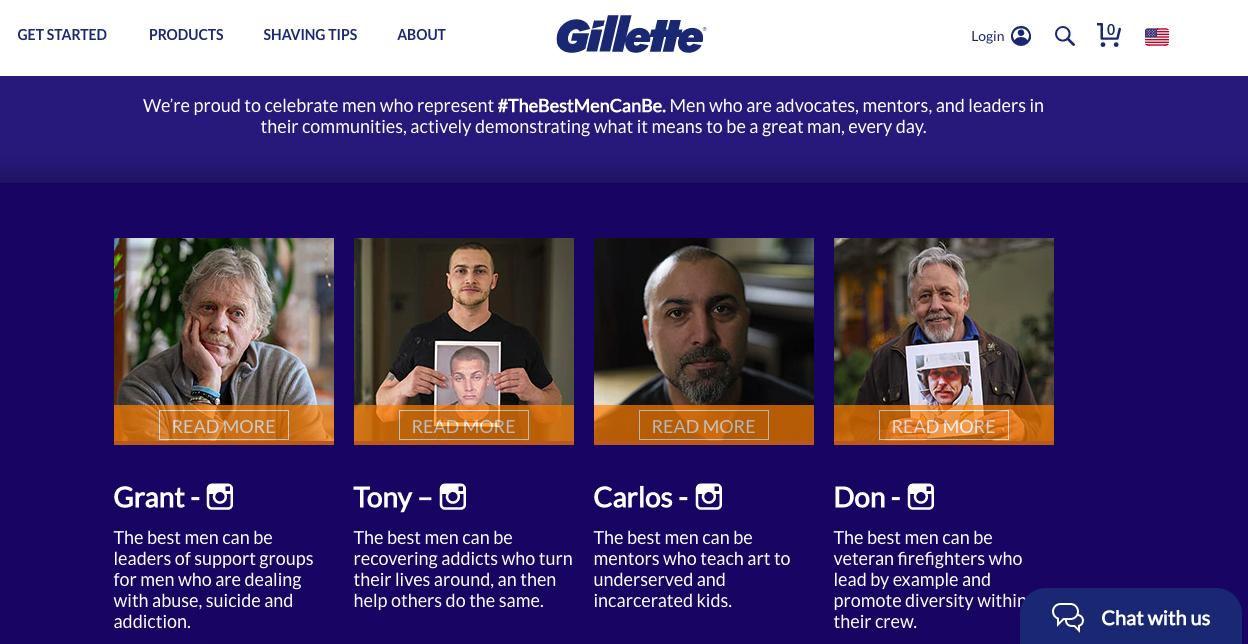
“The campaign, created in response to the #metoo movement, urged men to hold themselves to a higher standard,” says Forsey. In the corresponding ad for the movement, viewers are shown hypothetical real-life instances of men stepping in to be themselves, and making positive change in their community. To heighten awareness of the movement, the landing page highlights real accounts of men upholding the hashtag Gillette created.
“While the campaign received some backlash from both stakeholders and consumers, I think it was worth the price because it redefined the shaving brand as a relevant, values-oriented brand. For me personally, I shared the ad with all my male friends and family members, and it sparked a discussion — which, really, is what marketing is all about,” Forsey commented.
Gillette’s tactic of getting their customers involved proved to be successful in the moment and long-term. Discussions, like the one Forsey had with males in her life, were happening nationwide; In fact, my university class had one about the campaign. This integrated campaign, boosted by real accounts, was proven to be not only successful, but valuable.
4. REI, #RecreateResponsibly
Channels: Website, Instagram
Outdoor activity is at the core of REI’s products. REI sells camping essentials, such as tents, clothes, and insulated containers. In 2020, REI partnered with several groups in Washington state that aim to preserve wildlife and nature, making it the favorite campaign of service blog manager, Clint Fontanella.
Outdoor Alliance, The Outdoor Industry Association, and national parks came together for the #RecreateResponsibly campaign. The point of which was to educate the public about how to stay safe when venturing outdoors, with the main content player being graphics similar to the one below:
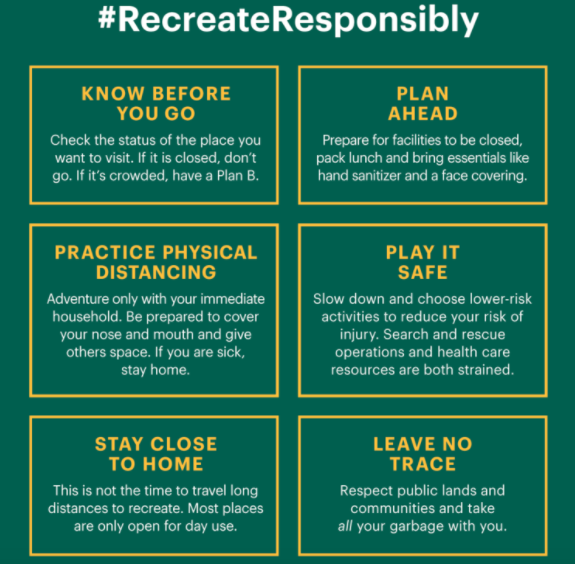
This graphic was shared on social media to spread awareness of tips to responsibly venture outdoors to avoid health concerns. #RecreateResponsibly‘s hashtag asks followers to share the tips in real life situations, shared by REI’s Instagram.
With the hashtag and partnerships, the campaign is also boosted by related blog posts on REI’s website. Posts like this one offer ways to stay safe while traveling.
The hashtag has been used by The National Park Service, Colorado Parks and Wildlife, and Los Angeles National Forest, and brings awareness to large audiences. The partnerships and REI’s content share an educational message and an interactive component — making this campaign diverse and engaging.
5. Melt Cosmetics, “She’s in Parties”
Channels: Website, Instagram, Facebook
“She’s in Parties” is the name of an eyeshadow palette from Melt Cosmetics. Says staff writer Rebecca Riserbato, “The purple palette sparked a hashtag of the same name on Instagram. On the landing page for the collection, there’s a section dedicated to Instagram posts with the hashtag.”
The campaign inspired a purple theme, which took over the company’s Facebook and Instagram accounts. Along with this social media content, influencers who were sent the palette began to upload their reviews on YouTube.
For this launch, a variety of social tactics were used. A matching social campaign, user-generated hashtag, YouTube recommendations, and a revolving landing page were all contributions to where the campaign was distributed. When you know where your audience spends their time, like the team at Melt, you can reach them with a diverse, omnichannel strategy.
6. Brew Dr. Kombucha, “Love Wins”
Channels: Website, Instagram
“In May 2020, Brew Dr. Kombucha released its signature kombucha with limited-edition colorful, rainbow-wrapping for Pride Month,” Forsey recalls. “The wrapping has the lifeline number to The Trevor Project printed directly on it — the company partnered with The Trevor Project and supports the organization through proceeds of its limited-edition kombucha.”
“Along with the limited-edition wrapping, the company created a dedicated landing page for #LoveWins, and supported Pride Month with the #LoveWins hashtag across its social channels.”
Forsey continues, “Ultimately, I chose this campaign as one of my favorite integrated campaigns of 2020 because I was inspired to see this brand uplift and inspire communities while giving proceeds back to an incredibly worthy cause.”
The brand chose a social movement that was important to them, Pride, and celebrated it with this integrated campaign. This tactic brings awareness to a social cause, a respected organization, and enhances a celebration.
7. The New York Times, “The Truth Is Hard”
Channels: Commercial, Facebook, Billboard
In early 2018, newspaper The New York Times was struggling. With dwindling subscriptions and dwindling trust in the news from the general public, the team behind the famous publication had to figure out how to build widespread trust.
That’s where “The Truth Is Hard” came in — It was a campaign designed to offer transparency. “I think the best advertising not only gets you to pause and pay attention in the moment, but also encourages the viewer to take action and learn more after the fact,” says Alicia Collins, senior brand manager.
“The New York Times’ ‘The Truth Is Hard’ campaign does that. It tells a clear and impactful story, and demonstrates the value and importance of journalism right away.”
Following a tribute to journalism at the 2018 Oscars, the campaign began. The Times aired a minimalist film to display the clarity of newsprint, and challenged viewers to think about what truth means to them.
Refugee crises, sickness, and wars — the second phase dove deep into conveying what journalists endure in order to deliver the most accurate coverage. And, with a paid media campaign on Facebook, Twitter, and Instagram, all of this content was broadcasted for the world to see.

This campaign earned the Times their highest number of new subscriptions since the paywall started, increasing signups by 100%. The multiple channels used by the news source to restore their image to the public worked, and made this integrated campaign a win.
I’ll have to wait a few more weeks to see the return of The Umbrella Academy. I’m sure until then, I’ll see more diverse social media content. In the meantime, what are some of your favorite integrated marketing campaigns — did they make the list?

Integrations: The Newest Addition to Your Marketing Ops
Marketing isn’t just about campaigns, content, and creativity. There’s a whole lot of “getting things done” that needs to happen behind the scenes for campaigns to roll out on time and performance to scale.
This is where marketing operations comes in. Also called marketing ops or MOps, marketing operations is how a marketing team is run. It’s the processes, technology, data, and people that power a marketing strategy.
Of these key pillars of marketing operations, data sounds like the most abstract one. But getting the data right in your marketing ops is crucial.
How do you do this? By cleaning, organizing, and enriching the data in every app as well as integrating data between your apps.
An increasingly important role for any team or Marketing Operation Manager is maintaining data quality and connectedness. This not only includes marketing apps but also bridges to other departments in the organization.
Let’s dig into how to make this happen so you can scale the impact of your marketing ops.
What Are Integrations?
Integration brings different pieces of software together and enables their data to interact.
When done well, integrations enable your marketing team to:
- Create the most holistic marketing ops strategy across your software ecosystem.
- Allow data to seamlessly flow between key platforms and enrich each one.
- Automate more tasks and free up time.
- Provide stronger customer experiences with more accessible and insightful data.
- Remove data silos and other barriers to collaboration.
- Deliver accurate insights, reporting, and decision making.
As an example of a valuable integration, think of your CRM and email marketing app. A good email list is a marketer’s most treasured possession, but for your email marketing to be successful, you need accurate and in-depth insights into each contact’s interests, behavior, and communication preferences. You can solve this by integrating data from your CRM.
The integrations that matter most to your marketing operations depend on your organization and industry.
That said, there are certain integration best practices that businesses with strong marketing operations follow. Let’s explore those.
1. Understand the Ecosystem Your Marketing Data Lives in
A strong marketing stack that your team loves using is a pivotal part of your marketing operations management.
This can include an all-in-one marketing platform or individual systems for:
- Content management
- Marketing automation
- Lead Generation
- Email marketing
- Analytics and reporting
- Project management
- Communication
One of the first steps to perfect your marketing ops is understanding the ecosystem your marketing data lives in. Some valuable questions to ask are:
- What data are we collecting in each app?
- How should data interact with other apps?
- How can we sync apps to enrich the data in each one?
With answers to these questions in mind, you can decide how best to integrate your apps and allow data to flow between them.
2. Ensure Clean, Up-to-date Data in Every App
To get the best results from integrations, you need high-quality data in every app. Dirty data in one app is bad, but the negative impact is multiplied for every new app it enters.
To prevent this, clean up the data in every app before adding new integrations. This includes:
- Duplicate contacts
- Inaccurate contact data
- Unsubscribes
- Bounced email addresses
With clean data in every app, you can seamlessly integrate your marketing platforms and create the most streamlined and effective marketing ops.
3. Make Your CRM the Heart of Your Marketing Ops
There’s a high chance your sales team is already using a CRM to store all of the key insights about your customers and their interactions with your business. That’s because centralizing your data in your CRM is one of the best things you can do for strong contact management.
One way to test the strength of your CRM is by checking if anyone in your business can answer questions about a contact and their interactions with your business – whether in sales, support, marketing, or billing – just by glancing at their contact record.
To make this happen, you can use integration to bring data from other apps into your CRM. The inverse is also valuable: syncing your CRM data with your marketing apps to enrich the data in those places.
Alongside syncing names and emails, you can choose which other information makes sense to have available in your other marketing apps. This could include:
- Lead status/stage
- Location
- Industry
- Customer Success Owner
- Business size
- Communication preferences
4. Use Contact Segmentation
Segmenting your contacts using lists, tags, and properties is a fantastic way to deliver the most personalized customer experience. But it’s also a key ingredient for effective integrations.
With an iPaaS (Integration Platform as a Service) solution like PieSync, you can create customized workflows and sync data based on specific conditions. That way, you maintain the segmentation of your database across tools. These specific conditions could be configured according to If-this-then-that rules. For instance:
- IF a contact’s Lifecycle Stage is ‘Lead’
- THEN sync the contact to your email marketing tool and add to the list ‘List of leads’
If the contact stops being a customer, you can automatically reflect that in your email marketing app, remove the ‘Customer’ tag, and no longer send relevant communications.
To create powerful if-this-then-that rules, first segment data in individual apps, and then create connections across your ecosystem.
5. Create Strong Alignment With Sales Via Integrations
Your marketing operations strategy isn’t just about marketing. It’s essential to look at the other teams in your organization and understand how to create the strongest alignment.
The most important bridge for marketers to maintain is with sales. By working collaboratively instead of in silos, marketers can deliver the perfect leads for sales and both teams can share what’s working as well as opportunities.
To optimize your bridge with sales, you can integrate your marketing software with sales apps such as:
- Sales CRM
- Contact Management
- Live chat software
- Sales automation software
- Integrations between your marketing apps and customer support software
With your marketing and sales apps in sync, both teams are in the best position to exchange data, deliver unified reporting, and do their best work both independently and together.
6. Integrate Customer Data with Your Marketing Apps
Although marketing usually has the strongest alignment with sales, make sure not to forget about your service team.
If your data is siloed, you run the risk of the nightmare scenario of sending a promotion offer to a customer who subscribed a week ago at full price.
With integrated apps and data, you can keep your customers in mind for every marketing campaign and create personalizations based on the products, services, and upgrades that are most relevant to them.
You can align your Marketing and Service team with either:
- All-in-one CRM with support functionality
A good starting point is to make sure that all customer interactions and support requests are synced with your CRM. Marketers can then easily use this information to personalize campaigns and workflows.
How to Measure the Effectiveness of Your Integrations
You can measure the impact of integrations in your marketing operations strategy by asking if:
- Your data is accurate, enriched, and reliable in every app.
- You have a centralized contact database that quickly gives you a 360-degree view of each contact.
- Your marketing team is aligned with sales and can quickly collaborate.
- You have removed all data silos.
- You can personalize marketing campaigns for customers or exclude them from certain messaging.
- You have clear marketing reporting that brings together data from all channels and apps and highlights key areas for optimization.
As you optimize your marketing operations, remember to look at the holistic view of your marketing stack and the individual pieces of the puzzle. By paying attention to the two in tandem, you can understand where to connect the dots for the best overall outcomes in your marketing team and throughout your organization.
