
How to Write a Request for Proposal with Template and Sample
Whether you’re working for a small agency or a major marketing firm, you’re probably eventually going to need to fill out a Request for Proposal, or RFP.
Your company can’t do everything internally, and when your business needs to purchase a product or service from elsewhere, you might need to shop around. An RFP allows you to collect offers from various vendors and select the vendor that best meets your criteria, both in regards to skill and budget.
Any time you outsource work to a supplier, there’s a potential for issues such as miscommunication around the scope of the work and the compensation. What a good RFP does is eliminate gray area so that both parties understand what needs to be delivered, when, and for how much.
RFP Template
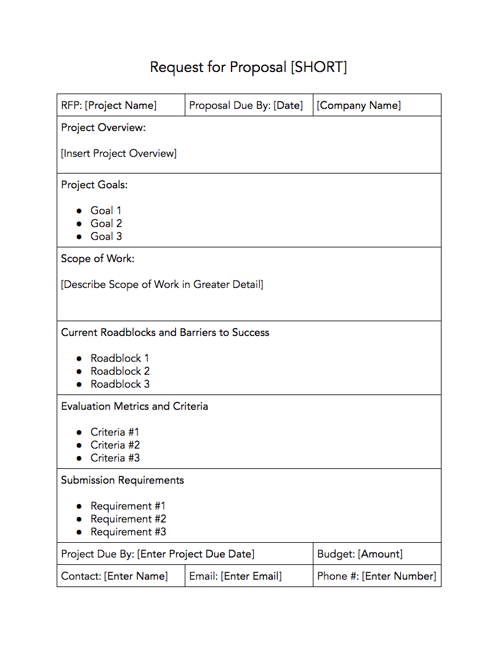
Here, we’ve provided an RFP template you can follow for initial structure, as well as a sample RFP for further inspiration. But it isn’t one-size-fits-all — you’ll need to tailor your RFP to best articulate your company’s needs.
Download this Template for Free
RFPs come in all shapes, sizes, and visual formats depending on the needs of your company and the work that must be performed. At the top of a standard RFP, you’ll find the following:
Project Name or Description
Company Name
Address
City, State, Zip Code
Procurement Contact Person
Telephone Number of PCP
Email Address of PCP
Fax Number
The body of the RFP will contain additional details about the project, including:
- Background/Introduction
- Project Goals and Scope of Services
- Anticipated Selection Schedule
- Time and Place of Submission of Proposals
- Timeline
- Elements of Proposal
- Evaluation Criteria
- Possible Roadblocks
- Budget
Read on to learn more about what goes into each of these sections so that you can build an RFP of your own.
1. Background/Introduction
In your introductory paragraph, you’ll want to include useful background information about your company — who founded it, what product or service your company offers, what sets you apart from competitors, and where you’re located. If any vendor is serious about working with you, they’ll want this information before moving forward.
2. Project Goals and Scope of Services
Next, you’ll want to outline the project you need completed, and the goals you expect to accomplish from the project. It’s important you get as specific as possible — even outlining individual tasks and criteria involved. You’ll want to include phrases such as “The award will be given to X firm,” with the “X” establishing how you’ll determine the best candidate.
3. Anticipated Selection Schedule
It’s crucial you include a detailed schedule so vendors know if they can meet your deadlines. You’ll also need to give vendors a window for when they can ask questions regarding your project. This’ll limit the hassle, for you and for them.
4. Time and Place of Submission of Proposals
Similar to paragraph #3, this is important information you’ll want to clearly present, so vendors know how and where to submit themselves for consideration.
5. Timeline
By including a time frame in your RFP, you’re able to eliminate any vendor who can’t work within your time constraints. If you’re flexible on your time, you can write something like, “Our company hopes to finish the project within six months, but we’re open to negotiation for the right candidate.”
6. Elements of Proposal
If you don’t outline clearly and specifically what you expect bidders to include in their proposal, you can’t necessarily fault them if they don’t include it. It’s critical you outline a checklist so vendors know which elements you’re expecting to receive. It’s also a good test for who’s capable of handling your demands — if a vendor can’t complete all elements of your proposal, you probably can’t trust them to finish your project, either.
7. Evaluation Criteria
Outlining your expectations will help eliminate vendors who don’t meet them. For this section, you’ll want to do some brainstorming with your team to come up with a mandatory list of items you feel are the best indicators of impressive candidates. Your list could include samples of past work, a proven success record with companies in similar industries, the expertise and technical skills to meet your demands, and a cost of services within your price range.
8. Possible Roadblocks
Here, you’ll want to outline any roadblocks, such as limited resources or a custom website, that might prevent certain vendors from successfully completing the project. This allows you to eliminate unsatisfactory bidders, and it will also help you determine which vendors have the skills and expertise to tackle those challenges.
9. Budget
Any vendor needs to know how much you’re able to pay them for their services before they’ll move forward with their bid.
RFP Sample
The above elements might manifest on the page in a number of ways. For example, here is an RFP sample from TemplateLab.
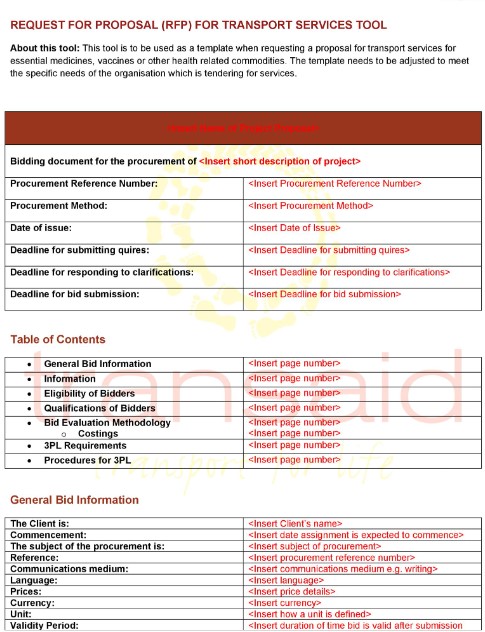
Now that you understand the elements of an RFP , you can build your own template and then fill it out so that you can start accepting bids. We’ll use a fictitious company, Caroline’s Websites, Inc., to illustrate exactly how each section should be executed, starting with the header:
Project Name or Description: Marketing Services
Company Name: Caroline’s Websites, Inc.
Address: 302 Inbound Ave.
City, State, Zip Code: Boston, MA 29814
Procurement Contact Person: Caroline Forsey
Telephone Number of PCP: 227-124-2481
Email Address of PCP: cforsey@consulting.com
Fax Number: N/A
Next, we’ll go into each of the elements of the RFP with information using the same fictitious company.
1. Background/Introduction
Caroline’s Websites, Inc. is a web design firm created by Caroline Forsey in 2010. Caroline’s Websites, Inc. prides itself on a team-oriented, solutions-based approach to web design. We provide our clients with web design services including coding, development, and branding. Our staff is located in two offices in Massachusetts.
2. Project Goals and Scope of Services
Caroline’s Websites, Inc. is seeking the services of a full-service communications and marketing firm to develop and execute a comprehensive integrated marketing plan that increases our SEO presence; attracts more social media followers; and effectively completes a lead generation campaign. The award will be made to a responsive and responsible firm based on the best value and professional capability.
The selected firm will be responsible for the development and implementation of a comprehensive and cost-effective marketing plan.
Tasks include but may not be limited to the following criteria:
• Lead generation campaign
• Paid media strategy
• Production of creative material including collateral and direct mail
• Online marketing campaign
• Website enhancement
• Search engine optimization
• General account management
• Other communications and/or marketing-related assistance as required
3. Anticipated Selection Schedule
The Request for Proposal timeline is as follows:
Request for RFP: June 1, 2020
Deadline for Bidders to Submit Questions: July 5, 2020
[Company Name] Responds to Bidder Questions: July 20, 2020
Selection of Top Bidders / Notification to Unsuccessful Bidders: July 31, 2020
Start of Negotiation: August 5, 2020
Contract Award / Notification to Unsuccessful Bidders: August 31, 2020
4. Time and Place of Submission of Proposals
The RFP will be posted on our website, Carolinewebsites.com, and can be downloaded from there directly as of 10 a.m. on June 1, 2020.
Respondents to this RFP must submit one original and five copies of their proposal. Responses must be received no later than July 25, 2020. Responses should be clearly marked “RFP-MarketingServices” and mailed or delivered to the contact person listed above.
5. Timeline
Caroline’s Websites, Inc. needs the project completed within 8 months.
6. Elements of Proposal
A submission must, at a minimum, include the following elements:
• Description of the firm that includes a general overview, names and credentials of creative team, number of full-time employees.
• A one-page narrative outlining the firm’s strengths and distinguishing skills or capabilities as they might relate to Caroline’s Websites, Inc.
• A representative selection of social media ads, direct response material, collateral, and website development created for current and past clients.
7. Evaluation Criteria
The successful respondent will:
• Have been operating continuously as a marketing agency for a minimum of 24 months and possess full-service, in-house capabilities for marketing, creative services, production, media planning and placement, direct response and research.
• The education, experience, knowledge, skills, and qualifications of the firm and the individuals who will be available to provide these services.
• The competitive cost of services.
• The expertise of the firm in working with similar customers.
8. Possible Roadblocks
At this time, Caroline’s Websites, Inc. currently has custom coding on our website, of which bidders should be aware.
9. Budget
Caroline’s Websites, Inc.’s budget for the project is $8,750.00.
These elements were written in a way to clarify the scope of the project that Caroline’s Websites, Inc. wants completed so that suppliers know whether or not to make a bid. Defining the project allows the bidder to determine if they’re a good fit and how much they’d likely charge. Being as transparent as possible serves to benefit (and even protect) both parties in the long run.
To use some of these elements in your own RFP, start with an RFP template and adjust it to your liking.
Editor’s note: This post was originally published in June 2018 and has been updated for comprehensiveness.

14 of the Best Meeting Scheduler Tools to Organize Your Day
We complain about spending countless hours in unproductive and mismanaged meetings.
But the greater crime is all the wasted time we spend scheduling the meeting.
The endless back-and-forth communication and steps — reviewing calendars, finding out the best place to meet, setting up a call-in number, adding the meeting to the calendar, and inviting all the necessary attendees. The process makes your meeting a hassle before it even starts.
Effortlessly scheduling meetings without the annoying back-and-forth emails. Get free access to HubSpot Meetings here.
Whether you’re trying to find the perfect window of time to catch up with your busy team, or looking for the best way to coordinate with your clients, these meeting scheduler tools have you covered.
Meeting Scheduler Tools
- HubSpot
- Arrangr
- Demodesk
- Rallly
- Assistant.to
- Calendar
- NeedToMeet
- YouCanBook.me
- Pick
- Doodle
- Calendly
- Clara
- Google Calendar
- Zoom
1. HubSpot
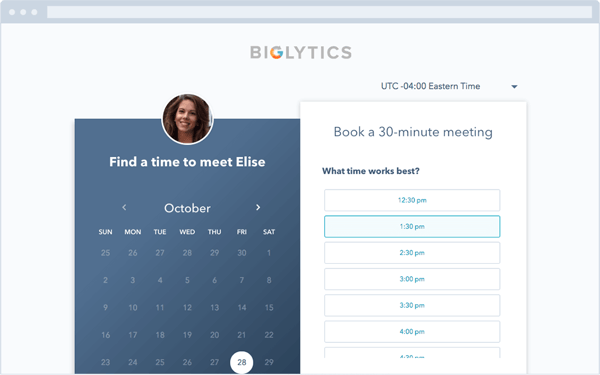
A lot of meeting scheduler tools connect to your inbox, but what if you need your meeting schedule available in your CRM as well? HubSpot’s meeting scheduling tool integrates with both your calendar and your HubSpot CRM, so setting up meetings with customers, prospects, or leads is a painless process.
The Meetings tool provides users with a personalized booking link they can share via email to invite people to view their availability and book time. When someone schedules a meeting, it will automatically be added to your calendar, and pushed to the CRM.
(By the way, we humbly recommend our own tool because of the value it provides, especially for sales reps and marketers. Click here to see how it works.)
2. Arrangr
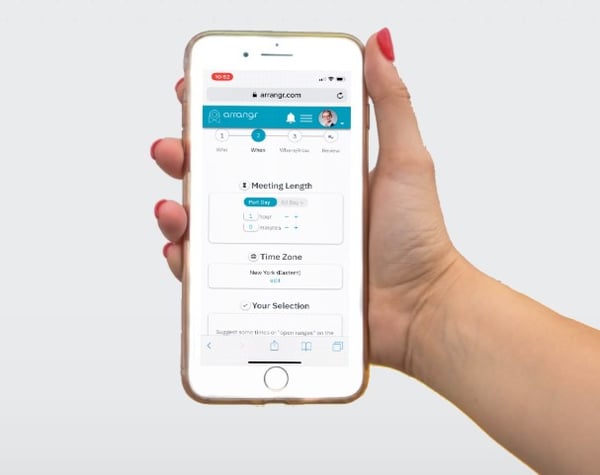
This tool handles meeting scheduling from beginning to end by reserving tentative meeting times and also releasing slots that don’t get taken. It integrates with calendars and CRMs, and it has the capability of scheduling group events. The most unique thing, though, is its ability to suggest the perfect meeting location for all parties.
3. Demodesk
Demodesk is an all-in-one meeting scheduler and assistant designed specifically for sales demo scheduling. Not only do you get custom booking pages, calendar syncing, and meeting analytics, but you can also take advantage of its advanced screen sharing and virtual display options. As a plus, it has native integrations with many tools, including CRMs.
4. Rallly
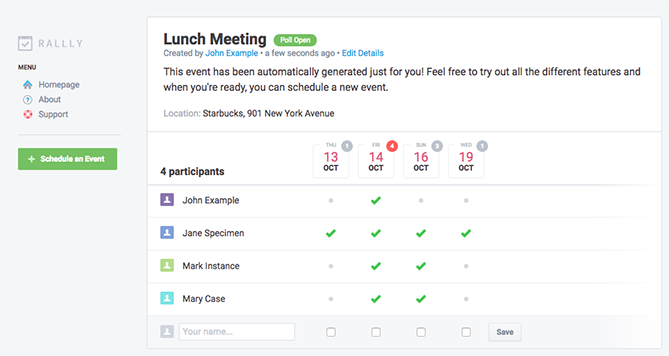
Finding a time for a group of people to meet can be a nightmare, especially if your team is large or includes remote employees. Rallly lets you create a simple, straightforward poll where attendees can vote on a day for an event that works best for them. It also includes an open comment section on the meeting page, so attendees can plan the meeting agenda or discuss details before the event.
5. Assistant.to
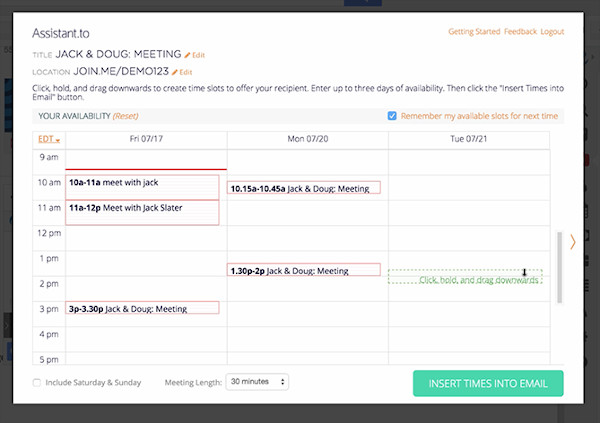
Assistant.to lets you work directly from Gmail and Google Calendar to select available meeting times and share those open slots with the person you’re trying to schedule a meeting with.
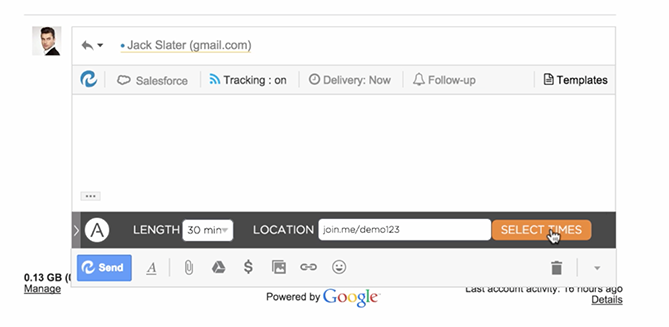
From within the message compose screen in Gmail, you can select the meeting duration and location. This information is included in an email, allowing the recipient to click on the time that works best for them. Once you’ve agreed on a time, the app adds the meeting with all the relevant details to your calendar. Currently, group scheduling is not an option.
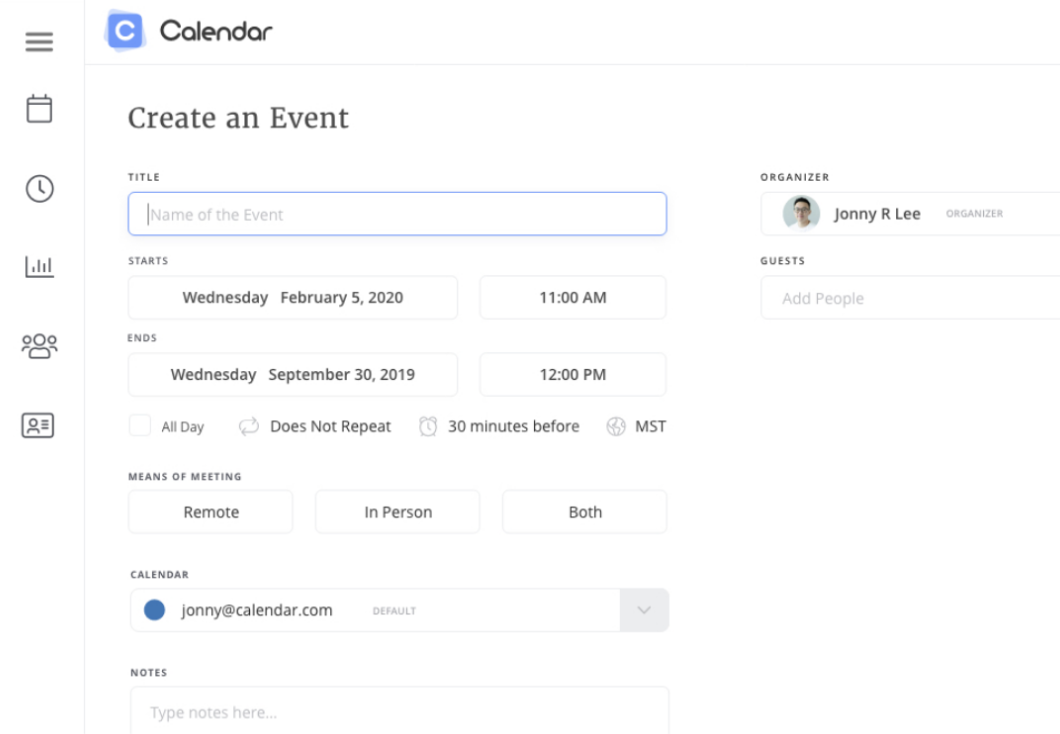
6. Calendar
Calendar, which recently acquired Timebridge, is a free service that integrates Google and Apple calendars. The app offers two ways to schedule meetings.
With the “outbound” method, hosts indicate their own availability, list the attendees they’d like to come to a meeting, and use the Calendar software to send out an email to collect everyone’s preferred times. After Calendar determines the ideal time for everyone to meet, the app will schedule the meeting for you. With the “inbound” method, Calendar gives you a personal URL where users can check your availability and request times to meet with you.
7. NeedToMeet
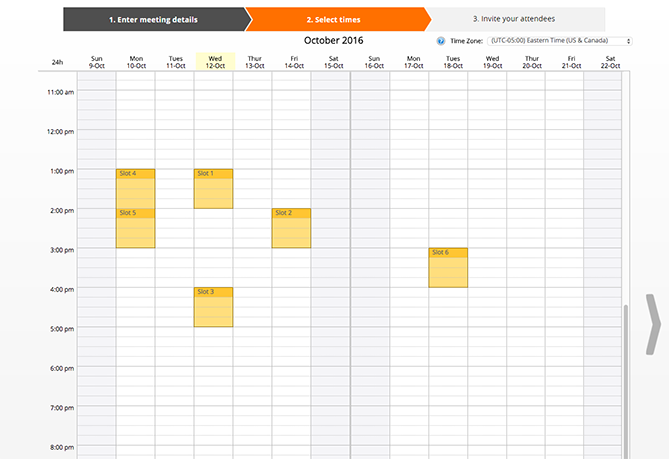
NeedToMeet doesn’t require you to sign up for an account to use their service. You simply enter a brief description of your meeting’s purpose, block off your availability on a calendar, and send the link to attendees. The free version doesn’t sync with your calendar, but they do offer a premium subscription which integrates with Outlook.
This tool differs from services like Rally and Doodle because it allows attendees to indicate their preferred date and times, rather than only choosing from a list of dates and times set by the meeting host.
8. YouCanBook.me
If you find yourself struggling to make your availability known to clients, try out YouCanBook.me. This freemium service offers users a custom URL where users can view free spots on your Google Calendar or iCloud Calendar and book time with you.
The service allows you to customize your booking page with different layouts, colors, and your company’s logo.

9. Pick
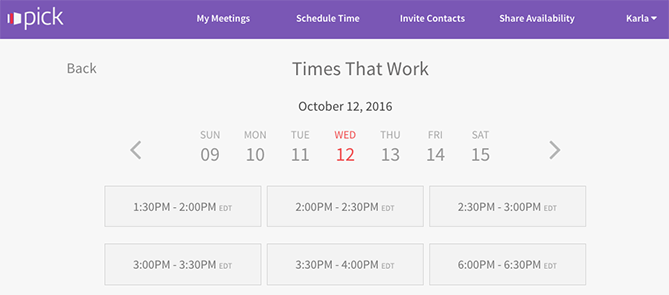
Pick automatically scans everyone’s Gmail calendars to find open slots, and then delivers a list of mutually available times. You can then send a calendar invite to all attendees directly from the app.
All members of your team need to be on Pick in order to share their availability. The app also provides users with an individual URL so you can share your availability with people requesting a meeting.
10. Doodle
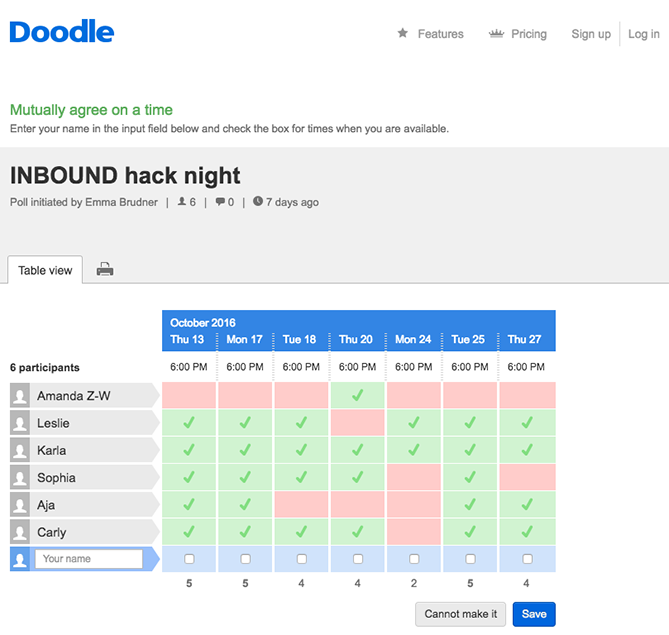
With Doodle, you can pick date and time options, and poll a group to see what works best for them. You don’t have to sign up for a Doodle account to participate in a poll. You can also create a public Doodle URL, where individuals can request a meeting with you based on your listed availability.
11. Calendly
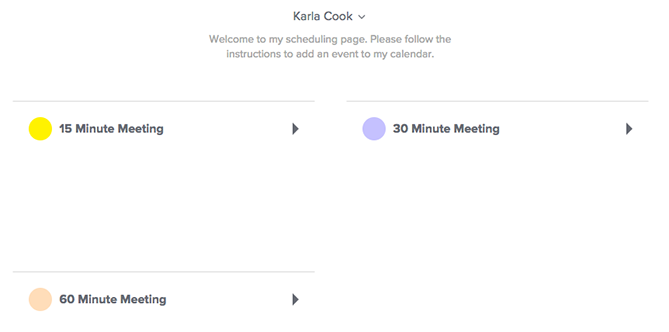
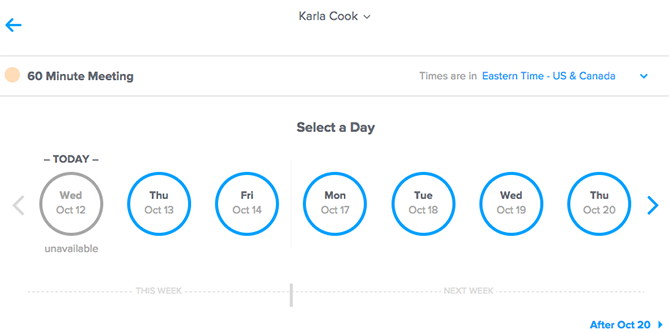
Calendly integrates directly with your Google or Office 365 calendar, and gives you a personalized URL where people can view your availability and schedule times to meet you. They offer a basic free plan, and a paid premium plan that allows for group scheduling and other additional features.
To help you stay organized, the app lets you set up custom meeting types and durations, e.g., “30 Minute Check-In” or “60 Minute Project Review.” You can add also add custom questions to the form people use to sign up to meet with you, include a link to a document or web page people should review prior to your meeting, or even make events private.
12. Clara
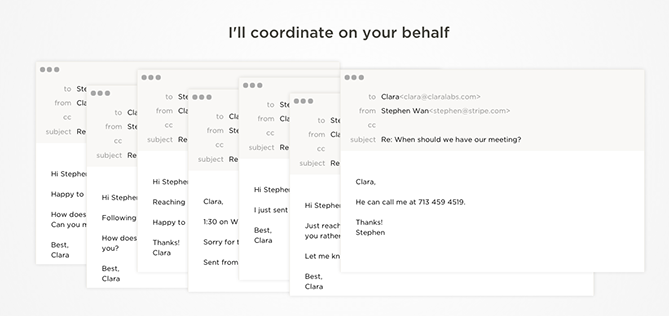
Meet Clara, a virtual assistant fueled by machine learning who can schedule all your meetings and get acquainted with your scheduling patterns. Once you sign up, you indicate your preferences as to which days and times you are available for meetings and your favorite locations for coffee, lunch, or drinks.
If someone requests a meeting, you canCC Clara’s email address (which can be customized to your company’s domain), and the virtual assistant will determine a time, date, duration, participants, and location for the meeting. She also understands human commands like, “I’m sick, can you reschedule my meetings on Tuesday?”
It currently only works with Gmail, and it does have a hefty price tag, but it could be worth the cost if scheduling is a major pain point for your company. Especially considering it’s still significantly cheaper than hiring a human personal assistant.
13.Google Calendar
If your team uses the GSuite and would like to streamline scheduling processes, you can schedule meetings with others through Google Calendar.
If your work email is already part of a GSuite membership, you can go to your calendar, search another team member under the “Meet with” tab on your left, and then click their name to view their calendar up against your own. If you click on a time slot on that calendar, you can schedule a meeting with both yourself and that teammate.
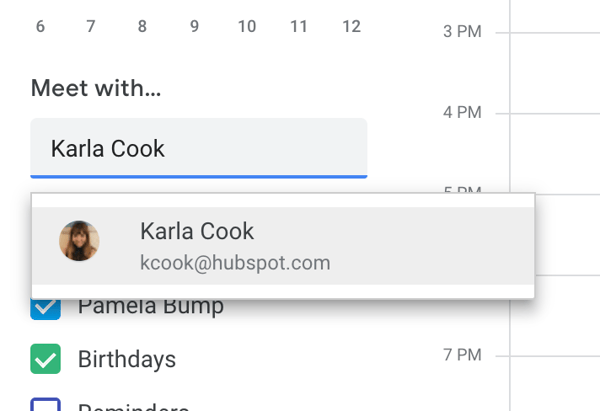
If your teammates aren’t part of your GSuite, you can press the share button and share your calendar with their email address. From there, they can enter the calendar and schedule a meeting time with you.
The options are endless for meeting scheduler tools. The choice is ultimately up to you which one fits your personal workflow.
14. Zoom
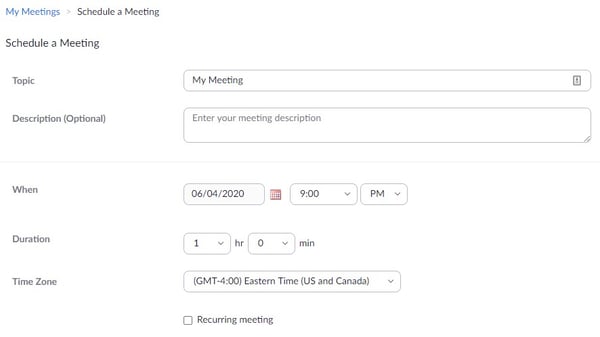
Zoom is known as one of the most popular video conferencing platforms, but it also includes tools to make the process of scheduling one a lot easier. You can choose to add the meeting to your calendar (which may send an invite to the recipient for you) or you can copy and paste the generated invite to an email. In addition, Zoom Meetings features include recording and transcripts functions.
How to Schedule a Meeting With HubSpot’s Meeting Tool
The HubSpot Meetings Tool allows you to book meetings with contacts without wasting time with all the back-and-forth, and it connects with Gmail, Outlook, and more. Best of all: It’s free.
Here are the steps to get started:
1. Sign up for a free HubSpot Sales account.
The Meetings Tool comes free with our Sales Hub, and both are powerful when combined with our free CRM.
2. Click the Meetings link under the Sales tab.
This will take you to the back end of the Meetings tool where you can create your own meeting link.
3. Click the “Create meeting link” button in the top right corner.
You may see the option to choose Personal or Team. If it’s just you that’s requesting the meeting, choose Personal.
4. Fill out your meeting details.
HubSpot asks for the headline (which will show up on your Meetings Tool), name, what you want your link URL to be, and more details.
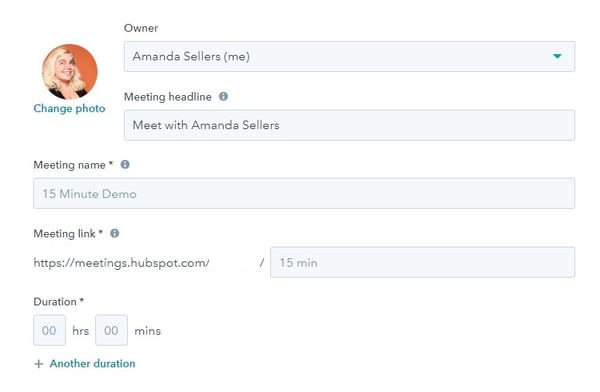
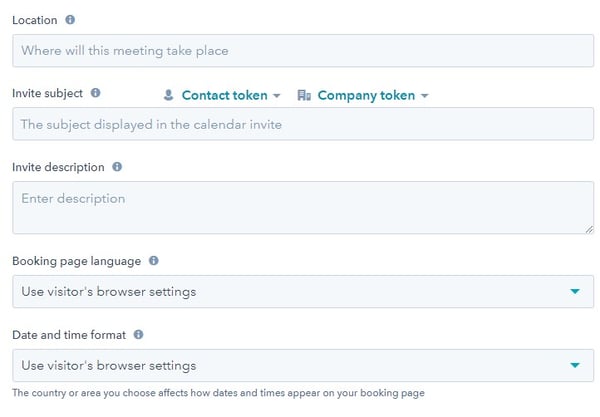
5. Configure your meeting in HubSpot.
There are also additional fields for optional details to be included in the invite, such as subject and description that will be sent to attendees.
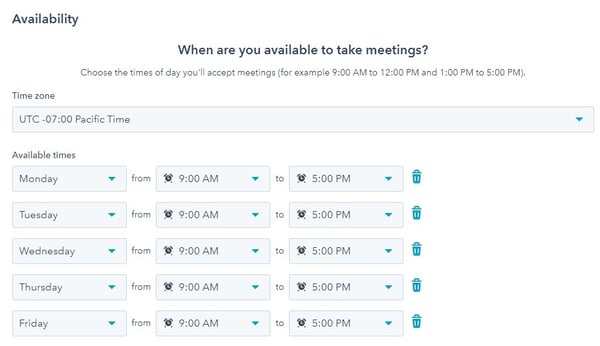
6. Designate your availability.
This is the key feature that eliminates the back and forth. By designating when you can meet, this will display only those times for the recipient to choose from.
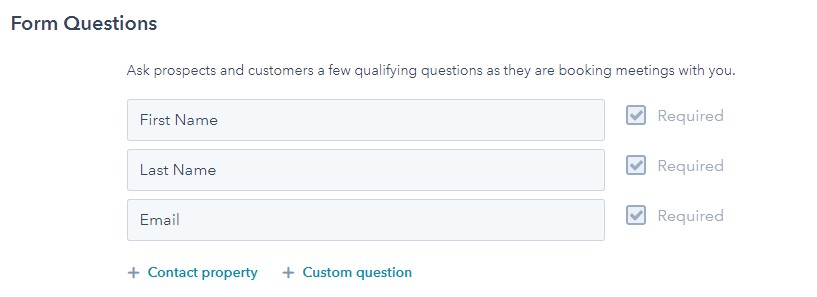
7. Add form questions for qualification.
If you’re in sales and have your Meetings Tool visible to anyone, you may want to only allow qualified prospects to book with you. This section requires a few fields to give you more insight.
8. Click “Save changes” and check your work.
Once you click this button, you’ll see a popup that includes your page link and the embed code.
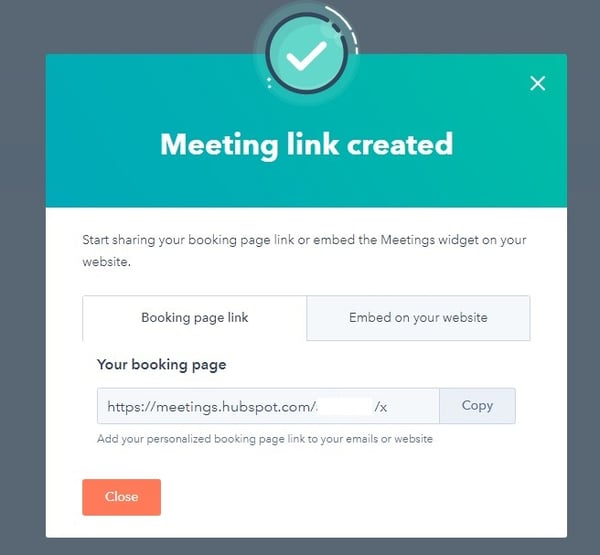
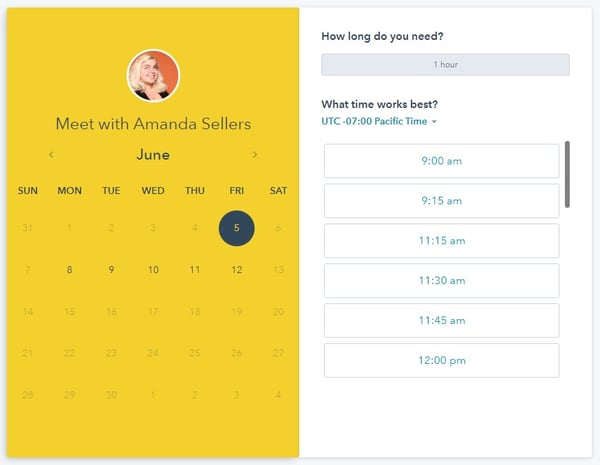
Copy and paste the booking link into your browser and check to see if your Meetings Tool has this meeting configured the way you want it.
If you’re ready to take advantage of this neat tool, you can set it up for free right now.
Editor’s Note: This post was originally published in July 2015 and has been updated for freshness, accuracy, and comprehensiveness.

When You Should (and Shouldn’t) Outsource Your Marketing
When internal talent is stretched thin and in-house teams are struggling to get campaigns over the line, outsourcing marketing tasks to a specialist third-party can alleviate a ton of the operational pressures your team might be facing.
That being said, outsourcing is a big decision that requires financial commitment and an agreeable working relationship between companies. So, if you have the bandwidth and budget, it can make more sense for some tasks to be kept in-house, or to use a combination of the two.
There are three outsourcing routes you can take:
- Outsource your marketing in full
- Keep all of your marketing efforts in-house
- Use a combination of outsourced and in-house marketing
Requirements will differ between businesses. The option you select will be determined by your financial situation and the experience, capacity, and skill sets of your current in-house team.
Here, let’s dive into the advantages of outsourcing your marketing efforts, and which individual components of your overall marketing strategy might be best-suited for your brand to outsource versus tackling in-house.
The Advantages of Outsourcing Marketing
Time constraints, limited budgets, and even complacency can make it all too easy for even the best marketers to fall back on familiar tactics.
But for marketing to be effective, it needs to be innovative and engaging, so relying on the easy option will only get you so far. Outsourcing connects you with marketing agencies who specialize in keeping on-top of new technology and trends.
These professionals can offer an outsider’s perspective of your business and bring new, exciting ideas and strategies to the table.
Additionally, maintaining a salaried in-house marketing team can be expensive and — depending on your marketing requirements — often unnecessary. Turning to a third party whenever you require marketing collateral means you’re only using budget when it’s necessary.
For instance, let’s say you work for a small company and want to publish two blog posts a week on your company’s blog. Rather than paying an in-house blogger to write full-time for your brand, you might consider hiring a freelancer to write those two posts per week, which is undeniably cheaper than the alternative. As your company grows, you can reassess whether it makes sense to pay a writer full-time.
With time, you’ll be able to develop a fixed budget that better reflects marketing expenditure in terms of requirements. This budget will help you determine if developing an in-house team is financially viable for your business.
If you want to outsource some (but not all) of your marketing efforts, let’s dive into a few different aspects of your overall strategy where you might consider hiring a third-party to do the heavy lifting.
Outsourcing Content Marketing
Authoritative, informative content that positions your business as a thought leader can do wonders for your bottom line. So what does it matter if it’s written or designed by people outside of your organization? As long as these writers or video creators are fully immersed in, and understand the complexities of your business, they should be able to serve up relevant, engaging content for your target audience.
If you want to outsource your content marketing efforts, you can choose to go with an agency or freelancer — sites like Upwork and Fiverr are great resources for entrepreneurs and allow you to vet a professional’s work before committing.
Take a look at How to Find Freelancers for Your Business to learn more about how to find top-notch freelancers for your business.
However, you might feel that your internal team has a better grasp on the nuances of your business. That’s fine! There are a number of marketing tools and platforms available to make the content creation process simpler. For example: WordPress and its deeply functional dashboard; Ceros with its collaborative, experiential slant; or HubSpot’s own marketing suite, which brings blogging, social media, and website material together under one powerful software solution.
Outsourcing Marketing Strategy
From lead generation tactics to email workflows, a solid marketing strategy should cater to all stages of the buyer’s journey. This vital groundwork includes developing buyer personas, mapping campaigns to need states, and identifying growing trends in the market.
Outsourcing your marketing strategy to a career specialist means you’re enlisting the help of someone whose job it is to keep abreast of industry innovations and new, creative methods of marketing delivery. They will also be able to identify audience demographics that you may not have considered before.
However, it may not be financially viable for your business to outsource the entire task to a marketing strategist. If that’s the case, then another solution is for you to commission a ‘strategy skeleton’ for your internal team to build on. For instance, the outsourced strategist defines your buyer personas and then your team adds the muscle and sinew to the bare strategic bones.
Outsourcing Marketing Analytics
Your marketing intelligence is informed by how well you use your data analytics. Many businesses will find that they just don’t have the in-house expertise to extract nuggets of insight that can turn marketing efforts into gold. Moreover, it can be expensive and time-consuming to recruit and train an in-house team of data scientists and engineers.
Specialty agencies, however, can provide the expertise necessary to interpret your data and offer data-driven insights in response to your existing analytics. Additionally, they can offer a number of solutions that can be fitted to your budget and requirements.
Instead of stretching your resources thin or incurring unnecessary costs, you can focus on developing outstanding products and delivering exceptional service, drawing on the insights unearthed by your marketing intelligence agency.
If you’re interested in diving into marketing intelligence in-house, take a look at How Market Intelligence Will Make Your Marketing Team More Agile to explore whether that’s the right solution for your needs.
Outsourcing Email Marketing
Wary of either cluttering a prospect’s inbox or being forgotten by them altogether? A successful email marketing strategy can make automation and personalization your secret weapons.
For instance, hands-off, lead-nurturing workflows can fire off emails automatically based on a user’s action — such as when a user clicks on a social media advertisement or plays a video. Outsourcing the creation and setup of these workflows takes much of the manual, administrative labor from your shoulders and places it into the hands of professionals.
Should the in-house route sound like a better option, you’ll need an infrastructure in place to facilitate the timed delivery of these emails, as well as an internal strategic and content team to develop them. HubSpot’s marketing suite offers an intuitive framework to outline your email workflow strategy and its automatic triggers.
Outsourcing Social Media Strategy
There are plenty of benefits to keeping social media in-house: for instance, social media is one of the most direct opportunities your business has to connect and engage with prospects and customers. If you keep social media in-house, you can hire full-time social media strategists who communicate with prospects via social media and then relay that information back to leadership to inform more personalized, targeted brand messages moving forward.
However, if you work for a smaller company with a limited budget, a full-time social media manager might currently be out-of-reach.
Additionally, the power of social media might actually make it an important task for you to outsource — when done correctly, social media can take your brand’s reach and visibility to the next level, so you might want to outsource to an agency with proven success in the industry.
You can also delegate certain social media tasks to a third-party group, rather than handing off the entire strategy to them. For instance, maybe you notice Instagram is a fantastic avenue to connect with leads, but your social media manager is currently juggling Twitter, LinkedIn, and Facebook as well, making it difficult for her to give her full attention to Instagram.
To combat the issue, you might hire an agency to focus primarily on all things related to Instagram, including Instagram advertising, posting to Instagram Stories, and hiring Instagram influencers to promote your products or services.
If you don’t want to hire a third-party agency for your social media needs, however, there are plenty of impressive social media tools to help you automatically post across channels on a regular basis, use data to refine your strategy over time, and communicate with prospects at-scale.
Every business requires a marketing strategy that’s tailored to their unique challenges. Some may find that outsourcing the entire marketing spectrum is right for them, while others may want to implement marketing technology and develop a core team around it.
We recommend keeping activity in-house if your current marketing technology is generating excellent ROI and you have a trained, experienced marketing workforce with the capacity to handle long-term campaign work and ad-hoc tasks.
You should consider outsourcing all of your marketing activity if your team members are wearing too many marketing hats, consistently missing deadlines, or are hampered more than helped by your current marketing technology.
A happy medium can be found by using a mix of agency and in-house resources, alongside powerful marketing tools. With an experienced third-party agency guiding you every step of the way, you’ll be able to upskill staff and onboard new technology without overspending or embarking on a lengthy recruitment process.
Additionally, if you’re having a difficult time making an informed decision, consider reaching out to a consultancy (like ours, Huble Digital) to explore which software and skill sets can transform your marketing efforts in 2020 and beyond.

Why Consumers Subscribe and Unsubscribe from Email [New Data]
Think email marketing is dead?
Think again.. Email marketing is actually thriving.
In HubSpot’s 2020 State of Marketing Report, roughly 80% of marketers said their brand’s email engagement had improved in the last year. Our researchers also discovered that brands make an average of $42 for every dollar spent on email advertising.
mail marketing is still widely used and continues to offer many benefits to marketers. It can boost brand awareness, increase web traffic, delight your audience, and ease subscribers through the customer funnel.
While email marketing isn’t a new strategy,, many marketers still struggle to grow and maintain the size of their subscriber lists.
But you shouldn’t throw in the towel if you’re struggling to build your list of contacts. Like any great marketing strategy, you’ll need to get in the mindset of your customers to determine why they’re likely to subscribe — or unsubscribe — from your email list.
To help you think like your subscribers, I polled 400 consumers to ask them about why they’ve joined or removed themselves from marketing email lists in the past. Here’s what they said.
Why Consumers Subscribe to Marketing Emails
The first question I asked consumers was, “Why do you most commonly subscribe to marketing emails or email newsletters?”
It’s apparent that consumers sign up for emails that provide direct value to them.
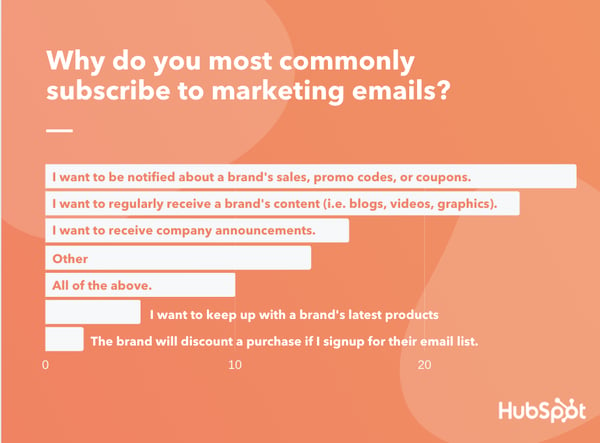
Below is a quick breakdown of what each result means for marketers, as well as examples of effective emails that leveraged their audience interests.
1. Deals, Discount Promo Codes, and Coupons
Roughly 28% of consumers say they subscribe to branded emails because they “want to be notified about sales, promo codes, or coupons from a company.”
It’s not shocking that emails promoting deals and sales are the top preference of consumers. By now, many of us have either subscribed to an email like this for personal use, or skimmed our inbox looking for promo codes before a big shop.
Although these emails are primarily for announcing deals or ways that your prospect can save money, you can still also use them for other promotions. For example, while prioritizing a sale, deal, or coupon code at the top of the email, you can also share news about a new product or blog posts at the bottom. Just keep in mind that your subscribers signed up to get the best bang for their buck, then continue to come up with ways to delight them.
Here’s a great example. When you subscribe to Postmates, you can ask to receive emails with promotions and coupons. Once subscribed, Postmates will send you semi-regular coupon codes and news about restaurant-specific sales:

As a subscriber, I personally love the Postmates email because it stands by its mission to send me discount information. Whenever I consider ordering in, I search through my inbox to see if they sent any promo codes recently. When they do, I don’t hesitate to get my meal delivery from this app over other competitors.
2. Links to Valuable Content From the Brand
Not all audiences are looking to get the latest deals on products. Sometimes, people subscribe to emails just for the sake of learning new things. This explains why one-quarter of participants say they subscribe to emails because they want to regularly receive “a brand’s content (i.e. blogs, videos, graphics).”
Although creating an email for your blog posts or branded content might not seem like it will benefit purchases or ROI directly, these types of emails still offer a number of benefits that can impact the bottom line.
For example, those who subscribe will get to see content from you that demonstrates why your brand is a trusted voice in your industry. After seeing and consuming valuable content from you regularly, your company could be the first that comes to mind when a subscriber needs to purchase a product that you sell.
Additionally, although content-based emails might not focus on promotions, this doesn’t mean you can’t include one within the mix of links shared in an email. Aside from subtly including promotions in one of these emails, you could also link to blog or video content aimed at lead generation.
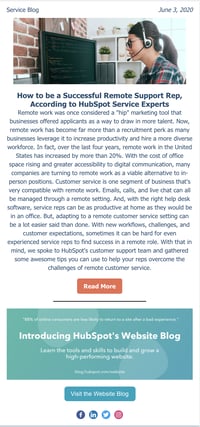
To give you an example of a content-based marketing email, take a look at HubSpot’s Service Blog email. Each day, the Service Blog sends the posts that were published the same day to subscribers. While the content is mostly informative, we occasionally mix in other promotions, such as the call-to-action to visit our new Website Blog.
3. Company Announcements
A number of brands choose to use their emails to show audiences the inner-workings of their company. These emails might include press release-styled announcements, information about the staff, or posts from the company’s corporate blog.
While this content might not directly value audiences as much as coupons or educational content, it still helps brands to establish themselves as credible and successful to audiences who are interested in watching them grow. This might be why 16% of those I polled subscribe purely to get company-specific announcements in their inbox.
4. Mixes of Content, Promotion, and Company News
While 10% of participants selected “All of the above” as their primary email subscription reasoning, 14% chose “Other.” These results might hint that groups of email subscribers might enjoy different types of content in one email.
As you get to know your email audience, center your emails around the content you promised email recipients on their subscriber form. But, consider including one or two promotions that break your usual email norm to see if you can diversify your emails a bit more.
For example, if you have an audience subscribed to your company blog’s email, consider subtly including a coupon or discount at the bottom — after your blog content — to see if you can gain conversions.
5. Other Reasons
Interestingly, only 5% of consumers said they commonly sign up for emails to learn about new products from a brand. Additionally, although many companies will offer discounts when consumers sign up for their email newsletter, just 2% say they sign up for emails primarily for these tactics.
Although the minority of participants chose the options listed above, you might still want to consider experimenting with them in case they work for you, or your audience prefers a mix of content.
Why Consumers Unsubscribe to Marketing Emails
Once marketers build out their email list, the next challenge they’ll face is maintaining it.
And, sometimes, even if you have great email engagement or a winning formula for email success, you’ll see a random dip in subscribers. \
Why could this be? Have people gotten bored with your content? Have they found another competing brand with a better newsletter? Are they just over email altogether?
The truth is, a bump in your unsubscribe rate could be due to super simple — and easily fixable — logistical reasons.
When I asked consumers, “What’s the most common reason why you unsubscribe from marketing emails?” most participants sighted reasons other than the quality of email content.
In fact, 51% say they unsubscribe because “emails come too often.”
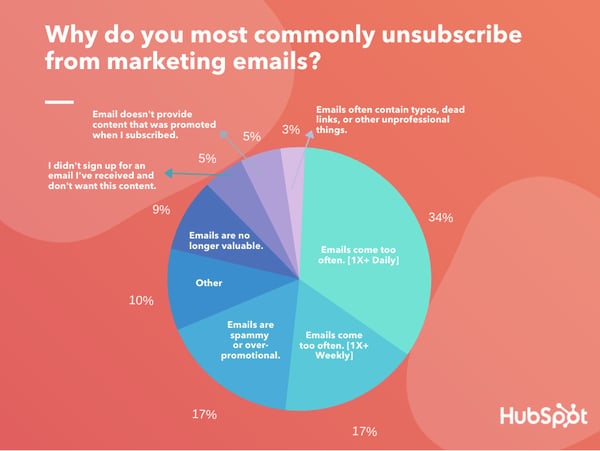
Below, I’ll explain what frequency-related unsubscriptions mean for email marketers, as well as break down some of the other major subscription barriers.
1. Email Frequency
While 34% of those surveyed say they most commonly unsubscribe from email lists because “emails come too often. [More than once per day.],” 17% say, “Emails come too often. [More than once per week.]
Despite stats like those above, and the fear that too many emails will result in high unsubscribe rates, most marketers still send multiple weekly and daily emails. According to our State of Marketing Report, more than 50% of marketers send emails between three and eight times per week.
So, how do you stick to an effective email cadence without losing subscribers? Keep reading to learn about a few preventative measures.
Preventing Frequency-Related Unsubscription
If your audience begins to cite frequency as a reason for unsubscribing, or you suspect you might be sending too many emails based on the lower click or open rates throughout the week, consider dropping one to two of your regular emails, or combining two emails scheduled for the same day.
Once you consolidate your emails, see if your unsubscription or spam rates lower, while paying attention increases in engagement metrics like open rate or click-through rates. If you see your metrics fluctuate for the better, you might want to identify more ways to consolidate your brand’s email.
If you absolutely can’t consolidate your emails, make sure that you’re transparent about how many you’ll be sending subscribers on your subscribe form. This will ensure that all subscribers know what type of content and email frequency they’re signing up for upfront and might weed out audiences who will quickly unsubscribe.
2. Low-Value Content
Although content isn’t the biggest driver of unsubscriptions, it still can be a factor.
While 17% of participants commonly unsubscribe from emails that feel “spammy or over promotional,” 9% will unsubscribe if the content is “no longer valuable.”
The result above isn’t that surprising. When’s the last time you unsubscribed from an email that you used to love getting in your inbox?
Luckily, there are a number of tactics you can try to prevent your content from getting too stale or spammy.
How to Prevent Content-Related Unsubscribes
First, do a deep dive into your email metrics.
If you’re seeing low open rates, click-through rates, high skim-to-read-rate ratios, as well as unsubscribes or spam reports related to poor content, it might be time to audit the content you’re sharing in each email, test out new types of content, and avoid any sharing things that might disengage your audience.
Along with looking at hard metrics, you should also consider the content you’re creating for your audience before you hit send. Ask yourself questions like, “Is this email valuable to my audience?”, “Does it over-promote my products?”, “Does the content in this email align with how I marketed this email subscription in the first place?”, and “Is this content on brand?”
If you have a large audience with a number of different interests. You might also worry that some audiences will love the links you’re sharing in your email while others might be interested in other topics. If that’s the case, you can also consider email segmentation.
With email segmentation, you can break your list of contacts into separate lists to ensure that people with vastly different interests are only getting sent content that will interest them.
For example, since HubSpot Blog readers are primarily interested in marketing, sales, service, or website development, we have daily and weekly email lists for each of our blog properties. This way, if you’re a marketer interested in web development, you can subscribe to our Marketing Blog and Website Blog emails without seeing Sales or Service content that relates less to your field.
3. Unexpected Promotions or Content
Along with content that isn’t valuable, 10% of participants primarily unsubscribe from emails that don’t provide content they expected to receive.
Roughly 5% of participants say they most commonly unsubscribe from emails that they “didn’t sign up for” in the first place, while another 5% says they primarily unsubscribe from emails that “don’t offer content, promotions, or coupons” that the brand described when marketing the subscription.
Avoiding Unsolicited Email Content
As an email marketer, it’s your job to understand your audience and send content they’ll engage with. Meanwhile, consumers that sign up for your email will expect you to send them the valuable content they asked for when signing up. When you blast them with emails they won’t like or didn’t ask for, they might trust your brand a little bit less.
For example, if you market a daily newsletter that promises expert tips from thought leaders, blog posts, or coupons, and instead send semi-daily newsletters that promote only products with no discounts, your audiences might not be too happy.
As you manage your email strategy, remember what you promised your subscribers when they signed up. Focus on promoting links that are valuable and align with their interests, as well as your brand.
Because consumers don’t appreciate or trust unsolicited email in their inboxes, we don’t condone purchasing contacts from another company. Not only is this against GDPR mandates, but it could also annoy contacts, cause unsubscriptions, and hurt your IP reputation.
As an alternative, consider co-branded emails. With this strategy, you can market one brand’s email subscription and content in your email while they market your email and content to their subscription list. This way, the brand’s audience can choose whether or not they want to subscribe and might be less likely to remove themselves from your list after signing up.
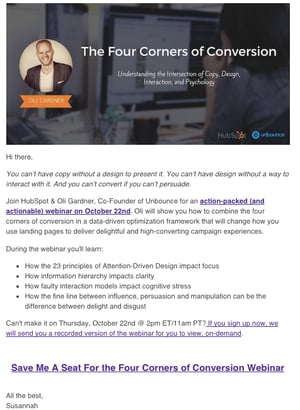
Here’s a great example of a co-branded email campaign from HubSpot and Unbounce. Although this doesn’t directly market HubSpot or Unbounce email subscription options, it highlights great points about both companies and a project they’re jointly working on which could indirectly result in both brands gaining email subscribers:
Tips for Winning (and Keeping) Email Subscribers
Email marketing best practices aren’t always the same for every brand. That means that it will take experimentation and practice to grow and maintain your email subscriber list.
Because building a list can be challenging in the beginning, it’s important to not give up when one or two tactics don’t work. Although you’ll want to personalize your tactics to your audience, here are a few overarching tips to keep in mind as you aim to grow your list.
1. Create email tactics and content that audiences will value.
First, and most importantly, you’ll want to develop and execute on an email strategy that prioritizes valuable content and avoids over-promotion.
For example, you could create an email with a mix of sales, coupons, and promo codes, or focus on promoting your most engaging blog posts. Or, if you have a giant audience with a few key interests, you could segment them by creating separate marketing emails and subscriber lists.
2. Market the most valuable aspects of your brand’s email.
To get people to actually see your valuable email content, you’ll need to market it in order to get subscribers. When you share your email subscription form on your site or social media, point out what your emails will provide to your audience. Will they include blog content, expert tips related to your industry, or special deals? If so, clearly state this in your messaging.
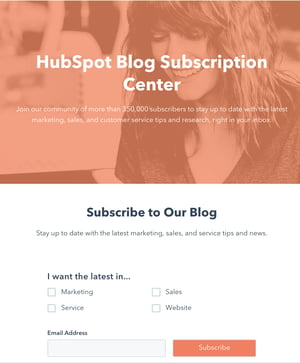
Here’s a look at how we promote the HubSpot Blog’s emails:
3. Don’t just focus on just your products.
Yes. You are a marketer and shouldn’t avoid talking about great product offerings when you have them. However, too many product details in an email can feel spammy or over promotional.
When you promote your products in an email, try to include other content, such as links to blogs or videos to balance the email out. This will be even more important if you promoted valuable content rather than just product news when marketing your email subscription form.
In our 2020 State of Marketing Report, EMEA marketing manager Henni Roini emphasized why product promotion isn’t everything.
“Only the companies and brands that create human connection are going to succeed. This is extremely true with email. You might get short term benefits from very promotional content, but honest, human, and personalized content creates a following for the long term,” Roini said.
Want to learn more about email marketing? Here’s a guide on how to use email marketing to guide your prospect through the buyer’s journey. More interested in diving into email data? Check out this list of helpful email marketing stats.

How to Use Account Mapping to Build an Effective ABM Campaign
Account-based marketing (ABM) is transforming the B2B marketing and sales world because of its effectiveness in reaching high-value target accounts — but it’s a difficult strategy to manage.
ABM has a lot of moving parts that need to move as a synchronized whole to bring success to your organization.
Fortunately, like any aspect of marketing, ABM is made easier with strategic planning.
Starting with your goals and mapping out a targeted plan is key to building an effective ABM campaign.
Here, we’ll break down the steps of how to put ABM mapping into practice within your organization and implement the right process to make it happen.
What is Account Mapping?
Account mapping involves selecting and organizing the accounts targeted within an ABM program.
After establishing goals, the next and arguably most critical step to ensuring a successful ABM campaign is selecting and mapping the accounts.
Once accounts have been selected and mapped, the sales and marketing team can build their engagement strategy and ensure both sides maximize their alignment.
How to Get Started With Account Mapping
Account mapping is an exercise in account research and documenting details that will be useful as you target an account on your journey to a successful close.
Here are the four main steps you’ll need to take when account mapping:
1. Identify Key Decision Makers and Influencers
After identifying what accounts to target through account planning, the next step is digging into the account to understand the organizational structure and how decisions are made. Starting with the top person in a functional area is an excellent place to begin mapping the functions.
The larger the account, the tougher this task, as many large organizations operate in a matrix environment where influence comes from many directions.
Nonetheless, sourcing these contacts and documenting their Buyer Role using HubSpot or alternative system of record will allow you to track and manage information related to each contact. This will also improve your ability to create unique experiences as a part of your ABM program.
It’s essential to consider buyer roles as it relates to the buying process, not a functional title.
Buyer roles to be considered include:
- Decision Maker
- Blocker
- Influencer
- Budget Holder
- Champion
- Legal & Compliance
Depending on the goods/service sold and the operational impact it may have in the account, there may be a need to expand the roles to meet the specific needs of the account, so you can edit or add new roles as needed.
Using tools such as LinkedIn or ZoomInfo can be helpful when researching an account and the key contacts within the account. Using the Buying Role Property within HubSpot is a great way to align your account intelligence to the contacts within the account.
During your research, you may find that one contact has multiple roles, so you can assign them accordingly as well as assign multiple contacts to the same role.
2. Gather Intel and Align Content
Understanding an account’s needs and pain points is an important input to your ABM engagement strategy. Whether it’s for content alignment or sales outreach, align relevant communications to each stage of the buyer’s journey.
While getting direct intelligence through discovery calls is an excellent way to explore account needs, you should use a wide range of sources to gather as much information as possible to fill any gaps.
Social listening, search intent, press releases, and Google Alerts are all great resources to leverage for information that can be used to gain insights into future account needs. Once well-documented, these insights can be used to map marketing content and sales playbooks to ensure each interaction with the account is meaningful.
3. Engage and Learn
Develop a plan for how and when you will engage the target account. Using a playbook for both sales and marketing engagement plans can help standardize the approach you take and identify points within the process that are working well or areas that need improvements.
Depending on where the account is within the sales cycle when you implement the ABM strategy, the engagement approach may vary. Targeting with account-based advertising may be an excellent first step to warm up the accounts if starting with cold accounts.
Many platforms can enable ABM advertising; however, using HubSpot’s Company List and its LinkedIn Ads integration provides a seamless introduction into account-based advertising without leaving HubSpot.
4. Document How Decisions are Made
Throughout the research and documentation process, you’ve been collecting data that will be useful for both marketing and sales teams. As you seek to advance the engagement process, direct outreach to contacts within the account will be required. Be sure to add value and use best practices to improve the quality of this interaction so that it’s a seamless and valuable experience for the prospect.
You have been gathering account intelligence through the planning process, so now it’s time to put those activities to work. Before reaching out, utilize LinkedIn or LinkedIn Sales Navigator to research the contact. Using the outreach activities to fill data and intelligence gaps will help improve future interactions and engagements.
Of the things you need to learn, understanding who will influence the purchasing decision is high on the list. It’s also helpful to know how the company makes a purchasing decision and their process of awarding a contract. Ensure that you’re gathering these details effectively by recording information in your CRM under the deal, company, and contact records.
Account Mapping Software
There is a long list of software applications that can assist with the account mapping process. The good news is that a lot can be done with free tools, many of which are commonly used within both small and large sales and marketing organizations.
Below is a short list of free and premium tools, along with a brief description that will get you started with ABM Mapping.
1. HubSpot
HubSpot is the centralized marketing platform that helps sales and marketing leaders execute marketing campaigns. HubSpot provides a set of tools that helps keep an ABM-centric campaign, which enables greater transparency between sales and marketing teams when compared to disparate systems.
Cost: Freemium to Paid
2. LinkedIn
The king of professional networking within a digital environment has become a dream tool for sales and marketing professionals. When targeting specific accounts, LinkedIn is a great free resource. In addition to general account research, LinkedIn also is a great integration partner for three of their paid services, which can be invaluable to ABM.
- LinkedIn Ads
- Sales Navigator
- LinkedIn InMail
Cost: Varies depending on tools/service used.
3. ZoomInfo
From prospecting to buyer intent, ZoomInfo is an excellent resource for finding and tracking companies that fit your Ideal Customer Profile (ICP). In addition to identifying the account, they provide a comprehensive set of products that offer deeper account insights, including organizational charts. ZoomInfo is also a HubSpot integration partner, which makes working with the tool seamless.
Cost: Free Trial to Premium
4. 6sense
If you are seeking to take action on Buyer Intent, 6sense provides solutions that improve the transparency into the buyer’s intent using AI. It captures signals across a wide variety of channels and connects it to prospect accounts.
When moving into the engagement stage of an ABM campaign, these tools provide the ultimate reach and scale.
Cost: Paid (Contact 6sense for pricing details)
ABM mapping can be an effective process to help sales and marketing teams navigate complex account structures. While there are great tools that provide helpful insights, the mapping process is robust and tends to be manual.
An important part of the planning process will be to gain buy in from your internal team and properly assign team members who will be part of the research and documentation process so that your organization will have access to centralized information about your target accounts and contacts within them.
The payoff can be well worth the work if you take the proper steps while developing a focused account-based marketing strategy.

The Plain English Guide to Return on Ad Spend (ROAS)
As a writer, I’ve never been very good at math. I know … shocking.
Most marketers can relate, because as a bunch, we tend to be better at English and history than math and science.
However, as a marketer, we need to be able to analyze data and calculate the effectiveness of an article or campaign, even though math might not be our strong suit.
One of the calculations we need to run and metrics we need to track is return on ad spend (ROAS).
Below, let’s review ROAS. In this post, we’ll discuss what ROAS is, how it’s different from ROI, and how to calculate it.
Ultimately, ROAS is meant to measure the effectiveness of a specific ad campaign, not your overall ROI — more on that below.
Besides ROAS, you’ll most likely measure other metrics such as click-through rate and ROI. By measuring multiple metrics, you’ll get a more accurate view of your results.
Of course, measuring performance and tracking analytics is an important part of any marketing campaign.
By tracking performance, you can improve and iterate on your marketing techniques. Plus, data is one of the only ways to truly prove that your department brings in revenue, which is incredibly important.
However, it’s important to note that not everything can be measured with quantitative data. For instance, calculating brand awareness and sentiment is much more difficult. And while you can calculate downloads or email sign-ups, those might not always lead to revenue.
When you’re analyzing any data, it’s important to consider context and review qualitative data as well as quantitative data.
That being said, today we’re going to dive into ROAS specifically. Before we do that, let’s review how ROAS is different from ROI.
Ultimately, this means that the only cost considered in a ROAS calculation is the cost of advertising. On the other hand, the cost of an entire project or campaign will be considered in an ROI calculation.
The goal of your ads campaign, of course, will be to generate a positive return on your ad spend. However, how can you determine what that ad spend should be?
In the YouTube video below, HubSpot details how to determine ad spend by understanding the bidding system used by ad networks.
You’d use ROAS to help you determine how you spend your advertising budget and as a signal to determine if your campaigns are successful. This would let you know that you might need to evaluate your approach to running ads.
So, at this point, you might be wondering, “How can I calculate ROAS?” Let’s review that now.
While the equation is simple, you might face difficulty gathering the data needed to run this calculation. For instance, calculating the cost of an ad isn’t always easy. You’ll need to consider the cost of the ad bid, the labor cost for the time it took to create the creative assets, vendor costs, and affiliate commissions.
But it’s important to get an accurate estimate of the actual money spent on an ad to get an accurate ROAS measurement. If your data isn’t accurate, your findings won’t be either.
Additionally, if you don’t run an ecommerce business, it can also be difficult to measure the revenue generated by an ad. For example, someone might convert from your ad because they downloaded an ebook, however they haven’t spent any money yet. In fact, they might not spend money for months.
To combat this, you can use a CRM software like HubSpot in conjunction with HubSpot Ads, to track revenue made from leads.
With a CRM and ads software, you can keep track of your data and tie it all together — marketing leads, ad results, etc.
Now, you might be wondering, “What’s a good ROAS?” and “How can I improve my ROAS?”
Well, a good ROAS is typically around 3:1. If you’re barely breaking even, it might be time to dig further into the accuracy of your metrics and evaluate your ads and bidding strategy.
However, it’s important to note that the objective of some ad campaigns might not be to make immediate revenue, but to increase brand awareness. If that’s your objective, then a lower ROAS makes sense.
To improve your ROAS, you can lower your ad spend and review your ads campaigns. You might want to optimize your landing pages or rethink your negative keywords.
Overall, ROAS is an important metric to track, but it shouldn’t be tracked in a vacuum. It’s important to look at other data and metrics to get the full picture of your return on investment.

The Ultimate Guide to iPaaS (Integration Platform as a Service)
You’ve likely heard of Software as a Service, or SaaS.
A SaaS company sells software to a user as a subscription. Along with that subscription, the software company provides technical support, customer service and upgrade options to maximize their customers’ ability to use their software.
HubSpot is an example of a SaaS company. We sell (darn good) marketing, sales, and service software so you can use them to grow your business. But there’s just one problem …
Over time, we’ve learned that things aren’t so linear and consumers rarely use just one software to satisfy all of their needs. Instead, they find a plugin here, some software there, and maybe even a widget until they have a smorgasbord of options that, together, create the perfect solution.
Consumer expectations have changed — they want instant feedback, immediate solutions, and access to everything they need to solve their problems.
From a business standpoint, it can be costly to add more tools to your existing software. An ever-increasing demand makes it hard to accommodate every customer need.
Additionally, most software companies have segregated systems themselves, pulling in data from the cloud and on-site systems to complete their own stack. Ascend2 found that 57% of marketers recognize integrating disparate technologies as the biggest barrier to success.
What happens when you have different systems operating on separate platforms that each play an integral role in your business? You become subject to data loss, disjointed information, and misalignment.
Between consumer expectations and internal systems, we need to find a way to create a more frictionless experience.
iPaaS is the solution.
iPaaS is a platform that connects otherwise disjointed systems to deliver a unified solution to customers. It acts as a conduit for communication between multiple systems — allowing for integration and data sharing.
iPaaS gives platforms unlimited potential, and as we deepen our cloud dependency, iPaaS becomes integral to nearly every business model.
This guide will give you an overview of iPaaS, how it works, and its key benefits.
Most companies run on various systems, especially between their sales, marketing, and service departments. iPaaS is a solution that improves communication between different silos by integrating software to better share data within the organization.
iPaaS also allows a company to expand its offering without the need to build out more services. Instead, it can integrate with another software that already provides that service and offer a unified, more robust solution to customers.
For example, say you sell a scheduling software that helps hairstylists book, manage, and send appointment reminders to their clients. After developing your product, you realize that stylists also want their clients to be able to leave reviews and make payments through your software. To meet your customers’ needs, you could either build out and add these features to your product, or you could use iPaaS to connect your software to existing review and payment software. The latter allows you to save time and money while also expanding your service offering and providing your clients with what they want.
How does iPaaS work?
A software company will rely on iPaaS to supply the infrastructure for creating connections and deploying software applications within the cloud.
The software company will set the parameters for the types of connections that are allowed on the platform. These parameters could be in the form of an application programming interface (API), prebuilt connectors, or some other rule.
Once these rules are in place, iPaaS creates a central ecosystem to view, manage, and modify all data, infrastructure, and operations. This, in turn, allows entities to easily modify their product, share information, and provide solutions to their market.
iPaaS-Related Terms to Know
How do you distinguish between all service-oriented architecture (SOA)? Let’s cover the common cloud-based service business models out there to help you get a better grasp on what makes iPaaS unique.
Platform
A platform is the centralized component of all connections. HubSpot’s VP of Platform Ecosystem Scott Brinker defines a platform as a “hub, with spokes connecting other products to its center. The hub binds those disparate products together and orchestrates them in a common mission.”
Integration Platform
An integration platform creates connections between different applications and systems. This type of platform creates an environment for engineers to build upon.
Platform as a Service (PaaS)
A PaaS is a platform where the provider houses all of the elements that users need to deploy a particular software. Those elements include the servers, network, memory, database, and operating system.
Software
Software is a program that performs a specific set of tasks for a user.
Software as a Service (SaaS)
SaaS is a system where a user is provided with software to use on demand. All maintenance, hosting, and deployment of that software is the responsibility of the software provider.
Integration as a Service (IaaS)
IaaS is a cloud-based model that allows for data integration between systems and third-party vendors. IaaS keeps all connected parties from having to create complex interdependencies and minimizes delays in data sharing.
Electronic Service Bus (ESB)
Electronic Service Bus is not denoted “as a service,” but it could be considered a predecessor of iPaaS. An ESB is a middleware tool, which means that it works between applications the same way an iPaaS does. While iPaaS focuses on integration, an ESB has two functions: integrating and distributing data and messages.
Since ESBs were created before the cloud, they operate on-premises. They are still a reliable option for legacy systems.
iPaaS Vs. PaaS
Although iPaaS and PaaS are only one letter away, their functionality is completely different.
A PaaS is basically a toolbox with generic features that developers can use to build their own applications.
PaaS supports different aspects of an application. Next to the development tools, PaaS vendors provide operating systems, business analytics, storage options, and data management solutions. With this last option, your developers might be able to build data integrations without too much hassle. Usually, companies working with this type of vendor are medium-sized enterprises.
Smaller businesses working with different applications will need an iPaaS at some point. The main reason is that those applications are not created by the same vendors. They are not connected natively, while the applications built on a PaaS usually live within the same environment.
Just like PaaS, some iPaaS providers, like PieSync, offer a very complete set of features. The difference is that those features are exclusively focused on integration.
Last but not least, to work with PaaS, you’ll need a team of developers. On the other hand, iPaaS tools are usually created so that anyone in any team can create an integration with no coding required.
iPaaS Vs. ESB
ESB and iPaaS are bridges between two applications, but they offer completely different solutions. The first distinction is that an ESB works on-premises, while iPaaS are cloud-based solutions. That doesn’t mean that an ESB won’t be able to integrate with a cloud application, but it makes the connection less viable.
Scalability is also different for ESB and iPaaS. In a company using iPaaS, integrating new applications is easy. iPaaS usually allows you to create as many connections as you want between the hundreds of applications they support. However, in a company working with ESB, it can take months to implement a new app.
Another variable to consider is multitenancy. This concept refers to the possibility of having several users accessing the same software. iPaaS and other cloud-based software usually support multitenancy. On the other hand, considering that ESB requires a piece of hardware to operate, multitenancy is very hard to guarantee.
Benefits of iPaaS
The rise of SaaS over the past two decades created a gap in the ecosystem that needed to be filled. That gap — the need for more integrated systems — has only become more apparent. iPaaS arose out of a need for an organized solution for deploying quick and seamless cloud-based solutions.
You can think about the benefits of iPaaS as two-fold: benefits to the company that employs iPaaS (internal) and benefits to the customers of the company that employs iPaas (external).
External Benefits
Software companies that employ iPaaS technology as part of their offering to consumers reap benefits from increased customer satisfaction. Consumers benefit from iPaaS in a number of ways.
A Single Solution
Instead of piecing together separate software to solve their needs, consumers can use a platform that connects to all of their software in one convenient cloud-based location, thereby eliminating the need to source and deploy their technology in different environments.
Organized Data
Consumers can access all of their data in one place and set rules for how that data is organized and accessed. So, while they’re working with different systems, all of those systems will render data in an easy-to-interpret manner. All of this makes data analysis, interpretation, and application easier and more accurate.
Improved Communication
One platform means a single source of truth. Data is being shared within the same ecosystem so no important information is lost and everyone has the same access which leaves less room for misinterpretation.
Better Workflow
Less time switching between tools means more time for work and a central place where all of that work is done. A platform creates a more efficient environment for team dynamics and workflows.
Internal Benefits
Consumers aren’t the only ones who need integrated solutions. Companies also use disparate tools to run their businesses — think email providers, marketing software, document sharing, the list goes on. iPaaS brings these tools together to increase internal efficiency and improve workflows.
Here are some of the internal benefits to iPaaS.
Eliminate Silos
Third-party integrations can be created and deployed in various environments. This might not be an issue when there are only a few connections, however, as a company develops its offerings to become a more robust entity, integrations can become scattered, creating a mess where information is hidden from view or difficult to access and preventing a business from realizing critical insights.
Real-Time Processing
iPaaS allows for real-time data sharing and processing thereby eliminating delays in access and providing a quick and accessible solution.
Increased Efficiency
iPaaS mitigates confusion, data loss, and inconsistencies by creating a centralized system for the management of all parties involved.
Centralized Management
iPaaS creates a single, virtual view for managing all connections across the platform. Instead of having one individual or team manage different integrations, all of them can be accessed from a single console.
Multitenancy
Typically, each tenant that calls upon software requires its own instance. Similar to how every person on a call needs their own phone connection, an instance is created each time someone accesses the software. iPaaS allows for shared instances among tenants, eliminating overload, reducing costs, and increasing the speed of use.
Improved Security and Compliance
Security threats are inevitable in any environment, especially the cloud. iPaaS solutions offer fraud detection and intruder alerts. But the real benefit is that a centralized platform makes it easier to see where these threats are and respond adequately. In addition, a platform makes regulation compliance simple by implementing changes in a single environment.
Gartner iPaaS Magic Quadrant
Being that iPaaS is a newer technology, we look to objective opinions to check the validity, safety, and potential longevity of iPaaS vendors. Gartner iPaaS Magic Quadrant is that resource.
Gartner is an IT consulting firm and trusted resource for objective, qualitative industry research. According to Gartner, “Magic Quadrants offer visual snapshots, in-depth analyses and actionable advice that provide insight into a market’s direction, maturity, and participants.”
The Gartner Magic Quadrant for Enterprise Integration as a Service looks at several iPaaS vendors in the space and details the strengths and cautions of each provider. It compares vendors like Boomi, Jitterbit, MuleSoft, Oracle, and SAP among several others to provide an objective view on the iPaaS environment and to give readers perspective on which solution would best fit their needs.
iPaaS Integration: Best Practices
iPaaS is an outstanding solution to integrate your business’s technology ecosystem and to enhance its data flow. In order to get the most out of it, make sure to follow these best practices:
Have a data integration plan before implementing an iPaaS solution.
It’s crucial to decide on a sound data integration plan before you begin syncing your data between multiple apps. For your plan to be successful, you need to:
- Define the goals you want to achieve with data integration. For example, you may want to integrate internal business data to have a holistic view of your business and build better analytics reports. Or you might want to integrate customer data from different applications to have a 360-degree view of your customers.
- Decide what kind of data you want to integrate. Once your data integration goals are set, you will have a much clearer idea of what kind of data you need to integrate. iPaaS platforms set algorithms to sync the same type of ‘object’ between apps. These objects can be names, emails, deals details, service tickets, etc. However, not every iPaaS can integrate all the objects of your apps. Determining which kind of data you need to integrate is key to decide which iPaaS to use.
- Find out where this data lives. In which applications are you storing this information? These are the tools you’ll want to integrate with iPaaS. For example, if you want to sync customer data, find out which applications are collecting it across your business.
- Figure out how the data should flow. Decide how the data needs to flow between your tools. You might need one-way, trigger-action data pushes, or you might need a real-time, two-way synchronization.
Choose the right iPaaS solution for your business.
Different iPaaS tools suit different purposes. There are iPaaS tools that work perfectly to automate workflows between several tools, such as Zapier. Others automate contact management between several tools, such as PieSync.
Once you’ve honed in on your integration needs, you’ll be in a better position to decide which iPaaS tool will work for you. Take time to research your options thoroughly and determine which tool is the best option to help you achieve your data integration goals. We’ve included a list of top iPaaS vendors to help you get started with your search.
Set up your iPaaS tool properly.
iPaaS solutions hold a multitude of possibilities. Most of them will allow you to get really specific in your integration. Features such as rules and field mappings enable you to decide which groups of data to share between applications (in case you don’t want to share your entire database). You can also pair different kinds of information between your tools.
For example, you can add a “New Customer” label to certain contacts in your CRM to identify your newest customers. You can then sync this label into your email marketing tool and automatically enroll these new customers in an onboarding email sequence that sends them all necessary resources, useful links, and who to contact within your organization if they have any questions or issues.
Manage your data.
While iPaaS will do a lot of the work for you when it comes to data management, it’s still important to manually check in on your databases every so often.
This includes making sure your data is rid of duplicates, cleaning up invalid contact details, keeping your data fresh and deleting outdated information, and implementing consistent, company-wide procedures for data entry and management.
In addition, remember to check your syncs to make sure they are running smoothly and your data is flowing as it should.
iPaaS Vendors
iPaaS is a great solution to improve connection to and communication between all data and applications within your company. We’ve compiled this list of iPaaS vendors to help narrow your search for the perfect iPaaS partner.
PieSync
PieSync offers intelligent contact syncing that prevents duplicates and allows for historical data as well as easy to setup filtering rules between CRMs, marketing apps, accounting software and several other tools in your tech stack. The tool allows you to sync contact data bidirectionally and in real time across hundreds of apps, ensuring that you’re always looking at the most up-to-date and consistent customer information.
Dell Boomi
Dell Boomi offers a complete iPaaS solution with application and data integration, workflow automation, application deployment, API design, and B2B management all within a single master hub.
Informatica
Informatica boasts customer loyalty and top-ranked iPaaS provider as their main advantages over other solutions. With a nod from Gartner and over seven thousand customers worldwide, the iPaaS vendor holds a top spot in the industry.
Celigo
Celigo offers an iPaaS solution that can handle everything from simple FTP integrations to complex integration needs. In addition, Celigo’s application marketplace features vetted apps that solve for a multitude of business needs.
Jitterbit
Jitterbit understands the stress of building APIs between on-premise and cloud-based systems. The company has done well to empathize with businesses that lack the resources to build these integrations on their own and offers quick integrations with their platform as a result.
Blendr.io
Blendr.io offers a low-code visual builder to create complex enterprise-grade or standardized self-service integrations. In addition, Blendr.io provides with a set of features to embed integrations into the UI of other SaaS platforms.
Mulesoft
Mulesoft offers cloud integration through its product called “CloudHub.” This solution offers multitenancy for integrations and API. The solution allows for deployment in eight different regions around the world, a number of workers, and out-of-the-box cloud security, and compliance. It also offers insights based on various metrics.
Zapier
Zapier is a well-known solution for connecting apps, automating workflows, and sharing data between otherwise disjointed systems.
iPaaS providers don’t stop there. You can view and compare dozens of vendors through a bit of research. Otherwise, Gartner has already done the work for you.
Get Integrated
As we continue to move towards cloud-based options, iPaaS becomes the most viable solution to eliminate the friction associated with disparate systems, and for connecting all applications and data between your organization and third parties. A single source that connects all of the systems we use to grow our businesses is an important step toward growing better. When we’re connected and in-sync, we can go further together.

Why Marketers Should Implement User-Generated Content: 23 Stats to Know
As a Boston-based young professional, the biggest product I’ve had to invest in was an over-priced apartment.
And this year, with apartment tours going fully virtual, I’ve found it even harder to do the extreme research needed before committing to a lease. Now, as I research apartment after apartment online, my new process feels like an intense buyer’s journey.
In my research phase, I spend hours on end scouting listings, looking up addresses on Google Maps, researching neighborhoods, skimming through Yelp reviews of prospective property managers, and analyzing photos or video tours for potential problems that an unseen apartment could have.
Ultimately, I’ve found that the apartment listings I’m most drawn to have links to video tours filmed by current tenants.
When I’ve watched tours filmed by tenants, they’ll explain what they like about their apartment, note major pros and cons, and give tiny — but authentic — details that the average salesperson might not offer. For example, in one video, a tenant honestly revealed one pro and one con about a bathroom by saying, “The bathtub has a great jacuzzi, which makes up for the lower water pressure.”
After viewing a pleasant and seemingly trustworthy virtual tour, I feel like I’ve gotten an in-depth and authentic look at the product, as well as thoughts from a previous customer who is an expert on the product. Additionally, because the tenant often voluntarily offers their time to host the create video or virtual tour, I also get the sense that they are willing to help a trusted landlord find a new tenant.
Ultimately, I’m more likely to respond to an apartment listing with a great tenant-generated virtual tour than a listing with over-produced images or videos edited by an outsider.
When it comes to smaller purchases, I feel the same way about promotional content created by customers. This content shows me what the product is like in real life and proves that customers are delighted enough about their experience to promote a trusted brand.
And, I’m not the only consumer (or marketer) who thinks this. An estimated 90% of consumers say user-generated content (UGC) holds more influence over their buying decisions than promotional emails and even search engine results.
Below, I’ll highlight more stats, facts, and figures that demonstrate the benefits of user-generated content.
23 User-Generated Content Stats to Know in 2020
Benefits of User-Generated Content
- Consumers find UGC 9.8x more impactful than influencer content. (Stackla, 2020)
- 79% of people say UGC highly impacts their purchasing decisions, (Stackla, 2020)
- 48% of marketing professionals believe that content created by customers can help humanize their marketing. (TINT, 2018)
- 34% of TINT users surveyed and 45% of marketing professionals agreed that UGC helps increase key social media KPIs. (TINT, 2018)
- 42% of marketers say user-generated content is a vital component of their marketing strategy. (TINT, 2018)
- Ads featuring UGC garnered 73% more positive comments on social networks than traditional ads. (Jukin Media, 2018)
- 31% of consumers say advertisements that feature UGC content are more memorable than traditional ads without it. (Jukin Media, 2018)
- 28% of consumers say ads with UGC content in them are also more unique than ads without this type of content. (Jukin Media, 2018)
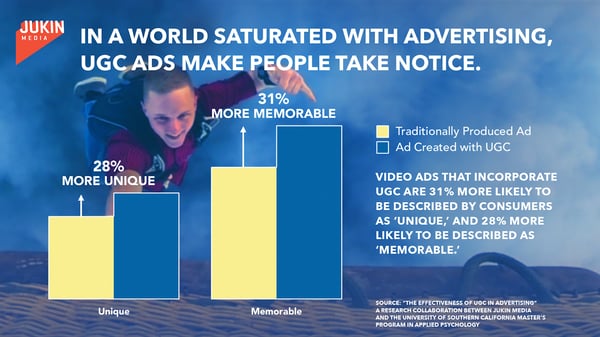
UGC Tactics
- 50% of marketers have utilized user-generated content in email marketing, (TINT, 2018)
- Meanwhile, 58% of marketers have implemented UGC in ad campaigns. (TINT, 2018)
- Nearly half of marketers use UGCto support their overall marketing campaigns. (TINT, 2018)
- 41% of marketing professionals ranked content engagement as their top KPI for tracking user-generated content. (TINT, 2018)
- The most common types of UGC are photos, videos, social media content, customer reviews or forums, and content created with branded AR filters. (IAB, 2019)
Brand Authenticity
- 60% of consumers believe UGC is the most authentic marketing content. (Stackla, 2017)
- 75% of marketers believe user-generated content feels more authentic than other types of content. (TINT, 2018)
- Although 92% of marketers think they’re creating authentic content, 51% of consumers think their favorite brands offer authenticity. (Stackla, 2020)
- 57% of consumers think that less than half of the content brands create resonates as authentic. (Stackla, 2017)
- Consumers are 2.4x more likely to say user-generated content is authentic compared to brand-created content. (Stackla, 2020)
- 56% of internet users say they find out about products from friends or acquaintances while 32% rely on customer reviews. (Statista, 2020)
- On average, 20% of consumers have unfollowed a brand on social media because they felt their content was inauthentic. (Stackla, 2017)
- 70% of the time, consumers are able to distinguish between consumer-created content and brand-created content. (Stackla, 2017)
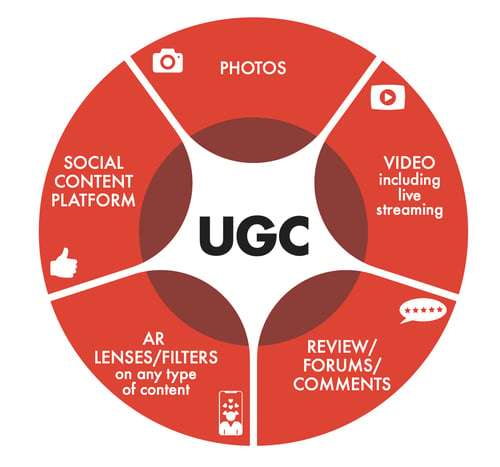
UGC Audiences
- Demographically, more Gen Z YouTube viewers prefer UGC to professional videos more than older generations. (YouTube, 2020)
- Globally, Gen Z and millennial generations watch more user-generated content than Gen X and Boomer generations. (YouTube, 2020)
- More than 30% of millennials have unfollowed a brand due to inauthentic content. (Stackla, 2017)
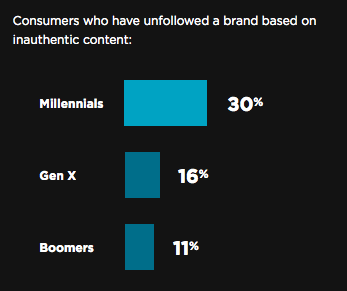
Defining a User-Generated Content Strategy
As you can see from the stats above, user-generated content not only saves you production time, but it can also make your brand more authentic and trusted.
If the data above has persuaded you to implement UGC in your marketing strategy, here are a few next steps you can consider:
- Get inspiration from other brands: Seeing successful examples of UGC from brands in a similar industry will give you an idea of which customers to reach out to and how to amplify their positive thoughts about your product. For a few great UGC examples, check out this blog post.
- Determine how you’ll get the content: Will you encourage fans to send you videos on social media, host a content-related contest, or directly ask your clients to promote a product via email? For tips on this step, read this post,
- Be authentic: Remember, the biggest strength of user-generated content is that it allows audiences to see an authentic view of your product. Don’t be afraid to promote UGC that might be lower quality but highlights all the best features of your brand or product.
To learn more about how to leverage user-generated content in your marketing, click here.

How to Create a Social Media Report [Free Template]
Social media is an undeniably powerful channel for marketing in 2020.
In fact, social networks are the biggest source of inspiration for consumer purchases, with 37% of consumers finding purchase inspiration through social channels.
However, if you’re using social media as a tool for organic exposure and brand awareness, rather than just a channel for paid ads, it can be difficult to track the success of your efforts.
As any social media manager knows, successful implementation of a social media strategy is contingent on countless factors — and all companies prioritize different channels, metrics, and criteria for success.
For example, is paid more important than organic to your business, and if so, to what extent?
Is more importance placed on audience engagement, or audience growth?
Has a posting cadence been directly tied to revenue?
With so many areas of focus for social media marketers, it’s crucial to choose, analyze, and report on your key social media metrics with a social media report.
A social media report can help you clearly convey what factors your social media team prioritizes, why those factors matter, and how you’re performing against those goals.
In this post, we’ll highlight the importance of a social media report, list the metrics you should consider including in one, and walk through a step-by-step process for building a social media report yourself.
For a quick and easy solution to your reporting woes, click here to download HubSpot’s Free Social Media Reporting Template.
Why Use a Social Media Report?
A social media report is the best way to distill the key metrics your social media team is tracking on a daily, weekly, monthly, quarterly, and/or annual basis.
Since social media encompasses so much, gathering and reporting on the data and channels that you’ve determined are most important for your business provides a lens of focus for your social media marketing team, and delivers a necessary high-level overview for leadership.
Social media doesn’t just affect marketing. Prospects ask questions, customers write reviews, and thought leaders follow you for company news. Because social media coincides with nearly every aspect of your organization, gathering and distributing the state of your social media channels is a move that shows transparency and encourages cross-company alignment.
You can also use a social media report to report on campaign-level analytics. If your social media account is serving as a cog in a larger company initiative, this report shows to what extent social media contributed to the project’s success.
Featured Resource: Free Social Media Report Template
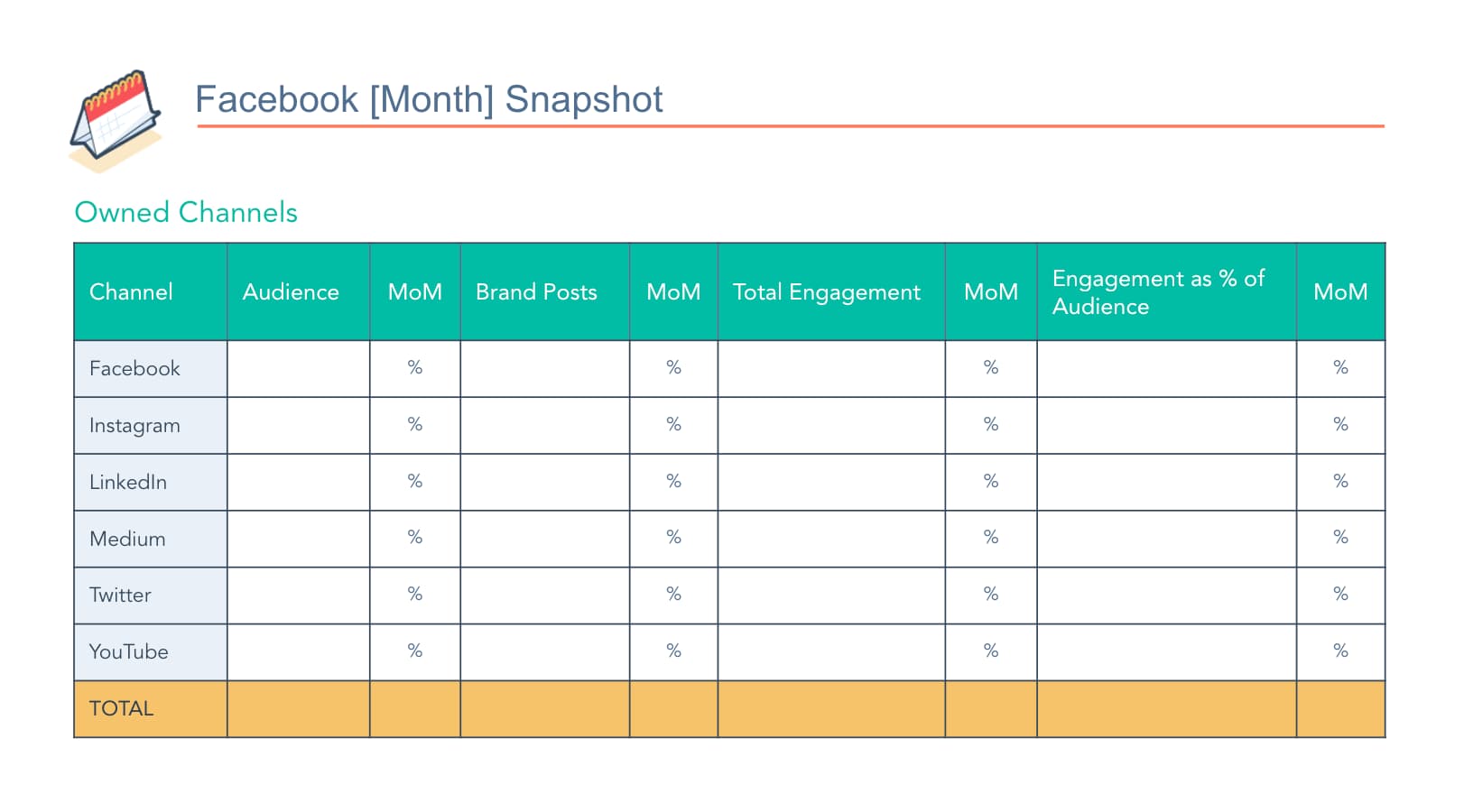
HubSpot’s free social media report template has pre-made slides for you to report on all of your predominant social media metrics. Download the template today and simply plug in your own metrics to customize a social media report for your organization.
Social Media Metrics to Report On
Your business likely values some metrics over others when it comes to social media reporting. Likely, these metrics also vary between your channels — since LinkedIn doesn’t let you retweet, and Twitter doesn’t let you click a cry-face button.
Before you start reporting on your social media channels’ performance, read through this list of options of social media metrics so you can determine which ones you should include in your report.
1. Audience Size and Growth
This metric tells you how large your reach is and how quickly that reach is growing. This is typically seen as the core social media metric, as it shows how large of an audience you can leverage with your posts and content.
2. Cadence of Posts
A rather self-explanatory example, this metric represents how many times you posted in a given time period. This metric is usually compared alongside other metrics — such as engagement rates — to help you determine the right cadence for your audience.
This metric should also be channel-specific, because it makes sense to post more frequently on some channels than others.
3. Post Engagement
Post engagement measures how your fans and followers are reacting to your posts with likes, comments, and shares. A healthy post engagement suggests you have a loyal audience — and that your content is reaching them.
You can also track engagement as a percentage of your audience to determine engagement rate.
4. Mentions
One metric you have a little less control over is mentions. You can track mentions from customers, prospects, and even news outlets to gauge perception of your business and brand online.
5. Clickthrough Rate
When a post links to a page on your website, you can measure how many people and what percentage of your audience clicked through to the page. A strong clickthrough rate shows you’re sharing website pages that your audience finds relevant.
6. Conversions & New Contacts
Conversions comes into play if you’re using social media to generate leads, subscribers, or even customers. If you want to attribute contacts to your social media team’s efforts, make sure you’re using proper tracking and setting reasonable goals, as it’s rare in some industries to go straight from social media to becoming a customer.
7. ROI
Directly tracing ROI (return-on-investment) to social media efforts can be tricky. However, if you determine it’s worth reporting on this metric, make sure you have proper expectations set and attribution models established.
8. CPM / CPC
This metric is essential for monitoring the performance on your social media ads. If you’re solely reporting on organic social metrics, you can ignore this one.
9. Competitor Metrics
To provide a benchmark, consider analyzing the aforementioned metrics for your competitors. Obviously, these metrics can vary drastically based on publicity, paid budget, and the size of the company, but it’s still worthwhile to make the comparison.
How to Make a Social Media Report
Step 1: Choose Your Presentation Method
For consistency and clarity, make sure you’re using a social media report presentation, spreadsheet, or memo template. This way, each time you update your metrics, you’ll simply need to copy over your most up-to-date metrics onto that template rather than reinventing the wheel every time.
We suggest using a PowerPoint or Google Slide Deck template, because you can share it with your team via email, use it for an in-person meeting or presentation, or both.
Need a template to get started? Try this one.
Step 2: Determine the Metrics You’ll Be Reporting On
Like we’ve established, different companies and different social media teams value different social media metrics.
It’s your job to choose the metrics that matter most to your team and your organization.
Using the list from the section above, narrow down the essential metrics you believe are worth presenting to your team at large. Remember, you can change which metrics you report on for each of your organization’s social media platforms.
If your social media report is campaign-specific, reach out to the project stakeholders to see if they’re hoping to see reporting on any certain metrics in the social media report.
Pro Tip: For your first few ongoing social media reporting presentations, ask your peers which metrics they’d like to see, or which ones they need clarification on. Making these changes sooner rather than later helps you keep your team informed and engaged.
Step 3: Gather Your Data
Once you know what you’re reporting on and how you’re reporting it, it’s time to start collecting data.
When you’re first setting up your social media reports, create bookmarks for your data sources. Make a folder for the analytics page for each social media channel you’re analyzing and/or your social media reporting software for an all-encompassing view.
If you’re tracking click-throughs to your website, make sure you’re analyzing from a single master location, such as your tracking URL builder or your traffic tracking tool like HubSpot or Google Analytics.
Step 4: Add in Some Visuals
A chart of numbers on a slide deck is, well, pretty boring.
While a numerical chart is important for sharing as much info as possible in an organized way, using visuals is a better way to convey the growth and success metrics of your social media performance. Try incorporating one or all of the following into your social media reports:
- Linear graphs to show followers over time.
- Pie charts to show clicks to different pages of your website (blog pages vs. case studies, for example).
- Bar graphs to show number of engagements on each platform.
These examples are more eye-catching than numbers on a slide and further illustrate what you want your team to walk away with. If data visualization is new to you, check out our Guide on Data Visualization for Marketers.
Step 5: Think of Your Story
A running social media report should always remind people about where you came from and where you plan on going. That said, make sure your reports make reference to how your numbers have changed since the last period of time on which you presented, in addition to why numbers have changed.
Did follower growth as a percent increase drop last month? Maybe that’s because one of your posts from the month before went viral and resulted in unprecedented growth that was impossible to match. Make that clear and add context to the numbers.
Additionally, each report should contain clear action items about how you plan to continuously improve your social media performance. Social media is constantly evolving, so your approach and strategy for it should, too.
Now that you’re equipped with the knowledge to build, design, and share your social media report, download your social media report template and get to work!

12 of the Best Marketing Techniques for 2020
When content marketing was gaining steam, there were really only a few techniques you could leverage.
On a typical day, you’d write a blog post, hope it ranked on Google, send it to your email subscribers, and post it to your social media profiles.
That was pretty much it.
This is still the main strategy most marketers use nowadays, but since content marketing has exploded in popularity since its early adoption, it has developed into a much more nuanced and complex type of marketing with many techniques for reaching and resonating with an audience.
To help you learn about the most effective marketing techniques around today, we’ve rounded up the best ones to add to your content marketing arsenal.
1. CTA Copy Test
Every company has a different set of customers, so there’s no one-size-fits-all formula for designing the most optimal CTAs. To figure out which CTA copy will produce the best results for your company, you must discover what your unique set of customers prefer.
With A/B testing, you can run an experiment between two variables, like a red and blue CTA, and identify which one produces better results. A/B testing shouldn’t be confused with multivariate testing, though, which allows you to simultaneously test many variables.
To conduct an A/B test, you can use HubSpot’s A/B testing kit. With this kit, you’ll get guidelines for A/B testing, learn what variables to test, and gain access to a simple significance calculator to track your results.
2. Email Preview
Did you know that more than 50 percent of U.S. respondents check their personal email account more than 10 times a day, and it is by far their preferred way to receive updates from brands.
This means that there isn’t a lot of room for error when you send an email. To avoid any issues, a great marketing technique to implement is to begin previewing your email in different email providers before sending.
There are plenty of tools you can use to preview your emails such as HubSpot’s free email software. With an email preview tool, you can test your emails before you send them and see how they look in every service provider.
3. Blog Post Title Test
When you write a blog post, do you use the first title you came up with or do you write a few?
Most marketers write several headlines before deciding which one to use. However, it’s not always easy to decide.
To make this decision, you can run an A/B test and see which types of titles work best for your audience.
Additionally, you can use tools like this headline analyzer to see what you can do to improve your headline.
4. Brand Storytelling
In the neuroscience field, researchers have proven that storytelling is the best way to capture people’s attention, bake information into their memories, and resonate emotionally with them. The human brain is programmed to crave, seek out, and respond to well-crafted narrative — that’ll never change.
So just like your favorite Netflix show, you can craft a series on YouTube to entice your viewers subscribe to your updates. This can get your audience more excited for your show’s newest season than they currently are for the latest season of Stranger Things.
Before you green light another slew of listicles, how-to posts, and ultimate guides, remember how powerful storytelling is and consider crafting a YouTube series, podcast, or social media hashtag chock-full of conflict, surprise, and emotion that your viewers will relate to your brand.
5. A Topic-Based Content Strategy
Since people heavily rely on Google to provide accurate and relevant answers for most of their questions today, Google needs to understand the intent and context behind every single search.
To do this, Google has evolved to recognize topical connections across users’ queries, look back at similar queries that users have searched for in the past, and surface the content that best answers them. As a result, Google will deliver content that they deem the most authoritative on the topic.
To help Google recognize your content as a trusted authority on marketing, sales, and customer service topics, consider implementing the pillar-cluster model on your blog.
Essentially, the pillar-cluster model is a topic-based based content strategy. This means that you generate and organize ideas for your blog by topic.
By creating a single pillar page (an ultimate guide, for instance) that provides a high-level overview of a topic and hyperlinks to cluster pages (subtopic blog posts) that delve into the topic’s subtopics, you can signal to Google that your pillar page is an authority on the topic.
Hyperlinking all of the cluster pages to the pillar page also spreads domain authority across the cluster, so your cluster pages get an organic boost if your pillar page ranks higher, and your cluster pages can even help your pillar page rank higher if they start ranking for the specific keywords they’re targeting.
6. Growing Email Subscriptions
As of now, subscribing to your favorite online publications through email is the best way to keep up with their latest stories and news. And since it takes an average of six to eight touch points to generate a qualified sales lead, persuading people to subscribe to your emails and, in turn, constantly consume your content will generate more leads and revenue for your business.
Growing an engaged, loyal subscriber base also speaks volumes about the quality of your content and its emotional resonance. Even though hoards of content saturate the internet and most people’s inboxes today, people are still actively engaging with your content, which is a clear sign that they actually value it.
To build your email list, you’ll want to use an email marketing software like HubSpot. This way you can create, personalize, and optimize marketing emails without needing a developer.
7. Historical Optimization
In 2015, HubSpot made a revolutionary discovery about our organic monthly blog traffic — the overwhelming majority of it came from posts published prior to that month. In fact, 76% of monthly blog views came from these old posts.
Today, the groundbreaking revelation rings louder than ever — 89% of our monthly blog views currently come from posts that were published at least six months prior, and we’ve developed an entire strategy dedicated to refreshing and republishing these historical pieces of content.
These types of blog posts are called “updates”, and they comprise 35-40% of HubSpot’s editorial calendar. By refreshing posts with new information and effectively republishing them as new blog posts, HubSpot can build upon its existing organic value that these posts have accumulated through backlinks and user engagement and double or even triple their traffic. This process also helps HubSpot optimize our blog for efficiency, decreasing the amount of new content we have to create while increasing our organic traffic and conversions.
8. Podcasting
According to a content format study conducted by Edison Research and Triton Digital, people age 12 and older are listening to online audio content at unprecedented levels. On average, people spend 17 hours per week tuning into their favorite podcasts, online radio shows, and audiobooks. There are also 14 million more weekly podcast listeners this year compared to last year, which is more than Guinea’s entire population.
The demand for audio content has exploded, but that doesn’t mean people will listen to your branded podcast just because it’s a podcast. In reality, they’ll only listen to it if it can hold their attention and, ultimately, entertain them. Otherwise, producing yet another interview-an-expert podcast like everyone else will only add to the noise flooding the internet.
9. Link Building
Earning high-quality inbound links from websites and pages with high authority scores is crucial for boosting your domain authority. But, unfortunately, “If you write it, they will link to it,” is not a viable SEO tactic.
An effective method for earning high-quality links is by asking other websites that have the same or higher domain or page authority score than you to link to your top content. You should also make sure your content is relevant to the referring website’s content.
Another way you can earn quality backlinks is by using Backlinko’s skyscraper method. The skyscraper method is an SEO strategy where you find content that ranks well for keywords you want to rank for and then create content that’s better than the top ranking posts. Then, you use SEO tools to find all the sites that have linked to your competitor’s content and ask the most relevant sites to replace your competitor’s link with a link to your improved content.
10. Social Media Based Public Relations
Today, over 30% of time spent online is dedicated to social media. Needless to say, people spend more time on social media than ever before. And public relations professionals are pivoting their strategy from solely focusing on placing their stories in news outlets’ publications to concentrating on driving traffic to their social media profiles too.
In order to successfully pitch your stories to journalists and news outlets nowadays, you need to account for the content that performs well on their social media profiles and their publication. So before you pitch your story, make sure it’s relevant and interesting to the news outlet’s social audience.
11. Audience Segmentation
In a world overflowing with digital noise, creating irrelevant or unwarranted content won’t catch anyone’s attention.
To create personalized marketing campaigns for each slice of your target market, consider leveraging audience segmentation, which separates your target market into specific, accessible groups of people based on personal attributes like their demographics, psychographics, and behavioral information.
To properly implement an audience segmentation strategy, you can use a marketing software like HubSpot. For example, with HubSpot’s marketing software, there’s a lead collection and tracking feature where you can segment and nurture your leads. This makes it easy to build an email list, automate campaigns, and expand your database.
12. Brand Extensions
Big companies often extend their brand to develop new products in industries that they don’t have any market share in. These initiatives are called brand extensions, and they allow companies to leverage their brand awareness and equity to create more revenue streams.
Historically, the most successful brand extensions are the ones that closely tie to the company’s flagship product or core brand, like Gerber’s baby clothes and Dole’s frozen fruit bars. So by entering tangential markets that can preserve your brand’s unique associations and perceived quality, you can develop new products that consumers intuitively understand the benefits of, even though they’ve never seen them on a shelf.
On the flip side, a company can also exploit its brand, and, in turn, damage it. If they develop a product in a market that isn’t closely tied to their flagship product or core brand, audiences might attach undesirable associations to a brand, weaken its existing associations, and hurt its established products’ perceived quality.
When you’re developing a new marketing plan, it’s important to consider new marketing techniques. Don’t forget to continuously innovate on your strategies.
Editor’s note: This post was originally published in May 2019 and has been updated for comprehensiveness.
