
8 of the Top Marketing Challenges Faced Globally [New Data]
Every marketer faces different challenges. Although we typically share similar goals, some teams are stuck on hiring top talent, while others are having trouble finding the right technology for their needs.
Whatever the case may be, there’s always at least one area that you can stand to improve. In other words, there’s always room to optimize the various components of your strategy and turn your marketing into an even more effective revenue generator.
Throughout the past few years, HubSpot has kept up with a number of global marketing challenge trends. We’ve also polled thousands of marketers on the challenges they face, as well as the tactics they’ve used to meet those challenges head-on.
While you might think that global marketing issues have changed drastically in past years due to evolving media platforms and emerging technology, you might be surprised by the trends research has actually shown.
In fact, we’ve found that today’s most common global marketing struggles haven’t actually changed much in the past few years.
In 2019, when we dug into the research of global marketing challenges, such as this survey from Attest, many of the results we found were fairly similar to what we found back in 2017 and 2018, when we surveyed thousands of marketers for our State of Inbound Reports.
Between 2017 and 2018, our State of Inbound Reports found that the top five challenges continued to stay the same, with some slight fluctuations in non-American regions.
According to research from 2017-2019, generating traffic and leads, as well as proving ROI continue to be leading challenges marketers face.
While the unchanging list of challenges is a good sign that marketers aren’t facing unprecedented barriers, it’s still important to take stock of the factors that continue to hold back marketers. Why? If marketers face the same problems today that they did in the past, it’s likely that these major challenges will continue far into the future.
So, what’s happening in 2020?
Below, let’s review the current global marketing issues impacting the industry.
1. Generating Traffic and Leads
Generating enough traffic and leads was the top global marketing issue, according to the 2017 and 2018 State of Inbound reports.
A 2019 survey from Vital shows that more than 35% of marketers face challenges related to leads and/or traffic, showing that this trend still continues.
In fact, the top priority for marketers in 2020 is generating leads.
Why It’s a Challenge
Clearly, marketers are struggling with producing enough demand for their content. And as the years progress and competition stiffens, this will only become truer. With so many options of platforms for marketers to publish their content and even more ways to promote it, it’s hard to know where to focus your efforts.
What Can You Do?
When it comes to creating content that produces enough traffic and leads, marketers should ask themselves two questions: Are you truly creating high-quality content — the type of content people would pay for? And, do you know the type of content your audience actually wants?
In 2020, the most common customer marketing tactic is creating exclusive content for customers.
For example, HubSpot Research has found that 53% of consumers want to see more video from marketers in the future, while only 14% want to see more blog posts. To learn more about how the way people are reading and interacting with content is changing, check out this HubSpot Research report.
Once you know you’re creating the type of content your audience wants, the focus shifts to promoting it in a way that makes your audience take notice. More than ever before, people are being flooded with content. Consumers don’t have to use a search engine to find answers. Instead, articles fill their news feed or buzz in their pocket via mobile notification.
2. Providing the ROI of Your Marketing Activities
Measuring the ROI (return on investment) of your marketing activities has remained a top marketing challenge globally year-over-year.
In fact, only 53.85% of marketers surveyed say they even measure Customer Acquisition costs.
It continues to be a vital way for marketers to understand the effectiveness of each particular marketing campaign or piece of content.
Plus, proving ROI often goes hand-in-hand with making an argument to increase budget: No ROI tracking, no demonstrable ROI. No ROI, no budget.
Why It’s a Challenge
Although return on investment is a crucial stat that shows your campaigns success or progress, tracking the ROI of every single marketing activity isn’t always easy, especially if you don’t have two-way communication between your marketing activities and sales reports.
What Can You Do?
When it comes to providing ROI, there’s a strong case to be made for dedicating time and resources to establishing links between marketing activities and sales results. This means using both marketing software (like HubSpot) and a CRM solution (like HubSpot’s free CRM), and then tying them together to close the loop between your marketing and sales efforts with a service-level agreement (SLA). That way, you can directly see how many leads and customers are generated through your marketing activities.
We’ve found there’s no better combination than having an SLA and doing inbound marketing. According to the 2018 report, inbound organizations with SLAs had twice the ROI of misaligned organizations.
(Use this ROI calculator to simulate the potential ROI you could realize by conducting inbound marketing.)
3. Securing Enough Budget
How can you create a winning marketing campaign without a budget? The truth is, it’s pretty hard. But, even when you have a great, revenue-generating idea, you still usually need to get your budget approved by a higher-up.
For 2020, 64% of marketers said their marketing budget has increased.
Why It’s a Challenge
Securing more budget is a pressing challenge for marketing globally. And often, getting more budget is easier said than done — especially for smaller organizations that aren’t working with sizable nor flexible marketing spend.
But the key to securing more money for your team might not be that complex. Here’s what you can do.
What Can You Do?
The key to unlocking budget lies in being able to prove the ROI of your marketing efforts. According to our report, organizations that can calculate ROI are more likely to receive higher budgets.
Again, success with inbound marketing also plays a large role in driving higher budgets. Effective strategies obviously produce results, and our data shows those who feel confident in their marketing strategy are more than 2X as likely to get higher budgets for their marketing teams. But remember, inbound marketing is a long game. If you get off to a slow start, you shouldn’t back off — in fact, you might consider doubling down.
To learn more about how to understand and leverage marketing ROI, check out this simple guide.
4. Managing Your Website
Although managing a website is consistently a challenge to marketers, it seems to be growing less threatening.
Throughout the past few years, less and less marketers have been worrying about it as compared to other challenges like “identifying the right technologies,” which rose from the fifth to fourth biggest challenge in 2018’s State of Inbound Report.
In 2020, 63% of marketers are looking to make a website upgrade.
Why It’s Still a Challenge
Managing a website was the fourth biggest challenge for marketers in 2017. And chances are, your website’s performance is high on your list of priorities. It’s an asset that works around the clock to draw in visitors, convert them, and help you hit your goals, after all.
Issues with website management include a variety of different factors, from writing and optimizing the content to designing beautiful webpages. Here are a few things marketers can do to deal with this challenge.
What Can You Do?
First, read this report to see how your website stacks up against over 1 million other websites. It also includes a deep analysis on the four most critical elements of website performance and design, from average load time and website security to mobile friendliness and SEO.
If your primary challenge with managing a website has to do with the skills and resources you have available, you aren’t alone. This is especially true for small companies who don’t have all the talent in-house required to cover content, optimization, design, and back-end website management.
One solution? Hire freelancers and agency partners. To find freelancers, we recommend:
- Tapping into your personal and professional network by posting on LinkedIn, Facebook, and other social networks with a description of what you’re looking for.
- Browsing freelance writers and designers based on their portfolios and areas of interest. For writers, check out Zerys and Contently. For designers, check out Behance & Elance.
- Browsing HubSpot’s Services Marketplace, which lists a wide variety of designers from partner companies and agencies we’ve deemed credible.
Overall, you can make website management easier on your team by hosting your website on a platform that integrates all your marketing channels like HubSpot’s COS.
Finally, for the projects you want to keep in-house, here is a list of ebooks and guides that might be helpful to your team:
- Run a Website Grader report
- Ebook: Website Redesign Guide
- Ebook: 77 Brilliant Homepage Design Examples
- Ebook: How to Design and Optimize Landing Pages
- Blog: 27 Ways to Drive Traffic to Your Website
- Ebook: The Ultimate Workbook for Redesigning Your Website
- Ebook: The Marketer’s Guide to Mobile
5. Targeting Content for an International Audience
Targeting is a key component of all aspects of marketing.
With 59% of marketers surveyed currently marketing internationally, it’s important to have an international strategy.
To be more effective at targeting, one of the first things any marketer needs do is identify their buyer personas to determine who it is they should be marketing to.
Why It’s a Challenge
If you’re expanding internationally, it can be a big challenge not only to figure out the best ways to market to an international audience but also to organize and optimize your site for different countries.
However, exchange rates are marketers’ biggest challenge with international marketing.
HubSpot Research recently analyzed the difference in content preferences across the world.
What Can You Do?
Download our free ebook, The Global Marketing Playbook. There are some really helpful tips in there that’ll help give you some direction on global marketing, including how to identify your top three growth markets, how to explore local trends, and tips on choosing the best localization providers.
Additionally, when marketing to a new region, the most common tactic marketers use is to shift their product offering.
Remember, your website visitors might speak a plethora of different languages and live in totally different time zones. To make your content appealing to a wide audience, you’ll need to keep your global visitors top-of-mind when creating all your content. This means being aware of seasonal references, translating units of measure and monetary references, and giving translators the tools and permissions to customize and adapt content for a specific audience when they need to.
Finally, be sure you’re optimizing your website for international visitors, too. For more tips and resources on global marketing expansion, browse our international inbound marketing hub.
6. Training Your Team
As companies scale and technologies continue to evolve, training your team will become a greater challenge for marketers.
Why It’s a Challenge
Whether it’s training them on the concepts and tools they’ll be using every day or making sure they’re achieving their full potential, the struggle is real across the board.
To combat this, I’ll share some tips I’ve used during my trainings to make sure the concepts and tool tips stick and have a lasting effect on your team and your marketing.
What Can You Do?
To get an overall idea of where your team stands, take a few minutes to assess each of your team members’ marketing strengths and weaknesses, levels of expertise, and passion/commitment to your company. Then, objectively rate the priority (or level of importance) of their expertise and their contribution to bottom line objectives (ROI) to date. Here’s a simple assessment tool from Lean Labs to help you evaluate your team so you can figure out who needs recognition and who needs coaching.
You also might consider requiring your team members to rack up some online marketing certification. HubSpot Academy, for example, offers certifications, documentation, and training programs to help people master the basics of inbound marketing. Google also offers training and certifications on analytics with their online Analytics Academy.
What about new hire training, specifically? We recommend creating a training plan for new team members. Here at HubSpot, each new marketer is given a 100-day plan like this one to lay out specific goals and help new hires demonstrate their effectiveness.
7. Hiring Top Talent
Hiring top talent is another challenge marketers commonly report experiencing.
Why It’s a Challenge
Many companies are shifting more resources to inbound marketing, which means higher and higher demand for top marketing talent. But supply simply isn’t keeping up. From sourcing the right candidates to evaluating for the right skills, finding the perfect person could take months … or more.
What’s more, the type of marketing talent companies are looking for is changing, too. According to a 2020 report from LinkedIn, employers are seeking marketers with soft creative skill sets as well as hard technical skills. And the quick rate at which the demand for these jobs are rising has caused a marketing skills gap, “making it difficult to find candidates with the technical, creative, and business proficiencies needed to succeed in digital marketing.”
What Can You Do?
Employers are looking for marketers with a diverse skill set that includes digital marketing, content marketing, SEO, and social media marketing. To find the best inbound marketer for your team, the first thing you should do is decide what that person needs to be able to achieve for your business.
Ask yourself: What will the new marketer’s tasks and duties include? What skills do those tasks and duties require? What goals or challenges will the new marketer face? Use your answers to these questions to write a compelling job description. (Here’s a long list of pre-written marketing job descriptions to help you get started.)
Next, post your jobs where talented inbound marketers will find them. While traditional job sites like Indeed.com, CareerBuilder.com, or LinkedIn will help you cast a wide net, we recommend checking out Inbound.org, which is the only job listing service in the world that’s exclusively focused on inbound marketing and sales jobs.
Finally, focus your job description and new hire 100-day plan what people value most in their careers.
LinkedIn data from 2020 shows that 87% of active and passive job candidates will consider new job opportunities. Additionally, the number one reason candidates will consider or accept a job is career growth. This means that job listings and company culture’s that offer employees a plan for growth will see the most interest from talent.
8. Delivering an Account-Based Marketing Strategy
Account-based marketing (ABM) is a new trend, which is a growth strategy in which marketing and sales collaborate to create a personalized buying experience for an identified set of accounts.
However, interestingly, the most common challenge with ABM is delivering a personalized experience.
Why It’s a Challenge
Currently, there aren’t a lot of software that are focused on account-based marketing. Many companies that are implementing ABM strategies are using manual methods, which means some accounts are getting lost in the cracks.
What Can You Do?
To deliver a more personalized experience, you should use a software that helps you combine your sales and marketing information.
For example, HubSpot’s ABM software help unite your marketing and sales teams with collaborative, intuitive ABM tools that create seamless buying experiences for your highest-value accounts.
This software can enable collaboration among teams and personalize content.
Additionally, HubSpot’s software has account-level targeting added to the LinkedIn Ads integration, giving you the ability to target companies by target account status or tier, and contacts or subsets of contacts at target accounts. The account overview sidebar, the ABM playbook for sales reps, and a native integration to link your HubSpot and LinkedIn Sales Navigator accounts, help further deepen your relationships with people over time, helping build more authentic connections with stakeholders within each account.
Does Your Company Face Any of These Marketing Issues?
A thorough analysis of your marketing strategy and its current performance will help you discover where your biggest marketing opportunity lies. This will allow you to focus on improving the areas that need the most attention, so you can start making your marketing far more effective.
If you’re faced with a challenge and want ideas on how to best tackle it, you can always consider getting some help by any of the various types of marketing training that are available.
Editor’s Note: This post was originally published in November 2012 and has been updated for freshness and comprehensiveness.

A Beginner’s Guide to SSL: What It is & Why It Makes Your Website More Secure
Have you ever noticed that some URLs start with “http://”, while others start with “https://”?
 Maybe you noticed that extra “s” when you were browsing websites that require giving over sensitive information, like when you were paying bills online.
But where’d that extra “s” come from, and what does it mean?
To put it simply, the extra “s” means your connection to that website is secure and encrypted; Any data you enter is safely shared with that website. The technology that powers that little “s” is called SSL, which stands for “Secure Sockets Layer.”
As a consumer, you always want to see https:// when visiting any site you trust with your essential information. As a marketer, you’ll want to make sure you have an SSL or two for your audience.
So let’s talk about why SSL is a big deal.
What is an SSL Certificate?
Let’s define an SSL. This definition comes straight from SSL.com:
When you land on a page that has a form you filled in and hit “submit” for, the information you entered can be intercepted by a hacker on an unsecure website.
This information could be anything from details on a bank transaction to what you enter to register for an offer. In hacker lingo, this “interception” is often referred to as a “man-in-the-middle attack.”
One of the most common ways an attack happens is this: A hacker places a small, undetected listening program on the server hosting a website. That program waits in the background until a visitor starts typing information on the website, and it will activate to start capturing the information and then send it back to the hacker.
A little scary, right?
But when you visit a website that’s encrypted with SSL, your browser will form a connection with the web server, look at the SSL certificate, then bind your browser and the server. This binding connection is secure to ensure no one besides you and the website can see or access what you type.
This connection happens instantly, and in fact, some suggest it’s faster than connecting to an unsecure website. You simply have to visit a website with SSL, and voila: Your connection will automatically be secured.
An SSL is security technology. It’s a protocol for servers and web browsers that makes sure that data passed between the two are private. This is done using an encrypted link that connects the server and browser.
Companies that request personal information from a user, such as an email address or payment information, should have SSL certificates on their website. Having one means that the details you are collecting are private and ensures the customer that when they see that padlock and “https://”, their privacy is safe.
SSL certificates are categorized by the level of validation and encryption provided or the number of domains or subdomains under the certificate. There’s three types of certificates you can earn depending on the SSL you obtain. Let’s talk about them in more detail.
Types Of Certificates
The umbrellas that SSL certificates fall under are encryption and validation, and domain number. They each have three classifications, and can be applied for on the SSL website. Certificates are processed by a Certificate Authority (CA), which is software designed specifically for running and granting these certificates.
For encryption and validation certificates, there are domain, organization, and extended validation. For certificates defined by the domain number, the types are single, multidomain, and wildcard.
Extended Validation (EV) SSL Certificate
This certificate shows the padlock, HTTPS, business name and country in the address bar to diminish being mistaken for a spam website.
Extended Validation (SV) SSL are the most expensive SSLs to obtain, but they are valuable in showing the legitimacy of your domain from the address bar. To set up an EV SSL, you must prove that you are authorized to own the domain you’re submitting. This ensures users that you are legally collecting the data needed to execute certain actions — such as a credit card number for an online transaction.
An EV SSL certificate can be obtained by any business, and it should be a priority especially for those that need identity assurance. For instance, if your website processes web payments or collects data, you’d want to get this certificate.
Organization Validated (OV SSL) Certificate
This certificate verifies that your organization and domain validation are real. Organization Validated (OV) SSL certificates offer a medium level of encryption and are obtained in two steps. First, the CA would verify who owns the domain and if the organization is operating legally.
On the browser, users would see a small green padlock with the company’s name following. Use this type of certificate if you don’t have the financial resources for an EV SSL but still want to offer a moderate level of encryption.
Domain Validation (DV) Certificate
The Domain Validation (DV) certificate offers a low level of encryption shown as a green padlock next to the URL in the address bar. This is the quickest validation you can receive, and you’ll only need a few company documents to apply.
This verification happens when you add a DNS to the CA. For this certificate, the CA will review the right of the applicant to own the domain being submitted. (Note: DVs don’t secure subdomains, just the domain itself).
Unlike the EV SSL, the CA won’t vet any identity data, so you won’t know who is receiving your encrypted information. But if you’re part of a business that can’t afford a higher-level SSL, a DV gets the job done.
Wildcard SSL Certificates
Wildcard SSL Certificates are in the “domain and subdomain number” category. Wildcard SSLs ensure that if you buy a certificate for one domain, you can use that same certificate for subdomains.
For example, if you bought a Wildcard for example.com, it could be applied to mail.example.com and blog.example.com. An option like this is cheaper than obtaining multiple SSL certificates for a number or domain.
Unified Communications (UCC) SSL Certificate
Also known as Multi-domain SSL certificates, Unified Communications certificates (UCCs) allow multiple domain names to be on the same certificate. UCCs were created to bridge communication between a single server and browser but have since expanded to include multiple domain names by the same owner.
A UCC in the address bar shows a padlock to display verification. They can also be considered an EV SSL if they are configured to show that green text, padlock, and home country. The only difference is the number of domain names associated with this certificate.
Multi-domain SSL certificates cover up to 100 domain names. If you need to alter the names in any way, you can do that with the Subject Alternative Name (SAN) option. Some examples of Multi-domain names you can use are: www.domain.co.uk, www.domain.com, mail.example.com, and checkout.example.com.
Single Domain SSL Certificate
A Single Domain SSL protects one domain. The thing to remember about this certificate is that you can’t use it to protect subdomains or a completely different domain.
For example, if you purchase this certificate for example.com, you can’t use it for blog.example.com or 2ndexample.com.
How can I get an SSL certificate for my website?
The first step is to determine what type of certificate you need. For example, if hosting content on multiple platforms (on separate domains/subdomains) it may mean that you need different SSL certificates.
For most, a standard SSL certificate will cover your content. But for companies in a regulated industry — such as finance or insurance — it may be worth talking with your I.T. team to ensure you’re meeting the specific SSL certificate requirements set within your industry.
The costs of SSL certificates vary, but you can get a free certificate or pay per month to obtain a custom certificate. On the free side — Let’s Encrypt offers certificates at no cost, but I would strongly recommend that you have someone knowledgeable about the DNS and technical setup of your website to help. These certificates will also expire every 90 days, so make sure they stay up to date.
One of the other key considerations is the validity period of a certification. Most standard SSL certificates that you purchase are available for one to two years by default, but if you’re looking for longer-term options, consider more advanced certificates that offer longer time periods.
Is SSL good for SEO?
Yes. While the primary purpose of SSL is securing information between the visitor and your website, there are benefits for SEO as well. According to Google Webmaster Trends Analysts, SSL is part of Google’s search ranking algorithm.
In addition, let’s say two websites are similar in the content provided but one has SSL enabled and the other doesn’t. That first website may receive a slight rank boost because it’s encrypted. As a result, there is a clear SEO benefit to enabling SSL on your website and across your pages.
How can I tell if my website has SSL?
When you visit a website with SSL, there are a few distinct differences that display within the browser. Click here for a free SSL checker tool..
1. The URL says “https://” and not “http://”.
The URL should look something like the screenshot below. Remember, an SSL-encrypted website will always have that “s” that stands for “secure.” Additionally, that text can show up green and follows a green padlock (another indicator, explained below).

2. You’ll see a padlock icon in the URL bar.
The padlock will show up on the left- or right-hand side of the URL bar, depending on your browser. For example, on Chrome and Safari, it’ll be on the left. You can click on the padlock to read more information about the website and the company that provided the certificate.
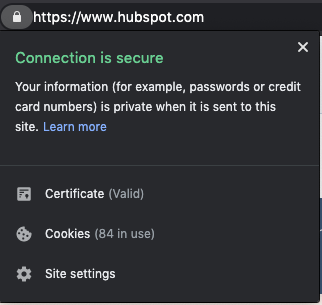 3. The certificate is valid.
Even if a website has the “https://” and a padlock, the certificate could still be expired — meaning your connection wouldn’t be secure. In most cases, a site that displays as https will be secure but, if you encounter a site that asks for a lot of personal information, it may be worth double-checking to be sure the certificate is valid.
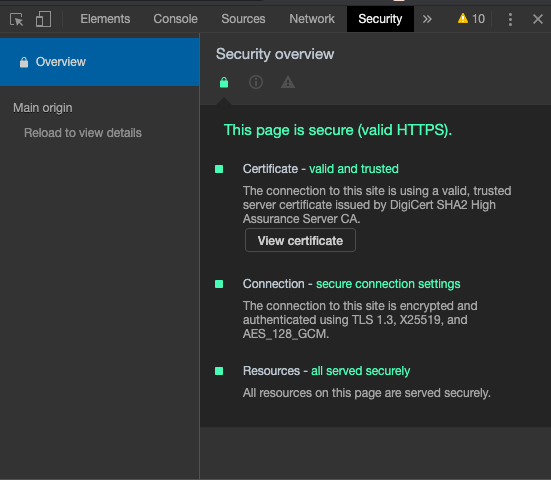 To find out whether the certificate is valid in Chrome, go to View > Developer > Developer Tools. From there you will need to navigate to the security tab to see if the SSL certificate is valid or expired. If you click the “View certificate” button, you will be able to see more information about the SSL certificate and the specific date it’s valid through.
The next time you visit a website, check its encryption status. I love knowing that by clicking a little padlock, I can see if my data is secure. On the flip side, if you are a part of a business that doesn’t have SSL certificates, make them a part of your next goal set, so you can protect your customers’ data and privacy.

6 Easy Ways to Help Reduce Your Website’s Page Load Time
The adage “patience is a virtue” doesn’t apply online.
Even a one-second delay can drastically reduce pageviews, customer satisfaction and drop conversions. The speed of your site even affects your organic search rankings.
So what’s the biggest factor contributing to your page speed?
Size.
It takes browsers time to download the code that makes up your page. It has to download your HTML, your stylesheets, your scripts and your images. It can take a while to download all that data.
As web users expect more engaging site designs, the size of a site’s resource files will continue to grow. Each new feature requires a new script or stylesheet that weighs down your site just a little more.
How do you make sure your site is up to speed?
There are some great resources for analyzing this. Google’s PageSpeed Insights, HubSpot’s Website Grader, and GTMetrix are some of the most popular. Both services will analyze your site and tell you where you’re falling behind.
A little warning: the results can be a bit daunting sometimes, but most fixes are relatively quick and easy. You might not fix everything the speed service recommends, but you should fix enough to make the site experience better for your visitors.
Let’s learn how to speed up things.
While a few modern content management systems like HubSpot implement speed-enhancing options out-of-the-box, more common systems, like WordPress and Joomla, require a little manual labor to get up to speed.
Now let’s look at some essential speed solutions that every webmaster should consider.
1. Scale down your images.
Images are one of the most common bandwidth hogs on the web. The first way to optimize your images is to scale them appropriately, so they don’t affect page loading time as much.
Many webmasters use huge images and then scale them down with CSS. What they don’t realize is that your browser still loads them at the full image size. For example, if you have an image that is 1000 x 1000 pixels, but you have scaled it down to 100 x 100 pixels, your browser must load ten times more than necessary.
Take a look at the size difference when we scaled down one of our images:
 Just by changing the dimensions of my image, from 598 x 398 to 600 x 232, the file size decreased immensely. If you optimize your images before uploading them, you won’t forget to when you put them on your page.
Sometimes though, scaling images will make your photos blurry. The clarity can be lost and the image becomes distorted. If that usually happens to you, go with the second option: compressing.
Compressing images will drastically reduce image size without losing out on the quality. There are several free online tools for image compression, such as tinypng.com, that can reduce your image sizes.You can see size reductions anywhere from 25% to 80%.
For example, I took that first image, with 133 KB, and compressed it using a free website app called Squoosh. When the image was completed, it was 87% smaller, and didn’t lose any of its original quality.
2. Cache your browser for data storage.
Why make visitors download the same things every time they load a page? Enabling browser caching lets you temporarily store some data on a visitors’ computer, so they don’t have to wait for it to load every time they visit your page.
How long you store the data depends on their browser configuration and your server-side cache settings. To set up browser caching on your server, check out the resources below or contact your hosting company:
3. Reduce CSS load time.
Your CSS loads before people see your site. The longer it takes for them to download your CSS, the longer they wait. An optimized CSS means your files will download faster, giving your visitors quicker access to your pages.
Start by asking yourself, “Do I use all of my CSS?” If not, get rid of the superfluous code in your files. Every little bit of wasted data can add up until your website’s snail-pace speed scares away your visitors.
Next, you should minimize your CSS files. Extra spaces in your stylesheets increase file size. CSS minimization removes those extra spaces from your code to ensure your file is at its smallest size.
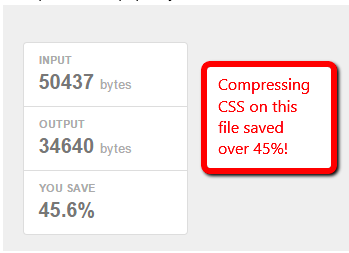
See if your CMS already minimizes your CSS or if there’s an option for it. HubSpot, for example, already minimizes your CSS by default, whereas WordPress websites require an additional plugin such as WP Hummingbird to optimize those files.
If your CMS does not have a minimize CSS option, you can use a free online service like CSS Minifier. Simply paste in your CSS and hit “Compress” to see your newly minimized stylesheet.
Minimizing your resource files is a great way to knock some size off your files. Trust me — those little spaces add up quickly.
4. Keep scripts below the fold.
Javascript files can load after the rest of your page, but if you put them all before your content — as many companies do — they will load before your content does.
This means your visitors must wait until your Javascript files load before they see your page. The simplest solution is to place your external Javascript files at the bottom of your page, just before the close of your body tag. Now more of your site can load before your scripts.
Another method that allows even more control is to use the defer or async attributes when placing external .js files on your site. Both defer and async are very useful, but make sure you understand the difference before you use them.
Async tags load the scripts while the rest of the page loads, but scripts can be loaded out of order. Basically, lighter files load first. This might be fine for some scripts, but can be disastrous for others.
For instance, let’s say one of your pages has a video above the fold, text underneath, and a couple of pictures at the bottom. If you run async tags on this page, the text will load first, then the images, and the video last.
The largest file — the video file — is also what users are supposed to interact with first. When it loads last, it doesn’t have the same impact. So use async tags if your page has a lot of the same elements that don’t take a long time to load, like text, or a carousel of images.
The defer attribute loads your scripts after your content has finished loading. It also runs the scripts in order. To illustrate, think of your homepage. All of the elements, including image fields, text fields, and layout, would appear in order, with the rest loading after.
Just make sure your scripts run without breaking your site. All you need to do is add a simple word in your <script> tags. For example, you can take your original script:
<script type=”text/javascript” src=”/path/filename.js”></script>
And add the little code to ensure it loads when you want:
<script type=”text/javascript” src=”/path/filename.js” defer></script>
<script type=”text/javascript” src=”/path/filename.js” async></script>
The importance of your scripts will determine if they get an attribute and which attribute you add. More essential scripts should probably have the async attribute so they can load quickly without holding up the rest of your content. The nonessential ones, however, should wait until the end to ensure visitors see your page faster.
But always make sure you test each script to ensure the attribute doesn’t break your site.
5. Add asynchronous pages.
Most web pages download content little by little from different sources. For instance, the body of a web page is loaded by the browser. The head, however, is rendered by external sources, such as a stylesheet and script used to load text and images.
The browser loading the page from beginning to end, head to body, takes a while, but is how a lot of pages are rendered, with this synchronous loading. If one part of the page needs a certain function to load, but that component is already loading another portion of the page, then that initial load must finish before getting to work on the next task.
In the meantime, the visitor is waiting for ages for a web page to appear. On the backend, so much of a computer’s processor is being leveraged that it seems like everything just stops.
Instead, asynchronous loading recognizes the scripts that can be loaded simultaneously, overriding synchronous features. When certain pages are loaded at the same time, eliminating that chain of function commands discussed earlier, other aspects of the page, like the page’s head, can be loaded in tandem.
Asynchronous pages can be implemented just by adding in a few lines of code in your page’s CSS. Read how to design them in this post.
6. Minimize redirects.
How many redirects rest on your website? If you recently did a website migration or acquired subdomains, it’s likely you have an HTTP request or two. These redirects make pages take a while to load.
Redirects, like “Error: 404 not found,” pop up when users type in an incorrect web address or are taken to a broken page on a website. When a page is redirected, another page takes its place or a blank page with the error message replaces the screen.
Visitors would have to sit through the HTTP screen while they’re being redirected, increasing the amount of time taken to load the page. Let’s say your “About” page has been moved to a different subdomain.
When visitors type in the website, let’s say mywebsite.com/about, they should be taken instantly to that page. Instead, mywebsite.com/about leads to an HTTP page, then takes a visitor to mywebsite.com > mywebsite.com/aboutus. That’s an additional page users have to go through just to get to their intended destination.
Instead of hosting multiple redirects, remove them. In this post, you’ll learn how to find all of your redirect pages, alternatives, and most importantly, how to remove them.
As online users demand a richer online experience, the size of our pages will continue to grow. There will be flashier Javascript, more CSS tricks and more third-party analytics to weigh down our websites.
A little attention will go a long way — remember, just a one-second delay is all it takes to lose a lead.

10 Email Preview Tools For Different Inboxes
You know the expression, “What you see is what you get”?
Well, when it comes to email marketing campaigns, that might not always be the case.
Since everyone uses different email providers such as Gmail, Outlook, or Yahoo, emails can appear differently for various subscribers.
Sometimes images are blocked, alt text is missing, or fonts won’t render. If this happens, you could damage your credibility and lose subscribers.
Regardless of the email provider, more than 50 percent of U.S. respondents check their personal email account more than 10 times a day, and it is by far their preferred way to receive updates from brands.
That’s why it’s important to make sure that you test your emails before you send them.
In this post, we’ll discuss the best free and paid email preview tools you can use to make sure your emails look great on every provider.
1. HubSpot Free Email
With HubSpot’s free email marketing software, you can preview your HubSpot emails in more than 30 different email clients.
This email preview tool will check for missing images, colorblind accessibility, personalization tokens, or even RSS-to-Email campaigns.
One of the main benefits of this tool is that it’s combined with your email marketing software. This means you don’t have to leave your email builder to preview your email.
You can create beautiful emails without a designer, while also testing your emails.
2. SubjectLine.com
Testing the visual design of your emails is important. However, don’t forget to preview your actual content as well.
With SubjectLine.com, you can test your subject lines and receive a free rating out of 100. The tool considers the total length, word length, urgency, and more.
Word choice matters in your subject lines and this tool will help you come up with more clickable subjects so your readers are more likely to open.
3. Mail Ninja
Mail Ninja is a free, easy-to-use, uncluttered email preview tool. With this tool, you can see instant previews of your HTML emails.
Additionally, you can double-check your alt text, send test emails, and see how your email will look on different devices.
If you don’t trust or want to use a different preview tool than your email marketing software, this is a simple, free option.
4. Inbox Analyzer
Inbox Analyzer, another free email preview tool, helps take the pain out of inbox and spam testing your emails.
You can send your emails to the most popular inbox providers to see how they appear and if they even deliver. This tool will let you know if your email hits the inbox, spam folder, or is undelivered.
Additionally, you’ll also receive instant reports on your sender scores, reputation alerts, and even blacklists.
With this tool, you’ll be able to find issues and learn how to resolve them.
5. Putsmail
Putsmail is a free email testing tool by Litmus, a popular email marketing software (more on this below).
With Putsmail, you can see how your email will look across 50+ different platforms and devices. This is a great tool if you’re just looking for a quick and easy way to preview your emails.
1. Get Response
Get Response is an email marketing software that can help you create content, boost sales, and increase traffic to your site.
While they used to have a separate email preview tool, Inbox Inspector, now you can preview your emails right in the email marketing software.
If you use the software, you can preview your email in more than 25 popular email clients. With their preview tool, you can see real email previews, even when images are blocked.
This is a great option if you’re looking for an all-in-one, paid tool.
2. Litmus
Litmus is a tool for email marketers to help them test and develop amazing email campaigns. With a paid account, you’ll gain access to an email preview testing tool that allows you to see screenshots of your emails across 90+ different apps and devices.
Additionally, if you have a Litmus account, you can add a Chrome extension to your browser and test your emails without ever leaving your email service provider.
With the extension, you can validate your links, images, and tracking. Plus, the extension will instantly run a new checklist with every edit.
This is a great tool to enhance your email marketing and ensure your subscribers have a great experience.
3. Email Preview Services
Email Preview Services is a popular email testing tool that will let you see exactly what your customers are seeing.
With a quick test, you’ll get an accurate visual, so you know if your emails have any rendering issues.
Additionally, this tool offers other email testing tools such as inbox, spam, and authentication testing.
This is a great option if you’re looking for a cheaper email preview tool.
4. Preview My Email
Preview My Email is another email testing solution that can help you improve your performance.
With this tool, you’ll get real screenshots of your email across all the popular email providers in one click.
Additionally, this tool offers email analytics that can help you understand your audience better.
5. Email on Acid
Email on Acid is an email preview tool that’s designed to help you display emails properly, across all clients.
The email previews are live clients — not emulations — so you’ll see exactly what your subscribers see.
This tool will give you screenshots so you have no questions about what your email will look like on 90 clients and devices.
Additionally, this tool tests for bad formatting, broken links, and code problems.
However, one of the best features is the ability to comment, edit, and review email previews directly in the software for a faster and more efficient testing process.
Previewing your emails is an important part of email marketing. If people can’t see your emails or your credibility is ruined, those emails haven’t done their job. To properly test your emails, give yourself time, and test your templates frequently.

8 Google Shopping Ad Strategies That’ll Drive Sales
I love online shopping. In fact, online shopping is almost the only way I shop.
And I’m not alone.
In 2019, there were 263 million digital buyers in the U.S. By 2024, this figure is projected to increase to 282.7 million online buyers.
As a marketer, these figures prove that businesses should invest in Google shopping ads.
Google shopping ads, the ads that appear on the search engine results page when someone is searching for a product, can be confusing to set up.
In this post, we’ll review how to structure your Google shopping campaign and the top strategies that’ll drive sales.
If you want to set up Google shopping ads, you might be wondering, “Which campaign structure should I use?” and “What’s the difference?”
Below, let’s discuss the two different methodologies behind a Google shopping campaign structure.
Featured Resource: Google Ads Planning Template
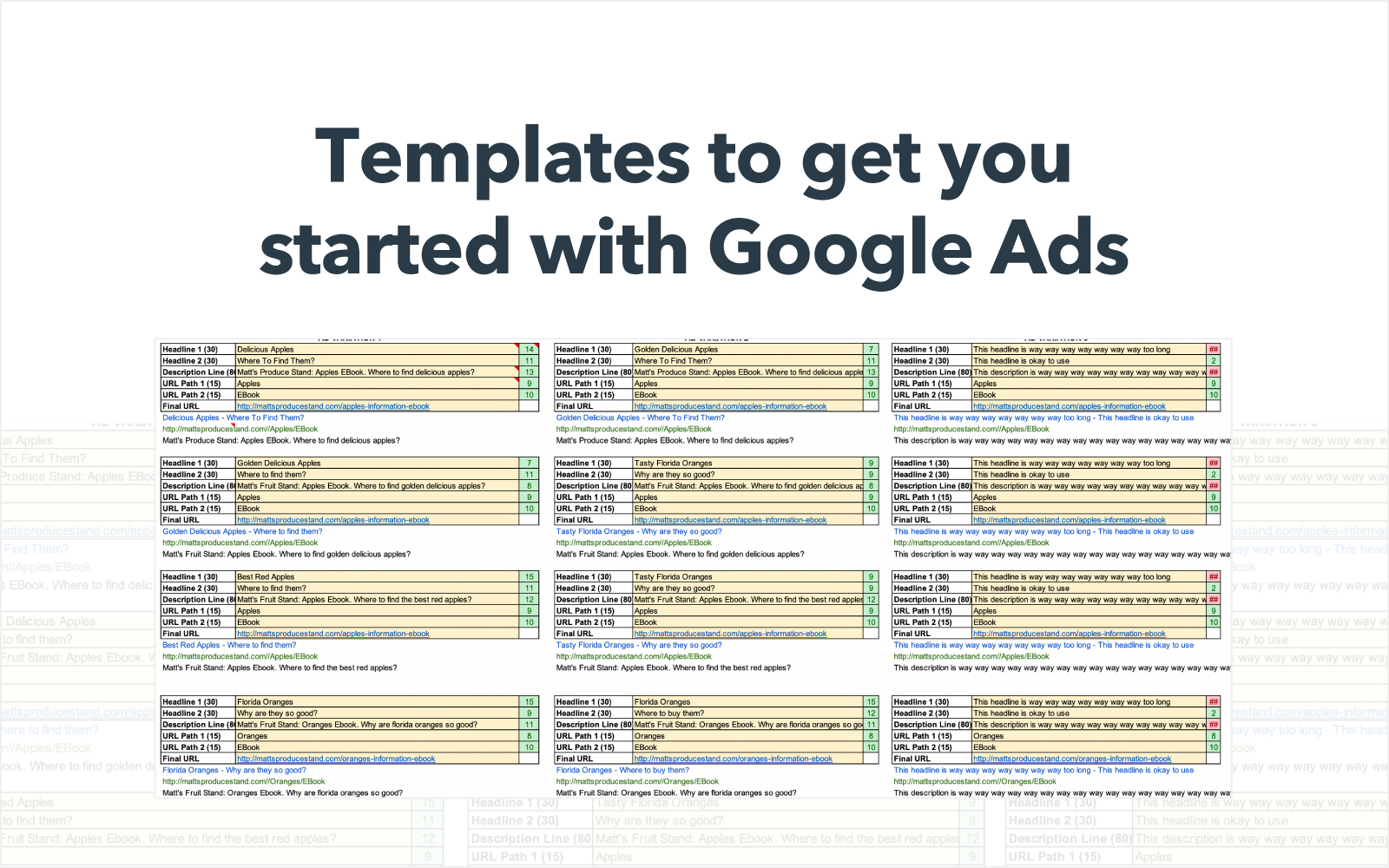
While setting up Google Shopping Ads campaigns sounds complex, using a planning template can make it easier.
HubSpot’s Google Ads PPC kit will help you determine what your bids should be, set up and optimize your budget, find new keywords, and optimize your campaigns.
1. One campaign and one ad group.
The simplest way to set up your Google shopping campaign is to use just one campaign and one ad group.
When you first set up a Shopping campaign, you’ll have one ad group with one product group called “All products,” which will include your entire inventory.
This is a great approach if you want to run a straightforward campaign, without using complex optimization techniques.
However, if you want to customize your bid based on which products you’re selling, then this approach isn’t for you.
2. Several campaigns with varying campaign priorities.
Instead of running one campaign with one ad group, you can run multiple campaigns and prioritize them based on your bidding strategy.
For example, you can set up a campaign targeting unbranded keywords by using a negative keyword list that includes your brand’s name.
You might choose to have this campaign be a low or medium priority since the searchers who aren’t using branded keywords are in the beginning stages of their research.
On the other hand, you can set up a second campaign targeting branded keywords and setting a high priority because these users are further in their buying journey and more likely to convert.
By using several ad groups, optimized with negative keywords, you’ll have more control over the search terms that your product shows up for.
However, it’s important to note that you can’t choose which keywords your product shows up for. You can optimize your campaigns with negative keywords and customized bids, but you can’t choose the keywords you want to target.
Additionally, you can also set up different campaigns for different product groups. Again, you can decide which campaign is a high priority and which one is a low priority depending on which products you think will convert more.
Although this method gives you more control, it requires more strategizing and organization in the planning phase.
Plus, what works for one company, might not work for another. This means that you’ll want to test and see what works for you.
Once you have a good idea of the campaign structure you’re going to use, it’s time to strategize. Below, let’s dive into the top Google shopping ad strategies that’ll help you develop a campaign that drives sales.
1. Create customized campaigns using negative keywords.
When you create multiple campaigns, you can divide them into high, medium, and low priority.
One strategy is to use several campaigns with varying priorities to target certain searches. To do this, you’ll need to develop a negative keyword list for each campaign so you can control which searches your product shows up for.
This might mean that you develop a campaign for more generic searches versus high intent, branded searches.
With this strategy, you’re going to want to think about which searches are more likely to convert versus those that aren’t.
2. Consider your pricing.
With Google shopping ads, your ad is going to be competing with several other products. That’s why it’s important to consider your pricing.
In the example below, you can see the Google shopping ads that showed up for the search “Fabletics leggings.”
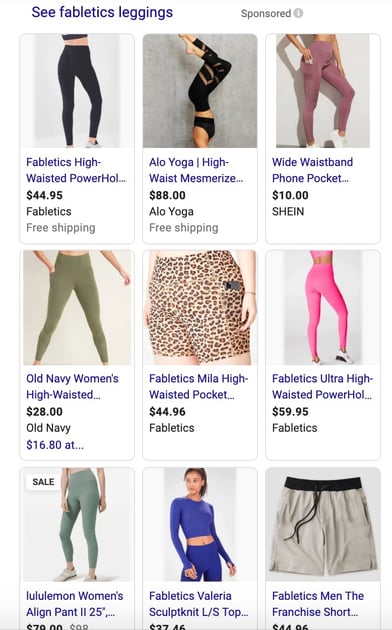
While most of the products are Fabletics, there are a few from other brands. You can see Fabletics leggings priced around $45-60, however, you can also see Old Navy leggings for $28 and SHEIN leggings for $10.
Price can play a large role in the purchasing decision, so it’s important to keep your prices competitive to increase your sales.
3. A/B test your campaigns.
When you’re devising any new strategy for a marketing campaign, it’s important to A/B test. With Google shopping ads, you’ll probably try a few different techniques.
You might want to test different ad groups, priority settings, bids, or negative keywords.
Additionally, you can also test which product groups and product pages are more likely to convert.
With Google shopping ads, it’s important to find the right balance between your campaign structure and bidding strategy.
To improve your sales, you should run A/B tests to see what works for your company and what doesn’t.
4. Optimize your product pages.
Not to be redundant, but keep in mind that your Google shopping ads won’t target specific keywords.
This makes it even more important to optimize your product pages so you can signal to Google which keywords your product should show up for.
To do this, you should use keywords in your product title, page title, meta description, image alt text, and product description copy.
This will help Google decide when to show your product.
5. Split your ad groups by product.
One strategy you can use when you set up your Google shopping campaign is split your ad groups by product.
For example, perhaps you want to group certain products together. Let’s say you sell scrunchies and wine, like Kaitlyn Bristowe. However, you probably don’t want to target the same keywords because the products are so different.
Additionally, you might want to focus more of your money on the scrunchie ads than the wine because they usually drive more sales for your brand.
By splitting your ad groups by products, you can set different priorities and budgets for your campaigns.
6. Use retargeting methods.
Have you ever been looking at a product online and then scrolled through Facebook only to see an ad for that exact product?
That’s retargeting in action.
You can use retargeting for your Google shopping campaigns.
To do this, you’ll use remarketing lists that give you the ability to segment your site visitors by previous site engagement.
You can also customize your bids based on previous engagement such as shopping cart-abandoners, loyal customers, or repeat visitors.
With this strategy, you can increase your sales because people are more likely to convert if they’ve visited your site before.
7. Build a Similar Audiences list.
A similar audience is a way to segment your traffic to cater specifically to audiences who are similar to your returning customers.
This means that they have similar behavior online and might be more inclined to purchase your product.
With Google shopping campaigns, you can set up Similar Audiences to build connected, engaged, and loyal customers.
8. Include a special offer or deal.
Similar to considering your price, one strategy for your Google shopping ads is to include a special offer or deal with your products.
Additionally, you can consider adding a free shipping tag to your ad.
Adding a special offer is free to include in your ad, can help set you apart from other ads, and improve your ROI.
While Google shopping campaigns seem like a complex, intimidating process, it’s really not. All you have to do is think strategically about your campaigns and test what works for your company.

20 Mobile Email Marketing Stats That’ll Make You Better at Your Job
By 2022, Statista anticipates that more than 333 billion emails will be sent each data.
To give you an idea of how big that number is, if each email were a star, the cluster would be 50% bigger than the Milky Way Galaxy.
I hope I’m not the only one who thinks the statistic above is mind-blowing.
At this point, email has proven to be a major communication tool for both consumers and marketers. But, as this channel has thrived, mobile technology. such as smartphones and tablets, has also become much more abundant in society.
And while you might think you have a solid email strategy, a huge portion of your audience might be missing out on your lead-generating content if your emails aren’t mobile optimized.
Even back in 2016, when slightly less people had smartphones, most of the consumer population would disregard or delete emails that weren’t mobile optimized. Today, mounting research shows that mobile optimization is even more vital to your email marketing strategy.
But with so many resources, oftentimes in the form of extensive reports, it can be hard to find the time to keep track of important industry stats and information, such as that around mobile optimization.
To help you recognize why you need to optimize your email strategy for mobile, I’ve put together this list of essential email marketing stats that you should keep in mind.
First, I’ll begin with a few general stats that highlight why you need to embrace email marketing in the first place.
General Email Marketing Stats to Know in 2020
Email Marketing Tactics and Spending
- In the near future, brands are planning to add advanced segmentation (47%), content personalization (37%) and behavioral targeting (39%) to their email marketing practices. (Econsultancy, 2019)
- Last year, 66% of email marketers highlight automation as an important attribute of email solutions, up six percentage points from 60% in 2018. (Econsultancy, 2019)
- The top three areas for email marketers were focusing on in 2019 were automated campaigns (37%), personalization (32%) and segmentation (29%). (Econsultancy, 2019)
- On average, email attracted only 13% of company marketing spend in the last year, despite being attributed to 19% of sales. (Econsultancy, 2019)
Email Metrics and Benchmarks
- Globally, the average email open rate was 22.15% in 2019. (GetResponse 2019)
- Average email click-through rate is 3.43%. while th average click-to-open rate is 15.49%. (GetResponse, 2019)
- The average email unsubscribe rate in 2019 was 0.20%, while spam complaints average at 0.02%. (GetResponse, 2019)
- 73% of companies rank email as an “excellent” marketing channel for ROI. (Econsultancy, 2019)
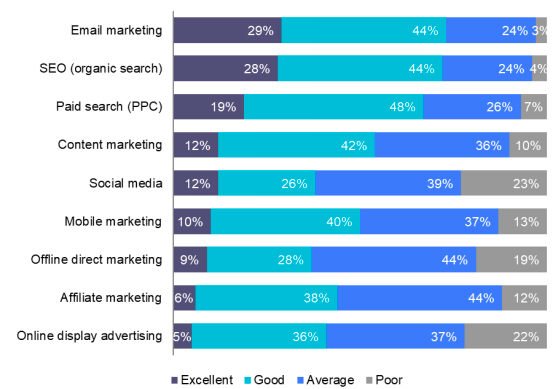
- The top reason email receives so little marketing spend is that email measurement is skewed towards non-commercial metrics, such as open and click-through rates. These metrics don’t always support a business case for email. (Econsultancy, 2019)
Mobile Email Optimization Stats
- 49% of all web traffic was from mobile devices in 2019. (Statista, 2019)
- 60% of email opens are from mobile devices. (Aedestra, 2019)
- Mobile email users totaled 2.2 billion by the end of 2018. (Campaign Monitor, 2018)
- 35% of business professionals check email on a mobile device. (Convince & Convert, 2018)
- Apple iPhone is the most popular mobile client for reading emails with 29 percent of all opens occurring on this platform.
- Although people primarily check email on IPhone devices, Gmail is still the most-used email service, with more than 1.5 billion users (CNBC, 2019)
- Launching a mobile-responsive email design can increase unique mobile clicks by 15%. (MailChimp, 2019)
- When it comes to Gmail and mobile emails, they follow Apple making up 27 percent of the mobile email market. (Campaign Monitor, 2018)
- In 2016, a report found that 68% to 79% of consumers would delete an email that isn’t mobile optimized. This percentage was highest for those over the age of 56. (Aedestra, 2016)
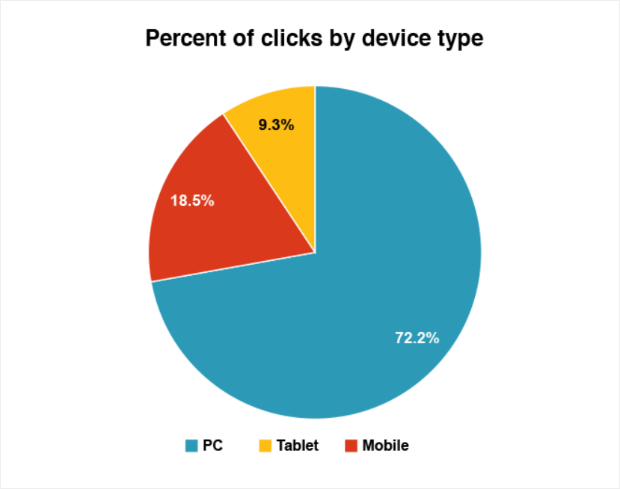
- The average percentage of email clicks by PC users was 72% and 18.5%. for mobile users. (MailChimp, 2019)
- 9.3% of email clicks come from tablets, rather than smartphones or computers. (MailChimp, 2019)
Embracing Mobile Optimized Emails
The stats above tell a compelling story.
Although general email is still the preferred mode of communication for the majority of consumers, and a major revenue generator, you shouldn’t forget about your huge mobile audiences when sending out your campaigns.
To learn more about mobile optimization, as well as how to execute a successful and revenue-generating email strategy, check out our Ultimate Guide to Email Marketing.
Editor’s Note: This blog post was originally publishied in Dec. 2013, but was updated to reflect the current mobile email landscape and research in June 2020.

The 15 Best Email Newsletter Tools in 2020
Email marketing is a key component of any successful marketing strategy — in fact, email marketing provides companies with a potential ROI of $44 for every $1 spent.
In particular, email newsletters are an essential way for your business to keep your subscribers up-to-date with relevant information, and ultimately drive more leads. Newsletters give marketers the ability to capture email sign-ups through form submissions, and nurture leads.
If you have a blog, you’ve probably sent newsletters to notify subscribers about new blog posts. Alternatively, perhaps you’ve used newsletters to send business-related information to your subscribers.
Anyway you slice it, newsletters help you keep your contacts engaged with your business.
An email newsletter tool is essential, since it allows you to beautifully design a newsletter email, deliver the email to your subscribers with features such as A/B testing and smart content, and monitor and analyze how the newsletter performed.
However, not all email newsletter tools are created equal. With differences in features, pricing, and availability, choosing an email newsletter can be hard — especially with the number of options available. Additionally, newsletter tools differ in how much of the customer journey they can cover.
Ultimately, when choosing your email newsletter tool, you’ll want to ensure the tool matches your business’s goals — which is why we wanted to take out the guesswork, and highlight the top email newsletters out there for your business.
Best Newsletter Software
1. HubSpot’s Email Newsletter Tool
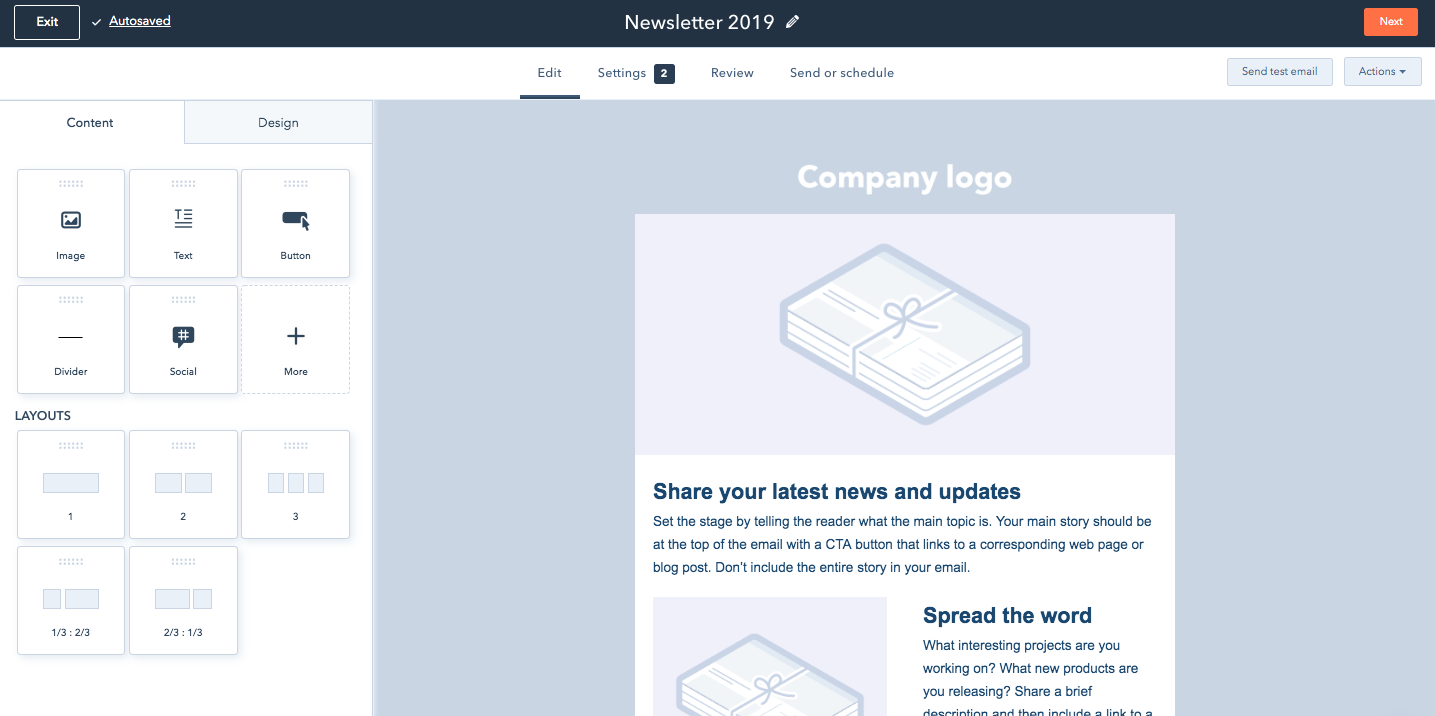
Designing, sending, and analyzing email newsletters has never been easier with the HubSpot Email tool. HubSpot offers a drag-and-drop email editor so you can easily create a polished email newsletter that you can personalize to fit your brand’s design without needing a designer or IT professional.
Additionally, you can experiment with smart content rules, personalization, A/B testing, and advanced reporting — ensuring your email newsletters are optimized for your business. You can also see who’s engaging with each newsletter email and when, what device they’re using, the most popular links and documents, and more. You can use these insights to design tests that will take conversion rates to new heights for your business.
Ultimately, what makes HubSpot’s Email tool so exceptional is its ability to pair with HubSpot’s free forms tool to easily collect email leads, as well as HubSpot’s free CRM to give you insight into how your marketing emails are performing.
For example, you can use an email subscriber’s lifecycle stage, list membership, or any information in their contact records to automatically serve up the most relevant subject lines, content, links, attachments, and calls-to-action.
HubSpot’s email tool starts free.
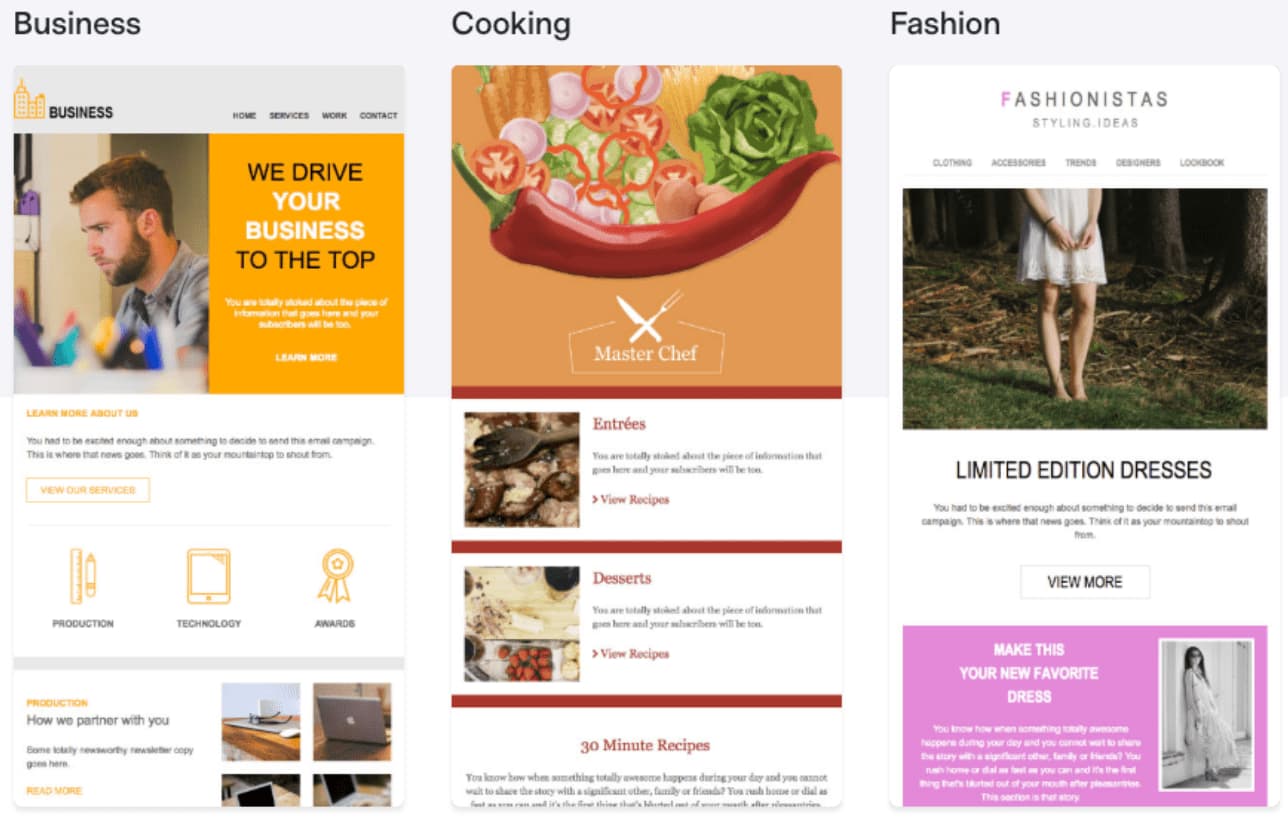
2. Benchmark
Benchmark offers the ability to easily create email newsletters via drag-and-drop functionality, giving non-technical marketers the power to create beautiful newsletters. There’s also a good selection of newsletter templates that you can choose from in the Benchmark template library.
Some of Benchmark’s most valuable features include detailed analytics on how each email campaign performs, A/B split testing to ensure you’re sending the best emails, spam testing tools that ensure your emails get to inboxes, responsive designs and templates, list segmentation tools, and auto-responders.
Benchmark is free for up to 2,000 subscribers, and lets you send up to 14,000 emails per month.
3. GetResponse
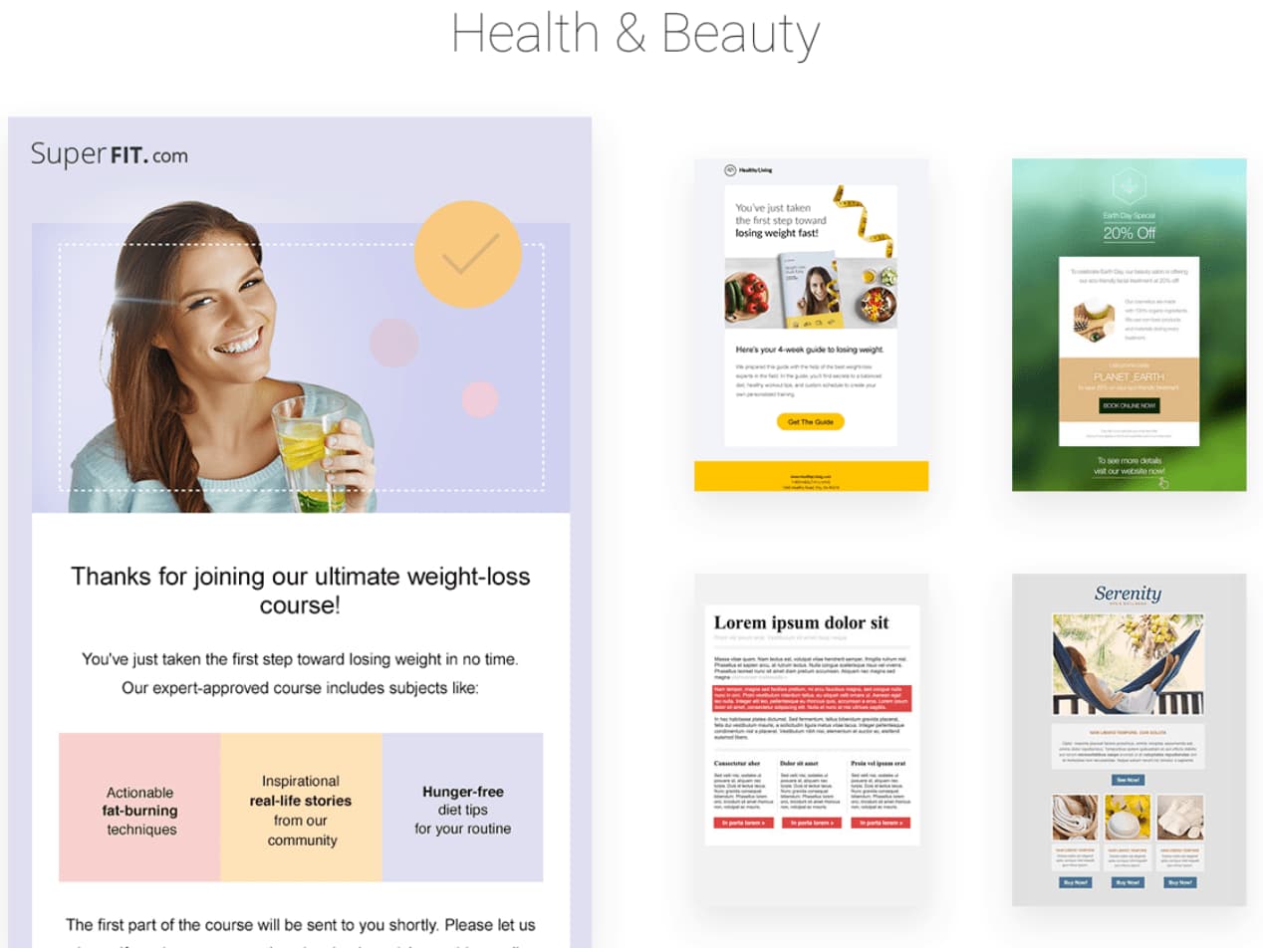
GetResponse offers features that become available as you need them, from a range of starter features all the way to enterprise features such as webinars and landing pages. Hosting landing pages in GetResponse will further enable you to capture email subscribers for your newsletter.
GetResponse also allows you to create well-designed email newsletters with their drag-and-drop email editor, segment contacts tool, campaigns creator, and A/B testing tool. With a ton of templates to choose from, you can create an email to match your brand, and send emails more efficiently.
GetResponse does not offer a free tier, but they have a 30-day trial, and pricing starts at $15 per month.
4. SendInBlue
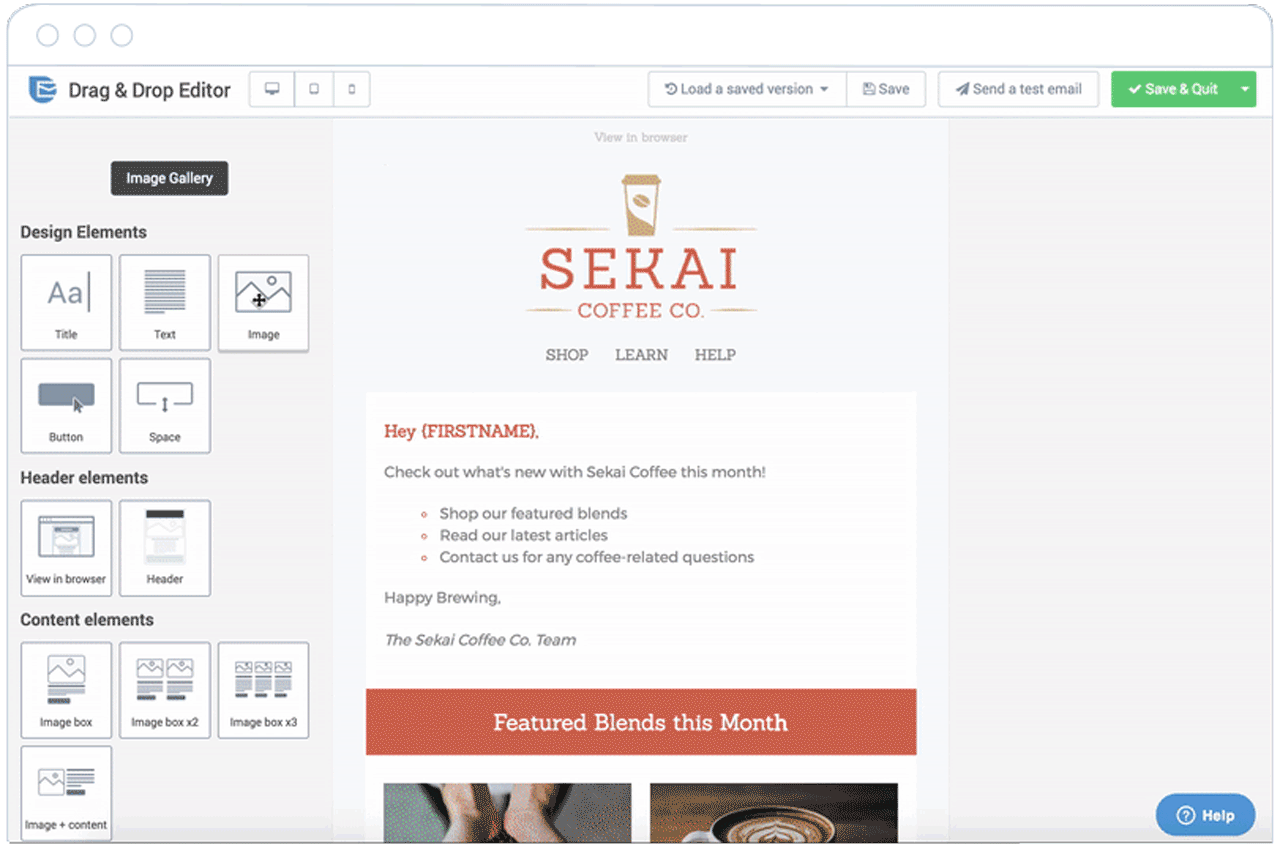
With SendInBlue, you don’t need technical skills to create well-designed email newsletters. The drag-and-drop functionality, HTML editor, and expansive template gallery gives you the tools you need to create stunning emails.
You can personalize the design of your newsletters with easy builders, choose the form fields for your subscription form, and design many ways for your visitors to opt-in. SendInBlue has a robust automation pipeline, allowing you to send different emails based on specific actions taken by your contacts. However, SendInBlue does not have a CRM, so it’s not the best option for scaling teams.
SendInBlue lets you send 300 emails per day (6,000 emails per month) for free, and pricing starts at $25 per month for 40,000 emails.
5. Mailjet
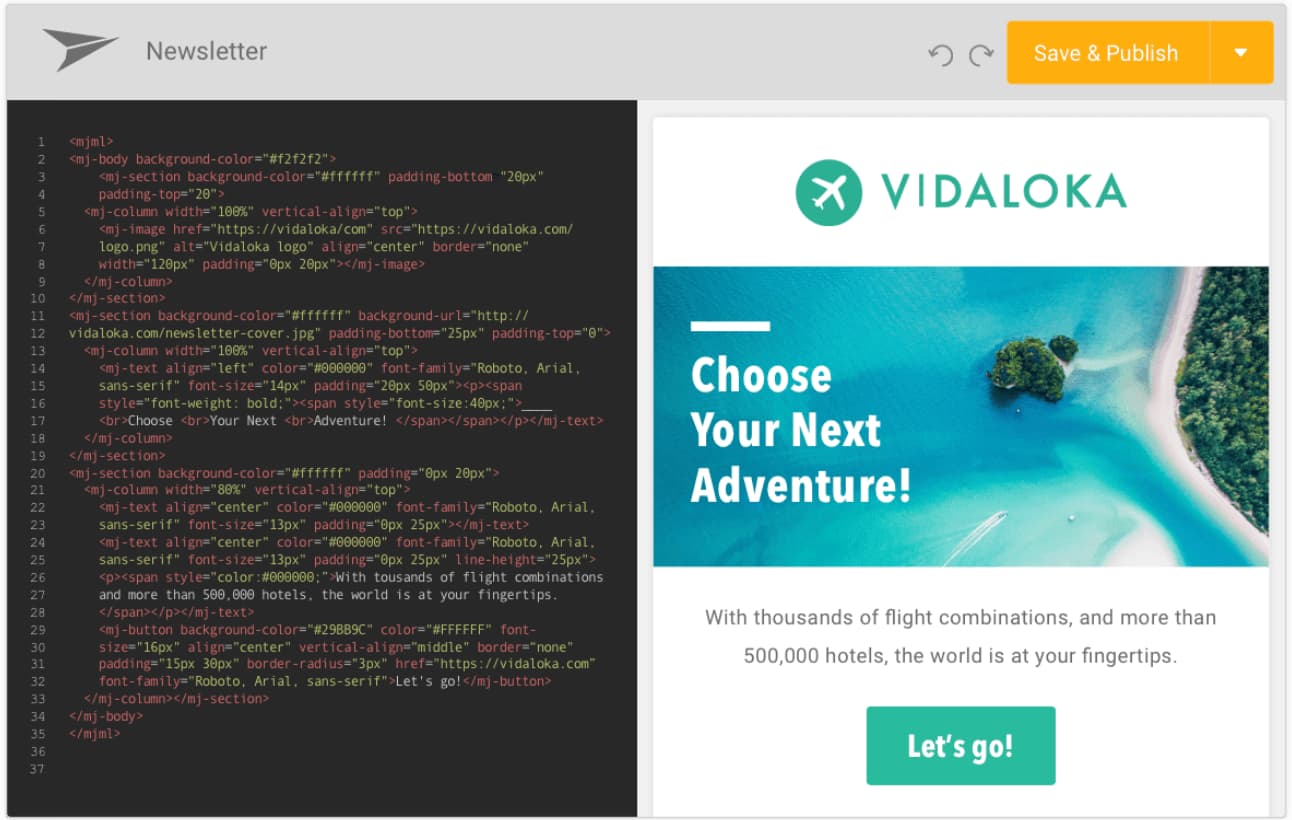
Mailjet offers email solutions for fast moving teams, especially in Europe, and great scaling opportunities for larger companies. The service is keen on being developer-friendly with a powerful API solution for engineers to build on their email platform. One appealing feature of Mailjet is the ability to create dynamic content that is personalized for each recipient based on data such as name and location.
If your team demands email newsletters be built together and reviewed often before sending, Mailjet’s collaborative tools make it easy for teams to work together on emails. For example, you can create a draft of your newsletter in Mailjet, and your teammates can suggest edits before it’s sent — all within the app.
Mailjet gives 200 emails per day (6,000 emails per month) for free, and pricing starting at $8.69 per month for 30,000 emails.
6. MailChimp
MailChimp offers a free email marketing service with a large selection of templates to choose from for newsletters. MailChimp is ideal for small and medium-sized businesses looking to get their feet wet in email marketing, but is not suited for scaling teams since it lacks powerful automation and segmenting features.
MailChimp is a valuable tool nonetheless, especially since its free plan generously offers up to 12,000 free email sends per month. You’ll also like the variety of newsletter templates that MailChimp offers, and the drag-and-drop builder that lets you rework the designs.
MailChimp offers 12,000 email sends per month to a list size up to 2,000 for free. Pricing starts at $10 per month for 500 subscribers.
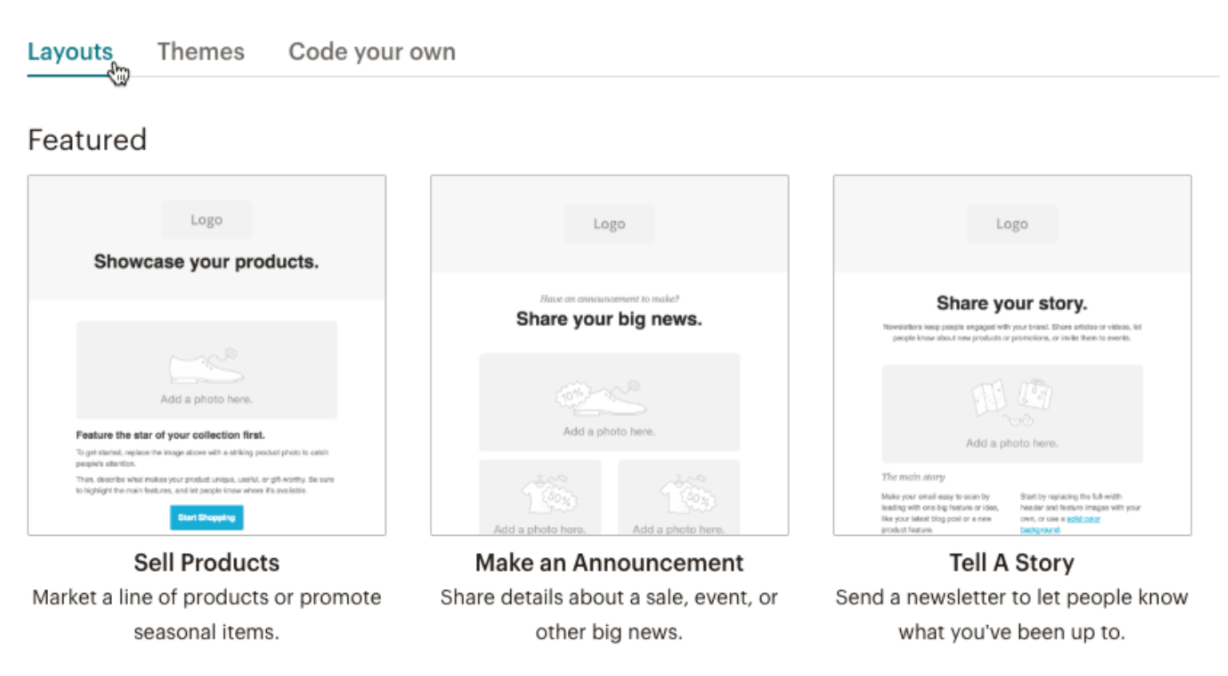
7. Constant Contact
Constant Contact provides a reliable email newsletter solution for small to large businesses. Constant Contact provides a helpful user on-boarding for anyone looking to get started quickly, and offers easy-to-use features. If you think you’ll be running into complexity with the email marketing tool, you’ll be happy to know that Constant Contact’s multi-channel support system can help walk you through most issues.
In Constant Contact, you can use their email builder to create newsletters that match your brand, select from a variety of templates, and edit to ensure it looks exactly how you want it — although I’m not a big fan of the templates, since most of the templates look outdated. Additionally, if you need sophisticated automation features and workflows, I would advise staying away from Constant Contact because it lacks a strong automation system.
Constant contact does not offer a free tier. You can try out the service for 60 days before paying, then prices start at $20 per month for a list size up to 500 contacts.
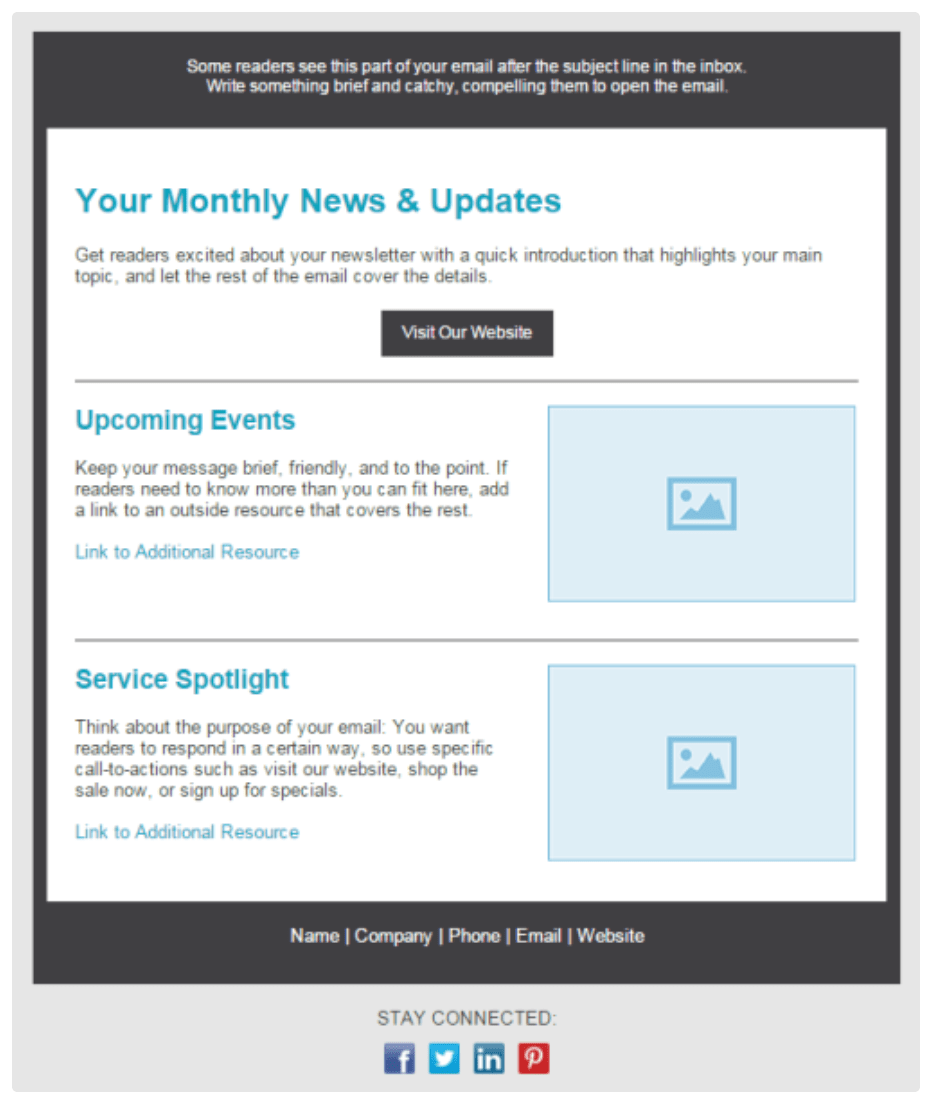
8. MailUp
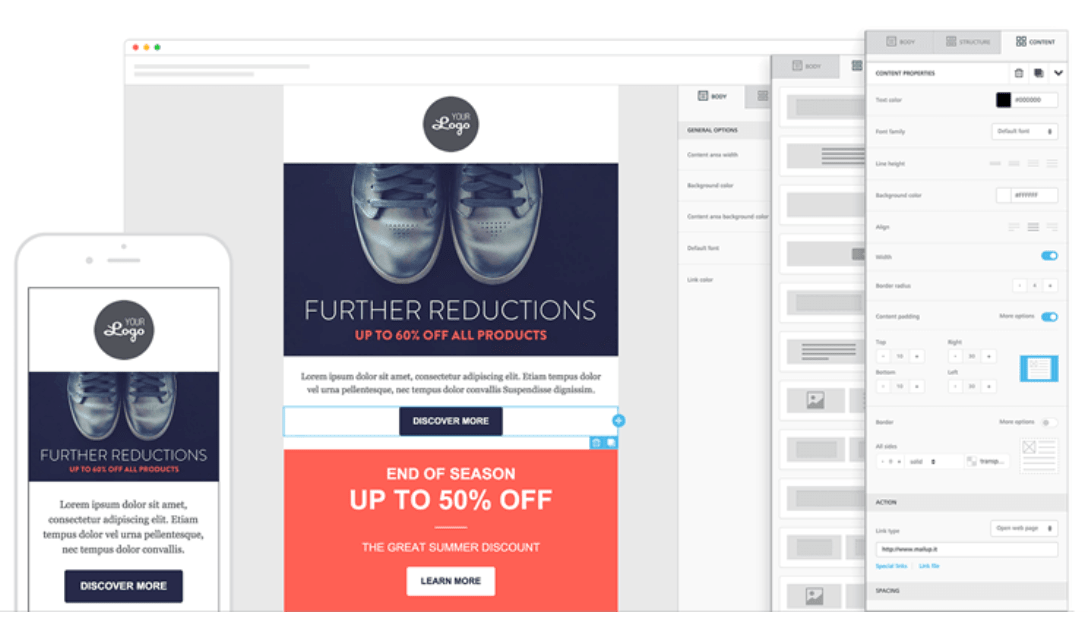
MailUp offers plenty of the same functionality from what you’d expect from an email marketing service, including a drag-and-drop email builder, beautifully designed templates, and an HTML editor.
However, it’s critical to note — you get more value from MailUp if you choose to send out emails at a slower pace, since the price varies depending on delivery speed. So, if your business has a specific number of contacts and doesn’t mind sending newsletters slower, you could save money by using MailUp. If you use WordPress, MailUp also offers a WordPress plugin that you can use to capture newsletter subscribers on your website.
Like Constant Contact, MailUp does not offer a free tier option. You can try out the service for 30 days, and prices start at $49 per month.
9. Zoho Campaigns
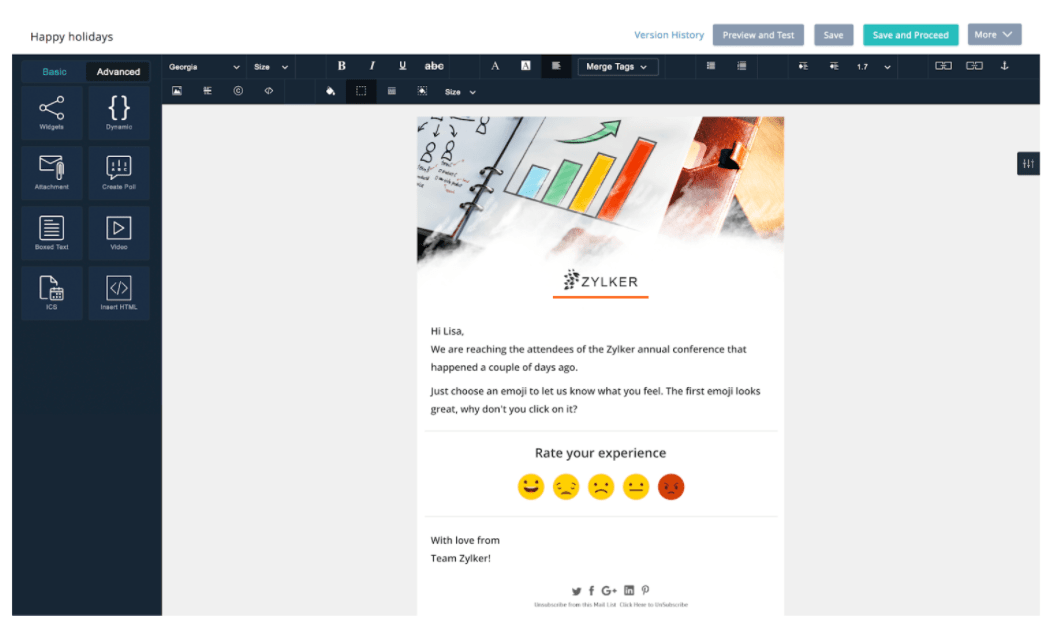
Zoho offers a great email solution for marketers looking to utilize automation features, including auto-responders and workflows. If you’re already a Zoho CRM customer, it might be worth checking out Zoho Campaigns for an email newsletter tool, since they work better together.
Zoho includes many modern and well-designed templates to choose from. If you’re worried about how your newsletter will look on different mobile devices or browsers, Zoho gives you the ability to check to see how your newsletters look on various devices to ensure your newsletter is optimized for mobile, tablet, and desktop.
Zoho offers 12,000 emails per month for free for up to 2,000 subscribers. Then there’s pricing based on plans, or pay-as-you-go credits.
10. AWeber
AWeber delivers a well-established email marketing newsletter tool with an array of features for your business, including email designs, list segmentation, automation tools, and detailed reporting. To make design easier, AWeber has more than 6,000 royalty-free stock photos to include in your emails. Of course, you can also upload your own images and gifs.
AWeber is a great solution if your business uses WordPress, since AWeber easily integrates with WordPress. However, it’s important to note you can’t specify multiple segments at once when sending an email newsletter — plus, AWeber lacks some powerful automation features.
AWeber does not have a free version. However, you can try it out for 30 days. If you want to upgrade, prices start at $19 per month for 500 subscribers and unlimited email sends.
11. Campaigner
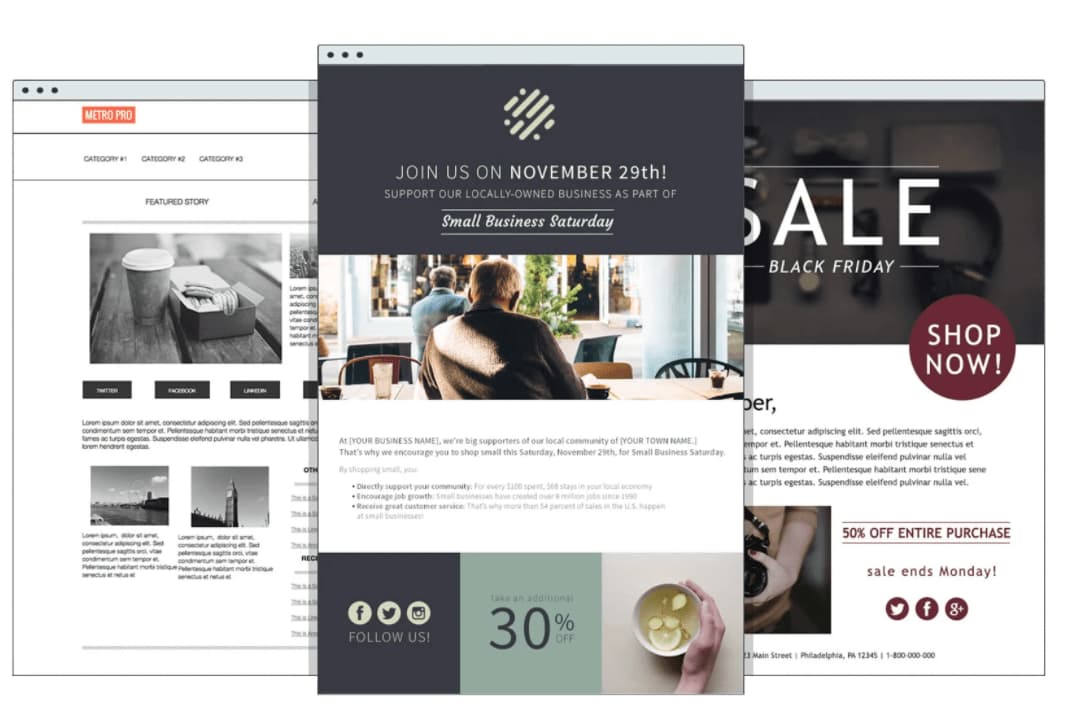
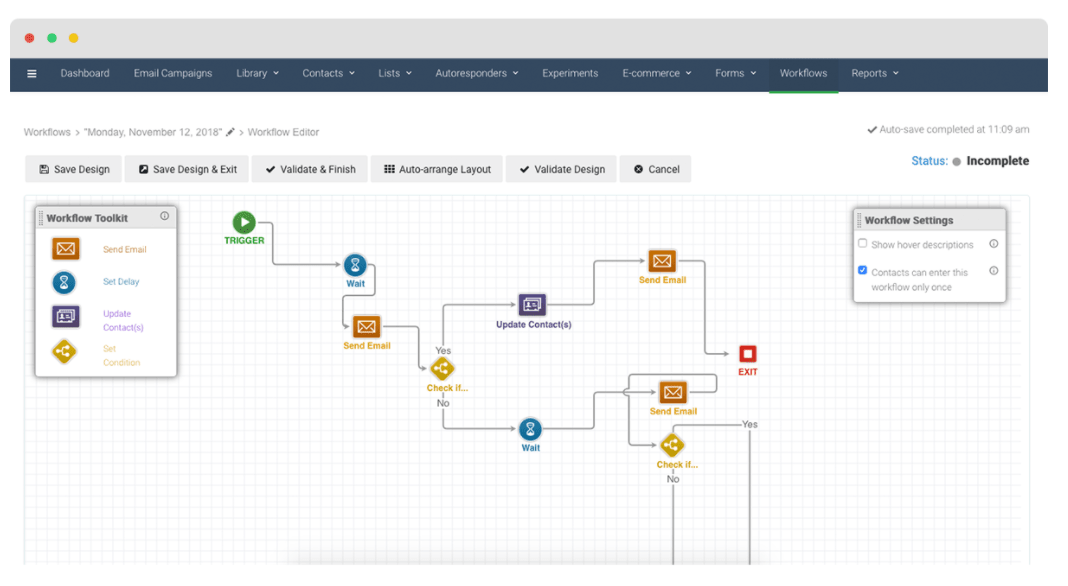
Campaigner is a good option if you work for a growing team, since the tool offers robust automation and workflow features available at the enterprise tier. You can set up systems that send email newsletters when contacts fill out specific forms, make a purchase, or engage with a previous email.
As with most of the email newsletter tools in this list, Campaigner offers easy-to-use email builders and a large selection of templates to get you started. If you run into trouble, their support is noted as being helpful at solving technical challenges.
Campaigner offers a 30-day free trial but you’ll need to put in your credit card information. Prices starting at 19.95 per month for up to 5,000 contacts.
12. Drip
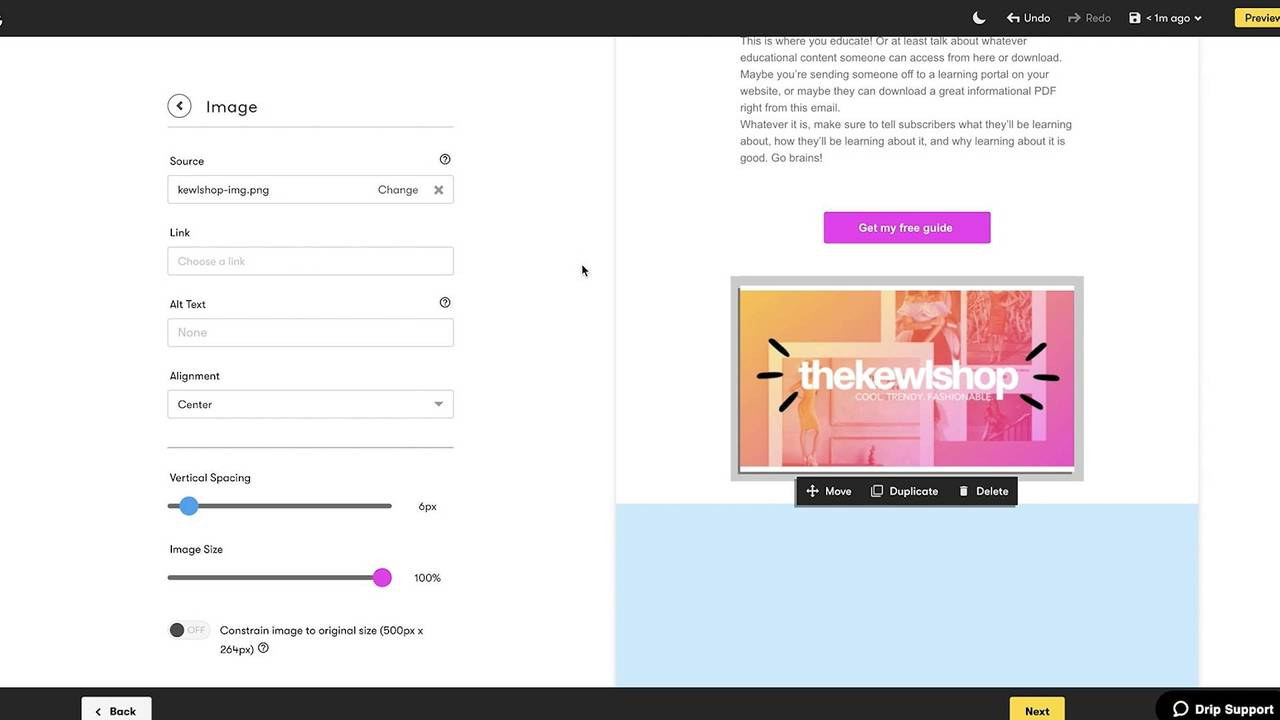
Drip is ideal for more experienced email marketers, since it’s not as intuitive and easy-to-use as some of the others in the list. For example, there’s a limited email template library, so you’ll have to spend time designing your email newsletter. With that said, Drip comes packed with automation features that could be beneficial for your business, particularly if you work in e-commerce.
With Drip’s “ECRM”, you can run personalized email newsletter campaigns that work with information gathered from contact purchases and checkout information, like abandoned cart details. One thing to note — Drip does not offer phone support, so you won’t have that added peace of mind.
Drip offers a 14-day free trial, with prices starting at $49 for up to 2,500 subscribers and unlimited email sends.
13. Postcards
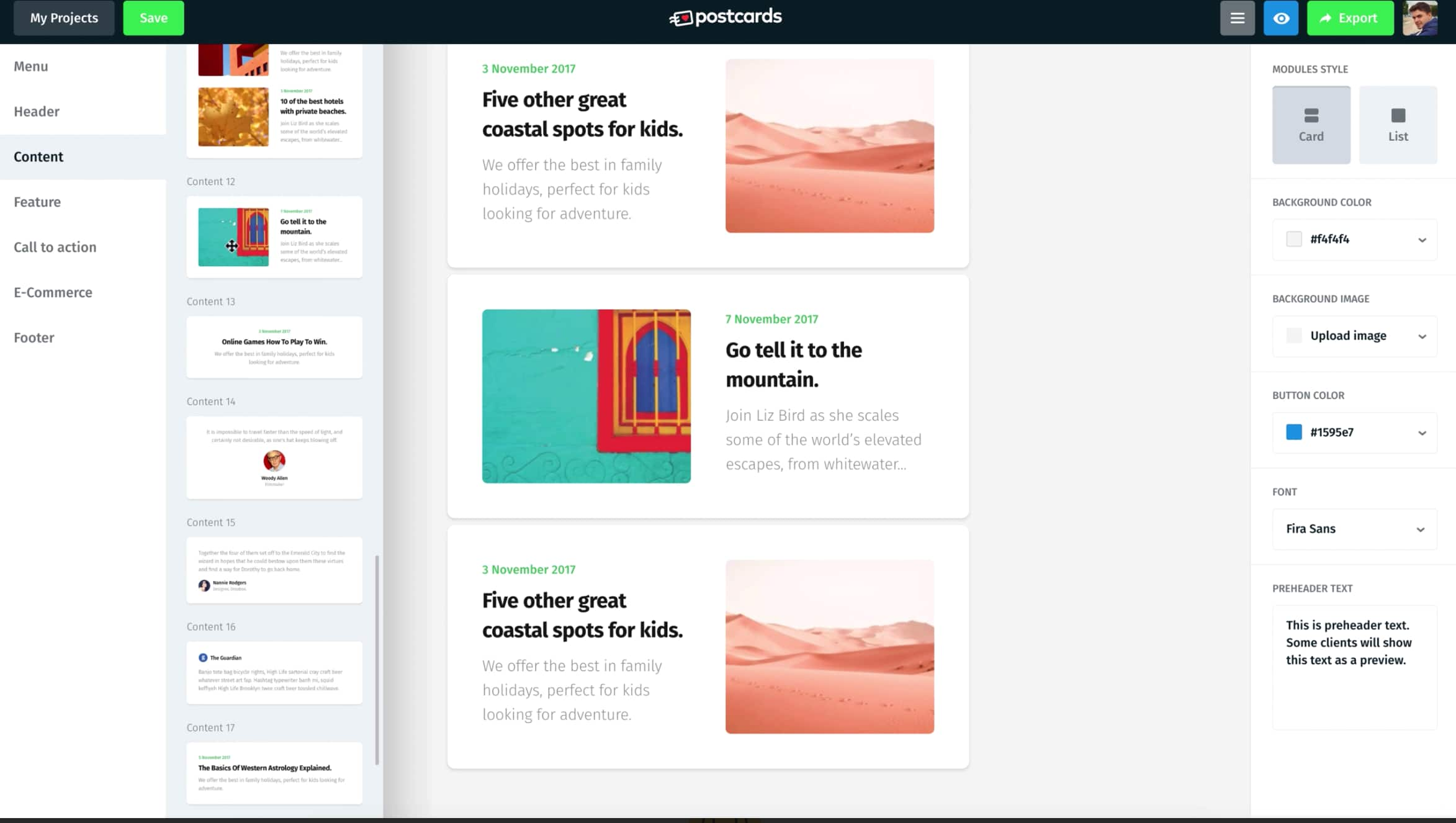
Used by major brands like Nike, Disney, and T Mobile, Postcards is a drag-and-drop email builder that enables you to create impressive email newsletters. The tool features a “modular system”, meaning you can stack and re-arrange pre-made designs to create a custom newsletter that fits your brand. Customizable modules include a header and footer, CTA, and menu options.
Additionally, the tool enables you to collaborate with teammates to ensure the newsletter is up to everyone’s standards, and gives you a 30-day version history if you decide to revert to an older format. Plus, you’ll get unlimited exports.
Price: Free for one user, $15 per month for businesses, and $25 per month for agencies
14. Campaign Monitor
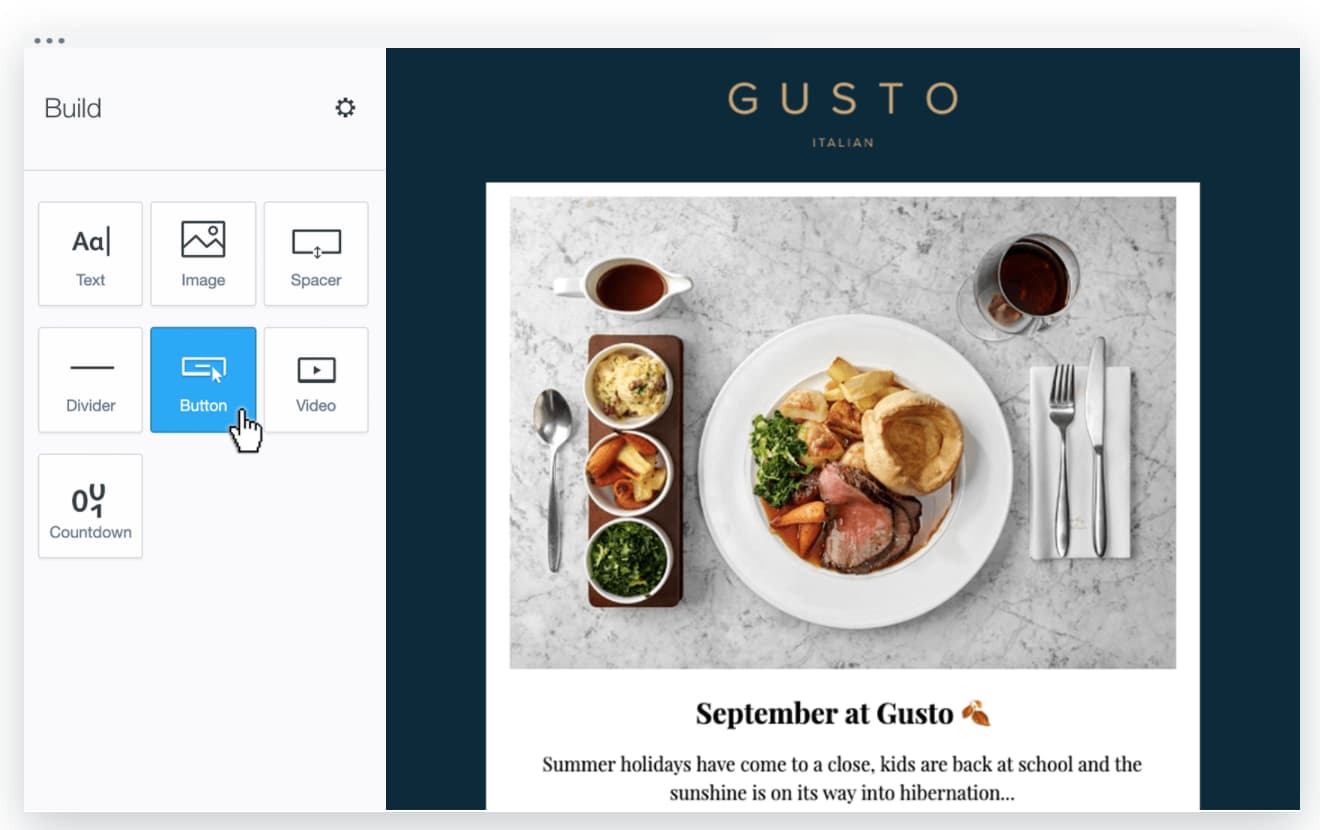
Campaign Monitor’s email marketing tool enables you to create an engaging and high-quality email newsletter with a simple drag-and-drop interface. Additionally, the tool includes sign-up forms you can embed on your blog pages to encourage new readers to sign-up for daily content delivered to their inboxes.
Along with unique and customizable templates, Campaign Monitor provides a full analytics suite to help you track performance of your newsletters over time. You can measure engagement to improve the content you include in your newsletters for the long-haul.
Price: $9/month for basic, $29/month for unlimited, and $149/month for premier.
15. BEE Pro
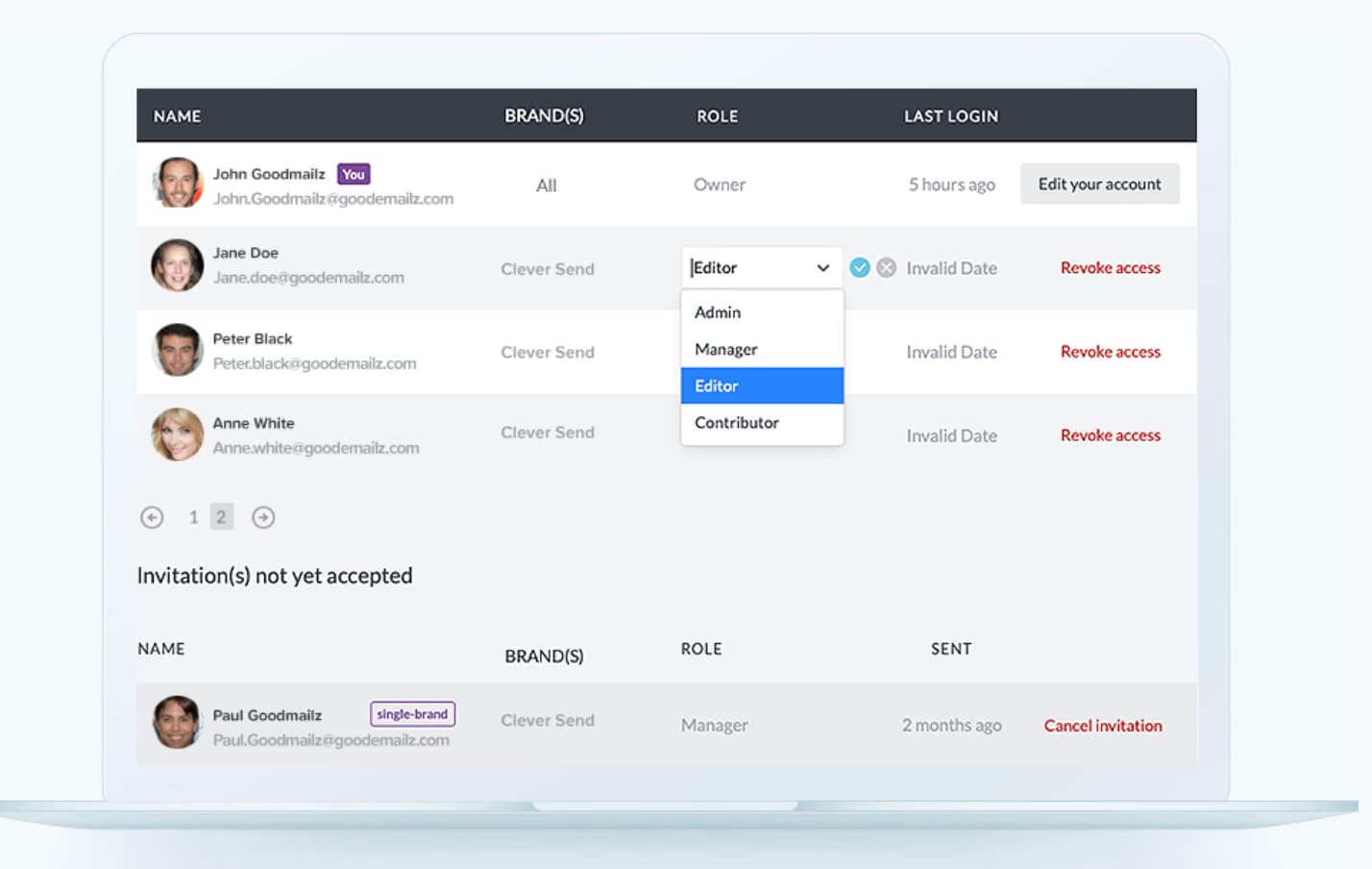
If you’re a freelance designer or work at an email agency, this tool could be a good fit for you. BEE Pro lets you create mobile-ready emails quickly with smart design tools — plus, you can save custom templates, and even assign projects to specific clients’ to ensure an easy workflow if you’re using this one email tool for multiple brands. Additionally, the tool enables you to invite clients’ or colleagues’ to review and make comments on email newsletter drafts to get approval faster.
Price: Starting at $15/month for BEE Pro Freelance, Starting at $25/month for BEE Pro Team, and Starting at $45/month for BEE Pro Agency
That’s it! These are the best email newsletter tools that I recommend. You can’t go wrong with any of these tools since they all offer similar features, but there will be one that’s best suited for your business. The great thing about HubSpot is that we offer a free solution to get you started — and then, once your business grows, we have plenty of advanced features you’ll need in order to deliver a successful newsletter marketing strategy down the road.
Once you’ve selected your email newsletter tool, you can begin creating your newsletter marketing strategy, which, in the most simplified version, looks like:
- Capture subscribers on your website via form submissions.
- Create email content in a newsletter design.
- Send the newsletter consistently, like once a week or bi-weekly.
If you want to learn more about how to create an email newsletter, please check out our guide.

The 150 Best Instagram Captions for Every Type of Post
If you’re anything like me, you take about four minutes choosing a filter for your Instagram photo, and about four hours deciding on a caption.
Worst of all, after much creative effort and advice from friends, I’m usually barely able to write a caption that goes beyond, “Had a fun day with friends!”
And I’m a writer — go figure.
Next time you’re contemplating a caption to go with your Instagram photo, take a look at our complete list of captions for any mood you need to evoke or audience you want to connect with.
You can incorporate many of them into an Instagram business strategy (just make sure your audience would indeed find your caption funny, clever, or the right amount of sass.)
Click one of the following links to jump to a section:
- Funny Instagram Captions
- Clever Instagram Captions
- Sassy Instagram Captions
- Song Lyrics for Instagram Captions
- Business Instagram Captions
- Holiday Instagram Captions
- Seasonal Instagram Captions
Funny Instagram Captions
- [Employee]’s favorite exercise is a cross between a lunge and a crunch … S/he calls it lunch.
- I need a six-month holiday, twice a year.
- We tried to be normal once. Worst two minutes of our lives!
- There are 16-year-olds competing at the Olympics and some of us still push on “pull” doors.
- Namast’ay in bed.
- That awkward moment when you’re wearing Nike’s and you can’t do it.
- I’m just a girl, standing in front of a salad, asking it to be a cupcake.
- What if we told you … you can eat without posting it on Instagram?
- We know the voices in our heads aren’t real, but sometimes their ideas are just too good to ignore.
- We don’t know what’s tighter: Our jeans or our company culture.
- Friday … Our second-favorite F word.
- We don’t care what people think of us. Unless they’re our customers. We definitely care what customers think of us.
- All you need is love … and investors. All you need is love and investors.
- Hi, we’re [company name]. We build amazing apps and eat amazing apps.
Clever Instagram Captions
- Patience — what you have when there are too many witnesses.
- Maybe she’s born with it, maybe it’s the Clarendon filter.
- “Life is short.” False — it’s the longest thing you do.
- Happy Sunday! There may be no excuse for laziness, but [I’m/we’re] still looking.
- Rejection is just redirection.
- Better an “oops” than a “what if.”
- You have stolen a pizza our hearts.
- The world is changed by your example, not your opinion.
- Seven billions smiles, and these are our favorite.
- Stop working hard and start working smart.
- When life gives you lemons, you make lemonade. When [company name] gives you [type of product], you make money.
- Imposter complex is just a byproduct of success.
- Life is simple. It’s just not easy.
- The best times begin at the end of your comfort zone.
- When nothing goes right, go left.
Sassy Instagram Captions
- What’s a queen without her king? Historically speaking, more powerful.
- Be a little more you, and a lot less them.
- We’re an acquired taste. If you don’t like us, acquire some taste.
- Well-behaved people don’t make it into history books.
- Be sunshine mixed with a little hurricane.
- We got 99 problems, but an awesome marketing team ain’t one.
- Sometimes you just need to do a thing called “what you want.”
- You can’t do epic stuff with lame people. And we got the best in the biz.
- It’s not called being bossy, it’s called having leadership skills.
Song Lyrics for Instagram Captions
- “I’m gonna live like tomorrow doesn’t exist.” — Sia, “Chandelier”
- “I live for the nights that I can’t remember, with the people that I won’t forget.” — Drake, “Show Me a Good Time”
- “I hope you never lose your sense of wonder.” — Lee Ann Womack, “I Hope You Dance”
- “You may say I’m a dreamer, but I’m not the only one.” — John Lennon, “Imagine”
- “If you give, you begin to live.” -Dave Matthews Band
- “Outlining my findings, using life as a stencil.” — Kero One, “In All the Wrong Places”
- “Feeling good living better.” — Drake, “Over My Dead Body”
- “Say oh, got this feeling that you can’t fight, like this city is on fire tonight” — OneRepublic, “Good Life”
- “Time makes you bolder” — Fleetwood Mac, “Landslide”
- “If I fail, if I succeed, at least I’ll live as I believe” — Whitney Houston, “The Greatest Love of All”
- “The rest of the world was in black and white, but we were in screaming color.” — Taylor Swift, “Out of the Woods”
- “Lightning strikes every time she moves” — Calvin Harris, “This Is What You Came For”
- “We aren’t ever getting older” — Chainsmokers, “Closer”
- “Sing with me, sing for the years, sing for the laughter, sing for the tears” — Aerosmith, “Dream On”
Business Instagram Captions
- Good evening, [city]! We’re in town for [event] at Booth [#]. Stop by and say hi!
- “If you’re offered a seat on a rocket ship, don’t ask what seat. Just get on.” -Sheryl Sandberg, COO of Facebook
- Our [#]-person squad completed the [road race name]! And we did it all for the post-run sneaker selfie. 👟
- We got product in the pipeline … check back for an exciting announcement on [date]!
- Diversity isn’t a recruitment metric — it’s an ingredient for success. At [company], we thrive on the unique backgrounds, experiences, and perspectives of our people.
- Spot the CEO. 😉
- At [company name], our best asset is our people.
- We had a great time with our customers at [meeting/event]! @[client/partner], you guys rock.
- Thrilled to have [customer] at our office today! Come back any time. 😊
- [Company name] is off for [holiday]! We hope you all have a safe long weekend.
- Big things have small beginnings. [Company]’s HQ began right here.
- “It is better to fail in originality than to succeed in imitation.” -Herman Melville
- How many [company name] employees does it take to spell “TEAM”?
- Want to work with these awesome people, working on a lot of awesome things? We’re hiring! Click the link in our bio to see our current openings.
- Check, check, one, two … is this thing on? [Company name] is now on Instagram! Follow us to learn about our culture, product, and (awesome) people.
Holiday Instagram Captions
New Year’s
- “Always bear in mind that your own resolution to succeed is more important than any other.” — Abraham Lincoln
- Didn’t make it to midnight.
- Resolutions are made to be broken.
- Ringing in the new year — like a bell.
- “Tomorrow is the first blank page of a 365-page book. Write a good one.” — Brad Paisley
- New year, same me.
- Time to show off my bubbly personality.
- Any excuse to wear glitter.
- Starting off the year on the right foot.
Valentine’s Day
- Roses are red. Violets are blue. Consider this post my Valentine to you.
- Don’t tell me you love me. Tell me you’re outside with pizza.
- All I need is you. (And maybe wine + chocolate too.)
- “You can’t blame gravity for falling in love.” — Albert Einstein
- 99% of my socks are single, and you don’t see them crying about it.
- I will do anything for love. Except that. And that. Or that. Or…
- Sorry, I’m in a relationship with tacos.
- “All the single ladies…”
Halloween
- Creeping it real.
- I brake for Reese’s Peanut Butter Cups.
- “When the spooks have a midnight jamboree, they break it up with fiendish glee…” — The Legend of Sleepy Hollow (1949)
- You’re just my (blood) type.
- How to eat candy corn: don’t.
- #squadghouls
- Double, double toil and trouble; Fire burn and cauldron bubble.
- Driving me batty.
Thankgiving
- I’m wearing my elastic pants.
- “For those of you who cannot be with family this Thanksgiving, please resist the urge to brag.” — Andy Borowitz
- On a veggie diet this Thanksgiving: Carrot cake and pumpkin pie.
- “Be thankful for what you have; you’ll end up having more. If you concentrate on what you don’t have, you will never, ever have enough.” — Oprah Winfrey
- I think, therefore I cran.
- Bad day to be a turkey.
- Need fuel for Black Friday.
- “Okay, guys. I have exactly 28 minutes before I have to baste again.” — Monica
- Grateful. Thankful. Blessed.
Christmas & Hannukah
- You sleigh me.
- Fa la la la llama.
- “O Christmas tree, O Christmas tree, your ornaments are history.” — The Cat
- “It’s not what’s under the Christmas tree that matters. It’s who’s around it.” — Charles M. Schulz
- Dear Santa, let’s not talk about this.
- Rebel Without a Claus
- Doesn’t Santa have anything better to do than watch us while we’re sleeping?
- All I want for Christmas is you (and wine would be nice).
- To all you cotton-headed ninny-mugginses out there
- Drop it like a top.
- Wishing you a latke love this Hannukah.
- I want to eat 8 latkes for the calories of one.
- One little candle can light up an entire room.
- Keep calm and spin that dreidel.
- Deck the halls with matzo balls!
Seasonal Instagram Captions
Spring
- Hello, spring!
- “And I think to myself, what a wonderful world.” — Louis Armstrong
- April showers bring may flowers.
- I think I just experienced all the seasons in a single day.
- I love allergy season, said no one ever.
- Currently soaking up the sun and smelling the roses. Please leave a message after the beep.
- I owe a lot to the inventor of flip-flops.
- “Here comes the sun, and I say… It’s all right.” — The Beatles
Summer
- “Live in the sunshine. Swim in the sea. Drink in the wild air.” — Ralph Waldo Emerson
- Life’s a beach
- School’s out, Sun’s out, Guns out
- “A little bit of summer is what the whole year is all about.” — John Mayer
- 90% happy, 10% burnt
- Girls just want to have sun
- “Summer lovin’ had me a blast, summer lovin’ happened so fast.” — Grease
- Happiness is a cold popsicle
- Life is better by the pool
Fall
- My favorite color is October.
- “Wild is the music of autumnal winds amongst the faded woods.” — William Wordsworth
- Sweater weather.
- It’s never too early for pumpkin spice.
- Meet me in the corn maze.
- Crisp air. Apple cider. Flaming foliage.
- Pumpkin spice and everything nice.
- “Anyone who thinks fallen leaves are dead has never watched them dancing on a windy day.” — Shira Tamir
- Leaves are falling, and autumn is calling.
Winter
- “In the depths of winter, I finally learned that within me there lay an invincible summer.” — Albert Camus
- If it’s snowing, I’m not going
- Cozy nights. Good books. Hot chocolate.
- Do you want to build a snowman?
- Running on caffeine and holiday cheer
- “Winter is not a season; it’s a celebration.” — Anamika Mishra
- Merry and brrrrrrright
- Having snow much fun.
Editor’s note: This post was originally published in June 2019 and has been updated for comprehensiveness.

Ebooks vs. Whitepapers: Which One Should You Choose?
One of my favorite ways to learn new skills is by reading an ebook or whitepaper.
When I want an overview of a broad topic, like digital marketing, I look for ebooks. They’re fun, vibrant guides in an interactive, book-like format. I click on hyperlinks for extra details and analyze colorful graphs.
If I want to know all there is to know about a specific topic, like email list strategy, I source a whitepaper. They illustrate points with charts, and use study data or other statistics to back up the points being made.
If you’re a marketer, there’s no doubt you’ve come across at least one ebook or whitepaper offer. But now, the time has come for you to make your own.
You have an idea, but maybe you’re not sure whether to make an ebook or whitepaper. Are ebooks and whitepapers even the same thing? Let’s figure this all out below.
Ebooks and whitepapers: What’s the Difference?
Time for a quick refresher: An ebook is short for “electronic book.” They’re made for online use, notated by embedded links and videos. Ebooks are responsive and are usually guides for large topics. For instance, some popular ebook topics revolve around SEO, inbound marketing, and ecommerce.
Here is an example of an ebook, “YouTube for Business,” from HubSpot. It’s optimized for reading on desktop, ereader, and mobile devices. Additionally, it’s vibrant — this has a variety of colors, graphics, and interactive media.
 Ebooks are great for increasing conversions and credibility. Think about a customer looking for a complete guide about how to hire top talent.
So, what’s a whitepaper? And how is it different from an ebook?
whitepapers are reports that break down a complex topic for the reader, and then provide an in-depth solution or opinion about that subject. They’re aimed at helping audiences comprehend a complex issue or inform a difficult decision.
Let’s go back to the ebook example, “YouTube for Business.” If this eBook were going to be a whitepaper instead, it would probably be titled something like, “How Using YouTube for Business Increased Our Conversion Rates by 30%.” This whitepaper would include the details of the findings, include other helpful data, and use that to explain how the experiment was successful.
One popular whitepaper format you might recognize is a “State Of” report. These whitepapers include factual information, statistical data, and often survey and experiment results to support the topic.
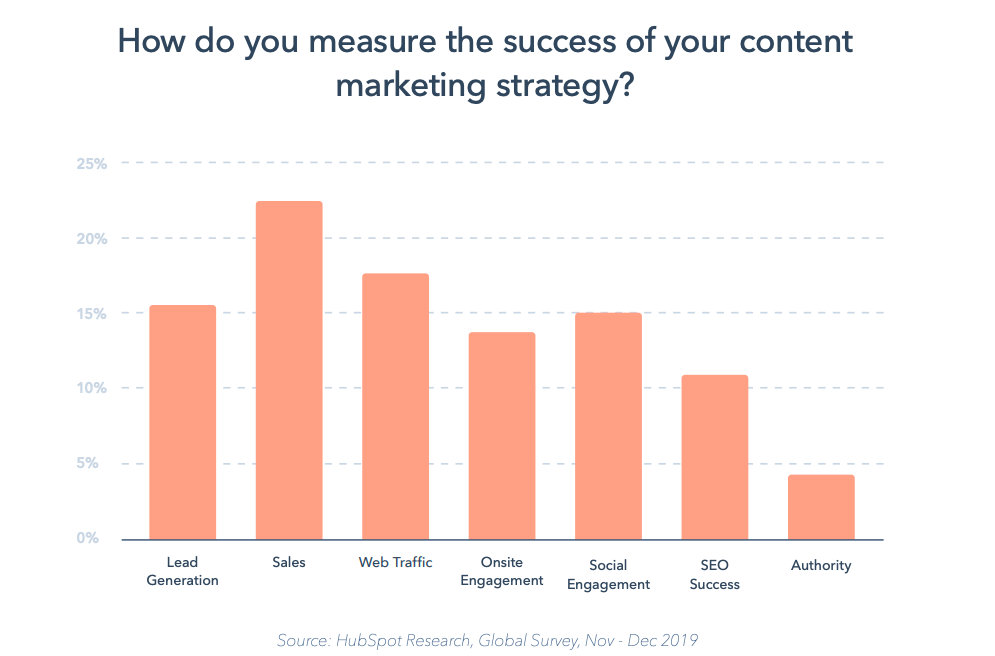
Have time and data? Consider creating a comprehensive whitepaper that will inform your audience at an expert level.
Now that we’re clear on the differences between ebooks and whitepapers, let’s decide which one is best suited to your goals.
Ebooks vs. Whitepapers
When you’re deciding between an ebook and a whitepaper, keep your goals in mind.
When should you write an ebook?
Short On Time
Ebooks are better, if you’re short on time. Generally, they’re shorter and serve the purpose of offering a “how-to” on a topic. They also use a mix of visuals and are packed with helpful links to support that writing.
Including Multimedia
Ebooks are interactive and traditionally less static than a whitepaper. Usually, ebooks aren’t a Google Doc or a PDF file, so you can really focus on multimedia. You might include supporting content from your business, a CTA, or links to previous studies or blog posts.
Easy To Make & Share
Creating an ebook is relatively simple — your CMS should offer templates, which save you time so you can spend more time writing. And when thinking about distribution, a free ebook is highly shareable on social media, in blog posts, and on your website. All you need is a landing page, CTA, and promotion post drafted.
Additionally, you can add the ebook in a hyperlink in your email signature or add it into an email update. Free educational resources are a great chance to delight readers and earn leads by gating your content.
To sum it up, if you want to create an interactive experience for your target audience, make an ebook. Especially if you don’t have that much time to devote to study but still want a compelling offer.
When should you write a whitepaper?
Thought Leadership
If your writing is focused on thought leadership, make a whitepaper. They’re more static than ebooks and traditionally cover less broad topics. For instance, an ebook can cover the basics of digital marketing, but a whitepaper would focus on a single digital marketing experiment.
Let’s say you want to feature a thought leader. Look for one that is in your industry, so they can expose your company to a large, ideal audience. Then, conduct a long form interview with the thought leader or ask them to contribute writing about the chosen topic, making sure there’s ample research and data to support.
Deep Explanation
Because whitepapers are more focused than ebooks, they give way for thorough explanation. They lean heavily on concrete data to support their findings or stance, while an ebook may gloss over some details.
Playing With Design
whitepapers are sometimes known as “boring” because they’re instructional reports. They present the facts. But this doesn’t mean your whitepaper will be dull — instead, use color and text to liven up the atmosphere, shown below:
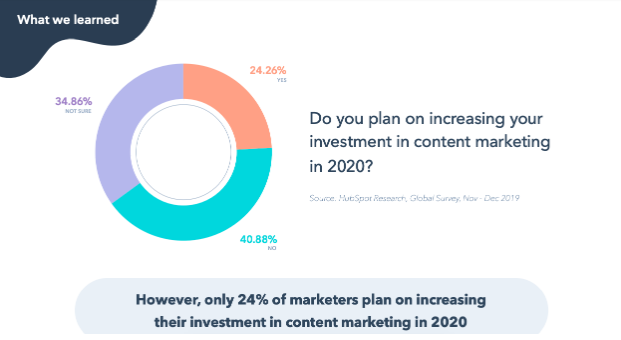
Vertical, “old school” formats aren’t the most engaging experience for readers. But there are things you can do that make whitepapers compelling. Present the facts, but use a conversational tone, and make the landing page for your whitepaper colorful.
A crucial aspect of design for your whitepaper should be responsiveness. Prioritize making your whitepaper format responsive for different screen sizes. This is so your audiences can enjoy it, regardless of their device.
Ultimately, think of making a whitepaper to create thought leadership content in a different format.
The bottom line? Ebooks are great for driving growth and traffic, and whitepapers are excellent for conversion and filling buyer journey gaps. If you’re short on time, an ebook might be your best bet, but whitepapers are ideal for studies and reports.
If your company excels at one format but is lacking in the other, think of how your next offer could bring different results if the delivery method was switched. Remember, the goal is making the customer feel like they received valuable guidance about a topic.

Optimize or Advertise? Comparing Organic vs. Paid Social Media
They say, “The best things in life are free.” Which I never thought was necessarily true. I mean some of the best things are free — love, sunshine, fireflies, and whatnot. But there are a lot of awesome things that cost money — nunchucks, BMX bikes, DVDs of the movie Kung Fu Panda 3.
So the line is kind of muddled when it comes to establishing whether free stuff is better than things that come at a cost — and the case of social media marketing is no exception. The debate between organic vs. paid social media isn’t exactly cut and dry. Both options have their strengths and weaknesses.
Here, we’ll get more perspective on the difference between both kinds of social media and some pros and cons that come with each.
Organic and paid social media each have their own benefits and pitfalls. Here are some pros and cons of each type of social media marketing.
The Pros of Organic Social Media
It’s more cost-effective.
Maintaining an organic social media presence can technically be free. It doesn’t cost anything to post on Facebook, Twitter, or LinkedIn. Any costs you incur would come from the work it takes to engage with your community and create content to populate your social media feeds — whether that be through dedicated team members, outsourcing to freelancers or agencies, or having some employees incorporate those tasks into their day-to-day responsibilities.
One way or another, organic social media plays don’t require immediate payment to implement. If your business is running on a tight budget, and you’re confident you can create thoughtful content, organic social media might be the right avenue for you.
It allows you to directly engage with and assist your customers.
Social media is an excellent forum for ongoing customer service and interaction. A well-maintained, active social media profile gives customers a legitimate, accessible location to post concerns, complaints, and compliments. If you can dedicate the time and resources to consistently respond to most — if not all — of them, you’ll get a lot of mileage out of your organic social media efforts.
It can help you establish a brand identity.
Your social media profiles allow you to project some personality. They can provide another layer to your marketing efforts with a solid sense of humor, consistently sound advice, or any other qualities you’d like prospects and customers to associate with your brand. For instance, Taco Bell’s Twitter page is notorious for the brand style it has established through its audience interaction and funny content.
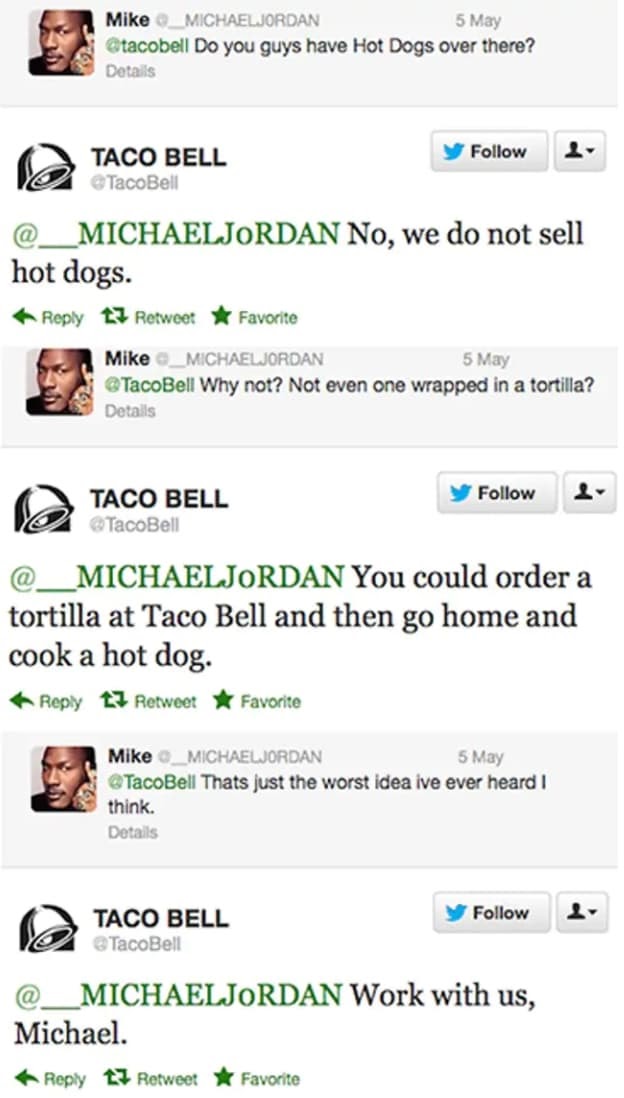
The Cons of Organic Social Media
It can be time-consuming.
Consistently creating excellent content and actively interacting with your audience aren’t exactly quick fixes you can expect to churn out over lunch. They’re full-time pursuits that take considerable energy and effort. If you don’t have dedicated team members or outside help, maintaining your organic social media efforts can be a massive time-drain.
Algorithms can be volatile and difficult to understand.
What content your audience will see on social media is dictated by algorithms designed to sort posts by relevancy and potential enrichment instead of when it was published. The success of your organic social media strategies rests on your ability to get your content in front of current and potential customers, so understanding the algorithms supporting these platforms is crucial. But that’s far easier said than done.
Social media platforms’ algorithms aren’t always easy to grasp and master, and if you do figure them out, there’s a good chance they might change. It can take a lot of effort to learn and stay on top of these algorithms to support effective organic social media efforts.
It offers less flexibility when it comes to immediate reach.
The immediate reach of your organic social media efforts extends as far as your followers take it — meaning you can only expect your organic content to reach your immediate audience and the people they share it with. You can’t zero in on and distribute your content to specific demographics or types of users like you can with paid social media.
The Pros of Paid Social Media
You can target specific users to expand your reach.
Paid advertising on social media allows you to pinpoint and reach the specific demographics that will be the most receptive to what you have to offer. You can sort users by categories like location, age, gender, or interests and place targeted advertisements on their social media feeds. It gives you reach beyond your followers and the ability to touch base with specific audiences that will be receptive to your messaging.
Its payment model works for any budget.
Paid social campaigns are structured to suit virtually any budget. They generally charge on a pay-per-click (PPC) basis, meaning you only have to pay if users interact directly with your paid social media materials via impressions or clicks.
Many platforms allow you to establish a spending cap on your paid social efforts, so your budget is never exceeded. And certain target audiences cost less to reach than others, allowing you to strategically place your advertisements to cater to different, potentially lucrative niches.
You see more immediate results
Organic social media efforts are a long-term play that requires considerable effort and strategy. With them, you have to create content that will abide by social media algorithms, rein in the potential customers that happen upon it, and actively work to retain your followers once you have them hooked. Paid social media foregoes that process by immediately placing your messaging on potential customers’ feeds.
The Cons of Paid Social Media
You might not see meaningful returns on your investment.
Paid social media is just that — paid social media. No matter the size of your investment, you’re still spending money that might go to waste if your efforts are ineffective. If you’re constantly experimenting and failing with your paid social media, you’re essentially burning money. And that’s an easy cycle to fall into.
If you’re a small business, lacking the know-how and skill set necessary to adeptly coordinate your paid social strategy, you could find yourself wasting resources that would be better allocated to other forms of marketing.
You might face a competitive landscape.
Marketing on social media isn’t exactly a well-kept secret. According to Statista, an estimated 91 percent of all US companies were using social media marketing in some capacity in 2019.
Finding a place in a landscape that crowded might mean dealing with particularly high PPC rates to reach your target demographic and needing high-quality, attention-grabbing content to get any actual mileage out of your paid social budget.
It requires a lot of attention.
Your paid social media efforts are rarely stagnant. They need to be monitored, analyzed, and consistently adjusted if you want to get the most out of them. Many platforms offer you analytics to understand how your ads are performing. That data isn’t trivial and can’t be disregarded — it requires a lot of attention and thought.
It should inform how you structure your paid social messaging as it evolves, and that won’t always be easy. Paid social is often only as effective as the effort you put into it. And in many — if not most — cases, that will occupy a considerable amount of time.
The Verdict on Organic vs. Paid Social Media
It’s impossible to say whether organic or paid social media is better than the other. They suit different businesses with different priorities in different situations.
If your business doesn’t have the budget to implement a full-fledged paid social media strategy, try focusing on organic social media. Write thoughtful content, flesh out your social profiles, and actively engage with your customers online. But if your business has a sizable marketing budget and is in desperate need to land new customers immediately, prioritize your paid social media efforts.
Ideally, you’ll be able to find a way to incorporate both methods into your overall social media strategy. Leverage paid social media to immediately spread brand awareness and draw an audience to your profiles. Once they’re there, use your thoughtful organic content and active presence to capture their interest, convert them into customers, and retain them once they’re on board.
