
27 Ways to Drive Traffic to Your Website
You know you’re a marketer when you’re sitting in traffic on the highway, it’s completely bumper to bumper, and all you can think about is “Why can’t I drive traffic to my website like this?“
If you’ve struggled with driving traffic to your website, you’re not alone. According to 2019 research done by Content Marketing Institute, 61% of content professionals are challenged with knowing what is most important to their audiences, 50% are challenged with knowing the goal of the audience at a particular stage of the customer’s journey, and 49% are challenged with knowing the steps in the customer’s journey.
Between writing a new blog post, posting on social media, and strategizing for a new email campaign, it’s hard to look back and see what’s driving traffic to your site and what isn’t.
The list below will help you increase the traffic to your website, generate more leads, and improve ROI.
1. Content Creation
Inbound marketing focuses on attracting the right people to your company. One of the best ways to do this is by creating content through blogging.
To come up with content that will attract the right visitors to your website, you should know your buyer persona. Once you know your audience, you can create content that will attract them to your website.
But how do you write a good blog post that will attract the right audience? Follow these five steps:
- Identify your buyer persona: Find out more about your audience, from job title to pain points.
- Conduct SEO research: Learn what your audience is searching for on search engines so you provide the right content.
- Write a draft: Begin by drafting a post that answers your audience’s questions.
- Publish: Publish your post on your blog.
- Promote: Promote your blog post on social media and email newsletters to generate traffic. The more traffic your post generates, the higher it will rank in search engines.
You can learn more about how to implement a blogging strategy here.
2. Topic Expertise
Ranking higher in Google will increase the organic traffic to your site. At HubSpot, we do this by using the pillar/ topic cluster model. Google favors sites that are known to be topic experts on the subject matter they’re writing about.
To be seen as an expert, you can create a pillar page, which is essentially a longer blog post that broadly covers all aspects of a topic. Then, you write “cluster content,” or supporting blog posts, targeting long tail keywords that show you’ve covered a topic exhaustively. Focusing on long-term traffic will help you rank higher on search engines
Christina Perricone, team manager of HubSpot’s pillar page content, says, “The pillar cluster model organizes content on your site around a single topic and search term through internal linking. This organization helps search engines easily crawl and categorize all of the content that you have on a particular topic, thereby making it easier for you to rank for that search term. When the model is done right, it also helps visitors navigate your site and move through related pages, boosting traffic for all of the pages in your topic cluster.”
Want to get started on pillar pages for your company? Learn more here and here.
3. Paid Advertising
You can drive traffic to your website quickly with paid advertising. With search engines, you can run pay-per-click or retargeting ads. With social media you can run display ads or sponsored posts. Your strategy will most likely include a combination of different types of advertising. In fact, according to the 2020 CMO Survey, firms expect social spending to rise by 62% over five years.
(Getting started with paid advertising can be a simple process — learn more about it here.)
4. Organic Social Media
Organic social media is not a new strategy, but it’s still something marketers should pay attention to. Besides posting on social media platforms, you can also use Instagram Stories (Hello, swipe up feature!), live video, IGTV, or Facebook Messenger. The key with organic social media is to be an early adopter of new features
For instance, Facebook is releasing an automated lead generation feature on Messenger, allowing businesses to create an automated chatbot experience within Messenger to link to content offers on your site. This is a great feature for sending traffic to your website.
It’s also important to have a diverse social media strategy and use the right social media platforms — not just Facebook, Instagram, and Twitter. Platforms like YouTube or Pinterest generate a lot of traffic. Pinterest has great engagement rates — 66% of Pinterest users make a purchase after seeing a brand’s Pins.
Henry Franco, a brand marketing associate at HubSpot, recommends two things regarding organic social media. “First, don’t spam your audience — it costs a user nothing to scroll past your post, and if you don’t offer them any value, that’s exactly what they’ll do.
Know your audience, and craft content that speaks directly to them,” Franco says. “Second, stay active with community management. People love when brands like and reply to them — it’ll humanize your business, and keep people coming back for more content.”
Check out our social media marketing guide to learn more.
5. Website Analysis
Let’s do a little reverse engineering of our thought process. Before you drive traffic to your website, it’s important to learn about your audience. To do this, there are platforms that will analyze your website, such as Crazy Egg, to see where you’re losing visitors. With this information at your disposal, you can create the right content to drive the right traffic to your website.
6. Contests and Giveaways
A simple way to drive traffic to your website is through contests and giveaways. This can give you a quick boost, while also rewarding your followers. You can host giveaways on social media, through your email list, or both.
Implementing a strategy like this can be simple. Just follow these six steps:
- Decide what platform on which to host your giveaway (can be multiple)
- Choose a prize (free tickets, discount, etc … )
- Select the criteria (website comments, email sign up, etc … )
- Write ad copy
- Create graphics
- Post and promote
7. Influencers
Influencer marketing isn’t a passing fad. In fact, it’s a budget-friendly option to drive traffic to your website. According to Think with Google, collaborations with YouTube influencers are four times more effective at driving brand familiarity than those with celebrities. When influencers post discount codes, links, reviews, or giveaways, you are tapping into their audience to drive traffic to your website.
Remember Brian Halligan’s INBOUND 2018 keynote speech? Customers are more likely to buy from organizations with excellent word of mouth. How do you create great word of mouth? First, delight your customers. Second, work with influencers.
8. Email List Building
Using your current readers and customers is a great way to drive traffic to your website. When you post a new blog or content offer, you can promote it to your followers/subscribers for a quick traffic boost. With content-heavy websites, having repeat readership is helpful for traffic goals, conversions, and lead generation.
To get started with this, build an email list or grow your current list. Below are a few strategies you can use:
- Content offers (see #23 for more information): Generate gated content for visitors that requires them to provide an email address to receive. Include CTAs (calls to action) for your content offers on your website.
- Easy-access newsletter sign-up: Include sign-up forms on your website, from your homepage to your about page. If a visitor had a delightful experience on your site, they might want to sign up for a newsletter. Make this an easy process.
Use HubSpot’s free forms tool to easily add a form to your site and start growing your email list.
- Social media: Promoting your email newsletter on social media, whether through a post or contest/giveaway, is a great way to convert your current followers into subscribers.
Learn how to build an email list from scratch here or grow your email list here.
9. Community Engagement
The more brand recognition you have, the more traffic you will drive to your website. One way to achieve brand recognition is to be active and engaged in your community. You can implement an engagement strategy today by participating in Facebook group discussions in your industry, answering questions on public forum websites, and interacting with your followers on social media.
One of my favorite brands on social media is Taco Bell. Taco Bell engages with users on social media to delight their customers every day. See a couple examples from Twitter below.

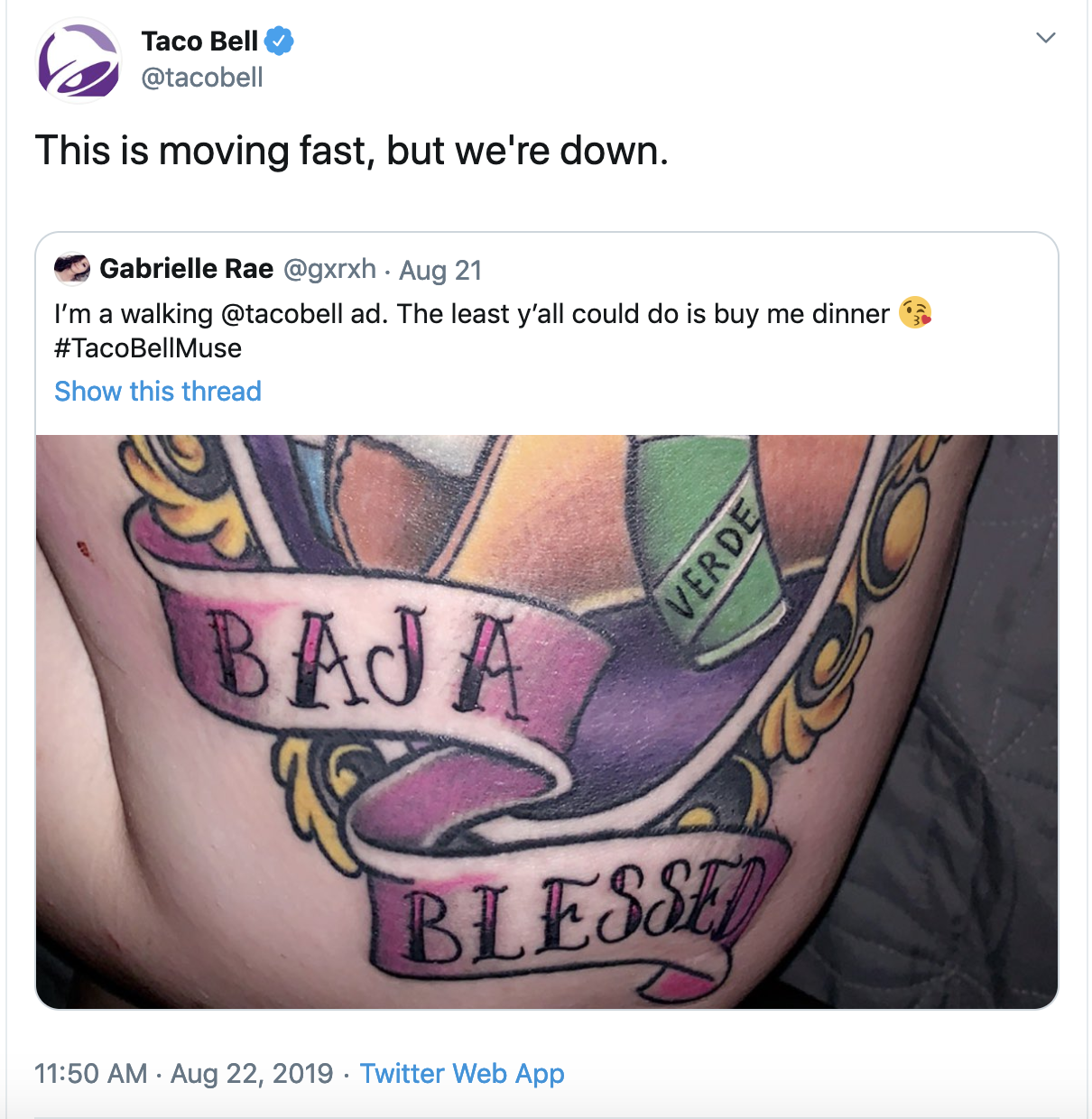
Just remember to be helpful and human. No one likes spammy links when they’re asking a quick question online.
10. Guest Posting
In that same vein, writing guest posts can generate traffic to your site. Guest posting shows you’re active in your community, while also linking to your website — more on generating backlinks below.
To implement a guest posting strategy, you need to find a site that would be a good fit for your company, draft a blog post, and then write a pitch. Caroline Forsey, staff writer on the HubSpot Marketing Blog, says, “I’m always particularly intrigued with a guest pitch if it shows me the writer has done their research ahead of time.
For instance, I’d pay much closer attention to a pitch if it tells me how this piece could appeal to my readers. Additionally, I’m impressed when a writer can recognize gaps in our content and how their piece will fill those gaps, rather than competing with existing content.”
11. On-Page SEO
On-page SEO can help your website rank higher in search engines and bring in more traffic. Some on-page SEO elements include page title, header, meta description, image alt-text, and the URL (plus more). Showing up in search engines will generate more traffic for your site. To get started with on-page SEO, check out our ultimate guide on on-page SEO here.
12. Quality Backlinks
In order to drive traffic to your site, you need to rank high in search engines. In order to rank higher in search engines, you need to be an authority in your industry. One way to do that, besides the topic/cluster model described above, is by acquiring quality backlinks. If websites with high authority link to your site, that gives you more credibility.
Irina Nica, senior content strategist at HubSpot says, “There are two main ways in which high-quality backlinks can help drive more traffic to a website: boosting ranking and driving referral traffic. On the one hand, backlinks are one of the most important ranking factors for every major search engine out there. By constantly earning high-quality backlinks from relevant websites, you’ll improve your rankings in SERP and, as a result, see a lift in your organic traffic.”
Nica adds, “On the other hand, backlinks can also drive a substantial amount of referral traffic. That’s something to be expected if you get a mention in popular news website. You can also see referral traffic coming through if you’re mentioned (and linked to) in an article that’s already ranking well for high search volume keywords and is getting a constant flow of traffic.
Want to learn how to earn backlinks? Find out more here.
13. Video Marketing
It’s time to add video marketing to your content strategy. According to a report by Cisco, video will account for 82% of traffic by 2022. Start implementing video marketing into your strategy as soon as possible because this is the content people are clicking on.
You can create video for Instagram or Facebook Stories, live videos, IGTV, Facebook Watch, news feed videos, YouTube, etc. Want to get started today? Learn everything you need to know in our ultimate guide to video marketing.
14. Content Repurposing
Need content to drive traffic to your site but struggling to come up with ideas? I get it. A great way to overcome this hurdle is to repurpose old content. Take a well-performing blog post and repurpose that into a video. Or if you have a podcast that did really well, write up a blog post on that topic. Using content that has already performed well will continue to drive traffic to your site.
15. SEO Tools
To drive traffic to your website, it’s important to be a student of SEO. Learning SEO tools such as Google Analytics, Ahrefs, and SEMrush will help you develop a strategy to generate traffic to your website.
These tools will help you learn and analyze what’s working on your site and what isn’t. Plus, these help you come up with ideas for content that has potential for high traffic. Check out our roundup of the best SEO tools to monitor your website.
16. Historical Optimization
Historical optimization is the process we use at HubSpot to update old blog content and generate more traffic and leads. If you’re anything like us, a majority of your monthly blog views and leads come from older posts.
Pamela Vaughan, a principal marketing manager on HubSpot’s Web Strategy team, a.k.a. the woman who introduced us to the concept of historical optimization, has written about this extensively.
She says, “Historical optimization is a tactic best-suited for a blog that’s been around for several years, because you need to be generating a significant amount of organic search traffic, have built up a critical mass of blog subscribers and social media followers, and you need a sizable repository of old posts at your disposal.”
Vaughan adds, “Historical optimization should be a piece of your overall blogging strategy — not the whole strategy.”
Here, she lays out her step-by-step process to historical optimization.
17. Voice Search Optimization
Remember in “The Little Mermaid” when Ariel wanted to go where the people were? That same principle applies to digital marketing. In order to drive traffic to your website, it’s important to show up where people are searching.
Voice search is an increasingly important area in which to rank. In fact, according to PwC, 65% of 25- to 49-year-olds speak to their voice-enabled devices at least once per day. That’s why optimizing your content for voice search is essential.
Here are a few tips to get started:
- Research long tail keywords: When people use voice search, they speak in full sentences. To optimize for voice search, start researching longer tail keywords.
- Write answer-focused content: The content you write should answer your audience’s questions.
- Optimize for snippets: Smart speakers like Alexa and Google Home look for short, concise answers. Writing quick summaries in your posts make it easier for search engines and smart speakers to find the answer they need.
18. Local SEO
If your company is a brick and mortar store, local SEO is an important factor to consider. My colleague, Kelsey Smith, wrote about it in this blog. She says, “To gather information for local search, search engines rely on signals such as local content, social profile pages, links, and citations to provide the most relevant local results to the user.”
For example, when someone types in “best pizza near me” on Google, the results are generated by the user’s location. Tools such as Google My Business and Moz Local help businesses manage their directory listings and citations so they show up in local searches.
To rank for local search:
- Ensure your name, address, and phone number (NAP) is consistent on your Google My Business and social media pages.
- Use a directory management tool to monitor directories like Yelp, Foursquare, Best of the Web, etc.
- Research and use location-based search terms on sites like Google Trends, which analyzes popular search terms across various regions.
19. A/B Testing
Besides driving traffic to your website, you know you’re a marketer when your motto is “Test, test, and test again.”
A/B testing is a split test that helps you determine what version of a campaign performs best. These tests can give you key information about your audience so you can create tailored content and offers that drive traffic to your site. There are a lot of tools you can use to get started. Check out our roundup of the best A/B testing tools here.
20. Internal Linking
When a visitor comes to your blog, your goal is to get them to continue reading on other pages of your website. That’s why internal links — links to other pages on your site — are very important. When visitors continue to other pages of your website they’re more likely to convert and become a brand enthusiast.
For example, you can create an internal linking structure using the pillar/cluster model described above. Pillar and cluster pages link back and forth, which boosts your site’s credibility on search engines, while also increasing the likelihood of a conversion.
21. Technical SEO
Technical SEO focuses on the backend of your website to see how the pages are technically set up and organized. Factors include elements like page speed, crawling, indexing, and more. Matthew Howells-Barby, HubSpot’s director of acquisition, has written about technical SEO in this blog.
In it, he says, “Don’t underestimate the power technical SEO changes. [Technical SEO] resulted in us growing our organic traffic by more than 50% in just one month.”
To get started with your technical SEO, use some of the tips from Howells-Barby’s article, including:
- Fix broken links and redirects
- Create an XML sitemap for your subdomains
- Set up language meta tags
- Add custom H1 and introductions to topic pages
22. Community Building
Building a community of brand enthusiasts is a great way to continuously drive traffic to your website. You can build a Facebook group, Twitter chat, LinkedIn Group, or Quora Space specifically for your followers and others in your industry where you create value, while also linking back to your site.
A great example of community building comes from career coaching business CultiVitae. They have a closed Facebook group where Emily, the founder, answers questions and provides networking opportunities.


These types of communities keep you top of mind in your customer’s eyes. Plus, it’s a great way to engage with your followers and learn more about your audience as they evolve over time.
23. Content Offers
Content offers, sometimes referred to as lead magnets, are a way to use content to drive traffic to your site and generate leads. Content offers vary depending on what stage of the buyer’s journey your customer is in, but can include webinars, guides, reports, trials, demos, checklists, and more.
You can learn about different types of content offers here and how to create content for every stage in the buyer’s journey here.
24. Media Coverage and Public Relations
Earned media coverage is a great way to drive brand awareness for your company and traffic to your website. If your marketing and public relations teams work together, you can generate traffic to your site and create excellent word of mouth.
Ellie Flanagan, a senior corporate communications manager at HubSpot, says, “Although most outlets these days try to stay away from including backlinks in their stories (it’s usually against their editorial guidelines), that doesn’t mean that a good story won’t drive folks back to your site.
Media coverage provides great third-party validation for your company. Stories about new products or services, your company culture, or even industry thought leadership can all be great drivers for a reader who maybe hadn’t heard of your company before and wants to learn more.”
25. Social Share Buttons
Social share buttons are links that make it easy for your readers to share your content on social media. When your readers become promoters of your content, your traffic will increase. Here’s a quick cheat sheet on creating social share buttons.
Once you’ve created your social share buttons, how do you get people to share your content? Here are a few tips to get started:
- Ask people to share on social media
- Create strong content
- Include quotable content
- Add multimedia such as images, videos, infographics, etc.
26. CTR Optimization
Once your content is posted and you begin ranking on search engines, make sure people are clicking through to read your posts. Your click through rate (CTR) measures who clicked on your post and read it against the number of people who viewed the link to your post (e.g., the landing page, email, or advertisement) in total.
A great tool to measure your organic CTR is Google Search Console. To get more people to click through and drive traffic to your site, it’s important to write compelling and apt meta descriptions and titles. To write quality meta tags that are click-worthy, make sure your titles are short and snappy, and your description leaves visitors wanting more. This ties into on-page SEO, described above.
27. Academy and Knowledge Base Posts
One form of content that can drive traffic to your website is educational content. If you create courses, certifications, or educational posts that are helpful to your audience, you’ll likely see an increase in traffic.
For example, HubSpot uses HubSpot Academy to generate content that is helpful to our audience. We provide videos, certification courses, and knowledge base articles to answer questions. See an example of a knowledge base article below.
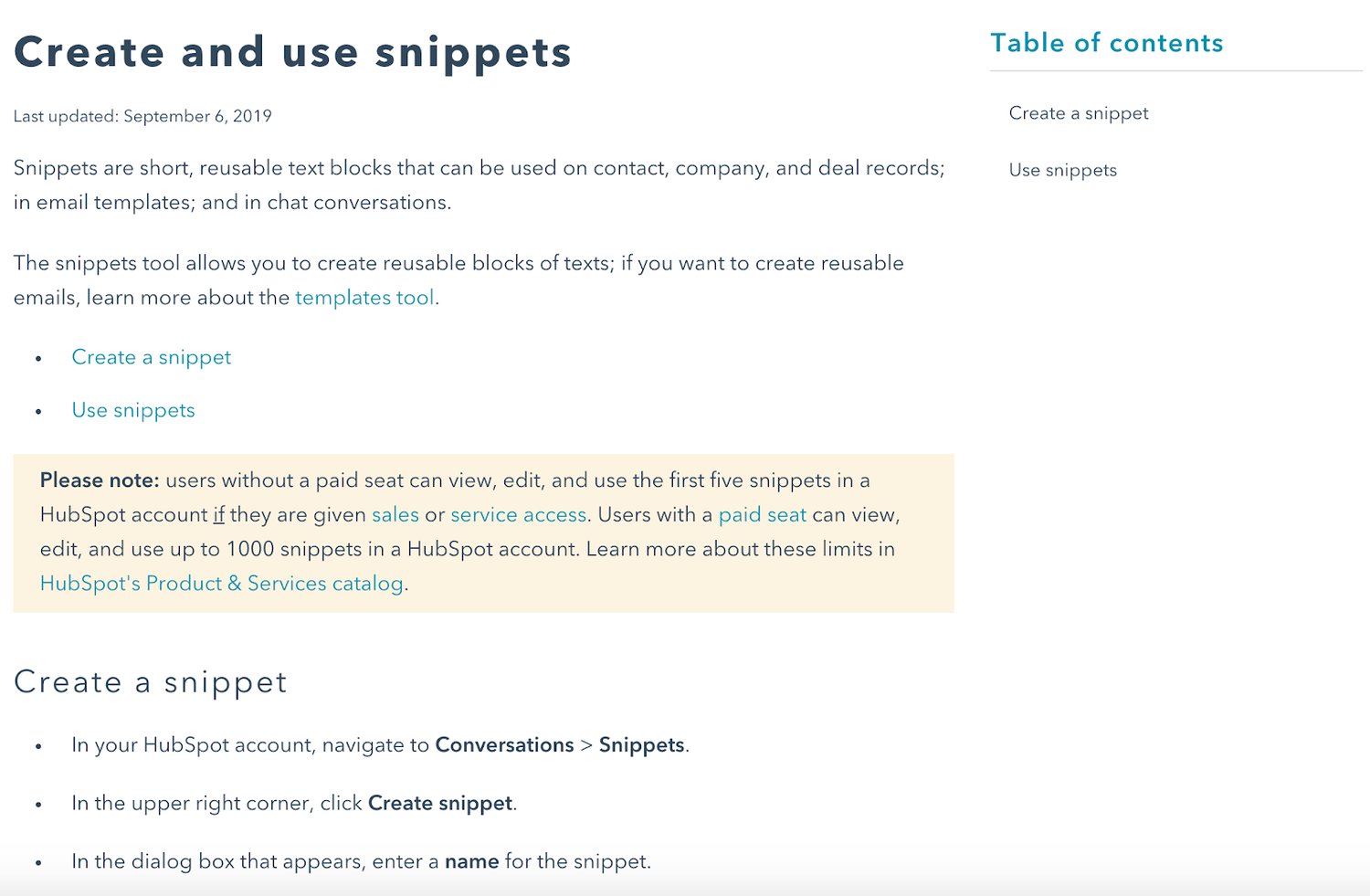
If you’re struggling to get traffic to your website, you’re not alone. Implementing the tips above can help you increase your traffic as soon as possible. Once your traffic has started to improve, it’s time to think about conversions. Learn more about conversion rate optimization here.
Editor’s note: This post was originally published in October, 2019 and has been updated for comprehensiveness.

The Tactics HubSpot Used to Rank #1 for More Than 34,000
People are hungry for immediate answers.
Luckily, it has never been easier to find the information you’re seeking via search.
A lot of marketers want to know: how does HubSpot optimize for search?
I talked to our blogging team to find out, and put together a series of insider tips we’re eager to share with you. Check out the tactics below, and start maximizing organic traffic to your own blog.
1. Embrace complex clusters.
Search algorithms are ever-evolving, and in 2020 they’re as smart as ever. Search engines are now capable of recognizing connections across search queries.
This has big implications for marketers. Gone are the days when the searcher typed in simple keywords. Searches today are complex, putting the heavy lifting back on Google and other search engines to connect the dots.
For example, if you type “movie about doctor clown” into Google the first result will be the movie Patch Adams, despite the fact that there is no overlap in the search terminology.
The takeaway: search engines are incredibly intuitive. Google recognizes exactly what the searcher wants without the searcher explicitly stating their question.
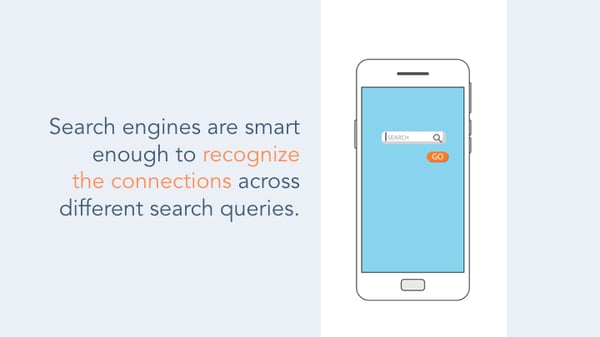
At HubSpot, our blogging team realized this shifting behavior, so they altered our blog strategy to focus on topic clusters, instead of specific keywords.
To do this, they first identified what topics to prioritize. Then, they aligned our existing blog posts into the aforementioned clusters and generated tons of new content under those clusters.
Finally, they built internal and external links at every available opportunity, creating connection points between content that share the same topic cluster.
In doing so, we signal to search engines exactly how the pieces fit together. While it can be time-consuming to reorganize your content, the payoff is huge.
2. Write for featured snippets.
Let’s use the example of Patch Adams once more. If you type “movie about doctor clown” into Google, you’ll see a small box with a short answer summarizing the premise of the film right below the search bar.
There’s no need to click into a link to see the answer; instead, Google makes it easy to get the information on first glance. This answer box is a featured snippet. And if you’re not using your blog to optimize for featured snippets, start now.
Here’s the incentive: Google pulls the featured snippet from one of the pages that ranks on page one of the search results, but the featured snippet does not necessarily need to exist in the #1 link.
This is a huge opportunity to get content that is not in the #1 spot to actually appear above the #1 spot.
To identify which content is good for featured snippets, Google frequently serves up answers for “Who, What, When, Where, Why and How” queries.
If you think your content is addressing one of the aforementioned questions, prioritize writing a golden-nugget answer, and you may just see your content sitting right below the search bar.

Another key reason to prioritize for the featured snippet is voice search. As voice search is on trend to become 50% of all mobile searches by 2020 — a prediction by both Google and Bing — featured snippets are now being tapped as the trigger response by virtual assistants. So, as search evolves, so should you.
3. Revamp out-of-date blog posts.
There are a number of benefits to creating new content like having additional pages to be indexed by search engines, providing education to your curious users, and it’s a good way to stay relevant in your industry.
However, as any tenured blogger knows, new posts can take a while to build up steam. In fact, it is often slightly older posts that generate a large portion of traffic because they have had time to develop authority.
One of the most effective strategies HubSpot’s blogging team implements to boost SEO is to historically optimize our old posts.
Historical optimization is the process of taking old posts and making them new again with higher-quality, refreshed content, keywords, and links. By leveraging your already existing search authority on these posts, search engines will reward your freshness, which will then lead to a surge of new visits to your content.
4. Publish high-quality content.
To rank really well on Google, your content needs to be high-quality. You’re probably thinking, “What does that even mean?”
High-quality content can be defined as content that people are searching for, want to share, or provides new information in an easy-to-digest format.
I usually relate this step to something I learned in screenwriting class: Everything you write should move the story forward or reveal new information.
This means that you’ll want to research what content your audience wants from you. While you should conduct keyword research, it’s also important to write about topics that people would find interesting — even if the keyword volume doesn’t back it up.
Not to be simplistic, but your posts should also contain visuals and be long-form.
5. Pay attention to search intent.
Ranking in the #1 position on Google should mean that you’ve completely answered a user’s question.
That’s a major factor for Google’s rankings.
That means that you need to pay attention to search intent. When someone types in “how to rank on Google,” what are they really looking for?
Are they looking for a list? Are they looking for actionable items?
Before you write any blog post, it’s important to know why a user is searching something so you can properly fulfill their request.
6. Conduct an SEO audit.
Yes, writing your content well is a major factor in ranking on Google. But we’d be remiss if we didn’t mention SEO.
To rank highly on Google, you need to pay attention to on-page and off-page SEO tactics.
That means that you’re conducting keyword research, optimizing your meta tags, and gathering backlinks.
To see how well you’re doing, you should conduct an SEO audit. The only way to move forward is to know where you’re at and where you want to be so you can create a plan.
We surveyed 295 individuals across the United States, asking the question “Do you know how search engines, like Google, rank the results you get after a search?”
An astounding 48% of people answered “no.” As a marketer, you do not want to be in that 48%. If you do not evolve with SEO, you risk losing key business opportunities to maximize your brand awareness and generate leads.
It is time to understand, strategize, and capitalize on invaluable SEO tactics — like blogging — that will propel your business into success.
Editor’s note: This post was originally published in May 2018 and has been updated for comprehensiveness.

What is N testing? (In 100 Words or Less)
During summer, my favorite time of day was when the ice cream truck would drive on our street.
Usually, I didn’t know what I wanted. If I had saved enough money, I’d order a push-up (am I dating myself, or is this still offered?), the rocket popsicle, and an ice cream sandwich.
Little did I know, I was actually conducting an A/B/n test. I wanted to taste several flavors — not just two.
As a marketer, I’ve encountered the same problem with split testing.
When I was working at an agency, I’d usually write four to five headlines for a landing page. To taste all the flavors, so to speak (as I did with my ice cream), we’d conduct A/B/n tests.
Below, let’s review what N testing is and tools to help you get started.
Now, you might be wondering, “How does this differ from multivariate testing?”
It’s a good question.
Multivariate testing is usually more comprehensive than A/B/n tests. For example, an A/B/n test will test one element of a web page, while a multivariate test will test multiple variables at once.
For instance, an A/B/n test might test the color of a CTA button, while a multivariate test is testing the headline, button, and image.
So, now that we understand what N testing is, let’s examine why you should implement an A/B/n test in your campaigns.
Why should you implement A/B/n testing?
Sometimes when you’re creating a landing page, you’ll have multiple versions of the copy, CTA, or images.
In fact, in my experience, when I was creating landing pages, I almost always had about three to four different versions of each of those elements before I decided which one I wanted to go with.
That’s where A/B/n testing comes in.
This type of split testing gives you the power to test several versions of your web pages.
If you’re still gathering information and data on your audience, this is especially helpful. When you aren’t sure what your audience will respond do, you should run an A/B/n test to gather information on what performs best with your target market.
What are some disadvantages of A/B/n tests?
While A/B/n tests are useful when you have multiple versions of a web page you want to test, there is a possible disadvantage to this type of testing.
Since you’re dividing traffic on your site, the more variations you want to test, the more traffic and time it’ll take to reach a statistically significant result.
Additionally, it’s important to use A/B/n tests to gather information on your audience and draw significant conclusions about the type of content they want to see.
Testing minor changes, such as the color of a button, won’t drastically increase your conversion rate.
Once you’ve decided that you want to run an A/B/n test, you might be wondering, “How do I get started?”
Well, there are actually tools that can help. When you’re looking at A/B testing tools, you should always check to make sure they can run multiple variations, not just two.
Below, let’s review the top tools you can use to implement an A/B/n test.
A/B/n Testing Tools
1. VWO Testing
VWO is a popular A/B testing tool among marketers and developers because it’s easy to use and intuitive.
Additionally, it’s a powerful, robust tool that can help you implement comprehensive multivariate testing or a simple A/B/n test. It’s most popular among enterprise brands, including Target, eBay, and Virgin Holidays.
The top features include audience targeting, campaign segmentation, statistical relevance analysis, and heat maps.
2. Crazy Egg
Crazy Egg is a great alternative for smaller businesses that are looking for a more cost-effective solution.
With this tool, you can run A/B/n tests so you can understand the customer journey. With advanced heat maps and visitor recordings, you can see where your audience is getting stuck.
Its top features include funnel analysis, split testing, campaign segmentation, and statistical relevance analysis.
3. Instapage
Instapage is an excellent A/B/n testing tool that’s designed to help marketers create more impactful campaigns.
With this tool, you can create, personalize, and optimize your landing pages at scale. The goal is test your user behavior, speak to your audience, and validate what works best.
Its top features include audience targeting, heat maps, multivariate testing, and ad-to-page personalization.
Running a split test isn’t always as easy as testing two versions of a web page. Sometimes you’ll have multiple versions that you want to test. With A/B/n testing, you can see what version of your landing page performs best.

How Frequently Should I Publish on Social Media? A HubSpot Experiment
Social media can be an overwhelming place — even for the experts.
Which networks should they use, what should they write, how frequently should they post, and does the time they post really matter?
I wanted to answer these questions for marketers once and for all: How frequently should social media marketers post on Facebook, Twitter, and LinkedIn to get the most bang for their buck? And when they should do it?
I analyzed HubSpot customer data for one week during the month of June — comprised of a total of roughly 10K different accounts on each different platforms, as well as 15K posts to LinkedIn company pages, 25K posts to Facebook business Pages, and nearly 60K posts on Twitter.
Should I Publish More or Less Often on Social Media?
How frequently you post on social media will depend on a number of factors, namely how the platform works and the ecosystem on each platform you choose. With chronological-based social media platforms, such as Twitter, a high frequency is better — the more you post, the more visibility you get. However, for algorithm-based social media platforms, quality content beats frequency of publishing as too many posts can cannibalize performance.
This rule of thumb corresponds with how businesses have adapted their social media publishing schedules to meet audience demands. According to HubSpot’s Not Another State of Marketing Report (2020), out of 3,400 marketers surveyed, the majority post between 1-6 times per week.
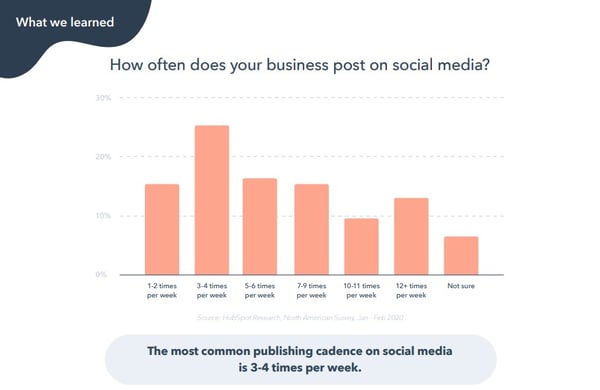
When’s the Best Time to Post on Twitter?
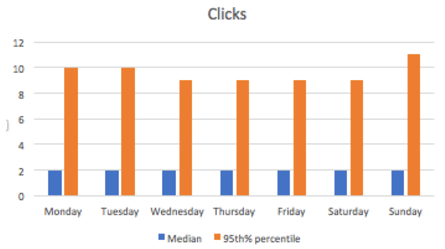
Time generally doesn’t matter — that’s right, you heard it here. There’s some uptick in the number of clicks at the very end and very beginning of the day, but we also see a lot less volume during that time so it’s not a statistical trend.
Post on Twitter whenever is convenient for you. Your focus should be on content, not on the time of day.

Which Is the Best Day to Post on Twitter?
For most tweets, there’s no difference in the day of the week that you post.
For really good tweets — the ones in the 95th percentile — there could be some benefit to posting on Sunday, Monday or Tuesday, but it is not terribly significant.
What’s the Optimal Publishing Frequency on Twitter?
Twitter is still mostly a chronological social network, and therefore the more marketers post, the more visibility and total clicks their posts get.
On Twitter, publishing more is better.

For marketers with at least 100 followers on Twitter, each message earns marketers a median of 2.5-3 clicks. This isn’t license to publish terrible posts — that’s not beneficial to your brand or for clicks — but as a temporal platform, it’s not as critical to have perfectly polished prose as it is on other social apps.
When’s the Best Time to Post on LinkedIn?
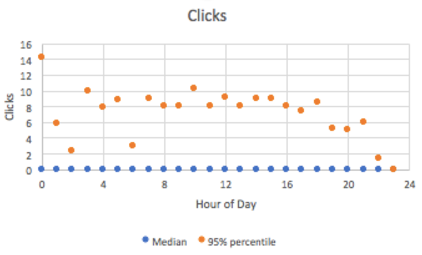
The median number of clicks doesn’t vary at all, but the 95th percentile of posts does show a drop off with posts that are published late in the evening — after 5 p.m. or so. Therefore, schedule posts on LinkedIn to go out during business hours (after all, it is a business networking site), but the focus should be on content, not the time of day.
Which Is the Best Day to Post on LinkedIn?
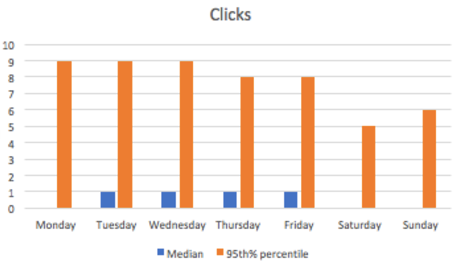
Posts published Mondays, Saturdays and Sundays don’t perform as well as posts published Tuesdays, Wednesdays, Thursdays, and Fridays. Audiences must be too busy working to check LinkedIn on Mondays, and who wants to think about work over the weekend?
Tuesdays and Wednesdays are especially good times to publish on LinkedIn — they have a generally higher median as well as 95% percentile clicks.
What is the Optimal Publishing Frequency on LinkedIn?
Once you publish more than 5 times per week (for most companies, this means once per work day) the return on investment drops substantially.
What is likely happening is LinkedIn doesn’t want users’ feeds to be overwhelmed by posts by the same company, so the second post in a day that a marketer publishes can cannibalize the performance of the first.
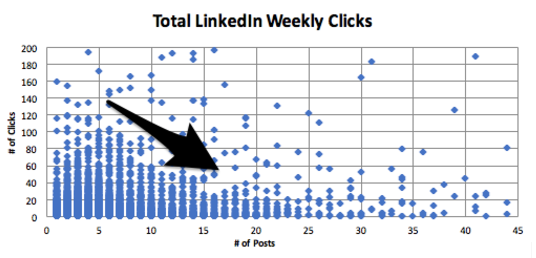
For pages with at least 100 followers, the first two posts on LinkedIn per week will typically bring in two clicks each. However, the 10th post in a week for those channels only adds about 0.5 clicks. The marginal effectiveness of creating content for LinkedIn maxes out at 2 posts per week, so we suggest sharing between two and five posts per week on LinkedIn to get the maximum value from the network for the time spent creating the content.
When Is the Best Time to Post on Facebook?
At the median, most posts on Facebook don’t do very well. But at the high end (95th percentile) there’s a lot of variability, especially at the beginning and end of the day. Since there are fewer posts during the beginning and end of the day, these aren’t statistical trends that marketers can count on. We suggest marketers focus on the content, not the time of day or day of the week when publishing — more on that later.
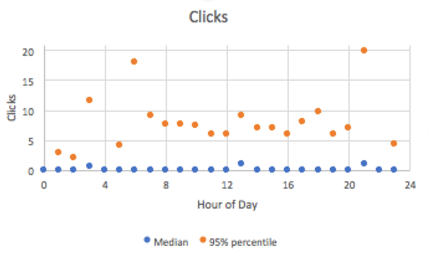
Which Is the Best Day to Post on Facebook?
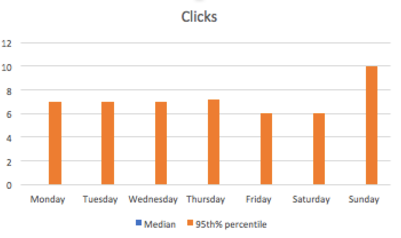
Wait, there’s no median. Actually, that’s not a typo. The number of median clicks for all accounts is actually 0 — because only really good content on Facebook gets surfaced highly. There isn’t an ideal day to post on Facebook. However, it’s slightly better to post on Sundays, and there’s a natural dip in post frequency and engagement on Friday and Saturday.
What Is the Optimal Publishing Frequency on Facebook?
Similar to LinkedIn, once you publish more than five times per week (for most companies, that’s once per workday) the return on investment drops substantially.
For Pages with at least 100 followers, the first two posts on Facebook earn a median of a single click on them, and after the 10th post, each additional post nets just half a click, and then continues to fall. Therefore, we suggest publishing between two and five times per week on Facebook.
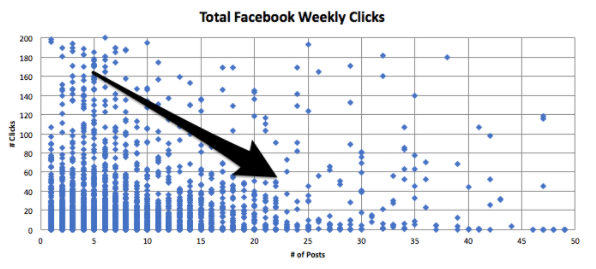
Facebook prioritizes “fresh” content and doesn’t want to overwhelm users with just one company in their feed, so when companies publish more than once in a day, their first post can be cannibalized by the second. Publishing more than once per day won’t just earn you diminishing ROI — Facebook could even punish your Page with the algorithm if you don’t get a lot of engagement with your posts.
That said, if your posts are consistently getting many likes or comments — at least more than five on each one — then it makes sense to post more. The key with this platform is engagement. So as long as your audience likes what you’re writing, Facebook will continue to reward you and show it in the News Feed.
So … Why Publish on Facebook at All?
There are three big reasons to keep publishing on Facebook:
1. Publishing on Facebook shows leads and potential customers that you’re actively in business.
Many people go to Facebook simply to research companies and look for thought leadership, and if your Facebook page is incomplete and inactive, they may go with a competitor who is more prominent on the platform.
2. It’s easier to go viral on Facebook.
The number of outliers that we see at every level is substantial — which means that when you go viral on Facebook, the upside is very, very high. The maximum clicks that a single Facebook Page received during this time frame was 8K — and the Page published just five times that week.
The peak number of clicks that a single account on LinkedIn received was about 1K, and the peak on Twitter was just under 7K… but that Twitter account published more than 100 times that week. The lesson here? When you go viral on Facebook, you can go viral more than on other networks.
3. Facebook Ads offer some of the highest ROI of social ads you can buy.
This is especially true if you are doing any retargeting. And once you’ve published on Facebook, it’s the easiest platform from which to boost posts and get more distribution (and followers).
What Does This All Mean for Your Social Media Strategy?
When it comes to posting on Facebook and LinkedIn, remember that you may only have between two and five posts per week that will get distribution by the networks’ news feeds. With that in mind, focus on the quality of each post (and the content preferences of your audience), and aim to get more likes, comments, and shares as your metrics of success to build up your audience and to make the news feed algorithms work for you.
And when it comes to Twitter, post freely — the timeline updates so frequently that you’re at an advantage posting more often to reach more people.
Many thanks to Monty Solomon, Kelsey Dietz, Dan Kulla, and Lincoln Bryant for helping with the data.

Ultimate List of Ecommerce Tools For 2020
The ecommerce industry is booming.
These trends are showing no signs of slowing down in the foreseeable future. In fact, the global ecommerce market is expected to eclipse $6.54 trillion in sales by 2023. That’s up from $3.53 trillion in 2019.
Whether you’re interested in starting a new ecommerce business from scratch or looking to expand your retail operation to an online store, you can use an ecommerce tool to achieve your goal.
Not all ecommerce solutions are created equally. Some tools are all-in-one website builders, while others are plug-ins, add-ons, or shopping cart software.
So what’s the best ecommerce tool for 2020? The answer depends on your unique situation. Use this guide to find the best ecommerce solution for you and your business.
In a market saturated with dozens, if not hundreds, of different ecommerce tools, there are the top ten that I’d recommend. I’ll give you an in-depth overview of the features, benefits, pricing, and use cases for each one of these tools as we continue through this guide.
1. Shopify
Shopify has everything you need and more to start an ecommerce website from scratch. It’s an all-in-one ecommerce solution for website creation and shopping cart software.
Regardless of your technical skill level, Shopify is easy for anyone to set up and use right out of the box.
Shopify makes it possible for you to sell from anywhere. In addition to your own ecommerce store, Shopify supports third-party marketplaces, social media selling, and in-person sales with Shopify POS (point of sale) software.
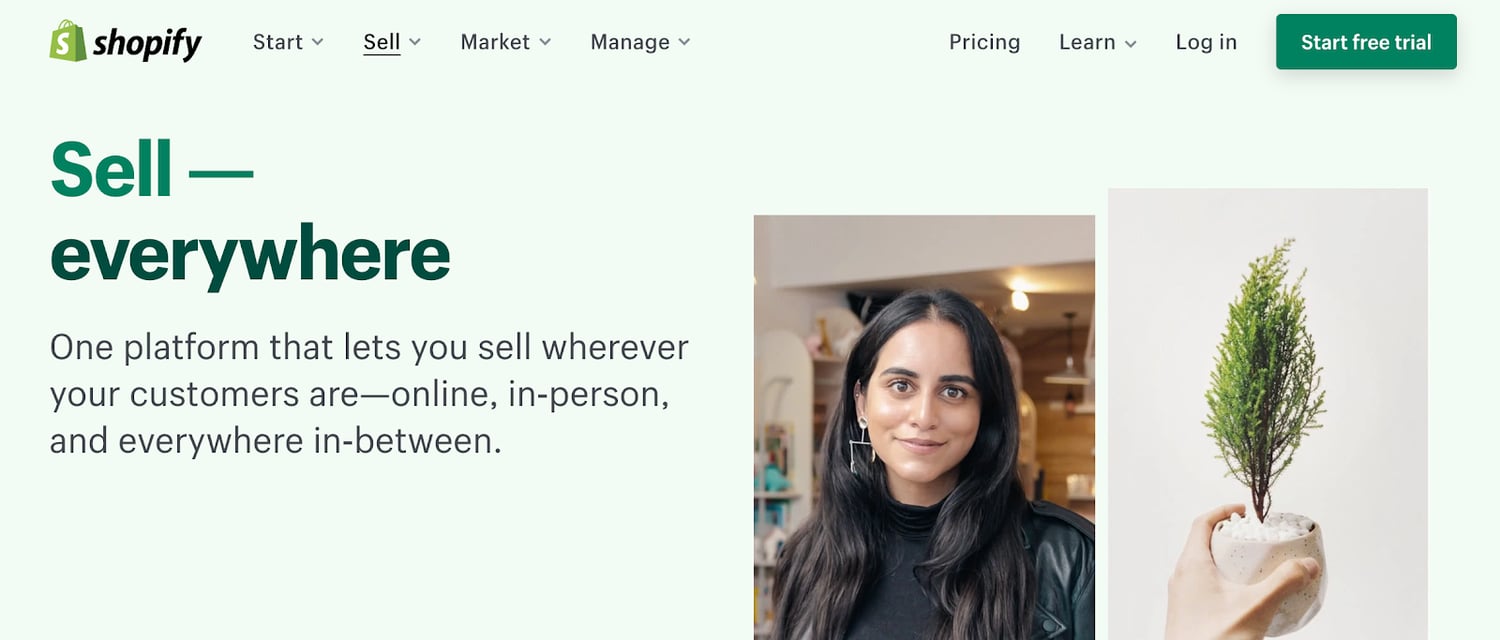
Every Shopify theme is optimized for mobile devices. Additionally, with tools like BuildFire, you could always build a Shopify mobile app to take your mobile sales strategy to the next level.
One of the most significant standouts of Shopify is its versatility. From startups to small businesses and large-scale operations, this ecommerce tool can fit the needs of any organization.
Pricing: Shopify has three different plans—Basic Shopify, Shopify, and Advanced Shopify. These plans start at $29, $79, and $299 per month, respectively. You can try Shopify for free with a 14-day trial.
2. WooCommerce
WooCommerce is unique compared to some of the other ecommerce tools on our list. That’s because it’s not an all-in-one ecommerce solution.
If you already have a WordPress website, you can add ecommerce functionality by installing the WooCommerce plugin.
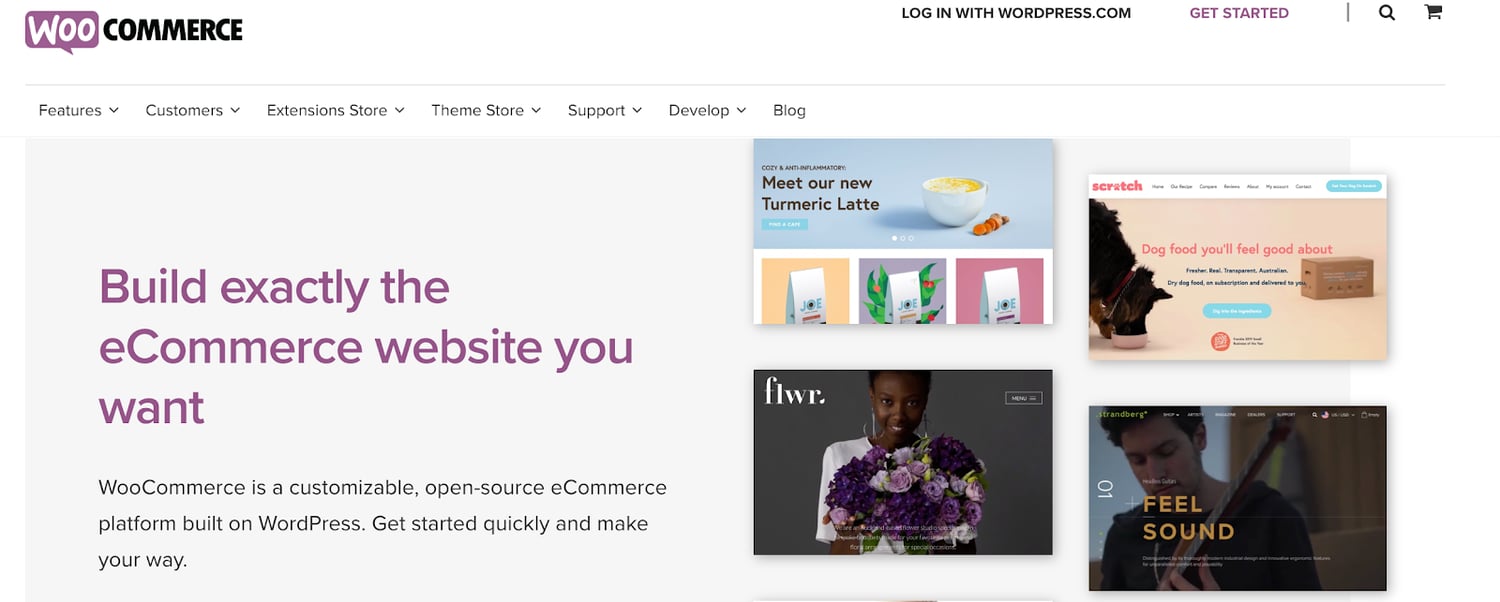
From selling products to subscriptions and memberships, WooCommerce has everything you need to add ecommerce capabilities to WordPress.
The tool is fully customizable. It integrates with popular payment platforms like Stripe, Square, PayPal, Amazon Pay, and more. WooCommerce has other extensions for things like printing shipping labels and integrating with your email marketing platform.
For those of you who have an existing WordPress site, WooCommerce is the best way to start selling online without doing a complete rebuild. Simply install the plugin, and customize your settings from there.
Pricing: WooCommerce is free to install on your WordPress site. But other extensions to customize the WooCommerce plugin do cost money. Tons of extensions are free, while others range up to $300 per installation.
3. BigCommerce
Since launching back in 2009, BigCommerce has processed more than $25 billion in merchant sales. It’s used by businesses in 120+ countries worldwide.
As another full-service ecommerce platform provider, BigCommerce offers everything you need to start selling online.
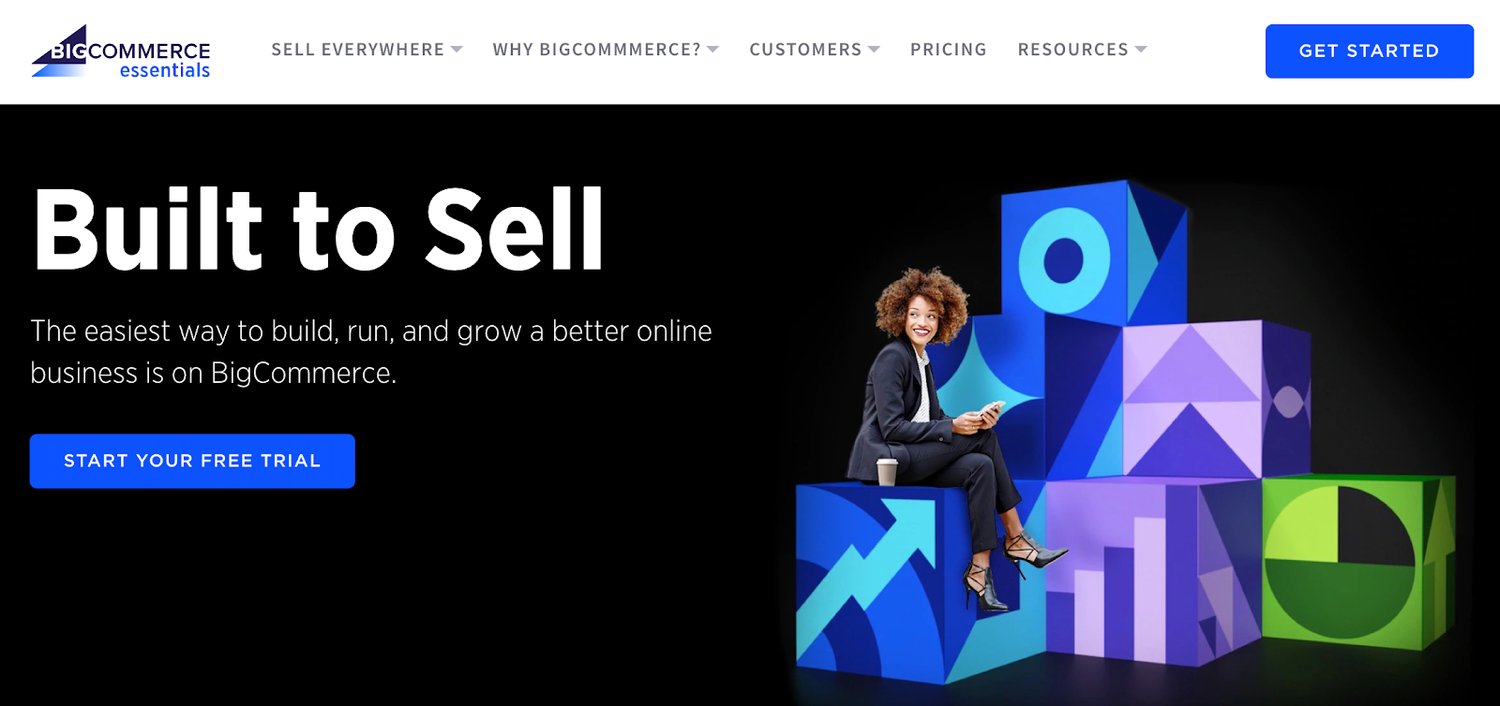
Compared to other ecommerce tools on the market today, BigCommerce comes pre-loaded with the most native features.
BigCommerce has exceptional tools for inventory management, SEO, and conversions. You’ll also benefit from 24/7 customer support via phone, email, and live chat. So you can rest assured knowing that you’ll have access to assistance if you ever have any questions.
In addition to traditional online sales, BigCommerce supports B2B wholesale websites and provides enterprise-grade ecommerce solutions as well.
BigCommerce is an industry leader in ecommerce performance. When it comes to page loading speed, uptime, and security, this tool is second to none.
Pricing: The Standard plan starts at $29.95 per month. BigCommerce Plus starts at $79.95 per month, and Pro starts at $299.95 per month. You’ll need to contact the sales team for a custom quote on Enterprise solutions.
4. Wix
Wix is arguably the world’s simplest website builder. The platform is the easiest way for anyone to build a new website from scratch without any technical knowledge or coding experience.
Using the intuitive drag-and-drop builder, you can design a high-quality website with text, images, videos, and other media types in minutes. Adding new pages or starting a blog with Wix is just as easy.
Wix has 500+ templates for you to choose from. Your website will automatically be optimized for SEO and mobile web browsers. If you build a site with Wix, you’ll have access to the Wix App Market. This resource is filled with powerful web apps to customize your site.
You can also create an online store with your Wix website.
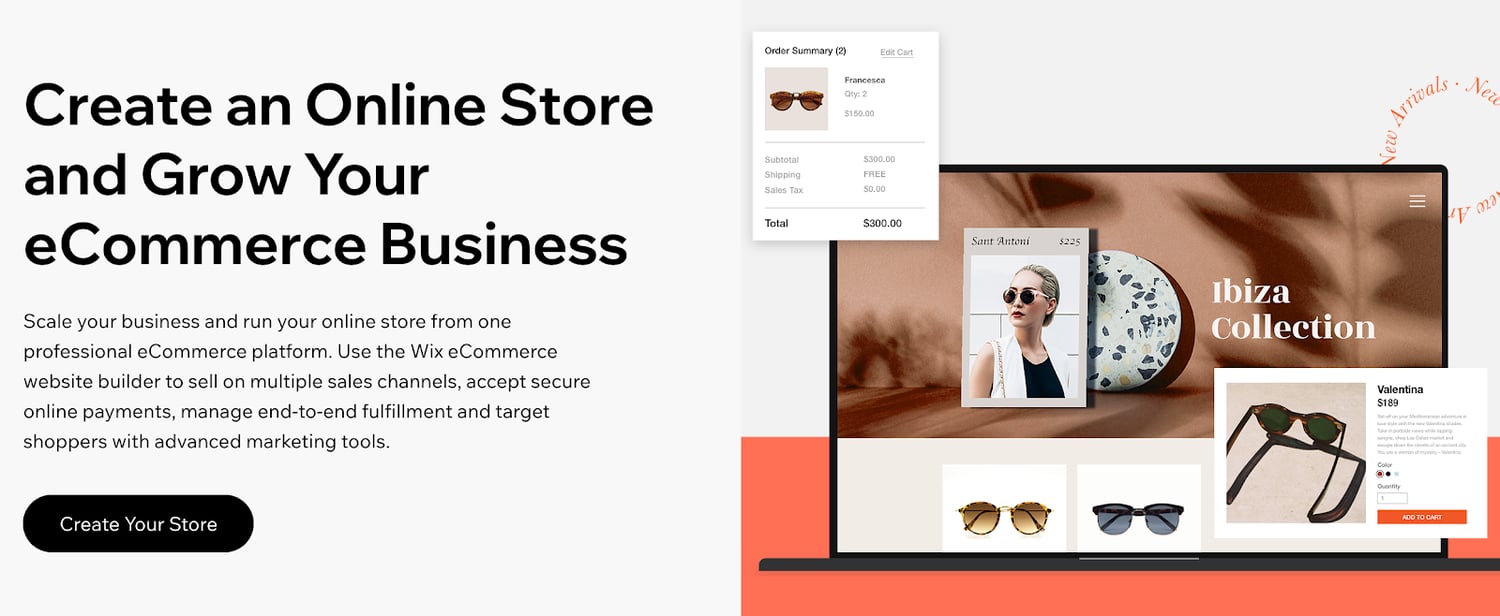
Wix offers a fully customizable storefront and shopping cart. Add features like a shopping wishlist, related product galleries, a quick add-to-cart button, mini-carts, and more.
For those of you who want to start selling new products online but don’t know where to start, Wix’s platform supports dropshipping. Browse from thousands of products that you can sell, with no inventory costs. Products ship in 5-7 business days.
Wix allows you to set up custom shipping rules as well. Manage international orders, choose your carrier preferences, and give customers real-time delivery estimates.
Pricing: Wix has plans starting at $13 per month. But not every Wix subscription supports online selling. The ecommerce plans with the ability to accept online payments range from $23 to $49 per month. Enterprise solutions start at $500 per month.
5. Magento
Magento is an ecommerce tool offered by Adobe. It’s an all-in-one ecommerce solution that processes more than $100 billion in gross merchandise sales each year.
With Magento, you can create an ecommerce store no matter how big or small your website is. This platform supports small businesses, mid-market and enterprise, and B2B online sales as well.
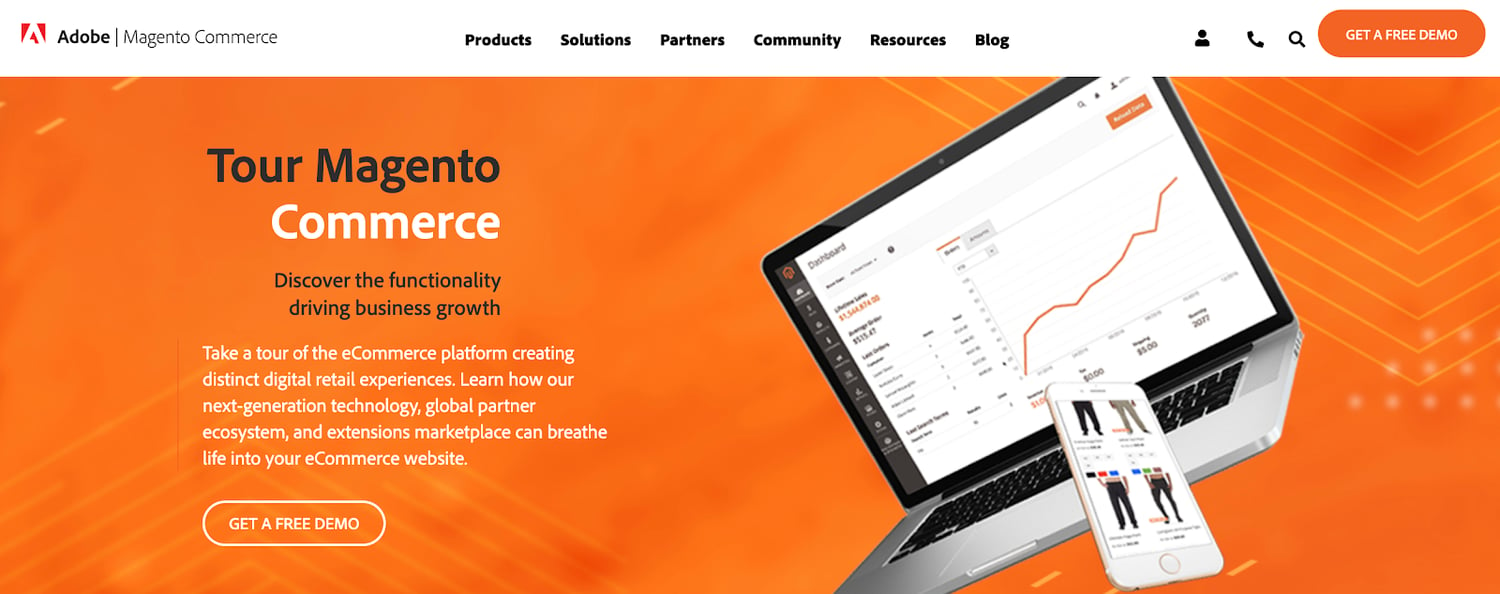
Magento stands out from other platforms with its efficiency, automation, and access to crucial data. You’ll benefit from inventory management, business intelligence, shipping solutions, and order management.
This ecommerce tool has specific features for customer segmentation and personalization.
Your store will automatically display products, promotions, content, and prices based on factors like customer location, order history, customer gender, LTV, and wish list items. You can even improve the shopping experience for unknown website visitors based on their shopping cart or products viewed.
Pricing: Contact the Magento sales team for a custom quote on a Magento Commerce license. You can request a free demo to try it out before you commit.
6. Squarespace
Squarespace is another well-known website builder. Unlike Wix, Squarespace has integrated ecommerce capabilities built-in to all of its business plans.
This ecommerce tool is popular for businesses and individuals in creative industries. The Squarespace designs are known for being both beautiful and modern. These award-winning templates are perfect for fashion designers, artists, musicians, and photographers.
If you want to showcase your work and sell it online, Squarespace is the place to do it.
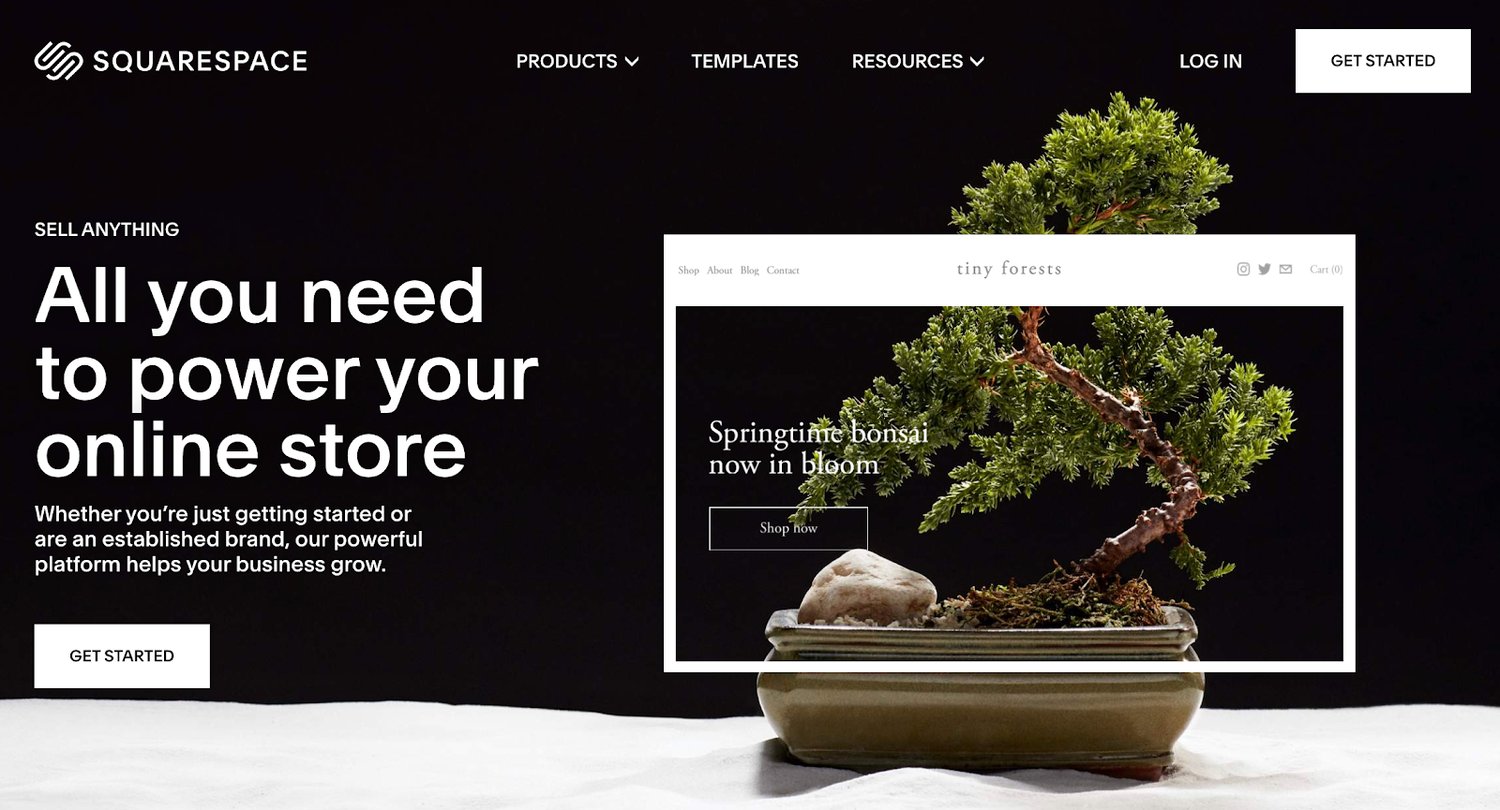
You can also Squarespace to sell subscriptions and digital content.
If you’re selling physical products, Squarespace offers automatic inventory management, shipping calculator tools, and a rich product display. Use this ecommerce tool to showcase videos of your products as well.
Squarespace integrates with other popular online selling tools such as PayPal, Stripe, USPS, FedEx, and Apple Pay. It also integrates with popular accounting solutions like Xero.
For those of you who want to create a portfolio website and monetize it with ecommerce capabilities, Squarespace is the best choice for you.
Pricing: Squarespace Personal costs $12 per month. But you can’t sell online with this option. The $18 business plan has a fully integrated ecommerce store with the ability to sell unlimited products, although it does have some limitations.
To take full advantage of Squarespace as an ecommerce tool, consider the Basic Commerce or Advanced Commerce plan. These start at $26 and $40 per month, respectively.
7. 3DCart
3DCart is one of the oldest ecommerce tools on our list. The platform was founded back in 1997. More than 25,000 merchants use this tool to power their ecommerce website.
To be clear, 3DCart is not for everyone. It’s ecommerce software that’s designed for advanced ecommerce stores. The platform doesn’t offer a drag-and-drop site builder like Wix. Instead, you’ll need to have some knowledge related to development and coding to fully customize your templates and themes.
Just install 3DCart into your existing website to turn it into an ecommerce shop. If you aren’t comfortable editing your site’s code, you’ll likely need to hire a developer to do this.
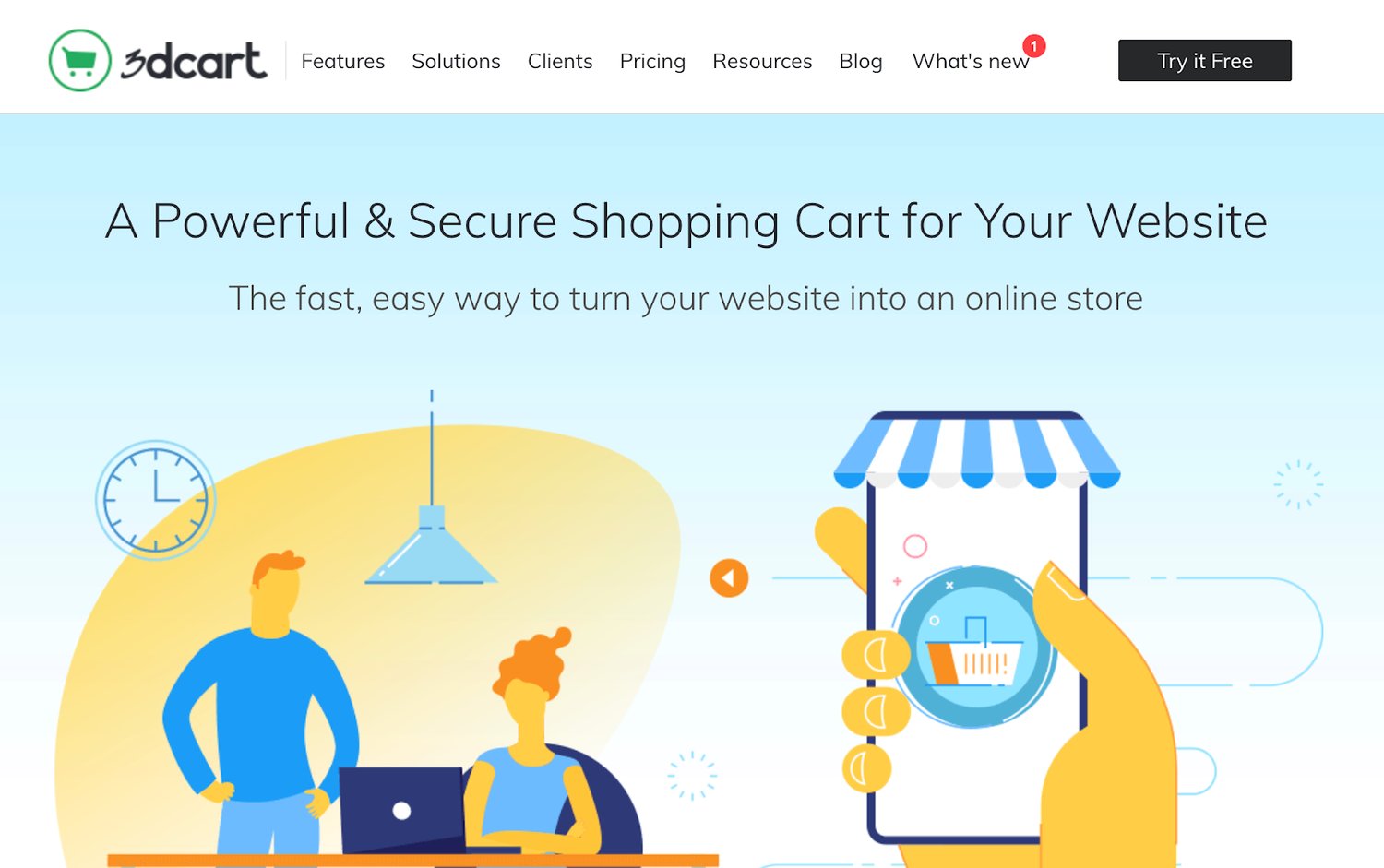
Once installed, you’ll have access to more than 200 built-in ecommerce features. 3DCart has 50 free themes and supports 100+ payment processors.
Integrate 3DCart with platforms like MailChimp, Stripe, Facebook, Amazon, PayPal, QuickBooks, and more.
For those of you who don’t want the restrictions associated with an all-in-one ecommerce website builder, 3DCart offers full customization. You’ll just need to handle the coding on your own.
Pricing: 3DCart has five different plans ranging from $19 per month to $229 per month. You can try the software for free with a 15-day trial. All plans are backed by a 30-day money-back guarantee.
8. Easy Digital Downloads
Just as its name implies, Easy Digital Downloads is an ecommerce tool designed for selling digital products. Similar to WooCommerce, it’s a plugin for WordPress websites.
More than 2.44 million users have downloaded EDD.
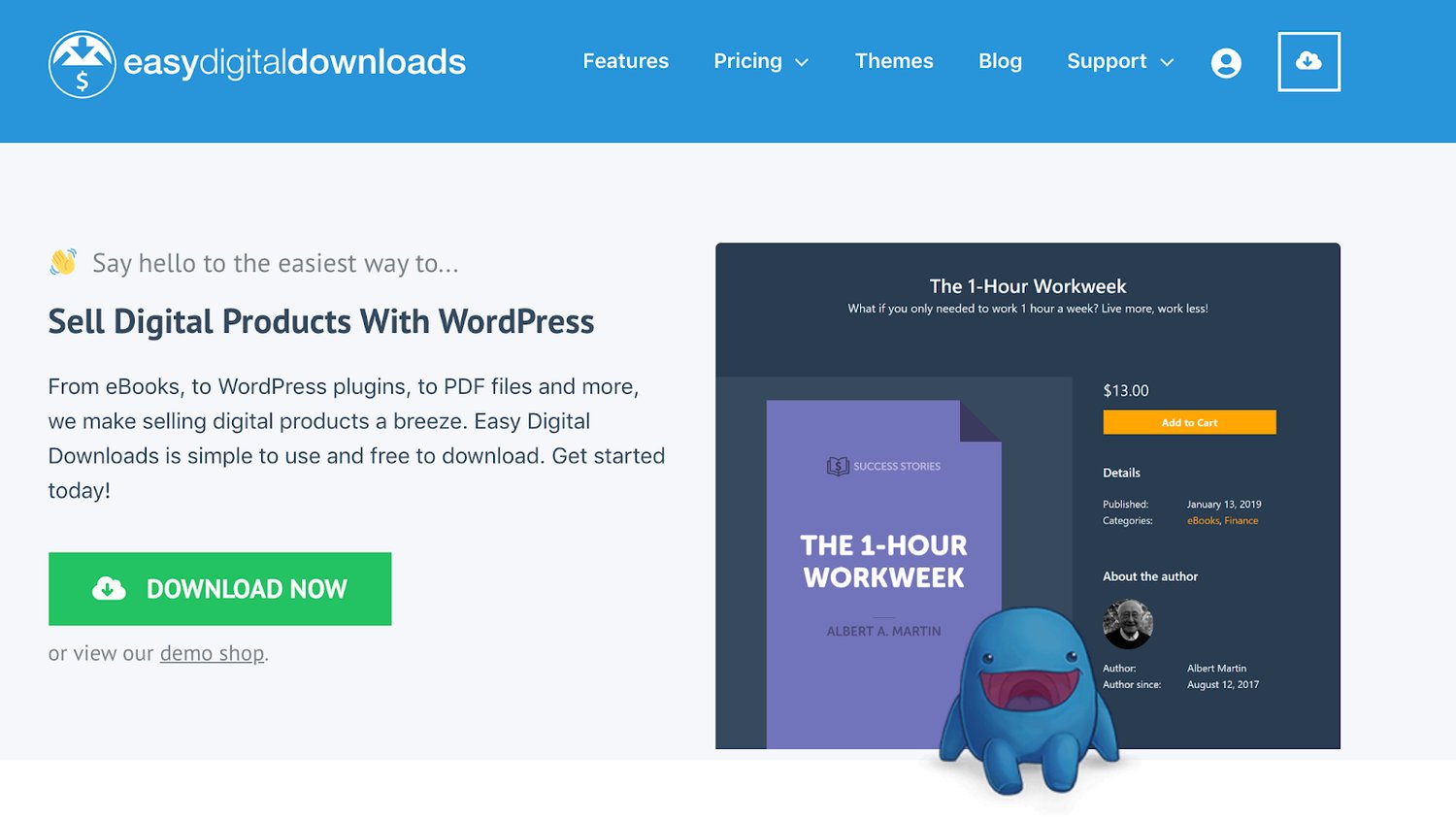
This ecommerce tool makes it easy for you to create discount codes, track download activity, and restrict file access. It comes with a fully integrated shopping cart that allows customers to purchase multiple downloads simultaneously.
There are no limitations on how many digital products you can sell with the Easy Digital Downloads plugin.
The tool integrates with other popular tools and extensions that you’re already using. Some examples include PayPal, Authorize.net, Stripe, Slack, Zapier, AWeber, Dropbox, and Amazon Web Services.
Pricing: There are four different plans for the EDD plugin license. All of them are billed on an annual basis until canceled. The Personal Pass is $99, Extended Pass is $199, Professional Pass is $299, and All Access Pass is $499.
9. Ecwid
Ecwid is a free commerce extension that’s compatible with WordPress and other popular CMS platforms. You can add the Ecwid tool to Weebly, Joomla, Tumblr, Squarespace, Wix, Blogger, and Adobe Muse.
You’ll also be able to sell online from marketplaces like Amazon and eBay or sell on social media via Facebook and Instagram.
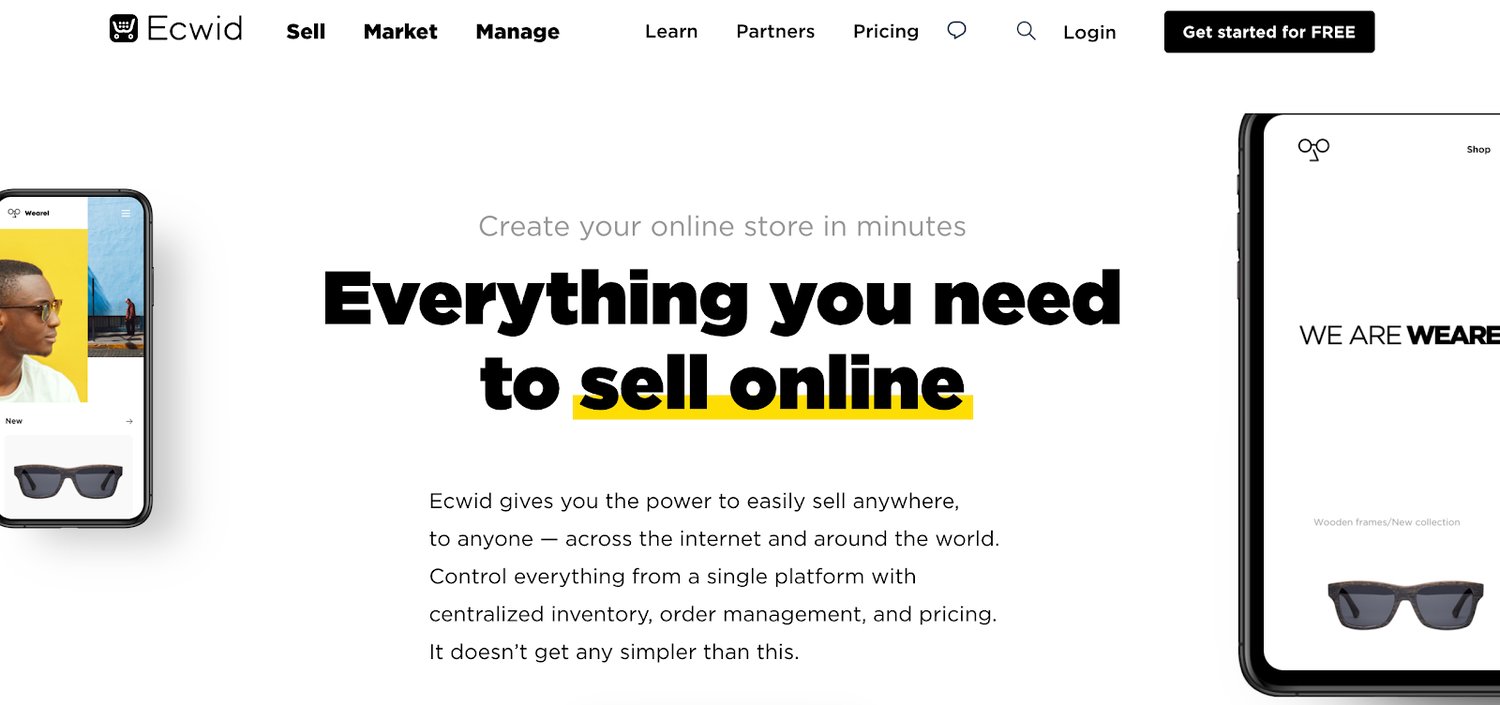
Unlike 3DCart, you can install Ecwid to your website without any development or coding experience. The Ecwid software can integrate with in-person selling at your brick and mortar retail stores as well.
If you’re currently using WordPress but don’t want to use WooCommerce as an ecommerce tool, Ecwid is a viable alternative.
Ecwid has a free forever plan, but it’s extremely limited. You’ll only be able to sell up to ten products and won’t have access to sales channels outside of your website.
Pricing: The entry-level Venture plan starts at $15 per month. Business and Unlimited plans start at $35 per month and $99 per month, respectively. You can save money on all of these if you commit to an annual contract.
10. OpenCart
Last but certainly not least on our list is OpenCart. Unlike some of the other tools listed above, this is not a website builder. OpenCart is a free and open-source platform that adds ecommerce functionality to existing websites.
Over 342,000 ecommerce websites across the world use OpenCart for selling online.
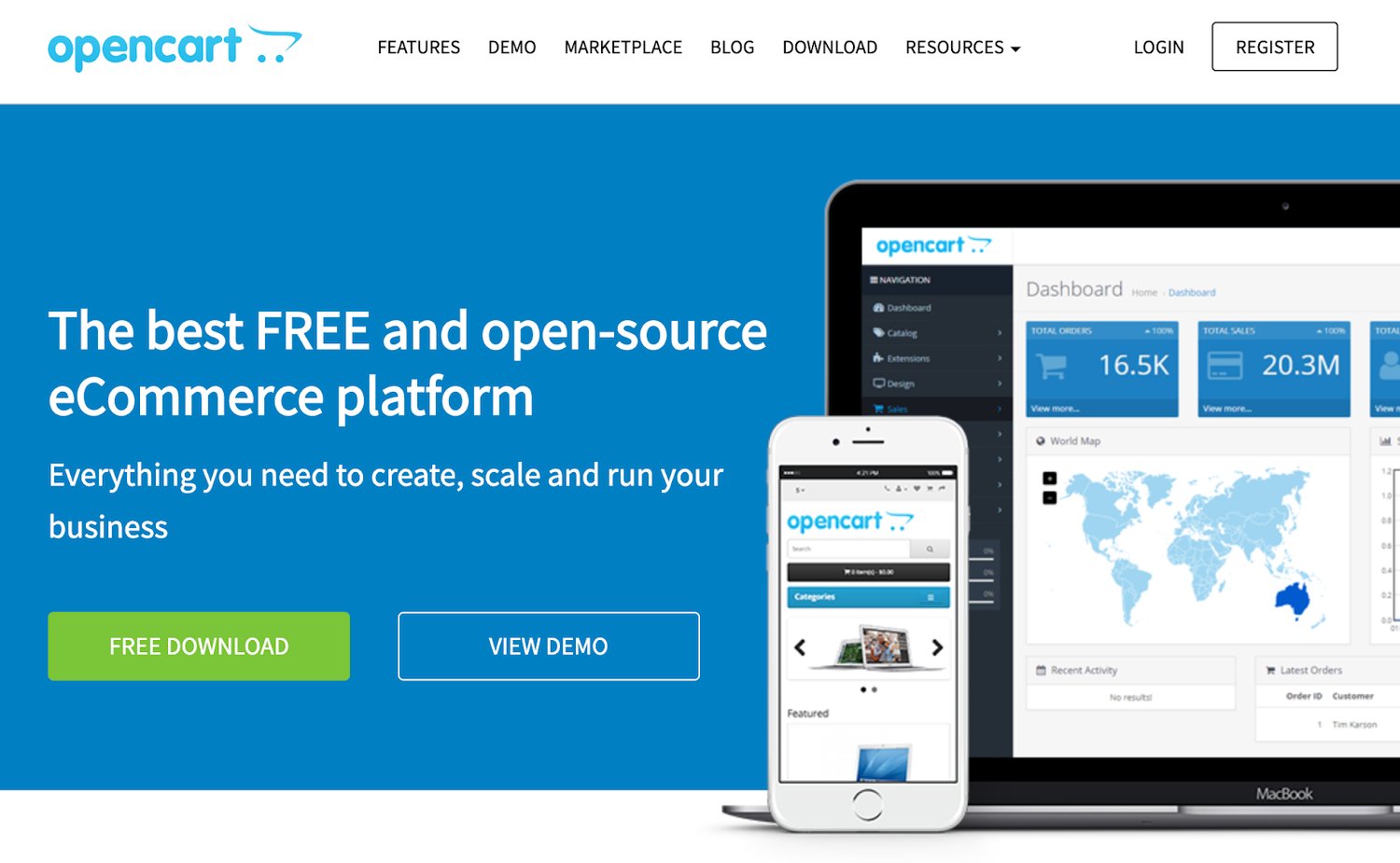
The most significant standout of this ecommerce tool is the OpenCart marketplace. You’ll have access to 13,000+ modules and themes. You can integrate OpenCart with an extensive list of payment gateways and shipping providers.
As an open-source platform, OpenCart has an outstanding community support forum with more than 550,000 posts from 110,000+ registered members.
For a one-time fee or ongoing monthly service, you can have access to OpenCart’s dedicated support staff.
Pricing: As I mentioned earlier, OpenCart is free to download and install. But extensions and dedicated support will cost extra.
What’s the best ecommerce tool to use in 2020? It depends on your unique situation.
An ecommerce startup won’t have the same needs as a small business retailer that wants to expand online. There are ecommerce tools that are better for selling wholesale B2B products and other tools made for digital downloads.
Do you want to create a new website from scratch? Or are you adding ecommerce functionality to your existing site?
All of these scenarios will impact how you choose an ecommerce solution.
Since I included something for everyone in this guide, I’m confident that you can find what you’re looking for in one of the ten options listed above.
Editor’s note: This post was originally published in April 2020 and has been updated for comprehensiveness.

The 4 Snackable Content Formats Every Marketer Should Understand
Let’s imagine a world where I just started my own lifestyle brand called Lightning on Fire Inc.
You’re probably thinking, “Wow, that name rules! But what do you sell?”
We sell a lifestyle.
Now, you’re probably wondering, “Wow, that sounds like it rules! But what does that mean?”
Well … we don’t actually know yet. What we do know is that we want to create some content to get our marketing efforts off the ground. But our staff isn’t great with long-form articles, and Lightning on Fire’s target audience is looking for content they can consume quickly and share consistently.
In this case, we would try to produce what’s known as snackable content — which is exactly what it sounds like. It’s essentially the content equivalent of chips or pizza bagels as opposed to legitimate meals.
Here, we’ll get some more perspective on what the term “snackable content” entails and learn about four of the most basic yet effective formats for creating it.
It’s easy to assume that creating snackable content is inherently easier than long-form content, and in some ways, it definitely is. But snackable content creation comes with a host of its own challenges and strategies. It’s a different game with different rules, and its potential payoffs can be more immediate and wider-reaching than long-form content.
The object of creating snackable content is to offer immediate entertainment or enrichment, prompt social sharing, and attract new leads as a result. And certain content mediums facilitate that process particularly well.
Here are four of the easiest, most straightforward snackable content formats that can lead to meaningful, lucrative outcomes if done right.
1. Quote Graphics
A compelling quote can capture attention in itself, but supporting one with captivating visuals adds a new dimension to the interest it can generate. Think of your quote as the entree to a Michelin star meal — a cut of filet mignon (or a lentil stuffed eggplant if you’re vegetarian).
It’s the centerpiece of the dish, and it’s delicious in its own right, but some side dishes and “eye-eats-first” presentation would take it to another level. That’s the fundamental principle behind quote graphics. The engaging backdrop, distinctive font, and other engrossing visual elements fill up the rest of the plate and turn it from a tasty a la carte entree to a perfectly snackable, five-star meal.
If you can find or create quote-oriented content relevant to your business, you can command and retain the attention of potential customers. Here’s an example of a snackable quote graphic from my hypothetical lifestyle brand.

Now, this graphic is clearly in jest, and no one actually calls me “Money Machine” — no matter how many times I ask them to — but it’s still an example of an original quote graphic, specific to the nature of a brand. However, that doesn’t necessarily have to be the case.
If there are quotes you find particularly cool or inspirational that are in keeping with your messaging, use them and provide attribution. Here’s an example of a graphic centered around a quote from Muhammad Ali.

If a quote like that speaks to you or could complement your marketing efforts, use it, support it with interesting images, and cite your sources. As I said, quotes are inherently compelling, but visual support makes them engagingly snackable.
2. Memes
Here, we have my favorite format — at least the one I like making the most. Memes perfectly encapsulate snackable content as a concept. They’re immediate, specifically-tailored to be entertaining, and can be easily scrolled through and shared. Here’s a meme I made to support Lightning on Fire’s content marketing efforts:

Creating memes is a delicate art — especially for something so blunt and seemingly straightforward. If you’re using memes to support your marketing efforts, you need to be more careful than you might assume. Corporations have been known to co-opt different meme formats and run them into the ground. British TV provider Freeview even made a meme about brands ruining memes:

That being said, if you can consistently make entertaining memes tastefully — without upsetting or irritating the members of your audience that are really into memes — you’ll wind up with a wealth of delightfully snackable content.
3.Infographics
The infographic, as a format, is one of the best mediums for relaying informative, meaningful content without sacrificing snackability. It’s fun, engaging, and practical — with a fairly dynamic range of applications. For instance, they can be used as structured “how-to” guides for different processes, like this example from HubSpot.
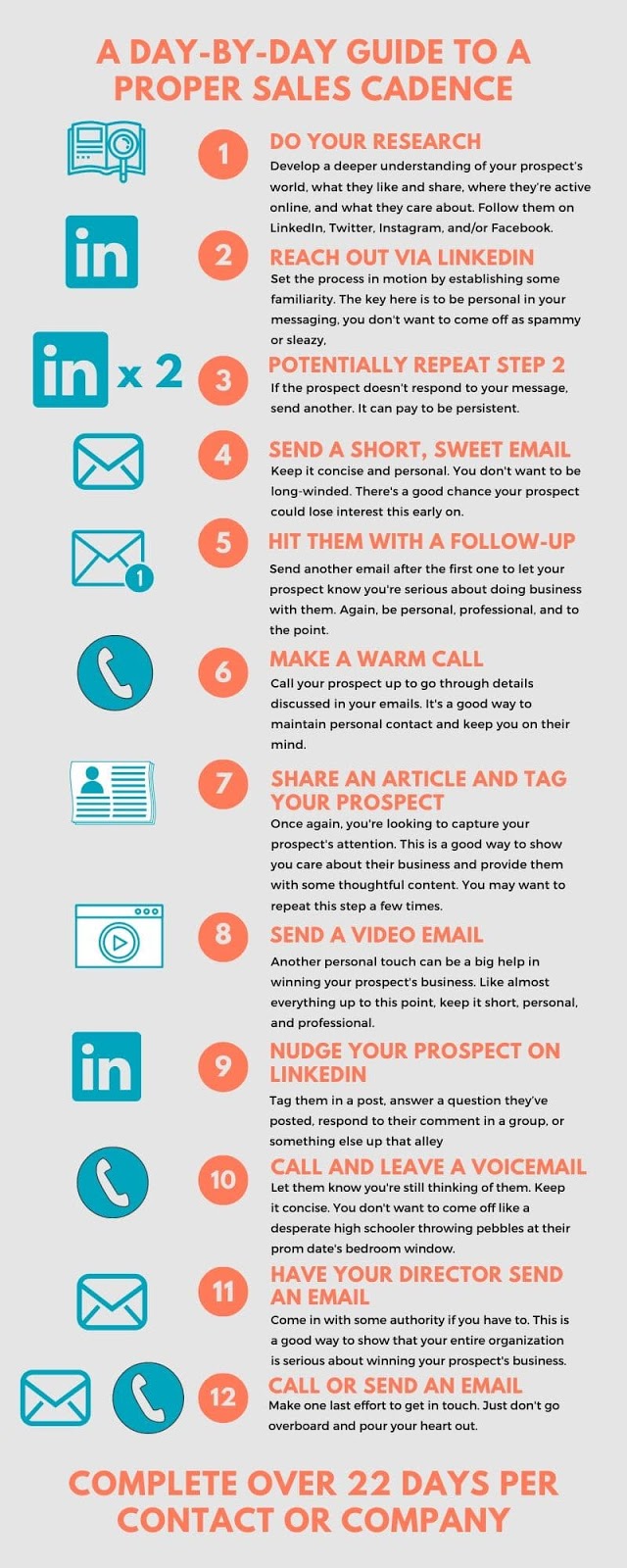
But infographics don’t have to be structured or sequential. They can also be used to convey general, interesting facts or statistics, like this example from the good people over here at Lightning on Fire, Inc.

Infographics are more accessible and dynamic than conventional written text — and those qualities are the essence of snackable content. They’re meant to be straightforward and easy to gloss over while still being enriching. Though there will always be information that’s too serious or technical to summarize and set against pretty pictures, infographics might be the best way to project valuable information in a snackable package.
4. Gifs
Gifs are another type of compulsively shareable form of snackable content with tremendous potential to catch on and go viral. As a format, gifs are extremely versatile. They can be used to show short-form videos silently, show captivating images on loop, and capture the essence of specific emotions and reactions — among several other applications.
Some gifs are almost purely for the sake of entertainment. This one is a favorite of mine:

But that’s not their only function. They can be an incredibly useful marketing tool as well. Here’s a promotional gif that supported the release of Terminator: Dark Fate:

It’s an awesome, striking image and a perfect example of a company producing a high-quality, snackable gif. It’s visually compelling and could be worth sharing just for that fact, alone. The format also works well for quick how-to videos or snippets of product demonstrations.
Original gifs are similar to original memes in that they have tons of sharing potential, but just as much potential to be dead on arrival. If you intend to create and share gifs over social media or other channels, put effort, thought, and fine touch into them. And always have multiple people look them over.
A sound web presence can be mission-critical to the success of any company’s marketing strategy. If you can supplement and populate yours with solid snackable content, you’re going to be in an excellent position to expand the reach and efficacy of your online marketing efforts. You want people to share your content, so give them something easy to share.

4 Ways Small Businesses Can Advertise on Amazon [IG]
In 2020, advertising on Amazon is undoubtedly one of the most effective options for getting your products or services in front of a large audience.
In fact, 56% of consumers visit Amazon before any other site.
I’m all too familiar with the power of Amazon. It’s now the first site I visit to shop for almost anything, ranging from vacuum cleaners to Mother’s Day gifts to workout gear. Best of all, it’s a great option for discovering new brands.
Amazon offers multiple options for small businesses looking to advertise tangible products on the platform — plus, opportunities to advertise non-tangible services, as well. But oftentimes, the e-commerce giant can feel overwhelming or out-of-reach for small businesses.
Fortunately, the folks at Business Financing Co. put together the following infographic, which explores four options for small businesses looking to advertise products on Amazon, plus alternative options for small businesses with non-tangible services.
Keep reading, and then decide for yourself which option is best-suited for your own marketing strategy. Additionally, take a look at The Ultimate Guide to Amazon Advertising if you’re interested in creating a comprehensive Amazon advertising strategy.


How to Transition from In-Office to Remote Work
Going into the office every day, I was comfortable. I was in a smooth routine.
I would show up every morning at 8:30 a.m., have a smoothie, eat breakfast, and make my way to my desk. Happily, I greeted coworkers as they filed into our section. At lunchtime, I would enjoy a meal at my desk or in the lobby and work from a different area in the office until it was time to leave.
Then, suddenly, I had to begin working remotely full-time.
I was comfortable with the idea. I’d worked from home a couple of times before, and I’m an introvert. In many ways, this sounded like a dream come true: I could experience a full work day from the comfort of my home every day.
Let’s talk about some things to remember when you’re transitioning from working in the office to working remotely.
1. Gather all of the materials you need to complete your work.
When you begin to transition to remote work, your work setup will change. For instance, you might not have double monitors. You may or may not have a desk, and it might not rise like your desk at the office.
In order to make the transition more smooth, think about the hardware and software you absolutely will need in order to successfully complete your job duties. Check with your company to see if they have support for necessary hardware.
If you’re used to using an external mouse, maybe you can learn shortcuts using the trackpad on your laptop.
Part of the transition is finding solutions that are applicable to your current situation. Remember, you can always use your colleagues as a resource — ask them about any hacks they may have discovered during their transition that you could leverage for inspiration.
2. Reconsider the meetings on your calendar.
Before going remote, there were “unofficial” meetings I would have with colleagues sporadically. For example, sometimes an unplanned coffee chat would happen if I spotted a coworker getting their morning latte nearby. Small, random meetings like these were the perfect way to catch up with associates outside of my direct team.
Going remote, there’s less of a chance to bump into your office buddies. Think about adding these coffee chats to your calendar once every couple of weeks. That way, you can still catch up over morning lattes.
Additionally, maybe the in-person standup meetings you have with your team eery morning won’t be as necessary as the nature of your job changes. Consider the routinized meetings you’ll have on your schedule and if you can rework or reduce them.
3. Let your team know about changes to your schedule.
Remote schedules can be unpredictable. Sometimes, you’ll have workdays that go exactly according to plan. But other times, life intervenes, and you might have to modify your schedule due to other things that are shifting in your life.
If this happens, communicate with your team about how your schedule may change. Maybe you and your roommates switch between who gets to use the living room to take meetings during the day, or you have to be away from your desk for a while to care for your family.
You may find that some situations will have to adapt to the way you work. Making the line of communication clear between you and your team would clear up misunderstandings down the line.
4. Set boundaries between your personal and professional life.
Something I’ve found with remote work is that it’s so easy to work outside of my normal hours. I tend to get in “The zone” when I’m working and this leads to losing track of time. Some days, I’ll look up and it’s 6:30 p.m. — way past how long I aim to be online.
To combat this, I set boundaries that make sense for me in a remote setting. I set alarms that let me know when I should sign off.
I make sure the last hour of my day is devoted to tasks I know don’t have to get done until later. So, if I get in my groove, when that alarm goes off at 5:30 I can feel comfortable dropping everything and signing off for the day.
5. Know that the full transition will take trial and error.
Sometimes I have good days and sometimes I have great weeks. But nearly every transition comes with its hardships. It’s not uncommon to have rocky days or weeks in tandem with the good. When this happens, remember to give yourself a mental break.
If you’re used to doing things a certain way for years, completely changing from where you do that thing is going to take trial and error. You might have to change elements of your workday that you’d never thought would be an issue.
When that’s the case, take and accept these changes. Bad days happen, but what’s important is acknowledging it and taking care of yourself so you can show up the next day. Additionally, this is another time to lean on your colleagues for advice.
One thing my colleague told me when I first transitioned into fully remote work was that “You can’t expect yourself to work at 100% when your entire environment is different.” Know that productivity might be hard to find at first, but as you become more comfortable, so will getting back into a groove.
6. Acknowledge cabin fever, and brainstorm solutions.
As an introvert who loves staying at home, I thought I was in the clear. I thought that I wouldn’t have to think of ways to get up and stretch because I love sitting in my bedroom and writing.I was wrong.
Stretching, exercising, or moving at all is necessary to your health and productivity. As you’re making this change, brainstorm ways you might get stir crazy and proactively brainstorm solutions. This will help you identify the stir craziness when it arises and take the necessary steps to remedy the feeling.
As for me, I had to learn as I went through the motions. Yoga, hourly stretch breaks, quick walks, and cooking an indulgent lunch are all methods I leverage to get up, move, take my eyes away from a screen, and replenish myself before returning to my desk.
The transition to remote work has a focus on productivity, but it also involves adapting to a huge change. Set yourself up for success in every way you can. That way, when curveballs arise, you can handle them.
Knowing you’re as prepared as you can be is one of the biggest assets you have when you’re transitioning to remote work. Also know that you have people and resources in your corner. So, even if you may be working alone, you’re never truly by yourself.

The Ultimate Guide to Podcast Audio, According to HubSpot’s Podcast Experts
In 2019, Google began rolling out what is arguably one of the most significant changes to its search engine since the introduction of dedicated video carousels in June 2018, or the introduction of featured snippets in October 2017: Google has begun to ad podcasts to search results.
Every minor tweak to the search algorithm can have marketers scrambling to understand how they can take advantage of this shift — or, for the more pessimistic, how to avoid getting pushed to the dreaded page two of search results.
Adding the podcast to search results is going to affect content creators, SEO specialists, marketers, and perhaps most importantly, it will also likely have a major impact on podcasts.
In this post, we’ll explore how to take advantage of the advent of audio SEO. Then we’ll dive into how you can create high-quality audio from home, if you’re creating a podcast remotely.
But before we dive into how marketers can create SEO-friendly audio content, let’s look at the primary problem Google is solving by indexing all podcast content.
The History of Podcasts Discoverability Problem
If you do any reading on the podcast industry, you will find endless articles lamenting “the discoverability problem” of podcasts.
When people talk about the discoverability problem they’re not referring to being able to find a podcast they’ve already heard of — instead, they’re talking about how difficult it is to discover new, unheard-of shows.
For the majority of podcasting, there has been one primary mechanism for discovering new shows: the iTunes Charts. The vast majority of podcast downloads occurs on iTunes.
Despite Android commanding ~75% of smartphone ownership, iTunes commands the vast majority of podcast downloads.
As Google’s PM for Podcast Zach Reneau-Wedeen notes: “It’s actually so egregious that on a device-by-device basis, the average iPhone listens to over ten times more podcasting than the average Android.”
Due to Apple’s outsized command of podcast downloads, their charts have played a critical role in helping new shows gain traction.
As a quick overview, the iTunes podcast section has Top 100 charts based on regions. There are charts for the top shows, charts for the top episodes, and then a whole collection of categories and sub-category charts such as Top 100 Business Shows. These charts are algorithmically generated.
iTunes also has a hand-curated list such as “New & Noteworthy” where they can promote interesting new shows that have yet to gain a massive following. Beyond these charts, many podcasts are discovered through word-of-mouth or social media.
The problem with Apple’s system for discovering new podcasts is the shows that tend to get traction on the charts are the ones that already have built-in audiences. This is why you tend to see New & Noteworthy being filled with shows from reputable publishers.
The one area that has never been particularly effective for finding a new podcast has been search. In 2018, Google set out to change that.
Google’s Quest to Fix Podcast Discoverability
With over 700,000 podcasts out there, millions of episodes and even more hours of content, podcast are a set of data that Google can help people sift through. However, Google is not only trying to make it easier to find podcasts — they’re also trying to rapidly grow the number of people listening to podcasts.
As Google Podcasts
Product Manager Zack Reneau-Wedeen notes, “Our team’s mission is to help double the amount of podcast listening in the world over the next couple years.”
Google’s approach to solving discoverability is two-fold: 1) make podcast discoverable via search, and 2) enable new content creators who have traditionally been excluded from the podcast world to develop new shows and attract new audiences.
Here’s what Google has done to help fix podcast discoverability:
- June 2018: Google rolls out new Google Podcast App
- October 2018: Google partners with PRX creator program to attract new creators and audiences to podcasts.
- March 2019: Google begins indexing podcasts. Google collects information including the name of the podcasts, episode titles and descriptions, and transcriptions of new episodes.
- May 2019: Podcast begins to surface in podcast results
Looking at Google’s new smartphone, the Pixel 4’s recorder app, you can see how incredibly good big G has gotten at transcribing voices. It makes sense, considering they have tons of data from YouTube videos, Google Home products, and all Android phones.
There is no company better positioned to digest massive amounts of audio data than Google.
So now that they have all of this data on podcasts, let’s explore how they’ve begun to integrate it into search results.
Google Adds Podcast to Search Results
As of writing this, the majority of search results that involve podcasts require the word ‘podcast’ to be in the search query. We are seeing podcast appear in two ways.
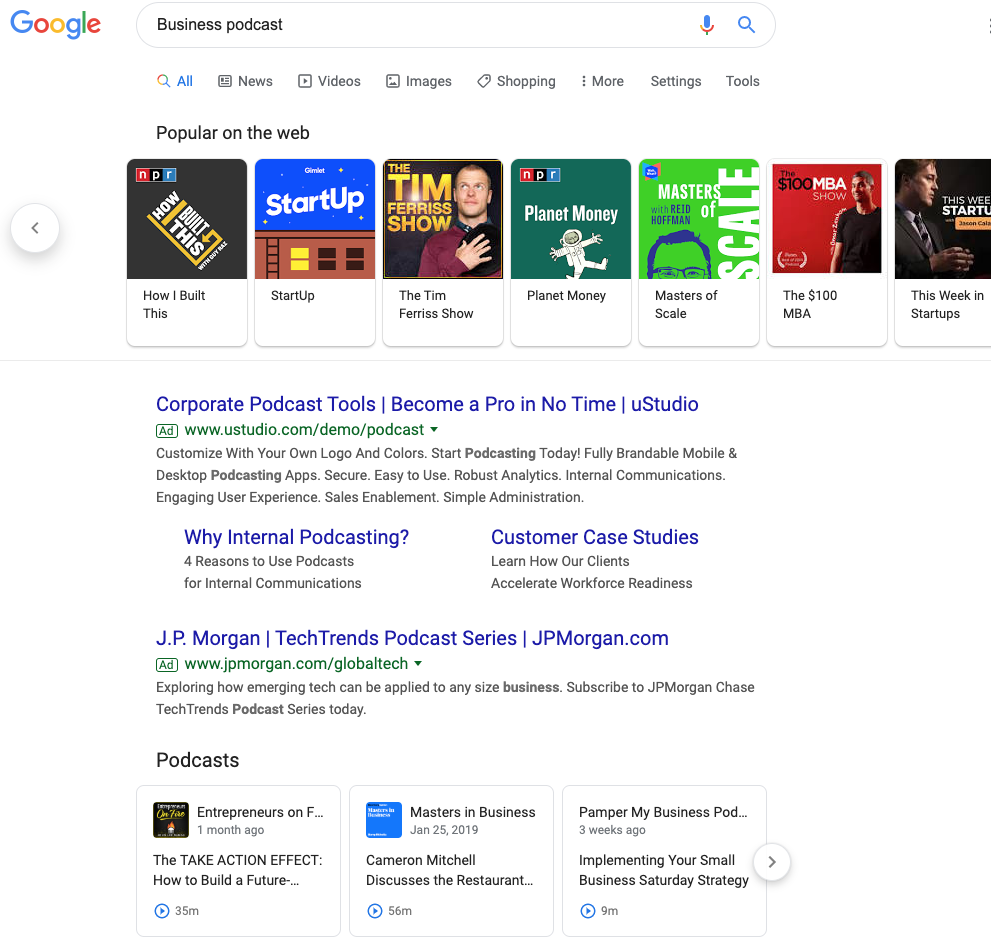
Broad Category Search aka Popular on the Web: When you search a broad topic like “business podcast”, shows will show up in a carousel at the top. Clicking on these results will simply open a new search for the name of the show.
Searching for an Answer: When you’re looking for a more specific answer and include the word “podcast” you will find a Podcast Carousel. The carousel appears to give weight to the title of the show, then the episode title, show description, and finally the actual content of the episode. In the example below, you can see a mix of shows that either including something about home building in the show, or in the episode title.
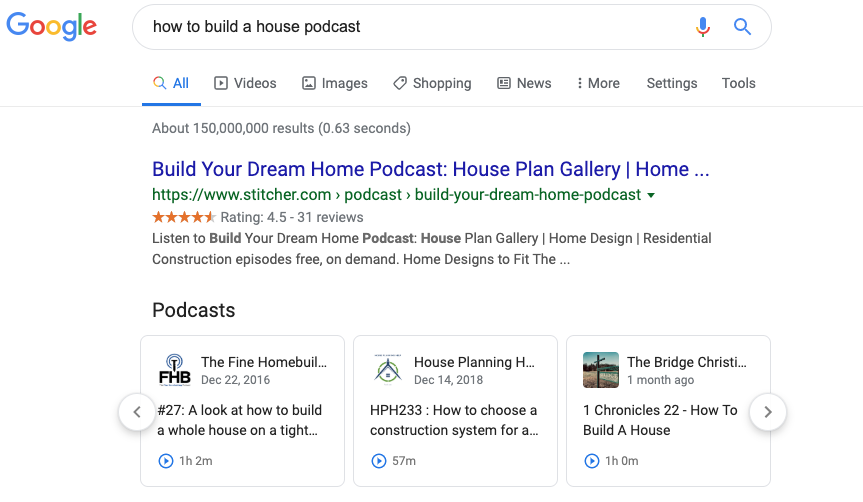
The “Popular from the Web” and podcast carousels are the two mechanisms for how Google is surfacing podcasts into search results. In terms of real estate, both these carousels occupy top positions in the SERPs.
HubSpot’s SEO strategist Aja Frost explains what the addition of podcasts will mean: “This will definitely have an impact on SEO.”
Frost says, “Search is a zero-sum game — there’s a set amount of space on the SERP, so every new search feature, like a podcast carousel, means there’s less space for the traditional blue links.”
Every marketer who cares about their position on Google should be interested in how to get their content into these coveted carousels.
What types of shows will do well?
In this new world of audio SEO who will be the winners? Here are some characteristics of shows we feel will do well:
- Lots of Episodes: The more episodes your show has, the more likely it will be to surface for a variety of search results.
- Short Episodes: Generally a show with shorter episodes is likely to have more of them, which increases ranking opportunities. Now that you can play an episode from the search results, it’s likely we will see shorter episodes become more popular when someone is looking to answer a question.
- Quality Audio: Your show will be less likely to be successfully transcribed if it does not have quality audio. This could impact your ability to appear in search queries.
- Titles Aligned to Queries: If the show title, episode title, or description aligns to a search term with a high search volume, those shows are likely to appear more often.
- Big-name guests: Elon Musk podcast is going to get a lot more searches than Sam Balter podcasts. Having celebrity guests will help you rank for more popular search terms.
Looking forward in time, we also expect shows with segments to do particularly well. We’re in the early stages of audio SEO, but we know that Google has already transcribed the content of the episode. Shows that take one topic and then have particular segments that align to the overarching search term will likely perform well.
For example, let’s say our episode is about digital advertising. We might have a segment for each show called “Overview”, where the host uses a search-friendly phrase like “Now we’re going to provide an overview of digital advertising on LinkedIn.”
Then, another episode might have the same “Overview” segment, and the host might say something like “Now, we’re going to provide an overview of digital advertising on Facebook.”
We believe show segments will help surface podcasts to page one of Google.
Optimizing HubSpot’s Podcast for SEO
We have officially relaunched our educational podcast Skill Up. The first season of Skill Up focused on SEO and had in-depth conversations with our SEO expert, Matt Barby. There were eight episodes averaging over 40 minutes long.
For the new run of Skill Up, we intend to take a different approach. We’re creating seasons based on specific topics which we identify as relevant to our core business and have high search volume. Episodes will be much shorter, averaging ~10 minutes per episode.
Additionally, individual episodes will include segments where the host mentions key phrases.
Finally, we are moving away from an interview format — instead, we want our Skill Up host to act as more of a narrator to the content.
By focusing the content of each season around a specific topic, we’re doing right by the listener by providing interesting bite-sized content that is easy to consume.
We’re also doing right by the search engines by making titles simple, descriptions keyword-rich, and integrating segments within the episode that makes it easier for search engines to identify parts of the episode.
A Word of Caution
Podcasts have evolved alongside but independent of search, social media, YouTube, and blogging. The success of podcasting today is built upon the backs of hard-working creators that have strived to make amazing shows that develop loyal followings.
Podcasts have not become successful through growth hacking, newsjacking, or search engine optimization. Keyword stuffing a low-quality show that does not inspire listeners to subscribe is a recipe for failure. No matter what changes Google makes to their algorithm, better content will ultimately rise to the top.
Above all else, remember you make shows for the listener, not Google’s web-crawler.
Next, let’s dive into how you might create a high-quality podcast from your living room.
How to Create a Podcast From Home
2020 hasn’t exactly gone as planned, which likely means your company has pivoted to remote work for the foreseeable future.
If your company has a podcast, your team is likely recording podcast episodes from home. For most producers, that means calling guests via Zoom to interview them.
But that’s probably not the best way to do it.
That’s not to say a Zoom recording won’t work out well in a pinch. But to put it into baking terms, a Zoom recording is the panko crust. Great for texture, not worth a meal.
While audiences are more forgiving of audio quality during these times, they’re even more appreciative of any production effort.
Traditionally, high-quality recordings were done through tape syncs — booking local audio producers to record your guests in-person. Once you had your host and guest’s respective tracks, you’d sync the two together to make it sound like they were in the same room all along. Magic.
In this time of social distancing, however, it’s not safe to tape sync. What you need is to have your guests self-sync.
Here, let’s dive into the best practices you can use to create high-quality audio from home.
How to Self-Sync Audio
Fortunately, it’s easy enough to record high-quality audio within your own home.
Whether your team is working from home temporarily or you’re an entrepreneur aiming to create your own podcast from home permanently, you can follow these instructions to ensure your podcast is top-notch.
Note: To ensure you have backup audio, you’ll want to call your guest on Zoom and record through Zoom’s software.
To self-sync, your guest will need three basics: a laptop, headphones, and a cell phone. They can always swap the laptop for an iPad or a second phone. With those in hand, here’s the walkthrough list I send to every guest ahead of appearing on our The Growth Show podcast:
1. Use your laptop for the Zoom call
2. Plug in headphones to your laptop
3. Take one headphone out of your ear, leaving the other in
4. Turn down the volume of your headphones/laptop
5. Put your phone on Airplane Mode — or cell data turned off
6. Open the Voice Memo app on your phone (or Google Keep if you have Android)
7. Hit record in voice memo app & turn off screen
8. Put the phone to your non-headphone ear — like talking on a normal phone call
After the interview, you’ll need your guest to email you the audio file they recorded on their phone. This will act as your clean copy, and your Zoom will work as the backup. All that’s left is to sync the phone recording with your host’s track. Go ahead and dub yourself a wizard, because you just made magic.
One More Option
Another option is to record your guests through Zencastr — a cloud-based software that records guests locally through their computer’s built-in microphone. All it takes is a simple share of a link and you’re all set up.
Your guests will still need an external microphone to get the highest-quality. Otherwise, welcome to the wide world of room noise. There’s only so much you can do to fix it in post.
Ultimately, no set-up is perfect. And sound quality aside, the last thing you want is to re-record an entire interview. That’s the stuff of nightmares.
What’s most important is that you do your best to record a clean track, making sure to always have a backup in place. That way, when chaos inevitably reigns, there’s always a second option.
To learn more about successful podcast creation, check out The Anatomy of a Perfect Podcast Episode, According to HubSpot’s Podcast Expert.

The 13 Best Email Template Builders for Any Budget
Email marketing is an undeniably powerful strategy for lead acquisition and customer retention — in fact, 59% of marketers say email is their biggest source of ROI, and 93% use email as a major channel for content distribution.
Of course, creating an email marketing campaign isn’t easy, and it might require you to build a template using HTML so you’re not designing and altering every new email from scratch.
Thankfully, there are dozens of email template builders available, all of which can help you intuitively and quickly create new email templates for your upcoming campaigns.
Then again, the fact that there are dozens of tools available can pose a challenge — how are you supposed to know which template builder will best suit your needs?
Fortunately, you’re in luck. We’ve done the homework for you, compiling a list of our 13 favorite email template builders, complete with pricing, screenshots, and a general overview of each app’s unique features. Keep reading to choose the best email template builder for your company.
But first — why do you need an email template builder, anyway?
Why You Need an Email Template Builder
Email marketing remains one of the highest-ROI marketing strategies, in part because of how easy and inexpensive it is to create a campaign, but if you’re designing and sending emails on a frequent basis, you’ll need additional support to work efficiently—and maximize your results.
An email template builder grants you several advantages:
- Better design features. Without a template builder, you may struggle to arrange your content in blocks as you want, or add videos to your email.
- Initial time savings. Most email template builders rely on intuitive mechanics, like drag-and-drop editors, so you can design your emails faster.
- Long-term time savings. Creating a library of email templates can save you a ton of time long-term, allowing you to quickly choose and lightly edit past templates for new emails.
- Replicability. Did you see impressive results with your most recent campaign? With an email template builder, you can easily replicate it with some minor tweaks in the future.
- Analytics. Most email template builders also feature built-in analytics, which you can use to study your past email marketing efforts and make improvements to your approach.
Additionally, depending on the email template builder you’re using, you may have access to even more features. Let’s dive into some of the best builders, next.
The Best Email Template Builders
1. HubSpot
HubSpot offers a comprehensive, start-to-finish solution for all your marketing needs. You can create a sleek, on-brand email campaign using HubSpot’s drag-and-drop editor, and customize the template to match your brand and align with your goals.
Additionally, you can customize each email depending on your recipient’s lifecycle stage, list membership, or any information in their contact records to ensure each email is designed for optimal conversions. Best of all, the email tool provides top-notch analytics and A/B testing tools so you can continue to refine your marketing strategy over time.
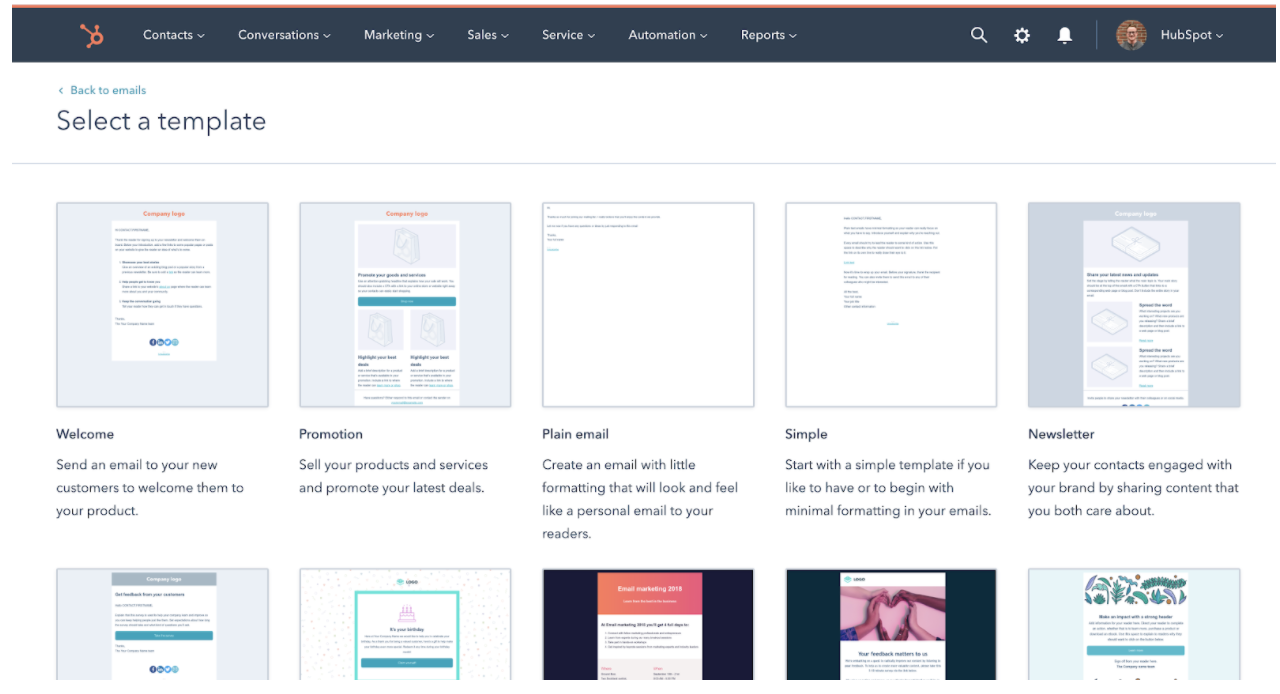
Unique Features
- Analytics to provide deep insights into your email success rates, including open-rate, most popular links clicked in an email, who engages with each email, when and on which device, and what emails perform best.
- Tailor each email to individual subscribers based on lifecycle stage, list membership, or any other contact information to serve the best calls-to-action to segmented groups.
- Ability to run A/B tests to improve open-rates and clickthroughs.
- More than 100 email templates available by default.
- Custom landing page creation tools.
- Advanced social sharing options.
- Integrations with other marketing tools (more than 300 third-party apps).
- 24/7 support from customer service reps.
Pricing
You can get started with HubSpot’s email tool for free. Alternatively, if you’re already a HubSpot customer (professional or enterprise), the email tool is already included.
2. MailChimp
MailChimp is one of the top names in email marketing, in part because of its accessibility. It’s super easy to learn and build your first few email templates, and you can get started right now with a free plan. As you scale your business, you’ll find additional options, features, and tools for your needs.

Unique Features
- More than 100 email templates available by default.
- Custom landing page creation tools.
- Advanced social sharing options.
- Integrations with other marketing tools (more than 300 third-party apps).
- 24/7 support from customer service reps.
Pricing
MailChimp offers a free plan that provides basic templates, marketing CRM, surveys, and even website creation. At $9.99 per month, you’ll get additional support, custom branding, A/B testing, and all email templates.
To get access to custom templates, retargeting ads, and better audience insights, you’ll need the Standard plan at $14.99 per month. Advanced plans, including a Premium tier at $299.00 per month, are also available, and offer features like advanced segmentation, multivariate testing, and more.
3. BEE Free
BEE Free is a free online email editor that has been used by more than a million people. In just a few clicks, you can get started designing your first email template — or use one of the 150 templates currently available by default. It also offers free design ideas on its own blog.
Unique Features
- 150 predesigned templates (and additional paid templates).
- Full responsiveness for mobile friendly designs.
- Integration with many SaaS apps.
- Options to pick up where you left off.
Pricing
BEE Free, as you might have guessed, is free. You can drag-and-drop to create emails without even needing to sign up. However, you may eventually want to upgrade to one of three BEE Pro packages, which are targeted to freelancers, marketing teams, and agencies. Pro plans start at $15 per month.
4. Mosaico
Mosaico.io is an open source email template builder, which is something of a rarity. You won’t find any predesigned templates, as you would with other email template builders, but you will be able to alter the tool however you see fit.
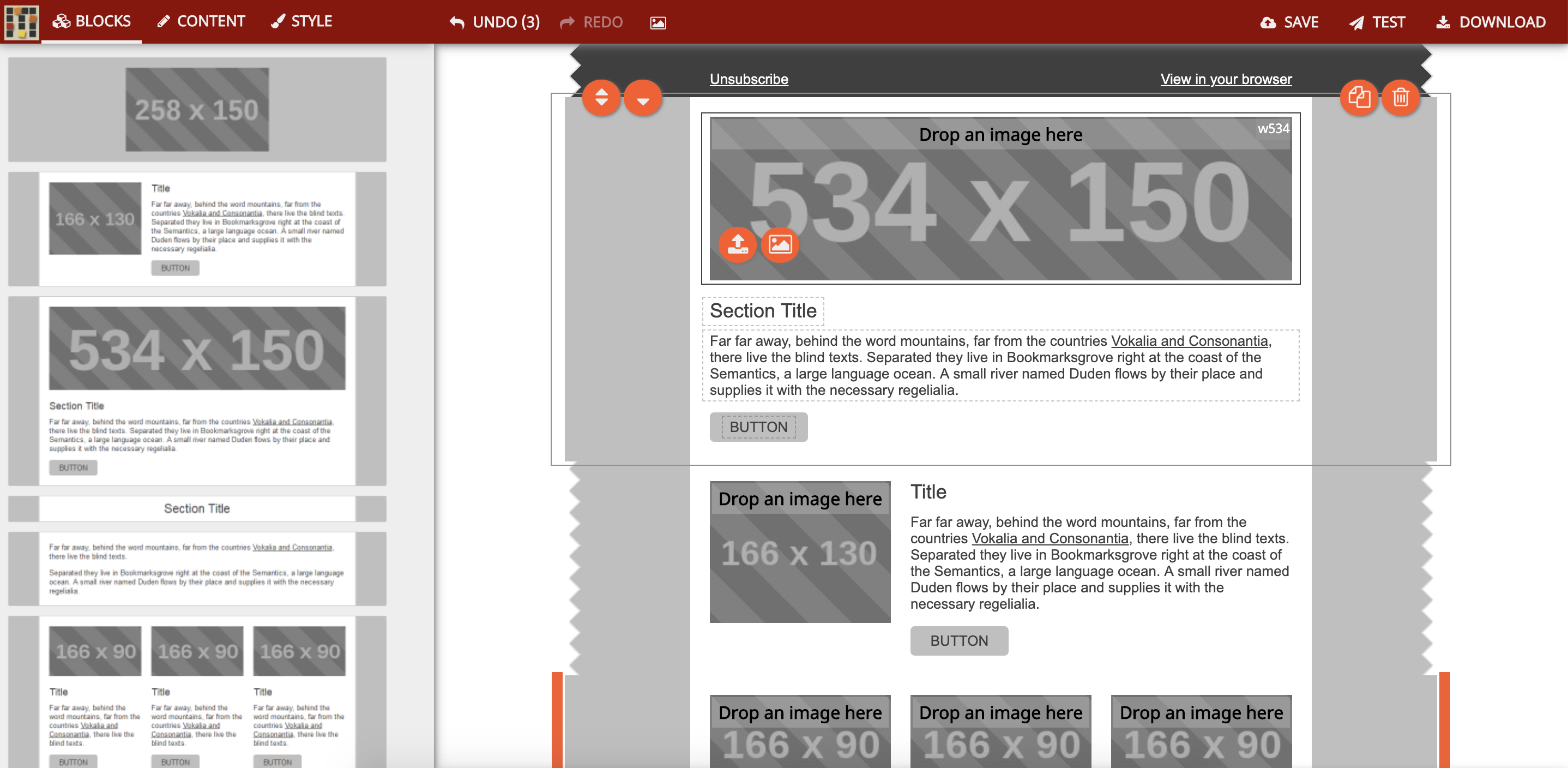
Unique Features
- A unique click-based design tool, abandoning the traditional “drag-and-drop” model.
- Community support, due to its open source nature.
- Infinite flexibility, if you’re willing to put in the work to customize it.
Pricing
Mosaico is currently completely open source, so you can use it for free. In fact, the entire code base is available on GitHub.
5. Email Monster
Email Monster is another free email template builder, with a simple, easy-to-grasp approach. You can choose any of its 100+ base kit templates and edit the template as you see fit. You can also install the free Chrome extension if you want to integrate directly into Gmail.

Unique Features
- Template designs are immediately available, so you can start in mere minutes.
- A free Chrome plugin so you can use the tool directly in your browser.
- The ability to save and download templates for future use.
Pricing
Email Monster is free, with no upgrades or paid plan options available at this time.
6. AWeber
AWeber is specifically designed for small businesses eager to get started with email marketing, but who might have trouble knowing where to begin. Predesigned templates, custom designs, and email automation are all available.
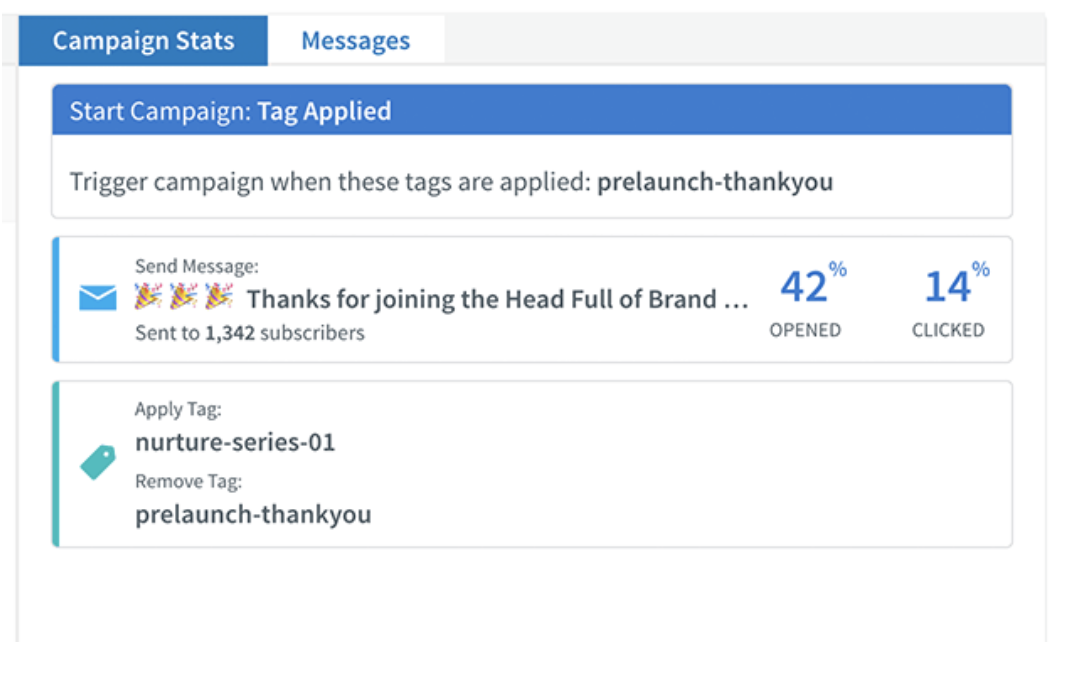
Unique Features
- A drag and drop AMP carousel, which allows you to add AMP image carousels to your emails.
- AWeber’s Smart Designer, which uses AI to construct and recommend email templates.
- A campaign marketplace that allows you to design and launch full email campaigns.
- 24/7 customer service.
Pricing
Pricing scales based on the number of subscribers you’re emailing. Plans start at $19 per month, which covers you up to 500 subscribers. The top tier, for 10,000 to 25,000 subscribers, is $149 per month. Pricing options for businesses with more than 25,000 subscribers are available upon request. You can also choose to be billed quarterly or annually to reduce your per-month costs.
7. Unlayer
Unlayer allows you to build email templates from scratch, but also utilize merge tags and embed customizable, dynamic content into the body of your messages. It’s designed for SaaS companies, but could feasibly be used by any industry.
Unique Features
- Dynamic content that changes based on defined conditions.
- Large-scale template management.
- Developer friendliness, with full support documentation, for unique customizations.
- Options for landing pages and further marketing support.
Pricing
The basic plan option is free. Premium packages are available at $99 for startups, $199 for businesses, and $399 for growing businesses.
8. Campaign Monitor
Campaign Monitor is primarily focused on email marketing, but has other features you can use for a variety of other marketing and ecommerce purposes. Because it’s designed to work for teams, it’s ideal if you have many people working together on your campaigns.
Unique Features
- Template management and collaboration for teams.
- Built-in support for surveys with unlimited questions.
- 80 predesigned email templates.
Pricing
Pricing varies based on how many subscribers you have. You can get started for free, but if you want access for more features, or if you need more support, you’ll need the Basic plan for $9 per month, the Unlimited plan for $29 per month, or the Premier plan for $149.
9. Chamaileon.io
Chamaileon.io is a cleverly-named email template builder that allows your team to design emails collaboratively, complete with drag-and-drop mechanics so you never have to worry about coding. You can also design and follow a set email campaign workflow, simplifying your efforts in the future.
Unique Features
- Collaborative email design for teams working together on the same templates.
- Unique and flexible account roles for multiple levels of access.
- Replicable testing settings to allow for easy testing of new designs.
Pricing
The free plan gives you much of what you need as an individual, but as you start adding seats and getting access to more features, the cost goes up. Premium plans start at $20 per month, with the Pro plan at $40 per month, and the Pro Team plan at $200 per month.
10. Designmodo
Designmodo‘s email builder is designed to bring teams together for the email template building process. You can use it to design emails however you like, then export as HTML, or to a full email service provider like Mailchimp.
Unique Features
- Modular designs that help you stack, customize, and rearrange your options.
- Long-term content management to help you revisit previous successes.
- Unlimited exports, which is ideal if you’re exporting to other services frequently.
Pricing
For a single user and 10 modules, you can use Postcards for free. Business plans start at $15 per month, and an agency plan starts at $25 per month.
11. Stripo.email
Stripo.email helps you create responsive email templates without any HTML coding skills necessary. It also features innate dynamic AMP support, and a robust testing tool to help you preview your email in more than 90 popular environments, including variants for devices and browsers.

Unique Features
- Drag-and-drop AMP blocks for image carousel and/or accordion support.
- Thorough testing in nearly 100 different environments.
- A customizable module library, allowing you to reuse past successful elements.
- Integration with many ESPs and third-party tools.
Pricing
The free plan is all you’ll need to get started. Billed yearly, the Business plan is $125 (or $10.42 per month), and the Agency plan is $400 (or $33.33 per month).
12. Taxi for Email
Taxi for Email provides scalable email template creation, as well as the ability to create email workflows. It also allows you to assign various tasks and permissions to your team, so each of your marketers can play a role in perfecting your email campaign.
Unique Features
- Team dynamics, including collaborative tools, access assignment, and user permissions.
- Robust testing on-demand as you design.
- Support for multiple languages and email segmentation.
Pricing
Taxi for Email doesn’t publish their pricing, but you can submit a short contact form on their website to get a free quote.
13. SendGrid
SendGrid is an email service that provides support for email template designs — additionally, it offers email functions like automatic shipping notifications and password resets. It also boasts an open API, which you can use to integrate with just about anything.
Unique Features
- A wide variety of tools, including email design, automation, signup forms, and more.
- APIs, SMTP Relay, and Webhooks.
- Delivery optimization tools so you can increase delivery rates.
Pricing
The basic version of the tool is free, and paid plans start at $14.95 per month for the essentials, or $89.95 per month for the Pro plan. Rates increase as you send more emails per month.
Choose the Best Email Template Builder for Your Needs
While it’s arguable that some of these email template builders are superior to some of the others, all of them have strengths and weaknesses. The best email template builder will be the one that most closely aligns with your organization’s goals — giving you all the tools you need, at a price within your budget.
When you narrow the list down to a few options, give each one a try (since most of these tools either offer a free trial, or a free version altogether), and get a hands-on feel for which tool might serve your organization best.
