
45 Slack Tricks to Boost Productivity & Improve Collaboration
Slack is an undeniably popular messaging channel for businesses — it’s used by over 12 million people worldwide, and 87% of its users say Slack improves communication and collaboration.
As a daily Slack user myself, I can attest that it’s an incredibly helpful tool for sending quick questions to your manager, organizing meet-up times with colleagues, or even sharing the occasional dog photo in the company’s #dog-channel.
However, despite using Slack daily for the past two years, I had no idea that I could star important messages (which essentially “bookmarks” them), set up reminders within Slack to respond to messages whenever I’m ready, or create a custom emoji.
There are plenty more tricks to using Slack more efficiently, as well — here, NetCredit collected 45 of them. Take a look at this infographic to learn how you can streamline your own processes to become more productive while using Slack, or how you might create a better experience for your colleagues.


HubSpot’s Management & Leadership Development Expert Shares Tips for Staying Productive When You Work From Home
One of the best training sessions I’ve attended for my career was the PeopleFuel®️ program by The Energy Project at HubSpot.
Here, I learned that to be most productive at work, I needed to manage my energy, not my time.
The training was led by Nick Congelosi, HubSpot’s Management and Leadership Development Head.
His team is responsible for overseeing global leadership development across HubSpot with workshops, certifications, and trainings like PeopleFuel®️.
When I left that workshop, I felt confident that I could revitalize my work day.
That’s why I decided to grab a virtual coffee with Congelosi and learn all about his best tips for staying productive when you work from home.
Below, let’s review Congelosi’s remote work productivity tips, how to stay productive during remote meetings, and best practices for running a productive remote training session.
1. Place a side table next to your desk.
Have you ever worked on a cluttered desk? I know I have, and that’s how I know how distracting it can be.
To help you stay focused during your day, Congelosi recommends placing a side table next to your desk about an arm’s length away.
You can place your notebook and to-do list on this table, so whatever you’re working on is the only thing on your desk. If it’s your computer, only have one tab open (or however many you actually need to get that one task done).
This should help limit distractions when you’re working on a certain task.
However, if you’re in a meeting, but need something to do with your hands, you can use a pen or pencil so you won’t be distracted.
2. Create clear stopping points.
When you work in an office, there are usually organic stopping points throughout your day. However, when you work remotely, those breaks don’t happen naturally.
“We hear all the time that people work more hours or their work bleeds into their evening, when they work remotely,” Congelosi says.
To avoid this, you should designate clear stopping points. For instance, Congelosi has stopping points at 10:30 a.m., noon, 3:30 p.m., and 5:30 p.m.
Unless you’re working on something mission critical, be religious about taking these breaks. You can go for a five minute walk or just get up and stretch.
3. Keep short-term and long-term (STLT) benefits in mind.
When your motivation and energy is low, it can be hard to stay productive.
If this happens, Congelosi recommends thinking about the short and long-term benefits of the task at hand.
This can remind you why you’re doing what you’re doing, keep your motivation up, and increase productivity.
Congelosi personally calls out these benefits in his notebook.
“You need to zoom out so that we can be more specific about what we’re zooming in on. As I zoom out, it’s going to help me reprioritize. It’s going to help me be more task focused,” Congelosi says. “It’s going to help me remember why I’m here and what I’m doing. So I think that that’s a huge, huge element that happens when you identify those short term and long term outcomes.”
While you don’t need to do this for every task, it’s important to do when you lose sight of what you’re doing or feel scatterbrained.
4. Own your calendar.
To own your calendar, you should have your non-negotiables already booked. For instance, Congelosi blocks off his calendar on Friday’s from 2-5 p.m. so he can wind down for the week.
“I recommend booking your lunch hour and breaks, recurring. Your calendar is what you have true autonomy over,” Congelosi says.
Additionally, Congelosi recommends not scheduling back-to-back meetings. You can use Speedy Meetings in Google to help with this.
With Speedy Meetings, your calendar will default to book 25 and 50 minute meetings (instead of 30 minutes or an hour), so you have time between your meetings. You’ll never have to rush to an online meeting again.
5. Use a notebook or to-do list app.
If you’ve ever felt scatterbrained, you know that it’s important to have lists and keep track of everything you need to do.
One thing you can do is use a notebook. You can write out your to-do list or just brainstorm ideas.
To do this online, you can use a to-do list app. Congelosi recommends the Microsoft to-do app.
6. Take more breaks.
In HubSpot’s Remote Work Report, we found that 45% of remote workers take less than an hour lunch break, and 25% work through lunch.
Additionally, 58% of remote HubSpotters take 1-2 breaks a day, with 29% taking 3-5, and 10% taking none.
When you don’t take enough breaks throughout the day, you’re actually sacrificing more than productivity.
While work culture has told us to ignore our body, Congelosi recommends taking more breaks throughout the day and listening to your physiology.
You can plan your break times around the hours that you’re most productive.
If you do a time audit and/or know when you’re most productive, you can ensure that you’re working during that time, and taking breaks during unproductive times.
7. Don’t forget about work life balance.
According to HubSpot’s findings, communication with co-workers, feelings of loneliness, and overworking are challenges that remote workers face daily.
We know this is a problem, but how can you increase your emotional energy throughout the day?
Congelosi says companies need to focus more on work/life balance because those that still work on a “factory clock” don’t have high retention rates.
To increase emotional energy throughout the day, try these tactics:
- Reach out to your team.
- Say good morning to coworkers on Slack.
- Leaders should leave loudly. If you’re a manager, message your team at the end of the day and let them know that you’re signing off.
- Exercise, even if it’s just a 10 minute walk.
- Find hobbies you enjoy. Congelosi says, “For people that are lonely, I’d be curious if their identity and self-worth is wrapped up in work. If it is, that’s not right.”
- Appreciate people. Take a few minutes to write a note of appreciation twice a week. This brings about inclusion, connection, and belonging.
At the end of the day, Congelosi says “You get what you give.”
8. Build lasting habits.
You might be thinking that a lot of these tips are based around building new habits. However, building a habit that will last isn’t easy.
One of the best ways to build a new habit is to self-incentivize. For example, once you get a certain task done, you can reward yourself with a new book (or whatever it is that’ll work for you).
If self-incentivizing isn’t doable for you, you can try to build one habit that will enable other habits.
For instance, if you focus on building the habit of keeping autonomy over your calendar, that will enable other habits such as taking more breaks or exercising throughout the day.
Congelosi says, “Be kind to yourself and allow your habits to change. If they don’t stick, they’re not the right habit for you.”
9. Give your employees resources.
As a manager, you need to give your employees the resources they need to be productive.
Congelosi says, “You have to, have to, have to have a resource that you’re actually giving employees.”
For example, when you give an assignment, you should tell your employee what the goal is and then give them examples of what it should look like.
Additionally, another resource you can use is public boards to increase collaboration among your team.
Congelosi says, “Be clear about the goal, but flexible about how to get there.”
Now that we’re ready to take on the day as productive remote employees, you might be wondering, “How does this apply to meetings?”
Below, let’s review a few tips on how to stay productive during a remote meeting.
How to Stay Productive in Remote Meetings
1. Have an agenda.
Of course, the obvious way to remain productive during a remote meeting is to make sure you have an agenda. Before you go into any meeting, you should be clear about what you’re talking about.
Having an agenda will help you stay on track so you don’t forget anything.
2. Add structure.
An agenda will help you add structure to your meetings. For example, you should actually write down when there’s going to be five minutes of random catch-up conversations.
This will help people on your team self-regulate, so you don’t have to go through the awkwardness of transitioning from chit-chat to business.
3. Keep balance of power in mind.
As a remote employee, it can be awkward when a few coworkers are in the office and you’re the only remote person involved in the meeting.
If you’re going to have a mix of remote and in-office employees, Congelosi says it might be better to just have everyone dial in remotely. This will level the playing field for your team and make your meeting run more smoothly.
4. Use the seconds counter on your computer clock.
When you’re running a gigantic meeting, it’s important to keep track of time. One thing that Congelosi does is use the seconds counter on his computer clock.
“We find ourselves often at moments like, ‘Shoot, it’s 12:59′, but it’s really 12:59 and 59 seconds which is no time,” he adds.
Using the seconds counter will help you keep track of how much time you actually have left on a certain topic in your agenda.
5. Be intentional about psychological safety among your team.
With remote meetings, you might’ve felt that watercooler awkwardness when two people are catching up on something, but everyone else is quiet. Or perhaps multiple people have responded to someone at once, causing confusion.
While these issues often get misconstrued as a remote problem, Congelosi says they’re actually an inclusion problem.
He adds, “Nothing on camera is subtle. That spotlight effect is really, really hard to deal with.”
That’s why it’s important for managers to focus on the psychological safety of their team.
“The option to be included is paramountly critical,” Congelosi says.
To improve psychological safety in your remote meetings, try these tactics:
- Round-robin conversation. When you ask a question or you’re doing an ice breaker, go round-robin so everyone has a chance to speak.
- Extrapolate other questions when a conversation is excluding people. For example, if people are talking about something that not everyone knows about (the latest music, sports, TV shows), managers can ask something like, “It sounds like that team certainly has put in a lot of effort. Where else have you seen that?” This helps the discussion become about the bigger picture, and not the “thing” that’s excluding people.
- Use a ‘Working With Me’ document. These documents are helpful for managers to use so everyone knows how everyone works. It’s also a great way to get to know people. Additionally, this helps employees build trust and psychological safety with their manager and team. Congelosi says, “We spend so much of our lives trying to glean through magic who you are as a person. There’s a lot of cognitive effort you spend trying to read people. Let’s just talk about it.”
- Talk about norms. It’s important for teams to establish norms with each other. For example, if someone is comfortable sitting quietly before a meeting, but someone else on your team wants to be engaged, it’s important for a manager to know that and set norms so the expectation isn’t uncertain.
- Do a ‘This or That’ activity. This is a great low risk activity that can help build psychological safety. With ‘This or That,’ you just go around and ask your team this or that questions.
- Go through a ‘I am…but I am not’ activity. With this activity, people on your team will go around and say “I am…but I am not” statements. For example, a low risk statement I can say is “I am from Orange County, but I’ve never seen Laguna Beach.” This activity is high risk, but it’s great for building psychological safety. Congelosi says, “Managers need to assess the risk level of an activity and think about it in sequence. Start low risk and move up from there.”
Now that we know how to stay productive during our work day and remote meetings, you might be thinking, “What else is there?”
Well, if you’ve had to run training sessions or onboarding remotely, you might be wondering how to do it productively. Below, let’s review a few of Congelosi’s top remote training productivity tips.
Remote Training Productivity Tips
1. Get a producer.
If you’ve had to run a training session with more than 20 people, you should consider getting a producer. This person will monitor the chat, answer questions, and send links to resources that are discussed in the session.
For example, if the trainer references a book, the producer will send a link to the book in the chat.
2. Know what the best user experience is.
While Congelosi generally recommends leaning away from slides, if you have to use them, make sure you know how to ensure the best user experience for your audience.
For example, if you’re on Zoom, you should take time at the beginning of your training to make sure everyone has a side-by-side view set up.
3. Annotate your slides.
Don’t be afraid to annotate your slides. When you’re conducting remote training, going through slides can be difficult to get through.
The annotation feature will help you run a more agile training.
4. Use the whiteboard feature.
When I asked Congelosi about trying new things in remote meetings, he told me a story about Larry King.
He said King’s first words on the radio were, “I don’t know what I’m doing, but I want to do it well.”
Running a remote training session can be like that. If you haven’t used the whiteboard feature before, you might be scared to try it because it’s new.
However, Congelosi says to take advantage of the fact that we’re in an unprecedented time.
“Take the risk. If you’re a virtual trainer, moderator, interviewer…take the risk with Zoom, and use the whiteboard.,” he says.
5. Set expectations.
People expect what you tell them to expect. If you’ve never done something before, you can be honest and authentic about that.
While there’s a balance between self-confidence and self-awareness, being vulnerable in an appropriate way is encouraged.
Being remote isn’t always easy for managers or employees. Staying productive can even seem like an elusive goal at times. However, forming small habits every day can help you achieve success when you’re working remotely.

17 Online Team Building Games to Try with Colleagues
“As the saying goes, the whole is greater than the sum of its parts. This is especially true in the context of distributed teams,” says Meaghan Williams, HubSpot’s Remote Work and Inclusion Program Manager.
Essentially, this is why team building is important. Team building gives your team a greater sense of togetherness.
Most likely, you can envision team building games in your head: exciting team outings, fun outdoor activities, or after-work happy hour chats.
But what does team building online look like?
When members of your team work remotely, it can be a slight hurdle to foster team building without face-to-face contact. Williams notes, “It can be hard to build that same sense of belonging and commitment to the team when you’re remote. That’s where remote team building comes into play.”
Although it can be tough to figure out how to build team morale virtually, the task isn’t impossible.
Remote team building games improve the morale of your team and their sense of belonging, which is essential for your team’s overall productivity and employee satisfaction
We’ve put together a list of exciting team building exercises and games for your remote team to try out. Let’s go over them in the next section.
Online Team Building Games
When coming up with ways to bond with your team online, Williams suggests assuming that anything is an option. This mindset combats restrictive thinking with games and opens up new realms of possibilities.
“This mentality has led to everything from remote yoga to remote holiday parties, and we’ve had so much fun along the way,” she says.
So with that in mind, let’s go over exciting options for building up your team.
1. Remote MTV “Cribs”
Similar to the workings of the hit MTV show “Cribs,” you and your team could spend some time showing off your remote work spaces. This is an inspiring and fun way to get a look into the workspaces of your teammates.
To give it a “challenging” aspect, have team members vote on their favorite workspace at the end, and the winner can enjoy the bragging rights of having the most impressive remote work setup.
2. Remote Work Bingo
Using a bingo template, create a bingo card and schedule a quick game as a “brain break” for you and your team. You can make it personalized to fit your company and team like the one below:
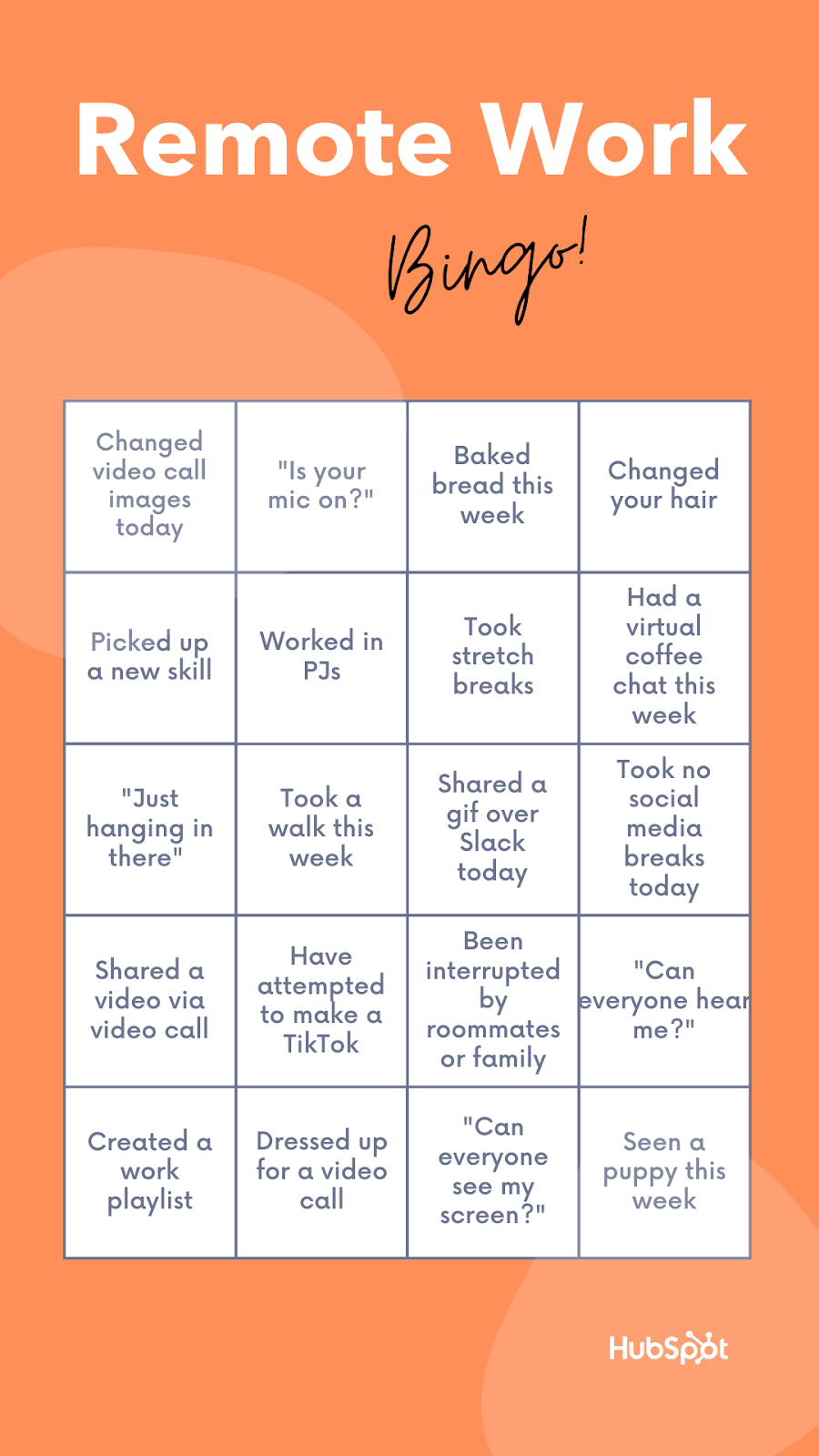
Have your teammates submit ideas for Bingo spaces to make it a collaborative process. You can even offer a prize for the winner, such as an online gift card. Another plus — Bingo is easy enough to be built into a routine meeting.
To make Bingo work remotely, pick one person to be the moderator. They would call out a random phrase and wait a few seconds for players to search their card for that phrase. If the player has that phrase on their card, they’d use a tool, such as paint, to mark that space.
Once a player has marked enough spaces in a row, they’d announce “Bingo!” in the video call and wait for the moderator to check their answers. If the row is vertical, horizontal, or diagonal, and matches the spaces, that colleague wins.
3. Mafia
Mafia is known by a couple of different names, and is often played by large groups. Essentially, the game is a “whodunnit” mystery-solving challenge. One of the players is a silent “killer,” and it’s up to everyone else to figure out the culprit.
There’s a couple of roles to assign in Mafia to keep organizational structure, like “Doctor,” “Townspeople,” and “Detective.” The best part about the game? It can all be played over a video call. Click here for a full run-down of how to play Mafia.
4. NATO Alphabet
If you’re unaware, the NATO alphabet describes the process of connecting letters to common words so others can better understand how to spell something. Typically, this is done for phone calls and commonly starts with “A as in apple,” or “B as in boy.”
Develop a new NATO alphabet with your team. Participants each add on a new letter until the alphabet is formed. The catch?
Before adding on, the team member must recite the alphabet thus far. Good luck in advance to the team member who lands on “Z”!
5. Origami Crafts
Do you remember making origami crafts when you were younger? Origami is the process of folding and cutting paper to resemble real-life objects. You might consider hosting an origami session with your team and deciding who has the best paper-folding skills.
You can find simple origami crafts to make here. As an end result, your desk will have a new decoration.
6. Show and Tell
For show and tell, consider picking a theme — like favorite pastimes, favorite snack, or household pets — and have your team show them off in a video call. Show and tell allows participants to share items that are important to them.
Will you bring your favorite video game and share how it’s the perfect time-waster? Or will you show off your favorite afternoon snack, the one you always have to have on hand?
7. Emoji Stories
Using less than six emojis, begin to write a story in an instant message thread or the chat section of a video call. Then, one by one, your coworkers will add to that story using five more. You can keep going until every teammate has had a turn, or until you run out of ideas.
To get the ball rolling, here’s a potential story starter: 🏘⛈💡🚫 … what happens next to the neighborhood with no power during a storm?
8. DIY Cooking Show
Are the members of your team obsessed with shows like MasterChef or Chopped? Alternatively, are they big into YouTube cooking shows, like Bon Appetit’s Gourmet Makes? If so, it could be fun to challenge your colleagues to create their own version of a popular cooking show or a tutorial of their favorite comfort food recipes!
This can be done in a variety of ways, but to give it a “challenging” aspect, pick one dish that’s simple to make, like a patty melt or mac and cheese. Give your team one week to film their own versions of the recipe, upload it to a Google Drive, and choose the winner based on creativity of the dish.
Cooking is an awesome way to express creativity, and as the saying goes, food often brings people together. Plus, leftovers mean there’s no extra thinking to do when it’s lunchtime!
9. Call of the Champions
To liven up meetings and make them more interactive, consider a “Call of the Champions”-style meeting. This game incorporates roles into meetings and helps inspire engagement during video calls.
Some of the roles you can include in this meeting are as follows:
- Cheerleader — The meeting cheerleader will encourage new ideas and suggestions, and inspire the other meeting attendees to follow suit.
- Mover and Shaker — If your team gets off topic during the meeting, it’s this person’s job to reign everyone back in and continue with accomplishing the goal of the meeting.
- Photographer — Are your video meetings photogenic? It might be fun to assign someone the role of photographer — this person will scope out photo-ready opportunities, ask for the team’s consent to be pictured, and snap a screenshot to share on social channels.
- Scribe — This role is a writer’s dream: All they have to do is record the highlights of the meeting. It could be helpful to have a Scribe if your meeting is mandatory, but some team members aren’t able to make it.
10. Pop Culture Trivia
What song did Britney Spears perform at the 2001 VMAs? What fictional town does sitcom Parks and Recreation take place in? Unwind with your coworkers in a friendly game of pop culture trivia — 2000’s style.
You can come up with questions with your team, or look up fun prompts online. Assign a moderator, split your team up into groups, and let the games begin!
11. Museum or Farm Field Trip
Did you know that some museums offer virtual gallery tours? From The American Museum of Natural History’s Facebook Live tours, The Frick Collection, the Smithsonian, and more, you can set up a day with your team to explore.

You can either set up a scavenger hunt for teams, (i.e. “Find something related to prehistoric times,”) let members choose a museum to present to the group, or tour the same museum as a group. Field trips are a great bonding experience for groups and museums are making that experience more accessible for remote teams.
Alternatively, you might chat with a local farm to see if they’d be willing to set up a remote farm tour for your team. We’ve done this at HubSpot, and it’s a great way to bond with colleagues as you virtually fuss over the adorable pigs or goats you see on-screen.
12. Scavenger Hunt
When was the last time you went on a deep dive of your company website? If your answer is, “Never,” here’s your chance to challenge your colleagues. Choose pages or tabs from your company’s website for yourself and team members, and come up with a group scavenger hunt.
Break off into teams, or make it a solo venture. After 20 minutes, whoever gets the most points, wins! An idea to get the scavenger hunt ball rolling: “Find the testimonial from X customer.”
13. Lunch and Learn
RSVP time with your team to join a webinar and learn a new skill. Alternatively, have your colleagues take turns to host mini Lunch & Learn sessions for tips about how to perform job functions in a simpler way. For instance, if I were to host a session, it might be “How to Create Awesome Meta Descriptions in Less Than 15 Minutes.”
If your team members have very specific roles that differ, this could be a cool opportunity to learn a little more about what your colleagues do. For instance, your social media manager might host one session about his role regarding social accounts, while your web designer hosts another about her experience designing for UX.
These sessions would give the other insight into how to perform a job function and build a new appreciation for the day-to-day of colleagues.
14. Never Have I Ever
“Never Have I Ever: Remote Work Edition” is another quick stress reliever that helps you learn more about your colleagues. Here are the rules: a team member says something they’ve never done before, but if those playing have done it, they lower one of their fingers. The person with the most fingers left wins the game.
If I were to host a version of the game, my first entry might be, “Never have I ever bought noise-cancelling headphones.”
15. Virtual Dance Party
If you’re like me, you’re known for your pretty amazing work playlists. What better way to wind down after a long workday than with a no-judgement dance party with your colleagues? You can even pull up a song from the Just Dance video game series and learn together (you just need a smartphone!):
There’s no pressure to explode into a fully-choreographed sequence a la Mamma Mia! — all dance styles are encouraged. Blow off steam and enjoy a friendly competition with your team.
16. Happy Hour
One of the most fun remote team building events I’ve done with my team has been Remote Happy Hour. It’s a time for your colleagues to get together and bond outside of work.
Participants can bring any beverage they choose (tea, seltzer, or other non-alcoholic beverages should be encouraged as well), talk about what they’ve brought, and enjoy a relaxed atmosphere. Happy Hours are great because they can take place after the workday is done and offer a fabulous, relaxing opportunity to catch up with your team.
17. Book Club
It’s easy to get video call fatigue after signing off for the day or during a lunch break. To give my eyes a screen break, I’ve turned to the books I’ve had gathering dust on my shelf. To turn reading into a group bonding experience, you might consider polling your coworkers about books they’d be interested in reading, and host a virtual book club.
This can be a recurring event or a one-time session, but the purpose is to discuss ideas outside of team projects. It can be a nice break from your day to discuss a good book — whether it’s every month or a couple of times a year.
“Not every idea is going to be a winner, but what’s important is that you’re willing to be vulnerable with each other and give new ideas a try,” Williams says.
Additionally, she adds, “If you’re just embarking on this journey for the first time, be honest with your team about this and ask them to provide feedback on what’s working and what isn’t. Even better, ask them to contribute their own ideas and lead the way on initiatives that they’re excited about.”
Team building is all about strengthening the bond of your team through different and fun activities. You can host a Pictionary session through a video call or encourage different areas of discussion during meetings. For more ideas on team building games, Williams suggests giving these options a whirl:
Most importantly, remember to just have fun with your team and enjoy the time you have together!

80 Things to Check Before, During, and After Launching a Website
Admit it: Launching a new website is stressful — even for the most seasoned digital marketers.
Websites are complex. There are so many things that are easily overlooked, like a broken link or a misspelled word.
And of course, a handful of things could go very, very wrong. Like what if you forget to test an important data capture form and then lose out on generating a bunch of new leads? Or worse, what if you forget to properly set up site redirects, and those valuable search engine visitors get a page not found message?
Instead of worrying about the what ifs, wouldn’t it be much easier to have a comprehensive website checklist to run down before every site launch? One that you could use for enterprise websites, microsites, landing pages, and everything in between?
What You Should Do Before Beginning Your Site Design
Whether this is your first website that is being built from scratch or you are doing a website redesign, there are a few steps that you should take before hiring a web designer or diving in yourself.
1. Analyze your previous website (if applicable).
In order to make good decisions, you must first understand where you’ve been. That starts with your existing website if you have one. Ask yourself:
- What is the purpose of a new design or overhaul?
- What haven’t hasn’t been accomplished with this existing site?
- How will a new design serve the new organization?
The answers to these questions can help you identify your gaps, which can then inform goal setting for the new site.
2. Crawl your old site (if applicable) and document its structure.
You can get an idea of your site’s existing structure, pages, and assets by using a crawling tool such as Screaming Frog. This is a necessary step in creating your website development plan because you’ll have a more concrete view of what pages existed before, what redirects are in place, and what the meta data currently looks like.
3. Obtain benchmark data from your previous website (if applicable).
Not only will you want to compare how your new site performs compared to the old, but you’ll also want to continue identifying gaps that will provide data-driven insights to aid your new strategy.
4. Identify your goals for the new design, how you’ll achieve them, and how you’ll measure success.
Once the gaps are fully fleshed out, you can begin crafting your goals for the design. You may come to conclusions such as:
- The current site is unwieldy, and we need ease of use.
- The current site no longer looks trendy, so we need a visual refresh.
- The current site doesn’t perform, so we need a more SEO-friendly structure with a better UX.
Whatever your goals, you’ll want to understand exactly how a new site will help you achieve them so that you can craft its implementation accordingly.
5. Choose a Solid CMS.
If you’ve never launched a site before, the long list below might intimidate you. However, it actually shouldn’t take too long to run through most of the aspects on this list — especially if you built your website with a solid CMS.
A CMS, or content management system, often allows you to design a website from a pre-created template, optimize your content for SEO, and edit content after it’s published. If you’ve already built your website, you might have already gained experience with using a CMS.
But, if you’re still building a website, one way to make going through this checklist less time consuming is by building your pages on a CMS that already does a lot of the work for you.
For example, HubSpot’s CMS that allows you to create and edit content including landing pages and blog posts. It’s features also allow you to organize your content, schedule it, track analytics, and optimize it for SEO.
Alternatively, you can also test out CMS platforms like WordPress, Wix, or even Drupal.
6. Develop a consistent brand.
Decide on a consistent brand message and tone, one that you’re committed to presenting consistently across. This will make you look more legitimate, credible, and memorable.
- Understand your value proposition.
- Choose a mission statement, vision statement, and tagline that represents that value as well as your brand identity.
- Choose colors and fonts that convey that identity well.
- Decide on the type of imagery that you’ll use to further convey your messaging.
7. Create your technical SEO strategy.
Take some time to ensure that your website has been given a solid foundation for SEO success. From site architecture and content hierarchy to metadata and XML sitemaps, do not leave any stone unturned.
- Perform keyword research and decide what you want to rank for.
- Create a content strategy that satisfies those keywords.
- Understand how your existing pages (if applicable) can be adjusted and which pages will need to be created new.
- Figure out which pages are no longer necessary.
- Map out where unnecessary pages can be redirected to (using a 301 redirect).
8. Strategize your conversion paths.
Once you have an understanding of the primary pages that will exist on your site, you’ll need to figure out exactly what actions you want users to take and how you’ll capture their information. This includes thinking through:
- What premium top-of-the-funnel offers are needed
- What bottom-of-the-funnel action will be presented on main pages
- What forms need to be created
- What landing pages and thank you pages need to be created
- How conversions will be tracked
- What actions will happen after a website visitor converts (email responder, etc.)
9. Set up analytics software.
- Choose which analytics platforms you will be using on the new site.
- Decide if any previous Analytics tracking scripts will be used or if new accounts/scripts are needed.
- Set up new accounts (if applicable).
What to Check Once You’ve Built Your Site
Once you’ve chosen a CMS and built a site that you’re ready to launch, here’s a list of 80 things to check before, during, and after going live. Feel free to copy, edit, and make your own based on the software you’re using to launch and host your website.
Don’t have time to check all 80? Here’s a list of the most important highlights from each section:
Website Launch Checklist
- Make sure text is accurate and error free.
- Replace all placeholder images with final images and designs.
- Ensure copy aligns with the new brand.
- Check that all styling preferences have been implemented.
- Ensure your design is aesthetically pleasing.
- Ensure that rights to images, fonts, and other content have been properly licensed or cited.
- Test the site for User Experience (UX).
- Check that the conversion paths have been implemented properly.
- Create your site backup strategy.
- Store passwords and credentials in a secure place.
- Audit the technical SEO implementation for errors.
- Test the site for user experience again.
- Test your conversion path’s functionality.
- Check that integrations with third-party tools are running smoothly.
- Make a copy of the final website for backup purposes.
- Ensure that backups are running properly.
- Make sure your site is secure.
- Comply with all applicable laws.
- Crawl the site to ensure no errors happened on launch.
- Check the technical SEO components for errors.
- Optimize your metadata.
- Set up analytics.
- Build anticipation with teasers before the site is live.
- Create a social media strategy for the announcement.
- Identify exciting ways to promote engagement for the new site.
- Send an email to your existing database.
- Continue to promote the launch for a month.
We’ve grouped items based on pre-launch and post-launch, making sure to touch on page content, design, functionality, SEO, branding, analytics, security, and compliance. Keep on reading to make sure you don’t forget a thing before your next launch.
Website Pre-Launch Checklist
Before you launch, it’s important to review all of the content on your website with a fine-tooth comb. Of course, that means page content, but don’t forget about your premium content too. From data-driven content and downloadable documents to rich media such as videos and images, you want to make sure everything is in place, working properly, and looking beautiful.
1. Make sure text is accurate and error free.
- Site content has been proofread for spelling and grammar.
- Company contact details are accurate throughout the website.
- Generic content, such as lorem ipsum, has been properly removed and replaced.
- All premium content, such as case studies, ebooks, and whitepapers, have been proofread. Spelling and grammar are correct.
- Copyright date (perhaps in the footer) includes the current year.
2. Replace all placeholder images with final images and designs.
On occasion, a website designer may use a placeholder image if they didn’t have the correct asset at the time of the page’s creation. It’s up to you to make sure each page is picture-perfect.
3. Ensure copy aligns with the new brand.
- The text has been copy-edited to ensure consistent brand voice and style.
- All company taglines and mission statements are up to date.
4. Check that all styling preferences have been implemented.
- Paragraphs, headers, lists, and other formatting are correct.
- Brand colors have been implemented correctly, including link and button colors.
5. Ensure your design is aesthetically pleasing.
- Scripts are optimized across web pages.
- Images are optimized across web pages.
- CSS is optimized across web pages.
6. Ensure that rights to images, fonts, and other content have been properly licensed or cited.
Even if you outsourced the design to a web designer/developer, the responsibility falls on you to ensure there are no copyright licensing issues. Otherwise, you could end up with a hefty infringement settlement on your hands.
7. Test the site for User Experience (UX).
- Website pages are compatible across browsers.
- Website pages are compatible across devices.
- Images, videos, and audio files are in the correct places, formatted and working on all devices.
- All premium content, such as case studies, ebooks, and whitepapers, are stored in their proper libraries/databases and work properly.
- Internal links across web pages are working properly.
- Social media share icons are associated with the correct accounts.
- Company logo is linked to the homepage.
8. Check that the conversion paths have been implemented properly.
- All necessary forms are present.
- Landing pages and thank you pages have been implemented.
- The correct buttons and calls-to-action (CTAs) are present in the proper locations.
- Everything is linked together appropriately.
9. Create your site backup strategy.
You can prevent loss of data and protect against malware and other damages by properly setting up site security and regular backups. Check that:
- Backup schedule has been created.
- Backup location has been identified.
- A plan for implementation is set to be put in motion after launch.
10. Store passwords and credentials in a secure place.
Many individuals have likely been involved in the website launch up until this point, so ensure that passwords are reset when the time comes and proper password etiquette is followed.
11. Audit the technical SEO implementation for errors.
- Pages have unique page titles.
- Pages have unique meta descriptions.
- Each page has a specific purpose, and pages meant to rank organically are optimized around a single keyword or set of keywords.
Website Post-Launch Checklist
Let’s say you’ve done it. The button has been pushed, the domain is pointing to the new site, and you’re about ready to tell the world…
But wait just one second because you still have things to check for now that your site is officially live.
12. Test the site for user experience again.
Just in case there was an issue with the implementation, you’ll want to ensure the experience is consistent with what you reviewed before it went live.
- Ensure your design is rendering as you expected it to across browsers.
- Ensure your design is rendering as you expected it to across devices.
- Ensure CSS/HTML is properly validated.
- CSS styling is rendering properly.
- Favicon is in place and rendering properly.
- Internal links across web pages are working properly.
- External links across web pages are working properly, and open in a new tab.
- Social media share icons are working properly.
- Feeds are working properly (RSS, news, social media).
- Company logo is linked to the homepage.
- 404 Redirect pages are in place (page-not-found.aspx).
13. Test your conversion path’s functionality.
Take some time to test and validate all of the different features on your website. Lead generation forms, CRM integration, and any other technology should work flawlessly across your website.
- Forms are submitting data properly.
- Thank you message or page displays after form is submitted.
- Form data is being emailed to a recipient and/or stored in a company database.
- Auto-responders are working properly (if applicable).
14. Check that integrations with third-party tools are running smoothly.
Integrations such as your CRM, e-commerce software, and/or marketing platform link to your site and help you run your business. If there is a potential issue that can cause data loss, you don’t want to find out way after the fact.
15. Make a copy of the final website for backup purposes.
Now that everything is in place and finalized, you want to have a pristine copy of it should you experience data corruption or loss.
16. Ensure that backups are running properly.
Now is the time to check the implementation of your backup strategy. Check that ongoing copies of the website are being created and stored on a regular basis.
16. Make sure your site is secure.
- 24/7 monitoring scripts are installed.
- There’s a plan in place for updating plugins (if applicable).
- Ensure that all applicable parties are aware of your organization’s password etiquette policies.
17. Comply with all applicable laws.
Make sure your website complies with any applicable laws and regulations. Internet law can be sticky, and each industry has its own set of rules to follow. So it’s best to consult with your legal counsel to make sure you aren’t missing anything — this post is not legal guidance. Here are a few you might need to know about:
- Web pages offer accessibility for users with disabilities (WAI-ARIA).
- Web pages announce if the website uses cookies (required in some countries).
- Website is compliant with usage rights for purchased or borrowed code, images, and fonts.
- Terms and privacy policies are visible to website visitors.
- Website is PCI compliant (if you’re storing and processing credit cards).
18. Crawl the site to ensure no errors happened on launch.
Compare the crawl to the previous crawl and see if you find any inconsistencies that were not intentional. You’ll also want to ensure that all pages have the proper search engine indexing settings.
18. Check the technical SEO components for errors.
- Page titles, meta descriptions, and URLs are all present and match the original technical SEO strategy.
- Load time for site pages is optimized.
- A dynamic XML sitemap has been created.
- The XML sitemap has been submitted to search engines.
- Page URLs consistently reflect site information architecture.
- 301 redirects are in place for all old URLs (redirecting old to new pages).
- rel=”nofollow” tags are in place on applicable links and pages.
19. Optimize your metadata.
- Metadata is properly in place for any content in an RSS feed.
- Metadata is properly in place for any social media sharing content.
- Spelling and grammar are correct in all metadata.
- Alt tags have been added to every image.
20. Set up analytics.
Make sure your website is set up to capture web data and analytics. This valuable information will allow you to continually improve your website going forward, so you don’t want to forget this stuff.
- Your website analytics codes and tracking scripts have been inserted on website.
- Relevant IP addresses have been excluded from analytics tracking.
- Funnels and goals have been properly created in your analytics software (if applicable).
- Google Webmaster and Google Analytics accounts have been properly synced.
- Google Ads accounts have been properly synced (if applicable).
How Do You Announce a New Website Launch?
This (hopefully) wasn’t a vanity project; you did all of this work so far for the benefit of your website visitors, prospects, and existing customers. Your next step is to tell the world about your new site design. Here’s how:
21. Build anticipation with teasers before the site is live.
A launch of a new product, a launch of a new movie, and — yes — a new site launch all require marketing before the actual release. Think of the last movie you watched in the theater. Did you see the trailer before you decided to buy those movie tickets and popcorn?
Teasers for your website launch can only help to build anticipation and get users wondering what the new experience will be like. This can build buzz and interest once you finally break the news.
22. Create a social media strategy for the announcement.
Decide what channels you want to promote the news on, how you will make the announcement, and how long the promotion will last. As you craft your messaging, remember to focus on new features and how they benefit your audience.
23. Identify exciting ways to promote engagement for the new site.
For users who aren’t as involved in your brand, a new site launch might not seem like a big deal. Your goal, then, is to make it one. Provide an exclusive offer for the first users who visit the site. Or, create a contest that promotes engaging with the site’s new features. Whatever you choose, make sure you make it fun and interesting.
24. Send an email to your existing database.
You may want to give existing leads and customers a head’s up about the new design, especially if it will cause any confusion when they next visit. You can break the news as a matter of courtesy but also sneak in ways to underscore the value you’re providing.
25. Continue to promote the launch for a month.
Just because you post about your new website once on social media does not mean that your audience will drop everything to visit the site in droves. Make your launch a big deal, and keep the new functionality top of mind so that your audience is prompted multiple times to check it out.
Resources for Launching Your First Website
Launching a new website can be a tedious task, but you can alleviate some of the stress by using this comprehensive website launch checklist.
If you’re just getting started on your first website, here are a few tools that can help you streamline your process
- CMS: As mentioned above, a CMS can help you design your website, optimize and publish content, and track your analytics once it’s launched. If you’re looking to test out a few CMS options, start by checking out our 14-day free CMS trial.
- Blogging Guides: If you’re interested in using your website to publish a blog that could help you boost brand awareness, it can be helpful to start brainstorming topics. Here’s a great guide to how to be a better blogger with tips from our team.
- Landing Page Templates: A landing page is a great way to highlight a product or resource that your brand is offering. It’s important to know what elements lead to a landing page that will convert. Here’s a guide with examples. Additionally, when using a CMS like HubSpot’s, you can create landing pages from pre-designed templates.
Editor’s Note: This blog post was originally published in August 2014, but was updated for comprehensiveness and freshness in May 2020.

How to Set & Achieve Marketing Objectives in 2020
In the marketing industry, setting objectives can be a double-edged sword. On the one hand, constantly raising the bar can incentivize your team to sustain your growth rate over long periods of time. On the other hand, it can incentivize your team to prioritize your company’s needs over your customers’ needs.
Contrary to popular belief, solely focusing on the results doesn’t actually produce results. Focusing on serving your customers is what produces results. Tim Cook, Apple’s CEO, is famous for sparking this customer-centric movement. In 2015, he spoke at Goldman Sach’s Technology and Internet Conference in San Francisco, and a reporter asked him what some of Apple’s biggest accomplishments from the past year were. He responded, “We’re not focused on the numbers. We’re focused on the things that produce the numbers.”
In marketing, what produces the numbers is a passion for your craft. Sometimes, we can get so obsessed with optimizing for results that we forget what actually generates the views and leads we desperately desire — compelling content.
In this blog post, we’ll show you how to set realistic marketing objectives that will help you craft audience-centric content, prioritize your customers’ needs, and hit your numbers, all at the same time. Read on to learn how to identify your marketing objectives’ purpose and process and why it’s just as important as the numbers you aim to hit.
What Are Marketing Objectives?
Marketing objectives are the goals your team wants to achieve during a certain period of time. They’re usually a hard number or metric that serve as metaphorical finish line for your team to sprint towards. However, setting marketing objectives isn’t just limited to determining what you want to achieve. You also need to specify how you’re going to reach your goals and why you want to reach them.
In his insightful blog post about setting goals, Jay Acunzo, the founder of Unthinkable Media, reveals a subtle yet potent problem that has pervaded the content marketing industry over the years — traditional goal setting lets you measure what you do, but it doesn’t lend itself to gauging how you do it or why, which is what ultimately gives your work meaning and resonates with prospects.
In marketing, you obviously need to aim for concrete targets. But, as we said earlier, only focusing on the results can sometimes incentivize you to take a course of action that prioritizes your organization’s needs over your customers’ needs.
To help you focus more on your purpose and process instead of just your results, Acunzo recommends considering two additional factors things when setting a marketing objective — your hunger and your aspirational anchor.
Your hunger is your current dissatisfaction with your work today or why you want to achieve your goal. Your aspirational anchor is your vision of your work in the future or how you’ll achieve your goal. These two factors drive your motivation and keep you on track to create work that better serves your customers. When you add your numerical goal to the equation, you’ll be able to simultaneously produce customer-centric work and create business impact.
How to Set Realistic Marketing Objectives
The first thing to understand is the subtle difference between a goal and an objective. A general goal is going to be your broader vision while your marketing objective is that more concrete specification of how that vision is achieved. In order to craft your marketing objective, you must start with vision first by defining three main things:
- Hunger – What is the driving force — or the “why” — behind what you want to achieve? What pain or problem has led you to this point, and why must it be solved?
- Aspirational Anchor – What does success look like — or “how” does the end vision solve that problem?
- Goal – What steps must be taken — or the “what” — for that aspiration to come to fruition?
Now that we understand the “why” and the “how” behind setting marketing objectives, let’s go over how you can root the “what” in reality with the SMART goal framework.
SMART goals are realistic, quantifiable, and focused targets that you can easily aim for. If you’re wondering what SMART means, it’s an acronym that helps you clearly define your goals.
Specific
In terms of marketing, you should choose the particular metric you want to improve upon, like visitors, leads, or customers. You should also determine what each team members will work on, the resources they’ll have, and their plan of action.
Measurable
If you want to gauge your team’s progress, you need to quantify your goals, like achieving an X percentage increase in visitors, leads, or customers.
Attainable
Make sure that X-percentage increase is achievable in your specific situation. If your blog traffic increased by 5% last month, try to increase it by 8-10% this month, not 30%. It’s crucial to base your goals off of your own analytics, not industry benchmarks, or else you might bite off more than you can chew.
Relevant
Your goal needs to relate to your company’s overall goal and account for current trends in your industry. For instance, will growing your Facebook following lead to more revenue? And is it actually possible for you to significantly boost your organic reach on Facebook after their most recent algorithm change? If you’re aware of these factors, you’ll be more likely to set goals that are realistic, achievable, and beneficial to your company.
Time-bound
Attaching deadlines to your goals puts pressure on your team to accomplish them. And this helps you make consistent and significant progress in the long-term. If you don’t give yourself a deadline, you can very easily fall into the trap of procrastinating on action items, leading to a slower rate of success. For example, which would you prefer: Increasing leads by 5% every month, leading to a 30-35% increase in half a year or trying to increase leads by 15% with no deadline and achieving that goal in a year?
By analyzing two different goal setting frameworks, we’ve learned how to identify the “why,” “how,” and “what” behind your marketing objectives. Now, we can blend the two frameworks to set a realistic goal that fulfills your customers’ needs and helps you hit your numbers at the same time. Check out the examples below for more detail.
Marketing Objective Examples
- Increase blog subscribers by 25% month over month this year.
- Reach 35,000 visitors to the website from our organic search monthly by the end of the year.
- Improve the mobile traffic conversion rate site-wide from 2.3% to 5% by Q3.
- Convert 500 Leads to MQLs by the end of the year.
- Increase our average monthly open rate from 25% to 40% by Q1.
- Increase our MQL-to-SQL conversion rate from 25% to 35% by Q2.
- Improve our NPS score from 31 to 35 in 6 months.
- Improve our Facebook engagement by 30% month-over-month.
Now that you know how to write a marketing objective, you can get ideas from some metaphorical samples. Below, we’ll start with one long example breaking out the above methodology step-by-step, and then we’ll provide other examples to fuel your inspiration.
1. Increase blog subscribers by 25% month over month this year.
For this example, let’s begin with the aspirational vision framework from earlier in the blog post.
- Hunger (Why) – Our blog educates our audience well but it doesn’t resonate emotionally with them enough.
- Aspirational Anchor (How) – Run a blog that consistently resonates with our audience and that people look forward to reading every time they receive our email digest.
- Goal (What) – Increase blog subscribers as an indication of our success.
With this goal setting framework, you can see how the “why” and “how” behind a goal incentivizes behavior that better serves customers and hits numbers at the same time.
For instance, in the example above, this blog team refuses to just do whatever it takes to boost their blog subscription. They want to craft emotionally resonant stories that their audience actually values, or content that’s worth subscribing to, and this is what will lead to their growth in subscribers and create long-term value for their business.
If this blog team didn’t identify their hunger or set an aspirational anchor, however, the only thing that would guide them toward the finish line is the finish line itself. And that could incentivize short-sighted behavior that helps them achieve their goal at the expense of prioritizing their audience’s needs over their own.
Once the aspirational vision and the general goal has been defined, now it’s time to pivot to a concrete objective using the SMART goal framework:
Specific
Our blog educates our audience well, but it doesn’t resonate emotionally with them enough. Let’s start running a blog that can consistently provide value, that people look forward to reading every time they receive our email digest, and that can attract more subscribers.
Measurable
Increase month-over-month blog subscribers by 25% this year.
Attainable
Last year, we increased month-over-month blog subscribers by 15%, so we know this is doable.
Relevant
If we can craft emotionally resonant stories that our audience actually values, we can build deeper relationships with them, attract more subscribers who we can also build deep relationships with, and hopefully do business with them in the future.
Time-Bound
Monthly over the course of a year.
2. Reach 35,000 visitors to the website from our organic search monthly by the end of the year.
Let’s say our organization’s goal is to grow its online organic presence to attract more leads. Those are Hunger and Aspirational anchors, so they must be translated into a SMART goal if we want to take steps to achieve it:
- Specific – Increase website visitors from organic search.
- Measurable – Reach 35,000 visitors monthly.
- Attainable – Must be sure that number is reachable by increasing or improving variables within our control.
- Relevant – Must be the right traffic since the ultimate goal is to increase leads.
- Time-bound – By the end of the year.
3. Improve the mobile traffic conversion rate site-wide from 2.3% to 5% by Q3.
Traffic alone is not enough to generate leads and, ultimately, revenue. We need mechanisms in place to convert the traffic we’re already getting. Let’s say we notice that our site converts a lot better on desktop than mobile. This means we could be losing a ton of lead opportunities who arrived at our site on a mobile device. That’s why we decide to improve the mobile experience. Here’s how we turn that goal into an objective:
- Specific – Improve mobile traffic conversion rate.
- Measurable – From 2.3% to 5%.
- Attainable – Must identify roadblocks to conversion and how we plan to remove them.
- Relevant – Must actually have enough mobile traffic to justify the effort.
- Time-bound – By Q3.
4. Convert 500 Leads to MQLs by the end of the year.
With inbound marketing, it’s easy to get swept up in blogging, offer creation, and lead conversions. At the same time, if we don’t have mechanisms in place to move those leads closer to a purchasing decision, these efforts don’t pay off the way they could. Part of our jobs as marketers is to foster relationships with our leads while qualifying them so that the sales team focuses on prospects who are ready to buy.
Let’s say we have a top-of-the-funnel lead generation engine where website visitors convert on eBooks and guides. Our goal is now to bridge the gap between where they’re at in their journey vs. where we want them to go (becoming a customer). We decide to do that through an ongoing educational email drip sequence, and we start with our objective:
- Specific – Convert Leads to MQLs.
- Measurable – From the existing number to 500.
- Attainable – Must ensure we already have a large enough pool to extract those MQLs from (or a fast-enough lead generation engine to supply them).
- Relevant – Must have a clear definition for what constitutes as an MQL and a plan to obtain those parameters.
- Time-bound – By the year’s end.
5. Increase our average monthly open rate from 25% to 40% by Q1.
In order for us to effectively nurture leads, we want people to be reading our content… which they won’t do if they don’t get past the subject line of the email. Here’s how we position this concept into a concrete objective:
- Specific – Increase average monthly open rate.
- Measurable – From 25% to 40%.
- Attainable – Must analyze existing email tactics to identify gaps.
- Relevant – Must only include the most relevant marketing emails in the metrics to avoid skewing data.
- Time-bound – By Q1.
6. Increase our MQL-to-SQL conversion rate from 25% to 35% by Q2.
Never forget the primary goal of marketing, which is to promote an organization’s goods or services in the effort of generating more sales. At the same time, fewer than half of marketers consider their departments aligned with sales.
A relevant goal might be to improve the effectiveness of our marketing efforts by solidifying the marketing to sales hand-off. Our concrete objective might break down like this:
- Specific – Increase the MQL-to-SQL conversion rate.
- Measurable – From 25% to 35%.
- Attainable – Must ensure we already have a large enough pool to extract those SQLs from (or a fast-enough lead generation engine to supply them).
- Relevant – Must have a clear agreement between the marketing and sales departments for what constitutes as an SQL.
- Time-bound – By Q2.
7. Improve our NPS score from 31 to 35 in 6 months.
Marketing doesn’t end once the prospect becomes a customer, and that means also working on ways to fuel the flywheel i.e. turning customers into brand advocates who purchase from us and tell their friends to do the same. NPS is a solid measurement of customer happiness, so improving that number is a solid place to start building our objective:
- Specific – Improve the NPS score.
- Measurable – From 31 to 35.
- Attainable – Must analyze existing NPS roadblocks to identify gaps.
- Relevant – Must ensure there’s a mechanism for collecting and analyzing NPS input.
- Time-bound – In 6 months.
8. Improve our Facebook engagement by 30% month-over-month.
One of the best ways to grow a brand’s marketing efforts exponentially is by investing in its community of customers and prospects. The goal might be to stay top of mind and energize the community by raising the bar on each social media platform. For example:
- Specific – Improve engagement on Facebook.
- Measurable – By 30%.
- Attainable – Must identify the content that’s engaging our existing user base and see if 30% is a reasonable number to strive for.
- Relevant – Must ensure that there’s a solid definition of what metrics are being counted as engagement.
- Time-bound – On a monthly rolling basis.
Once you understand the importance of vision, identifying broad goals, and using the SMART goal framework to make concrete marketing objectives for those goals, it’s time to identify the gaps in your marketing and begin outlining your own objectives.
Once you do, it’s important to write those objectives down and commit to creating a solid plan of action to achieving them.

How To Write Meta Descriptions That Don’t Suck
I’ll be the first one to admit it: The first time I wrote a blog post, I had a lot of new terminology to learn.
SEO, alt text, headers, all of it was new to me. Thankfully, learning how to use these acronyms to my advantage was a quick learning process.
However, there was one function of a blog post that took some time getting used to, and that was a meta description. At first, I didn’t know the purpose of a meta description, and why it was so important that I should add one to a blog post.
“Google will show the accurate text of my blog posts in search results,” I thought, “So there’s no need for me to add meta descriptions, right?”
Not necessarily.
This post will show you why meta descriptions are important and how to write effective ones. Before all that, though, let’s discuss what a meta description is.
What is a meta description?
A meta description is the snippet of information below the blue link of a search result. Its purpose is to describe the contents of the page to the searcher.
Any words that match the search term are bolded in the description. The end goal is to convince and persuade the searcher to click through to your website. Here is an example of a meta description as it would show up on a search engine results (SERP) page:
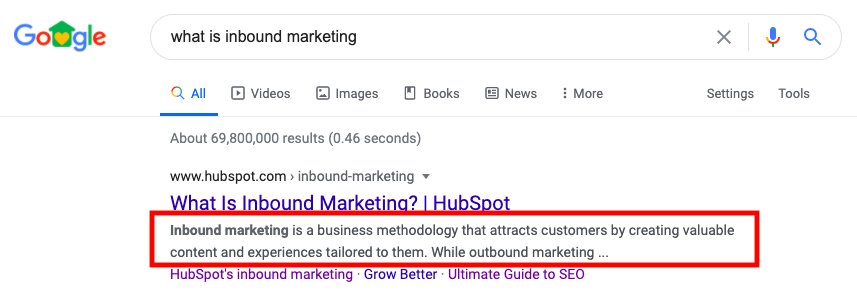 Notice that, because the query is “What is inbound marketing?”, the two words are bolded in that meta description.
Meta descriptions are important because they let Google know what your webpage will be about. If Google can read and comprehend the content of your meta description, they will have an easier chance of ranking your page to answer search queries.
🧡 TL;DR: Meta descriptions increase organic traffic and bring more eyes to your webpages.
If you don’t include a meta description, Google will display a snippet of text from the first paragraph of your page. If there’s a search keyword in that text, it’ll be bolded. While this isn’t a bad thing, not including a meta description means missing out on the chance to personalize the message you deliver to browsers.
Meta Description Examples
Meta descriptions should be quick, one- to two-sentence summaries of the content within your web page. They should tell the reader what they can expect to find after clicking on your link. For example, here’s a meta description for a data-driven marketing report:
 This meta description accurately describes what will be found in the report, who is presenting the information, and why the content will be helpful to readers. If browsers were typing in queries such as, “SEO trends in 2020,” it’s likely that this meta description will appear in their results.
Meta descriptions follow a few simple rules: They’re short, descriptive, and use keywords. But after that, you have free reign to play around with what they will say. Use this to your advantage when you’re creating your meta description:
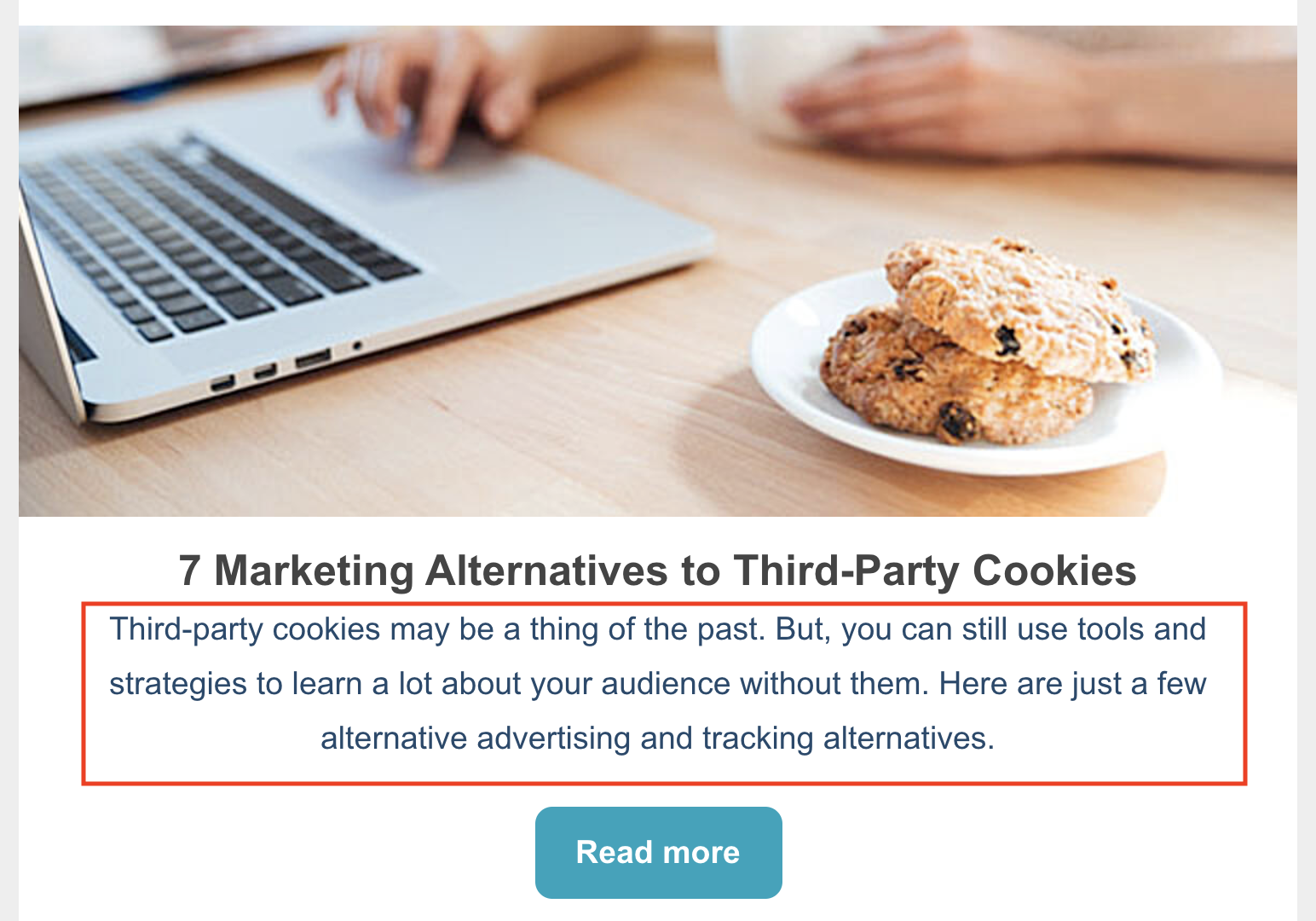 If you know that your webpage will present content that’s usually considered a bit dry, the way to engage browsers is to make a compelling meta description, like this one for third-party cookie alternatives. A meta description like this would make me interested in everything this post has to offer because it shows personality.
Readers often check only the first page of results for their search queries. Because of this, where you rank on a webpage matters. Even though meta descriptions aren’t the be-all, end-all that determines your rank, (you’ll want to fully optimize On-Page SEO for that), they sure do help.
A great meta description has the potential to appear on the first page of results, and a great one might even be first, like this example below:
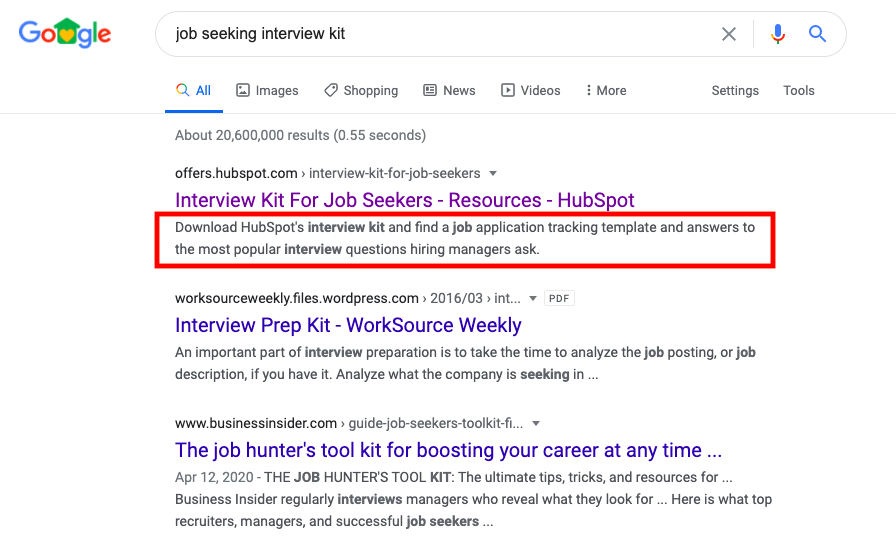
The meta description told Google how their page will fix the challenge of the query.
Now, you may be wondering if there’s a secret key or formula to writing a perfect meta description, other than the rules above. While the secret key hasn’t been located yet, there are some tips and tricks you can follow when writing your meta description. Let’s talk about a few, next.
Meta Description Tips
Google suggests that a meta description should tell users what that web page is about. Based on the information in a meta description, the search engine ranks results on relevancy.
Think of meta descriptions as a pitch for your webpage. Communicate why the page will be helpful to the reader, and make sure it accurately reflects what’s on the page. If a reader doesn’t find what the meta description promises, they’re probably going to click away.
Let’s get into some tips for writing an amazing meta description.
1. Answer the question.
It’s likely that people are on Google searching for an answer to a question. Try to get into their heads and think about what they’re looking for that your content can help with.
Use your meta description to answer that question with a solution or benefit. For example, let’s say your web page provides readers with a free template for writing standard operating procedures.
The question audiences will most likely Google is “What is an SOP?” Your meta description, then, should tell readers that they can use your guided template to learn how to write one. For instance, this would be my meta description if I were to write one to answer this query:
💻“Learn everything there is to know about writing a standard operating procedure (SOP), and find out how to write one that’s amazing.”
This meta description answers the question, and provides a little detail about the rest of the contents of the post.
2. Mention a solution to the challenge.
Provide a solution to the challenge your readers are looking to solve. For instance, if you’re writing a blog post that’s a listicle roundup of helpful CRM software, mention how many items are in the post and why that post will be valuable to readers.
If I were to write a meta description for a roundup, in this case, I would go with something like this:
💻“Discover the 15 best CRM software options for your small business and learn why they’re great for simplicity, customer retention, and organization.”
Remember, meta descriptions are the elevator pitch of your page — sell the content of your post in a way that will get readers to click. This description tells readers how many options they will read about and why they’re important to know.
3. Keep the description concise.
The body of your page is where you’ll educate your audience, so the meta description doesn’t need to be lengthy. Provide a quick summary of the page — or the point of the page that will stand out to readers. Meta descriptions should be under 160 characters long.
A good way to check the length of a meta description is to draft a tweet. Twitter limits you to 280 characters and lets you know when you reach your limit:
 If your description fills more than half of the circle in the tweet box, you should think about trimming it down. Meta descriptions should serve as a snapshot, not the body text of the post — save that for when the readers access your page.
4. Don’t overuse the keywords.
While your meta description should have keywords, it also should read naturally to the reader. If you overuse keywords just to get a high rank, readers might not understand your meta description. A tough-to-follow description could turn a browser away from your page.
For example, let’s say your webpage is delivering a content offer for interview materials and the primary keywords are “interview success,” “tips for great interviews,” and “interview preparation.”
You could write a meta description that reads along the lines of, “An interview success offer that’s free to download to be successful in preparing for interviews.” However, this reads a little clunky and is hard to follow, right? Instead, try going with something more smooth:
💻“Learn the tips and tricks for acing interviews with this downloadable job seeking kit.”
This description still uses two keywords, but also makes sense to the reader and gives them the background information they need to know how that offer page will help them.
5. Be engaging and unique to readers.
If you can, make your meta descriptions fun and engaging to read. Something eye-catching that will stop the reader from scrolling through a SERP. This is especially helpful if your webpage content is meant to be engaging and unique.
Match the tone of the content in your meta. Let’s say the content for your webpage is a blog post about funny workplace memes. Your description of this could be straightforward and accomplish everything a meta description should, such as, “These 20 workplace memes are funny, timely, and shareable.”
A description like that covers all of your bases, but it leaves the personality out. The post sounds like it was fun and interesting to put together, so that shouldn’t stop with the body text! Instead, try this more compelling approach:
💻 “Brighten your work day with these fresh, fun memes that any professional can relate to. Cat videos, anyone?”
A description like that sells your content, tells readers what they can expect, and still manages to be interesting in just two sentences.
Your meta description is your chance to win over readers. Be sure to create an engaging meta description for your website that persuades people to choose your content first. After all, if your webpages are made to be helpful and valuable to browsers, so should the content that’s describing it.

How to Run A Content Audit in 2020
Think of all the content you create — the good, the bad, and the ones that take a scary amount of time.
Now think of how you organize it. How do you keep track of how content is performing? Do you use those metrics to improve for future campaigns?
If not, you could be, with the help of content audits.
Content audits keep track of your content, including blog posts, social media posts, events, and web pages, and provide analysis for how they impact audience. Additionally, they can provide insights into how to improve underperforming content, so you know how to properly update your posts for higher conversion rates.
If you’re missing this kind of organization for your company, consider investing in a content audit. They are an excellent planning resource and roadmap for future content creation, while organizing analytics so you can refer back to high-performing posts if needed.
Content Audit Goals
Running a content audit for your website can prove to be beneficial for your traffic and improve the experience of your readers.
First, content audits help you take note of the areas on your website that aren’t properly optimized for search engine rank. For example, you might add meta descriptions to your blog posts as part of your current strategy, but if that always wasn’t the case, a content audit helps you locate which posts need to be updated.
Content audits also help you identify new SEO rules that you may not be implementing on your website already. Did you know that adding keywords to the headings on your site give search engines more clues about what your web page is about?
If search engines have enough knowledge as possible about the content on your website, they’ll be able to suggest your webpages at a higher level than they already are.
Running an audit is a chance for you to update the content on your website to improve the comprehension of your site by readers. For example, you might not know the links on one of your product pages are broken, but a content audit provides you with a reminder to update those links.
Your content audit should accomplish bringing your content up-to-date, improving the rank of your web pages, and making the website you present to readers easy to navigate and free of error.
To make sure your content audit is valuable, carve out enough time to complete it. But you don’t have to be in it alone. In fact, you can find plenty of templates to guide you through a content audit if you’re unsure of where to start.
Let’s look at a template, next.
Let’s dive into what content audits look like, how to run one, and tools to help you create the most effective content audit for your needs.
Content Audit Template
This template guides you through checking the On-Page SEO of your website. It works for a multitude of page types. For instance, a home page, landing page, blog post, or even a form page. There’s a space in the template for you to note the page type, so you can keep the template organized.
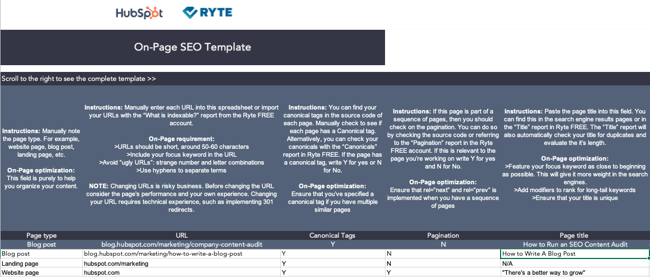 Under each section, the template will tell you why it matters for on-page optimization. So for example, when you note if you have multiple pages that are similar, canonical tags will make sure they’re properly grouped together.
Below, we’ll talk about the sections of the template.
In the first column, you’ll specify your page type for each page you’re auditing. Then, you’ll fill in the URL and note any canonical tags your site may have. Remember, you can find canonical tags in your page’s source code.
After that, you’ll note if your page is a part of a sequence of pages. This will ensure that your code is properly formatted for sequencing.
Next up, you’ll fill in some details about the page’s copy. For instance, the page title. If I were including a blog post similar to this one in the audit, for example, I would put “How to Run an SEO Content Audit” in this section, shown below:
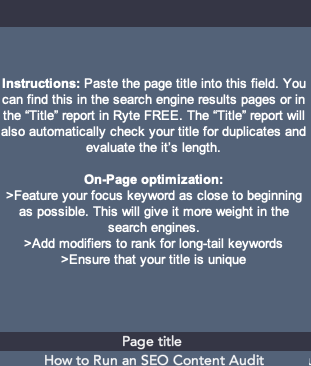 This section makes sure you’ll have keywords in your page title, boosting SERP rank. Similarly, in the next section, you’ll define the goal of each page and the focus keywords of that page.
So, for this blog post, I would define the purpose as, “Educating readers about creating a content audit,” and my keywords would be something akin to “On-Page SEO,” and “Content Audits.”
After that, you’ll note the headlines on your page. A good rule of thumb is to make sure at least one keyword appears in an H2 to help your rank. Same thing with meta descriptions, the next section — a short, concise description of your content should also contain a keyword to improve rank.
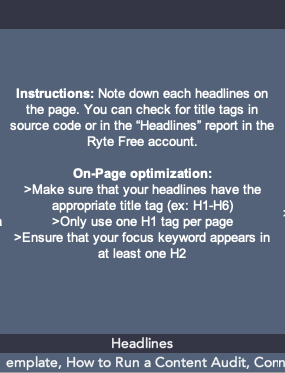 Once you outline your headings and include your meta description, then you’ll focus on images. Include the file name of your image and note the alt text of those images. Recall that alt text tells Google what your image is about, so if your images don’t have any, this is a good reminder to add them.
Next, you’re going to focus on links: internal and outbound. Take away broken internal links, and make sure your page has at least 2-3. (Remember, internal links give an opportunity for you to boost the traffic of other pages).
Following your link optimization, note the page speed. If your page takes longer than 2 seconds to load, it might not keep the reader’s attention.
Finally, the last section makes sure your page is available for sharing on socials and is mobile-friendly. These functions of the page improve the accessibility of your webpage.
This template also offers a checklist. The SEO Audit Checklist is another spreadsheet that makes sure the content of your website is fully optimized and up-to-date. So, the first template helps you update the On-Page SEO of your website, while the checklist gives you an in-depth reference for running the audit:
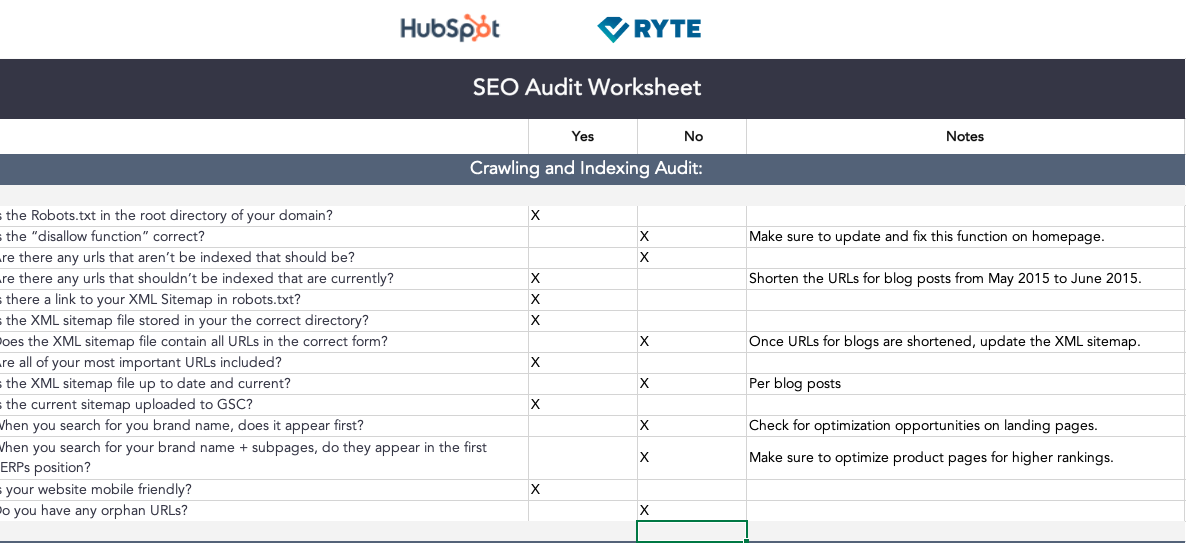 For example, when you go through the worksheet, you can expect to include information about the On-Page elements of your website, but you’ll also be checking for crawling and indexing, ranking factors, the content and link structure, status codes, coding, and internalization.
To use the checklist, you’ll simply mark “Yes” or “No” for each task, and add any notes to refer to.
How to Run a Content Audit
1. Think of your goals.
First, think about what you want to accomplish. When you have your goals in mind, you will have a better idea of how to categorize your audit later.
Ultimately, a content audit identifies engaging content for your audience, and can include information on SEO and conversion rates. One goal to consider could be to identify which of your pages need to be SEO-optimized. Alternatively, you might think about finding the most interesting and best-performing content for your website visitors, and place that on your homepage or in an email newsletter.
Identifying company goals will ensure your content audit is useful for both bookkeeping and updating your strategy with tactics to improve. After this is complete, then it’s time to collect your content.
2. Gather your content.
Which content are you going to audit? The types of audits are typically those for product descriptions, blog posts, multimedia, and publications. Decide this, and gather the backlog of all of that content.
To accomplish this, collect the URLs of the web pages you’ve chosen to audit. If you have a small website, you can do this manually and put them in a spreadsheet, however, there are also online tools to do it for you, like SEMrush, Screaming Frog, and HubSpot.
SEMrush and Screaming Frog will provide this information based on your sitemap. A sitemap is a file that has all of your website’s information and can be created for free online. For more information on sitemaps, check out our guide here.
3. Categorize your content.
After receiving your audit, categorize it on the spreadsheet. Some online tools categorize the information for you, but if you want to go through it yourself, that’s also doable. The categories will keep you organized so you can ensure your content audit meets your needs.
Some categories you can include are content type, author(s), publication date, and content format. Think of categories that are useful to know from different pieces of content. For instance, if you are auditing blog posts, important information to pull would be the date of publication or update, the author, the type of content, and metadata (Such as the title and description).
Another important category is metrics. Some online tools will include them in the audit, but Google Analytics can also pull data for you. Metrics can provide more information for your analysis later.
At this point, your spreadsheet should have URLs of your content, categories, metadata (if included), and metric data.
4. Analyze your data.
Now, it’s time to look at your data critically. This is the step that will give you a good measure of the state of your content. When analyzing your data, here are some things to take note of:
- Content that’s missing — What is your audience interested in that you haven’t covered?
- Content that’s underperforming — Which pieces of content aren’t getting the numbers you want?
- Outdated content — If you have old content, can it be updated or reworked to maintain optimization?
- Home run content — Content that has performed extremely well.
Based on the results of this analysis, organize them in the spreadsheet. A way to do this is to assign different colors based on what you’re analyzing and highlight the rows with those colors so you have an idea of which category is which, and which ones take up the largest portion of your overall content library.
5. Create action items.
In this step, you will finalize and clean up your audit. You now know what to focus on based on the analysis and can go from there. Think about the posts to delete, update, re-write, or re-structure.
To organize these action items, add one last column to the spreadsheet — one that’s close to the front so you can keep tabs on it. This column will let you know the action to take on a specific URL. Are you going to keep, update, delete, or re-write that blog post?
If you plan on ranking by priority or including a timeline for this audit, now would be the time to include that, as well. Some organizations use full-blown content calendars, while others don’t need it. To make a priority timeline that fits in best with your content audit, think back to your goals and which items make sense to execute first.
Now, let’s go over some content audit tools you can use to further automate your content audit process.
Content Audit Tools
1. Screaming Frog
Price: First 500 links free, unlimited for $150/year
Screaming Frog is a website crawler. It collects URLs from your sitemap and create an SEO audit for you. If you have a smaller site, Screaming Frog can audit up to 500 links for free.
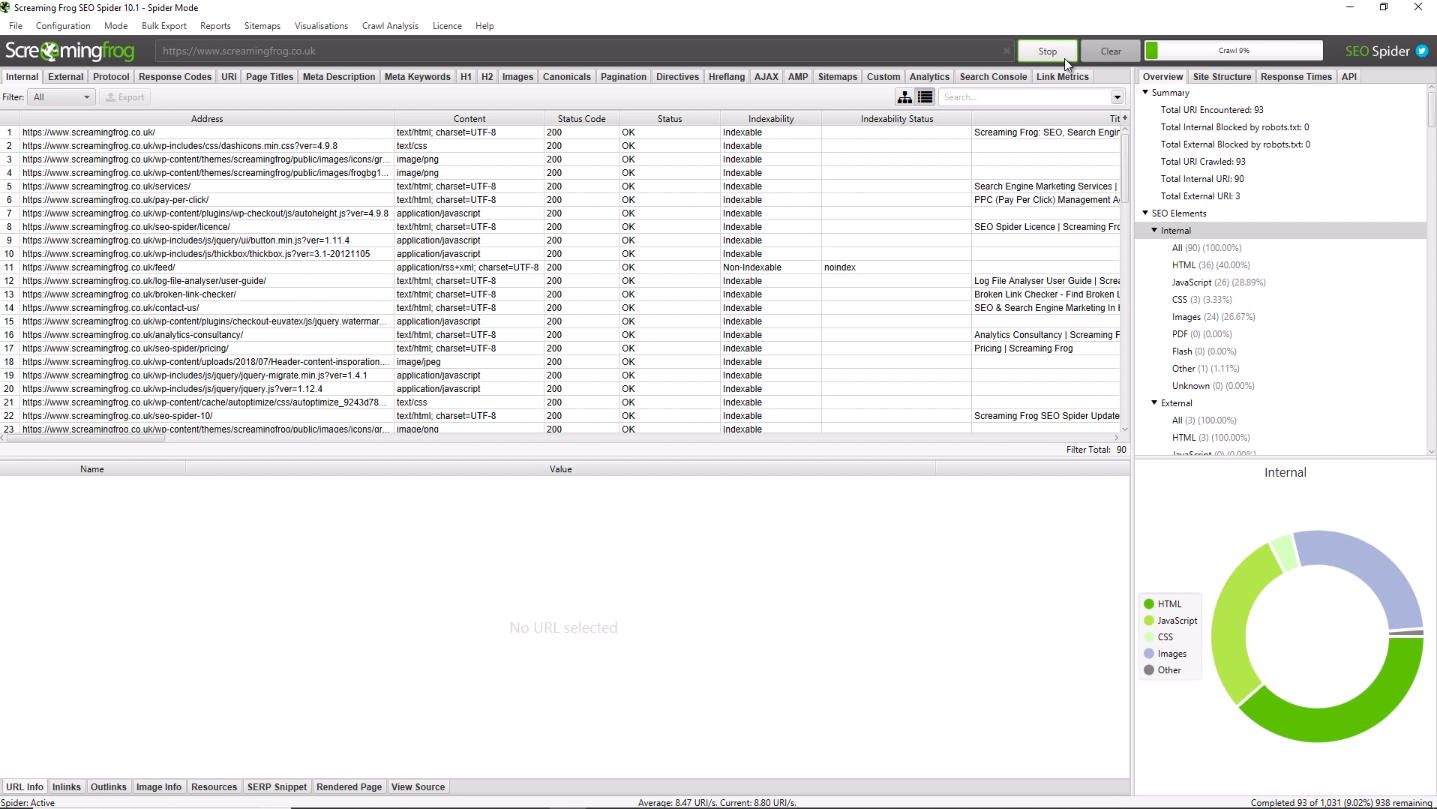
The desktop Screaming Frog website is great because it provides you a ton of analysis about your website, and categorizes it for you. Because the audit is SEO-based, it also gives you information on how to improve your SEO, which is likely useful, depending on your goals.
2. SEMrush
Price: Free plan, or $99-$399/month
In three steps, users of SEMrush can receive a robust audit. By putting in the desired domain, you’ll get a customized report that shows you where you can improve your site:
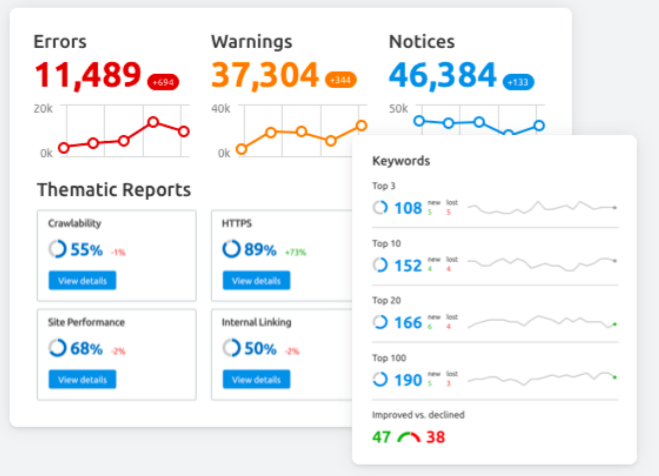
From there, you can connect an analytics tool account, like Google Analytics, if you want to see more information about your sitemap, like posts that are the most engaging for your audience. You can use this information when developing strategy — identifying content that performs well for your audience gives you an idea of what to cover.
3. Google Analytics
Price: Free
While Google Analytics doesn’t give you a traditional audit, it provides good information that will help you formulate your audit. It lets you know who is visiting your website, and from where. Additionally, it gives a rundown on the behaviors of your visitors:
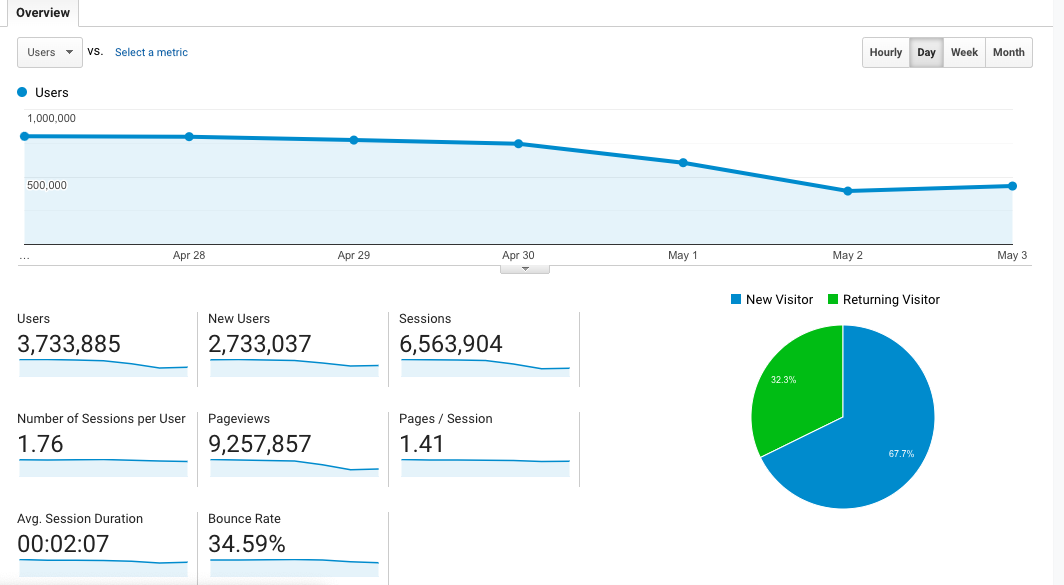 It gives you data about the amount of time visitors are seeing on webpages, the most popular webpages, and different patterns seen in your visitors. One of these patterns could be the most popular blog post in the US from visitors aged 18-24.
4. DYNO Mapper
If you’re looking for a sitemap generator, DYNO Mapper has that function available. Also available on DYNO Mapper — a content audit tool. This website is really good at finding potential problems in the SEO of your content.
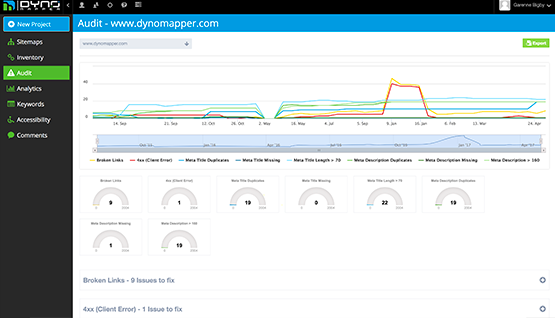
DYNO Mapper also keeps a progress report of your audits, so you can monitor how they’re improving and performing. The audits themselves present how your content can be given in the best way to search engines, an excellent metric for content audits.
5. WooRank
WooRank has two amazing features for content auditing: SEO monitoring and Site Crawler. SEO Monitoring from WooRank lets you know the state of performance on your landing pages, which is information you can put into an audit. It also lets you know if your website ever goes down and how that affected SEO, another metric to import if you’re tracking web page metrics in your audit.
The Site Crawl feature lets you know how Google sees your site and interprets the information for search engines. This information is great knowledge to make audits more effective when you’re coming up with action items for the future.
Now that you know ample knowledge about content audits, how to create them, where to source them, and important essentials to include, you are fully prepared to incorporate them into your organization. Give it a try, and use it to elevate your next campaign. Happy auditing!

Twitter’s Testing a Fleets Feature: What Marketers Need to Know
Following the success and buzz around Instagram Stories, Facebook Stories, Snapchat, and now LinkedIn Stories, Twitter is experimenting with its own ephemeral content feature.
In March, Twitter announced it had begun testing a new feature called “fleets,” short for “fleeting tweets” in Brazil.
Fleets, which aren’t yet available in the U.S., are similar to that of Instagram Stories. Like Instagram’s layout, Twitter users who have Fleets will see a bar with circular Story icons from each account above their Twitter feed.
From their homepage, a user can tap on a circular Fleet icon to see what an account posted in their Fleets area.
Unlike tweets, the text, video, or photo published shows up in a vertical format, similar to Instagram Stories.
Below are two photos that show how the Twitter feed and Fleets feature look to users in Brazil.

Because this content disappears after 24 hours, similar to Instagram Stories or Snapchat snaps, Twitter’s experimenting to see if this format will promote deeper and more personal conversations on the social media platform.
To make Fleets even more “personal,” other users cannot retweet or share the link to them. Twitter users can also only reply to Fleets via direct message.
As Twitter began to test the new Fleets feature, the company surveyed some of the first beta testers. As expected, most who used Fleets said they felt more comfortable publishing more personal thoughts or opinions than they’d publish in standard tweets. This was because the users knew that this content would eventually disappear.
“We hope that those people who are not usually comfortable with Tweeting use Fleets to talk about the reflections that come to their head,” said Mo Al Adham, a Twitter product manager explained, in Twitter’s announcement.
Fleets is still in its testing phase. But this move still signifies yet another move social media platforms are taking towards embracing ephemeral content and social media Story formats.
While disappearing video, text, and Stories might’ve sounded like gimmicks back in the earlier days of social media, ephemeral content features are increasingly common in today’s online landscape.
Although Twitter is just beginning its Fleet experiment, you might still want to take notice and identify ways that you could implement ephemeral social content into your own social media strategy.
In this post, I’ll highlight a few commonly used ephemeral content strategies that could potentially also boost brand awareness on Twitter Fleets. If Fleets doesn’t become a global feature, you could still use these tactics on many other social media platforms, like Instagram or Facebook.
How Brands Could Use Twitter Fleets
1. Publishing Limited-Time Offers
Want to sell out a lot of one product quickly? Or, offer a promotion to your most engaged Twitter followers? One great way to do both of these things could be using Fleets to promote temporary sales, offers, or coupon codes.
Since Fleets only last for 24 hours, users won’t be able to find the codes or promotions forever. That could mean that these audiences might feel a sense of urgency to make a purchase, use a given coupon code, or just visit your website to learn more about your product.

2. Hosting Daily Giveaways
Along with posting about short-term sales and coupon codes, Fleets — and other Story platforms — could be great places to promote giveaways. With a Story-like platform, you can include more text, video, and photo about the products you’re giving away and explain the rules of your giveaway within multiple pages.
While you can announce a giveaway in standard tweets, all of this information might have to be published in multiple posts or a thread due to Twitter’s character count limitations. And, because Twitter’s feed is so fast-paced, you’ll likely need to post more than once to get a large number of contest entries in a limited time.
With a platform like Fleets, you’ll not only be able to post multiple pages of tweets in the same Fleet story, but your content will also appear in the Fleets area above a user’s feed. This might mean that there’s less risk in your contest announcement being buried by tweets from other accounts.
Additionally, because Fleets and Stories only last for 24 hours, viewers might feel a sense of urgency. Like with coupons or sales, audiences might want to enter your contest, view your entire Story, or go to your website before the Fleet disappears.
To give you some added inspiration, here’s an example of a contest that a brand once ran on Instagram Stories:

3. Embracing Live Events on Social Media
Want to leverage live events or short-term news in your social media marketing strategy without it clogging up your Twitter profile? Consider covering the event with ephemeral content. That way, when the event is over, users focus back on your overall brand and business.
In this example below, the NBA’s Instagram Story featured coverage of the Toronto Raptors parade in Ontario, Canada. At this point in the Story, a Raptors team member took selfies with the rapper, Drake.

4. Interacting With Loyal Fans
While Twitter’s highly public platform already allows brands many opportunities to find and interact directly with fans, Fleets could also be a helpful tool for this.
On Instagram and Facebook Stories, you might regularly see content where brands ask users to DM them questions or content. Then, a brand might create a Story with user-generated quotes, images, or videos. This tactic makes users who participated feel like the brand cares about their thoughts. Meanwhile, an interactive Story like this allows other audiences to see that the brand appreciates its most engaged followers.

Aside from question-and-answer interactions, you could also go one step further by publishing Fleets with user-generated content from customers or fans. One brand that frequently does this on Instagram Stories and Facebook is Planet Fitness. In the story below, they highlight fitness journey photos sent to them by their actual customers:
Not only does this Story allow loyal Planet Fitness fans to contribute to the brand’s social media content, but it also allows prospects to see how real people have benefited from the gym’s services.
5. Offering Behind-the-Scenes Content
Most of us know that people love seeing behind-the-scenes content from celebrities, athletes, and influencers on Instagram Stories, Facebook Stories, and Snapchat. But, research shows that consumers also enjoy behind-the-scenes material from brands.
While tweets offer brands a platform to create quick well-worded posts or publish heavy-lift content, Fleets could allow brands to show audiences behind-the-scenes content or insights that make them look more authentic and relatable. This is something we’ve seen brands frequently do on their temporary Instagram Stories.
In the Story below, the New England-based Caffe Nero highlights a Barista of the Year competition that it holds with its staff every year. The Story highlights how Caffe Nero baristas are dedicated to serving customers and shows off an authentic piece of the restaurant’s company culture that many customers might not know about.

5. Informing Audiences About Complex Industry Topics
When you craft a tweet, you need to sum up your message in 280 characters or start a thread. But with Fleets or other social media Stories, you can add further information or insight with photos, videos, or multiple pages of text. This could allow brands to offer Twitter users a stronger variation of valuable, easy-to-create content that isn’t limited to tiny tweets, pricey marketing videos, or time-consuming live streams.
Here’s an example of how HubSpot discusses more complex industry topics via Instagram Stories. While you might not be able to add the same level of imagery to Fleets content, you could potentially leverage multiple pages of text in a similar way.
Navigating Ephemeral Content
Can content that disappears really leave an impression? Well, if Snapchat, Instagram, Facebook, LinkedIn, and Twitter have taught us anything — the answer to that question is, “Yes!”
While ephemeral platforms are a new and exciting opportunity, it does take creativity and brainstorming to create content that will grab your audience in a memorable way.
To get better acquainted with key ephemeral content tips and strategies, check out this introduction to the content type. Then, learn more about how major brands are leveraging current ephemeral platforms like Instagram Stories, Facebook Stories, and Snapchat.

15 of the Best Account-based Marketing Software for 2020
Are you in the market for your new account-based marketing software solution?
If so, then you’ve come to the right place.
Recall that account-based marketing is a marketing strategy that targets companies, rather than individual customers. Account-based marketing means catering your message to the top decision makers for target accounts with a blend of marketing of sales tactics.
In this day and age, having software to help you do that is imperative. As HubSpot’s Senior Manager of Accelerated Leadership Programs, Ryan Batter states, “The one common thread for all ABM strategies is a CRM in which teams can track company interactions, ideally across marketing and sales teams.”
So, when you’re looking for software, make sure you choose one that is full-service and has ample tools to support the functions of marketing and sales.
“Beyond that,” Batter states, “The beauty of using an ABM strategy is that it’s customizable to a team’s readiness and budget. Look for a CRM that enables strong integrations to ABM-specific tools to customize your strategy.”
With that in mind, let’s go over some account-based marketing software choices that are scalable, functional, and fit for your campaigns.
Account-based Marketing Software
We’ve talked about what to look for in the perfect software choice. Marketing and sales capabilities, the support of teams and organizations, and measurable data tools. These should be at the frontlines of what you choose.
Further, your software should complement your main campaign functions. Are you going to be doing a lot of ad targeting? Are metrics the most important to you? Look for software that delivers what you need in these areas.
Let’s go over some choices.
1. HubSpot
Price: Available for Marketing Hub Professional ($800/mo.) and Sales Hub Professional ($400/mo.)
HubSpot’s ABM software lets you carry out a fully-fledged campaign right in your CRM. When using it, you can make an ideal customer profile, or ICP. This ICP will help HubSpot automatically tier prospects based on how good of a match they are to your profile.
Additionally, you can import a spreadsheet of your target accounts. This can also be done manually.
HubSpot’s software helps you identify challenges of prospects so you can personalize specific marketing messages to attract them. You can also use Marketing Hub tools, such as ads, web pages, and social media posts, to market to your customers and make your campaign successful.
2. Terminus
Terminus is a platform that offers full-service ABM software. It helps you build account lists equipped with the data you need to personalize your strategies.
With Terminus, you can find accounts where they are and run campaigns that target them directly. For instance, you can manage retargeting, automation, and email campaigns within the software and access performance metrics of those campaigns. Analyzing these metrics will give you a better understanding of how to better target accounts.
3. Demandbase
Price: Contact for pricing
Users of Demandbase’s software experience ABM programs throughout the entire customer journey. The platform allows users to scale their efforts with accounts, rather than using a bunch of confusing point solutions.
Demandbase was built with B2B marketing in mind and offers a user-friendly interface. Within the platform, you will find solutions for engagement and conversion. These help you identify potential accounts, personalize your strategy, and experiment with new ways to close deals.
4. Triblio
Price: Contact for pricing
Triblio is an ABM platform that specializes in the growth of account pipelines. Users can leverage ads, analytics, web, and sales tools to help them execute a carefully constructed strategy to attract accounts. Users can also find out when the best time to reach an account is based on the platform’s ability to analyze the web behavior of industries — all from their dashboard.
With the software’s 1:1 account marketing setup, you’ll be able to target larger accounts and cater to their challenges directly, right from your dashboard. Triblio also offers a guide for ABM — think of it as a crash course — that teaches you how to use the software for your business.
5. 6Sense
Price: Contact for pricing
This platform focuses on providing its users with the intent of accounts. It provides users with the capabilities needed to engage with customers. With their service, you can collect insights about an account’s challenges and market to them in a way that provides immediate impact.
With the engagement platform, you can align your sales and marketing strategies together using data. You’ll be able to use the data provided about accounts to prioritize your strategy and engage customers based on their unique interests. With this setup, you can deliver consistent experiences that scale with your customer’s journey.
6. Engagio
Price: Contact for pricing
With Engagio, B2B marketers can provide a personalized approach to engagement for accounts. This is done by using the platform’s tools for sales insights, multi-channel creation, and analytics that cover the entire buyer’s journey.
Engagio’s users are able to unify data from their accounts onto one platform, making easier and more accurate analysis possible. With that data, you can accurately align your sales and marketing strategies, highlight areas to focus on, and execute those strategies.
7. LeanData
Price: Contact for pricing
LeanData’s software is focused on providing its users with the data they need to connect with accounts accurately. You can use the software to align marketing and sales goals, as well as align revenue operations.
If you want to unify the data and processes you use across your go-to-market (GTM) teams, LeanData is a great software option. You’ll be able to build a GTM plan, execute it, and access performance analytics with the software.
8. Bound
Price: Contact for pricing
This platform is intuitive and is built to provide marketers with the tools needed to personalize account-based strategy. With Bound, you can build audiences, create dynamic content, and measure the success of campaigns.
Bound lets users analyze the web behavior of accounts and build audience segments based on that data. They can also choose how to target those segments using software offerings like email and copy templates. Finally, users can see how their segments are performing and adjust their personalization strategy as needed to best reach accounts.
9. Zymplify
Price: By contacts, (Example, $649/mo. For 5,000 contacts)
If you want to find prospective accounts and nurture those leads, Zymplify lets you do that on one platform. It offers automated lead qualification tools, so you can turn prospects into customers.
Their scale-based services let you cater to customers throughout their entire buyer’s journey. Automated services, such as demand generation, prospect identification, sales, and reporting, saves marketers time when creating strategy.
10. MadisonLogic
Price: Contact for pricing
MadisonLogic is a platform that offers tools for ABM advertising and content syndication. With the software, you can also accelerate your accounts’ customer journey, access insights about campaign performance, and offer a formatted content marketing package.
This software lets you engage with relevant advertising content, and syndicate that content across multiple channels. That way, you can easily find new and relevant contacts. With their content marketing formats, you can engage with your contacts in a highly stylized and compelling fashion.
11. ActiveDemand
Price: Contact for pricing
If you work for an agency, ActiveDemand is a great option to look into. It offers services specifically for agencies or marketers to execute their ABM campaigns.
ActiveDemand’s software lets you engage accounts by delivering campaigns that are relevant and valuable to the challenges of prospects. It allows agencies and small businesses to execute campaigns by offering a full-service suite of tools. For instance, this software provides email marketing, content creation, reporting, and form building.
12. Vainu
Price: Based on sales team size (Example, $7,250/yr for a team of 5)
Vainu is a platform that focuses on personalizing the interactions you make with accounts. Users are able to spot who is interacting with your content and why, so you can accurately enrich those leads (shown below). So, if conversion is one of your big goals for ABM, this might be a good choice.
The platform aims to help its users find ideal potential accounts, know when to reach out to them, and how to send the message that will catch their attention. It offers synchronization features, such as company contacts, build customer lists, and provides ROI analytics based on sales functions.
13. Leadiro
Price: Free plan, or up to $399/mo.
Leadiro is a B2B customer data platform that helps businesses connect directly to the key decision makers at companies. The software uses demographic profiles to help its users identify their ideal customers, and it offers segmentation tools to organize those prospects into lists, like what’s shown below:
This platform is extremely helpful for targeting because you can choose specific geographic regions in which to find prospects. If you want to generate more leads globally, this software is a good option. Leadiro also integrates with HubSpot, so customers of both can sync their data.
14. AdDaptive Intelligence
Price: Contact for pricing
With this service, users can target, engage, analyze, and optimize their account-based marketing campaigns. Its main focus is to provide its users with the tools to connect with high-value decision makers for B2B accounts.
AdDaptive’s software lets you boost your advertising messages to the right business audiences to help you maximize ROI. It also has the capabilities to target customers, analyze advertising analytics, and optimize your future campaigns.
15. RollWorks
Price: Contact for pricing
RollWorks is a software that helps you drive demand, run digital ad campaigns, and automate sales functions, such as customer outreach. Its software is based around turning target accounts into customers by using machine learning and data. This helps users identify ideal customers and engage them across multiple channels.
The software lets you create an ideal customer profile so you can begin to find key contacts. You can also run cross-channel campaigns with the platform, and run digital ads through it. From those campaigns, RollWorks will analyze their performance and provide you with key metrics about their impact.
Batter states, “As teams increase commitment and budget to ABM, it likely makes sense to complement a CRM with more focused tools that can provide deeper sophistication in a certain category – ads targeting, company enrichment, intent data, events management.”
As your business grows, so will the tools you will need for account-based marketing. So, when you’re picking software, make sure it’s scalable, and can grow with you.

How to Write the Perfect Page Title With SEO in Mind
In high school, the hardest part of writing an essay for me was coming up with the title.
To be honest, titles are still a struggle for me to this day.
However, writing titles for blog posts or page titles are a part of my day to day as a marketer.
And now I have to think about SEO as well.
If you’re anything like me, it’s helpful to learn best practices you can refer to when you’re writing a title.
Below, let’s learn how to write the perfect page title while keeping SEO in mind.
Page Titles and SEO
A page title is the title tag that tells a search engine like Google what the title of your web page is.
When you type in a query on Google, these are the titles you see on the search engine results page (SERP).
So, why do you have to keep SEO in mind when you’re writing a page title?
The main reason is because your page title (and other meta tags) signal to the search engine what your page is about. Your page title helps search engine’s determine if your web page satisfies search intent and answers a user’s question.
Now, you might be wondering, “How can I get started?” Below, let’s review the best practices to keep in mind when writing SEO page titles.
Best Practices for Writing SEO Page Titles
1. Be specific.
Every page on your site should have a specific purpose. Think about the page in front of you, and try to describe it.
If you’re using “and” to combine multiple thoughts on this page, it’s time to make some new pages.
When writing the titles for each of these pages, keep the specifics of the page in mind. If this is a page just about “toasters”, the title should include your keywords centered around “toasters”, and not a more generic keyword phrase like “kitchen appliances.”
2. Explain why this page is unique.
Just like every page title should be specific to each page, you should also make sure that each page title is unique across your entire site.
If you’re following the first rule and making sure that every page is laser-focused on a single topic, it should be extremely easy to also make sure that each page title is unique.
3. Be compelling.
When you’re looking at a search engine results page, there’s only three things that appear for a visitor – the page title, the page description (bonus points if you’ve got a unique and targeted meta description), and your page’s URL.
Try and treat your page titles like the titles for your blog posts, and make them compelling.
In the example below, HubSpot used a unique and compelling title to tell user’s that the CRM software is free and compatible with small and enterprise businesses.
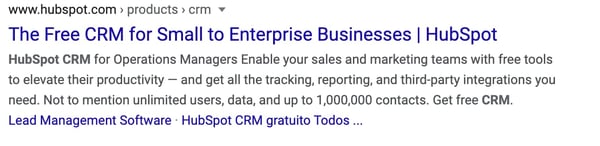
4. Don’t be repetitive or stuff keywords.
Your page titles shouldn’t include multiple variations of similar keyword phrases.
A great example of a bad page title is “Toaster, toaster oven, kitchen toaster, college toaster, 8 slice toaster, bagel toaster | Chris’ Toaster Emporium”.
Titles like this promote worst practices and often lead to having the same page titles used across most (if not all) of the pages in your site.
Plus, it doesn’t help user’s understand what’s on the page.
5. Pay attention to length.
Any page title more than 70 characters is a waste.
If you’re not able to describe this particular page with less than 70 characters, then maybe you need to break this down into multiple pages.
From a practical standpoint, Google will cut your title off around 70 characters, and you’ll be left with a set of ellipses at the end of the title – and everything you’ve written above the 70 character limit is essentially negated.
In the example below, Capterra’s page title is cut off and the user is left unsure of what’s on the page.

6. Don’t put your company name at the front.
In most cases, your website will already rank high for your company name.
Leverage the fact that search engines allocate more weight to the words that appear at the beginning of a page title, and form your titles using your keyword phrases first, and then your company name.
7. Include your primary keyword.
While you don’t want to stuff your page titles with keywords, it’s still a good idea to include your primary keyword.
If you can, putting it near the front can help search engine’s and user’s determine what your page is about quickly.
If you can’t include your primary keyword, you should try to include some type of variation of your keyword that satisfies search intent.
8. Write for the user.
At the end of the day, your content should be written for the reader, not for the search engine. User experience is far more important than a search engine.
While writing titles can be hard, it doesn’t have to be. Keep these best practices in mind when you’re crafting your next page title.
Editor’s note: This post was originally published in May 2010 and has been updated for comprehensiveness.
