
Forms Testing: What It Is & How to Do It
The other day I decided that I wanted to buy some comfortable outfits to wear around the house.
As I was online shopping, I started to fill out my shipping information in the online form.
However, the form had a requirement that the “City” field could only be 20 characters long. Now, the city I live in is three words, and 22 characters typed out.
Having faced this problem before, I tried to shorten the city name, but my phone was autocorrecting.
Ultimately, I couldn’t get past this form on my phone. I had to go on my desktop to make the order so autocorrect wouldn’t impact the length of the city name.
Predictably, this was a frustrating user experience.
As marketers, we use online forms in our campaigns all the time. To see success, it’s important to test your online forms for user experience and conversion rate.
Below, let’s review what form testing is and how to implement it in your online form strategy.
Now that we’ve covered what forms testing is, let’s dive into the components of your online form that you should be testing.
Online Form Elements to Test
Once you’ve created an online form on your landing page, it’s important that you test it for both functionality and effectiveness.
Below, we’ve listed a few elements that you should test depending on your goal.
Functionality
- Validation: Validation is how you’ll ensure the information put on a form is accurate. For example, you can set requirements on your form for the email and phone number fields so users can only input correctly formatted emails and phone numbers. By setting up those requirements, users won’t be allowed to submit the form if there’s an error. When an error occurs, a validation message will appear and let users know what’s wrong. When you set up an online form, you need to check that the requirements and validation messages you set up are working correctly.
- Notifications: When a user submits a form, you should be notified. After setting up an online form, double check that you’re receiving notifications. Additionally, typically an online form will trigger an email or confirmation message to the user. You’ll want to test and confirm that’s working as well.
- Thank You Page: After a user submits an online form, usually they’re directed to a thank you page. This is one of the most important elements to test. Make sure that the entire process of landing page to form submission to thank you page is working seamlessly.
- Payments: If your form requires a payment, you’ll want to test and make sure your payment processor is working.
- Mobile Devices: When I went through the form submission process above, the mobile experience wasn’t working well. The issue I experienced couldn’t have been found if the company only looked at the desktop user experience. That’s why you should test your form on different devices. Make sure there aren’t any friction points in the process on your mobile device or tablets.
After you’ve tested the functionality of your form, you should begin A/B testing style choices to see what works for your audience. Below are some of the top elements you should test for effectiveness.
Effectiveness
- Design: The overall design of your form is important to consider. It should look modern and be easy to understand. You can test elements such as form length or form requirements to see what your audience responds to.
- Copy: Form copy should set the expectations. For example, is there a clear purpose and instructions? Does your CTA copy clearly express what users will receive?
- CTA: CTAs are one of the most important elements of your online form. Test and see what colors, sizes, and copy converts best.
- Requirements: When you build a form, you might want to make every element required. However, this might not work with your audience. Test what requirements or pre-filled fields work for your audience.
Now that you know how to test your forms conceptually, let’s review some best practices to consider when creating your online form.
Web Form Testing Best Practices
1. Keep form length short, if you can.
Generally, keeping your forms short is a good rule of thumb. However, it’s important to consider that there isn’t a “one size fits all” approach to form building. You’ll want to test your forms to see what works best for your audience.
Kristen Baker, a marketing manager at HubSpot, says “Web forms vary in length, format, content type and appearance. They should simply fit your business’s needs and help you gather the information you want from your leads.”
2. Don’t overuse validations and requirements.
Not to be redundant, but the user experience I had when I was online shopping the other day wasn’t great.
That’s because the company was overusing requirements by limiting the characters I could use in the “City” field.
Overall, the best practice here is to not overuse requirements or validations. You should only make decisions that improve the user experience.
3. Set expectations with your CTA.
Your CTA is one of the most important elements on your landing page because some people might skip right over the form and look at the CTA first.
That’s why your copy should set expectations, while also catching the eye. Consider the color, shape, size, and copy on your button.
Ultimately, your CTA should be actionable and visually appealing.
Once you’ve built your online form, you’ll want to track your efforts. That’s why you should look at these form analytics tools to measure success.
By using form testing, you can adjust your forms on the go and make adjustments to help improve your conversions.

Product Strategy: Defining a Product’s Purpose and Plan
Say I’m in the process of developing a new waffle iron. It’s going to be capable of perfectly detecting when a waffle is golden brown no matter the volume or thickness of the batter. We’re talking about next-level waffle technology. It could be an absolute game-changer, but in this scenario, something goes horribly wrong.
The product is rushed through development without any real guidance or objectives. And when it’s sent to the manufacturer, there’s no picture of what kind of audience will gravitate to it, how it stacks up to other waffle irons, what it’s going to do for the business, or other crucial factors that might give this waffle iron an identity in the marketplace.
If that were the case, then this once-in-a-generation feat of waffle engineering would go to waste — all because it didn’t have a solid product strategy to guide its development.
A sound product strategy can be the difference between a product being able to carve a permanent place in its market and being an absolute afterthought. It can put weight and sensibility behind a product to help it resonate with consumers as effectively as possible.
It’s the foundation for a successful product lifecycle, so if you’re interested in developing a product at any point in the future, it’s a concept worth having a picture of.
Here, we’ll get an understanding of what a product strategy is, the framework that structures it, the key elements it should address, and an example of the concept.
Product Strategy Framework
A product strategy framework is typically composed of three core components: market vision, product goals, and product initiatives.
Market Vision
Who is this product for, and what does that mean for you as a business? Those are the critical questions to answer when defining your market vision. This portion includes information about your target customers, plans on how you’ll position your product, and how it’s going to perform relative to your competition. Your market vision has to address your customer needs, the buyer personas you intend to appeal to, and how you’ll deliver a competitive offer.
Product Goals
There has to be some sort of endgame to your efforts with a product strategy. You have to work towards something. Setting goals is crucial to charting your course and keeping you on track. Goals guide your development team, allow you to keep tabs on progress, and ultimately measure success when your product has been released.
Make sure your goals are SMART — specific, measurable, attainable, relevant, and time-based. Make them clear-cut with a sense of urgency behind them. Also, don’t backload all your goals for the end of the project. Set individual, timely milestones along the way to ensure that your team is maintaining a solid pace and accomplishing everything that needs to be done.
Product Initiatives
Product initiatives are essentially more conceptual product goals. They’re big-picture ideas, including trends you want your product to influence. They represent the kind of impact you want to have on your business, your reputation, your status within your industry, the state of your industry, consumers’ lives, or the world at large — depending on the scale of your operation.
Product Strategy Example
In 1984, Apple released the Macintosh 12K8 — the first iteration of what would go on to become the world’s most popular brand of personal computer. The Mac was a bold step forward in the landscape of computing, and though it ultimately fell short of the goals it set initially, its product strategy is worth examining.
Market Vision
High tech marketing and product strategies through the 70s and early 80s catered primarily to hobbyists and “early adopters” — people without backgrounds in computing willing to learn about it to improve work productivity.
There wasn’t much emphasis on appealing to the common consumer — exactly who Apple made a point of trying to reach. Its market vision revolved around giving the average person access to straightforward, aesthetically appealing personal computing.
Product Goals
Apple set a series of measurable, time-oriented goals for the Macintosh — specifically when it came to sales. Apple estimated the Mac would sell 50,000 units in its first 100 days — a target it hit with relative ease. However, those early sales proved to be misleading, and the Mac 12K8 didn’t come close to hitting its long term sales goals.
Though that might be the case, the fact remains that Apple set specific goals about its preferred sales figures to ultimately gauge the success of its product strategy.
Product Initiatives
Apple released the original Macintosh with the tagline, “The computer for the rest of us.” It was easily operable with an accessible graphical user interface, among several other approachable, straightforward features.
The original Mac was designed, positioned, and marketed as a machine that would shape the future of personal computing. It was going to make the concept more accessible for the general population, beyond hobbyists and traditional PC users. That was Macintosh’s product initiative — to democratize personal computing. And for what it’s worth, Apple nailed it.
Key Product Strategy Elements
An effective product strategy revolves, in large part, around four key elements: honing in on a customer segment, understanding the competition, ironing out the business end of the strategy, and considering the macro-environment.
1. Hone in on a customer segment.
You can’t develop a product strategy without understanding who you’re trying to reach. The first step in identifying that base is determining what specific need you’re trying to address with your product. Once you identify the best need to tackle, you have to consider who that need applies to. Don’t approach the process with some fuzzy, indiscriminate picture of who’s buying — that will be inefficient and unsustainable.
Take time to develop detailed buyer personas. Touch base with who you think you can reach to see if your product will resonate with them. And be prepared to adapt to feedback from your customers as time goes on.
2. Understand the competition.
In all likelihood, your company will have competitors within your space with similar value propositions. That’s why you have to understand the options they offer, how you compare, and how you can stand out.
Successful products always have some kind of differentiating factor. Bear in mind, that’s not necessarily the same thing as your product’s key benefit. Your competition is your competition because your products serve a fundamentally similar purpose. So how do you go about tracking that factor down?
Generally speaking, your differentiating factor will be a matter of better service, better quality, or lower prices. But how do you settle on one? Well, you can run different ideas by that customer base you’ve landed on. They’re as reliable a source of inspiration as you’ll find. Also, keep tabs on your competitors. See how they’re trying to set themselves apart and try to find a lucrative niche that still has space.
3. Iron out the business end.
Ultimately, a product is a means to an end, and that end is generally monetary. A product strategy will let shareholders know how they’ll see a return on their investment. It will detail — in-depth — how you plan to monetize your efforts.
What is your business model? If your product is web-based, will you generate revenue through selling ad-space? What about a subscription model? If your product is a consumer good, what kind of retailers will carry it? Or will it be sold exclusively online?
A business isn’t a business if it has no interest in making money. Putting out a product with no concept of how customers will be able to buy it makes for an ineffective, borderline-pointless product strategy.
4. Consider the macro-environment.
The macro-environment is the sum of the major external factors well beyond your control that influence your company. They’re the political, economic, social, and cultural forces that can sway the context in which you do business and how your customers might view your product.
Though they’re not entirely predictable, your product strategy has to take them into consideration. That could mean being mindful of new technology that might shape your market, different markets you might be able to appeal to going forward, or the ways your customers’ needs, interests, and behaviors might shift over time.
Product Positioning
The concept of product positioning revolves around how customers view your product — the space in their minds your product is going to occupy. It’s essentially the process of determining how to best communicate the useful, compelling attributes of your product to your target audience to shape a specific perception.
How you intend to position your product is often summarized in something known as a “positioning statement” — a concise statement that explains how your product suits your ideal buyer persona. It’s meant to be used as an internal tool to align marketing efforts with the brand and value proposition. It goes like this:
For [target customer] who has [need statement], [Product/brand name] is a [market category] that [key benefit statement/compelling reason to buy]. Unlike [primary competitor alternatives], the product [unique differentiation statement].
The statement for video-sharing social media platform TikTok this statement could read:
For mobile users, predominantly aged 13 to 24, who are looking for a consistent stream of straightforward, engaging content, TikTok is a video-sharing social networking service that never stops running videos tailored to their specific preferences. Unlike Instagram or YouTube, TikTok automatically plays new content nonstop — all in keeping with what users have demonstrated they like to see.
Companies generally leverage tactics and resources like market research and focus groups to inform their ideal product positioning strategies. These strategies allow businesses to understand how their target audiences can best be reached. With that information at hand, companies can determine the best ways to convey their products’ benefits to resonate with those consumers.
Product positioning often informs a company’s marketing efforts. That means tailoring certain aspects of a product’s presentation and messaging to suit the needs and wants of that audience. This can often involve adjustments to aspects like packaging or display.
Successful product development needs guidance. It doesn’t figure itself out as it goes, and businesses can’t afford to wing it. A product strategy sets the tone for the process. It sets development in motion and keeps it on track.
Product strategy is a matter of defining a product’s purpose. One of its most important functions is establishing the why of a product. And without that, it’s very difficult for product teams to know where to start and how to proceed.

5 Noteworthy Examples of Corporate Social Media Policies
As a marketer, social media is undeniably important – in fact, in 2020, three-quarters (74%) of all global marketers now invest in social media marketing.
Social media can help you engage with new audiences, increase brand awareness, handle customer service inquiries, and even increase sales. (As an avid Instagram user, I can’t count the amount of times I’ve “Swiped Up to Purchase” on a link from a popular influencer.)
But there’s plenty of risk involved with social media, as well. Among other things, a bad social media post could spiral into a full-blown PR crisis or get your business into legal trouble.
Fortunately, there is a tactic you can use to ensure your social media strategy is safe, consistent, and scalable as your company grows and different employees get access to your social media accounts: a social media policy.
Let’s explore how these five companies created effective social media policies to inspire your own, today. Just remember, there isn’t just one ‘right’ policy for every company. Pick and choose what you like from these five companies to help get you started, and tailor it to fit your culture and business objectives.
But first, let’s dive into a few benefits of a social media policy.
Benefits to a Corporate Social Media Policy
You might be worried about providing too many strict rules on your social media strategy. Will it diminish the authenticity you’re hoping to evoke in your posts, or take too much creative freedom away from your employees?
Fortunately, if done correctly, a social media policy won’t ruin the creative freedom you’re hoping to protect. If anything, it will enable your employees to feel more comfortable amplifying your social media messages on their own channels, knowing each post is fully aligned with your business’s values and tone.
Here are a few major benefits to creating a corporate social media policy:
- Maintain consistency of brand voice, tone, and messaging across social channels
- Prevent a PR crisis as a result of a potentially offensive post
- Enable employees to handle legal and regulatory issues with sensitivity
- Protect data privacy of customers and stakeholders
- Have effective responses at-the-ready for crises or data breaches, if they do occur
- Instill confidence in your employees’ to use their own creativity when creating and posting branded content, as long as they align with the corporate policies
- Ensure each new employee will have the tools to create a positive, consistent, and valuable brand message across social channels
Now that we’ve covered that, let’s dive into five businesses that got social media policy right.
1. Best Buy
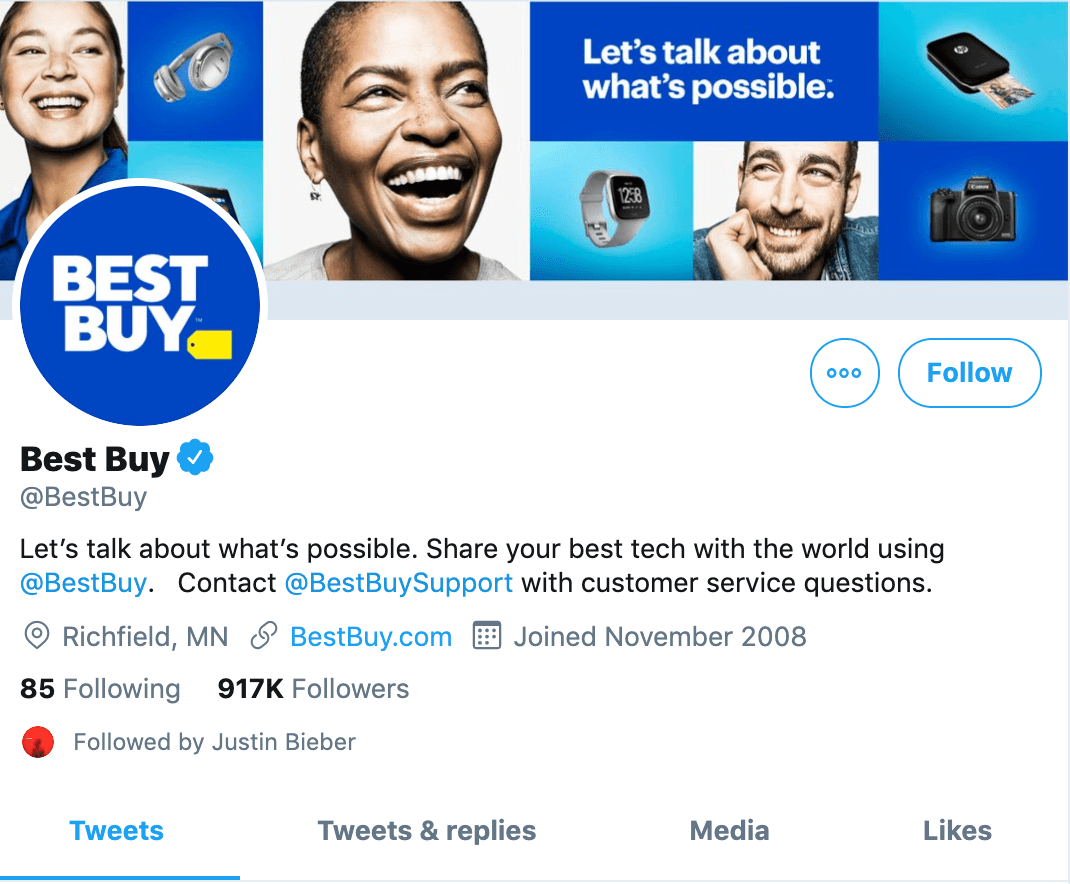
Best Buy has a social media policy in place that preemptively addresses privacy concerns that could arise using social media.
Here are some highlights of Best Buy’s social media policy:
- The company does not want information shared that isn’t meant to be public. Common sense? I’d think so, but it can’t hurt to formally reiterate.
- Tweeters cannot share Best Buy logos and other items related to the company. Does this seem overly cautious? I guess that depends on the industry you are in. For a big brand like Best Buy, it’s understandable.
- Best Buy wants each employee to differentiate themselves and state their tweets and posts are theirs — and theirs alone — and not associated with Best Buy. This ensures, if an unscrupulous employee crosses a line, Best Buy won’t experience such harsh brand backlash.
- Best Buy urges each employee (whether posting on Best Buy’s social channels or on their own channels if it relates to Best Buy) to “Honor Our Differences” and never post content that could be seen as discriminatory against any group, for any reason.
2. Walmart
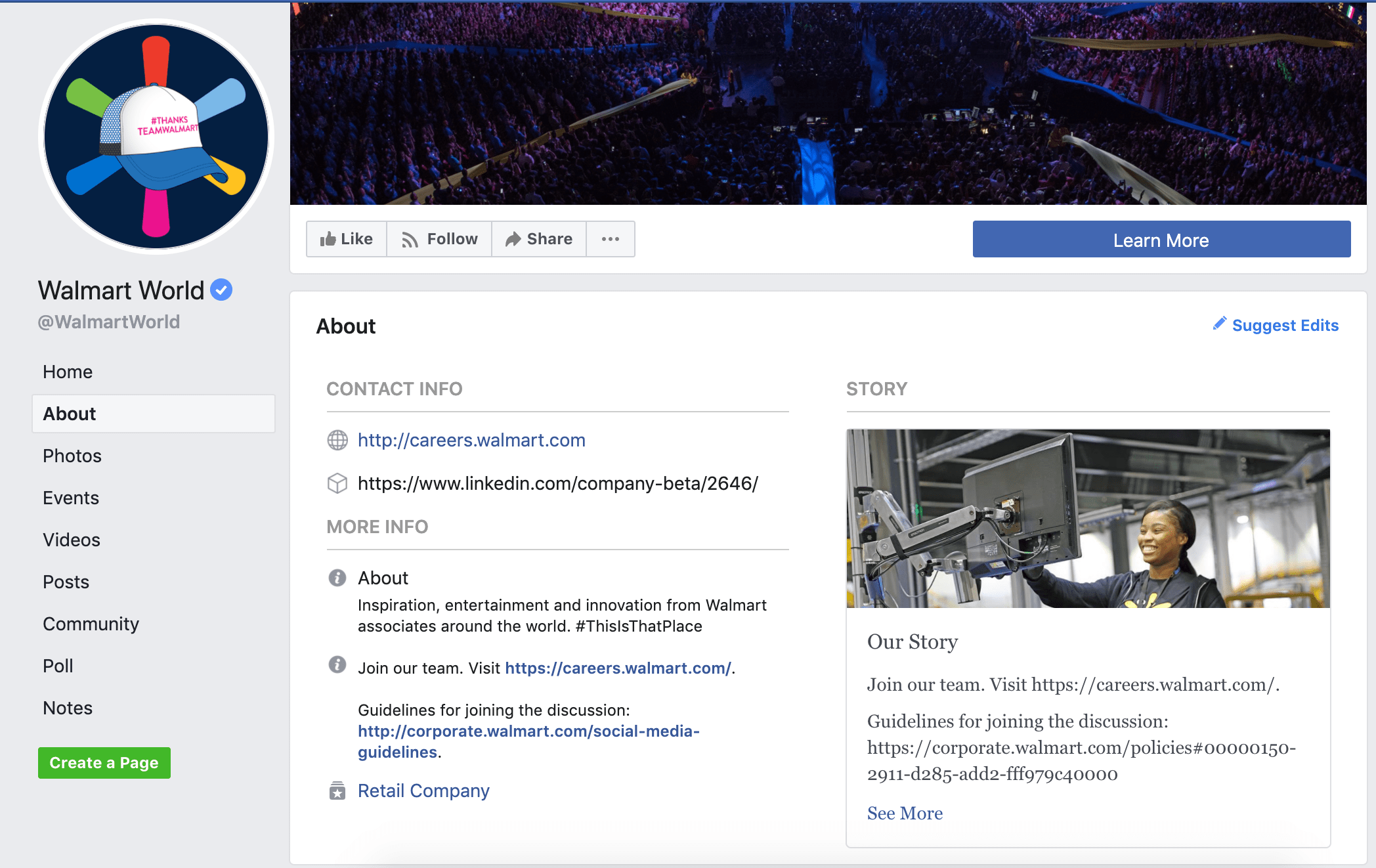
Walmart is dedicated to their social media accounts, and believe in social media as an avenue for customer service — because of this dedication, their policy regarding Twitter is reasonable and something I wish more Twitter users would follow in their daily tweeting.
Here are some of my favorite aspects of their policy:
- Walmart doesn’t discourage its employees from sharing their own opinions — however, they ask each employee to support their claims with informational sources or links, stating, “We love opinions; we love them even more when you back them up with facts.”
- They ask employees to be “polite and courteous, even if you disagree.” They’re strongly against employees using social media to discriminate, bully, or harass.
- Walmart advises its employees to “stay on topic”, and only create content that is relevant to Walmart’s community.
- Walmart asks all employees to avoid responding to customer inquiries or comments directly unless they’re part of the official Walmart social team. This is a smart move, as it ensures less confusion or ambiguity for customers who are aiming to receive customer service from a trusted official.
3. Ford Motors
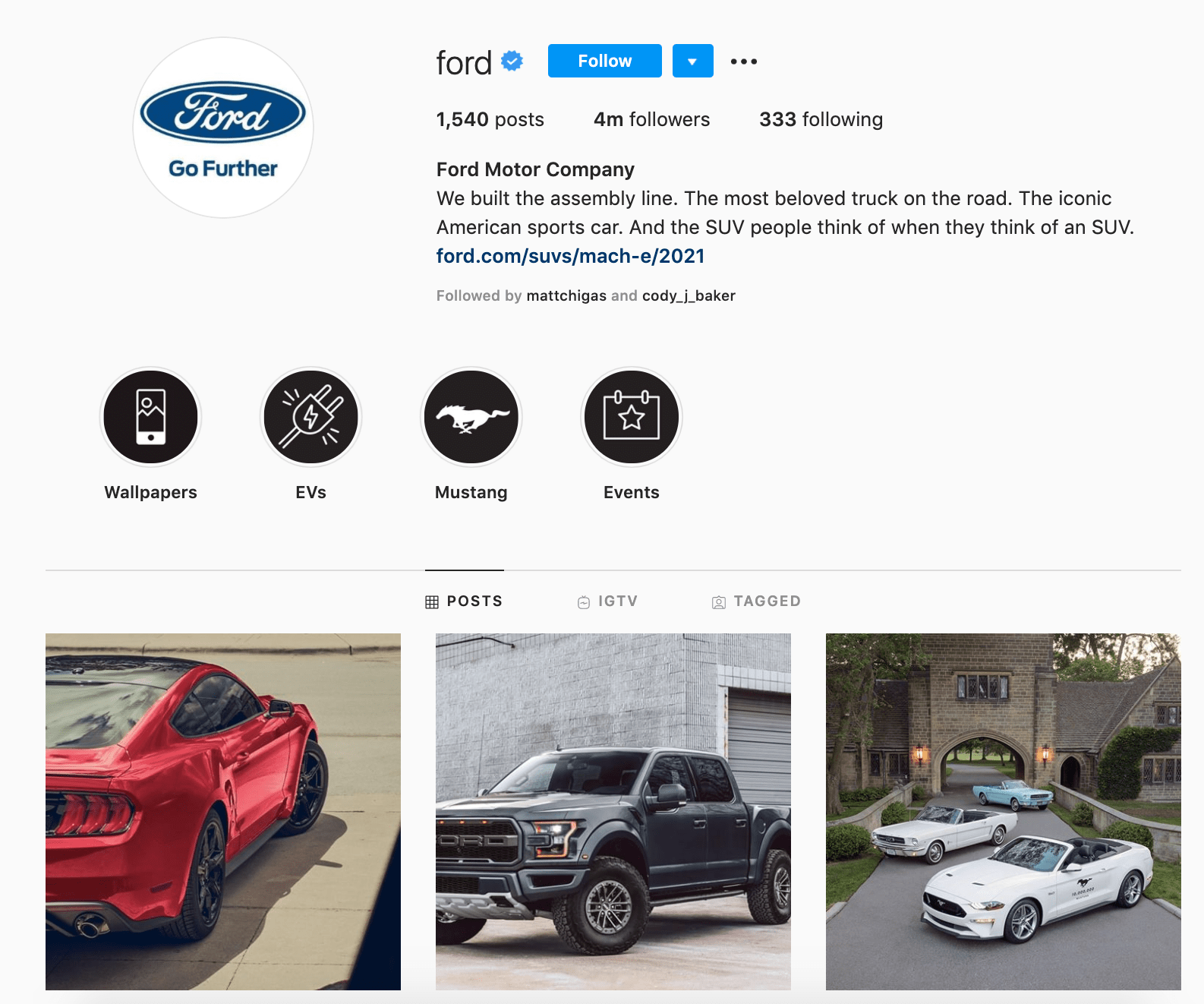
One of the oldest and most popular automotive makers, you’d expect Ford to be relatively old-fashioned when it comes to social media, but Ford’s rules are both refreshing and straightforward.
One of my personal favorites? “Awareness that what you say is permanent”. In a world largely interested in quick-likes and controversial opinions for the sake of retweets, Ford’s approach is a good reminder that what you say today matters for the future of your company’s reputation.
A couple call-outs:
- Ford tells its employees to “Mind your manners”, and treat everyone — from co-workers to suppliers to competitors — with respect.
- While Ford wants its employees to “make it clear the views expressed are yours,” it also reminds its staff that “you speak for yourself, but your actions reflect those of Ford Motor Company”. This is a good lesson: people often make judgments about an entire company’s values based on their opinion of the personnel they interact with, so it’s critical even personal employees’ accounts reflect integrity and respect.
- Ford’s policy tells its employees “the internet is a public space”, and says “no matter how obscure or secure the site to which you’re posting may seem … consider everything you post to the Internet the same as anything you would post on a physical bulletin board or submit to a newspaper.” This is important. Nowadays, posting on Instagram might seem like NBD, but it’s critical we remember anyone can see what we post (or, what we posted five years ago…).
4. New York Times
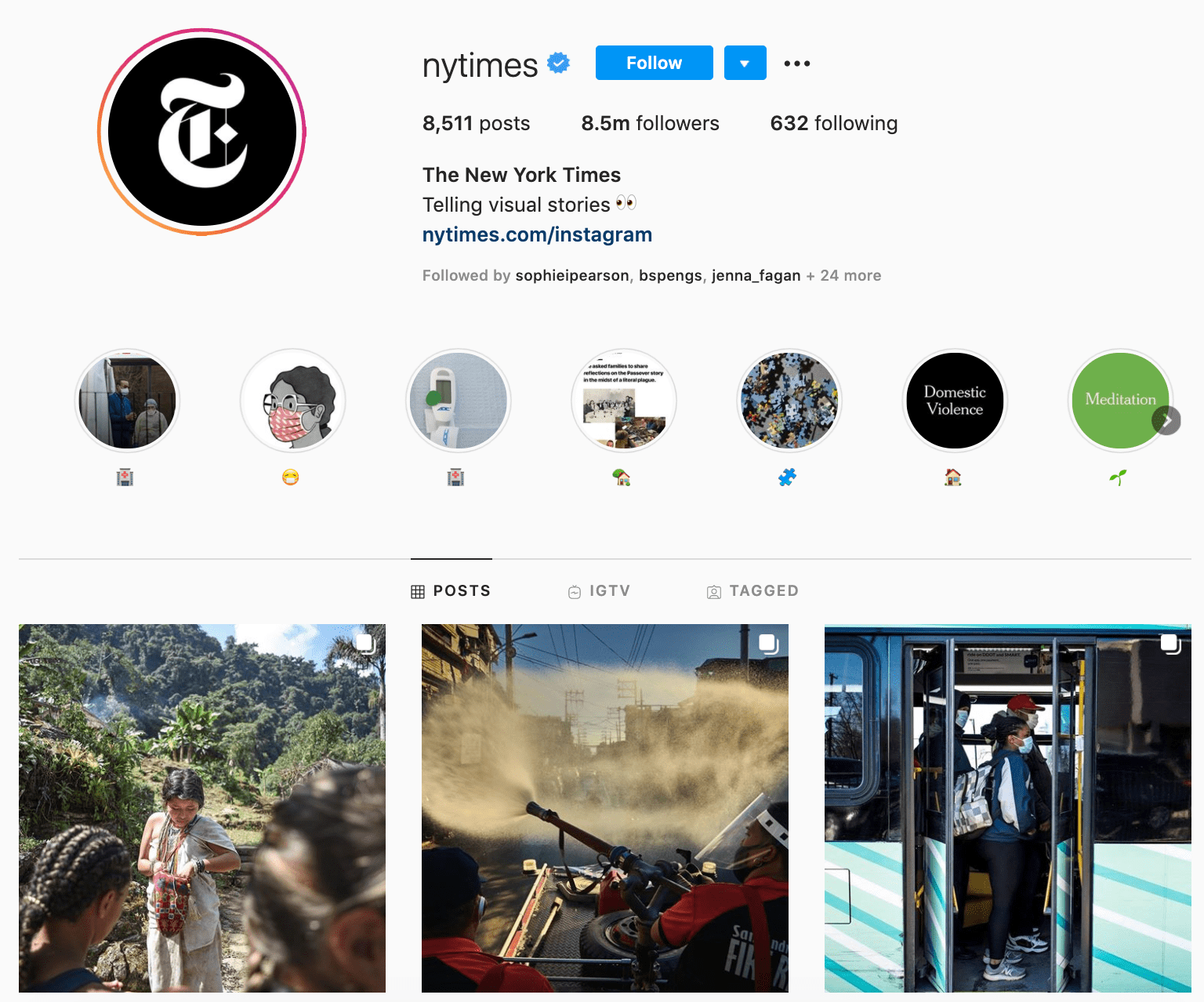
One of the most popular media institutions in the world, The New York Times recognizes the price for its popularity — namely, that anything their employees state on their personal accounts could come across as the official opinion of The Times.
To cultivate its social media policy, the Times collected quotes from several Times reporters — this provides additional accountability and a sense of fairness, as it demonstrates several employees’ endorsement of their policy.
Here are some sections worth reviewing:
- “In social media posts, our journalists must not express partisan opinions, promote political views, endorse candidates, make offensive comments or do anything else that undercuts The Times’ journalistic reputation.” Ultimately, the Times aims to be objective, and that objectivity needs to be applied to its employees’ personal social media captions and comments, as well.
- The Times urges its employees to avoid making customer service complaints on social media, and for good reason — the media corporation acknowledges its employees might be given special consideration as a Times reporter or editor, and doesn’t feel it’s fair that their employees leverage this special treatment or tarnish another brand’s reputation.
- The Times includes an unusual request in its policy: in the name of transparency, it asks its employees to acknowledge if they’ve deleted a post or tweet with a subsequent tweet, to ensure they appear honest even if they’ve made a mistake.
5. Oracle
This Boston-based SaaS company takes a stricter approach to its social media policy, but if you’re in the software space, it’s a good policy to review.
Here are some of the highlights of Oracle’s social media policy:
- Oracle appears to be of the ilk that using social media in the workplace is a hinderance to productivity because it could lead to too much personal use. Understandable? Yes. Too strict? Debatable. While it can be good to blur the line between personal and professional in social media, that balancing act isn’t always appropriate in regulated industries.
- Employees must establish that all opinions are their own and not Oracle’s, but at the same time, distinguish that they are indeed employees of Oracle. Contradictory? No. Blog posts can increase brand exposure, but employees must be careful with what they say and how they say it, not divulging new features, products, or confidential information.
- Oracle advises its employees avoid discussing future offerings or impending product releases due to “potential revenue recognition issues”. This is a good call-out, since unofficial promotions of product launches or additional features could confuse customers, especially if the information regarding those product launches change before official release.
Ultimately, the rules and regulations you choose to include in your policy should reflect your own brand’s values, messaging, and tone. However, hopefully you can use these examples to ensure you include statements that can help protect you against legal or regulatory disputes in the future based on an employees’ social media posts.
Additionally, aim to use your social media policy to increase your social media strategies’ effectiveness and ensure you’re creating a positive brand image on any platform on which you post.

10 Social Media Fails to Avoid in 2020
Chances are you’ve witnessed a social media fail sometime in the past year. It usually results from a sense of urgency, or a miscommunication that ignores common sense, all for the sake of gaining attention.
It’s true: Follow just a bit of poorly-advised posting on social media, and you, too, can create your very own brand fail in a matter of minutes.
Many brands are over-concerned with posting frequency and speed, and not concerned enough with tactics that ensure quality and proper context. A single spur-of-the-moment tweet can cause irreparable damage. And even after it’s deleted, the examples below show that content on social media never truly dies — so make sure you have a plan in place that establishes clear boundaries and best practices.
As proof, here are ten of the worst social media fails you might ever come across.
11 Social Media Fails to Avoid
1. Chase’s Poem About Financial Woes
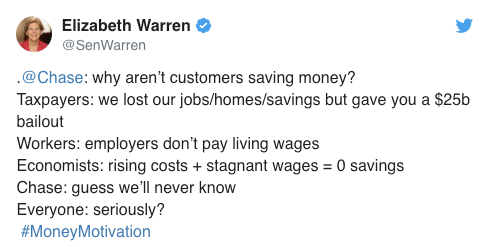
In 2019, Chase posted a #MondayMotivation tweet that aimed to encourage audiences to save money. However, it came off like the bank was teasing its audiences for bad spending habits.

Then, the situation got worse for Chase when presidential candidate Elizabeth Warren tweeted in reply.
2. IHOP’s April Fools Rebranding
Leading up to April Fools Day 2018, IHOP announced on social media that it was rebranding from the International House of Pancakes (IHOP) to the International House of Burgers (IHOB).
For 60 pancakin’ years, we’ve been IHOP. Now, we’re flippin’ our name to IHOb. Find out what it could b on 6.11.18. #IHOb pic.twitter.com/evSxKV3QmT
— IHOP (@IHOP)
June 4, 2018
People began tweeting criticisms for the brand while also making fun of the name. Even though the joke aimed to gain attention, it seemed like the reaction was pretty mixed and confused.
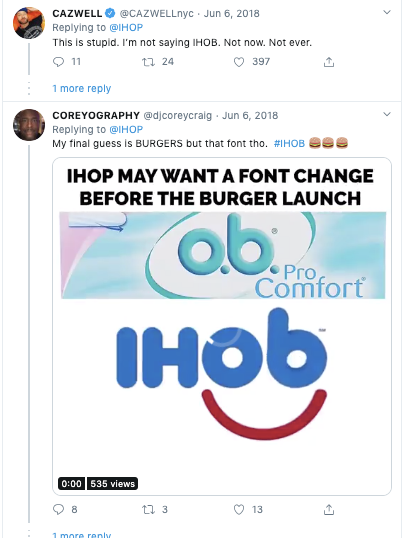
Because almost everyone knew IHOP was up to something, the joke fell flat despite its major online chatter.
3. EA Posts the Most Downvoted Reddit Comment in History
A few years ago, Reddit gamers were discussing a pricing issue on a subreddit related to the EA game they were playing. These gamers felt like they had to spend more money on a game they’d already purchased to get to new levels. At this point, in an effort to do damage control, EA wrote a PR-like response to one of the Redditors explaining and standing by the pricing of the game.
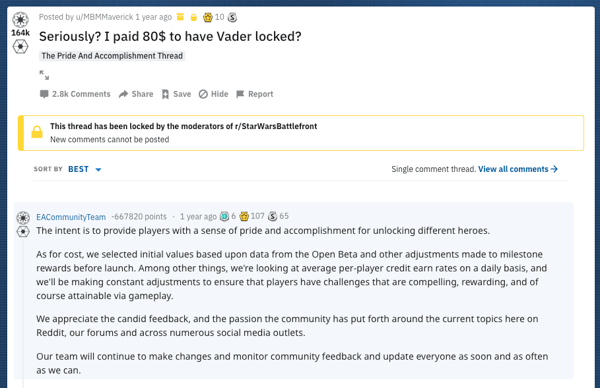
Redditors, who were more interested in solutions rather than excuses quickly downvoted the item. It soon was sent to the bottom of this subreddit becoming the most downvoted comment in Reddit history.
4. Massachusetts’ Bay Transit Authority Asks Audiences to Post “What They Love About It”
On Valentine’s Day this year, the MBTA launched a contest asking Twitter audiences to tweet a 60-second video about something they loved about MBTA. Those who entered the contest could win a round-trip JetBlue flight for two.
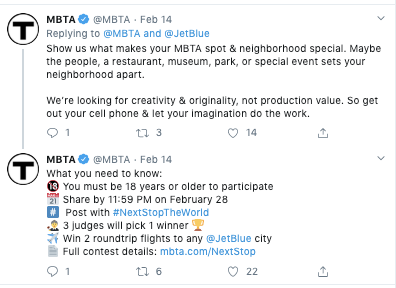
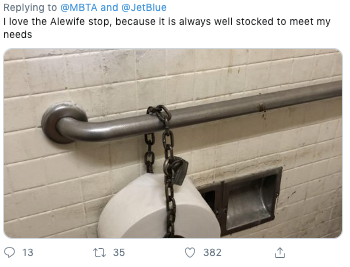
At this point in time, the MBTA has dealt with major criticism related to fair increases and ongoing rail construction. Twitter users that enjoyed complaining about the MBTA swarmed to this tweet about a number of sarcastic replies stating what they “loved” about the system. Here’s one great example:
5. Rhode Island or Iceland?
Good intentions fell flat for the Rhode Island Commerce Corporation in 2016, when it made one grave error in a $5 million promotional video — and used footage not of the great state itself, but instead, of Iceland.
The mistake went viral and gained far more attention than an Iceland-free version of the promotion would have, but it wasn’t exactly the type of publicity we imagine the bureau of tourism was hoping for.
Thanks to the social media skills of Rhode Island Governor Gina Raimondo, you can enjoy your very own private viewing of this social media fail.
Help tell Rhode Island’s story by sharing our new brand video #weareRI https://t.co/alIIcZ2DIghttps://t.co/qh3YtF0q0s
— Gina Raimondo (@GovRaimondo)
March 29, 2016
6. Amazon Offers 10-cent Discount on PlayStation
In 2015, Amazon created #PrimeDay as its own corporate version of a Cyber Monday. Unfortunately, at that point, many of the discounts and offerings didn’t quite live up to consumer expectations — and the hashtag went viral for all the wrong reasons.
One kicker came when Amazon offered a whopping $0.10 discount on the Sony PlayStation 4 Console. It didn’t take long for #PrimeDayFail to start trending on Twitter.
Damn been waiting for the PS4 to go down 10 cents 😩 #AmazonPrimeDay pic.twitter.com/eIiThMX9IT
— lupe (@cherryyyybomb)
July 15, 2015
7. Apple’s #bendgate
Any time a brand winds up with a trending hashtag that includes the word “gate” in it, you know there’s trouble.
In 2014, Apple released the iPhone 6 with great fanfare, with one of the most aggressively highlighted features being that the phone wouldn’t bend under pressure in, say, your back pocket.
In a video that now has more than 69 million views, Unbox Therapy squashed Apple’s claims by demonstrating how easy it was to bend the iPhone 6. Once the damage was done there was no going back. A war of words promptly took place between avid Apple fans and detractors, garnering even more attention on social media.
8. Greggs’ Turns a Fail into a Win
Robots aren’t always smarter. In 2014, a Google bot mistakenly attributed an offensive slogan to U.K.-based bakery, Greggs. Hilarity — to some, at least, ensued when Greggs’ Digital Brand Manager, Neil Knowles, turned a potential brand disaster into a monumental win.
Thanks to the clever back-and-forth between Knowles and the Google team, and the massive publicity garnered by the exchange, Google’s original error wound up being one of the best things to ever happen to Greggs.
Hey @GoogleUK, fix it and they’re yours!!! #FixGreggs pic.twitter.com/d5Ub7qtrLG
— Greggs (@GreggsOfficial)
August 19, 2014
9. Coca-Cola vs. Russia and Ukraine
If you’re going to create a huge promotion that displays a giant map of Russia, it’s generally a good idea to make sure that map is accurate. Or, better yet: When in doubt, don’t show a map.
Coca-Cola received massive backlash from Russian citizens when it posted a promotional branded image made to look like a map of Russia — which left out Crimea. In response, many consumers took to Twitter to post images of themselved pouring Coke into their toilets, leaving a trending impression.
Then, in response to the backlash, Coca-Cola published an updated map that included Crimea — which was promptly bombarded by outcries from Ukrainian citizens, due to tensions resulting from Russia’s annexation of Crimea in 2014.
Lesson learned: Don’t publish original content that’s inaccurate, and has the potential to be highly (and globally) controversial.

Source: The Guardian
10. A Giraffe for Ghana Tweet from Delta
Sometimes, all it takes to avoid a social media fail is a simple Google search.
During the 2014 World Cup game between the USA and Ghana, Delta sent out a congratulatory tweet to the U.S. soccer team. The tweet included an image of the Statue of Liberty with a “2” representing the U.S. score, and a giraffe with a “1” that was meant to represent team Ghana’s score.
There was one tall problem: Ghana doesn’t have giraffes. Of course, Twitter users jumped all over that one.
PHOTO: Delta Airlines thinks there are giraffes in Ghana. There aren’t. http://t.co/9VsWsCfQSe pic.twitter.com/pGMJ6p0ljA
— theScore (@theScore)
June 17, 2014
Just remember: It’s always best to take extra time to conduct some easy research, and avoid social media gaffes — no pun intended — like this one.
Avoiding Social Media Disasters
You might have noticed a pattern in some of the “fail” examples. Twitter is not to be trifled with. Once something goes viral it lives on forever. The best way to avoid a social media brand fail is to establish a meticulous social media management approach. This allows you to control the types of content you post and the messaging your brand communicates with.
Regardless of how small your audience is or how innocent something might seem, there’s always a reason to quality-check before posting.
Editor’s Note: This post was originally published in September 2017 but was updated for comprehensiveness in February 2020.

How HubSpot’s Report-Based Acquisition Campaign Hit 150% of Our Lead Goal in 30 Days
Acquisition marketing campaigns are critical to bring in new customers and revenue. At HubSpot, we run these campaigns quarterly.
Despite the rapid cadence, every quarter we work to create new, remarkable ways of reaching, informing, and converting our audience.
I wrote this post to share with you how we crafted our latest acquisition campaign to hit and exceed our acquisition targets.
Establishing the Campaign
The beginning of our Q1 2020 Acquisition Campaign started with a blinking cursor. As we brainstormed how to start our research, we had a few inputs to work with.
First, we knew our target audience consisted of marketing managers, as we were re-launching our Marketing Hub Enterprise product that month.
We knew that reports were a content type that worked well for us in the past. We saw our 2019 Instagram Engagement Report and a 2020 Social Media Report successfully attract new audiences.
At the very least, it was a motion that our audience was familiar with, which meant there was less of a barrier to show the value.
Additionally, seasonality played a large role in our planning. We wanted to build content to support marketers planning their strategies for the upcoming year.
With the combination of 1) a target audience, 2) an understanding of high-performing content types, 3) timing, and 4) our additional user research, we wanted to create a remarkable go-to resource for marketing managers building their strategies for the year.
Thus, the idea for “Not Another State of Marketing Report” was born.
In this article, I’ll talk through the report surveys and content, the web experience, the promotion, and the results. Hopefully, it gives you a peek behind the curtain and some inspiration for future campaigns.
Running the Surveys and Creating the Report Content
The first and most important thing about the content of this report was to start collecting survey data for analysis and visualization.
Working with our team at HubSpot Research, we ran our first survey in November/December of 2019 that went out to 3,400 global marketers.
After we sent out the survey, we talked about what might differentiate this content from other reports we had released in the past. While the data was valuable, we knew that data can be dull without human context or insights.
So, we brought in the humans.
Our first criterion for selecting our experts was their subject matter expertise. We had come up with a list of topics we wanted the report to cover (from SEO strategy to content marketing strategy and more) and wanted our experts to have deep and specific knowledge about the topic we chose them to represent.
Our second criterion was seniority. We were crafting a report for higher-level marketing managers, directors, and VPs, so we wanted our experts to have a similar level of seniority.
We are fortunate enough to work with a lot of brilliant marketers at HubSpot, so eight of our experts were internal. The other two, Cynthia Price (VP of Marketing at Litmus) and Ellie Mirman (CMO at Crayon) were generous enough to offer their time when we asked them to share their expertise with us.
We interviewed each of our experts for about an hour, took detailed notes, and recorded the interview. We then sent the notes and recordings to a talented team of writers who transcribed the notes into a ghostwritten draft. Our team edited the drafts and sent them to the authors for their edits and final approval. We also shared the survey data with them to gather their commentary about the data points.
We decided to leave these articles ungated on the web experience, so we optimized them for organic search with extensive keyword research. We’ve seen some exciting results from that play — generating over 15,000 backlinks in the first two months and taking the number three result for the search term “state of marketing”.
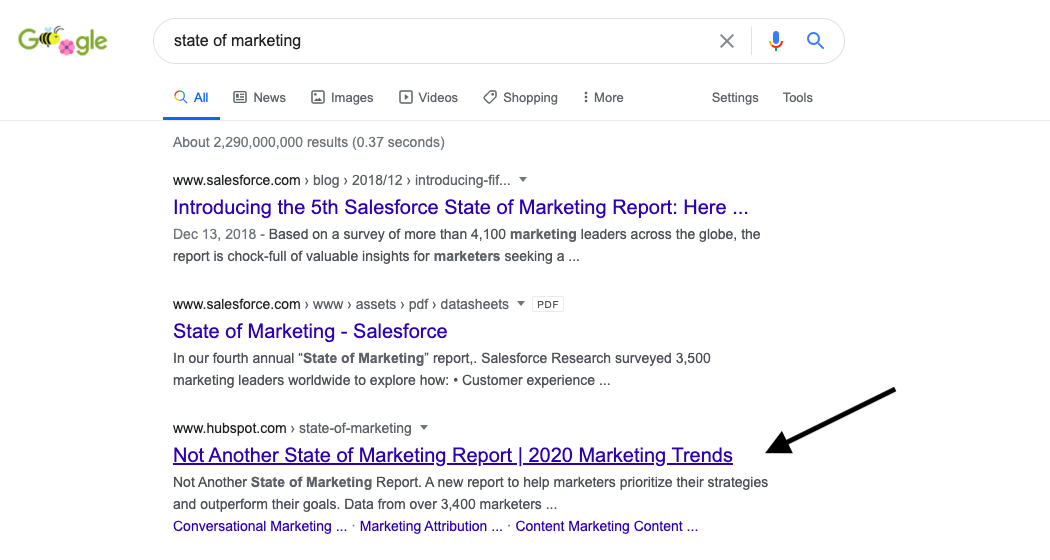
When we received the initial survey data, we were thrilled by the results — but knew we needed to take it one step further. So, we ran an additional survey in January to a North American database of marketers.
At this point, with the additional survey data and expert commentary, we sourced some quotes from experts across the industry. We ended up with a great group of contributors from Dropbox, Twilio, and more.
When all was said and done, we had 19,000 words worth of insights and 70+ data points.
Designing and Developing the Web Experience
Differentiating this campaign didn’t stop at the expert insights. We wanted to create an immersive web experience to pair with the report PDF.
The result was a fully custom web experience with a homepage, nine child pages for each article, and custom interactive form that follows the user in a non-intrusive banner. It was designed by an incredible lead designer, and built from the ground up by three developers. (It’s better seen than described, so I’ll leave you with this.)
We were curious about what kind of conversion rates this custom web experience could drive.
To date, the homepage of the report is converting at around 35%. This metric is calculated as the ratio of views vs. submission and is measured in HubSpot’s own HubSpot portal.
We’re really excited about that conversion rate, but we’ve noticed that it doesn’t stay as high throughout each page of the web experience.
For example, on a sample article page, we noticed the conversion rate was about 5%. The leading theory right now is that people are downloading the offer when they land on the homepage, and then they explore the rest of the experience after downloading, so they aren’t converting on the offer pages.
Overall, though, we’re very proud of how the web experience turned out and think it’s a strong differentiator. After all, 38% of people will stop engaging with a website if the content doesn’t look pretty on the page.
How We Promoted the Campaign
When it came time for promotion, we had to decide on three things: the story we wanted to tell, our creative promotional assets, and the channels we wanted to pursue.
1. The Story
The literal offer that we were marketing was a report. However, the emotion that we wanted to portray was confidence. This was the story we wanted to report and campaign to tell.
For some marketing managers, feeling confident about a strategy can prove difficult. Are other people in the industry doing this? How will I know if it will work?
Data can help ease those concerns, as can long-form articles from deep subject matter experts.
So, we wrote 20 headlines around that concept. This was a good exercise because, although most of them ended up unused, we found this process sharpened our writing “muscle”.
One of the early headlines we landed on was, “A report for marketers who use data to outperform their goals.”
2. Our Creative Assets
The design of this campaign was important to us. We wanted it to feel cohesive across the web experience, the PDF offer itself, and our promotional efforts.
So, under the guidance of our lead designer, we put together a detailed brief for a freelancer, and he came up with some beautiful stuff.
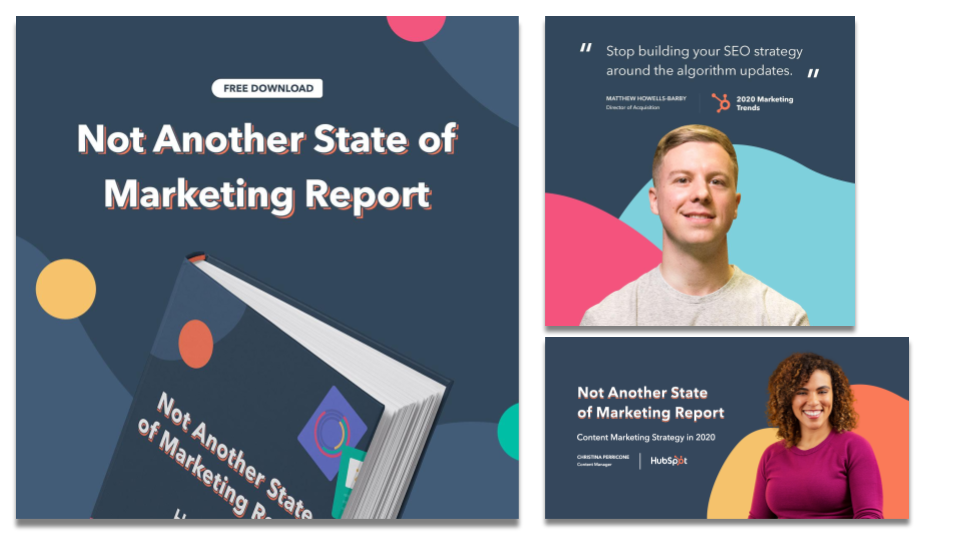
Our learning here is that cohesive design across all campaign assets makes the campaign feel larger than life.
3. Promotional Channels
On the Global Campaigns Team here, we like to bucket our promotion into three categories:
- Paid : What channels can we activate that we have to put direct dollars into?
- Owned: What organic channels and established HubSpot audiences can we leverage?
- Earned: What are some additional free promotion and placements (e.g. organic SEO) can we leverage?
For our paid channels, we chose to focus on Facebook Ads (historically the lowest CPL for us) and LinkedIn Ads (typically more expensive but more effective targeting for the audience we wanted to attract). For this channel, we built a more standard landing page to drive conversions.
For our owned channels, we activated our brand channels (social media, email, etc.), our solutions partner channels, our customer channels, our HubSpot Academy Channels, and Sales Channels (our BDRs used the report as a conversation starter). We also asked our authors to promote it on their personal social networks, and we gave them personalized assets to make that promotion remarkable.
For our earned channels, we focused heavily on the organic SEO value of our ungated articles, the promotion from our partners in the report (Litmus and Crayon), and media placement in marketing publications.
Tracking and Analyzing the Results
This campaign was quickly successful: We hit 100% of our net new lead goal in 16 days and 150% of the goal in just over one month.
As of April 21st, there are 15,800 backlinks to the report. We are ranking for over 350 organic keywords and secured the #1 result for the search term “state of marketing.”
The custom homepage is converting at over 30%, and the paid landing page is converting at 25%.
About 50% (48%) of the net new leads for the campaign came from paid social media. We are hoping to see that percentage decrease as organic traffic continues to gain traction.
There were a lot of factors to our success, but we’ve identified the following as the main ones:
- Spend time in the strategic planning process. It’s tempting to rush a campaign out the door, but a well thought out strategy goes a long way. Use qualitative, quantitative, and search data to inform the direction you choose.
- Think about how you can contribute to a conversation that’s already being had in a new way. There are a lot of State of Marketing Reports out there. We focused on providing that same value but took it a step further.
- Help your creative team by giving them strong creative guidelines. This makes the design more cohesive and powerful in the end.
- Identify at least three channels you can activate for promotion. You should prioritize the ones that will most help you with your goal. Since we were looking to attract a new audience, our paid channels made the most sense to invest in.
- Double down on the details of your content. If someone is willing to give their information for your content, you better make sure it delivers on value.
Best of luck with your future campaigns!

Deal Creation Bounces Back After Early April Lows [COVID-19 Benchmark Data, Updated Weekly]
The economic impact of COVID-19 is undeniable. Businesses all across the globe are learning how to adapt to these new circumstances and we’re all learning how to operate in a “new normal” that’s constantly changing.
That’s why we’ll be publishing week-over-week trend data for core business metrics like website traffic, email send and open rates, sales engagements, close rates and more. We hope to establish useful benchmarks to measure your business against, and serve as an early indicator of when short- or long-term adjustments may be needed in your strategy.
While this post focuses on the highlights of last week, you can explore all the data we’re publishing here.

About the Data
- These insights are based on aggregated data from over 70,000 HubSpot customers globally.
- The dataset includes weekly trend data for core business metrics in 2020, focusing on changes occurring during and after March 2020.*
- The data from HubSpot’s customer base reflects benchmarks for companies that have invested in an online presence and use inbound as a key part of their growth strategy. This data
*The spread of COVID-19 has had a different timeline in different regions, so we are using the World Health Organization’s declaration of a global pandemic on March 11, 2020 as our “official” start date.
NOTE: Because the data is aggregated from HubSpot customers’ businesses, please keep in mind that individual businesses, including HubSpot’s, may differ based on their own markets, customer base, industry, geography, stage, and/or other factors.
What We’re Seeing
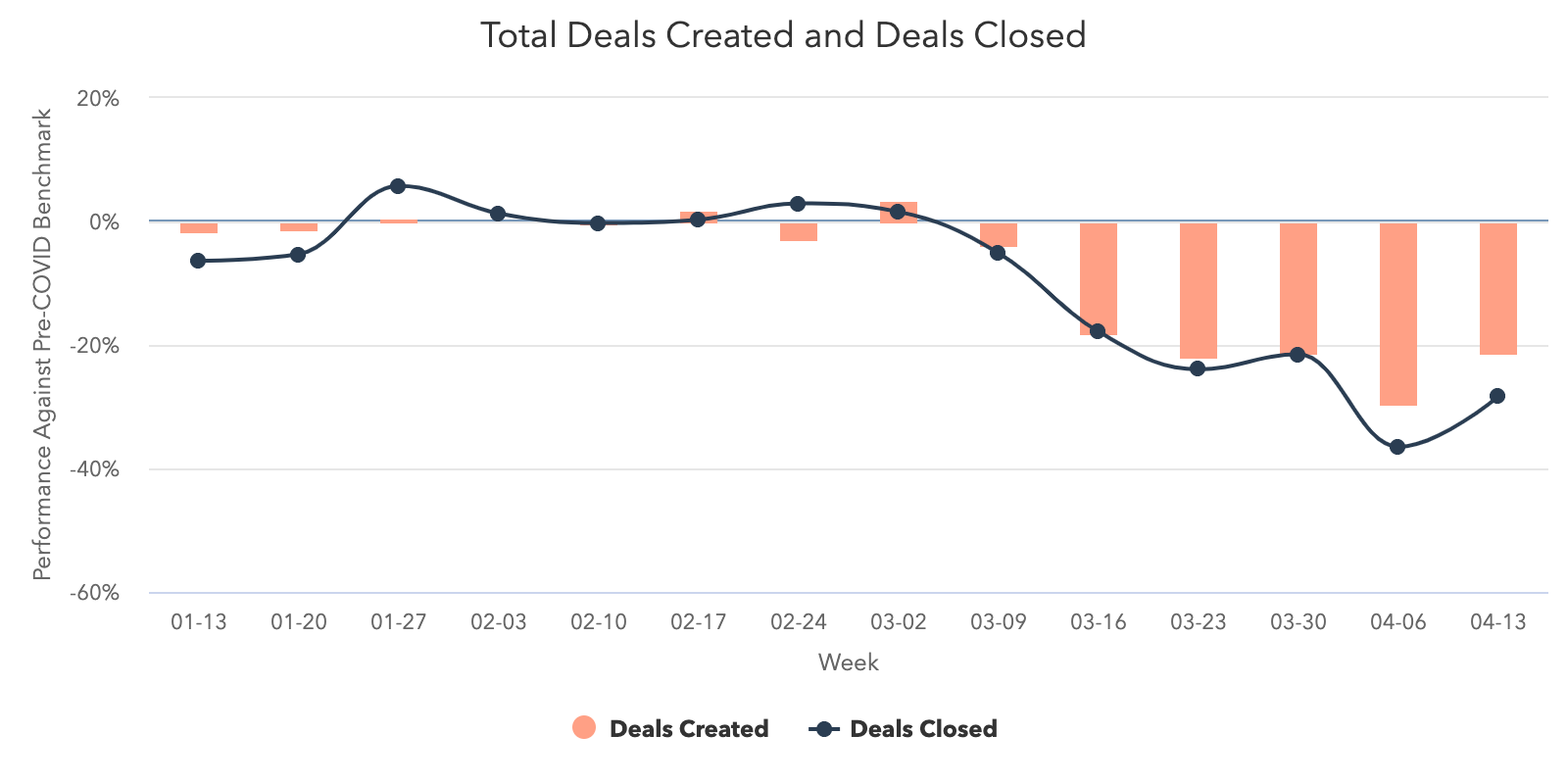
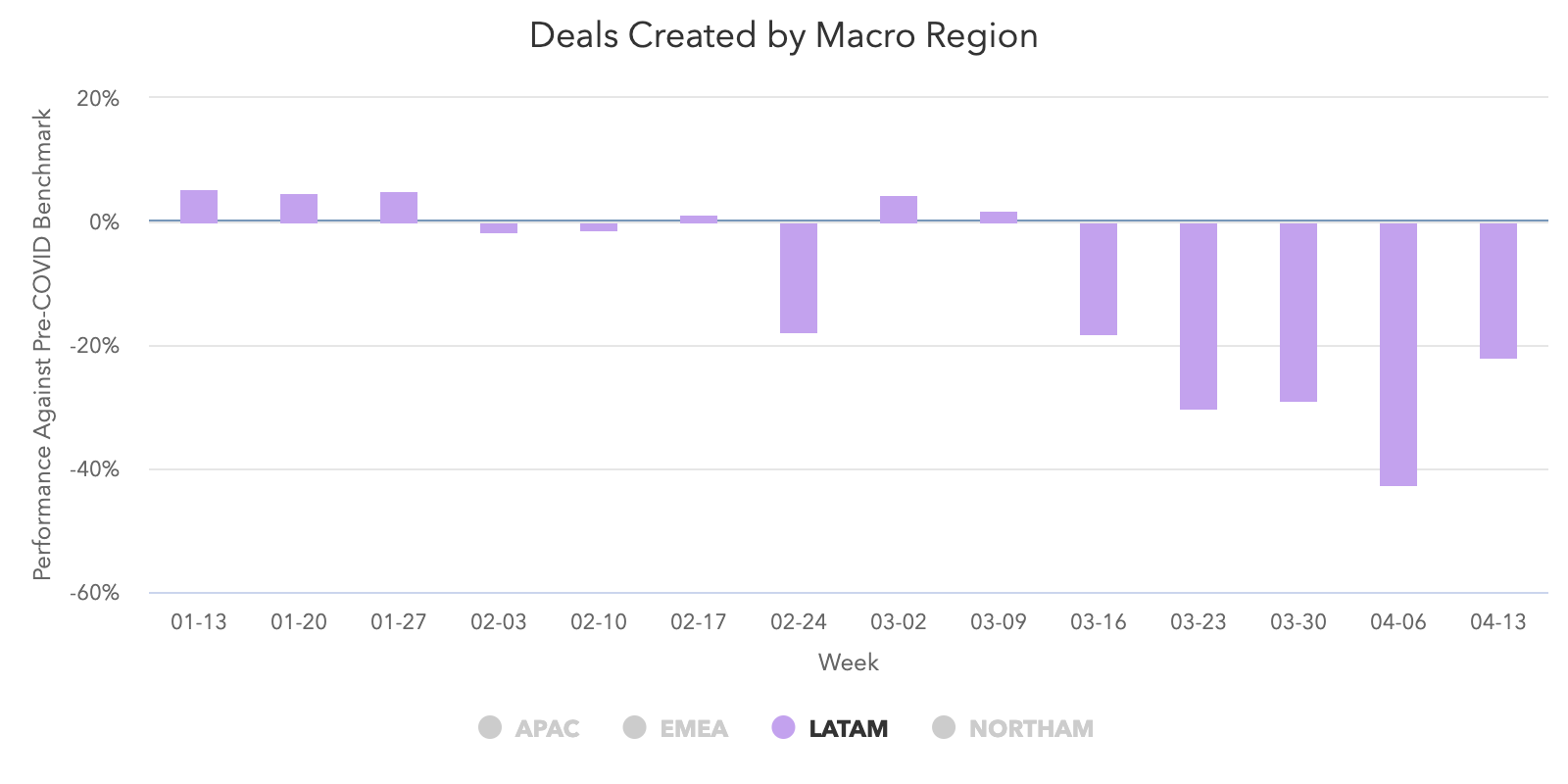
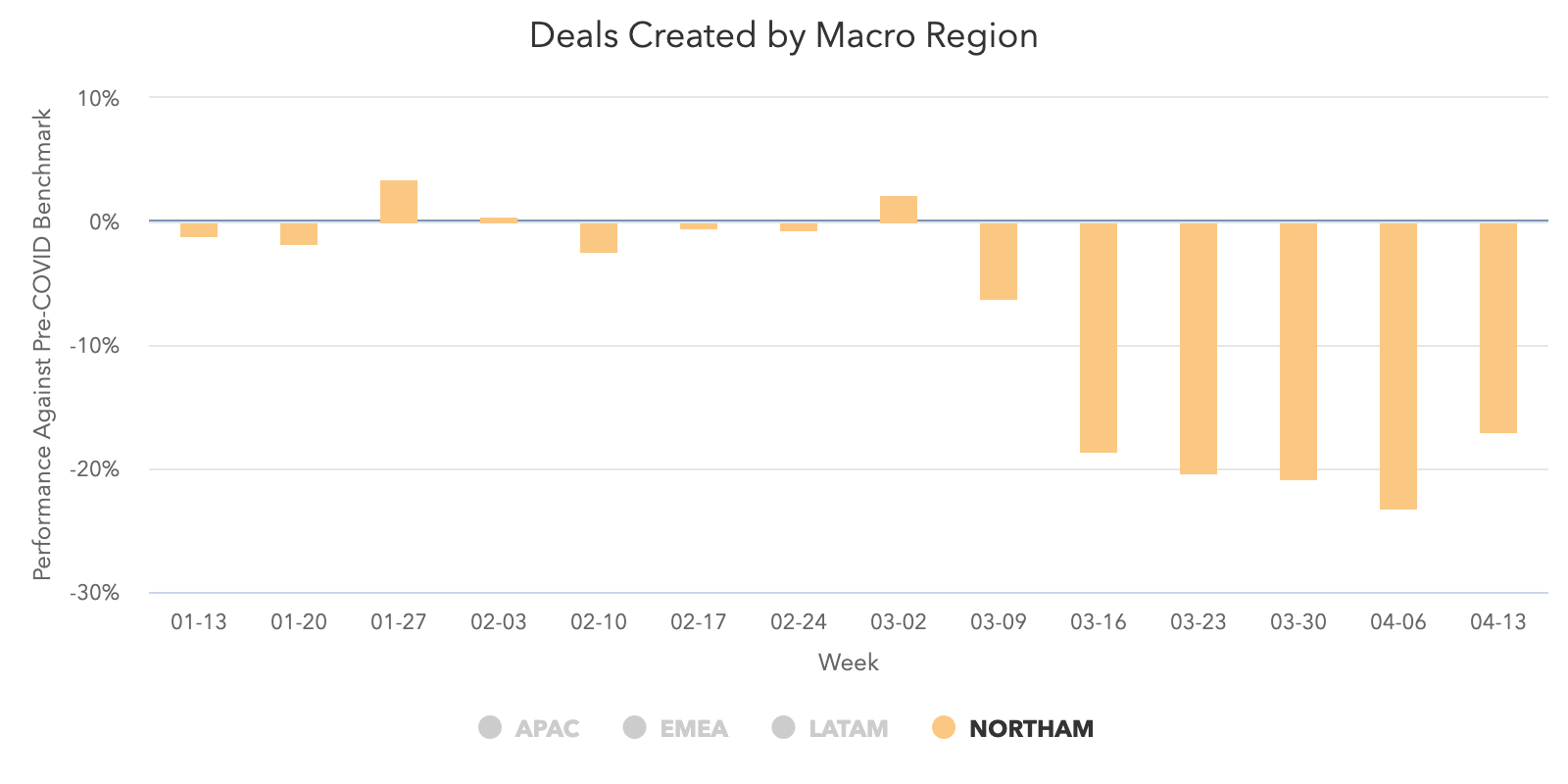
After multiple weeks of decline, last week saw a positive uptick in the number of deals created in HubSpot CRM as all global regions reported a rise. This is an important metric for business owners as deal creation is an indicator of future revenue. While this metric is still down 21% compared to pre-COVID levels, this week was a small victory after seeing negative results over the past several weeks.
Deals marked closed-won rebounded as well after experiencing a significant decline the week of April 6. This indicates that while sales teams are still figuring out the most effective ways to engage consumers, they’re starting to show signs of recovery after hitting roadblocks in mid-March. This metric is still down 28% from pre-COVID levels, so we’ll keep a close eye on it to see if a positive trend emerges moving forward.
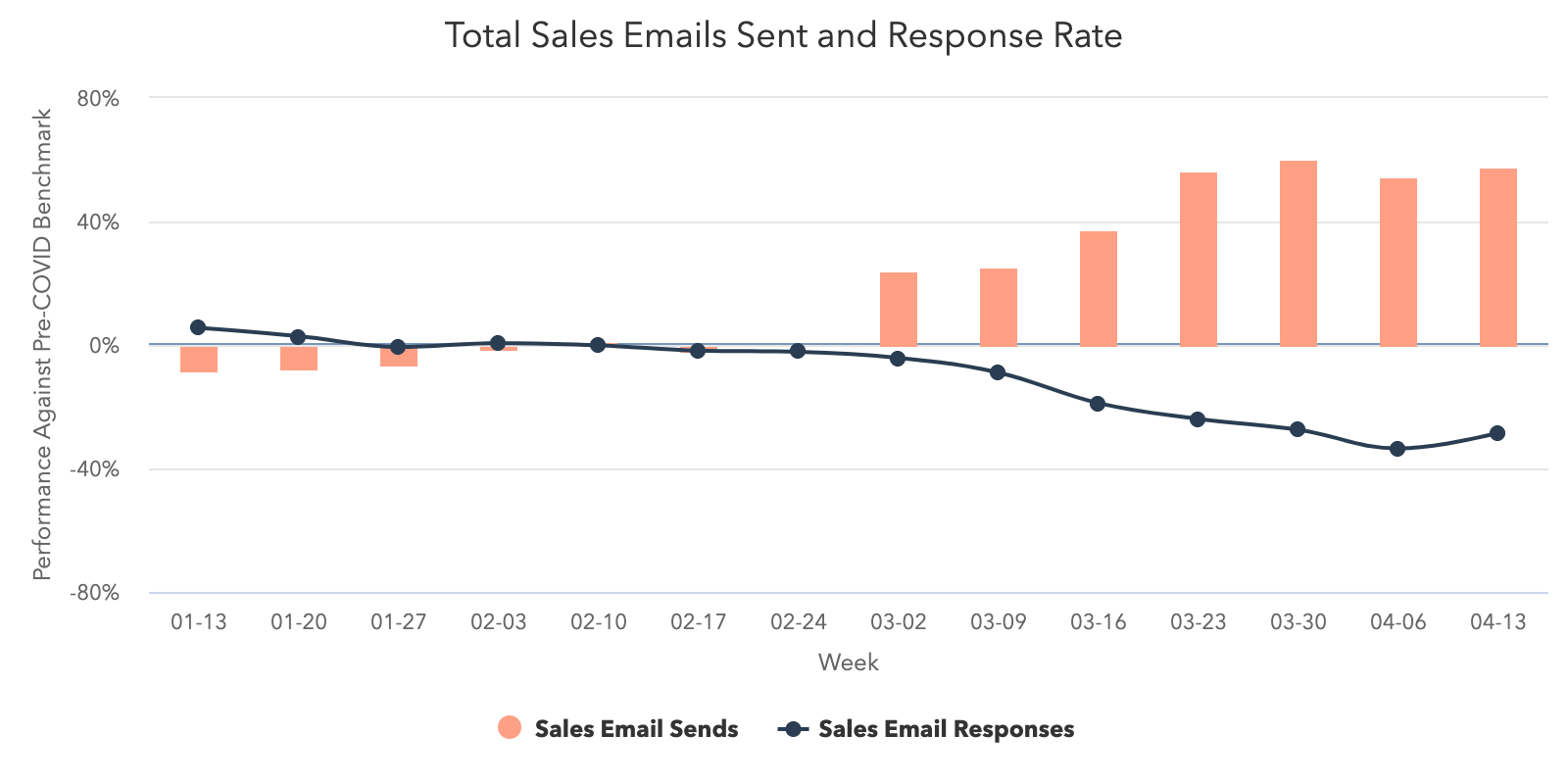
Another bright spot for sales teams last week was email. Both sales sequence send and response rates increased week over week with response rates rising 8%. While it’s too early to call this a definitive upward trend, it’s a promising sight after a few weeks of continuous decline.
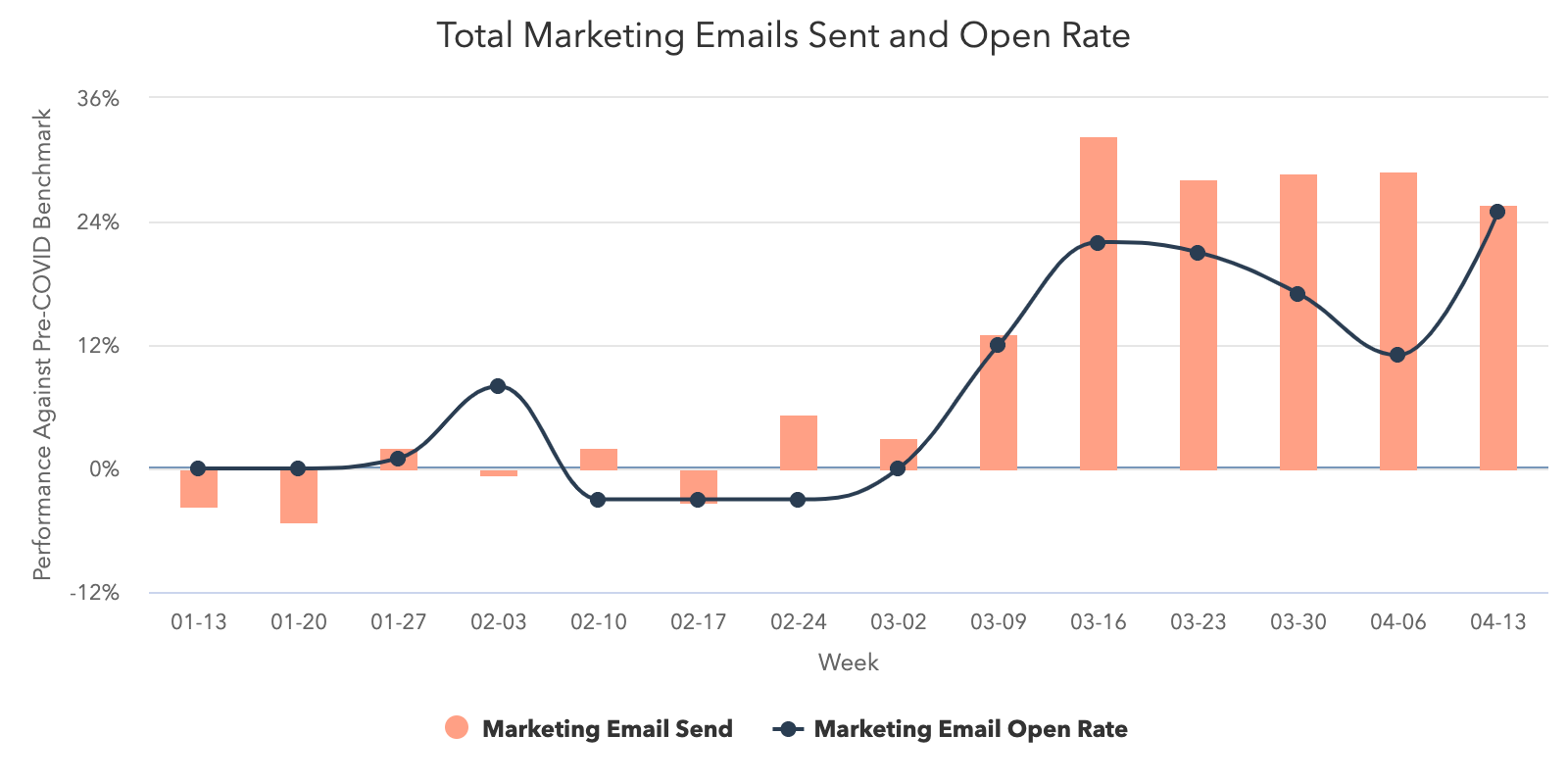
Consumers are still engaging with marketing channels as open rates continued to rise last week. In fact, open rates were 25% higher than averages taken during pre-COVID levels. Marketing teams are finding new ways to interact with customers and email appears to be an effective medium for attracting qualified leads. Even though send rates and contact creation dipped slightly, engagement continues to be high as people seem particularly responsive to email marketing.
Similar to email, live chat is another channel that consumers are favoring when interacting with businesses. Last week, chats initiated in the HubSpot CRM increased 7% across all global regions. This is a nice rebound from the week of April 6 as chat volume continues to rise far above pre-COVID averages.
To add more context to this data, we added an employee-size breakdown based on the number of employees that each HubSpot customer has. Similar to previous weeks, business-size doesn’t seem to play a major role as companies of all sizes seem to be equally affected by this environment. While we’d anticipate larger businesses would be better equipped to handle these challenges, nothing in our data definitively confirms this.
If you’d like to see more of what we’re measuring, you can explore the entire dataset here.
How Metrics Changed in April
The number of deals created and deals closed-won increased.
After a drop the previous week, deals created and deals closed rebounded with a stronger performance during the week of April 13. Deals created increased by 9% and deals closed increased by 13%. This is a notable jump from the week of April 6 when deals closed reach its lowest weekly volume this year.
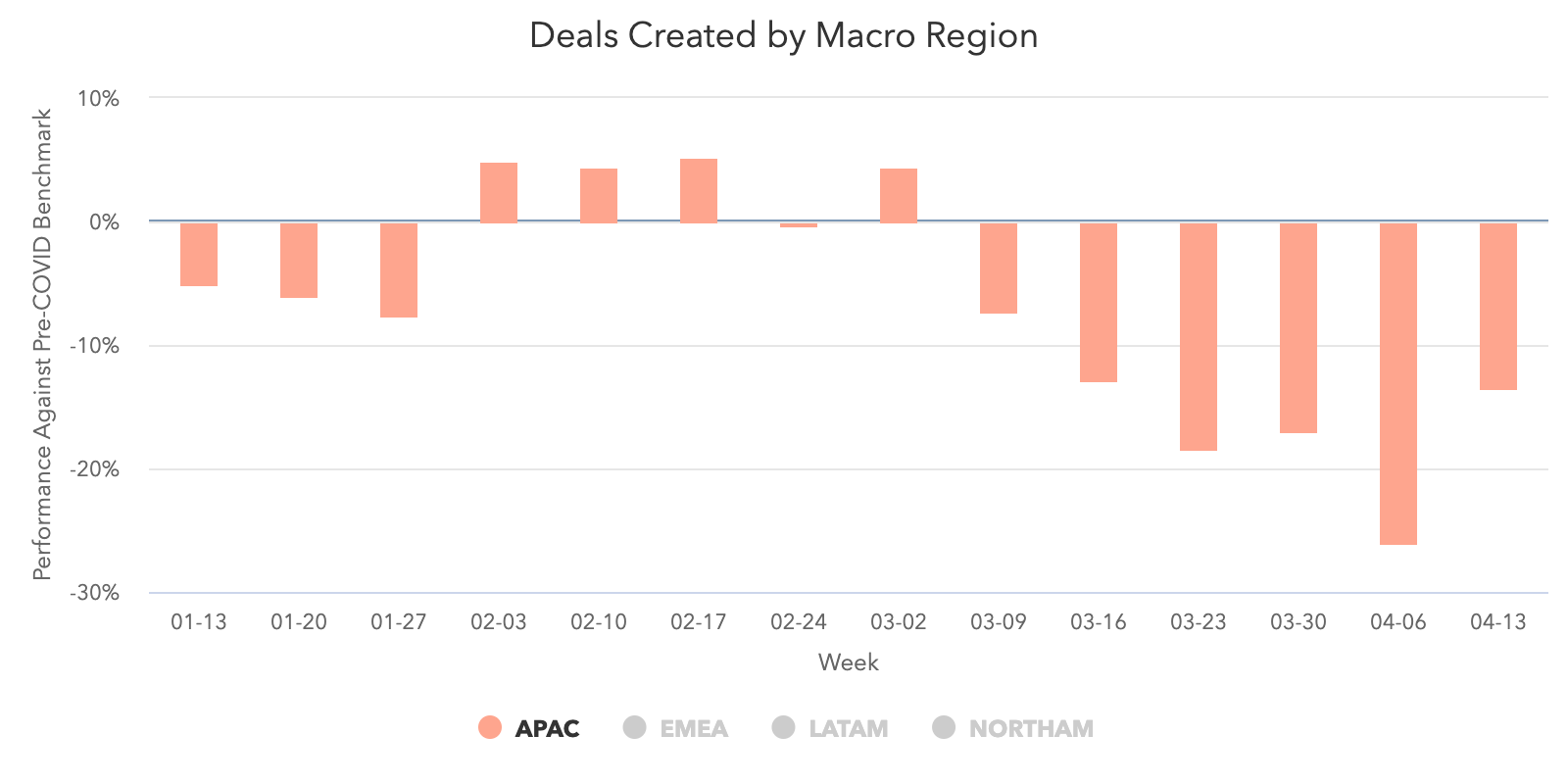
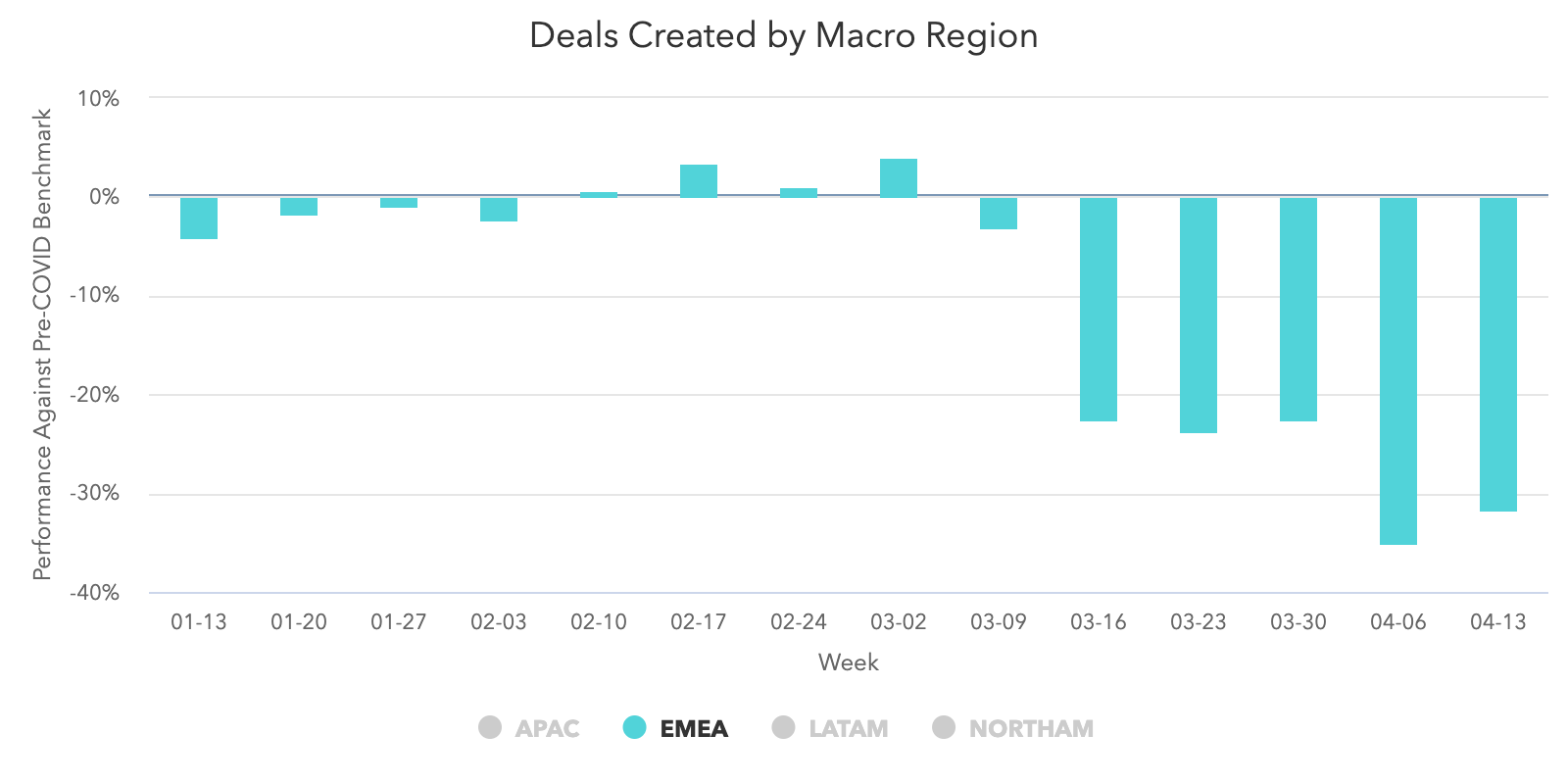
After the dip during Easter weekend, deal creation is up in every region. LATAM and APAC had the highest increases with 33% and 11%, NORTHAM with 5%, and EMEA saw the smallest increase at 1%.
Both sales email volume and response rates increased.
Sales email volume continues to reach historic highs as total sequence sends rose again last week. Total sequence sends increased by 2% and are trending 50-60% higher than they were during pre-COVID levels.
The good news is response rates are up as well. Response rates rose to 2.3%, which is an 8% boost from the previous week.
While sales email volume is still higher than pre-COVID averages, response rates are still catching up to those levels.
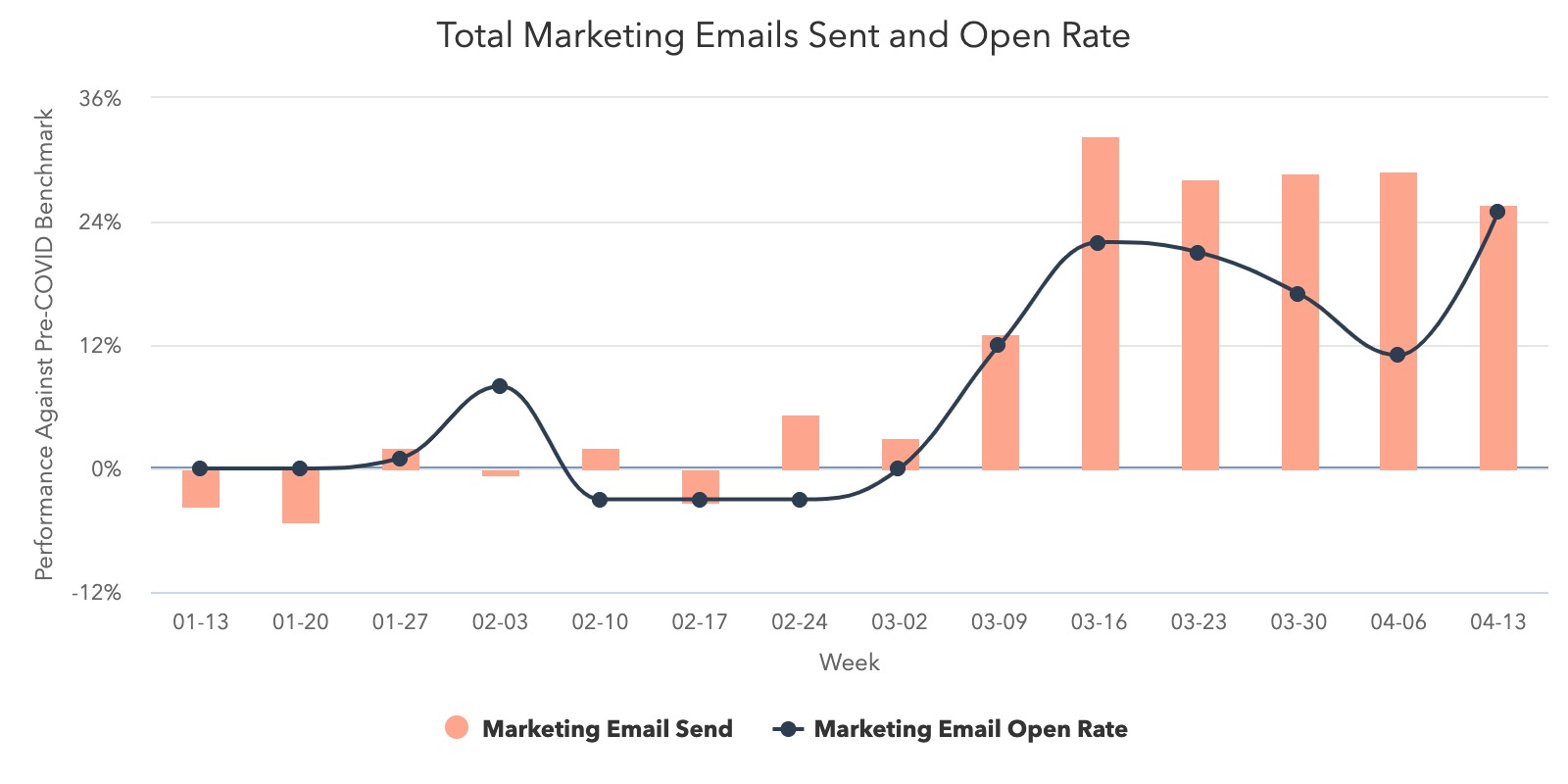
Marketing email open rates increased as volume declined slightly.
Like many people, you may be noticing a few more marketing emails in your inbox lately. Marketers are sending a lot of emails during this crisis, and the good news is that readers are opening them at record rates. Marketing email engagement rose again last week as open rates climbed to 25% higher than pre-COVID averages — roughly 5% higher than the week of April 6. And, while send volume decreased by 3% last week, it’s still trending well above pre-COVID averages.
Customer-initiated chat conversations continue to rise.
After a slight dip, chat conversations have increased 7% from the week of April 6. With the exception of that week, this marks the fifth consecutive week where chat volume has grown. In total, customer-initiated conversations have increased 9% since the week of March 9.
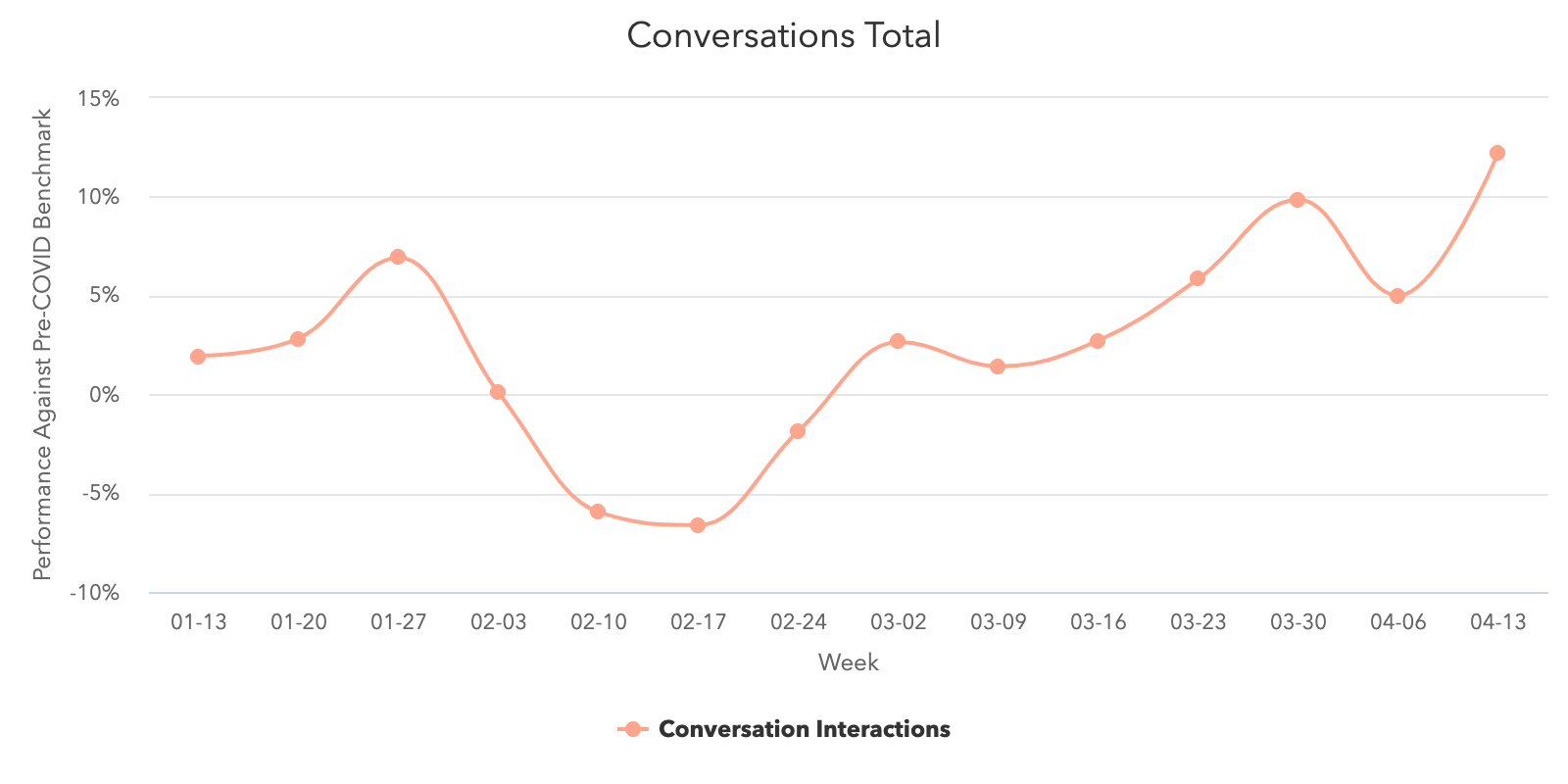
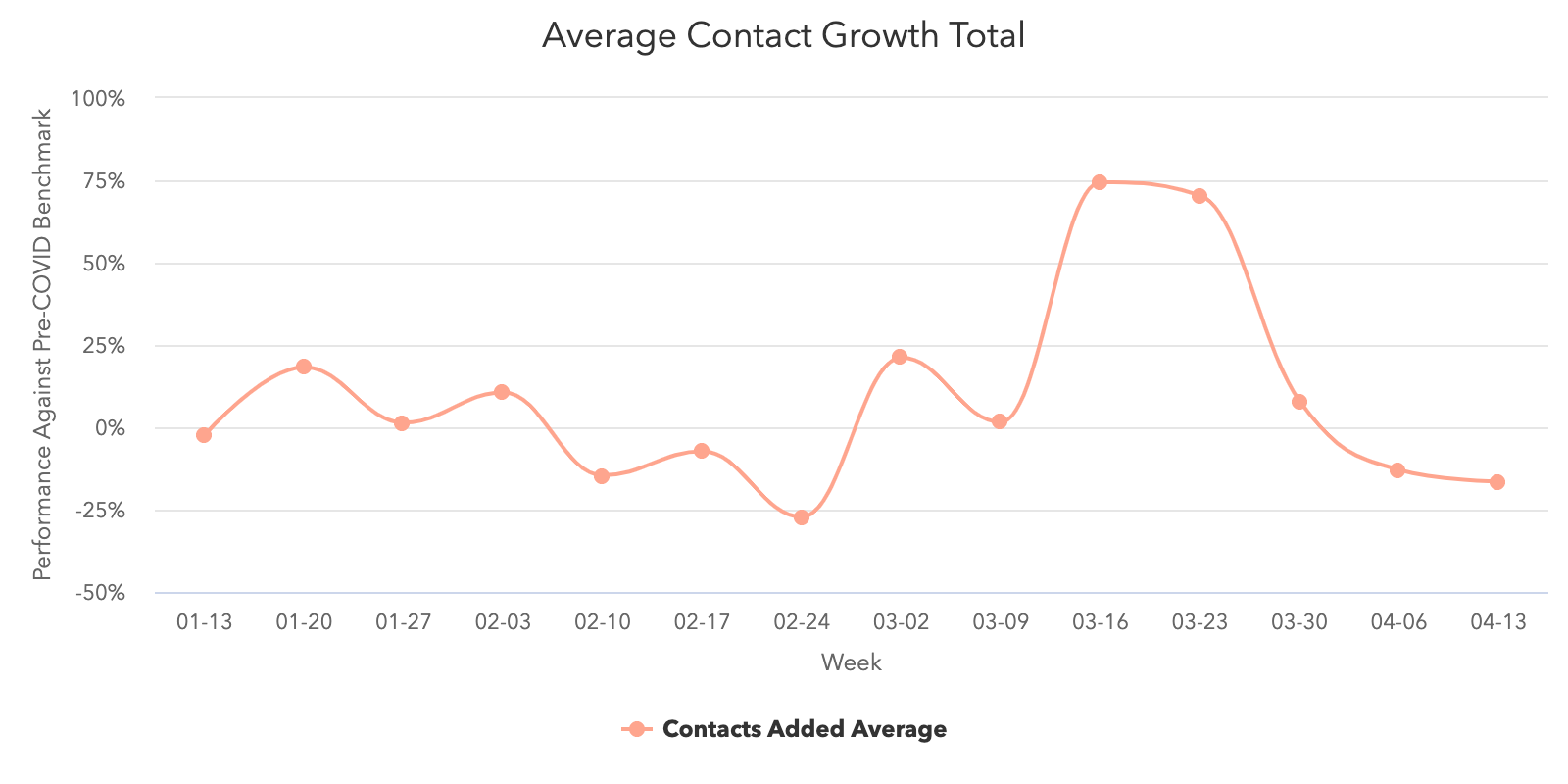
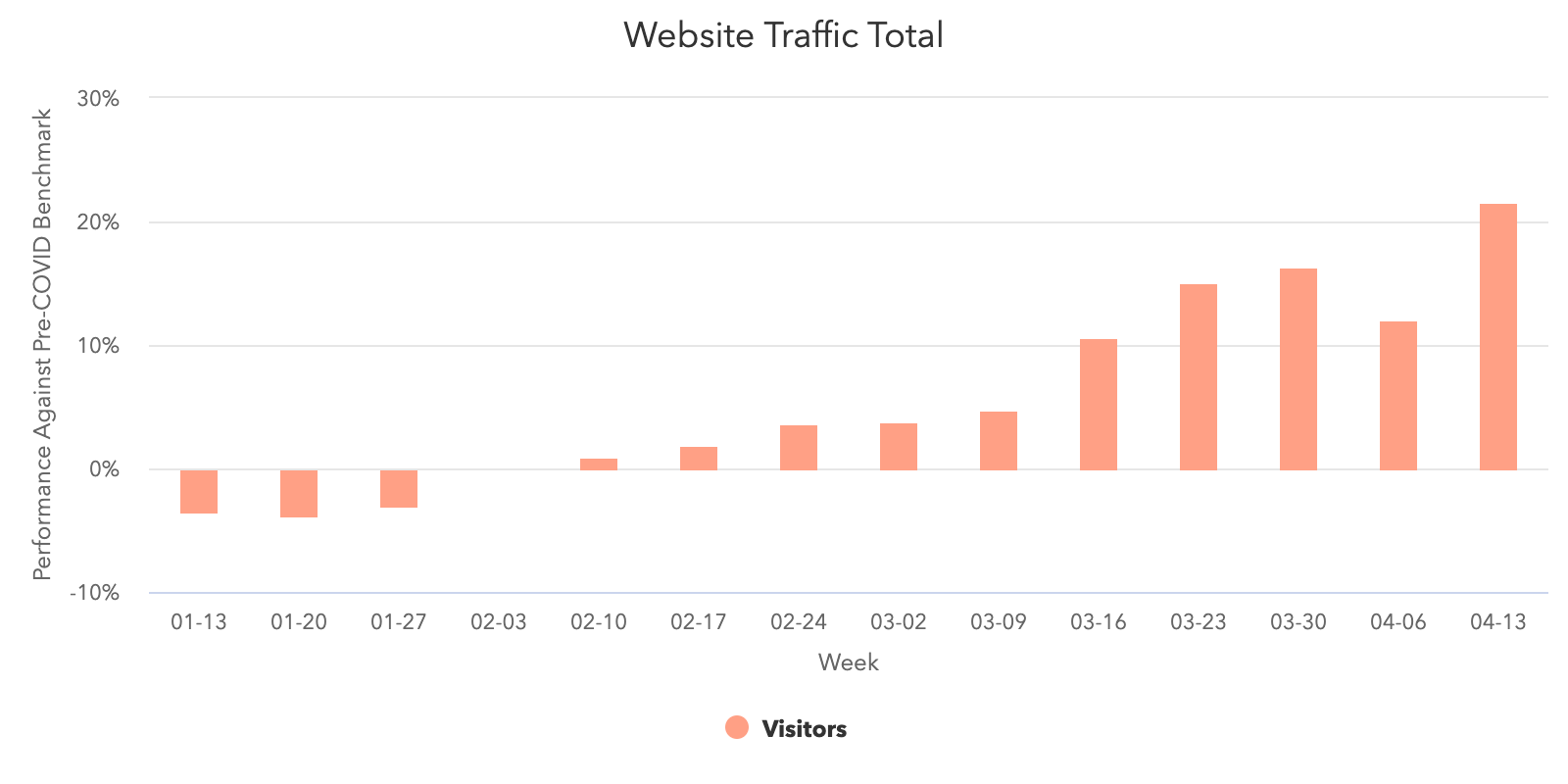
Website traffic and database growth has slowed, but is still at or above pre-COVID levels.
Two weeks ago, the average number of contacts added to portals dropped by 19% after dropping another 36% the week of March 30. Last week, that number stabilized with the average number of contacts decreasing by 3.2%. While this may seem like another week of decline, this number is staying on pace with the weekly averages observed in February.
Web traffic declined last week dropping 4.4% the week of April 13. Despite this dip, web traffic continues to be trending above pre-COVID levels, so we’ll look for a bounce back next week.
What This Means for Businesses
Create an educational content strategy.
The increase in marketing email open rates suggests that customers are still looking to engage with companies. While people still need to buy products, marketing teams should be adapting their strategies to focus on learning and education.
At HubSpot, our blog and HubSpot Academy sites have seen significant traffic upticks since pre-COVID levels. Traffic to our Academy site has more than doubled since March 8 and our Marketing Blog alone has experienced a 40% rise in weekly organic traffic volume during the same period.
Instead of dialing up the promotion of your products and services during a crisis, focus on nurturing the long-term relationship. Identify where you can help your customers today, without asking for anything in return.
Resources to Help
- Use this guide to develop a start-to-finish content marketing plan
- Learn how to plan a long-term content strategy with this HubSpot Academy course
- Discover more reasons why you should create a customer education program
- Get your content found on search engines with this search insights report course
Free Software to Get Started
Focus on inbound sales.
With database growth remaining fairly consistent with February averages and email marketing open rates rising significantly since pre-COVID levels, Inbound strategies are becoming more valuable. Marketers are still attracting qualified leads, but sales needs to adapt and pivot to fully capitalize on these opportunities.
Operationally, your business should regularly adjust its sales projections to reflect potentially extended sales cycles or lower deal size so forecasts remain accurate. Just a touch of process (or improvements to existing processes) goes a long way in creating a clear picture of your business over time.
On individual calls, encourage your team to emphasize a helpful, consultative selling approach. Certain factors, like your customers’ budget and willingness to enter sales conversations, are out of your control. Instead of cold calling your whole database, prioritize your outreach based on industry. For example:
- Industries that have been minimally impacted or those that are transforming quickly to meet the new challenges
- Industries where your solutions are particularly relevant or useful in this moment
Additionally, not every call should be an upsell. At this time, your sales team should be embracing empathy and putting your customers first. Instead of calling a customer to make a sale, check in on how they’re doing and see if you can provide any further support.
We hope to see sales outreach trend down toward pre-COVID levels accompanied by even higher response rates in the next few weeks. This would indicate that companies are doing a better job of targeting buyers who have shown genuine interest in their products.
Resources to Help
- Read about what companies are doing to pivot due to COVID-19
- Rework your sales projections with this guide to sales forecasting and sales forecast template
- Maintain an accurate forecast with this sales pipeline tracker
Free Software to Get Started
- HubSpot CRM is free and comes with included sales acceleration tools
- Gmail and Google Calendar integrations with HubSpot
- Zoom integration with HubSpot
- LinkedIn Sales Navigator integration with HubSpot
Incorporate email and live chat into your strategy.
Whether it’s for sales or marketing, email is proving to be an effective channel for customer communication. Marketing emails are experiencing particularly high open rates and sales email engagement is showing signs of recovery. While businesses should be mindful of overloading their customers’ inboxes, right now email is one of your most reliable options for customer interaction.
Another effective medium is live chat. Chat volume grew once again last week and has propelled far past pre-COVID averages. As consumers become more comfortable operating in a digital landscape, it’s expected that they’ll turn to your website’s built-in channels for support — e.g. email and live chat.
Conversational marketing offers a real-time way to answer customer questions and automates the lead routing process so your business can serve prospective and existing customers even when your team is out of the office. Additionally, chatbots can help your company meet the increase in inquiries by providing customers with lightning-fast answers, automating lead qualification, and booking meetings on behalf of your sales and service teams.
Resources to Help
- Get up to speed with this beginner’s guide to conversational marketing
- Learn how marketers are using conversational marketing in 2020
- Get your sales teams started by learning how to add live chat to your website.
Free Software to Get Started
- Free conversational marketing tools are included in HubSpot CRM
- Facebook Messenger integration with HubSpot
We hope these benchmarks provide useful context as you monitor your business’ health in the coming months. We plan to refresh these insights and add further breakdowns over time (such as by channel and company size). You can sign up to be notified of new insights as they’re available here.

4 Pivots Companies Are Making in Light of COVID-19 [New Data]
When HubSpot surveyed a handful of business leaders within our customer base, we discovered that most expect to see “somewhat slower” or “much slower” growth in the next year as a result of the global pandemic and economic climate.
Data from our more-than 70,000 global customer base supports business slowdown predictions. In the first few weeks of the crisis, we saw that while sales outreach has increased, response rates and deal volume dropped to new lows. Although sales email engagement has rebounded greatly to new highs in recent days, the large and noticeable dip demonstrates the uncertainty and evolving metrics that brands are seeing right now.
Both Sales and Marketing metrics seem to be changing rapidly. For example, overall, HubSpot researchers found that the ratio of marketing email engagements to open rates has improved since around the start of the crisis. However, this rate did see its own dips in early April, as seen in the chart below,
 Our data also revealed that
customers are researching brands more heavily online and initiating more online interactions with businesses today than they were a year ago. Between February and March, this online behavior resulted in
average monthly website traffic increasing by 13%. This interest in researching online brands might also be fueling an increase in
customer-initiated conversations with sales reps.
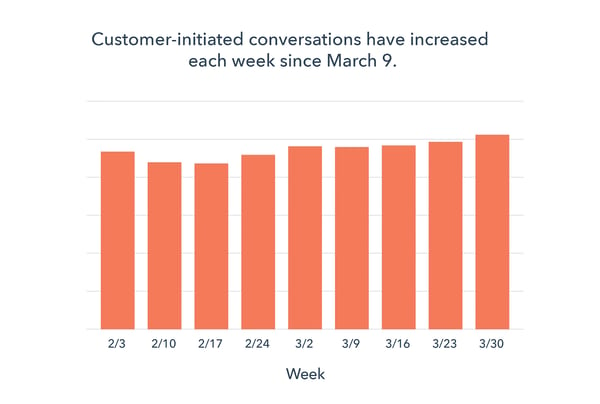
For a timeline of benchmark data updates and changes, click here to keep up with our latest findings.
With constantly changing benchmark data and the future economic landscape in mind, business leaders, including HubSpot customers, are trying to determine what changes they’ll need to make in the next year and beyond.
Here are four ways that our own customers are pivoting their brand’s offerings, budgets, and strategies in light of COVID-19.
4 Pivots Companies Are Making in 2020
1. Companies are cutting down on non-essential costs.
When we spoke with HubSpot customers, most said they plan to cut down or deprioritize non-essential aspects of their business. With many non-essential processes being paused, many companies are leveraging budgets to cover customer retainment strategies and tactics that they know will still generate revenue.
“We’ve had to make a lot of budget shifts in light of COVID-19. We made a decision early on to decrease our monthly spend by 70%, which felt nearly impossible,” shares Hope Horner, CEO of Lemonlight. “We went through every line item in our general ledger and marked each one as essential or non-essential. Then, we prioritized sales and marketing because they drive demand for the rest of the business.”
“It hasn’t been easy,” Horner shares. “Overall, we remain optimistic about the plans we have in place, but without the ability to shoot new content, we’re forced to be as cautious as possible. What’s most important to us is that in 30 to 90 days when the dust settles, there’s a place for everyone to return and resume work.”
Aside from focusing on termed strategies, some businesses have also decided to move budget from physical in-person processes into digital or virtual tactics.
“We’ve been redeploying physical event spend, leaning more heavily into digital and account-based strategies,” says SurveyMonkey CMO, Leela Srinivasan.
Meanwhile, those who haven’t made cuts yet say they’re “keeping an eye” on revenue and future budgets.
“We’re grateful that so far, we haven’t had to make significant cuts to our budget,” says Gabriela Pereira, Founder of DIY MFA. “That said we are being more vigilant with our spending and we’re scrutinizing our expenses even more carefully than before.”
Pereira adds, “We’re also making strategic decisions about where we invest our resources. We’ve realized that certain back-burner projects have become more relevant given current events, so we’ve shifted our resources to make these a priority.”
Specifically, some of the common line items that business leaders say they plan to cut or have already cut include non-essential hiring, processes that don’t yield high ROI, physical events, field sales, and team support.
2. Marketers are budgeting immediate or long-term tactics.
Many HubSpot customers that we spoke to aren’t focusing on marketing projects that might generate revenue or acquisition in an uncertain H2. Instead, these business leaders are either taking a short or long-term approach.
Particularly, many brands are focusing on online resources, social media tactics, email marketing, virtual events, or digital customer retainment strategies. Many companies have also adjusted their brand messaging to ensure that they are being thoughtful and not coming off as “tone deaf” to their audience.
“We have cut down on sales and marketing activities that yield short term results,” says Matthew Pollard, CEO of Rapid Growth Coach LLC. “We have, however, doubled down on marketing and product development activities that will provide us an edge in the months after the lockdown period and the possible 18 months that will follow, which we see as the consensus for when things will return to normality.”
While Pollard’s company is focused on long-term strategies, other companies have chosen to invest in short-term marketing tactics
“Our marketing programs are short-term focused to maximize pipeline generation potential in the short term,” says Bernie Borges, Co-Founder and CMO of Vengreso. “Everything is mapped out in 30, 60 and 90-day priorities.”
Pivoting to or embracing digital strategies might be a solid choice at this time. According to our recently published benchmark data, web traffic and marketing email engagements of our customers have risen since the pandemic began.
To help marketers determine which digital strategies they should invest in right now, here’s what a few of our customers say they’re doing:
3 Tactics Marketers are Leveraging
Postponing or Virtualizing Events
Many companies that rely on events for valuable marketing and sales are looking at other opportunities. While some have decided to postpone major in-person events, some are leveraging video software and social media to run virtual events.
“Perhaps the biggest pivot is that we had planned to focus more on in-person events and programs this year,” Pereira says. “We were about to announce the launch of our inaugural live event when the first shelter in place orders started happening. To that end, we decided to postpone the live event to 2021 and pivot back to virtual and online programs, an arena that we have already dominated for some time.”
Pereira adds, “This is not to say that we are abandoning in-person programming altogether, but simply that we have shifted our timeline and we’re doubling down on programs that are more in alignment with our audience’s current needs.”
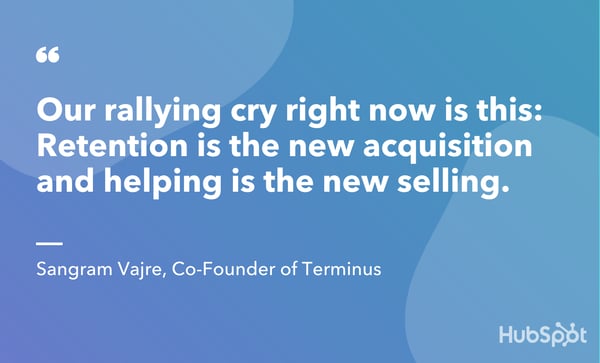
Similarly, Sangram Vajre, Co-Founder of Terminus, explained that the brand’s field events would be moving to either “LinkedIn Live or VIP Zoom meetings.”
Creating Online Resources
Creating online content that’s informative, resourceful, and responsive to current landscapes can be valuable to both current customers and potential prospects. Even if brands have shifted away from focusing on client acquisition to provide value to their current customers, new audiences might still see a company’s current informational content and potentially research the brand.
In light of the pandemic and economic climate, many of the business leaders we surveyed noted that they’re investing in or pivoting content to provide better value to customers at this time.
“The biggest shift for our marketing team was related to the content we were publishing and sharing. Overnight, nearly all of the content we had written became irrelevant or tone-deaf,” says Horner. “We had to quickly rethink our overall messaging and position to adapt to the new landscape.”
Rahul Raj, Founder and CMO of 5&Vine, explained that his team decided to invest in “more resources to support our content, social and community teams and less for strategy and digital acquisition.”
Similarly, SurveyMonkey has also been producing educational resources for their customers and audiences.
“Yesterday, I ran a webinar with my CEO and Chief People Officer to help other organizations explore ways to stay connected to their workforce in a world where everyone is working from home,” Srinivasan shares. “Before coronavirus hit, we already thought of this as the feedback economy, and world events have only made feedback more essential in running a modern business. We have a genuine desire to help.”
Adjusting Marketing Messaging
By now, many business leaders have recognized that their customers need to make difficult decisions about budgets and which projects they’ll invest in. Because of this, many of the HubSpot customers we surveyed are adjusting their brand’s messaging to relate more to what their customers are going through right now.
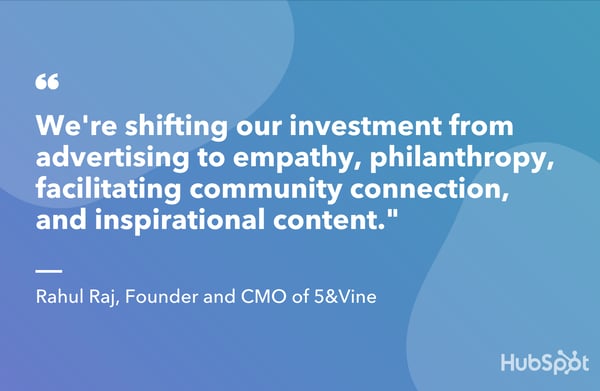
“We’re embracing moral leadership by acknowledging the world is different, people are hurting and ensuring we’re being of service to our clients, their customers, and the front line workers helping to keep us safe and well,” Raj says. “We’re shifting our investment from advertising to empathy, philanthropy, facilitating community connection, and inspirational content.”
Meanwhile, Pereira explains, “In terms of our messaging, we’ve shifted focus to emphasize more of the WHY — not just our own WHY as a business, but the bigger WHY for our audience.”
“As a business that provides professional education programs and information products for writers, part of our job is to remind our audience that what they are doing matters,” Pereira shares. “It’s easy for writers to feel discouraged by current events, but stories matter. Art matters.”
“Yes, we’re all focused on survival right now — and rightly so — but books, stories, poetry, these are things that make us want to survive. Right now, part of our job at DIY MFA is to keep reminding writers that their work is important,” Pereira concludes.
3. Companies are focusing on great experiences for current customers.
Aside from pivoting marketing tactics, the business leaders we spoke to are hyper-focused on improving the customer experience in order to retain the clients.
To boost the customer experience and adapt to the current landscape, those we spoke to are using tactics such as bringing company events online, discounted products or services, and investing in general customer experience improvements.
“We’re tweaking some of our product priorities and building offerings that coalesce with solving for the business fallout in front of our customers,” says Patrick Campbell, ProfitWell‘s Founder and CEO.
Campbell adds, “The positioning of our product from pure revenue growth or churn mitigation is shifting slightly to a more defensive posture to focus on helping businesses curtail losses and retain customers longer. We’re being more nuanced in our targeting within the market at large.”
How Businesses are Prioritizing Customer Experience
Discounted Products, Services, or Online Courses
As companies determine which services are too expensive for their budgets right now, some of our business leaders say their brands are offering discounts to lessen potential financial burdens and please their customers.
“Our revenue comes mostly from online programs and our team has always worked remotely, so in terms of our day-to-day operations and overall strategy, not much has changed,” Pereira explains. “At the same time, we are also very aware that for many people in our audience circumstances have turned upside down and that they will likely have to cut back on their spending. We’re shifting our focus to offer more options at lower price points to accommodate people’s tighter budgets.”
Adjusting or Creating Offerings to Help Impacted Customers or Prospects
Aside from offering discounts, some companies are also tweaking services or products they offer to be more valuable to clients impacted by the global pandemic.
“Our strategies reflect the ways in which we can add value in the current environment,” says Srinivasan. “We’re providing resources in the form of survey templates organizations can copy and deploy, regularly refreshed consumer sentiment research across several countries and discounts for educators and nonprofits.”
“We’re also reaching out to our enterprise customers more frequently, providing transparency and links to resources as well as finding out how we can support them,” Srinivasan adds.
4. Brands are empathizing with clients who need solutions — not pitches.
When it comes to marketing, sales, and service, HubSpot customers say their companies are trying to embrace empathy more than ever.
For example, sales or service reps might call clients to check in on how they’re doing rather than upselling them.
In some cases, showing empathy could even involve choosing not to pursue a lead that might be struggling at this time.
“We had to be more thoughtful when we were reaching out to prospects and opportunities,” Horner says. “We separated each industry and created an outline of the new challenges they might be facing and the solutions they might be looking for. In some industries, we quickly realized that we no longer offered solutions they need right now and we decided to send them a quick and thoughtful message but did not follow up on any sales opportunities.”
Horner adds, “In other industries, we realized their needs have likely shifted so we repositioned our approach when reaching out to them. Most importantly, we opened up most of our conversations by acknowledging the current crisis.”
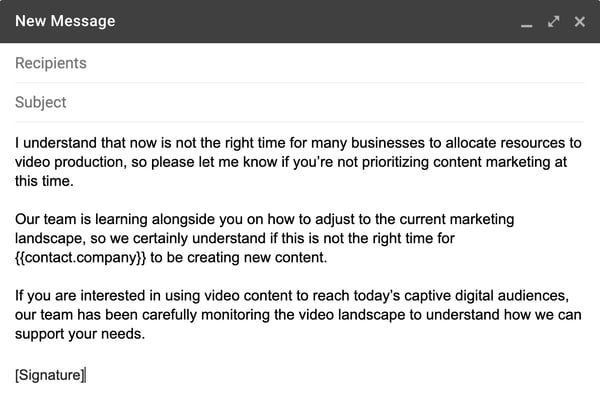
Here’s an example of an email that Horner’s team might send to follow up with a customer or prospect at this time:
When it comes to empathizing with customers, Raj explains that “this is a time to be our best selves.”
“Our families, neighbors, and customers need more from us,” Raj says. “They don’t need to be sold to, they need to be heard and supported.”
“We’re all in customer support. We’re all in service to others. We always have been, but the world needs more from us now. They need us to put humanity above profitability.” Raj concludes.
Navigating New Economic Landscapes
Overall, companies are spending less time and money on audience growth, while investing more in boosting the customer experience, providing value to their target audience, and empathizing with clients and prospects that might be making incredibly difficult decisions.
To help our own customers and audiences, we’re creating and regularly updating a number of posts and resources — including this piece — to better inform businesses in this uncertain time.
For further information related to the global pandemic and its resulting economic landscape, here’s a quick list of recently published blog posts and online resources:
Benchmark Data
- Adapt 2020: An Education Series
- Marketing and Sales Benchmark Data Timeline
- Edition 3 of HubSpot’s Adapt Benchmarking Series
Resources for Small Businesses
- How Small Businesses Can Take Advantage of the U.S. Stimulus Package
- Where to Find Public and Private Small Business Funding in 2020
Disclaimer: This blog post is meant as a basic resource and not a comprehensive guide. We will regularly update it to add more information as it becomes available.

LinkedIn’s Testing Its Own Stories Feature: What Marketers Need to Know
On an average day in 2020, roughly 500 million people watch Instagram Stories while 186 million people log into Snapchat.
While platforms like Instagram and Snapchat have taught us how entertaining social media Stories can be to the average person, LinkedIn’s product team is now wondering if this content can also be intriguing to business professionals.
In February, LinkedIn announced that it was beginning to internally test a new Story feature on its platform.
While LinkedIn Stories is just an experiment at this point, the online networking company says that this endeavor comes after other major social networks like Instagram, Facebook, and Snapchat have succeeded and drawn in new audiences to their platforms with Stories.
“Last year, we started asking ourselves what Stories might look like in a professional context. Stories first appeared on Snapchat, with other platforms like Instagram and Facebook adopting them soon after,” Pete Davies, LinkedIn’s head of Consumer Products wrote in a blog post. “They spread for a good reason: they offer a lightweight, fun way to share an update without it having to be perfect or attached to your profile forever.”
“Does that exist in the business world? I’d hope that most of my interactions in the break room or passing people in the hall are similarly ephemeral and light,” Davies added. “The same holds true for cubicle and coffee shop banter around the world: sometimes we want a way to just make a connection, have a laugh with our colleagues and move on.”
Aside from following the lead of Instagram, Facebook, and Snapchat to see if Stories can be successful for its current audiences, LinkedIn’s product team is also interested in learning if Stories could help them attract and provide value to younger professionals.
“There’s an entire generation growing up with Stories as a way of speaking; they’re more comfortable starting conversations with a full-screen ephemeral format than posting updates and prefer sharing content that lives as a moment in time rather than as an item in a feed,” Davies explained.
Although this feature, which LinkedIn hopes to roll out in the coming months, might be new to professionals, it is not the first time the platform has dabbled in Stories.
In 2018, LinkedIn also launched a similar experiment called Student Voices. With this feature, students on the platform could share and watch Story formatted updates related to academia, their current projects, or thoughts related to school. Here’s a quick screenshot of what this layout looked like for students on the platform
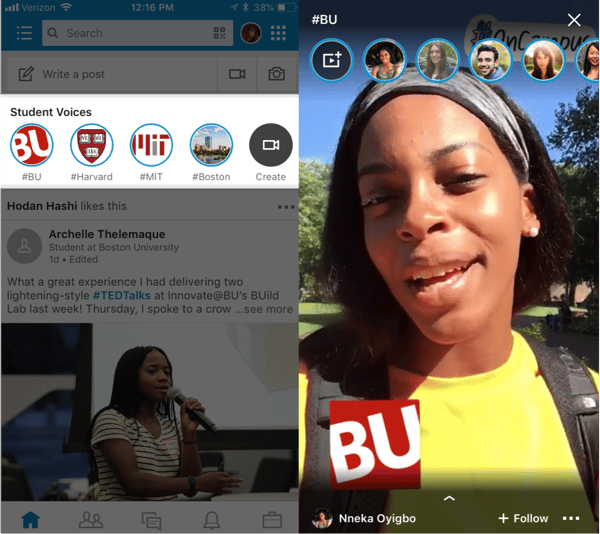
While LinkedIn has not explained what the Stories feature will look like or if it will be similar to the Student Voices feature, their announcements have led bloggers and publications to suggest that it will be similar to Story formats on Snapchat, Instagram, and Facebook Stories.
But, even if the format is similar and easy to pick up quickly, as a marketer, you might be wondering, “How can I leverage this new feature for LinkedIn audiences specifically?”
In this blog post, I’ll highlight a few marketing opportunities that LinkedIn Stories could provide to businesses or thought leaders on LinkedIn.
Even if LinkedIn Stories doesn’t come to fruition, you can also experiment with these tips on platforms like Instagram Stories — which have large audiences at various career levels. For each marketing opportunity discussed, I’ll give an example of how a brand has done it on another Story platform. This could give you added inspiration so you can begin executing on successful strategies if and when the feature launches.
5 Ways You Could Leverage LinkedIn Stories
1. Inform audiences about topics related to your industry.
Aside from using LinkedIn to update digital resumes and look for jobs, many people browse their LinkedIn feed for insights related to their industry.
While some brands have already tried creating Story content on Instagram and Facebook to inform followers about an industry topic, this type of niche content might be even more valuable to Linkedin users who visit the site to learn about their field.
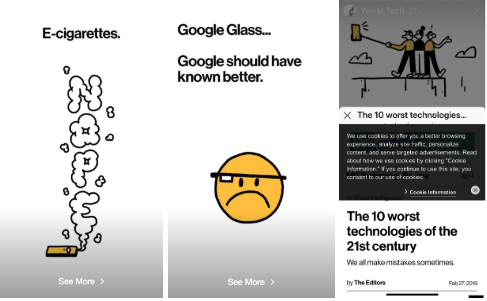
Here’s an example of an Instagram Story where the MIT Technology Review highlights the biggest tech fails of 2019. To add to the user experience, the story also swipes up to fuller content on its website.
2. Adapt blog content to a Stories format.
Not sure where to start with a Stories feature? Consider leveraging the text-based content you already have to create a guideline for a Story.
For example, if you’ve written a listicle or step-by-step guide-styled blog posts, you can consider making each step or list item a page of your Story, By doing this, people who are interested in learning about your blog topic who don’t want to leave the app can still consume it in a mobile format.
While this tactic is a good way to promote your blog or other content, it also allows social media followers to see that your brand offers credible information to professionals within your industry.
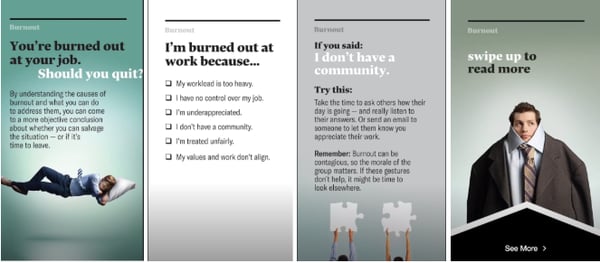
Adapting content to Story format is a tactic commonly used by Harvard Business Review which regularly publishes Stories on Instagram and Facebook based off of their web articles:
3. Share videos or Q&As featuring thought leaders in your community.
On LinkedIn, people love to follow thought leaders. If you’ve been on the platform for a long time, there’s a good chance that you’re following at least one in your industry.
One way to pull LinkedIn viewers into Story content could be to feature a thought leader with a decent following on the platform in your Story to talk about an interesting topic. This will both allow you to bring awareness to your brand while also cross-promoting with the chosen thought leader.
Here’s a great example of how HubSpot published an Instagram Story Q&A with one of its social media video editors. With this example, the thought leader not only offered marketers valuable information, but audiences were also able to interact with him by asking their burning video marketing questions.
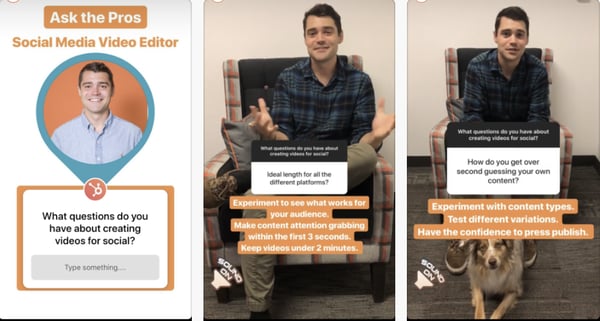
4. Sharing videos of customer testimonials.
As each new generation becomes more mobile, so does their product research. But, despite the change of platforms, younger generations are like older age groups in that they trust recommendations more than any other type of content marketing.
As millennials become company decision-makers and Gen-Z enters the workforce, odds are that they’ll eventually be looking for a product with great reviews that’s been proven to make professional work easier. This is why filming happy customers on your Story could be a great strategy on a channel like LinkedIn or Instagram.
Here’s one screenshot from a Story featured on both Instagram and Facebook where a customer of a small Dublin-based Invisalign company discusses her tooth-straightening success story.

5. Creating interactive content related to your content or industry.
Although we don’t know what LinkedIn Stories will look like, Facebook and Instagram Stories allow interactive features such as Quiz and Poll Stickers.
If you’re able to use these types of features on LinkedIn, they could allow your viewers to engage with an industry topic or trend insights in a new way. Features, like Polls, could also help you learn more about the audience that heavily uses the Story feature.
Here’s one example of how HubSpot educated users on email etiquette with an interactive Story modeled like a quiz:
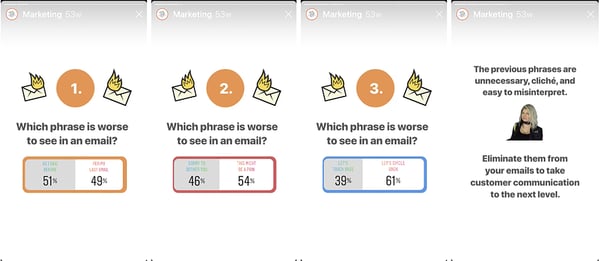
Navigating All the Social Media Stories
The biggest takeaway from LinkedIn’s Stories test isn’t necessarily that the platform is adding a new feature. This move highlights how powerful social media Stories are, and how this trend isn’t going away any time soon.
Even if LinkedIn doesn’t go through with launching this tool, this test shows that marketers and brands might want to spend more time testing out Story strategies on platforms that their audiences are frequently visiting.
From what has been reported, it seems like LinkedIn Stories will be a similar platform to Instagram and Facebook Stories features. If you’ve already leveraged those tools to market your brand, LinkedIn Stories might not be that big of a stretch for your business. When and if LinkedIn Stories does launch, it could be helpful to test certain Stories on all three platforms, while also posting a few Stories that were specifically for each network.
By testing the same Story content on multiple platforms — as well as creating experimental content that caters to just one network, you can identify examples of content that will engage all multiple Story audiences while also learning how to zone in on engaging your LinkedIn audience specifically. This could also be helpful when attempting to create a scalable Story strategy that will allow you to launch successful content on all the platforms.
To learn more about how to create social media Stories, check out this blog post on the most engaging Instagram Story formats, as well as this piece that highlights the differences between Instagram, Facebook, and Snapchat Stories.

How to Receive Payments Online for Free
If you’re not offering your customers multiple ways to make payments online, you’re leaving money on the table.
While there’s no way to escape some transaction fees and currency fees, there are ways to reduce payment processing costs and receive payments online for free.
So, you’re probably wondering, “How can I save that money?”
You’ll have to set up an effective online payment portal with a range of payment options. This makes it as easy as possible for your customers – and your wallet.
Below, let’s review why you should use payment processing software and how to receive payments online for free.
Why Should You Use Payment Processing Software?
As a small or local business, you might be tempted to handle payments yourself via checks and direct bank transfers.
However, in this digital age, there are numerous reasons why that’s not a good idea.
Here’s a look at some of the advantages payment processing software will bring to your business.
- Convenience – Convenience is one of the main factors that influence conversion rate. The more steps a customer has to take to make a payment, the more likely they are to abandon their purchase and go elsewhere.
- Speed – Payment processors can transfer most payments between shoppers and sellers instantly. On the other hand, transfers to and from bank accounts can sometimes take 24 hours or more.
- Trust – Many payment processors are brands that are globally recognized. If a customer already uses payment software, they’re more likely to trust your payment system.
- Security – Payment processing companies add an extra layer of protection to online transactions. You can set limits, flags for activity on your account, and sometimes even a time frame to recall payments.
- Record-keeping – With payment processors, you’ll have access to your account online and can manage your contacts, recurring payments, and other account activity via desktop or mobile.
Now that we know why you should use a payment processing software, let’s look at the fees you can’t avoid, the ways you can receive online payments, and the most efficient ways businesses of all sizes handle invoicing and online payments.
1. Create a secure online payment gateway.
There are a couple of ways you can approach creating a secure online payment gateway. You can hire an outside developer or use your website development team to create a bespoke gateway. Or, you can use third-party software.
Setting up a secure gateway is essential. You’re also putting automated processes in place, which will save time on manual processing, especially as you scale your business and handle more transactions.
The more payment methods you make available within your payment portal, the wider the audience, and the easier it’ll be for your customers to send you money.
2. Facilitate credit and debit card payments.
Although it may change as mobile payments become more prevalent, using debit and credit cards is still the most popular way people pay for products and services online.
You can easily facilitate accepting card payments through established payment providers such as PayPal or Stripe. These will accept the most-used credit cards worldwide — Visa, MasterCard, and American Express.
3. Set up recurring billing.
If you offer subscription plans or ongoing monthly services, the most efficient and reliable way to invoice and receive payments is via recurring billing.
Most of the major payment processing software also includes recurring billing features. For example, Growth Marketing Pro built an SEO tool that charges subscribers on a monthly basis and they used Stripe to set this up.
Sites like Paysimple also offer a suite of tools to set up custom, automated recurring billing if you already have a payment processing system in place.
Using automation is essential. It removes most human error and the stress of keeping track of invoicing and payments.
Your customers can commit to recurring payments with just a few clicks, and you won’t have to worry about manually managing your customer base.
4. Accept mobile payments.
In 2019, we saw a steep rise in the use of mobile payment apps, and it may continue through 2020.
People are more likely to have their phones on hand than their debit cards, and mobile payment apps are more convenient than ever. Mobile may become the way consumers pay for goods online in the future.
Apple Pay has quickly become one of the most popular mobile payment systems in the United States. With an estimated 30+ million users in the U.S. and more than 380 million worldwide, you’d miss out if you didn’t accept Apple Pay.
Google Pay, Venmo, and PayPal also have mobile apps with a decent market share.
5. Accept cryptocurrency payments.
If you’re okay with handling cryptocurrencies, it’s a way you can extend your reach to a broader online audience.
Sites like Bitpay provide all the tools you need to accept crypto payments online, send invoices, request payments, and receive money on-the-go through apps.
Because they’re a decentralized exchange, cryptocurrencies offer some unique benefits for businesses. You can accept payments from anywhere in the world without incurring currency exchange fees or bank handling fees. There’s also a reduced risk of fraud.
6. Use email invoicing.
Email invoicing is a proactive way to request payments. You can share a payment form through email or add a link redirecting the recipient to a payment portal.
However, there are a couple of issues with this method: Email isn’t the most reliable form of communication, and customers can have trust issues making payment via email.
Expect a failure rate, but it’s a vital part of payment processing for a lot of businesses.
7. Accept electronic checks (eChecks).
The third most popular method of paying for things online is using eChecks. To accept this payment, you’ll need a form where the user can input their information, which you can see using payment processing software.
It’s basically a way to pay by check online. It’s a quicker and more reliable way than sending a paper check through the post, so offering this to your customers will make the process run smoother.
Top Online Payment Processing Providers
Once you’ve developed a strategy for accepting payments online, you’ll need to decide which payment processing provider to use. There are hundreds of payment processing companies providing software to help businesses handle their online transactions.
Most offer a similar range of services and comparable pricing. Here are few of the largest and most well-known payment processing companies:
1. PayPal
Price: 2.9% plus 30 cents per transaction.
PayPal was one of the first companies to enter the online payment processing space back in 1998. They’re one of the most trusted and widely recognized payment processing companies.
They also have comprehensive coverage, making PayPal a good choice for international companies. They currently operate in more than 200 countries and handle 26 currencies.
It’s free to join, and they provide all the tools you’ll need to integrate PayPal payments into your website and set up a secure payment gateway for visitors.
2. Stripe
Price: 2.9% plus 30 cents per transaction.
Stripe entered the market in 2009. They offer a wide range of options for online businesses wanting to create custom checkouts and have useful tools for managing subscriptions and recurring payments.
Their fees are competitive, and they support all the major credit cards, mobile paying apps, wallets, and more.
3. Square
Price: 2.9% plus 30 cents per transaction.
Square entered the payment processing space by introducing a dongle that sellers could insert into a mobile phone to accept credit card transactions.
They’ve since expanded their software to cover all the major payment processing options and have included some useful tools for online businesses as well as high-street stores.
You can even create a basic website for free and integrate all of their point-of-sale solutions at the same time. Or, they have paid options for a custom website.
4. Due Payments
Price: 2.8% per transaction.
Due Payments is an invoicing tool aimed at freelancers, individuals, and small businesses. They operate on a flat-rate payment processing model, making it easy to calculate invoicing and payment processing costs at scale.
Their app, which they call their “Digital Wallet,” makes it easy for small business owners to send and receive payments quickly and conveniently.
No matter which payment processing software you choose, the most important part is making it easy for the customer to pay. And the more ways they can pay, the more likely your customers will follow through on a purchase.

How Responsive Web Design Works
It’s no secret that more and more people are accessing the internet using their mobile devices in addition to or in place of desktop computers. In fact, there are almost 7 billion mobile users worldwide. (For reference, the world population is currently 7.7 billion. That’s a lot of mobile activity.)
But what they’re doing on those mobile devices is even more compelling for marketers like us.
40% of consumers use their mobile device to conduct research prior to making an in-person purchase. More than half routinely make purchases using their smartphones, and 55% of shoppers make mobile purchases after finding products on social media.
As a result, companies that have responsive websites generate more leads and maintain an increasing competitive advantage over companies that don’t.
But what exactly is responsive website design, how does it work, and why should you make the switch? This guide sets out to answer those questions, offer some compelling statistics, and teach you the key features of responsive design all marketers should know about. Let’s get started.
Responsive web design is no longer a suggestion — it’s a critical investment to build your brand awareness, diversify your user experience (UX), and convert more site visitors.
It also saves your business valuable time. You can’t possibly design a separate website for each potential device your visitors may use — not to mention future technologies. Responsive web design ensures your website is compatible with all devices and screens to ensure a delightful experience … both modern-day devices and those yet to be invented.
Let’s dig more into why responsive design is so important nowadays.
Why Responsive Web Design is Important
Responsive design allows you to reach a broader, more engaged audience wherever and however they choose to browse.
More importantly, a lack of responsive web design can do the opposite — it can alienate your website from customers looking for an engaging mobile experience. In fact, research shows that you can lose up to 90% of your potential customers due to a poor mobile-friendly experience.
That’s a lot of customers — and revenue.
Let’s unpack three major benefits of responsive web design.
1. Responsive web design helps consumers discover your website.
A lot of people access Google on their mobile devices — 63%, in fact. Google also penalizes websites that don’t offer a responsive design. Its mobile-first indexing can actually impact how your website ranks and can cause it to be bumped down on search engine results pages (SERPs) in favor of websites that offer consumers a mobile-friendly design.
So, if the majority of your audience is searching on their smartphone (as the above statistic says), and your website doesn’t feature a responsive design, customers may not find your website at all.
2. Responsive web design keeps shoppers on your website longer.
Website bounce rates on smartphones are almost 40% (compared to only 27% for tablets). Also, a web page that loads in five seconds or less guarantees 70% longer viewing sessions.
Mobile users expect quick, high-quality website experiences (so does Google) — expectations that you can meet with a responsive website design. (Use our Website Grader to see how your site performs.)
3. Responsive web design builds positive brand recognition and trust with consumers.
Finally, 57% of consumers say they’re not likely to recommend a business with a poorly-designed mobile website. The same report shows that more than half of online shoppers who are disappointed by a business’s online presence are likely to think negatively about the business itself.
Responsive website design delights online shoppers, encourages them to recommend your business, and brings them back to buy more.
How to Make a Responsive Web Design
It is possible to make your own responsive website using CSS and HTML. But this is like taking lengthy backroads when an expressway is available. In this case, the expressway would be a content management system (CMS) or a website builder.
A CMS is a software that allows you to build your website without knowing how to code — and that includes knowing how to code for responsive design. Site builders are similar tools, but they give up some functionality offered by a CMS in exchange for ease of use and lower pricing.
Responsive web design can be achieved using either a CMS or site builder that facilitate responsive designs. Here are a few common choices.
1. CMS Hub
CMS Hub is a fully-hosted, fully-integrated CMS. It connects to your other HubSpot tools so you can present a unified marketing, sales, service, and site browsing experience for your visitors, customers, and employees.
In terms of your site building experience, CMS Hub offers pre-built website themes that are also mobile-optimized to meet your visitors and customers wherever and however they’re browsing.

2. WordPress
WordPress is the world’s most popular CMS and maintains this superlative by offering one of the most straightforward website builders — the Gutenberg editor.
WordPress offers thousands of themes and templates to start with, including numerous templates with responsive design. (Find more responsive WordPress themes here and here, too.)
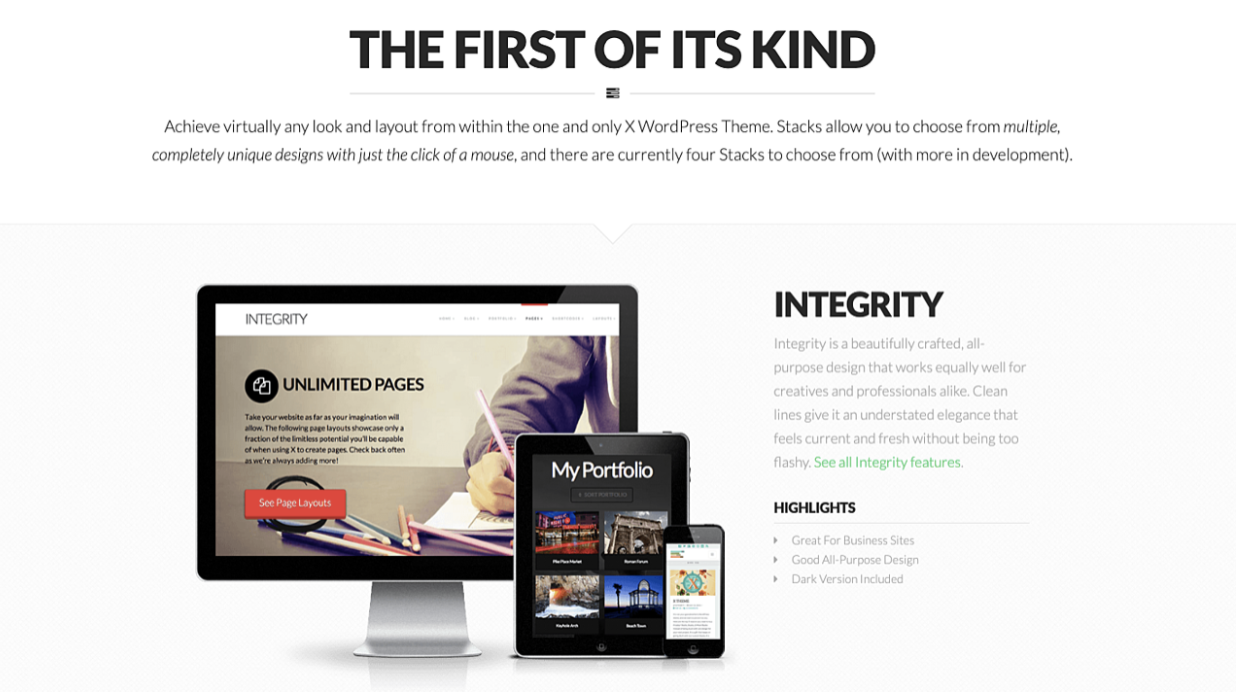
Note: Once you’ve set up a theme for your WordPress website, engage and convert your visitors with free forms, live chat, email marketing, and analytics by adding HubSpot’s WordPress plugin.
3. Squarespace
Squarespace is a popular site builder that offers gorgeous site designs and creative tools.
Squarespace offers 60 mobile-optimized templates from which you can choose to quickly build your site. Within the Squarespace editor, you can also transition from desktop to tablet to mobile view to ensure your designs seamlessly respond to different devices.
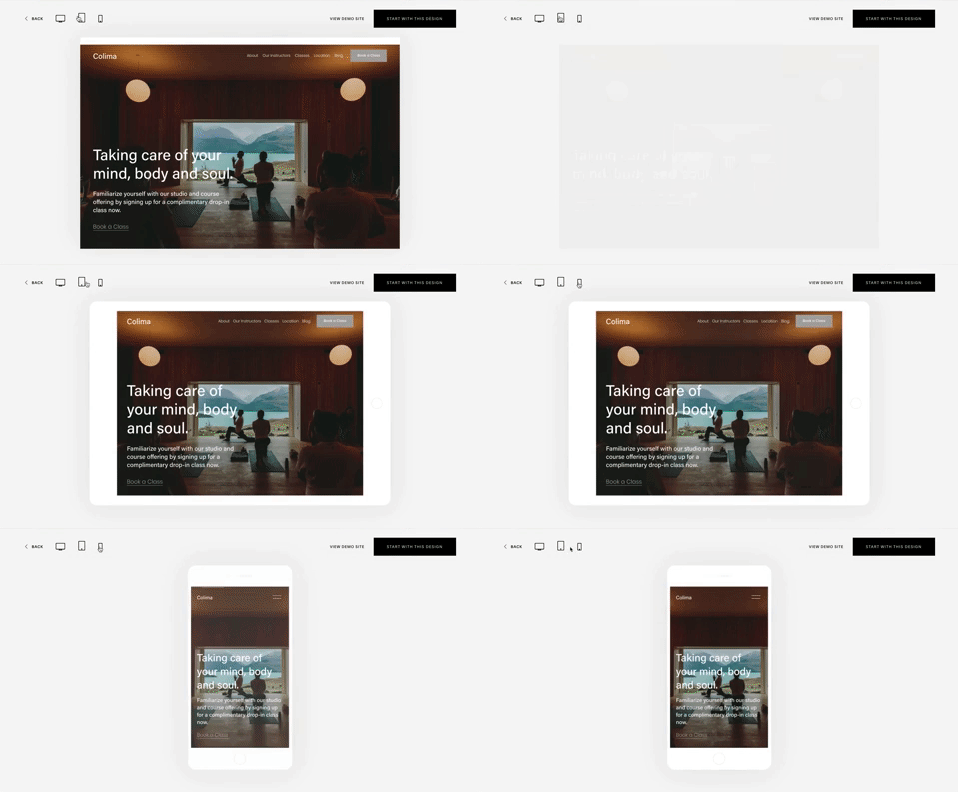
4. Wix
Wix is another site builder that offers free and paid website subscriptions. It provides an easy-to-use drag-and-drop editor, free hosting, and security features.
All Wix templates provide a mobile-optimized experience for visitors. Like Squarespace, the Wix editor allows you to see how your website looks on multiple devices.
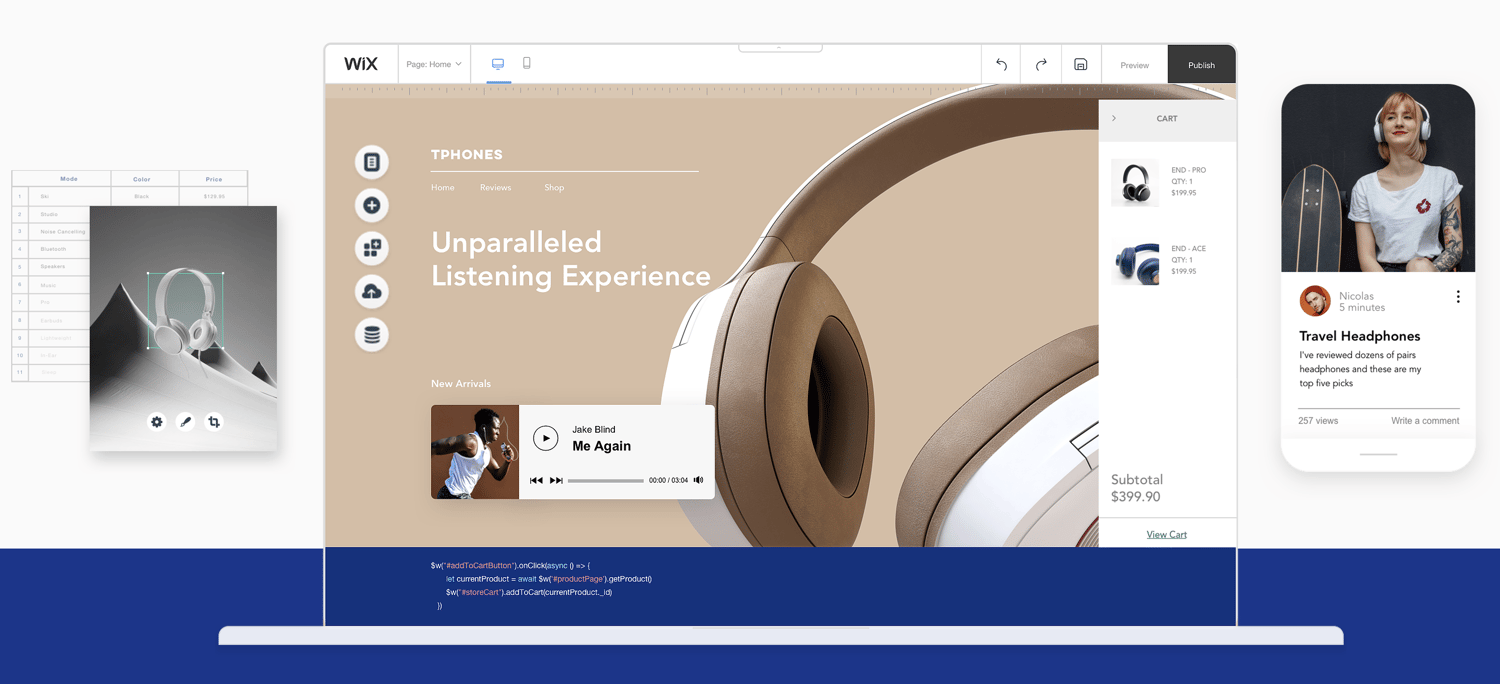
In addition to creating a responsive web design using one of the above CMS tools or site builders, read this blog post to learn how to optimize your website for mobile use, too.
Responsive Web Design Best Practices
With an intuitive CMS or site builder, responsive design is easy. But even if you’re using the very best CMS, it can’t compensate for mobile-friendly content and media — that part is up to you. Let’s talk about some responsive web design best practices to help you create the most mobile-friendly web experience for your visitors and customers.
1. Don’t neglect your buttons.
What do you want site visitors to do when they land on your website? Take action, right? This could be by clicking a call-to-action (CTA) like Learn More, Download, or even Buy.
How do site visitors interact with these buttons when on your desktop site? If these CTAs pop up, scroll, or are located at the bottom of your web page, you may need to reevaluate how mobile visitors can access these.
For example, let’s say you offer a main CTA like Get HubSpot Free at the top of your desktop site where visitors can see if from every page.
When you view your mobile site, however, it doesn’t fit into the header. Instead of removing it altogether, consider moving the button or including it in your hamburger menu (the three lines in the top corner), where visitors can still see and click it.
In addition, consider the size of clickable areas on your mobile site. Unlike a desktop, where visitors can use a mouse cursor to click buttons and links, they’re using fingers to navigate your website on their smartphone or tablet.
It’s recommended that clickable elements on mobile devices be at least 48 pixels in height. This includes buttons, form fields, inline links, and menu navigation.
2. Use scalable vector graphics.
If your website includes illustrations or icons, they should be formatted as scalable vector graphics (SVGs).
SVGs can be scaled infinitely, unlike other media formats like JPGs and PNGs. This ensures your website provides a high-quality browsing experience for users on any device. They also help your site load faster — which we’ve already discussed is a good thing for user experience and SERP rankings.
3. Make sure your images scale.
Illustrations and icons aren’t the only media type changing size on varying devices. Your images have to scale, too.
For example, desktop websites may require images at 1200 pixels, whereas mobile websites may need those at 400 pixels. Using the larger resolution on all devices can slow down your page speed, so that approach isn’t recommended.
Instead, consider uploading different image resolutions and designating which image you want to display on each device. This is typically achieved by assigning different “media” tags to specific “source” objects (e.g. tablet or mobile) in your website code.
Note: HubSpot enables automatic image resizing on content — yet another reason to build your responsive website on CMS Hub!
4. Consider your typography.
A font that looks gorgeous on your desktop site may not read so well on a mobile device that’s a quarter of the size. If visitors can’t read your website, they certainly won’t click on or buy anything.

Alternatively, revolving your website fonts around the mobile experience can leave your desktop users with ugly words that are too big and clash with your branding.
Here’s our best advice for typography on responsive web design:
-
16pt body type is the rule of thumb for desktop and mobile web content.
-
Avoid uber thin fonts that fade away on smaller screens.
-
Make sure all headings are clearly larger than body and subheading content.
-
Use contrasting colors for your typography so it doesn’t fade into your website background colors.
5. Take advantage of device features.
While prospects and customers can’t call you over their computers, they definitely can on their smartphones. Consider changing your “Chat Now!” CTA to “Call Now!” and include your business phone number in lieu of email.
Additionally, if your business has a mobile application, prompt site visitors to open your app from your website — something they might not be able to do on their computers.
6. Test your website often.
As always, test your responsive website on different devices and browsers. Check out Google’s Mobile-Friendly Test tool to see how your site performs.
This handy tool by Matt Kersley will also provide a peek at your website on different sized devices. You can, of course, use your own mobile devices, too.
Responsive Web Design Templates
The best way to ensure your website has a responsive design is to start with a responsive web design template. Below are five gorgeous templates available on HubSpot Asset Marketplace that will give your site visitors a mobile-friendly browsing experience.
Get access to thousands of templates with HubSpot Marketing Professional.
1. DjanGo Responsive Design Template
Price: $200
The DjanGo template is a fully-customizable and responsive site template. Its modern, minimalist design allows visitors to focus on your site content and product information.
2. Prodigy Responsive Design Template
Price: Free
The Prodigy template is a clean website template that reaches your audience with bright media and multiple CTAs. It automatically converts its design to fit any device used by your site visitors.
3. Quantum Responsive Design Template
Price: $75
The Quantum template is a multi-purpose theme that captures your audience with bold headings and a video background. Customize your site with a variety of page layouts and custom modules.
4. Kalahari Responsive Design Template
Price: $199
The Kalahari template is a responsive theme that offers dynamic navigation and customization at the page level. Use this template to convert your audience with bright, standout CTAs.
5. Startup Framework Responsive Design Template
Price: Free
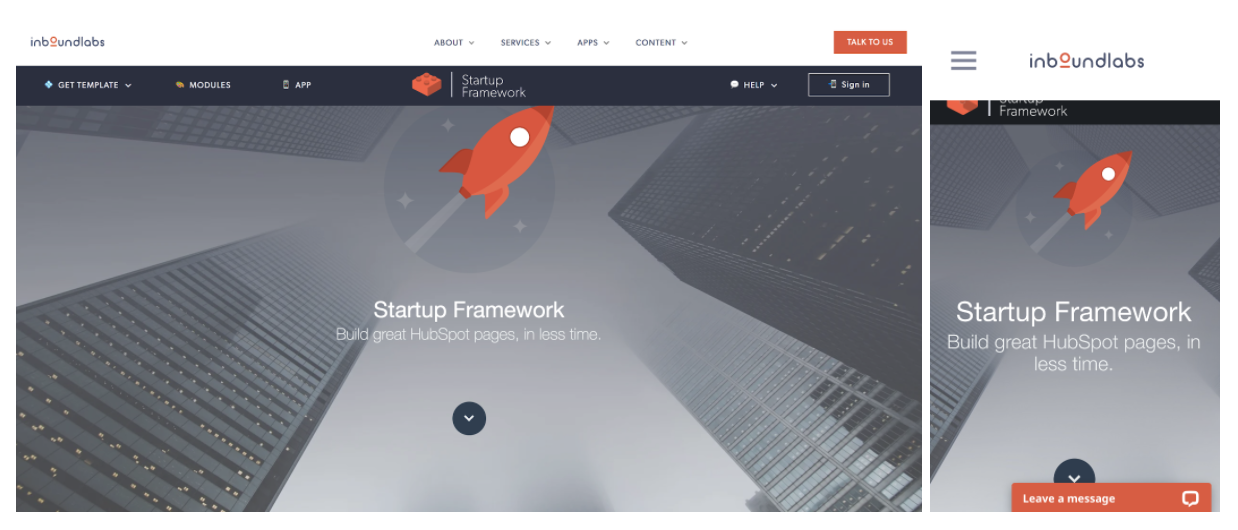
The Startup Framework template is a unique website template with bold typography and bright graphics. Build it natively within HubSpot’s content editor and choose from thousands of icons and dozens of custom modules.
Respond to Your Audience with Responsive Design
With so many consumers shopping and browsing on their mobile devices, responsive design is an absolute must-have. Without it, you could be missing out on leads, customers, and revenue.
Use these tools, templates, and best practices to get started with responsive web design today.
Editor’s note: This post was originally published in September 2014 and has been updated for comprehensiveness.
