
The Plain English Guide to Dark Posts on Facebook
This morning, I did my usual social media scanning before getting ready for work, and as I was scrolling Facebook, I began to notice ads for companies I didn’t recall following.
For instance, I read the blog from B2B company, Drift, pretty frequently, but don’t follow the company’s Page on Facebook. Even so, I still noticed this ad:
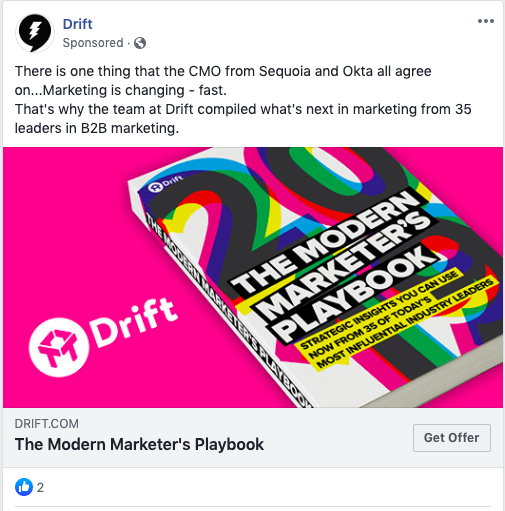
Even though this was a surprise, I wasn’t too worried — I simply figured my web behavior had influenced the types of ads I was seeing, which in part, is true. But when I visited the company Page to follow it, I couldn’t find the ad I saw above.
That was when I became intrigued: How does an ad that appears on my main feed not show up on that company’s page?
Then, I realized what was going on: The ad I’d seen was what’s known as a dark post. Dark posts target audiences specifically for lead generation and conversion.
If you’ve never heard of a dark post for Facebook, don’t worry — we’ll cover that next.
Dark Posts: What Are They?
When talking about dark posts, there can be some confusion about what they are and what they do. For instance, they’re entirely different from dark social, and are considered sponsored ads by a lot of channels. For a clearer picture, let’s define what a dark post is.
For example, I don’t follow Squarespace on Facebook, but I still received a targeted ad from the company, likely because my trackable web behavior reflects a portion of Squarespace’s target audience:
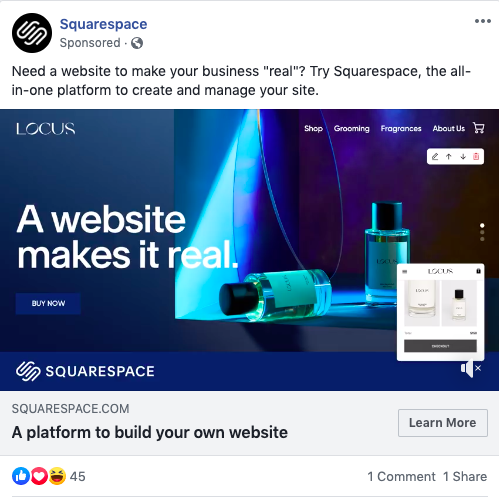
This post looks like a regular ad I would see from pages I follow on my news feed. But, when I click to go to the company page, the ad isn’t there. Because of the fact that this ad appears on the timeline of an audience member who doesn’t follow the company’s page, and the ad itself doesn’t appear on the company page, this post is considered to be “dark.”
Dark posts are not to be confused with the term “dark social,” which is a phrase used to describe the type of traffic earned on social media that can’t be detected from social media tools.
If you want to engage with more audience members and show up on their feed with a specific ad, dark posting can be a helpful tool. You can have more control over what your target audience sees, because the content is still an ad. Additionally, you can tailor the ad’s content to introduce your brand, what it’s about, and design it specifically for lead generation.
Though dark posts generally have the same features across the board, things are slightly different for Facebook, so let’s cover what that entails.
Facebook Dark Posts, Explained
A Facebook dark post is unique from others you might see on other social media channels — they are even called a different name.
They also allow for better results for A/B testing — you can test ads out with customers who have already interacted with your brand before you send it out to new audiences.
With dark posts, you can control how many times and which audiences are seeing certain posts, so you’ll know that you won’t show converted leads ads that aren’t meant for them. They are a targeted ad, just shown differently, and to a more specific audience. The decision-making ability over the types of posts your targets are seeing is more in your control.
When you create a dark post, you can manage how the ad is seen, and if it will be scheduled for a future date, or if it will be part of a promotion inside of a larger set.
At this point, you can probably tell how dark posts may seem a little controversial — they can be interpreted by audience members as a sneaky advertisement, rather than a personalized ad experience. That’s why, in Facebook’s effort to maintain transparency, some features about dark posts (and Facebook ads across the board) have changed since their inception:
- Dark posts are labeled — Facebook dark posts will always be marked as a Sponsored post, even if it may not have a traditional ad design. Next, and most important, is that audience members can now see which posts from companies are ads on all Facebook-owned social platforms (including Instagram).
- The Ad Library — Audiences can see if they’re seeing dark posts by accessing their Ad Library. The Ad Library shows Facebook users all of the ads a company is running by typing their name in the search field. They can also filter these ads by relevance, an audience filter, activity, and reach:
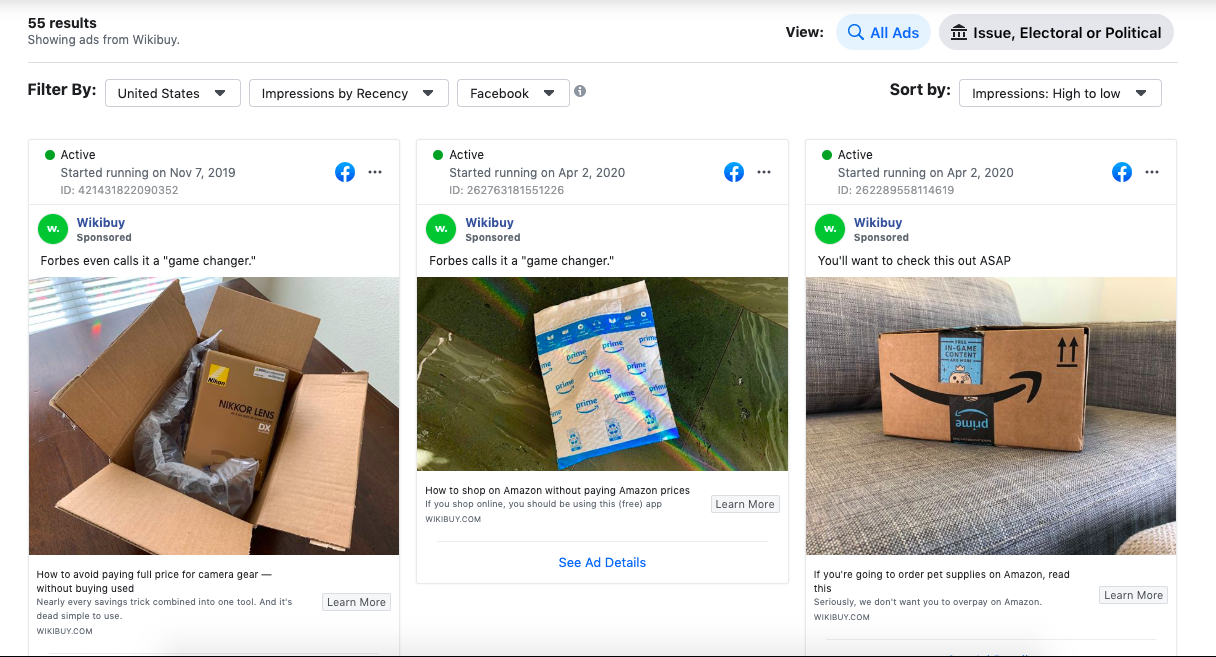
There are two ways a user can access the Ad Library, and the first is by URL. If you’re logged into Facebook, you can simply type in facebook.com/ads/library, and you can begin searching. If you’re on the company’s specific Page, there will be a “Page Transparency” section in the right sidebar:
Clicking “See More” will take you to a page that shows more details about the company, such as the year it was founded and important links. At the bottom of this page, you will see a box that notes whether or not that company is running ads, and will offer an option to visit the Ad Library for that company:
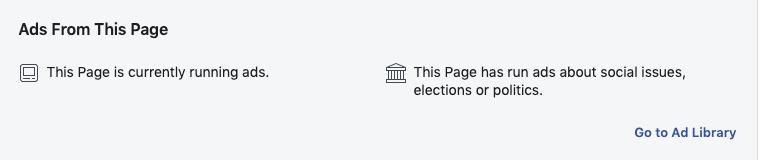
This box also indicates the type of ads that company runs, which gives audience members a better idea of if they’re seeing an ad.
Now that you know about dark posts, how they interact with audiences, and what you can use them for, let’s talk about how to make them.
How to Dark Post on Facebook
To create a dark post on Facebook, you don’t need to do much that’s different from creating a different type of ad. We’re going to detail what you need to know, and offer optimization tips.
However, you’ll want to refer to another one of our posts for a more robust tutorial on how to run Facebook Ads in general.
1. Go to Ads Manager to access your posts.
First, you’re going to go to Facebook Ads Manager. If you’ve run Facebook ads before, you’re probably used to this tool. If not, think of Facebook’s Ad Manager tool as a home base for the ads you run on Facebook, and other Facebook-owned platforms.
When you access Ads Manager, you’re going to click the drop-down box at the top left, like shown below:
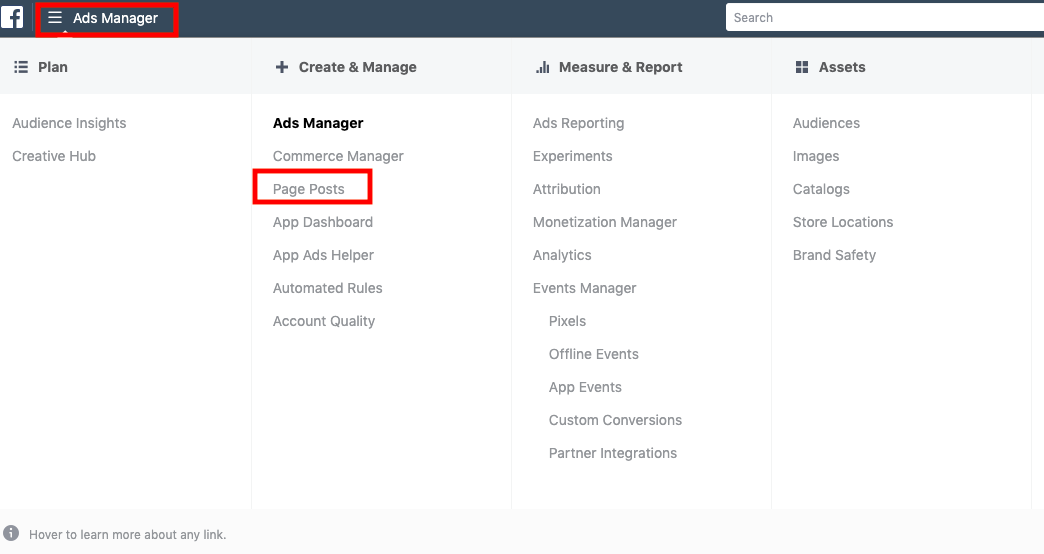
From there, you’re going to select the “Page Posts” option, which is the second choice under the Ads Manager subsection. You can find this subsection under “Create & Manage.”
2. Configure your dark post.
Next, you’ll be taken to the screen where your dark posts will live. If you have already published Page Posts, you’ll see them here, regardless of if they’re unpublished, published, or scheduled.
If you don’t have any Page Posts yet, your only option is to create one, so click that button to get started! You’ll see this screen after:
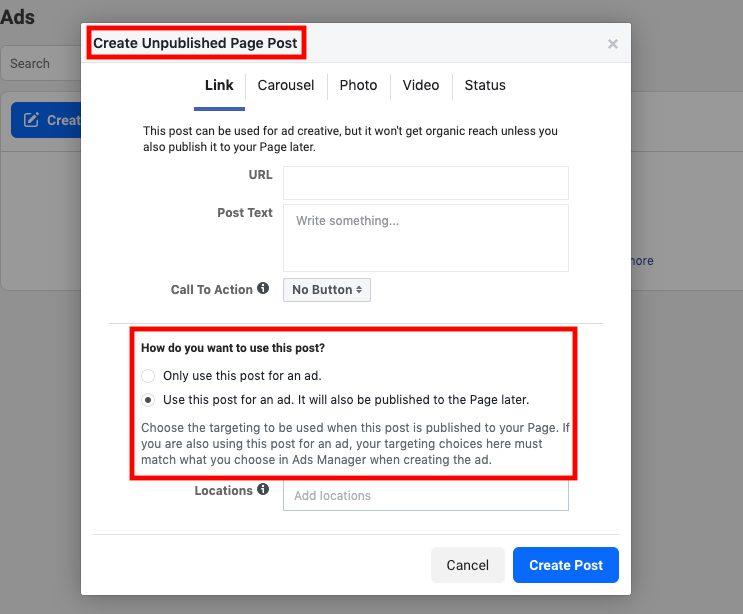
If you don’t see “Create Unpublished Page Post” at the top, you might’ve chosen the wrong action. Remember, Unpublished Pages are the only way to dark post on Facebook.
From here, you can fill in the details of your ad. When you choose how you want to use the post, keep in mind that the first option, “Only use this post for an ad,” won’t publish the post to your company Page, which is what you want. The second option will eventually post to your Page.
3. Select or create your audiences.
Previous users of Facebook Ads Manager can choose their already-segmented ad sets in this section. For those who are new to it, when you create a campaign, you’ll have a chance to create audience segments:
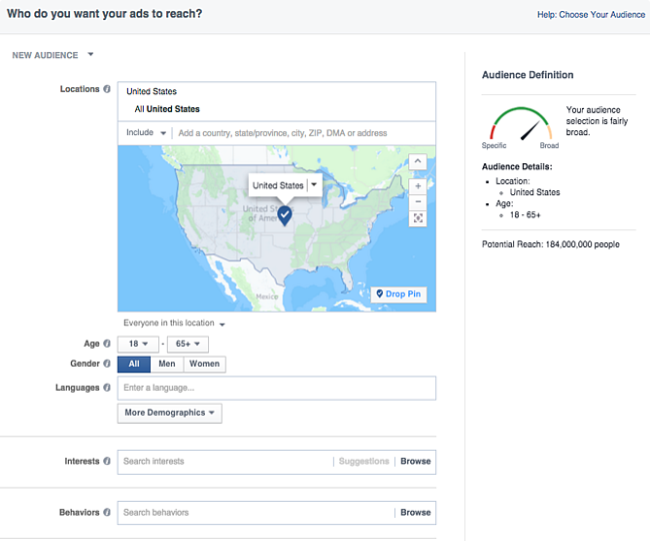
Notice how specific you can get with your audience segmentation, including age, gender, languages, location, interests, and behaviors. These options were put in place to help you reach the audiences that will connect with your messages the most.
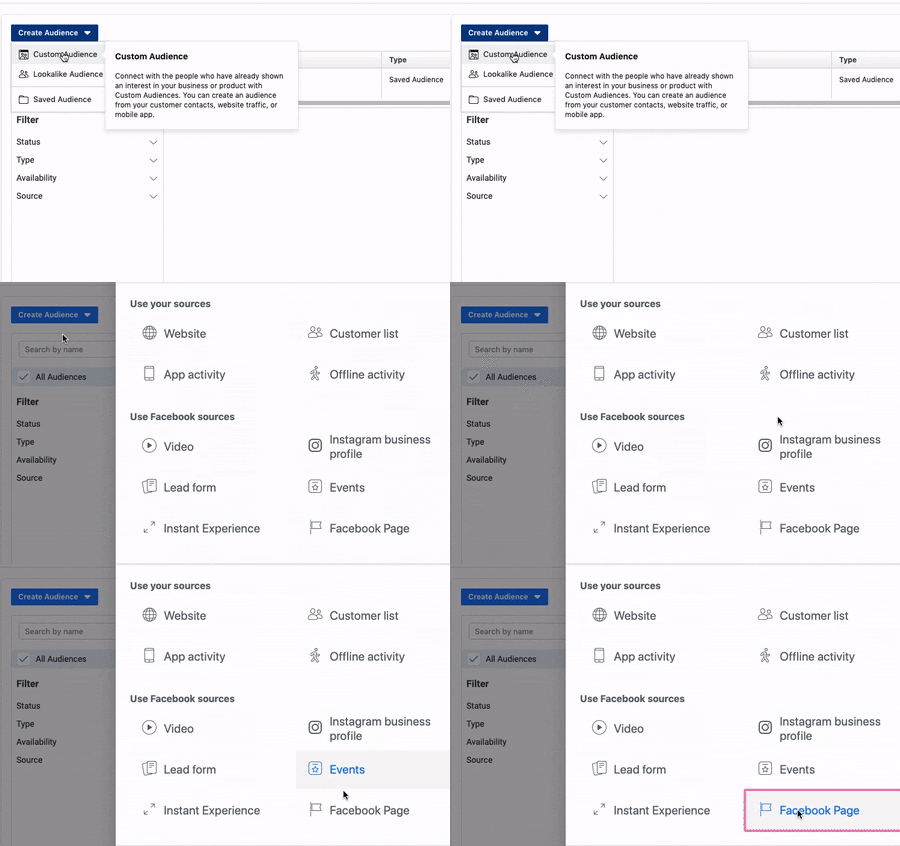
You can access this page by going from the drop-down box to Ads Manager > Audiences > Create Audience > Custom Audiences > Facebook Page. Then you’ll be prompted to create and segment audiences:
4. Optimize your dark post.
When you’re comfortable with your post, you can optimize it. Here, we’re going to mention a few optimizing tips you can use. For an extra, deep dive look into optimizing an ad for Facebook, check out this ultimate guide for Facebook marketing.
We’re going to go over what I’ve affectionately dubbed, “The Three R’s of Quick Optimization.” They are: Run, Review, and Resize.
- Run an A/B test — First, if you’ve run A/B tests previously, review those results and think back to how you can apply those results to your new dark post. Maybe certain copy really resonated with customers, or they just liked the look of one over the others. Your existing customer base can help you choose how to reach out to new prospects.
- Review Ad metrics — Access your social media metrics software. It might just be Facebook’s analytics tool, or an outside tool, like a CRM, that offers ad management software. When you review your metrics, you can choose which features of the ad you want to maximize to get a better ROI, like adding a CTA button to increase conversion rate.
- Resize your audience — If, over the course of creating your ad, you’ve noticed that your audience should be consider, go ahead and resize and re-configure your audiences. Perhaps you’ve noticed that you want to reach a smaller audience in a different location — go for it, and create a new audience, specifically for lead generation with dark posts, or change one you’ve already created.
And with that, your dark post, or, Unpublished Page post, will be ready to take its first steps into the news feeds of leads, just waiting to be converted. Now, you know the ins and outs of a Facebook Unpublished Page post. How are you going to use them to your advantage?

How to Craft Your Content Strategy, According to HubSpot’s Pillar Page Manager
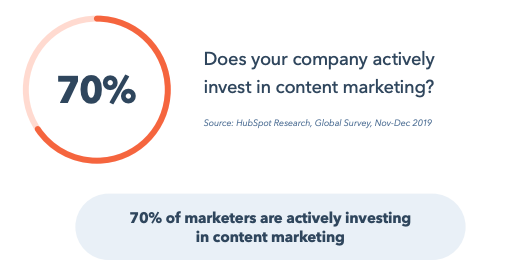
When your business invests in content marketing, you improve your ability to engage your buyer personas, convert more leads, boost brand awareness, and connect with your audience. This leads me to two questions for marketers: 1) Does your company already actively invest in content marketing? 2) Will you continue — or begin — this worthwhile investment in 2020?
Keep Creating Clustered Content to Build Topic Authority
Once upon a time (in 2017), HubSpot’s blog hit a massivetraffic plateau. Our team put their heads together and, after identifying some macro trends in search and content, decided to reorganize HubSpot’s blog into topic clusters. That reorganization, along with the introduction of a search insights report, led to a 25% YoY increase in traffic and improved our search rankings for over two million keywords.
In short, the topic cluster methodology works — keep investing in it. Here’s how.
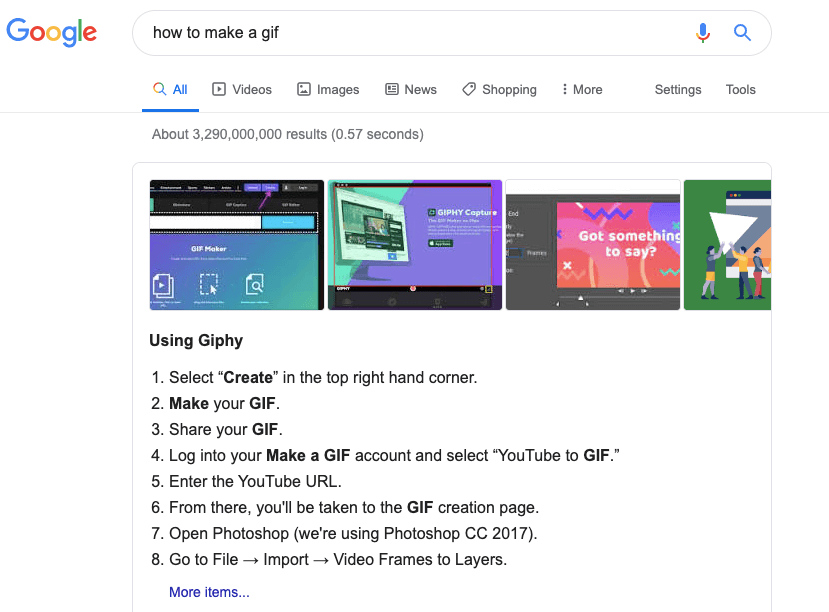
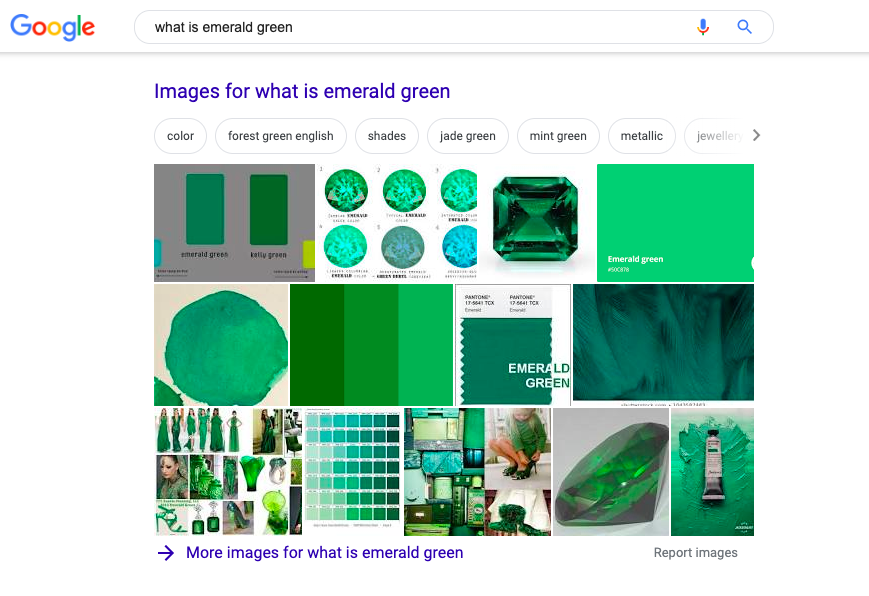
When creating topic clusters, you want to ensure that each cluster touches on all of the ways people are searching for that topic.You start with a pillar page — which I like to think of as the 10,000-foot view of a topic — about the main keyword you’re targeting. Then, your cluster (or subtopic) content should be about related yet more specific angles of that topic. All of this content, including the pillar page, is clustered through an internal linking structure.
If you’re a visual learner like I am, this illustration will help:

Google SERP for “How to Make a Gif”
Google SERP for “what is emerald green”

Gen Z Searches For Online Content Differently: What Marketers Need to Know
Gen Z enters adulthood and gains more and more purchasing power, it’s apparent that the age group is more hyper-connected to the internet than past generations.
At this point, smart marketers have begun to discover how Gen Z’s technological influence makes them different from older age groups. They’re also noticing key generational behaviors that could change the way brands market to younger audiences.
For example, Gen Z is more frugal than millennials, chooses practicality over customer experience, has less brand loyalty than past generations, and — oddly enough — prefers real-life conversation to social media chatter.
Aside from the differences above, Gen Z also consumes content differently from how older people have. For instance, Gen Z spends more time online each day than millennials. They’re also usually logged on to multiple social media channels at once, have a mobile-first mindset, and love video content.
With all these differences in mind, it’s not shocking that the way Gen Z searches and discovers content such as videos, blogs, websites, or product listings is also quite unique.
If you’re a marketer that has thrived on search engines, it could be helpful to familiarize yourself with how the up-and-coming generation aims to discover new products, events, experiences, or information online. This way, you can improve on your own optimization tactics so that your content gets put on their radar.
In this blog post, I’ll highlight a few common ways that Gen Z searches the web, how these behaviors are different from those of past generations, and how marketers can effectively meet Gen Z on the online platforms they’re searching the most.
How Gen Z Searches the Web
1. Gen Z searches long-tail keywords more frequently than older age groups.
In the header above, I wrote a full sentence instead of opting for the much simpler headline of “Gen Z and Long-Tail Keywords.”
Why did I take the time to make each subhead into a full phrase or sentence? This is because I want to optimize my content for long-tail keywords.
In the past, older generations were more likely to search content with just a keyword, like “demographics.” Now, younger age groups — especially Gen Z — are more likely to search with a full question or phrase, like, “How do I pick an audience demographic?”
Recent research from Fractl finds that Gen Z searches more long-tail keywords than any other generation. Additionally, while the average person’s search includes four words, Gen Z searches often include five or more.
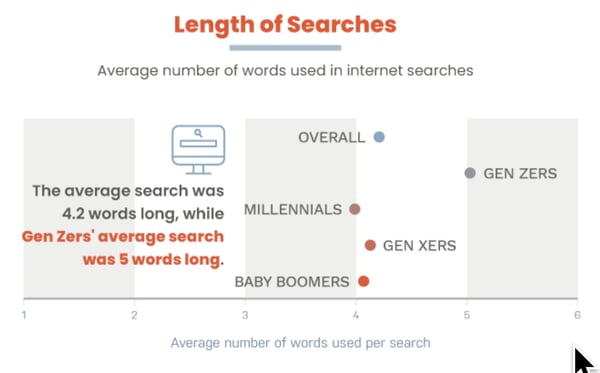
Even if you aren’t interested in targeting Gen Z just yet, you should still optimize your website and content for long-tail search keywords. While Gen Z most commonly uses this search tactic, millennials aren’t far behind.
Aside from text-based searches, Gen Z and millennials also regularly use voice assistants and smart devices. This means that when a person verbally asks questions or gives full commands to voice assistants, the AI algorithm will recognize the long-tail phrase and perform search queries for them.
At this point, long-tail is getting more and more common across the board. Optimizing your website to cater to Gen Z search queries will only help you gain traffic from all age groups as this search tactic becomes more common throughout age groups.
2. Gen Z often includes “best,” “cheap,” or “how-to” in search queries.
The Fractl study also found that Gen Zers are most likely to begin searches with the word “best.” For example, when asking for results related to the “best restaurants in Boston.” While 30% to 32% Baby Boomers and Gen Xers used the term in searches during the experiment, 56% of Gen Z used it.
The commodity of “best” searches could suggest that Gen Z is more interested than other generations in using search platforms to get recommendations or suggestions for the best possible experience.
Other phrases that Gen Z searches more than other generations include “cheap” and “how to.”
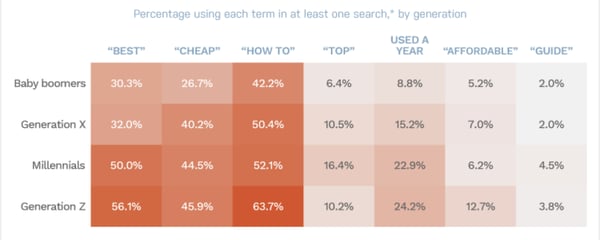
The search rates of “best” and “cheap” are definitely in line with other research that shows how Gen Z is more frugal and heavily researches possible purchases to ensure that they get the best experience for their money.
Additionally, while past generations were accustomed to learning how to do things from books, academics, or friends, Gen Z is known for using web searches and videos to quickly find simple how-tos.
3. Most Gen Z searches occur on mobile devices.
Not shockingly, Gen Z, which is infamous for heavy smartphone use, performs most online searches on mobile devices.
While millennials also regularly perform mobile searches, Gen Z’s heavier use of mobile search, plus their interest in mobile apps, shows that marketers really need to ensure that they’re optimizing content for different devices.
Along with catering well to Gen Z and millennials, mobile content appeases search algorithms. For example, Google — which has adopted a mobile-first mindset — now rewards higher search result ranks to websites with a responsive or mobile-optimized design.
Aside from favoring websites that are mobile-optimized, Google has also taken steps to appease mobile young adult audiences with the launch of the Google Discover feature on its app. This feature analyzes your search query history and then shows you a mobile feed of photos, videos, and articles that you might be interested in. To learn more about this feature and how you can leverage it, click here.
4. The age group looks for video over other content types.
While Millennials and older generations will enter general search queries for all sorts of content types, Gen Z more aggressively searches out video content more than past age groups.
According to Think with Google, 85% of teenagers within Gen Z use YouTube to regularly find content while 80% of Gen Z says YouTube videos have successfully taught them about something.
This correlates with data that shows Gen Z prefers to learn about new things or products through video rather than text, native ads, or other content formats.
If you’re trying to capture Gen Z audiences, it would be beneficial to develop a video strategy on your website or a Gen Z-friendly social platform — such as YouTube or Instagram. In this blog post, you can find a step by step guide to creating your first marketing video.
5. Like millennials, the generation also embraces social media site searches.
As mentioned above, Generation Z is heavily connected to social media. Research shows that their favorite platforms include Instagram, Snapchat, and TikTok.
And although search engine optimization is still vital to your overall strategy, having a social media presence will be vital to gaining attention from Gen Z.
One of the main things Gen Z searches for on social media is brand information. In fact, recent research shows that 45% of Gen Z will search for new products on Instagram.
Aside from searching for and discovering new brands, Gen Z is also likely to continue certain aspects of the customer journey on social media platforms. For example, they might also use their favorite platforms to find reviews, unboxings, demos, or video content about a product.
At this point, if you’re not on social media, you should be — especially if you plan to reach new generations. Although a small portion of Gen Z searches might occur here, this generation spends a major amount of time on these platforms each day. Promoting your product on their favorite channels will only increase your chances of younger age groups learning more about it.
To learn more about the top social media platforms, check out this detailed guide.
Reaching Gen Z Where They’re Searching for Content
To reach Gen Z, you’ll need to continue common marketing techniques like SEO, social media marketing, and content marketing, while more aggressively embracing video content. As you aim to make your strategy more competitive, you might also want to consider experimenting with either niche or video-based social media channels — like TikTok, Instagram Stories, Reddit, or Snapchat.
To make sure your content ranks for Gen Z and others on search engines, you should also ensure that your site has a responsive design and a smooth mobile user experience.
All of the tactics mentioned above will raise Gen Z’s chances of discovering your brand on various search engines or multiple mobile-optimized platforms including Google, YouTube, or other social media platforms.
To learn more about how to cater your campaigns to Gen Z as compared to millennials, check out this comparison piece. You might also like this list of 52 stats about the generation.

Top 10 HubSpot Academy Courses You Can Take in Under 1 Hour
Let me ask you a question. If you could learn any skill in one hour, what would it be?
When you’re looking to learn something new, there are plenty of online courses that can help you improve your skills.
HubSpot Academy (HubSpot’s training division) is one of those online providers that offers entirely free education.
If you’re hoping to learn new skills related to professional development, career, or business, then HubSpot Academy is a great place to start. Side note: If you’re looking to improve your virtual golf game, you may want to look elsewhere.
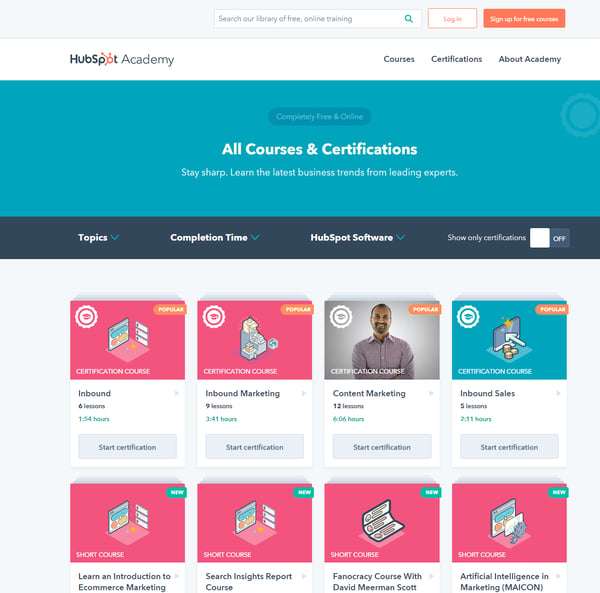
In the HubSpot Academy courses and certifications tab, you’ll find courses covering a range of marketing, sales, and service topics. However, if you don’t know exactly what you’re looking for, it can be overwhelming.
We know your time is important, so we’ve broken down the top HubSpot Academy Courses (based on total learners who have started the course) that take less than one hour to complete. Happy learning!
1. Graphic Design Essentials: Easy Steps for Creating Your Own Compelling Visuals
Have you always been curious about the fundamentals of graphic design? In this course, you’ll learn how to start thinking like a graphic designer. In fact, over 20,000 learners have started this course.
This course is helpful for anyone in marketing, whether you’re creating or brainstorming content ideas for your campaigns.
2. Using HubSpot’s Free Marketing Tools
Did you know that HubSpot has free marketing tools that you can access in your HubSpot Academy account? If you haven’t checked them out yet, your marketing efforts are missing out. Learn how you can leverage HubSpot’s free marketing tools to nurture and manage relationships with your leads, prospects, and customers.
3. Frictionless Sales Certification Course
This free certification course technically takes 61 minutes to get through all of the lessons, but since it’s the only certification that makes the list, we decided to allow that extra minute.
Not only will completing this course give you a new certification to add to your resumé or LinkedIn profile, but you’ll also find new ways to remove friction for your sales team so they can spend more time selling.
This course is helpful for sales reps or managers, so they can optimize their sales process.
4. Build a Marketing Campaign in Marketing Hub Starter
If you’re new to HubSpot Marketing Starter, this is a great course. You’ll learn how to leverage your subscription to attract visitors, convert them into leads, and nurture them through email.
5. Getting Started with HubSpot Video Powered by Vidyard
Oftentimes, it’s easier to show someone how to do something instead of just telling them. That’s why mastering video is so important for connecting with your audience.
This course will teach you how to use HubSpot Video to connect with your leads and customers in a human and helpful way, so you can resolve issues faster and boost customer satisfaction.
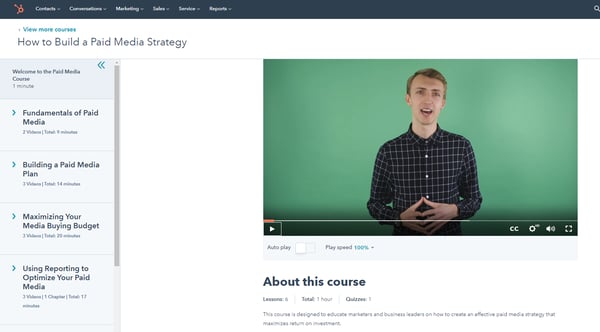
6. How to Build a Paid Media Strategy
This course is designed to educate marketers on foundational digital advertising knowledge so they can think more critically about their overall paid media strategy.
After taking this course, you’ll know how to allocate your paid media budget to drive the most efficient return on investment (sounds like a great investment of 59 minutes).
7. The Search Insights Report: HubSpot’s Strategy for Increasing Organic Blog Traffic
Have you ever wondered how the HubSpot Blog became successful? Do you want to learn how to implement those same strategies for your own blog?
Look no further than this course, which will teach you how to use our Search Insights Report template to grow your blog. You’ll learn our secrets and start growing your traffic now.
8. Introduction to the HubSpot APIs
Calling all developers: HubSpot Academy has education for you, too. Are you interested in getting started with HubSpot APIs? In under an hour, you’ll learn how to create developer and test accounts and make API calls with an API key and/or OAuth.
9. Set Up Your HubSpot CRM for Growth
Setting up your CRM is key for making your flywheel spin. While this might sound like a big dig, this course breaks it down for you in under an hour so you can start importing your data into your HubSpot CRM and understand what to do next.
10. Introduction to Ecommerce Marketing
This free course, created and taught by Groove Commerce, teaches you how to create an ecommerce strategy that’s grounded in the inbound marketing methodology. It’s also one of the shortest courses on this list; you can start selling more online in under 30 minutes.
There’s a lot you can do in an hour, but investing it in education is always a good idea. Once you create a free HubSpot Academy account, you’ll have access to the library of courses and certifications, so when you have more than an hour to spare, you can jump in and learn on the go.

5 Benefits of Educating Prospects With Free Content
In the marketing world, the infamous free content debate seems to be everlasting.
“If we give away free content and information about the challenges our paid products and services resolve, then who will pay for what we’re selling?”
It’s easy to understand why you might think about free content this way — after all, the goal of any business is to make a profit, so giving away free goodies would be crazy, right?
Wrong.
In fact, offering free content to your target audience and prospective customers can actually do the opposite. Providing education on the topics related to and about the products and services you offer can help you boost leads and sales.
Benefits of Educating Prospects with Free Content
When it comes to inbound marketing, the old adage, “Why buy the cow if the milk is free?” doesn’t seem to ring true. Here are five benefits related to offering free educational content to show you why that’s the case.
1. Free content builds trust.
Using free content, whether in the form of blog articles, ebooks, webinars, or videos, can do wonders to boost brand trust and credibility.
Quality content shows prospective customers that your business is a thought-leader and authority in the industry, which translates into initial trust in your paid products and services.
After all, if the content you’re creating is educational and helps your prospects learn something new or solve some problems they have, why wouldn’t they think your paid offerings are equally as helpful — if not more?
2. Free content creates prospect and customer evangelism.
If prospects and customers find value in your content, you could end up with content evangelism — or people sharing and promoting your content on your behalf. This is extremely beneficial, since it expands the reach of your content and generates brand awareness beyond your direct network.
Delighted customers are also your best advocates. Not only do they have first-hand experience with your brand, but consumers trust each other more than they trust businesses. Giving your happy readers and customers content to share can boost brand advocacy and introduce your brand to new prospects.
3. Free content drives traffic.
There’s no surprise here. Creating content is a fantastic way to get found online and increase various types of traffic to your website. SEO is one key way to ensure your content gets discovered. By making sure content is optimized with relevant keywords, you’ll increase your chances of getting found in search engines and boost organic traffic.
Additionally, by promoting content on social media, you’ll increase your referral traffic, and by using content offers in paid marketing efforts like pay-per-click or in email promotions, you’ll increase traffic from paid search and email marketing, respectively.
4. Free content provides qualified leads.
Another huge benefit of free educational content is that it’s, well, educational. The more prospects who read your content, the smarter they’ll be about what your business actually sells and can offer them. The better they know this, the more qualified they’ll be as leads, and the easier it will be for your sales team to close them as customers.
Inbound marketing greatly improves lead quality because prospects are essentially volunteering themselves as leads. Isn’t self-selection a beautiful thing?
5. Free content makes for happier customers.
When your content is effective at communicating and educating customers about what problems your products/services can help them solve, they’ll have better expectations as customers. What this usually means is happier customers.
Rather than blindly purchasing from you and not fully understanding that your product does , which can lead to misconceptions and false perception, educational content better prepares your customers and makes for a more informed customer base. This can lead to future or repeat purchases and lower customer churn.
To answer the question we posed above, you can give away free content and information that your paid products and services help solve, and people will still pay money for what you’re selling. In fact, we argue that free content can drive more — and more qualified — leads.
Invest your resources into free educational content and see happier customers, healthier leads, and a boost in brand trust.
Editor’s Note: This post was originally published in August 2011 and has been updated for comprehensiveness.

The Ultimate Guide to Content Marketing in 2020
It’s no secret that traditional forms of marketing, which interrupt audience members, are less effective than they once were for reaching prospects and converting leads into customers. That’s why content marketing has become a popular way for businesses to reach and engage their target audience.
By providing audience members with useful content to educate them on your products and services — and show them how those products and services effectively solve their pain points and challenges — you can increase conversions, improve brand awareness, boost revenue, and more.
Sound interesting? Keep reading to learn about the ways your business can implement content marketing tactics and strategies to connect with your audience.
Why is content marketing important?
Today, outbound marketing strategies (or anything that interrupts your audience members) aren’t as effective for reaching audience members and converting leads as they once were. Content marketing has become a popular way for businesses to combat this issue. In addition to expanding your reach, content marketing helps your business:
- Educate your leads and prospects about the products and services you offer
- Boost conversions
- Build relationships between your customers and business
- Connect with your audience to show them how your products and services solve their challenges
- Create a sense of community around your brand
Now that you understand why your business should invest in content marketing, let’s review some examples so you can decide which types of content you want to create.
Content Marketing Examples
Although content marketing is an applicable and useful tactic for almost every company, brainstorming creative and persuasive ways to reach and convert your audience is no simple task. So, how can you succeed at content marketing?
To answer that question, let’s take a look at the various types of content marketing, plus some examples of each. This section will give you a better understanding of how you can incorporate content in your business’s marketing plans.
Types of Content Marketing
There are many types of content marketing your business may decide to leverage. Below are some of the most popular options.
1. Social Media Content Marketing
With over 3.7 billion global users, it’s easy to understand why so many businesses invest in social media content marketing. There are a number of platforms (such as Facebook, Instagram, Pinterest, LinkedIn, and Snapchat) to work with and several ways you can create and share social media content on each of them (such as photos, live and pre-recorded videos, and stories).
All of these platforms and ways to share your content provide you with a plethora of opportunities to connect with your audience.
Featured Resource
Example of Social Media Content Marketing
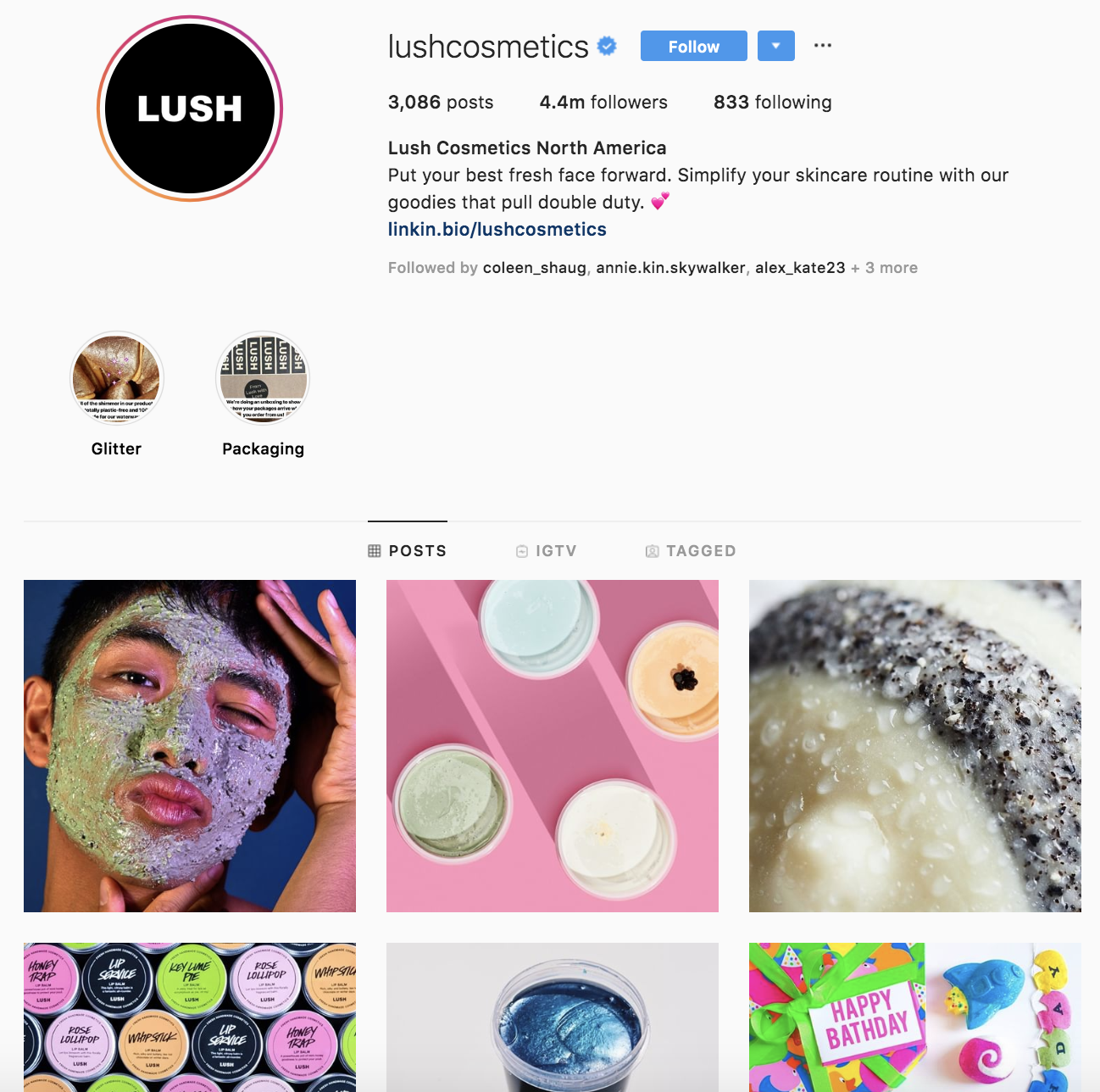
Lush Cosmetics’ Instagram account is on-brand and complements the rest of their marketing content — if the page didn’t say “Lush Cosmetics” anywhere on the profile, customers would likely still know the profile belongs to Lush.
The Instagram page shares the Lush product line, displays different color and scent options for the products, and shows the various ways each product can be used.
Their profile feels and looks colorful, bright, happy, and uniquely Lush. The page also depicts people of all backgrounds, ethnicities, and genders using their products in ways that fit their specific needs.
2. Infographic Content Marketing
Infographics display content, information, and data in an easy-to-understand, graphic format. With a mix of simple wording, short statements, and clear images, infographics are a great way to effectively communicate your content.
They work well if you’re trying to distill an educational and/ or complex topic down so all audience members can understand it.
Featured Resource: 15 Free Infographic Templates
Example of Infographic Content Marketing
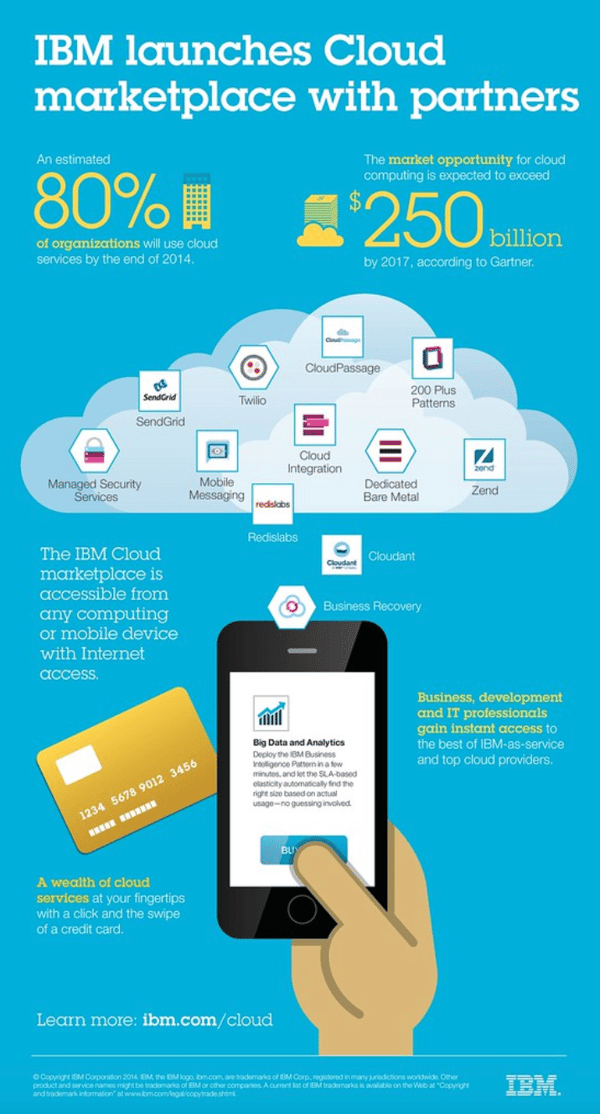
IBM created an infographic when they launched their Cloud marketplace Their infographic is on-brand, well-organized, and easy to read. It clearly explains what they’re doing with their Cloud marketplace and how customers can benefit from it. It also tells audience members how they can access the marketplace and get started using it.
3. Blog Content Marketing
Blogs are a powerful type of content for inbound marketing and sharing information with your customers and target audience (whether educational, customer-related, or product-related). Blogs can be used to convert readers into customers, boost brand awareness, and/ or build relationships with your audience.
Depending on the goal of your specific blog, you may choose to promote other blog content by linking to various posts, sharing links to your social media pages, linking to your partners’ websites and products, or writing about your product line.
Featured Resource: 6 Free Blog Post Templates
Example of Blog Content Marketing

Expedia has a blog called “[Out There Starts Here]” that shares travel-related information. Whether about hotel recommendations, unique places to visit, or various activities you can do around the globe, their blog has all of the details.
Expedia regularly publishes their blog content to keep readers interested and engaged. It includes a wide range of topics related to any type of trip you could imagine. The blog is on-brand and all articles relate to the travel technology company’s goal and mission of gaining customers and boosting brand awareness.
They do this by linking to their services and writing about customers who have already had positive experiences with the company.
4. Podcast Content Marketing
Did you know over 6 million people currently listen to podcasts in the U.S.? Podcasts have become a popular content medium because of their convenience — you can enjoy them while relaxing or on-the-go.
That’s why so many businesses have started creating podcasts. They help improve brand awareness, build relationships with audience members, and promote their products, services, and partners.
Featured Resource: How to Start a Podcast
Example of Podcast Content Marketing
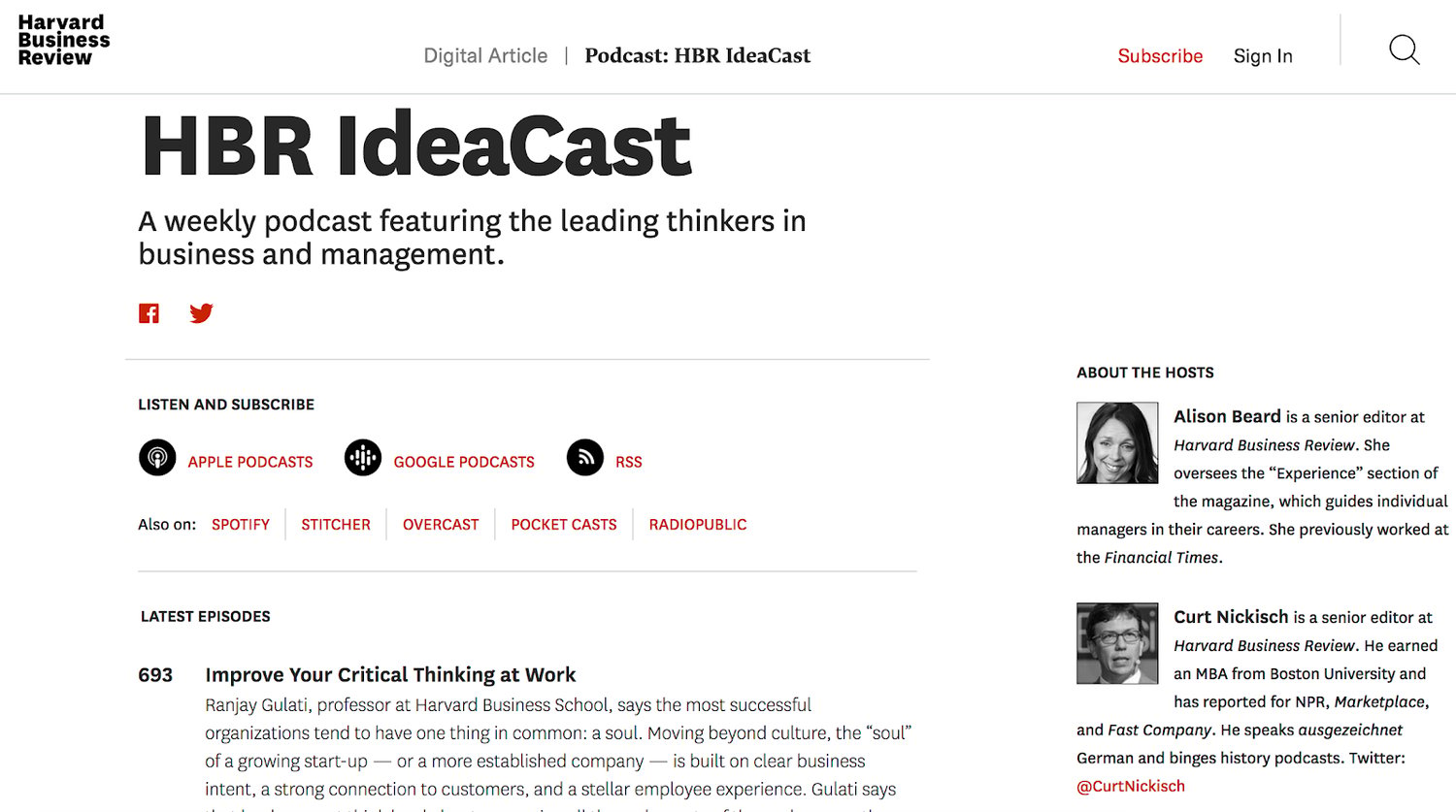
Harvard Business Review (HBR) has a weekly podcast called HBR IdeaCast which features industry leaders in both business and management. You can either subscribe to consistently receive their hundreds of podcasts or pick and choose which ones you want to listen to.
The podcast is on-brand and complements the rest of HBRs published content. It also serves as a great way for HBR to connect with their target audience, enhance brand awareness, and gain a following of audience members through a medium that differs from their typical work (listening to a podcast vs. reading an HBR article).
5. Video Content Marketing
According to a recent HubSpot research, over 50% of consumers say they want to see videos from the brands they interact with.
Additionally, video marketing can boost conversions, improve ROI, and help you build relationships with audience members. You may choose to share your video marketing content on social media platforms, site pages, or on your partners’ websites — expanding your reach across different media.
Featured Resource: The Ultimate Video Marketing Starter Pack
Example of Video Content Marketing

Much of Dollar Shave Club’s video content has gone viral. Their marketing efforts are on-brand, humorous, and entertaining. In fact, one of their videos has over 26 million views on YouTube. By making a name for themselves through their online video content, Dollar Shave Club has experienced impressive growth and brand recognition.
6. Paid Ad Content Marketing
As I mentioned before, organic traffic created by content and inbound marketing is becoming increasingly popular among all types of businesses.
However, that’s not to say paid content and ads are useless or ineffective for reaching your target audience. Paid content ads can help you reach a broad audience and allow you to position yourself in all of the places you want to be seen.
There are many ways you can create and publish your paid content ads. You might share paid ads on social media or publish digital ads on websites in the form of banners or sponsored content.
Featured Resource: The Ultimate Google Ads PPC Kit
Example of Paid Ad Content Marketing
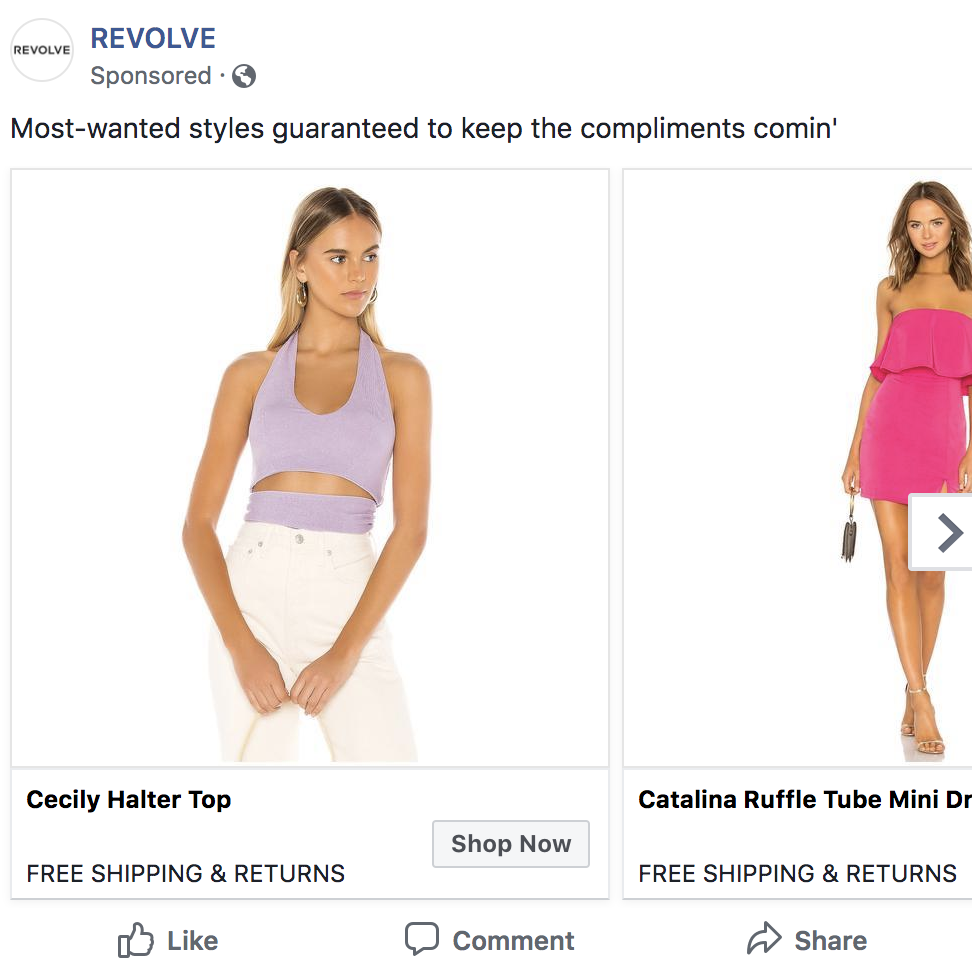
Revolve — a clothing and accessories company — uses paid and sponsored ads on social media (like this one on Facebook) to reach their target audience while they browse their news feeds.
The content ads feature some of their products and details about their free shipping and return policies to pull their audience to their website and, hopefully, convert them audience into customers.
We’ve now reviewed the various types of content marketing you can add to your strategy. Now, let’s talk about your content marketing strategy. By implementing a strategy, you can ensure your content marketing efforts are impactful and effective in converting leads and reaching your audience members.
1. Set SMART goals.
The first part of your content marketing strategy is to set SMART goals. These should be specific to your business — they’ll likely complement your broader marketing and company goals. Let’s review some examples of goals you set for your content marketing strategy.
You may want your content to …
- Improve brand awareness
- Boost revenue
- Increase conversions
- Improve brand loyalty
- Increase customer engagement
- Build rapport and trust among prospects and customers
- Attract strategic partners
Featured Resource: Marketing SMRT Goals Template
2. Determine your KPIs.
Next, set key performance indicators (KPIs) for your SMART goals. KPIs are quantifiable data points you can use to measure your actual performance against your goal.
| smart goal | related kpi |
| Brand awareness | Site traffic, social media followers, subscription sign-ups, mentions (by customers and partners) |
| Revenue | Daily sales, site traffic |
| Conversions | Conversion rate, shopping cart abandonment rate, associated shipping rate trends, competitive price trends |
| Brand loyalty | Returning customers, promoters, product reviews, referrals |
| Customer engagement | Likes, shares, follows, mentions, backlinks |
| Rapport and trust | Returning customers, promoters, followers, mentions |
| Strategic partners | New partnerships, mentions, backlinks |
3. Decide on the type of content.
Next, choose the type of content you’ll create. To do this, start by thinking about your target audience and buyer personas. Answer the following questions about your target audience to help you narrow down the right types of content for them:
- What do they need from you?
- What challenges are they looking to overcome?
- Why do they need your product or service?
- How can you help them succeed?
Now, take a look back at the various types of content we reviewed earlier to determine which type or types of content you’ll create and share among your audience members and customers.
4. Choose your content channels.
Once you’ve decided on the type of content you’ll market with, it’s time to choose your specific content channels. For some of the content types, the channel you need to work with will be obvious. For example, if you’re creating blog content, your channel will be the blog itself.
However, some channels will be less obvious. For example, if you choose social media, you’ll need to decide which platform or platforms you’ll be marketing on (Instagram, Facebook, Twitter, etc.). If you choose an infographic, you’ll need to decide which channel will you be sharing it on (social media, website, etc.).
5. Set a budget.
Now, set your budget. Think about the type of content you’re creating and which channels you’re marketing that content on.
Then, ask yourself the following questions to determine your budget:
- Do you need to purchase any software or technology to create the content (such as graphic design software like Adobe Photoshop, a subscription to Canva, a camera to take high-quality photos and videos)?
- Do you need to hire any content team members (such as artists, writers, editors, designers)?
- Do you need to pay for ad space?
- Do you need access to specific tools or resources to enhance or measure your specific type of content?
As you answer these questions, you may notice how your responses impact your expected budget — whether that’s an increase or decrease in what you may have already estimated.
6. Create and distribute the content.
Create and distribute your content so your audience members can consume it — and possibly convert. To ensure you’re consistently producing content and sharing it among your prospects and customers, use a social media calendar or an editorial content calendar.
This can help your team can stay on top of all of the content being created and even schedule it ahead of time.
7. Analyze and measure results.
Lastly, analyze and measure your results. This will allow you to make any necessary changes to enhance your content marketing efforts and reach more audience members.
Look at your SMART goals and KPIs to determine the success of your content marketing strategy. Did you achieve your goals and KPIs? Were you close to reaching them, or were you off in your estimations?
Here are some tools to help you with your content marketing strategy analytics and results:
- HubSpot marketing analytics and social media software
- Mention
- SharedCount
- Sprout Social
- Google Analytics
Engage Your Target Audience With Content Marketing
With effective content marketing, you can reach your target audience and increase conversions. There are several ways to market with content to boost revenue, grow your brand awareness and recognition, and build relationships with your prospects and customers.
To get started, determine which type of content works best for your business and audience, and develop a content marketing strategy to begin boosting your bottom line today.
Editor’s note: This post was originally published in August, 2019 and has been updated for comprehensiveness.

How to Launch a Mobile App in 2020 [Complete Guide]
The other day, I signed up for a friend’s solidcore Pilates class.
Once I’d paid for the class, I got a text asking me to download the [solidcore] app to review upcoming classes, integrate with my Google Calendar, and buy credits for future classes.
Undoubtedly, the ability to use the business’s app was a major component in me becoming a more loyal member. The app was incredibly easy-to-use and sent me notifications 10 minutes before the class started.
Nowadays, it’s not unheard of for businesses to have their own apps — in fact, 42% of millennial-owned businesses use their own apps to increase sales or provide an alternative platform for their customers to use their tools or services.
Additionally, you’ll notice simply from shifting through your app store that plenty of businesses use their own apps. I’ve downloaded apps from major airlines, investment banks, and even small local restaurants or yoga studios.
So it makes sense if you’re considering creating a mobile app for your own company. But, while a mobile app as a revenue generator can be quite lucrative, the low barrier to entry makes a successful launch all the more challenging.
According to former CEO of AppVee and AndroidApps Alex Ahlund, the average cost to develop a mobile app is $6,453 — and the cost can skyrocket to as much as $150,000 depending on the complexity of the app.
Wherever you fall on that spectrum, the money and resources you dedicate to conceptualizing and developing a truly great mobile app can all be put to waste if you don’t orchestrate a proper mobile app launch.
And then once you’ve launched, your work has only just begun. You then need to think about how to make your app “sticky” — to ensure people come back again and again.
For the purposes of this post, we’re assuming you’ve already come up with a great initial mobile app idea and have a goal to get as many downloads as possible upon launch. Here, let’s explore how to conduct a successful launch, and how to ensure you can retain app users for the long-haul.
How to Launch a Mobile App
1. Do Market Research
As of January 2020, it’s been estimated that a total of 1,800,000 apps are available on the Apple App Store. And that number doesn’t even encapsulate Android apps in Google and Windows app stores either.
So — what does this mean for you? You probably already have a ton of competition. Conducting thorough market research becomes necessary in order for you to truly differentiate your app.
It’s critical you get to know the leading apps in your niche, see where they fall short, and use those insights to make your app even better than the competition’s.
Depending on your budget, you may want to do primary research for prospect users. But even secondary research can give you a lot of insights. Take a look at reviews on competitor app pages on the App stores, as well as checking reviews on YouTube and blogs to see what actual users have said about the competition.
2. Define Success
If you’re aiming for a successful mobile app launch, you need to define what success looks like.
Set some measurable goals around your launch. We recommend measuring success around your active install rate — this tells you retention rate, or the number of people who install your app and then don’t uninstall it — the number of ratings you receive, your average rating in the app marketplace, and if you’re selling your app, revenue generated from your app.
To help you set some benchmarks, most free mobile apps have a higher active install rate during the first month, usually around 50%, after which it levels off around 30%. The average app store rating is a 3-4 (out of 5), for which you should certainly strive much higher to maintain a healthy active install rate.
Later in the post, we’ll explore how to ensure you get high app store ratings post-launch.
3. Consider Cross-platform and Browser Versions of the App
It’s no longer enough to stick to one platform (typically Android or iOS). Now, it’s important to be available across multiple platforms to expand your reach.
As of January 2020, market share between mobile operating systems were at 74.3% for Android, 24.76% for iOS, and the remaining 2% are divided among other operating systems.
Not only is cross-platform development the way to go for more reach, but it’s also more cost-effective in the long-run, especially if you use top-rated IDE software to accelerate app development. Most IDE software even lets you create web browser versions of your mobile apps, giving users more ways to use your app across any device.
Budgeting app Goodbudget, for instance, is available on iOS, Android, and is perfectly accessible on a web browser.

4. Claim Your Social Media Accounts
Pre-launch, you’ll want to claim your accounts in social media, and use them actively to generate interest or even early sign-ups, as we’ll discuss more in Step 7.
You can use your social media accounts to showcase the app while it’s in development and solicit feedback and ideas from your future users. When your app launches, though, be sure to change the link in your social media bios to direct to the app store download. Remember, your goal isn’t site traffic — you want to drive downloads.
And don’t discount newer social networks like Pinterest for launching your mobile app — the highly visual social network is the ideal place to show other mobile app developers your product in its final stages who may have some great suggestions for UI/UX improvements. Unless, of course, you’re trying to beat a competitor to market!
Finally, if you’re a HubSpot customer, you can leverage another app — the Facebook Welcome app in HubSpot’s app marketplace — to help with your mobile app launch on Facebook.
Generate some pre-release buzz by customizing a page that lets people sign up for an alert when the app launches. We’ll get into some fun pre-launch deals that will generate buzz around your app that you can associate with this email alert in future steps.
5. Create Content
Spend time creating content that clearly explains how to use your mobile app. This content should include blog posts, press releases, social media content, website copy, and email marketing copy.
You can pre-schedule all of this to go live on your launch day, although you should check in periodically on social media during launch week to provide real-time updates that pertain to support issues, reviews, and respond to user recommendations.
6. Record a Demo
You’ll want to create a video that shows how to use your mobile app — you can easily do this with a user-friendly program like Camtasia that allows screen capture and voiceover recording.
In your video, clearly explain what your app does and why it’s useful in real-life scenarios.
Again, there are so many mobile apps out there, so differentiating yours will come down to clear communication in all of your marketing materials. A short video demo is one of the easiest ways to display the value of your mobile app.
For an example of a fantastic mobile app demo, see CanadaQBank.com’s Mobile App Demo, which shows how the app works, and who it’s meant for:
7. Launch a Dedicated Site or Page
You can launch either a dedicated website for your app — more appropriate if your mobile app is a business in its own right — or simply create a page for your mobile app on your website. The latter is what most companies choose to do.
To complement your social media efforts, you should launch these pages even if your app hasn’t yet hit the market, like how PandaDoc did pre-launch. Direct users to this page of your site, let them view your demo video, and encourage them to sign up for a download alert email once your mobile app goes to market.

8. Choose an App Store
Initially, you’ll want to choose just one app store in which to launch your mobile app. This should help you get the highest concentration of users and ratings possible.
Additionally, you’ll be making lots of changes and improvements to your app during those first few weeks after launch, and having your app in just one store will help you streamline those updates as they roll out. Once your app is more established, feel free to expand it to more app stores.
The most common app stores are the Android Market and the Apple App Store, but there are many other app stores out there (even HubSpot has its own new and improved App Marketplace!). Ultimately, if you’re unsure, do some audience testing to determine which Store is used most by your target market.

9. Use App Store Optimization to Get Discovered
Don’t confuse app store optimization (ASO) with SEO — while both important, you need ASO to get your mobile app discovered specifically within the app stores of your choosing.
Best practices include optimizing your app title with relevant keywords. And when you’re submitting your app to these different app stores, be sure to fill out all the categories most relevant to your app, so users browsing through categories have a good chance of finding you.
Also, you’ll want to include clear screenshots within your app download page that showcase the most common use cases of your app.
In the example below, Todoist uses keywords like to-do lists and project planner. Their app screenshots are also beautifully designed, telling you how you can use the app right away.

10. Network With Other App Developers
Consider reaching out to other app developers that have created an app that could be complementary to yours, and whose users might also like to use your app. You could set up a mutually beneficial co-marketing opportunity that helps you both increase your install rates.
Just be sure to select developers who have great ratings in the app store. You don’t want to associate your app with a bad product.
11. Pitch Your App
Pitch your story to tech, mobile, and industry journalists and bloggers. Be armed with the video demo you recorded, and be prepared to give them a free download of your app so they can get to know the interface and your app’s capabilities. Make yourself readily available to answer any of their questions, and consider them another test group who can find bugs and make UX/UI recommendations.
You should start pitching at least a few weeks in advance so they have time to experiment with your app and write a compelling story without being rushed. Plus, the more time they have, the more likely they can fit you into their editorial calendar.
12. Tap Your Network for Buzz
Reach out to your business network and ask them to share your content about the app’s impending release on their social channels. Send your network a sneak preview email with a link to your demo video so they can see how your app works, and include social sharing buttons to make sharing your content easy.
This is also a great recourse for bloggers and journalists you’ve contacted who aren’t willing to publish long-form content about your app — you can ask them if they’d be willing to tweet a blog post you’ve written about your app, instead.
13. Set Up Paid Advertising
Because of the Google algorithm’s freshness update, you might gain some organic search tractions at your mobile app launch. Complement that search presence with some paid advertising during launch week.
You can also set up paid, targeted ads on Facebook to drive users to your Facebook fan page, where they’ll be greeted with your welcome screen encouraging them to sign up for your mobile app (refer back to Step 4).
Alternatively, you can redirect people straight to your app downloads page so that they can install it on their phones right away. Which strategy you decide to go with may depend on your app.
For instance, if your app requires some explanation or is fairly innovative in its approach, you can direct users to a dedicated landing page. Meanwhile, apps that users are already familiar with, such as gaming apps, can have ads that take users straight to the app download page.

14. Tap Influencers or Industry Thought Leaders
Influencer marketing is only growing in 2020, so if you want to spread the word for your app, we can’t emphasize this step enough.
Look for different social media influencers, bloggers, and content creators who can help generate buzz for your app before it launches. Choose influencers whom you think will benefit greatly by using yours, and conduct personalized email outreach marketing to effectively build relationships and win them over.
For instance, if you’re launching a mobile app for weight loss, tap different fitness influencers who talk about workout regimes or macro-tracking — whichever features your app has.
15. Launch an Invite-only Beta
Before you take your mobile app live to the public, consider an invite-only beta launch. Websites Spotify, Google+, and Pinterest have used this tactic with great success. It not only creates an air of exclusivity that generates buzz around your product, but it also lets you get feedback from a trusted network so you can fix bugs and UX/UI problems before rolling your app out full scale.
You can use the email list referenced in Step 4 as your pre-launch beta test group, and supplement it with an email marketing send to a segment of your current customer list that would benefit from using your mobile app. You can position the launch as the opportunity for free, exclusive access to your mobile app before it launches, and even ask them to write a review of your app in exchange for that free, exclusive access.
Alternatively, you can use TestFlight to launch a beta version of your app and invite users to give it a test run until your official launch.
16. Partner With Affiliates to Promote Your App
We’ve mentioned influencers and industry thought leaders in Step 14, but you can take your partnership the extra mile by creating an affiliate program to encourage downloads or purchases.
Identify key influencers — these can be media contacts or social media influencers with bigger followings — whom you can incentivize for pushing your app. Give them a special link that tracks purchases or downloads, so they automatically get instant rewards when their audience does a desired action.
17. Put Download Links Everywhere
Congrats — you’re officially ready to go live to the public!
You’ll want to put links to download your mobile app on your blog, your website’s home page, in your marketing emails, and on your social media accounts — you can even add a mobile tab to your Facebook page.
For instance, take a look at Waze app page below, which includes three calls-to-action above the fold, all of which are to download the app:

18. Have a Launch Party
A launch party doesn’t have to be anything big. In fact, you can have a small intimate digital launch party through a webinar. Invite early adopters, influencers, tech journalists, and others to take part in a short launch.
You can announce special live discounts or perks while giving attendees all the details they need to download your app or spread the word.
Below, developers of Summerian announced a launch party happening on Product Hunt, while giving interested users a peek of what to expect during the launch:

19. Monitor Feedback and Encourage Reviews
Finally, you’ll want to monitor peoples’ feedback about your app, and strongly encourage users to post reviews.
It’s not just that the apps with the best reviews get the most visibility and downloads — this process also helps you identify bugs you wouldn’t otherwise know about and make quick changes to improve the user experience and make your app stickier.
Keep users updated on your progress as you make it so they know you’re listening and responding to their feedback, and take a look at Steps 21 and 22 if you want to take this even further while involving and updating users on new features and updates.
20. Identify Potential Integrations
The average smartphone user has between 60 to 90 apps on their phones, and you might have noticed some apps integrate with one another — for instance, you can log into your account on Pinterest using Facebook, or integrate your native Health app with your calorie counting app or fitness tracker.
This is more convenient for users, and best of all, you can increase retention when you integrate seamlessly with apps your users already have.
In HubSpot App Marketplace, for example, you can find all the apps that integrate with HubSpot seamlessly. Get to know who the developers for these apps are and strike up a partnership. You’ll never know how many doors these app integrations can open for you.
21. Publish an App Update Log
Transparency is becoming a very important thing for consumers, and one way to be more transparent with users about your mobile app is to keep them up-to-date with any changes and features over time.
An update log is the easiest way to do this. Send these logs to your app store pages, and even have a dedicated update log page on your website for users to easily see changes you’ve implemented the past several weeks.
By keeping users updated with your app changes, you can also increase retention rates as users see different updates they might have been waiting for or may benefit to learn more about. If an update is particularly big — such as a big interface change or even an exciting new feature — you can send push notifications and in-app pop-ups for users to see a breakdown of these new features on a dedicated page on your website.
Sometimes a brand will even inject their personality into these app updates. Just take a look at one of Medium‘s app updates from 2016:

22. Keep a Hub of ‘Coming Soon’ and ‘Wishlist’ Features
If you want to let users know you’re listening to their suggestions and feedback like we mention in Step 19, then you can create a hub of your Coming Soon or wishlisted features.
Loom is a great example of a software app that does this. While they’re not a mobile app, the way they keep users updated with features that are coming soon or may be considered for development is a great way to keep your current customers on your app.

Create a button or page on your mobile app that lets people submit feedback or requests for new features. Once they’ve submitted their thoughts, you can send them to this Coming Soon hub so they see all the exciting things you have in the works. They’ll be much more likely to stay on board to see these features come to life, and you’ll be increasing your retention rates and customer loyalty in the long run.
To help you manage your updates and still keep your app running for users, it’s best to use a NoSQL database, considering its popularity for helping mobile app developers worldwide manage their apps in a more streamlined way while lessening downtime for users.
Launch Your Mobile App the Right Way
Are you ready to launch your mobile app this year? Simply follow the steps above to make sure you’ve got everything covered for your launch, while making sure you can keep users around for the long haul. I’m excited to see your app come to life.

How to Develop a Content Strategy: A Start-to-Finish Guide
Whether you’re just starting out with content marketing or you’ve been using the same approach for a while, it never hurts to revisit your content strategy plan — to make sure it’s up-to-date, innovative, and engaging for your customers, no matter when or how they intend to buy.
After all, you’ve got more competition than ever. According to HubSpot’s Not Another State of Marketing Report, almost 70% of businesses are actively investing in content marketing in 2020.
The first step to getting a leg up on the competition — and actively engage your audience — is to have a solid, smart content marketing plan in place.
If you’re having trouble planning for the upcoming year or need some fresh ideas to include in your plan, read on.
In this post, we’ll dive into what content strategy is, why your business needs a content marketing plan, and what steps you need to take to create your strategy.
What is content strategy?
Content strategy refers to the management of pretty much any tangible media that you create and own: written, visual, downloadable — you name it. Content strategy is the piece of your marketing plan that continuously demonstrates who you are and the expertise you bring to your industry.
You might’ve heard how important content creation is to the growth of your business, but as you’ll see throughout this post, it needs to have a well-planned purpose.
When you develop a content strategy, there are a few questions to answer.
1. Who will be reading your content?
Who’s the target audience for your content? For how many audiences are you creating content? Just as your business might have more than one type of customer, your content strategy can cater to more than one type of reader or viewer.
Using a variety of content types and channels will help you deliver different content to each type of audience you have in mind and engage everyone your company does business with.
2. What problem will you be solving for your audience(s)?
Ideally, your product or service solves a problem you know your audience has. By the same token, your content coaches and educates your audience through this problem as they begin to identify and address it.
A sound content strategy supports people on both sides of your product: those who are still figuring out what their main challenges are, and those who are already using your product to overcome these challenges. Your content reinforces the solution(s) you’re offering and makes your customers more qualified users of your product.
3. What makes you unique?
Your competitors likely have a similar product as yours, which means your potential customers need to know what makes yours better — or, at least, different. This is where content comes in.
In order to prove why you’re worth buying from, you need to prove why you’re worth listening to.
4. What content formats will you focus on?
What forms will your content take? Infographics? Videos? Blog posts? Having identified the topics you want to take a position on, you’ll need to determine which formats to budget for so you can best express that position.
5. What channels will you publish on?
Just as you can create content in different formats, you’ll also have different channels you can publish to. Channels can include owned properties, such as your website and blog; and social media properties, such as Facebook and Twitter. We’ll talk more about social media content strategy in the step-by-step guide later in this article.
6. How will you manage content creation and publication?
Figuring out how you’ll create and publish all your content can be a daunting task. It’s important for a content strategy to know who’s creating what, where it’s being published, and when it’s going live.
Today’s content strategies prevent clutter by managing content from a topic standpoint — as explained in the video above. When planning a content editorial calendar around topics, you can easily visualize your company’s message and assert yourself as an authority in your market over time.
Why Marketers Need to Create a Content Marketing Strategy
Content marketing helps businesses prepare and plan for reliable and cost-effective sources of website traffic and new leads. If you can create just one blog post that gets a steady amount of organic traffic, an embedded link to an e-book or free tool will continue generating leads for you as time goes on — long after you click Publish.
HubSpot’s blog team found this to be key to increasing traffic to the Sales Blog over time — read about their blog strategy here.
The reliable source of traffic and leads from your evergreen content will give you the flexibility to experiment with other marketing tactics to generate revenue, such as sponsored content, social media advertising, and distributed content. Plus, your content will not only help attract leads — it will also help educate your target prospects and generate awareness for your brand.
How to Create a Content Marketing Strategy
Now, let’s dive in to learn the specifics of how to create a content marketing plan.
1. Define your goal.
What’s your aim for developing a content marketing plan? Why do you want to produce content and create a content marketing plan? Know your goals before you begin planning, and you’ll have an easier time determining what’s best for your strategy.
Download this goal planning template for help figuring out the right content goals.
2. Conduct persona research.
To develop a successful plan, you need to clearly define your content’s target audience — also known as your buyer persona.
This is especially important for those who are starting out or are new to marketing. By knowing your target audience, you can produce more relevant and valuable content that they’ll want to read and convert on.
If you’re an experienced marketer, your target may have changed. Do you want to target a new group of people or expand your current target market? Do you want to keep the same target audience? Revisiting your audience parameters by conducting market research each year is crucial to growing your audience.
3. Run a content audit.
Most people start out with blog posts, but if you want to venture out and try producing other content pieces, consider which ones you want to make.
For instance, if you’ve been doing weekly blog posts for the past year, creating an ebook that distills all your blog posts into one ultimate guide would be one way to offer information in a different format. We’ll go over several different types of content you can use further down on the list.
If you’ve been in business for a while, review your content marketing efforts and the results from it in the last year by running a content audit. Figure out what you can do differently in the upcoming year and set new goals to reach. Now is a great time to align your team’s goals with the rest of your organization’s goals.
4. Choose a content management system.
Have a system in place where you can create, manage, and track your content, otherwise known as a content management system (CMS). A few vital parts of content management include content creation, content publication, and content analytics.
With HubSpot CMS, you can plan, produce, publish, and measure your results all in one place. Another popular CMS is WordPress, to which you can add the HubSpot WordPress plugin for free web forms, live chat, CRM access, email marketing, and analytics.
5. Brainstorm content ideas.
Now, it’s time to start coming up with ideas for your next content project. Here are some tools to get the wheels turning:
HubSpot’s Website Grader
HubSpot’s Website Grader is a great tool to use when you want to see where you’re at with your digital marketing. From your blogging efforts to your social media marketing, Website Grader grades vital areas of your marketing and sends you a detailed report to help you optimize and improve each area.
With this tool, you can figure out how to make your website more SEO-friendly and discover new content ideas.
BlogAbout
Get your mind gears going with IMPACT’s unique content idea generator, BlogAbout. This tool works a bit like Mad Libs, but instead of joke sentences, it shows you common headline formats with blanks where you can fill in the subject you have in mind.
This brainstorming technique helps you put general ideas in contexts that would be appealing to your target audience. Once you have a headline you like, BlogAbout lets you add it to your “Notebook” so you can save your best ideas.
HubSpot’s Blog Ideas Generator
Get blog post ideas for an entire year with HubSpot’s Blog Ideas Generator. All you need to do is enter general topics or terms you’d like to write about, and this content idea generator does all the work for you.
Feedly
The Feedly RSS feed is a wonderful way to keep track of trendy topics in your industry and find content ideas at the same time.
BuzzSumo
Discover popular content and content ideas at BuzzSumo. This company offers a number of market research tools, one of which uses social media shares to determine if a piece of content is popular and well-liked. In turn, this information helps you see which content ideas would do well if you were to create content about them.
Blog Post Headline Analyzer
CoSchedule’s Blog Post Headline Analyzer tool analyzes headlines and titles and provides feedback on length, word choice, grammar, and keyword search volume. If you have an idea in mind, run a few title options through the Headline Analyzer to see how you could make it stronger, and to move your idea further along in the brainstorming process.
6. Determine which types of content you want to create.
There are a variety of options out there for content you can create. In the following section, we’ll discuss some of the most popular content formats marketers are creating, including some tools and templates to get you started.
7. Publish and manage your content.
Your marketing plan should go beyond the types of content you’ll create — it should also cover you’ll organize your content. With the help of an editorial calendar, you’ll be on the right track for publishing a well-balanced and diverse content library on your website. Then, create a social media content calendar so you can promote and manage your content on other sites.
Many of the ideas you think of will be evergreen — they’re just as relevant months from now as they are today. That being said, you shouldn’t ignore timely topics either. While they may not be the bulk of your editorial calendar, they can help you generate spikes of traffic.
Most people count on incorporating popular holidays such as New Year’s and Thanksgiving in their marketing efforts, but you don’t have to limit yourself to these important marketing dates.
If there are niche holidays that might appeal to your audience, it could be worth publishing content on your blog or on social media. Check out this ultimate list of social media holidays — keep an eye on it when you’re planning your calendar.
These are the eight most popular types of content marketing you can create for your readers and customers.
1. Blog Posts
If you haven’t already noticed, you’re currently reading a blog post. Blog posts live on a website and should be published regularly in order to attract new visitors.
Posts should provide valuable content for your audience that makes them inclined to share posts on social media and across other websites. We recommend that blog posts be between 1,000 and 2,000 words in length, but you should experiment to see if your audience prefers longer or shorter reads.
Check out our free blog post templates for writing great how-to, listicle, curation, SlideShare presentation, and newsjacking posts on your own blog.
2. Ebooks
Ebooks are lead-generation tools that potential customers can download after submitting a lead form with their contact information. They’re typically longer, more in-depth, and published less frequently than blog posts, which are written to attract visitors to a website.
Ebooks are the next step in the inbound marketing process: After reading a blog post (such as this one), visitors might want more information.
This is where calls-to-action (CTAs) come into play, directing people to a landing page where they can submit their contact information and download an ebook to learn more valuable information for their business. In turn, the business producing the ebook has a new lead for the sales team to contact.
3. Case Studies
Case studies are your opportunity to tell the story of a customer who succeeded in solving a problem by working with you. A case study is perhaps your most versatile type of content marketing because it can take many different forms — some of which are on this list. That’s right, case studies can take the form of a blog post, ebook, podcast … even an infographic.
Your goal in a case study is to show the people who are considering your product that the proof is in the pudding. Before choosing a customer for a case study, you should determine which form the testimonial will take and the area of your business to which you’re trying to drive value.
4. Templates
Templates are a handy content format to try because they generate leads for you while providing tremendous value to your audience. When you provide your audience with template tools to save them time and help them succeed, they’re more likely to keep engaging with your content in the future.
5. Infographics
Infographics can organize and visualize data in a more compelling way than words alone. These are great content formats to use if you’re trying to share a lot of data in a way that is clear and easy to understand.
If you’re ready to get started, get our templates for creating beautiful infographics in less than an hour.
6. Videos
Videos are a highly engaging content medium and are shareable across social media platforms and websites alike. Videos require a bigger investment of time and resources than written content, but as visual marketing increases in popularity — after all, it’s 40X more likely to get shared on social media than other types of content — it’s a medium worth experimenting with.
HubSpot Research recently found that video is the most preferred form of content. Video also captures people’s attention more than any other content format.
7. Podcasts
Starting a podcast will help audiences find your brand if they don’t have time or interest in reading content every day. The number of podcast listeners is growing — in 2018, nearly one-third of the U.S. population has listened to a podcast in the last month.
If you have interesting people to interview or conversations to host, consider podcasting as another content format to experiment with. (Here’s our comprehensive guide to starting a podcast.)
8. Social Media
Once you’ve been regularly publishing content on your own site for a while, it might be time to start thinking about distributing your content on other sites. This could mean repurposing content into new formats and publishing them on your blog, creating original content specifically for external sites or publishing website content on various social networks.
Posting on social media, however, is pivotal to amplifying your brand’s reach and delivering your content to your customers where you know they spend their time. Social networks on which businesses often post include:
When launching a business account on any of the social networks above, it’s important to post the type of content your followers expect to see. On Instagram, for example, users want photos, videos, and graphics that reflect current events, show off user-generated content, or even go behind the scenes of your organization.
On Facebook, your options for what to post open up a bit: Not only can you share your blog posts and website content, but you can also post native Facebook videos, product promotions, and original memes that resonate with your customers. You can also interact with other businesses that have a similar audience as your own.
While the goal on social media sites like Instagram or Snapchat is to connect more intimately with your audience, your goal on platforms like Facebook and Twitter is to expand that audience, drive traffic toward your website, and start conversations in your industry. Do some basic market research to discover which platforms your buyers are on, and mold your content to their expectations.
When you’re ready for more ideas, there are a plethora of different content types to diversify your content marketing.
It takes time, organization, and creativity to grow a successful content marketing strategy. From building the foundation of your content marketing plan to adding tools to better manage your content, setting up your strategy for the new year won’t be a hassle if you follow the steps and explore the resources here.
For additional guidance, use HubSpot’s Marketing Plan Generator to create a 12-month strategy in just a few minutes.
Happy creating!
Editor’s note: This post was originally published in September 2018 and has been updated for comprehensiveness.

6 Tips for Creating Content That Spreads Naturally
We’ve all been there — you hit publish on a blog post and expect the social shares, page views, and agreeable comments to start rolling in. But sometimes you get pure silence (or crickets 🦗) in response.
Using social media and content to market your business isn’t a new concept, so doing the bare minimum won’t cut it.
Don’t believe me? Think about how often content is shared across the web — for instance, there are over 2.45 billion Facebook users and over 500 million Tweets shared per day on Twitter — and that’s only two of the several popular social platforms. Needless to say, there’s a lot of content everywhere … and as a result, a ton of noise.
It takes more than simply publishing content to stand out among your target audience and competitors. To prepare you for success from the get-go, here are six ways to cut through all of that noise and make sure your content comes out on top every time — no additional marketing effort required.
6 Ways to Create Content That Markets Itself
Follow these tips to ensure your business’s content stands out, spreads naturally, and markets itself among your target audience, buyer personas, leads, and customers.
1) Don’t try something new.
Wait. What?
Seriously. There’s no reason you’d need to start from scratch with a completely new content approach every time you create blog.
You already have content that’s getting discovered on its own — so, learn from those efforts. (Remember, sometimes you can simply work smarter rather than harder.)
Review your analytics and look for the posts that are generating the most views, shares, and leads, to determine how you can replicate that success.
For instance, use web analytics to identify your blog’s sweet spots. From there, create a blog editorial calendar with topics that will help you replicate past successes — whether it’s a post’s format, subject matter, title, author, or something else entirely.
2) Surprise people.
… Or make them happy, sad, afraid, angry, even disgusted!
Why? Because, in content, there’s a strong relationship between virality and emotion.
While I’m sure disgust or anger aren’t really the kinds of reactions you want associated with your brand, that’s not exactly the point here. The lesson is that content will be able to market itself if it provokes a strong emotional reaction with the audience. After they consume your content, they’ll feel like they have to share it with others so they have the opportunity to feel the same emotion.
Consider content you’ve read or created that provoked an emotion and action in the past — use this as inspiration for your content.
3) Nail your headline.
How can you increase the likelihood someone will click on a link to open your content?
A great headline that’s attention-grabbing and intriguing. No matter the subject of your content, a great headline will help a piece of content get opened more and spread further.
So … what makes a great headline? It’s similar to writing a great subject line for email marketing. Think about these four U’s in regards to your subject lines and headlines:
- Useful: Why is the blog post valuable?
- Ultra-specific: What can I expect to learn from the blog post?
- Unique: Why is this blog post compelling and unique?
- Urgent: Why should I read this now?
Be sure to incorporate all four of these qualities in every headline that you write so your audience will want to open and share your content.
4) Show don’t tell.
Today’s social media platforms reward visual content — this should be a major element of your content strategy. After all, visuals are proven to increase shares and engagement.
Whether it’s unique photos, graphic design content, video content, or branding visuals you share via blog, site page, email, social media, etc., they will help you increase conversions while offering an engaging and appealing presentation of your content.
Not to mention, these days you don’t need to be a designer to create and share professional-looking visuals. In fact, there are plenty of easy-to-use design tools on the market for people with any level of design knowledge.
5) Enable your blog to market your content.
More social media referral traffic coming to your site means more new visitors arriving via that content for the very first time.
However, these new visitors likely don’t know much about your business — meaning, you need to capture their interest and gain their trust before they’re ready to become evangelists of your content, too.
Consider how you can use your blog’s real estate to improve the presentation of your content and offer further recommendations that will earn new visitors’ attention and loyalty.
For example, add related-content recommendations at the bottom of every post. By tailoring recommendations to audience members, you’ll increase page views, time-on-site, and engagement.
This is what the “Related Articles” section at the bottom of HubSpot’s Blog posts look like:
In addition to recommendation widgets, add social follow and sharing buttons and modules to your content. This allows your audience members to click a button, no matter where they’re consuming your content, and immediately share that content among their personal networks.
Making this process simple is critical to your content spreading. I mean, have you every tried to Tweet an article that didn’t have a Tweet button?
It’s a total pain: 1) copy a URL, 2) open another tab, 3) go to a link shortener, 4) paste that link, 5) click the shorten button, 6) copy that link, 7) go to their Twitter account, 8) paste that link in there, 9) look up the Twitter handle of the publisher, 10) and then add custom copy for the tweet.
I’m exhausted just typing it out. So, make life easier on your audience and, in return, they’ll do a lot of your content marketing for you.
Finally, make sure you’re making content subscription easy. For example, your blog should have a customized CTA so people can choose to “Subscribe” and receive email alerts when you publish new content.
What better way to drive email traffic to your content without lifting a finger (except for the finger you use to press “Publish”, of course) than growing a giant base of followers and subscribers?
6) Don’t forget about search engine optimization (SEO).
Every time you publish a blog post, you create a new page on your site that’s being indexed in the search engine results page (SERP). At that point, Google is marketing content for you. For free. Forever.
If you pay attention to SEO, hone in on keyword research, and optimize your content, and update your current content, it’ll surface more frequently SERPs and you’ll drastically improve your traffic, conversions, brand awareness, and more.
Editor’s note: This post was originally published in December, 2012 and has been updated for comprehensiveness.


43 Messaging App Stats That Marketers Should Know
On some days, it feels like I communicate with more people on messaging apps than I do in person.
When I’m at work, I’ll use our office’s instant messaging tools to chat with my colleagues. When I get home, I’m sending goofy messages on Snapchat. When I need to have an in-depth conversation with a loved one. I use Facebook Messenger. And, if I want to reconnect to a far-away friend, I’ll use WhatsApp for a global video chat.
By now, you’ve probably used many of these popular messaging apps yourself. As an individual, you might love how they help us stay connected to our loved ones.
But — as a smart marketer — you’re probably wondering how you can interact with each major messaging app’s growing audience.
The truth is, mobile message marketing works — and it’s not new. While many marketers started out by sending simple SMS messages to their prospects, mobile marketing has greatly evolved. Brands can now pick a platform with an audience that matches their own and leverage it for even more in-depth campaigns.
The growing trend of using mobile messaging apps for marketing makes sense. According to a Facebook survey on messaging app use, more than half of the participants preferred to message a brand on one of their messaging apps rather than calling them.
Currently, businesses are heavily using apps like Facebook Messenger and WhatsApp. They’ve also dabbled in more niche apps like Snapchat. But, with all the messaging platforms out there, you might be wondering, “Which one is right for me?”
To help you determine which apps to use in your mobile messaging campaigns, here’s a list of 43 helpful stats to know.
General Messaging App Stats
- Over 56% of global messaging app users say they’ve messaged brands to get more information in all stages of the buyer’s journey. (Facebook)
- When a brand is available and active on a messaging app, over 66% of consumers will feel more confident about purchases, while 55% feel more connected to the brand. (Facebook)
- In 2019, 63% of those polled in a recent Facebook survey said they’d been messaging brands more often on messaging apps than in previous years. (Facebook)
- By Q4 of 2019, WhatsApp and Facebook Messenger were the most popular messaging apps globally, with 1.6 billion and 1.3 billion users respectively. (Statista)
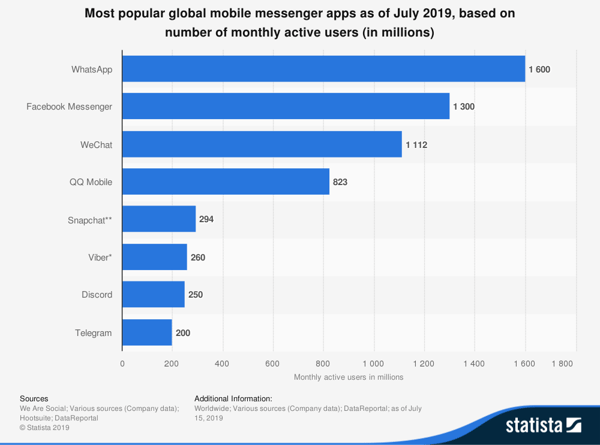
WhatsApp Stats
- WhatsApp has over two billion active users globally. (WhatsApp)
- WhatsApp for Business, an app for WhatsApp brands launched in 2019, now has 5 million users. (WhatsApp)
- By Q1 of 2018, 60 billion messages were being sent through the platform each day. (Mark Zuckerberg)
- India, Brazil, and the United States have the biggest WhatsApp audiences, with 340 million, 99 million, and 68 million users respectively. (eMarketer)
- Uruguay and Argentina are the fastest-growing WhatsApp audiences with a 67% and 63% increase in Apple App Store downloads in Q4 of 2019. (Statista)
- In 2018, WhatsApp grew its U.K. user base by 20% (We Are Social Digital Report)
- 46% of WhatsApp users are under 45 years old, with the biggest age group between 26 and 35. (Statista)
- Facebook reportedly paid 21.8 billion to acquire WhatsApp and all of its users. (Investopedia)
- WhatsApp users cumulatively spend 2 billion minutes on calls every day. (WhatsApp)
- There are only 25 countries where WhatsApp doesn’t lead the messaging app market. (Messenger People)
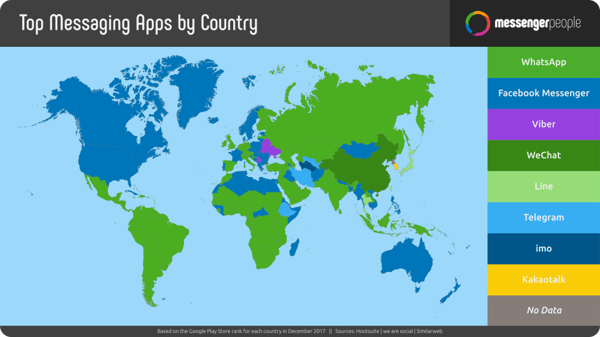
- 51% of mobile messaging app users say they prefer to contact brands via mobile messages. (Kenshoo)
- In 2018, just over 149 million people had at least one mobile messaging app on their smartphone. That number is estimated to grow to 171 million by 2022. (eMarketer)
- In the U.S., 45.5% of people were using a messaging app in 2018. (eMarketer)
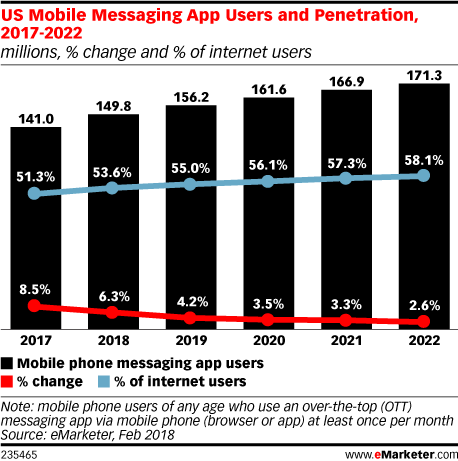
Facebook Messenger Stats
- In 2019, Facebook Messenger had over 106 million active users in the U.S. (Statista)
- The app has over 1.3 billion monthly active users globally, (Statista)
- There are more than 40 million monthly active businesses on Messenger. (Facebook)
- While WhatsApp is currently the leading messaging app, Facebook Messenger is the second most downloaded app of all time, behind Facebook. (Facebook)
- 410 million users use video chat monthly on the platform. (Facebook)
- In 2019, video chat on Messenger saw a 40% year over year growth. (Facebook)
- Brands quickly eyed Facebook Messenger as an opportunity for chatbots. By 2016, 300,000 company bots were active on this channel. (TechCrunch)
- 23-35 year-olds make up more than 27% of the Facebook Messenger user base. (Statista)
- In 2018, an average of 20 billion messages were sent via Facebook Messenger each month. (Facebook)
- When consumers message brands via Facebook, 80% of the messages ask questions about a product or service before a purchase is made. (Facebook)
- WeChat has over 1.5 billion users globally. (Statista)
- By 2021, WeChat is projected to have more than 674 million monthly active users. (eMarketer)
- Nearly 43% of WeChat users were born in the 1990s, while just over 25% of users were born in the 2000s. (ChinaChannel)
- During the Chinese New Year, 28 million people were playing WeChat games each hour. (ChinaChannel)
- The app is owned by Tencent, a China-based corporation which is the fifth-biggest company in the world. (CNN)
- In 2018, the WeChat hosted 410 million video calls. (Sina: Translated with Google Chrome)
- In 2019, 79% of Chinese internet users reported using WeChat. (We Are Social and HootSuite)
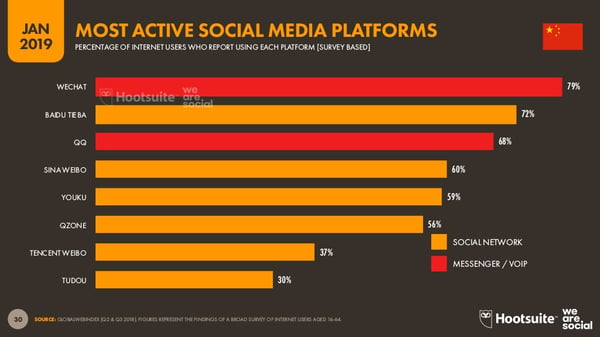
Snapchat Stats
- 38% of Snapchat users aren’t on Facebook or Instagram. (Snapchat)
- Snapchat claims to have over 218 global daily active users. (Snapchat)
- 24% of U.S. adults use Snapchat (Pew Research Center)
- 53% of adult Snapchat users log on to the app at least once a day. (Pew Research Center)
- Most U.S. Snapchat users primarily use the app for conversations with friends. (Snapchat)
- 90% of 13 to 24-year-olds use Snapchat while 75% of 13 to 34-year-olds use the app. (Snapchat)
- More than 15% of the total Snaps sent daily feature a lens made by Snapchatters with the Lens Kit. (Snap Inc.)
- The longest Snapchat streak, or messages consecutively sent between two people, was 1,154 snaps. (Techjunkie)
- In 2017, 3.5 billion snaps of photos were sent on the platform. (Statista)
Navigating Messaging Apps for Marketing
As you choose an app to leverage in your messaging strategy, make sure the platform’s global and age demographics are in line with your target audience. For example, while Facebook Messenger is a great tool to use if you’re targeting U.S. millennials, WhatsApp might be of interest to you if you’re looking to step into a global strategy.
To help you pick the right app or apps, think about your buyer persona. Where are they from? What are they most interested in? And, why would they choose to interact with your brand on a platform? As you answer these questions, you can develop a deeper understanding of which platforms and messaging strategies are right for you.
To learn more about the platforms discussed, check out these posts which highlight the marketing benefits of WhatsApp, Facebook Messenger, Snapchat, and WeChat.
Want to learn more about general messaging-based marketing strategies? Click here.
