
What Is Browser Cache? [FAQs]
So you’ve just finished redesigning your website. You’re excited, it looks great, and you’re patting yourself on the back. Before you start parading around this new great design like a kid showing off their new toy, you want to give it a whirl and see how it all looks from a visitor’s perspective.
And there lies your first problem: For some reason you can’t comprehend, your web browser is still showing the previous version of your site. What the heck’s going on here?
This is when your browser cache comes into play.
We’ve all heard this term before… but do we really know what it is? I’m willing to bet the majority of us have thought about our browser cache as some magical place that we have to go to and clear every so often so our site and others render as they should.
Show of hands? Yep — that’s what I thought.
Below, you’ll find a simple description detailing the ins and outs of browser cache that should clear up any misconceptions or questions about it you may have.
The Basics of Browser Cache
A web browser — such as Google Chrome, Mozilla Firefox, or Internet Explorer — is a software application that we use to fetch and see information living on the internet. In other words, a browser looks, finds, and presents to us websites and/or other pieces of information we look for via URLs.
A browser’s cache is its appliance or instrument through which it saves data, such as images and HTML, needed to see a website. The intent behind saving such data is to help with bandwidth.
So, the next time you go back to see a page, it takes less time to load as a cached version of the page has already been saved. In other words, because you have a cached version of a page, your browser will not need to send a new request to see that page.
How Browser Cache Relates to Cookies
Some of you may be wondering, “How does all this impact tracking cookies?” Let me explain.
Browser cache saves data like images and HTML, which are needed to see websites, right? Well, cookies are smaller pieces of data, such as names and email addresses, a website saves to your computer. This comes in handy because this is how a website knows who you are next time you visit.
Ever wondered how a website greets you by name? Yup, that’s cookies. A website picks up on the cookie it previously placed on your computer — therefore, it recognizes you.
The important thing to know is how a browser cache and cookies together can affect your work as it pertains to updating pages on your site, testing forms, and appropriately rendering pages. This is an easy variable to understand and usually one of the first ones to troubleshoot, as it can — in the vast majority of instances — resolve the issue(s) you’re experiencing with your site.
How to Clear Browser Cache
In order to eliminate browser cache as the culprit, you’ll need to clear it. The steps for clearing your browser cache will depend on the device and browser you’re using. Different browsers have different interfaces for accessing these settings.
Here are the steps for the most common desktop browsers:
Chrome
- Open Chrome.
- At the top right, click the three vertical dots.
- Click More Tools.
- Select Clear browsing data.
- Choose your time range for deletion.
- Check the boxes next to “Cookies and other site data” and “Cached images and files.”
- Click Clear data.
Internet Explorer
- Open Internet Explorer.
- Click on the cog symbol in the upper right corner of the browser.
- Choose the Safety submenu.
- Select Delete Browsing History.
- Check the boxes next to “Temporary Internet files and website files,” “Cookies and website data,” and “History.”
- Click Delete.
Safari
- Open Safari.
- Choose the Safari menu in the top left.
- Select Preferences.
- In the pop-up menu, click the Advanced tab.
- At the bottom of the window, check the box “Show Develop menu in menu bar.”
- This will add a Develop menu to your bar. Click that.
- Select Empty Caches.
- You can also delete your browsing history by selecting the History tab.
- Click Clear History.
- Choose your time frame and select Clear History.
Firefox
- Open Firefox.
- Click the hamburger menu (three stacked horizontal lines) in the top right corner.
- Click Options.
- Select the Privacy & Security panel.
- In the Cookies and Site Data section, click Clear Data.
- Check the boxes next to “Cookies and Site Data” and “Cached Web Content.”
- Click Clear.
Microsoft Edge
- Open Microsoft Edge.
- At the top right, click the three horizontal dots.
- Select History.
- Click “Clear history” at the top of the new menu.
- Check the boxes next to “Browsing history,” “Cookies and saved website data,” “Cached data and files,” and “Tabs I’ve set aside or recently closed.”
- Click Clear.
As you might agree, any good marketer is active and well-informed, and having basic knowledge on some of these topics, including HTML and CSS, can go a long way with impressing your colleagues or with a simple breakthrough in one of your projects.
After all, our inbound marketing world can be competitive, and these small nuggets of knowledge can make you more efficient, effective, and ahead of the curve.

The Ultimate Guide to Marketing Strategies & How to Improve Your Digital Presence
It’s probably safe to assume a major part of your marketing strategy today is digital. Consumers and businesses alike are almost always online and on-the-go — and you want to be able to reach them and observe their behavior where they spend their time.
But when you’re growing a business, it may seem as though this ever-changing digital landscape can quickly become an overwhelming one. With a number of other responsibilities and tasks that need to get done, how can you also efficiently create, fine-tune, and maintain an agile digital marketing strategy?
We’ve put together this guide about marketing strategies to help you improve your digital presence and grow better.
What is a marketing strategy?
It’s important to understand how a marketing strategy differs from a digital marketing strategy before implementing one or both at your company.
A marketing strategy is a plan for reaching a specific marketing-related goal (or goals) in a focused and achievable way. It takes into consideration what your business is currently doing well and what you’re missing in regards to the objective you set, so you’re more likely to accomplish it.
But what’s the difference between a marketing strategy and marketing tactics — two terms often used interchangeably?
Marketing Strategy vs. Tactics
As we mentioned above, a strategy is an achievable and focused set of steps used to help you reach a specific goal.
Marketing or not, there are three parts of any strategy: 1) a diagnosis of your challenge, 2) a guiding policy for dealing with the challenge, and 3) a set of targeted actions that are necessary to accomplish the policy.
Depending on the scale of your business, your marketing strategy may include several moving parts, each with different goals. With that said, working on your strategy can become daunting at time. So, if you’re ever feeling overwhelmed about your marketing strategy, refer to these three steps to keep you focused on achieving your objectives.
Marketing tactics, or tactics of any kind, are the specific actions you choose to take throughout your strategy to help you reach your end goal. In other words, a strategy is your destination — it’s the achievable, focused plan for getting you to your target. Tactics are concrete and definable steps within your strategy that ensure you reach your objective.
To provide a better understanding of what they may entail, check out the following list of basic marketing strategies commonly utilized by teams across a range of industries.
Basic Marketing Strategies
- Publish a blog.
- Advertise on a specific social media platforms (e.g. Facebook Ads, Instagram Ads).
- Offer free educational resources
- Search engine optimize your digital content.
- Create a giveaway and/ or contest.
- Test different campaign types to determine what works best for your audience.
- Organize a webinar.
- Product a podcast.
- Create an email campaign.
Now that you understand what a marketing strategy is, let’s look at how one differs from a digital marketing strategy.
Similar to marketing strategies and marketing tactics, another couple of similar terms that are often, incorrectly, used interchangeably are digital marketing strategy and digital marketing campaign. So how do they differ?
What is a digital marketing campaign?
As mentioned, a digital strategy is the series of actions you plan and take to achieve your overarching digital marketing goal. In contrast, digital marketing campaigns are the building blocks and actions within your strategy that move you toward a specific, digital end goal.
For instance, if the overarching goal of your digital marketing strategy is to generate more leads through social media, you might run a digital marketing campaign on Twitter. You may share some of your business’s best-performing gated content on Twitter to generate more leads through the channel.
Next, let’s look at the steps involved in creating a digital marketing strategy for your business.
1. Build your buyer personas.
For any marketing strategy — digital or not — you need to know who you’re marketing to. The best digital marketing strategies are built upon detailed buyer personas, and your first step is to create them.
Buyer personas represent your ideal customer(s) and can be created by researching, surveying, and interviewing your business’s target audience.
It’s important to note that this information should be based upon real data whenever possible, as making assumptions about your audience can cause your marketing strategy to move in the wrong direction.
To get a rounded picture of your persona, your research pool should include a mixture of customers, prospects, and people outside your contacts database who align with your target audience.
But what kind of information should you gather for your own buyer persona(s) to inform your digital marketing strategy?
That depends on your businesses — it’s likely to vary depending on whether you’re B2B or B2C, or whether you sell a high-cost or low-cost product.
Here are some starting points that you can fine-tine and tailor to your particular business.
Quantitative and Demographic Information
- Location: Use web analytics tools to easily identify what location your website traffic is coming from.
- Age: Depending on your business, this may or may not be relevant information. But if it us, it’s best to gather this data by identifying trends in your existing prospect and contact database.
- Income: It’s best to gather sensitive information like personal income through persona research interviews, as people might be unwilling to share these details via online forms.
- Job Title: This is something you can get a rough idea of from your existing customer base and is most relevant for B2B companies.
Qualitative and Psychographic Information
- Goals: Depending on what challenge your product or service solves, you may already have a good idea of the goals of your buyer persona. Cement your assumptions by speaking to real customers and internal sales and customer service reps.
- Challenges: Speak to customers, sales and customer service reps, and any other customer-facing employees to get an idea of the common challenges your audience members face.
- Hobbies/ Interests: Ask customers and those who align with your target audience about their hobbies and interests. If you’re a fashion brand, for example, it’s helpful to know if large segments of your audience are also interested in fitness and well-being to inform future content and partnerships.
- Priorities: Talk to customers and target audience members to find out what’s most important to them in relation to your business. For example, if you’re a B2B software company, knowing your audience values customer support over a competitive price point is very valuable information.
By combining all of these details, you’ll be able to create buyer personas that are accurate and highly-valuable for your business.
2. Identify your goals and the digital marketing tools you’ll need.
Your marketing goals should always be tied back to the fundamental goals of your business.
For example, if your business’s goal is to increase online revenue by 20%, your marketing team’s goal might be to generate 50% more leads via the website than the previous year to contribute to that success.
Whatever your overarching digital marketing goal is, you must be able to measure the success of your strategy along the way with the right digital marketing tools.
For instance, the Reporting Dashboard in HubSpot brings all of your marketing and sales data into one place, so you can quickly determine what works and what doesn’t to improve your strategy for the future.
3. Evaluate your existing digital channels and assets.
When reviewing your existing digital marketing channels and assets to determine what to incorporate in your strategy, it’s helpful to first consider the big picture — this will prevent you from feeling overwhelmed or confused.
Gather what you have, and categorize each vehicle or asset in a spreadsheet, so you have a clear picture of your existing owned, earned, and paid media.
Owned, Earned, Paid Media Framework
To do this effectively, use the owned, earned, and paid media framework to categorize the digital “vehicles”, assets, or channels you’re already using and decide what’s a good fit for your strategy.
Owned Media
This refers to the digital assets your brand or company owns — whether that’s your website, social media profiles, blog content, or imagery. Owned channels are the what your business has complete control over.
This can also include some off-site content you own that isn’t hosted on your website (e.g. a blog you publish on Medium).
Earned Media
Earned media refers to the exposure you earn through word-of-mouth marketing. Whether that’s content you’ve distributed on other websites (e.g. guest posts), PR work you’ve been doing, or the customer experience you’ve delivered. Earned media is the recognition you receive as a result of these efforts.
You can earn media by getting press mentions and positive reviews as well as by people sharing your content via their networks (e.g. social media channels).
Paid Media
Paid media refers to any vehicle or channel you spend money on to catch the attention of your buyer personas.
This includes things like Google AdWords, paid social media posts, native advertising (e.g. sponsored posts on other websites), or any other medium through which you pay in exchange for increased visibility.
Since you have a better grasp on what this framework entails, let’s look at an example.
Say you have an owned piece of content on a landing page on your website that’s been created to help you generate leads. You know you want to incorporate different parts of the framework rather than just working with owned, earned, or paid media alone.
To amplify the number of leads the content generates, you make an effort to ensure it’s shareable so your audience can distribute it via their social media profiles. In return, this will increase traffic to your landing page. This is the earned media component.
To support your content’s success, you might post about the content on your Facebook page and pay to have it seen by more people in your target audience.
This is how the three parts of the framework are able to work together — although, it’s not necessary for success. For instance, if your owned and earned media are already both successful, you might not need to invest in paid. So, evaluate the best solution to help you meet your goal, and then incorporate the channels that work best for your business into your digital marketing strategy.
Now you know what’s already being used, you can start to think about what to keep and what to cut.
4. Audit and plan your owned media campaigns.
At the heart of digital marketing is owned media — and it almost always takes comes in the form of content. That’s because nearly every message your brand broadcasts can be classified as content, whether it’s an About Us site page, product descriptions, blog posts, ebooks, infographics, podcasts, or social media posts.
Content helps convert your website visitors into leads and customers while improving your brand’s online presence. And when this content is search engine optimized (SEO), it can boost your search and organic traffic.
Whatever your digital marketing strategy goal is, you’ll want to incorporate owned content. To start, decide what content will help you reach your goals.
If your goal is to generate 50% more leads via the website than last year, your About Us page is most likely not going to be included in your strategy, unless that page has somehow been a lead-generation machine in the past.
Here’s a brief process you can follow to work out what owned content you need to meet your digital marketing strategy goals.
Audit your existing content.
Make a list of your existing owned content, and rank each item according to what has previously performed best in relation to your current goals.
For example, if your goal is lead generation, rank your content according to which pieces generated the most leads over the last year (such as a blog post, ebook, or site page).
The idea here is to figure out what’s currently working, and what’s not, so that you can set yourself up for success when planning future content.
Identify gaps in your existing content.
Based on your buyer personas, identify any gaps in the content you have. For example, if you’re a math tutoring company and know through research that a major challenge for your personas is finding effective ways to study — you don’t currently have content that speaks to that concern — create some.
By looking at your content audit, you might discover that ebooks hosted on a certain type of landing page convert really well (better than webinars, for example). In the case of this math tutoring company, you might make the decision to add an ebook about “how to make studying more effective” to your content creation plans.
Create a content creation plan.
Based on your findings and the gaps you’ve identified, make a content creation plan outlining the content that’s necessary to help you hit your goals.
This should include:
- Title
- Format
- Goal
- Promotional channels
- Why you’re creating the content
- Priority level of the content
This can be a simple spreadsheet, and should also include budget information if you’re planning to outsource the content creation, or a time estimate if you’re producing it yourself.
5. Audit and plan your earned media campaigns.
Evaluating your previous earned media against your current goals can help you get an idea of where to focus your time. Look at where your traffic and leads are coming from (if that’s your goal) and rank each earned media source from most effective to least effective.
You can obtain this information using tools like the Sources reports in HubSpot’s Traffic Analytics tool.
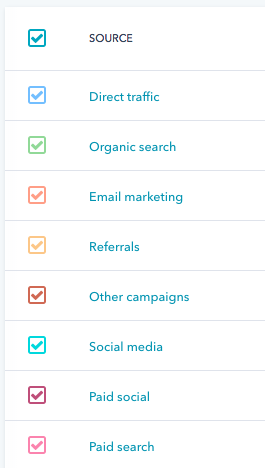
You may find a particular article you contributed to the industry press drove a lot of qualified traffic to your website, which boosted conversions. Or, you may discover LinkedIn is where you see most people sharing content, which increased traffic.
The idea is to build a picture of what types of earned media will help you reach your goals (and what won’t) based on historical data. However, if there’s something new you want to experiment with, don’t rule it out just because it’s never been done before.
6. Audit and plan your paid media campaigns.
This process involves much of the same process: You need to evaluate your existing paid media across each platform (e.g. Google AdWords, Facebook, Twitter, etc.) to figure out what’s most likely to help you meet your current goals.
If you’ve spent a lot of money on AdWords and haven’t seen the results you’d hoped for, maybe it’s time to refine your approach, or scrap it altogether and focus on another platform that seems to be yielding better results.
Use this free guide for more on how to leverage AdWords for your digital marketing strategy.
By the end of the process, you should have a clear idea of which paid media platforms you want to continue using, and which (if any) you’d like to remove from your strategy.
7. Bring your digital marketing campaign together.
You’ve done the planning and the research, and you now have a solid vision of the elements that will make up your digital marketing strategy.
To review, here’s what you should have solidified so far:
- Clear profile(s) of your buyer persona(s)
- One or more digital marketing-specific goals
- An inventory of your existing owned, earned, and paid media
- An audit of your existing owned, earned, and paid media
- An owned content creation plan or wish list
Now, it’s time to bring all of it together to form a cohesive strategy document. Let’s revisit what digital strategy means: the series of actions that are going to help you achieve your goal(s) through online (digital) marketing.
Meaning, your strategy document should map out the series of actions you’re going to take to achieve your goals, based on your research up to this point.
(Pro tip: A spreadsheet is an efficient format for this — and for the sake of consistency, you might find it easiest to map out according to the owned, earned, and paid media framework we’ve used so far.)
You’ll also need to plan your strategy for the long term — typically, around 6-12 months is a good starting point, depending on your business. This will allow you to overlay when you and your team will be executing each action. For example:
- In January, you’ll start a blog which will be continually updated once a week, for the entire year.
- In March, you’ll launch a new ebook, accompanied by paid promotion.
- In July, you’ll prepare for your biggest business month — what do you hope to have observed at this point that will influence the content you produce to support it?
- In September, you’ll focus on earned media in the form of PR to drive additional traffic during the run-up.
By taking this approach, you’ll create a structured timeline for your activity, which will help communicate plans among colleagues.
Lastly, here a some well-known examples of digital marketing campaigns, and the strategies they employ, to get you inspired .
1. GoPro: Earned Media User-Made Video
GoPro is famous for its unique point-of-view style footage, all taken from the company’s classic fisheye lens.
What you might not know is that so much of the video content you see on GoPro’s YouTube channel wasn’t made by GoPro — rather, it’s created their loyal users.
By populating their YouTube channel with user-made video content, GoPro has encouraged their fanbase to capture their footage and adventures, and then post it online (crediting the GoPro product for their footage and experience).
This ongoing digital marketing campaign has championed the use of video to spread the word about GoPro’s product line as well as created a community of loyal customers and fans.
2. Delta Air Lines: Owned Media Twitter Stories
Delta Air Lines is a prolific user of social media, specifically on Twitter. The brand uses the platform to engage potential passengers in a variety of ways that are both timely and emotionally stimulating.
For example, in honor of Breast Cancer Awareness Month, the company shared personal stories from Delta employees with audience members via the company’s Twitter feed.

This type of digital campaign promotes loyalty, positive brand awareness, and gives prospective and current customers an idea of what Delta cares about and stands for.
3. Geico: Paid Media YouTube Preroll Ads
For many, when you hear the word “Geico,” you automatically remember you can “save 15% or more on car insurance.”
But even a company with such a memorable and successful tagline can risk annoying audience members (repetitive things can become old, quickly) when a marketing campaign becomes too longwinded.
That’s why Geico launched a series of preroll ads on YouTube that admit to the ad’s brevity. Preroll ads are a form of paid content on YouTube in which you pay YouTube to roll 15-to-20-second ads ahead of videos that have the same audience as the advertiser.
While some companies try to squeeze as much messaging as they can into that short slot, Geico has taken the opportunity to make fun of their brand for taking up your time in the first place.
This makes Geico’s YouTube preroll commercials entertaining and unique, and shows the level of self-awareness the brand has.
4. Wayfair: Owned Media Instagram Tags
Wayfair, a home furnishings and decor merchant, has an innovative Instagram strategy — their Instagram photos aren’t just photos. That’s because Instagram provides companies with the ability to create purchase pages from within the platform.
With Instagram Shopping, Wayfair has posted home interior shots on Instagram and tagged the products in the photos with information and pricing details.
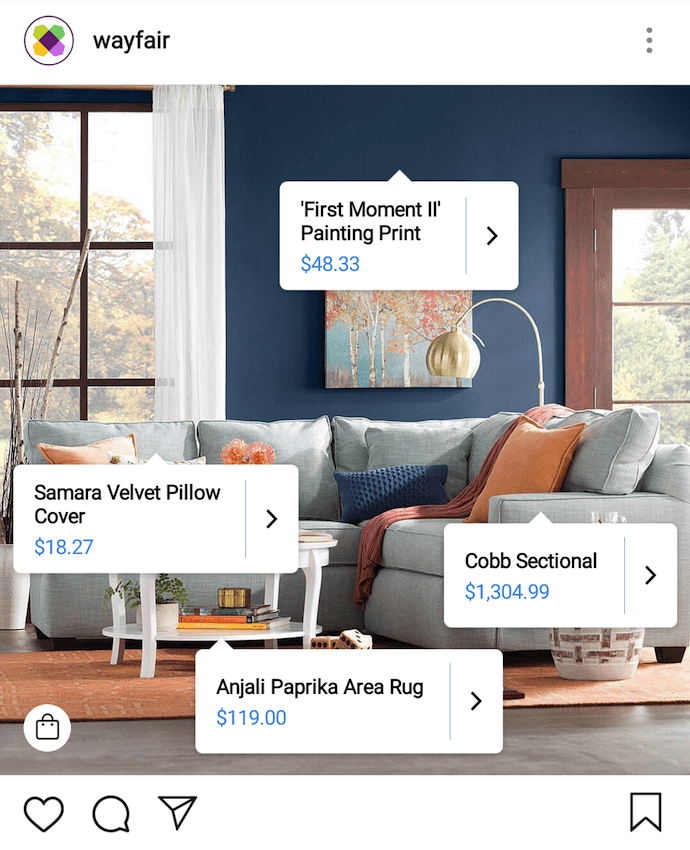
This is a digital marketing campaign that shows people exactly how much each item in the photos cost. It also directs audience members to purchase the items seen in the photos without ever leaving the app. In return, Wayfair can boost conversions and revenue from within Instagram.
5. Mastercard: Owned Media Travel Blog
Mastercard bases its brand on the stories and adventures that cardholders experience. But what good is a travel-based brand without a travel-based digital marketing campaign to go with it?
Priceless Cities, Mastercard’s travel blog, is a resource that customers pair with the credit cards that help them pay for their trips.
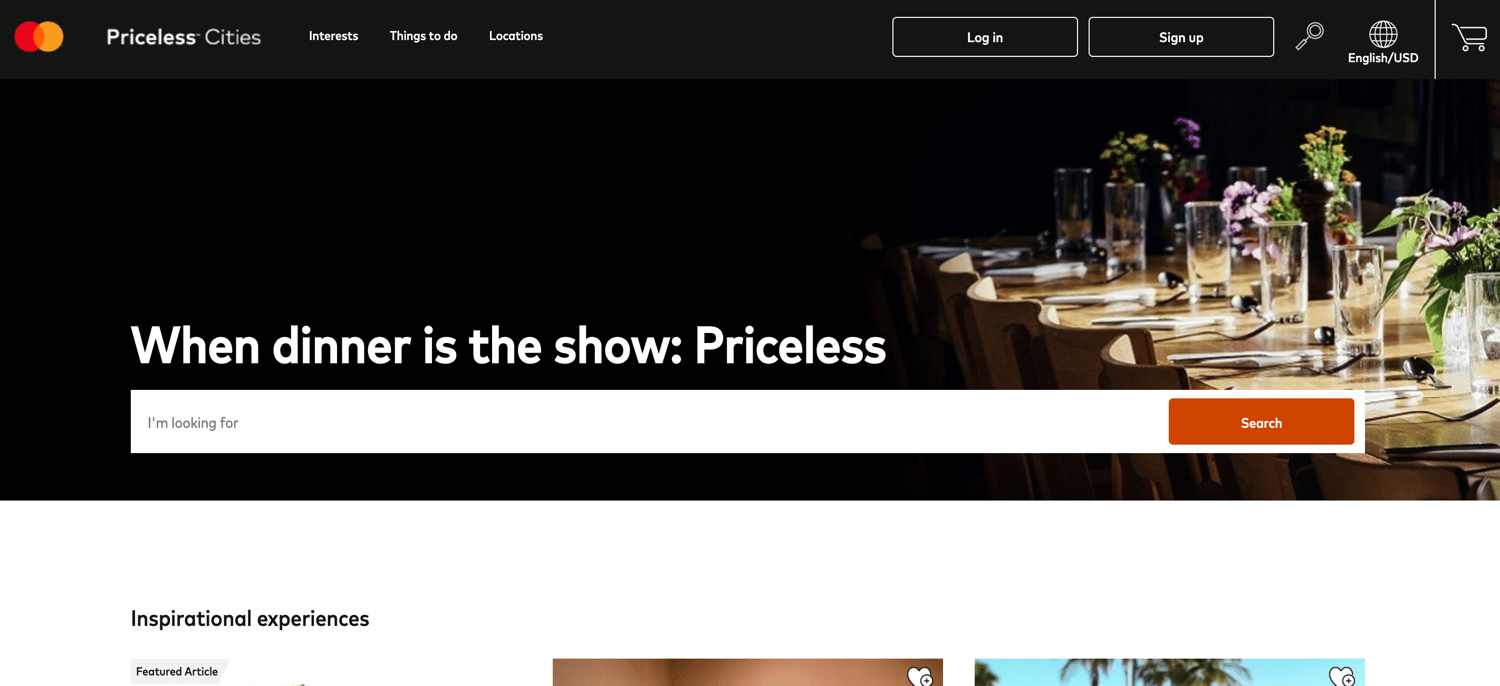
This campaign allows the company to better align with the things their customers invest in as well as the places their customers travel to.
6. ETF Securities: Paid Media LinkedIn Sponsored Content
ETF Securities is a small, asset management service that caters to wealth managers and investors in Europe.
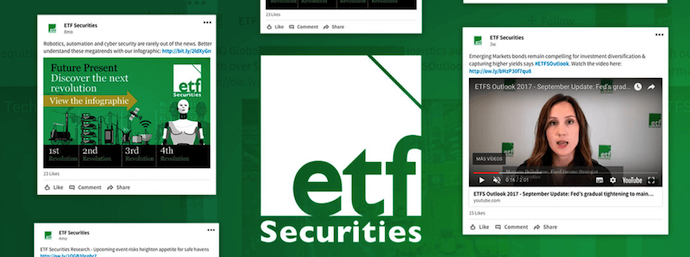
The company learned their customers spend the most time on LinkedIn, interacting with sponsored, paid content on the platform.
By investing their time here, ETF Securities has driven more interest in investments and has been able to help their customers make smarter financial decisions. With this digital campaign, ETF Securities saw 95% year-over-year growth in LinkedIn followers.
7. Red Bull: Owned Media Lifestyle News
Red Bull has become well-known for the sponsorship of extreme sports, not just the energy drink they sell.

Instead of creating digital content related to the energy drink, Red Bull captures its audience with articles and videos about the latest happenings in the extreme sports community.
In one of their digital marketing campaigns, Red Bull proved what you sell isn’t always the focus ideal for a content strategy. Rather, it can be significantly more valuable to tailor a campaign to the lifestyle your customers live, or want to be associated with.
Grow Better With Marketing Strategies That Improve Your Digital Presence
Your strategy document will be very individual to your business, which is why it’s almost impossible for us to create a one-size-fits-all digital marketing strategy template.
Remember, the purpose of your strategy document is to map out the actions you’re going to take to achieve your goal over a period of time — as long as it communicates that, then you’ve nailed the basics of creating a digital strategy.
If you’re eager to build a truly effective strategy to help grow your business, check out our free collection of content marketing templates below.
Editor’s note: This post was originally published in October 2019 and has been updated for comprehensiveness.

The Ultimate Guide to Instagram for Business
More companies are using Instagram than ever before — there are now over 25 million businesses on Instagram, most of which are small businesses.
To capture a new audience and engage with your existing customers, it’s critical you consider using Instagram for your business. With over one billion Instagram users, Instagram is one of the most popular social media tools at your disposal.Instagram has proven a worthwhile investment for marketing purposes. You’re able to market your products to a more targeted and engaged audience, and it’s cheaper than more traditional forms of paid advertising.
Plus, it’s an undeniably powerful tool to spread brand awareness — in fact, 90% of Instagram users follow at least one business on the platform.
But using Instagram for business purposes can seem daunting, particularly if you’ve only ever used it for personal use. Here, we’re going to explore how to leverage the power of Instagram for all your business needs.
How to Use Instagram for Business
Let’s delve into the six strategies you’ll need to employ to get the most out of Instagram.
1. Add Value With Your Content
First and foremost, Instagram is a visual platform. To attract an audience, it’s critical you spend time delivering high-quality, thoughtful content.
Instagram has the highest engagement rate, surpassing Facebook and Twitter. To succeed on Instagram, it’s essential you create valuable content that attracts an audience and encourages them to engage with your business. Consider how you can delight your customers while staying true to your brand.
You don’t need to just post images of your product to spread brand awareness and increase sales. In fact, in some cases, it’s better if you don’t. For instance, Hot Pockets sells microwaveable pocket sandwiches. Admittedly, I wasn’t much of a fan of Hot Pockets — until I began following their business’s Instagram account.
There are only so many times you can post a picture of a sandwich. Hot Pockets goes in a different direction. Instead, they appeal to their audience through humor, often posting relevant memes or funny quotes.
For instance, in response to @ShallowDivers’ claim that Hot Pockets aren’t sandwiches, Hot Pockets responded with this:

Ultimately, it might take trial and error to find the content that works best for your business.
While Hot Pockets relies on humor, other brands like The North Face use impressive adventure images to appeal to their demographic.
The point is, brands need to add value to Instagram’s community rather than using the platform for advertisements alone. This is critical for your long-term success.
2. Maintain a Consistent Theme
Imagine each Instagram post as an individual page of your website — while each post should be good on its own, ideally you’ll need to create a cohesive theme to maintain an audience’s loyalty.
It’s important to note, I mean “theme” in the broad sense, as it relates to everything from hashtags and captions to Stories and photos. You’ll need to create a consistent tone of voice and a unified feed aesthetic. Ultimately, the more specific and consistent you are with your posts, the more likely you are to attract your most authentic audience.
You might think it’s better to appeal to more people through various themes, but ultimately, staking your claim in a specific niche will help you create stronger, more genuine connections.
For instance, consider MVMT. Their feed is undoubtedly consistent, with similar filters and color palette, and an emphasis on darker, edgier images:

Their consistency is equally obvious in their captions, with phrases like “Create a life you can’t wait to wake up to,” and “Unexplored paths lead to undiscovered stories.” In every post, you’ll see the same hashtag: #jointhemvmt.
Undoubtedly, their followers both expect and prefer this type of content, or they wouldn’t have followed them in the first place. To continue delighting customers, it’s essential MVMT keeps true to their theme.
3. Engage With Your Audience
Engaging with your audience helps your followers feel valued and, as a result, more connected to your business.
There are plenty of ways to engage with your audience. You might reply to comments on your posts, participate in comment threads, run contests or giveaways, use Instagram Stories polls feature, or give shout-outs to followers on your Stories, particularly if they post something relevant to your brand.
Halo Top Creamery does a fantastic job of engaging with their audience. They frequently post cute ice cream pictures with the caption “Ice cream is better with friends. Tag a friend you’d like to eat this with.” A simple “tag a friend” caption is an effective strategy for growing your audience since your followers will then tag friends who might not know about you yet.
Additionally, Halo Top often does contests and giveaways, like this one:

By tagging winners in their posts, Halo Top incentivizes other followers to engage with their brand in the future. Additionally, Halo Top’s giveaways demonstrate their genuine commitment to connecting with their audience.
4. Consider Influencer Marketing
As a consumer, you’ve likely seen the recent influx of influencer marketers on Instagram — and for good reason. By leveraging the power of an influencer, who is already authentically connected with her audience and seen as a trusted source of information, you’re able to spread brand awareness and drive sales.
Micro-influencing in particular is a strong opportunity for brand endorsement. In fact, one survey found 82% of consumers are highly likely to follow a recommendation made by a micro-influencer. That surpassed the number of consumers who are willing to follow a recommendation from an average person, like a family member or friend.
You could use your budget and resources to invest in traditional advertising, but it’s often easier to create a more targeted, effective marketing campaign through influencer marketing. Ultimately, influencers have already cultivated an engaged, loyal following — by identifying the right influencers for your niche, you’re much more likely to find followers who will truly enjoy and support your products or services.
5. Implement an Instagram Ad Campaign
There are two reasons you might use Instagram ads — to spread brand awareness or to increase sales.
It’s critical you focus on one goal when creating an effective ad campaign. An Instagram ad aiming to sell a product will look vastly different from one intending to attract followers.
For instance, consider this Greenchef ad that showed up on my Instagram feed today. With various images of delicious food and an enticing “$40 OFF” discount, it’s likely a high-converting ad. It’s very clear what Greenchef’s goal is: to get people to buy their product.

YouTube, on the other hand, invested in Instagram ads for an entirely different reason. Their advertisements, featuring well-known singers like Camila Cabello, entice followers to simply follow YouTube Music’s Instagram channel (and, ideally, YouTube’s music channel itself).

To implement an effective campaign, it’s essential you decide what you’re hoping to achieve before you begin creating it.
Once you’ve chosen a goal, you’ll want to create the ad creative. Similar to what we discussed in strategy one, you’ll need to create high-value visual content if you want your ad to be successful. Take a look at other ads on Instagram and consider how you might emulate them.
Additionally, A/B test multiple variations of the same ad (changing the copy, image, or targeted audience for each version), to figure out what works best for your business.
When you’re ready to create your ad, you’ll need to use Facebook Ads Manager. Among other things, Ads Manager lets you narrow in on your target audience (including location, age, and various interests of your ideal demographic), choose your ad objective, and analyze ad performance.
6. Utilize Shoppable Posts
Shoppable Posts is an Instagram feature that makes selling on Instagram easier. You’ll be able to create posts that provide users with a seamless shopping experience directly on the platform. The advantage of this being less friction for turning your followers into customers.

Before you begin executing these strategies, you’ll need one thing: an Instagram Business Profile.
What Is a Business Profile on Instagram?
An Instagram business profile is a special account that Instagram offers to brands and organizations. With a business profile, you get access to additional features, such as Instagram Insights and the ability to run ads.
A business profile legitimizes your Instagram account and enables you to add critical information like your company’s business hours, location, and phone number.
Pros and Cons of an Instagram Business Profile
“Whoa, whoa, whoa,” you might be thinking. “I don’t know how I feel about committing to all that.
Here are some helpful pros and cons so you can determine if a business profile is right for you before jumping in:
Pros
- Access to metrics on how your posts and stories perform
- Ability to track how your followers engage with your content
- Access to features necessary to run ad campaigns
- Gain feature for adding URLs to Stories so you can send warm traffic to your site
Cons
- Being labeled as a business
- May experience less organic reach and visibility
- Must also have a Facebook account to access ad features
For most brands, the benefits of a business profile outweigh the cons due to the additional features and analytics. However, it’s important to consider your goals before taking action.
How to Create a Business Instagram Profile
In order to create a business profile on Instagram, you must first create a personal Instagram account and then switch it to a business profile. If you already have an Instagram account, skip to the next section for instructions on making the switch.
If you don’t already have an Instagram account, here are the steps:
From the Computer
- Go to instagram.com.
- Click “Sign Up.”
- Enter your email address and create a username and password. You can alternatively sign up through your Facebook account.
From an iPhone
- Download the Instagram app from the App Store.
- Open the app once installed.
- Tap “Create New Account.”
- Enter your email address or phone number. You can alternatively sign up through your Facebook account.
- If you signed up with your phone number, follow the instructions for entering the confirmation code.
From an Android
- Download the Instagram app from the Google Play Store.
- Open the app once installed.
- Tap “Sign Up With Email or Phone Number.” You can alternatively sign up through your Facebook account.
- If you signed up with your phone number, follow the instructions for entering the confirmation code.
How to Switch to Your Business Profile
When you have an Instagram set up, follow these easy steps when you’re ready to make the switch:
1. Go to your profile on the mobile app.

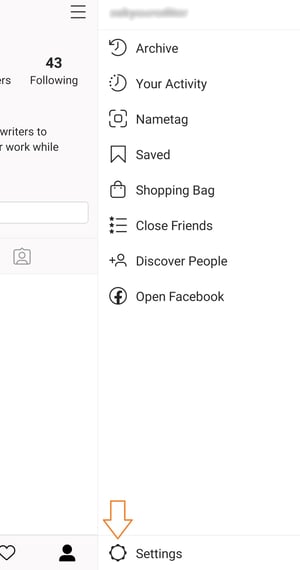
2. Click the hamburger menu (three stacked horizontal bars) in the top right corner.

3. Click the “Settings” gear at the bottom of the menu.
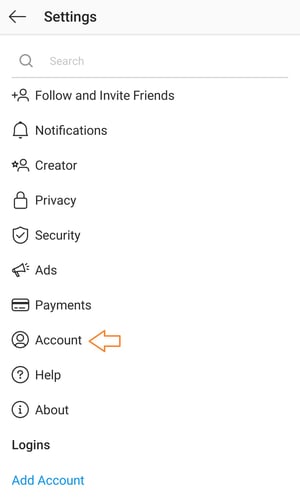
4. Select Account.
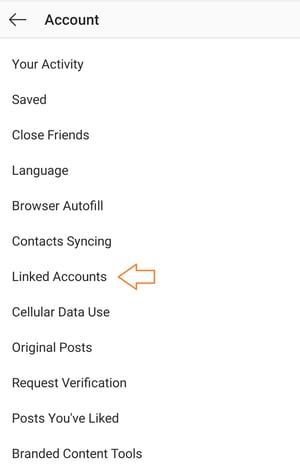
5. Choose Linked Accounts.
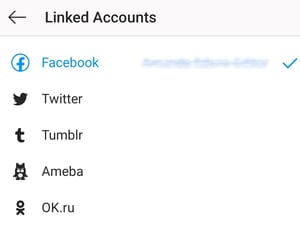
6. Choose Facebook and follow the prompts to connect your business’s Facebook page. If you do not have a Facebook Business Page, you will need to create one before completing this step. If your Facebook page is already linked, move on to the next step.
7. Once complete, return to the Settings menu.
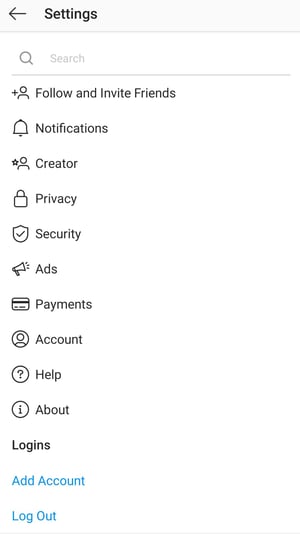
8. Select Account.
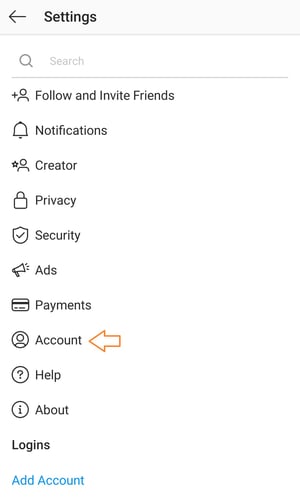
9. Choose the new option “Switch to Professional Account.”
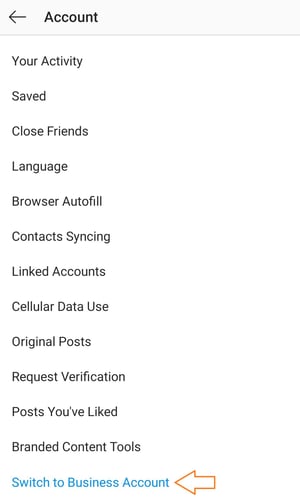
10. Follow the prompts to add any additional details.
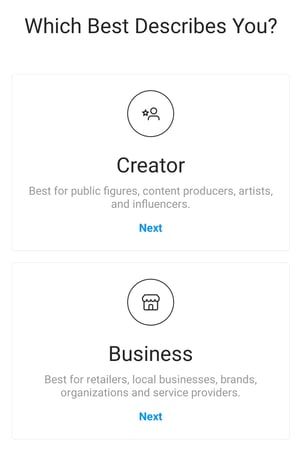
11. Select Done.
You’re now ready to begin implementing your social media strategy on Instagram. From here, you’ll want to determine the audience you want to target, the aesthetic and tone you want to convey, and the content you want to create.

Deal Volume and Sales Response Rates Drop to New Lows [COVID-19 Benchmark Data, Updated Weekly]
The economic impact of COVID-19 is undeniable. Businesses all across the globe are learning how to adapt to these new circumstances. We’re all learning how to operate in a “new normal” that’s constantly changing.
That’s why from now until the end of June, we will be publishing week-over-week trend data for core business metrics including such as website traffic, email send and open rates, sales engagements, close rates and more. We plan to add additional cuts, like channel and region, over time.
This week, we’ve added an additional dimension to our dataset — company size. You can explore all the data we’re publishing here.
About the Data
- These insights are based on aggregated data from over 70,000 HubSpot customers globally.
- The dataset includes weekly trend data for core business metrics in 2020, focusing on changes occurring during and after March 2020.*
- Charts in this post are measured against a benchmark on the y-axis. The benchmark for each metric was calculated by taking weekly averages from January 20, 2020 through March 9, 2020.
- The data from HubSpot’s customer base reflects benchmarks for companies that have invested in an online presence and use inbound as a key part of their growth strategy.
*The spread of COVID-19 has had a different timeline in different regions, so we are using the World Health Organization’s declaration of a global pandemic on March 11, 2020 as our “official” start date.
NOTE: Because the data is aggregated from HubSpot customers’ businesses, please keep in mind that individual businesses, including HubSpot’s, may differ based on their own markets, customer base, industry, geography, stage, and/or other factors.
What We’re Seeing
After a slight rally the week of March 30, both the number of new deals created and deals marked closed-won in HubSpot CRM dropped the week of April 6, particularly in EMEA and LATAM. The Easter holiday partially contributed to an end-of-week dip in deal volume in all regions, but deal creation was already trending downward before the holidays. As a leading indicator of future revenue, continued decreases in deal creation here don’t bode well for April and Q2 sales results. We will be watching this metric closely.
Sales teams are sending about 50% more email to prospects than they were pre-COVID, but responses continue to drop. Last week, sales response rates hit an all-time low for 2020 at 2.1%, a lower response rate than Christmas week 2019.
Like last week, marketers are having more success. Customers still seem willing to engage with marketing materials, as open rates climbed another 8% this week. Marketing email volume began to stabilize week-over-week, but the total volume of email sent is still far higher than pre-COVID levels.
Buyer-initiated chat and database growth suggest that interested customers are still out there. Chat volume, despite declining last week, is still far above pre-COVID averages. Database growth currently sits at February levels; while the aggressive growth of the last few weeks has slowed, it’s encouraging to see that the metric is still holding steady with historical averages for now.
Surprisingly, businesses of all sizes were impacted almost equally. Our data showed that buyers demonstrated neither a preference for supporting small businesses, nor a desire to buy from more established and stable companies. You can explore the entire dataset here.
How Metrics Changed in March
The number of deals created continues to decline, particularly in EMEA and LATAM.
After a slight end-of-quarter rally the week of March 30, the number of deals created dropped 11% the week of April 6.
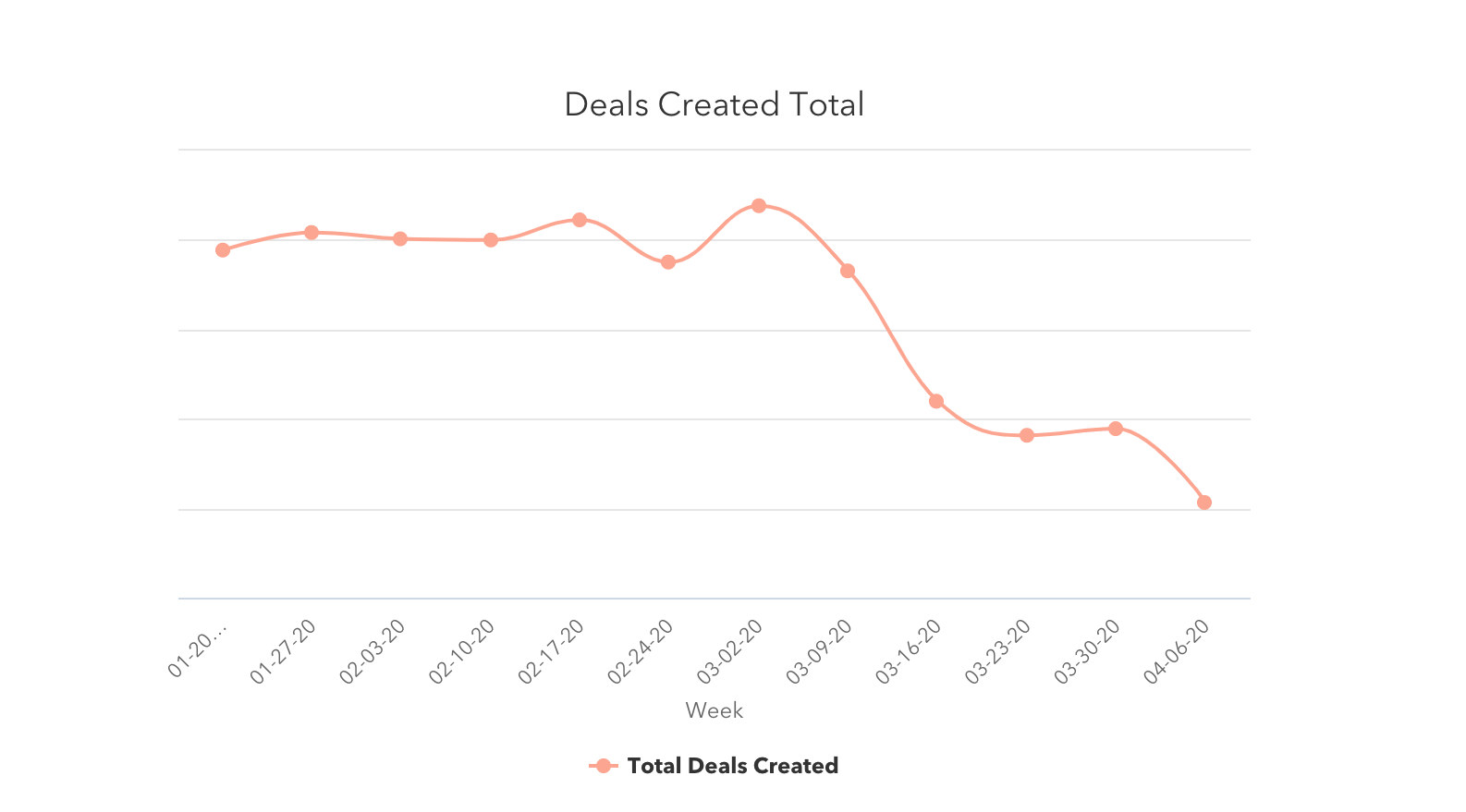
Deals created are down in every region. North America saw the smallest decline (a 3% decrease the week of April 6). EMEA and LATAM had the biggest with 19% and 16% drops, but it’s worth noting that business closures for Easter may have contributed to the drop in these regions.
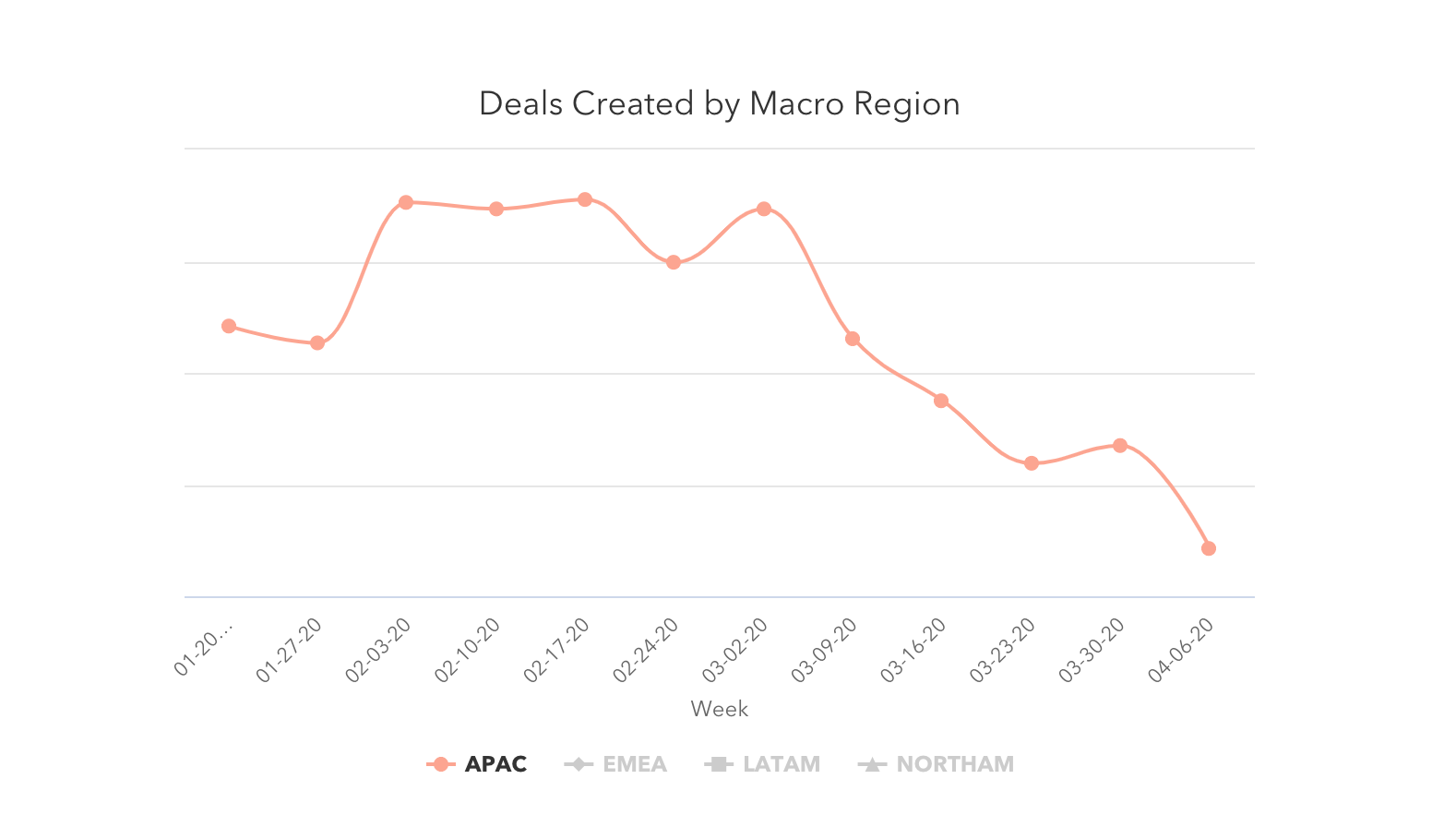
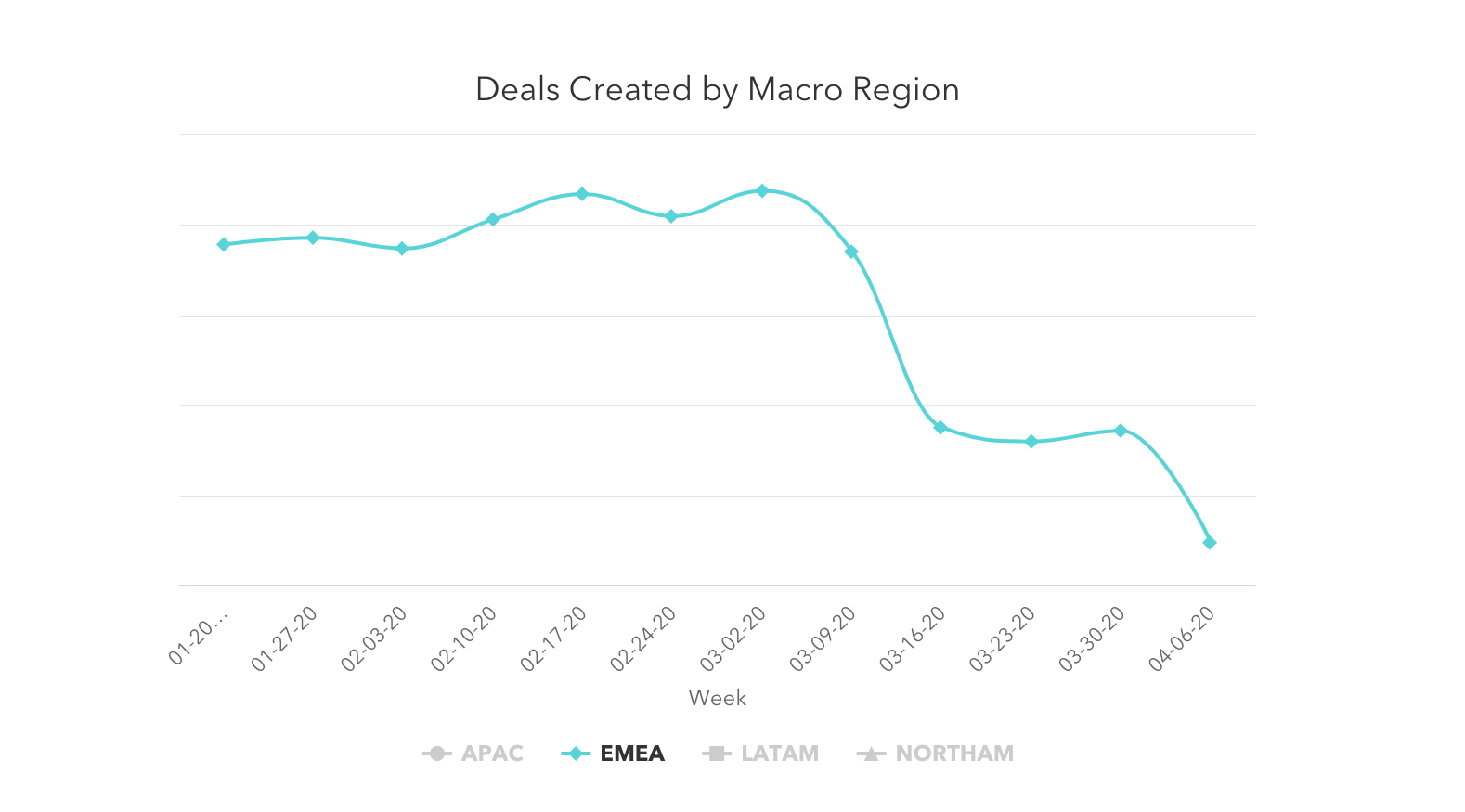
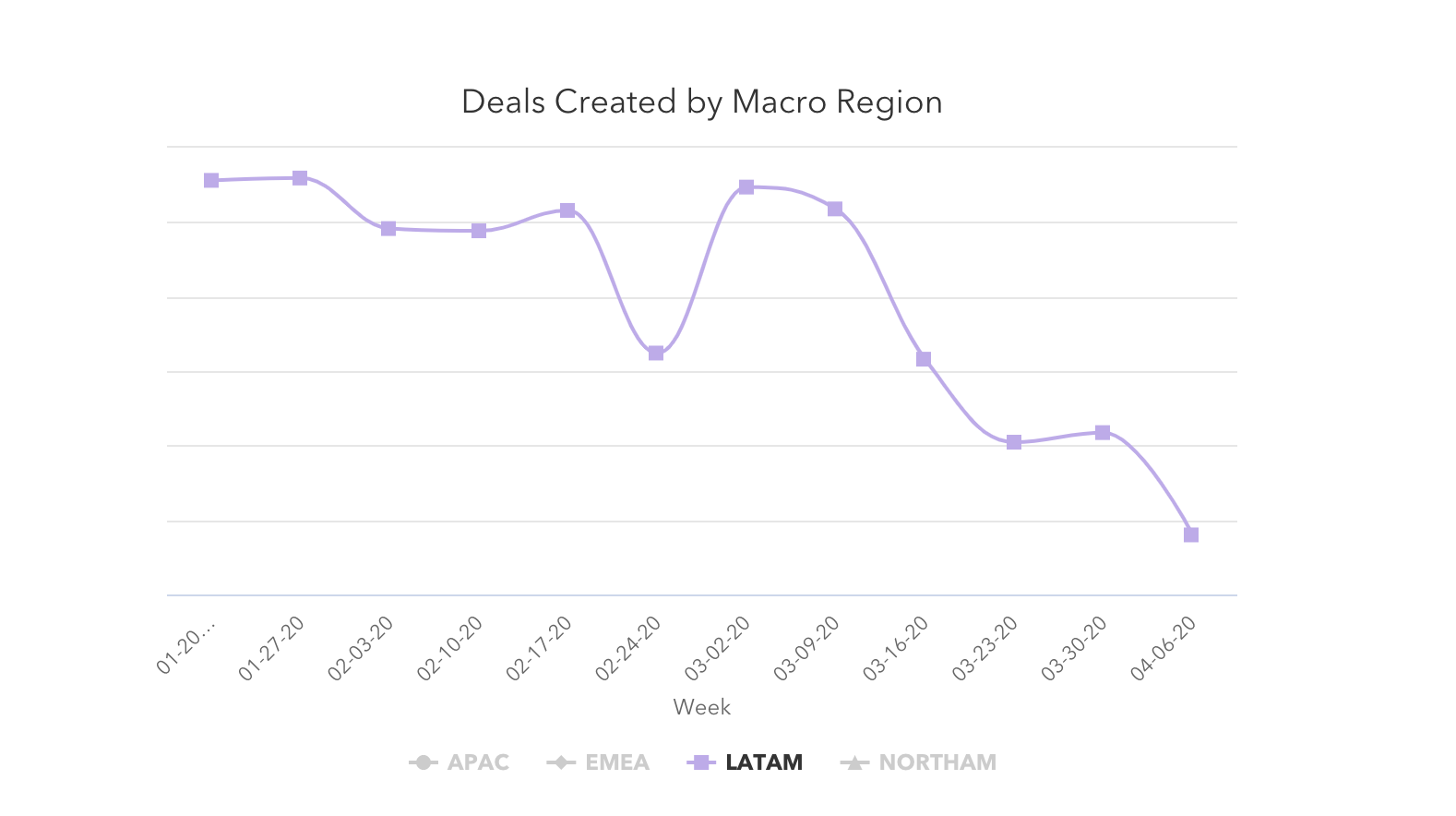
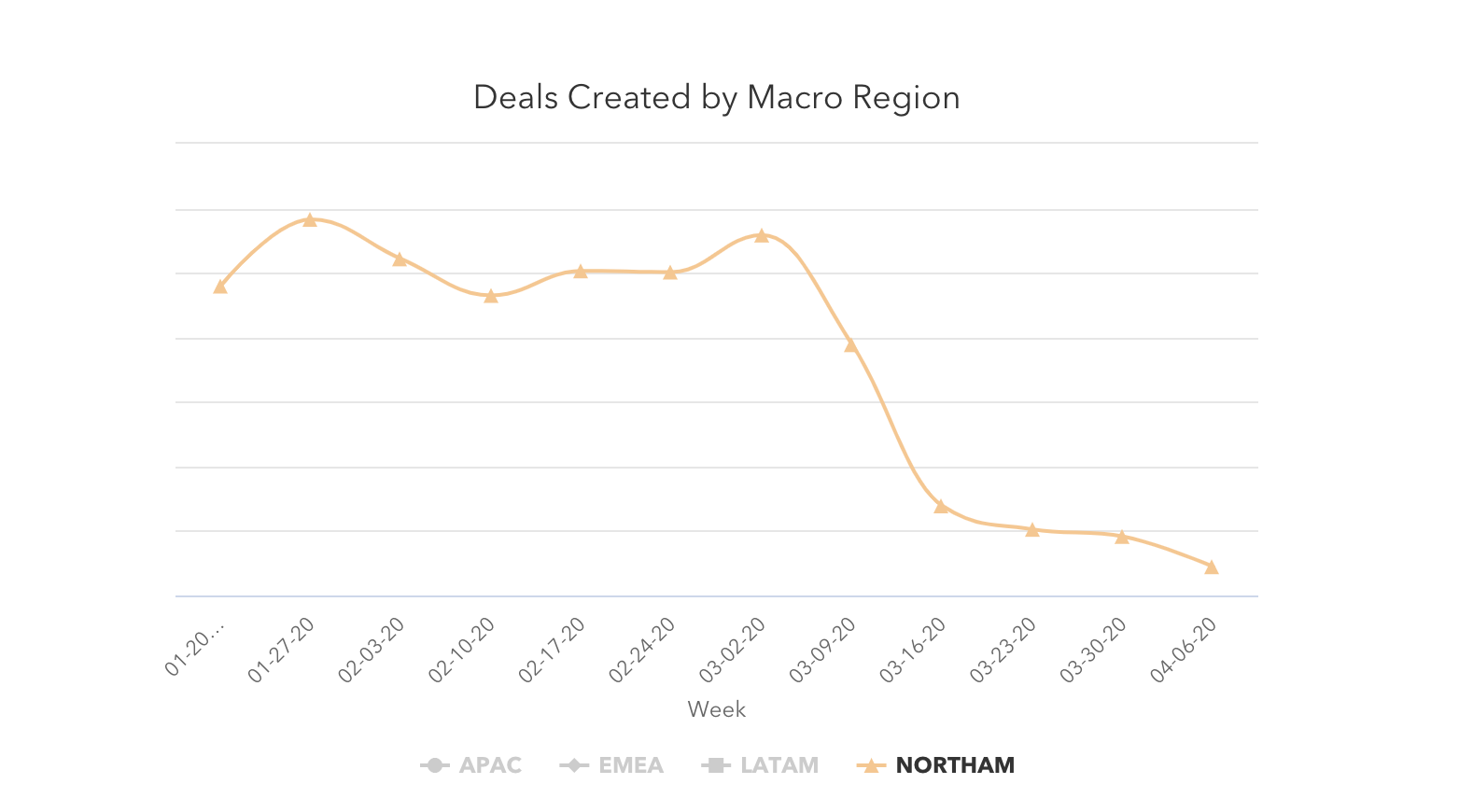
Deals closed dropped 19% as well, though we expect to see this happen between an end-of-quarter week and the first week of a new quarter. Some of this decrease may come from the 15% drop in deals created the week of March 23, but the bulk of that impact will likely be felt in the coming weeks, so expect this number to continue shifting. We’ll be watching it closely.
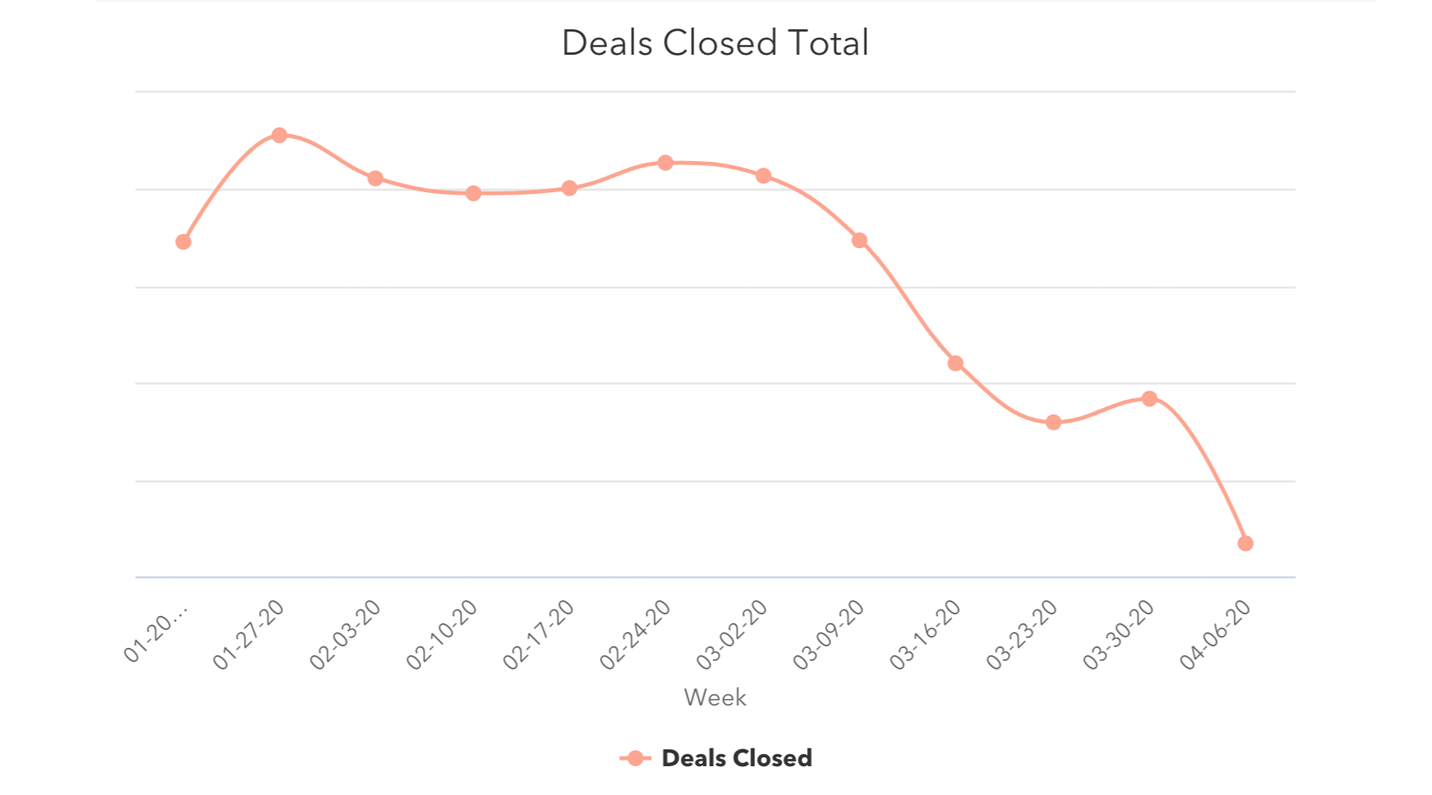
The week of April 6 saw the lowest weekly volume of closed deals this year.
Buyers continue engaging with businesses online.
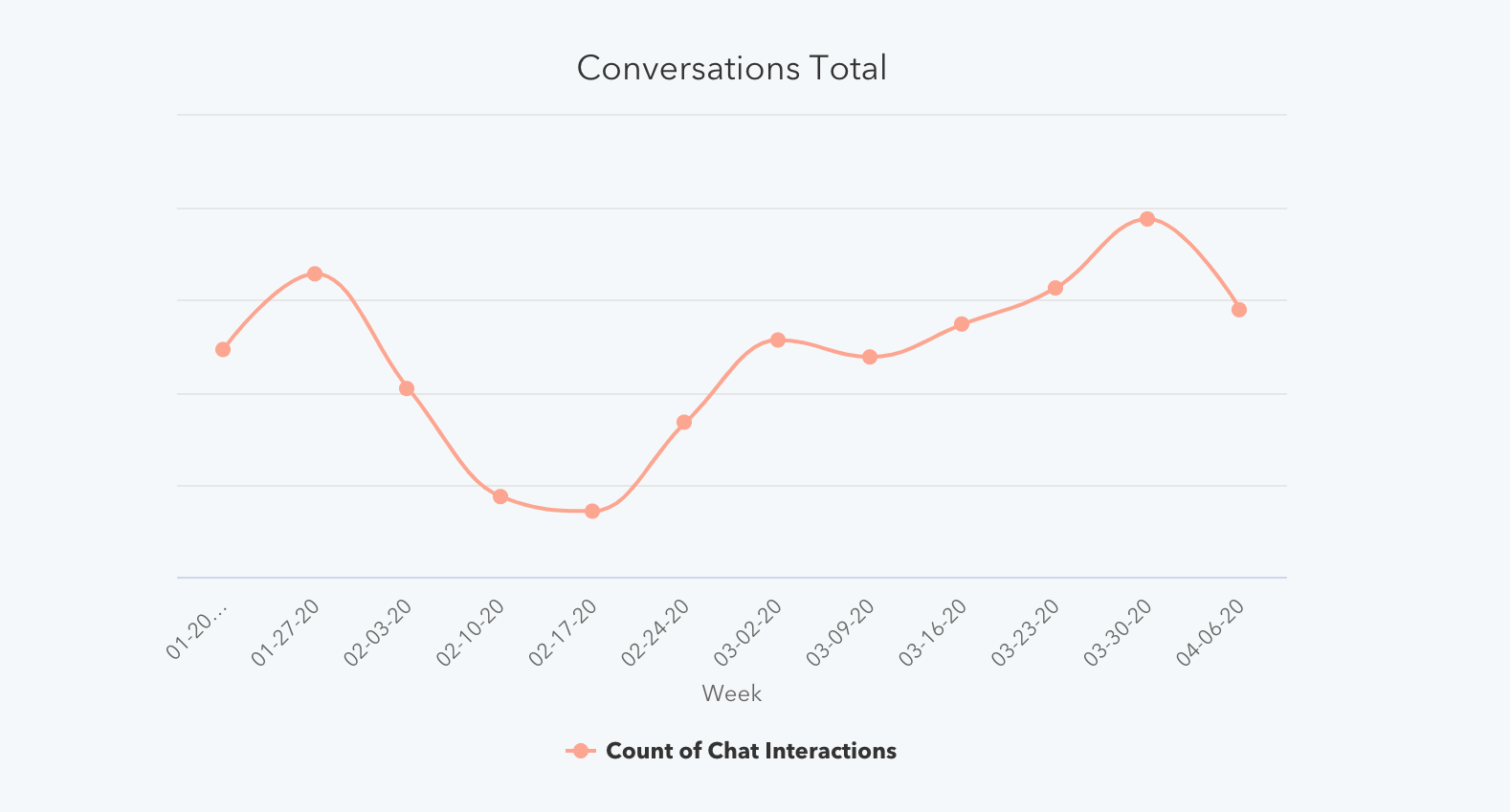
Buyer-initiated chat volume dropped slightly, but is still around 10% higher than pre-COVID levels — conversational marketing remains valuable to businesses. Database growth has slowed but also has not fallen below February averages.
Other online metrics looked healthy as well. Monthly website traffic increased by 13% in March, compared to February.

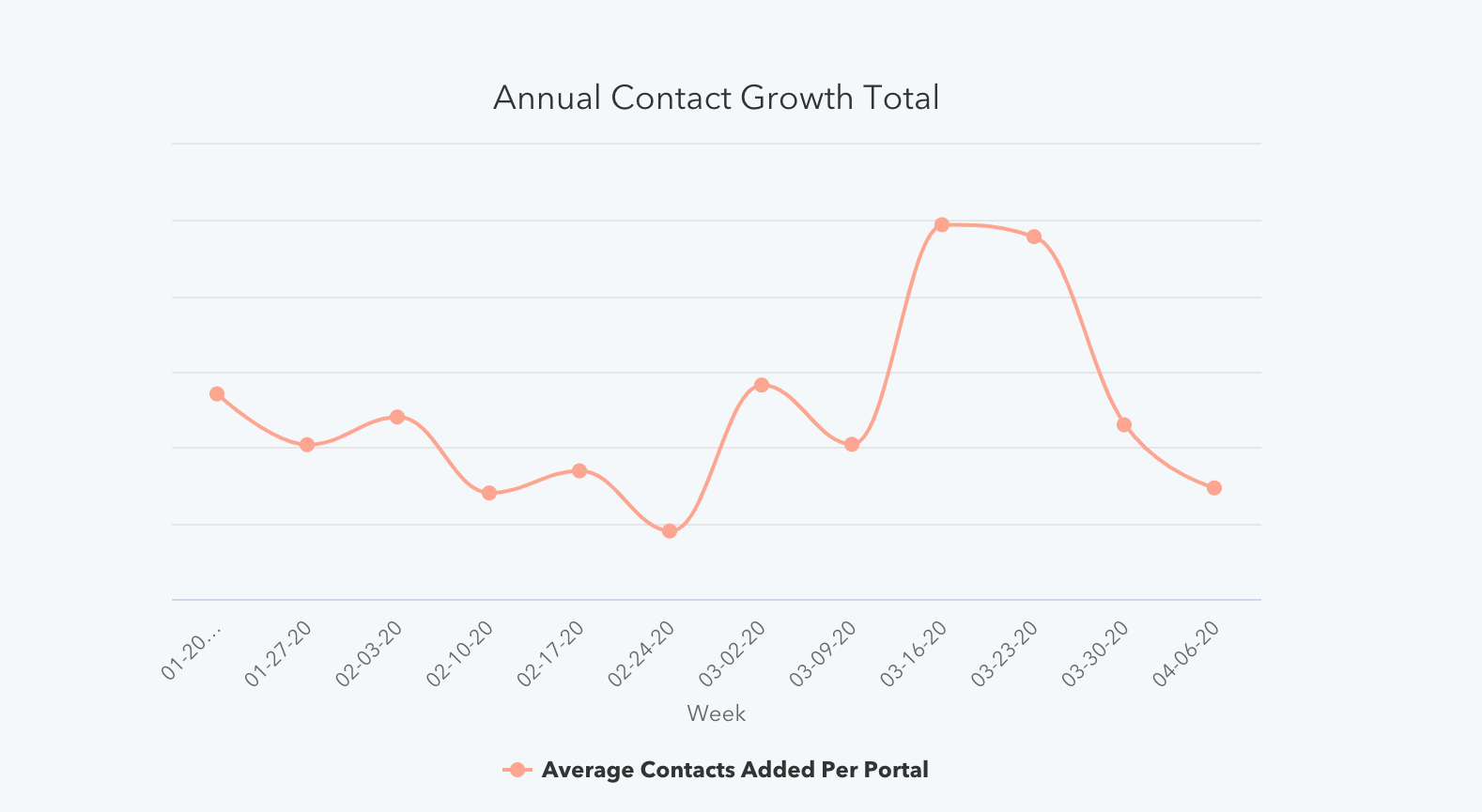
The average number of contacts added to portals dropped 19% last week, after a 36% drop the week of March 30. These look like big drops, but the average weekly number of contacts is still at the same level of February weekly averages. Continue watching this metric closely.
The number of customer-initiated conversations dropped 4.5% the week of April 6, after steady growth throughout March. This drop did not wipe out March’s gains, as last week’s numbers are still well above pre-COVID levels.
Engagement with marketing emails continued increasing and responses to sales outreach reached new lows.
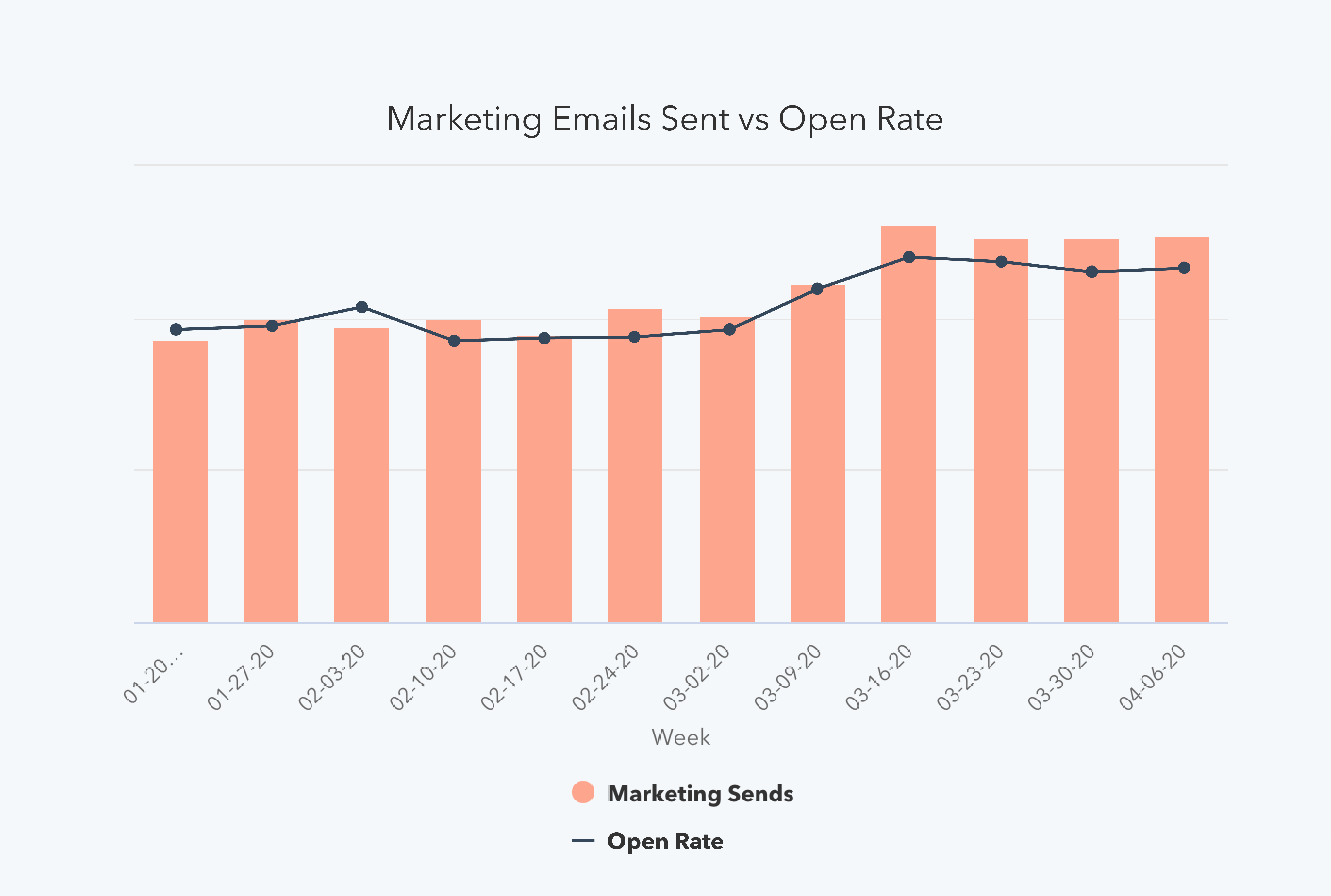
Marketing email open rates increased as volume held steady.
Marketing email volume has held steady the last three week, growing by less than half of a percent the last two weeks. That being said, overall volume the week of April 6 is still higher than pre-COVID levels by about 20%.
Open rates on these emails continue to grow. April 6 saw an open rate of 25.5%, the highest single-week average of 2020, and an 8% increase from the prior week.
Sales email volume dropped for the first time in eight weeks, as response rates reached a record low.
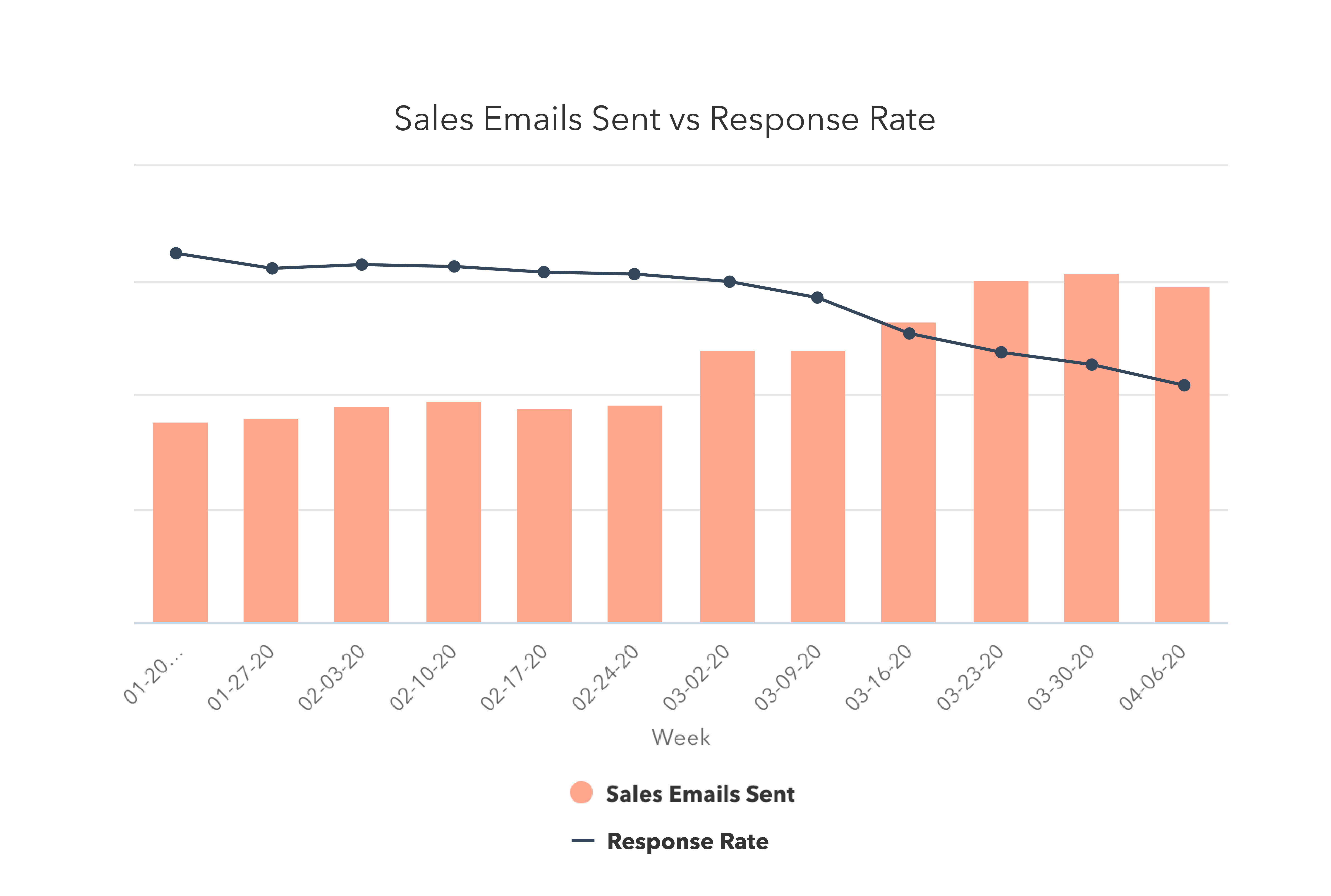
Outreach was down almost 4% last week — the first time this number has trended downward since February 17 — but the total volume of email sent is still around 50% higher than pre-COVID levels.
This prospecting continues to be ineffective. Response rate hit 2.1% last week, which is a 10% lower response rate than the week of Christmas in 2019. This is the lowest weekly response rate of 2020 thus far, and 40% lower than the highest response rate of the year (3.51% the week of January 6).
Transitioning to remote work for the first time? We teamed up with Slack to create this guide to moving your business online.
What This Means for Businesses
Targeted prospecting matters more than ever.
This week’s headline is the 11% drop in new deal creation, while sales outreach still remains far higher than pre-COVID levels. Some increase in email prospecting is expected as outside sales teams have transitioned inside, but this doesn’t fully account for the acceleration of sales outreach. Instead, the data suggests that many sales teams have reacted to the economic climate by reaching out to a significantly broader base of prospects than they normally would target.
Not only is this ineffective — response rates hit their lowest levels in 2020 last week — it’s a foreboding sign for longer-term sales forecasts as well. As deal creation is the best indicator of future revenue, course-correction needs to happen quickly. Many businesses will need to rethink what prospecting looks like to bolster their long-term pipeline.
Operationally, regularly adjust your sales projections to reflect potentially extended sales cycles or lower deal size so forecasts remain accurate. Just a touch of process (or improvements to existing processes) goes a long way in creating a clear picture of your business over time.
On individual calls, encourage your team to emphasize a helpful, consultative selling approach. Certain factors, like your customers’ budget and willingness to enter sales conversations at this moment, are out of your control. Instead of cold calling your whole database, use your knowledge of your customers’ industries to prioritize reaching out to:
- Industries that have been minimally impacted or those that are transforming quickly to meet the new challenges
- Industries where your solutions are particularly relevant or useful in this moment
We hope to see sales outreach trend down toward pre-COVID levels accompanied by higher response rates in the next few weeks, which would indicate that companies are doing a better job of targeting buyers who have shown interest in their products.
Resources to Help
- Rework your sales projections with this guide to sales forecasting and sales forecast template
- Maintain an accurate forecast with this sales pipeline tracker
Free Software to Get Started
- HubSpot CRM is free and comes with included sales acceleration tools
- Gmail and Google Calendar integrations with HubSpot
- Zoom integration with HubSpot
- LinkedIn Sales Navigator integration with HubSpot
Focus on education, not promotion.
The increase in website traffic and marketing email open rates suggest that customers are still looking to engage with companies.
Your customers may be more interested in learning and education right now. Our own website has seen an uptick in visits to educational resources like our blog, certifications, and Academy classes.
Instead of dialing up the promotion of your products and services during a crisis — an approach that may be insensitive to your customer base, focus on nurturing the long-term relationship. Identify where you can help your customers today, without asking for anything in return.
Resources to Help
- Use this editorial calendar template to plan educational content
- Get started writing with these blog post templates
- Optimize content and get found online with our guide to SEO
Free Software to Get Started
Incorporate chat into your strategy.
While chat volume declined week-over-week, total volume still far exceeds pre-COVID levels. Conversational marketing offers a real-time way to answer customer questions, as well as automating the lead routing process so your business can serve prospective and existing customers even when your team is out of the office.
Investing in chatbots to get customers answers more quickly, automate lead qualification or book meetings can help your company meet the increase in customer inquiries.
Resources to Help
- Get up to speed with this beginner’s guide to conversational marketing
- Learn how marketers are using conversational marketing in 2020
Free Software to Get Started
- Free conversational marketing tools are included in HubSpot CRM
- Facebook Messenger integration with HubSpot
We hope these benchmarks provide useful context as you monitor your business’ health in the coming months. We plan to refresh these insights and add further breakdowns over time (such as by channel and company size). You can sign up to be notified of new insights as they’re available here.

How to Align with Your Sales Team, According to HubSpot Marketers
Throughout the history of business, marketing and sales teams have repeatedly run into the same problem: misalignment.
Although both departments share one overall goal of generating revenue for their company, the strategies and success metrics they use are often quite different.
Marketers fuel the lead pipelines and build the brand messaging that enables salespeople to close deals and generate revenue for the company. Despite how linked the two departments are and how much they depend on each other, it can be difficult for salespeople and marketers to have insight into each other’s unique challenges — which can result in disconnection.Although both roles are vital to company growth, it can be difficult for salespeople to keep up with what marketers are doing, and vice versa.
These perceived differences often lead to miscommunication, friction, and other issues related to sales and marketing misalignment.
According to Demand Gen, misalignment is a common struggle throughout workplaces. Nearly half of B2B employees say that the biggest issues with their company’s sales and marketing alignment are poor communication, broken processes, and different department-wide KPIs.
If misalignment isn’t handled properly, it could cost your company time, money, and customers in the long run. According to a Forrester study, 43% of CEOs say that misalignment has cost them sales.
It’s not surprising that friction between marketing and sales can cost a company money. If a sales team is unaware of how they can work with marketing to promote a new product, the product might not get the proper promotion. In another scenario, if sales teams don’t tell marketing about the common customer pain points they’ve heard about on sales calls, the marketing team’s campaign might not properly highlight how a product can solve for the customer.
Misalignment is a common — and sometimes unavoidable — issue that both marketing and sales teams should be wary of.
At HubSpot, we have thousands of employees who have different goals and varying geographic locations, we understand how it can be difficult to communicate and align.
To avoid misalignment, sales and marketing teams often use meetings, presentations, messaging channels, and our corporate Wiki to inform other colleagues of the projects we’re working on, as well as our daily processes. Through testing out different alignment strategies, we’ve found that it certainly is possible for both teams to communicate, work together, and benefit from each other.
Even if you’re a marketer at a smaller company, there are a number of strategies you can try to familiarize yourself with your sales department and their day-to-day goals.
To help you better align with your sales colleagues, I asked a few HubSpot marketers to share their experiences and tips for working with sales teams.
How to Align With Your Sales Team
1. Communicate with salespeople.
All offices are structured differently, but often times sales and marketing employees sit in separate spots. For example, your sales colleagues might sit on the other side of your office, on a dedicated sales floor, or they might work remotely or travel frequently. Even, if a sales colleague sits near you, they’re still busy with sales calls and a number of other duties that are vastly different than yours. While you might be curious about what your sales colleagues do each day, they also might want to learn more about your role.
To prevent ambiguity, create a deeper relationship between the two teams, and identify possibilities for collaboration, it’s important to put in the extra effort to communicate with sales colleagues and teams via meetings, coffees, email, or even direct messages.
“My biggest tip for marketing and sales alignment is to have an open dialogue,” says Kinzie Tomprak, marketing manager of customer stories at HubSpot. “Both teams have important perspectives and you can learn a lot from your counterparts in sales. At the end of the day, you’re both working towards the same goal: revenue.”
Leslie Ye, a senior content marketing manager and Head of Executive Communication, encourages finding “sales allies” to chat with regularly.
“Find two to three people on the sales team with varying levels of experience and sales styles that can act as a gut check on new pieces of content or marketing initiatives,” Ye says. “You can ask them questions like, ‘Will this project resonates with salespeople, and if not, how can the work be improved?'”
2. Identify common sales objections.
Sometimes, you think your marketing campaign will be a great success, but then it doesn’t translate into viable leads or sales. While you can choose to analyze why it didn’t go well with your marketing mindset, it could be even more valuable to ask salespeople for feedback.
Salespeople can often give you more insight into how a customer thinks, what will get them to buy into a product, and what major objections will stop deals from closing.
“One major point of misalignment is when marketing projects that make sense, in theory, don’t actually align with what salespeople need on the frontlines,” says Ye. “The best thing a marketer can do to ensure they’re providing value is to devote at least a portion of their time to creating assets that directly address objections in conversations salespeople are already having.”
“There are generally two types of objections,” Ye adds.”Objections to the actual functionality of a product or service, and objections to perceptions or incorrect positioning of your offering. … Marketing should own the response to objections based on misperceptions, as these generally reveal gaps in positioning or messaging.”
Ye says that marketers should also track is “closed-lost” objections. These are the deals that are lost in the final stages of the sales process. When marketers know what leads to the close or loss of a sale, they can better position campaigns aimed at generating revenue.
3. Determine who your sales team is competing against.
As a marketer, you should know your competitors, observe their strategies, and aim to improve upon their tactics. Your sales team can help you determine who your company’s biggest competitors are and which are actively swiping sales from you. Sales employees can also point out companies that might be stronger competition in the future.
“Marketers should keep a close eye on creating or refreshing assets for these scenarios,” says Ye. “Sales teams will likely hear about emerging companies earlier than any other team, as they’re closest to prospective customers.”
Once you’ve identified a detailed list of competitors, take time to do a competitive analysis or a SWOT analysis to see how your marketing strategies compare to theirs.
4. Measure your efforts with sales KPIs.
As a marketer, you might be determining a project’s success based on web traffic, clicks, engagements, or a total number of leads. However, if you want to truly understand how your work impacts your sales team, consider using tools to determine how your project impacts sales KPIs, such as deals or qualified leads.
Taking time to think about your project from a sales point of view might help you develop campaigns that can reach your marketing goals while also enabling your sales team to close deals.
“Measure the impact of your marketing efforts down to the bottom line,” says Debbie Farese, HubSpot’s Director of Global Web Strategy. “A lot of marketers stop at measuring the number of leads they generate. But, to build trust with sales you need to show that those are quality leads and that your marketing content contributes to revenue. Tools like attribution reporting can help you do just that.”
Attribution reporting, which Farese encourages, allows you to analyze an asset, such as an advertisement, blog post, or email, to see the number of qualified leads and potential earnings it resulted in.
To learn more about attribution reporting and tools that can help you, check out this blog post.
5. Immerse yourself in the sales department.
If your misalignment issues stem from not knowing what sales teams do all day, one way to learn as much about them as possible is by observing your company’s sales department for at least one day.
“Go sit on the sales floor,” Ye advises. “You’ll get a much better sense of how salespeople share resources with each other and how they work than if you just relied on formal meetings or interviews.”
While you’re in the sales department, Ye suggests listening to a few sales calls.
“Shadowing is the best way to understand the flow of a sales call, hear common objections, and understand how salespeople use marketing materials in the moment — or if at all,” Ye explains.
Aside from shadowing live sales calls, you could also attend a call review.
“Many sales teams listen to calls as a group and then share feedback. This back-and-forth is incredibly valuable as it sheds light on what makes a good call and how salespeople train each other,” Ye says.
Build Alignment in Your Company
Whether you’re aiming to build alignment with sales or another department, communication is key. Simply getting to know colleagues in other departments will help you learn more about different goals, points of view, and processes within your company. In turn, this will help you better understand your company’s overall mission and possibly identify opportunities for team collaboration.
To learn more about the benefits of marketing and sales alignment, check out this post on sales enablement, or our Ultimate Guide to Sales and Marketing.
If you’re a salesperson who wants to learn how to oppositely collaborate with marketing, check out this blog post.

The Ultimate Guide to Using WhatsApp for Business in 2020
Does your business offer international services, but you’ve found it hard to connect with global customers in a personalized, cost-effective way? Do you, as a marketer, struggle with offering one-on-one experiences with customers when you’re not online?
Marketing messages are hard, right? But they don’t have to be. Allow me to introduce you to your new favorite app for customer relationships: WhatsApp.
Now, if you’ve just read that and thought, “WhatsApp? What’s that? And how is an app going to help?” That’s understandable.
Allow HubSpot’s Head of Conversational Marketing, Connor Cirillo, to break it down: “WhatsApp has become the center of gravity for billions of users around the world. It’s where we message the people we care about most — like our friends and family,” he says.
He continues by noting that, “Businesses always want to build relationships and meet customers where they are. WhatsApp can become one of the most important marketing channels.”
Even though the app is the most popular global mobile messaging service, WhatsApp commonly isn’t known as a tool for businesses. For instance, just over 7% of marketers use WhatsApp for business.
However, while on the surface it may seem like WhatsApp is just another messaging service, there are tools built in the app that are great for maintaining strong customer relationships and cultivating lead generation.
But, what exactly is WhatsApp, and what does it do?
To use WhatsApp, you have to download the app on your phone, or scan the QR code from a computer with your phone’s camera. The app is available for desktop, but you need a phone in order to sign up.
WhatsApp is appealing because, in most cases, the app is free to use, depending on your phone service’s messaging rates. Additionally, it provides a centralized location for multiple group chats, multimedia sharing, and voice messaging.
Here, let’s explore some ways those benefits can be used in WhatsApp for marketing efforts.
WhatsApp Marketing
If you want to remind your customers about promotions, offer accessible customer service options, or increase visibility, WhatsApp is a perfect tool for you. And, with the addition of WhatsApp Business, it’s now easier than ever to build positive customer relationships.
With WhatsApp Business, you’ll be able to offer personal customer support to your audience with automated messages and chatbot-like capabilities. So, if you’re launching a new product, WhatsApp can automatically send the messages you’ve created to the customers you select.
Think of selecting customers being synonymous with audience segmentation — which you can do in the app using a broadcast list.
Additionally, if you have a global audience or customer base, you’ll find it easy and cost-effective to connect with your international customers, since WhatsApp doesn’t charge a fee for international communication. This helps you strengthen customer relationships abroad, and allows for quick-problem solving.
Next, we’ll show you how you can use the tools provided in WhatsApp Business to make an effective WhatsApp marketing campaign.
How to create a WhatsApp Business profile
Making a WhatsApp Business account is easy, especially if you have the app already downloaded. If not, head over to your local mobile app store and type in “WhatsApp Business.” If you’ve already set up an account, the app will connect your account to a Business profile.
Next, accept the Terms and Conditions, and enter a phone number. (If you want to refrain from using your personal number, this is something you can change letter in Settings).
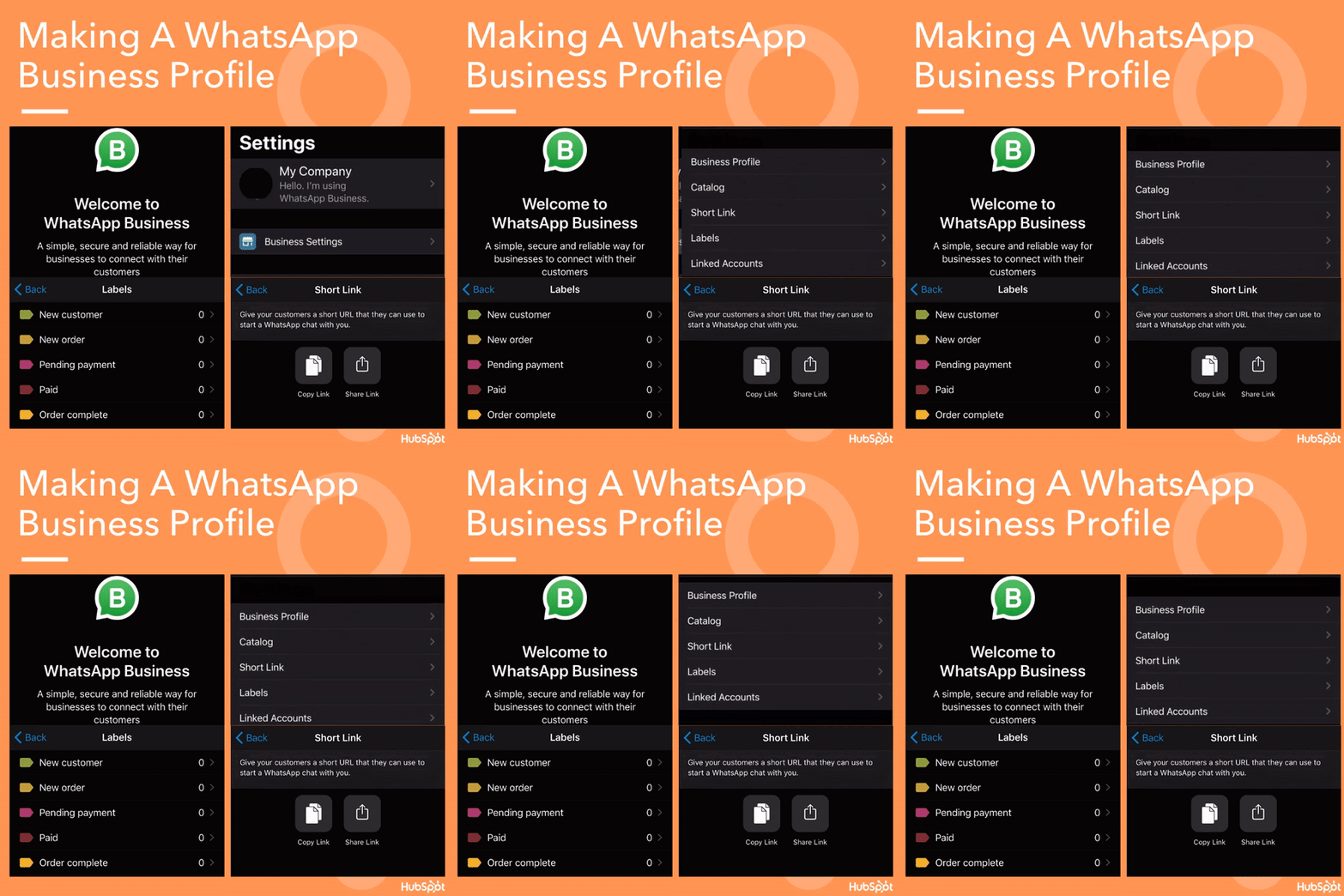
And then, you’re all set! You can make your Business account look polished and professional from here. You can also begin to explore some of the business-specific functions available to you, like contact labels and short links.
Let’s talk about some of the features you’ll have to work with in WhatsApp Business.
First, you can list your company’s contact information, such as email, address, and website link, in the “Business Profile” section, accessed by clicking “Business Settings”. If you’ve ever seen a Facebook or Google Business profile, they’re very similar. Your WhatsApp Business profile will be a quick view of your company.
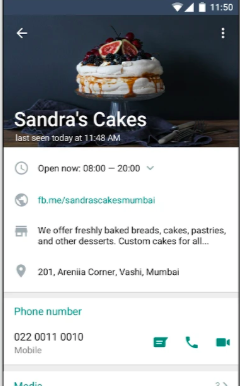
Your Business profile will also be listed as one, so when you communicate with leads and customers, they will know they’re talking to your business. Another identifier for customers is a green checkmark:

You’ll see it added when your account is verified by WhatsApp, which involves the app making sure the information you’ve given to set up your profile is accurate.
You’ll also be able to use labels to organize sales functions, access messaging metrics (such as stats on when messages are sent, delivered, and read), and build a catalog of products from your business. We’ll get more into how these features can help your marketing strategy in the next section.
How to Use WhatsApp for Business
You can use WhatsApp for business efforts in a couple of different ways. Mainly, the app is used for communication and sharing, and that’s the basis of using WhatsApp to your advantage.
WhatsApp can be a powerful app to have in your toolkit. You can improve visibility, automate communication, and keep your workflow organized.
The app is also free to use and manage, so you won’t be spending money downloading new software. Let’s cover how some other ways to use WhatsApp as an asset for your company.
1. Improve your business’s visibility.
Similar to Facebook, WhatsApp allows businesses to have a Business page on the app. Your profile will offer important information for customers, such as location, description, website, and contact details. You can also add a catalog to your WhatsApp, like shown below:
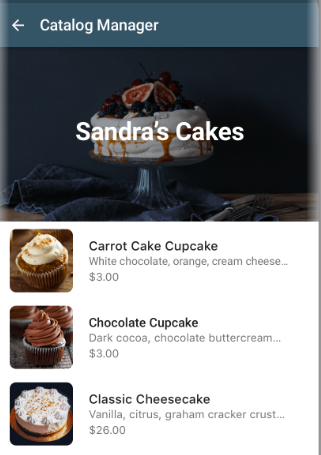
The catalog tool lets you upload your products in bulk, so users can browse your offerings through the app. This tool is an easy way for customers to get an idea of what they can purchase from your business. Having a business page for your company increases the amount of possible customers who can interact with your business using the app.
For instance, let’s say your customers want to know what your business offers, but don’t feel like Googling it. If your catalog is set up, they’ll be able to access your offerings before their attention is diverted to something else.
You can use catalogs to display a new product line, or feature your most popular products to entice your audience members.
2. Lessen the response time.
When you use WhatsApp Business, you can engage with customers directly. You can also automate messages using a chatbot, so your audiences can have their questions answered quickly.
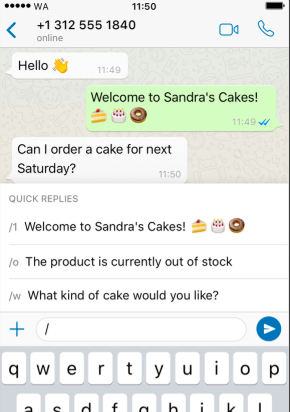
Notice how you can save a few quick replies for your customers. This interactive “FAQ” undoubtedly cuts down on having to type, or copy-and-paste answers to common questions.
Think about providing a content offer with quick replies. For instance, you might configure your welcome message to ask about your new offerings, (“Welcome! Would you like to know about our new sale?”), and include a quick reply that links back to your catalog, or another page or promotion.
3. Organize your duties.
WhatsApp offers different options for organization. First, you can organize your contacts using their label system. Alternatively, if you use a CRM that integrates with WhatsApp, like HubSpot, you can import your contacts directly from the CRM to the app, and manage conversations from there, like shown below:
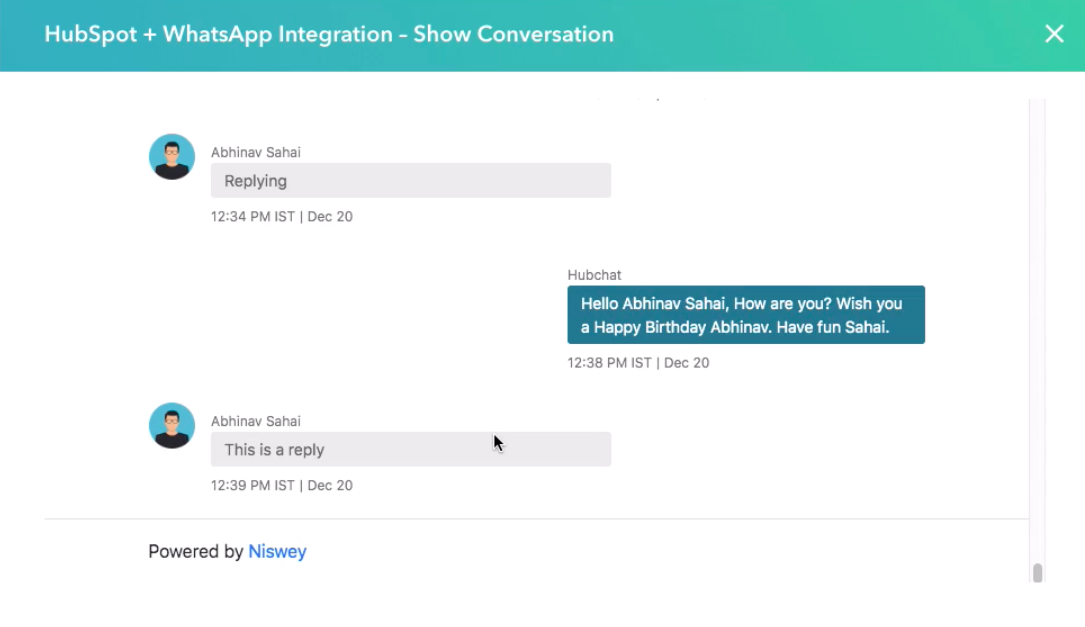
If you can integrate WhatsApp with your CRM, you won’t have to manually add contacts into the WhatsApp account. The two platforms will work together to import contact information onto your business dashboard.
Additionally, if you want to save the conversations you have with customers, you have that option with an integration. For example, HubSpot customers can access previous conversations on their HubSpot dashboard:
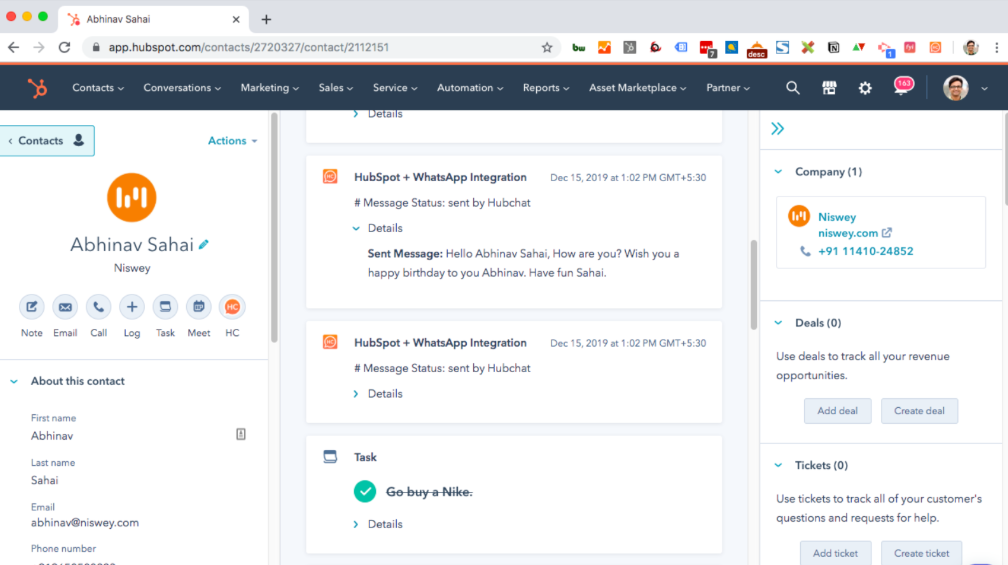
This will help you keep track of your customers and the relationships you grow with them. For more information about how to integrate your contact information with HubSpot, refer to this instructional post.
WhatsApp Marketing Campaign Examples
If you want to fit WhatsApp into a larger brand campaign, but are unsure how that will look, think of the app as a way to streamline communication in a way that’s a little more personal, and easier to access, then email or a product page. Let’s look at how some companies use WhatsApp.
1. Hellmann’s Brazil
Tactic: Story-based chatflow conversations.
To help teach their younger audiences how to cook, the team at the Brazil headquarters of Hellmann’s got to work, marketing through WhatsApp. This was an optimal choice for the team: WhatsApp is popular in Brazil, so their Brazilian audience would most likely already use the app.
This tool was a perfect addition to use in the campaign:
Here’s how it works: After texting the Business profile, WhatsCook, with WhatsApp, users can ask the profile for recipes based on what they have in their fridge. Then, they can message the profile to get more direction, video-based instructions, or send photos of progress.
The profile offers multimedia directions, such as photo and video, to make the learning experience personalized. The app even texts you to remind you when the dish is done. With less than $900 invested, and four million people satisfied, Hellmann’s had a home run.
The company used chatflows and labels to provide a choose-your-own-adventure story to connect with customers as part of their campaign to educate youngsters about cooking, all through text messages.
Think of how your customer service team would have an easier time organizing their contacts and helping customers with WhatsApp’s quick messaging capabilities. They can create customized workflows using integrated software and upload them into WhatsApp.
Finally, if leads want to check out your business, they won’t have to give it a Google search. They can just click on your user profile. These scenarios work for any type of business, and are some cost-effective alternatives to email marketing and international marketing.
2. Beck’s Brewery
Tactic: Secondary app integration.
Beck’s Brewery is an alcohol company that’s popular in Europe, and focuses on legendary experiences. To make one for mobile phone users, their team created an app that integrates to WhatsApp, and offers a comic book theme for their chats:
This app promotes longer chats on WhatsApp, and increases brand awareness for Beck’s Brewery as a brand. For instance, if a friend of a fan had never heard of the company before trying out the app, they’ll learn about the brand when they try out the comic book-themed integration.
Maybe your company offers graphic design services, or is a software development company. The bright, designing minds at your company can use the WhatsApp API to come up with similar integrations to use as a promotional tool in part of your next campaign.
3. Tikkie
Tikkie is an app, available only in Europe, that lets its users repay small loans on their phone. The app is most notably used by global bank ABN AMRO to let users in the Netherlands make bank payments.
This can be done for customers using WhatsApp. To market this function, Tikkie’s developers created a line of stickers that messengers can use in their chats to make them customizable, such as the ones shown below. Like other messaging apps such as Slack, these stickers add a funny, meme-able addition to chats:

These phrases, “Takes a long time,” and “Paid!” are vague enough to be used in general conversations, funny enough to make an impact with younger customers, and branded enough to increase brand recognition with users choosing these stickers.
Though Tikkie isn’t the first brand to use stickers for WhatsApp marketing (For instance, these Star Wars stickers celebrated the franchise’s 40th anniversary), they highlight how you can use the money you save with a free app. This makes marketing messages more delightful for your customers.
To create a sticker campaign of your own, you can use this sample code provided by the app, after you read up on some best practices for creating stickers. Basically, make sure your sticker images have transparent backgrounds, is less than 100kb, and measures exactly at 512 x 512.
For more examples like these, be sure to check out these extra WhatsApp campaign examples.
Ultimately, it’s important to keep in mind that WhatsApp shouldn’t be a primary marketing tool, like a CRM or email marketing software. Instead, it should be a partner to advance your marketing messages.
If you have disorganized chatflow structures, and feel as if you can do more to build customer loyalty, give WhatsApp a try. You’ll find a platform that’s easy to use, integratable, and provides metrics about your performance to help you increase effectiveness over time.

What Is a CDN? [FAQs]
Nearly half of all online consumers will abandon a page that takes more than 2 seconds to load.
That means you need your website or mobile app to be fast to delight visitors. To speed up your web assets, you need a CDN.
Don’t know what a CDN is? That’s okay. It’s one acronym in a sea of marketing acronyms that all relate to the inner workings of your business.
To understand what a CDN is, imagine you have a website hosted on a server in Denver, Colorado. We don’t often think about websites as being in a physical location because the internet makes it seem everywhere, but a website and all of its content assets have to be based in what’s called an origin server.
So how do those assets get routed from the origin server in Denver to a visitor’s browser in Boulder? Or Boston? Or Tokyo? You might have guessed the answer is a CDN, but still don’t know what it is or how it works.
In this post, we’ll define what a CDN is, what its primary purpose is, how it works, and how to use one. Then we’ll explore some of the best CDN providers in the market so you can create a fast website or speed up an existing one.
What is a content delivery network?
A content delivery network, shortened to CDN, is a distributed system of servers designed to deliver web content as quickly as possible.
To understand how, let’s return to our website in Denver, Colorado. Every time a visitor types your site address into their browser, the browser has to call upon your origin server to send, assemble, and display your content assets on their screen. That’s not so hard if the visitor is in Boulder, Colorado. But it becomes more challenging if you have visitors from Boulder, Boston, and Tokyo, for example. Not only is that a lot of distance for your content to travel, it also requires very different routing paths.
This is where a CDN comes to the rescue. Rather than have one server send content from Denver to Boulder, Boston, and Tokyo, the CDN will tap different servers in the network that are closest to each visitor to deliver the assets.
What is the primary purpose of a content delivery network?
The primary purpose of a content delivery network is to deliver content efficiently and securely to visitors, no matter where they are in the world.
To do so, CDNs have to take two major factors into consideration. The first is geographical distance. When a visitor accesses your website — whether they’re from Boulder, Boston, or Tokyo — you want the server closest to them to deliver and display your website. That’s because the closer the server is to the user geographically, the faster the content will be delivered.
The second factor a CDN has to consider is traffic.
Imagine that you post a blog on your website and it goes viral. Or imagine there’s a more nefarious reason for a rush of external requests like a DoS attack. Any surge of traffic to your website will put a lot of strain on your server. Without a CDN, this might cause your server to go offline and prevent visitors from accessing your site. With a CDN, however, this traffic will be distributed across multiple servers, reducing the strain on your origin server and keeping your site online.
For these reasons, CDNs are essential for improving the speed and overall performance of websites that have a global reach as well as websites that experience surges in traffic or high traffic regularly.
Now that we understand the definition and purpose of a CDN, let’s take a closer look at how it actually works.
How does a CDN work?
Once a visitor accesses your website and the server closest to them delivers and displays your website, that server makes a copy of your web assets. These cached files — which include your HTML pages, javascript files, stylesheets, images, and videos — are then stored on solid-state and hard-disk drives (SSD and HDD) or in random-access memory (RAM) for safekeeping.
That way, when another visitor in the same part of the world tries to access your website, the CDN can redirect the request from the origin server to the server closest to them. That server can then deliver the cached content much more quickly because it has less distance to travel.
This is all imperceptible to the end user, so they simply see the page loading as expected and benefit from reduced wait times without getting bogged down in the details.
Beyond accelerating content delivery, CDNs can also help protect your site because they are located in front of your backend server.
From this position in your network perimeter, they can act as a bouncer for your site, blocking attacks on your website and controlling the flow of incoming traffic so that the load on each server is balanced.
How to Use a Content Delivery Network
There are a two ways you can use a CDN. You can choose a website building platform with a built-in CDN, or you can purchase one from a CDN vendor.
If you purchase one from a third-party vendor, you’ll have to make it the default inbound gateway for all incoming traffic by modifying the DNS configurations of your root domain and subdomains That’ll ensure all visitors are routed to your CDN instead of your server.
This might sound complicated, but most vendors offer step-by-step tutorials or hands-on assistance to simplify the process.
Below we’ll take a look at a few different options for building a site with a CDN.
Best CDNs
CDNs can reduce latency, increase page speed, minimize bandwidth consumption, and block data scrappers and other forms of spammers targeting your site. To improve the speed and security of your site, choose a platform with a built-in CDN or a CDN vendor. Let’s look at a few options below.
1. CMS Hub
If you use CMS Hub to host your website, you’ll already have a built-in CDN. There’s no configuration, setup, or additional accounts required, and you won’t have to purchase and install one from a third-party provider.
With this CDN, not only will your content be delivered quickly, securely, and with less latency around the globe — you’ll also be able to track the volume of potential attacks or probes into site vulnerabilities to keep your CMS-hosted website, blogs, and landing pages safe.
That means you can focus on building a great site without worrying about distribution, cache invalidation, or online attacks.
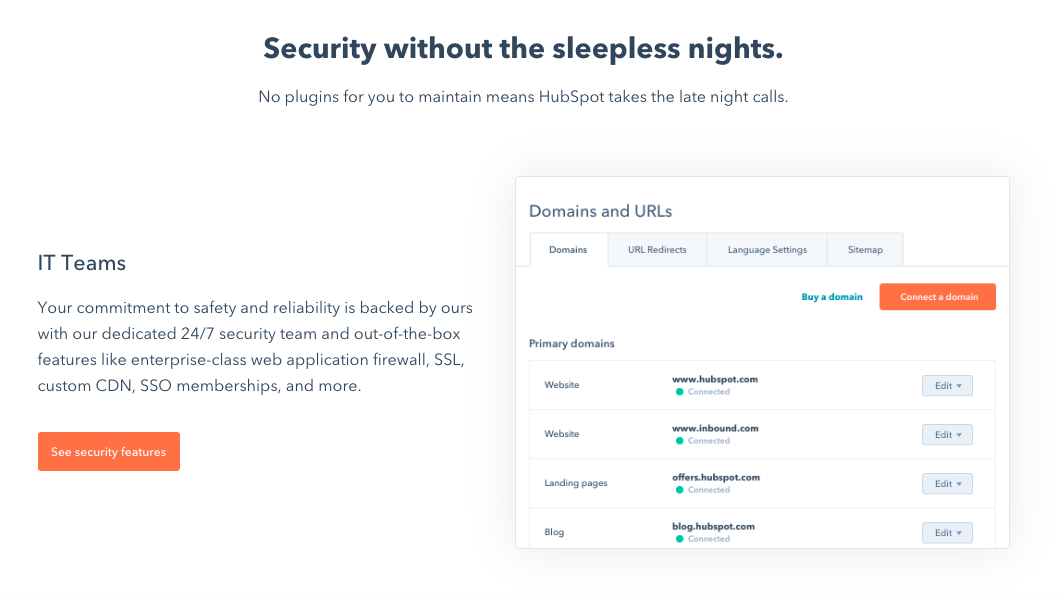
2. Cloudflare CDN
Cloudflare has a global network of data centers that spans 200 cities in more than 90 countries and supports over 26 million internet properties. By combining data with machine learning, Cloudflare sends content requests along the fastest and most reliable paths on its network.
Cloudflare offers a free plan as well as three paid plans for small and enterprise businesses, starting at $20 per month.
3. Amazon CloudFront
Amazon CloudFront is a CDN service that securely delivers data, videos, applications, and APIs to customers across the globe. Known for its low latency and high transfer speeds, Amazon CloudFront is used by Hulu, Dow Jones, Condé Nast, and other major companies to deliver solid streaming or user experiences and manage spikes in traffic and security.
Amazon offers a pay-as-you-go pricing model with no upfront fees or required long-term contracts.
Speed Up and Grow Your Site
Looking for accelerated web performance, DDoS protection, data loss prevention, and bot mitigation? Try a CDN.
Whether you’re using a website building platform with a built-in CDN or looking to incorporate one from a third-party vendor, such a service can enable you to create or grow into a high-traffic website that reaches a global audience.
Editor’s note: This post was originally published in July 2014 and has been updated for comprehensiveness.

Working Remotely? Try These 35 Tools for Better Communication, Collaboration & Organization
Today, you and your team are expected to perform at the same level no matter where you’re working from.
With the help of internet connection, it’s relatively easy for us to get most our daily work done, whether it’s related to publishing a blog post, sending a follow-up email, conducting a video call with a team member of prospect, or setting up a workflow to nurture prospects and customers in your CRM.
But, when it comes to remote work, we all know internet connection doesn’t solve everything .
Tasks and obstacles are bound to arise that are challenging to manage remotely — when it comes to these complex tasks and cross-team collaboration, communication and productivity can get messy.
As the need for productive remote work has grown, many companies have discovered and started implementing tools and resources that enable employees to be as productively as possible while working from home.
To help determine which tools are ideal for your remote team, we’ve compiled a list of some of the best tools for you to experiment with.
35 Helpful Remote Work Tools and Software
The following 35 remote work tools are segmented by use case to help you determine the type of resource you and your team would benefit most from.
Let’s get started.
Remote Work Tools For General Collaboration
1. Google Suite

Google Suite (G Suite) is a budget-friendly Google platform that allows your teams to collaborate on Google Docs, Google Sheets, and Google Slide, among other easy-to-use Google Drive tools. You can also share a team calendar and create work emails through the GSuite.
2. Microsoft Office Teams

While GSuite can be used entirely online within one platform, Microsoft Office Teams allows you to download apps like Excel, Outlook, Word, and PowerPoint to your computer or mobile device. Like GSuite, you also can use this general suite of tools to manage, share, store, and edit documents in team folders.
Aside from the more specific apps, Microsoft Teams also allows you to communicate with your teammates via video calls, email, and through an internal discussion platform where your colleagues can create posts or ask questions.
Remote Work Tools For Task and Project Management Software
3. Trello
Trello allows you to create a dashboard that highlights large projects or categories and tasks related to them. Each small task, called a “card” can be labeled with a colored tag and text.
For example, if you want to say something is “Urgent” you could create a red card tag that says “Urgent” on it and stick it to the appropriate Trello cards. You can also assign cards and deadlines to members of your team and track each card’s progress through its Activity area.
4. Asana
Asana lets you create and delegate tasks, organize, and check off tasks into shared projects, chat within each task so conversations stay organized, and add attachments from your computer, Dropbox, Box, and Google Drive. It also has calendar features, dashboards for projects, and your very own to-do list.
5. Assembla
Project management for web developers seems to be Assembla’s niche, though it could handle project management for just about any type of freelancing. It tracks tickets and time, produces reports, and simplifies product releases and bug-fixing — plus many say it’s easier to set up than Jira.
6. Basecamp
Basecamp is a simple and easy-to-use project management software that helps you arrange your calendars, set meeting schedules, track assignments, and store documents.
All of your project management occurs on one organized dashboard to give you a digestible birds-eye-view of everything that’s happening.
7. RingCentral and Glip
Ther’s another great tool by Ring Central and Glip. While RingCentral enables company calls to your business line to be forwarded to a mobile phone when you’re working remotely, Glip helps you manage basic project management and text-based team communication.
For task management, shared calendars, file sharing, annotating images, and real-time group chat, Glip is a strong tool. It also helps ensure all those chats are fully searchable.
Along with group chats and standard project management features, you can activate video chats on the Glip app which allows you to talk to your teammates about ongoing tasks.
8. Github
Web developers will love GitHub because it’s designed to build software with remote teams. The platform allows teams to virtual participate in code review and the management of both open source and private projects.
The GitHub Marketplace offers coders a variety of tools that can help them do their jobs more efficiently, regardless of where they log in.
9. Jira
Jira is another project management tool primarily for developers, customer support, and IT reps that allows you to assign and track work as well as issues that need to be solved. It also has a handy mobile and desktop interface for project management on the go.
10. Podio
Part project manager, part Facebook for companies, you can use Podio to keep track of what you need to do, and chat while doing it.
With the mobile app and website, you can create “workspaces” for different aspects of your work or projects. These workspaces look similar to a Facebook page as colleagues can comment or share information on them similarly to how they would share a Facebook post.
You can also use the platform to communicate with teammates or manage client contacts privately since it has a wide range of privacy settings.
11. Taskworld

The sweet spot for Taskworld is managing projects and keeping track of tasks and subtasks. Its evaluation feature lets you measure and give feedback on job performance, setting it apart from other similar project management programs.
12. Wunderlist

Marketed more as a personal to-do list for your phone, Wunderlist is also used by some of us to keep track of client work. There’s not much to the app except for a handy to-do list that you can manage and check off as you go.
13. Monday.com
Monday.com is a web task management platform specifically for businesses and agencies. It offers similar features to Asana and Trello in that you can watch the progress of tasks on a dashboard and assign projects to team members.
But, additionally, it also allows marketing teams to plan tasks with their budget in mind.
Remote Work Tools For Scheduling and Hosting Virtual Meetings
14. Zoom

Zoom is an easy-to-use desktop platform and app that allows you to schedule, launch, and record virtual meetings with your team. These meetings can be entered remotely from a computer, smartphone, or voice via a dial in phone.
During Zoom meetings, you can also share your screen with teammates so they can see your work or presentations.
15. Go ToMeeting
GoToMeeting allows you to schedule and launch virtual meetings or webinars where users can log in or call to hear only hosts speak. These meetings can be recorded and sent to participants after they’re completed.
16. Google Hangouts
Google Hangouts is a popular option because Google is usually convenient for those who use Google Calendar to manage your schedule and GMail for emails.
17 Join.me
Join.me is great for fast and easy screen-share meetings. In addition to being able to schedule and launch quick virtual meetings with screen-share, you can also create a shareable URL to your own personal meeting room that people can log on to when they’d like to meet with you.
18. Skype

At this point, many of us have already used Skype. Along with allowing you to host free small virtual meetings, Skype also enables you to create group chats. If you want to use the paid version of Skype, you can also have meetings with groups or make international voice calls.
19. Uber Conference
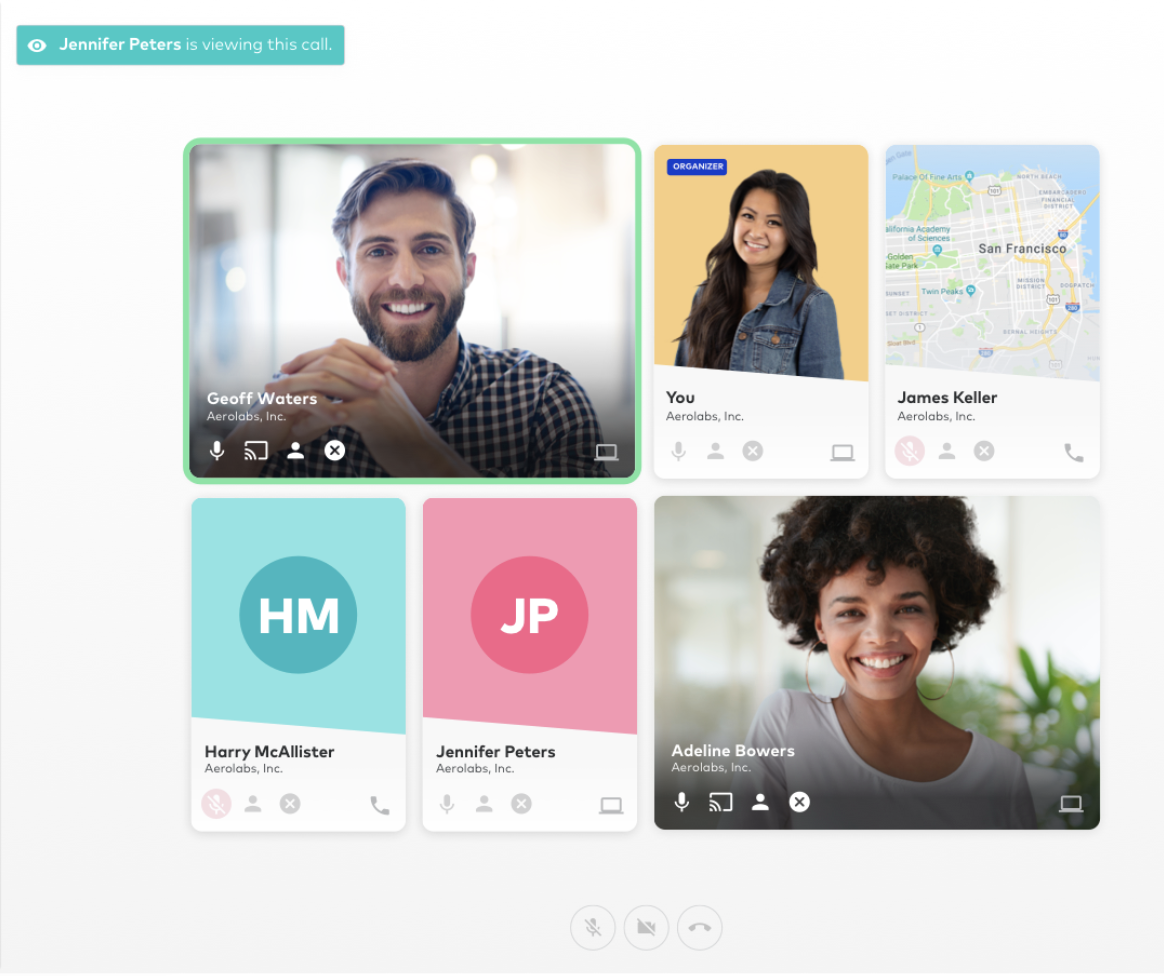
With Uber Conference, there’s no wondering who joined the call, who said what, or what the heck your meeting PIN number is. It also allows screen sharing and has a mobile app.
You can create video calls in your own name and when someone signs in, you can easily see them on the video calls dashboard. Then, when someone is talking, their video feed will be highlighted so you can easily see what’s happening and stay focused.
20. Google Calendar
Rather than having a full conversation over an instant messaging platform about when to have a meeting, you can use GSuite’s Google Calendar feature.
With the feature, you can share your Google Calendar with your colleagues. Then, when you want to schedule a meeting with them, simply search their names and book a suggested time that works.
When you do this, you can also put notes in the description area such as, “I’d like to book this meeting to discuss the marketing newsletter. Let me know if this time doesn’t work for you.”
Remote Work Tools For Quick Chats With Colleagues
21. Slack
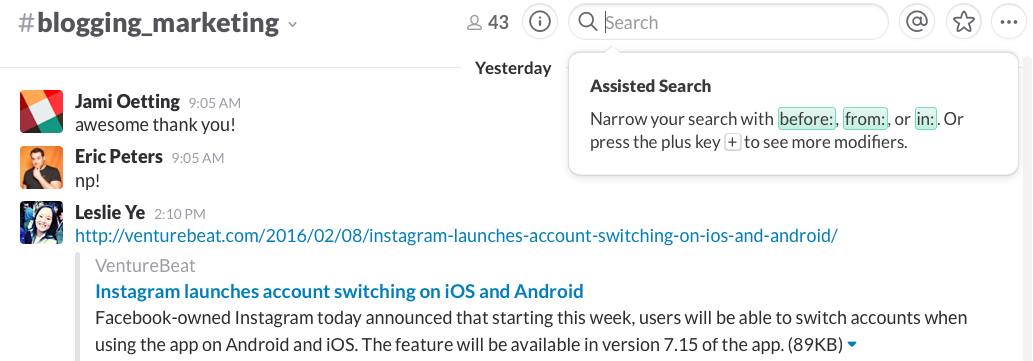
Slack is great for real-time communication for one-on-one conversations or with everyone on your team. You can also organize chats by subject, and integrate activity from platforms like Github, Trello, and Pingdom.
I like the thought expressed here that Slack is as close to a virtual office as you can get. You can even create one channel for every client, and invite only the people on that project to be on that channel.
(Want to learn more about Slack? Here’s a guide to all the hacks you didn’t yet know you could do with the platform.)
22. WhatsApp
If you have a remote or globally dispersed team, or communicate regularly with international clients or prospects, WhatsApp is a great communication platform that allows you to create group chats with them, send text messages, host multiple-person video calls, or make voice calls for free on a Wi-Fi network.
23. Flowdock

Flowdock is simple and easy-to-use instant messaging app and website similar to Slack. It also integrates with Jira, GitHub, Basecamp, Asana, Assembla, Trello and many other apps.
Remote Work Tools For Asset Management
24. Google Drive
I love Google Drive, but it does tend to update rather frequently — meaning, just when you’ve figured it out and have all your things organized, things change.
With that said, it’s free, stores and organizes all of your content and information, and you can work on the same document with multiple people at the same time.
25. Dropbox
Sharing large files doesn’t work so well over email, which is where Dropbox and Dropbox Business come in. This is a great tool for organizing freelancer work. Just have the freelancer upload their documents into monthly folders and message you when their work is in.
26. Adobe Creative Cloud
Adobe Creative Cloud programs like Photoshop, InDesign, and Illustrator allow you to create design files or visual assets that can then be edited or updated by your team.
27. Canva
Similar to Adobe, but easier to use for design novices, Canva allows you to create team accounts where you can share design templates and assets with your colleagues remotely. This ensures you’re able to access and edit any design files or brand imagery you might need while working from home.
Remote Work Tools For Announcements and Internal Documentation
28. Confluence
Confluence allows you to create an internal blog or wiki for your team. It’s more of a team manager, keeping documents, notes, best practices, product requirements, and plans all in one easily searchable place.
Pro Tip: You can also use the Gliffy integration to do quick wireframes.
29. GitHub Wiki
Savvy inbound marketing companies use GitHub Wiki for employee onboarding by organizing helpful resources for new employees.
30. Loom
Realize that speaking out loud is a better way to communicate a team announcement, but don’t have time to book a meeting?
With Loom, you can record a presentation or just your voice to give an announcement or play-by-play to your team. Then, you can get a link to share the recording and easily circulate it across channels like instant messengers or email.
Remote Work Tools For Tracking Team Progress
31. Time Doctor
Need to keep a close eye on how your team is spending their time, for client billing or productivity purposes? Time Doctor can help you do just that.
With the tool, you and your team and/ or remote freelancers can create projects and start a clock when starting a new task. Then Time Doctor’s dashboard shows a report of how many hours your colleague has worked throughout the day and which projects they’ve spent the most time on.
32. Harvest

For keeping track of time and expenses, this is a simple few-frills tool. With Harvest, you simply create projects or to-do list items and start the clock when you start working on each tasks.
Then you can see how much time you’ve spend on different list items, such as writing blog posts, strategizing, or producing marketing emails.
33. iDoneThis
I don’t know about you, but sometimes I can’t remember what I did yesterday. iDoneThis solves that problem for individuals and teams by sending a “digest” of what everyone did.
Remote Work Tools For Team Decision-Making
34. Polly.ai
When your team needs to make a decision that doesn’t require a full meeting, Polly.ai enables you to create a survey that you can then send through platforms like Slack. From there, your colleagues can simply vote on an option.
35. Doodle
Need to plan a group meeting? Doodle is a polling platform that allows you to ask quick questions to your team and see how they vote. You can also create a meeting-time poll which enables your team to vote on a meeting time that works best for them so you’re able to accommodate schedules.
Navigate the Remote Work Landscape with Helpful Tools
Today, your employees must have the ability to effectively do their jobs remotely — they need access to the right resources to help them be as productive at home as they are in an office space.
It’s no secret that everyone works a little differently and has a unique set of challenges. But when our problems have to do organization and productivity, try implement one of the tools mentioned above.
To learn more about how to master remote work, check out success tips from HubSpot’s remote workforce.
Editor’s Note: This blog post was originally published in April 2015, but was updated for comprehensiveness and freshness in April 2020.

How to Gain Visibility When You Work Remotely, According to HubSpot Employees
When working remotely, you’ll likely notice some unique challenges arise that aren’t necessarily roadblocks you’d experience in a shared office.
Additionally, as a career-minded professional, you might also have fears related to being isolated or unseen. For example, you might ask yourself, “Am I missing something important?”, “Do people think I’m actually working?” or “Is it even possible to move up the ladder in a remote position?”
If you’re worried about your visibility, you’re not alone. A lack of visibility is a common hurdle that those in the remote workforce worry about. In fact, a 2018 survey from Indeed found that 37% of employees at companies that allow remote work believe that this work style hinders visibility.
At HubSpot, we’re pretty familiar with remote work culture: its benefits and pain points — we have a fleet of more than 200 remote HubSpotters who vary from entry-level to established leadership roles.
And while our company hosts a number of virtual events, annual in-person gatherings, and regular meetings to ensure remote employees can make themselves known, not all companies have remote work policies like these.
Regardless of whether your company has always had remote work policies in place or those details are in the midst of being ironed out, visibility is still crucial to your success.
So, how do you get yourself seen by stakeholders when you’re always behind a computer? To help you become more visible at your company, we talked to some of HubSpot’s established remote employees to get their most valuable tips.
How to Gain Visibility as a Remote Employee
1. Participate in interesting groups or projects outside of your daily role.
While helping with a project or joining a group that doesn’t directly impact your job might seem stressful at first, it can actually be fun and help you bond with colleagues you wouldn’t know otherwise.
“Making an effort to know someone, finding opportunities to participate, and being available to others has helped increase my visibility at HubSpot,” says Tina Aita, a senior customer support specialist.
Aita adds, “Volunteering as an editor and contributor for the User blog, creating internal company posts, and working with our technical writers to improve our knowledge base articles has allowed me to connect with other departments and have some one-on-one time with those in other roles such as product experts and managers.”
2. Schedule one-on-one video calls with colleagues.
When remote, you can’t get to know colleagues who sit next to you like you can in an office. This is why many of the remote employees I spoke to encourage setting up a one-on-one video call or a virtual lunch to get to connect with their coworkers.
“During my first few weeks at HubSpot as a net-new remote employee, I invited most team members to virtual lunch,” says Kate Reed, a senior customer success manager from New Orleans.
“I took an hour to have a one-on-one lunch and chat about nearly anything but work with each colleague,” Reed shares. “Those are the people I feel most comfortable approaching — and some of us have even set up regular chats.”
Even as an established employee, it still helps to schedule meetings like these regularly to keep up with or build a stronger working relationship with your colleagues.
“I schedule at least three video calls with different teammates each week that I used as times for informal relationship building,” says Meghan Castillo, a learning experience designer based in Virginia. “This allows me to catch up on happenings in their lives and the office, as well as build stronger connections and familiarity to gain access to information faster.”
Scheduling regular check-ins is also a strategy of the HubSpot Blog’s Managing Editor, Meg Prater. On top of booking monthly one-on-ones with colleagues she doesn’t often see in daily meetings, Prater says. “I also grab virtual coffees and lunches with colleagues.”
“I’m an introvert by nature, so none of this comes easily to me, but I also try to join in on groups and cross-team projects when they come my way,” Prater explains. “All of these small actions make me more visible to my colleagues and a better resource for them as well.”
3. Publish, share, and discuss insights from your role.
If your company has a blog or Wiki that’s specifically for employees to post on, use it to write about your ongoing projects, insights, or achievements. Alternatively, consider writing a blog post on your own site and then sharing posts with your colleagues.
Writing about what you’ve learned in your role will allow colleagues to learn more about you, your role, and what you’ve accomplished. Fellow employees might also be interested in reaching out to you for questions about your insights or to work with you on a project.
At HubSpot, we haven an internal Wiki where employees can post insights and lessons. One remote employee who’s utilized it throughout his time at HubSpot is Blake Reichenbach, a customer support specialist based in Kentucky.
“As soon as I was comfortable in my role, I made it a priority to start building my visibility within the company. I approached it by being attentive to problems that I noticed and then applying my strengths to finding solutions to those problems,” says Reichenbach. “As a writer, that took the form of writing posts for our Wiki, contributing to the Marketing and User blogs, and using my own website to test and apply inbound best practices.”
“By the time I made my first trip to the office, several colleagues remarked about being glad to put a face to my name since they recognized me from Slack, the blogs, and/or the Wiki,” says Reichenbach.
When it comes to writing a good Wiki or internal blog, Reichenbach gave a few tips.
“A good Wiki is going to address common pain points — such as certain issues you run into as a customer support rep,” Reichenbach says. “It provides actionable insights that are personable and easy to digest.”
While you can use Wikis to highlight accomplishments, Reichenbach explains that these posts aren’t just about “shining light on your own successes.” Instead, “They should provide value for your colleagues, answer questions, solve problems, and demonstrate expertise in an engaging way.”
Like Reichenbach, Alex Birkett, a senior marketing manager based in Texas, also says you should “get used to” writing as a remote employee.
“Almost all of your ‘personal brand’ within the company will be built on words. Write internal company Wiki posts, market your ideas on your own blog, and maintain an active Twitter.” Birkett advises.
4. Communicate with colleagues using the company’s direct messenger app.
Aside from publishing content about your thoughts, accomplishments, and insights, Birkett also suggests participating in discussions within your company’s direct messaging system, such as Slack or Skype.
“Both formal work channels and informal or recreational channels can help you gain visibility,” Birkett adds.
Chloe Christiansen, an Inbound success coach, also says she embraces HubSpot’s messaging system.
“I stay connected to teammates by engaging in our team’s channels,” Christiansen says, adding that she discusses formal work topics as well as more recreational topics in these group discussions. “I end photos of my home-base in Oregon, my dog Cabela, and I contribute to the conversations everyone is having throughout the day.”
“This ensures I am supporting my teammates and that I also have a presence in-office, even though I am not physically there,” Christiansen explains.
At HubSpot, internal messaging and remote work is so prominent that some teams even hold daily meetings via direct messaging.
“We do a ‘yesterday/today’ standup each day where everyone can talk about their daily priorities in a couple of sentences,” says Christina Kokoros, a senior help-desk technician.
“The digital standup helps me to feel more connected to what everyone is doing and helps my team know what I’m up to,” Kokoros explains. “One of the hardest hurdles to get over when going from in-office to remote was the feeling of having to prove that I’m not just home hanging out. So, stand-ups definitely help with that.”
Similarly to Birkett, Kokoros says she also participates in discussion channels that are informal, recreational, or note directly related to work.
“We have a spot to interact with each other as humans, share stories and jokes and all that,” she says.
Even when your colleagues know what your day-to-day role is like, having informal chats with them, like Kokoros, can help you develop a stronger bond or relationship with them.
5. Communicate wins and failures to your team.
Aside from writing about your role experiences in Wikis, as noted in step three, you’ll still want to make sure your manager, team, and colleagues know what you’ve been up to.
When you aren’t visible at a company, both big and small accomplishments might appear less obvious, or even unseen. Additionally, your manager might not realize how much you’re actually learning from failures you run into.
To make sure you, your team, and your manager are all on the same page, regularly fill them in on your progress and what you’ve been up to.
“Since my manager and your team aren’t sitting beside me, it’s important that I communicate both wins and failures. This helps us build a relationship while making sure my work isn’t flying under the radar, ” says Reed.
“For example, I forward wins to my manager and mentor when they come in from customers. It makes their day too,” Reed adds. “Conversely, I share the failures too by bringing them to my one-on-ones so I can show my manager where I need to grow.”
6. Visit the office if and when possible.
If you ever have the opportunity to visit your company’s headquarters, remote HubSpotters suggest that you take advantage of it. This visit will give you a chance to develop a literal in-person connection with your colleagues.
“My manager enabled me to revisit the Cambridge office around the 10-month mark of my employment, and I used that trip to get coffee and have some face time with folks on the marketing team, blog teams, Academy team, as well as support leadership,” Reichenbach explains.
“I used these conversations as an opportunity to introduce myself, get to know more about the work that these teams were doing that may not have been very visible from the vantage point of the customer support org, and outline my own interests and goals,” Reichenbach adds. “By extension, I was able to expand my ’employee brand’ into teams that I didn’t directly work with on a daily basis.”
“There are several times per year that I come to the office for events or major meetings. When I’m there, I always make it a point to spend as little time on my laptop as possible and as much time getting coffee, lunch, and drinks with people as I can,” Birkett similarly adds.
Allie Decker, a content manager for the HubSpot Blog, says she visits the Cambridge headquarters quarterly. While she uses most of the time to schedule meetings with colleagues, she also blocks time for bonding away from the office.
“I do my best to spend time outside of work with coworkers — like at happy hours and lunches,” Decker explains. “I also make it a point to never miss any big, company-wide meetings, events, or celebrations.”
7. Start or take over a company-wide program.
Aside from regularly visiting the HubSpot offices in Cambridge, Decker has also taken over a company-wide internal event that requires months of planning and working with multiple company stakeholders.
“The program I manage is a quarterly, company-wide event that requires me to work with almost every department in the company. It also gets my name and face in front of everyone who attends,” Decker explains.
“I would encourage every remote worker to seek out opportunities, even if they don’t perfectly match up with their day-to-day job,” Decker advises. “Running the program is intimidating and definitely much different than my typical remote projects, but it’s a good challenge and helps me become known and trusted.”
While Decker took over a major company program within HubSpot, Reed also suggests volunteering or working on highly-visible projects.
“Find a hole in a process? Raise a flag and offer to figure out a way to fill it,” says Reed. “This is also a great way to make an impact on your team, even when you are new to a role or new to working remote.”
8. Participate in discussions during team video calls.
Aside from making extra efforts like participating in groups, scheduling one-on-ones, and writing Wikis, don’t forget to leverage the team meetings you already have scheduled as a way to gain visibility.
Emily Tong, a revenue operations specialist based in Indiana, says, “I try to make at least one connection or ask one question during any given meeting.”
“If people don’t introduce themselves during the meeting and everyone else is sitting in a meeting room, I may ask them who is speaking or ask them to adjust the camera — this calls attention to remote accessibility and generally makes it easier for me to communicate,” Tong adds.
If you’re able to host or present something at a team meeting, Aita and Castillo have some additional tips on how to gain valuable visibility as a leader.
“I aim to engage colleagues in my weekly team meetings by hosting a topic of discussion or providing my own insight into the conversation,” says Aita. “This gives me the confidence I need to push myself out of my comfort zone, share my ideas, and converse with others.”
When running team meetings, Castillo similarly adds, “I try to set the tone by beginning with a comment from each person related to something fun happening in their lives outside of work.”
Navigating Remote Work
Gaining visibility can be challenging, but — as the HubSpotters featured in this post have learned — it can also be incredibly beneficial to your success.
“I think losing visibility, and therefore career growth opportunities, is probably one of the biggest fears of those going remote,” says Birkett. “However, you can gain visibility when remote, too. It just takes more planning, a conscious effort, and probably a company that truly embraces remote culture.”
If you’re a remote employee, take a note from Birkett and the HubSpot workforce by connecting with colleagues whenever possible. To learn more about how to be a successful remote employee, check out this piece with more tips from remote HubSpotters.

How to Pivot Your Content Plan in a Rush
Imagine this: as a content marketer, things are going pretty well for you — you’re confident about your upcoming campaign, the ROI from your last couple were stellar, and projections for the new one looked just as good, if not better, than ever before.
And then something happened.
Maybe it’s a sudden trend or global event that diverts your audience’s attention. Or, perhaps a competitor’s campaign launch has everyone talking, and you’re unsure if your current content strategy is good enough to outshine theirs.
Regardless, this shift has impacted your company directly, which means, your entire campaign is impacted directly.
With that being said, now you have to decide if you need to pivot your content plan — and quickly. But how do you respond to an event like this?
We asked HubSpot managers to give their insights about how to navigate major changes that alter your content planning. In this post, we’ll learn what they have to say. We’ll go over how to identify when you need to pivot quickly, and strategies you can take in order to make that transition as smooth as possible.
How to Pivot Your Content Plan
When something major happens to alter your content strategy, think about how it will affect your business goals. After all, the content you’re creating reflects the goals of your business.
“The content HubSpot creates is intended to help businesses around the world grow better by addressing their current needs. When we have to pivot our content plans quickly, it is because those needs have changed quickly,” says HubSpot’s Lead Acquisition Senior Director, Emmy Jonassen.
Let’s take a look at advice from Jonassen, as well as tips from managers across the marketing field — including Senior Social Media Manager Kelly Hendrickson, Senior Brand Campaign Manager Alicia Collins, and Blog Team Senior Manager Karla Cook.
Let’s get started!
1. Know when to pivot.
Knowing when to switch up your content strategy is never an easy decision to make. There are a couple of aspects you should consider when you find yourself needing to re-work your content strategy, but first is knowing when the right time is to do that.
“The toughest part about pivoting your strategy is knowing when,” Hendrickson says. “As a social media manager, I would ask myself, ‘Right now, can we provide value to our audience?’ ‘Can we provide content that will be helpful and welcome in the social space?’“
If you’ve realized that altering your strategy will help you deliver more valuable, helpful, and timely content to your audience, then it’s a good time to pivot..
Ultimately, content plans should serve your business goals, but also deliver worthwhile content to your customer that’s timely.
If your content isn’t providing a timely lens to customers, it might be time for you to pivot your strategy.
Take a look at your content plans. If your information aligns with your business’s goals, that’s great, but does it align with the times? Instead of devoting all of your content planning to a new product launch, for instance, change up the frequency of your posts to include more content that can serve your customer’s needs depending on what’s going on in the industry, or in the world.
2. Put your audience first.
So, you’ve decided it’s a good time to pivot. How do you cater to the new shift in your audience’s lives, though?
Check your audience’s web behavior — you’ll find information that relates to what your audience is thinking about. For instance, if keyword search reports have indicated that keywords are changing from “local marketing tips” to “online marketing tips,” think of it as a clue that needs are shifting.
However, this shift isn’t exactly what you planned for — in fact, the content you’ve planned for is already scheduled, ready to go, and ultimately different from the results you’ve found from researching web behavior.
Hendrickson’s team was in the same boat. “In our case, we found we could provide our audience with helpful information,” she says. “But that information was not our previously produced and scheduled content.”
So, what do you do?
“We paused all publishing and pivoted immediately based on audience needs,” says Hendrickson. She and her team saw that they needed to rework how they catered to the needs of their audience with different content, so after some web behavior analysis, they found their answer. “An immediate need for our audience was tips about remote work and leading with empathy.”
She continues by saying, “We made that decision by looking at our audience, as we always do, and figuring out what challenges they were facing and prioritizing our changes there.”
When in doubt, start with your audience and put yourself in their shoes. What would you want to see from your favorite brands during certain times of year or periods of change?
3. Change your content lens.
We’ve talked a lot about how thinking about the customer will help guide your pivot decision and content planning. When you’ve got an idea of the type of content you need to deliver to your audience, the next step is the delivery itself.
“We need content and campaigns that are helpful and understanding,” Collins says. So while your content is framed around helping the audience, does the caption convey an understanding, empathetic point of view?
When you deliver content, you’re reflecting your brand and your brand’s goals. If one of your brand’s goals is to connect with your customer, you must change your message delivery to reflect a comprehension of the situation.
“Companies and customers are operating in different ways — we can’t always assume that the same types of marketing will resonate,” Collins notes.
For instance, let’s say a major cybersecurity issue upends your industry and is seen everywhere, from LinkedIn posts to newspaper headlines. Rather than shying away from the issue, consider how you might provide content that focuses on IT safety and security, or more generally, tips and tricks for successful online marketing and sales strategies.
4. Connect with other colleagues.
“During major industry or global changes, it becomes especially important that we understand our audiences’ needs so we can create relevant and helpful content fast,” Jonassen remarks.
Recall that Hendrickson’s team had to recognize the new needs of their target audiences, and discovered that remote work and how to lead during hard times was increasingly popular. From there, they were able to conduct research and figure out a plan.
However, if you’ve found that your team is struggling to collect insights, or you don’t know how, reach out to other colleagues to come up with a game plan that will be helpful to you. While your customers need actionable, timely, empathetic content, you need to understand how to figure out their other needs, as well.
“We start by analyzing user behavior, talking to our Sales and Customer Service teams, and interviewing prospects and customers,” Jonassen says.
Similar to social media and branding, it’s important for team members working on customer acquisition to analyze how their customer will be thinking about their lives differently, so you can create offers that will be relevant to their new lifestyle.
If you find yourself struggling to deduce how your customer thinks because you don’t interact with them directly, think about the colleagues you have who do have a customer facing role.
Sales and Customer Service colleagues are a great place to start — they’re in constant contact with customers, and because of that, will have a good grip on recognizing common problem areas among customers.
The best part about this strategy? It fits any business size. Even if your company is a small but mighty one, there’s at least one person constantly communicating with customers, and leading hiring efforts. They’re your front lines (and usually, talking to them is free, and less time-consuming than conducting multiple research quests).
5. Don’t overestimate your pivot.
When you recognize you need to shift, you don’t have to launch an entirely new product or completely re-identify your brand. In fact, that’s something you shouldn’t do.
Cook states, ”Don’t change everything at once. The worst thing you can do in a situation like this is pivot too hard and too fast in your rush to meet short-term needs.”
It can be startling to customers if a company overhauls their entire strategy overnight (Do you remember the “IHOb” fiasco?), and leave them confused.
My grandmother always used to say, “If it’s not broken, don’t fix it,” a mantra that should apply to your pivot process planning. Changing what your brand stands for can be messy, time-consuming, and confusing for customers.
“Remember that content strategy is always a long game —your short-term strategy can’t compromise your ability to solve for the ongoing, long-term needs of your content property. Find key areas where you can be flexible to meet immediate needs, but know what you can’t budge on,” Cook suggests.
“Remember that content strategy is always a long game —your short-term strategy can’t compromise your ability to solve for the ongoing, long-term needs of your content property. Find key areas where you can be flexible to meet immediate needs, but know what you can’t budge on,” Cook suggests.
Your pivot should be a balanced addition to the strategy you already have in place.
In every campaign you make, one of your goals is most likely to serve the needs of the customer. Keep these tips in mind, and stay calm throughout the storm.
