
34 Millennial Stats That Marketers Need to Know
As a millennial, I grew up in a constantly changing era.
While I’m young enough to understand the latest technology, I grew up in a time where you needed a real encyclopedia to do your homework — rather than Wikipedia.
Millennials are wedged between two very different generations. Before us, we have Gen Xers who didn’t own computers until they were in college, and after us, we have Gen Zers, who’ve been basically playing iPad games since birth.
If you’re a marketer in almost any industry, you’ll need to reach someone at the millennial audience at some point. After all, we’re already more than one-quarter of the world population and spend a whopping $600 billion in the U.S. each year.
Now and in the future, it will be absolutely vital to learn about this generation, debunk the biggest misconceptions around them, and develop strategies that will truly engage this unique but prominent age group.
To keep you informed about crucial aspects of my generation, I’ve collected more than 30 helpful stats and facts related to population, our digital habits, common motivations, work and home life habits, and cultural views.
General Stats and Market Opportunities
- There are 831 million millennials, representing one-quarter of the world population. (U.S. Census)
- The millennial generation spends roughly $600 billion in the U.S. per year. (Accenture)
- Globally, millennials are projected to spend $1.4 trillion on shopping in 2020. (Accenture)
- Millennials make up half of the workforce. (Adobe)
Social Media & Digital Habits
- Millennials spend an average of 7.2 hours online each day. (eMarketer)
- 71% of millennials regularly shop online via mobile devices. (AdWeek)
- On average, millennials watch online videos for 2.4 hours per day. (Wibbitz)
- Millennials spend an average of two hours and 38 minutes on social media daily. (World Economic Forum)
- More than 94% of millennials actively use digital coupons. (Valassis)
- Millennials will pay attention to online content for an average of 12 seconds, or four seconds more than Gen Z consumers. (Vision Critical)
- Only 36% of millennials prefer to see marketing content where a person or influencer discusses a product, as compared to 86% of Gen Z. (Dana Communications)
- 74% of millennials buy products online at least once monthly. (Ernst & Young)
- 40% of millennials refer to online reviews and testimonials before making a purchase from a brand. (Millennial Marketing)
- 83% of millennials find online content useful when making purchasing decisions. (Sharethrough)
Behaviors and Financial Factors
- In 2018, 15% of millennials were still living with their parents. (Pew Research Center)
- About 20% of millennials without a college degree live with their parents, as compared to 10% who have at least a bachelor’s degree. (Pew Research Center)
- 63% of millennials have over $10,000 in student debt. (Padilla)

Source: Lexington Law
- In 2018, only 16% of millennials moved from one home to another. (Pew Research Center)
- 52% of millennials carry over debt month to month on their credit cards. (CNBC)
- Despite their connection to media, millennials spend two thirds the amount that Gen X or Baby Boomers on entertainment each year. (Bureau of Labor Statistics)
- Back in 2016, loans were already a huge concern to millennials as 52% of millennials were worried they’d default in the next 10 months. (UBS)
- In 2018, 46% of millennials were married, compared to 83% of Silent Generation members who were married at a similar age range. (Pew Research Center)
- It’s anticipated that one in four millennials will not marry by their early 50s. (Pew Research Center)
- Although millennials are having children later than past generations, 17 million millennial women were mothers by the end of 2018. (Pew Research Center)
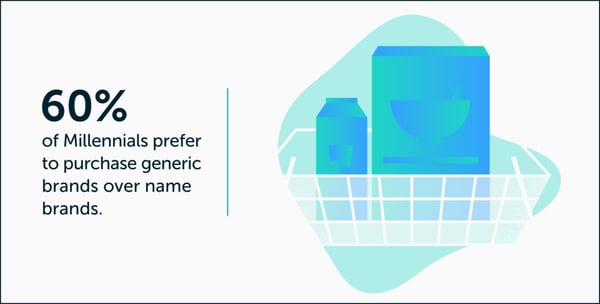
- Despite misconceptions that millennials overspend, 60% of them will actually save by buying a generic product over a brand name. (Millennial Marketing)
Source: Lexington Law
Education and Work
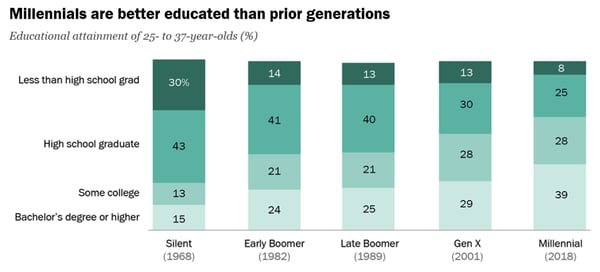
- Millennials are more educated than generations before them. Roughly 39% of millennials have a bachelor’s degree or higher, compared to 19% of the Silent Generation and one-quarter of Baby Boomers. (Pew Research Center)
Source: Pew Research Center
- About 43% of millennial females and 36% of millennial males have at least a bachelor’s degree. (Pew Research Center)
- With 72% of millennial women are employed, more women are active in the labor force in this generation than prior age groups, (Pew Research Center)
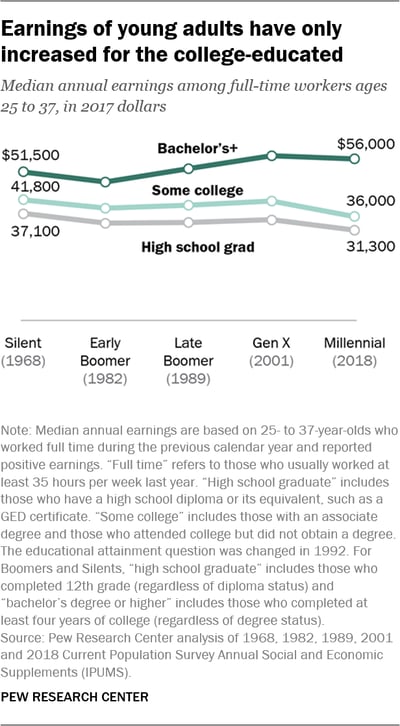
- Those who’ve attended college in the millennial generation receive higher earnings than past generations. Meanwhile, millennials who’ve attended some or no college have seen lower earnings than past generations. (Pew Research Center)
- In 2018, 80% of millennials had worked for their employer for at least 13 months. (Pew Research Center)
Political and Societal Views
- Millennials are now the second-largest electorate population in the U.S., after Baby Boomers. (Pew Research Center)
- In the 2016 presidential election, 51% of eligible millennial voters turned up at the polls. (Pew Research Center)
- Millennials are more democratic than the previous generations. While 59% of millennial voters were registered as democrats or leaned democrat in 2018, just less than half of Boomers, Gen X, and the Silent Generation leaned democratically. (Pew Research Center)
Which Generation Should You Market To?
As you build a buyer persona and define your target audience, you’ll need to know key aspects of each generation that you’re trying to reach. Aside from learning about the factors that motivate your target age group, you’ll also need to understand how they compare to other generations.
To learn more about how millennials compare to other generations, particularly Gen Z, check out this helpful blog post.

How to Conduct Successful Remote Interviews, According to HubSpot’s Recruitment Coordinator
For your business to thrive, it’s undeniably critical you set up a process for conducting effective interviews — and, in 2020, it’s equally vital you create a comprehensive virtual interview strategy, as well.
As a Program Coordinator on HubSpot’s Recruiting Operations Team, I’m familiar with the struggles of creating a cohesive remote interview experience. But, as HubSpot continues to grow globally, I also know how important it is to create a scalable remote candidate interviewing process.
Plus, at HubSpot, we have a strong commitment to global-first and remote inclusion — so further developing our remote interview practices only makes sense.
While there’s no “secret sauce” to remote interviewing, we’ve iterated on a process that helps both candidates and interviewers have strong, purposeful conversations virtually.
Here, I’m going to tell you about the best practices we’ve learned as a result of listening to both candidate and interviewer feedback, so you can learn how to create your own powerful virtual recruitment process in 2020.
1. Be human, and keep the personal touch.
While it’s a bit harder to make a personal connection when interviewing remotely, putting in the extra effort can be the difference between an average and remarkable candidate experience.
There are many ways to do this, but some efforts our candidates are loving are:
- Providing 15-minute prep calls with recruiters if candidates are nervous about interviewing remotely. We want to set up candidates for success, so having quick sessions to familiarize themselves with Zoom (our video conferencing tool of choice) and have a test run can make all the difference.
- Hold a virtual meet-and-greet before the interview starts, so you can have a pulse check with your candidate, workout any pre-interview jitters, and make sure they are comfortable before handing them off to their first interviewer.
- Over-communicate the interview logistics to the candidate so they know exactly when the interview starts and how the exchange between interviewers will work to ensure a smooth process.
2. Knowledge (and resources) is power.
Interviewing remotely presents its own set of unique challenges for candidates: how to prepare, what to wear, and how to get an idea of the office, team, or culture they could be joining.
The good news is that there are many ways you can share information and resources with candidates to fill these gaps, such as:
- A one-pager for how to prepare your work space, download your video conferencing software of choice, and practice with it
- This blog post: How to prepare for your video interview debut
- Virtual office tours
- Content that gives candidates a glimpse into your culture and lets it shine, like your YouTube channel, your brand’s Instagram page, or your business’s Glassdoor page
- Team lunches or weekly stand-ups, to give candidates a look at their future team’s culture
3. Remote interviewing can feel very different from in-person, so make it as comfortable as possible.
Without the natural flow and physical reminders of an in-person interview, it’s easy to forget the small things that would make a remote interview just as comfortable as coming into the office.
Here are some small things that you can do to make your candidates feel as comfortable as possible:
- Before starting your interview, offer the candidate a water and restroom break.
- Ideally, take notes on paper so that you’re not typing while the person is talking. If you’ll be taking notes on the computer, call out the fact that you’ll be typing during the interview. In this scenario, it’s also best to mute yourself so that you’re not typing in their ears as they’re speaking, but keep in mind that for them it will feel like they’re talking to a silent crowd.
- Don’t lose the small talk you would normally have with candidates in-person.
- Be overly expressive — interviews are extra stressful when it’s hard to read body language. Nod, smile, and laugh, to help make the situation more comfortable.
- Include a “breather” whenever possible by building in 10-15 minute breaks in the interview schedule.
4. Channel your inner technology support specialist.
While most of our interviewers aren’t in tech support roles, it’s easy to forget that we use remote collaboration tools regularly, so we may be (and usually are) more experienced using and troubleshooting issues that can come up during a remote interview.
Technology issues can happen, so don’t panic and stay strong in the face of adversity. Here are some of our tips for working through tech issues:
- When in doubt, leave and rejoin the meeting. If that doesn’t work, we recommend giving the candidate a call (which we list in all of our interview calendar invites).
- If the issue is WiFi connectivity, the first troubleshooting step we recommend is suggesting that the candidate move closer to the wifi router (if able). Second step would be to turn off video and attempt to communicate just over audio. Third and final step would be to switch the call to take place over the phone.
- If you’re spending more than five minutes troubleshooting tech issues, it may be best to reschedule for a later time. Work with your internal stakeholders to make it happen.
- At HubSpot, we use Zoom, so keeping Zoom’s troubleshooting guide open makes it easier to search and troubleshoot on-the-fly. Make sure, whichever video tool you choose, that you have the tool’s troubleshooting or FAQ page open just in case.
The way we have approached the adoption, measurement, and evaluation of the remote interviewing process is very HubSpot by nature.
HubSpot pushes its employees to have HEART — be humble and listen, be empathetic towards others, adapt to changing situations, generate remarkable experience for everyone, and be transparent and share what you learn.
I would encourage you to take this a step further and let the culture of your company shine throughout your interview process, whether in-person or virtually.
Additionally, remember your candidates and interviewers can offer critical feedback to help you strengthen your process over time. Continue to collect feedback from both sides, and use it to improve your virtual experience.

How to Pivot Your Content Plan in a Rush
Imagine this: as a content marketer, things are going pretty well for you — you’re confident about your upcoming campaign, the ROI from your last couple were stellar, and projections for the new one looked just as good, if not better, than ever before.
And then something happened.
Maybe it’s a sudden trend or global event that diverts your audience’s attention. Or, perhaps a competitor’s campaign launch has everyone talking, and you’re unsure if your current content strategy is good enough to outshine theirs.
Regardless, this shift has impacted your company directly, which means, your entire campaign is impacted directly.
With that being said, now you have to decide if you need to pivot your content plan — and quickly. But how do you respond to an event like this?
We asked HubSpot managers to give their insights about how to navigate major changes that alter your content planning. In this post, we’ll learn what they have to say. We’ll go over how to identify when you need to pivot quickly, and strategies you can take in order to make that transition as smooth as possible.
How to Pivot Your Content Plan
When something major happens to alter your content strategy, think about how it will affect your business goals. After all, the content you’re creating reflects the goals of your business.
“The content HubSpot creates is intended to help businesses around the world grow better by addressing their current needs. When we have to pivot our content plans quickly, it is because those needs have changed quickly,” says HubSpot’s Lead Acquisition Senior Director, Emmy Jonassen.
Let’s take a look at advice from Jonassen, as well as tips from managers across the marketing field — including Senior Social Media Manager Kelly Hendrickson, Senior Brand Campaign Manager Alicia Collins, and Blog Team Senior Manager Karla Cook.
Let’s get started!
1. Know when to pivot.
Knowing when to switch up your content strategy is never an easy decision to make. There are a couple of aspects you should consider when you find yourself needing to re-work your content strategy, but first is knowing when the right time is to do that.
“The toughest part about pivoting your strategy is knowing when,” Hendrickson says. “As a social media manager, I would ask myself, ‘Right now, can we provide value to our audience?’ ‘Can we provide content that will be helpful and welcome in the social space?’“
If you’ve realized that altering your strategy will help you deliver more valuable, helpful, and timely content to your audience, then it’s a good time to pivot..
Ultimately, content plans should serve your business goals, but also deliver worthwhile content to your customer that’s timely.
If your content isn’t providing a timely lens to customers, it might be time for you to pivot your strategy.
Take a look at your content plans. If your information aligns with your business’s goals, that’s great, but does it align with the times? Instead of devoting all of your content planning to a new product launch, for instance, change up the frequency of your posts to include more content that can serve your customer’s needs depending on what’s going on in the industry, or in the world.
2. Put your audience first.
So, you’ve decided it’s a good time to pivot. How do you cater to the new shift in your audience’s lives, though?
Check your audience’s web behavior — you’ll find information that relates to what your audience is thinking about. For instance, if keyword search reports have indicated that keywords are changing from “local marketing tips” to “online marketing tips,” think of it as a clue that needs are shifting.
However, this shift isn’t exactly what you planned for — in fact, the content you’ve planned for is already scheduled, ready to go, and ultimately different from the results you’ve found from researching web behavior.
Hendrickson’s team was in the same boat. “In our case, we found we could provide our audience with helpful information,” she says. “But that information was not our previously produced and scheduled content.”
So, what do you do?
“We paused all publishing and pivoted immediately based on audience needs,” says Hendrickson. She and her team saw that they needed to rework how they catered to the needs of their audience with different content, so after some web behavior analysis, they found their answer. “An immediate need for our audience was tips about remote work and leading with empathy.”
She continues by saying, “We made that decision by looking at our audience, as we always do, and figuring out what challenges they were facing and prioritizing our changes there.”
When in doubt, start with your audience and put yourself in their shoes. What would you want to see from your favorite brands during certain times of year or periods of change?
3. Change your content lens.
We’ve talked a lot about how thinking about the customer will help guide your pivot decision and content planning. When you’ve got an idea of the type of content you need to deliver to your audience, the next step is the delivery itself.
“We need content and campaigns that are helpful and understanding,” Collins says. So while your content is framed around helping the audience, does the caption convey an understanding, empathetic point of view?
When you deliver content, you’re reflecting your brand and your brand’s goals. If one of your brand’s goals is to connect with your customer, you must change your message delivery to reflect a comprehension of the situation.
“Companies and customers are operating in different ways — we can’t always assume that the same types of marketing will resonate,” Collins notes.
For instance, let’s say a major cybersecurity issue upends your industry and is seen everywhere, from LinkedIn posts to newspaper headlines. Rather than shying away from the issue, consider how you might provide content that focuses on IT safety and security, or more generally, tips and tricks for successful online marketing and sales strategies.
4. Connect with other colleagues.
“During major industry or global changes, it becomes especially important that we understand our audiences’ needs so we can create relevant and helpful content fast,” Jonassen remarks.
Recall that Hendrickson’s team had to recognize the new needs of their target audiences, and discovered that remote work and how to lead during hard times was increasingly popular. From there, they were able to conduct research and figure out a plan.
However, if you’ve found that your team is struggling to collect insights, or you don’t know how, reach out to other colleagues to come up with a game plan that will be helpful to you. While your customers need actionable, timely, empathetic content, you need to understand how to figure out their other needs, as well.
“We start by analyzing user behavior, talking to our Sales and Customer Service teams, and interviewing prospects and customers,” Jonassen says.
Similar to social media and branding, it’s important for team members working on customer acquisition to analyze how their customer will be thinking about their lives differently, so you can create offers that will be relevant to their new lifestyle.
If you find yourself struggling to deduce how your customer thinks because you don’t interact with them directly, think about the colleagues you have who do have a customer facing role.
Sales and Customer Service colleagues are a great place to start — they’re in constant contact with customers, and because of that, will have a good grip on recognizing common problem areas among customers.
The best part about this strategy? It fits any business size. Even if your company is a small but mighty one, there’s at least one person constantly communicating with customers, and leading hiring efforts. They’re your front lines (and usually, talking to them is free, and less time-consuming than conducting multiple research quests).
5. Don’t overestimate your pivot.
When you recognize you need to shift, you don’t have to launch an entirely new product or completely re-identify your brand. In fact, that’s something you shouldn’t do.
Cook states, ”Don’t change everything at once. The worst thing you can do in a situation like this is pivot too hard and too fast in your rush to meet short-term needs.”
It can be startling to customers if a company overhauls their entire strategy overnight (Do you remember the “IHOb” fiasco?), and leave them confused.
My grandmother always used to say, “If it’s not broken, don’t fix it,” a mantra that should apply to your pivot process planning. Changing what your brand stands for can be messy, time-consuming, and confusing for customers.
“Remember that content strategy is always a long game —your short-term strategy can’t compromise your ability to solve for the ongoing, long-term needs of your content property. Find key areas where you can be flexible to meet immediate needs, but know what you can’t budge on,” Cook suggests.
“Remember that content strategy is always a long game —your short-term strategy can’t compromise your ability to solve for the ongoing, long-term needs of your content property. Find key areas where you can be flexible to meet immediate needs, but know what you can’t budge on,” Cook suggests.
Your pivot should be a balanced addition to the strategy you already have in place.
In every campaign you make, one of your goals is most likely to serve the needs of the customer. Keep these tips in mind, and stay calm throughout the storm.

12 Essential Media Planning Tools
Your customers are consuming messages in more ways than ever before — online, in publications, on TV, the radio, and on their phones…to name a few.
Companies that invest effort in choosing the right platforms for the sake of customer acquisition and retention — and the right messages to promote on them — are engaging in media planning, which has become a requirement for organizations hoping to reach their audiences across multiple channels.
The process of media planning is ongoing — one that requires diligence, an understanding of your audience, and knowledge of the various outlets where you can spread the word of your company.
However, it’s almost impossible to do this without tools, templates, software, and resources that give you insight and provide the needed structure for your efforts.
Media planning tools can help you juggle the different sources, publications, numbers, and messages involved in media planning and buying. These resources can help you calculate your reach, measure your messages’ impact, and keep track of which messages are going out where and when.
To help you with your media planning efforts, we’ve compiled a list of the essential media planning tools, templates, and software to use this year.
1. HubSpot Media Planning Template [Featured Resource]
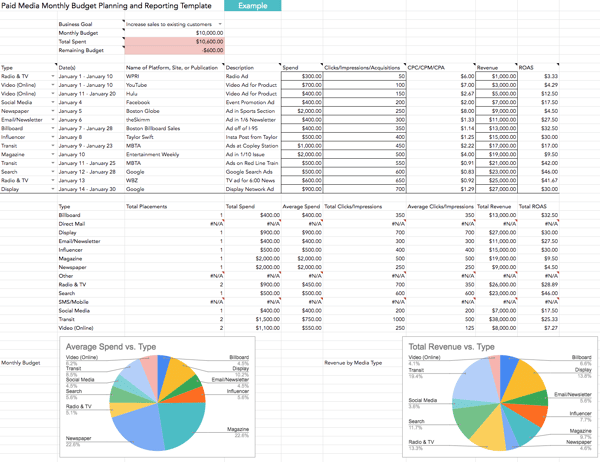
HubSpot’s paid media template will help you keep track of how much you’re spending on paid media, where your messages have gone out, and how much attributable revenue has been generated from each source.
You’ll also gain access to charts that automatically adjust when you add your spend and ROI. This resource is free — click here to get your copy now.
2. Bionic Media Planning Software
Bionic prides itself on its media plans, flowcharts, RFPs and IOs, trafficking, reporting, and client dashboards.
It has an average of 3.1 software updates on a monthly basis, meaning agencies using the software are provided with up-to-date planning tools to run and organize their campaigns.
3. Kantar SRDS Media Planning Platform
The most valuable resource for media planners is data. To feel confident promoting media on a specific platform, media planners need to know who is on each channel, in addition to understanding their target audience. SRDS gives media planners access to extensive datasets on audience statistics and demographics so media planners can choose the right platform, message, and audience to target.
4. Media Plan HQ
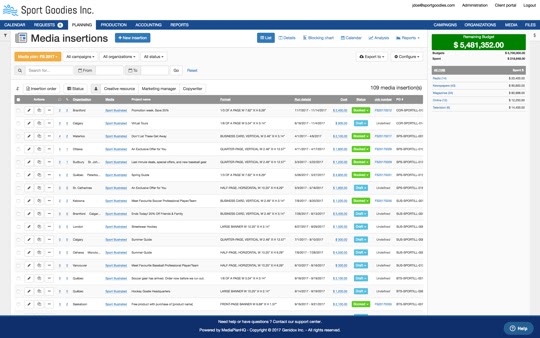
Not a fan of spreadsheets? No problem. Media Plan HQ’s got you covered. The tool tracks dates, placements, and budgets in real-time over an organized interface without having to deal with Excel. The tool is also collaborative, allowing you to work alongside your team members without the headaches caused by back-and-forth emails.
5. BluHorn
Promising easy media planning and buying, BluHorn integrates with Nielsen and Comscore to provide users with instant access to data-rich insights. The tool is rich with useful features, such as post-buy, a vendor database, and data filters.
6. Quantcast
Quantcast is an audience insights tool, with audience data from 100 million websites. Quantcast uses AI so users can “better predict and influence [their] desired audience” in an era where consumers are showered with ads and messages wherever they go.
7. Basis by Centro
Rated the #1 demand-side platform on G2 Crowd, Basis “addresses your direct, programmatic, search & social through a single interface.” The software gives users access to 9,000 vendors and 11,000 publishers and informs them with more than 180 unique data points. It also contains a messaging tool for seamless team communication.
8. Comscore
Comscore is an essential tool for “planning, transacting and evaluating media across platforms.” Best known for providing data for digital platforms, film, and television, Comscore provides audience measurement metrics for companies looking to promote their products on a visual medium.
9. Nielsen
A household name, Nielsen is synonymous with audience measurement. Known mostly for TV viewership metrics, Nielsen’s global strategy also provides users with metrics for podcasts, streaming services, and social media. This gives users an all-encompassing view of where their audience is. It’s no wonder media planners and sellers have relied on Nielsen for nearly a century.
Fun Fact: Nielsen is considered to be the first company to offer market research and is responsible for the term “market share.”
10. HubSpot Social Media Software
Looking to keep things just to a social media audience?
HubSpot’s Social Media Software allows for easy publishing and audience analysis for Facebook, Twitter, LinkedIn, and Instagram on a single platform.
Plus, you can measure how your audience converts from social media in your CRM on their journey to becoming a customer.
11. Scarborough from Nielsen
Another appearance from Nielsen on this list, Scarborough is a media planning tool for companies hoping to get more local, hyper-focused audience insights. This tool is great for region-specific messaging or promotion and can facilitate a more systematic rollout of the word you want to spread.
12. MRI-Simmons
Marketed as “The Essential Consumer Truth Set,” MRI-Simmons provides both national and regional focus studies to those looking to learn more about their audience and plan media more effectively. Its clientele includes companies spanning multiple industries like Dell, Spotify, Coca-Cola, and Men’s Warehouse — which makes sense, given the massive amount of segmentations available to users.
Bonus Resource: HubSpot Academy’s Paid Media Course
HubSpot Academy’s course on How to Build a Paid Media Strategy is the perfect introduction to media planning. Whether you have a generous budget or none at all, this course provides marketers with the fundamentals of developing a paid media strategy, utilizing media throughout the buyer’s journey, and finding the ROI of your efforts. Click here to take the free course.
Media planning is an essential task for marketers. But doing it alone, or with disconnected software, will make it unnecessarily difficult. That’s why it’s important to look at the available tools and use ones that make sense for your goals.

31 of the Best Email Subject Lines We’ve Ever Seen
I’d venture to guess you get tons of emails in your inbox every day.
From coupons, to daily deal sites, to newsletters, to password resets, to your mother wanting to know when you plan to visit — it’s a lot to sift through, never mind actually open.
So what makes you want to take that extra step to actually open an email? Often, it’s the subject line. After all, it’s your very first impression of the email — and from it, you’ll do your best to judge the content on the inside.
If you’re an email marketer, or just someone who happens to send emails on behalf of your company, you don’t want to be one of those ignored (or — gasp — deleted) emails in your subscribers’ inboxes. You’ve got to make sure your email subject lines are top-notch — and what better way to learn how to do that than by examining some great examples of subject lines?
Let’s take a look at what makes a great subject line, followed by a few examples that, old or new, we’re crazy about.
(While you’re at it, check out our new Out-of-Office Email Generator to make your email address even more delightful to your contacts.)
Best Email Subject Lines
- “Uh-oh, your prescription is expiring”
- “Best of Groupon: The Deals That Make Us Proud (Unlike Our Nephew, Steve)”
- “👗 Free (Cool!) Clothes Alert 👖”
- “The timer’s going off on your cart!”
- “What Did You Think? Write a Review.”
- “Important Weather Advisory”
- “1,750 points for you. Valentine’s flowers & more for them.”
- “Rock the color of the year”
- “Black Friday shoppers are the worst customers”
- “*Don’t Open This Email*”
- “I got Botox—& THIS is what it looked like”
- Zillow: “What Can You Afford?”
- “As You Wish”
- “Google sees smartphone heroics in Oreo. It’s The Daily Crunch.”
- “Where to Drink Beer Right Now”
- “Not Cool, Guys”
- “DO NOT Commit These Instagram Atrocities”
- Buffer has been hacked – here is what’s going on”
- “Everything you wanted to know about email copy but were too afraid to ask”
- “🐶 Want a Custom Emoji of Tullamore & 6 Months FREE Walks? Book a Walk Today for Your Chance to Win!”
- “Abra-cord-abra! Yeah, we said it.”
- “China Falls, Sleepy Unicorns, And The Deals Aren’t Bigger In Texas”
- “🔥 Hot freebie alert! 15 free gifts, you pick 5.”
- “Watch Out for This Amazon Phishing Scam.”
1. “Uh-oh, your prescription is expiring”
Sender: Warby Parker
Not too long ago, a HubSpot alum received this email two weeks before he needed to renew his prescription — talk about great timing. And when you’re eye prescription is expiring, it happens to be an excellent time to upgrade your glasses. By sending an email at the right time, Warby Parker increased its chances of this email getting opened.
But timing isn’t the sole reason we included this example. This subject is brilliant because it appeared at the right time and with the right tone. Using conversational words like “uh-oh,” keeping the subject line sentence case, and leaving out the period at the end, the subject line comes across as helpful and friendly — not as a company trying to upsell you.
2. “Best of Groupon: The Deals That Make Us Proud (Unlike Our Nephew, Steve)”
Sender: Groupon
It’s hard to be funny in your marketing, but Groupon’s one of those brands that seems to nail it again and again. After all, who can for get this classic unsubscribe video?
This subject line is no exception. The quip, “(Unlike Our Nephew Steve),” actually had us laughing out loud. Why? It’s completely unexpected. The first part of the subject line looks like a typical subject line you’d get from Groupon, highlighting a new deal. The parenthetical content? Not so much — making this one a delightful gem to find in your inbox.
3. “👗 Free (Cool!) Clothes Alert 👖”
Sender: Clover
First of all, we have a not-so-secret love for emojis in email subject lines. Personally, I’m partial to turquoise — so when I see an email implying that I might somehow be able to obtain a free turquoise dress, chances are, I’m clicking.
That’s part of what makes this subject line work. It draws the recipients eye by using visual content (emojis), and it hints at an offer of something free. That hints at an incentive to open the email: There’s a something to gain inside.
4. “The timer’s going off on your cart!”
Sender: King Arthur Flour
Similar to Warby Parker, this subject line makes use of urgency. If I don’t take action on my King Arthur Flour shopping cart — like actually buying them — it will be cleared, and I’ll have to start all over again.
Okay, so maybe this is a low-risk scenario. But when it comes to my baking goods, personally, I don’t like to take any chances, or risk forgetting what I was going to buy. That’s where the personalization aspect of this subject line comes in: King Arthur Flour — especially its online shop — tends to attract both professional and home bakers who take all things culinary a bit more seriously than, say, someone who only buys flour on occasion from the supermarket. And wouldn’t you know? Those are the same bakers who probably don’t want to spend time building their shopping carts from scratch.
The moral of the story: Know your audience when you’re writing email subject lines. Is there something that they take seriously more than others? If so, incorporate that into your copy.
5. “What Did You Think? Write a Review.”
Sender: REI
I received an email with this subject line about a week after buying a portable stove at REI for a camping trip I was going on. I had just gotten back from that trip, too. It was perfect timing for them to ask me what I thought of it.
Companies ask satisfied customers to write reviews of their business all the time. But when you specifically send these requests to the people who just purchased something from you, you’re being smart with your mailing list and reaching recipients whose interest is still warm.
Another reason this subject line works? It’s not expecting a good review. REI is genuinely asking me what I thought of the stove I bought. Maybe I hated it (I didn’t) … the company just wanted me to speak up.
6. “Important Weather Advisory”
Sender: RCN
Any time we see a weather-related alert, our ears perk up. In RCN’s case, it isn’t just a way to lure recipients into opening an email. The subject line above is RCN’s way of updating its customers to potential power outages and driving attention to the brand that provides them with cable and Wi-Fi — even during inclement weather.
If you can hitch your email marketing campaign to an event you know people pay attention to, and have something helpful to offer in response, you’ll see your email open rate soar.
7. “1,750 points for you. Valentine’s flowers & more for them.”
Sender: JetBlue
It’s such a specific number … 1,750 … of course you’re going to open this.
Coming from an airline, an offering of “points” might as well be gold to someone who likes to travel. And if that recipient also has a significant other, sending this email leading up to Valentine’s Day is a home run.
The best part about the subject line above is how particular JetBlue was about the number of points available. Instead of, say, “20% your next return flight of 1,000 miles or more,” this subject line gives it to you straight: 1,750 points, and all you have to do is buy flowers for your loved one. You’re already wondering how far you can fly with 1,750 points, I can tell.
8. “Rock the color of the year”
Sender: Etsy
In six words, Etsy was able to promote a product solely by its color, and inform you that there is apparently a “color of the year.” The email is truly too intriguing not to open.
Etsy is an ecommerce website for user-created marketplaces, and the reason we were impressed by its subject line above was because of the way it uses mystery to drive value into a suite of products. This email isn’t an invitation to buy clothing or jewelry; it’s an invitation to find out what the color of the year is.
Spoiler alert: It was “ultra violet.”
9. “Black Friday shoppers are the worst customers”
Sender: LinkedIn
This subject line is likely the boldest of the Black Friday emails you’d see in your inbox in the days before Thanksgiving. Yes, it’s a bit judgmental, but it actually came in a LinkedIn Pulse newsletter, promoting an article one of its users wrote on the topic of holiday marketing.
And there’s no doubt the title resonates with how some people feel during the most hectic holiday shopping day of the year.
LinkedIn has nothing to sell on Black Friday, so the subject line above does little harm to its business. Nonetheless, commenting on a popular cultural observation, however facetious, can show your confidence and help you relate to your community.
10. “*Don’t Open This Email*”
Sender: Manicube
Ever been told to not do something? Being asked to refrain from something can actually have the opposite effect — you now want to do that thing even more.
That’s the strategy behind Manicube’s subject line. It’s a simple but effective way to make people curious enough to open your email. (Just be sure that the contents of your email actually have something worthy of that subject line.)
11. “I got Botox—& THIS is what it looked like”
Sender: Refinery29
Okay, so maybe your business doesn’t involve Botox. But still — are you intrigued? I am, and despite my better judgment, I clicked.
That’s the power of leading your emails with a story: It sparks curiosity, which works in two ways. There are times when our natural curiosity can pique our interest without context, such as in the example above. But in this case, the subject line implies that there’s an intriguing story ahead. Why the heck did this person get Botox? And what did it look like? As the saying goes, “Inquiring minds want to know.”
Think of the stories behind your industry, and then, find ways to include them in email newsletters and frame them within the subject line in a way that piques your recipients’ collective curiosity.
12. Zillow: “What Can You Afford?”
Sender: Zillow
Imagine getting this subject line in your inbox from a website showing apartments for rent. It’s both exciting and encouraging (“Here are a bunch of apartments right in your budget. Yay!”), but also kind of competitive — pitting your cash against what the market offers. Would you click it? I certainly would.
Personalizing emails to cater to your audience’s emotions — for which there’s a broad spectrum, when it comes to real estate — is key to getting people to open your emails. You don’t have to be a psychologist to know how to take advantage of them, either. In addition to principles like urgency, crafting an email subject line that implies scarcity is another great way to increase your conversion rates.
13. “As You Wish”
Sender: UncommonGoods
When writing emails, you should also think about the recognizable names and reference that make people tick. For example, take this subject line from UncommonGoods forwarded to us from HubSpot’s Content Director, Corey Wainwright, who happens to be a die-hard fan of The Princess Bride. Apparently, “As You Wish” is a pretty big reference to that movie (I know, I know — I need to watch it again), so when she saw this subject line in her inbox, she just HAD to click.
Even though she knew logically that the email was part of a larger-scale send, it almost seemed like it was tailored to be sent personally to her — after all, why else would it include a reference to Princess Bride in the title?
UncommonGoods knows its buyer persona like the back of its metaphorical hand. While it may not send emails to individual subscribers with references to their favorite movies in the title, it does have a general understanding of its subscribers and their interests.
14. “Google sees smartphone heroics in Oreo. It’s The Daily Crunch.”
Sender: TechCrunch
If you’re subscribed to a newsletter from a publication like TechCrunch, chances are, you signed up because you’re either interested in or want to learn more about technology. To reflect that, the media outlet crafts its daily email roundups (“The Daily Crunch”) with a subject line that reflects one of the latest, most compelling news items in the industry.
Here’s the thing: Staying on the cutting edge is hard, especially with something that evolves as quickly as technology. So by writing email subject lines that reflect something that’s recent and relevant, TechCrunch is signaling to email recipients that opening the message will help them stay informed and up-to-date on the latest industry news.
Think about the things that your audience struggles to keep up with — then, craft an email roundup and matching subject line that reflects the latest news in that category.
15. “Where to Drink Beer Right Now”
Sender: Eater Boston
Okay, you caught me: I’m a beer lover. (One of the many reasons I like working at HubSpot.) But that’s not what hooked me here. The subject line arrived in my inbox just at the time I needed it: at 6:45 on a Wednesday evening. Absolutely. Genius.
Think about it: You’re just over hump day and want to decompress with a few coworkers after work. Right as you’re about to head out, you get a notification on your phone that says, “Where to Drink Beer Right Now.” Perfect timing makes this subject line something you can’t help but click on.
For your own emails, think about how timing will affect how people perceive your emails. Even if you send an email in an off-peak hour, you could get higher engagement on your email — if you have the right subject line.
16. “Not Cool, Guys”
Sender: BuzzFeed
Okay, we admit it: We love BuzzFeed. If nothing else, its staff knows how to write great copy — and that sentiment includes an exceptional email marketing team. Many of my colleagues have signed up for BuzzFeed’s daily emails, and pretty much any day of the week, they win for best subject line in their inboxes.
While there are a few of BuzzFeed’s subject lines here and there that aren’t anything to write home about, it’s the combination of subject lines and the preview text that is golden. They’re friendly, conversational, and, above all, snarky.
Here’s the text that followed the subject line above: “Okay, WHO left the passive-aggressive sticky note on my fridge. Honestly, who acts like this?” That conversational tone and snark pull us in over and over again — and it’s the preview text that completes the experience for me.
We’re not all equipped to be snarky writers, but most email platforms have the preview text easily available to edit. How can you use that little extra space to delight your customers (oh, and probably improve your email stats)? Maybe you could use the subject line as a question, and the preview text area as the answer. Or maybe it’s a dialogue: The subject line is one person, and the preview text is another.
You get the idea. By using that space, you have more opportunities to attract new subscribers.
17. “DO NOT Commit These Instagram Atrocities”
Sender: Thrillist
No matter how humble people are, most don’t like to do things wrong … so why not play on that natural human tendency in an email subject line, especially if you’re in the business of helping clients (or prospective clients) succeed? Thrillist certainly does in the subject line above, and it makes the language even more vibrant by using DO NOT — a great takeaway for B2B marketers.
Instead of using the typical contraction “don’t,” Thrillist spells it out and adds the all-caps for effect. That way, you’ll notice the subject line in your inbox, and then not, finder it harder to resist clicking on it.
Think about how going negative in your marketing might be a good thing. For example, many of us have anxiety about looking silly and stupid, so figure out how you can play to those emotions in subject lines. Of course, it’s important to back up that subject line with encouraging, helpful content, so that you’re not just ranting at people all day.
Getting negative can get your subscribers’ attention — this subject line certainly caught mine.
18. “Buffer has been hacked – here is what’s going on”
Sender: Buffer
Next is a subject line from Buffer. Back in 2013, Buffer got hacked — every tech company’s worst nightmare. But Buffer handled it exceptionally well, especially on the email front.
What we admire about the subject line is that it’s concise and direct. In a crisis, it’s better to steer clear of puns. People want to see that you’re not only taking the situation seriously, but also be reassured that the world isn’t ending.
Because of the way the subject line is worded and formatted, you feel like Buffer is calm and collected about the issue, and is taking your personal safety into consideration. That’s pretty hard to do in just a few words.
19. “Everything you wanted to know about email copy but were too afraid to ask”
Sender: Copy Hackers
Here’s another great example of leveraging your audience’s full plate to your email marketing advantage. Who hasn’t refrained from asking a question out of fear of looking silly or out of the loop? Excuse me, while I sheepishly raise my hand.
” … but were too afraid to ask” is one of those phrases that, to us, probably won’t go out of style for a long time. People seek insights from Copy Hackers — an organization dedicated to helping marketers and other professionals write better copy, as the name suggests — because, well, they have questions. They want to improve. And when that audience is too afraid to ask those questions, here’s Copy Hackers, ready to come to the rescue with answers.
What does your audience want to know, but might be too embarrassed to ask? Use that information to craft your content — including your email subject lines.
20. “🐶 Want a Custom Emoji of Tullamore & 6 Months FREE Walks? Book a Walk Today for Your Chance to Win!”
Sender: Wag!
For reference, Tullamore is the name of my colleague Amanda Zantal-Wiener‘s dog. And the subject line she received, written above, is another winning example of perfect emoji placement — especially when it’s a cute dog.
Here’s a great example of how personalization goes beyond the email recipient’s name. Wag!, an on-demand dog-walking app, includes the names of its customers’ pets in a portion of its email subject lines. But this type of personalization is more than just a first-name basis. If there’s anything my colleague Amanda loves more than free stuff and baking goods, it’s her pup. Wag! knows that, and by mentioning Tullamore by name in the subject line — in tandem with an offer, no less — it caught her attention and piques her interest.
21. “Abra-cord-abra! Yeah, we said it.”
Sender: Quircky
Last, but certainly not least, is this punny email subject line from Quirky. Yes — we’re suckers for puns, in the right situation.
What we like most about it is the second part: “Yeah, we said it.” The pun in the beginning is great and all — it refers to a new invention featured on Quirky’s site to help everyday consumers detangle their numerous plugs and cords — but the second sentence is conversational and self-referential. That’s exactly what many of us would say after making a really cheesy joke in real life.
Many brands could stand to be more conversational and goofy in their emails. While it may not be appropriate to go as far as Quirky’s subject line, being goofy might just be the way to delight your email recipients.
22. “China Falls, Sleepy Unicorns, And The Deals Aren’t Bigger In Texas”
Sender: Crunchbase
The Crunchbase Insights email has an interesting way of wrapping details about all the stories it will present you in one subject line. This is eye-catching because it seems like an odd mashup of words, but gets to the point about three complicated stories at the same time.
When it comes to email, Crunchbase is known for their longer, text based emails. They all read like a more conversational letter to a the email recipient and casually discuss and hyperlink Crunchbase’s top stories. While the subject lines feel interesting and eye-catching, the emails often report deeper business news that cut right to the chase.
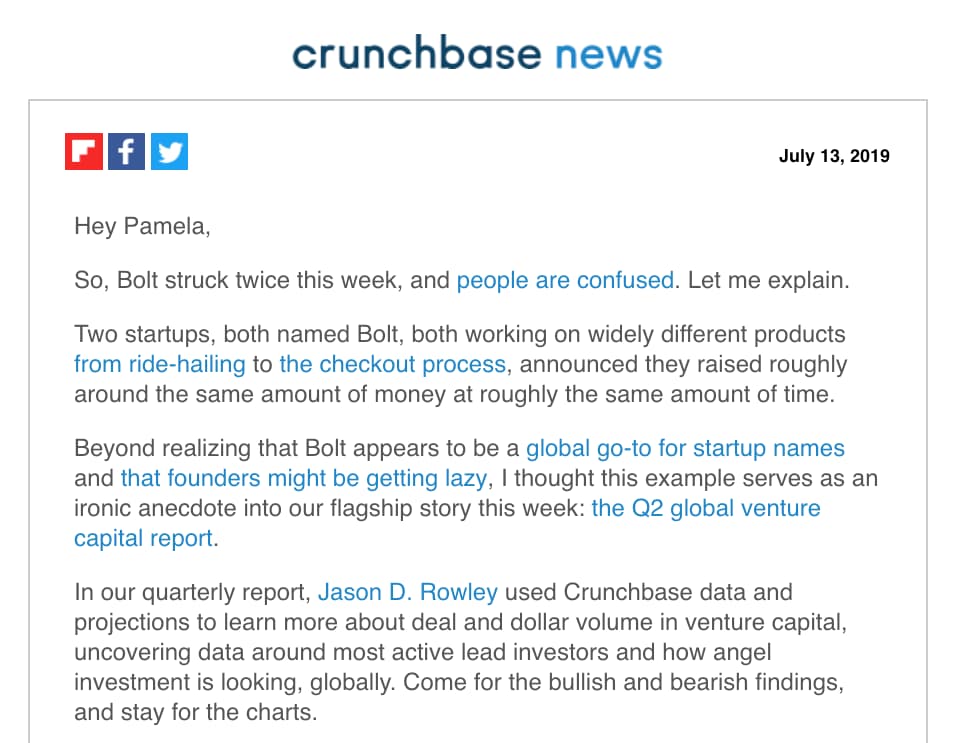 This subject line shows how you can be punchy, but also fun and creative when trying to pull in your audience.
23. “🔥 Hot freebie alert! 15 free gifts, you pick 5.”
Sender: Shutterfly
Shutterfly, a company that allows you to print your photos on interesting products or other frames gets visual with their subject lines by occasionally using an emoji. Due to their company’s nature and creative audience, the fire emoji in this subject line seems to work without feeling desperate.
The email subject line also pops because it has a lot of buzzwords, including “hot,” “freebie,” “gifts,” and “alert.” In just once line, it is able to give the potential reader a good reason to open it, especially if they love using Shutterfly.
When you open the email, it aligns perfectly with the subject line by announcing a freebie promotion. This strong alignment between the subject line and message might keep people from just skimming the message. 
24. “Watch Out for This Amazon Phishing Scam.”
Sender: WIRED
In this subject line, WIRED includes Amazon, a large company name. Including the name of a big brand can be a great way to boost open rates because people who enjoy or use products from a big brands might click into a subject line that discusses them.
Additionally, when a brand name is combined with negative words like “phishing” or “scam,” people might open the email much more urgently so they can learn how to avoid running into the issue being discussed.
While Shutterfly’s message has strong alignment with its subject line, WIRED oppositely gives a subject line related to the last story in its newsletter. This is an interesting way to get your readers to scroll through the entire email and see the other stories before they get to the story that lead them to click into it.

HubSpot Email Marketers’ Favorite Subject Lines
Above are some of the best subject lines we’ve gathered, but we asked the marketers on our team to give some additional favorites and what makes them so good:
1. “Show them what you’re made of”
Sender: Canva
“Using empowering, positive and defiant language to leverage the use of Canva tools – love it.”
—Lucy Reddan
2. “Drooling over email designs 🤤”
Sender: Really Good Emails
“Emojis always catch my eye amongst the 100+ emails I receive on a daily basis. As an email geek myself, this subject line matched my interests and piqued my curiosity.”
—Ashley Riordan
3. “Can you help me name this dance, [First Name]?”
Sender: Marie Forleo
“It’s personalized and piques my interest because A) I’m being asked for input and B) I want to be in the know about this mysterious dance (#fomo).”
—Christina Perricone
4. “Who you gonna call?”
“If you can make a pun, include a social reference, or even just a familiar phrase, it’ll catch people’s attention.”
—Clint Fontanella
5. “Shoes You Can Wear All Damn Day”
Sender: Everlane
“Swearing is controversial in email marketing, but I think it worked really well in this email from Everlane. Not only was it a clever and concise way to introduce their new line of footwear called ‘The Day Collection,’ but it also aligned with the brand voice they use in other emails and across their website.”
—Anna Fitzgerald
6. “You were on point last week 🎯”
Sender: Grammarly
“Grammarly is so good about rewarding you/making you feel good about your writing.”
—Jordan Pritikin
7. “Hmm…No writing activity last week?”
Sender: Grammarly
“And if/when you turn their plugin off, their retention strategy is great! They reach out with subject lines like these that immediately drive me to click through and turn their plugin back on. Very well done reward/habit building.”
—Jordan Pritikin
These are just some of our favorite subject lines — and since we receive plenty of them, we’ll continue adding the best ones as we discover them.
Want more? Read How to Write Catchy Email Subject Lines: 19 Tips.

How to Build a Website: A Step-by-Step Guide
Studies show that between 70-80% of consumers research a business online before visiting in person or making a purchase. That means having a website is as necessary for companies today as having a phone number.
Maybe you’re starting a new business venture or developing your personal brand. Or, maybe you’re looking to update your company’s outdated website. Whatever the case, creating a new website can feel overwhelming, particularly without technical expertise or a budget for web developers.
To alleviate any frustration you might feel, we’ve put together a comprehensive, step-by-step guide to creating a website. Best of all, you won’t need a coder, web designer, or big budget to create one — you’ll just need to follow the nine steps below.
1. Choose your website platform.
The first thing you’ll need to decide is whether you want to create a website using a website builder or a content management system (CMS).
Both provide the out-of-the-box features, pre-designed templates, and extensions required to create a custom site without coding, but they offer different experiences for creating and managing a website.
Website builders provide everything you need to launch a site. You get website building tools, hosting, domain registration, SSL certification, templates, and support in one place, often for a low monthly rate.
This ease of use and pricing appeals to many site owners; however, free website builders as well as the more expensive alternatives tend to be limited in flexibility. For example, you can’t add your own custom code, or drag and drop elements anywhere on your posts and pages with a website builder.
If you want more control over the functionality and appearance of your site, use a CMS. A CMS will provide the content management features, advanced functionality, and customization options required to build larger, more complex sites.
If you’ve decided that a CMS is the best option for your business, consider the software, ease of use, customizability, security, and pricing of different platforms to narrow down your selection.
The best CMS system for your business will align with your site’s needs and goals. For instance, do you need a platform that allows you to add your own custom code or one that supports multiple languages? Would you like a proprietary CMS to help share the responsibility of protecting and maintaining your site, or would you prefer an open-source CMS? You might also narrow your list by comparing the selection of templates and add-ons offered by each system.
WordPress, for example, is a popular open-source CMS that provides thousands of themes, plugins, and modules for customizing your site. In exchange for this flexibility, you will have to spend more time and money downloading, installing, and maintaining these extensions. On the other hand, WordPress alternatives like the CMS Hub provide more built-in functionality, app integrations, and security features so you can focus on creating web content and attracting leads.
Once you’ve chosen the best CMS platform for your needs, continue to step two.
2. Select a hosting plan.
Web hosting is a service that enables individuals or businesses to run a website on the Internet. The service provider, known as a web host, will store your website files on a secure server that it keeps up and running, and then deliver and display that web content to visitors who type in your URL in their browser.
The steps for selecting a hosting provider differ depending on whether you chose a proprietary or open-source solution above. A proprietary solution will include web hosting in its pricing package. So you’ll simply need to select the plan with the bandwidth, storage, and other features that suit you best.
For example, Wix offers limited bandwidth and storage on its free plan so you’ll have to upgrade to its Unlimited plan for unlimited bandwidth and 10GB of storage.
If you opted for an open-source solution, you’ll have to find your own hosting provider, which will take take time and lots of research. There are hundreds of web hosts on the market. Each one might offer different types of hosting, including shared hosting, VPS, and dedicated hosting. Let’s briefly look at the differences below.
Virtually every web host offers shared hosting. Shared hosting is the most popular type of hosting, particularly among new site owners, because it’s the cheapest option. However, because your website has to share the same server with many other websites, it can’t support high volumes of traffic and is most vulnerable to hackers and other security threats.
VPS hosting is a pricier alternative because it isolates server resources for your site specifically. That means your site will be able to handle higher volumes of regular traffic. If you’d rather not share a server with any other website, you can upgrade to dedicated server hosting.
Once you’ve decided what type of hosting you need, you can pick a provider. DreamHost, Host Gator, and Bluehost are among the most popular third-party providers and offer free domain registration for the first year. That will simplify the next step in building a website.
3. Get a domain name.
No matter what type of website platform you chose to build your site, you’ll likely have to purchase a domain name. Some website builders like Weebly offer a free subdomain for your site, but you’ll want to upgrade to a custom domain.
One of the easiest ways to appear more professional and legitimate as a company is to pay for a domain name. Imagine you were looking for a freelance writer. Are you more likely hire me if my website address is carolineforsey.weebly.com or carolineforsey.com? An extension like “weebly.com” can confuse visitors and dilute your brand identity. Worst case scenario: a visitor might assume you can’t afford a premium hosting service or custom domain, and draw conclusions that your business is not fully established.
Fortunately, purchasing a domain name is typically inexpensive — even for those who sign up for hosting plan that does not include free domain registration for year. There are two different approaches you can take.
You can visit a domain site, purchase and register a domain name there, and then connect it to your hosting account. Both Godaddy.com and Namecheap.com are cheap, secure, and effective options for buying a domain name, with added benefits such as SSL security and office 365.
Or you can complete the entire domain name search and registration process on your hosting provider’s site. For example, after signing up for a Bluehost plan, you’ll be taken to this page to sign up with a domain name.
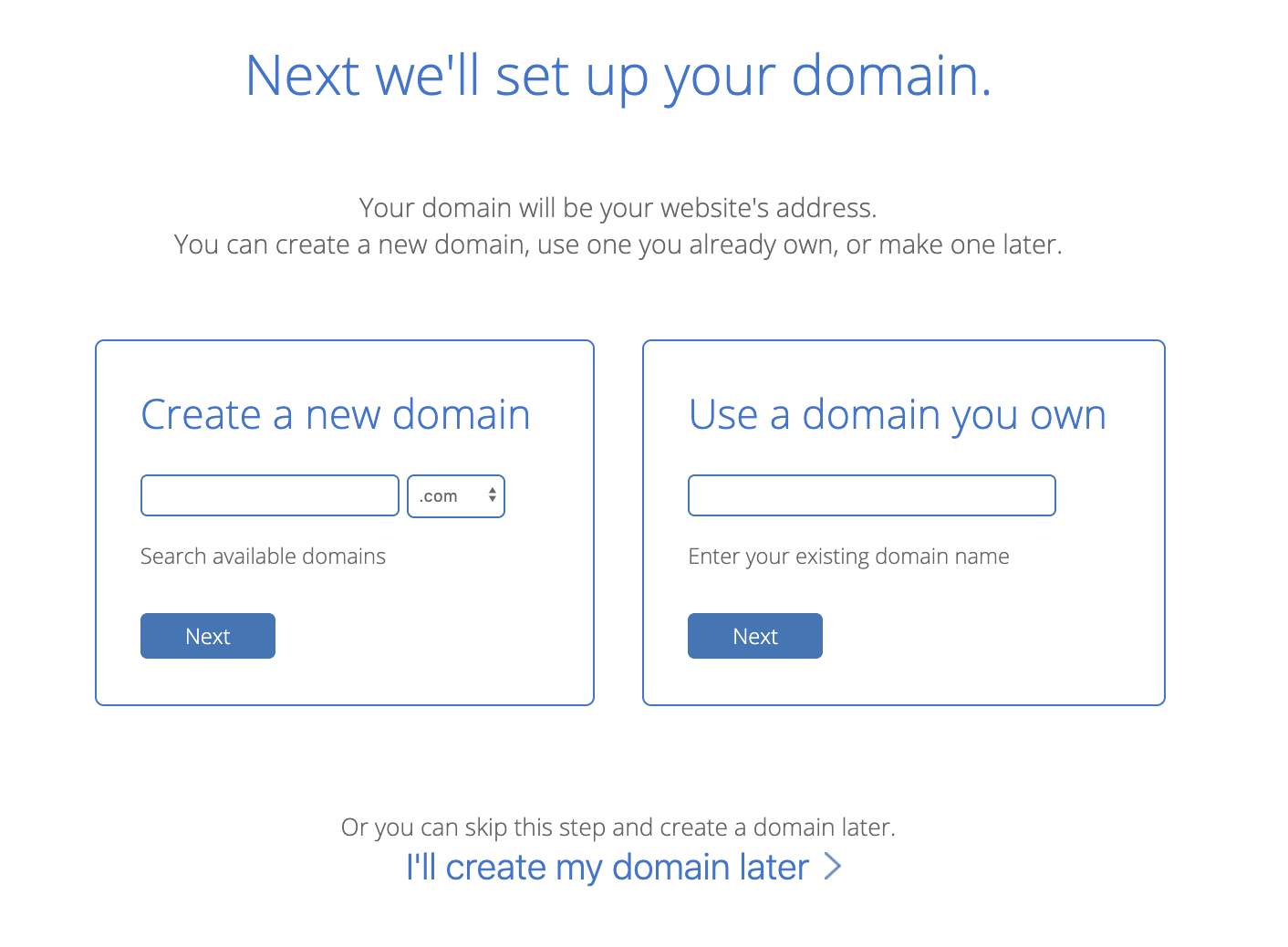
Here’s where it gets tricky. You’ll need to choose a domain name as similar as possible to the name of your company, but with over 1.8 billion websites out there today, your company’s name might already be taken.
If your ideal domain name is already taken, consider using a different extension. I’d advise you to use one of the three most common extensions if you can: .com, .net, or .org. However, if it makes sense for your business, you might want to check out an alternate extension like .us or .shop.
Play around with it. Once you’ve chosen and paid for a domain name, you’ll usually also get personal email accounts attached, so make sure you’re happy to use your domain name as your main online identity.
4. Choose a theme for your site.
Now, for the fun part.
Themes allow you to easily change the look and feel of your site without having to code HTML and CSS from scratch. Themes are made up of templates, modules, images, and global content that control your site’s overall design.
On whatever platform you chose, take the time to browse through the selection of themes available. Many will come with a directory of free themes, where you can use filters or the search bar to find themes related to your industry, with a specific layout, and more.
There are some must-have features that every theme should have. For example, it’s important your theme is responsive, so your site will look the same on all devices. You’ll also want to stay away from hard-to-read fonts or flashy backgrounds that could distract a consumer from understanding your core message.
Other considerations will be specific to your business and site. You might be looking for a static header or a slideshow header, for example. Or you may need a theme that comes with a front-end builder. Below are some questions you can answer to find the right theme for your site:
- Do you need a variety of layouts or just one?
- Are you looking for a theme with built-in social media widgets or any other functionality?
- Would you like to install a demo site or start from scratch?
- Do you want to purchase a theme that includes its own theme builder?
Ultimately, no one knows your business better than you. Take the time to consider which theme would best represent your brand and most likely appeal to your ideal demographic.
When in doubt, you can’t go wrong if you choose something clean with straight lines and a limited amount of text. If you need some inspiration, check out 27 of the Best Website Designs to Inspire You in 2020.
If you can’t find a free theme that meets your exact specifications, try looking for premium themes in third-party marketplaces.
Once you’ve selected and installed a theme on your site, move on to the next step.
5. Customize your theme and templates.
Once you’ve chosen a theme, take the time to customize it and its individual templates. Your site’s design and functionality is your chance to persuade an audience to take a closer look. It’s imperative your design makes sense to your ideal consumer and works to enhance your product’s success rather than hinder it.
That’s why you should think of your theme and templates as a starting point, rather than the final look. Depending on the website platform you’ve used to build your site, you’ll have different degrees of control over your site’s appearance.
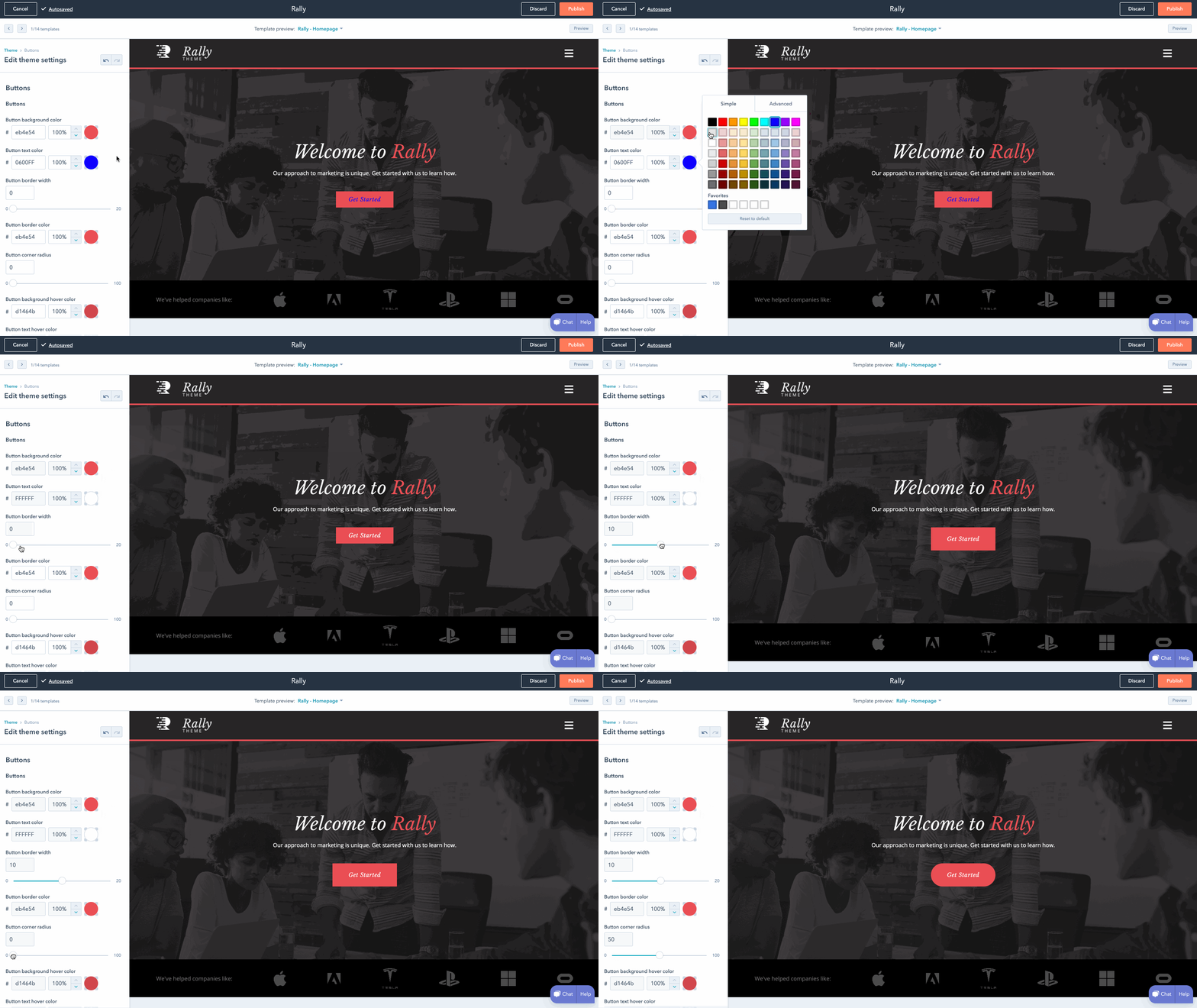
On most platforms, you’ll be able to choose a template and then change the color palette, replace the images, insert social media icons, add personalized forms and menus, and change the size, colors, and fonts of buttons.
On more flexible platforms like the CMS Hub, you’ll be able to edit your theme’s global settings to make sitewide changes. That means you can make changes to your font and other elements in one place and they’ll be implemented across all pages on your site.
6. Add pages to your site.
It’s important to plan exactly which pages you’ll need to include in your site. While it varies business to business, I’d guess you’ll need at least a homepage, an “About Us” page, a “Services/Product” page, and a “Contact Us” page.
You should also add a blog homepage. I might be biased, but there are serious benefits to business blogging. For example, websites that feature a blog are 434% more likely to be ranked highly on search engines.
While every platform is different, it’s typically easy to add and remove pages on whichever platform you use. Let’s take a closer look at the process on WordPress, for example.
- Start by logging into your WordPress dashboard.
- On the left side of the screen, click Pages > Add New.
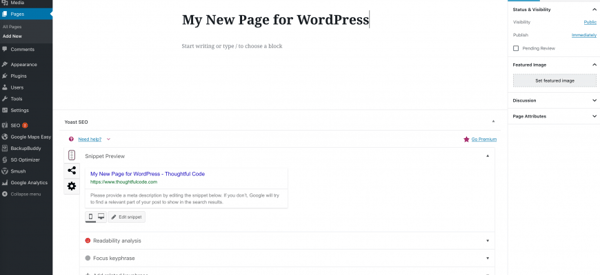
- You can add text, insert images, embed videos, and make any other changes you like.
- When you’re ready, click Publish.
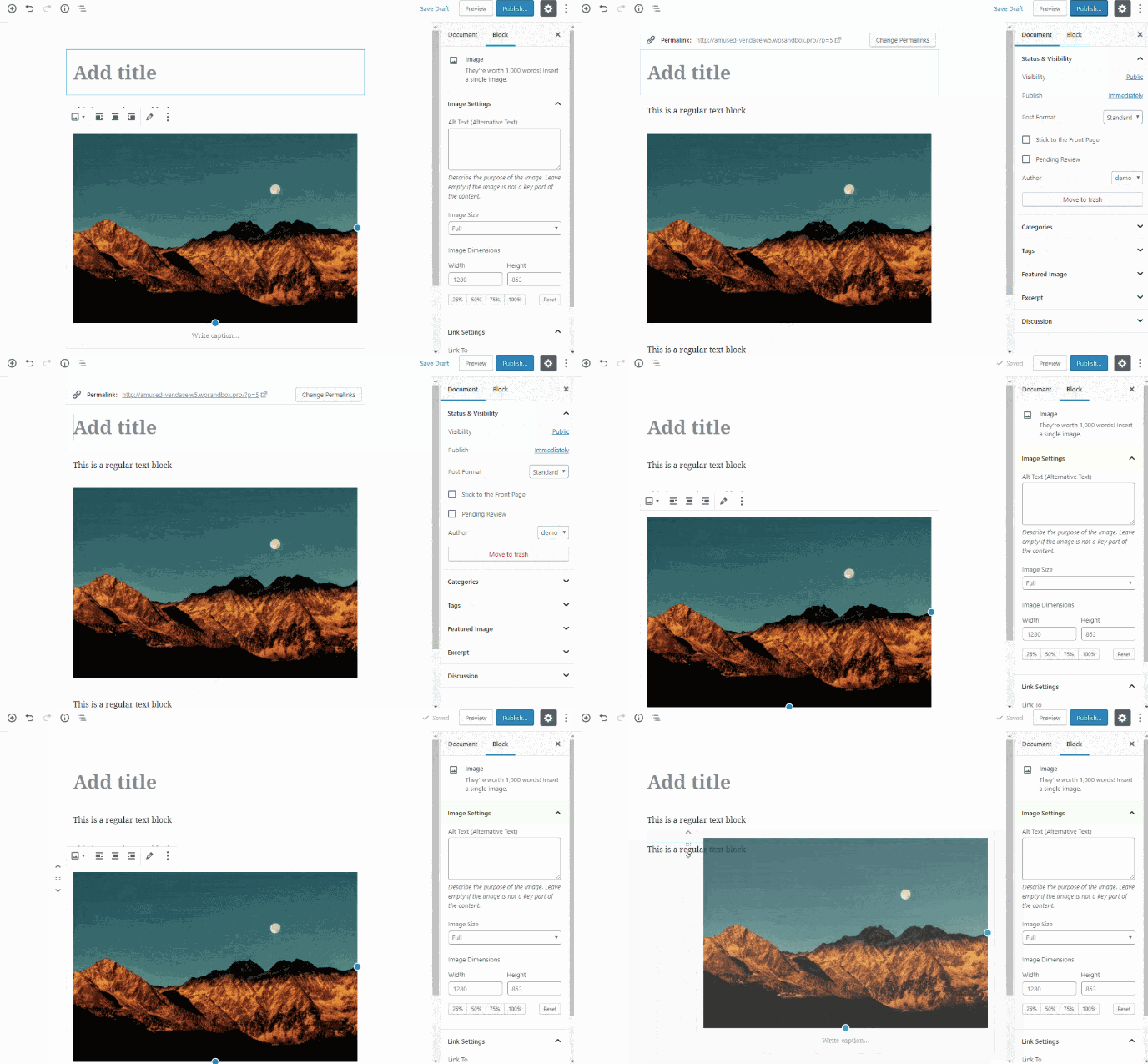
Once you’ve decided what pages you need on your site, make sure to add them to the navigation bar of your site. You can rearrange page topics any way you want, or combine them.
You can visit other company websites within your industry to get ideas for how to organize your navigation bar, or which pages to include and exclude if you’re unsure.
7. Write content.
This is arguably the most important step. Now that you have your pages set up, what will you put on them?
I’d suggest writing rough drafts for pages like your “About Us” page and landing page. Talk with coworkers and stakeholders — what message do you want to put out there? What tone do you want to set? Should you make jokes and be funny, or aim to be more inspirational?
If your online audience stumbled across your site, what questions would they have first?
Imagine your website is your only chance to have a full conversation with a potential customer. The home page is the preliminary introduction: “Hey, we do XYZ.” Your “About Us” page digs deeper: “We are XYZ.” And your products or services pages are your big push to the finish line: “You want to work with us? Great, here’s how you’ll benefit.”
During this stage, it’s imperative you do your keyword research.
For instance, if you’re selling eyeglasses, and you notice “retro eyeglasses” has more monthly search volume than “vintage eyeglasses,” you might use this research to steer the direction of the content on your site.
If you’re stuck, check out competitor’s websites to gauge what other companies in your industry are doing.
8. Fill in general settings.
Once you’ve filled in your pages with the heavy-hitter content, you can still increase your search visibility by adding SEO elements to each and every page.
On your pages, you should include:
- Page titles
- Headers
- Meta descriptions
- Image alt-text
- Structured markup
- Page URLs
- Internal linking
- Mobile responsiveness
- Site speed
Make sure you include a site title and tagline in the “Settings” of your website building platform. Go through, and check out the URLs — are those optimized for search?
Each of these elements are essential to your on-page SEO. They not only help to tell Google about your website and how you provide value to visitors and customers — they also help optimize your site for human eyes as well as search engine bots.
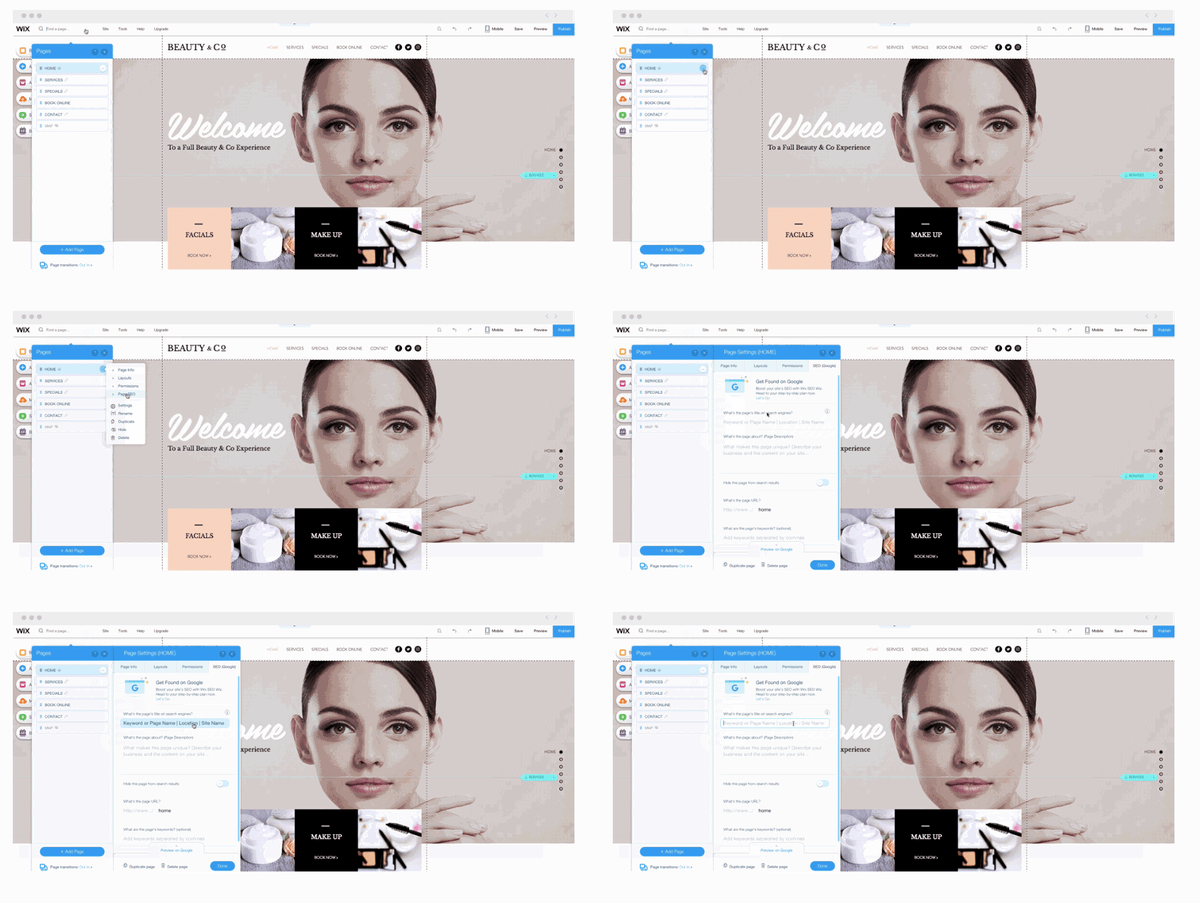
Any platform you’re using to build your site should make it easy to optimize these elements on every post and page. With Wix, for example, you can add image alt-text, meta descriptions, headings, and custom URLs right in your content editor.
9. Install add-ons.
Lastly, take a look at your site and figure out what you’re missing. Ideally, your platform will offer all the add-ons you need to extend the functionality of your site.
It’s important to note these add-ons might be called apps, extensions, modules, integrations, or plugins, depending on the platform you use.
If you’re running an ecommerce site on HubSpot, for example, you might use HubSpot’s Shopify extension. Or, maybe you want to ensure your WordPress website is secure, to protect client data. In that case, you might download the Wordfence Security plugin for firewall protection against attacks, malware, and other threats.
If you’re lacking out-of-the-box features for security, SEO, image compression, and social media, check if your platform offers an app or integration to add that functionality to your site. It’s much easier to do all this work in one place rather than having to log on to several disconnected platforms.
Let’s say you’ve browsed your platform’s directory or marketplace and chosen a few add-ons you think will take the effectiveness of your site to the next level.
Installing these add-ons will vary from platform to platform. To give you an idea of how long the process will take, let’s walk through the process of installing an app from the HubSpot marketplace.
- In your HubSpot account, click the Marketplace icon in the main navigation bar.
- Under Manage, select Connected apps .
- Click Visit App Marketplace.
- Use the filters in the left sidebar to browse for an app.
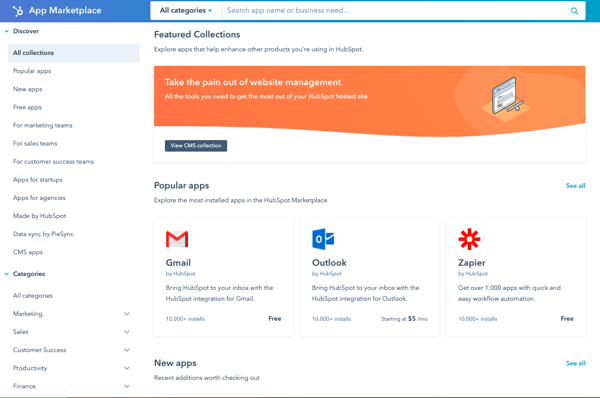
- Click on an app to see more information.
- On the right, you can review the details of the app. Under Requirements, check whether or not the app is compatible with your HubSpot subscription, and see if there are any app-side subscription requirements.

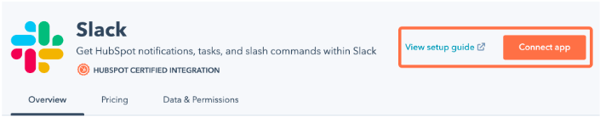
- When you’re ready, click the Connect app button in the top right corner of the screen.
Once you’ve completed these nine steps, just click “Publish” and your site is ready for use.
How to Make a Website with HubSpot
Lastly, let’s take a look at how to make a website with CMS Hub. If you’re not using HubSpot already, you can access a free trial of HubSpot CMS. If you’re already using HubSpot’s CRM, it probably makes the most sense to build a website within HubSpot to integrate all your sales and marketing needs in one place.
HubSpot CMS offers a variety of plugins and extensions, themed templates, and sophisticated tools for SEO analysis.
If you want to build a website with HubSpot, it’s easy and intuitive. Here’s how:
1. Create home page.
Within your HubSpot portal, click “Content” on the dashboard at the top of your screen. Then, click “Landing Pages.”
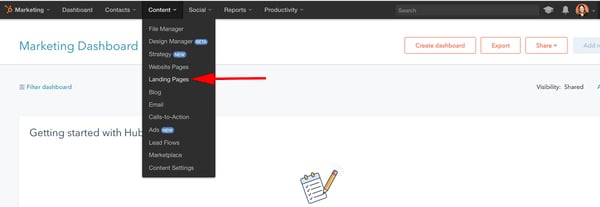
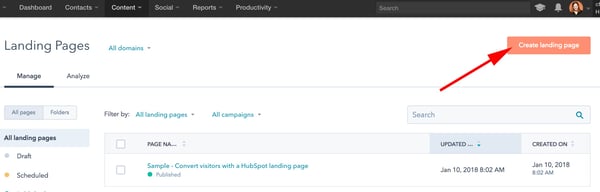
After that, click the orange “Create landing page” button and name your page.
2. Select a template.
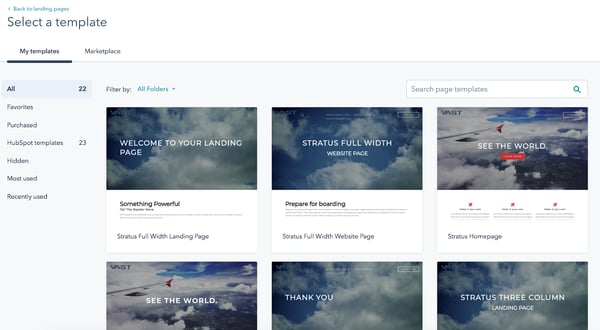
Now, you’ll be taken to this “Select a template” page. Scroll through your options, search page templates, or check out the Marketplace. When you’ve found a template you like, select it.
3. Edit the modules.
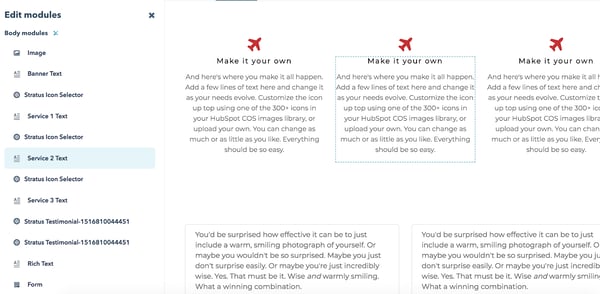
This is your landing page. You can scroll over text boxes, images, or other modules to edit them. In the below picture, I scrolled over the “See The World” Banner Text, and when I click it, it allows me to edit that text.

You can also click the “Edit modules” tool on the right side of your screen and edit from there. For instance, I selected “Service 2 Text”, which directed me to the “Make it your own” paragraph on my landing page. You can add text, images, sections, forms, and more from the “Edit modules” section.
4. Create other pages on your website.
When you’re happy with your landing page and want to move on, go back to your dashboard and click “Content” at the top of your screen, and then “Website Pages.”
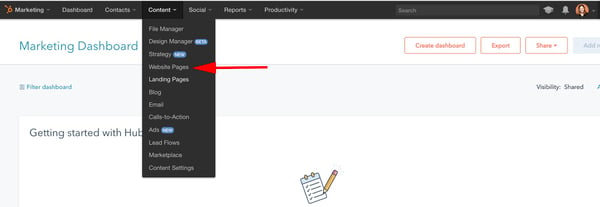
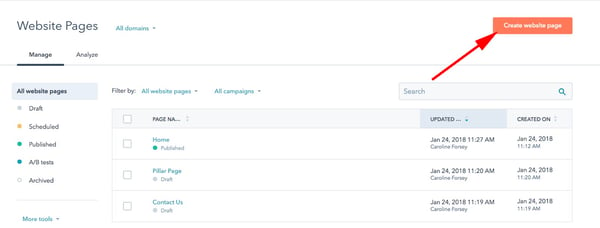
Here, you’ll click the orange “Create website page” button and name your page, just like your landing page. Then, you’ll be taken through a similar process of choosing a template and adding content. If you want a more in-depth tutorial, check out a quick tour of website pages.
5. Incorporate social media accounts.
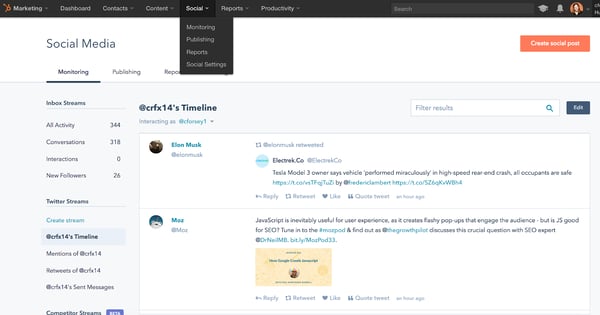
If you want to incorporate your social media accounts, click “Social” on your dashboard. You can monitor all your social media accounts and also publish tweets, Facebook statuses and comments, Instagram pictures, and other content straight from your HubSpot dashboard.
6. View analytics.
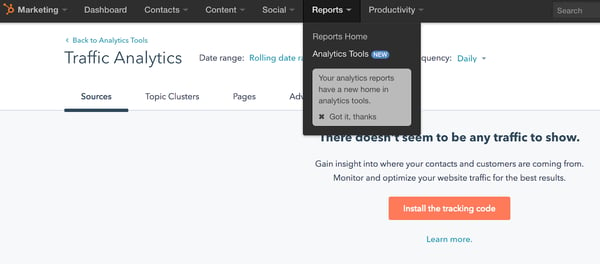
If you want to check out your site analytics, go to “Reports” and then “Analytics Tools”. You’ll need to install the tracking code, which is easy to do within the HubSpot platform by clicking the orange “Install the tracking code” button. If you’re still unsure, check out how to install the HubSpot tracking code.
7. Add blogs to your site.
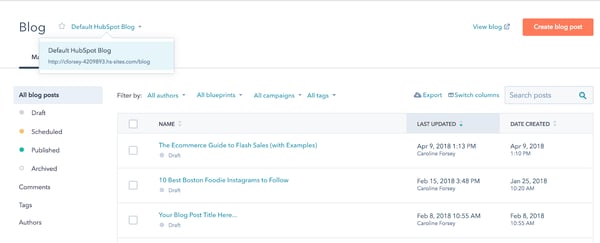
If you want to write blog posts, go to “Content” > “Blog” on your dashboard to create, publish, and monitor your website’s blog posts.
This is a fairly broad and general overview to get you started building a website with HubSpot, but there are plenty of more in-depth features and tools you might want to explore with a HubSpot specialist, or by checking out some articles on academy.hubspot.com.
Ensuring a Smooth Launch
Once you’re done building a website via the CMS Hub, it’s important to check that you’re not missing any crucial elements or going live with any glaring errors. Once you’ve gone through this list above and feel like you’re close to a website launch, read this blog post for a detailed list of things to check before your go live.
And don’t forget to check out our CMS Hub, as mentioned above. It will help you accomplish most of the things on your website launch checklist without you even knowing you. You can find a free trial here.
Editor’s note: This post was originally published in May 2018 and has been updated for comprehensiveness.

How to Manage Your Entire Marketing Budget [Free Budget Planner Templates]
Let’s say your company decided to invest in a website redesign to improve lead generation, and you’re responsible for managing the project.
Naturally, one of the first questions you have is, “How much is this website redesign going to cost?”
The answer, of course, is “it depends.” Are you simply switching to a new template and adding some new CTAs, or are you migrating your entire website to a new platform?
If only there were a way to organize your answers to all of these questions — a place where you could enter in estimated costs for all of your line items, and then compare your projected marketing budget to what you actually end up spending.Good news: Our free marketing budget templates have you covered. Included in our eight marketing budget templates bundle is a template to manage your website redesign … as well as templates for both Excel and Google Sheets to help you track your content budget, paid advertising budget, event budget, and more.
Additionally, in this guide, we discuss how to manage your entire marketing budget from start to finish. Let’s get started.
Marketing budgets can be difficult to establish for both small and large businesses.
If you’re a small business, you might wonder which marketing expenses you should start with. If you’re a large business, having multiple marketing teams or operations in play can make it harder to ensure everyone across the department gets what they need.
So, what should you spend your marketing cash on?
First, let’s identify a focal point: Digital media. Digital media makes up more than half of both U.S. and global advertising spend. This includes initiatives that cater to audiences on desktop computers, search engines, video streaming platforms, social media, and mobile devices.
Given the success marketers have seen in it, you might consider spending at least half of your marketing budget on some of these digital channels. Let’s talk about other ways to divvy up your marketing budget.
Marketing Budget Allocation
As you build a marketing budget, here are a few items you’ll want to keep in mind when planning your spending.
- Software: When it comes to digital and even print media, you may need software to create your marketing campaigns, or handle your daily processes.
- Freelancers: If you have a temporary campaign or want to test out a new marketing strategy, you might want to hire a short term freelancer before bringing on a full-timer.
- New personnel: When you do hire full-time employees, you’ll want to budget costs including their computer, technology, benefits, and onboarding-related needs.
- Advertising: Budget how much money you’ll spend on paid opportunities such as physical ads, native ads, sponsored content, search engine ads, and social media promotions.
- Content creation: When you create content such as videos, photos, or even blog posts, you’ll need to put paid time into it. Budget how much money will go into creating this content so you can adjust accordingly based on its return on investment.
Spreadsheet knowledge alone won’t help you understand how you’ll spend your marketing money this year. Creating a sound marketing budget starts with knowing what purpose this budget will serve and which marketing teams it will represent.
1. Know your buyer’s journey.
Your buyer’s journey is the steps your audience takes as they ‘journey’ from prospect to paying customer. Knowing your buyer’s journey allows you to understand how your audience interacts with your marketing — and where to set your goals and budget to better reach your customers.
Ask yourself these questions as you define your buyer’s journey:
- How do your leads and customers typically discover your products?
- What do they need to know before they make a purchase?
- How many site visits do you see per month?
- How many leads are you generating per month, and how many of these convert to paying customers?
- What is the cost of generating new leads and then converting them to customers?
- What’s the typical value/revenue of each lead?
This process should point out what marketing tactics are (and aren’t working), where you should alter your marketing goals, and where you can focus your marketing budget.
2. Align your budget with your marketing goals.
What you spend and where you spend it will depend on what you’re trying to accomplish.
So, when starting to create your marketing budget, make sure you’re only spending money on the things required by your current marketing goals — goals set based on your audience and their journey from prospect to customer. These could include:
- Display ads to promote a new product you’re launching this year.
- Sponsored social media posts to generate followers on your new Facebook page.
- Paid search engine ads to drive traffic (and purchases) to a specific product page.
- Contract bloggers to get more organic search traffic to your company’s website.
Former Demand Generation Marketer at HubSpot and current Senior Product Marketer at Atlassian, Jessica Webb, says this about how your costs can change when focusing on lead generation vs. lead conversion: “The majority of the money you spend on paid efforts is usually calculated based on volume of clicks or impressions. Because of this, you’ll often want to put more budget toward campaigns with higher-volume offers and audiences.”
“For example, a tweet or Facebook ad promoting a lead generation offer that leans more top of the funnel will likely receive more clicks than something that falls more toward the middle or bottom of the funnel,” she explains.
Your paid advertising costs will also change depending on how wide of an audience you are attempting to reach.
“You can look at Twitter advertising as an example,” Webb says. “You have to option to target your campaigns based on users’ interests or keywords searched for. Interests are a much broader category, whereas smaller pockets of users are searching for any given keyword, therefore your interests-based audience is going to be much larger and require a larger budget.”
3. Beware of hidden costs.
One of the great advantages to having and maintaining a budget spreadsheet is that it helps you avoid those end-of-the-quarter or end-of-the-year freak-outs when you realize, “Whoa … what did I spend all that money on?”
In many cases, unanticipated costs can force marketers to fork over cash that they didn’t plan on spending. Product marketing offers a perfect example. According HubSpot’s VP of Marketing Meghan Keaney Anderson, it’s easy to forget that successfully marketing your products and services requires more than just promotion.
“When people allocate budget for product marketing, they tend to think in terms of product launches and promotional activities,” Anderson explains.
“That’s certainly an important part of it, but another area of focus to remember is setting aside resources to conduct research and message testing long before the product ever goes to market. Having conversations with customers about the pain points your product will ultimately address is critical to shaping the messaging and having a successful launch.”
4. Remember where your priorities lie.
Marketing is overflowing with add-ons and extras, upsells, and “premium” versions. One of the best ways to assess what’s nice to have versus what’s absolutely necessary is to (you guessed it) organize all of your expenses.
By keeping tabs on where your budget is being allocated, and cross-checking that spending with the results you’re getting, it will be much easier to figure out what should keep getting budget and what should get kicked to the curb.
For example, let’s look to the world of public relations. In PR, there are countless tools to which you can allocate budget, which could leave you overspending where it doesn’t matter — and underspending where it does.
“Tools abound to help PR practitioners not only create and distribute great content and find and target key stakeholders, but to ultimately measure reach and effectiveness,” says Nathaniel Eberle, HubSpot’s former Director of PR & Brand and LogMeIn’s current Director of Global Brand Management.
“The key is making sure you’re laser-focused on who you’re setting out to reach and influence, then ensuring that your budget supports how they’ll most likely want to receive (and share) your key messages.
“As the media and digital landscape evolves at breakneck speed, continually reassessing the tools, services, and programs you’re employing is a great way to determine real-time ROI of your overall spend. Today’s measurement tool may be worthless to you tomorrow.”
5. Spend your budget smartly.
When you open up these budget templates and check out all the various expenses detailed in them, don’t fret if you can’t tick every box. I’m not advocating for an “always spend more” approach to marketing.
I’m advocating for an “always spend smart” approach. The expenses listed out aren’t mandatory — they’re just meant to guide your thinking and to help ensure that you haven’t overlooked any hidden costs.
6. Prepare to measure ROI.
When you put a certain amount of money into a certain area, you’ll want to determine if your budgeting helped you or hurt you as you plan out future budgets. The best way to do this is by measuring ROI — or return on investment.
If you’re the money you spend on one item results in your company making more in return, you may want to increase budget in the next year. If your money went nowhere, you should examine your budget.
8 Marketing Budget Templates You Need to Manage Your Marketing Spend
With the 8 Free Budget Planner Templates to Manage Your Marketing Spend, you’ll be able to manage all of the moving pieces of your budget at a monthly and quarterly level.
Use the Excel version of the templates to keep all of your budgets in one place. When you download the zip file, you’ll find a separate file for each marketing team, as well as a Master Budget Template to maintain a high-level view of your overall expenses.
Interested in sharing your marketing budget across a larger team? Try the Google Sheets version of the same eight templates to share access with other Gmail users. For the Google Sheets templates, each team budget is found in a separate tab of the same Google Sheet.
No matter which version you choose, each budget is optimized with the same line items, tips, and graphs. Read on to learn how to use each budget template.
1. Master Marketing Budget Template
Download the Master Marketing Budget Template here.
While it’s helpful to have individual budget templates for specific marketing departments and activities, it’s also nice to be able to take a step back and see the bigger picture.
The Master Marketing Budget Template lets you do just that: It’s the place where you can collect the totals from the other seven templates in the bundle and see all of your expenses in one place.
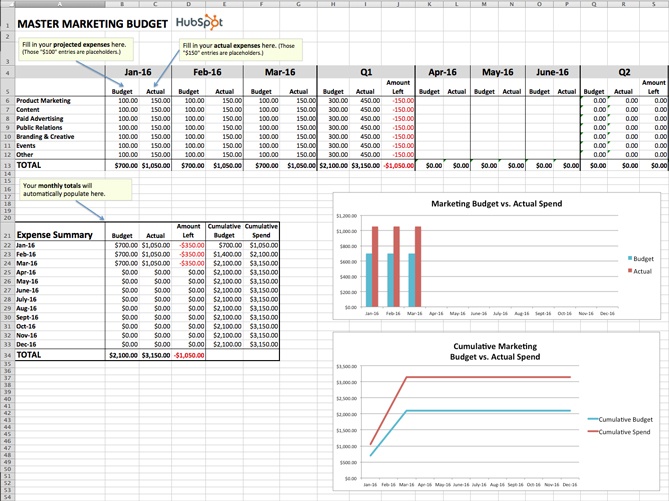
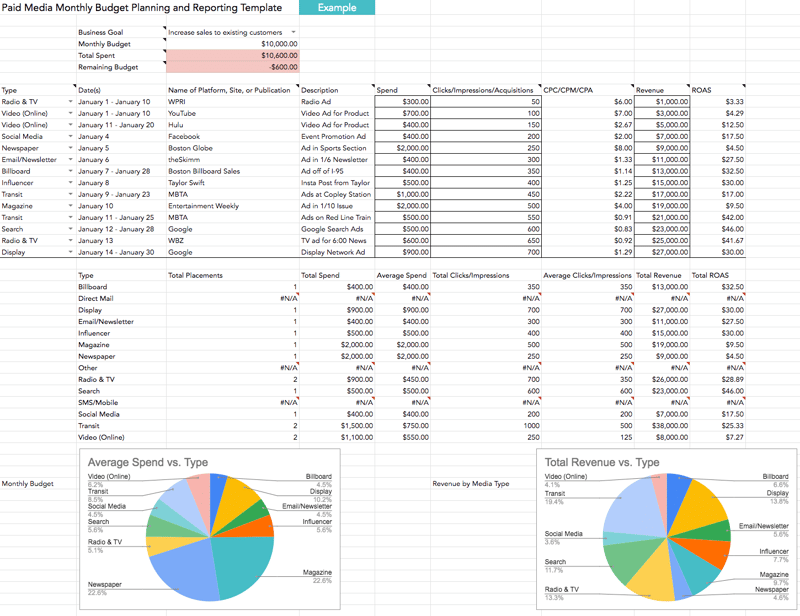

2. Product Marketing Budget Template
Download the Product Marketing Budget Template here.
This template will guide you step-by-step through the process of budgeting for a product launch. From determining product/market fit, to running user testing sessions, to promoting your finished product, our Product Marketing Budget Template will help ensure you don’t overlook any important expenses.
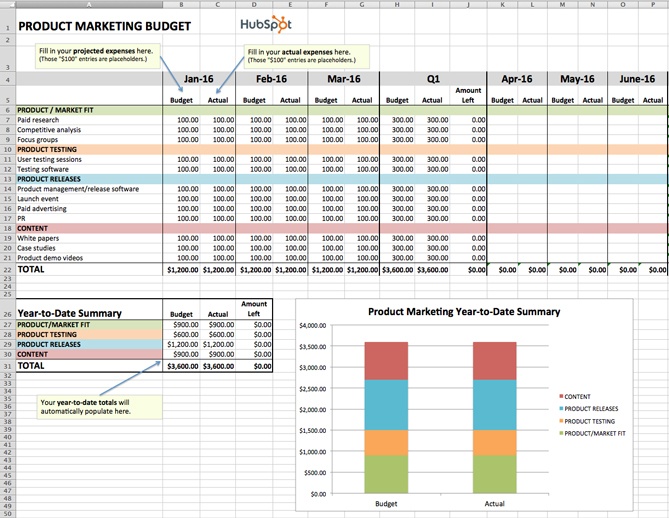
3. Content Budget Template
Download the Content Budget Template here.
The budget required for creating and promoting content can vary greatly from organization to organization. For example, while some organizations keep most of their content operations in-house, others rely more heavily on freelancers and contractors. And while some use many different software products, publishing tools, and services, others take a much simpler approach.
Our Content Budget Template is designed to cover as many content-related bases as possible. So, if you see any expenses listed that don’t apply to your organization, go ahead and delete them. (That’s the beauty of Excel spreadsheets: You can customize them to your specific needs.)
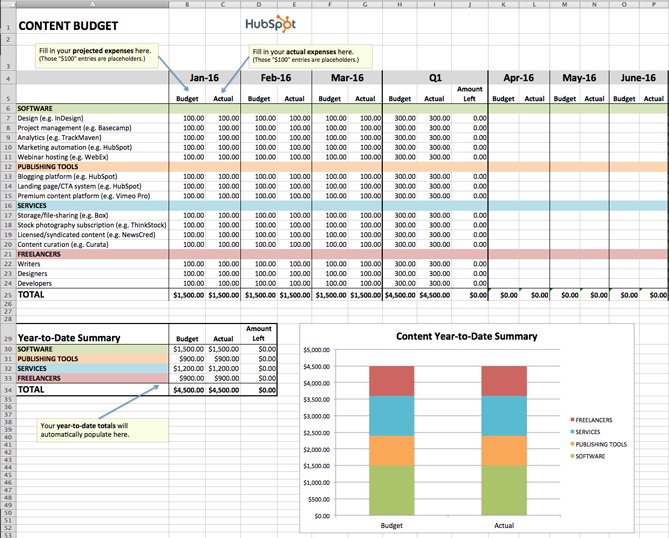
4. Paid Advertising Budget Template
Download the Paid Advertising Budget Template here.
Paid advertising: Does it really qualify as an inbound marketing tactic/channel? That is a loaded question, my friends, and one that I don’t have room to answer in-depth in this post.
What I can tell you for sure is that you can do paid advertising in an “inboundy” way — i.e. by targeting specific buyer personas and using paid advertising as a supplement to your organic efforts to help drive awareness and conversion opportunities.
Measuring the effectiveness of your paid advertising campaigns is also paramount to doing things the inbound way. Using our Paid Advertising Budget Template, you can keep tabs on your monthly (and quarterly) ad spending, and then cross-reference the amounts with your lead-generation metrics to determine your cost-per-lead.
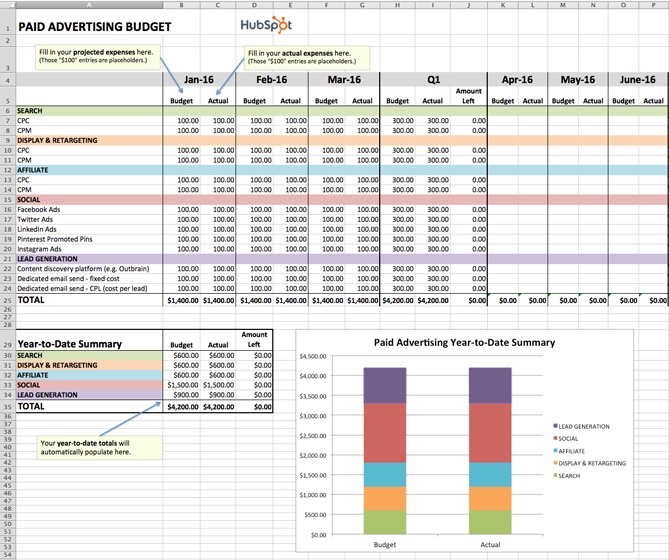
5. Public Relations Budget Template
Download the Public Relations Budget Template here.
Public relations expenses amount to more than just paying for press releases. From reputation monitoring software, to traveling (e.g., to events and trade shows), to applying for awards, there are many PR costs that can be all too easy to overlook.
To ensure you’re accounting for all of your organization’s PR-related expenses, check out our Public Relations Budget Template.
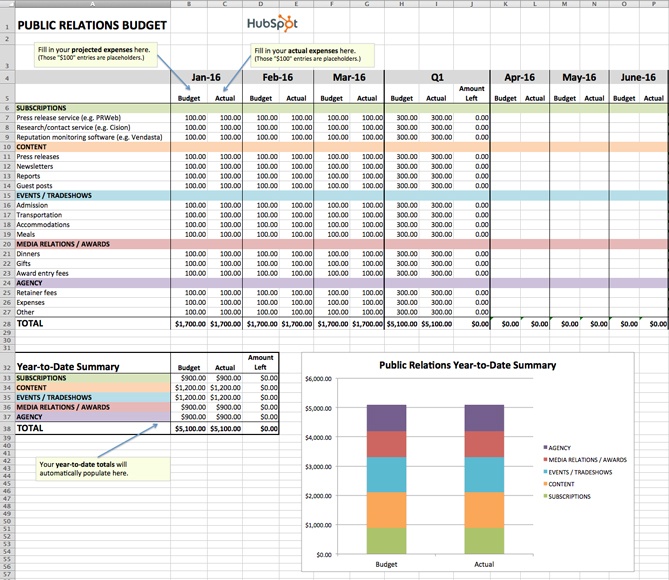
6. Branding & Creative Budget Template
Download the Creative Budget Template here.
In order to produce high-quality, innovative graphics, videos, and other content, the branding and creative teams of today need more than just Photoshop … a lot more. One of the largest — and often most overlooked — expenses is storage.
If your organization is producing a lot of video, storage is especially important. Because as it turns out, when budgeting for video storage, you shouldn’t be thinking on a megabyte (MB) or even a gigabyte (GB) scale, but on a terabyte (TB) scale. FYI: 1 terabyte = 1 trillion bytes. You can keep track of all your storage costs (and other branding and creative costs) using our free template.
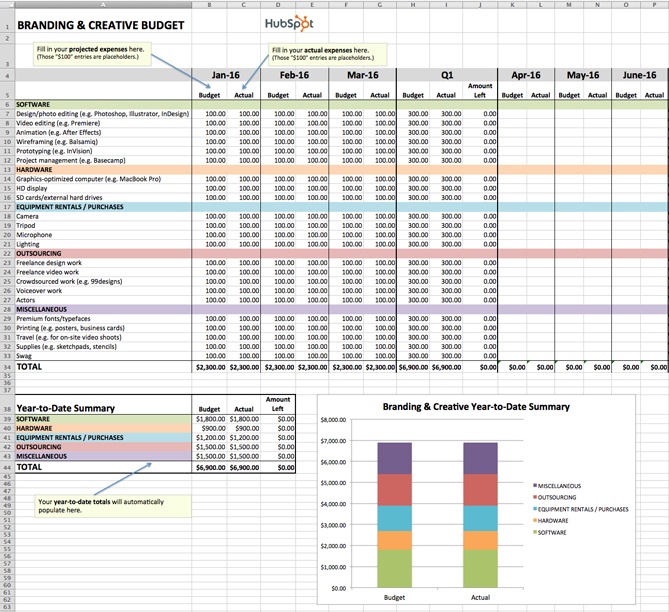
7. Website Redesign Budget Template
Download the Website Redesign Budget Template here.
Budgeting for a website redesign can be seriously tricky. With so many moving pieces to consider, there is a lot of room for underestimating or miscalculating costs. We created our Website Redesign Budget Template so you can keep all of your redesign-related expenses in one convenient location.
Unsure if your current website is right for a redesign? Check out this HubSpot research report: Does Your Website Make the Grade? Chances Are, It’s Barely Passing.
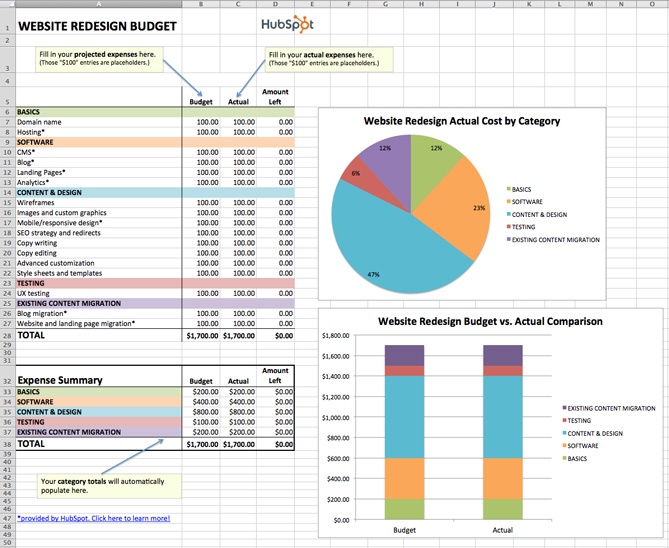
8. Event Budget Template
Download the Event Budget Template here.
When planning an event, the associated costs can seem obvious at first. There’s the venue to consider, of course. And the P.A. system and microphones. And then the costs associated with booking and bringing in presenters/performers. That’s pretty much it, right?
Wrong.
For example, does the venue come with tables/chairs, or will you have to rent those separately? Do you want your attendees to wear name tags, and if so, will you be printing out the name tags ahead of time or will attendees be writing their own names on blank tags?
If the latter, have you factored in the pens or markers you’ll need to accommodate that? As you can see, planning for an event can lead you down many rabbit holes.
Use our Event Budget Template to stay organized.
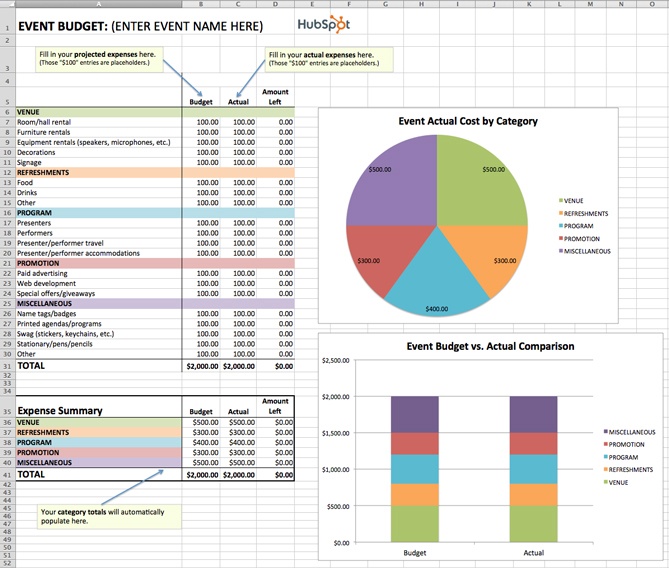
Sample Marketing Budget
With your chosen template downloaded, it’s time to consider which digital channels to allot a budget for. Hint: There’s no right answer — it’ll depend the market research you do to figure out where your specific audience spends most of its time.
If you find your buyer prefers learning and consuming content in the form of video, for example, you might invest more of your money in YouTube advertising.
Advertising Budget Example
Here’s a small sample budget for a quarter’s worth of expenses by a hypothetical company that has decided to invest heavily in video marketing. This template was created using the Master Budget Template, the first template listed in the section above.
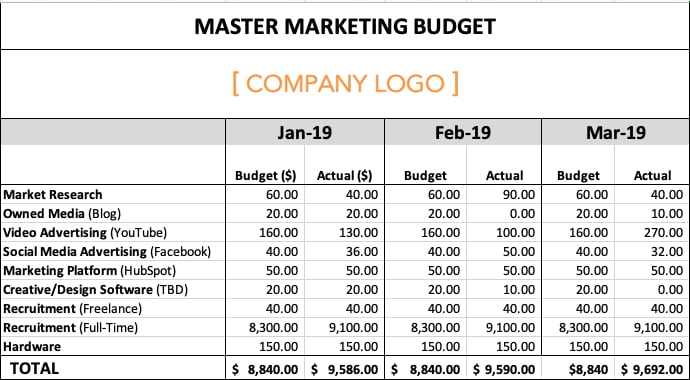
Based on the figures above, video advertising’s total expenses for the quarter exceeded budget by $20, while full-time recruitment’s total expenses exceeded budget by $2,400. This means the company is trending over budget for the first three months of the year.
Why might this happen? Perhaps a pay-per-click (PPC) campaign on YouTube received more clicks by viewers than expected, and a sharp video-savvy job candidate negotiated a higher salary.
Based on the difference between this company’s planned spend and actual spend, their budget template produced the following graph: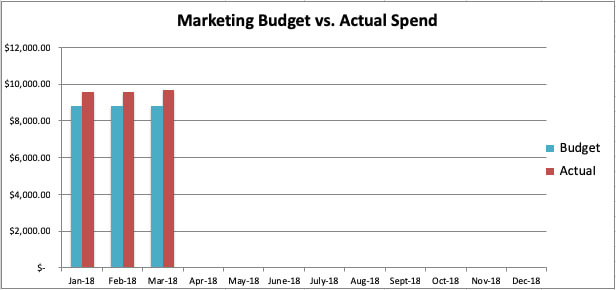
Go now, and plan wisely — your marketing staff is counting on you.
Editor’s Note: This blog post was originally published in December 2015, but was updated for comprehensiveness.

How Slack’s VP Aligns His Remote Teams and Encourages Cross-department Collaboration
In 2020, working remotely is now more popular than ever.
In fact, over 60% of U.S. employees between the ages of 22 and 65 say they work remotely at least occasionally — and 99% of people would choose to work remotely, at least part-time, if they could.
As a fellow part-time remote employee (I typically work from home two days a week), I can understand the benefits.
For instance, I find I get the most ‘heads down’ work done during those two days. Without the opportunity for kitchen chats, friendly debates with my desk-mates on the recent Cats movie, and hour-long team lunches, I’m incredibly productive.
Of course, there are plenty of challenges that come with remote work, as well. To name a few: awkward pauses during meetings when my computer freezes, an inability to have off-the-cuff brainstorming conversations with colleagues, and the lack of random check-ins from people around the office.
These challenges, while legitimate, become easier to manage with online communication tools like Zoom and Slack.
Which brings me to my point: if there’s anyone I’d imagine could handle remote challenges with ease, it’s Brad Armstrong, the Vice President of Business and Corporate Development at Slack, one of the world’s most popular workplace messaging platforms (the tool is already widely used at HubSpot, as well as major brands like IBM, Target, and Cole Haan).
At Slack, Armstrong is responsible for partnerships, alliances, the Slack Fund, and M&A. Additionally, he’s VP at a business with incredibly distributed teams: Slack has 2,000 employees at 18 different offices across 10 countries.
Here, I spoke with Armstrong about Slack’s culture when it comes to remote inclusion, the management style he uses when leading remote teams, and how to align and increase collaboration across distributed teams.
Whether you find yourself suddenly needing to switch to remote work due to circumstances outside your control or you’ve been managing a remote team for a while, keep reading to learn Armstrong’s three biggest remote leadership tips.
1. Make the time for face-to-face interactions, even if you’re fully remote.
The shift from partially to fully remote at Slack wasn’t as difficult as it might’ve been for companies with less reliance on online collaboration tools.
For instance, Armstrong told me, “As you can probably guess, we rely heavily on Slack to get work done and stay connected with our teams both in the office and when we’re fully remote. With that in mind, our culture at Slack HQ has always lent itself well to distributed teams. It isn’t unusual that communication and collaboration happens in channels, but also through our integrations with Hubspot, Zoom, and the more than 2000+ apps in the Slack app directory.”
However, Armstrong adds, “With that said, being fully remote is new for all of us, and I’ve found that being face-to-face in times like this makes all the difference in keeping my team engaged. We often join quick Slack or Zoom calls to check in on one another and to connect on high-priority items.”
It’s ultimately critical you continue to foster opportunities for casual conversations among team members to build psychological safety and create an environment in which remote employees feel comfortable sharing ideas and collaborating with one another.
Consider how you might implement daily or weekly check-ins with various members of your team, or use an internal Google Doc to share ideas cross-departmentally as they arise.
Additionally, Armstrong says, “We also are relying on channels more than ever to keep up-to-date on what our teams are working on. By using topic- or project-based channels to share daily updates, everyone has the information they need to keep things moving, despite being fully remote.”
2. When managing remote employees, additional flexibility is needed.
There are plenty of changes that occur when your team goes remote — and your leadership style may need to change as a result, as well.
Fortunately, Armstrong has plenty of experience with remote leadership. His team is global, so he manages teams in HQ, Europe, and Japan.
As Armstrong told me, “Additional flexibility is required when managing remotely. Whether it’s varying time zones, different home situations or changing schedules, managers and team members need to adjust accordingly to accommodate and support each other.”
Additionally, as a manager, it’s critical you communicate top-down information so your employees have a firm understanding of what’s going on in your organization as a whole.
In fact, Armstrong suggests, “Clarity is just as important right now. Taking the time to thoroughly explain and over-communicate priorities is critical to ensure everyone on the team is aligned. We kick off team meetings with pass-downs from leadership to make sure none of the key messages are being missed.”
3. Rely on digital communication tools for effective cross-department collaboration.
There are plenty of online communication channels you might use to stay connected to your team.
For instance, along with Slack and video conferencing tools like Zoom, you might use Google Docs to brainstorm with team members, Trello to collaborate and align on product or content launches, or Confluence to create an internal wiki for company-wide announcements.
Ultimately, it’s critical you continue to communicate effectively with team members — in fact, it might be more important than ever when working fully remotely.
As Armstrong says, “We know that sharing information and communicating is more important now than ever. Across departments at Slack, people are using DMs, channels, Slack calls, and apps to stay connected.”
“Our product has ultimately always been at the heart of our business, and we’re relying on the principles we’ve established to keep our business running smoothly in the face of uncertainty.”
4. Continue to emphasize transparency and alignment across teams when working fully remotely.
It can seem more difficult to provide transparency cross-departmentally when working remotely. When everyone is in-office, it’s easy to walk by someone’s desk and ask what they’re working on, or have a conversation with a colleague while grabbing a cup of coffee on the latest product launch.
Fortunately, Armstrong has a few tactics his own team uses to combat these challenges.
As Armstrong told me, “Without hallway conversations and in-person meetings, it can sometimes feel like you’re missing out on a piece of the broader conversation around a project.”
“At Slack, we know that alignment and transparency are key, especially while we’re fully remote.”
To make sure everyone at Slack and on his respective teams is in alignment, Armstrong told me his team relies on two collaboration strategies: announcement-only Slack channels, and weekly stand-ups.
He says, “We have announcements-only Slack channels for both company-wide announcements and for department-specific news like our bd-announcements channel. It’s an easy way to broadcast important messages and share updates and resources across teams.”
Additionally, Armstrong adds, “We also have weekly stand-ups: everyone shares their top three priorities on Monday, and top three accomplishments on Friday. This provides visibility on how projects are progressing, as well as allowing the team to celebrate each others’ wins.”
Ultimately, whether your company has had remote employees for years or is just segueing into remote culture in 2020, it can present its own unique set of challenges — but, equally importantly, it presents its own set of opportunities, as well. Hopefully you can use some of Armstrong’s tips to build transparency, trust, and collaboration across your own teams.
Additionally, check out this easy-to-use, free guide by HubSpot and Slack, Remote Sales & Marketing: A Guide to Moving Your Business Online, to learn how to set up remote work at your own company — plus, get 25% off eligible upgrades of Slack for 12 months.

How Much You Should Actually Spend on Digital Advertising in 2020
If you clicked on this post hoping to read something like “If you spend $1,000 dollars on digital advertising a month, you’ll hit your marketing goals easily!” I’m sorry to disappoint.
When it comes to ad spend, there just isn’t a perfect answer for every business. I know, it sounds like a cop-out, but I promise you it’s true.
Now, you might be thinking, So, why am I even reading this post, anyways?
While I can’t tell you how much money you should spend on digital ads this year, I can walk you through a framework to help you decide on your own optimal ad spend.
Ultimately, here’s what you should think about when deciding how much you should spend on digital advertising:
- How much investment is needed in order to hit my revenue goals?
- What percentage of my marketing budget can I realistically afford to spend?
- What is the lifetime value (LTV) of my average customer?
- How well am I converting website visitors into leads, and leads into customers?
- How much money am I spending on each bid?
At the end of this post, you’ll know how to use historical data to determine how much money you need to spend to hit your business goals and how to optimize your efforts to get the most out of each advertising dollar. Sound good? Let’s jump in.
How Much Investment is Needed to Hit Revenue Goals
So — where do you start?
Well, the primary goal for most businesses is to generate sustainable long-term revenue growth. That’s why, when determining how much to invest in digital advertising, you should work backward from your company’s revenue goals.
Working backwards can help you determine how much revenue your digital ads are responsible for bringing in, which can inform how much investment you need to make that goal reality.
Here’s what this might look like:
It all starts at the top with your business goal, which is most likely to increase revenue. You’ll have many departments working together to achieve this overarching goal, including marketing, sales, and customer service. By taking a look at historical performance across your business, you can identify what percentage of revenue each department is able to deliver.
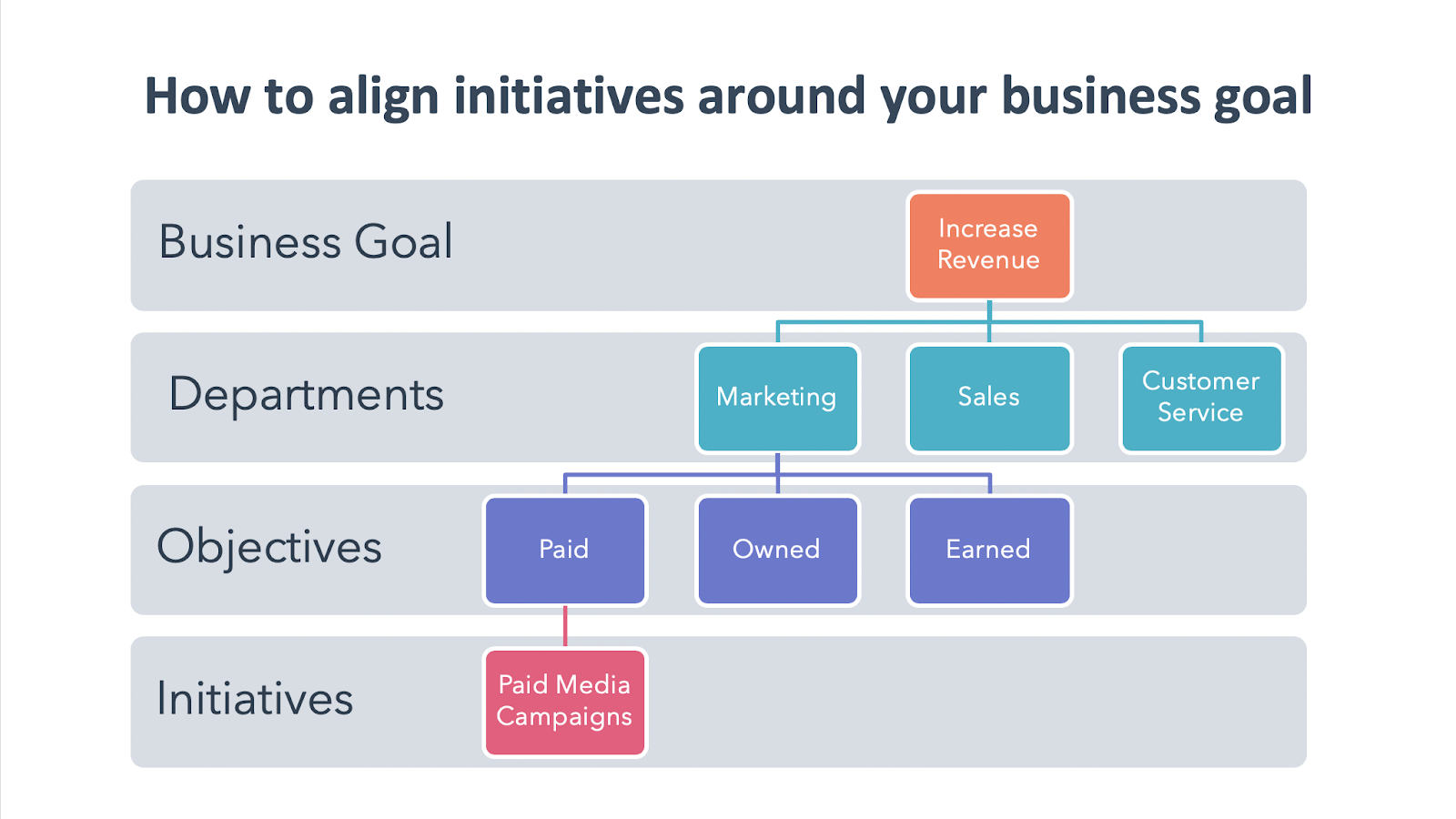
Within marketing, you’ll have multiple objectives that feed into marketing’s responsibility, including paid, owned, and earned objectives. You’ll launch a number of initiatives to support this business goal, including paid media campaigns.
To understand this concept, let’s walk through an example. Let’s say your business has the goal of increasing revenue by $100,000 this year. From historical performance, the business makes the marketing department responsible for 50% of this goal. Great — now, what initiatives are you going to launch to bring in that $50,000 revenue?
Well, digital ads are going to be only one of the many tactics you launch, all of which will need investment. Based on the historical performance of your ad campaigns, you know that you have an average $2.50 return on ad spend (ROAS). This means, for every $1 advertising dollar you invest, you make $2.50.
If you think that your other marketing campaigns on owned and earned channels can impact 75% of marketing’s overall goal, that leaves 25% for you to hit with ads, or $12,500. Divide this by your ROAS of $2.50 and you’ll find that you need to invest $5,000 throughout the year to hit your revenue goals.
What percentage of your marketing budget can you realistically afford to spend?
Now, do you actually have $5,000 to spend on your digital ads? If you do, then great — you can continue to sustain long-term revenue growth with your existing advertising strategy. But I wouldn’t be surprised if many of you simply don’t have the advertising dollars you need to make the impact you want.
Or, maybe you’re experimenting with digital advertising for the first time and don’t have historical data on ad spend and ROAS to inform your decision. What do you do then?
It’s a difficult question to answer honestly, but you need to ask yourself: “How much money do I actually have?” Take a look at your cash flow and profit to get a grasp on how much money is realistically available for digital advertising investment.
If you set a budget that you can’t afford, the long-term success of your campaigns, and sustainable growth, is doomed from the start. That’s why it’s important to start off with a budget that you’re comfortable with and can commit to in the long-run.
But don’t worry — even if you have a limited budget, that doesn’t mean you can’t use paid media as part of your greater marketing mix. Ultimately, before jumping right into ads, you want to further optimize other business metrics to get the most out of each and every advertising dollar.
What is the lifetime value (LTV) of your average customer?
Lifetime value is a prediction of the profit attributed to the entire future relationship with a customer. Simply put, LTV answers how much money you will make from a single customer over time.
To calculate LTV, take the average yearly revenue your average customer brings you and multiply it by the average lifespan of a customer.
For example, if your average customer pays you $500 a year, and stays with your company for six years, we can say the average lifetime value of a customer is $3,000. But let’s not forget how much it costs to service a customer. If you factor in that it costs you $50 to service that customer each year, or $300 over their entire lifetime as a customer, you can say the average lifetime value of your customers is $3,000 minus $300, or $2,700.
Now, the higher your lifetime value, the more money you can realistically spend to acquire a new customer. If you’re feeling strapped for advertising dollars, consider taking steps to increase your customer’s LTV.
There are a ton of best practices for increasing customer lifetime value which I won’t go into detail in this article. But to get you started, think about things like your business’s subscription and pricing models. Launching marketing initiatives to move the needle on LTV will, in turn, make your digital ads more successful and less costly.
How well are you converting website visitors into leads and leads into customers?
Now that you have an average lifetime value for your customers, you can work your way backward to see what your monthly advertising budget should be. We’re going to walk through this example focused on the value of a form conversion, but you can apply the same approach to whatever conversion points you’re optimizing your ads for.
You’ll want to consider two things to figure out your advertising budget:
- Your average conversion rate: The rate at which website visitors to your site convert on a form and become a lead.
- Your average lead-to-customer rate: The rate at which leads become paying customers.
Let’s say you run an IT Solutions company, and you want to advertise for your upcoming webinar on network security. You dig into the performance of your landing pages for past webinars and learn that you have a 7% webinar conversion rate and that your lead-to-customer rate is 10%. So if ten people sign up for your webinar, you can expect that one person will become a paying customer.
What are these numbers for your business? Are they lower than you’d like? If so, that means that your advertising dollars are not being spent as efficiently as they could. To increase your landing page conversion rate, consider testing your calls-to-action and adding social proofing.
And to convert more leads into customers, you could use email automation to nurture your potential customers towards making a purchase. There’s a lot you can do here, but for the purpose of this exercise, just know that if you have low conversion rates, pouring more money into your underperforming ads isn’t the best use of your resources.
How much money are you spending on each bid?
To make the most of your ad spend, you want to bid less than your expected return. LTV, conversion rate, and lead-to-customer rate can be used to determine what your maximum bid should be using this equation.
Maximum Ad Spend = LTV x Conversion Rate x Lead-to-Customer Rate
Let’s jump back to our webinar example to see this in action. If you divide one new customer by your lead-to-customer rate, you’ll see that we need 10 webinar signups to yield one new customer.
Next, divide the number of webinar signups we need by the average conversion rate. Using our 7% webinar conversion rate, we find that you need roughly 143 clicks on your ad to generate one new customer. If that customer is worth $2,700 to you, we can start to calculate how much you should spend per click on your ads.
If we ignored all the other costs of acquiring a new customer, then your break-even bid would be your customer lifetime value, divided by 143, the number of clicks you need to generate one new customer. This means you could bid $19 per click on your ad and break even.
Follow this process for your previous ad campaigns. Were you bidding too much? If you were, then that means that your advertising budget wasn’t being used effectively to reach your revenue goals.
Improving your ad copy, keyword strategy, targeting, and more all play a role in how much you’re spending. Here’s another helpful blog post to learn how to optimize your digital advertising costs.
Reevaluate Your Spend to Maximize Impact
Your advertising budget should bend and flex to meet the evolving demands of your business over time. Taking an experimental mindset when reevaluating your spend will help you identify the most profitable initiatives in your strategy and adjust the way that you budget.
Additionally, it’s important to keep in mind that there are plenty of free, organic-driven opportunities to increase brand awareness and sales on social media. If you’re strapped for cash but want to use social media for business growth, take a look at our Social Media Marketing: The Ultimate Guide for free alternatives.
Lastly, a word of advice: I’d recommend reevaluating your spend no more than on a quarterly basis. That way, your campaigns will have enough time to bring in reliable results, but you’ll still have enough time to adjust your investment accordingly to meet your end-of-year goals.
If you or your team want to level up their digital advertising know-how, check out this free Ads Training Course to learn today’s best practices for succeeding with digital ads on search engines and social media.

How 8 Brands Use Instagram Story Swipe Ups
As a marketer, you know you’ve got what it takes to build and manage an incredible Instagram page.
For instance, you’ve made your business’ account branded so it aligns with your company, filled it with eye-catching posts, and turned the page into a great outlet to encourage audience engagement.
Everything … well … almost everything, is going smoothly.
The tiny snag: How in the world are you supposed to make Instagram Stories Swipe Ups worthwhile, for your audience and your ROI?
Instagram is one of the most widely-used platforms for marketing efforts, but only 21% of marketers are seeing a return on investment from their Instagram strategy. You might be experiencing the same snafu — you’re putting a lot of effort into your Instagram, like adding Stories, but they’re not earning the traffic you need.
The problem may not be in your content, though. It could be your delivery.
But don’t worry — in this post, we’re going to cover some strategies you can do to give your Story viewership a 180, as well as take a look at what other brands are doing to make their Stories a worthwhile tool in their content strategies.
Let’s go over some best practices for driving traffic to your Instagram Stories before we get into how to leverage the Swipe Up tool.
Best Practices for Driving Instagram Story Traffic
Are you keeping these practices in mind when you go to upload your Story? Before you schedule your next one, refer to these strategies to give your viewership a boost.
1. Preview the Story on the main feed.
To drive traffic to your Instagram Story, a sure-fire way is to make a post about it on your main feed.
Posting a “preview” photo or video on your main feed, and then alluding that the rest of the post is in your Story, compels the audience to explore the missing content. This method caters to the fear of missing out, or FOMO, because Stories disappear after 24 hours. The only way to combat this is archiving the story in a highlight.
2. Make it into a highlight.
Highlights can be a traffic driver, as well. If you encourage user-generated content, save them in a highlight when you share them to your Story. Then, tag the customer who posted the content. If audiences see that you shout-out customers, they’ll be more inclined to check back to see if their submission gets picked.
3. Promote the Story on other channels.
Another way to drive traffic to your Story is to let your audiences know about it. Adding a simple “Follow us on Instagram!” CTA in email newsletters or on another social media account will let audiences outside of your current Instagram followers know that there’s another way to engage with your content.
4. Run interactive Stories.
Finally, running a contest or Q&A on Instagram drives traffic because it encourages audience participation. For instance, if you run a contest that gives away an item, and make one of the rules tagging two friends, you can spread your content through your audience’s shares.
Similarly, if you give your followers the chance to engage directly with your brand, they’re more inclined to check your Story for more opportunities to interact. By doing this, you’re strengthening customer relationships.
So, now that you know some ways you can get more eyes on your Story, let’s look at some examples of how you can keep them using the Swipe Up feature.
Additionally, if you’re still unsure about how Instagram Stories works, take a look at Instagram Stories: What They Are and How to Make One Like a Pro.
Examples of Brands That Include Links in Stories
So, you have a pretty good idea of how to drive traffic to your Story. But once audiences get there, what should they see? And, what is the content to keep them coming back?
Let’s go over some examples of brands using their Stories in a way that makes audiences think, “I can’t wait to look at this account again!”
1. The Newsette
Tactic: Promote A Blog Post.
The Newsette is an online daily newsletter, supporting stories of women in the workplace. Their corresponding Instagram account supports the newsletter, especially in the Stories. This Story in particular, for instance, highlights a new blog post:
Right off the bat, this Story is graphically compelling. The background is fun and enjoyable without distracting from the focal point of the Story — the post. Using Stories to promote your latest interview or blog post can entice fans who don’t want to miss out on the 24-hour offer.
2. Maddie Lymburner
Tactic: Share A YouTube Video.
As a health food blogger and fitness influencer, Maddie Lymburner has a lot of content she can share on her Instagram Stories. For her fitness Instagram, Maddie posts at-home workouts or a preview of her new workout video, like shown below:
This Story features a sneak peek of the workout, and provides the link, so Instagrammers can watch the video without closing the app. If your YouTube account could use some love, you can leverage Stories to get more views on your YouTube channel, as well.
3. Father/Daughter Records
Tactic: Post A Link To Stream Content.
To bid a “Happy Birthday” to a record, independent label Father/Daughter Records used Stories to celebrate. What else is included in the Story is a link to stream or buy the record:

You can use Stories to give your account some brand personality. For instance, if your team just created a new podcast episode for your brand’s podcast, you can use the swipe up Instagram feature to compel new listeners to follow along.
4. Steffi Lynn x Adobe
Tactic: Partner With An Influencer.
If you are an independent artist, or part of a business that does partnerships, this is a great way for you to use the Swipe Up tool on a Story. For instance, Steffi Lynn is an independent graphic design artist, and uses her Instagram account to showcase her work, or announce a new partnership, like in this Story, sponsored by Adobe:

The swipe up links back to Adobe’s new product, and its supporting product page. Independent artists like Steffi Lynn can use swipe up to link to their own ecommerce pages, and marketers or advertisers can work with influencers to include their company’s links on the Story.
5. Coveteur
Tactic: Promote Your Podcast.
Coveteur is an online fashion and beauty publication. Recently, the team at Coveteur have been branching out and exploring more ways to deliver content, and to support that initiative, have been linking back to episodes in Stories.
What’s especially great about Coveteur choosing this episode to link to is that Bobbi Brown was the CEO of a successful cosmetics company of the same name, so to Coveteur’s target audiences, Bobbi Brown is a respected thought leader in the beauty industry. Seeing a recognizable name on a Story from a brand that may be unrecognizable at first, instantly gives the publication a credibility boost.
6. Franklin & Whitman
Tactic: Share Your Ecommerce Options.
Do you sell your products online? The swipe up tool is an excellent way to inform customers about a sale or promotion, announce new products, or give updates about home-run products, like this one from skincare brand Franklin & Whitman:

Fans of the company can enjoy the ease of buying their favorite products by swiping up on an Instagram Story, and leads that engage with this Story will find the pricing information useful as they continue on in their buyer’s journey. Being proactive and using Stories to let customers know about your new products or upcoming discounts proves to your audience that you care about their needs as a customer — including allowing them to purchase your products wherever they prefer
7. The Mayfair Group
Tactic: Build Buzz For Your TikTok Videos.
If you have another social account that could use more followers, you can use Stories to link back to it, like brand representation company The Mayfair Group did below:

The Story itself was a clip of a TikTok from the company’s account. It asked followers to write what they’re grateful for in a TikTok and tag the company. This is a great idea for promotion because it inspires action — after seeing this, I was immediately interested in making a TikTok of my own.
8. Girls’ Night In Club
Tactic: Share Your Newsletter.
Maybe you have an email list, and are looking for more subscribers. You could leverage Stories for that, and post a highlight from the newsletter. Then, the swipe tool could link to the email sign-up form.
Above is an example of how you can promote your newsletter through your Instagram account. Notice that, because the promotion was for an interview, the collaborators were tagged. This gives the community newsletter, Girls’ Night In, more exposure from the collaborators’ followers when the post gets reposted.
These are just some of the strategies and methods you can use to upgrade your Story content. Not only is there a chance to get a spike in viewership on your Instagram account, but you can also get eyes on some of your other content, as well.
Will I see your brand the next time I open the Discover page?
