
What’s an Organic Search & How Do You Report on It?
Last week, I was searching Google for athletic wear because I was in the market for some new yoga pants.
As I was scrolling through the results, I saw Fabletics. After browsing its site, I ended up becoming a VIP member and purchased $50 worth of athletic clothing.
In the same vein, when I worked at a marketing agency last year, I was responsible for social media for our clients.
I was curious about how to best use Instagram in the education industry. So, I went to Google and searched for “how to run social media for schools.”
I came across a blog on Sprout Social that was helpful when I created a strategy. When it came time to switch our social media automation tool, I even decided to go with Sprout Social.
In fact, 47% of consumers view 3-5 pieces of content before talking to a salesperson.
That’s why organic search is so important as a marketer. It helps build your brand, generate sales, and provide value to your audience.
Below, let’s learn more about organic search and where to measure your results.
What is an organic search?
Organic search results are the unpaid results that appear on a search engine results page after a query. In the example below, when I typed “athletic wear” in Google, the unpaid results are all a part of that organic search.
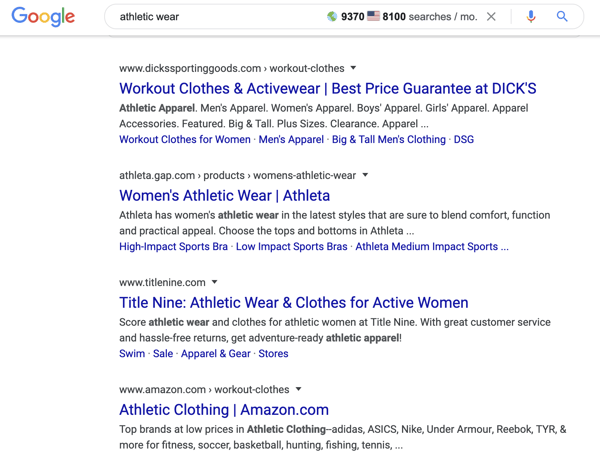 These results are typically generated based on search engine optimization (SEO) factors including backlinks, domain authority, and relevance.
On the other hand, search engines might also show paid search results, which are known as display ads or pay-per-click ads. These are denoted with the word “Ad” before the hyperlink, as shown in the example below.
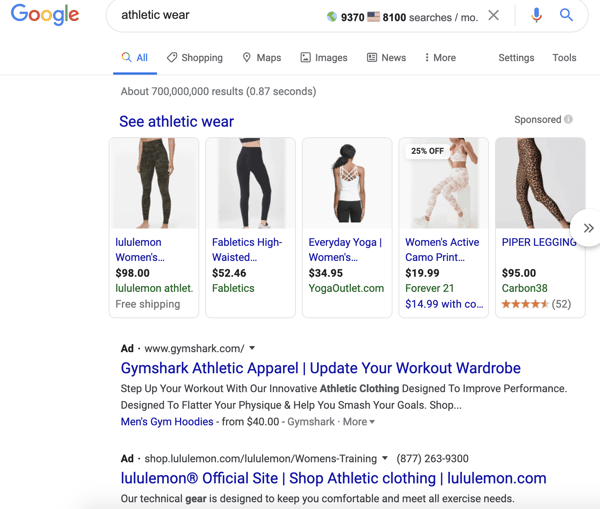
Organic traffic is one of the main traffic sources inbound marketers focus on because once you succeed, it’s a long-term source of traffic.
While an organic search strategy can take time, it’s more likely to generate leads and revenue because it’s a non-disruptive form of delivering content. Also, organic searches produce relevant traffic because you’re answering user’s questions when they’re asking them.
This helps people become aware of your brand who aren’t already, like in my Sprout Social example above.
To rank highly on search engines, you have to pay attention to search intent when you target keywords, so users are more likely to click on your page.
You can also create a blog, be active on social media, and optimize your pages for SEO to improve your organic search rankings.
Usually, organic search is an important traffic source to consider because other traffic sources generally lead to one-page site visitors since they aren’t trying to drive overall site traffic or customer loyalty.
Although we’re focusing on organic traffic today, it’s important to remember the other several traffic sources, including:
- Direct: Traffic where the source is unknown.
- Email: Traffic from email marketing.
- Organic: Traffic from search engines that’s unpaid.
- Paid search: Traffic from search engines as a result of paid ads.
- Social: Traffic from a social media network.
By navigating to this section, you’ll find the different traffic sources, including organic traffic. It will show you the amount of sessions, plus the percentage of your traffic to each source.
If you’re a HubSpot user, you can also find organic traffic numbers in the product as well.
Using the HubSpot Marketing Software, you’ll go to the Reports → Analytics tool. Then, you’ll click Traffic Analysis and you can see your traffic sources. This will show you the number of sessions in a given time period.
Ultimately, organic search is one of the best SEO strategies to increase long-term traffic to your site. While you work on SEO methods to improve your organic rankings, you can measure these results in software such as Google Analytics or HubSpot.

5 Examples of Brands Newsjacking in 2019
Shortly after the announcement that Prince Harry and Meghan Markle were “stepping away” as senior members of the Royal Family, Madame Tussauds Wax Museum also made news by removing Harry and Megan from a wax display of the Royal family.
But, the famous wax museum’s publicity stunt isn’t the only example of a brand that’s leveraged a news event to gain awareness or viral attention. In fact, this tactic has been used by marketers throughout the 2000s. It’s often called “newsjacking.”
Newsjacking is when a brand or firm mentions or creates a campaign centered around a major, well-discussed news item. It’s slightly different from a publicity stunt in that the news item is leveraged in marketing while a stunt might acknowledge news within a public venue or place of business.
Why do brands choose to newsjack rather than creating a totally original storyline for their campaigns? It’s simply because this strategy helps them get discovered by adding or piggybacking off of larger conversations happening online.
In the early 2010s, we frequently saw newsjacking attempts during big, televised events like the Super Bowl or the Academy Awards. But, as marketers more frequently use social media and online channels, we’re seeing brands identify newsy topics faster and newsjack through a variety of content.
If you’re looking to leverage news, trends, or current events to amp up your marketing strategy, you might be wondering, “How do I get started?” or “How can I do this tastefully?”
If so, one great way to learn how to newsjack is to watch how other brands have done it.
To help you get inspired, here are five examples of brands that successfully took on newsjacking in 2019, and some takeaways that you can keep in mind in 2020.
7 Examples of Newsjacking in 2019
Aviation Gin: The Gift That Gives Back
News Item
In December 2019, the workout bike company Peloton released a critically panned commercial that begins with a husband giving his wife a Peloton for Christmas. As the commercial continues to the optimistic sounds of the song, “There She Goes,” the wife, coined as “Peloton Wife” on social media, films herself working out every day for a year. At the end of the ad, she shares the video with her husband — seemingly the following Christmas.
Here’s the commercial, which is titled “The Gift That Gives Back”:
The commercial was heavily criticized and mocked throughout social media because it enforced dated gender norms and goes against body positivity because many people believe that a husband buying a wife a workout device insinuates that she’s out of shape.
The Newsjacking
After the Peloton ad — and it’s instant criticisms — circulated the internet, actor and Aviation American Gin owner Ryan Reynolds immediately cast Monica Ruiz, a.k.a. “Peloton Wife,” in a commercial written to feel like a sequel to the Peloton ad. In the commercial, humorously titled “The Gift That Doesn’t Give Back,” Ruiz sits at a bar, staring blankly into the camera. She emotionlessly sips on and complements the smooth taste of Aviation Gin as her supportive friends offer her more gin and make comments like, “You look great, by the way.”
While the ad doesn’t directly mention the workout bike company, Reynolds says Aviation Gin’s commercial was a direct response to Peloton. In fact, Reynolds initially tweeted the ad with the caption, “Exercise bike not included,” and later explained that he hired the Ruiz just a “few hours” after the original ad launched.
“I’ve been there as an actor, where you do something that doesn’t quite work . We got ahold of her and within 36 hours, we shot, chopped, and put out this commercial,” Reynolds explained on The Tonight Show.
Shortly after its launch, Aviation Gin’s commercial went viral, receiving over 6.2 million YouTube views and 42 thousand retweets on Twitter. It’s also been noted by a number of publications including MarketingLand and AdWeek.
This newsjacking was successful for a number of reasons. First, the brand quickly responded to a news item with a creative idea. Additionally, the campaign was subtle, professional, and didn’t directly acknowledge Peloton. With just a few words and visuals, it told a deeper story which was almost more hilarious than if it had directly acknowledged the workout bike company.
Burger King’s “Big Mac-ish” Menu
News Item
After a legal battle with an Irish fast-food chain called Supermac’s, McDonalds lost its exclusive Big Mac trademark. While the fast-food giant could still keep using the Big Mac title for its sandwich in Europe, the ruling noted that any other company could also use the term “Big Mac” on its menus or marketing assets.
The Newsjacking
Burger King took full advantage of its competitor’s legal slip by launching a handful of marketing content discussing its own Big Mac-like products.
For example, Burger King released European menus that promoted its own “Big Mac-ish” sandwiches, as seen below. It also offered a limited-time flame-grilled Big Mac that it claimed was bigger and tastier than the McDonald’s menu item.
Below is the Burger King menu which highlights its Big Mac-ish items and the Big Mac copy.
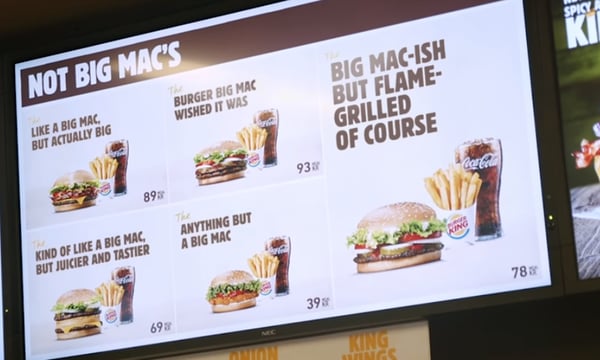
Source: Marketing-Interactive.com
This is a great example of how one company can take advantage of news relating to its competitor in a funny, but professional way.
AeroMexico: “A World Without Borders”
News Item
Throughout President Donald Trump’s time in office, the administration has tightened border policies while continuing to construct a metal wall at the U.S. Mexico border. This has continued to fuel debates about whether the United States, a country that was historically founded by immigrants, should have such tight border policies and a wall.
This debate reached a major pique when the Trump administration’s request for wall funding resulted in the longest government shutdown ever, running from December 22, 2018, to January 25, 2019.
The Newsjacking
AeroMexico, an airline that offers routes specifically to Mexico, paid close attention to these debates and took note of the fact that millions of Americans “did not want to travel to Mexico.”
Rather than pivoting their strategy or adding routes to other locations, AeroMexico went to a rural United States town, DNA-tested residents who were in favor of the border wall, and offered them flight discounts based on the percentage of Mexican descent that was revealed on their DNA tests.
AeroMexico then followed up with a commercial showing each person giving their views on immigration laws, Mexico, and the wall.
During the commercial, which showed AeroMexico interviewing the residents, a cameraman asks each of them, “Would you consider going to Mexico?” Their discomfort with the idea of traveling south becomes apparent when they answer with statements like, “No way!” and “Let those folks stay on their side of the border.”
It then showed their surpised facial expressions when they all found out about their Mexican heritage. Lastly, the commercial notes how most of them were interested in taking the discounted flight to Mexico once they were offered it.
“Many Americans don’t like Mexico. But … according to the U.S. Department of Homeland Security, Mexican immigration goes as far as the 1800s, settling in on the south — meaning that a big percentage of descendants in the U.S.A. don’t even know it yet,” noted AeroMexico’s Clio award submission.
“Without a significant budget, our strategy was to take advantage of the media coverage that President Trump’s government shutdown had. Therefore, we focused all of our PR resources on spreading our video on social media,” the submission added.
According to the Clio submission, the campaign went viral, receiving more than 1.6 billion impressions. It also resulted in a 33.7% increase in ticket sales between the U.S. and Mexico.
This campaign and commercial is a great example of how a company entered a political debate and made a point in a clever way. It also shows that they are proud of their business and those of the Mexican heritage because they’re willing to offer giant discounts, even to immigration critics, with Mexican descent.
The commercial and campaign were so fascinating and thought-provoking that it even won a 2019 Clio Award.
Gillette: “The Best Men Can Be”
News Item
In 2018 and 2019, the #MeToo movement led to a number of high-powered, and sometimes well-trusted, men getting accused or charged for sexual assault and harassment. High-level men who incurred allegations included film executive Harvey Weinstein and ex-Good Morning America co-host Matt Lauer.
This movement was marked by the #MeToo social media trend, started by activist and Weinstein accuser Alyssa Milano. The trend encouraged women to spread awareness of how common sexual harassment, misconduct, and assault was by sharing stories along with the #MeToo hashtag.
The Newsjacking
Gillette, which has always positioned its shaving products as, “The Best a Man Can Get,” wanted to reposition its take on masculinity in light of the #MeToo movement. To do this, they aired an intense Super Bowl commercial that digs into toxic masculinity and the negative stereotypes related to manhood.
The commercial begins with visuals of men looking in the mirror, with soundbites of news reports related to bullying, toxic masculinity, and the #MeToo movement. When the ad cuts to an old Gillette commercial showing a strong man, a narrator asks, “Is this really the best a man can get?” as a young boy breaks through a screen showing the old Gillette commercial while running from bigger male bullies.
The commercial goes on to show different aspects of toxic masculinity, such as texts from male bullies saying phrases like “FREAK!”, a male executive touching a woman’s shoulder in a meeting and stating, “What I think she’s trying to say is…”, and young children fighting as their father’s say, “Boys will be boys.”
Suddenly, the narration says, “Something finally changed — and there will be no going back,” as the ad cuts to clips of news coverage following the #MeToo movement.
The ad culminates by showing clips of men being good influences by stopping boys from fighting, standing up to bullies, and actual footage of a father telling his infant daughter that she is strong.
“We believe in the best in men. To say the right thing, to act the right way. Some already are in ways big and small. But ‘some’ is not enough. Because the boys watching today will be the men of tomorrow,” the ad concludes.
While the commercial highlighted a controversial item and allowed the company to take a progressive stance on it, it still came with some mixed reviews due to its sensitive nature. Although it has both positive and negative reviews, it’s important to include on this list so that marketers can learn both the positive and impacts of newsjacking strategies.
Many who saw the ad felt that Gillette was desperately leaning into a sensitive movement to benefit its own brand.
“Part of the Gillette’s motive for running the ad may be that there is recent research suggesting that millennials give more credit to brands using corporate social responsibility appeals,” noted a Forbes post. “In this case, it appears Gillette will learn a lesson about what not to do as pertains to corporate responsibility efforts.”
Meanwhile, some still identified how it was a solid step forward in marketing.
For example, a Wired post noted that the ad was an “undeniable sign of progress” despite its backlash.
“Once again, the country seems divided. This time, it’s not a border wall or a health care proposal driving the animus, but an online ad for a men’s razor, because, of course,” the Wired article states. “But underneath the controversy lies something much more important: signs of real change.”
All in all, it’s important to look at both the pros and cons of this example. Although Gillette’s commercial was high quality, made valid points, and stirred emotions from viewers, it’s important to keep in mind that this is a large company still aiming to succeed in a society that is much different than when its company began decades ago.
Oreo’s Area 51 Tweet
News Item
In the fall of 2019, social media users were buzzing about a bizarre plan to raid Area 51, a highly classified government base which conspiracy theorists say is the home of testing extraterrestrials.
The Newsjacking
Oreo went to Twitter and simply joked, “What flavors do you think they’re hiding in #Area51?” Thousands of users, and even other brands, replied and shared the tweet.
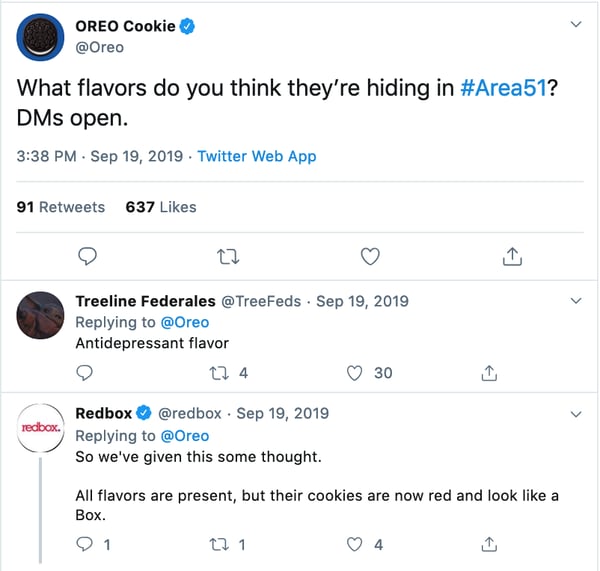
This is a great example of a brand that affordably, and quickly, referenced newsy or trendy topics to gain engagement, likeability, and brand awareness on a social network. Not to mention, Oreo instantly got people to discuss great Oreo flavors on Twitter.
While other brands on this list have embraced newsjacking with high-budget campaigns or commercials, Oreo shows that the strategy doesn’t have to get too complex, time-consuming, or costly for marketers.
Newsjacking Takeaways for 2020
With fast-paced social media and online news published every second, there are more and more opportunities where marketers can embrace newsjacking.
But, before you attempt to newsjack, take time to consider the news item and make sure that your strategy will be tasteful or informative, rather than offensive. For example, if you make a funny reference about a bizarre trend like the Area 51 raids, you might be seen as funny or memorable. However, if you post an insensitive campaign or comment about a controversial topic — such as immigration, you might be seen as out of touch.
As you craft a creative newsjacking strategy, be sure to run it by other members of your marketing team and get your feedback to ensure that your content doesn’t flop.
To learn more about how to cleverly embrace newsjacking, check out this blog post.

12 Benefits of Email Marketing Your Marketing Team Must Know
As a marketer, you might’ve heard coworkers talking around the watercooler about how email marketing is dead. It’s been a common concern for many marketing departments.
Well, I’m here to let you know that you don’t have to worry because email marketing is still going strong.
In fact, 40 percent of B2B marketers say email newsletters are most critical to their content marketing success, and 73% of millennials prefer communications from businesses to come via email.
Furthermore, 99% of consumers check their email every day and it is by far the preferred way to receive updates from brands.
As marketers, we can’t ignore these statistics. That’s why it’s important to develop a strong email marketing strategy.
Below, let’s review the top benefits of email marketing, which show why it’s one of the most effective marketing tactics.
1. Creating personalized content.
With email marketing, you can customize your campaigns and create targeted content.
Personalization can be as small as including a contact’s name in the email. In fact, emails that include the first name of the recipient in their subject line have a higher clickthrough rate than those that don’t.
On the other hand, you can also create individualized content based on segmenting your audience so you send the right emails to the right customers. For instance, perhaps you want to send an email marketing campaign to returning customers and a different one to one-time customers.
One of the main benefits of email marketing is that your content can be highly personalized to your audience’s needs. Your emails might have variations including different images or subject lines to increase your engagement. You can even create segmented lists based on geography or engagement levels.
To have a successful email marketing strategy, you need to send the right email to the right people at the right time. That’s where segmentation and personalization can help.
2. Collecting feedback and surveys.
Keeping a pulse on the customer experience is very valuable if you want customers to continue to interact, engage, and purchase from your brand.
Email marketing can help you do this. For instance, you can send customer satisfaction surveys to obtain customer feedback through email campaigns.
In fact, this is one of the best ways to calculate your Net Promoter Score (NPS). This score helps you find out the percentage of customers who are brand ambassadors and the ones who are detractors. With this information, you can come up with strategies to improve your customer experience.
3. Improving sales.
While email marketing is clearly an excellent marketing tool, it can actually improve your sales as well.
Email marketing campaigns can feature products or services, encourage customers to purchase after abandoning their cart, or deliver special offers to your customers.
Furthermore, 59% of respondents in this survey say marketing emails influence their purchase decisions.
Your email marketing campaigns can easily incorporate messages to encourage a purchase to an audience that’s more likely to buy from you because they’ve opted-in to your messages and updates.
Additionally, you can use email marketing to automate part of your sales process, which can help increase sales as well.
For instance, with HubSpot’s free email marketing tool, you can automate sales drip campaigns and send automated messages to prospects your salespeople want to follow up with.
4. Communicating with your audience.
As a marketer, it’s always important to improve communication with your audience. When your audience feels like they can talk to you, they’re more likely to become loyal to your brand.
Just think — people appreciate good emails. Think back to the last time you received a marketing email from a brand you love — was it disruptive or did you enjoy looking at the latest news? If it’s a brand you like, you probably enjoyed the experience and it kept you in touch with one of your favorite brands.
With email marketing, you can reach more of your audience and easily communicate with brand ambassadors. Plus, these emails keep your audience engaged during every time of the year, whether it’s a slow or busy season.
5. Generating traffic to your site.
When you produce great content, how do you disseminate it to your audience? Most likely, you send them an email.
With email marketing campaigns, you’ll send traffic to your site and improve your SEO. Plus, you’ll keep your audience engaged with your brand and your site.
For example, many of you might have reached this page from a marketing email from HubSpot. That’s because email is a great way to provide value to our audience, and we do that by sending our content in our emails and generating traffic.
When you’re creating an email that links to your content, keep in mind that each email should contain a call to action (CTA) so readers can click through to your site.
6. Sending timely campaigns.
Although traditional marketing campaigns have a time and place, they can take months to plan and organize. Even then, you probably aren’t sure if people are going to see your campaign assets at the right time.
However, with email marketing, you can create an entire campaign on shorter notice because they don’t take as long to plan. Additionally, you can ensure your audience sees the email at the right time.
For example, you can make sure you send content at the right time by segmenting your audience.
7. Increasing leads.
In the same vein as improving sales, you can also increase your leads with email marketing. In fact, with the inbound method, email marketing is used to nurture leads and improve conversions.
For example, let’s say you downloaded a lead magnet from a site. Then, you start receiving drip emails, and in the end, you decide to book a demo and learn more. You just went from an MQL to an SQL, which improves the marketing teams number of qualified leads to the sales team.
Email marketing campaigns can further qualify leads so your sales team isn’t wasting time on bad leads. Plus, if your company does lead scoring you can keep track of whether those leads open your emails or engage by clicking the links in your email.
8. Reaching the right people at the right time.
To have a successful marketing campaign, you have to reach the right customers at the right time. Yes, I’m reiterating this point because it’s that important.
With email marketing, it’s that much easier to reach people because they always check their email. They can check it at any time, on multiple devices, which can improve the success of any marketing campaign.
This means you’re getting in front of your audience on a regular basis, so you’re always top-of-mind.
9. Producing cost-effective campaigns.
While traditional campaigns like direct or print can be costly, email marketing campaigns tend to be more cost-effective.
For example, you won’t have to pay for any photoshoots, location fees, printers, mailing, or placement. All you need is a copywriter and graphic artist (if you aren’t using stock images). This can even be one person on your team.
Additionally, email campaigns don’t take long to produce. If needed, you can produce an email in one day, which is much more cost-effective than the time it takes to produce a direct or print campaign.
Since time and budget constraints always impact marketers, email marketing campaigns can be more efficient, while also generating revenue and leads.
10. Providing more value to your audience.
One of the main goals of any business is to provide value for your audience so they keep coming back.
Email marketing is a great place to cultivate loyal customers because you can add value even when customers aren’t making a purchase.
Additionally, since customers or prospects opted-in, you can use email marketing to provide more resources to contacts who are interested in what you have to say.
If you continuously provide value for your audience, more people will pay attention and you’ll produce a higher ROI.
11. Having a forum for self-promotion.
Sometimes it can be awkward to self-promote in places where prospects haven’t necessarily opted-in to receive updates about your business. However, self-promotion is one of the best ways to attain customers. If you can’t promote yourself and sell your company, no one will buy from you.
With email marketing campaigns, you’ll always have an avenue to promote yourself, especially since customers opted-in. You can send emails about new products, features and benefits, or new content. Since customers want to hear from you, this self-promotion isn’t unwanted or disruptive.
12. Owning your media and contact lists.
With platforms like social media, you don’t own your contact list or even the information you post. Typically, the content and your follower list is owned by the social media platform.
Just think — if social media went away tomorrow, how many followers and customers would you lose?
That’s why building an email list is important for marketers. This is a contact list you own and you can interact with them regardless of the email provider. Plus, you’ll also own the content that you produce and send as well.
Email marketing is one of the top ways to reach your audience. Plus, it can also improve sales and leads. Since this is still the place where people want to receive information, let’s just say that email marketing isn’t dead.

6 Advertising Tips to Draw Customers In
Today, I was scrolling the Bon Appetit website, and by the end of my visit, I’d signed up for their newsletter.
When I saw their newsletter advertisement, it was so effective that I just couldn’t help myself.
Good ads get consumers to stop and stare. Effective ads inspire engagement. And when I saw this, I stopped scrolling, laughed, and typed in my email:
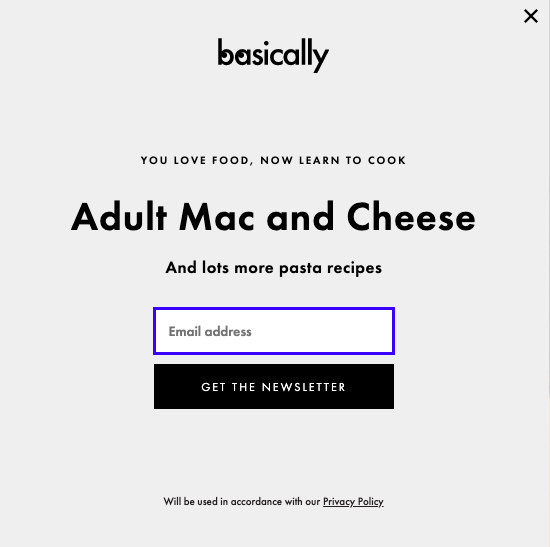
This ad successfully combines humor and relatable language to compel me to subscribe — additionally, it solved a “problem” (learning how to cook pasta) I didn’t know I had. Those are three elements of what can make an amazing ad.
Oftentimes, marketers assume a good ad can only be made with a big budget. Additionally, marketers sometimes believe ads are most effective if they’re busy or loud.
While having all the factors above do make for an enjoyable ad experience, they shouldn’t be the only things marketers focus on when designing an ad. In fact, some of the most effective ads I’ve come across have none of them.
The ad above, for example, isn’t busy, moving, or flashy at all, but it’s still an example of a good ad. In this post, let’s explore six components for creating a good, engaging ad.
Not every ad needs to have every single component to be successful. In fact, picking one to three of these components can still make a dazzling ad experience for consumers. Basics every ad should have, like engaging graphics, are covered in this excellent post about ad creation.
Additionally, the tips we’ve outlined below help elevate an ad, and can enable you to refine your ad to ensure it delights your viewers.
Use these tips as a reference when creating an ad or refining for finishing touches. They can be that last step before an A/B test, or a starting step when brainstorming content ideas.
1. Use keywords to rank on search.
Remember, keywords help rank highly on search engine results pages (SERPs). If a marketer wants to place an ad using Google, but doesn’t use any keywords in their ad, it can be ineffective.
For instance, let’s say I was Googling a laptop for professional use, so I type “business laptop” into Google. This is the first ad that comes up:
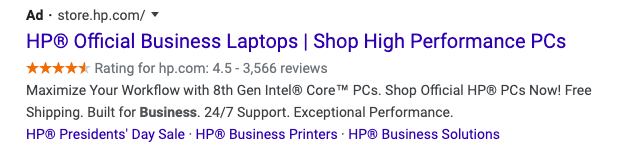
From this ad, I can tell that business laptops are being sold at Dell, which is what I want. Using ambiguous language in an ad doesn’t bring much traffic. It also doesn’t help consumers know what’s being sold.
A small business would benefit using their industry or their product when advertising, especially if the product is in a niche market.
2. Solve a problem for your audience.
Your product or service solves a problem, and you probably know that advertising should tell the audience about how your product or service is a solution. If you’re thinking this method is outdated, it doesn’t have to be.
For instance, rather than taking out an ad in a newspaper or spending huge money on a billboard, you can use Twitter for Advertisers, a tool that lets users shop from the app by clicking on a link.
Take a look at Kohl’s ad, which was created on Twitter’s platform:
Shop comfy outfits for the whole family: https://t.co/S5Dv2UVMuC pic.twitter.com/XxKXcLesCf
— Kohl’s (@Kohls)
February 11, 2020
Copy such as “For the whole family” solves the problem of a busy parent having to go to different stores for clothes shopping. This ad is effective, showing siblings of different ages modeling clothing in a comfortable home setting.
By clicking on the ad, consumers will be able to see every piece the models are wearing, the price, and even purchase items without leaving the app.
3. Ask your audience important questions.
Asking questions engages idle consumers. A question gets browsers thinking, much like the copy from this ad from BuzzFeed on Facebook:
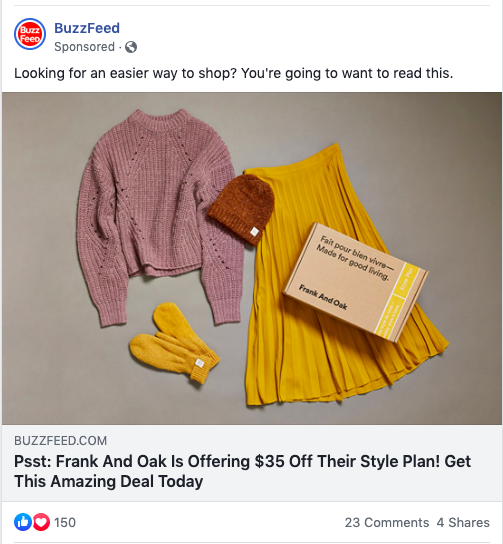
Language in this ad is great — it’s fresh, young, and personable. If I were idly scrolling Facebook, I’d pause on this ad because I’m always looking for an easier way to shop. Here, BuzzFeed recognizes a pain point of its readers and pulls readers into the article by identifying it with a question.
The way the relatable question is posed would make me look at the ad, while the no-frills design of the ad (a simple photo), coupled with the call-to-action, (“Get This Amazing Deal Today”) would make me open the ad.
That initial pull to the ad is possible due to the question. Ultimately, by beginning your ad by posing a question that peaks interest, you’re inviting viewers to click.
4. Include a customer or user’s testimonial.
The reason consumers love websites like Yelp so much is that it’s an entire platform of customer reviews about a product or service that help consumers make more informed decisions.
For instance, check out this ad for TriNet:
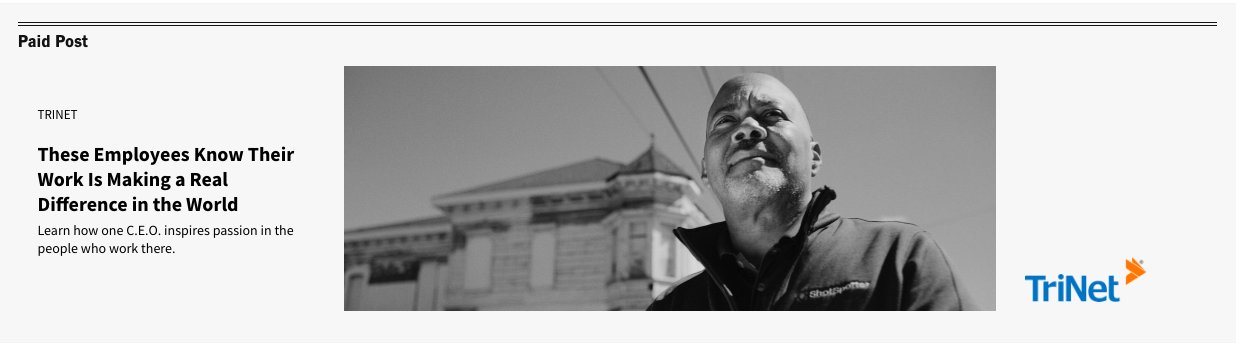
“Learn how one C.E.O. imagines passion in the people who work there” — this copy effectively notates a powerful key player of business and caters to thought leadership.
The headline, “These Employees Know Their Work in Making a Real Difference in the World,” is a powerful sentence that plays to emotions — it makes readers think, “Am I making a difference in the world? How are they? I should click on the ad and find out.”
By letting satisfied customers speak for you, you can deliver an ad message that’s personalized and relatable. Additionally, having that boost of a real-world interpretation of your product or service makes you more reputable.
5. Evoke a sense of urgency in your copy.
Using a tone that’s urgent makes consumers feel like they need a product in their life. Take this ad, for example:

This copy carries a sense of urgency to download the whitepaper. The caption introduces the ad and says what the ad doesn’t, saving space for more copy, and making sure all the important things are included.
Notice how the ad copy mirrors a CTA. To create urgency in your advertisement, you might consider using call-to-action language, such as “Learn,” or “Discover,” which engages browsers in a way that’s professional and knowledgeable.
6. Use data points.
Numbers are informative. Statistics and data visualizations get the mind moving and bring numbers to life. And the best part is, numbers aren’t just for ads about sales or data points.
these are a few of my favorite things 👀
— 22 Words (@22Words)
September 19, 2019
For instance, this promoted tweet has nothing to do with statistics or data collection. It’s a blog post for an Amazon round-up of bags, plants, and more knick-knacks.
As a consumer trying to waste time on social media, a blog post about 30 A-plus purchases from Amazon sounds like music to my ears. The relatable language of “100x Again” is a clever way of including numbers that are convincing without confusing or boring the audience.
Ultimately, numbers make an ad seem impressive, show research, and also connect with a younger crowd, making an ad more clickable.
When planning out ads, consider whether or not you would be engaged if you saw it, and use tools that help achieve that vision.

The Death of the Third-Party Cookie: What Marketers Need to Know
What do marketers and Sesame Street monsters have in common? They LOVE cookies.
For years, we’ve been using them to track our website visitors, improve the user experience, and collect data that helps us target ads to the right audiences. We also use them to learn about what our visitors are checking out online when they aren’t on our websites.
But the way we use cookies could change dramatically with Google’s announcement that it will phase out the third-party cookie on Chrome browsers by 2022.
A Google blog post announcing the phaseout explains, “Users are demanding greater privacy–including transparency, choice, and control over how their data is used–and it’s clear the web ecosystem needs to evolve to meet these increasing demands.”
Although Firefox and Safari have already phased out the third-party cookie, Google’s post says that its changes will happen over the course of two years as the tech company works with advertisers to ensure that this pivot doesn’t destroy the online advertising business.
“Some browsers have reacted to these concerns by blocking third-party cookies, but we believe this has unintended consequences that can negatively impact both users and the web ecosystem,” the blog post notes. “By undermining the business model of many ad-supported websites, blunt approaches to cookies encourage the use of opaque techniques such as fingerprinting (an invasive workaround to replace cookies), which can actually reduce user privacy and control. We believe that we as a community can, and must, do better.”
Although Chrome isn’t the first browser to phase out the third-party cookie, it’s the biggest. In late 2019, Google Chrome made up more than 56% of the web browser market. Chrome also accounts for more than half of all global web traffic.
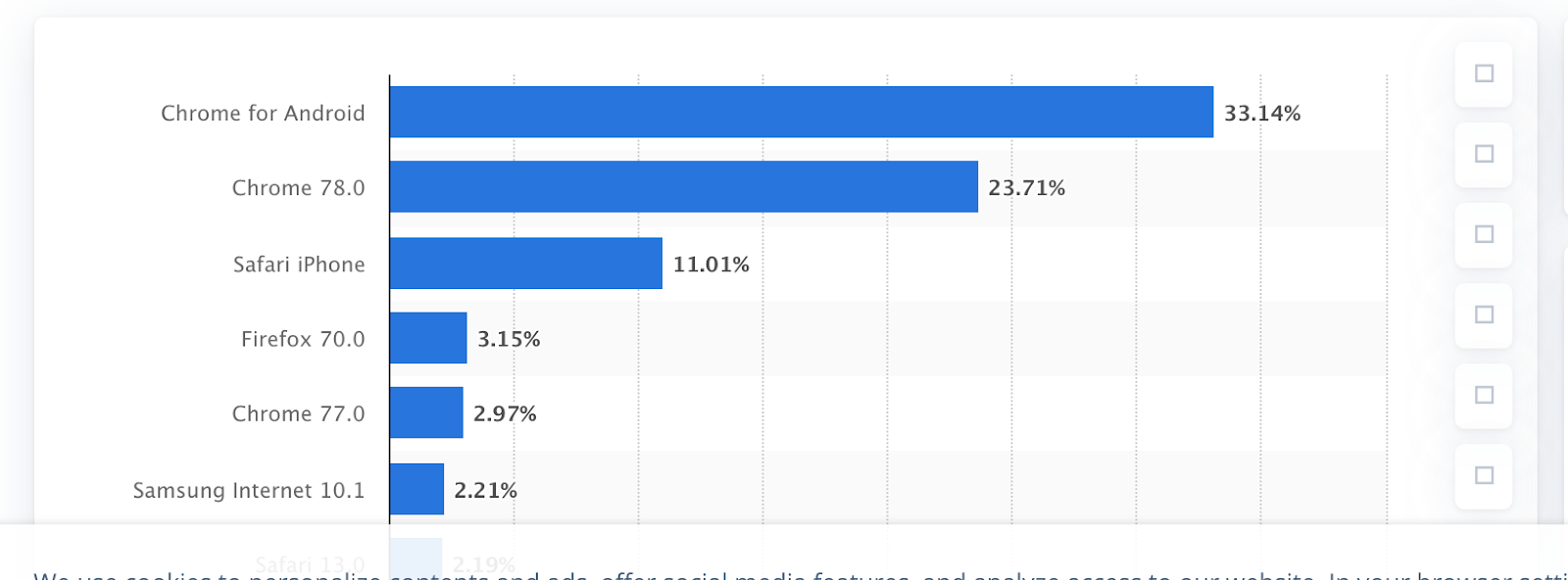
Source: Statista
Meanwhile, Safari and Firefox, which have blocked third-party cookies since 2013, come in a distant second and third place, respectively.
Because Chrome, Safari, and Firefox will all no longer support this type of data tracking by 2022, publications like Digiday are calling Google’s phase-out the “death of the third-party cookie.”
As with any major shift involving privacy, data, and advertising, business experts and publications have been frantically buzzing about how this will change the way we do business online.
But, do we really need to panic?
The truth is, Google Chrome’s third-party cookie phase-out could heavily impact some areas of the marketing and advertising space, while other tactics will still stay pretty much the same.
If you’re an advertiser or a marketer who’s thrived on third-party data for pinpointed online audience targeting strategies, you might be worried about how you’ll navigate this pivot.
Although some big changes might be underway, new data-driven alternatives could also emerge following this news.
To help you prepare for a world without third-party cookies, here are four things you should keep in mind about the latest cookie phase-out.
4 Things to Know About Google’s Cookie Phase-Out
1. Google isn’t banning all cookies.
If you’re thinking that all your cookie-fueled marketing strategies will soon be rendered obsolete, take a breath.
So far, Google says its only planning to phase out the third-party cookie on its browsers. However, first-party cookies that track basic data about your own website’s visitors are still safe — for now. This means that any first-party data you gain from your website’s visitors on all browsers will still remain in-tact.
Still not sure about the difference between first-party and third-party cookies? Here’s a quick breakdown.
First-Party Cookies
A first-party cookie is a code that gets generated and stored on your website visitor’s computer by default when they visit your site. This cookie is often used for user experience as it is responsible for remembering passwords, basic data about the visitor, and other preferences.
With a first-party cookie, you can learn about what a user did while visiting your website, see how often they visit it, and gain other basic analytics that can help you develop or automate an effective marketing strategy around them. However, you can’t see data related to your visitor’s behavior on other websites that aren’t affiliated with your domain.
Ever wonder how Amazon always remembers your login information, the language you speak, the items in your cart, and other key things that make your user experience so smooth? This is because Amazon uses first-party cookies to remember these basic details.
On the other hand, if you’re a marketer running a website on a CMS, you’ll have access to analytics dashboards that track first-party cookie data. For example, you’ll usually be able to see basic analytics, such as the number of web sessions on a page, the number of pages people click on during a visit, basic browser types, geographical demographics, or even referring websites where visitors clicked a link to your site’s URL. However, this data doesn’t inform you of everything your visitors do online.
Third-Party Cookies
Third-party cookies are tracking codes that are placed on a web visitor’s computer after being generated by another website other than your own. When a web visitor visits your site and others, the third-party cookie tracks this information and sends it to the third-party who created the cookie — which might be an advertiser.
If you’re an advertiser, third-party cookie data allows you to learn about your web visitor’s overall online behaviors, such as websites they frequently visit, purchases, and interests that they’ve shown on various websites. With this detailed data, you can build robust visitor profiles. With all of this data, you can then create a retargeting list that can be used to send ads to your past visitors or people with similar web profiles.
Want to visualize how third-party cookie data might work? Say you research a particular smart TV on Amazon. Then, you go to another site later in the day and see an ad Amazon advertisement for the same exact product. If you aren’t on an Amazon-owned site, it’s very possible that this advertisement was triggered by third-party cookie data.
While first-party cookies are accepted automatically, visitors must be informed that they are accepting a third-party cookie due to the amount of data that companies can retain from them.
The bottom line? If you’re just aiming to track your website’s visitors’ behaviors, preferences, and basic demographics only while they’re on your website, you probably won’t be deeply impacted by this change.
However, if you’re a marketer that relies on robust data for online advertising, pop-up ads, or a pinpointed audience-targeting strategy, you’ll need to continue to follow the news around this phase-out, and consider alternative first-party strategies, as the phase-out nears.
2. Many marketers expected this phase-out.
While the “death of the third-party cookie” might seem shocking, it certainly wasn’t a surprise.
Recently, governments around the world have been investigating and cracking down on data privacy issues. For example, in an October 2019 shakeup, Europe’s highest court ruled that users in the EU must actively consent to all cookies when they log on to a website. If not, the website can’t receive, use, or track any of the user’s cookie data.
The GDPR ruling means that instead of websites notifying new visitors that they were accepting cookies, visitors now have to press an accept button, like the one below, to accept a third-party cookie:

If your website only catered to local or domestic users outside of the affected countries, you might not have been impacted. However, international websites took a major reporting hit as numbers from Google Analytics — which relies on cookies — started to appear inaccurately low.
For international brands that relied on Google Analytics, this was a scary reminder that data-driven brands are vulnerable to software-related issues. It also showed us how governance and privacy regulations could dramatically impact our strategies.
Earlier, in August, Google announced it was developing a “Privacy Sandbox.” Although Google didn’t have a product created when they announced the move, a blog post explained that the tool that could allow marketers to continue to publish and circulate ads to the right audiences without having the same amount of user data.
“We’ve started sharing our preliminary ideas for a Privacy Sandbox — a secure environment for personalization that also protects user privacy,” wrote Justin Schuh, Director of Chrome Engineering, in the Google blog post. “Some ideas include new approaches to ensure that ads continue to be relevant for users, but user data shared with websites and advertisers would be minimized by anonymously aggregating user information, and keeping much more user information on-device only. Our goal is to create a set of standards that is more consistent with users’ expectations of privacy.”
In a January 2020 interview with Digiday, Amit Kotecha, a marketing director at data management platform provider Permutive, explained the key features of the proposed Sandbox:
“The most significant item in the Privacy Sandbox is Google’s proposal to move all user data into the [Chrome] browser where it will be stored and processed,” said Kotecha. “This means that data stays on the user’s device and is privacy compliant. This is now table stakes and the gold standard for privacy.”
Between the Privacy Sandbox and GDPR rulings that impacted data tracking, it’s become apparent to marketers that the third-party cookie was at risk of governance or other tech company changeups that could render it obsolete. This was so apparent that advertising software firms and publishers were already contemplating alternative solutions before the official news of Google’s cookie phase-out broke.
At this point, data management firms, like Permutive, are looking at creating alternative tools for advertisers that more heavily leverage first-party cookies and lump visitor profiles into more anonymous “segments” similar to what Google’s Privacy Sandbox is predicted to do.
3. Marketers aren’t just concerned about data.
While the elimination of third-party cookies on Chrome will be inconvenient to some, marketers are also concerned about Google’s reasoning behind the phase-out.
Without Chrome-based third-party cookie data, you’ll still be able to leverage and target Google Ads, which will be powered by Google Chrome’s first-party cookies and the Privacy Sandbox tools. However, some ad software and platforms that require third-party data will take a huge hit without support from Chrome.
“This move, while good for consumer privacy (in theory) is likely going to hurt most of the third-party ad platforms that utilize these cookies to generate revenue,” says Matthew Barby, HubSpot’s Director of Acquisition.
“The big question behind all of this for me is what’s motivating Google to phase third-party cookies out? Is it to improve privacy for the end-user or is it to gain a further grip on the ad market by forcing the adoption of Chrome’s own first-party cookie, which would likely result in many of those dollars being previously spent on third-party platforms to move in Google’s bottom line.”
Barby isn’t the only marketer to voice these concerns. In fact, in a joint statement, the Association of National Advertising and the American Association of Advertising Agencies called the tech giant out for disrupting healthy competition in the advertising space.
“Google’s decision to block third-party cookies in Chrome could have major competitive impacts for digital businesses, consumer services, and technological innovation,” the statement said. “It would threaten to substantially disrupt much of the infrastructure of today’s Internet without providing any viable alternative, and it may choke off the economic oxygen from advertising that startups and emerging companies need to survive.”
Later in the statement, the two advertising groups urged Google to push back the third-party cookie “moratorium” until effective and meaningful opportunities were made available to advertisers.
4. This move still opens the door for innovation in advertising
While things look grim for one type of cookie, this might not be a bad thing for skilled and adaptable brands.
Although this move does cause concern, Google and other browsers have still taken a stand for user privacy. As privacy laws continue to arise, this might be a great opportunity to look at other less-vulnerable advertising alternatives just incase another governance renders one of your marketing tactics or processes as obsolete.
Why? As a marketer with an innovative mindset, you should always be asking yourself questions like, “Are we too reliant on this technology?” or “What happens if and when our strategy gets regulated?” Innovative marketers will be able to come up with more clever alternatives and ads that identify with the masses — aside from just hyper-targeted content or annoying pop-ups.
Another area that could be innovated is the way we leverage and use data. As noted above, data management platforms are now looking to create alternative tools that help advertisers track data in a way that makes the most out of the third-party cookie. While these options might be different from your third-party cookie solutions or require some new strategizing, they would still allow you to target and learn about relevant audiences without getting intrusive.
What to Do Next
Don’t panic. At this point, marketers, advertisers, and data engineers alike are actively looking for solutions to determine what will happen next. And, because the third-party cookie was already weakened by Safari and Firefox ad blocking, it likely wasn’t the strongest advertising tool anymore anyway.
Right now, the best thing to do as a marketer is to continue to stay up-to-date with news related to third-party cookies and other data privacy moves that could impact your business.
If your advertising strategies rely on third-party data, start considering alternatives now. As you continue to follow the news related to the phase-out, you should also vet any software or solutions that can help you better transition away from this type of cookie.
For example, although marketers are wary of Google’s move, the tech giant’s Privacy Sandbox could still serve as a valuable alternative for ad targeting. You could also consider strategies or software that can better help you leverage first-party data.
Additionally, you could also revitalize older strategies, like contextual advertising. While third-party data allowed you to place ads directly in front of people who matched certain user profiles, contextual advertising allows you to circulate PPC ads on websites that rank for similar keywords as your ad. This way, if you’re selling sports apparel, your PPC ad could show up on sports-oriented websites.
Lastly, to make your brand as safe as possible from future governance or monopoly-related policies, brainstorm even more basic strategies that you can still use to reach your audiences even without cookies, hyper-targeted ads, or mass amounts of data. This will allow you to be less vulnerable to technology, even when you can benefit from the latest tracking software.
Disclaimer: This blog post is not legal advice for your company to use in complying with EU data privacy laws like the GDPR. Instead, it provides background information to help you better understand the GDPR. This legal information is not the same as legal advice, where an attorney applies the law to your specific circumstances, so we insist that you consult an attorney if you’d like advice on your interpretation of this information or its accuracy.
In a nutshell, you may not rely on this as legal advice, or as a recommendation of any particular legal understanding.

5 Things I Learned About Product (and People) Management This Year
This last year has been a blur. At the start of 2016 I was working in Product Management at Twitter, and then I moved to the other side of the world to work at Atlassian in Sydney, Australia. Despite the massive geographic and timezone change, I’ve learned a lot from both places about being a better product manager.
These lessons are based on my own experiences and feedback from managers, peers, and direct reports. I can’t thank these individuals enough for taking the time to share this feedback with me, as it’s the most valuable information I, (and anyone for that matter) can use to grow as a product manager.
1. If you’ve never left the office feeling like you’re terrible at your job, you probably are.
I have often left the office feeling pretty shitty. Common thoughts I’ve had include: “Am I the worst PM?” or “Maybe this isn’t a career for me”. I’ve come to accept this as a fairly normal feeling to have if I’m pushing myself and my team to build something valuable, question existing norms, and connect deeply with customers.
These are all things that we product managers applaud, without often appreciating the laborious process to get there. Anything worth doing is hard.

Tip: I try to embrace the uncertainty and painful process of building something entirely new with a team. And if I don’t feel the burn, if I start getting too comfortable, I ask myself if I am really doing enough to improve my customer’s lives. I find that running customer interviews or collecting in-person customer feedback makes sure I stay connected to customers.
2. It’s far worse to solve the wrong problem than to build the wrong solution to the right problem.
Spend the extra time upfront to really, really understand the problem you are solving. The new hotness is to use the JTBD framework to achieve this, but no matter which tool you use, be sure to gain an intimate understanding of your customer’s pains and motivations.
Build incrementally and get as much feedback as humanly possible early in the process. Test things as cheaply as you can. Focus all efforts on identifying that you are truly solving a key problem for a customer, then make some bets on the best solution.
My team and I have actually tracked how many expletives we’ve heard during demos of a prototype as an indicator if we were truly solving the right problem. We’re looking for a “HECK YEAH!”, not, “That’s pretty cool.” If you’re wrong about the solution you can always tweak things, but if you’re not solving a core problem you are setting yourself up for failure. Figure out the problem, remind yourself of it every morning, and you’ll be just fine.
Tip: Strive to elicit an emotional reaction from customers during the alpha/beta phase of development. Whether it’s effusively positive (ideally) or painfully negative (still valuable) you know you’re on to something. Use problem framing to define the problem you’re trying to tackle, and determine the “ooh aah” impact for customers.
3. Every feature has a hidden cost, so choose wisely.
There is a hidden cost to shipping features. Teams usually understand the direct costs (man-hours, server costs, etc) as well as indirect ones (ongoing maintenance, marketing spend, etc). The cost that we rarely account for is that a portion of customers will inevitably be confused or annoyed by the new feature.
It’s easy to assume that all new features provide net positive value to customers, but a quick glance through product reviews on tech blogs will reveal this to be untrue. If you ship a feature that 80% of customers love, the other 20% will have a negative reaction. Ship five features like that and chances are you’ve added some level of confusion to the majority of your customers. These things add up, so choose new features wisely.
Tip: You can’t solve for everything. Develop a specific target customer, obsess over their needs, get lots of feedback and only ship things that they will almost certainly love. Using an experience canvas can help with that. If anything is a “maybe”, save yourself the time and don’t ship it. You will thank yourself in the future.
4. Be wary of becoming an accidental diminisher.
Of all lessons I’ve learned, this one was the most mind-blowing. An accidental diminisher is someone who, despite being a perfectly capable, well-intentioned leader, drains the team’s productivity.
Here are signs that you might be an accidental diminisher:
- Are you the most talkative person in every meeting?
- Do you consider yourself a “visionary”, painting a future that is often too far removed from today’s reality?
- Do you feel compelled to jump in and take over the situation every time something goes wrong?
- Do you think it’s in the best interest of your company to have more people report to you?
There is an entire book written on this topic, but the idea is that we should inspire to be a multiplier — someone who helps amplify everyone around them. Multipliers are people who:
- Ask questions rather than give answers.
- Share knowledge in small increments rather than giving long lectures. Let others fill in the gaps.
- Expect team members to be fully autonomous and accountable, not hanging on their every word.
This has been the one that’s hardest for me in practice, but I’ve been fortunate enough to work with managers who’ve helped coach me through it.
Tip: Read up on this topic and review the warning signs and tips to address this tendency regularly. Your team will appreciate it. You can also take yourself (and your team) through a roles and responsibilities session to make sure no toes are stepped on.
5. Be a servant leader rather than a traditional leader.

Related to the last one, but a slightly different take. To quote the author of this concept, Robert K Greenleaf,
“A servant leader focuses on the growth and well-being of people and the communities to which they belong. While traditional leadership generally involves the accumulation and exercise of power by one at the ‘top of the pyramid’, servant leadership is different. The servant-leader shares power, puts the needs of others first and helps people develop and perform as highly as possible.”
To put this in my own words, the most meaningful thing a leader can do is invest time in helping their team members grow in their craft and achieve whatever personal goals they have set out to attain. This obviously has the implication that you know your team members goals, so that’s a great place to start!
Tip: Understand what your team members are trying to achieve, both on your project and personally for their career growth. Come up with at least one thing you are personally doing to help them achieve these goals. Review with them every quarter.

45 Tech Terms Translated Into Plain English
Ever seen the movie The Social Network about Mark Zuckerberg and the founding of Facebook?
In the movie, people kept saying “he’s wired in” or “they’re wired in” over and over again in reference to people coding intensely with their headphones on.
Not knowing anything about programming, I always imagined that being “wired in” meant the programmers were somehow listening to the computers, or that they were connected to the code somehow … or something weird that us non-programmers would never understand.
Turns out it just meant they were concentrating really hard with headphones on. Well, good thing I never hypothesized out loud.
We all misinterpret some of the techy terms floating around web and product design nowadays — but now more than ever, marketers need to be familiar with this vocabulary so we can communicate better with our IT, web design, or product development departments.
To help bridge the gap, here are 45 techy terms every marketer (and human) should understand.
(For a few of these, we drew on these 60 marketing acronyms every industry pro should know.)
301 Redirect
A permanent redirect from one URL to another — usually from a company’s old website to their new website. They’re also used to redirect web traffic from those old web pages to the new ones that have replaced them.
404
Web visitors see 404 error pages when they try to reach a web page that doesn’t exist. This usually happens when the web page has been deleted or the visitor mistyped the URL. Check out HubSpot’s 404 page here.
Alt Text
“Alternative text,” or “alt text.” The text associated with an image. It’s usually the file name of that image, but alt text can be customized using most content management systems (like HubSpot’s). When an image isn’t able to load in an email, website, or blog post, the alt text is displayed instead.
It’s important for all the images on your website to have alt text because it’s the only way search engines like Google can understand what an image is about, which helps you optimize your website for search. It also makes images accessible to the blind because screen readers can read aloud the alt text.
API
“Application programming interface.” A computer programming term meaning a series of rules. APIs allow an application to extract information from a service and use that information in their own application, or sometimes for data analysis. It’s kind of like a phone for applications to have conversations — an API literally “calls” one application and gets information to bring to you to use in your software. APIs facilitate the data needed to provide solutions to customer problems.
HubSpot has APIs that developers use to get information from our software into theirs. It’s important for marketers to understand what APIs can do to factor them in to their marketing strategies. Learn more about how marketers can use APIs here.
AWS
Amazon Web Services is a service that helps web developers and ecommerce owners in developing certain shopping-related features of their websites.
Browser Cache
The appliance or instrument through which a browser saves the data needed to see a website, like images and HTML. When you revisit a web page, it’ll take less time to load than the first time you visited it because a cached version of the page was already saved the first time you were there. Because you have a cached version of the page, your browser doesn’t need to send a new request to see that page. Learn more about browser caches here.
“Cached out” can also be slang for really, really tired.
Blockchain
In simple terms, blockchain is a ledger system that uses an open, distributed record to keep track of transactions — transactions could mean cryptocurrencies, medical information, voting or home records, and more.
Cart Abandonment
When people add products to online shopping carts but don’t check out and actually purchase those products. According to Fireclick, 62.30% is the average online cart abandonment rate. It’s a common problem for many ecommerce stores. Learn 8 reasons for cart abandonment and how to combat it here.
CDN
“Content delivery network” or “content distribution network.” A system of servers on the internet that provides content rapidly to multiple users by duplicating the content on multiple servers and directing the content to users based on proximity. CDNs enable better performance and availability — plus, they offload traffic served directly from the content provider’s website. They’re especially good for streaming audio, video, and internet television programming.
To give you a better idea of how the system works, CDN operators get paid by content providers (like media companies and ecommerce vendors) to deliver their content to end users. In turn, CDNs pay ISPs (internet service providers), carriers, and network operators for hosting its servers in their data centers.
Cookies/Tracking Cookies
A small file that a web server automatically sends to your personal computer when you browse certain websites. The identifying information they contain includes login credentials (including usernames and passwords), shopping cart information, and preferences. They’re stored as text files on your hard drive so servers can access them when you return to websites you’ve visited before.
Ever made a return visit to a website like Amazon and seen content tailored to your user preferences? That’s because on your first visit, a cookie was installed. When you came back, the website server read your cookie and recognized you.
Learn more about how marketers can use cookies here.
CMS
A CMS, or content management system, is a platform that allows less-techy people to build websites and content from professionally designed templates. More tech-savvy users can often further customize these templates or website themes with HTML edits or plug-ins, which you’ll learn more about on this list. Notable examples of CMSs include WordPress and WIx.
CSS
“Cascading style sheets.” A language that manages the design and presentation of web pages: color, look, feel, and so on. It works together with HTML (see HTML), which handles the content of web pages. “HTML is the skeleton of your web pages, while CSS is the clothing,” as one of our colleagues says.
With CSS, you can create rules to tell your website how you want it to display information. And you can keep the commands for the style stuff — fonts, colors, and so on — separate from the commands for the content. They’re called “cascading” because you can have multiple style sheets, with one style sheet inheriting properties (or “cascading”) from others. Learn more here.
Disaster Recovery Plan
A plan that helps an organization prepare in the event that its website goes down or something happens to the webmaster. These disasters could be hard drive failure, hackers, and so on.
Disaster recovery plans include recording important website information, performing and saving regular backups of your website, determining an implementation plan for recovering your website should anything happen, and keeping an extra copy of your website data in a safe place.
DNS
“Domain name server.” Servers that translates web addresses into one or more IP addresses. This is why you can enter HubSpot.com instead of having to remember our IP address.
DoS/DDoS Attack
“Denial-of-service” or “distributed denial-of-service” attack. An attempt to make a machine or network resource unavailable to its intended users. DoS threats usually target websites or services hosted on high-profile web servers like banks and credit card payment gateways, but they’re also common in business in the form of website attacks.
For example, one common type of attack on businesses would be attempting a service overload — i.e. flooding a network with so much information that it either can’t respond to legitimate traffic, or responds so slowly that it’s basically useless.
Sadly, there isn’t much you can do to avoid being a victim of a DoS attack except securing passwords and installing anti-virus software and a firewall. Signs of an attack are unusually slow network performance, unavailability of a website, or the inability to access a website. Contact your IT team if you sense something’s off.
Hosting Servers
The web servers where website files are housed, served, and maintained.
HTML
“Hyper-text markup language.” The language used to direct the architecture of your website, landing pages, and emails. HTML lays out the structure of your website, from the title and first header, to a bulleted list, to your footer. Remember, “HTML is the skeleton of your web pages, while CSS is the clothing.” Learn more here.
Interface/GUI
GUI stands for “graphical user interface,” known also as simply “interface.” An interface is the part of a piece of software that the end user actually sees and interacts with.
IPaaS
IPaaS, which stands for Integrated Platform as a Service, is a cloud-based platform that connects various applications, systems, and technologies within the cloud or on-premise. It allows for the deployment and maintenance of integration flows without the need for hardware or middleware either within an organization or between an organization and third-party software.
IP Address
“Internet Protocol address.” A numerical label assigned to each device participating in a computer network that uses the Internet Protocol for communication.
ISP
“Internet service provider.” An organization (commercial, community-owned, nonprofit, or otherwise privately owned) that provides internet services.
Javascript
A computer programming language used to create interactive effects within web browsers. For example, it allows you to perform calculations, write interactive games, add special effects, check forms, create security passwords, customize graphics, and so on. It has become the standard equipment in virtually all web browsers and is well-suited to a large range of non-web-related applications.
Mimification
Mimification involves going into a web page or piece of content and pulling out all of the useless or excess code or spaces. This can help to increase page load speeds which can also boost your Google SEO.
Machine Learning
Machine Learning is an artificial intelligence technique where algorithms are trained to recognize patterns and respond to them by performing tasks. For example, a customer service bot for a travel site might be trained to send you deals related to Bermuda if it recognizes the words, “beach vacation” or “Bermuda.”
NLP
NLP, or natural language processing, is when machine-learning algorithms are trained to comprehend large amounts of human language and respond to those commands. You might hear about this machine learning technique most when you are reading about voice assistant products that can respond to multiple spoken commands at once, like Amazon’s Echo.
Parallax Design
You’ve probably seen those super-cool scrolling website designs like this one from Wildlife, this one from Bagigia, or this one from Honda? That’s parallax — a web design that takes a visual storytelling approach to guiding visitors through a website, and brings user experience to a new, interactive level.
Pixel
Pixels from external ad networks work similarly to the HubSpot tracking code. Once installed on your site, the pixel detects visits to your pages. This data is the basis for creating ad audiences. These ad audiences to target ads can be used to target your ads at specific visitors. Pixels also collect data that can help optimize ads and measure your ads’ results.
Plugin/Plug-In
A software extension that adds a specific feature to an existing software application. You’ve probably heard of plugins in the context of web browsers to add new features like virus scanners, for example. Ever enabled Adobe Flash Player or Microsoft Silverlight QuickTime Player on your internet browser? Yup — those are plugins.
Registrar
A company that registers domain names, like GoDaddy.
Responsive Design
The method of designing web pages that automatically appear in their optimized form on all devices. In other words, responsive design automatically reformats your website for all screen sizes so your website visitors can easily interact with your site no matter what device they’re using. Due to the rapid increase in mobile usage in recent years, responsive design has become somewhat of a necessity.
Here’s how responsive design gets you more from your website.
RSS Feed
“Rich site summary feed.” A web feed that publishes frequently updated information like blog posts and news stories. They let publishers syndicate data automatically, which is why they’re sometimes known as “really simple syndication.” When you subscribe to a website’s RSS, you no longer need to check their website for new content — instead, your browser will automatically monitor the site and give you timely updates.
SaaS
SaaS stands for “Service as a Software.” This acronym categorizes platforms that help professionals and B2B employees with daily tasks or other aspects of their own job. Examples of SaaS platforms are HubSpot, Slack, and DocuSign.
Sandbox
A place to run a program for testing and experimenting in software development. Basically, it’s a testing environment that isolates untested code changes and experimentation. This isolation protects live servers and their data from changes that could be damaging.
Scrum
A framework for managing product development used in agile software development. In Scrum, projects are divided into succinct work cadences known as “sprints,” which are usually one, two, or three weeks long. At the end of each sprint, the team meets to assess their progress and plan the next sprint. One key to Scrum’s popularity and success is that it has a simple set of roles, responsibilities, and meetings that never change. Learn more about Scrum here.
Session
In computer science, a session is a dialogue, conversation, or meeting between two or more communicating devices, or between a computer and a user (like a login session). It typically involves saving information about the session history in order to be able to communicate.
SEO
SEO or search engine optimization is a strategy that optimizes your site and content so it can easily be found and promoted on online search engines.
Showstopper
Slang for anything that could stop the launch of a new product, like a bug.
Site Map
Site maps show a hierarchical view of a website’s pages and content. It helps website designers figure out what content is needed on a website before they begin designing it. Site maps can also be web pages that offer links to all of the pages on a website.
UI
“User interface.” A type of interface that allows users to control a software application or hardware device. A good user interface provides a user-friendly experience by allowing the user to interact with the software or hardware in an intuitive way. It includes a menu bar, toolbar, windows, buttons, and so on. Learn how to create a user-friendly website registration process here.
UTM
A UTM is a code that shows up in a tracking URL that allows a website, such as HubSpot to track views from a specific source, such as a social post or promotional email. Learn how to create and track UTMs and tracking URLs here.
URL
“Uniform resource locator.” Also known as a web address, a URL is a specific character string that refers to a resource. It’s displayed on the top of a web browser inside an “address” bar. Learn how to optimize your URLs for search here.
UX
The overall “user experience” a customer has with a particular business, from their discovery and awareness of the brand all the way through their interaction, purchase, use, and even advocacy of that brand. To deliver an excellent customer experience, you have to think like a customer, or better, think about being the customer. Learn more here.
Vector Graphics
A computer graphics term to describe the use of “geometrical primitive objects” like points, lines, curves, and shapes to represent images. Here’s an example of a real phone that has been “vectorized.”


Waterfall Development
A sequential design process often used in software development processes, where progress is seen as “flowing” steadily downward through the phases of conception, initiation, analysis, design, construction, testing, production/implementation, and maintenance.
The point of waterfall development is to spend more time in the early stages of the software production cycle because catching bugs and other issues early on is cheaper and easier to fix than catching them later.
Web Accessibility
The ability for your website to be accessed by people with different physical and mental abilities, age, location, and so on. The UN Convention on the Rights of Persons with Disabilities recognizes access to the web as a basic human right.
Properly designed websites and web tools can be used by people with disabilities. Here are a few examples from W3C of things to include on your website to make them accessible to people with disabilities:
- Alt text for images — Alt text makes images accessible to blind people because their screen readers, which read aloud the information on a page, also read out the alt text for visual images. It also makes the image information available to people who turned off images on their mobile phones to lower bandwidth charges or people in rural areas who turn off images to speed download. (Alt text is also important for SEO purposes because it lets Google know what the subject matter of the image is.)
- Transcripts for videos and podcasts — Include transcripts to give access to people with hearing disabilities.
Wired In
Working with headphones on, indicating you don’t want to be disturbed. When programmers write code, sometimes they’ll plug in earphones to isolate themselves from the outside world so they can be totally focused on coding.
Editor’s Note: This blog post was originally published in July 2014, but was updated in November 2019 for comprehensiveness.

17 Offbeat, Extreme, and Downright Unusual Ways Brands Have Promoted Their Products
If you’re a marketer of any kind, this phrase is probably lurking somewhere in the back of your mind when you start a new project:
“How do we make this brand really stand out?”
The constant battle to differentiate a brand in a crowded playing field is challenging, and it’s pushing some marketers to the extreme.
We’ve rounded up 17 creative campaigns and promotions that rely on unconventional mediums to spread brand messaging to consumers. Check them out below for some unique inspiration for your next big campaign.
Unusual Brand Promotions
1. Purple
Instead of doing a normal ad for its mattress technology, Purple, a company that targets millennials and young adults, pulled in the comedic duo of Tim and Eric to host a bizarre and trippy web series called “Purple Boys.”
In each episode of the Facebook-based series, Tim and Eric interview goofy fictional characters who are struggling to sleep. While each episode centers around entertainment, each character weaves Purple Mattress information into each scene. Each episode then culminates with someone getting a sound sleep on a Purple Mattress.
Want to see it for yourself? Check out the second episode of Purple Boys which follows a character named Joe Dunder in his quest to get to sleep and fight off the “Sunday Scaries.”
2. Skittles
Instead of putting millions of dollars into one short Super Bowl advertisement, Skittles made a full-fledged musical titled “Broadway the Rainbow” — which made fun of advertising.
The Skittles musica was formatted as one large and obvious ad that told the story of how manipulative the marketing industry was. Throughout the musical, all of the characters regularly spoke and sang about how advertisements ruined their lives and how they were living in one giant Skittles commercial.
Even though Skittles charged $200 for each ticket, the musical sold out and went viral within days of its premiere. When the show was announced, USA Today called it, “the most inventive end run in the history of ambush advertising” because it capitalized on Super Bowl ads by immersing paying viewers into an obvious Skittles ad.
To make the show more exclusive for paying customers, Skittles never aired it on television or online. To give you a quick idea of what it was like, here’s a highlight video:
Yes, creating a musical to advertise your company might seem like an outlandish way to spend your advertising dollars. But at a higher level, this campaign does show how marketers can get creative with ambush marketing to cause a buzz that gains attention from a wide range of audiences.
3.. GoPuff
GoPuff, a company that allows you to order convenience store items through its app, has a number of odd commercials and ads. But one of the weirdest ways it promotes products on its app is by calling out the weird shopping list of items that people order late at night on its Twitter.
To the lady who just ordered three packs of Benadryl at 10:30 in the morning: WE FEEL YOU GIRL #screwyoupollen pic.twitter.com/y8kPvpV7gU
— goPuff (@gopuff)
May 2, 2017
Yep. It’s unusual to call out your customers for their weirdness, but while some prospects will learn more about the products you offer, other current customers might order odd things just to get a shoutout.
4. Nivea Kids Sunscreen
This marketing stunt from Nivea made for some interesting headlines when it debuted at Cannes in 2016: Seagull drone poops sunscreen…uh, thanks (CNET), Nivea’s Drone Bird Poops Sunscreen on Your Kids (Dronelife), How Bad Was This Nivea Bird Poop Sunscreen Project, Really? (AgencySpy). The list goes on.
The folks at German agency Jung von Matt/Elbe designed this seagull drone to squirt Nivea Kids Sunscreen onto unsuspecting children on the beach. In the case study video below, they explain how the drone can be used to make sure all kids are protected from the sun, even when they refuse to apply sunscreen themselves. It may seem like a parody at first, but make no mistake: This drone is 100% real.
Say what you will about the taste level of the pooping seagull concept — it definitely generated a lot of attention for Nivea and left an undeniably memorable impression. Cannes Lion jury president Sir John Hegarty told a group of journalists, “It’s the most stupid thing I think I’ve seen in my whole life. I actually thought the Monty Python team had gotten together and entered it into [Cannes], to see if we would vote for it.”
Spoiler alert: They didn’t vote for it. Nivea’s well-intentioned pooping seagull flapped away from Cannes without any awards.
5. Milka Chocolate
When Swiss chocolate company Milka launched in France, they turned to Paris-based agency Buzzman to devise a unique way to introduce their product to the French people. The chocolatiers ended up removing a small square from 13 million of their classic milk chocolate bars, and giving consumers a choice: Do you want the “last square” sent back to you, or do you want to send it to a loved one?
Consumers who received a Milka bar with a missing square were given a code they could enter online, where they could either send a small piece of chocolate — along with a personalized message — to a friend or family member, or enter their own address to have the missing piece returned to them.
6. Cub Cadet PRO Z Riding Lawnmower
Who says the physical press release is completely dead? To promote industrial brand Cub Cadet’s newest riding lawnmower, agency Colle+McVoy came up with a steel alternative to the classic 8.5-by-11 inch paper document.
The press release — which weighed in at a hefty 14 pounds, 13 ounces — was made entirely of Cub Cadet’s signature Triple 7-gauge steel, the same material used in their rugged lawnmowers. Outfitted with bolts and shipped to media outlets in a custom crate, the press release also came with a free crowbar (because why not?).
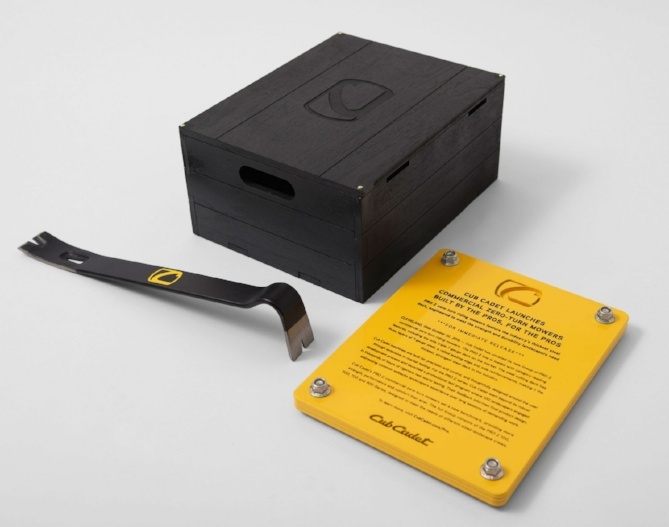
Image Credit: Adweek
7. The Art Institute of Chicago and Airbnb
Have you even dreamed of walking into one of your favorite paintings? How about staying the night? In this creative campaign to generate publicity for the Art Institute of Chicago’s Van Gogh exhibit in 2016, agency Leo Burnett partnered with Airbnb to create a unique, immersive experience for art lovers.
The agency worked with designers and museum curators to meticulously transform a simple studio apartment in Chicago into one of the Dutch artist’s most recognizable paintings, Bedroom in Arles.
As part of the campaign, posters advertising a room to rent and resembling vintage newspaper classified ads were plastered around Chicago, inviting passersby to text “Van Gogh” — aka, Leo Burnett’s clever social media team, who fielded all messages in character. A few lucky early respondents were able to rent the room via Airbnb for only $10 a night.
The campaign was a massive success for the Art Institute, leading to the museum’s largest daily exhibition attendance in 15 years, and earning them national media attention.

Image Credit: AdAge
8. Tiger Beer’s Air-Ink
Tiger Beer — an American-owned company that operates out of Singapore — wanted to find a way to turn air pollution into something useful and positive. Enter the talented team at Graviky Labs, who devised a scientific process to capture pollution and transform it into Air-Ink — a fluid black paint. The brand then worked with Australian agency Marcel Sydney to put the ink in the hands of influential street artists and film the results.
It turns out just 40-50 minutes of diesel car pollution can produce a rich shade of black ink, and artists were more than willing to incorporate the paint into their work for the project.
9. Adobe Stock Apparel
If you’re a marketer, you’ve experienced the pain of sorting through seemingly endless pages of bad stock photos in search of one that just isn’t too awful. To promote their new stock photo service Adobe Stock, Adobe partnered with Swedish agency Abby Priest to develop a tongue-in-cheek fashion line that features outdated, overused stock photos.
“Some stock images have earned their place in the history books,” said Abby Priest’s Creative Director, Oskar Hellqvist, in a Q&A on Adobe’s blog. “Classic motifs that have been overused and established as hilarious clichés, known, loved and/or hated by all … Turning them into a limited edition clothing line is our way to salute them and an attempt to create something disruptive and unconventional in the genre.“
You can see the full Adobe Stock Apparel lookbook here.
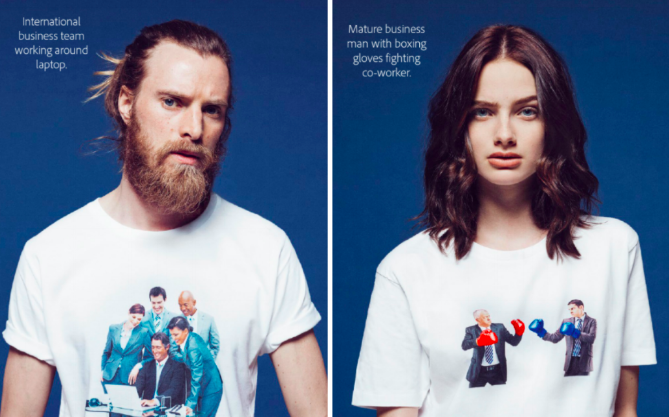

Image Credit: Adobe
10. UberPOOL
As part of a major advertising push in Latin America, Uber’s in-house marketing team launched a guerrilla campaign in Mexico City, sending out a small army of drones equipped with cheeky signs promoting UberPOOL. Drivers were confronted with the small aircrafts and their mini-billboards while waiting in stagnant rush hour traffic.
Although they don’t plan to replicate the stunt in other markets (since doing something similar in the U.S. or Europe would require some major bureaucratic hoop-jumping), the stunt gained significant earned media attention for the car service app.

Image Credit: MIT Technology Review
11. KMFA-FM Austin
How do you get millennials interested in a classical radio station? This Twitter-powered metronome is a good start. Developed by agency Archer Malmo for Austin’s classical music station KMFA-FM, this metronome ticks at a tempo determined by the number of Tweets sent in the Texan city.
“We want people to give KMFA a try — it’s not a stereotypical, stodgy classical music station,” Archer Malmo executive creative director Matt Rand told AdWeek. “That audience happens to be younger and use Twitter more, so basing our ‘heartbeat of the city’ off Twitter volume is a fitting way to connect with them.”

Image Credit: Adweek
12. Laphroaig
Most ads run for 30 seconds. This spot from Laphroaig Whiskey clocks in at three and a half hours — and it was all filmed in a single take.
U.K. agency Multiply was behind the video, which features comedian Andy Daly reading real reviews of Laphroaig in a filibuster-style speech. Ranging from glowing to downright disgusted, the strongly worded and ultimately mixed reviews are intended to highlight the polarizing nature of Laphroaig — you either love it, or you hate it. But the brand wants to hear about it.
13. Lipton Green Tea
To encourage consumers to make healthier choices while shopping for groceries, Lipton Green Tea partnered with agency Wunderman MENA to create a shopping cart that tracks your steps, calories burned, and time spent moving at the grocery store.
Aimed at people too busy for regular exercise, the cart is intended to show consumers how many calories they can burn just by walking around at the grocery store. The hope is that they’ll also think twice about what they put in their shopping cart if they can see the calories they’re burning in real time.
14. Burger King
Burger King and McDonald’s have always had a rivalry, and on Halloween 2016, the home of the Whopper played a prank on the Golden Arches.
A Burger King location in Queens, NY dressed up the entire restaurant as “The Ghost of McDonald’s”, sweeping a massive white ghost costume over the building and adding a saucy message to their sign: “”Booooooo! Just kidding, we still flame grill our burgers. Happy Halloween.”
Although only one location participated in the spooky prank, Adweek revealed that it was a stunt pulled off by ad agency David Miami.

Image Credit: Burger King
15. Paqui
To drum up some buzz for their gourmet tortilla chip brand, Paqui released a fiery chip spiced with Carolina Reaper peppers — the world’s hottest variety according to Guinness World Records. The Carolina Reaper Madness chips are so dangerously spicy, they’re packaged individually and sold for $4.99 each.
So why would you ever want to eat this thing? It’s part of a challenge, naturally. Following in the footsteps of other viral internet food-based challenges — like the cinnamon challenge, which never, ever ended badly for anyone — Paqui’s marketing team launched the #OneChipChallenge.
The premise is simple: eat the the Carolina Reaper Madness chip, post your reaction online. The brand offered prizes to select participants, including a year’s supply of their less-spicy chips.
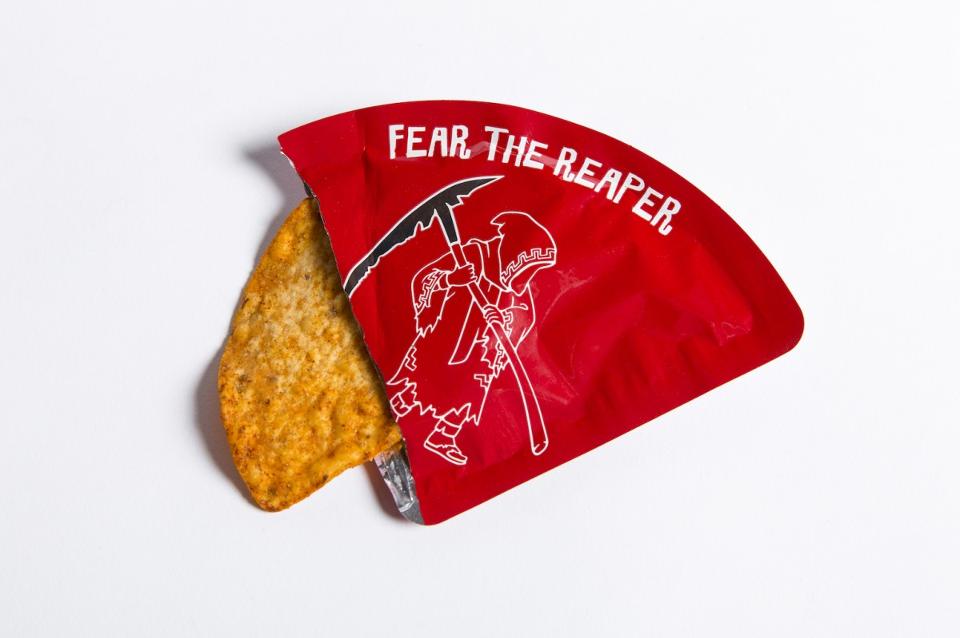
Image Credit: Forbes
16. South Park Video Game
Add this one to the list of things no one ever asked for, but somebody made anyway: A virtual reality mask that lets you smell farts.
To promote the South Park video game, Ubisoft worked with agency Buzzman to concoct an odor that perfectly mimicked the smell of someone passing gas. It was actually a lot harder than you’d think. Buzzman consulted multiple chemists and perfumers to get the smell right, and worked with a team of software engineers and industrial designers to develop the VR nose mask. They named it — what else? — Nosulus Rift.
The mask (thankfully) isn’t for sale, but Ubisoft uses it at promotional events to build hype for the South Park game, which features a particularly flatulent character.

Image Credit: Buzzman via AdAge
17. Virgin America
Have you ever looked at your shoes and thought, “Man, I really wish they had a phone charger and WiFi capabilities?” Virgin America has heard your very first world cries, and developed these almost comically tricked-out shoes to promote their first class flying experience.
California-based agency Eleven, Inc. designed these extravagant kicks over the course of eight months to mimic the look and feel of Virgin America’s first class cabins. The final product includes mood lighting, WiFi, a USB phone charger, and a small video screen — you know, in case you feel compelled to watch some Netflix on your shoes.
The sneakers sold for $97,877.77 on eBay, and all proceeds were donated to Soles 4 Souls, a charity.

Image Credit: Adweek
Create a Winning Weird Promotion
Coming up with an ad that’s considered off-beat can be tricky. First, you’ll need to have a number of creative brainstorms. Then, you’ll need to make sure that your campaign is understandable and memorable to the audiences you show it to.
For example, while millennials and people with a sense of humor might find the Purple series above to be hilarious, others might not understand why Purple is marketing themselves in this way.
One way to determine if people will truly understand and engage with your bizarre campaign could be to present it for a focus group first. To learn more about this strategy, click here.
Editor’s Note: This blog post was originally published in November 2016, but was updated for comprehensiveness in November 2019.

These 9 Brands Take Personalized Marketing to a New Level
When I sit down to write an article, I have a pretty standard routine. I outline the story in our Content Optimization System (COS), copy and paste it into a Google doc, find a good photo to accompany it, do research, write, proofread, and carry it back over to our COS. It’s a weird series of steps that doesn’t necessarily work for everyone, but it does for me. They’re my very own personal blogging habits.
Those habits aren’t just limited to my writing process. I have morning, evening, and weekend routines, as if my entire life has become a series of established patterns. Knowing what those habits are, I learned during step four of the above, is a veritable goldmine for marketers.
I figured that out from a 2012 New York Times article called, “How Companies Learn Your Secrets.” Penned by Charles Duhigg, it was written largely as a follow-up to what became a public incident: An angry father marched into a Minnesota Target store, demanded to know why his teenage daughter received coupons for baby products, only to later find out that she was, in fact, pregnant.
The retailer, it turned out, was able to predict her pregnancy and subsequently personalize the promotions she received, thanks in large part to a ton of (completely legal) data collection and analysis. Creepy — or great marketing?
Today, we’re still asking ourselves that question. But, ultimately, it seems that there can be a good balance between knowing your customer way too well and solid marketing. In fact, in 2018, Harvard Business Review revealed that although people want to keep their information secure online, they still value personalized and meaningful marketing experience.
But how does personalized marketing work, and how have other brands put it into practice without coming off as creepy? Here are eight great examples of brands that nailed it in a way that came off as fun rather than intrustive.
9 Personalized Marketing Examples
1. Shutterfly
Shutterfly is a website and app that allows you to create canvases, photobooks, calendars, and even items with your own photos laminated on to them. While Shutterfly has gotten creative with personalized emails and subject lines, one unique thing it did recently was personalize item offerings on its app.
If you download the Shutterfly smartphone app, create an account, and give Shutterfly permission to access your photos, it will automatically identify photos with faces in them and place them on items that you can purchase from the app.
My colleague, Pamela Bump, recently discovered this while she was creating photo-books as holiday gifts for her family. In the example below, she noticed that the app placed photos of herself and one specific friend in particular on to items including mugs, holiday cards, and calendars.

The Takeaway
If you sell products that are personalized to begin with, it can be helpful to show your customer what they could look like before they buy them as well as photos or words related to their life that would look great on the product.
However, when you do this, be very careful that you get explicit permission to go through someone’s information to pull this data. When it came to Shutterfly, Pamela had already given the app permission to access her photos and connected the account to her Facebook account where she approved a number of other related permissions. If you don’t get proper permissions and pull appropriate personalization data, you could come off as untrustworthy or downright creepy.
2. Snapchat’s Bitmoji
In 2016. Snapchat launched an app called Bitmoji which allows users to design cartoonish avatars of themselves that can be featured as their Snapchat profile picture and or on the Snap Map, if permitted.
Since then, Snapchat has also launched an autogenerated daily Story in its Discover feed, called “Bitmoji Stories.”
When you click into a Bitmoji Story, you can see a series of comic-book-like images that tell a story about your own Bitmoji avatar. If you’ve recently spoken to a friend with a Bitmoji attached to the app, you can also see your friends pop up in your daily Story.
Below is an example of a Bitmoji Story where Pamela Bump’s Bitmoji shows her cousin’s Bitmoji a new app:
The Takeaway
Because Bitmoji Stories appear in Discover, with all the other branded content and advertisements on Snapchat, the app company has found a great way to bring people to this particular area of the app — even if they aren’t interested in seeing branded content. While audiences are on this Discover page, they might find a brand or content that catches their attention and further interact with feed.
This is a great example of how an app creatively used personalization to bring traffic from one area of its app to another.
3. Target
To continue the above tale, we thought it might be helpful to share more information on how, exactly, the retailer pulled off the aforementioned personal prediction. As Duhigg explains in his article — which goes into much greater detail than I will here — every Target customer is assigned a Guest ID number after the very first interaction with the brand.
That ID is used to store the customer’s demographic information, ranging from ethnicity to job history, and to track buying behavior. And by doing the latter, specifically with those who had baby registries with the store, Target’s marketing analysts were able to form a “pregnancy prediction” score, which allowed them to determine which purchasing patterns indicated a customer was in the early expectant stages.
It was a game changer. “Once consumers’ shopping habits are ingrained,” Duhigg writes, “it’s incredibly difficult to change them.” That is, until, a major life event takes place, like finding out that a baby is one the way.
That’s when routines are forced to change. Suddenly, there’s a deadline, and people start to buy products that they never previously considered, like “cocoa-butter lotion” and “a purse large enough to double as a diaper bag,” the article says. Those are the behaviors that trigger Target’s pregnancy prediction score, prompting the customer to receive special deals on baby-related items.
The Takeaway
While this level of personalized marketing is admittedly fascinating, it could backfire. Duhigg summarized it well in his article:
Using data to predict a woman’s pregnancy, Target realized … could be a public-relations disaster. So the question became: how could they get their advertisements into expectant mothers’ hands without making it appear they were spying on them? How do you take advantage of someone’s habits without letting them know you’re studying their lives?”
That’s not to say that marketers should completely do away with personalization, as it’s effective when done correctly — personalized emails, for example, have a 6.2% higher open rate than those that aren’t. But in an era with growing concern over privacy and security, tread lightly.
Let your customers know that you understand them, without being intrusive. Curious to learn how to do that with your HubSpot Marketing and Sales software? Read more about how personalization tokens work here.
4. Vidyard
Last week, my colleague, HubSpot Academy Sales Professor Kyle Jepsen, forwarded me an email with the comment, “Taking personalization to a whole new level.” The video below followed:
Source: Vidyard
He wasn’t kidding. This particular brand could have just superimposed each recipient’s name onto the whiteboard in this video and kept the same script for each one. But it didn’t stop there — Cole, the gentleman speaking in the video, not only addressed Kyle by his first name, but also referred to his specific colleagues and the conversations he had with them.
The Takeaway
Considering that the average online reader loses interest after about 15 seconds, personalizing your mixed media content is an interesting and often effective approach. “I mean, clearly he made the video just for me,” Jepson said. “It’s an interesting case study.”
And while this sort of personalization is memorable, it’s also extremely time-consuming. So if you set out to create it, be absolutely sure you’re targeting the right people. There’s nothing worse than taking the time to produce something highly customized, only to find out you’ve sent it to someone who doesn’t have the decision-making power you need.
5. Coca Cola
Source: ShareaCoke.com
Back in 2011, Coca Cola launched its famous “Share a Coke” campaign in Australia, bringing it to the U.S. in 2014. It was an effort to reach millennials, in which each bottle contained one of the most popular first names assigned to that generation. Eventually, bottles contained semi-personal labels beyond first names, like “better half.” Today, according to Ad Age, over 800 first names are used.
According to that same source, Coke will soon be adding surnames to bottles, like Garcia and Thompson. “Last names give us an opportunity to invite more people into the campaign,” Evan Holod, Coca-Cola’s brand director told Ad Age. “It’s just a great way to up the reach.”
In addition to that effort, according CNBC, Coca-Cola Great Britain will soon be including the names of famous vacation destinations on bottles, like Hawaii and Miami. The goal of that initiative is “to remind people of the refreshment and great taste that only an ice-cold Coke can bring on a hot summer day,” read the official statement. Plus, those bottles will come with the chance to win a trip to those locales.
The Takeaway
Putting first names on Coke bottles was a successful move. In the U.S., it resulted in increased sales volume for the first time in roughly four years. Plus, it provides a cheap thrill — I know that I internally squeal with excitement when I actually find a bottle that says “Amanda.”
The last name move, however, could be a bit different. While there is the option to customize your own bottle labels at ShareaCoke.com — which allows you to write whatever you want, like a customized event hashtag or something like “congratulations” — it could be deemed as exclusionary to those with unique or hyphenated last names. For example, while my feelings aren’t hurt knowing that I won’t find a bottle labeled with “Zantal-Wiener,” I’m not about to pay $5 for a customized one, either. So when you set out to personalize a product, make sure it’s appropriately customized to reach the right segment of your audience, but isn’t restrictive, either.
6. Amazon
Amazon’s personalization efforts aren’t exactly new. Since at least 2013, its product curation and recommendation algorithm has made for headlines and case studies. And yet, every time I visit my Amazon homepage, I can’t help but scroll down and get a kick out of its recommendations for me. Have a look:
Those who know me are aware of my borderline obsession with hip hop, which is also the motivation for a lot of my online shopping behavior. Clearly, Amazon has taken notice. And as I continued scrolling down, the fitting personalization went on. There was a header reading “For a night in” with recommendations on what to stream on Amazon Prime — an activity that comprised the majority of my weekend. Its recommendations for dog and kitchen products were on point, as well. After all, those are the categories where I make the most purchases.
It’s not just me. When I asked my colleagues what their Amazon homepages looked like, they were equally pleased. Sophia Bernazzani, a fellow Marketing Blog staff writer (and self-proclaimed “cat mother of three”), had a plethora of personalized cat food recommendations, while Managing Editor Emma Brudner’s suggested Prime streaming titles came with the header, “Bingeable TV.”
“Amazon,” Brudner remarked, “You know me so well.”
The Takeaway
Here’s a personalization example where we don’t have a ton of complaints. As Brudner said, Amazon seems to know us pretty well, though I do question why, as per the image above, its algorithm thought I might like to buy a pair of leg warmers.
The nice thing about personalization of this nature, when it’s executed correctly, is that it often can lead to unplanned purchasing decisions. For example, the purpose of my most recent visit to Amazon was to check out its personalization features for this article. But then, I discovered that Rapper’s Delight: The Hip Hop Cookbook was in my recommended books. Did I buy something I don’t need? Sure. But I also was left delighted by the fact that it was brought to my attention with very little effort.
If you’re in the business of personalizing curated items or recommendations for your customers, remember: The best part about it, for the user, is the resulting discovery of new things that we like — whether it’s a book, a tool, or an article.
7. Spotify
In 2015, Adam Pasick penned a story for Quartz explaining the “magic” behind Spotify’s “Discover Weekly”: A curated playlist of tracks that it thinks a given user will like. It’s carried out, like many other personalization and recommendation platforms, largely with the help of an algorithm that determines a user’s “taste profile,” based on listening behavior and the most popular playlists among the entire Spotify audience.
The technology behind it is from Echo Nest, a “music intelligence company” that was acquired, according to Pasick, by Spotify in 2014. Here’s a great diagram from the article that visually represents the process:
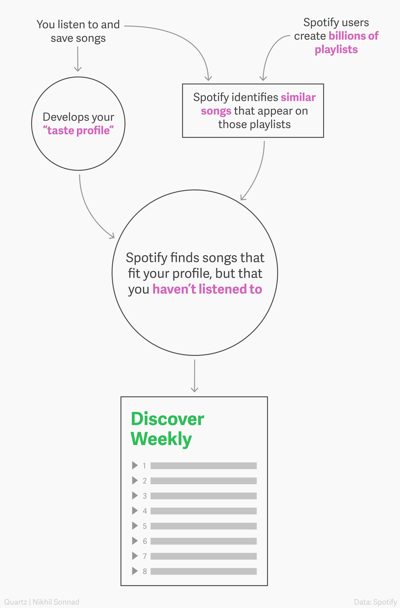
Source: Quartz
As much as I use Spotify — which is close to daily — I’ve never actually bothered listening to my Discover Weekly playlist. So after a colleague brought it to my attention, I decided to take it for a spin.
The results were hit-or-miss. There were a few new songs that I was thrilled to discover and plan to listen to again. But for the most part, my experience was similar to Pasick’s, who described many of the songs on his personalized playlist as “meh.”
But those behind Discover Weekly acknowledge that personalization isn’t a perfect science. They also have suggestions for how to make it better, like adding the Discover Weekly songs you like to your library, or skipping the ones you don’t — “If users fast-forward within the first 30 seconds of a song,”
Spotify Product Director Matthew Ogle and Engineering Manager Edward Newett told Pasick, “the Discover Weekly algorithm interprets that as a ‘thumbs-down’ for that particular song and artist.”
The Takeaway
Most personalization initiatives aren’t going to be perfect. Even with a great algorithm, they are, at best, very educated guesses as to what’s going to be applicable to your customers. For that reason, it might be best to take a conservative approach to your recommendations, especially in the earliest stages of any personalization efforts you make.
This is an area where small-batch testing can be helpful. When you want to try out a personalization project or algorithm, identify your most active users, and invite them to pilot out the technology. Listen carefully to their feedback — good and bad — and see what you can do to make it better.
8. Iberia Airlines
During the 2016 holiday season, Iberia Airlines customers received emails posing the question: If you could visit any vacation destination, what would it be, and who would you go with? To answer, customers were redirected to a microsite where they would fill in responses, as well as the email address of the person they wanted to travel with.
Not long after that, the friend would receive an email with a holiday greeting about the dream vacation — only, in order to view the card, that person had to click a link to view it in his or her browser.
It was that last step, Skift writer Brian Sumers explained, where “Iberia … put its advertising budget to work, using cookies [with the user’s permission] so the traveler’s friend would see banners across the web, suggesting the perfect Christmas gift.” That gift, of course, was the dream vacation.
Let’s say, for example, I sent one of these cards to a friend. She might subsequently see several ads while browsing that said things like, “It’s never too late to fulfill Amanda’s dream. Do it with a trip to Mykonos.”
The Takeaway
The idea is certainly a cute one — and around here, we’re suckers for a good holiday marketing campaign. But one of the most important items to highlight here is Iberia’s use of cookies, and the fact that the brand wasn’t sneaky about it. As per the video above, a clear request was made to the user to allow cookies, and that’s essential. Even the best customized marketing becomes less personal, and definitely less desirable if it’s carried out without the user’s agreement.
9. Twiddy
Having enough data is essential for marketing personalization — but knowing what to look at and how to use it is just as important. That’s what made a tremendous difference for Twiddy, a vacation rental company based in the Outer Banks.
“Unless we had a good way of looking at the data,” Marketing Director Ross Twiddy told Inc., “how could we make good decisions?”
One of the major pieces of information that Twiddy began to more closely examine was how rental volume and demand shifted from week-to-week. Noticing those trends allowed the company to start making “pricing recommendations” to homeowners, according to Inc., “on the basis of market conditions, seasonal trends, and the size and location of a home.”
The week after Independence Day was one that stood out to the team in particular, in that rentals showed a precipitous drop during that period.
Because Twiddy observed that trend (among others), it allowed the owners of its managed properties to start experimenting with pricing for that particular week as early as January.
Not only did it benefit the customer — setting more realistic prices for lower-demand periods actually increased the bookings made for them — but it was just one way that Twiddy was delighting its customers with helpful, actionable information. It paid off, too. Since the brand began to use this data to help homeowners with decisions like pricing, its portfolio increased over 10%.
The Takeaway
There’s a famous saying that goes, “Help me help you.” Data, in general, can be a tremendous asset to brands. And it doesn’t have to be about your customers’ behavior — it can be about the habits of their customers, like the vacationers that rented from Twiddy’s homeowner clients.
As long as it’s something that can be shared ethically — like objective buying or seasonal trends — share the data and insights with your customers that’s going to help make them more successful. That’s the type of thing that makes a brand remarkable, and can help benefit your business, too.
Get Personal
One of the fundamental purposes of any personalization effort is to let your customers know that you’re paying attention to them. But striking a balance between, “We think you might find this helpful” and “we’re watching you” isn’t a simple process, so be sure to do some careful research, planning, and testing before you jump into any large-scale customization initiatives.
Remember that while you might be a marketer, you’re also a consumer. When it comes to experiments like these, put yourself into the shoes of the customer and ask, “Is this delightful? Or is it just creepy?” If it leans toward the latter, find out what’s giving it that vibe, and try something different.
Editor’s Note: This post was originally published in December 2013 and has was updated for comprehensiveness in November 2019.


Why Website Indexation Is A Must-Have for Marketers
How much do you know about website indexation?
If it’s next to nothing, you’re not alone.
Website indexation is not something you do as a marketer, but a process the search engine carries out when you publish new content online. What marketers need to know is how to ensure you’re set up correctly for indexation.
An indexed website helps a site or page actually appear in search engine results — which is typically the first step to ranking and generating traffic.
Now that we’ve covered why an indexed website matters for SEO, let’s explore how you can prepare to index your own site, next.
What Does It Mean to Index Your Website?
In a nutshell, website indexing is a process search engines use to comprehend the function of your website and each page on that website. It helps Google find your website, add it to its index, associate each page with searched topics, return this site on search engine results pages (SERPs), and ultimately drive the right people to your content.
Think about how an index works in books: it’s a record of useful words and information that provides more context about a subject. That’s exactly what website indexing does in the context of search engine results pages (SERPs).
What you see on a search engine isn’t the internet. It’s the search engine’s index of the internet. This is important because not every page you publish online is guaranteed to get a search engine’s attention. As a website owner, you need to do a few things to get it added to this index.
Google indexes websites that have a few key components. Take a look at them below:
- Aligned with popular searches.
- Easily navigated to form the website’s homepage.
- Linked to from other pages on and off your site’s domain.
- Not being “blocked” from indexation from the use of specific metatags (More on that later).
This is because keywords are like a ping to the search engine: It tells Google what your content is about in a few words, which can be relayed back to search queries.
Having keywords is just one of the factors Google takes into consideration before indexing websites. Other necessities include not having “broken” pages or links, or a complicated web design that prevents a user from easily finding the page or understanding the question that page is answering.
In the next section, we’re going to look at why Google considers certain things when indexing websites and how to get your website indexed.
Having an indexed website makes sure your site is capable of appearing in a search engine’s results. If your website is about B2B networking, for instance, seeing keywords like “business-to-business” and “networking” on your site can help Google understand how your content relates to these searches. However, keep in mind that a content’s freshness (how recently it was published), as well as which other pages link into it, also play key roles in Google’s ability to find and index your site.
Now that you have a more thorough understanding of what website indexation is, let’s discuss how long the process takes, and how to get Google to index your site.
How long does it take for Google to index a website?
Google isn’t highly selective for indexing websites. In fact, it will index any site that meets the criteria.
Although it varies, it could take anywhere from a few days to a few weeks for Google to crawl a website. There are a couple of factors that slightly impact how quickly Google indexes a website, such as the popularity of the website, proper optimization, and the overall structure of the website.
Common mistakes can impact whether or not Google indexes a site.
To prepare, be patient, check your website design, and update the site if you feel it’s necessary.
What are website indexation best practices?
In general, the most common reason a website isn’t indexed is that it’s new. This could be the case for you, especially if you’ve covered your bases, ensured the page doesn’t contain a “noindex” tag, has a clear linking strategy, and easily relates to other pages on your site.
A site with a “noindex” tag will block Google’s ability to index a web page. One reason a web page might have this tag is if it’s only meant to be seen by certain subscribers, so Google won’t find it and present it as a search result to the masses.
Next, make sure your website is designed to be crawlable. Check to see if the build of your site is blocking a search engine’s ability to index. Google has a checklist about how to do that on their support website here, but a few general rules include creating a sitemap, telling Google about duplicate content, and using special tags that Google understands.
Finally, if you’ve recently migrated your site, that might be the reason why Google isn’t crawling the site you want. If your site was temporarily unavailable for a certain amount of time, it’s possible Google found crawl errors when indexing your site, and couldn’t complete the process.
Once your website is ready to be indexed by Google, here is what you need to do on your end.
First, you need to verify your website in Google’s Search Console. This means that you will confirm for Google that you are the website owner. Next, you will have to request Google to crawl the URLs of your website.
To combat migration/indexation issues, make sure that if your site has recently moved, you’re adhering to Google’s guidelines for moving a site so you can make sure your new address is indexed correctly in the search engine.
Remember, web pages that are broken — evident in a “404” error code — or hard for Google to read probably won’t be indexed.
Additionally, optimizing a website includes adding keywords into webpages, blog posts, and URLs, as well as archiving content. Our guide to SEO is a great deep dive into optimizing website content, as well as a refresher to check your work before requesting an indexation.
Having a website indexed involves a little bit of time and patience. By doing the work of optimizing the website’s content as much as possible before sending a request to Google, the process will go more smoothly.
