
How to Use & Promote Inclusive Language at Your Organization
Unknowingly, we carry our own implicit biases with us every day, even as we attempt to make casual conversation.
For instance, your coworker might say, “Sorry I missed the meeting — my doctor was incredibly late to our appointment.”
Without thinking, maybe you respond, “Oh! I’m sure he had a good reason though, right?” After a pause, perhaps you recognize your mistake — Oh wait … why did I assume the doctor is a man?
Language has the ability to build relationships and forge connections, but it’s equally liable for creating barriers and impacting someone’s sense of belonging.
And feeling like you’re able to bring your authentic self to work is undeniably critical. In fact, a sense of belonging can lead to greater retention rates and even result in higher customer satisfaction.
Additionally, if your employees feel like they belong, they’re more likely to be engaged and motivated at work, and you’ll spark higher levels of psychological safety.
But, all that aside, it’s easier said than done. Creating inclusive content, and even having workplace conversations devoid of exclusive language, means fighting hardened habits and biases you likely don’t always recognize you carry.
Here, we’ll explore what inclusive language is, and provide examples, to ensure you create a more inclusive workplace environment and more inclusive marketing material in 2020 and beyond.
To explore how you might promote inclusive language at your organization, I spoke with some experts at HubSpot who have first-hand knowledge of incorporating inclusive language into their processes, products, and overall team culture.
For instance, Hannah Fleishman, who led the charge on updating HubSpot’s Careers website to be more inclusive, told me, “Language has a big impact on our sense of belonging in the workplace. The challenge is, language is nuanced. The changes we should consider making to how we talk and write are often subtle.”
Melissa Obleada, Diversity & Inclusion Program Manager at HubSpot, echoes this thought, mentioning, “Many of us don’t realize that our language has additional meaning hidden between-the-lines. Certain words can imply a certain age, gender, educational background, social class, and so much more. We see this a lot in the ways many folks write job descriptions.”
Consider, for instance, the last time you were in a meeting and a leader said, “Okay, guys, let’s get started” — do you think that automatically made female colleagues feel a little less-welcomed than their male peers? Would it have been better if he’d said “ya’ll” or “everyone”?
Alternatively, imagine you’re hiring a new person on your team and your boss tells you, “We’re looking for a good culture fit.” You know most people on your team are extraverted — does that make you unfairly biased during interviews as you seek out a “good culture fit” by looking for candidates that mirror your colleagues’ personality type?
Beth Dunn, UX Operations Lead at HubSpot, wrote a Medium piece on the topic of instilling a human voice in product content, and writes, “Try not to present the privileged, tech-savvy, wealthy, able-bodied, white, cisgendered, anglo-centric male experience as ‘standard’ and everything else as ‘other’ or ‘diverse.’ Seek ways to place the ‘other’ in the center of things instead.”
Additionally, Dunn told me, “What’s great is that the English language is such a flexible, expressive language, so there are all sorts of ways to say what you need to say without indicating anything that might be exclusive. It just takes a little imagination, empathy, and practice, that’s all.”
Take job descriptions as an example — you might’ve heard by now that women only apply for jobs when they feel they’ve met 100% of the requirements, while men will apply when they feel they’ve met 60% of them.
Fleishman suggests, “Try to avoid writing job descriptions with unattainable requirements. Using more inclusive language can be like building a new muscle; you need to get in the habit of recognizing nuances and asking yourself if what you’re saying, or writing, is accessible for everyone.”
Obleada adds that it’s not just job descriptions that you should edit for inclusivity — it’s all communication, whether through email, Slack, text, Facebook, or in-person: “When it comes to implementing inclusive language, it takes practice to shift your typical ways of speaking and writing.”
To monitor whether your communication is exclusive towards certain groups, you’ll want to take a look at resources and tools online. For instance, Textio is an augmented writing tool that identifies whether you’re using gendered language in your writing, or words with a strong feminine or masculine association. This can be undeniably helpful for both job descriptions and even emails to colleagues.
Additionally, you might consider taking a look at the Conscious Style Guide, a resource on conscious language that breaks down exclusive language into categories, including age and disability.
Finally, to identify your own implicit biases, try taking a Hidden Bias Test, like this one created by Psychologists at Harvard, the University of Virginia, and the University of Washington, to uncover how you’re biases might be inhibiting you from expressing yourself more inclusively.
If this all sounds like a lot of work to you, it’s important to note — this isn’t just about creating a more inclusive environment at work. It’s also critical for your company’s bottom-line, particularly if you work for a global company or plan to expand your offerings to other regions in the future.
Melissa Obleada, Diversity & Inclusion Program Manager at HubSpot, explains it like this: “For some, writing and speaking inclusively may feel like a restrictive set of rules, hindering instead of helping us. In reality, it’s just the opposite.”
“Inclusive language opens up and amplifies your message to more people, making your blog post, job description, or website copy more accessible than before.”
Next, let’s explore some inclusive language examples in-practice.
1. Avoid company or team acronyms.
Fleishman told me, “Acronyms have become part of most companies’ vocabulary, but they can be alienating for new employees, candidates, or global teams.”
I personally remember how frustrated I felt when I first joined my team at HubSpot and everyone kept saying “TL;DR” in meetings. I was too embarrassed to ask what it meant. I finally Googled the term, but in the interim, the acronym made me feel separate from the larger group.
While this is a small and innocent example, there might be bigger acronyms you use every day within your team that continue to alienate new members, or employees from other teams. And if your company does choose to use certain acronyms (like, in HubSpot’s case, H.E.A.R.T.), make sure you explain what it means during an employees’ on-boarding process.
2. Use plain language in your writing rather than expressions or jargon.
Many of us use cultural expressions every day. For instance, I often say “It’s just a ballpark figure” or “it should be a piece of cake” without pausing to consider whether the listener knows or has heard the term before.
Of course, this can be incredibly confusing towards a large majority of the world. If your company has global offices, or works with customers from across the globe, “common” expressions can pose a major deterrent towards clear communication.
For instance, in Dunn’s Medium article, she writes “We also avoid using metaphors (visual and written) that are specific to just one culture or class. So for instance, we avoid using phrases like ‘knock it out of the park’ or ‘hit a home run’, even though these phrases are pretty common in North America, because they’re just not going to resonate outside of the U.S. Not because people will be offended by a reference to baseball, but because they won’t be as familiar, so the meaning won’t be as clear.”
3. Refer to a theoretical person as “they” instead of “he” or “she.”
As marketers, we’re exceptional storytellers. Sometimes, however, whether you’re talking offhandedly with a colleague or delivering a pitch, you might get caught up in using pronouns to unintentionally support stereotypes.
For instance, let’s say you’re giving a pitch and you say, “We’ve found through analysis that our readers are typically in a VP position or higher, which is why we believe we should lean into LinkedIn as a strategy in 2020. For instance, let’s say our reader needs to deliver a presentation. He might turn to our blog ahead of time, but more likely, he’ll turn to LinkedIn first.”
Your fictitious VP-level reader doesn’t need to be “male” or “female” — why not call them by the non-gendered pronoun “they”, “them”, or “their”? Your point can still be made, and you won’t alienate people on your team who feel hurt you’ve made an assumption that leaders are likely male.
4. Ensure your company’s designs or images reflect a diverse group of people.
When potential customers take a look at your website, you want them to see people (or figures) that look like them.
Simultaneously, you want potential new hires to see themselves reflected, as well.
Otherwise, you’re likely missing out on both potential customers, and future employees for your company.

In her Medium post, Dunn writes, “Our product illustrators try to ensure that the people we represent in illustrations are diverse in appearance, and that these different types of people are represented doing many different things (for instance, a person of color doing the talking while others listen, a woman in a wheelchair at an executive desk, etc.).”
As you scale as a company, you want to ensure your marketing materials reflect as many groups of people as possible — otherwise, you’re unintentionally sending messages to people who don’t see themselves in your content that your brand “isn’t quite right for them.”
5. When speaking to colleagues about family, use gender neutral labels for family members.
Obleada told me, “Inclusive language has a real impact on how ‘themselves’ folks feel they can be in a given space. As a queer woman, it makes me cringe when folks ask me about a boyfriend. Intentionally using gender neutral titles — parent, spouse, partner, child, etc. — when speaking about your or others’ families can make a big difference in how comfortable someone may feel.”
Rather than making assumptions, approach conversations with colleagues using gender neutral titles. For instance, it’s better to use “parent” or “guardian” when making conversation with a colleague, since “mom” or “dad” excludes family structures such as grandparents as caregivers, same-sex parents, etc.
6. When in doubt, ask individuals about their preference.
It’s critical to note — there’s no one-size-fits-all “right” and “wrong” when it comes to language. Many people have personal preferences, especially when it comes to identity.
For instance, person-first language (i.e. “people with autism”) was introduced because many feel it’s dehumanizing to put the disability or gender orientation first, as it seems to define the individual.
However, some prefer identity-first language (i.e. “autistic people”), since they accept autism as an inherent part of their identity — identity-first language can even help evoke a sense of pride among individuals.
(For more information on person-first or identity-first, take a look at this article by the Autistic Self Advocacy Network.)
It’s critical you avoid applying hard-and-fast rules to all individuals, since these preferences are incredibly personal.
Ultimately, it’s important to remember none of us will get it “perfect” 100% of the time, but admitting when you’ve made mistakes and consistently working to communicate more inclusively are two major steps towards creating a more unified workforce, and creating deeper connections with your customers.
Remember — inclusive language is about widening your message and allowing it to resonate with as many people as possible, so it’s critical for your business’s bottom-line that you do everything you can to communicate more inclusively every day.

The Best Super Bowl Ads of All Time
The next Super Bowl is coming. And as we get closer to the big game, Americans aren’t just looking forward to the football — they’re also excited to see what the nation’s big-budget brands will come up with for this year’s ads.
Because Super Bowl ads are so high-budget and infamous, many companies go to great lengths to keep them secret before they air. Some companies even add to the suspense of their ads by releasing teaser ads for their ads. (How meta.)
To give you an idea of how mysterious, and exciting these teasers are, here’s an example of one from Doritos, which features “Old Town Road” rapper, Lil Nas X:
But teasers aren’t the only thing we can watch to prepare for the marketing marvels we might see on Sunday.
To amp you up for this year’s “Ad Bowl,” I’ve collected some the best ads from the last decade and before.
Be sure to check back, as we’ll continue to add to this list as new teasers are released.
Without further ado, please enjoy these attention grabbing and sometimes award-winning ads.
The Best Super Bowl Ads from the Past Decade
1. “Joust” – HBO and Budweiser (2019)
Prior to the 2019 Super Bowl, Budweiser launched a funny series of ads that followed a medieval kingdom where the king and townspeople would cheer, “Dilly Dilly!” when offered the beer. The series also featured a hero called the Bud Knight. In some advertisements, he would ride in on his horse and fight in battles clad in armor covered in Budweiser logos.
At the beginning of Budweiser’s 2019 Super Bowl ad, you see a handful of happy medieval characters waiting excitedly for the Bud Knight to arrive at a jousting match
As the Bud Knight heroically rides his horse on screen, the audience cheers, “Dilly Dilly!” as the competition begins.
But. things get grim quickly. Shocking, the Bud Knight loses and is knocked off his horse by the opponent. As the tall, masked opponent walks up to the knight, most Game of Thrones fans will begin to recognize him Gregor Clegane, a.k.a. “The Mountain” — one of the show’s most monstrous villains.
As Clegane towers over the Bud Knight, it becomes apparent — especially to GoT fans — that the ad is mimicking a dramatic death scene from the HBO series where The Mountain physically squished another heroic figure with his bare hands.
Clegane dramatically, but comedically, reaches down to grab the Knight with both hands. As townspeople react over-dramatically to what’s going on, it’s apparent that Clegane’s killed yet another knight by squishing him off screen.
Suddenly, the Game of Thrones theme music begins to play as a dragon flies over Clegane and takes him down with a blow of fire. As the dragon escapes into clouds and smoke, the music gets louder as the show’s logo and air date appears instead of a Budweiser logo. In a sense, Game of Thrones and HBO hijacked and destroyed the Budweiser ad series.
This ad is hilarious as it comedically mimics an incredibly intense and notable scene from Game of Thrones. More interestingly, it surprises audiences who are just expecting it to be a standard Budweiser ad. This is a great example of how one ad combined cross promotion with a memorable storyline.
The ad, produced by Droga5 and Wieden+Kennedy, was so humorous and clever that it even won the 2019 Super Clio, a Clio Award for Super Bowl ad participants.
2. “We All Win” – Microsoft (2019)
After it came to Microsoft’s attention that people with missing limbs or limited mobility were having trouble holding and pressing buttons on video game controllers, the tech company developed an adaptive controller with touch pads rather than buttons.
After the controller’s launch, Microsoft highlighted this story of how they solved for the customer in a 2019 Super Bowl ad titled, “We All Win.”
n the Gold Clio-winning campaign, Microsoft interviewed children with mobility issues and missing limbs about why they loved video games, but how they still faced difficulties with game controllers due to their disabilities.
Many of the children and parents featured in the ad explain that gaming helps them connect with friends in ways that they might not be able to otherwise. However, because of the current line of controllers, they have difficulty playing or competing in many games.
“I never thought it was unfair. I just thought ‘Hey, this is the way it is and it’s not going to change,” says one boy.
After demonstrating the problem with game controllers, the ad shows the children using Microsoft’s new adaptive video game controller as they explain how it makes gaming easier and more accessible for them.
For example, one girl excitedly says, “I can hit the buttons just as fast as they can,” while a boy exclaims, “Now everyone can play!”
“‘We All Win’ hit all the marks in terms of emotion, starting a dialogue, and fun. It wasn’t an ad about disabilities, it was about kids wanting to play video games,” says Dmitry Shamis, Senior Director of Creative. “I loved it back in February and still love it now.”
Not only does “We All Win” tug on your heartstrings, but it also encourages solving for the customer and accessibility by explaining how Microsoft took the time to develop a product that fixed a major problem faced by a unique group of customers. This ad makes you believe that Microsoft genuinely cares about its customers and will make extra efforts to ensure that everyone has a great experience with its products.
You can read more about this particular campaign and get inspired by a few more empowering ads in this blog post on inclusive marketing.
3. “It’s a Tide Ad” – Tide (2018)
Another Super Clio winner was, “It’s a Tide Ad,” created by the clothing detergent company, Tide, as well as the agency Saatchi & Saatchi New York.
In 2017 and 2018, Tide released a number of commercials with storylines that had nothing to do with Tide, except for the actors’ noticeably clean clothes. When viewers were at the edge of their seats, someone in the ad would say, “It’s just another Tide ad.” Then, they’d see the Tide logo and text that said, “If it’s clean, it’s Tide.”
This campaign started with a long Super Bowl ad, which also received an Emmy nomination. In the ad, Stranger Things’ David Harbour shows up in several common ad scenes, including in the bathroom with a buff deodorant model, driving a sports car, and laughing on the couch with a fake family.
As he appears into each commercial, he explains that all of them have one thing in common: clean clothes that were washed by Tide detergent. In the end, he says, “So, does this make every Super Bowl commercial a Tide ad? I think it does.”
Since Tide has one job of keeping clothes clean, they show off the brand’s strength in multiple versatile and silly scenarios. Humor like this can also be a great way to make a simple product more memorable. If you go to the store to get detergent shortly after seeing this commercial, Tide might be the first thing to pop into your head because of the ridiculous ads.
4. “Band of Brands” – Newcastle (2015)
What do you do when you can’t afford a Super Bowl ad? Cross-promote with other brands who will pay for it. That’s what Newcastle, a popular beer company, did back in 2015.
Prior to the 2015 Super Bowl, Newcastle launched a call to action video where Parks and Recreation actress Aubrey Plaza encouraged brands to pool their money for one big ad. Because Super Bowl ads that year were well over $4.7 million — not including production — a number of big and small brands reached out to Newcastle to join in for a chance to be featured — even for just a few seconds — in the ad
The one-minute ad is filled with product placements as it tells the story of a couple that’s sharing Newcastle beers together to celebrate moving into a new home. As they walk through their new house, you can see brand logos hung on the walls like paintings, family photos, or decorations.
As they unpack the boxes, they not-so-subtly talk about all the appliances they have while holding them up to the camera. Aside from the obvious visual product placements, they also work brands into their conversations. For example, at one point, the man tells his girlfriend that he can’t believe they’re moving in together after “meeting on Match.com.”
Although the ad starts off with more clever obvious product placements, it gets funnier as the couple starts pointing out every single product they have in their house as quickly as possible.
This ad is an incredibly clever example of a brand that took product placement and co-marketing to the extreme, while benefiting from a virtually free Super Bowl commercial.
5. “Keep Your Hands Off My Doritos” – Doritos (2010)
“Keep Your Hands Off My Doritos” hilariously tells the story of an overconfident man meeting his love interests son for the first time. In the ad, the man walks into his date’s home with flowers and sits with her child as the mother gets ready. When she leaves the living room, the man is seen noticeably checking her out.
He sits down with swag as he starts talking to her infant son. Without thinking to ask the child if he can have one of his Doritos, he grabs a chip. The boy immediately and loudly slaps him, stares him down in the most intimidating way a child can, and angrily exclaims, “Keep your hands off of my momma. Keep your hands off of my Doritos!”
The overconfident boyfriend ends the commercial cowering in fear as the screen fades. As the logo appears, you hear the boy’s mother ask, “Are you playing nice?”
This ad was so funny that it’s still seared into many of our minds. Even though it launched nearly a decade ago, I still tell friends to “keep their hands off my Doritos” when they grab one of mine without asking.
Although it’s only 30 seconds, the ad is hilarious, relatable, a little bit shocking, and heartwarming, which makes it so memorable.
The Best Super Bowl Ads Before 2010
6. “Wassup” – Budweiser (1999)
If you grew up in the late ’90s or early 2000s, you might have a memory of kids at your school yelling the word “WASSUP?” to each other. I know I do.
If not, you’ve probably seen the Budweiser ad that the now outdated greeting comes from:
In the ad, a man answers the phone while watching a big game. His friend on the other line asks, “Wassup?” The man on the couch says, “Nothing. Just watchin’ the game and drinkin’ a Bud.” The conversation escalates when the man’s roommate unexpectedly walks in and yells, “WASSSSUPPPPP?!”
In true 1990s fashion, the roommate rushes to pick up the other house phone to join the conversation. The three men then just start yelling, “Wassup!” in louder and more bizarre ways until they suddenly get quiet. One of the friends then asks, “So, wassup?” The two others on the phone again say, “Nothing. Just watchin’ the game and drinkin’ a Bud.” Then, everyone says, “True.”
This video might seem like a waste of millions of dollars on a Super Bowl slot, but it definitely wasn’t. As a viewer and consumer, all you need to know when watching is that the three friends are all watching the game and drinking Budweiser. The “Wassup?” marathon was essentially a tool meant to make the commercial funny and memorable. Based on the fact that, “Wassup” was still getting referenced in the second half of the 2010s, it’s easy to see that this ad was a success.
7. “Your Cheatin’ Heart” – Pepsi (1996)
This old Pepsi commercial highlights the consequences of what could happen if you “cheat” on your company’s brand.
The short and sweet ad simply shows fake security footage of a Coca-Cola delivery employee placing Coca-Cola cans in a store refrigerator to the Hank Williams Sr. song, “Your Cheatin’ Heart.” Things get interesting when the delivery man looks to make sure no one’s watching and then opens the fridge with Pepsi in it.
Suddenly, the shelves in the fridge collapse as all of the Pepsi cans noticeably barrel out of the fridge and on to the floor. The ad makes a short and simple point: Even Coca-Cola employees love Pepsi:
8. “1984” – Apple (1984)
At the dawn of 1984, Apple leveraged the George Orwell classic,“1984,” in an award-winning Super Bowl campaign.
The 1948 George Orwell novel, followed a 1984 dystopian society where everyone dressed the same and conformed to the same leader, views, and ideologies.
As an innovative company, Apple has always tried to be “different” from competitors. The tech giant’s approach to Super Bowl advertising stood by this same mission even back in 1983.
The Super Bowl ad brings the conformist community in 1984 to life as you see men marching in straight lines towards a room where their leader is on a giant screen, telling them, “We are one people, with one whim, one resolve, and one cause.”
At the climax of the commercial, a woman with a hammer and colorful clothing starts running towards the screen. She launches her hammer into the screen as it explodes.
A narrator concludes, “On January 24th, Apple Computer will introduce the Macintosh. And you’ll see why 1984 won’t be like 1984.”
Not only did the ad, directed by Ridley Scott, highlight a well-known book. But it was boldly symbolic of early tensions and monopolies in Silicon Valley. At the time, Apple was considered a young, disruptive company while IBM was the only tech giant in the PC industry. Tech journalists and innovators in Silicon Valley often thought about IBM as a soulless corporation.
In this ad, Apple explains why innovation, disruption, and tech unique tech underdogs would destroy monopolies of the future. It also reiterated and enforced the brand’s positioning as a company that wanted to make products that would allow people to embrace their unique qualities and skills. This is a strategy that they’ve continued to use in their campaigns today.
9. “I’d Like to Buy the World a Coke” – Coca-Cola (1971)
On the hills of Italy in 1970, Coca-Cola pulled together a group of young adults from a number of countries and filmed them sing a jingle called, “I’d Like to Buy the World a Coke.”
This resulted in one of the most notable ads from Coca-Cola, let alone a popular ad from the 1971 Super Bowl:
This commercial is a great form of early inclusive marketing as it shows that everyone has something in common, despite the fact that we all come from different or diverse backgrounds.
In particular, this ad shows that millions of people from all around the world can agree on the fact that they enjoy Coca-Cola. Not only does it embrace the beauty of diversity and world peace, but it also highlights the international popularity of the soda beverage.
Super Bowl Ad Takeaways
Even if you’re a small business marketer. you can learn from these ads for your own video or content marketing strategies. Here are a few things that many of these ads have in common.
- Emotion: Whether they leave you feeling happy, sad, or optimistic, most of these ads drew your attention with a topic and storyline that built emotion.
- Pop Culture: As you saw with Budweiser, HBO, Newcastle, and Apple, some of the most memorable ads acknowledged notable pop culture or literature and weaved a memorable story around them.
- Relatability: Emotional ads don’t often work without relatability. Many of these ads do an excellent job of putting you into their protagonist’s shoes. Whether you’re seeing children able to access gaming in a Microsoft ad, or laughing at the child who’s protective of his mother in the Doritos ad, you identify with the characters or people featured on a deeper level.
For more examples of big brand ads you can learn from, check out these rosters of Emmy nominees, Clio Award winners, and our marketers favorite campaigns of 2019.
Editor’s Note: This blog post was originally published in January 2015. It was updated for comprehensiveness and freshness in 2019.

How to Use Google Ads Keyword Planner, According to 5 Specialists
When I used to work for a digital marketing agency, one of my responsibilities was to write blog content for our clients.
To do this, some SEO research was required because we wanted to improve organic traffic. So, I did keyword research to figure out what the target audience wanted to read about.
I was able to use the keywords to brainstorm topic ideas and pillar pages, while also creating a list of keywords we could target.
That’s why Google ads keyword planner is an important tool for marketers.
Essentially, the Google ads keyword planner is a free resource you can use to research keywords, generate keyword ideas, and help you with your pay-per-click strategy.
Although you need a Google AdWords account to use this tool, which requires billing information, you never need to run a campaign or make a purchase to use the keyword planner tool.
Below, let’s review how to use the Google keyword planner and implement this tool in your strategy. Then, we’ll dive into other free alternatives you could use.
1. Generate keyword ideas.
One of the primary reasons to use the keyword planner is to generate keyword ideas. You’ll start by writing in a few keywords that you’ve brainstormed ahead of time.
In the example below, I typed in “best CRM”, “customer relationship management system”, and “client management system.”
Then, the tool generated a list of over 1,000 keywords. Briefly looking at this list, these keywords let me know that readers want to know the best free CRMs and the best CRM for small businesses. Those are two great blog ideas and keywords you could target in your content.
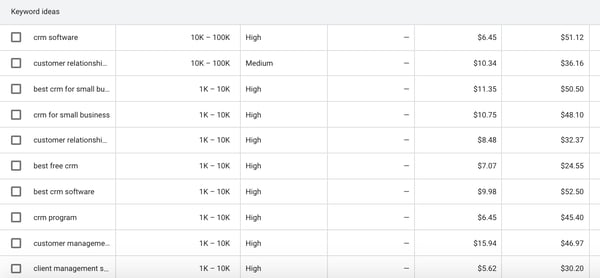
When your keyword ideas come up, the keyword planner will also help you come up with other related keywords to add to your search. This is the “Broaden Your Search” section that is at the top of the page. It looks like this:

For each keyword suggestion, Google’s keyword planner will also give you information such as average monthly searches, competition, and the PPC bid range.
Keep in mind that the competition isn’t referring to how difficult it is to rank for that keyword, but rather how many advertisers are bidding on that keyword in PPC ads. It’s still a useful column because if people are bidding on a keyword, that means there’s commercial intent that’s more likely to convert.
But what do the experts have to say?
Daniel Lofaso – Digital Elevator
Marketing Strategy: Leverage low competition keywords.
Lofaso says, “SEO pros must leverage low competition keywords into their overall strategies so that they can get their sites to compete with the big boys. Low competition keywords are those that can rank with little to no link building and little to no domain authority.”
2. Look at search volume.
Another unit of measurement that is useful on the Google keyword planner is the monthly search volume (MSV).
When you’re generating keyword ideas, you’ll see the MSV in the second column. As you can see from the example above, Google gives you a wide range for the MSV.
But don’t fret. You can still get a good idea of a more specific number by selecting keywords and adding them to your “plan.” When you go into the “plan overview” section, you’ll find the impressions. This number is usually fairly close to the average MSV.
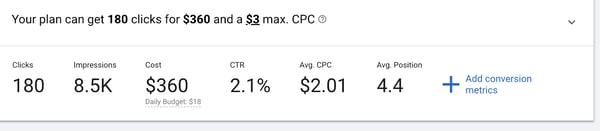
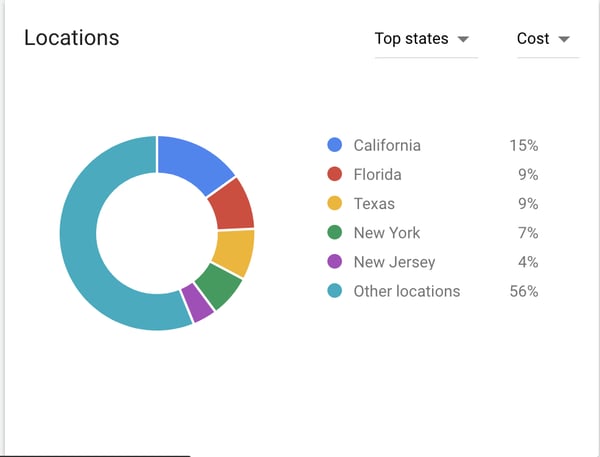
Additionally, you can filter keyword MSV by location. For instance, perhaps the keyword “charter schools” has a higher MSV in Florida than it does in California.
Your plan overview will have detailed locations. You can organize by state, city, county, or region.
You can also look at a forecast of the MSV. This could be helpful in predicting seasonal trends.

Now, let’s consult an expert:
Dan Shewan – WordStream
Marketing Strategy: Use a balance of low and high volume keywords.
Shewan says, “Newer sites or those with lower domain authority may want to target lower-volume, less competitive keywords to attract external links and establish more authority in your space. Over time, you can become more confident and/or aggressive in how you target keywords, but don’t forget to ensure that the keywords you’re targeting are relevant to your business and your website as a whole.”
3. Analyze search intent.
Once you’ve gathered a list of keyword ideas, you’ll want to understand the search intent before you begin writing a piece of content or drafting ad copy.
Search intent is basically what the reader wants to know. If someone types in “best CRM,” they’re probably at the beginning of their research. They want to know what different kinds of software is out there, read reviews, and look up comparisons.
To analyze search intent, begin by looking at the ads that show up at the top of the search results page when you type in a keyword. If companies like yours show up, that’s a good thing.
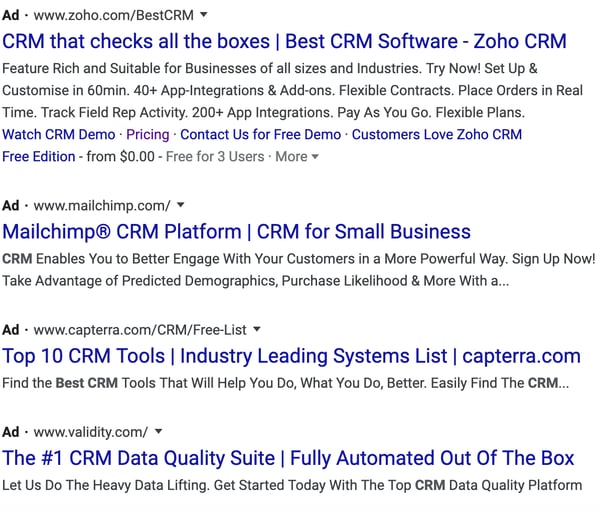
Additionally, you can then scroll through the organic search results to see what types of articles are being written. It should be easy to gather what search intent is.
You might be wondering, “Why is search intent so important?” Specialist Rachel Leist says it’s a pivotal ranking factor:
Rachel Leist – HubSpot
Marketing Strategy: Address user problems in every piece of content.
Leist says, “User intent is now one of the most pivotal factors in your ability to rank well on search engines like Google. Today, it’s more important that your webpage addresses the problem a searcher intended to solve than simply carries the keyword the searcher used.”
4. Plan search engine ads.
The main purpose of Google’s keyword planner is to help you develop Google ads.
When you log on to your keyword planner, you can get search volume and forecasts for keywords that you want to use in a PPC campaign. This section of the keyword planner is to help you run Google ads.
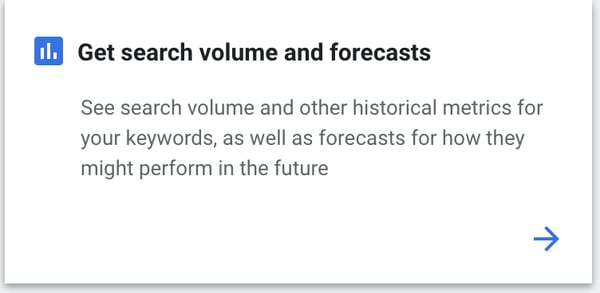
Once you type in the keywords, you’ll see how many clicks and impressions you might get if you ran Google ads targeting those keywords. Additionally, you’ll find the average cost, click-through-rate, and cost-per-click.

If you want to get started with Google ads, you might be able to use your CRM and web analytics to inform your ad campaigns directly. For example, HubSpot CRM allows users to create ads right through the portal.
But let’s see what an expert has to say:
Christina Perricone – HubSpot
Marketing Strategy: Optimized Google Ad campaigns can lead to high ROI.
Perricone says, “Google Ads have a click-through rate of nearly 8 percent. Display ads yield 180 million impressions each month. For users who are ready to buy, paid ads on Google get 65% of the clicks. 43% of customers buy something they’ve seen on a YouTube ad. So, yes, Google Ads works. With an optimized ad campaign and lead flow, you can create a high-ROI marketing campaign.”
5. Discover competitor keywords.
Lastly, another excellent way to use Google’s keyword planner is to see what the competition is doing. You can search for a competitor’s website to see what keywords they’re ranking for.
All you have to do is type in a competitor’s URL in the keyword search bar. In the example below, we brought up keywords that Salesforce is ranking for.
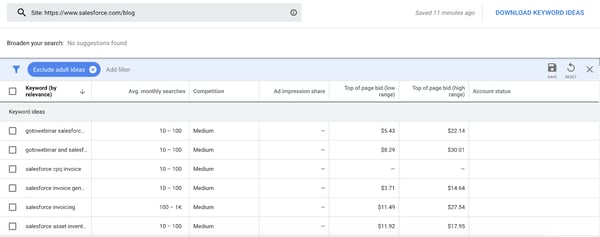
By looking at the competitor’s keywords, you can generate a whole new list of keyword ideas to target. Plus, they’ll help you brainstorm content ideas. For example, you can look for gaps to fill in your competition’s content.
Here’s what SEO expert Neil Patel has to say:
Neil Patel – Neil Patel
Marketing Strategy: Use your competitors as your greatest allies.
Patel says, “At each stage of the customer journey, your customer has a different desire and will use different types of keywords. The goal now is to find a list of keywords for each stage of that journey.”
Although Google’s keyword planner is free and you can get a lot done with the free tool, you need to have an AdWords account or run a campaign to get more specific MSV numbers. That’s why we’ve gathered a list of totally free keyword tools you can use in addition to Google’s keyword planner:
Free Keyword Planner Alternatives
1. Answer the Public
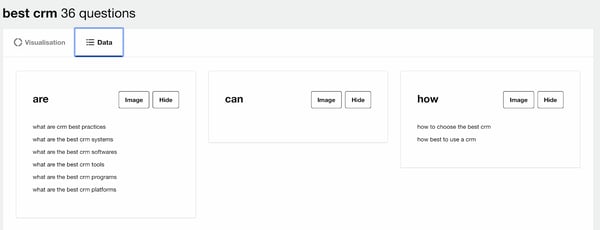
Answer the Public is a great keyword researching tool for brainstorming questions that your audience might have.
When you type in a keyword, the site will generate a list of questions that people are asking. I’ve found that this is a great tool when you’re trying to think of cluster ideas for a pillar topic.
Additionally, this tool will help you figure out search intent by answering, “What do readers want to know?” and “What are their biggest questions?”
2. Google Trends
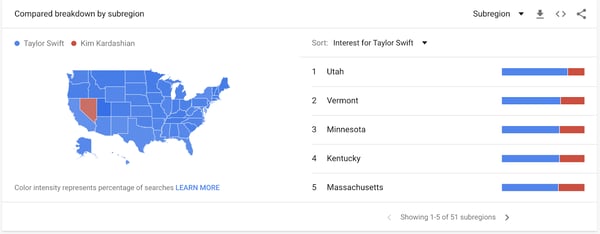
Google Trends is an excellent tool for searching keywords by location. This is especially helpful when you’re deciding what regions you want to target for a PPC campaign.
Additionally, this is helpful when you want to improve organic traffic. If your company is a brick and mortar store, you should target keywords that people are searching for in your location.
A fun example below shows that more people search for Taylor Swift rather than Kim Kardashian in every state in the United States except for Nevada.
3. Keyword Surfer
One of the first things you’ll do when you’re generating keyword ideas is Google them. Google will show you search intent and give you related topic ideas or additional long-tail keywords.
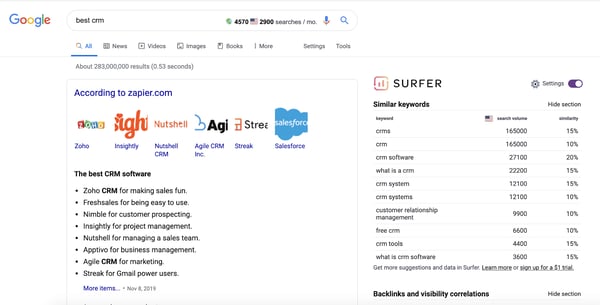
Keyword Surfer makes this process easier. This is a Chrome extension that’ll show you global and national MSV right on Google when you search for a term.
In the example below, I searched for “best CRM.” In the search bar up top, you’ll see global and national MSV. On the right-hand side, you’ll find similar keywords and the associated MSV.
Keyword research is an important step in any content or PPC ad strategy. Once you know your keywords, you can begin to plan out your content and ad campaigns. For more tips and information, check out our ultimate guide to SEO.

Twitter Topics: How to Use It & What Marketers Need to Know
According to a report from Mention, roughly half a billion tweets are published on Twitter every day.
The platform, which enables you to tweet out your thoughts or content in under 280 characters, is swirling with constant conversations about trends, news, and other insights. With all of these tweets, thoughts, discussion threads, and trending hashtags, it can be hard to cut through the noise and find content around topics you’re actually interested in.
To make it easier for the user to find and follow topics and trends they’re passionate about in a crowded feed of tweets, Twitter unveiled Twiter Topics in November.
With Twitter Topics, you can follow topics as well as people that often tweet about relevant topics.
According to Twitter, the Topics feature was created in an effort to shift the platform towards conversation and away from one-off comments by influencers and celebrities.
In a recent blog post, Twitter provided more insight into why they launched the new feature:
“Previously, all of the work was on you to figure out the best way to keep up with what’s happening by following certain accounts, searching for it, or looking in the Explore tab for the latest. Now, you have the option of seeing the most relevant and interesting Tweets about what you care about with a single tap, and the conversation will come to you.”
While this move might be helpful to an individual user’s Twitter experience, marketing publications are already suggesting that it could also help brands. If you run a Twitter account that focuses on great content but is still growing, Twitter Topics could ultimately help you boost brand awareness.
If you post about relevant topics related to your industry, people who follow those topics could have a greater chance of finding your content than if they were just following tweets of thought leaders or brands in your field.
Although Twitter has not mentioned how this could impact brands, Google has set a precedent by releasing a similar feature that boosted traffic on company sites.
Two years ago, Google launched Google Discover, a feature within its Android app that showed users recommendations based on topics they followed or topics they’d searched in the past. Since then, publishers like Conde Nast haven’t given specific data on how Topics impacts them, but do say they’ve been seeing significant jumps in mobile traffic from Google.
While we’re still learning about Twitter Topics, there are a few ways that you can begin to leverage it as an online marketer. But, first, to help you understand the consumer’s point of view, here’s a step-by-step guide of how to use the feature.
How to Use Twitter Topics
To access Twitter Topics, go to your feed and click “More” on the sidebar to the left of your feed. Once you do this, you’ll see options including, “Topics.”
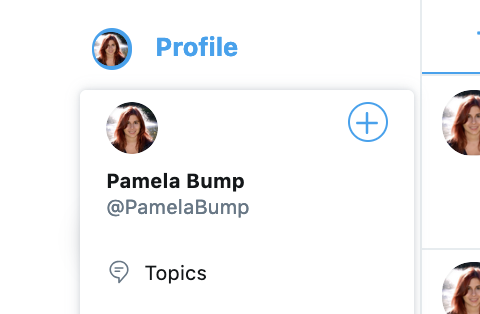
When you click on Topics, a welcome message explaining the feature will pop up where your feed is. From there you can start picking Twitter Topics to follow.
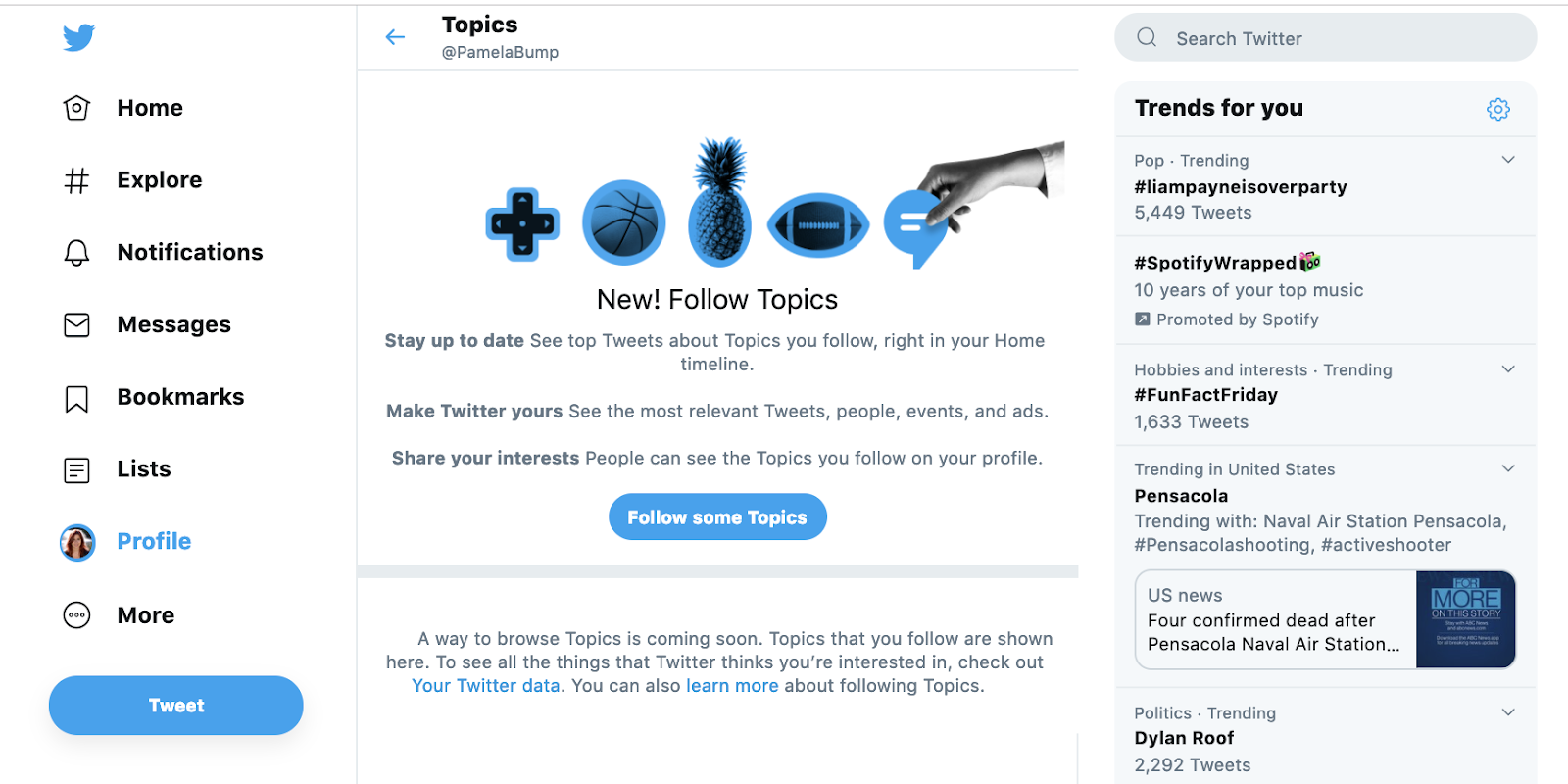
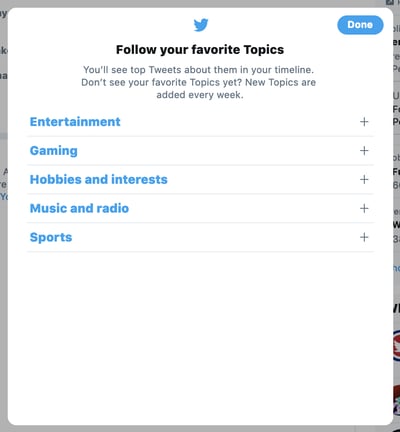
After clicking “Follow more Topics,” you’ll see a list of overarching Twitter Topics, like “Entertainment” with plus signs next to them. When clicking on a plus sign, you can see a drop-down menu with more specific topics within each industry.
Once you follow a few Topics, your homepage’s Twitter feed will start to show posts algorithmically pulled in from your Topic preferences.
To follow more Topics, you can simply return to the Topics page and click “Follow more topics.”
Additionally, some tweets in your feed will now offer a “See more about this Topic” pop-up, which includes a call to action to follow a related topic.
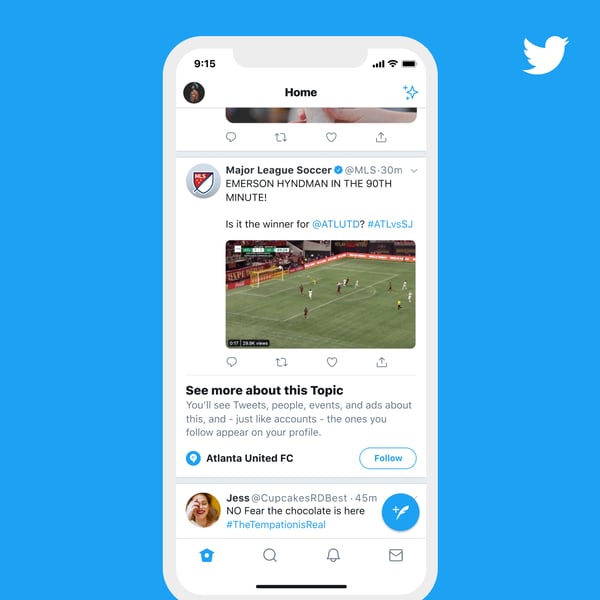
Source; Twitter
You can also search and follow a Topic using Twitter’s search bar, as seen in the photo below:
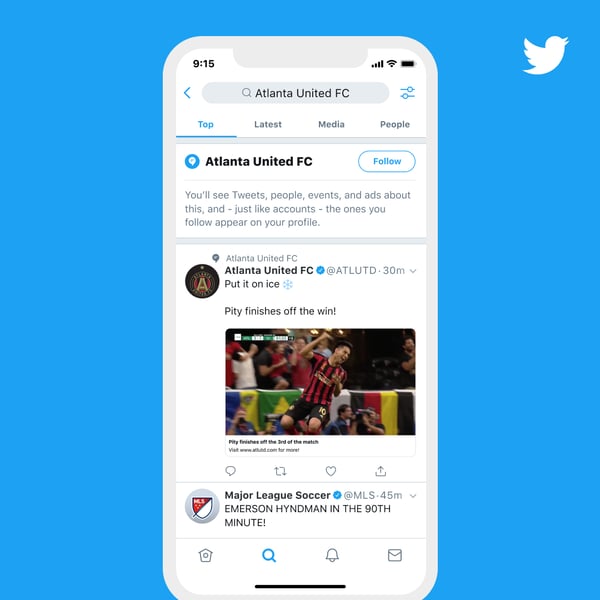
Source: Twitter
To unfollow Topics, return to the Topics page, click “Follow more Topics,” find the Topic you’ve followed, and click unfollow.

For more details on how this feature works, check out Twitter’s introductory blog post.
Four Ways Marketers Can Leverage Twitter Topics
While we’re still learning about Twitter Topics, there are a few ways that you can begin to leverage it as an online marketer. Let’s look at these more closely below.
1. Follow topics related to your industry to stay informed.
When people research a product or service related to your brand, they’ll want to see that you’re well-informed of current trends in your industry. By following Twitter Topics related to your field, you can stay on top of trends that might be important to your customers and impact your business.
By keeping up with news and trends, watching conversations around certain Topics could inform you more about your prospective audience’s delights, habits, work-life, or pain points. This information could help you keep your buyer persona up to date while also allowing you to create a more accurate go-to-market strategy as you launch products or services.
2. Discover and follow accounts or thought leaders in your industry.
In addition to learning about trendy topics in your industry, Topics can also help you learn about thought leaders or brands that are known for discussing certain insights or ideas in your field.
If you consistently see certain accounts or people show up in tweets marked with a Topic related to your field, you might want to check out their profile and follow them to see what type of content they’re posting. Not only will this help youkeep up with the insights and trends in your industry, but reviewing their profile might also help you learn more about optimizing tweets to rank in the Topics tab.
Additionally, if you see tweets from a competitor under a topic related to your brand, you can keep track of what they’re doing and create Twitter content or campaigns that improve upon it.
3. Create content or tweets related to trendy Topics in your industry.
If there’s a Topic people are buzzing about that strongly relates to your product, start coming up with tweets that addresses that trend.
For example, if users are talking about a common pain point that your product or service can solve, post more about that pain point, inform your audience of the best ways to solve it, or create content that weaves a mention of your product into it, such as a video or infographic that you upload to Twitter.
While Twitter hasn’t explained how Twitter Topics algorithms work or how you can leverage them to move up in feeds, tweeting about a Topic is still a strategy that enables you to learn what your audience is widely discussing and respond to it promptly in an engaging, valuable way. Even if you aren’t pulled up in feeds immediately, you may still get reach or growth on your Twitter account simply by responding to what your audience wants to learn about.
4. Learn about trending hashtags and optimize your own tweets with them.
As you probably know by now, hashtags are one of the ways you can optimize your tweets with popular keywords or phrases. When someone clicks on a hashtag, they will see a feed of tweets that also used the hashtag.
While people might find your tweets under the Topics tab if you’re discussing a certain trend, they might also find your tweets if they click on a hashtag that you’ve used. If you see a lot of people in your industry tweeting out certain hashtags, find a way to create tweets that naturally leverage or include that hashtag to further optimize your content and profile.
Embracing Trendy Topics on Twitter
Twitter has always been a solid platform for topical or trend-based discussion. And, although Topics will help users and brands zone in more on what they really care about, it’s not the only strategy you can use to make sure that your content gets seen.
By using Twitter Topics to learn more about how to interact with a wider range of users and create valuable content related to trends in your industry, you can ultimately boost online brand awareness and your following.
To learn more about how to optimize and grow your Twitter profile, check out our Ultimate Guide to Twitter Marketing.

What Is a CMS and Why Should You Care?
Deep in the sea of acronyms in the marketing world, there’s an overwhelming amount to keep straight. SEO, CRM, SERP, CTR, and CToR are all important acronyms that can roll off of the tongue for most of us.
What about CMS?
Whether you’re new to marketing or have been in the industry for years, this acronym may be completely new to you. It also may be the answer you’re looking for if you need a professional website, fast, with limited technical resources.
A CMS can help you build exciting, delightful content, resulting in more conversions and lead generation. If you’ve never heard of it, or have always seen the term thrown around and never knew exactly what it meant, this post is for you.
Rather than opening up HTML or JavaScript, CMS software does that for you, so you’re able to pick and choose how your content will look once it’s live on a webpage. Additionally, to save you the task of building systems that create pages and CTA buttons, a CMS can take care of those things for you.
Having a CMS helps marketers who need to operate a fully-functioning website, but lack coding experience. A CMS can be used to create web pages, such as an “About” page or a blog, so focusing on customer-specific content is easier (and less stressful).
Why do you need a CMS?
If any of these scenarios are pain points at work, it may be time to look into how a CMS can help you streamline processes and organize content.
Limited Resources
If you’re working with limited technical resources, it might be imperative to save you time and the gripe of wondering if your website is professional enough. For example, maybe you don’t have the software needed to code a webpage or don’t have a developer.
Because CMS software is so expansive and comprehensible, it’s a simple process to add, update, or remove content from a website. You won’t have to spend extra time figuring that out.
SEO Plugins
Additionally, with a CMS, you can optimize web pages for search engines, which is extremely helpful in getting your contact to rank highly on Google. That way, potential leads can find you, and you’ll have an amazing-looking website when they do.
Lack of Coding Knowledge
You may find yourself in a position where you need a new landing page or something similar, but you don’t have enough time to build one from scratch. With a CMS, that process can be straightforward.
Allows for Collaboration
Multiple members can have access to CMS software. Every team member would individually use their account to work collaboratively on team projects, like editing a landing page. They also have the capability to save templates of webpages, as well.
Ultimately, a CMS consolidates processes that may be impossible to a marketer.
Best CMS Platforms
HubSpot offers a CMS that’s for businesses at any stage. If you’re thinking of piloting a CMS, find out more about HubSpot’s trial here. There are alternative CMS options like WordPress, Joomla, or Drupal, as well — take a look at WordPress, Joomla, or Drupal: Which Is the Right CMS Platform for Your Site? To investigate alternative options to HubSpot.
HubSpot
HubSpot’s CMS allows you to build websites that are powerful, optimized for search engines, and secure. You can manage all of your marketing and content in one place, which allows for easy collaboration.
The tools in HubSpot’s CMS lets you personalize every visitor experience. Personalized content improves the experience of the user, having felt targeted.
WordPress
With WordPress, you’ll have more than a blogging website. With the plugins and widgets you can add to a WordPress site, you can create a unique experience specific to your brand.
These plugins and widgets can add sidebars, calls-to-action, unique forms, and more. The easy-to-use tools in WordPress is that you can be as minimal with the design or as flexible as you want.
Joomla
Joomla is similar to WordPress in that it offers many plugins and widgets to expand your website. Both platforms are also free and come with webpage templates.
While other CMS platforms adopt an expansive all-in-one experience with content management, Joomla focuses on building and designing websites. It’s a good platform to use for straightforward website management.
Drupal
Drupal’s homepage has CMS information split into sections for developers, marketers, and agencies. As an open-source platform, Drupal is another website that allows for a lot of customization opportunity.
Drupal is different because the platform is more on the technical side. It would mostly benefit the marketer with more than a working knowledge of code who doesn’t have the time to learn the extra skills needed to build an entire website.
It can be a huge pain to get a proper website up and running — that’s why more SMBs are finding that having a CMS has helped them exponentially.
If you’re in a spot that sounds similar, give a CMS a try and see if it works for you.

The Social Media Content Calendar Template Every Marketer Needs [Free Template]
“We have a 9 a.m. meeting? Hold on — let me just click around the internet like a maniac to find something for the morning tweet.”
Sound familiar? Scrambling for social content is nothing new. We have meetings. We run late. Things come up. And it’s really hard to get any meaningful amount of work done when you have the next social media update looming over your head every 30, 60, or 90 minutes. It all moves so fast that you might periodically feel a case of the vapors coming on, which is why pre-scheduled social media content should be your new best friend.
To make social media content easier for companies to plan and schedule across the accounts they manage, we created a social media content calendar template. And recently, we updated to be better, faster, stronger, and just generally prettier.
You can fill it in at the same day and time every single week to prep for the following week’s social media content. That means when you burst through the office doors at 9 a.m., you won’t be in panic mode looking for something to push out to your Facebook fans — you already took care of that last week.
This blog post will walk you through exactly how to use the template to stay on top of your social media content planning for Facebook, Twitter, LinkedIn, Instagram, Pinterest, and Google+.
Note: HubSpot customers can also schedule content through Social Inbox, or use this spreadsheet to organize their content and subsequently upload it to Social Inbox. Detailed instructions for doing this exist in the cover sheet of the template.
How to Use the Social Media Calendar Template to Plan Your Content Schedule
When you open up the social media content calendar template, you’ll notice the bottom of the Excel spreadsheet has several different tabs, most of which are dedicated to a specific social network.

The reason you’ll want a different worksheet for every social network is simply that every social network is a little bit different. You can’t just craft one, single social media update and use it across LinkedIn, Facebook, Twitter, Instagram, Pinterest, and Google+. You can certainly promote the same piece of content across all six of those networks, but that doesn’t mean you’ll craft your update in the same way for every single one of them. (In fact, you may even want to add additional tabs if you’re active on other networks, like Quora or YouTube.)
This following sub-sections will walk you through how to fill out each of the four tabs you see in this template — the updates for Twitter, Facebook, LinkedIn, Instagram, Pinterest, and Google+. But before we get to that, let’s just walk through the “Monthly Planning Calendar” so you know what that’s for.
Monthly Social Media Schedule
The tab “Monthly Planning Calendar” provides an overall snapshot of your monthly social media campaigns. It’ll help you coordinate better with other stakeholders, not to mention keep all the moving parts straight in your own mind. Here’s what it looks like:
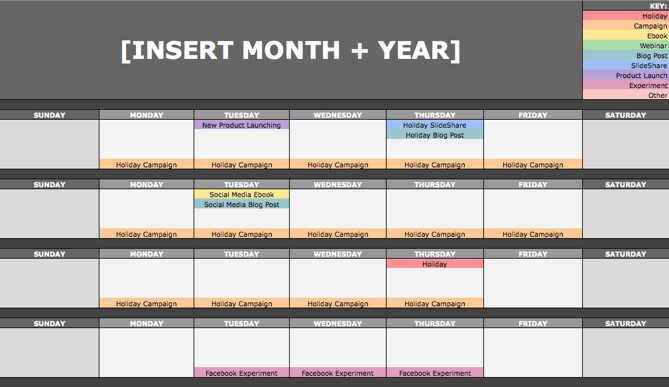
There are three sections to take note of when you edit this template for your own purposes. First, the color-coding key: These are the types of content or campaigns around which you might coordinate, like ebooks, webinars, blog posts, product launches, and so on. Though only some of these might be relevant to you, they’re there to indicate what you may want to put in there — so be sure to edit these categories to align with your own campaigns.
The other two sections you’ll need to edit are the Month and Year at the top of the calendar (duh), as well as the cells below each day of the week. In those cells, you should enter the type of content you’ll be promoting that day and color-code it to align with the campaign it’s supporting.
Instead of deleting all the content in this spreadsheet each month, I recommend copying this worksheet twelve times over, and creating a separate sheet for each month. (If that gets to be too overwhelming, you can always save those tabs as a separate file.)
Planning Your Twitter Content Calendar
Alright, now let’s get to the social media content. This section will be the lengthiest, because all subsequent sections will draw on the instructions we go through here. So if you read one section in this whole post, make it this one.
Let’s say you want to add some tweets to your scheduling template. Skip over to the “Twitter Updates” tab, where you’ll see this:

The first four columns, “Day,” “Date,” “Time,” and “Date & Time” are there for your convenience, and if you choose to use a third-party app for pre-scheduling your tweets (like HubSpot’s Social Inbox), then these columns will be useful. For now, just fill in the date on which you’d like your updates to publish to Twitter, and the time at which you’d like them to go out. The “Date & Time” column will automatically change based on what you input in the previous two columns.
Now, let’s move over to the “Message” column. Here, input the copy you’d like to appear in your tweet, bearing in mind you should cap it at 116 characters to allow enough room for a link, and at 115 characters to allow room for an image. (Read this blog post for a full character count guide.) This spreadsheet will auto-calculate the number of characters you’ve entered to keep you on-point, turning yellow when you’ve reached 95 characters, and red when you’ve reached 116 characters.
After you’ve composed your tweet, paste the URL you’d like to include in your tweet in the “Link” column. Be sure to include UTM parameters so you’ll know whether all of these tweets are actually driving traffic, leads, and customers. This is an important step to remember if you’d like to be able to demonstrate ROI from social. You can also use the “Campaign” column to add an associated campaign, which helps which more robust tracking and reporting.
Finally, in the “Image” column, attach the tweet’s image (if you have one). For Twitter, we recommend images that are 1024 x 512 pixels. (Click here for a full cheat sheet of social media image sizes.) If you’re having trouble attaching your image to the spreadsheet, follow these steps:
Step 1: Right-click the cell in which you’d like your image.
Step 2: Click “Hyperlink,” then click the “Document” button, and finally, click “Select” to choose your image.
Step 3: In the “Choose a File” window, select the image from your computer and click “Open.”
Step 4: You’ll now see the image attached to the “Insert Hyperlink” screen. Feel free to edit the “Display” text to change the file name, then click “OK.”
Note: This process is simply for organizational purposes. If you decide to upload the spreadsheet to your social media publishing software, it will not attach — you’ll have to do that with your marketing software. If you’re a HubSpot customer, details for how to bulk upload your Twitter content to Social Inbox can be found within the downloaded template.
Planning Your Facebook Content Calendar
Now, let’s talk about how to plan your Facebook marketing in advance with the template. Navigate on over to the tab in your template labeled “Facebook Updates.”
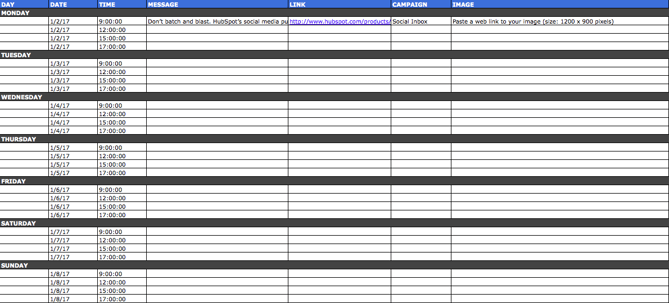
Facebook updates work similarly to Twitter updates, with the exception being bulk uploading your content is not possible in Social Inbox.
The first three columns, “Day,” “Date,” and “Time” are there for your convenience. Head on over to the column labeled “Message” and input the copy you’d like to appear in your status update, corresponding to the days and times you’d like those updates to run. Then, move to the “Link” column and input the link you’ll be, you know, linking to in the update. (Don’t forget that tracking token.) If you’d like the update to be tagged to a certain campaign, include this in the “Campaigns” column. Finally, attach an image just like you did with your Twitter updates — if you’re using one, we suggest you edit it to be 1200 x 900 pixels. (Click here for a full cheat sheet of social media image sizes.)
Planning Your LinkedIn Content Calendar
LinkedIn updates are the most unique, because you have both Company Pages and Groups to consider. To demonstrate the difference between Company Page updates and Group updates, let’s navigate over to the column labeled “Title (For Group Discussions Only).”
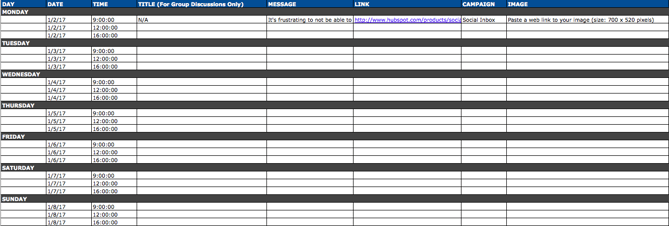
LinkedIn Groups let you post a few kinds of updates, one of which is called a “Discussion.” You will only fill out the “Title (For Group Discussions Only)” column if you’re looking to post a Discussion to your LinkedIn Group — because Discussions are the only update you’ll be posting that requires a title. If you’re not posting a Discussion to a LinkedIn Group, you don’t need to fill out this field, because your update will not have a title.
You’ll fill out the next column, “Message,” for every type of update you post, whether it’s for a Company Page or a Group. Simply input your copy into this column, and then navigate to the next two columns, “Link” and “Campaign” to input the URL to which you’re directing readers with the tracking token you’ll use to track activity, and the associated campaign if one exists. If you’d like to use an image for an update, attach it per the instructions laid out in the “Twitter” section. We recommend editing the image to 700 x 520 pixels.
Planning Your Instagram Posting Calendar
Now, let’s move on to how to set up your Instagram photos and videos in advance with the template. Navigate on over to the tab in your template labeled “Instagram Updates.”
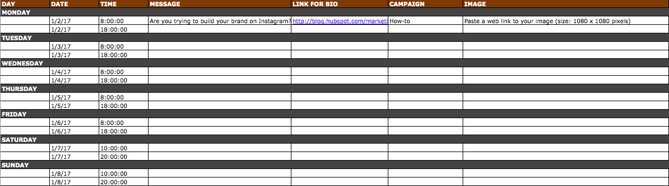
Instagram updates work similarly to Facebook updates, in that content can’t be uploaded in bulk to Social Inbox like it can with Twitter.
The first three columns, “Day,” “Date,” and “Time” are there for your convenience. Head on over to the column labeled “Message,” and input the copy you’d like to appear in your post’s caption, corresponding to the days and times you’d like those updates to run. Keep in mind that although Instagram captions can be up to 2,200 characters long, they cut off in users’ feeds after three lines of text. The exact length of these three lines depends on the length of your Instagram handle. (Read this blog post for a full character count guide.)
Next, move to the “Link for Bio” column and input whichever link you plan to put in the bio when you publish the accompanying Instagram post. (The reason you’d put a link in your bio and not the photo caption itself is because clickable URLs aren’t allowed anywhere except the single “website” box in your bio. See #13 in this blog post for more on how that works.) Oh, and don’t forget that tracking token.
If you’d like the update to be tagged to a certain campaign, include this in the “Campaigns” column. Finally, attach an image just like you did with your other social media updates — we suggest you edit it to be 1080 pixels x 1080 pixels. (Click here for a full cheat sheet of social media image sizes.)
Planning Your Pinterest Content Calendar
Alright, now let’s go over how to set up your Pinterest pins in advance with the template. Navigate on over to the tab in your template labeled “Pinterest Updates.”
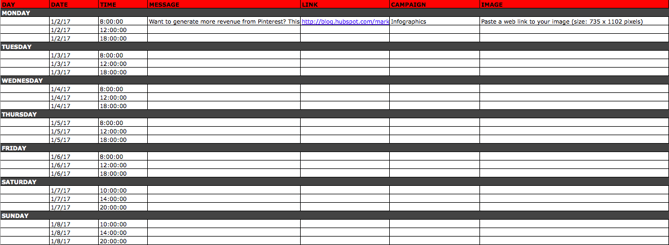
Pinterest updates work similarly to Facebook and Instagram updates, in that content can’t be uploaded in bulk to Social Inbox like it can with Twitter.
The first three columns, “Day,” “Date,” and “Time” are there for your convenience. Go to the column labeled “Message,” and input the copy you’d like to appear in your pin’s description, corresponding to the days and times you’d like those updates to run. Then, move to the “Link” column and input the link you’ll be, you know, linking to in the update. (Don’t forget that tracking token.)
If you’d like the update to be tagged to a certain campaign, include this in the “Campaigns” column. Finally, attach an image like you did with your other social media updates — we suggest you edit it to be 735 pixels x 1102 pixels.
Planning Your Google+ Posting Calendar
Finally, we come to Google+.
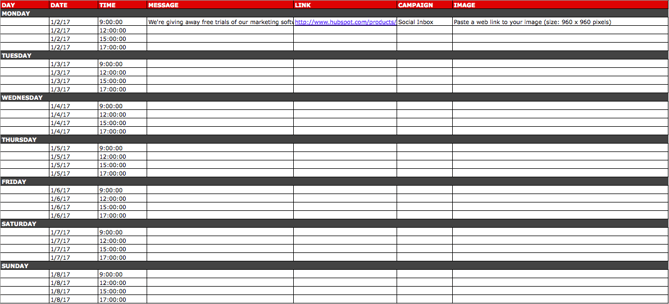
Update: Google recently announced it is shutting down its Google+ platform. Please consider using the template and instructions below for any potential social networking platform Google launches in the future, and check back with us for an updated template that reflects this rollout.
Start in the “Message” column, and input your status update. Then move over to “Link” column, where you’ll input the link to which you’re directing readers. If you’d like the update to be tagged to a certain campaign, include this in the “Campaigns” column. If you’re attaching an image, you could use multiple different sizes, but 960 pixels x 960 pixels works best. (Click here for a full cheat sheet of social media image sizes.)
Content Repository (Or, Where to Source Social Media Content)
This template also provides you with a tab called “Content Repository,” which should help you keep track of all your content and maintain a healthy backlog of fodder to make sourcing social media content easier.
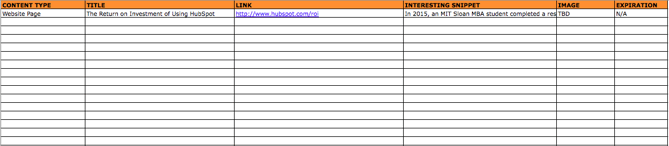
As you create more assets, you’ll likely want to resurface and re-promote those pieces down the line, too. To ensure you don’t lose track of all of that content, record it on this tab so you’re never at a loss for what to publish on social. If the content you’re promoting isn’t evergreen, be sure to include an expiration date in the column marked “Expiration” so you don’t promote it when it’s jumped the shark.
This tab will also help you maintain a healthy balance of content: A mix of your own content and others’, a mix of content formats and types, and mix of lead generation content vs. MQL-generating content vs. traffic-friendly content.
Don’t Forget to Interact With Your Followers
Whether you use this spreadsheet to plan your content out in advance or upload to a third-party app, you’ll still need to supplement these updates with one the fly content. Breaking news hits? Whip up a quick update to share it with your network. Someone in your network tweets something interesting? Give it a retweet with some commentary. Got a fascinating comment on one of your updates? Respond with a “thank you” for their interaction or an additional follow-up comment.
Coming up with and scheduling your social media content in advance is a huge time-saver, but it should go without saying that you still need to monitor and add to your social presence throughout the day.
Finally, we encourage you to experiment with your social media publishing. This template provides publishing dates and times for each social network, but you may find those are way too many updates for you to fill, or perhaps too infrequent for your booming social presence. You should adjust your social media publishing frequency as needed.

Is Snapchat Discover Right for Your Brand?
When you think of Snapchat, what do you think of?
Personally, I think of a single thing: “It’s crazy how much marketing opportunity there is on this app.”
Now, you may be thinking, “There’s no way,” or “Which one is Snapchat, again?” (if you need a reminder, it’s the yellow one with the videos and ghost logo).
Snapchat is an undeniably popular social media app, with over 200 million millennials and Gen Z users opening the app every single day.
Additionally, Snapchatter’s use Snapchat’s Discover feature for their news, to catch up on shows, or to see new sponsored posts from their favorite influencers.
Of these users, 38% of them don’t use Facebook or Instagram, so some of that audience is exclusive to Snapchat.
News, entertainment, sports, lifestyle, and a few other industries currently use Snapchat’s Discover page to — well — get discovered by new audiences.
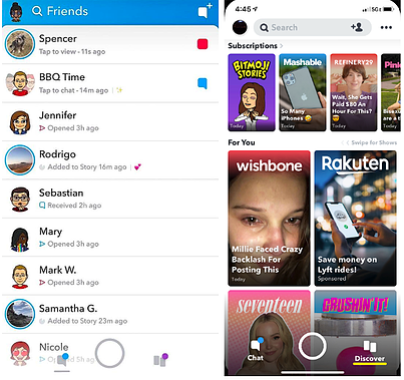
If you’ve seen Discover, you know what I’m talking about. It’s almost like a personalized home screen. And any marketer would love to know how to get that Discover exposure. Let’s explore that, next.
Snapchat Discover Basics
Snapchat Discover is a page on Snapchat that’s basically a news feed. On it, you’ll find content in the story format from news publishers, also known as publishing partners, such as The Wall Street Journal, ESPN, and other content from influencers or brands.
On Discover, Snapchatters can subscribe to a channel, watch snaps in Stories, see what their Snap friends are watching on their Discover page, and see recommended content, curated by the app based on their history.
This content can range from product demos and television shows to news reports. Snapchat has over 50 publishing partners to date, making the popular Discover page a key news source for Snapchatters. And of the 210 million daily active users on the app, every account member has a Discover page.
Because of the high volume of users, Discover seems like a no-brainer to place ads, right? But, unfortunately, partnering with Snapchat to get on the Discover page isn’t as easy as uploading a viral video. You have to become a publishing partner.
Another interesting thing to note about Snapchat Discover is that the app doesn’t allow promotional language or ad-based stories to be featured, so if building conversions or turning over a high ROI are your social media goals, you might not benefit from becoming a publishing partner.
If you can’t become a publishing partner, there are still a few ways you can advertise on Snapchat and potentially land on Discover pages. For more information about it, check out How 13 Brands Are Leveraging Snapchat Discover.
So how do you get on Discover?
1. Become a Snapchat publishing partner.
Snapchat is somewhat secretive about how to become a publisher. It’s a process in which your brand and Snapchat come to an agreement to post content on Discover that will engage audiences.
Think about the content on Discover: it’s a typically high budget, high-quality news stories, teen shows, and successful influencer content.
Alternatively, you can submit to be featured on the story of one of Snapchat’s partners, like fashion magazine Cosmopolitan, if becoming a Snapchat partner isn’t in the cards for you at the moment.
2. Submit to be featured on Snapchat’s Story.
Snapchat itself has a story on the Discover page, and you can submit your Story for a chance to be featured. Some stories are chosen by the Snapchat team, while others are chosen by trusted third-party services.
For your story to be featured on Snapchat’s, you first have to post the Story. Then, in the editor tool, you can click “Add to Our Story” to submit yours. If chosen, your story has the chance to be featured on the Discover page.
As for guidelines about how to get chosen, look at the content that’s frequently posted on Discover. It’s probably light-hearted, fun content that connects to younger viewers. Your brand might have to follow suit to keep Snapchat’s theme consistent.
3. Make sure your Story meets community guidelines.
A major roadblock you may be running into if you can’t get your stories on the Discover page may be the content of your story. The Discover page is strict about its content meeting Snapchat’s community guidelines.
It would be a good idea to review their community guidelines to see if you can leverage exciting stories while abiding by Snapchat’s rules. Basically, there’s no way your content can reach the Discover page if you don’t follow their rules.
Even though it may not seem like the easiest task to get on Discover, marketing or advertising on Snapchat is still possible. You can still reach a large audience of young people, Discover or not. All it takes is a solid knowledge of the app and how it’s used.
Take a look at Snapchat Marketing: The Ultimate Guide for more content related to marketing and advertising on Snapchat.

Are Webinars Dead? How to Make a Webinar that Works in 2020
As an acquisition marketer, I hear questions like this all the time: “Is the PDF dead? Is the webinar dead now too? How should we continue generating leads for our sales team while continuing to innovate on the content formats we produce and gate behind a form?”
It’s 2020, and the way our prospects and customers find and consume content has certainly changed. While I would love to say that there’s one new, highly optimal content format that all marketers should use for lead generation instead of older formats, I can’t — it’s a little more complicated than that. Instead, I’ll make a bold claim: webinars aren’t dead, and neither is the PDF ebook.
What has changed, however, is a saturation of mediocre PDF ebooks, webinars, and other forms of gated content available online. So while webinars aren’t dead, that doesn’t mean marketers should continue running the same, tired playbook.
Luckily, HubSpot and GoToWebinar teamed up to bring you the ultimate guide, “How to Produce Webinars Your Sales Reps and Prospects Will Love.”
Make sure you’re following these steps to create an effective webinar that works in 2020.
Webinars Drive Sales
According to InsideSales.com, 73% of marketing and sales leaders say webinars are one of the best ways to generate quality leads. Why?
- They are highly engaging. According to GoToWebinar, the average webinar attendee viewing time is 61 minutes.
- They work across the entire customer journey. From thought-leadership panel discussions to weekly live demos, webinars are a dynamic and effective way to move prospects down the funnel from awareness to closed deal and beyond.
- They generate high-quality leads for Sales. Webinars come with a ton of information about your prospects you can use to identify high-quality, sales-ready leads. With each webinar registrant, you can collect lead and engagement data your sales team can use to initiate personalized outreach.
Follow Along With the Ultimate Webinar Planning Kit
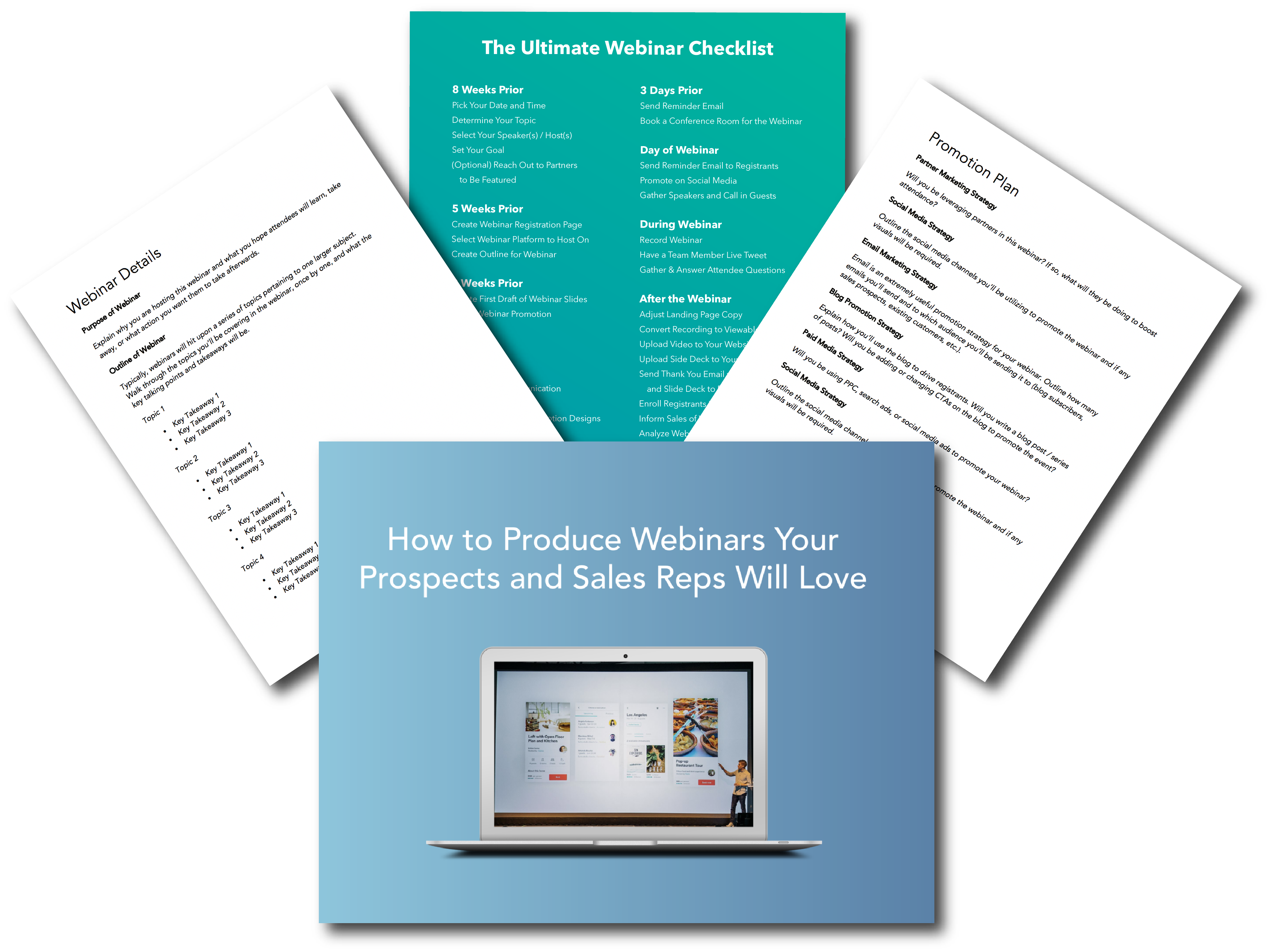 We know planning and promoting a webinar can be difficult if you’ve never done it before. That’s why we’ve compiled a guide, template, and checklist for you to get your webinar off the ground – whether its your first or fortieth. Click here to download the kit for free.
1. Brainstorm the right topic.
Before you can get started on making your webinar, you’ll have to decide the topic you want to speak about.
The topic you choose should answer questions that your audience typically asks and preferably be highly specific. For example, if you’re hosting a webinar on email marketing, you can choose to focus on subject lines in particular.
Overall, your webinar should provide value to your audience. Think about your company as a whole and your unique value proposition. What topics are you an expert on? What topics can you provide value on? Those are the topics you’ll want to use for a webinar.
2. Choose a webinar tool.
There are many webinar services you can use to create your webinar. For example, there’s ClickMeeting, GoToWebinar, and Zoom.
When you’re researching a tool to use, consider your objectives. How many people do you think will attend? Do you need a tool that could allow over 1,000 attendees? How much does it cost? And how easy is it to use? These are questions that you should look in to when you’re deciding on what webinar tool to use.
Additionally, you’ll want to make sure the tool can handle the type of webinar you want to host — can it handle video chatting for panel or Q&A webinars? The right tool for you will depend on the overall objectives of your webinar.
3. Produce the content.
Once you find a tool and you know the topic you want to present on, you’ll have to decide what type of webinar you want to host. Will it be a PowerPoint and talking head presentation? Or perhaps you want to do a live panel Q&A? Either way, you’ll have to produce the content and prepare for the big day.
For example, if you’re creating a PowerPoint, you’ll need to create your slide deck. Make sure that the slides emphasize your points, but don’t include a script. These slides should be visually appealing and include interesting graphics, such as images or GIFs.
If you’re hosting a discussion-style webinar, plan out your speakers, gather audience questions, and prepare any other questions you might have so you can prioritize your time during the webinar.
4. Select the right day and time.
You’ll want to consider where your audience lives. Use tools like Google Analytics to see where people are, so you can choose a convenient day and time zone.
According to ON24, Tuesday from 10-11 a.m. GMT is the best day to host a webinar. This is because it’s great for a wide range of time zones, and should avoid most commute times or work hours. Typically, this time avoids conflicts with the most amount of people.
However, if your audience is solely in the United States, then you wouldn’t need to worry about global time zones. Instead, you can focus on planning a time when most people aren’t commuting. For example, early afternoon or after work hours are generally good times.
5. Promote your webinar.
Now that you’ve done the backend work, it’s time to ensure you have people who want to attend.
To promote your webinar, you can create a landing page where people can sign up and then distribute and promote that link in several ways.
For example, you can consider running ads through social media and search engines. Additionally, you’ll want to use free promotion tactics as well — you can post on your own accounts, on your website, and send an email to your subscribers. It’s important to use your own follower base to get people interested.
Additionally, reminder emails are also helpful. Consider sending “Don’t Miss Out” or “Seats Are Filling Up” emails as the day gets closer.
And when people do sign up, you’ll want to remind them leading up to the day. You should send them the webinar link about an hour before so it’s top of mind and they don’t have to go looking for the link in their registration email.
6. Follow up with your audience.
Webinars are obviously a great sales opportunity, and you don’t want people to leave your webinar and never think of you again.
That’s why you’ll want to send them a thank you email and gather feedback from attendees so you can plan better webinars in the future.
Additionally, attendees generally like to have a recording, so you can send them a link to the recording afterwards so they don’t have to take fervent notes during the webinar. This also means you can send it to registrants who wanted to attend but weren’t able to.
Convinced that webinars are still a relevant acquisition strategy in 2020? Follow these strategies to create an effective webinar.
1. Leverage your sales team for content topic ideas.
When it comes to building a successful webinar strategy, it comes down to sales and marketing alignment. If the marketing team is creating content that isn’t helping their sales conversations, it won’t be a successful effort for driving high-quality leads to sales.
Luckily, you have experts at your disposal for coming up with content ideas that will actually compliment and aid the sales conversation: the reps themselves.
Instead of guessing what your sales team might want a webinar to be focused on, ask them. Get reps’ buy-in for a webinar before you plan it. Set up a meeting to discover new content ideas and to find out what pain points they need to help solve. This will go a long way for ensuring sales’ follow up with registrants is seamless once the webinar is over.
2. Nail your promotion strategy.
Once you’ve come up with relevant content topics for your webinar, its your job as marketers to get that webinar in front of as many eyes as possible. With webinars, it’s not just about generating initial excitement; you have to build excitement and encourage engagement once the webinar goes live. Here are a few tips for doing both:
- Try your hand at Co-marketing. One of the best ways to get new expertise, generate interest for a piece of content, and expand the reach of a campaign is to run a co-marketing webinar. Instead of running a webinar with speakers internally, try working with another company that’s going after a similar buyer persona and bring their expertise into the conversation. Doing so creates more interesting content and gives you the opportunity to get your webinar in front of another company’s established audience.
- Create automated email reminders under each sales rep’s name that will be sent to prospects who have been invited but not yet registered.
- Create manual email templates reps can send in their one-on-one communication with prospects.
- Set up an automated email to notify reps when one of their prospects has registered for your webinar. This will help them engage and close those prospects done the road.
- Once you’ve gotten registrants, that doesn’t mean they’ll show up. After all, if you promote a webinar 1-2 weeks in advance, a portion of your registrants are likely to forget when the live date comes around. Remember to send out reminder emails the day before and day-of the live event so ensure a high live attendance rate.
3. Don’t just stick to a PowerPoint and talking head.
The format of slides with a person speaking on screen has been done time after time. Don’t feel the need to stick to the script — literally. Instead, think about ways to mix up how the information in your webinar is presented:
- At HubSpot, we’ve found unscripted, discussion-style webinars to be quite effective at engaging our audience. In many of our live events, we’ve foregone the slides completely and instead brought two speakers together and had a host ask live questions on air. It’s effective for both encouraging Twitter participation via a hashtag and keeping the content conversational, but informative.
- Try building a webinar around your prospects’ questions. Send a call for questions to be answered live on-air. This will help build engagement and excitement for what’s to come. Hopefully, the people asking questions will be more likely to show up day-of too.
- You can also use a landing page, like this, that includes a voting feature for people to upvote their top questions. This will also help your prioritize the material your audience is most interested in.
4. Deliver necessary information to sales.
A huge part of the pre- and post-webinar process is making sure the right information gets delivered to sales. That’s why GoToWebinar and HubSpot recommend creating one webinar hub that’s easily accessible by sales with the following information:
- On-demand recordings of all webinars.
- A calendar with past and future webinars.
- Documentation that details the webinars goals, title, target persona, funnel stage, key points, speakers and logistics.
- Promotional and follow-up emails.
- Collection of graphic and text CTAs sales reps can drop into their communications.
- Mechanism to collect suggestions from sales reps for new topic suggestions and general feedback.
Once the webinar is done, however, it’s time to make sure the sales reps are ready to close those leads. Send a follow up email to your reps and include the following information:
- Leads who registered
- Leads who attended
- Leads who registered but didn’t attend
- Leads who never registered
- New SQL leads from post-webinar lead scores
- Any other relevant webinar data
- Send email templates sales can use to send to leads based on their webinar behavior. Include other relevant content they can use to continue to nurture leads in the coming weeks.
Putting the extra effort in will go a long way toward making sure the webinar is a success from both a sales and marketing standpoint.
It’s All About Alignment
Webinars as a marketing tool aren’t dead. But they’re also not just an effective marketing tool; they’re also effective sales tools – but only if your sales team has the information, content, and tools to use them to move prospects down the funnel and close deals.
However, creating the kind of alignment you need to make this all a success isn’t easy. That’s why HubSpot and GotoWebinar created this ultimate guide for creating a successful webinar in 2020 and included a checklist to guide you through pre, ongoing, and post webinar communications.
Editor’s note: This post was originally published in February 2018 and has been updated for comprehensiveness.

45 Emerging Technology Stats to Know in 2020
As a writer who loves covering emerging technology and human being, I’m surrounded by technology.
Each morning, I wake up to my Amazon Echo’s alarm and ask Alexa about the weather. On my train ride home from work, I’m taking Snapchat selfies using AR filters. When I get to my house, I ask Alexa to turn the lights to a specific hue. Then I ask my smart TV to launch Netflix or play a basic VR game on my Google Cardboard. Before bed, I might check my fitness levels with a smart scale or use my toothbrush’s app to figure out what areas of my mouth I’m missing.
It’s safe to say that I’m a big fan of emerging media, technology, and innovation. As an individual, this technology is already impacting my life. As a marketer, I’m curious to see how brands could leverage smart technology.
I’m not the only one who recognizes emerging technology as something that could completely change today’s marketing world. In fact, a Deloitte study found that a growing number of private companies are more heavily prioritizing emerging technology and hiring talent in their annual budgets.
At the moment, a few buzzy topics include augmented and virtual reality, general and voice-based artificial intelligence, and smart home devices. And, with the dawn of 5G — a cloud-based high-speed wireless network — tech innovation won’t be slowing down anytime soon. In fact, a Deloitte study notes that many marketing firms are ramping up their information technology processes because of it.
With all the technologies out there, it’s hard to cut through online chatter and determine which innovations are mostly just hype and which might actually change the way we market.
While many of the major emerging technologies are getting more accessible, you could also still be wondering, “Which might be worth investing in for my industry specifically?” For example, if you run a B2B firm, you might realize augmented reality isn’t a practical technology to research. But, at the same time, you might look into AI software or services that can help your team work more efficiently or learn more about customers.
To give you a bird’s eye view of some of the most buzzed-about innovations that could impact marketers in the near or distant future, I’ve collected 45 stats related to four types of emerging technology.
Augmented and Virtual Reality
For years, researchers have hypothesized that virtual reality, which provides viewers a completely immersive and interactive 360-degree visual experience, will hold the best opportunities in gaming, entertainment, and academic industries.
Meanwhile, experts have also thought that augmented reality, a partially immersive but still interactive experience, will thrive in the world of branding and marketing.
We have already seen these AR and VR predictions come to fruition as the gaming industry continues to announce games for VR headsets and brands have used AR to allow customers to preview products — such as furniture — in their own homes.
Here are 14 stats that demonstrate the growth and opportunities of AR and VR.
- The AR/VR market is currently estimated at $1.6 billion (IDC)
- In 2019, 42.9 million people in the US used a VR product, and 68.7 million people used an AR once monthly. (eMarketer)
- Seven in ten media planners want to add AR to their strategies in the future. (Vibrant Media)
- In a 2018 study based in the U.K. and U.S., 90% of participants knew what VR was while only 65% were aware of what AR was. (GlobalWebIndex)
- 42% of people who use a VR headset at least monthly say they used a mid-range device such as the Google Daydream or Samsung Gear VR. (GlobalWebIndex)
- In 2018, 88% of companies with budgets between $100 million and $1 billion were already experimenting with different forms of AR. (Deloitte)
- A quarter of VR users believe it has a strong potential for brands and marketers. (GlobalWebIndex)
- While 43% of people who report using VR headsets once monthly say they own their own device, 35% of once-monthly VR users say they use a family or friend’s device. (GlobalWebIndex)
- 71% of consumers would prefer to shop at stores with an AR experience (Lumus Vision)
- 64% of consumers say VR has the most potential in gaming, while 52% recognize its potential in Film and TV. (GlobalWebIndex)

Image Source: GlobalWebIndex
- In 2018 mobile VR made $3 billion globally, in part due to purchases related to the mobile app Pokemon Go. (Digi-Capital)
- It’s estimated that AR platforms such as mobile and AR glasses-related apps will hit 2.5 billion installs in 2023. (Digi-Capital)
- Meanwhile, VR platforms are expected to see 30 million installs across devices by 2023 (Digi-Capital)
- Snapchat’s Q3 2019 Earnings Report notes that over 600,000 AR Lenses have been created through the company’s Lens Studio, This increased from 500,000 at the end of Q2. (Snap Inc.)
Artificial Intelligence
Artificial intelligence is so prevalent in 2019 that many of us don’t even notice all the ways we interact with it on a given day. In fact, all of the other technologies on this list require some type of AI algorithm to work smoothly. If you’re less familiar with AI, here are 12 stats to keep in mind:
- Over 37% of organizations have implemented artificial intelligence in some form. The number of industries that have implemented it has grown by 270% since 2015 (Gartner)
- In a 2019 ranking of the top 10 emerging technologies, the World Economic Forum noted, “social robots” as number two. (World Economic Forum)
- It’s estimated that 80% of emerging technologies will involve AI by 2021 (Gartner)
- 40% of marketing and sales teams say that machine learning and data science-based AI will be a crucial part of their future strategies (2019 Data Science and Machine Learning Market Study)
- It’s estimated that AI-based analytics and marketing software will give the average data analyst back one-third of their time, which could then be used for bigger projects or other tasks. (Gartner)
- At 2018’s F8 summit, covered by VentureBeat, Facebook said there were more than 300,000 chatbots on Facebook Messenger. (VentureBeat)
- The percentage of businesses that offer chatbots could grow to 80% in 2020. (HubSpot)
- 63% of businesses say they will consider AI in the near future due to pressures related to reducing costs. (BCG and MIT Sloan School of Business)
- The facial recognition market is estimated to grow by 20% in 2020. (VisionGain)
- There’s only a 1.4% chance that a marketing manager’s role will be taken over by artificial intelligence. (HubSpot)
- It’s estimated that this year, customers will be able to manage 85% of their enterprise relationships without working with humans. (Gartner)
- Online mentions of automation have increased by 70% year over year. (Adobe)
Voice Assistants and Smart Speakers
While voice assistants are technically a segment of AI, they’ve become so prominent in the emerging media world that they deserve their own section of stats.
- Over 46% of people use voice assistants. (Pew Research Center)
- More than 36% of consumers own a smart speaker. (Adobe)
- Of those who own a smart speaker, 54% say their voice assistant can easily understand them when they speak. (Adobe)
- Nearly 112 million people in the U.S. use a voice assistant once monthly across devices. (eMarketer)
- Roughly 34% of people who don’t own a smart speaker are interested in purchasing one. (GlobalWebIndex)
- According to a 2018 poll conducted by HubSpot via Lucid Software, 52% of consumers say they’ve used a voice assistant solely on their phone. (HubSpot)
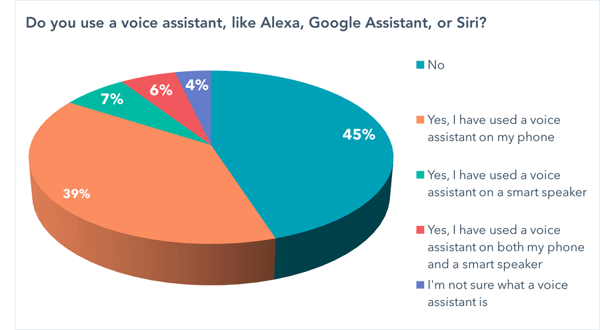
Data Source: Lucid Software
- Millennials are the heaviest users of voice assistants, but usage is growing across age groups. (eMarketer)
- In a late-2018 test where the Amazon, Google, and Apple voice assistants were asked 800 questions each, all understood over 99% to 100% of the questions. (Loup Ventures)
- In the study noted in the above bullet, Google was named the “smartest” voice assistant because it answered more than 86% of the questions correctly. (Loup Ventures)
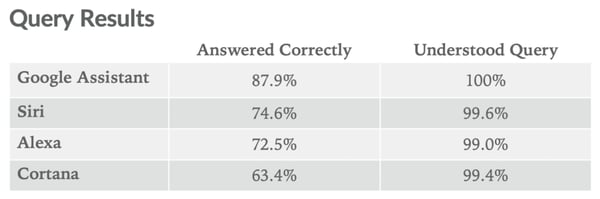
Image Source: Loup Ventures
- In Q2 of 2019, Amazon shipped 6.6 million of its smart speakers, maintaining the lead over competitors like Google. (Canalys)
- Amazon Alexa, the voice assistant associated with Amazon Echo smart speakers, now has over 100,000 Skills globally. (Voicebot.ai)
- By 2023, digital voice ecommerce is expected to triple to an $80 billion industry. (Juniper Research)
- Between August 2018 and February 2019, smart speaker ownership increased by 4% (Adobe)
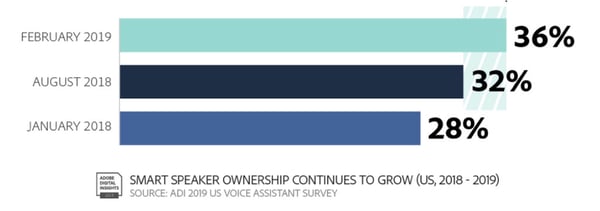
Source: Adobe
Smart Devices and Appliances
While you may not realize the significance that smart appliances and devices could have on marketing, this is something that I and my colleagues have been paying close attention to. Although this space is still young, it’s already seemingly providing interesting opportunities to bigger brands.
As you can imagine, devices like smart TVs could provide great potential for content marketing and branded media, However, a more unique example of an appliance that could provide brand potential is the smart refrigerator.
“I’m excited to see how a smart fridge that can tell me when my avocados are about to spoil can be leveraged by a brand to give me information that might serve me in that particular information, says Amanda Zantal-Wiener, a senior content strategist who creates content for HubSpot that covers news and trends.
But, Zantal-Weiner’s excitement doesn’t end at smart-home appliances. She’s also fascinated by the world of smart cars
“Until we start to see self-driving cars on the road, the idea of connected cars can also be used to help me do more than mindlessly scroll through my phone when I’m using a ride-hailing service, by serving as a distribution channel for real-time, relevant information during that trip. Everything is connected, and I’m excited to see which brands are able to adapt to that earlier on in a way that actually helps customers,” Zantal-Wiener explains.
While the smart appliance space is still fairly nascent and harder to report on statistically at the moment, here are a few interesting stats that highlight why you should keep these technologies on your radar.
- According to a Fluent Survey, 55% of internet users already own some type of smart device. (Fluent)
- The same survey found that the most common device was a smart television, which 38% of participants owned. The next most commonly owned devices were lighting (17%), thermostats (16%) and security systems (14%), and kitchen appliances (7%). (Fluent)
- 31% of people ages 18 to 34 and 38% of people over 35 say that their main purchasing concern related to smart appliances is cost. (Fluent)
- Consumers over the age of 35 are more worried about hacking and data security on smart appliances than 18 to 34-year-olds. (Fluent)

Image Source: eMarketer
- The average cost of a smart-home device is expected to drop by 52% by 2023 (Juniper Research)
- In 2018, 70% of TVs sold globally were smart TVs. (Statista)
Navigating the Future of Marketing
Yes, creating voice assistant skills, leveraging AI, and building branded AR/VR experiences might be pretty inaccessible and costly to your company right now and in the near future.
But, if you want to continue to innovate your brand, or be a competitive marketer in the far future, you’ll want to keep up with how technology and marketing possibilities are evolving. By keeping up with marketing innovation news, you’ll be more prepared to adopt new technologies when they are accessible in the future.
For some detailed guides on emerging technologies that could or are already impacting brands, check out blog posts on artificial intelligence, voice technology, Snapchat, smart devices, and chatbots, and video game marketing — which can leverage of few of the technologies noted above.

Why Refusing to Discuss Failure Erodes a Culture of Growth
Have you ever sat in a meeting where a project was described as a success, yet all the details of failure that led to that success were left out?
Alternatively, have you ever watched while data was cherry picked to make things seem rosier than they actually are?
These are common embodiments of a very common, yet little known, phenomenon called “Success Theater”.
Success theater is, at its core, an informal operating system that says to employees: “you’re expected to win, and you should only discuss wins. Failures need not be exemplified.”
More concretely, success theater describes “the efforts that we make to make things look good, even if actual performance isn’t good or getting better.”
Ultimately, it is an avoidance of data that conflicts with your opinions. It’s a fear of confronting failure or uncomfortable conversations and reflection.
I like this definition (and the whole article) from John Cutler:
“Success Theater is celebrating hitting the quarterly goal without acknowledging the corners you had to cut and the people who will have to clean up the mess. It’s listening to someone rattle off vanity metrics. And it’s being told you’re not a team player for having some doubts about a recent ‘win.’ … And it’s rampant in our internal meetings, blog posts, and presentations.”
Success theater is … exactly what it sounds like it would be.
Of course, in the real world, failure is going to happen. In fact, it needs to happen in order to succeed.
Tons of value can come from documenting and sharing lessons from failed campaigns. Survivorship bias can warp the expectations of both leaders and new team members, and digging up your ‘graveyard of knowledge’ can help elicit new ideas and insights that could contribute to major breakthroughs in marketing and optimization.
In general, it’s best we confront failure honestly, instead of hiding from it.
The Ruinous Path of Success Theater: GE’s Horror Story
One of the most popular stories about success theater is a Wall Street Journal piece on General Electric.
According to the story, former CEO Jeffrey Immelt was constantly optimistic in the face of future projections. In addition to his optimism and “can-do attitude,” he and his fellow top deputies also shielded themselves from any bad news or data that contradicted that narrative.
Unfortunately, the results were catastrophic:
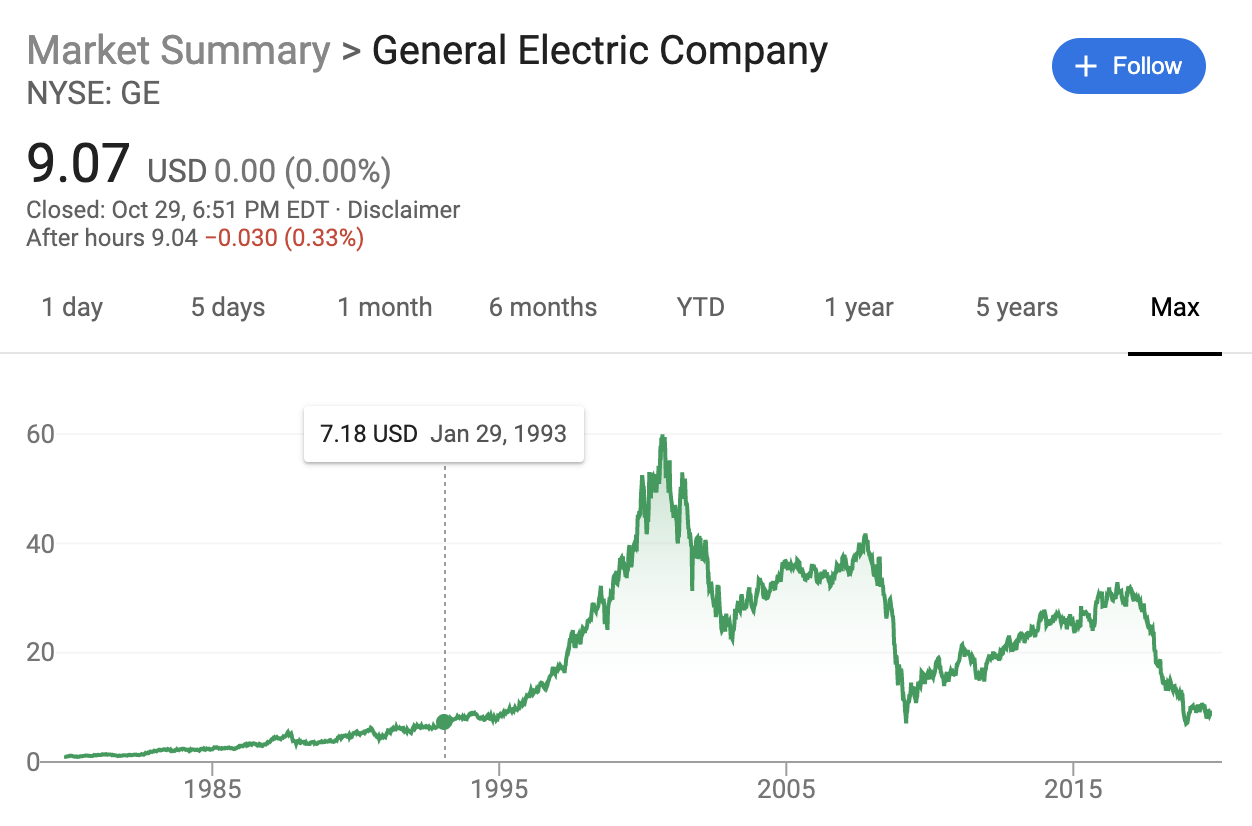
By 2018, the stock price had dropped by roughly 44%. In the same year, they announced they would cut their annual dividend for only the second time in their 125-year history.
They also announced they were taking a $6.2 billion charge in their fourth quarter related to their insurance operations and needed to set aside $15 billion over seven years to bolster insurance reserves at the GE Capital unit.
Finally, they had to restate their earnings for 2017 and 2016, and the Securities and Exchange Commission (SEC) began investigating them for these accounting issues.
Identifying and Diagnosing Success Theater
GE is an extreme example of Success Theater starting at the top and trickling down, eventually taking over the company. But smaller and subtler versions of it could happen at your company.
Liane Davey outlined some signs to look out for:
- Everything is an opportunity (If your organization finds creative ways to describe issues to obscure the real issues, worry)
- Every plan is a hockey stick (If your company is always predicting that next year will be the year it all comes together, you’ve got a problem)
- You hit the number at any cost (You know you’ve got a problem when you start taking short-term gains that create long-term pain)
- You shoot the messenger (If the harbingers of trouble can no longer be heard, you have a problem)
Additionally, I’ve found a simpler sign — if you notice data cherry-picking and storytelling frequently (and on purpose), that’s a strong symptom of underlying success theater.
Success theater can also show up in our industry-wide narratives. You can see it in the constant flurry of 315% conversion uplift case studies shared on Twitter, and at the top of GrowthHackers (and also, of course, in the glorious rise and tremendous fall of WeWork).
How to Combat Success Theater
There’s no silver-bullet solution to avoid success theater, and it will probably always exist to some degree. We just want to curb it to the point where it doesn’t poison productivity.
I talked to several growth leaders and also wrote down my own favorite ways of combating success theater, which I’ll share now.
1. Write About and Share Failed Experiments
Our team at HubSpot places a huge value on learning, and not just on reporting our wins week-over-week.
We keep a weekly calendar spot to write down our learnings for the week. We talk about those insights during Monday meetings. We’re all encouraged to write internal posts about failed campaigns — or even mediocre campaigns. We don’t want to build a graveyard of knowledge where we’re only writing about the big winners and seeking applause.
We also have a company-wide Failure Forum where we share our failures and celebrate the risks we take on the path to innovation.
When Joanna Lord was at Porch, she talked about a ritual they developed at the company involving a pink fuzzy animal named Mr. Sparkles. Whoever failed the biggest each week would get Mr. Sparkles. As she put it:
“You put him on your desk and it’s like this badge of honor that you like did something so bold that you literally messed up the site badly.
And you know what I love? You see my CEO walk around the room and he’s high-fiving the Mr. Sparkles owner. And people are like, ‘What did you do? What did you do to get Mr. Sparkles?’
But the reality is we’ve made it a positive thing. We’ve made it a badge of honor. You are living out the Porch-y way in being bold. What can you do in your culture to make it fun and acceptable? And almost, you know, become famous for it.”
In a broader industry-wide context, blogger and marketing consultant, Ryan Robinson, has long been an advocate of transparently sharing the behind-the-scenes stories of his own business failures with the readers of his blog:
“I’ve launched several businesses over the past decade, and most of them have landed somewhere between mixed results and utter failure. I go out of my way to highlight those experiences in long-form stories to the readers on my blog, because it’s important to illustrate that the path to achieving meaningful results will be filled with missteps and lessons to be learned along the way. My failure-related articles are consistently the most popular with my readers.”
2. Be Careful With Case Studies
I’ve ranted about CRO case studies a ton by this point, so it’s suffice to say I don’t trust most of them.
Even if the data is accurate and you’re not reading about a blatant false positive on a sample size of 14, you’re likely looking at a PR piece that is almost certainly subject to Survivorship Bias.
Very few companies and thought leaders are incentivized to write about their failures and inconclusive experiments, so you’re only seeing the tip of the iceberg.
Sure, you can absolutely get some inspiration from case studies. But don’t look around in exasperation and think that everyone’s winning except you. It’s all an Instagram-esque illusion.
3. Embrace Transparency
Shannon Callarman, a Content Marketing Specialist at ShipBob, told me about a cool ritual they’ve developed at her company to share candid feedback and ask probing questions:
“Every month, ShipBob’s leadership team leads a forum called ‘Ask Me Anything’ that allows employees to ask candid questions about the growth of the business and internal operations, and they’ll get an honest answer.”
When leaders embrace uncomfortable conversations and open themselves to feedback and questions, it shows the rest of the organization that it’s alright to do the same.
Along the same lines, I find it worthwhile to explicitly outline and publicly post your team and company values. This helps create both an explicit and implicit operating system where your employees and leaders are encouraged to embrace your values (in this case, honesty and transparency). A great example of this is this post from BounceX’s CEO, Ryan Urban.
4. Embrace Being ‘Wrong’
In Ronny Kovahi‘s talk at CXL Live a few years ago, he brought up a great point on A/B test results: the best case scenario is when you test something you thought was ‘meh’, and it wins.
If you
thought it was going to win, however, and it wins, you haven’t learned much. Value in
experiments comes when the “absolute value of delta between expected outcome and actual outcome is large.”
Yes, being wrong is the best possible thing that can happen to you when you run A/B tests!
This is also the strategic basis for Andrew Anderson’s Discipline Based Testing Methodology — test a wide variety of options, some of which might be totally radical, and let the winner surprise you (you’d never expect Comic Sans to win a font test, right?).
Celebrate being wrong and learning new things.
5. Hug the Messenger
When leaders expect only good news, those who bring up problems or constructive feedback are looked upon unfavorably.
In companies like this, the messenger is ritualistically shot.
A better way to act is to embrace those who are brave enough to ask interesting questions and point out possible flaws in the data.
Nigel Stevens, founder of Organic Growth Marketing, encourages an embrace of failure internally and externally:
“Whenever I only hear of ‘wins’ for a while, I start to get nervous. Because that tells me we’re not proactively sharing — and learning from — the things that don’t work.”
Stevens adds, “Fortunately, we’ve developed a very healthy culture of saying ‘hey, this completely flopped, and now I’m sharing it with others so you all know.'”
6. Lower the Cost of Failure (and Experimentation)
One of the most impactful things you can do within an organization, especially if you’re working on growth or conversion optimization, is to lower the cost of failure.
A/B testing does this by nature — you can only lose as much as your losing variant lost during the course of the test.
However, you can further decrease the cost of failure by making it easier and cheaper for everyone to set up and run trustworthy experiments.
After enough optimization, the big and easy wins stop coming so frequently, so growth looks a lot like this:
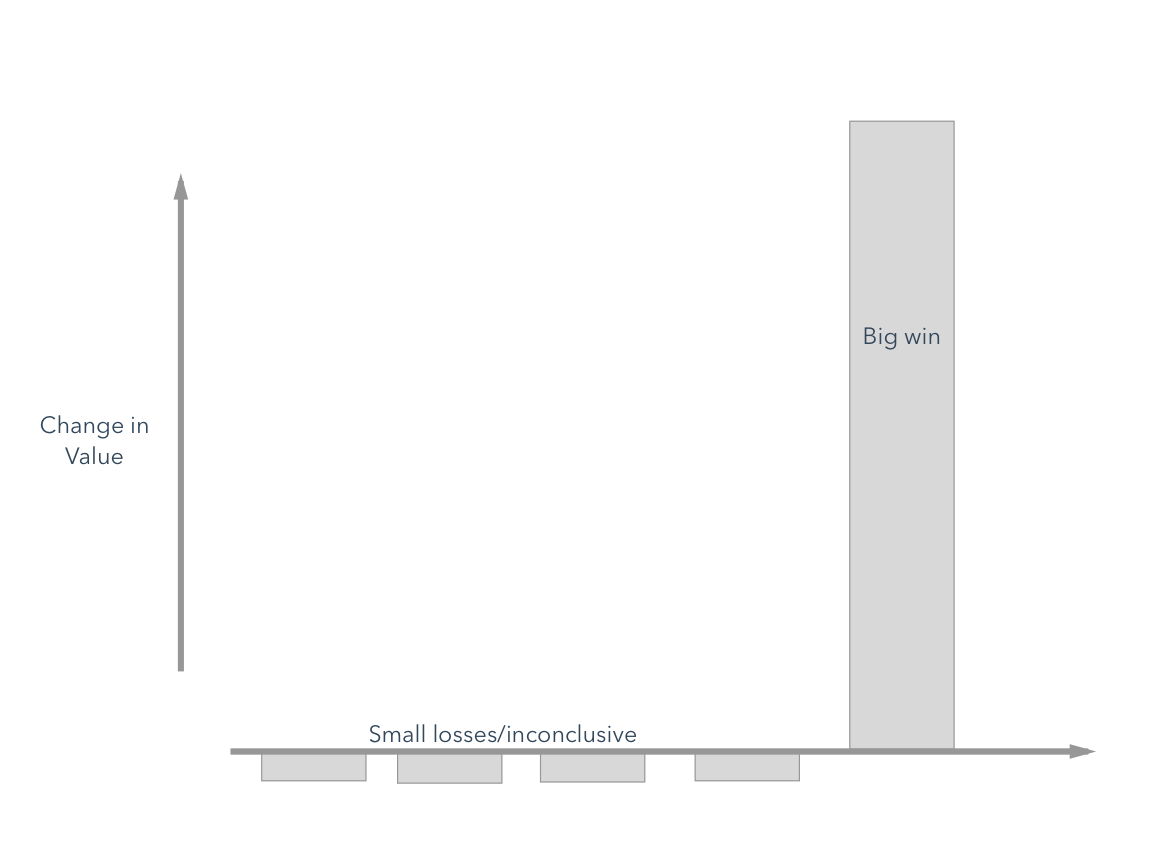
This is, of course, a riff on Nassim Taleb’s ideas on optionality — he uses a chart similar to the above to describe trial-and-error tinkering and how it leads to stark innovation.
Simply put, it’s impossible to achieve any degree of outstanding innovation without a tremendous amount of tinkering. The more at-bats you allow, the more optionality/luck/upside you can generally collect.
Content marketing blogger and expert Levi Olmstead mentioned this attitude (fail fast) being key in previous startups he worked at:
“A core value we often repeated was ‘fail quickly and continuously, iterate quickly and continuously.’ Without failing, you can never learn from past mistakes. In my experience, many ideas have strong pillars but they’re not full-fledged ideas. To create a strong, sustainable strategy, you need to learn how to fail and how to turn those lessons into future successes.”
Making experiments cheaper and easier to run isn’t an easy feat, but luckily there’s a lot of material out there on the subject (I’d start with this paper from the booking.com team).
7. Invest in Trustworthy Data
Data attribution modeling is still a large digital marketing challenge today. With different data models like first-touch attribution, last-touch, multi-touch, and others, teams need to choose one and stick with it.
Adam Enfroy, who runs the popular marketing blog AdamEnfroy.com, witnessed this data challenge firsthand while managing digital teams for different SaaS companies, including BigCommerce:
“Success theater often runs rampant in companies when teams aren’t aligned on which data platform is the final source of truth. This leads to different teams reporting on conflicting data sources that drive the (often misleading) narrative they want to tell.”
Let’s take a weekly business review meeting as an example.
Consider this — the digital marketing team pulls from Analytics Platform A because the ROI looks favorable with last-click attribution. At the same time, the business intelligence team pulls from Analytics Platform B, which doesn’t look as good but is more aligned with finance. Then the partner team pulls from a different data source entirely so they can take credit for more revenue.
In the end, this leaves confused executives looking at three different data sources — and listening to three different stories — while no actionable insights can be gleaned.
To avoid success theater, invest in trustworthy data and align teams on which platform is the ultimate source of truth. This involves strong alignment between BI, marketing, sales, and partner teams.
Additionally, seek to stress test and constantly monitor the veracity of your data. As my friend Chris Mercer always stresses, “trust, but verify.”
8. Invest in Education
Old joke …
CFO asks CEO: “What happens if we invest in developing our people and they leave us?”
CEO: “What happens if we don’t, and they stay?”
This is true of any business function, but I find it particularly true in more technical fields like growth, conversion optimization, and SEO.
There many ways to do this — invest in a library for your office, start a company book club, send your team to conferences, pay for training programs like CXL Institute or Reforge.
HubSpot invests a ton in education and I always feel supported in learning new things (currently taking a course on Python and machine learning from Udacity).
Small companies can do this, too, though (in fact, they need to). Ben Johnson, Head of Content at Proof, has seen the impact of this mentality at his SaaS company:
“We’re a small team of 15, so a lot of time, you’re not going to be able to learn how to do something from someone in-house. For that reason, we’re always reading, meeting with more experienced individuals, and using our naivety as a strategic advantage.”
Johnson adds, “Our leadership is great about encouraging this growth mentality across the organization — making introductions, providing funding for marketing conferences and programs like Reforge, and paying for a book per month. Overall, I think creating a culture of curiosity and helping your employees get the resources they need is a key part of building a growth culture.”
9. Diagnose Narrative Fallacy
Storytelling is natural to humans, but it can also dilute efficiency and decision making. The Narrative Fallacy, popularized by Nassim Taleb, describes our tendency to ascribe a clean causal “why” to something that happened in order to simplify our understanding of the world.
For example, if you A/B test two headlines against each other, you may determine that version B won “because it invoked social proof”, while someone else may attribute the win to “the clarity of new message”.
A good way to transform your culture is to try to curb storytelling where you can, because while the narrative fallacy is limiting when ascribed to wins, it’s detrimental when people try to explain away suboptimal campaigns.
Mark Lindquist, marketing strategist at Mailshake, mentioned one version of this is when people move the goalpost of what they define as “success” after the campaign is run (technically, this is known as the Texas Sharpshooter Fallacy):
“Consider an SEO who is brought into an organization to grow top-of-the-funnel leads. 18 months in, they’ve 50x’d organic traffic, but leads are only up 15%.”
Lindquist continues: “A story you could tell yourself would be ‘well, this is great for our brand. We’re getting our name out there and we’re on our customer’s radars when they are ready to buy.’ That may be true, but it probably isn’t, and it certainly isn’t based on any data. Start your marketing campaigns with clear goals, and if you don’t reach those goals, don’t pat yourself on the back for accomplishing something you never set out to do in the first place. Be radically transparent with yourself and your team.”
Ultimately, the purpose of experimentation is to encourage innovation and to mitigate risk, and in the process, most of your ideas are likely to fall flat of what they were intended to do. The best next step is to dust off and iterate and keep learning and trying.
Success theater may feel good temporarily, but risks limiting the scope of the program. You should celebrate wins, but feel comfortable sharing failures, too.
