
5 Ways Working Remotely Changed the Way I Think About Teamwork
For the last three years I’ve been an architect on the Hipchat team working remotely, with the rest of my team working far, far away from me in San Francisco and Austin.
People talk a lot about remote work these days, but as with most things, you never truly know until you’ve experienced it. I’ve learned quite a bit about remote teamwork along the way as an architect and developer. Here are some of the highlights:
1. Put people over product.
In just over a year, my team went from a close, eight-person unit to over a hundred people. That’s a lot of growth in a little time. As more and more people were joining the team, I found myself focusing on the many features that needed to get out the door, instead of training and onboarding new developers (who were basically left to fend for themselves).
As an architect, I should have realized how short-sighted that was. As an Atlassian, I should have realized that our values for teamwork were more important than our code.

Like bad first impressions, on-boarding done poorly can leave lasting damage that takes a long time to repair. On-boarding is about much more than teaching a developer where the source code is located, it is about communicating and living your company values, in our case, “Play as a team” or “Be the change you seek”.
Personally sitting down and working shoulder-to-shoulder with a new team member imparts far more valuable information about your values than a hundred powerpoint presentations. When someone new joins a company, they come with a fairly blank slate for how things work and what is expected from them, so it is essential for them to see a team’s values in action and be given early opportunities to build relationships and contribute value.
Lesson: Let that new feature release slip by a week. Sit down with a new team member and work on something together. Let them see rather than just read about your company’s values. Put aside the inconvenience of traveling for work and make that extra effort to connect with a new team member. The impression you give them, the relationships you build and the sense of purpose you instill will benefit the company far more than one week of coding.
2. Ownership is more important than perfection.
During a particularly busy time at work, my team brought in a bunch of new developers who had a steep learning curve ahead of them. As a developer, I was concerned about the quality and consistency of the code, so I doubled down trying to review and be consulted on every change to the system. I might have been a tad bit overbearing. Looking back, I wish I realized the value of ownership, and how important it is for people to feel like what they’re working on is theirs.
In my world, these types of extra duties might be fixing what’s broken, cleaning up unnecessary elements, taking time to improve the design, or writing documentation. These tasks often aren’t reflected Jira tickets or roadmap plans, but they’re part of the day-to-day work that keeps a codebase clean and flexible.
Without ownership, developers do the absolute minimum required, causing the code base to become a dumping ground for different and often conflicting styles and patterns. And this can have a serious impact on morale when the language, frameworks, or code are unfamiliar. This isn’t about one architecture or another. It’s about onboarding and empowering developers.
Lesson: Approach your code with a DevOps mindset, which encourages giving ownership to others. It is hard to trust someone new with your baby but find a way through onboarding, pairing, frequent trips, or even solving production failures together. Historically, Atlassian has given every developer write access to all products because that was the kind of open, trustworthy culture we wanted to create. If that’s not an option for you, find a non-critical part of the project they can dig into and feel like they own.
3. Define your role clearly.
When I started at Atlassian in 2006, the engineering titles were developer, senior developer, and founder. That was it. Although we’ve grown a lot since then, I like to think of us all as just developers doing whatever is needed to make great products for our customers. But the reality is that as an organization grows, more specialized roles are needed to scale alongside the code and number of customers.
A title is more than an ego boost, it is a way to communicate what you are (and are not) responsible for. Simply telling new folks your title isn’t enough, as it can be interpreted differently with every new person that hears it. Again, getting this wrong can cause long-term damage and be a factor in future disagreements or missed connections. Therefore, not defining your role isn’t about just you. It is about not hurting your team, your project, and ultimately, your customers.
Architect is a title that has traditionally been a source of confusion not just at Atlassian but also in our industry. When I was the second person at Atlassian to receive this title, I figured it just meant a more senior developer, someone outside the normal planning process.
When I became the integration architect, where I had to try to coordinate the activities of the different Atlassian architects, I realized the need to define the job description and I attempted to do so, with mixed results. Even today, that definition seems to be in flux. Regardless, it is especially important that your team is clear about what role you will play, and the sooner that is done, the easier things will be.
Lesson: At the beginning of your tenure and with every onboarding, sit down with team members and talk about what you expect from them, what they should expect from you, and what shouldn’t be expected from either side. It is sometimes more important to discuss what aren’t your responsibilities than what are.
4. Tone matters online.
As nearly all of us have experienced, in-person communication is much different than online communication. And there are even differences in how to communicate in different online contexts. For instance, what tone you take or what words you use in a personal chat or email may, in fact, not be appropriate for a large team chat room.
In a large chat room, you may not have a solid personal relationship with each member, and their impression of you may come solely through chat communication. Chat is such an abbreviated form of human communication without all the nuances of facial expressions, body language, and tone, that the bits the reader fills in the gap may not match your intention. For example, what is meant as a joking, “wtf dude?” could be read by someone that can’t see you as an offensive attack.

To add another layer, what words may be appropriate in one culture aren’t necessarily appropriate in another. For example, from my time working with the US Navy and then later in Sydney, I picked up a habit of swearing like a sailor and telling it like it is. While these habits are well understood by my friends from these groups, another group could take them as wildly inappropriate.
Lesson: Be careful how you communicate in a large chat room. Even if you know each member at the time of the chat, others could read it later and develop an unexpected impression of you that you might not find out until it’s too late. I once heard that remote communication is opt-in, whereas local is opt-out. Make sure they want to opt-in.
5. Remote-friendly is not necessarily remote-first.
Hipchat being a chat application itself, we believe in the concept of remote office collaboration and we are remote-friendly. We operate in three major offices (Sydney, San Francisco, and Austin), and have local and remote workers spread out across at least eight different time zones. Even with the way we live and breathe remote collaboration, there are still gaps between this vision and a true remote-first culture.
One particular perpetrator is the in-person side conversation that comes up between local people over lunch or in the hallway after a meeting. These are great and productive for the people involved, but since they are exclusively local, remote team members can’t voice and represent their views.
If these hallway conversations aren’t communicated in a timely manner they can create a rift in team consensus, and sometimes create lasting hard feelings. Similarly, local people can feel threatened by unexpected or uncommunicated changes initiated by remote folks, and remote workers can be frustrated by decisions made in their absence or personal issues that aren’t communicated in a timely manner. It really is all about communication.

Remote-first teams adopt a structure both for communications and processes that allows each member, regardless of where they live, to be included in major and minor decision making, daily collaboration, and social interactions.
The best example I can think of is from my time at theApache Software Foundation. In ASF projects, every single decision had to be proposed and approved on the single developer mailing list. This process took a lot longer than putting 10 people in a room for two hours, but it leveled the playing field for all team members.
Lesson: Be very cognizant of the culture of the team you join as a remote employee. Find a way to create a remote-first team of remote or remote-friendly workers that can own a project and its execution independently. Failing that, ensure all decisions are made transparently and include remote workers as appropriate, leveraging time zone-friendly online tools and processes.
Minimize the number of remote relationships that you need to create and maintain to do your job, and don’t think that knowing a few key folks in a remote office is enough. Be aggressive in identifying and reaching out one-on-one with remote team members that may disagree with your proposals; don’t wait to be told that there is dissension as it’ll be far too late.
Final thoughts
As my experience has shown me, being an architect is about so much more than code, frameworks, or system design—it’s about people and teams. If you are hired on a team, you are technically qualified to be there. What is less obvious, and admittedly more difficult to remember, is the importance of the non-technical bits. There seems to be a happy medium between getting shit done and singing kumbaya around the fire. While I’m still figuring out where the right balance is, I’ve learned that focusing on the long-term is much more impactful than getting bogged down in the details of the short-term.
This article was originally published on The Atlassian blog and republished with permission.

11 Best Practices for Facebook Cover Photos & Videos [Templates]
When people arrive at your Facebook Page, where do you think they first look?
I’ll give you some hints. It’s a visual piece of content that sits at the top of your Page. Its dimensions are 820 pixels wide by 312 pixels tall. It takes up almost a quarter of the screen on most desktop browsers.
That’s right — it’s your Facebook cover photo.
Sometimes called your Facebook banner, this graphic is one of the most noticeable parts of your Page. It’s therefore crucial that you follow Facebook cover photo best practices.
Facebook Cover Photo Size
Optimize your cover photo for the right dimensions: 820 pixels wide and 312 pixels tall for desktop, 640 pixels wide by 360 pixels tall for mobile. If your uploaded image is smaller than these dimensions, Facebook will stretch it to fit — making it look blurry.
Whether you’re using Facebook to generate leads, close your next sale, or create a customer community, knowing how to make and optimize your cover photo is very important. And when you consider the Facebook cover photo dimensions above, it can be tough to balance creativity with the requirements of the platform.

As you can see from the figure above, there’s a lot of space that you can risk cutting off of your final cover photo design depending on where your audience is viewing — mobile or desktop. Therefore, it’s best to focus the brunt of your content in that green space, where everyone can see your cover photo regardless of the device they’re using.
Need help getting started? Below, you’ll find 11 Facebook cover photo templates, and just as many best practices to guide you when designing your brand’s banner artwork. At the bottom of this post, find out how to turn your cover photo into a cover video, and check out a few examples to see what others have done.
11 Facebook Cover Photo Best Practices
1. Do abide by Facebook’s cover photo guidelines.
It seems like a no-brainer, but obeying Facebook guidelines is crucial to your Facebook Page existing in the first place. I’d highly suggest reading through the full Page Guidelines, but here are a few important things to keep in mind for your Facebook banner:
- Your cover is public.
- Covers can’t be deceptive, misleading, or infringe on anyone else’s copyright.
- You can’t encourage people to upload your cover to their personal timelines.
If you get caught violating the above terms, Facebook could take action against your Page. And while Facebook doesn’t explicitly say what will happen if you violate their Page guidelines, it’s probably not smart to get your Facebook Page taken down over a cover photo infraction, so read the guidelines in full and adhere to them.
2. Do make sure your Facebook cover photo size is right.
As stated at the beginning of this article, the best Facebook banner size is 820 pixels wide by 312 pixels tall for computers, and 640 pixels wide by 360 pixels tall on mobile devices.
You don’t want to spend all this time designing a cover photo only to have it look weird when you upload it to Facebook.
If you upload an image smaller than those dimensions, Facebook will stretch it to fit the right size, as long as it’s at least 399 pixels wide and 150 pixels tall.
If you want a no-hassle way to make sure your cover photos are the right size, download our pre-sized template for Facebook cover photos here.
3. Don’t worry about the old ‘20% text’ rule, but still try to stay visual.
Back in 2013, Facebook removed any reference to the 20% rule on text in cover photos … but that doesn’t mean you should go wild with using text in your cover photo. The previous rule said that only 20% of your cover photo could be text. Personally, I thought that was way too restrictive for marketers, but the sentiment behind the rule was a good one.
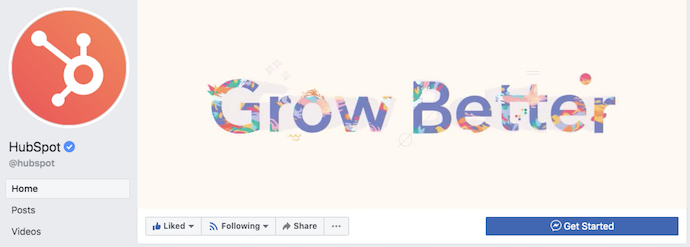
If you’re going to use text in your cover photo, keep that text concise. Your photo will be much more informative and engaging. You can see how we’ve tried to strike that balance on HubSpot’s Facebook Page below.
4. Do give your cover image a focal point and colors that match your brand.
Think of your cover photo as the portion of your Page that’s “above the fold.” If it’s distracting or confusing, people will be more likely to click off the Page.
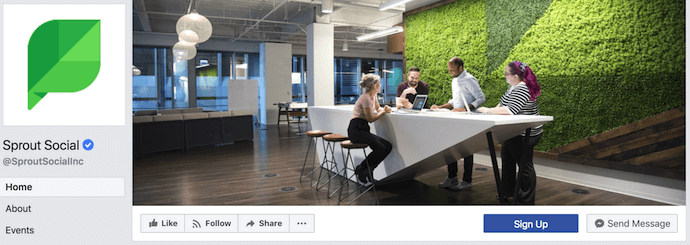
Many of the best Facebook cover photos include a centerpiece to focus visitors’ attention, along with a color scheme that aligns with the rest of their brand. Remember, your social media accounts are extensions of your business, and should give that impression to visitors right away.
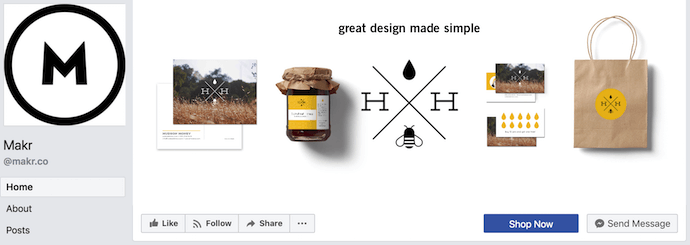
They also use negative white (i.e., empty) space as an advantage to make the subject, any copy on there, and other elements unique to Facebook (like the CTA button on Facebook business Pages) stand out even more.
Here’s an example from Makr:
And one from social media management platform Sprout Social:
5. Don’t try to blend the contents of your cover photo with your profile picture.
With some clever design tweaks, you used to be able to manipulate your profile picture and cover photo so they appear as if they’re two parts of the same canvas. You can still do this on your personal profile, but Facebook no longer sets up Business Pages this way.
One of Paris’ former cover photos did this nicely:
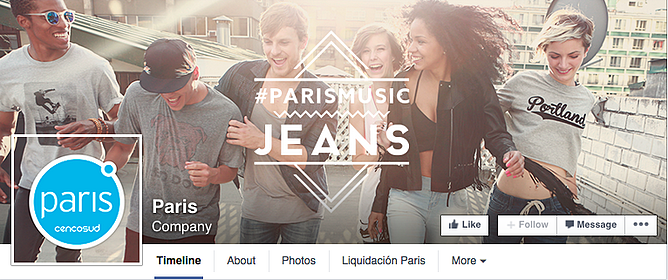
Now, as shown in the examples earlier in this article, the profile picture is completely separate from the cover photo.
We admire your creativity, but don’t prepare your design this way if you haven’t yet launched a Business Page — you’ll be disappointed.
6. Do draw attention to the action buttons on the bottom right.
You might’ve noticed in a few of the cover photo examples above that their primary call-to-action (CTA) buttons were different. Makr’s says “Shop Now,” while Sprout Social’s says “Sign Up.”
Depending on your business, you can launch a Page on Facebook with a unique CTA button to the bottom right of your cover photo. Take this button into consideration when designing your cover photo, and make it clear in the photo that this is a visitor’s next step.
Hotel Urbano does this is a charming way below, using the girl in goggles to draw your eyes toward the buttons she seems to be swimming toward …
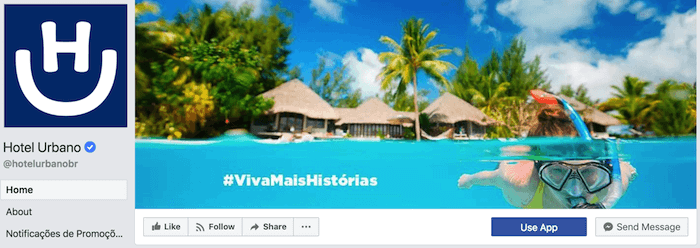
Note: While it might seem like a good idea to add directional cues like an arrow to get people to click on the CTA buttons, note that those CTA buttons don’t appear the same way on the mobile app. In other words, it might be confusing to mobile users if you directly integrate the cover photo design with the buttons.
I’ll show you how Business Pages look on mobile devices in just a minute.
7. Do right-align the objects in your cover photo.
Since your profile picture is on the left, you want to add some balance to your Facebook cover photo design by having the focus of the image be on the right.
Take a look at these cover photos. Which one looks more aesthetically pleasing?
Right-aligned focus:

Left-aligned focus:
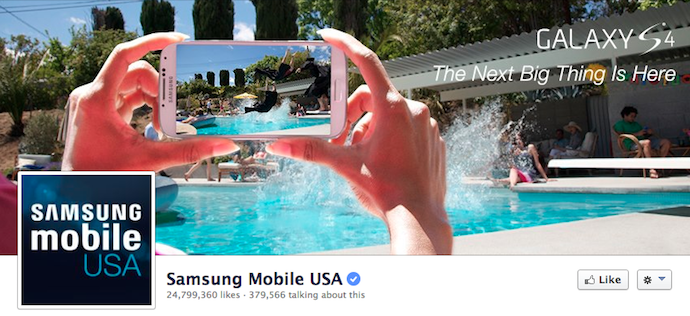
Doesn’t the right-aligned cover photo look better? The biggest design elements (the profile picture, the text, and the Statue of Liberty) are evenly spaced. In Samsung’s old cover photo, your attention goes immediately to the left side of the page, completely missing the name of the product on the upper-right side.
Not only is adding balance a crucial element of design, but it also allows for your cover photos to be more visually effective on mobile. Which brings me to my next point …
8. Do keep mobile users in mind.
As of 2019, reports Statista, 96% of Facebook’s user base accesses the social network from mobile devices like smartphones and tablets. That’s huge — and it’s exactly why it’s so important to keep mobile users top-of-mind when designing your Facebook cover photo.
On mobile, a much larger portion of your cover photo is blocked out because the profile picture and the Page name are on top of the cover photo.
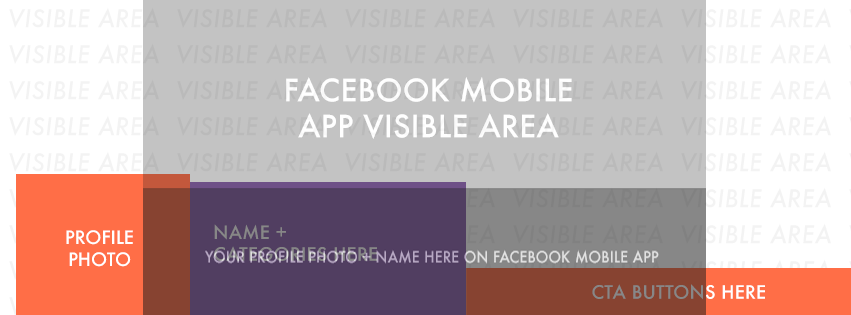 Image Credit: Twelveskip
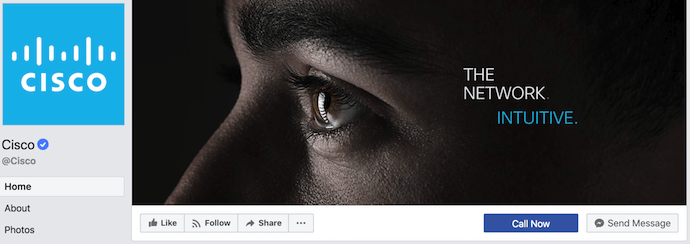
Let’s take a look at a real-life example. Below, take a look at what Cisco’s Facebook Page looks like in a desktop browser versus on Facebook’s mobile app.
Desktop:
Mobile:
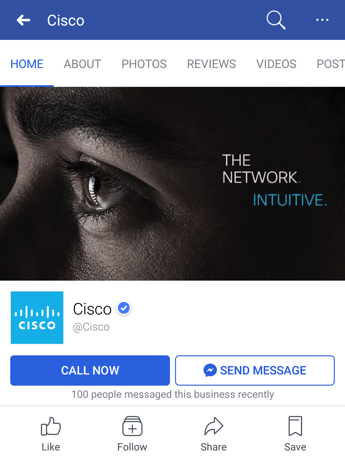
Notice that the sides of the photo are cut off on mobile. Whereas your cover photo displays at 820 pixels wide by 312 pixels tall on desktop, it displays only the center 640 pixels wide by 360 pixels tall on smartphones. Take a look at this Facebook help document for more information.
Notice, by the way, how the text in Adobe’s cover photo is cut off on the right-hand side. While it looks best to right-align your visual elements, be careful not to put important content so far to the right that it gets cut off on mobile.
9. Do include a shortened link in your cover photo description that aligns with your page CTA.
If you want to use your cover photo to support a Page CTA, make sure your cover photo description also includes a text CTA and link to the same offer. This way, any time people view your cover photo directly, they can access the download link.
Here’s this practice in action on Adobe’s Facebook Page:
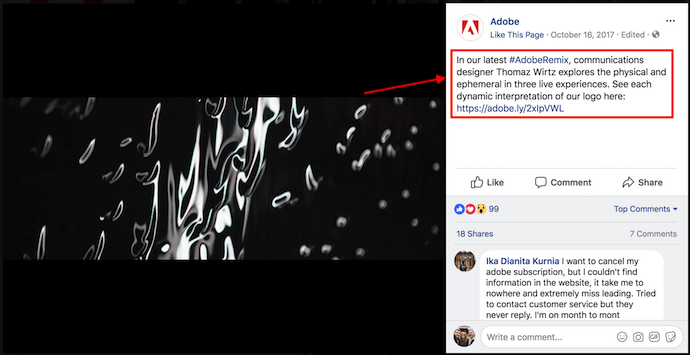
Make sure you shorten your links and add UTM codes so you can track clicks on them. Shortening and tracking features are available in the HubSpot Marketing Platform and in tools like bitly.
(If you want to learn more about how to write effective call-to-action copy for your cover photo description, click here to download our free ebook on creating compelling CTAs.)
10. Do pin a related post right below your Facebook cover image.
Have you ever “pinned” a post to your Facebook Page’s Timeline? Basically, pinning a post allows you to highlight a typical Facebook post on the top of your Timeline for seven days. It’s signified by a small blue push pin on the top right of the post, like on Fashion Nova’s Page below:
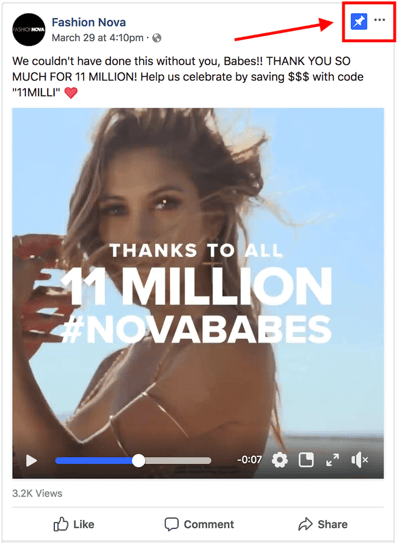
How does this relate to optimizing your Facebook cover photo? Well, if you’re spending time aligning your Facebook Page CTA, your cover photo design, and your cover photo description copy, you should also make sure to post about the same thing directly to your page, and pin that post to the top of your Timeline.
That way, you’re giving people one very clear call-to-action when they arrive to your page (albeit in several different locations) — which should help conversions.
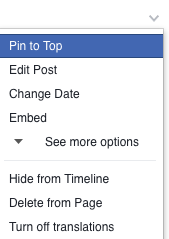
To pin a Facebook post: Simply publish the post to Facebook, then click the three dots on the top right corner of the post and choose “Pin to Top.”
11. Do consider publishing a Facebook cover video.
You read that right. Facebook Business Pages now have the option to add a video in lieu of a static cover photo, provided they meet certain requirements — which we dug up for you:
How to Make a Facebook Cover Video
Post a Facebook cover video by saving a video file at 820 pixels wide by 426 pixels tall to your desktop. Open your Facebook Business page, click “Change Cover” at the top-left of your cover photo, and select “Upload Photo/Video.” This allows you to format and publish the desktop file to your Facebook page.
Facebook currently supports cover videos that are between 20 and 90 seconds long, and a minimum of 820 pixels wide by 312 pixels tall. The maximum (and recommended) size is 820 by 462 pixels with a video resolution of 1080p.
Keep in mind that Facebook cover videos play on a loop — once it ends, it automatically starts over if the viewer is still on your Facebook page. With that in mind, make sure whatever you post is pleasant if seen more than once. Extreme, action-packed videos might appear exhausting when played over and over …
Once you pull the file from your desktop, you’ll click “Next” where you’ll be asked to select from 10 thumbnail versions of your video. The thumbnail you choose will display for users who hover their cursor over your profile photo before visiting your full Business Page.
Facebook Cover Video Examples
Cover videos are a terrific option for the video-inclined, and brands across numerous industries have already taken advantage of it to hold their visitors’ attention. Here are some great cover videos to inspire you:
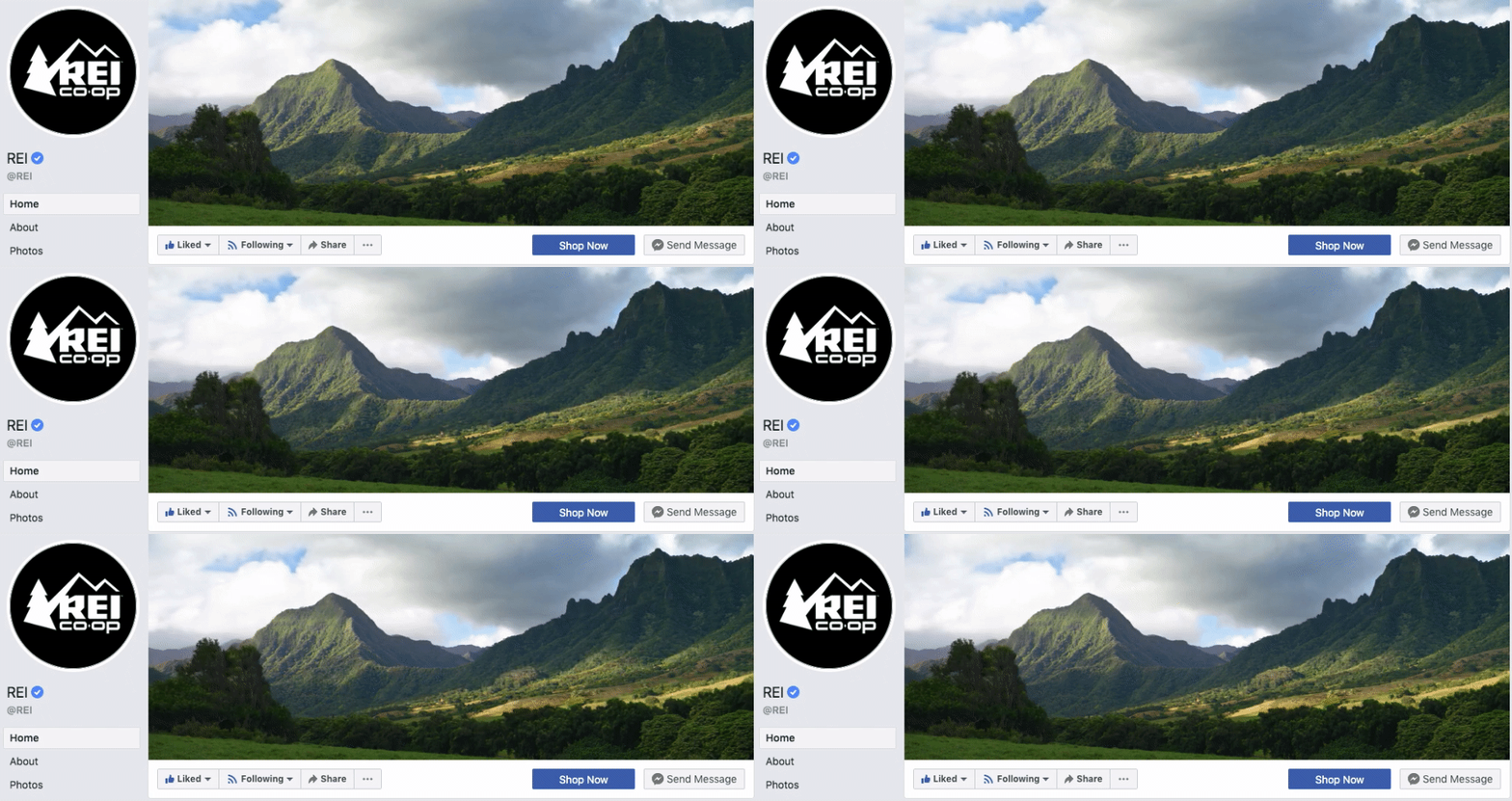
REI
REI sells outdoor equipment for activities like camping, hiking, running, boating, and biking. The company’s subtle cover video reflects its products, all in one peaceful time lapse of the scenery it knows its audience craves.
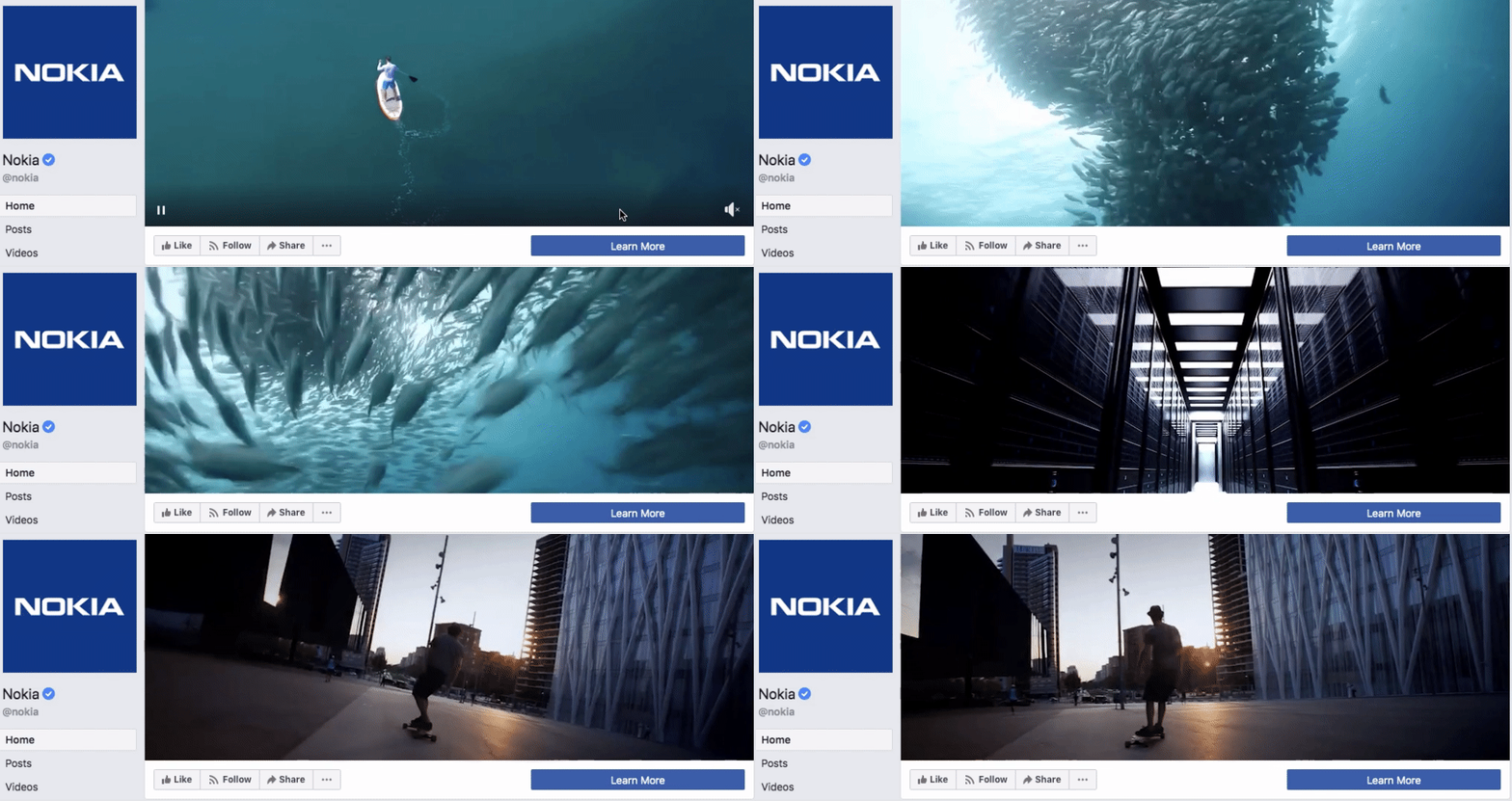
Nokia
Nokia wants to be everywhere its users are — whether they’re paddle-boarding, scuba diving, skateboarding, or working. Its Facebook cover video embodies its core customer in a visually pleasing way.
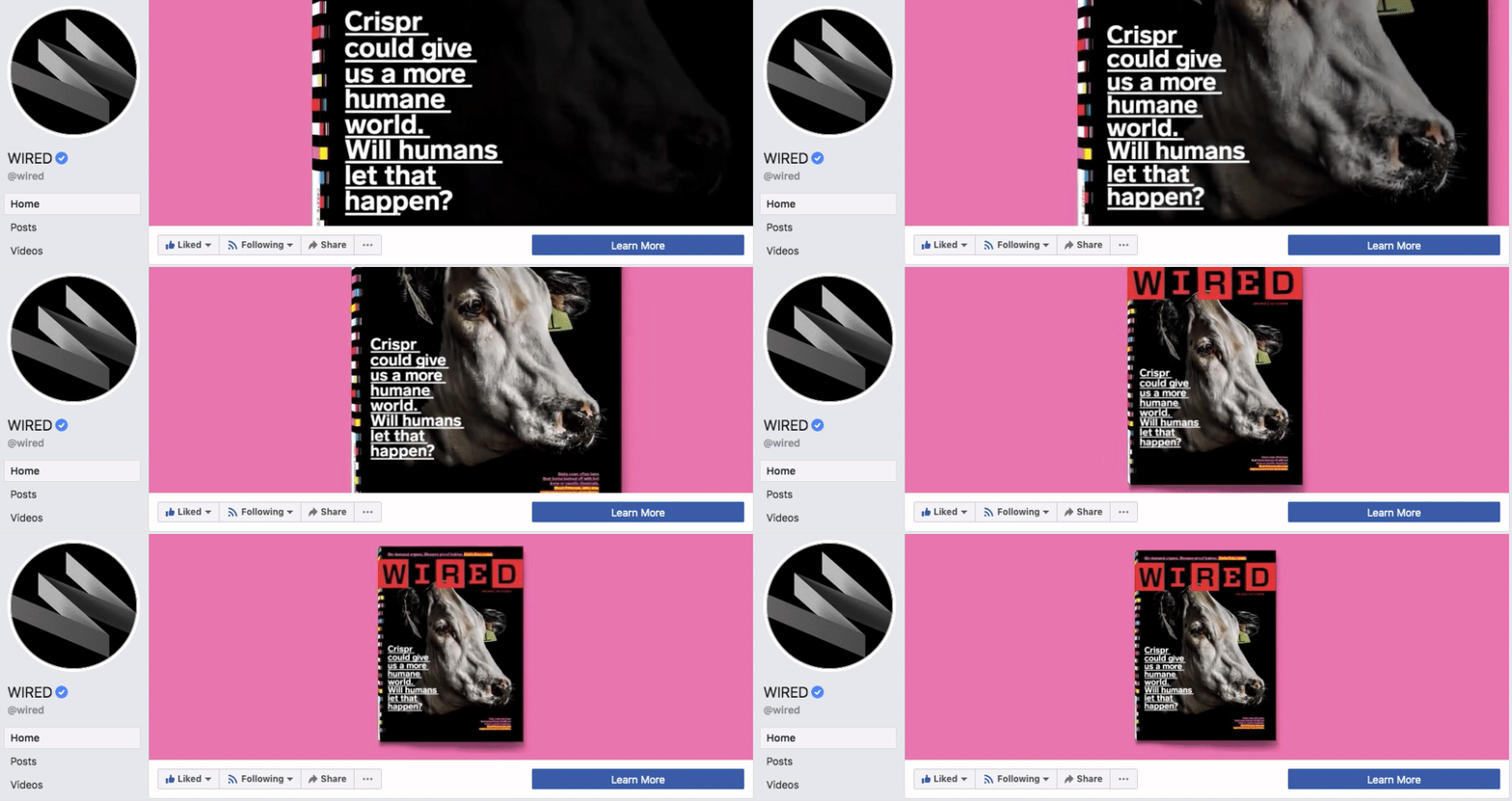
WIRED Magazine
When your publication changes as fast as the news cycle, it can be hard to keep your readers focused on the stories you feel deserve extra attention. WIRED Magazine uses its Facebook cover video for just this purpose, as shown in the example below.
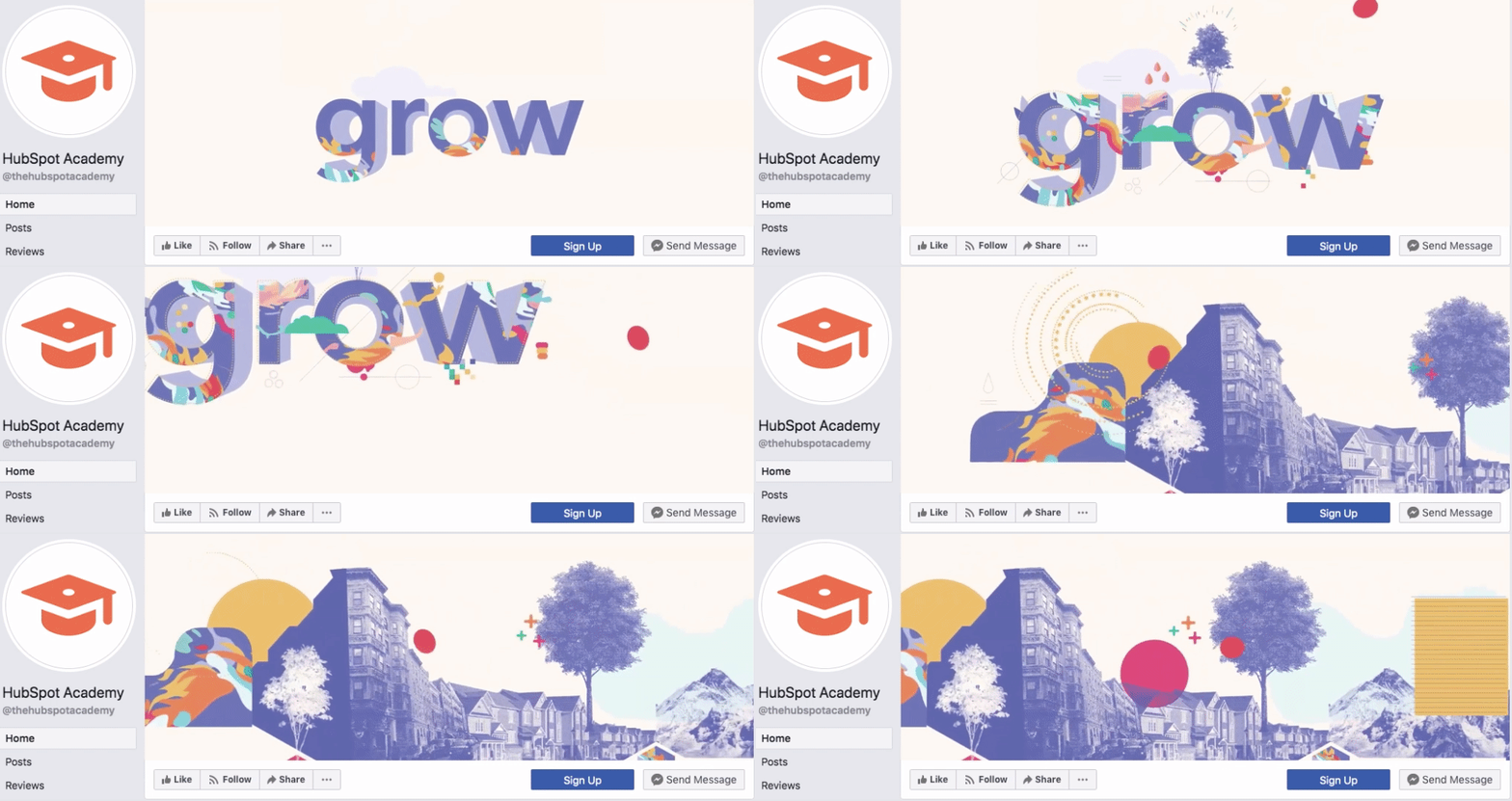
HubSpot Academy
Alright, maybe we’re biased, but our brilliant creative team crushed it with the video below, made for HubSpot Academy. Sometimes, animation is the best way to capture the essence of your brand.
As you can see from these examples, your video should be just as simple as a cover photo. Keep in mind the same guidelines outlined in best practice #1 apply to cover videos as well.
Want to see how HubSpot uses Facebook? Like our Facebook Page here.

When Is the Best Time to Post on Instagram in 2020? [Cheat Sheet]
dIn high school, one of my friends was determined to find the perfect time to post her Instagram photos to maximize the amount of likes she got. She was surprisingly scientific about it, posting at different times of the day and jotting down each of her posts’ “likes per minute.”
After weeks of testing, she figured out which post time raked in the most likes, and, from then on, she could easily get 200 likes on all her Instagram posts.
My friend’s rather scientific method to maximize her Instagram likes still makes me chuckle to this day. But since I’m a marketer now, her desire to build a strong Instagram presence also resonates with me.
To build a sizable Instagram following, you need to create compelling content that your audience actually craves. But if you don’t post your content at the right time, most of them will never see it.
So how do you figure out the optimal post time for your specific audience?
The best way to find an ideal posting time is by testing the timing of your posts to see which post time generates the most audience engagement.
But if you don’t have enough resources or time to conduct your own tests, Sprout Social, a social media management platform with over 24,000 customers, has you covered. Last year, they analyzed their customer data to see what time and day their social media posts generated the most engagement. They also segmented the data by social network and industry.
Looking at their aggregate customer data for Instagram, you can see that the following days and times — in Central Daylight Time (CDT) — are ideal for generating the most engagement on the social network:
As stated above, although 2 – 3 PM is considered the best time of day to post on Instagram, the day of the week on which you post can change how much engagement you actually get at 2 – 3 PM.
Why? Think about the little differences in your daily mood and routine — the ones you might not realize you have — and how they affect your behavior. The same goes for everyone following your Instagram account. Here are some additional insights about optimal post timing from data by Sprout Social to show you what I mean:
- Posting at 5:00 AM CDT from Tuesday to Friday generates some of the highest engagement — people usually check their phones right when they wake up.
- Posting from 11:00 AM to 3:00 PM CDT during the weekdays also generates a lot of engagement — people usually check their phones during lunch or when they start to run out of mental energy toward the end of the work day.
- If you want to post on the weekends, post on Saturday around 11:00 AM CDT when people eat brunch or hang out with their friends.
So, when Instagramming, don’t go by this time range alone. Consider both the day of the week and the industry you’re in (we’ll talk about the latter in just a minute).
On average, here are the best times to Instagram during the week within each time zone globally:
* = particularly high levels of engagement
Want some easy marching orders based on this data? Post to Instagram between 9 AM and 6 PM from Tuesday to Friday. You’ll get the most consistent engagement that way.
Need a visual to strategize around? Check out this Sprout Social chart which shows Global Instagram Engagement hotspots.

Source: Sprout Social
The general data above about optimal post timing is a great starting point for growing an engaged Instagram audience. But if you want to get more granular, here are the best times to post on Instagram if your organization is in the technology, B2C, education, healthcare, and non-profit industries, according to Sprout Social’s research.
Best Times to Post on Instagram for Technology Companies
- Best Time: Wednesday at 10:00 AM CDT
- Most Consistent Engagement: Wednesday to Friday from 10:00 AM to 5:00 PM CDT
- Best Day: Thursday
- Worst Day: Sunday
Best Times to Post on Instagram for B2C Companies
- Best Time: Friday at 11:00 AM & 1:00 PM CDT
- Most Consistent Engagement: Everyday from 10:00 AM to 3:00 PM CDT
- Best Day: Wednesday
- Worst Day: Sunday
Best Times to Post on Instagram for Educational Organizations
- Best Time: Monday at 8:00 PM CDT
- Most Consistent Engagement: Weekdays from 11:00 AM to 4:00 PM CDT
- Best Day: Monday
- Worst Day: Sunday
Best Times to Post on Instagram for Healthcare Companies
- Best Time: Tuesday at 1:00 PM CDT
- Most Consistent Engagement: Tuesday to Friday from 9:00 AM to 4:00 PM CDT
- Best Day: Tuesday
- Worst Day: Saturday & Sunday
Best Times to Post on Instagram for Non-Profit Organizations
- Best Times: Tuesday at 3:00 PM & 9:00 PM, Wednesday at 3:00 PM & 4:00 PM, Thursday at 2:00 PM & 3:00 PM, and Friday at 10:00 AM & 2:00 PM,
- Most Consistent Engagement: Weekdays from 12:00 PM to 5:00 PM
- Best Day: Tuesday
- Worst Day: Saturday
Every brand’s audience is different. To build a sizable, engaged Instagram audience, you need to know who your followers are. And one of the best ways to get to know your audience and capture their attention is by knowing exactly when they like to surf the app.
Editor’s Note: This post was originally published in February 2018, but was updated for comprehensiveness and freshness January 24, 2019

Header Tags: What They Are and How to Use Them
When I first started blogging, I had no idea how to structure my posts to rank for search engines, or even why it was important.
I just threw in bolded words and phrases that looked good, and hoped to be randomly selected for the search engine results page (SERP).
Now, I know there is a science, and what I was throwing into my blog posts to make them look professional was called header tags — which is an important tool for comprehension and SEO.
When we talk about header tags, we’re talking about those bolded words that separate sections on blog posts.
To illustrate, the header tag referred to in this post is the title, “The Ultimate Guide to Product Marketing in 2020.” This is also called the H1.
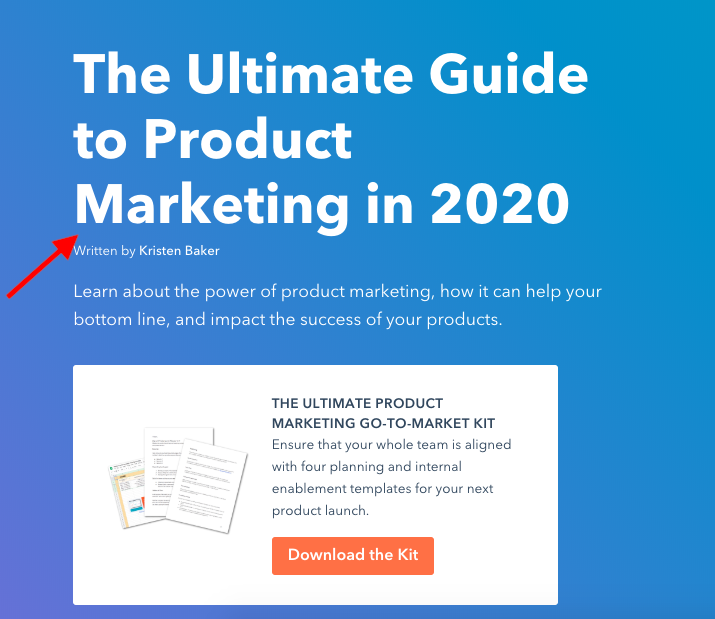
Below are two other types of header tags (there are six,) which are indicated by arrows.
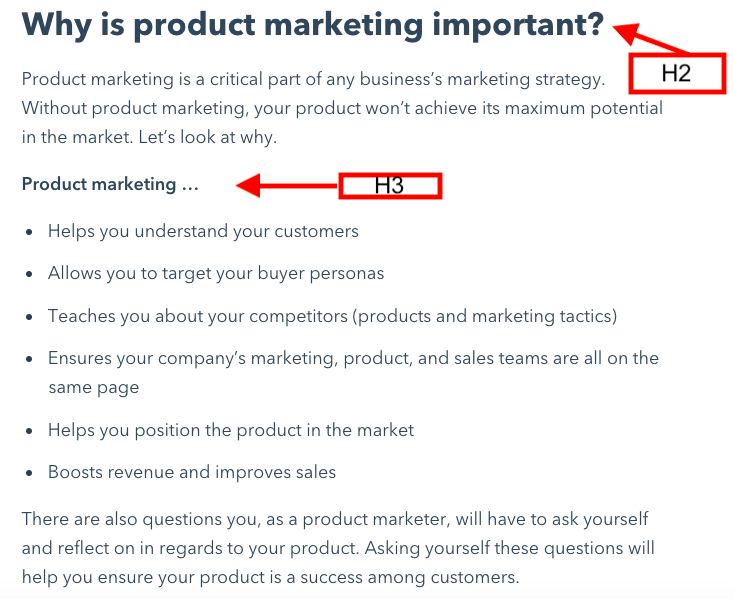
As you can see, every header tag looks different, and each header tag is used for different things. Here, let’s explore what header tags are, why they matter for SEO, and how you can add your own to HTML.
Here’s a quick guide on header tags and what they’re used for:
- H1 — The title of a post. They’re usually keyword-centric.
- H2 — These are subheaders that classify the main ideas of your paragraphs and separate sections. These should also be keywords.
- H3 — A subsection that clarifies the points of subheaders further.
- H4 — These are usually used in formatting lists or bullet points.
Keep in mind that H1 tags should always be at the top of your page because they’re usually the title. Your headers should stick to the theme of what you’re writing about. When you’re formatting, use your best judgment when breaking up sections.
Now that you know a little more about what header tags are, let’s get into how they’re used for SEO.
Header Tags and SEO
Header tags and SEO have more in common than it may seem at first glance. Not only are they used to differentiate important pieces of content, but they hold weight with keyword relevancy and readability.
Google favors headers. When it scans your post, it places header tags as high-priority. Ultimately, header tags is what Google uses to tell web browsers their search query is relevant to your post.
That’s why it’s important when using header tags to make sure they’re correctly matching a keyword intent. If a post’s H1 tag doesn’t have a keyword, it won’t rank well in search results.
To illustrate, let’s say your keyword is “eCommerce.” You’d want this to be reflected in your H1 tag, so a title like “The Guide to Starting an eCommerce Business” would be ideal. That would tell Google exactly how to send web browsers to your post.
Search engines also look at header tags within your post, so it’s good to keep those keyword-centric, as well. For instance, you might create some H2 sections surrounding popular long tail keywords related to eCommerce, like “five steps for creating an eCommerce business” or “best social media tools for eCommerce”.
You don’t have to think of keywords by yourself, either — in fact, you can do some easy keyword researching to help you out, or look into keyword research tools like SEMRush or Ahrefs.
Headers also make pages easier to read. Sectioning off different parts of a webpage keeps information organized and broken up in a comprehensible way. This helps readers, but also search engines, which are scanning along, too.
If your sections aren’t making sense, your page might not rank. Think of the sections in this post — do you think they were broken up in a readable way?
How to Add Header Tags in HTML
To add header tags in HTML, it’s a fairly simple process. If you want to notate an H1, you would type in <h1> and </h1>, putting the H1 text in-between those two tags. This is the same method for any type of header tag.
For example, if your h1 was “The Guide to Starting eCommerce,” it would look like this:
<h1> The Guide to Starting eCommerce </h1>
You can also include punctuation between the two tags. For instance, you might have:
<h3>Create an Instagram account to market your eCommerce products.</h3>
This will work for HTML4 or older. If you’re working with HTML5, you might have to use a slightly different line to get the same result. The change is to give a heads up to Google about what the H1 is:
<header> <h1> The Guide to Starting eCommerce </h1> </header>
Remember, Google will scan the HTML of header tags to tell web browsers what your page is about, so it’s important to look them over and see if your headers in HTML are formatted correctly.
Some blogging platforms, like WordPress and HubSpot, have an option on the toolbar to create header tags, so every time you want to add one, you don’t have to dig into the source code or HTML to do so.
The next time you create a post for your website, see if adding the correct header tags affect SEO, and how your readers are comprehending information.
A good test I like to use is sending posts to a close family member who doesn’t know much about blogging or marketing. Using outsider feedback and asking if they can comprehend my writing before I publish helps me format posts so they’re understandable.
The big things for header tags are readability and SEO, so as long as your headers are keyword-driven, they should see a jump in page rank.

Waterfall Charts: The Marketing Graph You Need to Hit Your Goals
Last November, my husband and I were on our honeymoon in Maui and one of the main activities we wanted to do was a zipline/hiking tour near the waterfalls.
We dreamt of swimming in the cascading water at sunrise.
However, today, we’re going to talk about a different, although just as beautiful, kind of waterfall — the waterfall chart.
Waterfall charts are a data visualization resource that can help you gather and track important data such as traffic goals and lead generation.
As a marketer, having the right tools in place to gather useful data is imperative.
Below, let’s review what a waterfall chart is, how to read one, and how to create one.
One of the reasons that waterfall charts are effective in marketing is because they give context on the data it’s reporting. Most data visualizations suffer from ignoring circumstances that result in a fall or rise in numbers, such as seasonality.
Usually, a waterfall chart is shown with initial and final values as columns and the positive or negative adjustments as floating steps in between.
At first glance, these charts can be difficult to read. Below, let’s review how to read a waterfall chart:
How to Read a Waterfall Chart
Reading a waterfall chart will seem foreign at first if you’ve never done it.
However, it’s important to remember that you’re reading it sequentially, from left to right.
For instance, let’s say you’re tracking blog traffic from month to month. On the far left, you’ll have the total traffic from the previous year. Then, you’ll include the gains and losses month over month for the entire year. At the end of the chart, you’ll see the total traffic for the year.
Here’s what that looks like:
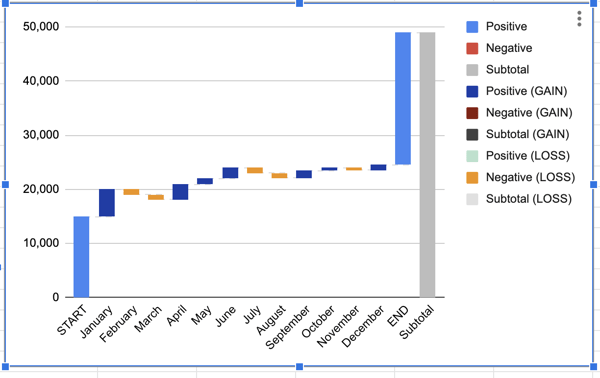
Essentially, a waterfall chart is supposed to show you where you started and where you ended up, with details of how you got there.
In the example above, you can see which months gained the most traffic compared to the months that lost traffic. This could help you see seasonal adjustments, while also keeping the big picture in mind.
Now, you might be wondering, “That chart looks difficult to make. How can I make my own in Excel?” Below, we’ll review the simple three-step process to creating your own waterfall chart:
1. Create a table.
Before you can build a chart in excel, you’ll want to create a table of values that you want represented on your chart.
For example, are you tracking blog traffic numbers? Or perhaps you’re looking at leads generated from a certain marketing campaign? Either way, before you can create a waterfall chart, you’ll need to gather your data.
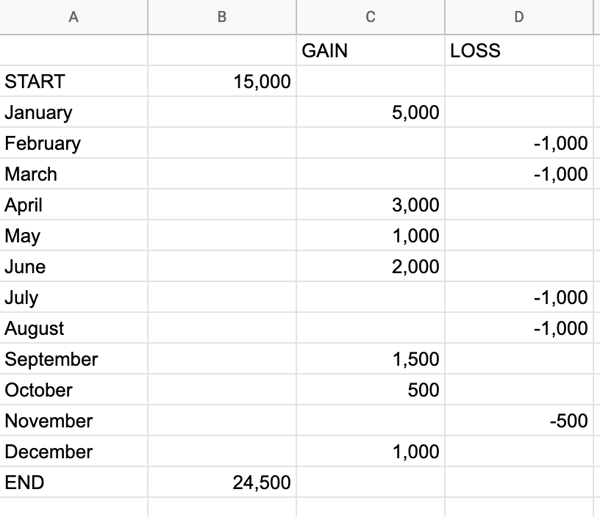
All you have to do is open Excel or Google Sheets, and begin manually entering your data. When you enter your data, make sure you denote the difference between positive and negative values. To denote a negative value, just add a minus sign in front of the number.
In the example below, we decided to track blog traffic. Note: all numbers are arbitrary and not reflective of traffic to any blog.
2. Insert chart.
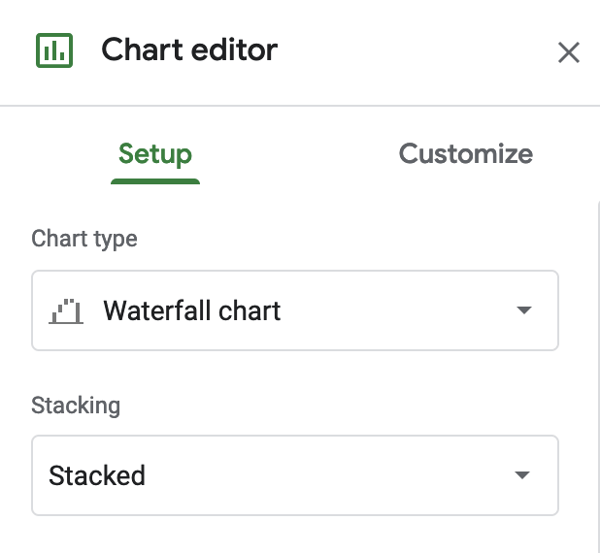
Now that you have your values, highlight the table you just created. Then, go to Insert → Chart → Waterfall chart.
This should create a waterfall chart and the Chart Editor will show up on the right-hand side. When the Chart Editor comes up, make sure that Waterfall Chart is selected under Chart Type.
3. Format waterfall chart.
At this point, all the hard work is done. All you have to do is format your chart and make sure it looks how you want.
If you click on the three dots in the upper right-hand corner of the chart and hit Edit Chart, you’ll get to the Chart Editor.
Here, you can choose the colors of your bars, adjust your legend, or add gridlines. Most likely, the main thing you’ll want to do here is to adjust your legend.
Now, you can also create a waterfall chart in other dashboard tools. For example, HubSpot offers free marketing reporting tools that you can use to create charts. Here’s how:
How to Create Waterfall Charts in HubSpot
1. Go to analytics tools.
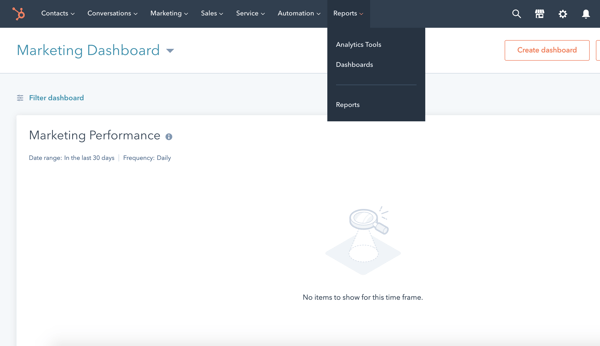
Once you log in to your portal, hover over the Reports tab and click into the Analytics Tools.
2. Choose what you want to track.
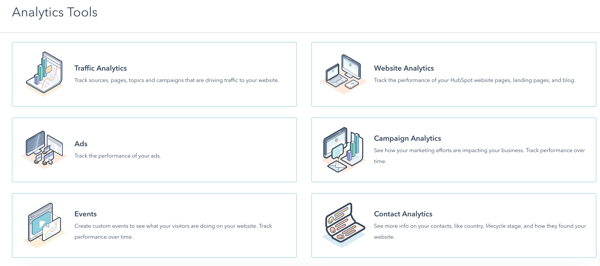
Next, you’ll choose what you want to track. Perhaps you want to analyze blog traffic like we did in the example above. Or maybe you want to review analytics for a certain campaign.
Either way, you can choose what you want to track in the Analytics Tools.
3. Choose the chart type.
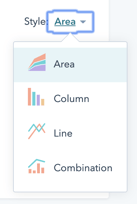
Lastly, all you have to do is choose the style chart you want. Right now, you can choose between an Area chart, Column chart, Line chart, or a Combination chart.
To ensure you’re analyzing the full scope of your analytics, we recommend creating a waterfall chart. It’s a worthwhile data visualization that can help you understand your analytics sequentially.
Editor’s Note: This post was originally published in May 2011 and has been updated for freshness, accuracy, and comprehensiveness.

How to Become a LinkedIn Thought Leader in 9 Easy Steps
Did you know that 40% of LinkedIn’s 500 million members visit the platform daily?
If you’re a professional who wants to branch out as a thought leader in your industry, LinkedIn is an excellent place to gain visibility, demonstrate your credibility or expertise, and create valuable discussions within your industry’s community.
Why would you want to be a LinkedIn thought leader? Because gaining a presence as an online expert could improve visibility in your industry, expand your network, and result in many more job opportunities.
For example, if you’re an entrepreneur and want to gain brand awareness or trust for your own company, sharing tips, advice, or content related to your industry will show your audience that you’re a credible expert in your field who works for a trustworthy company.
Even if you aren’t a CEO, thought leadership and developing connections on LinkedIn can make companies you work for look great. And, if you leave a company, future employers might identify you as an expert in your field because of how you’ve contributed to your online community.
It might seem daunting, but building your social presence on LinkedIn is more accessible than you think. In this blog post, I’ll show you a few effective ways to build your presence on LinkedIn as a thought leader.
How to Become a LinkedIn Thought Leader
Optimizing Your LinkedIn Profile
1. Optimize your LinkedIn profile so people in your industry can find you.
By now, you’ve probably created a LinkedIn profile. However — if you want to be a thought leader with a large following — just making an account won’t necessarily help you get seen by people in your industry. To ensure that you’re popping up in search results related to your skillsets or feeds of individuals within your industry, you’ll need to take steps to refine and optimize your LinkedIn page.
Below is a great example of a fully optimized LinkedIn header. As you can see, Virgin Group CEO Richard Branson has included his title in the headline area; his geographic location, company, and school in his basic information are. He also includes a thoughtful, but keyword-heavy description of himself in the About area. This description, as well as a well filled-out profile, will make it much easier for those searching for thought leaders in industries like “leisure” or “financial services” to find him.

Aside from the header area, shown above, you’ll also want to get detailed in your Work and Academic Experience areas. While thought leadership is ultimately about the content and thoughts you post, this area will serve as evidence that you are in fact as credible as you say you are.
For each role, be sure to share your daily duties, big wins, and links to projects from each role if possible. Think of this as a resume mixed with an online portfolio. Here’s an example of how Larry Kim, WordStream’s Founder and an SEO thought leader, highlights his previous role on LinkedIn:

2. Use Skills, Endorsements, and Recommendations to Validate Your Expertise
When people read your insights, facts you’ve noted, or consume your thought leadership content, they might want to ensure that you’re an actual expert in your field before taking your advice. While skills, endorsements, and recommendations aren’t directly related to creating thought leadership content, they will help you ensure that people will take your expert opinions seriously.
Listing items in the Skills & Endorsements section will allow you to highlight strengths you have expertise in while also optimizing your profile in search results related to your industry or keywords relating to certain skills. Aside from making your profile more searchable to those in your industry, endorsements from past colleagues can also validate that you actually have the skills you’ve noted.
Here’s what Kim’s Skills & Endorsements section looks like:

Visible endorsements or recommendations will show those who view your profile that you’re trustworthy and have a solid track record as an employee and thought leader. Although you’ll still want to create valuable LinkedIn content to establish yourself as a thought leader, skills, endorsements, and recommendations serve as solid evidence that you have — in fact — reached a certain level of industry expertise.
Interacting with Others in Your Industry
3. Connect with other experts.
Connecting with colleagues and other experts in your industry will allow you to build your network and raise your connection numbers. But, it will also allow you to follow what they’re doing and learn from their insights as well.
If you have a smaller following, don’t panic. All you need to do is dedicate a small amount of time each day to networking with others on the platform. In this blog post, you can find a mini-schedule of networking practices that can be done in under 15 minutes each day.
4. Use LinkedIn Groups or comment threads to interact with your following.
LinkedIn Groups is a feature that allows professionals to create, manage, and post on group pages about a specific topic. In these groups, you might see industry novices asking questions as well as professionals sharing tips. When someone posts something that’s engaging, people will discuss it or give advice related to it in threads.
Communicating in these threads or creating your own post within a group related to your industry can help you communicate with others who might be interested in your thoughts and ultimately build more connections or followers.
Not sure which groups to join and participate in? Check out this list of LinkedIn Groups that every marketer should join.
If you’re too busy to identify the best Groups for you, you can also make your updates and articles more interactive by including a question and call to action at the end of your content. For example, if you’re discussing technology or a new management strategy in an update or LinkedIn article, you could end your content by asking, “How do you inspire innovation at your company?”
By asking your following a question or giving them a call to action, you might enable them to start a deeper discussion that you can then continue to participate in to show off your skill and credibility on the topic.
Publishing Thought Leadership
5. Post updates about your achievements or re-share insights related to your brand or industry.
While people on Facebook might not care about professionalism or career achievements, LinkedIn audiences are there to hear about it. When you share a career achievement or insights on a project your brand has launched, your audience can keep up with you, see how credible you are, and watch you grow as an expert in your field.
In the post below, HubSpot’s CEO and Co-Founder Brian Halligan announces the launch of our CRM’s free email tool. With a post like this, he is both updating his audiences about his company’s accomplishments, and he also includes content that marketers within his industry might be interested in.
6. Publish longer-form insights or thoughts related to your career or industry.
Aside from presenting your skills, achievements, and smaller updates related to your career, you can’t forget about the most important aspect of thought leadership: Sharing your thoughts.
Your tips, insights, or big ideas can’t always fit well into a small post or update, so be sure to also publish blog posts about topics related to your industry on your profile. You can post through LinkedIn’s on Publish feature, or create and share a blog post from your own site or Medium.
TED Talker Susan Cain regularly posts articles about topics related to her business, Quiet Revolution on LinkedIn. In the example below, she publishes a post on the importance of special education during National Special Education Week:

7. Experiment with posting photos or videos on LinkedIn.
LinkedIn isn’t just a site for your resume and short text-based updates, like Facebook and Twitter, it’s also an evolving social network that’s beginning to embrace and prioritize live videos, uploaded videos, and photos in its feeds.
So, when you go to share an update about your career or company, consider sharing a photo along with a text post. Or, if you want to share long-form advice, consider posting a video. Here’s an example:
To get even more interactive with your following, you could also consider using LinkedIn’s new Live Video feature to host content where you take questions from your audience or interview another thought leader in your industry.
Entrepreneur Gary Vaynerchuck, known in the sales community as Gary V, often shares standard updates and articles on LinkedIn with a mix of text, photo, and video content. This makes content eye-catching, but also gives his followers different ways to consume it. In the post below, Vaynerchuck shares an infographic slideshow about the impact that random acts of kindness can have on work environments:
8. Create cross-promotional content with other thought leaders.
If you work with or have developed a relationship with other LinkedIn thought leaders or brands, consider creating content together and tagging each other in your posts. Not only will this help you network and build connections, but these cross-promotional strategies will help the audience of the other person or brand to learn about you, while you inform your audience of their work.
9. Embrace your other social media platforms.
If you want to branch out and become a thought leader on more than just LinkedIn, be sure to promote your other social platforms, such as Twitter or YouTube. This will help you develop a well-rounded following on all of the platforms.
Here are a few ways you can do this:
- Announce when you’ve joined a new platform, share your profile, and let people know what they can expect on this social network.
- Share links to content, such as YouTube videos or blog posts, from another social platform.
- Consider writing and sharing blog posts about your marketing strategies on other platforms, like Medium, so your following can both see your insights and know you’re on said platform.
Aside from promoting your other social media platforms and building an overall web presence, be sure to share LinkedIn articles and your profile link on your other social channels so your audiences there will join your LinkedIn follower-base.
Navigating LinkedIn Thought Leadership
When it comes to positioning yourself as a thought leader, the key is to highlight your expertise and engage with people in your industry. So, regardless of which industry you’re in, be sure to regularly post content or share insights that are valuable or helpful to your following.
To learn even more about developing a winning LinkedIn profile, check out this blog post.

How to Get Celebrity Endorsements — Even if You’re Not a Huge Brand
From a buyer’s perspective, customers tend to feel more obligated to make a purchase from someone they might trust, relate to, or idolize.
That’s why celebrity endorsements are so effective. Celebrities can often persuade a buyer to click “purchase” when they otherwise might’ve hesitated.
Additionally, celebrity endorsements can be highly profitable. A recent study found that celebrity endorsements can increase a company’s sales by an average of 4%, compared to its competition.
But, even though it’s a great way to grow your business, it can also get pricey and — in some cases — risky. These setbacks are especially tough for smaller businesses and start-ups. So how do you get your product in the hands of a celebrity when you’re not a huge brand?
Read on to find out.
How to Get Celebrity Endorsements
Celebrity endorsements look much different today than they did in the past.
Before social platforms emerged, A-list celebrities were used to endorse brands through TV commercials, print advertisements, and other traditional marketing strategies — for instance, consider Justin Timberlake’s 2003 McDonald’s marketing campaign.
Although celebrities could often attract a large audience, the relationship between the endorser and the brand was often weak at best.
Today, the way we advertise is much different, focusing on the relationship between the endorser and the consumer more than ever.
Consider the smart alignment between Jennifer Aniston and Aveeno, or Roger Federer and Nike. These celebrities weren’t “randomly chosen” for these brands based on popularity alone — instead, their lifestyle and career choices made them optimal brand endorsers.
But when finding the right endorser for your brand, there’s no one-size-fits-all strategy. Who do you want endorsing your brand? How much should you spend? What kind of audience do you want to attract?
Before you begin your search, here are a few helpful things to keep in mind.
1. Figure out your budget.
Deciding how much you’re looking to spend should be determined before you go ahead with an endorsement. Once you’ve determined a number, it’s important to stick to that amount.
To give you a ballpark on how much certain celebrities might cost, check out FamePick. FamePick is a platform that provides a searchable marketplace and connects businesses of any size with celebrities for endorsement.
2. Know your target audience.
Before finding a celebrity, figure out who you want to target your marketing efforts toward. This would also be a good time to research and identify your buyer personas.
What kind of consumers do you want to target? Where is your audience engaging most? Do you want to reach a small or large audience? Consider the type of audience you want to focus on before approaching an influencer.
If you’re unsure who your buyer persona is, take a look at HubSpot’s Create a Buyer Persona tutorial.
3. Find celebrities who can show a passion for your brand.
Whether it’s a top tier athlete or a YouTube superstar, it’s all about finding the right candidate to fit your brand’s mission.
It may seem obvious that choosing a popular celebrity will gain the most attention and — in some cases — that definitely works.
However, finding an influencer who is passionate about your mission can give your brand authenticity. Also, it’s much easier to pitch them your idea if it’s something they believe in.
For instance, consider Michael Phelps’ partnership with TalkSpace, an online therapy platform. The Olympic athlete has been open about depression and anxiety in the past, so his relationship with the therapy app feels both authentic and powerful.
4. Consider micro-influencers.
Micro-influencers (social media influencers with 1,000 to 10,000 followers) are more cost effective than celebrities, and they might even be more powerful when promoting a product.
In fact, over 82% of surveyed consumers said they were likely to buy something a micro-influencer recommended.
Ultimately, micro-influencers are incredibly trustworthy sources within their niche industry. The content they post is usually relatable and direct to their target audience.
For instance, a micro-influencer might be an online fitness coach who shares helpful fitness tips on Instagram. If you analyze the influencer’s followers, most likely you’ll find people who have a similar interest in staying healthy or working out. If the influencer then decides to endorse a fitness-related product, chances are their audience will trust their recommendation over celebrities with less of a personal relationship with his or her audience.
Think back to your target audience and compare it to that of the micro-influencer’s audience. When choosing micro-influencers, you’ll want to make sure their audience is similar to your own brand’s target audience.
Social Media Celebrity Endorsements
Now more than ever, celebrity endorsements have a greater impact due to the popularity of social media marketing — which is a good thing for small brands.
Why? For one, social media is typically more affordable than more traditional platforms like TV and radio. Additionally, it’s often more effective than traditional marketing campaigns. Social media can create a direct relationship between your brand and the consumer.
And, let’s be honest, who isn’t on social media? 79% of the U.S. population has at least one social media profile. Ultimately, social media is an incredibly powerful opportunity for small businesses to increase brand recognition and reach a larger audience.
Of course, celebrity endorsements can often be risky endeavors, as well — let’s explore some examples of bad celebrity endorsements, next.
Celebrity Endorsements Gone Wrong
Celebrity endorsements have proven to be an effective marketing strategy for brands.
But, despite the benefits, celebrity images can change and could harm your brand. As public figures who are constantly under the watchful eye of the public, any mistake they make could negatively impact consumer’s perception of the brands affiliated with them.
In some cases, the brand might also be at fault — such as giving the wrong message in an ad. To give you a better understanding of the implications, here are some celebrity endorsements that went terribly wrong.
1. Kendall Jenner and Pepsi
The controversial Pepsi ad featuring Kendal Jenner was pulled shortly after airing due to criticism, as many interpreted the commercial to be “tone deaf” for it’s seemingly misappropriation of the Black Lives Matter movement. Although the ad was bad for Pepsi’s image, they’ve since been able to bounce back.
2. Oprah Winfrey and Microsoft
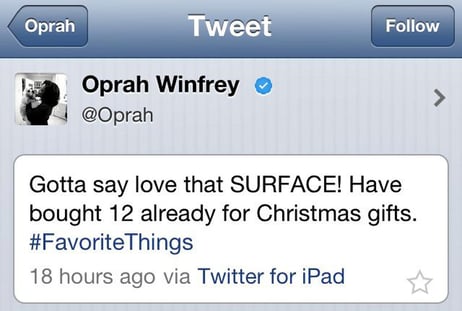
Oprah made a deal with Microsoft for their Surface tablet and decided to promote it through a tweet. The only problem was that her tweet — shown as the device used in the message — was made on an iPad.
3. Kim Kardashian and QuickTrim
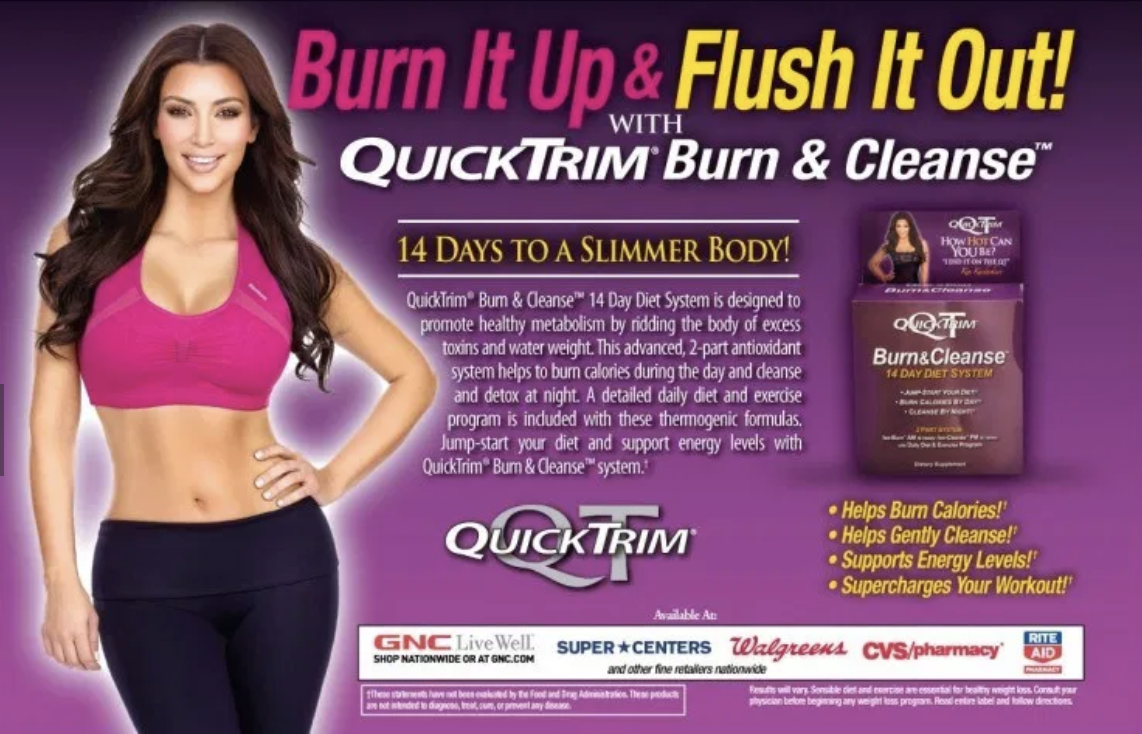
In 2012, Kardashian partnered with QuickTrim and claimed the diet product was responsible for helping her lose weight. However, the diet pill was found to be both unhealthy and ineffective.
Her endorsement resulted in a $5 million class action lawsuit in New York, which claimed the Kardashians falsely praised the product’s effectiveness. Since Kim Kardashian has plenty of loyal fans who trust her, this partnership was particularly bad since it ultimately put her fans at risk of purchasing an un-safe diet product.
Successful Celebrity Endorsements
Next, let’s explore some examples of successful celebrity endorsements.
1. Michael Jordan and Nike
One of the most iconic endorsements goes to the partnership between Michael Jordan and Nike with the release of the Air Jordan brand. Nike and Jordan show how successful a celebrity endorsement can be with effective marketing and the right celebrity.
The endorsement all started at the beginning of Jordan’s NBA career. Jordan was considered one of the top players in the NBA, so it was an obvious decision for Nike, a footwear company, to make a deal with the star player.
Nike initially produced the famous red and black Air Jordan I, the shoe that started it all. Shortly after the release, the NBA banned the shoe because the colors went against their “”all white” shoe policy.
Jordan wore them anyway, but was fined $5,000 every time he wore them on the court. This quickly gained the media’s attention and opened up one of the best marketing campaigns for Nike.
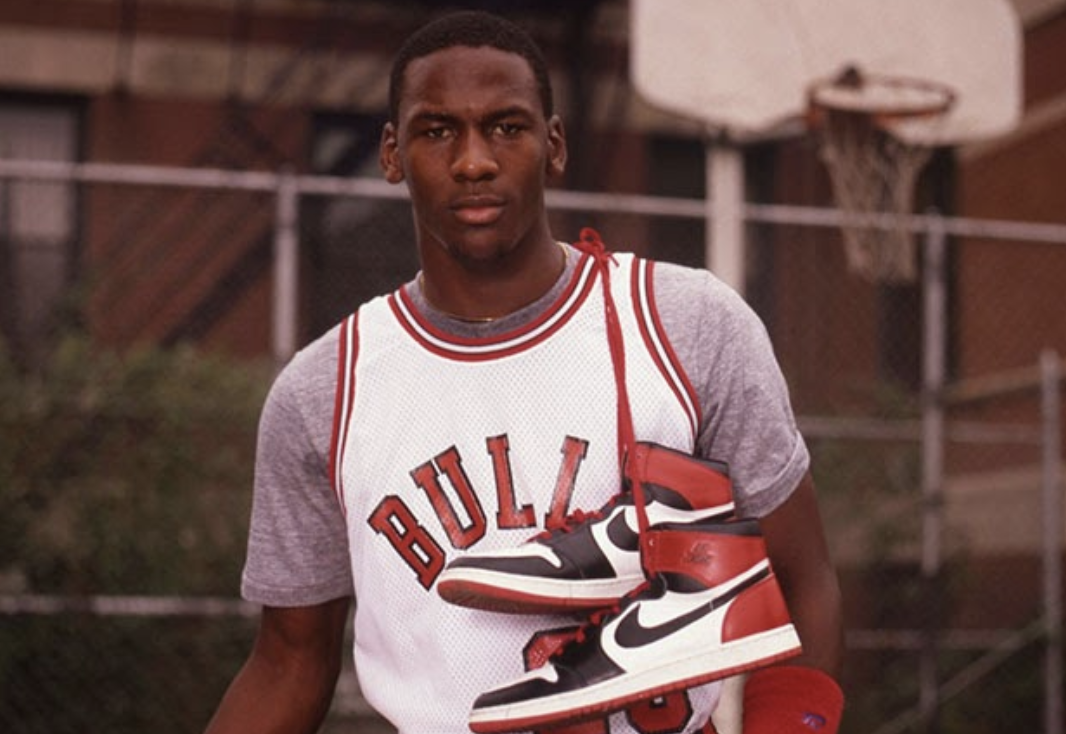
Because of the controversy, the shoes became more desirable to the consumer and instantly sold out. Even today, you can’t think of Michael Jordan without thinking of Nike, and vice versa. The event redefined how sports marketing would look from then on.
2. Gigi Hadid and Messika
Gigi Hadid, one of the most famous models in the world, is also a top celebrity influencer on social media. For someone who is familiar with the runway, it’s no surprise Gigi has multiple fashion companies competing to have her promote their goods due to her success.
This includes the fashion jewelry company Massika, who claimed Gigi as their first ambassador. The partnership included a jewelry collection along with other collaborations.

3. Ed Sheeran and Heinz
One of the more weird endorsements goes to Ed Sheeran and Heinz. Sheeran, a singer/songwriter, partnered with the food company Heinz to collaborate on a limited edition bottle called “Edchup.” Odd as it may be, Sheeran is actually a big fan of their ketchup. So much that he actually has a tattoo of it on his arm.

4. Michael Phelps and TalkSpace
As mentioned above, TalkSpace is an online therapy platform that partnered with Michael Phelps’, an Olympic swimmer, in an attempt to de-stigmatize therapy and prove its worth even for one of the most powerful male athletes.
In various commercials for Talkspace, Phelps has shared his personal story with depression and anxiety and urges listeners to seek support for mental health. Since Phelps has spoken out about depression and anxiety in the past, his partnership with TalkSpace doesn’t feel mis-aligned with his own values, making it feel authentic.
5. Jennifer Aniston and Aveeno
Undoubtedly, Jennifer Aniston, an incredibly successful A-list celebrity, has her fair choice of optimal beauty and skincare products at her fingertips. This is why her partnership with Aveeno feels especially impressive and genuine.
In fact, Aniston has admitted to using Aveeno for the past three decades, since she was a teenager. Loyal fans of Aniston, or women who are interested in skincare on-a-budget, will likely turn to these ads as a reliable source for products to suit their needs.
No matter the size of your company, celebrity endorsements can be a great addition to your marketing efforts. However, it’s important to have a clear vision of your goals and target audience before making a deal.
Ultimately, it’s critical you remain authentic to your brand, no matter what partnerships you pursue. With these foundations in mind, you’ll be sure to attract others who are just as passionate about your brand as you are.

10 Email List Management Software Tools to Grow Your Brand
When I first began my marketing career, I was envious of emails.
While this sounds like an interesting quirk, I’m pretty sure most marketers can agree: some emails are hard not to envy.
From sparkling campaigns to flawless design, sometimes I open a newsletter and I’m surprised at how brands segment me into a list that’s so accurate.
Email lists are an essential aspect of any marketing strategy, since they enable marketers to target the right subscribers and grow leads.
To personalize marketing emails and keep ROI in check, email list management is a crucial step in marketing efforts. It can help your team generate leads while simultaneously creating a more delightful, personalized customer experience.
Using email management tools is an easy way to analyze metrics that you don’t have time to collect yourself, like CTR subscriber count. Additionally, this software can provide you with robust insights and suggestions on how to improve ROI.
To save you the hassle of researching the best software tools for email list management, we’ve done the heavy lifting for you. Take a look at the 10 best email list management software tools, below.
1. MailChimp
Price: Free plan, then $9-$299/mo.
I really enjoy the simplicity of MailChimp. Learning how to use its tools and feel like an expert only took about 20 minutes because of the nice user interface. MailChimp also has some impressive free options, letting you have up to 2,000 subscribers.
As part of the free component, you can also send a limited number of automated emails, use some of MailChimp’s their email templates, set up auto-responders, and analyze your campaigns. Because of the capabilities of MailChimp, it’s a great starter software for marketers with a limited budget.
2. Zapier
Price: Free plan, then $19-$599/mo.
Zapier enables you to set up workflows, which can sync to apps like Dropbox and Gmail. Additionally, Zapier lets you import a subscriber list from Facebook and Eventbrite, as well as Google Sheets.
For further syncing using Zapier, you can back up your data on Google Sheets for more analysis. If you’re looking for a tool that can help you consolidate workflows a little better, Zapier might be for you.
Zapier’s interface is similar to MailChimp’s, where you can build and create workflows or choose from a template offering. The interface also lets you know tips for how to use the app to your advantage when planning workflows, so a marketing team that’s just starting can learn how to get up to speed quickly.
3. OptinMonster
Price: $19-$49/mo.
OptinMonster is another template-based choice for you. Their interface allows for a little creation; they offer an email form template that lets you choose how you set up your email.

With OptinMonster, a huge function of the platform is giving customers the choice to opt-in to emails and track their progress. Additionally, the interface supports multiple campaign structures and has different toggles for the analytics you choose to track.
This platform is a great choice if you feel comfortable with email marketing to the point where you’re able to design a workflow that works best for the type of campaign you’re rolling out. If WordPress integrations are key for you, OptinMonster is great for that, as well — the software has its own plugin that creates lightboxes and subscribe forms.
4. Campaign Monitor
Price: $9-$149/mo.
Agencies and freelancers will likely enjoy Campaign Monitor, software that was made for the creative professionals who manage email campaigns. A huge asset of Campaign Monitor is that you can manage every client (different businesses or multiple social media accounts in general) from one account.
More Campaign Monitor features include brand personalization, the ability to determine prices for your services, template builders, RSS email, A/B testing, and analytics reporting.
If your core job function is running email marketing from multiple accounts, looking into Campaign Monitor is definitely a good idea. For the base plan at $9/month, you can send up to 2,500 emails to a subscriber list of up to 500.
5. HubSpot
Price: Free plan, or $800/mo.
HubSpot’s email marketing is a part of the Professional CRM. Its main functions are to delight customers using easy tools for marketers. I made my first email campaign using HubSpot and it took about 15 minutes to create a professional-looking draft that I could come back to and refine.
 You can tailor every email in a campaign to target subscribers during specific lifestyle stages, or depending upon any other contact information. HubSpot also offers A/B testing and analytics, so you can be confident in your email campaign as you send and track it.
HubSpot is an effective email marketing software choice for businesses at every stage of their journey, whether you’re looking for a solution to having too many software platforms or are just a team of one.
6. Drupal
Price: Available by contact
The scalability of Drupal is one of its major assets. It’s an open-source software system that helps you create a huge website, or a small, functional one — whichever option for which your business is best-suited.
Drupal has flexibility with its web design that will go over well with developers but is also easy enough to understand for marketers who never took a coding class (myself included). They even have a “Drupal for Marketers” option prior to signing up that gives you the best of their site as it relates to your job functions.
From industry to features, you can choose how you run your website. Do you prefer running it centered around the arts/entertainment industry, or do you want the central function to be ecommerce? Drupal gives you that choice.
7. Constant Contact
Price: $20-$45/mo.
Constant Contact is another software option that gives you templates available for customization. You can edit their templates with one click, making email creation very easy.
With Constant Contact, you can use expansive features such as open rate tracking, click rate tracking, and social media integration. For an email management tool, these are helpful features that enable you to perform multiple marketing functions on one platform.
8. ActiveCampaign
Price: $9/mo.
If you find yourself struggling with campaigns, consider ActiveCampaign’s tool, which helps you create your entire campaign start-to-finish. This creation wizard helps users create emails, segment lists, and even offers reporting capabilities so you can keep up with ROI.

The tool also lets you test emails before you send them and sets up auto-response emails. With the website’s base plan, you can send unlimited emails to 500 subscribers, which is a nice choice for small businesses or start-ups
9. Mad Mimi
Price: Starts at $10/mo.
Mad Mimi was the first email management software I used. I liked using Mad Mimi because as a beginner, it was easy enough to follow when creating emails. The software made press emails look professional and newsletters were a breeze to make.
Mad Mimi is a great choice for beginners who are interested in diving into the specifics of email creation because it gives walkthroughs of some features that might be difficult to understand, like RSS to email or drip campaigns.
10. AdRoll
Price: Starts at $300
With AdRroll, you’ll get software that blends email marketing and display advertising efforts. It also combines the two with social media planning, which enables you to see a more holistic overview of your email marketing experience.
Being such an expansive system, AdRoll comes with a slew of extra features to further customize campaigns. Subscriber lists from other platforms can be uploaded onto the platform seamlessly and work with you to attract leads. This is because AdRoll is mainly focused on using email marketing to support targeted ad experiences for customers.
If you’re a medium-sized business wanting to consolidate large portions of your marketing efforts, such as email, advertising, and social campaigns, AdRoll is a great choice when picking email software.
Thanks to software and technology in general, managing segmented lists has never been easier. Fit to your needs, you can easily find software that’s right for your business journey and customer flows. And, who knows —you might even send the next email to leave me envious.

5 Alternatives to Facebook, Google, and Amazon Ads
According to a recent survey from Lawless Research and Factual, marketers are spending an average of 43% of their ad budget on Google and Facebook, with Amazon not far behind.
Regardless of business size, online advertising strategies are similar. In fact, 46% of marketers working for agencies and brands with an ad budget of $50 million or higher report say they spend up to 60% of it on ad programs from the three tech giants.
These programs also include ad offerings on sites owned by the oligopoly, such as YouTube (owned by Google) and Instagram (owned by Facebook).
The chart below compares how companies with differently sized ad budgets spend their money on platforms owned by Google, Facebook, and Amazon:

Source: Lawless Research and Factual
But although Google, Facebook, and Amazon have been heavily adopted, marketers are still worried that these platforms will grow even more powerful and dictate their advertising options in the future. When asked to rate their level of concern that the oligopoly would limit their advertising options, 78% said they were somewhere between concerned and very concerned.
As we continue to see innovation and growth in online advertising, could this area be disrupted by ad alternatives?
Yes. In fact, marketers are hoping for new advertising options. Although most marketers and agencies spend huge chunks of their budgets on Google, Facebook, and Amazon, 65% of them want alternatives. The Lawless and Factual study even revealed a few platforms that participants were already using, including YouTube, Instagram, and Twitter.
Interestingly, the study suggests that participants using YouTube and Instagram as alternatives did not realize that they were paying into the oligopoly. The report concludes that this shows the true power of the tech giants.
To help you keep your eye out on options other than the oligopoly, I’ll walk you through some of today’s most prominent advertising alternatives and show you a few examples of brands that use them.
5 Alternatives to Facebook, Google, and Amazon Ads
Google-Specific Alternatives
Microsoft Advertising
Yes, Google still monopolizes the search market, but you might not want to write Microsoft search engine options off as an alternative.
Microsoft Advertising, formerly known as Bing Ads, is similar to Google in that you can create, optimize, and track PPC ads that show up in searches on Microsoft Search Network platforms, including Bing, MSN, and Yahoo.

If you’re thinking, “But, everyone exclusively uses Google,” think again. Microsoft claims that 5.5 billion monthly searches occur on its search network.
Microsoft Ads is also less competitive because it isn’t as heavily used as Google. Because so many advertisers are bidding, optimizing copy, and competing for precious slots in search engine results, the prices of PPC ads and the cost of wasted spend, can be quite high.
According to WordStream, Microsoft Advertising clients see cost-per-clicks that are 35.5% lower than their Google ads. WordStream also notes that its clients report higher placement on search result pages due to lower levels of ad competition.
Like Google Ads, you’ll still want to familiarize yourself with PPC strategies to properly monitor your budget and wasted spend. You’ll also want to brush up on keyword research and other SEO strategies to make your ad show up higher than other sponsored search results. To learn more about this, here’s a how-to post on launching Bing-based ads.
Social Media Alternatives
LinkedIn Ads
LinkedIn’s advertising and content promotion offerings are very similar to Facebook’s in that you can create native ads or promote visual or text-based posts in LinkedIn’s newsfeed. Like Facebook, you can also designate ad objectives, like web traffic or lead generation and target your content to specific demographics, such as age groups or locations.
If you haven’t already seen what promoted content looks like on LinkedIn, here’s an example:

Like Facebook and other social media ads, paid content on LinkedIn also been seen to boost traffic and lead generation, especially in the B2B world. In fact, 80% of B2B leads come from LinkedIn, while 94% of B2B marketers use the platform.
While LinkedIn Ads are very similar to Facebook, the platform’s nature is slightly different from Facebook or Instagram’s because it embraces professional networking and career growth. This makes the platform especially good for brands that want to sell products or services to professionals or other companies.
Want to learn more about how to successfully generate leads on the platform? Check out this recent blog post that features tips straight from LinkedIn’s VP of Marketing.
Twitter Ads
Twitter Ads are similar to Facebook Ads in that you can pay to promote tweets or launch native ad-styled campaigns.
While promoted tweets show up higher in the feeds of target users with a “Promoted” sign on them, campaigns might show up on Twitter feeds or sidebars with images or video content linking to a website.
Here’s an example of a promoted post from Gold Peak:

Like Facebook, you can also choose objectives — or goals — for Twitter Ads. These include tweet engagements, video views, app installs, web sessions, and other common objectives that you might have on other online ads.
Aside from providing similar options to Facebook Ads, Twitter Ads are getting more affordable and more effective each year. Twitter says that engagement with paid ads has increased by 50% year over year. However, the cost per engagement decreased by 14% in 2018.
Reddit Ads
Reddit is a community-centric social network that encourages users to contribute to discussion-based threads called subreddits.
Although the platform is very unique, it’s still gained more than 330 million monthly active users, mostly within the millennial and Gen-Z age groups.
While brands have tested out multiple strategies that involve contributing to discussions and starting their own subreddits, many have also taken advantage of paid promotions on the platform.
When it comes to paid promotion, you can consider sponsoring your posts to ensure that they are placed higher on threads, subreddits, or feeds of targeted users. Here’s an example:

If you’re less familiar with how to engage people on the platform, but sell a product that Reddit users would like, such as media, a technological gadget, or video games, you can also consider a native ad that will show up on Reddit feeds or on Reddit’s sidebar.

One important thing to know is that Reddit has been seen as one of the trickiest platforms for marketers to crack. Although you can promote content, users on the platform primarily respond to content that values them or adds to conversations on the platform, rather than branded language. However, Reddit is reportedly making more efforts to become more brand-friendly — so it might be worth keeping on your radar.
If you do want to advertise on Reddit, you should still do a bit of research to learn more about the audience, what they’ll respond well to, and what topics they don’t care for. To help you learn the ins and outs of Reddit and see examples of brands that have succeeded on the platform, check out this blog post.
Pinterest Ads
If you’re selling products, like home decor, or lifestyle experiences, like travel bookings, you definitely shouldn’t forget about Pinterest.
While it’s not the most prominent social media platform, Pinterest still has over 300 million monthly active users, is photo-friendly, and encourages people to pin images and products they like to inspiration boards. This might be why big brands, like Target, have embraced the platform and its aspirational nature.
Here’s an example of a pin from JCPenney which links to a holiday line of products on its website:

While bigger businesses have leveraged Pinterest, small businesses have also leveraged the platform’s advertising tools to launch ROI-generating ads. Want to learn more? Here’s a great blog post from a PPC consultant on four tests that are proven to boost Pinterest Ad conversions.
Navigating Ad Alternatives
With the growing number of advertising options out there, it can be hard to determine which is right for you. While we gave you a quick rundown of a few major alternatives in this post, it’s important to do a bit more digging on each.
Make sure to pay into platforms that your buyer will actually be on in the first place. Then, determine what ads are most interesting to them. If you decide that you want to zone in on social media marketing and ads, check out this blog post to learn about which platforms consumers use most to discover new products.
Still interested in leveraging PPC or want to improve on your strategy? Here’s our Ultimate Guide to Google Ads.

10 Social Media Content Ideas to Delight Customers
If you’re a marketing team of one or a marketing manager with various responsibilities ranging from social media to blogging, you know how daunting and time-consuming some tasks can be.
Namely, planning out a social media content calendar.
That means figuring out an entire month of fresh content that needs to be engaging, stand out, and make consumers identify with your brand on social media. While that is a lot for a small team, it’s even more when you find yourself stuck in a rut.
Are you worried you’re going with the same old, same old when it comes to social? Try these content ideas to re-vamp your posting game.
1. Post your new blog on your Instagram Stories.
To build traction on your website, try migrating customers towards your blog by putting it in an Instagram Story. Making the Story function in a “Swipe up to see more” fashion makes it easier for followers, since they don’t have to close the app to visit your website.

Take this story from WordPress‘s Instagram account. The visual is a compelling lede, enticing readers to read the blog post. Followers like Stories because they go away after 24 hours, making the essence of the moment all the more thrilling.
This is how different types of content can work together — you can use one platform to promote another.
2. Conduct a poll on Instagram.
Using Instagram Stories is amazing for audience engagement. Hosting a poll on your Story is an interactive way to get your followers involved in making content choices for you.
Asking a question in a poll like, “What do you want to see us post next?” and giving them a couple of choices ensures that the content they pick will delight your followers. Alternatively, you can use polls as a chance to prove credibility.
Take this example from HubSpot:

Asking a question you can answer with a statistic or content like a blog or ebook proves that your business knows its industry. As a consumer, I would trust a company that’s knowledgeable about their industry more than a brand with no educational content.
This proves that otherwise “boring” content can still be engaging in the way it’s shared. And, if followers want more information, you can always link back to your sources, boosting CTR for you.
3. Share user-generated content on Twitter.
Apparently, Taco Bell has a blog.
It’s right there, under the Delivery button (where my Taco Bell search usually ends). This post, from the official Taco Bell blog, (Taco Blog?) is a round-up celebrating user-generated content.
@tacobell my brother just sent this to me! It’s…..it’s beautiful pic.twitter.com/Zx4nQl32Ai
— Jason (@_Js0n)
June 25, 2019
UGC not only fills timelines with content, but shows followers they’re being listened to, and that brands are interested in what their customers have to say. A round-up blog goes beyond a simple retweet, like, or reply, and gives other customers an incentive to submit their own content.
4. Engage with audiences on Twitter.
Instagram isn’t the only platform with polls, so if you don’t have an account or it doesn’t fit into your content strategy, you can use another platform, like Linkedin or Twitter. Here, LinkedIn is using the time of year to engage with their audience:
New year, new you! What’s your New Year’s work resolution?
— LinkedIn (@LinkedIn)
December 30, 2019
Not only that, but check out the account’s reply under the tweet. It responds to the winning answer of a poll with a blog that reflects that answer. This shows that LinkedIn planned their poll with the foresight to link to a post that led to more information.
This is a sneaky version of asking followers what they want to see. By framing the question this way, followers can see the dedication your brand has to engage with their opinions. LinkedIn positioned themselves to swoop in and save the day with this poll.
5. Create and share website content on Facebook.
Facebook is for more than silent videos and long-form posts. Although those are the site’s bread and butter, you can do so much more with Facebook to engage with different audiences than those you would find on, say, Instagram or Reddit.
Take this post about crazy internet tools that actually work, from BuzzFeed:
It’s an approach that’s working for BuzzFeed, considering 74% of its social traffic is from Facebook, with Twitter in second place with around 8%.
Thinking outside what content is most popular on Facebook might be a win for you, too. Blog content is also a smart idea to post long-form content you already own, leading to a boost in lead generation.
6. On LinkedIn, post articles/stats about your industry.
Stuck about how to post LinkedIn content? Or what LinkedIn audiences want to see?
Think about what makes your company reputable. While other social platforms can show off brand personality, you can leverage LinkedIn as the tool for meaning business. Statistics are fabulous content pieces, as well as a definition guide of marketing terms that might be a little less known than say, SEO.
Check out this post from HubSpot, which gives a quick, but useful vocabulary lesson on social commerce:
By putting a CTA at the end, the post invites followers to think. Not only will your brand be in their mind as a connection to this term, but it also incentivizes those early on in their buyer’s journey to check out the website for more terms or stats that might be helpful to them.
7. Highlight milestones of your coworkers on LinkedIn.
Here’s a cool way to use LinkedIn to build your brand: highlight employees or colleagues.
Drift dedicated a post to their colleague after that colleague was chosen for a professional award. This is wonderful content for LinkedIn, because the platform is centered around professional growth.
Whether colleagues get promoted, just celebrated a birthday, or spoke at an event, this shows others, like competition or job seekers, that you care about employee achievements.
8. Create graphics for Instagram and Facebook.
I love this content idea for Facebook because it goes beyond the “typical” content brands might choose for the site.
For instance, Canva is a visual company, so posting content on platforms like visual-heavy Instagram is fairly typical, but Facebook can be used for stunning visuals, as well:
Additionally, Canva syncs their social accounts so content stays the same:
There’s a lot of second guessing about syncing social content and diversifying it, but it all depends on what works for your business. Some businesses thrive with synced content across all platforms, some don’t, and some only sync a couple.
Syncing content saves time as a marketing team of one, so starting out that way is a good idea. Plus, graphics can be engaging across all platforms since they’re easier for followers to digest than text-heavy content..
9. Show the faces behind the company on Snapchat or Instagram.
Instagram, Snapchat, and even TikTok are social platforms with an emphasis on video content. Your brand can use these social platforms in creative ways that stays relevant to your company or industry. One of those ways is by showing the personality of your brand, like Buffer did, here:
Buffer gives quick tips from a human, rather than words on a screen, which provides consumers with a stronger sense of connection to the brand.
It also shows consumers that your brand knows how to be social media literate, boosting reputation. Especially if social media is a huge part of your product, finding interesting ways to use its tools appeals to leads.
Above all else, customers feel connected to personality more than a stat on a white background. However, you don’t need a big budget to create content that resonates with your audience. “A Day in the Life” of an employee, something compelling for Instagram Stories, or a Snapchat geo-filter for your next event are all opportunities to demonstrate your brand’s appeal.
10. Use the time of year to your advantage.
Look at the calendar.
Are there any holidays coming up — even funny holidays, like National Burger Day? Think about how you can use that to your advantage, like how Southwest Airlines used seasonality for this tweet:
Sand or snow?
— Southwest Airlines (@SouthwestAir)
January 12, 2020
If you’re thinking about local marketing, this is a great content idea for you. Using the seasons shows that you care about the lifestyles of customers, a key demographic in identifying your target audience.
You can use the calendar more than you think — for instance, National Dog Day can be a celebration of your colleagues’ favorite furry friends on Instagram Stories. Building brand awareness starts with what you have and how you use it!
Creating fun content for consumers doesn’t have to be a dreaded task that happens every couple of weeks. With proper planning and understanding of target audiences, it can be a cool way to interact with those you wouldn’t otherwise.
Keep these ideas in mind as you’re thinking about how to execute strategy for your next campaign.he level of engagement you’ll see might surprise you.
