
60 Things to Double-Check Before Launching a Website
Admit it: Launching a new website is stressful — even for the most seasoned digital marketers.
Websites are complex. There are so many things that are easily overlooked, like a broken link or a misspelled word.
And of course, a handful of things could go very, very wrong. Like what if you forget to test an important data capture form and then lose out on generating a bunch of new leads? Or worse, what if you forget to properly set up site redirects, and those valuable search engine visitors get a page not found message?
Instead of worrying about the what ifs, wouldn’t it be much easier to have a comprehensive website checklist to run down before every site launch? One that you could use for enterprise websites, microsites, landing pages, and everything in between?
Well, you’re in luck because I’ve put together the following list of 60 things to check before launching a website. It’s the same list that our team uses at our digital agency, and it’s a list you can copy, edit, and make your own based on the software you’re using to launch and host your website.
We’ve grouped items into seven categories related to page content, design, functionality, SEO, branding, analytics, security, and compliance. Keep on reading to make sure you don’t forget a thing before your next launch.
Don’t have time to check all 60? Here’s a list of the most important highlights from each section:
Check for Consistent Page Content
First, take some time to review all of the content on your website with a fine-tooth comb. Of course, that means page content, but don’t forget about your premium content too. From data-driven content and downloadable documents to rich media such as videos and images, you want to make sure everything is in place, working properly, and looking beautiful.
So my suggestion is to check the following items once — and then check them again. You really don’t want to miss a single typo or grammatical error.
Make sure text is accurate and error free.
- Web copywriting has been proofread. Spelling and grammar are correct.
- Copyright date (perhaps in the footer) includes the current year.
- Company contact details are accurate throughout the website.
- Generic content, such as lorem ipsum, has been properly removed and replaced.
- All premium content, such as case studies, ebooks, and whitepapers, have been proofread. Spelling and grammar are correct.
Create clear content structure.
- Paragraphs, headers, lists, and other formatting are correct.
- Images are in the correct places, formatted and working on all devices.
- Videos are in the correct places, formatted and working on all devices.
- Audio files are in the correct places, formatted and working on all devices.
- All premium content, such as case studies, ebooks, and whitepapers, are stored in their proper libraries/databases and work properly.
- Rights to images, fonts, and other content have been properly licensed and/or cited.
Test your website design and its functionality.
Second, take the necessary steps to ensure that the site design is pixel perfect. If you have a responsive website (and you definitely should), you need to check the design across all devices. Your site should be looking good not just on an office desktop, but also on laptops, tablets, and mobile phones.
Test the site for User Experience (UX).
- Website pages are compatible across browsers (IE 7 8, 9 and 10, Firefox, Chrome, Safari).
- Website pages are compatible across devices (Android, iPhone, tablets).
- CSS/HTML is properly validated.
Insure your design is aesthetically pleasing.
- Scripts are optimized across web pages.
- Images are optimized across web pages.
- CSS is optimized across web pages.
- Favicon is in place and rendering properly.
- Paragraph styles are working properly (headers, lists, block quotes).
Test your conversion path’s functionality.
Third, take some time to test and validate all of the different features on your website. Lead generation forms, social sharing, CRM integration, and any other technology should work flawlessly across your website.
- Forms are submitting data properly.
- Thank-you message or page displays after form is submitted.
- Form data is being emailed to a recipient and/or stored in a company database.
- Auto-responders are working properly (if applicable).
- Internal links across web pages are working properly.
- External links across web pages are working properly, and open in a new tab.
- Social media share icons are working properly.
- Feeds are working properly (RSS, news, social media).
- Company logo is linked to the homepage.
- Load time for site pages is optimized.
- 404 Redirect pages are in place (page-not-found.aspx).
- Integrations with third-party tools, such as your CRM, e-commerce software, and/or marketing platform, are running smoothly.
Optimize your site for search engines.
Fourth, take some time to ensure that your website has been given a solid foundation for SEO success. From site architecture and content hierarchy to metadata and XML sitemaps, do not leave any stone unturned.
Technical SEO
- Pages have unique page titles (fewer than 70 characters, includes keywords).
- Pages have unique meta descriptions (fewer than 156 characters, includes keywords).
- Pages have keywords (fewer than 10, all words appear in page copy).
- A dynamic XML sitemap has been created.
- The XML sitemap has been submitted to search engines.
- Page URLs consistently reflect site information architecture.
- 301 redirects are in place for all old URLs (redirecting old to new pages).
- rel=”nofollow” tags are in place on applicable links and pages.
Optimize your metadata.
- Metadata is properly in place for any content in an RSS feed.
- Metadata is properly in place for any social media sharing content.
- Spelling and grammar are correct in all metadata.
- Alt tags have been added to every image.
Keep your branding consistent.
Once you’ve decided on a brand message and tone, stay consistent throughout all platforms. This will make you look more legitimate, credible, and memorable.
- Make sure your website’s color scheme is consistent with your previous branded content.
- Copy edit text for brand voice to ensure consistent brand voice and style.
- Make sure all company taglines and mission statements are up to date.
Prepare to monitor analytics.
Fifth, make sure your website is set up to capture web data and analytics. This valuable information will allow you to continually improve your website going forward, so you don’t want to forget this stuff.
- Your website analytics codes have been inserted on website.
- Relevant IP addresses have been excluded from analytics tracking.
- Funnels and goals have been properly created in your analytics software (if applicable).
- Google Webmaster and Google Analytics accounts have been properly synced.
- Google Ads accounts have been properly synced (if applicable).
Make sure your site is secure and backed up.
Sixth, you can prevent loss of data and protect against malware and other damages by properly setting up site security and regular backups.
- 24/7 monitoring scripts are installed.
- A copy of the final website has been made for backup purposes.
- Ongoing copies of the website are being created and stored on a regular basis.
- Passwords and other website credentials are stored in a secure database.
Comply with all applicable laws.
Finally, make sure your website complies with any applicable laws and regulations. Internet law can be sticky, and each industry has its own set of rules to follow. So it’s best to consult with your legal counsel to make sure you aren’t missing anything — this post is not legal guidance. Here are a few you might need to know about:
- Web pages offer accessibility for users with disabilities (WAI-ARIA).
- Web pages announce if the website uses cookies (required in some countries).
- Website is compliant with usage rights for purchased or borrowed code, images, and fonts.
- Terms and privacy policies are visible to website visitors.
- Website is PCI compliant (if you’re storing and processing credit cards).
Resources for Launching Your First Website
Launching a new website can be a tedious task, but you can alleviate some of the stress by using this comprehensive website launch checklist.
If you’re just getting started on your first website and are looking for tools to help you streamline your process, start your 14-day free trial of our CMS.
Editor’s Note: This blog post was originally published in August 2014, but was updated for comprehensiveness and freshness in January 2019.

How to Skyrocket Your Blog’s Organic Traffic With a Search Insights Report
Four times a year, HubSpot’s SEO team delivers a lovingly crafted report to our blogging team.
This report has made a huge impact on our organic traffic and helped us set new records for leads and user acquisition.
In fact, check out the HubSpot Blog’s organic keyword growth over time, as a result of our new-and-improved reporting strategy:
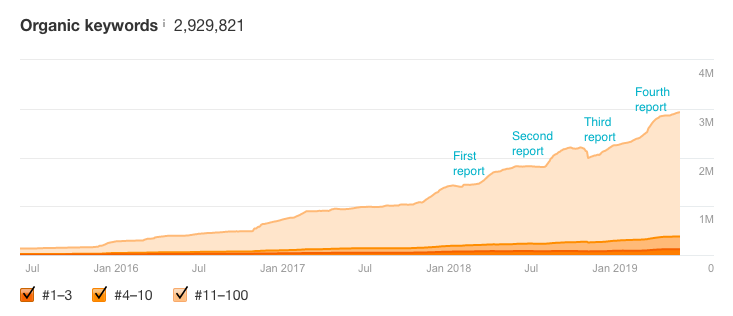
After the blogging team gets the report — which we call a “Search Insights Report” — the writers and editors work like a well-oiled machine to create the recommended content. These posts help the blog rank for tens of thousands of new keywords.
To learn more about the Search Insights Report, how we create it, and most importantly, how you can create one for your own team, read on.
First things first:
Why use a Search Insights Report?
There are tons of benefits to this system, including:
- Ensuring every piece of content has a pre-defined goal
- Helping you avoid content cannibalization (since each post is assigned to a specific topic)
- Keeping your content and SEO teams on the same track
- Baking SEO best practices into every piece of content you produce
- Letting you easily track whether you’re ranking for the terms you set out to rank for
How big should a Search Insights Report be?
The optimal S.I.R size depends on A) how much content you can publish and B) how often you’ll release new reports.
HubSpot has a big team of writers and a quarterly S.I.R release schedule, so we shoot for 200 posts per report. If you have two writers, each producing three blog posts per week, and you plan on creating one report per month, every report should have roughly 24 pieces of content.
Target S.I.R size = yearly content output / yearly S.I.R output.
1. Select your focus topic clusters.
Candidly, this step is the toughest one. The topic clusters you pick will form the basis of your entire report — so it’s important to choose the right ones.
Start with your topic gaps, or the “holes” in your content. To identify your content gaps, ask yourself:
- What are the topics my customers care about that I’m not addressing?
- What are the questions they have I’m not answering?
Those are pretty broad questions, so narrow things down by looking at your product and/or service pages.
Every product or service you provide should have at least two (and usually more) topic clusters. That typically shakes out to one topic cluster per feature.
Let’s say you provide (among several other things) branding services. From talking to your customers, you know a big question many of them have before they come to you is, “How do I come up with a brand identity? What assets do I need to ‘create’ a brand?”
If you don’t have much (or any!) content on brand identity on your site or blog, that’s a topic gap. It’s important to your audience, it’s relevant to your product, but it’s not proportionally covered on your website.
2. Identify content competitors.
Once you’ve honed in on a topic gap, the next step is figuring out all the websites that publish content on that topic.
These are your competitors — not in the typical sense, as many of them won’t sell competitive products or services — but from a ranking perspective.
I call them “content competitors” (bet you never saw that one coming!). There are a few techniques you can use to track down content competitors. I cover the full list in HubSpot’s Search Insights Report course.
One strategy is simple but effective: simply search for “[insert topic cluster] blogs” and “[insert topic cluster] websites”.
Here’s what I get for “branding blogs”:
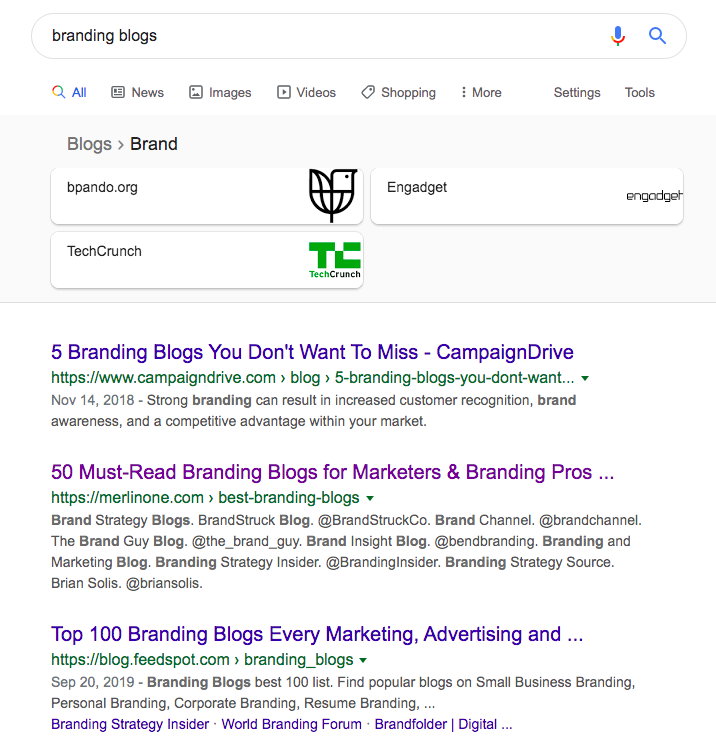
I’ll open each page in a new tab and copy every single blog or website mentioned in the listicle.
3. Run a competitive analysis.
Now that you have competitors, you can figure out the terms they’re ranking for that your site is not.
During this step, a keyword research tool is invaluable. I’ve tried tons of different tools and would recommend Ahrefs. However, if you’re already using SEMrush, Moz, or Alexa, there’s no need to switch software just for this project.
On a tight budget? The Hoth lets you run a (limited) content gap analysis for free.
After you’ve chosen a tool, plug in your content competitors:
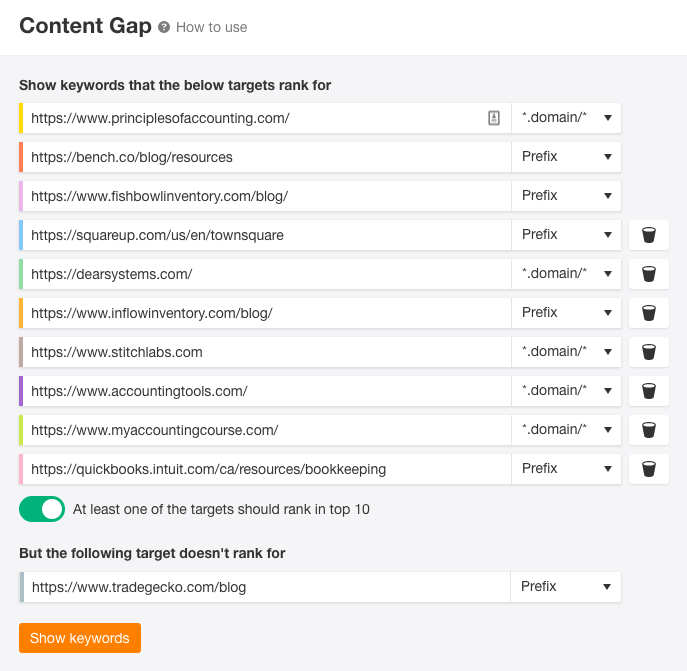
You’ll get a huge list of topic-specific keywords.

Treat every keyword as a potential blog post.
There are a few questions to ask yourself for every keyword. If you answer “no” at any point, the keyword isn’t a right fit:
- First, and most importantly, is this idea or subject relevant to my audience?
- Next, is there a higher-volume synonym for this keyword I should target instead?
- Is the monthly search volume (MSV) high enough to justify the effort of creating a post?
- Can I feasibly rank for this keyword? (In other words, is the MSV and/or the competitive score too high?)
Once you’ve qualified a keyword, you’re ready to move on to the next step.
4. Fill out the S.I.R with keyword research.
This is the fun part — translating your keyword research results into insights for your content creators.
It took me a few tries to develop the right format for this report. If you don’t want to shed your own blood, sweat, and tears, good news: you can download a customizable version of the S.I.R right here.
In my Academy course, we walk through how to fill out every field in this report.
Here are the highlights:
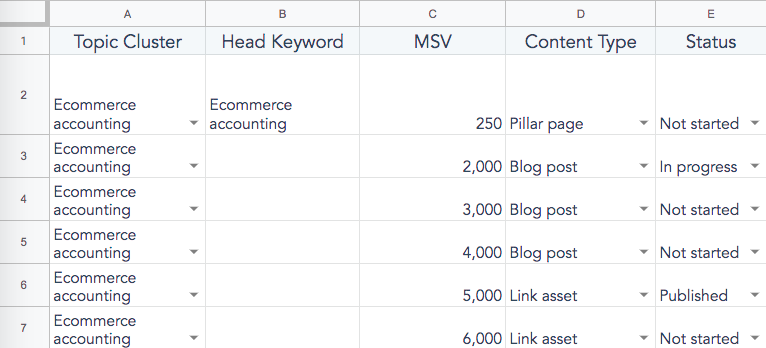
Columns B and C
- Every blog post should target 3-5 keywords: one head keyword (the broadest, most high-level term), and 2+ longer-tail keywords
- Add the head keyword to Column B and its MSV to Column C
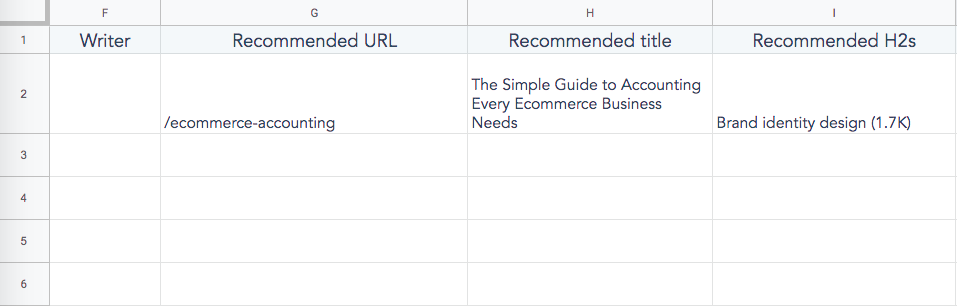
Column H
- The title of your blog post should always include your head keyword (which you’ve just added to Column B)
- If you’d rather have your writers come up with a title, leave this row blank —just make sure they know to incorporate the head keyword in whatever title they create
Column I
- Here’s where you add long-tail keywords. I like to note their MSV as well (like so: “marketing case studies (500)”), so the writers understand the ROI of including that section in their post
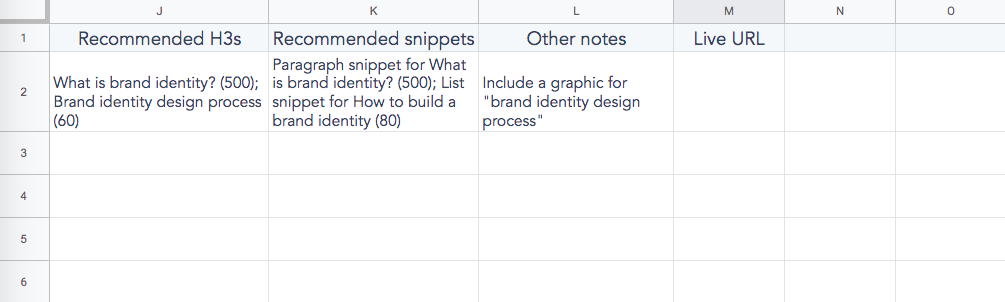
Column J
- Add longer-tail keywords here; for example, if one of your recommended H2s is “marketing case studies,” your recommended H3s would include “Nike marketing strategy case study (30)”, “Uber marketing case study (10”), and so on.
Column K
- Here’s where you add featured snippets your writers should target in the post (if any). I include the snippet type (paragraph, list, or table), as well as the MSV
When I introduced this report to HubSpot’s blogging team, I held a training that went over every aspect of the report and how to interpret it. I also sent out the recording and slide deck so our team had something to reference (and new writers, as they joined the team, could quickly learn the process!).
I recommend doing something similar to make sure adoption goes smoothly. Also, don’t be afraid to tweak the report for your own needs. If your team doesn’t need specific columns (like writer or status), get rid of them; conversely, if they want more information (like columns for recommended length and other articles to link to), add them in.
If you create your own S.I.R., we want to hear from you! Tweet a screenshot of your report to @HubSpotAcademy and @ajavuu for a chance to be featured in an upcoming blog post.

How to Find Your Target Audience
Vans are my favorite brand of shoes. They’re comfy canvas shoes that come in an array of fun styles, types, and colors that appeal to a wide range of consumers.
The shoe brand is a global company that’s been around since 1966, using their tagline “Off the Wall” as an ode to their first core audience: skateboarders. But who else do Vans appeal to?
Looking at their Instagram, you can gather a few clues:

From skating to lifestyle and even surfing, Vans has a different Instagram account for each of their target audiences — and each account is just different enough to resonate with its specific consumer. This approach shows the company’s deep understanding of marketing to multiple target audiences. Take this Instagram account geared towards women:

The account is packed with relevant campaigns and content for their female buyers.
Understanding target audiences can lead to more successful campaigns for you, as customers will feel as if they connect with your brand. Let’s get into target audiences and how to identify yours.
What is a Target Audience?
A target audience is a group of consumers characterized by behavior and specific demographics, such as female extreme athletes between the ages of 18 and 25. Target audiences are a pillar of most businesses influencing decision making for marketing strategy, such as where to spend money on ads, how to appeal to customers, and even what product to build next.
Target audiences are used to define the buyer persona of a business, as well. Buyer personas are a representative overview of a business’s ideal customer, drawn from data that makes up a target audience. Some of these demographics and behavior areas are:
- Location
- Age
- Gender
- Employment
- Income
This information is helpful in understanding the customer and how they make purchase decisions. Targeting a specific audience will also help your campaigns reach the correct people who will relate most to your company’s message and products.
When talking about a target audience, it’s a useful distinction not to confuse the term with a target market. While similar, their difference is key for marketers.
Essentially, you can describe your target market by finding your target audience. If a target market was “marketers aged 25-35,” the target audience would then be something like “marketers living in Boston, Massachusetts aged 25-35.”
That was an overview of target audiences. Let’s dive into some specifics, such as the different types of audiences and how to find your own.
Types of Target Audience
We’ve briefly gone over the attributes that make up a demographic. There are plenty in the marketing world — all helpful in locating the correct audience.
When we talk about types of target audiences, we’re talking about more ways to define who you’re creating a campaign for. You can segment your audience into groups or define them further using categories such as:
- Purchase intention — Groups of people who are looking for a specific product and want to collect more information before doing so. Some examples include consumers buying a new laptop, vehicle, clothing, or television. This data is necessary in order to see how you can better direct your messaging to your audience.
- Interests — This is data about what people are into, like hobbies. Knowing this data helps you connect with your audience in a relatable way and unearth buyer motivation and behaviors. For example, consumers who enjoy road biking as a hobby are likely most interested in new road bikes in the spring, when the weather is warmer and road racing season begins.
For example, if you find that a large number of potential audiences are interested in traveling, you can figure out a way to work that message into your marketing campaign to appeal to more potential buyers.
- Subculture — These are groups of people who identify with a shared experience. An example of this would be a specific music scene or genre of entertainment. People define themselves by subcultures, and companies can use those cultures to understand who they’re reaching out to.
An example of reaching a subculture is thinking of how they relate to your business, especially if you have a large potential audience. For instance, Netflix markets to their subcultures, people who watch specific types of content, using social media accounts that are directed to those subcultures.
As you’ve probably guessed, coming up with a target audience involves some research, which goes into fleshing out who you want to reach and how you can get there in a way that stands out from competitors.
If you’re ready to find yours, follow these steps below:
1. Use Google Analytics to learn more about your customers.
Google Analytics is such an expansive tool, and is great for obtaining demographic details about your audience, as well as their interests. Recall from above that this is critical information that helps locate a target audience.
With Google Analytics, you’ll be able to see website insights, and it’s broken into different sections, like age, gender and location. These sections are labelled clearly on the dashboard and provide colorful graphs for you to interpret.

Above is an example of the age overview in the Audiences portion of Google Analytics. Notice the breakdown of the numbers and how the graphs give you an excellent visual. This tool can be a great asset into getting a really great insight into who’s visiting your website and how your content fits into their lives.
2. Create a reader persona to target blog content.
With reader personas, you’ll never forget who you’re writing for. The good thing about reader personas is that you should closely align them to your buyer persona; they should be nearly identical.
This is because your blog should contain content that’ll be useful for your readers. Marketers probably want to read blogs about digital media, for example. It builds the reputation of your company to consumers.
The difference between a reader persona and a buyer persona is that a reader persona generally focuses on the challenges your persona might face. How can you write content that solves those challenges with blog posts?
For example, if one of the challenges you’ve identified in your buyer persona is “Marketing Mario wants to find a solution to low ROI on ad spending,” you can use a reader persona to think of content that surrounds helping that challenge.
3. Look at social media analytics.
When are your followers most engaged with your social media channels?
Is it when you post a funny meme on Instagram or create a poll on Twitter? By taking a look at these questions, you can get a couple of clues into what content your audience is interested in, thus, filling in one of the parts needed to find a target audience.
Every social channel is different and has a different audience, so looking at your analytics across all platforms are important. For example, Twitter tends to have a younger audience, while Facebook tends to have an older one. On the same note, Twitter is based on short-form content, while on Facebook, you can post long-form content and videos.
Instagram is a visually-based social media platform, so content that’s graphically stunning would thrive on the channel. Knowing these things, you can begin to plan your strategy accordingly.
Analytics can tell you who is looking at your profile. What’s more, they can tell you what’s working and what’s not working, content-wise.
By posting content your audience is more interested in, you can gain followers that are in your target market.
4. Use Facebook Insights.
If you have a Facebook page, this tool is golden for you. Facebook gives every Page a huge set of insights, for free. These insights work similarly to Google Analytics — you’ll receive critical information needed to create a target audience.
By accessing the People tab on your Insights dashboard, you can see who and from where your visitors are. Below is an example of how Facebook shows location demographics. It seems that a primary location is the east coast, so it’s safe to say that part of the target audience for this page is located in east coast cities.

Other areas Facebook focuses on include interests and integrations with other social media platforms, like Twitter. The insights report tells you the lifestyle of your audience, such as if they purchase items online.
Insights like these can help you far into your campaign planning, past finding a target audience, so it’s a worthwhile tool to check on every now and then.
5. Check up on website performance.
Monitor your best- and worst-performing content areas on your website. Your website can be the introduction to your company for a lot of your target audience, so sprucing up what interests them is a great way to attract more audience members.
By looking at what blog posts or landing pages are captivating your audience, you can repurpose content that isn’t and promote the content that is. For instance, if your blog post about email marketing was a hit with audiences, share it on your socials to expand your reach.
6. Engage with social media audiences.
Interacting with social media followers is so important, because they’re your audience. When you create your buyer persona, they’re the users you should look to. If you don’t have social media accounts yet, remember to keep this step in mind.
Ask your followers what they want to see, use tools like Instagram Stories and replies to get their response for how/what you’re doing. Whatever engagement you get, positive or negative, can influence how you attract more audience members.
For example, try tweeting out something that invites a CTA, like “Send us a picture of your favorite outfit to wear with our new hats!” This evokes a response, responses you can analyze the language of and imitate to grow your audience.
1. Target
Target differentiates its content based on social platforms. For example, check out its Twitter account. The language is relaxed, it engages users, and is generally geared towards a younger, millennial crowd. This is because most of Twitter’s users are younger.

Alternatively, check out this Facebook post, a partnership with Jessica Alba, an actress who is focused on her family.
This move was probably done because Target’s target audience for Facebook campaigns are directed towards families, while the focus is on younger people on Twitter. Target, as a global brand, has different target audiences.
For campaigns, they might focus on a specific audience over another, or for social media channels in general. Target found their target audiences and how they’re represented differently and used that to their marketing advantage.
2. Lightlife Foods
Similarly to the example above, let’s look at plant-based food company, Lightlife Foods. On Instagram, Lightlife posts high-quality images of recipes using their products. Occasionally, they work with Instagram influencers in the same market.
 On Lightlife’s Facebook, however, they’ve invested heavily in video content. This is probably because it’s been proven that video content on Facebook performs extremely well. Lightlife is most likely targeting an audience that loves to watch videos on Facebook, whereas on Instagram, they’re most likely targeting not only foodies, but influencers in their industry.
3. Apple Music
Let’s look at how Apple Music is reaching their target audience.
On Twitter, the streaming service prides itself on being free of ads, most likely to sway potential audience members away from similar streaming services that don’t provide the same benefit. They post playlists and other content that’s only reachable by visiting the website.
 Most of the Instagram content, however, are videos. It seems as if Apple Music is using their Instagram to post snippets of interviews and other premium content available with a subscription.
Though it’s clear that the two platforms have different content strategies, the content itself is in the same realm, just with a different focus. From this, we can infer that Apple Music likes to stick to a formula based on where their content types perform best.
If, for example, Apple Music found that their interview previews perform best on Instagram, that’s likely why their Instagram is mostly video content. This shows that diversifying content doesn’t have to be a vast change like Target and Lightlife, it can still be subtle and work.
If you have multiple target audiences and only one marketer, don’t feel as if you have to focus on every audience at once. You can target one audience per campaign to make sure you really get it right.
Target audiences are meant to engage consumers and give you a good idea of how to market to them. If Vans’ way of creating multiple accounts fits your business, go for it. If you have a singular audience, you can still benefit from knowing everything you can about them.
Happy campaigning!

HubSpot Marketers Give 6 Tips for Fighting Burnout
Although the beginning of a new year can be filled with excitement and positive change, it also can be challenging or mentally exhausting to work on a number of intense projects with high expectations.
Even when you’re successfully executing on hard work, a busy lifestyle can still weigh on you, even if you love your job or company. When this happens, you can run into one of the most dreaded mental conditions: burnout.
Burnout is so common that the World Health Organization now classifies it as a legitimate health condition. According to the WHO, burnout is a mental health “phenomenon” characterized by “feelings of energy depletion or exhaustion; increased mental distance from one’s job, or feelings of negativism or cynicism related to one’s job; and reduced professional efficacy.”
This condition especially impacts millennials. A 2018 Gallup study found that 30% feel like they’re in a constant state of burnout at work, while 70% say they feel burnout at least sometimes.
While burnout is common, it isn’t just isolated to people who dislike their jobs. In fact, a Journal of Personality study reports that being passionate about your job can cause you to take on too many tasks, or become obsessive about your work. In turn, this can cause eventual burnout.
To help you combat bouts of stress, low motivation, or exhaustion, I talked to six HubSpot employees to learn how they fend off feelings of burnout.
1. Acknowledge that burnout exists.
If you work in a fast-paced career or a competitive field, it can feel like you’re headed directly towards burnout at certain times. Rather than fearing it or denying that it’s happening to you, it can be helpful to admit that you’re only human, you might run into crazy amounts of stress, and it might hinder your energy and motivation.
Once you admit that burnout is a solid possibility in your own work life, you can start to take steps towards avoiding it or maintaining a work-life balance. These steps could involve planning out vacations regularly, scheduling non-work hours, or trying stress-relief activities such as meditation.
According to Maggie Butler, a senior marketing ops manager, the best way to pull yourself out of burnout is to recognize those feelings when they emerge. Then, take preventative measures.
“I think it’s impossible to avoid burning out at work, especially if you are passionate and give a lot of energy and time to your career,” says Butler. “So why not plan for it? Planning to take time off from work and do whatever recharges you is key to keeping burnout at bay.”
2. Create a “Smile File.”
When you’re tasked with a tough project or feel like work is piling up, it can be helpful to motivate yourself by reflecting on the accomplishments you’ve made in your role so far. This has proven to be beneficial to Lisa Edwards, a product marketing manager who logs many of her pleasant work moments in one folder — which she aptly calls her “Smile File.”
“I’ve been keeping a Smile File in my two years at HubSpot. Anytime someone says thank you, compliments my work, or says something funny, I take a screenshot and put it away in this folder,” says Edwards.
Here’s an example of a message that Edwards screenshotted and saved in her Smile File after a presentation:
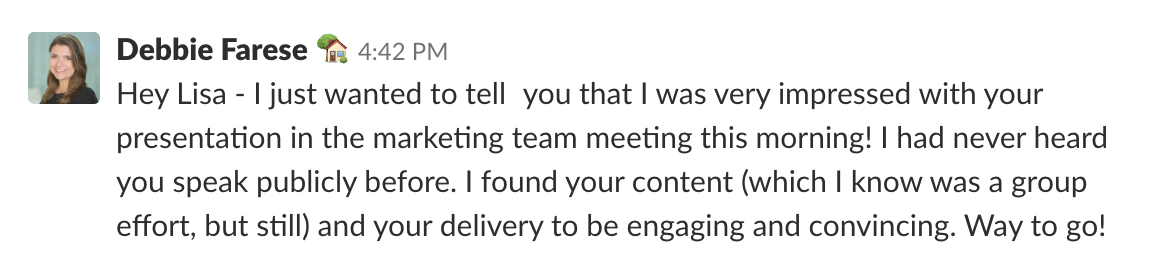
“When I get really stressed about work or bummed about not totally nailing a project, I flip through the folder and it always makes me smile and feel better,” Edwards explains. “In moments of imposter syndrome, it’s especially great to flip back and see compliments from people and remind myself that I’m indeed good at my job.”
Aside from compliment and achievement-related screenshots, Edwards says the folder is also “full silly things that my awesome coworkers say, too.”
3. Use the Pomodoro Technique to ensure that you take breaks.
The Pomodoro Technique is a productivity strategy where you schedule spans of time into work time and break time. The idea behind the technique is that taking regular small breaks and one larger break each day will keep you more productive.
However, Matt Eonta, a senior manager of project management in our creative department, says the Pomodoro Technique can also be a useful way to avoid immediate work stress or feelings of burnout.
“I found myself being much less productive working from home than I was at the office, and so I decided to adopt the Pomodoro Technique. It’s been a huge help to my productivity, and it’s helped me avoid burning out because it’s designed to be prolonged periods of deep focus work, followed by short breaks to recharge and reset your mind,” Eonta explains.
“Setting an actual timer is super helpful here, and when I “earn” my long break, I try to go outside and throw balls to my dog or something,” Eonta adds. “Also, knowing I have a break coming will keep me out of unproductive rabbit holes like Instagram and text messaging until they’re allotted a short window.”
“Overall though, it’s nice to get up from my desk at the end of the day and realize I was able to move around a bit throughout the day, rather than seeing six to seven hours fly by without having taken a break for anything,” Eonta shares.
4. Switch out screentime for relaxing activities.
Aside from preventing mental burnout, you should also take steps to prevent physical fatigue that can make burnout more apparent. When your body is tired, sore, or drained, this may play a role in you feeling mentally drained.
While Eonta says he goes outside and plays with his dog on breaks, he also aims to prevent eye strain that can add to feelings of exhaustion.
“My eye doctor told me that every 20 minutes, I should try to focus on an object 20 feet away and focus on it for 20 seconds. It helps keep my eyes from burning out from constant fluorescent light and blue light computer screens.” Eonta explains.
Lucy Reddan, a senior manager in our growth and email marketing department, similarly shared that she rests her eyes and tries other relaxation activities instead.
“Sometimes there can be intense periods of work, and your hours working are longer than normal. To cope with burnout, because it can sometimes be hard to avoid, recently I’ve started to limit screen time in the evenings after work,” says Reddan. “Turn on some music, lie on the floor and do some nice slow stretching. The music takes my mind off thinking about all the jobs to be done, and it always feels great to get your body moving.”
5. Try yoga and meditation.
Yoga allows you to release endorphins by working out, while also priming your mind for examination. The combination of yoga and meditation can help you relax after a long day, but these activities can also make you feel more productive.
“I didn’t realize I was burnt out until I started taking up yoga,” says Krystal Wu, a social media community manager.
“Yoga along with meditation has helped me physically and mentally to just do something that betters myself,” Wu shares. “It became clear that it was the perfect balance to help me recover from burnout in my day to day life and have more peace of mind.”
6. Take time off when you need it.
If you love working or worry that you’ll fall behind, taking time off can be especially hard to do. However, it can be key to relaxation, resetting your mind, and gaining a solid work-life balance.
“I was one of those people who would rarely take any time off because ‘there are some many things to be done,'” says Irina Nica, a community and influencer relations manager. “Even when I did, I still let some work slip into my day, even if that meant only checking my emails. I’d be lying if I said this way of being constantly connected didn’t pay off at all, but overall, I was quite tired most of the time.”
Nica explains, “I was probably close to burning out on a number of occasions. Fortunately, over time, I’ve changed my views on vacationing and it’s been great for my productivity.”
“I learned to disconnect in the evenings and during weekends,” Nica adds. “Now, aside from the regular summer and winter holidays, I take a long weekend trip every now and then. That helps me relax and refreshes my perspective.”
Maintaining a Happy Work Life
While you can take the above steps to prevent burnout in your job or daily life, you can also take steps to ensure that your work life is keeping you happy and healthy. Happiness at work is not only fulfilling, but experts say it can also make you more productive and effective as an employee.
To learn more about the advantages of happiness at work, check out this blog post. If you’re a manager who wants to ensure employee happiness, you might also enjoy this great guide to keeping your employees happy.

How to Perform Keyword Research and Rank in 2020 from HubSpot’s SEO Senior Strategist
Undoubtedly, search has changed in recent years.
Consider, for instance, what happens when I search for the term “Skiing”: 
I’m immediately shown images of skiers, as well as top stories related to skiing, and even a local Google Maps panel with nearby ski mountains. I’m even shown videos of skiers before I finally reach the first article regarding the topic of “skiing”.
From a user perspective, this makes sense. Most people searching for “skiing” aren’t interested in reading a blog post about it — they’re interested in seeing it visually via YouTube, or finding nearby locations so they can ski themselves.
In 2020, search is going to continue to evolve in the direction of zero-click search. But that doesn’t mean your SEO strategy is futile. It just means you’ll need to get creative to rank on page one.
I sat down with Senior SEO Strategist Braden Becker to discuss his keyword research strategy, how you can use featured snippets to your benefit, and what he’s most excited to explore in the world of SEO in 2020 and beyond.
Keyword Research is All About Telling a Story
Let’s start with the basics.
Becker advises you start your keyword research with competitive analysis, which allows you to see what similar domains are ranking for that you’re not. SEO tools like SEMrush can help you do this.
“That’s where we start — constantly refining a list of competitors we want to keep an eye on, and whose content strategies we think are worth taking inspiration from,” Becker told me. “This is a good first step in keyword research, and you can explore related SEO opportunities from there.”
We won’t explore this concept too in-depth in this post, since we’ve covered it extensively before, including in our Ultimate Guide to SEO in 2019.
Additionally, Becker advises, “When you’re starting to create content, you should think about your opportunities in groups or clusters, not just one assignment at a time.”
“Not every keyword you find is just a single blog post. Instead, it’s the potential to create a larger marketing campaign that tells a story around that keyword. Then, you can use that keyword to find related queries you think the same visitor would want answers to.”
For instance, let’s say you find there’s high monthly search volume (MSV) on the long-tail keyword, “How to improve your open-rate.”
On the surface, it might seem like that only has the potential to be one blog post regarding “How to improve your open-rate.” But this misses the bigger picture you should be exploring.
As Braden told me, “Once you see ‘how to improve your open-rate’ is one long-tail keyword, you should be thinking, ‘Okay, maybe there’s a similar keyword with even more MSV, or maybe there’s another tangential topic we can cover, as well …’ and, as you explore, you might find tons of topics related to email marketing, and your marketing team might decide ’email marketing’ as a cluster of content is an avenue you want to explore.”
You Can Still Have a Strong Content Strategy if Your Product is One-Dimensional
So — that’s all well and good. But what if your product just isn’t that interesting to write about?
What if, for instance, you sell socks. There are only so many topics, and so many stories, you can tell about socks — right?
Braden sympathizes with this, but he has a solution in mind: “This problem is equal parts a B2C issue and a reality of e-commerce, where the customer journey is different than it would be for a software-as-a-service (SaaS) company. If you sell socks or clothing, for instance, you have to be a little more creative with the questions you ask yourself — like ‘What kinds of socks are you selling? What’s the purpose of these socks? Why are people buying these socks, and what are they using them for, and what else do they care about?‘”
For instance, let’s say you sell athletic socks. As Becker points out — “Well, then, what sports do they play? What other clothing do they wear when they wear socks, and is breathability a concern for them?”
“If that’s the case, suddenly you now have an entire topic around breathable fabrics for which you can create content for your customers.”
If your product isn’t as snazzy as “email marketing” or as Google-able as “skiing,” that’s okay. When your product is a little more one-dimensional, you’ll want to learn as much as you can about your customers and focus on the purpose of your product when creating a content market strategy and researching keywords.
Ultimately, your customers have other concerns, interests, and passions beyond your product or service. If you can tap into their related interests from a business standpoint, you’ll have hundreds of potential topics to explore.
How to Win at The New Zero-Click Game
For many marketers, the introduction of featured snippets, image carousels, and other new SERP features poses a problem, because these new features typically provide the user with an answer right on the SERPs page — so the user no longer needs to click on your website.
Becker admits, “Featured snippets are kind of like the lottery. There’s no real rhyme or reason why one publisher wins them over another, but that doesn’t mean you can’t take action that aligns with helping you win those bigger answer boxes at the top of the results page.”
Ultimately, Becker says that high-quality, succinct content always has a better chance at winning a featured snippet. Additionally, he says standard writing conventions, like including a summary at the beginning of your post and a conclusion at the end, can serve you well in SEO.
“High-quality content is also good SEO, and that idea gets lost sometimes,” he adds. “A lot of writers think they need to ‘SEO-optimize” their writing style, but if you’re a good writer, you’re already doing a lot of things right without realizing it.”
Along with high-quality content, it’s equally critical you lean into user experience, rather than trying to fight it.
Ultimately, zero-click search steals traffic from websites, but it’s still an opportunity to outrank your competitors.
As Becker notes, “Features like ‘How-to’ panels, ‘People Also Ask’ boxes, or ‘FAQ’ snippets below certain results … these features aren’t going away, and they can steal traffic from everyone on the SERP. So, it’s better that you optimize for them over your competitors. Even if some of them steal traffic from you, someone is going to get this real estate. You might as well be the one that gets it. You can still use these snippets to prove you’re a helpful, reliable brand through on-page SERP features, even without the click.”
Continue Growing Both Vertically and Horizontally
As a marketer whose role depends on a need to constantly publish high-quality content on a 10+-year-old blog, I often wonder, “Is there ever a point where companies have so much content that they’ve officially hit their ceiling, and all they can really do is update old posts?”
When I sat down with Becker, I thought it was as good a time as any to ask this question. Fortunately, it looks like there’s hope yet.
“You can almost always grow both vertically or horizontally,” he explained.
Vertical growth means more traffic using your current content channels and verticals. Horizontal growth would mean more traffic by expanding your audience, adding a new content campaign, and adding traffic through a new type of visitor.
Vertical Growth
“Vertically,” Becker said, “requires to you to be more creative with the ways in which you’re doing keyword research, or figure out if there are pieces of a story you haven’t finished telling yet, based on your topic clusters. Additionally, you can look at under-performing posts and decide if you want recycle the URL, re-optimize the content, or cut your losses and remove the URL from your domain — replacing it with content that better resonates with your readers.”
“‘People Also Ask’ boxes, featured snippets, and other emerging SERP features — yes, they’re seen as traffic stealers, but they’re also sources of
data and opportunity. You can look at these SERPs, use certain tools to pile SERP data into a spreadsheet, compare the features you see to your current rankings, and look for gaps where you can try to be in places you’re not.”
To try the strategy he mentioned above, you might consider using STAT Search Analytics, a tool our SEO team uses at HubSpot, to pull reports you wouldn’t be able to with an average research tool and dive deeper into new areas of your content landscape.
Horizontal Growth
Of course, there’s also the option to grow horizontally, which means reevaluating the needs of your customers. Are there topics you haven’t talked about yet? Can you open a completely new bucket and explore new terrain to help your customers learn more about your industry as a whole?
However, while it’s critical you use data to drive most of your decisions around content, Becker surprisingly advises against leaning too heavily into your SEO strategy as an end-all-be-all approach to marketing.
First off, you never want to prop up your business on one channel. To ensure sustained growth even during natural search engine algorithm changes, it’s critical you diversify your channel portfolio.
Additionally, Becker mentions another critical reason you don’t want to rely solely on SEO — “You want to make sure your business is well-balanced and doesn’t become a copycat. Because SEO is becoming so advanced, everyone knows all the moves and all the players. This means there are redundancies in the information you get on any one SERP, so you need to have a competitive advantage.”
“That competitive advantage,” he adds, “can come in the form of thought leadership, and making big bets, like ‘Okay, there’s no search volume on this topic, but it’s something we want to take a stance on and it’s important to us, so let’s be willing to invest in something that doesn’t have an immediate attribution path to business.‘”
While the majority of HubSpot’s blog strategy revolves around SEO, and using traffic or ranking data to drive decisions, we still publish posts that can provide a unique perspective to our readers or involve topics that are at the forefront of the marketing industry but haven’t yet become high MSV players. This is still important.
This can demonstrate your brand’s ability to both supply content your readers are already searching for, as well as content they don’t yet know they need or want.
As Becker points out, “Just because SEO is a very high-intent traffic channel, doesn’t mean it’s the most important.”
A Final Word
Whether you’re a seasoned veteran in the SEO industry or brand-new to an SEO-role, it’s critical to note there’s always opportunity to explore and grow, and that ‘uncomfortable feeling’ of being in-over-your-head isn’t unusual.
In fact, despite Braden’s nearly two years fully immersed in SEO, he still admits to having a sense of discomfort around new SEO topics: “If something is not interesting to me right now in the SEO world, it’s because I don’t know enough about it. In my experience, the more I know about something, the more interesting it becomes. Not having control over a concept is an uncomfortable feeling, so it’s easy to say ‘That’s just not for me‘, but I’m at the point where I want to start charting new territory, even if it’s uncomfortable.”
For example, learning how to read, edit, and manipulate a website’s robots.txt file is a basic but often underused area of opportunity when looking for traffic growth.
“Things like a robots.txt file, or your blog’s sitemap — these are like your liaisons to Google’s index,” he told me. “You can tell Google what pages to allow or disallow in its index, make best use of your crawl budget, and ensure you’re not blocking pages that should be driving organic traffic for you. To me, that’s where technology meets creativity.”
Ultimately, one could argue SEO as a whole is where technology meets creativity — which is why there’s still plenty of space for you to use search engine algorithm changes in 2020 as an opportunity to explore new strategies and reach new audiences, rather than a hindrance in your way.

How to Create Squeeze Pages That Generate Tons of Leads
“You’ve got mail.”
At least, that’s what you’re hoping as a digital marketer — to show up in your audience’s inbox.
That’s because capturing emails is an important tactic marketers use to gather leads. To do so, you’ve probably created a lead magnet or content offer.
It’s a tale as old as time for those in online marketing. And that’s because it works.
By the end of 2020, the number of email users will grow to be 3 billion worldwide. Additionally, email has an average ROI of $38 for every $1 spent.
The fact is, email marketing is still an effective channel in digital marketing.
So, how do you capture emails? One tactic is a squeeze page.
Below, let’s review what a squeeze page is, some examples, and how to build one.
While squeeze pages are a type of landing page, it’s important to note that not all landing pages are a squeeze page.
Some landing pages have multiple conversion goals, such as offering a free trial. On the other hand, the only goal of a squeeze page is to get an email address.
After a user has entered their email address on your squeeze page, you should:
- Deliver your content offer immediately.
- Show users a thank you page that answers any questions and lets them know what the next steps are.
- Send an automated message reminding users why they gave you their email address. Something that says thank you, gives users the content offer and lets them know what types of emails to expect from you and how often.
- Follow up with a drip-email campaign that will move them down the funnel and closer to a purchase.
So, what should a squeeze page look like? Usually, squeeze pages are short-form landing pages with only a small amount of text to persuade users to enter their email address.
But, how can you create a squeeze page that will generate leads? Here are a few tips:
1. Include one CTA: There should only be one CTA on a squeeze page: to enter an email address. Your CTA button should clearly state the action and end result for the user. For example, “Claim My Spot” is actionable and lets the user know that they’ll be signed up for a course or webinar.
2. Write crisp, compelling copy: The supporting text should be concise and interesting. It should be easy to read and provide important information that makes users want to enter their email address.
3. Implement social proof: You might consider including one or two short testimonials below your form fields. People like to see that your content offer has helped others before.
4. Add excellent graphics: The imagery on your squeeze page should be clean and captivating.
5. Produce an enticing content offer: Your content offer should have high-value for your audience. It can be something like an email course, templates, a webinar, or an e-book.
Creating a successful squeeze page won’t always happen on the first try, though. To improve conversions, try A/B testing to see what variations your audience likes best. You can test headlines, CTA buttons, form positions, background images, or copy.
Squeeze Page Examples
One of the easiest ways to guide you in your squeeze page creation is to look at a few examples. Below are three examples that could inspire your squeeze page design:
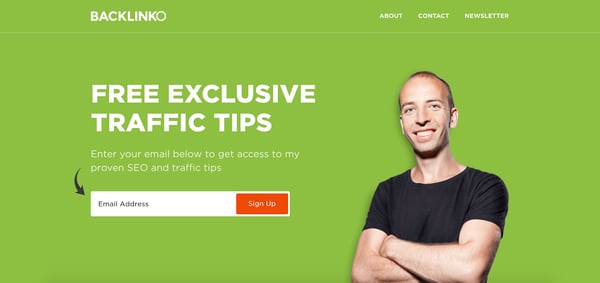
1. Backlinko’s Home Page
Some marketers choose to have a squeeze page act as their home page. That is what Brian Dean, founder of Backlinko does. Backlinko’s entire home page is a squeeze page attempting to get subscribers to Dean’s email list.
His content offer? Exclusive traffic and SEO tips directly to your inbox.
The squeeze page includes short, crisp copy, an interesting headline, great imagery, and only one form field. It’s a clean, simple page that utilizes all our tips above. If you scroll further, below-the-fold, you’ll find social proof and another content offer, if the first one doesn’t appeal to you.
2. Marie Forleo’s Get Started Page
Marie Forleo, an online digital entrepreneur, has a squeeze page directly on her website. Instead of being her home page like Backlinko, Forleo uses a “Get Started” page right in the navigation as one of her squeeze pages.
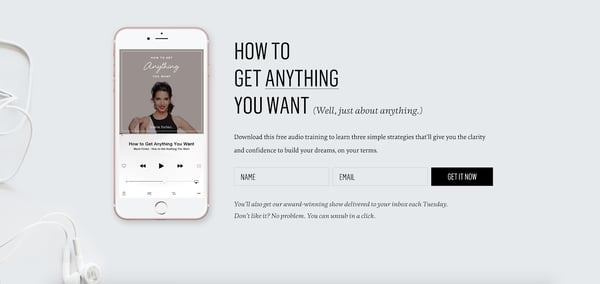
This squeeze page offers a free audio training in exchange for a user’s email address. It has great imagery, copy, and a clear CTA.
Uniquely, below the form fields, Forleo tells users what they’ll get by giving their email address and already lets them know they can unsubscribe. This is a great touch when users are worried about spam pages.
3. Ramit Sethi’s Free Insider Kit
Ramit Sethi, an author and expert in making money, has a squeeze page on his website, in the form of the “Free Tools” page.
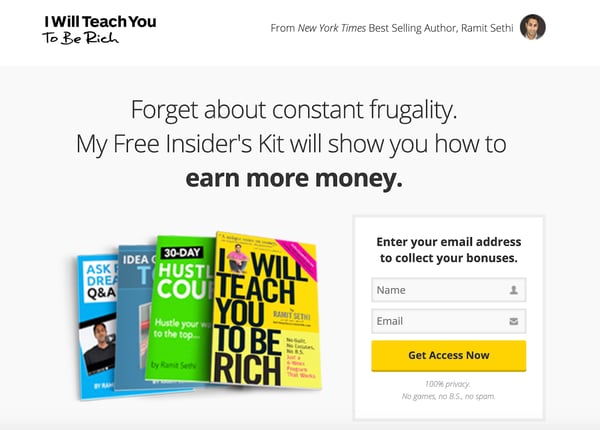
This squeeze page uses scarcity and fear-of-missing-out (FOMO) to gather email addresses. The headline uses language including “Free Insider’s Kit” to make users feel like they’re in the inner circle.
Additionally, this squeeze page also got rid of the top navigation bar when you click on it, getting rid of any distractions. The only goal of this page is to gather email leads.
Best Squeeze Page Builders
Now that we’ve learned what a squeeze page is and what it looks like, you might be wondering, “How do I create one?”
Luckily, there are a lot of squeeze page builders you can use for help.
However, it’s important to make sure that whichever squeeze page builder you use, integrates with your email autoresponder service — whether that’s HubSpot, MailChimp, or Constant Contact.
Below are a few of the top squeeze page builder options:
1. HubSpot
With HubSpot, you can create beautiful landing pages in the same tool you use for email marketing, your CRM, and your CMS.
There is a built-in library of mobile-optimized templates proven to convert, so you can add copy and insert images in minutes.
Additionally, you can create dynamic squeeze pages that show different content based on a user’s location, source, device, buying stage, or any other contact detail stored in your CRM.
2. Leadpages
Leadpages is an easy, DIY landing page builder. With this tool, you can drag-and-drop any elements you want, giving you the ability to quickly create professional landing pages. Plus, you can look through its top, mobile-responsive templates to get you started.
Additionally, you can easily A/B test your pages right in the tool, so you create landing pages that convert right away.
3. ClickFunnels
ClickFunnels is a quick, easy tool that can help you create an entire funnel. For example, you can create your squeeze page, thank you page, and email and Facebook marketing automation. You can even create up-sell pages as well.
However, most of ClickFunnels tools are best used for other types of landing pages where you’ll want more bells and whistles. But, if you need to create both squeeze pages and other landing pages, this is a great option.
4. WordStream
WordStream offers a conversion toolkit, that helps users capture more leads using squeeze pages and landing page templates.
It has an intuitive drag-and-drop builder to help you build professional squeeze pages in minutes. You can sync your captured emails directly with Constant Contact or Salesforce to streamline your workflow.
Whether you’re new to landing pages or you’ve created them before, it’s important to understand how squeeze pages can generate leads for your company — they aren’t the same as every other landing page you’ve created. They need to be built with a specific audience in mind.

Dwell Time is the SEO Metric You Need to Track
This morning, I made a quick Google search.
When the results page loaded, I spent time clicking through the first page of websites to find what I was looking for. When I didn’t find my answer, I clicked back to that results page to look at the next one.
This process took me through to the bottom of the page until I refined my search and started the process again.
I didn’t know it at the time, but I was actually contributing to a powerful metric — dwell time.
When we talk about metrics, we tend to focus on demographics. We ask questions like, Who’s looking at your site, where are they located, and what are their interests?. These interests help marketers make informed decisions about campaigns tailored to their customers’ interests.
Dwell time is the metric that runs through various search engine results pages (SERPs). It’s the time I spent reading those results pages before I went back to Google to take a look at other results.
Let’s explore more about what dwell time means, and its usefulness, below.
What is dwell time?
Remember that dwell time begins and ends with the SERP.
It’s important to note, dwell time and bounce rate are two different things. Bounce rate is what happens when a user clicks on one page, and then almost immediately leaves the site.
For it to be considered dwell time, on the other hand, the user needs to click on a page from the SERP, stay a while, and then either clicks back to the SERP or otherwise exits the page.
If you use search engines, you rack up dwell time daily, without even thinking about it. I can already recall two separate instances in which I’ve contributed to dwell time today, all before lunch.
Essentially, dwell time metrics can show marketers if their web pages are capturing the attention and needs of browsers. It has the potential to tell you what to include on web pages, and what to exclude.
For instance, let’s say you write a blog article called “Social Media Tips and Tricks”. You notice the piece has a high click-through rate, but low dwell time. Upon further inspection, you see the rest of the articles on the SERPs include comprehensive information regarding social media scheduling, how to create posts for social media, and which social media sites have the highest conversion rates. More than likely, you thought your post was solving for a user’s search intent when it really wasn’t — which is why most readers jump back to the SERP to find an alternative source.
It can also lead to clues about improving UX. For instance, if you have a slow loading time on your web page, you may see that reflected in dwell time metrics, since a user might exit your page if it’s taking too long to load
This metric can lead to important decisions you make for your site, among other metrics.
Next, let’s explore some average benchmarks regarding time spent on sites.
Average time on site benchmarks
According to Google Analytics, “Average Session Duration” is a metric that tells you how long visitors are staying on a website on average. It’s measured by the total duration of all sessions, or visits, in seconds, divided by the total number of sessions.
A session begins when a user goes to a website. After 30 minutes of inactivity, or when the user leaves, the session ends. The inactivity cutoff exists so you can get an accurate report of your metrics without untrue inflation.
You can find this metric already calculated for you in Google Analytics, displayed in minutes and seconds. *Can you give readers an alternative if they don’t have Google Analytics? Is there another time-on-page measurement website?
But what’s a “good” average session?
Try to go for anywhere between 2-4 minutes, the time most marketers agree is a good average duration. It’s also the general benchmark across most metrics of SMBs. It usually takes around this time to explore a website and get a feel for the design.
You can find this metric for your own site by visiting Google Analytics or other metric websites that host the same information. Here is an example of what that’ll look like on Google Analytics:

Most marketers agree that it’s rare to see average session duration times over 10 minutes or less than one minute, so if you’re looking for a goal, between 2-4 minutes is where the average typically lies.
When you’re looking at metrics, it’s a good idea to look at all of them to get a full scope of how your site is performing. If you’re ranking high on the SERP, that means that your SEO is great, but if your website isn’t providing useful information, your session duration might underperform.
To provide a holistic experience for customers, looking into the meaning behind session durations is important. Dwell time contributes to session duration, but remember that the two aren’t cut from the same cloth. Remember that dwell time doesn’t count from anywhere but the SERP, and that sessions end after 30 minutes of inactivity on that SERP.

7 Incredible Examples of A/B Tests by Real Businesses
Whether you’re looking to increase revenue, sign-ups, social shares, or engagement, A/B testing and optimization can help you get there.But for many marketers out there, the tough part about A/B testing is often finding the right test to drive the biggest impact — especially when you’re just getting started.
So, what’s the recipe for high-impact success?
Truthfully, there is no one-size-fits-all recipe. What works for one business won’t work for another — and vice versa.
But just because you can’t replicate the same test and expect the same result doesn’t mean you can’t get inspired by other companies’ tests.
In this post, let’s review seven excellent examples of how companies use A/B testing. While the same tests may not get you the same results, they can get you inspired to run creative tests of your own.
1. HubSpot’s Mobile Calls-to-Action
HubSpot uses several different calls-to-action in its blog posts. For instance, on this blog, you’ll notice anchor text in the introduction, a graphic CTA at the bottom, and a slide-in CTA when you scroll through the post.
However, on mobile, these CTAs might seem intrusive. That’s why HubSpot tested mobile CTAs.
Previous A/B tests revealed that HubSpot’s mobile audience was 44% more likely to click through to an offer landing page and 18% more likely to convert on the offer if all CTAs were stripped from blog posts and there was only one CTA bar at the bottom of the page with no ability to exit.
So, HubSpot decided to test different versions of the bottom-of-the-page CTA bar, using thank you page views as the primary metric and CTA clicks as the secondary metric.
HubSpot used four variants for this test.
For variant A, the control, the traditional placement of CTAs remained unchanged.
For variant B, the CTA had a maximize/minimize option so readers could dismiss the CTA. This could be accomplished by an up/down caret.
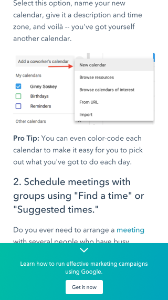
For variant C, the CTA had an X that would completely dismiss the CTA from the post. At this point, there would be no formal CTA on the blog.
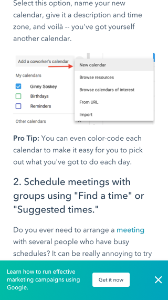
For variant D, the CTA had no X or minimize/maximize option.
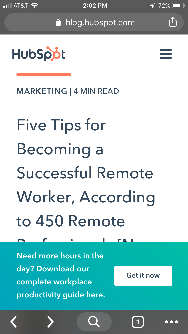
Overall, variant B saw a 7.9% increase, variant C saw an 11.4% decrease, and variant D saw a 14.6% increase.
From those numbers, HubSpot was able to project that using variant D on mobile would lead to about 1,300 additional submissions each month.
2. Groove’s Landing Page Design
Every marketer will have to build a landing page at some point. But building a landing page that’ll convert is hard.
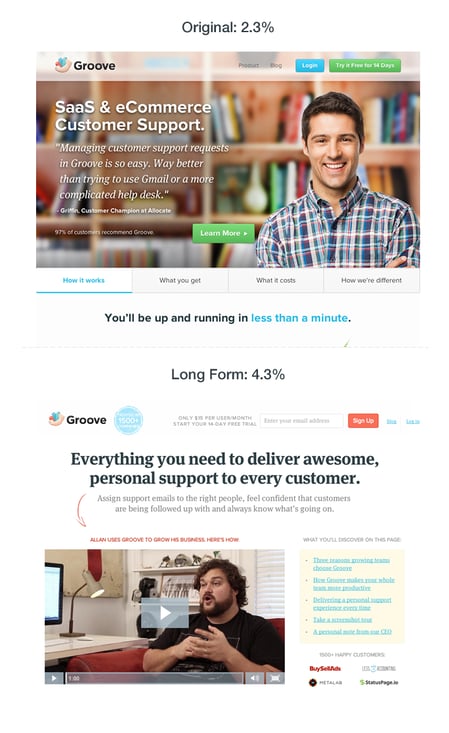
Groove experienced that first hand when the company learned one of its landing pages was only converting at 2.3%.
However, Groove wasn’t sure why the page wasn’t converting. To figure it out, its team went on a journey. They looked up resources and talked to marketing experts to figure out why their site wasn’t working.
That’s when the company learned that the messaging was all wrong. To figure out how to appeal to its customers, Groove decided to reach out and actually talk to real users.
Then, when the team rebuilt their landing page, they focused on copy first, and design second. Only when the copy was completely finished and approved did they start the visual aspect of designing.
Overall, the tweaks to messaging ultimately doubled their conversions to 4.7%.
3. HubSpot’s Site Search
Most websites contain a search bar at the top of the page that gives users the ability to search for a specific topic or term on the site.
Based on previous data, HubSpot found that non-bounce desktop users who engage with search have a 163.8% higher blog lead conversion rate than those who do not. However, only a very small percent of blog traffic interacts with the search bar. That’s why HubSpot decided to test the visual prominence and functionality of the site search bar.
HubSpot used three variants for this test, using offer thank you page views as the primary metric.
For variant A, the site search bar increased visual prominence and altered the placeholder text to “search by topic.”

For variant B, the search bar had increased visual prominence, the placeholder text was altered to “search by topic,” and the search function searched the blog, rather than the whole site.
For variant C, the search bar had increased visual prominence, the placeholder text was changed to “search the blog,” and the search function searched the blog, rather than the whole site.

As a result, HubSpot found that all three variants increased the conversion rate. However, variant C showed a 3.4% increase in conversion rate and a 6.46% increase in users who engage in the search bar.
4. Csek Creative Homepage Design
The copy on your homepage is important because it helps users decide whether they want to continue looking deeper into your site.
In this example, a digital agency decided to test the tagline on its homepage. Ultimately, the goal was to decrease the bounce rate.
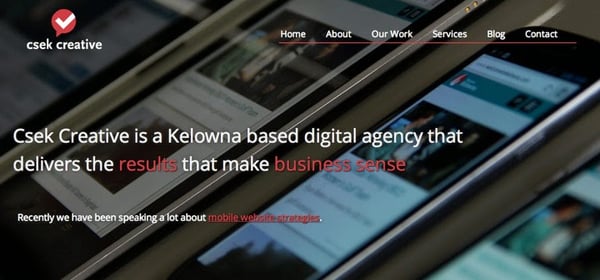
Before the A/B test, Csek’s tagline read: “Csek Creative is a Kelowna based digital agency that delivers the results that make business sense.”
To make the copy less vague and more explanatory of the services it offered, Csek Creative changed the verbiage to: “Csek Creative is a digital agency that helps companies with their online and offline marketing needs.”
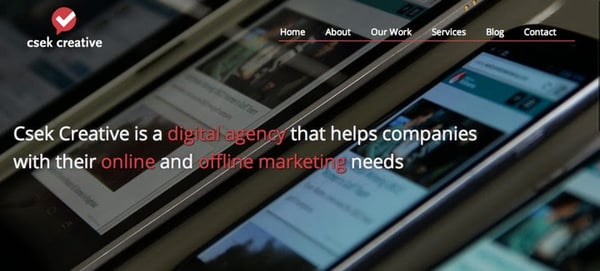
Expecting minor results, this change actually resulted in an 8.2% increase in click-throughs to other pages on the site.
5. HubSpot’s Email vs. In-App Notification Center
Gathering reviews from users isn’t always an easy task. That’s why HubSpot decided to A/B test ways to reach out to customers. The methods tested? In-app notifications versus email.
HubSpot decided to send an in-app notification and email alerting users that they were the champion user of the month and would receive a $10 gift card if they left a review on the Capterra site.
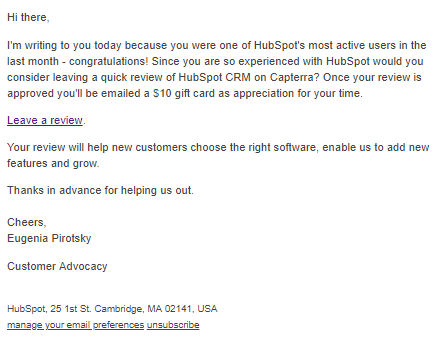
For variant A, HubSpot sent a plain text email to users.
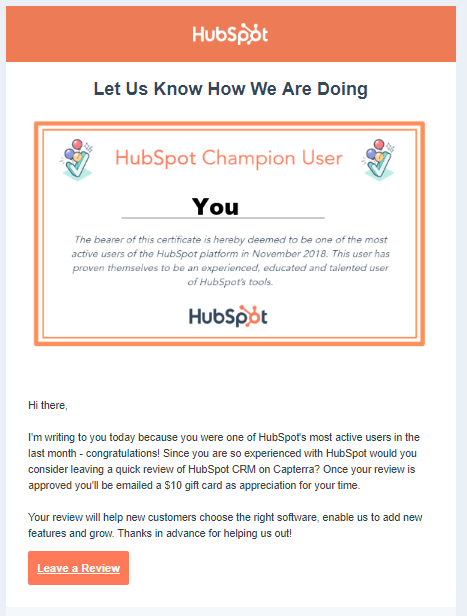
 For variant B, HubSpot used a certification, templated email.
For variant C, HubSpot sent an in-app notification.
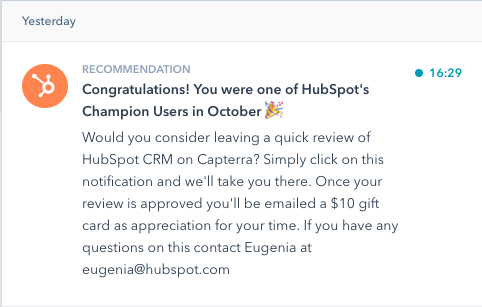
HubSpot found that unlike with emails, in-app notifications are often overlooked or missed by users. The emails outperformed in-app notifications by 1.4x. From both emails, 24.9% of those who opened the email left a review, compared to 10.3% of those who opened the in-app notification.
6. Humana’s Site Banners
Many landing pages showcase large banners at the top of the page. That’s valuable real estate, and if the banner isn’t optimal, it could end up doing more harm than good.
That’s why Humana, a healthcare insurance provider, decided to test its landing page banners.
In the control, Humana had been using a banner that displayed a lot of copy, a weak CTA, and no clear and concise message.

However, for variation B the company decided to simplify the message. This variation ended up receiving 433% more clickthroughs than the control.

Humana didn’t stop there. Once variant B became successful, the company decided to make it the new control and wanted to test the CTA.
With variation C, Humana switched the CTA language to include language that was a harder sell, such as “Shop.” The company decided this would be a good approach because customers signing up for Medicare have a limited window to make a decision.

The change in language resulted in a 192% increase in clickthrough.
7. Unbounce’s Tweet vs. Email CTA
On most landing pages, marketers typically ask users for an email address to deliver their content offers.
However, Unbounce decided to test whether customers would rather give an email address or just tweet about a product.
Both options have pros and cons for the company. Asking for an email address means your company can build a list of potential prospects while asking people to tweet can build viral momentum and increase social exposure.
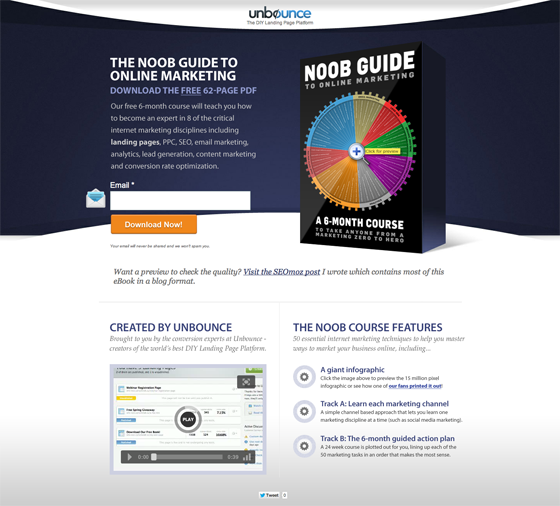
The first landing page in this A/B test asked users to give their email address in exchange for an ebook.
The second landing page asked users to send a tweet in exchange for the ebook.
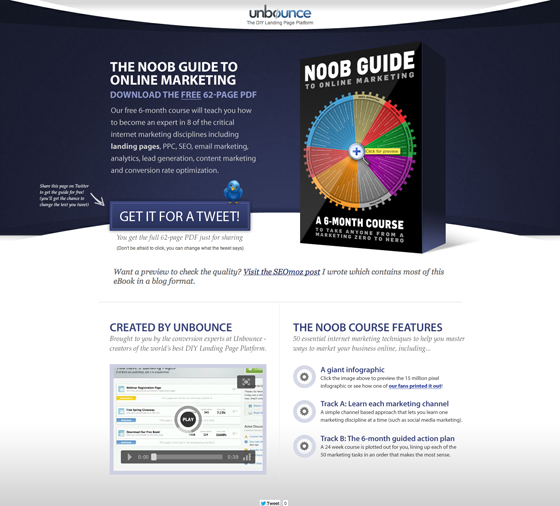
Overall, people far preferred giving out an email address. In the end, the email landing page had a 24% conversion lift.
These companies all saw these amazing results because they started testing. If you want to get the same results, you’ve got to get started, too. For more information, be sure to check out the on-demand webinar “Optimize Your Online Marketing Channels,” hosted by Optimizely and HubSpot.
Editor’s note: This post was originally published in October 2014 and has been updated for comprehensiveness.

Snapchat vs. TikTok: What Marketers Need to Know
Remember Vine? Despite its huge initial growth, the six-second looping video app was discontinued by Twitter in 2016 — only four years after its launch.
Since then, we’ve seen apps like Snapchat and TikTok fill Vine’s void. They both allow users to express their creativity while embracing short mobile videos and have attracted Gen Z and millennial audiences. They also feel more niche and non-traditional than older platforms, like Facebook or Twitter.
Snapchat, which launched in 2011, allows users to create video-based stories about their lives and send video or image-based messages to their friends. Unlike most other apps, Snapchat content expires either immediately or after 24 hours. This platform leads to users creating content that is more lighthearted on uncensored than other more public-facing platforms.
Meanwhile, TikTok, which launched in just 2017, is similar to Vine in that it allows users to create 10 to 60-second looping videos that can be seen on their profiles or can be algorithmically placed on feeds of users with similar interests or demographics.
At the moment, both apps continue to grow. Snapchat has 210 million daily users globally while TikTok recently passed 800 million monthly active users.
Despite each platform’s growth, marketers in the social media realm are wondering, “Are either of these worth the hype? Or will they just become another Vine?”
To learn more about the strength of these two apps, I polled a U.S. audience of over 350 people to find out whether they regularly log into Snapchat, TikTok, or neither.
Given each app’s fast growth, you might expect both apps to have a close number of votes. You might also assume that TikTok is now surpassing Snapchat in general usage because the app has grown so quickly.
However, when I asked participants, “Which platform do you log into most often?”, the results were actually quite surprising.
Which platform do you log into most often?

Data Source: Lucid Software
Shockingly, nearly half of those polled say that they use neither while the biggest chunk of participants logs into Snapchat most.
When looking at these results, it’s important to note that we surveyed only a general U.S. population with no specific age demographics.
While it’s helpful to know that a majority of the general population polled use Snapchat most often, you should keep in mind the growing stats that show how these apps are primarily used by younger age groups in Gen-Z or millennial age groups. Had we polled a global audience, the results might have been different as both apps are also heavily used in Asian and Middle Eastern countries.
While this survey hints that you might not want to put all of your energy into apps like TikTok if you’re targeting a general or older audience, it’s still important to keep these apps on your radar or continue researching them if you want to market to younger generations.
Below, I’ll walk you through the ins and outs of TikTok and Snapchat, the apps’ distinct differences, and the marketing opportunities that each app could provide you now and in the future.
Snapchat vs. TikTok: A Head-to-Head Comparison
User Base
As mentioned above, Snapchat reports having 210 million daily global users, while TikTok has more than 800 million monthly active users.
Both Snapchat and TikTok claim to have mostly Gen-Z and millennial audiences with Gen Z making up the majority of both user bases.
According to 2019 data from Snapchat, 90% of 13 to 24-year-olds use Snapchat while 75% of 13 to 34-year-olds use the platform. Similarly, more than half of TikTok’s global audience is under 34.
However, there is a slight gender variation. While 61% of Snapchat users are female, 56% of TikTok’s global audience is male.
The two platforms also have incredibly global audiences. While Snapchat has a large number of users from Asia and India, TikTok has such a large user base in China that it has a Chinese version of its app called Douyin.
Platform and Features
Snapchat’s format includes three main pages: a Friends page, the camera, and Discover. The Friends page shows a list of the user’s friends where it allows them to open Snaps or see each user’s Story. The other two pages are its camera and Snapchat Discover.
While the camera is pretty straightforward and easy to visualize, here are screenshots of the Friends Page and Discover:

Discover is specifically for brands and publishers to post Stories. While the Friends page allows you to access Stories that have been filmed or created by friends natively in the app, Stories published by brands on the Discover page are often high quality and include graphic designs, edited imagery, animation, or production quality video. Here’s a detailed post about how brands are leveraging Snapchat Discover.
TikTok also has a few central pages. One is a feed that allows people to see videos from their followers or that TikTok algorithms will think a user is interested in.

Aside from the feed, users can click on the Search page to see both a search box and highlights of all the trending topics on TikTok. The other two major pages are the app’s camera and the user’s profile page.

Want to learn more about how to navigate and create posts on each app? Check out our guides on how to use Snapchat and TikTok.
Content on Each Platform
Snapchat is primarily an app for friend-to-friend content which includes text and video-based messages that people post to their daily Stories or send specifically to friends. However, on the Discover area of the platform, marketers can create advertisements and Story editions with videos and graphics to promote their own products or services.
Here’s an example of a Story from Snapchat Discover that highlights a Los Angeles-based manicurist.:

SInce TikTok allows you to instantly publish public videos, the platform is great for both branded and non-branded content. While the content you see on Snapchat is more like that of Instagram Stories, the content you see on TikTok is more like the content you used to see on the app, Vine. Like Vine, the content often presents short, looping skits, mini-music videos, or vlog-styled clips.
Here’s an example of a branded video you might find on TikTok:
Both platforms allow you to film videos with stickers, special effects, and VR filters, but TikTok adds to the video experience by also allowing users to create videos with overlaid music, which you’ll hear in the example above.
Which platform is better for content marketing?
Each platform has its own pros and cons for content marketers. Here’s what you should keep in mind about each.
TikTok
If you’re aiming to target Gen-Z and on an incredibly limited budget, TikTok’s app might be worth experimenting on. Because of the way the app is formatted, users can more easily find your company page, follow you, or search for your content than they can on Snapchat. You can also further optimize videos with hashtags and keywords.
However, if you’re looking for website traffic, or don’t have time to experiment with TikTok, you’ll want to hold off for now. The platform is still highly experimental and only allows certain brands to link their videos to web content.
Snapchat:
On Snapchat, marketers will mainly thrive on the Discover page. While partnering with Snapchat to become an official Discover publisher might be inaccessible at the moment, you can still purchase ads on the platform that similarly allow you to tell users a visual Story about your product. These ads can even get high placement within Discover feeds.
One thing to note is that Snapchat Discover-based ads are much shorter than the Stories of Discover publishers. This means that if you want to create long-form Story content to highlight a product, service, or brand, you might want to try Instagram Stories or consider TikTok experimentation.
Aside from Discover, creating an individual account has not proven to be hugely beneficial for brands because users still have to friend them to see their content. Brands also can’t add links to this content like they do with ads.
However, if you’re looking to create short, bite-sized content for web traffic, conversions, or high placement on a social app that’s popular with Gen Z or millennials, Snapchat’s ad program still might be right for you because although the Stories you’re allotted are shorter, you can still flex your creative muscles to quickly promote a product.
User Behavior
Both apps have one primary goal: to keep users entertained on their respective platforms as long as possible. And, based on TikTok and Snapchat stats, these applications do successfully keep users engaged.
Snapchat users spend an average of 26 minutes daily on the app and users create an average of 2.1 million Snaps per minute. Meanwhile, TikTok users spend an average of 52 minutes on the app daily as 90% of its user base logs in more than once a day.
When it comes to behavior related to products and ads, user bases of TikTok and Snapchat also vary.
Although Snapchat is an app that encourages connecting with friends, more and more users are beginning to use it as a part of their shopping process.
According to a 2019 Snapchat report, Snapchat users involve Snapchat in their buyer’s journey 35% more than Twitter, 46% more than Instagram, and 58% more than Facebook. The report also claims that Snapchat ads provide a 7x return on in-store sales. This means that — although Snapchat audiences are highly connected to the internet and mobile devices — many of them will actually enter the advertiser’s physical store to purchase a product.
When it comes to TikTok, there aren’t many public stats related to advertising engagement just yet. However, brands have gone viral on the app, especially when creating hashtag challenges related to new product offerings. One example of this was Guess’ #InMyDemin challenge. During the challenge, people posted videos of themselves in Guess’ new denim clothing line. These TikTok videos then reportedly racked up a total of 3.8 million views.
As TikTok aims to gain more advertisers, you can probably expect to see more information coming soon about how users interact with advertisers. In fact, much of the data we have from TikTok originates from a recently-leaked pitch deck that the app company created for advertisers.
Which user base is better for marketers?
While Gen Z is flocking to TikTok, there’s a broader age group of both Gen Z and millennials on Snapchat.
When looking at the poll in the intro, it’s easy to tell that the general population logs into Snapchat more often than TikTok. Although users spend more time on TikTok, they also use Snapchat as a utility app to connect with friends and log into it multiple times per day. This might mean that people see value in the app, other than entertainment, which is the pure mission of TikTok’s platform. This value from users might result in it being more stable and successful in the long-run, while TikTok could still just be a viral trend.
Marketing Opportunities
Both Snapchat and TikTok are trying to make their applications more enticing to advertisers. The two apps currently have offerings that cater more to bigger brands due to their pricing and requirements, however, it seems that they each have unique offerings that can still be used by smaller brands. Here’s a breakdown of each.
Snapchat:
At this very moment, there are only two marketing options for brands on Snapchat and they’re both more accessible to mid-sized or large companies than smaller businesses. The first, and seemingly most profitable, is advertising. Snapchat advertising has been seen to provide ROI related to both in-store and online store purchases.
Snapchat ads also allow you to present your ads in Snapchat’s Discover, similarly to branded publishers. However, unlike Snapchat Discover publishers, you can link ads or paid mini-Stories to your website, which could be beneficial to your traffic or online conversions.
Posting Stories as a publisher on Snapchat Discover is the other option. However, to become a publisher, you need to have a specific contract with Snapchat rather than simply signing up online. You also need to create Story-styled, original content that really engages with users. Discover publishing is also meant to keep users in the app, meaning that you won’t be able to place links into this type of content.
To learn more about how brands are leveraging both ads and Stories on Snapchat Discover, check out this blog post for a detailed list of examples and takeaways.
TikTok:
TikTok only launched in 2017, but it’s already expanding its advertising options. They’re also taking steps to make content creation in the app more brand-friendly. Most recently, it even allowed some accounts on the platform to start placing links to ecommerce sites into their videos.
According to recent reports, however, advertising on TikTok is incredibly expensive and requires a large budget. Some publications have even referred to it as “the wild west.” So, this might not be incredibly accessible to smaller brands.
However, brands on TikTok can still create content, grow their audiences, get their accounts verified, and begin placing links in their content or profile page’s bio area. This means that TikTok shows slightly more potential for branded content than Snapchat.
Which is more brand-friendly?
At the moment, marketers interested in branded content should consider looking into or experimenting with TikTok. Creating this content is free and because the app is so new, there are fewer norms related to what content is engaging and what isn’t. This means it’s a great place to experiment and test the waters, especially if you want to engage with teens or young adults.
Although Snapchat is still lacking when it comes to free content creation marketing opportunities for smaller brands, the company has been adding more advertising options and now claims to have offerings for “every business.” And, according to Digiday, a growing number of U.K.-based brands are now putting more of their social media advertising spend into Snapchat.
And, as mentioned above, Snapchat ads allow you to link to your website or online store, while only a few content creators on TikTok are permitted to place links in their content. This alone means that Snapchat ads are better than general TikTok strategies if you want your marketing efforts to result in traffic or conversions.
Weighing Snapchat and TikTok
When comparing Snapchat and TikTok specifically, Snapchat is still more stable and more heavily used by general populations than TikTok. Snapchat ads also have a track record of providing ROI and the company is continuing to increase ad offerings to make the app more brand-friendly.
Although Snapchat and social apps like Instagram might be better suited for your strategy right now, don’t disregard TikTok. This app’s massive growth and move to be more brand-friendly shows that it’s positioning itself to be more than just a viral trend.
Additionally, although Snapchat is more mature, TikTok’s nascency makes it a great place for side experiments — especially when they target Gen Z. Not only is content creation free on the app, but the platform is so new that nearly everything is experimental. This means that there aren’t many norms saying what can or can’t be engaging content.
If your goal is to grow traffic and conversions from both Gen-Z and millennial audiences with one of the two apps, you’ll want to leverage Snapchat ads over TikTok. However, you should still keep both on your radar because each app is growing and can provide insights on trends related to younger audiences.
If you’re more interested in marketing to professionals or those in B2B industries, table these platforms and focus on the more traditional social media networks.
To learn more about TikTok, check out this piece which details the app’s history and growing user base. If you’re still interested in learning about Snapchat, here’s a guide on how to use the platform.

How to Gain Visibility When You Work Remotely, According to HubSpot Employees
When you land your first full-time remote job, you might be excited about the role’s flexibility, ability to work from home, and how it enables you to hold a position at a great company even when you aren’t close to its headquarters.
However, remote work comes with its own challenges. As a career-minded professional, you might also have fears related to being isolated or unseen. For example, you might ask yourself, “Am I missing something important?”, “Do people think I’m actually working?” or “Is it even possible to move up the ladder in a remote position?”
If you’re worried about your visibility, you’re not alone. A lack of visibility is a common hurdle that those in the remote workforce worry about. In fact, a 2018 survey from Indeed found that 37% of employees at companies that allow remote work believe that this work style hinders visibility.
At HubSpot, we’re pretty familiar with remote work culture: its benefits, and its pain points. In fact, we have a fleet of more than 200 remote HubSpotters who vary from entry-level to established leadership roles.
And while our company hosts a number of virtual events, annual in-person gatherings, and regular meetings to ensure that remote employees can make themselves known, not all companies have helpful remote work policies.
Regardless of whether your company has remote work policies or not, visibility is still crucial to your success.
So, how do you get yourself seen by stakeholders when you’re always behind a computer? To help you become more visible at your company, we talked to some of HubSpot’s established remote employees to get their most valuable tips.
How to Gain Visibility as a Remote Employee
1. Participate in interesting groups or projects outside of your daily role.
While helping with a project or joining a group that doesn’t directly impact your job might seem stressful at first, it can actually be fun and help you bond with colleagues you wouldn’t know otherwise.
“Making an effort to know someone, finding opportunities to participate, and being available to others has helped increase my visibility at HubSpot,” says Tina Aita, a senior customer support specialist.
Aita adds, “Volunteering as an editor and contributor for the User blog, creating internal company posts, and working with our technical writers to improve our knowledge base articles has allowed me to connect with other departments and have some one-on-one time with those in other roles such as product experts and managers.”
2. Schedule one-on-one video calls with colleagues.
When remote, you can’t get to know colleagues who sit next to you like you can in an office. This is why many of the remote employees I spoke to encourage setting up a one-on-one video call or a virtual lunch to get to connect with their coworkers.
“During my first few weeks at HubSpot as a net-new remote employee, I invited most team members to virtual lunch,” says Kate Reed, a senior customer success manager from New Orleans.
“I took an hour to have a one-on-one lunch and chat about nearly anything but work with each colleague,” Reed shares. “Those are the people I feel most comfortable approaching — and some of us have even set up regular chats.”
Even as an established employee, it still helps to schedule meetings like these regularly to keep up with or build a stronger working relationship with your colleagues.
“I schedule at least three video calls with different teammates each week that I used as times for informal relationship building,” says Meghan Castillo, a learning experience designer based in Virginia. “This allows me to catch up on happenings in their lives and the office, as well as build stronger connections and familiarity to gain access to information faster.”
Scheduling regular check-ins is also a strategy of the HubSpot Blog’s Managing Editor, Meg Prater. On top of booking monthly one-on-ones with colleagues she doesn’t often see in daily meetings, Prater says. “I also grab virtual coffees and lunches with colleagues.”
“I’m an introvert by nature, so none of this comes easily to me, but I also try to join in on groups and cross-team projects when they come my way,” Prater explains. “All of these small actions make me more visible to my colleagues and a better resource for them as well.”
3. Publish, share, and discuss insights from your role.
If your company has a blog or Wiki that’s specifically for employees to post on, use it to write about your ongoing projects, insights, or achievements. Alternatively, consider writing a blog post on your own site and then sharing posts with your colleagues.
Writing about what you’ve learned in your role will allow colleagues to learn more about you, your role, and what you’ve accomplished. Fellow employees might also be interested in reaching out to you for questions about your insights or to work with you on a project.
At HubSpot, we haven an internal Wiki where employees can post insights and lessons. One remote employee who’s utilized it throughout his time at HubSpot is Blake Reichenbach, a customer support specialist based in Kentucky.
“As soon as I was comfortable in my role, I made it a priority to start building my visibility within the company. I approached it by being attentive to problems that I noticed and then applying my strengths to finding solutions to those problems,” says Reichenbach. “As a writer, that took the form of writing posts for our Wiki, contributing to the Marketing and User blogs, and using my own website to test and apply inbound best practices.”
“By the time I made my first trip to the office, several colleagues remarked about being glad to put a face to my name since they recognized me from Slack, the blogs, and/or the Wiki,” says Reichenbach.
When it comes to writing a good Wiki or internal blog, Reichenbach gave a few tips.
“A good Wiki is going to address common pain points — such as certain issues you run into as a customer support rep,” Reichenbach says. “It provides actionable insights that are personable and easy to digest.”
While you can use Wikis to highlight accomplishments, Reichenbach explains that these posts aren’t just about “shining light on your own successes,” Instead, “They should provide value for your colleagues, answer questions, solve problems, and demonstrate expertise in an engaging way.”
Like Reichenbach, Alex Birkett, a senior marketing manager based in Texas, also says you should “get used to” writing as a remote employee.
“Almost all of your ‘personal brand’ within the company will be built on words. Write internal company Wiki posts, market your ideas on your own blog, and maintain an active Twitter.” Birkett advises.
4. Communicate with colleagues using the company’s direct messenger app.
Aside from publishing content about your thoughts, accomplishments, and insights, Birkett also suggests participating in discussions within your company’s direct messaging system, such as Slack or Skype.
“Both formal work channels and informal or recreational channels can help you gain visibility,” Birkett adds.
Chloe Christiansen, an Inbound success coach, also says she embraces HubSpot’s messaging system.
“I stay connected to teammates by engaging in our team’s channels,” Christiansen says, adding that she discusses formal work topics as well as more recreational topics in these group discussions. “I end photos of my home-base in Oregon, my dog Cabela, and I contribute to the conversations everyone is having throughout the day.”
“This ensures I am supporting my teammates and that I also have a presence in-office, even though I am not physically there,” Christiansen explains.
At HubSpot, internal messaging and remote work is so prominent that some teams even hold daily meetings via direct messaging.
“We do a ‘yesterday/today’ standup each day where everyone can talk about their daily priorities in a couple of sentences,” says Christina Kokoros, a senior helpdesk technician.
“The digital standup helps me to feel more connected to what everyone is doing and helps my team know what I’m up to,” Kokoros explains. “One of the hardest hurdles to get over when going from in-office to remote was the feeling of having to prove that I’m not just home hanging out. So, standups definitely help with that.”
Similarly to Birkett, Kokoros says she also participates in discussion channels that are informal, recreational, or note directly related to work.
“We have a spot to interact with each other as humans, share stories and jokes and all that,” she says.
Even when your colleagues know what your day-to-day role is like, having informal chats with them, like Kokoros, can help you develop a stronger bond or relationship with them.
5. Communicate wins and failures to your team.
Aside from writing about your role experiences in Wikis, as noted in step three, you’ll still want to make sure your manager, team, and colleagues know what you’ve been up to. When you aren’t visible at a company, both big and small accomplishments might appear less obvious, or even unseen. Additionally, your manager might not realize how much you’re actually learning from failures you run into.
To make sure that you, your team, and your manager are all on the same page, regularly fill them in on your progress and what you’ve been up to.
“Since my manager and your team aren’t sitting beside me, it’s important that I communicate both wins and failures. This helps us build a relationship while making sure my work isn’t flying under the radar, ” says Reed.
“For example, I forward wins to my manager and mentor when they come in from customers. It makes their day too,” Reed adds. “Conversely, I share the failures too by bringing them to my one-on-ones so I can show my manager where I need to grow.”
6. Visit the office in person.
If you get the opportunity to visit your company’s headquarters, remote HubSpotters suggest that you take advantage of it. This visit will give you a chance to develop a literal in-person connection with your colleagues.
“My manager enabled me to revisit the Cambridge office around the 10-month mark of my employment, and I used that trip to get coffee and have some face time with folks on the marketing team, blog teams, Academy team, as well as support leadership,” Reichenbach explains.
“I used these conversations as an opportunity to introduce myself, get to know more about the work that these teams were doing that may not have been very visible from the vantage point of the customer support org, and outline my own interests and goals,” Reichenbach adds. “By extension, I was able to expand my ’employee brand’ into teams that I didn’t directly work with on a daily basis.”
“There are several times per year that I come to the office for events or major meetings. When I’m there, I always make it a point to spend as little time on my laptop as possible and as much time getting coffee, lunch, and drinks with people as I can,” Birkett similarly adds.
Allie Decker, a content manager for the HubSpot Blog, says she visits the Cambridge headquarters quarterly. While she uses most of the time to schedule meetings with colleagues, she also blocks time for bonding away from the office.
“I do my best to spend time outside of work with coworkers — like at happy hours and lunches,” Decker explains. “I also make it a point to never miss any big, company-wide meetings, events, or celebrations.”
7. Start or take over a company-wide program.
Aside from regularly visiting the HubSpot offices in Cambridge, Decker has also taken over a company-wide internal event that requires months of planning and working with multiple company stakeholders.
“The program I manage is a quarterly, company-wide event that requires me to work with almost every department in the company. It also gets my name and face in front of everyone who attends,” Decker explains.
“I would encourage every remote worker to seek out those opportunities, even if they don’t perfectly match up with their day-to-day job,” Decker advises. “Running the program is intimidating and definitely much different than my typical remote projects, but it’s a good challenge and helps me become known and trusted.”
While Decker took over a major company program within HubSpot, Reed also suggests volunteering or working on highly-visible projects.
“Find a hole in a process? Raise a flag and offer to figure out a way to fill it,” says Reed. “This is also a great way to make an impact on your team, even when you are new to a role or new to working remote.”
8. Participate in discussions during team video calls.
Aside from making extra efforts like participating in groups, scheduling one-on-ones, and writing Wikis, don’t forget to leverage the team meetings you already have scheduled as a way to gain visibility.
Emily Tong, a revenue operations specialist based in Indiana, says, “I try to make at least one connection or ask one question during any given meeting.”
“If people don’t introduce themselves during the meeting and everyone else is sitting in a meeting room, I may ask them who is speaking or ask them to adjust the camera — this calls attention to remote accessibility and generally makes it easier for me to communicate,” Tong adds.
If you’re able to host or present something at a team meeting, Aita and Castillo have some additional tips on how to gain valuable visibility as a leader.
“I aim to engage colleagues in my weekly team meetings by hosting a topic of discussion or providing my own insight into the conversation,” says Aita. “This gives me the confidence I need to push myself out of my comfort zone, share my ideas, and converse with others.”
When running team meetings, Castillo similarly adds, “I try to set the tone by beginning with a comment from each person related to something fun happening in their lives outside of work.”
Navigating Remote Work
Gaining visibility can be challenging, but — as the HubSpotters featured in this post have learned — it can also be incredibly beneficial to your success.
“I think losing visibility, and therefore career growth opportunities, is probably one of the biggest fears of those considering going remote,” says Birkett. “However, you can gain visibility when remote, too. It just takes more planning, a conscious effort, and probably a company that truly embraces remote culture.”
If you’re a remote employee, take a note from Birkett and the HubSpot workforce by connecting with colleagues whenever possible. To learn more about how to be a successful remote employee, check out this piece with more tips from remote HubSpotters.
