
How HubSpot Uses Influencer Marketing to Build Authentic Relationships and Reach New Audiences
What do you picture when you think about influencer marketing? At first thought, I picture a lifestyle blogger holding a popular tea, makeup, or activewear brand in an Instagram post. (Perhaps I need to mix up my Instagram following … 🤔)
However influencer marketing looks to you, it has taken the marketing industry by storm. Almost 50% of customers say they follow influencers’ product or service recommendations, and over 70% of businesses say the quality of traffic from influencers is better than from other sources.
Why is influencer marketing effective? Because it taps into word-of-mouth marketing and social proof, two of the strongest influencers (literally) of shopping behavior and brand trust. Today, customers rely on the recommendations of friends, family, and people they admire more than the brands or companies themselves.
Regardless of how influencer marketing works, it doesn’t always look like what you scroll past on Instagram or YouTube. In fact, here at HubSpot, we’ve adopted a pretty unique approach to influencer marketing, and it’s yielded some amazing results — and relationships.
How HubSpot Uses Influencer Marketing
I recently talked to Carolyn Kim, Partnerships Manager at HubSpot. She told me more about how HubSpot utilizes influencer marketing and how she’s working to set the company apart from other brands.
“Influencer work isn’t about identifying someone who’s popular or famous or maybe has the same audience,” Kim shares. “It’s about building real relationships. That’s what makes sense for building a corporate culture and building partnerships between companies.”
From her point-of-view, humans and relationships are what every company has in common, regardless of what it sells or who its customers are.
“Humans are what and who exist between companies,” Kim says. “This approach to influencer marketing works well for executives and founders — building relationships that are all about strategizing, high-fiving, and believing that we all have the same mission to grow and provide value to our customers.”
An important part of Kim’s job is figuring out how to activate these relationships. The answer is simple: “Conversations are what really matters … the ability to speak honestly and transparently to the world around you,” Kim says. She’s been working on a handful of exciting projects that connect HubSpot leaders to leaders with similar values and audiences.
Another way that HubSpot has activated these relationships is by publishing thought leadership content developed by external influencers. These influencers are typically directors and entrepreneurs from leading companies like HubSpot.
How HubSpot Redefines Influencer Marketing
I also talked to Kim about what influencer marketing isn’t. “The word influencer — like networking — need to be redefined and better used,” she commented. “Influencer marketing works because you have relationships. No one became popular because they had relationships with nobody. They were loved and understood by many, and that’s what gives them influence.”
Influencer marketing is no longer simply working with folks in an effort to name-drop or be associated with certain individuals. “Customers can smell that stuff,” Kim explained. “It’s insincere and truly only picked up as authentic by those who are inauthentic.”
To attract customers with HEART (HubSpot’s Culture Code), HubSpot only works with promoters, ambassadors, and connectors who display HEART. “Traditional influencers and promoters tend to ask, ‘What do I get out of this?’ Kim said. “They don’t add value; they take it away.”
Instead of paying someone to influence your customer base, companies should support each other in an effort to influence each other’s customers. “Partnership is simply the mindset that we have things in common, and stand to only gain from supporting one another,” she shared.
So, how can other companies get started with this approach to influencer marketing? Kim shared a bit of advice with me.
Before anything, know who you are as a person, brand, and/or group. Chat with your leadership team to better understand what you stand for as a company and what goals for building influencer connections.
With this information, you’ll be able to identify other like-minded people with whom you can connect and build relationships. Whether you make one-on-one connections or hold dinner parties as Kim does, the key is to build genuine, authentic associations.
“When you make this genuine effort, you learn to trust each other’s interests and intentions, and you’re able to build the same goals that provide true value to your customers,” Kim explained.
Influencer marketing is all about talking to people with a purpose. Decide what your purpose is, and start connecting with like-minded people. Both your company and your customers will benefit greatly.

The Plain-English Guide to Semantic Search in 2020
Like many kids, when I was younger, I used to spend Christmas Eve eagerly awaiting the morning when I’d run downstairs and see a mountain of presents to unwrap.
I imagine search engine optimizers feel the same way when the news hits of a new Google algorithm update.
While Google makes updates every day — an average of almost 9 per day — most of these are minor updates. Occasionally, Google will roll out a major update like RankBrain or Hummingbird.
One feature that Google has been working on in its algorithm updates is the use of semantic search, which is how Google contextually understands a user’s question.
As a marketer, understanding these updates is important in order to rank higher on search engines. New updates usually mean you’ll need to come up with new strategies for your blog and messaging.
Below, we’ll review what semantic search is, how it works, and how it impacts you as a digital marketer.
For example, this is how search engines know if you’re looking up Apple the company as opposed to Apple the fruit. It creates a better user experience and weeds out low-quality content using black hat SEO methods, like keyword stuffing.
So, how does it work?
With LSI, the search engine will analyze how data sets relate to each other. Essentially, search engines match the concept and synonyms and interpret natural language to understand the context of a search and deliver personalized results.
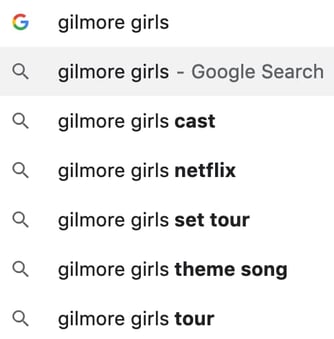
For instance, in the example below, Google understands what the related searches are for “Gilmore Girls.” It knows that if I’m searching for “Gilmore Girls,” I might be interested in looking up the cast, the new Netflix series, or the theme song. This is semantic search in action.
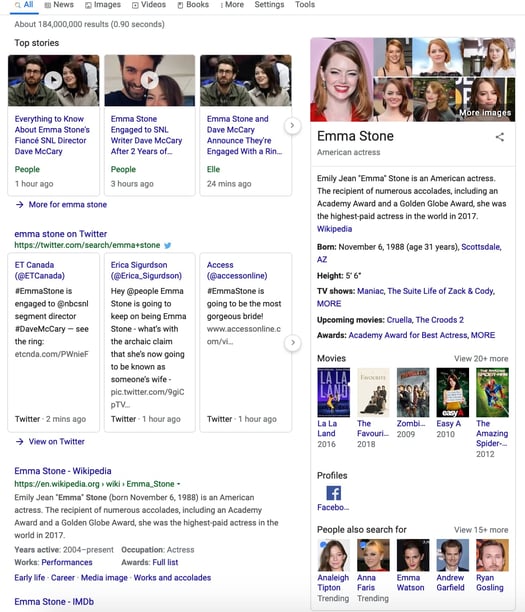
Search engines will analyze related topics including people, places, things, concepts, or ideas. In the example below, when I searched for “Emma Stone,” it pulled up related news stories, her social media, a short biography, movies she’s done, and previous castmates. Anything that could provide value or be of use to me is readily available on the first results page.
How Does Semantic Search Impact SEO?
Semantic search impacts anyone working in search engine optimization. For example, your SEO strategies will be molded by this algorithm.
To see if a piece is optimized for semantic search, you’ll want to answer questions like:
- Is your copy optimized for voice search?
- Is it conversational?
- Do you include synonyms of the topic?
- Does your copy expand on related topics that might be of interest to the user?
- Does your copy answer your audience’s questions directly?
These become important questions because search engines are looking for these elements to decide where you rank on the results page.
So, how can you optimize your copy to rank higher on search engines?
1. Understand user intent.
When you do your keyword research, try to understand why a user is searching for something. What are they really asking? Before you write any content, you need to understand what your user really wants to know.
2. Provide value.
Ultimately, your content should provide value for your audience. You can forget about all the on-page and off-page SEO tactics, if your content isn’t valuable. It won’t mean anything if people don’t want to read it. With new algorithms and updates, Google can tell if your content provides value.
3. Answer user questions directly.
Once you’ve brainstormed a topic to write about and done your keyword research, look up commonly asked questions that are associated with your topic. Then, answer those questions succinctly and directly. This will help you show up in those featured snippet boxes. Plus, answering your reader’s questions is valuable to them and takes user intent into consideration.
4. Use colloquial language.
When you’re writing a blog post, be sure to use natural language and include synonyms and related content. This helps users understand your content and makes it easy to read. Additionally, natural language is an excellent way to optimize for voice search. With the rise of voice search, people are asking long-form questions in a conversational manner. Plus, this will help avoid keyword stuffing.
5. Build credibility and authority.
Lastly, you always want to build your credibility and authority. The higher your authority, the higher you’ll rank. To build credibility, work on creating a brand, writing blog posts, being active on social media, and providing value to your audience.
Overall, semantic search helps search engines provide personalized search results and a better user experience. Want to learn more about SEO? Click here for our ultimate guide.

How to Successfully Migrate a Website Without Harming SEO [Checklist]
There’s nothing more frustrating than going to a website and trying to navigate an outdated webpage. Actually, one thing might be worse: the dreaded 404 error status code. These are warning signs that a website needs to be migrated or was migrated incorrectly.
A website migration gives your website a polished look and involves the work of moving links and content from an old website or markups to a new one. The big benefit is increasing SEO.
Wondering if a website migration is right for you?
Website migrations are useful if you’ve found that your site has areas that are in need of a major update in the SEO department. For instance, if visitors have trouble with navigation and can’t find it on search engines, then it may be time to look into migrating your website.
In a nutshell, if you migrate a website successfully, you’re likely to experience an increase in traffic, happier customer experiences, and a cleaner website.
What this means is that your pages of impact should be cleaner, free of status code errors, and have minimal redirects. Website migrations can be done professionally or on your own. If you’re thinking of getting a migration done professionally, HubSpot offers migration services, as well as other CRMs or freelance SEO specialists.
If you’re considering a website migration, keep in mind that you must leave yourself time to prepare and execute. Migration specialists usually take about three weeks, so be sure to plan accordingly.
Another preparation tip is to crawl your website. This ensures that you have a full list of URLs to refer to in case something gets lost in translation.
Now, let’s get into the details of migrating a website.
Website Migration Checklist
When preparing for a website migration, HubSpot Migration Specialist Katelyn Eklund recommends to focus on these main steps:
1. Maintain URL structures on webpages.
2. Implement redirects for changing URLs.
3. Make sure pages and descriptions are the same.
4. Keep the same HTML markups.
5. Set up forwarding.
We’ll explain what these steps mean below. For a deeper dive into these steps, download our checklist.
1. Maintain URL structures on webpages.
When updating URLs, the structure of every single URL should be in the same format. For instance, the URL should have the same hypertext (HTTP/HTTPS), domain (.com, .gov, .net) and paths (content after backslash).
To illustrate, if I were to map the URLs for HubSpot’s marketing blog, they should look like this:
blog.hubspot.com/marketing/post_name
Instead of something like this:
hubspot.com/blog/marketing/post_name
This helps with SEO optimization. To do this, you’ll need to update and create a few things. The annotations in the HTML and internal links should be updated and saved in your sitemap. For more information on how to update URLs, check out this article.
2. Implement redirects for changing URLs.
Improper redirects would mean a big hit for your SEO. They tell search engines and visitors of your website that a page has changed, whether it’s been removed or no longer exists. They also tell search engines what new pages have replaced old ones.
Redirects can be done manually by mapping every URL of the old site into a URL on a new site. But if you have tons of pages, that probably isn’t in the cards or you, so to save time, look for patterns in your URLs that can be redirected in groups or sections.
Existing redirects should be migrated as well. Try to keep as many existing redirects as possible to lessen the workload, and make sure your URLs are mapped before you test redirects, to make sure you have backups if you lose them.
3. Make sure pages and descriptions are the same.
Recall that website migrations help with website organization. As such, pages should be uniform and contain the same information as they did before. To illustrate, if the HubSpot Marketing Blog underwent a site migration, the content and descriptions for each blog post would be the same, just look different.
You can always update or rewrite the information, but this is the step where you make sure that what needs to be there for pages are still there. This process is continued in the next step.
4. Keep the same HTML markups.
Again, because one of the main purposes of website migration is to emerge with an updated, organized, and optimized website, headings need to be maintained as well. This includes other HTML markups.
So if you have pages with H1s, H2s, H3s, and so on, they should have the same tags within your website. Similarly, don’t forget the alt text on images, because they tell search engines what your photo is, meaning your pages can rank higher.
5. Set up forwarding.
Another essential step is to implement domain forwarding. This means you need to make sure the root domain forwards to the subdomain. For a visual explanation:
A root domain looks like this: blog.hubspot.com.
A subdomain looks like this: www.blog.hubspot.com.
This step includes implementing the forwarding in website pages, so when visitors want to go to your site, they can type in the root domain and immediately get brought to the subdomain website.
Website migration can be a lengthy process, but it’s not impossible. With preparation, you can have a migration that’s successful and raises your SEO. And if you’re worried about missing a step, our full checklist on steps to take can be downloaded here.

What Do Contractors Own? A Guide to Freelance Copyright
When I was a young teenager, I used to write songs with my best friend.
We knew that one day we’d be famous songwriters (because, of course we would), and we didn’t want to fight about who owned the songs when we were famous.
So, at 13 years old, my friend and I looked up copyright laws to see what our rights were … I’m not kidding.
Although a bit upset that I’m not a famous songwriter, learning about copyright laws turned out to be useful in my writing career.
For any freelancer, or company looking to hire a freelancer, it’s important to understand federal and state copyright laws that impact your ability to use work you’ve created or paid for.
Here, we’ll review the basic copyright laws regarding freelance work.
Freelance Copyright
As a freelancer, you own the copyright to most of your work unless you’ve signed a contract specifically stating that you’re transferring ownership to the client. The default copyright owner of any work you produce is you.
Additionally, some states have other laws regarding intellectual property that protect freelancers. For instance, New York passed the Freelance Isn’t Free Act that requires companies to use a written contract for higher paying freelance jobs.
If you’re working as a freelancer, you might consider doing research in your state to see if there are any other copyright laws protecting your rights.
So, when wouldn’t you own the copyright to your work?
If you’re doing “work for hire” jobs and you’ve signed a contract to that effect.
Under the U.S. Copyright Act of 1976, if you sign a “work for hire” contract, the client, or person paying for the work, owns the copyright.
“Work for hire” is defined as:
- A work prepared by an employee within the scope of his/her employment
- A work that is specially ordered or commissioned for use as:
- A contribution to a collective work
- A compilation
- A translation
- A part of a motion picture or audiovisual work
- A supplementary work
- Instructional text
- A test or answer material for a test
- An atlas
However, even if the work you do falls under these categories, you’d still need a written agreement that said you produced “work for hire.” If you’re an employee within an organization, then a “work for hire” agreement isn’t needed because it’s assumed the employee has already agreed to this by accepting the job.
Let’s say that you produce “work for hire,” but you still want credit for the work. In that case, you’d need to specifically ask for credit and have it written in your contract. Otherwise, the client isn’t obligated to give you credit.
But what if the work you produce isn’t under “work for hire”?
If work that you do isn’t one of the categories of “work for hire,” you can still transfer copyright ownership. You’ll need to have a valid written agreement using language that transfers copyright to the client before the client can use your work.
Without a written agreement, it’s assumed that the copyright for the work produced belongs to the author and that they’ve merely licensed use of that work to the client for a limited time and purpose.
If the client starts to use that work for other purposes, the author can successfully claim infringement of their copyright. However, even if the client uses the work as intended, if there isn’t any written agreement, the author can publish and sell it elsewhere as well.
One important caveat in freelance copyright laws is that ideas are not protected. So, as a freelancer, if you go into a meeting discussing an idea for a client’s website copy, they don’t have to hire you and they can still use your ideas.
This is why freelancers need to sign a contract before producing work for anyone. At a minimum, these contracts should detail the work you’ll perform/produce, who owns the copyright, the pay for the work, and the date you’ll get paid.
Copyright protections for “work for hire” last 95 years from the first year of publication or 120 years from the year of creation. Copyrights for an author last for the life of the author plus 70 years.
While these are the basic rules of copyright, if you haven’t registered your copyright with the U.S. Copyright Office, then you might not be able to enforce these rights in a court of law. Without registration, you don’t have the means of filing a lawsuit.
Who Owns Website Content?
If you’ve hired a freelancer to write content for your website and you haven’t signed any written agreement, then they might own the copyright for your website content.
However, if you want to own the website copy produced by a freelancer, all you need to do is sign either a “work for hire” agreement or a transfer of copyright ownership agreement. These agreements will transfer copyright ownership to you.
But, be aware that a freelancer doesn’t have to transfer the copyright to you. If they don’t, they retain copyright ownership. It’s also possible to sign a license agreement, which gives you license to use their work for a limited time and purpose.
Overall, many freelancers choose not to sign “work for hire” or copyright transfer agreements. As a freelancer, you need to decide what works you want to retain copyright over and what works you don’t. When producing any work, the freelancer and client need to be on the same page, so it’s always important to sign a contract or agreement of some kind.
This article does not constitute legal advice. You should seek your own legal advice and copyright counsel to ensure you follow the correct process.

30 Reddit Stats and Facts to Know in 2020
Since it launched in 2005, Reddit has remained a mystery to many marketers.
The user-influenced platform, which embraces discussion and community engagement, rather than content creation or branding is vastly different from other networks — like Facebook or Instagram — where brands naturally find their niche.
But, in the past few years, Reddit’s made attempts to gain more attention from brands. Aside from introducing a number of advertising offerings, Reddit’s also launched features such as video streaming and video hosting, which have enabled the platform to evolve from the text-based format it’s been known for.
While Reddit’s user-oriented platform might be too difficult for small to medium-sized business marketers right now, it’s still evolving. The platform is also thriving with Gen-Z and millennial audiences that might be using that platform to make purchasing decisions later on in life.
At the moment, we don’t encourage you to put all your money into Reddit ads or a community manager to build subreddits just yet. However, it’s still smart to keep an eye on platforms that could offer solid marketing opportunities in the future.
To keep you informed and help you make strategic social media decisions, here’s a list of 30 helpful and intriguing Reddit stats related to the company, its user base, and what it takes to engage audiences on the platform.
General Stats
- Reddit surpassed 330 million monthly active users in 2017. (Reddit)
- The site receives more than 21 billion monthly screen views. (Reddit)
- 6% of online adults are Reddit users (Pew Research Center)
- Reddit was founded in 2005 and acquired by Condé Nast in 2006. (Crunchbase)
- While Reddit was reportedly sold for between $10-$20 million, the company’s valuation grew to 1.8 billion after 2017 funding rounds. (CNBC)
Demographics
- Gen Z makes up 26% of Reddit Users. (Reddit Blog)
- Reddit is predominantly male. 15% of male internet users between 18 to 29 say they use Reddit. (Pew Research Center)
- Only 10% of female internet users under 50 say they use Reddit. (Pew Research Center)
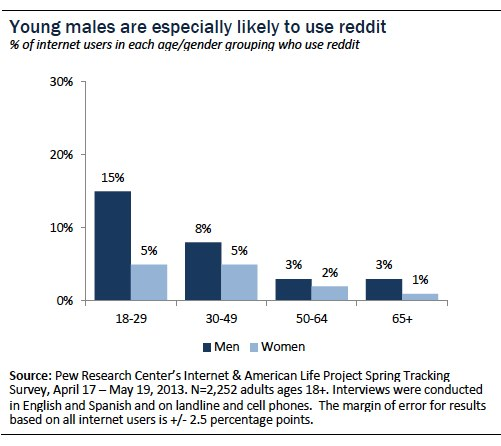
Source: Pew Research Center
- 51% of Reddit users are from the U.S. (Search Engine Journal)
- 42% have a college degree (Pew Research Center)
- 35% make $75,000 or more a year. (Pew Research Center)
- Over 70% of users speak English. (Search Engine Journal)
- Reddit is used more by urban and suburban residents while only 2% of internet users in rural areas use the platform. (Pew Research Center)
User Behavior
- 44% of Reddit’s monthly active users access the site via mobile app or mobile browser. (Search Engine Journal)
- Reddit gets more than 46.7 million daily searches. (Search Engine Journal)
- Users submit more than 10 million posts monthly. (Search Engine Journal)
- The discussion-based platform has more than 130,000 active communities. (Reddit)
- 51% of Gen-Z users say they’re attracted to the platform’s user-driven features, such as subreddits, comments, and upvotes. (Reddit Blog)
- 82% of Gen-Z people say they trust Reddit when it comes to learning more about products. (Reddit Blog)
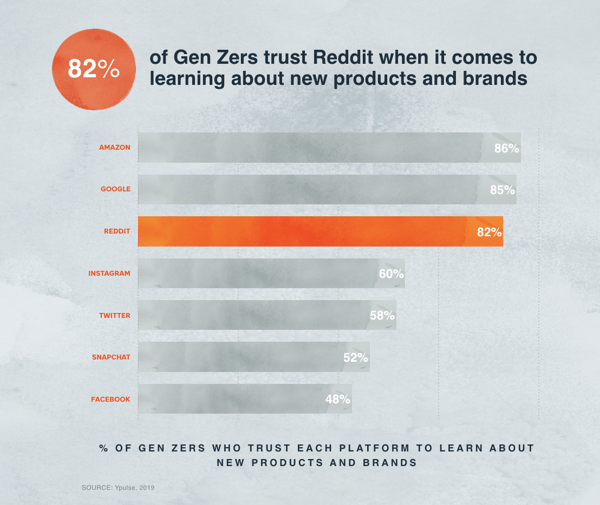
Source: Reddit Blog
Videos on Reddit
- Within a year of launching video hosting in 2017, Reddit’s native video viewers climbed to 1.4 billion monthly. (Reddit Blog)
- In 2018, video viewing time grew by 38%: Total users went from viewing 400,000 hours of natively hosted video every day to more than 13 million hours of video monthly. (Reddit Blog)
- 50% of Reddit audiences under 34 watch short, “snack-sized” videos more often than longer-form content. (Reddit Blog)
- In 2018, three of Reddit’s five highest-performing posts included videos while one included a photo. (Reddit Blog)
Engaging Content and Hot Topics
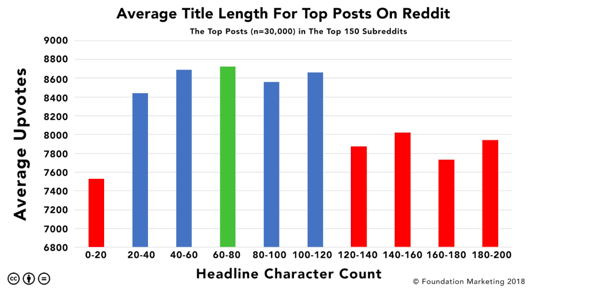
- In a 2019 study of 60,000 Reddit posts, those between 60 and 80 characters get 8,600 upvotes. (Foundation Inc.)
- The study also found that posts under 120 characters get more upvotes than posts above the character count. (Foundation inc.)
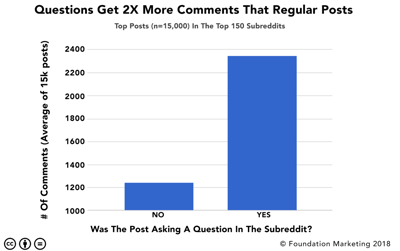
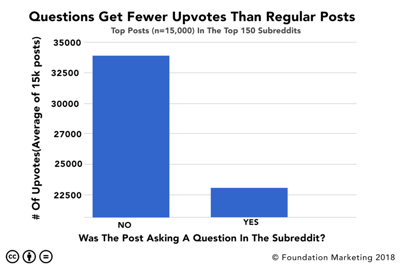
- Posts with questions generate twice as many comments as posts without them. But, oppositely, posts without questions get more upvotes than posts with them. (Foundation Inc.)
- The top two communities in 2018 were related to the blockbuster film, Avengers: Infinity War. (Reddit Blog)
- Two of the most commented-on subreddits of 2018 related to video games. (Reddit Blog)
- Four of Reddit’s top Ask-Me-Anything (AMA) threads in 2018 discussed politics while the most engaging thread featured Bill Gates. (Reddit Blog)
- Aside from movies, like Infinity War, one of Reddit’s most popular topics is technology. In 2018, Reddit reported that all of its tech-related subreddits combined received more than 27 million unique monthly visitors and 284 monthly views. (Reddit Blog)
Takeaways from Reddit Stats
If you’re a marketer in a field related to consumer products, especially technology, you might not want to count out Reddit just yet. As we’ve learned from the stats above, young people, especially in Gen Z are using and trusting the platform as a source for product research.
If your company has a lot of great video content, you also might not want to write off the platform. In Reddit’s 2018 review, the company said, “Video is King” when it came to engaging posts. As we’ve seen on other social networks, online video, especially in a mobile format, is being embraced much more heavily than it has in the past. Because of this, it might be worth it to explore the idea of a Reddit video strategy if you ever have extra time or resources available to you.
If you’re really interested in testing out content on Reddit, but don’t know where to start, it can be helpful to get inspiration from brands who’ve already succeeded there. In this post, you can check out a few great examples.

15 Tips That Make Freelance Writers Successful
When I scroll through Facebook and Instagram, I often see ads from people who are freelance writers, promoting the “working from anywhere” lifestyle.
The ad copy typically goes something like this — “Would you like to be able to work on your own schedule, from anywhere in the world? That’s what I did.”
Like anyone, I always think, “Well, duh!”
And I’m not alone. According to Upwork’s 2018 Freelancing in America report, the number of American freelancers has increased by 3.7 million since 2014.
In fact, 59% of U.S. companies now use a flexible workforce to some degree, whether that’s freelancers or remote workers.
These stats bode well for writers who are interested in starting remote or freelance work. So, as freelance work becomes increasingly popular, you might be wondering how to become a successful freelance writer.
Below, we’ll review freelance writing tips and how to get started as a beginner.
1. Choose a niche.
As a freelance writer, you can choose the topics you write about. However, instead of casting your net wide and writing about anything that comes across your desk, consider diving deeper into a certain subject.
Allie Decker, a writer on HubSpot’s pillar team and a successful freelance writer, says, “You can’t be an expert on everything — surely you’ve heard the term ‘Master of None.’ Writing within a niche will also make writing projects easier over time as you build your expertise.”
For example, if you’re interested in writing for marketing companies, you can specialize in writing for small businesses. This will give you an advantage when you pitch small businesses and make it easier to write content as you repeatedly write for a similar audience.
Overall, choosing a niche will help you decide who you send pitches to, what projects you take on, and which topics you’ll want to study and research extensively.
2. Communicate with your clients.
Once you’ve secured a job, it’s time to get to work. However, don’t just put your head down and forget about the client.
Aja Frost, an SEO strategist at HubSpot and a successful freelance writer, says, “Communicate early and often with your clients. If you get sick or overwhelmed and know there’s a good chance you’ll miss a deadline, don’t go radio silent — tell the client what’s going on. If you’re going out of town and won’t be working for a few weeks, don’t tell them the day before — let them know a few months ahead and offer to send them some articles in advance.”
Additionally, Frost notes, “If you’re going to finish early (and send them the invoice early) — give them a heads up ASAP so they can work out any potential billing invoices. Your proactiveness and transparency will be incredibly appreciated and will put you ahead of many freelancers.”
This type of communication makes your job easier and can help you form a connection with your clients so they’ll book jobs with you in the future. Additionally, clear communication is the best thing you can do for your reputation and brand.
3. Network with other writers.
Although it might seem counterintuitive to network with the competition so-to-speak, doing so is an excellent way to gain success in freelance writing.
Decker says, “It’s healthy for your professional and personal development. I’ve learned the most about freelancing from a few who are already doing it, and I’ve built enough rapport to be passed along projects that they don’t have the bandwidth for. It’s also nice to have a semblance of ‘coworkers’ when you’re working alone, day in and day out.”
By networking with other writers, you can stay up-to-date on the latest news and trends in your niche. Plus, you can share and learn information on how to be successful as a freelance writer. The best person to ask for advice is someone who has walked the road you want to walk.
Additionally, once you do make connections, it’ll help your brand reputation and give you name recognition most freelance writers don’t have.
4. Be active online.
Not to reiterate, but having name recognition and being known in your industry is one of the top ways to book jobs as a freelance writer.
To achieve this, you need to be active online. For example, you should have a portfolio website with testimonials, write a blog on your site, guest post on other publications, and remain active and engaged on social media.
Once you choose a niche and start posting online, people will begin to recognize your name. Additionally, these things can also improve your SEO and give you more credibility, so your name shows up when companies search “small business freelance writers.”;
5. Write well-crafted pitches.
While, ideally, the tips above can help you receive jobs through networking and online searches, it’s equally important to note that you’ll need to write pitches almost every day and reach out to companies that would be a good fit.
To find companies to pitch, you can look at job boards like Contena, Blogging Pros, or Mediabistro, join Facebook groups, or network on LinkedIn.
Once you’ve found a company to pitch, you need to write a well-crafted proposal that sells you and makes sense to the publication. This isn’t an easy task, so to become a successful freelance writer, you need to learn what makes a good proposal.
6. Study negotiation and acquire a contract for every job.
The top mistakes almost every freelance writer makes at the beginning of their career is that they don’t set up a contract and don’t know their worth, so they work for less than they should.
Take the advice now and make sure you research how to negotiate freelance wages. Look up the average hourly rate, rate per word, or rate per project. List out the pros and cons of the pricing structure and decide what you want to charge.
Once you know what you want to charge, you can go into a negotiation with the upper hand. When you close the deal, it’s time to draw up a contract.
In fact, you don’t ever want to work on a project without a contract. A contract gives you an opportunity to understand the scope of the project and lay out your boundaries for the client.
7. Learn how to edit.
As a freelance writer, you don’t have an editor looking over every piece you turn in. This means you need to learn the art of the self-edit.
For example, here’s my writing and editing process:
- Write without judgment: When you’re writing your pieces, take off the editor’s hat and just write.
- Edit for spelling, grammar, and sentence structure: After you finish the piece, set it aside for a few hours or a day or so if you can. Then, on your first edit, just look for spelling and grammar errors. Additionally, ensure the sentences are structured correctly.
- Edit for style: Your client might adhere to a certain style guide. If they do, you’ll want to ensure the piece is written in the right style. Are the names, titles, times, quotes, and image sources done correctly? Go through and double check.
- Edit for formatting: Lastly, go through and make sure the piece is perfectly formatted.
Overall, you’ll want to switch from “writing mode” to “editing mode.” When you’re editing, you’re looking for overall accuracy, clarity, and formatting.
8. Master time management and organization skills.
In order to be a successful freelance writer, you’ll have to excel at time management and organization skills. As a freelancer, you don’t have a boss or manager telling you when to turn in your drafts or giving you boxes to check off throughout the writing process.
While independence is one of the perks of freelance writing, it also means you need to overcompensate for time management.;
Write out your to-do lists, keep track of your deadlines, stay organized, and always try to be working ahead so you can take advantage of the freelance lifestyle (like those glorious travel days).
9. Gather testimonials.
After you’ve done a few assignments and have worked with enough people who have given you positive feedback, ask for testimonials.
You can put testimonials on your site or have people recommend you on LinkedIn. Recommendations will give you credibility and help potential clients understand why they should want to work with you.
In order to gather testimonials, do some research on the letter/email to send to current or previous clients when you’re asking for feedback. The language you use here is important and should be tailored and personalized to the client to whom you’re reaching out.
10. Enhance your complementary skills.
As a freelance writer, you can’t just be a good writer. You should also have complementary skills like SEO, analytics, marketing, or advertising.
An excellent way to stay on the top of your game is to take courses and read articles related to these skillsets. These skills will set you apart from other freelance writers who only know how to write and can’t optimize articles for results.
Additionally, you should also take advice from clients if they offer tips to improve your writing. This advice could help boost your skills and make you a more marketable freelancer.
11. Collect results.
The best way to sell yourself is with data. Once you’ve written a piece and have formed a good connection with the client, ask them to share the results of your work.
Did the company get more email sign-ups? How was the conversion rate on your posts? The click-through-rate? The bounce rate? The time on page?
If you’re armed with numeric results for your work, clients will jump at the chance to book you. Plus, the more successful your posts are, the more money you can charge. Think of it like this: if you earn a company $3,000 in revenue, they should probably pay you more than $150 per blog post.
12. Consider your workspace.
Working from anywhere sounds like a nice concept. However, as a remote employee, I can tell you that your workspace is a crucial component to your productivity.
To be a successful freelancer, you need to learn what type of environment works for you. Do you need natural light to be productive? How about light noise? Or no noise at all? Everyone is different and at most jobs you don’t get a say in your environment.
Luckily, for freelancers, you can take time and figure out where you’ll be most productive. Keep in mind that it could change daily. Some days I’m most productive at my kitchen table. Other days, it’s best if I’m at a library or coffee shop.;
Ultimately, it’s critical you learn about yourself and consider your workspace if you want to be a successful freelancer.
13. Create a brand.
As mentioned above, name recognition and creating a brand will help you book jobs and get your name out there.
Creating a brand is an excellent way to network with other writers and get the jobs you want.
To create a brand, make sure you choose a niche, pick a social media persona, and have a unique writing style that sets you apart from other freelance writers. Additionally, it’s critical you remain consistent with both voice and design across your website and social media platforms to create a memorable brand.;
Once you’ve created a brand for yourself, you’ll begin to see some jobs come to you instead of having to pitch every day.
14. Generate ideas.
Even if you don’t have a current job or assignment, stay relevant in your niche. Think of topics and ideas you want to write about and work on them. It’s always a good idea to have some articles “saved” in a backlog for future pitches or guest posts.
If you’re continuously writing and coming up with ideas, you’ll have more to say when you pitch companies.
These articles can help you stay ahead of the curve and plan for income in the future.
15. Ask questions.
When you begin working with a client, once you have a topic, you might think you can just go ahead and start writing. However, that wouldn’t be a good idea, because you need to have more information and clearly communicate with the client about their expectations.
For instance, you might ask them about word count, SEO, topics and subtopics, deadline, and whether or not they’d like you to conduct interviews. This information will help you begin outlining your article and make it easier to write. Additionally, when you ask the right questions, you’re more likely to turn in great work that’ll help you get hired again.
Freelance Writing for Beginners
As a beginner, it can be hard to know where to get started in the freelance writing world. You know that you’ll write for a number of clients and publications, but you aren’t sure how to start that process.
Here’s a simplified run-down of how to get started:
Step 1: Build your brand: Create your website, write your own blog posts, guest post for other publications, and get active online. This will help you build authority in your niche.
Step 2: Choose your pay structure: Understand that each job might be different. However, you need to decide which pay structure works for you: commission, per project, per word, or hourly.
Step 3: Register your business: You can either register your business as an LLC and open a business bank account to protect your assets, or you can opt to receive 1099s from companies and work from your personal bank account.
Step 4: Setting up your workspace: Again, this is an important consideration. Once you’ve decided to jump into freelancing, set up your workspace.
Step 5: Pitch potential clients: Now it’s time to get to the grind. Look at job boards or contact the companies directly. Either way, you should send several pitches a day to get started.
Step 6: Market yourself: Always promote your content to establish credibility in your industry.
Step 7: Stay organized: Organization is the name of the game when you’re writing for several publications. Keep track of deadlines and always work ahead if you can.
Freelance writing isn’t always an easy and glamorous job like the Facebook ads make it seem. It requires a lot of hard work, organization, and persistence. However, if you stay on the grind, and work with the end game in mind — like those long walks on the Saint Tropez beaches — you can eventually build a brand where companies are coming directly to you and willing to pay you what you’re worth.

How to Run A Content Audit in 2019
Think of all the content you create — the good, the bad, and the ones that take a scary amount of time.
Now think of how you organize it. How do you keep track of how content is performing? Do you use those metrics to improve for future campaigns?
If not, you could be, with the help of content audits.
Content audits keep track of your content, including blog posts, social media posts, events, and web pages, and provide analysis for how they impact audience. Additionally, they can provide insights into how to improve underperforming content, so you know how to properly update your posts for higher conversion rates.
If you’re missing this kind of organization for your company, consider investing in a content audit. They are an excellent planning resource and roadmap for future content creation, while organizing analytics so you can refer back to high-performing posts if needed.
Let’s dive into what content audits look like, how to run one, and tools to help you create the most effective content audit for your needs.
Content Audit Template
When creating a content audit of your own, feel free to refer to HubSpot’s free template for inspiration. It’s available to download from this link, and is previewed here.
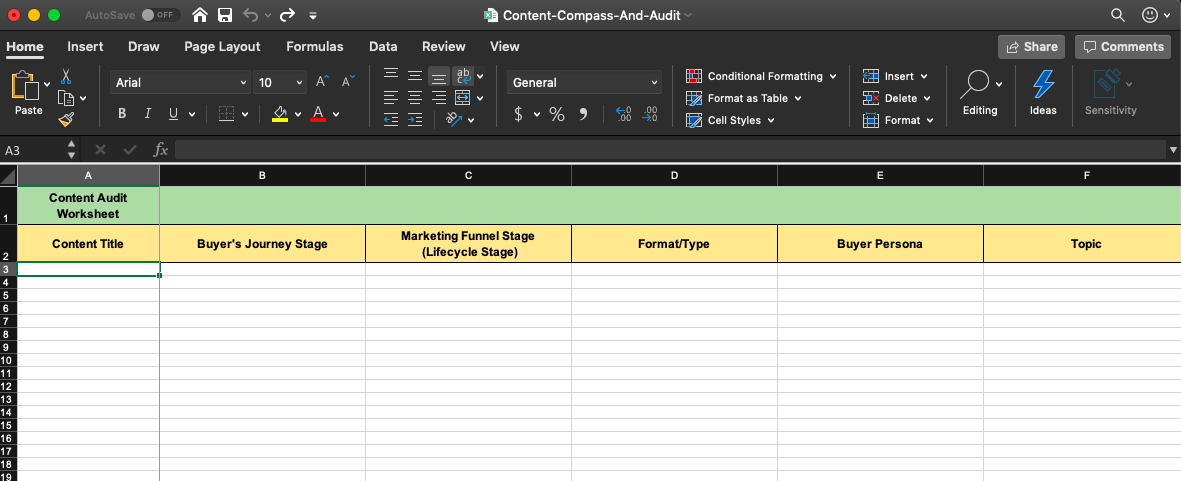
The template has three different spreadsheets:
- Content Compass — This helps you organize your monthly content based on your organization’s goals, themes, campaigns, and social media. Think of it as a giant overview of your campaign with a focus on content.
- Content Audit Worksheet — When you think “content audit,” this is the sheet for it. The categories focus on buyer’s journey stage, lifecycle stage, type of content, buyer personas, and the content topic.
- Event-Based Audit Worksheet — This sheet is a content audit based on events your organization holds. So if you’re a company that’s heavily invested in events, this spreadsheet will be helpful for you, as the categories revolve around events.
To know which spreadsheet is right for you, or what categories will be useful for your organization, I’m going to walk you through how to run a content audit yourself in the next section.
How to Run a Content Audit
1. Think of your goals.
First, think about what you want to accomplish. When you have your goals in mind, you will have a better idea of how to categorize your audit later.
Ultimately, a content audit identifies engaging content for your audience, and can include information on SEO and conversion rates. One goal to consider could be to identify which of your pages need to be SEO-optimized. Alternatively, you might think about finding the most interesting and best-performing content for your website visitors, and place that on your homepage or in an email newsletter.
Identifying company goals will ensure your content audit is useful for both bookkeeping and updating your strategy with tactics to improve. After this is complete, then it’s time to collect your content.
2. Gather your content.
Which content are you going to audit? The types of audits are typically those for product descriptions, blog posts, multimedia, and publications. Decide this, and gather the backlog of all of that content.
To accomplish this, collect the URLs of the web pages you’ve chosen to audit. If you have a small website, you can do this manually and put them in a spreadsheet, however, there are also online tools to do it for you, like SEMrush, Screaming Frog, and HubSpot.
SEMrush and Screaming Frog will provide this information based on your sitemap. A sitemap is a file that has all of your website’s information and can be created for free online. For more information on sitemaps, check out our guide here.
3. Categorize your content.
After receiving your audit, categorize it on the spreadsheet. Some online tools categorize the information for you, but if you want to go through it yourself, that’s also doable. The categories will keep you organized so you can ensure your content audit meets your needs.
Some categories you can include are content type, author(s), publication date, and content format. Think of categories that are useful to know from different pieces of content. For instance, if you are auditing blog posts, important information to pull would be the date of publication or update, the author, the type of content, and metadata (Such as the title and description).
Another important category is metrics. Some online tools will include them in the audit, but Google Analytics can also pull data for you. Metrics can provide more information for your analysis later.
At this point, your spreadsheet should have URLs of your content, categories, metadata (if included), and metric data.
4. Analyze your data.
Now, it’s time to look at your data critically. This is the step that will give you a good measure of the state of your content. When analyzing your data, here are some things to take note of:
- Content that’s missing — What is your audience interested in that you haven’t covered?
- Content that’s underperforming — Which pieces of content aren’t getting the numbers you want?
- Outdated content — If you have old content, can it be updated or reworked to maintain optimization?
- Home run content — Content that has performed extremely well.
Based on the results of this analysis, organize them in the spreadsheet. A way to do this is to assign different colors based on what you’re analyzing and highlight the rows with those colors so you have an idea of which category is which, and which ones take up the largest portion of your overall content library.
5. Create action items.
In this step, you will finalize and clean up your audit. You now know what to focus on based on the analysis and can go from there. Think about the posts to delete, update, re-write, or re-structure.
To organize these action items, add one last column to the spreadsheet — one that’s close to the front so you can keep tabs on it. This column will let you know the action to take on a specific URL. Are you going to keep, update, delete, or re-write that blog post?
If you plan on ranking by priority or including a timeline for this audit, now would be the time to include that, as well. Some organizations use full-blown content calendars, while others don’t need it. To make a priority timeline that fits in best with your content audit, think back to your goals and which items make sense to execute first.
Now, let’s go over some content audit tools you can use to further automate your content audit process.
Content Audit Tools
1. Screaming Frog
Screaming Frog is a website crawler. It collects URLs from your sitemap and create an SEO audit for you. If you have a smaller site, Screaming Frog can audit up to 500 links for free.
The desktop Screaming Frog website is great because it provides you a ton of analysis about your website, and categorizes it for you. Because the audit is SEO-based, it also gives you information on how to improve your SEO, which is likely useful, depending on your goals.
Price: First 500 links free, unlimited for $150/year
2. SEMrush
In three steps, users of SEMrush can receive a robust audit. By putting in the desired domain, you can select sections of the website you’d like to audit from your sitemap.
From there, you can connect an analytics tool account, like Google Analytics, if you want to see more information about your sitemap, like posts that are the most engaging for your audience. You can use this information when developing strategy — identifying content that performs well for your audience gives you an idea of what to cover.
Price: Free plan, or $99-$399/month
3. Google Analytics
While Google Analytics doesn’t give you a traditional audit, it provides good information that will help you formulate your audit. It lets you know who is visiting your website, and from where. Additionally, it gives a rundown on the behaviors of your visitors.
It gives you data about the amount of time visitors are seeing on webpages, the most popular webpages, and different patterns seen in your visitors. One of these patterns could be the most popular blog post in the US from visitors aged 18-24.
Price: Free
4. DYNO Mapper
If you’re looking for a sitemap generator, DYNO Mapper has that function available. Also available on DYNO Mapper — a content audit tool. This website is really good at finding potential problems in the SEO of your content.
DYNO Mapper also keeps a progress report of your audits, so you can monitor how they’re improving and performing. The audits themselves present how your content can be given in the best way to search engines, an excellent metric for content audits.
5. WooRank
WooRank has two amazing features for content auditing: SEO monitoring and Site Crawler. SEO Monitoring from WooRank lets you know the state of performance on your landing pages, which is information you can put into an audit. It also lets you know if your website ever goes down and how that affected SEO, another metric to import if you’re tracking web page metrics in your audit.
The Site Crawl feature lets you know how Google sees your site and interprets the information for search engines. This information is great knowledge to make audits more effective when you’re coming up with action items for the future.
Now that you know ample knowledge about content audits, how to create them, where to source them, and important essentials to include, you are fully prepared to incorporate them into your organization. Give it a try, and use it to elevate your next campaign. Happy auditing!

Ephemeral Content: How & Why to Invest in Content That Disappears
Last year, Sony Pictures earned over 45 million impressions and made over a million in incremental movie ticket purchases.
While these metrics are impressive, the method by which these metrics were earned might be even more impressive — content that disappeared on Snapchat.
Snapchat Stories is a prime feature of the app. Stories is a form of what’s called ephemeral content, which is defined as content that goes away after a certain period of time. On Snapchat, for instance, stories disappear after 24 hours.
Sony used ephemeral content by promoting the release of their movie, Venom, with a red carpet Live Story Ad, as well as shoppable Snap Ads. Viewers of Sony’s Snapchat stories were given the option to buy tickets right from within the story itself.
Ultimately, as proven in the example above, ephemeral content is a highly diverse way to engage an audience.
Using ephemeral content can help you connect with your target audience and define your brand. Here, we’re going to explore why it’s so important, and how it can be useful for your own company.
Why Ephemeral Content Is Important
In 2019, Statista reported that Instagram’s story features have 500 million daily active users, with WhatsApp close behind with 450 million daily active users.
Stories across a variety of platforms — including Instagram, WhatsApp, Tik Tok, and Facebook — are all considered ephemeral content.
So why is it so popular, and why should you participate? Let’s dive into that now.
1. Interact with audiences.
Interacting with your audience is a fantastic avenue for ephemeral content. Audience scrolling through stories on major social platforms might be inclined to engage with your brand if your content provides actionable items.
For instance, one way social media planning tool Buffer uses ephemeral content is by holding Q&A sessions on Instagram Stories. By putting a Q&A sticker on a story, Instagram followers can ask a question through a story for it to be answered.
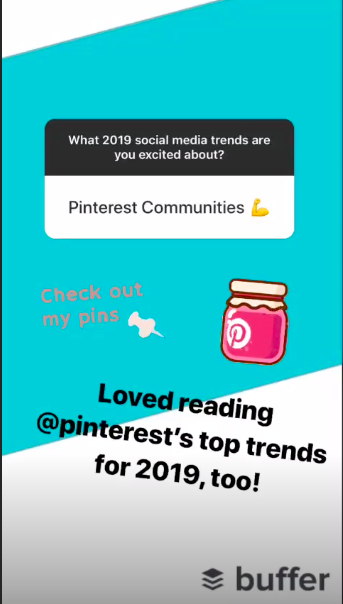
Answering questions on stories keeps audiences engaged. Additionally, asking communities questions about what they enjoy, as Buffer did, helps gain insight on the type of content to produce to keep engagement numbers up.
2. Boost sales with shopping.
Many social platforms that host ephemeral content also host a feature for shopping, like Snapchat, Instagram, and WhatsApp. Business accounts on the platforms can set up a storefront in stories — like with beauty brand Fenty Beauty.

This ad is shoppable, which you can tell with the “See More” text at the bottom of the story. Online shopping takes on a new meaning with ephemeral content since viewers feel the pressure of the time limit. With a couple of taps from a shoppable story, you can make a new sale.
Facebook and Instagram have a feed for stories, where shoppable ads have the chance to appear. This is useful for reaching a broader audience with your products and brand.
3. Diversify content with authenticity.
Ephemeral content can introduce audiences to the personality behind your organization. Because this feed is separate from main feeds, you can post content that’s not as polished, and disappears later, giving customers the chance to feel like they caught a glimpse of a more special, exclusive behind-the-scenes look at your company.
To diversify content, you might try giving your audience a tour of your office on Snapchat, or posting templates followers can fill-in on Instagram, as LinkedIn did in the example shown below. You can post the answers and showcase your followers on your story to get them involved in your content.
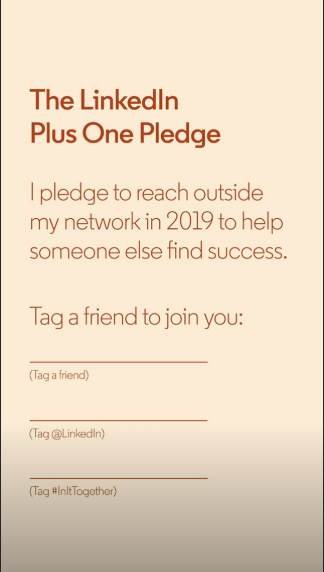
Ultimately, short-term content tends to feel more authentic rather than the sponsored posts in your feed. They don’t have to be perfect — instead, ephemeral content can give followers a genuine, honest look into your brand. It’s definitely something to embrace if you’re thinking of ways to personalize your brand.
4. Engage audiences.
Social media is a huge opportunity to garner user-generated content, and ephemeral content helps with that. Engagement rates show you how many people are seeing and interacting with your content, and the more people engage with your content, the higher chance you have at collecting new leads.
I have huge FOMO, or fear of missing out. This is where ephemeral content shines. It can be used for special offers or content that only users who view an account’s story can interact with. For instance, Coca-Cola added a World Cup geofilter after the Belgium Red Devil win on Snap stories during last year’s matches.

This geofilter, according to the Marketing Director of Coca-Cola Belgium, connected Belgian teens and young adults and was also shared by influencers. It gained almost 5 million impressions and reached over a million accounts.
Ultimately, hose numbers surprised me — I had no idea Snapchat could have so much reach, but with a huge event like the World Cup, the opportunity to tie in marketing with a large audience was a great move by the beverage company.
Most of us don’t have the resources that Sony Pictures or Coca-Cola do. Ephemeral content doesn’t have to be a big-budget production, though. Investing in content that disappears means creating content that engages customers and highlights a brand’s uniqueness.
Think of how you can incorporate your next product launch or blog in ephemeral content. You can build hype with story ads leading up to the release and once it drops, you might try making shoppable stories. A few of the cards could ask customers’ opinions on features, i.e., a poll asking followers if they prefer green or red color variations.
Looking for more on story content? Check out our post about Instagram stories here.

Essential Web Design Stats for 2020 [New Research]
As people spend more and more time online, the role of the web designer has become increasingly crucial.
As a web designer, it’s your job to stay on top of new techniques, technologies, and tricks that continue to emerge at a phenomenal rate. Additionally, you also need to run your business — including finding clients, filing accounts, and potentially hiring and managing staff.
Whether you’re a web designer or considering hiring one for your company, it’s critical you know about the current challenges and opportunities in the web design industry.
Here, we’ll cover some of the most essential web design stats for 2020 from Sitejet’s new State of Web Design survey for 2020 and beyond.
Biggest Challenges & Pain Points
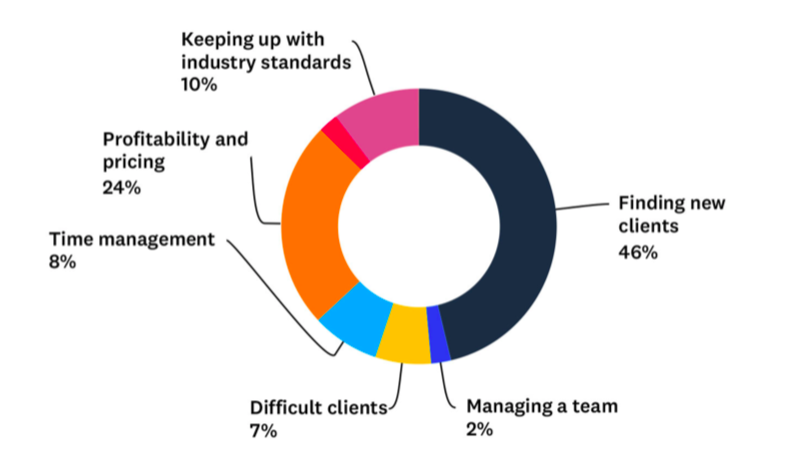
We’ve touched on it already, but when it comes to daily challenges, customer acquisition is far and away the most commonly cited pain point.
In fact, nearly half of web designers say that, more than any other aspect of their job, they find it hard to discover new clients.
The next most commonly cited pain point was profitability and pricing, while other responses such as keeping up with industry standards (10%), time management (8%), difficult clients (7%), and team management (2%) lagged way behind.
Things Web Designers Love
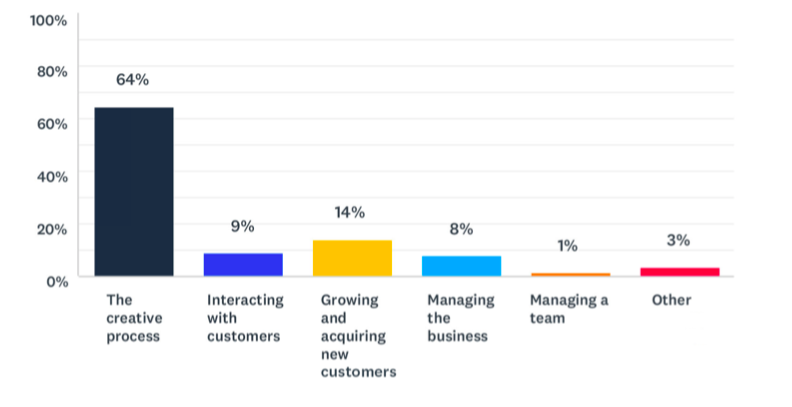
Unsurprisingly, when asked about their favorite parts of web design, the overwhelming majority focused on the creative process.
The actual process of building beautiful websites is what attracts most people into the profession, and it seems fair to say that it’s what keeps them motivated years later.
Things Web Designers Dislike
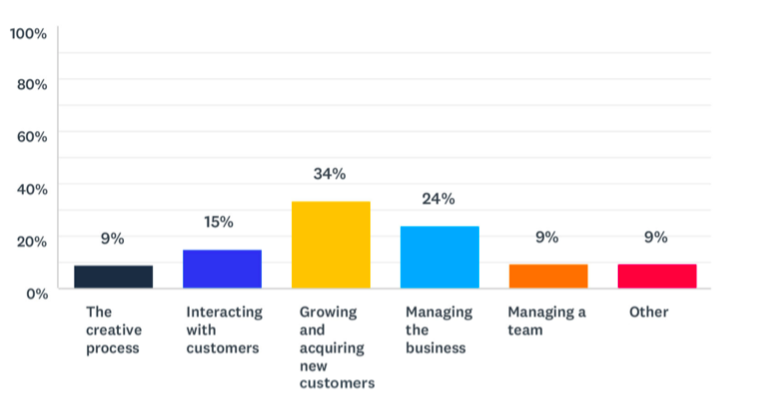
When asked what they dislike about the web design process, customer acquisition was again the most common reply. This was followed up by just under one in four web designers who say that managing the business is their least favorite part of the job.
These results, when evaluated together, tell us that web designers tend to enjoy the creative parts of the role, but are forced to reluctantly take up the ‘other bits’ such as marketing and management, to help facilitate what they really love to do.
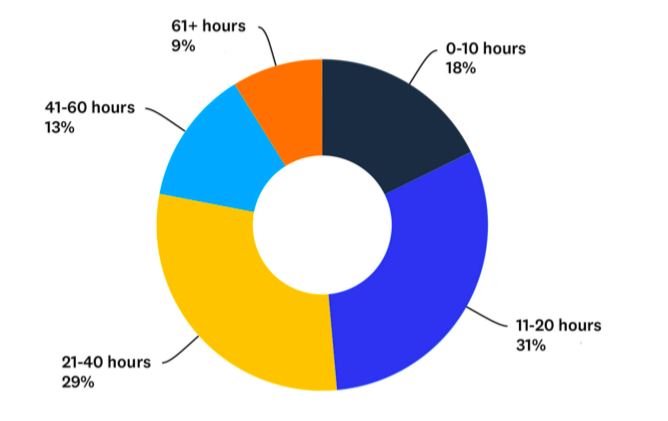
How long does it take to create a website from scratch?
In essence, the ‘product’ that web designers sell is their time. And, since so many cite concerns over profitability in pricing, it’s interesting to consider how many hours it actually takes to build a website with modern tools and technology.
The results here could hardly be more evenly split, with a wide and varied response. Incredibly, while one in five web designers say they typically build websites in 10 hours or less, one in 10 told us they take 61 hours or more.
However, the majority (60%) of respondents settled around the mid-range, between 11-20 (31%) and 21-40 hours (29%).
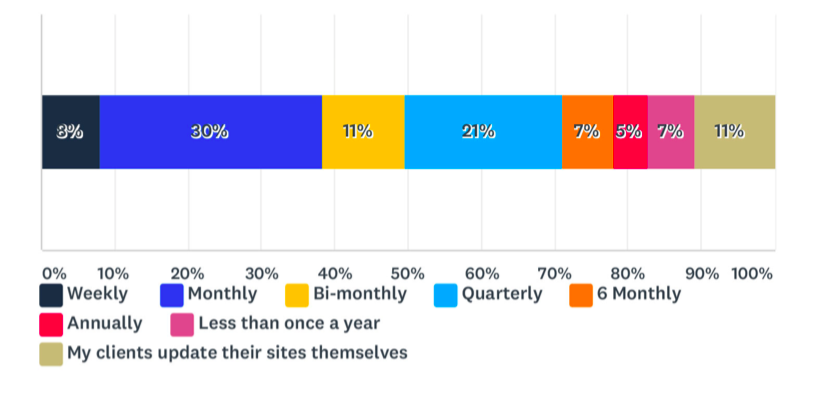
How often do web designers update their clients’ sites?
In the words of Leonardo da Vinci, “Art is never finished — only abandoned.” That’s the case with great websites, too. After those hours invested in the initial build, web designers often have to continue running and managing their clients’ websites, actioning changes, communicating with clients, and generally keeping the websites they build fresh and up-to-date.
In fact, only 11% of web designers say their clients have the ability to update their own websites once built.
When asked how often they typically have to update their clients’ websites, the numbers again vary wildly. However, more than seven in 10 web designers say it’s at least quarterly, with the most commonly cited response (30%) claiming that they typically update client websites on a monthly basis.
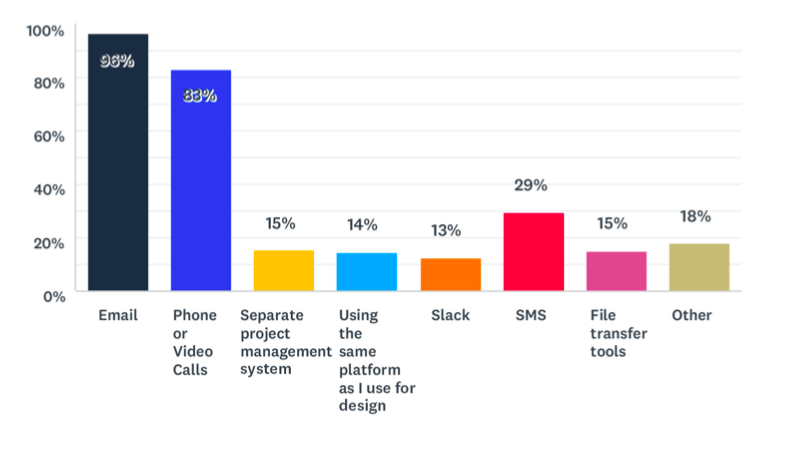
How do web designers communicate with their clients?
For around 90% of web designers, there’s some element of ongoing client communication and collaboration. How is that managed?
The research suggests that the vast majority of client communication takes place via email, which is used by 96% of web designers. 83% supplement that with phone or video calls, while the numbers for SMS (29%), project management systems (15%), file transfer tools (15%) design platforms (14%) and Slack (13%) lag way behind.
When we asked web designers to just select the main communication channel they used, around three-quarters chose email, followed by 16% who selected phone.
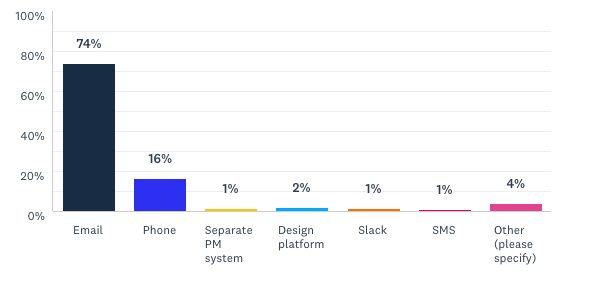
In short, there seems to be a huge reliance on email.
How do web designers get new clients?
Ultimately, customer acquisition is a major challenge cited by a huge number of web designers.
It’s interesting, then, to consider which channels they feel are most effective at bringing them new business.
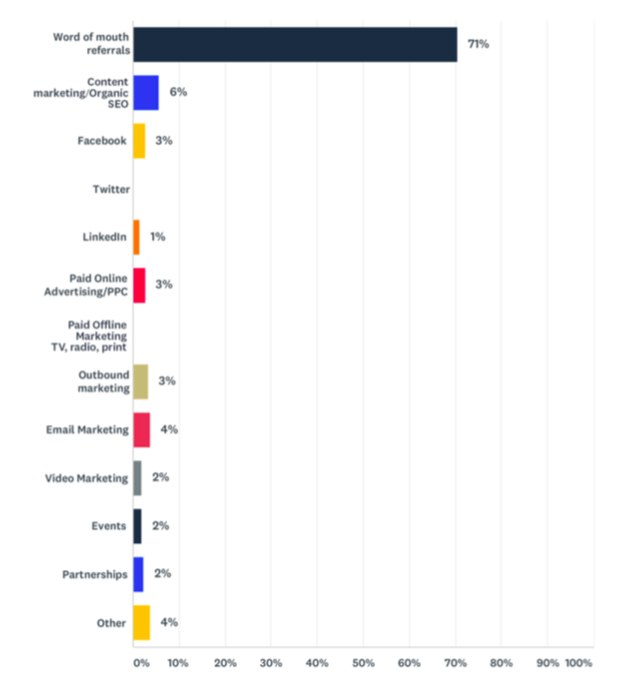
The
runaway leader here is word-of-mouth marketing, cited by 71% of respondents as being their number one channel for finding new clients.
Others have dabbled in content marketing and SEO (6%), social tools like Facebook (3%) and LinkedIn (1%), and email marketing (4%) but these are comparatively small numbers.
How do consumers browse the web?
The Sitejet study didn’t just quiz web designers about their daily work. It also asked for the thoughts and opinions of the everyday web consumer.
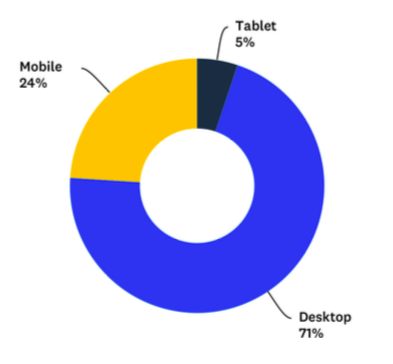
We all know that mobile browsing is a big deal, but, interestingly, it feels like rumors of the death of desktop have been greatly exaggerated. When asked how respondents mainly browse the web, over 70% of respondents told us they mainly browse on desktop.
Of course, that’s not to say that they don’t also browse on mobile — but with so many people browsing mainly on desktop, it’s important to not put all your eggs into one basket.
The importance of usability …
Usability is one of the big buzzwords in modern web design and it’s unsurprising that it seems to have such a big effect on website users. This mainly applies to responsiveness, design quality, and load speed.
We found that:
- 93% of people have left a website because it didn’t display properly on their device.
- 90% of people have left a website because it was badly designed.
- 93% of people have left because a website didn’t load quickly enough.
Ultimately, these results demonstrate the critical importance of usability for any website’s long-term success.
In summary …
That’s a lot of numbers, right? Here are the key takeaways:
- Web designers are ‘reluctant administrators’ who love to create – much more than they love to manage and market their businesses!
- There’s an insanely wide variance in how much work is involved in creating and managing websites, and it’s difficult to shake the feeling that a lot of web designers are spending way longer than they need to on their work. This potentially explains why around a quarter of web designers struggle with profitability and pricing.
- Email, for all its faults, remains THE dominant communication channel for web designers to work with their clients.
- Desktop browsing is far from dead, with a size-able chunk of the online population still browsing mainly on desktop, rather than mobile or tablet.
- Tolerance for shabby design, sluggish performance or unresponsive design is at an all time low, with more than 9 out of 10 people admitting they won’t hang around on a website that doesn’t tick these boxes.

How to Conduct the Perfect Marketing Experiment [+ Examples]
But how do you know it will be effective?
While there’s no sure way to know if your campaign will turn heads, there is a way to gauge whether those new aspects of your strategy will be effective.
If you want to know if certain components of your campaign — like that sparkly new logo or the new employee takeover series — is worth the effort, consider conducting a marketing experiment.
Marketing experiments give you a projection of how well marketing methods will perform before you implement them. If you want to know the different types and how you can use them within your organization, keep reading.
What’s a Marketing Experiment?
A marketing experiment is a form of market research. It’s a test organizations run to discover possible marketing avenues that will improve a campaign.
For instance, a marketing team might create and send emails to a small segment of their overall readership to gauge engagement rates, before adding them into a campaign. Additionally, they might A/B test the design of these emails. In this example, the team is creating a hypothesis (that a certain email design will help promote their campaign) and testing the hypothesis in a marketing experiment.
It’s important to note that a marketing experiment isn’t synonymous with a marketing test. Marketing experiments are done for the purpose of discovery, while a test confirms theories.
Ultimately, a marketing experiment can help you ensure your campaign or strategy will be effective. Next, let’s dive into how to conduct a marketing experiment.
How to Conduct a Marketing Experiment
Performing a marketing experiment lets you try out different methods of running a campaign to see which one will perform the best. It involves doing background research, structuring the experiment, and analyzing the results.
Now, let’s go through the five steps necessary to conduct a marketing experiment.
1. Make a hypothesis.
Hypotheses aren’t just related to science projects. When conducting a marketing experiment, the first step is to make a hypothesis you’re curious to test.
Let’s say you want to make a marketing email that will improve engagement rates. A good hypothesis for this might be, “Making an email with emojis in both the subject line and copy will increase our engagement rates by at least 25%.” This is a good hypothesis because you can prove or disprove it, it isn’t subjective, and it has a clear measurement of achievement.
2. Collect research.
After creating your hypothesis, begin to gather research. Doing this will give you background knowledge about experiments that have already been conducted and get an idea of possible outcomes.
Researching your experiment can help you modify your hypothesis if needed. If your hypothesis is, “Making an email with an emojis in the subject line and copy will increase our engagement rates by at least 25%,” and research on trends in your audience on email subject lines show that to be true, you know you have a solid hypothesis. However, if other companies in your industry haven’t seen success from emojis in emails, you might want to reconsider.
3. Choose measurement metrics.
Once you’ve collected the research, you can choose which avenue you will take and what metrics to measure.
For instance, maybe you will run an A/B test. This method will allow you to measure the results of two different emails, and figure out which email performs better with your target audience..
For a marketing email test, consider measuring impressions, reach, conversion rate, or clickthrough rate (CTR). These email metrics can let you know how many people are receiving, opening, and reading your emails, and will help you analyze the results of your hypothesis.
4. Create and execute the experiment.
Now it’s time to create and perform the experiment. If you’re creating an A/B test to prove your hypothesis about emojis in emails, then you’ll want to create two emails — one with a plain text subject line, and an identical email with 1-2 emojis added to the subject line. Try to only make slight variations between emails A and B to ensure accuracy.
When you’re finished designing the experiment, come up with a timeline, and decide how you’ll monitor the results. That way, when conducting the A/B test, you’ll be prepared to swiftly figure out which email performed better.
Finally, choose your recipients and conduct the experiment. Next, you’ll analyze your results.
5. Analyze the results.
Once you’ve run the experiment, collect and analyze the results. Use the metrics you’ve decided upon in the second step and conclude if your hypothesis was correct or not.
The prime indicators for success will be the metrics you chose to focus on.
For instance, for the marketing email example, did engagement numbers appear higher? If the CTR, impressions, and click-to-open rates are at or higher than the 25% goal, the experiment would be considered one where the hypothesis was accepted.
Now that you know how to conduct a marketing experiment, let’s go over a few different ways to run them.
Types of Marketing Experiments
There are many types of marketing experiments you can conduct with your team. These tests will help you determine how aspects of your campaign will perform before you roll out the campaign as a whole.
1. A/B Testing
A/B testing is a popular marketing experiment in which two versions of a webpage, email, or social post are presented to an audience (randomly divided in half). This test determines which version performs better with your audience.
HubSpot’s email tool offers an A/B test feature for Professional and Enterprise users. Alternatively, check out 8 of the Best A/B Testing Tools for 2019 for options of other tools to help you perform A/B tests.
This method is useful because you can better understand the preferences of users who will be using your product.
2. Different CTAs
Experimenting with different CTAs can improve the number of people who engage with your content. For instance, instead of using “Buy now!” to pull customers in, why not try, “Learn more?”
You can also test different colors of CTAs as opposed to copy. Another CTA factor that I’ve been seeing around are ones that are animated.
To learn more about different types of CTAs, check out 8 Types of CTAs You Should Absolutely Try on Your Blog.
For a CTA-related marketing experiment, you’ll want to either use PPC ads or landing pages to insert your CTA . From there, measure relevant metrics based on your hypothesis and design of the button.
3. Animated Ads
As a big purveyor of GIFs in the workplace, animating ads are a great way to catch the attention of potential customers. Animating ads don’t necessarily mean using GIFs — you might also try small videos or ads with multiple cards, which can catch the attention of web browsers.
This Instagram ad from Buffer, above, uses multimedia to make their post pop. If you’re testing out PPC advertising, try diversifying those ads to capture the interest of more audiences. Additionally, you might run different types of copy with your ads to see which language compels your audience to click.
4. Social Media Platforms
Is there a social media site you’re not using? For instance, lifestyle brands might prioritize Twitter and Instagram, but implementing Pinterest opens the door for an untapped audience.
You might consider testing which hashtags or visuals you use on certain social media sites to see how well they perform. The more you use certain social platforms, the more you can iterate based on what your audience is engaging with the most.
5. Experiment Globally
If you post on an Eastern Time Zone (ET) schedule, run an experiment that involves Pacific or Central Time Zones.
You might even use your social media analytics to determine which countries or regions you should focus on — for instance, my Twitter Analytics, below, demonstrates where most of my audience resides. If, alternatively, I saw most of my audience came from India, I might need to alter my social strategy to ensure I catered to India’s Time Zone, as well.
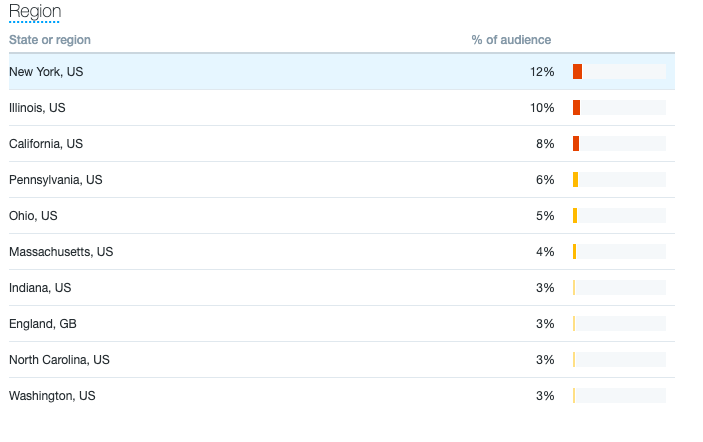 When experimenting with different time zones, consider making content specific to the audience you’re trying to reach. If you’re trying to reach global audiences, why not post something in a few different languages? Alternatively, if you have international offices, you might spotlight different employees from your offices all over the globe.
Ultimately, marketing experiments are a cost-effective way to get a picture of how new content ideas will work in your next campaign, which is critical for ensuring you continue to delight your audience. For more new content ideas, check out our ultimate round-up here.
