
How to Write a LinkedIn Recommendation in 2019 [Quick Tip]
“Lisa has recommended you!”
Awww, she has?!
When I get a LinkedIn recommendation from someone I respect and admire professionally, I feel both honored and encouraged to return the favor. But for some reason, I always get writer’s block. I never know how to start or what to say — only that I like this person’s work and I want others to know it.
Unfortunately, simply writing “Lisa is the best!!!!” isn’t reflective of Lisa’s skills — plus it makes you look like a total goon.
Luckily, in the past few weeks I’ve written a couple of LinkedIn recommendations that I think turned out pretty well, and they reflected a pattern that’s easy to replicate in subsequent recommendations. I thought I’d share that pattern with others that suffer the same writer’s block.
Download our ultimate guide to LinkedIn here for more tips about how to use LinkedIn for professional networking.
Here’s a quick little “template” you can use that makes for a LinkedIn recommendation that’s specific, honest, succinct, and helpful for the person you’re recommending.
1. Explain the nature of your professional relationship.
That sounds really serious, but it’s simply a helpful piece of context that acts as an “intro” for your recommendation. Whether it’s a coworker you’ve worked closely with for years, a manager, a direct report, a point of contact at an agency, or something else entirely, it sets the stage for the reader to learn why you’re writing this recommendation.
For Example:
I’ve worked alongside Lisa for close to two years now.
2. Provide details of the position for which you’re recommending the person.
Are you recommending this person for their work in one position? Or are you writing about their work across multiple jobs they’ve held while you worked with them? Either way, a great next step is to explain some of the notable parts of their job(s). It may feel strange — kind of like you’re listing out their job description. But this is very helpful for anyone reading the recommendation, looking to get a feel for what precisely it is they did in their job.
Resist the urge to create a laundry list of their job duties. If they’ve really worn that many hats, I recommend contacting them to see if there’s a certain part of their role they’d like emphasized over others.
For Example:
In those two years, I’ve seen her not only excel at the core elements of her job — like copywriting and copyediting — but also learn other tasks that extend well beyond the scope of her role, like email marketing, event planning, and even championing our company’s internal communications.
3. Explain how they’ve grown at the company.
If this person reports (or once reported) to you, this aspect of a LinkedIn recommendation can go a long way. Explaining how the person you’re recommending has grown — either in their role or from one role to another — can demonstrate an ability to adapt as the organization expands.
Just be careful not to overstate any low points in the person’s career that can dilute the value of the growth you’re trying to highlight.
For Example:
Lisa has grown as quickly as our business has, and her willingness to learn and take on these new responsibilities is something to be desired in any professional.
4. Indicate how their contribution helped grow the team or company.
This could be an explanation of how their performance helped hit hard metrics, or it could demonstrate a contribution toward more esoteric things, like leading their teammates or fostering new initiatives.
For Example:
Lisa’s mastery for both her core role, and the projects that extend beyond it, have been critical to the company’s growth. In fact, her taking on internal company communication aligned with a sharp increase in employee happiness.
5. Explain what these achievements reveal about that person.
By now, you’ve included some specifics — so let’s explain what those specifics mean for the larger theme of your recommendation. Do the examples you’ve detailed reveal that person is hard-working? Ambitious? Great for team morale? Connect their accomplishments with their attributes.
For Example:
This rare mix of productivity and ambition sets a great example for the rest of the team, and explains why everyone loves working with Lisa — no matter where they fall on the org chart.
6. End with a note about the personal aspect of working with him/her.
In this section, hit the message home with a mention of how you felt working with the person, your hopes for their career, or simply a prediction about their future.
For Example:
While Lisa’s work has continued to pay dividends long past her tenure here, I certainly miss working with her every day. I have only optimistic predictions for her career trajectory.
LinkedIn Recommendation Examples
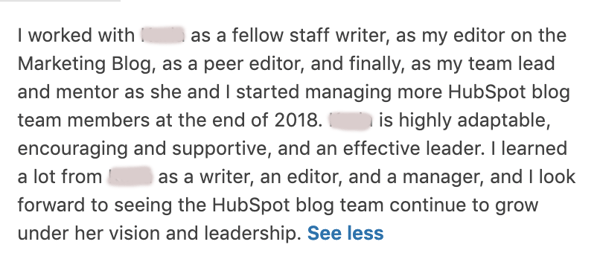
Recommendation From an Employee
In the recommendation below, a person discusses how their supervisor progressed at the company and how this person mentored them so they too could grow as an employee.
Recommendation from an Employer
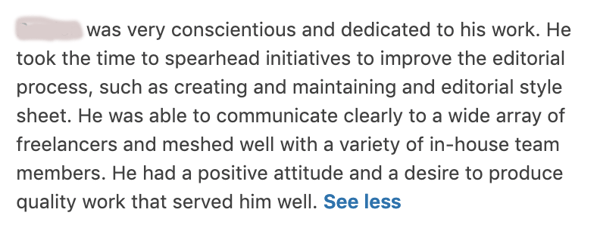
In this recommendation, an employer explains how an employee progressed and executed on projects that made a big impact on their company:
LinkedIn Recommendation Sample (for a Manager)
Now, writing a LinkedIn recommendation can seem easier said than done. What if the employee you’re recommending is your superior? This can make it more difficult to recommend the person — even if you’re saying stellar things about them.
To avoid sounding patronizing or tone deaf when addressing a higher-level professional, here’s a sample LinkedIn recommendation — written in full — that a manager would be proud to receive (notice how it embraces every step outlined above).
I’ve worked for Lisa for two years, and in those two years, I’ve seen her quickly take on new responsibilities while having the time to teach this information back into her employees. By inheriting tasks like campaign analytics and email A/B testing — both of which extend beyond the scope of our team — she’s made our department much more agile, and set me up for a promotion last month. Lisa is as great a person as she was a manager, and her next employer will be lucky to have her.
Now proofread, and hit send. Remember, the recipient has the opportunity to review and request changes to your recommendation, so if you’re concerned you haven’t written a recommendation in the most helpful way possible, they can still get in touch with edit requests.
Editor’s note: This blog post was originally published in July 2018, but was updated in November 2019 for comprehensiveness.


How to Calculate Hourly Rate for Freelance Marketers & Consultants
Let’s say you’re hiring a freelancer or two to help improve the marketing effort of a campaign. You’ve identified the project they’ll be working on, about how many hours it should take, and the context they’ll need to be successful — but you still haven’t decided on the hourly rate.
Instead of spending hours figuring out how much you should pay your marketing freelancer, take a look at the data we’ll pull for you. We’ve rounded up the national freelance hourly rates of marketing consultants, PR professionals, and SEO specialists.
But, before getting into the details, here’s a basic formula to calculate the hourly rate of freelancers.
Freelance Hourly Rate Calculator
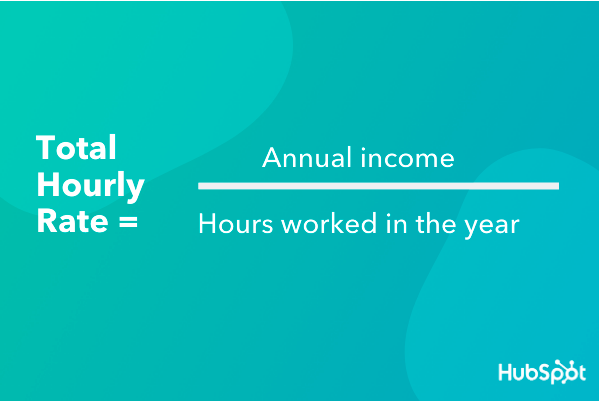
To calculate an hourly rate, start with an estimate of yearly income and divide that by how many hours you typically work in a year. Though the number of hours worked might change depending on industry and job functions, it’s safe to assume that most professionals work 40 hours a week for 50 weeks.
The other two weeks are likely spent on a vacation or sick days. With that in mind, the average full-time professional works about 2,000 hours in any given year.
This makes the basic formula:
Rate = Annual income / Hours worked in the year
This is illustrated in the graphic below:
If your goal is to make $58,000 a year, here is how you’d use the formula to find an hourly rate:
$58,000 / 2,000 = $29/hour
We will continue to use this formula for different industries and professions within the freelance industry.
Hourly Rate for Freelance Marketing Consultant
Marketing consultants are professionals in the marketing industry who act upon strategies built by market research and the professional’s experience. Their primary goal is to drive sales by delivering fresh marketing campaigns and expertise.
Businesses hire a marketing consultant if they need a new outlook on a current project or an entirely different project that’s being taken in a direction that’s usually foreign to the business. Hiring a marketing consultant is a more cost-effective way to bring on more help, since it’s freelance consultants aren’t full-time staff.
The industry standard for a marketing consultant is $47,682/yr in the US, according to Glassdoor. This is illustrated by the graphic below.
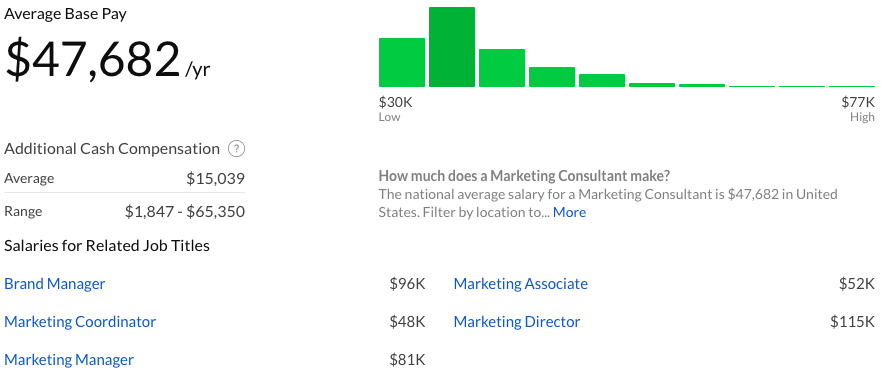
If you were to use the formula above to find an hourly rate for this salary, you would divide $47,682 / 2,000 for an hourly rate of $23.84.
Let’s say you’re looking for a marketing consultant with years of professional industry experience to work on a project that will take several months. For these levels of experience, you might find hourly rates to range from $125-$150 an hour.
It all depends on your budget, your reasons for hiring, and what’s best for your business. All of these factors come into play again when calculating the hourly rate for public relations freelancers.
Freelance Public Relations Hourly Rate
Freelance public relations professionals help coordinate and define the image of a brand. They also have a hand in managing public perception of their clients’ products and can serve as a point of contact for press inquiries about those clients as well.
Businesses might hire a freelance public relations professional if they are looking for an outside perspective to gain insight into brand building or garner press about their company. Freelance public relations professionals also are a cost-effective way of hiring more help, like marketing consultants.
The national average for a freelance PR professional’s yearly salary is $54,114/yr, according to ZipRecruiter. This is illustrated by the graph below.
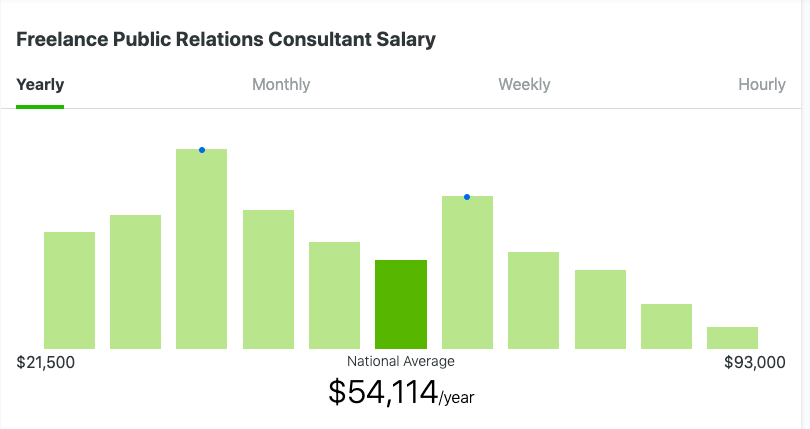
To use the formula from above, taking $54,114 / 2,000 = $27.05/hr.
Next, we’re going to look at calculating the hourly rate for an SEO specialist.
Freelance SEO hourly rate
Ahrefs is a marketing tool driven by data and powered by backlinks and keywords. Last year, they surveyed over 300 freelance SEO specialists about their hourly rates.
Search Engine Optimization (SEO) makes sure a business’s online content ranks highly on search engines to gain organic engagement. Typically, marketers use websites like Ahrefs to run data reports on where content is being ranked on Google, which words are garnering traction, and where a business falls on search engines.
A business might want to hire a freelance SEO specialist to gain insight into how people are finding their business (or how they aren’t). They also might look into hiring a specialist in this field to gain valuable online data that previously hadn’t been calculated. Ahrefs found that the most popular hourly rate is $100-$150 for SEO specialists.
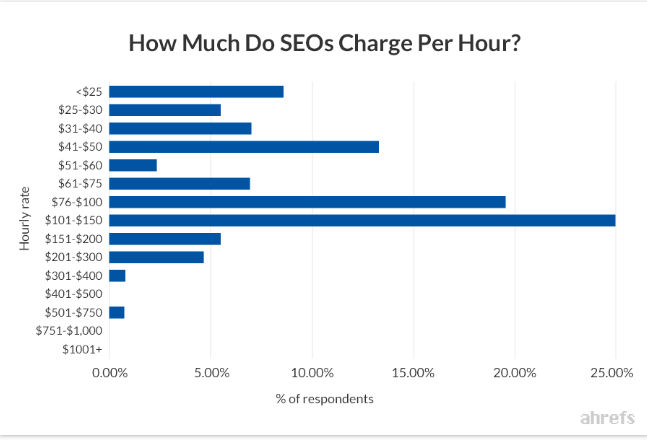
It also provided a graph on how much specialists tend to charge based on years of experience. For example, a specialist with less than two years’ experience is more likely to charge $75 per hour, while someone with over ten years’ experience is more likely to charge $150 per hour.
All it takes is a simple formula to find the hourly rate for freelancers. By using some industry benchmarks, you can easily find a freelancer that fits your budget and goals. And, for freelancers and businesses looking to hire freelancers alike, we have the ultimate guide on that very subject. For more information about the ins and outs of freelancing, check out our post here.

15 Podcast Tools to Take Your Show from Good to Great in 2019
Just like Sharpay Evans from “High School Musical” says, “It’s out with the old, and in with the new.”
Although Sharpay is talking about fabulous summer plans, that adage also applies to podcasting.
With 32% of the population listening to podcasts regularly, podcast shows should continue to evolve as the industry does.
Of course, in order to build a successful podcast, you need the right tools and services at your disposal.
Let’s review the top podcast tools and services to level up your podcasting game.
These tools can help make your show more efficient and professional. Below, we’ll break down the tools and services into four categories: podcast recording equipment, podcast recording software, podcast editing software, and podcast hosting sites.
Podcast Recording Equipment
To take your podcast show from good to great this year, you need to have the right equipment.
1. USB Audio Interface and Recording Bundle
The first thing you need to record your podcast is a microphone, headphones, and a USB audio interface or mixer. In order to bring your podcasting game to the next level, you can consider getting higher-quality equipment.
For instance, on Amazon, you can find bundles that sell all of this equipment at once. However, you can also buy the equipment separately. If you do that, make sure you buy a cable that will connect your microphone and USB audio interface.
2. Adjustable Microphone Arm Stand
Once you have a microphone, headphones, and audio interface, you’ll want to consider getting a microphone arm stand. A microphone stand will make it easier for you to record your podcast, so you aren’t chained to your desk or have to sit in an awkward position.
Most microphones will come with an adapter that’ll connect with any microphone arm stand. Before you buy a new stand, make sure you have that adapter.
Podcast Recording Software
Now that you have all the equipment to make your podcast the best it can be, you’ll need to make sure you’re using the right recording software.
3. Skype
Price: Free.
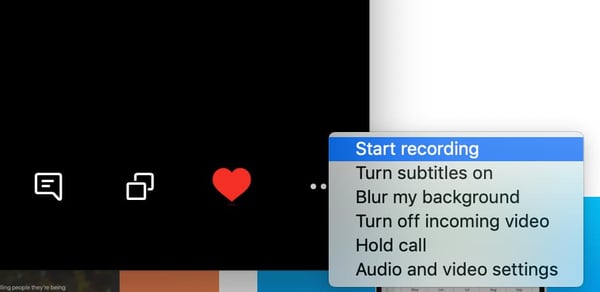
With Skype, you can record video and audio right in the program. When you’re on a call, you can click the three dots on the bottom right and then hit “Start Recording.”
Skype is a great option for podcasters because it’s free and easy to use. There are also other options, if you want better audio quality. For instance, you can download recording software on your computer or buy an external digital recorder.
4. Zoom
Price: Free+
Zoom is another excellent free option. You can easily record right in the program, by clicking the “Record” button and choosing where you’d like to save your audio file.
Skype and Zoom are fairly similar options, however, the recording files differ. Skype will give you a mono file, which means both yours and your interviewee’s side of the conversation is on one audio track. However, Zoom splits both sides of the call, giving you two separate audio tracks. This is helpful when it comes to cutting and editing in post-production.

5. Ringr
Price: $8/month+
Ringr is a long-distance podcasting and broadcast interview recording program. Although this option isn’t free, it has excellent sound quality. If you’re focused on bringing higher-quality sound to your interviews, Ringr is a good choice.
Additionally, they have three different plans you can choose from. With the basic plan, you’ll get a mono audio file, and unlimited calls and storage. If you decide to go with the premium or enterprise plan, you’ll get a split-track audio file, plus better sound quality and the option to use conference calling.
6. Squadcast
Price: $5/hour or $20/month+
Squadcast is an easy-to-use podcast recording software. Once you sign up, all you have to do is set up a meeting, click “Record,” and you’re set.
One unique element of this software is that you can pay by the hour, if you don’t think you need a monthly plan. Even with the hourly plan, you can host up to three guests and will receive a high-quality WAV or MP3 file.
Additionally, Squadcast plans to add video recording and transcription, which will help with your show notes and posting your podcast to YouTube.
One of the top reasons to use a podcast recording software like Squadcast, as opposed to Skype or Zoom, is that you’ll have a library of all your recordings in one place, online, where you can access them at any time, any place.
7. Pro Tools
Price: $30/year+
If you’re ready to move beyond the beginner recording software above, Pro Tools is an excellent option.
Pro Tools is an advanced recording and editing software. You can record, edit, and mix numerous audio tracks. However, this is for the more advanced audio recorders/editors. The user interface (UI) isn’t as intuitive for beginners and may seem overwhelming at first.
Although, because it’s advanced, it also offers much more robust features. For example, since Pro Tools is known in the music industry, it has virtual instrumentation available, which can be helpful in creating the music to put in your podcast. Additionally, it offers plugins, collaboration, and hands-on audio mixing.

8. Reaper
Price: $60 one time payment+
Reaper is another advanced recording, editing, and mixing software. This type of program provides higher-quality recordings and more capabilities when it comes to editing and mixing.
The UI isn’t as intuitive as programs like Zoom or Squadcast, but it offers higher-quality sound. With your audio interface and microphone attached, you can record directly into the program, with as many audio tracks as you’d like.
The recording feature is more robust, offering simultaneous recording inputs, a dozen audio formats, and recording tracks.
Additionally, it also has strong editing capabilities as well.

9. Logic Pro
Price: $200 one time payment+
Logic Pro is the advanced version of Garage Band for Mac users. It’s a higher-quality recording program offering an easy-to-use UI.
Recording is as simple as setting up your microphone and USB audio interface and pressing record.
Logic Pro offers up to 1,000 audio tracks, software instrument tracks, and hundreds of plugins to complete any project.
Additionally, it has advanced editing capabilities.

10. Whereby
Price: $10/month+
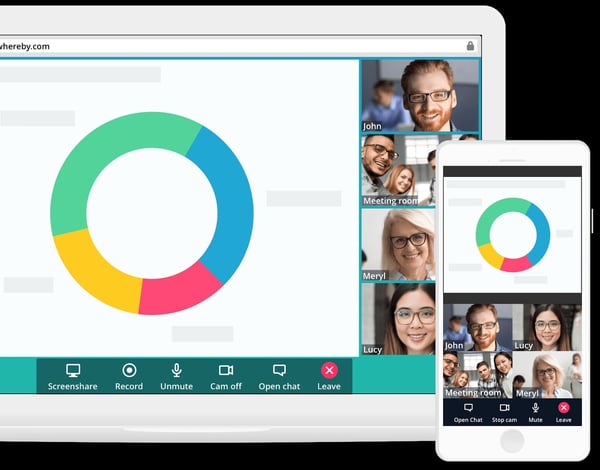
Whereby is another option for recording remote interviews. It’s excellent for beginners and is easy to use.
Although there is a free plan, recording is only available in the Pro or Business plan. Recording is as easy as hitting the “Record” button, once you’re on a call. This will record both video and audio, so it’s easy to post to YouTube if you want.
While this is an easy option, it isn’t the highest quality recording.
Podcast Editing Software
Once you record your podcast, it’s time to edit it. As you’ve read above, many software includes both recording and editing capabilities. Below are some software known for its editing, rather than recording.
11. Adobe Audition
Price: $20/month+
Adobe Audition is an excellent mid-level audio editing software. You can create, record, mix, edit, and restore audio content.
It offers high-quality sound, plus comprehensive tools to deliver polished sound. For example, Adobe Audition comes with a podcast template, which helps you set up a multitrack recording so you can mix and edit different audio tracks and voices. Plus, you can work in both waveform and multitrack editors, for more well-rounded editing.

12. Audacity
Price: Free.
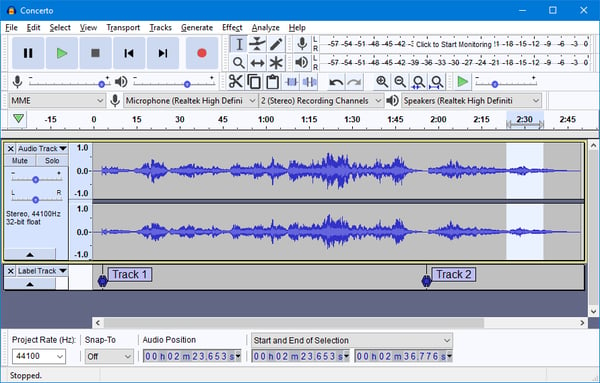
Audacity is an excellent free option for editing your podcast. It’s especially easy if you plan to use only one take, with few cuts. The UI is easy to use and beginner friendly. However, if you have to make a lot of cuts or move audio around, it’s a little more difficult because of the simplicity of the program.
This option is great for beginners because of the simple cut, copy, and paste functionality. It isn’t the highest quality sound, but it gets the job done.
13. Garage Band
Price: Free.
Garage Band is a free editing software that is available on and comes with most Mac computers.
It’s mostly used as a beginner editing program, but is capable of mixing up to 255 audio tracks. It comes with basic editing features including volume levels, cut, copy, and paste. You can use plugins to finish off your track and use audio effects such as compression.
Additionally, it features a sound library with effects that you can include in your podcast.

Podcast Hosting Sites/Services
Now that you’ve bought your equipment, recorded, and editing your podcast, you may be wondering what’s next? After you’ve produced your podcast, it’s time to find the right hosting site and service to publish it on.
14. BuzzSprout
Price: Free+
BuzzSprout is an excellent hosting option, because it gets your podcast listed in all the top podcast directories including Apple Podcasts, Spotify, Google Podcasts, and Stitcher.
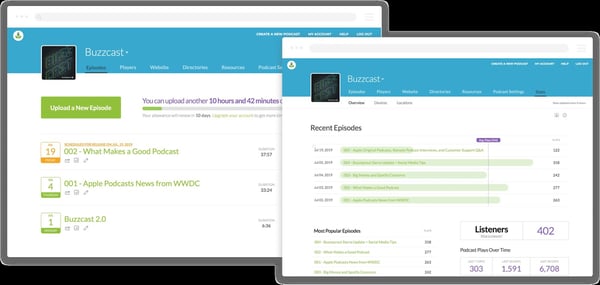
Additionally, it offers advanced metrics, so you can track the progress of your podcast. You can see statistics about your listeners, total plays over time, and where people listen to your podcast. Plus, you can transcribe your podcast in BuzzSprout.
With paid plans, you’ll have unlimited storage and episodes hosted indefinitely.
15. Libsyn
Price: $5/month+
Libsyn is a hosting service that will get your podcast published on your audience’s favorite apps and platforms.
A unique feature is its monetization options. For example, it offers premium content subscriptions and opt-in advertising. These options keep you in control and allow you to customize your monetization.
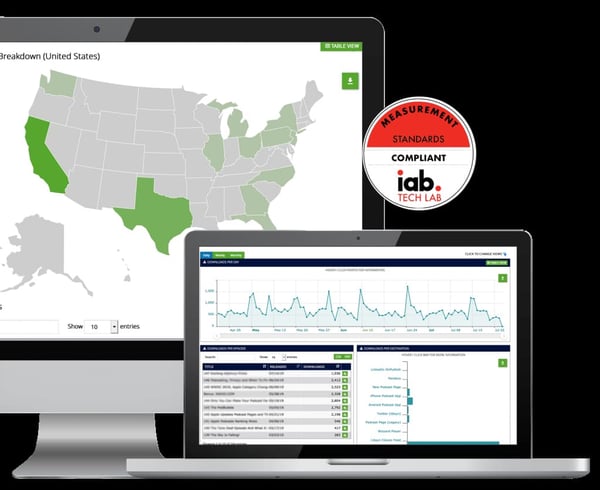
You’ll also have access to detailed audience statistics, so you can also see what’s working and what isn’t.
How to Setup a Podcast Studio
Once you have your equipment, recording and editing software, and hosting services, it’s time to figure out where you’re going to record your podcast.
You’ll want to set up a podcast studio. This can be as basic as having the right equipment in any room or as advanced as creating a dedicated space for recording.
To setup a podcast studio, follow these steps:
Step 1: Buy the equipment — Before you can get your studio set up, you need the equipment. You’ll need a microphone, microphone arm, headphones, audio interface, desks, and chairs. You’ll also want to consider buying more than one of these items, in case you decide to bring people in for interviews.
Step 2: Set up room for sound conditioning — In order to achieve the best sound, consider buying soundproof foam wall panels to attach to the walls. This will stop the sound from bouncing off the walls. Additionally, you can buy pop filters for the microphones to reduce popping sounds.
Step 3: Set up lighting and cameras — Many podcasters choose to film their podcasts so they can post to YouTube or other social media. If you want to do this, you’ll need to set up lighting and cameras.
Anyone can start a podcast. That’s why you want your podcast to stand out among the rest. To take your podcast from good to great, make sure you purchase the right equipment, software, and studio setup.

How the Fourth Industrial Revolution Could Affect Marketers
All around us, we’re seeing implications of the Fourth Industrial Revolution on our daily routines. When was the last time you used Google Maps to get someplace? Or asked Siri a simple math question, or picked something to watch from your Netflix recommendations?
While it’s easy to think about a distant future where robots take your restaurant order and sell you a house, similar advancements may be closer than we think, and some of that may be due to this new revolution.
This change in technology means a change in how products are marketed to consumers, meaning marketers should take note. So what is the “4IR,” as some have abbreviated it?
As Schwab explains, the revolution builds directly upon the Third Industrial Revolution (3IR). The result of the 3IR was digital — it brought the invention of electronic systems, information technology systems, and the birth of the idea of automation. Due to the creation of these systems and technological advances, the 4IR is built upon this.
Why the Fourth Industrial Revolution Matters to Marketers
Some of the key technologies driving this revolution include artificial intelligence (AI), quantum computing, virtual reality (VR), and the Internet of Things (IoT). An example of this revolution at work is AI finding patterns in large amounts of data, quantum computing organizing that data at an incredible speed, and the Internet of Things displaying this data in the form of recommending a Netflix documentary to you.
What does this revolution mean for marketers? How will we be affected?
1. More data means more personalized marketing
The advancements of quantum computing and AI data collecting means there’s an influx of data available to marketers about their target audience. To illustrate, because of quantum computing, Facebook can pull your most recent Google searches and then suggest ads based on your search history, thanks to AI.
Information, such as demographic and psychographic data, is collected and used by software such as social media analytics tools.
This data can help marketers create a more personalized strategy –– one that target audiences can identify with. For instance, if your data sets are telling you that your target audience prefers to make purchases via eCommerce options, why not look into including Instagram Shopping into your social media strategy?
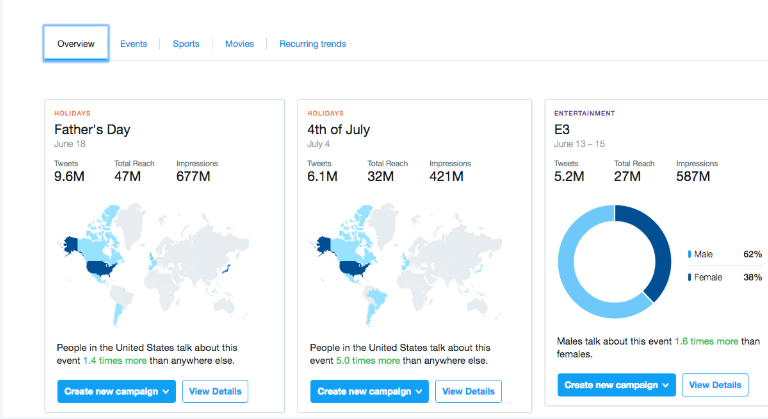
In the above dashboard captured from Twitter analytics, you can see examples of the demographics Twitter can track and provide insights on. This data is available thanks to advancements in AI, and has become a critical component of building impactful marketing strategies.
2. More connected devices mean more chances to build your brand
With all of the elements that make up the Internet of Things (like voice assistants, smart appliances, and wearable tech), marketers have the chance to build brands that align with this new internet.
For instance, the IoT makes it possible for you to send personalized discounts to customers signed up to loyalty rewards program while they’re browsing in the store, based on their proximity to your products. Further, you can use IoT to track which and how many customers have been looking at products when they browse online and then send that customer a discount based on those numbers.
I for one, wholeheartedly wish my favorite local coffee shop would send me coupons while I am in the supermarket searching for new coffee grounds. Convenience at its finest.
3. Data systems assist with streamlined processing
The rise of AI means that you can make the data collection portion of your job easier. Tools powered by the Fourth Industrial Revolution can keep you from spending a significant portion of your time trying to find ROI in social media strategy.
Social media analytics tools tell you the rate at which your brand is engaging with customers. Digital advertising tools provide real-time data on the impact of the ads you put out. All this can be done by machines in a fraction of the time it would usually take to collect and interpret that data manually — time you can spend doing other things.
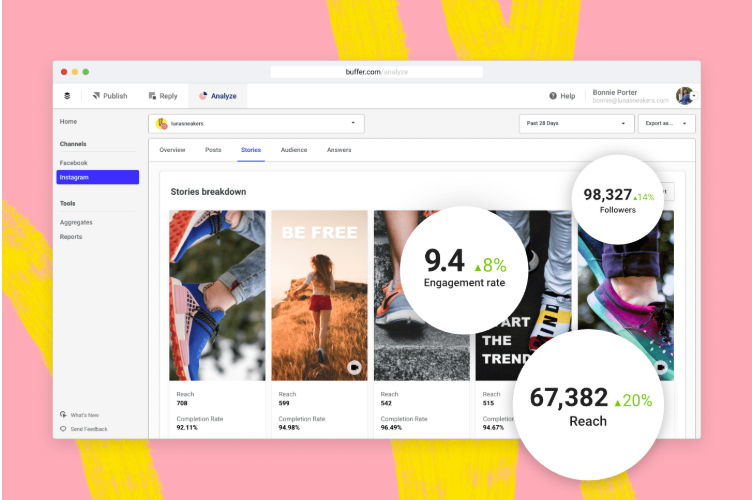
Tools like Buffer Analyze can tell you how your marketing strategy is reaching audiences and what you can do to improve that reach. Buffer is an automated software that lets you schedule social media posts and watch their performance. In this screenshot, Buffer is analyzing the impact of Instagram Stories for a brand.
4. The fusion of technology leads to the need for specialized roles
All this new technology means marketers are defining job requirements differently. Not only does a marketer in the Fourth Industrial Revolution need to learn new skills like interpreting new types (and a much larger volume) of data, the functions of a marketer’s core role will need to shift.
Though it’s dependent on the industry, roles for marketers are becoming more specialized. For instance, a marketing team in 2020 might consist of a full-time SEO specialist, a blogger, a brand specialist, and a social media coordinator.
Previously, these roles might’ve been consolidated under one person (and still is one person in many SMBs), but larger companies are finding they need employees who specialize in certain functions. These important skillsets ensure brands are operating at their highest potential as new technology emerges.
We are in the midst of the Fourth Industrial Revolution, and we are constantly finding new advancements in something. While much of the shift of process and function is happening online, many of these advancements benefit marketers. This is because marketing can be faster, data-driven, and personalized.

The Best Time to Send an Email (Research-Backed)
Here’s a little exercise for you: Check the timestamps on the emails you’ve gotten in the past day. What have you found? For me, I noticed that most of my emails, especially my subscription emails, were sent between 9-10 AM, or 5-6 PM.
This isn’t a coincidence, either.
While the answer to “What’s the perfect time to send an email to my customers?” isn’t an exact science, there are some key findings we’ve discovered through heavy research, and those times listed above are right in line with what we found. Keep reading to find out the best time to send an email, according to our findings.
Why Email Matters For Your Business
Automated email marketing provides a chance for you to improve sales conversions — maybe even by 14%. It’s a way to send customers unique offers — such as product sales or newsletters updates — with information your reader can’t get anywhere else.
Emails should be personalized with what your customers want to see, allowing you an instant way to communicate with them. Your emails should contain information your customers are interested in learning more about, such as discount offers, business updates, or product/service launches.
HubSpot‘s marketing email tool allows users to create and send automated emails for free. It also gives you the option to schedule your emails according to the preferences you’ve set. Then, your emails will then be sent to the list(s) of contacts you select.

When you reach this option in your automated email tool, you probably spend some time wondering when exactly your audience would like to receive your email, especially if it includes a limited-time offer. You want to make sure the highest number of customers possible are reading your emails. We’ll go over what we found next.
When is the Best Time to Send an Email?
When it comes to what time and day you should send an email and days, we found some researched-backed best practices.
These numbers are from GetResponse, an email marketing software that combed its data to compile a report of email marketing benchmarks. They analyzed 4 billion emails from 1,000 active senders.

The highest line of the graph represents the open rate. The purple line (i.e., the one below it) represents the click-to-open rate. Below that, the dark blue line, represents the click-through rate. The almost transparent data counts the number of messages sent in percent value.
Keeping your audience in mind is a good tip for figuring out the time to send your emails. If your buyer persona is a professional with a nine-to-five job, sending emails during their ideal downtimes are the best. For instance, HubSpot sends emails between 8-9:30 AM ET to match our audience’s daily routines.
If you’re sending emails that include a sale or promotion, try sending them during the times your audience tends to take their lunch breaks.
Just keeping up on daily routines isn’t the only metric that factors into marketing emails. Others, such as click-through rate (CTR), click-to-open rate (CTOR), and open rate (OR) are also helpful to look at when creating emails.
Click-through rate
Click-through rate refers to the number of people who open a link or image in an email. This number will always be smaller than the open rate of emails opened due to the fact that it’s calculated using the total number of emails sent. CTR reflects conversions through email. So if you send 500 emails and 250 are opened, but only 75 links are clicked, your click-through rate is 75.
Click-to-open rate
When comparing the number of people that opened your email and the number that clicked on any links, that data is called click-to-open rate. This metric helps you identify which information in your emails is relevant to consumers. Finding CTOR is done by diving CTR by the open rate and multiplying it by 100%. For example, if your email receives 200 clicks and 120 opens, your click-to-open-rate is 60%.
Open rate
The open rate, then, is the percentage found from the number of subscribers who opened your email campaign. Emails that have great open rates have short, effective subject lines. Plus, they’re optimized for previews and preheader text.
This gets into the best day to send through an email. CampaignMonitor collected data from millions of emails used on their service. They put together the best day as it pertains to data collection.

From this data, it looks like the best days for seeing a good blanket of success fall during the workweek. People are mostly opening and reading through emails in the middle of the week. It’s also good to keep in mind the lowest unsubscribe rate: during the beginning of the week.
CampaignMonitor also reported that Marketing and Advertising is one of the top industries that see success with email marketing, so making sure those emails are memorable is key to delighting customers.
Email marketing can be a tricky subject. There are so many industries taking advantage of it in their own way and making an impact. How do you measure up?
Your subscribers are already interested in your content. They appreciate what you are offering as a company, and as long as you’re sending them emails that relate to that, you have a good chance of obtaining great metrics.

What’s a Competitive Analysis & How Do You Conduct One?
When was the last time you ran a competitive analysis for your brand?
And most importantly, do you know how to do one efficiently?
If you’re not sure, or if the last “analysis” you ran was a quick perusal of a competitor’s website and social media presence, you’re likely missing out on important intelligence that could help your brand grow.
A competitive analysis helps you learn the ins and outs of how your competition works. It also helps you identify what they’re doing right and opportunities where you can easily one-up them by using a strategy they haven’t taken advantage of.
Competitive Analysis in Marketing
Every brand can benefit from regular competitor analysis. By performing a competitor analysis, you’ll be able to:
- Identify gaps in the market
- Develop new products and services
- Uncover market trends
- Market and sell more effectively
As you can see, learning any of these four components will lead your brand down the path of achievement. But before you get too excited to start, we need to nail down a few important basics.
Once you identify your true competition, you’ll need to determine what metrics you’ll be comparing across the board. Below, we’ll give nine specific factors to compare and tips on how to identify this competition in the first place.
1. Determine who your competitors are.
First, you’ll need to figure out who you’re really competing with so you can compare the data accurately. What works in a business similar to yours may not work for your brand.
So how can you do this?
Divide your “competitors” into two categories: direct and indirect.
Direct competitors are businesses that offer a product or service that could pass as a similar substitute for yours, and that operate in your same geographic area.
On the flip side, an indirect competitor is one that provides products that are not the same but could satisfy the same customer need or solve the same problem.
It seems simple enough on paper, but these two terms are often misused.
When comparing your brand, you should only focus on your direct competitors. This is something many brands get wrong.
Let’s use an example: Stitch Fix and Fabletics are both subscription-based services that sell clothes on a monthly basis and serve a similar target audience.
But as we look deeper, we can see that the actual product (clothes in this case) are not really the same; one brand focuses on stylish everyday outfits while the other is workout-centric attire only.
Yes, these brands satisfy the same need for women (having trendy clothes delivered right to their doorstep each month), but they do so with completely different types of clothing, making them indirect competitors.
This means Kate Hudson’s team at Fabletics would not want to spend their time studying Stitch Fix too closely since their audiences probably vary quite a bit. Even if it’s only slightly, this tiny variation is enough to make a big difference.
Now, this doesn’t mean you should toss your indirect competitors out the window completely.
Keep these brands on your radar since they could shift positions at any time and cross over into the direct competitor zone. Using our example, Stitch Fix could start a workout line, which would certainly change things for Fabletics.
This is also one of the reasons why you’ll want to routinely run a competitor analysis. The market can and will shift at anytime, and if you’re not constantly scoping it out, you won’t be aware of these changes until it’s too late.
2. Determine what products your competitors offer.
At the heart of any business is its product or service, which is what makes this a good place to start.
You’ll want to analyze your competitor’s complete product line and the quality of the products or services they’re offering.
You should also take note of their pricing and any discounts they’re offering customers.
Some questions to consider include:
- Are they a low-cost or high-cost provider?
- Are they working mainly volume sales or one-o purchases?
- What is their market share?
- What are characteristics and needs of their ideal customers?
- Are they using different pricing strategies for online purchases versus brick and mortar?
- How does the company differentiate itself from its competitors?
- How do they distribute their products/services?
3. Research your competitors sales tactics and results.
Running a sales analysis of your competitors can be a bit tricky.
You’ll want to track down the answers to questions such as:
- What does the sales process look like?
- What channels are they selling through?
- Do they have multiple locations and how does this give them an advantage?
- Are they expanding? Scaling down?
- Do they have partner reselling programs?
- What are their customers reasons for not buying? For ending their relationship with the company?
- What are their revenues each year? What about total sales volume?
- Do they regularly discount their products or services?
- How involved is a salesperson in the process?
These helpful pieces of information will give you an idea of how competitive the sales process is, and what information you need to prepare your sales reps with to compete during the final buy stage.
For publicly held companies, you can find annual reports online, but you’ll have to do some sleuthing to find this info from privately owned businesses.
You could find some of this information by searching through your CRM and reaching out to those customers who mentioned they were considering your competitor. Find out what made them choose your product or service over others out there.
To do this, run a report that shows all prospective deals where there was an identified competitor.
If this data is not something you currently record, talk to marketing and sales to implement a system where prospects are questioned about the other companies they are considering.
Essentially, they’ll need to ask their leads (either through a form field or during a one- on-one sales conversation) to identify who their current service providers are, who they’ve used in the past, and who else they are considering during the buying process.
When a competitor is identified, have your sales team dive deeper by asking why they are considering switching to your product. If you’ve already lost the deal, be sure to follow up the with prospect to determine why you lost to your competitor. What services or features attracted the prospect? Was it about price? What’s the prospect’s impression of your sales process? If they’ve already made the switch, find out why they made this decision.
By asking open-ended questions, you’ll have honest feedback about what customers find appealing about your brand and what might be turning customers away.
Once you’ve answered these questions, you can start scoping out your competitor’s marketing efforts.
4. Analyze how your competitors market their products.
Analyzing your competitor’s website is the fastest way to gauge their marketing efforts. Take note of any of the following items and copy down the specific URL for future reference:
- Do they have a blog?
- Are they creating whitepapers or ebooks?
- Do they post videos or webinars?
- Do they have a podcast?
- Are they using static visual content such as infographics and cartoons?
- What about slide decks?
- Do they have a FAQs section?
- Are there featured articles?
- Do you see press releases?
- Do they have a media kit?
- What about case studies?
- Do they publish buying guides and data sheets?
- What online and offine advertising campaigns are they running?
5. Take note of your competition’s content strategy.
Then, take a look at the quantity of these items. Do they have several hundred blog posts or a small handful? Are there five white papers and just one ebook?
Next, determine the frequency of these content assets. Are they publishing something new each week or once a month? How often does a new ebook or case study come out?
Chances are, if you come across a robust archive of content, your competitor has been publishing regularly. Depending on the topics they’re discussing, this content may help you hone in on their lead generating strategies.
From there, you should move on to evaluating the quality of their content. After all, if the quality is lacking, it won’t matter how often they post since their target audience won’t find much value there.
Choose a small handful of samples to review instead of tackling every single piece to make the process more manageable.
Your sampler should include content pieces covering a variety of topics so you’ll have a fairly complete picture of what your competitor shares with their target audience.
When analyzing your competitor’s content, consider the following questions:
- How accurate is their content?
- Are spelling or grammar errors present?
- How in-depth does their content go? (Is it introductory level that just scratches the surface or more advanced topics with high-level ideas?)
- What tone do they use?
- Is the content structured for readability? (Are they using bullet points, bold headings, and numbered lists?)
- Is their content free and available to anyone or do their readers need to opt-in?
- Who is writing their content? (In-house team? One person? Multiple contributors?)
- Is there a visible byline or bio attached to their articles?
As you continue to scan the content, pay attention to the photos and imagery your competitors are using.
Do you quickly scroll past generic stock photos or are you impressed by custom illustrations and images? If they‘re using stock photos, do they at least have overlays of text quotes or calls-to- action that are specific to their business?
If their photos are custom, are they sourced from outside graphic professionals or do they appear to be done in-house?
When you have a solid understanding of your competitor’s content marketing strategy, it’s time to find out if it’s truly working for them.
6. Analyze the level of engagement on your competitor’s content.
To gauge how engaging your competitor’s content is to their readers, you’ll need to see how their target audience responds to what they’re posting.
Check the average number of comments, shares, and likes on your competitor’s content and find out if:
- Certain topics resonate better than others
- The comments are negative, positive, or a mix
- People are tweeting about specific topics more than others
- Readers respond better to Facebook updates about certain content
- Don’t forget to note if your competitor categorizes their content using tags, and if they have social media follow and share buttons attached to each piece of content. Both of these will a ect engagement activity.
7. Observe how they promote their marketing content.
From engagement, you’ll move right along to your competitor’s content promotion strategy.
- Keyword density in the copy itself
- Image ALT text tags
- Use of internal linking
The following questions can also help you prioritize and focus on what to pay attention to:
- Which keywords are your competitors focusing on that you still haven’t tapped into?
- What content of theirs is highly shared and linked to? How does your content compare?
- Which social media platforms is your target audience using and the most active on?
- What other sites are linking back to your competitor’s site, but not yours?
- Who else is sharing what your competitors are publishing?
- Who is referring traffic to your competitor’s site?
- For the keywords you want to focus on, what is the diffculty level? There are several free (and paid) tools that will give you a comprehensive evaluation of your competitor’s search engine optimization.
8. Look at their social media presence, strategies, and go-to platforms
The last area you’ll want to evaluate when it comes to marketing is your competitor’s social media presence and engagement rates.
How does your competition drive engagement with their brand through social media? Do you see social sharing buttons with each article? Does your competitor have links to their social media channels in the header, footer, or somewhere else? Are these clearly visible? Do they use calls-to-action with these buttons?
If your competitors are using a social network that you may not be on, it’s worth learning more about how that platform may be able to help your business, too. To determine if a new social media platform is worth your time, check your competitor’s engagement rates on those sites. First, visit the following sites to see if your competition has an account on these platforms:
- Snapchat
- YouTube
Then, take note of the following quantitative items from each platform:
- Number of fans/followers
- Posting frequency and consistency
- Content engagement (Are users leaving comments or sharing their posts?)
- Content virality (How many shares, repins, and retweets do their posts get?)
With the same critical eye you used to gauge your competition’s content marketing strategy, take a fine-toothed comb to analyze their social media strategy.
What kind of content are they posting? Are they more focused on driving people to landing pages, resulting in new leads? Or are they posting visual content to promote engagement and brand awareness?
How much of this content is original? Do they share curated content from other sources? Are these sources regular contributors? What is the overall tone of the content?
How does your competition interact with their followers? How frequently do their followers interact with their content?
After you collect this data, generate an overall grade for the quality of your competitor’s content. This will help you compare the rest of your competitors using a similar grading scale.
9. Perform a SWOT Analysis to learn their strengths, weaknesses, opportunities, and threats
As you evaluate each component in your competitor analysis (business, sales, and marketing), get into the habit of performing a simplified SWOT analysis at the same time.
This means you’ll take note of your competitor’s strengths, weaknesses, opportunities, and threats any time you assess an overall grade.
Some questions to get you started include:
- What is your competitor doing really well with? (Products, content marketing, social
media, etc.) - Where does your competitor have the advantage over your brand?
- What is the weakest area for your competitor?
- Where does your brand have the advantage over your competitor?
- What could they do better with?
- In what areas would you consider this competitor as a threat?
- Are there opportunities in the market that your competitor has identified?
You’ll be able to compare their weaknesses against your strengths and vice versa. By doing this, you can better position your company, and you’ll start to uncover areas for improvement within your own brand.
How Does Your Business Currently Stack Up?
Before you accurately compare your competition, you need to establish a baseline. This also helps when it comes time to perform a SWOT analysis.
Take an objective look at your business, sales, and marketing e orts through the same metrics you use to evaluate your competition.
Record this information just like you would with a competitor and use this as your baseline to compare across the board.
Ready to get started with the full ebook and template? Click here to access the complete Competitive Analysis Kit.
Editor’s Note; This post was originally published prior to July 2018 but was updated in November 2019 for comprehensiveness.

The Beginner’s Guide to Conversational Marketing
How did your grandparents, parents, and younger siblings grow up gossiping about the latest party? I bet they’d all have different answers.
Don’t believe me? Let’s take a trip back in time.
First, we sent letters. If you think handwriting a card took a long time, think about the time it took to receive a response by plane, train … or pony.
The 1800s brought many new technologies, including the telegraph. It may sound cool, but think about how long it took to translate details into morse code. I’ll give you a hint: .. – / – — — -.- / .- / .-.. — -. –. / – .. — ..-.-.
Years later, the fax machine allowed us to send messages and images over telephone lines. Unfortunately, the earliest machines cost tens of thousands of dollars, and you still had to create a hard copy of your message.
Then came “leave a message after the beep” … voicemail. We’ve all put off listening to that 3-minute long message. It’s easy to ignore or it can be the start of an endless game of phone “tag”.
After voicemail came “you’ve got mail.” While revolutionary, inboxes quickly became overwhelmed. Your thoughtful email lay forgotten under a pile of spam and promotional messages.
Then the people who brought us email rolled out AIM or instant messenger. As the name implies, this was the first instant messaging service. Except your friends weren’t always online. Sometimes their away message was set to Outkast lyrics. Shake it like a Polaroid picture, anyone?
Around the same time, SMS texts hit mobile phones everywhere. You can now text your friend all of the essential party details and 🎉🎉🎉emojis.
Finally, we arrived at live chat. Live chat allows for instantaneous responses. You write a quick message and see those three little dots signaling a reply. The days of waiting for weeks to hear from someone are over – conversations are always happening.
With each new iteration of technology, our accepted response time has changed — friends make plans faster, families stay closer, and businesses provide answers instantly. In the age of live chat, customers expect conversations to happen how, when, and where they want.
Sounds intimidating, right? Don’t worry; it’s not as complicated as you think. While the technology we use to communicate has changed, the core elements of communication have stayed the same. People always have and always will expect conversations to be helpful, personal, and empathetic. The only difference now is we have the technology to have those conversations at scale. That’s the power of conversational marketing.
Let’s talk about conversational marketing and its benefits, how it will help your business grow, and what you need to build a successful conversational marketing strategy.
Check out our Introduction to Conversational Marketing course from HubSpot Academy.
For example, many startups have created user groups on Slack. These groups allow customers and prospects to ask questions and get advice on a channel they’re already using to communicate throughout the workday … but wait, weren’t we talking about conversational marketing? How did we get started talking about customer support?
See, here’s the thing with live chat, it’s an incredibly powerful communication channel that has a strange way of breaking down the walls between support, sales, and marketing.
Sure, conversational marketing is the topic of the day, but we believe it is just one small piece of the puzzle. Conversations should take place across your entire business. In the future, businesses will need to develop a comprehensive conversational growth strategy to deliver better customer experience throughout the entire customer journey.
Conversational sales will play a huge role in helping reps connect with prospects in a more helpful, organic way. And customer success teams have already seen significant benefits using chat as one of their many support tools. While you’re developing your conversational marketing strategy, consider how it can impact every part of your business.
The Key Elements of Conversational Marketing
OK, you may be thinking, “conversational marketing sounds a lot like my current marketing strategy. I’m on multiple channels. I’m having conversations with my audience.”
If you’re a customer-focused marketer, chances are you’re almost there. Here are the four key components of conversational marketing and how to best refine your strategy.
1. Conversations happen in customer-time.
Conversational marketing is an asynchronous relationship. Meaning conversations should occur whenever the customer prefers — whether that’s in real-time, after finishing their meeting, or later that night when they have a spare moment. While it’s important for businesses to be able to chat in real-time, it’s just as important for them to be able to finish a conversation at whatever pace the customer wants. Sometimes that means starting a conversation at 7 a.m. over their first cup of coffee and finishing at 9 p.m. after they’ve put their kids to bed.
HubSpot Co-Founder Dharmesh Shah says, “Customers should be able to pick up things right where they left off whenever it is convenient for them to continue. The key is to remember that conversational marketing should be designed around the needs of the customer — not the needs of the business.”
2. Conversations are scalable.
Because conversations happen on customer-time, all conversations need to be scalable. A customer doesn’t care if you’re talking with 50, 500, or 5,000 other people — they only care about the issue they need to be solved. Businesses, especially SMBs, shouldn’t get left behind due to a lack of resources or manpower. This is where chatbots come in. Bots make 24/7 support possible by providing answers to common questions based on data that already exists. Businesses shouldn’t sacrifice human interaction for scale. Rather, bots offer quick access to information or a human.
3. Conversations have context.
Conversations can’t exist in a vacuum; they need context and should get smarter as you collect more information. This is important for two reasons. First, it’s what customers expect. Think about it: If you called a company yesterday to report a defect in something you ordered, and then you chat them the next day about needing return instructions, you’d expect the person you’re talking with to have access to previous interactions and know which product you’re sending back.
Second, context is what makes messaging convenient. Without it, bots or a support rep would need to ask people the same qualifying questions every time they interacted with them — wasting their time and testing their patience. If you’ve ever called customer support, you know how frustrating it is to repeat your account number time after time as you’re passed around to different departments.
People want to get the answer to their question as quickly as possible and with the smallest amount of effort. This is why it’s so important to make a CRM part of your conversational marketing strategy. Context means gathering, storing, and making accessible customer data — from recent orders to visits to pricing pages to their job title. The more you know about the customer and the more you can demonstrate that in the conversation, the more helpful you’ll be.
4. Conversations meet customers where they are.
Inbound Marketing is about providing value to your audience and meeting them where they are. Conversational marketing is just a part of that now — thanks to the mass adoption of messaging and new tools and technology.
And that means conversations should happen on the channel that best suits your customer — that might be over the phone or on Facebook Messenger, with a human or a bot. People don’t want to be forced to call a 1-800 number if they could easily send a quick chat message and grab a link to a knowledge base article. HubSpot’s bot expert Brian Bagdasarian states:
“Businesses should strive to deliver the right message, at the right time, to the right person, with the right information, on the right channel, every single time.”
Conversational Marketing Is More Than Just Live Chat
Some people equate conversational marketing with live chat — something that’s been around for a while. But it’s much more than that. Conversational marketing isn’t about a single tool. While Facebook Messenger, Slack, SMS, email, and others allow conversations to happen, this is about the changing communication preferences of consumers that in turn, should change how you view one-to-one conversations.
For example, social media giant Facebook is drastically changing the way its users engage with businesses. There are over 65 million business pages on Facebook, and over 2 billion messages are exchanged with these businesses each month on Facebook Messenger. That’s a lot of conversations happening. Consumers are using Facebook Messenger and other popular messaging platforms to get content delivered, shop and buy, and access support.
With access to new technology, businesses can use these emerging platforms to easily meet consumers where they are already spending their time. Still not convinced? 85% of consumers spend their time in five popular apps, including WhatsApp and Facebook Messenger. And according to Facebook’s February earnings, WhatsApp and Facebook Messenger had 1.5 billion and 1.3 billion monthly active users, respectively.
But remember, businesses should not only be communicating on a variety of channels, but they should also be prepared to continue those conversations across all channels without missing a beat.
The Benefits of Conversational Marketing
Conversational marketing isn’t new — we have conversations every day, and as you saw from the timeline above, it’s been that way for a while. So why wouldn’t we use tools that optimize conversations for business? Let’s talk about a few of the key benefits.
1. Conversational marketing is a more delightful way for customers to get answers.
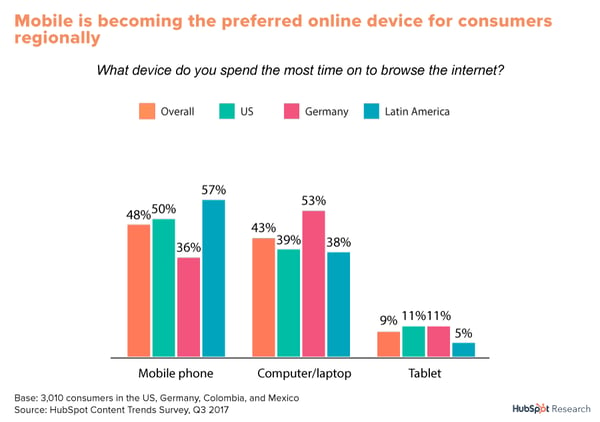
People are increasingly turning to mobile to shop and make purchases. As a result, more people are interacting with content that is more mobile friendly. Consumers that use their phone as their primary internet device have grown to prefer video content, social content, and messaging-based interactions.
Think about how many times you pick up your phone during the day. According to TechCrunch, consumers spend 5 hours per day on their phones. It makes sense. I’m guessing it’s your first line of defense when looking up an answer to a quick question. Conversational marketing channels like messaging apps and email are innately mobile friendly. It’s a lot easier to chat with a rep or even a bot to get an answer than spend time scrolling and clicking through a company’s website. Messaging apps allow customers to provide information specific to their problem so businesses can give quick, personalized support.
HubSpot recently experimented with delivering content offers via Facebook Messenger and saw some incredible results – the test saw a 2.5X increase in open rates and 6X the number of clicks when compared to email. This improved performance is due in part to the channel’s push notifications, but it also aligns with how people want to shop, buy, and engage with companies today.
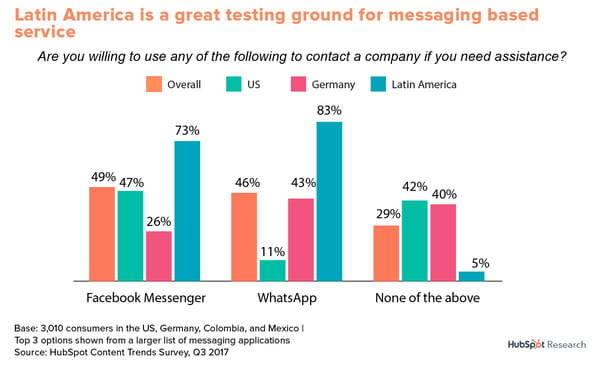
And conversational marketing doesn’t just present an opportunity in the U.S. In fact, in many regions, messaging apps like WeChat and WhatsApp are the primary channel for both personal and professional communication.
2. Conversational marketing is a great way to gain new, valuable insights about your customers.
Think about it, when else do your customers tell you in their own words what they want to do, learn, or change? You don’t get that candor with a website or an advertisement.
HubSpot’s Conversational Marketing Manager Connor Cirillo states,
“Your conversational marketing audience is much more insightful than your other channels. They’ll tell you in their own words how they want to interact with your business. There’s no inferring or guessing, like with web traffic.”
And with conversational marketing, you can gather that data at scale. This especially holds true for messaging channels. Chat interfaces can record data that can then be used to optimize for better customer interactions, product improvements, more helpful content, and more.
For example, CNN uses a bot to provide their audience with tailored content based on keywords. Users simply send the bot a message with a topic they’re interested in, and it will send back related news stories. Not only is it a quick, easy way for readers to get the news they care about most, CNN is collecting valuable consumer data with every chat.
Once businesses collect consumer data, they can use it to define trends and make more informed decisions. For example, imagine that your company redesigned its website or provided a discount on merchandise. If a prospect or customer has a difficult time navigating the new website or applying the coupon, they can live chat with a representative to receive instructions on how to best navigate the issue.
Not only does live chat help solve the immediate customer’s concerns and keep them on the site, the information from that chat can help you determine if you need to fix a part of your website’s UX or send out more detailed instructions on how to apply the discount. Being able to determine common customer pain points as they occur can save a business thousands of dollars.
And not only is conversational marketing data helpful for recognizing tech issues and common customer pain points, it also can identify opportunities for cross-sell and up-sell. If a customer is chatting with a rep about a product they are considering buying, the rep could take that opportunity to point out other items customers frequently bought based on previous interactions.
3. Conversational marketing is a great way to build relationships.
With messaging apps and social media, we’ve found a way to talk with more friends, more frequently. Conversational marketing can drive lead generation by reaching new audiences on different channels or by giving people a more convenient way to get in touch with support.
According to Harvard Business Review, messaging apps “provide a continuous thread between customers and brands”. This thread allows for continuous communication which makes conversations more natural and “opportunities to cross-sell, encourage sharing, solicit input, and flow seamlessly between commerce and support” more frequent.
According to TopBots’ Adelyn Zhou,
“Questions that are awkward or annoying coming from a brand are socially acceptable and even welcome in chatbot interactions.”
Bots allow companies to collect a lot of information in a natural way. Instead of coming face-to-face with a long form, customers can share a little information over the course of multiple conversations. HubSpot was able to attract 20% more qualified leads by merely adding live chat as a communication channel. What would a 20% increase in qualified leads look like for your business?
And not only is conversational marketing more convenient for customers, it’s also a great way to show off your brand’s personality. Through copywriting, images, emojis, and videos, you can give your messaging conversations a personality — one that reinforces your brand. Customers and prospects are likely to keep engaging with your brand if you make it enjoyable and easy to do so!
1. Domino’s Pizza
Domino’s recent Domino’s AnyWare initiative allows customers to order pizza from, well, literally anywhere. This includes conversational channels like Slack, Facebook Messenger, Twitter, and text message — by simply texting the pizza emoji.

Customers must first enable text ordering and set up an “Easy Order” on their Domino’s profile, which is what they’ll order when texting 🍕. Beyond that, however, ordering a pizza doesn’t get much simpler.
2. HubSpot
HubSpot allowed people to register for its Four Days of Facebook Campaign through multiple channels, including Facebook Messenger. Users loved the conversational UI and were quick to encourage their friends and coworkers to sign up as well.
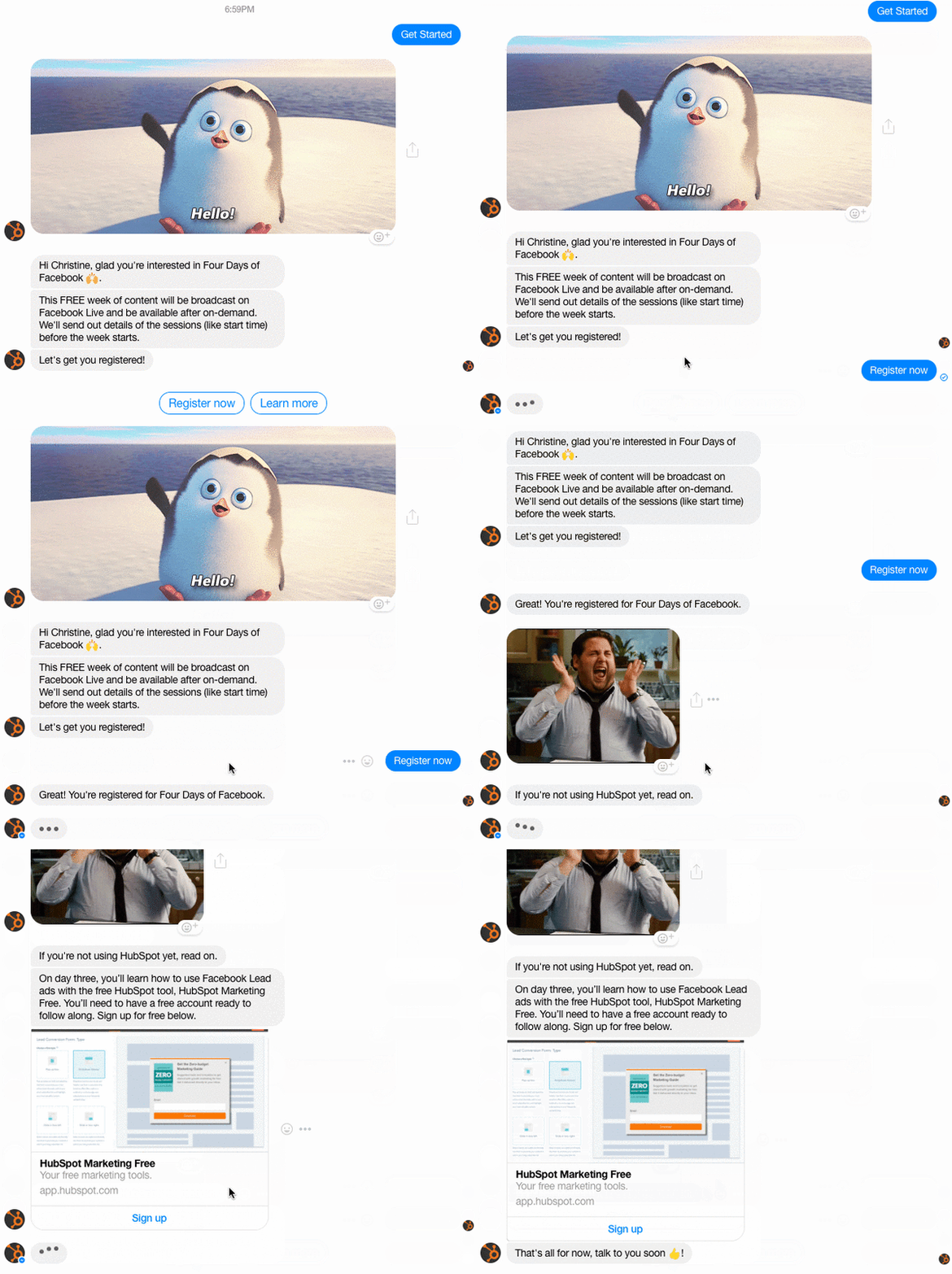
And success wasn’t just about getting people to register for the live event. Facebook Messenger was the highest converting source of new product users to HubSpot Marketing Free via the campaign.
3. London & Company
London & Company walks prospective mortgage customers through their Mortgage Finder form. But instead of a lengthy form with multiple fields, London & Company displays a chatbot/ messenger format with one question at a time.
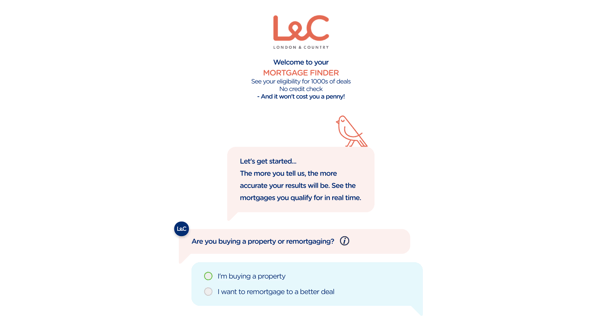
This conversational format is user-friendly and easy to navigate, which likely helps London & Company collect information from and convert potential new leads.
4. HelloFresh
HelloFresh, a subscription meal service, launched their Freddy Freshbot chatbot in 2017. Customers can chat with Freddy through Facebook Messenger.
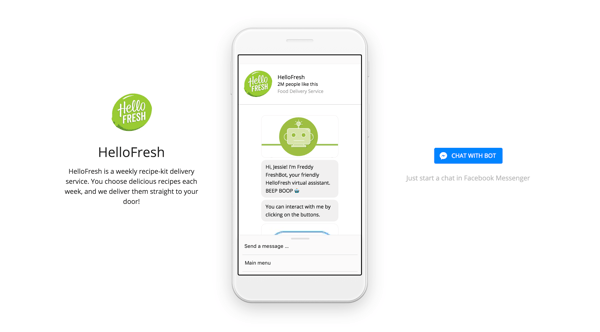
Freddy provides customer service, recipe ideas, answers to frequently asked questions, and meal reminders. With Freddy Freshbot, HelloFresh does a great job providing support well beyond the order and delivery process, ensuring its customers feel comfortable cooking its meals and eventually renewing their subscriptions.
5. Sephora
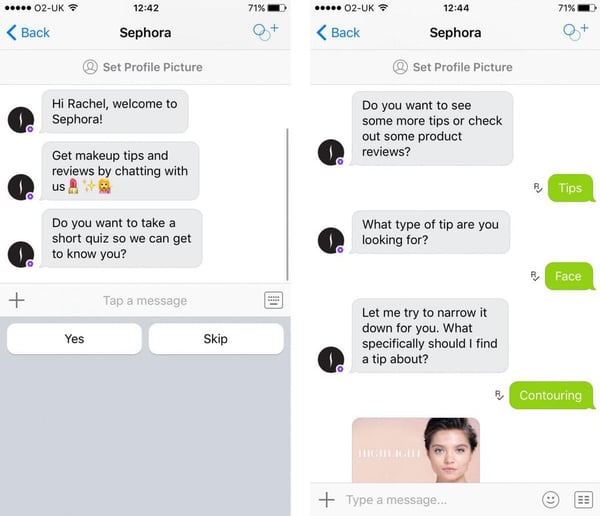
Sephora used Kik messenger to learn more about their target market by asking them if they wanted to participate in a quick, social-like quiz about their beauty habits. Once users accepted, they answered questions about their age, makeup preferences, and favorite products. From there, the app was able to deliver relevant content such as how-to videos and product reviews based on the individual’s answers.
A chatbot makes it easier for customers to find and purchase products they like and frees up human employees for other tasks.
Conversational Marketing and Inbound Marketing
At this point, you’ve probably noticed the similarities between the core ideas behind conversational marketing and inbound marketing. That’s because conversational marketing is a piece of inbound marketing, just like email marketing or blogging. Inbound Marketing is all about creating value where your target customer is spending their time — that could mean writing a blog, interacting on social media, or sharing a video on YouTube. Now that technology has made conversational marketing a possibility, it’s a key part of inbound marketing.
HubSpot Co-Founder Dharmesh Shah states,
“Conversation marketing is not new. Not only have we long been having conversations with customers — even the term itself has been around for at least a decade. The reason for the renewed interest in conversational marketing is that because of advances in technology and shifts in consumer behavior, conversational marketing can now happen at scale. We can have direct, one-to-one conversations with individual customers on their timeline — not ours.”
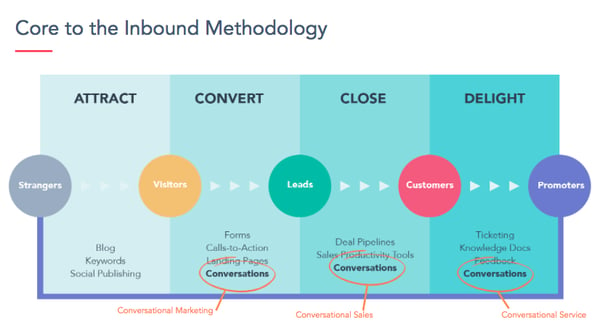
Although conversations are nothing new, our ability to have 1:1 conversations at this scale and across multiple channels is. With inbound marketing, you can first attract potential customers to your brand. You can then use conversational marketing to allow people to initiate conversations when they want, where they want, and how they want – giving your audience the control.
How do conversations fit into the inbound methodology? Well, we see conversations taking place throughout the entire customer lifecycle, though there’s not a strong case to be made for it in the attract stage as the discovery of brands on messaging platforms is still immature.
Facebook Messenger’s Discover tab, which launched mid-2017, is one attempt at solving this. But conversations can be used in place of forms to attract and capture leads, by sales teams to convert those leads into customers, and by customer success teams to delight customers with quick and convenient support. For example, using live chat during the sales process could help convert more leads because it allows prospects to interact in a way they already prefer to buy.
How Conversational Marketing Will Grow Your Business
Okay, we know conversational marketing is all about improving 1:1 relationships, but how can businesses actually start to build out a strategy for success? Cirillo recommends starting with one goal and then working backward.
“Know what you want to get out of the conversation and what data you need to make that happen. Every conversation should add value to your business.”
Analyze your answers and work to create the best possible experience for your customers. While there are many things you can do to help optimize your conversations, here are a few essentials:
Your CRM and Conversational Marketing
When you have a conversation with a friend, you don’t expect to have to remind them of things like your name or where you live — the same holds true when customers have conversations with a business. That’s why using a CRM is so important. A CRM is like a digital memory that allows you to have conversations with customers like you know them.
A successful conversational marketing strategy is dependent on fast and reliable access to a shared knowledge base that includes data such as communication history and necessary customer information. Companies who want to do conversational marketing will need a way to store and organize that data in order to have more seamless interactions with customers. With the help of a CRM, you can organically promote events and products, distribute content, and provide support all through chat.
So, what data should marketers collect? You don’t need to know everything about them, but you should know the basics and details of past conversations. Cirillo encourages marketers to think first about why they’re using chat:
“Success with conversational marketing will look different depending on the use case. There’s not an overarching metric for this world. Track the ‘time to solution’ or conversion rate if you’re solving for utility. If your experience is less about a particular action, then retention might make more sense.”
Start with what you want your customers to be able to accomplish via chat and then build out processes for acquiring the necessary information.
In addition, you can’t implement a conversational marketing strategy without a process for tracking performance, moments of confusion or drop-off, and new questions. You should always be gathering data and optimizing the experience.
Adding Automation with Chatbots
Once your CRM is set up, it’s time to think to think about how you can scale your conversations. This is where chatbots can help.
Business isn’t just happening in one city, in one state, or in one timezone — it’s happening all around the world, every minute of every day. As I mentioned earlier, adding automation with chatbots is crucial in keeping up with a volume of conversations and to have a fighting chance at 24/7 support. Bots allow SMBs to compete with enterprise-sized businesses.
Customers expect to be able to connect with businesses whenever they need to. According to research from Aspect Software, 65% of consumers feel good about themselves and the company when they can handle an issue without talking to a live person, and 61% think that chatbots allow for faster answers.
Here are few ways chatbots can help:
- Answer FAQs or customer-specific questions where data is already available
- Qualify Leads
- Promote events, products, and content
- Schedule meetings
- Get feedback from customers and prospects
Keep in mind that while chatbots can do many things, they should never be used as a barrier between customers and a human. 86% of consumers want the option to transfer to a representative if their request is too complicated for a bot to handle. Bots can’t replace human talent, but they can help augment teams during off-hours or when conversation volume is too much for a small group to handle.
Learn how to build the fundamentals of your Conversational Marketing strategy.
An Inbound Approach to Conversations
Developing a conversational marketing strategy can take time – it’s not easy to think about process when you’re trying to keep up with the day-to-day demands of running a business. That’s why HubSpot’s Brian Bagdasarian created some tips for building a conversational marketing strategy. Conversational marketing isn’t something you can set and forget, you have to continuously optimize your strategy to see the best results, but there are five things you should keep in mind: Personalize, contextualize, standardize, empathize, and optimize
Personalize
When speaking with a customer or prospect, conversations should be personalized with relevant shared knowledge. Shared knowledge is the foundation of good conversations. Think about it: If you’ve already given a business you’re phone number, do you really want to waste time reciting it every time you have a simple question? Personalized details make the conversation feel more natural and help you to get to the root of the issue as quickly as possible.
Contextualize
Conversations that have context not only improve the end-user experience, they also help minimize misunderstandings and get straight to the heart of the issue. Because you don’t have to waste time collecting information you already have access to, you’re able to provide immediate value. Context is necessary to help answer the right question, at the right time, in the best way possible.
Conversations that aim to answer the most important question first will provide the best user experience. Even though it’s a conversation, this isn’t like a conversation with friends. When customers interact with your business, chances are they don’t want to spend time talking about cat videos or their weekend plans. They want to solve their most immediate need in the fastest and easiest way possible. Spend time analyzing your interactions to determine what data will help improve your customer relationships.
Standardize
However, it’s important not to get too caught up in personalizing your messages. While personalization and contextualization are important, standardizing elements of conversations helps bring a level of professionalism and consistency to your business. Conversations should be repeatable and predictable.
Figure out your customer’s most frequently asked questions and draft approved answers for bots and marketers to use. Repeating conversations will help automate, optimize, and improve future interactions. Predictable conversations help to users have a natural dialog with a clear beginning, middle, and end. Standardization is crucial to delivering clear, consistent answers, across conversations and users.
Empathize
When involved in a conversation, we often have to deliver the right answer before correcting the problem. For example: Let’s say you receive an email with a coupon code from one of your favorite stores. You spend a half hour scrolling through their products trying to decide what to buy, but when you finally enter the code to make your purchase, it doesn’t work.
You’re understandably annoyed that you wasted all that time when you weren’t even planning on buying something without that code. The business should emphasize with your issue and assure you that they understand the problem before the can move forward with providing a solution. Emphasizing helps customers feel valued and heard.
Optimize
Finally, it’s crucial to optimize. Learn from your past conversations so you can improve them in the future. Optimize for the strengths of the channel and for the answer – aim to provide answers that people would receive in a real, one-to-one conversation.
For example, live chat or phone might be better for providing support, while Facebook Messenger could be a better choice for content delivery. Listen to your customers and observe their behavior as you build out your strategy and make changes where needed. Conversational marketing is an iterative process — what you thought might work may not always provide the best experience. Take time to ask your customers for feedback. Their advice will help you delight your next customer. Remember, every conversation should be impactful and help add value to your business.
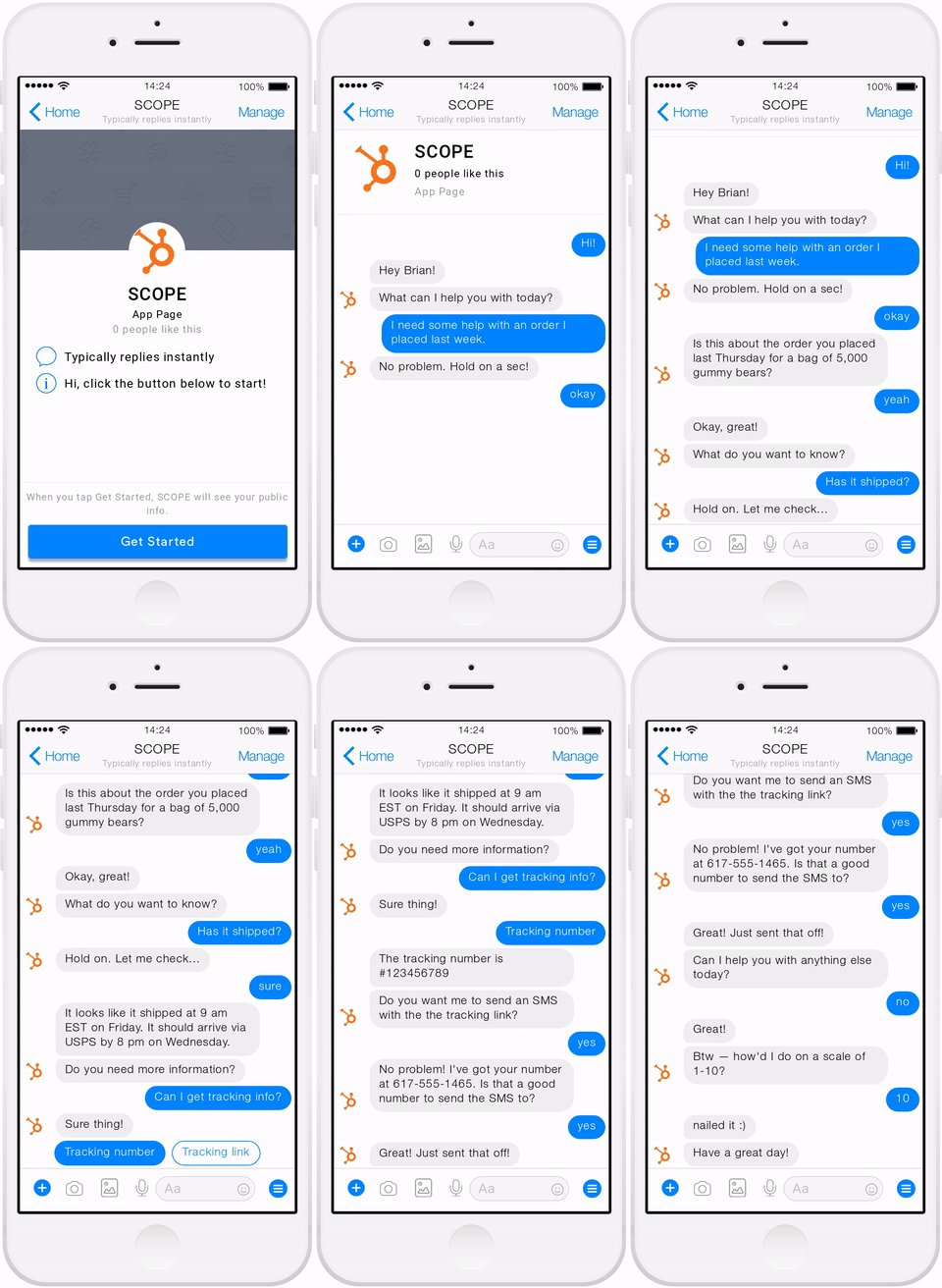
Moving Forward: Why Conversations Are the Future
Phew, you made it to the end. Good convo guys.
We’ve come a long way from letters and telegrams. For the first time, people are having meaningful conversations with businesses on a massive scale thanks to automation with bots, a CRM, and new channels. Conversational marketing is changing the way companies talk with their customers by making interactions seamless and faster than ever before. Your customers are having conversations. Why not join in?
The most important things to focus on are the channel, the conversation, and how the strategy fits in with your overall inbound marketing strategy. Channels should be simple for businesses and consumers to use, conversations should follow a clear process and serve a purpose, and your inbound marketing strategy should inform your conversational marketing strategy.
Remember, humans have been having conversations since the beginning of time. Technology is only making it easier and more productive for businesses and their customers to connect. While the days of communicating by the Pony Express may be over, thoughtful, friendly conversations (and gossip) will continue to stand the test of time and technology.
Editor’s note: This post was originally published in August 2018 and has been updated for comprehensiveness.

How to Set & Achieve Marketing Objectives in 2019
In the content marketing industry, setting objectives can be a double-edged sword. On the one hand, constantly raising the bar can incentivize your team to sustain your growth rate over long periods of time. But on the other hand, it can also incentivize your team to prioritize your company’s needs over your customers’ needs.
You might be thinking that this is the nature of content marketing today — in order to grow, you need to stay laser-focused on hitting your numbers. And, sometimes, to hit your numbers, you need to do what’s best for the business, even if it’s not the best move for your customers.
But contrary to popular belief, solely focusing on the results doesn’t actually produce results. Focusing on serving your customers is what produces results. Tim Cook, Apple’s CEO, is famous for sparking this customer-centric movement. In 2015, he spoke at Goldman Sach’s Technology and Internet Conference in San Francisco, and a reporter asked him what were some of Apple’s biggest accomplishments from the past year. He responded, “We’re not focused on the numbers. We’re focused on the things that produce the numbers.”
In content marketing, one of the most influential things that produce the numbers is a passion for your craft. But, sometimes, we can get so obsessed with optimizing for results that we forget what actually generates the views and leads we desperately desire — compelling content.
In this blog post, we’ll show you how to set realistic marketing objectives that will help you craft audience-centric content, prioritize your customers’ needs, and hit your numbers, all at the same time. Read on to learn how to identify your marketing objectives’ purpose and process and why it’s just as important as the numbers you aim to hit.
What are marketing objectives?
Marketing objectives are the goals your team wants to achieve during a certain period of time. They’re usually a hard number or metric that serve as metaphorical finish line for your team to sprint towards. However, setting marketing objectives isn’t just limited to determining what you want to achieve. You also need to specify how you’re going to reach your goals and why you want to reach them.
In his insightful blog post about setting goals, Jay Acunzo, the founder of Unthinkable Media, reveals a subtle yet potent problem that has pervaded the content marketing industry over the years — traditional goal setting lets you measure what you do, but it doesn’t lend itself to gauging how you do it or why, which is what ultimately gives your work meaning and pushes you to hone your craft.
In marketing, you obviously need to aim for concrete targets. But, like we said earlier, only focusing on the results can sometimes incentivize you to take a course of action that prioritizes your organization’s needs over your customers’ needs.
To help you focus more on your purpose and process instead of just your results, Jay recommends considering two other things when setting a marketing objective — your hunger and aspirational anchor.
Your hunger is your current dissatisfaction with your work today or why you want to achieve your goal. Your aspirational anchor is your vision of your work in the future or how you’ll achieve your goal. These two things drive your motivation and keep you on track to create work that better serves your customers. And when you add your goal to the equation, you’ll be able to simultaneously produce customer-centric work and hit your numbers.
To learn how to set objectives that help you focus on the “why” and “how” behind your marketing initiative, check out the following example.
Marketing Objective Example
Hunger (Why) – Our blog educates our audience well but it doesn’t resonate emotionally with them enough.
Aspirational Anchor (How) – Run a blog that consistently resonates with our audience and that people look forward to reading every time they receive our email digest.
Goal (What) – Increase blog subscribers by 25% month over month this year.
With this goal setting framework, you can see how the “why” and “how” behind a goal incentivizes behavior that better serves customers and hits numbers at the same time.
For instance, in the example above, this blog team refuses to just do whatever it takes to boost their blog subscription. They want to craft emotionally resonant stories that their audience actually values, or content that’s worth subscribing to, and this is what will lead to their growth in subscribers and create long-term value for their business.
If this blog team didn’t identify their hunger or set an aspirational anchor, however, the only thing that would guide them toward the finish line is the finish line itself. And that could incentivize short-sighted behavior that helps them achieve their goal at the expense of prioritizing their audience’s needs over their own.
How to Set Realistic Marketing Objectives
(Hint: It’s by using the SMART goal framework.)
Now that we understand the “why” and the “how” behind setting marketing objectives, let’s go over how you can root the “what” in reality with the SMART goal framework.
SMART goals are realistic, quantifiable, and focused targets that you can easily aim for. If you’re wondering what SMART means, it’s an acronym that helps you clearly define your goals. Check out the framework below to learn more.
Specific
In terms of marketing, you should choose the particular metric you want to improve upon, like visitors, leads, or customers. You should also determine what each team members will work on, the resources they’ll have, and their plan of action.
Measurable
If you want to gauge your team’s progress, you need to quantify your goals, like achieving an X percentage increase in visitors, leads, or customers.
Attainable
Make sure that X-percentage increase is achievable in your specific situation. If your blog traffic increased by 5% last month, try to increase it by 8-10% this month, not 30%. It’s crucial to base your goals off of your own analytics, not industry benchmarks, or else you might bite off more than you can chew.
Relevant
Your goal needs to relate to your company’s overall goal and account for current trends in your industry. For instance, will growing your Facebook following lead to more revenue? And is it actually possible for you to significantly boost your organic reach on Facebook after their most recent algorithm change? If you’re aware of these factors, you’ll be more likely to set goals that are realistic, achievable, and beneficial to your company.
Time-bound
Attaching deadlines to your goals puts pressure on your team to accomplish them. And this helps you make consistent and significant progress in the long-term. If you don’t give yourself a deadline, accomplishing your goal will take too long to achieve long-term success. For example, which would you prefer? Increasing leads by 5% every month, leading to a 30-35% increase in half a year? Or trying to increase leads by 15% with no deadline and achieving that goal in a year?
Blending Hunger, Aspirational Anchors, and SMART Goals
By analyzing two different goal setting frameworks, we’ve learned how to identify the “why”, “how”, and “what” behind your marketing objectives . Now, we can blend the two frameworks to set a realistic goal that fulfills our customers needs first and helps us hit our numbers at the same time. Check out this example for more detail.
Specific (Include your hunger and aspiration)
Our blog educates our audience well, but it doesn’t resonate emotionally with them enough. Let’s start running a blog that can consistently resonate with our audience, that people look forward to reading every time they receive our email digest, and can attract more subscribers.
Measurable
Increase month-over-month blog subscribers by 25% this year.
Attainable
Last year, we increased month-over-month blog subscribers by 15%.
Relevant (Include your hunger and aspiration)
If we can craft emotionally resonant stories that our audience actually values, we can build deeper relationships with them, attract more subscribers who we can also build deep relationships with, and hopefully do business with them in the future.
SMART Goal
By crafting stories that consistently resonate with our audience and is worth subscribing to, we can increase our month-to-month subscribers by 25% this year.

25 Google Search Statistics to Bookmark ASAP
In many ways, marketing is a game of trend watching. The marketer who’s best at spotting and using trends earns their business market share, brand recognition, and ultimately, revenue.
But how do you search for trends? And where do you start? Well, since they own about 92% of the global search engine market, the answer to both of these questions is, “Google.”
How many people use Google?
Google has 92.42% of the search engine market share worldwide. That breaks down to approximately 72% of the desktop market and 92% of the mobile search engine market share. The United States leads with the most users. 27% of Americans use Google.
How many Google searches per day?
Google does not share their search volume data. However, it is estimated Google processes approximately 70,000 search queries every second, translating to 5.8 billion searches per day and approximately 2 trillion global searches per year. The average person conducts between three and four searches each day.
So, let’s look at a few of 2019’s top Google Search statistics and take a deeper dive into the trending searches that guide your marketing strategy.
Top Google Search Statistics in 2019
Now that we know how to search for trending topics, let’s look at how Google influences search with these latest statistics.
1. The top five Google searches in 2018 were “World Cup,” “Hurricane Florence,” “Mac Miller,” “Kate Spade,” and “Anthony Bourdain.” (source: Google)
2. 8% of search queries are phrased as questions. (source: Moz)
3. The typical user crafts searches that are about three words long. (source: Moz)
4. As of February 2018, 62.6% of web users conduct their searches on Google — up from 53% in 2015. (source: SparkToro)
5. 79% of keywords and 47% of keywords in positions 1-20 rank differently on mobile and desktop. (source: BrightEdge)
6. In 2018, Google Images accounted for 22.6% of all internet searches and Google Maps accounted for 13%. (source: SparkToro)
7. Compressing images and text could help 25% of web pages save more than 250KB and 10% save more than 1 MB. These changes reduce bounce rates and increase page rank on Google SERPs. (source: Google)
8. In 2018, Google properties owned over 90% of all searches. (source: SparkToro)
9. In 2017, 50.3% of web traffic took place on mobile phones. (source: Statista)
10. Branded searches have higher click-through rates on the first half of the first page of Google. (source: Internet Marketing Ninjas)
11. The average click-through rate for first position on a Google search query is 19.30% and the click-through rate for second position is almost half at 10.57%. (source: Internet Marketing Ninjas)
12. The average click-through rate for first place on desktop is higher than that of mobile, at 31.52% and 24.05% respectively. (source: Advanced Web Ranking)
13. Four times as many people are likely to click on a paid search ad on Google (63%) than on any other search engine — Amazon (15%), YouTube (9%), and Bing (6%). (source: Clutch)
14. Videos appear in 6.3% of results, but YouTube drew only 1.8% of all search clicks. (source: Moz)
15. 55% of people clicking on Google search ads prefer those to be text ads. (source: Clutch)
16. For every $1 businesses spend on Google Ads, they make an average of $2 in revenue. (source: Google)
17. The average click-through rate in Google Ads across industries is 3.17% in the search network and 0.46% on the display network. (source: WordStream)
18. 66% of distinct Google search queries resulted in one or more clicks. 34% of searches result in no clicks. (source: Moz)
19. The average cost-per-click in AdWords across all industries is $48.96 for search and $75.51 for display. (source: WordStream)
20. 53% of users will abandon a page if it takes more than three seconds to load. (source: Google)
21. 18% of searches lead the searcher to change their query without clicking any results. (source: Moz)
22. The average Google search session is just under one minute. (source: Moz)
23. The average conversion rate in AdWords across all industries is 3.75% for search and 1.77% for display. (source: WordStream)
24. Image blogs appear in 11% of Google results and earn 3% of all Google search clicks. (source: Moz)
25. When Google opened its proverbial doors in September 1998, they only averaged about 10,000 daily search queries. (source: “The Search”)
How To Find Trending Searches
- Google Trends
- Think with Google
- BuzzSumo
- Feedly
- Ahrefs
- Quora
Let’s take a look at each one in greater detail …
1. Google Trends
Review the year in search, take Google Trends lessons, and see what’s trending now. You can also view the peaks and valleys of topic interest over time, which uncovers seasonality and allows you to plan your marketing calendar accordingly. Plus, find related topics and queries, and identify sub regions your topic has been trending in to better target your campaigns.
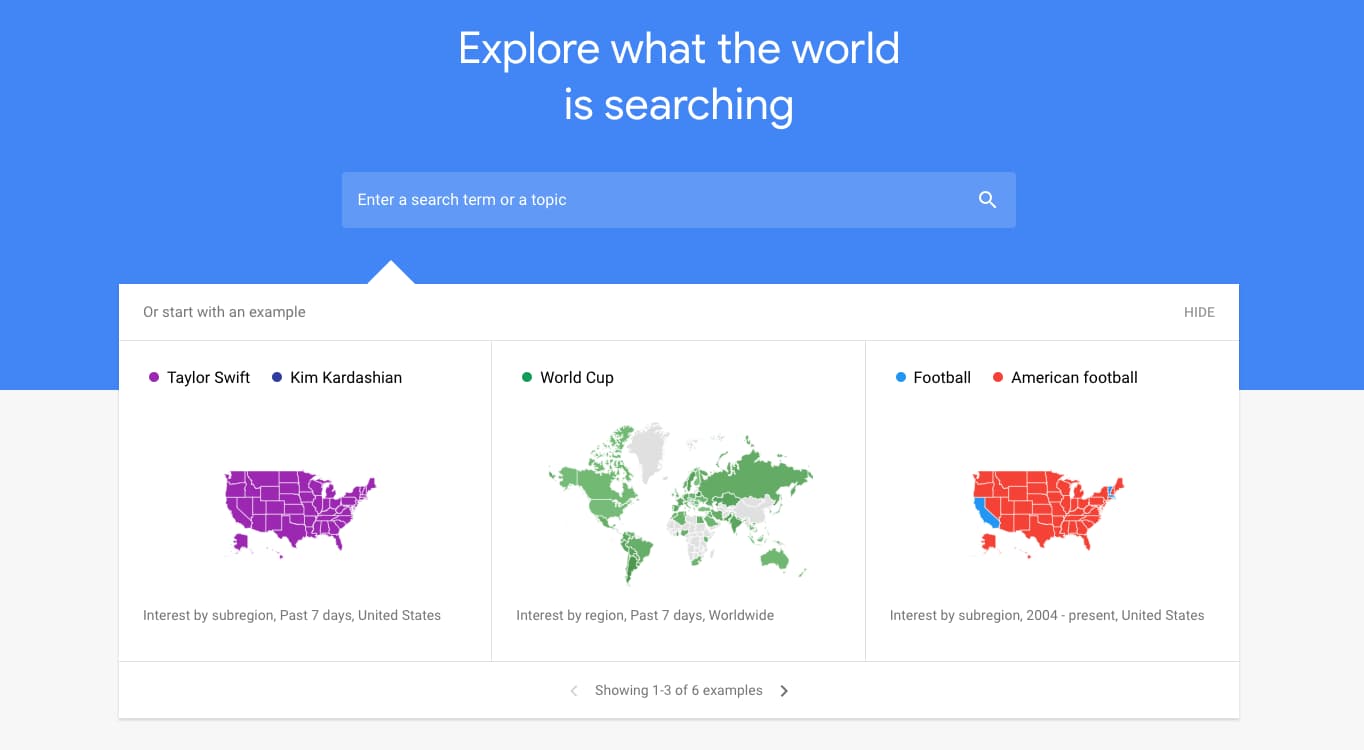 Source: Google Trends
2. Think with Google
Discover articles, benchmark reports, and consumer insights that keep you up to speed on search. From ad bidding strategy to brand jingles, you’ll find interesting content that helps you think bigger while staying educated on how to leverage Google search for your business.
 Source: Think with Google
3. Twitter
Sign on to Twitter for more than vaguely hostile political debates. Use the “trends” feature to uncover what’s trending in your state, country, or around the globe. When you click into a trend, you’ll see top tweets about the topic, relevant news stories, and live responses as well.
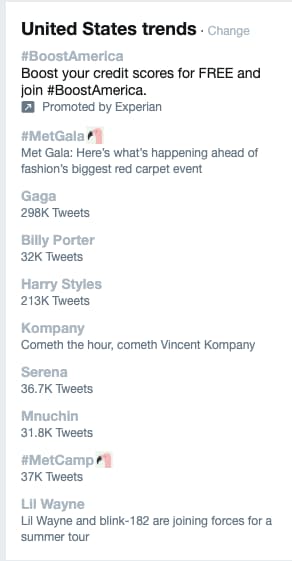 Source: Twitter
4. BuzzSumo
Identify the most shared content in the previous 12 months or the last 24 hours. BuzzSumo allows you to drill down and analyze the topics that matter to your industry, your competitors, and the influencers you learn from.
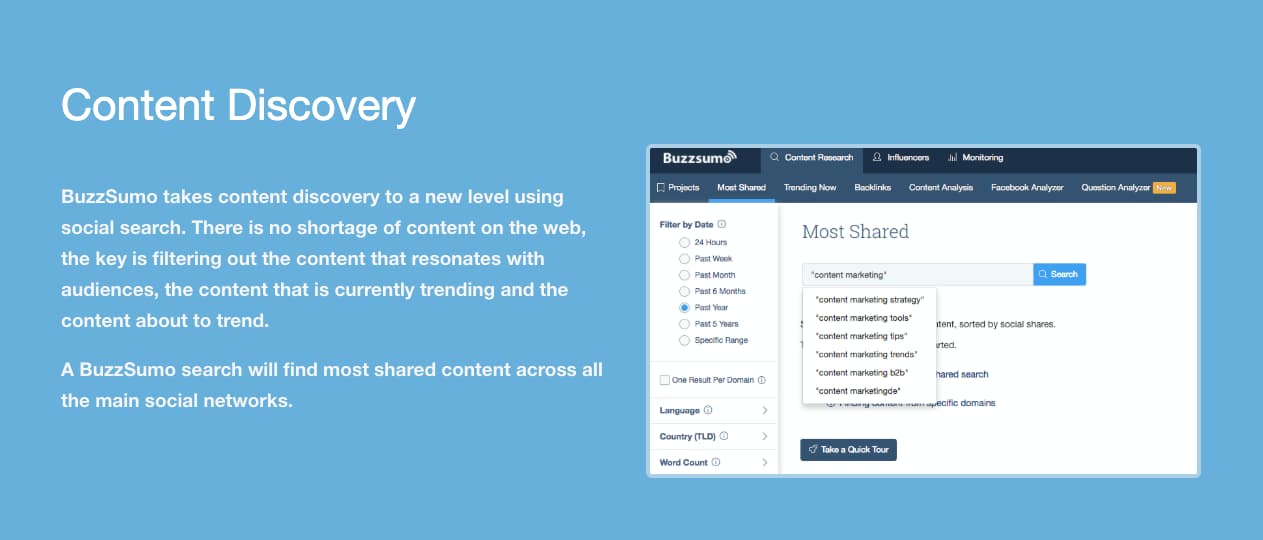 Source: BuzzSumo
5. Feedly
This RSS feed aggregator allows you to follow your favorite brands and see their most recent content in once place. Add your favorites and discover new publishers by searching your industry, skills, or — you guessed it — trending topics. Feedly also allows you to set up keyword alerts, so you’re always tracking the latest trends on topics you’re interested in.
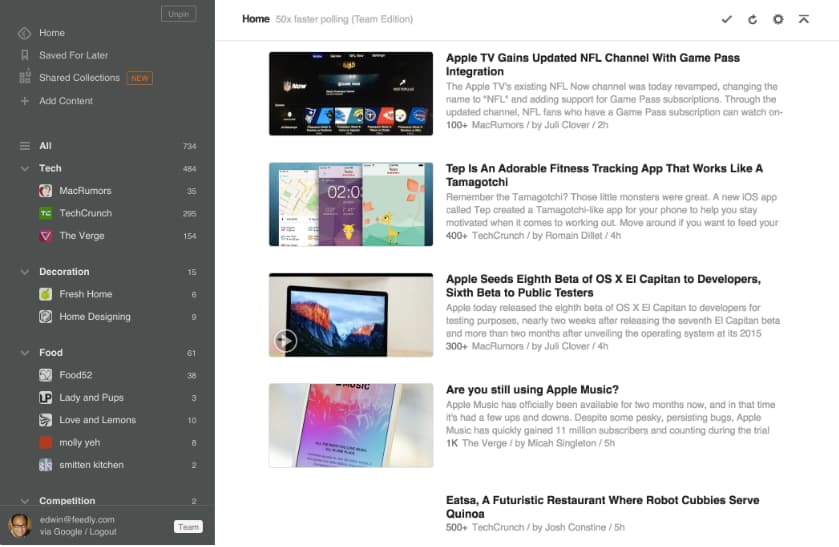 Source: Feedly
6. Reddit
Freshness and user-based voting determines how content is prioritized on Reddit. A quick visit to the homepage shows you trending or popular posts. And you can filter by country or recency for a more relevant feed.
 Source: Reddit
7. Ahrefs
Conduct competitive research, home in on a keyword, or search for trending topics. Ahrefs helps you identify trending content and shows you what to do to outrank your competitors.
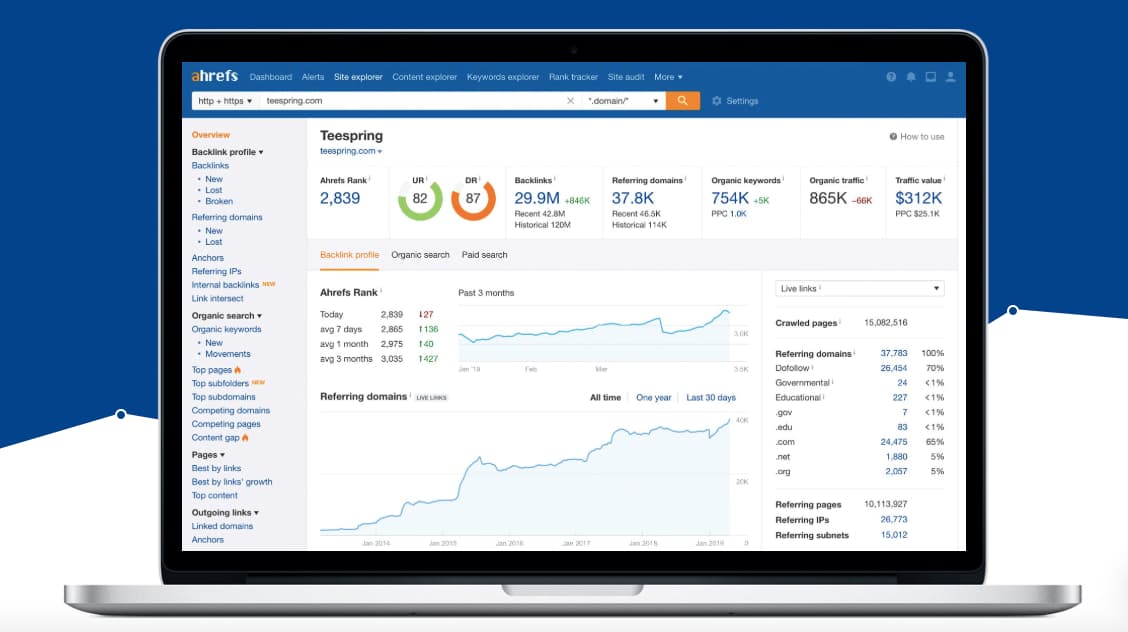 Source: Ahrefs
8. Pocket
Pocket allows you to save content from anywhere on the web. Review your content whenever you wish and head to the Explore page to find trending topics that are relevant to you.
 Source: Pocket
9. Quora
Sign up for Quora and select topic areas that interest you (e.g., “startups,” “marketing,” and “economics”). Quora will stock your feed with questions relating to your content interests. This gives you insight into what your customers are asking, real-time debates about competitors, and even allows you to answer questions about topics you have experience in.
 Source: Quora
Want to dig a little deeper into search? Check out this article by HubSpot’s Dharmesh Shah on how to search on Google.

The Ultimate Guide to Press Release Distribution
To thrive as a small business, you need press coverage. But, unfortunately, coverage doesn’t just come naturally — you need to work for it.
Enter: The press release.
Press releases are important for increasing your brand awareness and helping your public relations (PR). But if nobody sees your release, you won’t get very far. You need to distribute it effectively to get your story picked up by national newspapers, magazines, or blogs.
In this guide to press release distribution, we’ll cover the following to help you put together a plan of action that results in coverage:
- What is press release distribution?
- Why is press release distribution important?
- How to distribute your press release
- Distribution mistakes to avoid
- Should you use distribution services?
Keep reading to learn how you can properly create, pitch, and distribute a press release for optimal brand awareness.
What is press release distribution?
Before we dive any deeper, let’s iron-out exactly what press release distribution is.
Here’s a fancy definition: “Press release distribution is the process of circulating or seeding out your press release to journalists and members of the press.”
The purpose of distributing a press release is to land coverage in media publications such as newspapers, radio, TV news bulletins, podcasts, or blogs. That way, you’re positioning your brand in front of a wider audience.
Why bother distributing a press release?
People aren’t going to see your press release if you don’t distribute it.
And if it’s not seen, people won’t know about your business — which defeats the entire purpose behind creating your press release.
Gaining press coverage helps to get your business or brand name into the public forum. That’s helpful for building awareness of your brand — especially when 44% of journalists consider press releases to be the most trustworthy source of brand-related information.
Distributing a press release also has these benefits:
1. Press releases can boost your SEO.
Over three billion Google searches are made every day.
By implementing SEO tactics into your overall marketing strategy, you’re more likely to reach the top spots of users’ search queries, which will help potential customers and clients find you when they’re searching online for information related to your company, industry, product, or service.
Gaining links to your site from others is a huge ranking factor for SEO, as explained in a study by Backlinko:
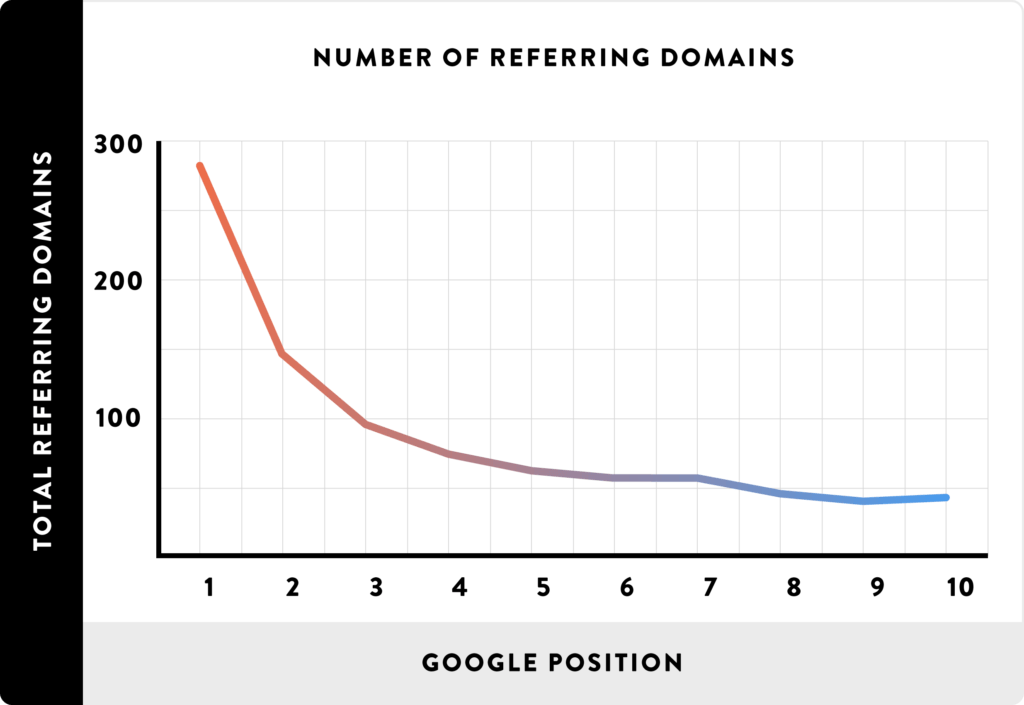
Distributing press releases can help you land coverage on huge publications. Additionally, there’s a chance those websites will link to yours, which can help to boost your own search engine visibility.
But what happens if you land awesome coverage without a backlink?
Don’t panic. Both Google and Bing have suggested that positive brand mentions may play a role in how they rank your site, meaning positive PR coverage can aid your SEO efforts even without a link.
2. A press release can drive local foot traffic to your store.
If your business is a brick-and-mortar shop, press release distributions can help to get people through the door.
Whether you’re running an event or simply launching an eye-catching sale, measuring foot traffic into your store after distributing a press release is a simple way to gauge how successful your release has been.
3. A press release can generate more sales.
If you’re launching a new product or an exclusive line, a targeted press release can have a significant impact on your bottom line. Why? Because it help drum up interest and make revenue from your stock, especially if the offer sets you apart from competitors.
Busy shopping days can be a great way to get your products in front of potential customers.
For instance, if you’re offering discounts on Black Friday or Cyber Monday, why not reach out to retail journalists to highlight your offers?
PR Agency One landed 52 pieces of coverage for their client with Black Friday press releases — all of which helped put them in front of consumers who were ready to buy.
How do you distribute a press release?
You know how important PR is, and you’ve crafted a succinct, yet powerful, story. All that’s left to do is share it with the world.
But journalists have to write up to seven stories per day — so how do you ensure your press release is one of those stories? And just as importantly, how can you make your distribution email stand out in a crowded inbox?
Follow this five-step guide to learn how.
1. Find journalists who might be interested in your press release.
When you want to share some news, I’ll bet you’re tempted to tell as many people as possible. You want everyone to hear about it, right?
However, that’s not always the right thing to do — because not everyone is interested in your story.
(Brutal, but honest.)
Along with crafting a press release that journalists are interested in, you’ll need to be super-specific with the people to whom you send your pitches.
You can do that by searching for journalists who’ve already written about your topic or industry.
For instance, let’s say you run a car parts business. You’ve conducted some research around potholes, gathered some interesting data, and turned it into a killer press release. But mailing every journalist under the sun is probably going to be a waste of time.
Instead, it’s worth seeking out journalists who’ve covered similar topics before.
To do this, fire up Google, type in your topic (potholes), and navigate to the News tab:

As you can see, there are plenty of recent articles on this topic, meaning journalists are more than likely interested enough to cover it.
Next, read some of the articles on Google News and make a note of the journalists’ names.
A simple spreadsheet with the journalist’s name and the publication they write for is a good way to keep a log of your distribution plan:

If you have the budget, you can also use a media database such as Cision or Muckrack to find relevant journalists and reporters.
This method is much more likely to get you responses because you’re only pitching the release to journalists who’ve demonstrated an interest in your topic already.
2. Get the journalists’ contact details.
Next, it’s time to find some contact information for the targets on your press release distribution list.
This could be as simple as clicking on an author’s bio on their publication’s site.

… and making a note of their email address:

But, just like anything else in the world of PR, it’s not always that easy.
You’ll often have to do a little digging to find the contact details — starting with a simple Google search such as “[journalist’s name + email]”.
If that doesn’t do the trick, you could also use a media database like Muckrack:
Don’t have the budget for paid databases? Harness the power of social media.
LinkedIn is an excellent place to discover contact information for professional contacts (AKA, your journalists). Simply search for “journalist” and filter the results by selecting your target publication as “company”, then plug their name into Hunter to find their email address:
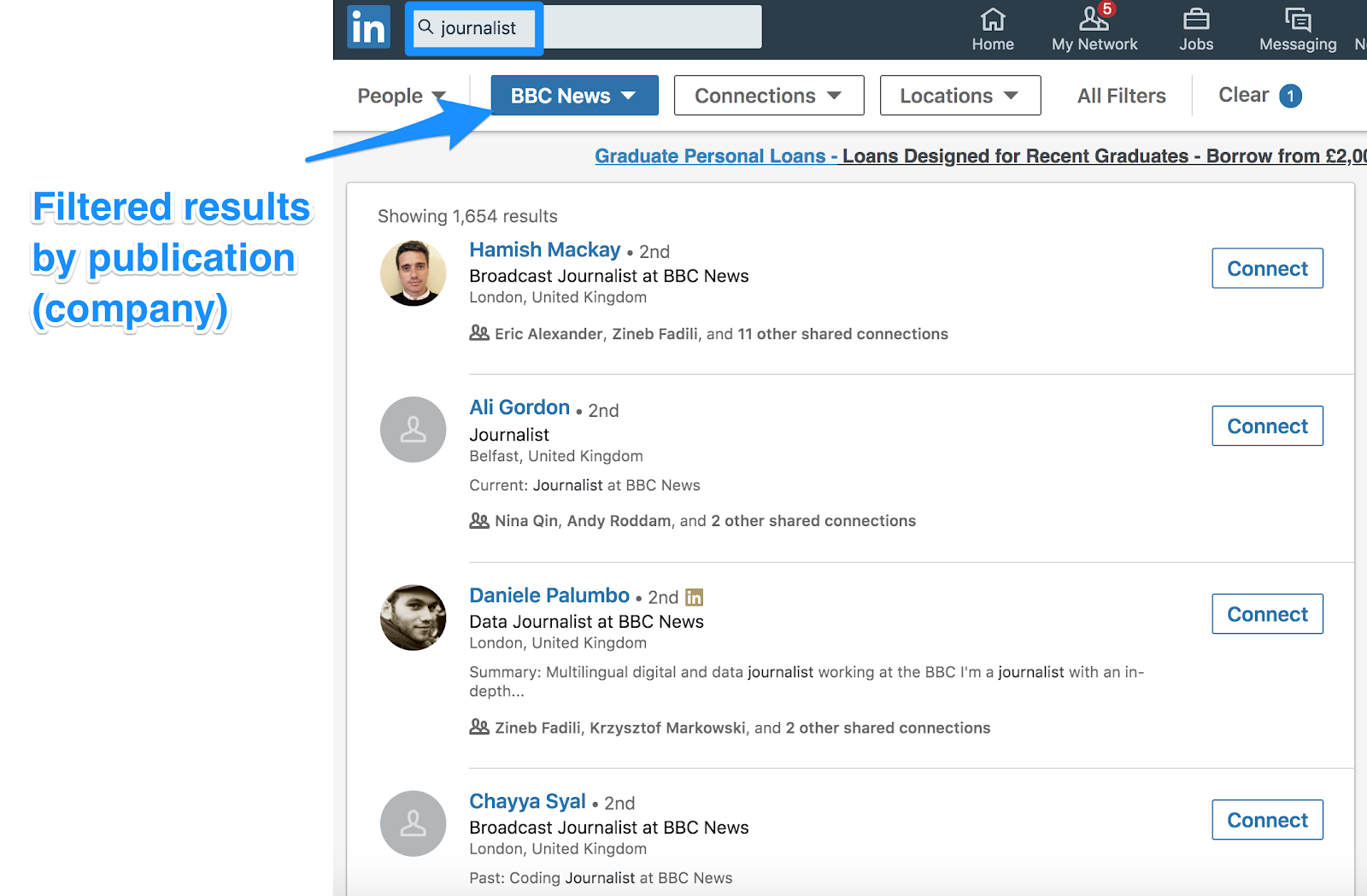
Twitter can also be a quick and easy way to get in touch with your target journalists, too — especially considering 46% of journalists are open to receiving pitches via Twitter.
3. Craft a killer pitch.
Email is the most effective way to send your press release quickly.
Don’t believe me? Cision’s 2017 State of the Media report found an overwhelming majority of journalists prefer to receive press releases via email:
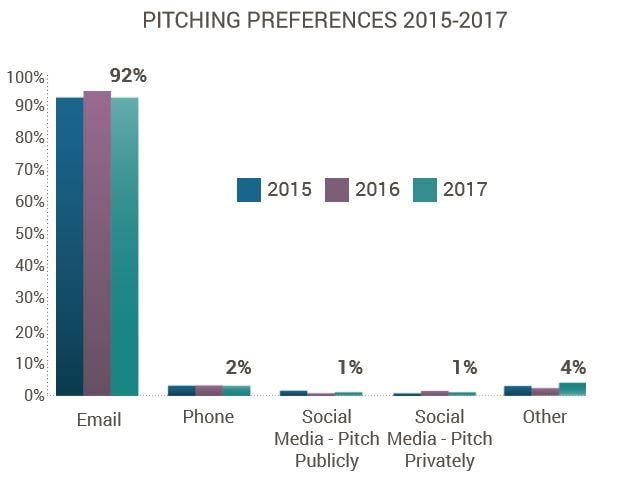
However, there’s another obstacle you’ll need to overcome here — many journalists receive up to 200 pitches a day.
There are two factors you’ll want to consider when crafting a pitch. First — keep it brief.
Don’t waste the journalist’s time with a long-winded, self-absorbed introduction to yourself or your business. They probably don’t care.
Instead, get straight into the purpose of your email: The story, and why they should cover it in their publication.
Journalists are time-poor, so they’ll appreciate a nice, succinct message that sells your story in a few words—like this:
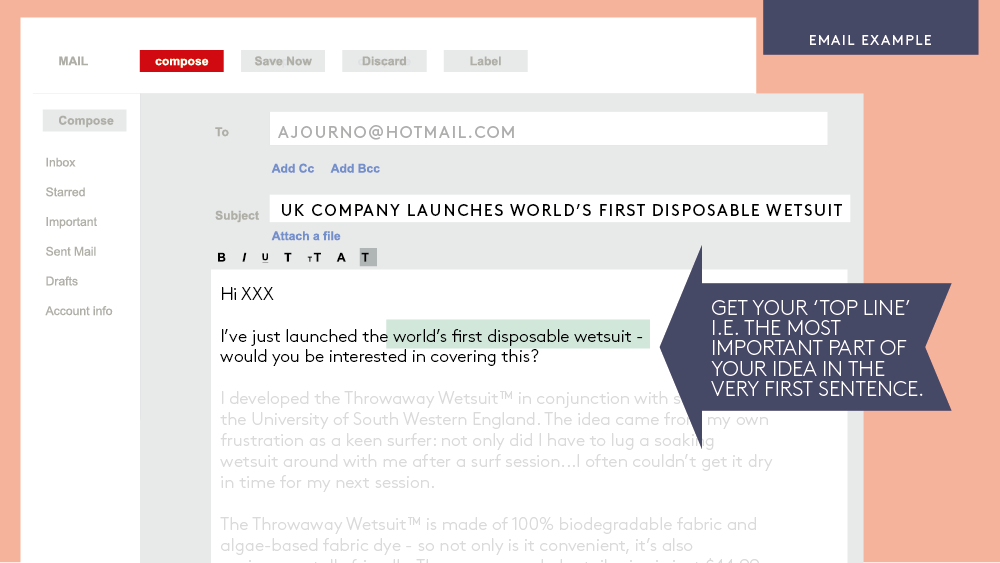
Image courtesy of Janet Murray.
As you can see in the example above, the entire story is sold in the first sentence, with a direct question asking if the journalist is interested — rather than just assuming so.
Follow this up with a couple more sentences to give the journalist some additional information about your story, before adding a line spacer and pasting your full press release.
Note: Avoid adding your press releases as attachments. Journalists don’t like opening attachments in fear of viruses or malware, so eliminate that problem by pasting the body of your press release below your pitch.
Second, it’s critical you personalize your pitch.
Did you know that personalized emails are 26% more likely to be opened?
Bear that in mind when you’re pitching news stories, and show some interest in the journalist’s previous work by indicating that you know they’re a good fit based on the topics they cover.
Try to build a relationship with the journalists first, rather than hitting them with a release and expecting instant coverage. Almost 15% of journalists consider this very important:
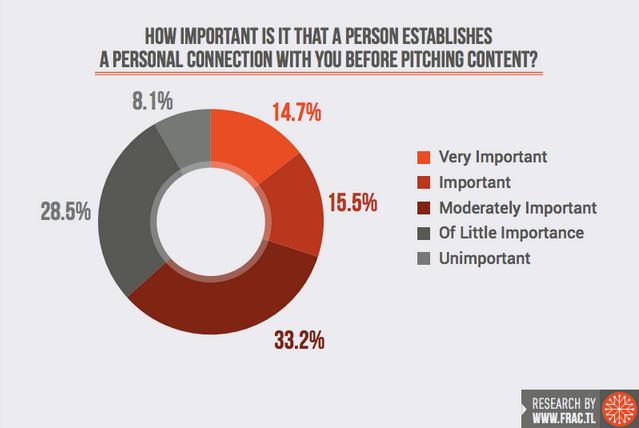
Image courtesy of Marketing Land.
Sometimes, it’s worth playing the long game by getting to know your target ahead of your pitch. Engage with them on LinkedIn, respond to their tweets, and generally work yourself into their notifications — and their radar.
3. Make your subject line irresistible.
According to research by Fractl, 85% of publishers decide whether to open a pitch email based on the subject line alone.
So, how can you make sure yours gets opened? Try these tips:
- Keep it short and sweet: 75% of publishers prefer subject lines with 10 or fewer words.
- Ensure it’s unique: A powerful subject line should be disruptive, innovative, or offer a human interest angle.
- Make it super-specific: Over half of journalists want descriptive subject lines that are tailored to their previously-covered topics.
- Provide exclusivity: If you’ve got some unique data or research, shout about it! Exclusivity can help to get a journalist’s eyes on your press release.
… And one thing to avoid? Clickbait. It’s really that simple.
4. Send your press release pitch (at the right time).
Press release? Check. Pitch email? Check. Contact details? Check.
… But that doesn’t mean you’re ready to distribute your press release.
You’ll need to think about the day (and time) you hit the “send” button because certain days and times have better success rates than others.
For instance, 61% of journalists prefer to receive press releases in the morning. That’s almost two thirds, so it’s probably worth getting your pitch out early to have the best chance of success.
However, remember that journalists have an average of 300 emails waiting for them in the morning. It might be best to wait an hour or so, and send your release mid-morning for a better chance of your pitch standing out in their inbox.
Additionally, it’s important to consider the day of the week. While modern-day businesses are often active seven days a week, there’s still a traditional lull in pick-up rates when it comes to press release distribution.
So, consider the day you send your release — it might land more coverage if you pitch it midweek, as opposed to sending first thing Monday morning.
According to an analysis of over 100,000 press releases by Ragan, Tuesdays and Wednesdays are the best days to distribute your story. And a further study by Prowly recommends sending on a Thursday, with data suggesting over 26% of press release emails are opened by journalists on this day:
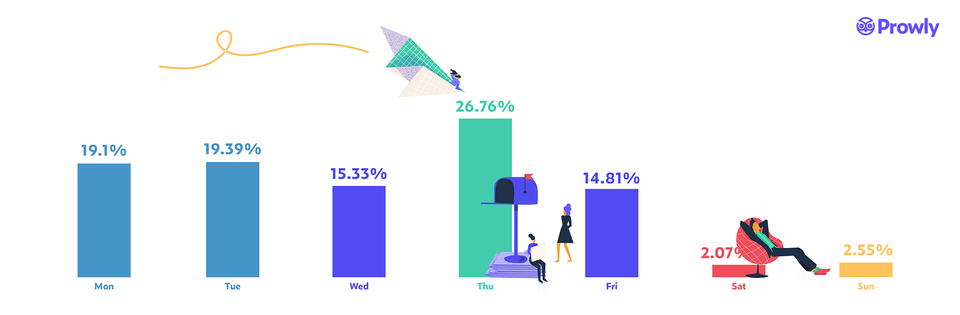
Image courtesy of Prowly.
Both studies indicate that Mondays and Fridays are not as effective, and you should definitely avoid sending your story over the weekend.
However, there’s no one-size-fits-all rule — which is why you should test a few different days and times and see what works best for your industry.
Are you pitching a time-sensitive press release?
You can still send it ahead of time. Just make sure you embargo the information in your release until it’s ready to become public knowledge. You can do this by adding “Embargoed; not to be released before DATE” to the top of your distribution email.
5. Follow-up on your release.
An age-old question: Should you follow up on your press release?
It depends on who you’re asking, but generally, the consensus seems evenly split. Some people believe following up to be a big no-no, while others indicate that it can be fruitful.
If you have a release you’re particularly proud of, it won’t hurt to follow up if you’re struggling to land coverage — provided you’re tactful.
Don’t just spam the journalist’s inbox with the same press release and the same pitch, however. That can get annoying, and ruin your chances of getting your story picked up.
Instead, try slightly tweaking the angle of your pitch. PR expert Carrie Morgan recommends treating a follow-up email as “a fresh pitch transitioning MY news into THEIR NEWS.”
You could also try giving the journalist — however, only 23% of journalists welcome being contacted by phone, so if your target is one of the other three quarters, you may find yourself hearing hundreds of answering machines.
Either way, it could be worth following up, particularly if you’re confident your press release is a newsworthy piece that deserves coverage.
What are some common press release distribution mistakes?
All set to send your next press release? Hang on a second.
Before you let fly and distribute your story, are you about to make any fatal errors? The last thing you want is to annoy the journalists on your target list. It might leave you with no coverage at all.
Here are some common mistakes people make, and how you can avoid them when you distribute your press release.
1. Your press release is too long.
Your story needs to be short and succinct — especially when journalists spend less than a minute reading a press release.
The easiest way to get your pitch read is to cut the fluff. Ditch anything that a journalist doesn’t need to read, or any sentences that won’t add value to a reader if your release is published in its current form.
Your story should be brief and to the point, but with enough detail to give the journalist the full story.
Consider taking it a step further and breakdown the “meat” of your press release into a handful of easy-to-digest bullet points. The same AdWeek survey says that 53% of journalists prefer to receive the facts in this format.
Remember — every sentence counts.
2. You’re targeting the wrong people or publications.
If you work for a small business looking to get some coverage, you’re more than likely going to get the most success from contacting local publications.
Don’t bother sending your press release to a national or international news outlet — it’s incredibly rare that a local story is important enough to make national news.
You should also double-check that your target journalists are a good fit. Many tend to specialize in one or two interests — emailing a sports reporter about a press release related to health isn’t likely to result in coverage.
Whatever your story, make sure the journalists and publications on your press release distribution list are relevant to your industry and audience.
3. Your story isn’t newsworthy enough.
Before hitting send and distributing your release, take a moment and ask yourself: “Is this story actually newsworthy?”
If your release is too self-promotional, you’ll probably find that journalists won’t want to turn it into a story. Their job isn’t to give you free publicity — they want to share stories that will entertain their audiences.
To avoid your release being sent straight to the trash, ensure it’s got a relevant angle, and includes solid information, statistics, and data.
Any accompanying quotes should bring the story to life, rather than over-selling your own company.
4. You didn’t include your contact info.
Imagine crafting that story, pitching it, and finding a reporter who’s interested and wants to contact you for a quote. But the journalist hits a dead end and is unable to contact you.
Unfortunately, if you don’t include your contact information on the press release, you risk losing out on the chance for increased exposure. The journalist shouldn’t have to go digging to find out how to contact you.
You need to make it easy for journalists to contact you by leaving a phone number and email address in your press release distribution email — ideally ones that are checked and answered frequently.
Should you use press release distribution services?
Distributing a press release sounds time-consuming, doesn’t it? If only there was a way to get yours seeded out quickly, at scale.
Fortunately, there is.
If time is tight (and if you’re a small business owner, it usually is), a press release distribution service is your friend. These services allow you to send out your release to relevant journalists, without having to do any of the manual work yourself.
Although the cost of press release distribution might seem off-putting, just remember that time is money. And by letting the experts distribute your news story, you can spend more of your own time doing the things that make a difference to your bottom line.
So, if you fancy taking distribution off your plate, check out these five services that will gladly take the job off your hands.
1. PR Fire
Starting at just £50 (approx. $65 USD), PR Fire syndicates your release to journalists and media personnel in your chosen categories — all within four hours after uploading your content.
Additionally, you’ll get a report a couple of weeks after your campaign to show you how successful it was.
PR Fire also offers the option to have your press release re-written by a professional journalist for an extra £50:
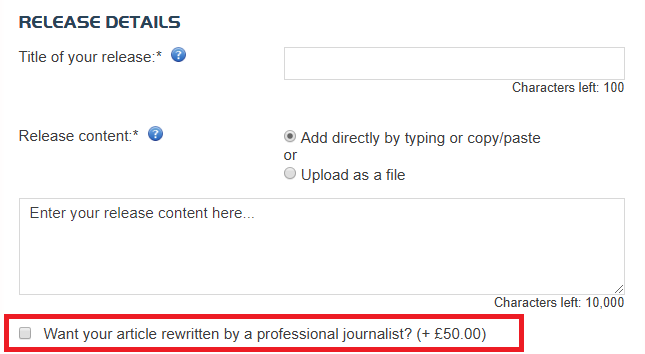
Image courtesy of PR Fire.
Plus, you can have your story promoted on the popular forum Reddit — a great way to get your brand (and your press release) in front of an engaged online community.
PR Fire has landed its customers press coverage in a range of top tier publications, including BuzzFeed, Metro, The Huffington Post, and The Times, so it’s definitely worth checking out.
2. PR Web
PR Web is a tool owned by Cision. Their press release distribution service allows you to upload your press release (along with rich media like images and videos), then distribute the story to journalists and publications in your selected categories.
PR Web also provides you with a comprehensive analytics dashboard, so you can monitor the impact of your campaign and calculate important metrics such as ROI.
The basic option, at a cost of $99, allows you to publish your release on PRWeb.com.
Additionally, there are advanced options that may be worth a try if you have the budget. These range in price from $189 to $389, and include further distribution to media outlets, targeted journalists, and industry influencers:
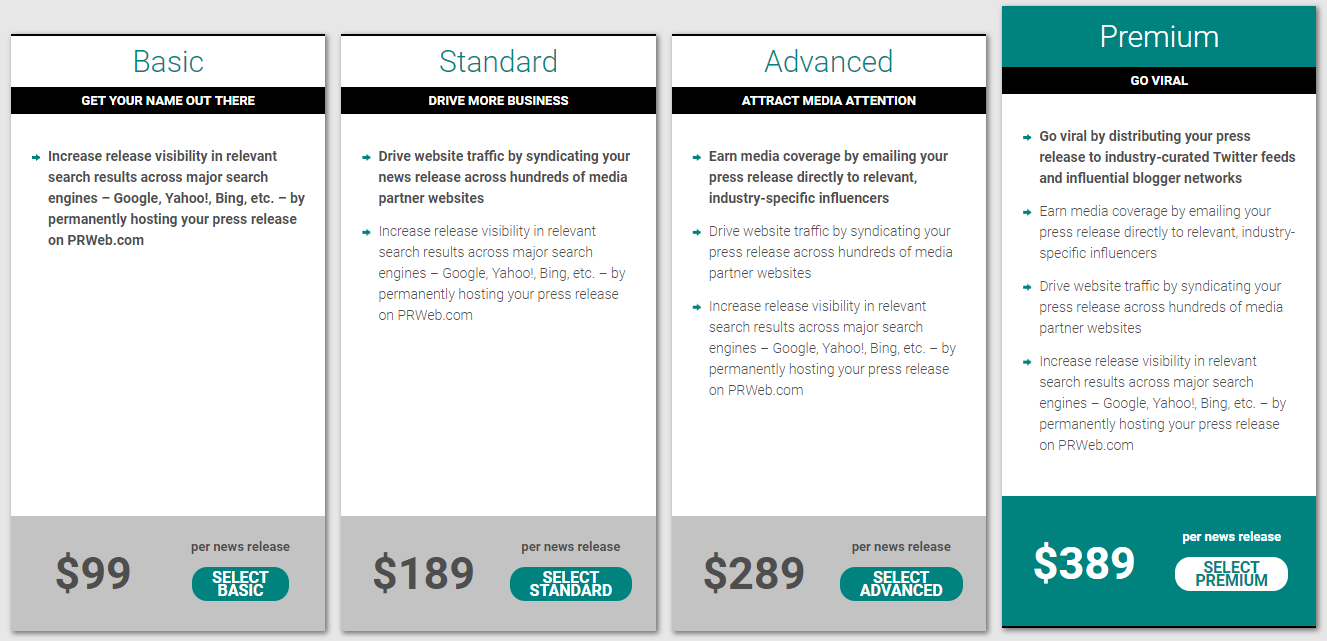
Image courtesy of PR Web.
3. Response Source Press Release Wire
A popular service for PR professionals, Response Source offers a range of public relations tools, including media databases. And you can also release your news via the Response Source Press Release Wire.
There are several pricing options. If you’re an ad hoc user, you can pay £85 (approx. $110 USD) each time. Or, if you distribute press releases often, consider one of their package options.
With over 20 years of experience, Response Source has built up a thriving network of journalists and publications, so you can benefit from having your news distributed by email to useful contacts.
You’ll also get your own “newsroom”, along with access to analytics such as the number of views your press release received, and to how many recipients it was emailed.
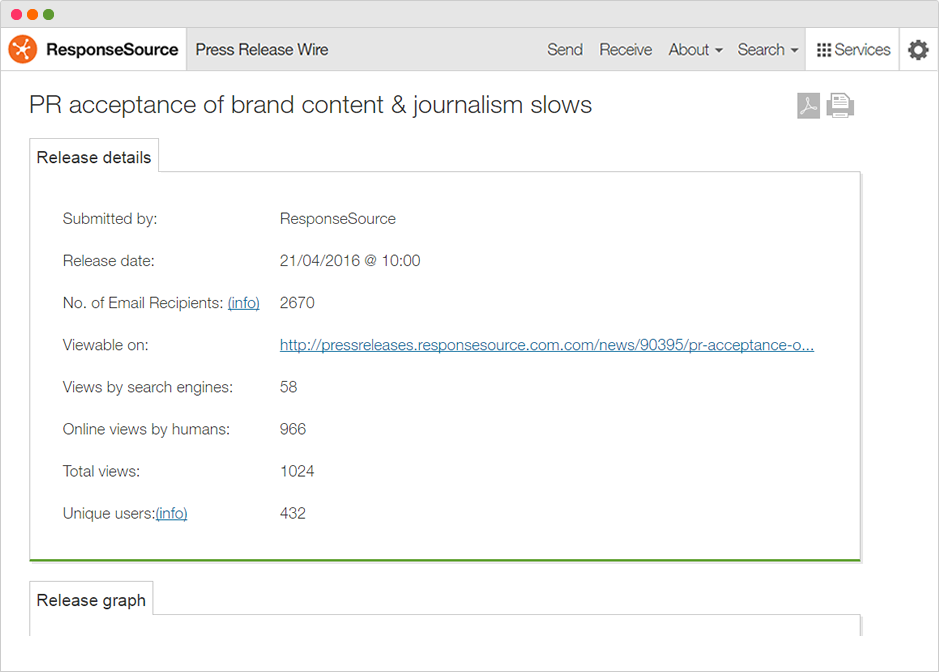
Image courtesy of Response Source.
4. Presswire
Presswire has a live global database, allowing you to send your press release directly to the journalists who are most likely to pick up your story.
Worldwide distribution starts at $400 (or $250 if you only want the story distributed to journalists in the USA), but there are several add-ons you can include to boost your reach.
Key to Presswire’s offering is its advanced analytics platform — a system which tracks each recipient of your release, providing insight on:
- Who opened your press release
- Whether your release was forwarded
- How many times it was read
- How long people spent reading it
These insights can be helpful in allowing you to refine your approach for future press releases.
5. 24-7 Press Release
Using a cloud-based platform, 24-7 Press Release distributes your news to traditional and digital outlets with a user-friendly interface.
The basic “Visibility Boost” package is an ideal starting point for small business owners. Costing just $49, your release will be sent to over 50 premium news sites and published on the service’s RSS feed.
You’ll also receive a report that tells you if your story was picked up.
One thing to note is that the basic option has a two-day turnaround, so if your news is time-sensitive, you’ll need to be prepared in advance. The more advanced packages come with next-day turnaround, which is helpful if you’re in a rush.
Remember to Keep the Relationship Alive
When you need to create a press release, follow the distribution steps in this guide to boost your chances of landing coverage.
But remember — not every press release will get picked up and turned into a news story, so don’t get too disheartened if it takes a while to gain some traction.
Keep tweaking and refining your approach until you see success. Your first piece of coverage could well be the domino that starts the run. A story picked up by one news outlet can soon snowball from publication to publication.
Plus, if your story does get picked up, don’t forget to thank the journalist. It can facilitate a relationship with the journalist which you can then nurture, and might lead to easier coverage down the line.
Ultimately, you can never have too much good press!
