
9 Social Media Metrics You Should Be Tracking (& How to Track Them)
We get it: Social media metrics are important. Getting data and ROI is really important. However, if you spend too much time trying to figure out which metrics are important for your business, you won’t have any time to analyze and act upon them.
That’s why we’ve made a list of the social media metrics that are essential to track, so you don’t miss out on important numbers that can help you later. These metrics will give you insight into customers, how to track ROI, improve your brand presence online, and walk away with happier customers.
Social Media Metrics are imperative to social strategy. They give you an inside look at how your channels are performing and how you are perceived by your target audience. They can also give provide you with ways to improve upon your strategy.
1. Audience growth rate
To measure your audience growth rate, begin by selecting a reporting period. Then, calculate your new followers over that specific period. After that, you’d need to divide your new followers by your total followers.;
So let’s say your brand’s Twitter account has 6,000 followers in September, at the end of Q3. For Q4, you want to measure your audience growth rate from October 1st to December 31st. If by December 31st, you have 8,657 followers, then your audience growth rate for Q4 is 69%.;
2. Social share of voice
How many people are talking about your brand on social channels? Let’s find out.;
Your social share of voice measures this data and shows how visible your brand is on social media. Finding these numbers could tell you whether you need to update your social strategy or not.;
To calculate your social share of voice, measure your mentions across your social networks. Hint: Your social media analytics tools can be helpful when calculating this number. Next, add your mentions in tandem with the mentions of competitors, which can be tracked using an online social media tool like Sprout Social. This gives you the total industry number of mentions. Here is an example of what metrics of engagement would look like:
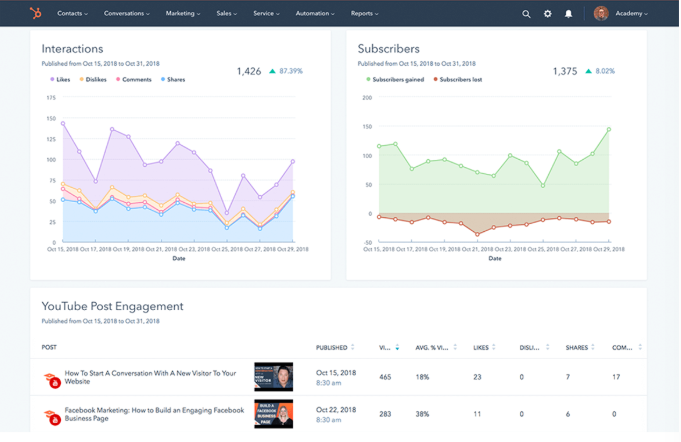
After you divide your brand mentions by the total industry number, multiply this number by 100 to get the social share of voice percentage.;
Let’s put this in perspective. Over a week, your brand has been mentioned directly and indirectly 100 times. Three competitors have 500 mentions, plus yours equals 600. Taking 100 divided by 600 and multiplying that number by 100 means your Social Share of Voice is 16.67%.;
3. Keywords
Tracking keywords can grow your social share of voice and audience growth rate. Keywords are certain words that search engines identify and target based on what audiences are searching for. A marketer in the tech industry might see the keywords, “Media Marketing,” and “Tech Channels.”;
By tracking keywords, you can optimize your content to rank higher on search engines and grow your audience. You can track keywords by using social media analytics software, like Google Analytics or SEMrush.;
4. Customer response rate
Customers love to engage with brands via social media.;
In fact, in a survey done by The Manifest, 96% of respondents engage with brands they follow on social media. Whether they’re asking your customer service team questions or leaving your business reviews, make sure you’re answering as many mentions as possible on social media. To track how you’re doing here, check your customer response rate.;
To calculate your customer response rate, divide the number of responses you give to your followers/customers by the number of people who engaged with your brand and multiply this by 100.;
For example, if you measured a week of engagement, and the number of customers who engaged with your brand was 50, and you responded to half of them, your customer response rate would be 50%.;
5. ROI data
This is the big metric, the one you want to see from day one. Depending on your company and industry, ROIs can differ greatly. For social media, you probably want to know if the time and money you’ve spent on social media is turning into customers, sales, or brand awareness.;
Since ROI looks different from one business to the next and calculations are based on your business goals, not every formula will look the same. But, use this formula to figure out a basic ROI.; Let’s say you made $1500 in revenue from social media ads or eCommerce and your investment was $500. Your ROI is revenue subtracted from investment (1500 minus 500), which makes your profit $1,000 and your ROI 100%.;
6. Channel reports
Keeping track of social media data is important so that you know where and how to focus your strategy. For instance, if one of your accounts just isn’t hitting their numbers, a report would let you know and allow you to proactively step in and troubleshoot.;
If you need an update about say, channel performance and follower counts, consider conducting a social media audit or using a social media analytics tool that conducts an audit for you.
7. Conversion rate
Your conversion rate is made up of the number of visitors to your website that take your desired action. This might mean that they downloaded your eBook, signed up for your newsletter, or clicked “Play” on your podcast. Conversion rates show how relevant your content is to your audience.;
If you want to calculate the conversion rate, start by making sure your call-to-action link is trackable. You can do this by using a free, online URL shortener like Bitly. Next, analyze your campaign to identify the number of clicks and conversions your page has gained.
After that, divide your conversions by total clicks and multiply it by conversion rate. If your webpage has about 750 clicks and 200 conversions, then your conversion rate is 26.6%. Keep in mind that conversion rate numbers are not mutually exclusive,and can be low even if traffic is high.;
8. Cost-per-click (CPC)
This is an important metric if you’re investing in social media. Cost-per-click (CPC) is what you pay per click on a sponsored social media post, like a banner ad. CPC is helpful when determining if your investment is worth continuing.;
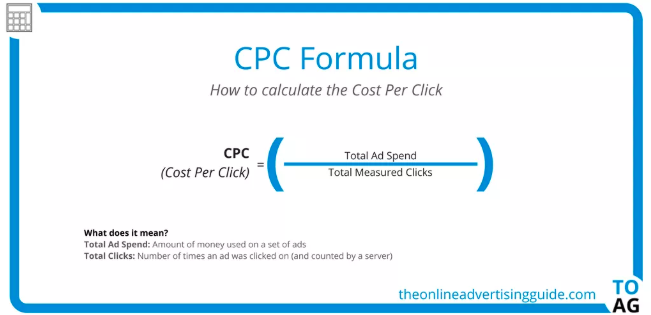
Here is the CPC Formula from The Online Advertising Guide. To view this as an example, say you want to calculate the CPC of your latest round of ads. Divide the total money spent on your ads by the total number of times the ad was clicked on.
9. Net promoter score (NPS)
Net Promoter Score (NPS®) measures customers that are loyal to your brand. It’s the answer you’re looking for, when asking customers how likely they are to recommend your business to a friend. Tracking NPS is easier than it seems.
There are three categories that go into tracking NPS. When you ask customers to rate your business 1-10, scorers that answer 9-10 are “Promoters.” “Passives” score 7-8, and “Detractors” are 0-6.;
Identifying your NPS is as simple as subtracting “Detractors” from “Promoters” and dividing that by the number of total respondents. Then, multiply that number by 100. So, if you have 50 “Promoters” and 10 “Detractors” from a survey with 70 respondents, your NPS would be 57%.
Tracking metrics can sometimes be easy. Sometimes, businesses realize that it’s worth the investment to invest in social media tracking tools to help them run more smoothly.

Where do Shoppers Research Products? We Asked 300 Consumers [New Research]
In 2018, 40% of people used social media channels for aspects of product research.
With younger generations getting more and more connected to social media platforms, the amount of product research done on these platforms is likely to grow. In fact, 16 to 24-year-olds already conduct product research more on social than search engines.
Throughout the past few years, social media channels have embraced their new role as product research platforms, devoting certain areas or features of their platforms to brands and products.
For example, Facebook Ads is considered an alternative to Google Ads, YouTube is a go-to site for learning about new products, Instagram offers Shoppable posts, and Reddit users regularly participate in discussion threads about products. Meanwhile, Pinterest continues to position itself as a tool for advertisers by improving its ad software.
With all the social media platforms and product marketing opportunities out there, it might be hard to drill down on which platforms are key to your product marketing strategy.
By now, you might be on all the major social media platforms. But, as they expand and evolve, you might still wonder which you should focus your time and efforts on if you’re selling a physical product. To determine this, it can be helpful to find out which social channels your specific audience is using to look for products, and then create social strategies that meet them where they are on their preferred platforms.
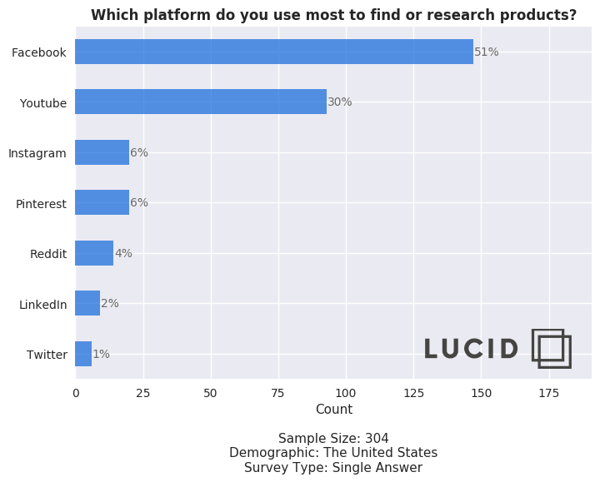
To learn more about the social networks people prefer to surf for product research, I conducted a poll of 304 people using Lucid Software.
Source: Lucid Software
When asked which channel they turned to most often for product research, 51% of respondents said Facebook.
This result isn’t shocking. Facebook is the second-most used social platform globally, followed by YouTube. Since Facebook is one of the first and most successful social media platforms, you probably should be marketing your brand or products on it if you aren’t already. But, you definitely shouldn’t count out other platforms — like Instagram or Pinterest — just yet.
Below, I’ll give you a rundown of the opportunities each social network listed in the poll above offer when it comes to marketing physical products. I’ll also highlight the key differences that you’ll want to consider when weighing which social product marketing strategies are right for you.
Which Social Media Platform Should You Market Products On?
Facebook has a whopping 1.59 billion daily active users and has been around since the early 2000s. Its audience includes multiple age groups and spans the globe, making it a solid place for most brands to market themselves.
When it comes to marketing your product, you have many different options on Facebook. Here are a few examples.
Free Promotion
By now, you probably know that any company can create a Facebook Business Page for free. Once you create a business page, you can begin to share posts about your products and offerings. If you have happy customers, you can even ask them to review your business on Facebook so prospects researching you can see how you’ve pleased your customers in the past.
Aside from creating a page to highlight your brand, you can also post your products in Facebook’s Marketplace. Marketplace listings can include product shots, pricing, product specifications, and purchasing information. Although individual users often use the Marketplace to sell items they no longer want to other people, Facebook Business pages are also eligible to use this feature.
You can also consider talking about your products or offerings on Facebook Stories. This might take a little extra effort because it will require you to film or create content in the Story format, but research says it can be beneficial. In fact, a 2018 survey revealed that 62% of people were more interested in a product after learning about it in a Facebook Story.
Paid Promotion
Because Facebook’s feed algorithmically favors posts from individual accounts over businesses, you might decide that you want to put money into Facebook Ads.
Facebook Ads has a solid track record. It’s estimated that 2 million businesses were advertising on the platform in 2018.
With Facebook Ads, you can create advertisements with a certain goal in mind, such as conversions or in-store foot traffic. The detailed ads software also allows you to target specific audience demographics.
As a Facebook advertiser, you can either promote a post you’ve already created to ensure that it shows up on feeds of users in your demographic, or you can create native ads that might show up in feeds or on Facebook’s sidebars. While promoted posts look like an average post with a simple tag stating they’re promoted, the native ads look more like traditional ads to make it clear to users that the content they’re seeing is paid for.
If you want to launch video-based ads, Facebook also allows you to promote video content or buy in-stream ad placements that appear in Facebook Live videos or longer videos that other users have uploaded.
YouTube:
If how-tos or video tutorials are part of your content marketing strategy. YouTube will be a natural fit for your brand. This is because YouTube users are three times more likely to prefer watching a YouTube tutorial video compared to reading the product’s instructions.
More and more companies are taking notice of YouTube’s product marketing opportunities. In 2018, 45% of marketers said they planned to add YouTube to their 2019 strategy.
With a branded YouTube channel, you can publish video content such as demos, tutorials, or customer testimonial videos that give solid details about why your product is valuable.
By filming your own videos, you can insure that you’re highlighting all the great aspects of your product that make it stand out from its competitors.
Alternatively, if you don’t have time to create your own videos, sponsoring an influencer’s content, tutorial, or review related to your product allows you to tap into that content creator’s audience as they tell their followers more about your offerings.
Aside from creating your own account or hiring an influencer to give a review or tutorial, you could also consider paid advertisements. YouTube offers a few ad styles including TrueView, Preroll, and Bumpers.
These ads allow you to submit a short video ad to YouTube which is then placed at the beginning or in the middle of videos with metrics and demographics that match your brand’s target. To learn the ins and outs of setting up an ad and determining which style is right for you, check out this guide.
Although Instagram ranked in third place in the poll above, you shouldn’t disregard Instagram — especially if you’re targeting Gen-Z or millennials who make up the platform’s primary audience.
For years, Instagram’s visual layout has made it a hot spot for influencer marketing. Influencers regularly post sponsored photos and videos about their experiences with products. Like YouTube, these influencers also regularly publish video posts or Stories that present tutorials, reviews, and unboxings related to a product.
Aside from influencer marketing, many brands also promote their products on Instagram Stories, Instagram Live, and through standard video or photo posts on Instagram Feed.
Here’s an example where Kylie Jenner, the CEO and Founder of Kylie Cosmetics, films a Story-based product tutorial for her company’s Instagram account:

Along with free strategies, Instagram now offers Shoppable posts. With Shoppable posts, you can promote a product in an Instagram post that links to your Facebook Catalog. Here’s an example of what a Shoppable Post looks like:

To be eligible for Shoppable posts, you must have an Instagram Business page that’s linked to a Facebook Catalog. This feature is also only for businesses selling physical goods.
Here’s a blog post that goes into detail about how to use and optimize Shoppable posts.
Pinterest encourages people to pin image-based posts that inspire them to digital boards, mimicking the process of creating a physical inspiration board.
Because people come to this platform to be inspired to do something, such as travel or home decorating, they might find themselves pinning all sorts of product-oriented images to a themed board. For example, someone who wants to redecorate their office might create an “Office Inspiration” board and pin photos of furniture or decorative items that they’d like to buy
Here’s an example of what these boards look like:
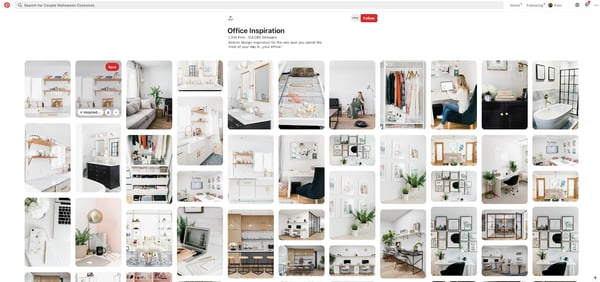
To make it easier for people to find your products, you could consider starting a Pinterest account and making a few boards to highlight your products. For example, if you’re marketing a travel company, you could make a board for each country that you offer packages to. On each board, you could place images of trip activities that link to your website.
Then, if someone is trying to plan a trip to a country you sell a package for, they might come across one of your posts and pin it to their own “Travel Inspiration” board.
To give you a real-world example of how brands use Pinterest, below is a Wedding Registry board created by Target which features images of products that a bride and groom might want to add to their gift registry.
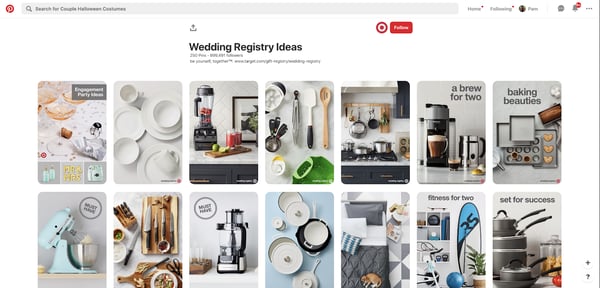
Each of Target’s pinned images links to the company website so users can share the pin on their own Pinterest board, or click straight through the post to buy or register the product.
If you have an advertising budget, you can also consider launching pay-per-click ads on Pinterest. Pinterest Ads enables your posts to be seen by people in a specific demographic that matches your own. The platform also allows you to A/B test different photos and target ads to Pinterest users on your contact lists.
Want to learn more about Pinterest Ads and effective experiments to run? Check out this blog post from a PPC and Pinterest expert.
Reddit encourages users to create discussion threads in themed online communities, called subreddits. As the platform has evolved, many users have created both threads and subreddits devoted to talking about products, like fast-food restaurants or video games.
Below is an example of a subreddit, or online community, that Reddit users created to talk about all things related to Xbox One.
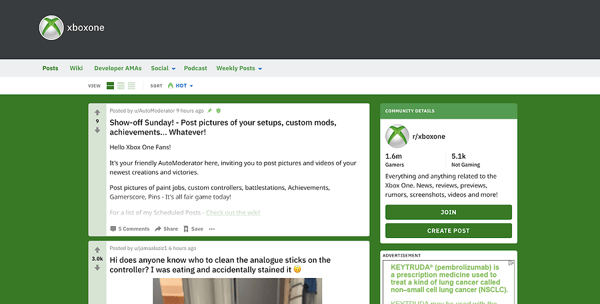
However, because comments with promotional language in them often get downvoted or buried in feeds by more engaging Reddit threads, you’ll need to be creative if you want to engage with audiences on this platform.
While you might want to keep an eye on Reddit or experiment with it, don’t put all of your time and resources into it — at least right now. As it evolves, the platform may become an easier platform to market your brand on, but at the moment, Reddit marketing strategies still require more brainstorming and time than tactics on other social platforms.
Although this platform has been called one of the “trickiest” for marketers to crack, some bigger brands have figured out how to reach the platform’s discussion-oriented users.
For example, some brands will create subreddits related to their product, while others will interact by commenting on threads related to their industry.
Aside from creating content for free on Reddit, you can alternatively pay into sponsored posts or ads, similarly to Facebook or Twitter. These ads will appear in a user’s feed or as a promoted comment in a thread or subreddit.
To learn more about the ins and outs of Reddit marketing, click here for tips and examples of how other brands have cultivated the platform.
LinkedIn’s platform, which emphasizes networking and career-related chatter, might be well-suited for product marketing in B2B, academic, or professional industries. People who do product research on this platform might be looking for a service, tool, or software that can either help to escalate their careers or make their workdays easier.
If you’re marketing products like software, online courses, business-related publications, or anything that can help a professional or student do their job better, LinkedIn will be a great fit for you. However, if you sell more general consumer-facing products like makeup or home decorations, you might want to put more product-marketing efforts into other platforms on this list — like Facebook or Instagram.
While the professional nature of LinkedIn and its audience might not be suited for all brands, the platform still offers a variety of opportunities to brands that align well with it. For example, research shows that 80% of B2B leads come straight from LinkedIn.
LinkedIn is very similar to Facebook in that you can post about your product or service for free, or purchase ads or post promotion to get information about your business front and center on feeds. To see a few great ad examples, check out this post.
Twitter has 126 million daily users from a variety of backgrounds, geographic locations, and industries. Its broad demographic might provide solid marketing opportunities to many different types of businesses. Because of its broad user base, you might want to create an account on Twitter and post regularly for brand awareness purposes.
If you’re interested in video marketing, you can also experiment with Twitter’s live video feature and use it to film a tutorial or Q&A related to your product.
Aside from posting about your product for free, you can also pay into targeted ads or promoted tweets. Twitter claims that its advertising ROI is 40% higher than some other social channels.
While the ROI of Twitter advertising and its user base sounds promising, you might be wondering why it ranked so low on the poll shown above.
Ultimately, what might make Twitter rank last in the product research poll is its platform’s trend-oriented nature. The platform encourages people to connect with each other and post tweets or comments about current events, trending hashtags, or their thoughts on other specific topics.
Yes, brands and product discussion are both prevalent on the platform, but users might go to Twitter to learn more about what’s going on in the world, rather than new products. When people are asked to pick which platform they do the most product research on, it’s not surprising that Facebook or YouTube might seem like a more obvious choice than Twitter.
While you should be on Twitter due to its sheer user base and advertising ROI, you’ll want to keep its audience’s need to stay trendy and informed in mind as you’re creating posts and advertisements for the platform. This might help you make social content that both engages these audiences while still weaving in information about how valuable your product is.
Identifying the Right Platforms for Product Marketing
While running ads and product promotions on all of these platforms could be helpful and lead to conversion, you’ll want to primarily focus on the platforms with audiences that already align well with your brand.
For example, broader audiences are actively looking for products or researching brands on Facebook, Instagram, YouTube, and Pinterest while Reddit and Twitter users just want to follow trends. Similarly, if you’re marketing a B2B company, you might see a better ROI from ads on a professional network like LinkedIn than ads on a more consumer-friendly platform like Instagram.
To learn more about all the major social channels and what drives their audiences, check out this detailed blog post that highlights the five types of social media platforms.

The Content Marketer’s Guide to Thought Leadership
Oprah.
Dave Ramsey.
Seth Godin.
Besides being highly successful in business, these people are known as thought-leaders — or experts — in their industry.
Similarly, as a marketer, being an expert in your field is crucial. To do that, you have to drive traffic to your site, nurture and convert leads, and build brand authority and reputation.
That’s where thought leadership comes in.
According to research by Edelman and LinkedIn, out of 1,200 respondents, 58% read one or more hours of thought leadership per week. Additionally, 55% of respondents said they use thought leadership to vet organizations they may hire.
Consuming thought leadership content also affects purchasing decisions. In fact, 60% of decision-makers said thought leadership convinced them to buy a product or service they weren’t previously considering.
Below, let’s review what thought leadership is and how to use it in your marketing strategy. We’ll also explore the best examples and types of content you can consider creating.
A person or company might use thought leadership as a content marketing strategy because providing value to your audience demonstrates your brand helpfulness. Then, down the road when someone is seeking a product or service like the ones you provide, they’ll consider you an expert and turn to you first.
If you’re good at it, you’ll increase awareness among your target audience, generate more leads, improve social proof, and boost engagement online.
For instance, Brian Dean is a thought leader in the SEO space. By regularly posting content related to his expertise, he’s proven his value as a content marketer worth following.
So, how do you incorporate thought leadership into your marketing strategy? Here, we’ll analyze the top thought leadership marketing tips.
Thought Leadership Marketing
Now that we’ve covered what thought leadership is, let’s review some best practices before you get started.
1. Know your audience and continue learning about them.
Knowing your audience is the key to succeeding with any marketing strategy, and thought leadership is no different. Begin with your buyer persona. What motivates, inspires, or causes your audience pain? What questions are they asking? To figure this out, look on social media or conduct customer interviews. Once you know these things, you can begin answering their questions with thought leadership content.
Additionally, it’s important to continuously check-in and reevaluate your buyer personas. Are your customer’s questions changing over time? Do their pain points look the same today as they did when you first began as a company? People evolve, and so will your audience.
2. Be active on social media.
Social media is an effective opportunity to build your brand and expertise. First, social media keeps you active and engaged with your community. Second, you can use it to comment on industry news and ensure your brand voice is heard in conversations regarding relevant industry trends.
Plus, you can use social media to promote thought leadership content in an organic way without seeming too promotional.
3. Publish content in a variety of places.
Creating thought leadership content doesn’t just mean posting on your blog. It also means being active on social media, guest posting on other sites, and speaking at events or on podcasts.
It’s important to mix it up with owned media versus other media sources. Additionally, consider having a combination of written content vs. video content vs. audio content, like podcasts.
Ultimately, thought leadership content should show up wherever your audience is.
4. Analyze what competitors are doing.
If your competitors are creating thought leadership content, analyze what they’re doing. How often are they posting? Where are they posting? Don’t be afraid to get inspiration from your competitors.
Plus, you can also look and see what your competitors are missing. Perhaps you can fill in gaps in the content they’re putting out.
5. Create valuable content.
In order to truly succeed at thought leadership, you need to create valuable content. Show that you’re an expert in the industry by speaking intelligently on specific issues in the industry. It’s important to dig deep and show off your expertise in one subject area at a time.
For instance, it can be tricky to prove yourself an expert in marketing as a whole (at least in the beginning), but you can have the director of SEO at your company create content for your blog or LinkedIn to demonstrate your brand’s specific expertise in SEO.
6. Be genuine.
We can’t say it enough, but being too promotional doesn’t connect with your audience. In fact, it’ll probably annoy them. You should produce content that is genuine and authentic to your brand. Additionally, you want to make sure your content makes sense to everyone, offers perspective, and is supported with market-backed research that’ll help inform your audience’s opinions or decisions. Using examples, facts, and quotes will go a long way.
Once you’ve thought about adding thought leadership to your marketing strategy, it’s time to dive into the type of content you’ll want to create.
So, how do you come up with content ideas to talk or write about?
To start, you could do some keyword research to see what people are asking. This goes back to understanding your audience so you can create content that answers their questions.
You’ll also want to keep in mind industry news. Is there anything pressing going on? Are there any issues being discussed in your field? If so, address those and forecast the future of your industry.
Additionally, you can’t go wrong with articles using formats like tips, how-tos, or best practices. You’ll just want to ensure you’re producing long-form, educational content that your audience wants to read.
After you’ve considered the format and type of content you want to produce, it’s time to dive deep into the strategy.
Thought Leadership Strategy
Before you jump into thought leadership, you’ll want to have a strategy and a game plan for how you’re going to move forward.
Here’s a simple step-by-step process you can use as a starting point:
Step 1: Set a SMART goal. SMART goals are specific, measurable, attainable, relevant, and timely goals. Before you begin working on thought leadership, have a goal for what you want to get out of it, whether it’s increased traffic to your site or lead generation.
Step 2: Brainstorm content ideas. Think about your personas. Is your content focused and strategic to what they want to read or watch? What are they searching for and asking on social media? Answer these questions during your brainstorming session.
Step 3: Analyze competitors. To kickstart more brainstorming ideas, answer questions like, “Who is my audience currently going to for answers?” Again, you’ll want to fill in the gaps in their content and talk about what they aren’t.
Step 4: Create and distribute content. Once you’ve decided what content to create, make sure you have a point of view and personality. Your content should be easy to consume and easy to share.
Step 5: Measure results. Track your results in order to see if your thought leadership content has been effective. Use your SMART goals to determine what metrics you’re tracking.
1. Oprah Winfrey
Oprah Winfrey, former talk show host and media mogul, spoke at the USC Annenberg School for Communication and Journalism commencement ceremony in 2018.
She took some of her time to speak on the role of journalists today. She said, “You will become the new editorial gatekeepers, an ambitious army of truth-seekers who will arm yourselves with the intelligence, with the insight and with the facts necessary to strike down deceit. You’re in a position to keep all of those who now disparage real news — you all are the ones who are going to keep those people in check.”
Throughout the years, Oprah has earned her title as a media expert. Her advice and opinions on the industry are considered thought leadership because of her expertise, which she spent her career cultivating.
2. Dave Ramsey
Dave Ramsey is an expert in finances. He has a degree in Finance and Real Estate, and is known for counseling people on paying off their debts. Ramsey became a thought leader when he continued to produce content in the industry, including hosting a radio show, writing books, and podcasting.
One of the best examples of his thought leadership content is his podcast. He posts shows almost every day on topics such as, “Own the ‘Personal’ Part of Personal Finance” and “Don’t Play the Student Loan Forgiveness Lottery!”
3. Seth Godin
Seth Godin is an entrepreneur turned business mogul. He’s written books addressing marketing, advertising, and leadership. He’s also in the Marketing Hall of Fame, launched by the American Marketing Association of New York. He became a thought leader because of the successful content he delivers, including speaking engagements, books, and his blog.
A great example of thought leadership content he’s produced is his blog. Here, he regularly writes about his areas of expertise, including marketing and business. For instance, in this blog post, he writes about great storytelling. He says, “A great story is true. Not necessarily because it’s factual, but because it’s consistent and authentic. Consumers are too good at sniffing out inconsistencies for a marketer to get away with a story that’s just slapped on.”
4. Marie Forleo
Marie Forleo is a life coach, speaker, author, and host of her own YouTube channel show, MarieTV. She is known for creating and selling online courses, especially in regards to copywriting. She became a thought leader because of her expertise in business coaching.
One example of thought leadership content she’s produced is this video on her YouTube channel:
Here, she speaks on her expertise in content by discussing how to find fresh content ideas every week. She delivers three strategies her viewers can use to generate content ideas for their blog, podcast, or videos.
5. Brain Dean
Brian Dean is an SEO expert. After he created a successful online business, he decided to create a blog — Backlinko — that chronicled the lessons he learned along the way. Essentially, he created a thought leadership site meant to boost his credibility.
An excellent example of his thought leadership content is this blog post. He uses long-form content that is educational and valuable to his audience, writing “21 Ways to Promote Your Blog (In 2019).”
6. Sallie L. Krawcheck
Sallie L. Krawcheck, CEO and co-founder of Ellevest, a digital advisor for women, is an expert in finance. Before she started her company, she was the president of Global Wealth and Investment Management at Bank of America.
Throughout her career she’s become a thought leader because she is widely published both on social media and traditional media such as television shows.
One example of thought leadership content she’s created is on LinkedIn. Here, Krawcheck proves her expertise in finance by publishing articles and organic posts about finance. This boosts her company’s value and brand awareness.
Thought leadership is a great strategy that every content marketer should be thinking about, particularly since it allows you to prove expertise in your industry while simultaneously expanding your reach and helping your readers and customers grow.

How to Process Negative Feedback Without Triggering a Stress Response [Infographic]
Employee feedback is an undoubtedly critical component of long-term career growth.
In fact, 82% of employees want to receive feedback — regardless of if it’s positive or negative.
Additionally, while it can be scary to receive feedback, particularly from your manager, it’s ultimately intended to help you become a better employee.
However, that doesn’t mean it’s easy to receive. Despite what I know about the importance of feedback for growth, when I hear my manager say “You’ve been doing great, but … ” I still tense up.
A stress response to negative feedback is completely natural, but that doesn’t mean it’s necessary. To help you receive negative feedback more open-mindedly, CashNetUSA put together the following infographic.
Take a look to learn how to feel at-ease the next time your manager delivers constructive feedback.


19 Tips to Write Catchy Email Subject Lines [+ Examples]
No matter what they say, people do judge emails by their subject lines.
In fact, 47% of marketers say they test different email subject lines to optimize their emails’ performance. That’s why it’s so important to craft subject lines that are compelling enough to get people to click through.
While they may seem like a small part of your message, they’re one of the very first impressions you have on your email recipients. And they’re a marketer’s ticket for standing out in a crowded inbox.
Do you want your email content opened, read, and clicked? It all starts with the subject line. Read on for some tried-and-true tips to help jazz up your subject lines and boost your emails’ engagement.
Email Subject Line Best Practices
Before we get to our more detailed tips, let’s go over some fundamentals of what makes a great subject line. Regardless of your goals, these are the essential elements that your subject line should possess:
1. Urgency
There’s a phrase that, for many of us, is reminiscent of classic infomercials: “Act now!” And while we wouldn’t encourage using that exact language in your content, we do agree that communicating urgency and scarcity in an email subject line can help compel readers to click (or act) — when phrased creatively and strategically. But because you don’t want to be known as “the brand that cried wolf,” use these subject lines sparingly, and try to limit them to when the occasion genuinely calls for immediate action.
2. Curiosity
Sometimes, subject lines work because of their ability to send the message, “You will benefit from opening this email.” But other times, it’s good to maintain some sense of mystery — especially if it pique’s the recipient’s natural curiosity and interest. Because they require opening the email to get more information, they can result in, well, a higher open rate. But make sure the subject line, while enigmatic, still aligns with your brand. Too obscure, and it could end up being seen as spam.
3. Offers
Here’s where that benefit of opening a given email comes in. At the end of the day, people love new things and experiences — especially when they come free, or at least discounted. Open with that by including it in your subject line. Personally, I’m much more inclined to open my daily newsletters when there’s an offer of or allusion “free stuff” directly mentioned in my inbox.
4. Personalization
No two email subscribers are exactly the same — and, sometimes, that means the emails you send them shouldn’t be, either. At this point in time, marketers have never had more ways to learn about their subscribers’ preferences, jobs, or general (dis)likes. So when you send them content, on occasion, make it catered toward the individual.
5. Relevance and Timeliness
When we subscribe to an email list, much of the time, it’s because we want to be kept informed, or at least learn more about a given topic (more on that later). Similar to piquing your audience’s curiosity, crafting email subject lines that incorporate trending topics or timely headlines can help you establish your brand as an authority within your industry — and can compel people to click to read.
6. Name Recognition
Let’s face it: We all have famous people who, at some point, we presently or previously have admired. And when you understand your audience’s preferences and interests, you can pique their interest by including the names of this admired, recognizable individuals by including them in your content — and mentioning them in your email subject lines. But take heed: This tactic really only works when it aligns with your brand, product, or service, so keep it relevant, rather than just throwing out a recognizable name for the sake of recognition.
7. Cool Stories
At risk of sounding like a broken record, here’s another place where curiosity comes into play. By front-loading your email subject line with a compelling allusion to a story that the message tells — but can only be read if opened or clicked — your audience is like to become intrigued, and want to learn more. Again, make sure the story is relevant to your brand. Otherwise, it might just confuse your readers and prevent them from opening the email.
1. Keep it short and sweet.
Email subject lines will get cut off if they’re too long, particularly on mobile devices. And with up to 77% of email opens taking place on mobile, we recommend using subject lines with fewer than 50 characters to make sure the people scanning your emails read the entire subject line.
If you’re struggling to keep your subject lines short, think about which words matter less and where you can remove a frivolous detail. For example, if you’re sending an order confirmation, doesn’t “Your order is being processed” look better than “Order #9435893458358 is being processed”?
Same goes for your regular emails: Don’t waste your time including the word “update” or “newsletter” in the subject line. Some studies even suggest these words can decrease the message’s open rate since it tells readers the email is associated with a series, and therefore they can catch the next one.
2. Use a familiar sender name.
That name recognition we mentioned earlier doesn’t just apply to the famous — it applies to the familiar. When setting your sender name, be as human as you can. Olivia@yourcompany.com is both inviting and unintimidating to people when they open their inboxes.
If you’ve already met your recipients from a previous conversation, use your own name as the sender’s address — even if the email is technically coming from the company as a whole. The best impression you can make on your customers is that they’re working with you, the individual — not the entire business.
“If the ‘from’ name doesn’t sound like it’s from someone you want to hear from, it doesn’t matter what the subject line is,” explains Copy Hacker‘s Joanna Wiebe. Ultimately, people are busy, and they simply don’t bother with you if you don’t sound like someone who would make for an easy (or at least friendly) conversation.
3. Avoid the ‘no-reply’ sender name.
Thanks to the amount of spam email people get these days, most people hesitate to open email from unfamiliar senders. And even fewer people like talking to a robot. Think about when you call a company and can’t get a hold of an actual person. It’s frustrating, right? This goes for email, as well.
Never use “noreply@company.com.” I repeat: Never use this email address. Not only does it make it look less personable, but it also stops people from adding your email to their address book.
Instead, avoid using a generic email address and send the email from a real person. For instance, we once found that emails sent from “Maggie Georgieva, HubSpot” performed better in terms of opens and clickthrough rate than emails sent from just “HubSpot.” (HubSpot customers: Learn how to personalize the “From” name and email address here.)
4. Use personalization tokens.
Remember the personalization we mentioned earlier? Using personalization tokens — like name or location — in the subject line adds a feeling of rapport, especially when it’s a name. Everyone loves the sound of their own name. Plus, it increases clickthrough rate: In fact, research has shown that emails that included the first name of the recipient in their subject line had higher click-through rates than emails that did not.
One example of how brands affix this information to subject lines is when dog walking company Wag! does so with dog names. Here’s one such email that HubSpot’s Amanda Zantal-Wiener received:
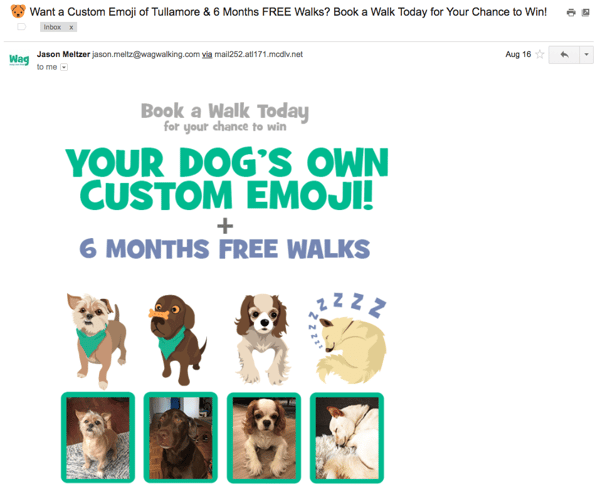
That’s great personalization and great timing.
Another personalization tactic that works is to tailor subject lines to the recipient’s location — things like lists of their respective cities’ best outdoor bars and restaurants.
Just don’t go overboard with the personalization here. That can be a little creepy. But little personalized touches here and there show that you know more about your recipients than just their email address. However, if you can’t (or don’t want to) use personalization tokens in the subject line, use “you” or “your” so it still sounds like you’re addressing them directly.
5. Segment your lists.
While email blasts that go out to your entire list might be relevant and helpful to some people, it won’t be to others — and could cause confusion or frustration. Why is this restaurant sending me a list of the best local steakhouses when I’m a vegetarian? Why is this company sending me case studies when I just signed up for its email list yesterday?
Personalize the experience using information from the actions your customers have already taken — from which forms they’ve filled out, to which industries they’re in, to what their personal preferences are. In email marketing, you can personalize your recipients’ experience using a little thing called list segmentation.
How you segment your lists depends on your business and your goals, but you can read this blog post for 27 ideas for how to slice and dice your email lists for better segmentation.
6. Don’t make false promises.
Your email subject line is making a promise to your reader about what you will deliver in your message. Make sure that you make good on that commitment — and do not try to get your email opened by making false promises. This will irk your audience, and they’ll learn not to trust your subject lines, resulting in a lower open rate and a higher unsubscribe rate.
7. Do tell them what’s inside.
Speaking of making promises, if your visitor has downloaded an offer and you’re delivering it via email, it’s a great idea to use a subject line that says something like, “Your new ebook inside!” or, “Your guide awaits!” This works better than a simple “thank you” in the subject line because it makes it clear that something is waiting inside the email.
8. Time it right.
Sending an email at the right time with the right subject line can make a huge difference in open and clickthrough rate. A prime example? When food publication Eater sends at 6:45 P.M. on a Wednesday evening that said, “Where to Drink Beer Right Now” — just in time for happy hour. Nailed it.
Another favorite example of mine is a classic email from Warby Parker with the subject line, “Uh-oh, your prescription is expiring.” It was sent two weeks before the recipient needed to renew his prescription. By sending an email at the right time, Warby Parker increased the chances of their email getting opened — and included a relevant call-to-action about getting a glasses upgrade, too.
9. Use concise language.
Keep in mind that people scan their inboxes very quickly — so the more clear and concise your subject line is, the better. It’s usually a lot better to be concise than it is to use complex and flowery language — unless you’re going for an elusive subject tone to entice your recipients.
When you’re going for a concise subject line, think first about how your email will benefit your recipients. You’ll want to make that benefit very clear. For example, “Increase your open rates by 50% today” is more appealing than “How to increase open rates.”
10. Start with action-oriented verbs.
Subject lines are similar to calls-to-action, in that you want the language to inspire people to click. Subject lines that begin with action verbs tend to be a lot more enticing, and your emails could be drastically more clickable by adding a vibrant verb at the beginning.
Actionable subject lines will inspire people to click on your email by instilling urgency and excitement. For example, in an email inviting people to a hockey legend dinner, the email subject line might read, “Dine with Bruins legend Bobby Orr,” rather than a more generic (and less actionable) “Local Boston Sports Legend Meal.” The former email uses “Dine” to help the reader envision themselves at a dinner table.
11. Make people feel special.
The psychology of exclusivity is a powerful thing. When people feel like they’re on the inside, it gives them a sense of belonging that could build loyalty and compel them to convert better on your emails.
The right phrasing can make your recipients feel special — and the effect can be magical. A few ideas for phrasing include:
- “For our beloved customers only”
- “An exclusive offer for you”
- “My gift to you”
- “You’re invited!”
- “Private invite”
12. Create a sense of importance.
There’s a phrase that, for many of us, is reminiscent of classic infomercials: “Act now!”
And while we wouldn’t encourage using that exact language in your content, we do agree that communicating urgency and scarcity in an email subject line can help compel readers to click (or act) — when phrased creatively and strategically.
But because you don’t want to be known as “the brand that cried wolf,” use these subject lines sparingly, and try to limit them to when the occasion genuinely calls for immediate action.
13. Use numbers.
A lot of businesses send emails with vague statements in their subject lines — which is why using data and numbers is a great way to get your emails noticed, demonstrate a clear and straightforward message about your offer, and set the right expectations.
Just like with blog titles, using numbers in your subject line is an effective email marketing best practice. You might use numbers to refer to the title of your listicle, the page length of the offer you’re sending, a specific discount, or the numerical benefit of a particular resource you’re providing — like “Join more than 750 others at this event!”
14. Pose a compelling question.
Asking a question in your subject line can also draw readers in — especially if you’re asking a question you know is relevant to your recipients’ buyer persona. This is just one way to pique that curiosity we mentioned earlier. For example, you might try the following: “Are you making these SEO mistakes?” or “Do you know what your website is doing wrong?”
Zillow once sent an email with the subject line, “What Can You Afford?” that linked to a website showing apartments for rent. A subject line like this is both encouraging and a touch competitive: While it gives hope that there are apartments out there that’ll fit within your budget, it also pits your cash against what the market offers.
Another example comes from DocuSign. They sent an email late in the lead nurturing process, with the subject line, “What are your customers saying?” The body of the email contained a bunch of case studies that were meant to help the recipient move closer to actually purchasing DocuSign. This was a smart move: Folks who are further down the funnel are likely more receptive to hearing customer testimonials.
15. Don’t be afraid to get punny.
Most people love a good pun. It’s a great way to delight your recipients and spice up your emails. Some of the best punny email subject lines come from JetBlue, with subject lines like “Land wander-
Some of the best punny email subject lines come from JetBlue, with subject lines like, “Land wander-ful low fares now!”
Quirky — a community-led invention platform — worded one of its email subject lines like this: “Abra-cord-abra! Yeah, we said it.” That second part is conversational and self-referential — and exactly what most people would say after making a really cheesy joke in real life.
If you’re the least bit punny, think about small ways you can slip them into your emails when it’s appropriate. Just don’t overdo it. And remember the rule: When in doubt, ask a coworker.
16. DON’T USE ALL CAPS or overuse exclamation points!!!
A subject line that says, “OPEN NOW AND RECEIVE A FREE TRIAL” or, “50% off coupon today only!!!!!!!!” isn’t going to get your email opened. In fact, it’ll probably get your email ignored.
Why? People don’t like to be yelled at, and using all caps and/or a lot of exclamation points can really rub people the wrong way. In fact, according to a study by the Radicati Group, more than 85% of respondents prefer an all-lowercase subject line to one in all caps.
Not only are these tactics disruptive, but they look spammy. So instead of using disruptive tactics like these to stand out in people’s inboxes, try personalizing your emails, establishing relevancy, and using catchy and delightful language.
17. Don’t include a question and exclamation in the same subject line.
Here’s a subject line that can automatically wind up in a recipient’s spam folder: “Want a solution fast? Act now!”
The fast solution isn’t the problem the example above. It’s also not “act now” — although those are known email marketing spam words. It’s both phrases together. This is a classic email saboteur, and it comes in many forms. All you need is to ask and yell at the same time.
The PLING_QUERY rule is a directive by the Apache web server that flags an email as spam if it contains both a question mark and an exclamation mark in the subject line. The example above is a common one. A good solution? Don’t do that!
Not only is this subject line format overdone, but it’s alienating to your audience. Open-ended questions are a show of ignorance; any good marketer knows their leads better than that.
18. Use engaging preview text.
While preview text isn’t technically part of your subject line, it does appear right near the subject line — and it certainly deserves your attention.
Preview text provides recipients with a peek at the content inside your email, which email clients like the iPhone Mail app, Gmail, and Outlook will display alongside the subject line. (The exact amount of text shown depends on the email client and user settings.)

When you don’t set the preview text yourself, the email client will automatically pull from the body of your email. That can look messy depending on your email content, and it’s also a wasted opportunity to engage your audience. (HubSpot customers: Click here to learn how to set the preview text of your emails.)
19. A/B test your subject lines.
Although these tips and best practices are a great place to start, what works best for some companies may not work as well for others. It’s all about figuring out what works best for your specific audience. That’s where A/B testing comes in.
While it can be tempting to use your intuition to predict what subject line language will make people click on your emails, you should always A/B test your highest-stakes subject lines, and tweak the wording according to your results. What works best for your audience: Long or short subject lines? Including numbers or not including numbers? Questions or statements?
Read this blog post for an A/B testing checklist you can bookmark the next time you want to run one on your emails. (HubSpot customers: Learn how to A/B test emails in HubSpot here.)
Examples of Catchy Email Subject Lines
To give you some added inspiration, here’s a quick list of some of the most intriguing subject lines we’ve seen recently.
- “Claim your UNLIMITED free photo book + pages and more” – Shutterfly
- “👻Trip or treat! Up to $300 off ends tomorrow” – EF Tours
- “Generous PTO and summer Fridays” – Mediabistro
- Subject: “It’s scary outside.” Preview text: “Here’s $5 to stay in” – Drizly
- “Smoldering red lipstick” – Chanel
- “Corelle. (Enough said.)” – Wayfair
- “Do you know how important this is?” – Allstate
- “Electrify your next night out. Trending party dresses are now on sale.” – Wish
At the end of the day, if your emails aren’t getting opened, they’re not getting seen. You have great content to share — now, you have to prove it in your subject line.
Editor’s Note: This blog post was originally published in July 2018 but was updated in November of 2019 for comprehensiveness.

Are Webinars Dead? How to Make a Webinar that Works in 2019
As an acquisition marketer, I hear questions like this all the time: “Is the PDF dead? Is the webinar dead now too? How should we continue generating leads for our sales team while continuing to innovate on the content formats we produce and gate behind a form?”
It’s 2018, and the way our prospects and customers find and consume content has certainly changed. While I would love to say that there’s one new, highly optimal content format that all marketers should use for lead generation instead of older formats, I can’t — it’s a little more complicated than that. Instead, I’ll make a bold claim: webinars aren’t dead, and neither is the PDF ebook.
What has changed, however, is a saturation of mediocre PDF ebooks, webinars, and other forms of gated content available online. So while webinars aren’t dead, that doesn’t mean marketers should continue running the same, tired playbook.
Luckily, HubSpot and GoToWebinar teamed up to bring you the ultimate guide, “How to Produce Webinars Your Sales Reps and Prospects Will Love.”
Make sure you’re following these steps to create an effective webinar that works in 2018.
Webinars Drive Sales
According to InsideSales.com, 73% of marketing and sales leaders say webinars are one of the best ways to generate quality leads. Why?
- They are highly engaging. According to GoToWebinar, the average webinar attendee viewing time is 61 minutes.
- They work across the entire customer journey. From thought-leadership panel discussions to weekly live demos, webinars are a dynamic and effective way to move prospects down the funnel from awareness to closed deal and beyond.
- They generate high-quality leads for Sales. Webinars come with a ton of information about your prospects you can use to identify high-quality, sales-ready leads. With each webinar registrant, you can collect lead and engagement data your sales team can use to initiate personalized outreach.
How to Make a Webinar in 2018
Convinced that webinars are still a relevant acquisition strategy in 2018? Follow these steps to create an effective webinar.
1. Leverage Your Sales Team for Content Topic Ideas
When it comes to building a successful webinar strategy, it comes down to sales and marketing alignment. If the marketing team is creating content that isn’t helping their sales conversations, it won’t be a successful effort for driving high-quality leads to sales.
Luckily, you have experts at your disposal for coming up with content ideas that will actually compliment and aid the sales conversation: the reps themselves.
Instead of guessing what your sales team might want a webinar to be focused on, ask them. Get reps’ buy-in for a webinar before you plan it. Set up a meeting to discover new content ideas and to find out what pain points they need to help solve. This will go a long way for ensuring sales’ follow up with registrants is seamless once the webinar is over.
2. Nail Your Promotion Strategy
Once you’ve come up with relevant content topics for your webinar, its your job as marketers to get that webinar in front of as many eyes as possible. With webinars, it’s not just about generating initial excitement; you have to build excitement and encourage engagement once the webinar goes live. Here are a few tips for doing both:
- Try your hand at Co-marketing. One of the best ways to get new expertise, generate interest for a piece of content, and expand the reach of a campaign is to run a co-marketing webinar. Instead of running a webinar with speakers internally, try working with another company that’s going after a similar buyer persona and bring their expertise into the conversation. Doing so creates more interesting content and gives you the opportunity to get your webinar in front of another company’s established audience.
- Create automated email reminders under each sales rep’s name that will be sent to prospects who have been invited but not yet registered.
- Create manual email templates reps can send in their one-on-one communication with prospects.
- Set up an automated email to notify reps when one of their prospects has registered for your webinar. This will help them engage and close those prospects done the road.
- Once you’ve gotten registrants, that doesn’t mean they’ll show up. After all, if you promote a webinar 1-2 weeks in advance, a portion of your registrants are likely to forget when the live date comes around. Remember to send out reminder emails the day before and day-of the live event so ensure a high live attendance rate.
3. Don’t Just Stick to a PowerPoint and Talking Head
The format of slides with a person speaking on screen has been done time after time. Don’t feel the need to stick to the script — literally. Instead, think about ways to mix up how the information in your webinar is presented:
- At HubSpot, we’ve found unscripted, discussion-style webinars to be quite effective at engaging our audience. In many of our live events, we’ve foregone the slides completely and instead brought two speakers together and had a host ask live questions on air. It’s effective for both encouraging Twitter participation via a hashtag and keeping the content conversational, but informative.
- Try building a webinar around your prospects’ questions. Send a call for questions to be answered live on-air. This will help build engagement and excitement for what’s to come. Hopefully, the people asking questions will be more likely to show up day-of too.
- You can also use a landing page, like this, that includes a voting feature for people to upvote they’re top questions. This will also help your prioritize the material your audience is most interested in.
4. Deliver Necessary Information to Sales
A huge part of the pre and post-webinar process is making sure the right information gets delivered to sales. That’s why GoToWebinar and HubSpot recommend creating one webinar hub that’s easily accessible by sales with the following information:
- On-demand recordings of all webinars.
- A calendar with past and future webinars.
- Documentation that details the webinars goals, title, target persona, funnel stage, key points, speakers and logistics.
- Promotional and follow-up emails.
- Collection of graphic and text CTAs sales reps can drop into their communications.
- Mechanism to collect suggestions from sales reps for new topic suggestions and general feedback.
Once the webinar is done, however, it’s time to make sure the sales reps are ready to close those leads. Send a follow up email to your reps and include the following information:
- Leads who registered
- Leads who attended
- Leads who registered but didn’t attend
- Leads who never registered
- New SQL leads from post-webinar lead scores
- Any other relevant webinar data
- Send email templates sales can use to send to leads based on their webinar behavior. Include other relevant content they can use to continue to nurture leads in the coming weeks.
Putting the extra effort in will go a long way toward making sure the webinar is a success from both a sales and marketing standpoint.
It’s All About Alignment
Webinars as a marketing tool aren’t dead. But they’re also not just an effective marketing tool; they’re also effective sales tools – but only if your sales team has the information, content, and tools to use them to move prospects down the funnel and close deals.
However, creating the kind of alignment you need to make this all a success isn’t easy. That’s why HubSpot and GotoWebinar created this ultimate guide for creating a successful webinar in 2018 and included a checklist to guide you through pre, ongoing, and post webinar communications.

How to Use Schema Markup to Improve Your Website’s Structure
Just like when I first watched The Matrix, when I initially heard the term “schema markup,” I was intimidated by the technical know-how I felt I needed to understand it.
However, just like the movie, understanding schema markup isn’t as difficult as you might think.
As a marketer, schema markup is important because you want to make it as easy as possible for search engines to crawl your website.
The easier it is for Google to understand your site, the higher in search engines your website can appear.
Below, let’s review what schema markup is, where to add it, and how it can improve your website’s structure.
What Is Schema Markup?
Schema markup is code you can add to your website that helps search engines return better results for users. Essentially, it gives vital information to search engines to include in your listing that can improve visibility online, as well as click-through rates.
In 2011, top search engines including Google, Yahoo, Bing, and Yandex collaborated to create schema.org, which is a “collaborative, community activity with a mission to create, maintain, and promote schemas for structured data on the Internet, on web pages, in email messages, and beyond.”
Ultimately, schema markup is a form of microdata. According to Wikipedia, “microdata is an HTML specification used to nest metadata within existing content on web pages. Search engines, web crawlers, and browsers can extract and process microdata from a web page and use it to provide a richer browsing experience for users.”
For instance, schema markup will create an enhanced description — sometimes referred to as a rich snippet — which will appear in search results.
As a result of using microdata, your website’s structure will be simple and easy for search engines to crawl, making it easier to appear higher in search results.
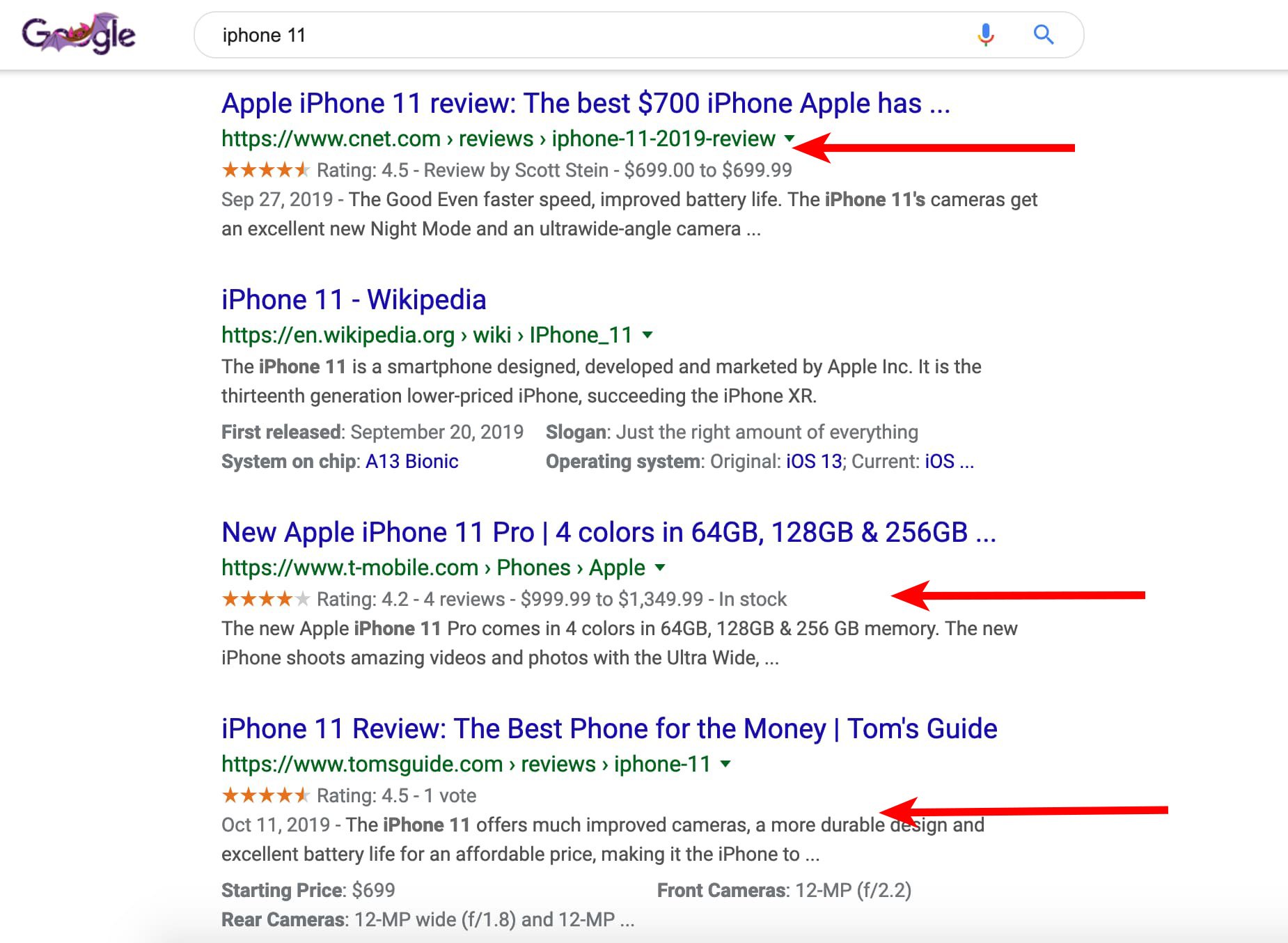
Below is an example of a search engine results page featuring listings with and without schema markup data. As you can see, three of the top four results for the iPhone 11 have schema markup data including ratings, reviews, and price.
Although T-Mobile and Tom’s Guide are the third and fourth listing down, using schema markup microdata can improve its click-through-rate. Plus, it helps the listing stand out from the rest.
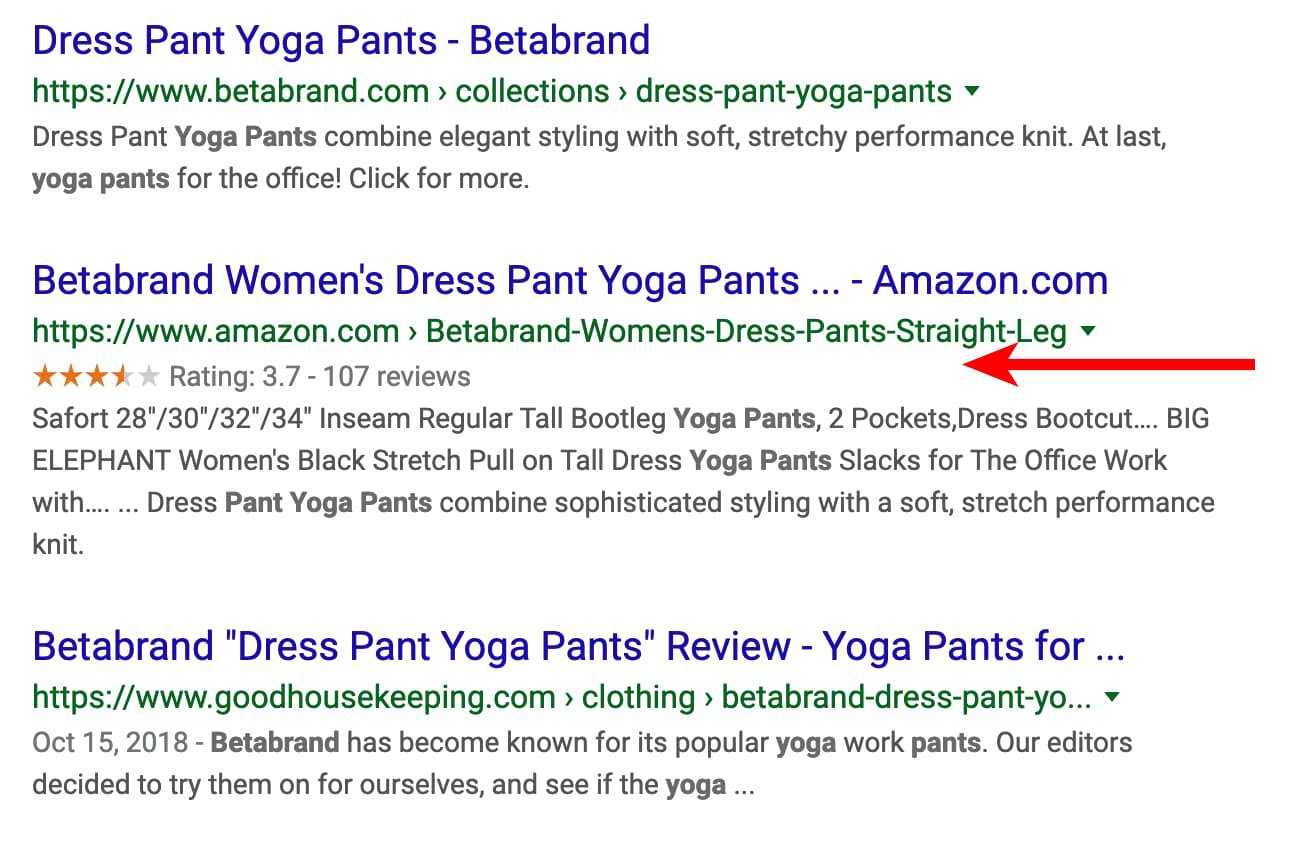
 In the example below, there are three listings for Betabrand yoga pants on Google. The ones from Betabrand and Good Housekeeping don’t include additional information.
However, the one from Amazon includes ratings and reviews.
Again, including this type of information helps search engines provide more information that can persuade users to click on your listing.
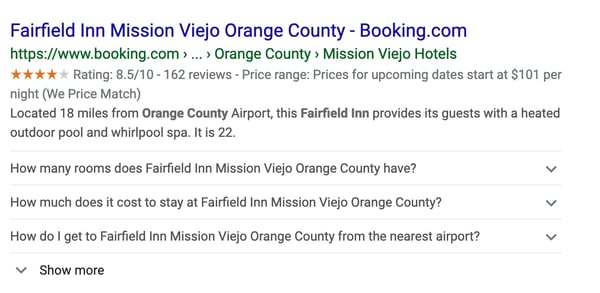
 In the example below, you can see Booking.com used schema markup to include ratings, reviews, price, and Frequently Asked Questions for an Orange County hotel. In their listing, they include a drop-down, answering questions a user might have.
If someone is searching for and might be staying in that hotel they can learn how close it is to the airport, the average cost, and the ratings.
Where to Add Schema Markup
You can add a variety of microdata depending on your service or product.
For example, you can include:
- Reviews
- Star ratings
- Pricing
- Availability
- Events
- Location
- Price range
- Payment options
- Store hours
The options are endless. No matter what service or product you sell, you can use schema markup to enhance your search engine listings.
So, how do you add schema markup to your site?
The process is actually pretty simple.
Step 1: Go to Google’s Structured Data Markup Helper
Step 2: Select the type of listing you want to add schema markup to. Then, copy and paste the URL in the form field.
Step 3: Add schema markup data on the right pane by filling in the information you want to show up.
Step 4: Hit “Create HTML” button.
Step 5: Copy and paste the yellow, highlighted code. This is your schema markup code. Alternatively, you can hit the “Download” button to grab the code.
Step 6: Paste the code into your content management system.
Once you’ve gone through this process, you’ll want to then test your schema markup to make sure it shows up correctly in search engines. Below, we’ll review how to test your listing.
Schema Markup Tester
Now that you’ve added the schema markup code to your site, it’s time to test it out. You can do this by using the Google Structured Data Testing Tool.
You can test your schema markup two ways: by URL or code.
To test the URL, all you need to do is copy and paste the URL of the webpage you want to see. Then, the tool will showcase a preview of your listing.
To test the code, you can copy and paste the code the structured data markup tool generated for you. Again, a preview of your listing will appear.
While schema markup may seem technically intimidating, it’s actually a simple process. By using schema markup code, you can increase the visibility of your search engine listings and improve click-through-rates.

How to Embed Video in Email [Quick Tip]
Nowadays, video is an undeniably popular channel for marketing purposes.
In fact, in 2019, 87% of businesses use video as a marketing tactic — a number drastically higher than just two years prior, when only 63% used video.
If you’re an email marketer, I’m willing to bet you’ve considered how you might spruce up your subscription and click-through rates with video. It’s a good idea in theory, with two-thirds of consumers preferring video over text when learning about new products or services.
In reality, however, it can be tricky. Major email clients including Gmail, Yahoo, and Outlook don’t support embedded videos, so your subscribers either won’t be able to watch your video within the email, or worse — they won’t see your email at all, because it’ll end up in their spam folders.
Fortunately, there’s a creative workaround to help you embed part of your video within your email, and incentivize subscribers to click-through to watch the rest. Here, let’s explore how to do just that.
Embed YouTube (or Any Other) Video in Email
There are two options you might consider when embedding a video within your email — you can either embed a GIF of your video with a “click here to watch full video” CTA, or you can embed a still photo of your video, and when subscribers click the “Play” button, they’ll be re-routed to your video’s URL.
Let’s explore the GIF option, first.
You can use the following instructions on any video from a video hosting platform of your choosing, including YouTube, Vimeo, Facebook, DailyMotion, etc. In the following examples we used a Facebook URL, but a YouTube URL would work just as well.
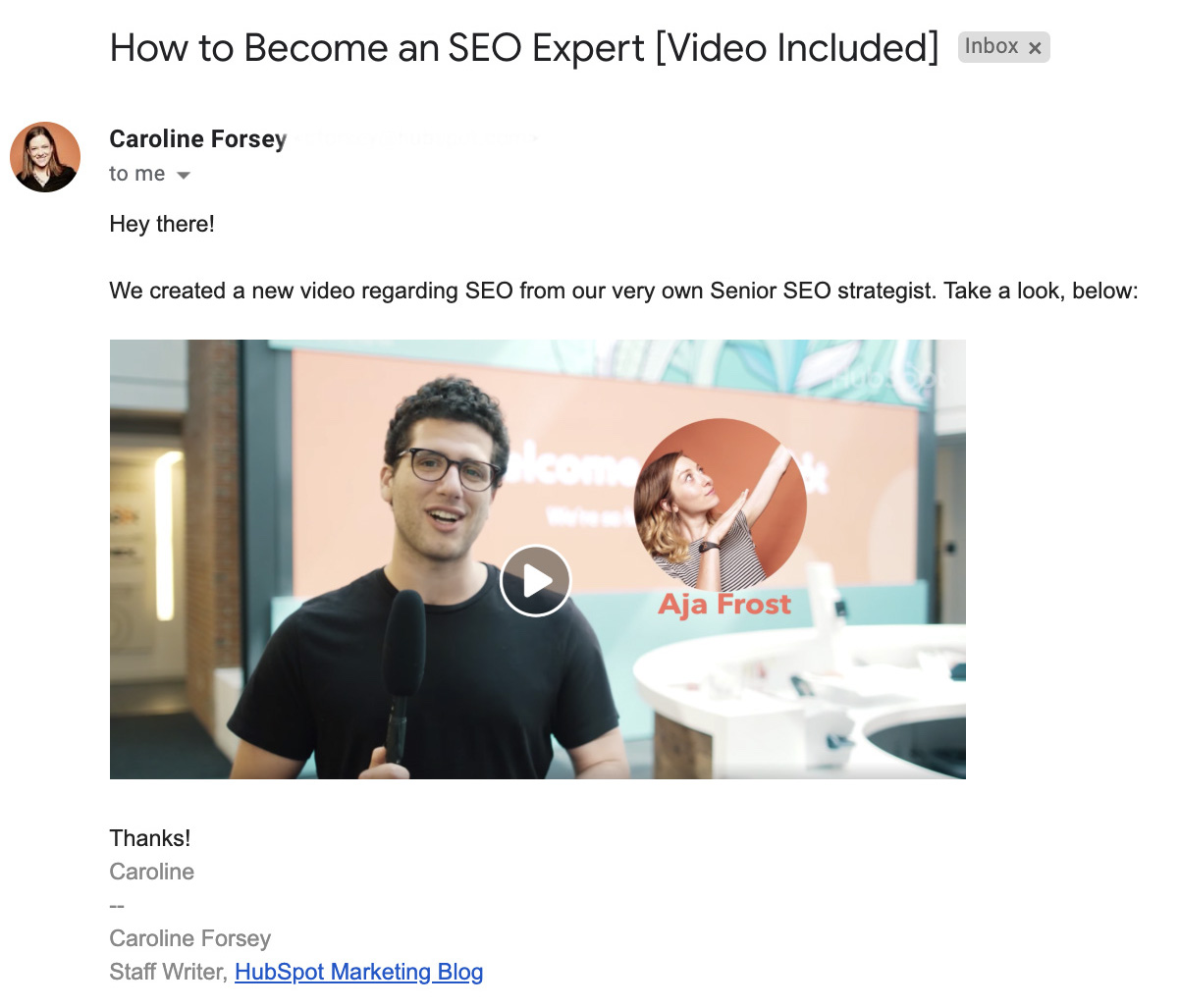
1. Find the URL of the video you want to include, or download and save your video to your computer. To create a GIF of a video I wanted to include in my email, I first went to HubSpot’s Facebook page and copied the URL of a recent video the team uploaded to the site — “How a Senior SEO Strategist Sees the World”.

2. Next, I went to Imgflip.com, a tool that enables you to create GIFs of videos. You can upload a URL directly to Imgflip, or you can upload a video you have saved on your computer. For our purposes, I copied and pasted the URL from HubSpot’s Facebook page. Alternatively, you can copy and paste a YouTube URL or website URL.
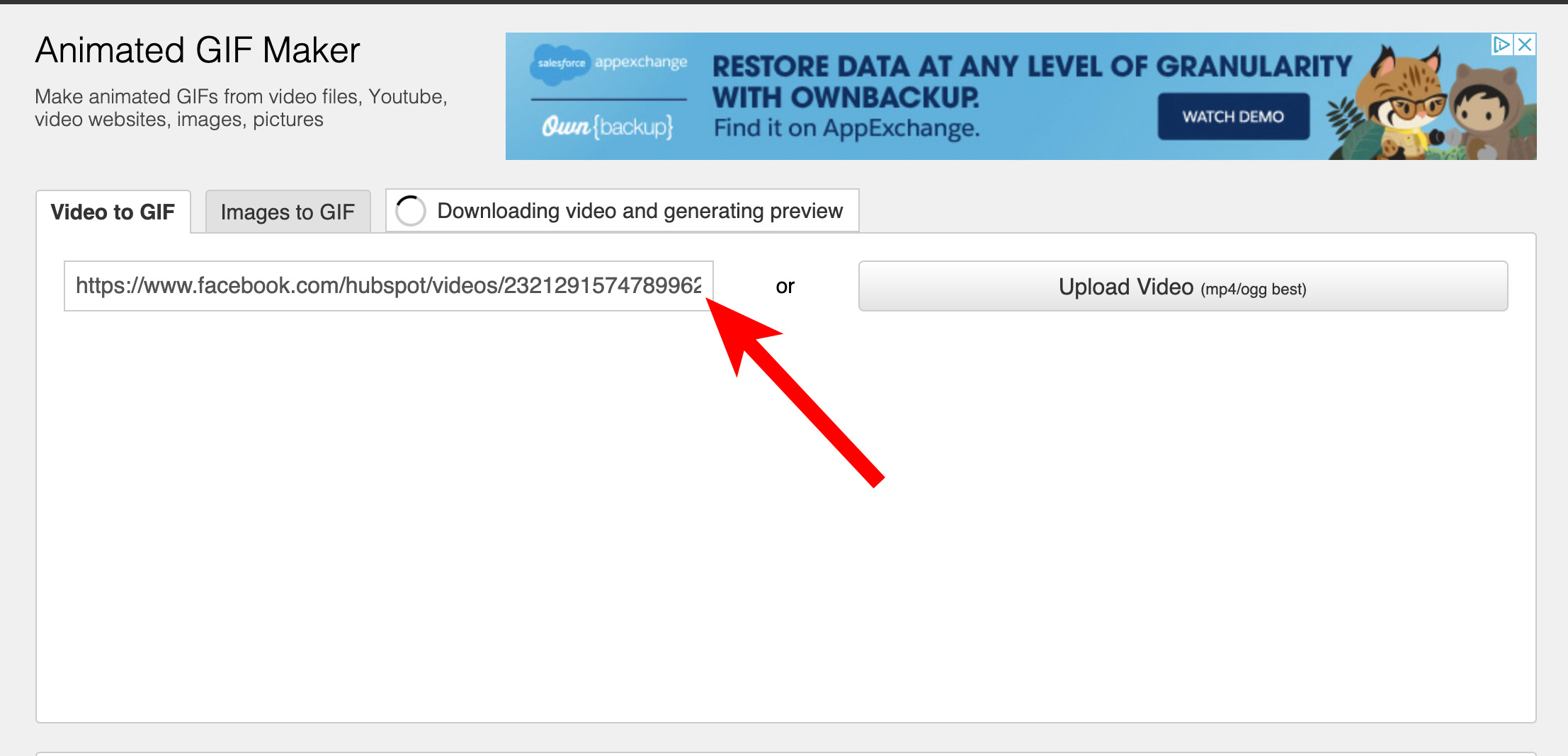
3.
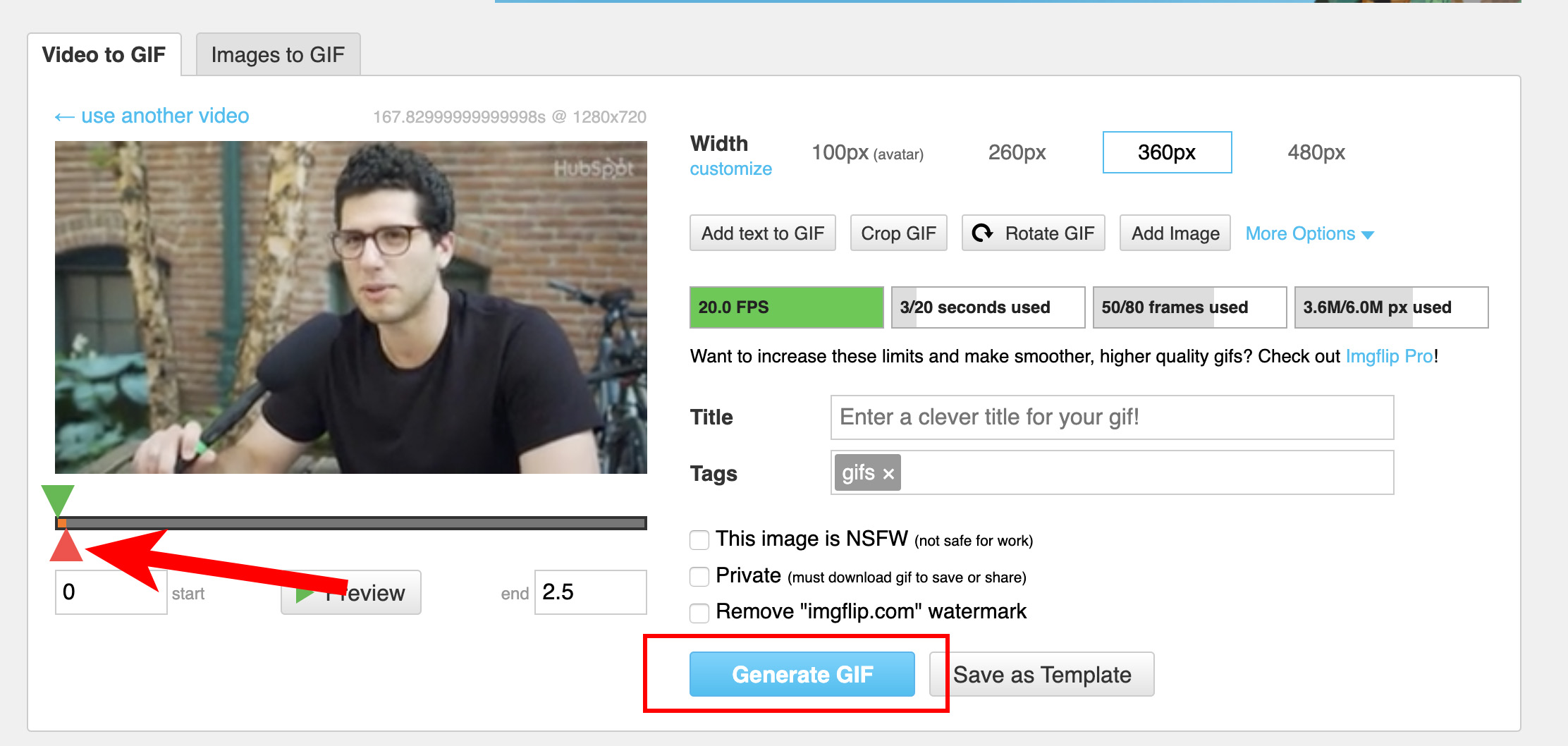
Once your video is finished downloading, you’ll see this pop-up. There are two triangles that can help you choose where you’d like to start and stop your GIF — if you move the green one you’re choosing a starting point for your GIF, and if you move the red one you’re choosing an end point.
Once you’ve chosen a clip you’d like to use for your GIF, click “Generate GIF”.
4. Once your GIF has been generated, you’ll have the option to copy-and-paste the image link or image URL. Instead, click “Download .gif”.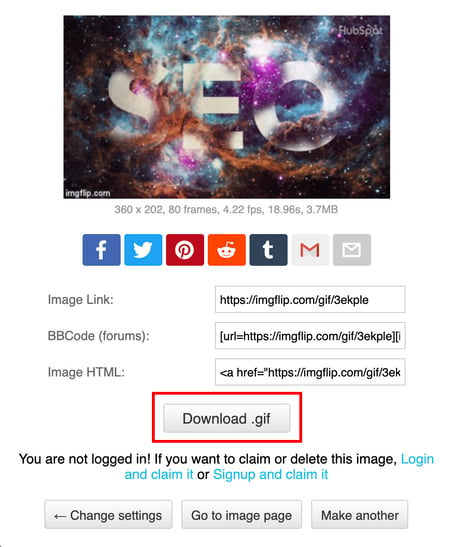
5. Now comes the fun part! Simply create your email to send to your subscribers, and drag-and-drop your GIF from your desktop into the email itself. Below the GIF, create a video CTA, like “Click to view full video here” with a URL to your video (the URL will likely lead to your own website, YouTube, Facebook, or another social platform).
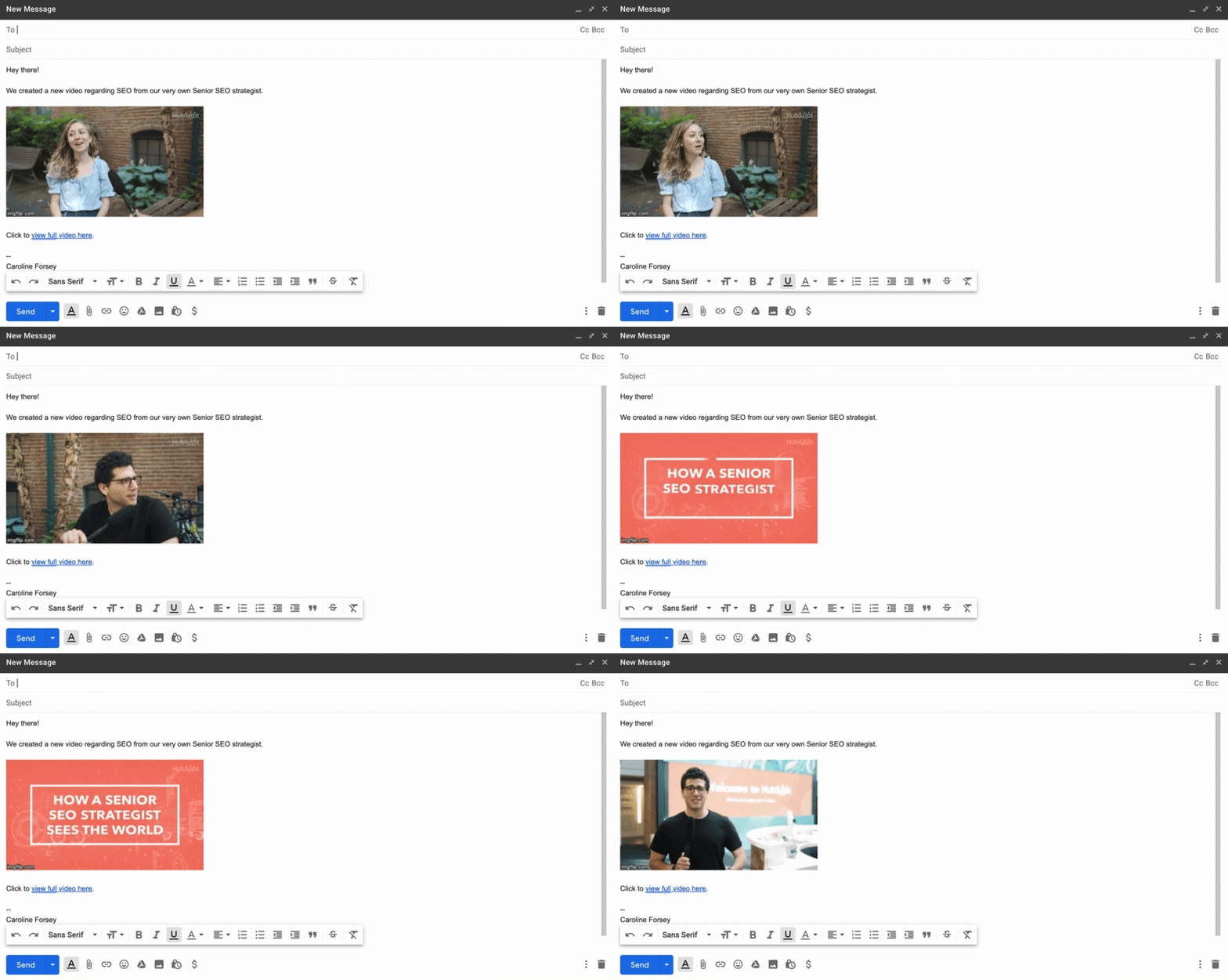
You can spruce up your email subject line with “Video included” to further incentivize click-through rates.
Of course, you’ll want to use email marketing best practices when embedding a GIF, and ensure the video you want to include is truly a compelling, interesting piece of content for your email subscribers.
This is a unique opportunity to further engage with your prospects and customers, so make sure to use it wisely — don’t just send a video advertisement for your products or services.
Next, let’s explore how you might include a still image of your video with a “Play” button.
1. For this example, I’ll use the same video as before. Instead of copying the URL, however, I simply screenshotted a paused section of the video.

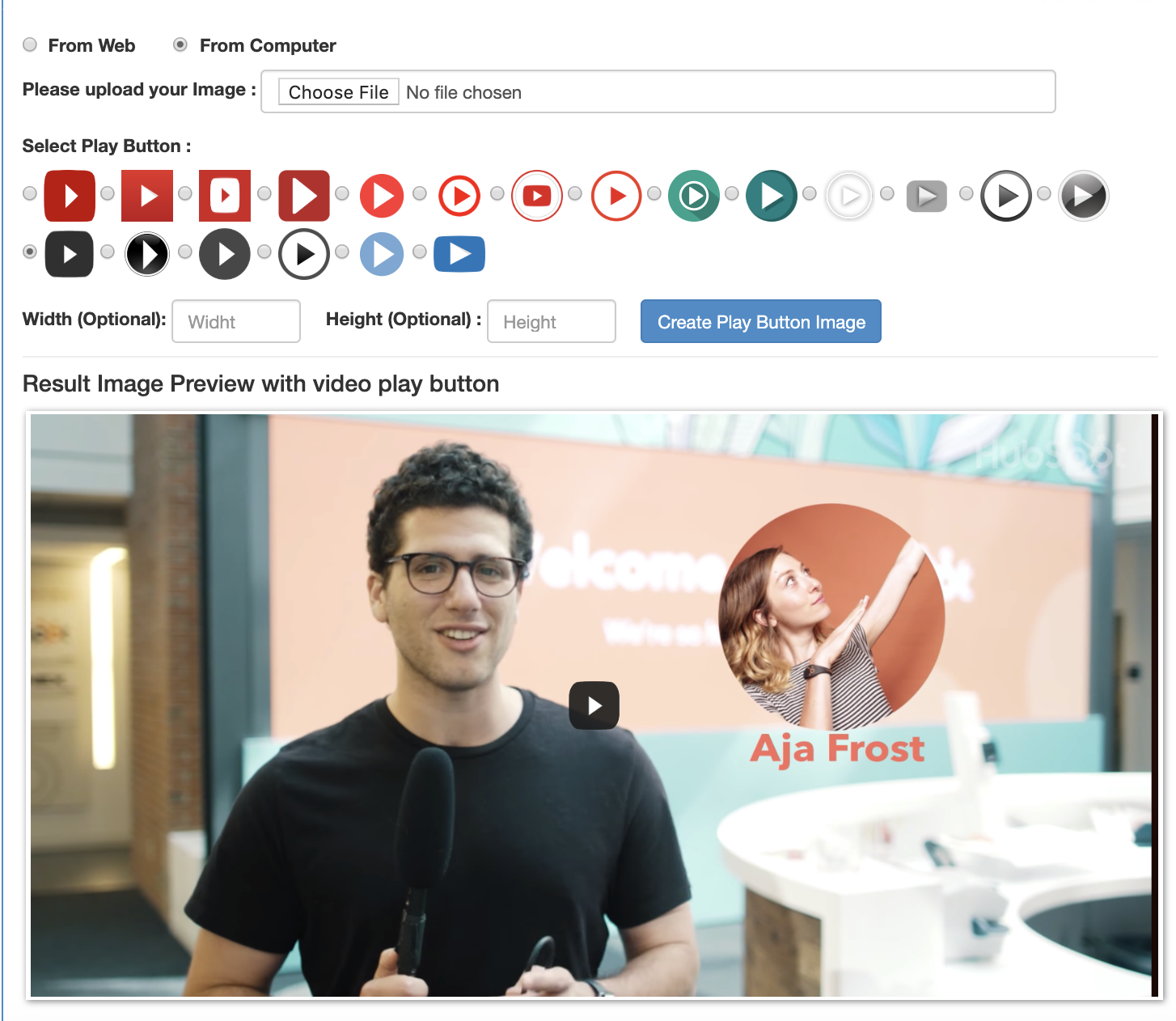
2. When I paused the Facebook video, it automatically included a “Play” button. However, if you screenshot a video while it’s playing, you might not have a “Play” button. To add one to a still image, go to the website Add Play Button to Image, upload your image, choose a play button design, and click “Create Play Button Image”.
Then, click “Download Image”.
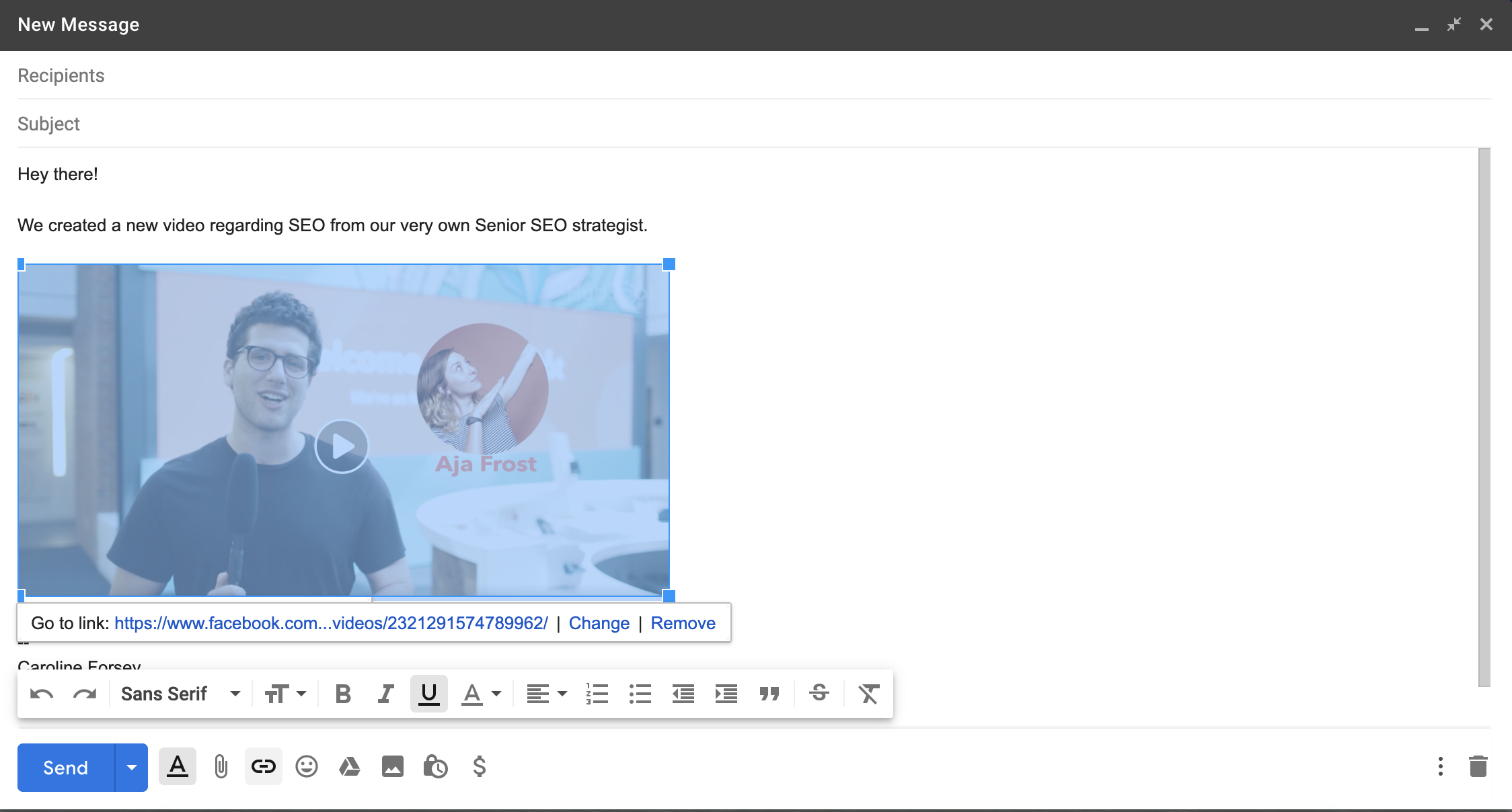
3. Next, simply click “Insert Photo” in your email to include the image with the Play button. Then, highlight the image and select “Insert Link”. Copy-and-paste the link to the full video (in this case I pasted the Facebook URL, but you can also paste a URL to a website with your video, or YouTube).
4. And that’s it! Now, when a subscriber clicks on your image, they’ll be redirected to the full video. Ensure the video auto-plays so the subscriber doesn’t have to click “Play” again.
Finally, some email clients do support embedded video. If you feel it’s the right strategy for your subscribers, you can embed a video within email using HTML5.
Here’s an example of an HTML5 code you might use in your email:
<video width=”300″ height=”200″ controls>
<source src=”movie.mp4″ type=”video/mp4″>
<source src=”movie.ogg” type=”video/ogg”>
https://ift.tt/36q5Odu
</video>
If the video isn’t supported, your subscriber can see a static image linking to another page, instead.
If you don’t have experience coding, you might consider asking a developer to help you, or take a look at W3 School’s HTML5 Video article.
However, it’s important to note — we don’t recommend this strategy, since you risk either ending up in your subscribers’ spam folders, or using code that many of your subscribers’ email clients won’t support. Ultimately, it could be more trouble for many of your subscribers’ than it’s worth.
To ensure your video can be seen by all your subscribers, I’d recommend one of the strategies listed above, instead.
If you’re looking for other opportunities to boost email click-through rates and conversions, take a look at HubSpot’s free email marketing tool.

How to Create a Successful Blog Strategy: A Step-by-Step Guide
Did you know that 55% of marketers say blogging is their top inbound marketing priority? Did you also know that these marketers are 13x more likely to see positive ROI than marketers who don’t invest in blogging?
Over the last decade or so, businesses have increased revenue, improved brand awareness, and boosted conversions with valuable written content published for their target audience and customers. The key here is that their blog content is valuable — it isn’t enough to simply have a blog; there has to be a purpose or reason for its existence.
So, how can you create and maintain a successful blog that provides your target audience with worthwhile and high-quality content, all while building your business’s reputation as an industry thought-leader and expert?
The answer is with a blog marketing strategy.
Before we review the steps to your blog marketing strategy, let’s take a look at how to create a successful blog first. These steps are a necessary part of building your blogging strategy — after all, you need to ensure you’re creating great content before marketing it.
1. Choose a blog topic.
The first step in creating a successful blog is to determine your topic. This should be broad enough so you can write dozens (or hundreds) of articles about it, but also specific enough to relate it to your business, purpose, niche, and industry. For example, HubSpot has separate blogs for Marketing, Sales, and Service.
2. Pick a host.
Next, you’ll need to pick a host for your business’s blog. The (arguably) easiest way to host your blog is to do it through the same software you’re using to run your website.
For example, as a HubSpot CRM user, you’ll have access to website creation, management, and optimization, along with several other COS features including the blogging tool — HubSpot allows you to run all aspects of your business, including your blog, from a central location.
Here’s a list of some of the features you automatically get when you choose HubSpot to host your blog:
- Free blog editor
- Blog scheduler
- Mobile optimization
- SEO optimization
- CTA creator
- Content collaboration
- Content calendar
- AMP support
- Analytics
Another common way to host your business’s blog is through WordPress — you can compare the features you get when hosting your blog through HubSpot vs. WordPress here. Other popular options include Wix, Bluehost, and Squarespace.
3. Register a domain, subdomain, and subdirectory.
Now, let’s talk about your blog’s URL structure — this is where necessary a discussion about registering domains, subdomains, and subdirectories comes into play.
A domain name, also known as the root domain, is the text in a URL that identifies your website — and, therefore, your business — for a web browser. For example, HubSpot’s domain name is hubspot.com.
Subdomains are a part of your root domain — they appear before the domain in your URL like this: blog.hubspot.com. “Blog” is the subdomain.
Subdirectories are divisions of your domain that live on your website, but represent specific pages on your website. For example, a subdirectory that’d take visitors to a specific blog post on a website would look something like this: hubspot.com/blog/article-name.
Subdirectories can also represent certain types of content within a subdomain. For example, blog.hubspot.com/marketing/article-name takes visitors to a marketing article on blog.hubspot.com.
The option you choose for your blog has the potential to impact your organic ranking which is why it’s important to choose wisely. So, let’s take a look at some of the implications related to your organic ranking that come with these options.
Subdomains vs. Subdirectories
Subdomains are great for organizing a lot of content, including multiple content types. So, if you have a large blog operation, this structure can help you over time. However, it does pass less authority from your root domain in the short term.
Subdirectories often pass more authority from your root domain and subdomain. However, they can make it hard to scale your content strategy over time since you need more subdirectories to organize your content properly and protect your user experience (UX).
4. Decide who will write and manage your blog.
Now it’s time to think about headcount — who’s writing, running, and managing your blog? And who’s accountable for each role within your blog strategy?
There are lots of moving parts when it comes to your blog — if you don’t create ownership around each component, it’ll be difficult to reap the benefits of a successful blog operation. We’ve put together a list of some examples of the roles you need to fill to effectively implement a blogging strategy.
Note: Depending on your resources and the size of your marketing team, you may find one person holds responsibility for multiple roles.
- Blog article topic ideation
- Search engine optimization (SEO) and keyword research
- Facts, stats, examples, and personal stories
- Copywriting and editing
- Strategy and editorial calendar governance
- Creative
- Promotion
- Repurposing and updating
5. Write compelling and valuable content.
This step may seem like it’s a given, but it’s important to reiterate how critical it is for your blog content to be both compelling and valuable to your readers. This plays a large part in how you’re viewed by your target audience, customers, competitors, and other industry leaders. It’s also how you’re going to keep readers engaged and loyal to your blog.
Remember, it takes more time and energy to obtain new subscribers than to maintain current readers. Plus, your current readers have the potential of becoming your brand advocates faster than new subscribers do. So, focus on consistently producing content that captivates your audience all while providing them with useful and worthwhile information so they stick around for the long run.
6. Design your blog.
Designing your blog in a way that entices your readers to regularly read (and hopefully, share) your content is critical. You want your blog to look inviting and on-brand. It should be well-organized, clean, and easy to navigate, all while meshing with your other marketing, branding, and messaging. Your readers should know the blog they’re looking at is published by your company, no matter where or how they’re reading it.
To do this, choose a theme that will remain consistent (unless your business goes through a major rebrand and/ or change) throughout all of your blog articles. Depending on the host you choose for your blog, you’ll likely have several theme options that are both free and paid.
For example, HubSpot offers a marketplace of free and paid blog template options for you to implement on your site. This way you can easily customize and edit your blog template to tailor it to your business.
7. Include CTAs.
Are any of the reasons you’re developing your business’s blog to drive organic traffic to your website, improve conversions, and boost sales?
That’s great news — but to accomplish these goals, you’ll need to include relevant calls-to-action (CTAs) throughout your blog posts.
CTAs can be paid or free for your audience members. Either way, effective CTAs provide readers with a level of value that they simply cannot pass up.
A CTA might share in-depth content and information with your audience on a specific topic. Or maybe it includes a discount code or special deal on your product or service. A CTA could also provide further training related to the subject of your blog article.
Check out this blog post if you’re looking for some examples of clickable CTAs to insert in your content.
Note: If you’re a HubSpot user, the CRM offers a CTA creation tool to help you develop relevant — and even personalized — offers to drive traffic to your landing pages and convert more leads.
8. Determine the frequency in which you’ll share blog posts.
How many blog posts can you commit to scheduling? How often are you planning on producing blog content for your audience?
You need to consistently produce blog articles to keep your audience engaged and interested. This will also allow you to maintain your status as an active thought-leader and expert in your industry. To do this, use an editorial calendar to manage and schedule your blog posts.
The beauty of creating this type of blogging rhythm and sharing that information via an editorial calendar is that it creates a sense of accountability among your team of bloggers. It ensures all writers and contributors have optimized for keywords, added CTAs, and edited their pieces by a certain time and date. This way, you’ll have a consistent stream of content your readers can get in sync with.
Note: If you’re a HubSpot CRM user, you already benefit from an editorial calendar built right into the COS.
9. Launch your blog.
Now it’s time to launch your blog! This is the exciting part — you finally get to share the content you’ve been working so hard to develop. Put your blog content on it’s corresponding landing page on your website and send your email list of recipients their blog article(s). Share it via social media and send it to members of your network as you see fit.
10. Track and analyze your blog’s success.
Remember to track and analyze the success of your blog over time. To do this, decide which metrics matter most to you and your business. Once you understand how a specific metric contributes to a positive outcome, then you’ll be able to make your blogging strategy more targeted. Examples of blogging metrics you might track include:
- Number of readers and subscribers
- Number of page views per post
- Number of conversions
- Number of backlinks
- Number of referrals
- Overall traffic
When applying these metrics to the goals you’re looking to set, consider the following questions to provide concrete targets that make sense for your business.
- Does this goal help you achieve your purpose, or is there something more relevant we can aspire to?
- Is this goal aligned with the initiatives of other parts of our business?
- Which metrics track the progress towards this goal? Are these metrics complementary or counterintuitive?
Once you determine which metrics you’re going to use, start by setting goals for a 60-day period. This gives you enough time to see whether your strategy is working and then you can adapt your goals based on the results you see.
Now that you have a better understanding of the steps to creating a successful blog, let’s dive into your strategy next.
Blog Marketing Strategy
Once you’ve worked through the steps to creating a successful blog, you can apply them to create a larger strategy that promotes and markets your content to your target audience.
1. Determine your blog’s purpose.
The first part of developing your marketing strategy requires you to clearly define your blog’s purpose. You determined the topic your blog will be about above, but that’s not necessarily its purpose.
When thinking about your blog’s purpose, ask yourself, “Why does this blog exist?”
You should be able to answer that question in one, straightforward, defining statement. (Document your blog’s purpose to you can refer to it as you grow and your business evolves.)
If you need help defining your blog’s purpose, take a moment to ask yourself these questions:
- What is the greater purpose your company is trying to fulfill?
- What story supports this purpose?
- Who shares your passion for this purpose?
- Is your team aligned with the meaning of this purpose?
2. Always keep your buyer personas top of mind.
When writing, managing, and scheduling your blog — or working on anything related to your blog, really — keep your buyer personas top of mind. Your buyer personas are your target customers, or the group of people you aim to sell to.
Ask yourself, “Who are our ideal customers?” and “Why do they need our product or service?” Once you can answer these questions in detail, you’ll be nail down your buyer persona(s).
Use this free template to create your business’s buyer personas.
Once you create your buyer personas, document a detailed description of who this person is so you can reference it has your business and blog grow. You should be able to refer to this description every time you write a new blog post.
This way, you’ll be able to create content specifically suited to your target customers’ wants, needs, challenges, and/ or pain points. This will also help you turn your blog into a powerful lead conversion tool for your business (i.e. your blog will show your readers and target audience why they need your product or service).
To get a deeper understanding of the actions your buyer personas are likely going to take, research the behaviors of your target audience so you can adapt and tailor your blog content to meet their needs in a way that pushes them to convert in some way. To conduct this type of customer research, you can use:
- Q&A forums (Quora, Yahoo! Answers, or Fluther)
- Social media (LinkedIn Groups, Twitter Advanced Search, and Google+ Communities)
- Content creation tools within your industry or niche (BuzzSumo or Topsy)
- Other blogs (comments and interactions on blogs similar to yours; your competitors’ blogs)
3. Keep an eye on your competition.
Speaking of your competitor’s blogs, it’s important to keep an eye on these other thought-leaders in your industry. Your competitors provide insight into what’s working (or not working) in terms of blog content among your target audience.
It also tells you a little bit about what they’re experimenting with and what you’ll need to accomplish to stand out and provide your readers with valuable content they can’t get anywhere else — something unique to your business and your business only.
Create a list of 5-10 of your closest competitors with blogs you could conduct a content audit on. Make conclusions about the type of content they share, unique techniques they’ve implemented in their blog, and how they’re doing in terms of ranking for the keywords you hope to rank for.
Then, look for gaps in their content so you can capitalize on them. To help you do this, use tools like QuickSprout, Open Site Explorer by Moz, and SEMRush Competitor Research.
4. Perform SEO and keyword research.
When one of your customers searches a phrase on Google (or any search engine), you want them to find your blog (or web page), not a competitor’s. To make this happen, dedicate some time to researching which keywords and phrases your target audience is typing into search engines so you can include them in your blog posts where they naturally fit.
In other words, you’ll significantly improve your chances of ranking on the search engine results page (SERP) by performing appropriate search engine optimization (SEO) and keyword research prior to writing your blog post, and then incorporating those findings in your content.
Start by creating a list of 5-10 keyword groups you want to rank for, along with their associated long-tail keywords, in the SERP.
Remember, Google’s algorithms are constantly changing to become more intuitive — meaning, old tactics like keyword stuffing will hurt your ranking in the SERP. Instead, you’re better off writing copy that engages audience members first and search engines second.
Note: HubSpot customers have access to a built-in keyword and SEO tool to help with this.
Focus on your blog’s SEO and keyword research with HubSpot CRM’s Content Strategy tool.
5. Decide where you’ll distribute your blog content.
Strategically determine where you’ll distribute your blog content. You chose a host for your blog already, meaning your content is likely already easily shareable on your website.
For example, if you use the HubSpot CRM and blogging software to host and manage your website and blog, it’s simple to add your articles to their corresponding landing page on your site.
Other ways and platforms through which you might distribute your content include social media, such as Facebook or LinkedIn, and online publishing platforms, such as Medium. You might also work with industry leaders, experts, and influencers to share your content on their websites and social profiles.
6. Update and repurpose your content.
Creating blog content can be time-consuming, especially when you aim to command authority in your niche with researched, thoughtful, and planned posts.
This is why updating, repurposing, and republishing your existing blog content is so valuable — it saves you time and energy but it also allows you to efficiently achieve the results you’re looking for.
What do I mean by this? Well, ranking in the SERP with a net new post takes significantly more time (I’m talking months) than an updated post. Meaning, you’ll see a positive impact sooner if you start repurposing existing posts rather than solely creating new content.
Audit your existing blog posts to determine what you can repurpose and update. Outdated content to remove and/ or replace might include statistics, examples, infographics, quotes, product or service details, research, and irrelevant ideas. You can also add keywords you’ve determined are missing through your research.
(Check out this post if you’re looking for more ideas on how you can effectively repurpose your blog content.)
7. Promote your blog content.
It’s probably safe to assume you want your blog content to be as discoverable as possible. In terms of your blogging strategy, this refers to your ability to get your content out there so members of your target audience find, read, and (hopefully) share it.
There are many inbound tactics you can use to promote your blog. We touched on a few options above, but another common form of effective blog promotion involves an influencer marketing strategy.
Get started promoting your content with the help of a free influencer marketing guide.
To begin, identify the key influencers in your niche or industry you want to contact and work with. These should be people your current customers and target audience perceive as credible, trustworthy… and, yes, influential.
As you begin making and managing your influencer connections, remain in regular contact with the ones who are promoting your blog content. Be sure you know what they’re doing to support, share, and promote your blog content and that their tactics meet your business’s standards — you want to ensure they’re representing your brand accurately. After all, you’re likely paying them to promote your content among their audience members.
You can make your relationship with your influencers even stronger by interacting with their content regularly to show your support. For example, if you’re working with an influencer who also has a blog, then go to their blog and read, comment on, and share it (even when the content they’re publishing isn’t necessarily related to your business).
Grow Better With An Effective Blogging Strategy
Growing an influential blog in your niche is a surefire way to nurture your potential customers. By creating regular content that solves the challenges of your readers and fulfills their biggest curiosities, you’ll start to build a vault of trust and advocacy. This will inevitably contribute to the overall success of your business. Start with your purpose — the big why — and slowly unpack the individual levers that will contribute to your blog marketing performance through the steps and strategy we’ve reviewed above.
Editor’s note: This post was originally published in December 2014 and has been updated for comprehensiveness.

The 10 Best Reporting and Business Intelligence Tools for Marketers
Whether you’re conducting a blog traffic audit or analyzing the success of your most recent social media campaign, it’s undeniable that data is an integral part of any marketing role.
Fortunately, there are dozens of analytics tools for marketers with the ability to collect data from different sources, crunch it effectively, and deliver helpful campaign analysis.
Some tools, however, are better at delivering valuable reporting results than others.
Ultimately, reporting tools should do more than just calculate — they should also make the marketer’s job easier, and more productive. Creating attractive and readable reports is key to ensuring that the results of your work are clear for your entire team.
Here, let’s dive into some of the best data reporting tools, as well as some effective business intelligence (BI) platforms, to enable you to properly analyze your work.
Best Data Reporting Tools
Here are some tools with reporting features invaluable to today’s marketers.
1. Calendar
Calendar offers analytics of a slightly different sort — productivity. Calendar has a number of features designed to analyze how your team’s time is spent. By tracking your moment-to-moment activities on a daily basis, you can identify key areas in which your schedule could be improved.
As important as it is to have your marketing analytics at your fingertips, knowing how you use your time is just as important for maximizing output. Calendar’s clear and simple reporting tools give you helpful reports on what your agenda looks like and what you can do to make it better.
(Disclosure: I’ve invested in Calendar)
2. DashThis
DashThis is an effective tool for keeping up with your marketing analytics at a glance. As its name suggests, DashThis is best used as a dashboard and provides clear and readable data on your marketing performance.
DashThis lets you to select a template and then automatically fills that template with your data, greatly streamlining the reporting process. It also exports data into PDF files, which can be easily shared between team members.
3. HubSpot
HubSpot’s marketing analytics software is useful for keeping all of your needs, including reporting, in one place. HubSpot lets you combine all of your marketing efforts into one report, or mix-and-match your different assets to create different reports for different clients and needs.
HubSpot’s marketing analytics dashboard is just as customizable, allowing you to add and remove different reports with ease. Best of all, you can get both a general overview and specific insights into your work’s performance, since you can easily move between different marketing reports within HubSpot.
4. Raven Tools
Raven Tools offers many of the tools expected from reporting software — SEO analysis, social media engagement, funnel performance tracking — as well as competitor comparison.
Whether it’s big-picture analyses like domain authority or small-scale comparisons of site functionality, Raven Tools lets you stay on top of how you’re faring in competitive spaces. Additionally, its drag-and-drop editor and report generator makes creating custom, professional-grade marketing reports easier.
5. Megalytic
Megalytic eases the process of combining marketing data from lots of different sources. Plenty of tools on this list allow for the integration of different types of data, but Megalytic is especially designed to import data from a range of marketing software.
It takes only a couple of moments to access data from Google Analytics, Facebook Ads, Adwords, and more on Megalytic, and it can even process and report data stored in CSV files. If you’re looking to produce a comprehensive report that pulls together loads of disparate data into one place, Megalytic is a smart choice.
6. Kilpfolio
As important as it is for reporting tools to effectively take in and analyze data, they need to be able to produce readable reports, as well. Klipfolio is great for making sure your reports can be read and accessed with ease across technologies.
Additionally, Kilpfolio allows you to share access to your reports through Slack, email, or custom links, and it also enables you to sync your dashboards in real time across multiple devices such as smartphones, web browsers, and even TV screens. Being able to easily pull up your analytics dashboard at any moment on any number of devices is crucial for being able to report on-the-go or from various locations.
7. Mixpanel
Mixpanel is a tracking and reporting software tool that was actually created primarily for product managers, not marketers. As a result, its interface isn’t quite as streamlined or marketing-driven as some of the other entries on this list, but it makes up for this with deep, powerful analytics tools that give you insight into how your work is faring.
Mixpanel is particularly attuned to identifying trends in engagement and count. It tracks how people engage with certain products over time and how different features influence user behavior.
If you’re especially interested in keeping track of how a certain site or product is performing, it can be a valuable tool for reporting on that kind of information. Mixpanel allows you to produce readable reports of uniquely high-level data analysis.
Best Business Intelligence Platforms
Ultimately, reporting is only half the battle. Marketers also need business intelligence tools for a top-down view of their operations.
Although BI is a broad category, these three tools are essential for marketers.
1. Intercom
Although Intercom is a messaging platform first and foremost, it also delivers a deep view of a company’s customer base. Through integrations with over 100 marketing tools, Intercom lets marketers track, segment, and identify similarities between their customers.
One of the best use cases for Intercom’s BI features is account-based marketing. Intercom displays performance figures for each stage of your sales and marketing funnel, helping you see where the best opportunities lie and how to tap into them. You can also break down metrics by individual representatives, teams, timeframes, and more.
2. G2
G2 is the go-to website for stacking up software tools against one another. G2 gives detailed charts for every category of marketing software, explaining the strengths and weaknesses of each available product.
Need an enterprise resource planning tool? G2 covers those. What about an e-commerce platform? G2 can help you pick the best option in that category, too. Certain services, including staffing and translation services, are also reviewed by G2.
3. Databox
Through integrations with HubSpot CRM, Google Analytics, Facebook, LinkedIn, Instagram, and more, Databox compiles popular marketing services and social media into one interface. Although Databox comes with pre-configured report templates, users can also design custom reports.Think of Databox like a dashboard for your dashboards.
The reporting tool lets you view campaign KPIs, check progress, calculate investment returns, and receive notifications when metrics fall outside of specified ranges. Databox has a desktop version, of course, but it also displays data on mobile and via applications like Slack.
Statisticians and analysts may be more comfortable with reporting and BI than marketers, but these tools make it easy. Pick the right ones, and get data-driven campaign insights with ease.
