
Fixed Cost: What It Is & How to Calculate It
“Business is personal — it’s the most personal thing in the world.”
These are famous words by Michael Scott from the TV show, The Office. And although this quote conflicts with the universal belief that business isn’t personal, Michael’s point of view is perfect when learning about a business’s fixed costs — or those costs that don’t change as a company grows or shrinks.
To identify and calculate your business’s fixed costs, let’s start by looking at the ones you’re already paying in your personal life. Then, we’ll explain how a business manages its own fixed costs and review some common fixed cost examples.
What Is a Fixed Cost?
Fixed costs are those costs to a business that stay the same regardless of how the business is performing. These costs are known as fixed costs to distinguish them from variable costs, which do change as the company sells more or less of its product.
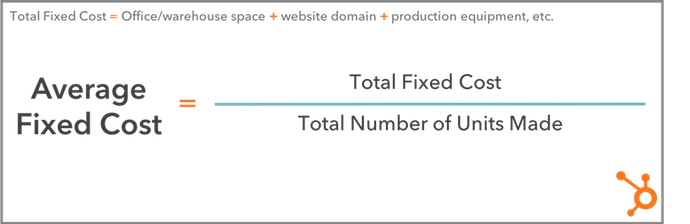
Fixed Cost Formula
- Identify your building rent, website cost, and similar monthly bills.
- Consider future repeat expenses you’ll incur from equipment depreciation.
- Isolate all of these fixed costs to the business.
- Add up each of these costs for a total fixed cost (TFC).
- Identify the number of product units created in one month.
- Divide your TFC by the number of units created per month for an average fixed cost (AFC).
Consider your personal routine. As a single adult, your expenses would normally include a monthly rent or mortgage, utility bill, car payment, healthcare, commuting costs, and groceries. If you have children, this can increase variable costs like groceries, gas expenses, and healthcare.
While your variable costs increase after starting a family, your mortgage payment, utility bill, commuting costs, and car payment don’t change for as long as you’re in the same home and car. These expenses are your fixed costs because you pay the same amount no matter what changes you make to your personal routine.
In keeping with this concept, let’s say a startup ecommerce business pays for warehouse space to manage its inventory, and 10 customer service employees to manage order inquiries. It suddenly signs a customer for a recurring order that requires another five paid customer service reps. While the startup’s payroll expenses go up, the fixed cost of a warehouse stays the same.
Average Fixed Cost
Keep in mind you have to keep track of your business’s fixed costs differently than you would your own. This is where average fixed cost comes into play.
Average fixed costs are the total fixed costs paid by a company, divided by the number of units of product the company is currently making. This tells you your fixed cost per unit, giving you a sense of how much the business is guaranteed to pay each time it produces a unit of your product — before factoring in the variable costs to actually produce it.
Let’s revisit the ecommerce startup example from earlier. Assume this business pays $5,000 per month for the warehouse space needed to manage its inventory, and leases two forklifts for $800 a month each. And last month, they developed 50 units of product.
The warehouse and forklift costs remain unchanged regardless of how many products they sell, giving them a total fixed cost (TFC) of $5,000 + ($800 x 2), or $6,600. By dividing its TFC by 50 — the number of units the business produced last month — the company can see its average fixed cost per unit of product. This would be $6,600 ÷ 50, or $132 per unit.
Fixed Cost Examples
So far, we’ve identified a handful of fixed cost examples since considering the costs we already pay as individuals. A home mortgage is to a lease on warehouse space, as a car payment is to a lease on a forklift.
But there are a number of fixed costs your business might incur that you rarely pay in your personal life. In fact, some variable costs to individuals are fixed costs to businesses. Here’s a master list of fixed costs for any developing company to keep in mind:
- Lease on office space: As long as your business operates in the same building, your rent cost doesn’t change.
- Utility bills: Your heating or cooling bill might fluctuate as seasons change, but it is generally not affected by business operations.
- Website hosting costs: When you register your website domain, you pay a small monthly cost that remains static despite the business you perform on that website.
- Ecommerce hosting platforms: Ecommerce platforms integrate with your website so you can conduct transactions with customers. They typically charge a low fixed cost per month.
- Lease on warehouse space: Warehouses are paid for the same way you’d pay rent on your office space. They do not change in price as you store more or fewer products inside, but can have storage and capacity limits.
- Manufacturing equipment: The equipment you need to produce your product is yours once you buy it, but it will depreciate over its useful lifetime. Depreciation can become a fixed cost if you know when you’ll have to replace your equipment each year.
- Lease on trucks for shipment: Truck leases work the same way as a car payment, and will not charge differently depending on how many shipments you make.
- Small business loans: If you’re financing a new business with a bank loan, your loan payments won’t change with your business’s performance. They are fixed for as long as you have a balance to pay on that loan.
- Property tax: Your office space’s building manager might charge you property tax, a fixed cost for as long as your business is on the property.
- Health insurance: Health insurance costs might be a variable cost to an individual if they add or remove dependents from their policy, but to a business, the recurring costs to an insurer are fixed.
Calculating your fixed costs isn’t always the most fun part of growing your business. But knowing what they are, and when you’ll pay each one, gives you the peace of mind you need to serve and delight your customers.

101 Blog Post Ideas Straight from the HubSpot Brain Trust
We all know blogging is an ultra-important asset to your business when it comes to building traffic and reputation. The hidden dark side, though, is how hard it is coming up with topics that will give you that ultra-good traffic.
If you’ve hit a roadblock when it comes to the content on your blog, don’t sweat it.
An age-old question between marketers is “What do you blog about?“. It can quickly feel like your company has blogged about everything under the sun.
To help, we polled fellow HubSpotters — who know a thing or two about blogging — and we’ve created a list of 101 ideas to keep your queue filled.
Multimedia
1. Create a roundup of all the best GIFs on the internet marketers can relate to
2. Make a parody song that describes your office culture
3. Recap your latest company event with photos and/or videos
4. Post a product demo;
5. Write a post explaining a social media channel
6. Make a video that highlights your industry and write a post about it
7. Start a podcast and transcribe each episode on the blog
8. Record an interview with a colleague and conduct a corresponding writeup
9. Upload a photo diary of how your company celebrates culture
10. Share a cartoon that represents your company
Research
11. “ We Asked People About [insert topic], Here’s What They Said “
12. Research unusual holidays (ex: National Burger Day) and create a roundup your favorites
13. Make an infographic about your analytics and break down the pros and cons of each
14. Research the most popular social media channel and break down their numbers
15. Discuss the importance of knowing your lead data from a business standpoint
16. Share the most popular apps among a target audience and what that means for your business
17. Make a list of tools that are the best for you IT team
18. Explain your knowledge base and why it matters
19. Do an in-depth case study about delighting customers and examine the results
20. Based on the past, what are your predictions for the industry’s future?
21. “Here are our failures, and what we learned from them”
Community Engagement
22. Highlight local rockstars in your field
23. Interview a local business owner
24. Create a survey about your business’s ecosystem
25. Make a post that celebrates your user-generated content
26. Spotlight a “client-of-the-month”
27. Discuss the most practical uses for your product
28. Use employee stories to inspire your audience
29. Ask for guest posts from network members
30. Run a product/service giveaway
31. Throw a community-based event and recap it
Instructional (Guides and How-to)
32. A list of ‘musts’ for a career in your field
33. Interview an industry heavy-hitter about their tips for business
34. Post a series on landing your dream job
35. Write a roundup about “What I Wish I Knew When I First Started.”
36. How to gain the right skillset to advance in your career
37. The hardest part of your job — and how you tackle that
38. Tips to handle burnout
39. Write an ultimate guide
40. Create a pillar page
41. Bust common myths about your field
42. Demo how to use a specific social media channel
43. Write about how to collect data from webpages
44. Recommend the best tools for completing certain daily tasks
45. Offer the benefits of a current trend your company has mastered
46. Relate your content to a current celebrity
47. Write a post about how to give an incredible speech under 20 minutes
Multichannel Integration
48. Discuss social media trends
49. Explain how your most recent Facebook Live session delighted customers
50. Rank the top social media channels for your brand
51. Dive into a social network’s latest update
52. Explain how you use Instagram Stories to grow your engagement
53. Spotlight a brand killing it among multiple social channels
54. Rate five of the best Twitter polls in the right place at the right time
55. Find the best memes for content marketing on Twitter and Instagram
56. Discuss how your brand uses LinkedIn to connect with your community
57. Share your top analytics services and explain why they’re great
58. Write about how you engage millennials
59. Explain how YouTube is an asset to your business
60. Take a stance on a recent blog post from your favorite news-sharing site
61. Round up recent news in your industry
62. Share great quotes from an ebook in a roundup
Thought Leadership
63. Describe what your mission statement means to you
64. Dive into how a company boosted their blog traffic exponentially
65. Break down what an ideal company culture would look like
66. Write about ways your company is focusing on diversity and inclusion
67. Explain diversity and why it matters
68. Come up with a list of company outings for remote teams/employees
69. Describe how your team combats burnout and provide helpful tips to avoid it
70. Create a list of industry trends to keep an eye on
71. Compare and contrast different topics about marketing, business, or your industry, such as different types of advertising
72. Post a recap of breaking industry news
Content Marketing
73. Create a post dedicated to one or more FAQs
74. Invite a guest blogger to contribute
75. Create an office playlist and share the tracklist
76. Profile a co-worker or manager
77. Interview a customer
78. Run a contest
79. Write about your day-to-day workflow
80. Describe your career in five words and provide helpful advice to others
81. Compile a list of the best movies that depict your field
82. Invite your audience to join in with a quiz on your blog
83. Embrace popular holidays and make a themed post about them
84. Post a “Year-in-Review” about lessons learned throughout the year and what it means for your readers
85. Round up brands using IGTV brilliantly
86. A roundup of ways your team conducts successful content marketing
Miscellaneous/Fun
87. Have your team weigh in about if they work while traveling
88. Interview questions that help finalize decisions
89. Resources most helpful to SMBs
90. List of books that inspire professionals in your industry
91. “What has changed about our workflow habits over the years?”
92. Compile a list of weekly/monthly aspirations
93. Give your favorite historic moment about your industry
94. Your grade sheet on measuring quality product launches — and how it works in action
95. Explain common acronyms in your workplace or industry
96. Talk about a fun day at the office recently
97. Give a short history of your company
98. A peer-curated list of hobbies outside of work
99.Share highlights from a recent conference
100. Examine a recent movie trailer and how their marketing should be noted
101. Come up with a staff bonding event and recap how it went
Because it’s easy to get wrapped up in the day-to-day of your industry, it’s also easy to run into the same types of blog posts. Blogs are important for SEO and lead generation, so picking the “right” topics is a crucial step in marketing planning.
Remember to mix it up and have fun with blogging it doesn’t have to be the most formal part of your website. Blogs are an asset to your business, not a hindrance, and these post ideas are some of our favorites as HubSpotters.
For more interesting content ideas, check out our ultimate list of tips here.

What California’s New Data Privacy Act Means for Marketers
Disclaimer: This blog post is not legal advice for your company to use in complying with U.S. data privacy laws like CCPA. Instead, it provides background information to help you better understand CCPA. This legal information is not the same as legal advice, where an attorney applies the law to your specific circumstances, so we insist that you consult an attorney if you’d like advice on your interpretation of this information or its accuracy.
In a nutshell, you may not rely on this as legal advice, or as a recommendation of any particular legal understanding.
Nowadays, marketers rely on the information they receive from consumers to make decisions on what type of content their audience prefers to receive, and in what form.
There isn’t anything inherently wrong with using information to create a better, more personalized marketing strategy.
In fact, when done well, it can largely benefit the consumer — for instance, when I’m scrolling through Instagram, I like to see content from some of my favorite brands, like HelloFresh. By staying up-to-date on their products and offerings, I’m able to make better purchasing decisions.
However, marketers get into murky (or even illegal) territory when they misuse the information their consumers have provided. If a consumer fills out a form on your website, for instance, she’s letting your company have access to that information — and your company alone. She is not agreeing to share that same information with third-party sources.
In 2017, we covered What is the GDPR? And What Does it Mean for the Marketing Industry? Here, let’s dive into what The California Consumer Privacy Act (CCPA) means for you as a marketer, and how it differs from GDPR.
CCPA Requirements
As mentioned above, the California Consumer Privacy Act was approved by California’s State Governor back in 2018, but won’t go into effect until January 1, 2020.
Ultimately, the law applies to any companies that conduct business in the state of California, and have one of the following criteria:
- Has revenue of $25 million or higher
- Receives information of over 50,000 consumers, households, or devices annually
- Derives 50% or more of its annual revenue from selling consumers’ personal information
It’s important to note — the law stretches beyond businesses that have physical brick-and-mortar shops in California. That means if you’re a marketer for an ecommerce business that sells to residents living in California (and you have one of the three criteria listed above), you’ll still be affected by the law.
If you’re wondering where this is coming from, here’s a little backstory — in 2018, you might remember scandals erupting as a result of companies misusing consumers’ personal data. The congressional hearings that followed these scandals pointed out that any personal information shared on the internet can technically be subject to misuse and theft.
As a result of these hearings, California legislature moved to protect Californians’ right to privacy by implementing this new data privacy act.
What the CCPA Means for Marketers
Now, you might be thinking — okay, but I’m not the CEO of my business, I’m a marketer. What does this law mean for me?
If the CCPA applies to your business, this means whenever you collect your consumers’ personal information — whether it be for a social media campaign, email survey, or something else — you’ll need to disclose what information you’re collecting, and how you’ll be using your consumers’ personal information.
Additionally, you need to give your consumers the right to opt-out of having their information sold to third-parties, and you need to let consumers view and delete the information you’ve collected about them.
There are a few additional differences between GDPR and CCPA that are worth noting.
One main difference is, GDPR focuses on data related to the EU consumer, while the CCPA considers data related to both the CA consumer and the household. Additionally, the CCPA only considers data provided by the consumer, as opposed to data sourced from third-parties.
Additionally, there are differences in penalties — GDPR’s penalty for companies that violate their regulation is up to $20 million or 4% worldwide turnover, whichever is greater.
In comparison, CCPA’s penalty is up to $2,500 per violation or $7,500 per intentional violation, plus an additional $100-$750 per incident to the affected individuals.
There’s also a difference in the type and scope of data collected. GDPR applies to all data collected about EU citizens. The CCPA, on the other hand, applies only to data collected directly from, and about, California consumers.
If you’re unsure whether the CCPA will affect your business, you’re not alone — a recent ESET survey found 44% of respondents had never heard of the CCPA, only 11.8% didn’t know if the law applied to them, and 34% of executives weren’t sure if they’d need to change how they capture and process data to comply with the law.
Fortunately, if you’re a marketer who’s already done the work to ensure you comply with GDPR regulations, it shouldn’t be too difficult to additionally comply with CCPA. For more information, check out our web page designed to help you prepare for the CCPA.

HubSpot’s 5-Step Process to Fix Images With Facebook Debugger
With 2.4 billion monthly active users on Facebook, it’s important that your posts show up correctly in the newsfeed.
But we’ve all been there. You’re drafting a post and the wrong image shows up in the preview. Or worse, no image is showing up at all.
How can you fix this?
It’s actually an easy process. Using the Facebook debugger tool, you can ensure your social media posts are formatted properly.
Below, let’s review HubSpot’s step-by-step process for fixing images with the Facebook debugger tool.
What Is the Facebook Link Debugger?
The debugger tool allows you to see what information Facebook pulls for a specific URL. For instance, if you want to share a blog post, you can use the debugger tool to see what image, preview text, and title will show up in the newsfeed.
As a marketer, you write and promote blog posts often. However, understanding the code or how your blog page is built is a different matter.
Have you ever posted a blog on Facebook and the incorrect image or no image at all shows up in the preview? That’s because your blog page doesn’t have open graph tags (the meta title, description, and image) set up correctly.
The Facebook debugger tool simplifies this process, so all you need to do is communicate the issues found on the debugger tool with the developer and let them know that the errors. For example, it could be something like this, “the og:image tag is pointing to the wrong URL.” The tool facilitates the conversation between you as a marketer and your web engineers.
Now that we’ve explained the purpose of this tool, let’s dive into how you use it.
How to Use Facebook’s Link Debugger
Using the debugger tool is simple. Below is HubSpot’s five-step process:
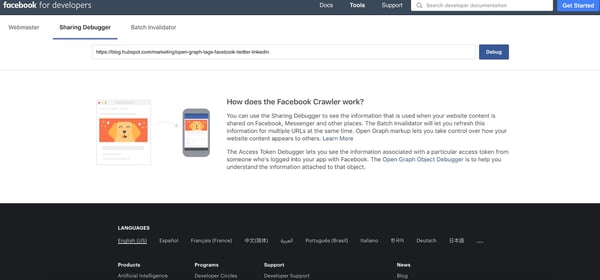
1. Paste the URL in the debugger tool.
To begin, copy the URL of the blog post and enter it into the debugger tool. Then, click “Debug.”
Once you click “Debug,” you will see the information Facebook will use when posted on its platform.
For example, below I’ve pasted in a link to a HubSpot blog post.
2. Review the information and any error codes.
After you hit “Debug”, the tool will give you the information that it will use when posted to its platform. Plus, it also gives a preview so you can see if your image will post correctly.
If everything is as expected, then you’re good to go.
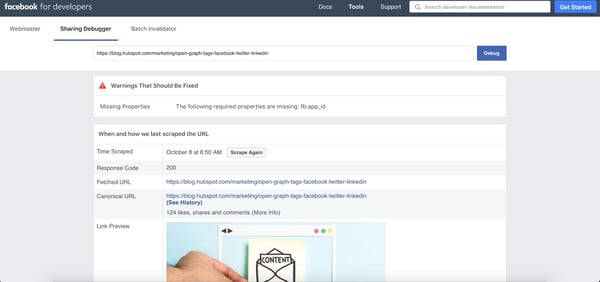
If not, you might experience a few errors on this page. Facebook will put errors in a “Warnings That Should Be Fixed” section at the top of the page.
You could encounter errors like:
- Missing images: Facebook can’t find an image and guesses which one to use.
- Old images: Facebook is showing an old image.
- Image resolution: The image is missing due to image size and resolution.
- Incorrect images: Facebook is pulling the wrong image.
There are also other errors you could get surrounding open graph tags, but for the focus of this blog, we’ll only touch on images. As an aside, to fix these issues, you’ll want to include open graph tags in your coding for the post. Communicate any issues with the open graph tags to your web developer.
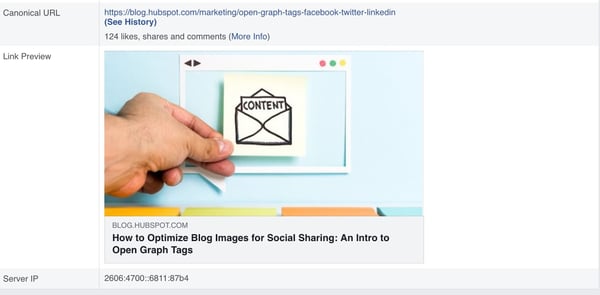
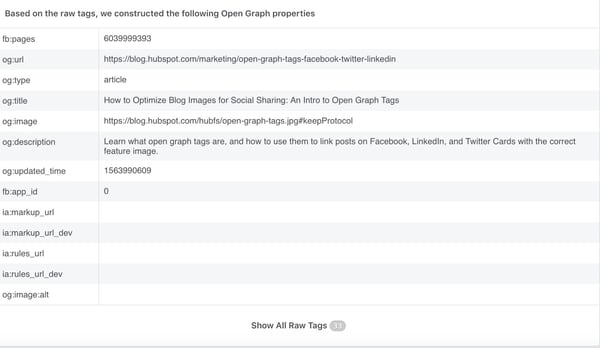
In the example below, you can see that there’s a warning, but since it doesn’t have to do with the image, we’ll ignore it. Below the warning, you can see the link preview. In this case, Facebook is pulling the correct image. After the preview, you’ll find the open graph data including title, meta description, and image link.
3. Fix the issues.
If your images aren’t displaying correctly, you should be able to easily fix the issue. Below we’ll break down the common issues and how to fix them.
Missing Images
If Facebook can’t find your image, it might be because you didn’t make it your “Featured Image” in your CSM.
To correct this, check that your image is uploaded to your CSM.
Old Images
Sometimes Facebook will pull up old images because it can’t see the new one. This happens due to caching issues in your browser or content management system.
To fix this, clear your cache in your CSM, Facebook, and browser.
Image Size & Resolution
Your image could be missing due to image size and resolution. If you see an error regarding the “og:image” property, it typically means your image is too small. The minimum Facebook size is 200×200 pixels and the minimum resolution is 600×315.
Wrong Image on Page
If you have multiple images on your blog post, Facebook might pull the wrong image as the featured image.
When this happens, you need to edit the meta tag in the backend of your blog post (the HTML coding).
To do this, go to the HTML code, find the open graph tags, and edit the “og:image” tag to ensure it’s pointing to the URL of the correct featured image.
4. Scrape the URL again.
When you’ve gone through and fixed the issue, go back to the debugger tool and click, “Scrape Again.”
This will force Facebook to update your page in its cache.
Once it scrapes again, check the preview link and ensure your image is showing up how you want.
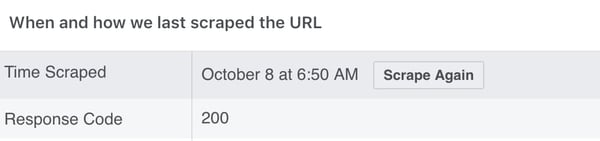
The debugger tool will list the time of the latest scrape and any errors that occurred during that process. The image below shows what that will look like.
5. Share your post.
If there are no more errors, you’re ready to share your post! Go back into Facebook, input your URL, and check out the link preview.
Ensuring your social media posts look right is an important aspect of planning a social media campaign. If you’re having trouble getting the right information to display, you can guarantee the right title, description, and image with open graph tags.
Learn more about open graph tags here.

The Step-by-Step Guide to Creating a Complete Marketing Strategy in 2019
How many times have you seen a killer marketing campaign and thought to yourself, “Wow, I wish I would’ve thought of that!”
(Glossier, I’m looking at you.)
We’ve all been there.
The truth is, when you’re just starting out, it can be tough to know whether your strategy is as comprehensive and powerful as it could be.
To help ease some of that uncertainty, we’ve created this guide that’ll show you step-by-step how to create a marketing strategy that leaves no stone unturned.
Let’s dive into the five critical components of a complete marketing strategy in 2019, followed by some examples for further inspiration.
1. Create buyer personas.
If you can’t define who your audience is in one sentence, now’s the chance to do it. A buyer persona is an example of your ideal customer.
For example, a store like Macy’s could define a buyer persona as Budgeting Belinda, a stylish working-class woman in her 30’s living in a suburb, looking to fill her closet with designer deals at low prices.
With this description, Macy’s Marketing department can picture Budgeting Belinda and work with a clear definition in-mind.
Buyer personas have critical demographic and psychographic information — including age, job title, income, location, interests, and challenges. Notice how Belinda has all of those attributes in her description.
You don’t have to create your buyer persona with a pen and paper. In fact, HubSpot offers a free template you can use to make your own (and it’s really fun). Buyer personas should be at the core of building your strategy.
2. Identify goals and tools.
Your marketing strategy goals should coincide with your business goals. For example, if one of your business goals is to have 300 people attend your annual conference in three months, your goal as a marketer should be along the lines of boosting online RSVPs by 10% at the end of the month.
Once you have your goals identified, make sure you have the right tools to measure the success of those goals. Online software like social media schedulers gives you analytics to help you keep track of what your audience likes and doesn’t. Alternatively, you might consider Google Analytics to measure blog and web page performance.
Additionally, it will be helpful if you make your goals SMART — to do so, take a look at How to Write a SMART Goal [+ Free SMART Goal Template].
3. Account for existing resources.
Decide what you already have in your arsenal that can help you create your strategy. To streamline this process, think of your assets in three categories — paid, owned, and earned media.
Recall that paid media means any channel you spend money on to attract your target audience. Twitter, Facebook, and LinkedIn offer paid media options that boost your exposure.
Owned media is any of the media you create — blog posts, ebooks, images, and infographics that your marketing team has created are examples of owned media.
Earned media is another way to say user-generated content. Shares on social media, tweets about your business, and photos posted on Instagram mentioning your company are all examples of earned media.
Gather your materials in these areas and consolidate them all in a single vehicle so you’ll have a clear vision of what you have and how you can integrate the three channels together to maximize your strategy.
For example, if you already have a blog that’s rolling out weekly content in your niche (owned media), you might consider promoting your blog posts on Twitter (paid media), which customers’ might then re-tweet (earned media). Ultimately, that will help you create a better, more well-rounded strategy.
The free option? Tweet it from your company’s Twitter or post it on Instagram and use relevant hashtags to spread it.
If you have resources that don’t fit into your goals, nix it. This is a great time to clean house or identify gaps in your materials.
4. Audit and plan media campaigns.
Cleaning house segues straight into this step. Now, you must decide which content is going to help you. Focus on your owned media and marketing goals. For instance, will updating the CTAs at the end of your blog posts help you increase RSVPs to your event?
Next, look at your buyer personas. Let’s say you work for a video editing software company. If one of your persona’s challenges is adding clean sound effects to their videos but you don’t have any content that reflects that, make a 15-second demo video for Instagram to show how great your product is at solving that challenge.
Finally, create a content creation plan. The plan should include the title, goals, format, and channel for each piece of content. Be sure to include which challenge it’s solving for your buyer persona.
For ideas on content creation or a more in-depth look at how to create a content plan, check out our post, The Ultimate Guide to Content Creation.
5. Bring it to fruition
Finally, we’re at the last step. First, let’s go over what you should have by this point:
1. Buyer persona(s).
2. Specific marketing goals that coincide with your business goals.
3. Existing paid, owned, and earned media inventory.
4. An audit of a media campaign.
At this point, your market research and planning should help you visualize how your strategy will be executed (and by which teams).
The final step is to bring that all together — to put actions into your planning. Create a document that maps out the steps you need to take to execute your campaign. In other words, define your strategy.
Think long-term when creating this document. A standard strategy document is 12 months. This structured timeline should be the home base for your strategic marketing efforts.
To paint an example, let’s go back to the video software company.
Maybe in January, you will launch a software update that improves the exportation process for users. In April, you want to publish an ebook that explains editing terms to your buyer personas, and in September, you plan to launch an integration with other software.
Remember, your digital strategy is unique to your business, so the document should be, as well. As long as the strategy includes all of the necessary information, you’ll be all set to take your company’s brand from okay to outstanding.
Now that we’ve explored five critical steps of a complete marketing strategy, let’s look at some “Why didn’t I think of that?” strategies to inspire your own.
Examples of Successful Marketing Strategies
1. Regal Movies
Digital strategy: Owned media
Regal Movies took the Halloween spirit to a new level, even re-naming their Twitter to reflect the spirit of the season. This “Monster Madness” poll is a fun, interactive way to get followers invested in Regal’s content:
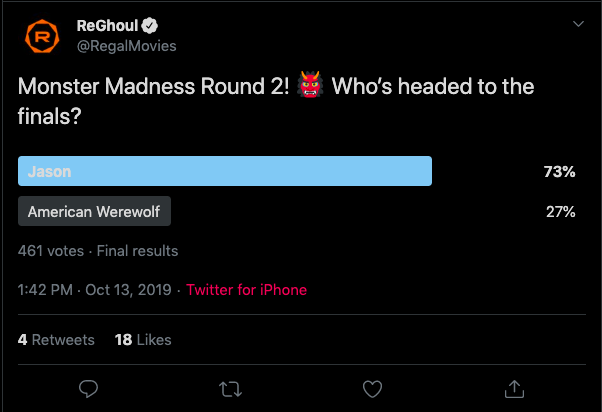
Regal’s tweet is an example of owned media because the company was in full control of the answers followers gave (and, apparently, American Werewolf didn’t stand a chance). Regal effectively kept true to their brand by using only classic movies in their poll,, while still putting a modern spin on it.
This is also a good example of how retweets don’t necessarily equal success. While four retweets isn’t that big of a deal, check out the votes: 461. That means there were over 400 interactions with a single tweet.
2. Taco Bell
Digital strategy: User-generated content, earned media
Real love is taking your engagement photos at your favorite fast food Mexican restaurant — right? User-generated content is one of the best ways to gain traction in your strategy — it demonstrates your appreciation for loyal customers, and also incentivizes other users’ to promote your products for the chance at a similar shout-out. Plus, sometimes the content your brand-lovers create is really, really good:
Oh, you sure did. 👏❤️ https://t.co/TXflZvxVxR
— Taco Bell (@tacobell)
September 26, 2019
It’s not every day someone takes engagement photos at a fast-food restaurant, and Taco Bell jumped at this earned media opportunity. Earned media is at work here because this couple is saying they love baja blasts and crunchwraps as much as they love each other — so it must be delicious.
3. Small Girls PR
Digital strategy: Event marketing
Wait, is that Keke Palmer?
Small Girls PR is a boutique PR company based in New York, and one of the company’s talents is throwing amazing events for their clients, like Olay. This event recap carousel on Instagram is an effective event marketing example.
Event marketing is a fantastic opportunity to boost awareness for your brand. Not every business needs to throw lavish events, either. Event marketing can be as simple as the last company outing you had at your team’s favorite brewery.
Posting a quick recap on Instagram sheds light on your business’s culture, and demonstrates your appreciation for your employees’, ideally incentivizing others to apply.
4. Diesel Cafe
Digital strategy: Word of mouth
Boston-local cafe Diesel Cafe is more than just a great location to get vegan bagels. It also rocks at word-of-mouth marketing. In fact, Diesel even has a website dedicated to it — a place where fans can submit letters about the fun times they’ve had at the cafe:
Check your company’s Yelp climate. Are people giving you nice reviews? Showcasing some of them on your social channels is an effective opportunity to provide social proof that your products or services are a worthwhile investment, since people typically trust peers more than ads.
5. Target
Digital strategy: Paid media, Twitter cards
If you’ve got the budget for paid media, take full advantage of it. Paid media is when you pay social channels, like Twitter, to promote your content on their site. By doing this, your content reaches new audiences you might not be able to reach organically:
Get wrapped up in soft sweaters and fleece-lined jean jackets.
— Target (@Target)
October 11, 2019
An inclusive ad from Target about fall shopping uses Twitter cards to promote their brand and offer easier ways to shop — simply click on the photo, and you’re redirected to a purchase page. More social channels are offering ways for shoppers to purchase in-app or close to it, driving sales and boosting exposure for brands.
Ultimately, creating a complete marketing strategy isn’t something that can happen overnight. It takes time, hard work, and dedication to ensure you’re reaching your ideal audience, whenever and wherever they want to be reached. Stick with it (and use some of the resources we’ve included in this post), and over time, research and customer feedback will help you refine your strategy to ensure you’re spending most of your time on the marketing channels your audience cares most about.

How to Generate Leads on LinkedIn, According to LinkedIn’s VP of Marketing
As a marketer, you’re undoubtedly aware of some of the major social media sites you can use for lead generation.
I’m willing to bet you’ve already heard about the importance of Instagram, Facebook, and Twitter — and if you use all three as part of your lead generation strategy, you might think you’re all set.
But if you’re not using LinkedIn as a lead generation tool, you could be missing out on a major opportunity to grow both brand recognition and revenue.
In fact, studies have shown that 80% of B2B leads come from LinkedIn, and 94% of B2B marketers use LinkedIn to distribute content.
This makes sense. Consider the average Instagram user — scrolling through her feed, liking photos of her friend’s beach vacation and her sister’s bridal shower, and occasionally using the platform to find and purchase products.
Alternatively, the average LinkedIn user is on the site specifically for professionally-geared content. They’re already seeking out information to help grow their businesses. If you can provide them with high-quality content, it becomes much easier to convert.
Of course, it’s easier said than done, particularly when trending content on LinkedIn ranges from SEO to customer acquisition to goal-setting. Without a clear strategy in mind, the task of lead generation on LinkedIn can feel challenging.
Justin Shriber, Vice President of Marketing at LinkedIn, was interviewed as part of HubSpot’s new campaign, “Advertising, a Look Behind the Screens“. Take a look at the full interview series here, or keep reading to learn some of his key insights regarding lead generation and building a brand across the platform.
Shriber’s Steps for Growing a Brand and Generating Leads on LinkedIn
1. Make sure your executives have a strong LinkedIn presence.
When you’re first getting started on LinkedIn, it can be tricky to know where to dedicate your initial efforts. Should you create a compelling LinkedIn Page, and immediately start posting content to your business’s feed?
Maybe, instead, you should start by posting all your job openings to attract new talent?
Shriber suggests another strategy: “We definitely want to fuel the growth of small businesses that have aspirations to grow to become larger, and we put together a playbook that allows them to do that. The playbook always starts with the individual LinkedIn profiles of the employees at the company, and in particular, the executives at the company.”
“[Executives are] trendsetters. They can make statements about what they stand for, and in many cases, develop a strong following in relatively short order.”
Consider the leaders at your company and their current LinkedIn presence. Could they contribute more thoughtfully to LinkedIn groups within your industry, or post more often to their feeds? More likely than not, your executives could be doing more to grow their LinkedIn following.
For instance, let’s take a look at Sallie Krawcheck’s LinkedIn activity:
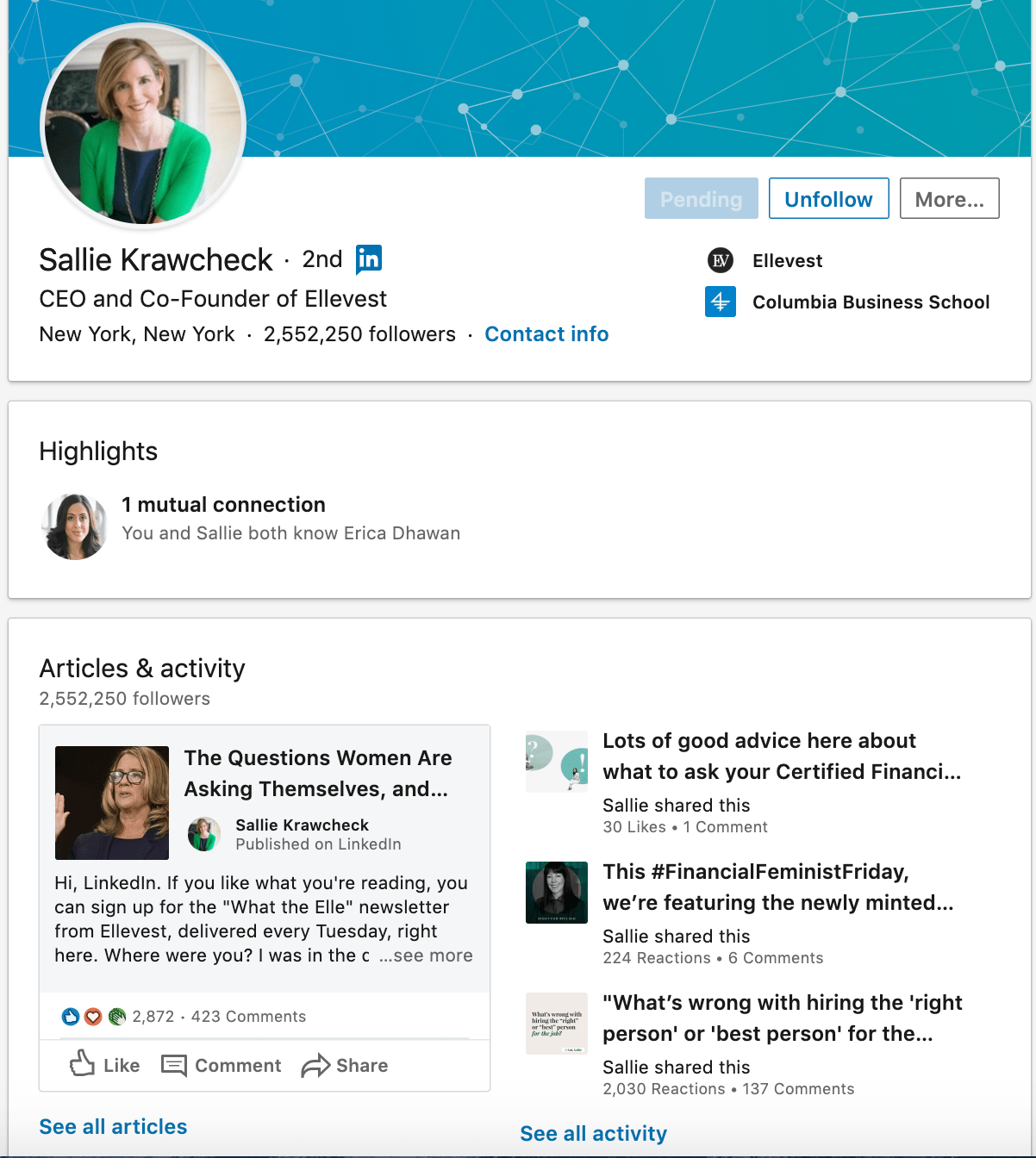
Krawcheck is CEO and co-founder of Ellevest, and a powerful leader in the financial industry.
Krawcheck uses LinkedIn wisely, leveraging the platform to promote content from her own investment company, while also liking or sharing other relevant financial content geared towards women.
Ultimately, Krawcheck uses LinkedIn to build a personal brand and help her followers find useful content related to investing and women in finance. Ideally, your own executives should be doing the same.
2. Create a powerful LinkedIn Page for your business.
Once you’ve ensured your own executives have a strong LinkedIn presence, it’s time to cultivate an impressive page.
You’ll want to ensure your page is active, with thought-provoking content and contributions to conversations already happening on LinkedIn.
Shriber notes — “Once you’ve got a strategy related to your executives and their presence on LinkedIn, step two is to think about the presence of your company on LinkedIn. We have a product called LinkedIn Pages, which has been incredibly powerful for businesses that want to establish their place in the world’s professional community.”
“[LinkedIn Pages is] a free product,” Shriber adds, “and really, at the end of the day, it’s a place for you to stage the content that you have to offer, and really promote all of the benefits that you have for people that want to follow you.”
He continues, “So, when you come to a good LinkedIn Page, you’ll find information about what the company does, but beyond that, some of the thought leadership that’s happening. There will be video content as well as the written word, commentary from executives, but also in many cases, information that’s curated from other sources. It doesn’t just need to be from the marketing group or from an internal source.”
To ensure your page is strong, consider posting a variety of content, including video. Additionally, follow the page analytics closely to figure out what content resonates with your audience.
It’s equally critical you use LinkedIn to join communities and have conversations with other professionals in your industry. LinkedIn, at its core, is a social platform like any other. If you don’t engage with your followers and follow trending articles related to your business, you’ll lose out on making meaningful connections.
If you post an article once a week and then log out, you haven’t leveraged LinkedIn for all it has to offer. Instead, you should be learning from others in your industry to further inspire better content and connect more closely with the prospects you’re hoping to attract.
3. Use paid products to ensure your content reaches your intended audience.
Businesses with small marketing budgets may be wary to put money behind paid campaigns on LinkedIn. They often ask– we have a small marketing budget and we want to use it wisely. Where should we spend it?
Remember, 80% of B2B leads come from LinkedIn. And, ultimately, using LinkedIn’s paid products will help your brand and content appear in prospects feeds.
Shriber told me, “Once you’ve built that strong LinkedIn Page, companies tend to realize that that audience that’s consuming information is incredibly valuable, and it’s different than what they’re finding on other platforms.”
He adds, “We have a series of paid products that you can then move into that allow you to insert content into the LinkedIn feed. Now you’ve got a series of followers or you’ve got a set of targeted members that you care about. Suddenly, they’re seeing your content appear in the feed itself and there are some really rich ways to turn that engagement into actual activity.”
LinkedIn can help you convert prospects faster, with limited friction. For instance, on one of your paid ads, your prospects might have the option to immediately fill out a form or respond to an event. Since their information is already saved on LinkedIn, it’s a one-touch process for them. Best of all, it provides your sales team with invaluable data related to their industry and how you might best serve their professional needs.
4. Ensure you have strong sales and marketing alignment.
You’re likely all too familiar with the recent shift in consumer buying behavior. Nowadays, customers are researching online ahead of time and typically use marketing content to help inform their purchasing decision before even reaching out to a sales rep.
Shriber describes the shift like this: “What you’re seeing now, is consumers are becoming more savvy about learning about products and services that they need and progressing deep into the sales process before they reach out, raise their hand, and say that they need help.”
He adds, “It’s becoming incumbent upon marketing to really meet the needs of customers that are investigating and exploring, and then seamlessly handing that off to salespeople so sales has context on the journey customers have already traveled.”
Additionally, he notes: “Salespeople, in many respects, are [also] becoming brand experts.”
“I’ve got a number of customers that have come to me and said, my salespeople know my target customers better than my marketing group. They’ve been in the business for 20 years, and they know all the key people, so I’m going to use them to create awareness, build a brand in a way that historically has been reserved for marketing.”
On the flip side, of course, marketers are playing a more heavy role in closing a deal. Shriber told me, “Imagine, for example, that you’re procurement and you’re trying to negotiate a contract. Historically, that’s been the domain of a sales professional, but today, savvy marketers know that that’s where you are in the sales process.”
Shriber adds, “They’re able to target that procurement person, send in some relevant content related to validation of the solution, why it’s valuable, what other customers are saying about it, and all of a sudden, that marketer has played a key role in getting the deal closed.”
All of which is to say — it’s absolutely critical you align your sales and marketing teams, since they play equally valuable parts in finding prospects and closing deals, and they overlap more heavily now than ever before.
To figure out strategies for better aligning your sales and marketing departments, take a look at this Ultimate Guide to Sales and Marketing.
Ultimately, if you aren’t using LinkedIn or aren’t using it often, you’re likely missing out on major opportunities to grow your business. As Shriber told me, “We’ve really tried to think through the full spectrum of what you might care about, from building a brand to generating leads, whether you’re a small business or a large enterprise — and we built playbooks that address you where you are, and help you to get where you’re going.”
Learn more from Justin Shriber and other advertising leaders by accessing an exclusive interview series with LinkedIn, Google, and Facebook.

How 10 Companies Use Twitter’s Unique Features for Growth
Twitter is an undeniably popular social network — in fact, the social site is ranked as the 7th most visited website in the world.
Additionally, 88% of medium-sized businesses use Twitter for marketing purposes.
You likely already know about the power of Twitter for marketing. However, there are a number of unique features on the platform you might not know about that can strengthen your Twitter strategy.
For instance — you might know about Trending Topics, but did you know you can figure out which topics are trending in your own personalized social networks, rather than across the web as a whole? Alternatively, how often have you used Twitter polls to engage and connect with your audience?
To ensure you’re using Twitter in the most meaningful way possible, we’ve created this list filled with examples of how 10 companies use Twitter to reach and engage with both new and existing audiences. Let’s dive in, now.
This blog content is a taste of what you’ll find in the HubSpot Academy Twitter Marketing Strategy course. If you like what you read, you can take the full, free course here.
1. Create content that aligns with trending topics.
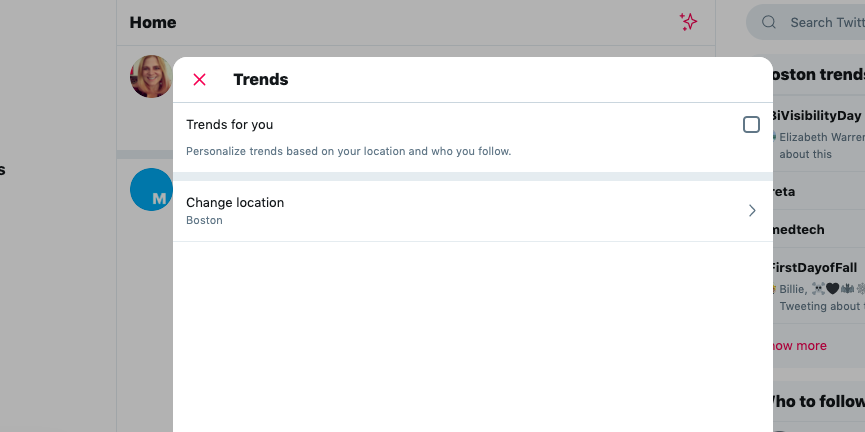
First, let’s consider the trending topics feature on Twitter. These trending topics are configured based on your personal preferences.
There are a couple of choices you can make — you can choose to see everything from your country, everything from a certain city, or you can even choose tailored preferences (also called “Trends for You”) which relies on the Twitter algorithm to show what’s trending from the people you follow and their Twitter communities.
If you choose to follow “Trends for You”, you’re more likely to see tweets based upon subjects you prefer, since presumably you follow people who like similar topics.
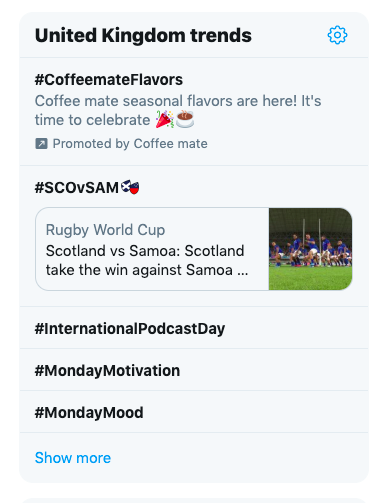
There are two ways to take advantage of trending topics. One great way is to plan ahead. It may seem funny to plan ahead for something that’s trending, but on Twitter there are a number of things that trend at certain times. That could include holidays, certain TV shows or movies, or even hashtags like #MondayMotivation.

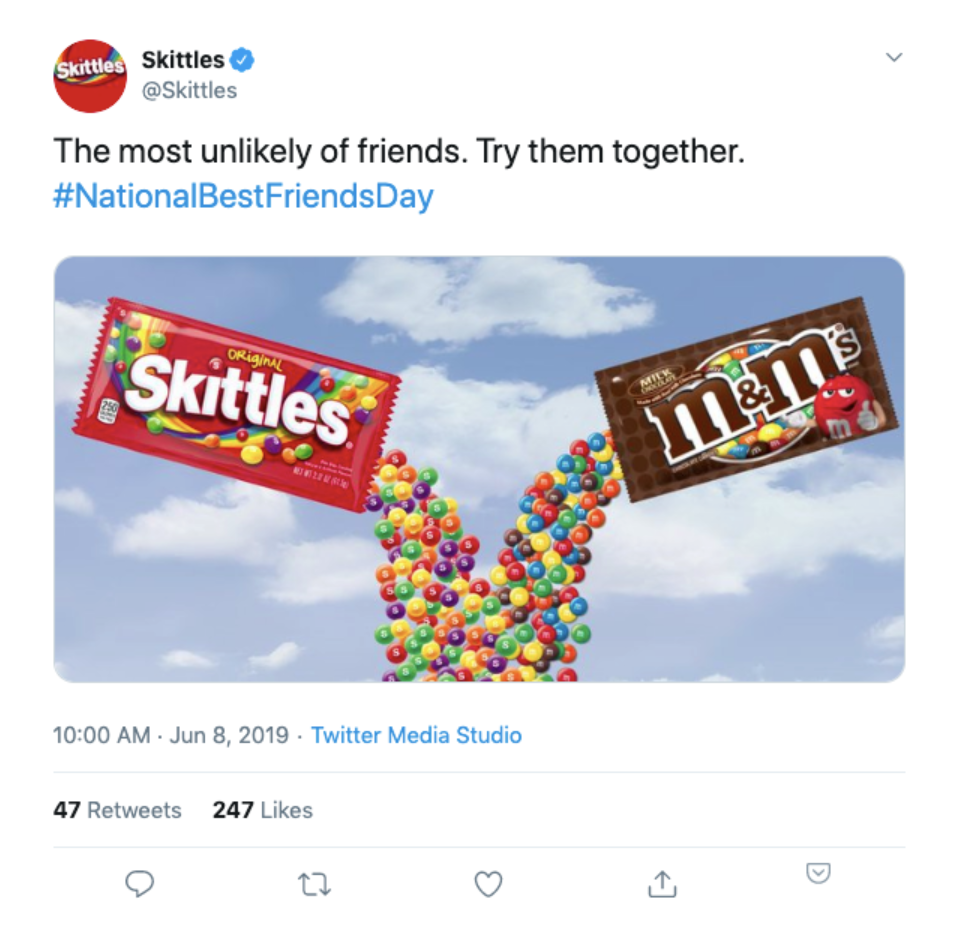
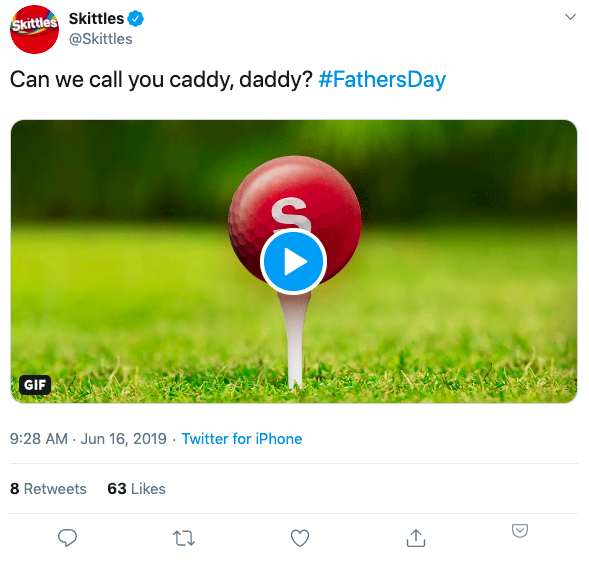
Here are a couple of examples of how Skittles takes advantage of trending topics. They have clearly planned ahead for these particular days to create content that is more likely to trend:
As another example, the team at G Fuel uses trending topics to create conversation.
Patrick Curran, the director of social media at G Fuel, explains — “I love to hop on other conversations and threads from other companies, and trending topics that don’t mention us or our name whatsoever.”
Curran says, “It gives us the ability to become a name in a thread that, again, doesn’t have anything to do with us, but that gives us great exposure. If it’s a comment that someone likes, we just gained a fan. So it has everything to do with interacting with other threads, interacting with other companies. That’s how you get your name out there.”
Two sites that can help you find what’s trending beyond what you’re seeing on the Twitter platform itself include Trendsmap and Trends24.
2. Live-tweet during major events.
Another popular Twitter action that goes hand-in-hand with trending topics is the idea that you can live-tweet during a certain event. This could be something like tweeting during a sports event or TV show.
Live-tweeting can also be extremely beneficial if you’re attending an event with your company or if you’re hosting an event. It allows you to bring people who aren’t there into the conversation.
Here’s a great example of how SEMRush combined live-tweeting at INBOUND with some prepared material to share with the audience who couldn’t attend the conference:
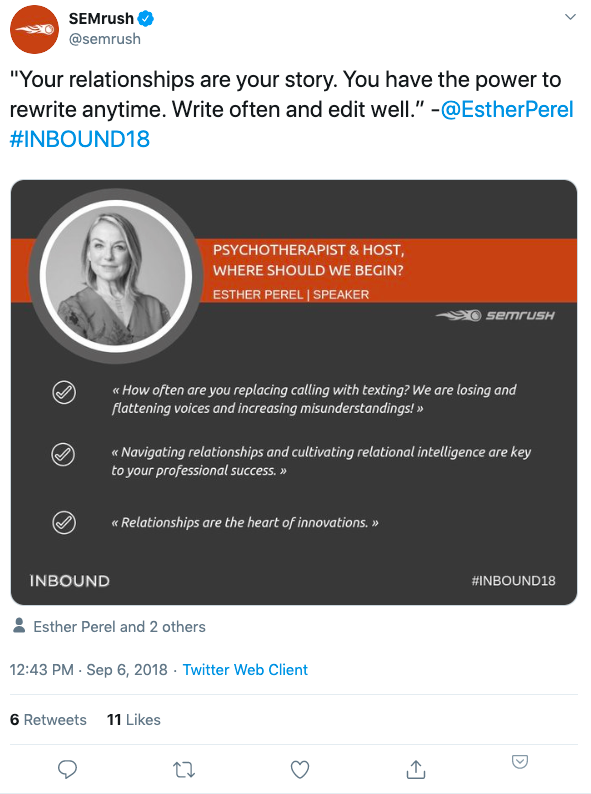
One tip is to make sure that you are being thoughtful of your audience and don’t go too overboard with live-tweeting at a conference or an event, because you may turn a few people off if you’re bombarding them. Leave some intervals in-between your tweets.
3. Use gifs available in the Twitter platform, or create your own.
Companies should really be jumping on the animated gif bandwagon. You can use the Giphy gifs that are available in the Twitter platform.
Alternatively, you can create your own, which is what many brands choose to do so they’re not diluting their brand with other people’s content. Here’s an example of how HubSpot creates its own gif to draw attention to HubSpot’s Support team:
In need of a helping hand? Tweet your questions to our support handle @HubSpotSupport or check out some solutions in our Help Center 👉 https://t.co/OuwcricjjG pic.twitter.com/5X6dlyIBaW
— HubSpot (@HubSpot)
April 19, 2018
However, I would challenge brands to consider using popular gifs or gifs that align with pop culture, because it creates a connection with your audience in a way that you may not be able to do with your own branded gif.
SmallBizLady, Melinda Emerson tells us — “On Twitter, animated gifs rule. So, I think any time you can respond to someone with an animated gif, or put an animated gif on a blog post that you got, people love that. People love to laugh. People love to be entertained, so you can’t go wrong.”
For instance, check out this branded gif from Kate Spade:
Why, hello there perfect spring handbag. We fell in love with this @katespadeny while shooting a story about embracing colour. https://t.co/75XE6RotAV pic.twitter.com/P6ZMdwJwJR
— Primer (@Primer_au)
March 27, 2019
Alternatively, some brands don’t use gifs in the tweets in their main feed, but they’ll use animated gifs in their responses, such as this example from G Fuel:
G FUEL runs through my veins….literally 😳.
New Type-🅾️ Flavor AVAILABLE NOW .
Code KARNAGE at checkout 🤪! pic.twitter.com/2iAcw5TJMl
— KRNG Apollo 🚀 – CODE “KARNAGE” FOR 30% OFF GFUEL! (@ApollosMission)
June 20, 2019
4. Use Twitter polls to engage with your audience.
Twitter polls is another effective feature that can get the conversation flowing.
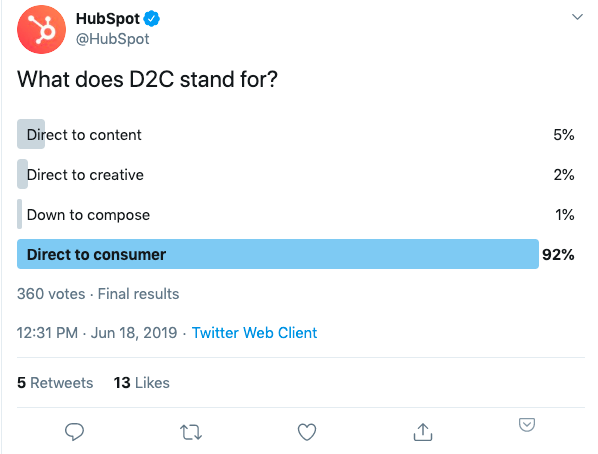
For instance, HubSpot uses Twitter polls to both educate and engage its audience:
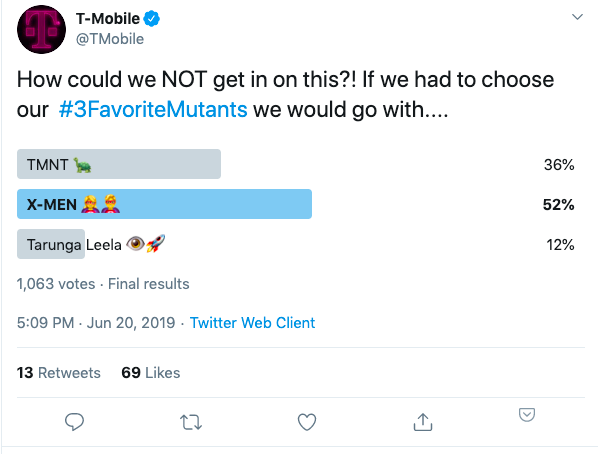
Additionally, T-Mobile uses polls to have fun with their fans:
Take a look at How to Use Twitter Polls to Engage Your Audience: 13 Examples From Real Brands to learn more about Twitter’s poll feature.
5. Use Twitter Moments to compile multiple tweets.
Next are Twitter Moments, which is a feature that is often underutilized.
Social media strategist Dhariana Lozano tells us — “Companies can really take advantage of Twitter Moments. Twitter Moments allows you to take up to 10 tweets and compile them into one continuous story. It’s when you go on Twitter and you see the trending topics, and you can click on them, and there’s multiple tweets attached to them. That’s what a Twitter Moment is, and you can create one for your brand.”
Lozano adds, “There are lots of ways to use them. Think about event recaps, Twitter chat recaps. Even if you have 10 tips that you can put together as a resource for your brand, that is a great way to put Twitter Moments to use.”
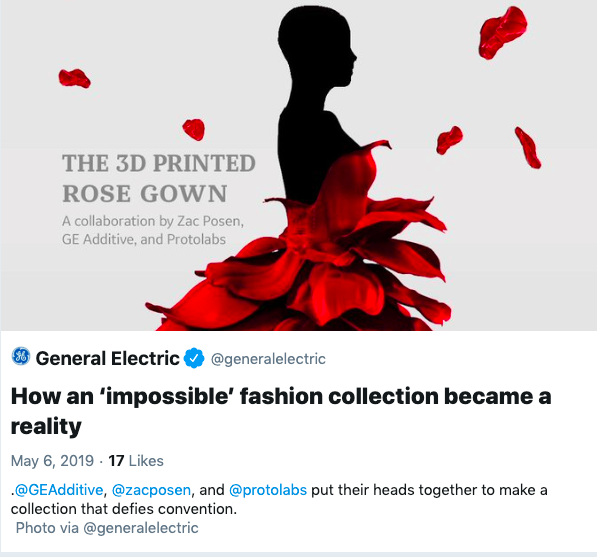
Here’s a wonderful example from General Electric, which put together a Twitter Moment to demonstrate how technology and fashion coincide for the Met Gala:
If you’re interested in creating your own Twitter moment, take a look at How to Create a Twitter Moment: A Step-by-Step Guide.
6. Consider implementing video and live broadcasts on Twitter.
While putting together our Twitter course, all of our influencers talked about the power of video. It can be used to inform, educate, and entertain — additionally, it’s often a preferred method of consuming content.
You might not realize this, but you can use video content on Twitter to engage with an audience. Check out this example from Intel, which uses video to provide information about one of their newest products:
A 2-in-1 PC that recognizes when you’re nearby and powers up without a touch. The new @Dell Latitude 7400 puts our context proximity sensors to work. https://t.co/7TEN3ffMFk pic.twitter.com/Vmoy4s0Qtg
— Intel (@intel)
June 20, 2019
Additionally, let’s talk about how you can create live broadcasts on Twitter. We asked Twitter expert Madalyn Sklar about going live on the platform:
“Twitter Live is a great feature, but it’s highly underutilized. I think people forget that there is a live button when you’re composing a tweet, and some people say, ‘’Well, why would I do a live video? What’s the purpose?’ Video is a great way to connect with your community, and so doing this live allows you to talk to them in real time.”
Sklar adds, “When you’re broadcasting live, you’ll see all the comments, you’ll see the conversation happening, and you can actually talk to people and it makes for a really fun way to converse with your community.”
There are two ways you can go live on Twitter. The first is through your smartphone. You can start a broadcast from Twitter’s Periscope app or the Twitter app. Once you’re live, anyone on Twitter and in Periscope can join the live video and see your experience. Best of all, the video will show up at the top of your news feed if people go to your profile.
Alternatively, you can use Twitter’s Periscope Producer Platform, which enables you to create higher-quality video with professional-grade cameras or multiple cameras. There are a lot of brands and media organizations that use Periscope producer for their content.
7. Don’t forget about text.
In the midst of all of the different kinds of content that you can create on Twitter, it’s vital you don’t forget about text. There is a ton of power in the text posts that you share on Twitter. In fact, you can have a successful Twitter strategy that relies primarily on text.
Ana Filipovic from Motley Fool explains — “If you look at our Twitter account right now, we’re using a lot of post text, a lot of polls, a lot of questions to engage with our followers because we really want to have that conversation with them and we really want to be positioned as a thought leader in the industry. In order to grow to that point, we’ve employed different tactics that did include linking to our articles, CTAs, and videos and images — all those things you use when you want to grow your business.”
“If you check out our account maybe in six months, we might be using a different strategy and that’s the beauty of social media. It really gives you the opportunity to try out different things and see what works best with your audience.”
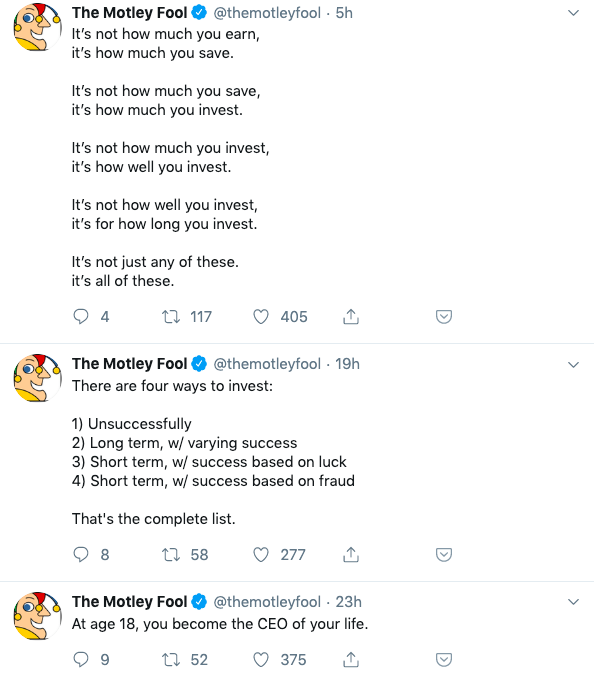
Ultimately, you’ll want to test these unique features to see what resonates best with your audience. As you can see, there are a lot of options for the kinds of content you can share on Twitter. You are only limited by your own imagination, so start brainstorming and get creating!
Take our full Twitter Strategy course here.

35 Office Costume Ideas for Marketing Nerds & Tech Geeks
Halloween is a fun holiday, and it doesn’t get the attention it deserves. It doesn’t have recognizable songs or vacation days associated with it, and it falls on a busy time of year for most people in the workforce.
But that doesn’t mean you should skip the festivities at your office Halloween celebration.
How many days of the year are you encouraged to dress up and goof around at work? Probably just one — Halloween — and even then, it can be hard to know what’s office-appropriate.
We want you to have fun this Halloween, so we’re taking the work out if it for you. We’ve compiled a list of DIY Halloween costume ideas that are easy to put together, inexpensive, and perfect for the digital marketer or tech professional.
If your family and friends don’t get your costume, your colleagues definitely will.
29 Office Costume Ideas for Marketing Nerds & Tech Geeks
Computer or App-Related Costumes
1. Alt Text
Alt text isn’t just the metadata of an image published on the web — you could also say it’s an “alternative” fashion statement with the text to describe the era. This was HubSpot Director of Content Corey Wainwright’s office Halloween costume a few years ago. It’s great because you don’t even look dressed up if you have a casual office dress code, so you can just blend in.
To dress as alt text this halloween, break out your best 90s alternative garb — our coworker Corey went with black jeans, combat boots, and a flannel. Then, tape hyphenated text that best describes what you’re wearing, much like an image of your outfit would do online to help search engines read the file.
We edited a sash of alt text on to the alternatively dressed girl below, just to help you picture your awesome costume.
 Source: That’s Life
2. SEO Ninja
Speaking of dorking out on SEO, you could be everyone’s favorite LinkedIn title — the SEO ninja. Dress in all black, buy a black ski mask, and tape keywords all over yourself. Voila … you’re an actual ninja — just one much more concerned with search engine optimization than lurking in the darkness.
 Source: Pinterest
3. Mobile App
Wander around holding an appetizer — candy, cheese and crackers, chips and dip … whatever you have on hand. Boom. You’re a mobile “app.”
This costume also doubles as a great way to introduce yourself and make friends at a party.
 Source: Opportunity Max
4. Instagrammer
Want another way to turn handing out food into a costume? Dress up like a hipster and hand out graham crackers. You’re an “instant” “gram” cracker server — or, for short, an Instagrammer. Pun absolutely intended.
5. Ghostwriter
Have you ever written something for somebody else’s byline? Such is the life of a “ghostwriter.” Turn your author-less accomplishment into this year’s office Halloween costume.
To dress up as a ghostwriter, grab a white sheet and cut a hole for your head and arms. Dob some black ink spots on the sheet, get a book and one of those feather quills (or just get a feather, I suppose), and boo — you’re a ghostwriter.

6. Whitespace
Whitespace on the internet might just denote all the blank space you use to help your design stand out, but on Halloween, “whitespace” isn’t just the absence of space.
Dress in all white — add white face paint and a white wig if you’re ultra-committed. Then add a hint of color somewhere on the outfit, like a colored tie or scarf, or even a paint splotch. That color splotch will make the white space more prominent, transforming you into “whitespace.”
7. Error 404 Code
You’ve most likely encountered a funny error 404 page before, and you can make it a funny costume, too. Grab a sheet of paper, write “Error 404: Costume Not Found,” and tape it to your outfit.
8. (Monty) Python
If you’re into programming code, British comedy, and low-effort costumes, being (Monty) Python is perfect. Dress up in anything remotely snakelike in your closet: olive green clothing, snakeskin accessories, and fake vampire teeth that can serve as your fangs.
Then, to amp up the dork factor on this costume, add two coconuts or a gold chalice to embody Monty Python on his quest for the Holy Grail.
9. Facebook
Grab face paint or eyeliner and write “book” across your cheeks. Just like that, you’re the world’s biggest social network for Halloween.
And for your sake, we hope your colleagues actually get it:
 Source: AndPop
10. Unicorn
Here’s another tech-friendly, double-entendre costume: Be your own version of a tech unicorn. Here at HubSpot, we love this tech icon, and you can easily make your own version of a unicorn horn with help from this article.
 Source: WikiHow
11. Phishing Emails
Phishing emails are nothing to joke about — they can seriously threaten your technology and data security. But on Halloween, you can dress up as a play on phishing emails for an easy DIY costume. All you need are a stick, a piece of string, and an envelope. Bonus points if you own a bucket hat and vest to complete the ensemble. Check out an amusing version of this costume below.
 Source: Car and Driver
12. Copycat
“CNTRL + C” is the popular keyboard macro allowing you to copy items from one place to another on your computer. Well, here’s a technology spin on a classic Halloween costume. All you’ll need are cat ears, eyeliner-drawn whiskers, and a sheet of paper. Write “CNTRL + C” on the paper, tape it to your outfit, and you’re a “copycat.”
 Source: BuzzFeed
13. The Blue Screen of Death
You know the screen, even if you don’t know the morbid nickname the tech world has given it. This classic error screen is known for signaling the end of a computer’s useful life, and you know it when you see it. It causes so much stress on site, in fact, that the color alone is scary enough for October 31.
Believe it or not, there are official T-shirts you can get with the blue screen of death copy printed on them. Want to make your own? All you need is a royal blue t-shirt and a printed version of this horrifying error message to pin to it.
 Source: Spreadshirt
14. GPS Costume
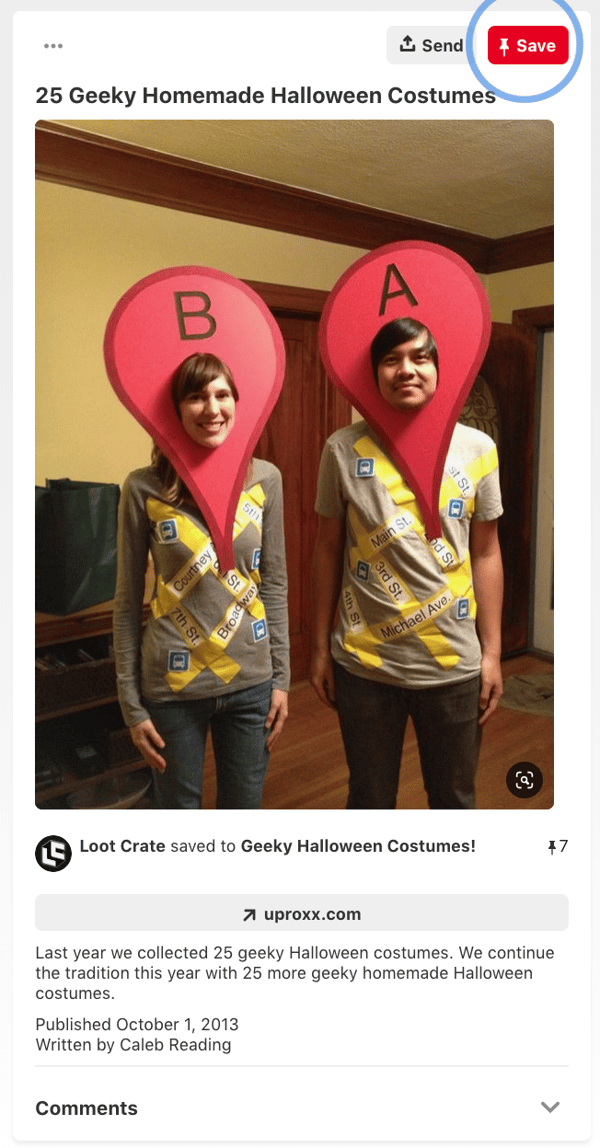
This will work best with two people. You can cut a Point A and Point B pin shape out of cardboard, paint both red, and simply write A and B on it. From there, you can personalize the costume whichever way you’d like. You can even get more intricate by finding a T-Shirt with a map on it.
Source: Pinterest
15. Dead Battery and Low Wi-Fi
Nothing is more terrifying than a dead battery or no Wi-Fi. This costume brings all of techy’s fears to life. It’s also pretty simple to create. Just tape or glue images of dead Wi-Fi and low battery signals on to a black shirt. To emphasize the low-connectivity fears, put on some zombie or skeleton makeup.
Although this can work as a couples costume, this could also be a fun option for office colleagues. Since both costumes within the set don’t rely on each other to be understandable, an individual could also wear either the Dead Battery outfir or the No-Wi-Fi suit and still be easily recognized.

Source: Pinterest
Emoji Costumes
16. Information Desk Girl
This genius professional found a golden (or, rather, purple) opportunity to be the “information desk emoji, the many gestures of whom we’ve all come to know, love, and use at some point in a text conversation.
The best part about this awesome tech reference is that you don’t need to alter your regular attire to make it work. As Naomi shows us below, it’s all in the hand gestures.
17. Dancing Girls Emoji
If you’re the owner of one of the nearly more than 1 billion Apple iPhones sold worldwide, you’re probably familiar with the dancing girls emoji, shown below.
The easiest version of this costume is to find a buddy and dress all in black together. If you’re committed to emoji authenticity, buy black bunny ears to complete the look.
 Source: Brit + Co
18. Heart Eyes
Are you just in love with Halloween? Prove it with this passionate emoji face. You don’t have to paint your entire face, chin to hairline, to get the Heart Eyes Emoji just right, but it certainly helps. It’ll also disguise your stress when you’re at your most focused during the day.
“This employee just seems to love her job, I can’t put my finger on why,” your manager will think … See how to paint this emoji onto your face below (you’ll need some help for this one).
Topical Office Costumes
19. Fully Vested
At work, “fully vested” usually refers to one’s ability to earn all matching funds of a 401(k) retirement plan. But for some, you just can’t help but picture someone wearing lots of sleeveless jackets at the same time. Now’s the time to personify that image.
If you work in a company where people would get the joke, put on a bunch of vests (at least three, but even more is encouraged), and that’s about it. You’re fully vested.
20. Nerd
What I love about the nerd costume is that it’s effortless and always unique — there are many ways to be a nerd in this day and age. Are you a tech nerd, a video game nerd, or a book nerd? The sky is the limit with this costume. Show up wearing glasses with your favorite accessories, such as a magic wand, book, or lightsaber, to complete the effect.

Source: Pinterest
21. A Solar Eclipse
Last year, the solar eclipse took over the internet — and the country. As millions of people flocked to the path of totality to (hopefully) catch a glimpse of this rare event without burning their corneas, millions more made jokes about it on social media.
To dress up as a solar eclipse for Halloween, you’ll need a work pal to dress up as the sun and the moon with you. One of you wears black, the other wears yellow, and you both wear dark sunglasses. Then, at the Halloween party, the one dressed in black spends the whole time standing in front of the one in yellow.
 Source: Pinterest
22. The ‘Evil Kermit’ Meme
If you haven’t heard of this mega-popular meme this year, you’ve probably seen it somewhere: It features Kermit the Frog, face-to-face with his evil twin, Evil Kermit. Evil Kermit looks identical, except for the black cloak.
For this costume, you and a coworker can keep it simple: You both wear green shirts, and one of you wears a black hoodie or jacket on top. If you really want to commit to the costume, you’ll spring for some green face paint to complete the ensemble. Walk around the party together, facing one another, for maximum effect.

23. Fifty Shades of Grey: PG Paint Swatch Costume
Want to do something cheeky, but still office friendly? This is PG pun costume shares the name of a popular romantic novel and film, “50 Shades of Grey.”
Go to your local paint or hardware store and buy 50 grey paint swatches. Then, tape them to a black shirt and tell your colleagues you’re, “50 Shades of Grey.”

Source: Fox 24 of Kansas City
24. The “But That’s None of My Business” Meme
If you love Kermit the Frog, but don’t have a colleague to team up with for the “Evil Kermit” costume, consider going solo with a costume based off of the “But That’s None of My Business” meme, where Kermit is seen judgmentally drinking coffee.
All you have to do is stick a pair of eyes on a green hoodie and start sipping your tea or coffee. For an added effect, you can cut a white photo frame to hold in front of you so you can look like an image posted on social media.
 Source: Pinterest
25. Eleven from Stranger Things
Eleven from Netflix’s hit series Stranger Things is universally beloved, and it’s a bonus that her signature look is a comfortable and easy-to-assemble costume. Rock your best Eleven with a dress, a denim jacket, and a box of Eggo Waffles.
 Source: Business Insider
26. Scoops Ahoy Employee from Stranger Things
While Eleven, noted above, is an absolute classic Stranger Things character, 2019’s season inspired another great costume opportunity. During the newest installment of episodes, Stave, a main character played by Joe Keery, worked at an icecream shop called Scoops Ahoy. As a server, he had to wear a goofy sailor uniform alongside his coworker Robin.
Since the season aired, the uniform has been regularly worn by cosplayers and at Comic Con as people mimic Steve and Robin.
Since it’s a pretty generic sailor uniform, you might be able to easily find one that’s similar in a variety of Halloween shops. This costume could work for both individuals or two colleagues.
27. Pokémon GO Trainer
Pokémon GO had roughly 45 million people walking around in cities glued to their phones last summer (I, among them). To pay homage to the explosion of this tech trend, you’ll need a t-shirt that’s red, yellow, or blue. Using fabric paint or permanent marker, write Valor (for red), Instinct (for yellow), or Mystic (for blue) on your shirt.
Spend Halloween walking around pointing your phone at objects, and you’re the spitting image of a Pokémon GO trainer. Gotta catch ’em all, right?
Group Office Costumes
28. The Sales Lifecycle
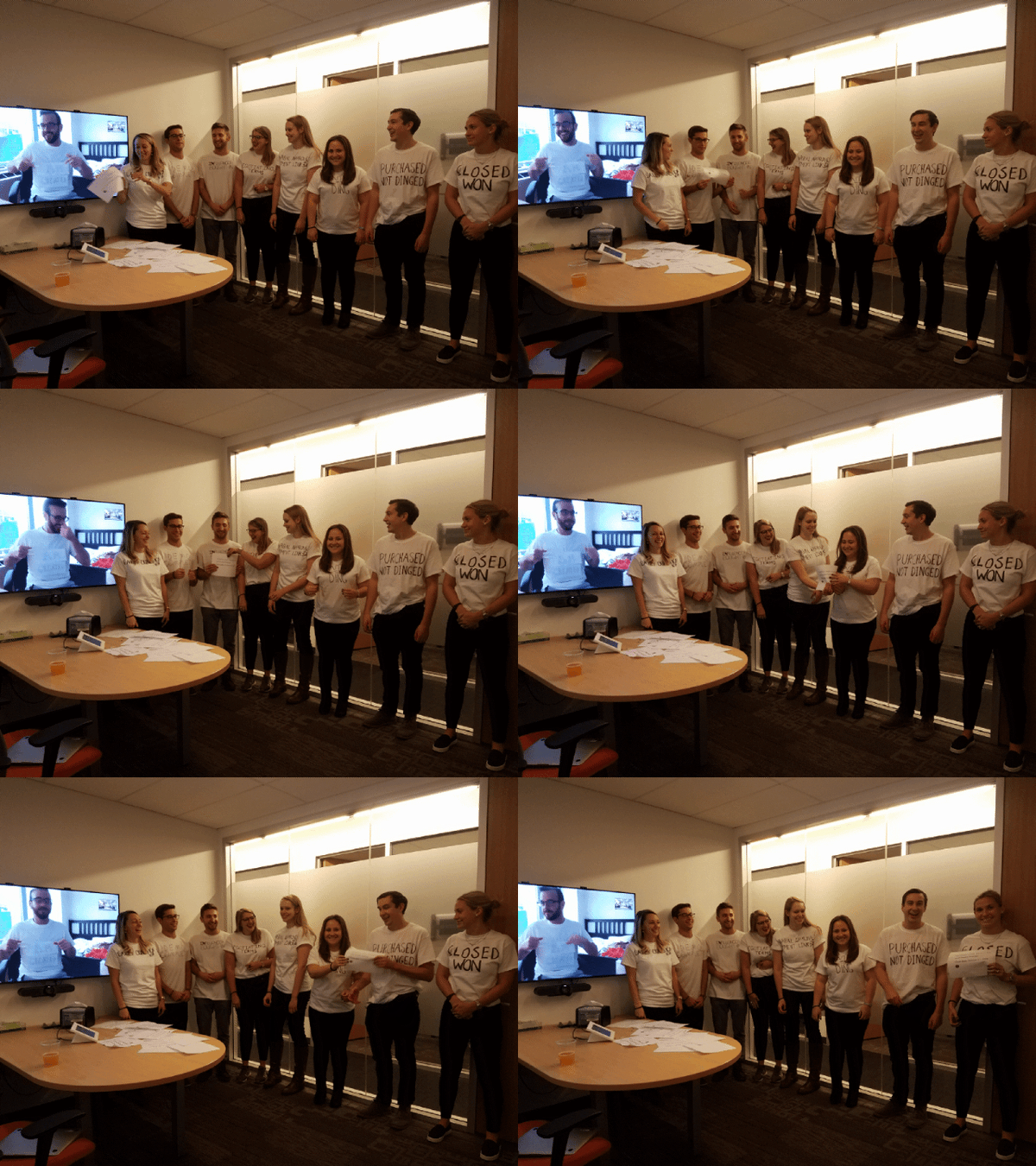
At HubSpot, we love embracing team costumes. In 2018, a handful of HubSpot employees grabbed some T-Shirts and wrote the stages of the sales lifecycle on them. Then they lined up accordingly and passed a fake prospect listing around to symbolize the process of making a sale. This was such an easy costume to coordinate that the team could even include an out-of-office employee over a video call.
 Source: Maggie Bomze, Principal Customer Success Manager of Strategic Accounts at HubSpot
29. Social Media Channels
While this Pinterest image shows classmates posting as the major social media networks, this could easily be modified to fit the office setting.
Simply pick out a solid list of the hottest social networks, then by blank T-Shirts that match the colors of each platform. From there, you can either draw, tape or glue the logos on to each shirt. If you’re not interested in the tutus worn below, you could also find matching pants, or just wear jeans and keep things simple.

Source: Pinterest
30. Google Algorithm Update
Find a couple of office buddies for this one — one panda, one penguin, and one pigeon. You might be thinking, “what the heck is the pigeon algorithm update?” 1) It’s a thing, and 2) we checked Amazon for hummingbird costumes and there aren’t any cheap ones available.
 Source: Opportunity Max
31. Black Hat and White Hat SEO
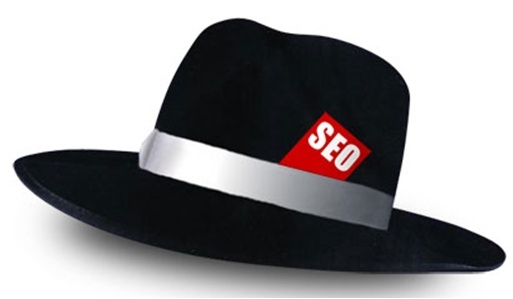
This is another SEO-related costume, and I think you can figure this one out on your own. I recommend wearing a black hat for one, and a white hat for the other, and having “SEO” embroidered on each one — which you can easily custom order.
 Source: SEO-Hacker
32. Snapchat Filters
Here’s another group costume idea that pays tribute to Snapchat’s filters feature.
There are numerous options that you and your team can choose from to embody this costume. You could dress up as vomiting rainbows, cat and dog ears, a flower crown, or a face swap, and this could be as DIY or store-bought as you’re interested in pursuing. For example, here’s some inspiration for a couple of the dog filters:
 Source: PopSugar
33. Snapchat Ghosts
Put a marketing spin on a classic Halloween costume by arriving as a Snapchat ghost. You’ll all need a white sheet and to pick which ghost you like the most.
 Source: YouTube
34. PAC-MAN and Company
Here’s yet another awesome ghostly costume idea your whole team at work can get in on. Have your team lead wear the yellow pie-shaped garb of PAC-MAN, with each team member dressed as the multi-colored ghosts that roam the screen in this vintage arcade game.
Just make sure the team lead doesn’t actually try to eat the ghosts — you’re in an office, and you’re all technically on the same team.
 Source: Meningrey
35. Instagram Filters
For this group costume, you’ll need white t-shirts and fabric markers. Draw an Instagram photo frame on the front of your shirts, and each team member can write a different Instagram filter‘s name inside the photo frame. Or, create frame props with different filters on them like the group did below:
 Source: Nails Magazine
The clothes don’t make the marketer, but the costume can certainly make the culture at your company. Find out what it takes to hire and train the best fits for your open roles in the free ebook, available below.
Editor’s Note: This post was originally published October 21, 2018 but was updated in October of 2019 for comprehensiveness.

15 Email Workflows You Should Be Using in Your Marketing Automation
Are your contacts going with the flow, or are they just sitting dormant in your marketing database? If you don’t have any automated email workflows set up, your answer is probably the latter — which means you’re missing out on some major opportunities to nurture and engage your existing contacts.
Did you know that marketing automation can lead to a 14.5% increase in sales productivity? But wait … there’s more.
Lead nurturing campaigns aren’t the only type of email marketing automation you can use to get more out of your contacts database. Think about the contacts who are already your customers. Email automation can not only help you convert leads into customers, but it can also help you delight your existing customers and encourage activity like greater product adoption, upsells, evangelism, and additional purchases.
Email marketing automation is useful because it eliminates small but time consuming tasks, such as preparing email lists, sending generic messages, or scheduling events manually. This allows marketers and salespeople more time to work on more productive projects or bigger deals.
If you want to get more out of your contacts database, this post will give you some ideas for automated email workflows you can set up to engage and activate all different types of contacts in your database.
Setting Up Email Marketing Automation Workflows
If you hadn’t already guessed, email workflows need to be set up using marketing automation software. Different software providers will have different features and functionality, but the concept of marketing automation is pretty universal.
If you’re using HubSpot’s Workflows App, for example, you can create personalized, automated email workflows that can get triggered in a number of different ways — when a contact gets added to a list, submits a form on your website, clicks a link in an email, views a page on your blog, clicks on one of your AdWords ads, or becomes a marketing qualified lead.
You can also set up email workflows based on any information you have about the contacts in your marketing database, such a page views, email or social media clicks, content downloads, contact properties, or any combination of these and more. That’s some pretty powerful stuff!
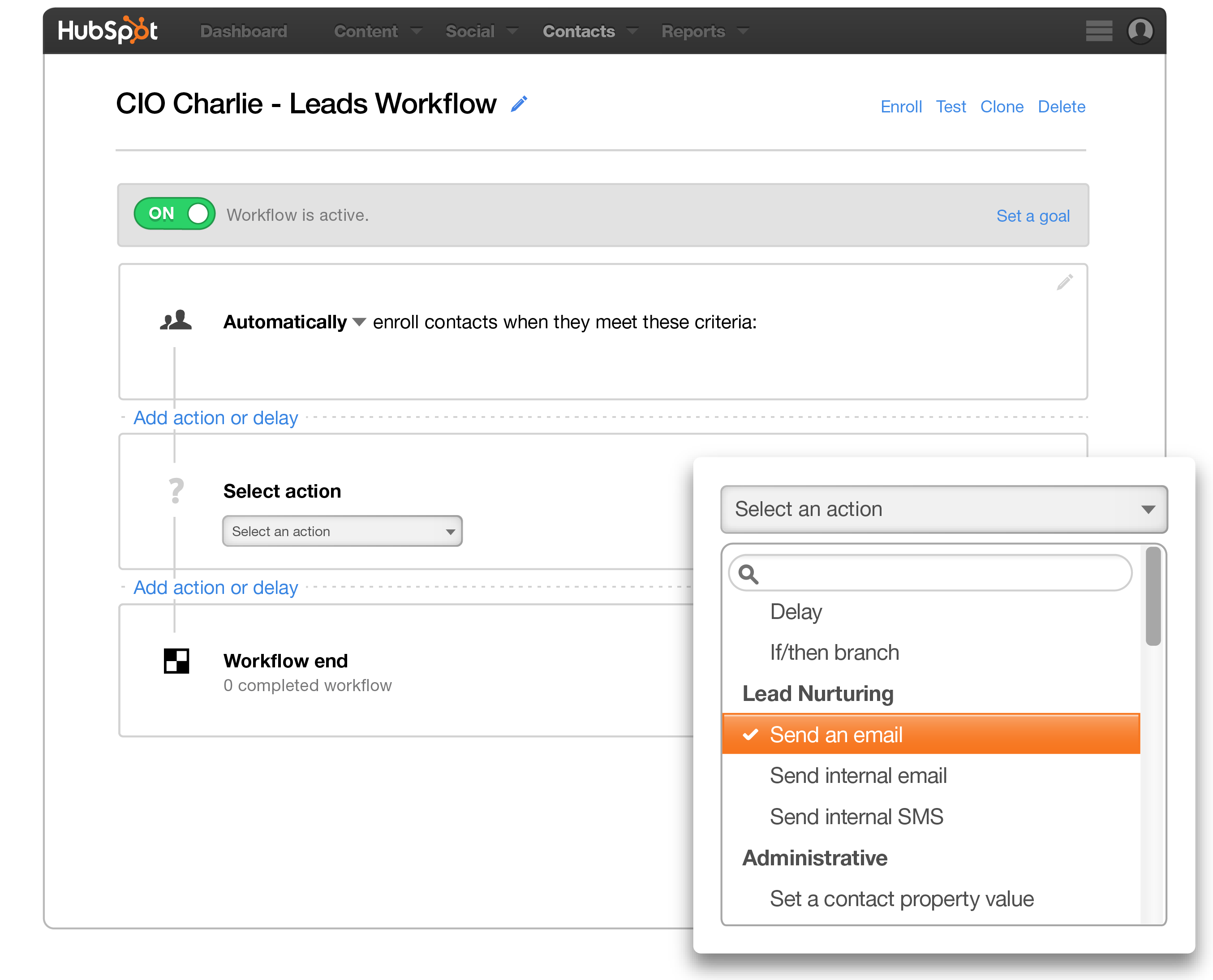
And that’s just the beginning of what you can do with workflows. Workflows can also enable you to automate other actions besides email, such as setting or clearing a contact property value, updating a contact’s lifecycle stage, adding/removing a contact from a list, and other administrative tasks that allow for more targeted, effective marketing to your prospects and customers. But we’ll save all that for another post. 😉
Now let’s walk through some examples of automated email workflows you can set up to start getting more out of your contacts database and marketing automation tools.
13 Examples of Email Marketing Automation Workflows You Should Try
1. Topic Workflows
Main Triggers: Page Views or Content Offer Downloads
Create a workflow for each of the industry-related topics you create content about. So if, hypothetically, you’re a unicorn breeder whose main content topics include unicorn diets, unicorn gear, and unicorn boarding, you could bucket your content marketing offers (e.g. ebooks, webinars, kits, etc.) and blog posts by these topics, create an email workflow for each topic, and trigger the appropriate workflow when one of your contacts views a page or downloads an offer centered around that topic.
You can trigger a content download workflow based on a form submission from a tool like HubSpot’s free conversion tool, HubSpot Marketing Free. (HubSpot customers: You can add Lead Flows, HubSpot’s pop-up forms, as an add-on by following the instructions here. To trigger an automated workflow in HubSpot, you can use the “Lead Flow Submission” option as the starting condition.)
So if a contact downloaded your ebook called 10 Tips for a Balanced Unicorn Diet, your “unicorn diet” workflow would be triggered, sending that contact other helpful content, like blog posts about unicorn dietary tips.
2. Blog Subscriber Welcome Workflow
Main Trigger: Subscription to Your Blog
Give your brand new blog subscribers a nice, warm welcome with a blog welcome email. You can use this email to thank contacts for subscribing, remind them what they’ll get out of reading your blog, review their subscription settings (and allow them to make adjustments), and promote your blog’s best-performing articles or other offers.
Get tips for creating a successful blog welcome email here, and learn more about optimizing welcome emails here.
3. New Customer Welcome/Training Workflow
Main Trigger: Lifecycle Stage
While we’re on the subject of warm welcomes, consider setting up a series of welcome emails when a contact converts into a paying customer, which you can trigger when a contact’s lifecycle stage gets updated to “customer.”
Not only is this a great way to kick off your new customer relationship on a positive note, but it can also keep your customers engaged after they buy. And if your product or service requires a little training on your customers’ part, use this workflow as an opportunity to introduce helpful training materials on an incremental basis.
4. Engaged Contact/Evangelist Workflow
Main Triggers: Visits, Clicks, or Form Submissions
Create a dynamic list (we call these Smart Lists in HubSpot’s Marketing Platform) that automatically updates to include contacts who are really engaged with you. To create this list, use trigger criteria such as a high threshold of visits to your website, clicks on your emails or social media posts, or form submissions. Then create an email workflow to leverage this list as a way to encourage evangelism of your top content in social media.
Because these contacts are highly engaged with you already, they’re more apt to share your top content. You can also consider adding list criteria to pull in contacts with a certain number of Twitter followers so you can leverage the power of those social media influencers in your database.
5. Lead Nurturing Workflow
Main Trigger: Multiple Top-of-the-Funnel Conversion Events
If a contact has downloaded several of your top-of-the-funnel marketing offers like ebooks and webinars, it might be a good sign they’re ready for a little bit more. Set up workflows that help to advance these contacts further down the funnel.
If the contact is a lead, try sending them emails containing more middle-of-the-funnel content that might upgrade them to a marketing qualified lead (MQL) or an opportunity in your sales process. This workflow could include content and web pages you’ve identified from an attribution report analysis as influential in converting leads into customers — perhaps content like customer success stories/case studies, free trial offers, or product demos.
(Bonus: If you’re using HubSpot’s Workflows, you could set up a condition that automatically upgrades these leads to a new lifecycle stage as a result!)
6. Internal Sales Rep Notification Workflow
Main Triggers: Bottom-of-the-Funnel Page Views/Conversion Events
On any given website, there are certain page visits and conversion events that indicate product interest more so than others. First, identify these pages and conversion events using an attribution reporting tool like HubSpot’s. You’ll notice that, more often than not, the pages you unearth will be your pricing page, your product pages, etc. — pages contacts view when they’re truly evaluating your products or services.
Use workflows here to trigger an internal email notification to your sales rep informing them of these high-value activities. Using personalization, give the rep all the information they need about the lead in question, including relevant mid- and bottom-of-the-funnel content that they can send to the lead in their outreach email. This allows you to connect sales reps with the best possible leads at the right time.
7. Re-Engagement Workflow
Main Trigger: Inactive Contacts
Reawaken inactive contacts with a re-engagement workflow, enrolling contacts once they’ve met certain list criteria. For example, you could set conditions such as the length of time since their last form submission, website visit, or email click, triggering the email when it’s been a while since a contact last engaged with you.
In your workflow, try sending them an exclusive offer or coupon to get them excited about your company again. For more tips about launching an effective email re-engagement campaign, check out this post.
8. Event Workflow
Main Trigger: Registration or Attendance
Hosting a live, in-person event? Or maybe an online event, like a webinar? Use email workflows to automate your communication to event registrants and attendees before, during, and after the event.
For example, create a workflow that delivers important information registrants should know leading up to the event, such as hotel accommodations and agenda information for live events, or webinar log-in information for online events. When the event ends, set up a workflow that gives attendees online access to session slides and continues to nurture them with additional content or promotion for future events.
9. Abandoned Shopping Cart Workflow
Main Trigger: Shopping Cart Abandonment
If you’re an ecommerce business, you’ll likely benefit from an abandoned shopping cart workflow. The concept here is simple: When someone adds an item to their online shopping cart but leaves your site without completing the purchase, you can trigger an email workflow that reminds them of their forgotten purchase and motivates them to complete the transaction by offering a special discount code or some other incentive to buy.
10. Upsell Workflow
Main Trigger: Past Purchases
Communication with your customers shouldn’t stop after they make a purchase. This is especially true if you sell a variety of different products and/or services. Use workflows as an opportunity to upgrade or upsell your existing customers, or sell them complementary products and services depending on what they’ve already purchased.
Create dynamically updating lists of contacts who purchase a certain product — or combination of products — and create workflows aimed at recommending other products/services or encouraging upsells or add-ons.
11. Customer Happiness Workflow
Main Trigger: High or Low NPS Scores
If you administer regular Net Promoter surveys of your customer base, you can use customers’ Net Promoter Scores as a property to trigger workflows.
Simply determine what your ideal customer happiness score is, and use that as the threshold for your dynamic list of happy customers. Then trigger a workflow for customers with “happy” scores and reward them with exclusive content, offers, or discounts.
Trigger a different workflow for your “unhappy” customers that includes content/offers aimed at helping to improve their happiness. We’ll give you a few bonus points if you segment those unhappy customers by the reasons they’re unhappy, and send them even more targeted workflows aimed at addressing the issues that are making them so grumpy.
12. Customer Success/Engagement Workflow
Main Triggers: Success Metrics or Product Usage
If you keep track of customer success metrics, you have a prime workflow opportunity on your hands. For example, if you’re trying to build up your arsenal of customer case studies, you could automatically trigger an email that asks customers if they’d be interesting in being featured as a success story once certain customer success metrics were met.
Furthermore, if you keep track of customers’ product adoption or feature usage, you could trigger a workflow for users who are exhibiting low product engagement, providing resources that educate and train them on how to use the product features they’re not taking advantage of.
13. Upcoming Purchase Reminder Workflow
Main Trigger: Purchases Made on a Cycle
Does your contacts database include customers who typically purchase on a cycle? Enter those people into a workflow that gets triggered when they make a purchase.
For instance, let’s say you sell eye care products, and a customer purchases a six-month supply of prescription contacts. Enroll that customer into a workflow that sends them an automated email five months later as a reminder that their six-month supply is about to run out, and it might be time to order a new batch of contacts.
14. Customer Service or Ticket Workflow
Main Trigger: A customer or prospect contacts customer service via email or an online form.
Sometimes, your customers or prospects might have trouble using your free or paid software. When this happens, fielding a bunch of customer service emails and messages can take tons of valuable time from your schedule.
One way to avoid this it to create a workflow that categorizes that makes customer concerns into tickets that can be categorized, labeled and assigned to customer service reps on your team. These tickets can also help you keep tack of ongoing problems as well as when issues with a customer or prospect are resolved.
15. Deal-Based Workflows
Main Trigger: When someone e-signs a quote or contract.
Sealing the deal is obviously key to successful sales. Automating small aspects of this process, like emails someone might get after signing a contract or quote page with you, can allow you to spend more time nurturing the client over the phone, during demos, or through other messages.
With a deal-based workflow, you can trigger confirmation emails when a prospect becomes a client or qualified lead by signing a quote or contract. With systems like HubSpot, you can also set the workflow to change the contact’s status to show where they are in the sales lifecycle.
Editor’s Note: This post was originally published in September 2012 and has been updated for freshness, accuracy, and comprehensiveness.

The Step-by-Step Guide to Creating a Complete Marketing Strategy in 2019
How many times have you seen a killer marketing campaign and thought to yourself, “Wow, I wish I would’ve thought of that!”
(Glossier, I’m looking at you.)
We’ve all been there.
The truth is, when you’re just starting out, it can be tough to know whether your strategy is comprehensive and as powerful as it could be.
To help ease some of that uncertainty, we’ve created this guide that’ll show you step-by-step how to create a marketing strategy that leaves no stone unturned.
Let’s dive into the five critical components of a complete marketing strategy in 2019, followed by some examples for further inspiration.
1. Create buyer personas.
If you can’t define who your audience is in one sentence, now’s the chance to do it. A buyer persona is an example of your ideal customer.
For example, a store like Macy’s could define a buyer persona as Budgeting Belinda, a stylish working-class woman in her 30’s living in a suburb, looking to fill her closet with designer deals at low prices.
With this description, Macys’ marketing department can picture Budgeting Belinda and work with a clear definition in-mind.
Buyer personas have critical demographic and psychographic information — including age, job title, income, location, interests, and challenges. Notice how Belinda has all of those attributes in her description.
You don’t have to create your buyer persona with a pen and paper. In fact, HubSpot offers a free template you can use to make your own (and it’s really fun). Buyer personas should be at the core of building your strategy.
2. Identify goals and tools.
Your marketing strategy goals should coincide with your business goals. For example, if one of your business goals is to have 300 people attend your annual conference in three months, your goal as a marketer should be along the lines of boosting online RSVPs by 10% at the end of the month.
Once you have your goals identified, make sure you have the right tools to measure the success of those goals. Online software like social media schedulers gives you the analytics you can refer to in order to keep track of what your audience likes and doesn’t. To keep track of blog page performance and page views, Google Analytics is great at it.
Additionally, it will be helpful if you make your goals SMART — to do so, take a look at How to Write a SMART Goal [+ Free SMART Goal Template].
3. Account for existing resources.
Decide what you already have in your arsenal that can help you create your strategy. To streamline this process, think of your assets in three categories — paid, owned, and earned media.
Recall that paid media means any channel you spend money on to attract your target audience. Twitter, Facebook, and LinkedIn offer paid media options that boost your exposure.
Owned media is any of the media you create — blog posts, ebooks, images, and infographics that your marketing team has created are examples of owned media.
Earned media is another way to say user-generated content. Shares on social media, tweets about your business, and photos posted on Instagram mentioning your company are all examples of earned media.
Gather your materials in these areas and consolidate them all in a single vehicle so you’ll have a clear vision of what you have and how you can integrate the three channels together to maximize your strategy.
For example, if you already have a blog that’s rolling out weekly content in your niche (owned media), you might consider promoting your blog posts on Twitter (paid media), which customers’ might then re-tweet (earned media). Ultimately, that will help you create a better, more well-rounded strategy.
The free option? Tweet it from your company’s Twitter or post it on Instagram and use relevant hashtags to spread it.
If you have resources that don’t fit into your goals, nix it or don’t use it. This is a great time to clean house or identify gaps in your materials.
4. Audit and plan media campaigns.
Cleaning house segues straight into this step. Now, you must decide which content is going to help you. Focus on your owned media and marketing goals. For instance, will updating the CTAs at the end of your blog posts help you increase RSVPs to your event?
Next, look at your buyer personas. Let’s say you work for a video editing software company. If one of your persona’s challenges is adding clean sound effects to their videos but you don’t have any content that reflects that, make a 15-second demo video for Instagram to show how great your business is at solving that challenge.
Finally, create a content creation plan. The plan should include the title, goals, format, and channel for each piece of content. Be sure to include which challenge it’s solving for your buyer persona.
For ideas on content creation or a more in-depth look at how to create a content plan, check out our post, The Ultimate Guide to Content Creation.
5. Bring it to fruition
Finally, we’re at the final step. First, let’s go over what you should have by this point:
- Buyer persona(s).
- Specific marketing goals that coincide with your business goals.
- Existing paid, owned, and earned media inventory.
- An audit of a media campaign.
At this point, your market research and planning should help you visualize how your strategy will be executed (and by which teams).
The final step is to bring that all together — to put actions into your planning. Create a document that maps out the steps you need to take to execute your campaign. In other words, define your strategy.
Think long-term when creating this document. A standard strategy document is 12 months. This structured timeline should be the home base for your strategic marketing efforts.
To paint an example, let’s go back to the video software company.
Maybe in January, you will launch a software update that improves the exportation process for users. In April, you want to publish an ebook that explains editing terms to your buyer personas, and in September, you plan to launch an integration with other software.
Remember, your digital strategy is unique to your business, so the document should be, as well. As long as the strategy includes all of the necessary information, you’ll be all set to take your company’s brand from okay to outstanding.
Now that we’ve explored five critical steps of a complete marketing strategy, let’s look at some “Why didn’t I think of that?” strategies to inspire your own.
Examples of Successful Digital Marketing Strategies
1. Regal Movies
Digital strategy: Owned media
Regal Movies took the Halloween spirit to a new level, even re-naming their Twitter to reflect the spirit of the season. This “Monster Madness” poll is a fun, interactive way to get followers invested in Regal’s content:
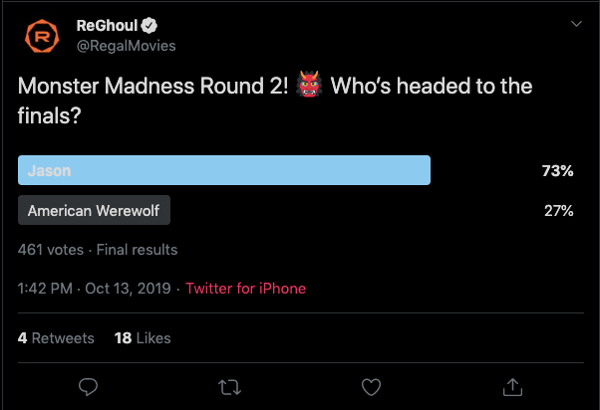
Regal’s tweet is an example of owned media because the company was in full control of the answers followers gave (and, apparently, American Werewolf didn’t stand a chance). Regal effectively kept true to their brand by using only classic movies in their poll, while still putting a modern spin on it.
This is also a good example of how retweets don’t necessarily equal success. While four retweets isn’t that big of a deal, check out the votes: 461. That means there were over 400 interactions with a single tweet.
2. Taco Bell
Digital strategy: User-generated content, earned media
Real love is taking your engagement photos at your favorite fast food Mexican restaurant — right?. User-generated content is one of the best ways to gain traction in your strategy, by demonstrating your appreciation for loyal customers who promote your product, while incentivizing other users’ to promote your products for the chance at a similar shout-out. Plus, sometimes the content your brand-lovers create is really, really good:
Oh, you sure did. 👏❤️ https://t.co/TXflZvxVxR
Taco Bell (@tacobell)
September 26, 2019
It’s not every day someone takes engagement photos at a fast-food restaurant, and Taco Bell jumped at this earned media opportunity. Earned media is at work here because this couple is saying they love baja blasts and crunchwraps as much as they love each other — so it must be delicious.
3. Small Girls PR
Digital strategy: Event marketing
Wait, is that Keke Palmer?
Small Girls PR is a boutique PR company based in New York, and one of the company’s talents is throwing amazing events for their clients, like Olay. This event recap carousel on Instagram is an effective event marketing example.
Event marketing is a fantastic opportunity to boost awareness for your brand. Not every business needs to throw lavish events, either. Event marketing can be as simple as the last company outing you had at your team’s favorite brewery.
Posting a quick recap on Instagram gives your brand culture definition, depth, and demonstrates your appreciation for your employees’ and work-life balance, ideally incentivizing others to apply.
4. Diesel Cafe
Digital strategy: Word of mouth
Boston-local cafe Diesel Cafe is more than just a great location to get vegan bagels. It also rocks at word-of-mouth marketing. In fact, Diesel even has a website dedicated to it — a place where fans can submit letters about the fun times they’ve had at the cafe:
Check your company’s Yelp climate. Are people giving you nice reviews? Showcasing some of them on your social channels is an effective opportunity to provide social proof that your products or services are a worthwhile investment, since people typically trust peers more than ads.
5. Target
Digital strategy: Paid media, Twitter cards
If you’ve got the budget for paid media, take full advantage of it. Paid media is when you pay social channels, like Twitter, to promote your content on their site. By doing this, your content reaches new audiences you might not be able to reach organically.
Get wrapped up in soft sweaters and fleece-lined jean jackets.
— Target (@Target)
October 11, 2019
An inclusive ad from Target about fall shopping uses Twitter cards to promote their brand and offer easier ways to shop — simply click on the photo, and you’re redirected to a purchase page.. More social channels are offering ways for shoppers to purchase in-app or close to it, driving sales and boosting exposure for brands.
Ultimately, creating a complete marketing strategy isn’t something that can happen overnight. It takes time, hard work, and dedication to ensure you’re reaching your ideal audience, whenever and wherever they want to be reached. Stick with it (and use some of the resources we’ve included in this post), and over time, research and customer feedback will help you refine your strategy to ensure you’re spending optimal time and resources on the marketing channels your audience cares most about.
