
The 20 Best Google Chrome Extensions for SEO
If you’ve been a marketer for, say, more than five minutes, you know SEO is important. In fact, 97% of people learn more about a local company online than anywhere else. And since Google owns 90% of all searches, it’s easy for marketers to spend hours optimizing every day. This makes saving time where possible key to a busy marketer’s workflow.
Thankfully, when it comes to improving SEO and maximizing your time, there’s a Google Chrome extension for that. In fact, there are many of them, and most can be used right in your browser.
To help you navigate the crowded world of Chrome extensions, we’ve come up with 20 of our favorites for SEO. Most are compatible with Firefox and Safari as well, and each of them keeps track of most of the analytics for you. Because less time fussing over SEO means more time for finding the perfect dog GIF to share with your team.
Chrome extensions are helpful when looking for ideas to improve SEO strategy and seeing the analytics of competitors instantly. Some even have the ability to make colorful graphs and charts for us visual folks to make presentations and comparisons a breeze.
The 20 Best SEO Extensions for Google Chrome
1. MozBar
MozBar allows its users to check SEO within their browser using just one click. MozBar provides metrics while viewing any webpage, and allows users to export SERPs into a CRV file and access analytics. Upgrading to MozBar Premium offers functions like analyzing keyword difficulty, page optimization, and digger SERP metrics.
2. Keywords Everywhere
- Price: Free
- Chrome extension
Keywords Everywhere is a tool that shows three different information types for keywords on Google: monthly search volume, cost per click, and Google Adwords competition. By having this extension installed, going back and forth from Google Keywords to your open browser page is a thing of the past, as it’s an in-browser extension.
3. SimilarWeb
- Price: Free
- Chrome Extension
Offering traffic and key metrics for any website, SimilarWeb is a popular extension that allows users to see statistics and strategy for any website while searching the internet with one click. This extension is helpful for those looking for new and effective SEO strategies, as well as those interested in analyzing different trends across the market.
4. Redirect Path
- Price: Free
- Chrome extension
Microsoft Word’s infamous red squiggly line that alerts their user of improper grammar has an SEO doppelganger: Redirect Path. This extension flags 301, 302, 404, 500 HTTP Status Codes, Meta, and Javascript redirects catching potential issues immediately. It also shows other HTTP headers and server IP addresses.
5. SEO Meta in 1 Click
- Price: Free
- Chrome extension
SEO Meta in 1 Click displays all meta tags and main SEO information for a web page with just a single click. This includes the lengths of titles and descriptions, URL, headers in order of appearance, and the number of images without alt text.
6. BuzzSumo
- Price: Free
- Chrome extension
Need SEO tracking for social? BuzzSumo’s got you covered. This extension allows you to easily track shares and top-performing content on social media pages. Using BuzzSumo can help aid in future SEO decisions and check the backlinks you provide on your pages.
7. Hunter
Hunter makes it easy to find contact information instantly in your browser. This process, named “Domain Search,” is accessible by an icon in Chrome. Hunter finds all the email addresses related to a website.
8. Mangools
Check the SEO strength of websites with Mangools, which offers you the top SEO metrics of websites using Moz and Majestic. Access premium features such as the self-described “Google SERP on steroids” function, aiding with keywords, backlinks, and profile analysis.
9. Google Trends
- Price: Free
- Chrome extension
Trends is part of Google Webmaster Tools, a set of extension tools for building websites and integrating them with Google. Trends presents analytics, using graphs, on the top searches in Google (from Taylor Swift to Kim Kardashian) from across several countries. Trends can help you identify the SEO performance on your website.
10. SEMrush
- Price: $99/mo.
- Chrome extension
SEMrush presents itself as a dashboard, reporting on domain performance, as well as that of individual pages. One of its prime features is its SEO toolkit, which allows its users to analyze backlinks and watch keyword rank. It also provides on-page SEO suggestions, fitting itself into an SEO strategy nicely.
11. Serpstat
By using Serpstat, you can instantly check the SEO of your website as well as competitors’. After clicking the in-browser icon, you’ll be able to receive a full SEO audit of a domain. Serpstat has three sections: On-page SEO parameters, page analysis, and domain analysis.
12. Ahrefs
With their SEO toolbar in Chrome, Ahrefs examines website properties and produces keywords, links, and ranking profiles that offer SEO improvements on your website. To receive a detailed report on an SEO metric, just click on it.
13. Check My Links
- Price: Free
- Chrome extension
Aptly named, Check My Links does just that with one click, scanning through webpages for broken links. A huge time saver when designing link-heavy web pages, the extension makes sure the links are working properly, notating when links are broken.
14. NinjaOutreach Lite
- Price: Free
- Chrome extension
The free extension from NinjaOutreach makes browsers capable of advanced data mining. It offers various SEO functions such as webpage URL, title, links, meta descriptions, follower counts on social media, and monetization techniques.
15. PageSpeed Insights by Google
- Price: Free
- Chrome extension
Part of Google Webmaster Tools, PageSpeed Insights is an SEO tool that provides information on desktop and mobile sites. After running an analysis, PageSpeed Insights gives a score on the site and provides suggestions on how to make the web pages run faster.
16. Woorank
- Price: Free 14-day trial, $49/mo for a Wookrank Pro plan or $149/mo for a Woorank Premium
- Chrome extension
Woorank is a site analysis tool similar to PageSpeed Insights, allowing users to see suggestions for improvement on their web pages. It provides an in-depth report on online visibility, social media, and usability, allowing you to keep track of ways to improve different metrics.
17. NoFollow
- Price: Free
- Chrome extension
With NoFollow, marketers can see an outline of web pages that are coded with the nofollow metatag. Because Nofollow links don’t add to SEO metrics, users can identify any external web pages that are backlinking to their websites with indexed links. For pages you don’t want to be indexed — like a landing page — NoFollow checks to see if those pages are coded correctly and highlights any links that aren’t working correctly.
18. Impactana
- Price: Free
- Chrome extension
This toolbar gives a set of metrics, available right in Chrome. The metrics are divided into two categories; “Buzz,” which analyzes social media content that best fits your audience, and “Impact,” which analyzes user engagement. The latter includes data on clicks, comments, views, and more.
19. BuzzStream
BuzzStream allows marketers to organize and perform outreach that’s specialized to your business. The extension, BuzzMarker, connects with BuzzStream to assist in building links, promoting content, and pitching influencers.
20. Screaming Frog SEO Spider
Search marketing stressing you out? This tool is here to help. Screaming Frog’s SEO Spider enables you to crawl website URLs and add key elements to analyze SEO and fix detected issues, making an excruciatingly long process simplified. Some elements include finding broken links, discovering duplicate pages, and site visualizations.
Using these extensions will lessen your SEO stress. And many provide useful information on how to refine skills like backlink building and keyword accuracy. You’ll be acing this section of Marketing 101 in no time.
Happy browsing!

What Is Digital Marketing?
With how accessible the internet is today, would you believe me if I told you the number of people who go online every day is still increasing?
It is. In fact, “constant” internet usage among adults increased by 5% in just the last three years, according to Pew Research. And although we say it a lot, the way people shop and buy really has changed along with it — meaning offline marketing isn’t as effective as it used to be.
Marketing has always been about connecting with your audience in the right place and at the right time. Today, that means you need to meet them where they are already spending time: on the internet.
Enter digital marketing — in other words, any form of marketing that exists online.
At HubSpot, we talk a lot about inbound marketing as a really effective way to attract, engage, and delight customers online. But we still get a lot of questions from people all around the world about digital marketing. So, we decided to answer them. Click the links below to jump to each question, or keep reading to see how digital marketing is carries out today.
- What is digital marketing?
- Why digital marketing?
- Digital Marketing Examples
- What does a digital marketer do?
- Inbound Marketing vs. Digital Marketing: Which is it?
- Does digital marketing work for all businesses?
- What is the role of digital marketing to a company?
- What types of digital content should I create?
- How long will it take to see results from my content?
- Do I need a big budget for digital marketing?
- How does mobile marketing fit into my digital marketing strategy?
- I’m ready to try digital marketing. Now what?
So, how do you define digital marketing today?
A seasoned inbound marketer might say inbound marketing and digital marketing are virtually the same thing, but there are some minor differences. And conversations with marketers and business owners in the U.S., U.K., Asia, Australia, and New Zealand, I’ve learned a lot about how those small differences are being observed across the world.
Because digital marketing has so many options and strategies associated with it, you can get creative and experiment with a variety of marketing tactics on a budget. With digital marketing, you can also use tools like analytics dashboards to monitor the success and ROI of your campaigns more than you could with a traditional promotional content — such as a billboard or print ad.
How does a business define digital marketing?
Digital marketing is defined by the use of numerous digital tactics and channels to connect with customers where they spend much of their time: online. From the website itself to a business’s online branding assets — digital advertising, email marketing, online brochures, and beyond — there’s a spectrum of tactics that fall under the umbrella of “digital marketing.”
The best digital marketers have a clear picture of how each digital marketing campaign supports their overarching goals. And depending on the goals of their marketing strategy, marketers can support a larger campaign through the free and paid channels at their disposal.
A content marketer, for example, can create a series of blog posts that serve to generate leads from a new ebook the business recently created. The company’s social media marketer might then help promote these blog posts through paid and organic posts on the business’s social media accounts. Perhaps the email marketer creates an email campaign to send those who download the ebook more information on the company. We’ll talk more about these specific digital marketers in a minute.
Here’s a quick rundown of some of the most common digital marketing tactics and the channels involved in each one.
Search Engine Optimization (SEO)
This is the process of optimizing your website to “rank” higher in search engine results pages, thereby increasing the amount of organic (or free) traffic your website receives. The channels that benefit from SEO include websites, blogs, and infographics.
There are a number of ways to approach SEO in order to generate qualified traffic to your website. These include:
- On page SEO: This type of SEO focuses on all of the content that exists “on the page” when looking at a website. By researching keywords for their search volume and intent (or meaning), you can answer questions for readers and rank higher on the search engine results pages (SERPs) those questions produce.
- Off page SEO: This type of SEO focuses on all of the activity that takes place “off the page” when looking to optimize your website. “What activity not on my own website could affect my ranking?” You might ask. The answer is inbound links, also known as backlinks. The number of publishers that link to you, and the relative “authority” of those publishers, affect how highly you rank for the keywords you care about. By networking with other publishers, writing guest posts on these websites (and linking back to your website), and generating external attention, you can earn the backlinks you need to move your website up on all the right SERPs.
- Technical SEO: This type of SEO focuses on the backend of your website, and how your pages are coded. Image compression, structured data, and CSS file optimization are all forms of technical SEO that can increase your website’s loading speed — an important ranking factor in the eyes of search engines like Google.
Content Marketing
This term denotes the creation and promotion of content assets for the purpose of generating brand awareness, traffic growth, lead generation, and customers. The channels that can play a part in your content marketing strategy include:
- Blog posts: Writing and publishing articles on a company blog helps you demonstrate your industry expertise and generates organic search traffic for your business. This ultimately gives you more opportunities to convert website visitors into leads for your sales team.
- Ebooks and whitepapers: Ebooks, whitepapers, and similar long-form content helps further educate website visitors. It also allows you to exchange content for a reader’s contact information, generating leads for your company and moving people through the buyer’s journey.
- Infographics: Sometimes, readers want you to show, not tell. Infographics are a form of visual content that helps website visitors visualize a concept you want to help them learn.
Want to learn and apply content marketing to your business? Check out HubSpot Academy’s free content marketing training resource page.
Social Media Marketing
This practice promotes your brand and your content on social media channels to increase brand awareness, drive traffic, and generate leads for your business. The channels you can use in social media marketing include:
- Facebook.
- Twitter.
- LinkedIn.
- Instagram.
- Snapchat.
- Pinterest.
If you’re new to social platforms, you can use tools like HubSpot to connect channels like LinkedIn and Facebook in one place. This way, you can easily schedule content for multiple channels at once, and monitor analytics from the platform as well.
On top of connecting social accounts for posting purposes, you can also integrate your social media inboxes into HubSpot, so you can get your direct messages in one place.
Pay Per Click (PPC)
PPC is a method of driving traffic to your website by paying a publisher every time your ad is clicked. One of the most common types of PPC is Google Ads, which allows you to pay for top slots on Google’s search engine results pages at a price “per click” of the links you place. Other channels where you can use PPC include:
- Paid ads on Facebook: Here, users can pay to customize a video, image post, or slideshow, which Facebook will publish to the newsfeeds of people who match your business’s audience.
- Twitter Ads campaigns: Here, users can pay to place a series of posts or profile badges to the news feeds of a specific audience, all dedicated to accomplish a specific goal for your business. This goal can be website traffic, more Twitter followers, tweet engagement, or even app downloads.
- Sponsored Messages on LinkedIn: Here, users can pay to send messages directly to specific LinkedIn users based on their industry and background.
Affiliate Marketing
This is a type of performance-based advertising where you receive commission for promoting someone else’s products or services on your website. Affiliate marketing channels include:
- Hosting video ads through the YouTube Partner Program.
- Posting affiliate links from your social media accounts.
Native Advertising
Native advertising refers to advertisements that are primarily content-led and featured on a platform alongside other, non-paid content. BuzzFeed-sponsored posts are a good example, but many people also consider social media advertising to be “native” — Facebook advertising and Instagram advertising, for example.
Marketing Automation
Marketing automation refers to the software that serves to automate your basic marketing operations. Many marketing departments can automate repetitive tasks they would otherwise do manually, such as:
- Email newsletters: Email automation doesn’t just allow you to automatically send emails to your subscribers. It can also help you shrink and expand your contact list as needed so your newsletters are only going to the people who want to see them in their inboxes.
- Social media post scheduling: If you want to grow your organization’s presence on a social network, you need to post frequently. This makes manual posting a bit of an unruly process. Social media scheduling tools push your content to your social media channels for you, so you can spend more time focusing on content strategy.
- Lead-nurturing workflows: Generating leads, and converting those leads into customers, can be a long process. You can automate that process by sending leads specific emails and content once they fit certain criteria, such as when they download and open an ebook.
- Campaign tracking and reporting: Marketing campaigns can include a ton of different people, emails, content, webpages, phone calls, and more. Marketing automation can help you sort everything you work on by the campaign it’s serving, and then track the performance of that campaign based on the progress all of these components make over time.
Email Marketing
Companies use email marketing as a way of communicating with their audiences. Email is often used to promote content, discounts and events, as well as to direct people toward the business’s website. The types of emails you might send in an email marketing campaign include:
- Blog subscription newsletters.
- Follow-up emails to website visitors who downloaded something.
- Customer welcome emails.
- Holiday promotions to loyalty program members.
- Tips or similar series emails for customer nurturing.
Online PR
Online PR is the practice of securing earned online coverage with digital publications, blogs, and other content-based websites. It’s much like traditional PR, but in the online space. The channels you can use to maximize your PR efforts include:
- Reporter outreach via social media: Talking to journalists on Twitter, for example, is a great way to develop a relationship with the press that produces earned media opportunities for your company.
- Engaging online reviews of your company: When someone reviews your company online, whether that review is good or bad, your instinct might be not to touch it. On the contrary, engaging company reviews helps you humanize your brand and deliver powerful messaging that protects your reputation.
- Engaging comments on your personal website or blog: Similar to the way you’d respond to reviews of your company, responding to the people who are reading your content is the best way to generate productive conversation around your industry.
Inbound Marketing
Inbound marketing refers to a marketing methodology wherein you attract, engage, and delight customers at every stage of the buyer’s journey. You can use every digital marketing tactic listed above, throughout an inbound marketing strategy, to create a customer experience that works with the customer, not against them. Here are some classic examples of inbound marketing versus traditional marketing:
- Blogging vs. pop-up ads
- Video marketing vs. commercial advertising
- Email contact lists vs. email spam
What does a digital marketer do?
Digital marketers are in charge of driving brand awareness and lead generation through all the digital channels — both free and paid — that are at a company’s disposal. These channels include social media, the company’s own website, search engine rankings, email, display advertising, and the company’s blog.
The digital marketer usually focuses on a different key performance indicator (KPI) for each channel so they can properly measure the company’s performance across each one. A digital marketer who’s in charge of SEO, for example, measures their website’s “organic traffic” — of that traffic coming from website visitors who found a page of the business’s website via a Google search.
Digital marketing is carried out across many marketing roles today. In small companies, one generalist might own many of the digital marketing tactics described above at the same time. In larger companies, these tactics have multiple specialists that each focus on just one or two of the brand’s digital channels.
Here are some examples of these specialists:
SEO Manager
Main KPIs: Organic traffic
In short, SEO managers get the business to rank on Google. Using a variety of approaches to search engine optimization, this person might work directly with content creators to ensure the content they produce performs well on Google — even if the company also posts this content on social media.
Content Marketing Specialist
Main KPIs: Time on page, overall blog traffic, YouTube channel subscribers
Content marketing specialists are the digital content creators. They frequently keep track of the company’s blogging calendar, and come up with a content strategy that includes video as well. These professionals often work with people in other departments to ensure the products and campaigns the business launches are supported with promotional content on each digital channel.
Social Media Manager
Main KPIs: Follows, Impressions, Shares
The role of a social media manager is easy to infer from the title, but which social networks they manage for the company depends on the industry. Above all, social media managers establish a posting schedule for the company’s written and visual content. This employee might also work with the content marketing specialist to develop a strategy for which content to post on which social network.
(Note: Per the KPIs above, “impressions” refers to the number of times a business’s posts appear on the newsfeed of a user.)
Marketing Automation Coordinator
Main KPIs: Email open rate, campaign click-through rate, lead-generation (conversion) rate
The marketing automation coordinator helps choose and manage the software that allows the whole marketing team to understand their customers’ behavior and measure the growth of their business. Because many of the marketing operations described above might be executed separately from one another, it’s important for there to be someone who can group these digital activities into individual campaigns and track each campaign’s performance.
Inbound Marketing vs. Digital Marketing: Which Is It?
On the surface, the two seem similar: Both occur primarily online, and both focus on creating digital content for people to consume. So what’s the difference?
The term “digital marketing” doesn’t differentiate between push and pull marketing tactics (or what we might now refer to as ‘inbound’ and ‘outbound’ methods). Both can still fall under the umbrella of digital marketing.
Digital outbound tactics aim to put a marketing message directly in front of as many people as possible in the online space — regardless of whether it’s relevant or welcomed. For example, the garish banner ads you see at the top of many websites try to push a product or promotion onto people who aren’t necessarily ready to receive it.
On the other hand, marketers who employ digital inbound tactics use online content to attract their target customers onto their websites by providing assets that are helpful to them. One of the simplest yet most powerful inbound digital marketing assets is a blog, which allows your website to capitalize on the terms which your ideal customers are searching for.
Ultimately, inbound marketing is a methodology that uses digital marketing assets to attract, engage, and delight customers online. Digital marketing, on the other hand, is simply an umbrella term to describe online marketing tactics of any kind, regardless of whether they’re considered inbound or outbound.
Does digital marketing work for all businesses?
Digital marketing can work for any business in any industry. Regardless of what your company sells, digital marketing still involves building out buyer personas to identify your audience’s needs, and creating valuable online content. However, that’s not to say all businesses should implement a digital marketing strategy in the same way.
B2B Digital Marketing
If your company is business-to-business (B2B), your digital marketing efforts are likely to be centered around online lead generation, with the end goal being for someone to speak to a salesperson. For that reason, the role of your marketing strategy is to attract and convert the highest quality leads for your salespeople via your website and supporting digital channels.
Beyond your website, you’ll probably choose to focus your efforts on business-focused channels like LinkedIn where your demographic is spending their time online.
B2C Digital Marketing
If your company is business-to-consumer (B2C), depending on the price point of your products, it’s likely that the goal of your digital marketing efforts is to attract people to your website and have them become customers without ever needing to speak to a salesperson.
For that reason, you’re probably less likely to focus on ‘leads’ in their traditional sense, and more likely to focus on building an accelerated buyer’s journey, from the moment someone lands on your website, to the moment that they make a purchase. This will often mean your product features in your content higher up in the marketing funnel than it might for a B2B business, and you might need to use stronger calls-to-action (CTAs).
For B2C companies, channels like Instagram and Pinterest can often be more valuable than business-focused platforms LinkedIn.
What is the role of digital marketing to a company?
Unlike most offline marketing efforts, digital marketing allows marketers to see accurate results in real time. If you’ve ever put an advert in a newspaper, you’ll know how difficult it is to estimate how many people actually flipped to that page and paid attention to your ad. There’s no surefire way to know if that ad was responsible for any sales at all.
On the other hand, with digital marketing, you can measure the ROI of pretty much any aspect of your marketing efforts.
Here are some examples:
Website Traffic
With digital marketing, you can see the exact number of people who have viewed your website’s homepage in real time by using digital analytics software, available in marketing platforms like HubSpot.
You can also see how many pages they visited, what device they were using, and where they came from, amongst other digital analytics data.
This intelligence helps you to prioritize which marketing channels to spend more or less time on, based on the number of people those channels are driving to your website. For example, if only 10% of your traffic is coming from organic search, you know that you probably need to spend some time on SEO to increase that percentage.
With offline marketing, it’s very difficult to tell how people are interacting with your brand before they have an interaction with a salesperson or make a purchase. With digital marketing, you can identify trends and patterns in people’s behavior before they’ve reached the final stage in their buyer’s journey, meaning you can make more informed decisions about how to attract them to your website right at the top of the marketing funnel.
Content Performance and Lead Generation
Imagine you’ve created a product brochure and posted it through people’s letterboxes — that brochure is a form of content, albeit offline. The problem is that you have no idea how many people opened your brochure or how many people threw it straight into the trash.
Now imagine you had that brochure on your website instead. You can measure exactly how many people viewed the page where it’s hosted, and you can collect the contact details of those who download it by using forms. Not only can you measure how many people are engaging with your content, but you’re also generating qualified leads when people download it.
Attribution Modeling
An effective digital marketing strategy combined with the right tools and technologies allows you to trace all of your sales back to a customer’s first digital touchpoint with your business.
We call this attribution modeling, and it allows you to identify trends in the way people research and buy your product, helping you to make more informed decisions about what parts of your marketing strategy deserve more attention, and what parts of your sales cycle need refining.
Connecting the dots between marketing and sales is hugely important — according to Aberdeen Group, companies with strong sales and marketing alignment achieve a 20% annual growth rate, compared to a 4% decline in revenue for companies with poor alignment. If you can improve your customer’s’ journey through the buying cycle by using digital technologies, then it’s likely to reflect positively on your business’s bottom line.
What types of digital content should I create?
The kind of content you create depends on your audience’s needs at different stages in the buyer’s journey. You should start by creating buyer personas (use these free templates, or try makemypersona.com) to identify what your audience’s goals and challenges are in relation to your business. On a basic level, your online content should aim to help them meet these goals, and overcome their challenges.
Then, you’ll need to think about when they’re most likely to be ready to consume this content in relation to what stage they’re at in their buyer’s journey. We call this content mapping.
With content mapping, the goal is to target content according to:
- The characteristics of the person who will be consuming it (that’s where buyer personas come in).
- How close that person is to making a purchase (i.e., their lifecycle stage).
In terms of the format of your content, there are a lot of different things to try. Here are some options we’d recommend using at each stage of the buyer’s journey:
Awareness Stage
- Blog posts. Great for increasing your organic traffic when paired with a strong SEO and keyword strategy.
- Infographics. Very shareable, meaning they increase your chances of being found via social media when others share your content. (Check out these free infographic templates to get you started.)
- Short videos. Again, these are very shareable and can help your brand get found by new audiences by hosting them on platforms like YouTube.
Consideration Stage
- Ebooks. Great for lead generation as they’re generally more comprehensive than a blog post or infographic, meaning someone is more likely to exchange their contact information to receive it.
- Research reports. Again, this is a high value content piece which is great for lead generation. Research reports and new data for your industry can also work for the awareness stage though, as they’re often picked-up by the media or industry press.
- Webinars. As they’re a more detailed, interactive form of video content, webinars are an effective consideration stage content format as they offer more comprehensive content than a blog post or short video.
Decision Stage
- Case studies. Having detailed case studies on your website can be an effective form of content for those who are ready to make a purchasing decision, as it helps you positively influence their decision.
- Testimonials. If case studies aren’t a good fit for your business, having short testimonials around your website is a good alternative. For B2C brands, think of testimonials a little more loosely. If you’re a clothing brand, these might take the form of photos of how other people styled a shirt or dress, pulled from a branded hashtag where people can contribute.
How long will it take to see results from my content?
With digital marketing, it can often feel like you’re able to see results much faster than you might with offline marketing due to the fact it’s easier to measure ROI. However, it ultimately depends on the scale and effectiveness of your digital marketing strategy.
If you spend time building comprehensive buyer personas to identify the needs of your audience, and you focus on creating quality online content to attract and convert them, then you’re likely to see strong results within the first six months.
If paid advertising is part of your digital strategy, then the results come even quicker — but it’s recommended to focus on building your organic (or ‘free’) reach using content, SEO, and social media for long-term, sustainable success.
Do I need a big budget for digital marketing?
As with anything, it really depends on what elements of digital marketing you’re looking to add to your strategy.
If you’re focusing on inbound techniques like SEO, social media, and content creation for a preexisting website, the good news is you don’t need very much budget at all. With inbound marketing, the main focus is on creating high quality content that your audience will want to consume, which unless you’re planning to outsource the work, the only investment you’ll need is your time.
You can get started by hosting a website and creating content using HubSpot’s CMS. For those on a tight budget, you can get started using WordPress hosted on WP Engine and using a simple them from StudioPress.
With outbound techniques like online advertising and purchasing email lists, there is undoubtedly some expense. What it costs comes down to what kind of visibility you want to receive as a result of the advertising.
For example, to implement PPC using Google AdWords, you’ll bid against other companies in your industry to appear at the top of Google’s search results for keywords associated with your business. Depending on the competitiveness of the keyword, this can be reasonably affordable, or extremely expensive, which is why it’s a good idea to focus building your organic reach, too.
How does mobile marketing fit into my digital marketing strategy?
Another key component of digital marketing is mobile marketing. In fact, smartphone usage as a whole accounts for 69% of time spent consuming digital media in the U.S., while desktop-based digital media consumption makes up less than half — and the U.S. still isn’t mobile’s biggest fan compared to other countries.
This means it’s essential to optimize your digital ads, web pages, social media images, and other digital assets for mobile devices. If your company has a mobile app that enables users to engage with your brand or shop your products, your app falls under the digital marketing umbrella, too.
Those engaging with your company online via mobile devices need to have the same positive experience as they would on desktop. This means implementing a mobile-friendly or responsive website design to make browsing user-friendly for those on mobile devices. It might also mean reducing the length of your lead generation forms to create a hassle-free experience for people downloading your content on-the-go. As for your social media images, it’s important to always have a mobile user in mind when creating them as image dimensions are smaller on mobile devices, meaning text can be cut-off.
There are lots of ways you can optimize your digital marketing assets for mobile users, and when implementing any digital marketing strategy, it’s hugely important to consider how the experience will translate on mobile devices. By ensuring this is always front-of-mind, you’ll be creating digital experiences that work for your audience, and consequently achieve the results you’re hoping for.
I’m ready to try digital marketing. Now what?
If you’re already doing digital marketing, it’s likely that you’re at least reaching some segments of your audience online. No doubt you can think of some areas of your strategy that could use a little improvement, though.
That’s why we created Why Digital Marketing? The Essential Guide to Marketing Your Brand Online — a step-by-step guide to help you build a digital marketing strategy that’s truly effective, whether you’re a complete beginner or have a little more experience. You can download it for free here.

The Ultimate Guide to Email Design
In 2018, there were over 3.7 billion email users around the world. By 2022, this number is expected to increase to 4.3 billion.
A group within that large number of users includes your business’s target audience, the people you want to market your brand, products, and services to via email.
To ensure your emails stand out and grab the attention of these target audience members, you must consider email design.
What is email design?
Email design is the process of strategically designing and creating an email that resonates with your business’s target audience, specifically your current email subscribers and customers. The design should be attention-grabbing, aesthetically-pleasing, and on-brand so recipients recognize it’s from your company.
Why is email design important?
The average recipient spends about 1.1 seconds scanning an email prior to deciding whether or not they want to stay or abandon the message.
That’s why email design — design that makes your email organized, attention-grabbing, on-brand, and valuable — is so important to the success of your marketing efforts. It’s how you effectively keep recipients reading and interacting with your email content.
Now you’re probably thinking: That sounds great, but how do I design my email to attract my target audience and keep their attention on my email?
To begin, keep these 12 email design best practices in mind.
1. Craft a strong subject line.
Your email subject line is the first thing anyone sees when you send them an email. It’s the brief statement that’s supposed to pique the interest of your recipients. It should capture their attention so they want to open the email and continue reading.
Your subject line should do three main things:
- Grab the attention of your readers in as few words as possible (less is more).
- Provide some sort of value and/ or information that makes them want to open the email.
- Summarize what recipients are going to read and/ or see once they open the email.
Here’s what a subject line looks like in your email inbox:

Here’s what a subject line looks like in your mobile device’s email inbox:
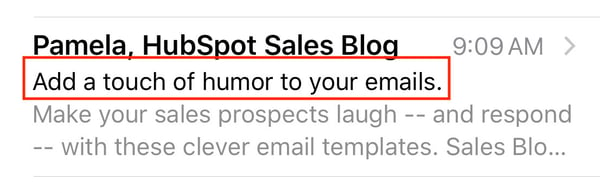
You can also review some of the best email subject line examples for more inspiration.
2. Write an attention-grabbing preheader.
Your email preheader is a preview of what the email is about, similar to the meta description of a web page. It’s the second thing recipients see.
Rather than rewriting the first sentence of your email, you can customize the preheader to provide an inside look into what your recipients are about to read in your message.
For reference, here’s what a preheader looks like in your email inbox:

Here’s what a preheader looks like in your mobile device’s email inbox:
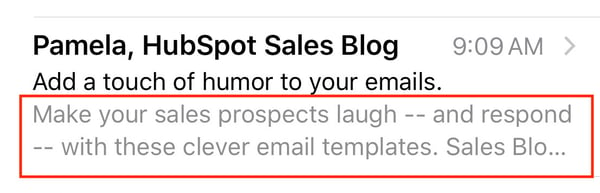
3. Be concise.
Remember the statistic above about how you have about 1.1 seconds to hook your audience with your email? This is precisely why your email copy needs to be concise and straightforward.
Think about it this way: How many times throughout the day do you find yourself opening an email thinking, I can’t wait to sit down and take the next 5-10 minutes to really dive into this email in-depth!
If you’re anything like me, the answer is never.
Give email recipients the information they want and need from you without getting into the weeds. This will show them you value their time which has the potential to help you improve email subscriber retainment.
4. Keep your email on-brand.
When your email recipients open your message, they should know the email was sent from your company … meaning your email should be branded to the point that they don’t need to look at who’s sending the message to know it’s from your business.
To keep your email on-brand, consider using the following tactics:
- Use a tone in your email content that complements your other branding and marketing materials (like your website and social media).
- Incorporate the same colors and fonts that you use in your other branding and marketing materials.
- Include your logo, a link to your website, links to your social media accounts, and calls-to-action (CTAs) relevant to your products or services. This is a great way to increase brand awareness and boost conversions.
5. Use the layout to enhance your email’s user experience.
Nobody wants to read a cluttered, unorganized email. Your email will appear too overwhelming and time-consuming to deal with, and you’ll increase your chances of abandonment.
Instead, organize your layout with user experience (UX) in mind — meaning, leave white space and strategically place your written and visual content in the email so it’s organized and easy to navigate. This will also improve your email’s professional, thoughtful feel, which ensures readers are able to find the information they want and need to enjoy their interactions with your business’s email content.
6. Personalize every email.
When you customize an email with your recipient’s name, the email feels more tailored, professional, and personal. This touch helps you foster a relationship between your business and email recipients. Additionally, it has the potential to help you humanize your brand and, in turn, improve email retention.
7. Incorporate unique visual content.
If your recipients and subscribers open an email and only see written content, it’s likely going to be difficult to hold their attention and keep them interested in your message. Include unique images, videos, GIFs, and animations to break up the written content. This is also a great way to complement your branding and enhance the purpose of your email.
Speaking of incorporating creative and unique visual content in your emails, let’s talk emojis.
8. Don’t be afraid to use emojis. 🧡
At first, emojis may seem like an unnecessary or unprofessional addition to an email. While this may be a fair assumption, it’s actually untrue. In fact, when you add emojis to your email subject line and/ or email copy, you can increase your open and click-through rates.
Note: When using emojis for marketing purposes, make sure you know the meaning and connotation of the specific one(s) you incorporate. 😃
9. Use a responsive design.
A responsive design means your email changes format to fit the screen it’s being viewed on, whether it’s on a desktop, laptop, or mobile device. Recipients will be able to read your emails with ease no matter where or how they’re viewing them. Responsive design enhances user experience and improves email subscriber retention.
10. Optimize your email with calls-to-action.
Calls-to-action (CTAs) are used to convert your email recipients — they may be used to get your recipients to follow you on social media, visit your website, or become paying customers. CTAs should be visible, enticing, and clearly show why they’re valuable to click. Additionally, you might choose to personalize your CTAs to tailor them towards specific recipients — this tactic has been proven to increase conversions.
11. Add an “unsubscribe” button.
Email marketing is highly effective as long as you’re providing relevant content to your recipients. The unfortunate but true reality of email marketing is that your recipients and customers change over time — in addition to various factors related to your business as you grow and evolve — making your content no longer relevant to some at different points in time.
For this reason, allow your recipients to leave (or unsubscribe from your emails) on a good note so they can remember your business in a positive light — who knows, they may need your email content, products, or services again in the future. To ensure these people are leaving on positive terms, simplify their lives with an easy-to-use and visible “unsubscribe” button.
Note: According to the Federal Trade Commission and CAN-SPAM Act, you’re legally required to include a “clear and conspicuous explanation of how the recipient can opt-out of getting emails from you in the future”. Meaning, that unsubscribe button isn’t an option.
If you need some inspiration, check out these effective unsubscribe pages.
12. A/B test your design.
Similar to most other marketing efforts, email design is an iterative process. You might determine you need to make changes and updates to get the most out of your email design. Whether it’s modifying your CTA, colors, font, or tone, don’t be afraid to A/B test designs to determine which one works best in terms of ability to convert, and resonate with, the highest number of recipients.
A great way to incorporate all 12 of these best practices is to use email design software. In fact, many of these best practices will come up naturally while you’re designing and planning your emails this way. Let’s take a look at some of the most common software options for email design along with a few of their features.
Email Design Software
The following commonly-used email design software options each offer capabilities related to your business’s website design as well as marketing and sales efforts. Take a deep look at their features to make the best decision for your overall business goals and email design needs.
HubSpot Email Design Software
HubSpot’s email software allows you to create, design, personalize, and optimize all of your emails. You don’t need any IT or coding knowledge, and you can easily customize mobile-friendly emails and design them to complement your branding. The software allows you to A/B test various email designs to determine which optimization and design efforts are most successful among your recipients.
BEEPro Email Design Software
As a BEEPro user, you can design responsive emails in just minutes. Smart design tools provide you with a quick way to format your emails and ensure your layout complements your content. You can also customize and save various email design templates so your email messaging and branding stays consistent among specific recipients.
MailChimp Email Design Software
With over 100 templates offered, MailChimp allows you to customize your email design for your target audience. If you’re someone who does have coding experience, and you want to take your design a step further, MailChimp offers you the ability to code your template as well.
Stripo.email Email Design Software
Stripo.email requires no HTML knowledge to create and design professional email templates. All of their pre-made templates are responsive so readers can easily view them via any device. You can also sync your current email service provider (ESP) with the software to access all of your email information from a central location.
Chamaileon Email Design Software
The collaborative email builder Chamaileon gives you the ability to invite members of your team to provide input on your designs. The software ensures your emails will have a responsive design and automatically comes with over 100 pre-made templates to customize for specific recipients.
Now that we’ve covered email design best practices as well as the software you can use to assist in designing your perfect email, let’s take a look at some well-crafted examples to inspire your work.
Email Design Inspiration
Email design inspiration provides you with a better idea of what it looks like to combine the best practices we discussed above — these will help you effectively reach your target audience. In addition to the examples we’re going to review here, you can check out this blog post about 13 great examples of email design.
1. Starbucks Rewards Email Design
Starbucks customers and members —the people who have converted and signed up to receive company-related information and rewards — may have seen this email, or something similar, in their inbox:
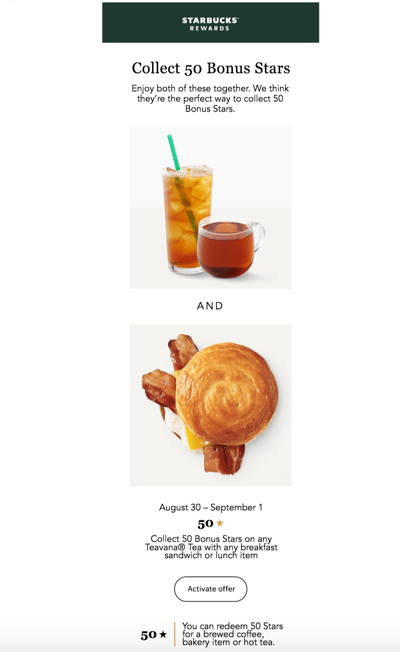
The email complements all of Starbucks’ marketing materials and branding. There’s plenty of white space to separate the concise yet helpful written information that’s paired with artistic and visually-pleasing photos of their products.
The email includes a CTA to activate their email rewards offer, a link to their website to help drive traffic there, and an unsubscribe button for those who’d like to stop receiving Starbucks emails altogether.
2. Vital Proteins Email Design
Vital Proteins’ emails are sent to current customers as well as anyone who has visited their site and signed up for their email newsletter.
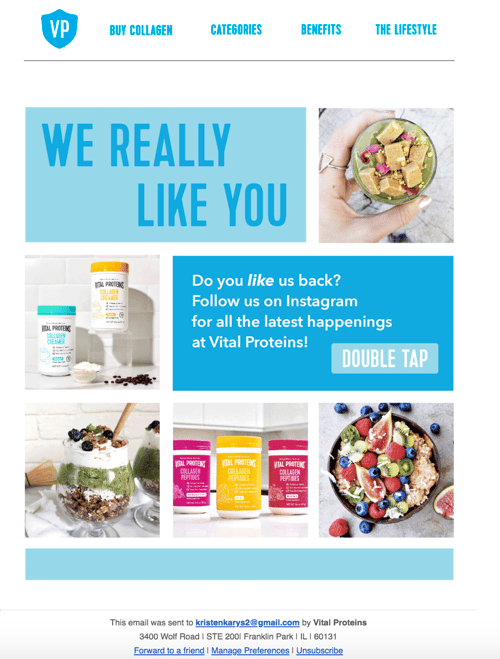
Although this email design contains many images and a lot of information, it’s neatly organized so it doesn’t feel overwhelming to visitors. The email’s colors, font, and unique images are on-brand and feature the company’s products.
It includes an obvious and large CTA that redirects recipients to their Instagram page to increase their number of followers and enhance brand awareness. Lastly, there are buttons at the bottom of the email for unsubscribing, changing email preferences, and forwarding the message to a friend.
3. HubSpot Marketing Blog Email Design
HubSpot sends subscribers Marketing Blog emails every day. These include a few blog marketing-related articles to read and learn from. If recipients choose, they may also subscribe to HubSpot’s Sales Blog and Service Blog emails.
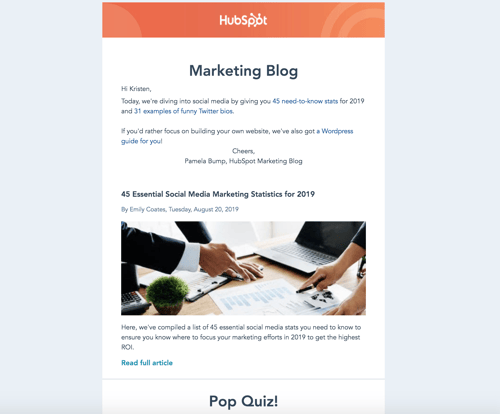
The marketing blog email feature HubSpot branding so readers immediately know who the email is from and what it’s going to include. There are previews and short descriptions of what each blog article in the email is about as well as an interactive pop quiz.
The email has plenty of white space to ensure it doesn’t feel or look cluttered and includes a personal note from the marketing blog editor to humanize the email and foster a personal relationship between readers and HubSpot.
Grow Better With Great Email Design
With great email design, you’ll grow better — meaning, you’ll reach and resonate with your audience members more effectively. Eye-catching and impactful emails will help you build long-lasting relationships and convert more people into paying customers and brand advocates. So, begin designing your emails while keeping the best practices and examples we reviewed in mind.

How We Octupled Image Search Traffic to the HubSpot Blog in 1 Year
Cliché: A picture is worth a thousand words.
Fact: HubSpot’s pictures are worth 120 thousand clicks.
Last year, my colleague Karla Cook gave our readers a 3,000-word peek behind the curtain into a new SEO strategy we implemented at the beginning of 2018. That strategy, which was designed to fix a traffic plateau across the blog, increased our organic traffic by 25% year over year — to eight million organic pageviews per month. This is about three million new organic views we didn’t have at the beginning of 2018.
Where that traffic is coming from is equally exciting.
As I said, our new SEO strategy launched our organic blog traffic to heights it had never been to before. But that strategy had another, somewhat unintended consequence for us.
While we increased our total organic traffic by 25% from last year, we increased our image search traffic by … wait for it … 779%. This refers to traffic that comes from people who conduct a search in Google, or a similar search engine, and click on an image result that leads to the HubSpot Blog.
“Pics or it didn’t happen, Braden.” As you wish:
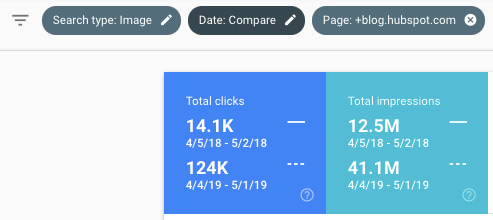
Source: Google Search Console
Take a look at the royal blue tile in the chart above. Between April 2018 and April 2019, HubSpot literally increased its organic traffic from 14,100 organic views per month to 124,000 organic views per month — a nearly 8X lift.
Our image traffic accounts for just under 2% of our blog’s total monthly organic traffic, which, in the scheme of things, is not all that significant. But even though the vast majority of our organic traffic still comes from web search (the written blogs themselves), our image traffic’s rate of increase (779%) is vastly disproportionate to that of our total blog traffic (25%).
And let’s be honest, 2% of 8 million is nothing to sneeze at.
But what made the difference, if not just our new blog-aligned SEO strategy?
Image SEO Best Practices That We Learned
As it turns out, we had a few other tricks up our sleeve along the way that gave our images some extra juice on the search engine results pages (SERPs), all of which are just good best practices in commercial content creation.
1. Optimized Alt Text
In the HubSpot COS, we’ve almost always filled in image alt text fields with text that (tries to) describe the image it’s associated with. Last year, though, we started taking alt text way more seriously.
Rather than automatically fill image alt text with the image file name — something the HubSpot COS conveniently does for you so this field isn’t left blank — we now optimize each image we embed with the keyword the blog post is targeting. Then, we add language that puts this keyword into context that reflects the image it’s describing.
For example, if we’re embedding the image below into a blog post about “college courses about SEO,” our alt text might look something like this:
“Marketing professor showing college student SEO on her computer screen”

Now, let’s modestly estimate that one in three HubSpot blog posts (33%) have at least one image embedded on them, not including the article’s featured image. HubSpot publishes (or republishes) approximately 260 blog posts every three months. If we were to extrapolate this alt text process for 33% of these blog posts, that’s at least 87 images that can potentially capture new organic traffic for us every quarter.
And if the average blog post targets a keyword that receives 3,500 searches per month — a rough estimate based on the HubSpot Marketing Blog’s editorial calendar — that’s a landscape of 304,500 searches per month to which we’re adding more HubSpot content (87 images x 3,500 searches per month). In other words, we’re putting ourselves inside hundreds of thousands of Google Image galleries we weren’t ranking in before.
Read more about our team’s approach to alt text in this blog post.
2. Branded Images & Templates
At HubSpot, we create a ton of valuable resources for our readers to download, ultimately making them a qualifiable lead for the business. However, there are still a ton more resources our readers want for which we necessarily don’t have a lead generation strategy but still garner valuable organic traffic. And these resources appear in image form on many SERPs that are important to us.
These resources include inspiring business quotes, resume templates, sample emails, and even image thumbnails that appear in Google’s featured snippets.
To identify these images, the SEO team analyzed where HubSpot was getting most of its image traffic already, and categorized these sources into image types. Then, we worked with HubSpot UX designer Amanda Chong and the rest of our creative team to develop original HubSpot image templates for each image type.
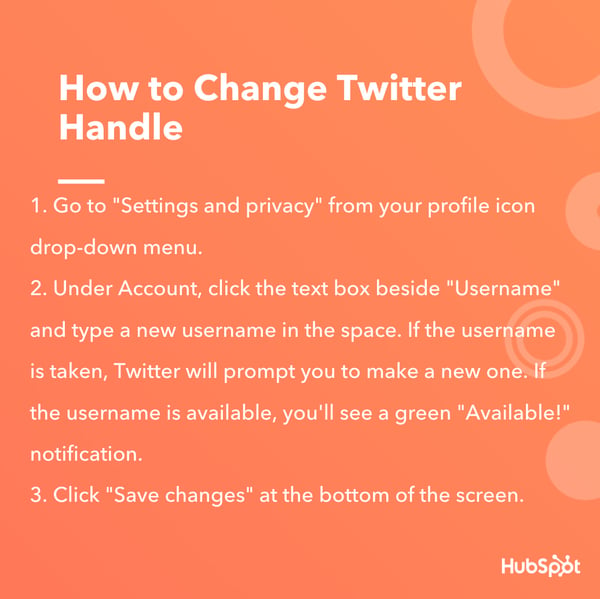
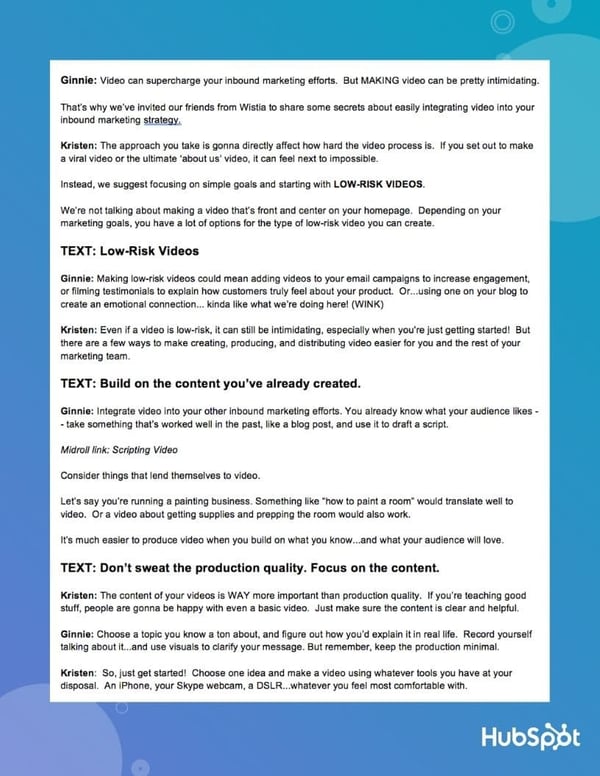
These new image templates allowed the blog team to effectively “brand” various images they might not otherwise embed into a blog post and add alt text for each image using the style described above to expose it on the right SERPs. Here are a couple examples of these branded images now live on HubSpot content:
3. The Search Insights Report
HubSpot’s “Search Insights Report” is a quarterly manifestation of our SEO strategy, delivered directly to the blog team every three months. These reports consist of more than 200 blog post topics, all rooted in searches for which we want to appear on a SERP, that our writers take up and publish over the course of 90 days.
And although we have obviously made deliberate moves to capture more image traffic over the last year, the radiative effect these reports have on our website traffic can’t be overstated.
For one, as we create these search insights reports every quarter, we’re tapping into topics that are increasingly being found in image form. There’s even data to support this — here’s a five-year trend line showing an increase in Google Image search for all queries related to “marketing”:
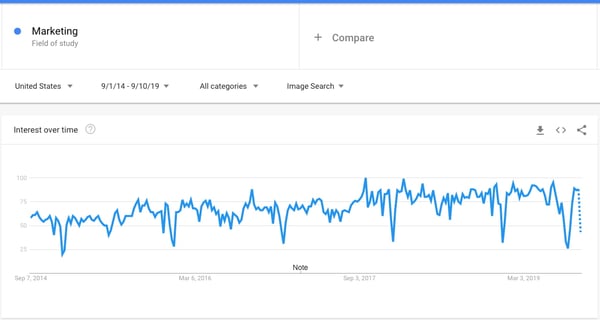
Source: Google Trends
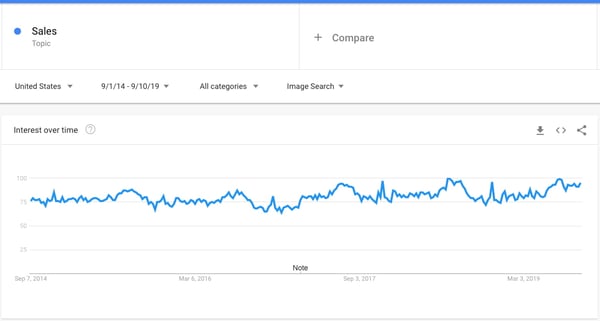
Here’s one for all searches related to “sales”:
And, finally, for “customer service”:
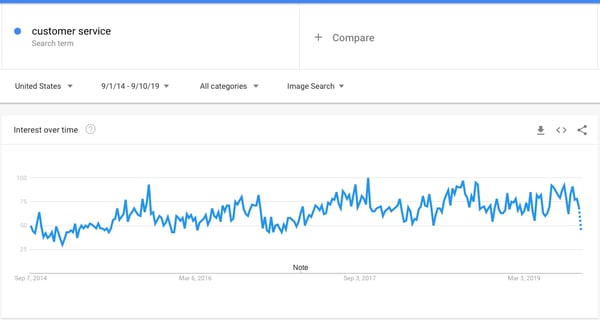
Conveniently, these three topics reflect the target markets of three of our blog properties: the Marketing Blog, the Sales Blog, and the Service Blog. But image traffic has gone up across the board, which means more traffic from image searches has become a byproduct of our new SEO strategy — one that has continued to grow as we capture more space on SERPs we didn’t have before.
Plus, having a document that distills all of our potential content topics, and aligning the content team with this document, has earned us ranking on some of the most competitive search engine real estate we’ve ever seen. It stands to reason we’d see a little (alright, a lot) more image traffic as a result.
It’s easy for marketers to attribute website traffic increases to good SEO, but these results ultimately aren’t possible without the time, creativity, and good judgment put into the content itself.

The Ultimate Guide to Facebook Canvas Ads
Nowadays, Facebook is one of the top platforms for digital advertising — in fact, 93% of social media advertisers use Facebook ads on a regular basis.
Additionally, since Facebook offers a wide range of options for effective and measurable advertising, it’s a good opportunity to reach an audience regardless of your budget.
If you haven’t explored Facebook advertising yet, now’s a good time — at the end of 2018, ad costs on Facebook dropped by 2%, while ad impressions skyrocketed by 34%, making it more appealing for marketers than ever before.
Among the various offerings in the Facebook ad family is the Instant Experience. Formerly known as Canvas Ads, Instant Experiences are mobile-friendly, lightning fast, and deeply immersive. They offer rich, visual experiences for your viewers — keeping them engaged as you highlight your brand and products or services.
To help you find success with Facebook Instant Experiences, we’ve created this guide. Keep reading to learn what Facebook Instant EXperiences are, and how you can increase both brand awareness and revenue through the new tool — for cheap.
What are Facebook Canvas Ads (i.e. Instant Experiences)?
Facebook Canvas Ads, now known as Instant Experiences, let you create full-screen, mobile-only pieces of content within the Facebook app.
You might think of them as a mini landing pages for your business, keeping customers engaged with your campaigns without requiring users to exit the Facebook app at all. These Instant Experiences are particularly effective for segments of your audience who regularly check Facebook and enjoy consuming content within the social media platform.
Viewers can interact with Instant Experiences on both iOS and Android. Once a person clicks on your ad, the Instant Experience loads instantly (15 times faster than a website page) and opens to a full-screen format. From there, users can interact with multiple forms of content.
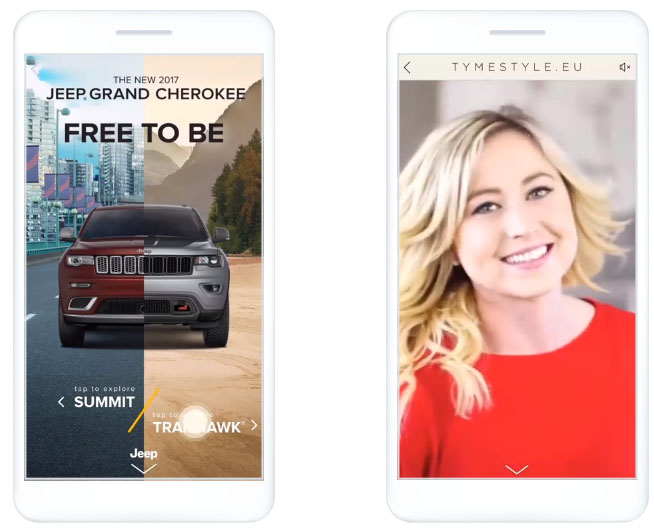
Instant Experiences transports viewers into your world. You can engage and inspire them with images, videos, swipe-through carousels, slideshows, and more — all within a single ad.
Visuals and video do the heavy-lifting here, which lets you tell compelling stories to capture your audience’s attention while simultaneously collecting data that will help you convert those prospects into customers.
Building Your Brand with Instant Experience
Instant Experience ads are great for both direct response and branding campaigns. No matter which stage of the marketing funnel you’re working on, you can create an immersive experience that mirrors your website without taking users away from their Facebook browsing.
Facebook tests revealed that 53% of users watched at least half of every Instant Experience ad they were served. Best of all, many of those ads were over a minute long — that’s some serious screen time your company could be getting.
Additionally, the average phone user spends 90% of their browsing time in-app, as opposed to standalone websites — so if you’re doing mobile-first marketing, it makes sense to build your campaigns in the places your audience spends the most time.
How to Use Instant Experience Ads
Most advertisers use Instant Experience ads in their branding campaigns because of the unique full-screen nature of the ad. However, there has been a huge amount of success with direct response campaigns, otherwise known as demand generation campaigns, as well.
When Canvas Ads became Instant Experiences, it was more than a simple renaming exercise. Facebook also added extra features, including:
- Analytics functions
- Ability to embed Facebook pixels
- Ability to add third-party pixels for A/B testing
- More design template options
- Re-engagement capabilities
To use Instant Experiences, follow these three steps:
1. Start with a design template.
If you don’t have the luxury of a design team, Facebook has you covered. Pre-made templates can help you get your Instant Experience campaigns created and published — fast.
- Instant Storefront helps you sell your products in a grid format.
- Instant Lookbook lets you showcase your products in the context of a lifestyle magazine.
- Instant Customer Acquisition helps you motivate customers by displaying your offers and including a clear call-to-action.
- Instant Storytelling uses images and video to create a highly visual experience and give potential customers a better feel for your brand.

2. Double down on lead generation.
An amazing new feature for Instant Experience ads is a lead generation add-on called Instant Forms. This add-on allows you to collect emails, phone numbers, and any other information you might need from within the Instant Experience ad, enabling your sales and marketing teams to create more customizable and engaging content for your prospects.
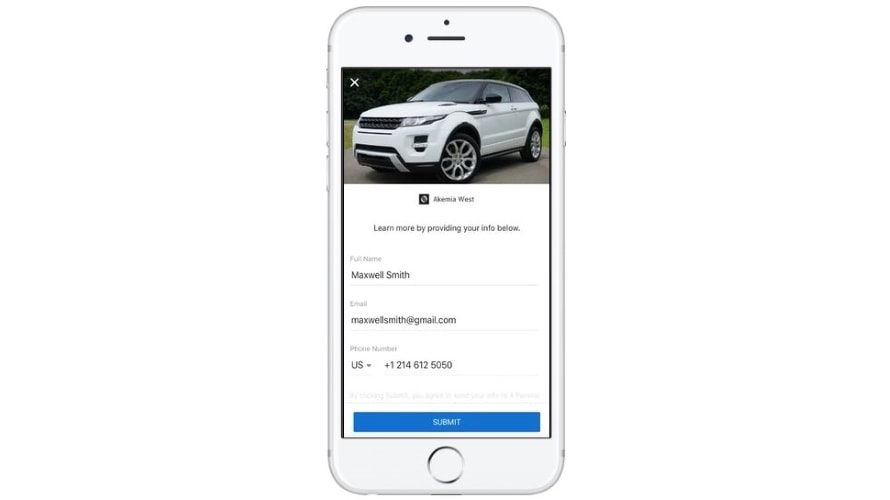
In the past, lead generation campaigns on Facebook had difficulty capturing high-quality leads, mainly because there was such a low amount of friction between clicking an ad, and signing up for the campaign. As a result, users tended to get a little too click-happy.
Typically, these leads only had a vague interest and weren’t highly-qualified leads, resulting in both poor data and wasted budgets.
Capturing lead generation data from an Instant Experience ad solves this issue by ensuring that users must go through a “landing page” experience before giving out their information. This can help advertisers find the qualified leads they’re looking for on Facebook, while enjoying the low cost that typically comes with Facebook lead generation campaigns.
3. Link to your campaigns.
All of your Instant Experience campaigns can now be linked together. This enables your visitors to navigate through two or more of your Instant Experiences — creating a seamless journey similar to a mobile website, without requiring users to venture away from the Facebook app.
Ultimately, it’s critical your ad experience is as frictionless as possible. Facebook’s Instant Experiences ensure you’re meeting a segment of your audience on an app they already enjoy, without requiring them to leave Facebook to experience your brand’s content.
How to Create an Instant Experience Ad
Creating ads can often feel like a daunting undertaking.
For Instant Experiences in particular, the emphasis is on beautiful, striking imagery and design aesthetics that will intrigue your viewers while effectively delivering your message — it’s definitely a little more pressure to perform than your average text-based ad!
Fortunately, to make it easy, Facebook offers multiple templates that can be used to help showcase your products in the Instant Experience format.
Whether you choose to use one of the pre-made templates or create a one-of-a-kind campaign from scratch, it’s easy to get started — here’s how.
1. Head to your Facebook Ads Manager and create a new campaign.
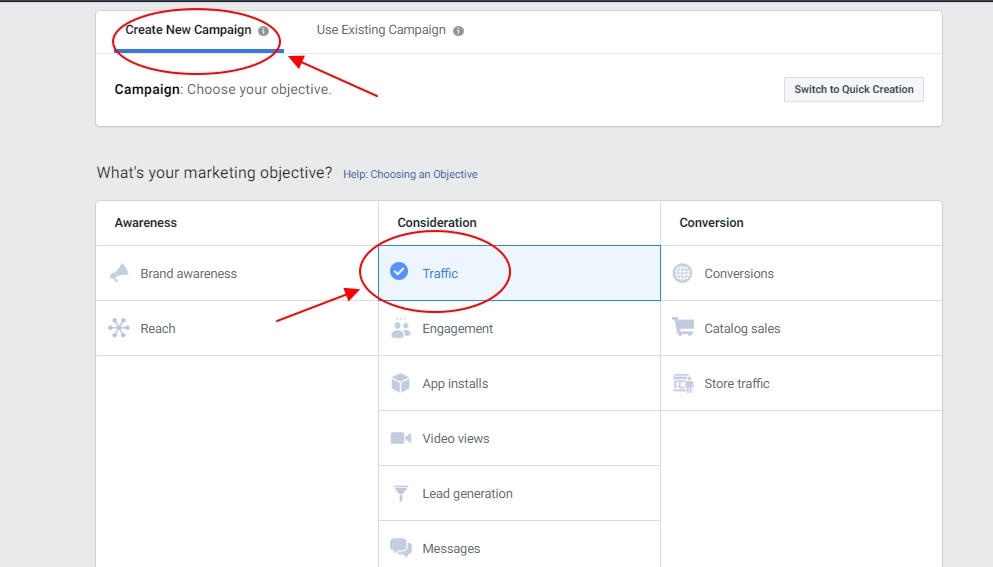
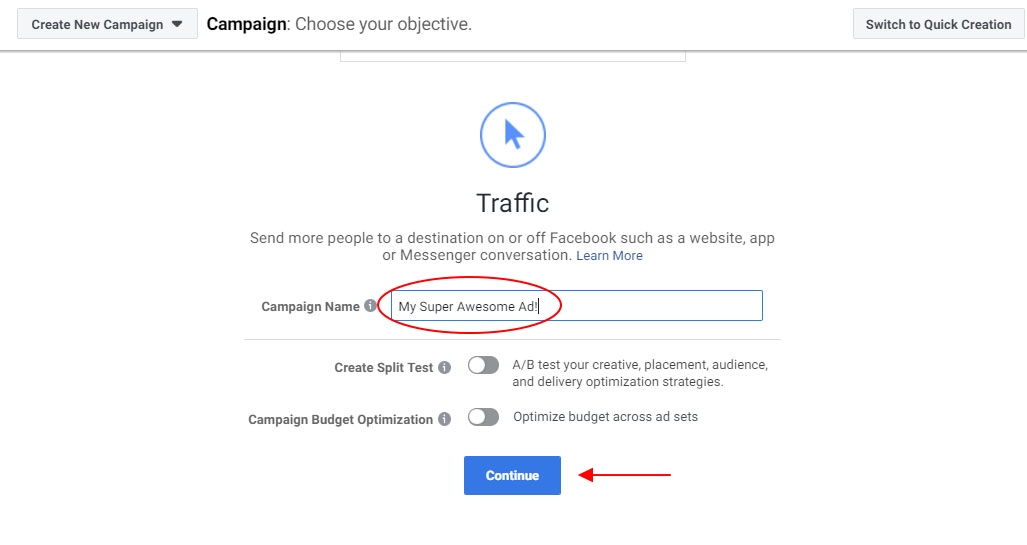
2. Choose a marketing objective that’s supported by Instant Experience, such as traffic, brand awareness, or conversions.
Like any other ad, you need to keep the end goal of your campaign in mind when you’re working on building and launching your Instant Experience. Scroll down and give your new campaign a name, then click “Continue”.
3. Work your way through the audience, budget, and scheduling selections for your ad, then select the format for your ad (e.g. carousel, video, single image, etc).
Note: If you choose “Collection” your Instant Experience will automatically be set for full-screen.
4. Mark the checkbox for “Add an Instant Experience”.
It’s here that you can select a pre-made template to start building your creative, or make your own custom ad.
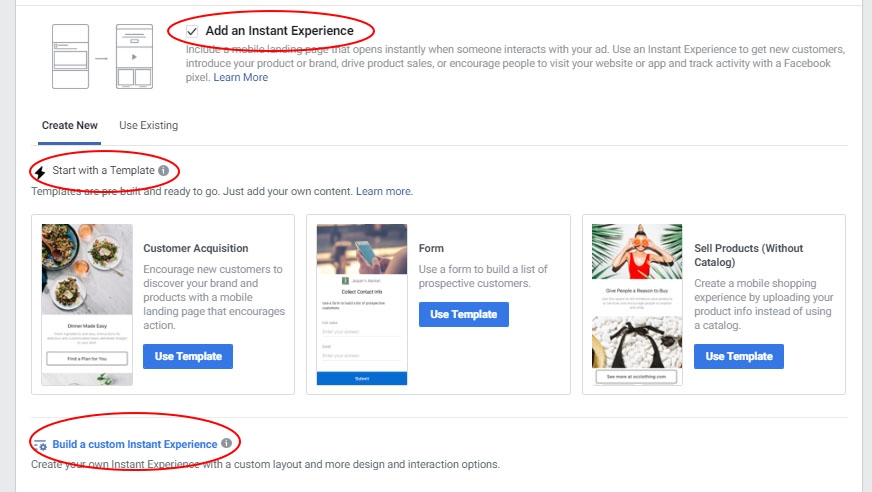
5. If you want full control over the design and layout to showcase your brand, it’s recommended that you build a custom Instant Experience.
We’re going to select this option.
Give your Instant Experience a name, select the components you want to add, and choose how you’d like to fit them onto a mobile screen. Once you’re done, click “Save”.
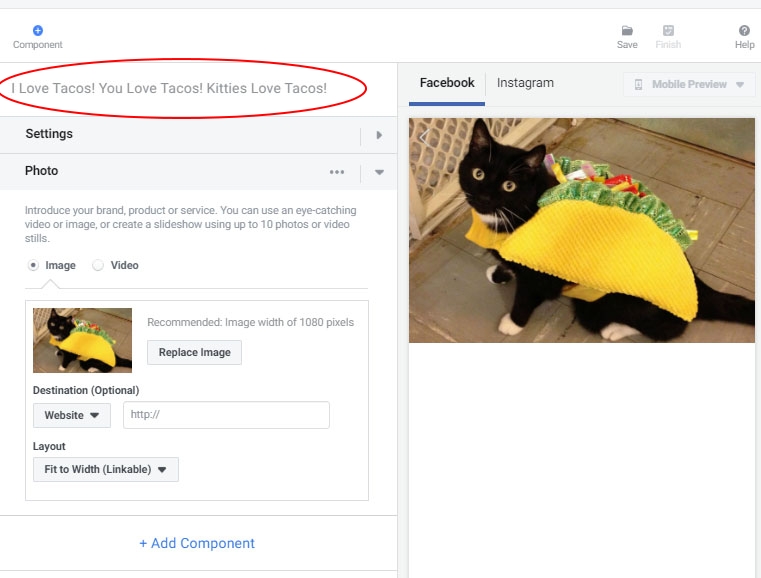
Note: To name each creative component, hover over its name (e.g. “photo”) and click. Renaming each component makes it easier to identify later on if you need to change it.
6. To see what your live Instant Experience will look like, or let someone else preview it before it goes live, click “Mobile Preview” and select the Facebook or Instagram preview, or click “Share”.
If everything looks good to roll out, click “Finish”.
And that’s it! You can now publish and run your Instant Experience campaign for the world to see.
Best Practices for Creating Instant Experience Ads
When designing your Instant Experience ads, it’s important to be crystal-clear on the goal of your campaign, and have polished, eye-catching visuals ready to go.
Ads created in this format need to be visually striking to entice viewers into watching your experience.
Additionally, when it comes to your ad text, it’s vital you ensure your creatives can be read from the top-down. Even if you have carousels, it’s important that the ad experience is readable, especially if the user doesn’t swipe through your carousels.
1. Try Collection, the highest-performing format.
When you’re creating Instant Experiences, keep in mind that the best ad vehicle here is the “Collection” format. This requires that you use at least five images in your ad — and every image counts.
Collection ads consist of a large header with four smaller images underneath. When done correctly, collection ads tell a great story and showcase your products in a unique way.
Ultimately, collection ads can result in higher click-through rates and better overall performance for your campaigns. Collection ads in Instant Experience tend to be thumb-stoppers!
2. Keep your design in mind.
With a high level of customization comes an equally high risk of design error. Low resolution images or too much copy can damage your campaigns.
If you don’t have designers on-board to help with your advertising creatives, make sure you read through Facebook’s help guidelines to ensure that you’re creating an ad with the design specs that will drive results for your business.
You don’t need a Nike-sized budget to get the most out of your Instant Experience campaigns, but seeing how leading brands are using these ads can help get your creative juices flowing.
Here are a few success stories.
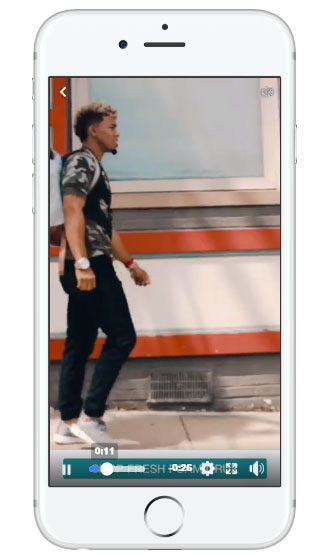
1. New Balance
The New Balance campaign for the relaunch of one of their products included Instant Experience as part of their advertising funnel. This helped nurture their potential customers from the awareness stage to purchase.
As a result, New Balance saw a measurable lift in consumer engagement and sales from both new and existing customers.
2. Dollar Shave Club
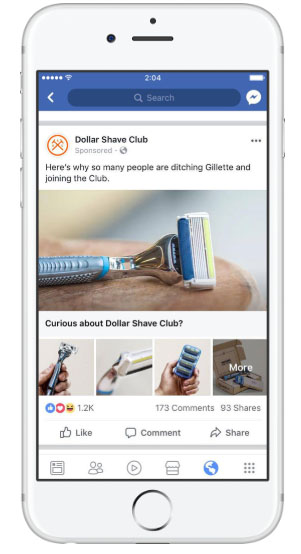
As you’d expect, Dollar Shave Club isn’t afraid to be innovative with its campaigns. With its “cutting edge” business model, the company was looking for ads that were cost-effective and easy to run.
Using Instant Experience and the collection ad format, they were able to create an immersive user experience that increased their subscription rate by 1.5X while also reducing their cost-per-subscription by 30% (compared to traditional link ads).
3. Airbnb
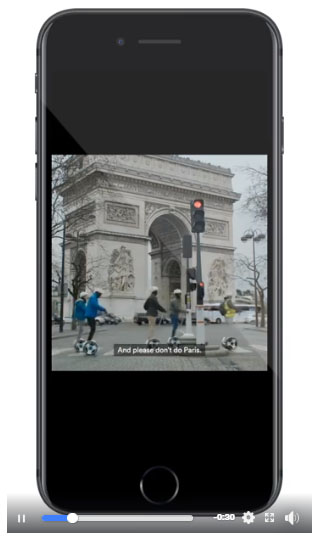
This campaign required creatives that were designed specifically for advertising on the Facebook platform.
Instant Experience was the perfect choice to run the ads on, as it enabled Airbnb to showcase its dedication to storytelling and the user experience. The high-quality video and visuals helped them reach 125 million people, and increase subscribers across their target locations.
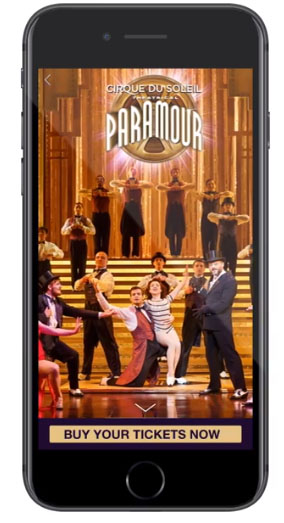
4. Cirque du Soleil
To promote its new show, Cirque du Soleil chose to use Instant Experience to capture the incredible costumes and performance artists that have made it a much-loved global sensation.
The goal was to drive awareness and encourage people to buy tickets to their latest show. The highly visual campaign paid off, with an impressive 8.8X return on their ad spend, plus further returns from re-marketing.
Final Thoughts on Facebook Canvas Ads
If you’re looking for a cost-effective strategy to convey your brand message and showcase your products, it’s worthwhile to consider using Instant Experiences.
With rich, immersive imagery delivered to your customers in a full-screen, fast-loading page, your brand comes to life and has the opportunity to reach a new audience.
As an advertising format, Instant Experiences provides a valuable combination of storytelling and performance, enabling greater engagement with lower acquisition costs — a win, win.

What Video Marketers Can Learn From 7 Emmy Nominated Commercials
As most people sit down to watch the Primetime Emmys on September 22, they might be rooting for their favorite shows or actors to take home the coveted award.
But, as a marketing blogger, one of the categories I’ll be paying attention to this year is “Outstanding Commercial.”
While these ads are almost always high-quality and require a big budget, they still use basic marketing tactics, such as storytelling and playing on human emotions, to successfully boost brand awareness. These are tactics any brand, big or small, can take advantage of.
Because more and more people prefer to learn about products through video, looking at popular commercials for marketing inspiration could be incredibly beneficial to your strategy.
Although you probably can’t hire celebrities to promote your products, these commercials could still give you ideas for scalable video content that boosts brand awareness.
To help you learn from the best of the best, I’ve compiled a list of fascinating 2019 and 2018 Outstanding Commercial nominees. I’ve also included a few takeaways that video marketers can learn from each.
Although there were a few powerful and thought-provoking PSA nominations this year and last year, this blog post will focus on the commercials specifically created by brands.
4 Outstanding Commercial Nominees of 2019
“A Great Day in Hollywood” (Netflix)
In this Netflix ad, the streaming service celebrates the talented and diverse range of black actors, writers, and showrunners creating award-winning content on the platform. The commercial, narrated by Stranger Things actor Caleb McLaughlin, showcases 47 of actors, writers, and crew members who “represent a limitless range of identities” in Netflix shows and movies.
As McLaughlin narrates, he makes empowering statements about how far black talent has come. For example, at one point he explains that we are living in a time when “black women are boldly the lead character, whether inmates or scholars.”
The commercial shows the faces of a few actors, including Laverne Cox of Orange Is the New Black. Then it slowly pans out to the group. They are posed similarly to a famous 1958 photograph of black jazz legends, titled “A Great Day in Harlem.”
At the end of the commercial, McLaughlin exclaims, “This is not a moment. This is a movement.”
The ad was part of Netflix’s larger campaign to highlight its more than 20 shows and movies created by black talent, such as Dear Black People and She’s Gotta Have It.
In this ad, Netflix takes a stand for diversity and gives a nod to inspiring black musicians of the past. This type of ad feels motivational and optimistic and leaves viewers on a high note. People who watch will know that Netflix values different backgrounds as well as the creativity and unique storylines that can come from them.
Aside from spreading an important, positive message, this strategy also allows Netflix to highlight and remind viewers of its track record for investing in inclusive, groundbreaking content.
“Behind the Mac — Make Something Wonderful” (Apple)
In this example, Apple leverages found footage to present a black and white slideshow of celebrities like Oprah, Bono, and Serena Williams working on their MacBooks. Because these images are candid and not posed, viewers get a glimpse of these celebrities’ day-to-day lives, while also seeing images of MacBooks being used.
Rather than simply showing models or product shots, Apple uses candid shots to prove to prospective customers that successful people they recognize are using the product.
Text-based reviews or customer testimonials are great, but a picture or video of someone successfully using a product is worth at least a thousand words.
And, because viewers associate the product with success and popularity, they might trust that it will be the best computer for them, too.
If you sell a product that’s on the higher end, one video marketing strategy you could use is telling a story that makes people trust that they’re investing in a credible item or service. You could do this through videos that show successful or influential customers using your product, or with a video that explains how your product can be helpful to a variety of different people.
For example, if you’re marketing an upscale fashion company, you could encourage happy customers to send you photos of themselves in your business attire. Then, you could create a video of real-life people wearing your clothing at work, on business trips, or at company outings. People might watch this and see that the clothing is popular and worn by people in a number of different business settings.
“Don’t Mess With Mother” (Apple)
This ad is similar to another spot from Apple that was nominated for the 2018 Outstanding Commercial Emmy. In the first version of the ad, called “Earth: Shot on iPhone,” Apple showed a montage of videos and photos of nature taken with the iPhone X. This year, they did essentially the same thing with the iPhone XS.
While both versions focus on nature footage, the new version pays tribute to Mother Nature specifically. Before the imagery is shown, viewers see the title of “Don’t Mess With Mother: Earth Shot on iPhone.”
The ad then opens with footage animals, like sharks and crocodiles, preparing to attack. As the video continues, you begin to see shots of storms and volcano explosions. Then, the animals all start opening their mouths and begin to chomp in the direction of the camera. It ends with the same opening statement of, “Don’t mess with Mother.”
This is an action-packed example of how a brand leverages and highlights its product’s strengths. A key feature of both the iPhone X and XS was the cameras. So, Apple used the phones to create a crisp and clear commercial that was both visually stunning and showed the power of its product.
Along with playing up visual strengths, Apple chooses Earth as the film subject. Not only does nature provide great visuals, but this ad might also be more memorable for those who are interested in sustainability, animals, and the environment.
Alternatively, this strategy could be helpful for businesses that sell visual tools, like cameras or video software. If your product can help create a crisp beautiful photo, you can create a montage of photos or videos that displays the product’s strength.
“Dream Crazy” (Nike)
“Dream Crazy” begins with a narration saying, “If people say your dreams are crazy — If they laugh at what you think you can do — good. Stay that way. Because what non-believers fail to understand is that calling a dream crazy is not an insult. It’s a compliment.”
Then, the ad shows a montage of athletes, like Serena Williams, winning major sports matches. As each win is shown, the narrator hints to a lesser achievement that the athletes would not settle for.
In Williams’ case, the narrator says, “If you’re a girl from Compton, don’t just become a tennis player, become the greatest athlete ever.”
While the Nike commercial focuses on sports achievements, it pivots dramatically at the end as it reveals the football player and activist, Colin Kaepernick, as the narrator. As he turns to the camera, he says, “So don’t ask if your dreams are crazy. Ask if they’re crazy enough.”
Although the ad might speak to athletes, it could also intrigue others who want to achieve greatness, make change, or take risks for something they believe in, like Kaepernick.
Sneakers aren’t just worn by athletes, so this style of speaking to a wider audience — while still highlighting your brand — is a strong strategy.
By far, the most important takeaway is that you can gain a great deal of brand awareness and maybe even trust by promoting positive messages. While people know Nike as a shoe brand, they might see this ad and favor the brand more because of its motivational mission.
While this ad strategy is obviously great for athletic brands, telling stories of people who achieved greatness, took risks, or beat the odds could also be a great content marketing tactic for political organizations or nonprofits that are trying to spread awareness of their own mission.
Say you’re part of an organization trying to fund higher education needs for students. With permission from students or alumni who’ve benefited from your work, you could share their stories or testimonials to show others that higher-education is possible.
This type of commercial could motivate young people to work hard and aim for success, while it also shows potential donors what the organization has already helped people achieve.
3 Outstanding Commercial Nominees of 2018
“The Talk” (Proctor & Gamble) – Winner
This hard-hitting theatrical ad and 2018 Emmy winner tells the story of African-American mothers talking to their children about race throughout different decades. At the beginning of the ad, a mother who’s brushing her daughter’s hair ominously tells her, “It’s not a compliment.”
As many viewers might wonder what she’s referring to, you see scenes of other black mothers talking to their children about race. At one point, one mother talks to her son about a racial slur. At another, one mother tells her son, “There are some people who think you don’t deserve the same privileges just because of what you look like. It’s not fair. It’s not.”
At one point, one mother tells her daughter, “Remember, you can do anything they can. The difference is you’ve got to work twice as hard and be twice as smart.”
From there, the ad gets darker. Viewers then begin to see scenes of mothers telling their children how they should behave when a police officer pulls them over so that they can be safe from possible police brutality.
Then the storyline becomes more motivational. Although the mothers tell their children that they will be judged differently because of their skin, they also tell them to “keep showing up,” and to not let discriminatory words define them.
As the ad closes, it’s revealed that the young girl who was getting her hair brushed was told she was, “Pretty, for a black girl.” Her mother disagrees and says, “You are beautiful. Period.”
After this, viewers see text that says “LET’S ALL TALK ABOUT ‘THE TALK’ — SO WE CAN END THE NEED TO HAVE IT.”
The “talk” they’re referring to is the discussion about bias. At the end of the video, they include the hashtag #TalkAboutBias.
The ad was made to promote P&G’s Black is Beautiful Initiative and how it is a “Proud Sponsor of Moms.”
Like the Netflix commercial, it powerfully touches on difficult political and societal topics that many people who aren’t from a diverse household might not think about.
As you watch this ad, you might be asking, “How does this commercial talk about P&G products?”
Well, it doesn’t. Like Nike’s Dream Crazy ad, P&G tells a story and uses its platform to spread awareness. But, how does this help boost a brand?
Although they didn’t promote one product or brand specifically, P&G’s ad launched significant discussions from social media and news outlets after the ad went viral. This resulted in many people wanting to learn more about them when they saw or heard about the ad.
P&G’s Global Communications Director, Damon Jones, told AdAge, “We know that bias is not just an African American issue. It’s an issue that takes on many shapes and forms, across gender, race, age, weight, sexual orientation, and more.”
“Our goal with ‘The Talk’ is to help raise awareness about the impact of bias,” he added. “We are also hopeful that we can make progress toward a less biased future by recognizing the power of people of all backgrounds and races showing up for one another.”
This ad not only informed people from non-diverse communities about the conversations some families must have about race, but it also showed people of color that the company supports them.
Because of this message, someone might want to purchase products from one of P&G’s many brands knowing that they’re taking a stance on hard topics and care about their customers’ backgrounds.
“Alexa Loses Her Voice” (Amazon)
In this funny ad, the Alexa Voice Assistant gets a cold and loses her voice. Then, celebrities have to substitute for her. Even though it shows the product malfunctioning, it also does a great job of showing many of the Echo’s popular voice-command skills. It also features Amazon’s CEO, Jeff Bezos.
Nope, a small business can’t afford to hire Gordon Ramsey or Cardi B for a commercial. But, they can take a note from Amazon and use video marketing to tell an interesting story about their product and its features.
If you’re a video marketer for a smaller technology company, you might similarly consider making a video that shows an every-day person using your app or product to get something done. This strategy can help you highlight different features all in one piece of content while showing viewers how they can easily use a product.
“It’s a Tide Ad” (Tide)
In 2017 and 2018, Tide released a number of commercials with storylines that had nothing to do with Tide, except for the actors’ noticeably clean clothes. When viewers were at the edge of their seats, someone in the ad would say, “It’s just another Tide ad.” Then, they’d see the Tide logo and text that said, “If it’s clean, it’s Tide.”
This commercial campaign started with a long Superbowl ad and follow-up commercials during each break of the game. In the first ad, which took the Emmy nomination, Stranger Things’ David Harbour shows up in several common ad scenes, including in the bathroom with a buff deodorant model, driving a sports car, and laughing on the couch with a fake family.
As he pops into each commercial, he explains that all of them have one thing in common: clean clothes that were washed by Tide detergent. In the end, he says, “So, does this make every Super Bowl commercial a Tide ad? I think it does.”
This ad is pretty funny and memorable. Since Tide has one job of keeping clothes clean, they show off the brand’s strength in multiple versatile scenarios.
Humor like this can also be a great way to make a simple product more memorable. If you go to the store to get detergent shortly after seeing this commercial, Tide might be the first thing to pop into your head because of the ridiculous ads.
Sometimes, it can be great to think outside the box and come up with an odd way to show off your product. And, if you can work in humor, people might identify with or remember your ad even more.
What These Nominations Can Teach Us
While many of last year’s commercials were funny and memorable, this year’s nominations were thought-provoking and motivational. While this year’s ads are all great examples of how video marketers can succeed by incorporating their product into stories about every-day people, last year’s nominees show that humor can make your brand more relatable.
If you loved these ads, but worry that you can’t create an interesting video on a low budget, don’t worry. Use the above examples to motivate you, while reading this guide for tips on how to film a cheap marketing video.
Want to learn more about all the different aspects of video marketing? Check out this ultimate list of stats and advice.

Push vs. Pull Marketing: How They Differ and Work Together
I recently bought a new laptop. Before deciding which one was right for me, I poured through Yelp and Google reviews to make an informed decision. Once I narrowed my search down to a couple of models, I visited the store to examine specs in person before committing.
To put this in a different way, I was “pulled” into brands by their marketing of laptops for a young professional. Then, I was “pushed” into selecting the right fit by looking at the marketing inside the store. This is how push and pull marketing are at work separately and together.
What is Push Marketing?
Push marketing is a strategy focused on “pushing” products to a specific audience. The goal is to bring what you offer to customers in your marketing. Social media channels are considered to be “push” sources because they’re great for launching new or niche products.
Push Marketing Strategy
Also known as direct marketing, push marketing is a form of general advertising. When I grocery shop, I look for the signs that notate sales and gravitate towards them — picking up limes I never knew I needed. This is an example of push marketing. Similarly, let’s look at Suzie.
Suzie’s marketing company — specializing in local businesses — is ready for its big debut. But these local businesses have no idea Suzie’s company exists. This is a job for push marketing. Suzie reaches out to businesses in her area via email marketing, put ads in participating locations, and create a social media business page to expand her reach.
Because Suzie’s goal is to introduce her company to local businesses as she launches a new product, push marketing is her best option.
For a business that’s been around for a while but still wants to execute a push strategy, another option is running a limited time offer for your product. Use a channel your target market is closely integrated with, such as social media, or use landing pages to your advantage by including a CTA at the end.
Pull Marketing Strategy
You guessed it — pull marketing is the opposite of push marketing. Pull marketing is best for when you want to draw consumers to your product. The goal is to create loyal customers by providing marketing that showcases what they’re looking for.
For instance, if someone is looking for a new babysitter, they might visit Care. They can select a babysitter based on a list of preferences that are specifically shown to fit their needs. To put this in the context of another business, let’s take a look at Luis.
When businesses are looking for a point-of-sale (POS) app, Luis wants his POS system to be the one they choose. Pull marketing channels are exactly what he needs. To pull his target market, Luis starts a blog on his app’s website, runs specialized and high-traffic social media campaigns, and focuses on differentiating his brand.
To amp up his pull marketing strategy, Luis focuses on SEO for his online marketing to make his system discoverable to his target market. Google reviews, and word-of-mouth reviews on sites like Yelp, are his best friends throughout his campaign.
Since Luis has already developed a following from his app’s debut, he can focus on credibility and reliability rather than marketing to make the next sale. After a while, this will pull customers to his business. Pull marketing strategies generally take longer than push marketing to drive results, but this strategy ensures long-term customers and growth.
In the age of consumers educating themselves on products and services, pull marketing has become vital to markets with heavy saturation, like new apps or clothing companies. Pull marketing shows how you are unique as a brand.
There are a few negatives to push marketing — mainly splitting costs and keeping long-term customers.
If your company is working with a supplier to implement a push marketing strategy, you’d have to split profits with the supplier at the end of the day, which means less revenue for you. Since push marketing focuses on short term sales, building brand loyalty is difficult with an outbound strategy.
A downside to pull marketing is that you might not cater to the right target audience. In order to connect to your consumers, you need to know who they are and what they’re looking for. For instance, an athlete shopping for running shoes might not be interested in advertisements for heels.
To decide which method best fits your business, think about how you want to approach consumers. If you are trying to get the word out about your business, push will most likely be the way to go. If you’re a marketer building brand buzz in your market — perhaps about a specific product or service — pull would probably be best.
Push and pull can also work together. Customers need a push for demand to be created and a pull to satisfy that demand. For those who haven’t heard of your company, a push is needed. For those a little further along in their buyer’s journey, you can pull them in.
Push and Pull Strategy Examples
Going back to Suzie’s marketing company, once she gains leads from her push strategies, she can focus on a pull campaign. She can take to her company’s social media to do client spotlights, run a sale on services, and remind clients to rate her services.
When Luis pulls customers into his app, he can push them towards his product. Luis can integrate push methods into his strategy by sending automated marketing emails, investing in a streaming service ad, or focusing on a social media channel he doesn’t actively focus on.
Image source: Apple
Apple’s iPhone 11 advertising is heavily focused on the three cameras, a new implementation in the iPhone line of products. From this kind of push marketing, we can see that Apple’s market research centered around customers that wanted to see improved camera quality with their next iPhone purchase.
The Star Wars: Episode IX trailer starts with footage from the first Star Wars film, Episode IV. Text entices the viewer to see how a 40-year-long saga will come to an end. Not only is this an example of push marketing for longtime fans, but it’s an attention-grabbing pull to people not familiar to Star Wars, who might be interested in seeing what a movie of that caliber is like.
Lastly, let’s say you work for a startup that sells computer screens. In order to push your product out there, you convince stores like Best Buy to carry it. Based on the market, your strategy could pull consumers in by using your ad space in Best Buy to promote the features of your screens that others don’t, like length, look, and display features.
Most marketing falls into these two general categories, but what you do with inbound and outbound strategies is up to you. When I was purchasing my laptop, I was convinced by a mix of the two and used them to my advantage as a consumer.

How to Write a SMART Goal [+ Free SMART Goal Template]
There’s almost nothing more gratifying than the feeling you get when you accomplish a goal.
Whether you’re pressing “Publish” on a blog post or collecting initial analytics on a campaign months in the making, it’s undeniably satisfying to know you’ve successfully finished a task.
When you’re not chasing a clear goal, though, work can feel like a never-ending grind. Without goals, you’re setting yourself up to feel like the work you’re doing isn’t enough — or, worse, you position yourself to do work that doesn’t actually impact your company’s bottom line.
Making your goals SMART is an effective method for clarifying your motivations, setting a clear direction for you and your team members, and ensuring you’re able to celebrate the wins when they come along.
To help you write SMART goals, we’ve created a free template with all the tools needed to get you started. But first — what exactly is a SMART goal, and how does it differ from a regular goal?
What is a SMART goal?
The letters of SMART stand for:
- Specific
- Measurable
- Attainable
- Relevant
- Time-Bound
The SMART acronym is a framework that will enable you to write goals that drive greater impact. Write goals with each of these aspects in mind, and you’ll be able to quantify how far you’ve come and how far you have left to go against your goal.
When you reach the milestone you articulated in your SMART goal, you’ll be able to celebrate knowing that you achieved something tangible and impactful.
To make the process of setting a SMART goal simple, we’ve created a free, downloadable SMART goal setting template. I’ll walk through the template as we discuss each aspect of a SMART goal, below.
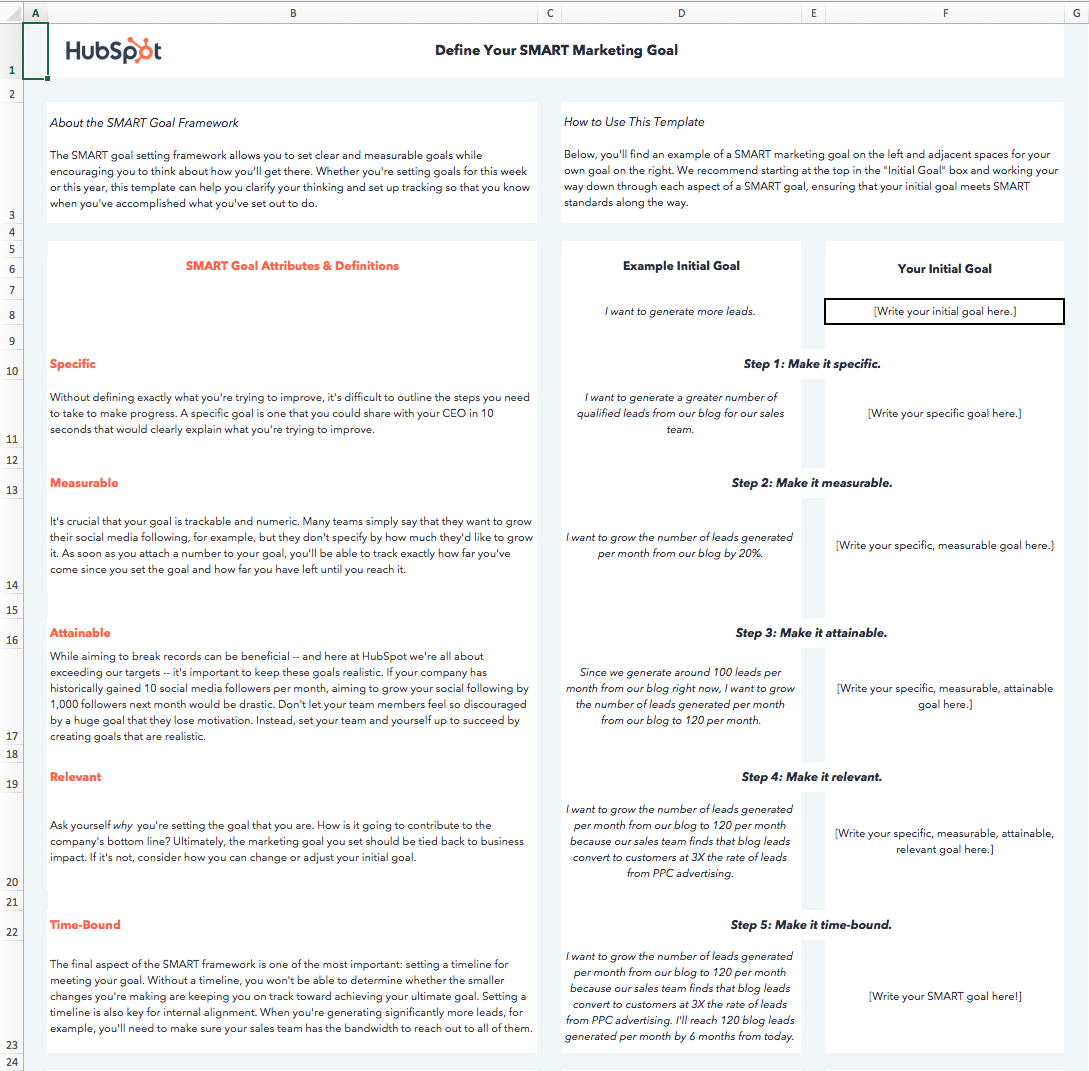
I’d suggest downloading the template yourself to follow along throughout the rest of this blog post. Next, let’s dive into the importance of each aspect of the SMART acronym.
What does each aspect of the SMART acronym actually mean?
While we run through the definition behind each aspect of the SMART framework, we’ll apply the framework to a real-world example as we go. You can download the template to follow along (input your starting goal in cell F8) or simply write your starting goal on a piece of paper.
Let’s start with a basic, non-SMART goal as our example — “I want to get more fit.”
1. Specific
Goal setting is often associated with striving toward our highest aspirations — and actually reaching those aspirations can seem daunting. Specificity helps us determine the path between where we are, and where we want to be.
“Getting more fit” is ambiguous. There are innumerable ways to get more fit, and everyone has their own definition of fitness — for instance, are you looking to lose weight? Perform more push-ups? Cut a minute off your mile time?
When a goal isn’t specific, there is no way to tell whether the actions you’re taking are going to help you achieve that goal. If your specific fitness goal is actually to increase the number of push-ups you can do at one time, following a running plan isn’t going to be very helpful in getting you to your true goal.
A specific goal is one that makes your next steps clear — or, at the very least, narrows down the potential next steps you might take.
To specify what we mean by “I want to get more fit,” I’ll alter our example goal to read, “I want to be able to do more push-ups.”
If you’re following along in the template, make your goal more specific and type it into the cell under Step 1.
2. Measurable
When a goal is measurable, you can easily track your progress. Typically, this means that a number will be attached to your goal.
A numerical goal is valuable for many reasons. In addition to giving you something to strive toward, you’ll be able to celebrate a victory when you reach the final benchmark.
If you say that you just want to do more push-ups”, for instance, does that mean that you want to be able to complete just one more push-up per session, or that you want to double the number of push-ups you can do overall? One goal will take a lot more time and dedication to achieve than the other.
Let’s say I can do ten push-ups in a row right now. To allow us to measure our progress against our final goal and know when we’ve reached a milestone, we’ll edit our push-ups goal to read, “I want to be able to do 25 push-ups in a row.”
3. Attainable
I’ve set some pretty lofty goals before — and if you’re reading this, you’re probably a self-motivated person, too.
Big aspirations are admirable, but it’s important to balance long-term goals with more achievable, short-term goals.
Setting attainable goals is all about looking at what you’ve done so far and adjusting your goals to be realistic relative to those benchmarks.
To consider the point in more concrete terms, think about business growth rates — if your company has been selling 2% more product each month for the past 12 months, aiming to sell 15% more product next month would be an unrealistic goal. Keep in mind that 2% growth is the status quo — so a good stretch goal might be selling 3 or 4% more product next month. Selling 4% more product would still be doubling your month-over-month growth.
Attainable goals are useful because they help you maintain momentum. It can be hugely discouraging to miss huge targets, whereas consistently making small gains will encourage you to continue delivering wins.
Each month, you’ll be aiming for the familiar satisfaction of hitting your target rather than dreading another seemingly major miss.
For instance, to make our example goal a bit more attainable, I’ll move the target from 25 push-ups to 20 push-ups. There’s still a significant amount of work required to get to where I want to be, but I’ll be able to celebrate a huge achievement — doubling the amount of push-ups I can do — and use that momentum and celebration to drive me to set a goal of doing 25 push-ups soon after I achieve my goal of 20.
Consider what you’ve done in the past in relation to the goal you’re in the process of setting, and adjust it accordingly.
4. Relevant
Relevant goals are ones that will help you move in the direction you truly desire. You can allocate your time to an infinite amount of activities, but which activities will actually push you closest to your ultimate goals?
It’s a common trap to feel like we’re being productive when we’re busy, even if our action isn’t creating a meaningful impact.
In the beginning, our example goal was to “get more fit.” To make sure our goal is relevant, we need to ask ourselves whether following through on this goal will really help us get to where we want to be.
In the case of our push-up goal, the answer is yes. Push-ups engage several muscle groups, including your back, arms, shoulders, and core, and doing a significant number consecutively can definitely elevate your heart rate. Therefore, executing on this goal will improve my muscular strength and perhaps even my cardiovascular strength, both of which are key elements to overall fitness.
Ask yourself whether the goal you’ve set is going to create real impact on your overarching targets, and adapt it or identify a way to track impact if the answer is currently no.
I’ll adjust our example goal to include its overarching purpose: “I want to be able to do 20 push-ups in a row to improve my overall muscular fitness.”
5. Time-bound
The final letter of the SMART acronym stands for time-bound. You should always aim to accomplish your goal within a specific time period. Adding in a time frame will not only motivate you to take steps every day toward your goal, but also allow you to track how much progress you’ve made against your goal versus the time that’s passed.
If I’m aiming to increase the number of push-ups I can do by ten in two months, I’m able to set a midpoint milestone of adding five push-ups in the first month. If a month passes and I’ve only increased the number by three, I’ll know I need to ramp up my efforts, re-evaluate my strategy for increasing my push-up strength, or adjust the time frame I initially chose.
Additionally, a time frame can help you chart your progress. I’ll make our example goal time-bound by saying, “I want to be able to do 20 consecutive push-ups two months from today to improve my overall muscular fitness.” Now, I have a goal that clarifies the path to where I want to be.
In the final tab of the SMART goals template, you’ll be able to document the roadblocks to achieving your goal that you anticipate, and make an action plan for overcoming those roadblocks to set you off on the right foot.
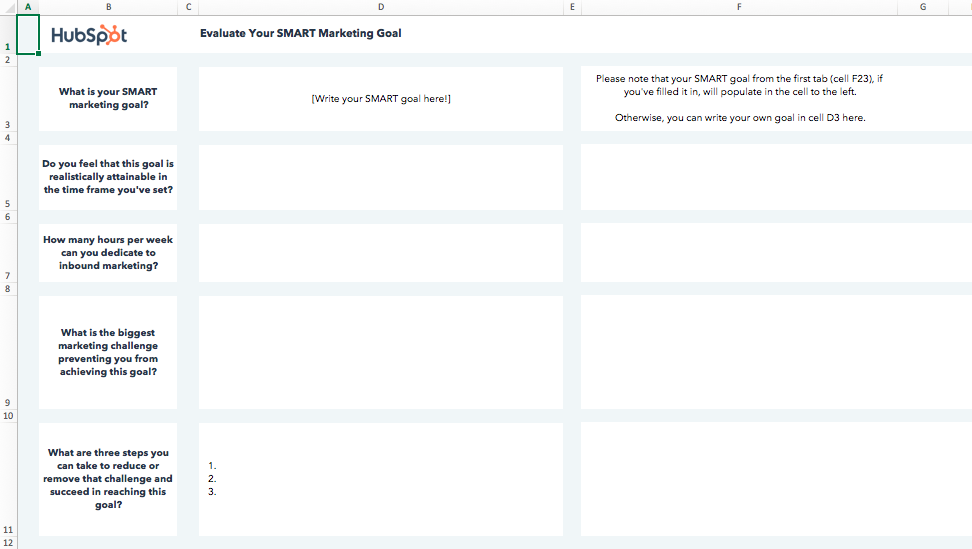
Before I made my goal SMART, it would’ve been easy for me to make excuses. It wasn’t clear how I’d measure whether I’d gotten fitter, or when I was going to check-in with myself to see whether I had.
With my new SMART goal, I have a clear target to aim for and metric for success. I can quickly evaluate whether I’m on pace with achieving my goal or behind, and I can celebrate the achievement when it does come because it’s a realistic metric that’s relevant to my ultimate goal.

How to Create Infographics in Under an Hour [15 Free Infographic Templates]
Wouldn’t it be great if creating infographics was as simple as writing regular old text-based blog posts? Unfortunately, making visual content like this usually takes a lot more time, effort, and let’s face it — skill — than the written word. Usually.
But considering the popularity and effectiveness of visual content in marketing today, you can’t just afford to throw in the towel.
That’s why we decided to take all the pain and suffering out of infographic creation. Seriously — don’t give up just yet. You, too, can create infographics that are professional-looking, high-quality, and completed in under an hour. I’m going to prove it. First things first:
Download our 15 free infographic templates here.
Then, all you have to do is provide the content to use inside them. Easy as that. In fact, I’m going to show you just how easy it is to make your own infographic by demonstrating with one of our 15 infographic templates in PowerPoint (pictured above). Then, I’ll explain exactly what I did so you get a sense of how easy it really is.
Want to watch and listen to the instructions as you read the steps below? Check out the video below:
How to Make an Infographic
- Identify the audience for your infographic.
- Collect your content and relevant data.
- Choose your desired infographic template.
- Download your template to PowerPoint.
- Customize your infographic.
- Include a footer with your sources and logo.
- Add an embed code and Pinterest button, and publish it.
***
1. Identify the audience for your infographic.
Infographics don’t sell themselves on design alone. You need to deliver “info” that’s just as compelling as the “graphic,” and to do that, you need to know the audience your infographic intends to reach.
According to Harvard Business Review, there are five possible audiences that can change how you choose and visualize your data: novice, generalist, managerial, expert, and executive. Start by comparing your infographic’s ideal reader with one of these five audiences — which one applies to your reader?
When thinking about the data you want to visualize, let the five audiences above dictate how advanced your data will be. A “novice” audience, for example, might need data whose meaning is more obvious at first blush. An “expert” might be more interested in getting into the weeds of your numbers and posing theories around them. An “executive” has more in common with a novice audience in that they only have time for the simplest or most critical information, and the affect it’ll have on the business.
2. Collect your content and relevant data
Using the audience you’ve chosen above, your next step is to organize all the content and data you’ll use in the infographic. You can either collect third-party data or use your own original data. If you use third-party data, just be sure you properly cite your sources — just like in any other good piece of content.
Organizing Your Data
When collecting your data, make sure you know what story you want to tell through this information. Data for the sake of data won’t add value to your infographic at all.
Compelling data needs to be “comprehensive” enough to give your readers proper context around the data you’re presenting. For example, a spike in website traffic from one month to the next doesn’t mean much — until, say, you reveal that traffic was on a steady decline over the previous three months. Suddenly you have a story of how you were able to reverse a downward trend.
Citing Your Sources
To keep your infographic uncluttered by a ton of different source URLs, a great way to cite your sources is to include a simple URL at the bottom of your infographic that links to a page on your site. You can also list the individual stats used in your infographic, and their sources — such as the landing page to the full offer on which you’re basing this free infographic. I’ll show you what this citation looks like in a minute.
That way, your infographic looks clean and professional, yet people will still be able to access the sources no matter where the infographic gets shared or embedded. It may also even drive visitors back to your site.
3. Choose your desired infographic template.
Your next step is to choose an infographic template appropriate for representing that data. The important thing is to choose a template that specifically works for the type of data set/content you want to present. As you saw pictured above, you can download our 15 infographic templates in PowerPoint and choose whichever template you’d like.
Some of your template options in the offer linked above include a timeline, flowchart, side-by-side comparison, and a data-driven infographic. Here are some basic ideas for choosing an infographic template that suits the story you want your data to tell:
- Side-by-side comparison infographic: This infographic design can help prove the advantage of one concept over another, or simply explain the differences between two competing entities.
- Flowchart infographic: This design is perfect for presenting a new workflow for your organization, or how a linear or cyclical process works across your industry.
- Timeline infographic: This design can tell a chronological story, or history, of a business, industry, product, or concept.
- Graph-based infographic: This design is suitable for content creators publishing a high volume of data and statistical information, making it a good fit for expert-level audiences, too.
- Image-heavy infographic: This design caters to content creators who are trying to reveal trends and information from shapes, designs, or photography — rather than just numbers and figures.
4. Download your template to PowerPoint.
For the sake of time (remember, our mission is to create an infographic in under an hour), I’m going to create an infographic based on a compilation of steps and best practices we’ve put together in our new guide, How to Run an Inbound Marketing Campaign in 2018. For this, I’ve picked the “World’s Greatest Timeline” infographic template from our collection of infographic templates, which is helpful for my data set since it outlines each step of the campaign creation process in order.
The timeline infographic template is pictured below, and full of opportunities to make it your own:
 5. Customize your infographic
Obviously, this is the most time-consuming part — but it’s also the most fun. Simply come up with a catchy title, plug in your data/content, and adjust your font sizes and formatting. Feel free to switch up the graphics and colors, too, so they’re relevant to your brand and the data you’re providing. For other templates, you can use the simple graphs and charts provided by PowerPoint to create things like the bar graph or the pie chart. (Note: Download our free infographic templates for a cheat sheet for using PowerPoint’s various features and tools.)
To customize the look of the infographic even more, you might add or change up the colors or font styles.
6. Include a footer with your sources and logo.
Finally, I included a link to my source (which can be found here), as well as the HubSpot logo so people know who created the infographic if it gets shared in social media or embedded on other websites — which is definitely something you want, since one of the main benefits of creating infographics is their shareability.
That’s it! This whole thing took me under an hour to put together — much shorter than it would’ve taken me if I’d started from scratch (not to mention more professional looking … and less expensive than hiring a designer). Here it is:

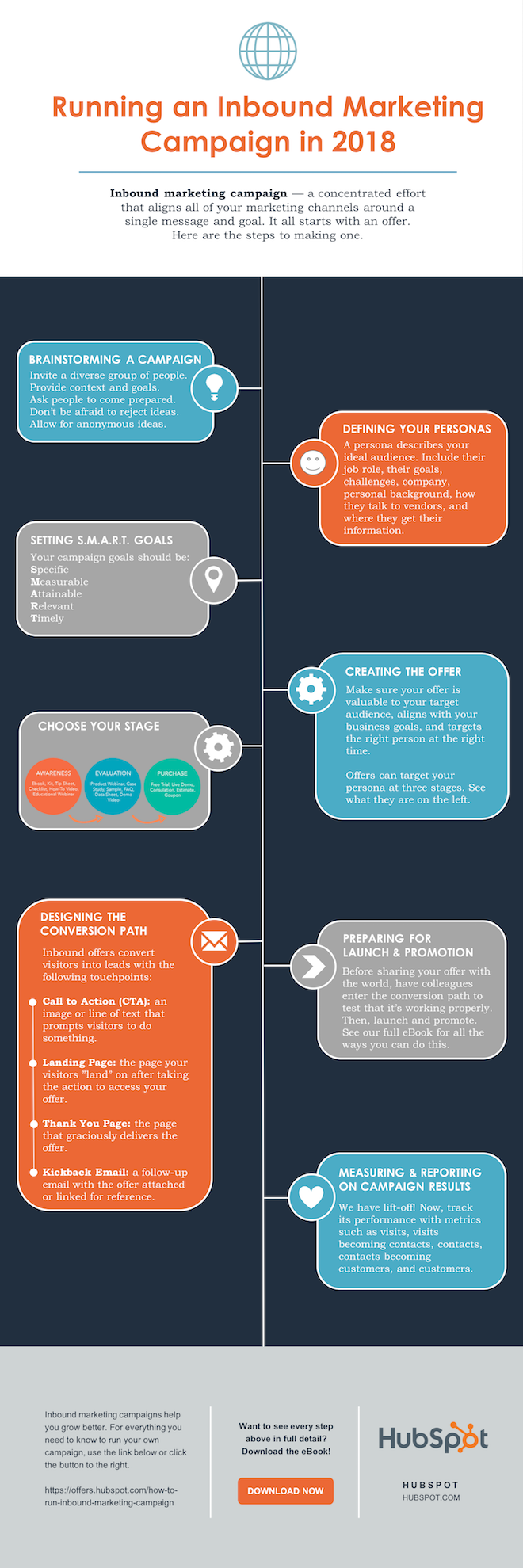
Share This Image On Your Site
<p><strong>Please include attribution to blog.hubspot.com with this graphic.</strong><br /><br /><a href=’https://ift.tt/2Hw9RZq src=’https://ift.tt/2oi2Lio’ alt=’free_infographic_template_custom-1′ width=’660px’ border=’0′ /></a></p>
7. Add embed code and a Pinterest button, and publish it.
The only thing left to do is to publish and promote your awesome new infographic. As I mentioned earlier, we recommend using your blog to publish it (including your list of sources), including a Pinterest button for visitors to easily “pin” your infographic on Pinterest, and create and add an embed code for visitors to share it on their own websites and blogs, as we did above.
Want more? Read How to Create Top-Notch Visual Content in PowerPoint [Tutorial].


Five Tips for Becoming a Successful Remote Worker, According to 450 Remote Professionals [New Data]
The way businesses operate has changed — drastically.
Nowadays, successful companies are run in home offices, living rooms, and Starbucks tables. Meetings are hosted on Skype, Slack, and Google Hangouts. Employees can work in their pajamas, and commute from their kitchens to their desks.
Today, remote work has been established as a successful business model, and the number of people working remotely at least part-time is rising. In fact, a survey by Global Workplace Analytics and FlexJobs indicates that remote work has grown 91% over the last 10 years.
However, not everyone is well-suited for remote work. Some people work better in collaborative settings and enjoy the structure of a 9-to-5 desk role, while others prefer solitude and find themselves more productive when working from home.
Whether you’re considering hiring more remote workers at your company or you’ve just been hired for a remote role, it’s critical you know which skills are required for remote work, and how you can train your employees to become better at-home workers.
Fortunately, in 2019, TalentLMS surveyed 450 employees to figure out how remote employees work and train best for their at-home roles. Take a look at some of their answers, below, to figure out how you and your company can become more successful at offering and conducting remote work.
1. Acknowledge that you’ll be working fixed hours.
People sometimes believe remote work is equivalent with digital nomadism. However, being a digital nomad mostly has to do with freelancing, working at your own pace and hours, and running a business from anywhere in the world — which is different from remote work.
Remote workers are similar to onsite employees who have a “normal” 9-to-5 daily schedule. According to TalentLMS’s statistics, 60% of remote workers work fixed hours, which means they need to log onto their computers and be online at specific hours. Even if you’re remote, you still need to work similar hours as the rest of your team to communicate and collaborate effectively.
If you’ve been working as a freelancer for some time and are thinking about switching to a remote work career, remember that your daily schedule is going to change drastically.
2. Get familiar with apps and technology.
Everything happens at home. So to be part of a virtual team, you need to become familiar with certain apps and tools. Typically, your manager will let you know which tools you’ll be using — such as Zoom for meetings, or Slack for daily communication.
Additionally, there are certain tools necessary for training and on-boarding when you first join your team. 70% of remote workers say their companies provide online training with the help of a learning management system (LMS). An LMS is widely used by companies to onboard new hires, so it’s likely the first tool you’ll come across.
Communication apps is also the number one tool used regularly by remote workers. When asked to name the tools they use the most, 27% of remote workers said Skype, 14% said Dropbox, and 25% said both WhatsApp and Google Hangouts.
3. Work on your communication skills.
Most of TalentLMS’s survey respondents chose communication as the most essential skill aspiring remote workers should master.
After you get a grasp on the communication apps and software your company uses to send emails and direct messages, it’s critical you monitor how they use them.
For instance, which channels do they use for which purposes? Do they typically create an email thread when they want to provide feedback on a new project, or use direct message? Are team members more “official” when chatting with one another, or more laidback? Try to imitate their tone of voice and language so you can connect with them more effectively.
Additionally, figure out which channels or group chats your team engages with most often. Perhaps they often send motivational articles in a team Slack channel, or use a spreadsheet to share trending news articles.
Whatever the case, make sure your messages are clear, concise, and proofread.
4. Learn how to focus.
Although most of us find it easy to focus when we’re at home, working from home can be incredibly distracting. For instance, perhaps you’re working on a new blog post when you remember you have laundry that needs to be folded — or a new Netflix show to binge.
According to a 2018 survey by Buffer, 16% of remote employees say they feel distracted when working from home.
Ultimately, to find success as a remote employee, you need to practice focus.
Fortunately, remote workers from TalentLMS’s survey have found a trick. To help themselves focus, 25% of respondents say they work by the sound of some background noise (from sources like a TV or radio), 21% concentrate in silence, and another 21% focus by listening to meditative music.
Ultimately, if you’re finding it difficult to focus, figure out which environmental factors can help you increase productivity. Changing background noise, lighting, time-of-day, or room of the house in which you work can all help you become more focused.
5. Develop your time management and organizational skills.
If you’re a remote worker, you need to be self-disciplined. It’s vital you know when to work hard and when to take breaks throughout your at-home workday, particularly since you don’t have the pressure of your manager or peers to keep you on-task.
Ultimately, to organize your work days wisely, you need to develop organizational and time management skills.
Try creating a task list every night and write down your tasks in order of priority. This simple method will help you get more work done and distribute your eight hours accordingly. Alternatively, try the pomodoro technique or another productivity hack to keep yourself accountable.
Take a look at How to Work From Home: 20 Tips From People Who Do It Successfully for more tips and tricks.
