
Seven Strategies Women Can Use to Navigate the Glass Cliff [Infographic]
Women have been talking about the glass ceiling for years … but have you heard about the glass cliff?
This phenomenon describes how women who do finally shatter the proverbial glass ceiling are promoted or appointed during times of company strife — when risk of failure is greatest.
Women have been working hard to close the gender gap in business. Women now earn more graduate degrees than men, secure business loans to launch their own startups, and dedicate their careers to climbing the corporate ladder at some of the world’s top companies.
And yet, despite these strides, only 4.8 percent of the world’s top companies are led by women — and this number is actually lower than it was 15 years ago, when the glass cliff was first discovered.
In 2004, psychologists Michelle Ryan and Alex Haslam first labelled the phenomenon known as the glass cliff after an article in the U.K. Times stated that companies with women on boards of the London Stock Exchange performed poorly compared to companies led completely by men.
After reading the article, Ryan and Haslam decided to take a closer look at the numbers and discovered that women were only offered positions on boards of companies that were already underperforming.
Since their initial findings, other studies have backed up their research and uncovered that not only are women more likely to be appointed during times of turmoil, but they’re also 45% more likely to be removed as CEO compared to their male counterparts.
One high profile example of the glass cliff is Carly Fiorina, who was appointed CEO at Hewlett-Packard as a transformational leader who would take the company in a new direction after low performance. After pursuing a controversial merger she became embroiled with board member Walter Hewlett and was subsequently fired. After her removal, the Hewlett-Packard board acknowledged that her merger would have been the right decision.
Although the glass cliff is a tough pill for women in the workplace to swallow, the best way to avoid becoming another statistic is to prepare. Check out our infographic from Fundera, below, to discover seven actionable ways to avoid falling off the glass cliff.

The Ultimate Guide for Finding & Reaching Out to Bloggers
The blogosphere has been a major online marketing medium for years now. Bloggers are trusted voices who can bring in customers and help you build your community. They’re capable of exposing others to your message and getting the buzz started — but only if you approach the task diligently.
Reaching out to potential bloggers is a more intricate process nowadays than it was even five years ago. Great bloggers are constantly getting pitched by marketers, making it all the more important for you to stand out from the crowd if you want them to pay attention.
Trust me, though: It’s well worth it to invest time in building connections with high quality bloggers and turn them into a brand advocates who will be willing to help you out over and over again.
Want to achieve worthwhile results from your blogger outreach efforts? In this post, I’ll go over a few tips for reaching out to bloggers effectively. Then, I’ll talk about seven great blogger outreach tools that will help you connect with bloggers in your niche.
Blogger Search
Before you start reaching out to bloggers, you’ll need to figure out who you’ll reach out to by doing some quick research. As you’re searching for bloggers, look for people who are in your industry or in an industry that somewhat relates to your product. This way, their audience will be similar to yours and may trust the blogger more when they talk about your product or write a sponsored post about you.
You’ll also want to look at their following. The larger their audience is, the better the posts will be for your brand awareness. While you might not be able to see traffic or follower numbers directly on their blog page, looking at their social media channels might be a good way to distinguish how many fans they have and how engaged their audience is with their content.
Blogger Outreach
Many bloggers don’t mind helping your brand grow — in fact, some of them may like what you offer. All in all, many of them will appreciate additional sources of income.
But there’s always a chance one of those power bloggers will be insulted by the means or message you use to reach out to them. If you’re really unlucky, they might voice their irritation in public, thereby tarnishing your reputation. So how do you reach out to the bloggers without running into a risk of ruining your brand name? As someone who’s been on both sides many times, here are three tips.
Here are four guidelines for blogger outreach:
Tip #1: Send a straightforward email or message
I love emails that get to the point right away. The more straightforward you are, the more time I save. But there’s a fine line between being straightforward and being just plain careless.
Here’s an example of a careless blogging — the very one that inspired me to write this article in the first place:

Don’t want your emails to end up in the bin? Take time going through active blogs in your industry (using some of the tools I talk about later), reading media kits, searching for reviews they do, and so on. Do your homework before inviting bloggers to partner.
Tip #2: Tailor your email to each blogger so it feels personal.
All bloggers are different. Some of them might be really insulted by your paid review offer, for example. This doesn’t mean the same blogger may become your brand ambassador if you invite him or her to be your webinar or podcast featured guest.
Instead, tailor your offer based on what each of your bloggers seems to enjoy doing online. Which types of blog posts do they gravitate toward? Do some research to identify the types of content each blogger is currently doing to earn his/her living so you can approach them with an attractive offer.
Tip #3: Don’t rely on interns to do the outreach.
I’ve seen far too many emails from company managers apologizing for an unprofessional email their intern sent. Don’t get me wrong, interns are wonderful — but they likely don’t have much of a feel for your industry and how to navigate the politics of reaching out to other professionals.
It’s best to entrust your company’s reputation with someone more experienced with professional outreach.
Tip #4: Send a follow-up — but don’t go overboard with emails.
Like any business prospect, sending a second follow-up email a few days later could show the blogger that you’re interested in working with them. It might also be helpful if the first email they received got lost in the shuffle or was forgotten about.
However, if they seem like they are genuinely not interested or responsive, you may want to move on so you don’t seem desperate or annoying. Leave them with a good impression of your company and brand, even if they don’t wish to work with you.
Blogger Outreach Software
1. HubSpot Sales Hub
The Sales Hub includes a number of features that allow you to streamline and track your outreach process. These tools include email tracking, calling and live chat capabilities, a meeting scheduler, deal tracking tools, and email or contract templates.
The software’s Starter plan, which still includes a wide range of features, is $50 per month, while you can pay more for more advanced features with the Professional and Enterprise subscriptions.
Below is a quick look at what you’ll see when you look at prospects on the HubSpot Sales Hub. For a full demo, click here.

2. BirdSong Analytics
The newest tool in my arsenal, BirdSong Analytics allows you to export anyone’s Twitter follower list into an Excel file. The export includes each Twitter user’s real name, bio, URL, “Verified” status, and latest tweet.
You can imagine how many opportunities this feature offers: For example, you can download the list of all Twitter accounts @NYTimes is following and, by playing with Excel sorting and filtering features, identify those journalists who cover your niche. It’s lots of fun!

3. BuzzSumo
BuzzSumo is a search and reputation management platform, and it’s always one of the first tools I use to find bloggers to reach out to.
I love the tool for many reasons, but I felt in love with it in the first place because of the ability to filter results by the time frame. This way you can see who covered your topic most recently and what kind of spread it got in social media. (The top results are your best targets.)

4. TwtrLand
TwtrLand is another search tool I was introduced to recently that helps you find influencers in any skill anywhere in the world. (Here’s an example.)
You can monitor brands on Twitter, Facebook and Instagram, and analyze their landscape. From what I’ve learned about it so far, it appears to have much more value — in terms of quality of results it returns — than similar Twitter influencer search tools. You can search TwtrLand by skill, location and name and then filter search results by influence level, location and categories:

5. Circloscope
Circloscope is primarily a Google Plus circle management tool, and it’s great way to discover niche influencers and connect with them on Google Plus. You can easily identify active and influential members from any Google Plus community, see who any of your current peers follow, and create a list of influential users attending an event or a Google hangout.
Add to this lots of filters (for example, you can set to see users who were active on Google Plus within a week or so), and you get a great influencer discovery tool.

6. Tomoson
This platform connects businesses to bloggers in a very flexible way. You can create projects and invite bloggers to spread the word about them on your own terms while giving both parties flexibility. (For example, businesses cannot dictate the types of links bloggers are required to provide, which helps keep this platform safe from any abusive tactics.)
Tomoson has its own “ranking” algorithm allowing you to easier identify influencers. Businesses can also set minimum requirements to applying bloggers.

7. MyBlogU
The best way to get a feel of the community is to become part of one. MyBlogU is one of the most action-driven platforms which serves two goals:
- To connect to bloggers by helping them. (And we all know by now that helping people is the most effective way to build long-term relationships online.)
- To get featured on their blogs by providing expert quotes to their queries.

8. TwChat
Twitter chats are my favorite way to build connections with influencers. They are open, everyone can join, and no one goes unnoticed. The TwChat tool allows you to find chats in your niche and easily participate in any of them.


13 Influencer Marketing Campaigns to Inspire and Get You Started With Your Own
You can’t go anywhere these days without hearing about the elusive, purportedly mystical powers of influencer marketing.
But is this buzzword-laden tactic actually worth your time and energy?
According to a recent study comprised of marketers from a variety of industries, 94% said influencer marketing was an effective campaign strategy. That’s great news for marketers — right?
Not so fast. Even though a majority of marketers believe influencer marketing is a viable tactic, it’s still incredibly challenging to report accurately on influencer campaign ROI. In fact, 78% of marketers said that determining the success of influencer marketing campaigns would be a top challenge this year.
So even though the tangible benefits of influencer marketing — follower engagement, driving traffic, and creating more authentic content — seem clear-cut, there’s still a lot of progress to be made in making this form of campaign measurable for agencies and marketers.
Influencer Marketing
Influencer marketing is designed to tap into an existing community of engaged followers on social media. Influencers are specialists in their niches. These individuals have influence over an audience you might be trying to reach, and can be helpful marketing to those buyers.
Let’s back up for a minute. How exactly do you perform influencer marketing, and how does it differ from the traditional celebrity spokesperson advertising model?
There is some overlap between celebrity endorsements and influencer marketing campaigns. But fans of influencers trust that their endorsement of a product or brand comes from a well-researched, more holistic place, rather than something as simple as a signed contract between a brand and a person of influence.
And while there is often a formal agreement in place between both parties, influencers tend to be more selective about their affiliations, choosing to partner with brands that reflect their unique personal brands and won’t alienate their followers.
With that in mind, here are four things you need to keep in mind when launching an influencer marketing campaign:
- Expertise: Would the content of your campaign be appropriate coming from this influencer, given what he or she is famous for?
- Reach: Can this influencer engage your audience? Does she specifically have reach on the social media channels where your audience spends its time?
- Demographic: Is this person’s following similar to your company’s buyer persona? Does he or she affect the same people?
- Notoriety: Is this influencer well liked? Is his/her fame split between admiration and condemnation, or are they a person of mass appeal? (The latter is what you want, so as to not alienate potential customers.)
In other words, celebrity product endorsements are less about engagement and more about attaching a person’s fame and name recognition to a particular brand — regardless of who specifically follows their career. For brands, this type of campaign is much more about grabbing the attention of a wide audience than tapping into a very specific niche.
To give you an idea of how brands — both big and small — are leveraging the power of influencers in their marketing efforts, we’ve put together a list of ten influencer-driven campaigns. Check them out below and decide for yourself: Is influencer marketing worth the hype?
Influencer Marketing Examples
- Sprint: #LiveUnlimited
- Old Navy: Boys & Girls Club of America
- Fiji Water: “Bodyworewhat”
- Kaikatsu Club: NETCafe VR
- H&M: Fall Studio Collection
- Sperry: Boat Shoes on Instagram
- Samsung: Note 7 Launch
- Diageo: My Tales of Whiskey
- GAP: Styld.by
- Stride Gum: Mad Intense Gum
- Naked Juice: Sponsored Instagram Posts
- Loeffler Randall: LR Ambassadors
- Glossier: Regular Women
1. Sprint: #LiveUnlimited
Influencers: Lele Pons, Gerard Adams, Prince Royce, Bradley Martyn, Rachel Cook
Not only did Sprint cause Verizon’s famous “can you hear me now?” guy to switch to Sprint, but the company has collaborated with musicians, entrepreneurs, and actors to gain the attention of a massive young audience.
Its latest influencer campaign uses the hashtag #LiveUnlimited, and features people who have massive social media presences. The best part is these people naturally embody the appearance and lifestyle of #LiveUnlimited. Elite Daily founder Gerard Adams and internet personality Lele Pons are just two of them.
Sprint introduces all five influencers (listed above) in this video ad:
2. Old Navy: Boys & Girls Club of America
Influencer: Alex Rodriguez
Old Navy is a veteran of influencer marketing, having partnered with fashion and lifestyle bloggers all over Instagram to promote various lines of Old Navy clothing. For Black Friday, the company doubled down on this strategy by partnering with New York Yankee retiree Alex Rodriguez to raise money for the Boys & Girls Club of America (BGCA). Being an alumnus of the BGCA, Rodriguez’s promotion helped Old Navy raise $1 million as part of sales during Black Friday alone.
As a proud @BGCA_Clubs , I’m excited to help @OldNavy in their goal to donate $1 MILLION to Boys & Girls Clubs this holiday season.
This Fri only, for every $1 pair of Cozy Socks you buy in-store, @Oldnavy donate $1 to @BGCA_Clubs — up to 1M! https://t.co/wEKhASEmuc #Ad
— Alex Rodriguez (@AROD)
November 19, 2018
3. Fiji Water: Bodyworewhat
Influencer: Danielle Bernstein
You know the water brand, Fiji, but you might know its campaign partner better by the Instagram name, weworewhat.
Danielle Bernstein’s fashion blog, We Wore What, recently joined Fiji Water to create Bodyworewhat, an influencer marketing campaign offering eight-minute workout videos with Bernstein and personal trainer Eric Johnson.
This campaign was meant to demonstrate Fiji’s commitment to hydrating those who want to look and feel as fit as Bernstein, while helping her fans get there with all the right motivators.
4. Kaikatsu Club: NETCafe VR
Influencer: Enakorin
Not all influencers are based in sports, fashion, or entertainment — not in Asia, anyway. The cafe chain, Kaikatsu Club, recently launched a virtual reality feature across its Japan locations, where customers can play various VR video games while enjoying a drink or a meal. And who better to help spread the word than Japan’s popular TV personality and cosplayer, Enakorin.
Enakorin is well known by fans of anime, a Japanese artform responsible for many comics and TV shows across the country. Enakorin is also known for her love of video games, making her a perfect choice to represent Kaikatsu’s new VR entertainment platform. Both of them teamed up with TimeLine Japan on YouTube to talk about it.
5. H&M: Fall Studio Collection
Influencers: Julie Sariñana, Ela Velden
H&M has one of the largest Instagram followings of any fashion brand on social media today, due in large part to its influencer campaign with women who reflect H&M’s style all by themselves.
Fashion blogger Julie Sariñana and model Ela Velden are two influencers with whom H&M partnered for its fall 2017 catalogue. Sariñana loved the clothing so much, she promoted it from her own Instagram account:
6. Sperry: Boat Shoes on Instagram
Influencers: Sperry Enthusiasts
Toward the end of 2016, the boat shoe brand, Sperry, began working with more than 100 micro-influencers on Instagram to create engaging content for its followers. Sperry identified fans of the brand on Instagram who were already sharing high-quality photos of its products, and started inviting these users to develop visual content for its official Instagram account.
7. Samsung: Note 7 Launch
Influencer: CyreneQ
New smartphones are unveiled everyday. So, when Samsung released its Note 7 in 2016, it set out to make sure people knew about it. The company partnered with CyreneQ, a professional Snapchat artist and designer with a huge subscriber base, to broadcast its launch to a mobile audience that it wanted buying its new product.
Cyrene used her Snapchat account to document her journey to the event and ultimately give her audience a sneak peak of the new device. Using Snapchat’s 10-second video format, she posted clips showing her followers some of the device’s new features. See how CyreneQ’s Snapchat designs look for the brands she’s worked with here.

8. Diageo: My Tales of Whisky
Influencer: Nick Offerman
Diageo, the parent company of Scottish whiskey brands Lagavulin and Oban, was awarded a Shorty Award for Best Influencer Marketing Campaign for this yule log video starring Parks and Recreation’s Nick Offerman.
The 44-minute video shows Offerman sitting by a crackling fireplace, staring broodingly into the camera, and occasionally savoring a sip of his drink. Thanks to the simple seasonal premise and Offerman’s unique brand, the video was a viral hit.
9. GAP: Styld.by
Influencers: Refinery29, Celebrity Blogs
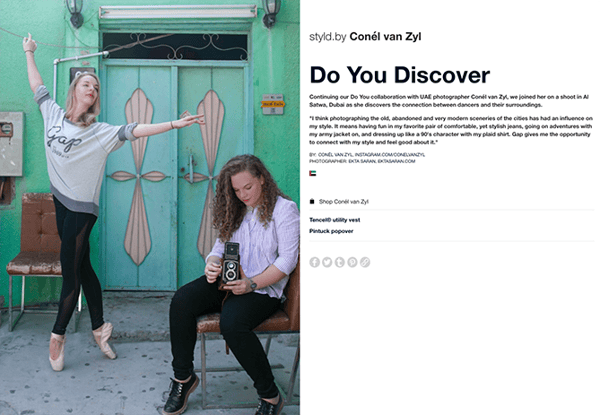
GAP’s successful Styld.by campaign featured a number of influential social media personalities from blogging giants like Refinery29 and WhoWhatWhere, showing how they incorporate GAP clothing into their personal wardrobes. Users viewing the influencers’ posts on social media were given options to “Shop this Look” conveniently in the caption of photos.
Thanks to the involvement of multiple influencers from different niches, GAP’s campaign had enormous reach.
10. Stride Gum: Mad Intense Gum
Influencer: DJ Khaled
If anyone has figured out how to gain a loyal following on Snapchat, it’s hip-hop artist and producer DJ Khaled. Once a minor figure in the music world, Khaled has enjoyed an unprecedented level of success on the ephemeral photo-sharing app, with each of his snaps garnering over 3 million views on average.
“DJ Khaled has completely cracked the platform,” said Emmanuel Seuge, senior vice president for content at Coca-Cola, one of Snapchat’s major advertisers. “He’s the king of Snapchat.”
His “King of Snapchat” status means Khaled is in high-demand for influencer campaigns with brands. He regularly takes part in “Snapchat takeovers,” where a brand hands over the reigns of their corporate Snapchat to Khaled for a brief period of largely unfiltered antics.
Working with W+K London, Stride Gum launched a Snapchat takeover campaign with Khaled last year to promote its “Mad Intense Gum” campaign. The brand called the takeover “an unpredictable, fun day for all his followers.”

Source:
W+K London
11. Naked Juice: Sponsored Instagram Posts
Influencer: Kate La Vie
This bottled smoothie brand is edging its way into the beauty, fashion, and health scene on Instagram with help from key influencers in the space. Lifestyle bloggers like Kate La Vie (below) share sponsored posts featuring snapshots of their daily outfits and beauty essentials — including a strategically placed Naked Juice in the mix.
12. Loeffler Randall: LR Ambassadors
Influencers: Creative Businesswomen
High-end accessory and footwear brand Loeffler Randall has become a favorite among artists, bloggers, and fashion insiders, thanks in big part to the company’s commitment to involving social media influencers in its marketing campaigns.
The brand’s “LR Ambassadors” include a diverse group of writers, painters, florists and other creative businesswomen “leading dynamic lives.” In the brand’s own words, their LR Ambassadors are “cool girls doing cool things.”
In addition to profiling its LR Ambassadors on the company blog, Loeffler Randall shares pictures of its ambassadors wearing LR shoes and accessories on Instagram, using the hashtag #LRambassador.
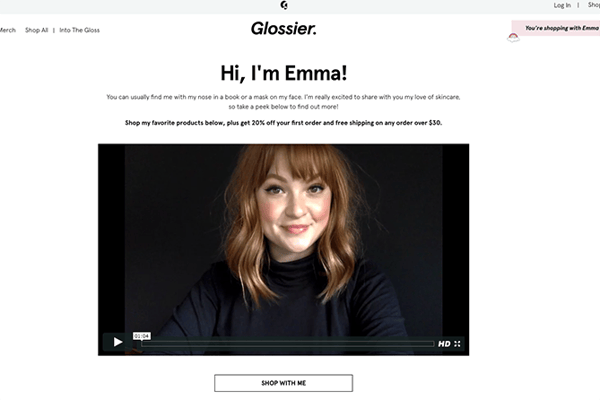
13. Glossier: Regular Women
Influencers: All Women
This Manhattan-based beauty startup (which was recently named one of Fast Company’s Most Innovative Companies of 2017) owes much of their seemingly overnight cult status to their ever-expanding network of super fans and micro-influencers — those people who may have high influence, but low individual reach.
Instead of paying a few big names to promote their minimal skincare and cosmetics, the brand relies on “regular women” to spread the word.
“What’s very motivating to us is this idea of every single woman being an influencer,” Glossier CEO Emily Weiss told Quartz. Glossier recently introduced a referral program to enable its more influential followers to offer product discounts and other incentives to their unique networks.

Hey Startups, HubSpot is now giving away free CRM + Email
Many founders make the same mistake in the early days of their companies — instead of building an integrated tech stack, they use a bunch of disconnected tools because these tools are cheap, or maybe even free.
I know because I made this mistake.
I started my first company in my early 20s. We were a web development shop building pretty cool technology, and yet could not figure out a good system to track our sales pipeline or manage leads. I actually taught our sales team a manual process that included flipbooks of business cards and tick sheets to track who needed a follow-up. 🤦
We also struggled to manage lead flow. While our WordPress site could collect leads, those leads didn’t automatically sync to a CRM (we didn’t even have one). Instead, leads were forwarded to our only marketer, who manually distributed them to our sales team via email. When this person was on vacation, our sales team didn’t get leads. Even if they did get leads, I never knew if they were following up or not.
There was no doubt in my mind that we were losing money — both in time spent on these manual processes and also lost deals — but we were also creating pain for our customers and prospects. How weird is it to reach out to a company you’re interested in working with only to not hear from them for days, weeks, and maybe ever?
What a mess.
I’ll admit, some of this was my own fault. Salesforce and email tools like Constant Contact did exist at the time. In retrospect, I was definitely suffering from what I later dubbed “poor business syndrome” — afraid to spend what little money we had on the thing that would help us grow — but at the same time, CRM, lead management, and email tools all together were expensive! I could never bring myself to spend the money.
It felt like I only had two choices: cough up the money for pricey tools that would give me a unified (but painfully expensive!) view of our customer experience, or just hope that prospects would be persistent in contacting us and would forgive the email we sent them that 100% lacked context on previous interactions they had with us.
As of today, no startup will ever again need to make the same concession I did.
Today, in addition to giving our CRM away for free, we’re also giving away free email. This means that if I were a founder today using HubSpot’s free tools I would know where our leads were coming from, whether or not our sales team was following up with those leads, how much money is in our pipeline, and could even write personalized emails based on where prospects are in their customer lifecycle! That’s a solid sales and marketing setup for exactly $0. No hefty price tag, no pain to endure.
And there’s more …
We’re adding Facebook, Google, and LinkedIn Ads tools to the CRM — for free. Now you can report on your ad campaigns across networks, and see exactly who converted on your ads.
This is a big deal.
It has literally never been easier or cheaper to start a company. Our CEO, Brian Halligan showed this chart at INBOUND 2017:

With free, integrated tools it’s not only easier to startup — it’s easier to scale-up.
When companies manage customer data well, they’re empowered to create great customer experiences. And we want you to start creating those great experiences on Day 1 of your business, not Day 1,000.
We want to give businesses the tools they need to be successful when they’re acquiring their very first cohort of customers, so they can acquire (and retain!) future customers even faster.
If you’re not already, I hope you’ll give our free tools a try today. Let’s grow better together.

The 9 Best Free Email Marketing Tools in 2019
In case you didn’t know, email usage is at an all-time high. More than 3.7 billion people use email worldwide.
With email usage so high, it’s no wonder you likely constantly receive marketing emails from businesses. Email marketing works — even in the B2B space.
In fact, 86% of B2B marketers rely on email marketing campaigns to promote new business, which begs the question — are you using email marketing effectively for your business?
More importantly, are you using email marketing consistently at all?
There are a ton of email marketing service tools out there to help you with your email marketing, some of which are completely free. But, it’s important to note, not all free email marketing tools offer the same features.
As a new business, you’re probably most concerned with how many emails you’re able to send, which features you have access to, and whether you can upgrade your account as your business grows.
You’re probably also thinking about deliverability, and whether your emails will be consistently delivered to your contacts’ inboxes. Plus, you likely want a tool that’s both easy-to-use and doesn’t require advanced technical skills.
Fortunately, we have you covered — here, we’ve ranked the best free email marketing tools that you can use for your business in 2019.
The 9 Best Free Email Marketing Tools in 2019
- HubSpot
- SendPulse
- Mailchimp
- Zoho Campaigns
- Moosend
- SendInBlue
- Mailjet
- Benchmark
- MailerLite
1. HubSpot’s Free Email Marketing Tool
HubSpot offers a reliable and feature-packed email marketing tool that’s suited for growing businesses — for free. You can create professional marketing emails that engage and grow your audience with the easy drag-and-drop email builder. With the drag-and-drop email builder, you don’t need to wait on IT or designers for help. Instead, you can easily create beautiful emails that your audience will love. HubSpot’s tool helps you achieve incredible marketing results with little effort.
On top of the free email tool, you can use the HubSpot CRM for free to create tailored touch-points for your customers. HubSpot email is automatically connected with the HubSpot CRM, so you can tailor relevant emails based on any details you have — such as form submissions and website activity.
Using the CRM, you can include personalized content in your emails, like first name and company name, to ensure your contacts feel like they are being personally addressed, all while tracking email activity in the CRM. This contributes to efficient scaling opportunities should your business outgrow the free tools and require more robust automation features, such as workflows.
Optimizing your emails has never been easier. Using the tool’s email reporting analytics, you’ll learn how to send more relevant and optimized emails to your audience.
The HubSpot email tool is free for up to 2,000 email sends per month, with upgrade solutions starting at $50 with Marketing Hub Starter.
2. Send Pulse
Send Pulse has over 130+ templates to choose from, or you can create your own using drag-and-drop functionality. Under the free plan, you’ll have access to Send Pulse’s highly regarded support team, including support via live chat.
In terms of functionality, Send Pulse has a “Resend” feature that allows you to resend unopened emails with different subject lines, which is valuable for time scrapped marketers. What’s great about Send Pulse is that it has prices for all its services. For example, if you need to send SMS, you can add an SMS package to your email marketing service package.
They also offer web pushes, SMTP, Viber, and more. Since the service started in 2015, there still isn’t a ton of API support, but that’s something Send Pulse is working on improving for marketers who are in need of technical functionality.
SendPulse offers 15,000 emails per month for free for up to 2,500 subscribers. Pricing starts at $9.85 per month for unlimited emails and up to 2,500 subscribers.

Image source: SendPulse
2. MailChimp
MailChimp’s email tool is particularly useful for small and medium-sized businesses, since the free plan offers up to 12,000 email sends per month for up to 2,000 subscribers. Plus, you get access to features such as list segmentation, A/B testing, contact profiles and more. However, it’s important to note you’ll have MailChimp branding in your email footers with the free plan, and won’t have access to premium support.
If you use e-commerce software, you’ll be happy to know that MailChimp integrates with e-commerce providers including WooCommerce and Magento. You’ll also be able to integrate Mailchimp with WordPress if your business uses WordPress as its content management system. MailChimp offers reporting for emails, but the details may not be as robust as you would like for optimal improvements.
The MailChimp Free Forever plan allows up to 12,000 email sends per month to a subscriber limit of 2,000. The next tier upgrade tier costs $10 per month for unlimited email sends to a maximum of 500 subscribers.
3. Zoho Campaigns
Zoho Campaigns is a good option for small to enterprise-sized businesses, depending on how quickly you’re scaling. With the Zoho Campaigns free plan, you get access to features such as A/B testing, reports, and templates. If you’re already using the Zoho CRM, it makes sense to check out Zoho campaigns to see how email and the CRM work together.
It’s important to note — while the free version provides a lot of features, most of these features have limitations. Additionally, it can be difficult to get started using Zoho Campaigns because it requires customization before sending emails.
Zoho offers 12,000 emails per month for up to 2,000 subscribers. Pricing starts at $5 per month for up to 500 subscribers.

Image source: Zoho
4. Moosend
Moosend is ideal for people looking to get their feet wet in email marketing. The free tier comes feature-packed, but you’re maxed at 1,000 subscribers and won’t have a dedicated IP address.
Moosend offers an easy to use drag-and-drop editor, email marketing automation triggers, real-time analytics, and list segmentation features. Moosend doesn’t offer a CRM, but if you’re looking to solely do email marketing, it might be a good start for your business.
The company is ranked as having great support and satisfaction scores. If you’re a growing business, you’ll only need to pay for subscribers. The next upgrade is $10, and you’ll get up to 2,000 subscribers.

Image source: Moosend
5. SendInBlue
If your business relies heavily on transactional emails, such as forgotten password help and invoice receipts, then SendInBlue might be ideal for you. With their extensive developer APIs, you’ll be able to integrate with their email system to achieve custom and required technical processes. Plus, while the service was initially known for having issues with delivery rates, SendInBlue has since improved upon its deliverability.
With SendInBlue’s free plan, you’ll have access to a vast array of templates, personalization, A/B testing, contact management, workflow editor, and real-time reporting. Like the other tools mentioned, the software is easy to use, although the main interface can sometimes offer too many options and feel overwhelming.
SendInBlue offers up to 300 email sends per day (which is roughly 9,000 emails/month) for free with unlimited contacts. Upgrade solutions start at $25/month for 40,000 emails and no daily sending limit.

Image source: SendInBlue
6. Mailjet
With Mailjet’s free plan, you’ll have access to unlimited contacts, APIs and webhooks, an advanced email editor, and advanced statistics. However, you won’t have access to A/B testing or automation features. The Mailjet interface is also simple to use, so you won’t have to spend a ton of time getting familiar with the service. Since you get full API access as part of the free plan, Mailjet is suited for businesses that require technical adjustments.
Mailjet’s free plan offers up to 200 emails per day (that’s roughly 6,000 emails per month). You can upgrade starting at $8.69 per month for 30,000 emails and no daily sending limit.

Image Source: Mailjet
7. Benchmark
If you work for a business that is experiencing incredible growth, yet isn’t already using an email marketing service, you might want to check out Benchmark’s free email tool. The tool is well-equipped with premium features, and designed to cater to the enterprise-level business.
With the free version of Benchmark, you can use the drag-and-drop editor, select from various templates, use sign-up forms, build basic drip campaigns, and use the list hygiene feature. Benchmark is user-friendly and easy to implement.
However, there’s no option for A/B testing or automation features on the free tool. Furthermore, contacts can’t be added via list import in the free plan. You can only email contacts who fill out Benchmark subscriber forms.
Benchmark offers a free Starter Plan with up to 2,000 subscribers and 14,000 emails per month. The next upgrade plan starts at $13.99 for up to 600 subscribers and unlimited email sends per month.

Image source: Benchmark
8. MailerLite
Although it has “lite” in the name, MailerLite is actually a good solution for businesses starting out and looking to grow. The service is ideal for small businesses needing to send bulk marketing emails. It’s also well equipped with preview features so you can preview your email on desktop and mobile before sending it. However, the API and integration capabilities are not as robust as some of the other options in this list.
Mailerlite offers 12,000 emails per month with up to 1,000 subscribers. The next upgrade tier costs $10, and it unlocks all features for up to 1,000 subscribers.

Image source: Mailerlite
9. ExpressPigeon
ExpressPigeon provides a good solution for businesses using small list sizes but sending to very high-priority subscribers. With ExpressPigeon, you can effortlessly build and personalize emails, automate email responses, and send high volume emails.
Best of all, you get access to all of the premium features with the free plan — however, there are low send and subscriber limits. ExpressPigeon is regarded as having some of the best customer satisfaction scores in the industry.
ExpressPigeon offers a free plan that allows 1,000 messages for up to 500 subscribers, and one user only. The price of each additional user is $100 per month. The next upgrade tier is a huge price jump: $1,000 per month for up to 100,000 subscribers and two million emails.

Image source: ExpressPigeon
Now, you have a better sense of the best free email marketing tools at your disposal. Fortunately, you don’t need to commit to any service. You can try these tools out depending on your business’ needs, then select the one most ideal for you.
If you’re looking to get started building incredible email marketing campaigns, we recommend that you try HubSpot’s Free CRM. You’ll be able to see the power of the CRM behind every email interaction with your customers, so that you deliver remarkable experiences.

18 Beautiful New Ebook Templates [Free Download]
Did you know that companies with 30 or more landing pages generate 7x more leads than those with fewer than ten? But landing pages don’t convert visitors to leads all by themselves — without attractive and compelling offers behind them, they won’t generate the tonnes of leads for your sales team that you want them to.
That’s why it’s so important to create valuable content people want to download, and then package it in a way that’s visually appealing to your readers. A big part of the ebook creation process is making it look both professional and attractive so people want to read it and share it.
We know not every team has someone in-house who can (or has time to) whip up a slick, highly shareable ebook design. But we have good news: You don’t need to be a designer by trade to design beautiful ebooks yourself. With the right resources and approach, it doesn’t have to be a daunting task.
We created ebook templates to help make this process easier for you — and they were so popular that we decided to revamp the offer for 18 new-and-improved ebook templates for you. We hope these templates minimize the time you spend on the details of design, allowing you to concentrate on writing valuable, lead-generating content your readers will love.

Download the Templates Now
With these slick new templates, you’ll be able to:
- Create beautifully designed ebooks without either the cost of a designer or experience with InDesign/Illustrator/Photoshop.
- Choose from six different ebook designs across three different platforms (Adobe InDesign, PowerPoint, and Google Slides), and even add your own brand colors to any of them in a few quick steps.
- Spend more time writing awesome content and less time getting the layout right.
- Use all of the stock images provided in the templates, free of charge.
- Save your ebooks as professional and attractive PDF files that are ready for download.

10 How-To Videos That Really Work (And Why)
Have you ever learned how to do something with the help of an internet search?
The answer is most likely a resounding “yes.” Most recently, I taught myself how to fold a fitted sheet with a helpful video from homemaker extraordinaire, and friend of Snoop Dogg, Martha Stewart.
Videos are an especially compelling way to learn how to do something online because, well, the video shows you exactly how to do it. I’m not alone here, either — most customers would prefer to watch a marketing video rather than seeing an ad.
So if you’re among the 45% of marketers who are adding video content to their strategy this year, there could be a lot of value in making videos specifically for those in your audience who are trying to learn how to do something, too.
In this post, we’ll explore just how popular these searches are on YouTube and other platforms, and what you can learn from eight how-to videos about how to make great teaching videos of your own.
How-To Video Searches Are Popular
How-to searches are incredibly popular. Think about just your own life for a moment, and reconsider my question at the beginning of this blog post. They also may be a great opportunity for brands to show off their products.
According to WyzOwl’s 2018 Video Marketing Statistics Report, 72% of people prefer to learn about a product or service through video.
Video marketing is growing, and so is the number of platforms it can be seen on. While Youtube and Vimeo used to be the primary place to find videos, consumers now similarly use social platforms like Facebook and Instagram to learn about brands and products.
10 How-To Videos to Learn From
1. How to Fold a Fitted Sheet
You may recognize the title of this how-to video — it’s the one I mentioned earlier in this very blog post. Are you always geting stymied when putting away fitted sheets on laundry day like me?
What I love about this video is how it showcases personality. It’s a simple how-to video of humans demonstrating how to do something, without any animations or high tech features, but it’s still extremely effective at teaching the viewer. Stewart and her guests make jokes about how hard it is to fold the sheet — Stewart even joking that her inability to do so led to her divorce — and they show the viewer how easy it is to get tripped up in the process. Stewart and her guests also have empathy for the viewer and show exactly how to avoid pitfalls along the way.
Takeaway for marketers If you want to create a how-to video “hosted” by a real, live human, make sure they act like a human. Videos are an easy way for brands to showcase personality, so put yourself in the shoes of your viewer, and infuse humor, sincerity, and empathy into your instructions. If the concept you’re explaining is complicated, tell the viewer that. If you had no idea how to use your product at first, share that. Speaking like a human — instead of reading off a script like a robot — will make your video memorable, effective, and enjoyable, too.
2. How to Cook Perfect Pasta
Tasty on BuzzFeed shares cooking and recipe videos that frequently go viral on YouTube and other social media and reach millions of people every month. But this video isn’t one of Tasty’s trademark recipe videos — it’s one of several how-to videos that break down common or difficult cooking skills step-by-step.
In this video, Tasty uses hyperlapse to speed up the cooking demonstration and get the viewer the information they need as quickly as possible. This fast-paced filming style is eye-catching if it starts auto-playing in a social media feed, too. Tasty chose a smart how-to search term, too — there’s a ton of search volume around the phrase “how to cook pasta.”
Takeaway for marketers: Viewers prefer YouTube videos on the shorter side, so sped-up hyperlapse filming helps conserve time and creates a neat visual effect. Work backward and conduct keyword research to learn what terms your audience is searching for to find a topic to make your video about.
3. How to Escape Quicksand
Evidently, Princess Buttercup’s tragic fall into quicksand in The Princess Bride wouldn’t have been quite as terrifying in real life.
In this how-to video, Tech Insider uses captions and animations to break down a complicated concept. I wasn’t exactly searching for information on how to escape quicksand when I found this video, but the unique subject matter made me instantly click, intrigued. What’s more, the sound isn’t required — although it does add dramatic effect — which might make people more likely to click and watch all the way through, since many social media videos are watched on mute.
Takeaway for marketers: Your how-to videos don’t necessarily need to be about a dry topic related to your industry. If you create a fascinating piece of content that goes viral, you’ll generate interest in your brand that way. Animations and captions help to show — rather than explain — trickier concepts like quicksand, so consider these visual elements for high-level explanations. And if there’s a way to make your videos volume-agnostic, do so. Some videos will require narration or other sounds, but the visual elements mentioned previously could do the talking for you.
4. How to Blow Out Curly Hair
Anyone who’s ever gotten a blowout knows that it can be expensive and time-consuming to have it professionally done.
So Bustle cleverly made a how-to video that teaches viewers how to DIY and save money– a motivating factor behind many how-to online searches, I suspect. This video is also short, which MiniMatters suggests for enticing viewers to watch videos all the way through. YouTube counts a view as once a video has been watched for approximately 30 seconds, so viewers with short attention spans might be more likely to stick around for that long if they see a video is shorter, like this one.
Takeaway for marketers: Almost everybody wants to save money where they can, so think about ways your how-to video could help viewers do that when brainstorming topics. When filming, try to keep videos as short as possible to attract viewers and keep them watching all the way through to steadily increase your number of YouTube views.
5. How to Style a Blazer 3 Ways
In this short, sweet Instagram video, verified style influencer @PreviewPH shows off three ways to style a blazer from ForMe. This video is great for those who are interested in trying out new fashions but don’t exactly know how to wear items or accessories. In this video, she demonstrates three ways of wearing a blazer, which could accommodate the fashion styles of three different people.
Takeaway for marketers: How-to videos can be a great way to show off how a product works and how it can be used. This type of video is clearly promoting one specific blazer and brand, but it’s more valuable than a standard ad because it shows potential buyers how they can wear it. If people who are hesitant about a new fashion style see this how-to video, they might feel more confident in their purchase.
6. How to Asana: Planning with Asana calendar
Asana cleverly brands its how-to video series as “How to Asana,” and all of the videos in the series feature a consistent theme. All of the videos in this series are under two minutes in length, are hosted by the same person, and feature an eye-popping yellow background. The meat of the video consists of a screencast of someone using the Asana calendar tool, but these branding details bring life to what would otherwise be a rather boring video.
Takeaway for marketers: If you’re thinking about creating a how-to video series, take the extra time to make it memorable and recognizable. These efforts will make videos look more professional and will make viewers want to keep tuning in for more helpful videos if they know they can expect more.
7. How to Create an Animated GIF in Photoshop
Who else here loves GIFs? That’s right — everyone loves GIFs.
But before I watched the video above, I had no idea how easy it was to make my own. That’s the ideal reaction to a how-to video, by the way — “that was so easy.”
Adobe’s how-to video is a great example of a software demonstration video because it zooms in on only the necessary information. Instead of confusing the viewer by showing the entire Photoshop interface, the video features magnified animations of only the buttons and tools they need to accomplish the task at hand.
Takeaway for marketers: If you’re making a technology demonstration how-to video, consider how it will appear to any first-time product users watching. Try to minimize any confusion by only filming elements of the technology needed for your video so viewers can follow along on their devices.
8. How to Increase Your Facebook Reach and Outsmart the Algorithm
You might be hesitant to create videos to explain a complicated subject matter, but that could actually be the most effective medium to help your audience understand something.
In this video, my colleague Megan Conley breaks down the many nuances of Facebook’s News Feed algorithm in a clear and concise manner. Then, graphics, animations, and screencasts supplement what she talks about with data visualizations to make the stats and figures more memorable for the viewer. Finally, the video ends with helpful next steps viewers can take to solve the problem outlined in the video. The video isn’t about how to use HubSpot software at all — it’s only in the business of helping people get better results.
Takeaway for marketers: The most compelling how-to video might be one that doesn’t mention your product at all. Think about what questions your audience might be asking and establish your brand as a thought leader with helpful videos that don’t end with a sales pitch.
9. How to Fix a Chair with Noodles
This interesting Instagram video from @Crafty.Life.Hacks shows viewers how to fix a wooden chair by replacing missing wood with instant noodles. While this video is short and easy-to-follow it is fascinating because it teaches viewers about an alternative use for an every-day household food item.
Takeaways for marketers: This example shows how a product can have multiple purposes. While marketers will want to make how-to videos that show the primary purpose of their product, sometimes, it can still be helpful to think outside of the box and show off other ways your product could be used.
For example, if you’re selling a food product, you might want to craft a recipe video that shows how it can be used as an ingredient, or a DIY that shows how it can be used as a tool — like the video above.
10. How to Make Momofuku’s King Crab Noodle
In this Facebook video, shared by Vice’s food blog Munchies, Chef Max Ng shows viewers how to cook his grandmother’s King Crab Noodle recipe — which he serves at the Momofuku Ssam Bar in New York City. Although this video is on the longer side, he shows audiences a simple step-by-step cooking process that they can easily follow.
This type of video might be a helpful how-to example for local restaurants or food publications that want to show off their favorite recipes. Promotionally, this video also gives some great brand awareness to Munchies and the Momofuko restaurant.
Takeaways for marketers: You can get away with videos on the longer side if they clearly describe a step-by-step process like cooking. How-to videos can also be a great source for cross-promotional content. In the example above, Max Ng, Momofuko, and Munchies are all highlighted in an entertaining and informative way.
How to Make How-To Videos
Now that you have inspiration from real-life B2B and B2C brand videos, start thinking about how you could create helpful content for your audience.
Create buyer personas and use these to inform your strategy. What types of questions does your audience ask about your product? What questions do they ask about your industry? What problems does your product solve that you could demonstrate in a video?
Use tools like Google Trends and HubSpot’s Keywords tool to learn more about the types of searches your audience is conducting and what content you could create to answer those questions.

The 16 Best WordPress Analytics Plugins in 2019
What’s the one thing more overwhelming than the volume of your analytics data?
I’m willing to be its the volume of analytics plugin options on WordPress.
Installing an analytics plugin for your WordPress site allows you to get all your site’s data, metrics, and insights without leaving your WordPress dashboard. The majority of users choose Google Analytics, although I’ve chosen some non-GA plugins, too.
While Google Analytics is a powerful option, many find the sheer amount of data available on GA daunting, and the interface clunky. WordPress plugins aim to simplify the interface so that users get to the data they need without feeling overwhelmed.
If you do use Google Analytics, we have a comprehensive guide on How to Set Up Google Analytics for WordPress.
With new plugins hitting the market monthly, and specialist plugins offering specific insights, it can be difficult to figure out which one is right for you.
To help you sort through, we’ve compiled a list of the best analytics for WordPress plugins in 2019. We’ll explore basic differences, as well as features and benefits of each option, to help you choose the best plugin for your needs.
1. MonsterInsights
Price: Free | Premium: from $99
WordPress.org rating: 3.9 out of 5 from 637 reviews
Generally considered the king of analytics plugins, MonsterInsights is a good all-rounder. It’s also the most popular Google Analytics plugin on WordPress, with over two million active installations.
Like most of the plugins in this list, MonsterInsights adds your Google Analytics tracking code to your site with no coding required on your part. It pulls your data into a user-friendly interface that runs inside your WordPress dashboard and offers flexibility for growing sites with free and premium versions.
It offers all the Google Analytics data you would expect, broken down into audience and behavior metrics. Additionally, you get more advanced features like ecommerce reports with the premium version.
One limitation of this goliath is you can’t get statistics on individual pieces of content like you can with Analytify.

2. Analytify
Price: Free | Premium: $39 per year
WordPress.org rating: 4.9 out of 5 from 220 reviews
Analytify is a big hitter in the world of WordPress analytics and will install your Google Analytics tracking code for you. The interface allows you to access your data right from your WordPress dashboard.
Analytify is especially good for ecommerce businesses, since it offers enhanced ecommerce tracking features. The free version is fairly limited but the premium version is substantially cheaper than MonsterInsights, while offering similar functionality plus the benefit of being able to dig into individual posts and pages.
With the free version, you can monitor your site stats and you gain limited access to general reporting features. This includes tracking features like page views, top countries, social media statistics and top referrers.
With the premium version, you gain additional features like real-time statistics, campaign statistics, and email notifications.

3. Google Analytics Dashboard for WP
Price: Free
WordPress.org rating: 4.3 out of 5 from 389 reviews
It may not have the catchiest of names, but this plugin is all about functionality.
It does what it says on the tin. The interface isn’t as pretty as some of the more polished plugins, but you get all the features you would expect — insertion of tracking code, Google Analytics data, real-time tracking — right in your WordPress dashboard for free.
A solid option for those who know they don’t want to upgrade and pay for a premium plugin.

4. Clicky Analytics
Price: Free | Paid: from $9.99 per month
WordPress.org rating: 4.6 out of 5 from 17 reviews
Aside from having an excellent name, Clicky offers a plain and simple view of your analytics, which is ideal for people who feel overwhelmed by the magnitude of options available within Google Analytics. Additionally, it installs its own Clicky tracking code into your site so you don’t have to mess around with code.
Clicky provides detailed insights that are still simple enough for the average blogger to understand. Most of the functionality is available for free, but some features like video analytics and custom data tracking is only available with the paid version. It also has some quirky features like a live map so you can track your visitors in real-time.

5. Crazy Egg
Price: Premium: $9 per month
WordPress.org rating: 3.8 out of 5 from 5 reviews
Crazy Egg is an open source plugin offering a totally different perspective than most of the others, since it adds Crazy Egg’s tracking code to your site. This allows you to watch via heat maps — in real-time — what visitors are hovering over and clicking on.
The plugin also offers comprehensive A/B testing based on various content variables like color, copy and content placement, to improve the user experience and increase conversions. This is a good alternative to Google Analytics for users more interested in conversion optimization.

6. Analytics Cat
Price: Free
WordPress.org rating: 3.8 out of 5 from 5 reviews
Analytics Cat is a super simple, lightweight plugin. If you’re looking to add a Google Analytics tracking code but don’t want to weigh down your WordPress site with the dashboard integration, it can do it in minutes.
Analytics Cat offers a simple way to stop your data from becoming corrupted by your obsessive self-navigation, since it provides the ability to exclude logged-in users from your Google Analytics tracking. You can also exclude as many other user roles as you’d like.

7. GA Google Analytics
Price: Free | Premium: from $15 one-off
WordPress.org rating: 4.9 out of 5 from 71 reviews
This is a simple tool that does one job — it adds a Google Analytics code to every page on your site. It doesn’t pull in or display any stats for you, but it does its job well. This is ideal for complex sites with hundreds of pages. If you’re happy with keeping your Google Analytics off your WordPress dashboard but want to ensure the tracking code is on every page, this is the plugin for you.
Additionally, the premium version enables a host of advanced features like an opt-out for visitors. It also supports custom code and lets you disable tracking on logged-in users.

8. HubSpot
Price: Free
WordPress.org rating: 4.6 stars from 104 ratings
HubSpot’s WordPress plugin isn’t just an analytics plugin — it also allows you to implement HubSpot’s forms, pop-ups, and live chat.
HubSpot’s plugin offers incredibly detailed data on the leads you collect. Additionally, you can get an in-depth understanding of which CTAs drive the highest number of sign-ups, enabling you to convert visitors more effectively. This user information is synced with your HubSpot CRM.

9. Google Analytics WD
Price: Free | Premium: $30 per year
WordPress.org rating: 4.5 out of 5 from 93 reviews
This plugin is a solid option and has both a free and reasonably priced premium version. With a low barrier to entry, it’s a user-friendly, simple way to view your stats within WordPress.
The free version includes page views, top performing pages, a centralized dashboard, comprehensive reports, and bounce rates. However, if you want Google Analytics coverage, ecommerce reports, AdSense and AdWords reports, you’ll need the premium version.

10. WP Google Analytics Events
Price: Free | Premium: from $79 per year.
WordPress.org rating: 4.6 out of 5 from 28 reviews
Designed to offer detailed behavioral analytics, WP Google Analytics Events digs deeper into your Google Analytics data. For instance, just because a visitor navigated to a blog post, doesn’t mean they scrolled down and read all the way through. WP Google Analytics Events can help you see what’s really going on at the level of individual events.
The downside of this plugin is it’s difficult to set up, so this is ideal for more advanced users.

11. Jetpack by WordPress.com
Price: Free | Premium: from $5 per month
WordPress.org rating: 4.6 out of 5 from 28 reviews
Jetpack is a multi-functioning tool for design, marketing and security — analytics is just one of its many features. It displays your stats via a simple interface offering a handy overview of how your site is doing. However, don’t expect to be able to drill down into the data on individual pages and posts.
As you would expect from a WordPress.com product, the plugin offers good support and detailed troubleshooting guides. Best of all, Jetpack offers a smiley face at the bottom of your page to show whether the JetPack analytics tools are working.

12. WP Statistics
Price: Free
WordPress.org rating: 4.3 out of 5 from 396 reviews
A powerful yet simple plugin focused on stats, WP Statistic’s interface is intuitive and displays graphs and charts beautifully. This plugin puts an emphasis on privacy. You can be sure that the data is not being shared with the big boys — additionally, you don’t need to deal with any third parties to use this plugin.
This plugin is particularly good when it comes to geographical data and content reports, and supports real-time stats on your site as well as the standard features you would expect. The best part? It’s totally free.

13. Matomo
Price: from $9 per month
WordPress.org rating: 4.6 out of 5 from 84 reviews
Formerly Piwik, Matomo is an open-source analytics alternative which gives you detailed reports on your visitors, traffic sources, keywords, and many other common metrics. This plugin installs the Matomo tracking code and allows you to view the data within your WordPress dashboard.
Advanced features lets you follow visitors in real-time or in the visitors’ log and manage multiple sites among many other features. Matomo also offers a mobile app to access reports on the go. You will need an existing Matomo account to access the data.

14. Slimstat Analytics
Price: Free | Add-ons from $12 one-off
WordPress.org rating: 4.8 out of 5 from 755 reviews
Slimstat is an alternative analytics solution sitting between WordPress and Google Analytics in terms of complexity. An open-source platform that stores all your data in your WordPress database, it allows you to track returning customers and registered users, and monitor Javascript events, detect intrusions and analyze email campaigns — all within your WordPress dashboard.
The basic version is free but there is a range of add-ons allowing you to use as much or as little as you need.

15. Enhanced Ecommerce Google Analytics Plugin for WooCommerce
Price: Free | Premium: $135 one-off
WordPress.org rating: 4.4 out of 5 from 95 reviews
The clue is in the title with this one. Enhanced Ecommerce Google Analytics Plugin for WooCommerce focuses on the new Google Analytics’ feature for advanced ecommerce statistics.
Because it’s so specialized, this plugin offers the most detailed insights into customer behavior as well as comprehensive product and sales statistics. All of it is accessible from the interface within your WordPress dashboard. However, you’ll need the paid version to get any serious benefit from this plugin.

16. WP Power Stats
Price: Free
WordPress.org rating: 4.1 out of 5 from 53 reviews
WP Power Stat offers a wide-screen interface, which is good for getting an overview of your site’s data. This plugin is billed as lightweight, fast, reliable and secure. As all the stats are stored on your own WordPress site, there is no meddling with your data by third parties. This plugin is a powerful free option.

Which Analytics Plugin Should You Choose?
You may want to choose more than one analytics plugin, since many of them are specialized for certain tasks.
If you’re looking to bring the power of Google Analytics into your WordPress dashboard, go for a plugin like MonsterInsights or Analytify, which both have excellent free versions as well as comprehensive premium versions.
Alternatively, there are some plugins specialized in privacy, speed and reliability. There are also some simple tools to quickly set you up with a Google Analytics code.
The great thing about WordPress plugins is you can install them and play around with the free versions to see if they work for you without committing to anything. So give a few of these options a try and see what’s the best fit for you and your analytics needs.
In the meantime, find out how to save time and maximize ROI by hooking up your HubSpot data with your WordPress site.

Why You Shouldn’t Buy Instagram Followers (& What to Do Instead)
You might know your Instagram content is good, but imagine how much better it will seem if it looks like 10,000 people agree.
Whether you’re trying to become a social media celebrity or simply looking to spread brand awareness on Instagram, it can seem tempting to pay for your first couple thousand followers.
There are plenty of services available that allow you to buy 1,000 followers for the price of a small Starbucks latte. But of course, if it really was that cheap and easy, everyone would be doing it. So what’s the catch? Is buying Instagram followers legal and safe for your business? Is it a worthwhile investment?
Here, we’ve gone ahead and covered all the questions you might have about buying Instagram followers to give you a better idea of how it actually works. We’ve also explored the pros and cons, so you can decide for yourself if it’s a good move for your brand.
Can you buy Instagram followers?
Yes, you can buy Instagram followers. There are plenty of cheap services available that allow you to buy 1,000 followers for as little as $10 USD. But you’re only paying for a number. Many of those followers are either bots or inactive accounts, which means they’ll never engage with your posts.
As a quick Google search will reveal, there are many cheap services you can use to buy Instagram followers. For about $6 USD, you can get 500 followers, and for about $10 USD, you can get 1,000 followers.
The vast majority of these purchasable followers, however, are either bots or inactive accounts.
When you buy Instagram followers, you’re paying for a number alone. Engagement is not guaranteed, or even likely.
In addition to buying followers directly, you can also pay services to strategically follow other accounts on your behalf based on your preferences (location, hashtag usage, account type, and gender). Ideally, those followed accounts will then follow you back.
With this option, your followers are more likely to be real people, but engagement is still unlikely. Since you can’t even guarantee these accounts will follow you back, it’s a risky investment. Most accounts won’t follow you back, and even if they do, they probably aren’t going to be long-term, loyal, or active followers.
If your priority is simply to have a big follower count, these services can definitely help you. When your number of organic followers dips, these services even replenish your pool with other followers.
But remember the risks: these followers will probably never like or comment on a post, and if you’re caught with a ton of fake followers, you could ruin your credibility with your real audience.
Think of it this way: would you keep following an account if you saw that most of their “loyal audience” were inactive accounts or bots? I’m guessing not. It could seem deceitful, and lead you to believe the brand couldn’t get authentic followers through good content alone.
Should you buy Instagram followers?
It’s not a good idea to buy Instagram followers. The purchased followers are likely bots or inactive accounts, so they won’t engage with your posts. This means your posts won’t show up on Explore Pages, or on your real audience’s newsfeeds. It will also make it hard to measure metrics.
You’re buying fake Instagram followers.
The main reason buying Instagram followers can prove to be a wasted investment is because the accounts you follow often aren’t real.
Fake followers are created either because they’re managed by users whose only goal is to get followed in return, or because these accounts are sponsored by services that sell followers — as we discussed in the section above. And while these accounts might offer early engagement, they’ll ultimately become a drain on your Instagram account’s performance metrics (we’ll get to that in just a minute).
You’ll get early engagement that tapers off.
Purchased Instagram followers also provide no long-term value to your profile’s content. The followers you buy might give you views, likes, and comments early into acquiring them as a follower, but the attention they throw you now won’t be there later — when you start reporting on how your Instagram account is performing.
And how helpful, really, are 10,000 followers that don’t engage with you? Engagement is key to how Instagram’s algorithm displays posts to users. Without likes or comments, your post probably won’t show up on your audience’s newsfeeds, and it also won’t show up on any Explore Pages.
Having a lot of followers could convince users to follow you organically, but it’s not a guarantee.
Users might notice you don’t have a ton of engagement on your posts, which could deter them from following you. If you have 10,000 followers but only four likes per post, it won’t take people long to realize something is up.
Without real followers to engage with your content, your posts are essentially hidden from everyone except your inauthentic audience. Plus, your fake followers won’t share your post on any of their channels. And they won’t discuss your brand in real life with friends or family, because, well … they don’t exist in real life (no offense, bots).
Bought Instagram followers can distort your performance metrics.
It’s practically impossible to measure how well your target audience is connecting with your brand if a high percentage of that audience isn’t real. How will you measure posts that do well with your real audience if those bots and inactive accounts skew the ratio?
If you don’t know how well your posts are doing or what your real audience thinks, you’ll never convert your Instagram followers into real customers. And isn’t that the point?
Ultimately, if you pay for Instagram followers, you aren’t paying for quality, real-life followers. You’re paying for a blank number. And since Instagram’s algorithm is largely tied to engagement, not followers, buying followers isn’t a long-term solution. In fact, it isn’t really a solution at all.
Take the time, energy, and money that you would’ve dedicated to buying followers, and focus instead on building genuine relationships with a real audience. If your content is engaging and authentic, your loyal followers will spread the word and engage with your brand without needing any bribes.
Instagram Identifies and Purges Fake Followers
Recently, Instagram has updated its terms of use to identify and remove inauthentic accounts from its platform. Instagram is removing any likes, follows, or comments from third-party apps that are designed to artificially grow accounts’ audiences. By buying followers, you violate Instagram’s community guidelines and it may trigger a reaction from Instagram moderators.
Instagram is looking to maintain genuine interactions on its site, protecting real accounts and experiences. Fake or bought activity infringes upon this mission and might result in consequences, so it’s better to grow your audience organically.
Alternatives to Buying Instagram Followers
Instagram’s new algorithm rewards engagement more than follower count, displaying content similar to posts users engaged with in the past. In order to drive engagement, there are many different actions one can try on the platform to get in front of your ideal audience.
By using good Instagram marketing practices — whether you are building your personal brand or a company account — you can better reach the nearly 800 million monthly Instagram users and build an authentic audience.
First, make your account public so that users can see your profile and content. This way, you can grow your audience organically when your content pops up on users’ explore pages, attracting and delighting your target viewership.
Next, publish a variety of posts to your feed: you can post images, GIFs, videos, Boomerangs, quizzes on your story, how-tos, user-generated content, and so much more. Build trust and excitement among your followers by using high-quality photos, writing catchy captions, posting consistently, and keeping up a unique style overall to differentiate yourself from other accounts. Do your research on which hashtags generate a lot of buzz and which are aligned with your brand — hashtags can be a great way to reach new audiences if done correctly.
Depending on your brand personality, it can help to be funny or witty in your content. Having an acute awareness of how your brand is perceived and the trends going around Instagram will serve you when choosing content to post and how to interact with your Instagram community.
Lastly, utilize the many different channels on the platform, like Instagram Live, IGTV, Instagram Stories, or Shopping on Instagram. There are so many different ways to connect with users, and by driving engagement through these features, you can drive engagement and traffic organically and authentically.

How HubSpot Personalized Our Chatbots to Improve The Customer Experience and Support Our Sales Team
You can’t talk about the future of marketing without chatbots. People are increasingly interested in communicating with brands in a more personal, conversational way — and chatbots can help.
Including chatbots on your website helps visitors find what they are looking for and connect them with your team in an immediate, frictionless way. Chatbots also follow the Inbound Messaging Framework.

So, what are the secrets to building a chatbot strategy?
On HubSpot’s marketing team, we seek to deliver a world-class customer experience. We consistently ask: How can chatbots better serve our various audiences (visitors, leads, and customers) to help direct them to the right resources for their needs? Also, how can we use chatbots to support our sales team and reach our goals?
A Customer-Focused Bot Experience
Chatbots work when they’re contextual and relevant to specific problems folks are having. Through conversations with our sales team, we learned that 15% of chat questions on the website were about getting technical support. We were creating friction for our customers because our sales team (who answers chat questions onsite) is not as well equipped to answer these questions as our support team is.
So, we created a bot to direct our customers to the right resources for technical support (our support team, knowledgebase, and community). If they were not looking for technical support, we passed their questions about HubSpot features and pricing to our sales team.

We rolled out these bots across the primary site pages and saw an 80% increase in our sales team efficiency: a measure of success based on the number of meetings we booked divided by the total number of chats handled. And, it was a far better customer experience, as our customers could access technical support more easily.
It was a big win, but our work was hardly done. As we took a step back, we realized that this “support bot” experience was not serving all of our users. About 70% of our audience is visitors and leads, compared with 30% who are users and customers. This first bot experience was designed with only 30% of our audience in mind. Ignoring 70% of our audience meant we were leaving money on the table.
A Personalized Experience for All Visitors
We needed to create a personalized experience for the visitor and lead audiences, too.
With the “support bot” experience, it was odd to ask visitors and leads if they needed support when we knew they weren’t using our tools yet. Rather than directing visitors and leads to chat or support, we wanted to give these visitors their own “self-help” option. Why not give them the option to get started for free with the HubSpot CRM? That way they could start using our free tools or chat with our sales team about features and pricing for advanced tools.

Now we had designed two personalized experiences: one for those already using our software (customers) and those who had yet to experience it (visitors).
We believed this to be a better experience for each audience, because it offered contextual options based on their relationship with HubSpot. However, we wanted to test it first with an experiment.
Setting Up the Experiment
In order to test our hypothesis that this would be a better experience for both of these users, we set up an A/B test on one of our product pages so we could see exactly how the bot for visitors performed against the current bot experience (designed for customers).
First, we defined our metrics for success. We looked at:
- Sales team efficiency: # of meetings booked by our sales team ÷ the number of chats they handled
- # of signups for the CRM
We also compared these for each bot (control vs. variant), and by each audience (visitors vs. customer).
We chose one of our product pages and directed 50% of its site traffic to a cloned page with the new bot experience. The test was live and ready to run for one month while we waited (somewhat) patiently for the results.

Me, waiting at my desk
Experiment Results
We isolated our results for the audience the test was focused on: visitors. We looked at how the control (support bot) performed against the variant (lead bot).
- Sales team efficiency: increased by almost 70% in the variant
- # of CRM signups: increased by 7%
The increase in CRM signups indicated that visitors were finding the right option for them (starting for free) and diving in to try out our software for free.
As a result, fewer chats reached our sales team, but we saw a similar number of meetings booked to continue the sales conversation after a chat. This meant a couple of things:
- The sales team was able to spend more time and focus on higher quality chats that were more likely to turn into sales
- We weren’t losing demand, because we still saw a similar number of meetings booked. We were still capturing those interested in having a sales conversation, just in a more efficient way.
Better segmentation makes life better for everyone. Making a bot personalized for visitors helped the customers’ bot perform better as well. We learned the customer bot works very well for the audience it was designed for — performing 52% better when shown only to customers than when it was shown to all visitors.
Takeaways for Your Business
It’s important to recognize that different segments of your audience have different problems and what works for one audience isn’t the best for another. By understanding the problems that our visitors are facing, and personalizing their chatbot experience onsite, you can create a better prospect and customer experience. When you anticipate the help that people need better, your metrics will improve as well.
And you may be thinking, “OK, that sounds pretty good for HubSpot, but what about my business? How can I create a more contextual bot experience for my business?” Here’s how:
- Create a list of the various audiences you are serving on your website.
- For each audience, describe the types of questions they might have.
- Determine the resources or people who can best answer those questions so you can help them find what they are looking for faster and with less friction.
Then implement it! The HubSpot Conversations tool gives you the ability to target your chatflows with segmented lists based on data in your CRM so you can create a personalized experience as well.
Chatbots work shoulder-to-shoulder alongside with our sales team to provide an excellent, personalized purchase experience that also helps us identify visitors who are possible good fit customers.
Chatbots can do the same for your business and audience.
