The General Data Protection Regulation: One Year Later
One year ago on May 25, 2018, the General Data Protection Regulation (GDPR) went into effect and replaced the 1995 EU Data Protection Directive (DPD) with the goal of significantly enhancing the protection of the personal data of E.U. citizens and increasing the obligations of organizations who collect and/or process personal data.
Although the GDPR is an E.U. regulation, its rules still apply to any business that markets or sells their products to E.U. consumers and/or that monitors the behavior of people in the EU. Basically, if you’re located outside of the E.U. but you control or process the data of E.U. citizens, the GDPR applies to your organization.
The GDPR ensures eight rights for individuals, including granting consumers easier access to the data companies hold about them, requiring companies to inform consumers about such data collection, and necessitating companies to obtain consumer consent before data collection occurs.
If you’re curious, take a look at how HubSpot navigates the GDPR.
Since going into effect last year, the GDPR has already made headlines — regulators fined Google $57 million in January of this year for not properly disclosing to users how the company collected their data for personalized advertisements.
To mark the one year anniversary of the GDPR going into effect, HubSpot partnered with Professor Nicole Votolato Montgomery at the McIntire School of Commerce at the University of Virginia to evaluate E.U. versus U.S. consumers’ perceptions of the current organizational data practices, online consumer-company interactions, and organized responses to privacy regulations. We wanted to explore how (and if) consumer attitudes have changed a year later, since we last conducted a survey on GDPR.
We surveyed a group of 1,115 subjects across the U.S. and E.U. (United Kingdom, Germany, and France).

Consumers’ focus on the GDPR has declined.
In 2019, consumers aren’t as focused on the GDPR as they were before its implementation in 2018. In the E.U. overall, the number of respondents reporting that they were familiar with the GDPR dropped by 13.6%.
In the U.S., consumers’ focus remains relatively consistent, but overall, far fewer Americans are familiar with the GDPR than in European countries.

Fewer consumers report that the GDPR has improved their interactions with companies.
Since 2018, the number of E.U. and U.S. consumers that claim that the GDPR improved their interactions with companies decreased, with France experiencing the largest decrease of 6%. While the U.S. saw a decrease of less than 2%, more American consumers report improved interactions in both 2018 and 2019 than E.U. consumers.

However, when asked whether they believe that something similar to the GDPR should be instituted in the U.S., only half of American consumers responded positively.

Additionally, while most consumers report that the GDPR hasn’t improved their interactions with companies in the past year, over 63% of E.U. consumers believe that the GDPR has had a positive impact on consumer data privacy in 2019 — fewer consumers in the U.S. and Germany versus other E.U. countries report this belief.

Fewer consumers are concerned with how companies are collecting their personal data.
Even though the majority of E.U. and U.S. consumers report that the GDPR hasn’t improved their interactions with companies since 2018, fewer consumers responded that they’re likely to opt-out of company data collection, with U.S. and U.K. consumers remaining relatively consistent.

Plus, the number of E.U. consumers who report that they’d go a step further to request that companies delete all the information stored about them decreased in the last 12 months, yet increased by almost 5% in the US.

Fewer consumers expect companies to alter their behavior because of the GDPR.
Consumers in the E.U. and U.S. express lower expectations when it comes to companies changing the way they demonstrate, update, and even change the way they address data privacy. Fewer E.U. and U.S. consumers over the course of the last year expect companies to educate them on how they plan to follow the new GDPR regulations.

Fewer still expect organizations to update their data protection policies since 2018 or to stop selling data to other companies.


Additionally, fewer E.U. consumers expect companies to change the consumer data they’re collecting – only the U.S. saw an increase in these expectations, but by less than 2%.

Plus, while one of the main tenets of the GDPR is to illuminate data collection transparency, the number of consumers across the E.U. and U.S. who expect this transparency decreased in 2019, compared to 2018.

Consumers’ expectations about companies’ responses to the GDPR are country-specific.
While consumers across the EU and US are mostly unified in their perceptions of the GDPR, their expectations for companies in response to the privacy regulation differ by country.
U.S. consumers’ primary expectation about these regulations from 2018 to 2019 remains unchanged — that companies would update their data protection policies. Meanwhile, E.U. consumers in 2018 expected companies to stop selling data to other companies, and in 2019, their expectations mirror those of U.S. consumers.

In the U.K., consumers value the transparency of company data practices more over the past 12 months, while French consumers value transparency less. German consumers’ expectations, however, remain consistent.


Research Methodology
HubSpot Research partnered with the University of Virginia to survey consumers in the U.S. and Europe in 2018 and 2019. 540 consumers in the E.U. and the U.S. were asked to respond to survey questions about organizations’ data collection and usage practices and privacy policies in 2018 (the year GDPR went into effect).
1,115 consumers in the E.U. and the U.S. were asked to respond to the same questions in 2019 (one year after GDPR).

The 7 Fastest Ways Leaders Kill Company Cultures Without Realizing It
Culture is critical for your business’s long-term growth and profitability.
Ultimately, businesses with strong company culture perform better than companies without it — for instance, organizations with deliberately developed company cultures experience a 14% turnover rate, compared to a 48% turnover rate at companies without strong culture.
Those same culture-strong businesses also see a 19% increase in operating income, as well as a 28% boost in earnings growth.
Many organizations might look at high turnover rates and believe that the issue is their workforce quality. However, that is not the real cause of turnover rates. High turnover rates, as well as other operational issues, are often reflective of bad company culture.
To fix an organization’s culture, you must start at the top — which is why I’ve cultivated this list of the seven ways corporate leaders unwittingly erode trust and create a toxic company culture. Keep reading to make sure you’re not accidentally making one of these grave mistakes.

1. Allowing “helpfulness” to go awry.
No one likes being micromanaged. It clearly implies a lack of trust.
Sometimes, managers nitpick every task and assume they’re assuring success — but, instead, all they’re doing is aggravating their employees.
Additionally, those managers have created an opportunity for team members to simply follow directions, contribute the bare minimum, and collect a paycheck.
“In an environment of trust, employees have the freedom to explore, innovate, create, stretch, and yes, sometimes make mistakes,” says Bob Whipple of Leadergrow Incorporated.
“These mistakes can be thought of as waste, but enlightened leaders think of them simply as learning opportunities.”
Instead of detailing how every assignment should be completed, managers should establish clear goals and ensure employee preparedness to undertake the job at hand. Managers should express trust, encourage creativity, and push for safe, thoughtful risk-taking.
2. Encouraging hasty hiring.
A bad hire is literally no good for a company. Few veteran staff members are going to want to work longer or harder to carry a bad hire’s dead weight, and few established teams want to adopt a new member who doesn’t add value or mesh well with the culture.
Additionally, a bad hire could lead to lost revenue, or a bad reputation with certain customers.
While it might be tempting to cut corners when recruiting for positions that must be filled quickly, it’s never a good idea. There’s far too much at stake.
“A comprehensive company-wide background screening policy can help to mitigate this risk by verifying the information that candidates provide before hiring, rather than finding out about issues afterwards,” says Scott Girdler of HireRight.
When screening for future employees, always do so in a way that correlates to their prospective duties and responsibilities.
3. Showing blatant favoritism.
Awarding a favorite employee with promotions and bonuses.
Ignoring when a certain high-performing employee breaks dress code.
Looking the other way when that golden team member keeps irregular hours.
Ultimately, this kind of behavior is frustrating to other employees, and leaves them feeling neglected and unmotivated. It can also lead to lawsuits.
Humans are innately biased, so leadership and organizations as a whole must adopt more awareness when making decisions. The best way to avoid inherent biases is by practicing decision making across multiple, diverse leaders instead of leaving those choices to a single supervisor.
4. Bucking the spirit of teamwork.
A company’s leadership may often mistake cooperation with collaboration — a big no-no.
Whereas cooperation involves individuals working independently alongside each other, collaboration involves collective work.
Cooperation leads to individual achievement, which can breed competition and contempt.
Collaboration, on the other hand, creates a culture of sharing where individual success is reliant on group success.
Building a collaborative spirit starts with creating optimized communications. “Having a central place for teams to collaborate, brainstorm, exchange ideas and keep track of progress is absolutely crucial,” shares Raphaela Brandner of MeisterTask. Nothing builds more trust, camaraderie and a shared sense of purpose than supporting open exchange among team members.
5. Encouraging gossip.
Gossip is simply an element of the human experience — but its one that managers frequently ignore.
Additionally, depending on the gossip, and whether it is about personal matters or the company itself, some managers may even engage in it.
A certain amount of gossip is always going to exist. However, what lies at the heart of rampant gossip in the workplace is the desire to know exactly what is going on. Leadership should curb gossip whenever possible by making sure to disseminate and broadcast information thoroughly and effectively.
For example, managers can prevent rumors of layoffs by being frank and open about potential downsizing.
If certain employees are at the root of the workplace gossip machine, employ coaching, progressive discipline, and warnings to stop the behavior.
6. Sending mixed messages with employee recognition.
If an employee excels in an organization by operating outside of what the company culture prescribes, then that behavior is what will truly define the company culture.
“Boards and compensation committees need a complete picture of the relationship between compensation as it relates to corporate culture,” says Pearl Meyer’s David Swinford. “One that includes both financial and non-financial rewards, and that goes beyond the board’s statutorily-defined responsibility for oversight and compensation of talent.”
It is paramount to define compensation, accolades and recognition based upon long-term business and leadership strategies throughout the organization.
7. Putting up with bad behavior.
Company leaders often believe that tolerating certain behaviors is part and parcel of being open-minded and promoting diversity. Again, this is a misconception. Whatever a manager tolerates will ultimately determine the company culture.
Micromanaging, rewarding bad behavior, favoritism, and gossip — if you tolerate it, it will take root and proliferate.
Confronting and eliminating bad behavior may be the most difficult aspect of leading a workforce team because it involves having hard, honest conversations. But those difficult conversations are necessary because there is much more at stake than being uncomfortable.
Don’t take the easy way out by saying nothing. Speak up, act, and promote the culture you want your organization to develop and maintain.
Take a look at The Ultimate Guide to Company Culture to learn more about different types of cultures, and get ideas to improve your own workplace culture today.

The 20 Best Video Editing Apps for 2019
If you’re reading this blog post, chances are you already know you should incorporate more video content into your marketing.
But like most new strategies, you might need to prove its ROI before you get budget. And that can be tricky, because to make a great video, you need a few things — like a camera and editing software.
You might already have a high-quality camera built into your smartphone, but editing your raw footage and preparing it for publication requires a third-party mobile app. You might even need to hop on the computer for the more extensive post-production projects.
There’s a good chance you already have video editing software installed on your computer. For Windows, that’s Windows Movie Maker, and for Macs, it’s iMovie. But depending on the purpose your video is serving — and the content channel to which you’re distributing it — you may find that these options aren’t packed with enough features.
The good news: There are several free and inexpensive video editing apps and tools you can download that run the gamut from super simple to Hollywood-level powerful.
The following 20 solutions can help you make video magic — whether your video is meant for Instagram, YouTube, or a similar channel where you audience is hungry for content. Click one of the links below to jump to a specific type of app, or keep reading to learn about them all.
- Instagram Video Editing Apps
- Top Free Video Editing Software
- Best Video Editing Apps for YouTube
- Video Editing Apps for Android

Instagram Video Editing Apps
The following apps allow you to edit and quickly upload beautiful videos to Instagram. None of these apps are limited to Instagram, but are known for their support of this social network.
1. Magisto
Free | iOS, Android
 Source: Google Play
Video automation is here — in the form of the Magisto video editor.
Magisto allows you to make incredible videos without ever leaving your smartphone in three easy steps: First you’ll choose your video editing style (the type of story you’re telling), then you’ll choose the photos and video clips you’d like included, and lastly you’ll pick your music from Magisto’s built-in music library.
Using artificial intelligence (AI), this intuitive app helps organize your footage in a video that best delivers the message you have in mind. Why not stop at the free version? Upgrade to Premium or Professional for a small monthly fee and make longer movies with more of your own content.
2. Hyperlapse
Free | iOS only
Hyperlapse is an app created by Instagram itself that condenses videos into brief, hyper-speed videos that you can upload to Instagram or Facebook.
You can choose among a few different speeds, and the app will show you how long the hyperlapsed video will be for every speed in comparison to the length of the video in real time. (So a 40-second video in real time will become roughly a seven-second video in Hyperlapse at 6X speed.) It’s a really cool way to capture something that usually lasts a while — like a sunset or an event setup.
See what happened when I used Hyperlapse to film daybreak at 12X in the video above.
3. Wondershare FilmoraGo
Free | iOS, Android
 Source: Google Play
Wondershare Filmora (formerly Wondershare Video Editor) is the perfect option if you want to start out with basic video editing functionality with the opportunity to get more advanced as you go. The app is perfect for Instagram, but can create audience-ready videos for numerous platforms.
Filmora is available for Windows and Mac computers, whereas the company’s FilmoraGo mobile app is free to download for both iOS and Android devices.
Filmora’s “Easy Mode” strips away the complexity so you can drag and drop video clips, add some music, and produce a finished video in a matter of minutes. The FilmoraGo app has many of these features, plus an Effect Store where you can incorporate preset intros, themes, and transitions into your video creation.
Sound too good to be true? Well, you’re right: The free version of Wondershare Filmora adds a watermark to your videos that you can only remove through upgrading to their paid service.
4. InShot
Free | iOS | Android
There are the times when you just want to edit a video — no fancy collages and no splicing. For that, there’s InShot, a handy app that lets you trim, speed up, or add music and filters to video. It’s pretty fundamental, but with that comes a high ease of use. You can also add a background, if you like, though we think it’s pretty cool to have an overlap of images, like we did with the video below.
In the video above, I took a simple video of a tranquil beach scene, but enhanced it with InShot’s “warm filter” and added a fitting musical track to it — a song called “Pikake Stream,” by Kalani. (I recommend viewing the video in its entirety with headphones, especially if you’re having a stressful day.)
Top Free Video Editing Software
The following tools are most versatile mobile apps of all the free software listed in this article.
5. WeVideo
Free | iOS, Android
 Source: Google Play
Cloud-based video editing software (i.e., software that you access via a browser instead of downloading directly to your hard drive) is growing more and more popular. One of the programs leading the charge is WeVideo.
WeVideo definitely offers some advanced features and functionality, including audio editing capabilities, a library of commercially licensed music, and the ability to share videos in 4K resolution. However, the free version of WeVideo isn’t without its limitations.
One major downside is that you’re only given 10GB of cloud storage. If you’re making a one-off video, this is fine. But if you’re planning to edit multiple videos, you’ll definitely need more space. The free version also puts a WeVideo watermark on your videos, which isn’t ideal.
WeVideo is also available as a desktop computer product, and comes with free and paid plans. For complete breakdown of the differences between these plans, check out WeVideo’s pricing page.
6. Splice
Free | iOS only
It only seems fitting that the makers of GoPro would also release an app that allows you — as the name suggests — to splice together different video clips on your phone to create a moving collage.
We had a lot of fun playing with this one, especially since Splice even contains a library of musical tracks that can be used as a background for your finished product. You can also use the app to trim and edit the different pieces of video, and customize transition lengths from one scene to the next.
My colleague, Amanda Zantal-Wiener, experimented with Splice by compiling the above 15-second video of her dog — using only an iPhone 6.
7. Adobe Premiere Clip
Free | iOS, Android
 Source: Google Play
Adobe’s popular video editor, Premiere, isn’t just available on your mobile device — it’s free.
Melissa Stoneburner of Examiner.com calls this app a “gateway” into the full Adobe Premiere Pro video editor for desktop, and we can see this for ourselves. Similar to Magisto (the first video editor on our list), Adobe Clip automatically sets your video to the music of your choice (using Premiere Clip’s library or your own), and offers a Freeform editor that allows you to customize your edits further after this initial audio sync.
Premiere’s equally robust video editing features help you trim, drag, and drop multiple video and image clips — right from your mobile device’s photo and video album — in the order you’d like.
Then, just add proper lighting, manipulate the speed of the video, and share your final product directly on Facebook, Twitter, or YouTube.
8. PicPlayPost
Free | iOS, Android
We’ve already covered the coolness of photo collages. But what if you could make a video collage? PicPlayPost is a simple app that lets you do exactly that. Just remember that the sound from both videos will play at the same time, so be sure they won’t clash with one another.
There are many uses for a video collage app, but my colleague, Lindsay Kolowich, particularly likes the way fitness professional Melissa Made uses it on her Instagram account. She posts video collages with her performing a workout on one side, while she explains the workout out loud on the other.
Best Video Editing Apps for YouTube
Although the video editing services below do not offer mobile versions, they do offer easy-to-learn functionality at minimal cost. These apps are the best for sitting down at your computer and editing amazing video content for your YouTube channel.
9. Blender
Free | Windows, Mac, Linux
 Source: Blender
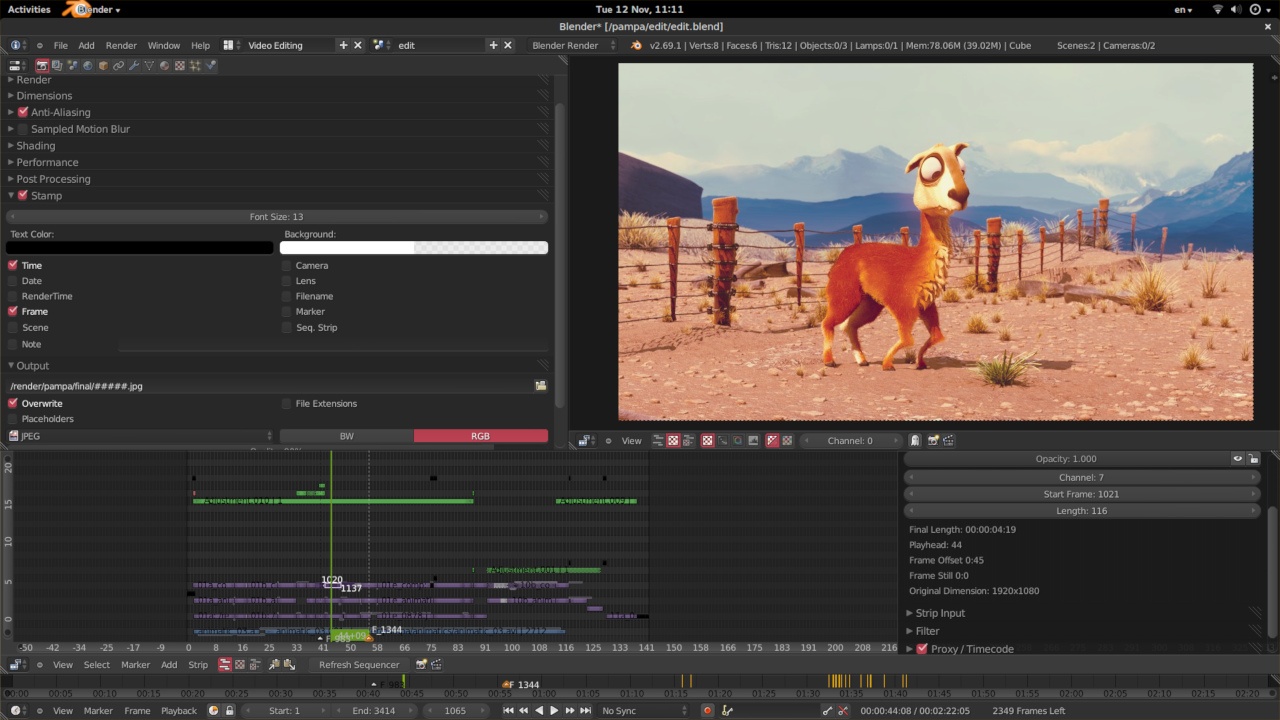
The open source program Blender is more than just a video editor: It’s a full-blown 3D animation suite, which allows for modeling, rendering, motion tracking, and more.
On the video editing side, there are a ton of features, including transitions, speed control, filters, adjustment layers, and more. There are also 32 slots available for adding video clips, audio clips, images, and effects, which means you can produce some incredibly complex video.
For the amateur video editor, all the functionality that’s available can be a bit overwhelming. But if you’re looking to produce truly professional-quality video — without having to deal with watermarks — Blender is a solid option. The best part: “You are free to use Blender for any purpose, including commercially or for education,” according to its website. For the fine print, check out its licensing info.
10. Lightworks
Free | Windows, Mac, Linux
 Source: ZDNet
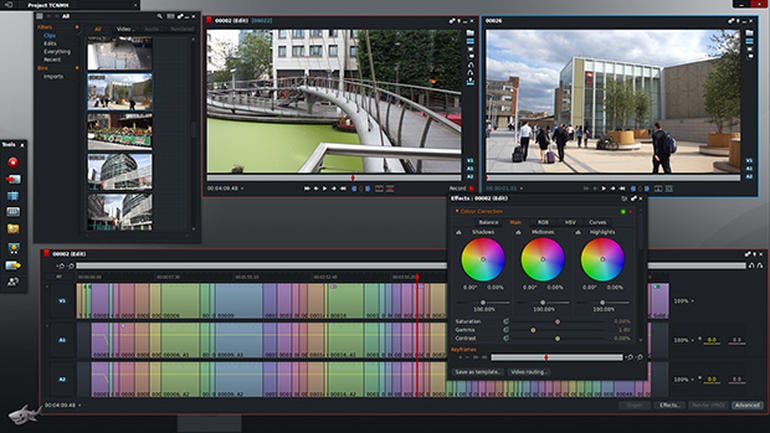
Like Blender, Lightworks is definitely on the more advanced (and powerful) end of the video editing software spectrum. In fact, it’s a program that’s been used to edit some well-known and award-winning films, including Pulp Fiction, The Wolf of Wall Street, and The King’s Speech.
There are two different licenses you can choose from with Lightworks: “Free” and “Pro.” (The latter of which, as you might have guessed, requires that you cough up some cash.) The main difference between the two licenses is that the Pro version offers more features, including stereoscopic output and advanced project sharing. But the free version is still quite powerful, providing 100+ effects and supporting multicam editing.
11. Shotcut
Free | Windows, Mac, Linux
 Source: Shotcut
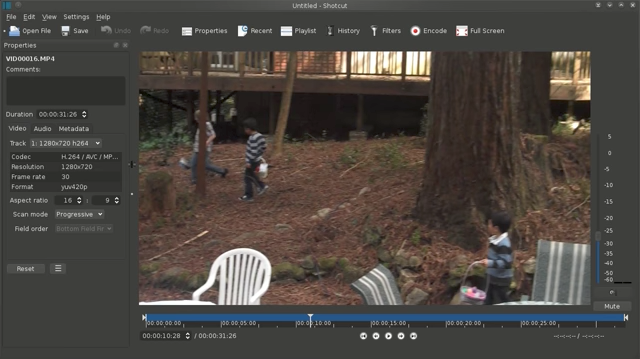
Shotcut is another open source video software — and it’s completely free. It’s possible to use Shotcut to create professional-looking videos, but the interface is tricky to use. Perhaps that’s because it was originally developed for the Linux platform, which looks and feels a lot different from the typical Windows or Mac UX.
With dedication — and time spent in the Shotcut frequently asked questions and how-to guide sections — it’s possible to use this software to create and export high-quality videos, completely for free.
12. VSDC Free Video Editor
Free | Windows Only
 Source: Softonic
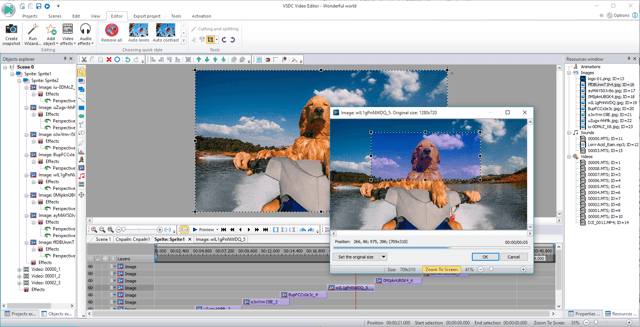
In experienced hands, the VSDC Free Video Editor can produce some seriously professional-looking video. In addition to supporting nearly every major video format, the program offers advanced video effects, including object transformation and color correction, as well as advanced audio effects like volume correction and sound normalization. And unlike WeVideo, the VSDC Free Video Editor is truly free. You can use the program’s full feature set without having to deal with pesky watermarks.
Unfortunately, there is one catch. If you want technical support, you need to pay. (And because there is a bit of a learning curve, there’s a good chance you’ll need to.) Support for the VSDC Free Video Editor costs $9.99 for one month and $14.99 for one year.
13. Machete Video Editor Lite
Free | Windows Only
 Source: Softonic
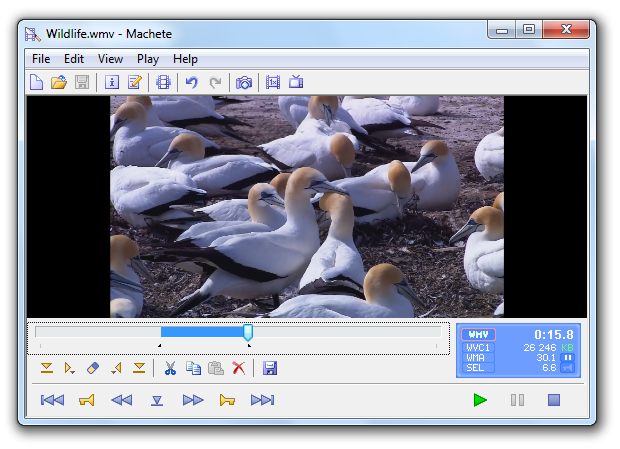
At the simple end of the spectrum is Machete Video Editor Lite, a free program allowing you to cut, copy, and paste different sections of video. As the Machete website puts it, Video Editor Lite was “designed for quick and simple ‘slicing’ of your video files.”
The program’s intuitive interface means you won’t have to waste time shuffling through technical support documents. And because Video Editor Lite doesn’t re-encode your video files when you slice them, you don’t have to worry about losing video quality.
The main downsides to the program? It only supports the AVI and WMV video formats, and it doesn’t allow for audio editing. Still, if you have zero video editing experience and only need to make simple edits, it’s a great option.
14. Avidemux
Free | Windows, Mac, Linux
 Source: Softonic
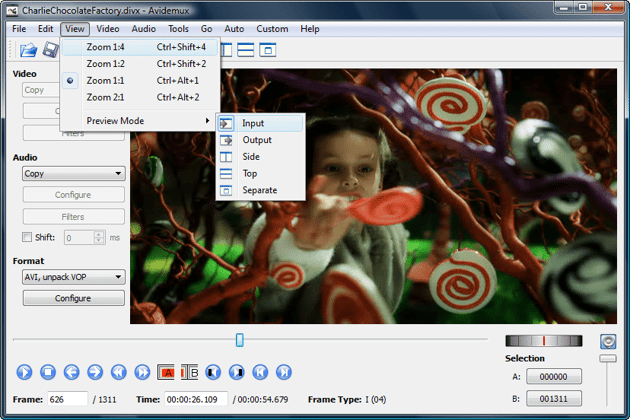
Like Machete Video Editor Lite, Avidemux allows you to do basic video editing (no audio editing) without having to worry about loss of video quality. But Avidemux also has a few more tricks up its sleeve.
For starters, the program supports multiple video formats, including AVI, DVD, MPEG, QuickTime, and MP4. What’s more, Avidemux comes with several filters that allow you to perform a host of different functions, from flipping and rotating clips, to adding subtitles, to adjusting colors and brightness levels.
And while the learning curve for Avidemux is slightly steeper compared to Machete Video Editor Lite, the upside is that there’s an extensive Avidemux wiki that covers everything you need to know.
15. HitFilm
$99 | Windows, Mac
 Source: HitFilm
HitFilm Express is a free video editing and visual effects software — which means you can use it to add more than 180 special effects to your videos, including 3D editing.
Possibly the coolest HitFilm feature is its wealth of tutorial videos — users can practice applying special visual effects in movie tutorials based on Star Wars, Westworld, and more.
Of course, upgrading to HitFilm Pro grants access to more visual effects, better high resolution and 3D rendering, and better audio syncing between audio and video files. It costs $300, but if you’re not ready to fully invest, HitFilm Express users can purchase lower-cost expansions to use more tools in their software.
To see the complete list of differences between HitFilm Free and Pro, check out their “Compare Versions” page.
Video Editing Apps for Android
These video editing apps are particularly appealing for Android mobile users, though some of them are compatible with more than just the Android operating system.
16. VideoShow
Free | Android, iOS

Source: Google Play
VideoShow allows you to edit video content in a number of creative ways beyond cutting and pasting scenes together. The award-winning app, which has more than 400 million users, allows you to include text overlays, stickers, music, filters, and sound effects to your footage. Because of these features, it lends itself to video producers who want to add a bit more creativity to a vlog series, where the video is primarily of one person speaking directly to the camera.
17. PowerDirector
Free | Android, Desktop

Source: CyberLink
This robust video editor has a suite of creative design tools just for Android and desktop users. Developed by CyberLink, the app can help you create 4K-quality videos from footage taken with numerous devices. Special features include motion tracking, which helps you focus on specific subjects in each frame; video collages, which help you piece together numerous photos into a motion video; and video stabilization, allowing you to remove moments of “shaky camera” in your footage. PowerDirector can also help you add voice overs and creative sound effects using chroma key.
Many of PowerDirector’s features are completely free in the Android app. For a more advanced suite of editing tools, you can invest in one of CyberLink’s paid products starting at $99.
18. Quik
Free | Android, iOS, Desktop

Source: Google Play
Quik is a video editing tool developed by GoPro, making it the software of choice for people who are editing footage from their GoPro camera. But yes, it can edit content from any source.
The app can manage up to 75 photos and video clips in one project, and can even comb through this content to help you make smart editing decisions based on what the app detects in the footage. From time lapses to panoramic pieces, Quik can manipulate your media in lots of creative ways. The app has more than 20 preset themes to choose from and supports eight common file types.
19. KineMaster
Free | iOS, Android
Source: Google Play
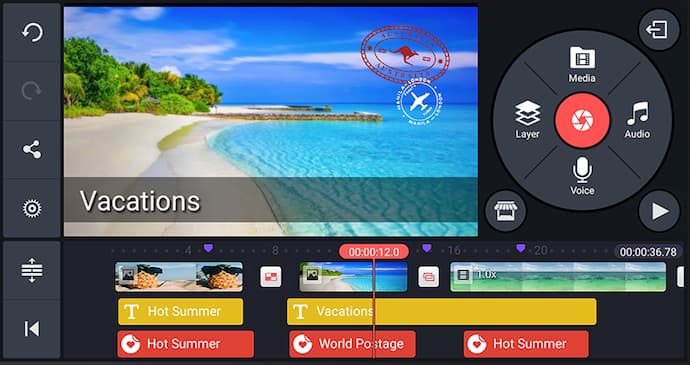
KineMaster is a super-versatile video editing tool that allows you to edit videos on “multiple layers.” What does that mean? Content creators can add an unlimited amount of text overlays, images, audio, and even free handwriting onto their footage for the artistic detail they or their brand needs. You can also blend multiple pieces of footage and use double-exposures to customize the background in a load of creative ways.
For simpler editing tasks, of course, this app offers intuitive trimming and splitting features to make your video progress just the way you want it to.
20. VivaVideo
Free | iOS, Android

Source: Google Play
VivaVideo makes professional-level edits easy for content creators. Free for all mobile devices, the app allows you to trim, merge, speed up, slow down, and reverse clips and images in a short amount of time. The app also comes with a simple collage- and slideshow-maker, and offers a variety of camera lenses to capture new, edit-ready footage directly in the app.
Want to learn more about video editing? Check out the best editing apps for photos.
Online video content isn’t just watched more — it’s expected more. Luckily, you have the video editing tools above to help you. And the sooner you download one, the sooner you can sharpen your audio/video skills.
Grab the guide below to make the video learning curve easier.

ISVs (Independent Software Vendors), Explained in Less Than 500 Words
With over 7,000 MarTech companies battling each other to win a spot in the technology stack of businesses today, sticking out from the crowd has never been more difficult. Almost every industry under the MarTech umbrella is saturated, so traditional inbound marketing can only turn so many heads.
Fortunately, computer hardware, operating systems, and cloud platforms have decided to help their smaller tech counterparts out. In recent years, these platforms have built marketplaces where MarTech companies can offer their software solutions to the platforms’ unique customers, which has increased a lot of MarTech companies’ visibility and, in turn, their revenue.
These MarTech companies who partner with computer hardware providers, operating systems, and cloud platforms to resell their software solutions on their marketplaces are called independent software vendors. Read on to learn exactly what an ISV is, what it means to be ISV certified, and what an ISV partner is.
For instance, any company that offers their software solution on a marketplace like HubSpot Connect or Salesforce AppExchange is an ISV.
For example, Microsoft, a company that develops computer hardware (Xbox), operating systems (Windows), and a cloud platform (Azure), offers silver and gold ISV certifications to independent software vendors whose products can pass their rigorous quality tests and prove they can offer the top software solutions to Microsoft’s customers on each of their marketplaces.
For instance, if you want to get into Dell’s or Red Hat’s ISV partner program, you just need to verify your organization, apply to the program, get accepted, agree to their terms and conditions, and stay in good standing with the platform to maintain your membership.

The Non-Programmer’s Guide to Using APIS
Even if you don’t know what an API is, you’ve undoubtedly interacted with one.
Today, we take connectivity between technology largely for granted. For instance, we don’t question when we use OpenTable to make a reservation at a nearby restaurant.
Alternatively, if you use Kayak.com to book flights, you’ve probably never wondered, Wait a minute … how does Kayak know JetBlue has an open seat in 27A?

Ultimately, any time you need applications to communicate with one another, you need an API, or application programming interface.
Here, we’re going to explore what an API is, and why you’d need to use one. Even if you’re not a programmer and don’t need to know extensive technical jargon, you should still understand the basics, since nowadays, integrations between technology are often critical components of anyone’s job.

What is an API?
At its most basic definition, an API lets one piece of software talk to another piece of software.
To understand an API in action, let’s consider a real-life example — HubSpot’s integration with Typeform. Typeform, a tool that supplies mobile-ready quizzes, contact forms, and signup forms, needs to integrate with HubSpot’s Forms API to to interact with the forms tool and seamlessly send submissions from Typeform forms into the HubSpot CRM.
To do this, Typeform’s API and HubSpot’s API need to talk. An integration can act as a translator, ensuring each API’s information is correctly translated for the other application — in this case, the integration may ensure that Typeform form fields are correctly mapped to the corresponding HubSpot fields.
Isaac Takushi, a HubSpot Developer Support Specialist, explains — “You can think of APIs and the ‘endpoints’ they comprise as access points for different information. Each API endpoint may only have one specific job. When combined, however, different endpoints can support powerful, multifaceted integrations.”
Kayak.com, for instance, needs some API to communicate with JetBlue’s systems. When you search “Boston to Charlotte” in Kayak, JetBlue’s booking API will essentially receive this request from Kayak, pull up information related to that request, and send it back. However, Kayak will need its own API or code to understand and act on the information the JetBlue API returned.
To use an API, you’ll want to check out the API’s documentation for access requirements. For instance, HubSpot’s Contacts API requires authentication:

Similarly, you’ll need an API key to access Google’s API, Facebook’s API, and Twitter’s API.
Once you have access requirements, you can use a tool like Postman or Runscope to manually interact with an API. These third-party tools, or “REST clients,” allow you to make one-off requests to API endpoints without coding. They’re great for getting a feel for what your backend systems may do automatically. Check out this resource on how to make your very first API request with Postman.
If you’re not quite ready to jump in on the deep end with a REST client, try punching the following into your browser:
http://bit.ly/2EgJRkC
This is a public API endpoint from the free REST Countries service. Specifically, we’re using the “Name” endpoint, which accepts country names as search queries. A successful search will return potential country matches, along with key information about each nation. In this case, we’re searching for countries with names that contain the word “united.”
You should see following block of JSON data returned:

Congratulations! You just made an API request from your browser!
The endpoint returned raw data (formatted in JSON) on countries with “united” in the name.
It may not look pretty, but remember that APIs are designed for applications, which don’t require the styling humans expect on an HTML web page. While you can easily Google “countries that begin with ‘united’,” applications cannot. They might have to rely on services like REST Countries to look up that information.
If you’re unsure whether you should use your in-house developers to create APIs or look externally, check out First vs. Third-Party APIs: What You Need to Know.

How to Write a Video Script [Template + Video]
Movie producers and inbound marketers aren’t that different when it comes to creating and editing video content.
We’re both telling a story, and whether that story is about a protagonist or a product, we’re both trying to captive our audiences and make them believe in the story we tell.
What happens at the end of the story is a little different, though.
Most marketers wear a lot of hats and let’s just say, out of all the hats worn, the videographer one isn’t always their favorite. That’s because creating videos can be intimidating, especially if you’re new to it.
And if you’re more of a copywriter than a videographer, as I am, you might overlook how important the planning stage of video production is — the part where you really solidify your video concept, goals, and script.
That’s what we’re going to tackle in this blog post: how to write an effective video script to ensure the best possible product emerges from your editing software, and lives wherever you’re publishing.
1. Start with a brief.
Although this step might seem trivial, it’s extremely necessary to the final script.
Starting with a brief allows you and your team to document the answers to the most important project questions so everyone involved in creating the video can get on the same page. When you’re three-quarters of the way through the editing process, and your boss or colleague wants to completely redo that whole shot where you demonstrate how your product solves a problem, that’sa huge problem — for you.
When pesky predicaments like this one stand in the way of progress, you can just refer back to the brief that documents the goals and project plan your team mapped out together, and say, “Actually, that’s not what we agreed to.”
Then, you can move forward.
Focus on your goals, topic, and takeaways when developing your brief.
A brief doesn’t have to be fancy, nor does it have to follow a specific formula, but there are several key questions it should include to craft an effective video script.
- What’s the goal of this video? Why are we making the video in the first place?
- Who is the audience of this video?
- What’s our video topic? (The more specific, the better. For example, if you’re in the house painting business, you might choose a topic like, “buying the right paint brush”).
- What are the key takeaways of the video? What should viewers learn from watching it?
- What’s our call-to-action? What do we want viewers to do after they’ve finished watching the video?
You can easily create a brief in Google Docs to serve as a living, breathing template that you revise over time — and that your team can collaborate on.
2. Use your brief to write an outline.
Once you’ve picked a topic and written a brief, it’s time to start constructing your video script. We recommend starting with an outline before diving into the full script — this way, you can break your video into subtopics and determine how your dialogue (or monologue) will progress.
Contrary to what I previously thought, you can’t just rewrite a blog post and call it a day — there’s a specific way to write a script so that it shapes an effective video. Are you basing your video script on a blog post? Alicia Collins can teach you a bit more in the video below (and yes, we wrote a script for it!).
Like Alicia says in the video above, a video script shouldn’t simply regurgitate the blog post word-for-word. Although blog posts are ideally written to be conversational, there are pauses and verbal explanations you need to incorporate into your speech patterns that you wouldn’t have on paper.
But, using the blog post’s subsections is a helpful starting point when figuring out how your script will progress from one section to the next. If you’re not basing your video script on a blog post, you can still create a well-structured outline. Consider the individual best practices of the subject you’re planning to cover in your video. Where do the natural transitions occur when explaining this subject to your audience?
For example, if the topic of your video is How to Start a Business, you might outline your script by the individual tasks an aspiring entrepreneur needs to tackle when launching a company, such as:
- Perform market research.
- Draft a budget for research and development.
- Meet with potential investors.
- Develop a marketing strategy.
- Develop a sales strategy.
- Identify your office space.
3. Introduce yourself and/or the topic at the beginning of your script.
Even though videos are the channel of choice for many people who want to learn something new, they need to hook their audience in the first few seconds — just like written content. After all, you have just as much competition on YouTube as you do in the blogosphere, and your viewers can bounce from your video just as quickly as they would from an article if they don’t feel engaged with it.
To help hook your audience in a video script, use the very first few lines to introduce the narrator (the person on screen) and what the audience is going to learn by the end of the video.
For example, if you’re teaching viewers how to optimize their blog for SEO, your introduction might be:
“Hi there! I’m [narrator’s name] from [company], and in the next [length of video] minutes, I’m gonna teach you how to get your blog ranking on Google.”
4. Start writing your script, section by section.
Just like the brief, the video script doesn’t have to be fancy. You’re not trying to submit this script for any awards — its purpose is strictly functional. A good script makes it easy for the people on camera to get their messages across while sounding and acting naturally.
Write conversationally.
Writing a script is not the same as writing a college paper or marketing research report. You want to write the script how you want the video subject to speak. Saying, “I’m gonna create a video after reading this blog post” on camera will read much better than, “I am going to create a video after reading this blog post.” Keep sentences short and crisp — I recommend avoiding compound sentences, if possible.
Make it thorough.
A script doesn’t just include dialogue. If your video will require multiple shots, characters, or scenes, include these details. Be sure to include any necessary information about the set or stage actions, such as a wardrobe change.
Basically, you want the script to be thorough enough that you could hand it off to someone else to shoot, and they’d understand it.
Write for the audience and the platform.
Is your audience made up of young teens, middle-aged professionals, or older retirees? Will your video live on Instagram, YouTube, or your website? Make sure you’re keeping it conversational for the people you’re trying to connect with — and infuse humor, tone, and inflection accordingly. Furthermore, if you’re writing a short-form video for Facebook, you might want to consider keeping your script choppier with sentence fragments — but if you’re producing a long-form explainer video for your website, make sure you’re as thorough as possible.
Script every single word.
It’s understandable to think you can just jot down the main bullet points for a script, and then just wing it on camera, especially if you know your subject matter. This approach makes it tough to communicate a message as clearly and concisely as possible (which you should aim to do in every video you create), and it usually results in a lot of re-dos.
So, we suggest scripting every last word. Trust me — doing this will keep you organized during filming and save you loads of time later.
5. Support any B-roll with the proper callouts in your main narrative.
If your video will transition from a person speaking in front of a camera, to a close-up shot of your product or a demonstration, you’ll want to write these cues into in your script so anyone who reads it knows to introduce these things for the viewer. These secondary shots are often referred to as B-roll, which take place while the person continues to speak off-screen. It’s one of the main differences between a blog post and a video script.
For example, if a blog post reads, “take a look at the graph below,” it’s clearly referring to a graph embedded below that sentence. This phrasing won’t work on camera. Instead, your video script might read, “in the graph you see here” — while the graph is shown on-screen instead of the narrator.
These written exceptions can also help cue the narrator to take certain unspoken actions while reciting the script. For example, take a look at how the folks over at Wistia did that in the video script for Wistia’s scripting tips below. Text overlay is called out with a big, bold “TEXT,” audio is called out in all caps (REWIND SOUND), and B-roll or additional details are called out in italics (with glasses on). (Note: It might help to watch the video first for the excerpt of this script to make sense).
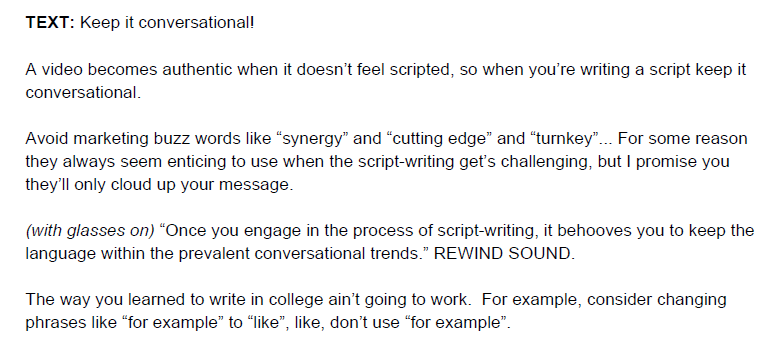
Source: Wistia
6. Be as concise as you can.
When it comes to marketing, shorter videos tend to be more compelling than longer videos. In fact, 68% of people said they’d rather learn about new products and services through a “short video,” according to a survey by Wyzowl.
To make short videos, you need a short script. Don’t write a script any longer than two pages. If you can keep it to one page, even better. It’s also worth doing two to three rounds of edits solely focused on cutting all unnecessary fat in your writing. Reading it out loud to listen for opportunities to make the language more conversational, or sentences shorter, can also help.
The result is a video that’s succinct, engaging, and allows for a simple editing process.
7. Use this video script template.
Writing a script from scratch is way harder than starting with an example. To give you a head start, download this Word Doc video script template we used to create this video with Wistia:
The script we used to make the video above? It’s below. Click it to download a copy and see how we’ve applied each of the script elements described throughout this blog post.
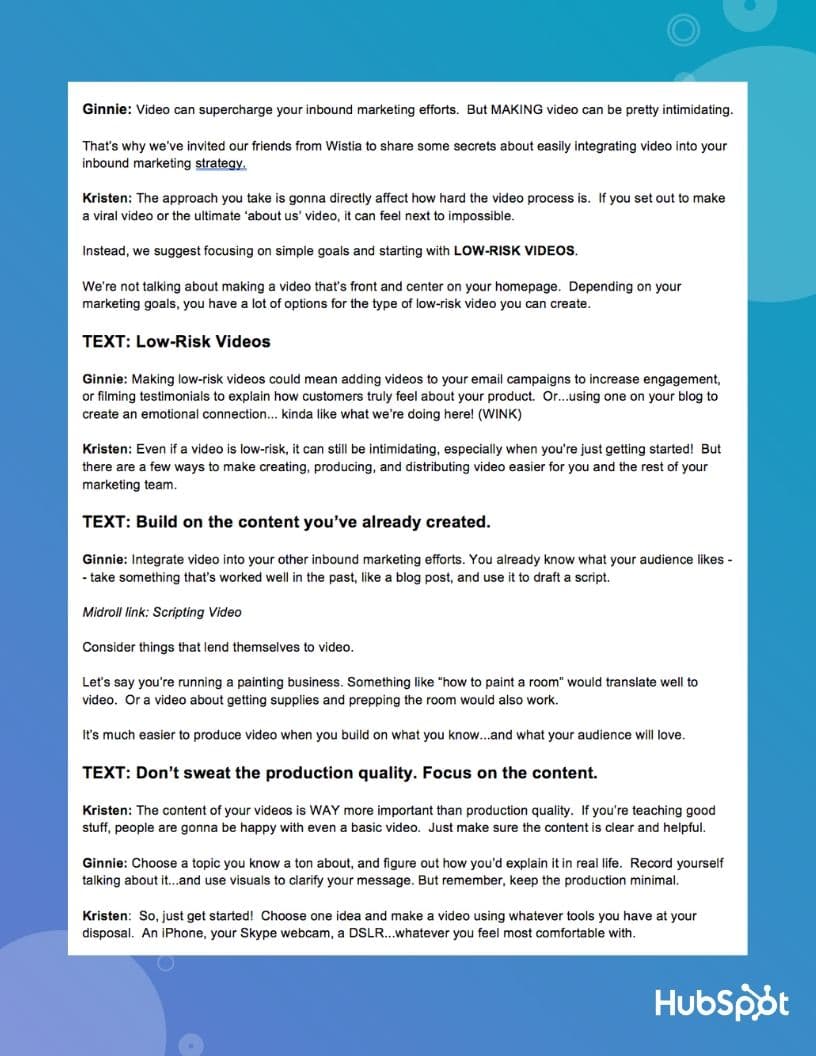
As a refresher, those script elements are:
- An introduction.
- Subsections and natural transitions.
- Thorough descriptions.
- Conversational tone.
- Supporting callouts for B-roll and unspoken actions by the narrator.
Have your script ready? Awesome. Now it’s time to review your work with a quick run-through.
8. Do a verbal run-through off-camera.
Now that you know how to write a script, it’s time for a table read — the part where you practice bringing that script to life on camera.
Why practice? Because some words look great on paper, but once you read them aloud, they just don’t sound right. The table read is where you really get to fine-tune the tone and nix anything that sounds too proper, improper, robotic, or otherwise inappropriate for the message you aim to convey.
Check out the video below on how to do a table read:
Oh, and one last tip …
When it’s time to shoot, use a laptop and a chair as a teleprompter.
Since you don’t need a fancy script, you don’t need a fancy teleprompter to remember your lines. But you do need help remembering your lines. You can actually just use two things you already have — a chair and a laptop — to keep your lines handy as you’re shooting.
For more tips for using the tools at your disposal to make a killer marketing video, check out our video guide to shooting videos with an iPhone.

10 of the Best Marketing Techniques for 2019
When content marketing was gaining steam, there were really only a few techniques you could leverage. On a typical day, you’d write a blog post, hope it ranked on Google, send it to your email subscribers, and post it to your social media profiles. That was pretty much it.
This is still the main strategy most marketers use nowadays, but since content marketing has exploded in popularity since its early adoption, it has developed into a much more nuanced and complex type of marketing with many techniques for reaching and resonating with an audience. So, to help you learn about the most effective marketing techniques around today, we’ve rounded up the ten best marketing techniques for 2019. Read on to add some tools to your content marketing arsenal.
1. Shows
In the neuroscience field, researchers have proven that storytelling is the best way to capture people’s attention, bake information into their memories, and resonate emotionally with them. The human brain is programmed to crave, seek out, and respond to well-crafted narrative — that’ll never change.
So just like your favorite Netflix show, crafting shows can entice your viewers to watch entire seasons of your series, subscribe to your updates, and get more excited for your show’s newest season than they currently are for the third season of Stranger Things.
Before you green light another slew of listicles, how-to posts, and ultimate guides, remember how powerful storytelling is and consider crafting a show chock-full of conflict, surprise, and emotion that also ties to a unique angle and is told in an episodic fashion.
2. The Pillar-Cluster Model
Since people heavily rely on Google to provide accurate and relevant answers for most of their questions today, Google needs to understand the intent and context behind every single search. To do this, Google has evolved to recognize topical connections across users’ queries, look back at similar queries that users have searched for in the past, and surface the content that best answers them. As a result, Google will deliver content that they deem the most authoritative on the topic.
To help Google recognize your content as a trusted authority on marketing, sales, and customer service topics, consider implementing the pillar-cluster model on your blog.
By creating a single pillar page that provides a high-level overview of a topic and hyperlinks to cluster pages that delve into the topic’s subtopics, you can signal to Google that your pillar page is an authority on the topic.
Hyperlinking all of the cluster pages to the pillar page also spreads domain authority across the cluster, so your cluster pages get an organic boost if your pillar page ranks higher, and your cluster pages can even help your pillar page rank higher if they start ranking for the specific keywords they’re targeting.
3. Email Subscriptions
As of now, subscribing to your favorite online publications through email is the best way to keep up with their latest stories and news. And since it takes an average of six to eight touch points to generate a qualified sales lead, persuading people to subscribe to your emails and, in turn, constantly consume your content will generate more leads and revenue for your business.
Growing an engaged, loyal subscriber base also speaks volumes about the quality of your content and its emotional resonance. Even though hoards of content saturate the internet and most people’s inboxes today, people are still actively engaging with your content, which is a clear sign that they actually value it.
4. Historical Optimization
In 2015, HubSpot made a revolutionary discovery about their organic monthly blog traffic — the overwhelming majority of it came from posts published prior to that month. In fact, 76% of their monthly blog views came from these old posts.
Today, their groundbreaking revelation rings louder than ever — 89% of their monthly blog views currently come from posts that were published at least six months prior, and they’ve developed an entire strategy dedicated to refreshing and republishing these historical pieces of content.
These types of blog posts are called “updates”, and they comprise 35-40% of HubSpot’s editorial calendar. And by refreshing them with new information and SEO optimization and then effectively republishing them as new blog posts, HubSpot can build upon their existing organic value that these posts have accumulated through backlinks and user engagement and double or even triple their traffic. This process also helps HubSpot optimize their blog for efficiency, decreasing the amount of new content they have to create while increasing their organic traffic and conversions.
5. Podcasting
According to a content format study conducted by Edison Research and Triton Digital, people age 12 and older are listening to online audio content at unprecedented levels. On average, people spend 17 hours per week tuning into their favorite podcasts, online radio shows, and audiobooks. There are also 14 million more weekly podcast listeners this year compared to last year, which is more than Guinea’s entire population.
The demand for audio content has exploded, but that doesn’t mean people will listen to your branded podcast just because it’s a podcast. In reality, they’ll only listen to it if it can hold their attention and, ultimately, entertain them. Otherwise, producing yet another interview-an-expert podcast like everyone else will only add to the noise flooding the internet.
6. Link Building
Earning high-quality inbound links from websites and pages with high authority scores is crucial for boosting your domain authority. But, unfortunately, “If you write it, they will link to it,” is not a viable SEO tactic.
An effective method for earning high-quality links is by asking other websites that have the same or higher domain or page authority score than you to link to your top content. You should also make sure your content is relevant to the referring website’s content.
Another way you can earn quality backlinks is by using Backlinko’s skyscraper method. The skyscraper method is an SEO strategy where you find content that ranks well for keywords you want to rank for and then create content that’s better than the top ranking posts. Then, you use SEO tools to find all the sites that have linked to your competitor’s content and ask the most relevant sites to replace your competitor’s link with a link to your improved content.
7. Social Media-based Public Relations
Today, over 30% of time spent online is dedicated to social media. Needless to say, people spend more time on social media than ever before. And public relations professionals are pivoting their strategy from solely focusing on placing their stories in news outlets’ publications to concentrating on driving traffic to their social media profiles too.
In order to successfully pitch your stories to journalists and news outlets nowadays, you need to account for the content that performs well on their social media profiles and their publication. So before you pitch your story, make sure it’s relevant and interesting to the news outlet’s social audience.
8. Audience Segmentation
In a world overflowing with digital noise, creating irrelevant or unwarranted content won’t catch anyone’s attention. To create personalized marketing campaigns for each slice of your target market, consider leveraging audience segmentation, which separates your target market into specific, accessible groups of people based on personal attributes like their demographics, psychographics, and behavioral information.
9. Brand Extensions
Big companies often extend their brand to develop new products in industries that they don’t have any market share in. These initiatives are called brand extensions, and they allow companies to leverage their brand awareness and equity to create more revenue streams.
Historically, the most successful brand extensions are the ones that closely tie to the company’s flagship product or core brand, like Gerber’s baby clothes and Dole’s frozen fruit bars. So by entering tangential markets that can preserve their brand’s unique associations and perceived quality, companies can develop new products that consumers intuitively understand the benefits of, even though they’ve never seen them on a shelf.
On the flip side, a company can also exploit their brand, and, in turn, damage it. If they develop a product in a market that isn’t closely tied to their flagship product or core brand, like Zippo’s perfume for women, companies can attach undesirable associations to their brand, weaken its existing associations, and hurt its established products’ perceived quality.
10. A/B Testing
Every company has a different set of customers, so there’s no one-size-fits-all formula for designing the most optimal website, crafting the most compelling copy, or building the most effective product. To figure out which website design, line of copy, or product feature will produce the best results for your company, you must discover what your unique set of customers prefer.
With A/B testing, you can run an experiment between two variables, like a red and blue CTA, to identify which one produces better results. A/B testing shouldn’t be confused with multivariate testing, though, which allows you to simultaneously test many variables.

How to Get Off an Email Blacklist (By Avoiding It In The First Place)
In the MLB, or Major League Baseball, players who have used performance enhancing drugs have also tainted their careers. Even if they slugged the most home runs in the history of the game, like Barry Bonds did, or won the most Cy Young Awards ever, like Roger Clemens did, their accusations of steroid abuse will most likely block their path to the Baseball Hall of Fame.
For years, many baseball players abused steroids, and it sparked an aggressive campaign to eliminate performance enhancing drugs from the game.
In 2006, the MLB set up a drug policy that suspends first time drug violators for half a season, second time drug violators for an entire season, and third time drug violators for their entire lives — three strikes and you’re literally out.
In the email marketing industry, sending spam is a lot like using performance enhancing drugs in the MLB. Any organization who is a known spammer has tainted their brand. And mailbox providers will suspend brands from sending emails to their account holders if they consistently send spam.
These suspended brands are on lists called email blacklists, and they can tarnish your sender reputation in the eyes of mailbox providers worse than steroid use can taint a once-presumed Hall-of-Famer’s career in the eyes of the Baseball Hall of Fame voters.
However, not all blacklists are created equal. Some blacklists, like Spamhaus, are credible and widely trusted, so if a brand is on one of these blacklists, it’ll heavily impact their sender reputation. Other blacklists, like Lashback, NoSolicitado, and Spam Cannibal are less credible and trusted, so if a brand is on one of these blacklists, it won’t affect their sender reputation nearly as much.
In other words, when referencing blacklists to determine a brand’s deliverability, mailbox providers weigh their influence by credibility — and not just if they’re listed on them.
How to Avoid an Email Blacklist
A wise email deliverability consultant at HubSpot named Jess Swazey once told me, “The easiest way to get off an email blacklist is to never get on it in the first place.” In light of this Yoda-esque wisdom, here are four best practices for avoiding email blacklists.
1. Only email contacts who have subscribed to your email program — and never email contacts scraped from websites, third-party sources, or purchased contact lists.
It seems obvious, but the easiest and most crucial step you can take to avoid email blacklists and getting a Scarlet “S” slapped on your brand’s breast pocket is emailing people who actually subscribed to your emails. Because in a world where only 4% of the public believes marketers practice integrity, the best way to build a contact database is the hard and honest way — collecting email addresses organically.
Plus, if you decide to scrape contacts from old, expired, or abandoned websites, third-party sources, or purchased contact lists, most blacklist operators have already placed pristine spam traps, which are email addresses created solely to catch spammers red-handed, in all three of these locations. So collecting and emailing contacts who never subscribed to your email program in the first place is a one-way ticket to getting blacklisted.
2. Clean your email lists on a regular basis.
Building a hefty email list might make you feel accomplished and proud, but if it’s filled with dead weight, or unengaged contacts, it’s better to trim the fat than to stick with your pride.
Most mailbox providers consider subscriber engagement the most influential determinant of your email program’s quality. So to decide if you’re actually a reputable sender and deserving of a high deliverability score, most mailbox providers convert their inactive email accounts into recycled spam traps after a year of disengagement and ding any IP address or domain that sends emails to them. In your database, any contact that hasn’t engaged with your email program or received one of your emails in a year could possibly be a recycled spam trap.
To avoid sending emails to recycled spam traps and getting blacklisted, run one-off reengagement campaigns with your inactive contacts. It’s up to you to decide how long a contact’s disengagement with your email program deems them an inactive contact, but if they don’t open your reengagement email, it’s probably a sign to scrub them off your list.
3. Never manually enter email addresses into your database or mass email these types of contacts.
Sometimes, salespeople and recruiters will collect business cards from prospects or candidates at industry events, manually plug each contact’s email address into their database, and send them a mass email.
This can also be a one way ticket to getting blacklisted.
These people might expect an email from one of your company’s salespeople or recruiters, but they never opted into receiving emails from your email program, so they’re likely to never open your emails or, even worse, flag them as spam, which will lower your deliverability and heighten your risk of getting blacklisted.
There’s also a chance you’ll make a typo while manually entering email addresses into your database and, in turn, send emails to addresses that don’t exist. This will increase your email bounce rate, which will also lower your deliverability and heighten your risk of getting blacklisted.
4. Validate your new subscribers’ email addresses.
Sometimes, people will try to subscribe to your email program but make a typo when entering their contact information in your form. Other times, if your business model requires people to manually enter their email address into a device, they can make typos too.
Unfortunately, mailbox providers will bounce any email sent to addresses that don’t exist. So even if the people who own similarly spelled email addresses actually want to receive your emails, emailing these addresses will still lower your deliverability and heighten your risk of getting blacklisted.
To avoid this subtle yet potent blacklisting trigger, use email address verification tools like Kickbox to validate each email address you collect from your subscription forms.
How to Check If You’re On an Email Blacklist
Sometimes, a pristine or recycled spam trap can slip through the cracks and get you blacklisted. Fortunately, your email service provider will usually notify you when this happens, but if you want to be absolutely sure that your IP address or domain isn’t on a blacklist, use blacklist checking tools, like Sender Score or MX Toolbox.
How to Get Off an Email Blacklist
If you send emails through one of your email service provider’s shared IP addresses and it gets blacklisted, it’s your email service provider’s job to delist the shared IP address. However, one domain that sends spam from a shared IP address can blacklist the entire shared IP address, so if your actions blacklist your shared IP address, your email service provider has the right to cancel your subscription.
On the other hand, if your dedicated IP address or domain ends up on one or multiple email blacklists, it’s your job to get it off them. Unfortunately, there’s no silver bullet for getting your domain delisted — you need to follow a different protocol for each blacklist you’re on in order to get off of it. However, there are two general best practices for delisting that are great starting points for any email program.
To get off most blacklists, you need to work directly with the blacklist operators and prove to them that you’re actually a trustworthy sender. You can do this by following email best practices for a certain period of time, which is kind of like entering a spam rehab program.
Another way to delist your domain is running permission pass campaigns. When you get blacklisted, your email service provider will pinpoint the campaign that triggered it, allowing you to identify the email list in your database that has spam traps. Once you find this list, you can run a permission pass campaign, where you send a one-off reengagement email to the list’s contacts who haven’t interacted with your emails in a long time.
These contacts are most likely the spam traps that triggered your blacklisting, so make sure you weed out all the accounts that don’t engage with your permission pass campaign. Otherwise, an emotional attachment to a large yet unengaged email list might never let you delist.

Everything We Know About Instagram Local Business Profiles [Up-to-Date Guide]
Undoubtedly, your online local presence can have a big impact on your company’s bottom line — in fact, 78% of local-mobile searches result in offline purchases.
But local SEO is nothing new. Businesses have been using Google My Business for years. Yelp’s been around since 2004. And now, you can even use Facebook to find local businesses, like when I search “Mexican restaurants nearby”:
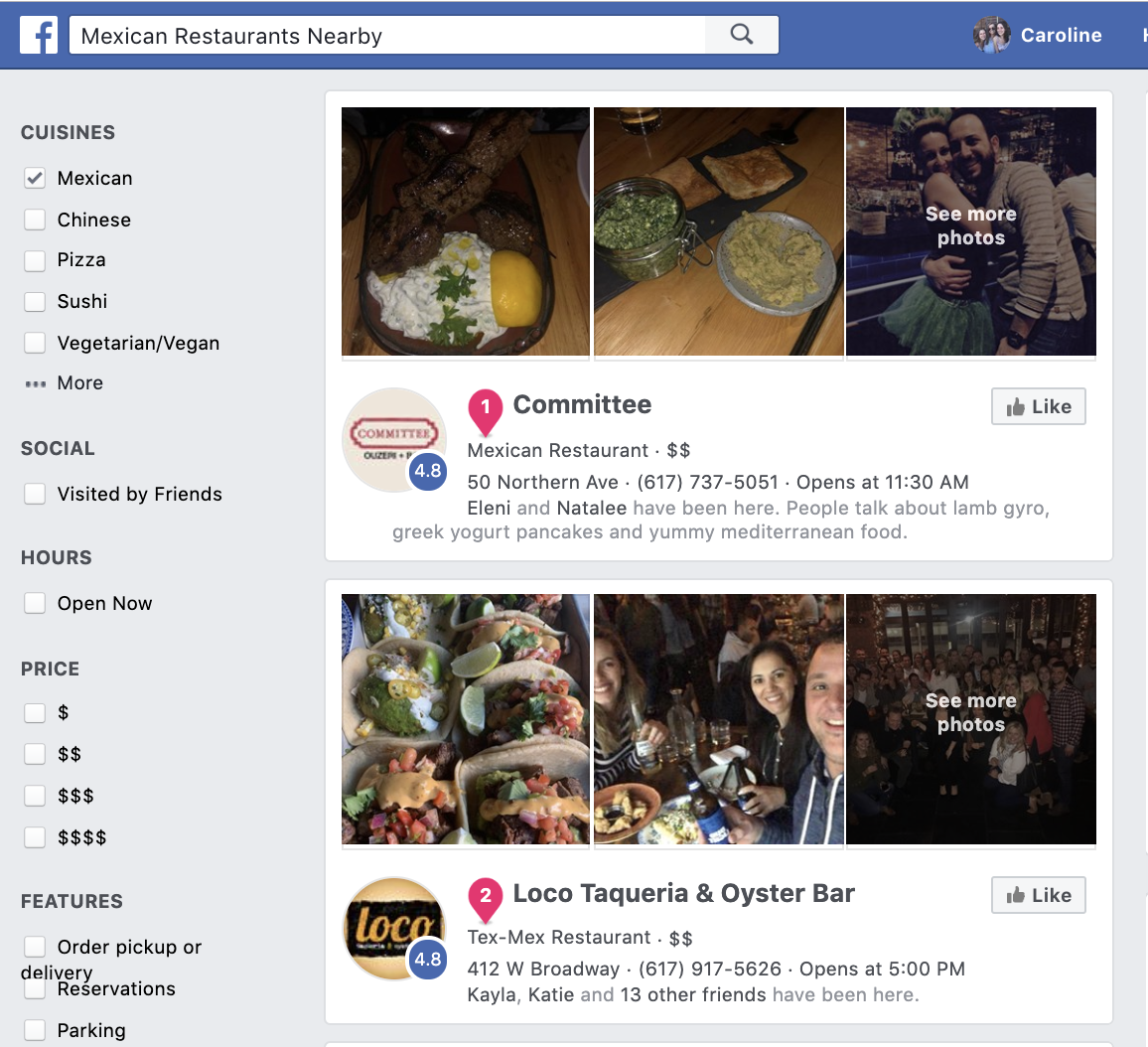
If you have a presence on each of these big players, you might be thinking you’re all set for local SEO. However, there just might be another major opportunity coming your way — Instagram.
Here, we’re going to tell you everything we know about Instagram’s local business pages. Instagram hasn’t formally announced or rolled out local business pages across the app yet, but we want to make sure you’re prepared for when it is.

To consider how Instagram’s local business profiles will work, let’s take a look at Google’s Local Knowledge panels, which are incredibly similar in nature:
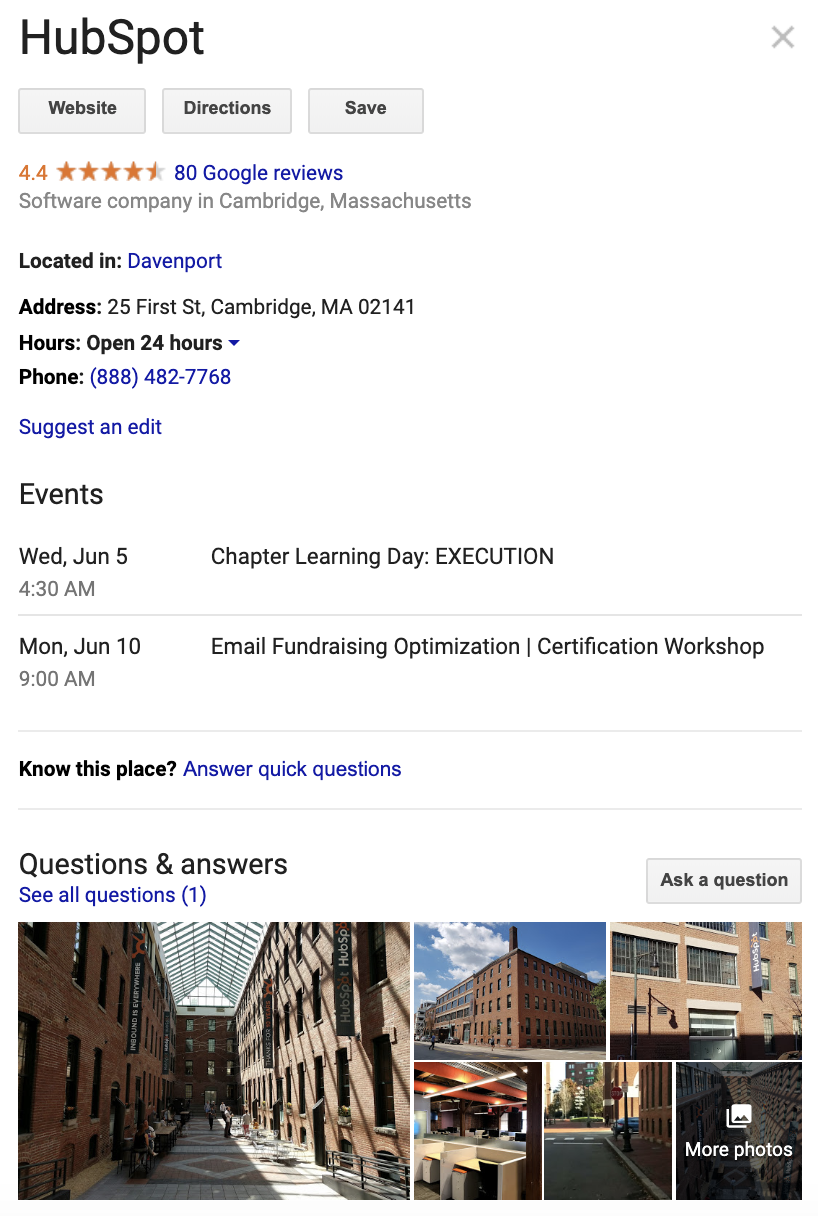
As you can see, when you search for a local business on Google, you might find a Local Knowledge panel, which is essentially a box of information regarding the business, including images, location, hours of operation, and website.
Now, let’s take a look at Instagram’s version of local business profiles:
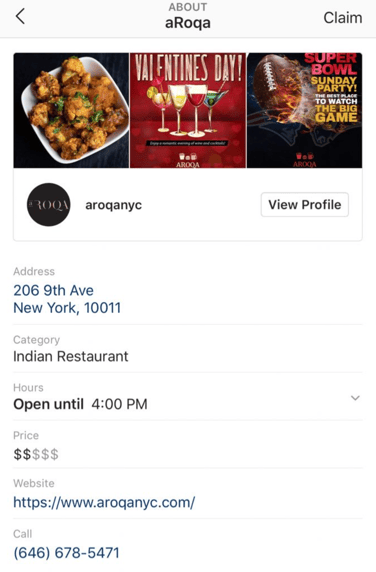
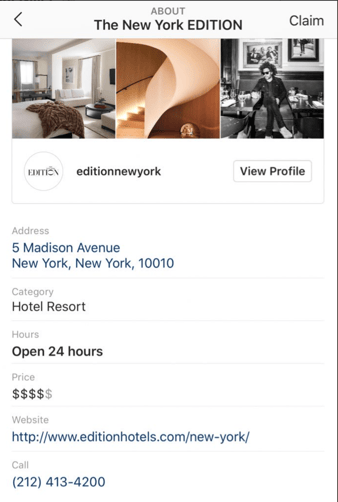
Images courtesy of Raj Nijjer
Pretty eerily similar, right?
Instagram’s local business profiles will include your business’s address, hours of operation, website, phone number, and a “View Profile” link to your business’s Instagram account — all within the app.
With over 500 million daily active users, Instagram provides you with a ton of potential reach. Ideally, these local business profiles will help your business get found even more easily.
Allegedly, users can claim an Instagram business profile if they also have access to that business’s Facebook page. Since Facebook owns Instagram, it makes sense that the two networks would be linked.
For the time being, Instagram hasn’t made an official statement on local business profiles, and the feature isn’t rolled-out globally. It’s still being tested, which is likely why only select users (like Raj Nijjer) are able to see these local business profiles.
However, to prepare for your business to have a local business profile, it’s critical you ensure your Facebook’s business page is up-to-date, since at this point we’re assuming your business’ basic information will be taken from Facebook business pages.
Additionally, it seems that Instagram’s local business profiles will pull your most recent three consecutive images, as it did for The New York EDITION:

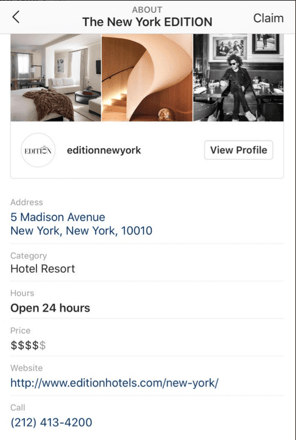
Once Instagram’s local business profiles is fully launched, you’ll want to pay attention to your current images to ensure you feel the content rightfully represents your brand. In a complete Instagram feed, you might feel like one image isn’t a big deal — but for a new visitor spotting an image in a business profile, it’s critical the content convinces them to click-through.
Finally, note the “Claim” button in the top right. If you “Claim” the page, you’ll be able to edit the associated business information. This should put you at ease — it means you’ll have control over your local business profile, once the feature is launched.
Right now, Instagram’s local business profiles is still in beta testing. However, to prepare your business for a local business profile, make sure you have an Instagram business account, as well as a Facebook business account.
Additionally, while unverified, it stands to reason posting local content, using local geotags, and reposting other local business’s content could help Instagram more quickly determine your business’s location when they roll out local business profiles globally.
Learn how to set up an Instagram business account in The Ultimate Guide to Instagram for Business.

What Is a Landing Page? All Your Questions, Answered
If you could do one thing to dramatically improve your marketing ROI today, would it be to use landing pages on your website?
If you’re trying to generate leads for your business, and you don’t have at least a few landing pages on your website, you’re missing out on a key opportunity to turn website visitors into something more.
What is a landing page?
A landing page is a page on your website where you can offer a resource from your business in exchange for a visitor’s contact information. Marketers can capture this contact information using a lead-capture form, where visitors can enter details like their name, email address, and job title.

A good landing page is focused on a particular stream of traffic — say, from an email campaign that’s promoting an ebook. Because the landing page is targeting just people who are (presumably) interested in this ebook, and because this ebook has exclusive information that elaborates on a topic your audience cares about, you can convert a higher percentage of your website visitors into leads whom you can then follow up with.
Landing pages have one chief purpose: to generate leads for your business. However, you can define those leads in a number of ways and offer more than one type of content or experience through this landing page.
Here are some of the ways you can use a landing page to start a relationship with your future customers:
Ebooks and Whitepapers
If you wrote a blog post that introduces a topic relevant to your audience, you can satisfy deeper interests in that topic by elaborating on the subject in an ebook or whitepaper. Using a landing page, you can “gate” this resource behind a lead-capture form for people to download.
Email Newsletter Subscription
Let’s say you write a lot of blog content on a similar topic. Sure, you can develop an ebook or whitepaper that elaborates on specific details, but you can also offer your readers an email newsletter they can subscribe to for the latest content around your industry. On various blog posts, use a call-to-action (CTA) to invite readers to subscribe to your blog. This CTA can link to a separate landing page where they enter their contact information for addition to your email list.
Online Course Enrollment
Whether you’re in the education industry or you offer various skill-based certifications to your audience, online courses should have their own landing pages, too. Using these pages, you can invite new students to sign up for a class you offer and capture information on them that can lead to a customer relationship that goes beyond the courses they take with you.
Event Registration
Similar to online courses, industry events require you to collect information on your audience so they can receive updates prior to the event. An event, as well as its various sessions and keynotes, can have their own individual landing pages to turn event goers into event attendees and business leads.
Free Trial of a Product
Offering people a free demo of your product? Your demo offering could use its own landing page. Bring users to a page where they can sign up for a free trial of your software using their name, email address, job title, and any other information you deem necessary to give them the best customer experience.
Community Membership
If your business thrives on conversation among your audience — perhaps you have a website dedicated to dialogue between users — there’s no harm in making it invitation-only. In fact, it’s a great way to generate leads through the people who want to become members of your community. Create a landing page that lets website visitors sign up to become a bigger part of your business.
App Download
Developing a mobile app for your product doesn’t just improve your customer experience — it also gives you another avenue to capture leads from your audience. A lead-optimized landing page that invites users to download an app is quite common in the app-maker community.
Why are landing pages so critical?
Too many companies send their advertising, email, or social media traffic to their homepage. This is a huge missed opportunity. When you know a stream of targeted traffic will be coming to your website, you can increase the likelihood of converting that traffic into leads by using a targeted landing page.
For example, imagine you have a Google AdWords PPC ad running for one of your best keywords. Even if you advertise how great your company is (an off-putting brag in the eyes of your customer) and someone still clicks through on that ad, do you want to send them to your homepage? When they land on your homepage, what are they supposed to do? What do you want them to do?
Once you figure out what action you want a visitor to take, make it easier for them to do just that. Send them to a landing page that prompts them to complete that action. You’ll see the effectiveness of your online marketing improve dramatically.
What makes a landing page most effective?
Ready to create your first landing page, or improve on a landing page you already have? Here are some of the most important elements to make sure your landing page is working hard for you:
Limit Navigation
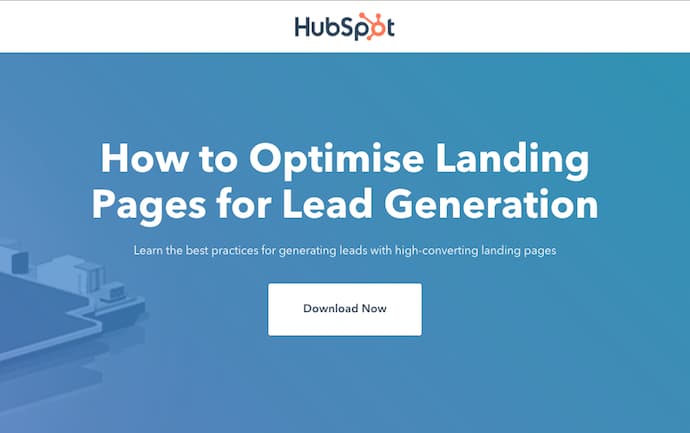
You’ve brought your targeted traffic to a page where they can take your desired action. Don’t distract them! Limit the number of exits from your landing page so that your visitors are focused on filling out your form. A key part of this is to remove the website navigation elements on landing pages. This helps put the focus back on the content you’re offering.
See how the landing page below does this — aside from the HubSpot logo, there are no navigation buttons to confuse or distract visitors.
Enable Sharing
Tap into a huge community of your best (and free) marketers: your audience. Add share links to your landing page to encourage your website visitors to share your content with their audiences.
Deliver Value
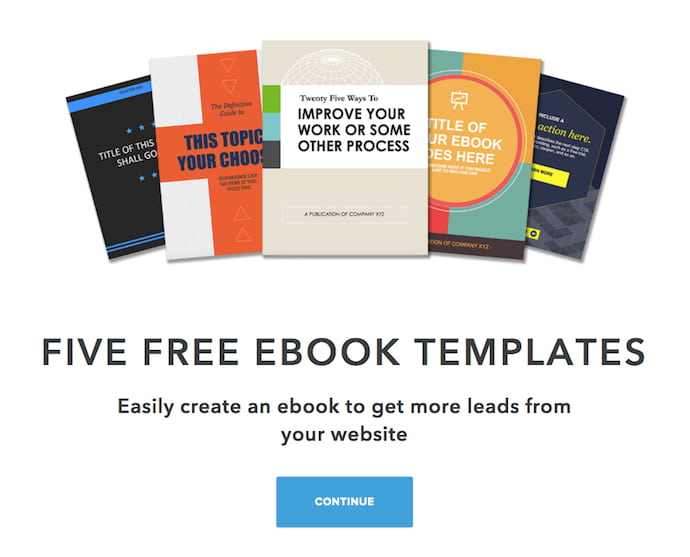
First and foremost, if you have a valuable offer, your visitors will give up their contact information in exchange for your offer. Ask yourself if your offer is compelling to your audience and make sure your landing page demonstrates that value. One way to ensure your landing page adds value is to show your audience the content they’re going to receive — directly on the page. See how this can look in the example landing page below.
Keep it Short
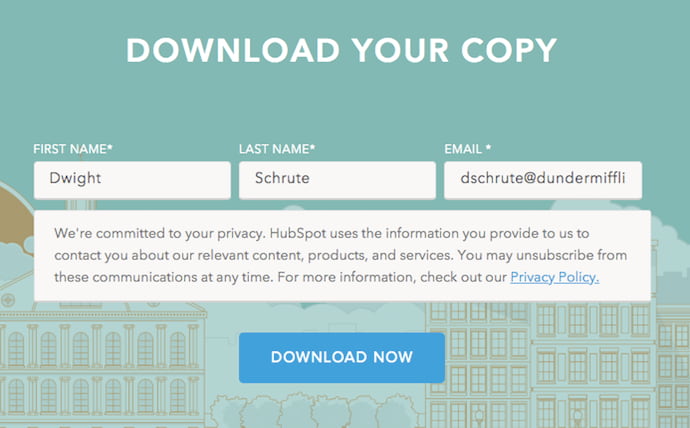
The longer your landing page and form, the more friction you add to the lead-generation process. Keeping your lead form short and straightforward will increase your conversion rate.
Here’s a tip: Put as many contact fields as you can on the same line. Shortening the height of your lead-capture form helps you limit the more trivial fields you might be tempted to include, and prevents your landing page visitors from getting spooked by a form that’s asking too much of them. As shown below, sometimes all you need is a first and last name, followed by an email address.
Test, Test, Test
As many best practices as you may read about online, your landing page can always use more testing and improvement. Make sure you have a landing page creation tool that allows you to create and test many different landing pages to see what works best for your business.
Are you a landing page guru? Check out some of our advanced tips and data around landing page best practices on effective calls to action and the best/worst button text (hint: don’t use “Submit”). Do you need to make any of these 10 Quick Fixes to Build Killer Landing Pages?
If you’re working hard to drive traffic to your website, don’t make the mistake of not capturing that traffic as leads.