5 Marketing Channels to Focus On In 2019
Even though Field of Dreams is one of my favorite movies, the saying “If you build it, they will come” sadly doesn’t apply to content marketing. Too often, we forget that content marketing consists of two keywords — content and marketing. Creating content is usually the most fulfilling and enjoyable part of a marketer’s job. But distributing that content is just as crucial for your marketing success because if no one sees your content, they definitely won’t come.
To help you determine which marketing channels you should distribute your content through, we’ve put together a list of the marketing channels to focus on in 2019. Read on to learn about the marketing channels that can amplify your reach, resonance, and revenue.
1. Word of Mouth
Only 4% of consumers believe marketers practice integrity. So what’s a marketer to do when the very people they need to persuade don’t trust them? They need to rely on their customers’ recommendation of their brand.
People trust customers over marketers because marketers have an agenda — they promote their product or service to generate sales. On the other hand, customers will only rave about a product or service if it truly benefited them.
To create as much word of mouth marketing as possible, you need to stay laser-focused on developing the best product or service possible and providing top-notch customer service. In other words, you need to serve your customers needs before your own. Only then will your customers turn into a loyal, passionate tribe that will recommend your brand to their friends and family.
2. Podcasts
According to a content format study conducted by Edison Research and Triton Digital, people age 12 and older are listening to online audio content at unprecedented levels. On average, people spend 17 hours per week tuning into their favorite podcasts, online radio shows, and audiobooks. There are also 14 million more weekly podcast listeners this year compared to last year, which is more than Guinea’s entire population.
The demand for audio content has exploded, but that doesn’t mean people will listen to your branded podcast just because it’s a podcast. In reality, they’ll only listen to it if it can hold their attention and, ultimately, entertain them. Otherwise, producing yet another interview-an-expert podcast like everyone else will only add to the noise flooding the internet.
One of the best ways to slice through all that corporate clutter is by creating a show that has a unique concept and tells stories of real professionals in your industry. According to researchers in the neuroscience field, storytelling is the best way to capture people’s attention, bake information into their memories, and resonate emotionally with them. The human brain is programmed to crave, seek out, and respond to well-crafted narrative — that’ll never change.
3. Email
Wasn’t email supposed to die this year? And last year? And the year before that? As much as marketing gurus claim the final nail of email’s coffin is forthcoming, the data tells us it’s not even close. In the U.S., email usage has grown every single year since 2012 and 91% of American internet users use email.
As of now, subscribing to your favorite online publications through email is the best way to keep up with their latest stories and news. And since it takes an average of six to eight touch points to generate a qualified sales lead, persuading people to subscribe to your emails and, in turn, constantly consume your content will generate more leads and revenue for your business.
Growing an engaged, loyal subscriber base also speaks volumes about the quality of your content and its emotional resonance. Even though hoards of content saturate the internet and most people’s inboxes today, people are still actively engaging with your content, which is a clear sign that they actually value it.
4. Social Media
Most people surf social media to escape everyday life, entertain themselves, and connect with others. Sometimes, though, brands forget why people use social media in the first place, blindly pushing their content to as many people as possible.
With over 2.7 billion social media users across the globe today, millions of brands have promoted their content on these platforms for years. But the popularity of social media has flooded each platform with heaps of articles, photos, and videos, skyrocketing the supply of content while the demand for it has plateaued.
So how can brands cut through the noise? One strategy is to publish engaging videos, interact with fans as much as possible, and post content that doesn’t direct users to another website, like insightful status updates instead of links.
5. SEO
Search engines are arguably the best marketing channel for acquiring attention — most people discover new brands and publications through Google. In fact, according to Google, 89% of B2B buyers and 81% of online shoppers use search engines to research new products and services.
Search engines are also one of the highest converting marketing channels. Since people actively search for answers to their questions and solutions to their problems on Google, they’re likely to download your offer or sign up for a free trial if you can provide them with what they’re looking for.
To build a thriving organic presence online, consider implementing the pillar-cluster model into your blog. Using this strategy, you’ll create a single pillar page that provides a high-level overview of a topic and hyperlinks to cluster pages that delve into the topic’s subtopics. This signals to Google that your pillar page is an authority on the topic.
Hyperlinking all of the cluster pages to the pillar page also spreads domain authority across the cluster, so your cluster pages get an organic boost if your pillar page ranks higher, and your cluster pages can even help your pillar page rank higher if they start ranking for the specific keyword they’re targeting.

Reputation Management: How to Protect Your Brand Online in 2019
A positive brand image can undoubtedly influence a consumer’s decision to buy a product — and, for virtually every business, a positive brand image starts online.
Nowadays, your reputation is largely dependent on social media and online review sites. For instance, consumers need to read an average of 10 online reviews before they feel they can trust a local business.
Since brand image makes such an impression on someone’s decision to purchase, it’s critical you regularly monitor your reputation online.
Additionally, an unfavorable online reputation can have an extremely negative impact on your company’s bottom line — in fact, businesses risk losing up to 22% of their customers when users find just one negative article about the company.
However, monitoring and influencing your reputation can feel like a daunting task, particularly when so much of it — including online reviews — is out of your control. Fortunately, there are plenty of tools and strategies you can implement to ensure you’re protecting your brand in 2019.
Here, let’s explore reputation management software you can use to monitor your brand’s reputation online, as well as strategies you can implement to manage your corporate reputation.

Reputation Management Software
To start managing your reputation online, it’s helpful to use reputation management software. Particularly if you work for a small-to-medium sized business with limited PR resources, software can help you keep track of what people are saying online about your brand.
By using one of these software systems, you’re able to mitigate negative reviews by responding to customers online, and even use their feedback as an opportunity to make your brand or product better.
1. Yext Reviews
Since inconsistent information can negatively affect your local SEO, it’s critical you ensure your business’s information is listed consistently across each site. Fortunately, Yext lets you fix any inconsistent business information in one place.
Additionally, the software enables you to manage your social media accounts and respond to authentic customer reviews, ensuring you have a good grasp on your brand’s true online reputation. Yext is ideal for small-to-medium sized businesses as well as major enterprise companies — some of its impressive customers include Marriott Hotels and T-Mobile.
Price: Starts at $199/year

Image courtesy of Yext.
2. ReviewTrackers
ReviewTrackers collects online reviews from over 100 third-party review sites, including Google, TripAdvisor, and Facebook — best of all, you get a notification whenever a customer leaves a review, ensuring you’re up-to-speed on customer feedback. The cloud-based reputation and review management software also allows you to track trending issues and topics to show you the bigger picture regarding customer issues, and provides competitor tracking and performance analytics.
The tool, used by customers such as Sears and Triple A, is available for enterprise companies as well as small-to-medium sized businesses.
Price: Custom depending on your size and business needs (request a demo here).
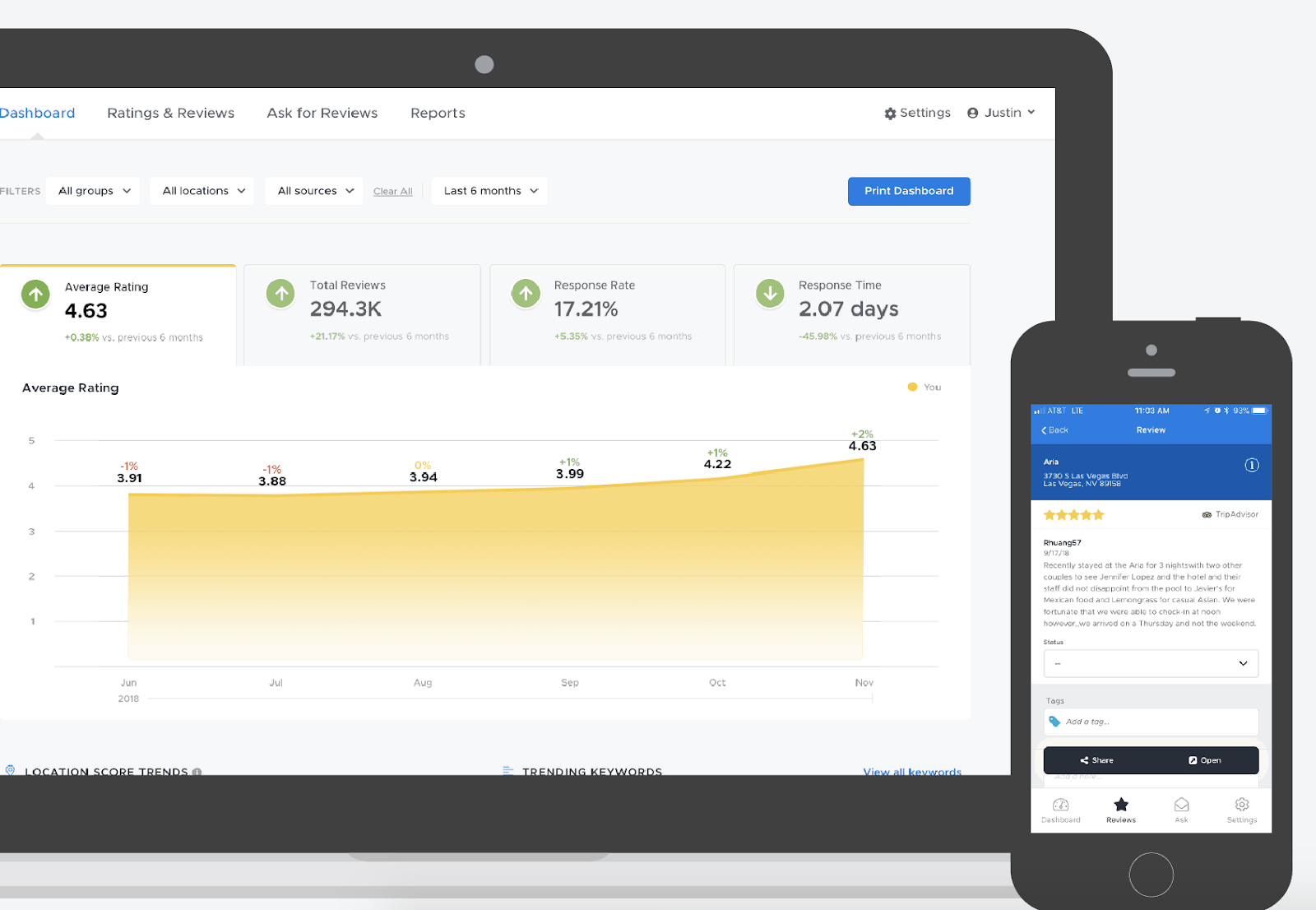
Image courtesy of ReviewTrackers.
3. Podium
More than likely, the idea of managing your reputation on different sites ranging from Facebook to Google to Yelp is a stressful and overwhelming one — fortunately, software like Podium allows you to see all customer interactions and online reviews in a single dashboard. Your employees can use Podium to request reviews, respond to reviews in real-time, and even send text messages with potential customers.
Podium’s support team is available via phone, online chat, or email, ensuring you have the help you need to properly implement their tool. The software works best for small-to-medium local businesses who have the time and resources to manually send texts to customers or leads.
Podium is a customer interaction platform that utilizes text messaging to help businesses manage customer relationships and build an online reputation on a variety of websites.
Price: Custom depending on your size and business needs. (Ask for quote here).

Image courtesy of Podium.
4. BirdEye
BirdEye, a SaaS reputation management tool used by more than 50,000 businesses, collects feedback from over 150 online review sources to ensure you have the full-picture regarding your brand’s online reputation. You can monitor, promote, and respond to reviews within one dashboard — additionally, you can use BirdEye to request reviews from customers on both desktop and mobile devices, or on BirdEye’s own messenger tool.
Along with review monitoring, BirdEye provides features to manage your social accounts, gain insight into your competitors’ customers, and create surveys and tickets to further improve your customer’s overall experience with your brand.
Price: Custom depending on your size and business needs. (Ask for quote here).

Image courtesy of BirdEye.
5. Cision
Cision Communications Cloud lets you track your brand mentions across millions of online stories, as well as any social media mentions. Best of all, Cision helps you reach audiences across traditional, digital, and social platforms, ensuring your brand is consistently successful across all marketing channels.
While Cision provides tools to ensure you’re able to monitor and protect your online brand, its features are particularly impressive for strategic, proactive PR outreach. For instance, Cision helps you find media outlets and specific contacts within the industry to reach out with pitches, or figure out which industry influencers can best help spread your message and positively impact your brand’s image.
Cision also provides automated analysis to help you translate your campaigns into valuable global insights. The tool is used by companies such as Comcast and Bayer.
Price: Custom depending on your size and business needs. (Ask for quote here).
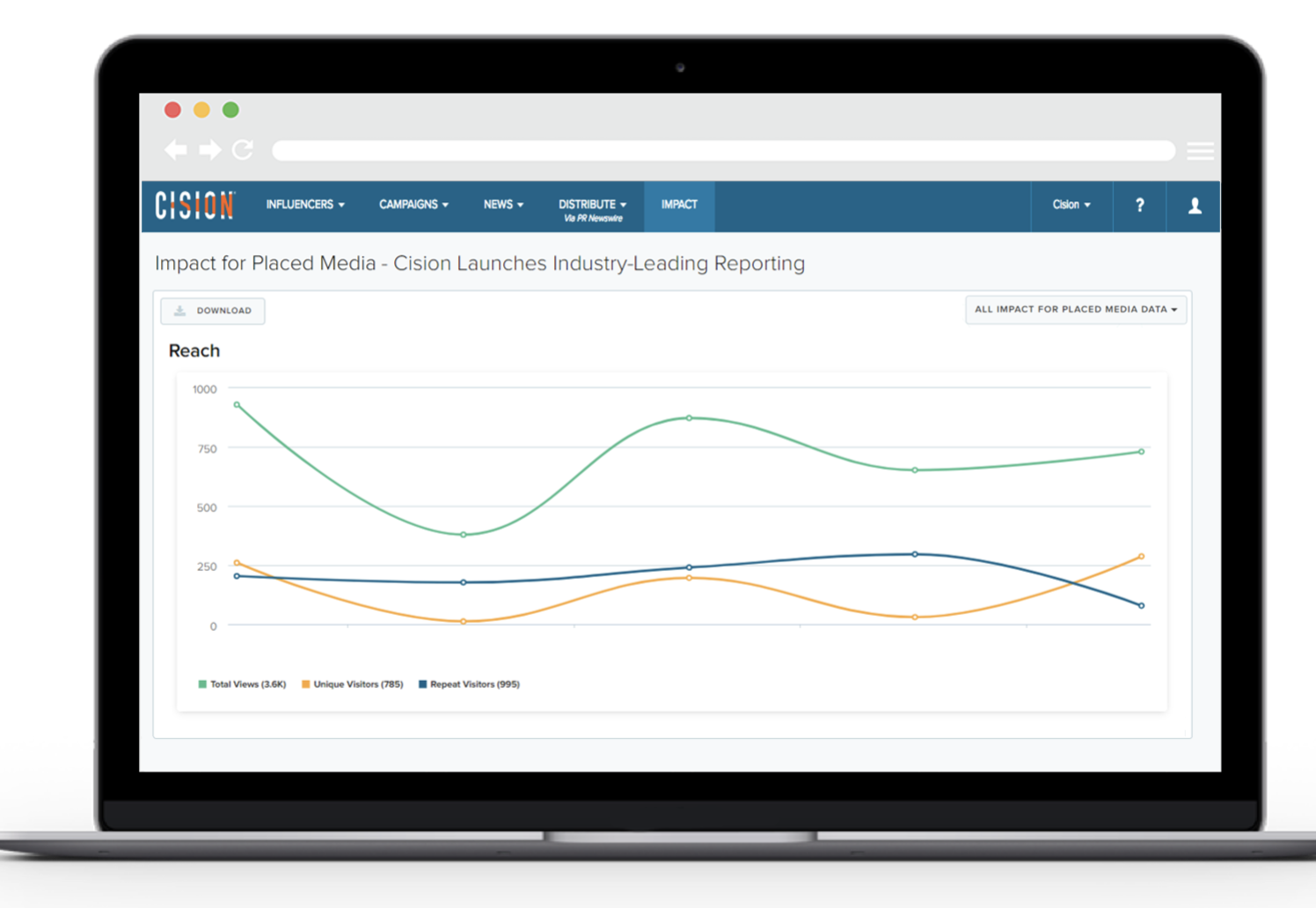
Image courtesy of Cision
Corporate Reputation Management
To understand how a business might implement a reputation management strategy, I spoke with Ellie Flanagan, Senior Corporate Communications Manager at HubSpot.
She told me — “The first step in shoring up your brand’s presence online is making sure that all of your owned channels reflect your current imagery, messaging, and values. Check for out-dated logos, company descriptions, or mission statements. It’s also helpful to do regular audits of other places where your logo or brand might be in use — such as on partner or customer websites.”
To conduct regular audits, you might use one of the software tools listed above. Additionally, you can use a reputation management software to check for inconsistencies, such as Yext. Alternatively, there are tools such as Express Update or My Business Listing Manager that help you monitor for out-dated information (check out A Comprehensive Guide to Local SEO in 2019 to learn more).
Flanagan also suggested, “Make sure you have clear language on your own website that outlines your company’s trademarks and sets guidelines for how others can use your brand assets. That will be a helpful reference in the event that you need to reach out to someone who’s using your brand incorrectly or without permission.”
I also spoke with Alice Sol, a Public Relations Specialist at HubSpot. She told me — “Protecting your brand has never been more important, and that goes hand-in-hand with customer trust. We live in a world where information travels rapidly and we can get a response in seconds at the touch of a button. Technology has enabled us, as consumers, to get in-touch with brands quickly — at the same time, it’s given brands the ability to form deeper connections and resolve issues faster.”
Ultimately, it’s critical you respond to negative feedback to ensure high customer satisfaction. Responding to negative reviews will help you maintain trust and loyalty among your customers. Additionally, it could actually help you grow your business — 45 percent of consumers say that they’re more likely to visit a business if it responds to negative reviews.
When responding to a negative review, it’s important you provide actionable, helpful solutions whenever possible. Avoid getting defensive or making excuses — at best, tell your customer you’re sorry they were disappointed in the service you provided.
Sol also advises businesses to do their best to meet customer needs and ensure a seamless experience, start-to-finish. She says, “The stakes [on delivering a good experience] are getting higher. 80% of consumers say they have stopped doing business with a company because of a poor experience. If a customer has a bad experience, technology allows information about that experience to travel quickly. At the same time, if a customer has a very positive experience, that creates a strong brand reputation and forms trust.”
“Your customers are your biggest asset and it’s critical to take those needs very seriously by responding in a timely manner and communicating effectively.”
To sum it up, when protecting your online reputation, you’ll want to focus on the following tactics:
- Make sure all your owned channels reflect your current imagery, messaging, and values
- Ensure all online information regarding your business is up-to-date and consistent
- Use clear language on your own website to outline your company’s trademarks and set guidelines
- Cultivate a positive user experience, start-to-finish
- Listen to customer feedback and respond to negative feedback with helpful, actionable solutions when possible
If you want further information regarding how to cultivate a comprehensive, cohesive customer experience, take a look at How to Define a Customer Experience (CX) Strategy, which provides you with the six areas of a successful digital customer strategy.


31 Call-to-Action Examples You Can’t Help But Click
Think about all the times you’ve signed up for things in your life. Did you once download Evernote? Dropbox? Spotify? Maybe you’ve even taken a class on General Assembly.
Each one of these signups is likely a result of an effective call-to-action (CTA).
It’s really important to guide your visitors through the buying journey using strategic CTAs.
Think about it: If you hadn’t been drawn in by the copy or design of the CTA, or been guided so eloquently through your sign-up process, you would probably use a lot fewer apps and websites than you do now.

Here are a few different actions an audience can get called to carry out:
Sign up.
In this type of CTA, the audience might be invited to sign up for a free trial, an online course, a future event, or even a software product. It all depends on the CTAs context on an ad or website.
Subscribe.
This CTA doesn’t commit a person to a purchase. Rather, it invites them to receive updates from the company. “Subscribe” CTAs are common to company blogs, for which the business wants to develop a readership.
Try for free.
Nearly every company website has a free trial offer today. Each of them are CTAs of this variety, and they allow people to demo a product before deciding if it’s worth the cost to them.
Get started.
This CTA can drive a variety of behaviors for a company, from a free trial to virtual reality experience.
Learn more.
Sometimes, all you want is to give your potential customers a little more information so they’re prepared to buy something. That’s what this CTA is for.
Join us.
Do you manage an online community. Is your product built on collaboration between users? You might find yourself placing “join us” CTA somewhere on your website.
Learn more about the purposes CTAs can serve in this blog post.
The above types of CTA all serve a designated purpose, but keep in mind the language they use can vary. And today, marketers everywhere have put some creative spins on their calls to action to generate the leads their businesses depend on.
To help you identify what’s effective and what’s not, we’ve listed out 31 examples of CTAs that totally rock. These call-to-action examples are broken out into three categories:
- Simple and effective CTAs
- CTAs with great call-to-action phrases
- CTAs that balance multiple buttons on one page
Simple & Effective Call-to-Action Examples
1. Evernote
CTA Button: Sign Up
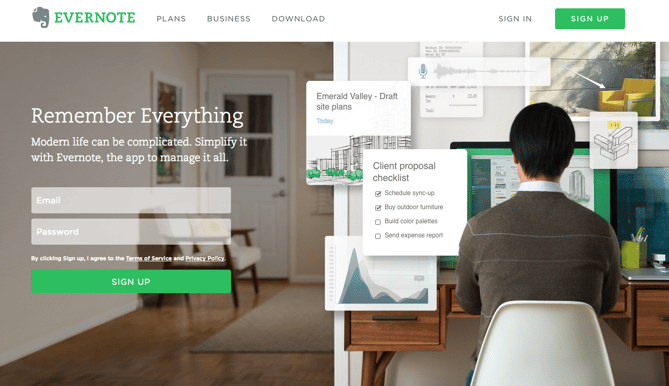
“Remember Everything.” Visitors can immediately understand that message the moment they land on this page. The design on Evernote’s website makes it super simple for users to see quick benefits of using the app and how to actually sign up to use it. Plus, the green color of the main and secondary CTA buttons is the same green as the headline and the Evernote logo, all of which jump off the page.
2. Dropbox
CTA Button: Sign up for free
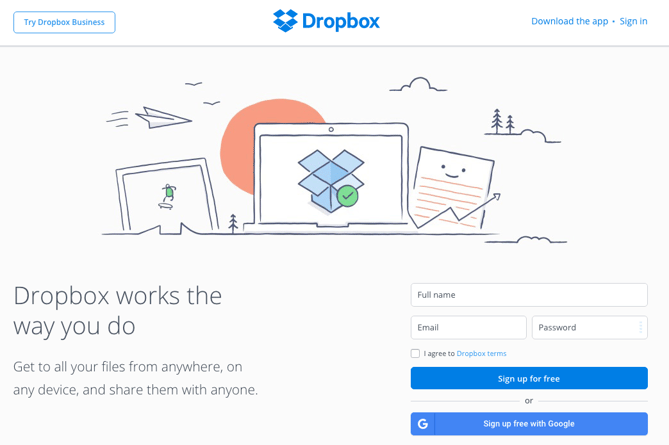
Dropbox has always embraced simple design with a lot of negative space. Even the graphics on their homepage are subtle and simple.
Thanks to that simple design and negative space, the blue “Sign up for free” call-to-action button stands out from everything else on the page. Since the CTA and the Dropbox logo are the same color, it’s easy for the visitor to interpret this CTA as “Sign up for Dropbox.” That’s one effective call-to-action.
3. OfficeVibe
CTA Button: Subscribe
Here’s a slide-in call-to-action that caught my attention from OfficeVibe. While scrolling through a post on their blog, a banner slid in from the bottom of the page with a call-to-action to subscribe to their blog. The best part? The copy on the slide-in told me I’d be getting tips about how to become a better manager — and the post it appeared on was a post about how to become a better manager. In other words, the offer was something I was already interested in.

Plus, I like how unobtrusive slide-in CTAs are — as opposed to what my colleague Rachel Sprung calls the “stop-everything-and-click-here-pop-up-CTA.” I find these CTAs offer a more lovable experience because they provide more information while still allowing me to continue reading the blog post.
4. Netflix
CTA Button: Join Free for a Month
One big fear users have before committing to sign up for something? That it’ll be a pain to cancel their subscription if they end up not liking it. Netflix nips that fear in the bud with the “Cancel anytime” copy right above the “Join Free for a Month” CTA. I’d venture a guess that reassurance alone has boosted signups. Also, you’ll notice again that the red color of the primary and secondary CTAs here match Netflix’s logo color.

5. Square
CTA Button: Get Started
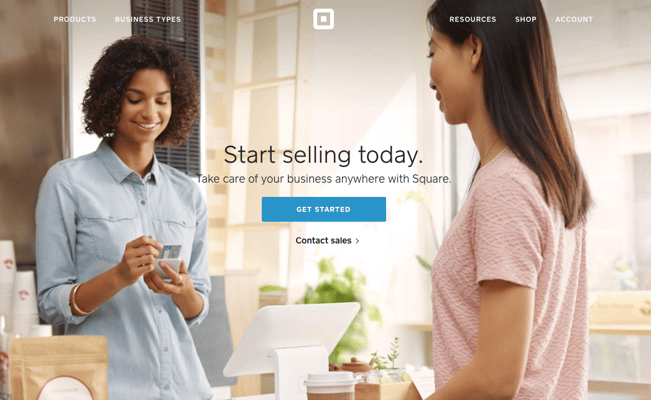
To achieve effective CTA design, you need to consider more than just the button itself. It’s also super important to consider elements like background color, surrounding images, and surrounding text.
Mindful of these additional design components, the folks at Square used a single image to showcase the simplicity of using their product, where the hovering “Get Started” CTA awaits your click. If you look closely, the color of the credit card in the image and the color of the CTA button match, which helps the viewer connect the dots of what to expect if/when they click.
6. Prezi
CTA Button: Give Prezi a try
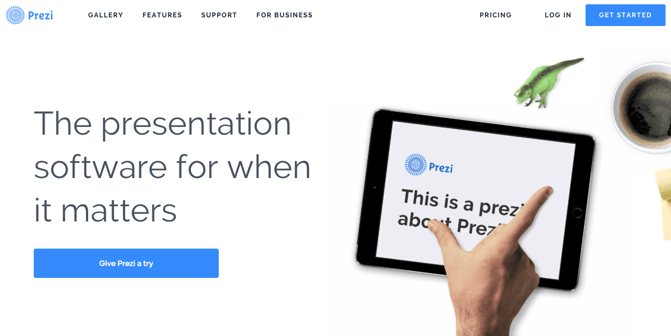
The folks at Prezi are also into the minimalist design look on their website. Other than the green dinosaur and the dark brown coffee, the only other color accompanying the predominantly black-and-white design is a bright blue — the same blue from their main logo. That bright blue is strategically placed on the homepage: the main “Give Prezi a try” CTA, and the secondary “Get Started” CTA, both of which take users to the same pricing page.
7. Full Bundle
CTA Button: Our Work
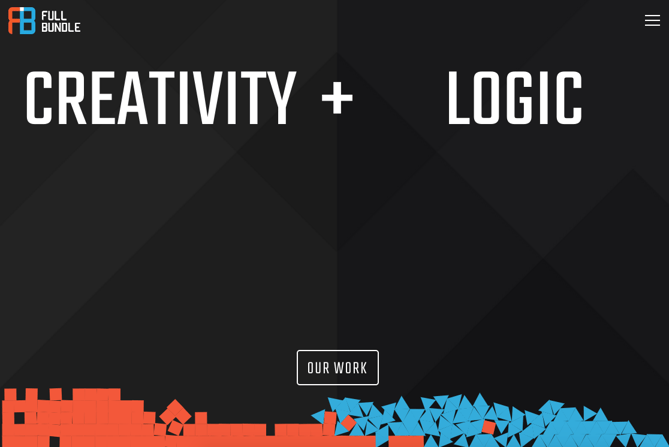
Full Bundle is another company that uses negative space to make their primary CTA pop. The white “Our Work” call-to-action stands out against the dark greys of the background. Their choice of CTA is strategic, too. Given that they primarily exist to build out clients’ online presences, it’s important for them to showcase their work — and that’s what most folks are going to their website for.
8. Panthera
CTA Button: Join
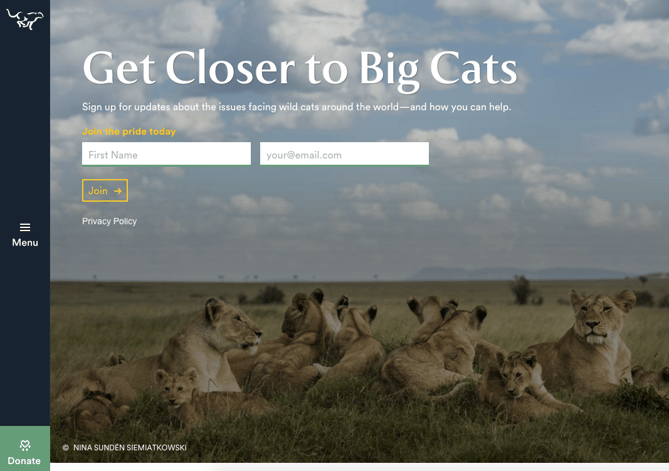
The folks at Panthera are looking for users who really care about wild cats around the world and want to join a group of people who feel the same way. To target those people in particular, we love how they use language that would speak to big cat-lovers: “Join the pride today.” The page itself is super simple: an on-page form with two, simple fields, and a button asking folks to (again) “Join.”
CTAs With Creative Call to Action Phrases
9. EPIC
CTA Phrase: ‘Let’s start a new project together’
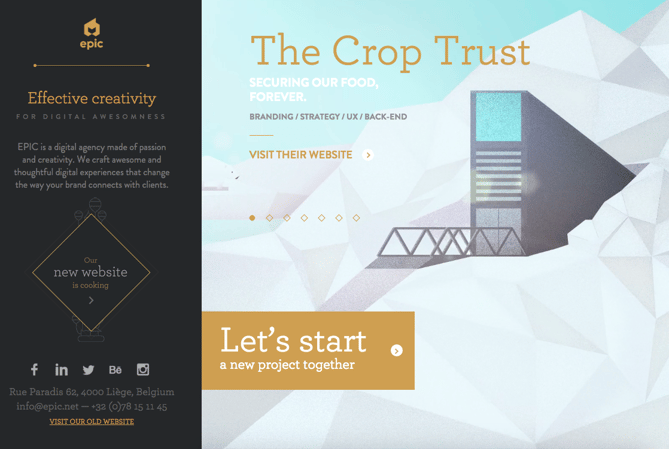
The folks at the agency EPIC use their homepage primarily to showcase their work. When you arrive on the page, you’re greeted with animated videos showing some of the work they’ve done for clients, which rotate on a carousel. While there plenty of other places users might click on their site — including their clients’ websites — the main call-to-action stands out and always contrasts with the video that’s playing in the background.
I love that it features friendly, inclusive language — “Let’s start a new project together” — which gives a hint to users looking for a creative partner that they’re an especially great team to work for.
10. Aquaspresso
CTA Phrase: ‘Send Me Specials Now!’
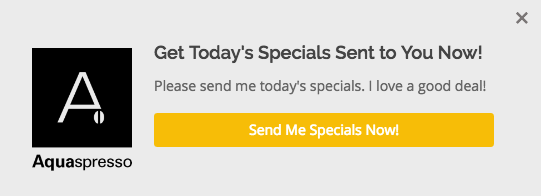
The whole point of a call-to-action is to direct your site visitors to a desired course of action — and the best CTAs do so in a way that’s helpful to their visitors. The folks at coffee company Aquaspresso really nailed that balance here with the pop-up CTA on their main blog page.
Here, the desired course of action is for their blog readers to check out what they’re actually selling (and hopefully buy from them). There are many ways they could have done this, including putting out a CTA that urges people to “Check out our most popular products!” or something very direct. But we love what they’ve done instead: Their CTA offers blog readers something much more helpful and subtle — an offer for “today’s specials” in exchange for the reader’s email address.
Adding that the specials are for today only is a great example of a psychological tactic called scarcity, which causes us to assign more value to things we think are scarce. The fear that today’s specials are better than tomorrow’s might make people want to fill it out and claim their offer while they can.
(The call-to-action above was created using HubSpot’s free conversion tool, Leadin. Click here to learn how to easily create CTAs like this one using Leadin.)
11. QuickSprout
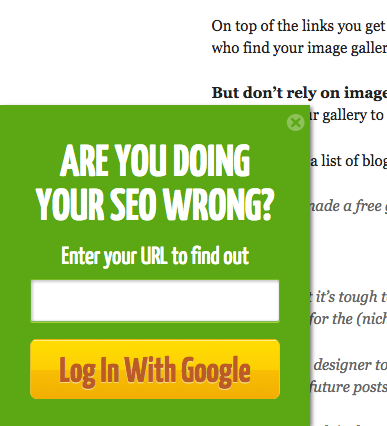
CTA Phrase: ‘Are you doing your SEO wrong? Enter your URL to find out’
No one wants to be wrong. That’s why a call-to-action button like QuickSprout’s slide-in CTA on their blog is so clickworthy. It asks the reader, “Are you doing your SEO wrong?” Well, am I? All I have to do is enter my URL to find out — seems easy enough. It’s language like that that can really entice visitors to click through.
Plus, having the CTA slide in mid-blog post is a great tactic for catching readers before they bounce off the page. Traditionally, many blogs have CTAs at the very bottom of each blog post, but research shows most readers only get 60% of the way through an article. (Click here to learn how to add slide-in CTAs to your blog posts.)
12. Grey Goose
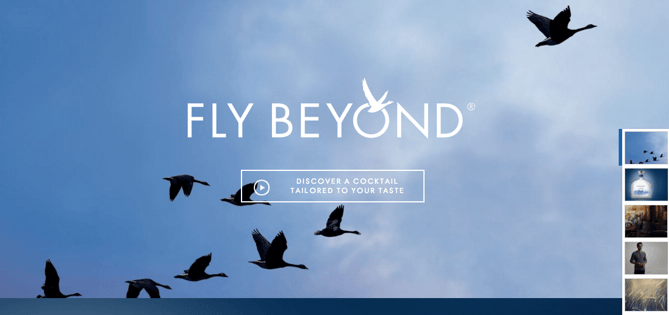
CTA Phrase: ‘Discover a cocktail tailored to your taste’
Here’s a fun, unique call-to-action that can get people clicking. Whereas site visitors might have expected to be directed to product pages or press releases from the homepage, a CTA to “Discover a Cocktail Tailored to Your Taste” is a pleasantly surprising ask. People love personalization, and this CTA kind of feels like an enticing game. The play button icon next to the copy gives a hint that visitors will be taken to a video so they have a better idea of what to expect when they click.
13. Treehouse
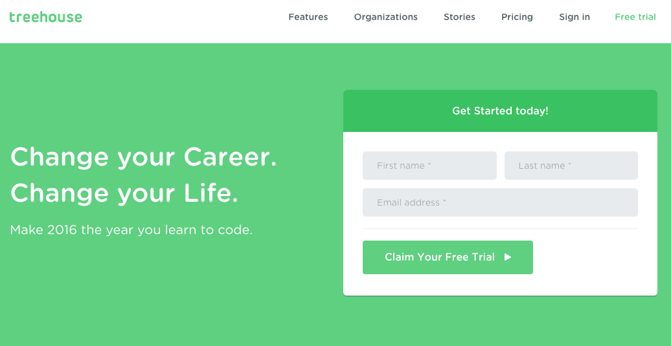
CTA Phrase: ‘Claim Your Free Trial’
A lot of company websites out there offer users the opportunity to start a free trial. But the CTA on Treehouse’s website doesn’t just say “Start a Free Trial”; it says “Claim Your Free Trial.”
The difference in wording may seem subtle, but think about how much more personal “Claim Your Free Trial” is. Plus, the word “claim” suggests it may not be available for long, giving users a sense of urgency to get that free trial while they can.
14. OKCupid
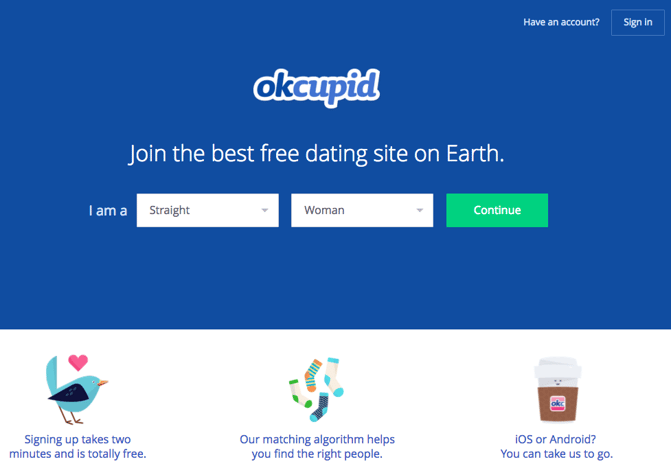
CTA Phrase: ‘Continue’
OKCupid’s CTA doesn’t seem that impressive at first glance, but its brilliance is in the small details.
The call-to-action button, which is bright green and stands out well on a dark blue background, says, “Continue.” The simplicity of this term gives hope that the signup process is short and casual. To me, this CTA feels more like I’m playing a fun game than filling out a boring form or committing to something that might make me nervous. And it’s all due to the copy.
15. Blogging.org
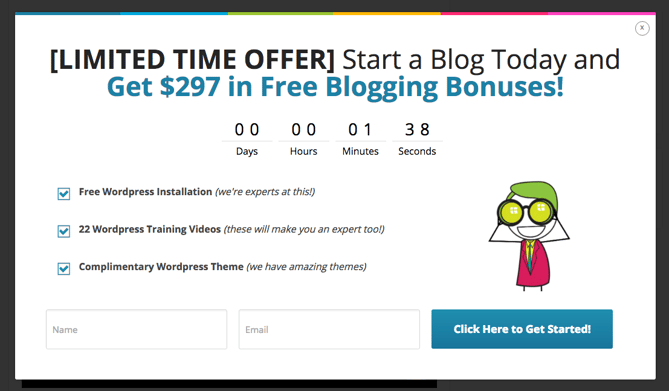
CTA Phrase: Countdown Clock
Nothing like a ticking timer to make someone want to take action. After spending a short amount of time on blogging.org’s homepage, new visitors are greeted with a pop-up CTA with a “limited time offer,” accompanied by a timer that counts down from two minutes.
As with Aquaspresso’s example in #10, this is a classic use of the psychological tactic called scarcity, which causes us to assign more value to things we think are scarce. Limiting the time someone has to fill out a form makes people want to fill it out and claim their offer while they can.
Curious, what happens when time runs out? So was I. Hilariously, nothing happens. The pop-up CTA remains on the page when the timer gets to zero.
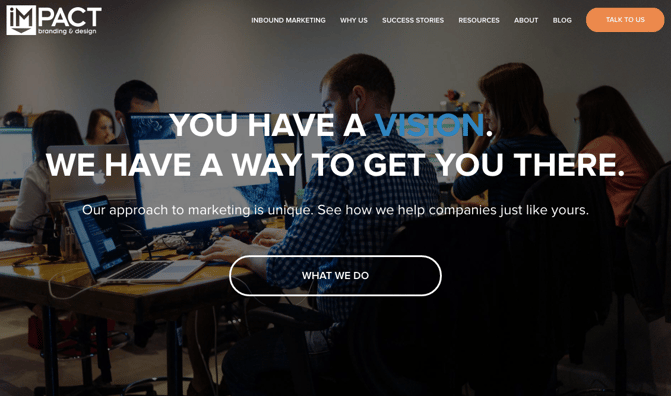
16. IMPACT Branding & Design
CTA Phrase: ‘What We Do’
CTAs can feel really pushy and salesy if the wrong language is used. I like IMPACT‘s educational approach, where they challenge visitors to learn what the company does before pushing them to take any further action. This call-to-action is especially intriguing to me because they don’t even use an action verb, yet they still manage to entice people to click.
17. Huemor
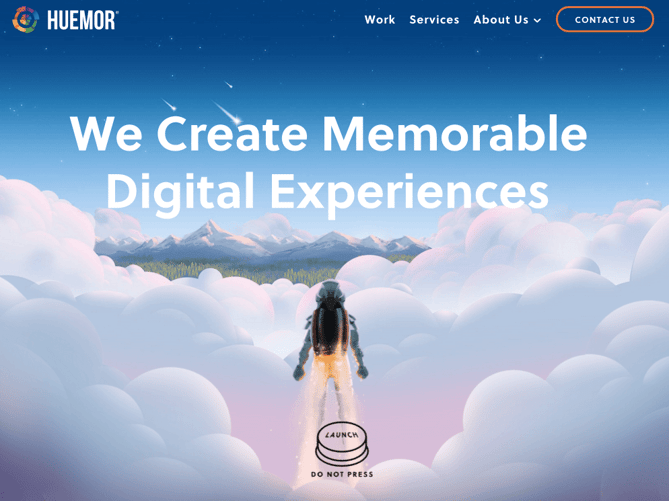
CTA Phrase: ‘Launch (Do Not Press)’
If you went to a website and saw a “Launch” CTA accompanied by the copy “Do Not Press” … what would you do? Let’s be honest: You’d be dying to press it. The use of harmless reverse psychology here is playful, which is very much in keeping with Huemor’s brand voice.
18. Brooks Running
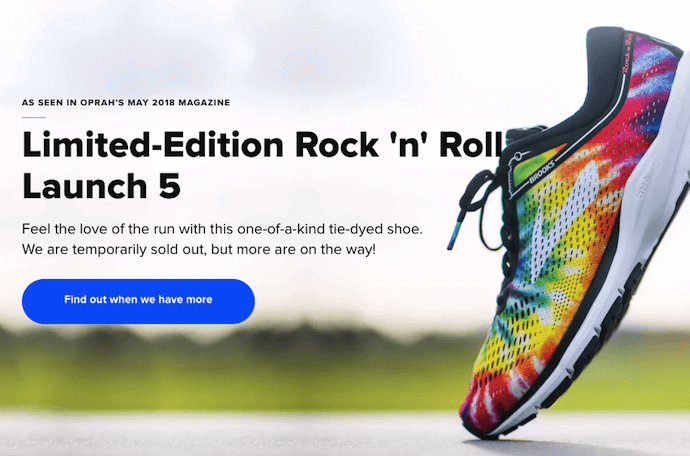
CTA Phrase: ‘Find out when we have more’
How many times have you hotly pursued a product you love, only to discover it’s sold out? Well, as you might know, it’s no picnic for the seller either. But just because you’ve run out of an item doesn’t mean you should stop promoting it.
Brooks Running uses a clever call to action to ensure their customers don’t bounce from their website just because their favorite shoe is out of stock. In the screenshot below, you can see Brooks touting an awesome-looking shoe with the CTA, “Find out when we have more.” I love how this button turns bad news into an opportunity to retain customers. Without it, Brooks’ customers would likely forget about the shoe and look elsewhere.
When you click on the blue CTA button depicted below, Brooks directs you to a page with a simple code you can text the company. This code prompts Brooks to automatically alert the visitor when the shoe they want is available again.
19. Humboldt County
CTA Phrase: ‘Follow the Magic’
Humboldt County’s website is gorgeous on its own: It greets you with a full-screen video of shockingly beautiful footage. But what I really love is the unconventional call-to-action button placed in the bottom center, which features a bunny icon and the words “Follow the Magic.”
It enhances the sort of fantastical feel of the footage, making you feel like you’re about to step into a fairytale.
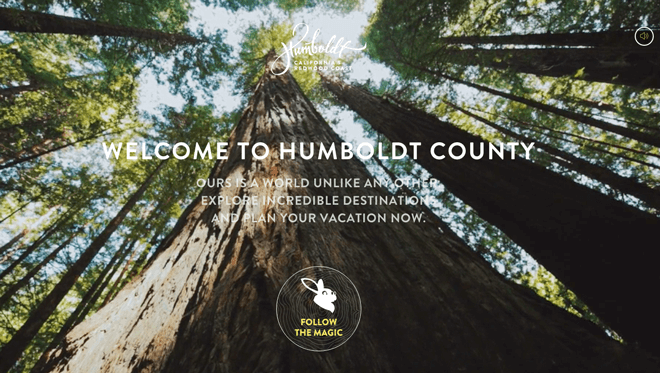
What’s more, once you click into that CTA, the website turns into a sort of choose-your-own-adventure game, which is a fun call-to-action path for users and encourages them to spend more time on the site.

Balancing Multiple Call-to-Action Buttons
20. Uber
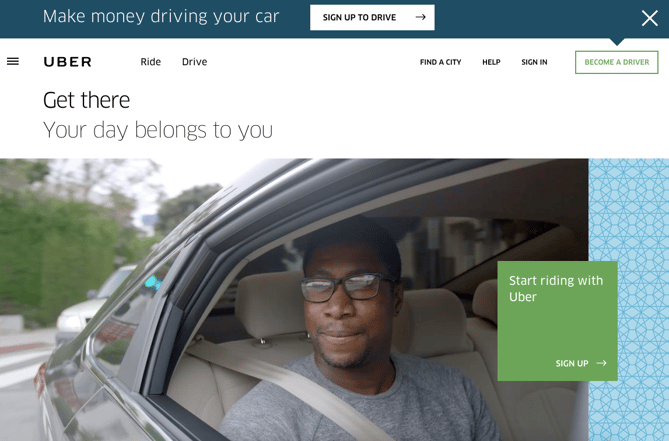
CTA Buttons: Sign up to drive | Start riding with Uber
Uber’s looking for two, very distinct types of people to sign up on their website: riders and drivers. Both personas are looking for totally different things, and yet, the website ties them together really well with the large video playing in the background showing Uber riders and drivers having a good time in locations all over the world.
I love the copy of the driver CTA at the top, too: It doesn’t get much more straightforward than, “Make money driving your car.” Now that’s speaking people’s language.
21. Spotify
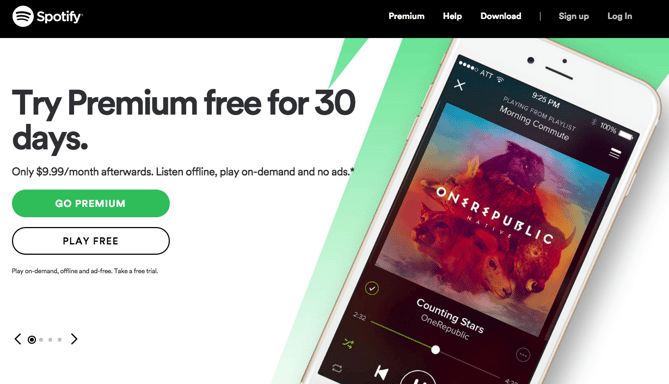
CTA Buttons: Go Premium | Play Free
As soon as you reach Spotify’s homepage, it’s pretty clear that their main goal is to attract customers who are willing to pay for a premium account, while the CTA for users to sign up for free is very much secondary.
It’s not just the headline that gives this away; it’s also the coloring of their CTA buttons. The “Go Premium” CTA is lime green, making it pop off the page, while the “Play Free” CTA is plain white and blends in with the rest of the copy on the page. This contrast ensures that visitors are drawn to the premium CTA.
22. Ugmonk
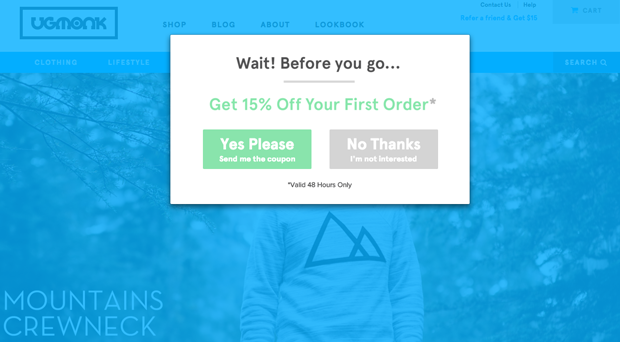
CTA Buttons: Send me the coupons | I’m not interested
Exit CTAs, also known as exit intent pop-ups, are different than normal pop-ups. They detect your users’ behavior and only appear when it seems as though they’re about to leave your site. By intervening in a timely way, these pop-ups serve as a fantastic way of getting your reader’s attention while offering them a reason to stay.
Ugmonk has a great exit CTA, offering two options for users as a final plea before they leave the site. First, they offer a 15% discount on their products, followed by two options: “Yes Please: Send me the coupon” and “No Thanks: I’m not interested.” It’s super helpful that each CTA clarifies what “Yes” and “No” actually mean, and I also like that they didn’t use guilt-tripping language like “No Thanks: I hate nature” like I’ve seen on other websites. Finally, notice that the “Yes Please” button is much brighter and inviting in color than the other option.
23. Pinterest
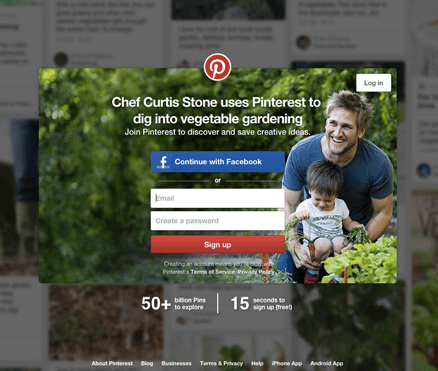
CTA Buttons: Continue with Facebook | Sign Up
Want to sign up for Pinterest? You have a couple of options: sign up via Facebook or via email. If you have a Facebook account, Pinterest wants you to do that first. How do I know? Aesthetically, I know because the blue Facebook CTA comes first and is much more prominent, colorful, and recognizable due to the branded logo and color. Logically, I know because if you log in through Facebook, Pinterest can pull in Facebook’s API data and get more information about you than if you log in through your email address.
Although this homepage is optimized to bring in new members, you’ll notice a very subtle CTA for folks with Pinterest accounts to log in on the top right.
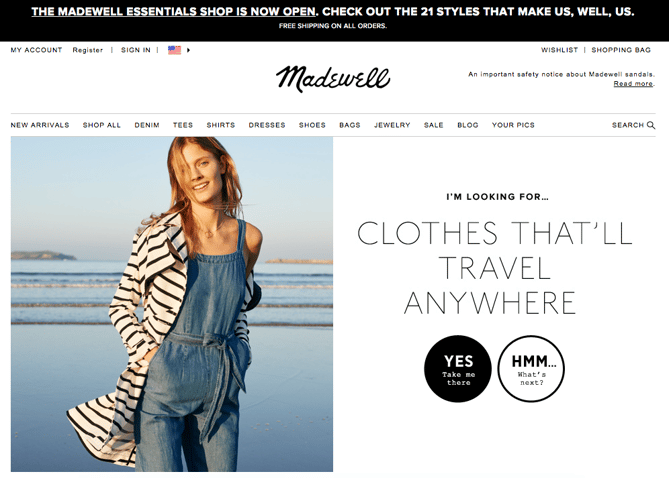
24. Madewell
CTA Buttons: Take me there | What’s next?
Madewell (owned by J.Crew) has always had standout website design, taking what could be a typical ecommerce website to the next level. Their use of CTAs on their homepage is no exception.
When you first arrive on the page, you’re greeted with the headline “I’m Looking For …” followed by a category, like “Clothes That’ll Travel Anywhere.” Below this copy are two options: “Yes, Take Me There” or “Hmm… What’s Next?” The user can choose between the two CTAs to either browse clothes that are good for travel, or be taken to the next type of clothing, where they can play again.
This gamification is a great way to make your site more interesting for users who come across it without having a specific idea of where they want to look.
25. Instagram
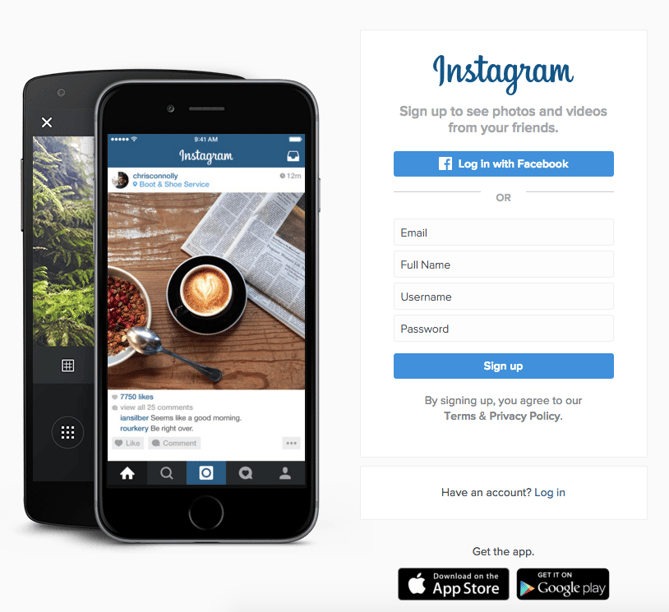
CTA Buttons: Download on the App Store | Get it on Google Play
Since Instagram is a mainly mobile app, you’ll see two black CTAs of equal size: one to download Instagram in Apple’s App Store, and another to download it on Google Play. The reason these CTAs are of equal caliber is because it doesn’t matter if someone downloads the app in the App Store or on Google Play … a download is a download, which is exactly what Instagram is optimizing for. If you already have Instagram, you can also click the CTA to “Log In” if you’d prefer that option, too.
26. Barkbox
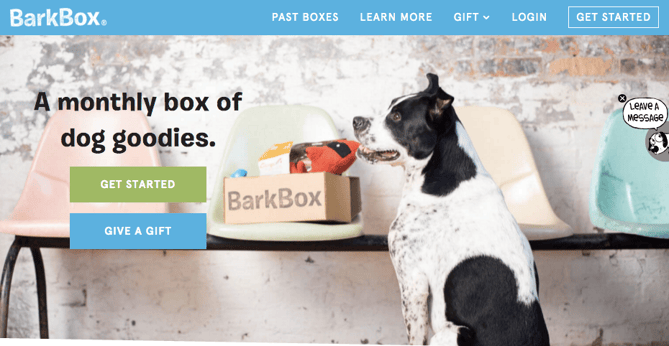
CTA Buttons: Get Started | Give a Gift
The two CTAs on Barkbox’s homepage show that the team there knows their customers: While many people visiting their site are signing up for themselves, there are a lot of people out there who want to give Barkbox as a gift. To give those people an easy path to purchase, there are two, equally sized CTAs on the page: “Get Started” and “Give a Gift.”
As an added bonus, there’s an adorable, pop-up call-to-action on the right-hand side of the screen prompting users to leave a message if they’d like. Click into it, and a small dialogue box pops up that reads, “Woof! I’m afraid our pack is not online. Please leave us a message and we’ll bark at you as soon as pawsible.” Talk about delightful copy.
27. t.c. pharma
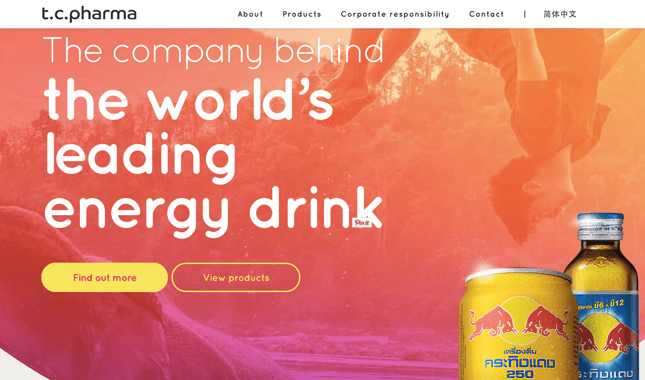
CTA Buttons: Find out more | View products
Turns out Red Bull isn’t its own parent company: It’s owned by Thailand-based t.c. pharma, a company that makes popular energy drinks, electrolyte beverages, and functional drinks and snacks.
Its homepage features two call-to-action buttons of equal size: “Find out more” and “View products” — but it’s clear by the bright yellow color of the first button that they’d rather direct folks to “Find out more.”
28. General Assembly
CTA Buttons: View Full-Time Courses | Subscribe
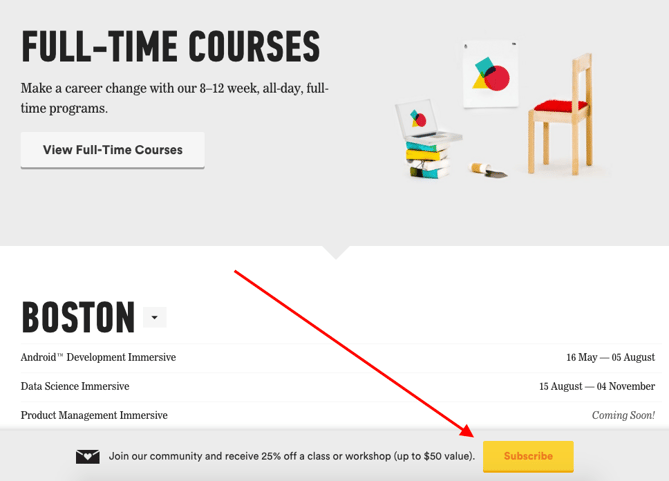
As you scroll through the General Assembly website, you’ll see CTAs for various courses you may or may not want to sign up for. I’d like to point your attention to the CTA that slides in from the bottom of the page as you’re scrolling, though, which suggests that you subscribe to email updates.
Although this feels like a secondary CTA due to its location and manner, I actually think they try to sneak this in to become more of a primary CTA because it’s so much more colorful and noticeable than the CTAs for individual classes. When you create your own CTAs, try using bolder colors — even ones that clash with your regular stylings — to see if it’s effective at getting people’s attention. (Click here for a tutorial on how to add slide-in CTAs to your webpages.)
29. charity: water
CTA Buttons: Give by Credit Card | Give by PayPal
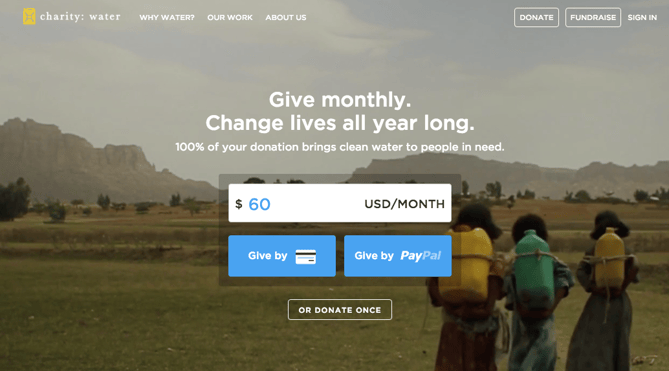
Charity: water’s main goal is to get people to donate money for clean water — but they can’t assume that everyone wants to pay the same way.
The CTAs featured on their homepage take a really unique approach to offering up different payment methods by pre-filling $60 into a single line form and including two equally important CTAs to pay via credit card or PayPal. Notice how both CTAs are the same size and design — this is because charity: water likely doesn’t care how you donate, as long as you’re donating.
30. Hipmunk
CTA Buttons: Flights | Hotels | Cars | Packages
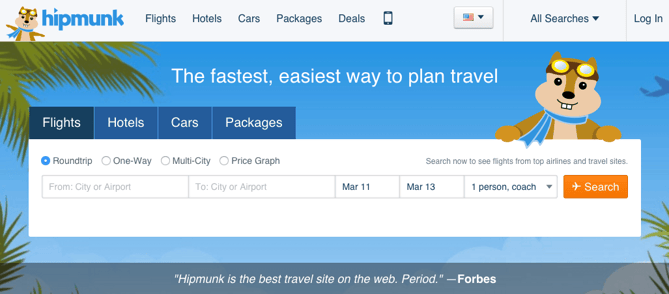
When you land on the Hipmunk site, your main option is to search flights. But notice there are four tabs you can flip through: flights, hotels, cars, and packages.
When you click into one of these options, the form changes so you can fill out more information. To be 100% sure you know what you’re searching for, Hipmunk placed a bright orange CTA at the far right-hand side of the form. On this CTA, you’ll see a recognizable icon of a plane next to the word “Search,” so you know for sure that you’re searching for flights, not hotels. When you’re on the hotels tab, that icon changes to a hotel icon. Same goes with cars and packages.
31. MakeMyPersona
CTA Buttons: Grab the template! | No thanks
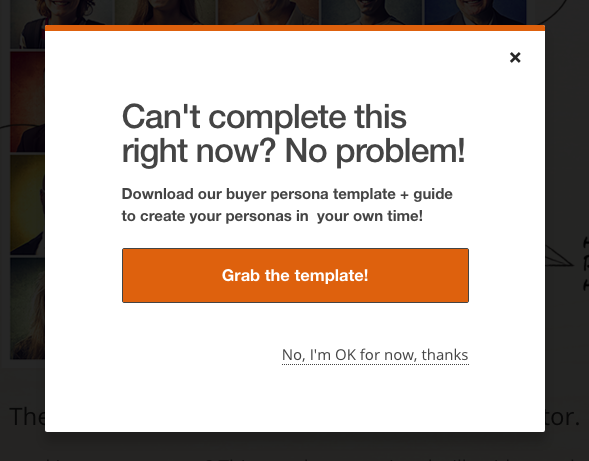
Here’s another example of a great pop-up with multiple calls-to-action — except in this case, you’ll notice the size, color, and design of the users’ two options are very different from one another. In this case, the folks at MakeMyPersona are making the “Grab the template!” CTA much more attractive and clickable than the “No, I’m OK for now, thanks” CTA — which doesn’t even look like a clickable button.
I also like how the “no” option uses polite language. I find brands that don’t guilt-trip users who don’t want to take action to be much, much more lovable.
There you have it. By now, we hope you can see just how important little CTA tweaks can be.
Full Disclosure: We don’t have data to know if these are all scientifically successful, but these examples all follow our best practices. If you decide to recreate these CTAs on your site, please remember to test to see if they work for your audience.
Want more CTA design inspiration? Check out some of our favorite HubSpot call-to-action examples.

The State of Content Marketing 2019 [Infographic]
The results of the third annual State of Content Marketing Survey are now in — the findings include victories, challenges, and trends. With three years of data behind us, we can see just how much growth the content marketing world has achieved.
But we haven’t reached perfection yet.
Three years ago, only 6% of marketers felt they knew what a successful marketing campaign really looked like — in 2019, that number has increased to more than a third of marketers.
Additionally, if we
look back to 2017, just 70% of marketers found marketing to be effective for their brand. Much of that was driven by a distinct lack of knowledge around its use. Now, 96% of marketers say their deeper understanding is translating to results — and into a fully integrated marketing strategy.
You can see some of the highlights from the survey in the infographic below.
If you’d like to read the full results, you can download them here.


6 of the Best Video Formats for 2019
As a video marketer, you know there’s no cookie-cutter approach to crafting engaging videos. Each of your stories have unique concepts, contexts, and characters, so you need to account for these variables in the creative process in order to craft a video that tells your story in the most authentic and compelling way possible.
The same principle applies to choosing video formats. There is no one-size-fits-all video format — not every computer, video platform, or website browser supports every video format. Fortunately, we’ve rounded up the best video formats around and listed out their pros and cons so you can learn which video format to use in different situations.
6 of the Best Video Formats for 2019
1. MP4
Most digital devices and platforms support MP4, rendering it the most universal video format around. The MP4 can also store video files, audio files, text, and still images. Additionally, they can retain high video quality while maintaining relatively small file sizes.
2. MOV
Developed by Apple, MOV is the video format specifically designed for QuickTime Player. But since there’s a version of QuickTimePlayer for Windows, MOV is also compatible with Windows. The MOV video format can store audio, text, and video effects, but since its quality is usually so high, it’ll take up significantly more space on people’s computer.
3. WMV
WMV was developed by Microsoft, so your audience can play these types of videos on Windows Media Player. If they have a Mac, though, they can just download a WMV player to play WMV videos. Just like the MOV format, the WMV format boasts high video quality but its at the expense of a small file size.
4. FLV
Specifically designed for Adobe Flash Video Players, FLV is one of the most versatile and popular video formats around — each web browser and each video platform supports this type of video format.
If your audience streams a lot of videos on online platforms, like YouTube and Google Video, FLV is the video format for you. Their file sizes are usually small, so people can quickly download them. The video format’s only drawback is that it’s not compatible with iOS devices and a lot of other mobile devices.
5. AVI
One of the oldest video formats out there, AVI was developed by Microsoft in 1992. Since it’s been around for so long, the AVI video format is one of the most versatile video formats, compatible with Windows, Mac, and Linux and supported by most web browsers.
However, with such high quality, the AVI video format file size is large, which is more conducive for people to store on their computers than to stream or download.
6. AVCHD
Panasonic and Sony developed the AVCHD specifically for digital camcorders, so if you regularly shoot high-end videos, the AVCHD video format is perfect for you.
Powered by H.264/MPEG-4 video compression technology, the video format also lets you store hours of high-quality video using only a tiny amount of data. Additionally, the video format has both standard and high definition variations, and its latest variation, AVCHD 2.0, even supports three dimensional video.

5 Marketing Plan Examples to Help You Write Your Own
You did it.
You’ve been spearheading your organization’s content marketing efforts for a while now, and your team’s performance has convinced your boss to fully adopt content marketing. There’s one small problem, though.
your boss wants you to write and present a content marketing plan to her, but you’ve never done something like that before. You don’t even know where to start.
Fortunately, we’ve curated the best content marketing plans to help you write a concrete marketing plan that’s rooted in data and produces real results.
Read on to find out what a marketing plan is and how some of the best marketing plans implement strategies that serve their respective businesses. Click the following links to jump to a specific section of this blog post:
Keep in mind that there’s a difference between a marketing plan and a marketing strategy.
Marketing Strategy vs. Marketing Plan
A marketing strategy describes how a business will accomplish a particular mission or goal. This includes which campaigns, content, channels, and marketing software they’ll use to execute on that mission and track its success. A marketing plan contains one or more marketing strategies. It is the framework from which all of your marketing strategies are created, and helps you connect each strategy back to a larger marketing operation and business goal.
Let’s say, for example, your company is launching a new software product it wants customers to sign up for. This calls for the marketing department to develop a marketing plan that’ll help introduce this product to the industry and drive the desired signups. The department decides to launch a blog dedicated to this industry, a new YouTube video series to establish expertise, and an account on Twitter to join the conversation around this subject — all of which serve to attract an audience and convert this audience into software users.
Can you see the distinction between the business’s marketing plan and their three marketing strategies?
In the above example, the business’s marketing plan is dedicated to introducing a new software product to the marketplace and driving signups to that product. The business will execute on that plan with three marketing strategies: a new industry blog, a YouTube video series, and a Twitter account.
Of course, the business might also consider these three things one giant marketing strategy, each with their own specific content strategies. How granular you want your marketing plan to get is up to you. Nonetheless, there are a certain set of steps every marketing plan goes through in its creation. Learn what they are below.
1. State your business’s mission.
Your first step in writing a marketing plan is to state your mission. Although this mission is specific to your marketing department, it should serve your business’s main mission statement. Be specific, but not too specific. You have plenty of space left in this marketing plan to elaborate on how you’ll acquire new customers and accomplish this mission.
For example, if your business’s mission is “to make booking travel a delightful experience,” your marketing mission might be “to attract an audience of travelers, educate them on the tourism industry, and convert them into users of our bookings platform.”
2. Determine the KPIs for this mission.
Every good marketing plan describes how the department will track its mission’s progress. To do so, you’ll need to determine your key performance indicators, or “KPIs” for short. KPIs are individual metrics that measure the various elements of a marketing campaign. These units help you establish short-term goals within your mission and communicate your progress to business leaders.
Let’s take our example marketing mission from the above step. If part of our mission is “to attract an audience of travelers,” we might track websites visits using organic page views. In this case, “organic page views” is one KPI, and we can see our number of page views grow over time.
These KPIs will come into the conversation again in step 4, below.
3. Identify your buyer personas.
A buyer persona is a description of whom you want to attract. This can include age, sex, location, family size, job title, and more. Each buyer persona should be a direct reflection of your business’s customers and potential customers. Therefore, it’s critical that business leaders all agree on what your buyer personas are.
You can develop buyer personas for free right here.
4. Describe your content initiatives and strategies.
Here’s where you’ll include the main points of your marketing and content strategy. Because there are a laundry list of content types and channels available to you today, it’s critical that you choose wisely and explain how you’ll use your content and channels in this section of your marketing plan.
A content strategy should stipulate:
- Which types of content you’ll create. These can include blog posts, YouTube videos, infographics, ebooks, and more.
- How much of it you’ll create. You can describe content volume in daily, weekly, monthly, or even quarterly intervals. It all depends on your workflow and the short-term goals you set for your content.
- The goals (and KPIs) you’ll use to track each type. KPIs can include organic traffic, social media traffic, email traffic, and referral traffic. Your goals should also include which pages you want to drive that traffic to, such as product pages, blog pages, or landing pages.
- The channels on which you’ll distribute this content. Some popular channels at your disposal include Facebook, Twitter, LinkedIn, YouTube, Pinterest, and Instagram.
- Any paid advertising that will take place on these channels.
5. Clearly define your plan’s omissions.
A marketing plan explains what the marketing team is going to focus on. However, it also explains what the marketing team is not going to focus on.
If there are other aspects of your business that you aren’t serving in this particular plan, include them in this section. These omissions help to justify your mission, buyer personas, KPIs, and content. You can’t please everyone in a single marketing campaign, and if your team isn’t on the hook for something, you need to make it known.
6. Define your marketing budget.
Your content strategy might leverage many free channels and platforms, but there are a number of hidden expenses to a marketing team that need to be accounted for.
Whether it’s freelance fees, sponsorships, or a new full-time marketing hire, use these costs to develop a marketing budget and outline each expense in this section of your marketing plan.
7. Identify your competition.
Part of marketing is knowing whom you’re marketing against. Research the key players in your industry and consider profiling each one in this section.
Keep in mind not every competitor will pose the same challenges to your business. For example, while one competitor might be ranking highly on search engines for keywords you want your website to rank for, another competitor might have a heavy footprint on a social network where you plan to launch an account.
8. Outline your plan’s contributors and their responsibilities.
With your marketing plan fully fleshed out, it’s time to explain who’s doing what. You don’t have to delve too deeply into your employees’ day-to-day projects, but it should be known which teams and team leaders are in charge of specific content types, channels, KPIs, and more.
Ready to make your own marketing plan? Get started using this free template and take some inspiration from the real examples below.
5 Marketing Plan Examples to Help You Write Your Own
1. Shane Snow’s Marketing Plan for His Book Dream Team
A successful book launch is a prime example of data-driven content marketing. Using data to optimize your content strategy spreads more awareness for your book, gets more people to subscribe to your content, converts more subscribers into buyers, and encourages more buyers to recommend your book to their friends.
When Shane Snow started promoting his new book Dream Team, he knew he had to leverage a data-driven content strategy framework. So he chose his favorite one: the content strategy waterfall, which is defined by Economic Times as a model used to create a system with a linear and sequential approach. To get a better idea of what this means, take a look at the diagram below:
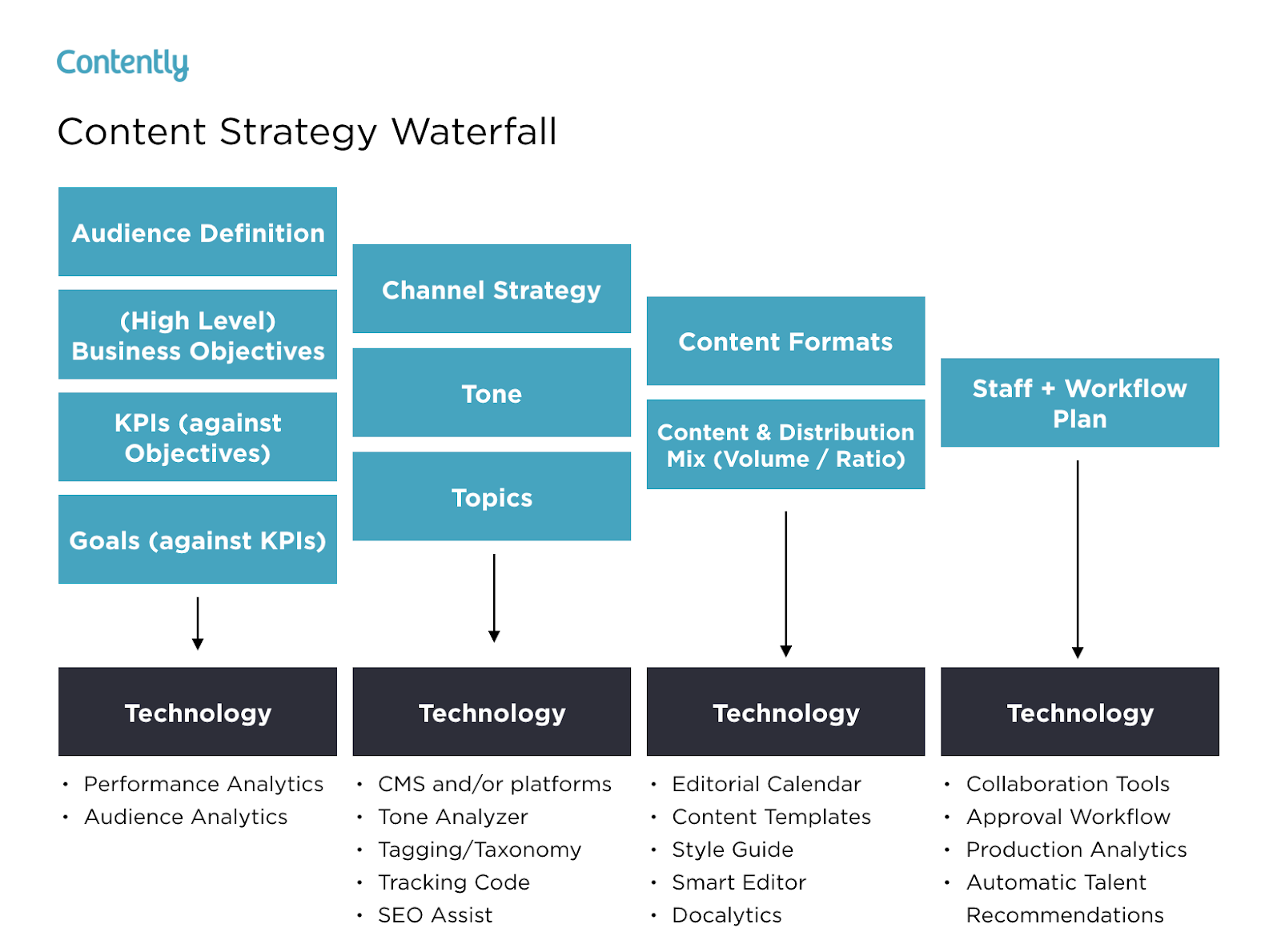
Snow wrote a blog post about how the content strategy waterfall helped him successfully launch his new book. After reading it, you can use his tactics to inform your own marketing plan. More specifically, you’ll learn how he:
- Applied his business objectives to decide which marketing metrics to track.
- Used his ultimate business goal of earning $200,000 of sales or 10,000 purchases to estimate the conversion rate of each stage of his funnel.
- Created buyer personas to determine which channels his audience would prefer to consume his content on.
- Used his average post view on each of his marketing channels to estimate how much content he had to create and how often he had to post on social media.
- Calculated how much earned and paid media could cut down the amount of content he had to create and post.
- Designed his process and workflow, built his team, and assigned members to tasks.
- Analyzed content performance metrics to refine his overall content strategy.
You can use Snow’s marketing plan to cultivate a better content strategy plan, know your audience better, and think outside the box when it comes to content promotion and distribution.
2. Buffer’s Content Marketing Strategy Template
Writing a content plan is challenging, especially if you’ve never written one before. Since only 55% of marketing teams have a documented content strategy, Buffer decided to help out the content marketing community.
By sifting through countless content marketing strategy templates and testing the best, they crafted a content marketing plan template with instructions and examples for marketers who’ve never documented their content strategy.
After reading Buffer’s marketing plan template, you’ll learn how to:
- Answer four basic questions that’ll help you form a clear executive summary.
- Set SMART content marketing goals.
- Create highly accurate audience personas by interviewing real content strategists.
- Solve your audience’s problems with your content.
- Do competitive research by analyzing your competitors’ and industry thought leaders’ content.
- Evaluate your existing content strategy by examining the topics and themes of your highest and lowest performing pieces.
- Determine which types of new content to craft, based on your team’s ability and bandwidth.
- Establish an editorial calendar.
- Develop a promotional workflow.
Buffer’s template is an incredibly thorough step-by-step guide, with examples for each section. The audience persona section, for example, has case studies of real potential audience personas like “Blogger Brian”. If you’re feeling overwhelmed by the process of creating a marketing guide, this can help ease you into it.
3. Contently’s Content Plan
Contently’s content methodology works like a flywheel. Instead of applying an entirely new strategy to each new marketing campaign, they leverage the strategy of their previous marketing campaign to drive the next one. Similar to a flywheel, their content methodology needs an initial push of energy to get the gears in motion.
What supplies this energy? Their content plan.
Contently fleshed out their entire content plan in a blog post to help marketers develop a self-sustaining marketing process. After reading it, you’ll learn how to:
- Align your content objectives and KPIs with your business goals.
- Create highly detailed buyer personas using psychographics instead of traditional demographics.
- Craft content for each stage of your marketing funnel, based off your prospects’ pain and passion points.
- Identify your most effective marketing channels.
- Discover the content topics your audience actually craves.
- Assess your organization’s need for resources.
By applying a flywheel-like strategy to your own marketing efforts, you essentially take away the burden of applying new strategies to each individual marketing campaign. Instead, your prior efforts gain momentum over time, and dispel continual energy into whatever you publish next.
4. Forbes’ Marketing Plan Template
An oldie, but a goodie — Forbes published a marketing plan template that has amassed almost four million views since late 2013. To help you sculpt a marketing roadmap with true vision, their template teaches you how to fill out the 15 key sections of a marketing plan, which are:
- Executive Summary
- Target Customers
- Unique Selling Proposition
- Pricing & Positioning Strategy
- Distribution Plan
- Your Offers
- Marketing Materials
- Promotions Strategy
- Online Marketing Strategy
- Conversion Strategy
- Joint Ventures & Partnerships
- Referral Strategy
- Strategy for Increasing Transaction Prices
- Retention Strategy
- Financial Projections
If you’re truly lost on where to start with a marketing plan, this guide can help you define your target audience, figure out how to reach them, and ensure that audience becomes loyal customers.
5. HubSpot’s Comprehensive Guide for Content Marketing Strategy
At HubSpot, we’ve built our marketing team from two business school graduates working from a coffee table to a powerhouse of over 200 employees. Along the way, we’ve learned countless lessons that’ve shaped our current content marketing strategy, so we decided to illustrate our insights in a blog post to teach marketers how to develop a successful content marketing strategy, regardless of their team’s size.
In this comprehensive guide for modern marketers, you’ll learn:
- What exactly content marketing is.
- Why your business needs a content marketing strategy.
- Who should lead your content marketing efforts.
- How to structure your content marketing team, based on your company’s size.
- How to hire the right people for each role on your team.
- What marketing tools and technology you’ll need to succeed.
- What type of content your team should create, and which employees should be responsible for creating them.
- The importance of distributing your content through search engines, social media, email, and paid ads.
- And finally, the recommended metrics each of your teams should measure and report to optimize your content marketing program.
These marketing plans serve as initial resources to get your content marketing plan started — but to truly deliver what your audience wants and needs, you’ll likely need to test some different ideas out, measure their success, and then refine your goals as you go.


The Landing Page Template HubSpot Uses to Convert at a 35% Rate
In sales, most professionals say getting prospects 99% of the way towards a purchase is easy, but getting them across the final 1% is the hardest part of the job. Crossing the finish line, just like in a marathon, is extremely challenging.
In marketing, the same principle applies. You can write the most gripping blog post you’ve ever written, persuading an audience that your offer is just as engaging and insightful, but if your landing page or even one of its elements disengages them, their odds of downloading it will plummet.
Fortunately, we’ve tested and iterated our landing pages enough to determine which template converts our website visitors into leads at the highest rate possible, and we want to share it with you.
Check out our analysis of each segment of our Customer Service Metrics Calculator offer’s landing page to learn how we convert visitors into leads at a 35% rate.
The Landing Page Template HubSpot Uses to Convert at a 35% Rate
1. The Hook

By leading off our landing page with a graphic, title, and synopsis of our offer, we could visually and mentally engage our audience right off the bat, which grabbed their attention and generated interest in the rest of the landing page and the offer. We also included a CTA at the beginning of the landing page to enable readers who were already interested in our offer to immediately download it.
2. The Reason Why People Should Care About the Offer

Spotlighting your offer’s insights is crucial for generating conversions. But before you do that, you need to clarify why people should care about you offer in the first place. People buy the “why” behind things, not the “what” or “how”, so when you’re asking for someone’s contact information, which is basically a transaction today, you should be able to give your audience a good reason to do so.
For our Customer Service Metrics Calculator offer, our “why” was that word of marketing one is of the largest business acquisition sources today and certain metrics can track your customers’ happiness and, in turn, their willingness to refer your product or service to their family, friends, and colleagues.
3. The Summary of the Offer

After we clarify why people should care about our offer’s topic, we naturally segue into what our audience will learn by reading our offer. This is a logical transition that answers the question our audience most likely thought of after they grasped the importance of tracking customer service metrics — “Which customer service metrics are the most important to track?”
4. The Sneak Peek of the Offer

Sneak peeks are just like movie or TV show trailers. They offer you an inside look at what you’re about to experience, which builds suspense and anticipation for its content. To generate as much hype as possible without giving away too much information, we usually reveal our offer’s most important concepts or the pages that preview the majority of our offer’s insights.
5. The FAQs

Concerns about privacy and personal data collection are at an all-time high now, so it’s easy to understand why people usually ask why they need to enter their contact information to access our offers. To relieve them of any stress or anxiety they might feel about filling out a form, we cleared all the ambiguity out of the way by informing them why we ask people to fill out forms and that it doesn’t cost any money.
With your landing pages, make sure you can field questions from your audience about them and provide the answers to the most frequently asked questions on your landing pages.
6. The Call-To-Action

A wise content marketer once said, “If you don’t tell your reader what to do next, you might as well have never written your content in the first place.” This principle rings especially true when you create landing pages. Obviously, if you don’t include a call-to-action on your landing pages, no one can actually download the offer. But creating effective call-to-actions hinges more heavily on your CTA’s copy and its ease of use — and less on if it exists.
The best CTAs command your audience’s attention with a gripping headline and makes it easy for your audience to actually download the offer by limiting the amount of forms your audience needs to fill out or auto populating their information in your form, if their cookies are turned on.

HubSpot’s 12 Favorite Digital Marketing Tips
I think you’ll agree with me when I say digital marketing — and all its sub-categories, including SEO, social media, content creation, email, and more — is critical for any company’s growth in 2019.
With over four billion internet users globally, and more than 3.4 billion active social media users, it stands to reason digital marketing is vital for reaching a larger audience than you could through traditional methods alone.
Plus, digital marketing can help you better engage prospects, turn prospects into leads, and ultimately convert leads into loyal, delighted customers.
However, embarking on a digital marketing journey, particularly as a start-up or smaller company with limited online presence, can be both overwhelming and frustrating at times.
To help inspire your marketing team and kick-start your 2019 digital marketing strategy, we’ve cultivated a comprehensive list of digital marketing tips from marketers here at HubSpot. Keep reading to learn the 12 critical tips HubSpotters want you to know before you implement or refine your own digital strategy.

1. Know your customer.
Ari Plaut, a Product Marketer at HubSpot, suggests: “Keep on top of the pulse of the customer, and hold yourself accountable to it. Schedule monthly time to shadow your support team and your sales team. Your best content ideas will come straight from the source — your customers.”
2. Match your content to every stage of a buyer’s journey.
Alex Girard, an Associate Product Marketing Manager at HubSpot, says: “Personally, I think a big ‘Ah-ha’ moment for our customers when talking about ads strategy is when we tell them they need to match their content offer to a moment in the buyer’s journey. It doesn’t make sense to target an ad for a sales demo at someone in the awareness stage. It also doesn’t make sense to target an awareness stage offer, like a recommended blog post, at someone who is ready to buy.”
3. Don’t just write about your products or services.
Karla Cook, a Senior Manager of the HubSpot Blog Team, advises: “Don’t just write about your products or services on your blog. That can immediately alienate anyone who isn’t already close to purchasing. Instead, invest the time in learning about what your target audience is interested in, and develop content that aligns these interests with what your brand can offer. For example, if you’re selling coffee makers, you might create a blog series that looks at different ways to improve your morning routine.”
4. Focus on the long-term.
Jeff Vocell, a HubSpot Product Marketer, suggests — “Focus on delight, not short-sighted acquisition. I’m a marketer, and I understand the pressure to deliver leads to sales each month. But employing short-sighted tactics that generate some attention and may result in a momentary spike ultimately won’t set you, or your customers, up for success in the long-term. As marketers, we should focus on generating demand through helpful and customer-centric campaigns.”
5. Incorporate SEO into your overall content strategy.
AJ Beltis, a HubSpot Content Optimization Specialist, told me — “While positioning a blog as a pure thought leadership publication has its merits, incorporating an SEO strategy into your topic selection and blog writing is the best way for long-term traffic growth. Use sites like Ahrefs or SEMRush to find out what people in your industry are searching for and talking about as a first step to maximizing your blog’s potential.”
6. Understand the big picture when analyzing an advertisement’s performance.
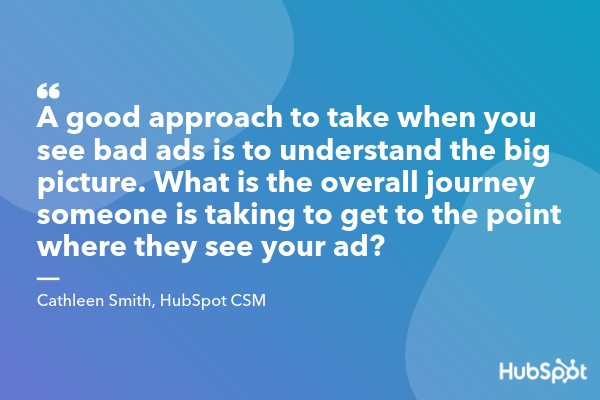
Cathleen Smith, a CSM at HubSpot, notes: “A good approach to take when you see bad ads is to understand the big picture. What is the overall journey someone is taking to get to the point where they see your ad? For Google ads, someone had to search for a keyword you chose, see your ad, have it resonate with them, click on the ad directly, and then have the landing page feel relevant and easily digestable.”
Additionally, Smith says, “If your ad isn’t performing well, don’t just look at the messaging itself, but see if there’s a mismatch between what someone is searching for, the messaging you are showing them, and the landing page on which they end up. With that bigger picture in mind, when you see a ‘bad’ ad, look at all the different pieces of your campaign to determine what needs optimization.”
7. Remain flexible as audience preferences shift.
Kristen Baker, an Associate Content Strategist at HubSpot, says, “The world of digital marketing is ever-changing — businesses constantly need to ensure their digital strategy remains relevant to their target audience. For instance, if you’re targeting a group who’s primarily active on Instagram, focus on that platform and consider using your resources to create engaging Instagram Stories, instead of spending too much time making YouTube videos. However, pay attention to if, and when, your audiences’ preferences shift.”
8. Remain consistent in design when launching a campaign.
Brittany Geoffroy, a Marketing Manager of Global Acquisition, told me — “When launching an integrated campaign on multiple channels, make sure you tie together your creative design and messaging so there is a red thread throughout the campaign.”
9. Become a growth leader for your company.
Jeff Vocell, a HubSpot Product Marketer, advises, “Marketers have never had a better opportunity to be growth leaders. Marketing has historically been responsible for attracting new leads and then passing them off to Sales. Today, in a world where customer experience has to come first, marketers have an opportunity to architect the path to growth through sales and services as well.
“Instead of solely thinking about how you can bring in new customers, start to ask yourself, and your colleagues around you, what happens when this lead is passed over to sales? and, what happens when sales pass them to services as a customer? It’s likely you’ll find opportunities for advocacy and marketing embedded in those moments that will help you grow better.”
10. Personalize your content.
Clint Fontanella, a Junior Staff Writer at HubSpot, says — “Personalize your content to differentiate your business from competitors and create a unique customer experience. More than 40% of customers switch brands dues to poor online personalization.”
11. Try new things
Meredith Hart, a Junior Staff Writer at HubSpot, suggests: “If you see that something could be working better, go back to the drawing board and try something new. This can apply to internal processes within your team or with your digital marketing efforts. For example, if you’re experiencing low engagement with your marketing emails, test out creative subject lines to boost your open rates. Or release a series of themed content that keeps your audience coming back for more. Small changes can have big results.”
12. Don’t underestimate backlinks.
Braden Becker, a Senior Staff Writer at HubSpot, notes — “Marketers are increasingly shifting their SEO strategies from keywords to topics. In other words, the more keywords you target that all belong to a similar topic, the more expertise you’ll demonstrate, and the better you can perform for each individual keyword. But expertise and organic traffic don’t happen at the same time.”
Additionally, Becker suggests, “While topics are important to building your reputation, you still need the backlinks — a major ranking factor for Google — to back it up. While you create content on each topic, share this content in as many ways as you can. By networking with people in your industry, and tracking how many other publishers are linking back to your content, you can get a better sense of how quickly your content will perform the way you want it to.”

20 of the Best Form Builder Tools for 2019
You’ve heard it before — forms are the gold standard when it comes to capturing leads, learning about industry trends, doing market research, and even just getting some customer feedback. It might be one of the older methods in the book, but old is gold.
Before we dive into the best form builder tools for 2018, though, let’s talk about what a form builder exactly is.
With no shortage of options, the best form builder apps tend to be quite similar and user-friendly. Whether you want to make a contact form, a sign-up form, or a survey, form tools are the easiest way to create web forms, with drag and drop questions, multiple form fields, and different color and structure options.
Once your responses start coming in, most forms will also import each entry into a spreadsheet or centralized database and send you notifications when people complete them.
Form tools today usually offer many different features too, like progressive profiling, smart fields, and interactivity.
Easily build and embed forms on your site. Try HubSpot Forms for free!
Ultimately, there’s a form for each of your business’ needs and goals — and we’re here to help you pick the best-fit tool specifically for you.
20 of the Best Form Builder Tools for 2018
1. HubSpot’s Free Online Form Builder
HubSpot’s online form builder is one of the most powerful form builder tools available. The tool combines the foundations of form creation with cutting-edge technology to give you much more capability than a normal online form builder can — and it’s also free.
Even though it’s one the more advanced form builder tools, you don’t need any technical expertise when you use HubSpot’s form builder. You can quickly create forms with the drag-and-drop form builder and convert anonymous website visitors into leads with unlimited forms, fields, submissions, and custom forms that all connect to your contact database.
Once someone fills your form out, they’re automatically routed to HubSpot CRM. Once they’re in your CRM system, you can set reminder tasks, call them, and send them one-to-one personalized emails, letting you better manage and nurture relationships with your contacts.
HubSpot’s form builder also has data enrichment for contact profiles and deep integration with HubSpot’s marketing hub, making it a good option for teams who want a single system to manage their forms, contacts, and marketing efforts.

2. Google Forms
Google Forms’ unique selling point is that it’s fast, free, and easy to use, with unlimited forms and entries. It’s also built into the Google Docs suite, so it automatically pulls your data into a Google Sheet for you to analyze.
While Google Forms’ design may not be customizable, this form tool is best for quick market surveys, rather than a professional survey or lead capture form placed on your website.

Image Source: Google
3. JotForm
JotForm is an online form builder with an intuitive visual editor, known for making form building faster than ever.
The tool has all the normal form building capabilities as well as unique fields to customize your own forms. It also integrates with almost every marketing platform.The free plan caps out at 5 forms, with up to a 100 entries per month.
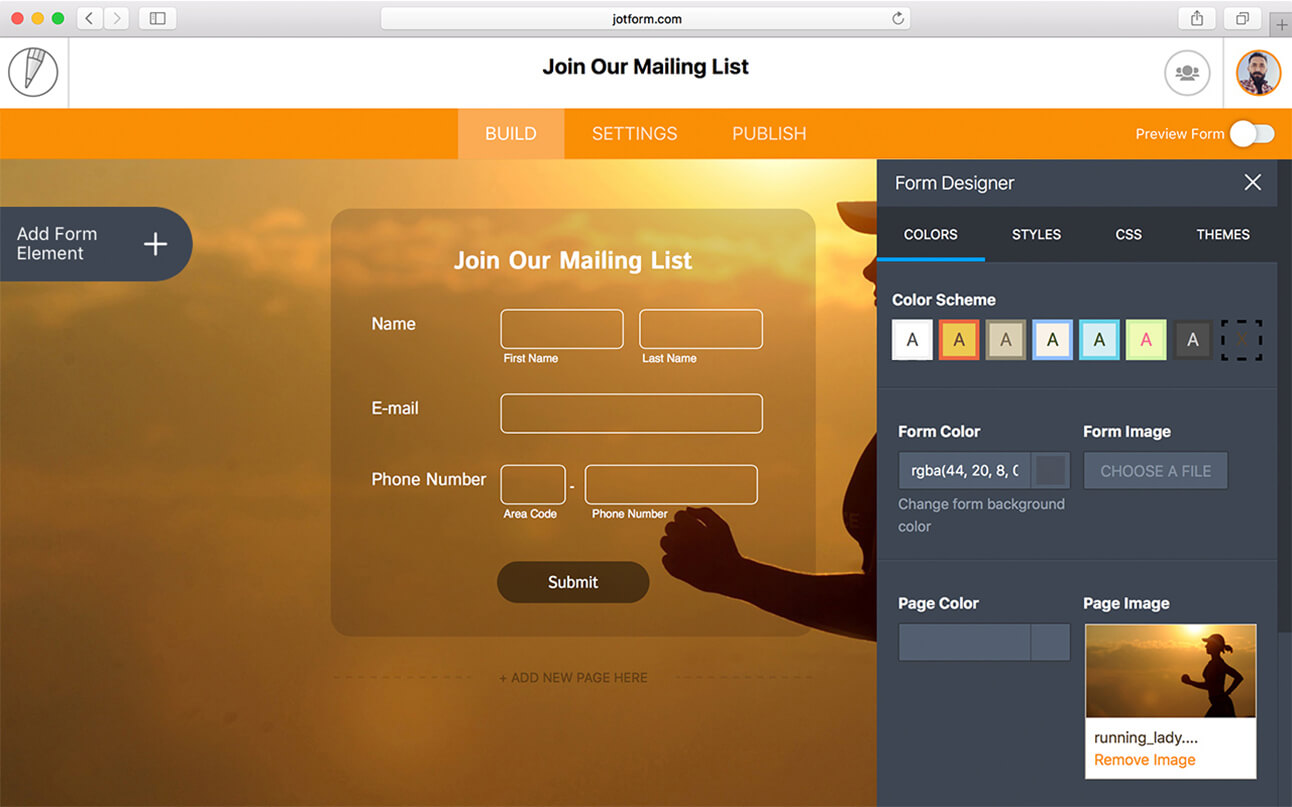
Image Source: JotForm
4. Typeform
Typeform takes an innovative approach to the world of form building. With an intuitive design, the tool guides you through the form creation process one question at a time and makes the experience of building a survey fun and interactive.
Typeform is also great for customer surveys and user research — you can create and send standalone survey links out to your list. If you want to try something with an engaging, straightforward user experience, the tool is a solid option.

Image Source: Typeform
5. Microsoft Forms
Microsoft Forms is a simple, easy-to-use form creator that integrates with the Microsoft Office suite. With full customization options, users can quickly make surveys, feedback forms, quizzes, and lead forms.
Since Microsoft forms doesn’t integrate directly with an online CMS, the tool might not be the best option for lead generation. But the form builder can collect data in real-time and import all your responses in an Excel spreadsheet, so you can perform powerful yet simple analysis with Excel filters and pivot tables.
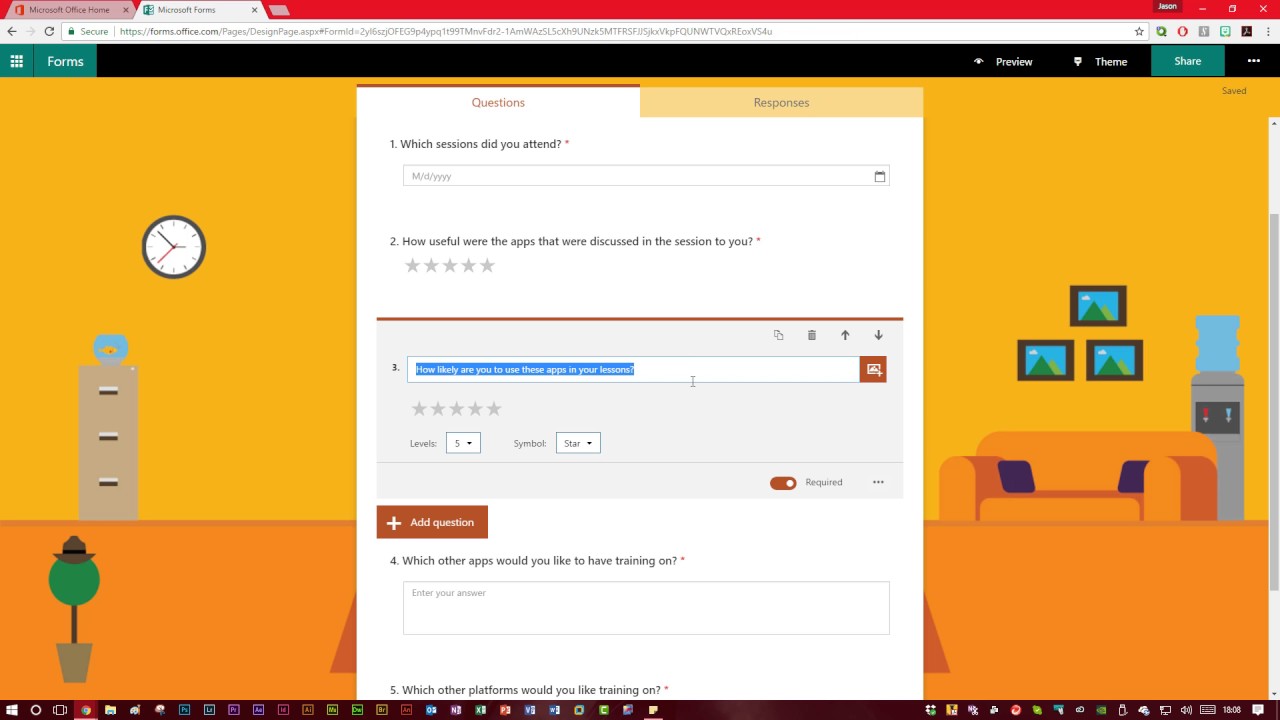
Image Source: YouTube
6. Form Crafts
Form Crafts is a basic form builder tool that has a user-friendly interface and simple design.
The WordPress plugin allows you to create moderately customizable lead capture forms, email sign-up forms, surveys, and feedback collection forms. One of Form Crafts’ best features is that it’ll send you email notifications about your lead generation process, so you don’t need to constantly monitor your results anymore.

Image Source: WordPress
7. FormTools
FormTools is a flexible form creator that focuses on feedback, data, insights, and beautiful form building.
The form builder tool allows you to create most types of forms and tracks your results on a visually appealing dashboard. FormTools also give you an option to integrate their app with a third party provider of your choosing, like Salesforce or Dropbox.

Image Source: Form Tools
8. Wufoo
Part of the SurveyMonkey family, Wufoo is one of the oldest form tools in the space. You can design some appealing online forms with it and it’s super easy to use.
The app also allows you to embed forms on your website, set up payment fields that are compatible with a number of payment processing services, and turn on automatic email notifications to alert you when someone fills out your form.

Image Source: WuFoo
9. Ninja Forms
Ninja Forms is a powerful WordPress form tool that’s used by wide range of marketers, from novices to gurus.
The tool is free, integrates quickly and easily with a number of different tools, and it can greatly boost your marketing efforts. Ninja Forms also offers unlimited forms, fields and submissions. But, sometimes, the tool lacks clear documentation and can be difficult to use when you want to customize your forms.

Image Source: CodeCanyon
10. Cognito Forms
If you’re looking for a form builder with sound logic branches and robust payment fields, Cognito Forms is for you. The form tool also offers calculated fields, conditional logic, repeating fields, and more, making it easy and simple to create advanced forms.
Cognito Forms integrates with Stripe, PayPal, and Square and offers a free version that includes unlimited forms with 500 entries per month.

Image Source: Microsoft Store
11. FormStack
FormStack is mostly focused on building business and professional style forms. The tool’s best features include intelligent forms, built-in workflows, and seamless integrations with Google Sheets, PayPal, and MailChimp (and others through their API).
One of FormStack’s more sophisticated features is an A/B testing tool that can compare different versions of your forms and tell you what performs better.
The tool also offer electronic signatures and payments, and users can save their form drafts and return later to finish them.

Image Source: GetApp
12. FormSite
FormSite has all the essential features you need for cranking out some quick “prototypical” web forms. As one of the more basic form builders, it’s often used for simple contact or feedback forms.
The tool also has a number of pricing plans that can suit your specific business needs. The free version offers 5 forms each month with 10 results per form.
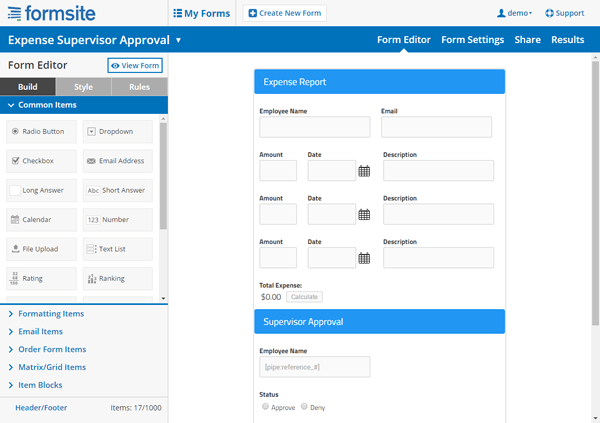
Image Credit: FormSite
13. Clearbit Forms
Clearbit Forms lets you leverage smart forms and flexible data enrichment technology to automatically collect specific user information. This lets you create shorter forms with less fields, and, in turn, produce happier customers (because who doesn’t love a short survey?)
With two plans designed for startups and enterprises, Clearbit can definitely meet your modern marketing needs.

Image Source: Clearbit
14. FormKeep
FormKeep is a tool unlike most on this list — it’s an easy-to-use tool that finds a happy medium between coded and drag and drop forms.
With FormKeep, you have the option to code your own form, style it according to your brand guidelines, and integrate it with Zapier to manage your submission data.

Image Source: Intercom
15. Gravity Forms
Another WordPress-powered plugin, Gravity Forms helps you create amazing forms with the help of multi-page/multi-step forms and a number of time-saving features.
With this tool, you have access to a variety of integration options and add-ons for email software, messenger platforms, payment options, and automation software. You can also create advanced forms, but, for non-techies, they can be a little complicated to set up.

Image Source: WPML
16. SurveyAnyPlace
SurveyAnyPlace has proven that surveys don’t have to be boring. With their gamification elements, interactive features, and incentives like coupon codes, you can make all your surveys and quizzes fun and enjoyable.
By leveraging SurveyAnyPlace’s unique approach to form building, you can easily collect leads, information, and insights from visitors.

Image Source: GetApp
17. Contact Form 7
One of the most popular WordPress plugins, Contact Form 7, has upwards of 5 million active installations on the CMS.
A free tool for everyone to use, it’s a super simple and basic form creator with a heavy focus on contact forms. But it’s also important to note that the tool has some limitations, especially with its customization options.

Image Source: WordPress
18. Conversational Form
An open source platform, Conversational Form lets you transform your web form into a simple chatbot.
By using a novel and clever way to gather data, this form builder is bound to drive user engagement. At the same time, though, due to its new entrance into the marketing space, it might be difficult to learn your way around the tool.

Image Source: Pagely
19. FormBakery
As one of the easiest drag and drop form tools out there, FormBakery lets you build professional forms in the most straightforward way possible.
For those looking to build a super simple form in under 5 minutes, the tool is a great choice. You can quickly customize forms with your own designs, with no coding necessary. If you’re looking to build a more advanced form, though, FormBakery may not be the right choice for you.

Image Source: AppStorm
20. DeviceMagic
DeviceMagic is a mobile form solution on a mission to ditch all paperwork, automate lead generation processes, and enhance data collection.
Since the tool solely focuses on building mobile forms, it has a number of great benefits over other form builders, like quick and accurate data collection, lower operations costs, and less time wasted on administrative work.

Image Source: Device Magic
The options are endless for form builder tools.
Most form builders offer all the essentials needed to make a basic form, but your options start to narrow down when you want better customization and deeper data analysis. Ultimately, for you, the best form tool depends on your team’s purpose and particular business needs.

Earned Media, Explained in 400 Words or Less [Examples]
Remember when people used to learn about upcoming events, the latest trends, and cool new products exclusively from magazines, newspapers, and TV shows?
These publications and broadcasts are where brands used to get all their earned media. But earned media has expanded beyond print and TV, and marketers can harness it in several ways.
In many ways, earned media’s nickname is “publicity.” You haven’t paid for this media to be created — the way you would for, say, an advertisement — and therefore your actions alone “earned” you this attention. But because the places we get information have changed over the last 30 years, how has earned media changed as a result?

Still you might also hear earned media referred to as “free media,” because you haven’t paid for this media to take place.
How Earned Media Has Changed
Earned media used to be the 90-minute segment on cable news about a new consumer product. And to some extent, this is still a critical source of earned media.
However, earned media now also comes in the form of a customer tweet about “the best brunch ever!” at a restaurant that got several likes and retweets. It’s that horrible Yelp review about how a different customer had “the worst brunch ever” at that very same restaurant. And, it’s that technology blogger’s “Top 10 Apps of The Year” article that was viewed and shared by thousands of people after you launched your new mobile app.
What Earned Media Isn’t
Earned media isn’t publicity you pay for or own. When a company pays a publication to write a glowing article about them, for example, that’s not an example of paying for earned media — that’s just paid media. And when you write a blog post for your company blog about your latest product release, that’s not earned media, either — that’s owned media, since you own that blog post.
The distinctions are fairly clear between these camps, but they’re important for any marketer to know.
How effective is earned media?
In short, very. Today’s consumers are influenced greatly by family, friends, and what they read and see online. People no longer share the good, the bad, and the ugly of brands exclusively at the water cooler — they share it with everyone they’re connected with online, which can include hundreds, thousands, or maybe even millions of people.
And a lot of those people listen and use those stories to make buying decisions. In fact, according to HubSpot Research, 57% of people in the U.S. trust what they hear from friends and family the most when they discover a new product. About one third of U.S. buyers prefer what information they can find from a Google search.
As digital marketing and social media continue to evolve, so will earned media — and departments other than public relations, like marketing and customer service, will become more responsible for capturing earned media attention.
To make sure you’re caught up on this “web 2.0” version of an old-school term, let’s dive into what earned media means today and the various ways you can use it in your marketing.
Earned Media Examples
You may have heard of earned media as compared with paid media and owned media. As we hinted to above, there are pretty thick lines between paid media, owned media, and earned media: You “pay” for paid media, you “own” owned media, and you “earn” earned media. To show you what this looks like in practice, here are some common examples of earned media today.
TV News Segment
If your business makes a big-enough splash in its industry, you can still expect to see earned media in the form of a 90-second news spot on a local (or national) station. This is some of the oldest earned media out there, and it still occurs today.
For example, a business that relocates its headquarters to a new city — and promotes that relocation online — might capture an interview opportunity with the city’s local news station about some of the new jobs it will be hiring for.
Newspaper Article
Newspapers, both in print and online, constantly share big community developments that impact people both locally and nationally. So, just like a story on TV about a new business development, local newspapers can just as easily pick this story up and write it down for online readers.
Tweet
Twitter might revolve around trending topics worldwide, but there are also countless smaller communities of Twitter users who broadcast their thoughts on issues related to their industry. A tweet, therefore, is a tiny instance of earned media. But it depends on whom the tweet comes from.
For example, if a business starts using new lead-generation software to help their marketing team, and an employee tweets, “Just started using @HubSpot and it’s helped us deliver amazing leads to our sales team!” We here at HubSpot might call that a positive dose of earned media.
Article on a Trade Publication
Smaller business developments might not earn the attention of major media conglomerates, but they very well could capture the interest of a trade publication focused on their industry. This, too, is earned media.
For example, an environmental business that creates a new method of composting might get overlooked by the evening news, but a magazine all about sustainability is likely to want to write an article about this innovative method for its niche audience.
Product Roundup
There are always content creators out there who are writing “roundup” articles, which list the best of a particular type of product for customers who seek high-quality items. If you build a product, and it’s good enough, getting included in somebody’s roundup is a form of earned media.
For example, a tent maker that develops a new one-person tent for a low price could wind up in an article called “The 10 Best One-Person Tents for Campers on a Budget.”
Organic Traffic
This example is a tricky one to define. Earned media usually comes in the form of content, either in written or video form. But if you create your own content, and “earn” traffic to this content from ranking highly on search engines, the traffic you receive to this content is, in some ways, earned media. But let’s be clear: There’s an important difference between SEO and organic traffic …
For example, if you write a blog post — a form of owned media — and conduct keyword research on this blog post to optimize it for Google Search, your blue linked result shown on Google’s search engine results page (SERP) is an “earned” ranking. This makes the traffic you get from people who click on this result earned media attention.
Customer Review
One of the biggest things to change in the world of earned media over the last decade is how customers express their feelings about a product they’ve used. Gone are the days where your clients’ opinions of you are limited to phone calls and dinner conversations. When people love or a hate a product, they make it known in writing via reviews on sites like Yelp, Google Reviews, TripAdvisor, Amazon, and more. Every review about you is earned media.
Word of Mouth
You might not think of “word of mouth” as an example of earned media, but today, it continues to be as free and impactful as a tweet or Yelp review.
Every time your business affects a customer, whether that effect is good or bad, you earn a place in day-to-day conversation. This means departments like marketing and customer service are just as critical to the tone of that conversation as the product itself.
For example, when a marketing team creates helpful or entertaining content for its audience, it’s making potential customers happy. When a customer service team solves a critical problem for someone, it’s making current customers happy. And the happier your customers, the more positive earned media you’ll get the next time they’re chatting with someone who’s looking to buy a product like yours.
Of course, the lines between earned and paid media can blur at times. Take viral videos, for example. A video doesn’t just go viral by accident — most of the time, there is a lot of careful planning involved to kick start the video’s exposure with paid media, and at some point the paid media stops once earned media picks up.
The lines can blur between earned and owned media, as well. A blog post you write featuring your own industry research, for example, could get picked up by other bloggers and media outlets. Similarly, a press release you write following a product launch serves to encourage others in the industry to share your news on other publications. So, while earned media isn’t always a direct result of owned media, owned media can help you get more attention from third parties.
The key to understanding the difference between the three is this: Unlike paid and owned media, earned media isn’t controlled by brands, which makes it less biased and more trusted.
How do you “earn” earned media?
Because earned media is owned by third parties, it may seem like it’s out of your hands — but that’s actually not true. Marketers have the tools to influence some (not all) conversations about their brands. Here are three of the best ways to do just that:
1. Create content worth sharing.
Get people to want to share your content with one another by … drum roll please … creating awesome content worth sharing! Shareable content tends to be either really useful or really funny, and in the form of a list, infographic, or video. There’s even a science to what makes content shareable. Also, make it easy for people to actually share your content by placing social share buttons where appropriate.
2. Invest plenty of time in interacting on social media.
Without social media, you and your potential customers are basically strangers. That’s the really cool thing about social media: It brings you so much closer to consumers. To have an impact on them and to encourage them to talk about your brand, you should spend plenty of time and energy interacting with them individually online.
Set up filters in your social monitoring tools to help monitor conversations about your brand, and jump in when you can add something to the conversations. Ask your followers questions about their daily lives or about their experiences with your brand. Give your biggest fans a shout out from your account. Your willingness to show people you care enough about them, about their experience, and about your own business to respond to their posts can elicit positive emotions about your brand, and those positive emotions are share-worthy.
3. Make your customers really, really happy.
All customers don’t automatically become brand promoters — you have to put the work in to not only meet their expectations, but exceed them. When you go above and beyond for your customers, you become a lovable brand. And when customers love you, they are more likely to give referrals, share good things about you on social media, give testimonials, and remain loyal to your brand for a long time.
According to research published by Oberlo, 54% of people on social media are researching products they’re interested in. Product sentiment can spread virally through social media sites like Facebook — and that positive vibes spread faster than negative ones. Create cool content, interact with people, and delight your customers — and you can bet they’ll spread the word.