7 of the Most Creative Interactive Videos We’ve Ever Seen
Choose your own adventure stories aren’t just limited to the form of books anymore. In December 2018, Netflix’s Black Mirror released Bandersnatch, an interactive film about a young programmer named Stefan who adapts his favorite choose your own adventure novel into a video game for a major gaming company.
However, as his deadline looms and the pressure to perfect his game mounts, Stefan starts to question his own reality, growing increasingly paranoid that he’s actually a character in a choose your own adventure story. Throughout the film, you must make every one of Stefan’s major decisions, and each of your choices alter the narrative he experiences, which has five endings and over one trillion story combinations.
Netflix’s experimentation into interactive content piqued a massive amount of interest and generated just as much buzz. But the film industry isn’t the first to dabble in interactive content. Marketing blazed that trail, and there are brands who have created interactive videos that are arguably just as entertaining as Bandersnatch.
Below, we’ve curated a list of the seven most creative interactive videos we’ve ever seen. Read on to get some inspiration for your own interactive video in 2019.
7 of the Most Creative Interactive Videos We’ve Ever Seen
1. Major Lazer | Know No Better Interactive Music Video

Watch video here.
Everyone has a dream that they fantasize about from time to time, but what would it take for us to actually pursue this dream and turn it into a reality? Well, Major Lazer’s interactive music video for their song “Know No Better” could be your spark of inspiration.
As the video plays, you can leap from a young boy’s dream of being a famous dancer who dates his dream girl to his stark reality where he’s a shy loser who feels frustrated with his actual life.
Towards the end of the video, however, these contrasting narratives start to converge, and you witness him muster enough courage to dance with his dream girl in reality, rather than only in his dream.
2. Eko | That Moment When
Watch video here.
There are quite a few brands creating films in the interactive space, but most aren’t creating original shows like Eko does, which has produced five original interactive shows, ranging from animated comedies to technological thrillers.
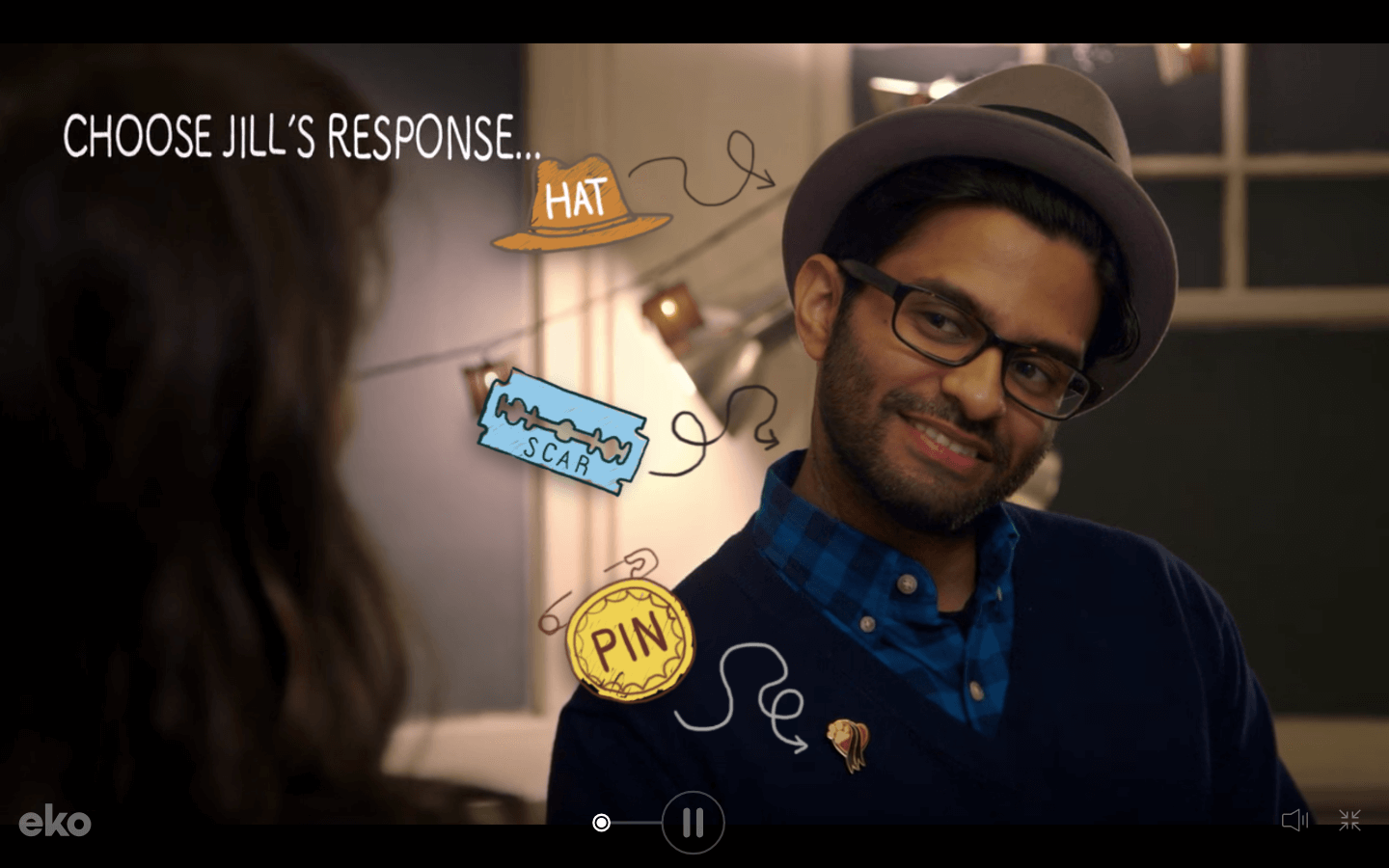
One of their best interactive shows is a hilarious series called That Moment When, which is about a woman named Jill who encounters awkward moments at the beginning of each episode, and your job is to help her maneuver them as gracefully as possible.
If you interact with the video above, you’re tasked with helping Jill navigate the awkward situation of vaguely remembering a guy who totally knows her. As you struggle through this cringeworthy interaction, you have to predict certain traits about the guy, and if you guess correctly, you earn points that buy you letters of his name, like Jeopardy, and they ultimately help you remember it at the end of the episode.
That Moment When is as funny as it is engaging, and by weaving a relatable and hilarious theme through this interactive show, Eko can entice viewers to watch the entire series, just like a great Netflix show.
3. Aardman Animations | Dead Lonely (A Zombie Romance)

Watch video here.
Aardman Animations, a four-time Oscar winning production studio, collaborated with Rapt Media, a company that offers interactive video solutions, to create this charming interactive film that lets you help a zombie, Fred, find his long-lost love, Barbara, in a post-apocalyptic world where the living dead lead surprisingly normal lives.
Even though Dead Lonely seems like an innocent tale, it can be more grisly than Bandersnatch at times. But once you reunite Fred with Barbara, all the trials and tribulations you struggled through all seem to be worth it.
4. Bob Dylan | Like a Rolling Stone Interactive Music Video
Watch video here.
To promote the release of Bob Dylan’s CD Box set that included all 41 of his official albums in 2013, Sony Music teamed up with Eko, who is mentioned above, to make a creatively and unexpectedly refreshing interactive music video for “Like a Rolling Stone”, one of Bob Dylan’s most iconic songs.
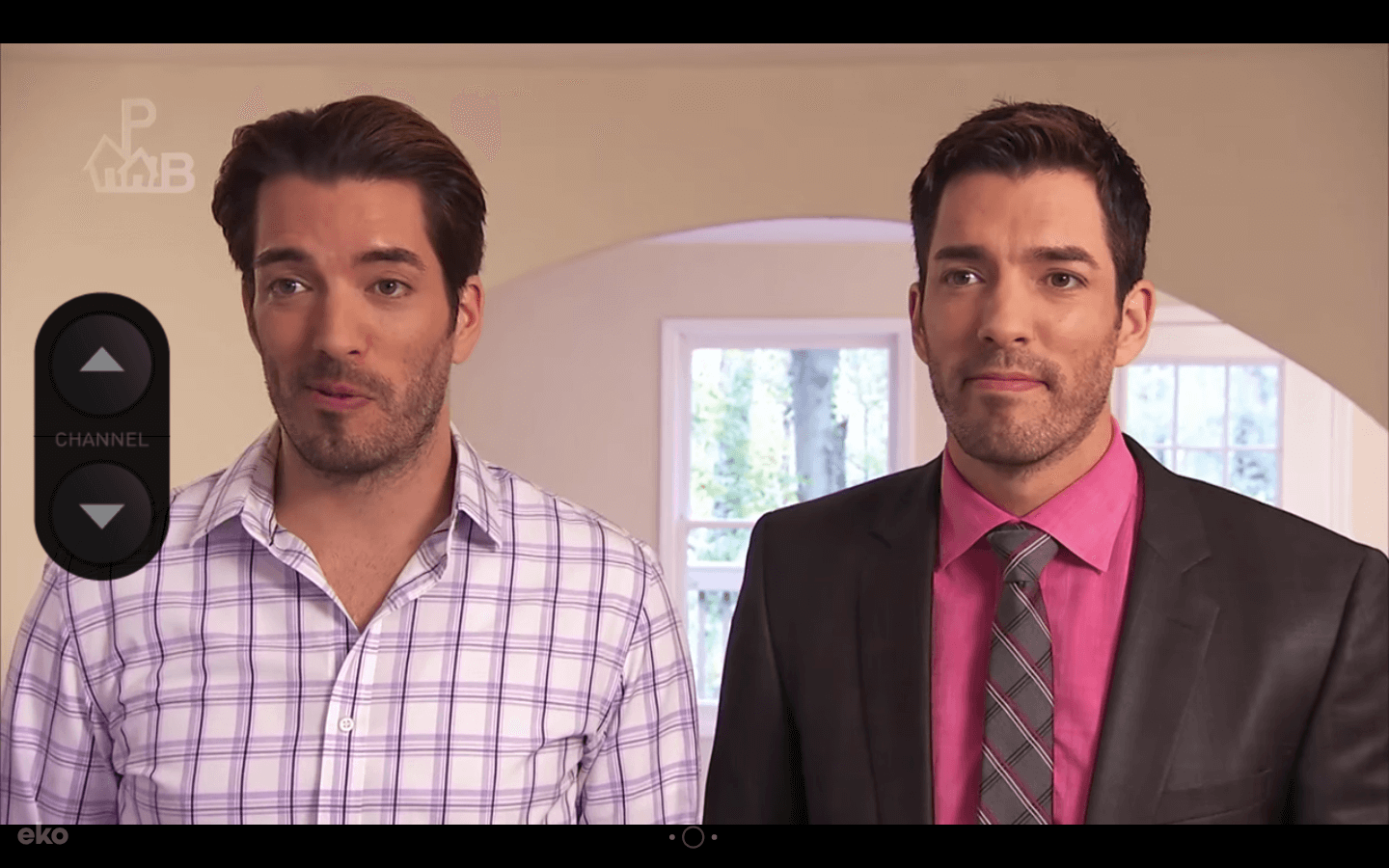
Sony’s interactive music video lets you flip through 16 channels, ranging from shopping, history, movies, reality TV, news, cooking, fashion, sports, and game shows. Each channel features different characters lip synching “Like a Rolling Stone”.
Sony also included some big TV personalities in this video, like Drew Carey from The Price is Right, Steve Levy from SportsCenter, and Jonathan and Drew Scott from Property Brothers, making this experience even more pleasantly surprising and hilarious.
5. BBC Scotland
In 2019, Rough Guides, a renowned travel guidebook, named Scotland the most beautiful country in the world. And a big reason why it’s such a spectacle is because Glen Coe, a Scottish valley that cuts through the ruins of an ancient super-volcano, is one of the most striking landscapes in the world.
BBC Scotland’s immersive, 360 degree video of Glen Coe grips viewers because they’re able to experience the landscape from an intimate point of view at every possible angle, which makes them feel like they’re actually there.
6. Disney | The Jungle Book Interactive Video
With the help of Wirewax, a company that offers interactive video technology and creative solutions, Disney decided to give their fans an inside look at how the live-action version of The Jungle Book was made.
Fans can move a slider to see how Disney actually filmed the movie, and they can also click on each character’s hotspot, which opens up a profile that gives a brief description of the character. By doing this, Disney is able to reveal how they produced one of the most compelling stories ever told, helping the media giant forge an even closer bond with their fans.
7. Coldplay | Ink Interactive Music Video

Watch video here.
Coldplay’s interactive music video for their song “Ink” absorbs you in an adventurous yet forlorn journey of a man searching for his lost love. By making most of his crucial decisions for him, you’re tasked with helping him find her.
As you embark on the quest to find this man’s significant other, you’re led through beautiful environments, such as an evergreen forest, a bustling city, a serene ocean, and even the cosmos. And with more than 300 storylines in this video, you can either help the man reunite with his lover or come to grips with losing her forever.

27 Quotes About Design to Get Your Creativity Flowing
Inspiration can often seem illusive and out-of-reach when you need it most.
Unfortunately, you often can’t call it a day when you’re feeling uninspired or frustrated by your designs — or lack thereof. Oftentimes, you’re working on a strict deadline, keeping you up late into the night thinking, How can I make this design great?
When this is the case, it’s likely helpful to read some wisdom from some true masters of design. Here, we’ve cultivated a list of 27 inspiring and thought-provoking quotes that will undoubtedly get your creative juices flowing.
Keep reading, and remember, it’s like Maya Angelou said — “You can’t use up creativity. The more you use, the more you have.”

Design Quotes
- “Have no fear of perfection — you’ll never reach it.” — Salvador Dali, artist
- “Design is intelligence made visible.” — Alina Wheeler, author
- “Everything is designed. Few things are designed well.” — Brian Reed, front-end developer and musician
- “You can’t use up creativity. The more you use, the more you have.” — Maya Angelou, author, poet, civil rights activist
- “Design adds value faster than it adds costs.” — Joel Spolsky, web programmer, writer, and creator of Trello
- “The public is more familiar with bad design than good design. It is, in effect, conditioned to prefer bad design, because that is what it lives with. The new becomes threatening, the old reassuring.” — Paul Rand, graphic designer
- “Designers are meant to be loved, not to be understood.” — Margaret Oscar, designer
- “Make it simple, but significant.” — Don Draper, fictional character on Mad Men
- “Don’t bunt. Aim out of the ballpark. Aim for the company of immortals.” — David Ogilvy, advertising tycoon, known as the “Father of Advertising”
- “Every great design begins with an even better story.” — Lorinda Mamo, designer
- “Design creates culture. Culture shapes values. Values determine the future.” — Robert L. Peters, designer and author
- “The function of design is letting design function.” — Micha Commeren, designer
- “Design is not just what it looks like and feels like. Design is how it works.” — Steve Jobs, co-founder of Apple, Inc.
- “The more I deal with the work as something that is my own, as something that is personal, the more successful it is.” — Marian Bantjes, designer and author
- “Design is not a single object or dimension. Design is messy and complex.” — Natasha Jen, designer and educator
- “Design is the intermediary between information and understanding.” — Hans Hoffman, artist and teacher
- “A designer knows he has achieved perfection not when there is nothing left to add, but when there is nothing left to take away.” — Antoine de Saint-Exupéry, French writer and poet
- “Design is a formal response to a strategic question.” — Mariona Lopez, business owner
- “Styles come and go. Good design is a language, not a style.” — Massimo Vignelli, Italian designer
- “The alternative to good design is always bad design. There is no such thing as no design.” — Adam Judge, author
- “Design can be art. Design can be aesthetics. Design is so simple, that’s why it is so complicated.” — Paul Rand, graphic designer
- “It’s through mistakes that you actually can grow. You have to get bad in order to get good.” — Paula Scher, graphic designer and painter
- “Good design is good business.” — Thomas Watson Jr., businessman, second president of IBM
- “Accessible design is good design.” — Steve Ballmer, American businessman and former CEO of Microsoft
- “Where you innovate, how you innovate, and what you innovate are design problems.” — Tim Brown, CEO and president of IDEO
- “I strive for two things in design: simplicity and clarity. Great design is born of those two things.” — Lindo Leader, graphic designer and creator of the FedEx logo
- “Design is as much an act of spacing as an act of marking.” — Ellen Lupton, designer and educator
27 Quotes About Design to Get Your Creativity Flowing
1. “Have no fear of perfection — you’ll never reach it.” — Salvador Dali, artist
2. “Design is intelligence made visible.” — Alina Wheeler, author
3. “Everything is designed. Few things are designed well.” — Brian Reed, front-end developer and musician
4. “You can’t use up creativity. The more you use, the more you have.” — Maya Angelou, author, poet, civil rights activist
5. “Design adds value faster than it adds costs.” — Joel Spolsky, web programmer, writer, and creator of Trello
6. “The public is more familiar with bad design than good design. It is, in effect, conditioned to prefer bad design, because that is what it lives with. The new becomes threatening, the old reassuring.” — Paul Rand, graphic designer
7. “Designers are meant to be loved, not to be understood.” — Margaret Oscar, designer
8. “Make it simple, but significant.” — Don Draper, fictional character on Mad Men
9. “Don’t bunt. Aim out of the ballpark. Aim for the company of immortals.” — David Ogilvy, advertising tycoon, known as the “Father of Advertising”
10. “Every great design begins with an even better story.” — Lorinda Mamo, designer
11. “Design creates culture. Culture shapes values. Values determine the future.” — Robert L. Peters, designer and author
12. “The function of design is letting design function.” — Micha Commeren, designer
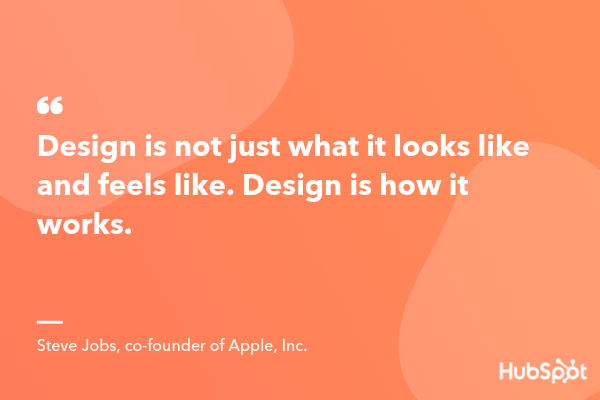
13. “Design is not just what it looks like and feels like. Design is how it works.” — Steve Jobs, co-founder of Apple, Inc.
14. “The more I deal with the work as something that is my own, as something that is personal, the more successful it is.” — Marian Bantjes, designer and author
15. “Design is not a single object or dimension. Design is messy and complex.” — Natasha Jen, designer and educator
16. “Design is the intermediary between information and understanding.” — Hans Hoffman, artist and teacher
17. “A designer knows he has achieved perfection not when there is nothing left to add, but when there is nothing left to take away.” — Antoine de Saint-Exupéry, French writer and poet
18. “Design is a formal response to a strategic question.” — Mariona Lopez, business owner
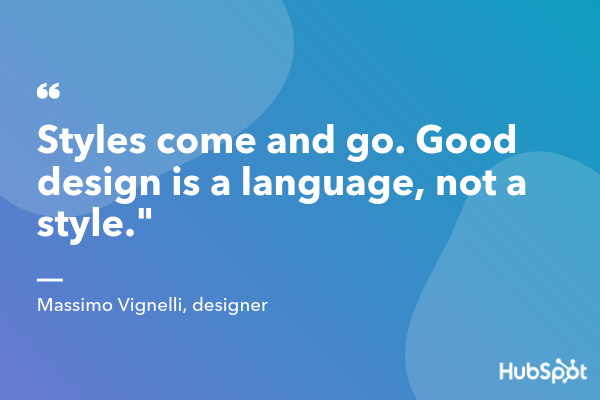
19. “Styles come and go. Good design is a language, not a style.” — Massimo Vignelli, Italian designer
20. “The alternative to good design is always bad design. There is no such thing as no design.” — Adam Judge, author
21. “Design can be art. Design can be aesthetics. Design is so simple, that’s why it is so complicated.” — Paul Rand, graphic designer
22. “It’s through mistakes that you actually can grow. You have to get bad in order to get good.” — Paula Scher, graphic designer and painter
23. “Good design is good business.” — Thomas Watson Jr., businessman, second president of IBM
24. “Accessible design is good design.” — Steve Ballmer, American businessman and former CEO of Microsoft
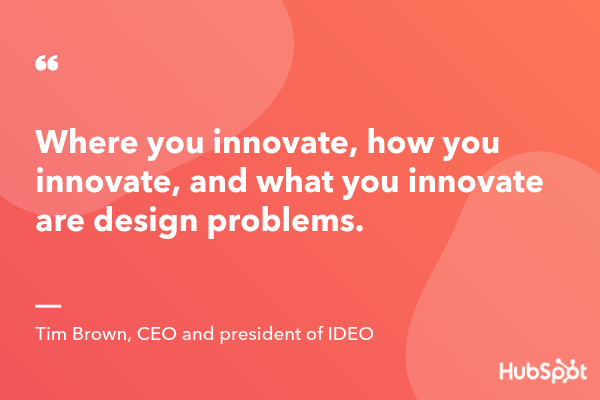
25. “Where you innovate, how you innovate, and what you innovate are design problems.” — Tim Brown, CEO and president of IDEO
26. “I strive for two things in design: simplicity and clarity. Great design is born of those two things.” — Lindo Leader, graphic designer and creator of the FedEx logo
27. “Design is as much an act of spacing as an act of marking.” — Ellen Lupton, designer and educator

The Ultimate Guide to Crowdsourcing
When Charlie Jabaley, co-founder of the artist management and marketing firm Street Execs, released one of his first client t-shirt designs, the euphoric high he felt in the morning plummeted to a heartbreaking low by night.
He had only sold a total of eight t-shirts.
With famous clients like 2 Chains and Travis Porter, Jabaley’s pressure to succeed was already stifling. But this failed merchandising campaign had just jacked it up to suffocating. Instead of freaking out and sulking about his woes, though, Jabaley took a step back and breathed in some well-needed fresh air.
He decided to frame this embarrassing flop as an opportunity to learn. And after some deep reflection and analysis, he dug up a silver lining that would eventually lead to a multi-million dollar model for merchandise design.
The silver lining Jabaley plucked from the shambles of his failed campaign was realizing he needed to focus on his customers more. More specifically, he needed to understand their’ true preferences. So rather than following the standard formula of merchandising — which was designing products based off a whim, buying hoards of inventory, and then marketing them — he broke conventional thinking by reverse-engineering the process.
Before he bought inventory, Jabaley would post merchandise designs on Instagram and use follower behavior and feedback to help him scrap unpopular designs and turn popular designs into merchandise.
By following his new method, Jabaley knew exactly what his customers wanted and what they were willing to buy, allowing him to solely focus on creating products that had proven demand, avoid wasting precious cash on unwanted inventory, and unload a huge amount of risk off the merchandising process.
Eventually, Jabaley’s method for determining which merchandise designs would sell, and which would not, helped him produce his first merchandising hit — a Dabbing Santa sweater that generated $2.1 million in only 30 days.

Image Credit: Shopify Plus
Charlie Jabaley isn’t the first person to inform his product design using the public’s opinion, though. It’s actually a method that iconic brands like Budweiser, Pepsi, and Oreo have leveraged for years — a method called crowdsourcing.
What is crowdsourcing?
When businesses crowdsource, they ask the public for ideas, information, and opinions to help them craft better products and services. By crowdsourcing, companies can tap into a huge group of people’s expertise and skill sets, ensuring diversity of thought, expedited production, and cost-cutting, since they don’t need to hire new, in-house employees.
Companies who crowdsource usually break massive projects into individual tasks, which allows them to assign hundreds or thousands of people small jobs that they can work on by themselves.
Companies can also crowdsource on social media to gauge people’s opinion on their new product releases or updates. Additionally, companies can run contests to see who can create the best marketing material for them — like a logo, jingle, or commercial.
To help you fully grasp the concept of crowdsourcing, here are some concrete examples of the practice in action.
Crowdsourcing Examples
1. Waze
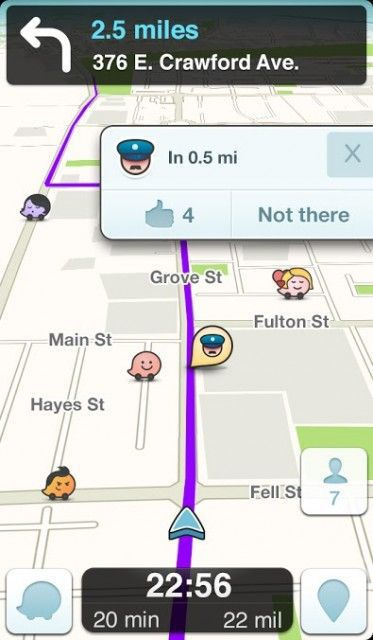
Image Credit: Mashable
Waze is a community-based GPS traffic and navigation app. Their users, which has grown to over 90 million around the globe, report real-time traffic and road information, like police traps, accidents, road hazards, traffic jams, and the cheapest gas stations near your route. All of this crowdsourced information allows users to help each other reach their destinations promptly and safely.
2. Unsplash
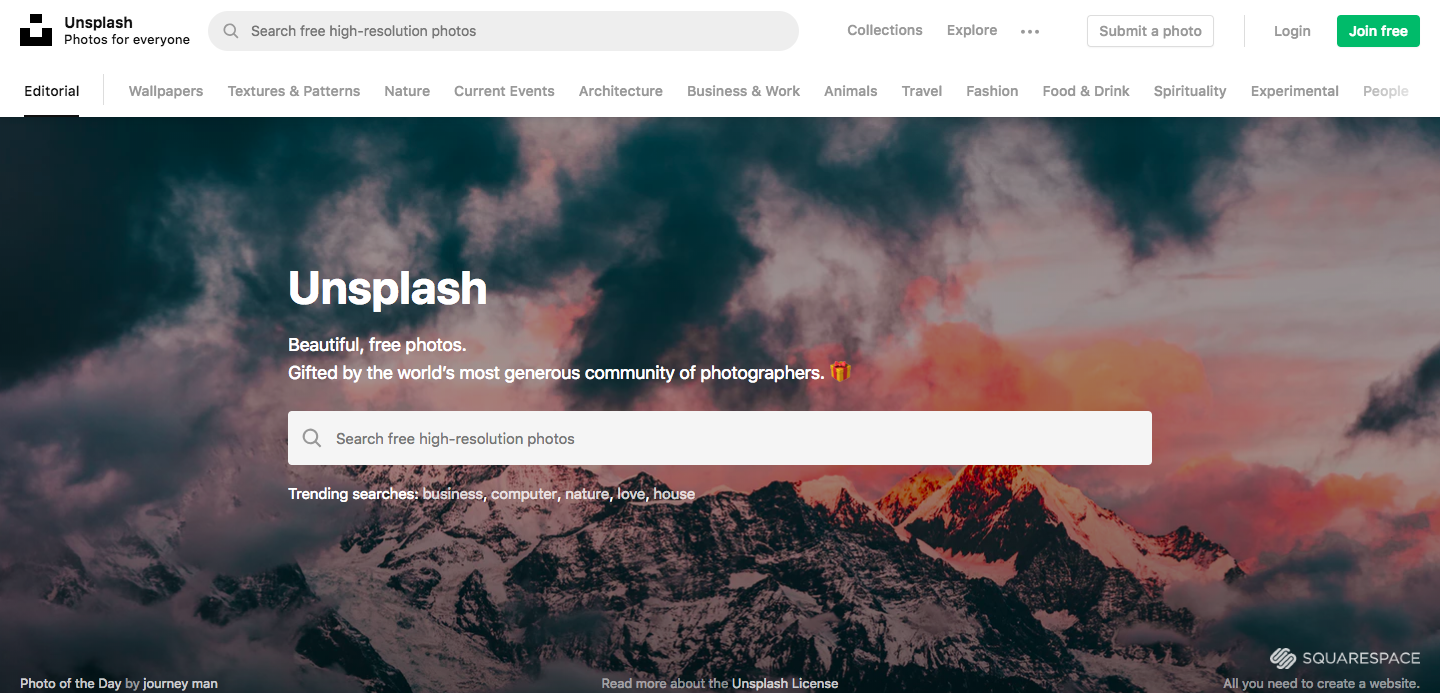
What started out as Mikael Cho’s fun side project on Tumblr, taking half a day and $19 to create, eventually turned into his flailing startup’s top referral source and became its own standalone company — Unsplash.
Unsplash experienced hockey-stick growth because their service offered the ultimate remedy for a huge pain point in the content marketing space — free, unlicensed stock photos. And by using their initial boom in buzz and traffic to convince photographers to contribute free photos to their library as a way to market their art, Unsplash has successfully fostered a community of over 110,000 photographers, built a library of over 850,000 photos, and generates more than nine billion photo impressions per month.
3. Contently’s Freelance Rates Calculator
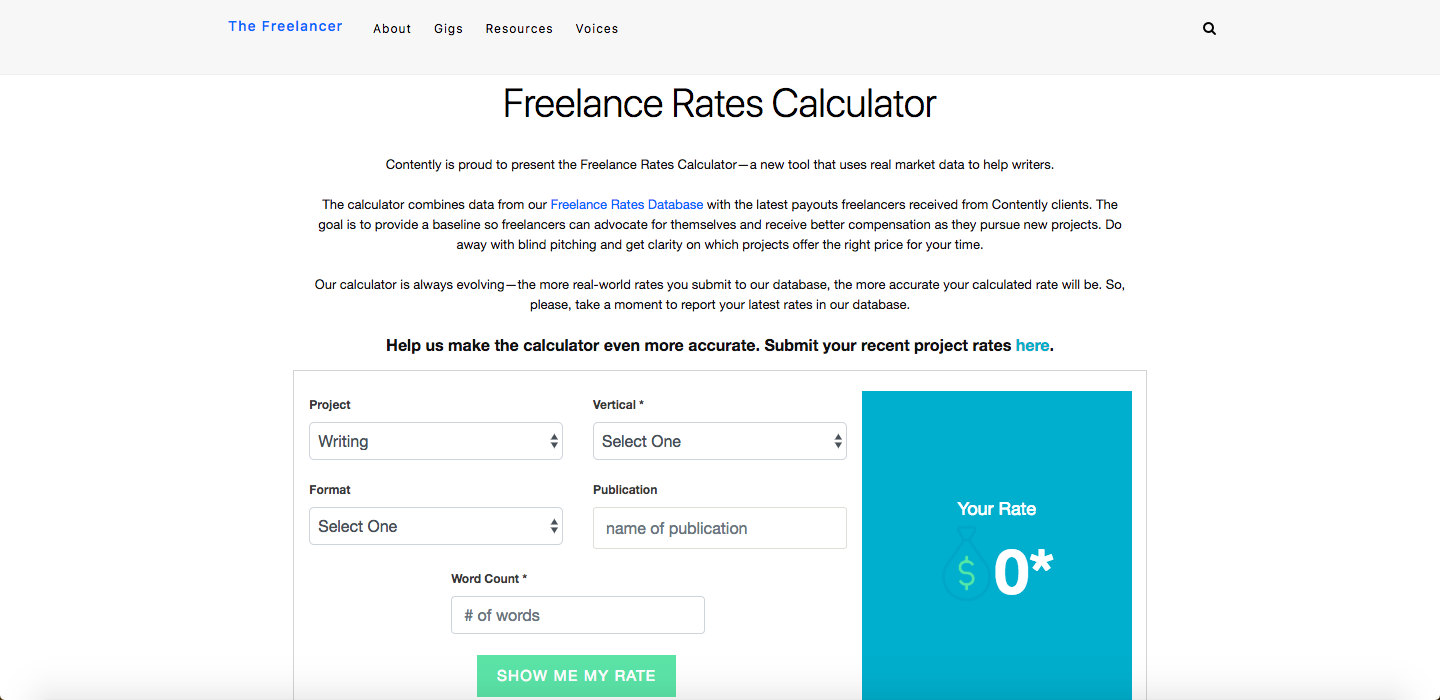
Contently, a content creation platform that also connects brands with freelance talent, built a freelance rates calculator to provide more transparency across the industry and help freelancers better negotiate their rates.
By combining their public freelance rates database, where freelancers anonymously submit the rate they received from various companies, with their platform’s own internal data, Contently has crowdsourced precious information from freelancers in order to help the entire freelance community earn a fair rate in the future.
4. Doritos’ Crash the Super Bowl
“Time Machine” is arguably one of Doritos most memorable commercials, but you might be surprised that it had a budget of $300 and only took six hours to make. Well, that’s because it was created by an aspiring filmmaker who entered the spot into Doritos’ annual Crash the Super Bowl contest in 2014, and won the whole thing.
Frito-Lay, Dorito’s conglomerate, ran Crash the Super Bowl every year from 2007 through 2016, awarding the winner with a huge cash prize and an airing of their commercial during the Super Bowl. And by offering such a can’t-miss opportunity, which allowed them to tap into tens of thousands of people’s creativity, Doritos could associate some of the most unforgettable Super Bowl ads with their brand.
Crowdsourcing Sites
- Fiverr
- Upwork
- CrowdSource
- Contently
- Skyword
If you’re a freelancer looking for work or a brand looking for talent, check out the following crowdsourcing sites.
1. Fiverr
Fiverr is a freelance service marketplace that empowers freelancers. Instead of being a platform where freelancers search for jobs posted by brands, Fiverr is a place where brands search for freelancers with the expertise and skills for which they’re looking. Most freelancers on Fiverr offer skills and expertise in graphic design, digital marketing, writing & translation, video & animation, music & audio, programming & tech, business, and lifestyle.
2. Upwork
Similar to Fiverr, Upwork is a freelance service marketplace where freelancers create profiles, and then brands can hire them for short-term tasks, recurring projects, or full-time contract work. Most freelancers have skills and expertise in web development, mobile development, design, writing, administrative work, customer service, sales, marketing, accounting, and consulting.
3. CrowdSource
Trusted by brands like Target, Coca-Cola, and Major League Baseball, CrowdSource has trained, tested, and qualified a community of over 200,000 freelancers who can provide copywriting, content moderation, data entry, and transcription expertise and skills. Brands can also search for freelancers by the agency, marketing, publishing, retail, and service provider industries.
4. Contently
Contently is a content creation software that connects enterprise brands with freelance talent, so they’re constantly on the lookout for freelancers who can fulfill their clients’ needs, as well as their own.
If you’re a freelance creative looking for gigs with some big brands, you can register as a freelancer on Contently’s platform and create a free portfolio. You’ll need to get approved and complete their training before you can work with any of their clients, but once you do that, you’ll be apart of their freelance network.
If you’re a brand looking for freelancers to help you craft original stories, check out Contently’s platform here.
5. Skyword
Similar to Contently, Skyword is a content creation software that also connects enterprise brands with freelance talent. If you’re a videographer, writer, photographer, or designer, you can create a portfolio that Skyword’s clients will have direct access to.
If you’re a brand looking for freelance talent, check out Skyword’s platform here.
Crowdsourcing Jobs
If you’re interested in working a crowdsourced job, check out the following gigs you could find in each of the job categories below.
Marketing
Writing
Videography
Design
Photography
Animation
Web development
Mobile development
Editing Jobs
Copy editing
Content evaluation
Content moderation
Proofreading
Administrative
Virtual assitant
Customer service
Usability testing
Audio transcription
Social media post categorization
Image and video processing
Image categorization
Data Jobs
Data entry
Data research
Data categorization
Data processing
Data verification and clean up
Research Jobs
Information gathering
Price checking
Product display checking
Business location verification
Web research
Google searching
Odd Jobs
Making deliveries
Cleaning
Dog walking
Survey taking

The 4-Minute Guide to How Biweekly Pay Works
One of the first concerns your new business is likely to face is pay period — should you pay your employees weekly? Biweekly? Monthly?
Of course, you’ll want to take into consideration both the needs of your employees, and your HR payroll administrators. In other words, what is the easiest system for your HR team to process, and what will make most of your employees happiest?
Biweekly is a good option to consider, and it’s also the most popular option in the U.S. — the U.S. Bureau of Labor Statistics reports 36.5% of private businesses have decided to use biweekly pay as their pay system of choice.

Biweekly Pay
Biweekly is the most common option for a business’s pay period in the U.S. Biweekly pay means you pay your employees on a set day once every two weeks, resulting in 26 paychecks per year. Because payday occurs once every two weeks, some months will have three paychecks. Biweekly can be helpful if most of your employees are hourly workers. Additionally, your employees will be happy to be paid more often (as opposed to monthly or semimonthly).
If you’re wondering which pay period option is best to implement at your company — or if you’re just curious what biweekly pay entails — keep reading.
What Is Biweekly Pay?
Biweekly pay means you pay your employees once every two weeks, on a set day you choose.
For instance, let’s say you choose to pay your employees once every two weeks, on Friday.
Take a look at the following calendar for the months of January and February, 2019:

 Calendar courtesy of Towncalendars.com
As you can see, it doesn’t matter which day of the month you pay your employees — you can pay them on the 4th one month, and then the 1st another. It’s only important you pay once every two weeks.
Once you start the year, you’ll pay your employees once every two weeks. This might sound simple, but that means for two months out of the year, you’ll have three pay periods instead of two.
Pros of Biweekly Pay:
- Your HR team needs to process payroll once every two weeks, which can reduce the likelihood of payroll errors and time spent on payroll processing, in comparison to weekly pay periods.
- Employees receive more pay checks during the year than semimonthly, even if those paychecks are slightly lower than they would be on a semimonthly schedule.
- A biweekly system is more consistent for employees — for instance, an employee can expect to receive a paycheck on every other Friday. With a semimonthly pay period, the days of the week will vary, with an employee potentially receiving a paycheck on a Monday, and then a Wednesday.
- It likely makes your employees happier than operating on a monthly schedule, which requires employees to budget for a longer period of time.
Cons of Biweekly Pay:
- If you use biweekly pay, your business must be prepared for the months with three paychecks, and budget accordingly to ensure the payroll account has enough money for those extra expenses.
- Your payroll provider might charge your business for each payroll run, which results in higher annual fees than if you opt for semimonthly.
- Your employees might want to get paid every week, so they have more consistent money coming into their accounts.
- If your industry operates on contract work, where projects can stall for periods of time, employees might appreciate weekly pay for a sense of security.
Ultimately, it’s critical you consider what your competitors are doing, and what makes the most sense for your employees, when choosing a pay period. Your decision might vary depending on the size of your HR team, whether you can find a payroll provider with fair payroll fees, and whether your employees are salaried or hourly workers.
How many biweekly pay periods in 2019?
There will be 26 biweekly pay periods in 2019. Since biweekly means once every two weeks, you simply need to take the number of weeks there are in 2019 — 52 — and divide that number by two.
The Difference Between Semimonthly and Biweekly
At first glance, these two terms sound awfully similar — once every two weeks or twice a month are the same thing, aren’t they?
Actually, they’re not. Semimonthly means your employees get paid on two specific days of the month, regardless of when they fall. For instance, you might choose to pay your employees on the 15th and 30th of every month. Biweekly, on the other hand, promises employees a paycheck once every two weeks regardless of what day of the month it is — hence, in the calendars above, employees receive paychecks on the 4th, 18th, 1st, and 15th of the month.
Semimonthly means employees receive 24 paychecks per year, instead of 26. Additionally, the 15th and 30th of each month could fall on a holiday or weekend depending on the month, so your HR team needs to ensure they’re on-top of processing deadlines and pay dates to ensure your employees still receive a paycheck.
How to calculate biweekly pay
- Figure out your gross annual salary
- Divide that number by 26
- That number is the amount you’ll receive biweekly
- If you want to know your hourly pay, take your biweekly paycheck and divide by the number of hours worked every two weeks
- For instance, someone who makes 60,000 gross annual salary will make $2,307.69 biweekly, or $28.84 per hour for a 40-hour work week
- You might need to factor certain benefits, such as health insurance or 401(k), into your biweekly pay if you get money taken out of your paycheck for those benefits

How to Create a YouTube Channel
If you’re reading this article, I probably don’t need to tell you that video content accounts for over 74% of all online traffic, or that over five billion YouTube videos are watched every single day.
You already know YouTube is an important content tool, and you’re ready to start leveraging video for your own business. I’m here to show you how to do it.

This article will cover everything you need to know about creating a YouTube channel, so you can start uploading your own videos and growing your audience today.
How to Make a YouTube Channel
- Register a Google account (if you don’t already have one).
- Create a new YouTube channel using you Google account.
- Optimize your channel for discoverability.
- Add links and descriptive details to your channel.
- Upload a profile photo and cover art to your channel.
- Add a banner image.
- Add videos and optimize them for search.
1. Register a Google account (if you don’t already have one).
To watch, share, create, and comment on YouTube content, you’ll need a Google account.
If You Don’t Already Have a Google Account
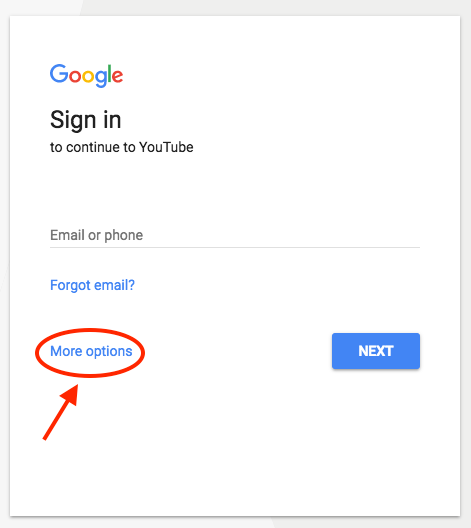
Go to youtube.com and click “sign in” in the upper right-hand corner. From there, you’ll be taken to a Google sign-in page. Click “more options”:
 Then, click “create account”:
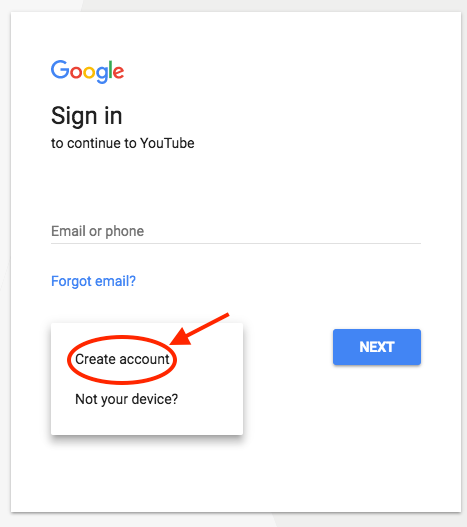
From there, you’ll be asked to follow a few steps to create a Google account. Once you’ve completed them, proceed with the steps below.
If You Do Already Have a Google Account
Go to youtube.com and click “sign in” in the upper right-hand corner. From there, you’ll be taken to the same Google sign-in page above. If you have multiple Google accounts, be sure to select the one you want to be associated with the YouTube channel.
2. Create a new YouTube channel using your Google account.
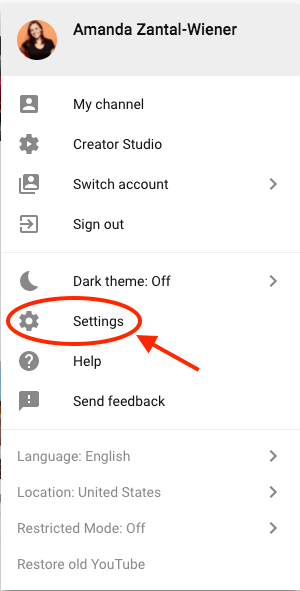
Once you’re set up with and signed into your Google account, it’s time to create a channel. Back at youtube.com, click your user icon in the upper right-hand corner. This represents both your Google account and you YouTube account (as YouTube is owned by Google). You’ll see a drop-down menu, where you’ll want to click “settings.”
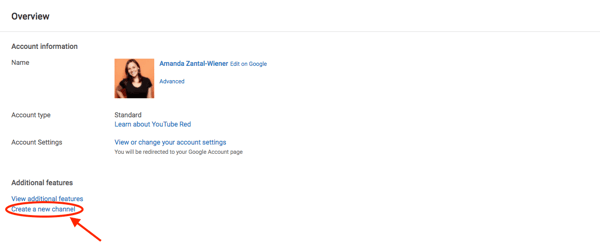
From there, you’ll be taken to your account overview. Under “additional features,” click “create a new channel.”
The first step is to create a Brand Account. It can be whatever name you want, and doesn’t have to be the same name that you used to create your Google account — but we do recommend that it reflects the brand the YouTube Channel will represent.
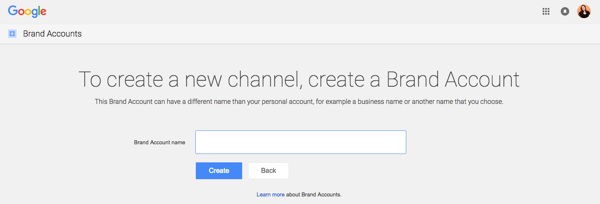
After you enter the Brand Account name, you might be asked to verify the account via text message or voice call. If that happens, enter the code you receive from the option you choose.
Once you’ve verified your Brand Account, you’ll be taken to the dashboard for your channel. Now, it’s time to start customizing it.
3. Optimize your channel for discoverability.
We’ll start with the fundamental details about your channel. From your channel dashboard, click “customize channel.”
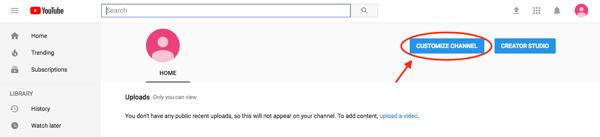
After you click “customize channel,” you’ll be taken to your basic channel page, where you’ll see a cogwheel on the right, as shown below.
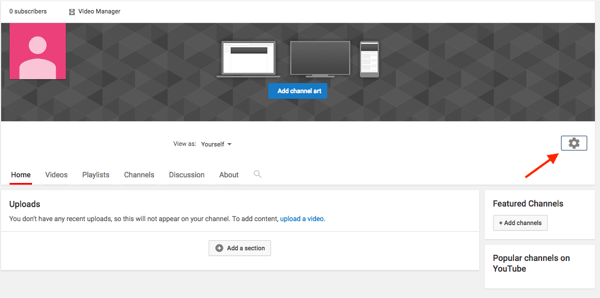
Click this cogwheel icon, then click on the section that says “advanced settings.”
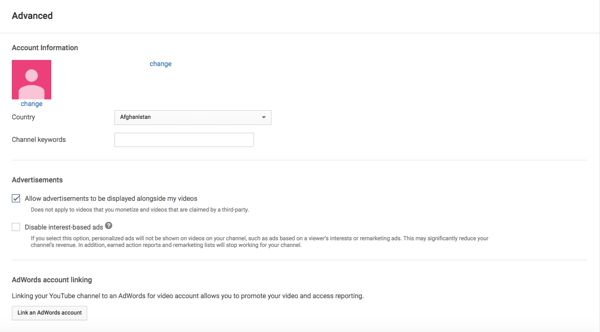
Here’s where you’ll enter some basic information about your channel, like the country where it’s based, as well keywords that help it people discover your channel when they enter search terms that describe what videos they’re looking for. These keywords can include what your channel is about, the problems it helps solve, the people and products featured, your industry, and more.
From the page shown above, you can then select whether or not you want to appear as a recommended channel on other account pages. It’s also within these settings that you can link a Google Ads account, add a Google Analytics property tracking ID, and make various advertising selections for your channel when you’re ready to promote certain videos across the YouTube platform.
4. Add links and descriptive details to your channel.
There are two elements of customization for a new YouTube channel: descriptive details, and visuals. Descriptive details tell your channel visitors (and, eventually, subscribers) what purpose your channel serves and the type of video content they should expect to see published by you. Let’s add those details now.
To describe your YouTube channel for your viewers, you’ll want to add a channel description and links to other webpages associated with your brand. Back on your channel customization dashboard, click on the “About” tab.
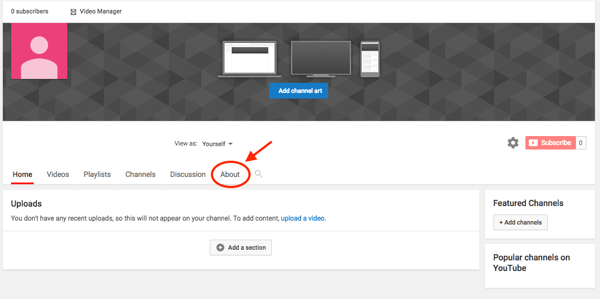
There, you’ll be asked to fill in such details as a channel description — which you can optimize with keywords for more discoverability — as well as contact information and links to your website and social media channels.
Up to five links can overlay your channel art, meaning that the banner on your profile page will contain icons for the links you choose to overlay on this list. To add these links, navigate to the About section of your YouTube channel and click “+ Links.” This button will reveal a space where you can add branded links directing users to various websites and social networks where they can learn about and consume more content from you. See what this space looks like below, and how a business might add links to its Facebook, Twitter, and personal website.
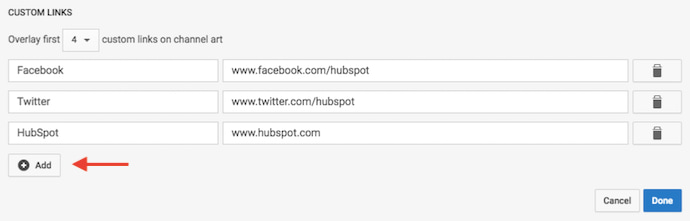
For example, if you wanted to overlay your banner with a link to your Facebook Page, it might look like this as a result:

Your channel art is part of your channel’s customization, which we’ll move onto next.
5. Upload a profile photo to your channel.
When it comes to creating and adding channel art, Google has a plethora of resources for content owners, from a gallery of images to image editing tools.
Among this channel art is your profile photo — this is how YouTube users will identify the creator of a video when browsing video content. You’ll see this image appear beneath YouTube videos on the play page, as shown below.
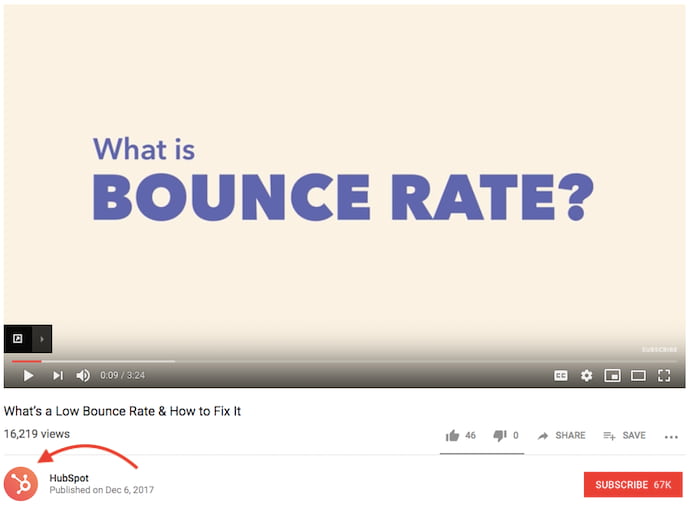
If your YouTube channel is linked to a Brand Account, as is the example we used in the previous step, you’ll need to update this image in the “About” section of your Google account. Note that this rule also applies to your channel name when using a Brand Account.
When you click “change” under your profile icon, you might see this message:
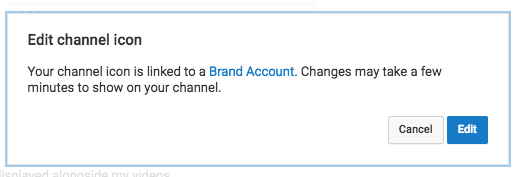
Click “edit,” and you’ll be taken to the page shown below, where you can edit your Brand Account information, including your profile photo (which will be displayed on your YouTube channel).
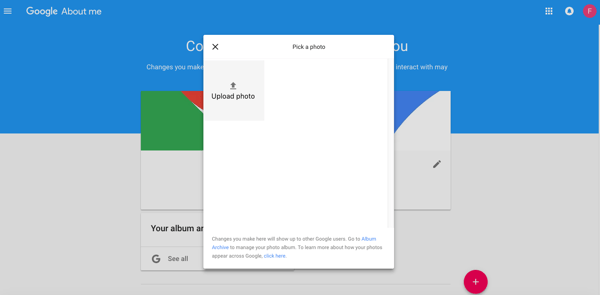
We recommend choosing an image with dimensions of 800 x 800 pixels for this profile photo.
6. Add a banner image.
Next, it’s time to add your banner image. Back on your channel customization dashboard, along the top, you’ll see your newly added profile photo on the top-lefthand corner. As far as that gray background surrounding it is concerned, you can (and should) change it to something more, well, you. Here’s how.
Hover your cursor over this gray background to reveal a small pencil icon on the top-righthand corner. Click this icon and select “Edit channel art” when this option appears, as shown below.
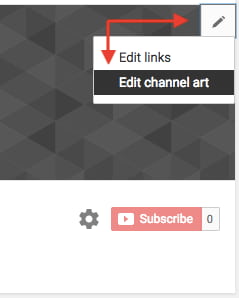
One of the trickiest parts of channel art is creating a responsive banner that matches dimensions for various user experiences, like desktop, mobile, or TV. Luckily, Google has this handy image that represents the best dimension for each viewing platform …

Source: Google
… as well as this concise video explainer:
Need a little inspiration? Check out this post with some of the best YouTube banners we’ve found.
As you can see from the resources above, the minimum dimensions for your YouTube banner image are 1546 x 423 — this size prevents relevant text and images contained in your banner image from leaking off of someone’s screen — whether that screen is a desktop, laptop, or mobile device. The maximum width for your banner image is 2560 x 423, and your image’s file size shouldn’t exceed 6MB.
7. Add videos and optimize them for search.
Optimizing your channel for discoverability is just the beginning. Once you start adding videos, you’ll want to optimize them for search, which in turn helps users discover your video.
But this goes beyond giving your videos accurate, clear, and concise titles — though that is important. Below, we describe some of the most important things to optimize on YouTube. (For a fully comprehensive post on YouTube SEO, visit this post.)
Title
When we search for videos, one of the first things that our eyes are drawn to is the title. That’s often what determines whether or not the viewer will click to watch your video, so the title should not only be compelling, but also, clear and concise.
Description
This should be limited to 1,000 characters — and remember that your viewer came here to watch a video, not to read a lot of text. Plus, YouTube only displays the first two or three lines of text, which comes to about 100 characters, so front-load the description with the most important information.
Tags
Using tags doesn’t just let viewers know what your video is about — they inform YouTube, too, which uses tags “to understand the content and context of your video,” according to Backlinko. That way, YouTube can associate your video with similar videos, which can broaden your content’s reach. But approach with caution — just as with your title, don’t use misleading tags because they might get you more views — in fact, Google might penalize you for that.
Category
Choosing a category is another way to group your video with similar content on YouTube — but that might not be as simple as it sounds. YouTube’s Creator Academy suggests that marketers “think about what is working well for each category” you’re considering by answering questions like:
- Who are the top creators within the category? What are they known for, and what do they do well?
- Are there any patterns between the audiences of similar channels within a given category?
- Do the videos within a similar category have share qualities like production value, length, or format?
That’s it — you’ve officially not only created a YouTube channel, but now also know how to optimize its content for discoverability. For more information on how to best leverage YouTube for marketing, check our entire collection of resources.

Do the Right Thing, Even When It’s Hard [The Customer Code Series]
Editor’s note: This is the final post in a series on the HubSpot Customer Code.
I haven’t decided yet if this is the final tenet in The Customer Code or the “platform” that supports the entire Code. But I think it’s the most important of all — do the right thing, even when it’s hard … especially when it’s hard.
It’s hard to admit you made a mistake, and hold the midnight meeting to fix it.
It’s hard to look at your business critically and put in the time, money, and thought to fix pain points in your customer experience.
It’s hard to solve for the success of customers over the success of systems when we know that systems are how a business scales. Making those tradeoffs is hard!
But it’s the difficulty and the rarity that makes this work valuable.
Doing the hard things is an opportunity to differentiate ourselves and stand out.
At HubSpot, we talk about wanting to build a business that we’re proud of and that has long-lasting positive impact. We won’t achieve that by just doing the easy things.
At the start of the series I wrote about how growth alone doesn’t interest me anymore. I want HubSpot to grow, but more importantly, I want us to grow better. I want us to grow in a way that is good for our customers, partners, and employees.
That’s what The Customer Code is all about. It’s an attempt to create a sort of “code of conduct” that defines how we run our business, and early indicators are that it is working. In our annual planning and in our investments and product decisions, one question keeps coming up: “Does this approach support the tenets of the Customer Code?”
For years we’ve talked about “Solving for the customer.” It’s been a pillar of our philosophy, but it always felt a bit nebulous. The Customer Code is how we now turn that philosophy into practice. It’s how we hold ourselves accountable to do the right thing, even when it’s hard, complicated, expensive, or time-consuming.
In the same way that The Culture Code gave us common language to describe how we as individuals work with each other, the Customer Code is giving us a common language to describe how we as teams and leaders solve for our customers.
So I hope you’ll join us. Either in adopting the Customer Code or creating a code that makes sense for your customers and business.
Every business seeks to grow, but doing the right thing for customers, even when it’s hard (especially when it’s hard) is how we grow better. The Customer Code makes sure we here at HubSpot keep on doing the hard things.
This post is the final installment in a series on HubSpot’s Customer Code. You can find more info on The Customer Code and how we score ourselves here, and watch my INBOUND talk on this topic here.

The Plain-English Guide to Domains & Domain Names
In 2009, the domain Fly.com was sold for $1.76 million. Even though this domain seems like it would be highly sought after, the asking price still seems a little steep. But Fly.com attracts over a million unique visits per month, justifying its million dollar cost and illustrating just how important it is to have a domain that reflects your business’ name and what you actually do.
If you’re in the process of setting up a website for your business, you might’ve come across two terms: domain and domain name. On the surface, domain and a domain name might seem like the same exact thing. And if you dig a little deeper, that’s exactly the case — a domain and domain name are often used interchangeably.
What is a domain?
A domain is the part of a URL that’s after “https://”. In simple terms, it’s the address people type in to visit your website. For example, “hubspot.com” is HubSpot’s domain.

Image Credit: Computer Hope
Every website has an IP address, which is a unique string of numbers that connect computers to web servers, but people don’t want to memorize an IP address just to visit a website. Fortunately, domains fill in for a website’s IP address, allowing people to easily remember and identify websites.
Essentially, domains are like your house’s address. Instead of your friends using your house’s GSP coordinate every time they want to visit you, they can just plug in your street address, which is much easier to remember.
Not including its extension, like “.com”, the maximum length a domain can be is 63 characters. The minimum length can be one character.
If you want to acquire a domain, you must buy one and register it. To do this, visit a domain name registrar, like GoDaddy or Google Domains, plug your desired domain name in, check its availability and price, and then buy it, if it’s in your price range.
Domains also let you create a custom email address for your business. To do this, you just need to register your domain and then sign up for an email hosting service, like Microsoft Office 365 Business Essentials or Zoho.
The Parts of a Domain
There are two parts of a domain: the second-level domain and the top-level domain. The second-level domain is the part of your domain that comes before “.com”.
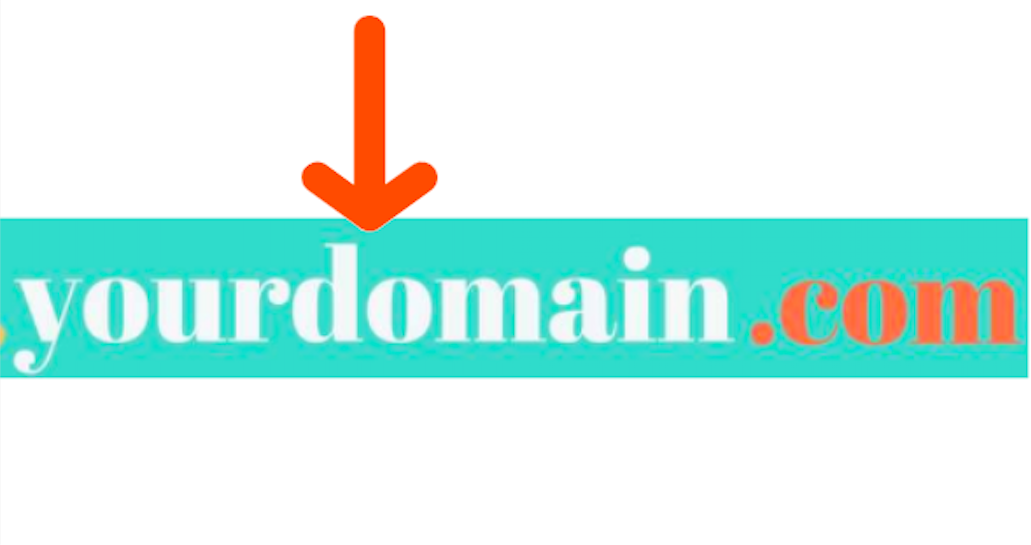
If you’re building a website for your business, consider buying a domain that reflects your business’s name. This will make it easier for people to find your website without needing to spend a lot of time scouring Google for it. For instance, hubspot.com’s top-level domain is “hubspot”.
The top-level domain is the part of your domain that comes after your second-level domain.
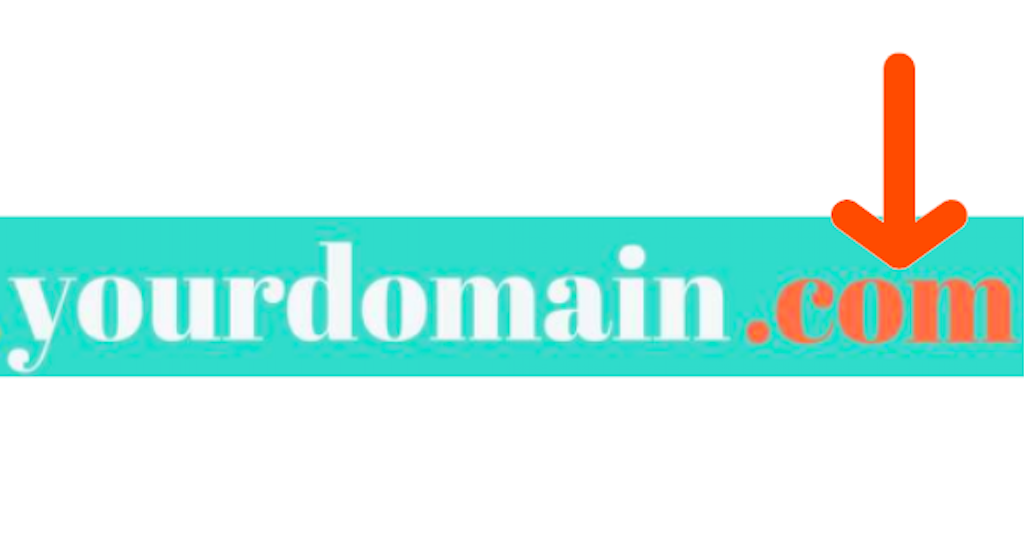
It specifies what type of entity your organization registers as on the internet. For example, HubSpot’s top-level domain is “.com” since we’re a commercial entity in the United States. Most American businesses also register their website with “.com”. Similarly, a lot of academic institutions in the United States register with a top-level domain of “.edu”. There are over 1,500 top-level domains available worldwide, but other common ones are “.org” and “.net”.
What is a domain name?
The term “domain name” is often used interchangeably with the term “domain”. That’s because they refer to the same thing — the specific text that people can reference to identify your website.

Why Our Formula for Success Is All Wrong
Welcome to The Science Behind Success — a new blog series that explores the best ways to help our brains perform better at work. With psychological research and interviews with leaders in the field, we’re showing you how psychology can help you overcome workplace obstacles and excel in your career. Because a little mindset change could go a long way.
When Shawn Achor initially began his research at Harvard, he noticed something surprising — Harvard students, who should have been ecstatic to be at one of the most prestigious universities in the world, were relatively unhappy.
In his popular TED Talk, which has over 19 million views, Achor says, “I found that these students — no matter how happy they were with their original success of getting into the school — two weeks later their brains were focused, not on the privilege of being there, nor on their philosophy or physics, but on the competition, the workload, the hassles, stresses, [and the] complaints.”
Perhaps you aren’t all that surprised by his observation, after all. Imagine this scenario as it plays out in your own life. Consider the last time you got a promotion, lost five pounds, received an A in a difficult class, or landed your dream job.
How quickly did that initial rush of happiness dissipate?
My guess is — almost immediately.
More than likely, you received the promotion and thought, “Okay, what’s next?” You graduated college and worried about getting a job. You landed your dream job and became increasingly anxious that maybe you weren’t cut out for it, or maybe you’d never rise up in the ranks like your peers.
Alternatively, maybe you lost five pounds and decided you wanted to lose ten more.
Ultimately, you’ve placed happiness over a horizon that Achor stresses you’ll never reach.
Achor — who’s positive psychology research has been published in Harvard Business Review, The Journal of Personality and Social Psychology, and in his own books, including The Happiness Advantage — has worked with over a third of Fortune 100 companies, as well as the NFL, the NBA, and the White House.
Additionally, he’s been featured on Oprah, and his TED Talk is one of the most popular TED Talk videos of all time.
All of which is to say, I was undoubtedly thrilled when he agreed to speak with me about how he views our society’s current formula for success, and why we’ve got it all wrong. Read on to learn his thoughts on happiness and success, as well as how you might use positive psychology tactics to become a better, more satisfied employee. 
Why Our Formula for Success is Inherently Flawed
In his TED Talk, Achor describes an all-too-familiar scenario, in which you think to yourself, If I work harder, I’ll be more successful. And if I’m more successful, then I’ll be happier.
This reasoning likely plays on an endless loop in your mind as you make professional and personal decisions. Because, if happiness wasn’t a driving factor, why would you work quite so hard each and every day?
We use this “success = happiness” formula in school, at work, and even in our relationships, assuming working harder at parenting, for instance, could make you a more successful mother or father — and, thus, a happier one.
But, in his TED Talk, Achor says our formula is both broken, and backwards — “Every time your brain has a success, you just changed the goalpost of what success looks like … You got a good job, now you have to get a better job, you hit your sales target, we’re going to change it. And if happiness is on the opposite side of success, your brain never gets there.”
“We’ve pushed happiness over the cognitive horizon, as a society. And that’s because we think we have to be successful — then we’ll be happier.”
Achor continues to explain, “Our brains work in the opposite order. If you can raise somebody’s level of positivity in the present, then their brain experiences what we now call a ‘happiness advantage’, which is your brain at positive performs significantly better than at negative, neutral, or stressed. Your intelligence rises, your creativity rises, your energy levels rise. In fact, we’ve found that every single business outcome improves.”
There’s truth to his claim — for instance, one study found happy employees are up to 20% more productive than unhappy employees. Additionally, happy salespeople produce 37% more sales than their unhappy counterparts.
Ultimately, our formula for success is backwards because we believe happiness to be a result of success, when really, success is much more likely to be a result of happiness. It isn’t, “If I get a great job, then I’ll be happy” at all — instead, it’s “If I’m happy, then I’ll get a great job.”
To further examine his claim, let’s take a look at how Achor’s research plays out in the real world.
The Real Effects of Positive Psychology in The Workplace
In 2009, Achor decided to test the ROI of happiness with the auditing and tax accounting firm KPMG. The timing was intentional — Achor wanted to examine employees who were experiencing high stress, and the firm’s employees were still dealing with challenges following the banking crisis in 2008.
I’d say that sounds like high stress to me.
In December, Achor administered a survey to 77 KPMG managers, evaluating their stress levels, social support, and optimism.
Following the survey, Achor provided a three-hour introduction to his positive psychology research, and how to apply the principles in the workplace, to half of those managers. He used the other half as a control group.
A week after the training, each employee was evaluated using the same survey again. Achor also tested KPMG employees four months later, to see whether his principles resulted in long-term improvements.
Interestingly, Achor found every positive metric, including life satisfaction, perceived stress, social support, perceived effectiveness at work, and work optimism, improved significantly for the positive psychology training group, compared to the control group.
Additionally, he found life satisfaction scores continued to rise steadily, and were significantly higher four months later than they were a week after the training.
Despite the validity of Achor’s research, it might seem like a difficult theory to adopt. How, for instance, are you supposed to raise your happiness levels if you find yourself in a very unfulfilling role? If we often use external factors, like a promotion or a good grade, to raise our happiness levels, how are we supposed to remove those factors and find happiness in spite of our surroundings?
Fortunately, Achor’s answer to happiness doesn’t rely on any major changes. In fact, he stresses the importance of minor alterations, and has seen first-hand how the immense power of little steps can deeply accelerate your professional success — and an entire company’s.
Let’s explore his tactics in-depth, now.
How to Increase Your Happiness (and Your Team’s) Today
1. Tackle these five strategies for a period of 21 days.
In his TED Talk, Achor lists five critical strategies you can employ immediately to begin increasing your happiness levels, including:
- Writing down three new things you’re grateful for, for 21 days in a row
- Journaling about one positive experience you’ve had over the past 24 hours, allowing your brain to relive it
- Exercising
- Meditating
- Conducting random acts of kindness, such as writing one positive email praising or thanking somebody in your support network
These strategies are not random — thinking of new things to be grateful for reminds your brain to scan its surroundings for the positive, not the negative. Meditation enables your brain to focus on a task at hand, and exercise tells your body that behavior matters.
Additionally, he encourages people to start with 21 days, or three weeks, as a jumping-off point. Three weeks feels manageable, but it’s all it takes for you to begin to see results and slowly turn these actions into habit.
I asked Achor if, along with these five strategies, he had any other helpful suggestions to improve an employee’s daily happiness. He told me, “In [my book] Big Potential, I describe research showing that your brain is weakest and has the least resources for the first and last 30 minutes of the day. So I create a ‘mental moat’ around my day — during the weakest times, I protect my mindset by not checking email, news, or social media.”
He also suggested making gratitude a communal activity. He told me when he worked with Orlando Health, “We got the leaders to start staff meetings by going around and having each member of the team say one thing for which they were grateful. This not only helps raise optimism, but actually, even more importantly, it raises social knowledge and social connection — the greatest predictor of long-term happiness and performance.”
2. Cultivate social connection, and foster it in your workplace.
There are also strategies you can employ to create a happier, more productive workplace. In particular, Achor notes the importance of implementing actions to encourage social connection.
Both providing and receiving connection is important, Achor told me, and it’s equally critical you create a structure in which social connection can be fostered.
While it’s important you have people to rely on and trust when times are challenging, Achor explained it’s also vital to become a person to whom people can turn to when they need help or want connection.
Being someone who gives social connection, even just by saying hello to people in the office or asking someone to coffee, can significantly increase your own happiness and success. In fact, Achor found “the work altruists in the top quartile of social support provision had a 40% higher likelihood of promotion in a two-year period of time, and significantly higher happiness.”
This makes sense — being the person to whom people can turn to when they need help undoubtedly makes you more indispensable as an employee, and will also make you feel needed and important. This, in turn, will result in both increased happiness and increased productivity.
Additionally, he told me it’s critical your leadership team value connection, and implement cultural changes to ensure social connection among employees is both possible and encouraged.
For instance, perhaps your business can hold more conferences or events for the entire company. Alternatively, as a leader, maybe you need to encourage more team members to speak up during meetings, or implement team-bonding outings to encourage social connection within your department.
3. Focus on small wins.
Oftentimes, a goal can feel daunting and even paralyzing in scope.
When this happens, it’s critical you re-focus your mind on small victories.
Achor told me there are only three things that can accelerate the brain toward a goal:
- Meaning
- Proximity
- Progress
First off, let’s focus on meaning. Achor notes, “Embedded in every stress is meaning. If I tell you someone is failing English, you don’t feel stress. If I tell you that your kid is failing English, you feel stress because there is meaning in that relationship. Acknowledge your stress. Reconnect to the meaning in the stress. [And] channel your response toward that meaning.”
It’s critical you’re able to understand why you feel stressed, and why it’s meaningful to you. This small step can help your brain rewire itself to use stress as a powerful source of motivation and energy, rather than a debilitating emotion.
Second, it’s important you and your team are able to visualize your progress. Rather than focusing only on the end-goal, perhaps you can create weekly progress reports or slide decks to demonstrate your project’s progress.
Finally, Achor stresses the importance of small wins, and says he makes those possible by “simulating the ‘x-spot’ in a marathon — the last 0.2 of a mile where the brain feels that the goal is close, and releases extra resources.”
To simulate the end of a marathon, you might create daily habits and goals to feel you’re close to completing the task, rather than focusing solely on quarterly or yearly goals. For instance, perhaps each Sunday night you make a weekly to-do list, with tasks you can check-off each day.
4. Encourage employee check-ins.
At a large insurance company Achor worked with, he decided to take the employees off the phones for ten minutes a day to create a “huddle”, in which six-to-eight employees would check-in with one another, rotate a leader for each day of the huddle, and talk about one thing for which they were grateful.
Achor told me, “With the traditional ‘time worked = profit’ model, they should have lost money. [Instead], over the next 18 months revenue improved by nearly 50%, and they had the highest rate of engagement change.”
Alternatively, Achor worked with LinkedIn to create a program in which peers praised one another using a Globoforce platform. They found that three touchpoints of praise — as opposed to one or two, which yielded minimal results — resulted in a significant increase in retention rates, from 80% to 94%.
Ultimately, Achor told me the biggest challenge he’s seen across industries, from the NFL to tax auditors, is mental: “Most people deep down don’t think change is possible. They have been taught that they are their genes and their environment, and they expect to be the same person tomorrow as they are today. But all this research shows that if you make even tiny changes to your daily patterns and work routines, you reap a massive reward in terms of positive change.”
The tactics and practices that allow you to find daily, sustainable happiness will differ depending on your individual preferences. However, Achor’s research demonstrates the universal importance of finding time and space to become happier now, not later — your success depends on it.

Everything You Need to Know About Ecommerce Marketing
With nearly every marketing operation now taking place online, it can be tough to distinguish between the various types of digital marketing people use today. What about
ecommerce marketing? What is it, and how does it compare to practices like social media, content, search engine, and email marketing?
Ecommerce marketing and digital marketing are not mutually exclusive. Ecommerce websites can use all of the above digital channels to promote a product and grow their business.
This ecommerce marketing guide will explore all of the digital media available today.
What is ecommerce marketing?
Ecommerce marketing is the act of driving awareness and action toward a business that sells its product or service electronically. Ecommerce marketers can use social media, digital content, search engines, and email campaigns to attract visitors and facilitate purchases online.
Ecommerce marketing is just one community of marketers who can use the principles of digital and inbound marketing to convert visitors into customers. However, ecommerce marketers don’t necessarily use these marketing channels the same way a traditional brand or content marketer would.

To give you a sense of what an ecommerce marketing strategy looks like, here are some common marketing channels and how you’d use them to build an online store.
Social Media Marketing
Brands, publishers, contractors, and growing businesses all launch pages on today’s most popular social networks to connect with their audience and post content that audience is interested in. As an ecommerce marketer, you can do the same thing, but the campaigns you run might look a bit different, and not every social network is a good fit for your needs.
Ecommerce websites are highly visual — you have to show off the product, after all — so your success on social media depends on your use of imagery to drive attention and traffic to your product pages. Instagram is an appropriate platform for ecommerce businesses because it enables you to post sharp product photography and expand your product’s reach beyond its purchase page.
You can take your social media posts a step further by creating shoppable content, which is content that enables visitors to buy right away. That can include anything from strategically placed display ads within a social feed to additional tags that take users directly to a shopping cart. These methods help you eliminate friction from the buying process.
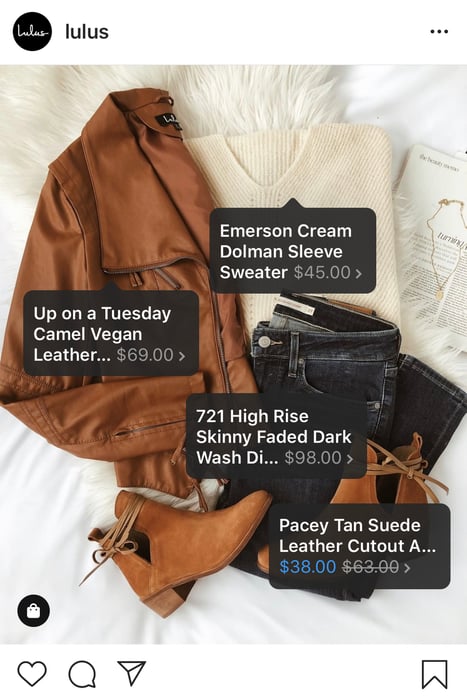
An ecommerce business is no stranger to product reviews, either. Using a Facebook Business Page to share product praise is a perfect fit for businesses that already solicit customer reviews across their online store. We’ll dive deeper into product reviews below.
Content Marketing
When you hear “content marketing,” you might think of blogging and video marketing — content that is meant to improve your website’s ranking in search engines and answer questions related to your industry. But if you’re selling a product online, do you really need articles and videos to generate transactions? You sure do.
Here are some ways to use content to market your ecommerce store.
Optimize your product page copy.
Optimize your product pages for short, product-driven keywords that include the name of the product. If you sell wedding dresses, for example, a Google search for “brown bridesmaid dress” is more likely to produce product pages like yours if you’ve included that term on the page. Also, make sure that your page titles, headers, and image alt text focus on the right keywords so search engines know to return your ecommerce store for the right query.
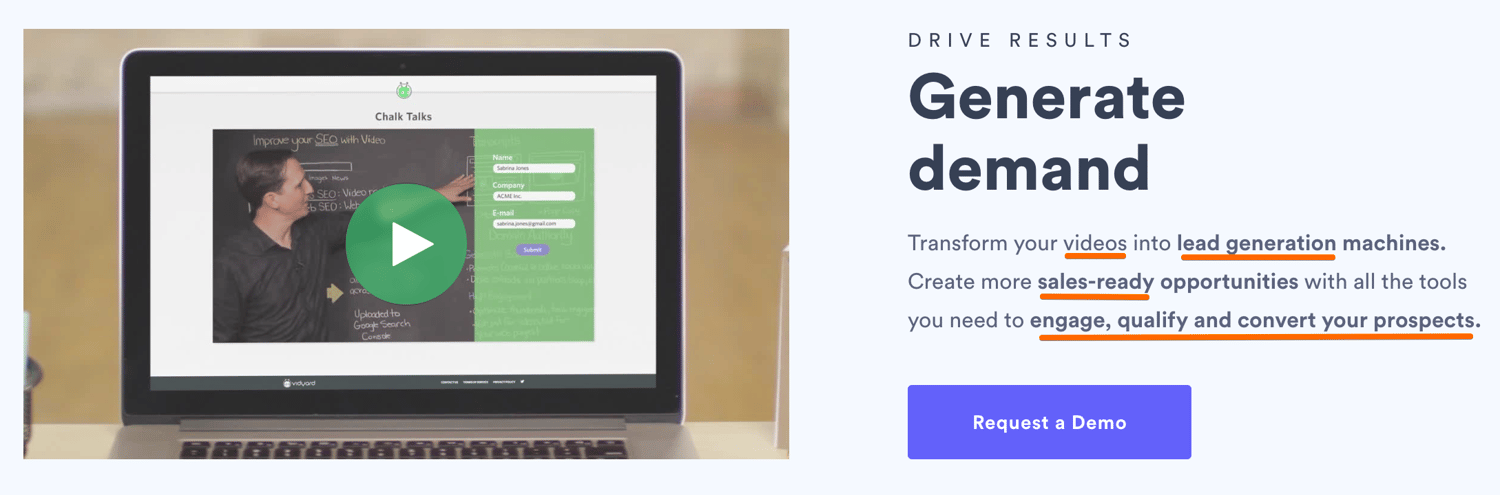
Write relevant blog posts.
If you manage an online wedding dress store, writing blog posts about “how to plan a wedding” can attract everyone involved in wedding preparations no matter where they are in the planning process. As visitors become more engaged, you can create posts that will move them into consideration, like “how to select the right wedding dress, and turn them into leads, like a downloadable “wedding planning checklist”.
Create guest posts for external websites.
Guest posts can get you and your products in front of relevant audiences (oftentimes for free). Submitting guests posts will also help you get more domain authority for your ecommerce site, thereby telling search engines that you have a reliable site.You’ll need to search for sites that rank for keywords related to your product. Sometimes you won’t even need to create an entire post. If a site already has a relatable post, offer to expand on it by providing additional context, like a video or infographic with a link to your site.
Put product-related videos on YouTube.
YouTube has over billion active users … chances are your target audience is somewhere in there. It’s also the second largest search engine behind Google. If you’re looking for a massive, captive audience, YouTube is where you’ll find it. Use highly searched keyword terms to determine your topics, then share videos that are related to your product and helpful to your audience. This is also a great option for tutorial videos that show current customers how to use your product — these videos can show people how best to use your product, increasing customer satisfaction and building long-term relationships with website visitors.
Include a keyword-driven FAQ section on your website.
If your audience is asking questions related to your product, then you need to be the one to answer them. Create an FAQ page on your website with responses to high volume, long-tail keyword searches to get users to your site. You’ll be building both authority and traffic — two crucial components of a successful ecommerce store.
Search Engine Marketing
Search engine marketing (SEM) includes both search engine optimization (SEO) and paid advertising. While SEO relies on your knowledge of Google’s ranking algorithm to optimize content, SEM can involve pay-per-click (PPC) campaigns, display campaigns, or product-specific ad campaigns (think Google Shopping), which allow you to pay for top spots on search engine results pages.
On Google, PPC campaigns guarantee that potential buyers will see a link to your page when they enter search terms that match the terms of your campaign. But because you’re paying Google each time a person clicks on your result, the payoff to you should be high.
This is why ecommerce marketers often register with Google AdWords and promote their product pages through PPC campaigns. The campaign puts searchers right in front of the business’s product when they click on a paid result, increasing the likelihood that the searcher will make a purchase before leaving the business’s website.
Email Marketing
Email marketing is one of the oldest forms of digital marketing, and believe it or not, it holds specific value in the world of ecommerce marketing.
The best part about email marketing is it can be automated. Automation means that you can set up a successful drip campaign to subscribers that are segmented by interest or stage in the buyer’s journey and let your email campaign do its magic. It’s one less marketing tactic that you need to worry about on your long list of tasks.
Even so, it’s imperative that you’re meticulous about your email list so you maintain trust among your leads. In a time when data privacy runs high on an internet user’s priority list, not every commercial email is welcome in that user’s inbox. Ecommerce marketers need to be careful when and how they add website visitors to their mailing list. Here are two ways an ecommerce marketer might use email marketing.
Post-Purchase Follow Up
If a user has already purchased a product from your website — and agreed to receive emails from you during the checkout process — sending a follow-up email a few days after the product is delivered keeps the conversation going and gauges their future interest in your product line.
A post-purchase follow up also shows that you care about them beyond a sale and that your company has an interest in their success using your product (more on why customer success is an important part of your marketing strategy below). It gives you an opportunity to get feedback on their purchase experience, which, in turn, helps you reduce friction for future customers.
Some best practices for this type of email are to ask them to write a review of your product and/or read original content on how to use your product (those YouTube videos you created would be perfect here).
The Abandoned Shopping Cart
Users abandon their shopping carts for a number of reasons, and emails to diagnose the problem and retain their business can make the difference between a purchase and a lost customer. We’ll cover ways to reduce shopping cart abandonment below.
If a website visitor fails to complete a transaction while they’re in your shopping cart, consider sending a polite email to remind them to complete the checkout process, offer assistance, or recommend other related products to get their mind back on you and their browser back to your ecommerce store.
Learn more about why users are abandoning your shopping cart and how to fix it.
Influencer Marketing
Influencer marketing focuses on people or brands that already have influence over your target market. The term is commonly used to denote Instagram accounts with several thousand followers, but it could also mean a celebrity or community that your target audience follows or belongs to. Influencers build communities of people that know, like, and trust them. It is, therefore, easy for them to garner attention around your online product through a recommendation, or “sponsored post.”
Affiliate Marketing
Eight-one percent of brands employ affiliate marketing, and ecommerce sites are particularly good candidates. Affiliates are people or businesses that help sell your product online for a commission. Unlike most social media influencers, affiliates generate interest in products via old fashioned (yet effective) marketing tactics. They often use paid advertising, content marketing, and other means to drive traffic to your their pages on your product — it’s like having a team market for you.
Local Marketing
This is an often overlooked tactic for ecommerce businesses, but local marketing allows you to double down on the areas where most of your prospects are (if you have a large population of them in one area) and allows you to offer incentives to your potential customer base. Here’s how: use tracking cookies to determine where your prospects are located. Then, offer discounted (or free) shipping to potential customers in the areas where you have warehouses or shipping facilities. The incentive might be just what you need to gain a new customer.
Ecommerce Marketing Tips
There are countless ecommerce marketing tactics that you can employ to drive visitors to your online store beyond the traditional methods that we reviewed above. Let’s get into some more creative ways you can market your ecommerce business.
Use Personalization
Companies that use personalization are seeing revenue increases ranging from six to ten percent. What is this magic bullet? Personalization is finding ways to cater to individuals within the marketing materials that you already have; it is tailoring your outputs to reflect the unique needs of your consumer. This can come in the form of a prospect’s name in the subject line of an email, recommended content or products based on a visitor’s behavior, or even showing smart content on a webpage when a user visits for a second time or has moved along their buyer’s journey.
Personalization can move people along their buyer’s journey faster — instead of searching for what they need, you put it right in front of them, making it easy for them to take your desired action, that is, make a purchase.
Capitalize on User-Generated Content (UGC)
What if you could have your customers market for you for free? That’s exactly what user-generated content, or UGC, is. It’s about finding ways for your customers to promote and share your business. This helps in a couple ways: 1) It drives traffic to your ecommerce store, and 2) it builds an authentic following of people who are interested in what you offer.
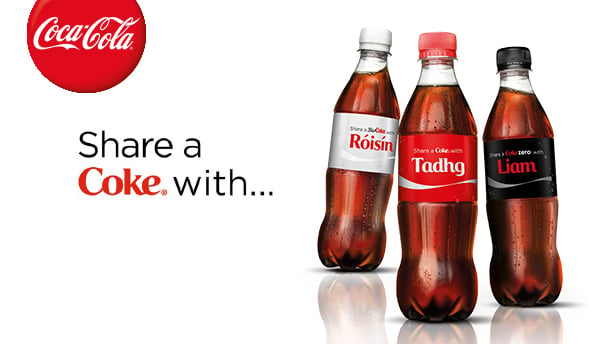
Coca-Cola® did an amazing job of this with their “Share a Coke” campaign by creating customized Coke® bottles with people’s names, which naturally was shared across social media platforms.
 Source
Here are some effective ways to drive UGC:
- Competitions, where customers enter to win by displaying your product in some way
- Review platforms, where customers share feedback about your product
- Social media hashtags, where users submit content using a branded hashtag
Build a Loyalty Program
A loyal customer is a long-term customer, and who doesn’t want repeat business? A loyalty program provides an incentive for a customer to continue doing business with you through relevant offers and discounts. While building a customer loyalty program takes some planning and work, it pays off in repeat business, UGC, referrals, and retention.
There are a couple of things to consider as an ecommerce business when building out a loyalty program. For one, consider diversifying the ways in which customers can show loyalty, whether it be through repeat purchases, mentions on social media, or sharing your content. Also, think about how you will pay off their loyalty, be it through points, discount codes, or exclusive perks.
Generate Word-of-Mouth Marketing (WOMM)
Word-of-mouth marketing is one of the most powerful marketing tools out here. It’s based on the premise that people want advice from others like them. As buyers becoming more skeptical of marketing tactics from companies, the need for word-of-mouth marketing in your business becomes more apparent.
While you can make this to happen organically by providing a great customer experience, you can also encourage, and even create, forms of WOMM that are equally as effective.
Reviews
Remember how I just said that prospects trust companies less and less? Well, customer reviews help mitigate that mistrust because they come from people who are not invested in the success of your company — instead, they’re an authentic and oftentimes brutally honest review of your product and how it worked out for them. Reviews serve as marketing tools for you because they include mentions of your product and oftentimes they do the selling for you … people think, “If it worked for them, it might work for me, too.” Encourage your customers to leave reviews however you can, and that post-purchase email we talked about above might be a good start.
Referral Marketing
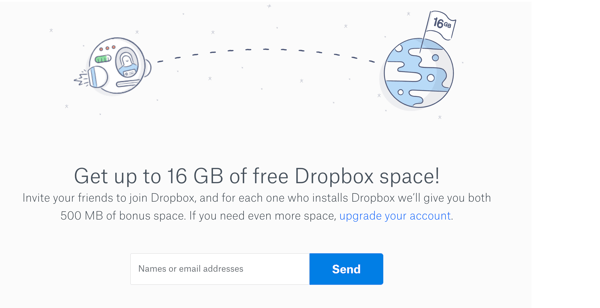
When customers solicit their friends, family members, and co-workers to buy from you, that is a referral. Sure, this may happen naturally if they really enjoy your product, but you can ensure that it happens more frequently through a referral program. Simply ask your customers to refer others in exchange for something of value (e.g. discount, money, free gift) that you can offer to either your new customer, your existing customer, or both. Dropbox does a good job of this — they offer additional cloud storage space when you refer a friend to sign up.
Testimonials
You can use customer testimonials to get the word out about how great your product is. Testimonials are essentially tailored reviews because you typically produce them from interviews where you can ask specific questions that get to the points you want to address and share with prospects. Being that you have an ecommerce store, some topics you might want to focus on for your testimonial interviews would be ease of the buying process, the level of customer support, and frictionless delivery and setup methods.
Case Studies
Case studies allow you to promote customers’ successes in a way that pushes prospects over the edge. They are meant to relate to your buyer persona, so you should interview customers that most closely represent your target audience. Case study best practice is to show a customer’s life before your product and how it has drastically improved since.
Invest in Live Chat
Chatbots — you’ve heard about them, right? Well, they’re one of two ways to employ a live chat strategy. Depending on your business size, you can have a live person available to chat with potential customers who visit your store. Whether you decide to go the bot or human route, live chat will prove especially effective while people are browsing your store so they can get answers right away and when they’re in the checkout process to mitigate any objections just before buying.
Cater to the Shopping Cart
We discussed the reasons why people abandon their shopping cart above, and a lot of it has to do with trust in your business, in the product, or in the delivery system. You want to give customers every reason to want to buy from you without hesitation by confronting their objections head on.
Some ways to mitigate shopping cart abandonment are:
- Money back guarantees
- A clear and simple return policy
- Superior delivery options
- Immediate access to customer support
Ecommerce Marketing Strategy
Now that you know the ins and outs of ecommerce marketing, let’s put it all together and talk about how to build a marketing plan for your online store.
Set goals based on industry benchmarks.
Depending on your industry, location, business size, and a multitude of other factors, there are some standards you can use to measure your goals against — those standards are industry benchmarks. Consider goals like website visits, click-through rates, conversion rates, and customer acquisition cost and compare those to other ecommerce business in your field.
Break down your strategy by small tactics.
When building out a marketing plan for your online store, there are several paths you could follow — we listed many of them above. It can be tempting to chase after every single one, but that’s a sure way to not be effective at any of them. We recommend that you focus on a couple key strategies first that you believe will have the most ROI — and are the most accessible to you — and create action items for each.
For example, say you decided that you wanted to focus on a paid strategy to drive users to your store. A few of your action items would be: set up a Google Ads account, determine your ad spend, create an ad group based on your target keywords, and monitor your account daily. This may sound oversimplified — that’s because it should be. You don’t want to get lost in chasing the next “great ecommerce strategy” without executing on one thoroughly and allowing it to work for you.
Remember Your Customer
Marketing doesn’t stop with a sale. Once someone becomes your customer, you should continue to engage them and nurture them. The benefits to you as a company are many: you’ll have successful customers that you can use for testimonials and case studies, you’ll receive glowing reviews about your product, and you’ll have the power of word-of-mouth marketing behind you as you turn customers into fans.
Ready, Set, Sell
Ecommerce businesses have several marketing tools at their disposal. Using digital and inbound marketing just the right way, you can create campaigns that are designed to help your online store attract customers and grow better.

The 11 Best Job Search Sites for Your Industry & Goals
We all know the usual suspects: Craigslist. Monster. Career Builder. Newspapers (half-kidding on that one).
Or perhaps you’re more of a networking kind of person when looking or hiring for a job: frequenting marketing events to get some face time with heavy hitters who might want you to join their teams. Marketers — or anyone — looking for work have probably spent time in all of these places at one time or another.
But like … what else? Those can’t be the only ways to find a new job. Or, if you’re looking to hire someone, to find your next great team addition. To paraphrase every infomercial ever, there’s gotta be a better way.

There is. The “better way” to hire and get hired is to get found in the places candidates and employers are looking for you. Kind of like inbound marketing — what a coincidence …
Below, you’ll find 11 places you might not have thought of, but often prove to be excellent marketing venues for finding job openings and the candidates to fill them.
Best Job Sites
- Mashable Jobs
- American Marketing Association (AMA)
- LinkedIn Jobs
- Job.com
- Talent Zoo
- Mediabistro
- Behance
- ProBlogger
- AngelList
- Your Own Web Properties
1. Mashable Jobs
Perfect for: Jobs sorted by employer
If you’re job hunting, there are several ways to browse current job openings from the dashboard shown above. To start, you can simply type keywords related to your job into the blue search bar. You can also search by employer (if you have your heart set on that one company you’ve always wanted to work for). If you’re an employer trying to expand a job opening’s reach, click that big pink rectangle in the top-righthand corner of the page.
Mashable’s job site is dedicated to jobs in social media, marketing, technology, and business. And they post for companies that are, well, kind of a big deal — like Yelp, Viacom, and Digitas.
2. American Marketing Association (AMA)
Perfect for: Marketing jobs
The AMA is a well-known and respected marketing association that publishes content and hosts networking and teaching events that keep members up to date on what’s going on in the world of marketing. The positions there range across many sub-specialties in marketing and across many different industries. Those looking to recruit candidates can also post jobs at a discounted rate if they’re an AMA member.
Another added benefit of the AMA jobs board? It also offers educational resources like resume writing tips, information about reference checking, and how to use social networking in your job or recruitment search.
3. LinkedIn Jobs
Perfect for: Jobs & candidates sorted by industry
Speaking of social networking … you didn’t think we’d neglect the holy grail of social recruiting and job hunting, did you? LinkedIn is unbelievable if you’re looking for a marketing job. Seriously, I can’t state it enough. It. Is. Awesome.
LinkedIn Jobs lets you search for jobs by industry and location, plus it suggests jobs you might be interested in based on the information in your LinkedIn profile, such as where you’re located and the experience you already have.
What’s great about applying for jobs through LinkedIn is that your resume’s already done — if you’ve completed your LinkedIn profile, that is. Let me explain what some of the greatest features are so you can leverage them now if you aren’t already:
Online Resume
If you haven’t already, fill out your LinkedIn profile as completely as you possibly can. They make it foolproof, too, including a progress bar that tells you how complete your profile is, what more you can do to beef it up, and why doing those things will benefit you.
Sanctioned Stalking
Don’t feel bad about stalking — it’s business stalking. For instance, LinkedIn has a groovy feature that lets you see who has been viewing your LinkedIn profile (provided your privacy settings are set so others can see when you’re viewing their profile).
Want to see exactly who’s been viewing your LinkedIn profile? LinkedIn Premium shows you exactly who might be interested in you as a professional. Whether they’re recruiters, HR managers, or work for a company you’ve been eyeing, this visibility enables you to reach out to them proactively.
Networking Events
If you’re one of those people who prefers face-to-face networking, you can also leverage a tool called LinkedIn Events. This allows you to see who on LinkedIn is attending industry events — if your hopeful future boss is going, it might be a good idea for you to show up, too.
Groups and Company Pages
If you’re vying for a specific company, follow that company on their LinkedIn Company Page. Not only will you be able to get a feel for what the people that work there are like and what their employee turnover and promotions looks like (just go to the ‘Insights’ tab), you might see new jobs pop up, too!
Or if you’re not looking to join one company in particular, consider joining some inbound marketing groups to establish your name as a thought leader — and get to know people who are hiring, or know people who are hiring. We recommend a little group called Inbound Marketers – For Marketing Professionals.
4. Twitter
Perfect for: Jobs & candidates sorted by industry
Career opportunities for marketers don’t end with LinkedIn. Believe it or not, Twitter is also a great way to find jobs (and people to fill them). And because most people won’t think to head to Twitter when they’re job hunting, it’s a way to stand out from other applicants. There’s a few tactics you can use here:
- Follow specific jobs Twitter accounts. Do a quick search for “inbound marketing jobs” or “marketing jobs” and you’ll come across tons of Twitter accounts whose sole job is to tweet out open roles in our fine industry.
- Follow specific jobs hashtags. You know what else you might find when you conduct that search? Hashtags associated with those jobs. Hashtags like #marketingjobs or #jobsearch are good places to periodically check in for recent opportunities.
- Follow the companies you want to work for, and the people who work there. Look for job postings that come from them, particularly if these companies have a referral bonus. At HubSpot, for instance, many employees take it upon themselves to tweet out new jobs because, if they bring in a new hire (even from Twitter), there’s a nice referral bonus at the end of the tunnel.
5. Job.com
Perfect for: Jobs & candidates sorted by qualifications
You’ve never seen something like job.com, I can assure you. This intriguing recruitment site uses blockchain technology to match candidates with employers based on the attributes both parties are endorsing.
Although it caters to professionals in every industry, job.com is a perfect fit for writers, optimizers, and analysts who leave no stone unturned when advertising themselves to a new employer or candidate. In other words, if you love optimizing your resume or job listing with specific language that appeals to professionals like you, you might want to give this site a try.
6. Talent Zoo
Perfect for: Marketing & advertising jobs

Doesn’t this job site sound like a recruiter’s dream? Talent Zoo does indeed have a zoo of talent — and job listings in need of that talent — specifically for marketers, advertisers, designers, and even web developers. In addition to a place to upload a resume for repeat use, the site has a slew of articles offering career advice to help employers and applicants put their best foot forward when reaching out (and, ultimately, working together).
Talent Zoo also takes a playful approach to its user experience — you need not look further than its search button, “Bring It, Daddy-O!” If you or your company culture is just as casual, posting to this site can ensure both parties would be a fit for each other on a social level.
7. Mediabistro
Perfect for: Marketing jobs & freelance candidates
Mediabistro has been around for a long while, and although it’s changed a lot as the internet has grown, it’s remained committed to an audience of marketers, content creators, and media professionals since day one. The site organizes its job listings across five navigation buttons to give you a sense of what opportunities to expect:
- Writing Jobs
- Editor Jobs
- Marketing Jobs
- Creative Jobs
- All Jobs
Not shy about its commitment to contract workers, Mediabistro also reserves a section of its website for freelance — accessible from the top navigation bar. There, you’ll see a database of freelancers across each of the industries listed above where you can find a professional that’s perfect for the work you need done. Are you a freelancer, yourself? Become a Mediabistro member and create a profile.
8. Behance
Perfect for: Design & creative jobs / Networking
You might associate Behance with downloadable design templates, creative tools, and collections of artwork. But where would Behance be if it didn’t also help find employment for the people who seek inspiration on its website? For that, there’s Behance’s job list, which surfaces job listings across dozens of industries that depend on creative professionals.
What really sets this job site apart from other creative recruitment platforms is its company profiles. Inside each job listing is a project page for the company that posted the job. The employer can list current projects they’re working on, who’s following them, and even their most active team members. It’s a great way to get to know companies and candidates as individuals so they don’t become just another application.
9. ProBlogger
Perfect for: Writing jobs
This job site tells you precisely what it is in its name. Want to be a professional blogger or find writers to create content for you? ProBlogger makes it easy for companies and candidates to find each other for various content marketing initiatives. Jobs are clearly sorted by contract, freelance, full-time, and part-time.
10. AngelList
Perfect for: Jobs at startups
It can be hard for startups to attract awesome talent on big recruitment sites like Indeed or even LinkedIn, especially when they’re competing against big brands for exposure. But there are millions of skilled professionals who want to work for startups but just can’t find them. That’s where AngelList comes in.
AngelList is a job site exclusively for startups and those who want to work for them to find each other. Growing companies like DuckDuckGo, a search engine; Asana, a productivity tool; and Hinge, a dating app, all find top-tier talent on this job site.
11. Your Own Web Properties
Perfect for: Personal branding
Why wait for someone else to post a job listing? Take matters into your own hands. Marketers can be notoriously bad at marketing themselves, but if you’re really good at marketing, why not use your skill to your own advantage?
If you want a new job, help yourself get found all on your own. Think of your job hunt as its own marketing campaign. In fact, we’ve had plenty of our own inbound marketing hires execute full-fledged inbound marketing campaigns to get the attention of recruiters, hiring managers, and even recruiters here at HubSpot.
So, if you’re not maintaining an online portfolio or a website that showcases you in all your [marketing] glory, hop to it. I can tell you firsthand that every new potential marketing hire that crosses my desk gets promptly Googled. What am I looking for? An active, up-to-date online presence that demonstrates their knowledge. That could mean they’re blogging for their current company, their own online portfolio, frequent activity on sites like LinkedIn and Quora, even a healthy Twitter following. All of these are indications that they “get it.”
No matter how hard a time you’re having finding a new gig on third-party sites, remember that you always have you to fall back on.
Click here for more job sites that are particularly helpful for recruiters, and sign up below to learn how to become your own best professional advocate.