
Lead Scoring 101: How to Use Data to Calculate a Basic Lead Score
When most people start implementing inbound marketing, they’re primarily worried about getting enough new leads in the funnel.
But once you have a lot of leads, you need to figure out who’s really interested in your product and who’s just starting to look around.
That’s where lead scoring comes in.
What Is Lead Scoring?
Lead scoring is the process of assigning values, often in the form of numerical “points,” to each lead you generate for the business. You can score your leads based on multiple attributes, including the professional information they’ve submitted to you and how they’ve engaged with your website and brand across the internet. This process helps sales and marketing teams prioritize leads, respond to them appropriately, and increase the rate at which those leads become customers.
Learn more about the concept of lead scoring in the video below.
Every company has a different model for assigning points to score their leads, but one of the most common ways is using data from past leads to create the value system.
How? First, you’ll take a look at your contacts who became customers to see what they have in common. Next, you’ll look at the attributes of your contacts who didn’t become customers. Once you’ve looked at the historical data from both sides, you can decide which attributes should be weighted heavily based on how likely they are to indicate someone’s a good fit for your product.

Lead scoring sounds easy, right? Depending on your business model and the leads in your database, this can quickly become complicated. To make this process a little easier on you, we’re going to walk you through the basics of creating a lead score, including what data you should look at, how to find the most important attributes, and the process for actually calculating a basic score.
Lead Scoring Models
Lead scoring models ensure the values you assign to each lead reflect the actual compatibility they have with your product. Many lead scores are based on a point range of 0 to 100, but every lead scoring model you create will support a particular attribute of your core customer.
Here are six different lead scoring models based on the type of data you can collect from the people who engage with your business:
1. Demographic Information
Are you only selling to people of a certain demographic, like parents of young children or CIOs? Ask demographic questions in the forms on your landing pages, and you can use your leads’ answers to see how well they fit in with your target audience.
One thing you can do with this information is remove outliers from your sales team’s queue by subtracting points for people who fall into a category you don’t sell to. For example, if you only sell to a certain geographic location, you might give a negative score to any lead who falls outside the proper city, state, zip code, country, and so on.
If some of your form fields are optional (like a phone number, for instance), then you also might award extra points to leads who provide that option information anyway.
2. Company Information
If you’re a B2B organization, are you more interested in selling to organizations of a certain size, type, or industry? Are you more interested in B2B organizations or B2C organizations? You can ask questions like these on your landing page forms, too, so you can give points to leads who fit in with your target audience and take points away from leads who aren’t at all what you’re looking for.
3. Online Behavior
How a lead interacts with your website can tell you a lot about how interested they are in buying from you. Take a look at your leads who eventually become customers: Which offers did they download? How many offers did they download? Which pages — and how many pages — did they visit on your site before becoming a customer?
Both the number and types of forms and pages are important. You might give higher lead scores to leads who visited high-value pages (like pricing pages) or filled out high-value forms (like a demo request). Similarly, you might give higher scores to leads who had 30 page views on your site, as opposed to three.
What about leads who have changed their behavior over time? If a lead has stopped visiting your website or downloading your offers, they may not be interested anymore. You might take points away from leads who’ve stopped engaging with your website after a certain period of time. How long — 10 days, 30 days, 90 days — depends on your typical sales cycle.
4. Email Engagement
If someone’s opted in to receive emails from your company, you’re not sure how interested that person is in buying from you. Open and clickthrough rates, on the other hand, will give you a much better idea of their interest level. Your sales team will want to know who opened every email in your lead nurturing series, or who always clicked through your offer promotion emails. That way, they can focus on the ones who seem most engaged. You might also give a higher lead score to leads who click through on high-value emails, like demo offers.
5. Social Engagement
How engaged a lead is with your brand on social networks can also give you an idea of how interested they are. How many times did they click through on your company’s tweets and Facebook posts? How many times did they retweet or share those posts? If your target buyers are active on social networks, then you might consider awarding points to leads with certain Klout scores or numbers of followers.
6. Spam Detection
Last but not least, you might want to give negative scores to leads who filled out landing page forms in ways that could indicate they’re spam. For example, were first name, last name, and/or company name not capitalized? Did the lead complete any form fields by typing four or more letters in the traditional “QWERTY” keyword side-by-side?
You might also want to think about which types of email addresses leads are using compared with the email addresses of your customer base. If you’re selling to businesses, for example, you might take points away from leads who use a Gmail or Yahoo! email address.
How Do You Know What Matters Most?
That’s a lot of data to weed through — how do you know which data matters most? Should you find out from your sales team? Should you interview your customers? Should you dive into your analytics and run a few reports?
Actually, we recommend a combination of all three. Your sales team, your customers, and your analytics reports will all help you piece together what content is most valuable for converting leads into customers, which will help you attach certain points to certain offers, emails, and so on.
Talk to your sales team.
Sales reps are the ones on the ground, communicating directly with both leads who turned into customers and those who didn’t. They tend to have a pretty good idea of which pieces of marketing material helps encourage conversion.
Which blog posts and offers do your sales reps like to send leads? You might find some of them telling you, “Every time I send people this certain piece of collateral, it’s easier to close them.” This is valuable information. Find out what those pieces of collateral are, and assign points accordingly.
Talk to your customers.
While your sales team might claim certain content converts customers, you might find that the people who actually went through the sales process have different opinions. That’s okay: You want to hear it from both sides.
Conduct a few customer interviews to learn what they think was responsible for their decision to buy from you. Be sure you’re interviewing customers who had both short and long sales cycles so you get diverse perspectives.
Turn to the analytics.
You should also complement all this in-person research with hard data from your marketing analytics.
Run an attribution report to figure out which marketing efforts lead to conversions throughout the funnel. Don’t only look at the content that converts leads to customers — what about the content people view before they become a lead? You might award a certain number of points to people who download content that’s historically converted people into leads, and a higher number of points to people who download content that’s historically converted people into customers. (HubSpot customers: Click here to learn more about running attribution reports in HubSpot.)
Another way to help you piece together valuable pieces of content on your site is to run a contacts report. A contacts report will show you how many contacts — and how much revenue — has been generated as a result of certain, specific marketing activities. Marketing activities might include certain offer downloads, email campaign clickthroughs, and so on. Take note of which activities tend to be first-touch conversions, last-touch conversions, and so on, and assign points accordingly. (HubSpot customers: Click here to learn more about creating a contacts report in HubSpot.)
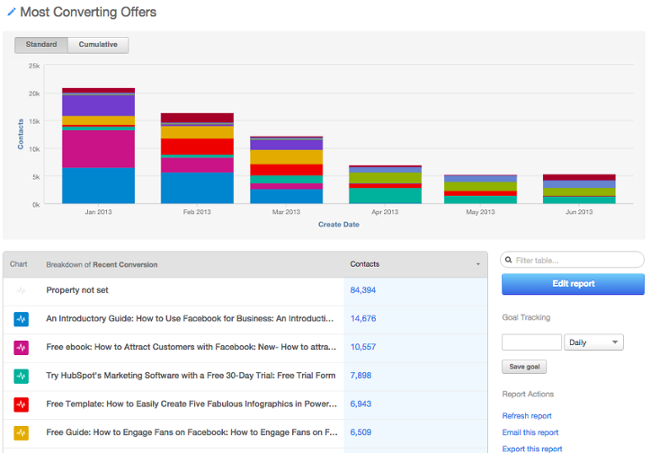
Image Credit: HubSpot’s Academy Blog
Is One Lead Score Enough?
If you have one core customer right now, a single score suffices. But as your company scales, you’ll sell to new audiences. You might expand into new product lines, new regions, or new personas. You might even focus more on up-selling and cross-selling to existing customers, rather than pursuing new ones. If your contacts aren’t “one size fits all,” your scoring system shouldn’t be either.
With some marketing platforms, you can create multiple lead-scoring systems, giving you the flexibility to qualify different sets of contacts in different ways. Not sure how to set up more than one score? Here are a few examples to inspire you:
Fit vs. Interest
Let’s say, for instance, your sales team wants to evaluate customers on both fit (i.e. is a contact in the right region? The right industry? The right role?) and interest level (e.g. how engaged have they been with your online content?). If both of these attributes are a priority, you can create both an engagement score and a fit score, so that you can prioritize outreach to contacts whose values are high in both categories.
Multiple Personas
Say you’re a software company that sells two different types of software, via different sales teams, to different types of buyers. You could create two different lead scores — one for a buyer’s fit and the other for their interest in each tool. The, you’d use these respective scores to route leads to the right sales teams.
New Business vs. Up-sell
As you grow, you might start to focus on up-sell or cross-sell as much as new business. But keep in mind the signals that indicate quality of new prospects and existing customers often look completely different.
For prospects, you might look at demographics and website engagement, whereas for existing customers, you might look at how many customer support tickets they’ve submitted, their engagement with an onboarding consultant, and how active they currently are with your products. If these buying signals look different for different types of sales, consider creating multiple lead scores.
(Note: HubSpot recently launched the ability to create up to twenty-five scores. Read more on HubSpot lead scoring here.)
How to Calculate a Basic Lead Score
There are many different ways to calculate a lead score. The simplest way to do it is this:
Manual Lead Scoring
1. Calculate the lead-to-customer conversion rate of all of your leads.
Your lead-to-customer conversion rate is equal to the number of new customers you acquire, divided by the number of leads you generate. Use this conversion rate as your benchmark.
2. Pick and choose different attributes customers who you believe were higher quality leads.
Attributes could be customers who requested a free trial at some point, or customers in the finance industry, or customers with 10-20 employees.
There’s a certain kind of art to choosing which attributes to include in your model. You’ll choose attributes based on those conversations you had with your sales team, your analytics, and so on — but overall, it’s a judgment call. You could have five different people do the same exercise, and they could come up with five different models. But that’s okay as long as your scoring is based on the data we mentioned previously.
3. Calculate the individual close rates of each of those attributes.
Calculating the close rates of each type of action a person takes on your website — or the type of person taking that action — is important because it dictates the actions you’ll take in response.
So, figure out how many people become qualified leads (and ultimately, customers) based on the actions they take or who they are in relation to your core customer. You’ll use these close rates to actually “score” them in the step below.
4. Compare the close rates of each attribute with your overall close rate, and assign point values accordingly.
Look for the attributes with close rates that are significantly higher than your overall close rate. Then, choose which attributes you’ll assign points to, and if so, how many points. Base the point values of each attribute on the magnitude of their individual close rates.
The actual point values will be a little arbitrary, but try to be as consistent as possible. For example, if your overall close rate is 1% and your “requested demo” close rate is 20%, then the close rate of the “requested demo” attribute is 20X your overall close rate — so you could, for example, award 20 points to leads with those attributes.
Logistic Regression Lead Scoring
The simple method, above, for calculating a lead score is a great start. However, the most mathematically sound method is one that employs a data mining technique, such as logistic regression.
Data mining techniques are more complex, and often more intuitive to your actual close rates as a result. Logistic regression involves building a formula in Excel that’ll spit out the probability that a lead will close into a customer. It’s more accurate than the technique we’ve outlined above since it’s a holistic approach that takes into account how all of the customer attributes — like industry, company size, and whether or not someone requested a trial — interact with one another.
If you’d like to explore logistic regression in Excel, check out this resource. In the meantime, the manual approach above this section is a great way to get started.
Predictive Lead Scoring
Creating a lead score can do great things for your business: improve the lead-handoff process, increase lead conversion rate, improve rep productivity, and more. But, as you can see from the two methods above, coming up with a scoring system can be a time-consuming task when done manually.
Plus, coming up with scoring criteria isn’t “set it and forget it.” As you get feedback from your team and stress-test your scores, you’ll need to tweak your lead-scoring system on a regular basis to ensure it remains accurate. Wouldn’t it be easier if technology could take the manual setup and continuous tweaking out, leaving your team more time to build relationships with your customers?
That’s where predictive scoring comes in. Predictive scoring uses machine learning to parse through thousands of data points in order to identify your best leads, so you don’t have to. Predictive scoring looks at what information your customers have in common, as well as what information the leads that didn’t close have in common, and comes up with a formula that sorts your contacts by importance based on their potential to become customers. This allows you and your sales team to prioritize leads so you’re not harassing those who aren’t (yet) interested and engaging those who are.
The best part about predictive scoring? As with any application of machine learning, your predictive score gets smarter over time, so your lead follow-up strategy will optimize itself.
Want to find out more about predictive scoring? Learn about this automated process here.


15 Inspiring Storytelling Quotes to Help You Move an Audience
There’s an old saying you might have seen floating around the internet that states, “Those who tell the stories rule the world”.
Even without the modern neurological research that proves storytelling is the best way to capture people’s attention, bake information into their memories, and forge close, personal bonds, humanity has always inherently known that people crave and seek out great stories almost as much as food and water. And the people (and brands) who can tell the most compelling stories are able to command the most influence within their community.
In the marketing industry, where 5% of branded content attracts 90% of total engagement, the need for storytelling is more pressing than ever before. Brands are creating content at a record pace and volume, but producing more content doesn’t necessarily mean it’s attracting more attention — it’s really just making more noise.
If brands actually want to slash through the clutter and engage an audience, solely focusing on listicles and ultimate guides won’t suffice anymore — they must also tell gripping stories.
To help you channel your inner storyteller, we’ve curated 15 quotes about storytelling from some of the world’s most insightful authors and filmmakers. Read on to get inspired.
Storytelling Quotes
- “No story lives unless someone wants to listen. The stories we love best do live in us forever. So whether you come back by page or by the big screen, Hogwarts will always be there to welcome you home.” – J.K. Rowling, author
- “There is no friend as loyal as a book” – Ernest Hemingway, author
- “I’m obsessed with giving the audience something they don’t see coming.” – Jordan Peele, writer and director of Get Out
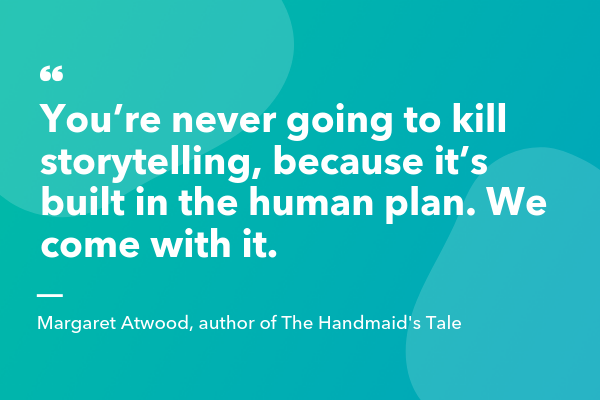
- “You’re never going to kill storytelling, because it’s built in the human plan. We come with it.” – Margaret Atwood, author of The Handmaid’s Tale
- “The most amazing thing for me is that every single person who sees a movie, not necessarily one of my movies, brings a whole set of unique experiences, but through careful manipulation and good storytelling, you can get everybody to clap at the same time, to hopefully laugh at the same time, and to be afraid at the same time.” – Steven Spielberg, filmmaker
- “I’m writing my story so that others might see fragments of themselves.” – Lena Waithe, screenwriter for Bones and Master of None
- “I’ll tell you a secret. Old storytellers never die. They disappear into their own story.” – Vera Nazarian, author
- “The very reason I write is so that I might not sleepwalk through my entire life.” – Zadie Smith, author
- “Many stories matter. Stories have been used to dispossess and to malign. But stories can also be used to empower, and to humanize. Stories can break the dignity of a people. But stories can also repair that broken dignity.” – Chimamanda Ngozi Adichie, author
- “Think about the word destroy. Do you know what it is? De-story. Destroy. Destory. You see. And restore. That’s re-story. Do you know that only two things have been proven to help survivors of the Holocaust? Massage is one. Telling their story is another. Being touched and touching. Telling your story is touching. It sets you free.” – Francesca Lia Block, author
- “We are, as a species, addicted to story. Even when the body goes to sleep, the mind stays up all night, telling itself stories.” – Jonathan Gottschall, The Storytelling Animal
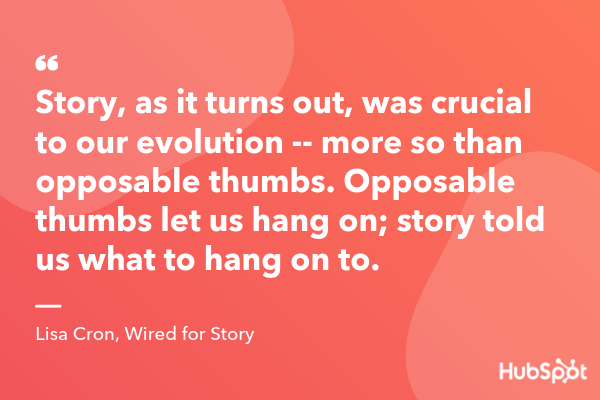
- “Story, as it turns out, was crucial to our evolution — more so than opposable thumbs. Opposable thumbs let us hang on; story told us what to hang on to.” – Lisa Cron, Wired for Story
- “Good stories surprise us. They make us think and feel. They stick in our minds and help us remember ideas and concepts in a way that a PowerPoint crammed with bar graphs never can.” – Joe Lazauskas and Shane Snow, The Storytelling Edge
- “Whether you know it or not, your desire to write comes from the urge to not just be “creative,” it’s a need (one every human being on earth has) to help others. A well-told Story is a gift to the reader/listener/viewer because it teaches them how to confront their own discomforts.” – Shawn Coyne, The Story Grid
- “Create those things where human protagonists relate to us, where the stakes and conflict grip us, and where the emotions move us. Craft those simple things, those glorious things, those things so often forgotten but so desperately needed. There’s no hidden or corporate meaning behind the word ‘story.’ We know what they are. And we need to start telling them.” – Jay Acunzo, founder of Unthinkable Media
15 Inspiring Storytelling Quotes to Help You Move an Audience
1. “No story lives unless someone wants to listen. The stories we love best do live in us forever. So whether you come back by page or by the big screen, Hogwarts will always be there to welcome you home.” – J.K. Rowling, author
2. “There is no friend as loyal as a book” – Ernest Hemingway, author
3. “I’m obsessed with giving the audience something they don’t see coming.” – Jordan Peele, writer and director of Get Out
4. “You’re never going to kill storytelling, because it’s built in the human plan. We come with it.” – Margaret Atwood, author of The Handmaid’s Tale
5. “The most amazing thing for me is that every single person who sees a movie, not necessarily one of my movies, brings a whole set of unique experiences, but through careful manipulation and good storytelling, you can get everybody to clap at the same time, to hopefully laugh at the same time, and to be afraid at the same time.” – Steven Spielberg, filmmaker
6. “I’m writing my story so that others might see fragments of themselves.” – Lena Waithe, screenwriter for Bones and Master of None
7. “I’ll tell you a secret. Old storytellers never die. They disappear into their own story.” – Vera Nazarian, author
8. “The very reason I write is so that I might not sleepwalk through my entire life.” – Zadie Smith, author
 9. “Many stories matter. Stories have been used to dispossess and to malign. But stories can also be used to empower, and to humanize. Stories can break the dignity of a people. But stories can also repair that broken dignity.” – Chimamanda Ngozi Adichie, author
10. “Think about the word destroy. Do you know what it is? De-story. Destroy. Destory. You see. And restore. That’s re-story. Do you know that only two things have been proven to help survivors of the Holocaust? Massage is one. Telling their story is another. Being touched and touching. Telling your story is touching. It sets you free.” – Francesca Lia Block, author
11. “We are, as a species, addicted to story. Even when the body goes to sleep, the mind stays up all night, telling itself stories.” – Jonathan Gottschall, The Storytelling Animal
12. “Story, as it turns out, was crucial to our evolution — more so than opposable thumbs. Opposable thumbs let us hang on; story told us what to hang on to.” – Lisa Cron, Wired for Story
13. “Good stories surprise us. They make us think and feel. They stick in our minds and help us remember ideas and concepts in a way that a PowerPoint crammed with bar graphs never can.” – Joe Lazauskas and Shane Snow, The Storytelling Edge
14. “Whether you know it or not, your desire to write comes from the urge to not just be “creative,” it’s a need (one every human being on earth has) to help others. A well-told Story is a gift to the reader/listener/viewer because it teaches them how to confront their own discomforts.” – Shawn Coyne, The Story Grid
15. “Create those things where human protagonists relate to us, where the stakes and conflict grip us, and where the emotions move us. Craft those simple things, those glorious things, those things so often forgotten but so desperately needed. There’s no hidden or corporate meaning behind the word ‘story.’ We know what they are. And we need to start telling them.” – Jay Acunzo, founder of Unthinkable Media

The 33 Best Free Fonts Designers Should Download
Finding stylish fonts for your design projects can be a major time sink — especially when you have to wade through seemingly endless pages of typefaces that don’t suit the vision you have in your head.
Finding a free font can be even more of a hassle.
So what’s a budget-strapped designer to do?
We’ve scoured the depths of the internet so you don’t have to, coming up with 33 of the best free fonts you deserve to have on your computer. Here’s how we sorted them:
- Free Script Fonts
- Free Serif Fonts
- Free Modern/Sans-Serif Fonts
- Good Fonts for Logos
- Free Retro Fonts

Many of the free fonts featured here were developed by designers, for designers, so they understand the need for versatile, polished, free typefaces firsthand. Check out the fonts below and keep them in mind for your next design project.
Best Free Fonts for Designers
- Hello Stockholm — script font
- Wildera Regular — script font
- Mightype — script font
- Selima — script font
- Oranienbaum Regular — serif font
- Butler — serif font
- Arctic — serif font
- Canvas — serif font
- Bitter ht — serif font
- Agne Regular — serif font
- Yeseva One Regular — serif font
- Moon — modern font
- Kolikö — modern font
- Mohave — modern font
- 20 db
- Alcubierre Regular — modern font
- Bourbon Grotesque — modern font
- Frontage Outline — modern font
- Arciform Sans Regular — modern font
- De La Fuente — modern font
- Westfalia — font for logos
- Atami — font for logos
- Anders — font for logos
- Westmeath — font for logos
- Modeno — font for logos
- Rezland — font for logos
- Polya — font for logos
- Horizon — retro font
- Sweet Sensations — retro font
- ITC Bauhaus — retro font
- Bobbers — retro font
- FF Blur — retro font
- Canterbury — retro font
Free Script Fonts
1. Hello Stockholm
What happens when you combine Scandinavian minimalism with classic brushstrokes? You get Hello Stockholm, a casual script that plays well with sans-serif fonts.

2. Wildera Regular
We think this whimsical, light-weight script would look right at home in a fairy tale (or in your next project).

3. Mightype
Subtle hand-drawn details set this script apart from the pack. Mightype is sophisticated without being stuffy.

4. Selima
Selima’s breezy brushstrokes are perfect proof that script typefaces don’t have to look old-fashioned or uptight — they can be casual and modern.

Free Serif Fonts
5. Oranienbaum Regular
From small print to bold headlines, multi-tasking Oranienbaum is up to the challenge.

6. Butler
A decidedly modern serif typeface, Butler comes in 14 different weights to suit a wide variety of different uses.

7. Arctic
If you’re looking for a slab serif font with a modern edge, give Arctic a try. It’s a great way to give your headlines some character.

8. Canvas
Canvas offers a modest but professional typeface that manipulates the thickness in the details of each letter. If you’re looking for formality and creativity in the same font, this one takes the cake.

9. Bitter ht
We love the versatility of Bitter ht, a contemporary serif typeface that looks stylish at any size or weight.

10. Agne Regular
With bold lines and contrasting stems, this elegant font is a fresh take on old-fashioned serif typefaces.

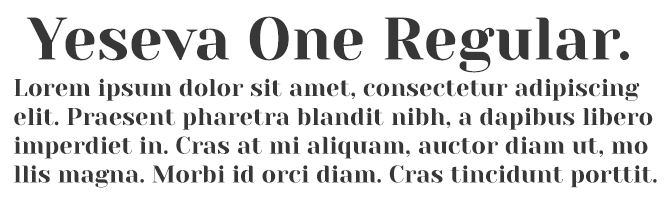
11. Yeseva One Regular
If you’re concerned that serif typefaces come across as too uptight or formal, consider Yeseva, a laid-back option for headlines and subtitles.
Free Modern Fonts
12. Moon
Have you exhausted your library of simple and free sans-serif typefaces? Add Moon to the mix. We love this font’s clean simplicity and round edges.

13. Kolikö
This bold font evokes a sense of mystery to any creative work. Or, if you just want to geek out about something on your new tech blog, we can totally see this font playing a part.

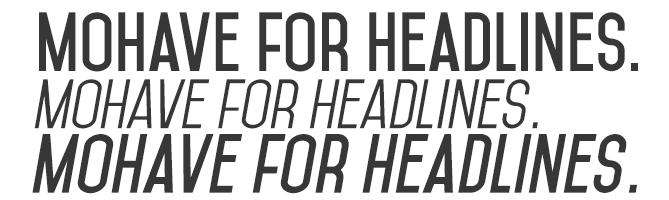
14. Mohave
This all-caps font was designed with bold headlines and big type settings in mind.
15. 20 db
The font below is simply timeless. Whether you’re designing for an event advertisement or the headers of your blog, 20 db is confidence in written form.

16. Alcubierre Regular
Clean, minimal, and geometric, Alcubierre is well-suited to projects that require subtle headlines and a clear focus on the content.

17. Bourbon Grotesque
Inspired by — you guessed it — classic bourbon labels, this sans-serif has a big personality that demands attention.

18. Frontage Outline
Frontage Outline is reminiscent of handcrafted facade signs, making it a suitable pick for logotypes.

19. Arciform Sans Regular
Arciform might be simple, but this sleek sans-serif is far from boring. Consider including this easy-to-read typeface in your next web design project.

20. De La Fuente
This cool typeface is decorative without being over-the-top, making it ideal for headlines, logotypes, and other design projects that focus primarily on the text.

Good Fonts for Logos
21. Westfalia
Give your next project an outdoorsy, authentic feel with this hand-painted brush sans, which makes for a playful logo as well.

22. Atami
Atami’s numerous weights and display options make it the Swiss Army Knife of modern sans-serifs — it can really do it all for a rising brand.

23. Anders
Anders just might be the avant-garde font of your dreams. It’s unique geometric lines make it an excellent choice for logotypes.

24. Westmeath
Westmeath adds a dose of swagger to an otherwise basic font, making a logo that uses this font both legible and stylish.

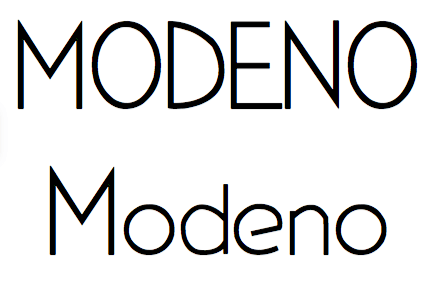
25. Modeno
The Modeno font is consistent with the thin designs that many contemporary artists have gravitated to over the last few years. But don’t mistake this one for just any new-wave typeface — its lanky quality is hard to come by in today’s sans-serif options.
26. Rezland
Rezland is just plain cool. It almost doesn’t have time for you … that’s just how cool this font choice is.

27. Polya
Polya is perhaps the most interesting font we could find. The webbing of each letter makes for a truly mesmerizing logo.

Free Retro Fonts
28. Horizon
Horizon is a simple but retro font that elicits images of an old outer space movie. And yet, it still holds up.

29. Sweet Sensations

30. ITC Bauhaus
Similar to Horizon, ITC Bauhaus has a rounded, retro look that comes in numerous thicknesses. Thicker versions look like the header of an old playbill, while thinner styles give off a jazzy vibe.

31. Bobbers
Bobbers is a script font that has the goofy and over-the-top qualities of an old sitcom. Bring it back from the 1970s in your next design project for a truly confident header.

32. FF Blur
The haunting glow of FF Blur reminds us of an old horror movie. But it might be just soft enough to intrigue the audience of your next project.

33. Canterbury
No list of old-fashioned fonts is complete without the old-English stylings of Canterbury. Emulate many of today’s most famous newspaper logos with this traditional typeface.

We hope you find these fonts helpful — but because they are offered by other parties on their sites, we can’t make any guarantees or promises about them (like that they will be available or free to use).
Also, we want to mention that the designers who offer these fonts might have rules about how you can or can’t use them, so there might be limitations that are applicable to use of the font.
Want more font tips? Check out this tip for identifying the name of a font.



5 Link Shorteners to Try Besides Google URL Shortener
Trying to convince people to click on a long, jumbled link is almost as bad as a door-to-door salesman trying to sell people financial services. Needless to say, if your audience sees a link they perceive to be spammy in one of your social media posts, they’ll do the digital equivalent of slamming the door in your face — scroll past it
To avoid being perceived as spammy or sloppy when you have a legitimate link to share, check out our list of the five best link shorteners that’ll clip your links into clean, consistent, and clickable URLs.
URL Shortener
URL shorteners not only trim your links into polished URLs, but they also let you track the performance of your individual links. Some URL shorteners even offer branded link options. For example, a branded link for this blog post would look something like “hubs.ly/url-shorterner”.
What are the benefits of using link shorteners?
Using link shorteners can benefit your brand in three main ways:
1. When you post long links on social media, it can look like spam or deter users from clicking on something they don’t recognize. In particular, adding tracking parameters to your links can result in URLs that look long and confusing to someone who’s unfamiliar with typical link tracking practices. Link shorteners can prune spammy-looking links into clear and concise links.
2. Many link shorteners also let you track each of your link’s performance and analytics, which can help you understand which pieces of content perform best on specific platforms.
3. Every social media network limits the amount of characters you can include in your posts. Twitter and LinkedIn have the shortest character limits at 280 and 600 characters, respectively, so if you need to squeeze a link or an extra hashtag in one of your posts, link shorteners can help you stay within the limit.
5 of the Best Link Shorteners Besides Google URL Shortener
1. Bit.ly
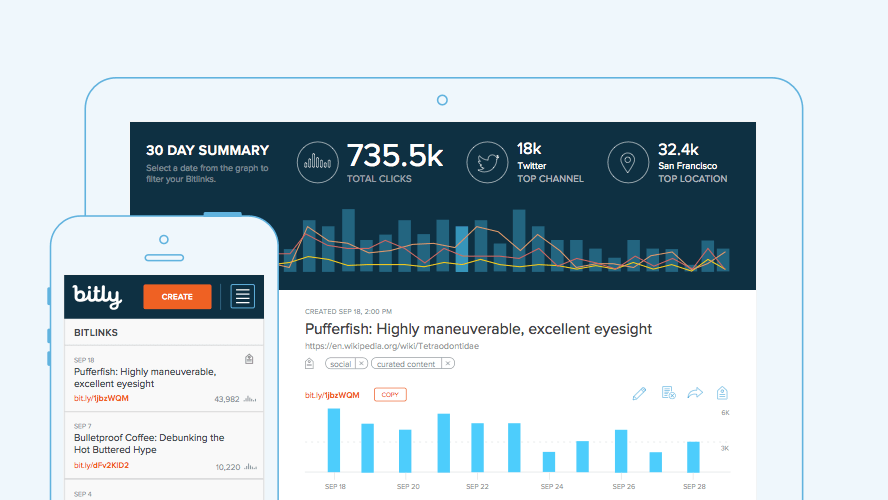
Image Credit: Rewind & Capture
Bit.ly is a link shortener platform that features a comprehensive dashboard that displays your links’ performance metrics, such as click-through rates, channel stats, and geographic information of the people clicking on your links. They also offer branded links and have integrations with social media management software, like Sprinklr, Sprout Social, Buffer, Hootsuite, and HubSpot to help you seamlessly distribute your shortened links through your social media profiles.
Bit.ly’s free account offers up to 500 branded links, 10,000 unbranded links, and reporting data about your top referrers, which is ideal for small businesses. Their enterprise plan lets you brand as many links as you’d like and provides all the data and metrics mentioned above, which is best for large businesses who want to brand and track every link in their marketing campaigns.
2. Bl.ink

Image Credit: Bl.ink
As one of the more robust link shorteners out there, Bl.ink offers smart branded links that allow you to create custom links that contain relevant words and not just a random string of characters. They also provide analytic reports that can track clicks by date, time, language, referrers, device, and location and integrate with web analytic tools like Google Analytics, Adobe, and others.
Bl.ink offers four subscriptions tiers: a free plan, a plan for individuals and small teams with up to 15 users, a plan for teams and businesses with up to 50 users, and a plan for large organizations with over 50 users. Starting at $12 per month, they price their plans based off the amount of links you’d like create and track. For example, free users can create up to 1,000 links and track up to 1,000 clicks per link. After that, you’ll pay according to how many links you create and track.
3. Rebrand.ly

Image Credit: Rebrand.ly
Trusted by over 250,000 customers, Rebrand.ly is a link shortener platform that can brand your links, track their performance metrics, or integrate with over 50 other platforms to seamlessly distribute your links.
With two plans for individuals and two plans for teams, Rebrand.ly offers link shortening solutions for both small business and enterprise companies. For instance, their starter plan offers 50,000 tracked clicks, 5,000 branded links, and 5 custom domain names for $29 per month, while their premium plan offers 2,000,000 tracked clicks, 200,000 branded links, and 20 custom domain names for $449 per month.
4. Ow.ly

Image Credit: TutorialDeep
Developed by the social media management platform, Hootsuite, Ow.ly is a link shortener that’s included in every free Hootsuite account. With Ow.ly, you can distribute your links and track their performance metrics directly in the Hootsuite platform, which allows you to shorten every single link you post to all your social media profiles. Ow.ly is best for anyone who already uses Hootsuite as their social media management platform.
5. Buff.ly

Image Credit: Buffer
Similar to Hootsuite’s link shortener tool, Buff.ly is integrated in Buffer, another social media management platform. With Buff.ly, you can shorten your links, customize them, distribute them to all your social media profiles, and track their performance metrics right in the Buffer platform. Buff.ly is perfect for anyone who uses Buffer as their social media management platform.

The Ultimate Guide to Human Resources
When I initially applied for my role at HubSpot, I was immediately blown away by the hiring manager I was working with. She was professional, incredibly informative, and experienced. She had the answer to every question I had about the company, the role I was being interviewed for, and HubSpot’s culture.
From the first point of contact with this HubSpot employee and throughout my onboarding process, she was the prime example of what I believed a person in human resources should be. Even now, she checks in with me to ask how I’m doing and how my job is going when I see her around the office.
Remarkable Human Resources (HR) employees are critical at every company. They handle all employee relations so you can focus on your side of the business. Before we discuss more reasons why your company needs an impactful HR department and how you can go about building one, let’s talk more about what human resources actually means.
Based on this definition alone, you can see how it would be difficult to run your operation successfully without the assistance HR provides. That’s why even small and medium-sized businesses (SMBs) have HR departments with employees who oversee all management, engagement, and development between the company and its employees. HR departments exist to support you and your employees so you can continue doing your jobs successfully.
The work and responsibilities of a human resources employee will touch a large portion of your business every day. So what does that mean for you? Let’s review some of the most common responsibilities these employees have so you can better understand the impact HR will have on your company.
Handle employee relations
HR handles the employee-to-employee relationships as well as the employee-to-company relationship. This means they work to develop positive interactions and treatment among all employees within your company so they feel good about coming to work, committed to their jobs, and invested in the growth of the business. Whether it’s a personal matter or a work-related issue, human resources will handle all issues with care and keep the best interest of the both your company and employee in mind.
Create an employment structure
Your HR department will handle your entire staffing plan — meaning they’ll identify the gaps in your current employee structure and fill them by acquiring new talent. They’re also in charge of firing any existing talent that isn’t meeting company standards. Your company’s HR team will ensure you have the right people to help you grow your business.
Manage employee job satisfaction
Once your employees have begun work, you’ll want to make sure they’re excited to come to the office every day and add value to your company — their excitement is directly related to their level of job satisfaction. If your employees are happy in their roles, feel as though they can grow at your company, and can change departments down the road if they choose to, they’re more likely to be productive members of the team. Your HR team ensures your employees really do feel satisfied in their roles, and will work with them if they feel unhappy or unsatisfied at any point in time.
Manage employee benefits
Your HR department will handle the amount and type of employee benefits your company offers. Providing good employee benefits is critical to the success of your business because they’re proven to attract and retain talent as well as increase employee productivity. Benefits keep employees satisfied by giving them a variety of perks and and making them feel secure in their roles.
Handle compensation
All payroll and compensation work is managed by HR — this includes employee salaries, payment schedules, W2s, and all other tax-related paperwork. If an employee is offered a promotion, or if employees are given bonuses, HR will handle all changes in their regular payment schedules.
Maintain the company business plan
Your HR department will help you create, distribute, and maintain your company’s business plan — this serves as an overview of your company’s organizational structure. It covers your company’s philosophy and culture code, the way in which you manage your employees, and how you’ll distribute your resources.
Handle new hire training
When an employee is hired, HR will often take them through the necessary training they need prior to diving into their everyday tasks. Whether it’s one day or six weeks, new hire training is critical to making that person feel comfortable in their new role. It’s also a great way to set expectations early on and get them prepared so they can begin making an impact as quickly as possible.
Create company culture standards
HR is in charge of helping you create and maintain your company culture — this includes your philosophy, mission statement, and work environment. It also includes your company’s ethical standards, values, goals, and expectations. HR may implement programming, activities, check-ins, or events at your office so your employees can learn and develop a better understanding of the culture.
Maintain a healthy work environment
Your HR team will assist you in creating a healthy and safe work environment for all employees. Their role in this includes setting health and safety standards in the office, communicating these standards to all employees, and upholding them as the business grows. These health and safety standards should be written so they can be easily referenced at any point in someone’s time at your company.
Handle necessary administrative work
A lot of your company’s administrative work is handled by HR. This includes paperwork related to federal and state tax laws, job applications, time-keeping and payroll information, and employee contracts.
We’ve put together a list of 10 steps — not listed in any specific order — you should take to build a successful HR department. Whether you begin working through this list with or without your company’s first (or first few) human resources employee(s), all 10 items on this list should be thoughtfully considered.
1. Create a company-wide staffing plan
Create a company-wide staffing plan so you can identify all positions you’ll need to fill with your new hires. This may also include moving current employees into new roles or even removing employees and/ or their roles entirely from the company.
2. Set an HR budget
You’ll need a budget for your human resources department — this will cover the costs of building the department and hiring your HR team. The budget will also go to company-wide programming, and culture and team building activities HR may organize.
3. Make a payroll and compensation system
You’ll need to ensure you have payroll and compensation plans in place for all types and levels of employees. Your employees are going to want to know how, when, and the frequency in which they’re going to be paid the moment they receive their job offer. You’ll also need this information to determine salary ranges for all of your employees.
4. Write job descriptions
Job descriptions posted on your website and job sites such as LinkedIn and Glassdoor are how you’ll attract applicants. You’ll want to create job descriptions for all of the HR roles you need to hire for. Then, as you fill some of these HR openings, those new hires should be able to assist you in creating all other job descriptions for your growing company.
5. Lay out a clear benefits plans
A clear and thorough benefits plan is crucial when trying to attract and retain talent. You’ll want to lay out all of the benefits you offer to your new hires so they can feel good about their decision to join your team as well as secure and supported in their roles.
6. Create an employee handbook
An employee handbook (whether it’s print or digital) is a great way to set clear expectations from day one about workplace behavior, safety, health, and culture. Your handbook should include answers to all the questions your employees may have about these topics — and any others you see fit — as they go through training and begin work at your company.
7. Set safety procedures
Your employees are most likely in the office for approximately eight hours per day — meaning it needs to be a healthy and safe place for them to spend large amounts of time. If one of your employees ever felt unsafe or at risk of mental or physical harm at the office, it’d be very difficult to expect them to be a productive worker.
To avoid this, you should set workplace health and safety standards, which you may choose to include in your employee handbook. State your safety procedures for different types of personal altercations as well as procedures for emergencies and other potential unexpected or dangerous situations so everyone can handle them appropriately.
8. Collect administrative records
Although you may have an executive assistant who collects and organizes a lot of your company’s administrative records, there’s also plenty of documentation that should be collected, organized, and managed separately by your HR department. Some of these items may include job applications, benefit plans, tax documents, and compensation and payroll details.
9. Display necessary employment posters
There are state and federal laws that require companies and their HR teams to hang specific employment posters around their offices so they’re visible to everyone who enters the space. Some of these required posters change over time, so be sure to keep up with the laws and requirements of your state and country.
10. Create performance and feedback processes
Employee success and satisfaction are major components of a prosperous company — without these two things, it’d be difficult to retain your best talent. You’ll want to create company-wide performance and feedback processes to ensure everyone is held to a specific standard that you and your HR team set and maintain.
Employee performance evaluations should be held to ensure all employees are working up to their full potential. This time should also be spent making sure your employees are satisfied with their jobs, feel as though they can grow with your company, and enjoy being a member of your team.
What to Look For in an HR Candidate
Now that you have a better understanding of HR’s responsibilities and how you can start building your own department, let’s review the some of the things you should try to identify in potential HR candidates, including education type and work experience.
Human Resources Candidate Education and Background
It’s no secret that a lot of people often “fall” into the human resources field. By this I mean a lot of people who end up in the field don’t necessarily go into their undergraduate education thinking they want a career in HR. If this is the case for some of your HR applicants, there are a few indicators that you’ve found a great candidate despite their educational background.
- HR certifications, such as the Society for Human Resource Management (SHRM) certification or one of the various others offered by the HR Certification Institute.
- Great work ethic, personality and ability to be strategic. It’s key to find a candidate that will represent your company well and has the adaptability to grow into their role. If you see promise, you might also provide this type of candidate with the opportunity to earn a certification and/or postgraduate education in the field as they begin work at your company.
If you’re considering slightly more experienced candidates for your HR department, here are some indicators to look for:
- Bachelor’s degree in Human Resources Management, Business Administration, or a closely related field.
- Master’s degree in Human Resources or Human Resources and Employee Relations (HRER), or a closely related field such as Business Administration.
- Prior HR experience, whether it’s an internship or job(s) at another company.
Roles in Your Human Resources Department
Now that we’ve covered general requirements and characteristics that you should consider looking for in your HR candidates, let’s dive into some of the actual roles you’ll need to fill within the department.
We’ll start with your HR department structure. Depending on the size of your company, you may or may not need all of these positions and levels in your own HR department. Another important thing to note is that the titles of these roles and level in which they’re placed also vary based on company, but this diagram will provide you with a general idea of an HR department structure.
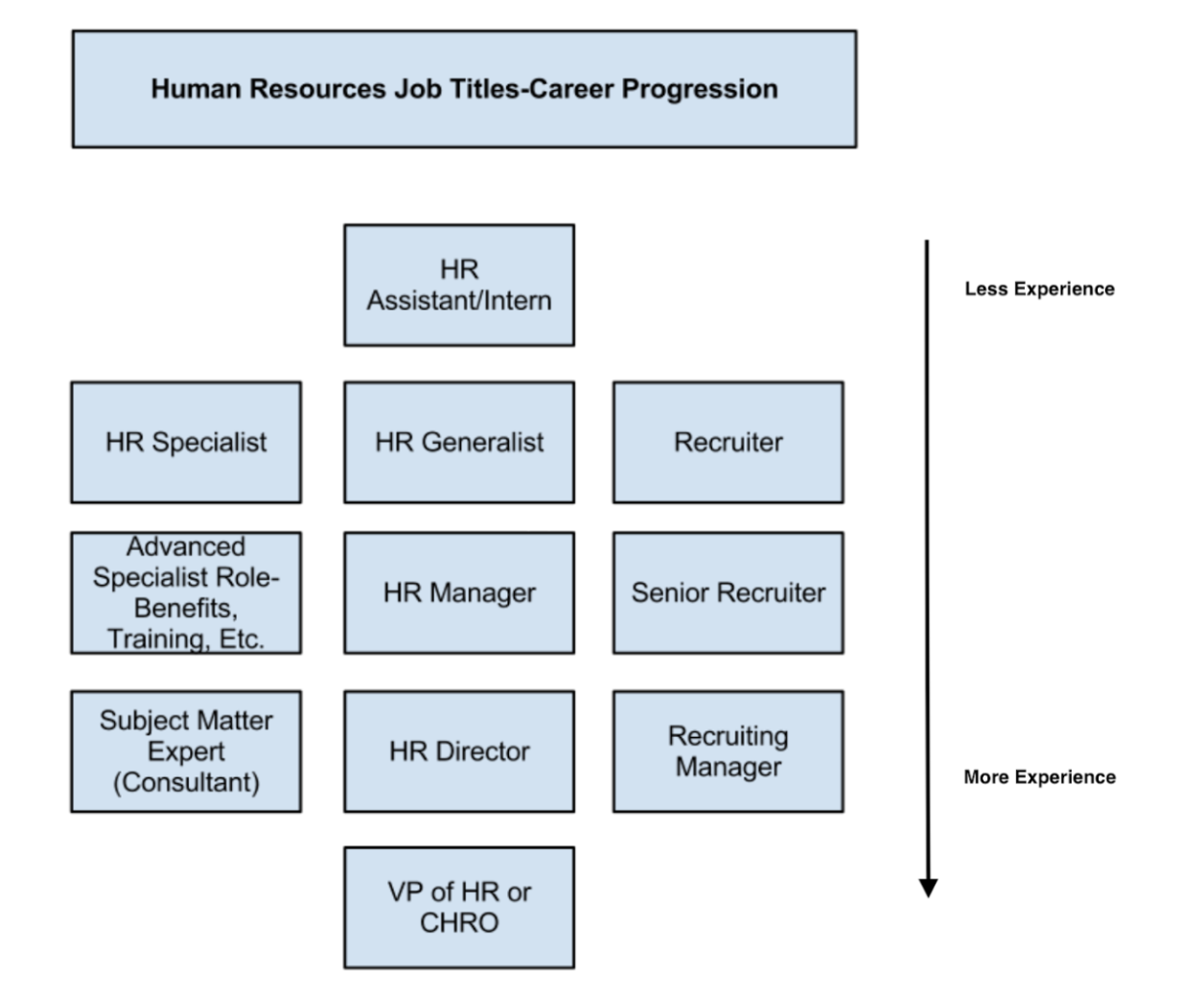
So what do HR employees in these roles actually do? And what are the differences between each position? We’ll cover the answers to these questions below.
Entry-Level Human Resources Roles
Entry-level HR jobs are fit for people who are in school, have recently graduated, or are entering the field for the first time. Their roles may include assistants and HR interns, specialists, generalists, or recruiters.
HR Assistant/ Intern
HR assistants and HR interns are typically in charge of the administrative work — such as organizing paperwork, completing the employer portions of new hire information, and other work their higher-ups ask of them — that needs to be done so everyone else in the department can remain productive and focus on more complex tasks.
HR Specialist
HR specialists focus on one specific department or discipline within human resources. These specialties include HR development, HR management, and organizational development. Their goal is to become an expert in their chosen specialty. For example, a benefits specialist would be required to know and understand the intimate details about a company’s benefits plan and be able to explain that information to new hires and current employees.
HR Generalist
HR generalists have knowledge that covers multiple different areas of the department and its needs. People in this type of role will work on the more typical tasks you may think of when it comes to HR such as compensation, employee relations, and workplace environment.
Recruiter
The sole job of a recruiter is to bring in impressive talent for the company. They find new people to fill the gaps in the company’s staffing plan so the business can continue to grow and remain as productive as possible.
Mid-Level Human Resources Roles
As those in HR work their way up the ranks and acquire more experience, they’ll likely move into a mid-level HR role. Examples of these jobs include advanced specialists, HR managers, and senior recruiters.
Advanced Specialist
An advanced specialist is typically someone who was promoted from an HR specialist role. Their work might include developing job descriptions for specific, technical roles within their specialty, and training and overseeing entry-level specialists who are also in their chosen discipline. Advanced specialists serve as a company’s high-level experts regarding their specific topic within HR.
HR Manager
An HR manager might oversee a group of entry or even mid-level HR employees. They’ll typically handle more of the complex HR tasks such as the creation and management of company-wide policies, values, and culture.
Senior Recruiter
Senior recruiters function as your very own staffing service. They may oversee a team of entry-level recruiters who work to identify ideal candidates for open positions at your company. Senior recruiters may work for your company or you might hire them as a third-party service depending on your budget and resources.
High-Level Human Resources Roles
If someone ends up staying in the HR field for the majority of their career, they may find themselves moving into a high-level position at your company. These roles may include an HR consultant, HR director, recruiting manager, or vice president of HR chief of human resources officer (CHRO).
HR Consultant
An HR consultant is typically someone who oversees all HR administrative work and makes sure you’re meeting all company, state, and federal policies and laws. They can be subject matter experts on a particular HR-related policy. People in this role may be hired as third-party help depending on your budget and resources.
HR Director
If an HR manager is promoted, that person might move into an HR Director role. In most SMBs, the HR Director typically oversees all departmental activities and reports directly to the CEO.
Recruiting Manager
Recruiting managers oversee your company’s recruiting teams. They sign off on your staffing plan and ensure all of your role gaps are filled and talent needs are met.
Vice President of HR or Chief Human Resources Officer (CHRO)
In a larger company, you may have a vice president of human resources or a chief human resources officer. This person reports directly to the CEO, oversees the entire HR operation, and creates overarching department goals.
Back To You
Having a fantastic human resources team is essential to the success of your business. Your HR department will manage your employee relations, hiring, training, career development, benefits, and company culture. Without HR, your employees simply wouldn’t be able to do their jobs. Start by thinking about the number and type of HR employees you’ll need and get started building your department so your company can continue to grow.

How Neuromarketing Could Revolutionize the Marketing Industry
If digital and traditional marketers faced off in a debate about whose promotional philosophy is superior (which would probably get more heated than an NSYNC versus Backstreet Boys dispute), one of the points digital marketers could hang over traditional marketers’ heads is their ability to measure a campaign’s performance — and their opponent’s inability to do the same.
Whether its views, social shares, scroll depth, subscriptions, leads, and sometimes even ROI, digital marketers can measure it all. But even though we have access to a laundry list of metrics, we still can’t measure what is arguably the most crucial indicator of a campaign’s performance — emotional resonance.
Don’t get me wrong, I love seeing a spike in traffic as much as the next blogger. But in an industry where skimming a page for 10 seconds counts as a view, leaving your desk to grab some string cheese will result in a time-on-page of five minutes, and 50% of web traffic and engagement are generated by bots and Chinese click farms, claiming digital metrics are a surefire way to gauge your content’s emotional impact is a stretch.
But what if we could actually measure emotional resonance? What if we could place a resonance score next to a piece of content, just like we do with views? Interestingly enough, there are companies spearheading this movement and developing technology that can gauge people’s emotional response to your content without needing to draw blood or scan any brains.
What is neuromarketing?
Neuromarketing blends neuroscience and marketing to help brands gauge the emotional resonance of their current and future marketing campaigns. To do this, companies like Immersion Neuroscience and Spark Neuro have developed technology that can gauge certain neurochemical and physiological responses, which both signal emotional engagement while consuming marketing content.
In 2017, Immersion Neuroscience developed the INBand, an armband that can measure your brain’s oxytocin levels by tracking the cadence of your Vagus — a nerve that controls your heartbeat.

Image Credit: Contently
Oxytocin is known as the empathy chemical. When it’s coursing through your brain, you relate to others more, care about them, and feel an urge to help them. And when your brain synthesizes the chemical while consuming marketing materials, it’s one of the best indicators of emotional engagement and, in turn, quality content.
Last year, Immersion Neuroscience hooked eight people up to the INBand and measured their neurochemical responses to 17 ads from the 2018 Superbowl. They then compared each ad’s neurological immersion scores to their ranking on USA Today’s Ad Meter, which is ranked by the public.
What they found was quite shocking — their results were almost the complete opposite of USA Today’s Ad Meter rankings. In fact, the ad that generated the most emotional engagement in the study was ranked the least popular ad in USA Today’s Ad Meter.
Immersion Neuroscience’s findings suggest that knowing what the brain actually resonates with is much more important than what people say they like, especially when you test ideas in focus groups — participants are prone to shielding their true opinions due to groupthink and the urge to please authority figures.
So to accurately gauge our content’s emotional resonance, and in turn, its ability to grab people’s attention, makes them feel something, and compel them to act, we need to focus more on neuroscience and less on web metrics and in-person interviews.
To help you envision a world where neuromarketing is more widespread, here are three practical ways the INBand could help brands nail their marketing.
Neuromarketing Examples
- Brands could prove storytelling is the key to emotional resonance.
- Brands could save millions of dollars on ads.
- Brands could host more engaging conferences.
1. Brands could prove storytelling is the key to emotional resonance.
When Shane Snow, an author, journalist, and co-founder of Contently, first tried out the INBand to see what the neuromarketing fuss was all about, the CEO of Immersion Neuroscience, Dr. Paul Zak, played this advertisement for him:
After Shane finished watching the ad, he started tearing up. But as he wiped away his tears before Dr. Zak could see them, he realized it was a lost cause — the INBand had already revealed that the ad made him cry.

Image Credit: Contently
At each point of the ad where the father gets rejected, the corresponding points on the graph show that Shane experienced bursts of emotion because he developed empathy for him. And at the end of the ad, you’ll notice a corresponding spike in emotion on the graph that shows exactly where he cried. The ad’s emotional effects even bled over to Shane’s reality, making him feel empathetic toward the father after the ad ended, which is evidenced by the spike’s gradual fade.
Shane’s emotional response to this ad suggests that telling great stories, chock-full of conflict, surprise, and emotion, is one of the best ways to trigger the release of oxytocin, helping you emotionally engage your audience and, ultimately, make them care about your brand.
In a nutshell, great stories are about the journey of overcoming adversity and how that journey changes people. “Little Moments,” tells the story of a father who so desperately wants to connect with his teenage daughter but ultimately can’t make it happen. And at the end of the ad, her constant rejection clearly weighs on him, prompting him to lay down on her bed. But that’s when he sees all the photos they’ve taken together over the years taped above her bed, making him realize that she’s always had a connection with him — he just didn’t know it.
2. Brands could save millions of dollars on ads.
In the same study of 2018 Superbowl ads mentioned above, Immersion Neuroscience discovered that M&Ms’ “Human” was the second most immersive ad on their list.
As you can probably predict, “Human” generated the most emotional engagement when the truck plows Danny DeVito into the basket of produce. But a few seconds after this shocking and hilarious climax, Immersion Neuroscience discovered that emotional engagement plummeted, suggesting M&Ms could’ve shaved off the last 10 seconds of this ad — and saved over $1.5 million.
3. Brands could host more engaging conferences.
At a major global conference in Houston last year, Immersion Neuroscience put INBands on attendees and measured their immersion during certain presentations. They discovered that concise, energetic talks generated the most emotional engagement.
On the other hand, longer talks need to revolve around a strong narrative or else they can’t hold an audience’s attention. Additionally, they realized the brain responds well to multimedia-heavy presentations due to the high variety of stimulus.
Based on these findings, Immersion Neuroscience believes tracking attendees’ emotional engagement during presentations can help companies refine their conferences by cutting out boring talks and even providing attendees with relevant presentation recommendations.
The Neurochemicals Don’t Lie
Even though we live in an age of data overload, where you can measure almost anything, Google Analytics will never be able to accurately gauge the most important element of your marketing campaign — its ability to make your audience feel something.
Fortunately, the neuromarketing space is rapidly evolving, and its technology is becoming more affordable and practical for marketers today, hopefully leading to its mainstream use tomorrow.

Absolutely Everything You Need to Know About Paid Time Off (PTO)
From 1976 to 2000, the average working American took off more than 20 days a year.
15 years later, that number has decreased to 16 days for the average American.
We all know the importance of work-life balance — but, unfortunately, we don’t always know how to implement formal company policies to give employees’ legitimate permission to take time off. And, without company approval, many employees are leaving free vacation days on the table.
Additionally, your employees are unique. While some might want time off to visit the Grand Canyon, others might just want to stay home with a sick child, or catch up on errands.
A lack of time off for employees can impact your company’s bottom line, too. In fact, people who use vacation days are more likely to get a promotion or raise. Ultimately, time off allows people to recharge and maintain peak productivity levels, undoubtedly good for your company’s long-term growth.
To ensure your company sees optimal success in 2019, we’ve created this guide to Paid Time Off (PTO), which can help create a culture in which employees feel secure taking the time they need to maintain a healthy work-life balance.

What is Paid Time Off (PTO)?
Paid Time Off (PTO) allows employees to take a certain number of days off, typically based on a certain amount of time they’ve worked at a company. Rather than giving employees vacation and sick days, many companies use PTO as an all-in-one opportunity for employees to take time off at their own discretion. This helps employees avoid burnout, and allows managers to avert the administrative hassles of tracking where employees are when they’re out of office.
Your employees are all unique individuals. Some of them value travel, while others enjoy quality family time. Some want to sit at home with a book, while others want more time to train for a marathon.
Plus, events can often arise that are unplanned — a sick child, a car that breaks down, or a last-minute dentist appointment.
Our 9-to-5 work schedule is not always conducive to the demands we feel from other aspects of our lives. For this reason, you should consider implementing Paid Time Off (PTO) to allow employees to take care of themselves without fearing financial punishment as a result.
Essentially, PTO allows employees to accrue time-off based on hours worked — for a certain number of hours worked, an employee earns a certain amount of PTO that is credited to an employee’s “bank”, typically after a pay period. If an employee takes one day off, they’re taking eight hours of PTO.
PTO often takes the place of a company’s vacation and sick day policies. Instead of offering separate buckets of time-off for different reasons, you offer PTO as an all-in-one opportunity for employees to take time off at their own discretion.
It’s easy to see the administrative and leadership benefits of PTO — with PTO, you avoid the hassles of tracking why an employee is out, and logging the missed day into one system over another.
Plus, your managers are able to demonstrate trust in their employees.
Your employees are adults — is it really important whether they took the day off because they were actually sick, or because they simply needed a day to recharge in front of Netflix? Either way, it’s time off they’ve earned.
87% of companies offer PTO plans and 91% offer paid vacation plans to employees based on how long they’ve worked at the organization. For PTO plans, the average days awarded per year based on employee’s length of service ranges from 13 to 26 days.
Unlimited PTO
Unlimited PTO works the same as PTO, except you don’t assign a certain number of allotted days to your employees — instead, you trust them to take any time off they need, as long as they get their work done.
This type of results-driven workplace culture is becoming increasingly popular, particularly in the startup and technology industries.
It might seem like a crazy idea — why would any company offer unlimited PTO? Wouldn’t that just result in an empty office, with a bunch of employees permanently lounging poolside in the Bahamas?
In reality, employees with unlimited PTO typically don’t take any more days off than employees with an assigned amount of PTO — in fact, marketing automation company Salesfusion found that after they implemented unlimited paid vacation, their employees actually started taking fewer days off.
Unlimited PTO can help you attract and retain top talent. Additionally, the impressive benefit can incentivize employees to work harder, and care about their company more.
While you might be wary of some employees taking advantage of the time off, you can mitigate those issues by enforcing regular performance reviews and ensuring each employee continues to hit their deadlines.
Brian Halligan, HubSpot CEO and founder, points out three important elements to implementing a hands-off approach to employee vacation time:
1. The state-of-the-art vacation plan these days is a relic of an era when people worked 9 to 5 in an office, like our fathers did. The internet and mobile devices have enabled our employees to work where they are comfortable (often at home) and the hours they are comfortable (often in the middle of the night).
2. I always thought is was strange when an employee would hand me a paid time off form for a weekday, but never handed me a credit form for the Saturday and Sunday they just put in. Since we are not tracking weekend days worked as credit, the weekday time off just didn’t seem fair.
3. We hire very smart people who are very focused on contributing to the growth of our company. We trust that the folks will use “common sense” with regards to taking an appropriate amount of time off.
How to Take PTO
This section likely sounds ridiculous to people from certain European cultures, but for Americans, it’s an all-too-familiar problem. There are a few reasons many Americans end up leaving paid vacation days on the table, including a sense of obligation to work hard all the time, and a sense of guilt when a day isn’t “productive”.
It’s time all employees globally understand the benefits of time off — for instance, working fewer hours correlates with higher levels of productivity in the form of increased GDP (gross domestic product). Additionally, an employee’s workplace happiness can help improve team morale.
If your company offers PTO and you’re anxious about taking it, consider following these six steps:
- Plan your time-off far in advance. Consider when you might need it most — do you have a month full of conferences, travel, and all-day meetings? Perhaps you’ll need a week to recharge after all that. Alternatively, maybe you just need a few days to lay in the sun in mid-January (I know I do).
- Tell your manager as far-in-advance as possible. Ask her what she will need you to complete before you leave.
- Send out an email to your immediate team with an out-of-office reminder in advance, if possible. Urge employees to let you know what they need from you ahead of time, so you can get your work done before you leave the office.
- Set an automatic out-of-office reply to emails, and include an employee or manager’s email as an alternative if it’s an emergency. Additionally, set your slack, or company messaging system, to “away”.
- To ensure you finish your work in time, consider blocking time on your calendar as “Busy”, so people can’t book you for meetings and you can cross tasks off your to-do list.
- Trust your team! They will be able to handle the workload just fine while you’re gone, and you can return the favor when they’re out of office.
Of course, these strategies only work if you plan on taking PTO in advance. If an illness or emergency arises, you understandably can’t plan for that. Instead, it’s important you keep team members in-the-loop, but remember — PTO exists for those reasons, as well.
Use your days off to recharge, and let go of any guilt you might feel. You’ll be a better employee as a result.

The Ultimate Guide to Service-Level Agreements (SLAs)
At many companies, it can feel as if there are 100 miles between sales and marketing.
According to the 2018 State of Inbound report, fewer than half of marketers would describe their respective companies’ sales and marketing teams as “generally aligned.” That’s a problem.
In HubSpot’s early days, our marketing and sales executives started out on the same team, and luckily that collaboration has trickled down throughout the organization as it continues to grow. But it wasn’t just luck, of course.
That alignment — which we call “Smarketing” — is largely the result of a conscious decision to work together, set goals, and create agreements between both teams.

One of the most critical steps to aligning your sales and marketing efforts is creating a service level agreement (SLA). Traditionally, an SLA serves to define exactly what a customer will receive from a service provider. But SLAs serve internal operations as well, and sales and marketing agreements are among the most crucial.
Service-Level Agreement (SLA)
A service-level agreement (SLA) is a contract that establishes a set of deliverables that one party has agreed to provide another. This agreement can exist between a business and its customers, or one department that delivers a recurring service to another department within that business.
SLAs are common to a business when signing on new customers. However, when one exists between sales and marketing departments, this agreement instead details marketing goals, like number of leads or revenue pipeline; and the sales activities that’ll follow and support them, like engaging leads that were qualified by the marketing team.
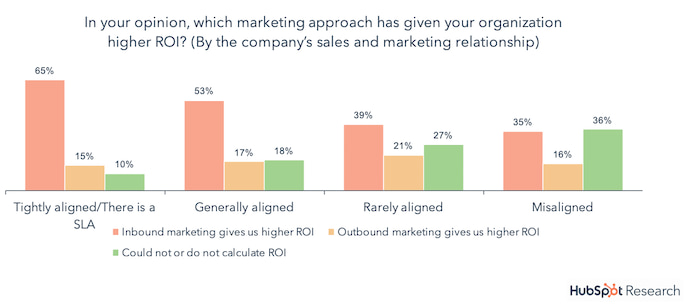
Both the sales and marketing departments use this document as a commitment to support each other, based on concrete, numerical goals. And guess what? 65% of marketers whose companies have this type of SLA see higher return on investment from their inbound marketing efforts.
What an SLA Includes
The details of an SLA will differ among internal and external agreements. Nonetheless, there are common building blocks that each SLA should be sure to include, whether the recipient of the service is your customer or your sales team.
1. Summary of Agreement
The first item on your SLA should be an overview of the agreement. What service have you agreed to deliver to the other party? Summarize the service, to whom it’s being delivered, and how the success of that service is to be measured.
2. Goals of Both Parties
In external SLAs — those between a business and its customers — the goals stated in the agreement are primarily those of the customer. If this is your intention, work with your client to marry their needs with the abilities of your product, and come up with a measurable goal that your company can feasibly meet for the client on a regular basis.
Is this an internal SLA between your sales and marketing departments? Both teams should have their goals outlined in this section of the contract, while making sure that when Marketing hits its goal, Sales can reach its own goal as a result.
3. What’s Needed by Both Parties
SLAs should include what each party needs in order to reach their goals. In agreements that serve a customer, keep in mind their needs might go beyond simply “the product.” They might need more than that to reach their goals — such as weekly consulting, reporting, and technical maintenance from you.
SLAs between sales and marketing teams should describe what they might need from the opposite department in order to help them hit their targets. Marketing, for example, might need weekly status reports on Sales’ pipeline so the marketers can adjust their lead-generating campaigns accordingly.
4. Points of Contact
Who’s in charge of making sure each party’s goals are met? Sort out which team does what, and who talks to whom, in this section of your SLA. Is there a separate employee using the services, in relation to the employee who reports on performance every week? Make it clear who’s involved in the SLA, and how.
5. If Goals Are Not Met
You might not want to think about it, but there should always be formal consequences when a goal isn’t met as part of an SLA. Don’t freak out, though — these consequences aren’t always business-ending situations. Include a form of compensation to the service’s end user for when the service doesn’t meet their agreed-upon goals. In external SLAs, according to PandaDoc, this compensation can come in the form of “service credits.” Grab PandaDoc’s free SLA template here to find out more.
For Sales and Marketing SLAs, work with your sales team to establish a plan for how any lost revenue is to be made up as a result of an unreached sales quota. You might settle on a strike system that holds certain employees — in both Sales and Marketing — accountable for diagnosing and resolving issues of low performance.
6. Conditions of Cancellation
Under what circumstances will your SLA be terminated? Whether your contract serves a customer or two internal departments, you’ll typically find yourself putting the SLA on the chopping block when it’s just not working. Maybe your goals have gone unmet for the last three months, or the current agreement simply doesn’t have buy-in from everyone involved.
Come up with formal conditions under which you’d cancel the current SLA in pursuit of, hopefully, a better SLA.
Service-Level Agreement Examples
- Customer Service-Level Agreement
- Internal Service-Level Agreement
- Multilevel Service-Level Agreement
1. Customer Service-Level Agreement
A customer SLA is precisely what it sounds like: an agreement by a vendor to deliver a certain level of service to a particular customer. Here’s a fun example:
In the TV show The Office, the company, Dunder Mifflin, supplies paper to various organizations. They might have a customer SLA stipulating that Dunder Mifflin will supply [Company X] with 50 reams of paper per month, shipped every Monday to [Address 1] and [Address 2] by Darryl Philbin — with a confirmation of delivery sent to Jim Halpert. (Sorry, we had a little too much fun with the references in that one.)
2. Internal Service-Level Agreement
As explained earlier in this blog post, an internal SLA only concerns parties from within the company, rather than its customers. So, while a business might have an SLA open with each of its clients, it can also have a separate SLA between its sales and marketing departments.
For example, let’s say Company X’s sales department has to close $5,000 worth of sales per month in total, and each sale is worth $100. If the sales team’s average win rate for the leads they engage with is 50%, Company X’s marketing director, Josh, can work with the sales team on an SLA, stipulating that Marketing will deliver 100 qualified leads to sales director, Amy, by a certain date every month. This might include four weekly status reports per month, sent back to Josh by Amy, to ensure the leads Amy’s team is receiving are helping them keep pace with their monthly sales goal.
3. Multilevel Service-Level Agreement
Multilevel SLAs can take several forms. This type of agreement can support a business’s customers or the business’s various internal departments. The point of this type of SLA is to outline what is expected of each party if there’s more than just one service provider and one end user. Here’s an example of a multi-level SLA in an internal situation:
It’s a no-brainer for Company X’s sales and marketing teams to partner up on an internal SLA that delivers leads from Marketing to Sales every month. But what if they wanted to incorporate a customer retention strategy into this contract, making it an SLA between Sales, Marketing, and Customer Service? After sales closes on 50 customers for the month, it’s Customer Service’s job to keep these customers happy and successful while using their product. In a multilevel SLA, Company X can have sales director, Amy, send monthly “customer friction” reports to Joan, the VP of service, based on dialogue the sales team has regularly with its clients. This helps the customer service team build a knowledge base that better prepares them for the pain points customers call them about. Learn more about customer service’s increasing role to business growth in the HubSpot Academy.

Now, if you don’t have a Sales and Marketing SLA in place, fear not: We’ve outlined six steps to create one below so that you can easily start aligning your sales and marketing teams.
How to Make an SLA for Marketing and Sales Alignment
To draft your SLA, you first need to align your Sales and Marketing teams around a shared set of goals — or, as we put it before, the harmonious “Smarketing.” This alignment can then dictate the creation of a written SLA that reflects these goals. Here’s how to create an SLA with “Smarketing” in mind:
1. Calculate a numerical Marketing goal based on the sales team’s quotas.
As a marketing department, not only should you have a concrete goal for each campaign you run, but you also should have a high-level numerical goal that aligns with the sales team’s operations. At the end of the day, that’ll mean qualified leads and actual sales from those leads.
Salespeople are driven almost entirely by their sales quotas — the numerical goals that correlate with their compensation and job security. If Marketing commits to a similar, related numerical goal, it shows that the team is being held accountable in a manner similar to Sales. The trick, however, is to make sure your numerical goal can effectively power the sales team’s numerical goal.
In order to calculate the marketing side of your SLA, you’ll need the following four metrics:
- Total sales goal (in terms of revenue quota)
- % revenue that comes from marketing-generated leads (as opposed to sales-generated ones)
- Average sales deal size
- Average lead-to-customer close %
Then, it’s time to do some calculations:
- Sales quota x % revenue from marketing-generated leads = Marketing-sourced revenue goal
- Marketing-sourced revenue goal ÷ Average sales deal size = # of customers needed
- Customers ÷ Average lead-to-customer close % = # of leads needed
2. Segment your goals by specific intervals during the year.
It might also be a good idea to reevaluate the marketing side of the SLA each month, as a variety of factors can change the numbers used in your calculations over time. To do so, create a document that tracks your SLA calculations by month, which should include the following metrics:
- # of marketing-generated leads
- # of those leads that became customers
- Revenue from those closed customers
- Total revenue closed that month from marketing-generated leads only
- Total revenue closed that month
You will also need:
- The average sales cycle length
With the figures above, you can re-calculate the metrics you started with on a monthly basis, or at whichever interval suits your business — quarter, year, etc. Just make sure the same measure of time is used for both Sales and Marketing to maintain alignment. Have a look:
- # marketing-generated leads that became customers ÷ # marketing-generated leads = lead-to-customer close %
- Revenue from closed customers ÷ # of marketing-generated leads that became customers = sales deal size
- Total revenue closed from marketing-generated leads / total revenue closed = % revenue from marketing-generated leads
You could also take it one step further, and incorporate quantity and quality into these metrics. The above calculations provide you with a quantitative volume goal of marketing-generated leads. However, we know that not all leads are created equal, and as a result, some may be considered higher- or lower-quality than others.
For example, a decision-making executive might be a more valuable contact than an intern. If that’s the case, you can do the above analysis for each subset of leads, and set up separate goals for each type/quality level.
Want to take it even further? Measure in terms of value, instead of volume. For example, a CEO may be worth $100, for instance, while a director is $50, a manager is $40, and so on.
3. Calculate Sales’s figures and their goals.
The sales side of the SLA should detail the speed and depth to which a salesperson should follow up with marketing-generated leads. When establishing this end of the SLA, consider these two sales statistics:
- Salespeople who follow up with leads within an hour are nearly seven times more likely to have meaningful conversations with a decision maker on the other end.
- However, only 7% of leads respond to a follow-up contact within five minutes after filling out a form.
Bottom line? Not all leads may be fit to send to Sales immediately. They often need to meet some minimum level of quality, like reaching a certain activity level, which can only take place after being nurtured by Marketing.
Nonetheless, engaging a lead the short time after he/she converts is critical to maintaining a relationship with them — the question you have to answer is what that engagement should look like. Either Sales or Marketing should take action to start building that relationship, make nurturing easier, and set up the sales rep for success when she eventually does reach out.
Keep in mind this advice is futile if you don’t consider the bandwidth of your sales reps. Sure, in a perfect world, they’d make six follow-up attempts for each lead — in reality, though, they may simply not have enough hours in the day to do that. For that reason, you’ll also need to factor in the number of leads each rep is getting (based on the Marketing SLA), how much time they spend on marketing-generated leads versus sales-generated leads, and how much time they have to spend on each one. If you’re looking to conserve time, some of the follow-up — email, in particular — could be automated, so look into options there.
4. Set up Marketing SLA reporting.
Now that you have your SLA goals, it’s time to track your progress against that goal — daily.
To start, graph the goal line. Multiply 1/n — n is the number of days in the month — by your monthly goal. That should determine what portion of your monthly goal you need to achieve each day. You’ll want to graph that cumulatively throughout the month and mark your cumulative actual results on the same chart. We call that a waterfall graph, and it looks something like this:

5. Set up Sales SLA reporting.
For the Sales SLA reporting, you’ll have two graphs — one monitoring the speed of follow-up, and the other monitoring the depth of follow-up.
To graph the speed of follow up, you’ll need the date/time the lead was presented to sales, and the date/time the lead received her first follow-up. The difference between those two times equals the time it took for Sales to follow up with that particular lead.
Take the averages of lengths of time it took for Sales to follow up with all leads within a particular timeframe — day, week, month — and chart it against the SLA goal.
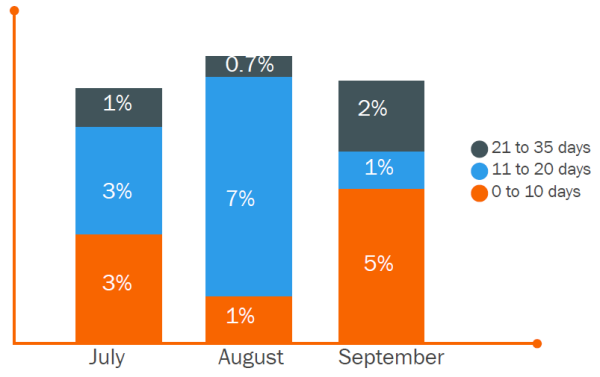
To graph the depth of follow-up — e.g., the number of attempts — look specifically at leads that have not been connected with, since the goal of the follow-up is to get a connect. For leads over a certain timeframe that have not gotten a connect, look at the average number of follow-up attempts made, and graph that against the SLA goal.
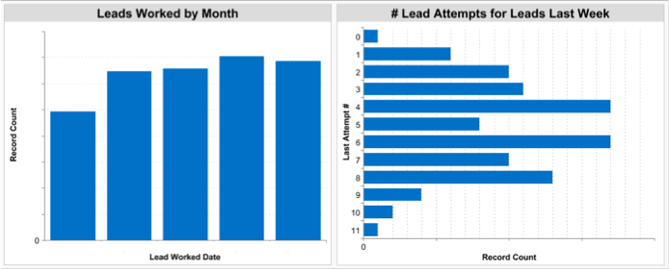
6. Communicate, celebrate, and address the achievement (or lack thereof).
Maintaining strong communication regarding how each team is performing on goals boosts transparency. If either team isn’t reaching their goals, addressing that confirms their importance, while celebrating hitting those goals can aid motivation.
If you’re not sure where to begin when it comes to setting these goals, check out our free Marketing & Sales Lead Goal Calculator, designed to help you determine and track the goals that will eventually become part of your SLA.
One Last Step
When it comes to what should be in your service level agreement, there’s one final piece: Review these metrics on a regular basis to monitor your progress, and make sure both Sales and Marketing have access to the reports for both sides of the SLA.
This step helps to maintain accountability and transparency and allows for both teams to address issues — or congratulate each other on productive results.



Don’t Block the Exit [The Customer Code Series]
This post is part 10 of 11 in a series on the HubSpot Customer Code.
If you want to see an otherwise calm and collected person switch to blind rage, ask them about a time they tried to cancel a service.
Ask me about my attempts to cancel cable.
My colleague’s gym only allowed cancellations if you showed up in-person, during business hours.
And don’t even get me started on the nightmare of cancelling magazine subscriptions.
We’ve all had these experiences. They are universally loathed, and we remember them — and still get angry! — one, five, even 10 years after they have happened.
But there is often a gap between what we know as a person, and what we do as a business.
Recently our COO, JD Sherman, told me about a meeting he had with one of our customer success managers. She was nearly in tears as she told him about a customer she loved working with, who also loved working with her. They’d had a long and successful relationship together. But they were in a difficult situation as a business and needed to downgrade.
The customer missed the contractual window for downgrading, and because our customer success team is incentivized on revenue retention, she was put in the position of placing her needs and the company’s needs above the customer’s.
Legally, she had everything on her side. Personally, she knew it was wrong.
At the end of their conversation, her customer said, “Okay, you’ve got me. I’ll pay, but after we’re done with this I don’t ever want to work with you again.”
Wow. I am so sorry — to both our customer and our employee.
The goals we had in place for our customer success team forced them to solve for revenue dollars instead of the success of our customers.
We were blocking the exit even though it meant destroying the relationship.
Jason Lemkin says concisely what we as humans know to be true, but we as business leaders too often forget:
Making it hard to cancel doesn’t reduce churn
It just modestly delays it
Doesn’t help
— Jason ✨ 2️⃣0️⃣1️⃣9️⃣ ✨ Lemkin 🦄 (@jasonlk)
October 13, 2018
If I can make a purchase with one click, I should be able to cancel that purchase with one click.
If a company makes it easy to buy, they should make it easy to stop buying.
And I’m not just saying this because it’s the right thing to do; it’s also better for business.
The HubSpot Research team asked, and 89% of consumers reported they are more likely to buy if a company makes it easy and simple to cancel.
If a customer’s meant to be, they’ll be. If they’re not meant to be, let them be.
The 9th tenet of The Customer Code is: Don’t block the exit. I give HubSpot a 7 out of 10 on this. We’ve done a lot in just the past year to improve here. Most notably, we reduced our cancellation notice window from 45 days to 10 days, but we’re not finished yet.
I want customers to be able to cancel or downgrade with a click of the button. My hope is that the experience of leaving HubSpot feels more like quitting Netflix and Spotify than it feels like cancelling a business contract — or a cable subscription.
Not only do I want it to be easy for customers to stop paying us money, I want it to be easy for customers to take their data with them. Today, we support exports of key CRM objects. In 2019, we want to support the export of all activities associated with those exports. If it can be brought into HubSpot, we want customers to be able to take it out of HubSpot.
I don’t want anything blocking the exit, because when we block the exit, we also block the return.
This solves for customers and it solves for employees. And any change that is good for both of those groups is ultimately good for the company.
We all know that companies that retain customers grow. But companies that gracefully allow customers to leave, grow better (and leave an open door for customers to come back to them in the future).
This post is part 10 of 11 in a series on HubSpot’s Customer Code. You can find more info on The Customer Code and how we score ourselves here, and watch my INBOUND talk on this topic here:


The Psychology Behind Viral Marketing Videos
In 2007, brothers Chip and Death Heath accomplished something that even the Coen brothers would tip their caps to — their book Made to Stick: Why Some Ideas Survive and Others Die climbed to the top of both The New York Times and Wall Street Journal bestseller lists.
Made to Stick achieved astronomical success because it taught readers a model for making ideas “sticky”, or, in other words, making ideas digestible, memorable, and compelling. And by analyzing countless amounts of “sticky” ideas, like JFK’s “Man on the Moon” speech and even some conspiracy theories, the Heath Brothers noticed that a “sticky” idea usually follows six principles:
- Simple: its core message must be easy to grasp.
- Unexpected: it should break cliche and evoke enough curiosity to grab someone’s attention and hold it.
- Concrete: it should be vividly painted in people’s minds.
- Credible: it should be supported by evidence.
- Emotional: it should have a purpose and relate to people.
- Story-driven: it should tell a story that inspires people to act.
At their core, viral videos are sticky ideas in action. They compete against an endless supply of videos all screaming for attention, but they can slice through the clutter, resonate emotionally with viewers, and are actually considered valuable pieces of content.
The Heath Brothers recommend following as many of their “Made to Stick” principles as possible when devising your idea. Below, we’ve analyzed five marketing videos that follow most of these principles and succeeded in capturing viral attention.
1. Monday.com | What using monday.com feels like
“Made to Stick” Elements: Simple, Unexpected, Concrete, and Emotional
Simple
In just 30 seconds, Monday.com cuts right to the chase and provides a high-level description of their project management tool.
Unexpected
After fleshing out each section of their product, Monday.com surprises you with a pleasant dose of comedic relief from their feature overviews. For example, after they introduce their product, they cut to an oddly satisfying bubble wrap-popping, oreo-splitting montage of what it feels like to use their product. Then, after they describe their product’s board, they zoom in on an employee winking at you and transition into a hilarious quip about how their product works on your phone because it’s 2018.
Concrete
By showing, not telling, what it feels like to use Monday.com with a hilarious montage, and how to use their project management tool, its features and benefits bake right into your memory.
Emotional
Monday.com leans on comedy to trigger an emotional response from their viewers.
2. Johnnie Walker | Dear Brother
“Made to Stick” Elements: Simple, Unexpected, Concrete, Emotional, and Story-Driven
Simple
Johnnie Walker’s “Dear Brother” is only 90 seconds long and follows the story of two brothers exploring what viewers initially assume must be their childhood home.
Unexpected
At the end of the video, your heart nearly shatters when you find out one of the brothers has actually passed away and the other one was actually reminiscing about him.
Concrete
By setting the story in the rugged mountains and streaming creeks of Scotland and voicing over the video with a beautiful poem that aligns with the plot, Johnnie Walker makes you feel like you’re strolling along side the brothers.
Emotional
“Dear Brother” begins as a heartwarming video about two brothers reminiscing about their past, but when you learn that one of the brothers has already passed away, you start to feel sad. At the same time, though, you also feel touched because the other brother realizes that even though his brother isn’t with him physically, he’ll always be with him spiritually.
Story-driven
“Dear Brother’s” twist ending turns the story from being about roaming the place of your past to being about keeping your loved ones’ memories alive, which really packs a final emotional punch.
3. NERD Skincare | Your Relationship With Acne
“Made to Stick” Elements: Simple, Unexpected, Concrete, Credible, and Emotional
Simple
Despite an airtime of almost five minutes and an onslaught of gags and jokes, NERD Skincare stays laser-focused on a single, straightforward message throughout the entire video: the idea that their treatment arms your body’s good bacteria to kill off your body’s acne bacteria.
Unexpected
Instead of filming actors and actresses with flawless skin happily splashing water on their face, NERD Skincare shatters the conventions of most acne treatment ads. First, they hook you with a visceral metaphor for your face (the hot and cramped arcade), then deeply relate to your problems by describing realistic scenarios of how acne can sabotage your life, and continuously weave a strong thread of humor and edge throughout the entire video.
Concrete
By including clever metaphors, funny and unexpectedly realistic examples, and an actual demonstration of their product in action, NERD Skincare can sear their video’s message into your memory and prompt you to act.
Credible
NERD Skincare actually proved their brand’s credibility by putting acne bacteria on their founder’s face and demonstrating how their product quickly got rid of it.
Emotional
With a hilarious joke at almost every turn of this video, “Your Relationship With Acne” resonated with viewers through humor.
4. HP Sprocket | Little Moments
“Made to Stick” Elements: Simple, Unexpected, Concrete, Emotional, and Story-Driven
Simple
“Little Moments” is a short and relatable story about a father’s attempt to connect with his teenage daughter and his reluctant acceptance that she’s growing up.
Unexpected
At the end of the video, the daughter has rejected each of her father’s attempts at connection, and it clearly weighs heavily on him, prompting him to lay down on her bed. But that’s when he sees all the photos they’ve taken together over the years taped above her bed, making him realize that she’ll always love him, no matter how she’s acting right now.
Concrete
By filming familiar scenes of home life and close-up shots of the father experiencing vivid feelings of emotion, HP Sprocket can place you in this heartwarming story and make you feel the same way the father feels at the end of the video.
Emotional
The father’s growing disappointment and sadness each time he fails to connect with his daughter makes you feel bad for him. But when you can see the pure happiness and joy on his face after he finds his daughter’s pictures, you genuinely feel touched by the moment.
Story-driven
In a nutshell, great stories are about the journey of overcoming adversity and how that journey changes people. “Little Moments” recounts a father who so desperately wants to connect with his teenage daughter but ultimately can’t make it happen. But when he sees his daughter’s pictures, he realizes that she’s always had a connection with him — he just didn’t know it.
5. Death Wish Coffee | Storm’s a-Brewin’
“Made to Stick” Elements: Simple, Unexpected, Concrete, and Emotional
Simple
By using a ship full of vikings as a metaphor for their fiercely caffeinated coffee, Death Wish Coffee effectively expressed the strength of their product in only 30 seconds.
Unexpected
“Storm’s a-Brewin’” started out as a Game of Thrones-esque story about a group of vikings who were ready to die as heroes, but when you find out it’s an advertisement for a highly-caffeinated coffee brand, it’s actually a really funny and pleasant surprise.
Concrete
Death Wish Coffee’s use of ragged vikings and an incredibly realistic CGI ocean makes you feel like you’re actually rowing the boat with them — on your way toward a noble death. And when you get to the end of the video, these vivid details solidify the strength of their coffee.
Emotional
The vikings’ passionate commitment to dying with honor grabs your attention. And the realization that they’re a metaphor for caffeine makes you laugh and realize how strong Death Wish Coffee’s product is.
Following Made to Stick’s Model Could Lead to Your Viral Success
Making a viral video will be one of the hardest things to cross off your marketing bucket list. And even if you follow the six Made to Stick principles to a tee, there’s still no guarantee you’ll achieve viral success. But one thing you can expect by following this model is that your story will stick in people’s minds — and their hearts.
