The Best Programming Languages to Learn, According to HubSpot Software Engineers
When Liam Harwood, a Software Engineer at HubSpot, was in elementary school, he loved playing video games. But unlike most kids his age, he also created them. As a 10 year-old, Liam would spend hours hunkered over an old computer in his basement, coding simple games in QBASIC or Quick Beginner’s All Purpose Symbolic Instruction Code.
Liam quickly mastered QBASIC and created the most advanced games he could in the rudimentary language. But coding basic games didn’t scratch his creative itch anymore. He had visions for more sophisticated games and projects he wanted to develop, so, at the age of 13, he decided to teach himself as many programming languages as possible, like HTML, Javascript, Java, and Python, among others. By the time Liam graduated high school, his insatiable curiosity and unwavering passion helped him earn a full computer science scholarship to attend Marist College.
Today, Liam is a software engineer on HubSpot’s Design Platform team, where he works on the backend of our Design Tools, Template Marketplace, and other design-related services.
Now — who says video games just rot your brain?
If you aspire to become a successful software engineer like Liam, but you haven’t learned any programming languages yet, don’t feel pressured to follow his exact path and learn every language under the sun. In fact, if you’re a beginner, Liam recommends only learning three.
“For anyone who wants to dive head first into the technical side of things and really understand how their programs work, I would start with C. It keeps things simple and straightforward, and is the closest a beginner would want to get to writing pure machine code. It also forms the basis for most modern programming language syntax, giving you the skills that can easily be applied to other languages,” he says. “On the other hand, Python may be a good choice for beginners because it has a very simple and digestible syntax, as well as extensive libraries that can help simplify complicated computations. Lastly, Java is another good choice because it’s one of the most widely used languages — I use it here at HubSpot — and similar to C, it teaches you fundamental skills that can be applied to other languages.”
Like Liam, a lot of software engineers agree that C, Python, and Java are the best languages to learn as a beginner — they can help you grasp the fundamental coding skills needed to pick up other, more robust languages.
But some software engineers argue that honing your programing skills requires an even more foundational understanding of computer science. According to Josie Barth, a Software Engineer on HubSpot’s Big Data Infrastructure team, learning the principles of computer science — not specific languages — is what will sharpen your programing skills the most.
“While it’s common to get started learning on an object oriented language, like C++ or Java, I think it’s less about learning a specific programming language and more about learning the foundations of computer science, like data structures, algorithms, discrete math, operating systems, computation theory, and more,” she says. “I also wouldn’t necessarily bucket programming languages as beginner, intermediate, or advanced. You choose programming languages based on the kind of tasks you want to do. But there are definitely easier languages to get started on. For example, Java might be easier to get started on than C++ because Java abstracts certain concepts away, but if you needed to program within finer control of the machinery in mind, you’d likely use C++ over Java.”
So while learning specific languages will help refine your programming skills, mastering the fundamentals of computer science will help you reach your potential more than anything else. Because before Liam Hardwood was coding the backend of HubSpot’s Design Platform, he was programming simple video games on a dusty computer in his basement, building his foundational skills with an old language that was considered outdated, even back then.
However, this still begs the question …
Which programming language should you learn first?
If you’re a beginner, most software engineers recommend learning C, Python, or Java first. Below, we’ll give you a rundown of each of these programming languages, describing what they’re used for and how much demand they have in the software engineering labor market.
5 of the Best Programming Languages to Learn
- Java
- Python
- JavaScript
- C/C++
- C#
1. Java
The Java Virtual Machine lets Java run on virtually any hardware and operating system, making it the most widely used programming language by businesses in the world. And with over 90% of Fortune 500 companies using Java to develop the backend of their applications and 62,000 Java programming jobs posted on Indeed.com last year — the most out of any language — Java will be in high demand for a long time.
2. Python
Python has a very simple and digestible syntax, as well as extensive libraries that can help simplify complicated computations, allowing you to hit the ground running when you want to learn other languages.
As a general programming language, Python is mostly used for web development and support for software engineers, but it’s also used a lot in machine learning, which helped it become the second most sought after programming language on Indeed.com, with 46,000 jobs advertised on the online job board.
3. JavaScript
Used to develop the front end of most business’ applications, JavaScript is one of the most popular programming languages out there. With over 80% of developers and 95% of all websites using JavaScript, it’s easy to understand why there were over 38,000 JavaScript jobs posted on Indeed.com last year.
4. C/C++
C is the most simple and straightforward programming language around, and it also forms the foundation for most modern programming language syntax, giving you fundamental skills that can easily be applied to other languages.
A successor of C, C++ is an object oriented language, which aims to represent real-life objects as code and is more equipped for developing sophisticated applications, like system or application software, video games, drivers, client-server applications, and embedded firmware. Last year, over 31,000 C++ programming jobs were posted on Indeed.com.
5. C#
Another successor of the C programming language, C# is an object oriented language that’s intuitive to learn, making it the fifth most popular programming language for building software. Microsoft developed C# to run on their .NET platform, and it’s heavily used in video game development. Last year, over 28,000 C# programming jobs were posted on Indeed.com.

13 Businesses With Brilliant Global Marketing Strategies
Guess what? Global marketing is no longer reserved for brands with deep pockets, nor is it a huge hassle for already over-burdened marketing managers.
In fact, a global presence is possible for any business with a creative strategy and an understanding of world markets.
What Is Good Global Marketing?
Global marketing is the act of focusing a product on the needs of potential buyers in other countries. Typically, a global marketing strategy requires a business to do new market research, identify countries where the business’s product might be successful, and then localize the brand to reflect the needs of those communities.
Easier said than done, right?

Like most types of marketing, though, a global marketing strategy comes down to one thing: audience. Knowing who needs your product, in what form to deliver it to them, and how to do it in a way that strengthens the brand are core ingredients of awesome global marketing.
To give you an idea of what a great global marketing strategy looks like, we’ve compiled a list of brands that totally “get it.”
From adapting their social strategies to translate across multiple languages to adjusting their menus to appeal to the cravings of a diverse group of people, these brands are taking positive steps toward creating a solid presence across the globe.
So, if you’re looking for inspiration on how to craft a successful international marketing strategy and expand your business’ reach, check out these examples from 13 successful companies.
Global Marketing Strategies
- Red Bull
- Airbnb
- Dunkin Donuts
- Domino’s
- Rezdy
- World Wildlife Foundation
- Pearse Trust
- Nike
- McDonald’s
- Innocent Drinks
- Unger and Kowitt
- Coca-Cola
- Spotify
1. Red Bull
Austrian company Red Bull does such a great job with global marketing that many Americans assume it’s a local brand. How?
One of its most successful tactics is to host extreme sports events all over the world. From the Red Bull Indianapolis Grand Prix to the Red Bull Air Race in the United Kingdom to the Red Bull Soapbox Race in Jordan, the brand’s powerful event marketing strategy takes them here, there, and everywhere.
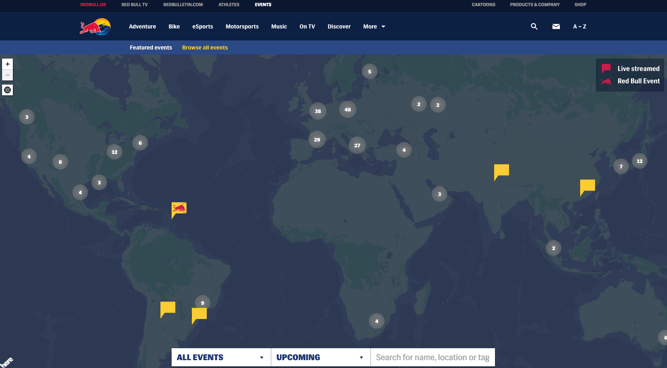
Aside from events, Red Bull’s packaging also plays a part in its global appeal.
“Red Bull really looks like a product from a global economy. It doesn’t look like a traditional American soft drink — it’s not in a 12-ounce can, it’s not sold in a bottle, and it doesn’t have script lettering like Pepsi or Coke. It looks European. That matters,” explains Harvard Business School professor Nancy F. Koehn in a 2001 article. Though it’s since diversified its product selection since that article was published, the fact remains that Red Bull’s consistent packaging has helped this brand go global.
2. Airbnb
Airbnb, a community marketplace for people to list and book accommodations around the world, was founded in 2008 out of San Francisco, California.
Since then, Airbnb has grown to 1,500,000+ listings in 34,000+ cities worldwide. A large contributor to the company’s explosive global success? Social media.
In January 2015, Airbnb launched a social media campaign around the hashtag #OneLessStranger. The company referred to the campaign as a “global, social experiment,” in which Airbnb asked the community to perform random acts of hospitality for strangers, and then take a video or photo with the person and share it using the hashtag.
Just three weeks after the launch of the campaign, over 3,000,000 people worldwide engaged, created content, or were talking about the campaign.
3. Dunkin Donuts
In case you missed it, National Donut Day was last June. And while we were getting our hands dirty with a Boston creme (or two) here in the states, Dunkin Donuts China was serving up a fresh batch of dry pork and seaweed donuts.

With over 3,200 stores in 36 countries outside of the U.S., Dunkin Donuts has evolved its menu to satisfy the sweet tooth of its global customers.
From Korea’s Grapefruit Coolata to Lebanon’s Mango Chocolate Donut to Russia’s Dunclairs, it’s clear that Dunkin Donuts isn’t afraid to celebrate cultural differences in an effort to strengthen its international presence.
4. Domino’s
Similar to Dunkin Donuts, Domino’s has prioritized menu innovation as a means of increasing international interest and awareness.
“The joy of pizza is that bread, sauce, and cheese works fundamentally everywhere, except maybe China, where dairy wasn’t a big part of their diet until lately,” explains Domino’s CEO J. Patrick Doyle.
“And it’s easy to just change toppings market to market. In Asia, it’s seafood and fish. It’s curry in India. But half the toppings are standard offerings around the world.”
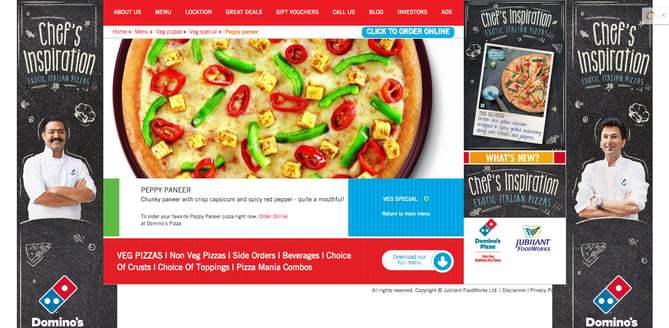
By making a conscious effort to gain a better understanding of the preferences of the markets it’s trying to break into, Domino’s can deliver pies diverse enough to gain international attention.
5. Rezdy
Some companies may not be trying to attract global markets directly, but if their clients are, they better know how. Rezdy is an Australian-based reservation software designed to make online booking smoother for tourists and agents alike.
Though Rezdy’s clients are Australian-based, the company needs to cater to its clients’ international visitors. Click on the screenshot to check out this fun video on Rezdy’s homepage:
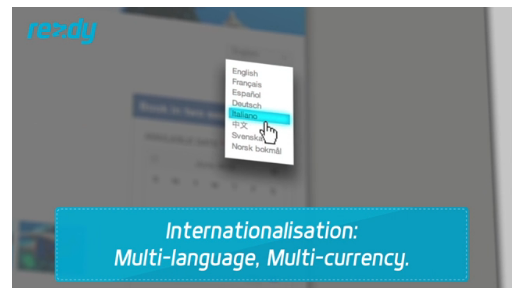
The first feature the video spotlights is “Internationalisation.” The video walks us through how easy the service is for users, but is sure to emphasize the language and currency customization tool upfront. Even if your company is marketing to other regional companies, consider their global customers as if they were your own.
6. World Wildlife Foundation
WWF took its Earth Hour initiative — a voluntary worldwide event where participants turn off their lights for an hour to show how easy it can be to battle climate change — and brought it to Norway’s mobile audience.
Scandinavian countries like Norway experience extreme daylight hours in different seasons, making the country a prime candidate for WWF’s Blackout campaign. Using digital agency Mobiento, the nonprofit placed the Blackout Banner across Norway’s top media sites to promote Earth Hour. With one tap of the banner, the screen went black. Finger swiping the black screen slowly revealed the Earth Hour countdown. The banner attracted roughly 1,000,000 impressions and the campaign received three MMA Global Mobile Marketing Awards back in 2012.
Have a cool idea? Don’t be afraid to try it out on one international market — just make sure it’s the appropriate audience. (Also, don’t be afraid of the dark.)
7. Pearse Trust
With offices in Dublin, London, Vancouver, Atlanta, and Wellington, Pearse Trust has grown to be an international authority on corporate and trust structures. But it takes more than offices all over the map to reach an international audience.
That’s why Pearse Trust keeps content flowing on its Facebook page that engages its various markets. In this screenshot below, you can see Pearse Trust posts lots of content featuring international affairs relating to the company’s practice.

It also levels out external articles with Pearse Trust content, featuring news from places like Germany, Ireland (where it has a Dublin office), and the U.K. (where it has a London office). This is a great example of focusing on common interests shared among your company’s various markets while also making the content relatable to customers by region.
8. Nike
Nike has been able to evolve its global presence through the careful selection of international sponsorships such as its previous long-standing relationship with Manchester United.
Although sponsorship spending can be fairly unpredictable — demand costs tend to surge due to triggers like championships and tournaments — these partnerships have certainly helped the brand capture the attention of a global audience.
Nike’s NikeID co-creation platform serves as another strategy that the company is using to appeal to international markets.
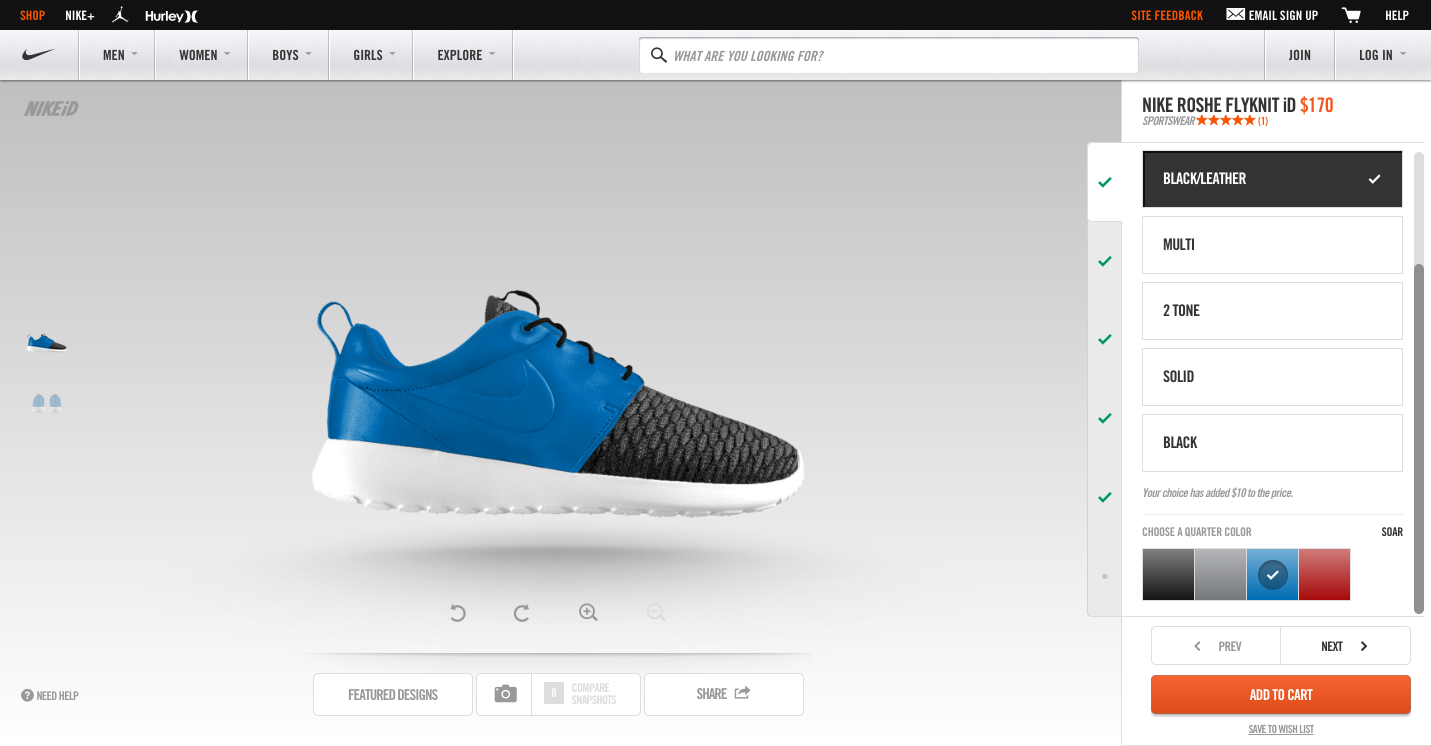
By putting the power of design into the hands of the consumer, Nike is able to deliver customized products that align with different cultural preferences and styles.
9. McDonald’s
We all know McDonald’s is a successful global brand, so unlike its menu, I’ll keep it light.
While keeping its overarching branding consistent, McDonald’s practices “glocal” marketing efforts. No, that’s not a typo. McDonald’s brings a local flavor, literally, to different countries with region-specific menu items. In 2003, McDonald’s introduced the McArabia, a flatbread sandwich, to its restaurants in the Middle East.

McDonald’s has also introduced macaroons to its French menu:

And added McSpaghetti to its menu in the Philippines:

This “glocal” approach has helped put McDonald’s at
#9 on Interbrand’s Best Global Brands 2014.
10. Innocent Drinks
Innocent Drinks is the leading smoothie company in the U.K., but that’s not the only place you’ll find its products. In fact, Innocent products are now available in 15 countries across Europe.
And despite its widespread reach, the company’s “chatty branding” remains consistent across the board. For instance, the website is very bubbly, with contact information that reads “call the banana phone” or “visit the fruit towers.”
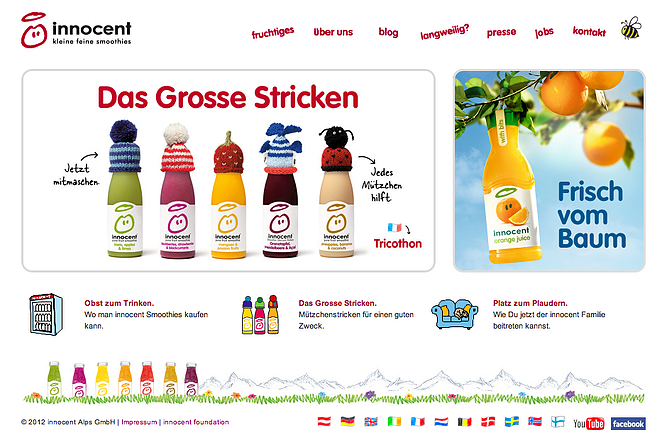
While global expansion and rapid growth can sometimes distract a company from consistent branding, Innocent Drinks has managed to remain true to itself. By ensuring that the brand’s voice is interpreted the same way around the world, Innocent is able to create a more recognizable brand.
11. Unger and Kowitt
The phrase “glocal” can be defined as “Think Globally, Act Locally.” But what happens when you switch the two around.
Whoa, fasten your seat belts — literally. Unger and Kowitt is a traffic ticket law firm based in Fort Lauderdale defending drivers in the state of Florida. Not very global, right? Well, Unger and Kowitt understands that America is a melting pot and that Florida is bursting at the seams with different cultures and languages.
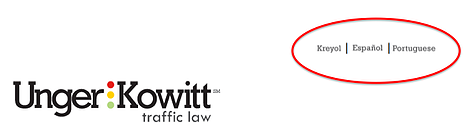
Though a domestic service, the firm’s website is available in English, Spanish, Portuguese, and Creole. With these options, Unger and Kowitt can cater to Florida’s nearly 3.5 million Floridians who speak Spanish, Portuguese, or Creole. Don’t miss out on expanding your client base — sometimes you don’t have to look far to attract international business.
12. Coca-Cola
Coca-Cola is a great example of a brand using international marketing efforts. Though a large corporation, Coca-Cola focuses on small community programs and invests a lot of time and money in small-scale charity efforts.
For example, in Egypt, Coca-Cola has built 650 clean water installations in the rural village of Beni Suef and sponsors Ramadan meals for children across the Middle East. In India, the brand sponsors the Support My School initiative to improve facilities at local schools. Not to mention, the brand sticks with selling an emotion that can’t get lost in translation: happiness. Now, tell me this doesn’t look like fun:
13. Spotify
As of 2018, Spotify was newly considered one of the best global companies in the world, according to Interbrand. We’ve all heard of Spotify (no pun intended), but how did it suddenly, and so quickly, expand from Sweden into other countries?
Spotify’s business model is focused on helping you find something new.
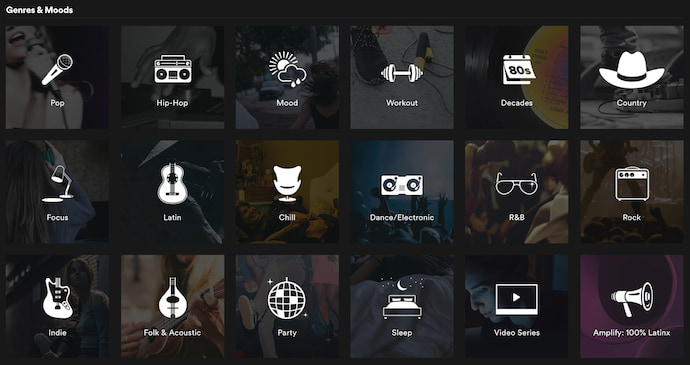 It’s one thing to select a genre of music to listen to — it’s another thing to select a “mood” to listen to. The screenshot above is part of Spotify’s “Browse” page, where you can listen not just to “country” and “hip-hop,” but also music that carers to your “workout” or “sleep” preferences.
By changing how they describe their content, Spotify gets users to listen to music that goes beyond their favorite genres, and instead satisfies habits and lifestyles that people share all over the world. This allows international artists to access listeners from other countries simply because their product is being categorized a different way.
Spotify now has offices in 17 countries around the world.
If you have global aspirations for your business, you need to find out what customers in different communities have in common — and how to localize your product for these different markets. Your first step? Take inspiration from one of the 13 businesses above.


9 YouTube Channel Ideas to Help You Choose Your Own
Starting a YouTube channel is a lot of work. Not only do you have to spend time scripting, producing, and editing videos, but you also have to find a topic you’re passionate about and make sure it resonates with people.
To help inspire you, we found nine popular YouTube categories that you can start a channel about. Read on to learn why viewers love to engage with these types of YouTube videos, and start ideating your YouTube channel today.
YouTube Channel Ideas
- Comedy Sketches
- Web Series
- Music
- Tutorials
- Self Help
- Cooking
- Training and Fitness
- Style
- Travel
1. Comedy Sketches
When you’re in the midst of a two hour YouTube binge fest, you can probably blame the endless amount of funny videos that flood the platform. Some of the most successful YouTubers create comedy sketches, like Jenna Marbles, a blogger turned YouTube sensation who has over 19 million subscribers, and Jimmy Tatro, a college kid who made hilarious videos for fun, but ended up turning it into a career, amassing over 3 million subscribers to this day.
Jenna and Jimmy both built their YouTube followings with low-production videos, but they completely nailed the humor and storytelling in most of their videos, too. With this in mind, if you can write a funny script, building a successful comedy channel with a low budget is definitely possible.
2. Web Series
The human brain is wired to respond to well-crafted narrative. Neuroscience proves that storytelling is the best way to capture people’s attention, bake information into their memories, and forge close, personal bonds. We’re programmed to crave and seek out great stories — that’ll never change.
If you can structure your YouTube channel like a season of television and weave your videos into a narrative-driven series, then you can get viewers hooked on your content — just like your favorite Netflix show.
3. Music
Covers of songs are some of the most entertaining videos on YouTube. People love listening to aspiring artists’ personal twists on their favorite songs. So if you can sing or play instruments, consider covering your favorite, trending, or hit songs and upload them to YouTube. Who knows, maybe you could even get discovered and become the next Justin Bieber or Tori Kelly.
4. Tutorials
Whether they’re guitar lessons, beauty lessons, or how-to videos about making popsicle stick houses for your hamster, people love learning how to enjoy their lives more. If you can cover topics that people are passionate about and teach them how to get better at these things, they’ll be able to live better lives. This’ll grow your channel’s brand loyalty and sentiment, retaining your viewers’ attention and attracting their friends’ attention by way of word-of-mouth marketing.
5. Self Help
Another way you can grow your channel’s brand loyalty and sentiment is by helping people solve their personal problems. Whether it’s about their career or personal life, you can give people advice about common issues that you’ve experienced or that they ask about. But make sure you have extensive knowledge, education, or personal experience surrounding these topics. Otherwise, people will think you’re a quack and lose trust in you.
6. Cooking
Humans’ love for cooking is primal. I mean, we need food to survive, so it makes complete sense that people are always trying to master certain dishes and learn about new ones. To help them do this, guide them through your recipes, delve into the techniques you use, and show them what their food should look like at each stage of your recipe. This will help them make the best dish possible.
7. Training & Fitness
Personal trainers are expensive. Fortunately, though, you don’t need one to stay in shape. People are starting to resort to free personal trainers or yoga instructors on YouTube to stay active. So if you have a lot of expertise on weight lifting, yoga, or other fitness methods, consider creating workout videos for specific goals, like losing weight, gaining muscle, or improving cardiovascular health.
8. Style
Everyone wants to look good. And by evaluating new clothing, keeping people updated on new trends and styles, and teaching them how to always look their best, you can build a dedicated YouTube following. If your YouTube channel is popular, you can also attract sponsors who will pay you to review their clothing and offer deals to your audience.
9. Travel
Humans are biologically driven to investigate the world rather than respond to it. That’s why people love exploring so much. But before they shell out thousands of dollars to travel someplace they saw on Instagram, people like to do a little research first. So if you have the funds to travel, consider recording your adventures in destination cityscapes or landscapes. Your viewers can actually get an inside look at the location, helping them decide to take a vacation they’ll never forget or save money on a trip they’d regret.

How to Take a Sabbatical, According to 6 People Who Did
Imagine this — you spend an entire month backpacking throughout Southeast Asia, drinking from coconuts on the beaches of southern Thailand, hiking the mountains in Vietnam, and seeing Angkor Wat at sunrise.
Best of all? You’re getting paid to do so, and you have the same job waiting back home that you had when you left.
Surprisingly, that type of experience just might be possible with a sabbatical.
Whether you’re hiking the Appalachian trail or spending the month learning a new skill, a sabbatical is often a critical opportunity to regain focus and clarity, relax, or check off a bucket-list item. If your employer offers you the option to take a sabbatical, it’s a good idea to take one.
However, a sabbatical can seem daunting, and “wasting” your sabbatical on a bad decision can seem more frustrating than not going at all. To combat these challenges, I spoke with six employees at HubSpot who each took a month-long sabbatical at their five-year anniversary. Keep reading to get some ideas for how you want to spend your sabbatical.
But first — what’s a sabbatical?

How long is a sabbatical?
It depends on the stipulations provided by your employer, but typically, a sabbatical can last anywhere from one month to two years. Of course, you will likely have a shorter sabbatical if it’s a paid sabbatical, and a longer one if it’s unpaid.
What’s a sabbatical?
Unlike vacation, a sabbatical is an extended break from work. Employers can offer either unpaid or paid sabbaticals, but typically guarantee an employee’s position remain open until the employee returns from their leave.
The length of a sabbatical is up to the discretion of your employer, as are the terms and conditions. Many companies encourage higher retention rates by offering sabbaticals to employees only after a certain period of time — at Adobe Systems, an employee is eligible for a four-week sabbatical after five years, and a six week sabbatical after fifteen years.
Some companies incentivize employees to pursue professional development by offering a paid sabbatical only if an employee uses the time in a certain manner. For instance, Deloitte offers both paid and unpaid options. A Deloitte employee can choose to take an unpaid one-month sabbatical at any time, or a three-to-six month sabbatical that “can be taken to pursue personal or professional growth opportunities in the areas of career development or volunteerism.”
Employees at Deloitte who choose the three-to-six month option will receive 40% of their pre-sabbatical base salary.
At HubSpot, employees are eligible for a four-week paid sabbatical, but only once they’ve been at HubSpot for five years — however, this might look different at your company.
It’s important to note, sabbaticals can be incredibly effective solutions to turnover rates at your company. Oftentimes, people will work in certain roles until they’re exhausted, and then feel they need some time off from work, or even a career-change, to recharge. A sabbatical is an alternative solution to this problem, and allows your employees to return to their roles happier and more productive.
Additionally, your employees will likely gain fresh ideas and perspectives during their sabbaticals. Perhaps they’ll observe new potential markets, learn a new skill, or observe how a competitor in another country is successfully solving a problem with which your company has struggled.
Sabbatical Ideas
To get ideas for your sabbatical, take a look at the diverse experiences of six different HubSpot employees.
1. Inbound Marketing Specialist Dan Sally’s Sabbatical to Rio de Janeiro
“In July of 2014, I started learning Brazilian Portuguese and, after about five months, got to the point where I was proficient enough to take lessons entirely in the language. I was lamenting the fact that, with a wife and four kids, I’d probably never get the chance to get the immersion I needed to bring my skills to the next level, when HubSpot announced our sabbatical program.
I had just hit my five year anniversary, so the timing was perfect.
My family and I rented an apartment in Rio de Janeiro for the month of July, one block from the beaches at Ipanema. We spent the month swimming, visiting all the sites of Rio, and ate red meat and churros pretty much every day.
Leaving work behind wasn’t a huge issue, as I was working in sales for our Dublin office at the time and Europe shuts down in the summer. Even if it were, being in Rio with four kids would be enough of a distraction to keep my mind off things.”
2. VP of Marketing Meghan Keaney Anderson’s Sabbatical to Her Hometown
“You may think sabbatical and immediately have your imagination jump to exotic locations or wild adventures. Mine did not. For my sabbatical I rented a quiet house by the harbor in my hometown of Marblehead, Massachusetts. I spent the entire time taking long walks with my dog and sitting in a rocking chair on the front porch.
Above all, I wanted some time to clear my head. Going somewhere familiar and watching my dog sleep in the sun was that precise thing. I am so grateful I did.”
3. Senior Director of Customer Selling Corey Beale’s Sabbatical to Costa Rica
“For my 31 days I elected to rent a house in Costa Rica and live the surfing life as if I was retired and just doing my thing. I ended up renting this incredible house just minutes from the beach. As you’d expect when you send an open invite to friends and family saying you’ve rented a beach house and there are open bedrooms available, people are more than happy to take you up on the offer. We had a fun rotation of guests coming and going each week, which meant there were always laughs and adventures to be shared. It was also rewarding that I was able to pay a vacation forward to my parents, and host them for once.
I’m a big fan of earning good karma on trips, so I decided to donate some of the HubSpot provided money to a local school and I ended up bringing home a stray dog! Once his paperwork was all set, I brought him stateside. Best of all, he was adopted by a fellow HubSpotter and he’s already been in the office and gotten plenty of HubSpot love.
Hopefully everyone who becomes eligible for a sabbatical takes advantage of it and does something on their bucket list, or several things on their bucket list, with the time off. It’s well worth it, and I for one am incredibly thankful that HubSpot provides the opportunity to partake.”

4. Principal III Customer Success Manager Kate Gillette Horne’s Sabbatical to California
“There are so many directions you can take for your sabbatical and the best direction to go can also be very dependent on your current lifestyle and living situation. My husband and I threw around a ton of ideas as there are many things on my bucket list, but we also had a baby that was about to turn one and no local family (or any that would take a baby for over two weeks).
Traveling the coast of California was always on our list, and we decided that option would be very baby-friendly. Preparation at work was fairly easy because my team has a customer facing team alias for emergencies, which we can put in our out-of-office. So during any time out of office, the team picks up your slack and you pick up their slack when they are out.
The great thing about HubSpot is that since everyone has the opportunity to take a sabbatical (and any vacation), no one minds helping out and supporting the current person who’s out, so I never felt like I was burdening anyone and also don’t feel like it’s a burden to support others who are out — which makes the month off 10x better. The only major source of stress of the whole process was making sure I picked the absolute best path up the coast.”
5. Product Editor-In-Chief Beth Dunn’s Sabbatical at Home
“I think the most important thing about planning your sabbatical is that you don’t bow to pressure to make it amazing in some traditional way. If you’re truly desperate to go on a month-long trek across vast empty landscapes, then by all means do it. But if secretly you’d rather stay home with your cats and knit by the fire (which is what I did), then you should do that instead. Nobody’s grading you on your sabbatical. You shouldn’t ‘do it for the ‘gram.’ This is for you — to rest and recharge, whatever that happens to mean for you. Maybe mix a little travel with some downtime at home. Or indulge in nonstop travel if that’s right for you. Or don’t budge from your home turf, and really revel in that.
Just pay close attention to which ideas for your sabbatical make your heart sing, and which ones make your stomach hurt. And follow the song.
Whatever you do, it’s not a bad idea to focus on something tangible you’ll take away with you as a souvenir of the event.
One friend of mine wanted to collect a jar of sand from a particular hidden cove on the Mediterranean Sea. Now it sits on her desk and reminds her of the promise she made herself when she finally got there.
I knitted myself a sabbatical sweater, which actually has a secret message woven into those cables that only I can read. (Knitters will understand what I mean.) It isn’t so much about ‘having something to show for it’ as much as it is about crafting your sabbatical so that it gives you the space to remember something about yourself that you might have forgotten, or to resolve something new that you want to recall. Try to come out of your sabbatical with some sort of message to your future self, something your sabbatical self would want you to remember.”
6. Marketing Team Manager Al Biedrzycki’s Sabbatical Building a Guitar
“I wanted to spend my sabbatical doing something creative and something that aligned with my hobbies. I also wanted to ensure it was something that would also only be available to me if I were to have a month of time off. I did some research (and deferred to Andrew Quinn, who had built a guitar already) and ended up booking a two-week intensive course with Charles Fox in Portland, Oregon.
The process of leaving work wasn’t too difficult — I had my current direct report holding down the fort while I was out and it also was the summer (June) so the work cadence was a bit lighter. Once I got back, it took me a few days to adjust and get back into the swing of things — mostly catching up on what happened and working through my inbox.”


How to Take a Sabbatical
If your company offers a sabbatical program, you’ll likely need to follow certain guidelines to submit the request for a sabbatical. You can probably find the rules and regulations listed on your company’s website.
However — what if your company doesn’t have a fully-fledged sabbatical program? Perhaps you can still take one, by following these steps:
- Consider how your sabbatical might contribute to the company’s bottom-line down the road. Perhaps you’re hoping to expand into new markets, in which case you might propose a month-long sabbatical to visit the city in which you want to expand to get to know the local culture and language. Alternatively, maybe you feel burnt out after five years in a role. You might need a break to recharge, get some fresh perspectives, and come back refreshed and ready to take charge once again.
- Once you’ve figured out how your sabbatical could truly make a difference for your company or team, draft a proposal. Then, schedule a meeting with your manager or director.
- Begin by saying something like this — “I’ve been thinking about how I can bring more value to my work, and I believe taking a sabbatical to learn XYZ will help me succeed. I’ve drafted a proposal for you to review.”
- Alternatively, you might say, “After [recent accomplishment or promotion], I’m feeling a little burnt out. I think a sabbatical could be an effective opportunity for me to recharge as I prepare to lead our team this fall. I’ve drafted a proposal for your consideration.”
Once you get approval from your manager or director, you might still be nervous about taking the time off, unpaid. Fortunately, there are a few grants and scholarships for which you can apply, to help you successfully finance your sabbatical.
Here’s a list of resources to look into:
- The National Academies of Sciences Engineering Medicine
- Louisville Institute Sabbatical Grant for Researchers
- The Healing Trust Sabbatical Grant
- Julie L. Rogers Sabbatical Program
- Professional Fellows Program

The Ultimate Guide to Embedding Content on Your Website
Whether you want to add social proof to your content, support a blog with real examples, or extend your website’s reach with a newsfeed, embedding content from other platforms can add a lot of value to your website.
But figuring out how to actually embed this content can be tricky.
In this post, you’ll find a step-by-step guide to embedding social media and related content onto your website from Twitter, Facebook, Instagram, Pinterest, Google Calendar, YouTube, and SlideShare.

(Unfortunately, LinkedIn still doesn’t allow embedding capabilities for specific posts — although it does offer plugins so you can embed your LinkedIn profile or page.)
Click on a section name to scroll automatically to that section.
- How to Embed a Tweet
- Embed Facebook Post or Video
- Embed Facebook Feed
- Embed Instagram Feed and Posts
- Embed Pinterest Pins
- Embed Pinterest Boards
- Embed Google+ Post
- How to Embed Google Calendar
- How to Embed a YouTube Video
- Embed SlideShare Presentations and Infographics
How to Embed a Tweet
- Find the tweet you’d like to embed.
- Click the downward arrow on the top-right of your tweet.
- Choose “Embed Tweet.”
- Copy the code that appears and paste it into your website’s HTML editor.
- Add ‘tw-align-center’ after the words “twitter-tweet” in the embed code.
1. Find the tweet you’d like to embed.
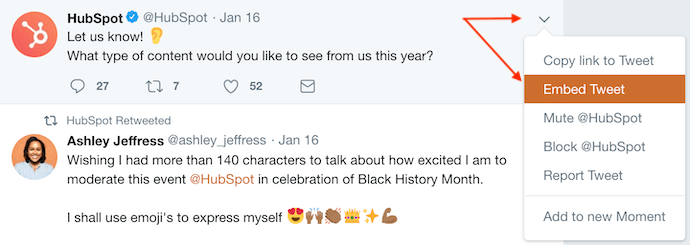
To embed a tweet onto your blog or website, you’ll need to first find the tweet you want to display in its natural habitat — Twitter. Locate the tweet in your Twitter newsfeed or on the Twitter user’s profile. For this example, we’ll embed a tweet from HubSpot’s Twitter feed, as shown in the screenshots below.
2. Click the downward arrow on the top-right of the tweet.
Once you’ve found the tweet you want to embed, click the downward-facing arrow icon, located on the top-right of the tweet, as shown below.

3. Choose “Embed Tweet.”
Clicking this arrow icon will reveal a dropdown menu of options, including one called “Embed Tweet.” Click this option.
 4. Copy the code that appears and paste it into your website’s HTML editor.
Clicking “Embed Tweet” from the dropdown menu shown above will open the code box shown below. Under “Embed this Tweet,” you’ll see a string of text highlighted in blue. Use Command+C on your keyboard (or Control+C, if you’re using a PC) to copy this code to your clipboard.
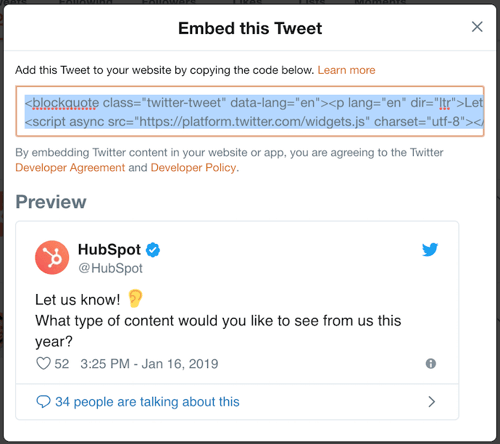
With this embed code copied to your clipboard, return to the website where you want to embed this tweet. Open the source code of this website (some content management systems have a “</>” icon where you can access this source code). Here, you’ll paste the tweet’s embed code into your HTML precisely where you want the tweet to appear.
5. Add ‘tw-align-center’ after the words “twitter-tweet” in the embed code.
Once you pasted this code into your HTML, however, you’ll want to center-align this tweet so it doesn’t automatically appear pushed up against the left or right side of your webpage. To correct this, add the text, ‘tw-align-center’ (without quotation marks) directly after “twitter-tweet” in the embed code. You can learn more about this method here.
Here’s what the final code should look like:
<blockquote class=”twitter-tweet” tw-align-center data-lang=”en”><p lang=”en” dir=”ltr”>Let us know! 👂<br>What type of content would you like to see from us this year?</p>— HubSpot (@HubSpot) <a href=”https://twitter.com/HubSpot/status/1085634067679322114?ref_src=twsrc%5Etfw”>January 16, 2019</a></blockquote>
<script async src=”https://platform.twitter.com/widgets.js” charset=”utf-8″></script>
That’s it! This is what your embedded tweet will look like when you’re done:
Let us know! 👂
What type of content would you like to see from us this year?— HubSpot (@HubSpot)
January 16, 2019
Embed Facebook Post or Video
1. Find the Facebook post you’d like to embed.
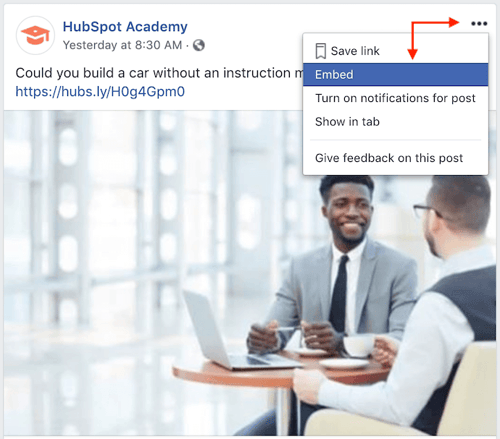
Similar to the steps to embed a tweet (listed above), embedding a Facebook post onto your blog or website starts on Facebook. Navigate to the post you want to embed from Facebook, on the Facebook user’s profile page or your newsfeed. For this example, we’ll embed a Facebook post from the HubSpot Academy, as shown in the screenshots below.
2. Click the ellipsis (“…”) icon on the top-right of the post.
On the top-right of the Facebook post you want to embed, you’ll see an ellipsis icon consisting of three small dots. Click this icon, as shown below.

3. Click “Embed.”
Clicking the ellipsis icon shown below will reveal a dropdown menu of options, including one labeled “Embed.” If the post you want to embed is a video, a similar option labeled “</> Embed” will appear further down on this menu. Click either option.
If you don’t see an option to embed the post, then the post is not public and is not embeddable.
4. Copy the code that appears and paste it into your website’s HTML editor.
Clicking the “Embed” option shown above will open the box shown below. At the top of this box, just above the “Hide Preview” and “Advanced Settings” buttons, you’ll see a line of coded text. Highlight and copy this code onto your computer’s clipboard.

With this embed code copied to your clipboard, return to the website where you want to embed this Facebook post. Open the source code of this website (some content management systems have a “</>” icon where you can access this source code). Here, you’ll paste the Facebook post’s embed code into your HTML precisely where you want the post to appear.
5. Add <center> and </center> tags around the entire HTML snippet to center-align your post.
Once you pasted this code into your HTML, however, you’ll want to center-align the post so it doesn’t automatically appear pushed up against the left or right side of your webpage. To correct this, wrap the code with ‘<center>’ and ‘</center>’ tags so the Facebook post displays in the center of your article or webpage.
Here’s what the final code should look like:
<center><iframe src=”http://bit.ly/2DoHMU0″ width=”500″ height=”448″ style=”border:none;overflow:hidden” scrolling=”no” frameborder=”0″ allowTransparency=”true” allow=”encrypted-media”></iframe></center>
That’s it! Here’s what it’ll look like when you’re done:
Embed Facebook Feed
Believe it or not, embedding a Facebook profile’s entire feed onto your website is as easy as embedding a single post or video. And there’s more than one way to do it.
Using a WordPress Plugin
The first way is to install a plugin or widget into your content management system (CMS). WordPress users, for example, have several Facebook feed plugins at their disposal. Here’s how to use one:
- The Custom Facebook Feed, by Smash Balloon, is one such WordPress plugin you can download through your WordPress account. You can download this plugin here.
- With this plugin downloaded, log into your WordPress account and activate this plugin from within the “Plugins” menu.
- Use the “Facebook Feed” settings of your CMS to select and configure the specific Facebook feed you want to display on your website.
- Enter the text, ‘[custom-facebook-feed]’ in the HTML editor of your website to generate your chosen Facebook feed.
Using Facebook’s Page Plugin
Facebook has its very own Page Plugin, allowing you to produce embed code for any profile’s individual Facebook feed and enter it into the HTML of your website. Here’s how to use it:
1. Open Facebook’s Page Plugin tool.
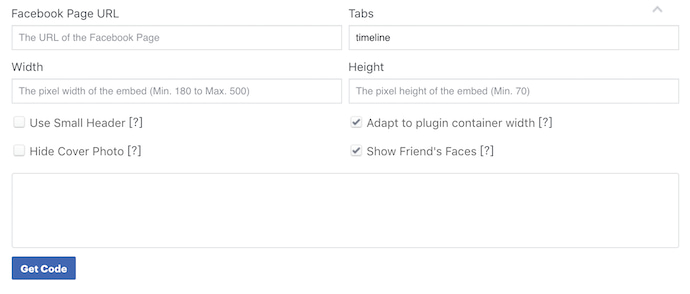
To embed a Facebook feed into your blog or website, open Facebook’s native Page Plugin tool here. Scroll down on this page until you see the section shown below.
2. Enter the URL of the Facebook Page you want to embed.
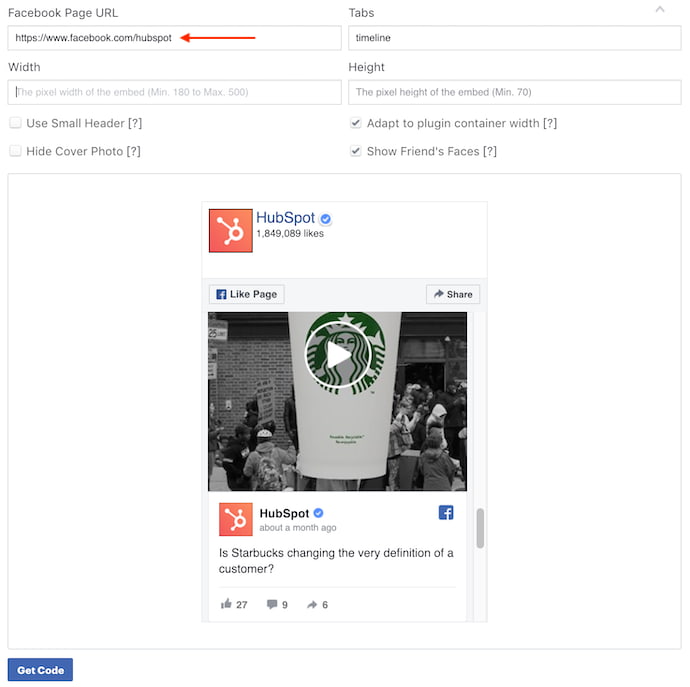
With this tool opened, create a new tab in your web browser and navigate to the Facebook profile whose feed you want to embed. Press Command+C on your keyboard (or Control+C, if you’re using a PC) to copy the URL of this page to your computer’s clipboard.
Return to the browser tab that has Facebook’s Page Plugin open. Paste the URL from your clipboard into the top-left field, as shown in the screenshot below. For this example, we’ll embed the Facebook feed of HubSpot’s Facebook Business Page.
3. Add the tabs you want displayed alongside your embedded feed.
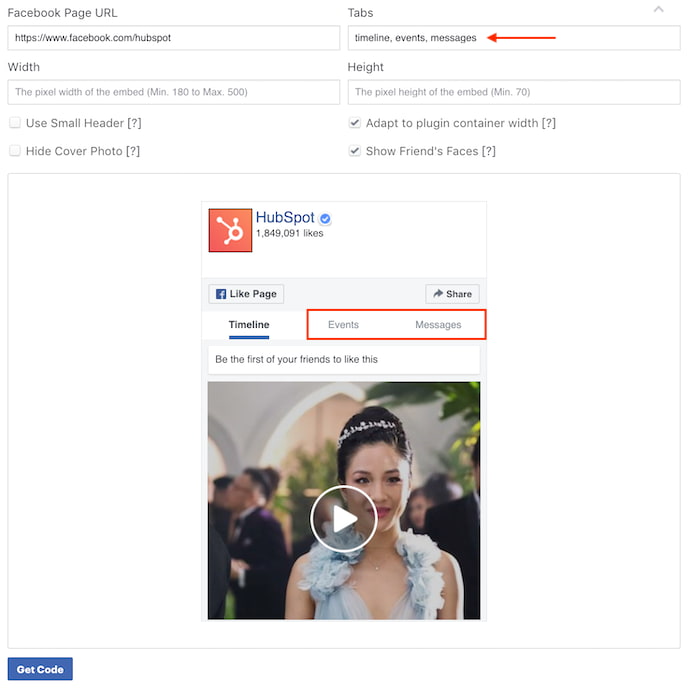
In addition to showing a profile’s entire timeline, Facebook’s Page Plugin also lets you display tabs to that profile’s Events and/or Messenger account. By default, the Page Plugin tool will have “timeline” entered by itself.
To add either Events or Messenger tabs to your embedded Facebook feed, click over to the “Tabs” field on the top-right of the Page Plugin tool, as shown below. Add the words “events” and/or “messages” next to the word “timeline,” all separated by commas.
4. Customize the dimensions of your Facebook feed.
If your website has specific dimensions that restrict the size of the media you embed, and you know what these dimensions are, enter them into the bottom two fields of the Facebook Page Plugin tool. You can enter a specific width in the left field and a specific height in the right.
By default, your Facebook feed will display at roughly 340×500, although you’ll see recommended dimensions in the tool’s preview text.
5. Click “Get Code.”
With all four of these fields filled in, simply click the blue “Get Code” button at the bottom of the tool, as shown in the screenshot above. This will open the code box shown below.
6. Click the ‘IFrame’ tab.
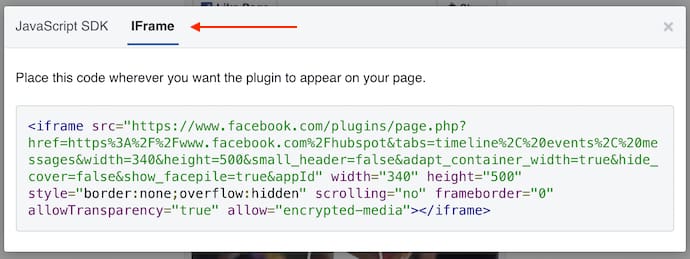
Be careful which code you select, though … unless you’re coding your website from scratch, the first tab (labeled “JavaScript SDK”) does not have the code you want. Toggle over to the tab labeled “IFrame,” as shown below. This text is ready-made for embedding into your blog or website’s HTML editor.
7. Copy and paste this embed code into your website’s HTML editor.
Copy the code shown above to your clipboard. Then, navigate to the website where you want to embed this Facebook feed. Open the source code of your website (some content management systems have a “</>” icon where you can access this source code). Here, you’ll paste the feed’s embed code into your HTML precisely where you want it to appear.
8. Add <center> and </center> tags around the entire IFrame snippet to center-align the feed.
Once you pasted this code into your HTML, however, you’ll want to center-align the post so it doesn’t automatically appear pushed up against the left or right side of your webpage. To correct this, wrap the code with ‘<center>’ and ‘</center>’ tags so the Facebook feed displays in the center of your article or webpage.
Here’s what the final code should look like:
<center><iframe style=”border: none; overflow: hidden;” allow=”encrypted-media” xml=”lang” src=”http://bit.ly/2U4aaQM” width=”340″ height=”500″ frameborder=”0″ scrolling=”no”></iframe></center>
That’s it! Here’s what it’ll look like when you’re done:
Embed Instagram Feed and Posts
Instagram is a favorite among marketers, but embedding an entire Instagram feed can be difficult. Here’s how to embed an Instagram feed as well as individual posts to your website.
The Instagram Feed WordPress Plugin
From the makers of the Custom Facebook Feed comes the Instagram Feed. Developed by Smash Balloon, this WordPress plugin makes it easy for WordPress-based websites to embed entire Instagram feeds from specific Instagram accounts. Here’s how to use it:
- Download the Instagram Feed plugin for WordPress here.
- With this plugin downloaded, log into your WordPress account and activate this plugin from within the “Plugins” menu.
- Use the “Instagram Feed” settings of your CMS to select your Instagram Access Token and user ID.
- Enter the text, ‘[instagram-feed]’ in the HTML editor of your website to generate your chosen Instagram feed.
According to this plugin’s instructions on WordPress, you can display multiple Instagram feeds at the same time by entering text in the format of: ‘[instagram-feed num=6 cols=3]’. In that example, you would effectively embed
six images each for
three separate Instagram feeds.
Instagram’s Embedding Feature
To embed individual Instagram pictures, you need not look further than the native features of Instagram. Here’s how to do it:
Important: In order to embed specific Instagram posts onto a blog or website, the Instagram account it belongs to cannot be set to private. To set an account to public, navigate to this profile and click “Edit Profile” > Privacy and Security. From this page, uncheck the “Private Account” option and you should be all set.
1. Click on the Instagram image you want to embed.
Navigate to the Instagram post you want to embed onto your website and click on it to enlarge the image. For this example, we’ll embed an image from HubSpot’s culture account, hubspotlife, as shown in the screenshots below.
2. Click the ellipsis (“…”) icon on the bottom-right corner of the post.
With the post in its full view, look to the bottom-right of the comments section. Click the ellipsis icon, consisting of three small dots, as shown below.
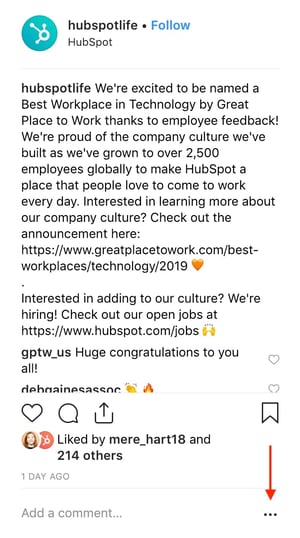
3. Select “Embed.”
Clicking the ellipsis icon shown above will open the box of options shown below. In this menu, select “Embed,” the third button from the top.
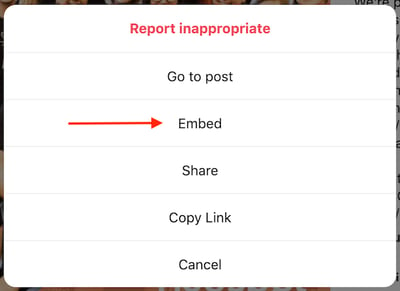
4. Copy and paste the embed code into your website’s HTML editor.
Much like the instructions for Twitter and Facebook (listed above), this “Embed” button will produce another box carrying a sting of coded text. Once this box opens on your screen, highlight the code at the top, as shown below. Then, click the blue “Copy Embed Code” button at the bottom to copy this text to your computer’s clipboard.
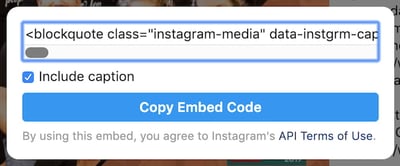
5. Add <center> and </center> tags around the entire HTML snippet to center-align the post.
Once you pasted this code into your HTML, however, you’ll want to center-align the Instagram post so it doesn’t automatically appear pushed up against the left or right side of your webpage. To correct this, wrap the code with ‘<center>’ and ‘</center>’ tags so the image displays in the center of your article or webpage.
That’s it! Here’s what your embedded Instagram post will look like:
Embed Pinterest Pins
1. Open Pinterest’s widget builder.
To embed pinned content from Pinterest onto your blog or website, open Pinterest’s widget builder, available here.
2. Select “Pin Widget” in the left-hand column.
Scroll down until you see the Pin Widget option, as shown in the screenshot below.
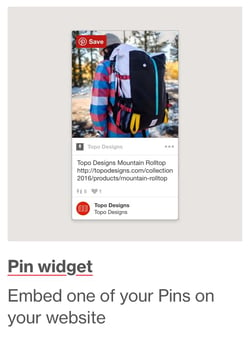
3. Paste in the URL of the pin you’d like to embed.
Start by filling in the “Pin URL” field at the top of the tool with the URL of the pin you want to embed onto your website, as shown below.
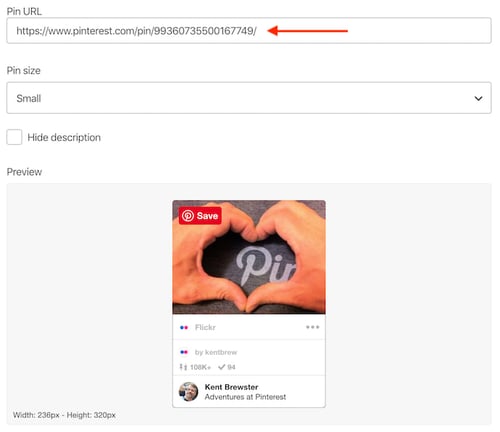
4. Copy and paste the code from this section into your website’s HTML editor.
While in Pinterest’s Pin Widget, scroll down to the section just beneath the preview image of your pin, where you’ll find two lines of coded text — as shown below.
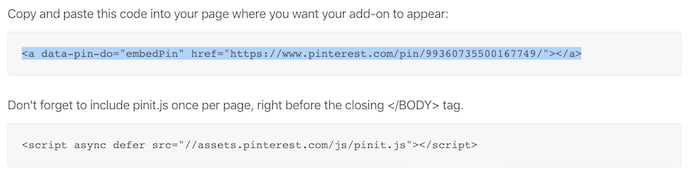 Open your website’s HTML editor, and copy and paste the first line exactly where you’d like your Pinterest pin to appear on the page. Then, copy the second line of text and paste it into your website’s HTML editor at the very bottom of the page.
Be careful not to paste this entire snippet more than once on a single webpage. If you want the pin to appear multiple times, you just need to copy the first line of code and paste it wherever you’d like it to appear on the page. And don’t forget to repeat the following steps in each instance of the pin you decide to embed.
5. Copy the snippet of code provided below.
<!–pinterest–>
6. Paste that snippet of code between the opening <a> tag and the closing </a> tag.
The code should look like this:
<a data-pin-do=”embedPin” href=”http://bit.ly/1efNJe9″><!–pinterest–></a>
…
At bottom of page:
<script type=”text/javascript” async src=”//assets.pinterest.com/js/pinit.js”></script>
7. Add <center> and </center> tags around the entire HTML snippet to center-align the pin.
Here’s what the final code should look like:
<center><a data-pin-do=”embedPin” href=”http://www.pinterest.com/pin/99360735500167749/”><!–pinterest–></a>
<!– Please call pinit.js only once per page –>
<script type=”text/javascript” async src=”//assets.pinterest.com/js/pinit.js”></script></center>
That’s it! Here’s what it’ll look like when you’re done:
Embed Pinterest Boards
To add Pinterest Boards, the steps are generally the same as they are to embed individual pins — explained above. Here’s how it’s done:
- Open Pinterest’s widget builder.
- Select “Board Widget” in the lefthand column, just beneath the “Pin Widget” builder.
- When the Board Widget open, follow the same steps as you would for adding pins, listed above.
Copy and paste the bottom two lines of code into your website’s HTML editor, and that’s it! Here’s what an embedded board looks like:
Embed Google+ Post
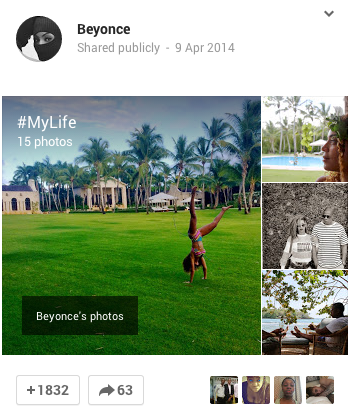
1. Find the Google+ post you’d like to embed. Hover your mouse over the top right corner and click the grey arrow that appears to pull down more options.
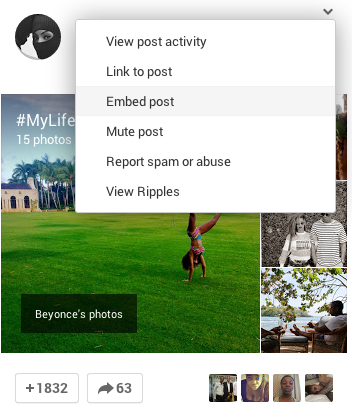
2. Choose “Embed Post.”
3. Copy the entirety of the code that appears, and paste it in the HTML view of your website.
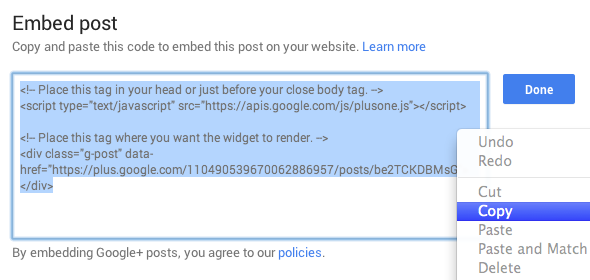
4. Center the embedded post by adding <center> and </center> around the whole HTML snippet.
Here’s what the final code should look like:
<center><!– Place this tag in your head or just before your close body tag. –>
<script type=”text/javascript” src=”https://apis.google.com/js/plusone.js”></script>
<!– Place this tag where you want the widget to render. –>
<div class=”g-post” data-href=”https://plus.google.com/110490539670062886957/posts/be2TCKDBMsG”></div></center>
That’s it! Here’s what it’ll look like when you’re done:
How to Embed Google Calendar
To embed a particular Google Calendar onto your blog or website, you’ll need to use the web version of Google Calendar, rather than the mobile app.
Got it open? Let’s embed it.
1. Click the gear icon to open your settings.
At the top of your Google Calendar, click the gear icon and select “Settings,” as shown below.
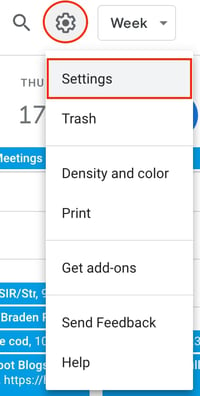
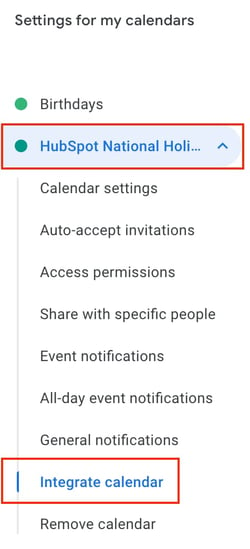
2. Select the calendar you want to embed and scroll down to “Integrate calendar.”
Once you’re in your calendar settings, look to the lefthand sidebar for the specific calendar you want to embed onto your website. For this example, we’ll embed HubSpot’s National Holidays calendar.
Once you have your calendar selected, look to the right side of your settings and scroll down until you see the “Integrate calendar” section. (You can also simply click the option of the same name on the lefthand side under your chosen calendar.)
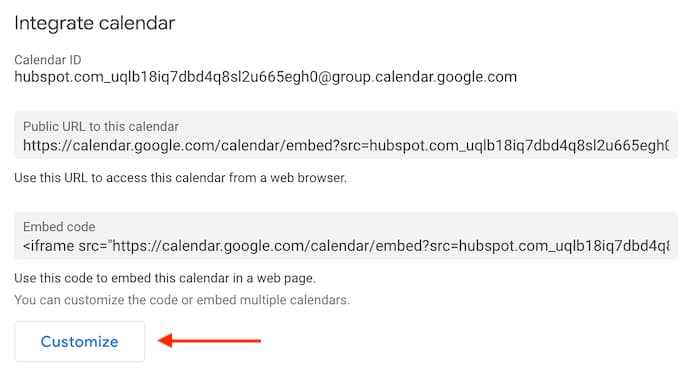
3. Click “Customize” and configure the size and color of your calendar.
In the “Integrate calendar” section of your settings, find and click the “Customize” button, just above the “Embed code” line of text. This will open a larger window of options where you can change the size and color scheme of your calendar before embedding it.
If you’re happy with how the calendar currently looks and don’t need to make any aesthetic changes, you can simply copy this embed code to your clipboard.
4. Copy your embed code at the top and paste it into your website’s HTML editor.
Copy your embed code, from either inside the Customize window or from the Settings page, and paste it into your website’s HTML editor. If you’d like, you can wrap this embed code in <center> and </center> tags to center-align your calendar within the margins of your website.
How to Embed a YouTube Video
- Find the YouTube video you’d like to embed.
- Under the video, choose “Share.”
- In the menu that appears, choose “Embed.”
- Copy the code that appears and paste into your website’s HTML editor.
1. Find the YouTube video you’d like to embed.
Embedding a YouTube video onto your blog or website is incredibly easy. To start, open YouTube and navigate to the video you want to embed. For this example, we’ll embed a video about inbound marketing from HubSpot’s INBOUND YouTube channel — as shown in the screenshots below.
2. Under the video, choose “Share.”
Beneath the video itself, look for the “Share” button, as shown below.

3. In the menu that appears, choose “Embed.”
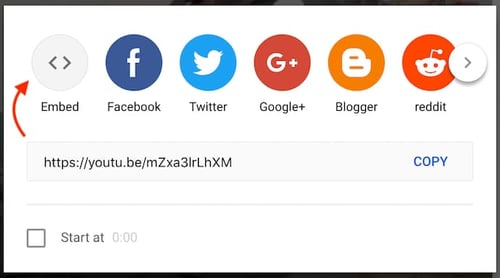
Clicking the “Share” button below your chosen YouTube video will open a small menu of options where you can share the video to various social networks. To the far left of these options, however, you’ll also see a circular “Embed” button. Click this button.
3. Copy the code that appears and paste it into your website’s HTML editor.
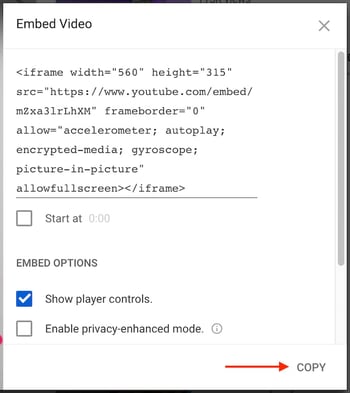
The next window to appear will produce a large of box of coded text, as well as a few options to customize your video before you embed it. Under the embed code, for instance, you can set whether you want your video to start at a particular timestamp.
Once you have your settings exactly the way you want them, highlight the coded text at the top of the window. Then, click “Copy” on the bottom-right.
4. Add <center> and </center> tags around the entire HTML snippet to center-align your video.
Here’s what the final code should look like:
<center><iframe width=”560″ height=”315″ src=”https://www.youtube.com/embed/mZxa3lrLhXM” frameborder=”0″ allow=”accelerometer; autoplay; encrypted-media; gyroscope; picture-in-picture” allowfullscreen></iframe></center>
That’s it! Here’s what it’ll look like when you’re done:
Embed SlideShare Presentations and Infographics
1. Find the SlideShare presentation or infographic you’d like to embed on SlideShare.net.
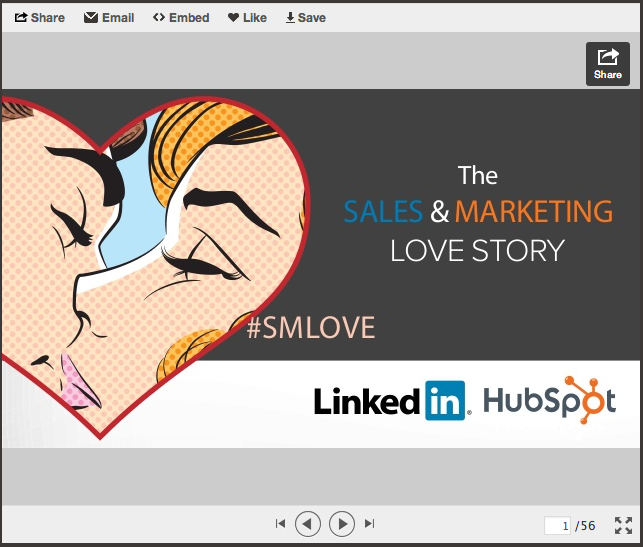
2. Click “Embed” in the navigation bar at the top.
2. Click “Customize.”
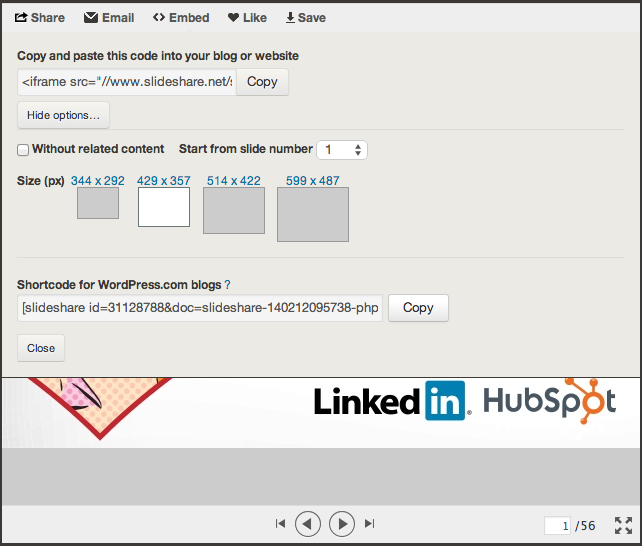
If you want to customize your embedded SlideShare presentation or infographic, click “Customize” and the following options will appear, shown below. Choose the options you’d like, then copy the code in the “Embed” section and paste it in the HTML view of your website.
3. Center the embedded Slideshare by adding <center> and </center> around the whole HTML snippet.
Here’s what the final code should look like:
<center><iframe src=”//http://bit.ly/1eZSFsj” width=”427″ height=”356″ frameborder=”0″ marginwidth=”0″ marginheight=”0″ scrolling=”no” allowfullscreen> </iframe> <div> <strong> <a href=”http://bit.ly/1ey2t8v” title=”A Sales and Marketing Love Story” target=”_blank”>A Sales and Marketing Love Story</a> </strong> from <strong><a href=”http://bit.ly/uYvaA2″ target=”_blank”>HubSpot</a></strong></div></center>
That’s it! Here’s what it’ll look like when you’re done:
Some of these embed codes may need a little tweaking to look perfect on your blog or website, but using these steps, you should be off to great start. Happy embedding!


The Quick & Easy Guide to Fixing HTTP Error 405 (Method Not Allowed)
In a world hooked on instant gratification, one of the worst things a brand can do is not give their audience what they want. If your website visitors see an error page when they’re looking for help or information to do their jobs better, they could get annoyed and lose trust in your brand, permanently damaging your reputation.
Unfortunately, 405 Method Not Allowed Errors are rather mysterious. They indicate what happened to your website, but they don’t tell you why it happened, making it challenging for you to pinpoint its cause and correct the issue.
To help you fix your 405 Method Not Allowed Error and avoid losing brand trust, we’ve fleshed out exactly what the issue is and its most common solutions.

405 Method Not Allowed
A 405 Method Not Allowed Error is an HTTP response status code that indicates a web browser has requested access to one of your web pages and your web server received and recognized its HTTP method. But, unfortunately, your server has decided to reject that specific HTTP method, so the web browser can’t access the requested web page. When this happens, your website will serve an error web page to your site’s visitors, like the photo below.

Image Credit: Testing Nook
Fortunately, there are three common and effective solutions for fixing most 405 Method Not Allowed Errors.
How to Fix 405 Method Not Allowed Errors
1. Comb through your website’s code to find bugs.
If there’s a mistake in your website’s code, your web server might not be able to correctly answer requests from a content delivery network. Comb through your code to find bugs or copy your code into a development machine. It’ll perform a thorough debug process that will simulate the exact situation your 405 Method Not Allowed Error occurred in and allow you to see the exact moment where things went wrong.
2. Sift through your server-side logs.
There are two types of server-side logs — applications logs and server logs. Application logs recount your website’s entire history, like the web pages requested by visitors and which servers it connected to. Server logs provide information about the hardware running your server, revealing details about its health and status. Sift through both types of server-side logs to uncover any alarming information about your server or website.
3. Check your server configuration files.
The last way to find out what’s causing your 405 Method Not Allowed Error is by taking a look at your web server’s configuration files. You can usually find instructions for solving unintentional redirects there.


14 Copywriting Examples From Businesses With Incredible Copywriters
You all know the Old Spice guy, right?
The years-old “The Man Your Man Could Smell Like” campaign was memorable for many reasons, but one of them was that it gave Old Spice a voice — voice that came through in every video, commercial, tagline, Facebook update, tweet … you name it.
And do you know who is behind all of that marketing collateral?
Copywriters. The ability to find the exact right words to tell your company’s story isn’t an easy feat, and it’s even harder to do so consistently.

So when we come across companies that are doing it successfully, we think their copywriters deserve a pat on the back (and a raise?). Take a look at some of the companies we think have stellar copywriting, and if you’re looking, maybe get some inspiration for your own brand, too.
Copywriting Examples
- UrbanDaddy
- Articulate
- Moosejaw
- First Round Capital
- Trello
- Velocity Partners
- Intrepid Travel
- Cultivated Wit
- Cards Against Humanity
- R/GA
- innocent
- GymIt
- ModCloth
- Ann Handley
1. UrbanDaddy
UrbanDaddy has mastered the art of getting me to open emails. And when I click into them, they don’t disappoint.
Below is the copy from an email they sent me with the subject line, “Fun.”
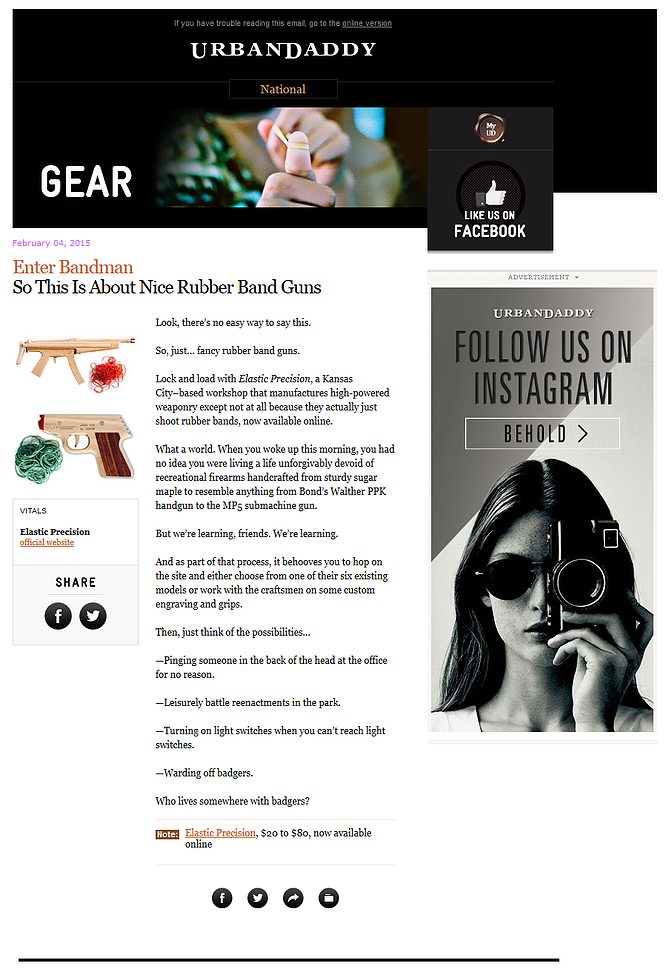
There are a couple things in this email that caught my eye.
First of all, there’s no long preamble. The writers get straight to the point — a wise choice for something as simple as a rubber band gun lest the reader feel cheated reading sentence after sentence for something so common.
Secondly, take a look at the purposeful sentence structure. This copywriter eschews conventional grammar rules by combining run-on sentences and traditional product promotion copy in sentences like:
Lock and load with Elastic Precision, a Kansas City-based workshop that manufactures high-powered weaponry except not at all because they actually just shoot rubber bands, now available online.”
Keep reading, and you see a conversational tone that mildly mocks the silliness of the product, but also loops the reader in on something kinda fun.
And then, of course, they close with badgers. And how can you go wrong with badgers?
Best of all, UrbanDaddy’s unique tone is found in every single piece of copy they publish — from emails, to homepage copy, even to their editorial policy:
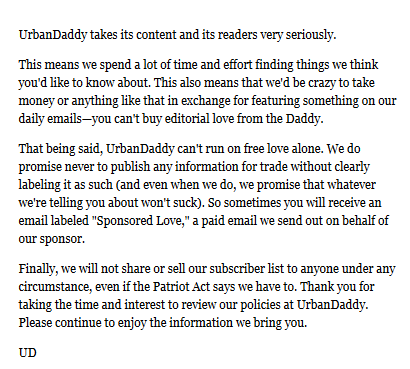
This company clearly knows its audience, which jokes to crack, and has kept it consistent across all their assets.
2. Articulate
Articulate, a HubSpot Agency Partner based in the U.K., is an inbound marketing agency, and their website copy is full of witty, confident copy on pages where you wouldn’t think you’d find it. Here’s exhibit ‘A’:
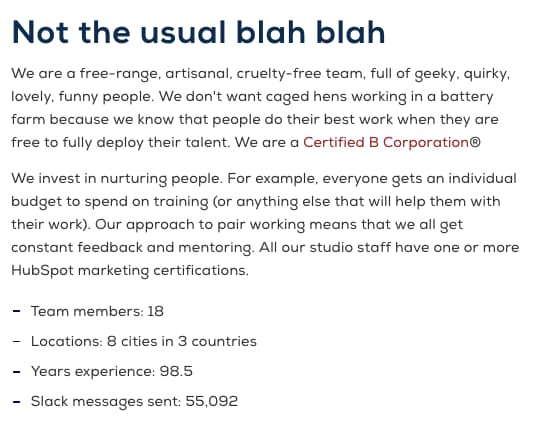 The copy above introduces Articulate’s “Meet the Team” page — not a page you’d think can pull off witty copy, right? Well, Articulate’s page goes beyond employee photos and their job titles.
In addition to the playful header, “not the usual blah blah,” the copy above takes on a farm theme, assuring visitors that employees aren’t simply “caged hens.” Rather, they’re a “free-range, artisanal, cruelty-free team.” Funny on the surface, but helpful to job seekers who, much like food, want to know where their work comes from and how it’s made.
3. Moosejaw
Not many brands are brave enough to touch the products they’re selling with unconventional copy … but Moosejaw isn’t afraid to have a little fun.
The outdoor apparel outlet store uses humor as a way to sell their products without being overly forward about it. By appealing to people’s emotions, they’re more engaging and memorable.
Here are a few examples:
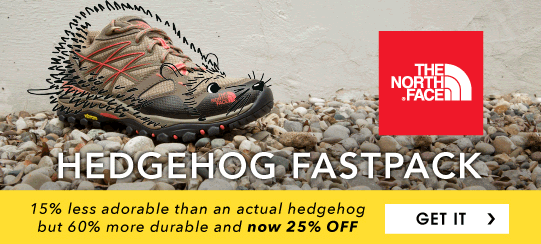

Same goes for the call-to-action buttons that show up when you hover your mouse over a product photo — like this one, which reads, “Look This Cool.”

Does their brand voice carry over to the product descriptions, you ask? See for yourself:


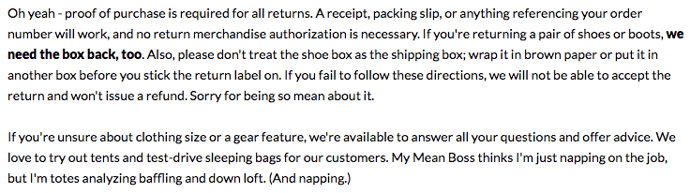
If you think the brilliant copy stops at their homepage, think again. They extend it to their return policy, too. Here, they do a great job of not sacrificing clarity for humor. Their copywriters successfully made people laugh while still being helpful.
4. First Round Capital
While a sign of great copywriting is making people smile, another is making people feel understood. The copywriters at First Round do a phenomenal job at letting the value of their offerings for their customers sell themselves.
For example, they hold over 80 events every year connecting their community together. Instead of just explaining that they have events and then listing them out, they begin that section of their website with a simple statement that hits close to home with many entrepreneurs: “Starting a company is lonely.”
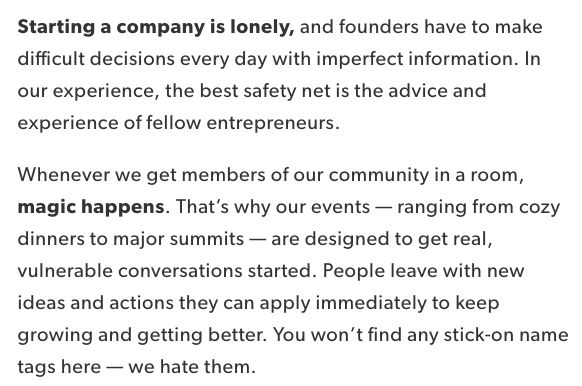
Using words like “imperfect,” “safety net,” and “vulnerable” encourages readers to let their guards down and feel understood by the brand and their community.
Plus, you’ve gotta love that last line about stick-on name tags. Those things get stuck in my hair.
5. Trello
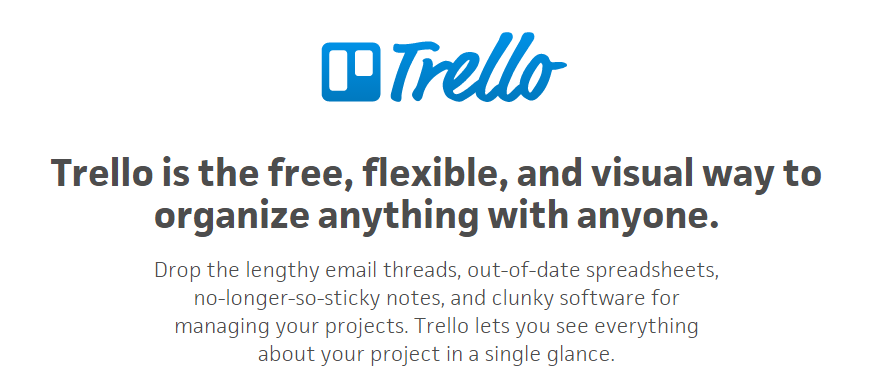
Do you know what Trello is? If the answer is no, then behold the copywriting on their website. Their product description — like most of the copy on their site — is crystal clear:
And then check out how clear this explainer content is:
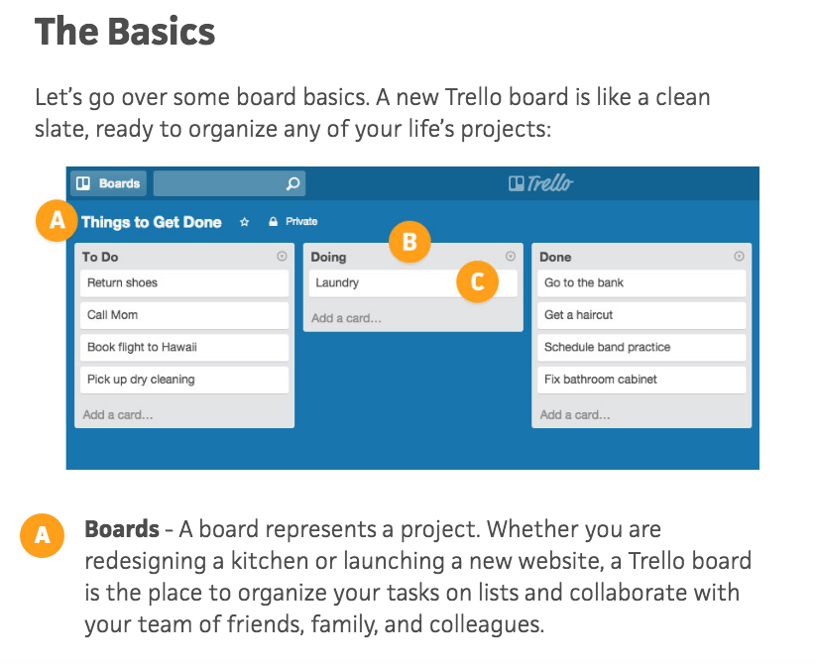
Some of the use case clarity can be attributed to how smart the product is, but I think copywriters deserve some credit for communicating it clearly, too. They call it like it is, which ultimately makes it really easy to grasp.
And I couldn’t write about the copywriting talent at Trello without including the clever references in the microcopy of their login page:
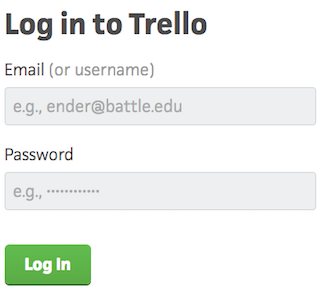
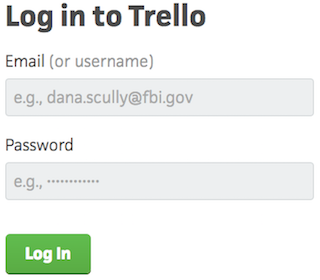
Each time you refresh the login page, you see a different, equally clever example email belonging to a fictional character, like Ender from Ender’s Game and Dana Scully from The X-Files — a great example of nostalgia marketing. This is a small detail, but nonetheless a reminder that there are real humans behind the website and product’s design. Delightful microcopy like this kinda feels like I just shared a private joke with someone at the company.
6. Velocity Partners
No post from me about excellent copywriting would be complete without mentioning the folks at Velocity Partners. A B2B marketing agency out of the U.K., we’ve featured co-founder Doug Kessler’s SlideShares (like this one on why marketers need to rise above the deluge of “crappy” content) time and again on this blog because he’s the master of word economy.
What is “word economy”? It’s taking care that every word you use is the right word. It means getting your point across concisely and not dwelling on the details when you don’t have to. In a world of shortening attention spans, this is the ultimate goal when communicating your message.
And since we’re talking about word economy, I’ll shut up and let you check out one of Kessler’s SlideShares for yourself:
Whereas SlideShares are typically visual, Kessler’s is heavily focused on copy: The design stays constant, and only the text changes. But the copy is engaging and compelling enough for him to pull that off. Why? Because he uses simple words so his readers understand what he’s trying to say without any effort. He writes like he speaks, and it reads like a story, making it easy to flip through in SlideShare form.
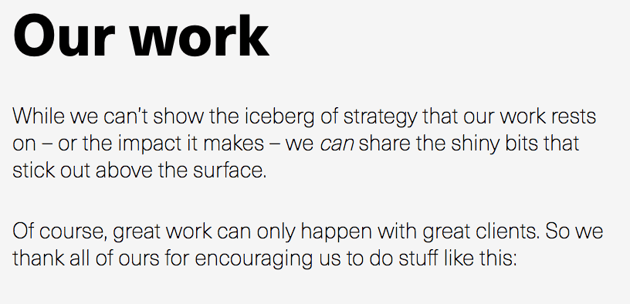
The copy on Velocity Partners’ homepage stood out to me, too. Check out, for example, how humble they are when introducing their case studies:
I also like how casual and honest they kept their email subscription call-to-action. The header is especially eye-catching — and it plays off of the popular SlideShare about crappy content we mentioned earlier.
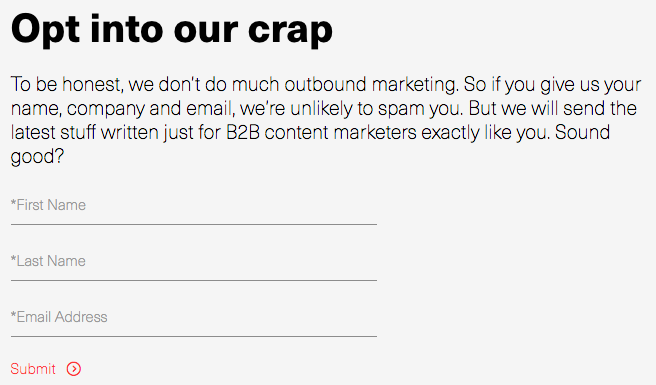
In fact, Velocity Partners’ Harendra Kapur recently wrote a blog post on what goes in to great B2B writing — starting with this disclaimer, of course.

7. Intrepid Travel
The copywriters at Intrepid Travel, a Melbourne-based adventure travel company, are on this list because they’re at the intersection of interesting and informational.
I love seeing copy that is totally and utterly functional — that delivers critical information, but is so pleasant to read that you actually keep reading. Quite a feat on the internet these days.
Take a look at their company description, package names, and package descriptions below for some examples of this fantastically functional copywriting in action:

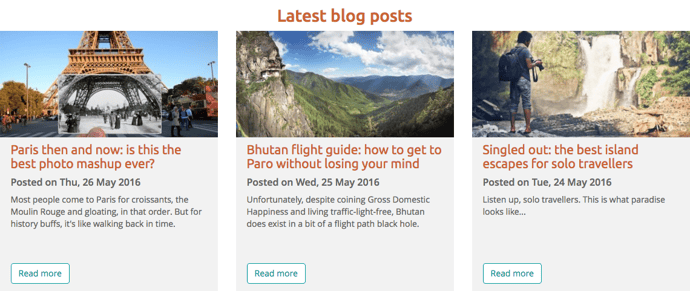
Of course, they do benefit from quite a lovely subject matter, but still — hats off you to, Intrepid Travel.
8. Cultivated Wit
The copywriters over at the “comedy company” Cultivated Wit do a great job of embracing their own brand of quirk throughout their site. They already have one of the best “About” pages in the game, but their delightful copy is spread throughout their site — sometimes in the most unexpected of places.
For example, take a look at the copy around contact information at the very bottom of their homepage:

This section of the homepage is an afterthought at best for most companies. But for these folks, it was an opportunity to have a little fun.
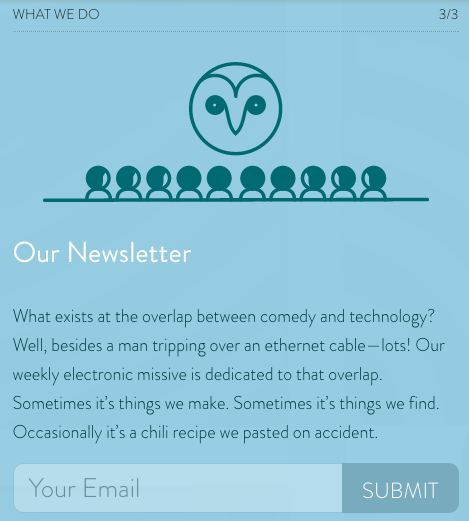
They also have two, unique email subscription calls-to-action on different pages of their website. They’re very different, but both equally funny and delightful. Here’s one from the homepage:

And one from the “About” page:
9. Cards Against Humanity
You may or may not be familiar with Cards Against Humanity, the self-declared “party game for horrible people.” It’s a card game — one that’s simultaneously entertaining and inappropriate. The copywriting on the cards themselves are guaranteed to make you laugh.
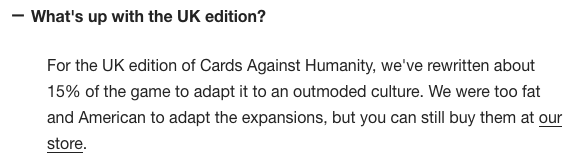
The brand voice is very distinctive, and can seem a little abrasive, and even a little offensive. But that’s their whole shtick: They’re not trying to appeal to everyone, and that’s perfectly okay. What they do do a great job of doing is appealing to their target audience.
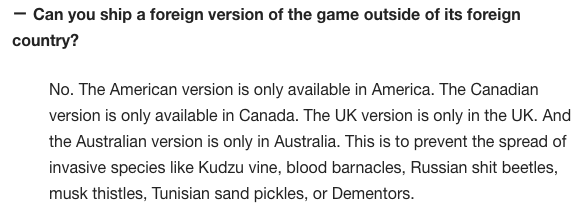
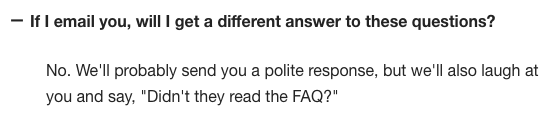
One look at their FAQ page and you’ll see what I mean:
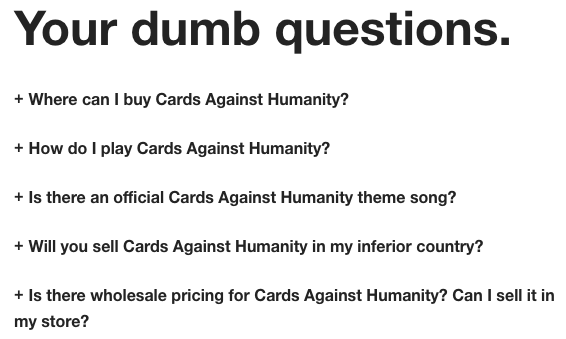
Here’s a sneak peek into some of the answers to these questions. You’ll see they make fun of both themselves and the reader — which is exactly what the card game is about.
10. R/GA
With the exception or UrbanDaddy, I’ve been focusing a lot on site copy so far, so I wanted to check out some examples of excellent social media copywriting.
I know you all like to see some more B2B examples in here, too, so I surfaced one of the best examples of the holy grail: Twitter copy, from a B2B company, that’s funny. Behold, some recent highlights from the R/GA Twitter account:
HOW CAN I RELAX WITH ALL THESE WEEDS pic.twitter.com/T1x78HnPhr
— R/GA (@RGA)
May 24, 2016
Your extended family going all caps with the Facebook posts like, hey we’re all just people here and I’ve got some OPINIONS
— R/GA (@RGA)
May 24, 2016
Imagine living in a time when horrible music wasn’t pumped into every square inch of public/commercial space.
— R/GA (@RGA)
May 19, 2016
Just saw a list of top tech talent referred to as “poachables,” which sounds delicious. Like sophisticated Lunchables.
— R/GA (@RGA)
May 16, 2016
If only audience segments knew how they were referred to in strategy decks.
— R/GA (@RGA)
May 11, 2016
11. innocent
Check out U.K.-based drink makers innocent, and you’ll see a language, style, and tone that matches their philosophy, product, and even their branding and design. It’s all just clean, straightforward, and simple. And believe it or not, simple is a really, really hard thing to nail in copywriting.
This stands out best on their “Things We Make” page. (Isn’t that page name even beautifully simple?)

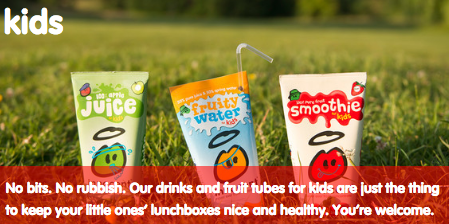
This same straightforward-but-charming copywriting philosophy extends to their site navigation:

Their meta description is pretty awesome, too:

And my personal favorite:
12. GymIt
I’ve always loved the copy at GymIt. In fact, I check their site and social profiles all the time to see if they’ve freshened anything up. Luckily, they’re no one-trick pony. They continue to keep their site fresh with captivating copy.
Here are some of my favorites, all of which hit on the pain points of gym-goers that they try to solve — and actually do solve with their customer-friendly policies.
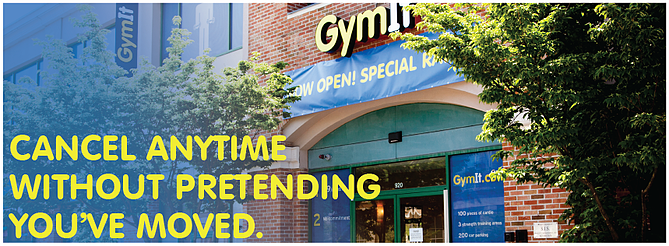
I can vouch for that one. I know how much of a hassle it is to move far away from your gym — and how refreshing it must be to be able to walk in and just … quit.
All of this rolls up to their philosophy, espoused eloquently on their “About” page, that gyms should just be about working out:

Talk about having an understanding of their core audience. The copy both in its value proposition and across its marketing materials reflects a deep understanding of their customers.
And how did their copywriters choose to make sure everyone knew what this new gym franchise was about if they didn’t read that “About” page? This tagline:
Doesn’t get much clearer than that.
13. ModCloth
ModCloth is a brand that has always had an excellent grasp of their buyer persona, and it comes through in their pun-filled copywriting. All of their products are silly plays on words — check out this screen grab of some of their new arrivals, for example:
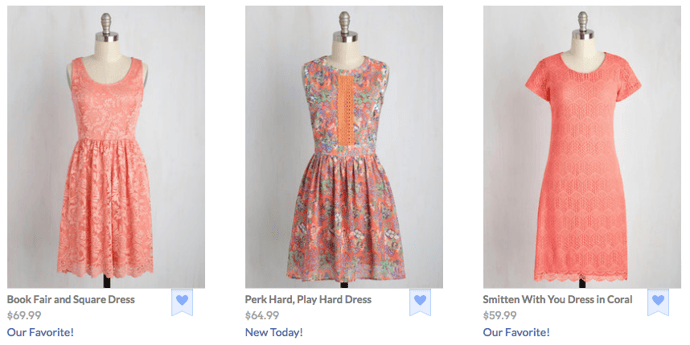
Dive into their product description copy, and it’s equally joyous, evocative, and clever — just like their customers. Often, it’ll also tell the story of what you’ll do while wearing their items:
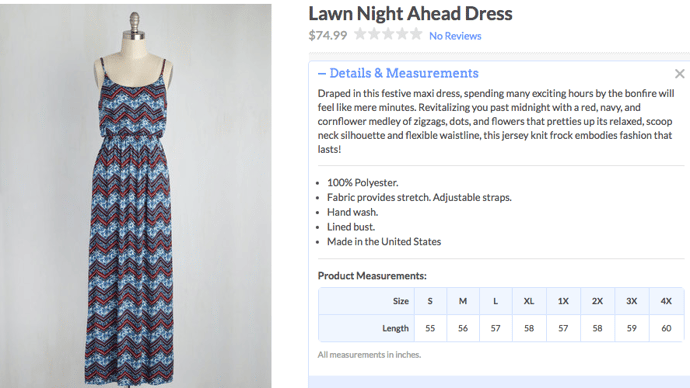
After reading their descriptions, one can imagine what their life would be like if they owned this product. That’s Copywriting 101, but so few brands can actually pull it off like the folks at ModCloth do.
14. Ann Handley
When it comes to building up your own personal brand, it can be easy to get a little too self-promotional. That’s where the copywriting on your site can make a big difference.
On Ann Handley’s personal website, she added bits of microcopy that shows, despite her many accomplishments (like being a best-selling author and award-winning speaker), that she still doesn’t take herself too seriously.
Check out her email subscription call-to-action, for example:
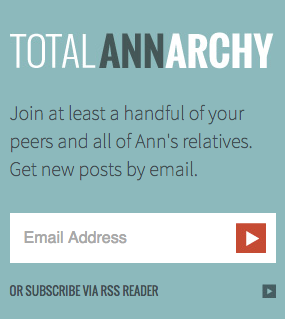 Anyone can be a successful copywriter with the right brand voice — and a little editorial guidance along the way. Want to learn how to write awesome copy for your business? Grab the free ebook below.



Personal Firewalls Explained and The 5 Best Ones for 2019
According to Microsoft’s 2018 Security Intelligence Report, computer viruses affected 40% of American households in 2017. No two computer viruses are the same, but the worst ones can enable cyber criminals to steal your most personal information, destroy your data, and even damage your computer’s hardware.
Macs and PCs both have built-in firewalls that help shield your computer from malicious cyber attacks, but if you want an extra layer of protection, you can purchase and download a personal firewall. Below, we’ll cover what exactly a personal firewall is and the ones that’ll shore up your computer’s security in 2019.
Personal Firewall Definition
A personal firewall is software application that shields internet users from potential hackers by permitting or denying network traffic to and from their computer and warning them about attempted intrusions. It’s like a filter between the Internet and your network.

Image Credit: Comodo
Check out the following personal firewalls to figure out which one is right for you.
5 of the Best Personal Firewalls for Mac and Windows
1. McAfee LiveSafe
Price: $104.99 Per Year For an Unlimited Amount of Devices
Available On: Mac and Windows
McAfee LiveSafe is an antivirus software that protects your computer from viruses and ransomware. It offers a safe web browsing tool that warns you about risky websites, links, and files, a multi-factor password manager app, a digital file shredder, and encrypted storage, which protects your most sensitive information on your computer with 128-bit encryption.
McAfee LiveSafe performed well enough in recent third-party tests to be considered one of the best antivirus software out there, and since you can use it on an unlimited amount of devices, it’s also one of the most affordable options on the market.
2. Norton Security Premium
Price: $54.99 Per Year For Up to Five Devices
Available On: Mac and Windows
Norton Security Deluxe leverages one of the largest civilian cyber intelligence networks to protect your computer from viruses, spyware, malware, ransomware, and other advanced online threats. Norton Security Deluxe also offers a Smart Firewall, which can shield your personal and financial information from hackers that gain unauthorized access to computers from seemingly “broken” sites that actually download viruses once people visit it.
Norton Security Deluxe scored high on Top Ten Reviews’ in-house testing, so if you’re looking for a powerful firewall solution, it’s the personal antivirus software for you.
3. Kaspersky Internet Security
Price: $47.99 Per Year For Up to Three Devices
Available On: Mac and Windows
In addition to shielding your computer from viruses, ransomware, and cyber attacks when you surf the web or download anything, Kaspersky Internet Security can also protect your bank and card details when you bank or shop online and safeguard your personal information from malicious links on social media.
The software constantly scores high on independent laboratory tests that assess its capability of detecting and stopping malware, and the cheapest plan can protect up to three computers in your household, so if you need an affordable antivirus solution for your family, consider choosing Kaspersky Internet Security.
4. Intego Mac Premium Bundle X9
Price: 69.99 Per Year For Up to Three Devices
Available On: Mac
After purchasing and downloading the latest version of Intego’s Mac Premium Bundle, you can leverage a real-time antivirus protection software that automatically scans your Mac, and an intelligent firewall and a hotspot network protection tool that blocks cyber criminals from accessing your computer through the internet. You also get access to a Cleaner Software that can remove unnecessary files from your computer, a parental control tool, and a data backup tool.
Ranked as the best personal firewall for Mac by Top Ten Reviews and earning perfect scores on their in-house testing for blocking spyware, ransomware, and phishing attempts specifically designed to infect Macs, the Intego Mac Premium Bundle is one of the best antivirus softwares for Mac users.
5. Bitdefender Internet Security
Price: $79.99 Per Year For Up to Three Devices
Available On: PC
By constantly testing different types of protection in malware detection tests run by independent labs, Bitdefender Internet Security has refined their solution enough to offer some of the best web attack prevention, ransomware protection, real-time data protection, anti-fraud, and anti-phishing tools out there. They also offer access to their own VPN, webcam protection, and vulnerability assessments.
Ranked as the best overall personal firewall in 2019 by Top Ten Reviews and the most expensive solution on this list, Bitdefender Internet Security is perfect for people who make shielding their computers from the most advanced cyber attacks a top priority in their lives.

The Comprehensive List of Employee Benefits
Providing employee benefits will help you attract top talent — a Glassdoor survey found around 60% of people report benefits and perks being among their top considerations before accepting a job.
Additionally, employee benefits can enable you to communicate your company’s values. For instance, Reebok’s benefits include an on-site gym as well as an employee CrossFit discount, demonstrating the company’s focus on health and wellness for all its employees.
Offering good employee benefits is also critical for long-term employee retention. People don’t just want their salary to increase over time — they also want to know they’ll have paid parental leave when the time comes, or tuition reimbursement if they decide to go back to school.
To ensure you’re offering employee benefits that will delight your employees and motivate them to grow with your company long-term, take a look at our comprehensive list of employee benefits.
Employee Benefits
Employee benefits entail any non-salary compensation included in an employee’s contract, including health insurance, a retirement plan, or paid vacation time. Typically, benefits are included to create a more competitive package for an employee. Benefits will attract and retain top talent, and can help communicate your company’s top priorities and values.
1. Health Insurance
According to a Glassdoor survey, employees report health insurance to be the most important benefit they receive from their employer. To make your employees happy, it’s critical you offer a good health insurance package. Plus, offering health insurance to your employees can save you money on taxes.
It’s important to note, if you work for a larger company with more than 50 employees, you are required to provide health insurance.
To figure out what type of health insurance coverage you should offer, you’ll want to benchmark your health coverage against competitors in the industry. Additionally, speak with a broker to ensure you’re remaining compliant with regulations.
2. Dental Insurance
Dental insurance is another common benefit, although not required by law. There are three different dental insurance plans you might offer — a fully-funded employer plan, a partially-funded employer plan, or a fully-funded employee plan (in which the employee pays the entire cost, but the employer covers administrative costs and payroll deductions).
3. Life Insurance
According to the Bureau of Labor Statistics (BLS), 59 percent of civilian companies and 55 percent of private firms offered life insurance in 2018. While not as common as health insurance, it’s still a good benefit you should consider providing. You might offer the employee’s salary, in full, as part of your life insurance policy, or offer to pay part of the full cost and ask the employee to pay the rest if the employee wants to participate.
4. Retirement Plans
The most traditional employer-offered retirement account is a 401(k). A national survey of small businesses found 94 percent of small business owners say offering a 401(k) drives their employee recruitment and retention. If you think you’re too small to participate, think again — anyone can offer a 401(k) benefit to employees, even if you have a company of five.
Additionally, you don’t have to match your employees’ 401(k) payments if you don’t believe your company has the financial means to do so (although your match is tax-deductible). There is a lot of flexibility when it comes to the type of 401(k) you set up. Alternatively, you can offer an annual profit share based on business performance, or offer a match for employees that vests over time.
5. Paid Time-Off for Vacation and Sick Days
These days, many employees seek out flexibility and good work-life balance when considering where they want to work. It’s important to offer your employees some form of paid time-off (PTO), which employees can use at their discretion. While some employees might use their PTO to take a trip with family or friends, other employees might simply use it to attend doctor’s appointments or take care of a sick child. Without offering PTO, you risk your employees more quickly reaching burnout in their roles — a well-rested and happy employee is a more productive one, so this is a worthwhile investment.
Typically, employees receive ten paid vacation days after one year at the company — their PTO increases the longer they work at the company, with an average 15 days PTO after five years at a company. However, the amount of PTO days is up to you. You might wrap your paid vacation and sick days into one, or you can separate these in your benefits’ package.
6. Flexible Schedules
Flexible schedules have become more common nowadays, and for good reason — flexible schedules can allow your employees to work whenever they’re most productive, and take breaks when they aren’t. Additionally, flexible schedules enable employees to find a good work-life balance, have time to prioritize family, or even simply avoid the morning commute.
You’ll have to decide if flexible schedules is conducive to your office environment, but it’s worth looking into and is becoming a major perk of many companies, including Raytheon and HubSpot.
Take a look at Flexible Schedules: The Good, Bad, & the Surprising, to decide if it’s a good option for your business.
7. Tuition Reimbursement
Offering tuition reimbursement isn’t just a benefit for your employees — it’s also an advantage for your business. Enabling employees to pursue learning opportunities and become proficient in new skills can help your company grow faster. Additionally, providing growth opportunities for your employees will likely translate to better retention rates.
Plus, your employee’s reimbursement program costs are tax-deductible. With smarter employees as a result, it’s a win-win.
8. Paid Parental Leave
After having worked one year and 1,250 hours, all U.S. employees are legally entitled to receive 12 weeks of unpaid leave for the birth or adoption of a child through the Family Medical Leave Act (FMLA) — however, there is no law that requires companies to provide paid maternity leave.
Despite this, you should consider offering paid parental leave at your company (if you’re able to do so) to allow employees time to rest and focus on their families before returning to work. Paid parental leave demonstrates your company’s emphasis on the importance family, and work-life balance.
For instance, IKEA offers its 14,000 salaried and hourly workers up to four months of paid parental leave — the policy extends to mothers and fathers who are birth, adoptive, or foster parents. IKEA said their decision reflects its “Swedish roots and [its] vision to create a better everyday life for all people.”
Ultimately, paid parental leave could be a compelling factor for employees to stay with your company for the long-term, without worrying about pursuing opportunities that will allow them to become more family-focused.
9. On-site Gym or Fitness Discounts
Promoting wellness at work has been proven to result in better productivity and less employee turnover. Additionally, putting some of your company’s finances towards your employees’ health and wellness can actually decrease long-term healthcare costs.
For instance, a U.S. Motorola case study found for every $1 Motorola invested in their Wellness benefits, including disease management, flu immunizations, and stress management, they saved $3.93.
To learn more about how you can promote wellness at your office, and why it’s important, take a look at our Ultimate Guide to Wellness at Work.

Social Media for Home Builders: 10 Great Brands to Follow
As Marketers, we strive to write valuable content, stand out from our competitors and target our audience in a unique and creative way. Leveraging social media is a great way to achieve all three of those goals.
However, if you or your client is a home builder or involved in interior design, it might be challenging to know what exactly to post and how to differentiate yourself from other brands.
Check out these 10 home builder brands that found creative ways to leverage social media.
10 of the Best Home Builder Brands to Follow on Social Media
1. Lennar Homes (Facebook)
Social media is best for just that: being social. Lennar Homes is the perfect example. Their Facebook page is personal – it’s not just beautiful pictures of amazing homes. They share pictures of first-time homeowners and other big milestones.
Not only can this increase their reach by tagging people and accordingly showing up in more relevant newsfeeds, but it also increases engagement. Neuromarketer Martin Lindstrom is willing to bet that “90% of all decisions are made subconsciously” with our emotions and seeing pictures of happy families elicits emotions way more than a picture of a beautiful spiral staircase ever will.
2. David Weekley (Instagram)
Social media offers companies the unique opportunity to give behind the scenes looks and sneak peeks to those who opt to follow them. This is an incentive, initially, to follow the company. The more a user views this social media platform, however, the more the company gains a sort of brand leadership relationship with the potential client.
David Weekley Homes does a great job of using not only images of the homes they build but also scenery of the area and a quick video tour of a recently built home. This adds another level of helpfulness and intrigue to potential clients viewing their profile.
According to Social Media Today, “online video has proven to be the most engaging and compelling form of content for social media users who watch and share thousands of them every single minute” — you don’t want to be missing out.

3. Fischer Homes (Houzz)
Another advantage to social media is the ability to connect with potential clients on a more meaningful level. On Houzz, for example, a home builder can follow anyone who is following them. This creates an opportunity to gain insight into what other information that user has available on Houzz and also to open a dialogue.
Fischer Homes, for example, is following not only design studios and construction companies. They are following homeowners. With this simple strategy, Fischer Homes is able to collaborate on projects with people who are openly creating project boards on Houzz — practically begging for a remodeler or home builder to reach out to them!
4. Habitat for Humanity International (Twitter)
Looking for a great example of how to engage on Twitter? Check out Habitat for Humanity International. It’s easy to shoot out a couple tweets and cross your fingers that you’ll become an overnight sensation.
But unless you’re Lady Gaga, this probably won’t get you very far. Habitat is great at using hashtags to draw already interested viewers in, posting correctly sized images for these viewers to connect with and relate to, and then a link to their blog to pull people to their website.
According to Buffer, “tweets with images receive 18% more clicks, 89% more favorites and 150% more retweets.” The ultimate goal of social media is to pull a potential client to your website to learn more about you and why you are the right decision for them. Habitat for Humanity International does just that.
5. Pulte Homes (Facebook)
Another great way to engage with people through Facebook is by responding to their comments. Think of it this way: each person who engages with something you post on social media is the same as someone engaging with you in person.
If someone told you they loved a fireplace you designed to your face, would you reply? Treat social media as an opportunity to have conversations with people you may not reach on a daily basis. Pulte Homes does a great job of interacting with anyone who comments on their Facebook page, developing relationships and trust with each touch.
6. Wallmark Custom Homes (Pinterest)
Pinterest is a largely untapped platform that offers the opportunity to reach an estimated 100 million users searching for pictographic ideas, inspiration, and information. In the home building and remodeling industries in particular, this is the perfect place to showcase some of your finest work.
Beyond just posting your own work, however, Pinterest is an excellent way to interact directly with users who are “pinning” on boards for their own upcoming projects. You can also remain relevant by pinning images of upcoming holidays (for example, Thanksgiving decorations or recipes).
Keeping up with what’s trending will help you get noticed by those looking for trending topics. Wallmark Custom Homes does a great job of creating relevant boards with trending topics and resonant boards with their own images from projects.
7. Reed Design Build (Houzz)
Another way to interact with users on Houzz is through responses to comments. Houzz is like the love child of Pinterest and Facebook — it lends itself to building interactive projects with users as well as comments and rating.
Reed Design Build does an excellent job of responding to comments and garnering reviews. Both show not only how much they care about their potential clients by answering their questions but also how much they care about their past customers by collecting several 5-star ratings.
8. Shea Homes (Pinterest)
Pinterest can be a tricky platform to remain sticky. Without someone directly seeking out your brand in the search, it can be a challenge to put out content that will be found. Take a page out of Shea Homes’ book.
This home builder produces several boards pertaining largely to relevant and trending topics in an effort to remain top of mind for those searching for related topics. Once they draw someone to their profile, however, they have several powerful boards outlining their brand. One board is even filled with pins to their own blog, spanning over 75+ topics of interest for home buyers.
Shea Homes is harnessing the power of external links to build their SEO and increasing the number of places they can be found by potentially interested customers with their Pinterest strategy. According to Moz, “Top SEOs believe that external links are the most important source of ranking power,” so this is not a strategy to be overlooked!
9. Toll Brothers (Instagram)
Instagram might not be your top-product-selling platform as a Marketer, but it just may be your top-brand-selling platform. This app gives you unique experience of connecting with your audience in a visually captivating manner.
Toll Brothers is particularly strong on Instagram, utilizing not only a hashtag (#TollLife) but also the regram capability to discover when people are talking about them and to then highlight these shared images. This brand cleverly takes the hashtag to the next level; when someone posts a picture on Instagram with their hashtag, Toll Brothers reposts (“regrams” for all you fluent Insta-tongues) the picture on their own profile as a feature.
This strategy generates excitement around the brand and around producing powerful photography surrounding the brand. Some might call this free marketing and publicity, actually, by letting those using the brand speak for themselves.
10. Drees Homes (Twitter)
So, I mentioned hashtags. Let’s talk about them. Drees Homes is hitting this strategy out of the park! By inviting anyone who encounters their brand to use the hashtag #LivingTheDrees, Drees Homes is not only showcasing their creativity in hashtag development but also their commitment to starting a conversation around their brand.
With continual upkeep, Drees Homes manages to keep their hashtags relevant and fun, including #HappyHollyDrees for the holiday season for example. I wish I lived in a Drees home just so I could interact on their online community with all of their fun hashtags and customer features! And, according to Sprout Social, ” Seeing as how they’ve been integrated into most of the popular social media platforms, and social media has entered almost every facet of our lives,” hashtags are here to stay. So, #EmbraceTheHashtag!
Social media strategy is not something that works alone in a vacuum. Each platform has a unique audience and should accordingly be treated as a different opportunity. In building your social media strategy, keep in mind that it takes continual upkeep and honing, and that it works best with a comprehensive marketing plan to get the most out of each touch point.
Starting a social media strategy for your own home building or remodeling business? Check out the free ebook below.