
15 Funny Out of Office Messages to Inspire Your Own [+ Templates]
When it comes to the final days before vacation, people tend to fall into one of two camps: 1) those who watch the clock incessantly, and 2) those who are so busy before they leave, they might even forget to put up an out-of-office email message.
If you’re anything like I am, you probably fall into team two. That doesn’t leave a lot of time to get creative. But if you plan ahead, you might be able to craft some hilarity.
Out-of-Office Message
An out-off-office message is an automatic email sent by an email account that is temporarily not being checked by its owner. Every new email to this account will trigger the out-of-office message, which is sent directly to the original email’s sender. Most email service providers today allow you to activate this option and customize your message.
Also known as “autoresponder emails,” out-of-office (OOO) messages run the gamut. From funny, to clever, to snarky, we’ve come across some of the best — from Google, and from colleagues.
Here are some of the gems we found. But first, grab our full collection of out-of-office email templates below.

Once you’re ready to write your own out-of-office email, try our free OOO email generator for some help drafting a message that perfectly captures who you are and where you’re going.
Funny Out-of-Office Messages
- The Not-So-Tropical Getaway
- The Sorry-I’m-Not-Sorry
- The Popular Film Reference
- The Scavenger Hunt
- The Blunt Approach
- The Third Person
- The Twitter Method
- The Liquid Update
- The Guessing Game
- The Warning Signal
- The Thank-You Card
- The Survey
- The Thankfulness Template
- The Movie Binge
- The Sensitivity Template
Out-of-Office Messages for Vacation
1. The Not-So-Tropical Getaway
We’ll give this guy first place, since we almost feel bad for him. Almost. Rather than using an out-of-office message for a tropical vacation, he used one to explain his absence during what would likely be a snowstorm. Not only did it give us a chuckle, but it also generated a certain amount of empathy — which is often the key to good content.
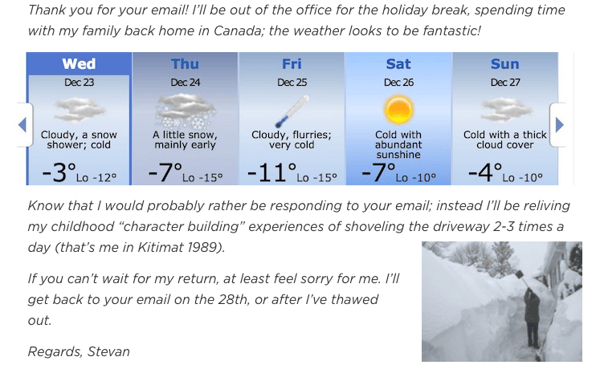
Source: New Relic
2. The Sorry-I’m-Not-Sorry
If your email client allows it, you could always just use an image to express your out-office-sentiment, like this one. After all, they say that a picture is worth a thousand words — and, visual content is still essential to successful marketing.

Source: Barry Moroney
3. The Popular Film Reference
Are you familiar with the film Field of Dreams? If not, allow us to fill you in. It centers around baseball and a family in Iowa, but saying any more might spoil the plotline.
Movie synopses aside, the opening line of this out-of-office message was taken directly from the Field of Dreams script — fitting, given the sender’s travels to Iowa. So before you leave, research some famous quotes about the place you’re visiting. It might test the recipient’s knowledge, but more likely, it’ll just make them smile.

Source: New Relic
4. The Scavenger Hunt
When my colleague Sam Mallikarjunan went on vacation, he set an out-of-office message that was both clever and smart. First, he sent the recipient on an imaginary scavenger hunt to “the highest peak of the tallest mountain.” He used humorous absurdity to make it clear that he would not be checking email while he was away.
Plus, he incorporated a delightful technique to let people know that if they really wanted him to read their emails, they should probably send them again after his return. Not only does that keep the sender accountable by saying, “If this is really important, you know when to reach me,” but it also helps Mallikarjunan truly vacate his work while he’s away. And that’s hard to do — And if you struggle with it, check out these tips.

Source: Sam Mallikarjunan
5. The Blunt Approach
Josh Kopelman, we salute you.
Not only did Kopelman manage to turn his out-of-office message into an epic poem of sorts, but also, he actually went through the trouble of creating a delightfully snarky, vacation-specific email address for his recipients.
Giving the option to contact an email address containing “interruptyourvacation” provides two things — 1) A dose of humor, and 2) discouragement from actually doing what the name suggests. Plus, he prefaces it with a request for empathy, by explaining that he promised quality time to his family.
Here’s where honesty is a helpful device. Sure, Kopelman is truthful about the fact that he’s on vacation, but he also lets the recipient know that he or she would be interrupting important family time if the first option is chosen. It states a point simply, and uses humor to avoid making it sound like he wants the reader to feel guilty.
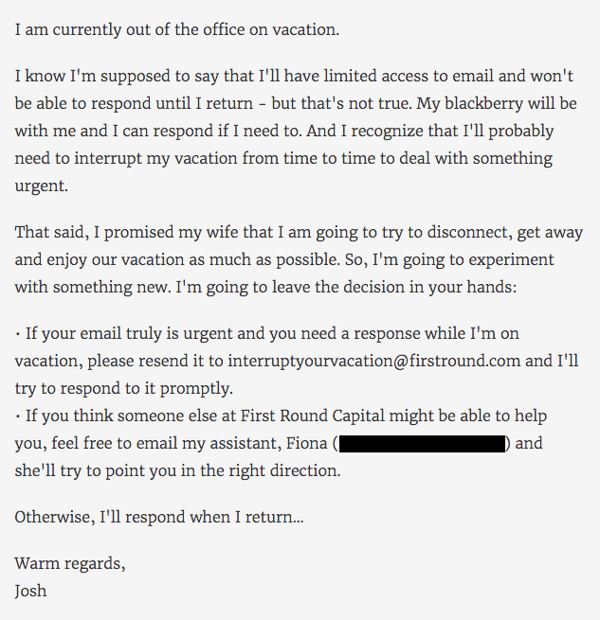
Source: Gizmodo
6. The Third Person
When HubSpot Marketing Manager Karsten Köhler is out of the office, he doesn’t mess around. In fact, he’s turned his auto-responses into a running series of commentary for fictional cartoon character Troy McClure.
Each time McClure makes an appearance in these out-of-office messages, he “speaks” on behalf of Köhler and alludes to the previous auto-responses in which he starred. It’s a mild form of self-deprecating humor — as if to say, “I know, I’m out of the office again” — made only funnier by the made-up teaser title included in the last line.
As with the Field of Dreams example, don’t be afraid to use a pop cultural reference that audience would recognize. Instead of bemoaning your absence, they’ll have something fun and familiar to laugh at.
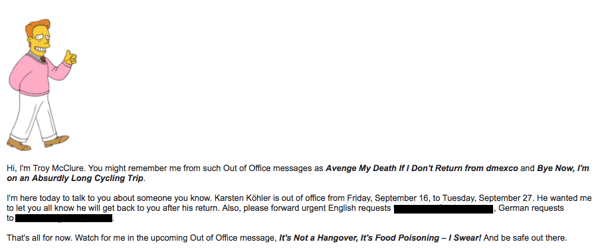
Source: Karsten Köhler
7. The Twitter Method
… and then, there was the out-of-office tweet. We’re not entirely sure where it originated, but it has two sides.
If you actually want people to be able to reach you, and you’re more likely to be checking Twitter than email while out of the office, it might be an effective way for people to reach you.
But if you tend to use social media during vacation and really do want to be left alone, we would suggest offering a different communication method in your auto-response.
I’m not in the office right now but if it’s important, tweet me using #YOUAREINTERRUPTINGMYVACATION pic.twitter.com/SgL97nof8L
— Philippe Khattou (@Phil_Khattou)
August 14, 2015
8. The Liquid Update
We wish we could find the original source of this one. It’s made several lists, and its author is likely a legend within his or her network.
That said, even though we’ve been preaching honesty as the best policy, be careful with messages that are this transparent. Make sure you’re familiar enough with your audience — and your boss, for that matter — to know that this sort of out-of-office message will be met with a snicker, and not with concern.
“I am currently out of the office and probably out-of-my-mind drunk. Enjoy your work week.”
9. The Guessing Game
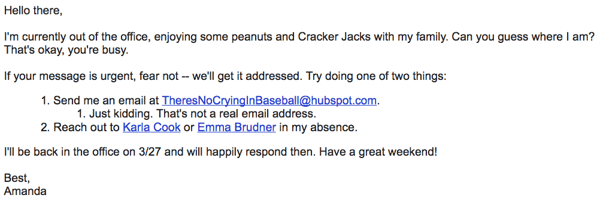
There’s a term that we like to use around here called “snowbirds,” which is used to describe those who once resided in the northern part of the U.S., only to flee to warmer parts of the country during the winter.
And although my colleague had mixed feelings about her own parents joining that population in Florida, she couldn’t be too upset when her dad suggested flying down from Boston for a Red Sox spring training game.
Naturally, she had to take the day off — and couldn’t let folks know with any old generic auto-response. Instead, she made a guessing game of it in her out-of-office email, below.
Out-of-Office Messages for Holidays
10. The Warning Signal
Not only can colleges get in on the fun of an OOO message, but they’re talking to way more people — and can use the message as an opportunity to deliver tongue-and-cheek announcements to their students.
Here’s an out-of-office tweet by Acadia University, using Canada’s Civic Holiday on August 6 to remind students not to get too comfortable this month …
Acadia Students!! We will be out of the office Monday due to the holiday, but back on campus Tuesday!! We will be in training all day Tuesday and Wednesday though so you may experience a delay in response to your emails! Side note Its almost time for move in day hehe 😏 pic.twitter.com/pLPAavgToT
— Acadia Res Life (@residencelife)
August 3, 2018
11. The Thank-You Card
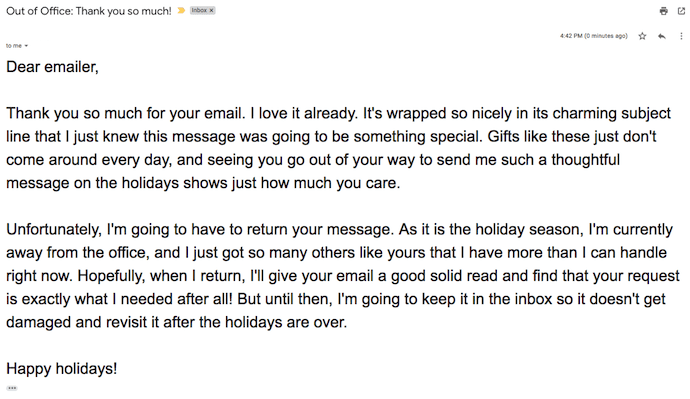
This holiday out-of-office email is definitely on theme, if not a little passive aggressive. If you’re getting emails during the holidays, why not treat everything you receive that season like the present it is, and send a thank-you note?
My snarky colleague sure did in his out-of-office message below. We send thank-you letters in response to holiday gifts, so it’s only natural to expect the same gesture in our work inboxes …
12. The Survey
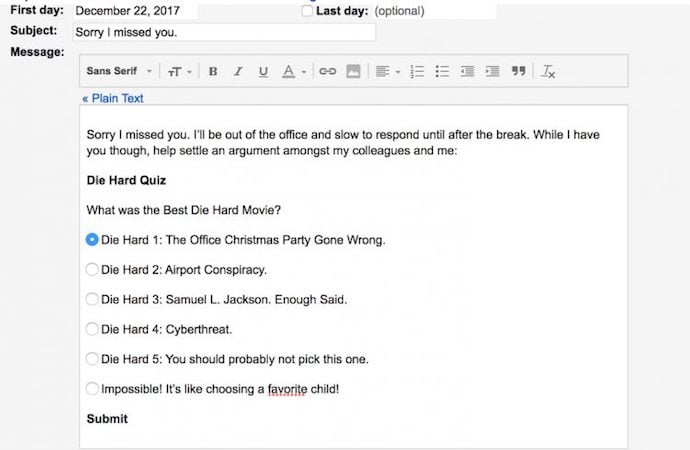
Rachel Smith from Collective Hub stumbled across this message from one of our employees, and it certainly turns the tables on the email sender. Right when you thought you were the one requesting action, the recipient sent back an assignment — a fun one, at least.
While the sender waits for your response to their email, take the sting out of your absence by involving them in a holiday survey, like the one below.
13. The Thankfulness Template
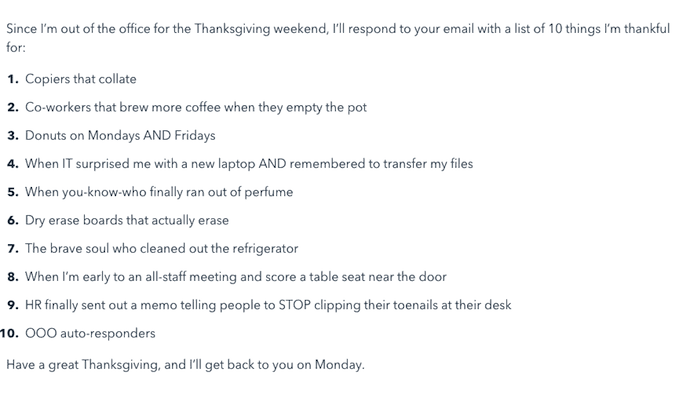
This email comes out of our own collection of out-of-office email templates, which you can get at the end of this blog post. The purpose of this email is to intercept messages during Thanksgiving, and the way in which is does so is, well, with thankfulness.
The funny and charming email template below keeps the confidence of your colleagues with a list of things anyone who works in an office is thankful for. Of course, feel free to customize this list according to the quirks of your own workplace. Thanksgiving is the perfect time to reveal them.
14. The Classic Movie Message
There’s no shame in using Christmas to indulge in your childhood movie tastes, but there is shame in not sharing that adorable side of yourself when people are trying to reach you during the holidays.
So, take a lesson from @courtwhip, editor at PEDESTRIAN.TV, who wrote this hilarious out-of-office email, fully stocked with mentions of the best movies from the 1990s. (By the way, “Splinter” is from Teenage Mutant Ninja Turtles, and as we all know, he loves pizza).

15. The Sensitivity Template
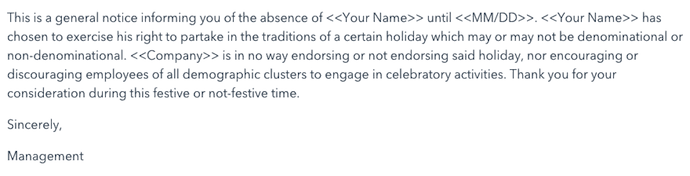
This last out-of-office message is another template available to you within the full collection of fun out-of-office templates at the end of this article. And if it does anything particularly well, it’s respect the differing views and opinions of your coworkers — while amusing so many others.
Your HR department would be proud, or perhaps playfully irritated, at this email’s stereotypical impression of your most sensitive coworkers. Read it below.
Are you fully inspired by the creative out-of-office messages above? It’s time to write your own — your upcoming vacation depends on it. Try HubSpot’s OOO Email Generator here, and grab your free collection of email templates below.

The 15 Best WordPress Themes for Podcasters in 2019
Over one-third of Americans between the ages of 25-54 listen to podcasts every month. Podcasts provide a source of convenient and intimate entertainment that’s only continuing to grow in popularity. While today’s most popular podcasts may vary significantly in terms of their content and hosts (among other things), they all share at least one thing in common — they each have their own website where fans can check out their latest episodes and seasons, info about live shows, biographies about the podcast’s hosts, and more details.
If you’re a host or producer, chances are you’re busy managing your podcast — and building your own website may sound like a daunting task. However, creating your site can be quite simple with a WordPress podcasting theme that allows you to easily share your episodes, seasons, host bios, and any other content you want to provide your visitors and fans.
The 15 Best WordPress Themes for Podcasters in 2019
We’ve curated this list of our favorite podcasting themes to help you share your content on your site and make lasting connections with your fans. To determine which theme best suits your needs, review these 15 options, their unique features, and our key takeaways. Afterward, check out the WordPress Theme Directory if you’d like to explore more podcasting themes.
1. Viseo

Viseo is a podcast theme with a “latest show” section for your site pages so your fans can quickly locate and listen to your newest content. You can also easily upload and add high-quality videos to the theme’s Locally Hosted Video Player feature. Customizing your site pages and sections requires no coding knowledge due to the theme’s drag and drop builder.
Key Takeaways:
- “Latest show” section for new content
- Locally Hosted Video Player feature to share high-quality video content
- Drag and drop page builder
2. Audonic

Audonic supports several commonly-used audio players so importing your podcasts is a hassle-free process. The theme offers dark and light colored layouts and audio players to help you achieve your desired look. Your visitors can also check out your site while on-the-go since the theme is mobile friendly.
Key Takeaways:
- Supports several audio players
- Dark and light layout and audio player designs
- Automatically mobile friendly
3. Podcaster
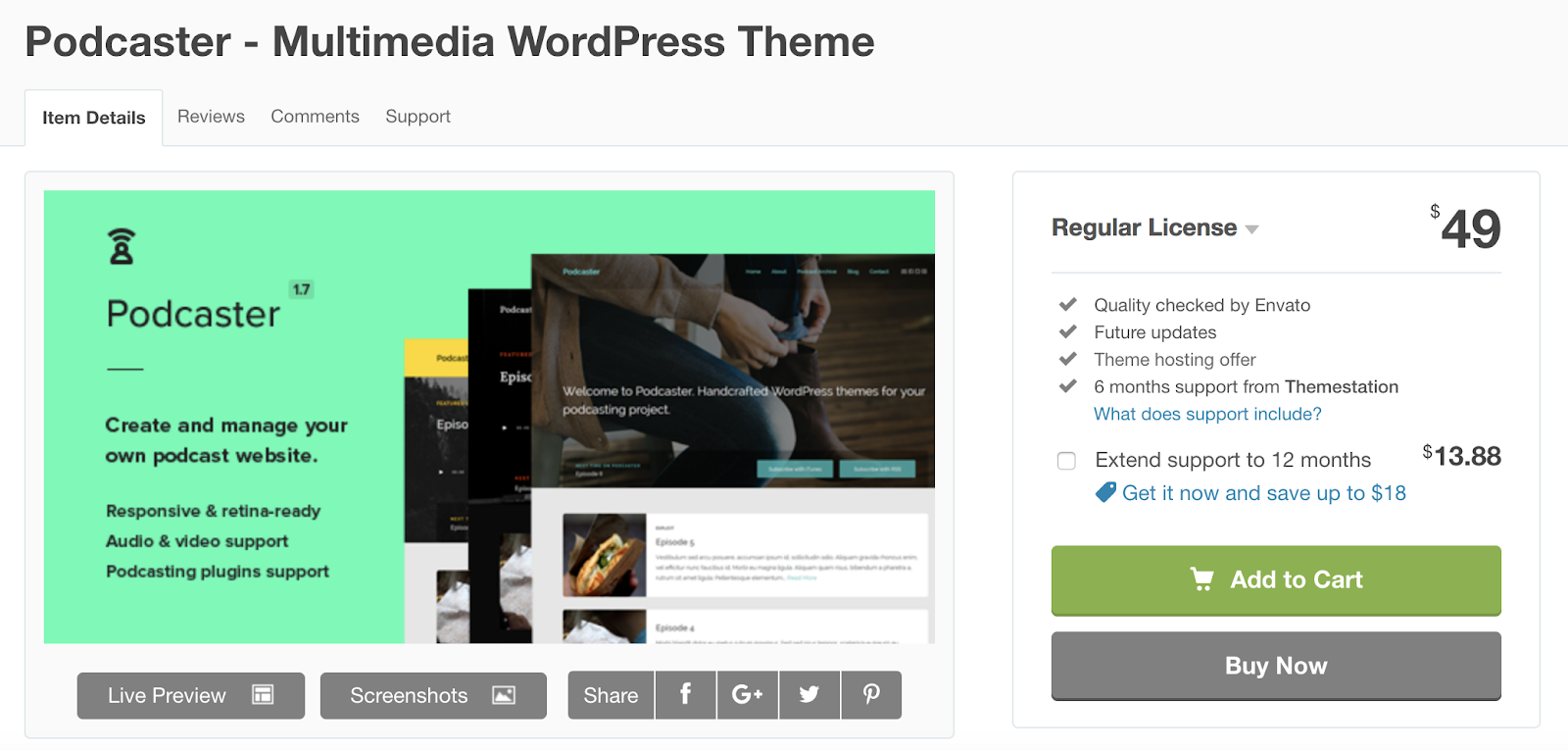
Podcaster is specifically made for broadcasting and managing podcasts — it has an unlimited number of podcast episode archive pages so you can maintain your shows and seasons over long periods of time. The theme’s homepage contains an audio and video player feature which allows visitors to experience your latest content the moment they enter your site. There are also a variety of color palettes to customize your site with to match to your branding.
Key Takeaways:
- Unlimited podcast episode archive pages
- Audio and video player feature on site’s homepage
- Variety of color palettes to customize pages
4. Remix
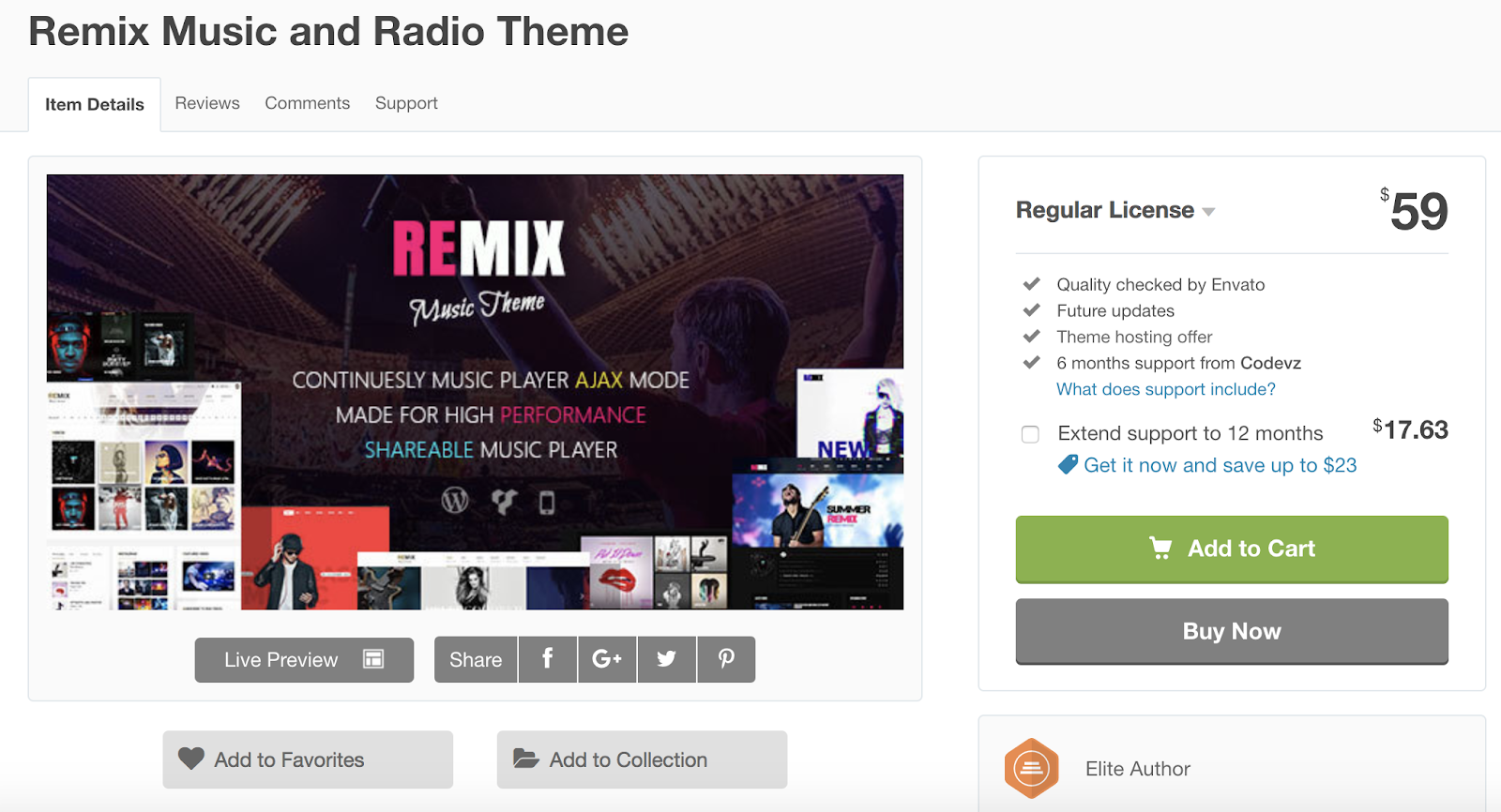
Remix is compatible with over 100 different audio-related plugins to make managing and designing your podcast’s site as straightforward as possible with increased functionality based on your specific needs. The theme’s Live Customizer feature allows you to edit and update your site pages and review the changes in real-time prior to publishing them. Remix’s audio player has a “share” feature that visitors can use to send to their peers the podcast episode they’re listening to with just one click.
Key Takeaways:
- Compatible with over 100 audio-related plugins
- Live Customizer feature to edit pages in real-time prior to publishing them
- “Share” content feature on the audio player
5. Promenade
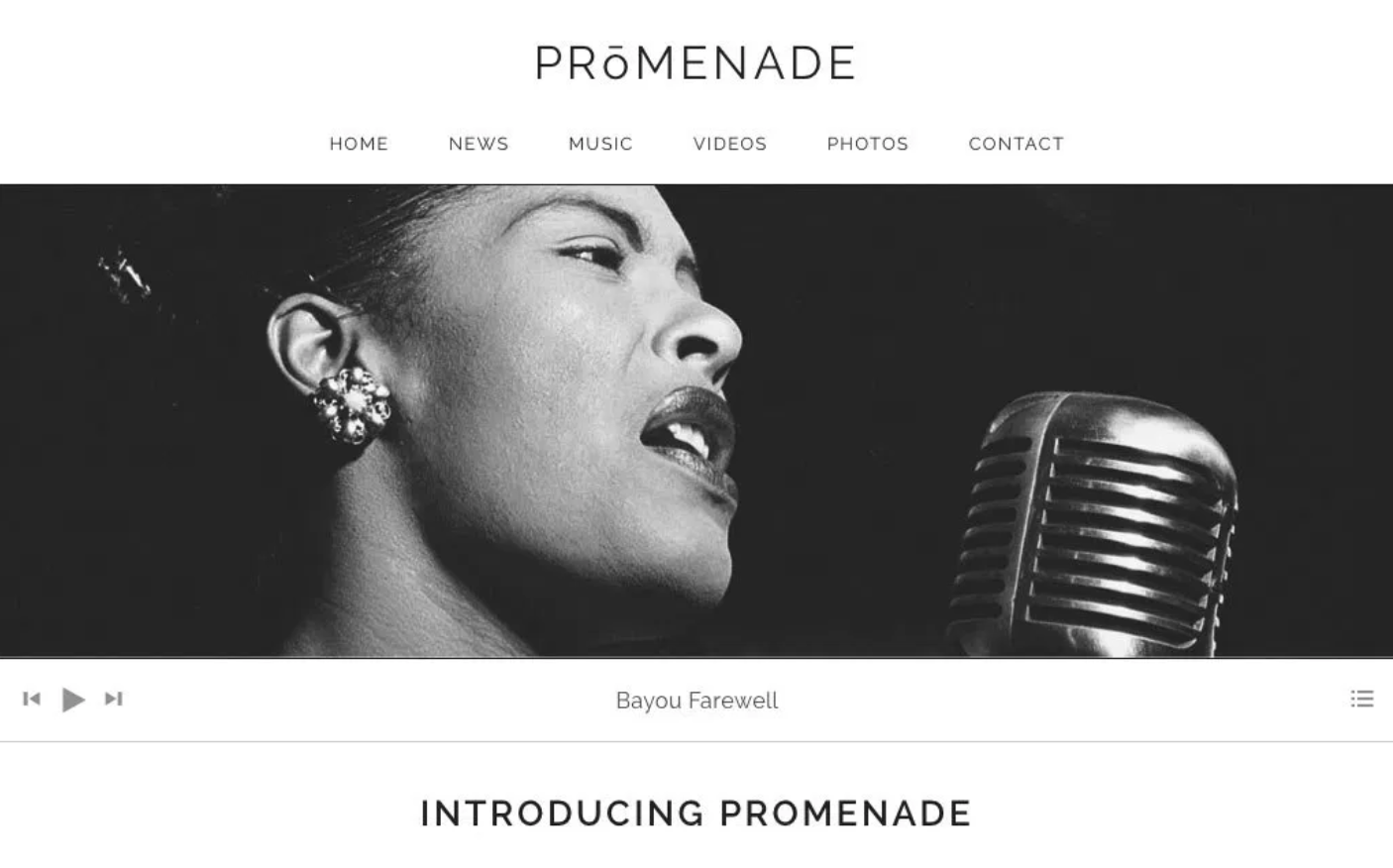
Promenade’s homepage offers two types of formats: a static web page where the same content remains in one place unless you manually change it and a dynamic web page in which your latest content is moved to the top of the page so your visitors automatically see your latest posts. The theme has grid layouts for your audio and videos to keep your content organized.
Key Takeaways:
- Two homepage format options — static or dynamic
- Grid layouts for audio and videos
- Custom navigation and menus
6. Life Coach
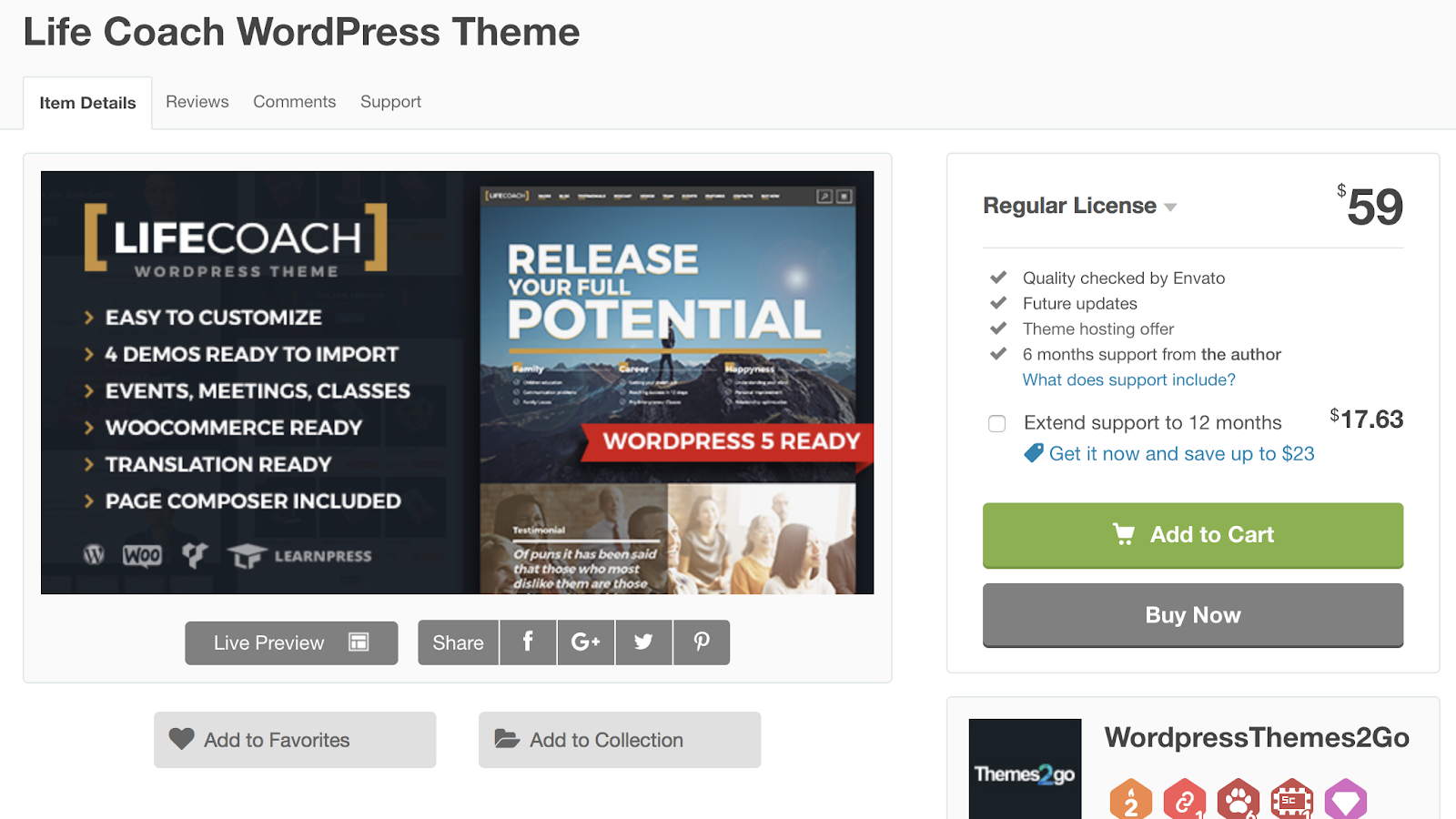
Life Coach is a podcast theme with an e-commerce store where you can sell your merchandise — the theme has WooCommerce integration to make managing your store simple. It includes an events calendar feature where you can highlight the dates for your latest episode releases, live shows, and more. Life Coach also offers MP3 (coding format for digital audio) support so you can easily import and manage your podcasts.
Key Takeaways:
- WooCommerce Integration
- Events calendar feature
- MP3 support for your audio files
7. Vice
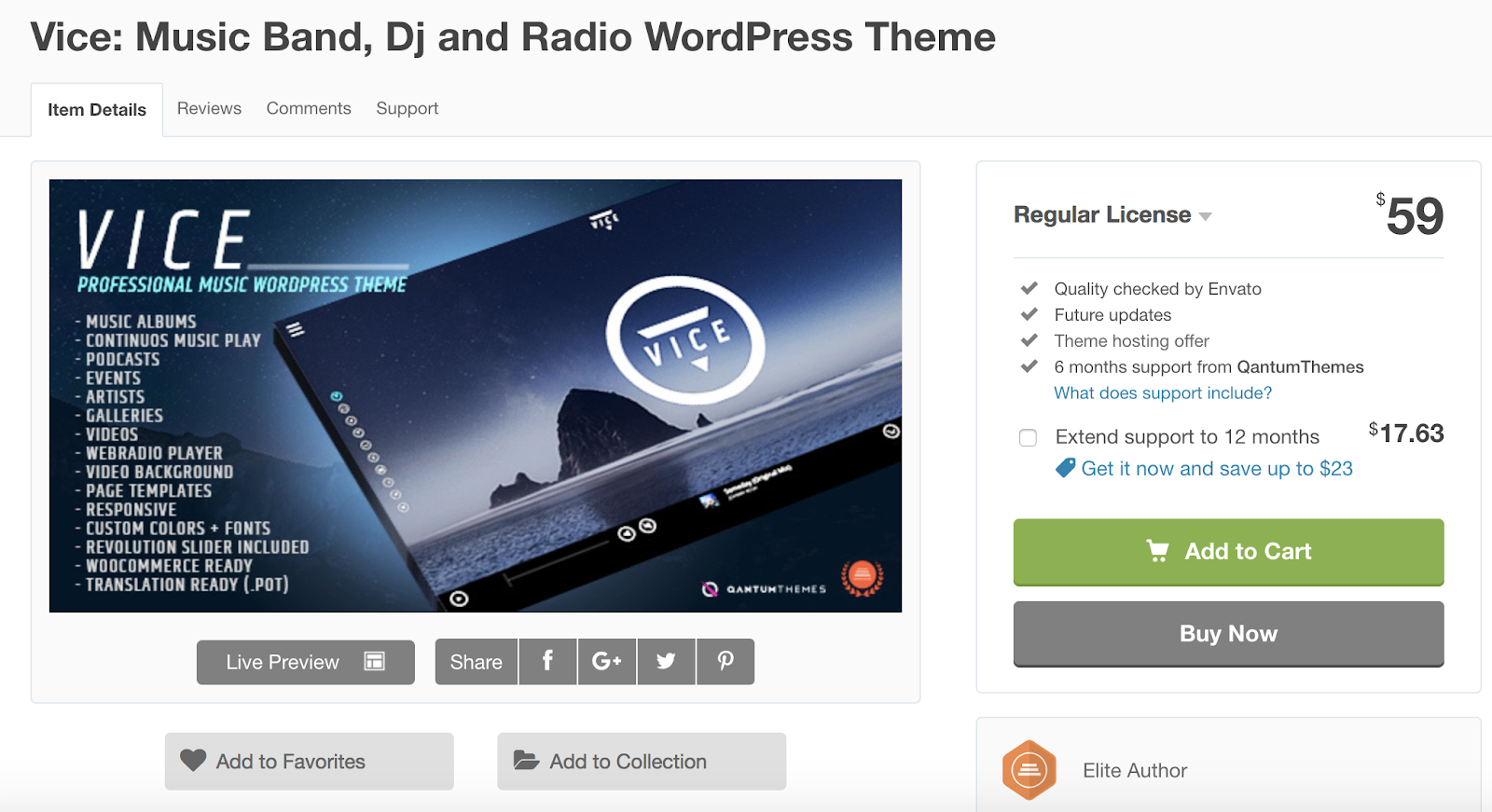
Vice gives you the ability to incorporate video backgrounds on your web pages to create an interactive and fun experience for your visitors. The theme’s responsive design automatically changes your site’s format to fit the screen it’s being viewed on, whether that’s desktop, mobile, or tablet. Vice also has pre-made podcast page templates with players that support Soundcloud, MP3, and Mixcloud audio so you can import and share your podcast in a matter of seconds without having to change its format.
Key Takeaways:
- Video backgrounds on site pages
- Responsive design changes site’s format depending on the device it’s being viewed on
- Podcast page templates with audio players
8. Dixie

Dixie is a multilingual theme — it contains code files so you can automatically translate your entire site into one of several available languages with the click of a button. There is an unlimited number of custom color combination options to achieve any look you desire on your website. If you run into any roadblocks while building your podcast’s website, then you can take advantage of Dixie’s expert support, which is available to all users.
Key Takeaways:
- Website auto-translation available with the click of a button
- Unlimited custom color options for site pages
- Expert support available
9. Satchmo

Satchmo is ideal if you’re looking for a podcasting theme where you can also share blog content in addition to your audio. Whether you’re an experienced blogger or someone who simply wants to share information about your podcast in a personal and accessible way, then Satchmo’s blog template pages will come in handy.
You can add icons in your headers and footers that direct your visitors to your social media accounts to promote your content and increase your follower base. There are also over 700 different Google Font options for you to choose from and customize the typography on your pages.
Key Takeaways:
- Podcast and blog theme
- Social media account icons in headers and footers
- 700+ Google Font options to customize your typography
10. Castilo
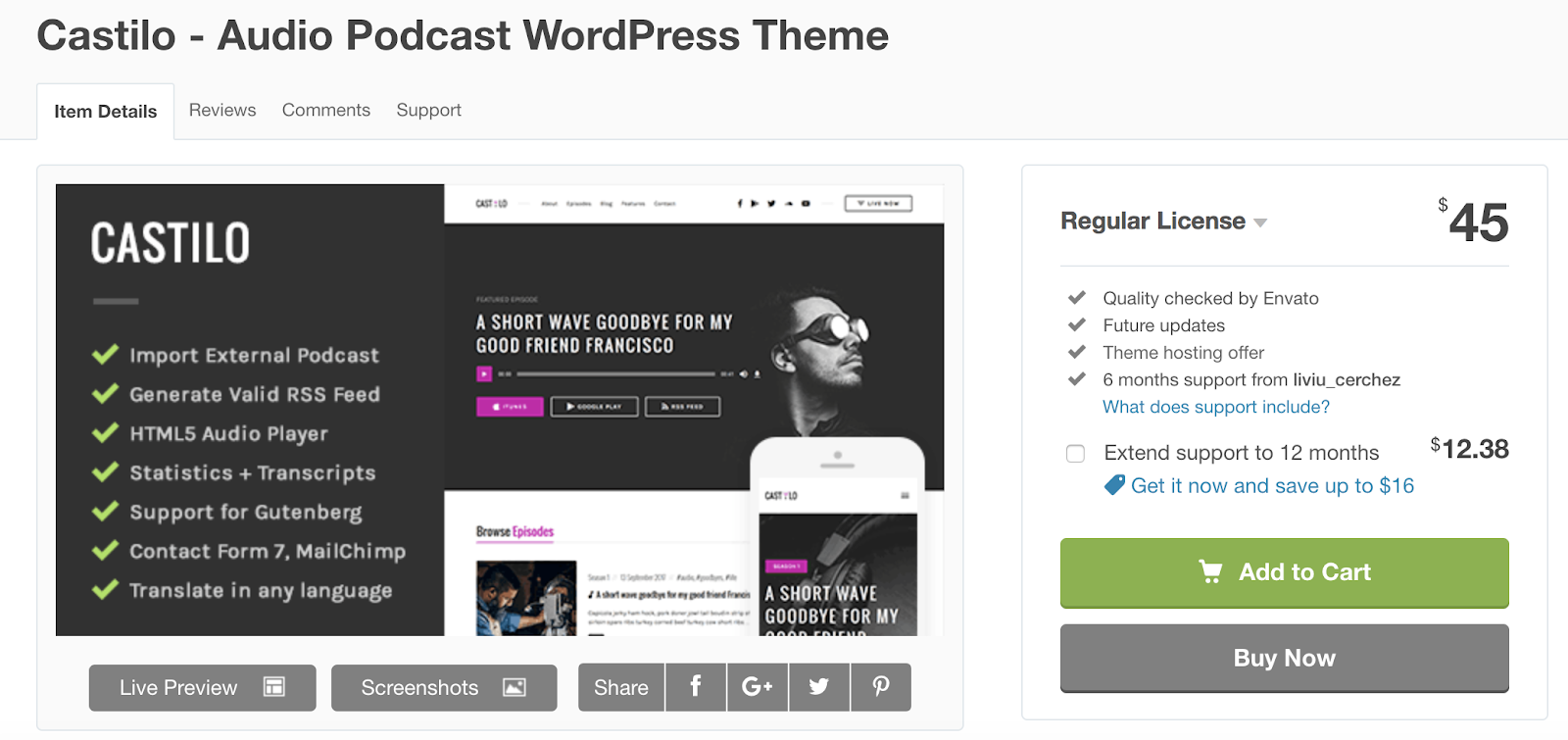
Castilo has a contact form template that you can add to a site page so your visitors can easily get in touch with you. The theme offers a podcast stats feature to help you determine the short and long-term success and popularity of each of the podcasts on your site as well as monitor who’s listening to your podcasts. Your custom logo will also be placed in the header and footer of your pages to make for a professional and branded look and feel.
If your theme does not come with a contact form plugin and you’re looking for a simple way to add a form to your site, check out HubSpot’s WordPress Contact Form builder.
Key Takeaways:
- Contact form template included
- Podcast statistics feature
- Custom logo located in web pages headers and footers
11. Sonus
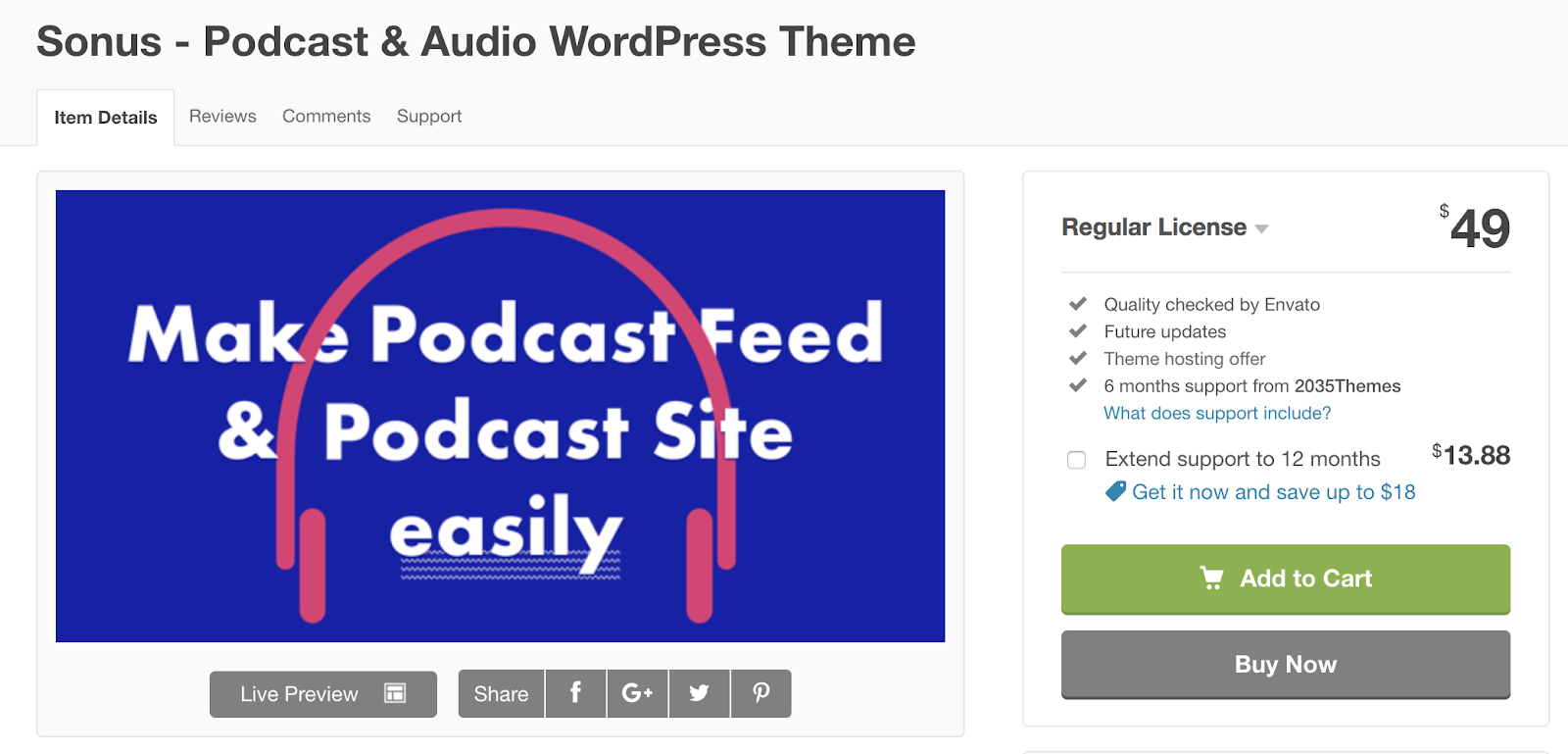
Sonus has a customizable audio player that you can design to include buttons that fast-forward and rewind episodes, skip episodes, share episodes, change episode speed, or skip to a specific time in an episode. The theme’s pages are all formatted in a grid to keep your audio and written content organized. Sonus has responsive audio players that automatically change formats to match any screen and device.
Key Takeaways:
- Customizable audio players
- Grid format on all site pages
- Responsive audio players change their format to work for any device
12. Castpod
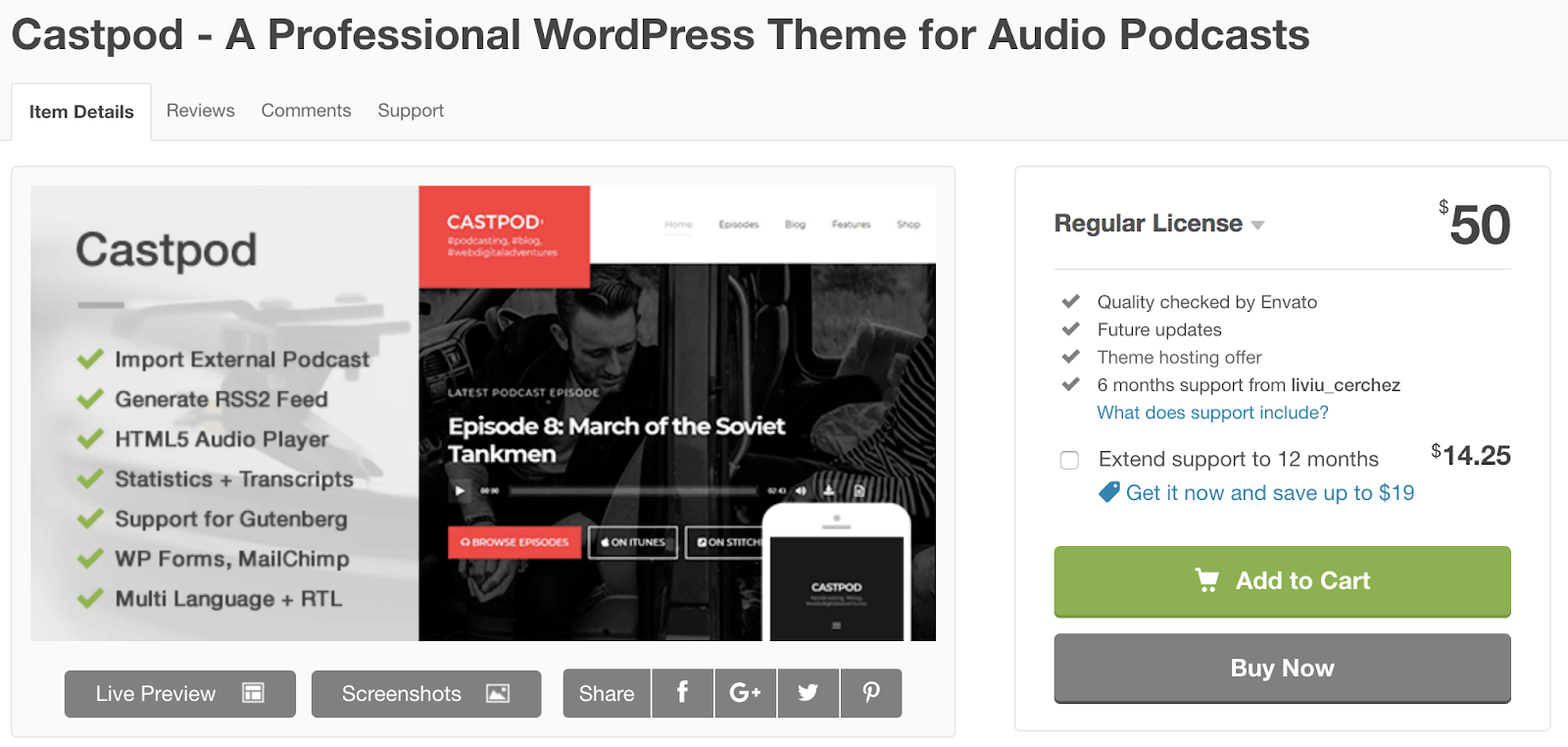
Castpod includes a MailChimp integration so you can manage all of your email-related content for your fans and subscribers in an organized fashion. With Castpod you can submit your podcast to an external service such as iTunes or Google Play with the click of a button. The theme’s Retina-ready design ensures all of your images are high-definition and look professional.
Key Takeaways:
- MailChimp integration to manage emails
- Submit your podcast to external services like iTunes and Google Play with one click
- Retina-ready design ensures a high-definition and professional look
13. Onair2
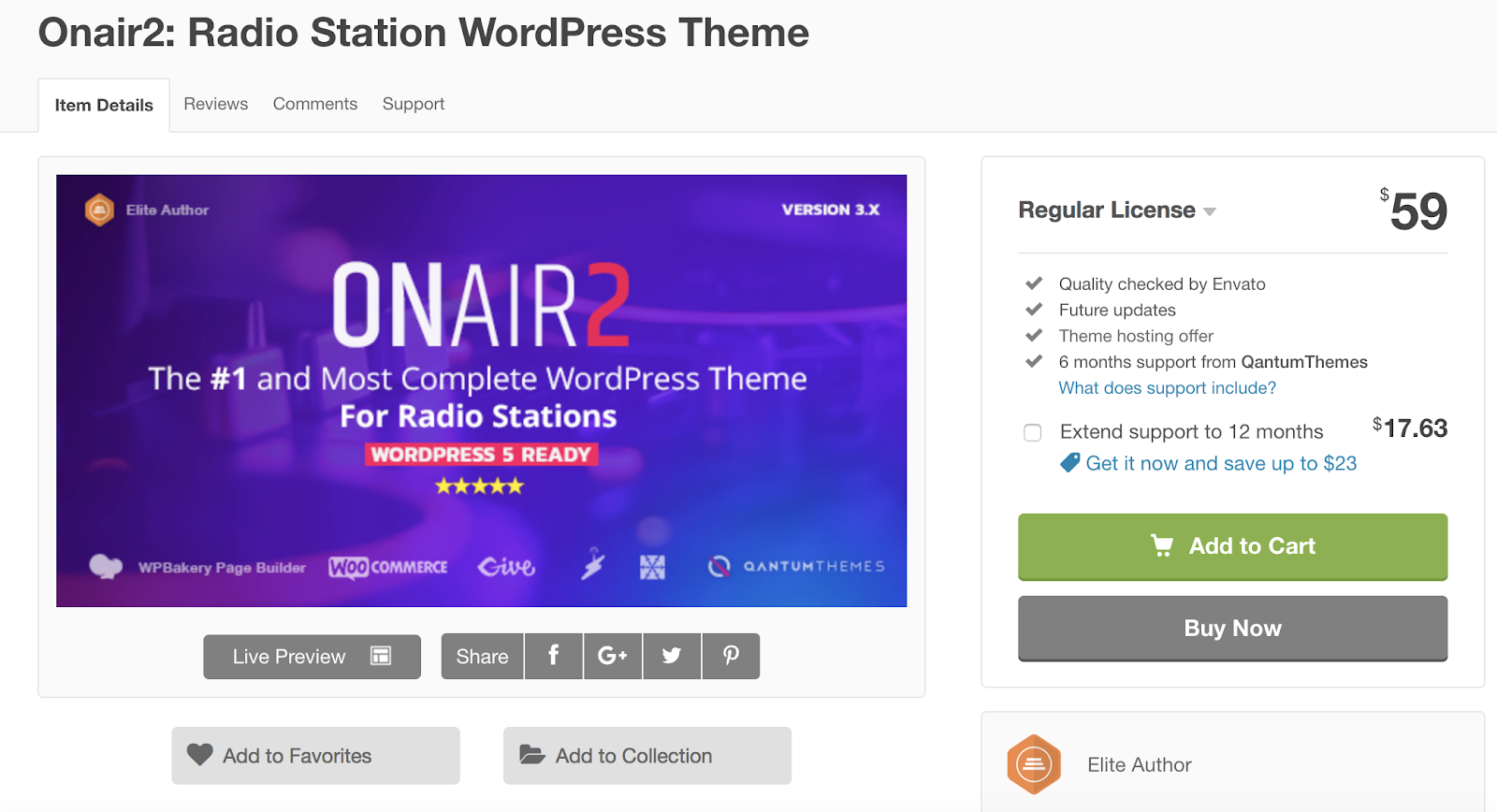
Onair2 is a podcast and music theme with an e-commerce store feature where you can sell your merchandise to fans. Managing your online store is also straightforward due to the theme’s WooCommerce integration. There is a customizable podcast page template that you can implement on your pages with an audio player that’s integrated with YouTube, Mixcloud, Soundcloud, and more. Social sharing icons are customizable and give your visitors the ability to find and follow your accounts in a matter of seconds.
Key Takeaways:
- Podcast and music theme with e-commerce store feature
- Podcast page template with YouTube, Mixcloud, and Soundcloud integration
- Social sharing icons
14. Audioatro
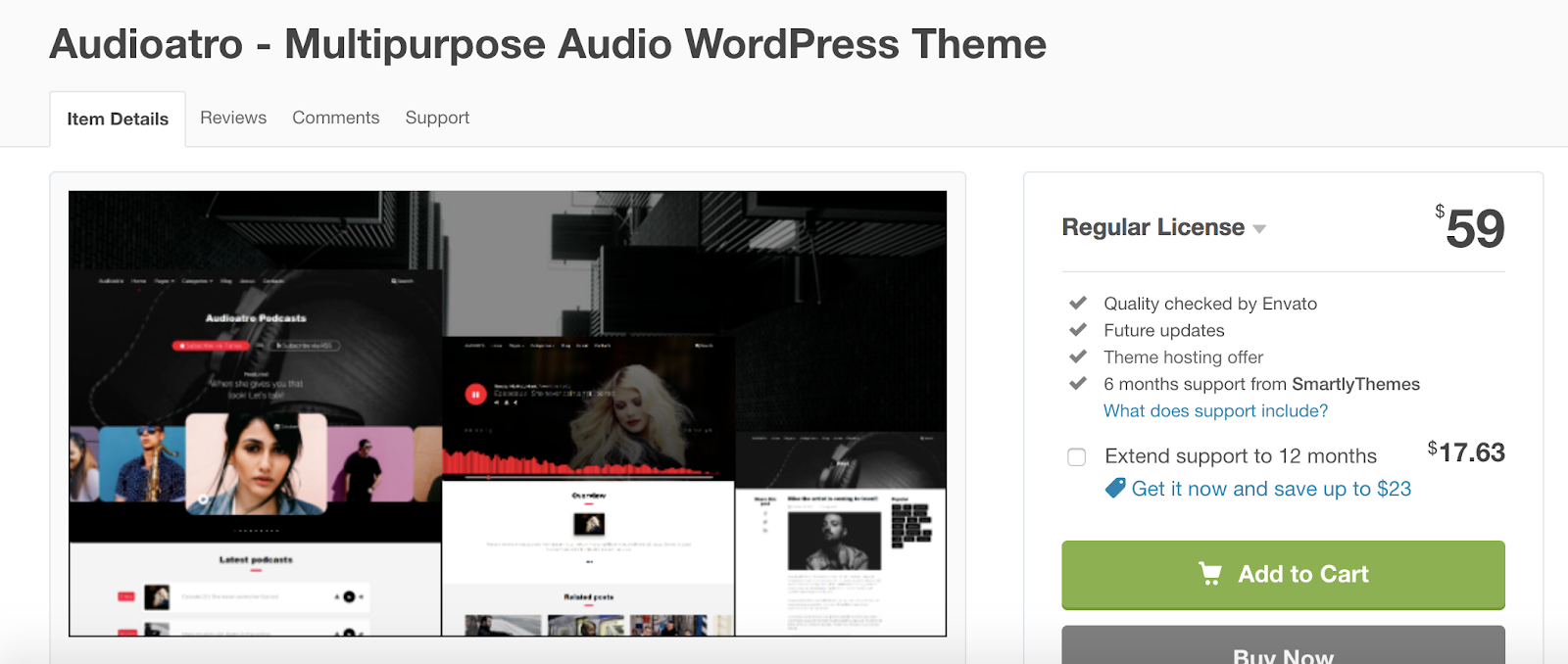
Audioatro has a unique, full-width audio player, called the “Audio Visualizer”, that’s placed on top of a full-width, background image on your page. The audio player includes a bunch of 3D bars that run across the bottom of your page to show listeners their timestamp in the podcast. These bars also rise and fall with the podcast’s volume levels to add another entertaining and interactive visual element. Audioatro also has two podcast-specific templates to choose from and expert customer support in case you run into a challenge that you need help troubleshooting.
Key Takeaways:
- Unique, 3D, video-like audio player
- Two podcast themes to choose from
- Expert customer support available
15. Bolden
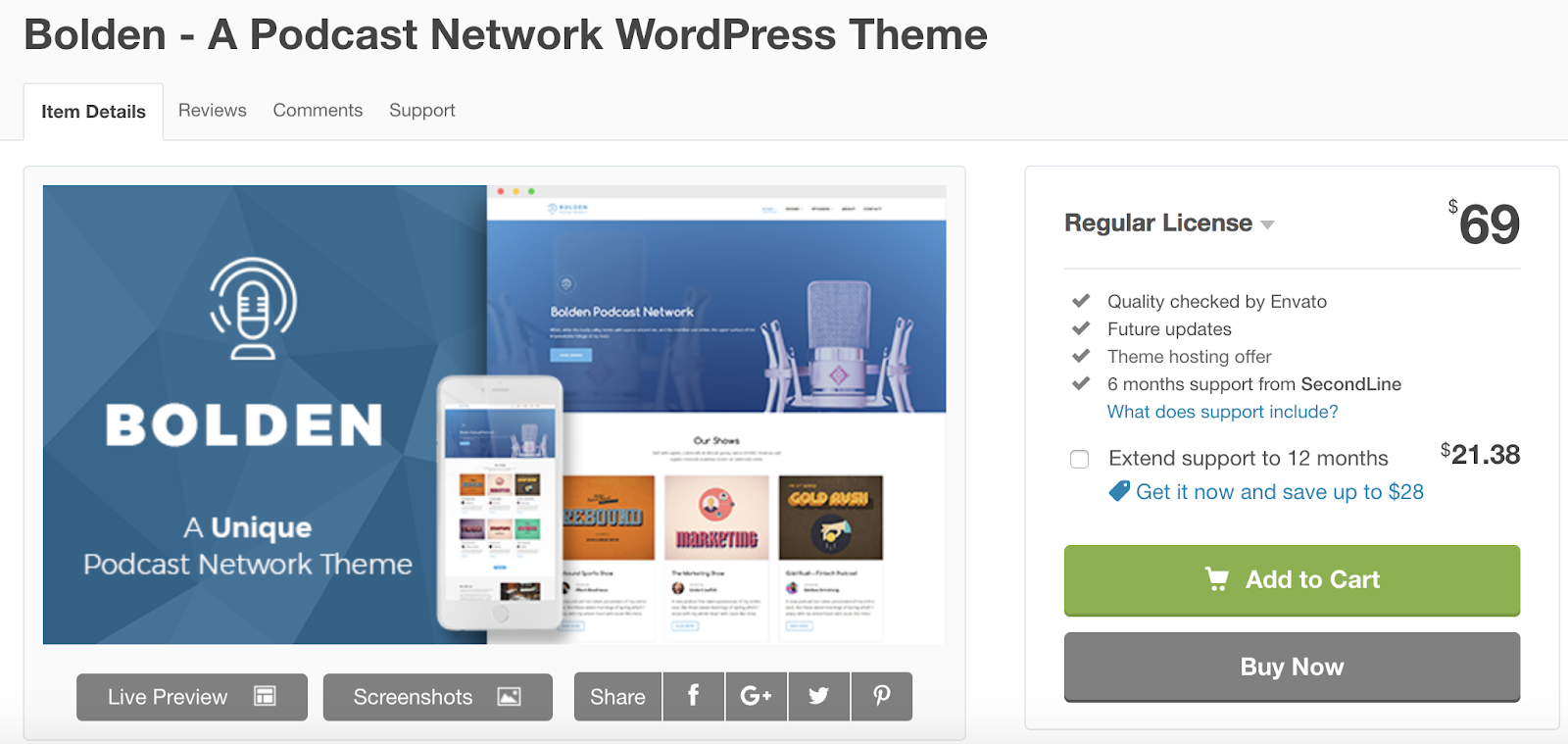
Bolden has “podcast network” pages that support multiple shows, episodes, seasons, as well as videos and music content. The theme requires no coding knowledge and includes a drag and drop page builder so you can quickly and simply design your sections in any way you want. Your site will be more likely to organically rank with Bolden since the theme is SEO-friendly which means greater amounts of traffic on your site.
Key Takeaways:
- “Podcast network” pages for shows, episodes, seasons, video, and music content
- No coding knowledge required
- SEO-friendly
Back To You
WordPress podcast themes will help you share your hard work on a website that you’re proud of. These themes make it easy to, manage your seasons and shows, include descriptions about your hosts, stay in contact with fans, and share the latest information about live shows and events all in one location.
With a wide variety of features, layouts, and customization options, you can achieve virtually any look and design you want with podcasting themes on your WordPress website no matter your level of web development knowledge. Download and install a podcasting theme today so you can begin sharing your content and building lasting relationships with your fans.

What Is Phishing and How Can You Protect Your Business From an Attack?
Last year in August, staff at MacEwan University, a school in Edmonton, Canada, received an email from a major vendor stating they had recently changed their electronic banking information and needed payments to be sent to a new account.
Assuming their trusted business partner was just going through some changes, the university complied and transferred three payments to the new bank account within a span of 10 days.
But two weeks later, MacEwan University received a phone call from this same vendor asking them why they hadn’t paid their fees yet. Perplexed by the call, the university told them they had just transferred the payments to their new bank account.
The vendor had no idea what they were talking about.
Unfortunately, this bank account didn’t actually belong to MacEwan’s vendor. It belonged to cyber criminals in Canada and Hong Kong. And MacEwan University just transferred them $11.8 million.
The initial email asking MacEwan University to transfer their payments to the new bank account looked exactly like their vendor’s usual emails. But, ultimately, the message was fraudulent and a prevalent form of cyber attack that thousands of businesses fall victim to every year — phishing.
What is phishing?
Phishing is the most common type of cyber attack. Criminals impersonate brands, banks, executives, and trusted business partners to manipulate people into downloading malware or ransomware, or visiting fake websites that trick them into handing over confidential credentials, like company passwords, credit card details, bank login information, and social security numbers.
Most cyber criminals deploy phishing attacks through email, like the picture below, but some have also started to exploit social media, messaging apps, and text message to steal people’s personal information.

With over 135 million phishing attacks attempted every single day and 97% of people not being able to identify a phishing email, this cybercrime could wreak havoc on your brand and bottom line.
Last year, the FBI proposed phishing attacks costs U.S. businesses $5 billion per year, and according to Deloitte, 33% of consumers would end their current relationship with businesses who fall victim to cybersecurity breaches, even if they don’t personally affect them.
So how do you defend your customers and employees from phishing without making them your brand’s first line of defense? Here are three shields you can leverage to protect your brand from these prevalent attacks.
How to Protect Your Business From Phishing Attacks
1. Build a DMARC record.
DMARC (Domain-based Message Authentication Reporting and Conformance) is a cutting-edge email authentication protocol that leverages two other authentication protocols, SPF (Sender Policy Framework), and DKIM (DomainKeys Identified Mail) to verify legitimate messages sent from your domain and block fraudulent emails that appear to be sent from your domain.
These email authentication protocols are rather technical, so in a nutshell, SPF is a record of IP addresses that are authorized to send emails on your behalf that email service providers check against, and DKIM is a verification process that leverages cryptographic authentication.
DMARC is the only technology that can ensure your “header from” address (what your users usually look at first when they see your emails), is trustworthy. To do this, they’ll only authenticate email messages that pass SPF authentication and SPF alignment or DKIM authentication and alignment. If an email message fails SPF authentication or alignment and DKIM authentication or alignment, it’ll fail DMARC.

Picture Credit: Return Path
DMARC also allows you to tell email service providers what they should do with any fraudulent mail that appears to be sent from your domain. You can either monitor all of your emails, move unauthenticated messages to users’ spam folders, or decide not to deliver this type of mail at all to inboxes on your server.
Additionally, email service providers will regularly send you forensic DMARC reports, showing you which emails are authenticating, which ones are not, and why. To build your DMARC record in 15 minutes or less, check out this guide from Return Path, an email marketing optimization software.
2. Train customers and employees to spot an attack.
According to PhishMe, a phishing defense solution, companies who train employees to identify and report attempted phishing attacks only have a 5% susceptibility rate to phishing, even though phishing attempts grew 65% last year.
To help employees and customers spot one of these attacks and better defend your business, teach them these common phishing markers:
Poor Spelling, Grammar, or Writing
A lot of amateur cyber criminals don’t take the time to craft clear and convincing emails, which brands always seem to do, and foreign cyber criminals will usually rely on Google Translate to translate their messages. So if you receive a poorly written email from a seemingly legitimate sender, take caution.
Suspicious URLs
Most phishing emails lure people into clicking through to a malicious or fake website. To do this, cyber criminals will usually spoof the website’s URL by creating a lookalike one, or they’ll mask their dodgy URL by shortening it. Whenever you see a weird or shortened URL, make sure you hover your mouse over it to see if the landing page’s web address is different or fake.
Mismatched Sender Address
Even if a cyber criminal can perfectly imitate your brand’s voice, formatting, logo, address, and contact email address in their phishing email, there’s still a trait of yours they can’t copy — your sender address.
Cyber criminals will usually create a lookalike sender address or just use a string of characters in hopes that you won’t check it. To verify a brand’s sender address, check out the sender’s domain in the email’s “from” header and see if it matches the brand’s domain.
Here’s a legitimate email from HubSpot to help you see where the sender address can be found in Gmail:

3. Invest in email security software.
If your company has the funds, email security software like Proofpoint and Barracuda are the most reliable and effective lines of defense against phishing. Well-versed employees can still fall victim to cleverly-crafted phishing emails and cyber criminals constantly refine their malicious tactics, like sending phishing emails from the legitimate domains of compromised websites.
But since email security software can identify unusual traffic patterns and monitor fishy URLs, it can effectively detect, block, and respond to these sophisticated threats before they reach your customers and employees’ inbox.
Don’t Get Snagged
76% of organizations experienced phishing attacks last year, so it’s likely that cyber criminals will try to lure your brand in, too. But if you can arm yourself with DMARC, thorough employee training, and the best-fit email security software for your specific systems and situation, you can shield your customers, employees, and brand from these attacks, no matter how enticing their bait is.

How HubSpot Academy Grew YouTube Subscribers by 25% in Just Two Months
YouTube is the second largest search engine, with over 1.8 billion users per month. If you’re looking to revamp your marketing strategy in 2019, YouTube is a critical place to start.
And yet, despite its massive audience, only nine percent of small businesses are taking the time to use YouTube for marketing purposes — and even fewer are creating a strategy for their video content.
It’s not just small businesses, either. In fact, for a long while, it was us, too. But at the beginning of 2018, we recognized the major losses our team would face down the line if we didn’t begin investing in a powerful YouTube marketing strategy.
It wasn’t easy, and it wasn’t always pretty, but fortunately, our efforts paid off, big-time. Through various endeavors, we managed to increase HubSpot Academy’s YouTube channel subscribers by 25% in just two months — without spending a cent.
To help you rank on YouTube, create a brand identity, and provide an outstanding user experience, take a look at the free strategies we implemented to achieve sustainable growth on the platform.

1. Develop an SEO strategy for YouTube specifically.
When you hear the term “search engine”, what comes to mind? I’d be willing to bet it’s Google.
From there, you might think of Yahoo or Bing. But, as some of you savvy marketers might know, this is actually a trick question — you’re right to think of Google first, but if your brain flips to Yahoo or Bing next, that should change, today.
The second largest search engine globally is YouTube. With more and more content being added each day — as much as 400 hours of video per minute — optimization is not only best practice, it’s critical, and must be the foundation for any effective YouTube strategy.
When developing an SEO strategy for YouTube, start with keywords. Do some monthly keyword search volume research, so you can identify a keyword that speaks to your video, has substantial search volume, and isn’t too competitive.
Once you’ve chosen a target keyword, make sure you incorporate it into your title. Additionally, you’ll want to add tags to your videos, and order them by importance — always leading with the target keyword. Plus, it’s important you repeat the target keyword in your video description.
Finally, make sure your target keyword is said out loud in your video so that it gets transcribed in the SRT file. SRT files are critical, as they make video content “readable” by search engines, and they make videos accessible to a hearing-impaired viewership — a win, win.
Bonus best practices include adding your target keyword to the raw video file name and custom thumbnail file name before you upload to YouTube. All of these tactics will give your video a better chance of driving organic traffic and ranking on YouTube.
2. Engagement is the key to your video’s success, so focus efforts on increasing viewer interaction.
Keyword strategy is not enough to rank on YouTube. Human behavior — particularly interaction with videos — greatly influences the YouTube algorithm.
View duration, comments, likes, shares, and even dislikes, all increase a video’s authority.
Why?
YouTube sees engagement as a stickiness factor. If a viewer is engaged, they are more likely to spend increased time on YouTube, which means more revenue for YouTube. The best videos, then, deliver high quality content and stimulate interaction.
One way to encourage viewers to stay on YouTube is to organize your videos into playlists. Placing videos in relevant, topical playlists will entice viewers to spend more time watching videos in sequence, increasing their total time spent on YouTube.
Another strategy is to ask for engagement. Pin a conversation-starting question in the comments section to encourage viewers to outline their thoughts, feedback, questions, and insights. In your video, ask viewers to leave comments, and don’t be afraid to pose questions — it works.
For instance, in this HubSpot Academy YouTube video we posted in October, we made sure our host asked the viewers questions within the video itself, with a “Leave a comment below” directive. We also pinned a question in the comments section directly:
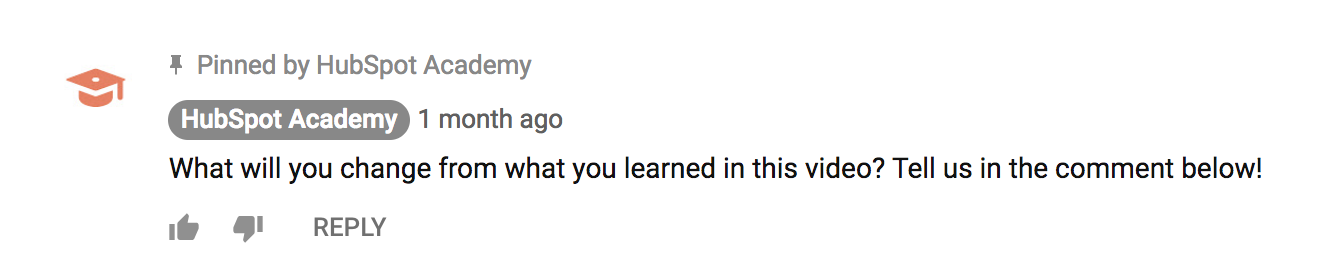
As you can see from the comments section, our viewers were eager to share their thoughts and engage with one another through the platform — we just gave them a starting point to do so.
3. Build a unique brand identity on YouTube.
If you look at major influencers and brands on YouTube, such as Brian Dean, Neil Patel, Vox, and Netflix, you’ll notice something similar about all of them — their theme, topics, and brand identity are clear, no matter which video you watch.
Elements like custom thumbnails, channel banners, a custom URL, logos, and a channel trailer all exist to establish a channel brand. Take advantage of these opportunities.
In particular, video thumbnails are a key strategy for distinguishing a brand. Research from Netflix suggests that thumbnails can even drive clicks and influence engagement behavior on videos, which can help videos rank.
In their findings, Netflix concluded: “Images that have expressive facial emotion […] do particularly well.”
We decided to test this research for ourselves, by providing up-close, emotive, human faces on each one of our relevant thumbnails:
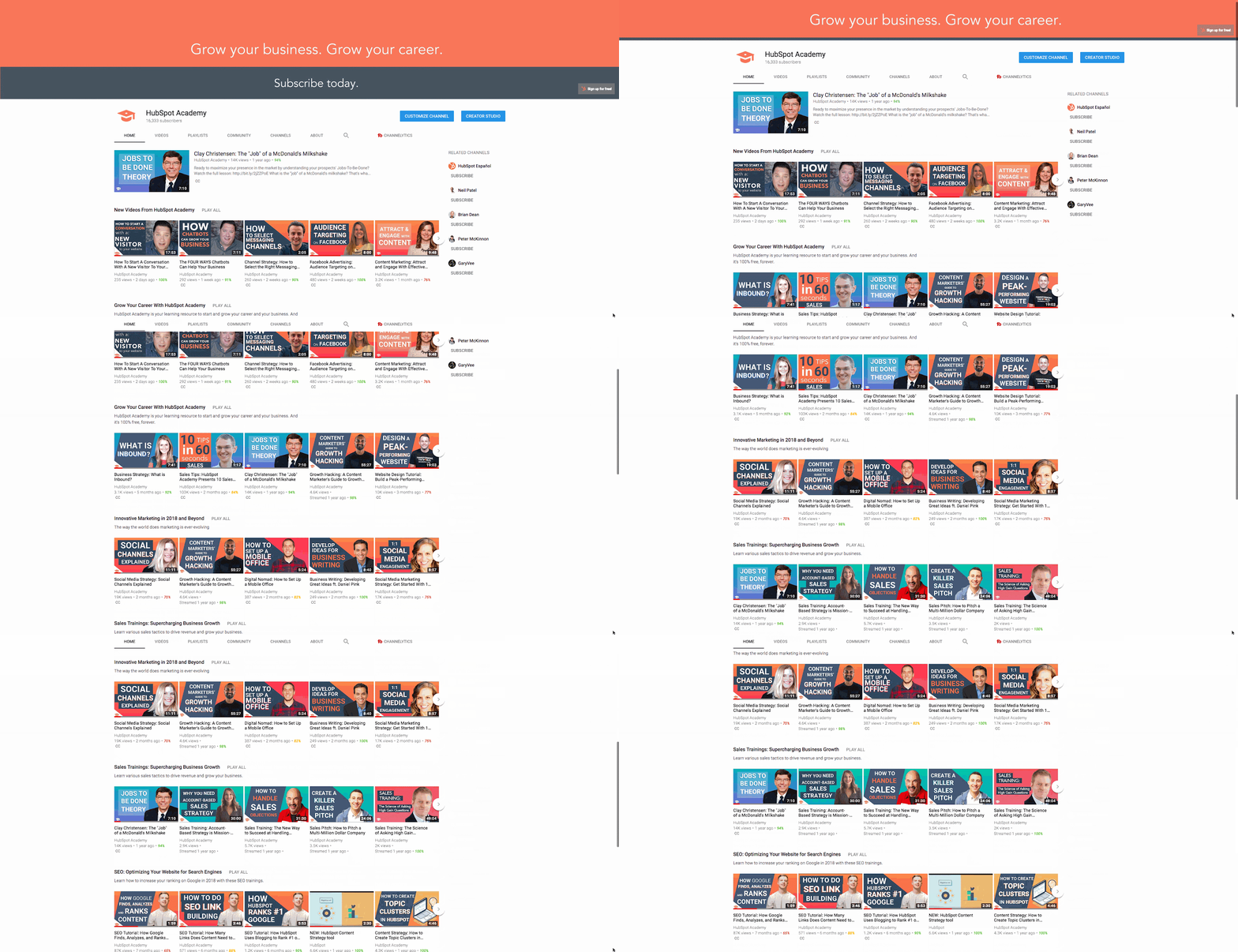
When building your thumbnails, it’s critical you put the title text on the left side of the video thumbnail, as YouTube places a time card on the right, bottom corner by default, which can cut off visuals. Remember to write short, impactful titles on the thumbnail, as thumbnails can be quite small, so too much text will render the words blurry and illegible.
Finally, when creating your thumbnails, keep color top-of-mind. YouTube’s color palette is red, white, and black, so it’s important to choose bright colors that stand out against the platform’s interface, and against your competitor’s thumbnails.
Beyond thumbnails, take the time to build other brand assets. A channel trailer is a short video that is shown to new visitors of a channel. It’s intended to promote and succinctly educate viewers on the value of your channel. Similarly, you might consider adding a branded banner, and a custom URL.
Ultimately, every personalized touch will add a level of professionalism to your channel, and set you up to succeed against competing channels.
4. Create a Stellar User Experience
Would you watch this video?
Does our channel look inviting and professional?
Is our content consistently providing value to our viewers?
If you didn’t answer “yes” to all three of those questions, you need to revise your YouTube channel to ensure you’re prioritizing the user experience.
Although free, YouTube provides a subscription service, and subscription services survive and thrive by creating an amazing user experience.
For instance, take Dollar Shave Club, a popular subscription box of shaving and grooming products. You wouldn’t pay money to subscribe to the service if you had no idea what type of products were going to arrive, or when. People invest in subscription services for convenience, quality, and reliability — all of which add up to a solid user experience.
Similarly, if you are using your YouTube channel to drive leads or develop brand awareness, your free service should mirror the excellence all your business has to offer.
If you’re unsure where to start, take the time to plan an upload schedule. YouTube subscribers seek dependable, fresh content. At HubSpot Academy, for instance, we put new content on the channel every Monday and Friday morning at 8:30 AM ET, so our subscribers are guaranteed to get new, educational, exciting content at the same time, twice a week.
If you don’t have the bandwidth to put content up every week, that’s okay, too. High-quality content on a consistent schedule, even if that’s only once a month, is better than mediocre content published weekly.
Our Results After Two Months of Implementing These Four Strategies
If you’re wondering whether a purposeful YouTube strategy really works, the answer is yes — a YouTube strategy has real payoffs.
For instance, prior to implementing these strategies, our HubSpot Academy channel existed for three years with minimal growth.
Once we implemented the four strategies I shared above, we drove subscribers from 6.7K to 8.4K, a 25% increase in just six percent of the channel’s total lifetime on YouTube. We saw these results in just two months.
During this time, we did not invest any money in paid advertising. This growth was purely organic. Best of all, our subscriber number wasn’t the only metric that grew. Every single metric tracked by YouTube’s analytics tools — views, comments, likes, shares, videos in playlists, average view duration, total watch time, etc. — moved up, and to the right.
Now, yours can too.


Rethinking Social Media Marketing: How to Use a Behavior Based Approach For Content on Social Media
Companies today are grappling with how to best market to consumers on various social networks. How can they better identify the types of content that will perform the best on each network? To answer that question (and better inform HubSpot’s own social strategy), HubSpot Research and the University of Virginia teamed up to survey consumers and analyze existing branded content to produce a framework that helps brands identify the types of content that performs best on a given social network. This post is an overview of a longer report published by HubSpot Research.
Understanding Behavior and Content Options
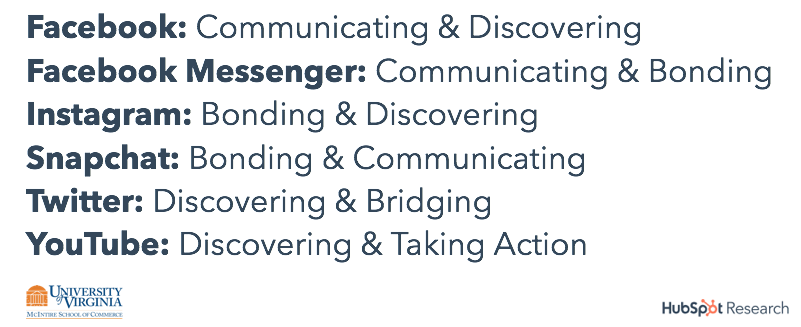
We first needed to understand the primary behaviors people take on each social network – after all, people use Twitter very differently from a network like Instagram or YouTube. Through consumer surveys, we identified five key behaviors: bridging, bonding, communicating, discovering, and taking action. Based on our data, we tied the most prevalent behaviors found on each of the six social network we studied (see figure 1).
Figure 1. Prevalent Behaviors on Social Networks
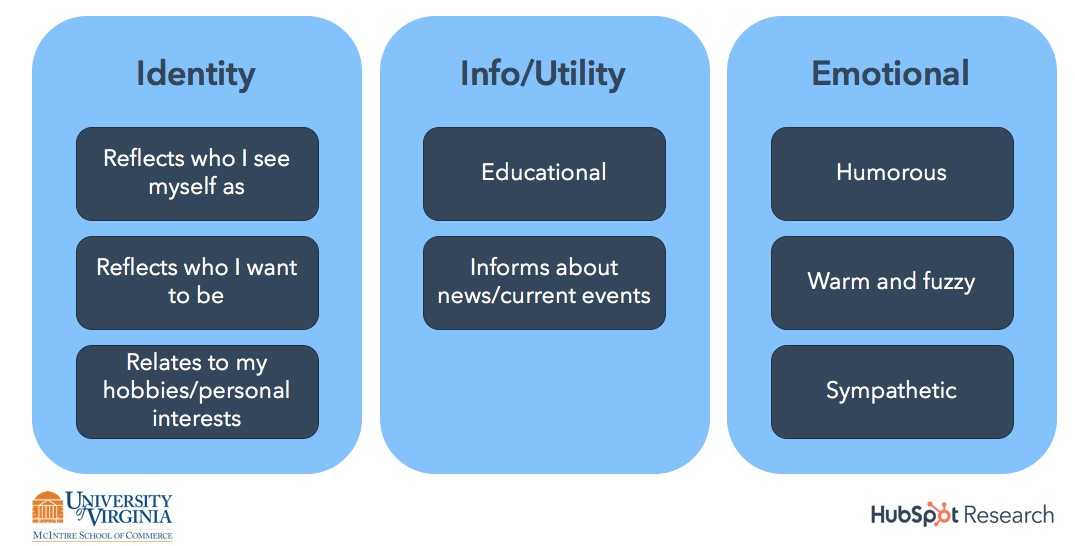
We understood behavior; now we needed to categorize the themes of content that we typically find on social media. Our research identified eight distinct categories of content commonly made by brands (see figure 2). These content categories build on HubSpot’s existing social content framework in which content broadly reflects consumers’ identity (Identity content), provides information to consumers (Info/Utility content), and elicits an emotional response from consumers (Emotional content). A given piece of content may have characteristics of multiple categories, but may be more associated with one of the eight categories than others.
Figure 2. Content Categories
Using the content category framework, the team at UVA tested various branded content on consumers to understand what type of content performed best for the five core behaviors exhibited on social networks. Our resulting guide below can help companies best orient the content they create for social networks, to better reflect the reasons why people are on the network in the first place.
Figure 3: Behaviors and the Content that Performs Best
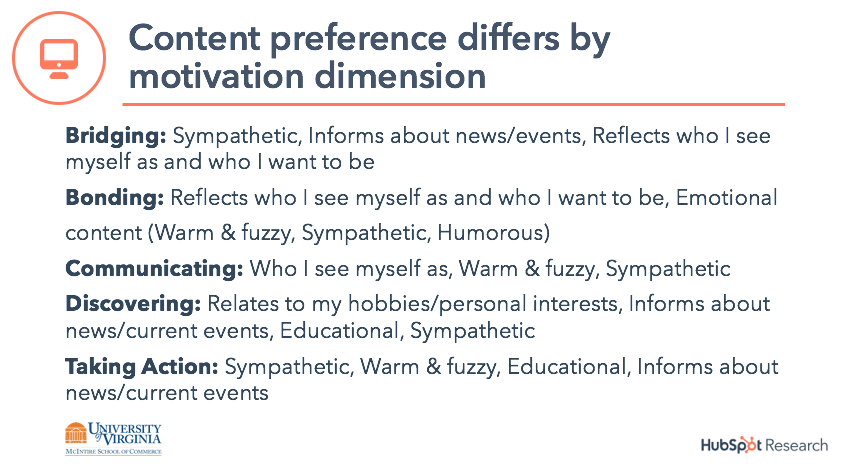
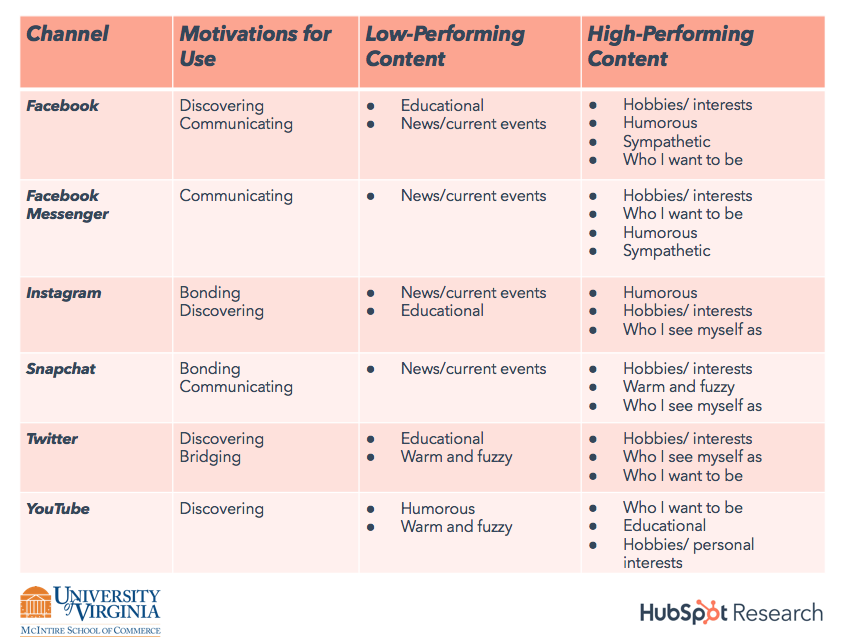
Our survey findings show that people not only generally prefer different types of content as a function of their reasons for using a platform, but their behavioral response to brand content is driven by these various motivations. Integrating the survey results with the actual performance of campaigns in market, we are able to assess the relative effectiveness of content categories for each channel and suggest the optimal content for driving intended behaviors. Consistent results across the HubSpot survey and the HubSpot campaign data, as well as survey results for the content from various other organizations and product categories, allow us to broadly identify patterns of content category effectiveness for companies across channels. For complete details on the best and worst performing content types on each network, check out figure 4 below.
Figure 4. Content Performance by Channel
Want to see the entire study? Click here to read more.

How to Quickly Check If a Link or Site Is Safe
Nowadays, most cybercriminals leverage a seemingly harmless staple of the internet to infect and ravage people’s computers with malware — links. In 2018, there were four times as many malspam emails with malicious links than malspam emails with malicious attachments. But malicious links don’t just lurk in emails. They also skulk around in social media, messaging apps, and even text messages.
Malware is the most expensive cyber attack on companies, costing them an average of $2.4 million for each attack. So to help protect your work computer, data, and funds from any malign viruses or worms, take a look at this overview of the best free online tools for quickly checking the safety of a link or site.
How to Check if a Link is Safe
To check if a link is safe, plug it into a link checker. Link checkers are free online tools that can analyze any link’s security issues (or lack thereof) and alert you if the link will direct you to a compromised website, malware, ransomware, or other safety risks. We’ve provided descriptions of the three best link checkers below.
3 Link Checkers That’ll Help Protect Your Computer, Data, and Funds
Run by Norton, a premiere antivirus and anti-malware software provider, Norton SafeWeb can analyze any link for its safety and security problems. Norton SafeWeb also gives you a summary of the website’s computer threats, identity threats, annoyance factors, and proof of eCommerce safety validation, which is crucial for protecting your personal and financial information when you buy products or services on the site.

By leveraging their own Safe Browsing technology, Google can examine billions of URLs per day to find unsafe websites. They uncover thousands of dangerous sites everyday, and they’ve discovered that many of these sites are actually legitimate but they’re also compromised. To check if a site is compromised or dangerous, just plug one of its links into Google’s free online tool.

3. URLVoid
URLVoid is a service that can gauge a website or link’s online reputation and website safety, detect any fraudulent or malicious behavior, and identify if its ever been involved in a malware or phishing incident. To do this, URLVoid filters links through over 30 blacklist engines and online website reputation services. They also provide you with a safety report that includes the blacklists used to check the link and its website’s details like blacklist status, domain registration, IP address, and more.


The Ultimate Guide to Bitcoin
Bitcoin celebrates its tenth birthday on January 9, 2019.
The first official purchase made with bitcoins was of two pizzas in Jacksonville, Florida — sold for 10,000 BTC. Today, that amount is worth about $33.7 million — and Bitcoin owners are purchasing a lot more than pizza.
Crazy, right?
Bitcoin has become an albeit invisible commodity in our society. It offers greater security and lower transaction fees for consumers and businesses alike and holds the potential to equip a global economy.
As business owners and merchants, we should be familiar with Bitcoin, and how to get it, store it, and use it.That’s why we built this guide.
Below, you’ll read about the history of Bitcoin, how to procure it, and how to store and use it. Use the chapter links to jump ahead.
It’s no coincidence that Bitcoin was invented so soon after the housing market crash in 2008. With no corporate middleman or closeted transactions, Bitcoin leaves little room for corruption — something that can’t be said about other financial institutions.
It also cuts out unnecessary fees and makes it easy to transfer bitcoin funds all over the world.
Think about it. When you transfer money through banks or institutions, you end up paying a lot of fees … such as currency conversion fees, bank service fees, and deposit or transaction fees to payment gateways like PayPal or Stripe. How else would these institutions and businesses make money?
Bitcoin, on the other hand, is transferred digitally, directly, and anonymously. It puts the power back into hands of the buyers and sellers.
Bitcoin to USD
To make sense of this whole “digital currency” thing, let’s compare it to the very well-known and sometimes well-loved US dollar.
Bitcoin has come a long way in the last decade. When it was created, one bitcoin (₿1)was worth $0.008 USD. In five days, the price rose by 900% to $0.08 USD.
Today, ₿1 is worth $3,377.67 USD.
Don’t have $3,300 to spend in one place? Bitcoins are divided into sub-units called satoshis; each satoshi is worth ₿0.00000001. (For reference, $1 USD is equal to 29,174 Satoshi.)
Bitcoin Terms to Know
Bitcoin is a complex technology and currency. (Yes — it’s both.) To better understand this guide, here are a few Bitcoin terms to know.
Blockchain
Bitcoin transactions are recorded on blockchain, a public record used to verify bitcoin transactions and prevent scams. Transactions are recorded on blocks; a new block is added to the chain roughly every 10 minutes. Learn more about blockchain in the video below.
Bit
A bit is a sub-unit of Bitcoin, formally known as microbitcoins. Where a satoshi is ₿0.00000001, a bit is ₿0.000001 … ₿1 equals 1,000,000 bits. 1 USD equals about 295 bits.
Bitcoin
Bitcoin capitalized refers to the currency and technology as a whole. When bitcoin isn’t capitalized, it’s in reference to the unit of currency. It’s also abbreviated using BTC or XBT.
Confirmation
Confirmation happens when a transaction has been processed by the network and is recorded onto a block. Multiple confirmations occur as transactions are recorded onto subsequent blocks, and each transaction decreases the risk of a reversed transaction.
Cryptography
Cryptography is the act of writing in or deciphering code. Its a type of mathematics and allows us to create secure transactions and online environments, i.e. “encrypted” accounts or wallets.
Mining
Mining is a metaphor for Bitcoin’s proof of work system — where miners solve the math problems that validate every bitcoin transaction in exchange for bitcoins. These complicated mathematical calculations also increase security and subsequently release newly created bitcoins. It’s not unlike physical mining for gold or jewels, except it’s done using various mining hardware and mining software. Mining is only one way — the hardest and most profitable way — for you to get bitcoins. The block reward for solving these math problems is 12.5 tokens — the equivalent of over $40,000 today. Like the US dollar, there’s a limited number of bitcoins floating around the economy. There are currently 15 million in existence … with a cap of 21 million, that leaves only 6 million more bitcoins to mine.
Private Key
A private key is a confidential piece of data that verifies your right to spend bitcoins from a specific wallet. It’s like a Bitcoin password. Each wallet is associated with its own private key.
Signature
A signature is a piece of cryptography that verifies your bitcoin ownership — it’s the public-facing side of your private key. But don’t worry, cryptography ensures that no one can guess or decipher your private key or other data.
How to Buy and Earn Bitcoin
There are a number of ways to get, earn, and buy bitcoins for yourself. But just because bitcoin is purely digital doesn’t make it easy to come by. The below methods require your time, money, or both in exchange for bitcoin. Consider diversifying your collection strategies to bring in more.
Exchange real money for bitcoin
Cryptocurrency exchanges allow you to buy bitcoin and other currency using credit cards, bank transfers, and even PayPal payments. The most popular online exchanges include Bitfinex, Bitstamp, and Coinbase. You can also exchange money for bitcoin in person at a Bitcoin ATM, retail store, bank, or directly with another person.
Accept bitcoin as payment
Simply share your bitcoin address with shoppers (in-person or online) and display a “Bitcoin accepted here” sign. Also, consider selling goods and services for bitcoin on sites like Purse.
Complete tasks for bitcoin
These sites are called “bitcoin faucets” and essentially exchange bitcoins for time — time playing games, watching ads, or writing about cryptocurrency. While this is a legitimate (and seemingly easy) way to get bitcoin, the return on the investment of your time is very little.
Earn interest from lending bitcoin
If you already own bitcoin, you can put it to work for more. Consider lending your bitcoin and receiving interest payments. You can do this with a peer or friend or through a site like Bitbond.
Get tipped with bitcoin
Sites like Bitfortip offer bitcoin incentives for all kinds of tasks and odd jobs. Some sites will tip in Bitcoin for taking surveys, answering questions, and sharing content.
Note: Bitcoin is extremely volatile. Its trading price can fluctuate hundreds of dollars in a matter of hours. While some people treat bitcoin as a daily currency, other people purchase bitcoin like they do stock, meaning they buy it, leave it alone, and only sell their bitcoins when the price skyrockets.
How to Store and Use Bitcoin
Bitcoin is unique in how it’s stored … you can’t quite tuck it under your mattress or toss it in a piggy bank. Instead, you use bitcoin wallets.
A bitcoin wallet is like a physical wallet. But instead of storing the currency itself, your wallet stores all your private key(s) which are linked to the bitcoins you can spend. Bitcoin wallets allow you to see your bitcoin balance and make payments to others.
Before you buy, earn, or collect any bitcoin, you first need to set up your bitcoin wallet. There are a few different kinds you can use. They differ by their storage method: “hot” storage is when your cryptocurrency is stored online, and “cold” storage is completely offline storage.
Software Bitcoin Wallets
Software wallets include desktop, online, and mobile wallets. They live on your device, with some being cloud-based — meaning they fall under hot storage. Hot storage is great for quick access and easy transfers, but it’s also more susceptible to cybercrime. Also, depending on the type of wallet, it could be compromised if the device is destroyed.
- Desktop bitcoin wallets are downloaded to a single PC or laptop and only accessible from that device. Multibit and Armory are examples.
- Online bitcoin wallets are cloud-based and accessible on any device. They’re the easiest to use — and the easiest to hack. It’s not recommended to store large amounts of bitcoin in online wallets. Coinspace and BitGo are examples.
- Mobile bitcoin wallets operate through an app and are the most convenient option as they are accessible on-the-go. MyCelium and CoPay are examples.
Hardware Bitcoin Wallets
Hardware bitcoin wallets live on an external device like a hard drive or USB. They’re accessible by plugging that device into a computer and logging in. These wallets are considered cold storage since data is stored completely offline.
Cold storage provides the best security and is best for large sums of bitcoin but can be intimidating to set up, inconvenient to use, and susceptible to physical damage, loss, or theft. Ledger, Trezor, and Keepkey are examples.
Paper Bitcoin Wallets
Paper bitcoin wallets are exactly what they sound like — pieces of paper containing your private keys. Instead of relying on software or hardware, which are susceptible to malware, cybercrime, and damage, you simply have to keep track of paper bitcoin wallets. These wallets are another type of cold storage and pretty easy to generate. Sites like WalletGenerator.net can help … all you need is an internet connection and printer.
How to Spend Bitcoin
When you set up your bitcoin wallet, you’ll create a public bitcoin address. It will look something like this: 1GV5Vye4LCfpkM9V5oFSQsZk8kq2vBxvCK.
A bitcoin address is similar to an email or physical address. It’s the only information needed for someone to pay you with bitcoin, and it’s the only public-facing data you’ll share as part of a transaction. Each transaction uses a unique bitcoin address.
To spend bitcoin, you simply share your bitcoin address for the recipient to decode using their wallet. At that time, the transaction is recorded on the blockchain for all other Bitcoin users to see.
Not sure where to spend bitcoin? There are over 100,000 merchants worldwide that accept bitcoin payments, including Expedia and Overstock.com. You can use bitcoin to do anything from booking luxury vacations to donating to charity.
Bitcoin Risks
Bitcoin is a largely unregulated, relatively unstable market and is notorious for scams. That being said, we recommend doing plenty of research before investing any large sums into Bitcoin.
Great opportunity and great risk go hand-in-hand. Bitcoin is no exception. Here are a few ways to secure your bitcoin amid the risks.
- Store only small amounts of bitcoin on cloud-based wallets and keep your larger amounts on offline wallets.
- Back up your wallet on a regular basis and keep your private keys and other data secure and offline.
- Use a variety of software to keep your bitcoins safe.
Keep an eye out for Bitcoin scams, which are becoming more sophisticated as the technology advances. There a few common scams of which to be aware.
- Wallet scams. Fake online wallets will ask for your money upfront or give you a bitcoin address that leads to the scammer, not you. Fake hardware wallets will have built-in vulnerabilities that make it easy for scammers to steal your bitcoins when digitally activated.
- Mining scams. Because bitcoin mining requires considerable time and resources, fake mining companies will offer to mine on your behalf — if you pay them. Others will “rent” server space on which to mine bitcoin. While some are legitimate, some are scams or Ponzi schemes.
- Exchange scams. There’s no regulatory body that monitors coin exchanges, making them susceptible to scammers and hackers. Scam exchanges often offer unrealistic exchange prices and operate on unsecured websites.
Lastly, lots of people have speculated whether Bitcoin will fail as a currency. Its volatility and instability have caused consumers and business owners alike to doubt its usefulness and global impact. Only time can tell if the currency will succeed and make major waves in our economy.
Bitcoin Resources
Bitcoin is a complex topic that’s still developing to this day. There’s plenty to learn and research about it online. To further explore Bitcoin, check out these resources.
Over to You
Bitcoin puts the power back into the people’s hands … although it confuses many in the process. If anything, the cryptocurrency is a sign of how progressive and tech-heavy today’s economy is.
Despite its volatility, Bitcoin holds a lot of promise — to decentralize our currency system and equip a global economy. But only time will tell. In the meantime, though, don’t forget to wish Bitcoin a happy birthday.

7 Incredible Answers to “What Is Your Greatest Weakness?” — That Aren’t “Perfectionism”
When an interviewer asks you, “What is your greatest weakness?”, you don’t want to respond, “I tend to work too hard,” or “I am too much of a perfectionist.”
Undoubtedly, these answers will come across as both insincere, and lacking true self-awareness.
Alternatively, you don’t want to respond with weaknesses that will prevent you from succeeding in the role. For instance, if you’re applying to be a project manager, you don’t want to admit,”I’m not very good with time management.”
Fortunately, there are ways to answer this question that will help you demonstrate your value as a candidate. Here, we’ve cultivated seven incredible answers to the dreaded “What is your greatest weakness” question — that aren’t “perfectionism”.

List of weaknesses
- Patience when working with a team
- Organization skills
- Delegating responsibility
- Can be too timid with my feedback
- Can be too blunt with my feedback
- Public speaking
- Analyzing data
When an interviewer asks “What is your greatest weakness”, they want to find out:
- Whether you have a healthy level of self-awareness
- Whether you can be open and honest, particularly about shortcomings
- Whether you pursue self-improvement and growth opportunities to combat these issues, as opposed to letting these weaknesses hold you back
Ultimately, you’ll want to use this question to demonstrate how you’ve used a weakness as motivation to learn a new skill or grow professionally. Everyone has weaknesses — your interviewer doesn’t expect you to be perfect.
However, it’s critical you avoid mentioning weaknesses that will prevent you from performing well in the role. For instance, if you’re applying for a data analyst role, you don’t want to say, “I’m not very good at math and struggle with numbers.”
Alternatively, if you’re applying for a copywriting position with little necessity for math skills, you might admit, “I struggle with numbers, and don’t have much experience with data analytics. While math is not directly tied to my role as a writer, I believe it’s important I have a rudimentary understanding of Google Analytics, to ensure my work is performing well. To tackle this weakness, I’ve been taking online courses in data analytics.”
To ensure you feel confident expressing a genuine weakness to your interviewer, take a look at the following examples.
7 Incredible Answers to “What Is Your Greatest Weakness?”
Here are seven examples of how you might answer “What is your greatest weakness”, and why they work.
1.”I don’t have much patience when working with a team — I am incredibly self-sufficient, so it’s difficult when I need to rely on others to complete my work. That’s why I’ve pursued roles that require someone to work independently. However, I’ve also worked to improve this weakness by enrolling in team building workshops. While I typically work independently, it’s nonetheless important I learn how to trust my coworkers and ask for outside help when necessary.”
This answer works because the weakness itself — inability to be patient when working with a team — doesn’t hinder your ability to perform well in the role, which doesn’t rely on teamwork to succeed. Additionally, you display an eagerness to develop strategies to combat your weakness, which is a critical skill in the workplace.
2. “I struggle with organization. While it hasn’t ever impacted my performance, I’ve noticed my messy desk and cluttered inbox nonetheless could interfere with my efficiency. Over time, I’ve learned to set aside time to organize my physical and digital space, and I’ve seen it improve my efficiency levels throughout the week.”
Plenty of people have messy desks. This answer works because it’s a relatable and fixable weakness. You note that disorganization doesn’t interfere with your ability to do your job, which is critical, but you also acknowledge it might make you less efficient. To ensure you’re performing at 100 percent, you mention personal steps you’ve taken to improve your organization skills for the sake of self-improvement alone, which suggests a level of maturity and self-awareness.
3. “I’m incredibly self-motivated, and I sometimes find it difficult to delegate responsibility when I feel I can finish the task well myself. However, when I became manager in my last role, it became critical I learn to delegate tasks. To maintain a sense of control when delegating tasks, I implemented a project management system to oversee the progress of a project. This system enabled me to improve my ability to delegate efficiently.”
This answer allows you to demonstrate an ability to pursue a new skill when a role calls for it, and suggests you’re capable of flexibility, which is critical for long-term growth. Additionally, you are able to showcase a level of initiative and leadership when you mention the successful implementation of a new process that enabled you to succeed in your past role, despite your personal weakness.
4. “Oftentimes, I can be timid when providing constructive feedback to coworkers or managers, out of fear of hurting someone’s feelings. However, in my last role my coworker asked me to edit some of his pieces and provide feedback for areas of improvement. Through my experience with him, I realized feedback can be both helpful and kind, when delivered the right way. Since then I’ve become better at offering feedback, and I’ve realized that my empathy can be used to my advantage to provide thoughtful, productive feedback.”
This answer works because you’ve explained how you were able to turn a weakness into a strength through real-world experience. Typically, timidity can be seen as a flaw in the workplace, particularly if a role requires someone to provide feedback to others. In this case, you’re able to demonstrate how timidity can be used as a strength, through thoughtful reflection and practice.
5. “My blunt, straightforward nature has allowed me to succeed over the years as a team manager, because I’m able to get things done efficiently, and people often appreciate my honesty. However, I’ve recognized my bluntness doesn’t always serve my employees well when I’m delivering feedback. To combat this, I’ve worked to develop empathy and deeper relationships with those I manage. Additionally, I took an online leadership management course, and worked with the professor to develop my ability to deliver feedback.”
Oftentimes, facets of our personalities can help us in certain areas of our work, while hindering us in others. That’s natural. However, it’s critical you demonstrate an ability to recognize when your personality interferes with the functions of your role, and how you solve for that.
In this example, you first explain how your blunt nature allows you to be successful in certain situations. Then, you mention that you understand your bluntness can be seen as a lack of empathy, and then provide examples of how you’ve attempted to solve this issue. Ultimately, your awareness of how you might be perceived by others shows a level of emotional intelligence, which is a critical asset for a team leader.
6. “Public speaking makes me nervous. While I don’t need to do much public speaking in my role as web designer, I nonetheless feel it’s an important skill to know when I want to offer my opinion during a meeting. To combat this, I spoke with my manager and she recommended I speak each team meeting for a few minutes about our project timeline, deadlines, and goals when developing a website for a client. This practice has enabled me to relax and see public speaking as an opportunity to help my team member’s do their jobs effectively.”
In this example you mention a skill that isn’t applicable to the role, but one which you nonetheless have been working to improve. This shows your desire to meet more business needs’ than necessary in your current role, which is admirable. Additionally, it’s impressive if you can show you’re willing to reach out to your manager with areas in which you want to improve, instead of waiting for your manager to suggest those areas of improvement to you — it demonstrates a level of ambition and professional maturity.
7. “I’m not great at analyzing data or numbers. However, I recognize this flaw can prevent me from understanding how my content is performing online. In my last role, I set up monthly meetings with the SEO manager to discuss analytics and how our posts were performing. Additionally, I received my Google Analytics certificate, and I make it a point to analyze data related to our blog regularly. I’ve become much more comfortable with data through these efforts.”
In this example, you’re able to show your desire to go above-and-beyond a job description, and actively seek out skills that could be helpful to the success of your company as a whole. This type of company-first mentality shows the interviewer you’re dedicated to making yourself a valuable asset, and try your best to understand the needs of the whole department, rather than just your role.
How to answer “What are your greatest weaknesses?”
- Choose a weakness that will not prevent you from succeeding in the role.
- Be honest and choose a real weakness.
- Provide an example for how you’ve worked to improve your area of weakness, or learn a new skill to combat the issue.
- Demonstrate self-awareness and an ability to look to others to provide you with the resources necessary for growth.
- Don’t be arrogant, but alternatively, don’t underestimate yourself or show lack of confidence when you answer.


The 13 Best Free Social Media Monitoring Tools for Every Marketing Team
Reputation is everything. And on the internet, that couldn’t be more true.
It’s important to always know what people are saying about you — whether it’s your customers, your competitors, or the press. And on any given day, it can be tricky to keep up with what your audience is sharing across a variety of social media platforms.
That’s why social media monitoring is so important today.
What is Social Media Monitoring?
Social media monitoring, sometimes referred to as social media “listening,” is the practice of examining what’s being said about someone or something — or the topics that entity cares about — by other social media users. The people who are conducting this monitoring can do so for their own personal profile or on behalf of a business’s social media account.
Social media monitoring can take many forms and track keywords, hashtags, and mentions of a specific user. It can also take place on one social network or across several.
Depending on the user and what their goal is in monitoring their social media presence, social media listening can offer all kinds of insight to help a business become more efficient. For example, if a brand is particularly controversial, or sensitive to how it’s defined by the public, it might want to monitor every social network on which the brand has an account to keep track of its reputation. Or, if the company has a talkative consumer base that it wants to interact with, the company might limit its monitoring to just the social networks where it knows its customers are most verbal.

No matter what your goal is when listening to a social network, checking out your newsfeed, timeline, or conducting a basic search through the network’s search bar simply won’t suffice. There are numerous social media monitoring and management tools out there that can tap conversations you won’t find by yourself. And each tool offers a different set of data to help you adapt your social media strategy over time.
So, we’ve rounded up some of the best free social media and brand monitoring tools from around the vast web of social networks.
Nearly all of these tools are free, but some offer paid versions with more features and capabilities. Let’s dive into each one — and see if you want to test them out today.
Free Social Media Monitoring Tools
- TweetDeck
- Social Mention
- TweetReach
- Followerwonk
- SumAll
- Mentionmapp
- Lithium (formerly Klout)
- Hootsuite
- Boardreader
- BuzzSumo
- Google Alerts
- Native Analytics Tools
- HubSpot
1. TweetDeck
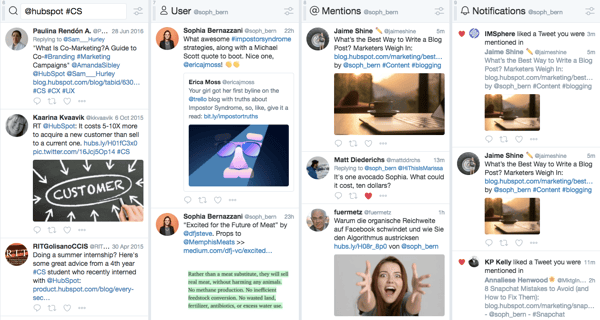
TweetDeck lets you create a more customized Twitter interface to monitor different users, hashtags, search terms, and lists. From one panel, you can look at Twitter content from the groups you want — whether that’s customers, competitors, or employees.
TweetDeck is a great tool to use during events or live-tweetstorms to keep up with live conversations — while also keeping an eye on you or your brand’s notifications and mentions.
2. Social Mention
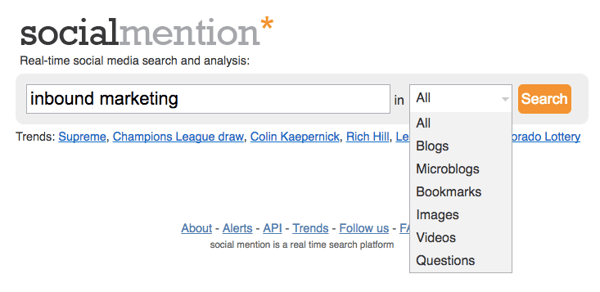
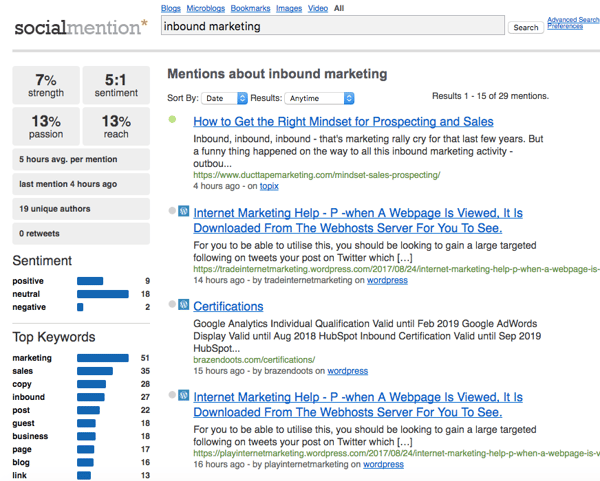
Social Mention aggregates all of the blog, microblog, image, and video content related to the search term you provide from a variety of search engines and social networks. This makes it easier to digest and view what’s being said about your brand in one comprehensive view.
3. TweetReach
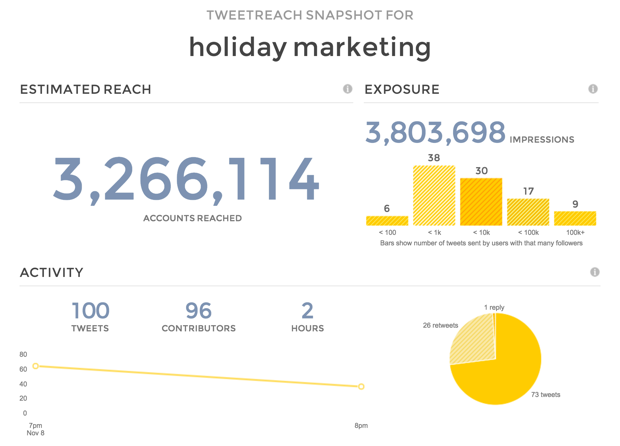
TweetReach gives you a free “snapshot” report on the potential reach of any tweet that includes a given hashtag, keyword, or username. With analytics provided by Union Metrics, the tool offers a free signup for which you’ll be able to see who’s talking about which topics, how many impressions you’d get on a post about that topic, and more. TweetReach’s snapshot reports are free for the first 100 tweets, and the company offers paid plans starting at $49/month thereafter.
4. Followerwonk
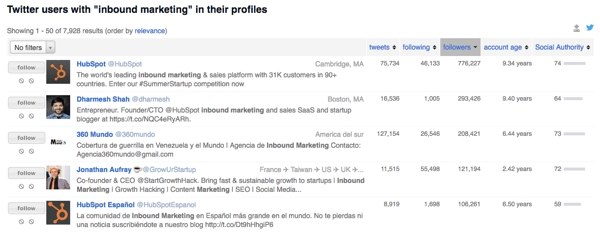
Followerwonk lets you quickly and easily search users’ Twitter bios and profiles for mentions of you or your brand. Log in with your Twitter credentials to check it out, or subscribe to the paid versions to get even more social insights.
5. SumAll
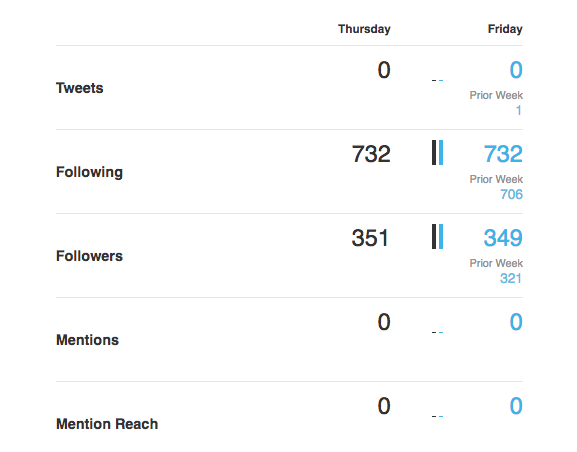
SumAll connects to a variety of different social accounts — including Twitter, Facebook, Instagram, and LinkedIn — to provide you with insights about your followers, interactions, and engagements. The paid version provides content recommendations and automatic post scheduling.
6. Mentionmapp
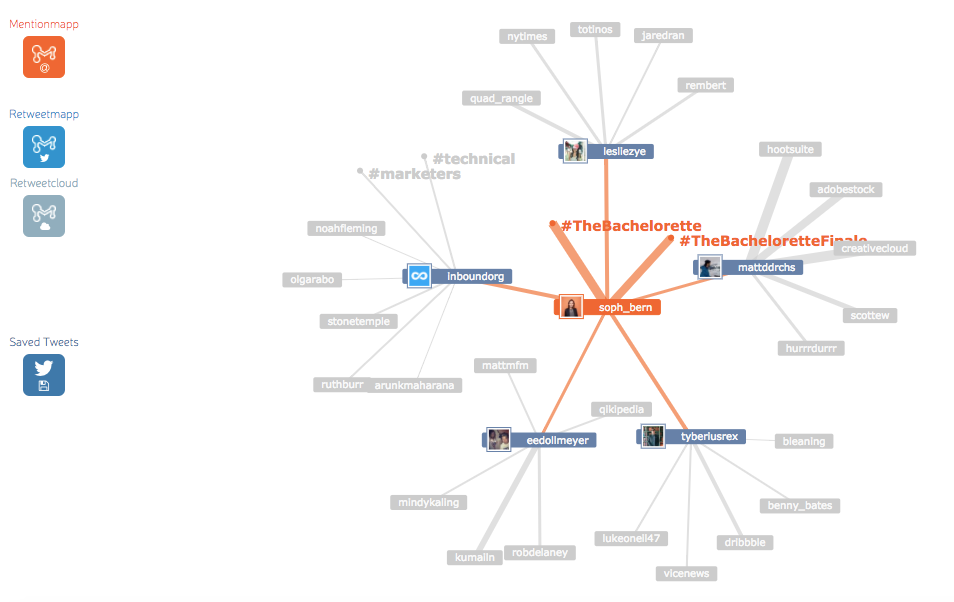
Mentionmapp connects to your Twitter API and see what’s going on in your Twitter network. You can see who mentions you the most, as well as who retweets you the most (using Retweetmapp). It’s interactive, too. That way, you can click through and see how your interactions are connected — if you want to keep an eye on the impact or reach a positive (or negative) tweet about your brand can have.
7. Lithium (formerly Klout)
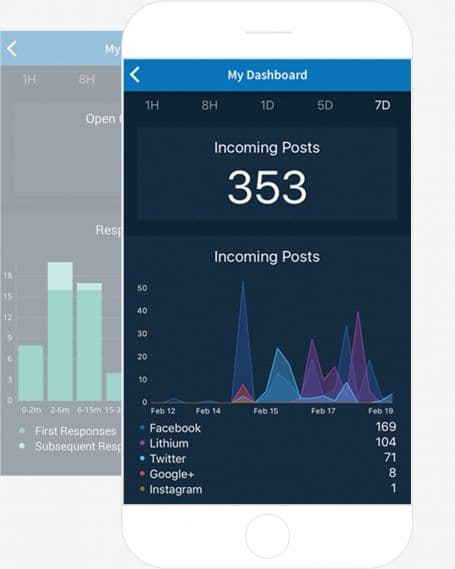
Lithium — which recently acquired the social media monitoring tool, Klout — offers a “social response” tool that allows you to manage, understand, and respond to the direct outreach you get from other users on social media. The tool integrates with Twitter, Facebook, Instagram, and more to help you visualize where people are talking to (and about) you the most, so you can focus your customer engagement in all the right places.
8. Hootsuite
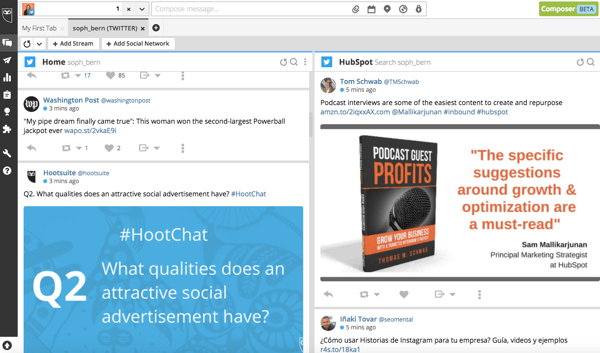
Hootsuite works like TweetDeck — but for all of your social networks. From your Dashboard, you can carry out social monitoring, scheduling, campaigns, and analytics — all in one place. Hootsuite integrates with Twitter, LinkedIn, Facebook, Instagram, YouTube, and Google+, and although it’s free for individuals’ accounts, businesses and enterprises have to purchase paid versions.
9. Boardreader
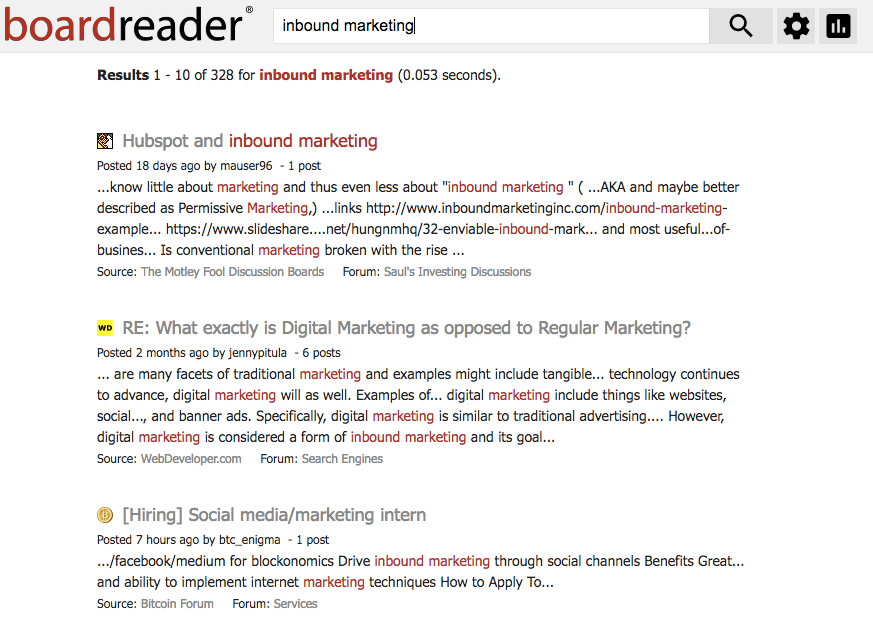
Boardreader does what its name suggests — it crawls message boards and discussion panels to see what people are saying about you and your brand in the dreaded comments sections, which otherwise seem impossible to parse through. Commenters often have stronger words than social media posters, so make sure you have a thick skin before diving in.
10. BuzzSumo
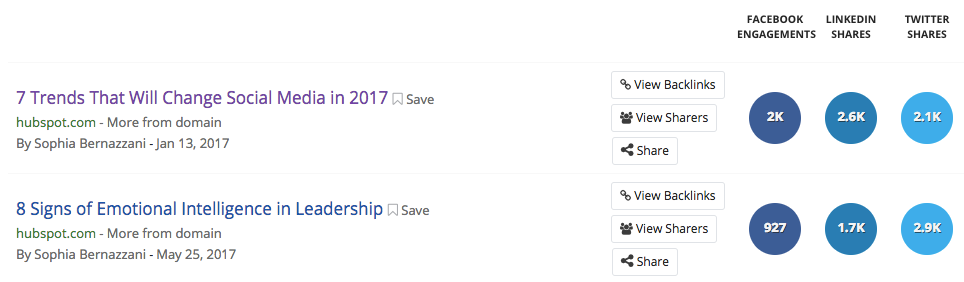
BuzzSumo aggregates data about the number of links to your domain and pieces of content receive — on social media, and via backlinks. These insights can help you determine which content formats perform best on each network, giving you ideas for web pages and pieces of content to replicate again. It’s freeup to a certain number of links, but after that, you have to pony up some cash for the Pro version.
11. Google Alerts
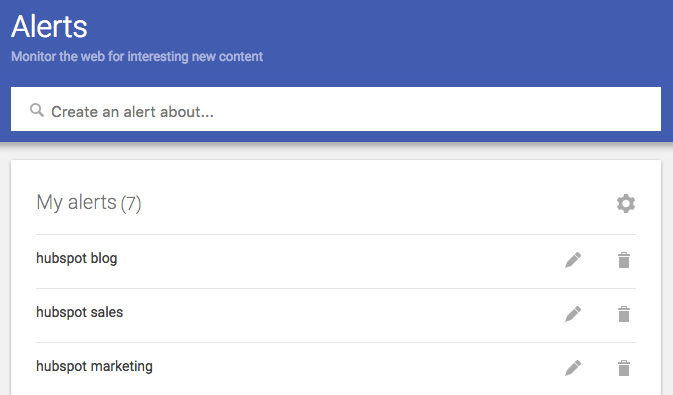
You can set up Google Alerts to see where people are mentioning you or your brand in search results, too. Enter specific terms that might be included in news story titles, and you’ll receive regular emails updating you to mentions from around the internet.
12. Native Analytics Tools
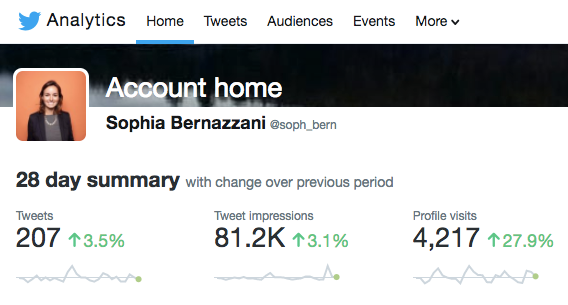
A few social networks provide free analytics to users — or, sometimes, analytics viewing is included in a business subscription for brands. Above is an example of what Twitter Analytics looks like for individuals, with more data and insights provided for business accounts.
13. HubSpot
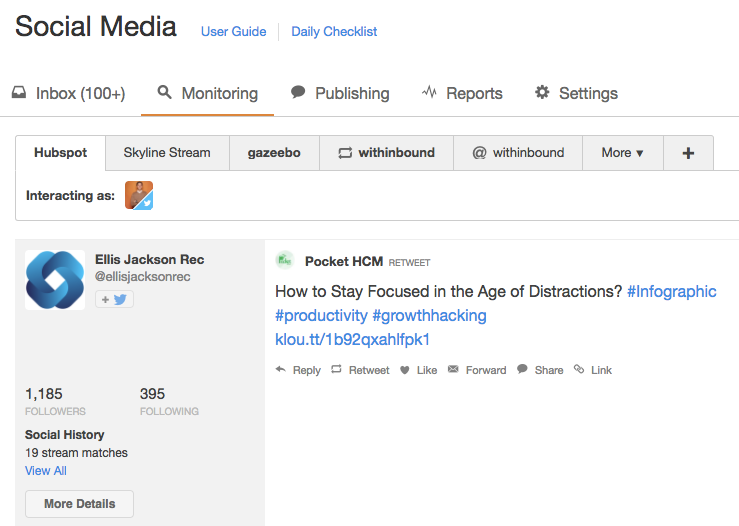
If you’re a HubSpot customer, HubSpot Social Inbox lets you set up specific streams for users and search terms you want to monitor. Check out this video tour of different HubSpot tools to get an idea of how it works.



2019 Tech Trends: Users Weigh In and Make Predictions
As we continue to wax nostalgic — or something like it — on 2018 and look ahead to the next year, we wanted to get a sense of how users feel about the past, present, and future of tech.
We’ve covered our top news stories of 2018, and looked back on which predicted tech trends for this year seemed to flourish the most. Now, we want to know what users think of the tech road ahead, and which trends show the most promise.
So, we surveyed over 2,400 people across the U.S., UK, and Canada, asking them about three key things:
- Which tech trends they understand the most
- Which tech trends they think will be the most successful or popular in 2019
- Which tech trends they’re most excited to experience next year
Here’s where users weigh in on 2019 tech trends.
Understanding Tech Trends
First, we wanted to know which tech trends users understand the most. We asked: Which of the following technology trends could you confidently explain or define? (Select all that apply.)

Out of the 16 options we listed, there were five top tech trends that about a third of users indicated they would feel comfortable explaining or defining.
Out of those five, the category of smart home topped the list. While this could include smart speakers — which ranked #4 on the list — the former outperformed the latter in terms of user understanding.
Smart home expands beyond just speakers, however, and also includes things like appliances and other home devices, like refrigerators, that use artificial intelligence to complete such tasks as letting you know if you’re out of a certain food item.
As for the relatively high awareness of smart speakers, that could be explained the launch of a few high-profile smart speakers this year, including the Google Home Hub and Facebook Portal — both of which have been advertised during primetime television and sometimes featured celebrities.
At the same time, fewer people indicated that they could confidently define what a voice assistant is — which is particularly interesting since that technology is what often powers these smart speakers. Our previous research has hinted at some confusion as to what exactly a smart speaker is, since formal vocabulary isn’t always associated with technology we use daily.
“I think voice is incredibly intuitive, and that lots of people don’t even think about using it,” says HubSpot VP of Marketing Jon Dick. “Asking Alexa [Amazon’s voice assistant that powers Echo speakers] for the weather doesn’t scream ‘voice assistant’ to me.”
User Predictions for 2019
Next, we wanted to see what sort of tech trend predictions users are making for the year ahead. We asked, “Which of the following technology trends do you think will see the most success or popularity next year? (Select all that apply.)“, using the same list of 16 trends from the previous question.

Although there were a few discrepancies in these results from those where users were asked about their comprehension of tech trends — for instance, more users said they anticipate high success from artificial intelligence (AI) than those who said they could confidently define it — smart home once again topped the list, with smart speakers falling close behind.
Again, these results could be due to the high-profile nature and heavy advertising of certain smart devices launched this year. Where users see a higher prevalence of a certain type of technology within pop culture, it could add a sense of mainstream popularity. In turn, that could lead to predictions of smart home success in 2019, with more advanced and improved devices beyond smart speakers entering the market.
One trend that was particularly interesting to see in the top five was virtual reality (VR). We’ve covered that technology quite a bit over the course of 2018 — from what it’s like to use a wireless headset to what’s stopping VR from going mainstream.
When we surveyed another sample of users for the latter, the reason that most users gave for not wanting to buy a VR headset was that it “wouldn’t benefit” them. And while many users don’t see the direct impact or value-add of owning this type of hardware, it seems that many still see it as gaining momentum — or at least some semblance of popularity or success — in 2019. (Meanwhile, here’s a look at predictions for some of the top VR business use cases.)
What Users Are Most Excited About
Finally, we wanted to know what users are looking forward to the most in 2019. We asked: Which of the following technology trends are you most excited to experience or hear about next year?
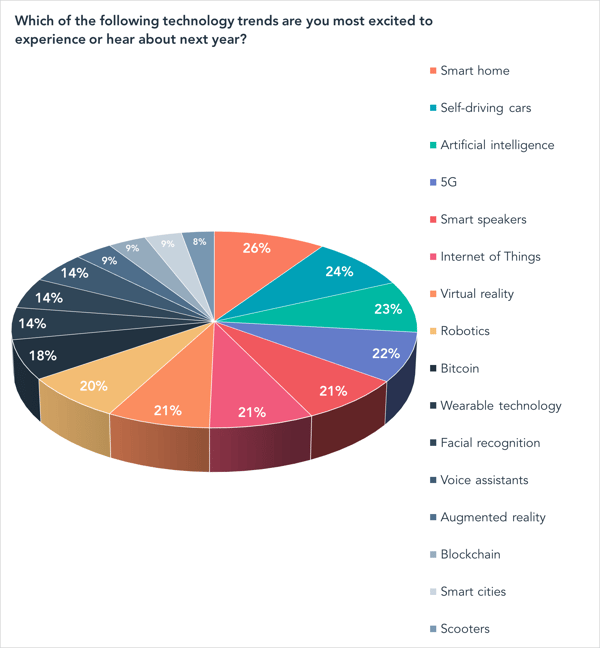
Again, smart home and smart speakers both made the top five. But when we asked users earlier this month about their plans to purchase a smart speaker, exactly half said they had no plans to buy such a device at all. But out of those who did indicate plans to buy a smart speaker, 17% said at the time that planned to do so fairly soon — within the next six months.
Self-driving cars, meanwhile, seem to be an area of excitement for users in 2019 — perhaps because this technology is rolling out quicker than some may have predicted. (A small fleet of Waymo autonomous vehicles, for instance, already hit the road this year.) And it’s a technology around which many companies are actively working to build consumer awareness, with a heavy emphasis on their presence at the 2019 annual Consumer Electronics Show (CES). We went for a spin at the 2018 edition of this event, and here’s how it went.
As for 5G and AI, these were two of the 2018 top tech trends predicted at CES in January.
Out of the two, 5G appears to have a longer road ahead, as it didn’t permeate the mainstream quite as much as some may have hoped in 2018. However, there continues to be quite a bit of industry excitement around this technology as well, with the topic dominating discussion and sessions at February’s Mobile World Congress event.
And while 5G may not have made quite the mainstream splash this year that some predicted, looking ahead to 2019, it could remain integral to the development of digital communication and connectivity — especially since it can help power such wireless technology as VR or self-driving cars.
AI seems to have played the most vital role in many of the other technologies appearing on this list, as it’s what powers many of them. In a nutshell, AI is a way of replicating the intelligence or thought process of humans that’s required of certain processes, like answering questions, navigating transportation, recognizing someone’s face, or even determining what’s in your refrigerator — which is where the smart home comes in.
So, as all of these areas of technology continue to expand and evolve, and power the new products and capabilities that have launched this year, it could be argued that AI was not only one of the most pivotal tech trends of 2018, but will continue to be in the next year — and, potentially, many years to follow.
“Tech season,” as it were, officially kicks of in early January 2019, and we’ll be there — where, once again, industry experts are scheduled to speak to their top predicted trends of the year to come.
Stay tuned.
Featured image credit: Google
