Why Your Nonprofit Should Invest in Search Engine Optimization
Every company needs a strong marketing strategy — even nonprofits.
However, most nonprofits haven’t considered investing in search engine optimization (SEO), even though it can have one of the highest returns on investment.
SEO, specifically for nonprofits, is the process of optimizing your website to increase organic visibility when people search for topics like education, fundraising opportunities, volunteer opportunities, or other aspects that promote your mission.
Let’s dive into what SEO is, how it works, and SEO best practices for nonprofits.

What is SEO?
SEO, which stands for search engine optimization, is the process of driving users to your site from search engines organically. This means you aren’t paying for ads, using social media, or placing sponsored content to attract new users.
The goal of SEO is to help your site rank as high as possible for target keywords and phrases relevant to your website and mission.
For example, if your nonprofit is geared towards wildlife conservation, you would want to rank high organically for terms related to wildlife conservation. The higher your website or pages rank in the search engine result pages (SERPs), the more likely users will see it and click on it. Studies have shown that the higher you rank, the higher the average click-through-rate (CTR) is.
If you’d like a full rundown on SEO, take a look at The Ultimate Guide to SEO in 2022.
How does SEO work?
There are hundreds of factors that Google and other search engines take into account when ranking your site or content. These factors come from the three different pillars of SEO which are the following:
- Technical optimization
- On-page optimization
- Off-page optimization
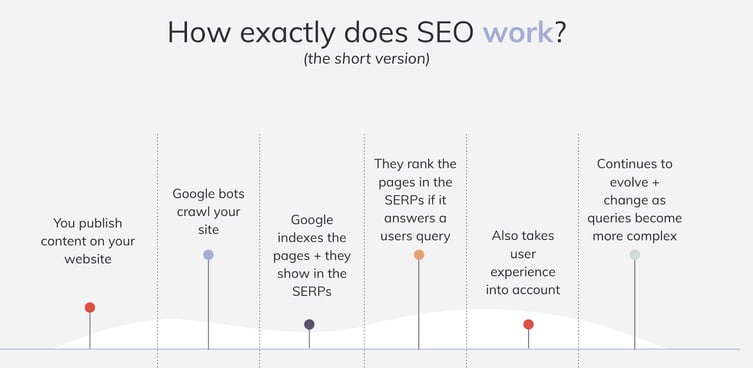
Search engines are powered by people when they have a query and search for answers. Search engines use algorithms that decide what content and websites best fit the answer for the query. There are three steps that search engines take when assessing a site: crawling the site, indexing the site, and lastly, ranking the site.
Crawling, also known as the discovery stage, occurs first, then search engines decide if the pages should be indexed or shared on the search engine result pages and available for users to see and find. Lastly, the algorithm ranks the content in the search results, which is how users find your website or web page.
SEO for Nonprofits
So why should nonprofits invest in SEO? Well, SEO is just as important for nonprofits as it is for other companies. It is an affordable and effective long-term marketing strategy.
Investments you make in SEO today may take a while to pay-off, but they will continue to do so for years to come. SEO can take awhile to see the results due several factors, such as keyword difficulty, competition, domain age, and to trust of search engines and users. In general, it can take four to six months to see some movement in rankings and site health.
Increasing organic visibility of your nonprofit also increases the visibility of the mission you stand for while growing your brand awareness. Using SEO will help your pages move up in search engine rankings, creating a higher click-through-rate, more impressions, and overall, more traffic.
How to Measure SEO Success
Depending on your goals and what you want to accomplish, there may be multiple aspects you’d like to measure and evaluate for success, such as:
- Keywords
- Organic traffic
- Market share compared to competitors
- Conversions
- Backlinks
- Page rankings
Some goals for your nonprofit might include having more priority keywords move into the top 10 positions, increasing organic traffic on specific pages, or increasing organic conversions.
SEO Best Practices for Nonprofits
If you’re confused or intimidated by the idea of becoming discoverable online and creating a successful SEO strategy, we’ve got you covered.
Here are the five best SEO practices to focus on for your nonprofit this year.
1. Keyword research should create your content strategy.
It’s important to know what your prospective and ideal customers are searching for and what their journey is. Search engine rankings are determined by algorithms that use quite a few factors to decide how well a webpage answers a query.
Unfortunately, it’s not as easy as throwing keywords into your content, so here are a few things to consider.
Search Intent
A query or keyword can have multiple meanings depending on the person or where they are in the user journey. They might be looking for more information, directions, or to make a purchase or donation, and each of those actions would need a different query. It’s important to make sure that the right keyword goes with the right piece of content.
Relevant Keywords
If you’re a nonprofit that works with homeless communities, a long-tail keyword you might want to focus on could be “how to help homeless communities”. Knowing this, you can create content and resources that will drive users to your site. You should avoid keywords that don’t truly represent your brand or what you offer.
Long-tail keywords are keywords or phrases that are more specific, and usually longer than common keywords. An example of a long-tail keyword might be “light blue beach hat” and a short-tail keyword would be “hat” or “beach hat”. Shorter-tailed keywords are usually harder to rank for, but have more traffic. Longer-tailed keywords have less traffic but a higher conversion rate, which is ideal for most nonprofits.
Additional thoughts:
- It can often be easier to target long-tail keywords (a phrase vs. a one-word term), which drive more qualified traffic
- There are different keywords targeting users at each part of the sales funnel
- Keyword research takes time and evolves as well
Google offers a great free keyword research tool that can also be used for SEO. If you’re looking for a more SEO specific platform, MOZ and SEMRush are two great platforms that both offer nonprofit pricing.
2. Create high-quality content.
Content will always be one of the most important ranking factors. Not only is it essential to have SEO-optimized content, but the quality is important, as well. Google wants to ensure that you’re publishing content that follows their E-A-T standards.
The concept of E-A-T, which stands for expertise, authoritativeness, and trustworthiness, is considered an SEO best practice when creating content. These factors help Google avoid sharing and feeding inaccurate or misleading information. You can follow these factors from Google by:
- Updating old content to make sure it’s relevant
- Ensuring the content is accurate
- Allowing experts or other writers to create content for you
Along with E-A-T, make sure that your content follows the best on-page practices. This includes focusing on a primary keyword, adding metadata, using proper headings, adding alternative text (ALT text) to your image, and using internal linking, to name a few.
3. Make sure your site is mobile-friendly.
A majority of users across all industries use their phones instead of desktop computers as of 2022.
Additionally, Google crawls sites using a Google phone bot to make sure your site is mobile-friendly. This means your site is able to shrink down and fit on any screen while still allowing users to access your content as easily as on a desktop.
Mobile-friendliness is a ranking signal in both Google and Bing’s algorithms when a user is searching on a mobile device. If your website is mobile-friendly, it generally will outrank non-mobile-friendly sites.
There are several tools available to test you website’s mobile-friendliness:
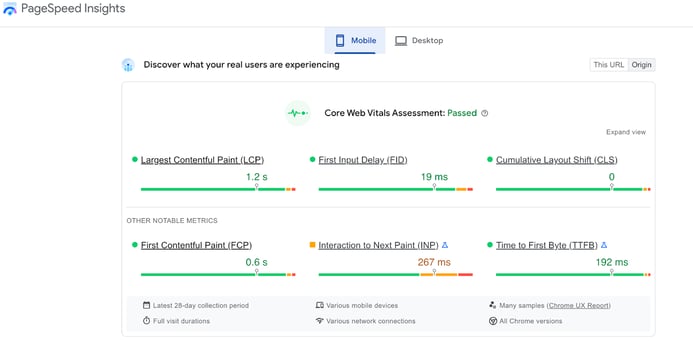
Google’s results via Page Speed Insights
4. Link-building is crucial to create brand awareness.
Nonprofits can struggle with getting donations due to lack of overall brand awareness and organic visibility. Link-building relies on creating authoritative content that other sites will want to link share with and link back to. A great example of this is allowing your annual reports to be sharable for others to see.
One strategy to consider would be to reach out to partners or sponsors and see if they will link back to you on their site and in their content. This is especially important for pages you want to drive traffic to.
5. Local SEO is very relative for most nonprofits.
Local SEO is very beneficial for nonprofits because it can help bring people to a fundraising event or even attract volunteers. For example, if you search “food drive near me” on Google, local listings will pop up. This is because they have focused on a local SEO strategy by utilizing their Google Business Profile.
Google Business Profile allows you to gather reviews, add images and videos, and ensure that your information is up to date for users. You can also add FAQs with answers for users to see as well. All of this helps organizations land on the top of Google listings for this query.
Nonprofit SEO Case Study
Finally, let’s explore how two nonprofits — diaTribe and CreakyJoints — excelled using SEO.
First, diaTribe, a diabetes organization that aims at providing education and resources for those living with diabetes, leveraged an SEO strategy to reach new audiences during the pandemic.
The nonprofit focused on keywords that had low competition, and we helped the organization capitalize on highly-relevant topics based on keyword research data.
As a result, the organization hit all their website traffic and subscriber goals — helping grow their email list by 28% and their website traffic 15% year-over-year.
Next, Media Cause started working with CreakyJoints, a leading support, education, advocacy, and research organization for people living with arthritis and rheumatic disease, in August 2018 to increase organic search traffic.
By monitoring and resolving SEO-related issues, optimizing existing pages for Google search crawlers, and providing content recommendations based on keyword research, we helped CreakyJoints quadruple their monthly search traffic after just five months.
Today, CreakyJoints’ content is reaching 4x the number of people it used to. That means more people living with arthritis and chronic pain are learning how to navigate their patient journey better, including learning about the long-term effects of their medications, safe and effective ways to manage their symptoms, and how to lead healthy and empowered lives thanks to CreakyJoints.
Investing in an SEO strategy and working on it over time will pay off immensely for your nonprofit in the long run, and it’s cost-effective. While it may take up to six months, you’ll see an increase in your organic and qualified traffic that will help increase visibility for your mission and create better engagement.
By implementing the tips above or working with an agency that is dedicated to promoting your mission, you’ll convert users and help drive them to you.


6 Internet of Things Marketing Examples You Should Know About
IoT is everywhere nowadays – from the smart devices in our homes to the QR codes we see in commercials nowadays.

However, there is still so much untouched terrain with IoT marketing. Here are six IoT marketing examples to inspire you to investigate all the ways you can leverage this technology in your strategy.
How does IoT work in marketing?
The Internet of Things is the connection of everyday products like cars, alarm clocks, and lights to computing devices via the internet. It allows them to exchange data with each other, providing marketers with more context about their customers’ product usage.
This, in turn, enables marketers to deliver more relevant messages and leads to greater customer engagement.
For example, if you run out of milk or it spoils, a refrigerator connected to the internet could recognize your need and display a message on its screen or on your phone about the best milk deals in town. You could even order a carton through one of those devices if the refrigerator company partnered with a grocery store.
Since IoT technology connects the internet with objects that are ubiquitous in our daily lives, marketers in almost every industry will be able to engage consumers throughout every phase of the customer journey.
Internet of Things Marketing Examples
1. Coinbase’s Superbowl Ad
Every year, brands spend millions of dollars for a 15- to 60-second ad slot during the Superbowl.
When Coinbase, a cryptocurrency exchange platform, shared its commercial during the 2022 Superbowl, some viewers were confused while others were mesmerized.
Their one-minute ad featured a QR code bouncing around a black screen, reminescent of the “DVD” logo on older TVs – with eerie background music.
When viewers used placed their smartphone’s camera to the QR code, they were directed to the platform’s websites where they were offered $15 for signing up and downloading the app.
QR codes are considered gateways to IoT devices, and allow brands to find creative but affordable ways to market their products and services.
The commercial was so successful that the website crashed.

2. Heineken’s The Closer
In June 2022, beer company Heineken launched a campaign inspired by employees working from home following the pandemic and struggling to disconnect from work.
The company announced that on June 8, they would hold a giveaway sending consumers a Bluetooth-connected bottle opener that would shut down work apps when used.
Using IoT technology, the “Closer” would use an accelerometer to detect the opening of the bottle, communicate with the user’s device via Bluetooth, and shut down selected work apps.
In a press release, the brand’s global head of brand, Bram Westenbrink, shared that this device was created to address work-life imbalance.
“With the once-rigid boundaries between work and personal time rapidly deteriorating following the COVID-19 pandemic, we want to spark a much-needed conversation about the importance of resisting the societal pressures to be in a constant state of busy work and encourage workers around the world to reprioritize social and leisure time with the people who matter most.”
The giveaway only lasted one day and the second half of this campaign involved an online “Calendar Closer,” in which users schedule a meeting with up to three friends to receive $5 to spend on beer and an entry in another giveaway.

This multi-layered campaign shows just how creative brands can get in IoT marketing.
3. Walgreens’ IoT Ad Displays
In 2019, Walgreens started testing digital cooler doors that would target store goers with ads and partnered with brands like MillerCoors and Nestlé that were willing to test their products.

Here’s how it worked: Sensors and cameras located inside of the coolers would pair with face-detection technology to determine what to promote to shoppers, based on age, gender, weather, and more.
For instance, a young adult could be shown sodas while an older person could be shown beer. For beer company MillerCoors, this test seemed promising.
In a statement, a senior marketing manager at MillerCoors said that one of the biggest barriers they face is that shoppers don’t know they can purchase beers in drugstores. Having targeted ads like this could dramatically increase sales and provide more insight into consumer behavior.
This marketing strategy offered a unique opportunity to market to consumers right at the point of purchase, which is unheard of in an offline environment.
4. Diageo
In 2015, Diageo, a leader in the beverage alcohol industry and in IoT marketing, announced the launch of a smart bottle.
Here’s how it works: With every purchase of a Johnnie Walker Blue Label bottle, users would receive personalized messages to consumers who read the printed sensor tags using their smartphones.

The brand said the goal was to enhance the consumer experience and make it easy to send targeted and timely marketing messages.
This is a fantastic example of how to elevate the relationship with a consumer after they’ve made the purchase. Often, brands focus their resources so much on gaining customers that they don’t consider post-purchase marketing strategies.
5. Allen Solly
It’s not unusual for brands to ask customers to tweet something, but the request is not often met with much excitement or vigor unless the customer feels he’s receiving something in return.
Using IoT, connecting social media hashtags and product giveaways might be easier than ever – and a lot more fun.
Allen Solly, a clothing brand, created an interactive shirt billboard in Bangalore, India.
As users tweeted #RainingSolly, the computer linked to the billboard would choose a solenoid (the coil wound behind a shirt) to push a shirt off the billboard for a random consumer to win.
Allen Solly found a unique way to encourage consumers to share their brand on social media, while enabling people to engage as a community in person, as well.
6. Nivea
Print advertisements and IoT technology probably feel like two different ends of the marketing spectrum – the past, and the future. But they might not be.
Nivea Sun Kids created a campaign that combines both, by offering bracelet strips in a Brazil magazine print advertisement that parents could peel off and put on their children’s wrists.
The bracelets had built-in locators, which, when paired with Nivea’s mobile app, allowed parents to set a maximum distance their children could wander. If the child wandered beyond the maximum distance, the app notified the parent. The radar also showed if the child was moving closer or further away.
Nivea’s creative campaign likely encouraged word-of-mouth advertising between parents in Brazil, and it also showcased the brand as being thoughtful and innovative.
We’ve only scratched the surface when it comes to IoT marketing. While some tactics require more resources than others, there are a lot of affordable and creative methods brands can use to incorporate IoT into their marketing strategy.
Editor’s Note: This post was originally published in July 2018 and has been updated for comprehensiveness.


80+ Essential Social Media Marketing Statistics for 2022
Social media is everywhere and over the last two decades, it’s become one of the primary marketing channels.
With a solid chunk of the world’s population on social media, it’s critical that your business has an effective social media strategy that helps you reach your intended audience.
Here, we’ve compiled a list of essential social media stats to ensure you know where to focus your marketing efforts in 2022 to get the highest ROI.

Social Media Marketing Report Statistics from HubSpot
In November 2021, the HubSpot Blog surveyed 300+ social media marketers to learn about the strategies they use, the formats they leverage, and the challenges they face.
Here are some of the most interesting stats we discovered:
- 77% of social media marketers say social media marketing has been somewhat to very effective for their company this year.
- What’s more, 37% of marketers who said social media marketing was somewhat to very ineffective cited COVID-19, likely due to the rapid change in strategy.
- The numer one goal marketers report having for their social media marketing strategy is advertising their products or services, following by increasing brand awareness.
- 82% of marketers say they repurpose content across social media channels.
- The majority of marketers surveyed say they post on most social media platforms four to six times a week.
- The platforms with the lowest reported engagement levels are Twitch, Snapchat, and Clubhouse.
- Short-form videos is the top social media format used by 54% of social media marketers, followed by live streaming, live audio chatrooms, and user-generated content.
- 80% of marketers say funny content is the most effective on social media.
- 68% of marketers’ companies work with influencers on social media.
- The most popular cadence to search for new social media platforms is once a month, followed by once a week.
- 84% of marketers target Millennials as part of their social media strategy.
- The biggest challenge marketers face on social media is creating engaging content, reported by 27% of respondents.
- 67% of marketers say they work with micro influencers with 10K-100K followers or subscribers. Conversely, only 29% say they work with mega influencers with more than 1 million followers.
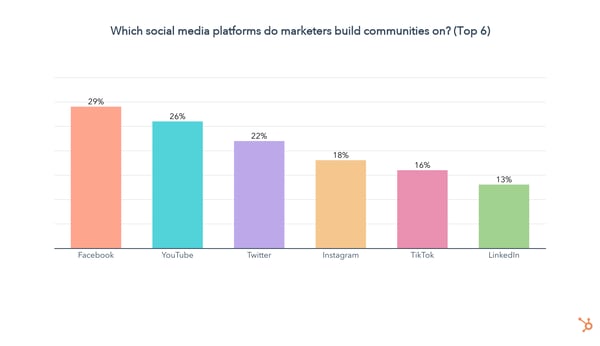
- 64% of marketers say they invest in building social media communities.
- 25% of respondents said they believe funny content is most effective with Gen Z.
Channel-Specific Social Media Statistics
Facebook Statistics
- In a 2021 HubSpot Blog poll, 79% of marketers report buying paid advertising on Facebook. (HubSpot)
- Users spend an average of 19.6 hours a month on Facebook. (HootSuite)
- Facebook is a popular source of news with 31% of Americans regularly getting their news from the platform. (Pew Research)
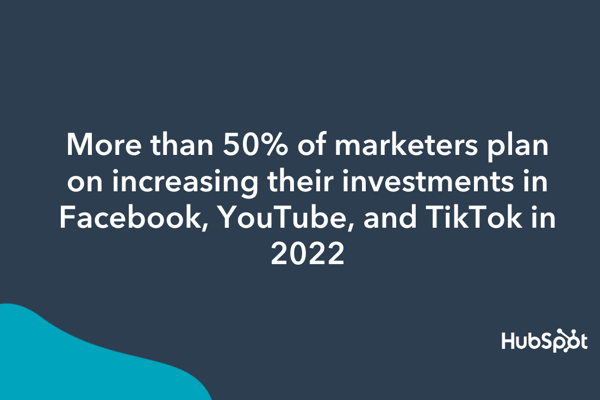
- According to the same poll, more than 50% of marketers plan on increasing their investments in Facebook, YouTube, and TikTok in 2022. (HubSpot)
- Facebook has 1.96 billion daily active users as of Q1 2022. (Statista)
- 98.5% of Facebook users access the platform on mobile devices. (Statista)
- In a 2021 survey conducted by the HubSpot Blog, Facebook was ranked #1 in social media investment, highest quality leads, and ROI for paid ads. (HubSpot)
- Facebook ads are used by 70% of marketers, and there were 10 million active advertisers on the platform in Q3 2021. (Social Media Examiner , Statista)
Twitter Statistics
- Twitter has reached 229 million daily active users as of the first quarter of 2022. (Statista)
- In a HubSpot Blog poll, 79% of marketers plan to continue investing in Twitter Spaces in 2022. (HubSpot)
- Link clicks account for 92% of all user interaction with tweets. (HubSpot)
- The best time to post on Twitter is at 9 AM, and the best days to post are Tuesdays and Wednesdays. (Sprout Social)
- Tweets with hashtags get 100% more engagement. (Twitter)
- 99% of marketers surveyed in a HubSpot Blog poll say they plan to continue to invest the same amount or increase their investment in Twitter. (HubSpot)
- 93% of Twitter community members are open to brands getting involved in conversation, such as providing help and support. (Twitter)
For more on Twitter, check out Twitter Marketing: The Ultimate Guide.
Instagram Statistics
- In a 2021 HubSpot Blog poll, 58% of marketers plan to leverage Instagram Reels in 2022. (HubSpot)
- 64% of Instagram users are under the age of 34. (Statista)
- 20% of marketers surveyed in a HubSpot Blog poll report generating the biggest ROI when working with influencers on Instagram, only behind Facebook. (HubSpot)
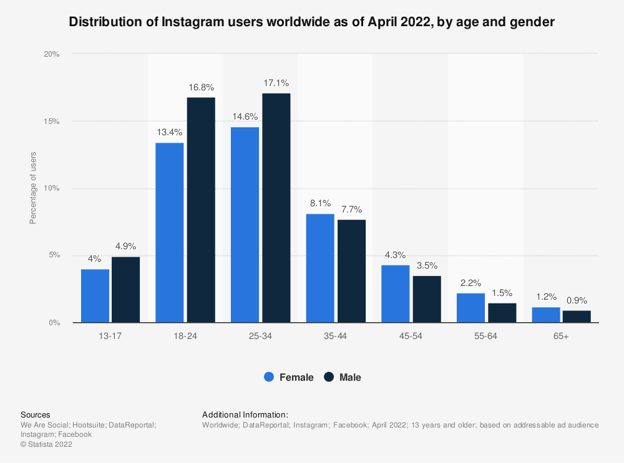
- 98% of marketers say Instagram is the most influential platform for influencer marketing, which is 44% higher than Facebook. (Sprout Social)
- Videos get 21.2% more interactions compared to images and 18.6% more interactions compared to carousels. (Sprout Social)
- 61% of social media marketers surveyed in a HubSpot Blog poll say they plan to increase their investment in 2022.
- 90% of people on Instagram follow a business. (Instagram)
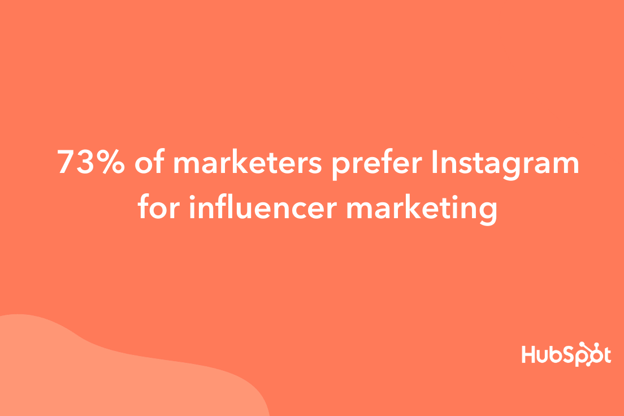
- In a 2021 HubSpot Blog poll, 73% of marketers prefer Instagram for influencer marketing. (HubSpot)
- The best times to post on Instagram are Wednesday at 11 AM, and Friday between 10-11 AM. Sunday is the worst day for engagement. (Sprout Social)
Check out more Instagram stats here.
LinkedIn Statistics
- LinkedIn has more than 830 million active users in 200 countries and regions worldwide. (LinkedIn)
- The most popular day to post on LinkedIn is on Saturdays and Sundays. (HubSpot)
- According to a HubSpot Blog survey, most marketers post on LinkedIn four to six times a week. (HubSpot)
- When it comes to B2B display ad spend, LinkedIn makes up the largest share at 32.2%. (eMarketer)
- As of January 2022, 59% of LinkedIn users were between 25 and 34 years old. (Statista)
- In Q3 2022, LinkedIn revenue is up 34% in YoY growth. (LinkedIn)
- 87% of marketers surveyed in a HubSpot Blog survey said LinkedIn offered average or high ROI. (HubSpot)
- 82% of B2B markers report finding the greatest success on LinkedIn. (LinkedIn Marketing Solutions)
- Over 46% of all social media traffic to company websites comes from LinkedIn. (LinkedIn)
- 40% of marketers surveyed in a HubSpot Blog survey say they plan to increase their investment in the platform in 2022. (HubSpot)
- The best times to post on LinkedIn are on Tuesdays from 10 a.m. to noon. The worst days are on weekends – with Saturdays and Sundays offering the lowest engagement levels.(Sprout Social)
Want to learn how to up your marketing game on LinkedIn? This post walks you through the ins and outs of using LinkedIn for business.
YouTube Statistics
- YouTube is the second-largest search engine globally. (Alexa)
- YouTube generates over 1.7 billion unique monthly visitors. (Hootsuite)
- 42.5% of marketers use YouTube for influencer marketing, according to a 2021 eMarketer report. (eMarketer)
- 50% of social media marketers surveyed by the HubSpot Blog say they plan to increase their investment in YouTube in 2022. In fact, 20% of respondents say they plan to invest in this platform the most. (HubSpot)
- The number of YouTube users is projected to reach 2.8 million by 2025. (Statista)
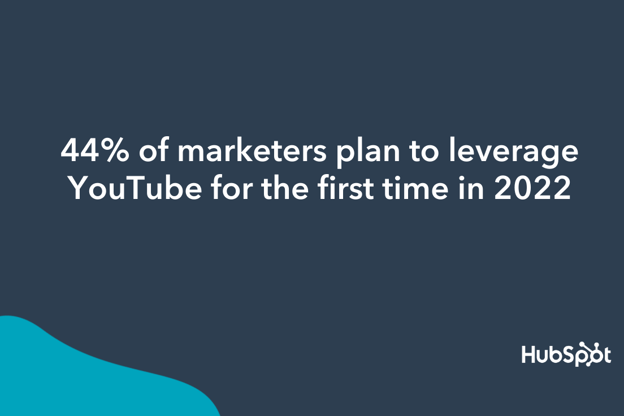
- In a 2021 HubSpot Blog poll, 44% of marketers plan to leverage YouTube for the first time in 2022. (HubSpot)
- On mobile devices alone, YouTube reaches more adults aged 18 to 24 than any TV network. (YouTube)
- YouTube accounts for more than 25% of total worldwide mobile traffic. (Sandvine)
- Users spend the most hours on YouTube than any other social network at 23.7 hours a month. (HootSuite)
TikTok Statistics
- 70% of TikTok users agree they feel a deeper connection to people they interact with on TikTok compared to other social networks. (TikTok)
- In a 2021 HubSpot Blog poll, 61% of marketers plan to increase their investment in TikTok marketing in 2022. (HubSpot)
- Douyin, TikTok’s original standalone app in China, had 300 million users at the time Musical.ly merged with TikTok. (The Verge)
- Two out of three users are likely to buy something on TikTok while using the app. (TikTok)
- TikTok was the most downloaded app of 2021. (HootSuite)
- 61% of marketers surveyed in a HubSpot Blog poll say they plan to increase their investment in TikTok in 2022. (HubSpot)
- 12% of marketers surveyed in a HubSpot Blog poll say they work with influencers the most on TikTok. (HubSpot)
- A majority of U.S. TikTok users are between the ages of 10 and 19. (Statista)
- Globally, users spend an average of 19.6 hours a month on TikTok on android phones. (HootSuite)
- 61% of U.S. TikTok users are female. (Statista)
- The most popular time to post on TikTok is between 3 p.m. and 9 p.m. (HubSpot)
- TikTok’s average engagement rate is high at all follower levels. (Influencer Marketing Hub)
Reddit Statistics (65)
- As of Q3 2021, the Reddit mobile app was counting more than 13 million daily active users worldwide on iOS. (Statista)
- 50% of marketers surveyed in a HubSpot Blog poll plan to increase their investment in Reddit. (HubSpot)
- The site receives more than 50 billion+ monthly screen views. (Reddit)
- 23% of marketers surveyed in a HubSpot Blog poll plan to leverage Reddit for the first time in 2022. (HubSpot)
- Most Reddit users in the U.S. are male, but 15% of U.S. adults say they use the platform. (Statista)
- Only 2% of social media marketers surveyed in a HubSpot Blog plan to invest in Reddit the most in 2022. (HubSpot)
- 49% of marketers surveyed in a HubSpot Blog poll buy paid ads on Reddit. (HubSpot)
- Reddit is an unlikely place for influencer marketing but 38% of marketers surveyed in a HubSpot Blog poll say they work with influencers on the platform. (HubSpot)
Social Media Consulting Services
Many businesses hire external social media consulting agencies to manage their voice and reputation online.
Alternatively, some businesses create roles in-house for a social media consultant — this is someone who is responsible for increasing brand awareness, responding to customer service complaints across social media platforms, and engaging with your audience online.
Whether you’re considering hiring an external social media consulting service or creating a role in-house, take a look at these trends that demonstrate the importance of social media consulting:
- Answering a complaint on social media can increase customer advocacy by 25%. (Convince & Convert)
- 79% of consumers expect brands to respond within a day of reaching out over social media, but average brand response rates across all industries is lower than 25%. (Sprout Social)
- 79% of people say that user-generated content on social media significantly impacts their purchasing decisions. (Stackla)
Pitching Social Media Consulting Services
All these stats have given you the data you need to work with — now it’s time to put your knowledge to use and create your own social media consulting proposal.
If you’re a social media consultant and you’re pitchinga branding, marketing, or advertising campaign to a client, it’s critical you’re able to show how you’ll help your client grow their business.
Here are six steps you’ll need to take to ensure your social media consulting proposal or business plan is effective:
- Set clear goals. Figure out exactly where your company or client wants to go as far as their business and social media numbers. The clearer and more detailed the vision, the better. Follow SMART Goal guidelines to ensure that you’re on the right track.
- Understand your customers. Know your target demographics because these are the people you’re trying to reach and engage. Gather your own social media statistics and use existing data your company or client might already have to figure out who’s interacting with the business and who might be good future prospects to reach. After you’ve done your research, you can create useful character personas to help you better understand and categorize customers.
- Understand your competition. Those “similar-but-different” companies are going to be out there. And, as with most aspects of the business world, the better you know them, the better you can know how to have a leg up on them. You can conduct this research at the same time you’re researching your customers, because chances are they’re interacting with competitors as well. Once you’ve gathered the data on your competitors, one of the most effective ways to use it is to figure out where there might be voids in their services that your business can fill.
- Be familiar with any existing social media presence. If you’re hired to run a company’s social media accounts, it’s critical you know about any previous social media postings, accounts, and experiments. By understanding what your client has already tried, you’re better equipped to take them where they need to go in the future.
- Don’t forget to pull your data. Before your new implemented strategies go underway, it’s important to collect a baseline of how it was before, so that you have something to measure against in the future. For example, if you take inventory of how many views you’re getting on Instagram Stories before the new strategy is in effect, you can see if the new ideas are improving these numbers or not. It’s important to keep a close eye on what is affecting your growth (positively or negatively) so that you know when you’re on the right track or when you need to try something new so your business can keep growing.
- Develop your strategy based on your findings. Define what your content will be, what platforms it will be distributed on, and how it will vary between platforms. Figure out smaller details at this stage too, like your client’s tone and voice on social media (either what it currently is or what it should be), along with design and style elements. Always be sure you’re staying true to your company or client’s brand by consulting with existing materials like mission statements, guides, or brand books.
Finally, take a look at HubSpot’s free Marketing proposal template (useful for both PDF & Word) to get you started creating a comprehensive social media consulting proposal.
Let Data Drive Your Social Media Strategy
Social media marketing statistics can show you the state of the business world today, where it might be going, and how you can ensure your business is continuously meeting customers where they want to be met. Use these statistics to your advantage to help you understand what you need to do to effectively use social media for your business today.
Editor’s Note: This blog post was originally published in August 2019, but was updated for comprehensiveness and freshness.

How to Write an Ecommerce Business Plan [Examples & Template]
If you have a promising idea for an online ecommerce business, it’s important to create an ecommerce business plan to ensure your vision has enough stock to be profitable.
Having a business plan for your online store will help you define your target market, establish your monthly and quarterly sales goals, and increase the likelihood of long-term ecommerce success.
In this post, we’ll go over what an online store business plan is and how you can create one for your ecommerce startup. Let’s get started.

Whether a company operates as a startup or has years of operations and growth under its belt, an ecommerce business plan is essential for evaluating a business and determining areas of improvement.
An ecommerce business plan is especially important, with an increasing number of shoppers conducting business online. It’s estimated this number has reached over 2 billion. Having an ecommerce business plan keeps you organized and is useful when seeking investors who need to understand your company.
So, let’s dive into some examples of ecommerce business plans and what goes into writing one using our free template.
Ecommerce Business Plan Template
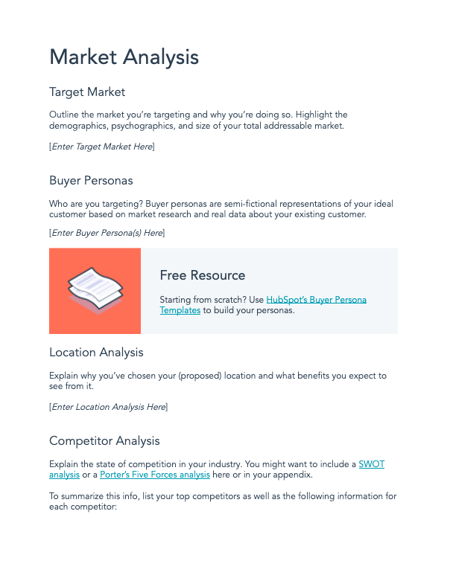
Download Your Free Template Here
HubSpot’s template provides clear steps to structuring one for your ecommerce business. Throughout this section, I’ll use the example of a photography company specializing in online photo editing.
1. Give an executive summary.
An executive summary is a one-to-two page overview of your business. The purpose of an executive summary is to let stakeholders know what the business plan will contain. HubSpot’s free template offers some tips on how to write one, as I’ve done below:
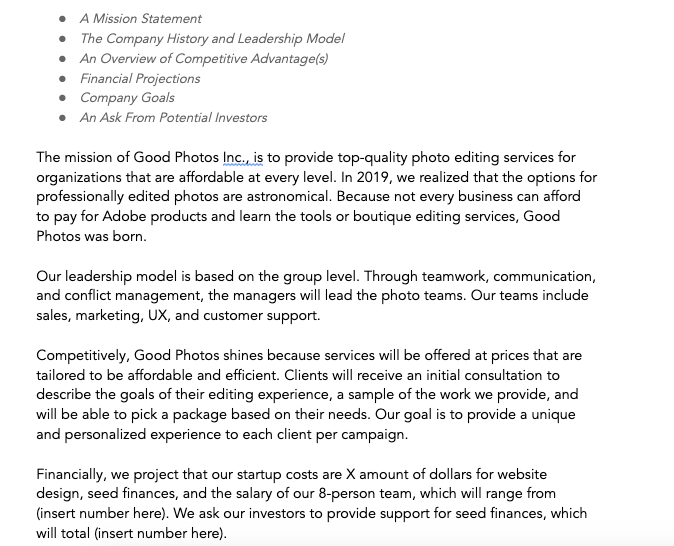
It’s important to provide an executive summary so that an investor or executive, who doesn’t have the time to read your full plan, can quickly see the most important highlights of your business.
2. List and describe your business.
This is the section that needs the most detail because it highlights what you’re selling. To begin, provide an overview of your product or service. For instance, a photography company would probably list their photo packages arranged by price and services, as I did below:
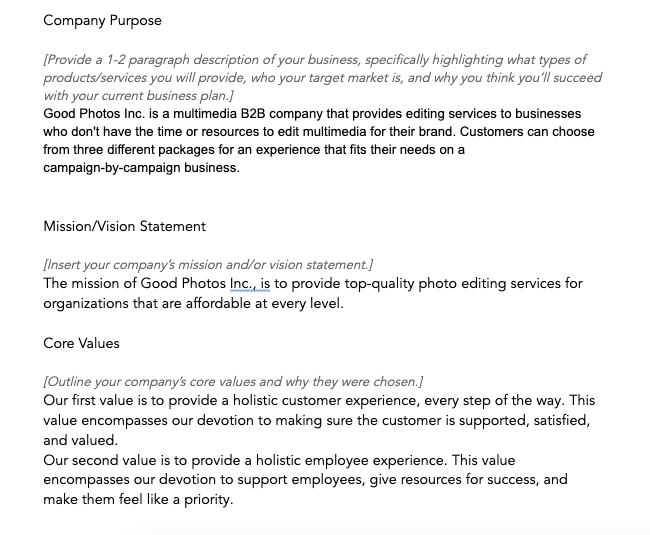
HubSpot’s template also provides direction on how to describe your company’s purpose and break down values. It also advises businesses to include team structure, if applicable. Below that, you should go into detail about your product and service lines.
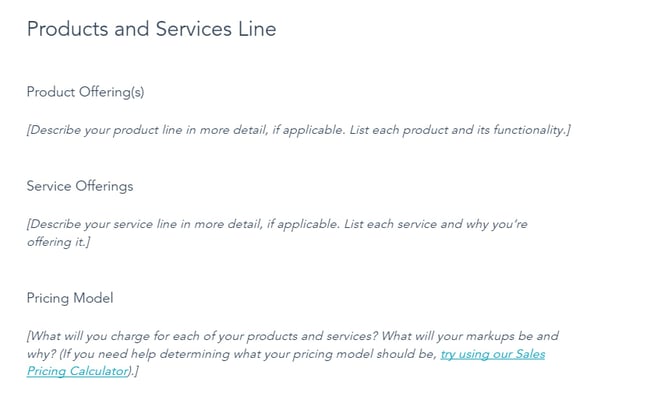
3. Detail your products and services.
Once you have described your business and its purpose, you’re ready to dive deeper into your plan. What products and services do you or will you offer? This is an opportunity to list each item and its purpose, allowing you to answer the question ‘why?’ Why are you choosing to offer these specific products and services?
After detailing your products and services, outline your pricing model. What is the cost associated with each service? Determining price, especially as a startup, can be challenging. However, sales pricing calculators help determine the best pricing strategy.
4. Conduct a market analysis.
For the market analysis, provide the operational climate of the industry you’re in. To illustrate, at this step, the photography company would need to analyze its position in a world of rival companies like Adobe or online services like Canva. Below, I’ve done a quick competitor analysis, available in the template:
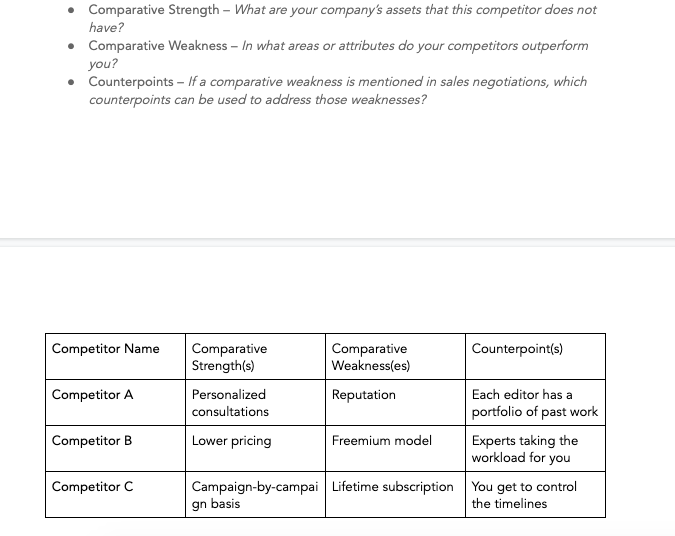
Using directions in the template as a guide, I was able to come up with more selling points of the company and how it stands out from competitors.
Filling out the market analysis section of the business plan assists with providing the framework for future campaigns. You’re able to define your target market and ideal customer. Refer to my example below for how to structure this analysis in your ecommerce plan.
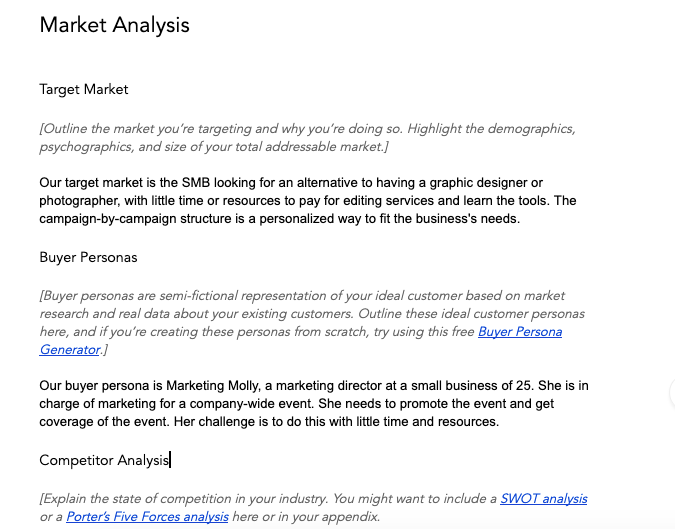
Good market analysis includes your target audience, projections of your company’s goals, and a breakdown of the competition’s goals and weaknesses. This is a counterpoint of how your business improves upon those weaknesses.
For a complete guide on how to create a market analysis, we have one here.
5. Strategize your marketing plan.
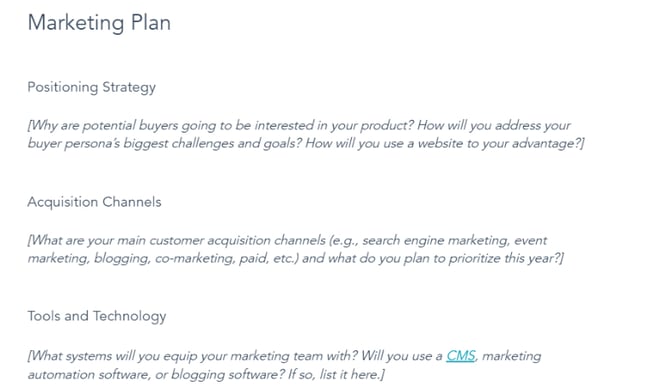
For any business, the marketing plan is crucial. It serves as a roadmap for how your company will build brand awareness, reach your target audience, and boost sales and revenue. As seen in this template, your marketing plan will focus on positioning strategy, acquisition channels, and tools and technology.
Positioning strategy fixates on how you will position yourself to your audience. How will you address their challenges and goals? How will you use the tools at your disposal to accomplish this?
The marketing plan will also require you to focus on where your customers come from. Are they finding your business through search engine marketing? Do they discover your business from your blog or social media accounts? Identifying your acquisition channels allows you to identify which ones to prioritize.
Lastly, your marketing plan should lay out the tools and technology your marketing team will need and use. Will you use a content management system (CMS) like CMS Hub? List all the software and programs your company will use to execute its marketing plan.
6. Create a sales plan.
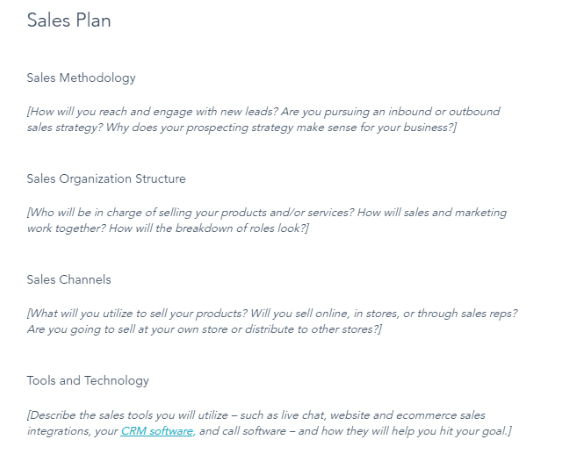
When creating your sales plan, describe your methodology, organization structure, sales channels, and tools and technology. For example, when discussing methodology, will you focus on an inbound strategy where you attract customers to your business through your content or an outbound strategy where you initiate contact with your prospects? This part of your ecommerce business plan will also require you to outline the people in charge of selling your products and services, as well as what channels they’ll use to sell your products.
Similar to creating your marketing plan, the sales plan will also require a brief on what tools you plan to use. While your marketing plan might need a CMS, your sales plan might need a customer retention management (CRM) software like HubSpot to manage your relationships with current and potential customers.
7. Outline legal notes and financial considerations.
In the following two sections of your business plan, describe the legal and financial structures. The photography company should provide detail on the legal considerations like online safety rules, ecommerce regulations, and the company’s costs.
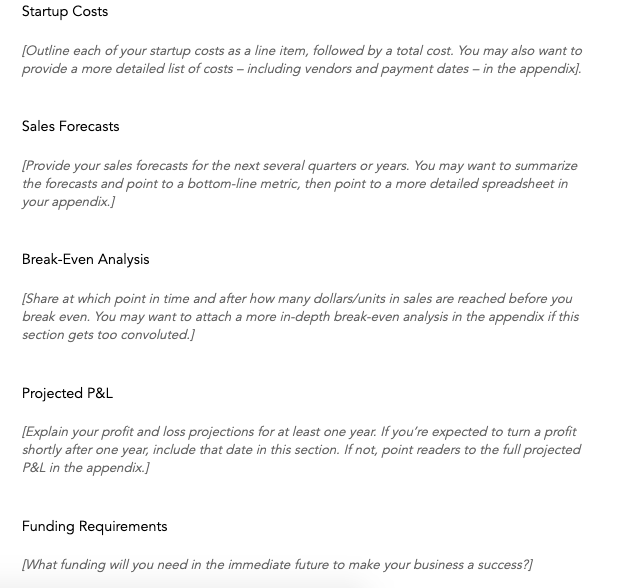
Listing legality and every cost needed to start ecommerce is crucial information for investors and stakeholders. In this section, it’s important to be honest and thorough to give partners a realistic idea of how to contribute.
Ecommerce Business Plan Examples
1. Maple Ecommerce Plan
This sample plan, provided on LinkedIn, is for a fictional company called Maple, an online store that sells exclusive Apple products. Maple’s sample plan is great because it provides easy-to-follow charts and graphics while highlighting the most important information. For example, their market analysis included a SWOT plan for the business.
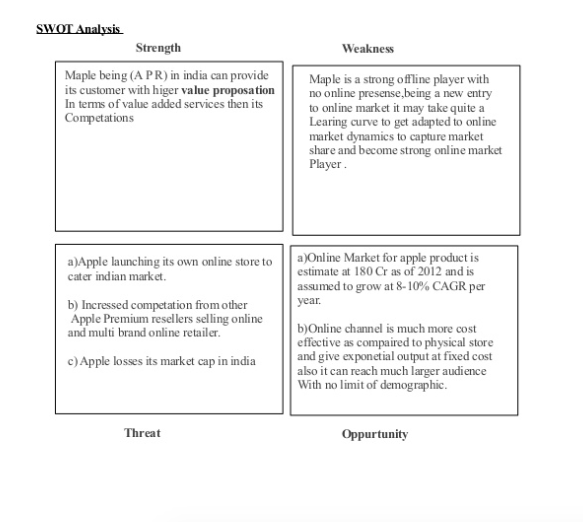
Outlining the strengths, weaknesses, threats, and opportunities of Maple in this format is easy for potential investors to follow. Notating each value with a letter keeps the format consistent, which is carried throughout the plan. For businesses that find their information is best presented in graphics, Maple is a good plan to follow.
2. Nature’s Candy Ecommerce Plan
Nature’s Candy is an online retailer that provides nutritional supplements. Its business plan is available online and is helpful in seeing how businesses go from planning to execution. Below is a preview of its plan in the financial forecasting section.
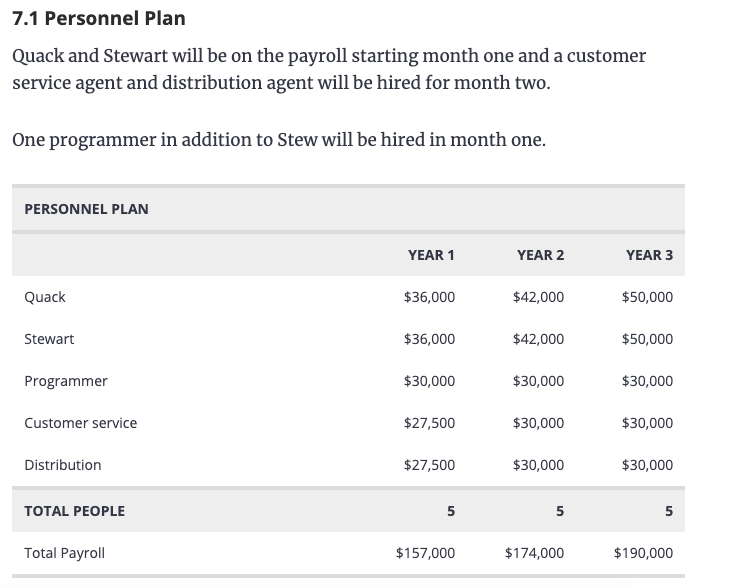
This example shows who will be on payroll yearly, giving investors an idea of how their investment will work in the long term. Planning ahead also shows stakeholders’ dedication to starting up your business.
3. NoHassleReturn Ecommerce Plan
Fictional company NoHassleReturn’s sample ecommerce plan is an expansive, detailed version of how ecommerce would translate to a completely online store. The company itself is structured to offer a way to make returning items bought from an online store a simple process, and the steps to take are featured below.
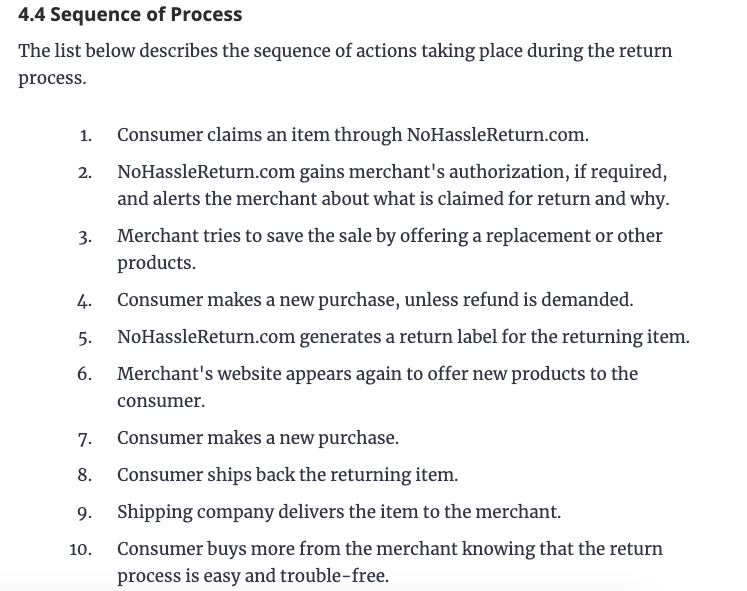
Having a sequence of processes like this is useful if your company is a niche idea. Investors and stakeholders need to know how your business will be new and unique for the market.
Even though writing out a business plan seems like a painstaking process, we have a step-by-step guide to help. This will keep you organized and keep you on track when structuring your business.
4. OGS Capital Ecommerce Plan
This sample ecommerce business plan comes from OGS Capital, where they created a test business plan for Botswana’s first private psychiatric hospital focused on inpatient and outpatient clinical health care. It features detailed sections for the business model, marketing plan, financial projects, and more. This level of detail is demonstrated below in their executive summary section.
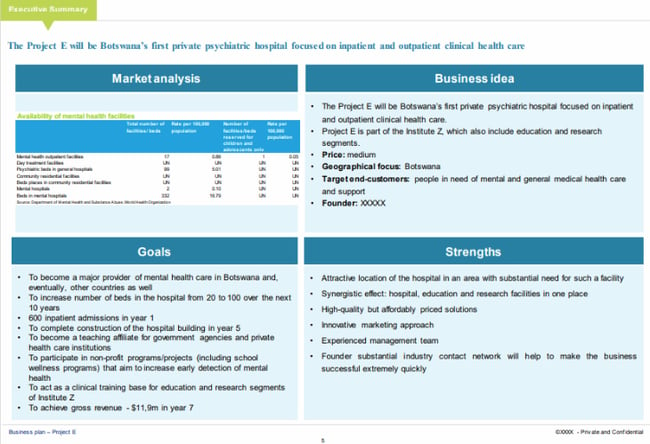
While some ecommerce business plans will explain the executive summary through a series of paragraphs, the layout in this sample makes the information more digestible. The project is separated into sections that detail the business idea, as well as its goals and strengths. The business idea includes price projects, geographical focus, and target customers. Goals for this project are created for 10 years with specific, individual goals built at one-, five-, and seven-year time markers. Lastly, this executive summary highlights the strengths of this business plan to solidify this project and its importance.
5. Egrocery Ecommerce Plan
For centuries, people have left their homes to buy groceries from stores, supermarkets, farmer’s markets, and more. At-home grocery delivery has grown in popularity and is reflected in this sample ecommerce plan for a fictional business named eGrocery. This sample plan establishes the company as an online grocery retail business with plans for connecting customers to distributors for fast, convenient at-home deliveries.
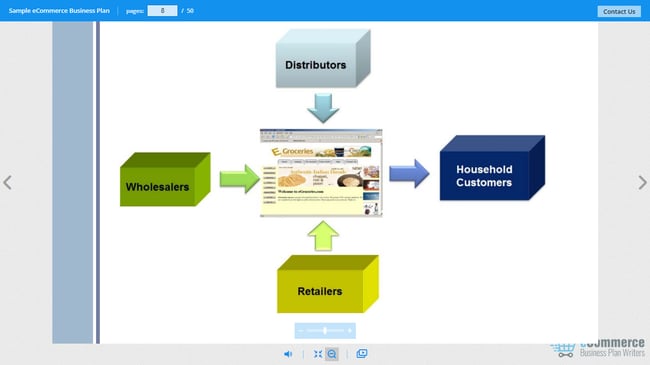
In its business model section, eGrocery outlines how it will implement both a business-to-business (B2B) and business-to-consumer (B2C) model to get products from distributors, retailers, and wholesalers to its household customers. This section provides an effective demonstration of the company’s overall function.
6. Shannon & Shavonne Inc. Ecommerce Plan
Shannon & Shavonne Inc. is a fictional United States-based online retailer that offers its customers an abundance of products in fashion, home appliances, electronics, and more. The depth seen in this plan is particularly helpful, especially with the detail seen in outlining the business structure and each job’s roles and responsibilities.
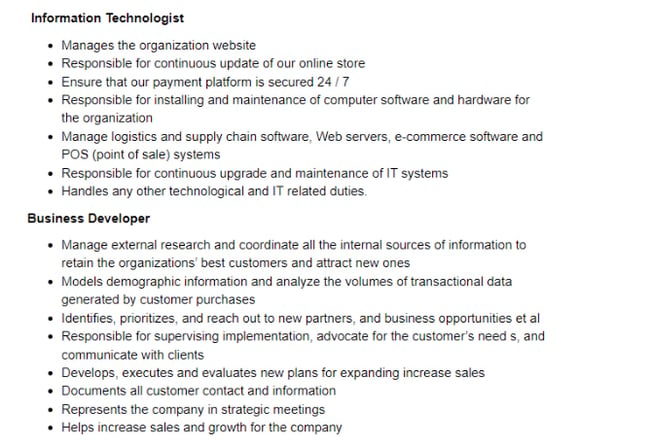
The plan first lists all the necessary roles, from the chief executive officer (CEO) to a call center agent. It then describes the responsibilities of each role. As displayed in the image above, an information technologist (IT) would be tasked with managing the organization’s website, updating the online store, and ensuring the security of the company’s payment platform. The clear distinction of roles helps manage employee expectations and accountability.
7. Firstcry.com Ecommerce Plan
In this sample, we have Firstcry.com — a fictional ecommerce site that creates eco-friendly baby and feminine hygiene products. Because the company is looking for funding to launch the business, its plan focuses on its financial highlights and projections, which is crucial information for investors.
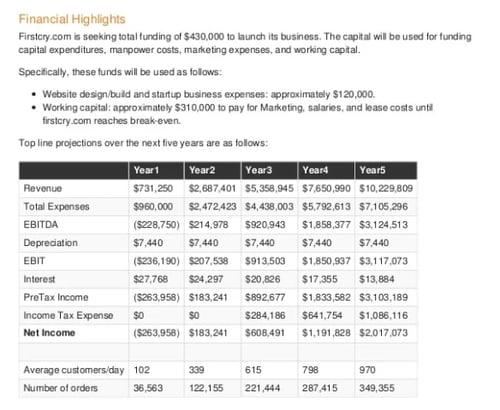
While disclosing what the startup funds will be used for, this plan also estimates its top-line projections over the next five years. As seen in the chart above, they include revenue, expenses, interest, and net income. The plan even breaks down how many customers per day and annual orders will be needed to reach this goal.
When it comes to building an ecommerce business plan, you’ll likely find that the more detail you include, the better.
Planning is the first step.
When starting a business, planning is always a crucial first step. If you find that you’ve launched a company without a concrete plan, it’s never too late. Successful businesses require strategy, and that’s what an ecommerce business plan gives you. It allows you to strategize what your business does, how it operates, and why it’s essential. Not only does it help you pinpoint who the key players of your company are, but it helps you identify who your target audience should be.
With the steps listed in this article and the examples to take inspiration from, you’re one step closer to building an ecommerce business plan for success.
Editor’s note: This post was originally published in November 2019 and has been updated for comprehensiveness.

Business Strategy: What It Is & How to Build an Effective One
In the business world, professionals are obsessed with tactics because they can help them meet their short-term goals. But if all you do is focus on the short-term, you won’t spend enough time or energy figuring out how you can succeed in the long-term.
Fortunately, building a strategy can help you achieve both your short-term and long-term goals. Strategy focuses on principles, which help you think, instead of tactics, which help you execute, so it allows you to concentrate on why your business does certain activities, not just how you do them or what you do. Read on to learn exactly what a business strategy is and how you can build an effective one today.
Your business strategy should be based on your overall vision for the company. For some brands it will be global market expansion. For others it may be more important to double down investing in existing markets they are already successful in. Regardless of your end goals, creating an effective business strategy will require thorough research beforehand.
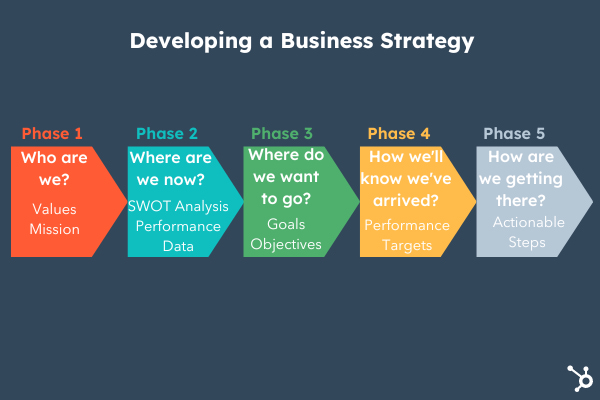
1. Identify your business’ aspirations and values.
In business, traditional goal setting lets you measure what you do, but it doesn’t lend itself to gauging how you do it or why. And if you only focus on the results, it can sometimes incentivize you to take a course of action that prioritizes your organization’s needs over your customers’ needs.
To help you focus more on your purpose and process instead of just your results, consider setting and anchoring to an aspiration, or your vision for your business in the future when building your business strategy — it’ll inspire you to do work that better serves your customers. Once you set an anchor to an aspiration, you can add your goal to the equation, which will help you simultaneously produce customer-centric work and hit your numbers.
2. Conduct a self-assessment.
Once you’ve figured out your business aspirations and values, it’s time to conduct a self assessment to help you evaluate the best avenues for business growth and success.
You can do this by conducting a SWOT analysis to identify strengths, weaknesses, opportunities and threats to your business. What do you do well and how can you capitalize on that? What can be improved and how?
3. Pinpoint which segments of your market you want to capture.
Your product or service most likely isn’t the best fit for your entire market, so it’s crucial to pinpoint the segment or segments of your market that benefit the most from your product or service.
Customers who genuinely need and want your product or service are also the customers who retain the longest and are least likely to churn, boosting your customer lifetime value and lowering your customer acquisition costs.
4. Determine how you’ll beat your competition.
Ricky Bobby’s legendary saying that “If you ain’t first, you’re last” doesn’t necessarily apply to the business world, but it does have some bearing on it. Your customers won’t buy two of the same products or services, so if you want to capture as much of your segment of the market as possible, you need to place first in the majority of your target customers’ minds.
Some of the best ways to stay top-of-mind are crafting a creatively refreshing brand, differentiating your product or service from the rest of the crowd, and pricing your product relative to its perceived value.
5. Set clear goals.
Now that you’ve completed your research and established a vision for your business, it’s time to set some goals.
Think about what you want to accomplish and work backward to figure out the steps to get there. Setting business goals will help inform your strategy and how each department collaborates to achieve your objective. To start, you can come up with:
- Business goals: These are high level objectives you’d like the organization as a whole to accomplish.
- Department or team goals: These are key objectives delegated at the department level to help the organization achieve their overall goals.
- Employee-specific goals: Using departmental goals, establish goals for individual employees to contribute to reaching business goals.
These cascading goals will make sure that all stakeholders involved in executing your business strategy are on the same page and properly aligned.
6. Make a plan.
With your business goals defined, it’s time to make a plan to accomplish them. This plan should include actionable tasks your team can take and should outline the steps needed to achieve your mission or objective.
This plan can be rolled out as either a short-term or long-term plan or a combination of the two. Additionally you’ll want to check in with your plan often to make sure everything is still on track, and make adjustments as the business requires them.
7. Figure out which competencies are needed to beat your competition and sustain your business’ success.
Unfortunately, passion isn’t enough to beat your competition and rocket to the top of your industry. Talent and skill are just as crucial. Depending on your aspirations, goals, and market, you need to figure out which types of teams and employees you need to develop and recruit to not only beat your competition, but to also sustain your success.
For example you may need to recruit more engineering staff or hire a data science team with experience in your niche to achieve your goals.
8. Decide which management systems are needed to hone these competencies.
If your business is a team, then your managers are the coaches. They’re responsible for developing, supporting, and inspiring your employees to do their best work possible.
Establish check-ins with your team to ensure both employees and managers have what they need to succeed. Invest in technology that enables your team to work together more efficiently and propels your business goals forward. Because no matter how much raw talent your employees have,they’ll never reach their potential and, in turn, help the business reach its potential if they don’t refine the skills and discipline necessary to compete and succeed.
9. Measure your results.
It’s not enough to simply set goals and hope things work out. You’ll need to actively monitor your progress if you want to achieve greatness. As mentioned previously, you should be checking your plan monthly to make sure things are running as they should.
Evaluate your metrics to ensure your team is meeting key performance indicators (KPIs). If they are not meeting them, find out why and come up with a solution to get things back on track.
10. Be flexible and willing to adapt.
Along with measuring your results, it’s also a good to examine where your strategy is falling short and make changes.
Are their changes in the industry or external factors that impact your current strategy? This may be an opportunity for you to adjust your approach. Your plan is your roadmap, but it should also be flexible enough to pivot along with your business.
11. Consider hiring a business strategy consultant.
If all of the steps above seem overwhelming and you have the resources, consider hiring outside help. Business consultants can provide guidance and training to help you achieve your business goals.
Pros
- Expertise: Consultants often have a narrow area of focus — meaning when you hire one, you’re getting an expert in your selected field. They can help you build a framework or structure that aligns with your goals. They can also add a different perspective to tackling issues your team has tried and failed to resolve on their own.
- Unbiased: Since a consultant is not an employee of your company, they are not hindered by existing viewpoints or tradition and can look at your company with fresh eyes. This makes it easier for them to hone in on your goals and the best strategy to achieve them.
Cons
- Expensive: Hiring a consultant is definitely an added expense and will most likely cost more than paying an existing employee.
- No guarantees: Although consultants are experts, they don’t come with guarantees of success. Their is no guarantee of reaching a certain performance metric or number of sales. However, you can always vet consultants by asking for recommendations, looking at references and examining their work history.
Hiring a business strategy consultant is a great option if your team has been struggling with the steps above without success. A third party may pick up on business insights you may have missed.
Principles Over Tactics
We live in a day and age where the internet is overloaded with advice. You have access to countless amounts of tips and tricks that could potentially help you build a successful business. But without the ability to think critically about whether these tips and tricks actually apply to your specific situation, you’ll never reach long-term success.
That’s why strategy is so important. It grounds your business in principles that can apply to almost any situation and, in turn, help your business achieve both its short-term and long-term goals.
This article was originally published in May 2019 and has been updated for comprehensiveness.

18 Email Newsletter Examples We Love Getting in Our Inboxes
When you’re constantly inundated with social media, news, and emails, every day can seem like a case of information overload – trying to parse what’s important is a challenge. Subscribing to the right email newsletter can deliver the information you need. Done well, an email newsletter with a purpose is like a trusted source helping you cut through the clutter.
In this blog post, we provide tips and tricks for creating a newsletter that delivers value to subscribers and include examples of exemplary newsletters, explaining what makes them work.

The curation serves to up-level the journalistic quality of your content, which results in two things:
- Increases the value you provide
- Improves your authority and credibility in your audience’s eyes
When people first start doing email marketing, they often assume they need an email newsletter. However, newsletters are only effective when done well.
“It’ll have everything our customers care about, all in one place,” they rationalize. “Our list will be different — people will actually look forward to getting our newsletter,” they argue. “Since we’re only sending it once a month, it’ll be a breeze to put together,” they say.
And while all of those things may become true for a few lucky individuals, lots of email newsletters flop. They become an uninteresting mush of content people automatically ignore, archive, delete, or straight up unsubscribe from. And this isn’t great for you, your metrics, or your company’s success.
So if you’re thinking about creating an email newsletter, keep on reading. In this post, we’ll cover:
- Ideas to make your newsletter an effective one
- Design tips that help ensure a great reading experience
- Examples of newsletters that are crushing it (to draw inspiration from)
Email Newsletter Ideas
Email newsletters can include a weekly round-up of blog posts, case studies regarding your product or service, upcoming company events and webinars, or even a behind-the-scenes look at your company.
Of course, you don’t want to create a newsletter just for the sake of creating one — instead, you should do thorough research on what your audience might prefer, and what your company is well-suited to offer.
If you’re looking for general email newsletter inspiration, you’re in luck. Here’s a list of some of our favorite ideas for email newsletters:
- Round-up of popular or recent blog posts or videos
- New job openings at your company
- New case studies or product launches
- Membership/customer deals and promotions
- New best practices or tips
- Industry news
- Quotes
- Recent survey results related to your industry
- Internal employee news, including anniversaries, promotions, and birthdays
- Listicles (i.e. “10 Best Vacation Spots of 2020” if you work for a Travel publication)
- A team spotlight with pictures and bios
- Photos or stories customers have shared
- Behind-the-scenes at your company, or interviews with company executives
- Monthly business recap
- New training opportunities
- FAQ (Frequently Asked Questions) and answers
- Upcoming webinars, or recordings of past webinars
Next, let’s explore some newsletter designs to inspire the aesthetic of your newsletter.
Featured Guide: Email Newsletter Design Examples Lookbook
 Learn how to build an email newsletter from scratch, and see dozens of email newsletter examples from real businesses with this free guide.
Email Newsletter Design
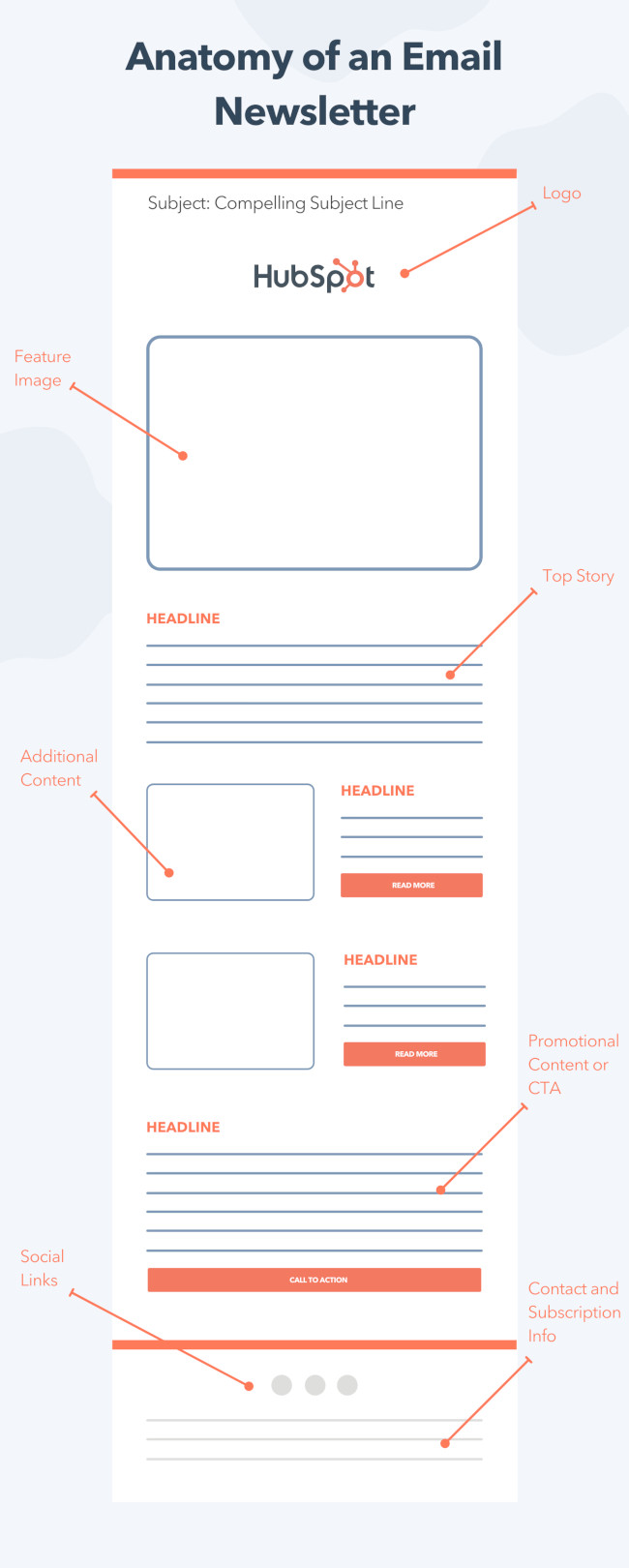
While you can get creative with the structure of your email newsletter, the general anatomy typically includes:
- Your logo or masthead
- A featured image and other eye-catching visuals
- Top stories featured at the top
- Additional content and promotions following
- An email footer with social links and subscription information
 From a design standpoint, your company’s newsletter should be a true reflection of your brand. For instance, if your website features minimalist design and clean, plain black-and-white text, then you don’t want to create a super colorful newsletter, which might confuse new subscribers.
There are a few best practices, however, you can employ to ensure your design is up-to-par regardless of your audience’s preferences:
- Clean, crisp images (no blurry images)
- Text (use same text throughout), company logo, and icons
- Try filters, memes, or video
- Make the CTA clear and obvious — and just have one (i.e. “Click here to shop” or “Click here to read”)
- Create a hierarchy with CTA early-on
- Mobile-responsive
- Test the length of your newsletter to ensure it’s not too short or too long for your audience
Of course, the design of your newsletter will depend on your brand, as well as the message. For instance, you might want to create a colorful, attention-grabbing newsletter if it largely focuses on visuals of new products — alternatively, if it’s a round-up of recent blog posts, perhaps you try a more minimalist look to mimic the appearance of a letter.
Of course, you’ll want to A/B test whichever design(s) you choose, to ensure they resonate with your audience.
I’d also recommend looking into pre-made templates if you’re not familiar with designing emails. If you’re a HubSpot customer, you’ll have a bunch of pre-made templates in the email tool.
However, if you’re still unsure about your newsletter design, there’s nothing better than looking at examples for further inspiration.
Take a look at the following newsletters that knocked it out of the park, and consider using some of their design elements as inspiration for your own.
Each newsletter on this list is fabulous for different reasons. Some have exceptional design, some have exceptional copy, some have exceptional calls-to-action … but all are exceptional at solving for their subscribers’ needs.
1. The Hustle
The Hustle is a daily newsletter that promises “business and tech in 5 minutes or less.”
While there are a ton of business and tech newsletters out there, what makes The Hustle remarkable is its tone at the intersection of informational and hilarious.
Take two of their most notable headlines from 2021 as an example:
- “Inside the world’s most booked Airbnb”
- “How Bob Ross paintings became a coveted investment”
The Hustle also allows subscribers to customize the content they receive to fit their interests (see the “Snippets” section in the example below).
The formula of great content + unique tone + personalization works well for The Hustle’s audience as they’ve grown to more than 1.5 million subscribers.
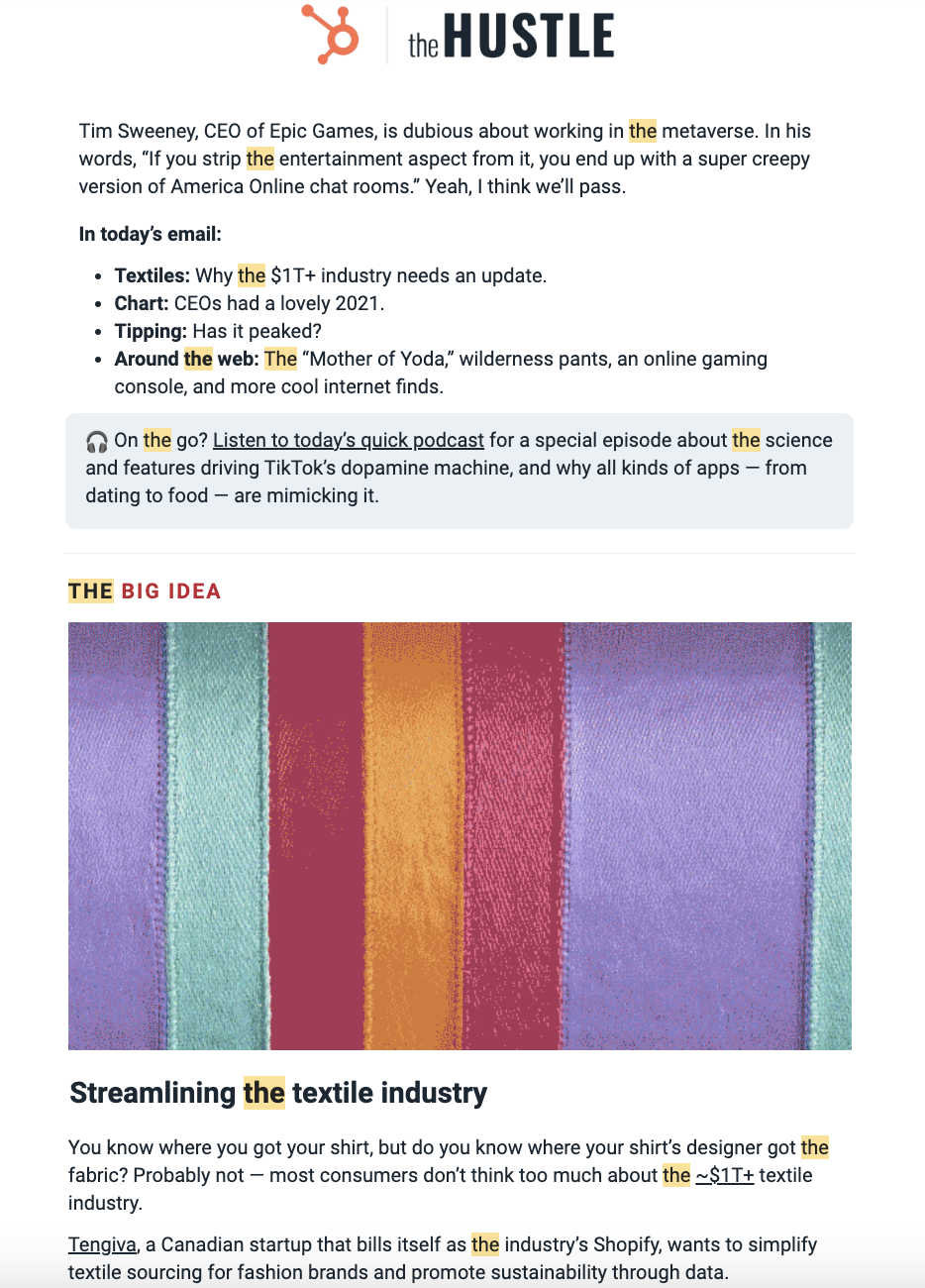 Image Source: The Hustle
2. Atlas Obscura
Atlas Obscura’s newsletter does more than provide travel recommendations – it also delivers compelling stories about the world to your inbox.
With stories like “Spotting Squid in the Tides of Oahu” and “Dreaming of Spaghetti and the Sea,” the Atlas Obscura newsletter is a portal for exploration. They do an excellent job of writing attention-grabbing headlines and finding unexpected, delightful details – library apartments, haunted coffee, and 19th century skulls are just a few examples.
Combining interesting stories, captivating photos, and incredible destinations, the Atlas Obscura newsletter reels in the reader.
See the Pen Newsletter – Arcana Obscura by HubSpot (@hubspot) on CodePen.
3. Buffer
Buffer does a great job at keeping the newsletter concise, making it easy for readers to get the knowledge they need with a skim. They understand that readers want to catch up on the fast-paced and ever-changing social media landscape, so they break down the latest news and trends.
The newsletter is packed with information without feeling overwhelming due to its simple and organized structure.
See the Pen Newsletter – Buffer by HubSpot (@hubspot) on CodePen.
4. The Washington Post The 7
The news is overwhelming and trying to scroll through Twitter to catch up on what’s happening can lead to distractions. The Washington Post understands this and created “The 7” to break down the seven most important stories of the day.
The newsletter is memorable because you can expect exactly seven stories to be sent to your inbox every weekday morning. The listicle format makes the newsletter skimmable. Under each story, they include bulleted points like “why this matters,” “why now,” and “the numbers” to get the point across succinctly. Complex news is made digestible.
See the Pen Newsletter – WaPo by HubSpot (@hubspot) on CodePen.
5. Phrasee
Phrasee’s weekly newsletter is as informative as it is delightful. They deliver curated articles accompanied by fun graphics, GIFs, and memes.
Their tone is personable and lively, almost like the newsletter could fit in on social media. With their unique and daring tone, they know how to stand out from the crowd.
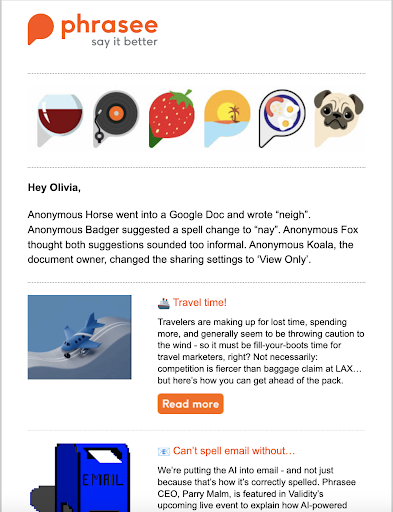 Image Source: Phrasee
6. The New York Times Cooking
A picture is worth a thousand words, says the adage. This couldn’t be truer for newsletters – if your content lends itself to imagery, use it to your advantage like The New York Times Cooking newsletter. The New York Times may be known for delivering news, but it also has a robust cooking section packed with creative, multicultural recipes that are beautifully photographed.
Highlighting new recipes from different chefs, Their New York Times Cooking newsletter is never stale. They expertly include a variety of recipes so readers get value out of finding something new to try.
See the Pen Newsletter – NYT Cooking by HubSpot (@hubspot) on CodePen.
7. Quartz Daily Brief
The Quartz Daily Brief provides a rundown of must-know news, Quartz’s most popular stories, and other interesting highlights about the economy.
The newsletter is straightforward like a brief without being dry, with visuals like charts to help pique the reader’s interest. Sections for need-to-know news, what to watch for, top reads, and surprising discoveries keep things organized. The breadth of material means the reader can choose from a variety of topics to further investigate.
See the Pen Newsletter – Quartz by HubSpot (@hubspot) on CodePen.
8. Moz Top 10
Moz Top 10 is a semi-monthly roundup of top pieces of content about marketing. Essential to any marketer, Moz Top 10 links to key marketing content with actionable insights. The content is not just their own; they link to external sources.
Examples of digital marketing and SEO content includes how brands can take stands on issues and backlink index comparisons.
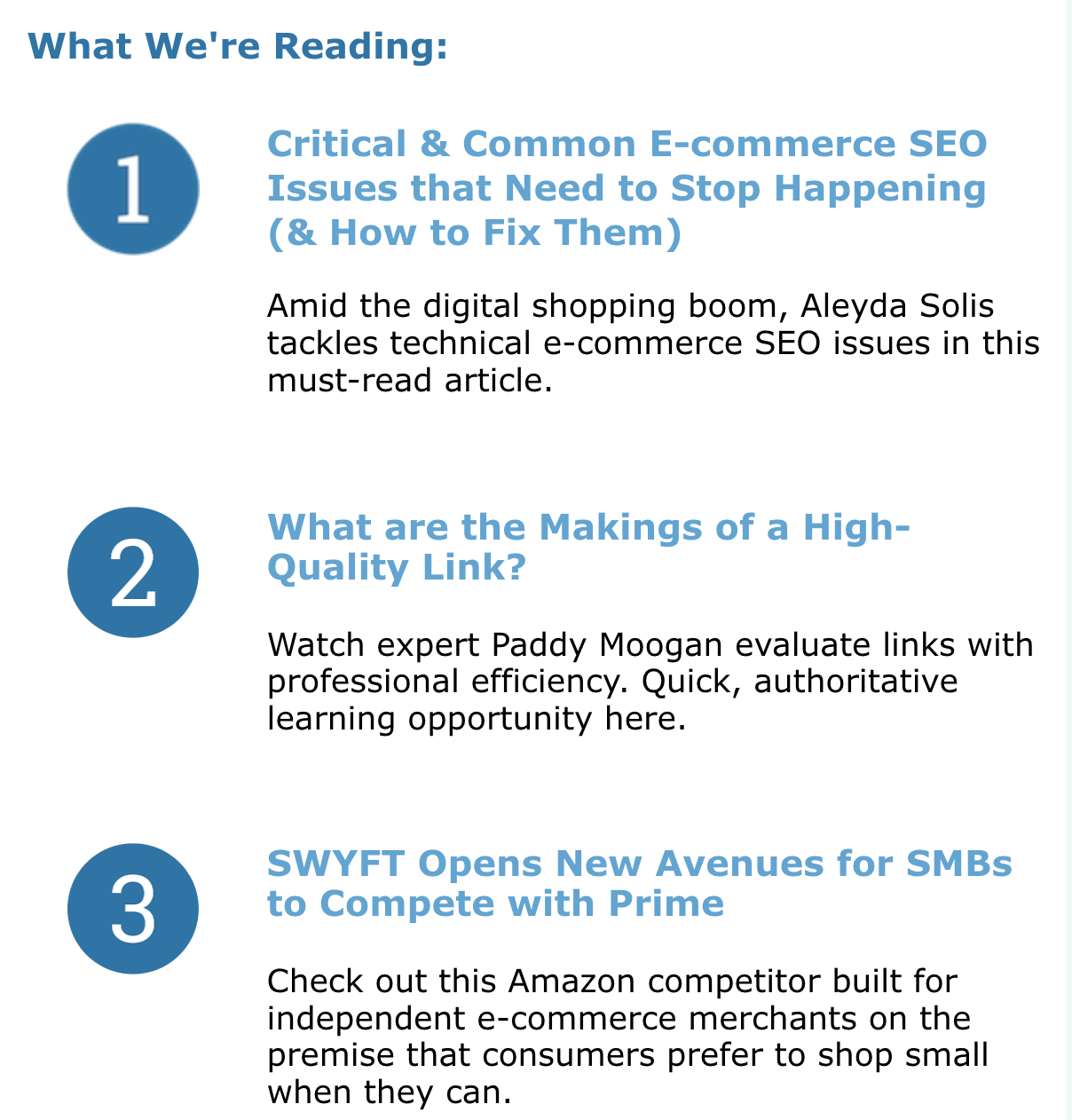
[Click here to see the entire email.]
9. Vox Sentences
Vox Sentences is a nightly email meant to quickly get its readers up to speed on the best stories from the day. The content ranges from the day’s top news to fun stories from all over the web. They do a great job balancing their own content with external sources, and the stories they choose are always really high quality.
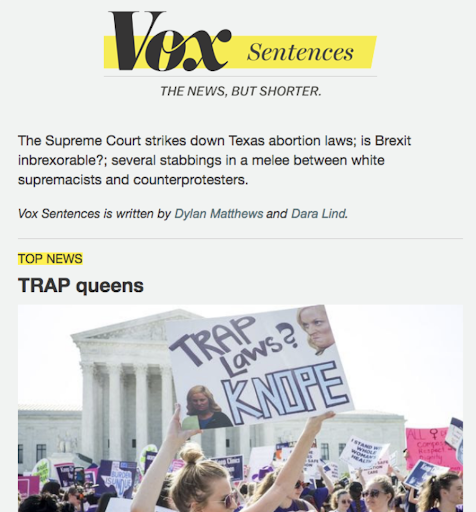 Image Source: Vox
10. TheSkimm
If you want to stay up on what’s happening in the world and have some delightful writing delivered to your inbox first thing in the morning, look no further than TheSkimm. It’s a daily roundup of what’s happened in the news in short, punchy paragraphs.
The best part? You don’t have to click out of the email to read the news if you don’t want to — although they do link to their sources if you want to read further.
For your own email marketing, TheSkimm is the place to go if you’re looking for writing inspiration or for emails without much visual content.
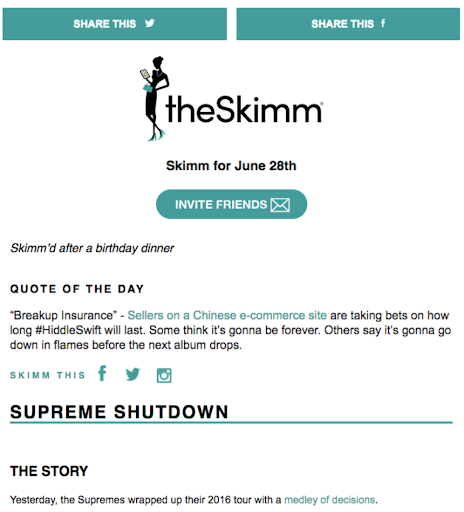 Image Source: TheSkimm
11. Below the Fold
Below the Fold is a weekly newsletter (from Acciyo) that surfaces important and interesting stories that simply aren’t making headlines due to the crowded, never-ending news cycle we all experience day in and day out.
Acciyo’s editorial team handpicks great news stories that they believe deserve “front-page love” but are being beaten out by an “infinite scroll of breaking headlines” — stories that range from how investors are profiting from emergency room bills, to how one Mexican company turned prickly pear into sustainable fuel.
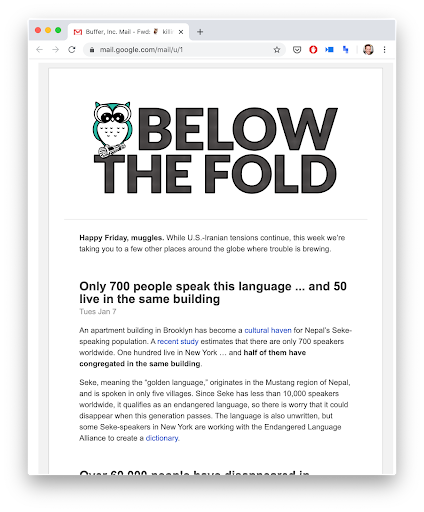 Image Source: Below the Fold
12. The Ringer
Remember Grantland, the sports and pop culture blog owned by ESPN that was started by sports journalist Bill Simmons? In October 2015, ESPN announced it would be ending the publication of Grantland. Shortly thereafter, Simmons formed Bill Simmon Media Group and recruited a whole bunch of former Grantland staffers to launch a brand new newsletter in March 2016 called The Ringer.
Although The Ringer is written and run by many former Grantland employees it’s a different project than Grantland was. Where Grantland focused on sports and pop culture, The Ringer branches out into other areas like tech and politics. Jon Favreau, a former speechwriter for President Barack Obama, is among the contributors. I like how focused they are on experimentation: “We want to have fun, take chances, analyze, theorize, obsess, and try not to take ourselves too seriously,” said Editor-in-Chief Sean Fennessey.
Another differentiator? The Ringer’s website was developed in partnership with publishing platform Medium – which means the newsletter reflects that clean, minimal design.
 Image Source: The Ringer
13. The Marginalian
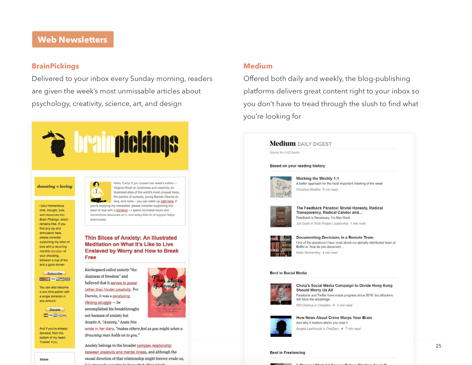
The Marginalian is one of the most interesting newsletters out there. In fact, the folks who write it call it an “interestingness digest.” Every Sunday morning, subscribers get the past week’s most unmissable articles about creativity, psychology, art, science, design, and philosophy — topics that are really appealing to a wide audience. At its core, it explores what it means to live a good life.

[Click here to see the full newsletter.]
14. The New Yorker Recommends
The New Yorker Recommends is a weekly newsletter highlighting what their staff reads, watches, and listens to. It is packed with curated recommendations for books, movies, TV shows, and music.
Having staffers select their own recommendations gives this newsletter a personalized, hand-curated feeling that helps readers connect with the content.
See the Pen Newsletter – The New Yorker Recommends by HubSpot (@hubspot) on CodePen.
15. Polygon Patch Notes
Polygon Patch Notes shares the staff’s picks for new movies, TV shows, video games, comics, manga, and tabletop RPGs. The newsletter also links to a free new game and highlights top stories on Polygon, ranging from reviews to guides.
The mix of curated staff picks and top stories in a simple format makes this an easy-to-digest newsletter. Polygon Patch Notes also employs a personable tone, making the read relatable and fun rather than overly businesslike and bland.
See the Pen Newsletter – Polygon by HubSpot (@hubspot) on CodePen.
16. Apple News+ Audio
The mobile-first format for Apple News+ Audio capitalizes on people’s increasing reliance on smartphones – according to Pew Research Center, 85 percent of Americans have a smartphone.
The format is also interesting – rather than solely delivering updates with text, subscribers can listen to audio. It makes sense, given that the newsletter highlights best Apple News+ Audio stories; including the icon with a link to listen makes it easy for subscribers to dive into a story.
See the Pen Newsletter – Apple News+ Audio by HubSpot (@hubspot) on CodePen.
17. Medium
Medium is a blog-publishing platform that has been continuously building momentum since its launch in 2012. Publishing on the site has really picked up in the past few years, and nowadays, there are a ton of people publishing posts on the site every day.
Of course, that means there’s a lot of content for the average person to filter through. To help bring great content to the surface, Medium uses email newsletters. And after I open this newsletter every day, I end up going to visit several Medium posts without fail. (Mission accomplished for Medium, right?)
Here’s why: The newsletter feels pretty minimal. Because of the way that Medium uses colors and section dividers, they’re able to give you a ton of content in one email without it feeling overwhelming. Plus, they offer both a daily and a weekly version of the digest, allowing users to opt in for the email frequency they feel most comfortable with.
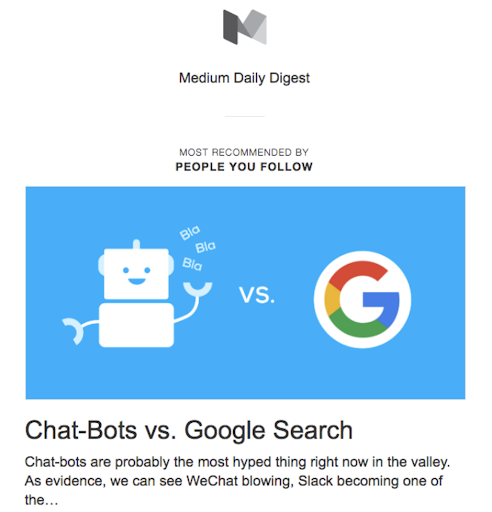 Image Source: Medium
18. The Strategist
From New York Magazine, The Strategist curates deals, shopping advice, and discounts.
The newsletter does a great job of including relevant shopping information, paying attention to the trends. The Strategist also includes a wide variety of products and services to shop for, casting a wide net.
See the Pen Newsletter – The Strategist by HubSpot (@hubspot) on CodePen.
Creating an Email Newsletter Your Subscribers Love
Even though newsletters are one of the most common types of emails to send, they are actually some of the hardest to do right. We hope these examples gave you some quality inspiration so you can create newsletters your subscribers love to get in their inboxes.

How to Calculate Your Web Traffic to Increase Website Revenue
You want to know how to calculate website traffic. That’s smart since your website’s value is both the traffic AND the revenue it can bring in.
Making sure your site works? Check your web traffic. Reacting to changes in your industry? Your website traffic data can help you see how you’re doing.

Measuring web traffic can help you build realistic goals and strategies that lead to increased revenue for your business.
To get started, keep reading, or jump to the section you’re looking for.
- Why measure website traffic?
- Before You Start Collecting Web Traffic Data
- How to Calculate Website Traffic
- How to Calculate Traffic Goals to Increase Website Revenue
Why measure website traffic?
Measuring website traffic can help you pinpoint the performance of specific strategies and campaigns. This data can also help you see if leads are dropping off because of a drop in traffic, forecast annual trends, and notice when a page or link breaks on your site.
Your website traffic tool is like the thermometer in your house. You might think it feels cold, but that tool tells you exactly how cold it is. This helps you decide whether it’s worth turning the heater on.
So, maybe you think your website traffic is lower than it should be. Website traffic data can give you:
- Page views
- Referral sources
- Time on-page
This information can help you figure out where your website needs work and how to make it perform better.
It helps you answer both big-picture and granular questions about your marketing, sales, and growth strategies.
Before You Start Collecting Web Traffic Data
Many businesses claim to be data-driven. But 27% of surveyed small businesses don’t have a documented business strategy.
Without a clear strategy, you can’t use data to help your business grow. And if you’re not measuring current website performance, it will be difficult to set realistic goals.
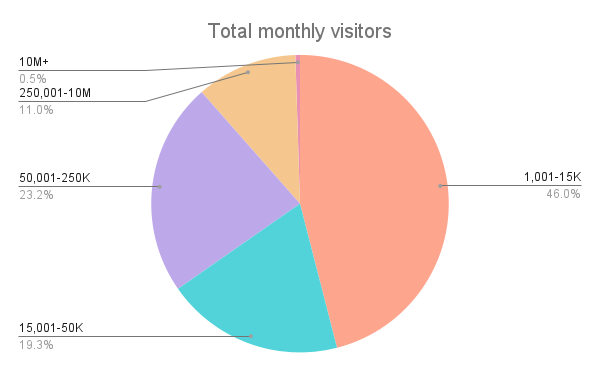
Comparing your website traffic with competitive benchmarks is one place to start. But even if you know how many visitors you think your website should be getting, this data won’t help you understand where your numbers are now. It also won’t help your team work together to reach your goals.
These three steps will help you create a useful web traffic strategy. They can help you make sure that your data analysis is meaningful to your lead, sales, and revenue goals.
1. Decide what questions you want to answer with your data.
Businesses often fail because they’re asking the wrong questions. So, before you start gathering data, it’s important to think about the questions your business wants answers to.
Keep in mind that your questions may change over time. A startup with a month-old website may have questions like:
- Why is the bounce rate so high?
- What sources will bring the most qualified leads?
- Why is blog traffic rising in May, but dropping in July?
- Where is most referral traffic coming from?
But once your site has been live for five years or more, you may have different questions. These might include:
- How accurate is this data?
- Why does this page generate so many conversions?
- Why have visits gone down on some pages but not others?
- Why are visitors exiting from the home page?
- Is the website getting good ROI?
These questions mostly point to one big question:
How much traffic does your site need for you to reach your revenue goals?
Your questions should be specific to your website, business, and your unique goals. While it may be tempting to jump to the next step, spend some time thinking about questions for your site.
You might want to speak to stakeholders across your organization to see if they have ideas too. A SMART goal-setting template can also simplify your goal-setting.
2. Choose the right key performance indicators (KPIs).
Website analytics tools can give you a lot of data, and quickly. A single tool may offer over a hundred different ways of measuring your website data.
So, before you get lost in all the options, it’s best to start with the KPIs that align with your business goals.
For example, say you want to increase pricing for your top tier of products. KPIs that could help you track how this decision has an impact include:
- Page views for product pages
- Revenue
- Traffic by source
- Bounce rates from pricing pages
- Sessions for returning customers
It’s a good idea to focus on a handful of key metrics. Measuring and tracking too much data can create a situation where you spend more time watching your data than acting on it.
If you’re not sure which data is right for your business goals, this post goes into more detail on choosing KPIs.
3. Figure out how often you will collect and analyze your data.
Before you begin collecting data, it’s a good idea to set a time frame for data collection.
Checking data can sometimes feel like checking your social media feed. If you check too often, you may be spending more time watching your data than acting on the insights it offers. If you check it infrequently, you may misinterpret the ups and downs of your website traffic.
So, set a consistent cadence for monitoring your web traffic. This can help you make sure that you have an accurate picture of what’s working and what’s not.
If you’re in a fast-moving industry or recently launched a new website or product, daily checks may be useful. But if you can’t act on insights quickly, a weekly schedule for checking website traffic may be a better fit.
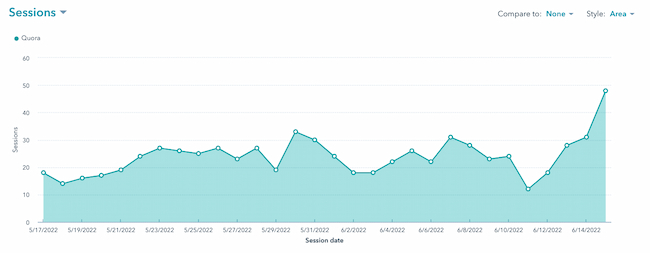
It’s also smart to set aside time to do more detailed analysis of your site traffic. Many businesses will do this monthly or quarterly. Depending on the scale of your organization, you may want to create a separate data schedule for partnerships or campaigns. This can make it easier to isolate this specific data for review.
Once you set a schedule, stick to it. Then, create clear documentation for other members of your team so they can fill in or take over when it’s needed.
For example, if you’re compiling weekly reports, choose a set date for the week to begin and end. If your reporting for each business week starts on Saturday, then shifts to Sunday a few months later, you’ll end up with unreliable data.
1. Choose an analytics tool.
There are many great tools to analyze web traffic. These three tools are popular favorites.
Analytics Tool 1: HubSpot CMS
This tool collects website traffic information including:
- Page views
- Sessions
- Time on page
- Exit and entrance rates
- Bounce rates
Reporting in HubSpot connects to platform features including sales, marketing, and service software. This means that you can easily track data through the entire customer journey in one single tool.
Analytics Tool 2: Google Analytics
This popular analytics tool is a helpful tool for collecting website traffic data. It’s free to use and offers many different ways to organize and analyze website data.
This tool offers a range of detailed reports including:
- Real-time traffic reports
- Acquisition reports
- Engagement reports
- Monetization reporting
Analytics Tool 3: Mixpanel
Besides tracking web traffic, Mixpanel offers product usage and customer behavior data. This is an advanced tool that can give users real-time data across websites and apps.
Features for Mixpanel analytics include:
- Interactive reports
- Team dashboards
- Segmentation options
- Group analytics
If you’re just starting your research and want to dig deeper into your options, check out this list of top analytics tools.
2. Install the software’s tracking code.
While tracking code installation is different for each tracking tool, most use a special script to collect data. It’s simple to add this script to your site to start analyzing your traffic.
Here’s a step-by-step guide to adding the reporting tracking code with HubSpot. If you’re not a HubSpot customer, you can get started with HubSpot here.
Step 1: Click the gear icon to access Settings after you’ve logged into HubSpot.
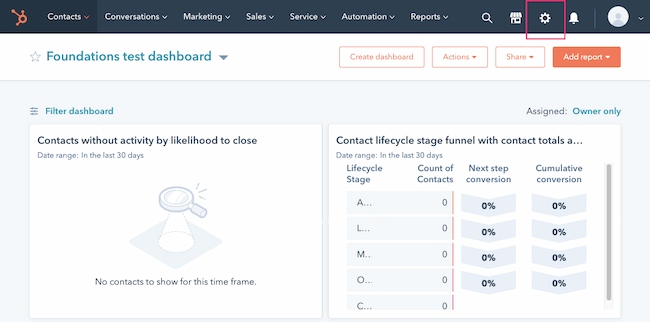
Step 2: Navigate to Tracking & Analytics in the left-hand menu.
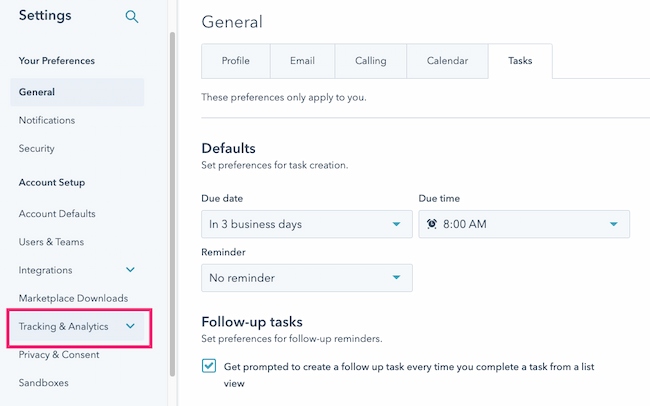
If you’re using Marketing Starter or HubSpot’s free tools, navigate to Tracking Code in the left sidebar menu.
For all other subscriptions, navigate to Tracking & Analytics > Tracking code in the left sidebar menu.
Step 3: Under the Tracking Code tab, in the Embed code section, click Copy.
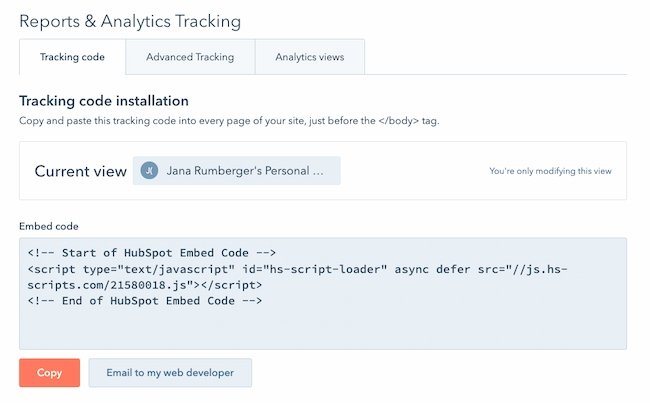
You can also click Email to my web developer to send the tracking code to the team member who will be installing it on your site.
Step 4: Install the tracking code on your website.
To install the tracking code, paste the code before the closing </body> tag in the HTML code on each page of your site.
Step 5: After you install the tracking code, learn how to verify installation and troubleshoot the code.
You may want to check with someone else on your team before adding and troubleshooting your tracking code. While this process is simple, these steps will vary based on how your business manages your website.
3. Use the software to track website sessions.
Once you add your tracking code to your site, it may take up to 24 hours for data to appear. Once data starts populating in your dashboard, it’s time to start analyzing.
Every tool will have different reporting options, but this is a quick overview for analyzing your data with HubSpot.
Step 1: In your HubSpot account, navigate to Reports > Analytics Tools.
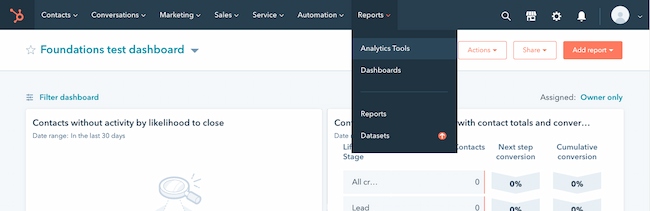
Step 2: Click Traffic Analytics.
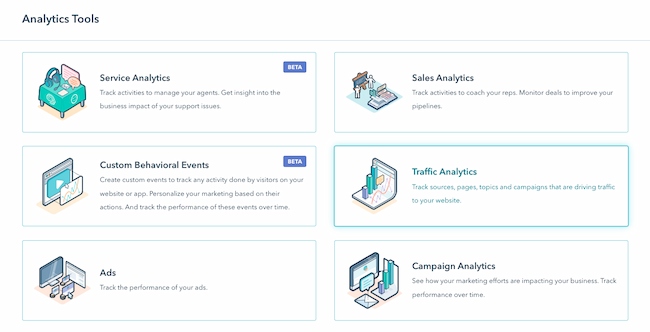
Step 3: The tabs at the top let you analyze different types of data.
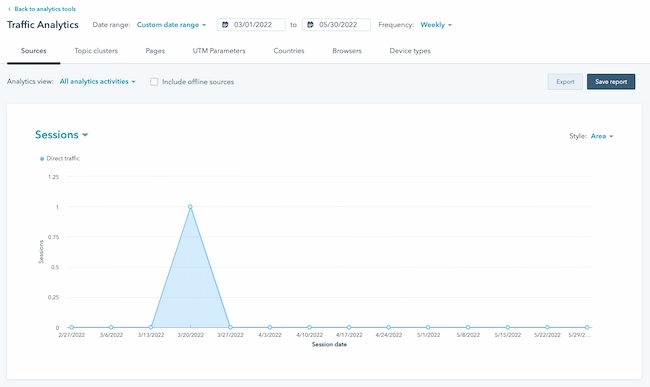
Step 4: Filter your data by time range or frequency.
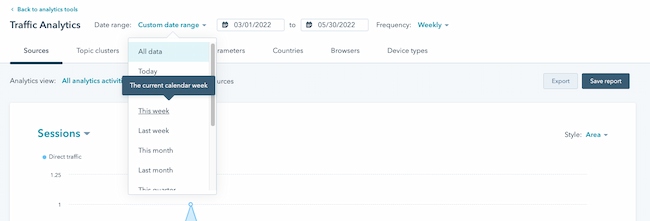
Step 5: Review the types of data and metrics that answer your questions.
Step 6: Export the report to save your data.
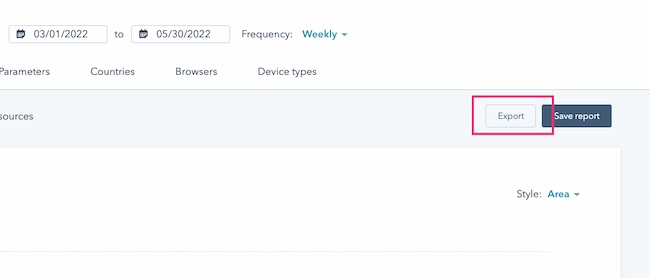
4. Calculate change over time.
While most analytics tools are easy to use, data analysis can be tough. There are countless ways to parse web traffic data.
There are many ways that you can calculate change on your website. You might be a little overwhelmed by all the options, and that’s normal. If you’re new to web traffic analysis, this guide to commonly used website tracking terms can help.
The formula below is a great place to start as you begin to measure your website performance over time.
Traffic Growth
Let’s say we’re calculating traffic growth from February to March. A simple formula to calculate this change is:
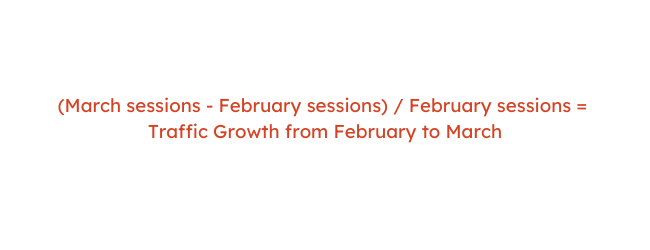
(March sessions – February sessions) / February sessions
Here’s a numerical example: (1,530-1090)/1,090 = 0.4036
Percentages are easier to read at a glance than decimals, so you may want to convert this number to a percentage by multiplying your result by 100.
For example, .4036 x 100 = 40.36%
5. Dive deeper on your traffic sources.
Once you have a clear picture of growth and other key KPIs, you may have already found some issues you want to work on.
One common question for sites with low visit and session numbers is where website traffic is coming from. There are many different sources that can contribute to your website traffic.
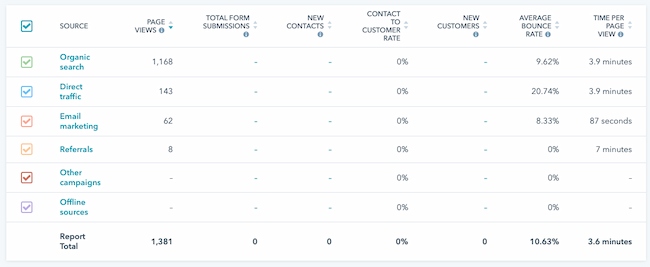
These four sources are the most common:
Direct
Direct traffic usually comes to a web page through other pages on your website. Traffic might also show up as “Direct” when a user types your URL directly into the browser. Direct can also act as a catch-all source for many analytics tools.
Organic search
This website traffic comes from search engines like Google, Bing, and DuckDuckGo. These sources usually show up in your analytics reports automatically.
That said, it’s a good idea to take a look at your settings to make sure that you understand the automatic settings in your tool. For example, DuckDuckGo shows up in organic search sources on some platforms, and in direct sources on others.
Referral
Referrals are site visits that come to you from other websites through backlinks. You can learn more about backlinks in this free lesson.
Social media
These sources show you how much traffic is coming from social media. Some tools will also separate paid and organic social media sources.
As you begin using your analytics to solve problems and troubleshoot to improve your strategies, you may want to learn more. To get you started, check out this guide to website traffic sources.
Now that you’ve learned the basics of measuring your website traffic, it’s time to talk goals.
How to Calculate Traffic Goals to Increase Website Revenue
You may already be familiar with revenue marketing. It’s a strategy that many of HubSpot’s prospects, customers, and partners use.
But it’s also complex and it takes a lot of work to put into action. Marketing analytics tools make it easier to get the data to run the model. But if you’re just learning how to predict and measure ROI from inbound marketing, you may want something simple.
These are the basics:
Revenue Goals Determine Sales Goals
Sales Goals Determine Lead Goals
Lead Goals Determine Traffic Goals
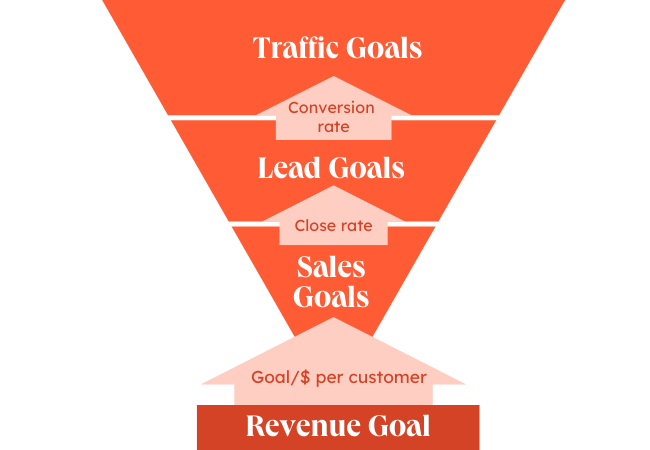
Let’s talk about how to convert website traffic to revenue step-by-step.
1. Calculate the number of new customers you need in a month.
Most companies have monthly or quarterly revenue goals. If you’re a small business owner or startup and you don’t have these goals, set your goals today. If you’re in marketing and you don’t know what the plans are, sit down with your leadership team and ask, “How can I better support the monthly revenue targets?”
Once you have that number, use this goal to calculate the number of new customers you need each month. The formula is simple:
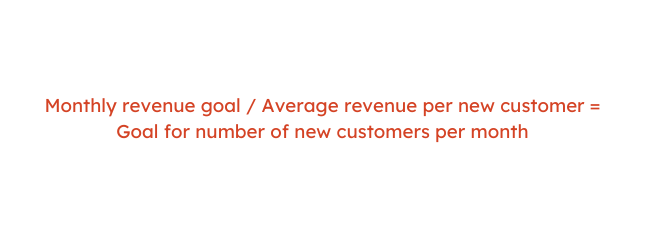
Monthly revenue goal / Average revenue per new customer = Goal for number of new customers per month
2. Calculate the number of leads you need to hit your new customer goal.
Now that you have a rough number of customers you’re looking for, it’s time to calculate how many leads you need.
To calculate this number you’ll need the average website lead to customer conversion rate for your business. Your conversion rate is the number of leads that take the action you want them to take.
If your business relies on cold calling, this could be tough to figure out. But most businesses will have an appointment to customer close ratio.
If your business doesn’t have a process for calculating your conversion rate, there are also tools that can help. This sales conversion calculator makes it easier for your team to decide conversion and drop-off rates for your sales leads.
Once you have this number, use the formula below to calculate your goal for leads.
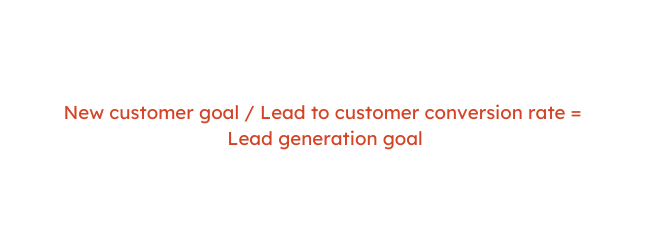
New customer goal / Lead to customer conversion rate = Lead generation goal
3. Calculate the traffic you need to meet your lead goal.
To calculate how much traffic you need, you’ll want to figure out your website visitor to lead conversion rate. If you just started tracking your website traffic it may be difficult to calculate this number.
That said, some businesses have lead tracking set up. With lead tracking you can automatically see:
- Lead sources
- Where leads are in the sales and marketing process
- Who is working with each lead
If you’re keeping track of the number of leads you’re getting from your website per month, you should be able to combine this figure with your most recent website traffic numbers.
If you’re not able to calculate your visitor to lead conversion rate, do an online search for averages in your industry. Companies that do online lead generation right can get a visitor to lead conversion rate that’s 10% or more in some industries.
Once you have this number, use the formula below to calculate how much website traffic you will need to meet your revenue goals.
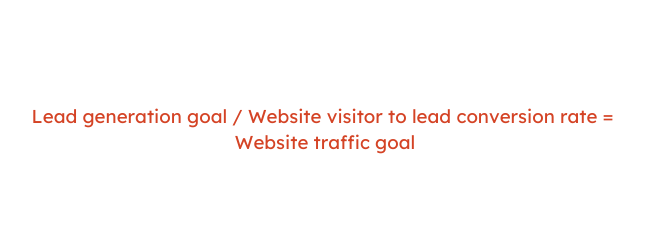
Lead generation goal / Website visitor to lead conversion rate = Website traffic goal
What Comes Next: How Do You Improve Your Website Traffic?
Calculating website traffic comes after you’ve built your website and started posting content. But this process isn’t an end, it’s a beginning. As you continue to check your site traffic, you’ll develop a better understanding of your customers and how they use your site. These insights will help you build better marketing, products, and strategies.
It’s easy to get overwhelmed once you start looking at your website data every month, but stay open. If you keep learning, your traffic, leads, sales, and revenue have nowhere to go but up.
This post was originally published in April 2010 and has been updated for comprehensiveness.

How Local Business Schema Can Boost Your Company’s Visibility Online
You’ve started a website for your local business, but with so much competition out there, you may be struggling to make your website more visible online. That lack of visibility could hinder potential customers from finding your company. To improve your visibility in search engine results, local business schema could be the tool you need.
By including local business schema in the code of your website, search engines like Google, Bing, and Yahoo will be able to better understand your business and rank it higher in search results. But before you can start implementing local business schema, you need to first learn what it is and how it works.

What is local business schema?
Local business schema is a kind of structured data markup code that can be added to your business’ website to make it easier for search engines to identify what type of organization you are and the products or services you provide.
Schema markup was created by search engines to better understand and display data using common groups of tags. Your business can benefit from schema markup because it can help you better optimize your website for local SEO — one of the deciding factors in how your content is ranked in SERPs.
How to Add Local Business Schema
To add local business schema to your website, first visit schema.org/LocalBusiness then follow the steps below:
Step 1: Determine the category for your company.
Identify the niche category you are optimizing your website for, and be as specific as possible. For example, if you own a burger restaurant, use the “FoodEstablishment” code. If your burger spot is considered fast food, you can further optimize by choosing the “FastFoodRestaurant Code.”

If you can’t find a category that fits your business, simply use a generic business schema like Local Business or Organization, then use the “sameAs” property to add a Wikipedia or Wikidata entry that is more specific to your type of business.
Step 2: Create or update your About page.
Your About page should be filled with information about your business and include a unique “AboutPage” schema item. Make sure the content is easily readable to visitors of your site, and add as many — or as few — related schema properties to better inform search engines about your organization.
Step 3: Test your code using Google’s Rich Results Test or the Schema Markup Validator.
You can enter your code into the Rich Results Test to see which Google rich results are generated by the structured data on your page. You can also use the tool to preview how rich results will look in Google search.

To test your structured data without Google feature-specific warnings, enter your code into the Schema Markup Validator.
Step 4: Add and Publish your local business schema to your website.
You can add your schema directly within your HTML code or use a managed user interface, schema app, or plugin.
Step 5: Crawl and test your local business schema markup using Google’s Search Console.
Enter your domain or URL prefix to measure your website’s search traffic performance to see if there are any issues or improvements to be made.
Going forward, monitor the results of your schema and make adjustments as needed. You will likely have to repeat this process again in the future as Google changes its approach to schema and if anything in your business listing changes.
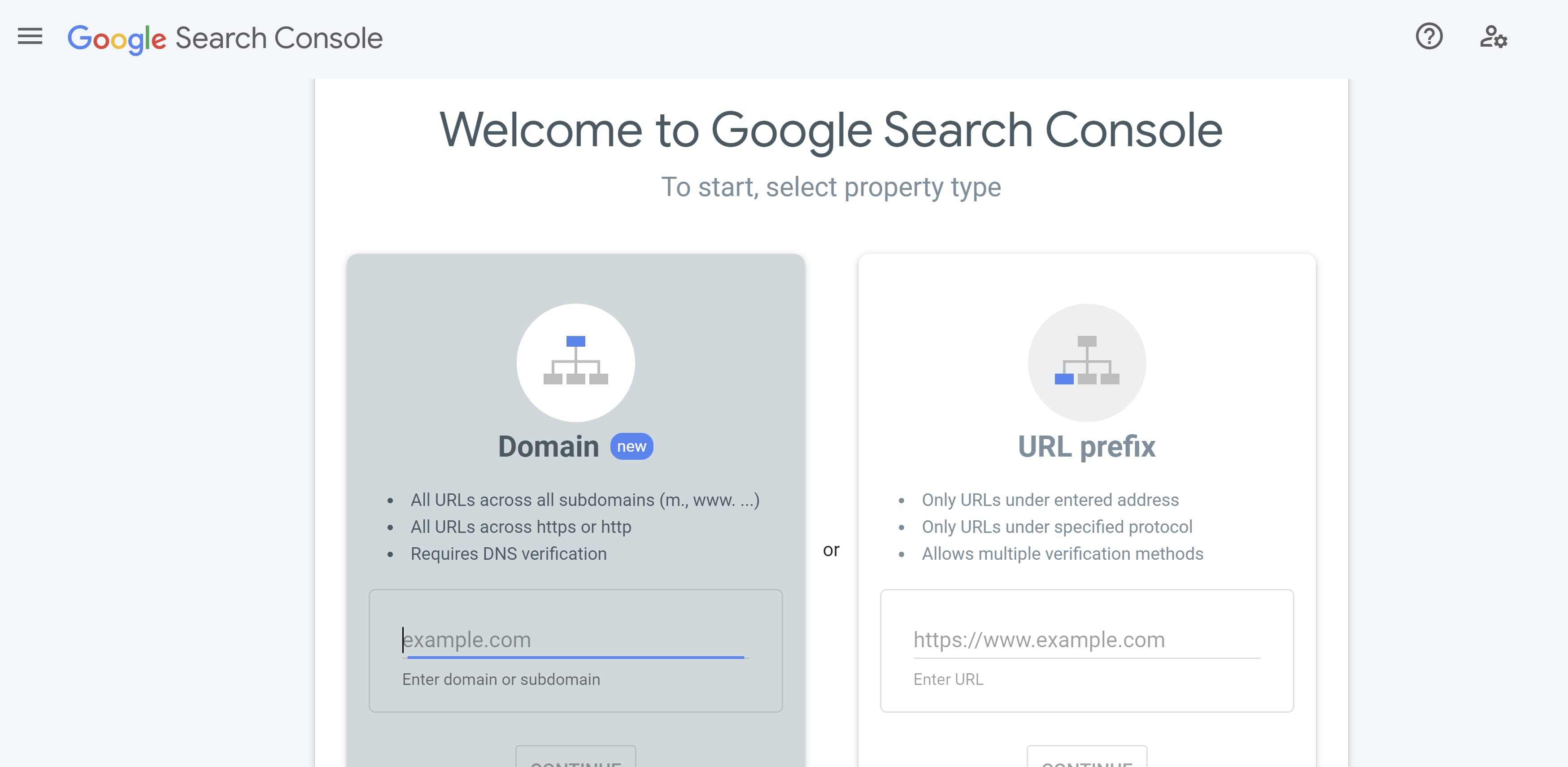
Local Business Schema Examples
Below is an example of a local business schema taken from schema.org/LocalBusiness. The example is in reference to a restaurant called GreatFood.
GreatFood Local Business Schema Example Without Markup
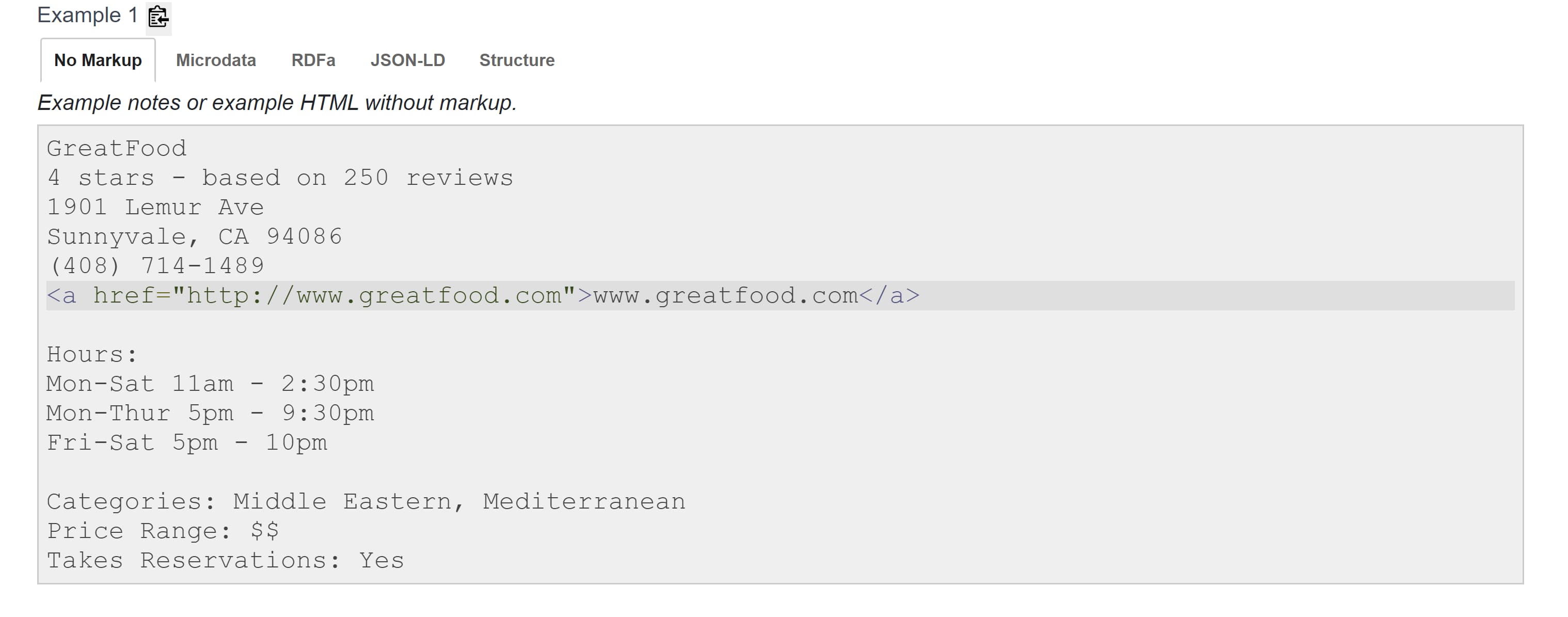
In the above HTML code, you can clearly see the name of the restaurant (GreatFood), the address, phone number, and hours of operation. In the example below from the same restaurant, you can see this information represented in the schema code. This format is the standard schema microdata format, the most common format that is the easiest to implement.
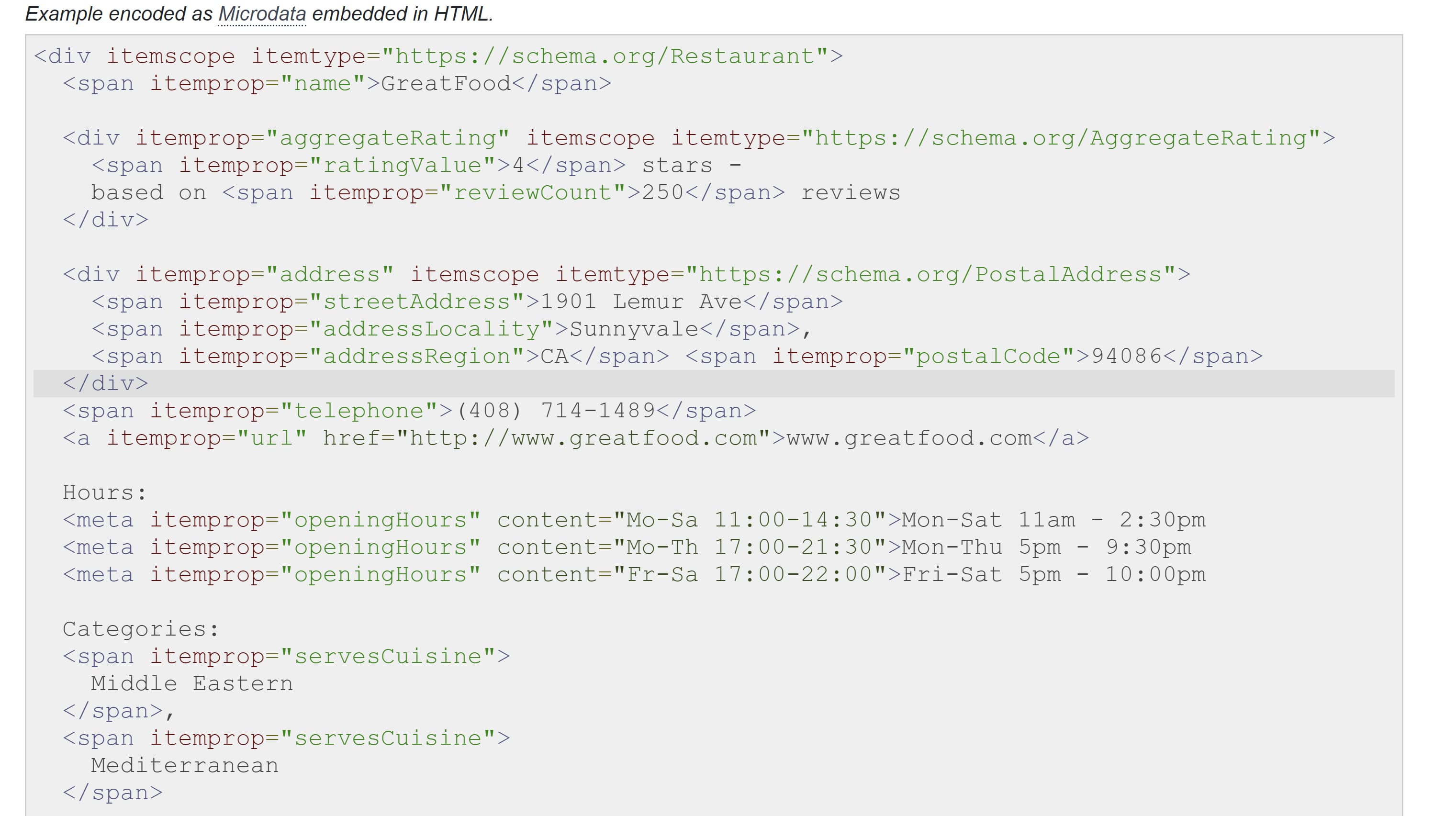
Below is the format you would use for JSON-LD format, which would be used for JavaScript.
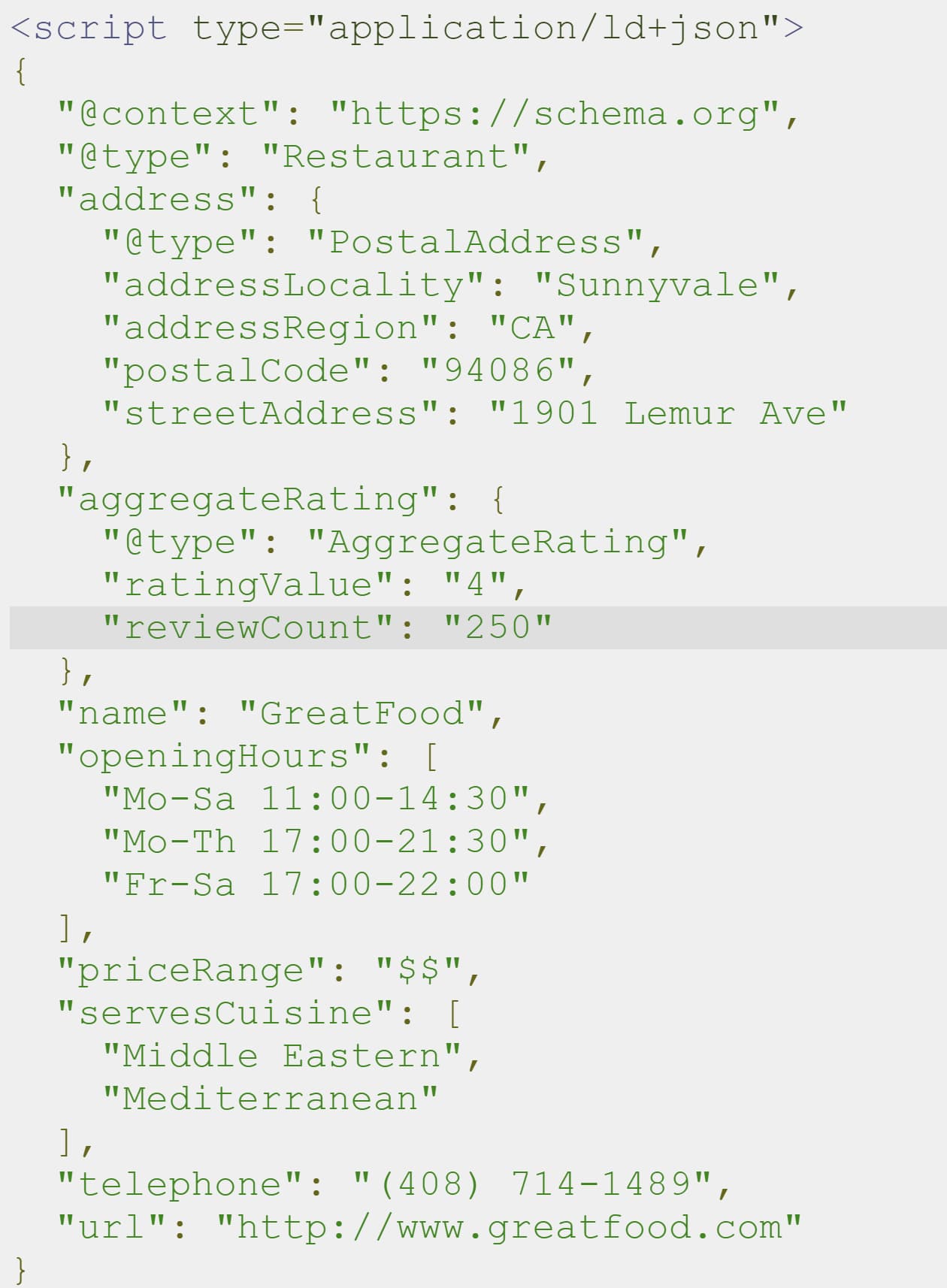
Finally, the below example is the RDFa format, which works in a variety of documents — including XML, HTML 4, SVG, and more.
Incorporating local business schema can seem complicated. However, if you know the category your business falls into and include important information such as the name, address, phone number, and hours of operation, you can easily use local business schema to boost your website in search engine results.

What is Interactive Marketing [+ 15 Inventive Examples]
The content formats we rely on today have an uncanny resemblance to the content formats we relied on yesterday — our blog posts look like print articles, our offers look like books, and our slide decks look like presentations. While these formats are fine for the most part, marketers can take their content from “fine” to “exceptional” by using interactive marketing.
Interactive marketing gives marketers a huge opportunity to engage audiences at record levels. Its early adopters have proven that if marketers want to cut through the noise, they can’t just do what they’ve always been doing. They need to refresh their work.
But obviously, you can’t properly use interactive marketing if you don’t know what it is — so here’s everything you need to know about interactive marketing broken down into easy-to-navigate sections:
What is interactive marketing?
Common Types of Interactive Marketing Strategies
Benefits of Interactive Marketing
Interactive Marketing Examples
- User-Generated Content | Glass Animals
- Augmented Reality Shopping | Lancome
- Interactive Series | Sweet Digs by Eko and Refinery29
- Vimeo Virtual Courses That Get You Moving | Y7
- The Structure of Stand-Up Comedy | The Pudding
- Conversational Marketing | HubSpot
- A Personal Thank You with Vidyard | Amnesty International Canada
- Interactive Infographic| Family Fun in Scottsdale by Marriott
- Interactive Virtual Events | Built to Last by Wistia
- Interactive Slide Show | The New Media Message by Velocity Partners
- Interactive Article | The Big Gronkowski by Ceros
- Immersive Video | Scotland From the Sky by BBC Scotland
- Playable Video Game Ad | Narcos: Cartel Wars
- Interactive Voice Ad on Pandora | Doritos
- Interactive Idea Generation | Outgrow
Applying Interactive Marketing to Your Campaigns

Common Types of Interactive Marketing Strategies
- Interactive videos: Using video is a great way to explain a topic or entertain viewers. Savvy marketers have found new ways to engage viewers by adding CTAs in videos prompting them to subscribe or participate in the conversation in real time. Some videos allow viewers to answer questions by clicking a set of multiple choice answers right on the screen. Other formats immerse the viewer in beautiful landscapes — a technique that’s becoming more popular as the use of 360-degree video becomes more prevalent.
- Quizzes, surveys, and polls: Quizzes and polls are a fun way to get visitors to interact with your site — and you can create them for just about any topic. Buzzfeed has excelled in this area, but it’s not uncommon to see them used for travel, home search, and interior design sites. They are popular tools for social media marketing as well.
- Personalized content: From addressing customers by name in email to curating specific ads targeted at their individual needs, adding a personal touch gives the impression that you are speaking directly to them. Ever abandoned an item in your cart and received an email reminder about it later? That’s personalized marketing at work.
- Interactive storytelling: Keeping readers engaged with a long-form article can be difficult — that’s why interactive storytelling can be a powerful resource for marketers. Uses infographics, gifs, video, clickable maps, charts, and other visual aids to help break up text and keep readers from getting burnt-out or bored.
- Calculators: While calculators don’t sound super interesting, they are incredibly useful for organizations that want to showcase data. Looking for a home? You’ve probably used a mortgage calculator to get a ballpark estimate of your monthly payment.
Benefits of Interactive Marketing
Interactive marketing offers several advantages, including:
Boosted Conversion Rates
Interactive marketing gives potential customers the chance to make a purchase immediately. For example, including a call-to-action at points of purchases is a common, effective interactive marketing tactic. I’m sure you’ve seen buttons during digital ads that say “purchase now” or different points on a website that include an “add to cart” button.
Increased Audience Engagement
Delighting your audience is the key to engaging it — that’s why tactics like online quizzes, personalized content, and interactive videos are so helpful. It gives audiences a unique experience that makes interacting with your business fun. If your audience is having fun, they’re more likely to stay loyal to and potentially evangelize your company.
Instant Feedback
You can easily and quickly gauge how your audience feels about your company through tactics like quizzes and polls. Is your website easily navigable? Do your products meet expectations? Are there any areas that need improvement? With interactive marketing, you can better connect to your audience and allow their voices to be heard so you can see what works and what doesn’t.
Interactive Marketing Examples
Capturing attention sounds great in theory, but you may be unsure of how to incorporate interactive marketing into your strategy. To get some great ideas, learn from some of these great examples of interactive marketing:
1. User-Generated Content | Glass Animals
Why we like it:
- The band’s website gives fans the opportunity to create music and art that the band will use for future projects, such as music videos, social media campaigns, and more.
- The website also includes an informal message from its lead singer explaining how the landing page is made to resemble his own desktop — giving fans a little insight into the mind of the singer and fostering a more personal connection.
England-based band Glass Animals took a fresh approach to its website’s landing page by making it appear like a computer desktop from the 90s/early 2000s. The website’s appearance entices visitors to click on different icons.
The band’s singer, Dave Bailey, also left a message to fans saying to “Dig around. Use the sounds, use the artwork … ” and to email the band anything they’ve made so it can be used in a special project. Clicking on the folder that says “Cherry stems” reveals sound files visitors can use to create their own music or projects.
There’s even an icon that says “MEME-IT” that allows users to generate their own memes of the band. The website provides a fun experience for visitors and gets fans involved in the band’s creative process. The website’s landing page almost feels like a game, and who doesn’t love games?
2. Augmented Reality Shopping | Lancome
Why we like it:
- The feature allows visitors to Lancome’s Instagram page to virtually “try on” some of the brand’s products before purchasing, giving them the opportunity to purchase with more confidence.
- The feature is easy to use and visitors can simply swipe through different shades the same way they would swipe through different filters on the app.
Online shopping is popular among many consumers and has only gotten more popular since the start of the pandemic. However, one of the downsides of online shopping is that customers aren’t always able to try on a purchase before buying.
Makeup company Lancome addresses this issue on its Instagram page by providing filters of different makeup shades users can access through their phone’s cameras. This allows customers to see how a shade would look on their face before deciding to buy.
3. Interactive Series | Sweet Digs by Eko and Refinery29
Why we like it:
- This series gets viewers directly involved with the show by having them choose furniture or answer questions in real time.
- Additionally, it builds on Refinery29’s already successful content
If you’ve ever watched a house hunting or interior design show and either found yourself talking to the TV or gawking at the owner’s decor choices, Refinery29’s Sweet Digs is for you. It partnered with Eko, a platform known for creating interactive shows, to bring viewers inside the coolest and quirkiest homes — with a twist.
Instead of merely being a voyeur, viewers are prompted to interact with homeowners and renters. From recommending how they should redecorate to guessing how much certain furniture items cost, viewers can get in on the action. Even more satisfying, you’ll get to see if they chose the items you suggested at the end. It’s HGTV on steroids.
The best part is Refinery29 didn’t need to create a new marketing idea from scratch. Instead, it took a concept that already did well and improved upon it, using Eko’s interactive tools. This new content gives viewers a sense of agency over the content they’re consuming while also leveling up engagement.
4. Vimeo Virtual Courses That Get You Moving | Y7
Why we like it:
- Adding details like a studio playlist helped Y7 patrons create the studio atmosphere at home.
- Creating an online community not only helped the studio stay afloat, it provided patrons a sense of normalcy in uncertain times.
- The experience is user-friendly and easy to navigate thanks to small details like a video QR code.
Pandemic restrictions shuttered many businesses that required in-person interaction, like gyms and fitness studios. Those that survived adapted their offerings for the virtual market. But let’s face it — working out at home just isn’t the same as getting a boutique fitness experience.
Trendy Yoga studio Y7, rose to the occasion. Using Vimeo OTT, the brand known for its candlelit classes and trap soundtrack moved instruction for all 15 studios online. It then kicked the online experience up a notch by helping its students create the studio vibe at home, complete with an in video QR code to access the class playlist.
All the little details paid off. These improvements in virtual teaching kept students coming back for more, enabling Y7 to stay in business and retain its loyal fanbase.
5. The Structure of Stand-Up Comedy | The Pudding
Why we like it:
- The visuals and diagrams dissecting Wong’s routine are like taking a class on performance and creative writing at the same time.
- It leaves the audience with a deeper understanding of not only how Wong crafts her routine, but also allows them to connect with her in an empathetic way.
- The diagram is easy-to-understand and gives fans a better understanding of the artistry behind comedy.
Stand-up comedians might seem like the lucky wisecrackers who are blessed with the talent to improvise some of the funniest jokes and bits you’ve ever heard, but in reality, they polish their performance with painstaking precision.
To crack their audiences up as much as possible, they make sure their routines’ stories seamlessly flow from one to the other. However, some comedians like Ali Wong take their stand-up preparation to an entirely different level.
In its interactive slideshow about how Ali Wong structured her Netflix special Baby Cobra, The Pudding, a digital publication that crafts visual essays about culture and entertainment, describes how she sculpts her routine into a narrative instead of just telling a bunch of separate jokes.
By visually outlining her entire routine, The Pudding reveals how Ali Wong weaved all her bits into a story, building her world and perception of life in a way that her audience can truly understand, which left them with a deeper feeling of empathy, meaning, and ultimately humor.
6. Conversational Marketing | HubSpot
Why we like it:
- The chatbot’s prompts allow users to customize their own experience on the site, ensuring that they quickly get the information they are looking for.
- Since the user is dictating their experience on the site, it eliminates any sales pressure, providing a better overall user experience.
- Most people are already familiar with chats, text messages, and direct messaging in their daily life, so the chatbot feature is easy for visitors to adapt to.
We rely on messaging apps to interact with friends and family, so it only makes sense that brands should incorporate them for communication to reduce friction in the buying journey. Despite this, marketers have been sluggish to adopt conversational marketing — using chatbots, live chat, Facebook Messenger, and other chat features — into their inbound marketing strategies.
In fact, according to Business 2 Community, only 36% of companies have adopted these tactics. At HubSpot, we hope to change that by offering new messaging tools that can integrate with your entire marketing suite and database.
We double down on this idea by using our own conversational marketing software on our homepage. Website visitors are asked a question and given several choices of potential answers. This allows the prospect to engage in website content almost like a “choose your own adventure” story. This improves the overall site experience and ensures that the site is serving up the content (or actions) that will benefit them the most… without any sales pressure.
7. A Personal Thank You with Vidyard | Amnesty International Canada

Why we like it:
- Giving donors a visual representation of how their donation aided Amnesty International’s various causes builds trust and establishes a personal connection.
- Donors will most-likely share the video with friends and family, which could lead to an increase in donations.
In social settings, getting too personal too quickly is intrusive. However, when it comes to marketing, getting a little personal can go a long way in building brand loyalty.
Take this carefully crafted thank you video created by Amnesty International Canada using Vidyard’s platform. Personalized videos like the one above were sent to all of the organization’s donors. After reviewing their metrics, the organization reported higher donor satisfaction and retention from the use of these videos.
Sending a thank you card or email is nice, but adding a personal touch in the form of a video really won their donors over. When customers are happy with your product or service, they will inevitably share it with their network, providing you with valuable word of mouth promotion and credibility.
8. Interactive Infographic | Family Fun in Scottsdale by Marriott
Why we like it:
- This interactive ad is a fun take on vacation planning.
- The clickable flowchart acts as a tool to help viewers customize their vacation activities to the parameters they set (e.g., interests, age)
Marriott Hotels manages to make vacation planning even more fun while positioning their brand in front of potential customers with an interactive infographic. Vacationers who are headed to Scottsdale are able to take a customized path through the flowchart to receive destination advice. Just a little bit of animation goes a long way, and it adds a touch of personalization that normal infographics don’t.
The beauty of this is that infographics are a great visual tool that have a ton of utility. By using lemonly.com, Marriott pushes the envelope just a step further, which provides unexpected delight.
9. Interactive Virtual Events | Built to Last by Wistia
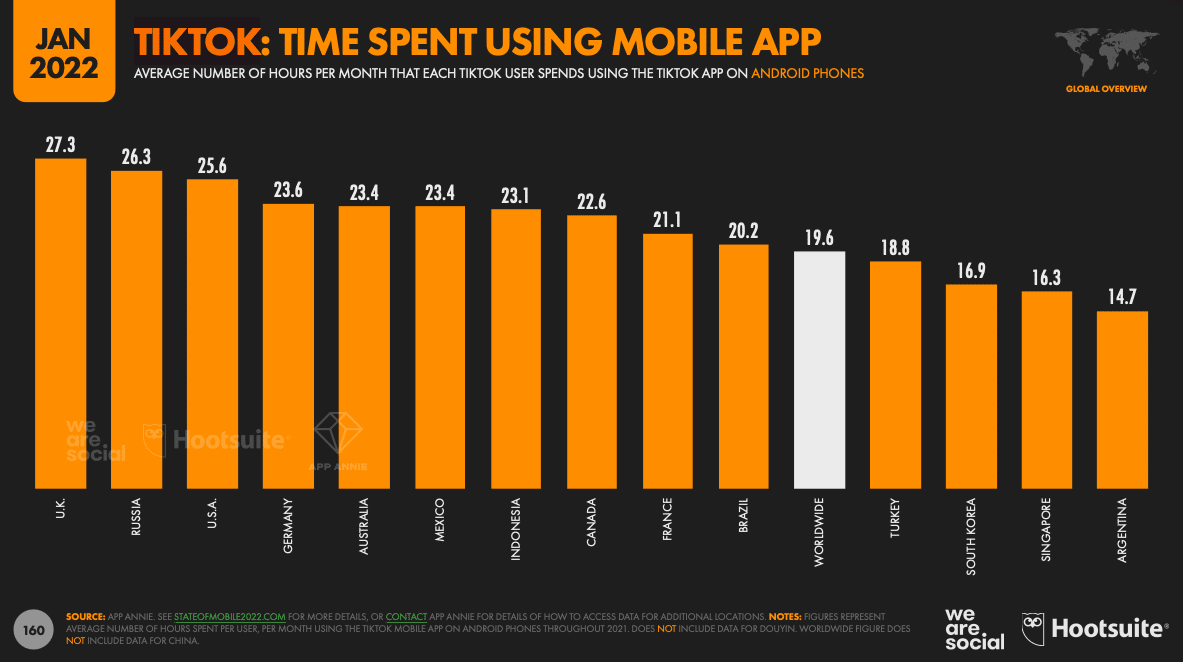
Why we like it:
- By having an audio conference instead of a traditional virtual one, Wistia freed up their audience to attend whenever was convenient for them (while running errands, at the gym, etc).
- Visitors could attend any session in whatever order they liked instead of being forced into a rigid schedule, making the event more accessible.
By now we’re all used to virtual events, but meeting and video fatigue is real. How do you keep guests engaged? By mixing it up. That’s what Buffer and Wistia set out to do when they created the first ever audio conference for brand builders.
That’s right, no staring at the screen or being stuck at a desk. The audio format allowed listeners to join in from wherever they were, be it during their commute or while taking an afternoon stroll by connecting to a podcast player.
Each session ranged in length from roughly 25-35 minutes, and gave listeners the option to “choose their own adventure” by simply selecting the sessions they wanted to attend. This reduced friction as listeners were free to attend only the sessions relevant to their interests instead of committing several hours of their time.
10. Interactive Slide Show | The New Media Message by Velocity Partners

Why we like it:
- This slideshow beautifully illustrates the importance of showing rather than telling audiences why they should care about a particular topic.
- The build-up from the basic slides walks us through the progression of how using more interactive and attention grabbing graphics changes the audience’s experience in real time.
In its interactive slideshow, which honestly looks like it belongs in Tron, Velocity Partners, a B2B marketing agency, explains why innovative marketers need to leverage new content formats in order to tell more refreshing stories.
Velocity Partners shows, not tells, how their interactive slideshow can captivate an audience. This is in stark contrast to how marketers have churned out so many blog posts, ebooks, and SlideShares that they’ve become dull and predictable. The end result of this message hammers home the point that the most engaging and surprising mediums are the best at delivering the most engaging and surprising stories.
11. Interactive Article | The Big Gronkowski by Ceros
Why we like it:
- Ceros’ take on a visual representation of the article instead of traditional text is fresh, and immediately draws readers in.
- Bucking the norms of article structure, readers can quickly toggle to the information they want to know first, rather than having it dictated to them.
When Rob Gronkowski temporarily retired in 2019, Ceros, an experiential content creation platform, decided to create an interactive article that spotlights the two things Gronk will always be remembered for — his athletic prowess and goofy attitude.
When you visit the interactive article, you can toggle between Gronk’s “Warrior” and “Goofball” side, clicking on hotspots that reveal his impressive achievements, his laundry list of injuries, and some of the funniest things he’s ever done. Once you finish interacting with the article, you’ll truly understand how Rob Gronkowski is just as athletic as he is goofy.
12. Immersive Video | Scotland From the Sky by BBC Scotland

Why we like it:
- This 360-degree video nails the art of showing rather than telling.
- Using Scotland’s immersive landscapes as the backdrop, the viewer is made to feel like they are exploring Glen Coe with the filmmaker.
- The video’s like this are so visually stunning that they can encourage visitors to share the link with others, boosting engagement.
In 2019, Rough Guides, a renowned travel guidebook, named Scotland the most beautiful country in the world.
And a big reason why it’s such a spectacle is that Glen Coe, a Scottish valley that cuts through the ruins of an ancient supervolcano, is one of the most striking landscapes in the world.
With their immersive, 360-degree video of Glen Coe, BBC Scotland can grip viewers because they’re able to experience the landscape from an intimate point of view at every possible angle, making them feel like they’re actually there.
13. Playable Video Game Ad | Narcos: Cartel Wars

Why we like it:
- The ability for people to go from just viewing the game to participating in it is a great way to draw them in.
- Allowing potential customers to play the game before buying eliminates sales pressure and puts the customer in control of their experience.
In the past, video game apps had to use video or gif demos to advertise gameplay in hopes to attract new players and increase app downloads. The thing about watching videos, though, is that it’s a passive activity. The visuals of the game may be enough to attract prospective players’ attention, but it may fall short of giving them enough inertia to actually engage and play.
FTX Games found their way around this by partnering with Glispa for their game Narcos: Cartel Wars. Prospects are immediately drawn into the action of the game with the ability to try it before buying it. Rockets and explosions abound for a few rounds before the demo prompts the player to install the app and continue their game.
The good news is that this type of functionality is about to become much more mainstream with Facebook offering playable video ads on their platform. Much like the Cartel Wars example, these playable ads are composed of:
- A short video preview
- A playable demo to get people hooked on the gameplay
- A call-to-action to get the users to take the next step
14. Interactive Voice Ad on Pandora | Doritos
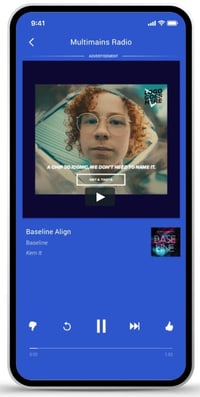
Why we like it:
- Doritos found a creative way to take the audience from passive to active listeners, complete with crunching chip sounds to get folks salivating.
- The ad serves up questions to the audience and then uses AI to tailor their experience based on their answers.
Pandora for Brands has recently begun testing a new interactive ad functionality on their platform that allows users to verbally engage with the ad. Doritos is one of the first brands utilizing this new interactive format on Pandora.
The audio uses the distinctive Doritos crunch and then prompts the user to answer a yes or no question. Using artificial intelligence, the ad can then serve up a personalized experience based on how the listener answered.
This is exciting for the same reason as the playable video game ads are: They disrupt passive listening in an attempt to get the listener to engage and actually process the information being conveyed to them. Plus, by being able to respond hands-free, there is less friction in order to learn more.
15. Interactive Idea Generation | Outgrow
Why we like it:
- The idea generator allows any marketer to input their industry and business website and automatically get ideas for different types of interactive content.
- The results page shows personalized content and tools for specific industries, audiences, and positions in the conversion funnel.
In the past, idea generation required more generic statements or long calls because we could not easily personalize ideas and use cases for each customer at scale. The advantage of an idea generator is that it shows any marketer personalized sets of ideas for how they can use and better leverage your product or service immediately after they input a few data points.
Depending on the industry, audience, and position in the funnel, Outgrow will create a list of tools and content to help convert and attract website visitors. Depending on the need, it will suggest different quizzes, calculators, and chatbots to help engage traffic and provide more lead generation.
Applying Interactive Marketing to Your Campaigns
The campaigns in this article should give you a few takeaways to apply to your own marketing. As you create great content, you should also be thinking about:
- How to disrupt expectation to earn attention, engagement, and interest
- How to best personalize the experience for each individual prospect
- How to reduce friction as much as possible to increase momentum
By putting concepts like these in action, you’ll be in a position to generate buzz, make your content stickier, enhance the experience, and fuel your flywheel.
This article was originally posted April 3, 2020 and has been updated for comprehensiveness.

The 24 Best Websites to Cure Your Boredom in 2022
There’s a lot of content out there about productivity – everything from hacks to shortcuts to tips and tricks for how to get more done in less time.

But what about those times when you’re bored? Well, there is no shortage of websites to cure your boredom.
Here’s a shortlist of the most wonderfully entertaining places to waste time on the internet outside of email and social media.
1. Wordle
In early 2022, people’s timelines on social media – particularly Twitter – started filling with green, yellow, and black squares.
It seemed like everyone was playing a game called Wordle – a game where you have six chances to guess the five-letter word of the day.
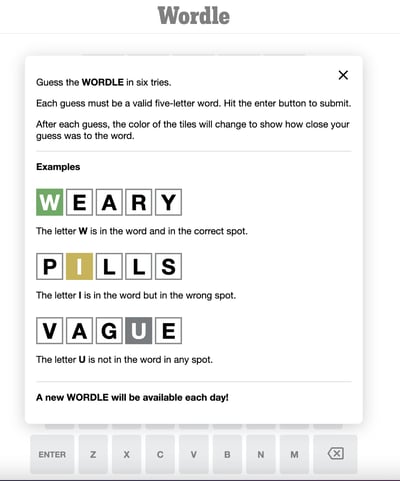
It’s the same word for all players, making it a fun way to connect with people around the world. In addition, you can only play it once a day, which builds anticipation and excitement for what’s to come.
What’s more, the game tracks players by device. As such, you can keep track of your streak every day and share it on social media to show others how many tries it took to make the right guess.
2. Heardle
If you love the concept of Wordle but wish there was a musical version, you’re in luck.
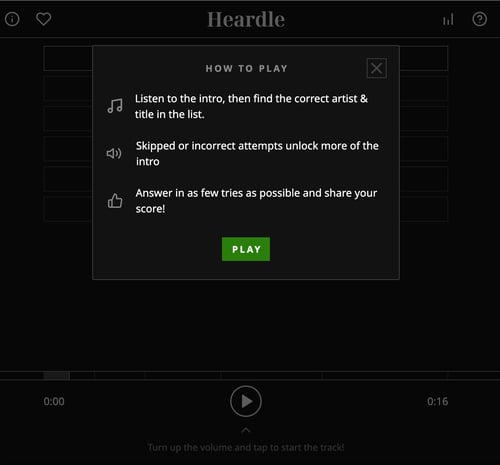 Heardle emerged shortly after Wordle blew up for music lovers and connoisseurs alike. It works by playing a short snippet of a song and giving you six tries to guess the right song.
It’s another great game to play when you have some extra time on your hands.
3. GeoGuesser
Ever wish you could take a trip around the world in a day or less? With GeoGuesser, you can.
This fun game tests your geography by showing you a randomized place around the world and having you guess where it is.

It’s not only a great way to test your knowledge but also discover new places to add to your travel bucket list.
Most of these locations are in tourist attractions, allowing you to get a 360-peek at these places before you even visit.
4. Know Your Meme
Memes go viral every day and it can be hard to track down where they originate from.
Know Your Meme answers that question by digging into every viral meme and finding out who is in the original image, who first posted it, and what it’s about.
You’ll find viral memes, trending memes, and likely memes you’ve never seen before. It’s a fun deep dive that at best, will arm you with a few fun memes to share on social media.
5. The Oatmeal
The Oatmeal is another one of my absolute favorite places to spend time online. It’s a huge library of awesome content – specifically graphics. Even if you’ve read everything already, it’s the kind of stuff you can read over and over again.
Some of my favorite posts include:
6. Supercook
If you want to surf the internet in a semi-productive way – but not so productive that you actually have to leave the house – then check out Supercook.
Here’s how it works: You tell it which ingredients you have in stock in your home, and it’ll give you a big list of recipes you can make using just those ingredients.
It’s a fun way to stay thrifty, clean out the fridge, and make sure food doesn’t go to waste.
7. OCEARCH Shark Tracker
Tracking sharks as they swim around the ocean may not be the most conventional way to waste time on the internet but it might be the coolest.
The Track Sharker tool by Marine Research Group OCEARCH lets you track tagged sharks – who all have names by the way – as they travel all over the world.
You can even zoom in on a specific location to see which sharks are hanging out there and where they’ve been swimming and traveling for the past year. Go, Rocket, go!
8. Apartment Therapy

If you’re even a little bit of a fan of home decor or DIY projects, this is a website you might find yourself spending hours and hours on. There’s a ton of awesome visual and written content on here.
My favorites include their “before and after” series, their “small spaces” series, and the tours of people’s actual apartments and homes.
Plus, they have a whole lot of helpful articles giving tips on everything from how to redo your stairs to ideas for using that awkward space above your fridge. There’s no shortage of useful and fun information on here, making it prime for endless browsing.
One of our own was recently featured on ApartmentTherapy too — check out INBOUND Elijah‘s adorable spot here.
9. Gravity Points

Gravity Points is a digital “pen” created by Akimitsu Hamamuro, and it is quite mesmerizing. The website simulates the effect of gravity by allowing you to plot small gravity centers across your screen. Then, even smaller floating objects will flock to these gravity centers and orbit them.
The more gravity centers you plot, the more these forces will start to compete, making your screen all the more chaotic. And yes, your gravity points can absorb one another to create a black hole.
It’s outer space right there on your computer screen.
10. Pottermore

As a marketer, you might dive so deep into branding your business, you have no time to brand yourself. Even if you’re not a massive Harry Potter fan, Pottermore can scratch that itch for you.
Pottermore is widely recognized as the official website for finding your Patronus, your wand type, the Hogwarts House you belong to (of course), and much more.
The quizzes you take to earn these identities are just obscure enough to hold your excitement for the result, and might even encourage you to read (or reread) the famous Harry Potter books — something you should definitely do to balance out your time-wasting website sessions.
11. The Toast

If you’re into great (and hilarious) fiction writing, then you’ll definitely want to bookmark this site. Every day, writers Nicole Cliffe and Mallory Ortberg publish a post on “everything from literary characters that never were to female pickpockets of Gold Rush-era San Francisco,” reads their About page.
To get an idea of whether it’s up your alley, start with their post, “A Day in the Life of Seth MacFarlane, Human Male (Definitely Not a Swarm of Hyper-Alert Bees and a Metal Jaw.)“
It’s just so good.
12. The Onion
If you haven’t spent some quality time reading the online satirical newspaper The Onion, then you’re seriously missing out on a good laugh.
The publication started in 1988 and they’ve managed to successfully maintain a high standard for humor and writing ever since.
Their headlines are laugh-out-loud funny in and of themselves — from “Free-Thinking Cat Sh**s Outside the Box” to “Archaeological Dig Uncovers Ancient Race of Skeleton People” to “Buyer Of $450 Million Da Vinci Painting Sort Of Assumed It Would Come With Frame.”
This awesome episode of NPR’s This American Life gives you a really cool peek into The Onion‘s editorial process.
13. Cracked

Similar to The Onion, Cracked is a pseudo magazine for your everyday life —and yes, it will crack you up.
While The Onion gives you a satirical take on a real news trend, Cracked makes snarky pop-culture observations that are ironic or just ridiculous by design. Sometimes the writers will say the one thing everyone’s thinking, but is afraid to say out loud. That’s Cracked for you.
You might just be passing time on this online magazine, but with respect to some of its most popular articles and pictures, it’s time well spent. Here are a few ridiculous think pieces from Cracked to whet your appetite:
- The Actual Answers to 6 Famously Unsolved Movie/TV Mysteries
- 7 Hilarious Ways Reality Would Ruin Famous Movie Scenes
- 5 Random Questions You Didn’t Know You Wanted Answered
- 6 Underrated (and Selfish) Benefits of Parenthood
14. Mental Floss

Mental Floss is a super addicting online magazine with articles covering a really wide range of topics. Their articles are really well written and researched, and usually on topics that don’t get a lot of airtime.
For example, in their “Big Questions” section, they tackle weirdly intriguing questions like why shells sound like the ocean and why yawns are contagious. Readers can even submit their own big questions.
15. HowStuffWorks
(Image)
This website is dedicated entirely to —you guessed it — how things work. And by “things,” they mean everything: from airbags to regenerative medicine to velocipede carousels.
They’ve covered so much on this website, it’ll be hard to run out of things to read about.
Plus, they have a whole bunch of really cool podcasts that have branched off the main site over the years and are worth checking out.
My favorites are “Stuff You Should Know,” “BrainStuff,” and “Stuff Mom Never Told You.”
16. Lifehacker
Lifehacker is a hub of productivity tips, tricks, and downloads. It’s basically an archive of all the information it would be incredibly useful to know, but nobody ever really teaches you.

Aside from productivity, they also cover topics such as money-saving tips, clever uses for household items, and so on.
For example, did you know there are four lengths of naps that’ll benefit you in different, very specific ways? Along with the fun articles, they have some pretty awesome, in-depth articles, like this one on how to plant ideas in someone’s mind, as well as helpful listicles like the top ten obscure Google Search tricks.
There’s so much content on there that it can be hard to find posts on specific topics. Use the Lifehacker Index for an introduction to their top-performing posts and tips on how to find posts on any topic on the website.
17. Mix
Sometimes you want to surf the internet, but don’t want to do all the paddling. For that, there’s Mix.
You might know the above website by its former name, StumbleUpon, a site (and an add-on to your internet browser) that allowed you to select topics that interested you and then served you various news and information that fit those interests. Today, it’s called Mix, and it puts a new spin on StumbleUpon’s popular content randomizer.
Mix lets you set your reader profile and then share the articles, photos, and videos you discover from your own personal “mix.” It’s a convenient way to entertain yourself and learn new things by simply telling the web to surprise you.
18. Space.com

As long as your head is in the clouds, raise it above Earth’s horizon and head on over to Space.com.
This website reports on astronomy news and trends through friendly, easy-to-digest content that, sometimes, just serves to quench your thirst for a cool nebulous shot of our solar system. Who knows? Maybe you’ll tap your inner space enthusiast.
Whether you want to see an object burn up in our atmosphere or get real into the weeds of how a black hole forms, Space.com has something for everyone. Get your fix today with this amazing picture of a green aurora seen from the International Space Station, part of Space.com’s “Image of the Day” series.
19. Imgur

Imgur collects the most viral images of the week and collects them all in one place for your mindless scrolling and enjoyment.
What I like about Imgur is it’s usually more timely than Twitter or Instagram — more popular sharing networks where funny pictures and memes might appear a week or two later.
Use Imgur to waste time and introduce your friends to the funniest stuff on the internet first.
20. Zillow
It’s fun to check out real estate in areas you might want to live — and it’s just as fun to check it out in places you’ll probably never live, but would love to in a dream world.
Go ahead and explore what’s out there.
You can set up saved searches (some more realistic than others) to relive your discoveries later.
21. Wikipedia
You didn’t think I’d write a post on where to waste time on the internet without including Wikipedia, did you? Of course not.
You’ve gotta love spiraling into the proverbial Wikipedia black hole: Look up one thing, and then check out something that’s interlinked to it.
Before you know it, you’ll have charted the entire Russian Revolution. (Read: This is an actual glimpse into my colleague Corey‘s Sunday morning.)
22. Giphy
When you need to find the perfect GIF, you can’t just stop at the first result you get for “dancing” or “awkward” or “animals being jerks.”
I could spend (… and have spent) hours on Giphy looking for juuust the right GIF.
23. Wayback Machine
Feeling nostalgic? Check out what websites have looked like over the years via Internet Archive’s famous Wayback Machine. It lets you pick a date and see exactly what any website looked like at that time. (For a real trip, compare how Facebook looked back in the 2000s to today. Remember the wall-to-wall?)
If you just want to take a quick peek, check out this roundup of what nine famous websites used to look like.
All the images in that post were taken from the Wayback Machine.
24. The Oregon Trail

Here’s a little gift for those of you who made it to the end of this post: Internet Archive — yes, the same one responsible for the Wayback Machine — made it possible for people to play “Oregon Trail,” a game beloved by many Millennials.
If “Oregon Trail” isn’t your cup of tea, the other games made available by Internet Archive include “Duke Nukem,” “Street Fighter,” “Burger Blaster,” “Indiana Jones and the Last Crusade,” “The Lion King,” and “Chuck Yeager’s Advanced Flight Trainer.” Check out the full library here.
Editor’s note: This post was originally published in August 2018 and has been updated for comprehensiveness.