10 of the Best Slack Alternatives for 2018
For more than 8 million people, Slack has become the tool they open first thing in the morning to get the workday started. And it’s become the leader of the team collaboration industry, simplifying people’s work and boosting their productivity.
But not everyone is completely elated with Slack. While some say Slack costs an arm and a leg to be able to search for more than the 10,000 messages that its freemium version limits users to, others prefer a self-hosted solution — which Slack doesn’t offer — to gain more control over their team’s communication.
Two of the top Slack alternatives, Stride and HipChat are also shutting down soon, so more people are looking for affordable team chat tools that meet their needs.
If you’re in the same boat, take a look at this list of the best Slack alternatives in 2018.
10 of the Best Slack Alternatives for 2018
1. Google Hangouts
Available On: iOS, Android, macOS, and Web

Unlike most Slack alternatives, Google Hangouts isn’t free. But if you happen to have a corporate G-Suite account, — which starts at $5 per user for each month — you’ll have automatic access to Hangouts.
The team chat app doesn’t have public channels like Slack, but you’ll be able to send direct messages or communicate in a group or a room. Rooms are thread-based conversations where you can start a new thread when you get new ideas.
Hangouts also makes audio and video calls available through a built-in integration of Google Meet. Additionally, the team chat app offers more than 40 bots that integrate with third-party apps.
2. Chanty
Available On: iOS, Android, Windows, macOS, and Web

Chanty is a simple team chat tool for small and medium-sized teams that doesn’t limit its searchable message history. Similar to Slack, you can communicate in public and private channels and through one-to-one conversations. Chanty also organizes all your files, links, tasks, and conversations into folders in a feature called Teambook.
In general, Chanty’s built-in task manager and intuitive interface makes the chat tool a solid Slack alternative for the less tech savvy. But that being said, if you’re a techie, you can connect Chanty with a ton of apps through Zapier, making the team chat platform more robust.
Chanty’s free plan is limited to 10 people on a team while its paid plans start at $3 per user for each month.
3. Microsoft Teams
Available On: iOS, Android, Windows, macOS, and Web

Microsoft Teams is a business chat tool mostly targeted towards enterprise companies. But if you happen to subscribe to one of the Microsoft Office 365 plans, which are Business Essentials or Business Premium, you’ll already have access to Microsoft Teams.
If you don’t have one these plans, though, you can start with the freemium version of the tool. It includes all the essential team chat features like instant chats, audio/video calls, and integrations. It also offers integrations across all Office 365 products and more than 180 custom apps. If you have a large remote team, you’ll enjoy Microsoft Teams’ voice and video calls that can host up to 80 people.
The Business Essentials plan starts at $5 per user for each month while the Business Premium plan is $12.50 per seat. It’s also important to note that Microsoft Teams is not the easiest app to deploy, so make sure your team admin is tech-savvy.
4. RocketChat
Available On: iOS, Android, Windows, macOS, Linux, and Web

RocketChat is a free, open-source Slack alternative that lets you tailor its look and feel to your own requirements. One of RocketChat’s best features is that it’s easy to migrate to — all you need to do is export your files from Slack or HipChat and upload them to RocketChat. If you experience issues deploying or maintaining RocketChat, you can request extra tech support, starting at $525 per month.
Even though RocketChat may sound like it’s designed specifically for techies, it’s actually not. The team chat tool offers a cloud solution that has the same functionality as Slack, starting from $50 per team for each month. RocketChat also has useful features like real-time translation, live chat client, and E2E encryption, making it a Slack alternative that’s definitely worth a look.
5. Discord
Available On: iOS, Android, Windows, macOS, Linux, and Web

Discord is actually an industry-leading team communication app for gamers. But thanks to its rich functionality and unlimited message history, many people make good use of it for their teams at work.
When you first start using Discord, the app divides your channels by text and voice. But you can easily implement the concept of Slack’s private and public channels using Discord’s channel settings. It’s also the only app in this list that offers push-to-talk features.
Keep in mind, though, Discord doesn’t offer integrations with apps you might use at work, like most team chat tools on this list. But if you need a free space to communicate via text, voice, or video, Discord could be a good option for you.
6. Mattermost
Available On: iOS, Android, Windows, macOS, Linux, Web

Mattermost is a private cloud, open-source communication tool, which means you need to deploy it on your own company’s server. But it’s also a highly customizable solution that lets you rewrite its initial code to meet your company’s needs.
Even though Mattermost mostly targets the enterprise sector, it still offers freemium pricing plans for small teams that feature unlimited message history and integrations. Paid plans include more enterprise essentials like better privacy, security, and customization options, starting at $39 per user for each year. Additionally, Mattermost supports more than a dozen languages, making a great fit for global teams
7. Flock
Available On: iOS, Android, Windows, macOS, Linux, and Web

Flock is a workplace chat software that claims to run faster than Slack. In addition to regular communication features like instant chat, audio, and video calls, it also offers built-in polls, reminders, notes, and code snippets.
Flock offers a freemium version that is limited to 10,000 searchable messages. But their free plan lets you connect Flock to more than 50 apps. Paid plans unlock useful features like screen sharing and unlimited message history. Flock’s Pro Plan starts at $6 per user for each month when you pay monthly or $4.50 per user for each month when you pay annually.
8. Ryver
Available On: iOS, Android, Windows, macOS, and Web

Ryver is a team communication tool known for its Trello-like built-in task manager, allowing you to turn messages into tasks and manage them with Kanban boards.
Similar to Slack, Ryver lets you communicate through open forums, private groups, and direct messages. It also makes voice and video calls for up to 400 people available through a native integration with the FreeConference app. And if you have a Zapier account, you can also connect Ryver to your favorite apps.
In terms of price, the team chat tool is free for up to six users. For larger teams, prices start at $49 per month for up to 12 users or $99 per month for unlimited users. Both plans come with a 14-day free trial.
9. Glip
Available On: iOS, Android, Windows, macOS, and Web

Glip is a team collaboration tool developed by RingCentral. While Slack has configurable features, making it a one-size-fits-all team chat app, Glip has built-in features like tasks, calendar and notes.
The team chat app also differs from Slack because you need to download the RingCentral app to make video and audio calls, which is a built-in feature on Slack. But you can connect Glip to other apps through Zapier or one of its more than 20 custom integrations.
Glip’s freemium version is limited to 500 minutes of shared video chat while their universal paid plan — which is $5 per user per month — offers 24/7 priority support and more admin and privacy controls.
10. Flowdock
Available On: iOS, Android, Windows, macOS, Linux, and Web

Flowdock is a Slack alternative that organizes conversation by threads. Their threads are color-coded so you can easily navigate between topics and organize your team’s communication.
Similar to Slack, Flowdock features open, invite only, and one-to-one chats. The app is also free for up to five people on a team. Additionally, video calls, just like in Flock, are available through the appeair.in integration, and you can connect Flowdock to more than 100 of your favorite apps.
If your team has more than five people, the team chat app’s prices start at $3 per user for each month, which includes a 30-day free trial.
Wrapping Up
Luckily, when it comes to choosing the right communication tool for your team, you have a variety of options. I’ve briefly covered the best apps your team might enjoy, but if you need more in-depth information on team chat tools like Slack, check out Chanty’s Slack alternatives review. It shares Chanty’s experience and feedback from testing seven different team chat software during a span of eight weeks.

The Top 7 Search Engines, Ranked by Popularity
Oftentimes, marketers focus heavily on Google when vying for traffic.
For instance, I’m willing to bet your SEO meetings revolve largely around the topic of Google, with questions like, “How’s our organic search?” “How can we capture page one on Google?” “How can we write the winning featured snippet?”
During these discussions, I assume none of your coworkers say, “Okay, let’s pivot now. How can we capture Bing traffic?”
Google is undoubtedly the most popular search engine, with over 70% of the search market share. But that popularity makes it the most challenging search engine on which to rank highly. You might be missing critical opportunities for traffic if you neglect the other search engines.
Here, we’re going to explore the top seven search engines of 2018, so you can discuss some other potential traffic sources in your next SEO meeting.
Note: To compile our list, we took a look at worldwide market share of search engines on desktop, from January 2018 to August 2018.
Top search engines
- Bing
- Baidu
- Yahoo!
- Yandex
- Ask.com
- DuckDuckGo
1. Google
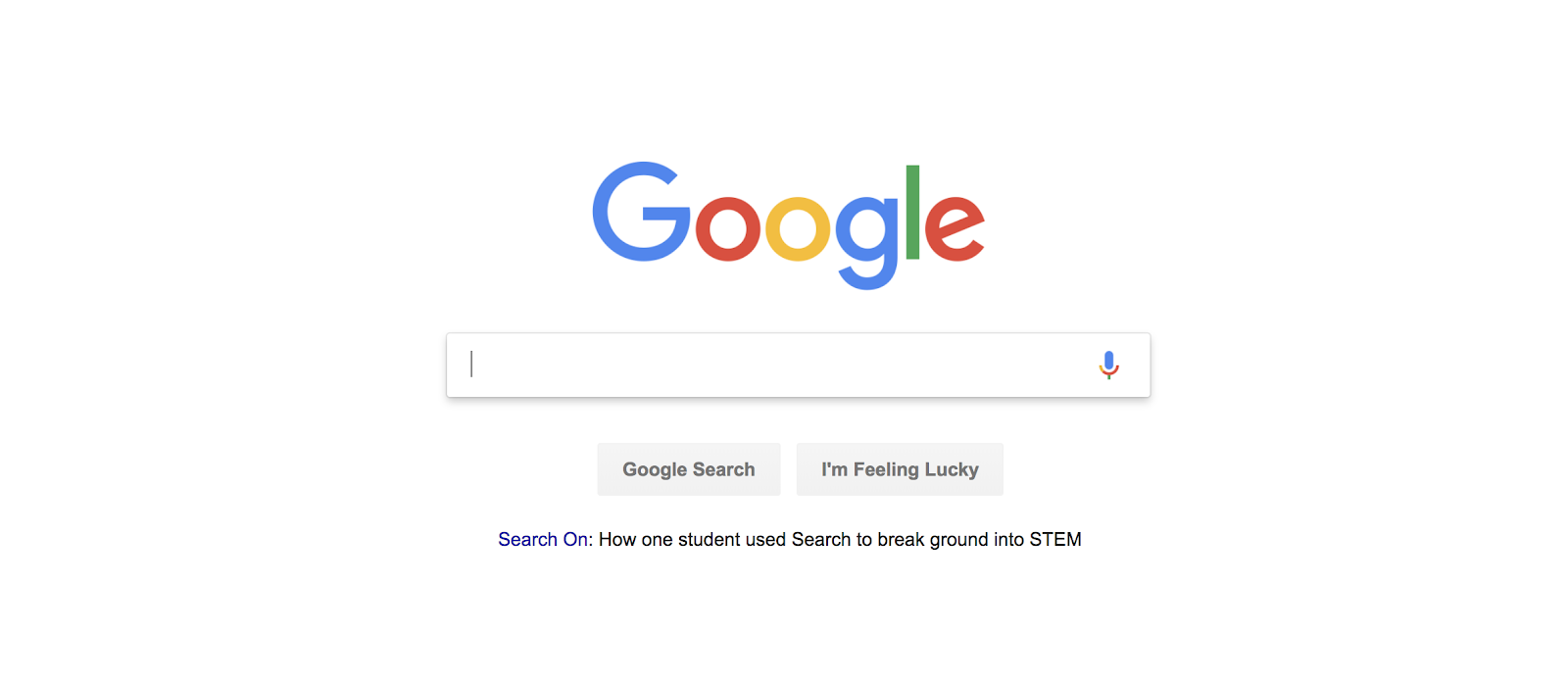
With over 70% of the search market share, Google is undoubtedly the most popular search engine. Additionally, Google captures almost 85% of mobile traffic. The large traffic potential makes Google a viable option when aiming to capture organic or paid search — the downside, of course, is almost everyone is competing for the same traffic.
Plus, recent changes to Google’s algorithm, like featured snippets, aim to fulfill users needs directly on Google, so they don’t need to click any links. These changes, and Google’s popularity, might make it hard for you to capture the website traffic you want.
2. Bing
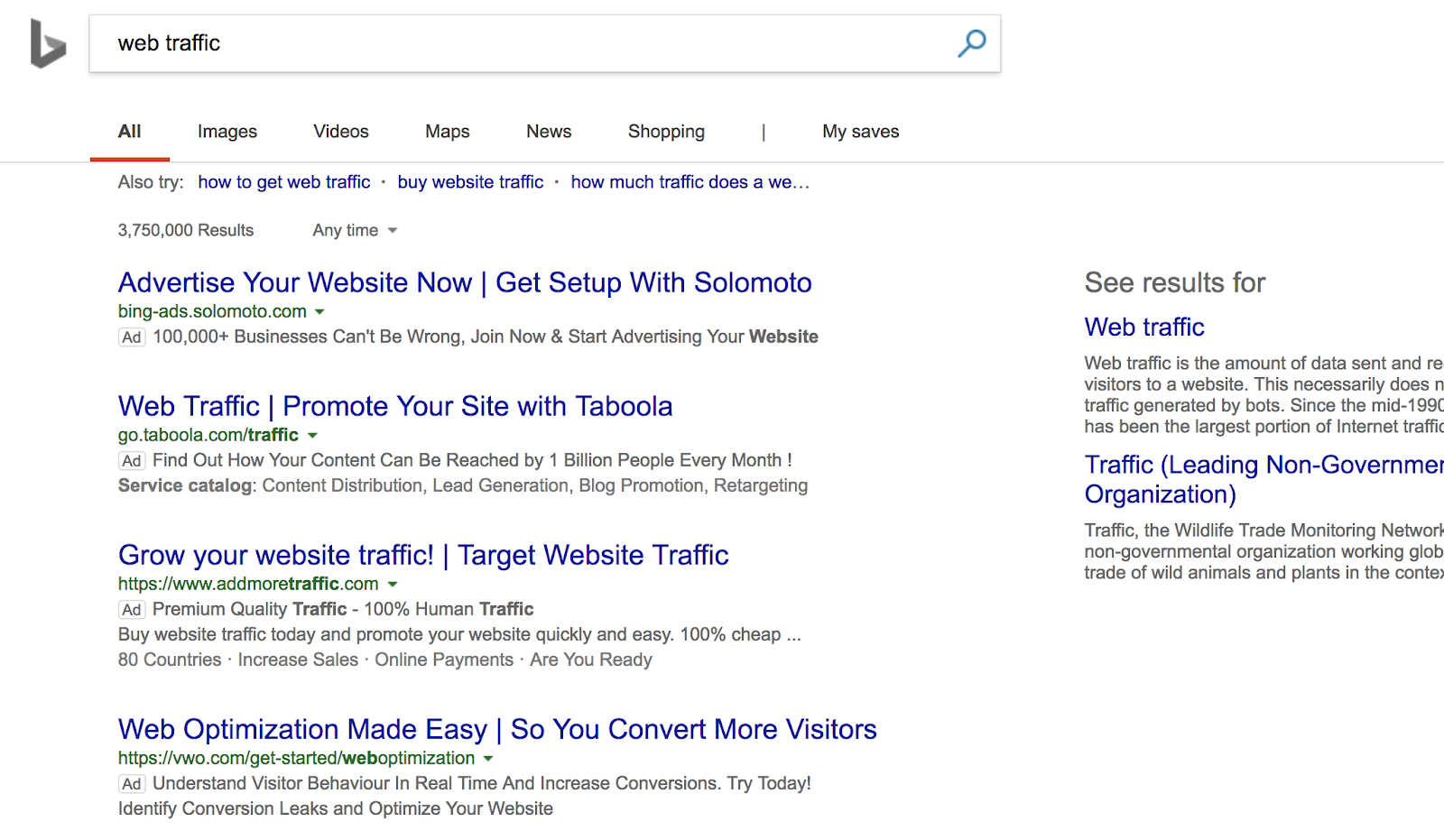
Bing, Google’s biggest contender, rakes in 33% of U.S. searches and also powers Yahoo, the U.S.’s third biggest search engine. Bing’s search pages look remarkably similar to Google’s, with the same categories and a similar white background, with blue links and green URLs. However, Bing additionally offers “Rewards”, a program that gives you points when you search or shop on the engine, and then allows you to redeem those points for gift cards, nonprofit donations, and more.
3. Baidu
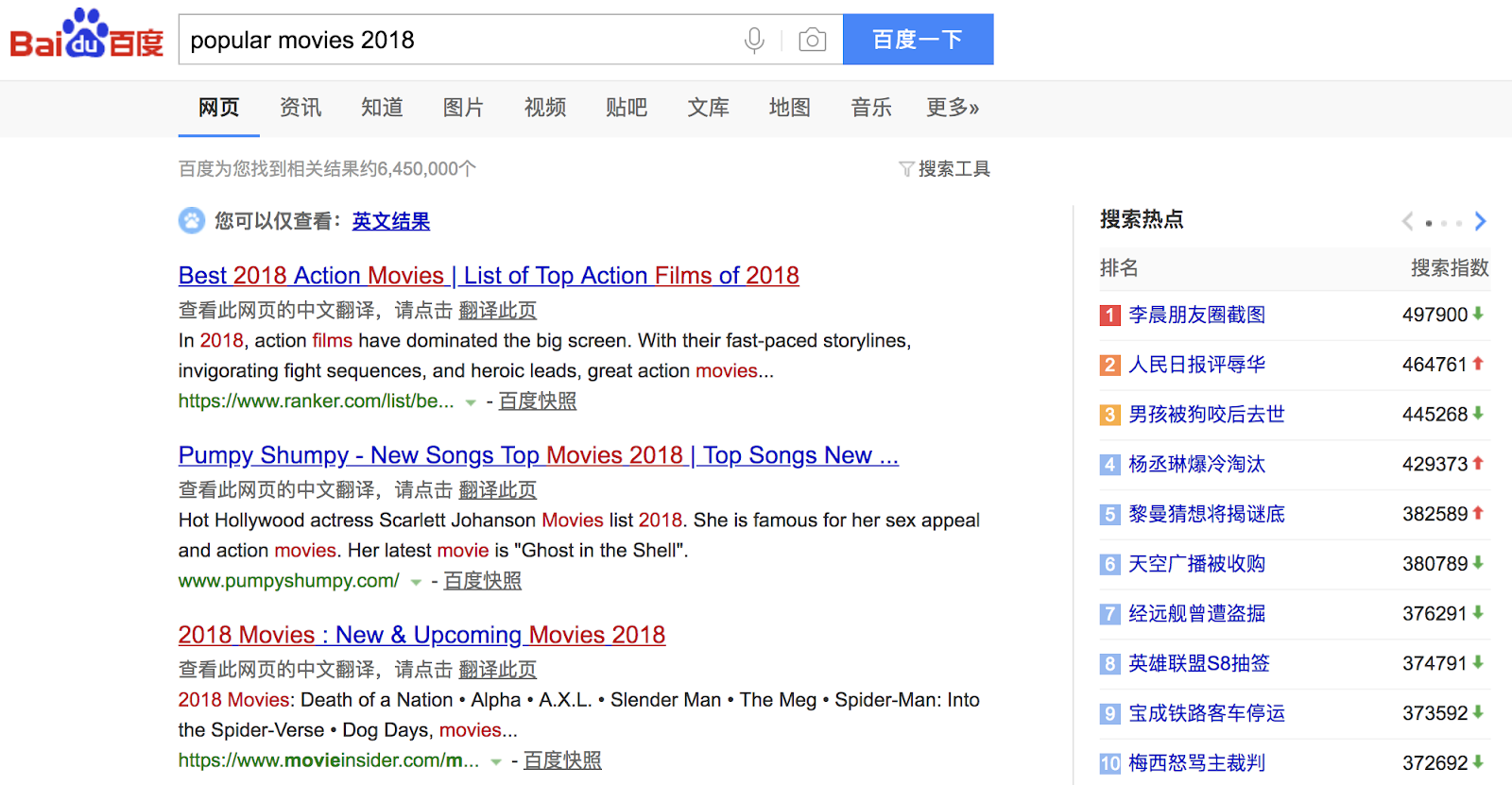
Baidu is China’s largest search engine, capturing over 75% of China’s search market. The search engine looks similar to Google (besides being in Mandarin), with a white background, blue links, and green URLs. Like Google, Baidu aims to incorporate more rich features in the SERPs.
If you have an interest in appealing to the Asian market, Baidu is a good option to consider. However, the search engine censors certain images and blocks pro-democracy websites, so if you’re comparing search results, you’ll find a more comprehensive results list on Google.
4. Yahoo!
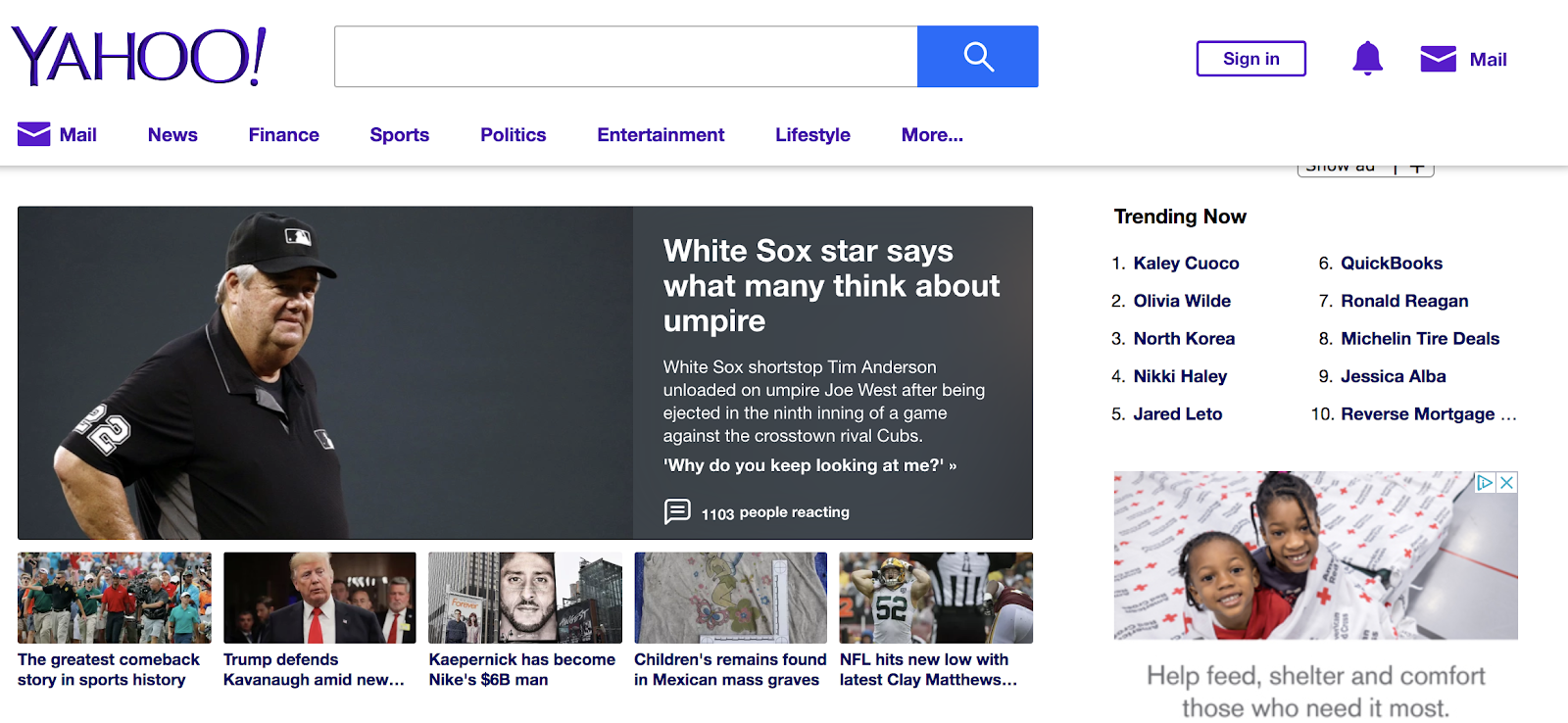
Admittedly not the sleekest search engine interface, Yahoo still manages to capture fourth place in our list, with a little over 3% of the worldwide market share. Yahoo is powered by Bing, so search results are incredibly similar between the two search engines. However, it’s still an important search engine in its own right, with over 600 million monthly users on mobile and one billion total users.
5. Yandex
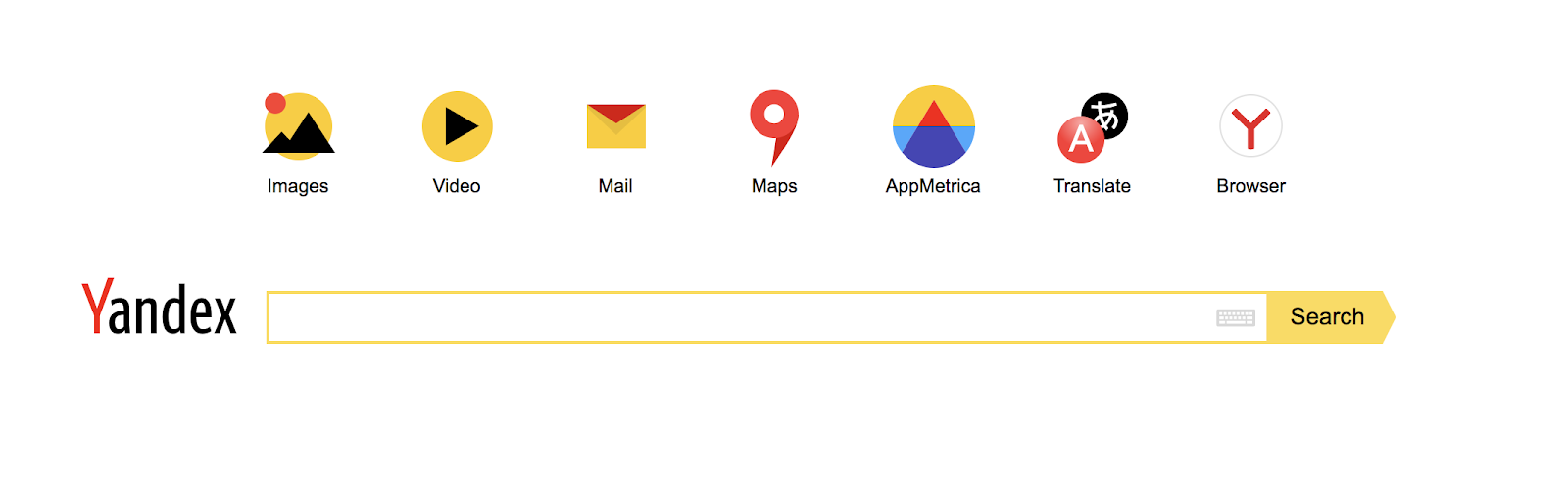
If you’re aiming to capture Russian traffic, Yandex is your best bet, with 65% of total Russian search traffic. Yandex is also popular in Ukraine, Kazakhstan, Turkey, and Belarus. The search engine is available in two languages, English and Cyrillic. Plus, it offers a cloud storage service, so users can search for their files from Yandex’s search bar.
6. Ask.com
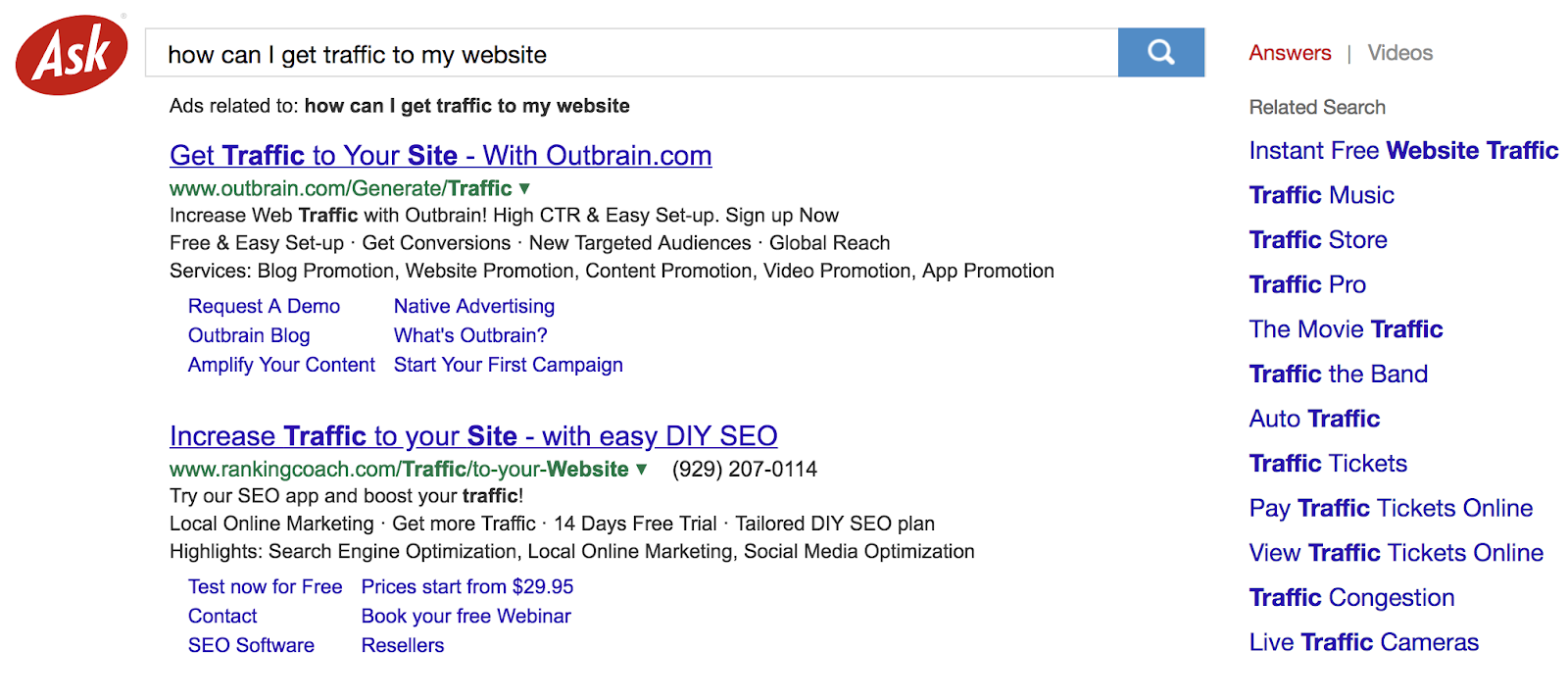
With .35 of search traffic, Ask.com is certainly a more modest option compared to the likes of Bing and Yahoo!. Nonetheless, Ask.com, formerly Ask Jeeves, is unique due to its question and answer format.
While most of Ask.com’s sponsored search results are powered by Google, Ask has an original algorithm that favors expertise on a topic over popularity. Additionally, Ask.com provides some unique features, like “smart answers”, which use natural language to answer someone’s search query.
7. DuckDuckGo
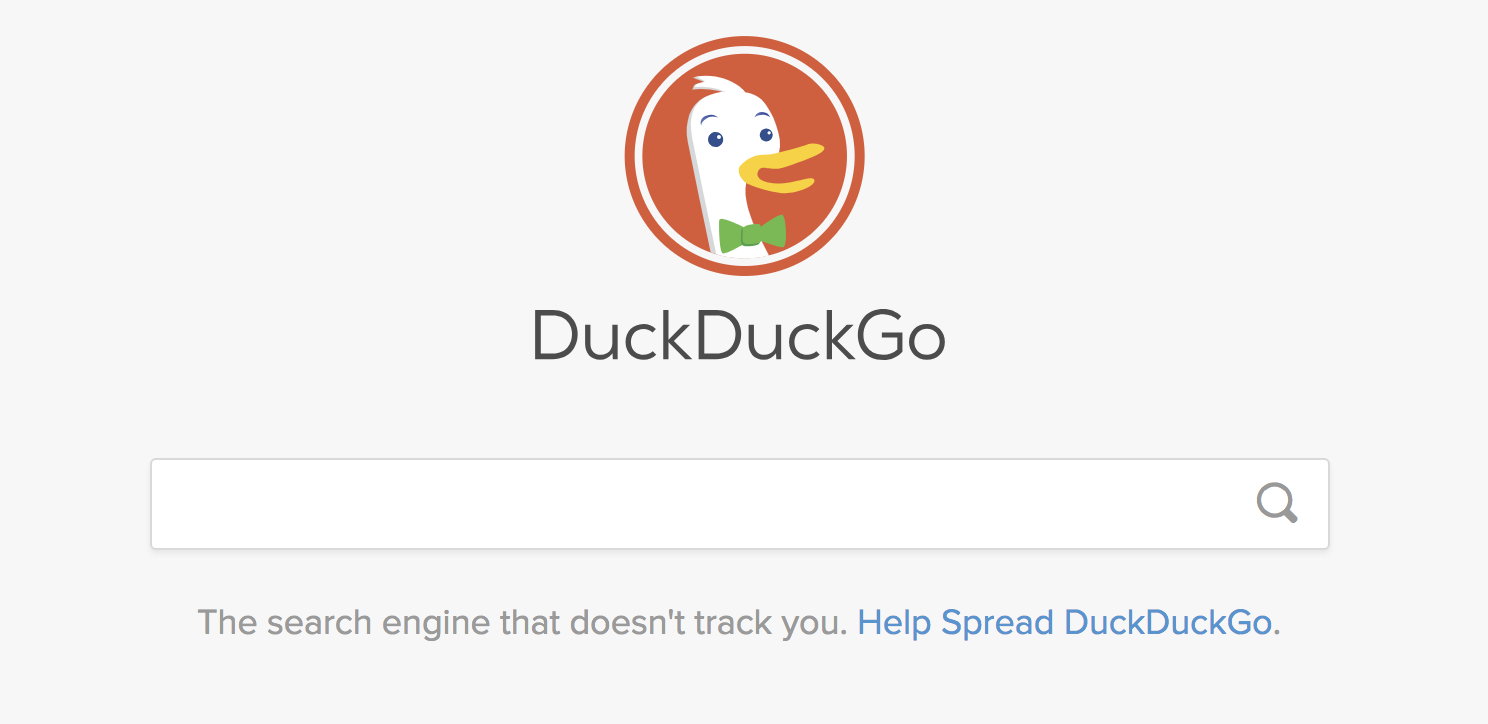
If you’re uneasy about targeted ads or don’t want your search data stored, you might want to try DuckDuckGo, which touts itself as “The search engine that doesn’t track you”. It doesn’t track, collect, or store any information, so you’re safe to search for shoes without feeling bombarded by subsequent Macy’s Shoes ads. It’s worth noting there are still ads on DuckDuckGo — just not personalized ones.
Additionally, DuckDuckGo has a clean interface and only one search page, making it easier to navigate than other search engines. With an average 26,754,932 daily direct searches as of September 2018, it’s slowly gaining steam in the search market.
Ultimately, it’s important to consider alternative traffic opportunities besides Google when creating an SEO strategy. By diversifying your sources, you’re more likely to capture first-page on SERPs, and you’re in a better position to find a truly ideal target audience.

The Parts of a URL: A Short & Sweet Guide
If your website is like a house, then your website’s URL is like that house’s address. It defines where your website lives online, similar to how your home address determines where you live in a neighborhood, helping your visitors easily find your site. URLs also help Google understand what your website’s pages are about.
There are technically five elements of a URL, and they’re discreetly important for optimizing your site’s UX and SEO. To help you develop a concrete understanding of every part of a URL, let’s explore each of them in detail.
What are the parts of a URL?
A URL consists of five parts — the scheme, subdomain, top-level domain, second-level domain, and subdirectory.
URL Structure

Scheme

The scheme tells web servers which protocol to use when it accesses a page on your website.
Nowadays, HTTPS, which stands for Hypertest Transfer Protocol Secure, is the most common scheme. It tells your web browser to encrypt any information you enter onto the page, like your passwords or credit card information, so cybercriminals can’t access it. This security protocol protects your website visitors and implementing it will help your site rank better on Google.
Other schemes you might see are mailto://, which can open your computer’s default email service provider to help you draft an email to the email address you entered in the URL, and ftp://, which is a standard protocol for transferring computer files between a client and server on a computer network.
Subdomain

If your website is like a house, your subdomains are like specific rooms in that house. A subdomain in a URL indicates which particular page of your website the web browser should serve up. For instance, subdomains like “blog” or “offers” will provide your website’s blog page or offers page.
Subdomains also bucket your website into its main content categories and shows Google and your visitors that there’s more information on your site than just a homepage.
Top-level Domain

Your top-level domain (TLD) is the name of your website. It helps people know they’re visiting a certain brand’s site. For instance, people who visit “mlb.com” know they’re on Major League Baseball’s website, without needing any more information.
Second-level Domain

The second-level domain (SLD) specifies what type of entity your organization registers as on the internet.
For example, “.com” is intended for commercial entities in the United States, so a lot of American businesses register with a second-level domain of “.com”. Similarly “.edu” is intended for academic institutions in the United States, so a lot of American colleges and universities register with a second-level domain of “.edu”.
Subdirectory

A subdirectory helps people understand which particular section of a webpage they’re on.
For instance, if you own an online store that sells t-shirts, hats, and mugs, one of your website’s URLs could look like “https://shop.yourstore.com/hats”. With a subdomain of “shop” and a subdirectory of “hats”, this URL would serve up the “Hats” page, which lives under the “Shop” page.
URL Structure: Subtle Yet Essential
Even though URLs might seem simple and frivolous, they’re actually important for your website’s UX and SEO. And now that you understand the anatomy of a URL, check out the blog posts below to learn more about technical SEO.

4 Announcements You Missed At at Google’s 20th Anniversary Event
There’s nothing quite like an anniversary to shift your perspective on things.
It certain forces us to look at things in retrospect — where we were then, and where we are now, however many years later. And to commemorate its 20th anniversary, that’s what Google did today with an event in San Francisco.
There was a celebration, of course — but it was less passed hors d’oeuvres, and more, “Here’s where we’re going next.”
Here are some of the most important announcements made today.
1. Changes to Visual Results
A New (Bigger) Home for AMP Stories
You might be familiar with the AMP (Accelerated Mobile Pages) Project: Google’s initiative to help and encourage publishers to create pages that both load fast and come with an overall positive user experience.
Earlier this year, Google introduced the AMP Story: fast-loading content that’s almost completely visual, and very immersive.
If you’ve never seen AMP stories, that’s okay — Google announced today that they’ll be more discoverable, by way of listing them in both Google Image search results, as well as within Google Discover (formerly Google Feed — more on that later).
Featured Videos
Google also announced today that it’s using what sounds like machine learning to help users discover the most helpful video content for their search queries.
Using the example of visiting a national park for the first time, the company explains that it now understands a video’s content well enough that it’s able to show you the videos that are the most applicable to your situation — for example, the most important landmarks to see within that park.
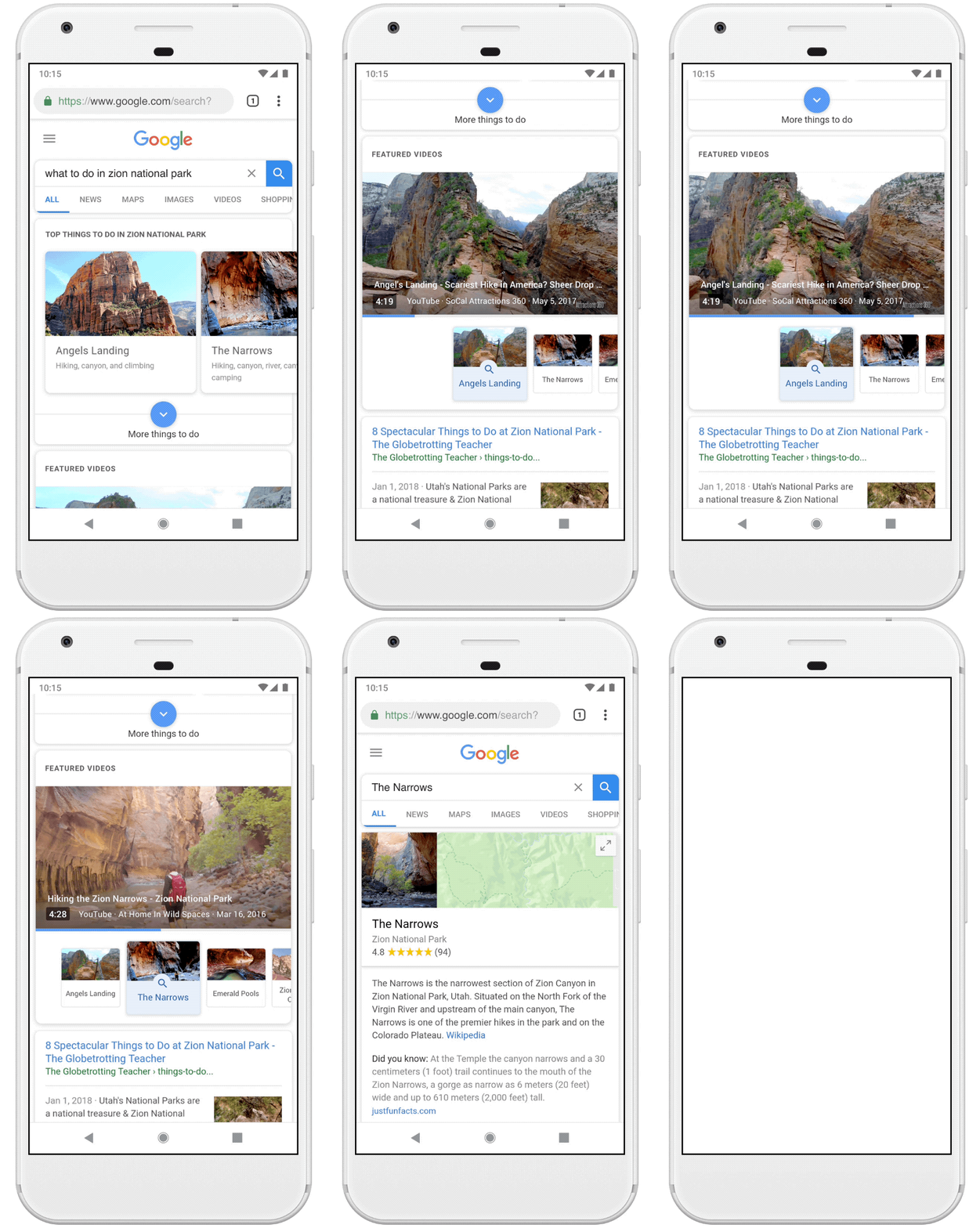
Image credit: Google
More Context for Image Search Results
For some of us, a Google Image search is a favorite past time (just saying). Starting this week, the company said at today’s event, Image search results will now have more context — like captions that clearly indicate where the image is published, and more suggested, similar search terms at the top of the page.
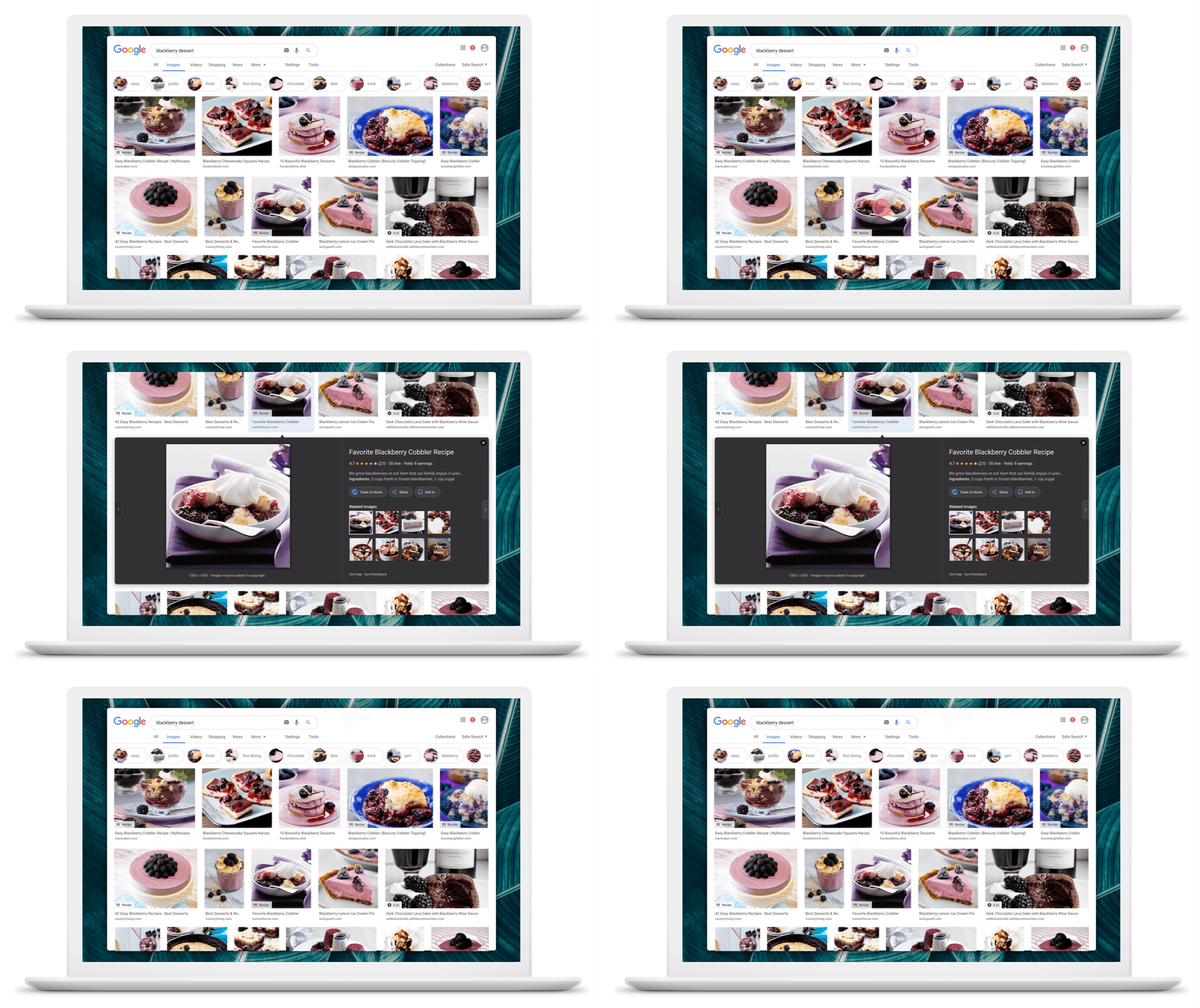
Image credit: Google
Some of these changes had already been introduced on mobile — now, they’ll take effect on desktop.
Google Lens for Image Search Results
Google introduced Lens — an artificial-intelligence (AI)-powered technology that helps answer people’s questions about the photos they take, like figuring out the breed of a dog — in May at its annual I/O developer conference.
Now, Lens will be available in Image search results to help provide even further context. It seems like the most applicable use case here will be for shopping . — for example, if you view an image that has several objects within it, Lens can analyze (and usually identify) each of those objects.
Users can then select one of those given objects, after which Google will float links to places where they can be purchased.
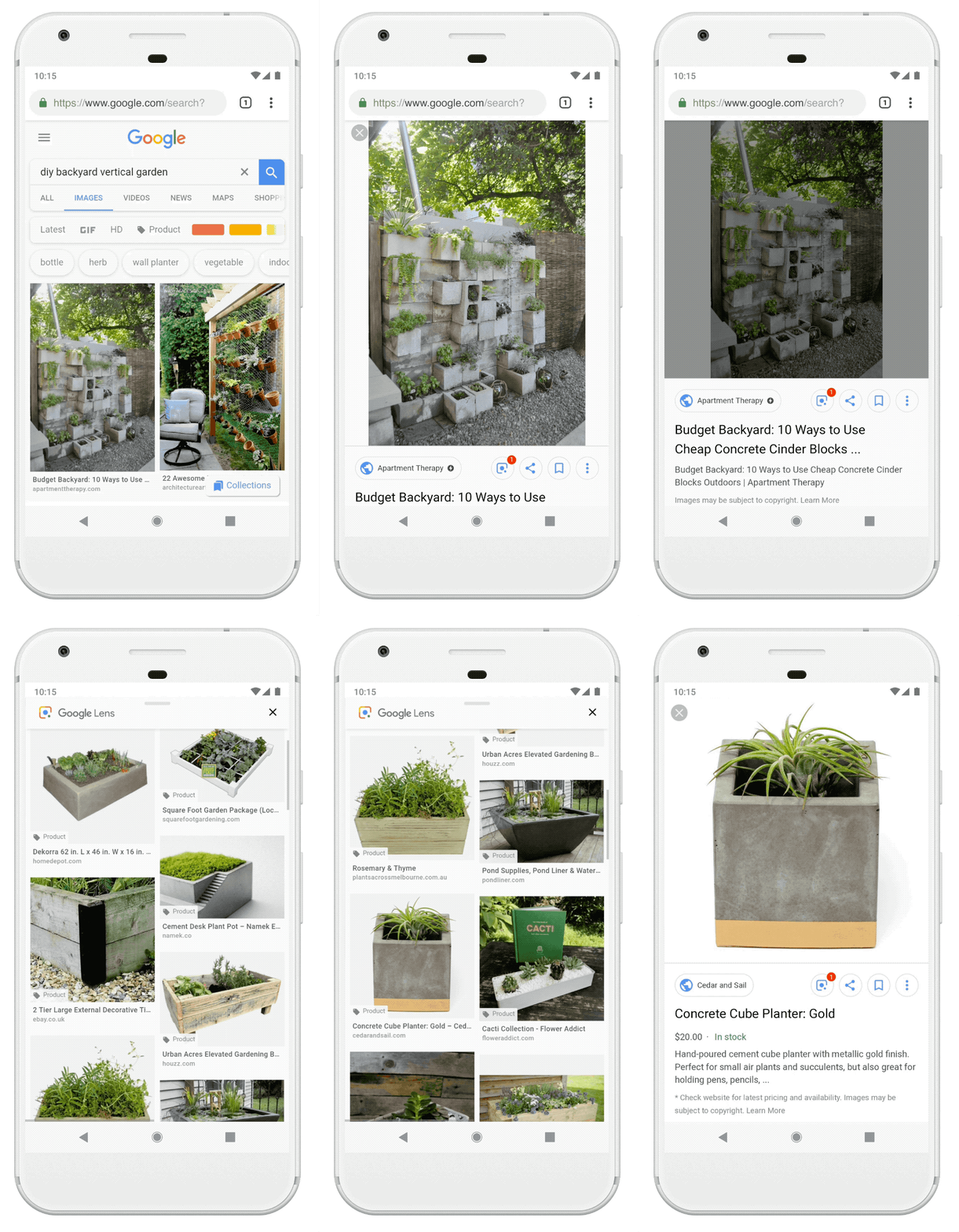
Image credit: Google
2. Google Feed Is Now Discover
Google first rolled out the Feed feature within its app for the same reason that many other networks and platforms have a feed: To help users see what’s new and discover content.
Google announced today that it’s leaning into that second purpose: discovery. Hence, Google Feed has a new name: Discover.
But it also has a new look, according to the company’s official statement — again, to provide more context. Within Discover, the content featured will have a topic header to let the user know why she’s seeing it. And, if the user wants to explore that topic further, it’ll be a native and seamless process.
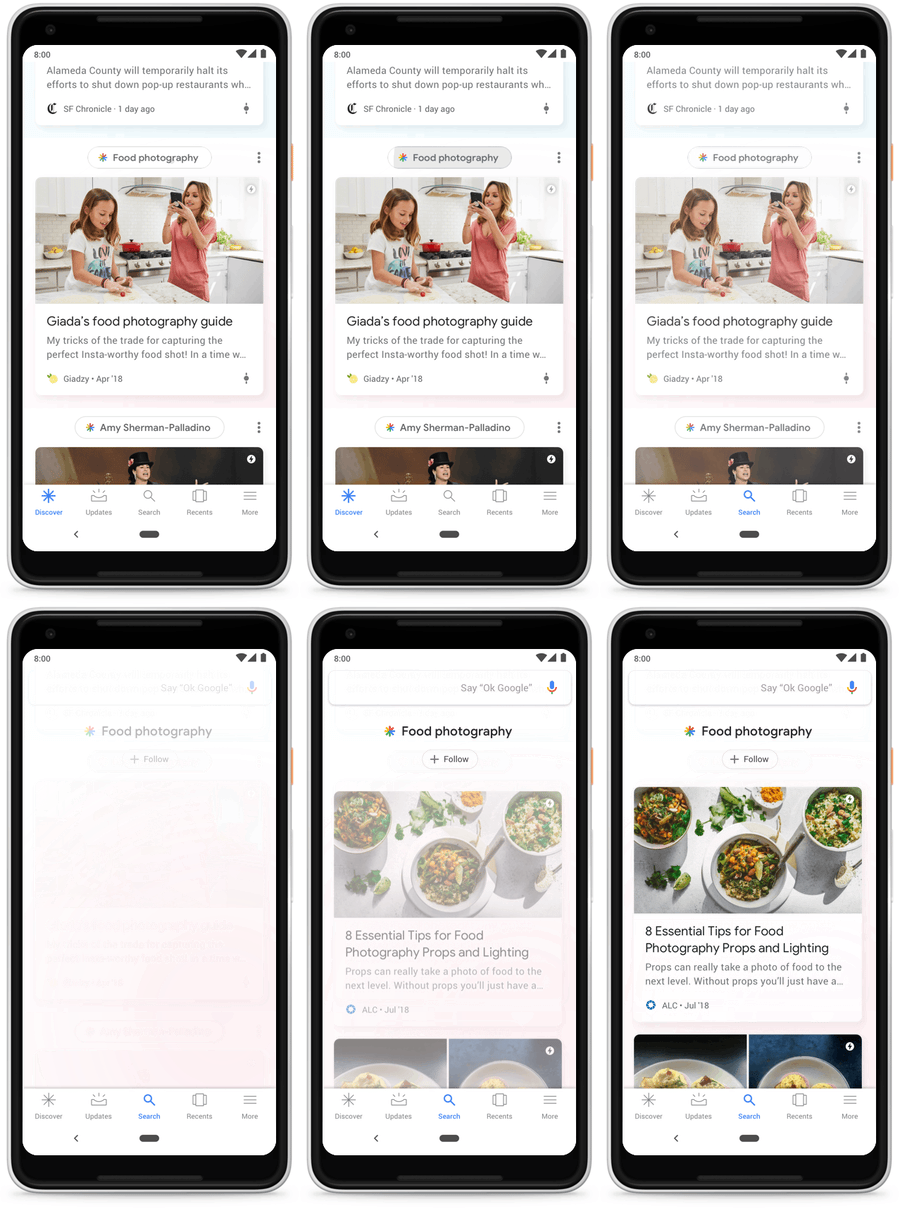
Image credit: Google
Discover will also be more personalized. In addition to allowing users more customization options for the content featured in the Discover tab, in multiple languages, it will no longer take the age of the content into account — as long as it’s relevant.
For example, if I’m visiting Honolulu for the first time and want to search for vegan restaurants there, Discover might show me content around that query that isn’t necessarily new, but that I personally have not seen before — and still answers my question.
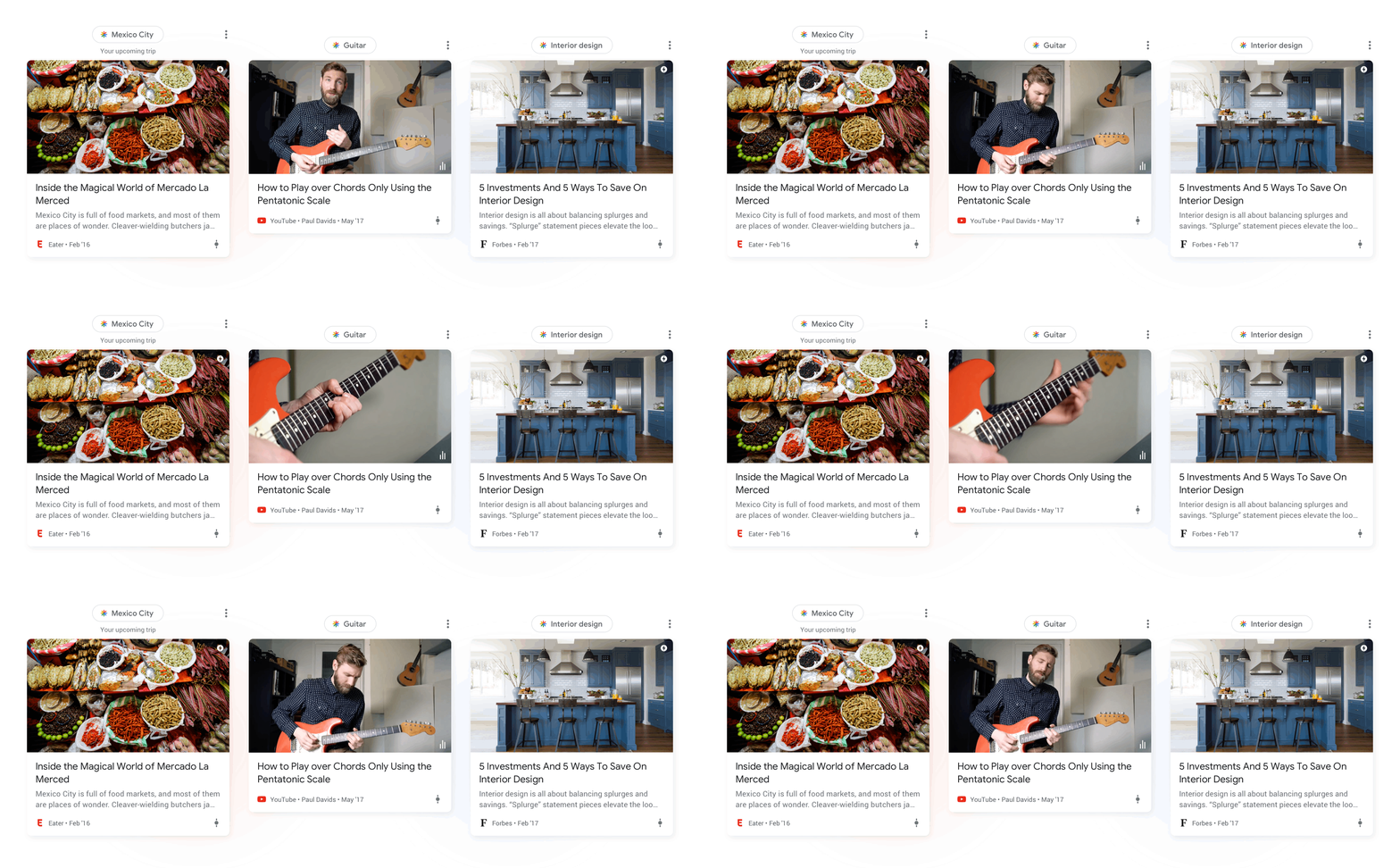
Image credit: Google
Don’t have the Google app? No problem. Discover will also be rolling out on the Google.com homepage across all mobile browsers. What isn’t quite so clear is whether or not users have to be signed into Google to use Discover properly — but given the emphasis on personalization, it’s likely that they do.
3. Picking Up Where You Left Off With Activity Cards
I’m not sure about you, but when I’m researching a story, I have a very bad habit of finding a helpful resource, reading it, and abandoning it.
That is, until I need to visit that resource again for a follow-up story, leading to an all-to-often futile search for a page I’ve already visited.
Fortunately, Google has introduced activity cards to help forgetful, in-a-rush researchers like me “retrace your steps.” Think of these cards as visual representations of your Search history, except instead of having to go sifting through it, pages you’ve previously visited while researching the same topic will appear in Search results.
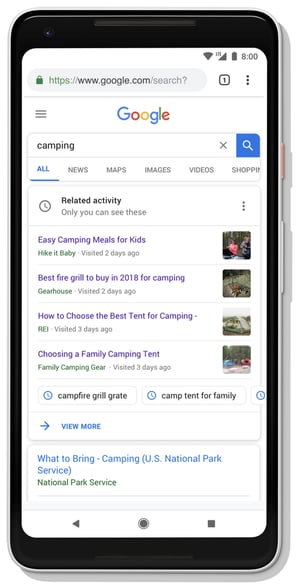
Image credit: Google
An additional new feature to help users hang onto helpful resources is Collections, which allows you to add a page from your activity cards to a collection of content pieces on a given topic.
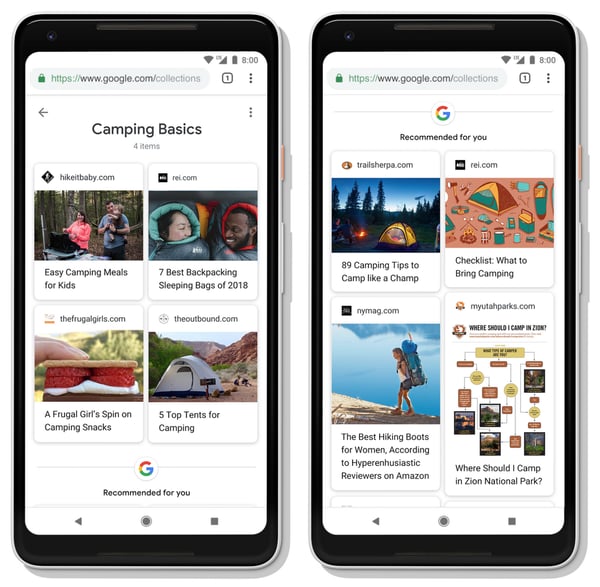
Image credit: Google
4. The Knowledge Graph’s New Layer
There was an underlying theme throughout all of the announcements today: Understand what the user is looking for. After all, for quite some time now, that’s been Google’s axiom behind algorithm changes and new “smart” features that it’s introduced in other products, like Gmail.
One way Google will further enhance its understanding of user queries — to add more context to them, make them more relevant, and help the user learn more about a given topic down to the very detail of what she wants to know — is by adding another layer to its Knowledge Graph: the Topic Layer.
The Google Knowledge Graph is essentially the technology used by the company to make these features “smart” — in its own words, to make “connections between people, places, things and facts about them.” That’s how it knows to suggest topics like “restaurants in Los Angeles” if, say, you’re also searching for flights there.
The Topic Layer adds another level of understanding the many nuances of a given topic, in part by “analyzing all the content that exists on the web for a given topic and develops hundreds and thousands of subtopics.”
Of course, what Google doesn’t say in its announcements outright is that much of this analysis done on behalf of a given user is based on that person’s previous Search behavior — what she’s looked for in the past, travel she’s booked, and content or pages she’s repeatedly viewed.
In fact, with the plethora of new options to save content for later, it’s fair to predict that Google will use that archive to help inform its search results.
It’s not a new concept, but in this particular case — it lends itself to the search engine’s giant credo of, in a few words, really figuring us out.
Featured image credit: Google

How to Create a Content Marketing Strategy for Virtual Reality
Customers are more inclined to engage with or purchase from brands they feel the strongest connection with. This isn’t a new development. What is new is the definition of the term “engagement.”
So, what defines a customer’s engagement today? Among other things: interactivity.
For many customers today, an experience is inauthentic if it’s not interactive. In other words, they have to be able to reach out and feel like they’re grabbing the thing you’re selling, which is a far cry from the days when leaving a comment on a blog post counted as a sufficient interaction.
71% of consumers think a brand that uses virtual reality is forward-thinking. And however you feel about the term “forward-thinking,” one thing is for sure: these brands stand out and gain consumer attention.

Despite what you might think about virtual reality (VR), it’s no longer an inaccessible marketing tactic. Creating a content marketing strategy for VR isn’t that different from a written or video-based content marketing strategy — the difference is that it requires you to understand how to engage your customers by interacting with them.
Let’s explore what a sound VR content marketing strategy looks like today.
How to Create VR Content for Your Next Marketing Campaign
Know Which Type of Experience You Want to Create
In general, there are four types of VR experiences you can create, and the one you choose will depend on what you want your viewers or customers to learn (or feel) as a result. Here are those four experiences:
- Live video: By taking a live-action video in VR, you can allow your viewer to watch the video from the point of view of the video’s recorder, panning around to see the experience as if they were there when it happened.
- Live photo: Snap a live-action photo that your viewer will be able to pan 360 degrees around and feel as if they’re standing on the scene. Google Earth recently made its Street View viewable in this type of experience.
- 3D video: Animate a service you offer, creating a 3-dimensional demonstration that your viewers might need to see from a firsthand point of view to properly understand it.
- 3D model: Design a 3-dimensional model of a product you offer, such that your viewers can examine every angle of the item with their smartphone or VR headset.
In any of the VR experiences above, viewers can interact with your content in 360 degrees by moving their mobile device around or literally looking around their periphery while wearing a VR headset.
Know Which VR Tool You Want to Use
Depending on which type of VR experience you choose above — and how elaborate you want it to be — your smartphone’s camera app won’t suffice (well, it could … keep reading).
Luckily, there are some easy-to-use apps you can download to become a quick VR designer for your business. Here are a few and what they do:
- Android Photo Sphere: This is a native function of most Google and Android mobile devices. Similar to a panoramic setting, it allows you to hold and pan your smartphone camera to capture more imagery — but a full 360 degrees around your standing point.
- Google Cardboard: If you don’t have an Android smartphone, the Google Cardboard app gives you the same functionality as the tool above, as well as video recordings that are immediately viewable in VR through YouTube and the Google Cardboard headset.
- Unity: This app is actually a game-development engine, but has become one of the most popular platforms for creating interactive and animated VR content beyond simple photos and videos.
- InstaVR: This desktop software allows you to edit your own photos and vides into VR experiences in a matter of minutes.
- A-Frame: A-Frame is a web-based VR tool, wherein you use HTML to edit live-action images and design 3D models for the purposes of creating virtual experiences that are viewable in 360 degrees.
Keep Your Existing Audience in Mind
How does your ideal customer consume your content already? Is it through a weekly webinar or Q&A? Or maybe a daily vlog from the CEO’s desk? Whatever content routine you’ve created, you can continue that strategy while incorporating VR technology.
For example, if your primary medium is Facebook video, you can start producing virtual reality content on Facebook Spaces. Although Spaces is still a new tool, it’s poised to become a Facebook standard in the not-so-distant future. There’s no better time than the present to start thinking of ways Facebook Spaces can benefit your brand.
Does your business have an app, either for the company website or an event you host? One emerging trend for app-based businesses is to create VR content for use with a Samsung or iPhone-paired VR headset. Take mega-ticket marketplace StubHub as an example. This company has now added a 360-degree virtual reality view to every ticket purchase, allowing customers to simulate the view they’ll have from their seats on game day.

Screenshot via Recode
These virtual views have been available on StubHub for a while now, but used to be standard (rather than 360-degree) images. Thanks to the incorporation of VR, the brand has enhanced their customer’s existing experience, and helped them better navigate to a purchase.
Just think of how many times you’ve decided against buying tickets because you weren’t sure about the view. StubHub is effectively solving this problem by tweaking their existing content to enable VR capabilities.
Don’t Just Create Content, Create An Experience
The notion of a content marketing strategy combined with virtual reality might be misleading. After all, VR is not about the content — it’s about the user experience. Thus, your content creation strategy should aim to be immersive for the consumer, giving them an in-depth view at your product offerings.
Here are two examples of businesses that have applied VR to their marketing strategy in different ways.
Conduct Store Walk-Throughs
Create a 3D model of your product (the fourth type of VR experience listed above), taking the customers through your store and showing them your best inventory firsthand. Shopify, the e-commerce giant, is about to release its all-new thread studio, which is a VR app that will take consumers into a virtual studio to view t-shirt designs and other apparel.
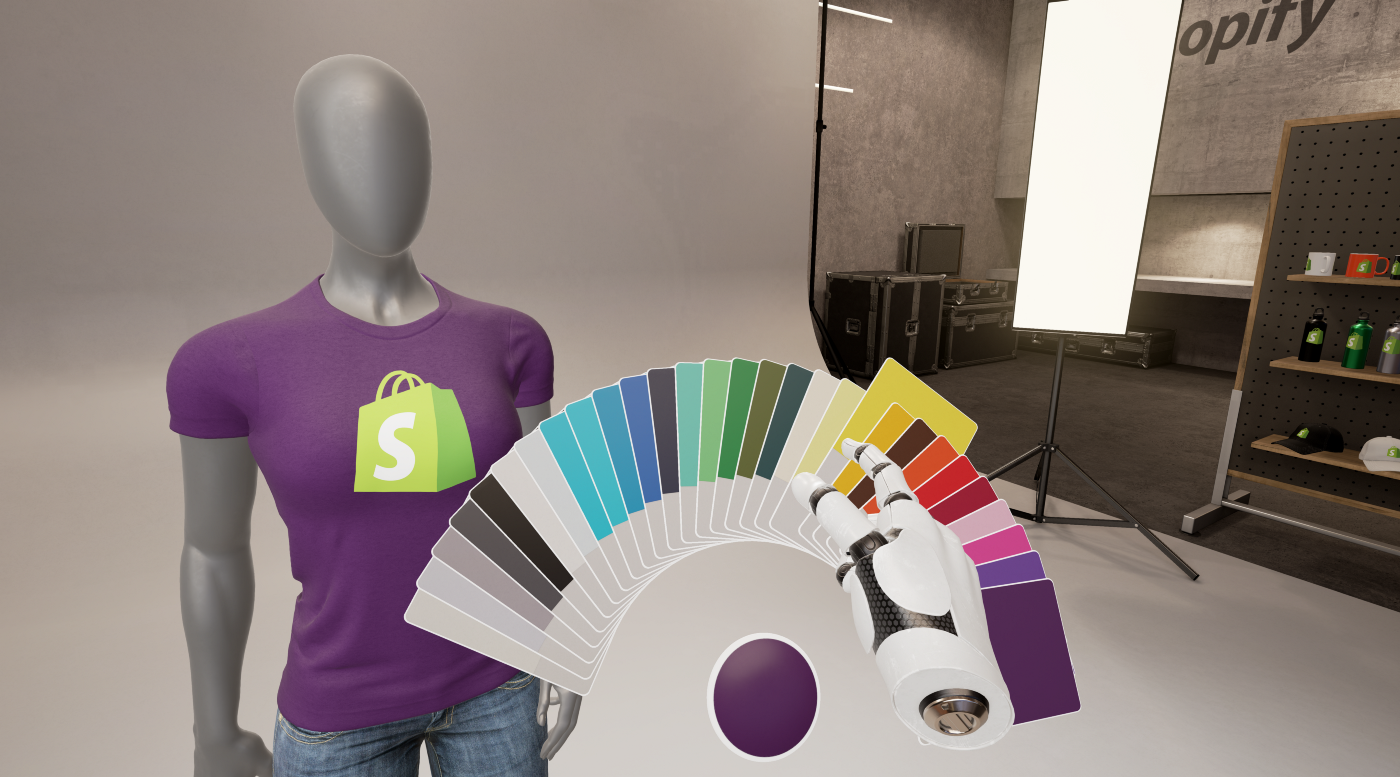
Image via Shopify
Once Shopify’s viewers have mixed and matched colors and found the design that’s best for their project, they are sent to Shopify’s print-on-demand provider, Printful. From here, they can turn their virtual vision into a real-life, tangible product.
As brick-and-mortar stores continue to shut their doors, they’ll be replaced by these virtual stores that allow consumers to walk through and browse without leaving their house.
Show Consumers What Products Will Look Like (Augmented Reality)
Giving consumers a visual of what furniture and household items will look like is an important way to encourage them to purchase.
Home improvement giant Lowe’s has already added a VR element that mirrors the home customization idea. Known as Holoroom, it takes customers through a model home to provide a look at what the space would look like with their products.
IKEA has been adopting a similar concept for years, in the form of a product catalog developed in augmented reality (AR). The company also recently launched an AR app called IKEA Place.
Augmented reality is very similar to virtual reality, but in AR, artificial content is layered on top of a real background, as shown in IKEA’s app below. A popular, consumer-focused example of AR today is the mobile app Pokémon Go, wherein you can catch Pokémon as they appear in the live-action environment in front of you when seen through your smartphone’s camera lens.

Image via: Architectural Digest
Seek Long Distance Customers (Yes, Really)
Not that you should only seek customers who live far away, but VR will make it easier to craft content to a more widely located buyer pool.
Just think about how VR will transform the home buying process. If you’re a realtor, you’ll be able to take potential buyers through a completely virtual tour of your property. People from around the world can see a home inside and out like they’re visiting in person.
Forbes writes about VR’s influence on buyer reach in its article about VR in real estate, but it adds another possibility to the mix: Using a VR app, realtors will soon be able to allow their clients to simulate custom changes they’d like to make to a potential home. This would makes processes like home-buying much more interactive, giving clients a clearer vision of what it’d be like to live in the property.
Provide an Emotional Journey
Honor Everywhere provides a VR experience to terminally ill military veterans, allowing them to “visit” the war memorials in Washington D.C. Volunteers are bringing VR headsets into assisted-living centers to give to the veterans and let them enjoy the experience.

Image via WTOP.com
Although there’s nothing quite as unique as VR made just for military veterans, you can still find ways to take customers on an emotional journey through your own VR content.
“Emotional” doesn’t have to mean sadness, though. Think in terms of what your audience is most passionate about and produce content that stimulates those passions.
For example, if you’re writing a travel blog that doubles as an affiliate site, your goal is to truly sell the one-of-a-kind experience a customer will feel by purchasing your vacation package. Through the immersion of VR, you can take effectively transport them to the beaches of Rio de Janiero, or atop the Eye of London in a millisecond of time.
You can even take a page out of the always adventurous MythBusters‘ playbook, and give consumers a first-person tour of a wrecked ship that rests in shark-infested waters. Experience it below.
There’s nothing like a swim among sharks to rouse people’s fears … er, rather, emotions.
Embrace Your Location
If the goal is to immerse your virtual audience into a new space, it only makes sense to show them a fun location.
Offer them a virtual tour around your city, show them a famous landmark, or take them to a special event. If a San Diego-based company is creating VR content in mid-July, for example, it might want to show its audience around the floor of Comic Con, which takes place each summer in San Diego.
Use Crowdsourced Content
Perhaps the most underrated — or under talked about — aspect of content marketing is the cultivation of a community of users, many of whom can contribute their own content.
Thanks to tools like Facebook Spaces, Periscope, and now YouTube, your brand can easily integrate user-produced VR videos onto your website.
Reach out to consumers through channels like social media, email marketing campaigns, and calls-to-action on your website.
What to Do as a Content Creator
Should you overhaul your entire content strategy to make room for virtual reality? For most of us, the answer is no.
But now’s the time to acknowledge not just VR’s existence, but its influence, and begin experimenting with it. Don’t know where to start? A/B test with and without virtual reality technology, then gauge the user’s response.
Rather than dedicating your entire site to VR, start with individual posts or pages, then begin building as you see fit.


How to Type the Shrug Emoji ¯\_(ツ)_/¯ in 2 Seconds Flat
Even though I love emojis, I’m still a big fan of typed emoticons. They bring me back to simpler times, when my phone still had a physical keyboard and AOL Instant Messenger was my main method of communication. Those were the days.
If you still have an affinity for typed emoticons like me, especially the timeless ¯\_(ツ)_/¯ emoticon, here’s how you can type it in two seconds flat on a Mac, Windows, iPhone, and Android.
How to Type the Shrug Emoji ¯\_(ツ)_/¯ in 2 Seconds Flat
The shrug emoticon is one of the more intricate emoticons to type, so most people resort to copying and pasting it from a website, like CopyShrug.
But copying and pasting the emoticon is really only a good option if you use it sparingly. If you’re an avid user of the shrug emoticon, you’ll need to keep revisiting the website to copy and paste it, which is a relatively slow and annoying process, especially on your mobile phone.
To type the shrug emoticon as fast as possible, we recommend creating a text replacement shortcut with your device’s autocorrect feature (which might be the first time autocorrect actually comes in handy for you).
Mac
1. Copy “¯\_(ツ)_/¯“
2. Go to System Preferences
3. Click Keyboard
4. Press Text
5. In the Replace box, type “shrug”
6. In the With box, paste “¯\_(ツ)_/¯“
Windows
Unfortunately, Windows doesn’t have an autocorrect feature, but you can download programs like
PhraseExpress to set up text replacement shortcuts and quickly type the shrug emoticon.
iPhone
1. Copy “¯\_(ツ)_/¯ “
2. Go to Settings
3. Press General
4. Tap Keyboard
5. Choose Text Replacement
6. Select the “+” button
7. In the Shortcut field, type “shrug”
8. In the Phrase field, paste “¯\_(ツ)_/¯ “
Android
1. Copy “¯\_(ツ)_/¯ “
2. Go to Settings
3. Press Language & Input
4. Tap For All Languages
5. Select the “+” button
6. In the Shortcut field, type “shrug”
7. In the Type a Word field, paste ” ¯\_(ツ)_/¯”

6 Brain Triggers Copywriters Use to Drive Sales
In 1923, master copywriter Claude Hopkins published a book called Scientific Advertising.
It went on to sell more than eight million copies.
Today, the book is widely considered the foundation of direct marketing.
“Nobody, at any level, should be allowed to have anything to do with advertising until he has read this book seven times,” wrote renowned ad man, David Ogilvy. “It changed the course of my life. If you read this book, you will never write another bad advertisement.”
Scientific Advertising helped Ogilvy, and it will help you, too. It’ll change the way your research your market. It’ll change the way you write copy. Moreover, it’ll inform the psychological triggers — the words and angles — you use to compel prospects to buy things.
Let me explain.
6 Brain Triggers Copywriters Use to Drive Sales
One of the most important chapters in Scientific Advertising is “Chapter 6: Psychology.”
“The competent advertising man must understand psychology,” writes Hopkins. “The more he knows about it the better. He must learn that certain effects lead to certain actions.”
Throughout the chapter, he highlights a handful of specific effects (i.e., triggers) that compel consumers.
Worried this information is outdated?
Don’t be. Our brains don’t evolve that fast.
“Human nature is perpetual,” writes Hopkins. “In most respects it is the same today as in the time of Caesar. So the principles of psychology are fixed and enduring. You will never need to unlearn what you learn about them.”
That said, feel free to use these triggers across just about any marketing asset, including your next landing page, email sequence, press release, pay-per-click campaign, banner ad, or direct mailer.
These triggers are timeless and versatile. They’re proven after decades of testing countless ads. Now, they’re yours for the taking. Here’s what you need to know:
You can trigger prospects with:
1. The Unknown
Hopkins writes:
“Curiosity is one of the strongest human incentives. We employ it whenever we can.”
People love exploring. It’s in our nature, meaning we’re biologically driven to investigate our world rather than merely respond to it. This drive is the basis of human curiosity, which is baked into us.
Our brains are hardwired to want to satisfy our curiosity. That’s what makes it such an effective buying trigger.
Let’s look at this modern example:

This Facebook ad leverages something called the information gap.
“Information gaps produce the feeling of deprivation,” writes behavioral economist, George Loewenstein. “The curious individual is motivated to obtain the missing information to reduce or eliminate the feeling of deprivation.”
“See the $1.5 million Kickstarter,” reads the copy. The Kickstarter’s success generates curiosity: What could be this good?
Of course, the only way to satisfy that curiosity is to click the “Learn More” button.
Editors at Buzzfeed use this tactic to create compelling headlines. Writers on TV shows use it create cliffhangers that keep audiences coming back episode after episode. Marketers and copywriters use it to create ads that command attention — always have, always will.
2. High Prices
Hopkins writes:
“We learn that cheapness is not a strong appeal. [People] are extravagant. They want bargains but not cheapness. They want to feel that they can afford to eat and have and wear the best. Treat them as if they could not and they resent your attitude.”
How much something costs tells the consumer a story — consciously or otherwise — about that product’s quality. The price of an item can paint a vivid picture.
Imagine a $10,000 watch. What do you see? Is it a luxury timepiece? Is it gold-plated? Is it powered by a mechanical movement that will last a lifetime? Are you picturing a Rolex? Now, image a $100 watch. What do you see? Is it utilitarian? Does it run on a battery? Are you picturing a Timex?
“An item’s price, by itself, delivers useful, and sometimes diagnostic information about the product,” writes Utpal Dholakia, Ph.D. “High prices attract consumers when assessing quality is difficult.”
Let’s look at this classic example:

The consumer has no way to discern the quality of Old Grand-Dad Special Selection, so this ad leans on the product’s high price to demonstrate its value.
“It’s expensive, yes,” reads the copy. “But it’s also exceptional. And isn’t that what matters to somebody who appreciates fine Bourbon most of all?”
3. Their Names, in Print
Hopkins writes:
“When [people] know something belongs to them — something with their name on it — they will make an effort to get it, even though the thing is a trifle.”
When you hear or read your name, your brain activity explodes: Your middle frontal cortex, your middle and superior temporal cortex, and your cuneus all light up with activity.
This chemical reaction signals that what you’re about to read or hear is relevant to you.
“Remember that a person’s name is, to that person, the sweetest and most important sound in any language.”
– Dale Carnegie, How to Win Friends and Influence People
This is why personalized calls-to-action convert 202% better than non-personalized CTAs. It’s why event marketers send out dynamic email invitations to “stop by the booth, [prospect’s name]!”
It’s also why personalized chachkies — like keychains and mugs adorned with popular names — continue to sell around the world.
Let’s look at this modern example:

Coca-Cola’s “Share a Coke” campaign is a fantastic personalization case study because of its profound success:
- It increased Coke consumption from 1.7 to 1.9 billion servings a day.
- It made #shareacoke the #1 global trending topic on social media.
- It helped the brand gain 25 million Facebook followers.
The secret behind this response? The campaign gave people ownership over a ubiquitous product. It made people feel unique.
That’s the power of personalization.
4. “Try before you buy!”
Hopkins writes:
“Many articles are sold under guarantee — so commonly sold that guarantees have ceased to be impressive.”
People get used to things. We get used to our surroundings, to other people, even to our own emotions. Basically, our brains acclimate to anything our senses experience on a consistent basis.
This is called Habituation, or the tendency to have decreased responsiveness to something.
Habituation is especially common in advertising. Words like “Free” and “Sale” and “Guarantee” get used so often that they lose their meaning, their appeal.
Want to garner your prospect’s attention? Be different.
Let’s look at this classic example:

In the 1940s, when this ad was written, every bicycle company offered a “Money-Back Guarantee!” to customers: “Try it for a week. If you don’t like it, then we’ll return your money.”
MEAD’s “Try Before You Buy!” campaign was effectively the same offer: “Try it for a week. If you like it, then pay us.”
The latter was more impressive. Not because it was better, but rather because it was new and novel, different.
5. Persona-Based Exclusivity
Hopkins writes:
“An offer [that] is limited to a certain class of people is far more effective than a general offer. For instance, an offer limited to veterans of the war. Or to members of a lodge or sect. Or to executives.”
Marketers have been using deadlines (e.g., “Order before midnight!”) and scarcity claims (e.g., “Only 10 remaining!”) to sell things for as long as advertising has existed. Exclusivity is an excellent persuasion tool because it makes the consumer feel FOMO.
FOMO, or the Fear Of Missing Out, gives us a taste of the pain we’ll experience if we wait too long.
And while deadlines and scarcity claims target everyone, persona-based exclusivity speaks to an ultra-specific group of people — and that segmentation can make the FOMO even more intense.
Let’s look at this modern example:

Every summer, Apple runs a limited-time “Back to School” promotion: If you’re a college student, a professor, or a faculty member at a K-12 school, buying a Mac will get you a separate Apple product for free.
Year after year, this campaign is successful because it makes students and teachers everywhere feel special, deserving. It sets them apart and elevates their status. This appeal to ego can be very compelling. Plus …
“Those who are entitled to any seeming advantage,” writes Hopkins, “will go a long way not to lose that advantage.”
6. “Try our rivals!”
Hopkins writes:
“Buyers [are] careful to get the brand so conspicuously superior that its make could court a trial of the rest.”
Confidence is charming and engaging, attractive.
Confident brands, like confident people, know where they stand. They’re comfortable with their capacity and competence and, in turn, welcome comparisons to the competition. In fact, they encourage it.
Comparisons are a form of proof, which makes them incredibly persuasive.
Let’s look at this classic example:

This ad is selling a typewriter by selling a feeling.
Notice there’s no messaging around features or benefits. Nothing about warranties or testimonials. It only reads:
Before you buy the new Royal Electric Typewriter, please do yourself, your secretary, and your company this service: try all the makes of electric typewriters. Try them for touch, for printwork, for any feature you wish. Only this way can you really know the worth of the choice you will make.
Did the copywriter really expect people to do this? Probably not.
But she understood that suggesting it, boldly and in print, would convey extreme confidence about the product’s quality — and that made all the difference.
“Certain effects lead to certain actions.”
One well-placed word or turn-of-phrase can explode an ad’s response.
The trick is knowing that word or angle or turn-of-phrase.
Now you know.

The 23 Best Color Combinations to Incorporate Into Your Designs [Bookmarkable Guide]
We are taught complementary colors in 6th grade, but often, we don’t recognize the significance of color combinations until we see it done wrong.
Maybe you stumble on a website with an absurd mixture of yellow, pink, and black. Or, perhaps your brother decides to wear green pants with an orange shirt. These instances force you to recognize the importance of combining certain colors — and not combining others.
Color combinations have the power to evoke certain emotions, and can even influence our perceptions. But creating beautiful design is more than just ensuring you’re not combining orange with green — it’s also about using the best colors to convey your brand’s message.
When you’re creating designs for your business, it’s critical you use the best color combinations, but it’s easier said than done. Here, we’ve curated a list of the 23 best color combinations, so you can skip the coworker debates about whether pink and orange work well together, and get straight to the design itself.
Good Color Combinations
- Coral Red (#F93943) and Viking (#7EB2DD)
- East Bay (#424874) and Moon Raker (#DCD6F7) and Ghost (#CACFD6)
- Viking (#7EB2DD) and Karry (#FFE8D4)
- Tan Hide (#F98866) and Vermilion (#FF420E) and Acapulco (#80BD9E)
- Botticelli (#C4DFE6) and Nepal (#90AFC5) and Ship Gray (#3E363F)
- Persian Green (#00A6A6) and Vista Blue (#98DBC6) and Mauvelous (#F18D9E) and Sunflower (#E6D72A)
- Marigold Yellow (#F6E278) and Ice Cold (#BCF4F5) and Vista Blue (#98DBC6)
- Spice (#6E352C) and Tuscany (#CF5230) and Jaffa (#F59A44) and Calico (#E3C598) and Yellow Metal (#6E612F)
- Alto (#D9D9D9) and Mandys Pink (#F5B3B4) and Chestnut Rose (#D15656) and Stiletto (#94353C)
- Swiss Coffee (#E1DCD9) and Schooner (#8F8681) and Pharlap (#A67F78) and Mine Shaft (#3E3C3C)
- Tulip Tree (#F2AB39) and Punga (#563C16)
- Swans Down (#D1EDE1) and Monte Carlo (#7BC5AE) and Observatory (#028C6A)
- Your Pink (#FFC2C3) and Bittersweet (#FE7773) and Alizarin Crimson (#EA3238)
- Pampas (#F1EBE9) and Your Pink (#FFC2C3) and Melanie (#E6CBDD)
- Mountain Meadow (#1B998B) and Magnolia (#F8F1FF)
- Terracotta (#E07A5F) and Gun Powder (#3D405B) and Moon Raker (#DECDF5) and Acapulco (#81B29A) and Manhattan (#F2CC8F)
- Bittersweet (#FE7773) and Cosmos (#FFD8D8) and Nile Blue (#194049) and Seagull (#87CEEB)
- Mischka (#DAD5DC) and Pigeon Post (#A7C4DE) and Mystic (#D7EAEA) and Downy (#76C1D1) and Aqua Island (#ACDBDF)
- Malibu (#4DD7FF) and Aero Blue (#AEFFF1) and Picton Blue (#32C3EE) and Boston Blue (#3B8FA1)
- Navajo White (#FFE0AC) and Vivid Tangerine (#FF8C8C)
- Dove Gray (#666666) and Aero Blue (#B5FFE9)
- Cedar (#3C1518) and Dark Tan (#69140E) and Fire (#A44200)
- Milano Red (#BA1200) and Black Pearl (#031927)
1. Coral Red (#F93943) and Viking (#7EB2DD)

2. East Bay (#424874) and Moon Raker (#DCD6F7) and Ghost (#CACFD6)

3. Viking (#7EB2DD) and Karry (#FFE8D4)

4. Tan Hide (#F98866) and Vermilion (#FF420E) and Acapulco (#80BD9E)

5. Botticelli (#C4DFE6) and Nepal (#90AFC5) and Ship Gray (#3E363F)

6. Persian Green (#00A6A6) and Vista Blue (#98DBC6) and Mauvelous (#F18D9E) and Sunflower (#E6D72A)

7. Marigold Yellow (#F6E278) and Ice Cold (#BCF4F5) and Vista Blue (#98DBC6)

8. Spice (#6E352C) and Tuscany (#CF5230) and Jaffa (#F59A44) and Calico (#E3C598) and Yellow Metal (#6E612F)

9. Alto (#D9D9D9) and Mandys Pink (#F5B3B4) and Chestnut Rose (#D15656) and Stiletto (#94353C)

10. Swiss Coffee (#E1DCD9) and Schooner (#8F8681) and Pharlap (#A67F78) and Mine Shaft (#3E3C3C)

11. Tulip Tree (#F2AB39) and Punga (#563C16)

12. Swans Down (#D1EDE1) and Monte Carlo (#7BC5AE) and Observatory (#028C6A)

13. Your Pink (#FFC2C3) and Bittersweet (#FE7773) and Alizarin Crimson (#EA3238)

14. Pampas (#F1EBE9) and Your Pink (#FFC2C3) and Melanie (#E6CBDD)

15. Mountain Meadow (#1B998B) and Magnolia (#F8F1FF)

16. Terracotta (#E07A5F) and Gun Powder (#3D405B) and Moon Raker (#DECDF5) and Acapulco (#81B29A) and Manhattan (#F2CC8F)

17. Bittersweet (#FE7773) and Cosmos (#FFD8D8) and Nile Blue (#194049) and Seagull (#87CEEB)

18. Mischka (#DAD5DC) and Pigeon Post (#A7C4DE) and Mystic (#D7EAEA) and Downy (#76C1D1) and Aqua Island (#ACDBDF)


20. Navajo White (#FFE0AC) and Vivid Tangerine (#FF8C8C)

21. Dove Gray (#666666) and Aero Blue (#B5FFE9)

22. Cedar (#3C1518) and Dark Tan (#69140E) and Fire (#A44200)

23. Milano Red (#BA1200) and Black Pearl (#031927)


29 of the Best Social Media Marketing Blogs of 2018
The great thing about the internet is that it’s full of brilliant marketers sharing great information — all for free. Social media is no exception.
We at HubSpot are thrilled to give you the marketing insights you need by way of the HubSpot Marketing Blog. But if you have some extra time in your week to add more blogs to your reading list, we recommend you consider subscribing to some of these 29 blogs specifically about social media marketing.

29 of the Best Social Media Blogs
1. Social Media Explorer
Social Media Explorer, founded by Jason Falls, is constantly pumping out great posts on social media’s impact on marketing and public relations.
2. The Future Buzz
Adam Singer’s blog, The Future Buzz, takes a clear approach to social media marketing and SEO topics, and isn’t afraid to take a stance against ideas and tactics he thinks are bad for marketers.
3. Duct Tape Marketing
If you’re a small business owner, Duct Tape Marketing is a must-read for strategic and tactical advice about leveraging online marketing and social media to grow your business.
4. Social Media Today
Social Media Today offers a diverse mix of news on social networks’ latest developments and cutting-edge tips to perfect your use of each platform. The blog also hosts live Twitter chats from its Twitter hashtag, #SMTLive, on various social media topics twice a month.
5. Small Business Trends
The Social Media section of Small Business Trends, a large news property for entrepreneurs, is filled with expert social media advice and multimedia content for the small business.
6. Web Ink Now
Author and speaker, David Meerman Scott shares great theories and real-life examples of social media’s impact on marketing, as well as easy-to-understand content that is great for non-marketing executives.
7. Rebekah Radice
Rebekah Radice is an award-winning social media influencer, and her blog is evidence of her expertise in this industry. Her blog packages common social media topics into solution-based content that tells marketers what they need to know. She also hosts a podcast called Brand Authority, further expanding on the challenges she examines on her blog.
8. Mari Smith
Mari Smith has been called the “Queen of Facebook,” and her Facebook-specific blog is a testament to this generous title. Smith uses the latest Facebook trends to create up-to-date insights for the modern social media marketer — with ample video marketing advice to boot.
9. The Social Media Hat
From social media to email marketing, this simple-looking property is an all-in-one resource for content marketers. The Social Media Hat also includes a recommended list of marketing tools, giving you opportunities to apply what you learn from the blog to your marketing operations.
10. Jon Loomer
Jon Loomer is a blogger and podcaster whose website offers both articles and video tutorials on all things Facebook marketing.
11. TopRank Online Marketing Blog
The TopRank blog has a long history of delivering a great blend of search engine and social media marketing information in easily digestible lists and posts.
12. SocialMedia.biz
This comprehensive blog breaks down its social media content into News, Business, How-To, and Marketing topics — providing a reader experience that is sorted according to the unique social media challenges you might face in your career.
13. DreamGrow
DreamGrow is dedicated to social media in the context of content marketing. The blog caters to both content creators and marketing strategists, showing readers how to use social media to grow as businesses and as individuals.
14. MarketingProfs Daily Fix
While MarketingProfs reserves some of its content for paid members, its Daily Fix blog offers great daily marketing content for free.
15. Social Business
Jennifer Leggio’s blog is an expansive resource for emerging trends relating to social media’s impact on business.
16. Ask Aaron Lee
Aaron Lee is a social media manager from Malaysia, who uses his experience as an entrepreneur to educate half a million readers worldwide on using social media to grow a business.
17. Altitude Branding
For thoughtful and honest commentary and advice on social media and conducting business on the web, check out Amber Naslund’s blog.
18. Dave Fleet
Dave’s blog provides valuable information regarding how social media has an impact on brands and traditional communications functions like public relations and advertising.
19. Social Media Examiner
With tons of great guest authors and consistent how-to content, Social Media Examiner offers a ton of free advice for marketers across industries.
20. Convince and Convert
Jay Baer provides actionable information about the best ways to use social media to improve reach and convert new customers.
21. Web Strategy by Jeremiah Owyang
For an analyst’s perspective on high-level social media concepts and emerging trends like social CRM, take a minute to check out Jeremiah’s blog.
22. Search Engine Land
Long-time search engine marketing resource Search Engine Land provides expert advice on search marketing.
23. ProBlogger
For those interested in improving their blog, ProBlogger discusses all of the strategies and tactics needed to become a successful blogger.
24. Sprout Social
Sprout Social is a social media management tool whose Insights blog is always tuned to the latest best practices in social media marketing — from what content to post to using chatbots for better customer service.
25. Bad Pitch Blog
The Bad Pitch Blog points out mistakes other marketers have made so that you won’t make them, too. You’ll find some important perspective on media relations — across all digital channels — in these posts.
26. The Moz Blog
Moz is known for offering expert tools and advice on search engine optimization (SEO). What you might not know is that the famous Moz Blog also gives you social media advice from the unique perspective of SEO.
27. Peg Fitzpatrick
Peg Fitzpatrick is the author of the best-selling book, “The Art of Social Media,” and her blog is an equally creative take on social media marketing for today’s content producers.
28. RazorSocial
RazorSocial’s social media blog is one of nine content categories that shows you different ways of thinking about content strategy, as well as how to perfect your use of certain marketing tools.
29. Socially Sorted
This award-winning marketing blog comes from Donna Moritz, an Australian content strategist who writes about using social media to become a better storyteller.


Does Buying Instagram Followers Work?
You might know your Instagram content is good, but imagine how much better it will seem if it looks like 10,000 people agree.
Whether you’re trying to become a social media celebrity or simply looking to spread brand awareness on Instagram, it can seem tempting to pay for your first couple thousand followers.
There are plenty of services available that allow you to buy 1,000 followers for the price of a small Starbucks latte. But of course, if it really was that cheap and easy, everyone would be doing it. So what’s the catch? Is buying Instagram followers legal and safe for your business? Is it a worthwhile investment?
Here, we’ve gone ahead and covered all the questions you might have about buying Instagram followers to give you a better idea of how it actually works. We’ve also explored the pros and cons, so you can decide for yourself if it’s a good move for your brand.
Can you buy Instagram followers?
Yes, you can buy Instagram followers. There are plenty of cheap services available that allow you to buy 1,000 followers for as little as $10 USD. But you’re only paying for a number. Many of those followers are either bots or inactive accounts, which means they’ll never engage with your posts.
As a quick Google search will reveal, there are many cheap services you can use to buy Instagram followers. For about $6 USD, you can get 500 followers, and for about $10 USD, you can get 1,000 followers.
The vast majority of these purchasable followers, however, are either bots or inactive accounts.
When you buy Instagram followers, you’re paying for a number alone. Engagement is not guaranteed, or even likely.
In addition to buying followers directly, you can also pay services to strategically follow other accounts on your behalf based on your preferences (location, hashtag usage, account type, and gender). Ideally, those followed accounts will then follow you back.
With this option, your followers are more likely to be real people, but engagement is still unlikely. Since you can’t even guarantee these accounts will follow you back, it’s a risky investment. Most accounts won’t follow you back, and even if they do, they probably aren’t going to be long-term, loyal, or active followers.
If your priority is simply to have a big follower count, these services can definitely help you. When your number of organic followers dips, these services even replenish your pool with other followers.
But remember the risks: these followers will probably never like or comment on a post, and if you’re caught with a ton of fake followers, you could ruin your credibility with your real audience.
Think of it this way: would you keep following an account if you saw that most of their “loyal audience” were inactive accounts or bots? I’m guessing not. It could seem deceitful, and lead you to believe the brand couldn’t get authentic followers through good content alone.
Should you buy Instagram followers?
It’s not a good idea to buy Instagram followers. The purchased followers are likely bots or inactive accounts, so they won’t engage with your posts. This means your posts won’t show up on Explore Pages, or on your real audience’s newsfeeds. It will also make it hard to measure metrics.
You’re buying fake Instagram followers.
The main reason buying Instagram followers can prove to be a wasted investment is because the accounts you follow often aren’t real.
Fake followers are created either because they’re managed by users whose only goal is to get followed in return, or because these accounts are sponsored by services that sell followers — as we discussed in the section above. And while these accounts might offer early engagement, they’ll ultimately become a drain on your Instagram account’s performance metrics (we’ll get to that in just a minute).
You’ll get early engagement that tapers off.
Purchased Instagram followers also provide no long-term value to your profile’s content. The followers you buy might give you views, likes, and comments early into acquiring them as a follower, but the attention they throw you now won’t be there later — when you start reporting on how your Instagram account is performing.
And how helpful, really, are 10,000 followers that don’t engage with you? Engagement is key to how Instagram’s algorithm displays posts to users. Without likes or comments, your post probably won’t show up on your audience’s newsfeeds, and it also won’t show up on any Explore Pages.
Having a lot of followers could convince users to follow you organically, but it’s not a guarantee.
Users might notice you don’t have a ton of engagement on your posts, which could deter them from following you. If you have 10,000 followers but only four likes per post, it won’t take people long to realize something is up.
Without real followers to engage with your content, your posts are essentially hidden from everyone except your inauthentic audience. Plus, your fake followers won’t share your post on any of their channels. And they won’t discuss your brand in real life with friends or family, because, well … they don’t exist in real life (no offense, bots).
Bought Instagram followers can distort your performance metrics.
It’s practically impossible to measure how well your target audience is connecting with your brand if a high percentage of that audience isn’t real. How will you measure posts that do well with your real audience if those bots and inactive accounts skew the ratio?
If you don’t know how well your posts are doing or what your real audience thinks, you’ll never convert your Instagram followers into real customers. And isn’t that the point?
Ultimately, if you pay for Instagram followers, you aren’t paying for quality, real-life followers. You’re paying for a blank number. And since Instagram’s algorithm is largely tied to engagement, not followers, buying followers isn’t a long-term solution. In fact, it isn’t really a solution at all.
Take the time, energy, and money that you would’ve dedicated to buying followers, and focus instead on building genuine relationships with a real audience. If your content is engaging and authentic, your loyal followers will spread the word and engage with your brand without needing any bribes.