Mental Models: The Ultimate Guide
Have you ever wondered why two heads are better than one — and four heads are better than two? It’s because we’re all limited by our own experiences, biases, and areas of expertise.
These areas of expertise give rise to “mental models,” assets we’re using all the time but might not realize we have.
Your coworker in sales has a different background than you, which means she can bring different ideas to the table. You might spend most of your time creating content on a daily basis, giving you a unique understanding of your brand’s voice and position in the industry. Meanwhile, your coworker might spend most of her time speaking to customers, giving her visibility into what your industry really wants right now.
Put you and your sales-minded coworker in a room together, and your combined insights can crack a challenging problem.
But it’s just not feasible to host a roundtable discussion every time you need to make an important decision. As individuals, we need to be able to think about our business’s problems differently every time we encounter a new one.

Luckily, there’s a way to hack the decision-making process and reap the “two heads” effect by yourself: mental models.
What is a mental model?
A mental model is the specific thought process you use to examine a problem. There are many types of known mental models, and each one takes a unique view of foreign concept in order to reduce its complexity. In short, it is the mind’s way of making sense of something.
A mental model is a way of examining a problem. As James Clear explains, “Each mental model offers a different framework that you can use to look at life … If you develop a bigger toolbox of mental models, you’ll improve your ability to solve problems because you’ll have more options for getting to the right answer. This is one of the primary ways that truly brilliant people separate themselves from the masses of smart individuals out there.”
Charlie Munger’s Latticework of Mental Models
To really understand mental models today, take a page from Charlie Munger, Vice Chairman of Berkshire Hathaway, Inc. — a conglomerate holding company that owns such companies as Geico, Dairy Queen, and Helzberg Diamonds.
A close friend and colleague of Warren Buffet, Munger is known for his interest in psychology. On the subject of decision-making — primarily in business — he suggests there are numerous mental models that can help us dismantle and solve difficult problems. Says Munger:
“You can’t really know anything if you just remember isolated facts and try and bang ’em back. If the facts don’t hang together on a latticework of theory, you don’t have them in usable form.”
It’s this latticework of mental models that allows to adjust our view of a challenge if we need to. After all, not every dilemma is presented to us the same way, or can be decided on from the same vantage point. The more mental models you experiment with, the more adaptable you’ll become to the challenges that come your way.
So, where do you even begin to build your own “latticework” of mental models? Take a look at some of the most common mental models below — a few of them you might be practicing without realizing it.
14 Examples of Mental Models to Practice (and Avoid)
1. Bayes’ Theorem
This describes the probability of something happening based on potentially relevant factors. These factors include evidence from past results and current conditions that could affect a new outcome.
To give you an idea of how this theorem might look in the marketing industry, imagine you launched an email marketing campaign four months ago that had a 20% open rate. The following month, you launched a similar email marketing campaign with the goal of a 20% open rate, but instead received a 25% open rate. In the third month, your email campaign saw a 26% open rate. Then, last month, you purged your mailing list of contacts who haven’t opened an email from your business in the last 60 days — and subsequently launched another email campaign.
Given the steady increase in your open rate over the last four months, and the fact that you removed your most inactive emails from your contact list, a realistic open rate goal under Bayes’ Theorem might be 30%.
2. Circle of Competence
We can thank Warren Buffett for this mental model. In 1996, Buffett told his shareholders, “You don’t have to be an expert on every company, or even many. You only have to be able to evaluate companies within your circle of competence. The size of that circle is not very important; knowing its boundaries, however, is vital.”
Concentrate on your area of expertise, and don’t be afraid to say “I don’t know” when you’re dealing with someone else’s circle of competence.
For example, a HubSpot content creator can write an article that teaches realtors how to use the inbound methodology to attract homebuyers, but she shouldn’t try to write about the real estate industry itself. Realtors know far more about their customers and how the industry operates than HubSpot content creators do.
3. Confirmation Bias
This is a human tendency to look for and interpret information in a way that reinforces or confirms what you already believe.
For instance, if you’re confident your website’s organic traffic for December will exceed its traffic from November, you might focus too much on December’s promising traffic level after just the first week, and not enough on the fact that the holidays later into December often cause B2B website traffic to decrease.
To protect yourself against confirmation bias, accept the idea that your perception doesn’t always (or even frequently) equal reality. Challenge yourself to find different interpretations of what’s happening.
In the above example, you might think, “Is there anything to suggest our organic traffic for December will drop before the month’s over? What might stand in the way of our goal?
Being more skeptical will lead you to probe more deeply for objections — which, in turn, will help you defuse the buyer’s price anxiety before it’s too late.
4. Inversion Mental Model
The inversion perspective is one of the most powerful mental models. Rather than thinking about your desired outcome, consider the outcome you’d like to avoid.
For example, say you want to be promoted to senior marketing manager. Instead of asking yourself, “What are the top five things I could do to get promoted?” ask yourself, “What are the top 10 things that would prevent my promotion?”
Then, you’d make sure to do none of those things.
As Shane Parrish says, “Avoiding stupidity is easier than seeking brilliance.” While you won’t always find the answer by inverting the problem, you’ll definitely improve.
5. Fundamental Attribution Error
We’re more likely to believe someone is acting a certain way because of their character than the situation.
In other words, if your social media strategist doesn’t show up to a marketing team meeting, you’ll probably think, “They’re flakey,” not “They must have gotten stuck in traffic.”
Challenge yourself to give people the benefit of the doubt. Behavior is usually situational, so your predictions of how people will act will be more accurate if you don’t chalk things up to “how they are.”
6. Hanlon’s Razor
If a marketing qualified lead (MQL) goes dark at a critical point in the acquisition process, you’re probably going to assume they were “kicking tires” or decided the information they had wasn’t good enough to continue the conversation. Hanlon’s Razor, however, asks us to “Never attribute to malice what could be explained by carelessness.” In other words, it’s more realistic to assume the person is busy instead.
7. Jealousy Tendency
There are two types of envy. The productive type is “inferiority,” or the desire to raise yourself up to another person’s level. Do you want to become as successful as your team’s marketing director? You’re motivated by this kind of envy.
The unproductive type is malicious envy, or the desire to take something valuable away from someone else — not for your own means, but so they don’t have it.
These motivators are worth remembering when, for example, you’re writing website copy for your online visitors. Your visitors might be personally invested in a particular goal because they want to do as well — or better — than another person at their company, or beat someone else’s record. Identifying your visitors’ desires will help you craft landing page copy that seeks to solve their personal goals.
You should also be conscious of the jealousy tendency in your own decision-making process. While a competitive streak (inferiority envy) might benefit you in a fast-moving startup, wanting other people to fail (malicious envy) will only distract you. Overcome envy by reminding yourself of your similarities to this person, which will trigger your empathy, and avoid the temptation to sabotage them. Turn those impulses into growth opportunities: What skill or habit can you improve to get their results?
8. Law of Diminishing Returns
At a certain point, the incremental benefits you get from an investment get increasingly smaller. The first month you go on a diet, for example, you might lose six pounds. The second month you might lose three. The third month you might lose two.
This concept applies to marketing in several ways. First, make sure you’re focusing on the most valuable activities. Let’s say you’ve spent a week researching your buyer persona before launching a blog dedicated to them. As crucial as a detailed buyer persona is to your business, know when to call it complete. You’re probably not going to double your results by spending another week sizing up your ideal buyer, and the more trivial the details get, the less those details will actually benefit your content. Instead, use that time to research a different buyer and establish multiple audience segments.
To ensure you spend your time on the things that offer the biggest returns, recognize what you need to know to be successful. Developing a brand voice and a series of calls-to-action for your blog might be more productive than mastering the entire AP stylebook cover to cover.
There are diminishing returns to memorizing obscure details, and the sooner you notice them, the sooner you can jump on the projects that are more valuable to your business’s growth.
9. Margin of Safety
A bridge might theoretically handle up to 15,000 pounds, but it would be wise to cap the weight limit at 14,000. It would be a major disaster if the bridge wasn’t actually that strong — and the risk isn’t worth it.
The margin of safety is the idea that we should leave ourselves room for mistakes or failures. For instance, when creating your website’s conversion goals, you might not count a downloaded ebook as a lead until they’ve responded to a follow-up email or sought more information from you, just in case they change their mind.
Think of this model as a safety net. It’s better to be pleasantly surprised than proven right.
10. Occam’s Razor
This principle states the simplest explanation is usually the correct one. If you’re trying to understand what happened, develop the most basic hypothesis possible.
11. Opportunity Costs
Every choice comes at the cost of another. If you decide to send emails after lunch, you can’t use that time to write a blog post. If you pursue one large, unpredictable lead-generation campaign, you won’t have the bandwidth or the risk tolerance to pursue another at the same time.
Keep this in the back of your mind every time you’re deciding what to do. What’s the alternative? Are you willing to give that up?
12. Pareto Principle
The Pareto Principle, also known as the 80/20 rule, means most results aren’t distributed equally. In other words:
- 20% of the work generates 80% of the returns
- 20% of your traffic yields 80% of your leads
- 20% of features are responsible for 80% of your usage
- 20% of your time produces 80% of your results
If you can hone in on your top customers, selling activities, and so forth, you’ll be dramatically more successful.
At my former company, for example, we analyzed our customers and found those who spent the most (i.e., the 20% who created 80% of our revenue) worked in HR. Once we knew that, our sales and marketing teams could target HR professionals. As a result, the company’s revenue increased by 230%.
13. Preferential Attachment
Imagine two runners competing in a race. The first runner to pass the one-mile mark gets water and a protein bar. The slower one gets nothing.
This describes the preferential attachment, where the leader is given more resources than their competitors. Those resources give them an even greater advantage.
As a marketer, you see this effect in the lead-nurturing process. It can be tempting to spend all your time serving content to your most qualified leads. But in the process, you might be neglecting the people who are in the early stages of learning about your business, or take a bit more time to open their emails and download certain resources.
No matter how much you might “prefer” getting your furthest-along leads into the hands of a salesperson, it’s important not to develop preferential attachment to these people at the expense of other website visitors.
14. Redundancy
Along similar lines, redundancy describes what good engineers do to put back-up systems in place to protect against failure. This drastically reduces your chances of total failure.
As a marketer, you can use this strategy to create a campaign that keeps your readers, subscribers, leads, and existing customers happy and educated while also making a bet on a brand new offering. Maybe you’re promoting a huge product right now and have an ambitious lead-generation goal to hit next month. Pursue four or five smaller, low-risk content campaigns at the same time to ensure your lead-gen pipeline remains stable while also rolling out your new product.
With these mental models at your disposal, your analytical and decision making skills will exponentially improve.


Today, Apple Told Us: It’s About More Than a New iPhone
Nearly a year ago today, I wrote a story titled, “Yesterday’s Apple Event Was as Bananas as We Expected.”
The topic, of course, was Apple’s 2017 fall launch day: the annual press event held by the company where it announces the year’s major lineup of new mobile devices, features, and gadgets.
The event is known, almost every year, for its “cool factor.” And each new iPhone? Well, we always want to know just how Apple is going to one-up itself with the latest edition. Will it be the biggest, most expensive smartphone in history? Or will it be an entirely new way of unlocking your phone? What will it be this time around?
Ladies and gentlemen: This time, it was — dare I say — the entrance of Apple into the era of flashy new toys no longer being good enough.
Things were different this year.
A Different Time, 12 Months Later
We didn’t expect “bananas.” We expected to see how Apple was going to respond to the ongoing existential crisis facing the tech industry. The world — especially the tech world — looked much different a year ago today.
We hadn’t yet learned of Cambridge Analytica — the headline-making company charged with improperly harvesting and using Facebook users’ personal data in order to sway votes in political elections. And while we knew social media had been weaponized for election interference, we didn’t yet know to what extent. We hadn’t yet witnessed 10 hours of Mark Zuckerberg’s testimony before U.S. lawmakers.
So when Apple told us we would now be expected to unlock our phones with our faces — and pay $1000 to do so — well, we made fun, but we also didn’t call it preposterous.
And sure — Apple didn’t shy from the high price tag this year. The iPhone XS Max, which boasts a large display and a newly superior speaker, starts at $1,049.

But something interesting happened this year: Apple didn’t kick things off with the iPhone, as it has in previous years, including 2017. Instead, it began with the Apple Watch.
You First
The Series 4
Speaking as something of an Apple loyalist — I use an iPhone, as well as a MacBook both at work and at home — the Apple Watch has always struck me as a “nice to have” product. Unlike even the fanciest of iPhones, its watch didn’t exactly satisfy a fundamental need, like being able to communicate via phone and text, or — perhaps a stretch — taking photos.
Instead, it was a second channel through which you could receive calls and messages, and — if you please — monitor and track certain health metrics.
But that’s where Apple placed a huge emphasis this year: health.
Apple spent what was arguably a disproportionate amount of time on the Apple Watch Series 4: the latest generation of its smartwatch. And in that time, much of it was spent covering its wellness features, from detecting falls to sensing an abnormally low heart rate.
For that first detection — if someone wearing the watch has experienced a fall — Twitter was ablaze with a mass recollection of Life Alert, a wearable medical alert and emergency response button known mostly for marketing to senior consumers.
twitter algo doin’ work pic.twitter.com/Q1WBRPmtPu
— Will Oremus (@WillOremus)
September 12, 2018
Use It in Good Health
There are a few key things to take away from the event’s focus on the Apple Watch and its health-related tools — which also include ECG-reading capabilities that can sense and alert the user if there are signs of Atrial Fibrillation (AFib), a rather serious cardiac condition.
Let’s think back, for a moment, to the aforementioned series of consumer trends that have taken place over the past year. We’ve lost trust in the tech companies they once relied on to fill their time, causing a slowing of user growth and brands struggling to keep up with the preferential sea change.
For Facebook, that was shifting the News Feed algorithm to boost content from friends and family. For Twitter, it was submitting a public RFP to measure its network health. And for others, it was releasing tools for measuring how much time you might be spending on a given social network.
But Apple has truly leaned into the topic of health. And while tracking exercise and physical activity through Apple Watch is nothing new, promoting its use for the utmost purpose of wellness certainly is.

Consider that the first iPhone was released over 11 years ago in June 2007. Sure, the world is a different place than it was only a year ago. But think about how much has changed in more than a decade. Not only are we, the once cool and hip early adopters of Apple’s latest and greatest products, 11 years older — but so are our loved ones.
We’ve grown in those 11 years. We have problems now that we didn’t when the iPhone was still an early-adopter-only product. These problems aren’t limited to those who were victimized by a lack of data protection, or the weaponization of tech — consider also the responsibilities that come with time, like aging parents.

Here, Apple has introduced a product that not only conveys the message that it is putting the user first — but also the user’s responsibilities to both herself and her loved ones. Sure, we can laugh about Life Alert. But the combination of the Series 4 vitals-monitoring technology, fall detection, and call-making capabilities from a single device is one with game-changing potential for aging populations.
The Bottom Line
It’s easier, and far more pleasant, to wax idealistic about the intent and motivation behind Apple’s emphasis on health and wellness, which wasn’t limited to the Series 4. During an augmented reality demo, there was a similar undertone of using the technology for an in-real-life experience, to be enjoyed with others.

Source: Apple
Maybe part of that optimistic, starry-eyed theory is true, and Apple has been walking alongside us on the path to now, experiencing its own growing pains on its road to a $1-trillion valuation.
But really, it’s probably about that more than anything else: Apple is meeting the user sentiment and demand.
“Apple is a company with a great brand and knows that to continue building that brand, it needs to take important positions — especially relative to the larger tech industry,” says HubSpot CMO Kipp Bodnar.
So, at least Apple is listening — or at least trying to uphold what Facebook CEO Mark Zuckerberg once called “glib” comments from Apple’s CEO about data protection:
.@karaswisher asks Apple CEO @tim_cook what he would do if he was Mark Zuckerberg.
“I wouldn’t be in this situation.”#RevolutionCHI pic.twitter.com/EuVLEEGTem
— Recode (@Recode)
March 28, 2018
But that doesn’t mean Apple — like the rest of us — isn’t maturing.
“I think every technology has its own lifecycle, and as that technology matures, new things become possible,” says Bodnar. “Apple cares about things like health monitoring because it is a massive market — and it now has technology that is mature enough to deliver value.”
It’s a case of maturation looking different for everyone — even tech companies.
And maybe, just maybe, today’s announcements show what growing up looks like — and how manifests — for that aging cool kid we know as Apple.

The Top 7 IoT Trends of 2018
By 2020, it’s estimated there will be over 30 billion IoT devices. As the popularity of the Internet of Things (IoT) continues to rise across industries, it’s important to take note of which trends could affect your business.
IoT will affect every industry, from retail to healthcare. As a marketer, you’ll want to stay informed on the upcoming trends to know which ones can help you achieve sustainable, long-term growth, and which ones are more hype than substance.
While there are numerous trends emerging in the IoT world today, let’s take a look at the seven we believe will most affect consumers and businesses in 2018.
IoT Trends
- Smart devices will become more commonplace.
- IoT in the healthcare industry will grow.
- There will be increased security concerns.
- More marketers will use IoT.
- There will be an increase in edge computing.
- You’ll see more IoT in retail.
- IoT will become more mobile-friendly.
1. Smart devices will become more commonplace.
In 2018, smart home systems and devices are going to become increasingly connected, and much more common. Don’t be surprised if next time your neighbor invites you to dinner, he grills your chicken with a smart device, or turns on the lights in his house using voice command.
If you’ve been curious about creating your own smart home, this is your year to do it — by 2020, the consumer electronics industry is expected to exceed 2 trillion dollars, doubling in value since 2014. Today, smart devices can do a lot more than you might realize, including vacuuming your floors or acting as your home security system. As the popularity of smart devices continues to grow, so will the scope and quality of the products.
If you’re ready to dip your toes into the IoT consumer pool, take a look at “The 11 Best Smart Home Devices & Systems of 2018“.
2. IoT in the healthcare industry will grow.
According to research from Frost and Sullivan, the Internet of Medical Things industry is expected to reach $72 billion by 2021. Within the past few years, we’ve seen vast improvements in healthcare as the industry has implemented connected devices.
In 2018, the healthcare and IoT partnership is stronger than ever. Patients are now able to wear IoT health monitors or devices and use virtual assistants to monitor their health at home. These devices allow doctors to remotely check blood sugar levels or heart monitors, and take preventative action if necessary. Additionally, smart cars can keep track of a patient’s vitals in-transit.
In hospitals, connected devices can help professionals track products from factory to floor, manage resources, and monitor equipment to prevent critical hardware from breaking. Plus, sensors on hospital beds help reduce wait times by providing information regarding when and where a bed is available.
3. There will be increased security concerns.
As the popularity of IoT devices continues to rise, so will security risks — in fact, IBM reported that criminal IoT compromises have exploded by 600% since 2017. Unfortunately, in the race to release the coolest new IoT products, most companies put security on the back-burner.
IoT devices often don’t come equipped with the kind of security features you have on your computer — in 2018, this will begin to change. Manufacturers will need to start taking measures to ensure consumers’ data and privacy are safe, or they’ll fall behind in the industry.
If you want to learn more, check out “IoT Security: Why Experts Are Scared — And What You Can Do to Protect Yourself“.
4. More marketers will use IoT.
In 2018, you’ll see an increase in connected devices used in marketing campaigns. As IoT shifts to mobile-first, and as more products hit the market, marketers will begin testing different opportunities to advertise using smart devices.
A few early adopters have already begun integrating IoT into their marketing campaigns. For instance, Diageo, a leader in the alcohol industry, created an IoT campaign by embedding a QR code onto their whisky bottles for Father’s Day 2012 — when a bottle of whisky was received, fathers could scan the QR code to receive a personalized message from their son or daughter.
Additionally, in India, Allen Solly used IoT to connect social media hashtags with an interactive billboard. When a user tweeted #RainingSolly, they had a chance to win a shirt off the billboard.
Along with campaigns, IoT gives companies a chance to create more marketable products. For instance, General Motors used IoT to create a marketplace in their new cars, so drivers can order Starbucks coffee straight from the car’s dashboard. Uber and Spotify, meanwhile, have teamed up to create a more enjoyable and cohesive experience for their riders.
5. There will be an increase in edge computing.
As the popularity and function of IoT increases across industries, we’re going to see an influx of data-related challenges regarding bandwidth, network speed, and more. To combat these issues, you’ll notice an increase in edge computing, which essentially means processing and analytics on the IoT device itself, rather than using the cloud.
An example of a product using edge computing is the Nest Cam IQ indoor security camera, which uses on-device processing tools to distinguish faces and send alerts if someone doesn’t look familiar. Other IoT security cameras rely on the cloud for processing, but Nest’s product sets itself apart as one that operates on less bandwidth and storage. Additionally, on-device processing can improve the speed and precision of alerts, making Nest’s product more accurate than other devices in the market.
By 2020, it’s predicted IT spend on edge infrastructure will reach 18% of the total budget on IoT infrastructure. This year, we’re going to see the beginning of this shift.
6. You’ll see more IoT in retail.
There will be numerous IoT-related benefits in the retail industry alone in 2018, including automated checkout, smart shelves, and robot employees.
IoT devices can help retail owners and employees reduce inventory error and optimize supply chain management. Additionally, IoT makes the shopping experience easier for the customer. For instance, store scanners will allow shoppers to skip the checkout line, and beacons can send alerts about discounts to a shopper’s smartphone.
While IoT in retail is a long way off from being pervasive, we’ll begin to see these changes in a few major retail stores, like Target or Macy’s.
Take a look at “7 Ways IoT Is Changing Retail in 2018” to learn more.
7. IoT will become more mobile-friendly.
In the early days of IoT, many devices were built primarily for desktop. In 2018 we’ll see a shift towards mobile-first and mobile-friendly IoT products. Since mobile now takes the lead over desktop, it makes sense for developers to begin creating more mobile-first IoT devices.
As IoT grows into the mobile space, we’re going to see consumer behavior change. Soon, consumers will expect a supplementary IoT experience from their favorite brands, such as in-store personalized discounts. To deepen your customer’s loyalty to your brand as IoT becomes increasingly popular, you’ll want to make sure your business is able to offer IoT solutions or integrations.

Google Posts: The Free and Simple Way for SMBs to Leverage Local Search
On the final day of my brother’s visit to Boston last week, we decided to cap off his vacation with a visit to the best seafood restaurant in the city. With a quick Google search — one that pleasantly kept me on the results page instead of forcing me to click on links — we were able to enjoy the best meal of the entire week.
Nowadays, finding places on Google is incredibly fast and easy. The search engine gives you all the information you need without making you visit a store’s website, crowning Google as the top tool for discovering and vetting almost any type of merchant.
In fact, 82% of people find information about local businesses on search engines, which demonstrates that one of the best ways to promote your brand is by customizing your business’ information on Google with a free Google My Business profile, like the one pictured below.

Since Google My Business profiles are free, it’s logical to assume that Google would try to monetize the surging popularity of local search by selling ad space on a company’s branded keyword search results.
But Google actually decided to do the opposite — they gave every company with a Google My Business account access to a tool that lets them advertise on their branded keyword search results for free. It’s called Google Posts.
What are Google Posts?
A Google Post is content that promotes a business’ announcement, offer, event, or product update on their branded keyword search results. Depending on the nature of your customers’ search query and your content, your Google Post will either show up on Google’s search or map results.

Picture Credit: Search Engine Land
When crafting your Google Posts, you’ll have ample opportunity to grab your audience’s attention. You can describe your offer, product, or event in up to 300 words, upload an image, video, or GIF, and add call-to-actions to prompt product purchases, reservations, and newsletter signups. Your audience can share your Google Posts on social media too.

Picture Credit: Search Engine Land
Google Posts also has an analytics feature, which shows you how many impressions and clicks your posts get. This might seem like a limited amount of metrics, but they ultimately provide enough information to help you grasp which Google Posts resonated with your audience and which ones did not.
To make sure your business is constantly publishing fresh content on their search results, Google sets a seven day life span on each of your Google Posts. The only posts that won’t expire after seven days are ones promoting events, but they’ll disappear after the events end.
Google Posts: An SMB Marketer’s Dream Come True?
Originally launched as “Candidate Cards” in 2016, Google Posts would only show up in relevant search queries for political candidates who wanted to promote their brand on the search engine.
A few months later, Google decided to roll them out to a select group of small businesses. And by July 2017, the search engine made Google Posts available to every business with a Google My Business account.
Giving every business the opportunity to use Google Posts levels the playing field in the digital marketing space. SMBs without much SEO expertise are now able to leverage the massive reach of local search to grow their business.
For example, PatientPop, a healthcare practice growth platform with under 400 employees, generated an 11% increase in appointment bookings this year just by optimizing their Google Posts.
But even though new distribution tactics like Google Posts are incredibly innovative, they still aren’t able to pull average content out of the abyss of mediocrity.
If your content isn’t engaging, regardless of the strength of your marketing strategy, it won’t produce results. Crafting captivating content is the only way you’ll attract your audience’s attention and gain their trust. To effectively connect with people and inspire action using Google Posts, here are three copywriting tips you can follow.
3 Copywriting Tips for Crafting Captivating Google Posts
1. Craft headlines that appeal to people’s self-interest or give news.
With only 58 characters to spare in your title, you must get to the point of your offer. But to get people to click, you also need to clearly communicate your offer’s value, benefits, and relevance. How do you grab someone’s attention with such a little room to work with?
According to John Caples, one of the most successful copywriters of the 20th century, headlines that strictly focus on appealing to people’s self-interest or giving news are scientifically proven to be the best way to capture attention. And there are certain words and phrases that can pull your customers in and prompt them to read the rest of your copy. Here’s a list of them to help you craft sharp headlines void of any fluff.
2. Publish Google Posts that are clear, concise, and compelling.
Even though you technically have up to 1,500 characters to describe your offer, only the first 100 characters show up in Google’s knowledge panel.
To immediately hook people and persuade them to click on your offer or read the rest of your description, try sticking to one message per Google Post. Spotlighting your offer’s main benefit or feature, especially in the first 100 characters, will make it easy for your customers to understand its value and increase the likelihood of their click-through.
Another way to boost your Google Post click-through rate is by leveraging the scarcity principle. People value objects and experiences that are rare — having something that most people want, but can’t have, boosts our self-worth and sense of power.
And since each Google Post has a seven day lifespan, you can also align your offer’s deadline with your post’s expiration date and use words and phrases that evoke a sense of urgency, like “Exclusive offer” or “Limited availability”. These psychology-backed tactics will skyrocket your offer’s perceived scarcity and, in turn, its consumer demand.
3. Use a large, high-quality visual to make your Google Post stand out.
On a website that’s dominated by text, vivid visuals are refreshing and eye-catching. But supplementing your copy with a standard stock photo or amateur iPhone picture won’t grab anyone’s attention. Vibrant photos will make your Google Post stand out — the brain is programmed to respond to striking visuals — so make sure you take photos or record videos with good framing, lighting, and a decent camera.
You also want your visual to take up most of the space on your post, so make sure your photos have the minimum image resolution of 720 pixels by 520 pixels.
Content marketing without good content is just marketing.
As a free and relatively easy way to leverage the popularity of local search, Google Posts might seem like a cheat code for marketers. But when countless brands are fighting for a limited amount of attention, you must resist the urge of leaping onto the latest, hottest marketing trend before considering how you’ll create content that’s actually worthwhile.
There’s already enough mediocre content saturating our industry. To stand out from the crowd of brands hollering the same exact message, crafting compelling content should be your highest priority. Marketing comes after.

How to Write a Job Description That Attracts Awesome Applicants
As a direct response copywriter, I specialize in making readers take a specific action. I write a variety of copy, including articles, landing pages, sales emails, and job advertisements.
So, you can believe me when I show you how to write an eye-catching job description that attracts the brilliant people you want working for you.
In fact, I’ve written hundreds of job ads over my career. One of my first gigs was for a big employment website, where I created several ads a day. Ads that had one ultimate purpose: to compel readers to hit the “APPLY NOW” button.
My job was to make people want to press that button. My words were supposed to make them feel excited about the prospect of being in the role they were reading about.
If I could do that, consistently, I was lightning in a bottle.

This article will walk you through an approach to job descriptions that allowed me to double my conversion rate of visitors-to-applications in less than a year. Keep reading to learn the strategies and best practices I used to grip candidates, exciting them enough to take action.
How to Write a Job Description
- Study your target candidate.
- Optimize the job title with the keywords that candidate is using.
- Start with a company summary.
- Concisely describe the job’s benefits.
- Summarize the benefits package.
- Keep the job’s requirements clear and realistic.
- Use strong verbs to describe the job’s responsibilities.
You want to write a job ad that consistently drives candidates to fill out an application. Of course, you also want qualified applicants — people that meet your requirements. To get them, you need them to read the entire job description before deciding if this position is a match for what they’re looking for.
Before candidates settle into your ad, they’re first going to scan it. And if it’s not formatted using big, bold, clear, and concise subheads to make the scanning process effortless, they’ll move on.
The easier your job ad is to scan, the more likely it is to garner (and hold) readers’ attention — attention that ultimately leads to action.
Here’s how to attract the right people to your open position:
1. Study your target candidate.
You might’ve heard that people buy on emotion first, and then rationalize their purchases using logic.
Applying for a job, in that sense, is a lot like making a purchase. Pressing the “APPLY NOW” button is an emotionally charged decision.
When writing your job ad, tap into those emotions by learning everything you can about your target candidate (i.e., the person you want to be interviewing). What are his or her professional goals and aspirations? What makes him or her happy?
Example
Create a target candidate persona, or a composite of your ideal employee. (Download these buyer persona templates to get started.) Use the information you find to make potent promises that your target candidate wants to hear and, more importantly, you know you can keep.
Are you hiring for a role in content marketing? Consider aspects of your existing marketing team that you want to see reflected in your new hire. What are your current employees’ career goals? What do they enjoy most about the company? Which areas of expertise do they lack that your candidate can provide?
These are all valuable pieces of information that can help you draft a corresponding job description and ensure your potential candidates would be a fit at your organization — both culturally and professionally.
2. Optimize the job title with the keywords that candidate is using.
Every day, the job hunt leads millions of people to search millions of keywords. This makes SEO very important to the recruitment process, especially when writing job ads.
In your quest to be unique and desired, don’t make up a new, creative name for an established role. In other words, don’t call your open content marketing position an “Attention Ninja” or “Audience Crafter.”
Example
For a role in content marketing, title your job exactly what you’re looking for: “Content Producer.” If you’re in the B2B space with clients all over the world, for instance, add a few more adjectives: “Global B2B Content Marketing Coordinator.”
Keep in mind that the experience level of your ideal candidate can change the words they use when looking for jobs online. If you’re hiring for a mid-level content marketer, for example, consider words like “strategist,” “specialist,” or even “manager.” Is the content you produce part of a much larger digital marketing operation? Include the word “digital” — as in “Digital Content Marketing Specialist” — to put a finer point on all the digital channels you want your applicants to be passionate about.
Post the position under a recognizable, keyword-friendly title, as that’s what candidates will be searching.
3. Start with a company summary.
Open your job ad’s main text copy with a “Company Summary” paragraph. But don’t simply paste your business’s “About Us” boilerplate description into your job listing. Your “Company Summary” should help to put the job for which you’re hiring into context for the applicant.
If your company sells security software, for example, it won’t be enough to simply state your company name, when you were founded, the types of software packages you offer, and where you’re located. Your applicants will want company details that pertain to the team they’d be joining.
Here’s an example of a company summary for a (shamelessly made-up) software developer that’s looking for an awesome content marketing specialist to join the team:
Example
Security Software Co. is a Boston-based software developer that puts today’s most pressing ecommerce security challenges at the heart of its brand. We turn the best cybersecurity technology into trusted solutions for the small online business, and after a decade serving more than 70 clients, we need someone to help us tell the stories that matter most to our customers.
If you summarize your company in a way that resonates with your ideal candidate, you’ll set yourself up to dive right into the job description itself. But don’t be fooled: The best job descriptions can’t simply be packaged into a second paragraph following the Company Summary above.
Describe your open position using subheads, or sections, in this order:
- Benefits
- Requirements
- Responsibilities
Here’s a breakdown of each section along with example paragraphs that, when combined, will form a “Content Marketing Specialist” job description for Security Software Co. — the fictional company we created in the italicized paragraph above.
4. Concisely describe the job’s benefits.
Every ad must start with a concise description, or overview, of the role. It should be snappy and compelling — just be sure to complement the clear, quick explanation of the role with the job’s big-picture benefits as well.
General Electric did a nice job describing the benefits of their roles in the commercial below — part of an amusing series to help the company shift its brand to keep up with today’s digital culture. Listen to how the man in the blue sweater describes his new position:
People inherently want to be part of something bigger than themselves. Appeal to that desire by helping candidates envision the impact of their work.
If you’re hiring a software developer, explain the mark that software will leave on others. Will it help them beat traffic? Will it help them communicate better with their family? Will it help them get clean drinking water every day? Be specific. The more specific you are, the more compelling your message will be.
Here’s how our fictional organization, Security Software Co., might describe the benefits of working as their newest content marketing specialist:
Example
As the Content Marketing Specialist for Security Software Co., you’ll create articles, infographics, and eBooks that build an engaged audience. Your goal will be to drive thousands of people to subscribe to our newsletter and follow us on LinkedIn. Your success will expand Security Software’s global reach – helping millions of parents protect their children from online predators – while simultaneously developing your personal brand as a foremost expert in our space.
5. Summarize the benefits package.
Now that you have the candidate’s attention, draw him or her deeper into the ad with a section dedicated to the other benefits: your company’s benefits package — a topic employees care about. But just know, there’s a right and wrong way to write a benefits bullet …
Use examples to help candidates envision the benefit, not just read it on the job ad. Like this:
- The wrong way: “Heated parking garage.”
- The right way: “Arrive and leave work comfortably, thanks to a heated garage.”
Example
At Security Software, we ask a lot of our employees, which is why we give so much in return. In addition to your competitive salary, medical/dental/vision plan, and matching 401(k), we’ll shower you with perks, including:
- Dress: Wear anything you like to the office – and be as comfortable at work as you are in your own living room.
- Flexibility: Two days a week, feel free to skip the commute and hit your deadlines from home.
- Food: Save hundreds of dollars on food each year thanks to our well-stocked, healthy kitchen.
- Location: On the days you are in the office, get here quickly thanks to our highly accessible central location.
- Wellness: Stretch away the stress every morning in our in-house yoga studio.
6. Keep the job’s requirements clear and realistic.
This section will be your ad’s most sterile, so don’t close with it. Stick it in the middle, sandwiched between two sections that highlight promise and opportunity.
Keep your list of requirements only as long as it needs to be. You don’t want to scare great candidates away with trivial prerequisites. You also don’t want to engage and inspire unqualified people with a shortlist.
Example
Not everyone can be a Content Marketing Specialist. To be seriously considered for this role, please have the following in regard to:
- Experience: At least 3 years in a similar role with comparable goals and responsibilities (security and/or software background, preferred)
- Education: Bachelor’s degree in English, Marketing, Communications, or a similar field, preferred
- Skills: You must be an excellent writer, someone who understands how to frame a message in a clear, concise, and compelling way. You must also understand the mechanics of an efficient, effective Marketing Automation campaign (HubSpot experience, preferred).
- Characteristics: This is an autonomous position, so you should be self-sufficient and self-motivated. It’s also a creative role, so you must be able to gracefully receive criticism and feedback about your work.
7. Use strong verbs to describe the job’s responsibilities.
Responsibilities are the job. They’re the work, and the paycheck. But responsibilities can also generate excitement and promise in a passionate candidate.
Begin each bullet point of your job responsibilities with a unique yet fitting verb. For example, the role doesn’t “manage” people; it “shapes” them. The role doesn’t “oversee” projects; it “enables” their success. See the difference? One word can offer a fresh perspective, altering the reader’s frame of mind.
Example
As Security Software’s sole Content Marketer, you’ll meet the initiative’s strategic needs on your own, experimenting, learning, and adjusting as you go. Throughout your journey to grow our brand’s audience and reach, you’ll be responsible for:
- Sculpting informative, entertaining, digestible articles that audiences can’t stop reading.
- Designing beautiful, rich infographics that are as engaging as they are shareable.
- Publishing easy-to-skim, value-driven eBooks for download in exchange for business-email addresses.
- Crafting persuasive, laser-focused landing pages that compel your target audience to take one valuable action.
- Purchasing targeted ad spend on well-performing social media platforms.
- Pulling prospects through each stage of our marketing funnel, gradually warming them up for a productive conversation with sales.
The Final Product
Here’s what our example job ad for Security Software Co. looks like when stitched together:
Content Marketing Specialist
Security Software Co. is a Boston-based software developer that puts today’s most pressing ecommerce security challenges at the heart of its brand. We turn the best cybersecurity technology into trusted solutions for the small online business, and after a decade serving more than 70 clients, we need someone to help us tell the stories that matter most to our customers.
OVERVIEW:
As the Content Marketing Specialist for Security Software Co., you’ll create articles, infographics, and eBooks that build an engaged audience. Your goal will be to drive thousands of people to subscribe to our newsletter and follow us on LinkedIn. Your success will expand Security Software’s global reach – helping millions of parents protect their children from online predators – while simultaneously developing your personal brand as a foremost expert in our space.
BENEFITS:
At Security Software, we ask a lot of our employees, which is why we give so much in return. In addition to your competitive salary, medical/dental/vision plan, and matching 401(k), we’ll shower you with perks, including:
- Dress: Wear anything you like to the office – and be as comfortable at work as you are in your own living room.
- Flexibility: Two days a week, feel free to skip the commute and hit your deadlines from home.
- Food: Save hundreds of dollars on food each year thanks to our well-stocked, healthy kitchen.
- Location: On the days you are in the office, get here quickly thanks to our highly accessible central location.
- Wellness: Stretch away the stress every morning in our in-house yoga studio.
REQUIREMENTS:
Not everyone can be a Content Marketing Specialist. To be seriously considered for this role, please have the following in regard to:
- Experience: At least 3 years in a similar role with comparable goals and responsibilities (security and/or software background, preferred).
- Education: Bachelor’s degree in English, Marketing, Communications, or a similar field, preferred.
- Skills: You must be an excellent writer, someone who understands how to frame a message in a clear, concise, and compelling way. You must also understand the mechanics of an efficient, effective Marketing Automation campaign (HubSpot experience, preferred).
- Characteristics: This is an autonomous position, so you should be self-sufficient and self-motivated. It’s also a creative role, so you have to be able to graceful receive criticism and feedback about your work.
RESPONSIBILITIES:
As Security Software’s sole Content Marketer, you’ll meet the initiative’s strategic needs on your own, experimenting, learning, and adjusting as you go. Along your journey to grow our brand’s audience and reach, you’ll be responsible for:
- Sculpting informative, entertaining, digestible articles that audiences can’t stop reading.
- Designing beautiful, rich infographics that are as engaging as they are shareable.
- Publishing easy-to-skim, value-driven eBooks for download in exchange for business-email addresses.
- Crafting persuasive, laser-focused landing pages that compel your target audience to take one valuable action.
- Purchasing targeted ad spend on well-performing social media platforms.
- Pulling prospects through each stage of our marketing funnel, gradually warming them up for a productive conversation with sales.
APPLY NOW
This ad, for all intents and purposes, is a generic example. It’s designed to illustrate, at a high level, the techniques that make candidates feel something when they read a job ad.
Nonetheless, it’s important to first use your knowledge of the role for which you’re hiring to create an accurate ad — one that reflects your company’s culture and specific needs.
Good luck — although something tells me you have this one in the bag.

The Ultimate Guide to Writing a Cover Letter
Have you been asked to attach a cover letter to your job application? Perhaps you’re struggling to write one that lands an interview, or have no clue what one is at all.
Whichever situation you’re in, we’ve crafted this ultimate guide to cover letters. You’ll find out how to write one that gets read, what to include, and browse tons of templates to gain inspiration.
Are you ready to land the job of your dreams through a perfectly crafted cover letter?
Awesome!
You can dive straight in, or jump to the section you’d like to read.
How Long Should a Cover Letter Be?
Okay, so you’re all fired up and ready to craft the cover letter of the hiring manager’s dream. That’s great! But how do you manage the fine balance between in-depth and overwhelming?
A good cover letter is long enough to communicate why the recruiter should pick you … but not long enough to bore them to the point where they’ll need a strong coffee.
One page is usually enough to cover everything you’ll need to include, without losing the recruiter’s attention and having your cover letter tossed into the trash.
Are Cover Letters Necessary?
Cover letters are often a required field for online job applications. But do you really need to include one if you’re sending your resume through email or applying in-person?
The answer isn’t as clear-cut as you might think.
Just 26% of recruiters consider cover letters important in their decision to hire an applicant. That means they are influential in hiring decisions, but not essential.
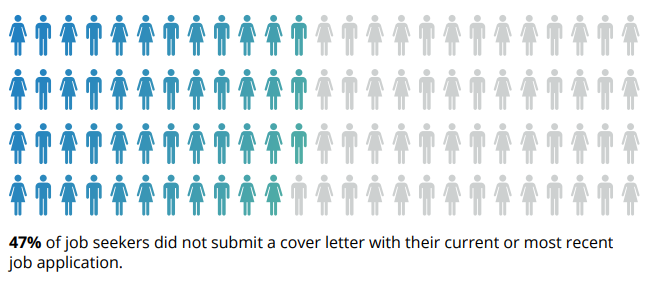
Having said that, cover letters give you an advantage over other potential candidates. Only 53% of job seekers submitted a cover letter in their most recent application … which means you could stand out by including a cover letter in your application.
Plus, cover letters allow you the chance to communicate with the hiring manager. You’re given more space to tell them why you’re the perfect fit for their job, meaning you don’t have to rely on bullet-pointed lists in your resume.
Cover letters also help to build your personal brand. By going the extra mile (even when it’s not required), you’re proving key skills like being a hard worker, having good communication, and taking initiative.
In short: Cover letters aren’t absolutely necessary, but they do have stark advantages. If there’s an option to upload one when applying for any job, do it — even if it’s not required!
How to Write a Cover Letter
Writing a cover letter can be tricky. Even the best writers can struggle with communicating their skills in the right manner, but these tips will help you create a job-winning document.
The structure of your cover letter is arguably the most important thing about writing one.
Not only does a good structure help you to organize your points effectively, but it can help a hiring manager to quickly review the details you’re sharing.
How Long Should a Cover Letter Be?
Okay, so you’re all fired up and ready to craft the cover letter of the hiring manager’s dream. That’s great! But how do you manage the fine balance between in-depth and overwhelming?
A good cover letter is long enough to communicate why the recruiter should pick you … but not long enough to bore them to the point where they’ll need a strong coffee.
One page is usually enough to cover everything you’ll need to include, without losing the recruiter’s attention and having your cover letter tossed into the trash.
Let’s go into those items in more detail:
Your Name and Address
Kick off your cover letter by adding your name and address to the document.
This step is pretty self-explanatory, but it allows the recruiter to easily connect your cover letter to your resume (especially if they’re being printed).
Your name and address also makes it easier for the recruiter to get in touch with a job offer. And that’s the aim of our letter, right?
Their Name and Address
Similarly, you should add the name and address of the company or person you’re writing to.
This shows you’ve done your research and allows the hiring manager to receive your letter if it’s sent to a generic company email address.
The Date of Writing
Make it easier for the hiring manager to file your application by including the date on your cover letter.
Even if you’re not successful this time around, the company might store your letter and refer back to it when they’re hiring for another position!
Why You’re Writing the Letter
We know that the aim of a cover letter is to persuade the hiring manager you’re the best fit for their job. But, be sure to open your letter strongly, with 1-2 sentences that’ll grab their attention and quickly make them realize they’re reading a cover letter.
Something like this will usually do the trick:
“I’m writing to discuss the content strategist role at HubSpot.”
Why You’re a Perfect Fit for the Job
The next section of a cover letter structure is the fun part; it’s where you’ll convince the hiring manager they should hire you — and not the person who’s resume is behind yours.
In this section, answer these questions:
- Why should this company hire you?
- What skills do you have that will help complete the job better than anyone else?
- What makes you a good employee?
- What extra qualifications do you have that are relevant to the role?
Once you’ve answered these, the recruiter will have a solid understanding of who you are, and (hopefully) be convinced to hire you!
What You Can Offer the Company
Have you ever heard the advice to “always sell yourself in a job application”? That concept can be applied to cover letters, but remember that recruitment isn’t all about you.
Businesses measure success in terms of results. The company looking for a new employee will want to know what they bring to the table and how they’ll shape their business’ future. New candidates are rarely brought on-board solely for the soft skills listed in their resume.
That’s why this part of your cover letter structure is arguably the most important.
In less than two paragraphs, show the business what you can do — and prove you’ve done it before (preferably with examples).
Not only does this give them the opportunity to show off your skills, but the company can picture the success you’ll bring to their business by hiring you.
Your Availability
In the marketing world, we’re always told the importance a call-to-action can make. But, don’t leave them to your blog posts: Explain your availability to the person reading your cover letter for the best chances of a follow-up call.
Great cover letters end with a brief section on the candidate’s earliest start date. You could also include your availability for an interview and tell them you’re happy to answer any questions they may have.
How to Address a Cover Letter
Earlier, we mentioned the importance of addressing the hiring manager by their name and address. This proves you’ve done your research and ensures the cover letter lands in the right place.
Personalized content does 42% better than non-personalized, so including the first name of the recruiter can go a long way.
But in a world where privacy is held close to our chest, you might need to do a bit of digging before revealing the name your letter should be addressed to.
Luckily, you can use the power of the internet to do this. To find their:
Name
Head over to LinkedIn and find the company’s profile page. You can do this by entering their name into the search bar or searching for a link to their LinkedIn page on the company’s website.
Then, click “See all employees on LinkedIn”:
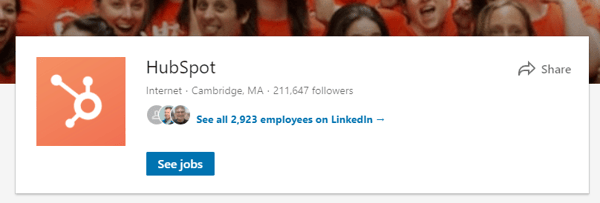
You’ll then be greeted with a list of all people (with a LinkedIn profile) that work for your target company. Simply work your way through this list to find the most relevant contact, or search
- Hiring manager
- HR manager
- Recruitment manager
… to find the most-suitable name to address in your cover letter.
Address
You can find the address of the company you’re looking to submit a job application to by finding the About or Contact page on their website.
This should be in their navigation bar, but can also be found by Googling their URL and “contact”.
On this page, you should find an address for the company. If not, don’t worry. Simply call one of the numbers listed or send an email to their support team. Ask for the company’s general careers email address, and use this on your cover letter.
Opening a Cover Letter
Great job! You’ve done all of the digging you’ll need to write a cover letter. It’s easy from here.
After you’ve addressed the cover letter to the most relevant person, we’ll need to open the letter with something relevant.
“Dear Ms. H.Spot” (using your own initials, of course) will keep it professional.
But, if you’ve struggled to unveil the hiring manager’s name, stick with “Dear Sir/Madam” or “Dear Hiring Manager”.
How to Close a Cover Letter
Once you’ve followed the above cover letter structure and explained your availability, it’s time to wrap it up.
If you’ve addressed the letter personally, end with “Thanks”.
If you haven’t, opt for “Sincerely”.
Then, sign the cover letter with your full name.
Should You Include Salary Requirements?
Talking about money is a tricky subject. Some feel uncomfortable discussing wages in the first interaction with a company, so it’s best to avoid discussing salary requirements in your cover letter unless it’s stated as a requirement.
Including salary requirements in your cover letter could set a bad tone. Instead, allow your letter to show off your skills and make a convincing argument as to why they should hire you.
Save the money talk until your interview!
7 Tips for Writing Great Cover Letters
So, you’ve crafted a cover letter and you’re almost ready to hit send.
Now, wait a minute …
Before attaching to your resume and hoping for the best, use these seven tips to make sure your cover letter is as great as can be:
1. Don’t babble.
Earlier, we mentioned how the best cover letters strike the perfect balance in their length.
Our best tip for writing cover letters is to avoid any babble. Don’t add fluff that fails to add anything of value. Not only are you wasting your time by writing it, but you’re wasting the hiring manager’s time, too.
You want to keep the recruiter’s attention, which can be easily lost through babbling. Cut the jargon and corporate speak that hiring managers have heard before. (Like “leverage” and “thinking outside the box”.)
Yes, professionalism is important, but be harsh and critical when editing your cover letter. If a sentence doesn’t add value, get rid of it!
2. Tailor it for the company and position you’re applying for.
The one-size-fits-all approach doesn’t fit well with cover letters.
You’re applying for different roles at various companies, but don’t let a change in name and address be the only amendments you make.
Remember that a cover letter should explain why you should be hired instead of anyone else. It’s highly unlikely that multiple companies will hire for exactly the same position, so take some time to personalize your cover letter for every position you’re applying for.
3. Add more value than your resume.
Although cover letters are used in partnership with resumes, be wary of falling into the trap of making them carbon copies of one another.
Cover letters that regurgitate everything already explained on a resume are useless. Instead, use the documents to compliment each other by:
- Including new skills.
- Elaborating on how your qualifications would help you in the role.
- Sharing how specific experience gives you an advantage over other candidates.
If you need to include the same thing in both documents, add “as listed in my resume …” rather than copy and pasting the same content.
Put yourself in your recruiter’s shoes: Reading the same thing multiple times would be annoying, right? (Remember, we don’t want to bore them!)
4. Include data-backed examples.
When referencing experience from your resume, use your cover letter as an opportunity to explain in detail — with examples.
Examples allow the company to picture the success you could bring if they hired you, rather than the person next in their resume pile. But, data-backed examples give an extra edge.
Let’s use an example. Which of these options is more impressive?
- I increased leads for the company.
- I increased leads by 35% in one month through a single blog post, which became the company’s biggest revenue source.
It’s option B, right?
5. Tell a story.
Following on from the previous step, you could elaborate on your data-backed examples by telling a story.
Storytelling helps with relatability and gives a hint of your personality in a cover letter. It also makes the recruiter remember your cover letter amongst a sea of other one-page documents in their review pile.
However, this cover letter tip comes with a warning: Don’t over-do it, and make it relevant. Remember what we said about babbling?
Including a story about how you adopted your pet cat is unlikely to influence someone into hiring you. On the other hand, a story on how you created a company’s blogging strategy to achieve your data-backed results is.
6. Get a second pair of eyes on it.
Even the best writers make occasional mistakes, but some hiring managers can be strict with grammatical errors — even if you’re not applying for a role where writing features heavily in your daily to-do’s.
That’s why our sixth cover letter tip is to get a second pair of eyes on it.
Email it to a friend or ask a family member to glance over it before you hit “send”. Ask them to highlight any spelling mistakes or suggestions to improve how you’re communicating with the person reading it.
You never get a second chance to make a first impression. Seeing as though a cover letter is one of the first documents a recruiter sees, try to make it perfect!
7. Be unique.
Finally, make your cover letter unique.
If you’re applying for a creative role, experiment with colors, subheadings, and layouts.
If you’re apply for more of a traditional role, be wary. Not everyone is a fan of bright, bold cover letters, but you can scope your limits by getting a feel of their company culture.
Are they strict and professional, or does the company like to have fun? (You can usually get a feel of this from their website or social media profiles.)
Testing the level of uniqueness can be a case of trial and error. If you’re not getting great reactions from your cover letter, revise and try again.
Cover Letter Examples
We understand that inspiration can go a long way. That’s why we’ve created a one-stop shop for cover letter examples, which are available to view here.
You’re also free to browse our collection of cover letter samples for extra inspiration on formatting your cover letter, and learning from those who’ve helped to land dream jobs.
Conclusion
Congratulations! You’ve now got a fantastic cover letter!
Don’t forget to send it with your resume for each job you apply for.
You’ll soon be flooded with responses to your application — including compliments on the contents of your cover letter, job offers, or invites to interview!

Everything You Need to Know About Instagram Pods, the New Way Influencers Are Gaming the Algorithm
In 2016, Instagram changed its algorithm to eliminate a feed full of chronological posts. Now, your post can only appear at the top of a user’s feed if it earns a certain level of engagement, signaling to Instagram that your post is popular and should be shown to more people.
Additionally, in order to rank highly, your post must receive engagement immediately. If your post receives likes and comments, but not within the first few hours after posting it, Instagram likely won’t boot it to the top.
The algorithm change is helpful for Instagram users — after all, I’d personally rather see posts most of my friends are commenting on and liking. However, it’s less useful for brands trying to spread their content to a wider audience. Plus, it can seem unfair. If you are trying to grow your audience by sharing helpful content, but you don’t have a ton of followers at the moment, it’s twice as hard to get your posts seen by new people.
So how can you get around it? Sure, there are a few shady tactics out there, like buying followers or using bots, but none of those methods will earn you a long-term, loyal audience. Instead, you might want to consider Instagram pods.
What is an Instagram pod?
An Instagram pod is a direct message between a group of about 15-20 people who are in a similar industry as your own. Pods’ rules vary, but essentially, whenever a user posts something new, they share that post in the direct message, and everyone in the group is required to like or comment. This enables the post to rise to the top of the user’s followers’ feeds. It’s mutually beneficial for everyone in the group, since it operates on a like-for-like or comment-for-comment basis.
In a way, Instagram pods are a more strategic version of texting your friends and saying, “I posted a new Instagram picture but it only has six likes, can you go like it so I don’t look lame?”
The concept is the same, but pods take it to the extreme — instead of texting your friends once in a while, you’re in a constant messaging thread, where you’re expected to engage with upwards of twenty or thirty posts a day. Plus, you’ve got to do it in a timely manner, or it won’t work.
But if you’re committed to growing your following, the effort might be worth the reward. To learn which pods to consider joining, and whether it’s even a good idea, read on.
Instagram Engagement Groups
To join an Instagram pod, you can start by checking out a few Facebook groups, such as Instagram Marketing Mastermind Pods. However, since Facebook owns Instagram, there’s a chance your group could get deleted (more on that below).
Additionally, you might try Telegram, a messaging app that hosts pods inside the app. Take a look at Telegram’s engagement group directory (the link will only work once you have a username), and choose one best suited for your business.
Don’t be fooled — it takes a lot of time and effort to find a pod. Since companies don’t typically want to get caught using a pod, pods are often kept secret from the public. Getting caught using a pod could harm your brand’s integrity, since it implies your engagement isn’t authentic.
Which leads us to our next point — are pods even a good idea?
Have Instagram Pods Been Banned?
As reported by Buzzfeed, Facebook recently removed 10 groups on their platform that were employing tactics like trading likes for likes, or encouraging users to join pods on Telegram. Ultimately, all these tactics are meant to “trick” Instagram’s algorithm, which violates their terms of use.
While Instagram pods themselves haven’t been officially banned, it’s clear Facebook and Instagram don’t condone them, which makes them tricky to find and join.
Additionally, it’s doubtful whether pods are a useful long-term strategy. Yes, they get you a boost in engagement on posts you send to your group, but that doesn’t necessarily translate to the kind of engagement you want — namely, comments and likes by people who could buy from you down the road, or become your best brand advocates.
Your engagement metrics will also be skewed, and you’ll no longer be able to tell if your content is resonating with your potential customers. Is your audience liking your content because they feel it’s relatable, or are they liking it because you asked them to?
For instance, I used to ask friends through text to like my Instagram pictures after I’d posted them — my own version of a pod. After a few weeks, I stopped asking. I realized if I didn’t allow my posts to gain natural traction, I’d never know what was working and what wasn’t. If one of my posts doesn’t get a ton of attention, I take it as a sign I should alter my strategy, rather than trying to trick the system.
Ultimately, pods might be worth it for the initial boost, but they can’t substitute authentic engagement, especially if you’re testing to see what type of content works best with your audience. For long-term, sustainable growth, you’ll want to focus on creating content that earns likes and comments on its own.

IoT Security: Why Experts Are Scared — And What You Can Do to Protect Yourself
The Internet of Things can enable your smart refrigerator to order a new carton of milk for you, but it can also allow cyber criminals to hack internet-connected baby monitors, compromise smart cars, and even shut down most of the East Coast’s internet access.
IoT devices like Fitbits, pet trackers, and smart TVs all make your life easier and more convenient. But since these devices store your personal data and communicate with a lot of other internet-connected devices, your privacy is more vulnerable than ever before.
The Internet of Things is notorious for having weak security, even though the technology harbors some extremely sensitive information. And cyber criminals are definitely aware of this vulnerability — IBM reported that criminal IoT compromises have exploded by 600% this year.
But despite the technology’s major security risks, Gartner expects consumers to possess over twice as many IoT devices in 2020 as they do today, increasing the number of world-wide IoT devices from 11 billion to 26 billion.
It’s clear that IoT devices’ convenience and savings prompt consumers to keep buying them, despite their associated risks. But if IoT products are more popular than ever right now, why aren’t vendors scrambling to fix their products’ security issues?
Revenue Trumps Security
The rush to release products in the booming IoT market is similar to the personal computer craze in the mid-90s. Businesses wanted to reap the rewards of selling computers that had their own software and operating systems before they missed out on a massively profitable opportunity.
To quickly develop these new personal computers, release them, and, ultimately, cash in on them, they decided to put their computers’ serious security issues on the back-burner. They could worry about them after they made enough money.
But making security an afterthought placed an enormous amount of risk on these businesses’ customers. Viruses, worms, and spam could easily infect their computers’ software and operating systems, allowing cyber criminals to infiltrate people’s personal computers and steal their data.
In the flourishing IoT market, which is bolstered by a forecasted global market value of $1.7 trillion in 2019, businesses are also scrambling to enter before it’s too late. Unfortunately, though, one of the fastest and cheapest ways for companies to develop and release IoT products is by turning a blind eye to the strength of their devices’ security. Building strong security into IoT products is expensive, could hamper the devices’ speed and abilities, and would slow down their development and release.
IoT vendors can gloss over their devices’ security in various ways, but one of the most fixable problems they have is hard-coding weak usernames and passwords into their products. This means they permanently assign incredibly predictable credentials, like “admin” or “12345” to their customers’ IoT devices. In fact, cyber security researchers at Symantec discovered that over 60% of IoT devices’ passwords last year were “admin” or “12345”. And since consumers can’t change these predictable credentials, hackers can easily guess their devices’ passwords.
Another reason why IoT vendors want to develop and release their products so quickly is that it allows them to collect as much consumer data as possible. Gathering hoards of this precious information will help businesses improve their IoT devices and generate more revenue in the future.
The fate of IoT is worrisome, to say the least, and its wobbly security naturally begs the question: what are the current and future risks of such an insecure technology?
Current and Future IoT Security Threats
For now, the Internet of Things is relatively secure. Hackers can’t exploit the technology to blackmail people or devastate entire organizations because most internet-connected devices are built on different platforms, operating systems, and use different programming languages. Developing malware attacks for every type of IoT device isn’t feasible or worth a cyber criminal’s time.
According to Forrester research, though, as IoT grows in popularity, its security will become weaker.
An ever-expanding Internet of Things will need to integrate with the public cloud, which will give hackers access to consumers’ personal data and open the technology up for more malicious attacks. For instance, cyber criminals could hack your smart car while you’re driving and threaten to disable your vehicle in the middle of the road unless you pay them a ransom. They could also hack systems that deliver water and power to your workplace and threaten to destroy it.
It’s important to note that major IoT attacks like the example scenarios above aren’t a possibility now. But even though cybercriminals currently can’t orchestrate catastrophic IoT security breaches, they can still exploit your smart devices’ vulnerabilities to access other systems connected to it. For example, if your smart fridge can order groceries from the local supermarket, then your bank information is stored in the fridge’s network. In turn, people who hack your fridge could access your funds.
IoT devices are already commonplace, and soon, almost every business that sells household devices will connect their products to the internet. This way, they can collect as much consumer data as possible.
But if IoT companies think they can gather unprecedented amounts of data from their customers and not make a concerted effort to shield their personal information from malicious cyber criminals, they’ll lose their customers’ trust and business. For the sake of retaining loyalty, revenue, and their own decency, IoT vendors need to start strengthening their devices’ security before hackers ruin the industry’s public perception for good.
How Companies Can Protect their Customers from IoT Security Threats
In 2017, the U.S. Government passed the Internet of Things Cybersecurity Improvement Act, which sets security standards for IoT devices that vendors can sell to the U.S. Government. The bill requires IoT vendors to ensure that they can patch up any of their devices with new security updates, they won’t hardcode their devices’ passwords, and they won’t sell devices that have any known vulnerabilities.
While the Internet of Things Cybersecurity Improvement Act is a huge step forward for strengthening IoT security, it really only protects the Government from IoT security threats. Businesses should prioritize the everyday consumer’s security just as much as the Government’s, but this movement is off to a slow start. IoT vendors like Amazon are currently building IoT security solutions, but their products are all still in the early stages of development.
Some cybersecurity experts suggest forming a partnership between the government and the cyber security and intelligence communities could bolster the technology’s security. Together, they could determine the best set of security protocols for IoT devices and pass these regulations into law.
Hopefully, the government can help protect consumers from IoT security threats soon, but before you bank on them to protect your devices and data from malicious hackers, check out these five ways you can rely on yourself for protection.
How Consumers Can Protect Themselves from IoT Security Threats
1. Choose reputable IoT device vendors.
You might have to pay more for a reputable vendor’s products in the short-term, but their commitment to security will save you money and maintain your peace of mind in the long-term. That said, if you don’t know if you can trust a reputable IoT device’s security, don’t connect it to the internet.
2. Immediately change your devices’ login and password.
Hackers can easily find most IoT devices’ default passwords online. To protect your devices and data, use a password manager like LastPass to generate a random password for each of your IoT devices — they’re nearly impossible to crack.
3. Always update your devices’ and connected systems’ software to its latest version.
When IoT vendors discover vulnerabilities in their products, they will issue software updates, or patches, to fix them.
4. Separate your home IoT devices from your business IoT devices.
If a cybercriminal hacks your home network, you don’t want them to be able to access even more of your personal data, like information about your work.
5. Limit the number of devices you connect to the internet.
Does every appliance in your home need to be smart? Once you connect a device to the internet, it connects to millions of other computers, allowing cybercriminals to hack your device.
More Security, More Money
Inevitably, companies who sold personal computers in the mid-90s didn’t leave their products plagued with vulnerabilities. They ended up fixing their security issues. And more than 20 years later, business is still booming. If the IoT market wants to live a long, prosperous life like their digital counterpart has, they must follow suit. Because even though shoring up security might cost IoT companies more money now, it’ll help them gain more trust, loyalty, and revenue for the future.

The Ultimate Guide to RPFs
Have you been tasked with the job of creating a request for proposal, or an RFP?
Whether you have no idea what that is or haven’t written one in awhile, today’s guide can help.
We’re diving into the specifics of what an RFP actually is, why you might need one, and how to create your very first one today.
To start, you should understand what all these letters even mean.
When your company has a new (often large) project, or one that’s more complex and requires a bit of outsourcing, an RFP can help you get the job done right the first time.
The RFP doc becomes a way for you to quickly uncover the strengths and weaknesses of potential vendors in relation to your project without having to spend too much of your time hunting for them yourself.
RFPs can also give you a sneak peek into different strategies you may not have considered since each vendor will include their own unique action plan along with their bid.
And you’ll have this information before you ever have to commit to the vendor.
Keep in mind, this should not be confused with an RFQ.
RFP vs. RFQ
An RFQ, or request for quotation, is slightly different than an RFP since it’s just the quote itself. Here, companies solicit multiple price quotes from various vendors to compare services based on price alone. While an RFP includes a price quote (along with several other specifics), an RFQ does not detail anything other than price.
As opposed to an RFP, an RFQ is a request for quote or quotation.
Here’s how to understand the difference:
While you’re technically receiving a quote in an RFP, you’re also getting information like the action plan, timeline of completion, deliverable schedule, and the list of services provided as well.
But with an RFQ, you’re only receiving the quote itself for the service or products you’re interested in purchasing.
In most cases, simply comparing quotes is not enough to see if a potential vendor is the right fit for your company, which is why an RFP is more appropriate in these situations.
The RFP Process Explained
Before potential bidders can submit their proposals, an RFP must be drafted by the company requesting the work. (P.S. We’ll show you how to do this later in this guide)
This gives potential contractors a better idea of what your company is looking for.
Once your RFP is sent out, contractors or vendors can review it and submit their best bids to compete for the job.
In these proposals, vendors generally include the following items:
- An action plan of how they’re going to solve the issue
- A timeline of what you can expect
- Any necessary background information
- How much they expect the entire project to cost
In certain cases, bidders may come back and say specific components of the RFP need to be adjusted based on their experience in the industry.
At this point, you can either review their feedback and create a new RFP to adjust for the changes, or you can leave the original as is and keep it in mind while considering the other submitted bids.
Once you receive all the proposals, it will be almost effortless to compare each one and determine which vendor is the best fit for your company.
Out of the stack of bidders, you’ll want to narrow this down to a handful of your top three, five, or 10 favorites to consider, depending on how many you receive or are interested in.
From here, you’ll want to spend time vetting potential vendors further to determine who’s really the ideal fit for the job.
Some companies may request one more best and final offer from their top vendors after they’ve started this negotiation process to ensure they’re not only getting the right person or company for the job, but at the right price, too.
While this may sound like an extra step, it’s one that may save you money, time, and headaches down the road.
But this also leads us to a big question: Is all of this really necessary?
Can’t you just spend time reviewing two or three vendors on your own?
As you’ll see next, that route is definitely not in your best interest.
Why Issue a Request for Proposal?
Let’s briefly compare these two scenarios:
- Option #1: Spend time finding the perfect vendor on your own.
- Option #2: Use an RFP to get potential vendors to come to you.
Choose the first route, and you’ll probably use your coworkers, friends, and networking groups to help solicit possible referrals for the job.
Or you might perform a Google search to check out the top vendors in your area.
After you review the website of a possible candidate for the job, you’ll craft the perfect message to reach out and learn if they can even help.
Then, you’ll have to explain the specifics of your project and you may or may not ask them to submit a proposal before deciding to choose them for your project.
It’s not a complicated process, but did we mention you have to repeat it for every promising referral or vendor you come across?
Imagine how long that’s going to take!
Now, what if these potential contractors already knew your project details and they came back with their best plan of action and a formal bid for you to review?
So instead of having to explain your needs each time, you would simply outline it once, and send it out to the masses.
And to save you even more time, it would be up to potential contractors — not you — to reach out.
The RFP route also gives you a sneak peek into each vendor’s real plan of action, not the one they talk you into over the phone or in person.
Since potential candidates have to submit a formal bid, they’ll need to spend time outlining the solution and really working through the problem at hand.
And if they don’t, you have an easy way to weed out vendors and cut through the stack of options fairly quickly.
But, to get to this point, you can’t make this next mistake.
Here’s What Not To Do With an RFP
If you want to find the right vendor, you need your RFP to be specific.
Only asking “yes” or “no” questions won’t get you anywhere.
That’s why you must create specific questions that require thoughtful answers.
Try to use sentences similar to these:
- Can you share an example of how you’ve solved this problem or a similar one for another company? Did you encounter any unforeseen roadblocks? What would you do the same or differently this time?
- With your proposed redesign, how long would it take a non-tech savvy person to complete the new registration form? How much time do you estimate this could save?
With these tips in mind, you’re ready to draft your first RFP.
How to Write an RFP
Here’s the basic structure of an RFP and what to include in yours:
1. Project Overview
Before you go into the specifics of your company, you should give a brief introduction to the project itself so vendors know right away if it’s something worth bidding on.
2. Your Company Background
This shouldn’t be a long history of your company. Rather, it should give contractors a better idea of what your company does and who you serve as a target market.
3. The Goals of Your Project
Clearly identify what you hope to accomplish with this project and what you see as a “win” so everyone is on the same page.
4. Project Scope
The details of the project are essential in an RFP. In the same way you don’t want to use vague questions, a vague project scope won’t help you find the right vendor either.
Spend time really detailing your project scope so there’s no surprises later on.
5. Target Deliverable Schedule
Even if your deadlines aren’t super tight, you should still have a target deliverable schedule in mind. This needs to be included in your RFP so potential vendors can properly gauge if they have the resources and bandwidth to complete the job on time.
6. Possible Roadblocks
Don’t hide your existing or potential issues under the proverbial rug if you want them to disappear. A successful RFP is explicitly clear about any technical issues or possible roadblocks, such as: Are you dealing with custom coding or an outdated platform? Does your team have limited resources?
By explaining these up front, potential vendors will know exactly what they’re getting into.
You’ll also naturally weed out contractors who can’t handle the task due to those constraints.
But you’ll also connect with companies that know how to work around these common issues with skill and finesse.
Remember, it’s far better to find this out now than after you’ve accepted the bid and started work.
7. Budget Constraints
It’s also important to be upfront with your budget too. The more you can eliminate surprises, the better for all parties involved.
8. What You’re Looking For in Potential Vendors
Another way to reduce or eliminate surprises is to explain exactly what you’re looking for in potential contractors.
All you have to do is outline what matters most to your project (i.e., time, solution, budget, etc.) and show how you’ll be evaluating their proposals based on that.
We’ll show you how this is done soon, but before we do, there’s one more thing to add here: an RFP cover letter.
Just like a cover letter for a resume, an RFP cover letter creates a professional image for your brand and sets the tone for prospective vendors. It signals that they should take the proposal and the project seriously.
The good news is there are a number of tools to make creating RFPs easier and less stressful than you’re imagining.
Proposal Software Tools to Help You Manage RFPs
In this article, we outlined 10 tools to help you manage and create professional looking proposals in less time.
For today’s purposes, the following three tools are great places to get started:
1. PandaDoc
To create customized RFPs with your own branding, consider using the proposal software PandaDoc.
Here you can set up your first RFP within minutes and even collaborate with team members using real-time updates within the document itself.
2. Nusii
Similar to other proposal software on the market, Nusii uses a drag and drop editor that makes building RFPs a breeze — especially for beginners.
Thanks to its clean, modern, simple design, it’s also really easy to figure out too.
One of the most helpful features of Nusii is using it for re-working existing RFPs to save you time. Just copy the content from an RFP you like and edit information to fit your new request.
3. Loompio
How do you plan on organizing all the responses to your RFPs?
One standout feature with Loompio is its RFP response library, which gives you instant access to all your answers from previous RFPs. This saves you the hassle of digging around to find what you need in a crowded inbox.
Their magic feature will even help you auto-populate a response if it appears similar to one you’ve already done.
Plus, you can manage your entire RFP process — including sending automated responses — and collaborate with your team all in one place with their intuitive dashboard.
And if proposal tools are out of the budget right now, or if you’d like to try your hand at creating your own first, use this template as a starting point.
RFP Sample Template
To use this template, simply replace or remove anything [IN BRACKETS] and enter your company’s information instead.
You can also remove sections or pieces of information that don’t pertain to your project.
1. Project Goals
The goals of this project include:
i. [INSERT COMPANY GOAL #1]
ii. [INSERT COMPANY GOAL #2]
iii. [INSERT COMPANY GOAL #3]
To reach these goals, [YOUR COMPANY] is now accepting bids in response to this Request for Proposal.
The project details are as follows:
2. Scope of Work
[Include a description of the project and a detailed scope of work here. The description can be in paragraph form, a bulleted list, or a combination of both.]
3. Target Deliverable Schedule
[Add the date when the project must be completed by using the text below.]
The expected project completion date is [ADD DATE]. If this date needs to be adjusted, please include your readjusted proposed date, as well as your reasoning for shifting the schedule. All proposed date changes will be considered.
4. Existing Roadblocks Or Technical Issues
[Here, you’ll want to outline any time, resources, or other constraints that will affect both the proposal and the project.]
At this time, [YOUR COMPANY] currently has [INSERT CURRENT ROADBLOCKS] bidders should be aware of.
5. Budget Constraints
The budget for this project is [ENTER FULL DOLLAR AMOUNT + CURRENCY IF DEALING WITH VENDORS OUTSIDE OF YOUR COUNTRY]
6. Evaluation Metrics
[YOUR COMPANY] will evaluate bidders and proposals based on the following criteria:
- Previous experience/past performance history
- Samples and/or case studies from previous projects
- Projected costs
- Experience and technical expertise
- Responsiveness and answers to questions in the next section
7. Questions Bidders Must Answer To Be Considered
[Create thought-provoking questions related to this project so you can properly assess potential vendors. Consider asking questions that you would in person or over the phone.]
i. [INSERT QUESTION #1]
ii. [INSERT QUESTION #2]
iii. [INSERT QUESTION #3]
8. Submission Requirements
Bidders must adhere to the following guidelines to be considered:
- Only bidders who meet all 5 metrics in the evaluation section should submit a proposal.
- Proposals must be sent in by [INSERT DATE]. Bidders who are interested in submitting a proposal should inform [POC NAME + EMAIL] no later than [INSERT DEADLINE].
- Include samples and references with your proposal.
- Proposals should not be more than [ENTER NUMBER] pages. Failure to comply to this guideline will result in an automatic rejection.
- A proposed schedule must also be included and clearly expressed.
9. Contact Information
For questions or concerns connected to this RFP, we can be reached at:
Over To You
Now that you have a better idea of what an RFP is and how to create your first one, you’re ready to get started.
Sit down with your team to narrow down your project’s specifics, goals, and scope of work. Then determine when the project needs to be completed and your budget before moving on to the drafting phase.
With this intel gathered, you’ll be ready to plug everything into our template.
You can also use this tried-and-tested proposal formula to ensure your RFP is professional and polished too.
Follow these steps and you’ll have an RFP template you can quickly update. Your next project will be a success that much faster.

The 27 Best Websites for Wasting Time on the Internet in 2018
There’s a lot of content out there about productivity — everything from hacks to shortcuts to tips and tricks for how to get more done in less time.
It’s all about the sprint, the checking things off the list, and the downloading of software that’ll block out any and all distractions.
But what about those times when you just want to surf the internet aimlessly? No one can be hyper-productive all the time, and studies have shown that taking deliberate breaks after periods of work is actually better for your productivity. 
The question is, how do you spend those breaks? You could check your email, but that still counts as working. You could check Facebook or Twitter or Instagram, but there’s something so mundane about haphazardly scrolling through your peripheral friends’ photos.
We have a few better ideas. Here’s a shortlist of the most wonderfully entertaining places to waste time on the internet outside of email and social media. Get ready to bookmark your favorites.
Best Websites on the Internet
- WaitButWhy
- The Oatmeal
- Supercook
- OCEARCH Shark Tracker
- Apartment Therapy
- A Soft Murmur
- LEGO Videos
- Gravity Points
- Pottermore
- xkcd
- BuzzFeed “Comments” Sections
- The Toast
- The Onion
- Cracked
- Mental Floss
- HowStuffWorks
- Lifehacker
- Mix
- Space.com
- Imgur
- Animal Planet Kitten and Puppy Cams
- Zillow
- Google Maps Street View
- Wikipedia
- Giphy
- Wayback Machine
- The Oregon Trail
Cool Websites
1. WaitButWhy

WaitButWhy is one of my favorite places to spend time on the internet. Every week or so, a guy named Tim Urban churns out one, really long, really awesome article. (Seriously, they’re canonical. You can kill a lot of time reading just one of them.)
His articles are always fascinating, in-depth, and really well written. His writing style is the perfect mix of informative and humorous — making topics like the Fermi Paradox (the what?) approachable for someone like me who’d never heard of it before in my entire life. He writes about relationships, religion, outer space … pretty much everything.
My favorite posts of his include “Everything You Don’t Know About Tipping,” “The Great Perils of Social Interaction,” and “Your Life in Weeks” (which has some awesome graphics in it, by the way). He even wrote a great post on why procrastinators procrastinate, which anyone reading this article might want to check out.
2. The Oatmeal

The Oatmeal is another one of my absolute favorite places to spend time online. It’s a huge library of awesome content — some comprised entirely of graphics. Even if you’ve read everything already, it’s the kind of stuff you can read over and over again.
Some of my favorite posts include:
- Why Working From Home is Both Awesome and Horrible.
- How the Male Angler Fish Got Completely Screwed (I think I legitimately cried laughing when I first read that one).
- Ten Words You Need to Stop Misspelling.
- You’re Not Going to Believe What I’m About to Tell You.
3. Supercook
If you want to surf the internet in a semi-productive way — but not so productive that you actually have to leave the house — then check out Supercook.
Here’s how it works: You tell it which ingredients you have in stock in your home, and it’ll give you a big list of recipes you can make using just those ingredients. It’s a fun way to stay thrifty, clean out the fridge, and make sure food doesn’t go to waste.
4. OCEARCH Shark Tracker

Tracking sharks as they swim around the ocean may not be the most conventional way to waste time on the internet … but it might be the coolest.
The Track Sharker tool by Marine Research Group OCEARCH lets you track tagged sharks — who all have names, by the way — as they travel all over the world. You can even zoom in on a specific location to see which sharks are hanging out there and where they’ve been swimming and traveling for the past year. Go, Hilton, go!
5. Apartment Therapy

If you’re even a little bit of a fan of home decor or DIY projects, this is a website you might find yourself spending hours and hours on. There’s a ton of awesome visual and written content on here. My favorites include their “before and after” series, their “small spaces” series, and the tours of people’s actual apartments and homes.
Plus, they have a whole lot of helpful articles giving tips on everything from how to redo your stairs to ideas for using that awkward space above your fridge. There’s no shortage of useful and fun information on here, making it prime for endless browsing.
One of our own was recently featured on ApartmentTherapy too — check out INBOUND Elijah‘s adorable spot here.
6. A Soft Murmur

When taking a break from your usual work grind, set yourself up for true focus with A Soft Murmur. This website is your customizable white-noise machine. Its dashboard, available as an app for both iOS and Android, gives you slidable volume bars for five different nature sounds: rain, thunder, waves, wind, and fire.
This website allows you to independently adjust the volume of each of its five sound effects, creating an outdoor ambience that resembles your favorite soothing activity. Turn on “Waves” and “Fire” for the sound of a beach bonfire. Turn on “Rain” and “Thunder” for the sound of a distant storm outside your house.
7. LEGO Videos

You might’ve seen the recent (and awesome) LEGO Movie, but did you know LEGO’s involvement in on-screen entertainment began much earlier than that? Believe it or not, LEGO has been creating hours of video content long before we saw them in theatres, and all of these videos are sorted by theme and story on its website.
For every pop-culture phenomenon to ever steal our attention, there’s a LEGO video series version ready to steal our hearts. Star Wars, Jurassic Park, Scooby Doo, Lord of the Rings, Harry Potter … the list goes on. Tune into LEGO’s video channel and enjoy.
8. Gravity Points

Gravity Points is a digital “pen” created by Akimitsu Hamamuro, and it is quite mesmerizing. The website simulates the effect of gravity by allowing you to plot small gravity centers across your screen. Then, even smaller floating objects will flock to these gravity centers and orbit them.
The more gravity centers you plot, the more these forces will start to compete, making your screen all the more chaotic. And yes, your gravity points can absorb one another to create a black hole. It’s outer space right there on your computer screen.
9. Pottermore

As a marketer, you might dive so deep into branding your business, you have no time to brand yourself. Even if you’re not a massive Harry Potter fan, Pottermore can scratch that itch for you.
Pottermore is widely recognized as the official website for finding your Patronus, your wand type, the Hogwarts House you belong to (of course), and much more. The quizzes you take to earn these identities are just obscure enough to hold your excitement for the result, and might even encourage you to read (or reread) the famous Harry Potter books — something you should definitely do to balance out your time-wasting website sessions.
Funny Websites
10. xkcd

If you’re into nerdy humor even the littlest, tiniest bit, there’s a lot to love about xkcd. Each post features a short, stick-figure comic strip on humor about technology, science, mathematics, and relationships. The guy behind it is Randall Munroe, who worked on robots at NASA’s Langley Research Center in Virginia before starting this blog.
Below is an example of one of his comic strips. (He always includes a joke in the comic strip image’s alt text, so if you look at the strips on the xkcd website, be sure to hover your mouse over the image to catch those jokes.)

Source: xkcd
11. BuzzFeed “Comments” Sections

You already know BuzzFeed is a great place to waste time on the internet, but we’re looking beyond the actual article here. Scroll down to the “comments” section of pretty much any article for a hilarious showcase of the crazy (I mean crazy) stuff people are saying. I find it especially entertaining to read the comments on benign topics that shouldn’t make people so irate, but do anyway.
12. The Toast

If you’re into great (and hilarious) fiction writing, then you’ll definitely want to bookmark this site. Every day, writers Nicole Cliffe and Mallory Ortberg publish a post on “everything from literary characters that never were to female pickpockets of Gold Rush-era San Francisco,” reads their About page.
To get an idea of whether it’s up your alley, start with their post, “A Day in the Life of Seth MacFarlane, Human Male (Definitely Not a Swarm of Hyper-Alert Bees and a Metal Jaw.)” It’s just so good.
13. The Onion

If you haven’t spent some quality time reading the online satirical newspaper The Onion, then you’re seriously missing out on a good laugh. (And you’ve kind of been living under a rock.) But seriously, I sometimes forget how consistently hysterical the articles are.
The publication started in 1988 and they’ve managed to successfully maintain a high standard for humor and writing ever since. Their headlines are laugh-out-loud funny in and of themselves — from “Free-Thinking Cat Sh**s Outside the Box” to “Archaeological Dig Uncovers Ancient Race of Skeleton People” to “Buyer Of $450 Million Da Vinci Painting Sort Of Assumed It Would Come With Frame.”
Of course, their headlines being hilarious makes sense, seeing as the headline is where each story begins. This awesome episode of NPR’s This American Life gives you a really cool peek into The Onion‘s editorial process.
(Bonus: ClickHole, their sister website that makes fun of Upworthy-style viral content on the internet, is another great place to waste some time.)
14. Cracked

Similar to The Onion, Cracked is a pseudo magazine for your everyday life — and yes, it will crack you up. But while The Onion gives you a satirical take on a real news trend, Cracked makes snarky pop-culture observations that are ironic or just ridiculous by design. Sometimes the writers will say the one thing everyone’s thinking, but is afraid to say out loud. That’s Cracked for you.
You might just be passing time on this online magazine, but with respect to some of its most popular articles and pictures, it’s time well spent. Here are a few ridiculous think pieces from Cracked to whet your appetite:
- The Actual Answers to 6 Famously Unsolved Movie/TV Mysteries
- 7 Hilarious Ways Reality Would Ruin Famous Movie Scenes
- 5 Random Questions You Didn’t Know You Wanted Answered
- 6 Underrated (and Selfish) Benefits of Parenthood
Websites for News & Information
15. Mental Floss

Mental Floss is a super addicting online magazine with articles covering a really wide range of topics. Their articles are really well written, really well researched, and usually on topics that don’t get a lot of airtime.
For example, in their “Big Questions” section, they tackle weirdly intriguing questions like why shells sound like the ocean and why yawns are contagious. Readers can even submit their own big questions.

16. HowStuffWorks

This website is dedicated entirely to — you guessed it — how things work. And by “things,” they mean everything: from airbags to regenerative medicine to velocipede carousels. They’ve covered so much on this website, it’ll be hard to run out of things to read about.
Plus, they have a whole bunch of really cool podcasts that have branched off the main site over the years and are worth checking out. My favorites are “Stuff You Should Know,” “BrainStuff,” and “Stuff Mom Never Told You.”
17. Lifehacker

Lifehacker is a hub of productivity tips, tricks, and downloads. It’s basically an archive of all the information it would be incredibly useful to know, but nobody ever really teaches you. Aside from productivity, they also cover topics such as money-saving tips, clever uses for household items, and so on.
For example, did you know you can buy alcoholic beverages at Costco without a membership? Or that you can peel a mango in under 10 seconds? Or that there are four lengths of naps that’ll benefit you in different, very specific ways? Along with the fun articles, they have some pretty awesome, in-depth articles, like this one on how to plant ideas in someone’s mind, as well as helpful listicles like the top ten obscure Google Search tricks.
There’s so much content on there that it can be hard to find posts on specific topics. Use the Lifehacker Index for an introduction to their top-performing posts and tips on how to find posts on any topic on the website.
18. Mix
Sometimes you want to surf the internet, but don’t want to do all the paddling. For that, there’s Mix.
You might know the above website by its former name, StumbleUpon, a site (and an add-on to your internet browser) that allowed you to select topics that interested you and then served you various news and information that fit those interests. Today, it’s called Mix, and it puts a new spin on StumbleUpon’s popular content randomizer.
Mix lets you set your reader profile and then share the articles, photos, and videos you discover from your own personal “mix.” It’s a convenient way to entertain yourself and learn new things by simply telling the web to surprise you.
19. Space.com

As long as your head is in the clouds, raise it above Earth’s horizon and head on over to Space.com. This website reports on astronomy news and trends through friendly, easy-to-digest content that, sometimes, just serves to quench your thirst for a cool nebulous shot of our solar system. Who knows? Maybe you’ll tap your inner space enthusiast.
Whether you want to see an object burn up in our atmosphere or get real into the weeds of how a black hole forms, Space.com has something for everyone. Get your fix today with this amazing picture of a green aurora seen from the International Space Station, part of Space.com’s “Image of the Day” series.
Websites for When You’re Bored
20. Imgur

Imgur collects the most viral images of the week and collects them all in one place for your mindless scrolling and enjoyment. What I like about Imgur is it’s usually more timely than Twitter or Instagram — more popular sharing networks where funny pictures and memes might appear a week or two later. Use Imgur to waste time and introduce your friends to the funniest stuff on the internet first.wx1
21. Animal Planet Kitten and Puppy Cams

Puppies and kittens. What could be better? I have this website bookmarked for whenever I need a pick-me-up. You can check out a live stream from animal shelters in the U.S. to see some of the adoptable cuties in action.
22. Zillow
It’s fun to check out real estate in areas you might want to live — and it’s just as fun to check it out in places you’ll probably never live, but would love to in a dream world. Go ahead and explore what’s out there. You can set up saved searches (some more realistic than others) to relive your discoveries later.
23. Google Maps Street View

In the same vein as Zillow, it’s wildly entertaining to go to Google Maps and zoom in on the street view in random places around the world. It’s so strange and thrilling to see what life was like at a random moment in time, on a random street somewhere you may never visit in your lifetime.
I recommend the Palace of Versailles in France, Mount Everest Base Camp in Nepal, the Swiss Alps, and the Great Barrier Reef off the coast of Australia. (Yes, they have underwater cameras.)
24. Wikipedia
You didn’t think I’d write a post on where to waste time on the internet without including Wikipedia, did you? Of course not. You’ve gotta love spiraling into the proverbial Wikipedia black hole: Look up one thing, and then check out something that’s interlinked to it. Before you know it, you’ll have charted the entire Russian Revolution. (Read: This is an actual glimpse into my colleague Corey‘s Sunday morning.)
If you want to get more involved while wasting time online, remember Wikipedia is based on a model of openly editable content — as in, anyone can edit any unprotected page. So if you’re into editing and updating content in your free time, it’s yours to edit. (As long as you follow their guidelines.)
25. Giphy

When you need to find the perfect GIF, you can’t just stop at the first result you get for “dancing” or “awkward” or “animals being jerks.” I could spend (… and have spent) hours on Giphy looking for juuust the right GIF. How long do you think it took Ellie here to come up with all ten of the ones in this post? Totally worth it.
26. Wayback Machine
Feeling nostalgic? Check out what websites have looked like over the years via Internet Archive’s famous Wayback Machine. It lets you pick a date and see exactly what any website looked like at that time. (For a real trip, compare how Facebook looked back in the 2000s to today. Remember the wall-to-wall?)
If you just want to take a quick peek, check out this roundup of what nine famous websites used to look like. All the images in that post were taken from the Wayback Machine.
27. The Oregon Trail

Here’s a little gift for those of you who made it to the end of this post: Internet Archive — yes, the same one responsible for the Wayback Machine — made it possible for people to PLAY THE COMPUTER GAME “OREGON TRAIL” AGAIN. I can practically hear all the Gen X’ers out there screaming with joy.
If “Oregon Trail” isn’t your cup of tea, the other games made available by Internet Archive include “Duke Nukem,” “Street Fighter,” “Burger Blaster,” “Indiana Jones and the Last Crusade,” “The Lion King,” and “Chuck Yeager’s Advanced Flight Trainer.” Check out the full library here.