
11 of the Best Mind Mapping Software to Brainstorm Better Ideas
One of the worst feelings in the world is forgetting a great idea. All you had to do was write it down, but you were confident that you’d never be able to forget such a compelling idea. When the idea slid out of your mind, though, the easy loss of such an insightful thought nearly crushed your soul.
Taking the time to jot down your ideas right when they pop into in your head is one of the best ways to remember them and, ultimately, bring them to life.
But if your idea has a lot of moving parts, like a big project, you need to do more than just write your vision down on a piece of paper — it’ll be too scattered and disconnected. The best way to brainstorm, structure, and implement a vision is by visualizing it with mind maps.
You can use mind maps to visually flesh out any multi-faceted or complex concept, ranging from project plans to organization charts to the list of Oscar-nominated movies you haven’t seen yet.
Looking at concepts, rather than just reading about them, has always been the best way to learn and remember. In fact, humans can process visual information two times faster than the blink of an eye.
Most mind mapping software is also cloud-based and collaborative, so if you want to enhance your project’s clarity, cooperation, and execution, check out this list of the best mind mapping software, ranked by G2Crowd.
11 of the Best Mind Mapping Software for Brainstorming Better Ideas
1. MindGenius
Visual cues help us process and retain information better than text. Using MindGenius, you can structure your ideas in a visually appealing way with an assortment of colors and photos from their built-in image library.
The software also has a collection of mind map templates with different visual styles, so you can brainstorm and implement your plans faster than you could starting from a blank canvas.
4.9/5.0 (16 Reviews)
Price:
Subscription Plan – $232 for first year and $56 for second year onwards
One-Time Cost Plan – $392
2. MindManager
MindManager is like a virtual whiteboard. You can easily add ideas, place them wherever you like, and draw connections between them. You can also track the progress of your projects by adding its due dates, priorities, and resources.
MindManager’s most helpful feature is its dashboard map, which integrates all of the data related to your idea or project in one place for everyone on the project to view and access.
4.6/5.0 (27 Ratings)
Price:
One-Time Cost of $349 on Windows
One-Time Cost of $179 on Mac
3. Creately
With more than 50 types of diagrams and thousands of examples and libraries, Creately lets you quickly flesh out your ideas using their templates. But if you want to create a mind map from scratch, you can still visualize your ideas in a timely fashion by leveraging features like click-to-create, drag-and-drop, and smart shapes, which adapt its size to its location on your map.
Some of Creately’s most useful features are its importing and sharing capabilities. Importing Microsoft Visio files into the software is seamless, and when you’ve finished your project, you can embed private diagrams on your wiki pages and export them into Adobe Illustrator or Inkscape for further modification.
4.5/5.0 (11 Ratings)
Price:
Public Plan – Free For 5 Public Diagrams
Personal Plan – $5 per month
5 User Team Plan – $25 per month
10 User Team Plan – $45 per month
25 User Team Plan – $75 per month
4. XMind8 Pro
XMind 8 is one of the most popular mind mapping software, featuring a decade-long market presence and millions of users. In the software, you can make your mind maps look more engaging with different themes, fonts, and over 60,000 icons, easily collaborate with others by saving your mind maps to Evernote, and present your mind maps by turning them into slideshows.
One of XMind 8’s main advantages over other mind mapping software is that you can track your project’s progress with its Gannt View, which shows you the start date, end date, and development of each project.
4.4/5.0 Rating (24 Ratings)
Price:
One-time cost of $129
5. LucidChart
Lucidchart is an intuitive, collaborative, and secure mind mapping software. With drag-and-drop functionality, group chat and comments, and revision history, your team can easily create and edit your mind maps.
If your team plans to map out sensitive ideas that need an extra layer of privacy, Lucidchart also offers more security options than other similar software. They partner with Amazon Web Services and leverage data encryption to protect, backup, and secure your data.
4.2/5.0 (12 Ratings)
Price:
Single User Basic Plan – $4.95 per month
Single User Pro Plan – $9.95 per month
Team Plan – Starts at $27 per month
Enterprise – Contact Sales
6. MindMup
By helping users structure their stories and measure their projects’ cost and progress, MindMup is arguably the best mind mapping software for marketers. In the software, you can create storyboards, post your maps to social media, and calculate the cost of your projects by adding measurements to your map nodes.
MindMup maps are also compatible with Google Drive, so you can conveniently create your maps right in the app and manage them like any other Google Drive file.
4.2/5.0 (5 Ratings)
Price
Free User Plan – Free
Personal Gold Plan – $2.99 per month
Organisational Gold – $100 per year
7. Cacoo
Just like other mind mapping software, Cacoo provides a lot of collaboration tools to improve your team’s workflow. But Cacoo offers more robust organization tools, like Folders, which can save and store updates and comments to your team’s assets directly in the software.
You can also enhance your productivity with Cacoo by leveraging their integrations with Backlog, Typetalk, Google Drive, Adobe Creative Cloud, and Confluence.
4.1 / 5.0 (20 Ratings)
Price:
Single-user Plan – $4.95 per month
Team Plan – Starts at $18 per month
Enterprise Plan – $600 per year
8. SmartDraw
With over 4,500 templates, 70 different diagrams, and availability in 100 languages, Smartdraw is a mind mapping software catered for a lot of different countries and almost every industry. But even though it’s one of the most robust mind mapping software, its automation and user-friendly interface make it intuitive and easy to use.
SmartDraw also integrates with the most popular tools in the workforce, like Microsoft Office, G Suite, Confluence, Jira, and Trello, helping you collaborate with your team across the tools you’re already using.
4.1/5.0 (19 Ratings)
Price:
Single User Plan – $9.95 per month
5+ Users Plan – Starts rom $5.95 per month
9. Bubbl.Us
Bubbl.us is a simpler mind mapping software than most, but since it offers all the essential mind mapping features at such an affordable price, its a steal.
With Bubbl.us, you can create and edit mind maps on any device, use templates, add colors, share them and collaborate with colleagues, and export them as images or presentations.
If you work on a small team and need an affordable yet dependable mind mapping software, Bubbl.us could be an ideal solution.
4.1/5.0 (15 Reviews)
Price:
Free – Free
Premium – $4.91 per month
10. MindMeister
MindMeister is completely web-based, so you can develop your ideas from any computer, share, and collaborate with as many colleagues as you want, all in real time. There’s also an integrated chat tool that lets you vote on ideas and discuss changes within the tool
MindMeister’s most powerful feature is probably its presentation mode, where you can visually communicate your ideas and plans to colleagues or customers by turning mind maps into slideshows, exporting the slides as PNGs, and embeding presentations into your website.
4.0/5.0 (6 Reviews)
Price:
Basic – Free
Personal – $4.99 per month
Pro – $8.25 per month
Business – $12.49 per month
11. Coggle
Coggle is a web-based mind mapping software that lets you visually breakdown your ideas with your colleagues. Just like Google Docs, Coggle makes sure you’ll never lose any of your valuable ideas by letting you see all the change made to your mind map, make a copy of any iteration, and revert the diagram to any of its previous versions.
4.0/5.0 (5 Reviews)
Price
Free – Free
Awesome – $5 per month
Organization – $8 per member per month
Enterprise – Contact Sales

6 Types of Content That You Can Easily Repurpose as Video
Content marketing is getting complicated. The number of platforms we need to be active on has increased, from blogs to new social networks gaining steam. The types of content we need to create has gone up as well, as image-based content has become more popular and video has skyrocketed. And to complete this trifecta of pressure, we need to constantly tweak and optimize our publishing frequency of each type of content on each type of platform.
It’s a lot to keep track of, so it’s important to simplify your content marketing strategy as much as possible, and focus on the channels that have a proven impact for your business.
However, some tactics just can’t be ignored, like video marketing. According to HubSpot’s content trends survey, buyers want to consumer more video from brands compared to any other type of content like email, social images, blog posts, and ebooks.

Image source: HubSpot Research
Wyzowl, an animated explainer video company, has also found that 72% of buyers would rather watch a video to learn about a product or service than other types of content.
Committing to video marketing, however, is no small undertaking.
That’s why simplifying and streamlining your video marketing efforts is critical to achieving success. Fortunately, mining your content archives to repurpose different types of content as videos is relatively simple.
Whether you’re turning other formats into engaging videos, or extending the reach of your production clips, you end up with a diverse content library that can empower your audience regardless of their format preference.
Here are just a few ways you can get started.
6 Types of Content That You Can Easily Repurpose as Video
1. Create a video slideshow from a blog article.
If you’ve been writing blog posts for a while, you likely have a ton of valuable content hidden in your blog archives. But how much does it really get seen? Reviving them as slick, contemporary videos can re-communicate its message back to your audience.
You might think turning blog posts into videos could take too much time, but tools like Lumen5 can automate the process for you. All you have to do is pick a blog post, and the web app will leverage AI to pull your post’s most important sentences and create a storyboard for you.
You can then tweak the automated storyboard and add relevant stock photos and music from their media library to your video.

Image source: Lumen5
2. Break up your webinars into smaller video clips.
Webinars are powerful pieces of content for lead generation, and many businesses put some of their best content into their webinars.
But the problem with making webinars your best type of content is that it has a short lifespan. Even if you make the recording available after its live stream, people won’t ever watch it unless you consistently promote it.
To get more use out of your webinars once they’re over, try breaking them into smaller video clips. Most webinar hosting software lets you export webinars into video files on your computer, and ClickMeeting’s built-in clip editor will let you chop up your webinar recordings.

Image source: ClickMeeting
3. Capture quick testimonials and case studies during customer calls.
Even though video testimonials and case studies can be one of your best marketing assets most marketers don’t seem to prioritize them. Reaching out to customers and recording them might seem like too much work and money. But video case studies don’t always need to have such a high production value. If you just capture your customers’ authentic feedback, then you’ll have all the video you need. There’s no reason to travel to their office and record them — you can edit and polish the clip later.
Video software like Zoom can let you easily record a short interview of a bunch of your customer’s experience with your product or service during customer calls.
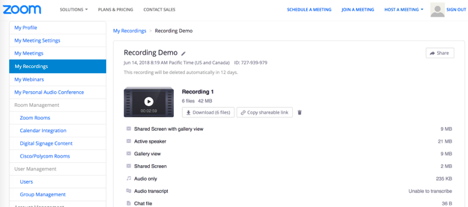
Image source: Zoom
This allows you to generate them organically rather than the awkward and sometimes inconvenient process of seeking them out separately. Just remember to ask your customers if you can record your video chat and use parts of it in your case study reel.
Using this organic technique, you can easily compile a sizzle reel of candid and honest testimonials captured in the moment.
4. Turn internal videos into educational videos.
From sales to customer support, each of your company’s teams spend a lot of time teaching your prospects and customers how to do things on personalized webcam or screen share video software like Loom.
Given the value of these videos’ insights, though, shielding them from the public could be wasting a huge marketing opportunity.

Image source: Loom
If your sales, customer support, and other teams’ Loom videos are of high quality, you can use them in your content marketing and provide a lot of valuable education to your audience through blogs, social media, and YouTube.
5. Turn videos into GIFs.
Once you have a library of video content, transcriptions and resource page embeds aren’t the only way you can repurpose them. You can also break your videos down into one of the internet’s most favorite darlings: GIFs.
Creating GIFs is easier than you think. In addition to helping you find the perfect GIF for any situation, Giphy has a Mac app called Capture that can help you easily create GIFs of your own.

Image source: GIPHY
On Giphy, you can break down your videos step-by-step, capture and highlight the most animated and engaging moments, add captions, adjust resolution, export, and embed. A GIF’s simplicity is part of what makes it great, so you don’t need to overthink it when you make one.
6. Create digestible video from podcast episodes.
Making a simple video from one of your podcast episode’s audio track is an easy way to repurpose content, but an audio-only video doesn’t command as much attention as a visually appealing video.
Plus, some publishers have found that up to 85% of Facebook video views take place without sound, so adding simple text transcriptions to those videos will grip your audience’s attention. Tools like Anchor Videos can help you transcribe your podcast’s audio clips in a visually engaging way, which are perfect for social media videos.

Image source: Medium
Keep on Clipping
Video content is only going to become more important as content marketing evolves, but too many brands are letting their perception of the amount of work involved hold them back.
Don’t fall into this trap. Instead, commit to creating simple and streamlined video content. Use other content types that you’ve already created as building blocks, leverage video as much as possible, and don’t try to start from scratch every time you go to create content. Reusing and repurposing old content will help you effectively integrate video into your larger marketing strategy.

23 Simple Email Marketing Tips to Improve Your Open and Clickthrough Rates
Practicing good inbound marketing means sending emails to people who actually want to hear from you.
But oftentimes, your emails still end up getting lost in your customers’ inbox clutter — or worse, their spam folder. And then, when someone actually opens your email, they don’t actually click through.

You might think to yourself, “Ugh, I just can’t win.”
Don’t worry, I’ve got your back. Here are 23 tips that are perfect for small and growing businesses, but anyone can embrace right now to improve their emails’ open rates, clickthrough rates, and lead generation potential.
Email Marketing Tips for Small Businesses
- Do not buy email addresses.
- Abide by CAN-SPAM rules.
- Ensure your opt-in process complies with GDPR.
- Email new contacts within 24 hours.
- Send your emails from a real person, not your company.
- Pre-set the preview text.
- Write clear and clickable subject lines.
- Keep your emails concise.
- Include one call-to-action button per email.
- Add alt text to your CTA image.
- Hyperlink your emails’ images.
- Include noticeable text links.
- Place at least one clickable item above the fold.
- Add alt text to all of your images.
- Avoid background images.
- Add social sharing buttons.
- Simplify sharing with ready-made tweets.
- Add an email forwarding option.
- Clean up the plain text version of your emails.
- Optimize your emails for mobile users.
- Preview and test your emails before sending them.
- Don’t be afraid to ‘clean up’ your contact list.
- Monitor each email’s performance.
1. Do not buy email addresses.
I know what you’re thinking: In the early stages of an email marketing newsletter, you want to do whatever it takes to kickstart the campaign and get eyeballs on your business. I get it. Whatever options you see online, however, you should resist the urge to purchase an email list.
There are lots of ways to buy an email list, but none of them will actually benefit your campaign. Why? Since the owners of these email addresses didn’t explicitly agree to receive content from you, there’s no telling how interested they are — or if they’re even a fit for what you have to offer. A bought email list is also in violation of GDPR (we’ll talk more about this in just a minute).
Purchasing email lists is always a bad idea. Get more reasons why in this blog post.
2. Abide by CAN-SPAM rules.
CAN-SPAM (Controlling the Assault of Non-Solicited Pornography And Marketing) is an act that was passed in 2003. Essentially, it’s a law that establishes the rules for commercial email and commercial messages, gives recipients the right to have a business stop emailing them, and outlines the penalties incurred for those who violate the law.
In order to be CAN-SPAM compliant, it’s important that your email messages follow these rules, which are available on the FTC’s website.
A few highlights:
- Include your valid physical postal address in every email you send out.
- Give recipients a clear and obvious way to opt out (i.e., unsubscribe) of every email you send. (HubSpot customers: Don’t worry — you can’t save an email template unless it includes this element.)
- Use clear “From,” “To,” and “Reply to” language that accurately reflects who you are.
- Avoid “no-reply” or similar sender names, which prevent recipients from opting out of an email newsletter if they’d like to.
- Avoid selling or transferring any email addresses to another list.
Note: Because I am not a lawyer, please do not construe the contents of this article as official legal advice. Check out the FTC’s website for extensive advice on this subject, and read this blog post for more tips on improving email deliverability.
3. Ensure your opt-in process complies with GDPR.
You’ve probably heard of the General Data Protection Regulation (GDPR), a new law enacted across Europe in May 2018 to better protect internet users’ personal data.
We don’t expect you to have this long piece of legislation memorized. However, if some of your email recipients live in Europe, there is one key guideline by which you should develop your email marketing campaigns:
When your website users land on a page that solicits their personal information, tradition might tell you to include a pre-checked box that opts the user into an email campaign so they can receive updates and special offers related to your business. Today, having this box pre-checked is in violation of GDPR. So, to comply with GDPR, make sure your European users and customers are given the clear option to opt into your email newsletter themselves — don’t make the decision for them.
This rule might sound like bad news for your email marketing campaign, but it can actually improve your open and clickthrough rates. Limiting your subscriber list to just those who specifically asked to join you will ensure only the most interested people are receiving your messages. This maximizes the chances that you’ll convert readers to qualified leads as a result of an email send.
4. Email new contacts within 24 hours.
It’s important to take advantage of the window of opportunity when your company or brand is at the top of your prospects’ minds. You can really get a pulse of what future engagement will look like by what people do when you email then within 24 hours of their subscribing to your newsletter, signing up for an offer, and so on. Plus, it’s a great opportunity for branding and setting expectations.
If you don’t have any automated email workflows set up, you’re likely missing out on some major opportunities to nurture and engage your existing contacts.
(HubSpot customers: Use HubSpot’s Workflows App to create personalized, automated email workflows that can get triggered in a number of different ways: when a contact gets added to a list, submits a form on your website, clicks a link in an email, views a page on your blog, clicks on one of your AdWords ads, or becomes a marketing qualified lead.)
5. Send your emails from a real person, not your company.
When you send email from a real person, your email open rate increases. Plain and simple. This is because — based on past tests we’ve conducted — recipients are typically more likely to trust a personalized sender name and email address than a generic one. People are so inundated with spam nowadays, they often hesitate to open email from unfamiliar senders — and they’re more likely to trust a personalized sender name and email address than a generic one.
At HubSpot, we found that that emails sent from “Maggie Georgieva, HubSpot” perform better in terms of open and clickthrough rate than emails sent from just “HubSpot.” So, it may be best to do this …
- Sender name: Paul Smith
- Sender email address: psmith@company.com
… instead of this:
- Sender name: Marketing Team
- Sender email address: marketing@company.com
(HubSpot customers: Click here to learn how to personalize the “From” name and email address.)
Note: Our tests showed personalization works, but we’ve also found that a combination of a person’s name and a company name together in the sender name works well, too. You’ve just got to A/B test what works best for your particular company, brand, and industry as well as what’s ideal based on to whom you’re sending emails.
6. Pre-set the preview text.
Email clients like the iPhone Mail app, Gmail, and Outlook will display the first few lines of text from the body of your email alongside the subject line. In other words, it’s a text preview of the content inside the email. The exact amount of text shown depends on the email client and user settings.
Use it to provide a short, to-the-point synopsis of what you’re offering — and keep it to 50 characters or less.

When you don’t set the preview text, the client will automatically pull from the body of your email, which not only looks messy, but is also a wasted opportunity to engage your audience. (HubSpot customers: Click here to learn how to set the preview text of your emails.)
7. Write clear and clickable subject lines.
Speaking of the subject line … your marketing emails have a lot to compete with in recipients’ inboxes. The best way to stand out is to write compelling, “can’t-help-but-click-on-this” subject lines.
To entice readers to click, be sure your subject lines:
- Are super clear and understandable.
- Are fewer than 50 characters so they don’t get cut off, particularly by mobile devices.
- Use language and messaging that your target buyer persona is familiar with and excited about.
- Include verbs and action-oriented language to create a sense of urgency and excitement.
- Include an exclusive value proposition (like 20% off an item or a free ebook) so people know what they’re getting.
- Avoid spam triggers like “Cash,” “Quote,” and “Save.”
- Are timely, if applicable. (One of my favorite subject lines came from Warby Parker and read: “Uh-oh, your prescription is expiring”.)
- Include their first names sometimes (it could increase clickthrough rates), or even add something about their specific location. (You’ll want to do this sparingly, like for your most important offers, rather than over-doing it and being repetitive or intrusive.)
Read this blog post for more tips on writing clickable, delightful subject lines.
8. Keep your emails concise.
Everyone’s busy and their inbox is already full. Why add to the problem with a longwinded email? People generally like short, concise emails better than long ones because concise emails have an obvious focus. Plus, when your users are scanning through all their emails in a short amount of time, they’re more likely to find the overall message before deciding to take any action.
Another reason to keep your emails short? Too much copy is actually a red flag for spam filters, too.
To keep your emails short and compelling, write your email like you were talking to someone in real life. If your email has to be on the long side, break it up into multiple paragraphs to provide visual breaks. This’ll make skimming it much easier on your reader. (Read this blog post on how to write compelling emails for more tips.)
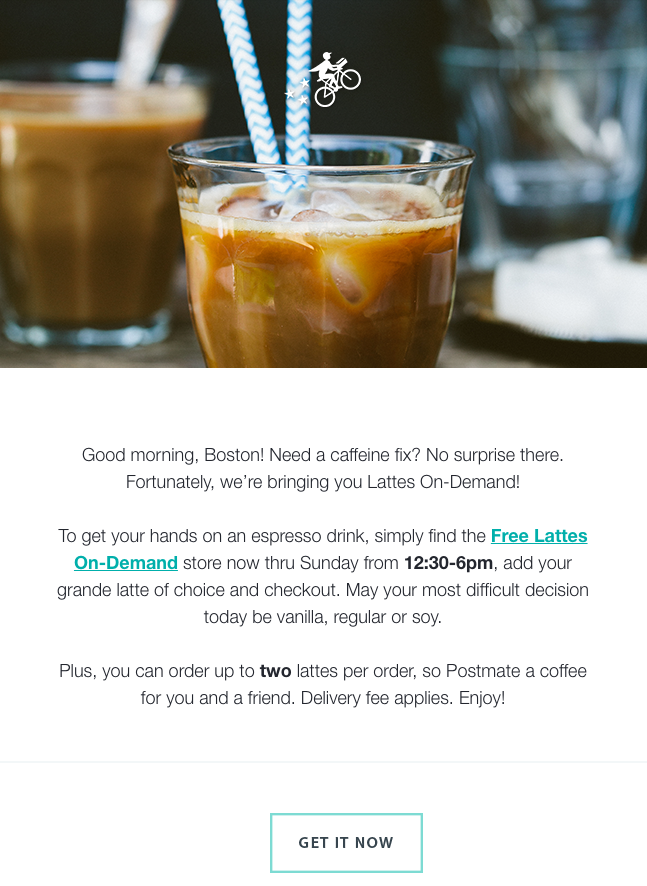
Here’s a great example of a concise email:
9. Include one call-to-action button per email.
Remember when I said a lot of your email recipients will scan your email without reading all the copy? That’s why you want to have a clear call-to-action (CTA) button that’s easy to spot for even the quickest of email scanners. Without a CTA button, you won’t be calling on your recipients to take any action that actually benefits them — and the growth of your business.
You’ll want to place your CTA in a location where it’s easily visible and where it makes sense for someone to click on it. For example, you might put a CTA to download a free ebook in an email that describes new strategies for using your product.
Once you’ve determined where you want to put your CTA, it’s time to create the button itself. Click here to download 50 free CTA button templates to get you started. (HubSpot customers: Learn how to add CTA buttons to emails in HubSpot here.)
10. Add alt text to your CTA image.
Many email clients block images — including your CTA buttons — by default. That means a good chunk of your audience may not see your beautiful, optimized CTA. Instead, they see this:

When you set an image’s alt text, though, you let recipients who can’t view images in their email know exactly where to click to complete the action:

You can either edit the alt text in your email tool’s rich text editor (just right-click the image and edit away), or you can manually enter it in the HTML editor of your email tool like this:
<a href=”HTTP://YOURLINKHERE.COM“><img class=”alignCenter shadow” src=”YOUR CTA BUTTON IMAGE SOURCE HERE.JPG” alt-text=”YOUR ALT-TEXT GOES HERE“/></a>
11. Hyperlink your emails’ images.
Your ultimate goal in email marketing is to get people to click through to a web page. One way to increase the clickthrough rate without littering the copy with links is to hyperlink the images in your email to the webpage that corresponds with the content of the image.
If you’re inviting readers to download an ebook, for example, and you have a picture of the ebook included in the email, don’t just hyperlink the text next to the image telling people to “download it here.” Hyperlink the ebook’s picture, too. People are drawn to images much more commonly than text, and you want to give your email subscribers as many options to get your ebook as you can.
You can simply click on the image and then use your email tool’s “Insert/Edit Link” option, or you can link an image in the HTML editor using the following code:
<a href=”HTTP://YOURLINKHERE.COM“><img class=”alignCenter shadow” src=”YOUR IMAGE SOURCE HERE.JPG“/></a>
12. Include noticeable text links.
In general, it’s a good idea to link to your featured offer in multiple places in addition to the clear and focused call-to-action button. In addition to your main CTAs and images, consider including a noticeable text link (or two) when applicable, as having more links increases the opportunity for engagement.
13. Place at least one clickable item above the fold.
One way to make your emails more clickable? Place one or more of your clickable elements — whether it’s a CTA button, a text link, or a clickable image — near the beginning of your email.
This is especially useful for mobile users. Mobile tends to require a lot of scrolling, and sometimes squinting, pinching, and zooming. Giving a recipient something actionable that is seen upon opening can lead to more clicks in this environment.
14. Add alt text to all of your images.
Again, a lot of email clients out there block images by default. (Here’s the full list from Campaign Monitor.) In those cases, images won’t load unless the recipient clicks a button to show them or change their default settings.
Adding alt text to your email images helps recipients understand your message — even if they can’t see the images right away. (HubSpot customers: Click here to learn how to add alt text to your email images in HubSpot.)
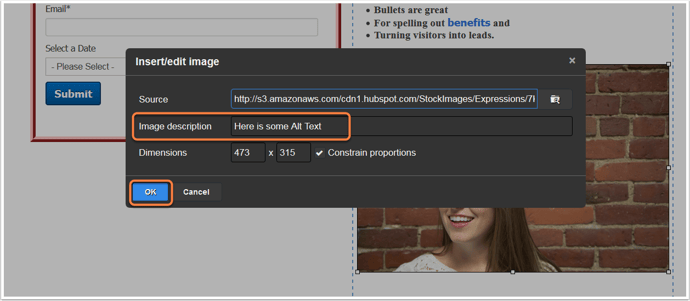
You might consider making the language in your alt text actionable, such as “Click here to download the ultimate content creation kit.” Actionable alt text will essentially turn every linked image into another CTA. So, even if someone doesn’t see the snazzy GIF of my latest offer (or if they hover their mouse over an image that does show up), the alt text will beckon them to click.
15. Avoid background images.
This is especially important if your target buyers tend to use Outlook as an email client.
Microsoft Outlook doesn’t recognize background images, period. Given that Outlook is the fifth most-used email client with 7% of the market share — and that’s in total; your industry might have a lot more — it’s best to avoid using background images altogether.
Instead, use a background color and use images in other ways in your email, like Harry’s did in their email below:
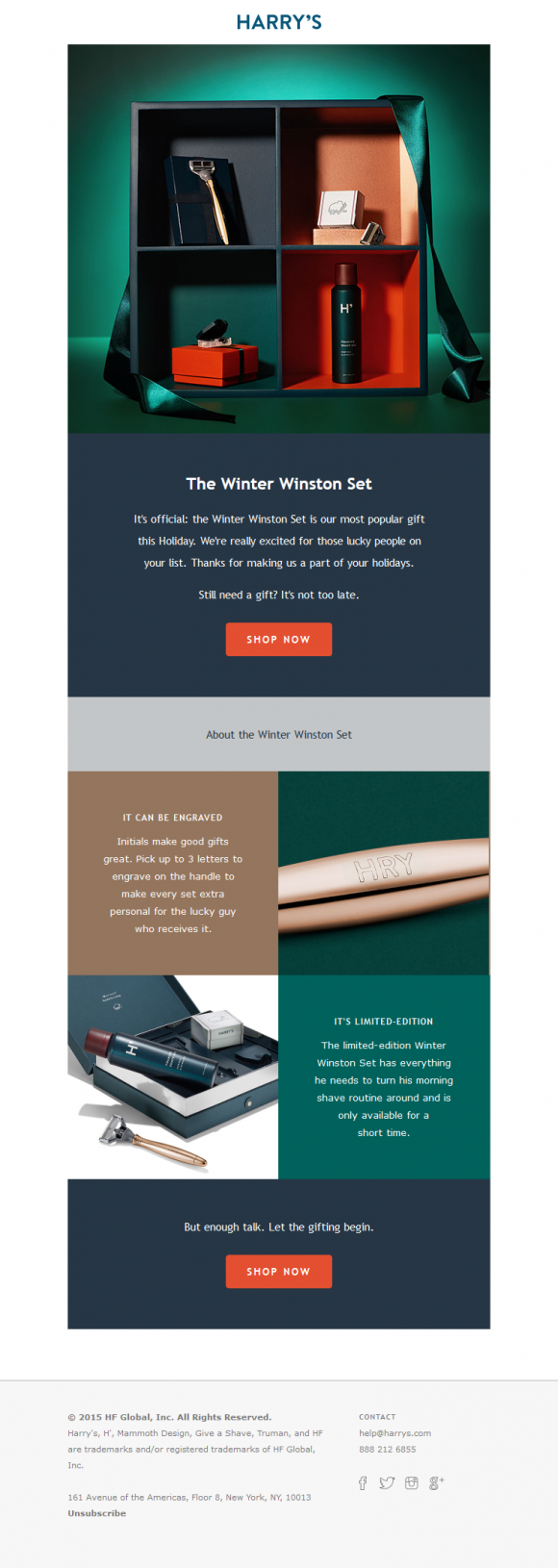
Image Credit: Beautiful Email Newsletters
16. Add social sharing buttons.
Increasing the number of people who see your link will increase the number of people who click on it. So, be sure to extend the life of your email by adding social sharing buttons.
Many email tools will come with templates that have built-in social sharing buttons that make it easy — just fill in the destination URL and you’re good to go. If you don’t have built-in capabilities, here is a cheat sheet for easily creating your own social sharing buttons.
Important Note: If you want to increase clicks, you want to add sharing buttons, not follow buttons. The former will allow your email recipients to pass along the offer URL in your email to their followers. The latter will prompt them to Like, follow, or add your company social media channels.
17. Simplify sharing with ready-made tweets.
People are far more likely to take an action if you make it really, really easy for them. For recipients out there who are too lazy to tweet the wonderful content you sent them via email, you can make it easy for them by creating what we call a “lazy tweet.”
One simple way to do this? Using ClickToTweet, a free custom tweet link generator. First, go to ClickToTweet’s basic tweet generator. Then, type in your tweet, desired (trackable) destination URL, and hashtags:
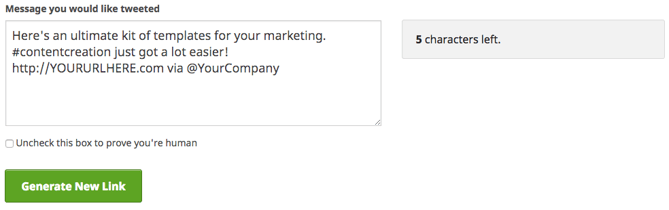
Click “Generate New Link,” and then grab that link. Then you can link it to your Twitter sharing button. Or, if you’re segmenting your list by attributes such as “has Twitter” or “topic of recent conversion: social media” (you’ll need marketing intelligence software like HubSpot for this), you can even include it in your main email copy, like this:

18. Add an email forwarding option.
Another way to extend the clicks on your email beyond its shelf life is to prompt your audience to forward the offer. The folks at Litmus found that the most forwarded emails were 13X more likely than the typical email to include “Share With Your Network” calls-to-action. By including forward-to-a-friend (or social sharing links, as we discussed above), you put it in recipients’ minds to share.
You can add a little post-script to the end of your email copy, such as “Not responsible for your company’s social media? Feel free to forward this ebook to a friend or colleague using social media marketing.” Link the call-to-action to a pre-made email, complete with subject and body text. That way, all someone has to do is enter their associates’ email addresses and hit “Send.”
You can highlight text or an image and add the URL via your email tool’s rich text editor and then enter a mailto:? link. Here’s what this looks like:
mailto:?subject=Your%20subject%20here%20&body=Your%20email%20body%20text%20here.
You can also create this in your HTML editor. Here’s how to attach a mailto:? link to text:
<a href=”mailto:?subject=Your%20subject%20here%20&body=Your%20email%20body%20text%20here.”>
forward this ebook</a>.
And here’s how to attach your mailto:? link to an image, such as a sleek call-to-action button that says “Email This Offer”:
<a href=”mailto:?subject=Your%20subject%20here%20&body=Your%20email%20body%20text%20here.“><img class=”alignCenter shadow” src=”YOUR IMAGE SOURCE HERE.JPG” alt-text=”YOUR ALT-TEXT GOES HERE“/></a>
Just make sure you use the “%20” tag to separate words! Otherwise, your message willreadlikethis (not too appealing, right?).
19. Clean up the plain-text version of your emails.
Not every recipient is going to see the beautiful, HTML, rich-text version of your email. Some clients don’t support HTML-rich emails, while other times, a person may simply choose to only view messages in plain text.
When you don’t optimize the plain-text version of your email, this is what happens when someone views it:
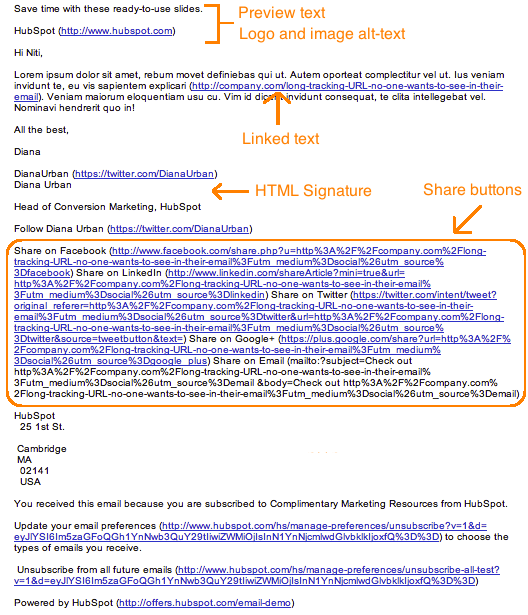
Scary, isn’t it? I don’t think many people are going to bother to read through this garbled mess.
So, cut out the extra text, replace long tracking URLs with shortened ones, and keep the body simple. Taking the five extra minutes to optimize your email’s plain-text version could help you reach more of your target segment and keep you out of the spam folder.
Note: When you’re cleaning up your plain-text emails, don’t change the actual copy much at all or you’ll risk it getting marked as spam.
20. Optimize your emails for mobile users.
In Litmus’ analysis of over a billion email opens, they reported that 56% of opened emails were opened on mobile devices in April 2016. This figure represents an 8% increase in mobile opens in the past year.
“This represents a peak for mobile market share,” they wrote, “and the longest sustained growth we’ve seen after the holiday season.”
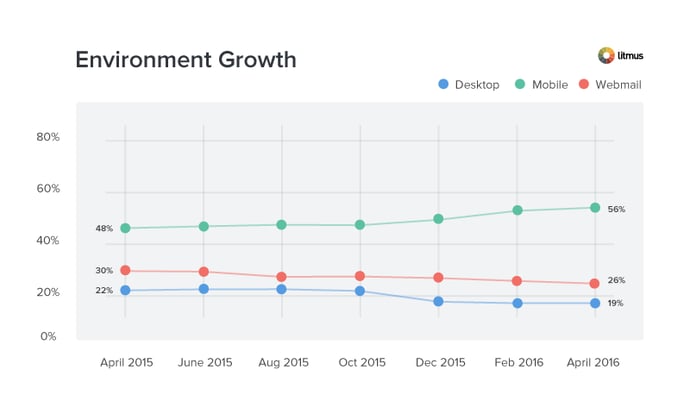
Image Credit: Litmus
As more and more people use their mobile devices to read email and surf the web, it’s more important than ever that marketers design their emails with mobile users in mind. Otherwise, their user base will be significantly affected.
How? Here’s a visual example of what happens when images aren’t optimized for mobile (first) versus when images are optimized for mobile (second):
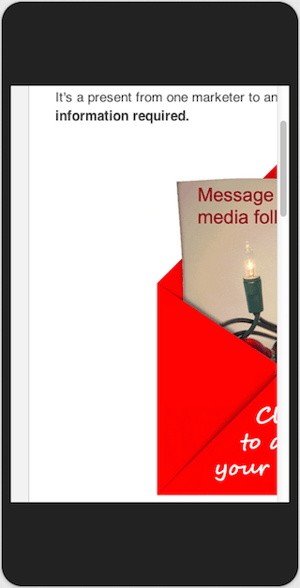
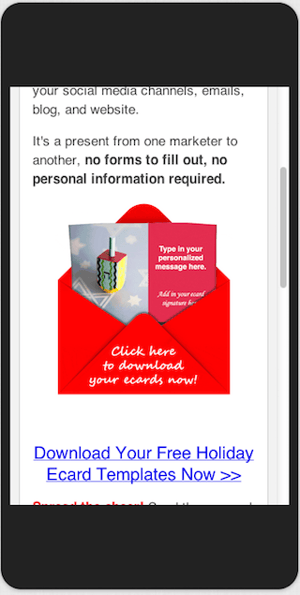
Isn’t the second image a much better user experience?
Here are a few ways to optimize your emails for mobile devices:
- Reduce your images’ file sizes to make up for mobile devices’ generally slower download speeds. (HubSpot customers don’t need to worry about it — images uploaded to HubSpot’s software are automatically compressed. Otherwise, tools like TinyPNG will help you reduce file size.)
- Ensure the CTA buttons and links are larger than 45-57 pixels for the best user experience. Why? According to an MIT study, the average size of an adult index finger is 1.6-2 cm, which translates to 45-57 pixels on a mobile device.
- Invest in responsive email templates. Creating your own responsive template may be beyond your particular skill set or bandwidth. Sometimes, the most economical solution is to just license or buy email templates from the people who do it best.
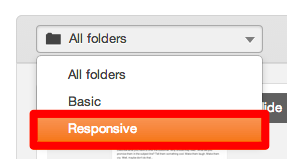
HubSpot customers: HubSpot’s default email templates are all optimized for mobile using responsive design. To access these templates, create a new email and look for the responsive option in the “folders” drop-down in the top left.
21. Preview and test your emails before sending them.
When you’re finally ready to hit “Send” on your email, make a habit of double-checking one last time whether your emails look as good as you think they do. If your email marketing tool lets you, go ahead and preview what your email looks like in different email clients and devices that are popular with your audience.
(HubSpot customers: You can preview what your emails look like in 30+ email clients right in the HubSpot Email App, as well as preview what your emails will look like on any device — including desktop, tablet, or mobile devices. Click here to learn how.)
You should also send out a test version of your email before you send out the real deal to ensure it’s working properly for everyone on your email list. Start incorporating these as final steps in your email review process. (HubSpot customers: Learn how to test your emails here.)
22. Don’t be afraid to ‘clean up’ your contact list.
It’s tempting to keep every subscriber you win on an email campaign until they personally choose to opt out. But just because they haven’t opted out of an email newsletter doesn’t mean they’re still interested, and subscribers who have become inactive can kill your emails’ open and clickthrough rates.
To make sure you’re only sending emails to the people who want to read them, clean up your email list so that it excludes recipients who haven’t opened a certain amount of emails in the campaign’s recent history. This makes sure your emails’ open and clickthrough rates reflect only your most interested readers, allowing you to collect more effective data on what is and isn’t working in each email you send.
(HubSpot customers: Lists that add and remove members based on their email behavior are called smart or “active” lists. Learn how to create them in HubSpot Academy.)
23. Monitor each email’s performance.
What’s working in your email campaign this month might not work quite as well next month, and it’s imperative that you check in on your emails’ open and clickthrough rates for opportunities to improve your copy (to do this, of course, you’ll need a tool to track your email analytics).
If after a month of email sends, for instance, you find 10 messages are getting double the engagement as the other 20, analyze them. What did you do differently in the higher performers? Was it the imagery? The subject line? Maybe you have more than one audience segment and one of them just isn’t as interested in your current email content.
Use your email performance data to run A/B tests that are designed to show you what your email recipients really want out of your newsletters, and steer into the trends that you see to make your email campaigns more desirable.
Email marketing can be tough at times — I’m right there with you. But by sending compelling offers to the right target segments and paying attention to the little details that go into an email, you can increase the opens clicks in your emails and generate more leads. (And learn more about which email marketing metrics to track — and how — here.)

As Streaming Services Make It Harder to Skip Ads, What Does the Future of Online Video Look Like?
For those of us who grew up with a VCR, it’s easy to remember the simple thrill of being able to fast forward through commercials.
But skipping ads, it seems like, is becoming as antiquated as VHS tapes.
In a video posted to YouTube’s official channel for creators, the platform revealed that the ability to make video ads unskippable will now be available to all creators in the YouTube Partner Program.
Previously, this option was only available to select monetized video creators. The changes will be rolled out by the end of this week.
The announcement was largely positioned on the benefits of this new option. Ads that are unskippable, the video claims, tend to earn more money for creators.
But it raises the question of the growing inescapability from ads across most streaming platforms: from traditional TV, to Hulu, to Spotify, to even social media. What used to be a commercial-free oasis from traditional television, it seems, is starting to replicate it.
So what does this say about the future of online video?
When People Began Skipping Ads
We’ve already covered the VCR: the video recording device reminiscent of the 1980s, which was used by many to record and later watch live TV, allowing viewers the option to skip through commercials.
But even before its advanced, digital version — the DVR — came to fruition, television viewers began paying for what we might think of today as a “premium” membership. It came in 1972 with the debut of HBO (then known as “Home Box Office”), the first commercial-free premium cable channel.
The launch of HBO started a trend of premium, ad-free programming for a fee. If viewers paid enough, they could get TV without commercials, and with certain elements that were forbidden on shows on traditional TV networks beholden to advertiser dollars (namely, coarse language and other less-than-family-friendly content).
It raises the question: Is streaming going in the same direction?
The “Golden Handcuffs”
Consider, for a moment, YouTube’s rules to monetize. Back in January, the platform made it even more difficult for Creators to make money off of their videos, introducing new requirements — like a minimum number of subscribers and accrued watch time — to be eligible for its Partner Program.
But that criteria aside, YouTube also has rules that dictate what makes content “advertiser-friendly,” which bars Creators from using “inappropriate language” or “suggestive content.”

Source: YouTube
Sound familiar?
Consider this 1981 New York Times article titled, “Will Cable TV Be Invaded by Commercials?” In it, HBO’s then-SVP of programming, Michael Fuchs remarked, “We’ve seen that advertisers are not passive. Creatively, once you have advertisers in there, they think they have a voice.”
“Creatively, once you have advertisers … they think they have a voice.”
– Michael Fuchs
So one might ask: What is the HBO for YouTube Creators?
YouTube has already rolled out Premium: An ad-free subscription that allows access to the company’s original programming, which is more akin to original shows developed for Netflix than it is to what the world has come to know as a YouTube celebrity.
It’s hardly alone. Network-TV-streaming platform Hulu — which also has its own original programming — joins the ranks of those with various (paid) tiers of commercial-free subscriptions. Music-streaming services like Spotify offer them, as well.
In other words, the presence of in-video (or in-playlist) ads doesn’t show many signs of leaving. Facebook recently introduced the option for video creators on its Watch platform to add commercial breaks, and some Netflix viewers recently feared that it, too, might be introducing ads.
Netflix is testing video promos that play in between episodes https://t.co/T6K2eK1UsE pic.twitter.com/Wv6BAkbGvu
— The Verge (@verge)
August 17, 2018
So for Creators who seek the freedom of being less than “advertiser-friendly” — where is there to go?
It could be that questions like these spur the next generation of YouTube: a new, independent video-sharing platform that’s well-funded enough to not require advertisers dollars (at first, that is).
When Along Came TiVo
The question also brings us back to our old friend, the VCR, and its successor, the DVR — and the ability of both to bring TV viewers a manual ad-free experience, with the simple press of a fast-forward button.
What will the DVR of streaming video be?
Some might say that such a thing would be redundant: the ability to record a non-live video that can already be watched at any time, rather than airing on a certain day and hour.
But it may not be entirely out of the question. Amazon, for its part, is rumored to be building its own DVR of sorts: a project, according to Bloomberg, code-named “Frank,” which would record live television, save it to Fire TV boxes, and stream what’s been recorded to users’ smartphones.
Could it do the same for YouTube videos — with the ability to zip through ads?
Consider that, although against its rules prohibiting pirated content, Twitch — the Amazon-owned video streaming platform — accrued a significant number of views for a pay-per-view-esque, live-streamed boxing match between YouTube celebrities.
It was meant to be exclusively aired on YouTube.
According to The Verge, 773,000 viewers paid the required $10 to watch the official stream on YouTube — while the combination of viewers on Twitch and other pirated streams may have topped that.
“What has repeatedly been touted as the ‘biggest event’ on YouTube,” wrote Patricia Hernandez, “didn’t end up drawing as many eyeballs as other sites did.”
Which means that the solution may not lie in the idea of “premium.” When we asked 807 people across the U.S., UK and Canada if more unskippable ads would impact their willingness to pay for an ad-free, premium membership — most indicated that they’re indifferent.

Data collected with Lucid
So, is this Amazon’s next industry foray — an acquisition of the ability to fast forward previously unskippable ads?
In any case, there’s reason to believe that the next disruptor will come along — and if it’s not Amazon, then it will be someone else. The key is to figure out how that disruptor will monetize, as well as if and how the cost of foregoing advertiser dollars will be passed down to the viewer.
One might say that the internet killed the traditional TV commercial star — but more and more, these online video-streaming platforms are beginning to mimic what, not so long ago, was thought of as an old-school model.
Featured image credit: Creator Insider

Lead Generation: A Beginner’s Guide to Generating Business Leads the Inbound Way
We’ve all been through it. You know, the moment you’re about to dig into the best darn pile of spaghetti and meatballs you’ve ever seen.
Just as you twist your fork in the pasta, spear a mouth-watering meatball, and go in for the first savory bite … the phone rings. “May I speak to Lindsay Kow-low-witch?” asks the telemarketer on the other end. “This is an important message regarding your oven preferences.”
This frustrating interruption is exactly why we’re here to discuss inbound lead generation. What is inbound lead generation? It’s a solution that can save your business or organization from being that annoying, disruptive cold caller who is ruining spaghetti nights for pasta lovers all over the world.

Let’s start with defining a lead, and then we’ll cover what online lead generation is, why you need lead generation, how you qualify someone as a lead, how you generate leads, and why inbound lead generation is much more effective than simply buying leads.
What Is a Lead?
A lead is a person who has indicated interest in your company’s product or service in some way, shape, or form.
As a lead, you’d hear from a business or organization with which you’ve already opened communication … instead of getting a random cold call from someone who purchased your contact information.
For example, maybe you took an online survey to learn more about how to take care of your car. If you got an email from the auto company that hosted the survey on their website about how they could help you take care of your car, it’d be far less intrusive and irrelevant than if they’d just called you out of the blue with no knowledge of whether you even care about car maintenance, right?
And from a business perspective, the information the auto company collected about you from your survey responses helps them personalize that opening communication to address your existing problems.
Whenever someone outside the marketing world asks me what I do, I can’t simply say, “I create content for lead generation.” It’d be totally lost on them, and I’d get some really confused looks.
So instead, I say, “I work on finding unique ways to attract people to my business. I want to provide them with enough goodies to get them naturally interested in my company so they eventually warm up to the brand enough to want to hear from us!”
That usually resonates better, and that’s exactly what lead generation is: It’s a way of warming up potential customers to your business and getting them on the path to eventually buying.
Why Do You Need Lead Generation?
When a stranger initiates a relationship with you by showing an organic interest in your business, the transition from stranger to customer is much more natural.
Lead generation falls within the second stage of the inbound marketing methodology. It occurs after you’ve attracted an audience and are ready to convert those visitors into leads for your sales team (namely sales-qualified leads). As you can see in the diagram below, generating leads is a fundamental point in an individual’s journey to becoming a delighted customer.

How to Generate Leads
Now that we understand how lead generation fits into the whole inbound marketing methodology, let’s walk through the steps of the lead generation process.
First, a visitor discovers your business through one of your marketing channels, such as your website, blog, or social media page.
That visitor then clicks on your call-to-action (CTA) — an image, button, or message that encourages website visitors to take some sort of action.
The CTA takes your visitor to a landing page, which is a web page that is designed to capture lead information in exchange for an offer.
An offer is the content or something of value that’s being “offered” on the landing page, like an ebook, a course, or a template. The offer must have enough perceived value to a visitor to merit providing their personal information in exchange for access to it.
The form on your landing page consists of a series of fields (like in our example above) that collect information in exchange for the offer. Forms are typically hosted on landing pages, although they can technically be embedded anywhere on your site. Once a visitor fills this out — voila! — you have a new lead! (That is, as long as you’re following lead-capture form best practices.)
See how everything fits together?
To sum it up: Visitor clicks a CTA that takes them to a landing page where they fill out a form to get an offer, at which point they become a lead.
By the way, you should check out our free lead generation tool. It helps you create lead capture forms directly on your website. Plus, it’s really easy to set up.
Lead Generation Marketing
Once you put all of these elements together, you can use your various promotional channels to drive traffic to your landing page to start generating leads.
But what channels should you use to promote your landing page? Let’s talk about the front-end of lead generation — lead gen marketing.
If you’re a visual learner, this chart shows the flow from promotional marketing channels to a generated lead.

There are even more channels you can use to get visitors to become leads. Let’s go into depth on these and talk about a few others.
Content
Content is a great way to guide users to a landing page. Typically, you create content to provide visitors with useful, free information. You can include CTAs anywhere in your content — inline, bottom-of-post, in the hero, or even on the side panel. The more delighted a visitor is with your content, the more likely they are to click your call-to-action and move onto your landing page.
Email is a great place to reach the people who already know your brand and product or service. It’s much easier to ask them to take an action since they’ve previously subscribed to your list. Emails tend to be a bit cluttered, so use CTAs that have compelling copy and an eye-catching design to grab your subscriber’s attention.
Ads and Retargeting
The sole purpose of an ad is to get people to take an action. Otherwise, why spend the money? If you want people to convert, be sure that your landing page and offer match exactly what is promised in the ad, and that the action you want users to take is crystal clear.
Blog
The great thing about using your blog posts to promote an offer is that you can tailor the entire piece to the end goal. So, if your offer is an instructional video on setting up Google Search Console, then you can write a blog post about how to select your marketing metrics … which would make your CTA highly relevant and easy to click.
Social Media
Social media platforms make it easy to guide your followers to take action, from the swipe up option on Instagram stories to Facebook bio links to bitly URLs on Twitter. You can also promote your offerings on your social posts and include a call-to-action in your caption. Learn more about social media campaigns in this post.
Product Trials
You can break down a lot of barriers to a sale by offering trials of your product or service. Once a prospect is using your product, you can entice them with additional offers or resources to encourage them to buy. Another good practice is to include your branding in your free versions so you can capture other potential customers, too.
Referral Marketing
Referral, or word-of-mouth, marketing is useful for lead generation in a different way. That is, it gets your brand in front of more people, which, in turn, increases your chances of generating more leads.
Whatever channel you use to generate leads, you’ll want to guide users to your landing page. As long as you’ve built a landing page that converts, the rest will handle itself.
Why Not Just Buy Leads?
Marketers and salespeople alike want to fill their sales funnel — and they want to fill it quickly. Enter: The temptation to buy leads.
Buying leads, as opposed to organically generating them, is much easier and takes far less time and effort, despite being more expensive. But, you might be paying for advertising anyway … so, why not just buy leads?
First and foremost, any leads you’ve purchased don’t actually know you. Typically, they’ve “opted in” at some other site when signing up for something, and didn’t actually opt in to receiving anything from your company.
The messages you send them are therefore unwanted messages, and sending unwanted messages is intrusive. (Remember that disruptive call I got when I was trying to eat my spaghetti? That’s how people feel when they receive emails and other messages from people they didn’t ask to hear from.)
If the prospect has never been to your website and indicated an interest in your, products or services, then you’re interrupting them … plain and simple.
If they never opted in to receive messages specifically from you, then there’s a high chance they could flag your messages as spam, which is quite dangerous for you. Not only does this train to filter out emails from you, but it also indicates to their email provider which emails to filter out.
Once enough people flag your messages as spam, you go on a “blacklist,” which is then shared with other email providers. Once you get on the blacklist, it’s really, really hard to get back off of it. In addition, your email deliverability and IP reputation will likely be harmed.
It’s always, always, always better to generate leads organically rather than buy them. Read this blog post to learn how to grow an opt-in email list instead of buying one.
How to Qualify a Lead
As we covered in the first section, a lead is a person who has indicated interest in your company’s product or service. Now, let’s talk about the ways in which someone can actually show that interest.
Essentially, a sales lead is generated through information collection. That information collection could come as the result of a job seeker showing interest in a position by completing an application, a shopper sharing contact information in exchange for a coupon, or a person filling out a form to download an educational piece of content.
Gauging a Lead’s Level of Interest
Below are just a few of the many ways in which you could qualify someone as a lead. Each of these examples shows that the amount of collected information used to qualify a lead, as well as the that lead level of interest, can vary. Let’s assess each scenario:
- Job Application: An individual that fills out an application form is willing to share a lot of personal information because he/she wants to be considered for a position. Filling out that application shows their true interest in the job, therefore qualifying the person as a lead for the company’s recruiting team — not marketing or sales teams.
- Coupon: Unlike the job application, you probably know very little about someone who has stumbled upon one of your online coupons. But if they find the coupon valuable enough, they may be willing to provide their name and email address in exchange for it. Although it’s not a lot of information, it’s enough for a business to know that someone has interest in their company.
- Content: While the download of a coupon shows an individual has a direct interest in your product or service, content (like an educational ebook or webinar) does not. Therefore, to truly understand the nature of the person’s interest in your business, you’ll probably need to collect more information to determine whether the person is interested in your product or service and whether they’re a good fit.
These three general examples highlight how lead generation differs from company to company, and from person to person. You’ll need to collect enough information to gauge whether someone has a true, valid interest in your product or service — how much information is enough information will vary depending on your business.
Let’s look at Episerver, for example. They use web content reports for lead generation, collecting six pieces of information from prospective leads.

Episerver provides a great example for what to ask for in a lead gen form:
- Full Name: The most fundamental information needed to personalize your communication with each lead.
- Email: This serves as a unique identifier and is how you will contact your lead.
- Company: This will give you the ability to research your lead’s industry and company and how the lead might benefit from your product or service (mainly for B2B).
- Role: Understanding an individual’s role will help you understand how to communicate with them. Every brand stakeholder will have a different take and perspective on your offering (mainly for B2B).
- Country: Location information can help you segment your contact by region and time zone, and help you qualify the lead depending on your service.
- State: The more detailed information you can obtain without sacrificing conversions, the better. Knowing your leads state can help you further qualify them.
If you’d like to learn more intermediate-level tips on information collection and what you should ask for on your lead gen forms, read our post about it here.
Lead Scoring
Lead scoring is a way to qualify leads quantitatively. Using this technique, leads are assigned a numerical value (or score) to determine where they fall on the scale from “interested” to “ready for a sale”. The criteria for these actions is completely up to you, but it must be uniform across your marketing and sales department so that everyone is working on the same scale.
A lead’s score can be based on actions they’ve taken, information they’ve provided, their level of engagement with your brand, or other criteria that your sales team determines. For instance, you may score someone higher if they regularly engage with you on social media or if their demographic information matches your target audience.
Borrowing from the examples above, you might give a lead a higher score if they used one of your coupons — an action that would signify this person is interested in your product.
The higher a lead’s score, the closer they are to becoming a sales-qualified lead (SQL), which is only a step away from becoming a customer. The score and criteria is something you may need to tweak along the way until you find the formula that works, but once you do, you’ll transform your lead generation into customer generation.
Lead Generation Trends & Benchmarks
So … you’re getting web traffic and generating leads. But how are you doing compared to other companies in your industry? How many leads should you really be generating?
It’s tough to figure out if your lead generation strategy is working if you aren’t looking at industry data. That’s why we partnered with Qualtrics to survey more than 900 marketers from all different industries in North America and Europe to create a demand generation report with data on website visitors, leads, opportunities, customers, and revenue.
Did you know that 74% of companies that weren’t exceeding revenue goals didn’t know their visitor, lead, MQL, or sales opportunities numbers? How about that over 70% of companies not achieving their revenue goals generate fewer than 100 leads per month, and only 5% generate more than 2,500 leads per month? These are just a few examples of what you’ll find in the report.
For in-depth reports, download our Demand Generation Benchmarks Report. Below are some useful highlights.
Cost per Lead, by Industry
The media and publishing industries report the lowest cost per lead at $11 to $25. Software, information technology and services, marketing agencies, and financial services companies all report the highest average cost per lead at $51 to $100.

Leads Generated per Month, by Annual Revenue
Unsurprisingly, the more revenue a company has, the more leads they generate. The differences are most drastic at the highest and lowest end of the spectrum: 82% of companies with $250,000 or less in annual revenue report generating less than 100 leads per month, whereas only 8% of companies generating $1 billion in annual revenue report less than 100 leads per month.

Leads per Month
We found that 58% of companies generated 500 leads per month or fewer, and 71% generated 1,000 or fewer. However, as we saw previously, the companies having the most success are also the ones generating the most leads.
Here’s how the data broke down by company size:

Lead Generation Software
We found that the most successful teams use a formal system to organize and store leads: 46% use Google Docs, 41% use marketing automation software, and 37% use CRM software. (Hint for HubSpot customers: Google Drive integrates with both HubSpot Marketing Hub and HubSpot CRM.)

Lead Generation Strategies
Online lead generation encompasses a wide range of tactics, campaigns, and strategies depending on the platform on which you wish to capture leads. We talked about lead capture best practices once you have a visitor on your site … but how can you get them there in the first place?
Let’s dive into lead generation strategies for a few popular platforms.
Facebook Lead Generation
Facebook has been a method for lead generation since its inception. Originally, companies could use outbound links in their posts and information in their bios to attract strangers to their websites. However, when Facebook Ads was launched in 2007, and its algorithm began to favor accounts that used paid advertising, there was a major shift in how businesses used the platform to capture leads. Facebook created Lead Ads for this purpose. Facebook also has a feature that lets you put a simple call-to-action button at the top of your Facebook Page, helping you send Facebook followers directly to your website.
Get some lead generation tips for Facebook.
Twitter Lead Generation
Twitter has Twitter Lead Gen Cards, which let you generate leads directly within a tweet without having to leave the site. A user’s name, email address, and Twitter username are automatically pulled into the card, and all they have to do is click “Submit” to become a lead. (Hint for HubSpot users: You can connect Twitter Lead Gen Cards to your HubSpot Forms. Learn how to do that here).
Learn some lead generation tips for Twitter..
LinkedIn Lead Generation
LinkedIn has been increasing its stake in the advertising space since its early days. When it comes to lead generation, LinkedIn created Lead Gen Forms, which auto populate with a users profile data when they click a CTA, making it easy to capture information.
Get tips from our experience using LinkedIn ads.
PPC Lead Generation
When we say pay-per-click (PPC), we’re referring to ads on search engine result pages (SERPs). Google gets 3.5 billion searches a day, making it prime real estate for any ad campaign, especially lead gen. The effectiveness of your PPC campaign relies heavily on a seamless user flow, as well as your budget, target keywords, and a few other factors.
Learn more about how to setup successful PPC ads.
B2B Lead Generation
B2B is a particular business model that requires a particular approach to lead generation. HubSpot found that SEO is the top resource for capturing business leads, followed closely by email marketing and social media. Not to mention, effectiveness varies by channel.
Learn the B2B lead gen techniques for every channel.
Tips for Lead Generation Campaigns
In any given lead generation campaign, there can be a lot of moving parts. It can be difficult to tell which parts of your campaign are working and which need some fine-tuning. What exactly goes into a best-in-class lead generation engine? Here are a few tips when building lead gen campaigns.
Use the right lead generation tools.
As you saw in our data, the most successful marketing teams use a formal system to organize and store their leads. That’s where lead generation tools and lead generation software come into play.
How much do you know about the people visiting your website? Do you know their names or their email addresses? How about which pages they visited, how they’re navigating around, and what they do before and after filling out a lead conversion form?
If you don’t know the answers to these questions, chances are you’re having a hard time connecting with the people who are visiting your site. These are questions you should be able to answer — and you can with the right lead generation tools.
There are a few different tools and templates out there that’ll help you create different lead gen assets to use on your site:
- CTA Templates: 50+ free, customizable call-to-action (CTA) templates in PowerPoint that you can use to create clickable CTA buttons to use on your blog, landing pages, and elsewhere on your site.
- Lead Generation Software Tools: This free tool from HubSpot includes lead capture and contact insights features, which will scrape any pre-existing forms you have on your website and add those contacts to your existing contact database. It also lets you create pop-ups, hello bars, or slide-ins — called “lead flows” — that’ll help you turn website visitors into leads immediately.

Example of a slide-in lead flow.
- Visitor Tracking: Hotjar has a heatmap tool — a virtual tool which creates a color-coded representation of how a user navigates your site — that helps you understand what users want, care about, and do on your site. It records visitors and tells you where they spend the most time on your site. You can use it to gather information on your lead generation forms, feedback forms and surveys, and more.
- Form-Scraping Tool: A form scraping tool that collects submissions on your website’s existing forms helps you automatically consolidate all your leads into your contact database, regardless of which form visitors submitted on your website. HubSpot customers can create and embed forms using HubSpot, which automatically populate into your CMS. Non-HubSpot customers can use a form creation tool like Contact Form 7, JetPack, or Google Forms, and then use HubSpot’s free collected forms feature to automatically capture form submissions and input them to a contact database.
Create amazing offers for all different stages of the buying cycle.
Not all of your site visitors are ready to talk to your sales team or see a demo of your product. Someone at the beginning of the buyer’s journey might be interested in an informational piece like an ebook or a guide, whereas someone who’s more familiar with your company and near the bottom of the journey might be more interested in a free trial or demo.
Make sure you’re creating offers for each phase and offering CTAs for these offers throughout your site.
Yes, it takes time to create valuable content that teaches and nurtures your leads down the funnel, but if you don’t offer anything for visitors who aren’t ready to buy, then they may never come back to your website. From checklists to templates to free tools, here are 23 ideas for lead generation content to get you started.
If you want to take personalization a step further — which will help boost your conversion rate — try using smart CTAs. Smart CTAs detect where a person is in the buyer’s journey, whether they’re a new visitor, a lead, or a customer, and display CTAs accordingly. Personalized CTAs convert a whopping 42% more visitors than basic calls-to-action.
Keep your messaging consistent and deliver on your promise.
The highest-converting lead gen campaigns are the ones that deliver on what they promise and create a seamless transition from ad copy and design to the deliverable itself. Make sure that you’re presenting a consistent message throughout the process and providing value to everyone that engages with your lead capture.
The aspects of your lead gen campaign should mirror everything else on your website, on your blog, and within the product that you will eventually try to sell. If not, you’ll have a difficult time getting your lead to the next lifecycle stage. Your campaign should be about more than just obtaining an email address — it should be about developing a new customer.
Link your CTA to a dedicated landing page.
This may seem obvious to you, but you’d be surprised how many marketers don’t create dedicated landing pages for their offers. CTAs are meant to send visitors to a landing page where they can receive a specific offer.
Don’t use CTAs to drive people to your homepage, for instance. Even if your CTA is about your brand or product (and perhaps not an offer like a download), you should still be sending them to a targeted landing page that’s relevant to what they are looking for and includes an opt-in form. If you have the opportunity to use a CTA, send them to a page that will convert them into a lead.
If you want to learn more about how to build and promote high-converting landing pages, then download our ebook on optimizing landing pages for conversions.
Get your sales team involved.
Remember when we talked about lead scoring? Well, it isn’t exactly doable without your sales team’s input. How will you know what qualifies a lead for sales without knowing if your defined SQLs are successfully sold? Your marketing and sales teams need to be aligned on the definitions and the process of moving a lead from MQL to SQL to opportunity before you even begin to capture leads.
Also, be open to evolving your relationship with sales and how you guide leads along your funnel. Your definitions will likely need to be refined over time; just make sure to keep everyone involved up-to-date.
Use social media strategically.
While marketers typically think of social media as best for top-of-the-funnel marketing, it can still be a helpful and low-cost source for lead generation as shared in the lead gen strategies above. The key is using social media strategically for lead generation.
Start by adding links directly to the landing pages of high-performing offers within your Facebook, Twitter, LinkedIn, and other social media posts. Tell visitors that you’re sending them to a landing page. That way, you’re setting expectations. Here’s an example from one of our Facebook posts:
You can also do a lead generation analysis of your blog to figure out which posts generate the most leads, and then make a point of regularly linking social media posts to them.
Another way to generate leads from social media is to run a contest. Contests are fun and engaging for your followers, and they can also teach you a ton about your audience. It’s a win-win. Read our step-by-step guide for growing your email list using social media contests, which covers everything from choosing a platform, to picking a winner, all the way to analyzing your results.
Remain flexible and constantly iterate.
Your lead generation strategy needs to be as dynamic as the people you’re targeting. Trends change, behaviors shift, opinions morph … so should your lead gen marketing. Use A/B split testing to see what CTAs perform best, which landing pages convert better, and which copy captures your target audience. Experiment with layout changes, design, UX, content, and advertising channels until you find what works.
Conclusion
There you have it, folks. Now that you know more about how to generate leads for your business, we recommend you try HubSpot’s free lead generation tool. Use it to add simple conversion assets to your site (or scrape your existing forms) to help you learn more about your site visitors and what content prompts them to convert.
The basics we’ve gone over in this blog post are just the beginning. Keep creating great offers, CTAs, landing pages, and forms — and promote them in multi-channel environments. Be in close touch with your sales team to make sure you’re handing off high-quality leads on a regular basis. Last but not least, never stop testing. The more you tweak and test every step of your inbound lead generation process, the more you’ll improve lead quality and increase revenue.

12 Stunning Instagram Themes (& How to Borrow Them for Your Own Feed)
Nowadays, Instagram is often someone’s initial contact with a brand, and at least 30% of Instagram users have purchased a product they first discovered on the platform. If it’s the entryway for one third of your potential sales, don’t you want it to look clean and inviting?
Taking the time to create an engaging Instagram feed aesthetic is one of the most effective ways to persuade someone to follow your business’s Instagram account, or peruse your posts. You only have one chance to make a good first impression — similar to the importance of creating a well-designed website, its critical you put effort into your Instagram feed.
Since it’s often easiest to learn by example, we’ve cultivated a list of 12 stunning Instagram themes to inspire your own feed’s transformation. Beware, these feeds are so desirable, you’ll have a hard time choosing just one.
Instagram Themes
- Black and White
- Bright Colors
- Minimalist
- One Shade
- Pastels
- One Theme
- Puzzle
- Horizontal Lines
- Checkerboard
- Black or White Borders
- Same Filter
- Flatlays
1. Black and White
A polished black and white theme is a good choice if you’re trying to evoke a sense of sophistication. The lack of color draws you into the photo’s main subject, and suggests a timeless element to your business. @Lisedesmet’s black and white feed, for instance, urges the user to pay close attention to the image’s subject, like the black sneakers or white balloon.

2. Bright Colors
If your company’s brand is meant to imply playfulness or fun, there’s probably no better way than to create a feed full of bright colors. Bright colors are attention-grabbing and lighthearted, which could be ideal for attracting a younger audience. @Aww.sam’s feed, for instance, showcases someone who doesn’t take herself too seriously.

3. Minimalist
For an artsier edge, consider taking a minimalist approach to your feed, like @windowofimagination does. The images are inviting in their simplicity, and cultivate feelings of serenity and stability. Plus, minimalist feeds are less distracting by nature, so it can be easier to get a true sense of the brand from the feed alone, without clicking on individual posts.

4. One Color
One of the easiest ways to pick a theme for your feed is to choose one color and stick to it — this can help steer your creative direction, and looks clean and cohesive from afar. It’s particularly appealing if you choose an aesthetically-pleasing and calm color, like the soft pink used in @wildehousepaper’s feed.

5. Pastels
Similar to the one color idea, it might be useful to choose one color palette for your feed, like @creativekipi’s use of pastels. Pastels in particular, often used for Easter eggs or cupcake decorations, appear childlike and cheerful. Plus, they’re captivating and unexpected.

6. One Theme
As evident from @mustdoflorida’s feed (and username), it’s possible to focus your feed on one singular object or idea — like beach-related objects in @mustdoflorida’s posts. If you’re aiming to showcase your creativity or photography skills, it could be compelling to create a feed where each post follows one theme.

7. Puzzle
Creating a puzzle out of your feed is complicated and takes some planning, but can reap big rewards in terms of uniqueness and engaging an audience. @Wearewildbloom’s posts, for instance, make the most sense when you look at it from the feed, rather than individual posts. It’s hard not to be both impressed and enthralled by the final result, and if you post puzzle piece pictures individually, you can evoke serious curiosity from your followers.

8. Horizontal Lines
If your brand does well aligning photography with content, you might consider organizing your posts in a thoughtful way — for instance, creating either horizontal or vertical lines, with your rows alternating between quotes with plain backdrops, and images. @Personaljourneyapp employs this tactic, and their feed looks clean and intriguing as a result.

9. Checkerboard
If you’re not a big fan of horizontal or vertical lines, you might try a checkerboard theme. Similar to horizontal lines, this theme allows you to alternate between content and images, but additionally, the checkerboard, as seen in @Oneartsymama’s feed, evokes a sense of playfulness and creativity.
 Image courtesy of One Artsy Mama
10. Black or White Borders
While it is a bit jarring to have black or white borders outlining every image, it definitely sets your feed apart from everyone else’s. @Beautifulandyummy, for instance, uses black borders to draw attention to her images, and the finished feed looks both polished and sophisticated. This is likely more successful if you’re aiming to sell fashion products, or want to evoke an edgier feel.

11. Same Filter
If you prefer uniformity, you’ll probably like this Instagram theme, which focuses on using the same filter (or set of filters) for every post. From close up, this doesn’t make much difference on your images, but from afar, it definitely makes the feed appear more cohesive. @Nadia_Rachel92, for example, is able to make her posts of family, friends, and travel seem more refined and professional, simply by using the same filter for all her posts.

12. Flatlays
If your primary goal with Instagram is to showcase your products, you might want a Flatlay theme. Flatlay is an effective way to tell a story simply by arranging objects in an image a certain way, and makes it easier to captivate viewers’ attention on a product. As seen in @thedailyedited’s feed, a flatlay theme looks fresh and modern.


How to Work From Home: 20 Tips From People Who Do It Successfully
Working from home is awesome … right up until the cat throws up on your computer. And your neighbor, who you can only assume is building a time machine, starts firing up all sorts of power tools and noisy machinery across the street.
For many modern professionals, working from home every once in a while is a luxury that our respective companies afford us. But which environment actually allows us to be more productive: the home office or the office office?
In the office office, your coworkers often pose the greatest threat to keeping you from getting some real, heads-down work done. They drop by your desk, engage you in conversation, and invite you to lunch. The social benefits of a workplace are definitely nice to have, but they can become a challenge if you’re easily distracted.
At the home office, however, I find that it’s easy for you to become your own worst enemy. Because when you’re not surrounded by coworkers, you’re free to drop those pesky inhibitions. At the home office, no one’s watching. You don’t necessarily feel that same peer pressure or communal obligation to get stuff done. (Also: You don’t have to wear pants.)
Below, I’ve compiled a bunch of great work-at-home tips and tricks from some of my awesome coworkers.
How to Work From Home: 20 Tips for Telecommuters
1. Get started early.
When working in an office, your morning commute can help you wake up and feel ready to work by the time you get to your desk. At home, however, the transition from your pillow to your computer can be much more jarring.
Believe it or not, one way to work from home productively is to dive into your to-do list as soon as you wake up. Simply getting a project started first thing in the morning can be the key to making progress on it gradually throughout the day. Otherwise, you’ll prolong breakfast and let the morning sluggishness wear away your motivation.
“When I work from home, I wake up, put on a pot of coffee, and start working immediately — much earlier normal working hours. I only start making breakfast once I’ve hit a wall or need a break. I’m a morning person and find I can get a ton done in the early morning hours, so this works really well for me.”
2. Pretend like you are going into the office.
The mental association you make between work and an office can make you more productive, and there’s no reason that feeling should be lost when telecommuting.
When working from home, do all the things you’d do to prepare for an office role: Set your alarm, make (or go get) coffee, and wear nice clothes. Internet browsers like Google Chrome even allow you to set up multiple accounts with different toolbars on the top — for example, a toolbar for home and a separate toolbar for work.
“Get fully ready for the day and pretend you’re actually going to work. Otherwise, you might find yourself back in bed.”
3. Structure your day like you would in the office.
When working from home, you’re your own personal manager. Without things like an in-person meeting schedule to break up your day, you can be quick to lose focus or burn out.
To stay on schedule, segment what you’ll do and when over the course of the day. If you have an online calendar, create personal events and reminders that tell you when to shift gears and start on new tasks. Google Calendar makes this easy.
“Are mornings for writing while you’re in the office? Use the same schedule at home. While you probably will get tasks done faster at home than at work, this structure will help keep you focused and productive.”
4. Choose a dedicated work space.
Just because you’re not working at an office doesn’t mean you can’t, well, have an office. Rather than cooping yourself up in your room or on the couch — spaces that are associated with leisure time — dedicate a specific room or surface in your home to work.
“Have a place you go specifically to work. It could be a certain table, chair, local coffee shop — some place that’s consistently your ‘work space.’ It helps you get into the right frame of mind.”
5. Don’t stay at home.
Is your home office just not getting it done for you? Take telecommuting a step further and get out of the house. Coffee shops, libraries, public lounges, and similar Wi-Fi-enabled spaces can help you simulate the energy of an office so you can stay productive even when you don’t sit in an official workplace.
“I get out of my home to work, and go to a Starbucks, Dunkin’ Donuts, or other WiFi enabled establishment with actual tables, chairs, and people. It helps simulate the work environment for me — white noise, chatter, that kind of thing — that usually helps me work better than utter silence. It also removes the distractions I typically have at home like the urge to finally actually clean my room, do laundry, or watch TV.
I also refuse to play into the trope of being some jerk sitting at Starbucks not doing any real work, so I feel motivated not to mess around on Facebook all day to show there are still people who actually get stuff done at a coffee shop!”
6. Make it harder for yourself to mess around on social media.
Social media is designed to make it easy for you to open and browse quickly. At work, though, this convenience can be the detriment of your productivity.
To counteract your social networks’ ease of use during work hours, remove them from your browser shortcuts and, according to Fast Company, log out of every account. You might even consider working primarily in a private or, if you’re using Chrome, an “Incognito” browser window. This ensures you stay signed out of all your accounts and each web search you conduct doesn’t autocomplete the word you’re typing. It’s a guarantee that you won’t be tempted into taking too many social breaks during the day.
“I remove all social networks from my toolbar bookmarks. Even if I don’t mean to browse them, some uncontrollable impulse subconsciously clicks on them when I experience downtime. You can get sucked in without knowing it (or even intending to), so eliminating the gateway to those networks keeps me on track.”
7. Commit to doing more.
Projects always take longer than you initially think they will. For that reason, you’ll frequently get done less than you set out to do. So, just as you’re encouraged to overestimate how much time you’ll spent doing one thing, you should also overestimate how many things you’ll do during the day. Even if you come up short of your goal, you’ll still come out of that day with a solid list of tasks filed under ‘complete.’
“Our team has a daily standup meeting each morning where we share what we’re working on for the day. On days I’m working from home, I tend to slightly overcommit on what I’ll deliver that day. It helps keep me honest, so even if I get the urge to go do something else, I know I’ve already committed a certain amount of work to my team.”
8. Work when you’re at your most productive.
Nobody sprints through their work from morning to evening — your motivation will naturally ebb and flow throughout the day. When you’re working from home, however, it’s all the more important to know when those ebbs and flows will take place and plan your schedule around it.
To capitalize on your most productive periods, save your harder tasks for when you know you’ll be in the right headspace for them. Use slower points of the day to knock out the easier, logistical tasks that are also on your plate. Verily Magazine calls these tasks “small acts of success,” and they can help build your momentum for the heavier projects that are waiting for you later on.
“For me, the most productive times of the day are usually early in the morning or late at night. I recognize this and try to plan my day accordingly. Also, music that really pumps me up doesn’t hurt.”
9. Save calls for the afternoon.
Sometimes, I’m so tired in the morning, I don’t even want to hear my own voice — let alone talk to others with it. You shouldn’t have to give yourself too much time to become productive in the morning, but you can give yourself some extra time before working directly with others.
If you’re struggling to come up with a reasonable work schedule for yourself as a telecommuter, start with the solitary tasks in the morning. Save phone calls, meetings, and other collaborative work for when you’ve officially “woken up.”
“Take advantage of morning hours to crank through meaty projects without distractions, and save any calls or virtual meetings for the afternoon.”
10. Focus on one distraction … like a baby!
There’s an expression out there that says, “if you want something done, ask a busy person.”
The bizarre but true rule of productivity is that the busier you are, the more you’ll actually do. It’s like Newton’s law of inertia: If you’re in motion, you’ll stay in motion. If you’re at rest, you’ll stay at rest. And busy people are in fast-enough motion that they have the momentum to complete anything that comes across their desk.
Unfortunately, it’s hard to find things to help you reach that level of busyness when you’re at home — your motivation can just swing so easily. HubSpot’s principal marketing manager, Pam Vaughan, suggests focusing in on something that maintains your rhythm (in her case, it’s her daughter).
“When I work from home, my 20-month-old daughter is home with me, too. It seems counterintuitive, but because I have to manage taking care of her and keeping her happy and entertained while still getting my work done, the pressure helps to keep me focused. When she’s napping or entertaining herself, I go into super-productive work mode.
It’s the same idea for why some people work better when they have very busy schedules — you learn how to manage your time VERY efficiently. The ‘distraction’ of my daughter (I mean that in the most loving way possible) means I can’t possibly succumb to some of the other common distractions of home — putting in a load of laundry, turning on the TV, doing other household chores — or else I’d never get any actual work done.”
11. Plan out what you’ll be working on ahead of time.
Spending time figuring out what you’ll do today can take away from actually doing those things. And, you’ll have planned your task list so recently that you can be tempted to change your schedule on the fly.
It’s important to let your agenda change if you need it to, but it’s equally as important to commit to an agenda that outlines every assignment before you begin. Try solidifying your schedule the day before, making it feel more official when you wake up the next day to get started on it.
“If I’m planning on working from home on a certain day, I’ll make sure to get any work done ahead of time that requires me to be in the office — for example, if I’m working on a task that would be infinitely easier to complete with access to my large monitor screen, or need to schedule meetings with coworkers that are best had in person. Plan out your week in advance to optimize for the environments you’ll be in.”
12. Use technology to stay connected.
Working from home might help you focus on your work in the short term, but it can also make you feel cut off the larger operation happening in the office. Instant messaging and videoconferencing tools can make it easy to check in with coworkers and remind you how your work is contributing to the big picture.
“Part of what enables us to work from home so much more often now is the array of apps and tools designed to help remove distance as a barrier between team members. Finding the right tools to keep you and your team connected is important for staying productive at home.
At HubSpot, we use Slack to keep conversations going remotely, Trello to keep us organized around priorities, and Google Hangouts plus Webex to make remote meetings more productive. Getting the right stack of support tools to fit your work style makes a big difference.”
13. Match your music to the task at hand.
During the week, music is the soundtrack to your career (cheesy, but admit it, it’s true). And at work, the best playlists are diverse playlists — you can listen to music that matches the energy of the project you’re working on. Video game soundtracks are excellent at this. In the game itself, this lyric-free music is designed to help you focus; it only makes sense that it would help you focus on your work as well.
Want some other genres? Take them from startup marketer, Ginny Mineo, who offers her own work music preferences below.
“When I’m powering through my inbox, I need some intense and catchy rap/R&B (like Nicki Minaj or Miley Cyrus) blasting through my headphones, but when I’m writing, Tom Petty is the trick. Finding what music motivates and focuses me for different tasks (and then sticking to those playlists for those tasks) has completely changed my WFH productivity.”
14. Use laundry as a work timer.
You might have heard listening to just two or three songs in the shower can help you save water. And it’s true; hearing a few of your favorite songs start and end, one after another, can remind you how long you’ve been in the bathroom and shorten your wash time.
Why bring this up? Because the same general principle can help you stay on task when working from home. But instead of three songs off your music playlist, run your laundry instead.
Doing your laundry is a built-in timer for your home. So, use the time to start and finish something from your to-do list before changing the load. Committing to one assignment during the wash cycle and another during the dry cycle can train you to work smarter on tasks that you might technically have all day to tinker with.
“It’s already been said, but waking up early and getting things done before other people get online works for me. I also usually do laundry when I work from home and I set mini deadlines for myself corresponding to when I have to go downstairs to switch loads. If I’m working on an article, I tell myself I’ll get to a certain point before the wash cycle ends. Then I set another goal for the dryer.”
15. Communicate expectations with anyone who will be home with you.
Of course, you might be working from home but still have “company.” Make sure any roommates, siblings, parents, spouses, and dogs (well, maybe not dogs) respect your space during work hours. Just because you’re working from home doesn’t mean you’re home.
“If anyone else is going to be at home when you’re working, they just have to be clear that when you’re in your ‘office’ (in my case, my signal to the family is having headphones on), you’re working — even if it looks like and feels like you’re hanging out at home. It’s easy to get distracted by the many things that have to be done around the house during the day.”
16. Take clear breaks.
It can be so easy to get distracted as a telecommuter that you avoid breaks altogether. Don’t let the guilt of working in the building you sleep in prevent you from taking five to relax. Rather than just opening YouTube and watching some comfort clips, however, use your breaks to get away from your desk. Go for a walk outside or spend time with others who might also be in the house.
“Breaks, like making and eating lunch, can recharge you to do better work. Don’t assume you need to be working 100% of the time while you’re home to be more productive.”
17. Interact with other humans.
Remember: You’re working from home, not the moon. Interacting with other people during the day is allowed, even if they’re not your coworkers. In fact, it’s a good idea to see another face during the day when most of your work day is solitary.
“Go outside and find a human to interact with — ordering your coffee, running an errand, whatever. It keeps you sane.”
18. Prepare your meals the night before.
When you’re in your own home, it can be tempting to spend time preparing a really nice breakfast and lunch for yourself, chopping and cooking included. Don’t use precious minutes making your food the day of work — cook it the night before.
Preparing food ahead of time ensures you can actually use your meal times to eat, and that you aren’t performing non-work tasks that spend energy better used at your desk.
“Cooking at home is time you wouldn’t have spent meal prepping if you’d been in the office that day, and I find the minutes can really add up in the end. To mitigate that, I try to cook and prep my meals the night before, just like I would for a day at the office.”
19. Pick a definitive finishing time each day.
You might be under the impression that working from home establishes more work-life balance, but be careful with that assumption. Working from home can also feel like being at a casino — you can get so caught up in your activity, in a relaxing environment, that you lose complete track of time.
In lieu of coworkers, whose packing up and leaving the office reminds you to do the same, set an alarm at the end of the day to indicate your normal work day is coming to an end. You don’t have to stop at exactly that time, but knowing the work day is technically over can help you start the process of saving your work and calling it quits for the evening.
“If you work from home full-time (or on a regular basis), it’s really easy to let your work life bleed into your personal life. Maintaining a boundary is important for both halves of the equation.”
20. Keep the TV on in the background.
“I spent my first two years out of college working from home as a freelance writer. Of all the tips, tricks, and secrets I’ve uncovered for being more productive at home, one stands out above the rest: Putting on the History Channel. No joke. Just keep the History Channel running in the background at a low volume, and I swear, you’ll get stuff done. (I’m not exactly sure why this trick works, but I can only assume it has something to do with ancient aliens.)”
– Me (Erik Devaney)


Is Social Media Censorship a Real Problem? [New Data]
For all the issues putting social media in the news these days, one of the most fascinating might be the topic of content moderation.
What qualifies as content violation? What constitutes hate speech? Can artificial intelligence be trusted to figure it out — and for that matter, can humans?
The questions keep piling up. And we wanted to know: What’s the public perception of all this?
Mostly, we wanted to ask people what they think of content suppression, or censorship. Allegations of it have been flung far and wide, most of which have yet to be proven — and some of which have been disproven.
Among this narrative, we wanted to know what who — if anyone — the public believes is being censored on social media. So, we asked over 600 people to weigh in.
Who’s Being Censored? The Public Perception
We asked 622 people across the U.S., UK, and Canada who they believe are over-censored on Facebook:
- Conservatives
- Liberals
- Fringe groups (e.g., conspiracy theorists)
- All of the above
- None of the above
Nearly half of respondents across the board — an average of roughly 43% — answered “none of the above,” indicating that they might not think Facebook is over-censoring anyone.

Data collected using Lucid
It was in the U.S. where the highest number of respondents (28%) said that they think conservatives are over-censored on Facebook.

Data collected using Lucid
We posed the same question about Twitter to 671 people across the same regions. The results were similar, with nearly 43% of respondents answering “none of the above.”

Data collected using Lucid
Again, that answer was the highest among respondents in the UK (49%).

Data collected using Lucid
It’s interesting to note that, here again, the U.S. had the highest percentage of respondents answering that they believe Twitter over-censors content from conservatives.
For several months in that region, this narrative has been publicly reinforced. The U.S. House Judiciary Committee, for instance, held two separate hearings on the “filtering practices” of Facebook and other social media platforms within a few months of each other.
Twitter also came under fire for allegedly “shadow banning” the profiles of high-profile conservative users, which was later denied and disproven.
People are asking us if we shadow ban. We don’t. Read more to get all the facts.https://t.co/UUg6NTPvJK
— Twitter (@Twitter)
July 27, 2018
If these allegations of censorship continue — and as of publishing this post, they are — we expect additional, formal research to be conducted.
But based on our sample, a fair amount of the general public seems generally unconcerned with certain groups or belief systems being censored on social media.
In fact, when we asked 713 people across the U.S., UK, and Canada which problematic issue should be the highest priority for Facebook, content moderation fell pretty low on the list — with only 4.1% of respondents citing it as the problem to be fixed first.

Data collected using Lucid
Who’s Actually Impacted?
If anyone is being censored on social media, some say it’s not necessarily those with the biggest platforms.
“It’s often not the powerful loudest voices, the people with the most access, who end up being affected by [censorship] policies,” said journalist and UC Berkeley lecturer Geoff King at a panel discussion held by Facebook. “But those policies tend to often times be used against people who don’t have political power.”
In fact, there have been stories of brands flagged and unable to share certain types of content (like links to their sites) on Facebook — sometimes without explanation.
We’ll be keeping an eye on social media censorship and reporting on any new developments.

The Plain English Guide to Initial Coin Offerings (ICOs)
This year, more than 700 companies have raised over $18 billion, without giving a single percentage of equity stake to their investors. The catch? There really isn’t one.
Through initial coin offerings, companies can create and sell their own digital currencies to investors and raise a ton of money without giving away any equity, which they would have to do if they sold stock to investors or raised money from venture capitalists.
And since ICOs are generally more beneficial to businesses than other fundraising methods, they’re one of the most exciting types of crowdfunding.
But since ICOs are so new and unregulated, they’re a high-risk, high reward venture for both companies and investors. If you can’t prove the value of your new coin or token, your ICO could fail, and if you invest in a fraudulent ICO, you’ll never see that money ever again.
If ICOs pique your interest as an investor or business, but you don’t know much about them, we’ve got you covered. In this blog post, we’ll teach you what exactly an ICO is, its risks and rewards, and the process of effectively launching one.
What is an ICO?
An initial coin offering is when startups raise money by creating their own digital tokens or digital coins that can be spent to use the company’s current or future service. The company sells a limited number of their newly minted cryptocurrency to investors in exchange for established cryptocurrency like Bitcoin or Ether.
For instance, in 2017, Filecoin, a blockchain-based data storage company, launched the largest initial coin offering ever, raising over $257 million. Their investors will be able to pay for space on the cloud storage network that Filecoin has promised to build with the funds.
Another reason why investors buy a company’s tokens or coins is to trade them on cryptocurrency exchanges, just like how investors trade stocks. People who buy a company’s cryptocurrency to trade them for a profit later think the company will finish building their product or service soon, which will raise their token’s or coin’s demand and value.
Most ICOs don’t raise loads of cash for companies or generate huge profits for investors, though. 92% of ICOs that had a minimum market cap of $50 million and were expected to actively trade failed to list on ICO exchanges. The new fundraising method also has a reputation for being riddled with scams.
ICO Scams and Controversy Around the World
With no contractual or legal obligation for companies to build their promised product or service, there can be little incentive for them to actually deliver on their promise. And since ICOs have a lot of hype, criminals can exploit naive or overly optimistic investors with a fake ICO.
Over the past two years, investors have handed almost $100 million to companies who don’t build their promised product but keep their investors’ funds anyway. Another study by Satis Group, an ICO advisory company, claims that over 80% of ICOs are scams.
The projects that inject value into new cryptocurrencies also tend to fail at a high rate. Almost 50% of all digital currency is considered dead, which means they’re usually trading at less than one cent.
Due to the amount of fraud and risk surrounding ICOs, China and South Korea have made raising money through custom digital currencies illegal. The United States hasn’t banned ICOs, but the SEC explicitly warns investors about the risks of investing in ICOs on their website, and they even created their own fake ICO website to prove how easy it is to scam investors.
Facebook, Twitter, and Google have also banned ICO advertisements from displaying on their platforms.
Even though there’s been a lot of publicity about fraudulent and failing ICOs lately, companies can still successfully raise money through their own digital currencies. In fact, 47% of ICOs listed on cryptocurrency exchanges in Statis Group’s research successfully hit their fundraising goal.
How to Launch an ICO
To launch an ICO, you first need to create your own cryptocurrency. There are four ways you can do this:
1. Use cryptocurrency creation tools on blockchain-based computing platforms like Ethereum to build your own token on top of its existing blockchain infrastructure.
2. Hire a company like WalletBuilders to build your own custom coin or token.
3. Take an existing blockchain’s open-source code and tweak it to create your own coin.
4. Build your own blockchain to create your new coin.
Next, you need to write a whitepaper that pitches your product and the value of your cryptocurrency. It should include:
- Your product’s or service’s purpose and value proposition
- The minimum amount of money you need to raise to build or complete your product or service
- How many tokens or coins you’ll keep for yourself
- What type of currency you’ll accept
- How long your ICO campaign will last
After you write your whitepaper, it’s crucial to generate hype and buzz for your ICO in the crypto community or else investors won’t know anything about it.
You can market your business and cryptocurrency through crypto forums, crypto channels on Reddit, crypto discussions on Quora, create Slack channels to field questions from potential investors, join crypto groups on LinkedIn and Facebook, reach out to crypto journalists and influencers to cover your ICO, and leverage paid online advertising.
Once you’ve written your whitepaper, you should submit your token or coin to ICO exchanges, the best of which can be found on this list. You can then run a presale for your currency before your campaign goes live.
Unfortunately, failing to raise the minimum amount of money after your campaign ends means your ICO failed, and you’ll need to return any funds earned back to your investors.
ICOs: Worth the Risk?
Investing in or launching your own ICO is a risky endeavor. But if you invest in credible companies and can prove the value of your business and currency to investors, you could reap huge dividends.

How to Take Your Instagram Stories to the Next Level With Stickers
With over 250 million people using Instagram Stories daily, it’s no surprise you want in on the action. But the sheer quantity of Stories can be overwhelming — how’s your business supposed to stand out?
One of the easiest ways to add personality and flair to your Stories is through Instagram Stickers. With Stickers, you can ask questions and create polls for your audience, add GIFs to an otherwise average photo, and include relevant information like temperature and location. Or, you could simply include an emoji to make your post more captivating.
Let’s explore the full range of possibilities with Instagram Stickers.
How to add stickers to your Instagram story
- Open the Instagram app
- Click on the camera in the top left to open your Stories
- Take a picture, or upload one
- Click the peeling smiley face icon at the top right
- Peruse your stickers and click on one you like
- Rearrange it on the page, make it bigger or smaller, or tap it to change design
Instagram Stickers
Let’s take a look at a few different ways you can use Stickers in your next Instagram Story (featuring HubSpot’s Desirae Smith as our Instagram Story model!).
1. Open up the Instagram app, and click the camera icon in the top left. This will open your Instagram Story.

2. Take a picture (or upload one). Click the peeling square smiley face in the top right — that is your Stickers icon.

3. Here is your complete list of stickers. You can scroll through them, or search for one in the search box at the top.
4. To create a poll, click the “poll” sticker, and then type your question. Drag to reposition the sticker on your image.
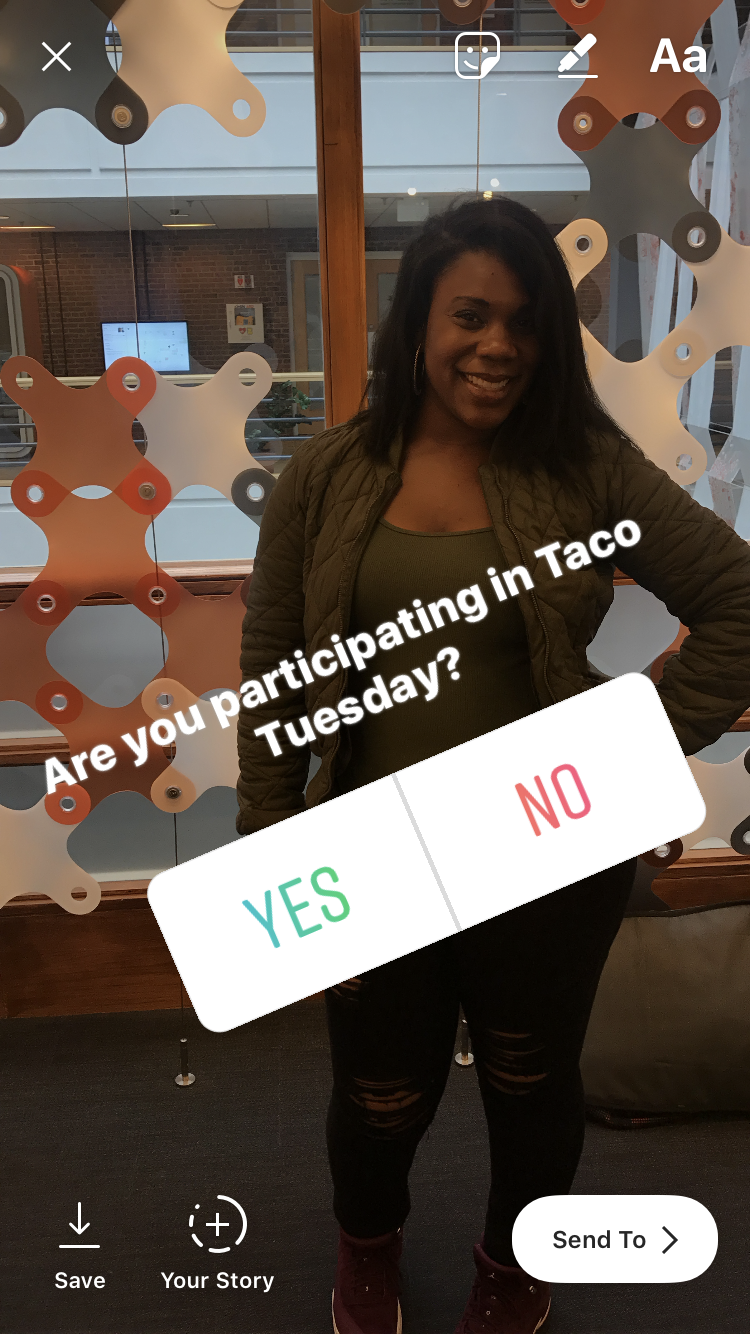
5. To add a GIF to your image, click the “GIF” icon and then scroll through trending GIFs, or search in the search box.
6. The best way to learn about stickers is by experimenting. Try clicking on different stickers, like temperature, location, or emojis, to decide what works best for you.
7. When you’re happy with the finished product, click “Your Story” in the bottom left to add the post to your Instagram Story (but beware — too many Stickers can quickly become overwhelming).
There you have it! Stickers are one of the easiest and most effective tools at your disposal to ensure your Instagram Stories are fun, captivating, and original. For more Instagram Stories tips, check out “How to Make an Instagram Story Like a Pro“.
