
How to Write a Press Release [Free Press Release Template + Examples]
When it comes to content, sometimes old school can be a good thing (namely, when it comes to old-school rap or Throwback Thursday on Instagram). But when it comes to your company’s public relations strategy, being old school isn’t advantageous for your business or your brand.
Ten years ago, people still relied on morning papers for news. Today, the vast majority of your company’s customers and prospects scan headlines on Twitter or see what’s trending in their Facebook feed.
People now have control over where, when, and how they consume information. As a result, public relations is no longer about feeding into a traditional news cycle; it’s about providing relevant content when, where, and how your prospects, influencers, and customers will consume it.
Sounds pretty hopeless, right? Wrong. While relationship-building still helps you get into popular publications, we now have the opportunity to quit playing the waiting game and generate our own buzz. By turning your PR strategy into an inbound one, you create opportunities that weren’t there before and carve out a place for your company, building meaningful mindshare with your target audiences in the process.
One of the most crucial updates to make to your PR strategy is to think of press releases as an opportunity to connect to the audiences you care about — including, but not limited to, reporters.

What Is a Press Release / News Release?
A regular cadence of meaningful news can help a company stand out and build mindshare with journalists over time. That’s where the press release (or news announcement) comes in.
A press release is an official announcement (written or recorded) that an organization issues to the news media and beyond. Whether we call it a “press release,” a “press statement,” a “news release,” or a “media release,” we’re always talking about the same basic thing.
While the heading should contain action verbs, the first paragraph should answer the “who,” “what,” “why,” and “where.” The press release should also contain understandable language and a quote.
Most press releases are succinct at just a page long — two pages, tops. Ultimately, companies want to provide enough information so that news outlets have sufficient material for publishing their own stories about whatever the company is announcing in the release.
And while it may be tempting to craft a press release that embellishes your company’s accomplishments or twists the facts to make a story sound more intriguing to the media, remember: Press releases live in the public domain, which means your customers and prospective customers can see them. So instead of thinking of a press release solely as a ticket to earning news coverage, you should also think of it as a valuable piece of marketing content.
How to Write a Press Release
- Make your headline irresistible.
- Convey the news’s value to the press.
- Offer a tempting quotable.
- Provide valuable background information on the subject.
- Summarize the “who” and the “what” in a boilerplate.
You’ve got your announcement in mind, and now it’s time to get it down in words to share with your community, industry, and followers.
Take Catbrella Inc., a fictitious ad agency, which just gained its 10th Twitter follower after two years of paid social media efforts. To announce its achievement, Catbrella could issue a press release like the one we’ve broken down for you below.*
Sample Press Release Format
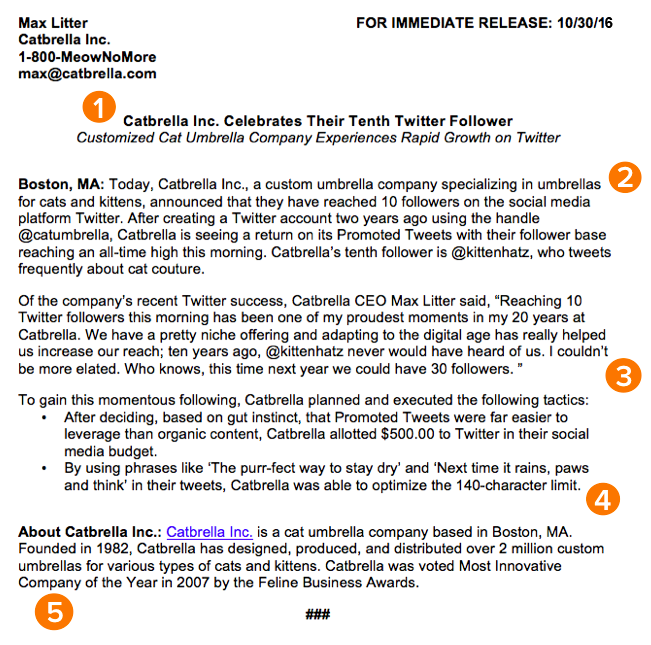
Rule 1: Make your headline irresistible.
Just like writing the perfect blog post title, setting up your press release for success starts with your headline. You only have one line to work with, which can seem scary, but consider diction carefully to make your headline captivating.
Use action verbs, clear, understandable language, and keep your headline simple and short — fortune (and search engines) reward the brief, so keep your title to one line to clearly focus people’s attention on your topline message.
Most importantly, make it interesting: Keep in mind that reporters get dozens, if not hundreds, of releases each day, so invest the time to write a compelling headline. It’s worth the time and effort on your part.
Rule 2: Convey the news’s value to the press.
For reporters, analysts, influencers, or followers to be inclined to share your announcement, you have to tell them upfront why they should care.
The first paragraph of your release should cover the who, what, why, where, and how of your new launch, update, or development. Reporters don’t have a ton of time to sift through details and fluffy background information — they just need the facts that’ll help them tell your story to someone else from a position of authority.
There shouldn’t be any new, crucial information covered after this section that the reader could potentially miss.
Rule 3: Offer a tempting quotable.
Once you’ve set the scene, it’s time to bring your details to life with a quote that reporters can use for context around your announcement and help paint a picture of how your news affects the given industry, customer base, and landscape.
Ideally, quotes will be from key stakeholders in your company including your executive team, project leads, or those directly impacted by your announcement. Quoting key figures and authorities underlines the importance of your development. The chosen quote should shape your narrative and emphasize the core of the announcement. Don’t ask everyone in your office for a comment or feel compelled to quote all 25 people included in the acquisition — pick one or two critical spokespeople and focus the quotes around their unique perspective.
Rule 4: Provide valuable background information on the subject.
In this last paragraph, keep in mind that the reader already has all of the vital details and information they need to file a story or spread the word.
It can be tempting to provide superfluous facts and tidbits about your company or the development of your announcement — we sometimes think a piece of writing is lacking if it isn’t drawn-out and just shy of being a novella. However, a press release needs to be helpful and concise.
Offer details here that strengthen your narrative, like creative or noteworthy ways your company developed the project or announcement at hand. Or, when applicable, comment on future implications of your announcement.
Rule 5: Summarize the “who” and the “what” in a boilerplate.
Twitter is chock-full of reporters lamenting press releases or pitches that don’t clearly explain what the company does or what the announcement is actually about, so instead of being the butt of a joke, make your release incredibly easy to reference.
Describe what your company does in clear, plain English, include a link to your company’s homepage early on, and make your boilerplate succinct and straightforward. If you cite data, include a reference link for the data source, and make sure every name in the release has an associated title and company as well.
To keep yourself honest on this front, ask a friend or colleague to read the release without context and ask if they can easily and readily explain why the announcement matters, what your company does, and why the executives included are quoted. If the answer to any of those questions is no, get back to the drawing board.
The key to keeping your PR strategy new school is forgetting preconceived notions of what public relations is and instead focusing on creating highly remarkable content. Traditional press releases can still be really valuable when executed well, so instead of ditching releases as a tactic, give them a modern makeover to make them more useful for your marketing.
Think about how you’ve used inbound methods to transform your marketing strategies to be more personalized, approachable, and build relationships. Those same principles apply to your PR strategy: Create content to craft your own story and use tactful outreach to get reporters and analysts familiar with your brand.
Press Release Examples
Many people think press releases have to be chock full of buzzwords and branded terms. “Big data,” anyone? Five-syllable words you have to look up on Thesaurus.com? Quotes from every executive on the planet that go on for pages? We’ve seen it all. Unfortunately, so have reporters — and they are not fans.
Instead of stuffing your next release with industry jargon, take a page out of our book (okay fine, ebook), The Newsworthy Guide to Inbound Public Relations, and brainstorm some creative approaches for your next announcement. Can you include new data? A remarkable graphic or video? A shareable SlideShare? If so, a creative angle can help carry your content and increase the likelihood of social sharing.
Types of Press Releases
While there’s no cut-and-dried formula for what a press release should include, here are a few types of occasions to help you carve out a focus for your press release and determine what content would help you broadcast your news in the best way:
- New product launches
- Mergers and acquisitions
- Updates to existing products
- Hosting or attending an event
- Opening a new office
- Introducing a new partnership
- Rebranding
- Promoting/hiring a new executive
- Receiving an award
Now, to get you thinking on the right track, take a look at some creative press release examples below, the type of news each one is reporting on, and what makes the release unique:
ŠKODA at the World Rally Championship
Type of press release: Event

Škoda, a car manufacturer based in the Czech Republic, recently showed off its sponsored racing team in two big places: at the 2017 World Rally Championship, and in a sleek, image-based press release reporting on the event.
The news release, shown above, doesn’t have any trouble aligning the look and feel of the Škoda brand with the press release itself — which is a crucial aspect of any company’s press content. The release opens with a large feature image of one of its vehicles in the same vibrant green that covers the business’s website. The press release also begins with three helpful bullet points summarizing the news for readers, and ends the release with a couple of captioned actions shots to give reporters more context around the event.
ScribbleLive Acquires New Company
Type of press release: Acquisition
Yes, a video press release! This news item from ScribbleLive gave reporters nearly everything they’d need to republish this story, all in a thorough two-minute video about the company’s latest acquisition.
ScribbleLive opens the video press release above with the company’s logo and a clear header stating the news. This allowed the company’s CEO to jump right into his commentary on the acquisition, giving reporters plenty of quotable material on the state of the industry and why this merger was so important to them.
The press release also segments the video the same way a written press release would, breaking up the CEO’s commentary by the question he’s answering. This makes it easy for viewers to jump through the video and find the information they’re most interested in hearing about.
And, being on YouTube, a press release in this format allows reporters to embed the news content directly on their site, making ScribbleLive’s news that much easier to share.
Peapod’s New Headquarters
Type of press release: Opening a new office
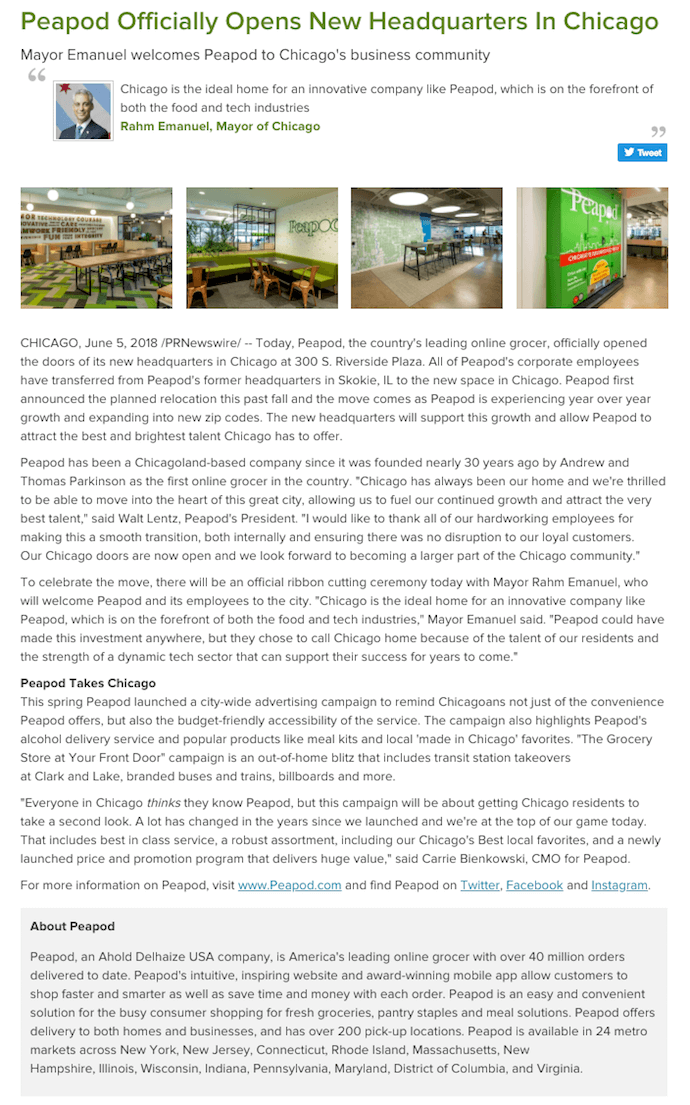
When you open a new headquarters, it can be hard to figure out what to say. People just want to get a look at the new digs! In the above press release by Peadpod, an online grocery service, the company puts photos of its new office right at the top, immediately showing readers what makes this news so significant for Peadpod.
The release even singles out a quote by the Mayor of Chicago just below the headline, hinting to reporters who are writing about Peadpod’s new HQ that this is the remark Peapod is most interested in sharing with readers.
Check out the boilerplate text at the bottom of the above press release. “About [company]” text can blend too easily with the actual news text, making the piece seem longer than it really is. By isolating this copy in a dark gray box, Peapod provides a smoother reading experience and ensures the story itself doesn’t get lost in an intimidatingly long wall of text.
HubSpot’s New Product Announcements
Type of press release: New product launches
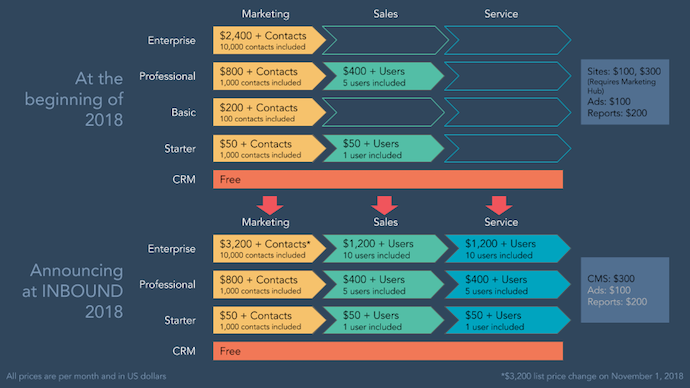
When you’re launching products or services, the information is often best expressed in written form. But when all you’re doing is writing about your new offering’s price and features, it can be difficult for others to refer to and report on it later. We at HubSpot know the challenge well.
The graphic above helped us to supplement our own product announcement — written by our fantastic Communications Manager, Ellie Botelho — with details that needed a visual aid. Using a combination of colors and shapes, this graphic allowed us to reveal important relationships between products, as well as their respective prices and when they’ll be available. (Interested one of our products? Take note! ^)
We’ve also crafted this comprehensive, easy-to-follow press release template complete with a promotional plan and considerations for your next announcement. We use these same guidelines when writing and formatting our releases here at HubSpot, and created a faux, sample release to illustrate what content goes where and why.
Tips for Publishing Press Releases
Writing a press release is really only half the battle. Once you’re finished with production, it’ll be time to focus on distribution.
Of course, we’re all familiar with the traditional distribution levers we can pull, which include publishing the press release on our website/blog, as well as sharing the press release with our followers/subscribers via social media and email. But for ensuring a press release gets the maximum amount of distribution possible, here are some tips you can follow.
1. Reach out to specific journalists.
Instead of blasting a press release out to every journalist you can find an email address for, focus on a few journalists who have experience covering your industry (and company, hopefully) and send them personalized messages. Connect the dots. Show why what you wrote connects to what they write.
2. Don’t be afraid to go offline.
Most journalists have mountains of emails (and press releases) to sort through. Try sending your release through snail mail or another offline channel to differentiate yourself.
3. Send the release to top journalists the day before.
Give journalists some time to craft a story around your press release by sending it to them — under embargo — the day before it officially goes live. (FYI “under embargo” just means they aren’t allowed to share the information in the press release until the time you specify.)
4. To avoid competition, don’t publish your release on the hour.
If you’re publishing your press release on a distribution service like PR Newswire or Business Wire, avoid publishing it on the hour (e.g., 1 p.m., or 3 p.m., or 5 p.m.). The reason? Most companies schedule their releases to go out on the hour, which means if your release goes out on the hour too, it’s more likely to get lost in the shuffle. Instead, try going with a more distinct time (e.g., 1:12 p.m., or 3:18 p.m., or 5:22 p.m.).
5. Share your media coverage.
If all goes according to plan, and your press release gets picked up by the media, your job still isn’t finished. To keep the buzz going, you can release a “second wave” of distribution by sharing the specific stories that news outlets write based on your press release.
What other best practices do you follow when writing press releases? Share your thoughts with us below, and don’t forget to download our free press release template here.


How to Convert a PDF to Excel: Free Tools & Instructions
A PDF, short for portable document format, is commonly used to view shared documents. The PDF format preserves a document’s formatting, which means you can look at the document on any device. But the key word here is “view” — you can’t edit a PDF without using a specific PDF-editing tool, which is where things get tricky.
If you’ve got a ton of data already formatted in a PDF, you don’t want to waste time manually re-entering that data into an Excel sheet.
Luckily, you don’t need to: there are plenty of free tools you can use to convert a PDF to an Excel file. Since all of the tools function similarly, we’ll show you how to use one of the more popular options, and supply a list of alternatives you can try out.
PDFtoExcel.com is a fantastic free tool for a few reasons: it’s secure (your downloads are deleted soon after conversion, and your files are only accessible by software agents); it converts documents of all sizes; the data you import is extracted accurately into rows and columns for Excel; and you can use your .xlsx converted file for various Microsoft Excel versions (7, 10, 13), LibreCalc, OpenCalc, or other office suites compatible with MS Office.
Plus, you don’t need to create an account to use it, which makes the whole process simple and quick (I converted my PDF file to Excel in under three minutes).
Here’s how to use it:
Convert PDF to Excel
- Upload a file into PDFtoExcel.com.
- Choose the PDF file you want to upload, and click “Open.”
- Click the orange “Free Download” button.
- Click your downloaded file at the bottom of the browser.
- Launch Excel and open your new .XLSX file.
1. Upload a file into PDFtoExcel.com.
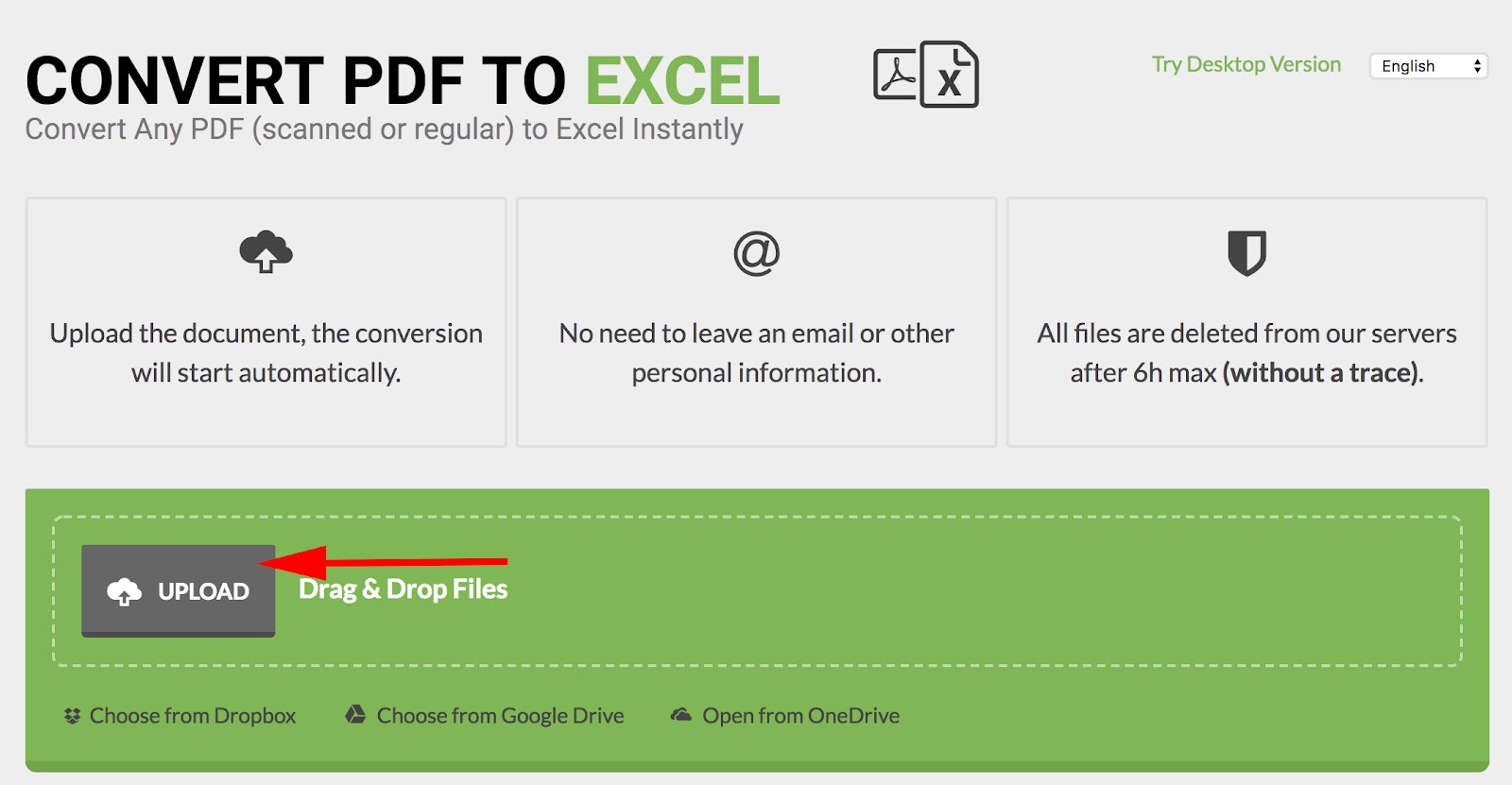
Open your internet browser and navigate to PDFtoExcel.com. On the website’s homepage, click the gray “Upload” button on the lefthand side. You can also drag and drop, or choose from Dropbox, Google Drive, or OneDrive along the bottom — as shown in the screenshot below.
2. Choose the PDF file you want to upload, and click “Open.”
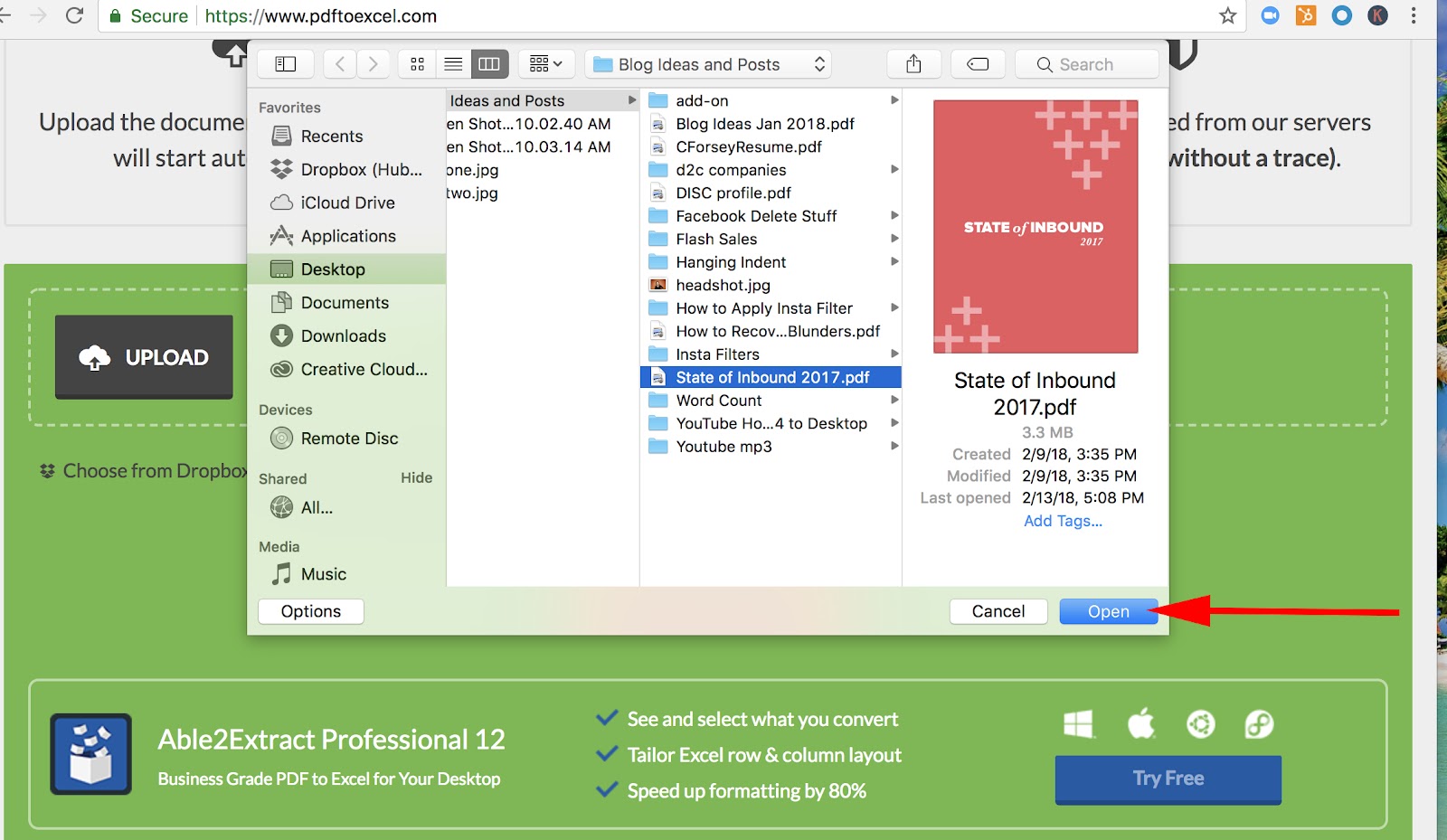
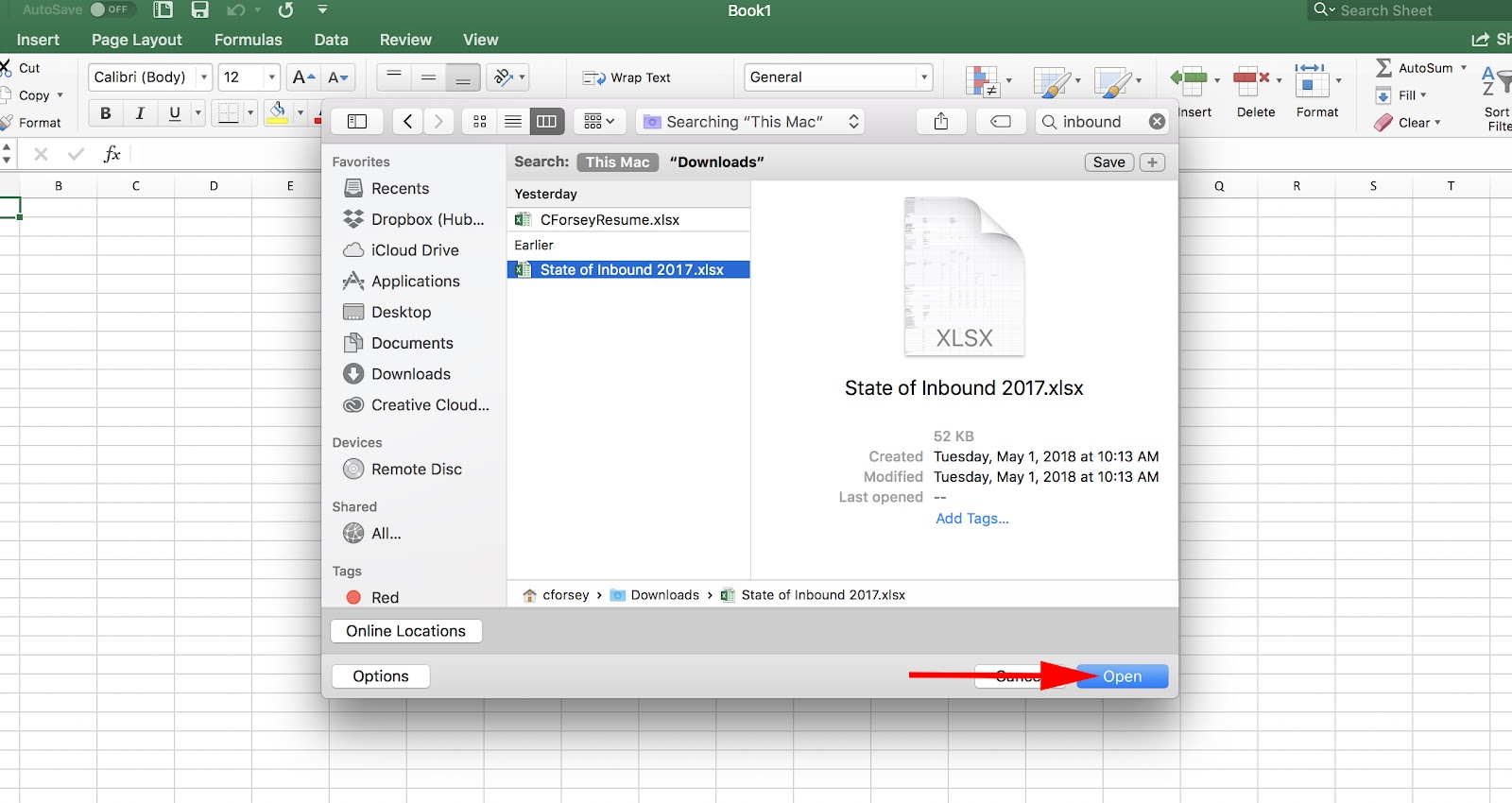
Clicking the “Upload” button will open a file window, where you can select the PDF document you want to convert to an Excel document. Highlight this document and click “Open” on the bottom-right corner.
3. Click the orange “Free Download” button.
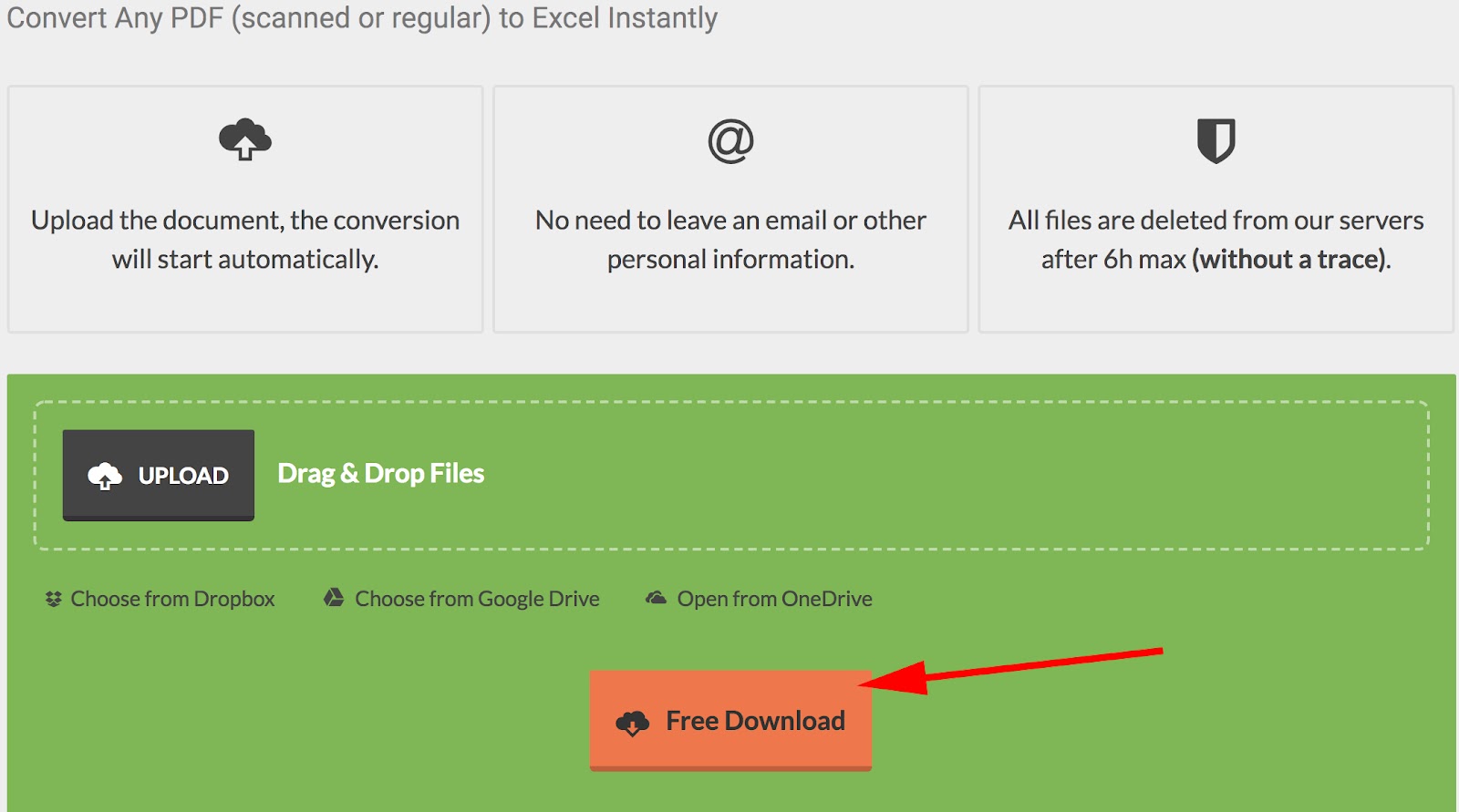
Once you’ve uploaded the PDF document you want to convert, you’ll see white text indicating that the site is working to convert your file. When it’s done, an orange button will appear below the “Upload” field labeled “Free Download.” Click it, and your newly converted document will begin downloading as an .XSLX file, which is compatible with Microsoft Excel.
4. Click your downloaded file at the bottom of the browser.
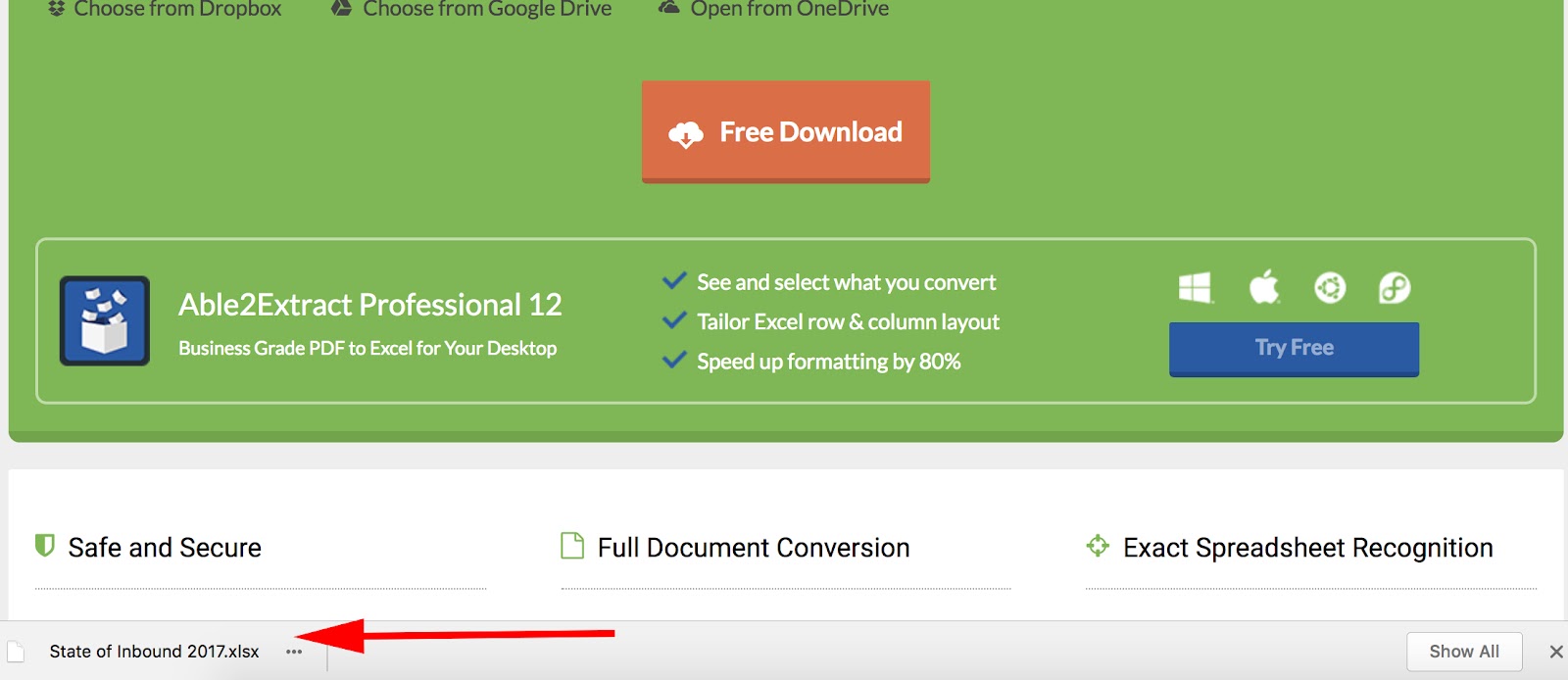
Now, the PDF is downloaded onto your computer in an .xlsx format, which means it’s ready to use in Microsoft Excel (versions 7, 10, 13) LibreCalc, OpenCalc, or other office suite compatible with MS Office.
5. Launch Excel and open your new .XLSX file.
Open Excel, and go to “File” → “Open.” Find your .xlsx file, and click “Open.” Your document will successfully appear in your spreadsheet.
Other conversion tools work similarly to PDFtoExcel.com, but some offer unique benefits. Take a look at our list to decide for yourself if one of them suits your business’s needs more than the rest.
- Tabula: Tabula extracts your PDF data into a format that Excel can read without difficulty, but doesn’t change your PDF into an Excel document itself
- Tabello: Tabello is an easy-to-use Chrome extension that converts your PDF data to an Excel format right from your browser, but it’s only free for the first five conversions (after that, it’s five dollars per 20 conversions)
- Free Online OCR: This tool uses character recognition to extract text from PDF’s and convert it into Word, Excel, or Text formats; allows conversions for different language PDF’s, including Chinese and Japanese
- iSkysoft: This is a paid tool, but you can get a free trial; allows you to convert multiple PDF files into Excel, HTML, Word, or other similar formats
These tools enable you to avoid manually entering data into your Excel sheet (if it’s in PDF format, anyway). This frees up your time so you can spend it analyzing and reporting on that data, instead.

How to Practice Ethical Decision Making at Work
It’s often clear what’s right and wrong in a situation, but occasionally, the lines can get a little blurry.
When you encounter so many diverse viewpoints on a daily basis, your wrong can seem right to someone else, and vice versa. In these instances, it’s critical you and your team knows how to make ethical decisions for the company.
Practicing ethical decision making can help you maintain an honest, supportive, and fair workplace culture, but it’s also necessary to ensure your company doesn’t get into legal trouble or face major losses down the road.
Ethical Decision Making
Ethical decision making is the process in which you aim to make your decisions in line with a code of ethics. To do so, you must seek out resources such as professional guidelines and organizational policies, and rule out any unethical solutions to your problem.
Making ethical decisions is easier said than done. Maybe your coworker lied to a client about a deal, but you personally like this colleague and want to give him the benefit of the doubt. Or, perhaps you’re tempted to lie to your boss to avoid admitting your team missed a deadline. Whatever the case, it’s critical you have a tangible set of steps to follow the next time you need to apply your ethical decision making skills at work. Let’s take a look at those steps now.
Ethical Decision Making Model
When you’re making a major decision for your company, it can be tempting to choose the easiest or most cost-effective course of action — even if that option isn’t the best from an ethical standpoint. The PLUS model, a set of questions designed to help you make a decision from an ethical point of view, can ensure you’re doing the right thing.
The PLUS model is especially objective because it doesn’t focus on revenue or profit, but rather urges leaders to take a legal and fair approach to a problem.
PLUS Model:
P = Policies and Procedures (Does this decision align with company policies?)
L = Legal (Does this decision violate any laws or regulations?)
U = Universal (Is this decision in line with core values and company culture? How does it relate to our organizational values?)
S = Self (Does it meet my standards of fairness and honesty?)
Once you’ve considered potential solutions using these questions as a guide, you’re ready to implement the six necessary steps to make your decision.
Ethical Decision Making Process
When you come across a difficult problem that threatens your company’s integrity or beliefs (or could be illegal), you’ll want to employ these six steps to make an ethical decision.
Step One: Define the Problem
Use PLUS filters to define your problem, and how it might affect one of the PLUS acronyms. Is it illegal, or does it violate your company’s values? Make sure you’ve outlined the full scope of the problem — be honest with yourself about it, even if you’re partially at fault.
Step Two: Seek Out Resources
It can be difficult, if not impossible, to reach an objective solution on your own. To fairly evaluate your problem, you’ll want to seek out all available resources. These resources might be mentors, coworkers, or even friends and family, but they could also be professional guidelines and organizational policies. Make sure you’ve armed yourself with knowledge to understand the extent of the damage.
Step Three: Brainstorm a List of Potential Solutions
When you’re brainstorming a list of potential solutions to your problem, you don’t want to only consider what’s been done before. Stay open to new and different ideas, and urge other people to share their advice. Consider outside resources, including what other companies have done. Ultimately you’ll want a list of at least three to five potential solutions. This way, you avoid feeling like it’s an either/or situation.
Step Four: Evaluate Those Alternatives
Dive into your list of potential solutions, and consider all positive and negative consequences of taking each action. It’s important you consider how likely those consequences are to occur, as well. You’ll again want to refer to resources, guidelines, and standards. For instance, you might decide one solution has only one negative consequence, but that negative consequence has a high likelihood of happening. Another solution has two negative consequences, but both are extremely unlikely. These are important factors to weigh when making your decision.
Step Five: Make Your Decision, and Implement It
At this stage, you’ve got all the information you need to make a fair and ethical decision. If you’ve made the decision alone but need to share it with your team, create a proposal outlining why you chose this route, and what alternatives you considered, so they can understand your steps. Transparency is key. Your team needs to understand you used appropriate and objective measures to find a solution.
Step Six: Evaluate Your Decision
Now that you’ve implemented your solution, decide whether your problem was fixed or not. If there are unforeseen consequences, perhaps you want to consider alternative measures to combat the problem, or refer to outside guidance.
Ethical Decision Making Examples
Let’s take a look at a few ethical decision making examples, to give you a better understanding of how to act if anything like this happens to you.
1. Your team misses an important deadline, and you’re tempted to tell your boss you reached it anyway.
It might seem like a good idea to tell your boss your team is on-track, and then work quietly to make sure that becomes a reality, but in the long-run this will only hurt you and your team. First, if you don’t examine why your team missed the deadline, you won’t know how to fix the problem moving forward. Additionally, your boss is meant to be a helpful resource for you, and could help you combat the issue. Lying could destroy your reputation as a leader and employee if your team or boss finds out, and it will be difficult to then prove your integrity. Figure out the guidelines or steps you need to take, and follow those.
2. Your coworker is giving her sister a major discount on your product.
It makes sense — family is important, after all. But it’s not fair or ethical if some of your customers are receiving discounts simply because of who they are, and can even be seen as a form of discrimination. If the public finds out you don’t follow fair rules when it comes to pricing and discounts, your entire company’s integrity is at risk. Either mention to your coworker that you don’t feel it’s fair, or report the issue to your team leader.
3. You’re close to finalizing a deal when you find out some of the information you’ve provided the client isn’t true.
You’ve worked so hard to form a relationship with your client and provide them with persuasive and helpful information, and you’ve finally reached the end. Just when they’re ready to sign the deal, though, your coworker takes a look at your slides and lets you know some of the information is outdated and is no longer applicable to the deal. It’s especially difficult because your job relies on you hitting quotas, and you know your boss and team will be incredibly impressed with this deal when you close it.
Unfortunately, you could get into legal trouble for lying in a contract, and you don’t want to set a precedent of lying and essentially stealing from clients to close deals. Be upfront and own up to the misinformation, and then work with the client to create a new deal. Ideally, the client will appreciate your honesty. If not, at least you didn’t win a deal through false measures, which might’ve gotten you into bigger trouble down the road.
Using the PLUS model and these six steps, as well as your own judgment and the opinions of your team, should arm you with all the information you need to make ethical decisions at work even when they’re difficult. For more decision making advice, check out The Ultimate Guide to Decision Making.

The Ultimate Guide to Marketing Trends in 2018
Marketing moves at the speed of light … er, at least it feels that way when you’re brainstorming a new campaign or strategy, and all of a sudden, a new statistic or technology release changes everything.
On a yearly, quarterly, and even monthly basis, new trends and techniques pop up and transform the way we attract, connect with, and market to our audiences.
But keeping up with the changes isn’t quite enough. To succeed in this fast-paced marketing world, you have to stay ahead of the game. That’s why we created this guide — influenced by some of our very own HubSpot experts — so you can bookmark and return to the most important marketing trends of 2018, time and time again.
Why Follow Marketing Trends?
If a certain marketing strategy or approach has consistently worked for your business, why change it? This just involves more time and energy, right?
Yes, but it’s worth it.
Marketing trends evolve for good reason. Google employees don’t sit around and say, “We’re bored. Let’s change up the algorithm of the search results page for fun.”
Nope. Changes in the marketing world happen because consumers change the way they shop, research, and spend their time and money … and changes in consumer behavior and priorities directly influence how they respond to marketing and advertising efforts.
Staying up-to-date on (and ahead of) trends helps your company save precious time and money and ensures you’re marketing to the right people who are in your target audience … and ready to buy.
So, sticking to your “reliable” marketing strategy might be cheaper in the short-term, but listening and responding to marketing trends will actually save you money and keep your business relevant in the long-run.
More so, digital marketing changes practically every day. It is the internet, of course. And if you’re not marketing on the internet, you’re already far behind the curve, my friend.
2018 Marketing Trends
Marketing refers to a wide range of activities that promote and advocate for a brand, so the term “marketing trends” is pretty vague. That’s why we’ve organized this section by the type of marketing, as you’ll see below.
Lots of things change in the marketing world, but we’ve chosen one or two for each section that we believe will best equip your business to succeed.
General Marketing Trends
Customers as Marketers
The marketing funnel is no more, my friends. Today, the flywheel — and a subsequent focus on service — have replaced the one-way direction of the funnel.
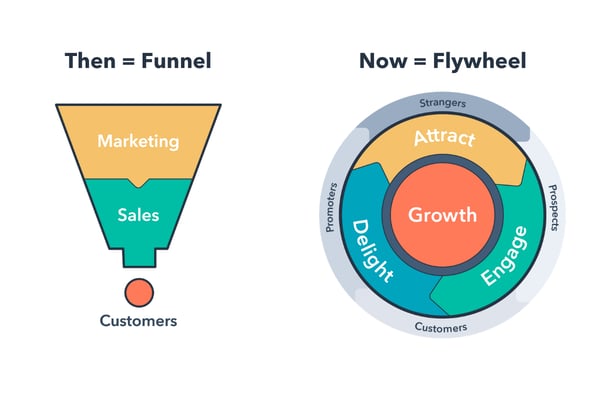
In the world of the marketing funnel, customers were an afterthought. Once they became a paying customer, businesses considered them obsolete — until, of course, it was time re-sign that contract.
The flywheel, on the other hand, places the customer in the center. Since word-of-mouth marketing is the single most powerful marketing tactic, it’s wise to not only serve your customers but also equip them to become advocates for your brand. The flywheel illustrates this process: excellent service as its own marketing strategy.
What does this mean for your business? Place a heavy emphasis on customer service. Train and equip your customer service team to not only handle requests and problems but also delight and empower your customers.
Content Marketing Trends
All kinds of businesses in all kinds of industries are starting blogs, investing in content marketing resources, and paying for content-related advertisements. Why? Because 47% of buyers viewed three to five pieces of content before engaging with a sales rep, and 70% of people would rather learn about new products through content than traditional advertising.
But contributing to a blog isn’t quite enough in today’s content dog-eat-dog world. To ensure your content is as effective and accessible as possible, you must pay attention to what type of content resonates most with your buyer persona.
Video Content
Video as a marketing tactic isn’t a new idea, but its effectiveness and popularity have definitely skyrocketed in the last year. In fact, YouTube is the second most popular social network behind Facebook. Also, when both video and text are available on the same page, 72% of people would rather use video to learn about a product or service.
The heightened impact of and interest in video means that the investment you put into video will pay off — literally. In the past, companies would create video and hope it reached and influenced its audience. Now, consumers and followers are literally begging for more video from their favorite organizations.
Alicia Collins and Megan Conley, video producers and editors at HubSpot, weigh in: “This [consumer behavior] also indicates that video can be used throughout all parts of the flywheel — not just as an asset for marketing. When incorporating video, businesses have historically used it as a means of introducing their brand and product or service offerings. But that’s not the case anymore. Video can be a valuable addition to both sales and customer service efforts.”
In the past, video was limited due to costly resources and production. Today, it’s much more accessible. With a lower cost barrier, video has become less intimidating to incorporate into your marketing efforts. You don’t have to hire a production team or marketing agency; all you need is a smartphone and editing software.
What does this mean for your business? Create video! Start at the bottom-of-the-funnel and create video assets for your sales and service representatives. “Video as a conversion asset versus a brand awareness asset is much more valuable and yields a higher ROI,” Alicia and Megan report.
These videos can also be lower quality and still as effective, meaning a smartphone and decent lighting is all you need to connect with your audience. For more information on how to use video for your business, check out our guide here.
Native Advertising
When your brand pays to feature content on a third-party website, you’re investing in native advertising. The point of native advertising is to naturally, organically advertise your brand or product within another environment, such as a publication, video, or graphic. Unlike traditional advertising, which is designed to interrupt and stand out, native advertising is designed to blend in and promote your brand to a new audience.
Native advertising has been around half a decade, but campaigns are still as successful as ever, if not more. Because they don’t “feel” like traditional ads, consumers are more likely to consume and explore native advertising efforts. In fact, consumers view native ads over 50% more than banner ads.
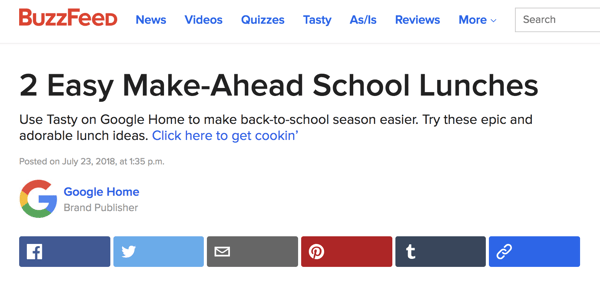
Buzzfeed is a popular publication and blog that routinely partners with brands for native advertising. In the example below, Google Home has published content on back-to-school recipes, and the only mention of the brand is in the byline. Google Home is advertising their product by incorporating their brand into otherwise native content.
Source: Buzzfeed
What does this mean for your business? Native advertising isn’t new, but it’s still just as effective. It shouldn’t replace all content marketing efforts, but it should definitely be added to or upped as part of your overall marketing strategy. Look for publications that are relevant to your brand, such as HuffPost for lifestyle brands or Entrepreneur or Inc. for business or B2B brands. The process of publishing native advertising content is typically pretty straightforward, as long as your content isn’t blatantly promotional.
Social Media Marketing Trends
According to the Data & Marketing Association (DMA), social media spending will account for almost 20% of marketing budgets in the next 5 years.
Social is an important part of every business’s marketing strategy. It allows brands to connect authentically with their audience and provides a fun, informal outlet to let brand personality and character to shine through.
It’s also an ever-changing medium, and it’s important to stay up-to-date with the ever-changing trends and best practices.
Permanent vs. Ephemeral Content
Not all social media is created equal. Different content types and lengths perform better on Facebook than Twitter, and some platforms encourage hashtags while others don’t.
And now, in 2018, Instagram and Facebook Stories have created another new type of content: temporary. Instagram and Facebook Stories are photos and videos that live for 24 hours then disappear “forever”. (Not really … there’s an Instagram Archive where all your Stories reside after they expire. But you get the gist.)
Kelly Hendrickson, a social media marketer at Hubspot, says: “Ephemeral content versus permanent content is often dictated by the social platform, as well as by the audience’s behavior on the platform.”
Take Instagram, for example. “Stories are soaring in popularity, and the user behavior on Stories leans toward playful, low-fi, quick content with heavy use of features within the UX (gifs, boomerangs, polls, etc). Their fleeting design isn’t the only differentiating factor. Instagram Stories can be heavily edited, too, with filters, GIFs, colored text, and more. Because of these fun additions, brands have added a brand new strategy for producing and publishing ephemeral content that varies from their other social media content.”
Permanent content is a little different. “Instagram can organically serve up a wall post across a wide span of time, so there is less of an opportunity for brands to be timely (who wants to see New Year’s post when they’ve already given up on their resolutions?!). Since Instagram users are more active on weekdays, during the standard workday, it seems users are looking for a break! It’s critical to use your brand voice and point-of-view to find how you can serve your audience during that break. Should your presence be inspirational? Beautiful? Informative? Playful? Trendy? They all have a place on Instagram’s permanent wall, it just needs to match your brand’s message.”
What does this mean for your business? Instagram and Facebook stories are a chance to showcase a little more of your brand’s personality and flair. Kelly says, “The combo of a running clock and a lively audience is a huge opportunity for brands to lean into quick, in-the-moment content that showcases the more light-hearted elements of their brand. Succinctness and clarity are key in content.”
Don’t shy away from adding new content just because you haven’t done so before … it’ll expire in 24 hours, anyway! For more information on creating Instagram (and Facebook) Stories, read our guide here.
Micro-Influencers
Influencers play a major role in modern marketing, but their influence isn’t limited to major celebrities and big brand names. Micro-influencers have found their niche in the social media world, too.
Micro-influencers are social media promoters that have smaller following, typically between 100,000 and 1 million. These folks might have a smaller follower base, but their posts pack more punch due to their engagement levels. Also, because they’re considered “average” and “everyday” people (unlike hard-to-reach celebrities), people view micro-influencers like friends and family — in that they’re more likely to trust their recommendations.
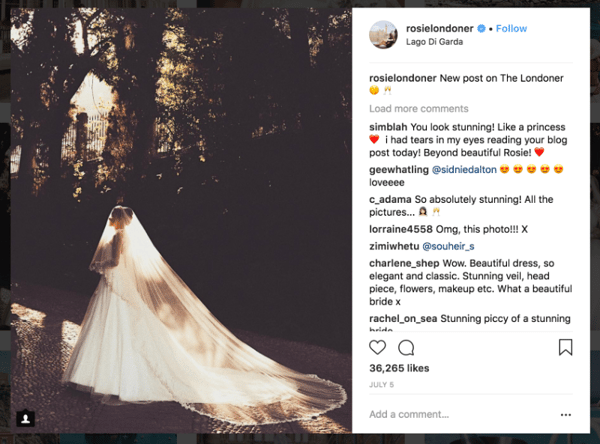
Rosie, known as The Londoner, is a popular travel and lifestyle influencer on Instagram. She only has 340,000 followers, but they’re fiercely loyal and engaged with her posts. The below image shows that: with almost 36,000 likes, Rosie is garnering almost 11% engagement.
Source: Instagram
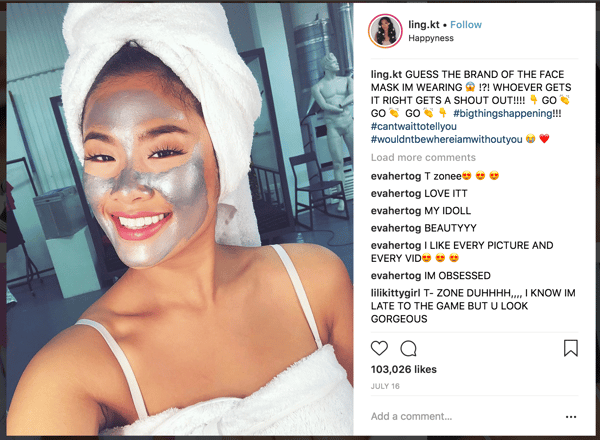
Here’s another example: Non-celebrity beauty influencer @ling.kt only has 1.2 million followers … but it’s a much more dedicated, engaged follower base. In the below image, Ling mentions a brand partnership and receives over 103,000 likes — which is almost 10% engagement.
Source: Instagram
Micro-influencers are the future of influencer marketing. It’s tempting to look at the number of followers to determine how influential a user is, but the true influence lives in engagement rates. Micro-influencers deliver engagement (read: clicks, subscribes, and purchases), drive social buzz through more personal posts, and are much more cost effective.
What does this mean for your business? Don’t be swayed by high follower numbers. Instead, hop on Instagram and do some research on who’s active in your industry or niche. Search your brand hashtag and any generic hashtags related to your product or brand. A micro-influencers follower base might be small, but they’re loyal and interested in what that influencer has to say. Paying for a post or two will go a long way with those users.
Search Marketing Trends
61% of marketers say improving SEO and growing their organic presence is their top inbound marketing priority. Are you one of these marketers? If so, have you figured out how exactly you plan to improve your SEO and organic presence?
We encourage you to start with the trends below. Optimizing for the following consumer behavior will help your business become more discoverable online.
Voice Search
Let me guess — you’ve used Siri, Alexa, Cortana, or Google Assistant in the last month or so. Am I right? Probably, because digital and voice-based assistants have taken over the world … or, at least how we search for and consume information.
Lately, digital assistants have accounted for a greater number of search queries than ever. Not only do they answer very short informational queries, such as “Who is the actor in Mission Impossible?” and “What’s the weather in Boston today?”, but they’ve also started to process more local, customized searches. These are typically like, “Where’s a nearby coffee shop I can work from today?”, “How late is it open?”, and “Do they serve iced coffee?”
Because of this emerging behavior, businesses need to respond and change the way they frame information. Instead of catering to Google’s manual search algorithm, content should be framed around questions.
What does this mean for your business? Aja Frost, an SEO strategist for HubSpot, says: “Businesses should look at a topic and say ‘What questions could users ask about this?’ Then, they should plan sub-topics accordingly and look for opportunities to insert questions as headers. This will allow voice assistants to easily grab questions and recognize content as solutions.”
Aja also encourages businesses to look for featured snippet opportunities, which are the information previews Google provides when users search for definitions or questions. Voice assistants typically pull responses from these boxes.
Mobile-First Indexing
48% of consumers start mobile research with a search engine, and the first position on Google search results on mobile has a 31.35% click-through rate.
It goes without saying that mobile usage is skyrocketing, especially for search queries and research. Due to this, businesses should ensure their website is discoverable and readable via mobile devices — both smartphones and tablets. Website speed is also becoming important as Google prioritizes better performing websites in their search engine results pages (SERPs).
What does this mean for your business? If you’re not already, get familiar with how to design and optimize your website for mobile use. This typically requires a responsive design — meaning your website will “respond” and change its design and layout as users access it on their desktop versus their smartphone. For more information on this, check out our guide here.
Technology in Marketing Trends
Artificial Intelligence (AI)
In general terms, artificial intelligence refers to a subset of computer science that teaches machines to do things that would require intelligence if done by a human. Think of tasks like learning, seeing, talking, socializing, reasoning, or problem-solving. When completed by computers, they’re considered AI.
AI has completely infiltrated our daily lives and tasks. When Spotify recommends a song, Facebook recognizes and tags a person, or you text a friend using Siri, you’re tapping into AI. As we utilize AI more and more (especially as consumers), marketers and businesses will need to respond.
The point of AI isn’t to replace humans or the need for a human touch. It’s to improve and expand our ability to connect with our audience and help them solve their problems quicker and more thoroughly. In fact, authenticity in marketing is more important than ever to consumers. AI is also incredibly helpful when collecting and analyzing data and making data-driven decisions.
What does this mean for your business? Research ways you can incorporate AI into your business and marketing operations — not only to better serve your consumers but to also make your life easier. For more information on AI, read our guide here.
Virtual Reality (VR) & Augmented Reality (AR)
Virtual reality is viewing a computer-generated, lifelike scenario. Augmented reality is viewing the real world augmented with visual, haptic, olfactory or visual additions. VR and AR offer different experiences, but both are making waves in the marketing world in 2018.
And they’re affecting your lives, too. Ever watched a 360° video on Facebook? That’s VR. What about IKEA’s IKEA PLACE app that helps you visualize virtual furniture in your very real room? That’s AR.
Right now, VR and AR are being used to supplement and improve customer experiences online and at events. In the future, though, marketers will need to integrate VR and AR into their marketing efforts … or risk falling behind. Marketers thus far have been slow to adopt this trend due to pricey equipment and bulky headsets, but as VR glasses and AR apps become more accessible, businesses can expect to add this technology to their marketing strategy.
What does this mean for your business? VR and AR might not be necessary for your business and marketing strategy today, but you should definitely start thinking about it. The near future could bring about a mass adoption of VR glasses — not unlike smartphones or tablets. And if everyone has one, your business must, too. For more information, check our out guides on VR and AR.
Chatbots
More than half of consumers expect a response within 10 minutes to any marketing, sales, or customer service inquiry. How can this be humanly possible?
It’s not … for humans, anyway. Enter: Bots.
Bots are powered by a computer program that automates certain tasks, typically by chatting with a user through a conversational interface. Bots are made possible by artificial intelligence, which helps it to understand complex requests, personalize responses, and improve interactions over time.
Bots provide quick, easy solutions to problems — no matter how complex. No longer is the need for live chat or a literal one-to-one digital conversation. Bots provide the perception and dedication of a 1:1 service experience while working with hundreds of customers — something that no customer service representative or team would ever be able to do.
To the consumers who hate repeating themselves to multiple sales or service representatives (33%, to be exact), listen up. Chatbots are and will be making your lives much easier. If employed correctly, they manage conversations at scale and aggregate data from multiple sources of data — from calendars to knowledge bases to blog posts and videos.
What does mean for your business? Jon Dick, VP of Marketing at HubSpot, says: “It’s on you to make things as easy as possible. Your buyers want to use live chat? You should give it to them. They’ve had the same problem three times in the last month? You should already know, and have a plan to fix it.”
Not sure how to breach the subject of chatbots? Read our guide here … and keep an eye out for future HubSpot products that might help. *wink*
Privacy in Marketing Trends
In the marketing world, data is valuable currency … and not just valuable to you, as a marketer or business owner. Whether their email address, credit card information, or smartphone location, consumers also view their data as precious and privileged.
And it’s your responsibility to take care of it.
GDPR
Whether a software company, bank, government agency, or lemonade stand, each and every business operates using data. It’s the lifeblood of all things marketing, sales, service, and more.
And hackers know it. When data breaches happen, precious information is siphoned into the wrong hands, leading to untrustworthy businesses and exploited consumers.
That’s why the General Data Protection Regulation (GDPR) was enacted in May of this year. The GDPR is an effort by the EU to give greater control to consumers over their data. Under the GDPR, organizations must ensure that their data is collected legally and safely and that those who collect and manage said data will protect it and respect consumers’ rights.
Following the GDPR guidelines might seem like a burden, but being fined for non-compliance will feel much heavier; fines range from 10 million euros to 4% of a company’s annual global revenue. Is this a risk you want to take?
What does this mean for your business? Do your research! Read our GDPR guide and peruse our GDPR checklist to ensure your business is compliant.
Over to You
You’re up to speed … for now. If your current campaigns and advertising don’t align with these trends, don’t fret. Slowly apply these changes to your marketing efforts, and be sure all of your activities are compliant and legal.
As long as you’re keeping a thumb on the pulse of current marketing trends — and remain open to change — you and your business will never fall behind.

16 of the Best Job Interview Questions to Ask Candidates (And What to Look for in Their Answers)
How lucky are you, and why? How many times heavier than a mouse is an elephant? How many square feet of pizza are consumed in the United States each year?
Hiring managers have heard about using these “curveball” questions to identify the best candidates. Fortunately, for intelligent and qualified candidates everywhere, studies have found that the brainteaser interview questions made famous by Silicon Valley and Wall Street are just as silly as they sound. (In fact, Google started to phase out brainteasers from its interviews several years ago.)
But when you’re interviewing people to join your team, you have to get creative. After all, there’s only so much that questions like “What’s your biggest weakness?” and “Are you a team player?” reveal about who your candidates truly are.

To help give you some ideas for the next time you’re meeting with a job candidate, here are some of the best job interview questions to ask, and good answers to each question.
Good Interview Questions
- Tell me about a time you set difficult goals.
- Pitch our company to me as if I were buying our product/service.
- Tell me about the relationships you’ve had with the people you’ve worked with.
- What project would you consider your most significant career accomplishment to date?
- What have you done professionally that is not an experience you’d want to repeat?
- Is it better to be perfect and late, or good and on time?
- In five minutes, could you explain something to me that is complicated but you know well?
- What is your definition of hard work?
- If I were to poll everyone you’ve worked with, what percentage would not be a fan of yours?
- Tell me about a time you screwed up.
- Who is the smartest person you know personally? Why?
- What is something you’d be happy doing every single day for the rest of your career?
- If you had $40,000 to build your own business, what would you do?
- What’s the biggest decision you’ve had to make in the past year? Why was it so big?
- What has surprised you about this interview process so far?
- Do you have any questions for me?
1. “Tell me about a time you set difficult goals.”
If you’re looking for a candidate who is goal-oriented and results-driven — as most hiring managers are — this question will help you gauge whether they’ll be able to handle the audacious goals you have in store for them. Ask follow-up questions like, “what did you do to achieve them?” Have the candidate walk you through the process and purpose of the goals they set out for themselves.
A good answer to this question:
A good answer to this interview question shows they understand what difficult goals are, and that they put a lot of effort into attaining their goals while maintaining a high standard of work quality. Listen for answers that describe a lofty goal and show why this goal challenged their normal targets. Responses that admit the candidate came up short of this goal can also indicate self-awareness and confidence despite a lack of success.
2. “Pitch our company to me as if I were buying our product/service.”
This is a unique and more challenging approach to the generic “What does our company do?” question. It forces candidates to not only drum up the research they’ve done to prepare for the interview, but also show they can use this research to craft a persuasive message that would be valuable in a business situation.
A good answer to this question:
This will come more naturally to some candidates than others. Above all, good answers to this interview question are able to combine an accurate definition of your company with what it offers to your core customer that they need or can’t get anywhere else.
Keep in mind that someone interviewing for a sales or marketing position might find it easier than someone interviewing for a non-client facing role — and that’s okay. You aren’t necessarily assessing their delivery. But it’ll be interesting to see how each candidate thinks through and gives their response.
3. “Tell me about the relationships you’ve had with the people you’ve worked with. How would you describe the best ones? The worst?”
Each team is different, so this question helps you tease out whether the candidate would be happy, productive, and well liked on your team. Their answer will tell you how they interact with others — and which kinds of interactions they want to happen.
A good answer to this question:
Answers to this question don’t have to focus on just professional elements of a relationship with colleagues — they can also be related to business culture. Maybe the candidate enjoyed their coworker’s positivity or thought their attitude lowered morale. Good responses aren’t one-sided, though. Look for answers that explain how their colleague’s work style thrived (or conflicted) with their own — not simply what their colleague did that benefited or offended them.
Many candidates are hesitant to bad-mouth their coworkers and bosses, so it’ll be interesting for you to hear how they navigate a question about their worst working relationships.
4. “What single project or task would you consider your most significant career accomplishment to date?”
Lou Adler, author of The Essential Guide for Hiring & Getting Hired and Hire With Your Head, spent 10 years searching for the single best interview question that will reveal whether to hire or not hire a candidate — and this was the one.
A good answer to this question:
Candidates’ answers will tell you about their prior success and sense of ownership. A great answer will show they are confident in their work and professional choices while being humble enough to show they care about the company’s success. For example, if a candidate built a sales or marketing campaign they’re particularly proud of, listen for them to explain how the business benefited from it. Did it help the company sign a major client?
5. “What have you done professionally that is not an experience you’d want to repeat?”
A candidate’s answer to this question will give you an idea of how they viewed work they weren’t very happy with, which is bound to happen to everyone in every job at one point or another.
A good answer to this question:
HubSpot’s VP of Customer Service and Support Michael Redbord says candidates’ answers generally fall into a few categories:
- Something menial (e.g. envelope-stuffing). Pay attention to whether they understand the value of this getting done for the business, or whether they just think they’re too good for a job like that.
- Something really hard. Why was it hard? Was it because it was poorly planned, poorly executed, or something else? Where do they put the blame on it being such an unpleasant experience?
- Something team-related. Follow up with questions about the team, what their role on the team was, and so on.
Even the category of what they consider an experience they wouldn’t want to repeat is interesting, says Redbord. When you talk about extreme experiences that get people emotional, it can be very revealing. Keep in mind, however, that good answers don’t have to fall into any one category — what’s most important is if they extracted value from the experience despite their lack of interest in doing it again.
6. “Is it better to be perfect and late, or good and on time?”
If your candidate responds with “It depends,” hear them out — the interview question itself is phrased in such a way that candidates can sense there is a right and wrong answer, and they’ll be looking for signs from you that they’re heading in the right direction.
A good answer to this question:
For most companies, the correct answer is “good and on time.” It’s important to let something be finished when it’s good enough. Let’s face it, every blog post, email, book, video, etc. can always be tweaked and improved. At some point, you’ve just got to ship it. Most managers don’t want someone who can’t hit deadlines because they’re paralyzed by perfection.
Try to remain neutral as they feel out their response, though. They might not be able to relate to work that’s measured purely by quality and deadline, but it’s important that they can express how they prioritize their tasks.
7. “In five minutes, could you explain something to me that is complicated but you know well?”
This is a much better test of intelligence than a college GPA, and it’s also a great gauge of a candidate’s passion and charisma outside of their core job responsibilities. Candidates who are passionate and knowledgeable about something — and can convey that well — are more likely to be enthusiastic and influential at work.
A good answer to this question:
The “something” in this question doesn’t have to be work-related — it can be a hobby, a sports team, something technical … anything, really. Good responses will tell you how well your candidate comprehends complex subjects and that they can articulate that subject to someone who doesn’t know much about it.
Explanations that use analogies also make good answers, especially if it’s a topic that is filled with industry jargon. This shows that the candidate can solve problems by drawing comparisons to things that are more universally understood.
8. “What is your definition of hard work?”
Some organizations move at very different paces, and this question is an effective way to tell whether your candidate will be able to keep pace with the rest of the team. It also helps you identify someone who is a “hard worker in disguise,” meaning someone who might currently be at a slow-moving organization or in a role that is not well-suited to them, but wants to work somewhere where they can really get their hands dirty.
A good answer to this question:
A good answer doesn’t have to produce evidence of hard work — it should rather reveal if your candidate knows what it takes to get something done and solve the problems it was designed to solve.
Answers that talk about working hard by working smart are great, as well. Always listen for this — putting in the work to find the best way of doing something is often just as important as the task itself.
9. “If I were to poll everyone you’ve worked with, what percentage would not be a fan of yours?”
At work, you can’t please everyone all the time. The answer to this question will help you find out if your candidate has enough drive and conviction in their own work to have ever conflicted with one or more of their colleagues.
Obviously you don’t want the candidate to be an unlikable person, though, so consider asking follow-up questions to find out why they might have alienated these coworkers: “If I were to interview these people, what words would they most frequently use to describe you?”
A good answer to this question:
The follow-up question about word choice is more important than the percentage they give in the initial question. In their answers, you should be encouraged by words like “passionate” and concerned by words like “lazy.”
Of course, not all negative words are red flags — while words that indicate a lack of work ethic might be a bad sign, words like “stubborn” could show a candidate’s self-awareness — and commitment to things their coworkers would rather move on from.
10. “Tell me about a time you screwed up.”
An oldie but goodie. This is a tried-and-true test for self-awareness. (Honestly, well-prepared candidates should see it coming and have an answer ready.) Someone who takes ownership of their mess-up and learns something from it is usually humble and mindful. Candidates who blame others or give a “fake” screw-up (something like “I worked too hard and burned out.”) are red flags.
A good answer to this question:
A good answer to this question will do two things well:
- Admit to a genuine mistake. Often candidates will dress up a mistake with a self-compliment or excuse to avoid looking weak. For example, “I was so committed to X that I overlooked Y.” On the contrary, good answers will just show that they miscalculated, plain and simple.
- Explain what they learned from it. It’s one thing to screw up, but it’s another thing to take that screw-up as an opportunity to improve. Great companies learn more from failure than they do from success — candidates who do too are exactly what you need to grow.
11. “Who is the smartest person you know personally? Why?”
These questions test what the candidate values and aspires to by forcing them to think of a real person they know, and then articulate what makes that person smart.
A good answer to this question:
Ideal answers vary, but could include specific examples of the person they’ve chosen’s ability to think ahead several steps and execute. They could also touch on the person’s decision-making skills, ability to connect, desire for learning, or application of the things they learned.
12. “What is something you’d be happy doing every single day for the rest of your career?”
While it’s important to hire for skill, it’s also important to hire someone who’s likely to be happy in the job for which you’re hiring. A question like this one will help uncover what makes each candidate happy at work — which is a great way to gauge whether they’d enjoy their role and stay at the company for a long time.
A good answer to this question:
There’s no right answer to this question — it’s more of a learning opportunity for you to see what your employees most enjoy in the industry. Nonetheless, a candidate’s answer to this question should align with the core responsibilities of the job for which they’re applying.
A sales candidate who says they could lead client kickoff meetings every day, for example, is a much better fit than a sales candidate who prefers to create lead-generating campaigns (a task that shows a bigger interest in the marketing side of things).
13. “If you had $40,000 to build your own business, what would you do?”
This question is a favorite of HubSpot Marketing Team Development Manager Emily MacIntyre. First, the type of business they choose to talk about can reveal a lot about their interests, values, and how creative they are. Second, it’ll give you insight into how business-savvy they are. By giving them a specific amount to work with (in this case, $40,000), they have the opportunity to parse out how they’d spend that money.
A good answer to this question:
The best answers to this question will get specific: They’ll offer an overview of the business and get into the logistics of where that money would go, whom they’d hire first, and so on.
14. “What’s the biggest decision you’ve had to make in the past year? Why was it so big?”
Here’s a great way to figure out how a candidate approaches decision-making. Were they quick to make that big decision, or did it take them a long time? Did they spend most of their time reflecting on it by themselves or fleshing it out with others? How did they make a plan?
A good answer to this question:
Candidates’ answers could be work-related or personal. In addition to revealing their thought process, as described above, an effective response to this interview question will also show how the candidate was able to prioritize what was most important when each possible option might have had its own advantages and disadvantages.
If your candidate had hiring power in a previous position, for example, maybe they found it hard to choose between two job candidates of their own. A good answer might show that they saw immediate skill in one candidate but long-term potential in the other. Although both people had usable strengths, your candidate chose the second person because he or she offered he best return on investment.
15. “What has surprised you about this interview process so far?”
This is a question no candidate can really prepare for, and it’ll give you some indication of how candidates are feeling about the whole thing. Plus, you can see how they think on their feet.
A good answer to this question:
You’re looking for specifics here — something about the office space; the personality of the team; an assignment they were given to complete.
Honest answers are good answers, and answers that are directed at you are even better, as they show the candidate is confident speaking their mind in front of decision-makers. For instance, maybe the candidate was surprised you asked them about something on their resume that they don’t personally pay much attention to.
16. “Do you have any questions for me?”
This is another classic interview question, and like the one above, you’re seeing how candidates think on their feet. The answer to this question also reveals what’s important to the candidate. Are they wondering about company culture, or compensation? Are they curious about growth potential, or learning opportunities?
A good answer to this question:
There are no right or wrong answers, but personality and communication style are important factors when considering hiring someone to join your team, and you can get a sense of these factors with their answer.
Want more interview tips? Learn about some of the real questions HubSpot’s CMO asks in marketing interviews.
If you happen to be on the other side of the interview table, you can make your resume even more appealing to potential employers by becoming a certified inbound marketing professional with HubSpot’s free marketing certification. Get started here.

7 Scientifically Proven Ways to Get More Clicks on Your Content
ATTENTION.
As marketers, before we can create interest and compel action, we must get our audience’s attention.
That’s the job of the headline copy, which can take many forms:
- It can be the subject line of an email
- It can be the title of an article or press release
- It can even be the first sentence of hand-written note
Whatever the context, one fact remains constant: The headline is the most important sentence on the page.
“On average, five times as many people read the headline as read the body copy,” said David Ogilvy, the Father of Advertising. “When you have written your headline, you have spent eighty cents out of your dollar.”
Point being, make your first words good. Make them so good — so relevant and valuable — that they can’t be ignored.
This is the only way to ensure that the rest of your message gets consumed.
How to Make Your First Words Too Good to Ignore
First and foremost, you must know your audience.
If you don’t know what your audience cares about, you can’t start writing for them. You wouldn’t know where to begin.
Before you write, research.
Then, once you know what your audience needs or wants, use any one of these proven tactics to craft an angle that commands their attention:
1. Leverage the “Curiosity Gap”
Humans experience curiosity in a couple ways: perceptually and epistemically.
Perceptual curiosity is the desire to understand something strange or puzzling, like an optical illusion or a magic trick. Epistemic curiosity is simply the desire to learn something new, to acquire new information. Of these sensations, the latter is more pleasant.
“Our brain and our mind assigns value to this [new] knowledge,” explains Mario Livio, an astrophysicist and curiosity researcher, “so this is usually experienced as a pleasurable thing, with an anticipation of reward in the form of what we learn.”
This moment of pleasure and delight is what makes “curiosity gap” headlines so compelling and ubiquitous: used across the internet, especially in social media marketing.
Headlines that leverage the curiosity gap are specific enough to connect with the reader, but not so specific that they fulfill the reader’s epistemic curiosity — their desire to learn something new and get that pleasure rush.
If the reader wants that rush, they’ll have to commit their attention.
Note this “curiosity gap” headline from 1987:

It helped Joe Sugarman entice readers through the opening of his “Vision Breakthrough” ad, widely regarded as one of the greatest pieces of direct response ever written.
It went on to sell more than 20 million pairs of BluBlocker sunglasses.
2. Apply the “Scarcity Principle”
People are hardwired to value things and experiences that they perceive to be rare — or at least in short supply. Psychologists and economists refer to this tendency as the scarcity principle.
It’s an evolutionary trait, developed to ensure that we get what we need. Thousands of years ago, early humans leaned on it for survival. Today, copywriters evoke those same gotta-have-it feelings by using words and phrases like:
- “Hurry!”
- “Exclusive offer!”
- “Limited availability!”
The scarcity principle is also tied to our self-worth. Acquiring something uncommon or in demand makes us feel powerful.
“Scarcity creates fashion,” Seth Godin said. “People want something that others can’t have.”
Note this “scarcity principle” headline from 2013:

This is the opening of a sales letter from The Agora, a global marketing network known for publishing incredibly effective direct response sales letters.
The headline offers “six” people an “exclusive” invite to “experience the adventure of a lifetime.” The ad ultimately leads into a real-estate investment opportunity in Nicaragua.
The letter sold out in a couple days.
3. Use Numbers
Want to stop scanners in their tracks? Use a number in your headline.
Whether your headline appears in a newsletter, a popup, or a YouTube banner, a number will make it stand out.
Numbers work this way because words and images make up most of the content we see each day. Webpages, magazines, billboards, emails: They’re all dominated by words and images.
So when our eyes spot a number, it sticks out. It pops, focusing our attention. Simple, but effective.
Numbers also signify finality, a definitive beginning and end, which is comforting to readers.
“The more we know about something — including precisely how much time it will consume — the greater the chance we will commit to it,” explains Maria Konnikova, who writes about psychology and science for newyorker.com. “The process is self-reinforcing: we recall with pleasure that we were able to complete the task (of reading the article) instead of leaving it undone and that satisfaction, in turn, makes us more likely to click on lists again.”
Note this “numbers” headline from 1925:

Copywriting legend Claude Hopkins opens this century-old ad with a number.
And you thought BuzzFeed invented listicles!
4. Share Something Surprising
Research tells us that a genuinely surprised reader has your full attention, 100 percent.
This complete state of absorption is the product of an involuntary mental sequence our brains go through when we’re surprised — for better or for worse — by something, like a headline.
“It’s a strong neuro alert that tells us that something is important about this moment and we have to pay attention,” explains Tania Luna, who co-authored a book about how our brains process surprise. “Our cognitive resources are basically hijacked and pulled into the moment.”
In other words, surprising your audience will momentarily stun them with intrigue or curiosity or repulsion or glee, giving you an opportunity to move them into the next sentence.
Note this “surprising” headline from 1974:

This ad was written by famed copywriter Gary Halbert to sell a book called How to Turn Plastic Into Gold.
To set up the offer, Halbert jolted the reader with a paradox, a contradiction that, if true, would be a delightful surprise to every credit card holder alive.
How could you not read the next sentence?
5. Ask a Question
Warning: There’s a wrong way to ask a question in a headline.
Questions that are too obvious (e.g., “Is drinking water good for you?”) won’t compel readers because they already know the answer. And fear-mongering questions (e.g., “Does your newborn have cancer?”), while compelling, ultimately destroy your integrity and credibility.
The best question headlines make the reader think critically about their behavior or psychology. The best questions force the reader to look inward, to investigate their own reality, their “truth” so to speak.
These questions work well because moments of deep reflection are incredibly emotional — and emotions sell. Of course, they also take the most effort to research and develop. Success demands investment.
Note this “question” headline from 1997:

Master copywriter Gary Bencivenga wrote this headline to sell a report called Interviews That Win Jobs.
Though he never actually answers the question in the body copy, it was still a successful ad. Whether you answer the question or not doesn’t matter. What matters is how the question made the reader think and, of course, feel.
In this case, the question worked because it quickly shifted the reader’s perspective — and that made all the difference.
6. Promise Value
The easiest, clearest way to promise value in a headline is to start it with the words “How to.”
“Many advertising writers claim if you begin with the words How to,” writes copywriter Bob Bly, “you can’t write a bad headline.”
The reason is simple: We’re desperate to be told what to do, to be directed. Because making your own decisions is terrifying. Stepping out of the box is terrifying. Guessing is terrifying.
It’s much easier, safer, and less stressful to lean into someone else’s guidance.
Note these “value-based” headlines from 1974:


The copywriters at Ogilvy & Mather consistently leveraged the power of value-based headlines to capture attention.
These are but a fraction of the incredibly simple and straightforward “How to” headlines created by Ogilvy’s agency over the years.
The format’s prevalence can only mean one thing: it works.
7. Help your Audience Self-Identify
“Remember,” wrote Dale Carnegie in How to Win Friends and Influence People, “that a person’s name is to that person the sweetest and most important sound in any language.”
This attention-grabbing trigger plays off of that concept, because while a static headline can’t call out your reader by name, it can help them self-identify as part of a larger group, or tribe.
By implicating your reader directly in the headline, you’re making it crystal clear that they’re in the right place, that they should focus, settle in, and keep reading.
Note this “self-identifying” headline from 1936:

The Newspaper Institute of America created this advertisement to sell writing classes.
The ad ran for almost 30 years, yet the headline and sub-headline never changed.
As you can see…
These tactics aren’t a new phenomenon. Copywriters have been leveraging these psychological tricks and triggers to command attention for generations.
In other words, they’re proven — and now, they’re yours for the taking.
Take them.

The Ultimate Guide to Emotional Marketing
What does it mean to do something “like a girl”?
This is the question Always asks in its empowering 2014 #LikeAGirl campaign, which sought to exploit and forever bury the term “…like a girl”.
Turning an insult into a bold movement of confidence not only brought revenue and popularity to the Always brand, but the 2014 campaign also won an Emmy, a Cannes Grand Prix award, and the Grand Clio award — a recognition practically unheard of in the advertising world.
This is only a glimpse of how effective emotional marketing can be — for both brands and consumers.
Today’s consumer base is better educated and better equipped to research what they don’t already know. They’re also flooded with advertisements on a daily basis.
In such a busy marketing world, how can you make sure your company stands out?
Here’s how: By tapping into another major component of the consumer’s attention span and purchase decision — emotion.
In this guide, we’ll explain what makes emotional marketing so powerful and how you can leverage it to connect with your audience and encourage them to act.
Before diving into why emotional marketing is effective and how to incorporate it into your marketing efforts, let’s first talk about emotions.
Take a moment and think about what emotion you’re feeling right now. Remember, emotions aren’t exactly how your body is feeling. They’re more descriptive of your state of mind.
Right now, it’s 8:30 a.m. as I write this. I’m tempted to say my emotion is tired … but tiredness isn’t quite an emotion. Instead, I’ll say I’m slightly annoyed because I’m tired, but I’m also excited because I have a great day ahead of me.
Also, did you notice how my chosen emotions didn’t precisely fall into the four basic emotions of happy, sad, afraid/surprised, and angry/disgusted? Annoyed could be grouped under angry, and excited could be considered happy … but their definitions aren’t quite the same.
That’s because emotions are like colors. There are a few defined concepts, but for the most part, emotions exist on a spectrum. One tiny change on the spectrum can lead to a different kind of happy, a different kind of sad, and a different kind of angry … kind of like the color green has infinite shades.
Robert Plutchik’s “wheel of emotions” illustrates some of these emotional spectrums — using colors, no less.
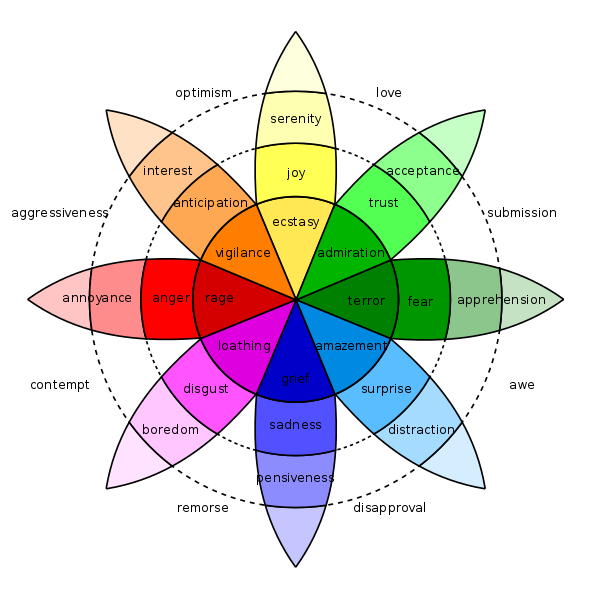
I’ve taken a second to explain emotions because it matters exactly what emotion you include in your marketing.
Depending on your product, industry, and audience, you can’t always target general “happiness.” Like with your marketing goals, you must dig deep and define precisely what feeling you’re aiming to elicit. This will influence the details of your marketing — your copywriting, media, graphics choices, etc. — and help it be as effective as possible.
Why Emotional Marketing Works
People feel. As much as we wish we didn’t, say after a heartbreak or during a scary movie, we can’t help but experience emotions. It’s in our nature.
This is one of the reasons emotional marketing just works. Here are a few others.
Emotional Marketing Makes Great First Impressions
According to you, what makes for a great first impression? When you meet someone new, what stands out?
Now consider a new business. If it were between two advertisements — one that simply talked about products, and one that made you laugh or cry — which would “impress” you? The second one, right?
First impressions form in a matter of seconds. The same goes for a first impression of a product or brand, and marketing emotion can help shape that impression … and help that brand or product stand out in your mind.
Emotional Marketing Helps People Decide with Their Hearts
Think back to your last major purchase.
When it came down to the wire, how did you decide which option to buy? Better yet, what made you finally push “buy”? (Because, let’s be real, you probably bought something online.)
Sure, you compared prices and spent time reading about each product, but when it came time to make a decision, I’m betting you relied on your heart over your head.
I’m guessing that an emotion you felt, or wanted to feel, helped nudge you in the right direction. Dove’s marketing is a great example of this. Their inclusive, down-to-earth commercials focus on ensuring every woman feels beautiful, making their product seem like a source of many emotions — acceptance, serenity, optimism, self-love.
Studies show that people rely on emotions, rather than information, to make decisions. Emotional responses to marketing actually influence a person’s intent and decision to buy more than the content of an ad or marketing material.
Out of 1,400 successful advertising campaigns, those with purely emotional content performed about twice as well (31% vs. 16%) as those with only rational content.
Emotional marketing helps people decide with their hearts, which actually has more influence on buying than their minds.
Emotional Marketing Inspires People to Act
While emotional marketing is a powerful tool for eliciting a purchase or two, emotions also encourage other activity that can help grow your business and brand.
Here’s a breakdown of that activity per emotion:
- Happiness makes us share … and sharing leads to increased brand awareness. If bad news sells, then good news travels fast. Studies show that good news and positive content spreads faster on social media than any other type of content. This phenomenon isn’t unlike the “social smile” in infancy, when babies reciprocate a smile. When someone is happy, we tend to mirror that emotion, which leads us to share any content that made us smile in the first place
- Sadness makes us empathize and connect … and empathy leads to increased giving. A 2007 study revealed that feelings of empathy lead to altruism and the motivation to act on behalf of others. It’s no surprise that organizations like the ASPCA feature sad photos and a moving song while asking for donations. Feelings of sadness inspire us to act and help people, which typically manifests in fiscal giving.
- Surprise and fear make us cling to what’s comfortable … and embracing what’s comfortable leads to increased brand loyalty. Marketers are typically afraid to leverage fear in their advertisements, for fear (literally) that consumers will associate negative feelings with their brand. But, the opposite is true. Studies show that eliciting fear allows your brand to be seen as the one good thing in a dark world, meaning your consumers will lean on you more when things take a turn for the worse.
- Anger and passion make us stubborn … and stubbornness leads to viral content and loyal followers. Think about that Facebook video about a local tragedy or political issue that has tons of likes and thousands more comments. Like happiness, strong emotions like anger and passion inspire people to share content. Studies show that producing content that purposely elicits anger and anxiety will lead to virality and increased views.
Now that you know why emotional marketing works, let’s talk about how you can incorporate it into your current efforts … or perhaps a new campaign.
Emotional Marketing Strategies
There are a variety of ways to market your business using emotion. The below strategies can be combined and used to evoke all kinds of emotion. We do encourage you to start with the first one, though, as what specific emotions you target will depend on who you’re marketing to.
1. First … Know Your Audience
This is a crucial step before doing any kind of marketing, much less emotional marketing. If you don’t know your audience, how will you know what kind of content they’ll respond to best? How will you know which emotion to target to elicit the best, most valuable response for both them and you?
Before deciding which emotion to weave into your marketing, conduct some serious target audience research. Like any marketing effort, you want to elicit an emotion that resonates with their pain points or general desires and dreams. Researching your audience will better inform your marketing decisions and save you precious time and resources.
2. Lead With Color
This might seem like a simple strategy, but it holds more influence than you think. Like I explained above, color and emotion are closely tied … in more ways than one.
Color actually plays a major role in evoking emotion. Have you ever walked into a room and immediately (and inexplicably) felt some type of way? This is called color psychology, and a wide variety of businesses and organizations use it. Therapists paint their offices to calm their patients, football teams choose jersey colors that excite their players and audiences, and movie producers design the color scheme for posters and trailers that elicit feelings of fear or surprise.
The same goes for brands. Consider the Coca-Cola red or Starbucks green. The color red evokes strong feelings such as love, excitement, and joy (as well as anger and warning). In the case of Coca-Cola, red portrays positive, friendly energy.
On the other hand, the color green is often associated with harmony, balance, nature, growth, and health — all components of the Starbucks brand and “green” movement.
Here are some other emotions associated with colors:
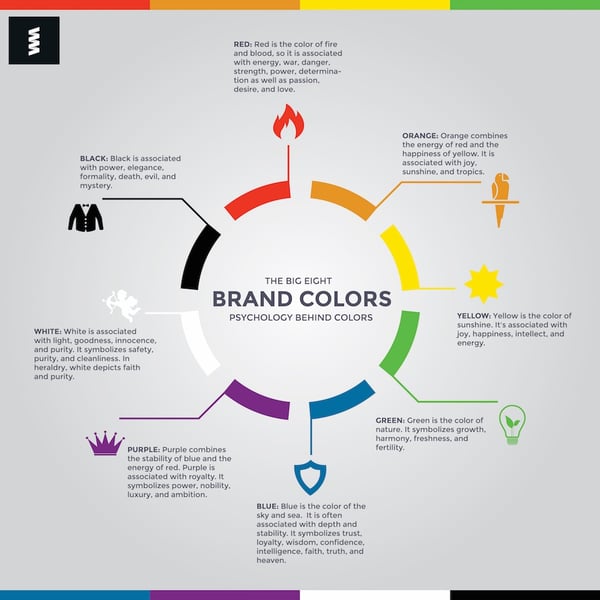
Source: Color Wheel Pro
3. Tell a Story
Storytelling is a surefire way to connect with your audience. Whether through sadness, anger, passion, or excitement, stories are easily relatable and shareable, regardless of the makeup of your audience.
Proctor & Gamble’s commercial titled “Thank You Mom” aired before the 2014 Sochi Winter Olympics. It features many famous Olympians and the stories of how their mothers supported them throughout their athletic careers. Since mothers are a large part of P&G’s target audience, the commercial is perfectly positioned to both tell a resonating story and market their products.
Another heartwarming piece of emotional marketing is MetLife’s commercial “My Father is a Liar.” It chronicles the life of a young girl and her father, who’s attempting to get a better life to care for his family. The commercial closes with the tagline “A child’s future is worth every sacrifice,” which positions the ad to connect with MetLife’s target audience: parents and families who’d do anything to provide for their children.
4. Create a Movement or Community
Using emotional marketing to establish a movement or community around your brand taps into a few different psychological triggers. The bandwagon effect it creates keeps people intrigued by what the crowd is doing. Also, feelings of camaraderie, acceptance, and excitement can create a sense of loyalty to your brand.
TOMS does a great job of crafting this sense of community. When you purchase a pair of TOMS, you not only help someone in need, but you also join the TOMS community. You now belong. The marketers at TOMS enhance this community by promoting activities like “One Day Without Shoes” and encouraging their customers to use hashtags when sharing images.
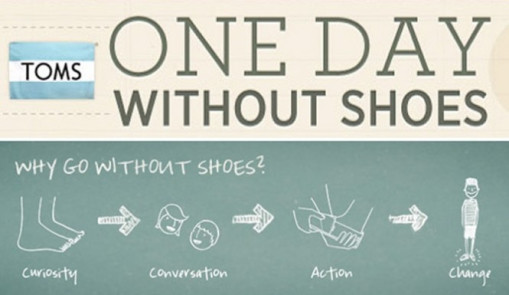
Source: TOMS Marketing Strategies
5. Inspire the Impossible
Aspiration isn’t quite an emotion, but the process of feeling inspired definitely brings out many emotions: elation, joy, excitement, hope … just to name a few. Aspirational campaigns are powerful because they tap into a dream, goal, or vision that your audience longs to reach. To successfully target aspiration as a marketing approach, businesses should understand how their product helps their consumers reach those lofty dreams and desires.
Red Bull executes this approach well through their “Red Bull Gives You Wings” campaign. Their commercials feature intense moments where real athletes are achieving their goals and dreams. These ads also associate Red Bull with feelings of elation, excitement, and hope that, one day, you can reach your dreams, too.
6. Project an Ideal Image
While some advertisements tap into how we’re currently feeling, others elicit emotions that we’d like to feel. That’s the goal behind projecting an ideal image through your marketing. Great marketing explains how a certain product or service can solve for a pressing problem. Great emotional marketing uses emotion to convince consumers that your product is not only the right solution, but that you can also feel great using it.
Brands like Old Spice use the “ideal image” to their advantage when marketing their hygiene products. Their iconic “The Man Your Man Could Smell Like” uses humor to insinuate that you (or your man, ladies) could be as handsome, accomplished, and suave as the actor in the commercial … all by purchasing and using the Old Spice product.
How to Measure Emotional Marketing
Emotional marketing should be measured just like any other marketing effort … except for you’re measuring the emotional response itself. If you’re curious as to how your audience is responding to your advertisements (outside of a clickthrough, subscription, or purchase), you might need to do a little manual analysis.
To get a read on your audience reaction, consider running surveys or providing a space for feedback during your initial campaign launch. This open-ended, quantitative approach will leave room for honest, real-time audience reactions and give you ideas on where you can improve. Another method of manually analyzing audience feedback is holding a focus group.
To learn more about market research, read our guide here.
Another way to measure your audience’s emotional response to your marketing is to decipher how their emotions manifest as actions. As I referenced earlier, happiness typically leads to sharing, sadness leads to giving, fear leads to loyalty, and anger leads to virality. Depending on the emotion elicited through your marketing, you might expect to see a bump in activity surrounding one (or more than one) of these activities.
For example, if you release a short promotional video that centers on happiness, joy, and excitement, keep an eye on how your social media followers respond. If they’re sharing the video with others, it’s likely doing its job putting a smile on someone’s face. On the other hand, a fear-centered approach might lead to greater email subscribers or social media follows as your audience establishes loyalty with your brand.
Over to You
Weaving emotion into your marketing and advertising is a surefire way to attract, resonate with, and encourage your audience to act. Think of emotional marketing as the secret weapon you never knew you had.
To successfully put emotion in your marketing, all you need to do is know your audience and know which emotions would resonate most. Align these with your overall marketing goals, and your emotional marketing efforts will be some of your most effective.

The 8 Instagram Accounts With the Most Followers — And What Marketers Can Learn From Them
After Facebook bought Instagram in 2012, the app has evolved from a fun social network for selfies and brunch pics to something much more impactful: marketing’s top platform for visual content.
Since they introduced key product updates like video, stories, and IGTV, Instagram now boasts over 1 billion monthly active users who spend close to an hour scrolling through the app each day they log in.
Instagram’s popularity lets most brands forge an emotional connection with a massive audience, and some brands are so good at visually engaging and resonating with Instagram users that they’ve attracted tens of millions of followers.
Let’s check out this list of the eight brands with the most Instagram followers and examine their content to learn exactly how they’ve built cult-like followings.
Quick note:
This post is about the business accounts with the most Instagram followers. The eight Instagram accounts with the most followers all belong to celebrities, so, since we predominately write about marketing, we thought this would be a more relevant topic.
Top Instagram Accounts
- National Geographic
- Nike
- Real Madrid
- 9GAG
- NASA
- NBA
- Chanel
Marketing Takeaways from the Top Accounts on Instagram
1. Instagram
Followers: 246 Million
Instagram sets a great example for brands who truly want to engage an audience on their app. By curating and reposting their users’ most captivating content on their own profile, Instagram shows their followers that everyday people can meet their creative and artistic potential on the platform. This inspires brands and normal Instagram users to spend the time and effort required to craft visually gripping content that will instantly hold an audience’s attention.
Instagram also does a good job of promoting their stories and IGTV show about celebrities, wildlife, and other culturally relevant topics. They post original content that highlights upcoming episodes, but the posts read more like a feature story than an advertisement, which sparks more interest in the show.
2. National Geographic
Followers: 90.1 Million
National Geographic hires the most talented photographers in the world, so their Instagram posts of landscapes, cityscapes, and the surrounding life always seem to be awe-inspiring. But their stunning visuals aren’t the only reason why they’ve attracted over 90 million followers.
National Geographic is a historic magazine that’s famous for their credible journalism and compelling storytelling, so in each post’s caption, they are able to craft fascinating narratives about the photo or video, usually in a way that spreads awareness for a relevant environmental issue.
National Geographic also uses Instagram Stories, Stories Archive, and IGTV to drive traffic to featured articles and videos on their website. But they also know their followers prefer not to leave the app. So instead of using gimmicky visuals and clickbait copy to coax people into visiting their website, they actually summarize the feature article or video in their stories and IGTV shows.
For marketers, National Geographic’s Instagram strategy clarifies that it’s crucial to meet your audience where they are, and not force them to go somewhere just because you want them to go there. If people end up clicking through to your website, that’s great. But you should be more than willing to educate your audience where they want to be educated, even if it results in a lower amount of traffic.
3. Nike
Followers: 79.5 Million
In the advertising industry, Nike is known for their motivational ads that inspire athletes to believe in themselves and work as hard as possible to meet their full potential. On Instagram, the iconic brand’s content follows this theme, with posts in the form of short films, documentaries, and inspirational videos and photos. Nike also uses Instagram to update their followers with quick news about the sports world, proving that they deeply understand their audience’s interests and desires.
4. Real Madrid
Followers: 62.1 Million
Real Madrid is arguably the most popular soccer team in the world, so most of the team’s Instagram posts update their massive fan base on scores, highlights, and transactions.
But the way they attract and engage twice as many Instagram followers compared to other teams with similarly sized fan bases isn’t through standard updates. They’ve built their enormous following by giving their fans an inside look of the team’s everyday activities through player takeovers and practice highlights on IGTV.
Breaking down these barriers between fan and player makes Real Madrid’s fan base feel like they actually know their favorite players on a personal level, which develops a more intimate and loyal relationship between the two.
5. 9GAG
Followers: 46.3 Million
With plenty of dog, cat, and baby videos, SpongeBob references, and jokes that are almost too relatable, 9GAG has one of the funniest accounts on Instagram.
Their Instagram stories and Stories Archives engage their audience well too — they post a ton of polls about topics that everyone has an answer for like “Is soup a food or a beverage?” and “Would you travel to the past or future?”.
They also use Instagram stories to drive traffic to their website by asking their followers to swipe up and see if they correctly guessed the name of a TV show or movie with only emojis as clues. On IGTV, they generate even more brand engagement by letting their followers ask questions during live Q&As with celebrities.
As the only online content platform on this list, 9GAG proves to marketers that interacting with your audience is one of the best ways to engage them, develop a relationship with them, and attract more followers like them.

6. NASA
Followers: 34.7 Million
Scrolling through NASA’s Instagram feed makes you feel a little like an astronaut floating through the depths of space. You’ll experience intimate views of different planets, constellations, and supernovas in the Milky Way galaxy, all of which are taken by NASA’s spacecrafts and Hubble Space Telescope.
NASA’s Instagram stories, stories archive, and IGTV channel also educate their followers about interesting space insights, like the views of the sun and earth, the search for life in space, and NASA’s new launches and technology.
In an age where most people think the only thing that social media content can do is rot your brain, NASA’s popularity on Instagram proves that you can actually create educational content that doesn’t sacrifice any entertainment value.
7. NBA
Followers: 30.1 Million
Since basketball is only the seventh most popular sport in the world, it might be surprising that the NBA is the sports league with the most amount of Instagram followers. But after analyzing their Instagram strategy, their success on the app makes complete sense.
Most of the NBA’s Instagram posts are countdowns of each team’s and certain player’s best plays. And by posting each team’s and specific superstars’ top plays on Instagram, the NBA’s content appeals to all of their teams’ and stars’ fan bases, letting them reach almost every basketball fan in the world.
But the NBA doesn’t just rely on this clever personalization strategy to maximize their reach on Instagram. They also host account takeovers, Q&As, and behind-the-scenes access videos of team facilities on their Instagram stories and Stories Archive to give fans an inside look at their players’ life on and off the court.
Basketball has about three billion less fans than soccer does. But the reason why the NBA has five million more Instagram followers than the Champion’s League is because the NBA knows how to personalize their content, relate to each segment of their audience, and break down the barriers between their fans and players.

8. Chanel
Followers: 29.3 Million
Throwback Thursday will always be a huge deal on social media — who doesn’t love a heavy dose of nostalgia every week? Recently, though, Chanel decided to take #tbt to the next level. They’ve been evoking nostalgia in fashionistas all over the world by posting old ads that spotlight previous fashion trends for their Chanel Holidays campaign every day.
The legendary fashion brand also posts a lot of content about Coco Chanel’s early fashion influences to promote Inside Chanel, a web series that recounts Coco’s life and how she built her fashion empire.
Harnessing the power of the past is one of the most effective ways to evoke an emotional response from your audience and forge a connection with them. With that in mind, nostalgia should always be in your marketing arsenal.

23 Hidden Instagram Hacks and Features Everyone Should Know About
Instagram has become the favorite social network of many — and not just for teens and Millennials. In fact, according to the Pew Research Center, 35% of online adults use Instagram — up 3% from 2016. Compare that, for example, to 24% on Twitter.
Plus, folks don’t just use Instagram casually, as 38% of them use it several times each day.
But for those who have never used the platform before, or those who just want to take their usage to the next level, Instagram has some lesser-known tricks, settings, hacks, search options, and comment features you should know about. That’s why we set out to find them and list them all in one place.
Whether you’re a recruiter looking to showcase your company’s culture, a marketer in the ecommerce industry, or an individual who’s just looking to use Instagram in the best ways possible, there are tips and features here for you.
And for a quick overview of these hacks, check out this rundown from HubSpot Content Marketing Strategist Megan Conley.
Note: Before getting started, make sure you’re operating on the latest version of Instagram. At the time of posting, the latest version is 35.0 on iOS, and varies according to the device.
23 Hidden Instagram Hacks and Features
1. Get Notifications When Your Favorite People Post
Never want to miss an Instagram post from your favorite influencers again? You can choose to get a notification every time a specific user posts a new photo. All you have to do is turn on notifications for each user individually.
To turn on these notifications, visit a user’s profile, click the three dots in the upper right-hand corner of the post, and choose “Turn on Post Notifications” from the menu that appears.

Want to turn post notifications off? Just follow the same steps. It’s important to note that you must enable notifications from the Instagram app in your phone’s settings — here’s how.
- To allow notifications on iPhone/iPad: Go to “Settings,” then “Notifications.” Choose “Instagram” and then turn on the setting to “Allow Notifications.”
- To allow notifications on Android: Go to “Settings,” then choose “Apps,” then “Instagram.” Select the option to show notifications.
2. Add Special Fonts to Your Bio
Here’s an Instagram bio hack that can truly make your profile stand out. You can already add emojis to the bio beneath your profile photo, but your keyboard limits your creativity right there.
Using a couple of basic third-party websites, you can copy over some more special fonts not often found in the Instagram community. Here’s how.
To Add a Special Font to Your Bio via Mobile:
Add a new font to your Instagram bio via your mobile device using a website like LingoJam. Open the site on your phone, type your desired bio text in the lefthand text box, and you’ll see the same bio text in different typefaces appear on the right.

Carry your chosen font over to your Instagram bio by tapping it and selecting “Copy.” Then, open your Instagram app, navigate to your profile, select “Edit Profile,” tap the “Bio” section and paste your chosen font into the empty field.
To Add a Special Font to Your Bio on Desktop:
If you’re editing your Instagram profile on your laptop or desktop, Font Space has a library of fonts you can download and copy into your bio in seconds. To do so, Find a font you like and select “Download” beneath the font’s sample image, as shown below.

Downloading this font will open a folder on your desktop where you can pull a “.ttf” file that carries the various versions of this font. The file will look something like the screenshot below.

Once you have this font copied to your computer’s clipboard, open your internet browser and log onto Instagram.com. Select “Edit Profile” and paste your downloaded font into your bio field. You can then edit the sample text that came with your font to write your new bio as you see fit.
3. Search Instagram Users Without an Account
As much as Instagram would like to see you ultimately create an account for yourself or your business, you can peruse the beautiful brands, people, and dogs that are waiting for you without an account to see if it’s worth signing up.
There are two ways to search for people on Instagram without logging in:
Entering a Username at the End of the Instagram URL
The first way to search users without an account is by using an Instagram username you already know, and adding it to the end of “www.instagram.com/.”
For example, if you were to start with our Instagram username — which is simply “HubSpot” — you can enter the following into your browser’s address bar: www.instagram.com/hubspot. This will bring you to our Instagram profile as well as the elusive search bar at the top of the page:

Once you’ve reached this page, you can use the search bar to the left of the “Sign Up” button to browse users who are already active on the platform.
Googling Them in an Instagram Site Search
A slightly “hackier” way of looking up users without an Instagram account of your own is to simply search their name in a Google site search. This means telling Google to only look up search terms on a website of your choice (in this case, Instagram).
To site search a user, open a Google search and type the following: “site:instagram.com [name of user].”
By keeping all the text prior to the brackets in your search bar, you can shuffle through names of people and businesses and Google will produce results that live only on Instagram. Here’s what a site search looks like for HubSpot, below. As you can see, Google produces our main profile, our culture-focused HubSpot Life profile, Instagram posts that include the #hubspot hashtag, and our HubSpot Academy Page.

4. See All the Posts You’ve Liked
Ever wanted to see the posts you’ve Liked, all in one place? All you have to do is go to your own profile and click the “Options” button — a gear icon on iPhone/iPad, and three dots on Android — then, click “Posts You’ve Liked.”

To un-Like any of the posts you’ve Liked, simply go to the post and deselect the “heart” icon below it. Don’t worry — the user won’t be notified that you’ve un-Liked the post.
5. Add and Manage Multiple Accounts From the Same Device
Have a separate account for your dog? Don’t be embarrassed; stand by your puppy profile. In fact, whether it’s a pet account or a business account, you can add and manage this one right alongside your personal account. Here’s how:
- From your profile, tap the gear icon (or the three dots on an Android device) and select “Options.”
- Scroll to the very bottom and tap “Add Account.”
- Add your other account by username and password, and you’re all set!
To toggle between both profiles, hold down your profile picture in the navigation bar to view all connected accounts. You can also switch to a different account through the Options page mentioned earlier. See what this screen looks like in the Instagram feature below.
6. Schedule Posts in Advance
Instagram being a mobile app, you’re probably in a routine of taking photos and posting them to your Instagram Story on the fly. But, you can also pre-post them from your computer for a set day and time in the future.
This feature is available with a social media scheduling tool, as well as HubSpot if you have an Instagram business account. If you have this business profile, switch to it via the Instagram mobile app and follow the prompts to connect it to Facebook.

Depending on the social scheduling tool you use, you might not include this step. Once you’ve toggled to the right account, however, you’ll launch your scheduling tool, navigate to your current connected profiles, and see Instagram as an available integration.
7. Create a Collection of Saved Posts
In addition to being able to view all of the posts you’ve liked, Instagram also has an option to save or bookmark certain posts in collections that you create.
Start by going to your profile, and tapping the bookmark icon on the top-right menu above your photos.

Select the “Collections” tab, and tap “Create Collection.” Below, I’ve created one for food-related posts I particularly like.


Hit “done,” and you can start adding photos to your collection. To do so, tap the bookmark icon below the post you want to add.

Then, go back to your saved photos by following the previous steps. You’ll see the photos you’ve saved — to add them to your collection, select the collection you want to add to, and tap “Add to Collection.” From there, you can add any of your saved photos.
8. Use ‘Type Mode’ to Enhance Your Instagram Stories
Instagram Stories is a feature of Instagram that allows you to post ephemeral photos that show up separately from your profile and only last 24 hours. It’s a great function for helping like-minded users discover your profile on Instagram’s homepage.
But since its beginning, Stories have become quite creative, and it takes more than a pretty filter to stand out to your audience. Enter “Type Mode,” an option similar to Snapchat that gives you the power to caption Stories that need extra context to resonate with someone. Here’s how to use it:
Open Instagram Stories by swiping right from your Instagram feed. This will launch your smartphone camera. Then, take a photo or video and press the “A” icon to the top-right of your screen, as shown below:

This “A” icon will open Type Mode, where you have five fonts to choose from: Modern, Neon, Typewriter, Strong, and Classic. Here’s what a sample Story looks like with Modern font:

9. Create Stories Highlights to Show Stories for Longer Than a Day
Like in Snapchat, posts to your story only stick around for your followers to see for 24 hours. But sometimes, you have a story that deserves more daylight to be told.
That’s where Stories Highlights comes in, a new feature by Instagram that allows you to save stories together in the same space on your profile page. If you ever wondered what that “New” button with the “+” icon was below your profile image, this explains it.
To make a Stories Highlight, tap this New option and select any number of past stories in your album:
 Image via Instagram
Then, give it a cover photo and a name to display as its own Instagram Story on your profile page. You can remove Stories Highlights at any time by tapping and holding down this story.
10. See the Posts Your Friends Recently Liked or Commented On
When you’re looking to discover new people to follow on Instagram, there’s nothing like asking your friends. There’s a quick way to do that — by viewing the recent liking and commenting activity of the people you follow.
To do that, click the heart icon at the bottom of the home screen — the first thing that should appear is a list of likes and comments on your photos. Choose the tab near the top that says “Following,” and you can see the activity of users you follow.

11. Look Through Pictures Without Accidentally Liking Them
It’s pretty easy to learn how to like something on Instagram — so easy, in fact, that people do it accidentally: It’s just a quick double tap of the photo once you’ve entered its full view.
The thing is, it’s so easy to do quickly by mistake. So, here’s a quick Instagram cheat for you: To look through someone’s photos without “double-tap paranoia,” scroll through Instagram feeds with your phone set to airplane mode. Without internet access, you won’t be able to Like a photo, even if you accidentally double-tap it.
The pictures won’t load in the first place if you start on airplane mode, though. You’ll have to go to the feed first to load the posts, then turn on airplane mode, then start scrolling. When you reach the end of the first rows of posts and want to load more, simply turn airplane mode off, let more load, and then turn it on again. Cumbersome? Maybe a little, but it could be worth the paranoia mitigation.
- To turn on airplane mode on an iPhone/iPad: Swipe up from the bottom of the screen and click the airplane icon. Or, go to “Settings” and then “Wi-Fi,” and switch “Airplane Mode” on.
- To turn on airplane mode on an Android device: Swipe down from the top of the screen. Then, swipe from right to left until you see “Settings,” and then touch it. Touch “Airplane Mode” to turn it on.
12. Hide, Delete, or Disable Comments on Your Posts
Twitter may carry a more “anything goes” culture of commentary, but your Instagram is your domain — and it’s much easier to control who says what on your content. This is especially important if you manage a business account.
To Filter Comments by Keyword:
In the Instagram mobile app, navigate to “Options” and select “Comments.” From here, you can toggle on “Hide Inappropriate Comments” and even enter specific keywords you’d like the app to police within each comment.
To Delete Comments:
Tap the speech bubble icon below the comment you’d like to delete, and swipe lightly to the left over this text. Select the garbage can icon that appears to delete this post. You can also do this to your own comments.
To Disable Comments Entirely:
To clarify, you can’t turn off comments across your entire profile; you can only disable them for individual posts.
To do so, start posting an image on which you’d like nobody to comment. When you reach the page to add a caption, tags, and location, tap “Advanced Settings” at the very bottom. This will open a screen where you can easily switch on an option labeled “Turn Off Commenting.”
13. Clear Your Instagram Search History
We swear — this blog post isn’t all about how to convince people you’re not an Instagram creeper. But many of us can relate to the desire to clear our online search history everywhere, including on this particular social channel. Luckily, you can.
To clear your Instagram search history, go to your own profile and click the “Options” button (a gear icon on iPhone/iPad and three dots on Android). Scroll down and click “Clear Search History.” When prompted, click “Yes, I’m sure.”

14. Reorder Filters, and Hide the Ones You Don’t Use
If you use Instagram a lot, chances are, you have a few favorite go-to filters, and others you never touch. To make editing photos easier, you can reorder the filters in your editing window, and hide the ones you never use.
To reorder or hide filters, add a new post and begin editing it. When you get to the filters page, scroll to the very far right of your filters options and click “Manage.”

To reorder filters, hold your finger down on the three grey lines on the far right of the filter you’d like to move, and drag it to reorder. To hide them, deselect the checkmark to the right.

15. Use Instagram as a Photo Editor (Without Having to Post Anything)
Perhaps you love Instagram’s filters and editing capabilities, but aren’t quite ready to post the photo to your account — right now, or ever. To use Instagram as a photo editor without posting anything, all you need to do is publish a picture while your phone is on airplane mode.
First, be sure you have “Save Original Photo” turned on in your Instagram settings.

Then, turn on airplane mode — see instructions in #5.
Next, follow the normal steps to post a photo to Instagram: Upload the photo, edit it, and press “Share.” An error message will appear saying the upload failed, but you’ll be able to find the edited image in your phone’s photo gallery.

16. Insert Line Breaks Into Your Bio and Captions
When you write a caption in Instagram, you’ll see the keyboard doesn’t give you an option to press “Enter” or “Return.” The same is true for your bio. So how do all those people put line breaks in there?

It turns out that all you have to do is press the “123” key in the bottom lefthand corner of the keyboard, and the “Return” key will appear on the bottom right.

I know this tip sounds simple, but a lot of people miss it — myself included, until a colleague clued me in. We’ve seen some elaborate solutions out there for hacking through this problem, like writing the caption copy in another app, then copying and pasting it into Instagram. Thankfully, it’s much simpler than that.
17. Hide Photos You’ve Been Tagged In
When someone tags you in a photo or video on Instagram, it’s automatically added to your profile under “Photos of You,” unless you opt to add tagged photos manually (see the next tip).
To see the posts you’ve been tagged in, go to your own profile and click the person icon below your bio.

Then, to hide the posts you’ve been tagged in from other users, click the three dots in the top right of your screen and choose “Hide Photos.” Select the posts you’d like to remove from your profile, and when you’re done, tap “Hide Photos” at the bottom of your screen. When prompted, tap “Hide From Profile.”

This won’t remove the posts themselves from Instagram, but it will remove them from your profile, so you and others can’t access them.
18. Adjust Your Settings to Approve Tagged Photos Before They Show Up in Your Profile
As we mentioned in the previous step, when someone tags a photo or video of you on Instagram, it’s usually added to your profile automatically. But, you can change your Instagram settings to enable manually selecting which photos you’re tagged in that show up on your profile.
To add tags manually, follow the same steps above to get to the photos in which you’ve been tagged, and click the three dots in the top right of your screen. Tap “Tagging Options,” and select “Add Manually.”

You’ll still be notified when someone tags you in a photo. Once that happens, to manually add a tagged photo to your profile, tap the photo you were tagged in, then tap your username and select “Show on My Profile.” And if you’d rather it not be visible, choose “Hide from My Profile” instead.

19. Browse Posts From Certain Locations
One fun thing you can do on Instagram is browse photos and videos from a specific location, or taken near your current location. I like to do that when I’m planning a trip somewhere, or want to check out a new restaurant and scroll through the pictures taken there.
Here’s how to do both of these things.
To Browse Posts From at a Specific Location:
You can either search for a specific place, or you can click into a geotag on an existing photo.
To search for a specific place: Tap the magnifying glass icon at the bottom of your home screen, which will bring you to the general search page. When you click into the search bar at the top, four tabs will appear. Choose “Places,” and type in the name of a place. When you press “Search,” it’ll show you all the top and recent posts that were geotagged with that location.


To look at posts with a certain geotag: Go to the photo that’s geotagged with that location, and click the geotag. It’ll show you all the top and recent posts that were geotagged with that location.


Browse Posts Near Your Current Location:
Follow the same instructions above to get to “Places.” Tap the search bar, and select “Near Current Location.”

Choose which geotag you’d like to browse from the options that appear. Let’s say I chose to browse posts with the Museum of Science geotag. When I click “Museum of Science, Boston” on the menu, I’ll see the top and recent posts that were geotagged at that location.


20. Drive Traffic to an External Website
One of the biggest frustrations people have with marketing on Instagram is that clickable URLs aren’t allowed anywhere except the single “website” box in your bio. If you put a URL in a photo caption it’ll appear as plain text, meaning users would have to painstakingly copy the URL, open a web browser, and paste or type it in there.
One sneaky way to get people to visit your Instagram profile, which is where that one clickable URL is allowed, is to use your photo captions to encourage people to visit your profile for a link. Then, update that URL frequently to point to your latest blog content, YouTube video, product, or offer.
Check out the example from food magazine Bon Appétit below. This photo’s caption provides a text call-to-action to visit the user’s profile so you can click the link related to the post.
Then, in Bon Appétit‘s profile, you’ll see the link itself. Update this link frequently to point to your latest content or offer.

Plus, if you have a verified Instagram account, you can also add links to your Story. Right now, that feature is still being tested, so you can read more about it here.
21. Pin Your Instagram Post to Pinterest
Instagram doesn’t have a natural integration with many social networks (except Facebook, its parent company) for publishing Instagram posts to other social accounts.
But with respect to Pinterest, image-loving platforms stick together. Here’s a backdoor way to Pin your latest Instagram Story to Pinterest:
On the Instagram mobile app, tap a post to view it in full, then tap the three dots to the top-right of the image. Select “Copy Share URL” to attach the picture’s link to your clipboard.
 Image via Boleh.com
Open the Pinterest mobile app — or download it; you’ll need it for this step — and navigate to your profile page. If you have the latest version of Pinterest downloaded, it might ask you as soon as you open the app if you’d like to produce the image from your clipboard.
If not, select the “+” icon to the top right to add a new pin, and you’ll see a menu of options where you can add your “Copied Link” to a new Pin or board on your profile.
22. Hide Ads You Don’t Find Relevant
Instagram tries to show you ads that are interesting and relevant to you. You might see ads based on people you follow and things you Like on Instagram, or the third-party websites and apps you visit.
If you see sponsored posts you don’t find relevant, though, you can let Instagram know and slowly teach its algorithm what you like and don’t like to see.
To hide ads on Instagram, tap on the three dots to the right of a post labeled “Sponsored,” and choose “Hide This.”


From there, it’ll ask you to share why you don’t want to see the ad anymore.

You can also opt out of seeing ads based on sites and apps off of Instagram and Facebook from your device’s settings. Note that even if you choose to opt out of seeing these types of ads, you’ll still see ads based on your Instagram and Facebook activity.
- To limit ad tracking on an iPhone/iPad: Go to “Settings” and choose “Privacy,” then “Advertising.” From there, choose the option to “Limit Ad Tracking”

- To turn off interest-based ads on Android: Go to “Google Settings,” then “Ads.” From there, choose the option to “Turn off interest-based ads.”

23. Send Photos Privately to Your Friends
Posting photos with all of your followers or with the public isn’t the only way to share content on Instagram. You can also share them with individual or multiple users, kind of like a Facebook message or group text message.
You can either send a new photo to friends, or send a photo that you or someone else has already posted.
To send a new photo privately, upload a photo and begin editing it, as you would when editing a new post. When you get to the “Share” page, tap the top where it automatically says “New Post,” but when prompted, select “Direct Message.” From there, you can pick and choose whom you’d like to send the photo to.

You can access your direct messages at any time by clicking the mailbox icon at the top right of your homepage.
To send an existing photo privately, start by opening the post you want to share — it can be your own or someone else’s, as long as the latter has a public account. Next, click the paper-airplane-like icon below the post, then select who you want to receive it when the “Send to” box appears.

Insta-Hacks
I might be biased, but Instagram is one of the most fun (and visually appealing) social apps around. And now, with these tricks, you can use it to an even fuller extent.
Plus, many of these features can help to enhance your brand’s presence on Instagram. Now, you know how to use the app more efficiently, to make sure you’re only tagged in photos you want to appear on your profile, and have even more ways to engage with the people by whom you’d like to be discovered.

Your Cheat Sheet for Posting GIFs on Instagram
GIFs are fun, digestible, and, most importantly, relatable — that’s why everybody loves them and shares them on social media so much.
And since Instagram is the top social media platform for visual content, your followers expect your brand to post more compelling content than the photos of your company’s complimentary lunch each week.
Your audience want to feel something when they scroll through Instagram, and GIFs can forge that emotional connection with them.
Below, we’ll show you how to post a GIF on Instagram — with a series of GIFs — and share some of the social network’s best GIF apps.
How to Post a GIF on Instagram
Here’s a series of GIFs that will show you exactly how to post a GIF on Instagram:
Open GIPHY

Search for a GIF

Press the “More Options” button and then press the “Instagram Share” button

Post the GIF to your Instagram story or feed

The 6 Best Instagram GIF Apps
1. GIPHY
GIPHY has the world’s largest library of animated GIFs and stickers.
Free on IOS and Android
4.7/5.0 Rating
2. Giphy Cam
On Giphy Cam, you can record your own GIFs and add filters or special FX to them.
Free on IOS and Android
4.8/5.0 Rating
3. ImgPlay
ImgPlay lets you turn your own videos, live photos, photos, and burst photos into GIFs or videos. You can also add captions and filters to your GIF, edit its frame sector and order, and control its frame speed and direction.
Free on IOS and Android
4.7/5.0 Rating
4. GIF Maker
With GIF Maker, you can convert your photos or videos into GIFs, Boomerangs, and memes.
Free on IOS and Android
4.6/5.0 Rating
5. Momento
Momento lets you use your live photos and videos to create GIFs and stop motion videos. You can also add augmented reality, filters, music, stickers, effects, text, and zoom to them.
Free on IOS and Android
4.6/5.0 Rating
6. Gifnote
Apple featured Gifnote on their “New Apps We Love List” last year. And it was included for good reason. The app has a licensed music library full of modern and classic hits that you can add to their collection of GIFs or your own created GIF. But if you don’t feel like making your own GIF-music combination, you can just select and send one of their trending Gifnotes to your friends.
Free on IOS
4.8/5.0 Rating
