
Instagram’s New TV Feature: A Good Idea for Brands?
Instagram is taking on media giant YouTube with the latest addition to their social media platform: IGTV. The Facebook-owned company is looking for a way to expand its offerings, reach new customers, and increase usage on their app — even if it means borrowing from another platform’s users.
IGTV is still relatively new, and brands are looking for ways to leverage the feature to their advantage. However, there’s definitely some confusion surrounding the feature and whether or not brands should use it
What is IGTV?
IGTV is Instagram’s newest platform for long-form video. It accommodates videos that are up to an hour, and allows creators, Instagram’s most affluent users, and brands to post. The founders of Instagram hope that this will create more of a “surfing” environment on the app, and encourage users to spend more time on Instagram.
IGTV is different from Instagram stories because creators have a separate channel solely for IGTV, where their footage can be stored within their account. There is also a separate IGTV app that Instagram is asking people to download. The platform focuses on the use of vertical video, which, while commonly used, is not as widely suggested as horizontal videos on other channels like YouTube or Facebook.
Why are brands paying attention?
IGTV is yet another feature on a rapidly-growing platform that brands can use to connect with consumers. As with all its features, Instagram is pushing the use of IGTV by adding notifications for new videos and giving it priority within the app.
No matter where your posts may fall on a user’s feed, your IGTV post will be at the top with a visible notification, which is great for brand awareness.
What is holding some brands back?
The release of IGTV doesn’t mean you should repurpose old horizontal content. Instead, it’s time to start anew and embrace vertical video. Therefore, brands need time to adjust and create content to fit this new format.
As of now, IGTV only provides very basic insights, and you can’t pay to boost a video, which makes it difficult for brands to prove ROI. 15 days after the feature came out, there was already a major drop in usage. Some brands are still waiting to see if it sticks before diving in.

IGTV is a brand-new feature on Instagram and could be a great tool for marketers to use to make their brand stand out. If you can get ahead of the trend and roll with the punches, you could potentially win big. Even if this new feature doesn’t rise to expectations, you’ll learn something by jumping on the bandwagon.
Four Examples of Brands Who Are Killing the IGTV Game
1. Spotify
Spotify is using the new feature to share stories behind the artists available on the music-streaming app. The brand is also adhering to the trend of vertical formatting to ensure the stories feel more personal, less produced, and more in touch with their audiences.

2. Vistaprint
Vistaprint is using the platform to share stories that resonate with their consumers. They are capitalizing on the longer opportunity, while also keeping with the vertical format. By sharing stories about small businesses that are uplifting, they are able to increase reach on the platform and elevate the meaning of their brand.

3. Airbnb
Airbnb started using IGTV soon after it came out — a great example of a brand that experiments with new opportunities. Airbnb promotes the locations they have available on their site through longer educational videos about each location.

4. Vox Media
Vox is using IGTV to share its latest news stories via video. Vox is a great example of the shift towards video in news and media. The brand is riding the wave and entering a realm that is relatively untapped within Instagram.

So why should your brand consider IGTV? You might want to be the first users to shift to vertical video on an app that has hundreds of millions of users a day. Sharing long-form content allows you to tell deeper stories and get closer to your audience by showcasing different dimensions of your business. While IGTV may not take off, the social platform is doing everything it can to promote the new feature, which gives you a chance to leverage that promotion for your content.

How to Design a Character for Your Brand
Have you ever searched stock image websites and thought, None of these truly represent my brand?
It can be difficult to stand out, or delight your readers, if you’re using the same cheesy “marketing person on computer” image as everyone else. But what’s the alternative, besides finding room in the budget to hire a freelance photographer?
You might want to rethink your strategy a bit. Henneke Duistermaat, writer and creator of Enchanting Marketing, found it easiest to reflect her true brand image, connect with her audience, and make her business memorable by hand-drawing Henrietta. Henrietta is a cartoon character who embodies Enchanting Marketing better than any stock photo could.
Take a look at the infographic below, featuring Henneke’s “alter ego” Henrietta, to find inspiration to create drawings for your business that will captivate and engage your audience.


45 Visual Content Marketing Statistics You Should Know in 2018
At the end of every year, we like to read through some of the major reports on inbound marketing, content marketing, social media, and online behavior.
It’s amazing how fast things can change in just one or two years, and 2018 has a breadth of surprising statistics to reflect on.

This year, we’ve seen the continued importance of visual content emphasized by the changes that occurred across almost every major social network, including Facebook, Snapchat, Instagram, and Twitter. At the same time, videos have become powerful tools for brands looking to communicate more easily with their readers, and virtual reality (VR) is finding its place as a marketing tool in numerous businesses.
To help you keep pace with these trends, let’s take a look at some visual content marketing statistics that demonstrate the impact visual content has on reach, engagement, and sales. You can jump to the following categories to see statistics related to that category:
(Want to learn more about content creation, strategy, and promotion? Take our free Content Marketing Certification course.)
45 Visual Content Marketing Statistics You Should Know in 2018
General Visual Content Statistics
1. 32% of marketers say visual images are the most important form of content for their business, with blogging in second (27%). Tweet (Source)
2. 80% of marketers use visual assets in their social media marketing. Video (63%), alone, has also surpassed blogging (60%) in usage as a social media marketing asset. Tweet (Source)
3. When people hear information, they’re likely to remember only 10% of that information three days later. However, if a relevant image is paired with that same information, people retained 65% of the information three days later. Tweet (Source)
4. 11% more B2C marketers than B2B marketers say visual content is the most important type of content today. Tweet (Source)
5. 51% of B2B marketers prioritize creating visual assets as part of their content marketing strategy. Tweet (Source)

Source: Content Marketing Institute
Video Marketing Statistics
6. Mobile video usage has increased by nearly 10 million daily viewing minutes in the last two years. Tweet (Source)
7. Cisco projects that global internet traffic from videos will make up 82% of all consumer internet traffic by 2021. Tweet (Source)
8. 70% of YouTube viewers watch videos for “help with a problem” they’re having in their hobby, studies, or job. Tweet (Source)
9. 43% of B2C marketers say pre-produced video is the most successful type of content for marketing purposes. Tweet (Source)
10. Globally, YouTube is consumers’ leading source of video content, at 83% (Facebook is second, at 67%). Tweet (Source)
11. Video streaming has increased significantly in the last several years. The live-streaming platform, Twitch, saw an increase of more than 13 million average daily streaming hours between 2012 and 2017. Tweet (Source)
12. 62% of B2B marketers have rated video as an effective content marketing tactic. Tweet (Source)
13. Using the word “video” in an email subject line boosts open rates by 19% and clickthrough rates by 65%. Tweet (Source)
14. In a 2018 HubSpot survey, 54% of consumers wanted to see more video content from a brand or business they support. Tweet (Source)
 Source: HubSpot Research
Emerging Visual Marketing Trends
15. As of 2018, 35% of marketers use live video. Tweet (Source)
16. Live videos on Facebook have an engagement rate of 4.3% compared to 2.2% for non-live videos. Tweet (Source)
17. 90% of all video plays on Twitter take place on mobile devices. Tweet (Source)
18. Videos 20 minutes in length or longer account for 55% of total video consumption time on smartphones. Tweet (Source)
19. Magnifyre found that 29% more people viewed a 360-degree video than the same video in traditional format. Tweet (Source)
20. 85% of adults consume content on multiple devices at the same time. Tweet (Source)
21. According to the Lowes home improvement store, how-to videos that were shown in virtual reality (VR) had a 36% higher recall by viewers compared to people who only viewed the YouTube video. Tweet (Source)
22. According to a 2018 survey, 82% of respondents expect people to focus on developing augmented reality (AR) experiences for smartphones. Tweet (Source)
23. Gaming, education, and healthcare are the top three industries expected to invest the most in VR technology for business growth. Tweet (Source)

Source: Perkins Coie LLC
Infographic Stats
24. Eye-tracking studies show internet readers pay close attention to information-carrying images. In fact, when the images are relevant, readers spend more time looking at the images than they do reading text on the page. Tweet (Source)
25. Infographics can increase web traffic by up to 12%. Tweet (Source)
26. Infographics have had the biggest increase in usage among B2B marketers in the last four years — now at 65%. Tweet (Source)
27. People following directions with text and illustrations do 323% better than people following directions without illustrations. Tweet (Source)
 Source: NeoMam
Social Media Stats
28. Tweets with images receive 150% more retweets than tweets without images. Tweet (Source)

Source: Buffer
29. In an analysis of over 1 million articles, BuzzSumo found that articles with an image once every 75-100 words received double the social media shares as articles with fewer images. Tweet (Source)
30. Facebook posts with images see 2.3X more engagement than those without images. Tweet (Source)

Source: Buzzsumo
31. The equivalent of 110 years of live video is watched on Periscope every day. Tweet (Source)
32. There are more than 500 million Instagram users active every day. Tweet (Source)
33. 67% of marketers consider Facebook their most important social media platform. Tweet (Source)

Source: Social Media Examiner
34. 85% of videos on Facebook are watched without sound. Tweet (Source)
35. More than 500 million Facebook users are watching videos on Facebook every day. Tweet (Source)
36. Snapchat users watch 10 billion videos per day. Tweet (Source)
37. Snapchat users share 9,000 photos per second. Tweet (Source)
38. 52% of marketers report seeing their organic reach on Facebook decline in the last year. Tweet (Source)
39. 92% of the videos on Facebook are published as Facebook native videos. Tweet (Source)
40. Snapchat has 187 million daily active Snapchat users as of 2018. Tweet (Source)
41. 8% more B2C marketers than B2B marketers are interested in learning more about Pinterest as a visual content platform. Tweet (Source)
42. Shopify users referred by Pinterest spend an average of $80 compared to the Facebook referral average of $40. Tweet (Source)

Source: Jeff Bullas
43. Over 80% of pins are re-pins compared to 1.4% of tweets retweeted. Tweet (Source)
44. YouTube reaches more 18+-year-olds during prime-time viewing hours than any cable TV network. Tweet (Source)
45. Half of YouTube subscribers between the ages of 18 and 34 would drop whatever they were doing to watch a new video from their favorite channel. Tweet (Source)



The Ultimate Guide to Public Relations in 2018
Are you looking to expand your business’s reach and expose your brand to new people who are likely to be interested in what you have to offer?
Welcome to the world of public relations.
Commonly abbreviated to PR, public relations defines how a company communicates with people. It’s how brands manage the spread of their information, so it’s similar to branding. The only difference is it’s more focused on communication and reputation, rather than relying on visual elements (like logos).
And yes, it’s about more than press releases!
Read on to learn more about public relations, or click below to jump to a specific section.
Media: Owned vs. Paid vs. Earned
Public relations can be split into three categories: owned, paid, and earned media. Each works towards the same reputation-building goal but use different strategies to get there.
Guess what? Your PR strategy should be using all three.
Owned Media
Defined as any content that your business controls, owned media is often the go-to strategy for businesses looking to build a PR campaign.
And, rightly so: It’s arguably the most important type of PR-related media that you should be focusing on because you have total control (unlike the other two tactics).
Owned media can range from:
- Social media posts
- Blog content
- Website copy
It has the aim of acting as a virtual home for your PR activity. People writing about your brand or products are likely to reference owned media in their own coverage.
Paid Media
You likely already know that paying to promote your content is pretty standard in the marketing world. That’s no different when it comes to PR.
Paid media refers to paying to make your content visible. It’s common practice to use this to promote owned media, and can be done through:
- Social media advertising
- Influencer marketing
- Pay-per-click (PPC)
Putting a bit of cash behind PR content is becoming increasingly popular. Since the majority of social platforms are reducing organic reach for business accounts, it’s a fantastic way to make sure your content gets in front of the people you want to see it.
Earned Media
This is the type of PR strategy that comes through word of mouth. Defined as the tactic to boost conversation around your brand, there’s a chance that you’re already collecting earned media from your owned content.
But, earned media is the hardest type of PR strategy to execute. That’s because you need to do something before you can get it. It takes a lot of effort and hard work — hence why it’s “earned”.
Having said that, earned media is the best tactic to build your reputation.
Let’s face it: If you see your business, product, or services being:
- Reviewed on industry blogs
- Praised in customer testimonials on social media
- Ranked highly in a search engine
… it’s bound to make a great impression on your prospects!
Public relations and inbound marketing are closely related and using them together drives the best results.
That’s because people don’t buy products, they buy brands. If someone is willing to buy your product (through marketing), it means they’re already connected with the brand (through PR).
This explains why the average revenue increase attributed to consistently representing a brand is 23%. You could be seeing similar results by combining both strategies.
Marketing and PR … they’re a perfect match!
What’s Inbound Public Relations?
Inbound has been named the future of PR. It combines the biggest strength of PR (content) and inbound (measurement) so you can prove the ROI of your public relations strategy.
Inbound PR works so well because you can see what’s working — and what isn’t.
For example, if your business was struggling to collect backlinks from your coverage, the inbound PR approach allows you to identify this and tweak your strategy in the future.
Here’s a great presentation by Iliyana Stareva, originally presented at the Inbound 2016 conference, which shares everything you’ll need to know about inbound PR:
In short, inbound PR is a surefire way to build brand awareness, generate leads, and convert those leads through your public relations strategy. Don’t underestimate it!
What Does a Public Relations Manager Do?
Thinking of becoming a PR manager?
Whether you’re planning to work in-house or for an agency, here’s a typical day in the life of a public relations manager:
Core Activities of PR
Typical day-to-day tasks of a PR manager can vary massively. However, they often focus on:
- Writing press releases to announce company-related news.
- Creating fact sheets about the company to be sent to media teams to build their brand.
- Giving media training to both in-house and external teams.
- Speaking at industry events.
- Finding and analyzing media coverage and promoting that content through owned and paid media channels.
- Attending industry events and representing the brand at trade shows, recruiting events, etc.
Common Skills of PR Managers
Just like any other job, successful PR managers have a solid set of foundational skills. So if you’re planning to enter the world of public relations, these skills will serve you well:
Great Communication
Remember how we mentioned that public relations focuses on building your business’s reputation? PR managers will spend the majority of their time speaking about their company to do this.
For that reason, excellent communication is a key skill that PR managers should have.
Writing Skills
It’s not just face-to-face communication skills that PR managers have; it’s also beneficial to communicate well in written form.
Since PR managers will be responsible for writing press releases and company-related news, strong writing skills will help other people to understand the message you want to relay.
This is especially useful for online PR where you’ll need to rely on blog posts, website content, and press releases to gain coverage!
Creativity
Just like in marketing, creativity goes a long way in the public relations world.
Great PR managers are creative and know how to create a strategy that stands out from the crowd. Not only will this skill help PR managers in “boring” industries, but it’ll drive earned PR coverage if you can craft a unique spin on a story.
Strong Research Skills
Public relations is social, and people might be talking about your brand without mentioning you directly. Good research skills will help PR managers find and exploit these opportunities.
PR managers will also need to do lots of research when planning their strategy. Because they might need additional information, statistics, and data points to boost the power of their owned media, strong research skills are essential.
Goals of Public Relations Campaigns
Goals help to measure the success of any PR campaign.
Here’s a list of KPIs that you should keep in the back of your mind when determining the effectiveness of your PR strategy.
(Bonus: They follow the inbound PR methodology!)
Brand Mentions
Brand mentions are created when someone mentions your brand in their earned media coverage. They’re often built when news publications cover your story, without linking to your website.
While these are great for building brand awareness, there’s just one issue with brand mentions: They can be difficult to track.
Luckily, tools like Mention scan the internet for any reference of your business’s name. With online tools, you can discover how many people covered your PR campaign — and where.
Generally, a high volume of brand mentions equals a successful strategy — more people are talking about you!
However, it’s important to read each brand mention for context. Remember, we want people to be saying good things about our brand, and it’s not always easy to understand the value of coverage until you read the entire piece.
Backlinks
Similar to brand mentions, backlinks help you to find where your PR story has been covered. The only difference? The sites who’ve mentioned your brand have linked to your website, making it easy for readers to clickthrough and visit your website.
But, it’s not just new visitors that you’ll benefit from when collecting backlinks from PR coverage — you could see a rise in your SEO rankings, too.
Site Traffic
If people are hearing about your brand through earned media and heading to your site, it’s a sign of a successful PR campaign.
Once your campaign goes live, track the number of visitors to your site or page. Check where they’ve come from (was it a particular piece of coverage?) and aim to replicate this in the future.
New Customers
Although the volume of new customers coming directly from your PR activity isn’t easy to measure, it’s worth investigating.
You can find out where your customers came from by:
- Surveying customers after they purchase and asking where they heard of you.
- Using Google Analytics conversion paths to find their route to purchase.
It goes without saying that a ton of new customers from your PR campaign is a great result.
But, don’t feel disheartened if you don’t see an influx of conversion-ready site traffic. The goal of PR is to raise brand awareness, spread the ideas of your internal thought leaders, and communicate the ideas of your brand, and there’s nothing to say that your new site visitors won’t return and purchase in the future.
Public Relations Tools
Life is always easier with a bit of help, right? That’s no different in the world of PR.
Here are six excellent public relations tools we’d recommend for anyone looking to dive deeper into their strategy:
- CoverageBook: Use this tool to find and collect any coverage of your PR content. It’s great for PR agencies who’re building coverage reports for their clients.
- Mention: Track who’s mentioned your brand in earned media coverage.
- Monitor Backlinks: Track who’s mentioned your brand in coverage and included a backlink to your site.
- Muck Rack: Collect details of media people who might be interested in covering your PR story.
- PR Fire: Take tedious PR tasks off your hands. Have your release distributed to journalists and receive a report of results. It’s fantastic for in-house teams who’re doing their own PR.
- Agility PR Solutions: Provides powerful yet easy-to-use media database, monitoring, and analytics solutions to help identify and connect with influencers, capture coverage, and measure impact.
Conclusion
Are you ready to start turning the wheels on your new public relations strategy? Awesome! We can’t wait to read about your brand in the news.
However, there’s one thing you should keep in mind: PR is an ongoing strategy and not a one-off task.
Just like reputation building, it can take a while to see results.
But with a solid strategy and a commitment to spreading the word about your company, you’ll soon see more mentions, backlinks, and general buzz. And that’s a great way to build a memorable brand.

How to Get Bitcoins: 6 Tried-and-True Methods
It’s a cliche, but, growing up, my Dad always preached about how there’s no free lunch in life. If you want something valuable, you need to put in the work to earn it — or spend money to buy it.
This timeless notion also applies to getting bitcoins. If you want to get a substantial amount of bitcoins fast, you need to spend money buying them. If you want to get a substantial amount of bitcoins for free, you need to spend a lot of time earning them on websites called bitcoin faucets.
Expending monetary or mental resources to get bitcoins is a necessity. But some methods of buying and earning bitcoins are more effective than others. Read on to learn the best ways to buy bitcoins and the best ways to earn them for free through bitcoin faucets.
How Do You Get Bitcoins?
There are two ways you can get bitcoins:
- Quickly purchase a substantial amount of bitcoins on the internet or in person.
- Slowly earn a substantial amount of bitcoins for free through bitcoin faucets, like playing mobile or online games, completing tasks on websites, or writing about cryptocurrency.
How to Get Bitcoins Fast
1. Buy Bitcoins Online
To buy or earn free bitcoins, you first need to download a bitcoin wallet, which is software that allows you to securely send, receive, and store funds in the bitcoin network. There are four types of bitcoin wallets that you can use: mobile, web, desktop, and hardware.
Once you download a wallet, you need to set up an account on a cryptocurrency exchange that’s approved by your wallet provider. Cryptocurrency exchanges are market places where sellers trade cryptocurrencies to buyers in exchange for fiat money or other digital currencies.
Most exchanges accept bank transfer or credit card payments, and some even accept Paypal payments. They’ll also charge you a transaction fee for every trade you make. You can choose from hundreds of crypto exchanges, but the most popular and reputable exchanges are Bitfinex, Bitstamp, Coinbase, and Coinmama. Here’s a list of more popular crypto exchanges.
2. Buy Bitcoins in Person
If you’d rather buy bitcoins in person, you have four options to choose from:
- Use websites like Coin ATM Radar to help you find a Bitcoin ATM, which works very similarly to a regular ATM, except you trade your cash for bitcoin.
- Use websites like LibertyX to find retail stores across the United States that will give you bitcoin in exchange for cash.
- Use websites like Paxful to find bank branches that will give you bitcoin in exchange for cash deposits.
- Use websites like LocalBitcoins to find people who are willing to exchange Bitcoin for cash, in person.
How to Get Bitcoins for Free
1. Play Mobile or Online Games to Earn Bitcoins
One of the most entertaining and fun ways to earn free bitcoins is by playing mobile or online games. That’s right — you can play games on your phone or computer and actually get paid in bitcoin. But if these bitcoin faucets want to make money and pay their players, they have to serve a lot of advertisements to their users.
To avoid the ads, you can join a bitcoin casino, where you bet your own money or bitcoin on traditional casino games, sports matches, and lotteries to potentially win a higher payout in bitcoin.
Here’s a list of some of the most enjoyable bitcoin games that you can play on your phone.
2. Do Odd Jobs Online to Earn Bitcoins
Another way to earn free bitcoins is by completing tasks on websites. Some companies will pay you in Bitcoin to test their web sites, take their surveys, retweet their posts, and complete other small tasks.
There are also websites that let people offer small bitcoin rewards to the person who can give them the best answer to one of their questions.
You can find odd-jobs that pay you in Bitcoin on BitcoinGet, and you can answer questions for Bitcoin on Bitfortip.
3. Read Classic Books to Earn Bitcoins
Paying people to play simple games and complete repetitive jobs sounds like a great way attract a lot of users and, in turn, tons of advertisers. But there are hundreds of bitcoin faucets competing for users and advertisers’ attention, making it hard to stand out from the crowd.
Users also don’t rely on faucets as a main source of income, so, a lot of the times, a small bitcoin reward isn’t enough to coax them into doing boring tasks during their free time.
To generate more user activity and advertising revenue, bitcoin faucets, like Bitcoin Aliens, knew they needed to find a better way to engage their users. So they decided to pay people to read. Their service, PaidBooks, compensates people in Bitcoin to read classic books like Pride & Prejudice, War of the Worlds, and over 600 other titles on their website. If you love a good book and want to earn free Bitcoin, consider trying it out.
4. Write About Cryptocurrency to Earn Bitcoins
Certain cryptocurrency blogs, news outlets, and forums will pay you in bitcoin to contribute your insights and write for them, if you have a lot of knowledge about the industry.
You can find article writing gigs for crypto blogs and news outlets on job boards like Coinality.
Popular cryptocurrency forums, like Bitcointalk, offer monetization opportunities to their established members — companies can advertise their product or service in the signature of their posts.
Because advertisers usually want to partner with top-ranked members, and since the forum increases its members’ rank based off their activity, Bitcointalk makes it nearly impossible for them to spam their way up from the lowest rank of Newbie to the highest rank of Legendary Member. The only way you can increase your rank and earn free bitcoins is by providing a high quantity of high quality posts.
Bitcointalk lists all bitcoin signature campaigns and rates in this overview.

All the Cool Augmented Reality (AR) Things Your iPhone Can Do Right This Minute
Up until recently, augmented reality (AR) has been more of a novel luxury than a genuinely useful tool. Sure, you can catch Pokemon on your phone or use fun Snapchat filters, but other than that, you’re likely not using augmented reality in your daily life.
In September 2017, Apple introduced ARKit in its newest update, iOS 11. ARKit makes it easier for developers to create augmented reality apps, which are now available in the iTunes App Store and elsewhere online. Suddenly, augmented reality apps aren’t a thing of the future — they’re a thing, right now.
If you’re like me, you probably aren’t aware of most of the augmented reality apps that exist today. For instance, did you know some of these apps can help you apply makeup or find lost car keys? Or what about the app that lets you walk your neighborhood streets with a tyrannosaurus rex?
Let’s take a look at some of the coolest augmented reality things you can do on your iPhone right this minute, so you can see for yourself how AR can become apart of your daily life.
Augmented Reality for iPhone
Shopping Apps
- IKEA Place
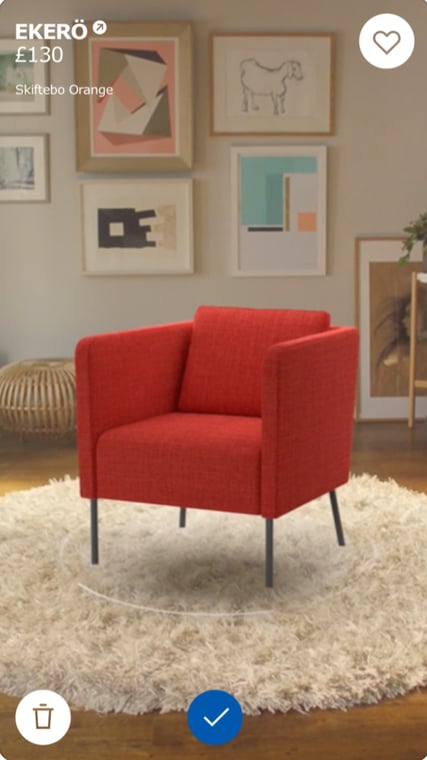
IKEA Place, an app available now in the iTunes app store, lets you place IKEA products in your home to see how they’ll look in your space, and whether they’ll fit. Now, you can pick out a new couch or replace that old corner desk without ever leaving your living room, and you can almost guarantee the fit and look will be as you intended.
2. Edmunds Car App

It’s important to figure out if your dream car can fit in your parking space or garage, which is why Edmunds car app is so useful. Simply stand in your driveway, point your phone at your garage, and figure out if that new Lexus you’re dreaming of will fit inside your parking space. Sure, you’ll probably still need to test drive it, but this can help you limit your list by deciding which ones you like best in your garage.
3. Modiface
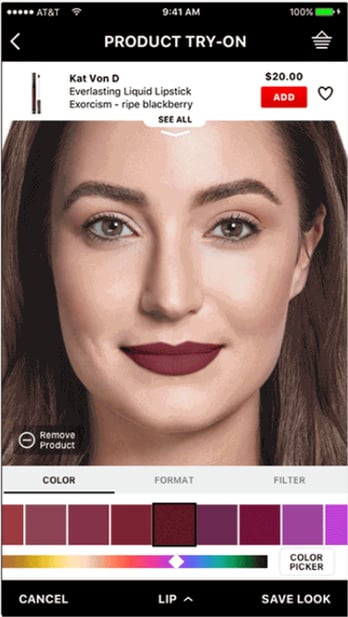
Modiface, a Virtual Artist App used by makeup companies like Sephora, can show you what a specific makeup product will look like on your face. If nothing else, it’s a fun way to give yourself a virtual makeover without leaving the comforts of your home, and it can also provide information on the long-term effects of skincare on your skin. With this app, you can spend hours applying different makeup shades and choosing your favorites for purchase.
Game Apps
4. My Very Hungry Caterpillar
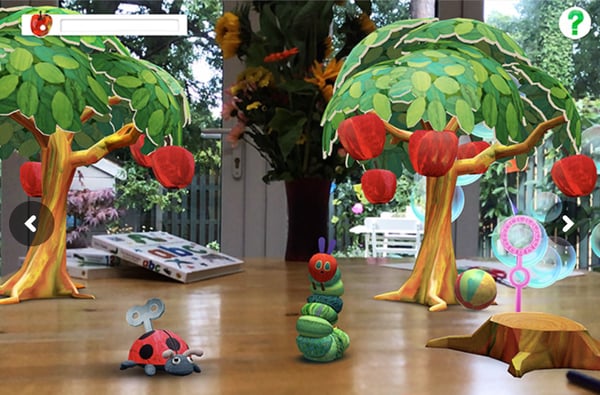
Whether you’re trying to keep your child busy, or looking for some fun entertainment yourself, you might want to try out My Very Hungry Caterpillar, the augmented reality version of your favorite childhood book. Just hold your phone up and watch as the book’s characters climbs around on your countertops or fly around your bedroom — if you have a bug phobia, you might want to sit this one out.
5. Monster Park
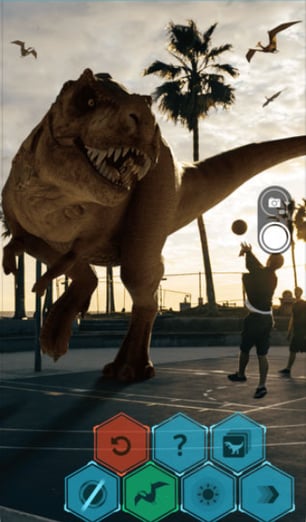
If you’ve ever dreamed of reenacting Jurassic Park, now’s your chance. Simply download the Monster Park app and watch as life-size dinosaurs roam your neighborhood or living room. Beware — it’s so realistic, it could make you jump. While there are plenty of virtual reality headsets that can make you feel like you’re entering a new world, this app is cool because it brings an extinct creature into your actual life.
Learning Apps
6. Visual Body

We’ve seen how augmented reality can be used for fun and shopping, but what about learning? Take Visual Body, for example, an app that enables you to point at a table and visualize a human body, with all its muscles and organs, the same way you might examine a cadaver at the lab. If you’re studying for an exam, or simply curious about how your joints fit together, check this out.
Useful Apps
7. Pixie
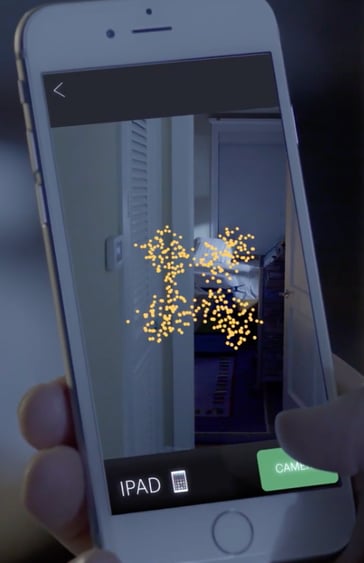
Pixie, whose slogan is “Achieve Peace Of Find”, helps you locate anything you’re at risk of losing. Simply scan any item you want (before it’s lost, that is), and then, using augmented reality and visual navigation, the app can show you exactly where your item is when you can’t find it. It’s accurate down to the inch, and can even cut through walls or piles of magazines. Plus, if your phone dies and you lose it, this nifty app can still find it even if it’s turned off. Personally, I’m planning on using this so I never have to search for my apartment keys again.
8. TapMeasure

While a tape measure is admittedly equally effective, TapMeasure is undoubtedly more fun. All you have to do is tap your phone at your starting point, and then move your phone along whichever surface you’re trying to measure. Tap your phone again when you want to finish measuring, and your phone will give you accurate measurements. You could use this app for anything from measuring window size to picture-frame size.

19 of the Best Landing Page Design Examples You Need to See in 2018
How do you convince your visitors to take the plunge on your website?
There are so many elements that a top-notch landing page needs, and making those elements the “best” they can be often depends on what your landing page goals are.
Take form length, for example. It’s just one of the many components you need to optimize, but best practices will tell you that both short and long forms perform well — it all depends on whether you want to generate a lot of (potentially) lower-quality form submissions, or a smaller number of higher-quality submissions.

So if you’re looking to up your landing page game, it’s helpful to know what goes into a great landing page and see a few examples of these nuanced elements in action. Surprisingly, when I started doing research into the latter, I realized there are hardly any sites out there with examples of modern, impressive landing pages that are more than just a sign-up form on a homepage. So we decided to compile a list of landing pages we love ourselves.

One big caveat here: I don’t have access to the stats for these pages, so I can’t tell you how well they convert visitors, leads, and customers. Still, these examples — even those that are no longer active on the business’s website — have some of the best combinations of those nuanced landing page elements I’ve ever seen.
Obviously, if you feel inspired to try any of these tactics on your own site, the only way to know whether they’ll work for you for sure is by testing them out for yourself.
Landing Page Examples
- Shopify
- Muzzle
- TransferWise
- Airbnb
- Teambit
- Wistia
- Webflow
- Nauto
- Industrial Strength Marketing
- Inbound Emotion
- Velaro Live Chat
- IMPACT Branding & Design
- Unbounce
- Bills.com
- Trulia
- Landbot
- Webprofits
- H.BLOOM
- Conversion Lab
Sign-Up Landing Pages
1. Shopify
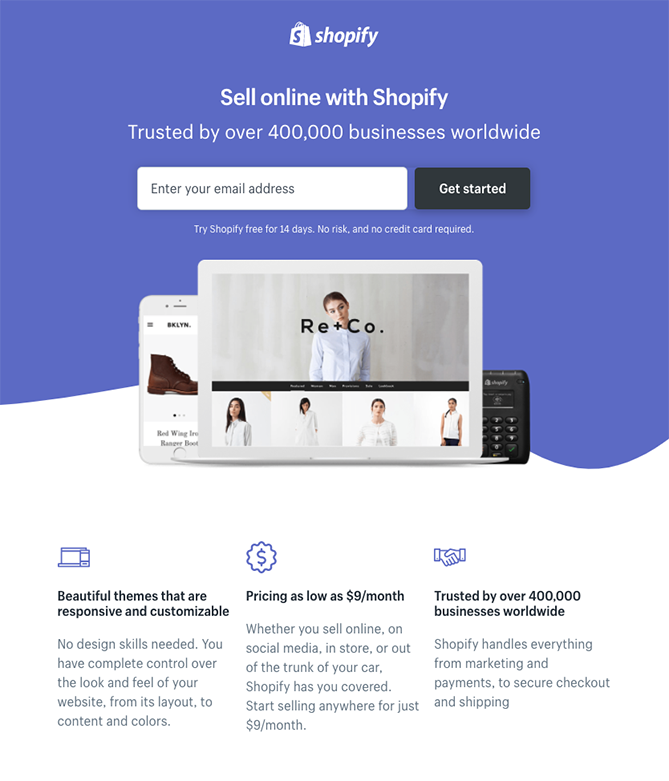
Like many of the other landing pages in this post, Shopify’s trial landing page keeps it simple. The user-oriented headline is just a few words, for example, and the page relies on simple bullets, not paragraphs, to communicate the trial’s details and benefits. There are only a few fields you need to fill out before you get started. All of this makes it easier for you to get to the point: selling online with their tool.
2. Muzzle
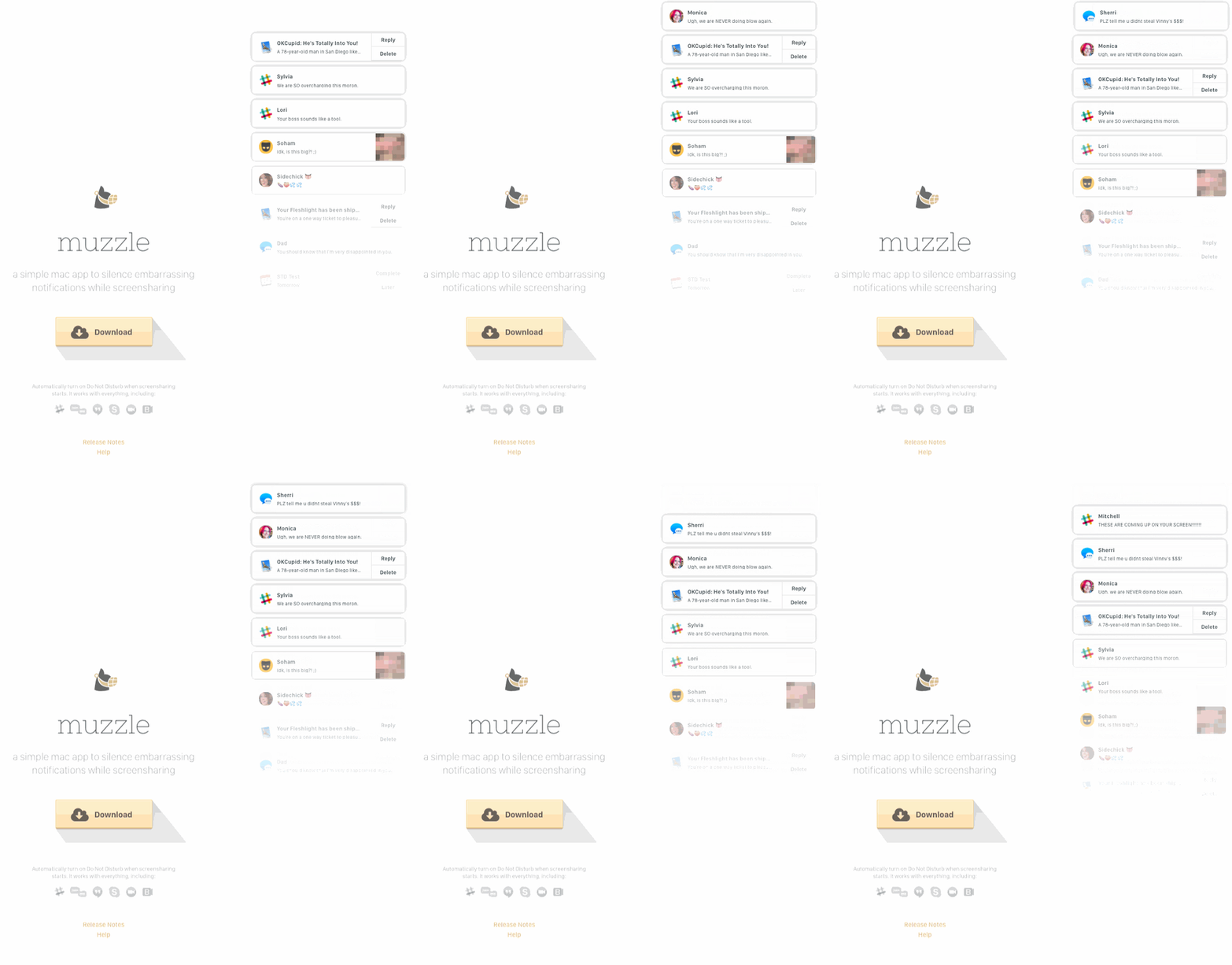
Landing pages help users decide whether or not your product or service is actually worth their precious time and energy. What better way to clearly and straightforwardly communicate your value proposition than by confronting visitors with the very problem your app solves?
Muzzle, a mac app that silences on-screen notifications, fully embraces this show don’t tell mentality on their otherwise minimal landing page. Visitors to the page are greeted with a rapid-fire onslaught of embarrassing notifications in the upper left of the screen. Not only is the animation hilarious, it also manages to compellingly convey the app’s usefulness without lengthly descriptions.
3. TransferWise
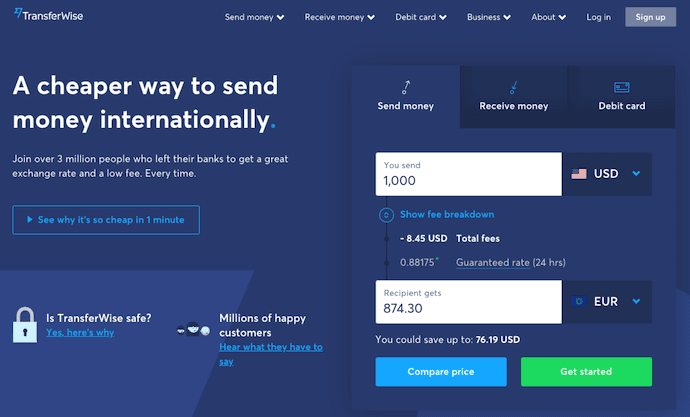
TransferWise allows you to send and receive money in different currencies, and its landing page, shown below, separates each individual action so you’re not distracted by options that don’t apply to you.
If you want to send money, the transfer form is right there on the right for you to fill out. To receive money, simply click to the middle tab, and to sign up for TransferWise using your debit card, click to the far-right tab.
Each tab on this landing page produces a different call-to-action based on what you’re signing up for — each of them in a vibrant green box to highlight your next step after your three possible starting points.
4. Airbnb
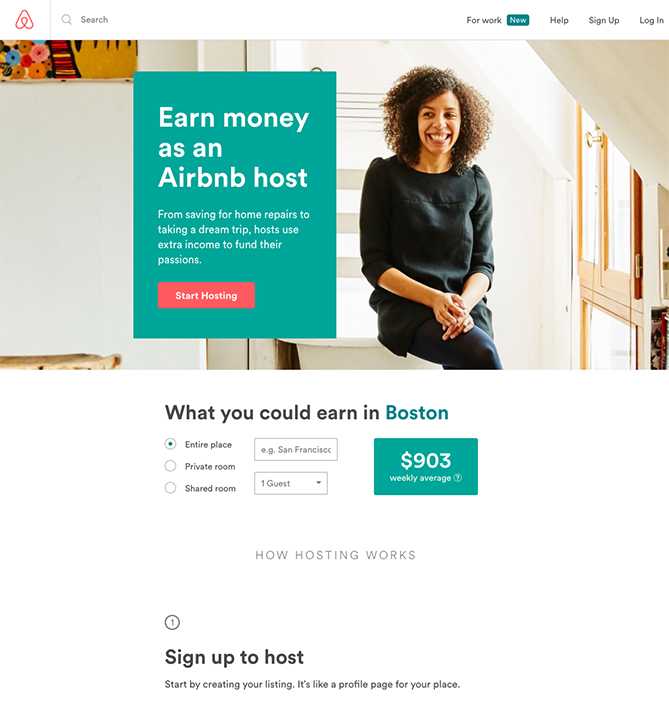
To help convert visitors into hosts, Airbnb offers some enticing personalization: an estimated weekly average earnings projection based on your location. You can enter additional information about your potential accommodations into the fields to get an even more customized estimation.
If you visit the page already convinced, the clear call-to-action at the top of the page makes it easy to convert on the spot.
5. Teambit
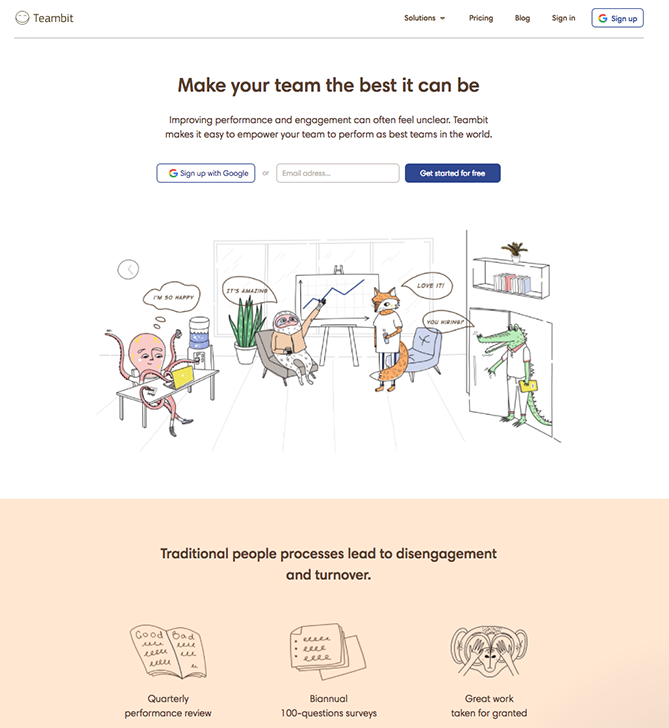
Whimsical isn’t usually the first word that comes to mind when you think of HR software, but Teambit’s illustration-heavy landing page is exactly that. A simple, one-field form is accompanied by a delightful office full of animal characters — all of whom are very pleased with Teambit, in case you were wondering. An animal cartoon appears beside each informational section of the landing page, keeping visitors scrolling down to learn more.
Teambit’s landing page is perfect proof that you don’t need to have a conventionally “fun” product or service offering to create a fun landing page.
[Click here to see the whole landing page.]
6. Wistia
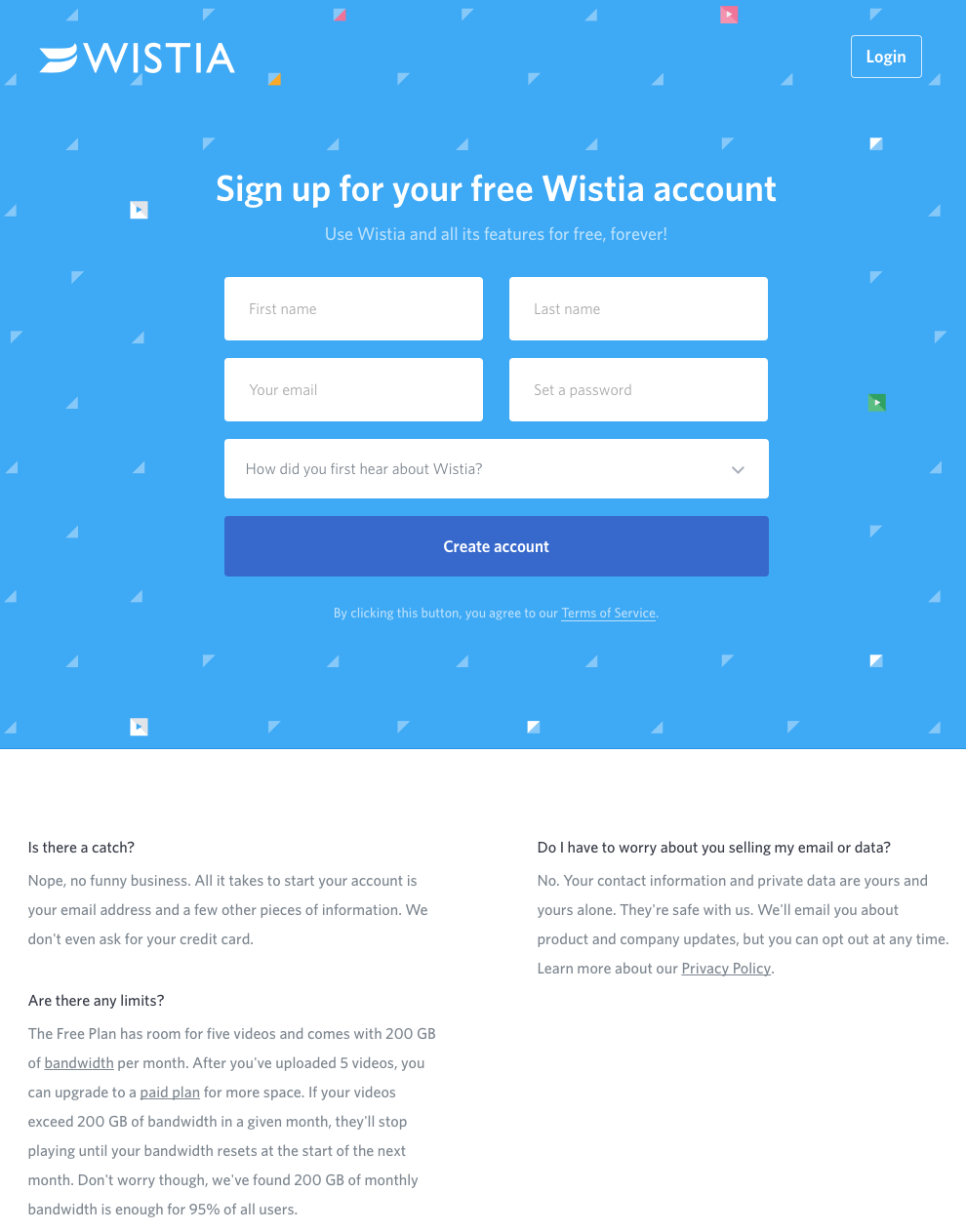
First up is Wistia’s landing page for their Free Wistia Account. Right off the bat, you notice the one-field form to create your account — the blue, minimally patterned background contrasts nicely with the bright white form field.
The length of the form field combined with the prominent placement eliminates nearly all friction to create an account … but if you’re having doubts, you can always scroll below to read answers to top FAQs. By separating these two sections with stark color contrast, Wistia makes it much easier for you focus on converting.
7. Webflow
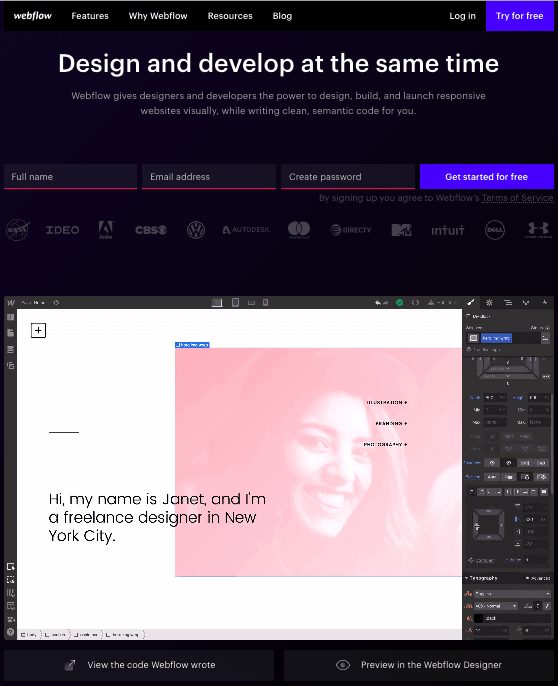
Webflow, a design tool for web developers, packs a lot of information into just a GIF and three form fields. Having the entire sign-up form on a single line is a nice touch here — not only does it make the page shorter, but filling out each box from left to right shows users how close they are to clicking the fourth blue button and getting started for free.
The animated GIF below the form is visible in the same frame on the website, so users can see how the product works and sign up without scrolling or clicking over to a new page.
Ebook Landing Pages
8. Nauto
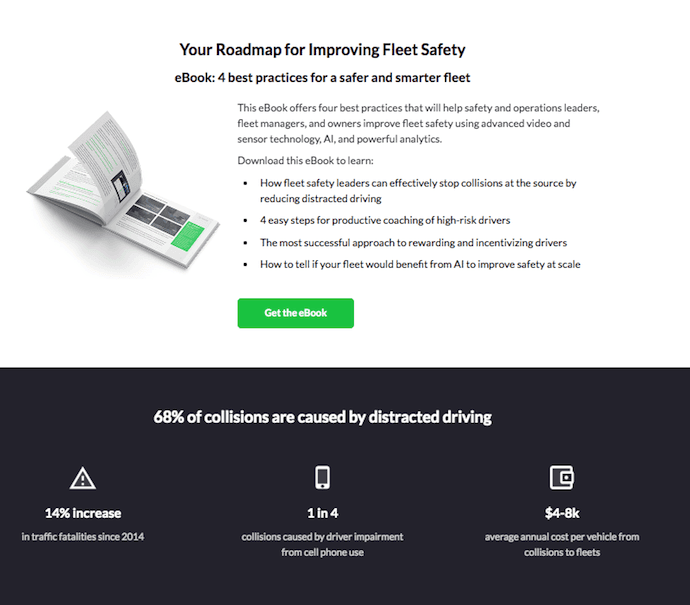
Nauto, a data platform for self-driving cars, helps make autonomous driving safer for companies who manage fleets of self-driving vehicles. Naturally, its customers would need all kinds of information to sell them on this platform. Nauto has it, packaged into a super-simple ebook whose landing page gives you both a brief contact form and some preview statistics to prove why this resource is so important.
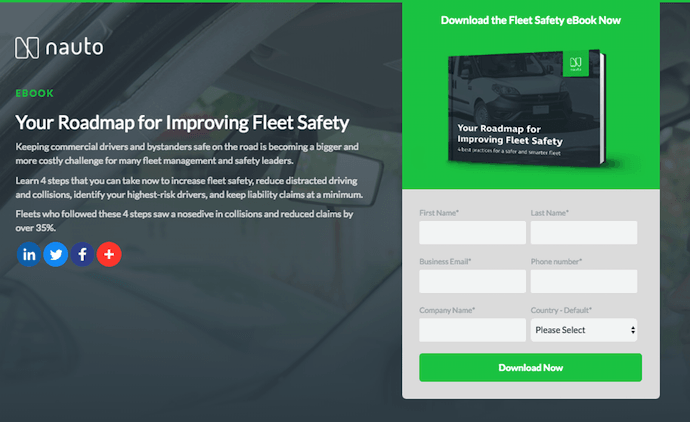
At the top of the page, shown above, a warm photo of a car’s interior hugs the lead-capturing form. The green “Download Now” button might’ve even been on purpose (on the road, green means go, after all).
Scroll down, and you’ll see another “Get the eBook” queue to remind users what’s waiting for them. You’ll also see three jarring statistics about car accidents to entice users to learn more. Check it out below.
9. Industrial Strength Marketing
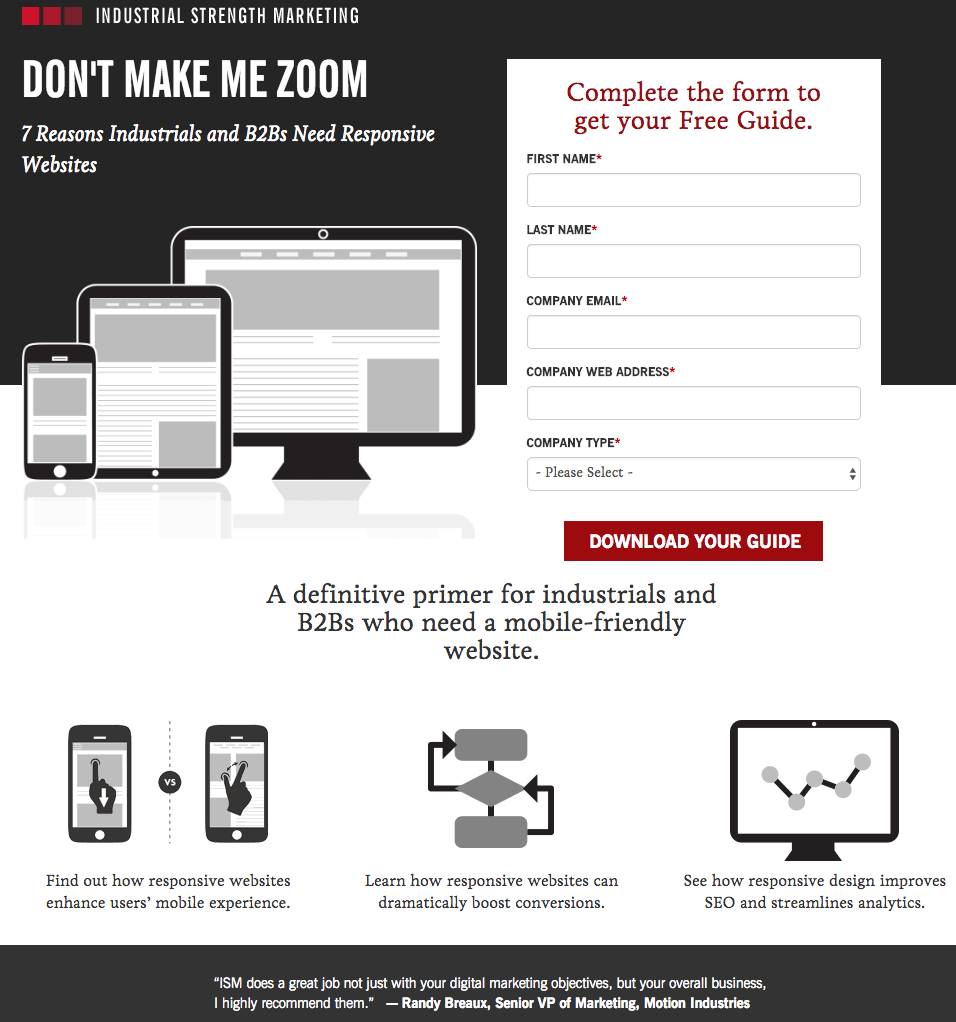
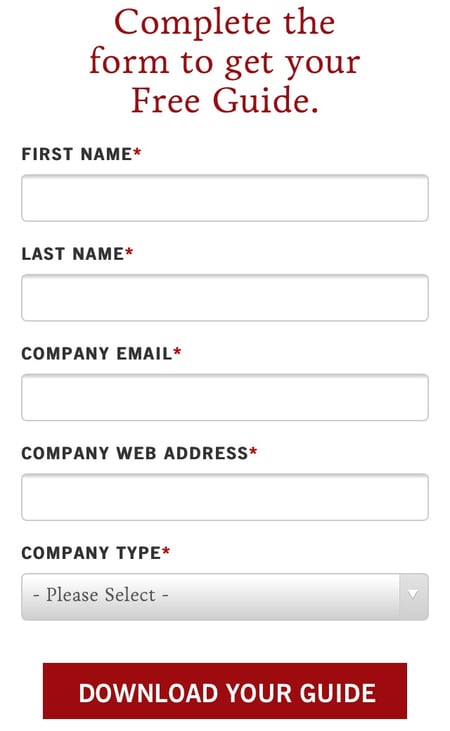
Right off the bat, this landing page pulls me in with a compelling, punchy header: “Don’t Make Me Zoom.” It directly speaks to a common experience most of us have had when we’re browsing on our phones or tablets — and it’s a little sassy, too.
But that’s not the only thing keeping me interested in this landing page. Notice how the color red is strategically placed: It’s right at the top and bottom of the form, drawing you even closer to the conversion event.
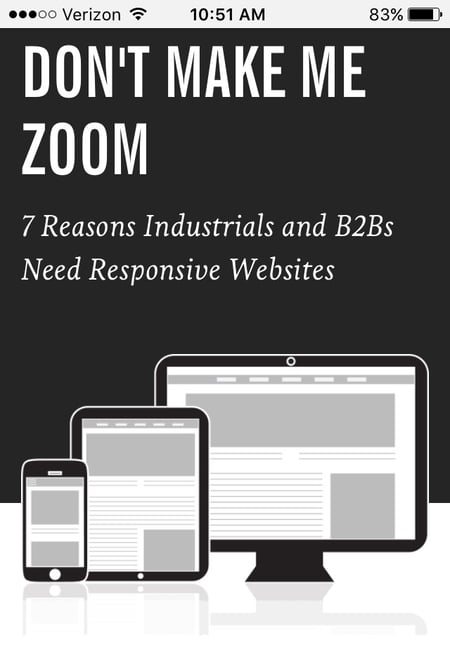
Plus, this design is meta to boot: It looks and works great on mobile, too. Keep in mind that a lot of visitors will be accessing your landing pages on their smartphones or tablets, and if the design of your website doesn’t work well for them, they might give up and leave your page.
The folks at Industrial Strength Marketing made the fonts and form field big enough so that visitors don’t have to pinch-to-zoom to read and interact with the content, for example.
10. Inbound Emotion
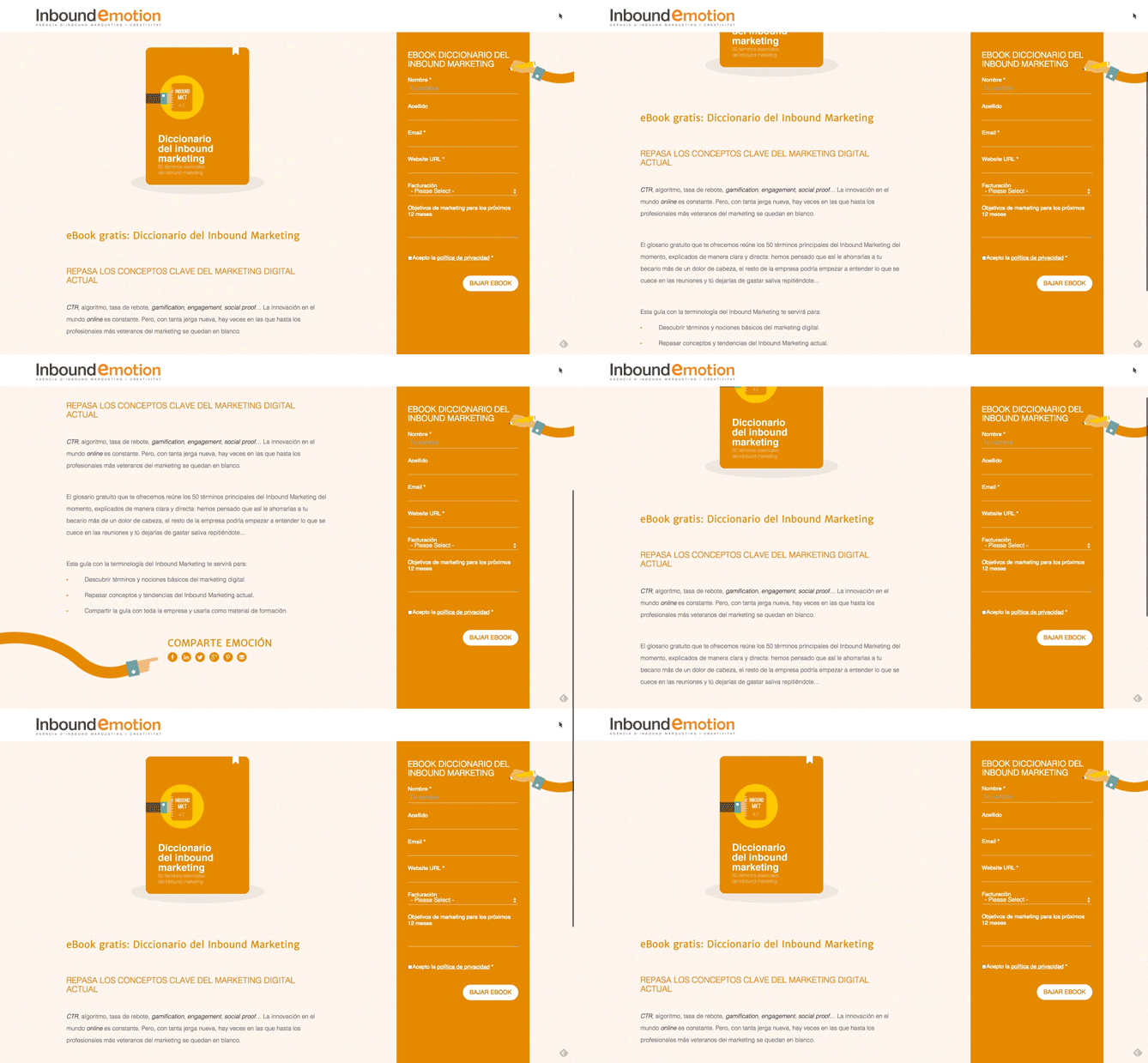
Even if you don’t speak Spanish, you can still appreciate the conversion capabilities of this HubSpot partner site. My two favorite features of the page? The form stays in a fixed, prominent position as you scroll through the site. I also love the hands that serve as directional cues toward filling out the form and sharing the page with others.
11. Velaro Live Chat
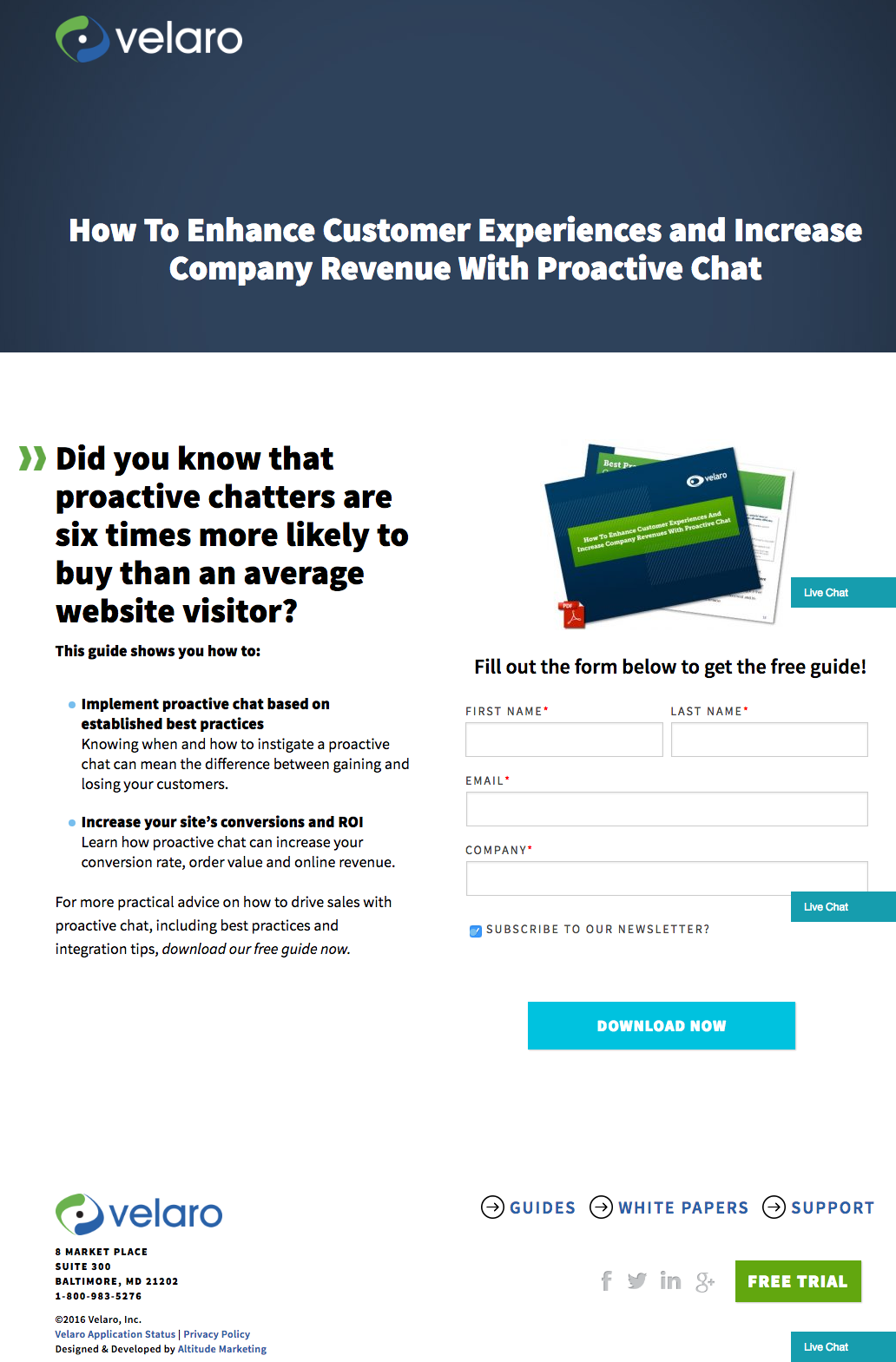
Sometimes the smallest details make the biggest difference. They’re what make Velaro Live Chat’s landing page awesome, for example.
That small PDF symbol over the feature image helps set expectations for what format the download will be in. The arrow in front of the subheadline helps further direct your attention to important copy they want visitors to read. Like IMPACT, they also have an auto-checked box to subscribe to their newsletter on their form — which, if turned into an opt-in check box, is a great way to increase subscribers. All of these small, seemingly insignificant details help bring together a solid, admirable landing page design.
12. IMPACT Branding & Design
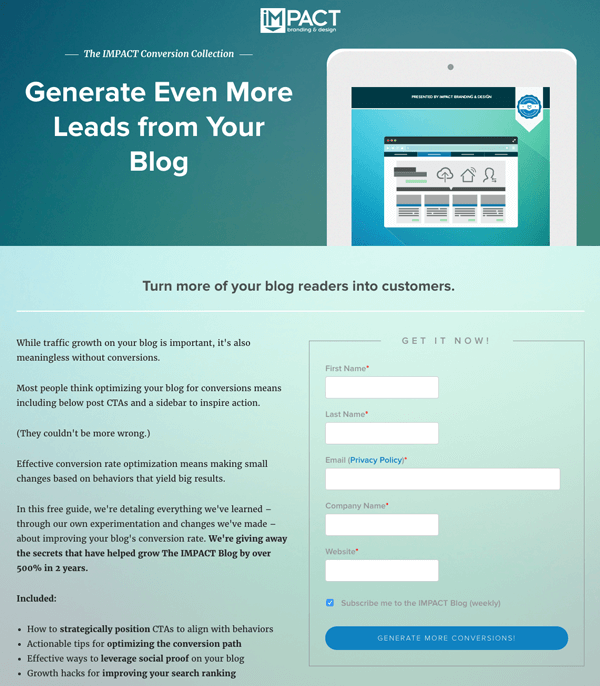
Full disclosure: IMPACT is a HubSpot partner — but that’s not why they’re included here. IMPACT’s landing pages have long been a source of design inspiration. I love the simple layout of the page, from the large headline copy and detailed featured image, to the outline that surrounds the form, to the colors and fonts that are very pleasing to the eye.
The free guide IMPACT is offering for download here also doesn’t emphasize the download itself in the blue button that allows you to submit your filled-out form. Rather, IMPACT is inviting you to “generate more conversions” — putting the focus on what you stand to gain as a result of reading the guide.
Landing Pages to Learn More
13. Unbounce
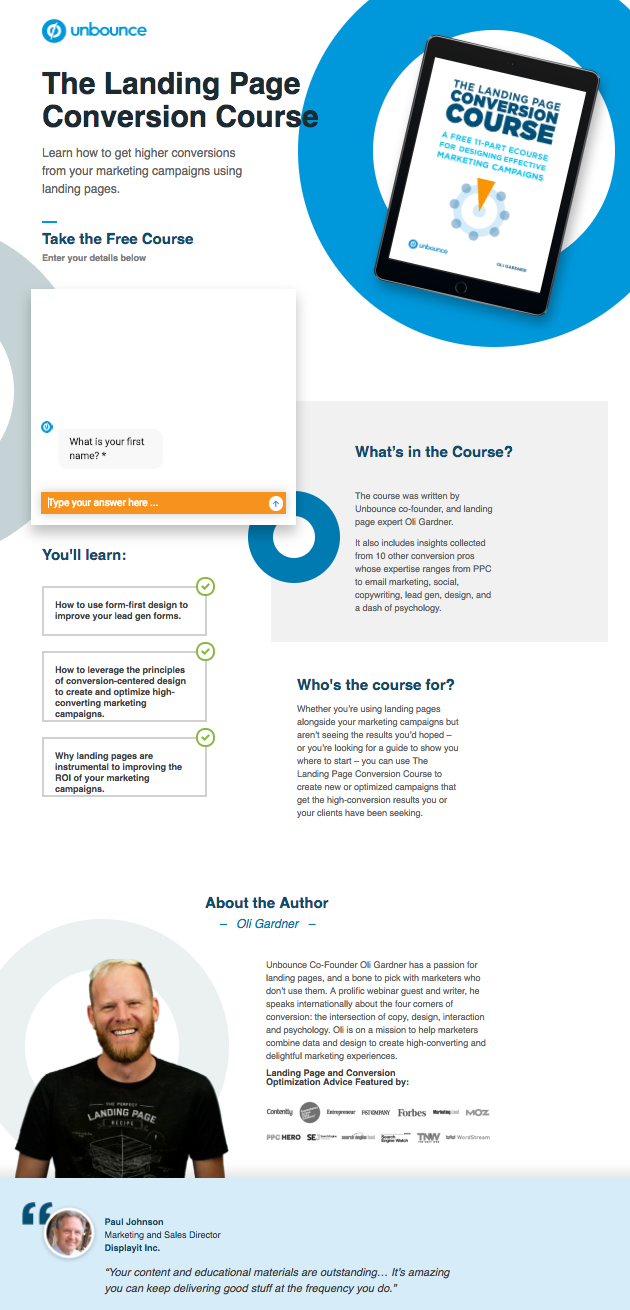
It’s no surprise Unbounce is near the top of this list — they’ve actually written the book on creating high-converting landing pages. Although there are lots of amazing things about this landing page, the two that I absolutely love are: 1) The use of a chat window instead of a classic form, and 2) the detailed — but well packaged — information below the form.
The first helps direct attention to the goal of the page — for you to fill out the form — in a way that’s unobtrusive and feels less like a chore. The second gives this page an SEO boost (search engines will have more content to crawl) and assuages any worry from folks who need to know more about a piece of content before handing over their information, all while not distracting people from the chat window.
14. Bills.com
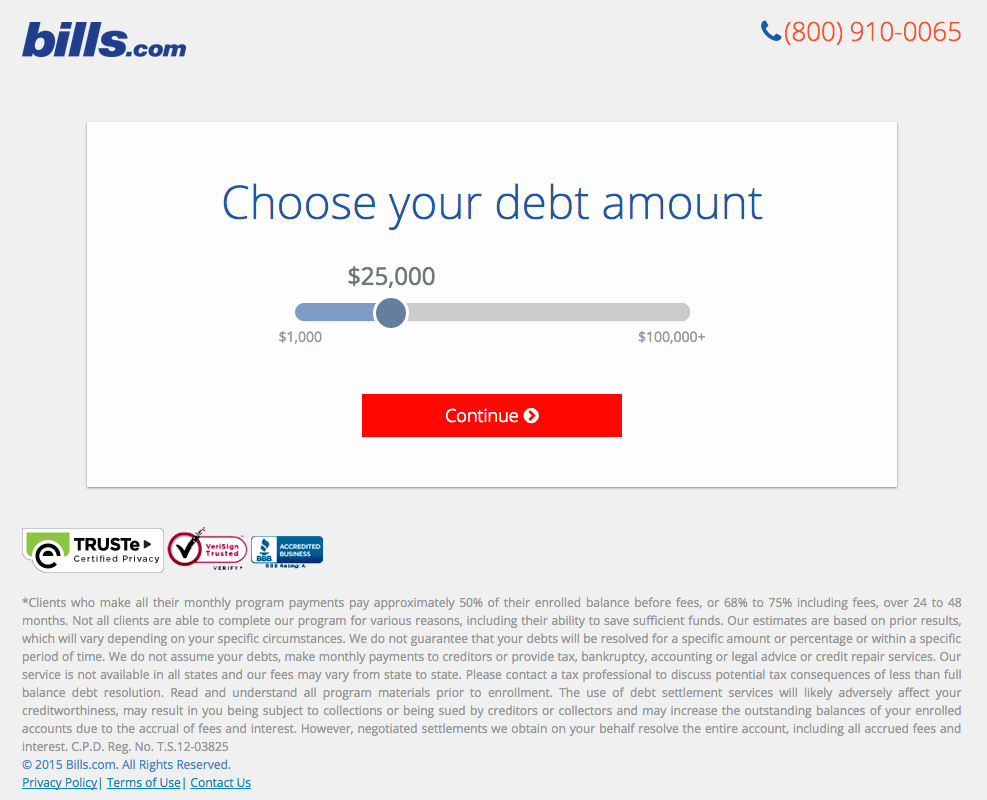
Often, people think landing pages are static pages on your website. But with the right tools, you can make them interactive and personalized.
Take the example below from Bills.com. To see if you’d benefit from their consultation, you answer three questions before you are shown a form. It starts with this one:
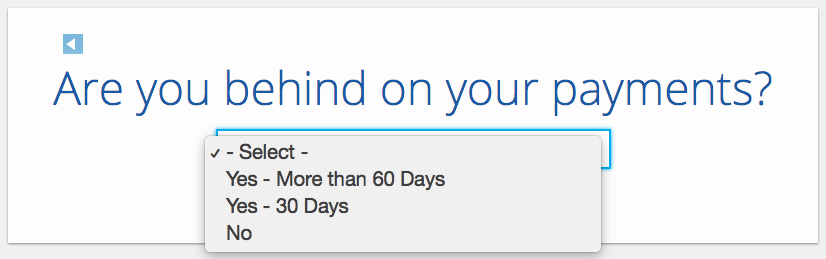
Then, you answer two more questions, like the one below:
And here’s the final landing page form where you fill out your information:
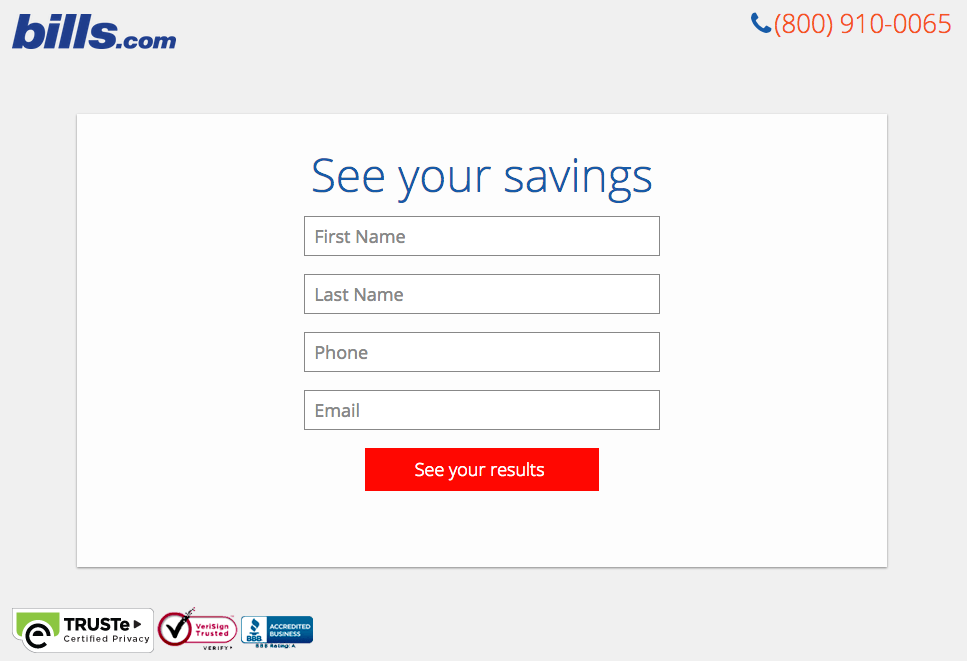
I’m not sure how the algorithm works (or if there’s one at all), but while I was filling it out, I had some anxiety about not qualifying. Once I found out I did, I was excited to fill out the form, which I’m sure most people who are in debt and using this tool are. By making this offer seem more exclusive before the form appeared on the landing page, I’d bet that Bills.com increased conversions pretty significantly.
15. Trulia
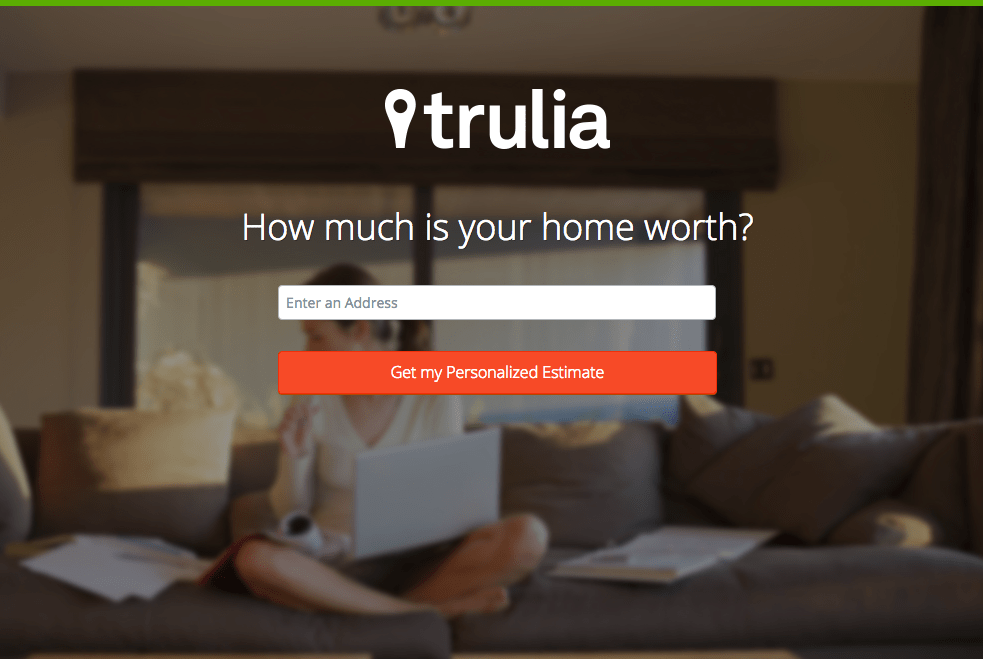
Trulia did something very similar to Bills.com with their landing page. It starts with a simple form asking for “an address” (which sounds less creepy than “your address,” although that’s what they mean). Below this simple form field is a bright orange button that contrasts well with the hero image behind the form, and emphasizes that the estimate will be personalized to your home.
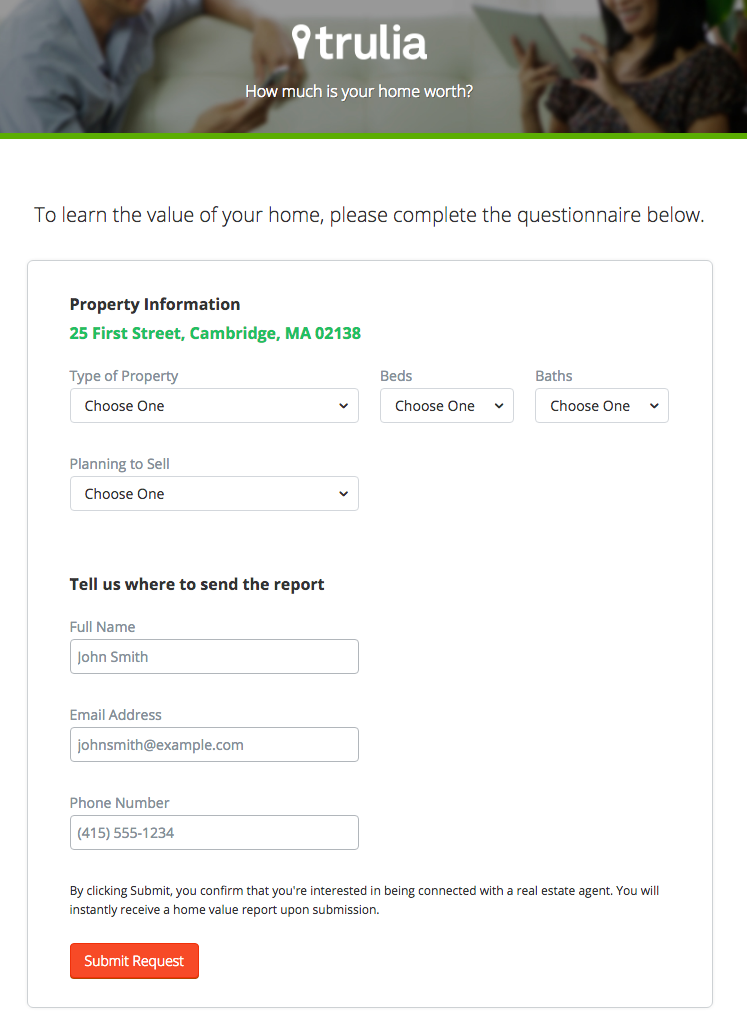
Of course, the address itself won’t be enough to estimate the value of a home. It just denotes the home’s neighborhood. That’s why the next page follows with more questions about the property itself, like number of beds and baths. Below, you see the copy “Tell us where to send the report” — with a disclaimer that, by entering this information, you’re agreeing to connect with a real estate agent. This is a great example of a company giving value to their visitors from the get-go, while setting visitors’ expectations about what will happen as a result.
16. Landbot
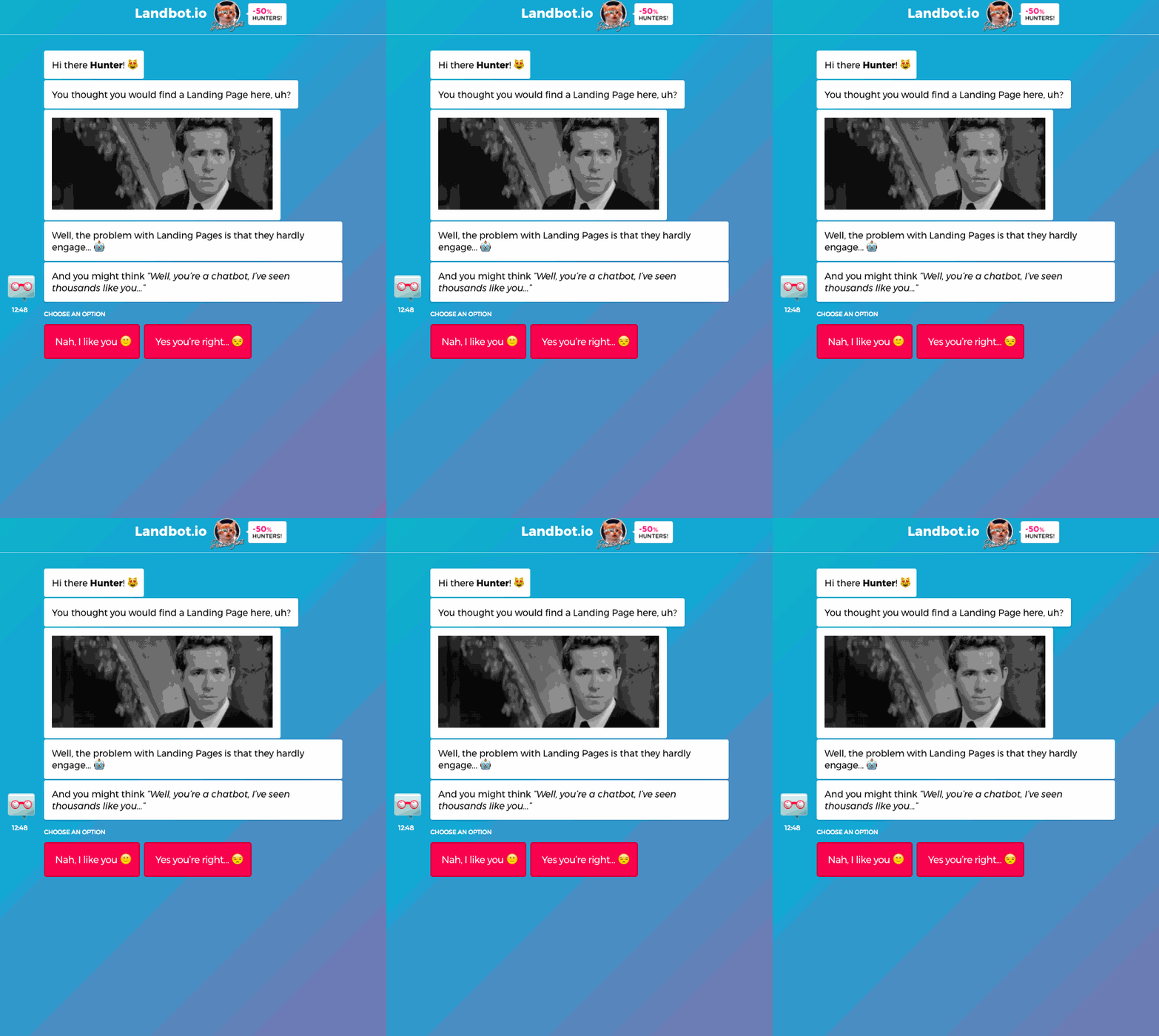
Landbot, a service that creates chatbot-based landing pages, puts their own product front and center on their chat-fueled landing page. Visitors are greeted by a friendly bot — complete with emojis and GIFs — who encourages them to provide information in a conversational format, instead of via a traditional form.
17. Webprofits
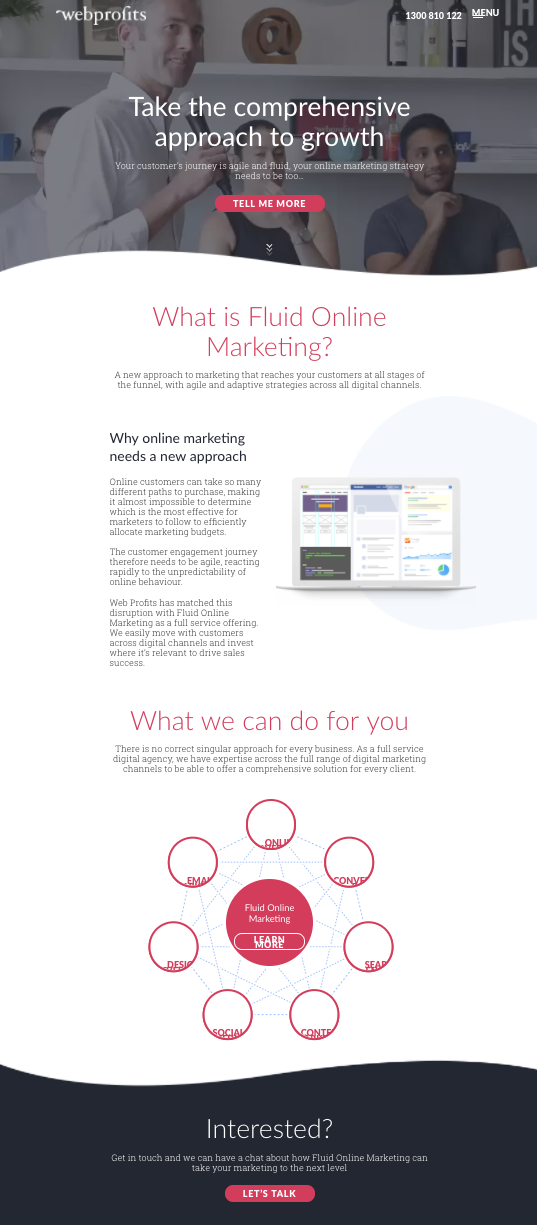
For a little contrast … what about long landing pages? With just a few tricks, you can make even the longest landing page feel short. Webprofits’ landing page below shows us how.
Right at the top, there’s a prominent CTA button to learn more — with a nice contrast against the background so it stands out, and a downward arrow to encourage scrolling. By not putting a form field up front, they help reduce friction and create an opportunity for visitors to learn more before being presented with a conversion option.
They also make it easy for you to figure out what Webprofits actually does. The rest of the page offers detailed information about what you’ll get when you give over your information. Plus, it includes strategic CTAs throughout to take you back to the top to fill out the form, like “Let’s Talk.”
18. H.BLOOM
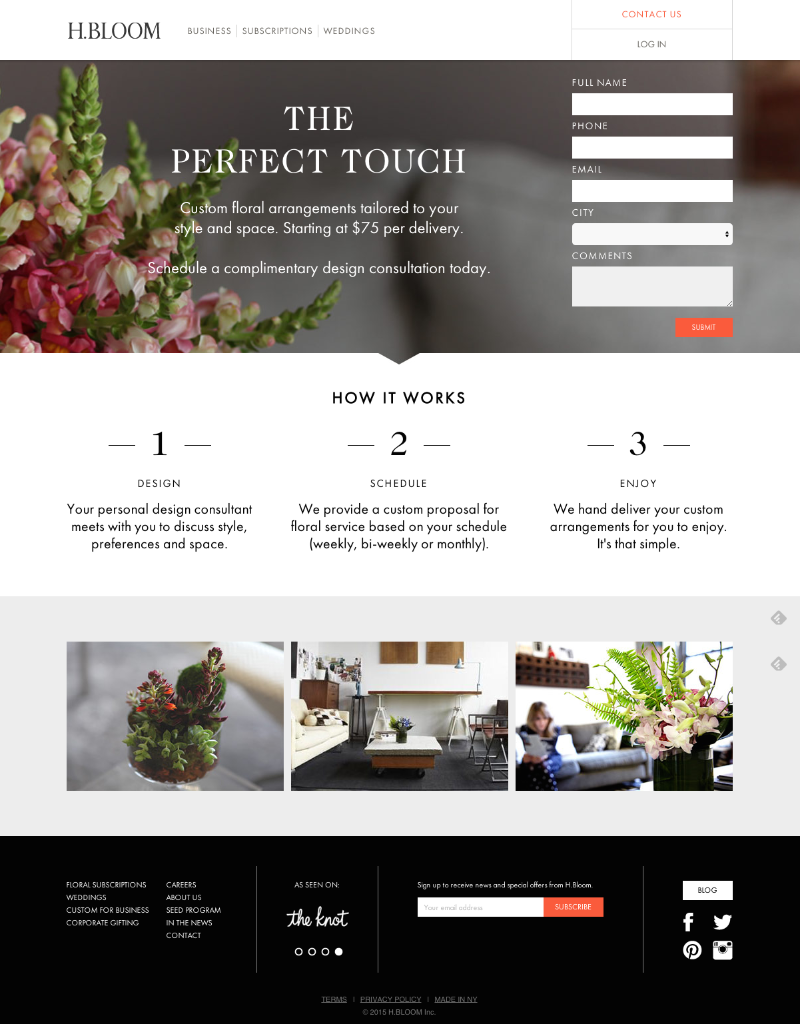
Sometimes, you’ve just got to stop and admire a landing page for being beautiful. Using high-resolution photography and lots of white space, H.BLOOM’s landing page is a pleasure to look at.
Aside from its beauty, the page has some great conversions elements: an above-the-fold form, clear and concise description of what’ll happen when you fill out the form, and even the bright orange “Submit” button. The only thing we’d change up? The copy on the “Submit” button — that could be more specific to the offer at hand.
19. Conversion Lab
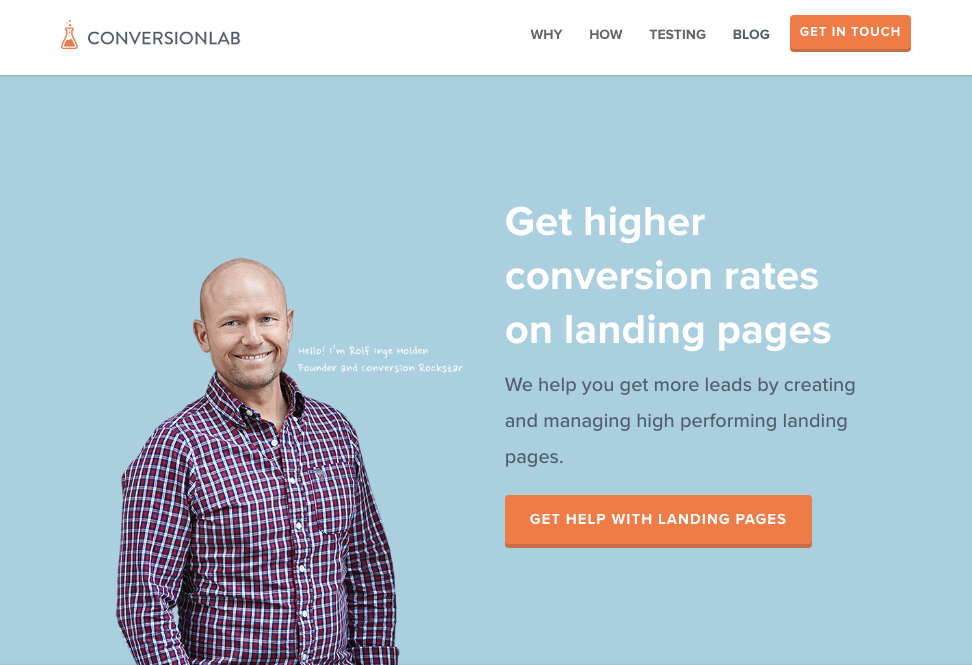
While I wouldn’t typically include an example of a homepage with a form on it in a post about landing pages, this website is special. The homepage is the entire website — the navigation links just take you to the information below.
When you click “Get Help With Landing Pages,” the entire site moves over to make room for the form. Here’s what it looks like before you click:
And, when you click that CTA, check out how the form appears:
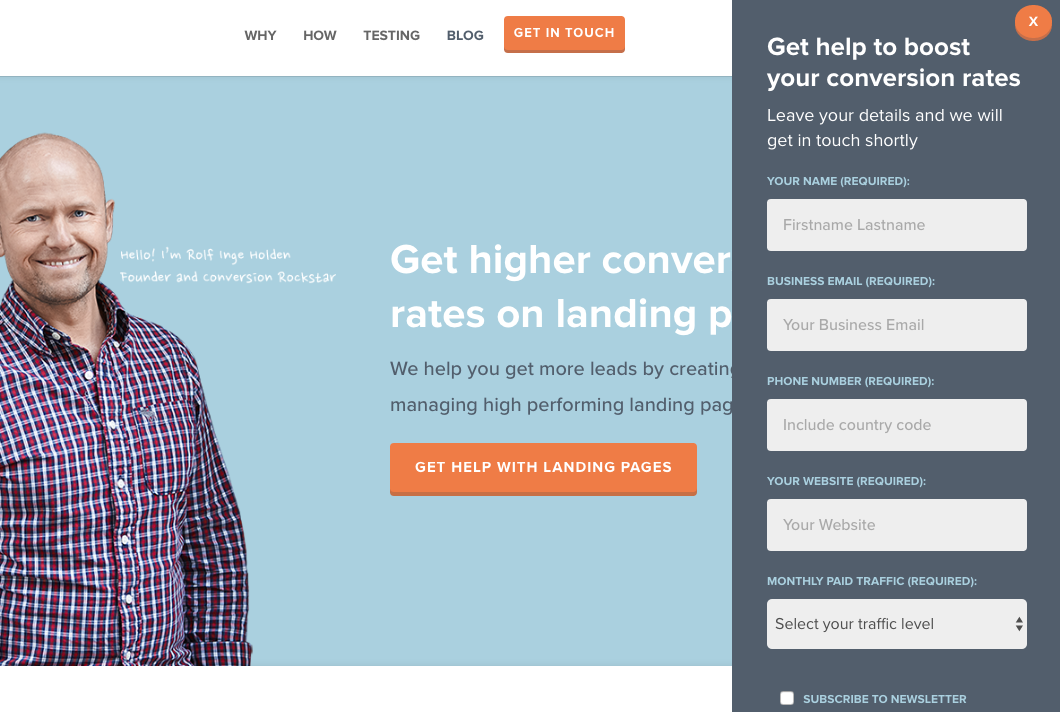
I love how you don’t have to leave the page to fill out the form, yet the form won’t feel intrusive to casual website visitors.


Why Voice Shopping Is Just Getting Started [New Data]
When it comes to product and feature diversification, Amazon isn’t exactly a novice.
But at the core of its business, one might argue, is ecommerce: The business of buying and selling goods and services online.
So when The Information learned that one of Amazon’s newer, but core offerings — its digital personal assistant Alexa — was barely being used to make purchases, it gave pause.
According to the report, 2% of devices equipped with Alexa — which is mostly comprised of the Echo, Amazon’s smart home speaker — have been used to make a purchase. And out of that 2% — only 10% made repeat purchases.
The report also notes that 50 million units of the Echo have been sold.
The metrics got me wondering: Did voice shopping even have a “moment” that’s already come and gone? Or is it simply struggling to get its foothold — and its growth is yet to come?
I did some research to find out.
Why Voice Shopping Is Already a Thing of the Past [New Data]
Some Background
Alexa first became a household name in 2016, when Amazon aired its first-ever Super Bowl commercial featuring rapper Missy Elliott and actor Alec Baldwin, among other celebrities, using the Echo speaker.
Source: AdAge
At the time, the assistant was only available on the Echo and its smaller version, the Echo Dot. Today, it’s also available on such Amazon platforms as Fire devices and certain Android phones.
One of its chief selling points — so it was thought — was the ability to make hands-free purchases on Amazon using Alexa, which could make product selections and recommendations based on your shopping history.
Earlier this year, new data emerged that predicted voice shopping sales from Echo and Google Home devices would reach $40 billion by 2022: quite a significant jump from the present $2 billion cited at the time.
The reason, the report said, was improved technology within the realm search — as well as, perhaps, a growing number of brands selling smart speakers with voice shopping capabilities.
This month, Samsung threw its hat into the ring with the yet-to-be-debuted Galaxy Home smart speaker, powered by its own digital personal assistant, Bixby.
But this latest information may project a different direction. Perhaps the aforementioned study is correct about improvements in technology, and that the current experience leaves users with something to be desired, preventing them from taking the same action again.
But does that hypothesized dissatisfaction stem to the other use cases for smart speakers? And although 50 units of the Echo have been sold — the same number as Apple Watch units, notes Benedict Evans — our findings indicate that the issue might be rooted in perceived value.
Voice Shopping Usage
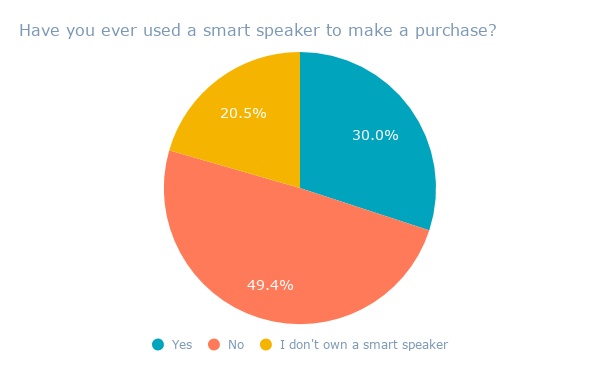
We asked 491 internet users across the U.S. and UK: Have you ever used a smart speaker to make a purchase?
On average, about half of the respondents answered “no.” But 20% also indicated that they don’t own a smart speaker to begin with.

Data collected with Lucid
While this does corroborate estimates of voice shopping’s slow growth, it also reflects a potentially (and equally) slow growth of market adoption of smart speakers to begin with.
How Smart Speakers Are Used
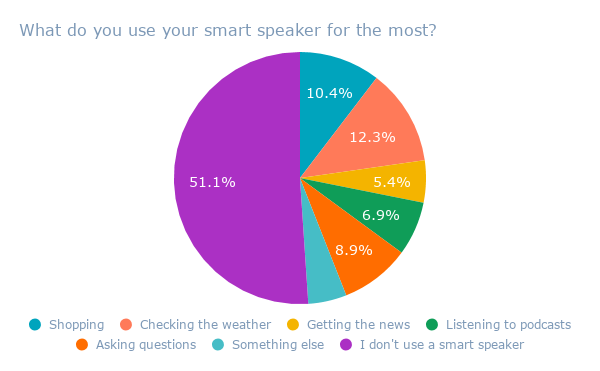
We asked 500 internet users across the U.S. and UK: What do you use your smart speaker for the most?
The results — in line with the previous survey — indicated that over half of respondents don’t use a smart speaker.

Data collected with Lucid
The most common use for the devices, it seems, is checking the weather — hardly a cutting-edge use case — which came in at an average of 12.3%.
Voice shopping came in second, at 10.4%.
What the Numbers Could Mean
Again, we’re presented with the possibility of a low perceived value of smart speakers.
But it could also be an instance of slow market permeation and adoption. Like many other instances of emerging technology, when something is new, it may seem cost-prohibitive and “not worth” the price tag.
Take the HomePod, for instance: Apple’s Siri-powered smart speaker, which is currently priced at about $350. In my experience — which I wrote about here — it offers the least value compared to the Echo or Google Home. And yet, the latter two both offer smart speakers (usually the smaller version, but with the same capabilities) for as little as $50.
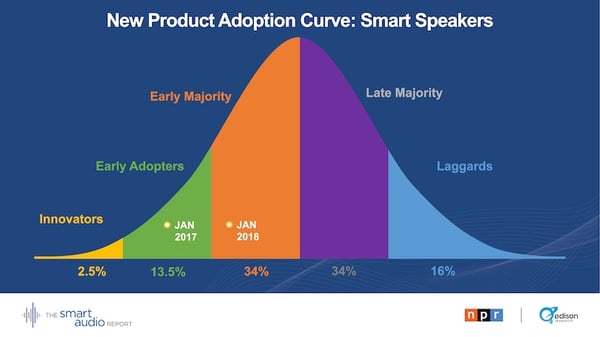
According to the 2018 Smart Audio Report, the yet-to-come growth trend may play out — and ownership could just now be starting to peak, with 18% of U.S. adults currently owning a smart speaker.
Source: Edison Research
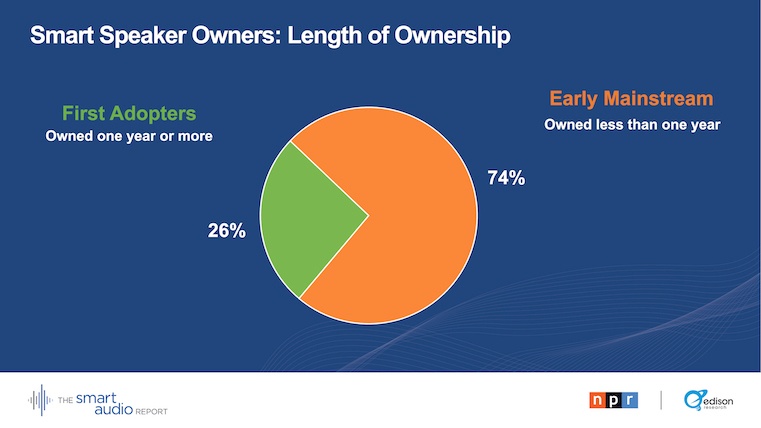
Among those surveyed for that report, all were current smart speaker owners — but nearly three-quarters of them had owned them for less than a year, pointing to a potentially upward growth trend.
Source: Edison Research
The same could be true of using these smart speakers for home shopping purposes. While the survey asked respondents about a number of use cases for their smart speakers, home shopping wasn’t one of them — but “add an item to your shopping list” was.
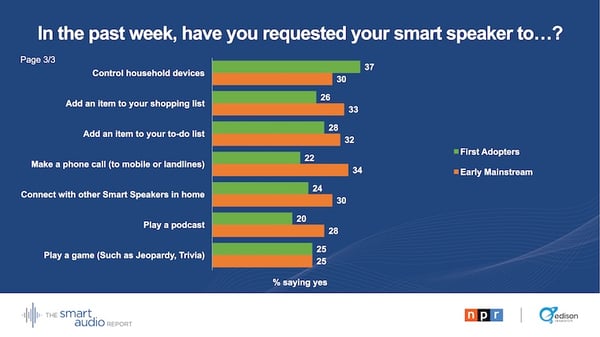
Source: Edison Research
What’s interesting is that there was a higher rate of affirmative response here among the early mainstream owners — those who were a bit later to owning a smart speaker — than there was among first adopters.
Again, the question wasn’t asking about using the device to make a purchase, but rather, to build a shopping list.
But it still raises a question: Could it be that with the growth of smart speaker ownership among later adopters, there will also be growth in using them for voice shopping?
Possibly. While Evans says that he’s “always argued voice was not a great commerce model,” there are certain brand loyalty aspects to consider.
“There are broader benefits” to brands continuing to offer voice shopping capabilities on their smart speakers, Evans writes — like with Amazon, “keeping you tied to Prime, for example.”
When you think about the major manufacturers of some of Amazon’s competitors — Apple, Google, and now Samsung — there already exists a certain amount of brand loyalty for each. For many (yours truly included), straying from the iOS ecosystem for, say, a Google Pixel smartphone might seem like a terrifying scenario. For others, it may work in reverse.
So as more of these players begin to enter the smart speaker market, improve the technology, and maintain these capabilities — the growth (alongside brand loyalty) could follow.
Stay tuned.

When Is the Best Time to Post on Instagram in 2018? [Cheat Sheet]
In high school, one of my friends was determined to find the perfect time to post her Instagram photos to maximize the amount of likes she got. She was surprisingly scientific about it, posting at different times of the day and jotting down each of her posts’ “likes per minute”. After weeks of testing, she figured out which post time raked in the most likes, and, from then on, she could easily get 200 likes on all her Instagram posts.
My friend’s rather scientific method to maximize her Instagram likes still makes me chuckle to this day. But since I’m a marketer now, her desire to build a strong Instagram presence also resonates with me.
To build a sizable Instagram following, you need to create compelling content that your audience actually craves. But if you don’t post your content at the right time, most of them will never see it.
So how do you figure out the optimal post time for your specific audience?
The best way to find an ideal posting time is by testing the timing of your posts to see which post time generates the most audience engagement.
But if you don’t have enough resources or time to conduct your own tests, Sprout Social, a social media management platform with over 24,000 customers, has you covered. This year, they analyzed their customer data to see what time and day their social media posts generated the most engagement. They also segmented the data by social network and industry.
Looking at their aggregate customer data for Instagram, you can see that the following days and times (in Central Time Zone) are ideal for generating the most engagement on the social network:
When Is the Best Time to Post on Instagram?
- Best Times: Wednesday at 3:00 PM CDT, Thursday at 5:00 AM, 11:00 AM, 3:00 PM, & 4:00 PM CDT, and Friday at 5:00 AM CDT
- Best Day: Thursday
- Most Consistent Engagement: 9:00 AM to 6:00 PM CDT from Tuesday to Friday
- Worst Days: Sunday and Monday
Here are some more insights about optimal post timing extracted from their data:
- Posting at 5:00 AM CDT from Tuesday to Friday generates some of the highest engagement — people usually check their phones right when they wake up.
- Posting from 11:00 AM to 3:00 PM CDT during the weekdays also generates a lot of engagement — people usually check their phones during lunch or when they start to run out of mental energy toward the end of the work day.
- If you want to post on the weekends, post on Saturday around 11:00 AM CDT when people eat brunch or hang out with their friends.
This general data about optimal post timing is a great starting point for growing an engaged Instagram audience, but if you want to get more granular, here are the best times to post on Instagram if your organization is in the technology, B2C, education, healthcare, and non-profit industries, according to Sprout Social’s research.
Best Times to Post on Instagram for Technology Companies
- Best Time: Wednesday at 10:00 AM CDT
- Most Consistent Engagement: Wednesday to Friday from 10:00 AM to 5:00 PM CDT
- Best Day: Thursday
- Worst Day: Sunday
Best Times to Post on Instagram for B2C Companies
- Best Time: Saturday at 11:00 AM & 1:00 PM CDT
- Most Consistent Engagement: Everyday from 10:00 AM to 3:00 PM CDT
- Best Day: Wednesday
- Worst Day: Monday
Best Times to Post on Instagram for Educational Organizations
- Best Time: Monday at 8:00 PM CDT
- Most Consistent Engagement: Weekdays from 11:00 AM to 4:00 PM CDT
- Best Day: Monday
- Worst Day: Sunday
Best Times to Post on Instagram for Healthcare Companies
- Best Time: Tuesday at 1:00 PM CDT
- Most Consistent Engagement: Tuesday to Friday from 9:00 AM to 4:00 PM CDT
- Best Day: Tuesday
- Worst Day: Saturday & Sunday
Best Times to Post on Instagram for Non-Profit Organizations
- Best Times: Tuesday at 3:00 PM & 9:00 PM, Wednesday at 3:00 PM & 4:00 PM, Thursday at 2:00 PM & 3:00 PM, and Friday at 10:00 AM & 2:00 PM,
- Most Consistent Engagement: Weekdays from 12:00 PM to 5:00 PM
- Best Day: Tuesday
- Worst Day: Saturday
Timing is Key
Every brand’s audience is different. To build a sizable, engaged Instagram audience, you need to know who your followers are. And one of the best ways to get to know your audience and capture their attention is by knowing exactly when they like to surf the app.

Unriddled: Samsung’s Big Moves, the Latest Bets on Video, and More Tech News You Need
“Unriddled” is HubSpot’s mid-week digest of the tech headlines you need to know. Each week, we highlight the top stories in a quick, scannable way and break it all down. It’s tech news: explained.
Unriddled: The Tech News You Need
1. Samsung’s Big Moves
Samsung, which is largely known by some for its mobile devices, has been appearing in its fair share of headlines lately. From its latest smartphone release to a new smart speaker, here are some key highlights.
The Galaxy Note9
Samsung held a high-profile product unveiling last week, where it officially debuted the Galaxy Note9: its much-speculated latest smartphone release, which boasts such nifty features as a “health censor” that can measure vitals like your heart rate and blood pressure.
It comes with one of the company’s signature stylus pens: the Note9 S Pen, which can remotely unlock the phone, play music (from the phone), and even control games like Fortnite — a game that, Samsung will have you know, is available in beta to Galaxy users.

Source: Samsung
Its other boasting points include all-day battery life and 512GB built-in storage space. The price tag: a cool $1,000.
As for the design and build specs, VentureBeat‘s Kyle Wiggers has you covered. Read full story >>
Back to Bixby
When I attended the Samsung Developer Conference last year, the spotlight was largely on Bixby: the company’s digital personal assistant, akin to Amazon’s Alexa or Google’s Assistant.
But in the months following the event, Bixby had yet to make a mainstream appearance — until now. At the same unveiling event for the Galaxy Note9, Samsung at long last debuted its Bixby-powered Galaxy Home smart speaker.
Kind of.
The Galaxy Home speaker is slated to boast superior sound quality — much like the otherwise disappointing HomePod did — and is activated with the “Hi, Bixby” command. According to the Verge‘s Jacob Kastrenakeshe, the speaker should have the same Bixby capabilities as those available on Samsung phones. As for its release date, well, that’s to be determined.
However, this year’s Samsung Developer Conference is currently scheduled for early November, where I expect to hear more about Bixby — including, perhaps, more details around the Galaxy Home.
Of note: Among these announcements, Samsung also announced a new Galaxy smartwatch. Read full story >>
2. Facebook’s Video Acquisition
Facebook confirmed this week that it acquired the seven-person team, along with accompanying technology, from Vidpresso: a startup that helps make video content interactive.
For some time now, Facebook has been seeking ways for users to engage more with video. Earlier this year, we covered these efforts when it announced a host of new native features to make live videos more interactive, like real-time polling and game-show-style Q&A filters.
Source: Facebook
Some have speculated that these features are Facebook’s attempt to mimic the success of HQ Trivia (which yesterday announced a new partnership with Apple TV). That app offers interactive Q&A features similar to the ones slated to be incorporated into Facebook’s video platforms. TechCrunch‘s Josh Constine has more. Read full story >>
3. YouTube Rolls out New Incentives for “Stars”
YouTube is reportedly offering to pay its most popular creators to make use of and promote such new features as premium memberships and live chat. The compensation, allegedly, falls somewhere between tens to hundreds of thousands of dollars.
It’s one of the ways YouTube is responding to Creator demand for more diversified ways to monetize beyond advertising. The new options also include a built-in platform for merchandise sales, and “Super Chat,” which allows followers to pay the Creator to give their messages a shout-out during live broadcasts. Bloomberg‘s Lucas Shaw has more. Read full story >>
4. You Can Expect Group FaceTime, but Not Next Month
One of the many new items unveiled at WWDC — Apple’s annual developer conference — was Group FaceTime: a new feature within Apple’s built-in video call platform that would allow numerous parties to join the conversation at once.
But according to the beta release of iOS 12 — the latest iPhone operating system, expected to launch in full in September — Group FaceTime isn’t included. It also won’t be included in the latest MacBook operating system, macOS Mojave, according to 9to5Mac.
Source: Apple
Apple is one of the later players in the Big Tech realm to offer a group chat platform. Instagram, for example, offers four-way video messaging, while Facebook offers group calls and video chats within Messenger. For the later, the maximum is 50 people — whereas Group FaceTime would cap participants at 32. Read full story >>
More News You May Have Missed
5. Facebook Page Engagement Has Dropped 50%, According to New Data
Spoiler alert: Page engagement is still down. Read full story >>
6. YouTube Poised to Unseat Facebook as #2 Website in the U.S.
A new study shows YouTube might soon dethrone the social media giant. Read full story >>
7. I Looked at Everything Google Is Tracking on Me. Here’s What I Found.
New research shows that Google may know exactly where you are and where you’re going — even with location history turned off. Read full story >>
8. 65% of People Think Social Media Sites Should Remove This Content
Are social media networks responsible for the factually incorrect content shared and published on their platforms? Nearly two-thirds of internet users think so. Read full story >>
That’s all for today. Until next week, feel free to weigh in on Twitter to ask us your tech news questions, or to let us know what kind of events and topics you’d like us to cover.
Featured image credit: Samsung
