4 Management Styles to Strive For, And 4 to Avoid
Growing up, a few of my baseball coaches were some of the most ruthless and demanding people I’ve ever met. They used fear to push my team to our physical and emotional limits, intimidated us with cruel ultimatums, and didn’t really seem to care about us as people. They did everything they could to win — and punished us when we didn’t.
When I started doing internships in college, I expected my managers to be just like my coaches. Since businesses actually have to make money, and not just win a few games, I was scared to mess up.
But at the end of my last internship, I realized I’ve never really felt afraid to fail in the working world because my managers were the complete opposite of my coaches. They were patient, understanding, and, most of all, nice. It seemed like they cared about me just as much as they cared about their job, even though there’s a lot more at stake in the office than on a high school baseball field.
Although my managers have treated me well, there are still managers out there who are just like some of my baseball coaches: fear-mongering, intimidating, and mean. These tactics might produce short-term results, but, in the long-term, all they lead to are unhappy employees, underwhelming results, and a high-turnover rate.
You don’t want to be a jerk at work, especially if you’re a manager, so check out this overview of the best management styles to adopt — and the worst ones to avoid.
4 Management Styles to Strive For
- Visionary
- Democratic
- Transformational
- Coaching
1. Visionary
A visionary manager communicates a purpose and direction that her employees believe in, which convinces her team to work hard to execute her vision.
After setting their team’s vision and overarching strategy, visionary managers usually let their employees get to work on their own terms, as long as they’re productive. Managers will only check in on their team to make sure they’re on the right track or to share new insights.
This gives their employees a great sense of autonomy, which all managers need to provide — self-direction is a basic psychological need.When humans work on tasks that they have more control over, they feel more satisfied and motivated to complete them. Setting their employees’ inner motives determine the direction of their work is the best way for managers to boost their team’s engagement in the office.
Visionary managers are also known to be firm yet fair. Their vision is usually set in place, but they’re always open to listening to their employees’ ideas and willing to change their plan if a great idea is presented.
To better execute their vision, visionary managers give a lot of feedback to their employees about their performance and praise them when their performance meets or exceeds expectations.
This type of management style is hard to pull off, though. It’s crucial that you sell your employees on the purpose of your vision before you expect them to execute it. If you don’t, they won’t be inspired to turn your vision into a reality.
2. Democratic
In democratic management, majority rules. Managers let their employees participate in the decision-making process because they value their team’s diversity of ideas, and understand that people are the key to a team’s success.
Democratic managers ultimately approve of all decisions, but since their employees are so involved in the decision-making process, their team has a lot of influence in their manager’s decision.
Employees are so heavily involved in the decision-making process because managers know it makes their team feel valued, boosts their morale, and forges a healthy, trusting relationship between the two. It also makes it easier for managers to convince their employees to buy into a team’s vision — after all, they’re executing a plan that they’ve created together.
Most employees love this type of management style — it entrusts them with a lot of responsibility and real work, which lets them use their skills to their full potential.
But when executed poorly, a democratic management style can be inefficient. Managers who keep mulling over a decision even after consulting their whole team about it can slow down progress. And if you want your employees to feel like they’re all leaders of your team, you need to make sure they’re helping you make progress. Or else they might start thinking you’re just making empty promises.
3. Transformational
Transformational managers’ are innovators. They usually believe change and growth is the only way to stay ahead of the curve, so they push their employees past their comfort zone, making them realize they’re more capable than they originally thought. This motivates employees to keep raising the bar, leading to improved team performance.
Employees led by transformational managers are usually more dedicated and happy — their managers constantly challenge them and motivate them with the idea that they can reach their potential if they just keep pushing themselves. These managers are also right by their employees’ side, doing whatever they can to help them get better and succeed.
These teams are innovative, so they can adapt to drastic industry changes. But they can also risk moving too fast and spreading themselves thin. Constantly challenging the status-quo is crucial for innovation and staying ahead of the curve, but, as a manager of people, it’s important to know how far you can push each of your employees before they start burning out.
4. Coaching
Just like a sports coach, a coaching manager strives to improve their employees’ long-term professional development. They have a passion for teaching and watching their employees grow. And they’re more willing to deal with their employees’ short-term failures, as long they learn and get better because of them.
Coaching managers motivate their employees with professional development opportunities, like a promotion or more responsibility — these rewards make employees hungry for knowledge, and their steady development improves the team’s performance.
By constantly teaching their employees new things and offering career opportunities, coaches can build strong bonds with their employees. But doing this could also create a cutthroat environment that’s toxic for their team’s relations.
As a coach, your have two main focuses: overseeing your employees’ individual development and bringing your team together. The best teams are the most united teams, and an employee experiences the most professional growth when both their coach and teammates invest in their development.
4 Management Styles to Avoid
- Autocratic
- Servant
- Laissez-faire
- Transactional
1. Autocratic
Autocratic management is the most top-down approach to management — employees at the top of the hierarchy hold all the power, making decisions without collaborating or informing their subordinates. And after they tell them what to do, they expect immediate acceptance and execution, with no questions asked.
If one of their employees doesn’t follow orders, they’lll punish them by chewing them out or threatening their job. They’ll even publically humiliate them in front of their peers, if they really want to make a statement to their team. Fear, guilt, and shame are an autocratic manager’s main weapon of motivation.
Autocratic managers are also the ultimate micromanagers — they police their employees every move to make sure they’re obedient, allowing little to no flexibility at work. Employees do what they’re told, and managers don’t want to hear their feedback. They see their conduct as a means to end for great financial success.
But teams and companies led by autocratic managers usually don’t reach great financial success because they can’t innovate. The same, few minds call the shots, leading to groupthink and a stagnant ideation process — if they won’t let their employees, who have much different perspectives than them, share their new and possibly breakthrough ideas, then they’ll only leverage the same strategies that they’ve always been comfortable with.
The autocratic management style allows managers to make decisions extremely fast, but employees hate working under it. It’s also one of the most ineffective management styles: underdeveloped employees feel overwhelmed — they won’t get any help — and the most skilled employees can’t let their talents shine in such a rigid environment. Everyone’s professional growth is stunted.
Another problem with autocratic managers is that they don’t even try to convince their employees to buy in to their vision. They just force them to do it. But what they don’t understand is that even though coercion might work in the short-term, it won’t last in the long-term. No one likes to be controlled. And if people don’t know why they’re supporting the company’s vision, morale will plummet, leading to low-quality work and a high turnover rate.
The only time this management style is effective is when the organization experiences a crisis situation and needs to make important decisions — fast.
2. Servant
Servant managers put people first and tasks second. They prioritize their employees’ well-being over their team’s results, so they can foster a harmonious relationship with their employees and keep them as happy as possible. They do everything they can to support and encourage their team, and, in return, they expect their employees to be motivated to work hard.
But since servant managers don’t prioritize performance and avoid confronting their employees, even when they do a lackluster job, there’s no pressure to succeed. This can make employees complacent, leading to average or even sub-par work.
Servant managers also might spend too much time on team bonding rather than work, which could frustrate employees who are goal-oriented. They’ll feel like they can’t perform to their full potential because they have to spend a bunch of time doing trust falls.
3. Laissez-faire
Laissez-faire managers monitor their team’s activities, but they’re completely hands-off — they expect their team to perform up to a certain level even though they don’t proactively help or check in with their employees.
Employees led by laissez-faire managers hold all the decision-making authority, working on whatever they want with minimal to no intervention — which is a nice perk. They can also seek their manager’s guidance when they need help.
But most of the time, the team barely has any guidance or vision. Employees might feel pulled in every direction, so they can’t accomplish anything worthwhile. This is the least desirable and effective management style because without any guidance or vision, most employees feel neglected.
4. Transactional
Transactional managers use incentives and rewards — like bonuses and stock options — to motivate their employees to carry out their commands. Their motto is “If you do this for me, I’ll do this for you.”
But psychological research tells us that extrinsic motivation, like financial rewards, wears off in the long-term and even diminishes your employee’s intrinsic motivation to succeed at work.
After a while, rewarding intrinsically-motivated employees with external incentives triggers a self-perception loop — employees will base their attitudes about their motivation at work off their behavior at work — making them think they were motivated to succeed because their manager rewarded them with some stock options and not because they had a passion for the team’s mission.
Intrinsic motivation is a stronger motivator than extrinsic motivation because the former is a better indicator for producing quality work, while the latter is a better indicator for producing a higher quantity of work.
Conclusion
Management is one of the hardest jobs in the working world. There’s a reason why we’ve all had at least one terrible boss. But, hopefully, this blog post helped you identify themanagement traitsyou should keep and the ones you should adopt.

How to Get More Likes on Your Facebook Page
How to Get More Likes On Facebook
- Fill out your Facebook Page with searchable information.
- Include Facebook Like Boxes on your website and blog.
- Invite existing contacts to Like your page.
- Invite employees to Like your page.
- Incorporate Facebook into your offline communication channels.
- Cross promote on Twitter and LinkedIn.
- Post valuable content.
- Be active.
- Use Facebook Ads to expand your reach.
Every brand on Facebook is on Facebook for one reason — to (eventually) get more business. But getting more business from Facebook means different things to different types of businesses. Different brands will have different objectives, such as driving in-store sales, increasing online sales, launching a new product, building awareness, or promoting a mobile app.
Regardless of the objective, there are a few steps that happen before Facebook fans can turn into real business. You have to first build an audience on Facebook, then drive inbound traffic to your website, then turn that traffic into qualified leads, and then nurture those leads into customers.
Download our free Facebook guide here to learn about how to convert more Facebook Likes into real customers.
This post is all about the very first step in this whole process: building an audience of fans who actually have an interest in what your company sells. If you recently set up your Facebook Page or could simply use a few pointers on how to get more Facebook Likes, this post is for you.
How to Get More Facebook Likes
Here are 9 ways to get more Facebook likes on your page.
Step 1: Fill out your Facebook Page with searchable information.
To grow your number of Facebook fans, every section of your page should include content that’s relevant and helpful, but also searchable. Remember: All of the content on your page will be indexed by search engines, helping you attract more Fans to your page.
By no means should you should go on a keyword-stuffing spree — but you should spend time optimizing each section of your page with keywords appropriate for your business.
For example, once you’ve created your Facebook Page, make sure the About section of your page includes:
- An overview of what your business has to offer
- A link to your website
- Any other information that will help prospects understand your business better
Step 2: Include Facebook Like Boxes on your website and blog.
Making your Facebook Page as discoverable as possible includes promoting your Facebook presence using the marketing channels you already have, and removing any barriers for existing contacts to like your page.
If you have a website or blog, use Facebook’s various social plugins to get people to ‘Like’ your page without having to go over to Facebook.com.
While Facebook’s Like Button allows users to like individual pieces of content on the web and share them on Facebook, the Like Box is designed only for Facebook Pages. The Like Box is a great way to leverage social proof to amplify your page. It displays your page’s number of Likes along with the faces of some of your Facebook fans. To implement it, visit this link and customize your button. Then, generate the code and embed it on your website, blog, and wherever else you’d like it to appear.
Want to see it in action? Go ahead and like HubSpot’s Facebook Page by clicking the button below. 😉
Step 3: Invite existing contacts to Like your page.
Chances are, you already have friends, family, and existing customers who would be more than willing to connect with your business on Facebook. All you need to do is ask. Whether in person, via email, or via Facebook, try asking for Likes and positive reviews. Just be cautious about over-promoting to uninterested connections.
You can also encourage existing connections to become fans by making it more likely that they’ll see a suggestion on Facebook to like your page. How? You’ll have to upload a list of emails to Facebook, and those from that list who are on Facebook will be made more likely to see a suggestion to like your page in places like “Recommended Pages.” Your contacts who aren’t on Facebook won’t see this suggestion.
To upload a list of email contacts through Facebook, open the “Build Audience” menu (located at the top right of your Facebook Page) and select “Invite Email Contacts.”
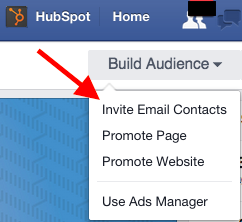
From there, you can upload a maximum of 7,000 contacts per day per page — and a maximum of 5,000 contacts at a time.
Step 4: Invite employees to Like your page.
People are more likely to Like pages that already have some sort of following, and your employees can help your business build its initial numbers. After all, they are your strongest and most effective brand advocates.
Ask them to like the official Facebook Page. Then, encourage them to share, Like, and comment on the content your team posts on Facebook, too. Employees who really want to share the love might include a link to your Facebook Page in their email signatures or on their personal social media profiles.
Step 5: Incorporate Facebook into your offline communication channels.
Have a physical storefront? Think about ways to encourage patrons to become Facebook fans. Here are some ideas to get you started:
- Place stickers in your front windows promoting your page’s name.
- Include your Facebook URL on your receipts.
- Run a promotion where customers who become Facebook fans on the spot get small discounts.
Market your business offline? Include links to your Facebook Page and other social media profiles on printed ads, flyers, coupons, catalogs, business cards, and direct mail assets.
Step 6: Cross promote on Twitter and LinkedIn.
Add a link to your Facebook Page on your business’s Twitter and LinkedIn profiles (and your personal profile, for that matter). Tweet about your Facebook Page occasionally to encourage your Twitter followers and LinkedIn connections to stay in contact with you on another network.
Add your Twitter link to your Facebook Page, and occasionally tweet about your Facebook Page. Don’t stop with Twitter and Facebook; you could also cross-promote on LinkedIn, Flickr, YouTube, etc. Just be sure that your cross promotions are sparing and strategic — you don’t want to spam the other audiences that you’ve worked so hard to develop.
Step 7: Post valuable content.
The best way to increase your following on Facebook is by treating your fans like people — and that means consistently delivering content that is valuable to them. Delivering value really comes into play with the content you create and share with your fans, and how you interact with them. (More on that here: How to Attract Customers With Facebook).
It’s all about building long-term relationships with your Facebook fans. They might not remember one individual post to Facebook, but if they notice you consistently publish high quality, helpful, and relevant posts to Facebook, they’ll think of you as a valuable resource.
So, how do you know what to publish? If you’re in tune with your buyer personas, you probably have a good idea what types of content your ideal customers like. If not, or if you just need some inspiration, consider spending a week taking note of the types of content in your own News Feed that compels you click, comment, or share. What inspired you? Use your observations to inspire future posts.
Step 8: Be active.
Getting more Facebook Likes isn’t just about profile optimization and an initial push. To continue growing steadily, you need to maintain an active, ongoing presence.
Not only does this mean posting educational, insightful content on a regular basis, but it also means monitoring your presence and interacting with your fans. Ask questions, answer questions, and participate in discussions with those posting on your page. Find, follow, and build relationships with others in your industry. Create a presence worth following.
Step 9: Use Facebook Ads to expand your reach.
Growing your Facebook Likes organically is the best way to drive engagement and, ultimately, convert fans into customers. But if you have the budget for it, incorporating some paid advertising into your Facebook strategy can help augment the hard work you’re already putting in.
Facebook offers a type of ad called a “Page Like Ad,” which contains a CTA suggesting that users Like your Facebook Page. These ads can appear in users’ News Feeds or in the ad column on the right-hand side of their web browser when they’re on Facebook. Here’s what a Page Like Ad looks like on a mobile News Feed:
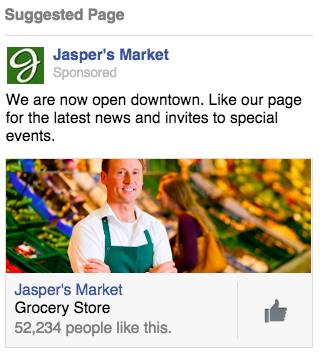
Image Credit: Facebook
If you’ve exhausted your existing contacts and want to reach people who don’t know about your page yet, but would be interested in hearing from you, you can use Facebook’s granular targeting capabilities to reach your ideal buyer persona(s) and grow your audience.
Want more tips?
There’s plenty more to learn about cultivating a Facebook audience that can yield new business opportunities. Be sure to check out some of our other resources on Facebook-related topics:
- Facebook Marketing: How to Drive Demand, Create Loyal Fans, and Grow Your Business
- How to Create a Facebook Business Page That Doesn’t Suck
- 25 Ways to Get More Social Media Followers
- Facebook Says These Are the 15 Best Brands on Facebook
- 10 Mistakes Brands REALLY Need to Stop Making on Facebook
- 4 Ways to Stand Out Better On Facebook’s News Feed
- Facebook Cracks Down on News Feed Spam From Brand Pages
And, of course, grab your own copy of our updated guide on How to Attract Customers With Facebook to dive deeper into using Facebook for customer acquisition.
Want to see how HubSpot uses Facebook? Like our Facebook Page here.


21 of the Best Email Subject Lines We’ve Ever Seen
I’d venture to guess you get tons of emails in your inbox every day.
From coupons, to daily deal sites, to newsletters, to password resets, to your mother wanting to know when you plan to visit — it’s a lot to sift through, never mind actually open.
So what makes you want to take that extra step to actually open an email? Often, it’s the subject line. After all, it’s your very first impression of the email — and from it, you’ll do your best to judge the content on the inside.
If you’re an email marketer, or just someone who happens to send emails on behalf of your company, you don’t want to be one of those ignored (or — gasp — deleted) emails in your subscribers’ inboxes. You’ve got to make sure your email subject lines are top-notch — and what better way to learn how to do that than by examining some great examples of subject lines?
Let’s take a look at what makes a great subject line, followed by a few examples that, old or new, we’re crazy about.
21 of the Best Email Subject Lines to Inspire Your Own
1. “Uh-oh, your prescription is expiring”
Sender: Warby Parker
Not too long ago, a HubSpot alum received this email two weeks before he needed to renew his prescription — talk about great timing. And when you’re eye prescription is expiring, it happens to be an excellent time to upgrade your glasses. By sending an email at the right time, Warby Parker increased its chances of this email getting opened.
But timing isn’t the sole reason we included this example. This subject is brilliant because it appeared at the right time and with the right tone. Using conversational words like “uh-oh,” keeping the subject line sentence case, and leaving out the period at the end, the subject line comes across as helpful and friendly — not as a company trying to upsell you.
2. “Best of Groupon: The Deals That Make Us Proud (Unlike Our Nephew, Steve)”
Sender: Groupon
It’s hard to be funny in your marketing, but Groupon’s one of those brands that seems to nail it again and again. After all, who can for get this classic unsubscribe video?
This subject line is no exception. The quip, “(Unlike Our Nephew Steve),” actually had us laughing out loud. Why? It’s completely unexpected. The first part of the subject line looks like a typical subject line you’d get from Groupon, highlighting a new deal. The parenthetical content? Not so much — making this one a delightful gem to find in your inbox.
3. “👗 Free (Cool!) Clothes Alert 👖”
Sender: Clover
First of all, we have a not-so-secret love for emojis in email subject lines. Personally, I’m partial to turquoise — so when I see an email implying that I might somehow be able to obtain a free turquoise dress, chances are, I’m clicking.
That’s part of what makes this subject line work. It draws the recipients eye by using visual content (emojis), and it hints at an offer of something free. That hints at an incentive to open the email: There’s a something to gain inside.
4. “The timer’s going off on your cart!”
Sender: King Arthur Flour
Similar to Warby Parker, this subject line makes use of urgency. If I don’t take action on my King Arthur Flour shopping cart — like actually buying them — it will be cleared, and I’ll have to start all over again.
Okay, so maybe this is a low-risk scenario. But when it comes to my baking goods, personally, I don’t like to take any chances, or risk forgetting what I was going to buy. That’s where the personalization aspect of this subject line comes in: King Arthur Flour — especially its online shop — tends to attract both professional and home bakers who take all things culinary a bit more seriously than, say, someone who only buys flour on occasion from the supermarket. And wouldn’t you know? Those are the same bakers who probably don’t want to spend time building their shopping carts from scratch.
The moral of the story: Know your audience when you’re writing email subject lines. Is there something that they take seriously more than others? If so, incorporate that into your copy.
5. “What Did You Think? Write a Review.”
Sender: REI
I received an email with this subject line about a week after buying a portable stove at REI for a camping trip I was going on. I had just gotten back from that trip, too. It was perfect timing for them to ask me what I thought of it.
Companies ask satisfied customers to write reviews of their business all the time. But when you specifically send these requests to the people who just purchased something from you, you’re being smart with your mailing list and reaching recipients whose interest is still warm.
Another reason this subject line works? It’s not expecting a good review. REI is genuinely asking me what I thought of the stove I bought. Maybe I hated it (I didn’t) … the company just wanted me to speak up.
6. “Important Weather Advisory”
Sender: RCN
Any time we see a weather-related alert, our ears perk up. In RCN’s case, it isn’t just a way to lure recipients into opening an email. The subject line above is RCN’s way of updating its customers to potential power outages and driving attention to the brand that provides them with cable and Wi-Fi — even during inclement weather.
If you can hitch your email marketing campaign to an event you know people pay attention to, and have something helpful to offer in response, you’ll see your email open rate soar.
7. “1,750 points for you. Valentine’s flowers & more for them.”
Sender: JetBlue
It’s such a specific number … 1,750 … of course you’re going to open this.
Coming from an airline, an offering of “points” might as well be gold to someone who likes to travel. And if that recipient also has a significant other, sending this email leading up to Valentine’s Day is a home run.
The best part about the subject line above is how particular JetBlue was about the number of points available. Instead of, say, “20% your next return flight of 1,000 miles or more,” this subject line gives it to you straight: 1,750 points, and all you have to do is buy flowers for your loved one. You’re already wondering how far you can fly with 1,750 points, I can tell.
8. “Rock the color of the year”
Sender: Etsy
In six words, Etsy was able to promote a product solely by its color, and inform you that there is apparently a “color of the year.” The email is truly too intriguing not to open.
Etsy is an ecommerce website for user-created marketplaces, and the reason we were impressed by its subject line above was because of the way it uses mystery to drive value into a suite of products. This email isn’t an invitation to buy clothing or jewelry; it’s an invitation to find out what the color of the year is.
Spoiler alert: It was “ultra violet.”
9. “Black Friday shoppers are the worst customers”
Sender: LinkedIn
This subject line is likely the boldest of the Black Friday emails you’d see in your inbox in the days before Thanksgiving. Yes, it’s a bit judgmental, but it actually came in a LinkedIn Pulse newsletter, promoting an article one of its users wrote on the topic of holiday marketing.
And there’s no doubt the title resonates with how some people feel during the most hectic holiday shopping day of the year.
LinkedIn has nothing to sell on Black Friday, so the subject line above does little harm to its business. Nonetheless, commenting on a popular cultural observation, however facetious, can show your confidence and help you relate to your community.
10. “*Don’t Open This Email*”
Sender: Manicube
Ever been told to not do something? Being asked to refrain from something can actually have the opposite effect — you now want to do that thing even more.
That’s the strategy behind Manicube’s subject line. It’s a simple but effective way to make people curious enough to open your email. (Just be sure that the contents of your email actually have something worthy of that subject line.)
11. “I got Botox—& THIS is what it looked like”
Sender: Refinery29
Okay, so maybe your business doesn’t involve Botox. But still — are you intrigued? I am, and despite my better judgment, I clicked.
That’s the power of leading your emails with a story: It sparks curiosity, which works in two ways. There are times when our natural curiosity can pique our interest without context, such as in the example above. But in this case, the subject line implies that there’s an intriguing story ahead. Why the heck did this person get Botox? And what did it look like? As the saying goes, “Inquiring minds want to know.”
Think of the stories behind your industry, and then, find ways to include them in email newsletters and frame them within the subject line in a way that piques your recipients’ collective curiosity.
12. Zillow: “What Can You Afford?”
Sender: Zillow
Imagine getting this subject line in your inbox from a website showing apartments for rent. It’s both exciting and encouraging (“Here are a bunch of apartments right in your budget. Yay!”), but also kind of competitive — pitting your cash against what the market offers. Would you click it? I certainly would.
Personalizing emails to cater to your audience’s emotions — for which there’s a broad spectrum, when it comes to real estate — is key to getting people to open your emails. You don’t have to be a psychologist to know how to take advantage of them, either. In addition to principles like urgency, crafting an email subject line that implies scarcity is another great way to increase your conversion rates.
13. “As You Wish”
Sender: UncommonGoods
When writing emails, you should also think about the recognizable names and reference that make people tick. For example, take this subject line from UncommonGoods forwarded to us from HubSpot’s Content Director, Corey Wainwright, who happens to be a die-hard fan of The Princess Bride. Apparently, “As You Wish” is a pretty big reference to that movie (I know, I know — I need to watch it again), so when she saw this subject line in her inbox, she just HAD to click.
Even though she knew logically that the email was part of a larger-scale send, it almost seemed like it was tailored to be sent personally to her — after all, why else would it include a reference to Princess Bride in the title?
UncommonGoods knows its buyer persona like the back of its metaphorical hand. While it may not send emails to individual subscribers with references to their favorite movies in the title, it does have a general understanding of its subscribers and their interests.
14. “Google sees smartphone heroics in Oreo. It’s The Daily Crunch.”
Sender: TechCrunch
If you’re subscribed to a newsletter from a publication like TechCrunch, chances are, you signed up because you’re either interested in or want to learn more about technology. To reflect that, the media outlet crafts its daily email roundups (“The Daily Crunch”) with a subject line that reflects one of the latest, most compelling news items in the industry.
Here’s the thing: Staying on the cutting edge is hard, especially with something that evolves as quickly as technology. So by writing email subject lines that reflect something that’s recent and relevant, TechCrunch is signaling to email recipients that opening the message will help them stay informed and up-to-date on the latest industry news.
Think about the things that your audience struggles to keep up with — then, craft an email roundup and matching subject line that reflects the latest news in that category.
15. “Where to Drink Beer Right Now”
Sender: Eater Boston
Okay, you caught me: I’m a beer lover. (One of the many reasons I like working at HubSpot.) But that’s not what hooked me here. The subject line arrived in my inbox just at the time I needed it: at 6:45 on a Wednesday evening. Absolutely. Genius.
Think about it: You’re just over hump day and want to decompress with a few coworkers after work. Right as you’re about to head out, you get a notification on your phone that says, “Where to Drink Beer Right Now.” Perfect timing makes this subject line something you can’t help but click on.
For your own emails, think about how timing will affect how people perceive your emails. Even if you send an email in an off-peak hour, you could get higher engagement on your email — if you have the right subject line.
16. “Not Cool, Guys”
Sender: BuzzFeed
Okay, we admit it: We love BuzzFeed. If nothing else, its staff knows how to write great copy — and that sentiment includes an exceptional email marketing team. Many of my colleagues have signed up for BuzzFeed’s daily emails, and pretty much any day of the week, they win for best subject line in their inboxes.
While there are a few of BuzzFeed’s subject lines here and there that aren’t anything to write home about, it’s the combination of subject lines and the preview text that is golden. They’re friendly, conversational, and, above all, snarky.
Here’s the text that followed the subject line above: “Okay, WHO left the passive-aggressive sticky note on my fridge. Honestly, who acts like this?” That conversational tone and snark pull us in over and over again — and it’s the preview text that completes the experience for me.
We’re not all equipped to be snarky writers, but most email platforms have the preview text easily available to edit. How can you use that little extra space to delight your customers (oh, and probably improve your email stats)? Maybe you could use the subject line as a question, and the preview text area as the answer. Or maybe it’s a dialogue: The subject line is one person, and the preview text is another.
You get the idea. By using that space, you have more opportunities to attract new subscribers.
17. “DO NOT Commit These Instagram Atrocities”
Sender: Thrillist
No matter how humble people are, most don’t like to do things wrong … so why not play on that natural human tendency in an email subject line, especially if you’re in the business of helping clients (or prospective clients) succeed? Thrillist certainly does in the subject line above, and it makes the language even more vibrant by using DO NOT — a great takeaway for B2B marketers.
Instead of using the typical contraction “don’t,” Thrillist spells it out and adds the all-caps for effect. That way, you’ll notice the subject line in your inbox, and then not, finder it harder to resist clicking on it.
Think about how going negative in your marketing might be a good thing. For example, many of us have anxiety about looking silly and stupid, so figure out how you can play to those emotions in subject lines. Of course, it’s important to back up that subject line with encouraging, helpful content, so that you’re not just ranting at people all day.
Getting negative can get your subscribers’ attention — this subject line certainly caught mine.
18. “Buffer has been hacked – here is what’s going on”
Sender: Buffer
Next is a subject line from Buffer. Back in 2013, Buffer got hacked — every tech company’s worst nightmare. But Buffer handled it exceptionally well, especially on the email front.
What we admire about the subject line is that it’s concise and direct. In a crisis, it’s better to steer clear of puns. People want to see that you’re not only taking the situation seriously, but also be reassured that the world isn’t ending.
Because of the way the subject line is worded and formatted, you feel like Buffer is calm and collected about the issue, and is taking your personal safety into consideration. That’s pretty hard to do in just a few words.
19. “Everything you wanted to know about email copy but were too afraid to ask”
Sender: Copy Hackers
Here’s another great example of leveraging your audience’s full plate to your email marketing advantage. Who hasn’t refrained from asking a question out of fear of looking silly or out of the loop? Excuse me, while I sheepishly raise my hand.
” … but were too afraid to ask” is one of those phrases that, to us, probably won’t go out of style for a long time. People seek insights from Copy Hackers — an organization dedicated to helping marketers and other professionals write better copy, as the name suggests — because, well, they have questions. They want to improve. And when that audience is too afraid to ask those questions, here’s Copy Hackers, ready to come to the rescue with answers.
What does your audience want to know, but might be too embarrassed to ask? Use that information to craft your content — including your email subject lines.
20. “🐶 Want a Custom Emoji of Tullamore & 6 Months FREE Walks? Book a Walk Today for Your Chance to Win!”
Sender: Wag!
For reference, Tullamore is the name of my colleague Amanda Zantal-Wiener‘s dog. And the subject line she received, written above, is another winning example of perfect emoji placement — especially when it’s a cute dog.
Here’s a great example of how personalization goes beyond the email recipient’s name. Wag!, an on-demand dog-walking app, includes the names of its customers’ pets in a portion of its email subject lines. But this type of personalization is more than just a first-name basis. If there’s anything my colleague Amanda loves more than free stuff and baking goods, it’s her pup. Wag! knows that, and by mentioning Tullamore by name in the subject line — in tandem with an offer, no less — it caught her attention and piques her interest.
21. “Abra-cord-abra! Yeah, we said it.”
Sender: Quircky
Last, but certainly not least, is this punny email subject line from Quirky. Yes — we’re suckers for puns, in the right situation.
What we like most about it is the second part: “Yeah, we said it.” The pun in the beginning is great and all — it refers to a new invention featured on Quirky’s site to help everyday consumers detangle their numerous plugs and cords — but the second sentence is conversational and self-referential. That’s exactly what many of us would say after making a really cheesy joke in real life.
Many brands could stand to be more conversational and goofy in their emails. While it may not be appropriate to go as far as Quirky’s subject line, being goofy might just be the way to delight your email recipients.
These are just some of our favorite subject lines — and since we receive plenty of them, we’ll continue adding the best ones as we discover them.
Want more? Read How to Write Catchy Email Subject Lines: 19 Tips.

How to Write a Marketing Resume Hiring Managers Will Notice [Free 2018 Templates + Samples]
Contents of a Great Marketing Resume:
A great marketing resumé should be well written and formatted, one page in length, define your unique value proposition and contain details of your employment and education. Depending on the company and the job, you can also add an interests and hobbies section to your marketing resume.
It’s ironic, but despite knowing how to sell products and services, so many marketers have a hard time selling themselves. It can often be difficult to turn the spotlight inward, but creating a standout resume is a skill all marketers need to perfect if they want to grow their career.
If you’re a marketer whose resume could use a little polish, don’t worry. With just a few resources and some actionable tips from hiring managers themselves, we’ll help you create a truly impressive marketing resume that’s sure to stand out to recruiters.
These free resume templates feature sample copy for 10 of the most popular marketing positions. Take a look at them, and then use the advice below to customize your resume and make it rise above the rest in the stack.
How to Write a Standout Marketing Resume
Know Your Target
You never start a marketing campaign without knowing who you want to reach. That’s because once you know your target audience, it’s easier for the other decisions to fall into place.
The same logic applies to your resume. If you know who will read it and what’s important to them, you can shape your message accordingly. To do this, you need to think about the type of job and company you’re hoping to work for.
Ask yourself questions like: Is the job purely in inbound marketing, or will it require both traditional and digital work? Will you be a specialist or a generalist? Who is the employer — an agency with a buzzing digital marketing team in place already, or a small company looking to leverage the power of social media to grow their sales? Or maybe it’s a marketing department within a large and established corporation?
Once you’ve outlined what’s most important to the company and job you’re applying for, you can carefully target your resume to them. You’ll know what skills or traits to highlight, what keywords to use, and which parts of your background will be most interesting to the hiring manager. (For clues about which skills different marketing roles typically require, read this blog post on marketing job descriptions. You can borrow phrasing from those for your own resume.)
Define Your Unique Value Proposition
You have a unique blend of skills, characteristics, and experiences that make you different from every marketer. To create a truly effective resume, you need to define exactly what this unique blend is — we’ll call this your value proposition.
To develop your own value proposition, think about what separates you from other marketers. Is it your in-depth knowledge of marketing analytics? Your ability to write irresistible headlines? Perhaps it’s your talent for creating compelling videos? Or maybe you have an impressive record of using social media to drive sales growth? Whatever it is, you can use it to set your resume apart from the crowd.
To a large extent, your value proposition depends on the type of positions and companies you’re targeting. Large and small companies often look for completely different skill sets, as do companies in different industries. So as you think about what makes you uniquely valuable, and how that aligns with the jobs you’re applying to.
Determine Your Messaging Strategy
It’s crucial to determine your messaging strategy — before you write a single word of your resume. That’s what you do when you’re running a marketing campaign, isn’t it? Here are some of the things to think about:
- What is the best structure for your resume in order to highlight your value proposition?
- Which keywords will your ideal employer be looking for?
- How can you give real world examples of your value proposition in action? (Think about campaigns you’ve run, social media successes, ideas you developed, etc.)
- What is the best layout and design to reinforce your message?
All these decisions should be made before you start writing, and they should all be made with your target audience in mind. That way you can be sure that when potential employers read your resume, it will immediately strike a chord.
If you want an example of great messaging in a resume, check out the digital marketing executive resume sample among our free downloadable resume templates. Look at the progression of roles and key accomplishments in those roles — it tells his career story while also making him look exceptionally qualified.
Make Sure Your Resume Gets Seen
If you don’t already have a connection at the company you’re applying to, you’ll most likely need to apply through a computer system. This process is what makes it so critical to upload it in a format that allows all recipients to read it as intended, like a PDF. That way, none of the original formatting or spacing is lost in translation, making it really yucky to read from a recruiter’s perspective. Although they’ll still have access to your resume, confusing formatting might distract them from the content.
Many common applications have similar save or export options that let you ultimately save as a PDF. The most common are Microsoft Word and iWork Pages:
- Microsoft Word: Choose File > Save as Adobe PDF
- iWork Pages: Choose File > Export to > PDF
Once you send in your resume, the computer service will do is scan it for relevant keywords that have been programmed in advance by the recruiter. Then, the system will either “pass” or “fail” you, depending on how many keywords and phrases are included in your resume that match what the recruiter’s looking for.
Don’t worry: Even if you “fail,” it doesn’t mean your resume won’t ever get seen by a real human. But it doesn’t look great, either — so try to foresee which keywords the recruiter will be looking for by making a note of all of the skills you have that are relevant to the job description.
Keywords to include might be the names of the social media sites you use, analytics or CRM systems you know, and software programs or SAAS systems you’re familiar with. Make sure you’ve included these terms as seamlessly as possible throughout your resume (where relevant), and add any outliers at the very bottom under a “Technical Skills” or “Digital Marketing Skills” section.
9 Things Hiring Managers Are Looking For in Your Marketing Resume
Sure, computers may be used in the initial screening process, but it’s humans — with real feelings, pet peeves, hobbies, relationships, experiences, and backgrounds — who are ultimately reading and evaluating our resumes.
They’re also the ones who get annoyed when we don’t put our employment record in chronological order; who just don’t feel like reading paragraph-long job descriptions; and who get excited when you went to the same college as them. So to get a sense of what really matters on a marketing resume, I asked some hiring experts what they actually care about when they scan resumes, and here’s the inside scoop on the tips they shared with me. (By the way, don’t miss out on what they said about cover letters at the end.)
- Length
- Formatting
- Writing Quality
- Location
- College/Graduate School and Major/Concentration
- Companies and Titles
- Top Few Bullet Points in Each Section
- Dates of Employment
- Interests and Hobbies
1) Length
Limit your resumes to one page if you can. It takes hiring managers six seconds to decide whether they like your resume or not. If they do, they’ll keep reading. If they don’t … well, it’s on to the next. So, chances are, they won’t even get to page two.
In some cases, bleeding onto another page is OK, especially if you have a lot of really relevant experience. But if you have to do that, just don’t exceed two pages. Remember, recruiters can always look at your LinkedIn profile for the full story. (Because you’ve completed your business profile on LinkedIn, right?)
2) Formatting
Formatting speaks to the way candidates collect their thoughts and organize their ideas. As HubSpot’s VP of Sales Productivity and Enablement Andrew Quinn explains it, “A candidate’s resume is their ad to me. How are they structuring this ad so I get a clear picture of what they’re capable of?”
There’s a fine line, though, warns HubSpot Team Development Manager Emily MacIntyre. “If you stray too far from normal formatting, it’s hard to read and understand your resume. Don’t get so creative that your resume becomes difficult to digest.”
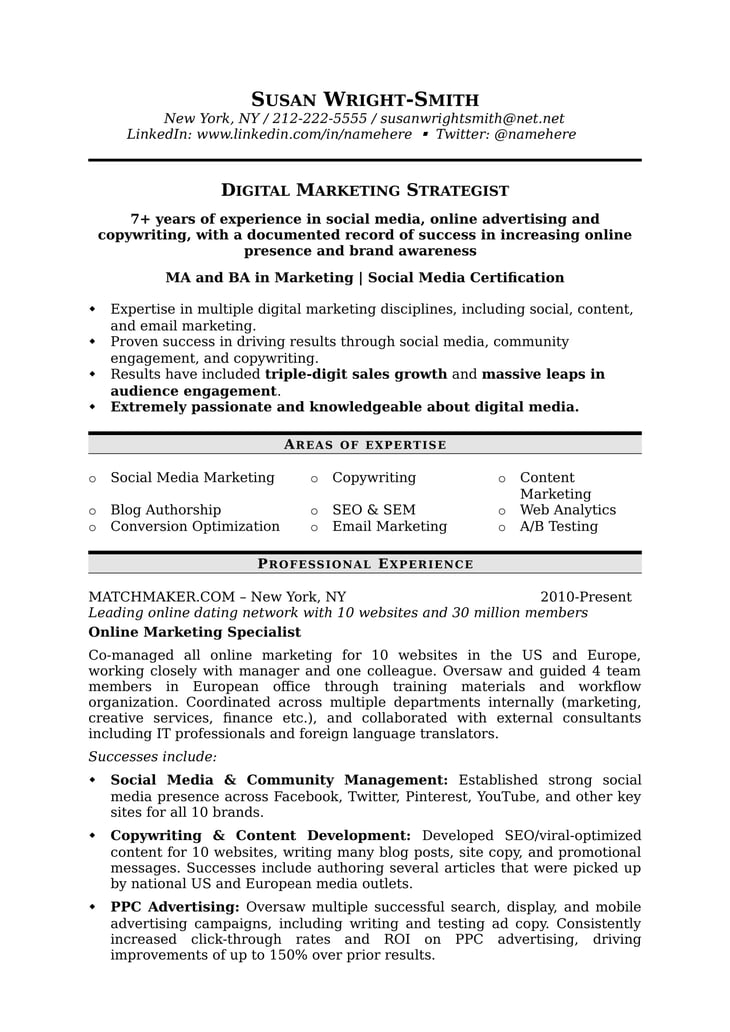
Below is a snippet from a 2-page resume with great formatting that’s easy to read. If you like the format and want to use it as your own, you can find it among our free downloadable resume templates here under “Digital Marketing Strategist.”
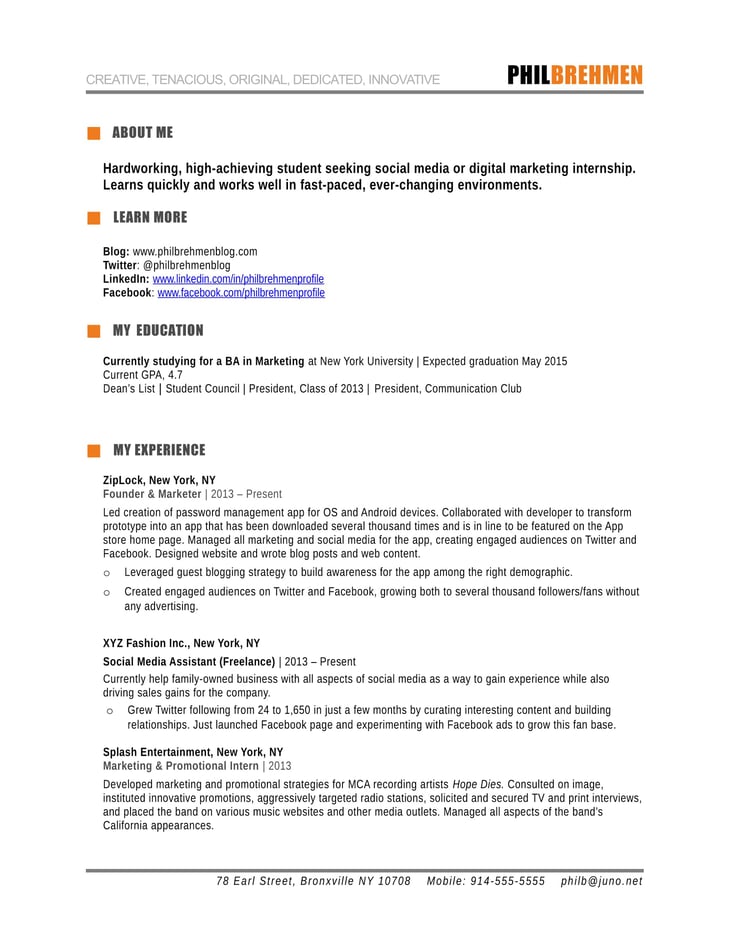
Here’s another one, this time a one-page resume from a student seeking an internship. If you like the format and want to use it as your own, you can find it among our free downloadable resume templates here under “Inbound Marketing Intern.”
To explore other resume formats, download our free resume templates.
The creatives among you might be asking, “What about infographic resumes?” Here’s the general consensus: Don’t make an infographic resume. Every hiring manager I spoke with advised sticking to the classic resume form instead of infographics or other formats.
“Infographic resumes are impossible to understand,” says MacIntyre. “We appreciate creativity, except when it’s overkill and hard to follow. Keep it simple. Everyone appreciates a simple resume. If you’re a designer, showcase your creativity with a cool portfolio website in addition to your simple resume.”
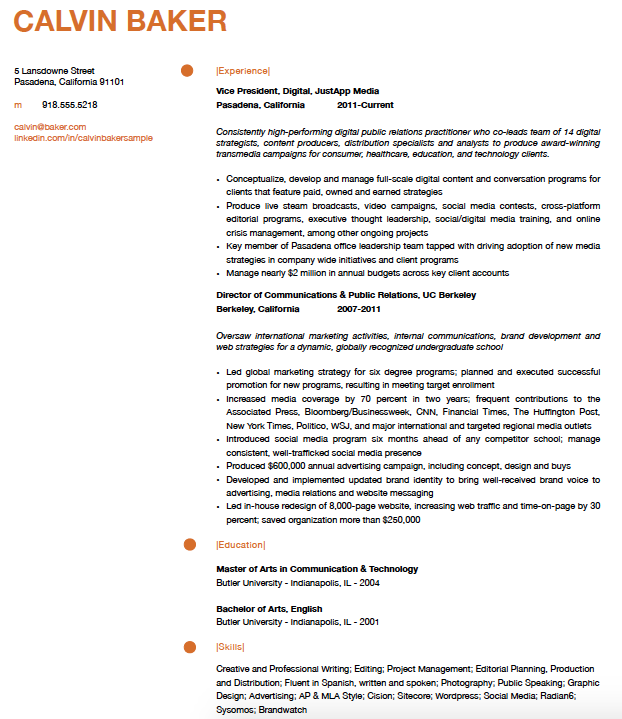
Below is an example of a creative format that’s still easy to read and understand. It was made using the Apple desktop app iWork Pages, which can be exported as a PDF so none of that beautiful formatting gets messed up in translation.
3) Writing Quality
Hiring managers throw away resumes with spelling errors — but writing quality goes beyond just simple spelling mistakes. Writing and presenting data in meaningful ways is a critical skill for any position, from blogging to engineering.
Are the details you want hiring managers to know about you easy to consume? Do you use concise sentences to convey your performance and accomplishments? Are your verb tenses consistent (except for current positions)? Is your language overflowing with buzzwords, or does it sound natural? Are you making sure to use first-person without using “I” or “my”? (See #11 in this blog post to understand why that’s not okay.)
“Formatting, spelling, syntax, and structure are all evidence of attention to detail,” Quinn told me. “This is important for any job, but especially if you’re applying to a job where attention to detail matters.” If you’re applying for a writing position, this is even more important.
4) Location
Hiring managers want to know if you’ll need to relocate. If you already live near the company’s office, great! If you would need to relocate, then it gets a little more complicated. Technically, hiring managers can’t legally ask you directly where you live — but omitting location will raise eyebrows. Even P.O. boxes are a little iffy.
If you do need to relocate, you should still include your current, out-of-town address on your resume, but be prepared to answer relocation status questions in an interview. If the company doesn’t offer relocation packages, will you be able to afford taking the job and moving anyway? If not, you may be wasting time.
5) College/Graduate School and Major/Concentration
Which is more important: Where you went to school, or what you studied?
It depends on the job you’re applying for. In most cases, your degree should make sense for the role. Hiring managers are looking for the tie-in; what’s relevant about what a candidate’s done in school. That doesn’t mean only marketing majors can apply to marketing jobs — marketing teams might hire someone who came out of creative studies like liberal arts, graphic design, or writing. An engineering team, on the other hand, probably won’t hire someone without a computer science degree.
It also depends on how successful you were at the school you attended. While there are some hiring managers who only give interviews to graduates of top-tier schools, most say it helps to go to a top-tier school, but it’s certainly not a deal-breaker if you went to a lower-tier school or community college. A community college graduate with a 4.0 GPA could be more attractive than an Ivy League graduate with a 2.0.
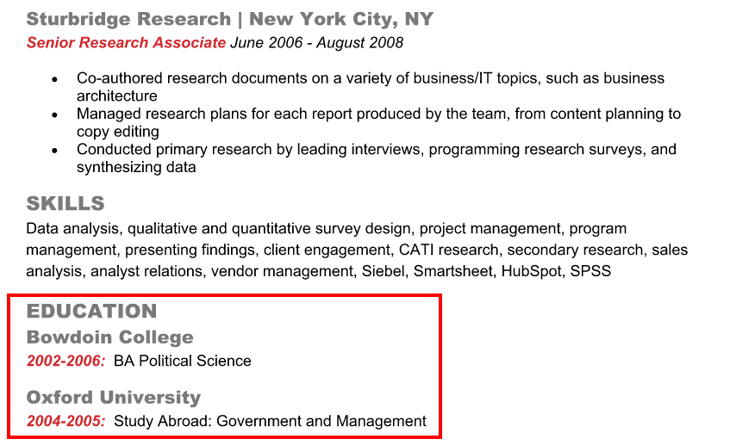
Speaking of GPA — when to take it off your resume is subjective. If your GPA was below a 3.0, consider removing it altogether. If it’s higher than that, the Andrew says, “The benchmark is five to seven years after graduation, which is when candidates tend have a solid track record of employment. If you did well in school but had lackluster job prospects following graduation because of, say, a bad economy, you could definitely leave it on longer.”

It goes both ways, he explained: If you had great jobs and accomplishments following graduation but didn’t have a good GPA, consider removing your GPA earlier.
Three to five years after college or graduate school graduation, you can move your “Education” section to the bottom of your resume — unless you connected with someone through an alumni network or if you know an executive there also went to your school.
Want to take your marketing education to the next level and make your resume even more appealing to potential employers? Become a certified inbound marketing professional with HubSpot’s free marketing certification. Get started here.
6) Companies and Titles
Hiring managers will look at where you’ve worked before (do they recognize the company names or know anyone who works there?) and your titles at those companies.
“If you’re applying for a sales position at a software company like HubSpot, we’re looking for experience selling software,” David Fernandez, Recruiting Team Lead at HubSpot, told me. “If you’re applying for a services position, we’re looking for customer-facing experience.”
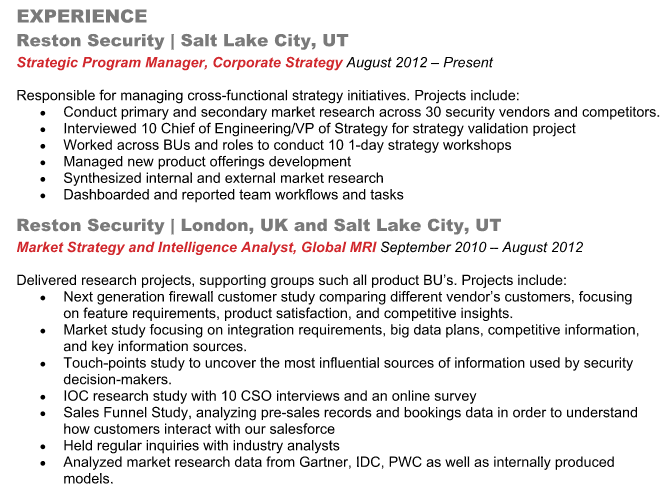
Yes, people tweak their titles at previous companies to more closely match the positions they’re applying for. If you do this, your “new” title should be close enough to what you really did that if someone were to call and check a reference, they wouldn’t be dumbfounded. Maybe “Clerk to the Surgical Waiting Room” becomes “Customer Service Clerk.” Also, make sure to change your titles on LinkedIn, too — hiring managers will check for consistency on LinkedIn, Fernandez said.
7) Top Few Bullet Points in Each Section
Each position you’ve had should be accompanied by no more than five to six bullet points. Remember, these hiring managers are scanning your resumes really quickly, so you want to make it easy for them to find and digest the relevant information by consolidating the most important points and putting them first. Paragraphs are a big no-no.
Luckily, you work in a profession where everything can be measured and analyzed, which means it’s relatively easy to tell an impressive story of success. Think about all the ways your work can be quantified through hard data and then fill your resume with action-packed bullet points that convey the value you’ve added.
Focus on accomplishments first before responsibilities and duties. If you had a senior management role, include the number of people you managed.
Also, include goals and metrics that hiring managers can use to compare you against other candidates, and make sure those metrics make sense so you don’t confuse the hiring manager. Run the metrics by your mom. I’m serious. If they make sense to her, then they’re all set. If not, then you weren’t clear enough and you need to tweak the language.
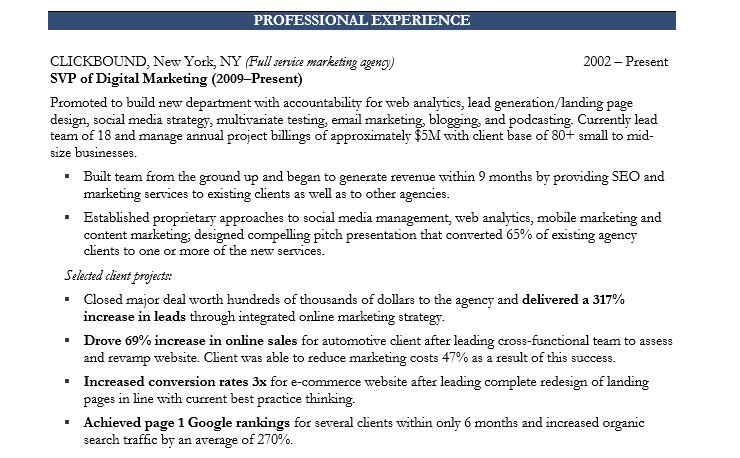
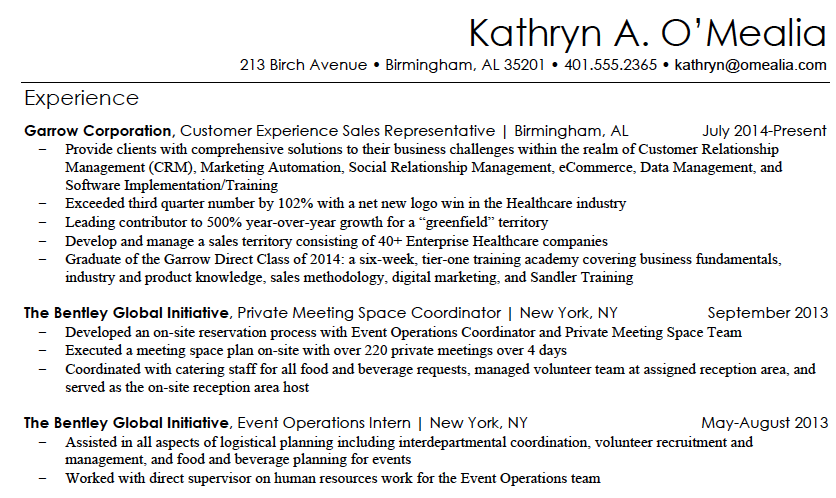
Examples might be increasing social media engagement, improving SEO ROI, driving increased web traffic, reducing bounce rates, boosting landing page conversions, etc. Once you have a list of your results, choose the best four or five and turn these into bullet points like these:
- Drove 37% improvement in newsletter clickthrough rates by rewriting sales copy.
- Grew ecommerce sales 23% in just 6 months by redesigning and A/B testing all landing pages.
Here’s a more detailed example:
If you want more examples of actionable data points, download these free resume templates.
8) Dates of Employment
Hiring managers look for job hopping and large gaps in employment, which are both red flags. Job hopping is a sign of failure to commit, a quality no one wants at their company. A word of advice: You should try to stay at every job for at least a year, preferably two or more years. Otherwise, it’s a red flag.
And if you took longer than six months off of work, MacIntyre suggests you explain the gap on your resume. If it’s something like teaching or the Peace Corps that you can describe like a job, then you can insert it into your resume just as you would any other position:
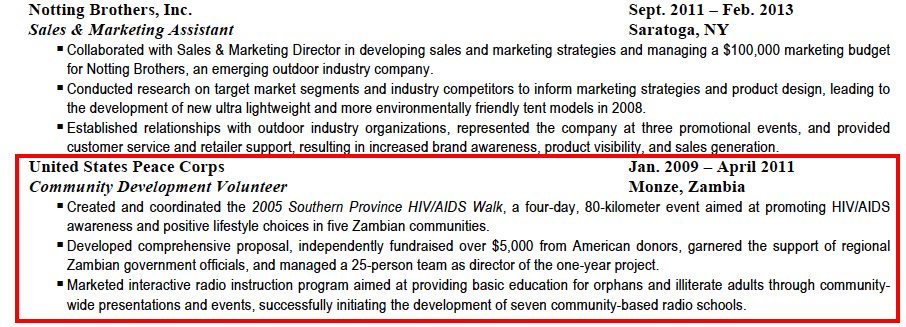
If it’s something like traveling abroad or taking time off for family or personal reasons, you can simply add it in italics of parenthesis. “Travelled abroad.” “Took time off for family.” “Took time off for personal reasons.” Hiring managers just want to see a rational explanation — that you were doing something productive with your time.
9) Interests and Hobbies
Whether you include interests and hobbies on your resume depends on the company and the job. If you’re applying for a creative role, hobbies like photography and painting could be interesting to an employer. If you’re hiring for an accounting role, then a hobby like skydiving wouldn’t be good to include — hiring managers might categorize you as a risk-taker, and do they really want a risk-taker managing their money?
“Think about the conclusions someone could draw from your hobbies relative to the role you’re hiring for,” Quinn advises. “Do they enhance or detract from the image you’re trying to convey? If you know the culture embraces unique individuals that have a broad background and set of interests, then it could be useful information. But conservative organizations probably don’t care what you do in your free time — in fact, they could interpret outside hobbies as distractions.”
Companies with cultures like HubSpot’s want their employees to have some personality and invest in outside interests. So if you’re applying to join that kind of culture, an “Interests” or “Hobbies” section could benefit you. “They’re great conversation starters,” says MacIntyre. “‘You’re a skier? Me too! Which mountain do you go to?’ It creates common ground for conversation and helps us assess culture fit.”
Before including or omitting this section on your resume, gain some intelligence about the company’s environment and culture. (And check out HubSpot’s culture code if you haven’t already.)
Spend Less Time on These …
Personal Statements/Objectives
In fact, we recommend skipping these altogether. Frankly, they’re irrelevant — not to mention way too easy to screw up. I’ve spoken with HubSpot recruiters about numerous times where candidates put the name of another local company on there — huge mistake.
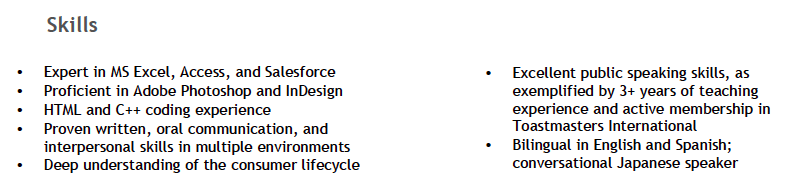
Instead, replace it with a “Skills” or “Key Skills” section at the top of your resume, in column format, that highlights the top six to nine skills applicable to the role you’re applying for. Be sure to change these skills for each job and use the job description as a guideline.
Don’t plagiarize the job description by any means, but you can pull out key phrases. For example, in the example below, one of the listed skills is “Deep understanding of the consumer lifecycle.” That’s because the job description asked for exactly that: a deep understanding of the consumer lifecycle and customer journey.
Pro Tip: Although you should leave this section off your resume, you should have something in the ‘Summary’ section of your LinkedIn profile. Focus this section on specific skills and achievements. It’s a good place to put a link to your portfolio, blog, SlideShare presentations, or examples of work you’ve created like open-source code.
Use that space to talk about specific achievements from previous roles, awards you’ve won, or projects you’ve worked on. The information and skills on here should be applicable to where you’re headed in your career, not irrelevant past skills. (When I first heard this tip, I immediately took “emergency medicine” off of mine.)
Cover Letters
Cover letters vary in importance, depending on industry, and even on individual company. Here at HubSpot, we phased out requiring one — and instead ask candidates thoughtful questions during our application and interview process. Many companies that require you to write a cover letter will read it, but they’ll focus mostly on your resume.
With this in mind, include important details on your resume, like gaps in employment, rather than relying on your cover letter — which may never get read — to explain it. And reallocate those hours you plan to spend writing and perfecting your cover letter to writing and rewriting your resume. Your resume is the most important tool in the first stage of the application process, so spend a lot of time on it and ask multiple people to critique it.
It’s Just Like Marketing
As a marketer, you have a talent for communication and a solid understanding of what makes people buy. The good news is that by applying this knowledge to your own resume, you can easily stand out from the crowd.
Want more? Read How to Write a Marketing Resume Hiring Managers Will Notice [Free 2018 Templates + Samples].
Need to revamp your resume? Get started by downloading and customizing these free marketing resume templates.

How to Write Catchy Email Subject Lines: 19 Tips
No matter what they say, people do judge emails by their subject lines.
In fact, 47% of marketers say they test different email subject lines to optimize their emails’ performance. That’s why it’s so important to craft subject lines that are compelling enough to get people to click through.
While they may seem like a small part of your message, they’re one of the very first impressions you have on your email recipients. And they’re a marketer’s ticket for standing out in a crowded inbox.
Do you want your email content opened, read, and clicked? It all starts with the subject line. Read on for some tried-and-true tips to help jazz up your subject lines and boost your emails’ engagement.
Email Subject Line Best Practices
Before we get to our more detailed tips, let’s go over some fundamentals of what makes a great subject line. Regardless of your goals, these are the essential elements that your subject line should possess:
1. Urgency
There’s a phrase that, for many of us, is reminiscent of classic infomercials: “Act now!” And while we wouldn’t encourage using that exact language in your content, we do agree that communicating urgency and scarcity in an email subject line can help compel readers to click (or act) — when phrased creatively and strategically. But because you don’t want to be known as “the brand that cried wolf,” use these subject lines sparingly, and try to limit them to when the occasion genuinely calls for immediate action.
2. Curiosity
Sometimes, subject lines work because of their ability to send the message, “You will benefit from opening this email.” But other times, it’s good to maintain some sense of mystery — especially if it pique’s the recipient’s natural curiosity and interest. Because they require opening the email to get more information, they can result in, well, a higher open rate. But make sure the subject line, while enigmatic, still aligns with your brand. Too obscure, and it could end up being seen as spam.
3. Offers
Here’s where that benefit of opening a given email comes in. At the end of the day, people love new things and experiences — especially when they come free, or at least discounted. Open with that by including it in your subject line. Personally, I’m much more inclined to open my daily newsletters when there’s an offer of or allusion “free stuff” directly mentioned in my inbox.
4. Personalization
No two email subscribers are exactly the same — and, sometimes, that means the emails you send them shouldn’t be, either. At this point in time, marketers have never had more ways to learn about their subscribers’ preferences, jobs, or general (dis)likes. So when you send them content, on occasion, make it catered toward the individual.
5. Relevance and Timeliness
When we subscribe to an email list, much of the time, it’s because we want to be kept informed, or at least learn more about a given topic (more on that later). Similar to piquing your audience’s curiosity, crafting email subject lines that incorporate trending topics or timely headlines can help you establish your brand as an authority within your industry — and can compel people to click to read.
6. Name Recognition
Let’s face it: We all have famous people who, at some point, we presently or previously have admired. And when you understand your audience’s preferences and interests, you can pique their interest by including the names of this admired, recognizable individuals by including them in your content — and mentioning them in your email subject lines. But take heed: This tactic really only works when it aligns with your brand, product, or service, so keep it relevant, rather than just throwing out a recognizable name for the sake of recognition.
7. Cool Stories
At risk of sounding like a broken record, here’s another place where curiosity comes into play. By front-loading your email subject line with a compelling allusion to a story that the message tells — but can only be read if opened or clicked — your audience is like to become intrigued, and want to learn more. Again, make sure the story is relevant to your brand. Otherwise, it might just confuse your readers and prevent them from opening the email.
How to Write Catchy Email Subject Lines
1. Keep it short and sweet.
Email subject lines will get cut off if they’re too long, particularly on mobile devices. And with up to 77% of email opens taking place on mobile, we recommend using subject lines with fewer than 50 characters to make sure the people scanning your emails read the entire subject line.
If you’re struggling to keep your subject lines short, think about which words matter less and where you can remove a frivolous detail. For example, if you’re sending an order confirmation, doesn’t “Your order is being processed” look better than “Order #9435893458358 is being processed”?
Same goes for your regular emails: Don’t waste your time including the word “update” or “newsletter” in the subject line. Some studies even suggest these words can decrease the message’s open rate since it tells readers the email is associated with a series, and therefore they can catch the next one.
2. Use a familiar sender name.
That name recognition we mentioned earlier doesn’t just apply to the famous — it applies to the familiar. When setting your sender name, be as human as you can. Olivia@yourcompany.com is both inviting and unintimidating to people when they open their inboxes.
If you’ve already met your recipients from a previous conversation, use your own name as the sender’s address — even if the email is technically coming from the company as a whole. The best impression you can make on your customers is that they’re working with you, the individual — not the entire business.
“If the ‘from’ name doesn’t sound like it’s from someone you want to hear from, it doesn’t matter what the subject line is,” explains Copy Hacker‘s Joanna Wiebe. Ultimately, people are busy, and they simply don’t bother with you if you don’t sound like someone who would make for an easy (or at least friendly) conversation.
3. Avoid the ‘no-reply’ sender name.
Thanks to the amount of spam email people get these days, most people hesitate to open email from unfamiliar senders. And even fewer people like talking to a robot. Think about when you call a company and can’t get a hold of an actual person. It’s frustrating, right? This goes for email, as well.
Never use “noreply@company.com.” I repeat: Never use this email address. Not only does it make it look less personable, but it also stops people from adding your email to their address book.
Instead, avoid using a generic email address and send the email from a real person. For instance, we once found that emails sent from “Maggie Georgieva, HubSpot” performed better in terms of opens and clickthrough rate than emails sent from just “HubSpot.” (HubSpot customers: Learn how to personalize the “From” name and email address here.)
4. Use personalization tokens.
Remember the personalization we mentioned earlier? Using personalization tokens — like name or location — in the subject line adds a feeling of rapport, especially when it’s a name. Everyone loves the sound of their own name. Plus, it increases clickthrough rate: In fact, research has shown that emails that included the first name of the recipient in their subject line had higher click-through rates than emails that did not.
One example of how brands affix this information to subject lines is when dog walking company Wag! does so with dog names. Here’s one such email that HubSpot’s Amanda Zantal-Wiener received:

That’s great personalization and great timing.
Another personalization tactic that works is to tailor subject lines to the recipient’s location — things like lists of their respective cities’ best outdoor bars and restaurants.
Just don’t go overboard with the personalization here. That can be a little creepy. But little personalized touches here and there show that you know more about your recipients than just their email address. However, if you can’t (or don’t want to) use personalization tokens in the subject line, use “you” or “your” so it still sounds like you’re addressing them directly.
5. Segment your lists.
While email blasts that go out to your entire list might be relevant and helpful to some people, it won’t be to others — and could cause confusion or frustration. Why is this restaurant sending me a list of the best local steakhouses when I’m a vegetarian? Why is this company sending me case studies when I just signed up for its email list yesterday?
Personalize the experience using information from the actions your customers have already taken — from which forms they’ve filled out, to which industries they’re in, to what their personal preferences are. In email marketing, you can personalize your recipients’ experience using a little thing called list segmentation.
How you segment your lists depends on your business and your goals, but you can read this blog post for 27 ideas for how to slice and dice your email lists for better segmentation.
6. Don’t make false promises.
Your email subject line is making a promise to your reader about what you will deliver in your message. Make sure that you make good on that commitment — and do not try to get your email opened by making false promises. This will irk your audience, and they’ll learn not to trust your subject lines, resulting in a lower open rate and a higher unsubscribe rate.
7. Do tell them what’s inside.
Speaking of making promises, if your visitor has downloaded an offer and you’re delivering it via email, it’s a great idea to use a subject line that says something like, “Your new ebook inside!” or, “Your guide awaits!” This works better than a simple “thank you” in the subject line because it makes it clear that something is waiting inside the email.
8. Time it right.
Sending an email at the right time with the right subject line can make a huge difference in open and clickthrough rate. A prime example? When food publication Eater sends at 6:45 P.M. on a Wednesday evening that said, “Where to Drink Beer Right Now” — just in time for happy hour. Nailed it.
Another favorite example of mine is a classic email from Warby Parker with the subject line, “Uh-oh, your prescription is expiring.” It was sent two weeks before the recipient needed to renew his prescription. By sending an email at the right time, Warby Parker increased the chances of their email getting opened — and included a relevant call-to-action about getting a glasses upgrade, too.
9. Use concise language.
Keep in mind that people scan their inboxes very quickly — so the more clear and concise your subject line is, the better. It’s usually a lot better to be concise than it is to use complex and flowery language — unless you’re going for an elusive subject tone to entice your recipients.
When you’re going for a concise subject line, think first about how your email will benefit your recipients. You’ll want to make that benefit very clear. For example, “Increase your open rates by 50% today” is more appealing than “How to increase open rates.”
10. Start with action-oriented verbs.
Subject lines are similar to calls-to-action, in that you want the language to inspire people to click. Subject lines that begin with action verbs tend to be a lot more enticing, and your emails could be drastically more clickable by adding a vibrant verb at the beginning.
Actionable subject lines will inspire people to click on your email by instilling urgency and excitement. For example, in an email inviting people to a hockey legend dinner, the email subject line might read, “Dine with Bruins legend Bobby Orr,” rather than a more generic (and less actionable) “Local Boston Sports Legend Meal.” The former email uses “Dine” to help the reader envision themselves at a dinner table.
11. Make people feel special.
The psychology of exclusivity is a powerful thing. When people feel like they’re on the inside, it gives them a sense of belonging that could build loyalty and compel them to convert better on your emails.
The right phrasing can make your recipients feel special — and the effect can be magical. A few ideas for phrasing include:
- “For our beloved customers only”
- “An exclusive offer for you”
- “My gift to you”
- “You’re invited!”
- “Private invite”
12. Create a sense of importance.
There’s a phrase that, for many of us, is reminiscent of classic infomercials: “Act now!”
And while we wouldn’t encourage using that exact language in your content, we do agree that communicating urgency and scarcity in an email subject line can help compel readers to click (or act) — when phrased creatively and strategically.
But because you don’t want to be known as “the brand that cried wolf,” use these subject lines sparingly, and try to limit them to when the occasion genuinely calls for immediate action.
13. Use numbers.
A lot of businesses send emails with vague statements in their subject lines — which is why using data and numbers is a great way to get your emails noticed, demonstrate a clear and straightforward message about your offer, and set the right expectations.
Just like with blog titles, using numbers in your subject line is an effective email marketing best practice. You might use numbers to refer to the title of your listicle, the page length of the offer you’re sending, a specific discount, or the numerical benefit of a particular resource you’re providing — like “Join more than 750 others at this event!”
14. Pose a compelling question.
Asking a question in your subject line can also draw readers in — especially if you’re asking a question you know is relevant to your recipients’ buyer persona. This is just one way to pique that curiosity we mentioned earlier. For example, you might try the following: “Are you making these SEO mistakes?” or “Do you know what your website is doing wrong?”
Zillow once sent an email with the subject line, “What Can You Afford?” that linked to a website showing apartments for rent. A subject line like this is both encouraging and a touch competitive: While it gives hope that there are apartments out there that’ll fit within your budget, it also pits your cash against what the market offers.
Another example comes from DocuSign. They sent an email late in the lead nurturing process, with the subject line, “What are your customers saying?” The body of the email contained a bunch of case studies that were meant to help the recipient move closer to actually purchasing DocuSign. This was a smart move: Folks who are further down the funnel are likely more receptive to hearing customer testimonials.
15. Don’t be afraid to get punny.
Most people love a good pun. It’s a great way to delight your recipients and spice up your emails. Some of the best punny email subject lines come from JetBlue, with subject lines like “Land wander-
Some of the best punny email subject lines come from JetBlue, with subject lines like, “Land wander-ful low fares now!”
Quirky — a community-led invention platform — worded one of its email subject lines like this: “Abra-cord-abra! Yeah, we said it.” That second part is conversational and self-referential — and exactly what most people would say after making a really cheesy joke in real life.
If you’re the least bit punny, think about small ways you can slip them into your emails when it’s appropriate. Just don’t overdo it. And remember the rule: When in doubt, ask a coworker.
16. DON’T USE ALL CAPS or overuse exclamation points!!!
A subject line that says, “OPEN NOW AND RECEIVE A FREE TRIAL” or, “50% off coupon today only!!!!!!!!” isn’t going to get your email opened. In fact, it’ll probably get your email ignored.
Why? People don’t like to be yelled at, and using all caps and/or a lot of exclamation points can really rub people the wrong way. In fact, according to a study by the Radicati Group, more than 85% of respondents prefer an all-lowercase subject line to one in all caps.
Not only are these tactics disruptive, but they look spammy. So instead of using disruptive tactics like these to stand out in people’s inboxes, try personalizing your emails, establishing relevancy, and using catchy and delightful language.
17. Don’t include a question and exclamation in the same subject line.
Here’s a subject line that can automatically wind up in a recipient’s spam folder: “Want a solution fast? Act now!”
The fast solution isn’t the problem the example above. It’s also not “act now” — although those are known email marketing spam words. It’s both phrases together. This is a classic email saboteur, and it comes in many forms. All you need is to ask and yell at the same time.
The PLING_QUERY rule is a directive by the Apache web server that flags an email as spam if it contains both a question mark and an exclamation mark in the subject line. The example above is a common one. A good solution? Don’t do that!
Not only is this subject line format overdone, but it’s alienating to your audience. Open-ended questions are a show of ignorance; any good marketer knows their leads better than that.
18. Use engaging preview text.
While preview text isn’t technically part of your subject line, it does appear right near the subject line — and it certainly deserves your attention.
Preview text provides recipients with a peek at the content inside your email, which email clients like the iPhone Mail app, Gmail, and Outlook will display alongside the subject line. (The exact amount of text shown depends on the email client and user settings.)

When you don’t set the preview text yourself, the email client will automatically pull from the body of your email. That can look messy depending on your email content, and it’s also a wasted opportunity to engage your audience. (HubSpot customers: Click here to learn how to set the preview text of your emails.)
19. A/B test your subject lines.
Although these tips and best practices are a great place to start, what works best for some companies may not work as well for others. It’s all about figuring out what works best for your specific audience. That’s where A/B testing comes in.
While it can be tempting to use your intuition to predict what subject line language will make people click on your emails, you should always A/B test your highest-stakes subject lines, and tweak the wording according to your results. What works best for your audience: Long or short subject lines? Including numbers or not including numbers? Questions or statements?
Read this blog post for an A/B testing checklist you can bookmark the next time you want to run one on your emails. (HubSpot customers: Learn how to A/B test emails in HubSpot here.)
At the end of the day, if your emails aren’t getting opened, they’re not getting seen. You have great content to share — now, you have to prove it in your subject line.

Why Twitter Says Losing Millions of Users Will Benefit Advertisers
Twitter reported a loss of one million monthly active users (MAUs) in Q2 2018 — and says that it expects to lose millions more in Q3.
At the same time, its total revenue is up by nearly 7% — which the company says could, perhaps, be the result of this decreased user base.
While that second cause-and-effect claim may not make sense on the surface, there’s an explanation. And that drop in MAUs? Well, after months of the company confirming sweeping account removals, it doesn’t exactly come as a surprise.
But questions still remain. Here’s a look at some of the numbers — and what they mean.
Why Twitter Says Losing Millions of Users Is Good for Advertisers
A Quarter-By-Quarter Comparison
Let’s have a look at some key figures.
Global ad revenue in Q2 totaled $601 million, up 4.5% from Q1. In the U.S., that number was $293 million, up 1.7% from the previous quarter.
Source: Twitter
Global MAUs totaled roughly 335 million in Q2, down roughly .3% from Q1. In the U.S., that number was 68 million, down 1.47% from the previous quarter.
Source: Twitter
Twitter did not provide raw numbers for daily active users (DAUs), but says that the number has grown by 11% year-over-year.
Source: Twitter
The Potential Benefit to Advertisers
At one point in the call, an analyst asked Twitter executives if a further drop in MAUs — like one in the “mid-single-digit millions,” which the company has forecasted for Q3 — would ultimately impact revenue.
First, let’s put those figures into context. I broke it down earlier on Twitter:
But, the numbers are going to continue to fall. Using 6M MAU as a *hypothetical* example of “mid-single-digit millions of MAU” — that would be a drop of ~1.79%. But it depends on where the users are based. If it were 6M in the U.S. alone, that’d be a drop of ~8.8% domestic MAU pic.twitter.com/TQ3OYMO1t7
— Amanda Zantal-Wiener (@Amanda_ZW)
July 27, 2018
A nearly 9% drop in MAUs over a single quarter might (justifiably) seem like a significant loss.
But over the past several months, Twitter has emphasized over and over again that it is prioritizing the health of its network, going as far as launching a pubic request for proposals to measure it.
These efforts have often included the removal of user accounts — often in the millions — and the implementation of machine-learning-driven signals to proactively remove abusive accounts, or stop them before they get to the point of becoming fully created. One of Twitter CEO Jack Dorsey’s key opening points was the company’s acquisition of Smyte, which “specializes in spam prevention, safety, and security.”
Source: Twitter
Naturally, moves like these are going to lead to a drop in active users. The company pointed that out in its earnings report, where it noted that “our efforts to improve the health of Twitter impact our disclosed metrics [and] our work sometimes includes the removal of accounts, some of which are included in our metrics.”
Now, let’s go back to the analyst’s question: Does a drop in active users have an impact on revenue?
The company’s answer, in short, was “yes” — perhaps a “constructive” one. Even though the total MAU count was lower by one million (and will continue to drop), it leads to reaching a more engaged, authentic audience for advertisers — and, therefore, a higher return on investment (ROI).
Another analyst asked if active user count is also important to growing ad revenue — e.g., putting more (non-bot) eyeballs in front of advertisers. The answer again goes back to relevance and engagement — more authentic users (even if overall MAU/DAU drops) = more ad engagement
— Amanda Zantal-Wiener (@Amanda_ZW)
July 27, 2018
In fact, according to the earnings report, “total ad engagements increased 81%” — which Twitter says is the partially result of “increased demand.”
Source: Twitter
The Potential Drawbacks
As for the prioritization of network health, HubSpot CMO Kipp Bodnar says Twitter is moving in the right direction.
“The other core opportunity at play is that unlike Facebook,” he says, “Twitter is an open network that generates value not only from its users, but also for non-users consuming content on its platform.”
At the same time, adds Bodnar, “I think Twitter is making right decision, but the time horizon for improvements in its user base is unclear, and that is likely concerning to investors.”
That could explain why Twitter’s stock price saw a drop in the pre-market hours leading up to the earnings call — as well as those following the New York Stock Exchange opening bell.
Source: Google
And while Twitter says that this narrowed user base is ultimately beneficial to advertisers, Bodnar says it could give pause to some.
“Twitter has the opportunity to deliver on revenue growth, despite slowing user growth,” he says. “However, mass-market advertisers looking for scale to deliver their messages will be less interested in Twitter if the platform’s user growth continues to decline.”
But current audience engagement might not be the key issue — and hasn’t been historically.
“Twitter has never had a problem with its core users staying engaged. It’s struggled to get new users engaged,” says HubSpot VP of Marketing Jon Dick. “I’d view the decrease in MAUs as a sign that it’s not growing its audience effectively.”
Based on our internal research, that may be the case. When we asked 596 internet users across the U.S., UK, and Canada if they’ve jumped ship from the Twitter network over the past three months, less than a quarter said that they have — but a higher percentage (28.6%) said that they’ve never used Twitter in the first place.

Data collected with Lucid
On the upside, “Twitter has way more data on more engaged users to do targeting,” Dick says, “so I believe the value of more engaged users is higher.”
But Twitter, along with its Big Tech counterparts like Facebook and Google, has had quite a tumultuous year.
While not quite as high-profile as the instances on Facebook, the network was weaponized to influence the 2016 U.S. presidential election, leading to multiple testimonies from its executives before lawmakers. This September, Dorsey is slated to join Facebook COO Sheryl Sandberg, as well as a yet-to-be-determined representative from Google, in testifying before the Senate Select Committee on Intelligence on election interference.
It’s largely this weaponization that has caused Twitter to purge so many accounts. And such sweeping removals, says Dick, have the ability to impact other metrics long-term — perhaps calling for a complete reset and new approach to measuring them.
It could be, he says, that Twitter “just needs to start fresh.”

The Ultimate Guide to Freelancing
Freelancing is an attractive way of life. The independence, autonomy, flexibility, and unlimited financial potential are all incredibly inviting, especially for employees who are tired of their mundane work environment. But, there’s still some mystery surrounding the enigmatic career choice.
As a freelancer, how do you make money? Where do you find work or jobs? How do you figure out what to do? What about insurance and benefits?
These questions are what typically stop people from pursuing a full-time freelance career. And these questions are the ones we’ll answer in this guide.
I was a freelancer before joining HubSpot — AKA the best career decision I’ve ever made. Starting my freelance business was a very intentional choice made in the midst of working a very unfavorable job. Freelancing was the most difficult 18 months of my life, but it completely rerouted my profession and led me to where I am today. It was more than worth it to take the leap into the unknown and pave my own career path.
Whether freelancing is your lifelong dream or a means to an end, we’re going to walk through each element of starting your own business, making your own schedule, and managing your own clients. By the end of this guide, you’ll know exactly what’s expected of you as a freelancer.
Self-Evaluation: Is Freelancing for You?
Before moving forward, let’s take a breather and do a little self-analysis. Is freelancing right for you? If so, what work would you do as a freelancer? What would your niche be?
Here are a few questions to ask yourself to evaluate whether or not you’re ready for a freelance career.
Why do you want to freelance? Are you looking for a more flexible schedule, or are you merely trying to escape your dreaded commute? Do you want to expand your professional horizon, or are you simply bored at work? You might’ve heard it before, but the grass isn’t always greener on the other side. Pursuing freelancing for the wrong reasons will make it hard to keep going when the going gets tough.
I want to emphasize here that there are no right or wrong answers, simply what’s best for you, your family, and your career goals. To give you some perspective, here are a few answers from fellow freelancers on why they decided to take the leap:
- “I started off with a few side projects on top of some full-time work, mostly to pay for a couple of pricey holidays! In the end, the side projects grew to a point where I decided to take the leap into full-time freelancing. It was a ‘try it or always wonder’ kind of moment.” — Jade E., Jade Emmons Media, London
- “After three years of teaching high school and realizing that it just wasn’t going to be for me long-term, I decided to walk away. Prior to teaching, I had a soul-crushing office job, and I promised myself I wouldn’t return to that situation either. I tried my hand at some freelance gigs during my last couple of months teaching and was able to pay my bills. I realized that it was a viable career path, and I had the chops to make it happen full-time.” — Brent B., Brent Writes, Orlando
- “For us freelancing means freedom. A few years ago, we were at a point where the thought of doing the same thing in the same place for decades of our lives felt stifling. One day, we finally decided to actually do something about it. We researched our options, found work online as freelancers (one of us is an English teacher and the other is a virtual assistant), sold everything we owned, and started our adventure as digital nomads. So far, we’ve been to over 40 cities in 17 countries and can’t wait to see what the future holds.” — Erin B., Eff The Office, Remote
Can you afford to freelance? A freelance career holds the promise of a higher salary and unlimited income potential. After all, as a freelancer, you’re the one deciding what you make and when you make it. But you’ll likely not see that income right away. The first few months (or years) of freelancing typically involves sacrificing income while setting up your business, establishing yourself, and finding clients.
Are you comfortable with being uncomfortable? Freelancing can be majorly uncomfortable. You won’t always know where your next paycheck is coming from, you’ll probably be rejected more times than you can count, and you’ll definitely experience a few days where you think, “Why the heck did I do this? That commute doesn’t sound too bad right about now!” All of these thoughts and feelings are normal; I’ve always referred to them as growing pains. After all, if it’s not challenging you, it’s not changing you.
Next, let’s talk about what kind of work you’d do as a freelancer. This step is another common roadblock for folks who want to freelance … they’re simply not sure what to do. The answer is simple, though. It might just take a couple questions to draw it out.
What are you good at? This five-word question can determine a lot for you. What are you skilled at? What do others ask you to do for them? Notice that I didn’t ask, “What are you an expert at?” Experts are few and far between — all you need to decide right now is at what you’re willing to become an expert.
What brings you joy? This question isn’t always applicable. There will be days and times that you simply don’t want to work or might be sick of your chosen field. That’s life. But, above all, there’s usually one skill set or profession that brings you joy. What makes you feel good to accomplish? What are you proud to share with friends and family? This is probably what you’ll excel at as a freelancer.
The Pros and Cons of Freelancing
Now, let’s pull the spotlight back and look at freelancing as a whole. Regardless of fit or type of work, there are definite benefits and drawbacks to a career as a freelancer. Let’s look at a few.
Advantages
- You’re the boss. You choose your schedule, rates, and which clients or jobs you want to take. If you feel like working in your pajamas, you can. If you want to take a three-week vacation, you can — it’s completely up to you.
- You could pay less in taxes. Freelancers can take advantage of more tax deductions on meals, travel, and more. Federal and state taxes aren’t withheld from each paycheck. Freelancers pay the IRS directly, instead.
- You (can) make more money. Freelancing is high risk, high reward. Your salary is whatever you want it to be. It all comes down to how much you charge and how often you want to work.
- You have a better work-life balance. Instead of commuting every day, you can simply stroll to your neighborhood coffee shop. Instead of rushing to the gym over your lunch break, you can take an hour to workout whenever you want. When freelancing, you can work whenever you want and live wherever you want … it doesn’t have to resemble a typical 9-to-5.
Disadvantages
- You’re the boss. You have to make all the decisions and do all the work, from bookkeeping to managing cash flow to selling your services. You’re not simply an employee of a business; you are the business.
- You have to organize your own benefits, taxes, and accounting. Freelancers don’t have employers to manage and provide benefits, taxes, and the like. They have to do it themselves with the help of tools or guides, like this one. Also, purchasing your own insurance is typically more expensive than through a traditional employer.
- If you don’t work, you don’t make money. Sure, you can take a three-week vacation, but you won’t make any money while you’re gone. As a freelancer, your time is quite literally money. Spend it un-wisely, and you could be giving up valuable income.
- Instability can interrupt your work-life balance. There are a lot of unknowns with freelancing, the biggest being where your next paycheck might come from. This instability can cancel out any work-life balance achieved through freelancing. For some, having stability and predictability in your career is worth a long commute or unfavorable schedule.
According to an UpWork study, the biggest drivers to freelance are flexibility, freedom, and earning potential, and the biggest barriers are income predictability, finding work, and benefits. If these things are motivating or demotivating you, you’re not alone.
Everything You Need to Know About Freelancing
In the following sections, we’ll touch on everything you need to know to start a freelance career, from branding to clients to making and managing your money. We want to minimize the unknowns and equip you with plenty of knowledge as you pursue freelancing.
The information and recommendations in this article were collected from real freelancers across the world (including some from HubSpot employees who previously freelanced). I’ve also included real anecdotes and examples that will shed some light on what it’s actually like to be self-employed.
Any pressing questions you might have about becoming a freelancer? Consider them answered.
Getting Started as a Freelancer
Before you dive into completing jobs and making money, you need to set up your business. You need to know exactly what you’re doing and how you’re branding yourself. This will not only attract clients, but it’ll also provide direction when you feel stumped or at a loss for why you’re freelancing. Here are a few things you should know to make sure your freelance business survives in the long-run.
Building a Brand
A personal brand is valuable when establishing authority as a freelancer and creating a long-lasting impression with clients. Whether you use a design tool like Canva or outsource your branding to an agency, personal branding should be one of the first things on your to-do list.
Along with a memorable logo, your personal brand should also include a business name. You can brand your business after your own name or a third-party name.
“I chose a business name for a few reasons: 1) It’s easier to brand. Business Casual Copywriting could be easily turned into its own aesthetic, with its own voice and tone, and its own identity. My own name would’ve left me with less leverage. 2) The company can grow bigger than just me. If my business name was just ‘Joel Klettke Copywriting’ — well, I’m the be-all-end-all of that business. With a moniker like Business Casual Copywriting, I can bring on subcontractors and turn the company into something larger if I decide to. 3) It’s easier to remember. Nobody can spell ‘Klettke’ correctly on their first time or pronounce it confidently without help. Business Casual is a more memorable name that rolls off the tongue.” — Joel K., Business Casual Copywriting, Alberta
Another element of your personal brand is your online identity. This typically includes a dedicated website and social media accounts where you can display your logo and business name, portfolio, testimonials, and services. Nowadays, every freelancer should have a website, especially if they work with clients remotely.
It’s good practice to match your website domain and social media handles to the name of your business. For example, if you were a freelance photographer, and your business was named Phoebe Photography, your website could be phoebephotography.com and social media handles could be @phoebephotography. Congruity makes it easier for potential clients to search and find you online.
As for a website, platforms like Squarespace, WordPress, and Wix make it easier than ever to create and design a professional-looking site. These platforms also offer templates that you can use to display your work, like writing or design samples. If you opt out of a dedicated portfolio site (which we’ll discuss below), these themes make it easy to integrate your sampled works into your website.
“[I chose] Squarespace. It’s been so easy to update and customize as my business has changed and grown. I also suggest and use Squarespace for my small business clients when they’re looking for a hosting platform.” — Cadence T., By: Cadence, San Francisco
Your social media accounts should also reflect your personal branding. Every platform has its own benefits and purpose, so don’t fret that you’ll need to be active on all of them. Twitter is good for sharing your portfolio and connecting with peers and potential clients. LinkedIn is great for publishing a live resume and making valuable professional connections. Facebook is handy for joining groups of like-minded people, and Instagram is valuable for publishing pieces of your portfolio — if you dabble in visual work, like photography or design.
There are other places that should reflect your personal brand, too. If you do local work or attend network events, business cards are a great tool to carry with you. Sites like Vistaprint or Moo help you easily create gorgeous print material. Your brand should also be on your proposals, invoices, contracts, and any other materials that go to clients.
Why is personal branding so important? A clean, consistent brand communicates authority and professionalism to anyone looking at your business and will help you establish yourself as a trustworthy freelancer.
Creating a Portfolio
Whether you’re a freelance writer, designer, or web developer, a portfolio of your work speaks volumes to potential clients. Strong copy and testimonials can help sell your services, but portfolios feature your work in action, helping your clients envision your skills working for them. Portfolios also save you precious time by weeding out bad-fit clients before they book an initial call.
Should you include all your work in your portfolio? No. The work in your portfolio should be your very best and show diversity in your skills and clientele.
Common ways of showcasing your portfolio are Dropbox, Google Drive, or links on your website. Here are some third-party portfolio sites you can also leverage to feature your work:
- Contently — for writers, journalists, and content creators
- PortfolioBox — for designers, photographers, artists, and more
- CarbonMade — for illustrators, animators, architects, and more
- Behance — for graphic designers, illustrators, UI/UX, and more
- Journo Portfolio — for journalists and writers
Establishing Your Freelance Business
So, you’ve got a brand and a book of work to show potential clients. What else do you need to legitimize your business? Keep reading to learn more about establishing your business and setting yourself up for success.
Registering Your Business
Freelancers have some flexibility around the legal and financial structure of their business. Some freelancers remain sole proprietors and opt to receive 1099s and work from a personal bank account. Others register their business as an LLC to open a bank account and further protect their assets.
“[I registered my business as an LLC] immediately. I wanted to signal that I was serious about it. And it carried a sense of responsibility with ‘being official.’ I also hired an accountant right away. I didn’t want to mess anything up.” — Chris C., Real Good Writing, Denver
The decision is completely up to you. The only difference is that registering your business will likely cost you a fee. This article by UpWork dives into the specifics of how and why to register your freelance business as a Limited Liability Company (LLC).
Setting Up Your Workspace
You’re set up online, now where are you going to set up to work? Your physical workspace can massively impact your productivity, focus, and motivation, so you should keep this top-of-mind when considering your jump to freelancing.
Many freelancers choose to work out of their homes, whether for convenience, cost, or to be closer to family. A home office is ideal for work-life balance, but the dinner table, bed, and couch are also options. This article from Contently dives into how to create a home office that works.
If it’s not realistic for you to work at home, don’t fret. Today’s working environments are fortunately much more conducive to remote and freelance workers. Between coworking spaces, coffee shops, and public libraries, freelancers of all kinds can find makeshift workplaces outside the house, even if just for the day.
“For non-chunky tasks (like emails, editing, and outlining), I work from my home office. However, I find the same four walls can get boring, and I get demotivated. That’s why I head to my local coffee shop for meaty tasks (like writing).” — Elise D., United Kingdom
If you’re interested in co-working space, WeWork is a very popular choice for remote workers and freelance workers alike. Many cities have local co-working spaces that allow you to leverage shared desks, studios, and kitchens as well as network with other creatives and potential clients. If you don’t have the budget for co-working space, Google your nearest coffee shop, cafe, or university library. Whatever space you choose, ensure it’s free of distractions and provides favorable work conditions.
Getting Freelance Work
You’ve established the foundation of your business in the form of a website, portfolio, and workspace. Now this section will equip you to build the bones of your business — setting rates and getting work. This is perhaps the most important section in this guide and will provide insight into ensuring you become a successful and impactful freelancer in your chosen field.
Setting Rates
The process of setting rates and determining fees is perhaps the hardest part of freelancing. Not only can it be awkward to talk about money, but setting rates for your services is essentially putting a dollar sign on your forehead. What are you worth? What if your clients don’t agree?
Setting and negotiating rates can feel very personal, but the key to discussing money comfortably is to take feelings and opinions out of it. Instead, use an economic approach to determine your rates, similar to how a business owner might price their products. Do you think they feel bad when they quote their prices? No, and you shouldn’t either.
“[It’s all about] knowing your worth. It’s so hard to see yourself as a commodity, but that’s what freelancing is. You’re selling your skills as a service. How do you put a price on that? In the beginning, this is truly a hard thing to grasp. But with experience and speaking to peers, you slowly start to figure that out.” — Karine B., The Letter K, Canada
Here are a few popular strategies freelancers use to set their rates. You can also use a combination of the three.
Cost-Plus Pricing
Cost-plus pricing is determining how much it’ll cost you to complete a project and tacking on 10-30% as profit. This pricing model is best for artists and freelancers who use physical material and know the cost of completing a project or service. For writers, designers, and developers, this model might be tough to calculate, unless you’re counting your time as the primary cost.
Market Rate Pricing
Market rate pricing involves taking a look at market averages and deciding your rates based on those around you. To calculate your prices based on market rates, take a look at your industry, location, and competitors with similar experience. (As a novice freelance designer, you can’t quite compare your rates to a designer with 10+ years’ experience, even if they live in the same area.)
Here’s a list of average rates per industry:
Value-Based Pricing
Another pricing approach is to base your rates on what you believe your work is worth. This means that your pricing will differ slightly depending on what client you’re working with and what kind of work you’re creating. For example, creating a commercial for a Fortune 500 company will hold a little more value than that for a local coffee shop, right? Right, so you’d likely charge more for the former. Now, that’s not to say one company has more value than the other; you’re just taking into consideration what they can afford and the overall impact of your project.
- At what frequency should I charge? Some freelancers charge by the hour, where some charge per project (or per word for writers). This decision should be based on the type of work you’re doing and what you’re most comfortable with. Hourly fees ensure you’re paid for all of your time, where a fixed price guarantees you’ll make a specific amount. Also, being paid by the hour puts emphasis on the value of your time, whereas fixed pricing puts more emphasis on the value you’re delivering your client. If you don’t feel like tracking your hours (since clients will likely want to see a timesheet), you could set a fixed price based on how long you think a project might take you.
- Should I publish my prices on my website? Again, this comes down to what you’re most comfortable with. Some freelancers opt to publish their prices to create a perception around their overall value. It also helps weed out bad-fit clients who can’t afford your services to begin with. Other freelancers withhold that information in order to get clients on the phone. Keeping your prices private also allows you to change prices when need-be.
“I publish [my rates]. It means that people can get an idea of what I charge before they contact me, which makes everyone a lot more comfortable with the pricing conversation at the end. My rates are based on surveys of my peers and what people at my level of experience charge.” — Angela R., Australia
Finding Jobs & Marketing Your Freelance Business
When you start your freelance career, the majority of your day-to-day will involve looking for jobs and marketing yourself. Until you establish your skills and services and become well-known by clients, you’ll need to put a ton of work into applying to gigs, reaching out to potential clients, and simply getting your name out there.
When seeking freelance work, the first thing you should do is establish profiles on common freelance job sites. Not only does this give you access to open jobs and projects posted by clients, but it also bolsters your name and business name’s SEO by giving you another link to your website.
Here are some common job sites on which you can establish a presence and check out some open gigs:
Join some industry or location-specific freelance communities. This will help you create a network of “colleagues” and freelancer friends as well as expose you to open gigs and potential clients. It might seem counterintuitive to make nice with your competition, but it can actually help your business. In fact, three out of my first five jobs were passed on from another freelancer who couldn’t complete them all herself.
“I actually love using Facebook groups like Freelancing Females, The Copywriter Club, and The Denver Boss Babe Collective. Those are groups that get it. They understand freelancing and running your own business and are very collaborative. I also enjoy word of mouth. The best business is a referral, so I let some of that take its course. In six months I’ve already had three or four referral offers.” — Laura B., Denver
For a bolder, more direct approach, consider reaching out to managers, directors, and editors at the companies you’d want to work with. Simply communicating your availability and sharing your website keeps you top-of-mind when work does arise. Connecting directly also shows clients that you’re proactive and take initiative when needed.
“I often directly pitch clients after an initial introduction has been made through a mutual connection. This helps provide a warm introduction (rather than a cold one) and has proven to be much more effective for landing gigs than applying to jobs/job boards.” — Kaleigh M., Illinois
Lastly, the best way to consistently attract work is to market yourself and your services. Marketing yourself extends beyond applying for specific gigs or reaching out to clients. It’s more so promoting your business as a whole and establishing a presence on social media, publications, search engines, and more. Most of this work happens with little to no pay but more than pays off in the long-run.
Here are some strategies to market yourself and attract more work.
- Inform your friends, family, and professional network of your freelance business. Even if they don’t need a freelancer, your name might come to mind if they’re asked if they know someone. The more people who know about your business, the more people who can potentially refer you.
- Stay active on social media. Follow and connect with freelancers, influencers, and potential clients on Twitter and LinkedIn. Engage with their posts by asking questions or sharing content with your network. I personally know of multiple freelancers who landed work by engaging with a certain editor or project manager who simply liked what they had to say on social media.
- Work for free. If you’re a writer, pitch articles to publications like Entrepreneur, Fast Company, or Inc. to build your portfolio and get bylines. If you’re a designer, offer your work to a non-profit for free to create goodwill and associate your work with a real client.
“I always kept a running list of publications I wanted to write for. Once a publication was on my list, I’d subscribe to their email newsletter, follow them on social, and keep up with their new content. This strategy helped me learn about their audience, which topics they covered, and the tone and style they used. After a week or two, I’d sit down and brainstorm a list of 3-5 pitches. Then I’d send an email to their editor (or fill out their submission form, depending on the publication’s process) introducing myself, citing some relevant pieces I’d published elsewhere, and giving a brief overview of my pitches. The entire email was usually 2 paragraphs. I was pretty successful with this approach — I think I had around a 50% success rate.” — Aja F., HubSpot
- Establish authority in your niche. Attend industry events (like INBOUND!), teach a local course, or lead a seminar or webinar. One freelancer I know tutors writing students at her local library. Will any of her high-school-aged clients hire her? Probably not, but it still builds awareness of her business while helping others and challenging her to fine-tune her skills.
- Ask for referrals and testimonials. Reviews don’t have to come from paying clients. Anyone in your personal or professional network you’ve worked with can testify to your skills and work ethic. Consider professors, past employers or colleagues, or mentors. Ask for reviews on LinkedIn and copy them to your website.
- Say yes! As you establish yourself as a freelancer, keep your mind open to new opportunities. You never know what could lead to a client or job!
“[The best decision I made as a freelancer was when] I went through a period of saying yes to everyone that asked for help. It wasn’t until I started to respect my expertise that others seemed to, too (minus the example from above…). It’s easy to fall into that trap, but if you don’t appreciate your time and talent, neither will anyone else.” — Lauren G., PR and Prose, Amsterdam
Managing Freelance Jobs and Clients
Freelancing means that you’re in charge. You create your schedule, you set your deadlines, and you pick up the slack when things go wrong. The best way to prevent problems (and impress your clients while you’re at it) is to have a solid project management process in place. Not only will this help you approach each project with assurance and organization, but it’ll also communicate professionalism to your clients.
“I’m a huge fan of over-organization so I use tools to get myself organized and get stuff done so I can get paid faster. I use Notion to organize everything from to-dos to the actual writing product in one place, so my clients get a workspace they can refer back to with all of our assets. Spending a couple of hours on this stuff each week really makes me much more relaxed and eases the freelance anxiety when I don’t have any work coming in. Using [tools] also gives clients a great impression that you’ve got it together and takes the pain out of choosing to work with you!” — Owen W., Amsterdam
The first step to managing your projects with ease is establishing a place to record deadlines, meetings, events, and important dates. This could be on your Google Calendar, iCal, or even a paper planner. There’s no right or wrong answer here — you should choose what works best for you.
“The key to successfully managing a project is organization (and remembering the things that everyone else forgets). Since I don’t have the best short-term memory, my project management tools are critical. Trust me, to-do lists are not enough. I prefer Trello and Asana, but there are some other great resources out there. The more involved a project, the more likely the tiny details are to slip through the cracks. Project management tools keep everything in one place, and make it easy to delegate tasks, keep track of deadlines, and move tasks through the pipeline.” — Christina P., HubSpot
Beyond your calendar, it helps to use a project management or to-do list tool (or a combination of some) to help you stay on track and hit deadlines. From a HubSpot poll of over 80 freelancers, here’s a list of the top five platforms they use to manage their freelance work:
- Trello (used by 28%)
- Asana (used by 17%)
- Google Docs
- Basecamp
- Toggl
Lastly, figure out how you’d like to communicate project information and updates to your clients. (As for how often you’ll communicate with them, that’s also up to you and will likely take some time and practice to figure out.) Remember, as a freelancer you not only need to create amazing work but also please your clients, as clients lead to referrals … which lead to more work! I’ve compiled a list of tips for working with clients below.
- Set expectations early. From the moment you begin working with a new client, ensure no question goes unanswered. Be proactive in setting expectations for projects, your personal availability, deadlines, and payment. If you feel like you’re providing too much information, you’re likely providing just enough.
- Put it on paper. Whether you’re connecting with clients over email, phone, or Slack, ensure all decisions and expectations are reflected in official documents. This includes proposals, contracts, and invoices. Doing so creates legitimacy for your freelance business and creates official documentation if things go awry.
- Watch out for client “red flags.” If a client starts asking questions about availability and payment that make you uncomfortable, listen to your instincts and consider whether or not you want to work with them. It’s OK to say no. Questions like “Will you be available any time I call?” or “If I don’t like it, do I still have to pay?” are examples of red flags and might mean that client isn’t a good fit for your business.
“I’m surprised by how consistent it is for bad clients to show the same red flags as one another during the early stages of working or talking with them. Clients that will be outright disrespectful, ghost us mid-project, or be slow to pay tend to have a few things in common that can be noticed right away: They balk at our rates or try to negotiate down the price without adjusting the scope or value of the project. These clients also tend to require everything immediately but take weeks or months to pay for the work after completion. I’m glad my business has matured enough that I can avoid these clients when they approach me now, but it was much more challenging in the beginning stages.” — Alexander L., Lewis Commercial Writing, Fort Worth
Getting Paid for Freelance Work
Money, money, money. We all need it, but not everyone has to manage it as meticulously as freelancers do. When you run your own business, you must have a hand in everything, from how you invoice to what tools are managing your money.
And when it comes to money, setting your rates is merely half the battle. The other half involves billing, getting paid, and managing your freelancing financials.
The process of billing and receiving money can be uncomfortable, but getting paid is quite literally what keeps your business alive and allows you to maintain your freelance lifestyle. Thankfully, technology has made it easier than ever for today’s independent workers to manage their financials within a single platform.
Here’s a list of the top five financial management tools per recommendations from over 80 freelancers:
- Wave (13%)
- Quickbooks (10%)
- Freshbooks (10%)
- Xero
- AND.CO
These tools can help you upgrade from the old school word-processor-plus-spreadsheet system and build gorgeous invoices, process payment in multiple ways (by bank card, direct deposit, etc.), include any necessary taxes and fees, and even handle reminders for clients who are delayed in payment.
Let’s take a moment and dive into invoicing and billing. One important thing to acknowledge about freelancing is that sometimes clients don’t want to pay (or they don’t pay at all). There are some measures that can help if this happens, but there are also some invoicing best practices that you can follow to minimize this risk overall.
When invoicing…
- Bill at least half up front. It’s not uncommon to ask for at least 50% down before starting work. This is a show of good faith from your client and also provides some funding up front so you can get to work.
- Be crystal clear on your invoice. Spell out all your pricing, due dates, and payment terms on your invoice. Leave nothing to chance. You never know when a client will try to wiggle out of what they owe you.
- Bill promptly, based on your terms. If you say you’re going to bill weekly, bill weekly. If you say you’re going to bill five days post-project, then do so. Be true to your word. It shows professionalism and trustworthiness, and it keeps your clients from silently backing out of what they owe.
- Offer multiple payment options. The tools mentioned above can process multiple forms of digital payment, but it’s also good practice to offer to accept payment the old school way, too. Be sure your business address or P.O. Box is reflected on your invoice so that clients can send you a check if need be. Accepting all forms of payment leaves no room for your client to say, “Sorry, I just can’t pay.”
The Not-So-Fun Freelance Stuff
As attractive and enticing as the freelance lifestyle seems, it can be equally as complicated. Working for an employer might mean long, boring hours and commutes, but they also take care of a lot of stuff behind the scenes — including taxes, benefits, and retirement funds. And these are things you cannot take for granted.
Thankfully, freelancers can set up and manage their own benefits and taxes, but it does take a little extra research and work. We’ve spelled out the need-to-know details below.
Paying Taxes
Everyone loves tax season, right? Well, if you’ve been used to a big return each April, it’s time you change your expectations of tax season. Since freelancers don’t pay taxes with each invoice or paycheck, they’re expected to pay in full each tax season. This can mean thousands and thousands out-of-pocket, which can really mess up your cash flow if you’re not careful.
PRO TIP: “Simply, keep regular accurate records. I previously used a spreadsheet for my accounts that required everything to be manually input but calculated outgoings, income, and tax. Every time I input a new project I got a new bottom line. Tedious but essential. I started using Quickbooks last year which generates a similar outcome with each invoice. Plus, I know this might sound a bit patronising, but don’t spend the money calculated for tax. It’s easy to see the number in the bank account, but always know what is tax — the taxman cometh and he does not suffer fools, gladly or otherwise.” — Christopher S., Lestaret, United Kingdom
This is one of the necessary evils of the freelance lifestyle. Thankfully, there are a few steps you can take throughout the year to lessen the impact of tax season on your freelance business.
- Stash away 30% of each paycheck. Whether you set up a business savings account or literally withdraw cash, it’s good practice to “pretend” like taxes are being removed from each invoice you receive, similar to how an employer would do so. 30% might seem steep, but it’ll help you be prepared for taxes and have some extra savings for large business expenses.
- Pay quarterly taxes. Instead of paying one large sum each April, pay an estimated tax amount each quarter. This relieves your bank account of a massive withdrawal and helps you avoid any late fees or potential interest payments.
- Save every receipt and research applicable expenses. Expenses can quite literally save you at tax time. Self-employed folks can write off anything and everything to do with your business, like Wi-Fi, rent for the square footage of your home office, mileage to client meetings, and 50% of business-related meals. Be sure to save all records of expenses in case you get audited.
- Hire an accountant. Freelancing is an incredibly independent undertaking, but you don’t have to do everything alone. If you’re not a tax expert (which most of us aren’t), don’t be afraid to hire a tax accountant to help you better understand your responsibilities. There are plenty of accountants that specialize in self-employed taxes, and these folks can help you find new expense opportunities, manage your funds, and prepare for any audits.
Setting Up Insurance
Another sacrifice of freelancing is forgoing company-sponsored benefits. And let me be the first to say that those are super important, especially for folks with families and chronic health issues. If benefits and insurance pose a major question of whether the freelance lifestyle is right for you, you’re not alone.
If you have a spouse or domestic partner, take a look at their insurance options. This is the most ideal avenue as company-sponsored benefits are usually less expensive than direct options through insurance providers. Even if your partner has to pay a little more to upgrade to an employee plus partner or employee plus family plan, it’s worth it.
If you don’t have a partner or he or she doesn’t have the option to include you in their benefits package, don’t fret. There are some insurance plans and providers that cater to freelancers and self-employed people, such as the Affordable Care Act’s SHOP coverage. Organizations like Freelancers’ Union also organize health insurance resources to make any research and decisions less intimidating.
If you’re leaving a full-time job, you might be able to tap into the Consolidated Omnibus Budget Reconciliation Act (COBRA), which allows you to keep your health insurance for up to 18 months after employment ends. You’d have to pay 100% of the premiums (including your former employer’s share), but this option might buy you some time until you make a permanent decision regarding benefits.
Investing in Retirement
Retirement planning isn’t reserved for the “officially” employed, and you definitely don’t need an employer to set up a 401(k) or IRA. Freelancers and self-employed folks have many of the same options as those who work for a company, such as the Roth IRA, SEP IRA, or self-employed 401(k). This article by Fidelity breaks down which account might be best for you and how to get started.
As a freelancer, I started a Roth IRA and set up direct deposits into the account. I did this directly through my personal wealth manager, but there are plenty of tools and platforms that can help you.
Regardless of how you plan to invest in retirement, always start as early as possible and stay consistent with your deposits. Your future self will thank you.
Staying Connected as a Freelancer
Freelancing is a lonely career choice. In fact, when I talked in-depth with over 20 freelancers, most of them said the most difficult part of being a freelancer is how lonely and isolating it can be. But this shouldn’t stop you from pursuing a freelance career — it should simply prepare you to put in a little more work socially.
As a freelancer, since you’re not going into an office anymore, you’ll likely find yourself spending more and more time alone. You might also find that you talk to yourself more often … or that may just be me. Regardless, freelancing requires stepping outside your comfort zone and working hard to build relationships and joining communities — just like you’d do at work.
Meeting others can help you not only stay connected and up-to-date on new jobs and freelancing trends but also refine your skills and learn new ones. Here are a few ways you can stay connected and keep learning as a freelancer.
Take an Online Course
Taking an online course is a fantastic way to inexpensively master a new skill while being exposed to a new network of people. Better yet, some courses are free, and some allow you to become certified so you can increase your credibility. Online courses are a great asset to a budding freelance business and are much, much more manageable than going back to college.
Here’s a list of courses recommended by the 80+ real freelancers I surveyed and spoke with:
- On writing … Copywriting for Creatives, 10x Emails, ConversionXL, Copyhackers’ Copy School, HubSpot’s Content Marketing Certification
- On design … Shareworthy Design for Freelancers, Digital Strategy School
- On marketing … HubSpot’s Inbound Certification
- On business operations … Bookkeeping for Solopreneurs, Organize & Automate
- On freelancing … The Creative Class, AWAI, SixFigureFreelancer Academy
- On coding and analytics … FreeCodeCamp, CodeAcademy, Google Analytics University
Along with these courses, you can also check out dedicated course websites. Platforms like Udemy, Lynda.com, and Treehouse provide hundreds of free and paid courses that cover a multitude of topics and specialties.
PRO TIP: “[The best decision I ever made was] joining the first iteration of The Copywriter Mastermind. It leveled up my business in so many ways. We’re still together as a group today, and our Slack is my #1 go-to for business advice, client management, and copy review.” — Lianna P., Punchline Conversion Copy, New Orleans
Hire a Mentor
When I started freelancing in October of 2016, hiring a mentor was the very best thing I did for my business. I didn’t need help writing — I needed help figuring out how to write for other people … and make money doing it.
My mentor showed me exactly how to be a freelancer, including how to find business, pitch myself, set my rates, and more. Without her, I wouldn’t have started out so strongly with my freelance business. Not only did she equip me with all the tools and confidence I needed to dive in, but she also passed along a few jobs that she couldn’t take herself.
The process of hiring a mentor, coach, or consultant isn’t the same for everyone. Depending on your budget, industry, expertise, and location, you might fare better with a coaching course or a local consultant. Some of the above-mentioned courses teach how to freelance, too.
Join a Freelance Community
Whether you’re working from the heart of New York City or middle-of-nowhere New Mexico, today’s technology makes it incredibly easy to stay connected to other freelancers. From social media to dedicated forums, there are plenty of ways to join communities, build a network, and make friends.
Sites like Freelancers Union and American Writers and Artists Inc. offer memberships that provide resources and access to elite communities of freelancers and creatives around the world. As for social media, there are plenty of freelancer Facebook groups you can join and engage with. Some groups provide work, while others simply provide a place to chat and ask questions. If you’re on Slack, you can also hop into a Freelancer slack community, such as Digital Freelancer.
Lastly, don’t shy away from your local freelance network. Nothing quite beats a face-to-face meeting or conversation over a cup of coffee. Organizations like Creative Mornings or local co-working spaces put on networking events and get-togethers that allow you to meet other freelancers in your area. These opportunities provide human interaction in an otherwise majorly digital lifestyle.
Over To You
This ultimate guide to freelancing is long for a reason — there’s a lot that goes into this massive career move. But that’s not to say you shouldn’t or can’t do it.
In fact, freelancing is a pretty straightforward process. After addressing any questions and concerns regarding how to establish your personal brand, where to work, where to find jobs, and how to stay connected, the only unknown that remains should be: Are you willing to take the leap?

How to Take a Screenshot on a Chromebook [FAQ]
If you’re new to using a Chromebook, one of the first things you might be wondering is how to take a screenshot — while it’s simple, it’s certainly not intuitive if you’re used to a Mac or PC.
Luckily, there are two different keyboard commands you can use to take screenshots of either your entire Chromebook screen, or a portion of it — best of all, you can take, save, and access screenshots even while you’re offline.
Next time you’re putting together a presentation or writing a how-to blog post, use these instructions to take screenshots on your Chromebook.
How to Take a Full-Screen Screenshot on a Chromebook
To take a screenshot of your entire Chromebook screen, simply hold down the “Ctrl” key and press the “Switch window” key (this key is at the top, in between your brightness and full screen buttons).
When you press them both at the same time, you’ll see an alert in the bottom right corner that your screenshot has been saved. You’ll find your screenshot in your “Downloads” folder.
How to Take a Partial Screenshot on a Chromebook
If you’d prefer to take a screenshot of a specific, smaller section of your screen, you’ll still press the “Ctrl” and “Switch window” keys, like before. However, you’ll want to additionally hold down the “Shift” key.

Similar to the full-screen screenshot, your partial screenshot will be automatically saved. To locate it, open your “Downloads” folder.
If you’re interested in increasing your productivity further, check out 12 Tools That’ll Keep You Productive Morning, Noon & Night.

The 7 Best Office Music Playlists for Productivity
Not long after I first started at HubSpot, I was welcomed with a fresh pair of orange, noise-canceling headphones. At the time, I had no clue that these headphones would carry me through many long work days and some of the deepest, darkest levels of writer’s block.
Over three years later, they are truly the gift that keeps on giving.
You see, for me, listening to music while working is the secret to my productivity. All it takes is the right Beyoncé track, and I go from idle to uber productive. (Seriously, it works like a charm.)
The trouble is, finding the perfect playlist isn’t always easy. With endless streaming music possibilities at my fingertips, it can be hard to nail down just the right tunes to get the wheels turning. So, I did what we do best around here — a little research. 
As it turns out, there are a ton of studies that explore the influence of specific types of music as they relate to your productivity levels. To help you find just the right mix, we’ve sourced and curated seven Spotify playlists designed with specific studies in mind. Whether you’re into Mozart or Chance The Rapper, we’re confident that there’s something on this list that will do the trick.
Note: Some of the playlists contain tracks with explicit language that might not be suitable for the office.
7 Science-Backed Office Music Playlists for Productivity
1) Classical Music
One of the most frequently cited studies related to music and productivity is the “Mozart Effect,” which concluded that listening to Mozart for even a brief period each day can boost “abstract reasoning ability.” The study — led by researchers Gordon Shaw, Frances Rauscher, and Katherine Ky — employed 36 Cal-Irvine students who were divided into three groups. Group one listen to a Mozart selection, while group two listened to a relaxation tape, and group three endured 10 minutes of silence. After the listening activity, all 36 students were issued the same test, in which the Mozart group averaged an eight-to-nine point increase in their IQs, compared to the remaining groups.
Since then, the “Mozart Effect” has been hotly contested, but many researchers have gone on to explore the mental benefits of learning and listening to classical music. One recent study, for example, found that elementary-school-aged children who participated in music composition education outperformed students in a control group on reading comprehension.
Think classical music might work for you? Check out this classical-influenced playlist to find out for yourself:
2) Video Game Soundtracks
“Choosing the right video game soundtrack to work to is all about understanding what type of music motivates vs. distracts you when you need to concentrate,” says HubSpot’s Director of Marketing Acquisition (and former video game marketing consultant) Emmy Jonassen.
“For example, if you’re the type who gets amped and focused listening to high-energy music, rhythm game soundtracks, like those from Thumper or Klang, could work well. Conversely, if you need calm to concentrate, the serene soundtracks from exploration games, like ABZÛ and Journey, may do the trick. With thousands of games releasing every year, including many independent titles, there is a soundtrack to suit everyone’s ear,” she went on to explain.
Think about it: Playing a video game requires a lot of focus. To make it to the next level, players commonly have to avoid traps, dodge obstacles, and discover secret tools that will help them progress to the next level. As a result, the music selection for video games is often very strategic, in that modern soundtracks tend to reflect epic, inspiring cinematic scores rather than just basic sound effects.
And while studies have revealed mixed results, there is evidence to support that gamers can experience improved performance by playing a game with the volume on. For example, when psychology professor Siu-Lan Tan and her colleagues John Baxa and Matt Spackman specifically honed in on the game “Twilight Princess (Legend of Zelda),” they found that participants who played with both music and sound effects off performed worse than those who played with it on.
Want to try it on for size? Check out the playlist below:
3) Nature Sounds
According to psychophysical data and sound-field analysis published in The Journal of the Acoustical Society of America, listening to “natural” sounds could enhance cognitive functioning, optimize your ability to concentrate, and increase your level of satisfaction.
Think: Waves crashing, birds chirping, streams trickling, and the like.
That could explain why more consumer-facing brands — from Google Home to the newer Noisli — are introducing such ambient sound features to help listeners relax or focus. It might also be behind Spotify’s multiple nature-themed playlists, like this soothing one:
4) Pump Up Songs
After observing that many athletes arrive at the stadium wearing headphones, Kellogg School of Management professor Derek Rucker and three of his colleagues — Loran Nordgren, Li Huang, and Adam Galinsky — set out to answer the question: Does listening to the right kind of music make us feel more powerful or in control?
So, back in 2014, the group of researchers set up a study to gauge how music might influence motivation and subsequent behavior. First, they played several songs for participants in a lab, and asked them — on a scale of one to seven — how powerful, dominant, and determined they felt after listening to each song. There were three “high power” winners: Queen’s “We Will Rock You,” 2 Unlimited’s “Get Ready for This,” and 50 Cent’s “In Da Club.”
Then, to gauge how the music would influence their behavior, they asked participants to listen to the music and then determine whether or not they’d like to go first or second in a debate. As it turned out, those who listened to the high-power playlist volunteered to go first almost twice as often as those who listened to a less powerful playlist.
The lesson? “Just as professional athletes might put on empowering music before they take the field to get them in a powerful state of mind,” Rucker explained, “you might try [this] in certain situations where you want to be empowered.”
Next time you’re looking to feel empowered before a big presentation, interview, or salary review, check out this roundup:
Want more? Check out my colleague Amanda Zantal-Wiener’s picks here.
5) Instrumental Songs
In 2015, Middle Tennessee State University researchers Carol A. Smith and Larry W. Morris discovered that students who listened to “sedative” music during a test scored higher than those who listened to lyrical music. (That somewhat contrasts their initial findings 39 years earlier, which showed that while music didn’t reveal an impact on test scores, those who listened to “stimulative music” showed a significant increase in worry and highly emotional reactions.)
That isn’t to say that it’s entirely impossible to cross things off your list while listening to songs with words — I actually prefer lyrical music, but my colleague, Amanda Zantal-Wiener, has joked about hip hop verses accidentally slipping into her first drafts when she listens to songs with words. If you’re like she is and find that lyrics are too distracting, you may want to experiment with some instrumental options.
For those times, check out these lyric-less tunes — we promise they won’t put you to sleep:
6) “Feel Good” Songs
Buried in deadlines? Trying to unearth yourself from an email mountain after some time out of the office? Regretting that you came back? Whatever’s bugging you, sometimes, the best remedy for productivity loss is a solid dose of “feel good” tunes — you know, the kind that make you spontaneously use a pen as a pantomimed microphone.
But scientifically speaking, music can stimulate the same part of the brain as delicious food and other physical pleasures. Researchers at McGill University, for example, discovered that when participants received the opiod-production-blocking drug naltrexone, they didn’t respond as positively to their favorite tunes as they might normally. The verdict? Our brains are trained to naturally produce these chemicals when we hear our preferred playlist.
And while “feel good” songs vary from person to person, a search for Spotify playlists with those very keywords yields dozens of results. That said, here’s one of our favorites:
Can’t get enough? Here are a few more suggestions from my colleague Amanda.
7) White Noise
According to the BBC, about 70% of us work in open-concept work spaces — myself included. And while it’s great to be able to turn our colleagues next door and ask, “Hey, what’s another word for … ?”, many find background chatter distracting.
If that’s the case, you’re certainly not alone — according to a study led by Yamaguchi University, “When carrying out intellectual activities involving memory or arithmetic tasks, it is a common experience for noise to cause an increased psychological impression of ‘annoyance,’ leading to a decline in performance.”
But without an office to call your own, what’s a writer or number-cruncher to do? Neutral, non-verbal background sounds like white noise, which is not the same as nature sounds, can help to block out these distractions — things like the din of a restaurant or shopping mall, an electric fan, or even laundry machines.
And in case you’re wondering — yes. Like all of the above, there is a playlist for that:
So go forth — focus, get pumped, feel good, and rock out.
What are your favorite songs for getting work done? Let us know in the comments.
Editor’s Note: This post was originally published in March 2015 and has been updated for accuracy and comprehensiveness.

15 Common Logical Fallacies and How to Spot Them
Logical fallacies — those logical gaps that invalidate arguments — aren’t always easy to spot.
While some come in the form of loud, glaring inconsistencies, others can easily fly under the radar, sneaking into everyday meetings and conversations undetected.
Having an understanding of these basic logical fallacies can help you more confidently parse the arguments and claims you participate in and witness on a daily basis — separating fact from sharply dressed fiction.
Our list is by no means an exhaustive guide to every formal and informal fallacy, but it should help you build better arguments and identify logical missteps.
15 Common Logical Fallacies
1) The Straw Man Fallacy
This fallacy occurs when your opponent over-simplifies or misrepresents your argument (i.e., setting up a “straw man”) to make it easier to attack or refute. Instead of fully addressing your actual argument, speakers relying on this fallacy present a superficially similar — but ultimately not equal — version of your real stance, helping them create the illusion of easily defeating you.
Example:
John: I think we should hire someone to redesign our website.
Lola: You’re saying we should throw our money away on external resources instead of building up our in-house design team? That’s going to hurt our company in the long run.
2) The Bandwagon Fallacy
Just because a significant population of people believe a proposition is true, doesn’t automatically make it true. Popularity alone is not enough to validate an argument, though it’s often used as a standalone justification of validity. Arguments in this style don’t take into account whether or not the population validating the argument is actually qualified to do so, or if contrary evidence exists.
While most of us expect to see bandwagon arguments in advertising (e.g., “three out of four people think X brand toothpaste cleans teeth best”), this fallacy can easily sneak it’s way into everyday meetings and conversations.
Example:
The majority of people believe advertisers should spend more money on billboards, so billboards are objectively the best form of advertisement.
3) The Appeal to Authority Fallacy
While appeals to authority are by no means always fallacious, they can quickly become dangerous when you rely too heavily on the opinion of a single person — especially if that person is attempting to validate something outside of their expertise.
Getting an authority figure to back your proposition can be a powerful addition to an existing argument, but it can’t be the pillar your entire argument rests on. Just because someone in a position of power believes something to be true, doesn’t make it true.
Example:
Despite the fact that our Q4 numbers are much lower than usual, we should push forward using the same strategy because our CEO Barbara says this is the best approach.
4) The False Dilemma Fallacy
This common fallacy misleads by presenting complex issues in terms of two inherently opposed sides. Instead of acknowledging that most (if not all) issues can be thought of on a spectrum of possibilities and stances, the false dilemma fallacy asserts that there are only two mutually exclusive outcomes.
This fallacy is particularly problematic because it can lend false credence to extreme stances, ignoring opportunities for compromise or chances to re-frame the issue in a new way.
Example:
We can either agree with Barbara’s plan, or just let the project fail. There is no other option.
5) The Hasty Generalization Fallacy
This fallacy occurs when someone draws expansive conclusions based on inadequate or insufficient evidence. In other words, they jump to conclusions about the validity of a proposition with some — but not enough — evidence to back it up, and overlook potential counterarguments.
Example:
Two members of my team have become more engaged employees after taking public speaking classes. That proves we should have mandatory public speaking classes for the whole company to improve employee engagement.
6) The Slothful Induction Fallacy
Slothful induction is the exact inverse of the hasty generalization fallacy above. This fallacy occurs when sufficient logical evidence strongly indicates a particular conclusion is true, but someone fails to acknowledge it, instead attributing the outcome to coincidence or something unrelated entirely.
Example:
Even though every project Brad has managed in the last two years has run way behind schedule, I still think we can chalk it up to unfortunate circumstances, not his project management skills.
7) The Correlation/Causation Fallacy
If two things appear to be correlated, this doesn’t necessarily indicate that one of those things irrefutably caused the other thing. This might seem like an obvious fallacy to spot, but it can be challenging to catch in practice — particularly when you really want to find a correlation between two points of data to prove your point.
Example:
Our blog views were down in April. We also changed the color of our blog header in April. This means that changing the color of the blog header led to less views in April.
8) The Anecdotal Evidence Fallacy
In place of logical evidence, this fallacy substitutes examples from someone’s personal experience. Arguments that rely heavily on anecdotal evidence tend to overlook the fact that one (possibly isolated) example can’t stand alone as definitive proof of a greater premise.
Example:
One of our clients doubled their conversions after changing all their landing page text to bright red. Therefore, changing all text to red is a proven way to double conversions.
9) The Texas Sharpshooter Fallacy
This fallacy gets its colorful name from an anecdote about a Texan who fires his gun at a barn wall, and then proceeds to paint a target around the closest cluster of bullet holes. He then points at the bullet-riddled target as evidence of his expert marksmanship.
Speakers who rely on the Texas sharpshooter fallacy tend to cherry-pick data clusters based on a predetermined conclusion. Instead of letting a full spectrum of evidence lead them to a logical conclusion, they find patterns and correlations in support of their goals, and ignore evidence that contradicts them or suggests the clusters weren’t actually statistically significant.
Example:
Lisa sold her first startup to an influential tech company, so she must be a successful entrepreneur. (She ignores the fact that four of her startups have failed since then.)
10) The Middle Ground Fallacy
This fallacy assumes that a compromise between two extreme conflicting points is always true. Arguments of this style ignore the possibility that one or both of the extremes could be completely true or false — rendering any form of compromise between the two invalid as well.
Example:
Lola thinks the best way to improve conversions is to redesign the entire company website, but John is firmly against making any changes to the website. Therefore, the best approach is to redesign some portions of the website.
11) The Burden of Proof Fallacy
If a person claims that X is true, it is their responsibility to provide evidence in support of that assertion. It is invalid to claim that X is true until someone else can prove that X is not true. Similarly, it is also invalid to claim that X is true because it’s impossible to prove that X is false.
In other words, just because there is no evidence presented against something, that doesn’t automatically make that thing true.
Example:
Barbara believes the marketing agency’s office is haunted, since no one has ever proven that it isn’t haunted.
12) The Personal Incredulity Fallacy
If you have difficulty understanding how or why something is true, that doesn’t automatically mean the thing in question is false. A personal or collective lack of understanding isn’t enough to render a claim invalid.
Example:
I don’t understand how redesigning our website resulted in more conversions, so there must have been another factor at play.
13) The “No True Scotsman” Fallacy
Often used to protect assertions that rely on universal generalizations (like “all Marketers love pie”) this fallacy inaccurately deflects counterexamples to a claim by changing the positioning or conditions of the original claim to exclude the counterexample.
In other words, instead of acknolwedging that a counterexample to their original claim exists, the speaker ammends the terms of the claim. In the example below, when Barabara presents a valid counterexample to John’s claim, John changes the terms of his claim to exclude Barbara’s counterexample.
Example:
John: No marketer would ever put two call-to-actions on a single landing page.
Barbara: Lola, a marketer, actually found great success putting two call-to-actions on a single landing page for our last campaign.
John: Well, no true marketer would put two call-to-actions on a single landing page, so Lola must not be a true marketer.
14) The Tu quoque Fallacy
The tu quoque fallacy (Latin for “you also”) is an invalid attempt to discredit an opponent by answering criticism with criticism — but never actually presenting a counterargument to the original disputed claim.
In the example below, Lola makes a claim. Instead of presenting evidence against Lola’s claim, John levels a claim against Lola. This attack doesn’t actually help John succeed in proving Lola wrong, since he doesn’t address her original claim in any capacity.
Example:
Lola: I don’t think John would be a good fit to manage this project, because he doesn’t have a lot of experience with project management.
John: But you don’t have a lot of experience in project management either!
15) The Fallacy Fallacy
Here’s something vital to keep in mind when sniffing out fallacies: just because someone’s argument relies on a fallacy doesn’t necessarily mean that their claim is inherently untrue.
Making a fallacy-riddled claim doesn’t automatically invalidate the premise of the argument — it just means the argument doesn’t actually validate their premise. In other words, their argument sucks, but they aren’t necessarily wrong.
Example:
John’s argument in favor of redesigning the company website clearly relied heavily on cherry-picked statistics in support of his claim, so Lola decided that redesigning the website must not be a good decision.