38% of People Don’t Think Twitter Will Fix Platform Abuse
Twitter has made a point of promoting its efforts to curb platform abuse — especially since it was revealed that, in addition to many of its social media counterparts, the network was weaponized to spread false and divisive information around the 2016 U.S. presidential election.
In March, the company announced it was accepting proposals to measure how best to improve the “health” of the network. Then, late in June, it released new numbers on the removal of “malicious automation” and a decrease in the number of spam reports received. And, according to a Washington Post report from last week, that has amounted to roughly one million suspicious accounts suspected each day since about May.
But there are a few issues.
First, according to the same Washington Post report, the numbers don’t entirely add up. And second — according to our own survey data — users don’t entirely believe these efforts will lead to much fruition.
38% of People Don’t Think Twitter Will Fix Platform Abuse
The Numbers Issue
Consider the metrics around Twitter’s active user base, which according to Statista was about 336 million per month at the end of Q1 2018.

Source: Statista
Then, consider that according to the Post report, Twitter has previously estimated less than 5% of its active users are inauthentic, and that 8.5% show bot-like automation. Together, that amounts to about 45.36 million users — over half of the 70+ million accounts the Post says Twitter suspended in May and June.
The composition of the suspended accounts is not entirely clear, but it’s implied that they’re somehow involved in the spread of spam or trolling. And with this pace of removal appearing to hold steady through July, it could indicate that the suspension includes a mix of bots, spam, and actual human-operated accounts that were exercising platform abuse (e.g., through hate speech or other behavior that violates Twitter’s terms of use).
Some clarifications: most accounts we remove are not included in our reported metrics as they have not been active on the platform for 30 days or more, or we catch them at sign up and they are never counted. https://t.co/nRIGE9EMcf
— Ned Segal (@nedsegal)
July 9, 2018
Many have also raised questions about the ripple effect of this rate of removal on Twitter’s active user base. Again, it’s unclear whether or not the 70 million suspended accounts were active or dormant — though CFO Ned Segal said on Monday that they’re largely inactive — and with Q2 ending last week, Twitter’s stock price has already indicated a negative response to this information.

Source: Google
The Post report emerged shortly after the conclusion of Q2 — the results of which Twitter plans to report on July 27 — so what impact it will have on the earnings for that period remains to be seen. It’s somewhat reminiscent of Facebook’s Q1 earnings call when strong results were posted despite a considerable amount of bad press around the Cambridge Analytica scandal, which could be explained by most of those events taking place at the tail-end of the reporting period.
But there’s more to consider beyond these removal numbers and Twitter’s active user metrics. A company re-org, which CEO Jack Dorsey announced toward the end of June, could raise additional questions — especially in the context of the Post report.
We‘re reorganizing how Twitter is going to work together for the next decade. Sent this note to our team, and sharing with the world, because we want to be more open about how we think and work. This is a small but important step. Experimenting! Let us know what you think. pic.twitter.com/ygaIj9yjQi
— jack (@jack)
June 28, 2018
And then — there’s the issue of consumer trust.
Can Twitter Actually Fix Platform Abuse? Survey Says …
To measure the public prognosis of Twitter’s approach to platform abuse, we surveyed 554 internet users across the U.S., UK and Canada to determine just how confident they are of the company’s ability to fix the problem.
 Data collected using Lucid
Over a third of respondents indicated that they don’t believe Twitter will fix platform abuse for good — which could shed some light on the impetus behind the company somewhat broadly suspending accounts.
After all, the public’s displeasure with Twitter’s reaction to things like hate speech is no secret — and the skepticism we discovered through our survey is another sign of that.
“I think this is an example of Twitter listening to its users and trying to do the best thing for them,” says HubSpot CMO Kipp Bodnar. “Twitter is trying to grow better. It knows it serves a critical role on the internet today for real-time discussion and news, [and it’s] taking the right actions for its users and its brand.”
“Twitter’s entire value proposition as a network is threatened by spam and troll accounts.”
– Kipp Bodnar, HubSpot CMO
As for the correlating falling stock price, Bodnar adds, “It might be unpopular in the short-term, but upon reflection will have be a key point in the timeline on Twitter’s path to further success.”
The upward trend of Twitter’s stock price by the NYSE closing bell on Monday could point to that potential of longer-term success.
What’s particularly interesting, however, was the response we received to a follow-up survey. We asked 565 internet users (across the same geographic regions as the previous one) if they’ve noticed more or less trolling behavior on Twitter since the company began its sweeping account removal — and these were the results.

Data collected using Lucid
Despite Twitter reporting a 32% drop in the average number of spam reports it received between March and May, our sample audience actually reported seeing more activity of this kind. What’s more — just under a third of respondents reported not even using Twitter, which while not a direct indication, could signal a general movement of users away from the platform.
In any case, says Bodnar — that should provide even more reason to for Twitter to solve the problem.
“They have no choice. They have to fix it,” he says. “If they don’t, Twitter’s entire value prop and network will erode and be replaced.”
“Whether it can actually be fixed completely,” Bodnar adds, “is a different discussion.”

The 8 Essential Management Skills You Need to Lead a Successful Team
Last week, on the Fourth of July, I was feeling rather patriotic, so I decided to binge watch the HBO classic Band of Brothers. The critically acclaimed mini-series takes place in Europe during World War II, recounting Major Richard Winters’ leadership of Easy Company from a grueling boot camp to the invasion of Normandy and on to the end of the war. The series is a touching tribute to these brave soldiers, and in my humble opinion, it deserves all seven of the Emmys it won.
But if there’s one thing I’ll remember about this show, it’s a scene that’s only three minutes long: Major Winters orders an ambush on Axis soldiers who are resting in an embankment across a field from them. But before his soldiers can charge, he tosses a smoke grenade and bolts across the field alone. He wanted the Axis to target him before they could target his men.
Major Winters was willing to sacrifice his own life to preserve his company’s, and his courage and selflessness remind military leaders everywhere that you should serve others before you serve yourself. If you lead a team at work, this scene will also resonate with you — your job is to help your people succeed and achieve their goals.
But being a great leader isn’t something you can easily pick up and just start doing. Like any other skill, you have to work on it. So before you start channeling your inner Major Winters, here are eight management skills you need to learn to lead a team toward success.
The 8 Essential Management Skills You Need to Lead a Successful Team
1. You make your people feel safe at work.
Major Winters was an easy leader to follow because he always trekked into danger first, fought for his men, and did everything he could to protect them. He absorbed most of the risk so his men had a better chance of survival. And they respected and revered him for it.
Great leaders are always willing to protect their people, even if it means sacrificing their own interests, comfort, and a good metric or two. They want their people to feel safe at work. They want them to always know that they won’t get chewed out or lose their job if they fail. Their people know they can grow from these failures. And this results in a higher level of trust and cooperation.
When a leader risks and sacrifices herself to protect and improve her people, they’re willing to move mountains for her. Why? Because they know she’s already doing the same for them.
2. You can change your mind.
Even the smartest people get things wrong. But what seperates a good leader from a great one is the ability to admit that they’re wrong and change course in light of new information. Unfortunately, a lot of leaders won’t change their minds, even if it’s the right choice, because they don’t want to seem weak. Others have too much pride to admit that they’ve made a mistake. They’d rather pull rank and remind their subordinates that they’re in charge.
But admitting you were wrong requires a lot more strength than sticking to something that hurts your team or company, just because you’ve invested a lot of time and effort into it. For instance, Jim Whitehurst, CEO of Red Hat, a company that provides open-source software products, decided to go to market without integrating a newly acquired product into one of their new technologies in 2008. He didn’t want to spend three months rewriting code and making it open source. But he soon discovered that he had made a huge mistake: Red Hat’s associates and customers didn’t like using the product. And the only move the company could make was to rewrite the code. It would push them a year behind schedule.
The delay angered and frustrated his employees, and most of them thought Whitehurst wasn’t competent enough to run the business. But instead of blaming the issue on external factors, Whitehurst blamed himself. He owned up to his mistake and told the company why he made his decision. They then understood the rationale behind his decision. Not long after, many of his employees told him how much they appreciated his honesty and that he changed his mind about their go-to-market strategy. And that’s what ultimately earned him back their trust and support.
3. You understand the importance of team bonding.
Sometimes, team outings can feel like a forced way to bond — kind of like the annual Christmas get-together with your cousins growing up — but after a slightly awkward beginning of the night, you’re having a great time. And by the end of the night, you don’t really want to go home.
Solving an escape room or participating in a scavenger hunt can contribute to this fun, but most of it stems from bonding with your team on a personal level and learning about each others’ personal stories.
Sharing stories and having positive social experiences is the best way for a leader to develop trust with their team. Both of these things trigger the release of oxytocin, the hormone that helps us empathize with people, and it prompts us to help, relate, and care about others in the same way we do for our families. In other words, it’s the best way connect.
Having genuine conversations about what you and your team are passionate about, your lifestyle, and career motivations will break down barriers and build your team’s trust with each other and you, their leader. And this personal trust is what you need from your team to passionately support your overall mission and purpose.
4. You’re empathetic.
Every good leader should be able to be empathetic, right? Well, according to two Canadian neuroscientists, the higher you climb the corporate ladder, the harder it is to feel empathetic.
The part of your brain that triggers empathy is the mirror system. And whenever you see a person do something, it activates the thoughts and intentions that spark when you do the same exact thing. This helps you understand what motivates that person’s actions. But when you hold power over others, like in most leadership roles, the mirror system isn’t very stimulated, making it harder to place yourself inside other people’s shoes.
To stay on the same level as your team, consider trying a management technique called perspective-taking. If your colleague says something that frustrates you, take a step back and ask yourself why they took that position. How do they feel? Where is this perspective coming from? If you were in their role before, try to remember what it was like doing their job. Think back to your biggest fears and challenges. What made you feel threatened or insecure? Ultimately, perspective-taking will allow you to understand the root cause of your team’s problems and help solve for them.
5. You challenge your team.
During the 1988-89 NHL hockey season, Brett Hull led the St. Louis Blues with 41 goals scored. And after the season ended, he walked into his exit meeting with his head coach, Brian Sutter, expecting nothing but praise. But Coach Sutter didn’t give him any praise at all. In fact, he told Hull he needed to get better. Hull had the potential to be one of the greatest hockey players to ever live, but he could only be a Hall of Famer if he improved his work ethic. The next season, Hull arrived to St. Louis in the best shape of his life. And he almost doubled the number of goals he scored, with 72. The season after that he scored 86 goals. Hull was eventually inducted into the NHL Hall of Fame, and it’s all thanks to a coach who pushed him to train and perform at his best.
Like Brett Hull, everyone on your team can level up. Even your top performers. And to help them enhance their work ethic and skill set, push them to reach their potential and let them handle their own projects. They’ll be grateful for your guidance at the end of the day.
6. You don’t let your emotions influence your decision making.
Great leaders do what’s right, even if it causes a great deal of emotional pain. If they need to let someone go, even if they personally like them, they let them go. When they need to give constructive criticism to someone, even if they don’t want to hurt their feelings, they tell them what they need to improve on. The easy way out never pays off in the long term, and great leaders can blast through any anxiety or discomfort to do what’s best for their team.
7. You’re transparent.
Great leaders trust their people, especially with information. They know their team can sense problems in the organization. And since humans have a psychological bias that makes them more scared of ambiguity than risk, they make sure to provide as much information as possible about the issue and clearly communicate that they’re doing everything they can to resolve it.
Keeping things under wraps will only make their team feel anxious and unsafe — if they know something’s wrong, and they know their leader hasn’t disclosed all the information, they’ll ruminate about the worst possible outcome. And this is likely to scare the leader’s team and make them lose trust in him.
8. You acknowledge and appreciate your top performers.
As a leader, you must know how to make your team feel valued. It’s one of the most important emotional needs to meet. If you don’t, your team will feel unhappy at work — failing to recognize employees is one of the most common causes of employee dissatisfaction. To make them feel important to the team, happier, and incentivize them to keep improving, recognize and reward your employees for their accomplishments. You can does this in front of their peers, one on one, or even on Slack. This is also a way to inspire other members of your team to improve and earn recognition too.

How to Use Snapchat Geofilters to Improve Your Marketing Strategy
With over 100 million daily active users, Snapchat provides the opportunity to reach a massive audience. Snapchat is also the most popular social media platform for teens ages 13-17 — a hard demographic to reach through more traditional marketing efforts.
But how can your business best engage with Snapchat users? Sure, you can buy Snapchat ad space, but that won’t allow your message to spread organically. To get the most out of Snapchat, you might want to check out Geofilters. A national Geofilter can typically be seen by 40 to 60% of the daily Snapchat audience — that’s 40,000 to 60,000 people. Local Geofilters have impressive scope, as well. Bell Media ran a Geofilter campaign for five hours at The Quad at the University of Alabama, and reached over 19,000 people.
A Geofilter is a location-based overlay you can find by swiping right on your Snapchat photo. It’s a particularly useful tool for promoting your business. If you create your own Geofilter, anyone on Snapchat in your chosen location can use that filter on their Snapchat images and videos — which means you’ll attract a large audience without much effort at all.
To clarify what a Geofilter is, here’s a picture of a Starbucks’ Geofilter, which I can only find from my current location (near a Starbucks in Boston):

A Geofilter can help you alert foot traffic of your business’s nearby proximity. It can also spread brand awareness to users both in and outside your chosen location, as users can send a Geofilter to anyone regardless of their location.
There are two types of Geofilters you can create — personal or business. For our purposes, we’ll focus on creating a custom business Geofilter to supplement your marketing strategy. However, you’ll follow similar steps if you’re creating a Geofilter for personal use, like a wedding or birthday party — the only step you’ll change will be the last one, where you’ll select personal instead of business.
Disclaimer: You must abide by Snapchat Submission Guidelines when creating a custom Geofilter. Read these before submitting your filter.
How to Make a Snapchat Geofilter
- Go to Snapchat’s Create a Filter or Lens product page
- Click “Create Filter”
- Upload your own image, or create a design
- Choose your dates
- Select your location
- Specify whether your filter is personal or business, and then check-out
How to Create a Snapchat Geofilter:
Creating a Snapchat Geofilter takes almost no time at all — the only challenging aspect is the design itself. Take a look at the 12 steps you need to follow to create a Geofilter for business or personal use.
1. First, go to Snapchat’s Create a Filter or Lens product page and click “Create Filter”.

2. You have a few options for design. You can use a Snapchat pre-made template, create a custom filter using the Snapchat design tools, or “Upload” your pre-designed filter from elsewhere. For our purposes, I’ll upload my design.

3. Canva provides pre-made Snapchat Geofilter templates for easy design, so I chose to use Canva. However, you could also use Photoshop, Illustrator, or virtually any other design tool, particularly if you’ve got something specific in mind.

4. You can use Canva templates to create filters for conferences, national holidays, birthday parties, weddings, or any other event. I created one for “HubSpot’s Sponsored Weekend Market” (yes, this is fake … ). I chose a template and simply filled out the text boxes.

5. When you’re happy with your Canva design, click “Download”.

6. You need to download your filter as a PNG.

7. Your PNG image size must be 1080 x 2340 — you can resize the downloaded image in Preview, Photoshop, or another tool.

8. Now, back on Snapchat’s Create a Snapchat Filter page, click “Upload” and import your PNG file. You can add color, text, or other elements from within the Snapchat page, or click “Next”.

9. Choose the dates you want your Geofilter to appear, or select “Run indefinitely”. Then, click “Next”.

10. Choose the area you want your Geofilter to appear — your location cannot be more than 50,000 square feet. Then, select “Checkout”.

11. Here, you’ll specify if your filter is for business or personal use. If you select “Business”, you’ll need to include a filter name and a business name.

12. When you’re satisfied with all your filter specifics, including dates, location, and design, input your payment information and click “Submit”.

Snapchat Geofilters are one of your cheapest social media paid marketing options, so it’s worth giving it a try if it fits with your target audience. If you’re still a little hesitant, take a look at our complete Snapchat Marketing guide for further inspiration.

21 of the Best Facebook Pages We’ve Ever Seen
With more than 2.20 billion monthly active users, Facebook is a major player in the world of social networking. Businesses looking to market using Facebook have one major tool at their disposal: the Facebook Page.
Facebook Pages were specifically engineered for businesses. They provide a public home on Facebook for a business, and they allow businesses to publish content and receive comments and feedback from fans and customers.
Facebook Pages are a simple tool, but they allow for many interesting business opportunities. There are some companies out there who really take advantage of the cool stuff you can do on a Facebook business Page to connect, engage with, and delight fans, as well as drive traffic to specific parts of their website.
So, we combed through the web to find 21 Pages to inspire your own Facebook marketing. Seriously, these pages are awesome and well-liked.
21 of the Best Facebook Business Page Examples Online Today
1. L.L. Bean
Page Likes: 956k

Here’s an example of a Facebook Page that focuses on the customer. The content they post is interesting and super relevant for their target audience: cool photos, videos, and tips for outdoor adventurers. They also include tabs dedicated to their events, open job opportunities, and to each of their most recent grand openings.
2. Intrepid Travel
Page Likes: 525k

Travel agency Intrepid Travel has put together a great Facebook Page — complete with a special tab that shows trip and tour reviews, and one that lets users search and book trips without having to leave their Facebook Page. Talk about a great user experience.

They also consistently post compelling videos that’ll have you itching to pack a bag and hit the road. Check out this food tour of China they posted to give potential tourists the nudge they need to book an adventure:
3. Shopify
Page Likes: 3.3m

Shopify, an ecommerce website platform, is a prolific multimedia publisher, evidenced by its Facebook page. While its photos section consists of branded infographics that share data from the industry, its video section is full of how-to clips you’d normally see in article form.
The company’s case study series, “My First Sale,” is what really helps the page shine, though. Check out just one of Shopify’s case studies from its Facebook page below.
4. Threadless
Page Likes: 915k

Threadless has tons of great images on their Page. Most notably, their cover photo features different T-shirt designs, which they always credit to the designer in the original posting. They also carry over important functionality from their website, including a “Shop” tab where you can begin browsing for a particular product.
All in all, Threadless does a great job of creating a fantastic user experience that doesn’t require the user to leave Facebook. Plus, they have a badge in their “About” section signifying that they respond to inquiries quickly — which is great for showing fans and followers that they’re listening.

5. WIRED
Page Likes: 2.9m

For a magazine, WIRED is almost all video now. But combined with its mesmerizing images and hyper-analytical articles, this publisher has turned its Facebook page into the ultimate hub for hot takes on the latest science and technology.
It doesn’t even matter what medium you consume WIRED in now — it’s all just solid content to have on your News Feed. And for as prolific and diverse as WIRED is, its Facebook Business Page balances all of it quite nicely.
The company also broadcasts from Facebook Live every month. Check out some of its live-video library below.

6. Nutella
Page Likes: 32.1m

The folks at Nutella have the unique challenge of having to find an infinite number of ways to feature a single product so their social media content stays fresh and interesting. The key to their success? A wide variety of interesting visual content.
They’ve taken full advantage of the rise of video on Facebook: As of 2018, videos on Facebook have 135% more organic reach on users’ News Feeds than the average photo. Much of their video content is centered around creative (and delicious) ways to work the infamous hazelnut spread into different recipes, such as these incredible Nutella pancake cupcakes:
The company also shares a ton of great images that generate a huge amount of engagement, like this clever emoji-inspired post:

7. Zappos.com
Page Likes: 2.4m

Zappos.com is known for great customer service, and they keep that reputation going on their Facebook Page. For example, they have a badge in their “About” section that says they typically respond to customers’ inquiries within the hour. That’s fast.
They also have a small section of their Page dedicated to visitor posts, which features customers’ posts about Zappos’ great customer service on and off Facebook.

Not to mention, they’re committed to responding to comments — and they aren’t afraid to have fun with it:

Customer service aside, Zappos has also fully taken advantage of Facebook’s call-to-action button feature by placing a “Shop Now” button at the top of their Facebook Page.
8. Ceros
Page Likes: 15k

Ceros specializes in interactive content creation. And if the company’s retro cover photo doesn’t intrigue you, its unique “samples” will.
Along the side of its Facebook page, Ceros promotes a sample ebook, nanosite, and infographic that visitors can view in their entirety right from Facebook. And true to the Ceros brand, each sample is interactive. Talk about transparency from a customer’s first touch with the business.
What’s a nanosite, you ask? According to Ceros, it’s an opportunity to show your customers various pieces of your work in the form of a miniature website. Here’s what Ceros’s nanosite looks like on Facebook (each tile is clickable from inside the page).

9. iGoMoon
Page Likes: 500

First things first: iGoMoon, a small web development agency based in Stockholm, Sweden, has an illustrated cover photo that is so fun to look at. As a result, the company gives visitors an early glimpse into its versatility and attention to detail.
As you can see from the image above, the company also features a call-to-action (CTA) below the cover photo for users to “Recommend” the business on their own Facebook profiles. With how important word-of-mouth is to gaining customers’ trust, this is a valuable feature of iGoMoon’s Business Page.
While the Facebook Page’s photo section is rich with employee photos showing off the company’s culture, iGoMoon’s video section plays host to an ongoing industry series called, “Månresan: Life as a Bootstrapper.” This agency definitely knows its buyer persona. Check it out below.

10. National Hockey League
Page Likes: 4.5m

The NHL rocks Facebook. Their Page prioritizes the things they know users care about most when visiting Facebook: photos and videos, live streaming (which they include during the season and remove in the offseason), and contests that give them the chance to win tickets.
Not only that, they’re constantly putting out relevant news stories and compelling visual content that get high levels of engagement from their fans. For example, NHL and GoPro have been partnered up since 2015 to bring hockey fans unique perspectives from games, and these videos can be found in the “Video” tab on the NHL’s Facebook Page.

11. Tough Mudder
Page Likes: 4.2m

Tough Mudder, an organization that runs hardcore obstacle course events focused on teamwork and camaraderie, leans on social media sites like Facebook to help recruit and pump up participants.
They do a great job of keeping their Facebook content fresh and up-to-date, which is especially important for an events company. Not to mention, each event they run has its own Facebook Event — which shows up in an “Events” feed on their Page — so participants can connect, ask questions, and share event-specific photos with the community.

Speaking of community … the folks that run the Facebook Page always find clever ways to keep the Tough Mudder family connected and engaged using fun hashtags like #HeadbandMonday:

12. St. Jude Children’s Research Hospital
Page Likes: 2.2m

St. Jude’s is a volunteer- and donation-driven organization, and they do a fantastic job engaging their volunteer and donor bases on Facebook. Their posts and photos are highly engaging, often featuring the personal stories of patients who were helped thanks to the generosity of people like their Facebook Fans.
Their Page also offers tabs that allow you to donate, browse careers, look at photos, and more — right from the Facebook Page.

13. Starbucks
Page Likes: 37.2m

Starbucks was an early social media adopter, and it comes through in the polish and features of their Facebook Page. The “International” tab leads you to their local Facebook Pages, so non-English-speaking fans can easily navigate to their country’s Starbucks Page.
Beyond that, Starbucks uses its Page to showcase their rich visual content, run contests for seasonal products, highlight job openings, and interact with followers, like they do with the quiz below:

They also offer a slick store locator application:

14. MAS Digital
Page Likes: 6k

MAS Digital is a Guatemalan marketing agency with an explosive Facebook Business Page. Part of this impression comes from the company’s stylish cover video (you can’t tell from the image above, but the cover photo is actually a video).
One of this Page’s premiere features, shown below, is its “Services” section, offering branded tiles that briefly describe MAS Digital’s four lines of business. From the animated cover video to the warm color scheme, this Business Page swung for the fences.

15. Adobe
Page Likes: 1.2m

Adobe is a computer software company that could post all about software and technology all the time … but they do a great job of catering their content to Facebook users, who tend to log on to socialize, read or watch fun content, or read the news. Here’s an example of a cool video that would be interesting to their design-focused target audience:
Adobe also has a special Notes section that outlines the rules of the Facebook Page — and thus setting expectations for their fans. Granted, it hasn’t been updated since 2010 … but it’s still a great thing to have.

16. Burt’s Bees
Page Likes: 3.3m

Your customers can be your best sources for market research. The Burt’s Bees Facebook Page uses a poll tab to ask questions about flavor preferences, product names, and so on. Customers have the option to vote, see results, and/or share their opinion on their own Facebook Pages. They also have a “Coupons” tab that gives customers opportunities to save money.

17. EasyLunchboxes
Page Likes: 276k

With all that space in the cover photo, why not pair colorful visuals with a strong value statement? That’s exactly what EasyLunchboxes does. They put it all out there as soon as a user lands on their Facebook Page.
In addition to posting fun pictures, videos, and tips like “lunch box hacks,” the Page also includes tabs that let users ask questions, sign up for their newsletter, follow their blog, and even get recipe and meal ideas. Overall, the Page is on-brand and clearly displays the utility of the product.

18. Gold’s Gym
Page Likes: 764k

For a company that’s been around for over 50 years, Gold’s Gym has shown they can keep up with the times on their Facebook Page. Their “Gold’s Gym Challenge” is a Facebook group promoted in the “Community” section of their Business Page, which lets users join the group, see other members, and join the discussion without leaving Facebook.
They also have a handy gym locator app that leads folks straight to their “Find Your Gym” webpage (unlike Starbucks’ locator app, which is right within Facebook) so that prospective members can easily see whether there’s a location nearby.
Lastly, Gold’s Gym keeps engagement high by posting lots of content, much of which features members’ inspirational fitness journeys.
19. Stella & Dot
Page Likes: 528k

As a company based on creating flexible entrepreneurial opportunities for women, Stella & Dot relies on platforms like Facebook to help grow their business via word-of-mouth marketing. They are a great example of an organization that’s successfully built a community on Facebook.
They use it to share styling tips with their social community, show how their pieces are designed and made, and post videos on how to wear their jewelry. All of their visual content is vibrantly colored and beautifully shot.

They’ve also taken advantage of Facebook Live by posting live videos of trunk shows, which can help prospective trunk show hosts learn how to do one — or just bring entertainment to anyone watching.
(Read this article for more awesome Facebook Live use cases.)
20. Mabel’s Labels
Page Likes: 189k

Like Zappos, Mabel’s Labels — creators of high-quality labels for the stuff kids lose — has also taken advantage of Facebook’s call-to-action (CTA) button feature with their “Shop Now” CTA, linking to their homepage.
In terms of content, they’ve mastered the art of posting the perfect balance of engaging videos, photos, and GIFs that align with the interests of their target audience: moms. For example, check out this relatable ecard they posted to reassure moms everywhere that they know just how real the struggle can be:

Mabel’s Labels has also taken advantage of Facebook Live with videos like the one below, which they pinned to their Facebook Page to make it more easily visible for a longer period of time.
21. UNICEF
Page Likes: 7.4m

UNICEF’s Facebook Page is all about teaching Facebook users who they are and giving them options to take action. The opportunity for users to get involved right from the Page ranges from the “Donate” call-to-action button at the top of their Page that takes you to their official donation website, to their “Actions” tab that lets you share a relevant update with your Facebook friends via a Facebook app called ActionSprout.
It also lets you sign up for their email newsletter right from a form that appears on the page.

UNICEF is known for creating powerful content like videos to spread awareness and positive messages about current events. One example? The video they shared to Facebook about the Syrian refugee crisis. (See #3 in this blog post to watch the video.)
Use these awesome Page examples as inspiration to finally create a Facebook Page for your business, or as motivation to improve your existing page. You don’t have to do everything. Instead, focus on the core needs of your fans and customers.
Want to see how HubSpot uses Facebook? Check out HubSpot’s Facebook Page here.


The Ultimate List: 57 Online Local Business Directories
What is a business directory?
A business directory is an online list of businesses within a particular niche, location, or category. One way local businesses can get found by online searchers is through inclusion in business directories.
Today, Google is inserting itself between consumer and local business websites much more often.
You need look no further than Google My Business conversion points, AMP, and featured snippets for proof.
So it makes sense to get your local business information into the places people are already going to find businesses like yours, rather than simply hoping they’ll find you in search results.

Getting your local business’ NAP (Name, Address, Phone number) information listed on directories, online business listing sites, and citation sites helps to improve visibility, but backlinks from these sites can also have a benefit to SEO. Here are a few things to make sure your company listing has in it once you add it to a directory:
- Consistent NAP. If you add or update your business on multiple business listing sites, make sure you’re providing the same company information across each directory.
- A link to your website. Backlinks — also known as inbound links — are crucial to your company website’s domain authority. Consider adding a tracking link at the end of this URL as well, so you can see how much traffic your website specifically gets from the business directories that are linking to it.
- A company description. Make sure you have a detailed description of your business that reflects your organization’s mission, culture, and values.
- Multimedia. Give company searchers a visual taste of your business with a picture or video of your office, your employees, or your daily business operations.
There are plenty of location-specific directories and industry-specific business listing sites to which you can submit your data, but local businesses should start with the big guns and work their way toward the more niche directories.
With that in mind, we’ve put together a list of the biggest and most important business listings sites today (based on Domain Authority gathered from Moz Link Explorer in May 2018). Many of these directories are completely free.
57 Online Local Business Directories & Listings for Local Marketing
- Facebook (Domain Authority = 100)
- Apple Maps (Domain Authority = 100)
- Google My Business (Domain Authority = 100)
- LinkedIn Company Directory (Domain Authority = 98)
- Bing (Domain Authority = 94)
- Yelp (Domain Authority = 94)
- Better Business Bureau (Domain Authority = 93)
- Foursquare (Domain Authority = 92)
- MapQuest (Domain Authority = 92)
- HubSpot (Domain Authority = 91)
- Yellow Pages (Domain Authority = 91)
- Angies List (Domain Authority = 91)
- Yahoo! Local (Domain Authority = 91)
- Manta (Domain Authority = 87)
- Merchant Circle (Domain Authority = 86)
- Super Pages (Domain Authority = 84)
- Yellow Book (Domain Authority = 83)
- Thumbtack (Domain Authority = 82)
- Local.com (Domain Authority = 77)
- Kudzu.com (Domain Authority = 76)
- Hot Frog (Domain Authority = 76)
- Communitywalk.com (Domain Authority = 75)
- Brownbook.net (Domain Authority = 73)
- Tupalo.com (Domain Authority = 72)
- La Cartes (Domain Authority = 68)
- 2findlocal.com (Domain Authority = 67)
- ezlocal.com (Domain Authority = 67)
- ebusinesspages.com (Domain Authority = 67)
- Spoke (Domain Authority = 66)
- Chamberofcommerce.com (Domain Authority = 66)
- City Squares (Domain Authority = 66)
- Cylex USA (Domain Authority = 66)
- yelloyello.com (Domain Authority = 66)
- BOTW (Domain Authority = 65)
- worldweb.com (Domain Authority = 65)
- ibegin.com (Domain Authority = 63)
- Get Fave (Domain Authority = 63)
- Fyple.com (Domain Authority = 63)
- Company.com (Domain Authority = 60)
- Call Up Contact (Domain Authority = 60)
- Finduslocal.com (Domain Authority = 60)
- My Huckleberry (Domain Authority = 59)
- Hub.biz (Domain Authority = 59)
- where2go.com (Domain Authority = 58)
- City Insider (Domain Authority = 58)
- n49.com (Domain Authority = 58)
- My Sheriff (Domain Authority = 57)
- opendi.us (Domain Authority = 56)
- Bizhwy.com (Domain Authority = 55)
- Smartguy.com (Domain Authority = 55)
- Wherezit.com (Domain Authority = 55)
- DiscoverOurTown.com (Domain Authority = 54)
- Nexport.com (Domain Authority = 52)
- USdirectory.com (Domain Authority = 50)
- Wowcity.com (Domain Authority = 49)
- Bizadee (Domain Authority = 48)
- Wand.com (Domain Authority = 47)
Making sure that you have a presence everywhere your potential customers might find you is critical to any local marketing plan. Don’t wait — add your local business to some of these business listings and directories as soon as you can.



Scooter-Sharing Is a Big Deal. There’s Just One Problem: No One’s Heard of It
Everything old is new again.
That’s so often the case with fashion, movies, and other key elements of pop culture. And now, it’s true of the modes of transportation we use to get around — in some cities, anyway.
When I was in San Francisco in April, it seemed that — in nearly an instant — everyone was talking about electric scooters and the new system of sharing them: scooter-sharing.
My fellow tech reporters were tweeting jokes about their popularity. Abandoned, unreturned scooters were strewn about sidewalks throughout the city, many residents still trying to figure out how they ended up there, or what purpose they even served.
Nevertheless, this mode of transportation — which many of us haven’t considered since before we had driver’s licenses — has been on the minds of Silicon Valley professionals. Among them are investors, who are leading to the valuation of some of the companies behind electric scooters to reach the billions.
But if you haven’t heard about this new transportation trend — despite its popularity — surely, you’re not alone. (That’s what our research shows, anyway.) Allow us to enlighten you, and figure out if (or how) scooter-sharing will go mainstream.
Will Scooter-Sharing Be the Next Uber? Maybe, Once People Hear of It
What Is Scooter-Sharing?
The concept of scooter-sharing is comparable to the models of Uber, Zipcar, or city bike rental programs. With scooter-sharing, electric scooters are available to rent for short-term periods, and some of the companies behind them — like Lime — offer similar systems for traditional bicycle rentals.
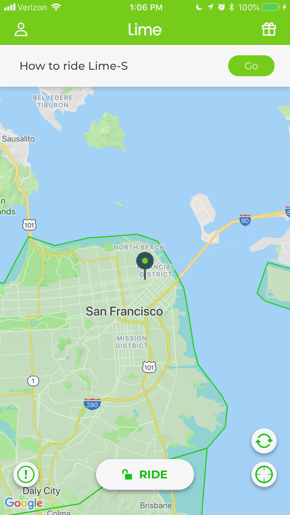
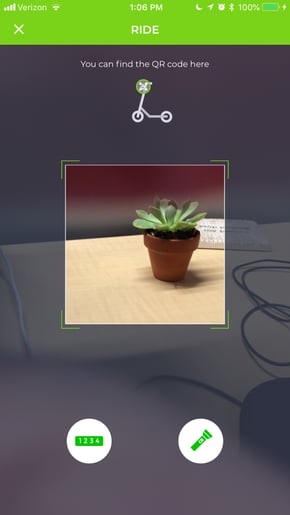
Equally similar to ride-sharing systems like Uber and Lyft, most scooter-sharing also requires an app through which users can unlock a scooter for a ride by scanning a QR code on the handles. Here’s what it looks like on Lime (since Lime-S, its scooter-sharing service, isn’t available in Boston yet, I was obligated to pretend-scan a plant on my desk.)
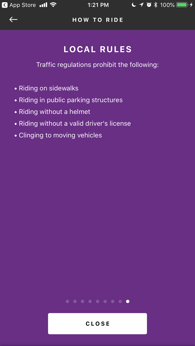
Scooter-sharing companies, at least in San Francisco, are currently stuck in what Megan Rose Dickey of TechCrunch calls “a bit of a legal gray area” — they aren’t fully regulated, though they’ve faced issues in cities like Indianapolis and Honolulu, and the San Francisco Municipal Transportation Agency is looking to create some sort of legislation that would formalize how these companies operate within the city.
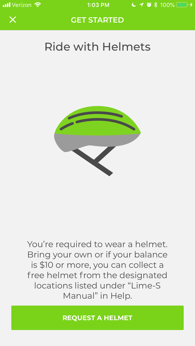
Some companies appear to have rules, however, such as requiring a helmet or a valid driver’s license to operate the scooter, the latter of which is a traffic law. (When I downloaded both Lime and Bird, I wasn’t asked to provide proof of a valid driver’s license, though I also didn’t get to the point of fully unlocking a scooter.)
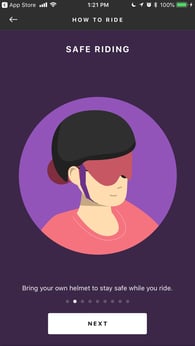
Bird asks users to bring their own helmets, while Lime provides the option to purchase one from the company — though, again, it’s unclear how either verifies that the rider is following that guideline.
The (Un)Awareness of Scooter-Sharing
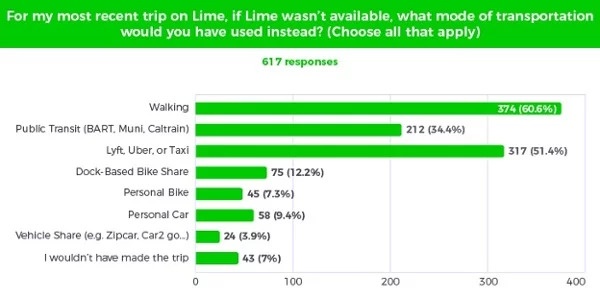
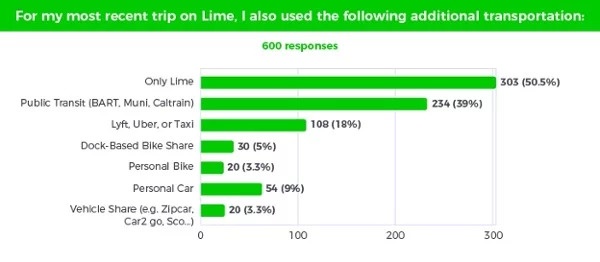
Several arguments have been made in favor of scooter-sharing permeating the market. It’s been advertised as an alternative to automobile use, as Lime’s own data indicates that 60% of users said their Lime-S ride replaced a trip that would have otherwise been by car — personal, rideshare, or taxi.
And while scooter-sharing’s relationship with public transportation is up for debate, it appears as though this newer mode of transportation might complement bus or subway systems. That same data from Lime also indicates 40% of users got to or from public transit stations on one of its scooters.
Source: Lime
It’s worth mentioning that Lime’s survey sample was 7,000 scooter riders in San Francisco — for context, that’s about .08% of the city’s population, which has placed a market cap of 1,250 Lime-S scooters (which 93.8% of the company’s survey respondents said was too few).
But outside of this tech-centric metropolis, what do people think of scooter-sharing? According to our data, most haven’t really heard of it.
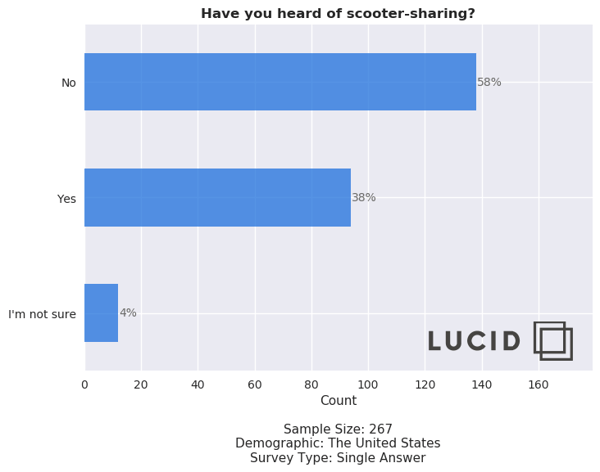
This data raises the question: Can scooter-sharing go mainstream, and if it can, how will it get there?
The Sustainability of Scooter-Sharing
Here’s the thing about ride-sharing systems that use traditional automobiles: They’re complicated.
Lyft, for instance, has communicated an intention of reducing car ownership overall by making its services more widespread. That can have several implications for the environment, city planning, aging populations, and others who drive less for a number of reasons.
But Christina Bonnington of Slate points out a bit of a contraction there: Although “250,000 Lyft users abandoned vehicle ownership in favor of ride-sharing, and half of its users reported driving less frequently now … the company put 520,000 additional drivers on the streets” in 2017.
How good that is for the environment is up for debate.
That’s where the impact of bike- and scooter-sharing programs come in. The scooters run on battery power, eliminating any fossil fuel emissions. As for bicycles — well, they’ve been known as one of the eco-friendliest and healthiest modes of transportation for years.
The same could soon be said of traveling by scooter. Lime, for its part, reports that more than 250,000 trips have been taken on its scooters since its San Francisco launch, which translates to an “offset in airborne pollutants … equivalent to 280,389 lbs CO2 saved.”
And while it might not be a vigorous cardiovascular workout, it could be argued that it’s still healthier than a mode of transportation where the commuter is largely sitting — whether that’s in a car, bus, or subway train.
But just as many emerging transportation trends before it — ride-sharing and autonomous vehicles (the second of which is still in it earliest days) — there are safety concerns to consider alongside the benefits. Scooter riders still need to share the road with cars (riding on sidewalks is discouraged), and as I mentioned earlier, the enforcement of the helmet requirement is ambiguous.
If I had to predict scooter-sharing’s viability, I would specifically point out how, historically, transportation and related safety concerns have evolved. Automobiles, for example, didn’t always have seatbelts. Once upon a time, helmet laws for traditional bike riders didn’t exist. And as for ride-sharing, we’re watching it continue to iron out its kinks in real time.
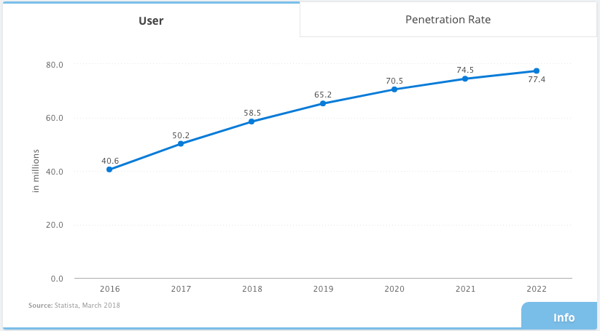
But have a look at the progression of user numbers within the ride-sharing industry since 2016 — and where it’s expected to go by 2022.
Source: Statisa
When Uber first emerged in 2009, it was nearly unheard of — especially on the east coast. There were few drivers. The idea seemed like a radical novelty. And getting a ride took, if I remember correctly, at least 20 minutes before the car arrived.
At present, scooter-sharing appears to be at a similar point. There appears to be some lack of awareness around it, as well as accessibility — the service is in its earliest stages and is only available in a limited number of cities.
Despite this lack of awareness, investors have taken note.
Take Lime, for instance, which recently received a direct investment from Alphabet (Google’s parent company) — which is part of a bigger $300 million funding round. That round also includes GV — Alphabet’s investment arm — which was also an earlier investor in Uber.
Are we seeing a pattern yet?
Whether good or bad, the concept of scooter-sharing raises eyebrows — and could be here to stay. Let’s watch, and see where this new, niche ride takes us.

The Definition of Negative and Positive Feedback Loops in 200 Words or Less
Negative and positive feedback loops are used to draw attention to significant product or company issues. These feedback loops use customer or employee complaints to create long-term product or workplace solutions.
Here, we’ll dive into the definitions of negative and positive feedback loops, and provide examples, so you can ensure your company is using constructive customer and employee feedback to cultivate higher customer retention, and a happier workplace.
Feedback loop definition
A feedback loop is a process in which the outputs of a system are circled back and used as inputs. In business, this refers to the process of using customer or employee feedback (the outputs of a service or product), to create a better product or workplace.
The Definition of a Negative Feedback Loop
A negative feedback loop is a process where a company listens to customers’ complaints or grievances, and then uses that feedback to improve their products or customer service. It’s considered a loop because the customers’ feedback (output) is used as constructive input on a redesign of their product, creating a circle.
The negative feedback loop benefits both businesses and customers — customers feel valued and respected by the business and are more likely to become long-term advocates for the brand, and the business’s design is improved to increase customer satisfaction.
To explore successful negative feedback loops in more depth, let’s take a look at some examples.
Negative Feedback Loop Examples
1. Best Buy
Best Buy, the world’s largest consumer electronics retailer, effectively uses a negative feedback loop to improve their customers’ experience.
In 2010, Best Buy created a research tool, called VOCE (Voice of Consumers Through Employees), and used it to collect customer feedback and complaints.
Steve Wallin, Senior Director of Best Buy’s Consumer Insights Unit, said, “Our ability to listen and learn from our customers in real time allows Best Buy to lead the industry, helping people bridge gaps in selection, service and convenience.”
After they collected customer feedback via VOCE, Best Buy took immediate and drastic steps to improve their service model. Among other things, they streamlined their mobile pickup orders, separated the Customer Service and Geek Squad so customers weren’t confused where to go for which service, and created a “Geek Squad Lounge,” so customers could find one-on-one help before leaving the store.
Ultimately, Best Buy saved money and guesswork by listening to their customers and strategically improving areas their customers cared about most. If, instead of a negative feedback loop, Best Buy used market research, they might not have been as effective in targeting aspects of their service most directly impacting their customers.
2. Trader Joe’s
Trader Joe’s, a grocery chain, ranked in third place in 2017 for the grocery store with the highest customer satisfaction, ahead of Whole Foods. To maintain that high standard of customer satisfaction, Trader Joe’s doesn’t employ traditional customer service methods, like service reps manning phones.
Instead of traditional customer service, Trader Joe’s puts a strong emphasis on in-person interaction between employees and customers. Their retail staff spends most of the day on the floor, interacting with customers and immediately responding to their needs.
Trader Joe’s employees’ attention to human interaction is necessary for impressive customer service. Trader Joe’s often goes above-and-beyond to respond to any negative feedback. For instance, when Marynne Aaronson requested her favorite soy ice cream cookie in their Reno, Nevada branch, they stocked up on it just for her. In Phoenix, Trader Joe’s opened before nine a.m. so the Phoenix customers could shop earlier, when they wanted.
Those one-off experiences aren’t necessarily easily replicable, but they’re hugely influential for creating long-term customers.
The Definition of a Positive Feedback Loop
A positive feedback loop is a process where a company listens to employees’ complaints or grievances, and uses that feedback to improve internal structure and workplace satisfaction. As a result of improved workplace satisfaction, the company is then able to increase their profits. It’s considered a loop because employees’ feedback (output) is used as input on a restructuring of the work culture, creating a circle.
A positive feedback loop, essentially, focuses on employees’ input to make the workplace better — as opposed to a negative feedback loop, which focuses on customers’ input to make the product better.
A positive feedback loop can be a formal or informal process, in which you collect employee feedback on their overall work satisfaction, and respond to that feedback to make your employees’ happier.
A positive feedback loop is essential for your business’s long-term success. Having happier employees is valuable, but not just for employee retention — it’s also critical for your company’s financial success. In an excerpt from Noelle C. Nelson’s book, Make More Money by Making Your Employees Happy, she found stock prices for Fortune’s “100 Best Companies to Work For” rose an average of 14% per year since 1998 — compared to six percent rise since 1998 for the market in general. Ultimately, studies have found employees are willing to invest more time and effort into their work when they are happy at the company.
Positive Feedback Loop Examples
1. Microsoft
In 2014, Microsoft hired a new CEO, Satya Nadella, to deal with Microsoft’s toxic work culture. The high pressure and intense internal competition at Microsoft had turned employees against each other. The employees no longer felt united.
After Satya Nadella was hired, his first major project was restructuring the company to alleviate the competition between departments. To tackle this, he asked every employee to re-focus on three common goals. He outlined these goals in an email sent to his employees, along with his new mission statement for Microsoft’s culture: “Team, I believe that we can do magical things when we come together with a shared mission, clear strategy, and a culture that brings out the best in us individually and collectively.”
Satya Nadella ended his email to Microsoft employees with this remark: “I believe that culture is not static. It evolves every day based on the behaviors of everyone in the organization.”
Nadella used employee feedback to improve internal structure and unify the company. Now, Microsoft doesn’t operate under divided teams with competing goals. Instead, each product falls under one vision, so employees can happily share responsibilities and work together.
2. Southwest Airlines
Southwest Airlines, a U.S airline, first started flying in 1971 — at the time, their vision was “to make flying affordable enough that anyone could fly.”
Katie Coldwell, Director of Communications at Southwest Airlines, said, “Once we achieved this mission, it would have been easy to step back and say, ‘Okay, we’ve done it, we’re done.’ But we didn’t. We kept aspiring for something greater.” In the summer of 2013, Southwest Airlines rolled out a new mission statement: “to become the world’s most loved, most flown, and most profitable airline.”
While it might’ve been easy to remain loyal to their old mission, Coldwell explained it was important for Southwest to outline a deeper purpose in their mission to inspire employees and make them feel like they were making a difference. This is more important than ever — in a 2016 Purpose at Work LinkedIn Global Report, 75% of purpose-oriented professionals reported satisfaction with their jobs, compared to 64% of non-purpose oriented professionals. Additionally, purpose-oriented professionals were more likely than non-purpose oriented professionals to stay at a job for more than three years.
To increase a sense of purpose in the workplace, Coldwell encourages companies to ask their employees, “What is the value you bring to the world?”
Southwest Airlines has been listed on Glassdoor’s Best Places to Work for eight consecutive years, from 2010 to 2018. Their flexibility and openness to change, despite being an older and well-established business, enables them to grow and continually inspire employees.
How to Gather Your Feedback
If you’re ready to use a negative feedback loop to improve your own product or service, take a look at our Customer Feedback Strategy guide. You might choose a survey, an NPS, or a feature request board to collect valuable information from customers — or, depending on your business’s onboarding process, you could collect product feedback when you speak with customers.
If you’re ready to use a positive feedback loop to improve employee satisfaction, consider some of the steps Microsoft or Southwest Airlines took to make their employees happy — perhaps you try collecting feedback via email or department leaders, or adopt anonymous feedback systems like the Employee Net Promoter System (ENPS).
Ultimately, there’s nothing better for your business than happy customers and happy employees, and both of these loops are critical for achieving both.

19 of the Best Email Marketing Campaign Examples We’ve Ever Seen [+ Template]
On any given day, most of our email inboxes are flooded with a barrage of automated email newsletters that do little else besides giving us another task to do on our commutes to work — namely, marking them all as unread without reading, or unsubscribing altogether.
But every now and then, we get a newsletter that’s so good, not only do we read it, but we click it, share it, and recommend it to our friends.

What Makes an Effective Email Marketing Campaign?
Effective email marketing campaigns need to be cleverly written to attract attention in busy inboxes. Here are three things your next email campaign should have.
Personalization and Imagery
Marketing emails also need to be personalized to the reader and filled with interesting graphics. Few people want to read emails that are addressed “Dear Sir/Madam” — as opposed to their first or last name — and even fewer people want to read an email that simply gives them a wall of text. Visuals help your recipients quickly understand what the point of the email is.
Responsive Design
Effective email marketing campaigns are designed for all devices on which users can read their emails — desktop, tablet, and smartphone. Email campaigns that are designed for mobile devices are especially important — a quality known as “responsive design.” In fact, 67% of emails today are read on either a smartphone or tablet.
An Appropriate Call-to-Action
Above all, exceptional marketing emails must contain a meaningful call-to-action (CTA). After all, if brands are taking up subscribers’ time — and inbox space — with another email, every message must have a point to it. Internet users get multiple emails per day — why should they care about yours?
You probably receive enough emails as it is, and it’s tough to know which newsletters are worth subscribing to, so we’ve curated a list of some of our favorite examples. Read on to discover some great email campaign examples and what makes them great — or just skip ahead to the brands you already know and love.
But first, download the planning template you’ll need to craft your own lovable email marketing campaign.
Email Marketing Examples
- charity: water: Donation Progress Update
- Brooks Sports: Desiree Linden’s Boston Marathon Victory
- BuzzFeed: ‘BuzzFeed Today’ Newsletter
- Uber: Calendar Integration
- TheSkimm: Subscription Anniversary
- Mom and Dad Money: Get to Know Your Subscribers
- Poncho: Custom Weather Forecast
- Birchbox: Co-marketing Promotion
- Postmates: New Product
- Dropbox: User Reengagement
- InVision App: Weekly Blog Newsletter
- Warby Parker: Product Renewal
- Cook Smarts: Weekly Product Newsletter
- HireVue: Customer Retention
- Paperless Post: Mother’s Day Promotion
- Stitcher: Recommended for You
- RCN: Storm Update
- Trulia: Moving Trends
- Redbubble: Featured Artist
P.S. – Want to get more out of your email signature? Yes — it’s possible.

1. charity: water
Marketing Campaign: Donation Progress Update
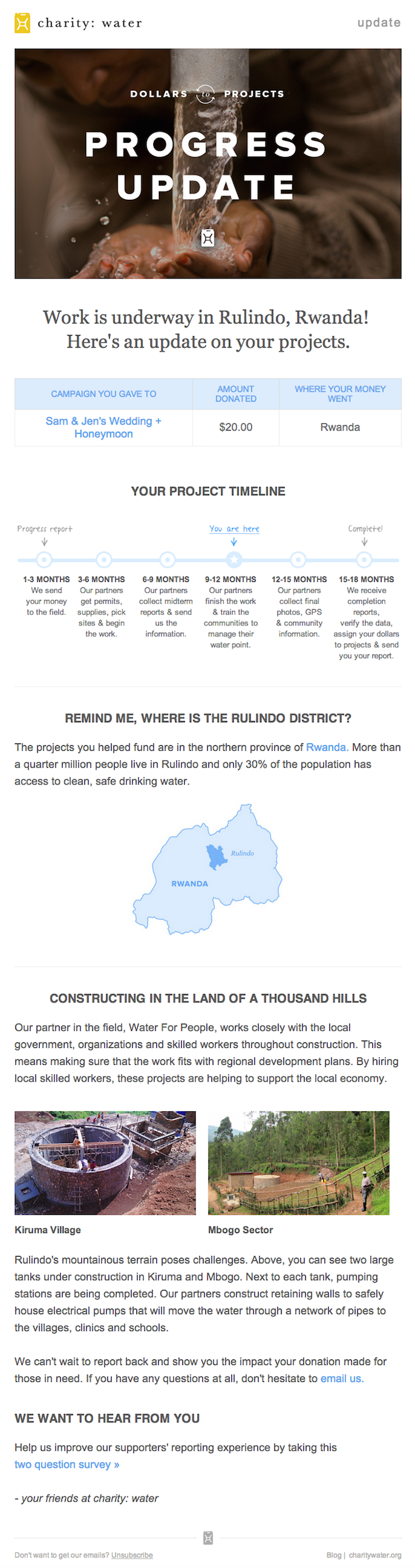
When people talk about email marketing, lots of them forget to mention transactional emails. These are the automated emails you get in your inbox after taking a certain action on a website. This could be anything from filling out a form, to purchasing a product, to updating you on the progress of your order. Often, these are plain text emails that marketers set and forget.
Well, charity: water took an alternate route. Once someone donates to a charity: water project, her money takes a long journey. Most charities don’t tell you about that journey at all — charity: water uses automated emails to show donors how their money is making an impact over time. With the project timeline and accompanying table, you don’t even really need to read the email — you know immediately where you are in the whole process so you can move onto other things in your inbox.
2. Brooks Sports
Marketing Campaign: Desiree Linden’s Boston Marathon Victory
When Desiree Linden won the 2018 Boston Marathon, she became the first American woman to win the race in more than 30 years. To her shoe and apparel sponsor, Brooks Sports, it was an opportunity to celebrate their long partnership together. The resulting email campaign focuses almost entirely on the Olympic marathoner’s amazing accomplishment.
Email campaigns like this one allow companies to demonstrate their loyalties and add value to the products their best users have chosen. The blue CTA button at the bottom of the email reads, “See Desiree’s go-to gear.” What better products to call attention to than the stuff worn by America’s latest legend?
After Desiree’s victory, everyone knew her name. Brooks Sports struck while the iron was hot with a proud email that was sure to be opened and forwarded.

3. BuzzFeed
Marketing Campaign: ‘BuzzFeed Today’ Newsletter
I already have a soft spot for BuzzFeed content (“21 Puppies so Cute You Will Literally Gasp and Then Probably Cry,” anyone?), but that isn’t the only reason I fell in love with its emails.
First of all, BuzzFeed has awesome subject lines and preview text. They are always short and punchy — which fits in perfectly with the rest of BuzzFeed’s content. I especially love how the preview text will accompany the subject line. For example, if the subject line is a question, the preview text is the answer. Or if the subject line is a command (like the one below), the preview text seems like the next logical thought right after it:

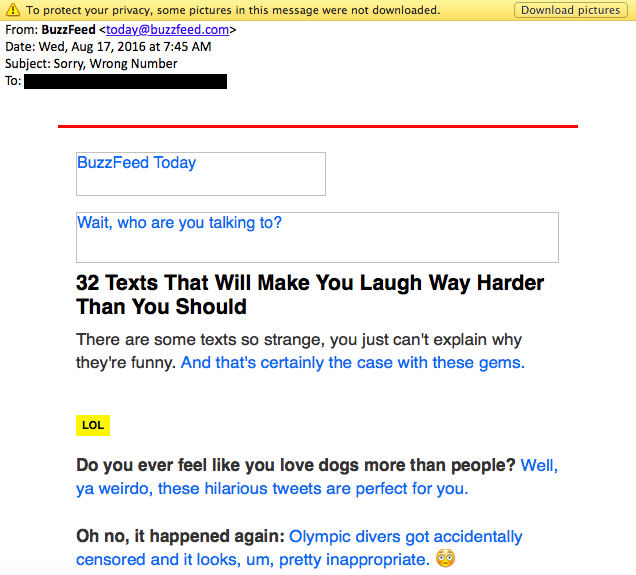
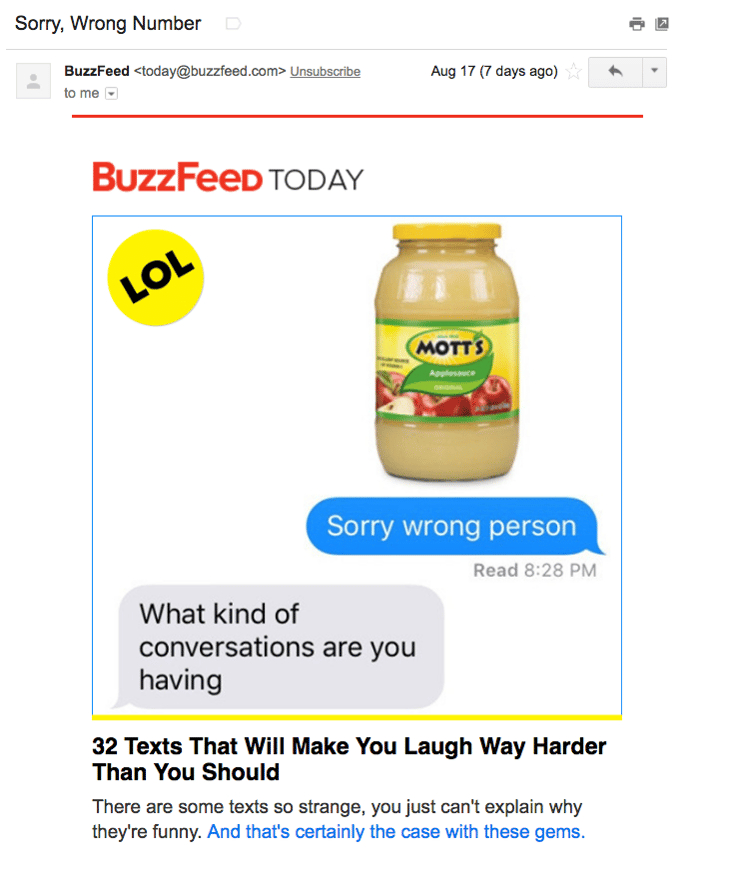
Once you open up an email from BuzzFeed, the copy is equally awesome. Just take a look at that glorious alt text action happening where the images should be. The email still conveys what it is supposed to convey — and looks great — whether you use an image or not. That’s definitely something to admire.
Without images:
With images:
4. Uber
Marketing Campaign: Calendar Integration
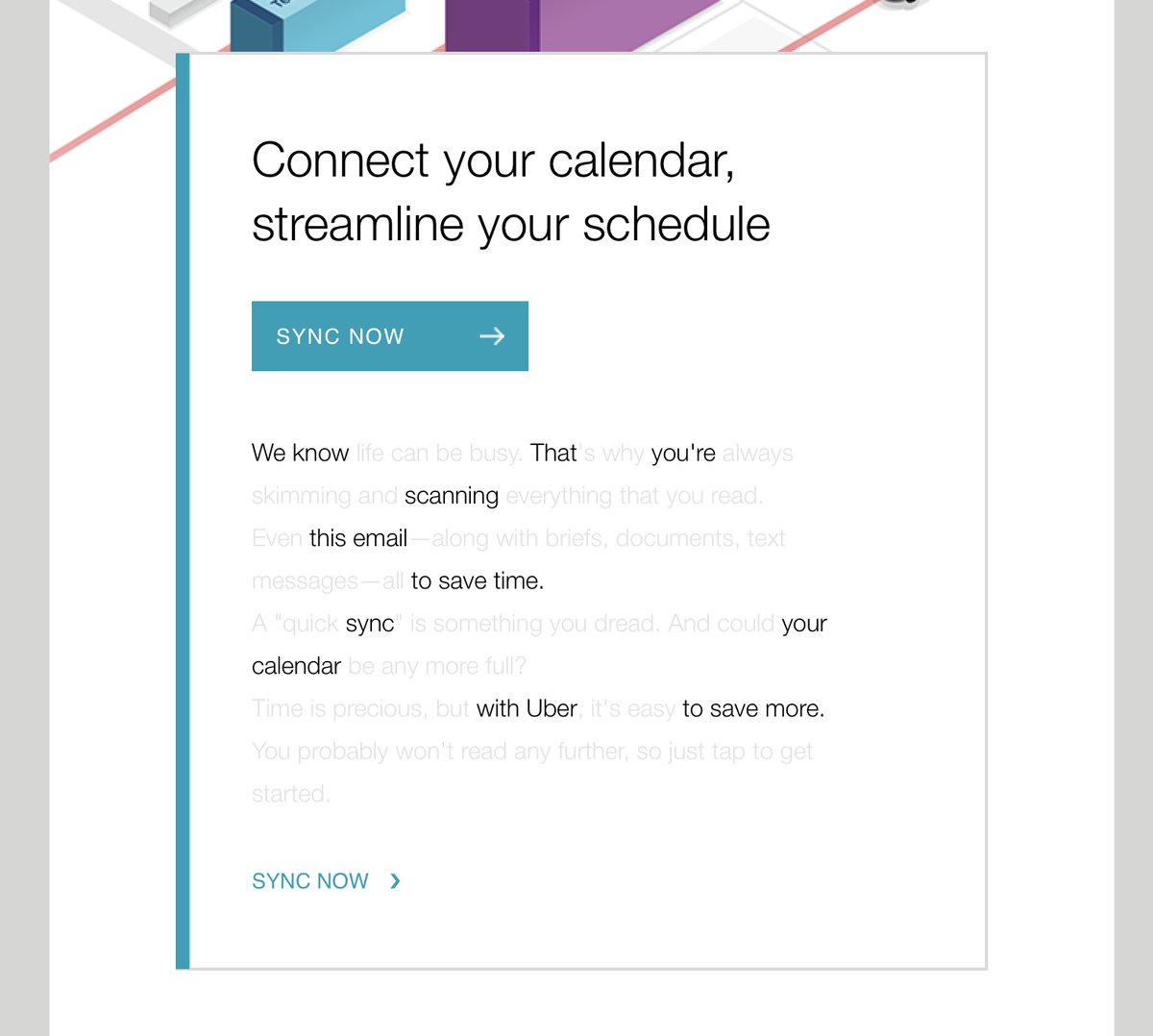
The beauty of Uber‘s emails is in their simplicity. Email subscribers are alerted to deals and promotions with emails like the one you see below. We love how brief the initial description is, paired with a very clear CTA — perfect for subscribers who are quickly skimming the email.
For the people who want to learn more, these are followed by a more detailed (but still pleasingly simple), step-by-step explanation of how the deal works.
We also love how consistent the design of Uber’s emails is with its brand. Like its app, website, social media photos, and other parts of the visual branding, the emails are represented by bright colors and geometric patterns. All of its communications and marketing assets tell the brand’s story — and brand consistency is one tactic Uber’s nailed in order to gain brand loyalty.
Check out the clever copywriting and email design at work in this example:
5. TheSkimm
Marketing Campaign: Subscription Anniversary
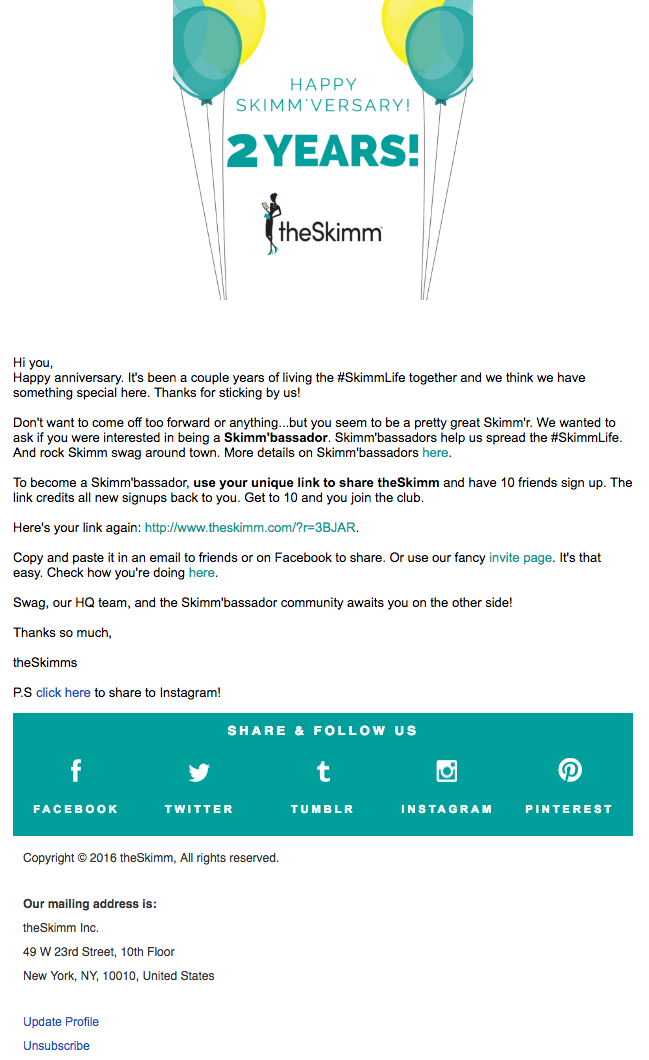
We love TheSkimm’s daily newsletter — especially its clean design and its short, punchy paragraphs. But newsletters aren’t TheSkimm’s only strength when it comes to email. Check out its subscriber engagement email below, which rewarded fellow marketer Ginny Mineo for being subscribed for two years.
Emails triggered by milestones, like anniversaries and birthdays, are fun to get — who doesn’t like to celebrate a special occasion? The beauty of anniversary emails, in particular, is that they don’t require subscribers to input any extra data, and they can work for a variety of senders. Plus, the timeframe can be modified based on the business model.
Here, the folks at TheSkimm took it a step further by asking Mineo if she’d like to earn the title of brand ambassador as a loyal subscriber — which would require her to share the link with ten friends, of course.
6. Mom and Dad Money
Marketing Campaign: Get to Know Your Subscribers
Think you know all about the people who are reading your marketing emails? How much of what you “know” about them is based on assumptions? The strongest buyer personas are based on insights you gather from your actual readership, through surveys, interviews, and so on — in addition to the market research.
That’s exactly what Matt Becker of Mom and Dad Money does — and he does it very, very well.
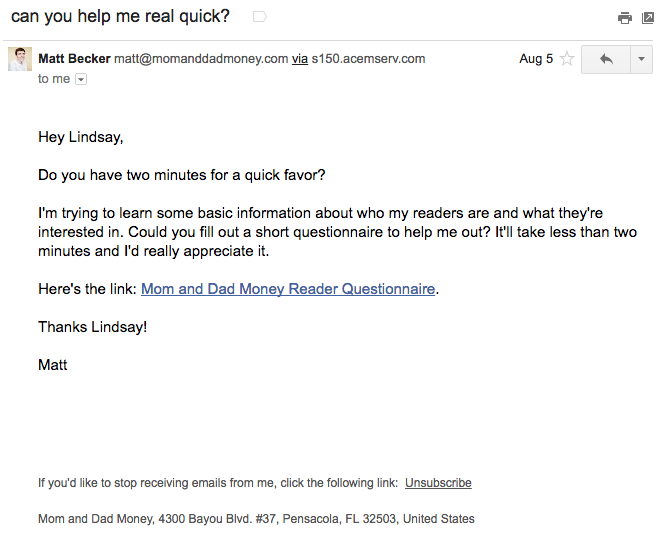
Here’s an example of an email I once received from this brand. Design-wise, it’s nothing special — but that’s the point. It reads just like an email from a friend or colleague asking for a quick favor.
Not only was this initial email great, but his response to my answers was even better: Within a few days of responding to the questionnaire, I received a long and detailed personal email from Matt thanking me for filling out the questionnaire and offering a ton of helpful advice and links to resources specifically catered to my answers. I was very impressed by his business acumen, communication skills, and obvious dedication to his readers.
7. Poncho
Marketing Campaign: Custom Weather Forecast
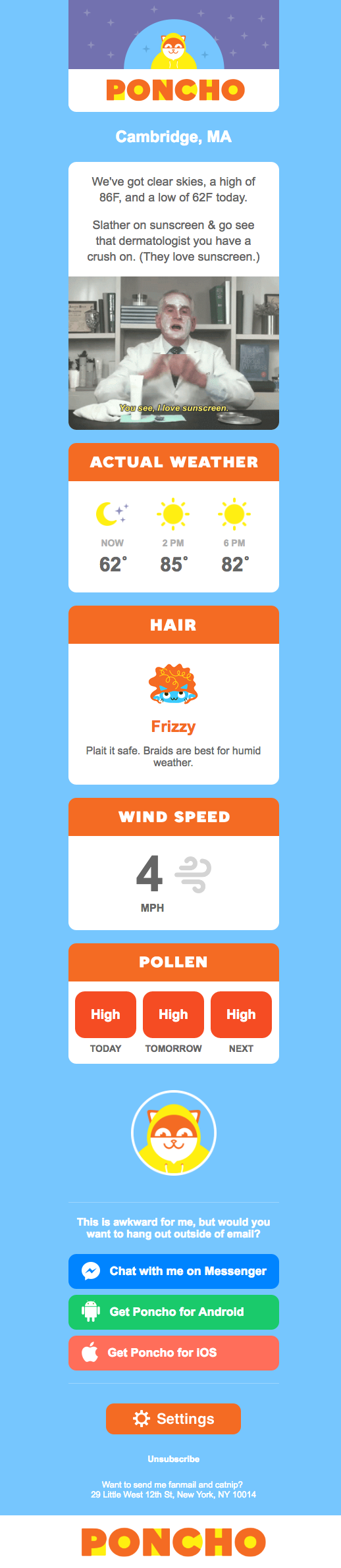
Some of the best emails out there pair super simple design with brief, clever copy. When it comes down to it, daily emails I get from Poncho — which sends me customizable weather forecasts each morning — takes the cake.
Poncho’s emails are colorful, use delightful images and GIFs, and are very easy to scan. The copy is brief but clever with some great puns, and it aligns perfectly with the brand. Check out the copy near the bottom asking to “hang out outside of email.” Hats off to Poncho for using design to better communicate its message.
8. Birchbox
Marketing Campaign: Co-marketing Promotion
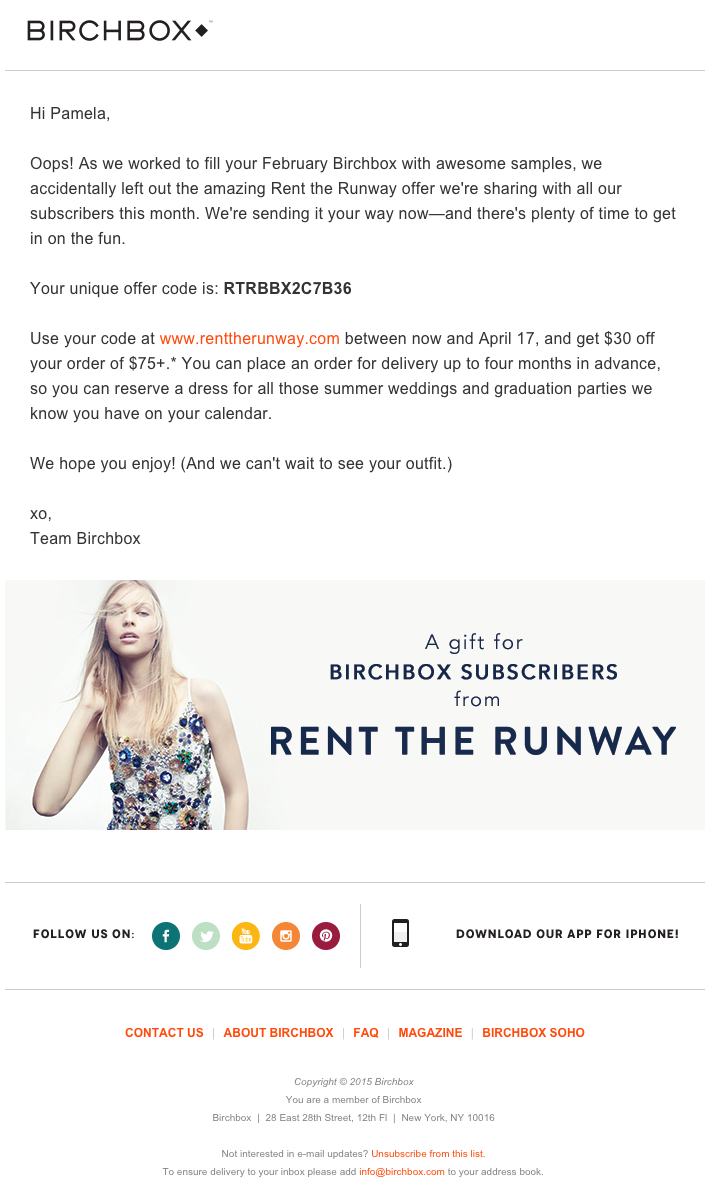
The subject line of this email from beauty product subscription service Birchbox got my colleague Pam Vaughan clicking. It read: “We Forgot Something in Your February Box!” Of course, if you read the email copy below, Birchbox didn’t actually forget to put that discount code in her box — but it was certainly a clever way to get her attention.
As it turned out, the discount code was actually a bonus promo for Rent the Runway, a dress rental company that likely fits the interest profile of most Birchbox customers — which certainly didn’t disappoint. That’s a great co-marketing partnership right there.
9. Postmates
Marketing Campaign: New Product
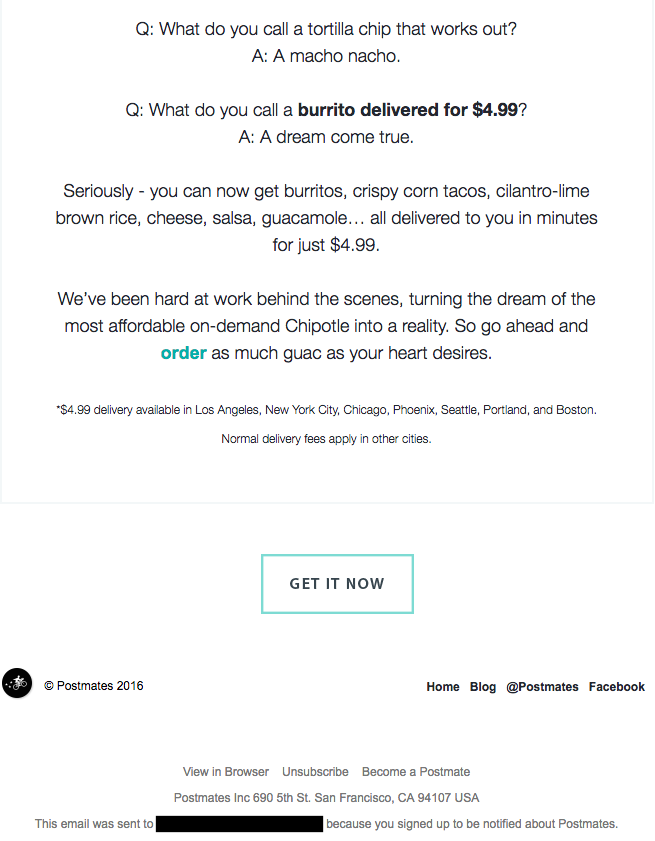
I have to say, I’m a sucker for GIFs. They’re easy to consume, they catch your eye, and they have an emotional impact — like the fun GIF in one of Postmates‘ emails that’s not only delightful to watch, but also makes you crave some delicious Chipotle.
You, too, can use animated GIFs in your marketing to show a fun header, draw people’s eyes to a certain part of the email, or display your products and services in action.

10. Dropbox
Marketing Campaign: User Reengagement
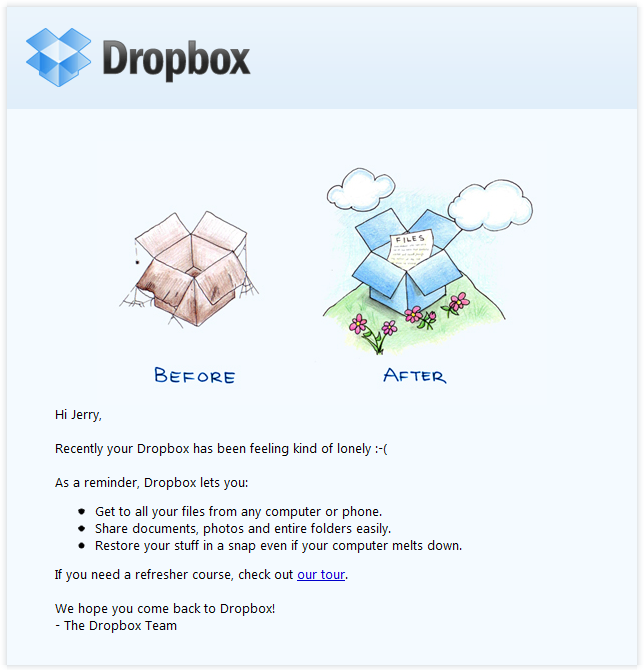
You might think it’d be hard to love an email from a company whose product you haven’t been using. But Dropbox found a way to make its “come back to us!” email cute and funny, thanks to a pair of whimsical cartoons and an emoticon.
Plus, the email was kept short and sweet, to emphasize the message that Dropox didn’t want to intrude — it just wants to remind the recipient that the brand exists, and why it could be helpful. When sending these types of email, you might include an incentive for recipients to come back to using your service, like a limited-time coupon.
11. InVision App
Marketing Campaign: Weekly Blog Newsletter
Every week, the folks at InVision send a roundup of their best blog content, their favorite design links from the week, and a new opportunity to win a free t-shirt. (Seriously. They give away a new design every week.) They also sometimes have fun survey questions where they crowdsource for their blog. This week’s, for example, asked subscribers what they would do if the internet didn’t exist.
Not only is InVision’s newsletter a great mix of content, but I also love the nice balance between images and text, making it really easy to read and mobile-friendly — which is especially important, because its newsletters are so long. (Below is just an excerpt, but you can read through the full email here.) We like the clever copy on the call-to-action (CTA) buttons, too.

12. Warby Parker
Marketing Campaign: Product Renewal
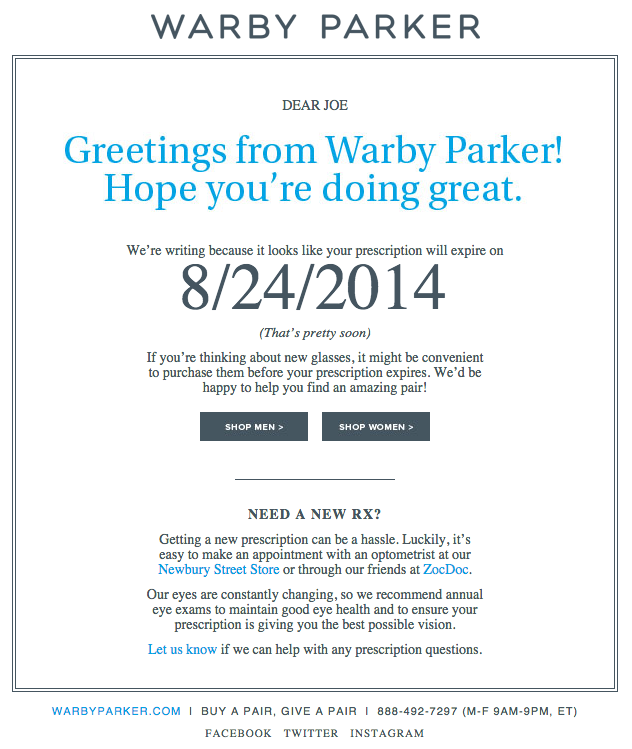
What goes better with a new prescription than a new pair of glasses? The folks at Warby Parker made that connection very clear in their email to a friend of mine back in 2014. It’s an older email, but it’s such a good example of personalized email marketing that I had to include it in here.
The subject line was: “Uh-oh, your prescription is expiring.” What a clever email trigger. And you’ve gotta love the reminder that your prescription needs updating.
Speaking of which, check out the clever co-marketing at the bottom of the email: If you don’t know where to go to renew your subscription, the information for an optometrist is right in the email. Now there’s no excuse not to shop for new glasses!
13. Cook Smarts
Marketing Campaign: Weekly Product Newsletter
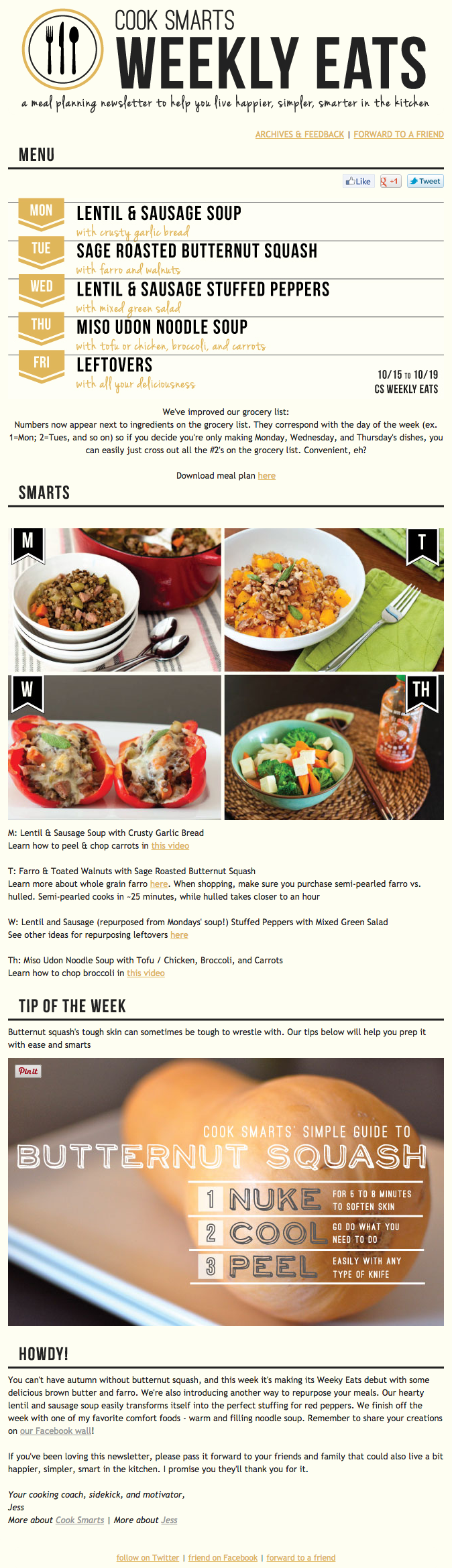
I’ve been a huge fan of Cook Smarts‘ “Weekly Eats” newsletter for a while. The company sends yummy recipes in the form of a meal plan to my inbox every week. But I didn’t just include it because of its delicious recipes — I’m truly a fan of its emails.
I especially love the layout of Cook Smarts’ emails: Each message features three distinct sections: one for the menu, one for kitchen how-to’s, and one for the tips. That means you don’t have to go hunting to find the most interesting part of its blog posts — you know exactly where to look after an email or two.
I also love Cook Smarts’ “Forward to a Friend” CTA in the top-right of the email. Emails are super shareable over — you guessed it — email, so you should also think about reminding your subscribers to forward your emails to friends, family, or coworkers.
14. HireVue
Marketing Campaign: Customer Retention
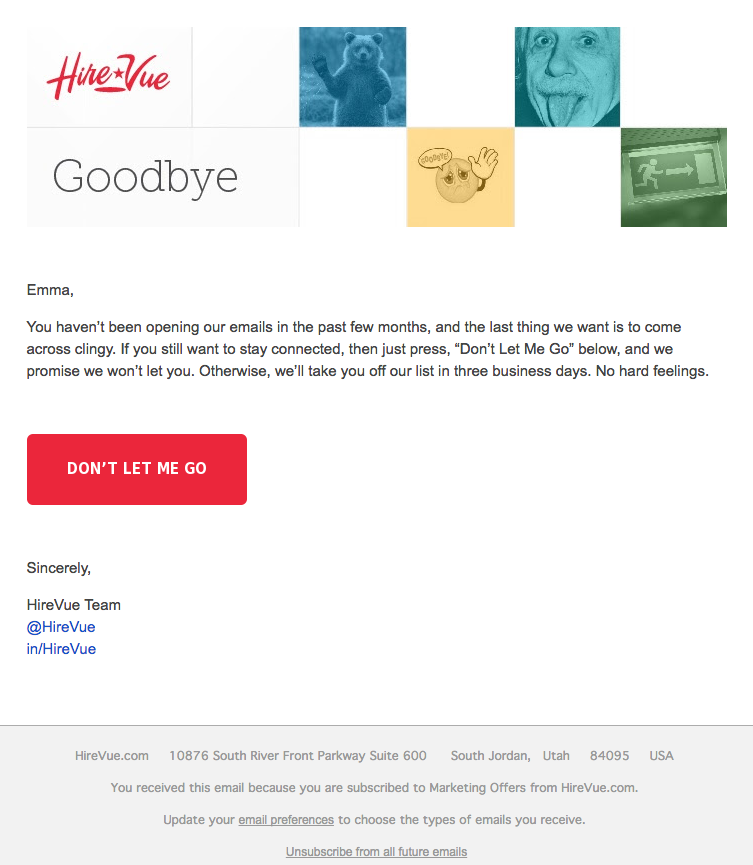
“Saying goodbye is never easy to do… So, we thought we’d give you a chance to rethink things.” That was the subject of this automated unsubscribe email from HireVue. We love the simple, guilt-free messaging here, from the funny header images to the great CTA button copy.
Not only are the design and copy here top-notch, but we applaud the folks at HireVue for sending automated unsubscribe emails in the first place. It’s smart to purge your subscriber lists of folks who aren’t opening your email lists, because low open rates can seriously hurt email deliverability.
15. Paperless Post
Marketing Campaign: Mother’s Day Promotion
When you think of “holiday email marketing,” your mind might jump straight to Christmas, but there are other holidays sprinkled throughout the rest of the year that you can create campaigns around. (Download these email marketing planning templates to keep yourself organized throughout the year.)
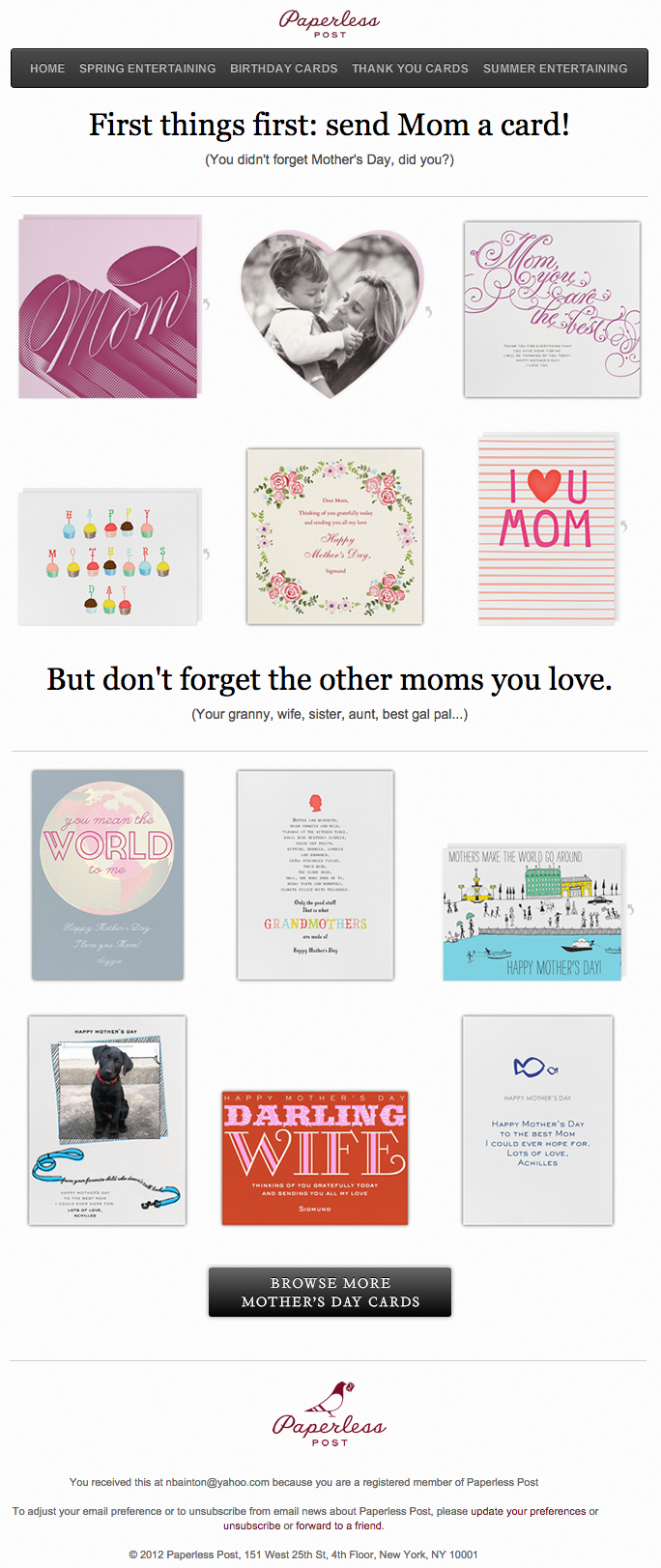
Take the email below from Paperless Post, for example. I love the header of this email: It provides a clear CTA that includes a sense of urgency. Then, the subheader asks a question that forces recipients to think to themselves, “Wait, when is Mother’s Day again? Did I buy Mom a card?” Below this copy, the simple grid design is both easy to scan and quite visually appealing. Each card picture is a CTA in and of itself — click on any one of them, and you’ll be taken to a purchase page.
16. Stitcher
Marketing Campaign: Recommended for You
As humans, we tend to crave personalized experiences. So when emails appear to be created especially for you, you feel special — you’re not just getting what everyone else is getting. You might even feel like the company sending you the email knows you in some way, and that it cares about your preferences and making you happy.
That’s why I love on-demand podcast/radio show app Stitcher‘s “Recommended For You” emails. I tend to listen to episodes from the same podcast instead of branching out to new ones. But Stitcher wants me to discover (and subscribe to) all the other awesome content it has — and I probably wouldn’t without this encouragement.
I think this email also makes quite a brilliant use of responsive design. The colors are bright, and it’s not too hard to scroll and click — notice the CTAs are large enough for me to hit with my thumbs. Also, the mobile email actually has features that make sense for recipients who are on their mobile device. Check out the CTA at the bottom of the email, for example: The “Open Stitcher Radio” button prompts the app to open on your phone.

17. RCN
Marketing Campaign: Storm Update
Internet providers and bad weather are natural enemies. You’d think telecommunications companies wouldn’t want to call attention to the one thing that sets off their customers’ impatience. Then, there’s RCN.
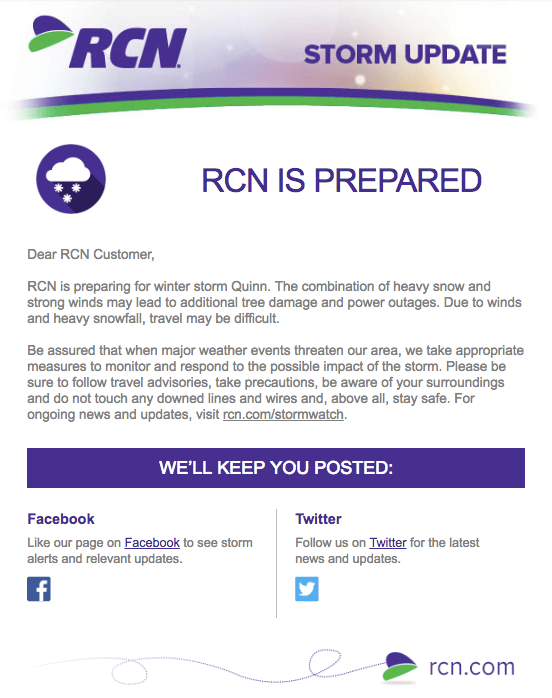
RCN, a cable and wireless internet service, turned this email marketing campaign into a weather forecast just for its customers. This “storm update” got the company out ahead of an event that threatened its service, while allowing its users to get the weather updates they need right from the company they count on for Wi-Fi.
As you can see below, the email even advises personal safety — a nice touch of care to go with the promise of responsive service. At the bottom of the email, RCN also took the opportunity to highlight its social media channels, which the company appropriately uses to keep users informed of network outages.
18. Trulia
Marketing Campaign: Moving Trends
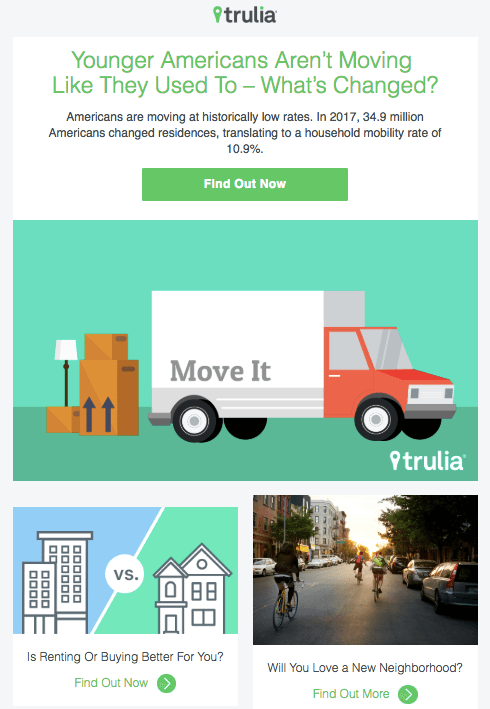
I’m a huge advocate of thought leadership. To me, some of the best companies gain customer loyalty by becoming the go-to source for expertise on a given topic. Trulia — a property search engine for buyers, sellers, and renters — is that expert in the real estate biz. How do I know? Just read their emails, much like the one below.
“Why aren’t millennials moving?” The subject line of this email campaign reads before citing interesting data about relocation trends in the U.S. Trulia doesn’t benefit from people who choose not to move, but the company does benefit from having its fingers on the pulse of the industry — and showing it cares which way the real estate winds are blowing.
19. Redbubble
Marketing Campaign: Featured Artist
This email marketing campaign crushes it, and for so many reasons.
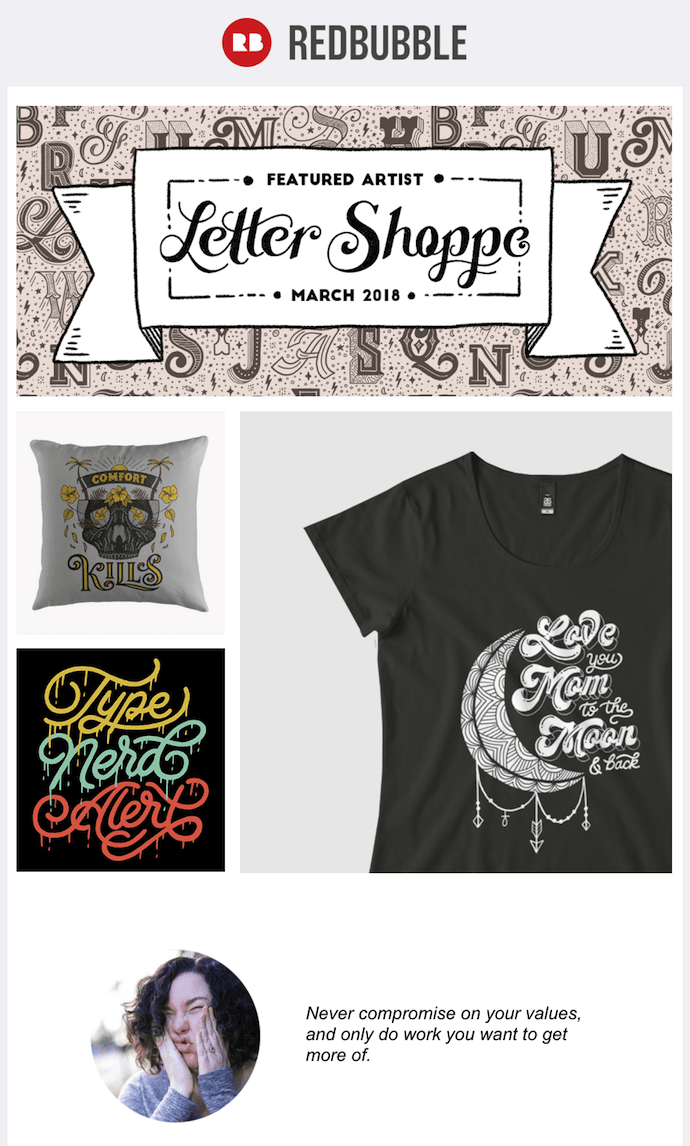
Not only is the design below super eye-catching — without looking cluttered — but the artwork is user-made. Redbubble sells merchandise featuring designs from artists all over the world. This presents a golden opportunity to feature popular submissions across the Redbubble community.
The example below features artwork from “Letter Shoppe,” and when that artist sees Redbubble featuring her content, she’s more likely to forward it to friends and colleagues.
In addition to linking to Letter Shoppe’s designs (available on merchandise that is ultimately sold by Redbubble), the email campaign includes an endearing quote by the Featured Artist: “Never compromise on your values, and only do work you want to get more of.” Redbubble’s customers are likely to agree — and open other emails in this campaign for more inspiring quotes.
These are just some of our favorite emails. Don’t just follow best practice when it comes to your marketing emails. Every email you send from your work email address also can be optimized to convert. Try out our free email signature generator now, and check out some more of our favorite HubSpot marketing email examples.

YouTube Analytics: The 15 Metrics That Actually Matter
Some marketers might have an unhealthy obsession with metrics — they track too many of them. Maybe we think we can prove any marketing campaign is producing results if there’s a eye-catching percentage by its name. But, deep down, we all know that some metrics are more revealing than others.
There are a ton of KPIs that provide minimal insights. Fortunately, though, we created this guide to help you navigate YouTube Analytics and measure the metrics that actually matter. It’ll save you from drowning in the sea of analytics that most marketers only have a lifebuoy in, helping you not only stay afloat, but swim safely to land.
Read on to learn about the YouTube metrics that actually matter, and how they’ll enhance your video strategy.
YouTube Analytics: The 15 Metrics That Actually Matter
1. Watch Time
Watch time is the total amount of minutes viewers have spent watching your videos. It’s a key metric because YouTube elevates videos and channels with higher watch times in their search results and recommendations section. YouTube does this because the more watch time a video has, the more engaging their algorithm presumes it is.
In the watch time report, you can see the amount of watch time your videos have accumulated. You can also rank each of your videos by watch time and group your videos by themes, styles, and lengths to determine your most engaging types of videos.
2. Average Percentage Viewed
Average percentage viewed is the percent of each video the average viewer watched. It measures your video’s ability to hold viewers’ attention for its entirety. And when YouTube realizes your videos can hold people’s attention, they’ll reward it with higher search and recommendation rankings. You can find this metric in your watch time report.
3. Average View Duration
Average view duration is the total watch time of your video divided by the total number of video plays, including replays. This metric measures your video’s ability to engage viewers. If your video can’t engage viewers, they’ll bounce from your video quickly, leaving you with an unimpressive average view duration. But if your video can engage viewers, your average view duration and total watch time will increase at the same time, boosting your search and recommendations rankings. You can also find this metric in your watch time report.
4. Audience Retention
Audience retention shows you the percentage of viewers who watch and leave your video at every single moment of the video. YouTube elevates videos with high audience retention in their search rankings and suggestions because these videos can effectively capture viewers’ attention.
Audience retention can also inform your future video strategy. The most engaging parts of your video could be your next best video topics. And watching your video during steep dips of engagement will tell you what might be boring your viewers, allowing you to scrap those elements from current and future videos.
In YouTube’s audience retention report, there will be two graphs: the absolute retention curve and relative retention curve. The absolute retention curve shows you how well your videos retain viewers. And the relative retention shows you how well one of your videos retains viewers compared to all other YouTube videos of similar length.

Image Credit: YouTube
5. Re-watches
Re-watches are the amount of times viewers re-watch certain parts of your video. If a lot of people are re-watching a specific part of your video, then they’re probably interested in the topic your video is covering during that moment. These topics can be fodder for your future video strategy. You can find this data in the absolute audience retention graph. Re-watches are usually indicated by rising curves in the graph.

Image Credit: YouTube
6. Engagement
Comments, shares, likes, and dislikes provides marketers with a lot of valuable qualitative data.
Comments can paint a clear picture of your video’s emotional effect on viewers. Shares can gauge how much viewers value your content and brand — since people share content that confirms their ideal self-persona, people who share your video are publicly displaying that they trust and support your brand. Likes and dislikes can help you determine what video topics work best with your particular audience. You can find your videos’ engagement metrics in YouTube’s Interactions Report.
7. Impressions Click-Through Rate
Impressions click-through rate measures your video’s ability to prompt people to watch your video after seeing it on their homepage, recommendation section, or trending section. A high click-through rate means your title was compelling and your video’s topic resonates with a lot of relevant audiences on YouTube.
A common trend for impression click-through rates is that they usually spike immediately after you release your video — your subscribers will see the video at the top of their home page and probably click on it. But once your video spreads beyond your core audience, your click-through rate will decline and then stay at a stable rate.
You can also couple this metric with average percentage viewed and average view duration to see if people actually watch your video after they click on it. A high click-through rate is great, but if people are leaving right at the beginning of your video, your title or thumbnail could be misleading. Preparing viewers for what’s to come is crucial because if your title or thumbnail is inaccurate, they’ll feel deceived and lose trust in your brand.
A low click-through rate but high engagement could mean that the video has a small yet specific audience that is enamored by the content. Go to the Analytics tab in YouTube Studio to examine this metric.

Image Credit: YouTube
8. Card Click-Through-Rate
Cards are slide-in panels that encourage people to take a desired action during a video like watch another video, subscribe to a channel, or click through to a different website. Each of your cards’ click-through rate tells you which action your viewers prefer to take while watching your videos. This can help you place the most engaging card in each of your videos, potentially boosting your watch time, subscriber growth, or website traffic.
Analyzing card click-through rates can also help you uncover the optimal timing, placement, and duration of your cards in future videos. You can find your cards’ click-through rates in the Cards Report.

Image Credit: YouTube
9. Playlist Engagement
Playlists are a great way to organize your videos in a digestible way. It helps your viewers easily consume videos about their favorite topics and prompts them to keep watching, which racks up watch time for your channel.
You can uncover your playlist engagement by analyzing two metrics in YouTube’s Playlist Report: views per playlist start and average time in playlist. Views per playlist start is the average number of video views your playlists gather, and average time in playlist is the average amount of time that viewers viewed the videos in your playlist. If these two metrics are underperforming, try starting your playlist with videos that have the highest retention rate.
10. Unique Viewers
Unique viewers is the estimated number of individuals who watch your videos over a certain period of time. This metric really helps you understand the actual size of your audience.
You can also use this metric to gauge your subscriber’s engagement with your videos. If your unique viewers are lower than your subscriber count, then your subscribers aren’t watching as much of your video as they could be. To get them to be more active, ask them to set up notifications for your new videos. You can find this metric under the Reach Views and Audience tab in YouTube Studio.
11. Views Per Unique Viewers
Views per unique viewers is the amount of times the average viewer watches your video. This metric tells you if people can’t get enough of your video and keep rewatching it. Video topics with a lot of views per unique viewers could also be your most popular content topics, and if you cover them more, you could generate more views, watch time, and subscribers.

Image Credit: YouTube
12. Who’s Watching Your Videos
In YouTube’s demographics report, you can see the different types of people who watch your videos, segmented by age, gender, and geography. This data tells you who your most engaged audience is and who your target audience should actually be. You can take the opposite approach with this data too. If you’re not reaching the audience you want, try pivoting your video strategy and cover topics that would attract them.

Image Credit: YouTube
13. Subscriber Growth
Subscribers are your most loyal fans. They’ve made a public commitment to your brand, content, and values. And they’re most likely to be your evangelists too. Subscribers are also important to your channel because YouTube will send them notifications about your new videos and feature them on their homepage. This means they’ll see your videos more frequently, which’ll help generate more views. Subscribers also watch twice as much video than non-subscribers, so the more subscribers you have, the more watch time your videos will collect.
YouTube’s Subscribers Report will show you which videos, locations, and time periods gain and lose subscribers. This data will tell you what video topics resonate with your subscribers and where to target new subscribers. And by prioritizing your subscribers’ needs, you’ll create videos that they crave, increase your watch time, and boost your search rankings.
14. Traffic Sources
External referrals like social media or sites that embed your videos and YouTube referrals like search, the recommended section, and the homepage are all traffic sources. The Traffic Sources report shows you how viewers found your videos and what sources rack up the most views and watch time. You can use this data to better optimize your video promotion strategy.

Image Credit: YouTube
15. Keywords
In YouTube’s Search Report, which is under the Traffic Sources Report, you can see the most popular queries guiding viewers to your videos. If these queries are slightly different than your video’s topic, consider updating your video to fill these content gaps and add the keywords to your metadata. If there’s a stark difference, consider making a new video about these popular queries.

The 1-Minute Guide to Making Google Your Homepage
When you ask someone a question nowadays and they don’t know the answer, you almost always know what they’ll say — “Just Google it.” With over 3.5 billion searches a day, Google’s typically your entry-point for anything you need to do on the web, so I’m not surprised you want to change your homepage to Google.
Having the world’s number one search engine as your homepage is undoubtedly helpful. Who wouldn’t want everything from dinner recipes to news stories a mere keyboard tap away?
If you want to make Google your homepage, here’s how to do it in a minute or less.
How do I make Google my homepage?
- Open your Chrome browser and click the three-dot icon in the top right corner. Then select “Settings”.
- Under “Appearance”, find “Show home button”. If it’s disabled, slide the button to the right.
- With the indicator now blue, you’re free to select the button beside “Enter custom web address” (below “New Tab page”). In the line beside it, type “www.google.com”.
How to Make Google Your Homepage on Firefox
1. Open your Firefox browser, and search “www.google.com.”
2. Hold the “Google” tab down, and drag it onto the home icon.

3. A “Set Home Page” message will pop up — click the blue “Yes” button.

How to Make Google Your Homepage on Chrome
1. Open your Chrome browser, and click the three-dot icon in the top right corner. Then select “Settings”.

2. Under “Appearance”, find “Show home button”. If it’s disabled (you’ll know if it’s grey), slide the button to the right.
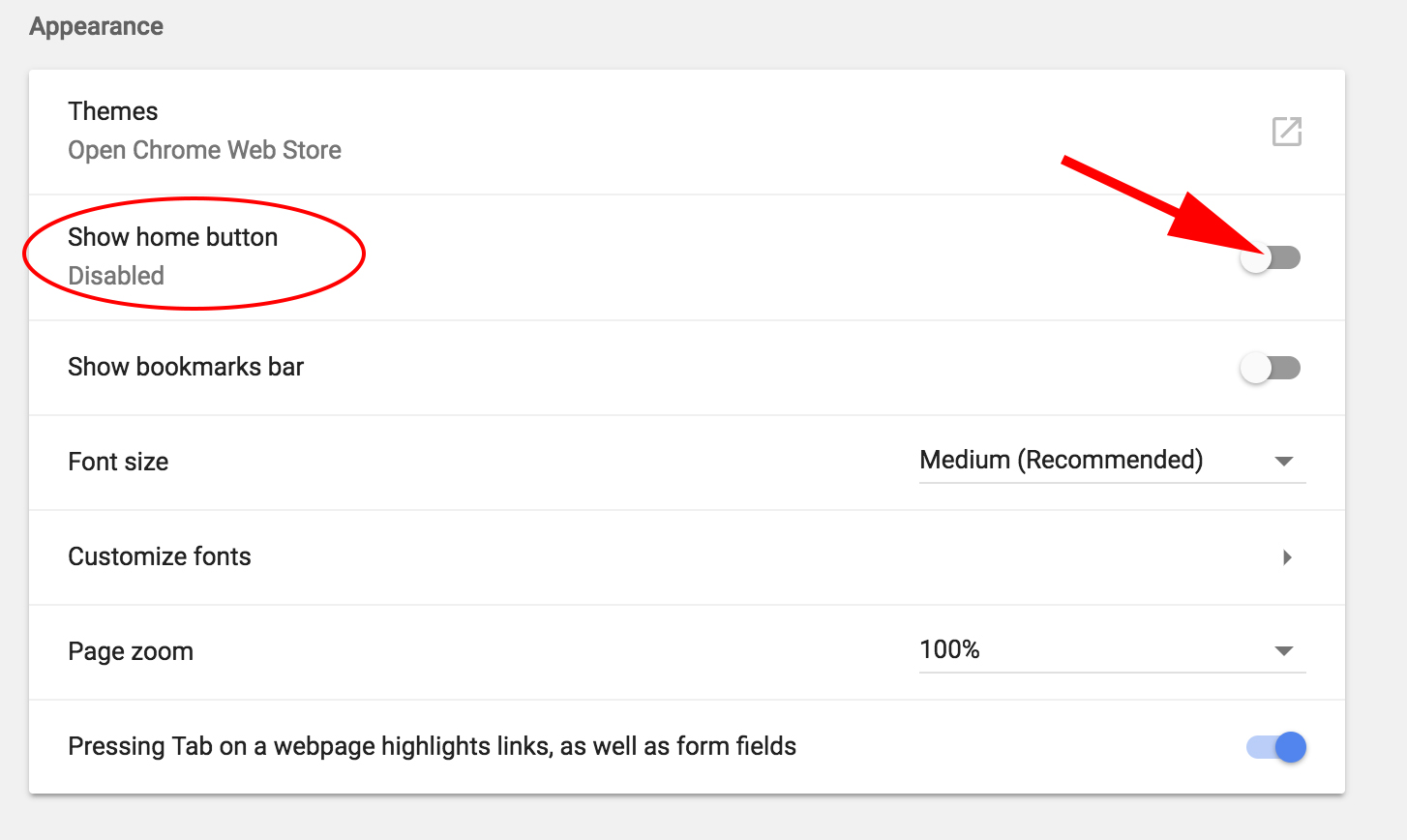
3. With the indicator now blue, you’re free to select the button beside “Enter custom web address” (below “New Tab page”). In the line beside it, type “www.google.com”.

How to Make Google Your Homepage on Safari
1. Open your Safari browser, click “Safari” on the navigation bar, and select “Preferences … ”.
2. Go to your “General” tab.
3. Where it says “Homepage:”, fill in the box with “www.google.com”. Then click the “Set to Current Page” button.
4. Click “Change Homepage” in the pop-up.