
Here’s What Playing With a VR Headset Is Actually Like
Virtual reality (VR) is one of those technologies, it seems, that will be eternally “emerging.”
Don’t get me wrong — it’s certainly becoming more of a household topic. Twenty years ago, one might only come across VR in museums, science fairs, and laboratories. Now, they’re available for purchase by anyone who has an internet connection … and the budget to pay for one.
Several major tech players are trying to make VR a mainstream technology. Maybe the hardware needs to be less clunky and a wireless, lightweight headset is the answer.
Or maybe the obstacle is price point — to which Facebook’s answer (to both issues) was the wireless, $199 “affordable” Oculus Go.
Truthfully, I’ve always been a bit skeptical of VR. I remember being quite fascinated with it at a west coast science museum at the age of 13, and since then, my only real exposure to it has been by way of any VR-related news I’ve covered, or different demos I’ve tried at industry events. Even after receiving a complimentary Oculus Go as a token of thank-you swag for attending F8 in May, the headset sat on my desk, neglected an unopened for over a month.
I’m in the small percentage of people who talk about technology on a near-daily basis — and yet, I was less than enamored with the idea of giving my very own Oculus Go for a spin.
But then — I did. And everything changed.
Because I’m a nerd, I’ve always wondered what prevents VR from becoming a mainstream technology as quickly as some of the businesses behind it wish it would. People have paid more for less practical tech tools — things like the first edition of any new iPhone, for instance, for which masses are willing to pay the initial price.
So, at the end of the day, maybe VR isn’t as practical — but it is plain cool. You can watch documentaries in an immersive, 360-degree way. You can play sports. You can visit other countries.
Maybe — just maybe — what’s standing in the way of VR’s market permeation is the small percentage of people who actually get to experience it.
To test this hypothesis, I passed around my Oculus Go to several members of my team. After spending a day engaging in various VR experiences — and accomplishing little else — here’s what we learned.
(P.S. Here’s a sneak preview of a short film I like to call, “Amanda Tries a VR Roller Coaster.”)
Here’s What Playing With a VR Headset Is Actually Like
On VR’s Market Permeability
Before we took the headset for a spin, I asked Paul Mealy, author of Virtual & Augmented Reality For Dummies, for his thoughts on VR’s potential — if any — to go mainstream. But that’s not easy, he said, considering that “mainstream” is often a subjective concept.
If “mainstream” means “millions of devices purchased,” Mealy explains, “then VR is already mainstream” — though that figure still falls short of Facebook (which owns Oculus) CEO Mark Zuckerberg’s ultimate goal of one billion people using VR … eventually.
But what will the composition of those one billion users look like? Will they be using VR for fun, business, or both?
“If the definition of mainstream is, ‘Will I find myself going to the office and donning a VR headset for all my work, and going home and putting on my VR headset for all my entertainment,'” says Mealy, “then we still have a ways to go.”
Arguably, the “fun” use cases for VR are growing more rapidly than the B2B ones — though the latter is slowly making progress. Take the example of Tobii Pro, a tech company that pairs VR with eye-tracking technology to help retailers learn where a shopper pays the most visual attention and plan store layout accordingly. I took it for a spin at SXSW in March:
“Very similar to an in-store shop-along or in-depth interview research, this is another tool that can be added on top of that,” said Amanda Bentley, Tobii Pro’s Director Of Commercial Sales (whose voice can be heard in the background of the video above). “You can get another layer of understanding not only how shoppers feel … but also, what information do they actually process? What are they attending to as they’re making the decision to purchase products?”
But, it’s early, Mealy says — and it’s not a question of “if” VR will go mainstream, but “when.”
“It is important that we take a step back and look at the full picture for VR. Most VR hardware is still in the first generation of devices,” he explains. “And these first generation devices are serving as the canary in the coal mine to manufacturers, helping them refine what consumers actually want in order to become a mass-consumable device.”
So, when will VR finally win over the masses?
“Three to five years out seems like an appropriate time to truly evaluate where VR is landing in the grand scheme of things,” Mealy says. “If, by then, manufacturers have still been unable to solve the price and experience points … that is the time to question VR’s future. But, as of now, consider me bullish on the future of VR.”
Our Team’s Experience
Now, for the fun part: our team taking VR for a spin.
For most of us, this experiment was the first instance of using VR — which made for low expectations as to how realistic, engaging, or nauseating the experience would be. (In full disclosure, I experience motion sickness with VR, and apparently, I’m not alone.)
But for the most part, the technology was well-received … and, perhaps, even more fun to watch than to actually experience.
Caroline Forsey, Staff Writer, HubSpot Marketing Blog
The experience:
The video:
The summary:
“VR is different than watching something on a screen, because it’s all around you … and behind you, and in your peripheral vision. Despite how ‘logically’ smart I am at understanding what VR is, I still think it can trick my brain into somewhat believing I’ in a different place. For instance, when the bear came towards me I couldn’t help but flinch. It’s bizarre but impressive that a piece of technology can influence your physiological reactions.”
Clifford Chi, Junior Staff Writer, HubSpot Marketing Blog
The experience:
The video:
The summary:
“VR mini golf was better than real mini golf. That was my first VR experience, and I felt like I was in a different world. After my first putt, I tried to walk toward the ball. I ended up running into a pillar in the office. And when I looked down at my feet and saw that the golf course was on a cliff, I thought I was going to fall for a split second. The Oculus and VR are super realistic and impressive. I definitely want to try it again.”
Braden Becker, Senior Staff Writer, HubSpot Marketing Blog
The experience:
The video:
The summary:
“I was really surprised how easily VR takes over your peripheral vision. The experience literally surrounds you, to the point where I actually felt like I was on a roller coaster. I’m also not the biggest fan of heights, and that particular Oculus Go game definitely played right into my senses.”
Karla Cook, Section Editor, HubSpot Marketing Blog
The experience:
The video:
The summary:
“The environment was clearly not realistic, but it still felt like I was there. The whole experience was surprisingly disorienting. I was playing mini-golf on a platform floating in the clouds, and I dangled my leg off the platform, and freaked out. The process of using the remote to interact with the environment didn’t feel intuitive to me. It’s worth trying out for the novelty factor, but I definitely wouldn’t buy it.”

Personalized Calls to Action Perform 202% Better Than Basic CTAs [New Data]
This article was written just for you.
From the moment you log in to Facebook, to the shows recommended to you on Netflix, to the questions you have for Google, the content you most enjoy online was customized and served up to you for a reason. We’ve seen this behavior on Amazon for a long time, where we get products we personally love shown directly to us.
Your visitors expect the same personalized experience on your own website — and in your calls-to-action (CTAs) as well.
In this post, we’ll cover new data on calls-to-action and how tailored CTAs perform compared to their counterparts. (Hint: the perform way better.) Let’s dive in.

Personalized Calls to Action Convert 202% Better
For this study, I analyzed more than 330,000 CTAs. There are three primary types of CTAs I looked at in this post:
- Basic CTA — This is a call-to-action that does not change based on any attributes of the visitor. It’s the same for every visitor that sees it.
- Multivariate CTA — These are similar to Basic CTAs, but instead, there are two or more CTAs being tested against one another. Traffic is typically split evenly to each variation and then you can select a winner based on which CTA converts better.
- Smart CTA — These are CTAs that are tailored to an individual. There can be numerous ways CTAs like this adapt to a visitor, such as their location, browser language, whether their already a customer or a lead, and much more.
With the types of CTAs now in mind, I compared 330,000 CTAs over a six-month timeframe to see which option was the best. It’s clear what the winner is: personalized CTAs convert 202% better than default versions. See the graph below.
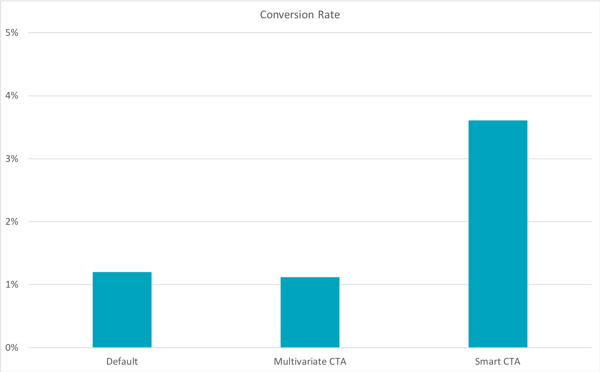
Digging a layer deeper, we break down the data between CTAs that in simple button form, versus those that are using clickable image CTAs. As the below data shows, personalized CTAs that appear as buttons perform far better than images.
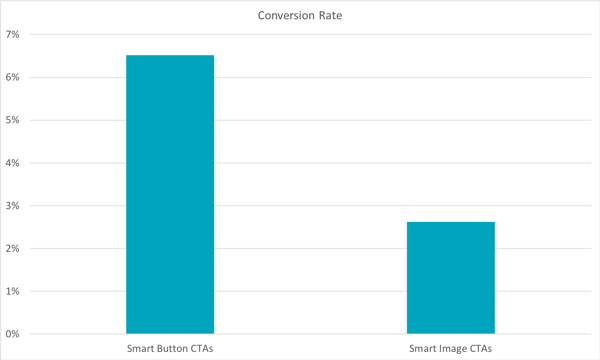
Looking at this one more way, I wanted to see if button-based CTAs converted better than images regardless of the type of CTA. As you can see from the chart below, it’s clear that buttons dramatically outperform their image counterparts.
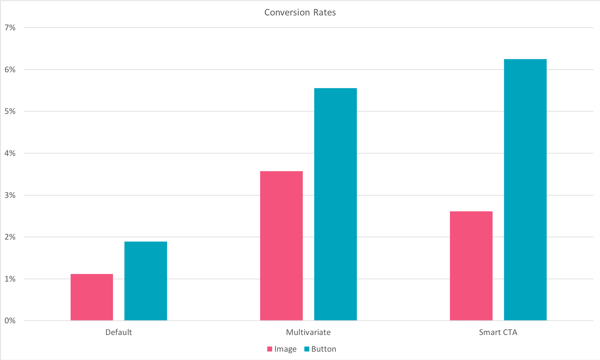
In combing through the data, I also found that a number of Smart CTAs have conversion rates far above the average. There are numerous CTAs that have 25-45% conversion rates across thousands of views and clicks.
An Example of a Smart CTA in Action
Why do these personalized, “smart” CTAs perform so much better than basic CTAs? Because you’re serving them content that reflects their current level of interest and knowledge on the subject.
Blog posts and web pages might cater to multiple audiences at the same time, but if they all have the same CTA on them regardless of who’s reading, you’re neglecting various portions of your audience — those people who are either too advanced for what you’re offering, or aren’t advanced enough to need it yet. Smart CTAs accommodate for these differences across the buyer’s journey.
At HubSpot, we try to use smart CTAs on every blog post, and across the entire buyer’s journey. For example, for a visitor who has not interacted with HubSpot and is interested in solutions to lead generation, we will show a CTA to HubSpot Academy where they can learn about inbound marketing. For existing leads, we’ll show them a separate CTA offering a free tool — in this case, free HubSpot Forms.
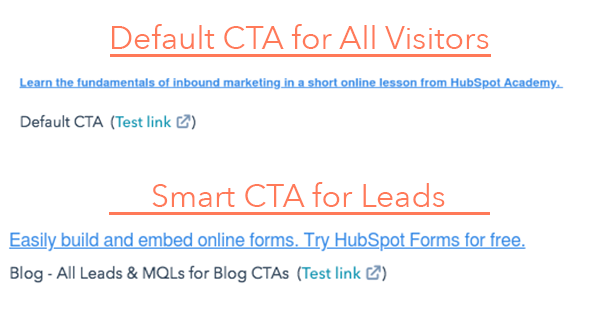 Now that we know smart CTAs work, and have seen an example, let’s talk about how to actually design and build them.
How to Design Your Own Personalized Calls-to-Action
Now that we’ve seen the data on how personalized CTAs outperform other CTAs across the board, let’s talk about designing some. We’ve built 50 free customizable templates in PowerPoint that you can download and start using.
1. Choose How to Personalize Your CTA
Before you design and build your CTA, you’ll want to determine which audience you’re targeting and how you’ll be targeting them. To start, determine what level of targeting is possible using your CMS. Then, figure out how to break down each version of this CTA as your audience consumes more or your content.
One example of a smart CTA could simply be targeting a CTA for visitors, and have a separate version for leads. The more tailored and relevant you can get with your CTA, the better. But it depends on the data you have, what you know about your audience, and what’s possible with the tools you’re using.
For a moment, let’s pretend I own a real estate business called Inbound Real Estate. In this example, I could start to tailor one of my CTAs like this:
- Visitor CTA: 5-Step Guide to Researching Apartments
- Lead CTA: Apartment Hunting Consultation
2. Open PowerPoint
Once you have the PowerPoint template open, select a CTA you would like to use. Based on how different types of CTAs perform — per the bar graphs above — I’m going to use a button for this example.
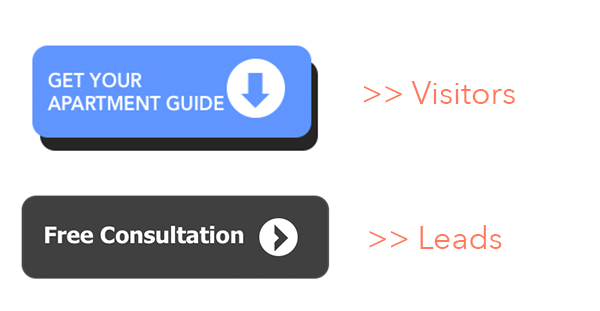
3. Write Relevant Copy for your CTA
If you’re using an image-based CTA, or a button, you’ll need to write action-oriented copy. Remember, you’re creating this button just for this audience segment — at a specific point in their journey. They need to see something valuable that they can take with them to the next stage of their journey (where, ideally, they’ll see a different CTA to nurture their continued interest in the topic).
Just using text “Submit” won’t help your conversion rates, either. Many visitors avoid clicking if the click prompt is too generic. Instead, make the action valuable and personable so they are more likely to click on it. Phrases like “Find out how,” “Get it here,” or “Sign up now” will better reflect the asset you’re offering, and generate more interest in clicking through.
4. Save & Upload your CTA
If you’re designing and building your CTAs in PowerPoint — make sure you save the file so you don’t lose your work. Once that’s done, right-click and “Save as Picture” so you can easily upload it into your CMS.
If your design has a lot of color, shapes, or images, make sure to compress the images using a service like TinyPNG as well.
5. Link The CTA to The Proper Page
Now that you’re done building your CTA and it’s uploaded, make sure to add it to your page and link it to the correct destination. Also, you likely want to know how many people click on the link, so ensure you set up campaign tracking in the solution you use.
CTA Type & Placement
At HubSpot, we’ve found text-based CTAs within blog posts, like in the image above, convert better. Generally, this text CTA is within the top third of the post, and then accompanied by a separate CTA at the bottom. This pairing has dramatically increased conversions from blog content.
I would recommend using a button-based CTA first, and secondarily an image-based CTA.
Regardless of the page into which you’re incorporating a smart CTA, ensure that the content on the page is clear, educates the visitors, and encourages them to take action. A tailored CTA can greatly increase conversions, but your page content needs to be relevant and audience-oriented as well.
If you already use HubSpot, you can skip using PowerPoint, and easily design and build your CTA within the Marketing Hub for easy insertion into any page content in just one click. All the tracking and implementation is taken care of for you.
If you’re interested in trying out the Marketing Hub and see how easily it is to create CTAs, start a free 30-day trial to take it for a spin.

Google Doc Resume Templates
Creating a resume from scratch can be a pain, particularly when you have limited design experience and your resume doesn’t extend beyond Times New Roman 1-inch margins in terms of flair.
You want your resume to appear professional, but you also don’t need it to look exactly the same as every other resume in the stack.
Fortunately, you don’t need to attempt any tricks you learned in a Photoshop 101 class to create a sleek and attention-grabbing resume.
Google Docs offers five templates with impressive design elements to help you portray a level of professionalism and originality in your resume. Even if you have the design all set, these templates provide formatting inspiration and fill-in-the-blank sections to ensure you don’t forget critical information, like your address or prior awards.
Take a look at these five Google Doc resume templates to choose one best suited for your desired role, or to get some inspiration before designing your own.
1. Swiss
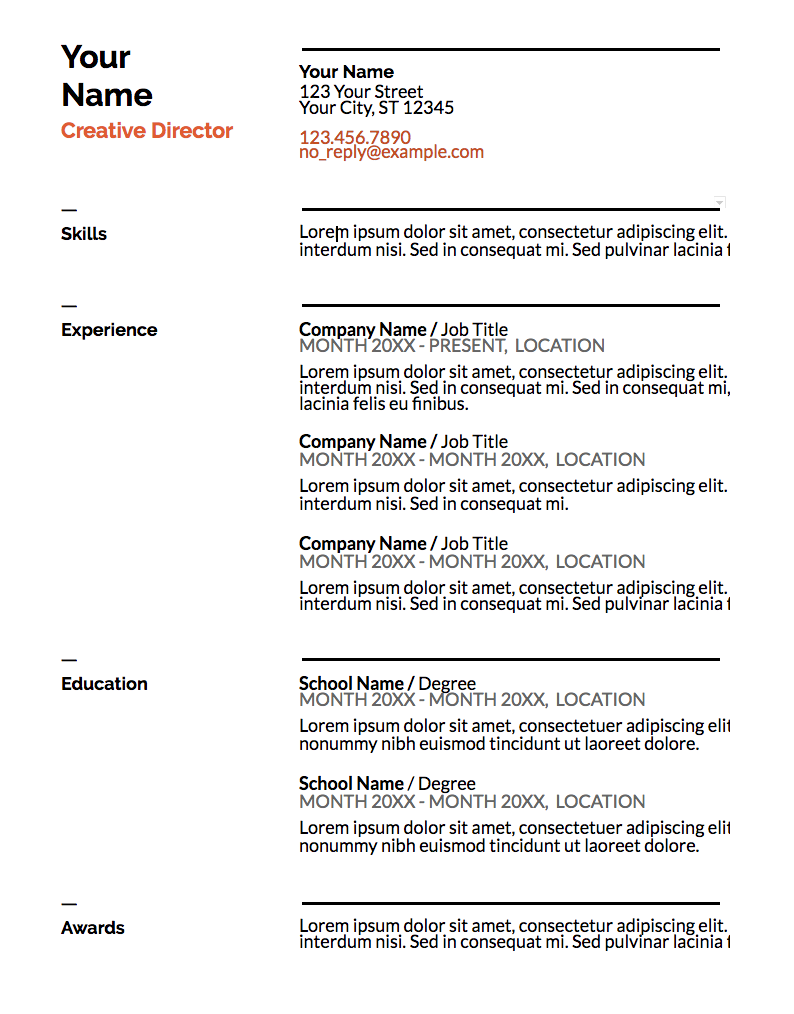
The Swiss resume template is mostly traditional in style, but the color and bold lines make it appear more modern and impressive. The dark lines above and below each segment organize your sections effectively, and the small lines above each section title add some unique style. The simple color, right below your name, suggests you’re someone who pays attention to detail. This template is a solid option if you need a resume for a conservative role but also want to showcase some personality.
2. Serif
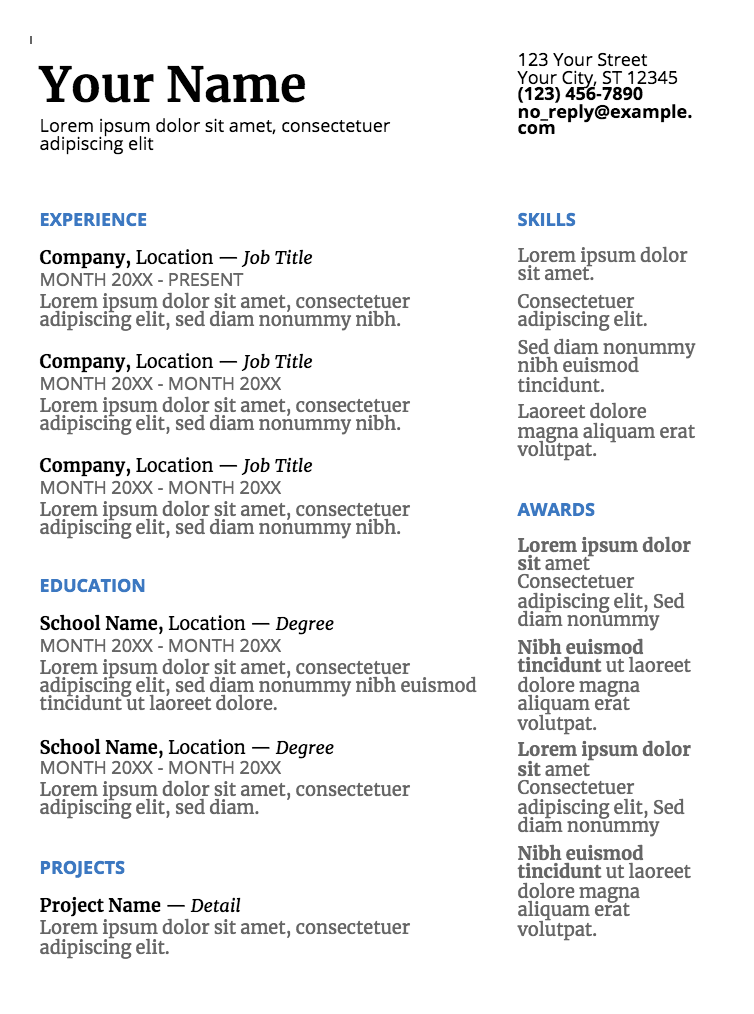
The colors used for each headline, and the two parallel columns with plenty of white space in between, suggest that you’re someone who’s organized and creative. This resume template is a good option for high school or recent college graduates with less work experience, since the template provides categories to showcase accolades and accomplishments outside the workplace.
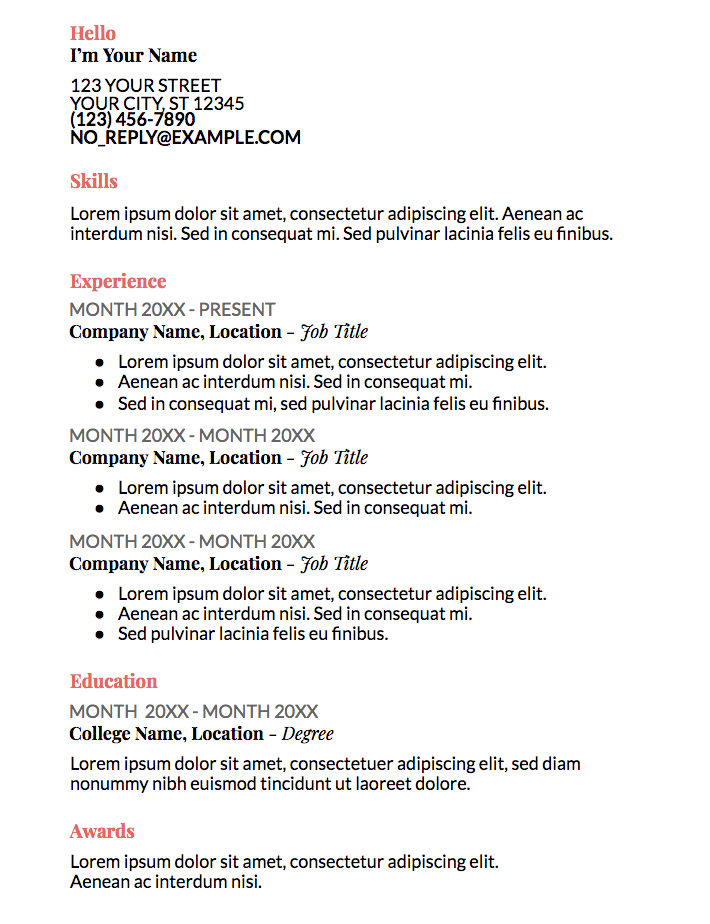
3. Coral
The color used in the coral template isn’t overbearing or immature, but still spices up an otherwise basic resume. The formatting, with all the information left-indented in one column, looks clean and straightforward. This option is ideal if you’re applying for a corporate job but still want to seem fresh and unique.
4. Spearmint
With the bold green line at the top of the page, this template conveys someone who’s spirited and artistic. The consistency of the title colors is appealing and polished. Spearmint is a fantastic option for anyone who’s applying for a creative role, such as a web designer or creative director.

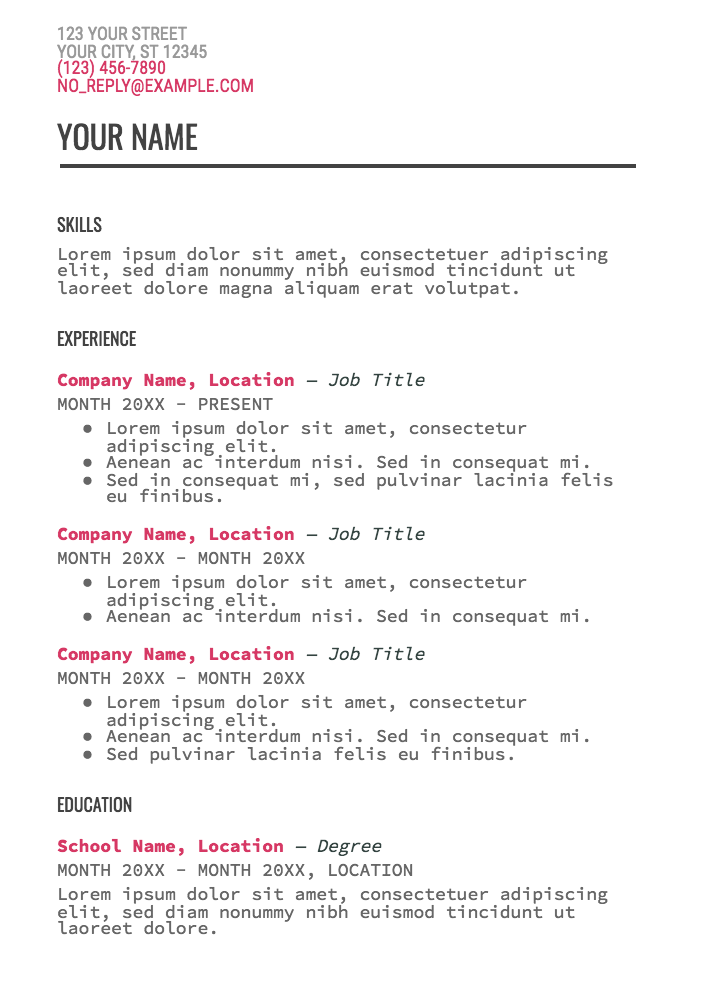
5. Modern Writer
You’ll only want to choose the statement-making Modern Writer as your template if you’ve got a good reason for it — for instance, if you’re applying for a web developer role, the font (which looks a bit like code) makes sense. The bold pink and Source Code Pro font are less ideal for a traditional role, but Modern Writer is a good option if you’re applying for a role that applauds uniqueness.

Email Marketing Best Practices: How to Send Emails Your Subscribers Will Love
This is a guest post written by Jamie Turner, founder of the 60 Second Marketer. He is an in-demand marketing speaker and author of the book entitled Go Mobile with Jeanne Hopkins, former VP of marketing at HubSpot.
While email marketing may not get the attention some newer marketing channels get, it’s still a terrific way for you to generate leads and convert more prospects for your business. With that in mind, I want to share some email marketing best practices you can use to generate more leads for your business.

Email Marketing Best Practices of 2018
- Don’t Purchase Contact Lists
- Use Incentives to Increase Open Rates
- Avoid Using ‘No-Reply’ in the Sender’s Email Address
- Stick to Fewer Than Three Typefaces
- Clean Your Mailing List Regularly
- Keep the Main Message and Call-to-Action Above the Fold
- Personalize the Email Greeting
- Keep Your Email 500-650 Pixels Wide
- Put Your Logo in the Upper Left-Hand Side of the Email
- Write Compelling (But Concise) Subject Lines
- Use Auto-Responders for Opt-Ins
- Closely Tie Emails to Landing Pages
- Conduct a Five-Second Test
1. Don’t Purchase Contact Lists
This first tip should come as no surprise, but given the recent rollout of the General Data Protection Regulation (GDPR), it bears repeating. Email campaigns depend on a healthy open rate, and if you’re contacting people whose information you bought — rather than earned from a previous interaction — you’ll quickly see your emails’ performance drop.
The GDPR also requires each European recipient’s consent before you reach out to them, and purchased email lists usually do not come with that consent.
2. Use Incentives to Increase Open Rates
When you include an incentive in your subject line, you can increase open rates by as much as 50%. “Free shipping when you spend $25 or more” and “Receive a free iPod with demo” are examples of good, incentive-focused subject lines.
However, be careful not to overwhelm your readers with savings- or product-related emails. Customer loyalty starts with casual industry insights — only then can you talk business.
3. Avoid Using ‘No-Reply’ in the Sender’s Email Address
Have you heard of CAN-SPAM? This longstanding piece of legislation is a popular and important guideline for all email marketers in the U.S. — and still many companies are trying to comply with it. One major rule in CAN-SPAM is to never use the words “no reply,” or a similar phrase, as your email sender’s name (for example, “noreply@yourcompany.com”).
“No reply” in an email message prevents recipients from responding and even opting out of further emails, which CAN-SPAN protects their right to do at any time. Instead, have even your automated emails come from a first name (for example, jamie@mycompany.com). Your customers are much more likely to open emails if they know they were written by a human being.
4. Stick to Fewer Than Three Typefaces
The less clutter you have in your email, the more conversions you’ll experience. Don’t junk up your email with more than two, or a maximum of three, fonts or typefaces.
5. Clean Your Mailing List Regularly
Some of your email contacts might not opt-out of your email campaign, but still never open your emails. It’s tempting to email as many people as possible to reach more prospects, but keeping your least-engaged recipients on your mailing list can kill your open rate. People who never open emails make your campaign look worse since you’re not analyzing the campaign’s quality against your most loyal recipients.
Analyze who hasn’t engaged with your emails over a certain period of time, and remove them on a regular basis. This gives you a more accurate email open rate and keeps your email campaign clean of the people who are no longer interested in hearing from you.
6. Keep the Main Message and Call-to-Action Above the Fold
If your main call-to-action (CTA) falls below the fold, as many as 70% of recipients won’t see it. Also, any CTA should be repeated at least three times throughout the email in various places and formats.
7. Personalize the Email Greeting
How often do you read emails that begin, “Dear Member”?
You might segment your email audiences by the type of customer they are (member, subscriber, user, etc.), but it shouldn’t be the first thing recipients see in your company messages. Personalizing the greeting of your emails with your contacts’ first names grabs the attention of each reader right away.
Don’t worry, personalizing an email’s greeting line with 50 recipients’ names doesn’t mean you’ll have to manually write and send 50 different emails from now on. Many email marketing tools today allow you to configure the greeting of your email campaign so that it automatically sends with the name of the people on your contact list — so everyone is getting a personal version of the same message.
8. Keep Your Email 500-650 Pixels Wide
If your email template is wider than 650 pixels, you’re asking users to scroll horizontally to read your entire message. This is even more cumbersome for a recipient who’s reading your email on his or her mobile device. Your email pixel width is a critical component of its lead-capturing ability.
9. Put Your Logo in the Upper Left-Hand Side of the Email
Eye-tracking studies have found that people instinctively look for logos in the upper left-hand side of emails. Put your logo in the upper left-hand side to ensure it gets the most visibility.
10. Write Compelling (But Concise) Subject Lines
A good subject line should contain between 30 and 50 characters (including spaces). Email accounts and mobile devices often cut off any subject lines that go beyond this length. Your email subject line should also create a sense of urgency, while giving readers some indication of what to expect once they open the email.
11. Use Auto-Responders for Opt-Ins
Be prepared for your readers to forget they opted in. Set up an auto-responder that reminds people they opted in to your email database. The auto-responder should be sent out one day, five days, and 10 days after the person registers.
Each auto-responder email should also include additional content or bonus material to reward the reader for opting into the newsletter — or your readers might not feel they have enough incentive to actually opt in.
12. Closely Tie Emails to Landing Pages
Your landing page should match the email in terms of headline, copy, and content. The look and feel of your landing page should also match the email — consistency goes a long way toward a customer’s trust in the content they’re receiving.
Just make sure you’re using tracking tools to see which emails and landing pages performed the best so you can keep sending what’s working.
13. Conduct a Five-Second Test
Send a copy of the email to a friend or business associate. Can they quickly tell what your call-to-action is? If so, you’re golden. If not, keep working.
There are a lot of new tools at a marketer’s disposal that are getting attention these days. But email marketing has stood the test of time regarding its influence on your users. This old, reliable, and faithful tool can really ensure you get the most out of your marketing initiatives.

Here’s Exactly How We Got 105k+ People Using Our Chatbot
It’s not impossible for humans and even a lot of software to do exactly what chatbots do.
It’s how bots do it that matters.
When we work alongside bots, they make life easier. They help us do things faster and with more efficiency. They give us more time to do “human stuff” — and do it even better.
Bots don’t have to be as ubiquitous as searching the web. That’s not the point.
Bots do have to carve out a space as a different but equal resource that takes humans where they want to go more easily than ever before.
Chatbots can and will change business and marketing as we know it, if given a fighting chance.
But right now, they must win over naysayers crying “trend!” and comparing the budding technology to channels that have had decades to develop.
It’s easy to get wrong. And when we do get it right, it’s all too easy to run it utterly into the ground as we have with many marketing opportunities in the past.
This time around, we’ve pledged to use this powerful element of change for good instead of evil.
Here’s how we’re making a sales, marketing, and biz-building chatbot that doesn’t suck: GrowthBot.
Apps build a silo, bots fill a niche.

Apple’s “There’s an app for that” has been the rallying cry for the past decade.
As such, it’s left the tech battlefield littered with millions of apps that do everything from letting you solve crime with your favorite celebrity avatar to ordering delivery with an emoji (OK, that one is kind of useful).
There’s more than just an app for that; there’s a name for that. It’s called app fatigue.
In 2016, comScore found almost half of all smartphone users in the U.S. downloaded a whopping average of zero apps per month. Yet in 2017, the Google Play store added more than 1,300 apps every single day.

Why so many apps? Mostly because it’s what everyone else is doing. Marketers aren’t exactly known for having a lot of chill when it comes to the tech du jour.
That’s not to say apps are dead in the water, but we are starting to see a trend which indicates people are using far fewer apps than are being put on the market daily.
App Annie’s 2017 research shows people use the same nine apps per day and no more than 30 over the course of a month. On average, users only touch as few as one-third of the apps they’ve downloaded.
Millennials especially are using utilities like maps and search engines along with apps for social networking, messaging, entertainment, and retail.
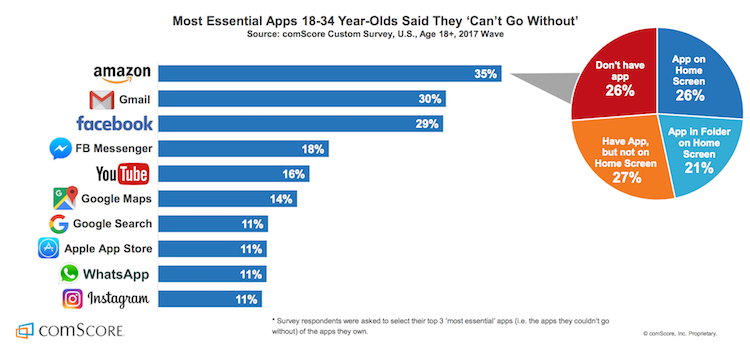
When users do open an app, it’s no surprise it’s rarely that one that lets you drink beer … without the beer.
Bots don’t add to the onslaught of app, decision, or fake beer fatigue. Instead, they live right inside and actually enhance the functionality of some of the most popular messaging apps.
For example, GrowthBot helps users access tons of marketing and sales data using an app they probably already have open all day — Slack.

We have to agree with data scientist and software developer P. Daniel Tyreusin this case:
“I’m willing to speculate that it’s easier to acquire a user if the user doesn’t have to download a new app to use a service. I’m also willing to speculate that users are more likely to continue using a service that’s integrated into an app they already use.”
In the words of Seth Godin: If your target audience isn’t listening, it’s not their fault — it’s yours.

Before we even began building our chatbot, we focused on exactly how it would create value in a way no other tool could for our audience.
We work consistently to grow GrowthBot’s natural language processing (NLP) skills because we know our audience and we know how much easier it makes their lives when they’re able to access and compare tons of data by typing a few quick phrases into Slack.
NLP enables chatbots to understand what a user is looking for. It also allows consumers to enjoy personalized conversation instead of interacting with the same tired “intuitive” menu in a vacuum.
That’s important when your bot functions as a customer service rep, personal shopper, or research partner and conversation is the ideal way to answer a request.
Dennis Thomas, CTO at AI-powered consulting firm NeuraFlash, knows the importance of understanding how users interact with your chatbot.
“Another place where NLP is a big win is when the bot’s objective is focused on helping users with the discovery phase of products or shopping. Finding the right item via conversation helps to drive the user’s goal, as well as the product criteria to match to the company’s inventory.”
By the same token, NLP could actually be a detriment in cases where text-based chatbots can make the process simpler.
“When you have a visual medium and buttons can accomplish the task in a couple clicks (think easy re-order), open-ended natural language is not making the user’s life easier.”
We didn’t throw everything we’ve learned about our audience out the window when developing new bot software. Instead we implemented that knowledge to make GrowthBot just useful enough without being overwhelming.
We believe chatbots should be useful first and useful always.

NLP only accounts for half the conversation — the input part.
Output is just as important in terms of usefulness.
Your bot might have the personality of The Most Interesting Man in the World, but it will still suck if it can’t answer a user’s query.
You don’t need to build an entire search engine from scratch. You don’t even need to build an app. All you have to do is make sure your chatbot has access to enough data to prove useful in the niche you’ve chosen.
If it can’t do that, it’s no better than the aforementioned beer-simulating apps of the world.
GrowthBot has solid conversational skills, but it would be nothing without the marketing and sales data that help it achieve its goal — providing value to people who are growing businesses.
There are already tons of pieces of software and far too many apps for sales and marketing professionals. Useful chatbots don’t mimic, they empower users to find exactly what they’re looking for using a natural instinct: Simply asking.
Not spending hours customizing dashboards and poking through tens of different workflows just to uncover their own data. Simply asking.
Everytime we link a new database to GrowthBot, it gets more valuable for users. Right now it can pull information from dozens of sources; including HubSpot (of course), Google Analytics, MailChimp, social networking sites, and so on.
Bots are first and foremost data scanning machines. They take input, provide relevant feedback, and do so in a way that is easier to manage than any other platform.
“Products, like people, have personalities…”
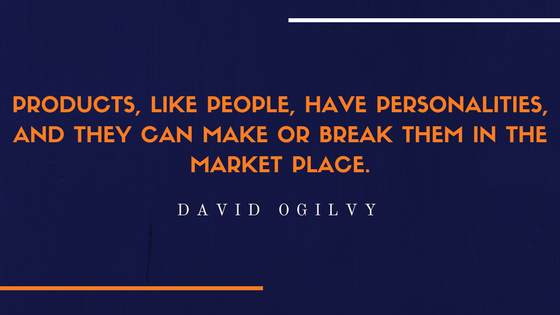
David Ogilvy famously understood the importance of personality in products. We believe that’s also the case for brands and bots. That’s why we made GrowthBot sound like someone we know and like.
If your brand already has a solid personality, translate that into the voice and tone your bot uses when interacting with people.
If not, there’s no time like building a chatbot to determine whom you want to be in the online world.
Because there are so many tools out there that take the technical aspect out of building a bot, creating a great conversational flow might just be the greatest challenge you’ll face.

The messaging framework you build into your chatbot will influence the way people perceive the value of your brand, so give it some personality.
MailChimp is famous for its distinctly helpful personality that manages to be playful and humble at the same time. If your cat is wearing its very own monkey-themed knit hat right now, you know exactly what I mean.

Cintell’s 2016 benchmark study on B2B buyers found that companies who exceed lead and revenue goals are two and a half times as likely to use personas than companies who miss lead and revenue goals.
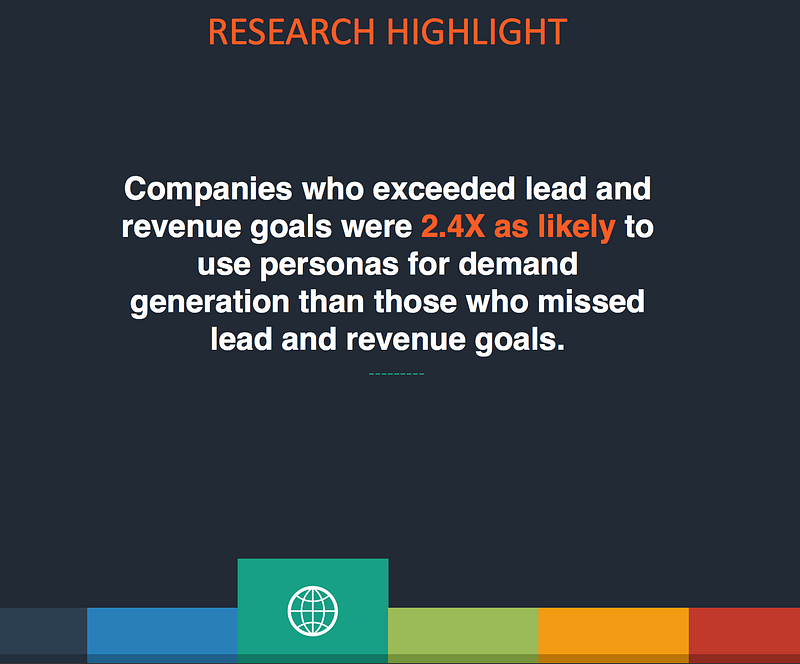
Today’s consumers have nearly countless brands to choose from. And they know it.
A well-defined voice that aligns with your ideal customer is an effective and low-cost way to develop return buyers and bot users.
For example, GrowthBot sounds like Dharmesh Shah — founder and CTO at HubSpot and loving father to the chatbot itself.
That means it’s light-hearted, respectful, and just a tad quirky all while being truly helpful.
We’ve found that a truly helpful voice in a world of chatter is more powerful than you might think.
Bots make life so simple, search feels painful
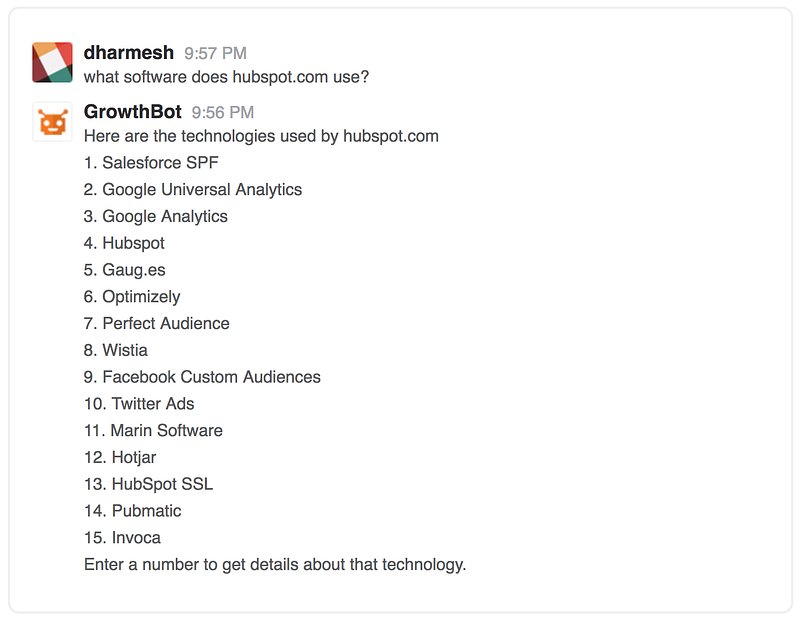
Google search has made an impact. There’s no denying that.
It’s almost a force of habit to visit a search engine to find what you’re looking for. Habits are notoriously hard to change, especially the more gratifying and automatic they are.
Current studies show it takes an average of 66 days for a behavior to become “unchangingly automatic.”
Because search behavior is second nature to us now, bots must do what a search can’t:
- Provide customer service conversations and solutions without the wait
- Deliver the information a user is looking for in just seconds, on the first try
- Make recommendations based on powerful personalization
- Aggregate information from a variety of sources right inside the apps we’re already using
That last point is what GrowthBot is founded on. We make growing your business easier by using the power of a chatbot to put information at your fingertips — not siloed in more apps and interfaces than you can count.
That’s just the tip of the iceberg of what AI-enabled bots can do with enough data and well-planned conversational flow.
But things can still go wrong if you aren’t aware of and managing your users’ expectations.
Where Facebook’s Assistant M Got It All Wrong

Chatbots are relatively new and their capabilities are varied. If you want people to love your bot, it’s important they understand why they need it and how to use it.
It’s not that Facebook’s Assistant M chatbot didn’t work. It’s that expectations weren’t managed; which overwhelmed the system and underwhelmed its users all at once.
“The first thing chatbots should do is quickly introduce their core competencies. Not only should chatbots start within a specific scope, they should always firstly tell you how they can help you and what they can do best.”
— Instabot
Clarify upfront exactly what your bot is capable of. Provide specific examples and invite the user to try out a few practice questions. Don’t make them learn any new tricks right away.
Using your chatbot for the first time should feel like starting an online chat with a new friend or customer service agent.
There will inevitably be times when users ask your bot to do something it can’t do yet. Offer them an alternative, but don’t let that learning opportunity slip away.
Scan your chat logs regularly, they’re the most valuable market research you’ll ever get on what people want your chatbot to do.
Wait, have I mentioned value already?

Be on the lookout for every chance you can find to provide extreme value to your users.
Go above and beyond what people expect your chatbot to provide. Delight them with thoughtful little extras that make their days better.
Extreme value doesn’t have to stop when a user leaves your bot interface.
Offer to send customers an alert when their size is back in stock. Tell readers where they can find more articles like the one they just read on your website. Or, like us, celebrate with them every time you connect another tool that will make their jobs easier.
These kinds of interactions don’t just provide extreme value, they keep you top of mind and keep your customers coming back for more.
Nobody needs another app for this, that, or anything.
Instead, people need smart ways to accomplish more within the tools they already know and use regularly. When our chatbots deliver that level of service, we’re sure to start changing behavior and creating better automatic habits.
Fight back against bad bots. Build yours to be delightful to interact with, provide extreme value, and just not suck.
Originally published at blog.growthbot.org.

Unriddled: “Not a Media Company” Facebook Launches a Quarterly Publication, Apple Fights Election Interference, and More Tech News You Need
Welcome one, welcome all to another Wednesday: the day that marks the halfway point — almost — to the weekend.
The tech industry has seen quite a busy week, so we’re bringing you another edition of “Unriddled”: the HubSpot Marketing Blog’s mid-week digest of the tech news you need to know.
It’s our Wednesday tech news roundup, and we’re breaking it down.
Unriddled: The Tech News You Need
1. Facebook Launches Grow: A Print Quarterly Publication for Business Leaders
Despite repeated insistence from its leaders that it is not a media company, Facebook has launched a print quarterly publication in the UK — Grow by Facebook — which it describes as “a thought leadership platform shining a light on people, companies and trends that challenge the status quo.” According to the Grow website, a permanent online “home” for the publication (which Facebook won’t call a magazine) will launch soon, and feature content like niche brand case studies, as well as profiles of business leaders that achieved seemingly impressive feats. The Press Gazette’s Charlotte Tobitt has more. Read full story >>
2. Apple’s Fight Against Election Interference
Apple News — which was rumored to be experimenting with products competing with those of Google News in April — will now have a dedicated section for the 2018 U.S. Midterm Elections.
With a mission of “providing a new resource for timely, trustworthy midterm election information,” Apple is drawing attention to a key factor that differentiates it from other tech giants who are fighting election interference, like Facebook: human editors.
To address fake news —
Facebook:
-3rd party fact checkers
-Algorithm ranked by news trustworthiness poll
-“how to spot fake news” education
– less news in feed
– publishers in political ad database
– not being “arbiters of truth”
Apple:
-human editorshttps://t.co/hsqE5rHIcj— Sarah Frier (@sarahfrier)
June 25, 2018
(Twitter, too, announced on Tuesday new efforts to combat the spread of fake content and platform abuse — largely through machine learning.)
According to its official statement, Apple will employ a “team of editors focused on discovering and spotlighting well-sourced fact-based stories,” which will include exclusive pieces from the likes of the Washington Post and Axios, as well as coverage from televised news sources. Read full statement >>
3. The Less-Than-Successful Meeting of Big Tech and Intelligence Officials
Within the realm of preventing election interference, several representatives from eight tech giants — including Facebook (which hosted the summit and recently published an update on its efforts to fight fake news), Apple, Google, and Twitter — met with representatives from the U.S. Department of Homeland Security and the FBI to discuss how they can better fight election interference in the months leading up to November’s midterm elections.
(Facebook, meanwhile, announced yesterday that it has removed 10,000 fake Pages, Groups, and accounts in Mexico and across Latin America because they violated Community Standards — though it is unclear if the removal is related to possible election interference.)
The desired outcome, it seems, was to compare potential meddling activity each company had witnessed on its own platform to what U.S. intelligence has been monitoring and intercepting, as well. But those hopes were all but thwarted, with the U.S. government officials sharing no intelligence and leaving the business leaders assuming they would have to fight election interference without any federal intervention or assistance.
It’s a particularly interesting outcome considering April’s congressional hearings, in which Facebook CEO Mark Zuckerberg was challenged with questions about the potential regulation of the company, as well as its Big Tech peers. But that potential regulation — should it materialize — does not appear as though it will play a role in the company’s efforts to cease the weaponization of social media sites by foreign actors. Sheera Frenkel and Matthew Rosenberg of the New York Times share more. Read full story >>
4. New Metrics Emerge for Time Spent on Social Media
According to new data from SimilarWeb, the average Instagram user spends about 53 minutes on the app each day, trailing closely behind an average 58 minutes on Facebook. (Snapchat, evidently, isn’t too far behind, with an average of 49.5 minutes.)
The data comes at an interesting time, after recent announcements from Apple that it will include a Screen Time app in the next version of iOS to help users manage the time they spend using their phones. Not long after that feature was unveiled, Instagram confirmed it was testing a “time well spent” feature and rumors emerged that Facebook (which owns Instagram) is experimenting with similar technology.
Screenshots reveal Facebook is building a Time Well Spent dashboard https://t.co/C8bmfsK4fz pic.twitter.com/dlyAnSh7tA
— Josh Constine (@JoshConstine)
June 22, 2018
But despite the efforts of the latter two apps to, on the surface, help users better manage time spent on them, both have released new long-form video products — as well as newly-released group chat options and a redesigned explore tab from Instagram — over the past few weeks that appear to be designed at least in part to encourage more time spent on each platform. Recode’s Rani Molla and Kurt Wagner explain why these metrics matter. Read full story >>
5. Uber is on Probation in London
Since Transport for London revoked Uber’s license to operate, CEO Dara Khosrowshahi has spent much of his time doing “damage control” to repair the company’s relationships in the UK, as well as in its U.S. homebase. Now, the ride-sharing company has regained a license to operate in London, after a UK judge ruled that it can legally offer its “digital services” there. But it might not be permanent — the ruling comes with 15 months of probation, which is three months short of the 18-month period the company was seeking. Politico‘s Mark Scott has more. Read full story >>
6. Facebook Will Allow Cryptocurrency Ads Again
In a statement released Tuesday, Facebook announced it would once again permit the purchase and publication of “binary options, initial coin offerings and cryptocurrency.” The new policy follows a January decision to ban any “misleading or deceptive promotional” content related to financial products — which has been revised to allow such ads from pre-approved accounts only. Facebook and Google were among the first platforms to ban ads related to cryptocurrency, and were followed shortly thereafter by Twitter. Read full statement >>
That’s all for today. Until next week, feel free to weigh in on Twitter to ask us your tech news questions, or to let us know what kind of events and topics you’d like us to cover.
Featured image credit: Facebook

The 7-Minute Guide to Getting Started With Google Tasks
If you’re anything like me, you love to-do lists. Heck, sometimes you love to-do lists so much, you even put completed tasks on your list just for the satisfaction of crossing them off (No? Just me?).
Up until recently, I’ve been using my Google Calendar as my to-do list — but it can get confusing, particularly when someone wants to book time with me but sees “buy salmon” already takes up most of the afternoon. Even worse, you can’t prioritize your Google Calendar to put more important tasks ahead of less important ones.
Fortunately, Google offers an alternative solution: Google Tasks, a tool which enables you to create to-do lists within your email, links those tasks to your calendar, and more.
Google Tasks
Google Tasks lets you create a to-do list within your desktop Gmail or the Google Tasks app. When you add a task, you can integrate it into your Gmail calendar, and add details or subtasks. Tasks also enable you to drag and drop emails into your to-do list, rearrange the order of your tasks, and check off completed ones. With the updated Gmail design, Google Tasks is sleeker and easier to incorporate into your work routine.
Gmail has offered a Tasks tool for years, but with the new Google design, Tasks is sleeker and easier to use. Here, we’ll show you how to get started with Google Tasks in just seven minutes, on your desktop or phone.
How to Use Google Tasks on a Desktop
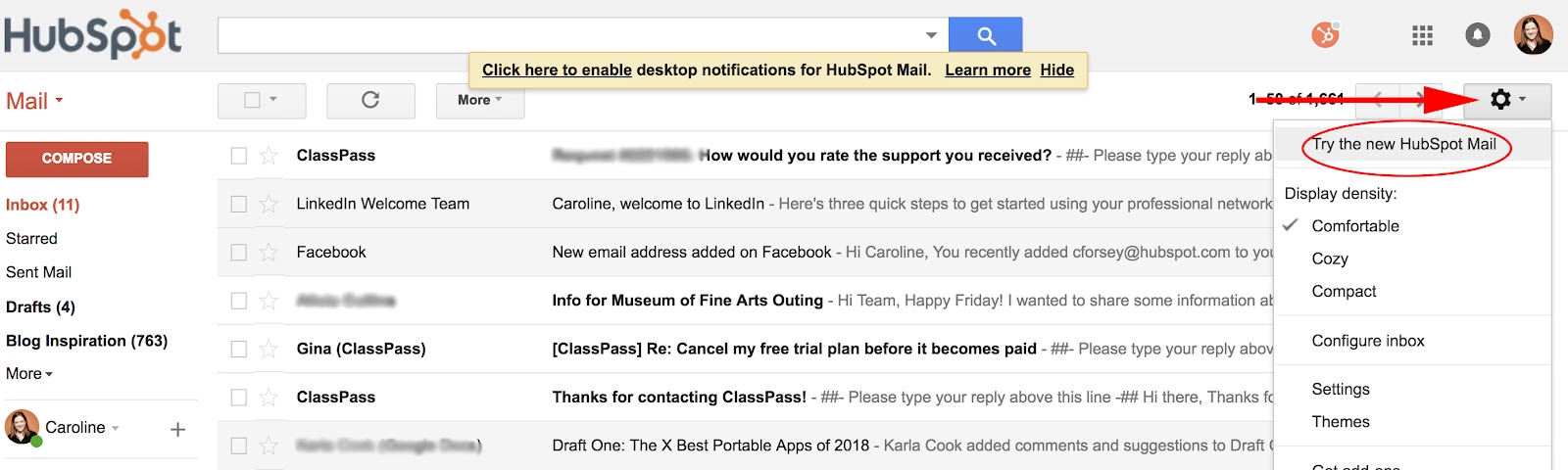
1. Log into your Gmail account. Click your “Settings” icon, as indicated by the arrow below, and then select, “Try the new [Gmail].” Since I’m on a work email, it says HubSpot, but it’ll say something different depending on your email account.
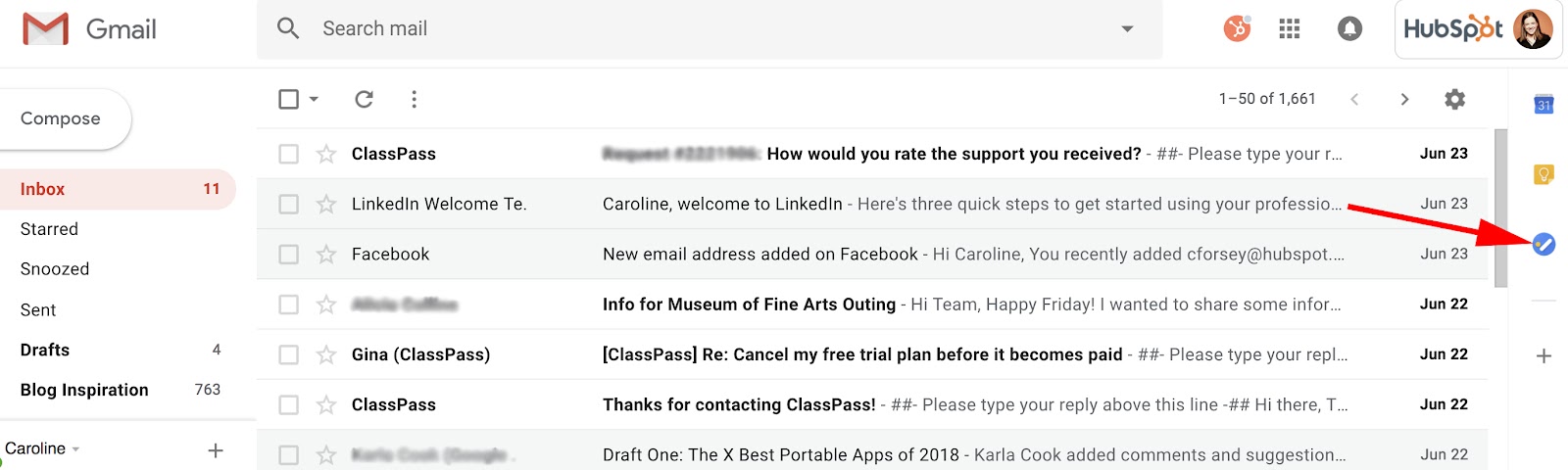
2. With your new updated Gmail, you’ll see a blue icon on the right side (underneath Calendar and Keep). Click the icon, labelled “Tasks”.
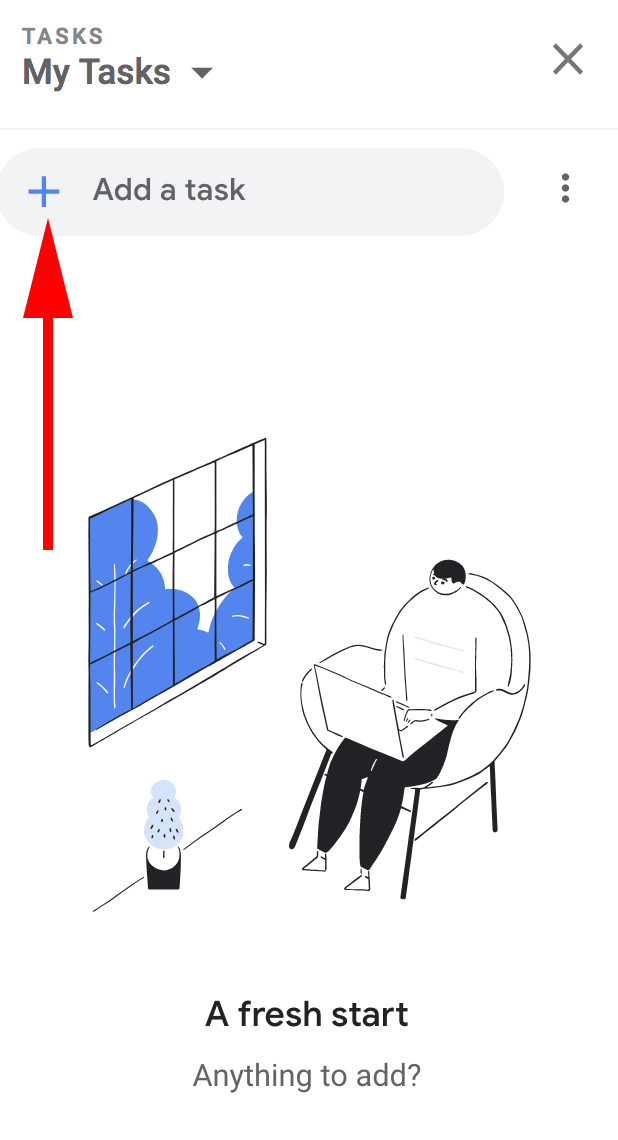
3. Click the blue “+” button to add your first task.
4. Now, type a task in the line beside the bubble and then click the “Enter” or “Return” key.
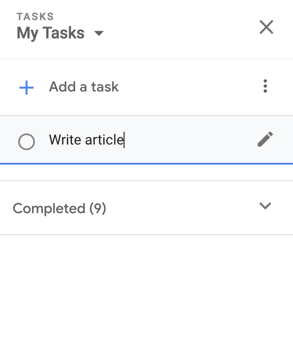
5. If you only need to add a basic task, you’re all set. However, the Tasks tool also allows you to edit your task — to do this, click the pencil icon beside your task.
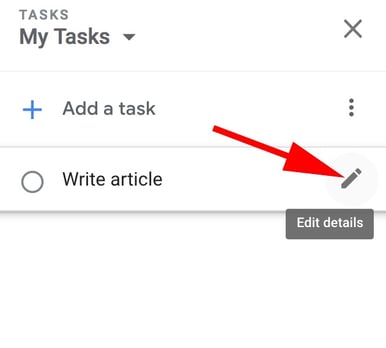
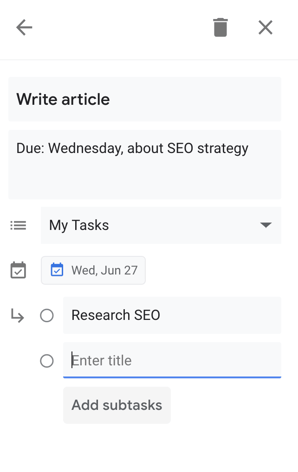
6. Here, you can add details including when your task is due (which will integrate into your Calendar), a paragraph box for your own notes, and the option to add subtasks if you feel the need to break up your task into parts.
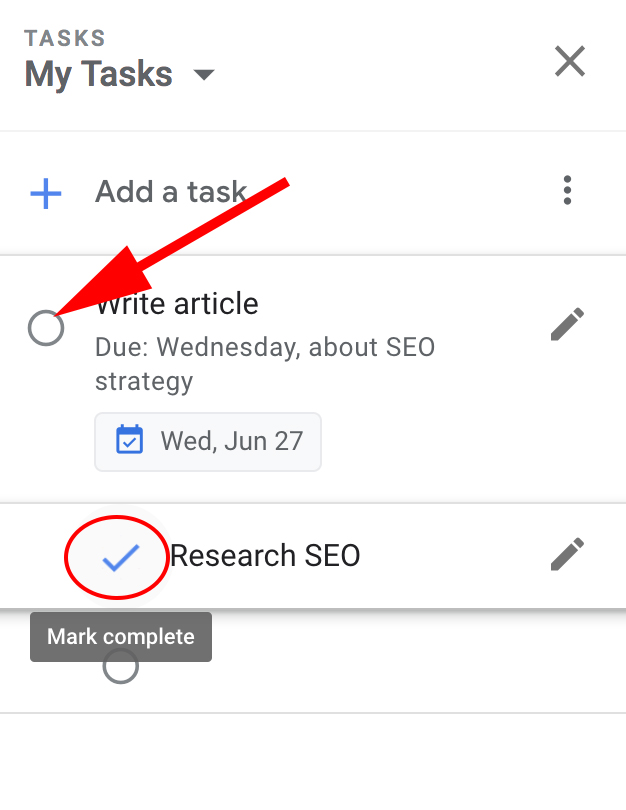
7. When you’ve completed a task, simply click the bubble beside the task. When you do, it will briefly show a check mark, cross itself off, and then disappear off your list.
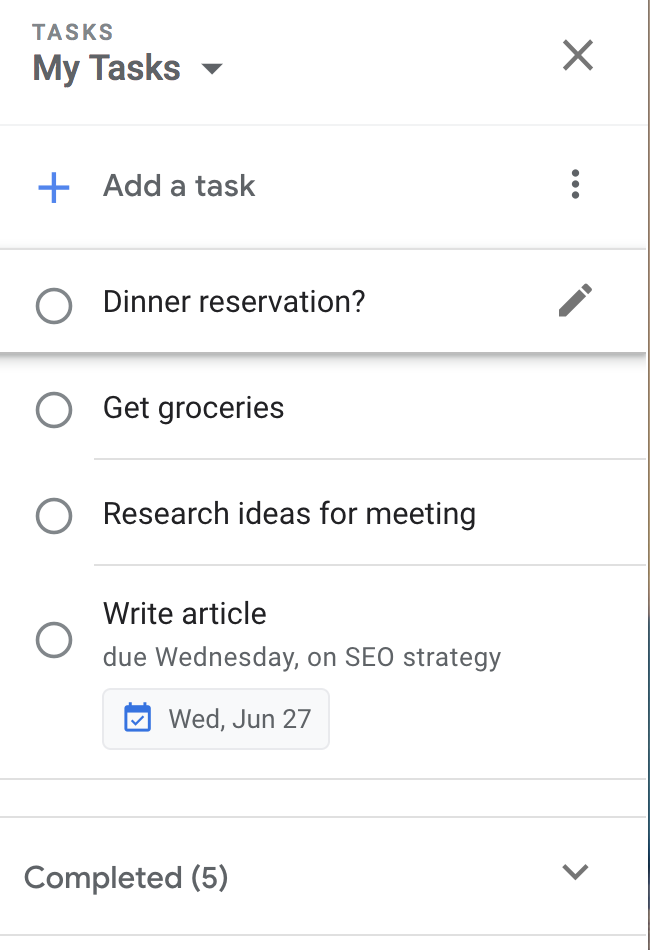
8. You can also drag and drop your tasks to rearrange the order — for instance, I dragged “Dinner reservation?” to the first item on my to-do list.
How to Add Tasks to Google Calendar
- Click “Edit details” if you’re using Google Tasks on a desktop, or “Add date” if you’re using the app version.
- Choose a date on the calendar that pops up on your desktop or app.
- The task will be automatically integrated into both your phone and desktop’s Gmail calendar.
How to Add an Email to Your Google Tasks
If you receive an important email you’re too busy to answer immediately, you can add it to your Tasks list for later. Here are two different ways to do this:
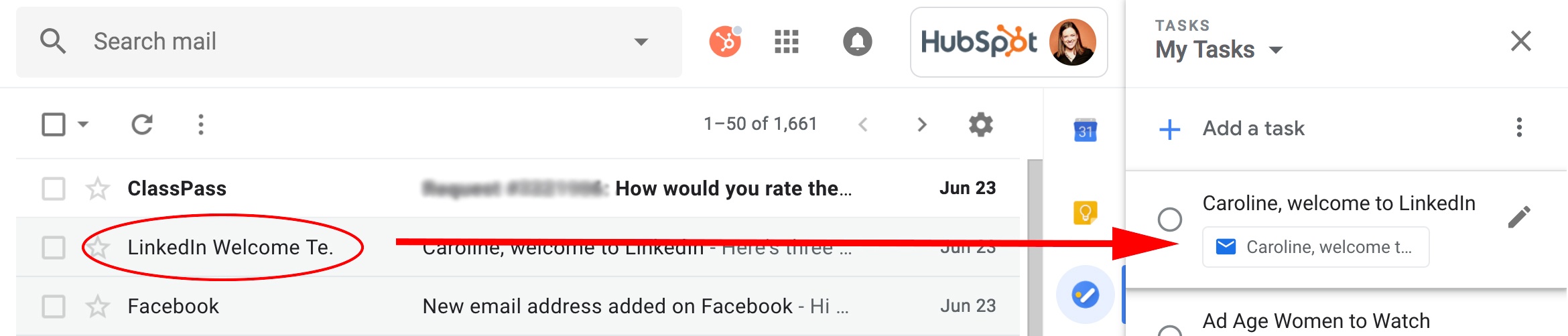
1. Simply hold the email and drag it to your open Task list. You’ll see the email icon underneath the task, which, if you click, will take you to the email.
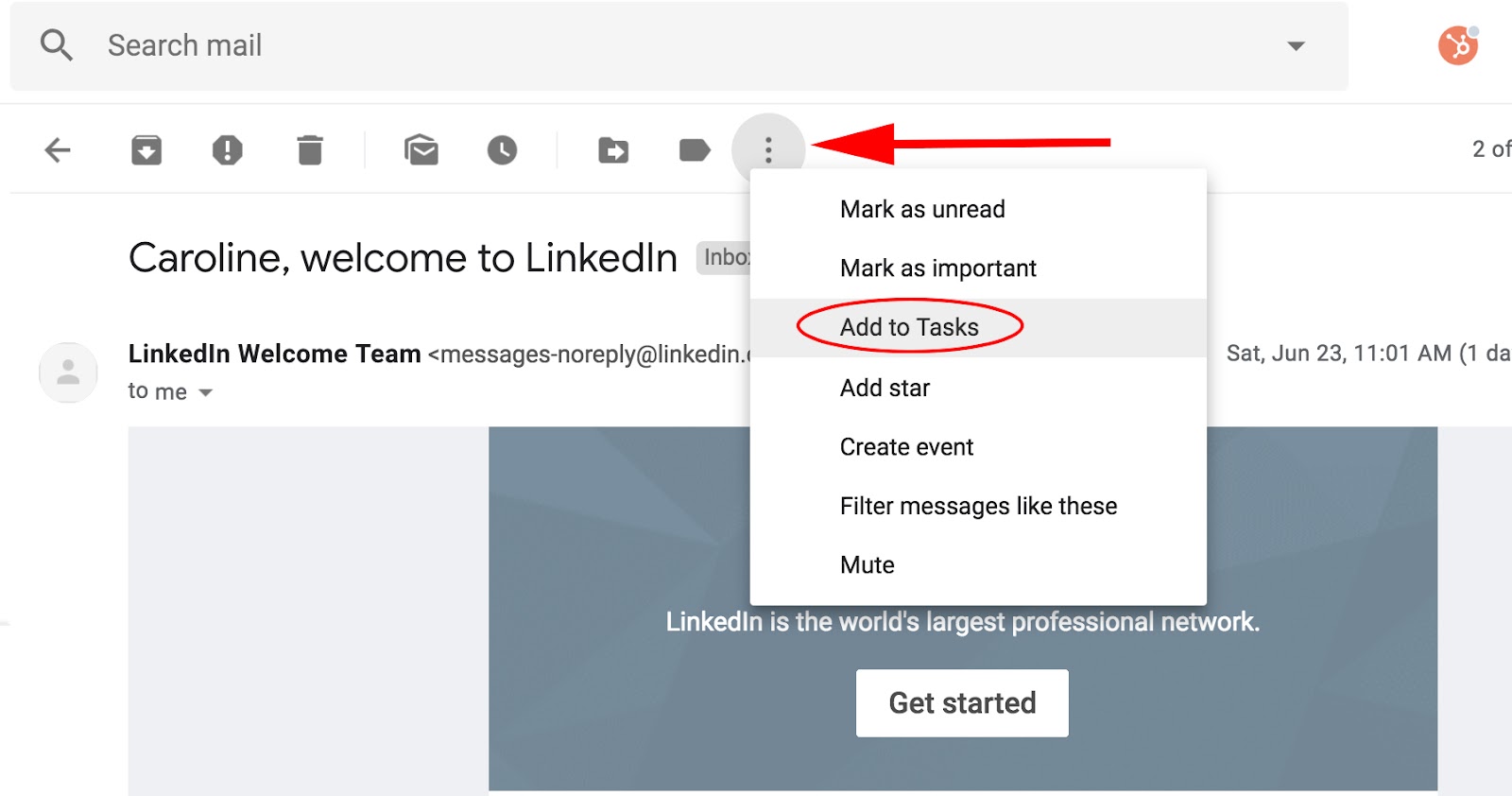
2. If you’re within the email when you decide you want to add it to Tasks, simply click the three-dot icon at the top of your email and select, “Add to Tasks”.
How to Use the Google Tasks App
If you’re often making to-do lists on the go, you might want to use the Google Tasks app supplementarily — since it’s connected to your email, your tasks will sync up with your desktop Task list, and they’ll also integrate into your Calendar on both your phone and desktop.
After you download the app on your phone, here’s how to use it:
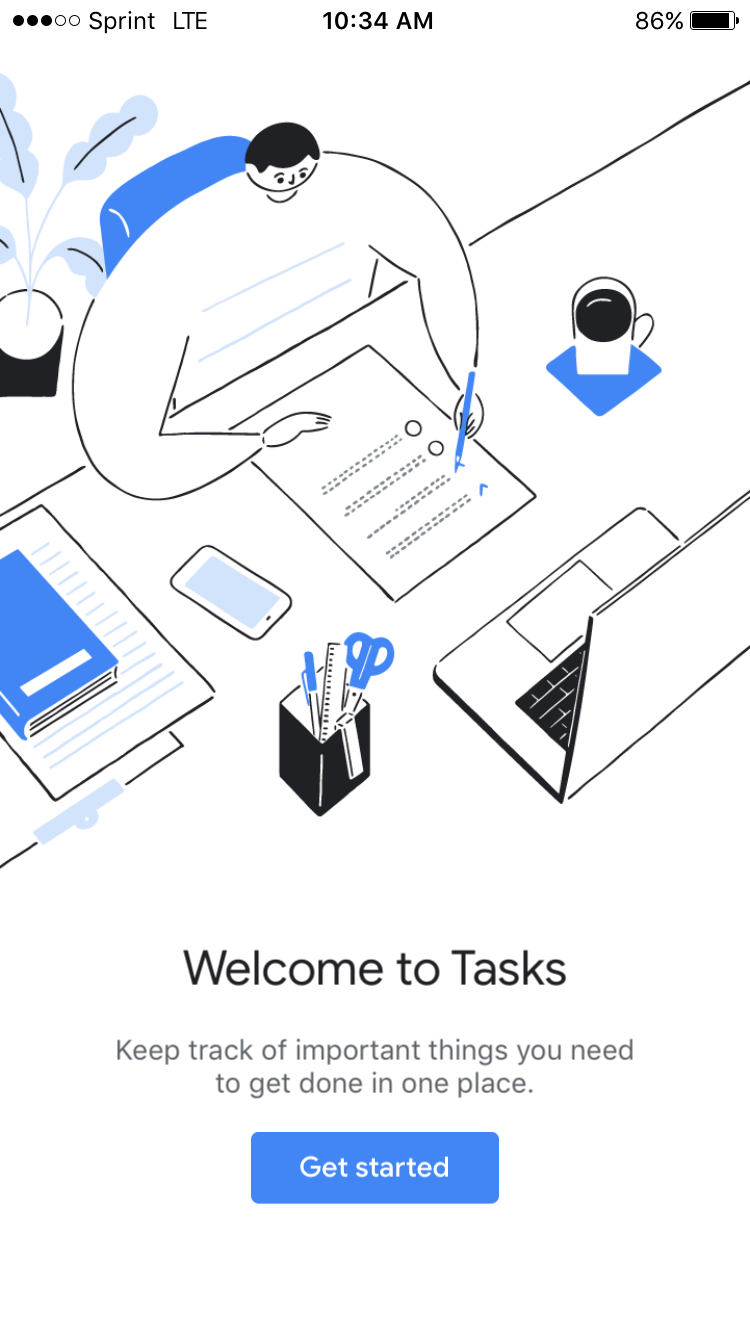
1. When you open the app for the first time, here’s what you’ll see (look familiar?). Click the blue “Get started” button.
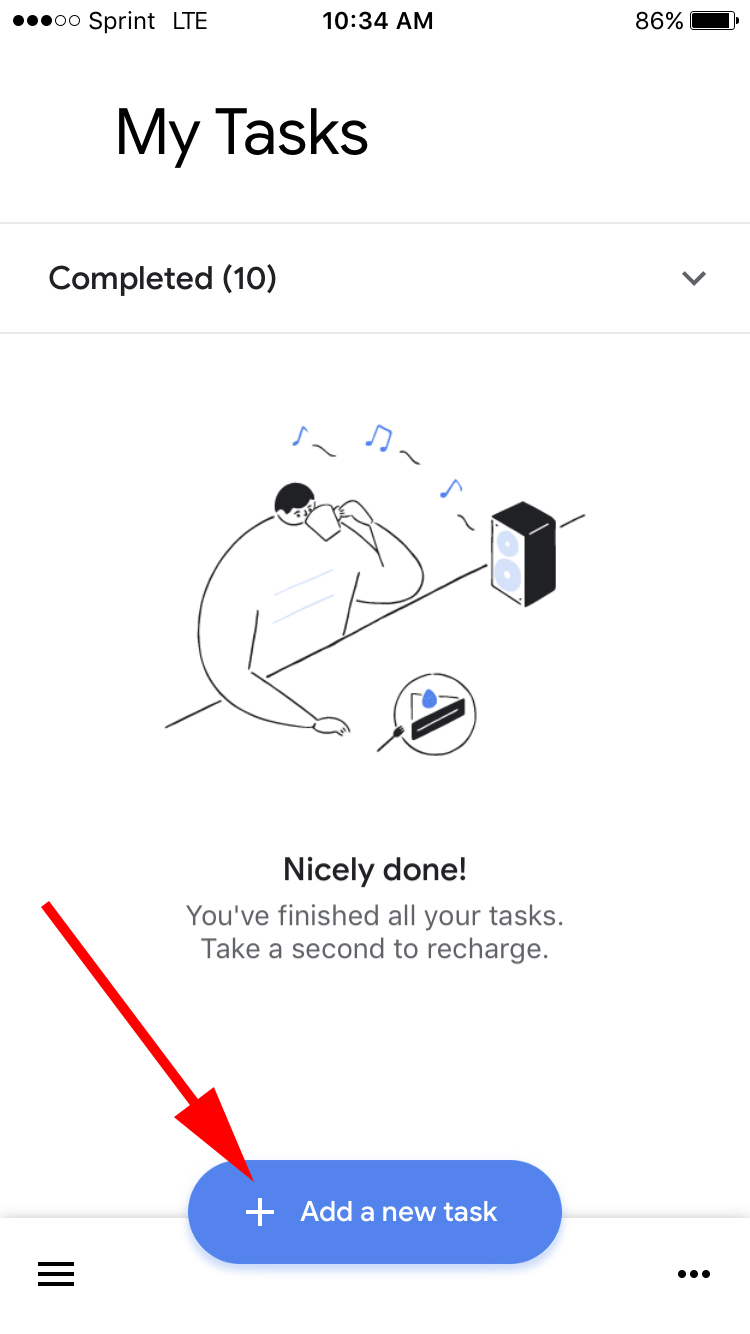
2. Next, click the blue “Add a new task” button.
3. Using your phone’s keyboard, type your task and then click “Save” or “Done”.
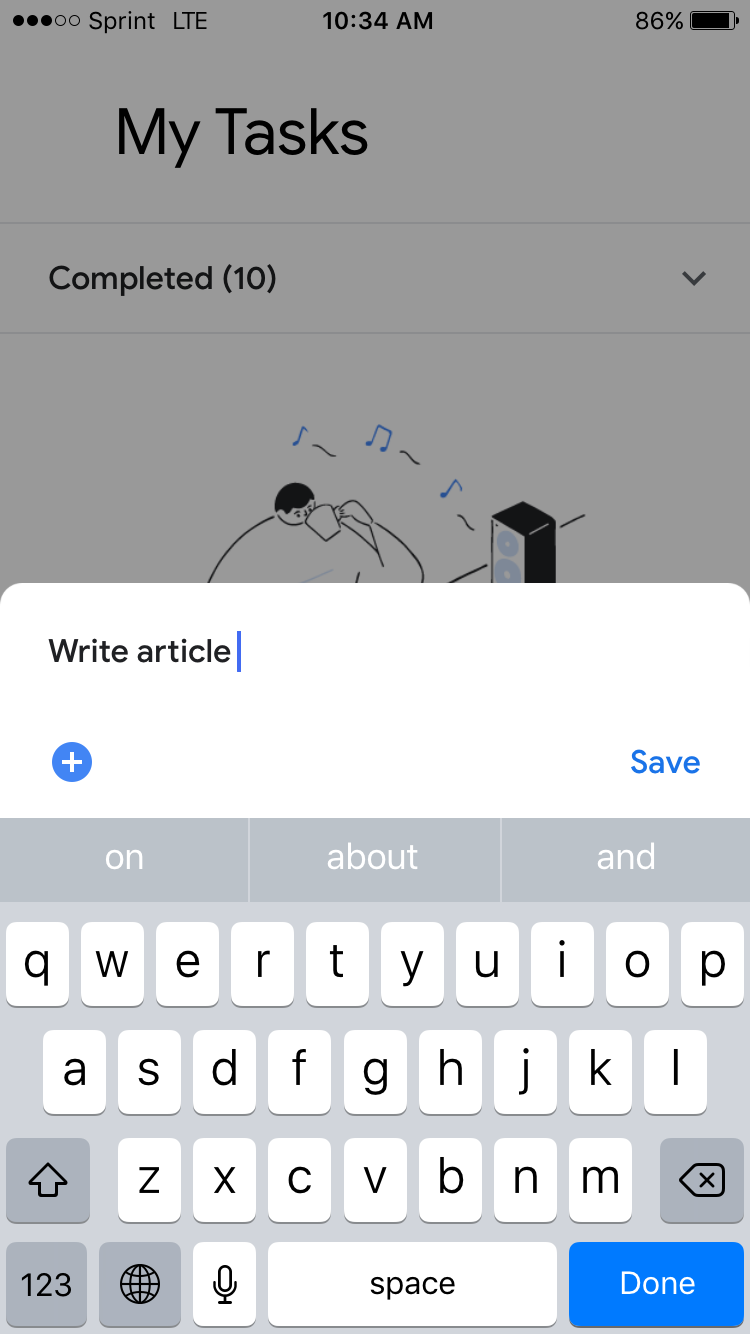
4. If you click on your task within the app, you’ll have the option to “Add details”, “Add date”, or “Add subtasks”. For this instance, if I want to add my task to my calendar, I’ll click “Add date”.
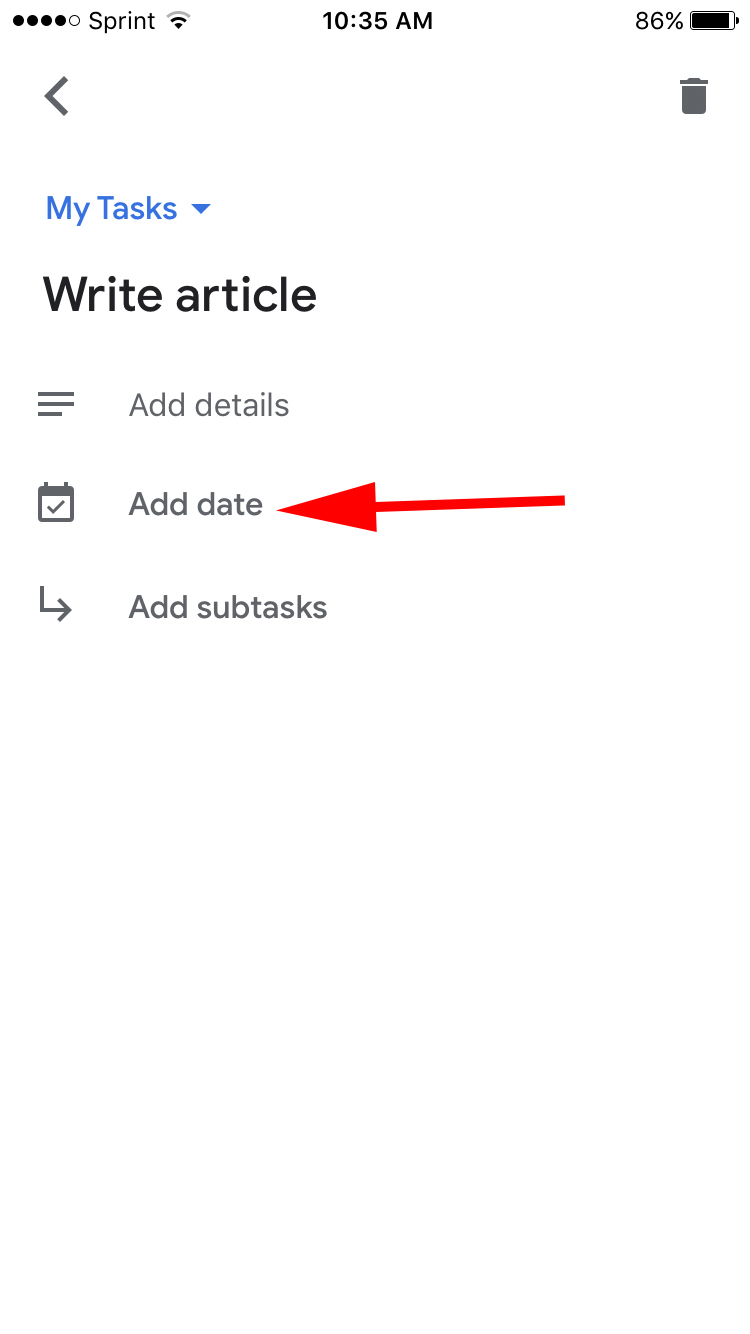
4. A calendar will pop up within the app. Choose the date your task is due, and then click “Ok”.
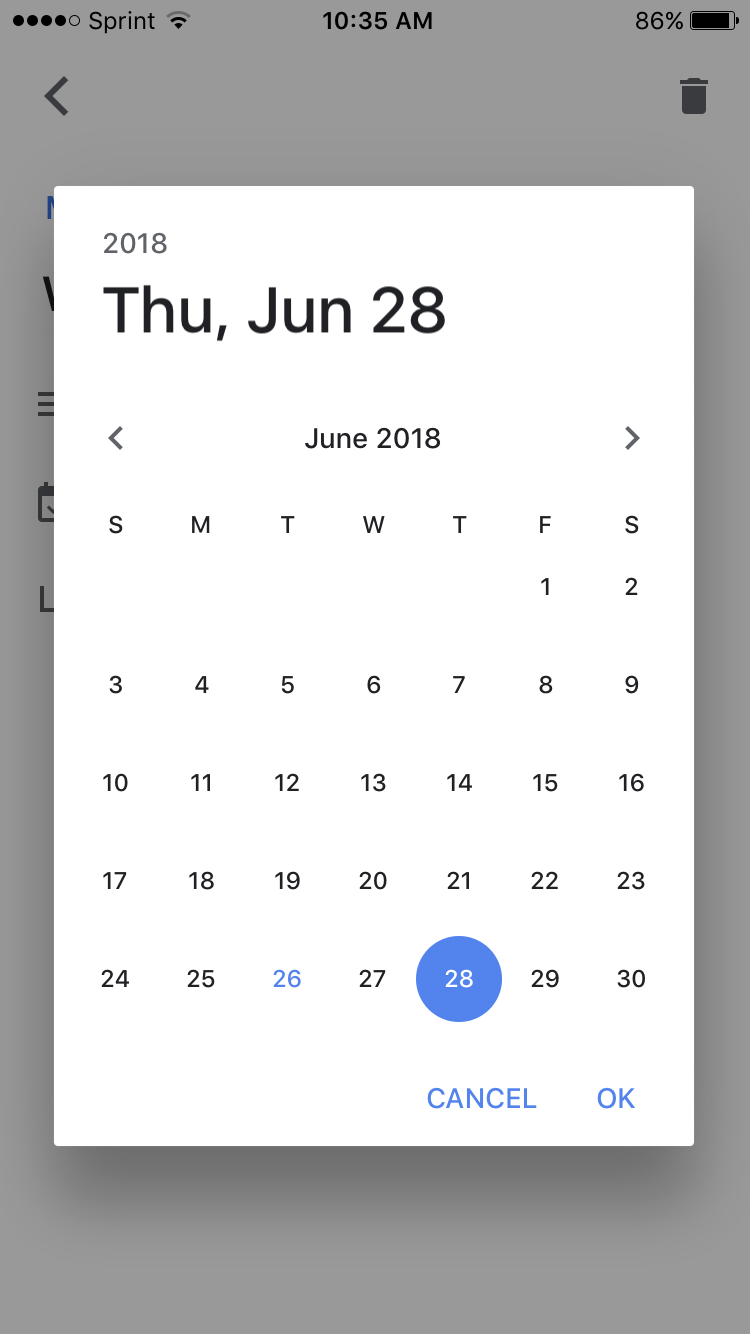
5. When you add subtasks, you’ll see the bubble beside each task. When you complete a task, simply click the bubble.

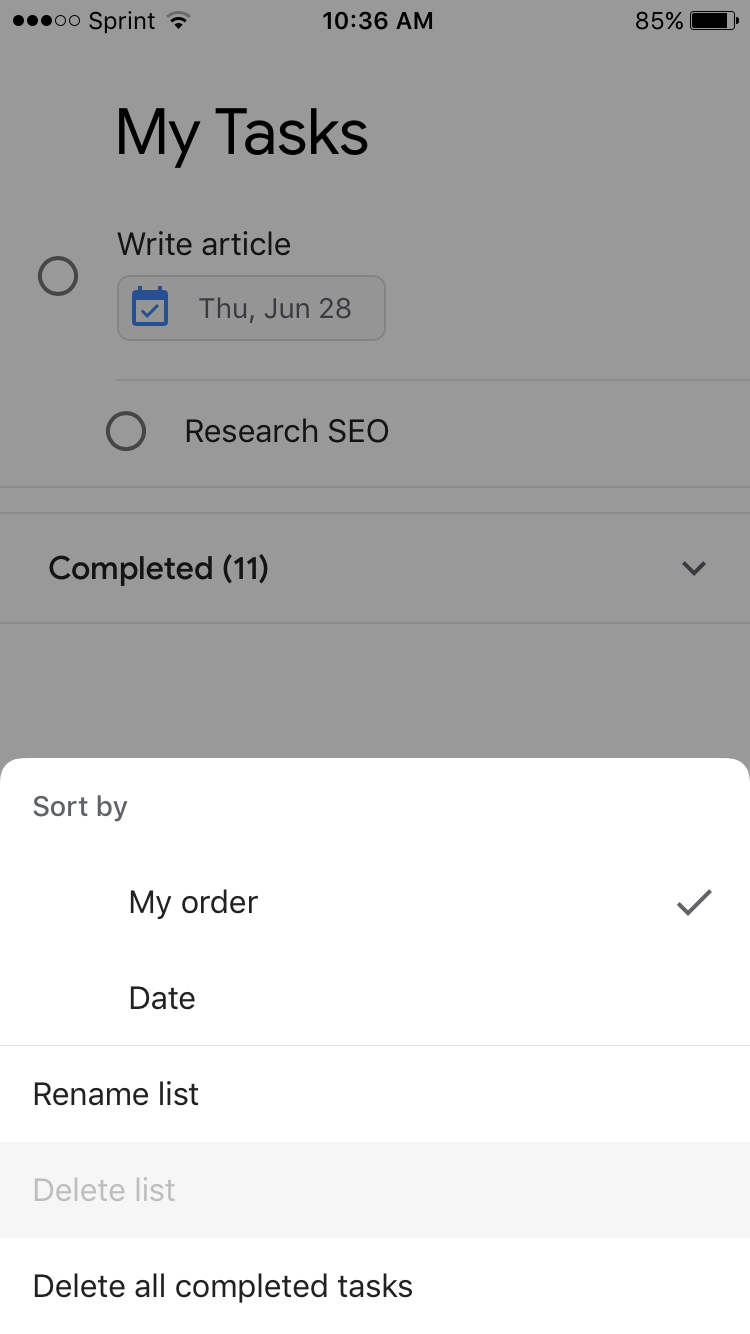
6. To rearrange the order or change the dates of your tasks, click the three-dot icon in the bottom right corner.
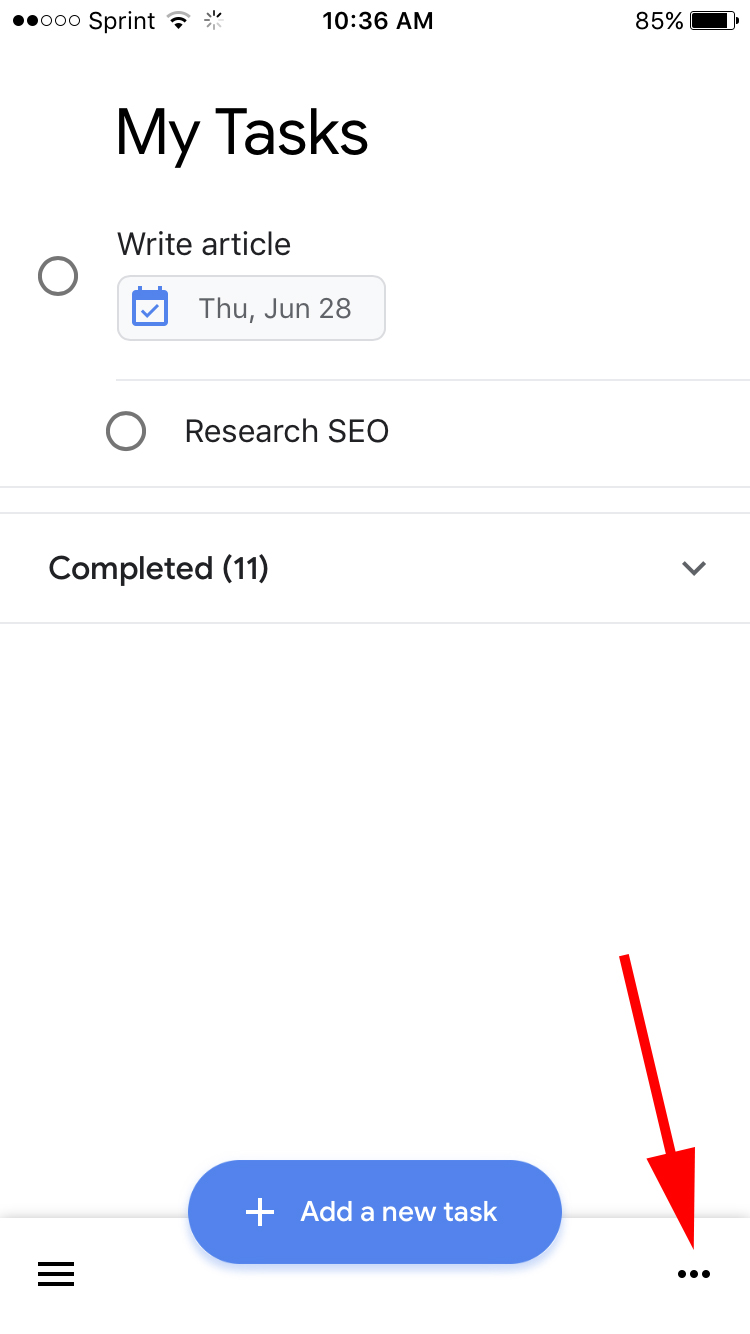
7. Here, you can sort your full task list by customized order or date, rename the list, or delete all completed tasks.
Google Tasks vs. Reminders
You can add reminders to your Google Calendar at any time, by clicking a spot on the calendar and choosing “Reminder” instead of “Event”. When you’ve scheduled a reminder, it pops up in the right corner of your screen at the time you’ve entered, i.e. “finish article, 10 a.m.”. Google Tasks also integrates into your Calendar, but offers more details than date and time, so it’s a better tool when you need to include more in-depth information, such as personal notes or subtasks.
Ultimately, Google Tasks is an effective organizational method, since it integrates seamlessly into other Google features including Gmail and Calendar. If you’re feeling overwhelmed filling up your calendar or sticky notes with to-do lists that range in level of importance, you might want to give Tasks a try.
Additionally, take a look at 12 Tools That’ll Keep You Productive Morning, Noon & Night to further increase your efficiency levels.

The 5 Critical Components of Fantastic Lead-Capture Forms
Did you know that without a lead-capture form, your digital content can’t generate leads?
The lead-capture form is the main focus of a lead-capture page — better known as a landing page. The ultimate goal of this page is to get your visitors to fill it out with contact information in exchange for a piece of content, such as an ebook.

Because the formatting and design of your lead-capture form has a direct impact on your conversion rates, it’s absolutely critical that you approach them wisely. Here are the five most critical components of successful lead-capture forms.
The Five Components of a Lead-Capture Form
1. The Lead Form’s Positioning on the Landing Page
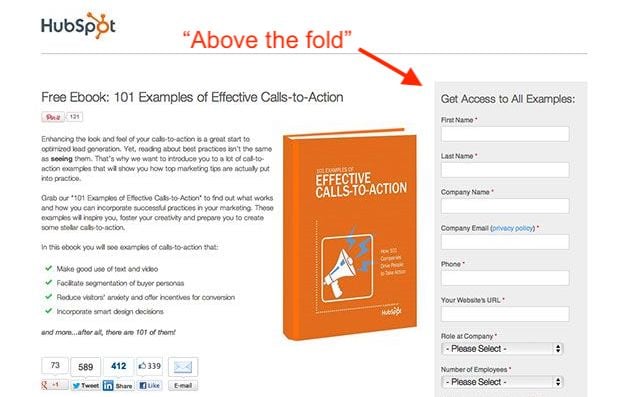
First of all, you should make sure your form appears above the fold or easily findable on the lead-capture page. In other words, the viewer should not have to manually scroll down the page in order to see it. Visibility is important, since you want to draw the visitor’s attention to the form.
However, you don’t want this form to spook visitors who are less willing to disclose information at first glance. To ensure the content you’re offering is the main appeal of your lead-capture page, consider two different form positioning techniques:
Next to the Content Offer’s Picture
The form below might be above the fold, but it’s not the most eye-catching object on the page — the content itself is. Putting a picture of the content next to the form is an appealing reminder of what a user will get in return for his or her basic information.
At the Bottom of an Auto-Scroll Landing Page
Still many of HubSpot’s forms have lead-capture forms at the very bottom of the landing page.
Why on Earth would you do that? This positioning ensures the content we’re offering is center stage so a user can adequately determine if it’s worth downloading. See what this looks like below:
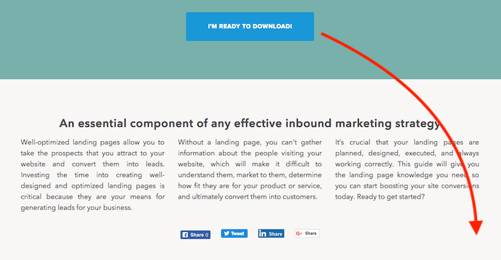
If they decide they want the content, clicking the Download button shown above automatically scrolls them down to a brief form at the bottom of the page:
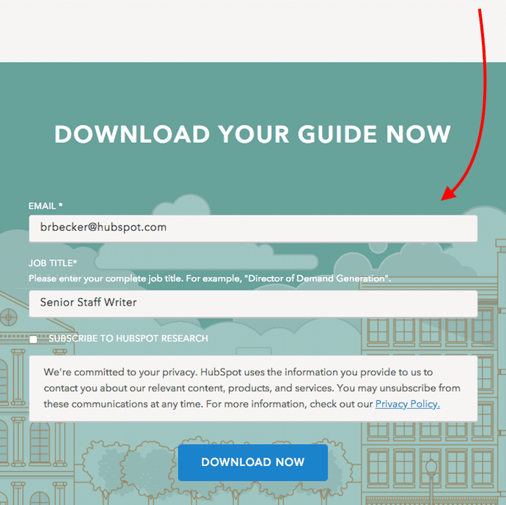
Once they fill out the form, they can confirm their download and retrieve their content.
2. The Lead Form’s Length
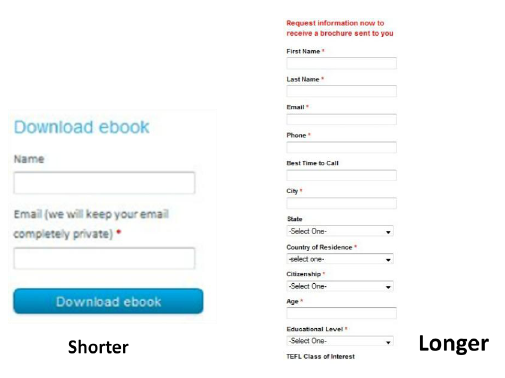
The next — and probably biggest — question when designing your forms is, how long should it be? This is a tricky question, because the length of your form inevitably leads to a tradeoff between the quantity and quality of the leads you generate.
A shorter form usually means more people will be willing to fill it out, so you’ll generate more leads. But the quality of the leads will be higher when visitors are willing to fill out more forms fields and provide you with more information about themselves and what they’re looking for. Therefore, shorter forms usually result in more leads, and longer forms will result in fewer, but higher quality leads.
The other critical factor to consider is the effect of the length of the form on the prospect’s willingness to fill it out. If the form is too long, prospects are going to stop and evaluate whether it is worth their time to complete all of those fields. So you need to find a good balance between collecting enough information and not asking for too much information that they’re not willing to give.
3. The Form Fields You Use
Of course the next question is, what should those form fields be? What information should I ask for? Oftentimes, companies have forms on their sites that ask for way too much information (or the wrong kind of information). Your goal should be to collect enough information through your form to enable you to both contact and qualify the lead.
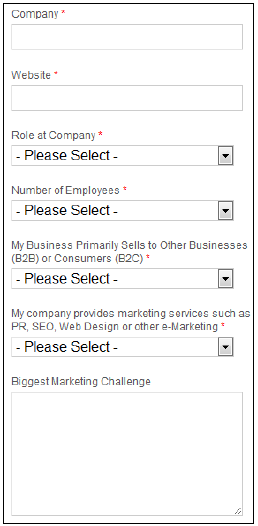
You can use fields such as name and email address to gather contact information about the lead. It is important to be able to follow up with your newly converted lead so you can put them into your sales funnel to try to convert them into a customer.
Lead-Qualifying Fields
Before you do that, though, you’ll want to be able to qualify the lead. To do this, include fields and questions in your form that will help you identify how strong that lead is – in other words, how likely they are to become a customer. You can include fields such as company, website, role at company, and number of employees to learn some basic background information. Then add in a question that will allow you to gauge their need for your product, their likelihood to purchase your service, or their fit with your company.
For example, HubSpot sells marketing software, and all of the forms on our landing pages include an optional field that asks visitors to describe their biggest marketing challenge. We use this information to learn more about and qualify our leads before putting them into our sales funnel.
Asking Only Essential Questions
When you’re deciding which fields and questions to include on your form, remember that you should only be asking for information that is essential to be able to contact and qualify them. You can always ask for more information later, and in fact, that is usually the better approach. Too often, companies request all kinds of contact information and ask tons of questions of their visitors, neglecting to realize that their 15-field forms are significantly lowering conversion rates.
4. Your Privacy Policy
This brings us to the next concern that prospects have with regard to filling out forms: security. Most people experience some sort of anxiety when asked to provide sensitive information, especially online. You need to show your visitors they can trust you with their information.
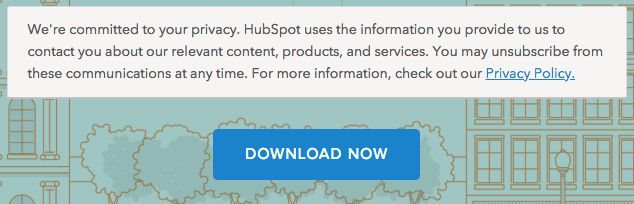
Link to your privacy policy next to the field that asks for the visitor’s email address. Have your logo and a client testimonial visible. Use some sort of authority endorsement, third-party security certification, or guarantee seal. Just make sure that your website looks credible, and that should help to reduce friction for filling out your form.
On our lead-capture forms, we offer a brief preview of our privacy policy right above the download button. See what this looks like below:
5. The Lead Form’s Submission Button
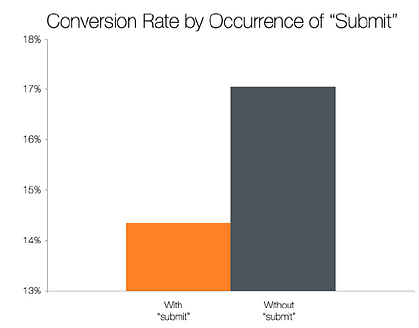
The last major component of your form is the button the visitor must press to complete the form and send you their information. The default text for this button is usually “Submit,” but studies show that landing pages with buttons labeled “Submit” actually have lower conversion rates than those that use other wording.
The top-performing variations in this study were “Click Here” and “Go.” Compared to “Submit,” these buttons feel much less committal and imply a lower investment of time and effort.


The Ultimate Guide to Email Marketing
The first marketing email was sent in 1978, resulted in $13 million in sales, and kicked off what has become one of the most highly used marketing channels even to this day. Given its early beginnings, email isn’t as shiny as some newer channels like messaging and social, but it is an effective way to build an owned audience that gets results.
Email isn’t dead. It’s one of the few marketing channels we can use to build an authentic connection with the humans that keep our businesses alive.
Email marketing isn’t spam. It’s not a personal note from an old colleague either. It’s something in between. Your customers don’t give their information lightly, and — if used right — email marketing can be both a relationship-building and profit-building tool.
You should use this tool to build upon an existing relationship with every person on your list by providing relevant, valuable information that will help them take action on their goals.
That’s right, email marketing isn’t just about you, or your company. It’s about your customer.
If you keep this golden rule in mind, your subscribers will not only read your emails, but they will look forward to hearing from you every time.
Let’s dive into why email marketing is still one of the most important elements of your marketing strategy and how you can use it responsibly and effectively.
Email marketing effectiveness
There are 3.8 million
email users worldwide, so if you’re looking for a way to reach your customers, email is the perfect place to find them. On average, email generates $38 for every dollar spent, which is a 3,800% return on investment.
Here are some stats that prove how effective email marketing can be:
- Email is good for business. Two thirds of customers have made a purchase as a direct result of an email marketing message.
- Only 20% of leads that are sent directly to sales are qualified, meaning they need to be nurtured via email and great content.
- When it comes to customer acquisition, email is 40X more effective than Facebook and Twitter combined.
- Perhaps the best reason to use email marketing is that you own the channel. Outside of compliance regulations, there is no external entity that can impact how, when, or why you reach out to your subscribers.
Unless you have the (wo)manpower, free time, and capital to individually build a personal relationship with each one of your prospects and customers, email should be your best marketing friend.
Use Cases for Email Marketing
Here are the many ways you can (and should) use email:
- Build Relationships: Build connections through personalized engagement.
- Brand Awareness: Keep your company and your services top-of-mind for the moment when your prospects are ready to engage.
- Content Promotion: Use email to share relevant blog content or useful assets with your prospects.
- Lead Generation: Entice your subscribers to provide their personal information in exchange for an asset that they’d find valuable.
- Product Marketing: Promote your products and services.
- Lead Nurturing: Delight your customers with content that can help them succeed in their goals.
Getting Started with Email Marketing
Before you get overwhelmed with the vast possibilities of email marketing, let’s break down a few key things to get you started building an strong email campaign that will delight your customers.
Create an Email Marketing Strategy
Each of your customers receives 121 emails every day. That means, if you don’t take the time to develop a strategy, your emails will get lost in crowded inboxes, or worse, be sent to the spam folder.
You can learn how to build an effective email strategy and send emails that people actually want to read. It just takes a plan (one that can be broken down into a few categories).
Think of the following five categories as an outline for your email strategy. We’ll dive deeper into some of these in a moment.
1. Define Your Audience
An effective email is a relevant email. Like everything else in marketing, start with your buyer persona, understand what they want, and tailor your email campaign to your audience’s needs.
2. Establish Your Goals
Before you come up with your campaign goals, gather some context. Research the average email stats for your industry and use them as benchmarks for your goals.


3. Create a Way for People to Sign Up
You need people to email, right? An email list is a group of users who have given you permission to send them relevant content. To build that list, you need several ways for prospects to opt in to receive your emails.
Don’t be discouraged if you only have a few people on your list to start. It can take some time to build. In the meantime, treat every single subscriber and lead like gold, and you’ll start to see your email list grow organically.
4. Choose an Email Campaign Type
Email campaigns vary and trying to decide between them can be overwhelming. Do you send a weekly newsletter? Should you send out new product announcements? Which blog posts are worth sharing?
These questions plague every marketer. The answer is subjective. You can start by learning about the different types of email campaigns that exist, then decide which is best for your audience. You should also set up different lists for different types of emails, so customers and prospects can sign up for only the emails that are relevant to them.
5. Make a Schedule
Decide how often you plan to contact your list, inform your audience upfront so they know what to expect, and stick to a consistent schedule to build trust, and so they don’t forget about you.
6. Measure Your Results
This should come as no surprise. As marketers, we measure everything. Being meticulous about every key metric will help you make small changes to your emails that will yield large results. We’re going to touch on the exact KPIs to monitor in a bit (or you can simply jump ahead).
Build Your Email List
Now to the fun part: filling your email list with eager prospects that are excited to hear from you.
There are many creative ways to build your email list (and, no, purchasing emails ain’t one). Tactically speaking, list building comes down to two key elements that work cohesively to grow your subscriber numbers: lead magnets and opt-in forms.
Lead Magnets
Your lead magnet is exactly as it sounds: something that attracts prospects to your email list, usually in the form of a free offer. The offer can take a number of formats, should be valuable to your prospects, and is given away for free in exchange for an email address.
There’s just one problem: People have become hyper protective of their personal information. You can’t expect to receive an email address without exchanging it for something valuable.
Think about a lead magnet that is relevant, useful, and makes your prospects’ lives easier.
Here are a few types of lead magnets you could create:
- Ebook
- Whitepaper
- Infographic
- Report or Study
- Checklist
- Template
- Webinar or Course
- Tool
If you’re short on resources, you can even repurpose your existing content to create lead magnets.
How to Create a Great Lead Magnet
Remember that your lead magnet should be relevant to your prospects. Here are a few guidelines to ensure you’re creating a valuable asset for your potential list.
1. Make your offer solution-oriented and actionable.
Provide practical information that solves a problem and create a realistic way to achieve the solution.
2. Ensure that the asset is easy to consume.
Lead magnets should be delivered in a digital format. Whether it’s a PDF, a webpage, a video, or some other format, make it easy for your new lead to obtain and consume it.
3. Create your offer with future content in mind.
There’s nothing worse than signing up for a great offer only to be disappointed by the content that follows. Make sure your offer is aligned with the value that you will provide throughout your relationship, otherwise you risk damaging trust.
4. Treat your lead magnet as a stepping stone to your paid solution.
The point of your email list is to eventually guide subscribers to a paid offer. You offer free content to demonstrate the value that you provide as a company, and those free offers should eventually lead to your product or service.
5. Create offers that are relevant to each stage of the buyer’s journey.
Every new lead will be at a different stage of the buyer’s journey, and it’s your responsibility to know which. Segment your list from the beginning by providing separate opt-in offers that pertain to each stage of the buyer’s journey. You can tell a lot about a prospect’s mindset by the content they consume.
How to Create a Enticing Opt-in Form
Your opt-in form is how you get a prospect’s information to add them to your list. It’s the gate between your future leads and the incredible asset that you created with them in mind.
Create an attractive design and attention-grabbing header.
Your form should be branded, stand out from the page, and entice people to sign up. You want to excite readers with the offer.
Make the copy relevant to the offer.
While your goal is to get people to enter their information, it isn’t to deceive them. Any information on your form should be a truthful representation of the offer.
Keep the form simple.
This could be one of your first interactions with your prospect. Don’t scare them away with a long form with several fields. Ask for only the most essential information: first name and email is a good place to start.
Set your opt-in form for double confirmation.
It may seem counterproductive to ask your subscribers to opt in to your emails twice, but a study on open rates proves that customers prefer a confirmed opt-in (COI) email 2.7X more than a welcome email.
Ensure that the flow works.
Take yourself through the user experience before you go live. Double check that the form works as intended, the thank you page is live, and your offer is delivered as promised. This is one of your first impressions on your new lead — make it a professional and positive one.
Email Marketing Best Practices
If all goes well, you’ll have built a robust list of subscribers and leads that are waiting to hear from you. But you can’t start emailing just yet unless you want to end up in a spam folder, or worse, a blocked list.
Here are a few extremely important things to keep in mind before you start emailing your precious list that you worked so hard to build.
Email Marketing Tips
While you probably don’t think twice about the formatting or subject line of an email you send to a friend, email marketing requires a lot more consideration. Everything from the time you send your email to the devices on which your email could be opened matters.
Your goal with every email is to generate more leads, which makes crafting a marketing email a more involved process than other emails you’ve written.
Let’s touch on the components of a successful marketing email:
Subject Line: Use clear, actionable, enticing language that is personalized and aligned with the body of the email.
Copy: The copy in the body of your email should be consistent with your voice and stick to only one topic.
Images: Choose images that are optimized for all devices, eye-catching, and relevant.
CTA: Your call-to-action should lead to a relevant offer and stand out from the rest of the email.
Timing: Based on a study that observed response rates of 20 million emails, Tuesday at 11 AM ET is the best day and time to send your email.
Responsiveness: 55% of emails are opened on mobile. Your email should, therefore, be optimized for this as well as all other devices.
Personalization: Write every email like you’re sending it to a friend. Be personable and address your reader in a familiar tone.
Email Segmentation
Segmentation is breaking up your large email list into sub categories that pertain to your subscribers’ unique characteristics, interests, and preferences.
Our subscribers are humans, after all, and we should do our best to treat them as such. That means, not sending generic email blasts.
We talked about segmentation briefly above. The reason why this topic is important enough to mention twice is that, without it, you run the risk of sending the wrong content to the wrong people and losing subscribers.
Why Should You Segment Your List?
Each person who signs up to receive your emails is at a different level of readiness to convert into a customer (which is the ultimate goal of all this).
If you send a discount coupon for your product to subscribers that don’t even know how to diagnose their problem, you’ll probably lose them. That’s because you’re skipping the part where you build trust and develop the relationship.
Every email you send should treat your subscribers like humans that you want to connect with, as opposed to a herd of leads that you’re trying to corral into one-size-fits-all box.
The more you segment your list, the more trust you build with your leads and the easier it’ll be to convert them later.
Not to mention, segmented emails generate 58% of all revenue.
How to Segment Your List
The first step in segmentation is creating separate lead magnets and opt-in forms for each part of the buyer’s journey. That way, your contacts are automatically divided into separate lists.
Beyond that, email marketing platforms allow you to segment your email list by contact data and behavior to help you send the right emails to the right people.
Here are some ways you could break up your list:
- Geographical location
- Lifecycle stage
- Awareness, consideration, decision stage
- Industry
- Previous engagement with your brand
- Language
- Job Title
In reality, you can segment your list any way that you want. Just make sure to be as exclusive as possible when sending emails to each subgroup.
Personalization
Now that you know who you’re emailing and what’s important to them, it will be much easier to send emails with personalized touches.
Sure, you’re speaking to 100+ people at one time, but your leads don’t need to know it.
To really drive this point home, consider this: Personalized emails have 26% higher open rates, and an improved click-through rate of 14% when compared to others.
You’ve gathered all this unique data. Your email marketing software allows for personalization tokens. You have no excuse for sending generic emails that don’t make your leads feel special.
Here are a few ways to personalize your emails:
- Add a first name field in your subject line and/or greeting
- Include region-specific information when appropriate
- Send content that is relevant to your lead’s lifecycle stage
- Only send emails that pertain to the last engagement a lead has had with your brand
- Write about relevant and/or personal events, like region-specific holidays or birthdays
- End your emails with a personal signature from a human (not your company)
- Use a relevant call-to-action to an offer that the reader will find useful
Automation
Automation is putting your list segmentation to use. Once you’ve created specific subgroups, you can send automated emails that are highly targeted. There are a couple ways to do this.
1. Autoresponders
An autoresponder, also known as a drip campaign, is a series of emails that is sent out automatically once triggered by a certain action, for instance, when someone downloads your ebook.
You’ll use the same guidelines for writing your emails that we discussed previously to ensure that your readers find your emails useful and interesting. You should decide how far apart you’d like your emails to be sent, say every few days or weeks or even months.
The great thing about autoresponders is that you can set it and forget it. Every user that is part of your autoresponder will receive each email that you’ve added to the series.
2. Workflows
Workflows take autoresponders a step further. Think of Workflows like a flow tree with yes/no branches that will execute actions based on the criteria that you set.
Workflows have two key components: 1. Enrollment criteria, or the action that would qualify a user for the workflow. 2. Goal, or the action that would take a user out of the workflow.
Workflow tools are smart enough to know if a user opened an email or downloaded an offer, and it will set off a series of actions based on that behavior. That means, it can send an email series, or even change a prospect’s lifecycle stage based on what a user does.
Here’s an example of how a workflow could be set up:
 Source: HubSpot
The key difference from an autoresponder is that workflows are smart: They can change the course of your automated series based on what your prospect will find useful. For instance, if a new subscriber receives a welcome email and the subsequent email is set up to send them an offer that they already found and downloaded on your site, the workflow tool will know and adapt. In an autoresponder, a user receives a specific set of emails at specific time intervals no matter what action they take.
Why is this important? Sending the right email at the right time is detrimental to your bottom line. Companies see a 20% increase in revenue when they send emails based on lifecycle stages.
Email Regulations You Should Follow
Email regulations are consistent with consumers’ desires to know how and why their information is being used. If there’s anything we care about, it’s complying with what our customers—or potential customers—want.
CAN-SPAM Compliance
Technically, CAN-SPAM is an acronym for Controlling the Assault of Non-Solicited Pornography and Marketing (because sometimes the two go together).
In practice, it’s a way to protect your subscribers’ right to only receive emails that they’ve requested.
The law was passed in 2003 and applies to any commercial emails used for business purposes.
Here are the ways to ensure that your emails are CAN-SPAM compliant:
- Include your company name and address in every email.
- Place visible unsubscribe links within your emails.
- Use real email addresses in the “From” and “Reply to” fields.
- Write subject lines that indicate the contents of the email.
Please note: This is not to be confused for legal advice. See the FTC’s site for more specific legal information regarding CAN-SPAM laws.
GDPR Compliance
“GDPR is wholly consistent with the inbound approach to business” – Brian Halligan, HubSpot CEO
While some may view these newly implemented email regulations as burdensome and unnecessary, General Data Protection Regulation (GDPR) actually moves us closer to building long-lasting and trusting relationships with our customers.
GDPR is about giving your customers the right to choose. They choose your emails. They choose to hear from you. They choose your products. And that is exactly what inbound marketing is about.
Something important to note about GDPR is that it only applies to businesses that operate in the European Union and businesses that market to EU citizens. Noncompliance will result in significant fees that aren’t worth the risk, so make sure read the GDPR guidelines entirely.
Here’s an overview of how you can comply with GDPR laws:
- Use explicit and clear language when requesting consent to store personal information.
- Only collect contact data that is necessary for and relevant to your business.
- Store contact data in a secure manner and only use it for the agreed-upon purpose.
- Retain data for justifiable business purposes only.
- Delete contact data on request.
- Make it easy for contacts to unsubscribe from your list or update their preferences.
- Comply promptly to a contact’s request for access to their data.
- Keep company records to prove GDPR compliance.
These regulations will be taken seriously (as they should), so it’s a good idea to create a GDPR strategy for your business before you start sending out emails.
How to Avoid Spam Filters
You spend time creating the perfect email and adhering to regulations, so the last thing you want is to end up in a spam folder.
You’ll want to avoid the spam folder because:
- It hurts your deliverability rates across the board.
- Your contacts will likely miss all of your emails.
- You won’t be able to accurately measure your email marketing effectiveness.
- Your analytics will be skewed.
You can avoid being deduced to spam by:
Getting whitelisted.
A whitelist is the opposite of a blacklist, meaning it’s a list of approved senders that are allowed to reach the subscriber’s inbox. The easiest way to accomplish this is to have your new subscriber add your email address to their address book. Include directions on how to do this in your welcome email.
Minding your copy.
Avoid using all caps and multiple exclamation points, as well as spam trigger words, like “opt in”, “click below”, and “order”, that are easily detected and marked down by Internet Service Providers (ISPs).
Using a reliable email service provider.
Your email service provider’s reputation affects your deliverability, so stick to established, well-known companies.
Implementing a double opt-in.
After someone opts in to your email list, send an email asking them to confirm. This ensures that your new subscriber is genuinely interested in your emails and will likely be more engaged.
Check out more ways you can avoid the spam filter.
Analyzing Your Email Marketing Results
As marketers, we love to analyze everything. It helps inform our marketing decisions and justify our work to the rest of the company.
Here are the best ways to analyze the effectiveness of your email marketing campaigns.
A/B Testing
Not all email lists are created equal. Some audiences prefer personalization and others will think it’s spammy. Some audiences will like bright, eye-catching CTA buttons, and others will prefer a more subtle call-to-action.
You’ll never know what type of people make up your email list until you test the variables. That’s where A/B testing comes in handy.
A/B testing, or split testing, is a way to see what type of email performs best with your audience by analyzing the results of email A against email B.
Here’s the step-by-step process for A/B testing your emails:
- Select one variable to test at a time, e.g., subject line, CTA, images.
- Create two versions of the email: one with and one without the variable.
- Allow your emails to be sent out simultaneously for a period of time.
- Analyze your results and keep only the version that performed better.
- Test a new variable and repeat the process.
Most email service providers will have A/B testing built into their software, which will make it easy for you to compare email results without much manual work.
Email Marketing KPIs
There are four keys metrics to pay attention to when evaluating the effectiveness of your email marketing campaign.
- Deliverability measures the rate at which emails reach your intended subscribers’ inboxes.
- Open rate is the percentage of people that open your email once it reaches their inbox.
- Clickthrough rate (CTR) is the percentage of people that click on your CTAs.
- Unsubscribes measures the number of people who opt out of your email list once they receive an email from you.
How to Improve Your Email Results
Many factors impact your KPIs, and it’s going to take some experimentation and guesswork to figure out which tweaks to your emails will yield that biggest changes.
If you aren’t getting the numbers you want, try playing with these variables to improve your email results.
Deliverability
- Ensure that you’re following best practices when it comes to avoiding spam filters.
- Remove inactive people from your email list to keep only engaged subscribers.
- Check which emails hard-bounced and remove those email addresses from your list.
Open Rate
- Play with the language in your subject line to entice people to click on your email.
- Adjust the time and day that you send your email to see what works best.
Clickthrough Rate (CTR)
- Evaluate your offer to ensure that it provides value to your segmented list.
- Rewrite your copy to make sure that it’s clear what you want the reader to do.
- Try different CTAs, e.g., graphic versus Inline copy, bold versus subtle.
Unsubscribes
- First, consider if this a blessing in disguise, as uninterested parties are removing themselves from your list.
- Evaluate whether the email you sent is aligned with your brand.
- Ensure you haven’t performed a bait-and-switch by promising one thing and delivering another.
- Make sure your emails are providing value to your audience before trying to upsell.
Email Marketing Report Template
Your data does no good if you can’t report it in an organized fashion.
An email marketing report is a spreadsheet where you can record your results in one place to help you make inferences from your KPIs and take action to improve them.
Here’s how you should organize your report:
Metrics
- Total number of emails sent
- Number of emails delivered
- Deliverability Rate
- Bounce Rate
- Open Rate
- Clickthrough Rate
- Unsubscribe Rate
Data
- Subject line
- Length of email body
- Offer
- CTA (inline or graphic)
- List segment
Questions to Ask
- Was your deliverability rate high in comparison to previous periods?
- How did your CTR compare to your open rate?
- Were your unsubscribe numbers consistent with other emails?
- Did a certain subject line perform better than others?
- Does the length of email make a difference in CTR?
- Could another style of CTA perform better?
- Was the offer appropriate for the list segment?
Email Marketing for SMBs
Email marketing rules change based on your industry and who you’re marketing to. Below are some email marketing trends for B2B, B2C, ecommerce, and real estate companies that can inform your email marketing strategy.
Email Marketing Stats for B2B
- Emails that are triggered by an action perform 3X better than nurture emails or drip campaigns
- For 86% of professionals, email is their preferred communication channel
- 60% of marketers believe that email marketing produces a positive ROI
- Clickthrough rates are 47% higher for B2B emails than B2C
- Subject-line emojis accounted for increased open rates for 56% of brands
Email Marketing Stats for B2C
- 78% of consumers have unsubscribed from lists because a brand was sending too many emails
- Over 90% of consumers check their emails daily
- Video increases CTR by 64.8%
- Email subscribers are 3X more likely to share social content than others
Email Marketing Stats for eCommerce
- 66% of consumers have made a purchase as a result of an email marketing message
- 320% more revenue can be attributed to a welcome email than a promotional email
- 86% of consumers would like to receive a promotional email from brands they subscribe to at least once per month
- Segmented emails generate 58% of company revenue
Email Marketing Stats for Real Estate
- 63% of real estate businesses use email marketing
- The majority (53%) of real estate companies obtain subscribers from their website
- Businesses that blog get twice as much traffic from email as those that don’t
- 40% of real estate companies use list segmentation
Best Email Marketing Services
Email Marketing Companies
Now that you understand email marketing in its entirety, you need to select a company that offers everything you need to create your best email marketing campaign. When choosing an Email Service Provider (ESP), make sure it has the following features:
- CRM platform with segmentation capabilities
- Good standing with Internet Service Providers
- A positive reputation as an email service provider (ESP)
- Easy-to-build forms, landing pages, and CTAs
- Automation
- Simple ways to comply with email regulations
- Ability to split test your emails
- Built-in analytics
- Downloadable reports
Email Marketing Templates
Templates take the design, coding, and UX-definition work out of crafting your emails. Unless you’re a designer and developer on top of being a skilled marketer, templates will save you a ton of time.
Just one caveat: when making your selection, choose email templates that are proven to be effective. Quality templates come from reputable ESPs that have tested them against thousands of alternatives. So, stick with the professionals.
Email Marketing Examples
Some of the best email marketing campaigns have employed all of the great tips that we went over above. Check out some great email marketing examples to get some inspiration for your next campaign.
Conclusion
While there are many rules to sending a marketing email, the most important is this: Treat your subscribers like humans.
You can achieve all of your email marketing goals if you keep this golden rule top-of-mind in every autoresponder, lead magnet, and subject line.
Your subscribers want to hear from you, and they want to relate to you. Be a genuine resource, and they will look forward to opening an email from you just like they would any friend of theirs.

How to Get Your Boss to Actually Listen to You
Bosses don’t know everything. Even the most empathetic leaders need feedback to understand the specific challenges their employees face. Unfortunately, plenty of workers — especially those new to the workforce — don’t feel safe being vocal. When they have ideas to contribute, they hesitate to share them; after all, they don’t want to risk potential repercussions.
Ultimately, this environment leads to erosion of communication between team members and even entire companies. People assume their suggestions won’t be met by someone who appreciates their feedback, so concerns remain unspoken. At the same time, each unnoted issue can cost businesses $7,500 per incident, on average. Over time, a human disconnect and financial draining system develops, creating a gap that grows larger each year. The only way to bridge the chasm if you’re not a top dog? Speak up.
Not surprisingly, workers seldom take that route. A VitalSmarts study found that only 1 percent of respondents were willing to break the mold; roughly three out of 10 cited a negative organization as the reason for their silence. Anyone who’s seen a colleague punished for being honest knows how quickly open dialogue can shut down; thus, it can be tough to become the turtle willing to stick its neck out.
Ironically, this is exactly the reason you need to take control of the situation and be the one to buck the “silent treatment.” Despite surveys, open-door policies, one-on-one meetings, brainstorming sessions, and other planned events, leaders depend on the voices of proactive, loyal employees — even if they don’t realize it. No company succeeds if its people stop managing up and regularly sharing ideas; talented performers have jumped ship for far less important reasons.
For instance, take a lesson from our company’s business development manager: Like an assertive jet pilot, he consistently keeps himself on my radar. Together, we’ve discussed ways to make our conversations more effective so they focus on productivity. Without his willingness to tell me what I don’t know, our organization would suffer.
Learning to ‘Manage Up’
Whether you’re an extrovert, an introvert, or just someone who’s tired of (and stressed by) holding everything in, you owe it to yourself and your company to find your voice. By following a few guidelines, you can confidently bring up issues with your supervisor — and feel better about your job altogether — without losing sleep:
1. Ready to complain? Take a different tactic.
You might have a list of criticisms or grievances; that’s understandable. However, before you blow up in your meeting, plan to stay in control. Clarify each pain point ahead of time by writing it down. Often, employees lump natural job stressors with programmatic or organizational issues. Divvy them up, and only speak of the latter.
2. Articulate your concerns in a solution-oriented way.
Forget the idea of merely bringing issues to the table. Go a step further and offer solutions, too. Don’t assume your role is to dump concerns onto your corporate leaders and walk away. Instead, have the poise to lean on your expertise and provide solutions. Not only will this show your self-assurance, but it will also help your employer. When researchers studied a restaurant chain in which leadership actively listened to managers and implemented their suggestions, they discovered a 32 percent decrease in turnover and savings of no less than $1.6 million.
3. Commiserate sparingly with peers.
Everyone knows the Negative Neds or Nellies in the office. Their pessimism spreads like cancer, killing productivity and morale. And their professional reputation? Forget it. If you’re going to become a voice to upper management, temper your desire to vent all the time. Although griping makes sense from time to time — and can even be productive under the right circumstances — it doesn’t solve anything. Rather than whine incessantly, allow yourself a bit of kvetching and then move on to developing a viable result.
4. Leverage anonymous feedback.
If you’re hesitant to reveal your identity by marching into your supervisor’s domain, you have a less direct way to make yourself heard. Most companies offer a suggestion box, allowing you to provide the same information you would face to face in written form. You can also write a review on Glassdoor to give your feedback anonymously. Although it’s not as productive as having a direct conversation, you’ll still have a say. Be sure to avoid anger with your words; write concisely and stick to facts for optimum results.
Yes, it’s tough to stand out when others hold their tongues; still, saying nothing will only dampen your business’s effectiveness and keep you from achieving your own objectives. Take charge of your career by moving out of your comfort zone. Your co-workers — and boss — might thank you for your candor.
This post originally appeared on Glassdoor, and has been republished with permission.
