
5 Ways You’re Losing Good Candidates In The Recruitment Process
A candidate’s opinion of your organization will be shaped almost entirely by the recruitment process. Consider their first touch point with your company as a first date. While it’s crucial for the candidate to sweep the recruiter off their feet, recruiters often forget how important it is for them to create a positive impression in favor of the organization. This courtship is a two-way street, as unemployment rates across North America are steadily dropping, leaving a smaller pool of qualified and competent available job seekers.
After a bad candidate experience, 72% of job seekers report sharing their encounters online. This alone can severely diminish an organization’s brand equity and prevent future applicants from considering them as employers. In fact, 55% of job seekers report avoiding certain companies after reading negative reviews.
Every interaction with a candidate sends a clear message about the organization. Let’s examine some common recruitment mistakes, and the message they send to good candidates that might scare them away.
5 Ways You’re Losing Good Candidates In The Recruitment Process
1. Drawing Out the Recruitment Process
The interview process can be lengthily based on an organization’s hiring policies. The overall process can take an average of 23.7 days. While a great candidate might be considering your organization, they are likely considering other companies as well. By drawing out your process, you are communicating to a good candidate that not only are you still not sure about them, but they might not be your top pick. As a result, good candidates may withdraw themselves from the pool. Having multiple screening methods beyond the interview (IQ tests, presentations, panel interviews, etc.) can also slow down the process and create more hurdles that scare candidates away.
Eliminate any unnecessary steps or meetings, and make an offer as quickly as possible. Remember, if you string candidates along and treat them poorly, they will likely share this experience on sites like Glassdoor, so communicate transparently and frequently.
2. Showing Up Late/Unprepared to Interviews
Of course, uncontrollable circumstances can sometimes occur. However, if a candidate is taking time away from their job for an interview, the minimum requirement should always be that an organization is timely, prepared, and have read the candidate’s resume. Otherwise, the candidate might leave feeling as though the company does not value their time, and likely does not value the time of its employees. Be prompt with each interview, and don’t think that letting a candidate sit in the lobby while you answer emails won’t impact their overall impression!
3. Asking for Finished Work
Asking a candidate to produce similar work to that required of the job can be necessary when searching for a specific skill set. However, asking a candidate to produce real work that will be used in the business is unethical and should not be a best practice within your organization. This tells candidates that you’re comfortable taking advantage of the people you work with and you might not always be ethical in your business.
When asking candidates to submit an exercise to demonstrate their skill set, consider how long it will take them to complete this work. If it takes longer than a few hours, this request will likely be seen as unreasonable and will result in many qualified candidates removing themselves from the recruitment process.
4. Calling Them Without Setting Up a Time to Chat
In a traditional recruitment process, a recruiter would identify a list of resumes, and begin calling potential candidates. While calling a candidate is certainly quicker than writing up an email, it can become extremely invasive for individuals who are currently employed. Seventy percent of organizations utilize an open floor concept, which means most people can’t pick up their phones in private while they are at work. As a recruiter, you’ll know whether or not a candidate is currently employed, and calling them without setting up time over email might convey the impression that your organization is unprofessional and not considerate of their personal circumstances. When it comes to candidate preference, 79% of those surveyed prefer being contacted through email first.
5. Forgetting to Sell the Company and Opportunity
Finally, remember that as a recruiter, you are trying to sell a candidate on your organization. It’s important to be transparent about the realities of the job. It’s also crucial to share positive information about the culture, highlight their growth potential, and always ensure the candidate is completely informed of all aspects of the role they are interviewing for. Like in any sales cycle, you must close your candidate!
Losing good candidates to a bad recruitment process will not only damage your talent pipeline, but will influence how consumers interact with your brand and products in the long run. The best candidates understand that interviewing is a two way street, so information must always be shared both ways, and candidates must always be treated with respect and value!
This article originally appeared on Glassdoor and was re-published with permission.

The Best Storyboarding Software of 2018 for Any Budget
Today, video can help marketers do a lot of things — it can help you explain your product or service, it can increase traffic to your website, and it can even convince people to purchase a product.
72% of people would rather use video to learn about a product or service. Even if you have a powerful written content strategy, if you don’t use video, you’re losing traffic to more video-heavy competitors.
Your business is probably already using video for marketing purposes (since, in 2018, 81% of businesses are), but are you planning your videos for optimal success, or are you drawing shots by hands or writing a script and winging the rest?
Whether you use video for training, sales, or demo purposes, storyboarding can alleviate the time-consuming nature of video preparation, while also increasing your video’s overall quality and decreasing production errors.
If you’re looking for a tool to take your video production process to the next level in 2018, take a look at our list of the best storyboarding software out there — no matter your budget.
1. Storyboarder
Storyboarder is open source and free, making it one of your best options if you’re working with a smaller budget. The program has a clean interface with all the necessary tools at your disposal, so it’s easy to quickly draw shapes and characters. You can also write dialogue, and enter timing information and shot type.
Storyboarder works collaboratively with Photoshop, which means you can edit your board in Photoshop for more precision, and it will automatically update in Storyboarder. This software lets you export to Premiere, Final Cut, Avid, PDF, or Animated GIF.
Price: Free

Image courtesy of Storyboarder.
2. Plot
Adrian Thompson made animated videos for seven years, and “came to despise how tedious it was to edit a basic storyboard template.” His frustration led him to create Plot, a free and fast storyboard creator with impressive users such as WeightWatchers, Vistaprint, and Workday.
Each feature aims to make your process as quick and efficient as possible. You can add and delete scenes without copying and pasting text, incorporate images from anywhere on the web to visualize scenes faster, and collaborate with coworkers from within the software. Plot is a solid option if your team often works under tight deadlines and needs a software to create storyboards quickly.
Price: Free, or Premium for $7.50/month

Image courtesy of Plot.
3. Frameforge Storyboard Studio
With impressive users including HBO, Netflix, and BBC, Frameforge is the real deal, but your team can still benefit even if you don’t have animation, drawing, or highly technical computer skills.
Frameforge offers core and pro versions of their product, and the pro option allows you to plan where you’ll place dollies and cranes (down to the inch). The software lets you import a script from any scriptwriting program. Plus, the storyboards include movement arrows, framing notations, angle of view, focal length, and more, so everyone on your video team, from preparation to production, is on the same page. It works on any mobile device, and the export functions make it possible to download the final product as a Powerpoint presentation. Frameforge is a good option for teams that aim to create more full-fledged and lengthy videos for entertainment purposes.
Price: $299.95 for Frameforge 4 Core Full, $599 for Frameforge 4 Pro Full

Image courtesy of Frameforge.
4. Studiobinder
Studiobinder lets you customize every aspect of your visualization, and offers tools to filter columns, adjust the order of your scenes, upload images, change aspect ratios, color code shots, add notes, and more. Studiobinder also makes collaboration easy, with project management features to assign tasks and add comments. Plus, if you want to preview your project from within the platform to show your team, there’s a nifty presentation mode. It touts impressive clients including BuzzFeed, ESPN, and CBS Interactive. This option is good for teams who need to collaborate on various stages of the video production process, and prefer customizable tools.
Price: Free, or $49/month for Professional

Image courtesy of Studiobinder.
5. Moviestorm
You’ll have flashbacks to The Sims when you first test out Moviestorm, which takes you step-by-step through the process of creating 3D characters, directing a scene, framing your shots, adding and deleting in-scene objects, recording the movie, and adding music and sounds. Moviestorm’s product is an effective all-in-one solution, and is helpful whether you’re creating a company commercial, training video, or corporate presentation. You can try it free for 14 days. This is a good option if your team wants to visualize and even pitch the full video start-to-finish in accurate detail, or create a full-fledged product from within the app itself.
Price: $225 for Moviestorm Max

Image courtesy of Moviestorm.
6. Storyboard Fountain (for Mac)
If you’re not necessarily interested in the fancier movie-making options in the list, Storyboard Fountain is a simple, user-friendly interface for quickly drawing stick figures and incorporating text for scene details. The marker, pencil, and pen tools respond to Wacom sensors. When you’re happy with your storyboard, you can record audio and board timing, so you can playback the video to pitch your idea. Best of all, it’s open source and free, making it a fantastic option for teams working with a smaller budget.
Price: Free

7. PowerProduction Software
PowerProduction Software offers a variety of tools for storyboarding, varying from simple to more robust and all-inclusive. StoryBoard Quick, for instance, offers a library of artwork for characters, props, and locations, and allows you to design and share your ideas easily. StoryBoard Artist, on the other hand, offers a full-featured timeline, frame transitions, and 3D characters, and is more appropriate for animated video presentations. PowerProduction Software also provides iPhone and Android app versions of their products, so you can visualize and create from anywhere. These products are used by big-names including Disney, Universal, and 20th Century Fox, so if you choose this software, you’re in good company. If your team is interested in creating lengthy, high-quality, and even animated videos, this could be a good option.
Price: $129.99/year for StoryBoard Quick, or $269.99/year for StoryBoard Artist 7

Image courtesy of PowerProduction Software.
8. Canva
Creating a storyboard doesn’t have to stress you out, and Canva makes it especially easy, with a library of templates to choose from, one million stock images (or the option to upload your own), and grids and frames to organize your scenes. You can choose font type, color, and include headers and subheaders. If you’re working with someone else on script or design, you can grant access for collaboration, and when you’re finished, share the design with your team through email or as a PDF file. If your team needs a simple and easy software for simpler projects or to get your feet wet with the process of storyboarding, this is a good option.
Price: Free

Image courtesy of Canva.
9. Boords
Boords offers an all-in-one pre-production storyboarding software, with drag-and-drop tools and flexible frames. It also offers a unique Animatic Tool, and when you’re ready to share your animatic, you can share it online for feedback or export to Boords’ After Effects plugin. Plus, you can share your storyboard with coworkers or clients and let them comment within the platform. With a free trial and incredibly low prices after that, there’s no reason not to try it if you’re interested in using storyboarding for animatics or simpler projects.
Price: Free Trial, then $19/month for Plus version or $24/month for Team version

Image courtesy of Boords.

17 Video Marketing & Advertising Campaigns You’ll Actually Enjoy Watching
Riddle me this: Why do people buy quarter-inch drill bits?
There are a million possible answers to this question, but Leo McGinneva offers an interesting explanation: “They don’t want quarter-inch bits. They want quarter-inch holes.”
This is exactly what drives today’s best marketing videos.
This notion suggests that as consumers, we aren’t after all the bells and whistles as much as the solutions they provide. In other words, we don’t want to know what brands are selling — we want to hear, read, and watch stories of people who have the same challenges we do.

Not only has this mentality led to the demise of many traditional marketing practices, but it has also set the stage for more human interactions between brands and consumers. Why do these interactions work so well? Because they don’t feel like marketing.
What better medium to propel this new wave of humanized marketing than video? It’s one of the most effective mediums for marketers. Globally, according to 2018 survey, 54% of consumers say they prefer to see video from a brand or business they support over other types of content.
To help inspire your own video marketing efforts, we’ve rounded up 17 lovable marketing videos from the past five years. Go grab some popcorn. You won’t believe some of these were created by a marketing team.

17 Video Marketing Campaigns You’ll Actually Enjoy Watching
1. Canadian Tire: Wheels
Canadian Tire’s 2016 ad, “Wheels,” ran during the 2016 Summer Olympics, and turned out to be one of the most viral marketing videos of 2017. And it has something to do with why I cried watching it.
This commercial focuses on a little boy in a wheelchair who’s excluded from everyday activities, like playing basketball with other kids in the neighborhood. One of these kids meets the boy in the wheelchair and creates a basketball game just for him. Although Canadian Tire barely brands this adorable video, it shows its support for Canada’s Olympic Team such that anyone can empathize with it, while subtly calling back to its product (wheels) at the same time.
The Takeaway
Don’t be afraid to show support for things that don’t directly involve your business. It isn’t just your goal to sell products — it’s your goal to associate with the best in your community. Reimagine your company in a way that shows why you do what do, and deliver that message at specific times during the year.
2. Google Android: Friends Furever
Android’s “Friends Furever” video is simple, cute, totally curated — and was the most-shared video ad of 2015.
While the curation probably took a while, there wasn’t much original content creation going on here — it’s really just a series of clips of unlikely animals palling around together. I mean, who doesn’t want to see a parrot feeding spaghetti to a husky? Or a monkey climbing onto (and promptly falling off of) a horse’s back? And yet, the video was shared more than 6.4 million times, according to video ad tech company Unruly.
The Takeaway
Even the simplest of videos can be super shareable with the right subject matter. In this case, that subject matter is animals, which the folks at Android used to focus on shared experiences. By tapping into viewers’ emotions, the video has built-in broad appeal and shareability.
3. Jeni’s Splendid Ice Creams: Build Your Own Ice Cream Sandwich
At least watch from the 20-second mark. Trust me.
Jeni’s Splendid Ice Creams is a modest ice cream shop from Columbus, Ohio, and its YouTube channel proves you don’t need studio-level equipment to make lovable videos. This stylish dessert parlor uses catchy music and “from the ground up” ingredients to feeds its customers’ interests before they’ve even had a scoop. Also, there’s something so satisfying about seeing food made in front of you.
The Takeaway
This is terrific small business marketing. When you launch an account on YouTube or another social network, hit the ground running with content that is authentically you. Come out swinging with a style and tone you want to be known for. Too much content is created every day to wait for your audience to come to you.
4. Reebok: 25,915 Days
The average human lives for 25,915 days — and Reebok wants us to use those days to continuously honor and push our bodies to their physical limits. Their video promoting the #HonorYourDays campaign doesn’t contain any spoken words, but the message is powerful: Make the most of the days you have by, as they put it, “honoring the body you’ve been given.”
The video follows one woman’s relationship with running in reverse, from her running the Reebok-sponsored Spartan Race as a middle-aged woman, to running track in high school, all the way back to the day she was born. It’s a great way for Reebok to communicate their brand mission of changing how people perceive and experience fitness at every age — and of letting customers know they’ll be there to cover their athletic gear needs throughout their lives.
At the end of the video, there’s even a clickable CTA that reads, “Calculate your days.”

Although it might strike some as a bid morbid, the copy is in keeping with the brand’s “tough fitness” theme. Click the CTA, and you’ll get taken to a campaign website where people can share photos showing how they’re honoring their bodies, along with their “number.” Pretty cool.
The Takeaway
Putting a sense of urgency (limited time) behind your message can be a powerful psychological motivator (take action now so you don’t miss out). This makes your message not only compelling, but also actionable.
5. Code.org: What Most School Don’t Teach
You’ll recognize a few names and faces in this marketing video — the piece opens with a quote by Steve Jobs and is, ironically, followed by an introduction by Bill Gates.
Code.org is a nonprofit that promotes access to computer science in schools across the country. And although its video above is a great example of influencer marketing, the tech giants it features are just part of what made the piece so popular. The faces above are leaders of the most famous software companies in the world, and yet they all described their humble beginnings in a field they think anyone can succeed in.
The Takaway
Sometimes, your field can seem intimidating to the ones outside it. If you want to grow your audience, you need to level with it. Customers are looking at your business through the lens of the industry you’re in. It’s your job to lower the barrier to entry.
6. Alibaba: To the Greatness of Small
This global marketing video comes to us from Alibaba, a multinational ecommerce platform based in China. Alibaba’s global footprint is at least as big as Amazon’s, but for those of you who aren’t familiar with this brand, it made a heartfelt statement of loyalty to Team Kenya during the 2018 Winter Olympics in PyeongChang, South Korea.
The message at the end of the video is creative marketing at its finest: Greatness comes from small places. Just like a young athlete with Olympic dreams, all great brands start with an ambitious founder.
The Takeaway
It can be tempting to target as many people as possible to get the most eyeball on your business. But sometimes the most powerful messages resonate with the smallest audiences. Stick your neck out for an underdog, and you’ll impress everyone else while you’re at it.
7. Coca-Cola: The Last Customer
This might be one of the most uplifting holiday videos by a brand you’ll ever see.
Soda companies have been known for their memorable marketing campaigns — both Coca-Cola and Pepsi are in the first commercial break of the Super Bowl every year with an intense new spot. In the video above, Coca-Cola treated the Philippines market to a Christmas campaign that gave more than 15,000 people a surprise gift for the holidays. And it only starts with a Coke.
The Takeaway
Coca-Cola won people’s attention by showing them a commitment to the season of giving. By doing something for others that has no tangible benefit to you, you’ll appear more trustworthy, generous, and human to your customers.
8. GoPro: Fireman Saves Kitten
If you’re familiar with GoPro’s user-generated content, you probably noticed that this isn’t their typical video. GoPro has done a great job of defining their brand as adventurous and extreme — and the vast majority of the user-generated videos they repurpose and put out on their own channels involves stuff like jumping out of airplanes and surfing giant waves.
But this video of a firefighter saving a kitten from a fire doesn’t have any of that. So why did GoPro chose to cut and polish this video for their own marketing? It helps them appeal to a wider audience outside the realm of extreme sports. It’s still a unique and inspiring video like many of their others, and the “everyday heroism” theme is intact, but it goes beyond the brand’s typical athlete persona.
The Takeaway
Don’t be afraid to push the boundaries of your brand’s image. Find ways to change the way you exhibit the various themes in your brand’s personality, and experiment with different topics and formats that could help you widen your audience.
9. Always: Like a Girl
Like Dove, Always has been approaching their marketing by combining empowering messages with realistic — as opposed to idealistic — portrayals of their target audience. In their “Like a Girl” campaign, the company uses the famous insult to grab your attention — and then change the conversation about what it means to run, throw, and fight “like a girl.”
They’ve gotten a lot of praise since the campaign began a few years ago and have since won an Emmy, a Cannes Grand Prix award, and the Grand Clio award.
The Takeaway
Marketing that empowers the consumer — rather than making them feel inadequate — resonates. Acknowledge those all-too-familiar human emotions like anxiety or self-consciousness, and turn them on their head.
10. American Greetings: World’s Toughest Job
This video campaign from Mullen and Cardstore by American Greetings is another excellent example of emotion-driven marketing.
Aside from the small quip about getting your mom a card for Mother’s Day at the close of the video, the bulk of the content is seemingly free of sales innuendo and product placement. Refreshing, right?
By using a creative, faux interview process to bring to light the impressive day-to-day routines of moms everywhere, it’s hard for viewers to walk away from this video not feeling appreciative. (Now go call your mom and tell her you love her!)
The Takeaway
Leverage a plot twist. When the audience can’t predict the outcome, they’ll be more likely to remain engaged throughout the entirety of your content.
11. Nike Women: Better For It
This series by Wieden + Kennedy and Nike Women uses honest humor to shed light on the “inner thoughts” women experience at the gym (though I’m certain there is a male equivalent to these types of situations).
This instinctively human account provides viewers with an opportunity to bond with the brand. This ultimately gives them a leg up on the competition, as a sense of empathy often goes a long way when it comes to influencing a consumer’s preferences.
The Takeaway
Add a little humor into your messaging. Though it can be tough to pull off, it can lower the barrier between you and your audience and establish a sense of relatability.
12. BuzzFeed for Purina: Puppyhood
Although this video is about a man who adopts and raises a puppy, it’s not meant to be inspiring — it’s meant to be entertaining. And entertaining it is: BuzzFeed did a great job writing a script that takes all the classic puppy stories you’ve heard (puppy chewing on the furniture; puppy keeping you up all night) and turns them into a delightful story of a man and his dog spending time together.
Although it’s obvious to today’s trained consumer that Purina’s Puppy Chow brand is behind the video, the product placement is so subtle that it’s not bothersome at all. Video marketers, take note.
The Takeaway
Create stories that show your product or service in the context of an average customer’s daily life without making it feel like an ad. That way, the video gets its point across and moves the marketing needle while still delighting viewers.
13. Dove: Choose Beautiful
Dove does it again. While this video marketing campaign by Ogilvy & Mather Chicago received some mixed reviews when it was first released, there is no denying that Dove is adept at crafting stories and encouraging their community to participate in those stories.
By focusing less on their product and more on their mission, Dove has been successful in creating emotional viral videos that have helped them stay top-of-mind.
The Takeaway
Think about tying your marketing to a larger mission to cultivate a loyal following. According to research conducted by Scott Magids, Alan Zorfas, and Daniel Leemon, customers who are “fully connected” emotionally to a brand spend twice as much on average than customers categorized as “highly satisfied.” Take advantage of this by committing to emotionally-charged marketing that makes customers feel recognized and important.
14. Facebook: ‘Tips’ Series
In this video marketing series, Facebook presents 12 different functions of the platform as they relate to real-life user scenarios, such as the need to turn notifications off, add a friend to a group, unfollow your oversharing friend, or use a sticker to express feelings that don’t quite translate into words (explained in the video above).
While the tutorials are tied directly to Facebook’s product, they’re not pitchy. Instead, they aim to provide answers to users’ most common questions in an entertaining and lighthearted way. It doesn’t hurt that they’re also simple to follow and clock in at only 20 seconds long.
The Takeaway
Understand your audience’s needs better than anyone else, and play to them in your videos. In addition, don’t mistake “longer” for “better” — if your message can be expressed in just a few seconds, don’t drag out the length of your video unnecessarily.
15. Intel: ‘Meet the Makers’ Series
Intel’s five-part “Meet the Makers” series looks more like the inspirational, uplifting stories you see on the news rather than videos created by a brand. Each video profiles a person around the world who uses Intel products to create amazing experiences and new technology.
In this video, for example, a 13-year-old named Shubham Banerjee tells the story of how he used Intel’s technology to prototype and build an affordable braille printer to help more people who are blind read.
The common denominator? The folks in these videos use technology to help people and make the world a better and more interesting place. By providing viewers with an inspirational look at how technology is changing our experiences, they were able to drum up interest in a way that a traditional, product-centric advertisement couldn’t.
The Takeaway
Think in terms of macro and micro in your video marketing. Evaluate the macro effect that your product or service is having on your industry or the world as a whole, and then hone in on someone’s micro experience to deliver a relatable and compelling story.
16. Artifact Uprising: On Legacy
Artifact Uprising is a company that helps you create custom photo books, albums, cards, and print photos. As you can imagine, there’s a lot of special meaning and emotion connected to each book — and that kind of emotion is hard to capture with just words.
That’s exactly why Artifact Uprising creates videos like this one: to showcase some of those touching, individual stories. In this case, it’s an elderly man who created a photo book to leave his children and grandchildren as part of his legacy. At one point, the man is moved to tears as he reads the book, saying, “I haven’t read it [in] a while.”
The Takeaway
Find out how people are using your product or service to better their lives, and share their inspiring stories with the world through video. They’ll do a much better job of advocating for your product or service’s value than a piece of purely fact-based marketing content ever could.
17. Google Earth: Homeward Bound
This emotional account of Saroo Brierley’s journey to trace back his original roots after a tragic separation from his family is nothing short of powerful.
By inserting their product into a story of loss, love, and restoration, Google Earth was successful in positioning its capabilities as life-changing — but it doesn’t feel too showy. The video makes you feel that Google Earth isn’t out to make money, but rather, they’re out to build a service to improve the lives of their users.
The Takeaway
Again, appeal to emotion. While you don’t want to abuse this approach, emotion is an incredibly powerful driver that can influence the way people act and respond to your product or service.
Now it’s your turn.
Video can do wonders to increase content engagement and clickthrough rates — but we know that actually making videos can be intimidating. Many marketers get paralyzed by the “no time, too hard” fallacy of creating video content.
But if you think you need fancy camera equipment and editing software to make video work, or that video seems like a luxury you can’t afford … it’s time to take a new approach to your video marketing strategy. You can create great videos for social media without all those bells and whistles. (Ever heard of Facebook Live? It was made for creating videos using just your smartphone!)
Use these marketing videos as inspiration, and create some cool visual content of your own.
Want more visual content tips? Check out these stunning visual storytelling examples.

26 Animated Logos to Inspire Your Own
There’s a reason we’re so invested in movies and watching something play out on a screen versus reading a book about the same topic.
Motion is exciting to us, and often conveys a message difficult to express through text alone.
Granted, watching animated logos all day isn’t quite as fun as binge-watching The Office, but nonetheless, it still often wins in a contest against its static alternative — doesn’t it?
Here, we’ve compiled a list of some of the coolest animated logos businesses are using today. These logos are so sleek and pragmatic, they’ll likely inspire you to beg for a redesign of your own company logo.
If you don’t believe me, let the exploding Skype name speak for itself.
1. Shazam

Image courtesy of Oleg Turbaba.
2. Skype
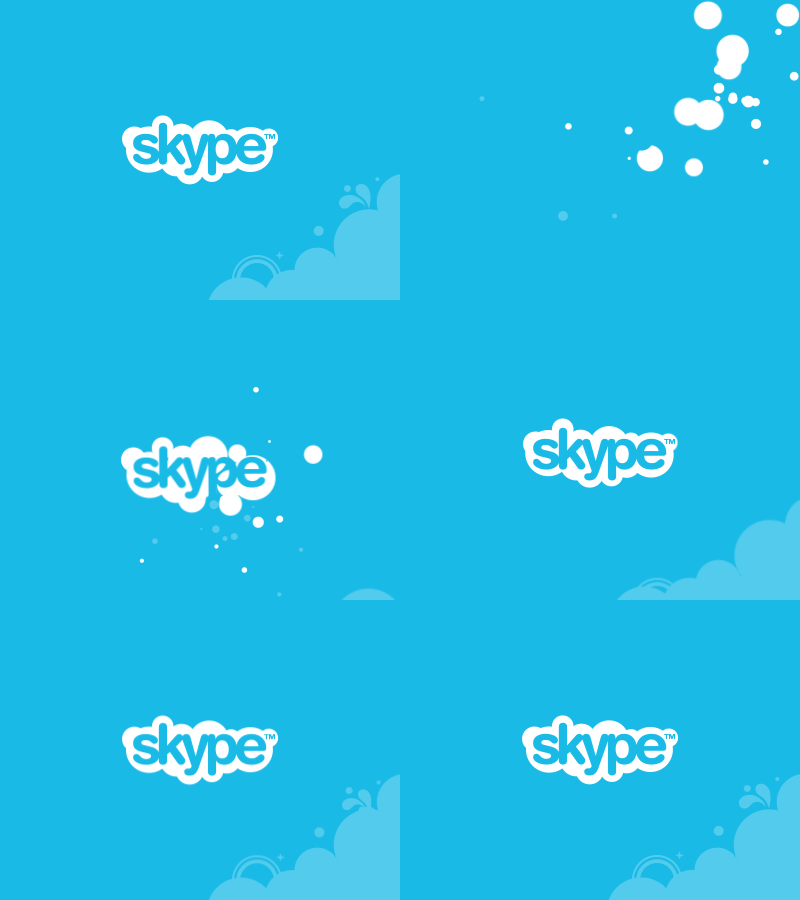
Image courtesy of Pivotal.
3. Nike

Image courtesy of JustCreative.com.
4. FedEx

Image courtesy of JustCreative.com.
5. Lux

Image courtesy of Mucho.
6. Spotify

Image courtesy of Oliver Keane.
7. Feral Sphere

Image courtesy of Mind Design.
8. Brikk

Image courtesy of Gun Karlsson.
9. Sello

Image courtesy of Latham Arnott.
10. Untime
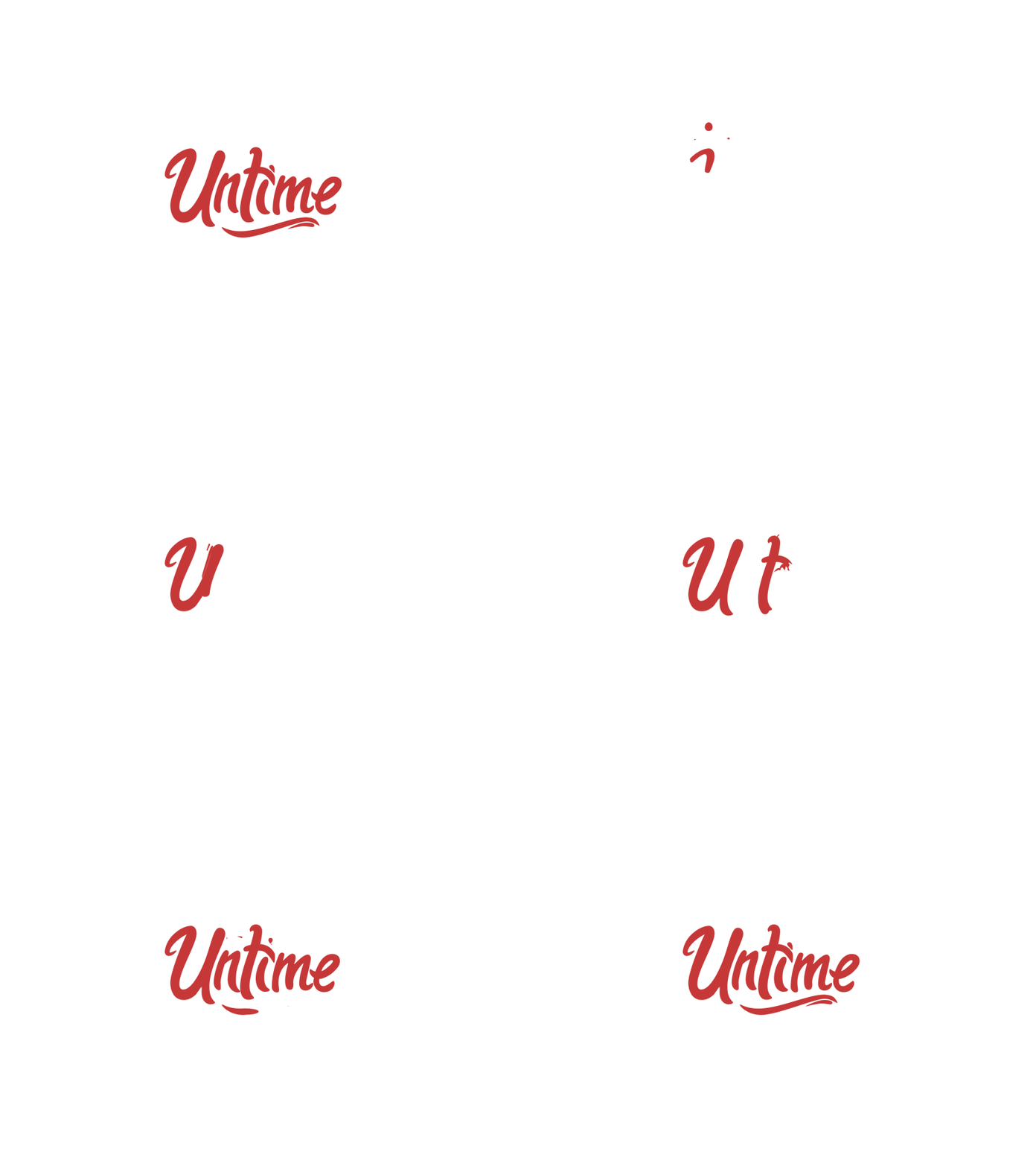
Image courtesy of Tony Pinkevich.
11. Firefox

Image courtesy of Latham Arnott.
12. Flight PR

Image courtesy of Dia.
13. OpenView

Image courtesy of Pentagram.
14. Cub Studio

Image courtesy of Fraser Davidson.
15. Ugmonk

Image courtesy of Seth Eckert.
16. Arzábal’s Food Truck

Image courtesy of Behance.
17. Two Twelve Studio

Image courtesy of Behance.
18. Scout

Image courtesy of Dave Chenell.
19. Fuzbiz

Image courtesy of Mattias Peresini.
20. AMA

Image courtesy of David Stanfield.
21. Ikea
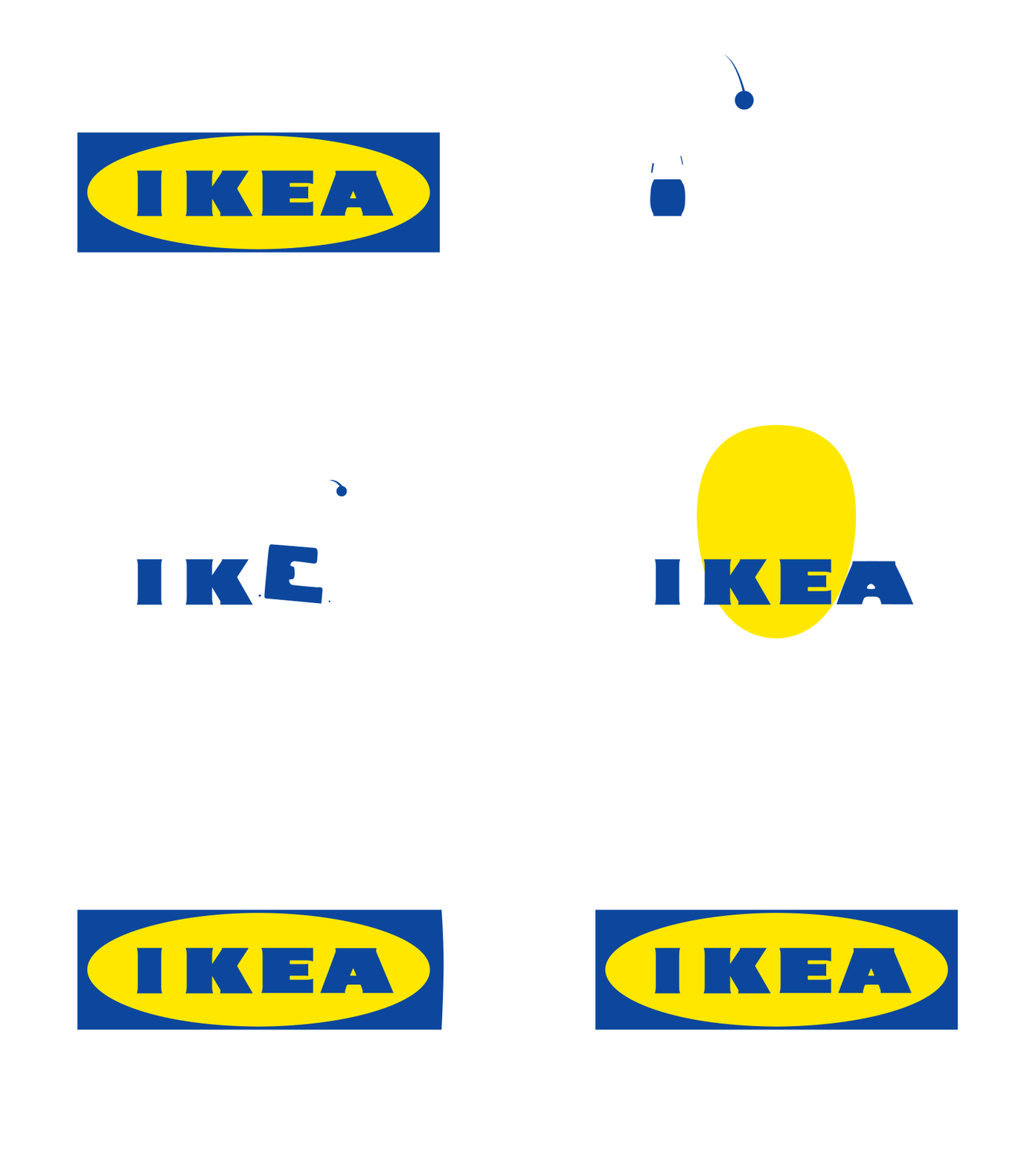
Image courtesy of Nikita Melnikov.
22. Hypercompact

Image courtesy of Evgeny Skidanov.
23. Slingshot

Image courtesy of Anastasiia Andriichuk.
24. CrowdStrike

Image courtesy of Seth Eckert.
25. Google

Image courtesy of Adam Grabowski.
26. Glug

Image courtesy of Marcus Chaloner.

How to Download and Save YouTube Videos
You expect technology to be accessible everywhere — even offline, in some cases. That includes YouTube videos.
Whether you’re outside on a run, traveling somewhere by train, or in a cafe with limited wi-fi service, you don’t want to stop what you’re doing if you run into connection problems, especially if you’re in the middle of watching a video on YouTube.
This is why it doesn’t surprise me that you want to know how to download and save YouTube videos. So did I, and luckily, there is a way.
Let’s face it, there’s nothing worse than losing wifi or data coverage when you’re halfway through the new Taylor Swift music video and your train goes under a tunnel (you know, as a random example … ).
By saving your favorite YouTube videos for later, you’re ensuring you can watch YouTube videos start-to-finish anywhere without any pesky obstacles like wifi or restricted data plans.
Download and save YouTube videos now = uninterrupted Taylor later.
Here, we’ll cover how you can download and save YouTube videos, on both mobile and desktop devices, to ensure you’re never without that quick entertainment fix when you need it.
How to Download and Save YouTube Videos
- Download VLC, or another open-source media player
- Open VLC and click “Open Media”
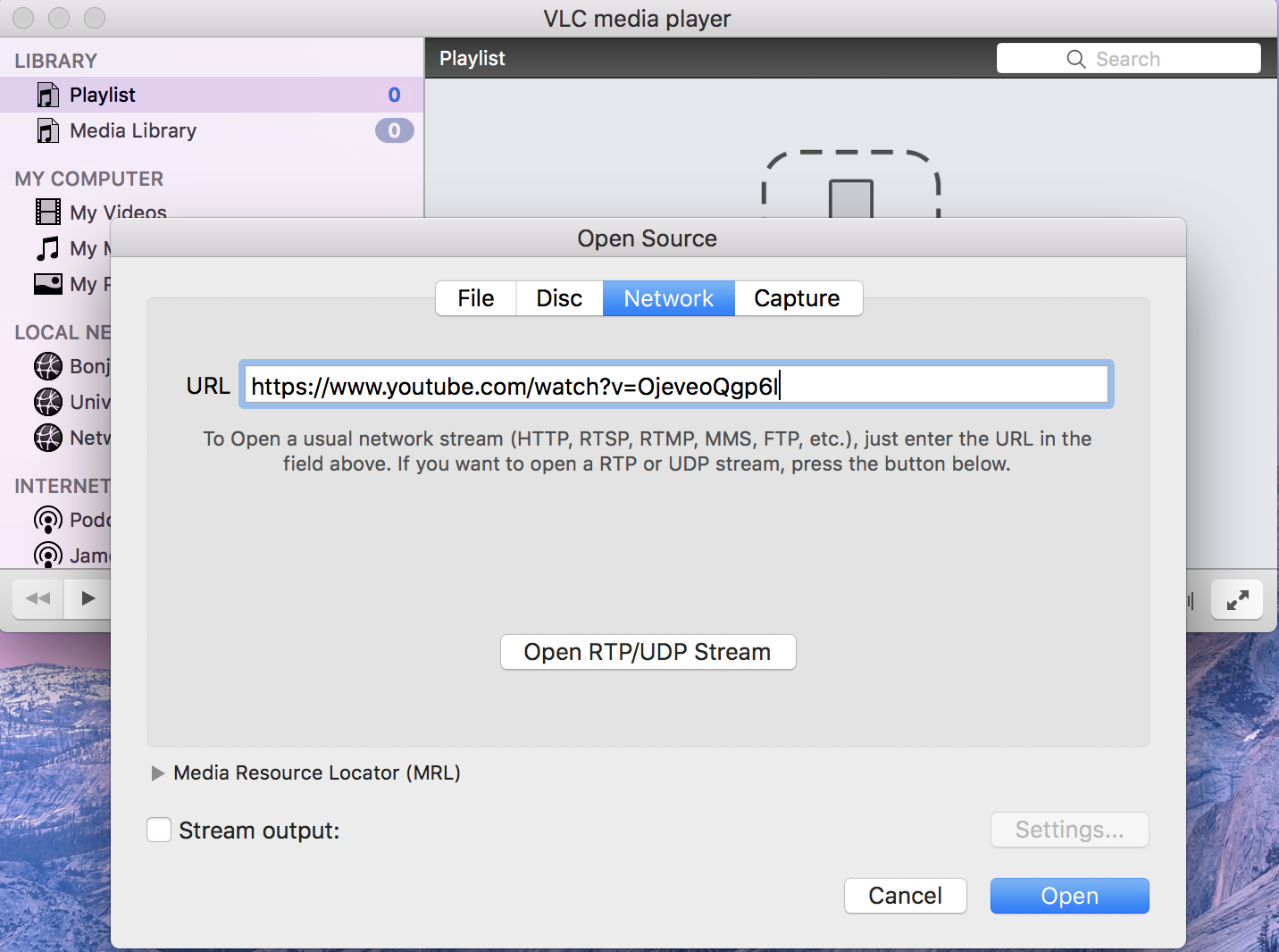
- Click “Network” and paste YouTube URL
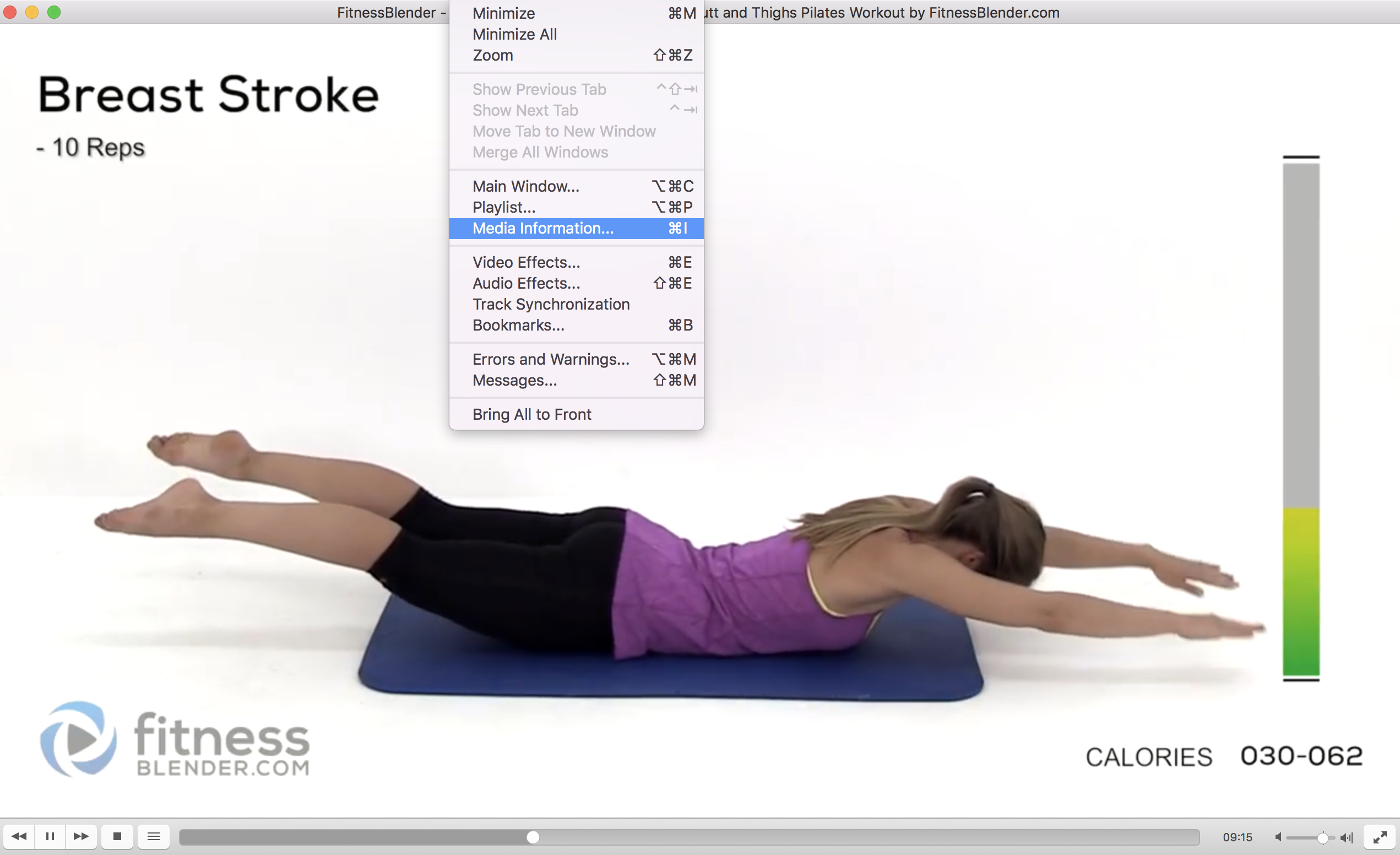
- If using Mac, select “Window” and then “Media Information”
- If using Windows, select “Tools” and then “Codec Information”
- Find the “Location” bar at the bottom and copy that URL
- Paste that URL into your browser
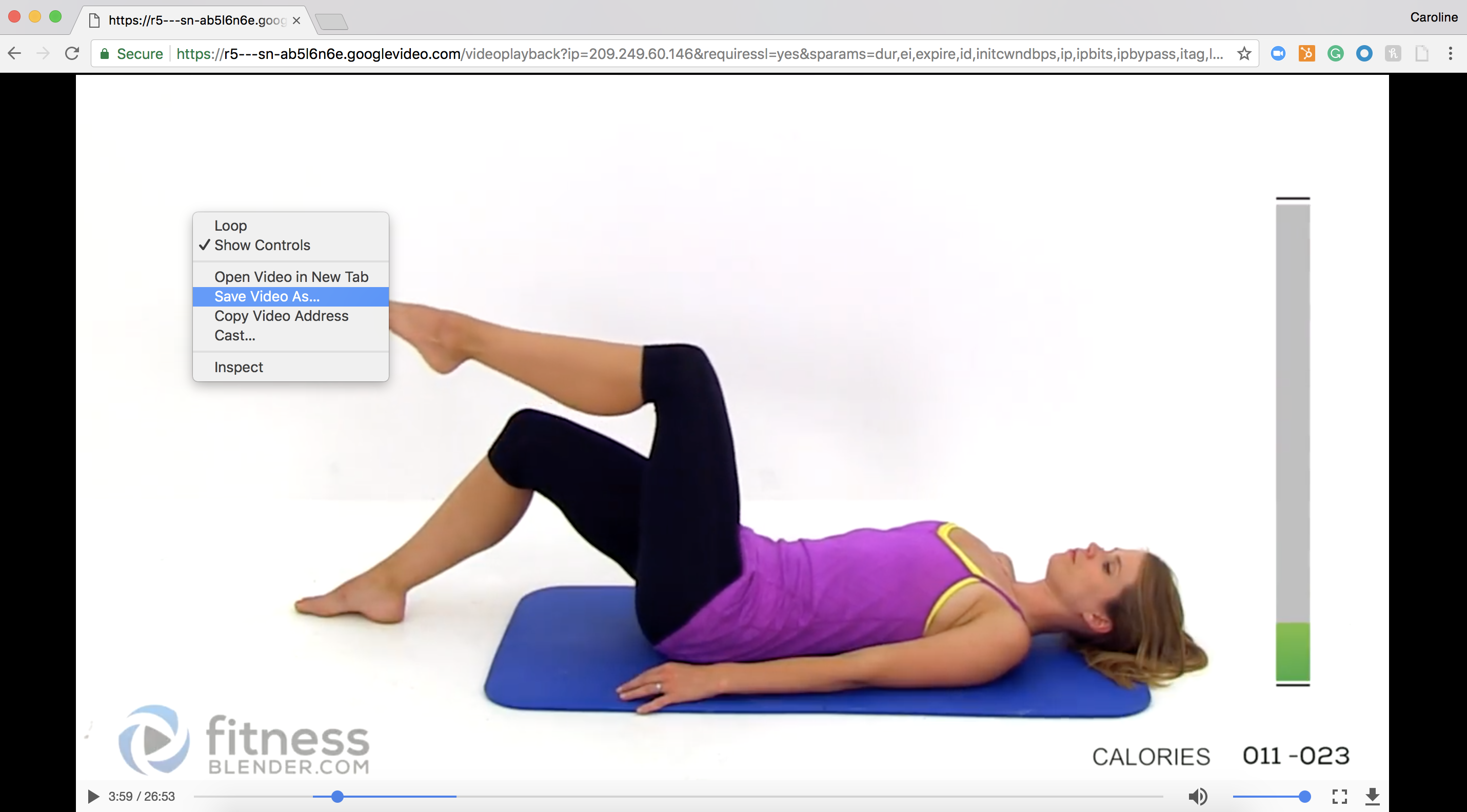
- Right click the video and select “Save Video As”
- Name the file and save to desired location

Tools to Download YouTube Videos
VLC, Freemake, or MP4 Downloader Pro are all great options for downloading an MP4 video from YouTube to your desktop. Feel free to check them out to decide the best option for you. To make your selection process easier, here’s a quick list of five free download solutions:
VLC
VLC runs on both Windows and Mac computers. If you’re using a Mac, make sure you have Mac OS X 10.7 or newer. The tool makes it easy to take your favorite videos offline and save them for viewing in any file format: MPEG-2, MPEG-4, WMV, MP3, MP4, and more.
MP4 Downloader Pro
MP4 Downloader Pro is a free video downloader that allows you to download YouTube videos in bulk. You can also prompt the tool to shut down your computer after your files have finished downloading. It’s a helpful piece of software for people who need to download lots of video content at once.
Freemake Video Downloader
Freemake was built with YouTube videos in mind. You can save videos, playlists, and entire YouTube channels to which you subscribe right to your desktop. Freemake downloads YouTube videos in most common file formats today: MP3, MP4, AVI, FLV, and more.
ClipConverter
ClipConverter is choice for YouTubers who’d rather not download a tool to their computer. It’s a website that delivers an offline version of your desired YouTube video via the video’s URL. Just enter the URL of your video, hit “Continue,” select the file type you want, and click “Download.”
4K Video Downloader
Compatible with both Windows and Mac, this free solution converts YouTube videos with just the video’s URL. Copy the YouTube link from your browser into this tool, and 4K Video Downloader will create an offline playlist of videos for you. The software produces videos in MP4, MKV, M4A, MP3, FLV, and 3GP file formats.
Download MP4 from YouTube
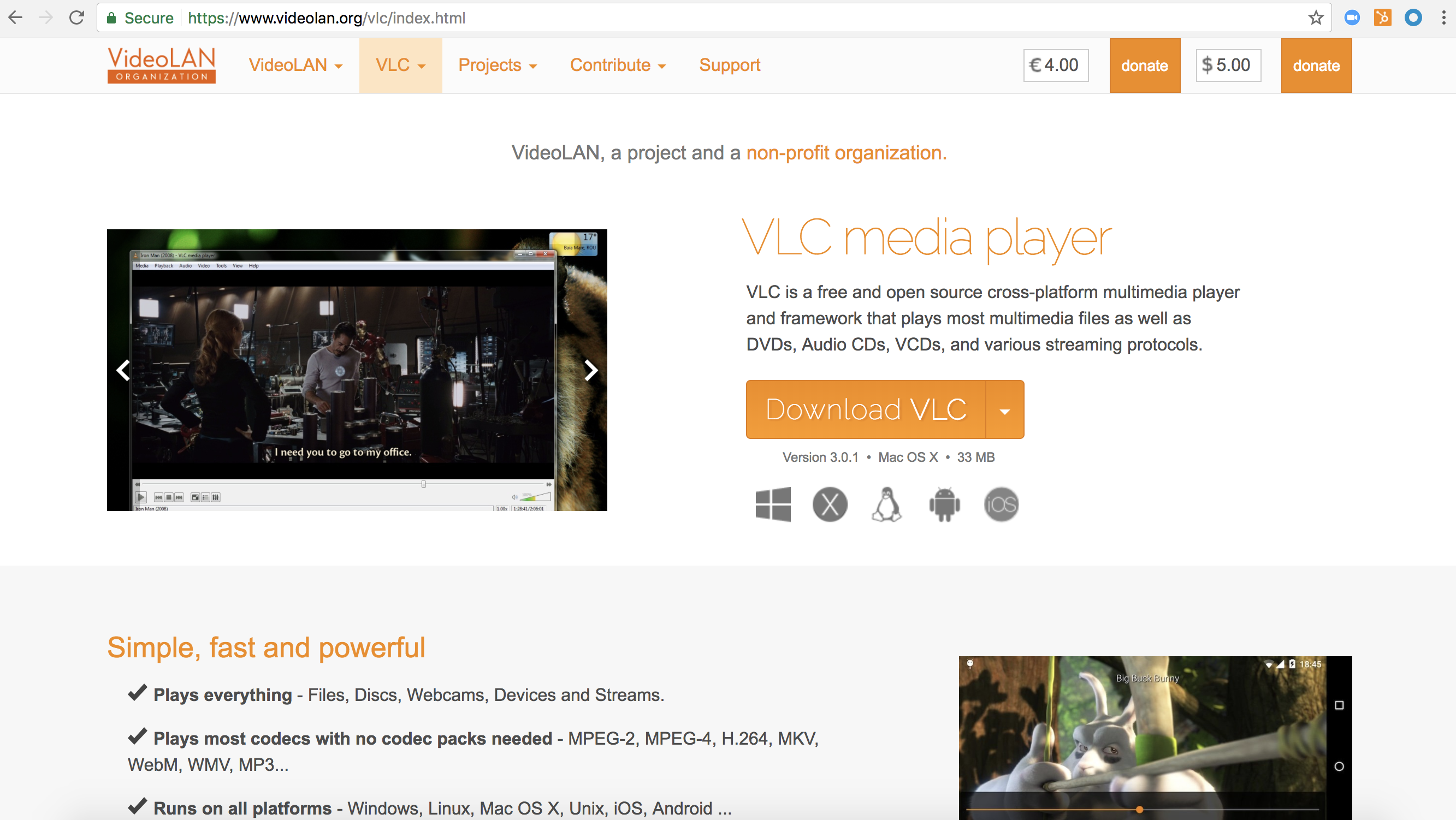
1. Download VLC, or another open-source media player
For the sake of time in this example, I downloaded VLC. You can find this free product here. Click the link above and follow VLC’s download instructions.
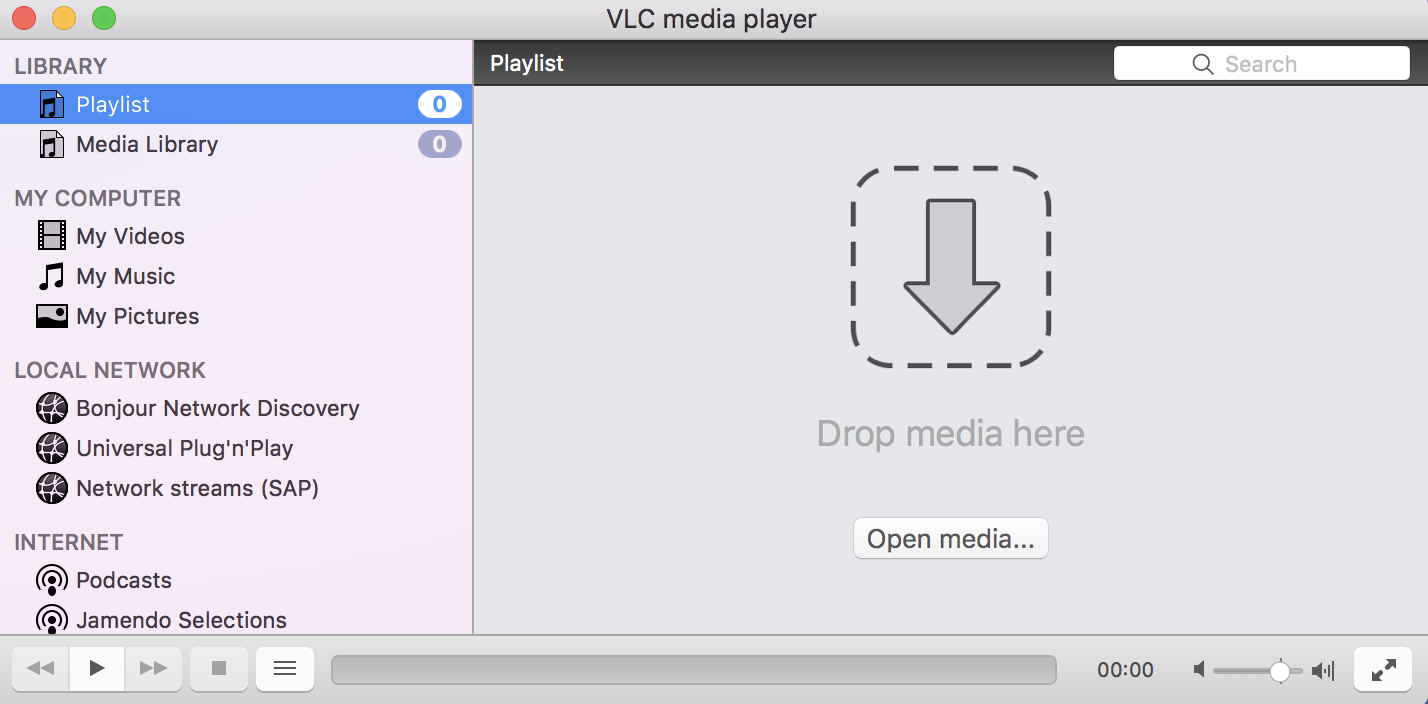
2. Open VLC and select “Open Media”
Below, you’ll see the homepage of VLC once you download the program to your computer. Select “Open media…” on the bottom right, as shown.
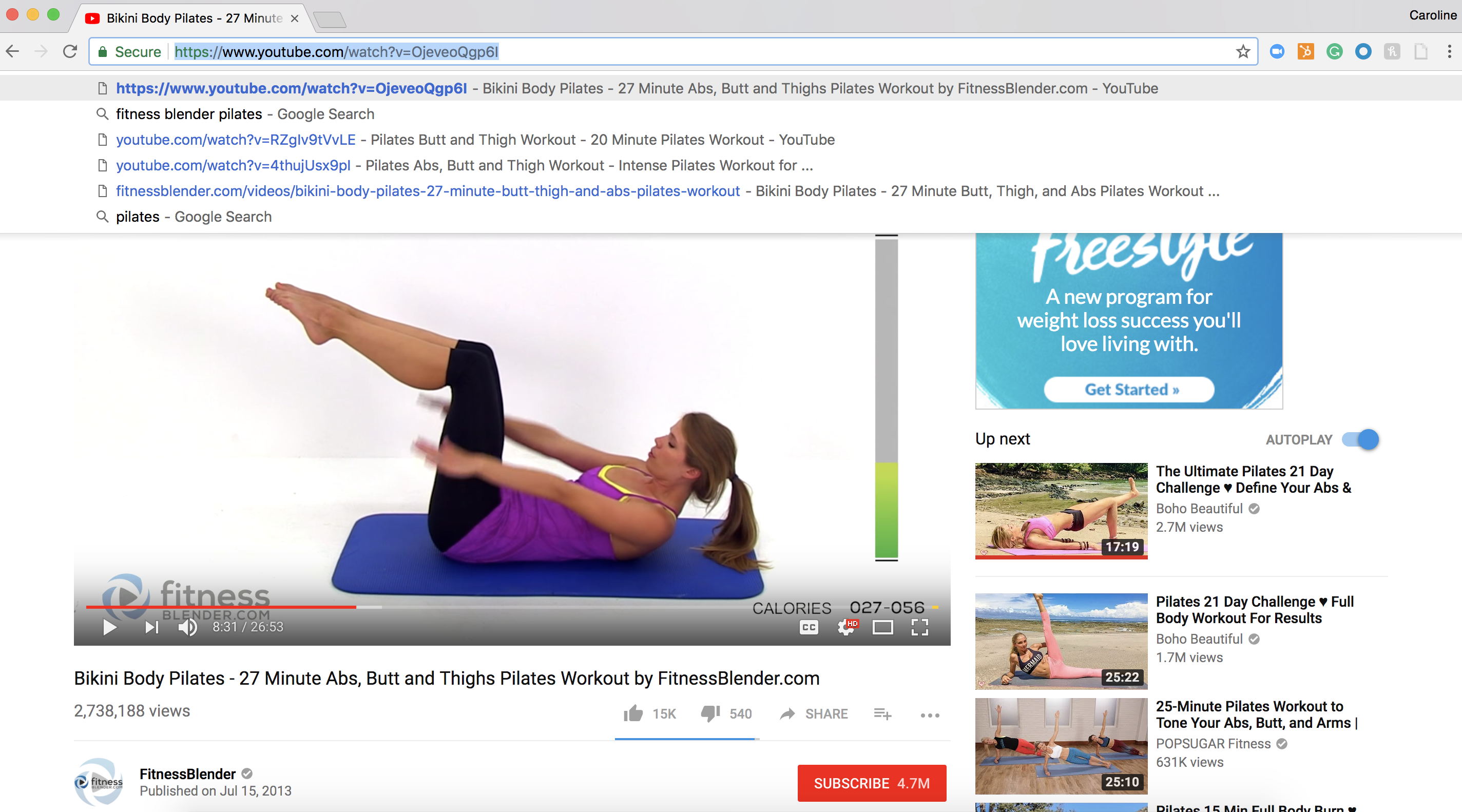
3. Click “Network” and paste your YouTube URL
Navigate over to YouTube and grab the URL of the YouTube video you’d like to download from the address bar at the top of your browser. You can simply copy this URL to your clipboard by typing Control+C on a Windows computer or Command+C on a Mac.
Then, return to VLC media player, click “Network” along the top menu bar and paste in the URL of the YouTube video you copied above. You can do this by typing Control+V on a Windows computer or Command+V on a Mac.
4. If using Mac, Select “Window” and then “Media Information”
In the top navigation bar of your Mac computer, click “Window” and select “Media information…” from the dropdown, as shown below:
7. Paste the URL into your browser
Return to your internet browser and open a new tab. Paste the text that’s currently copied onto your clipboard into your address bar. This will open an MP4 version of your YouTube video that you can actually save to your desktop.
8. Right click the video, and click “Save Video As”
Right click (or control+click on your Mac’s trackpad) the enlarged YouTube video that appears. Click “Save Video As” and select your Desktop as the video file’s destination.
9. Name the file and save to desired location
Hit save and see your newly downloaded YouTube video on your desktop.

Transport downloaded MP4 to Mobile Phone
This might not be the “official” solution, but if you want that same MP4 video on your phone, you can email it to yourself and open it up as an attachment, and you’re good to go!
Download MP3 from YouTube on Desktop
Sometimes, all you need is the audio of a YouTube video — especially if it’s new music. That’s where MP3 files come in.
Want to download an MP3 version of a YouTube video to your desktop?GenYouTube is the easiest and quickest way to convert YouTube videos to MP3 audio downloads, particularly because you can do it from the YouTube video. Here’s how:
- Find a video on YouTube you want to convert.
- In the URL, add the word “gen” right before the word YouTube (e.g. http.://www.genyoutube.com/watch?…)
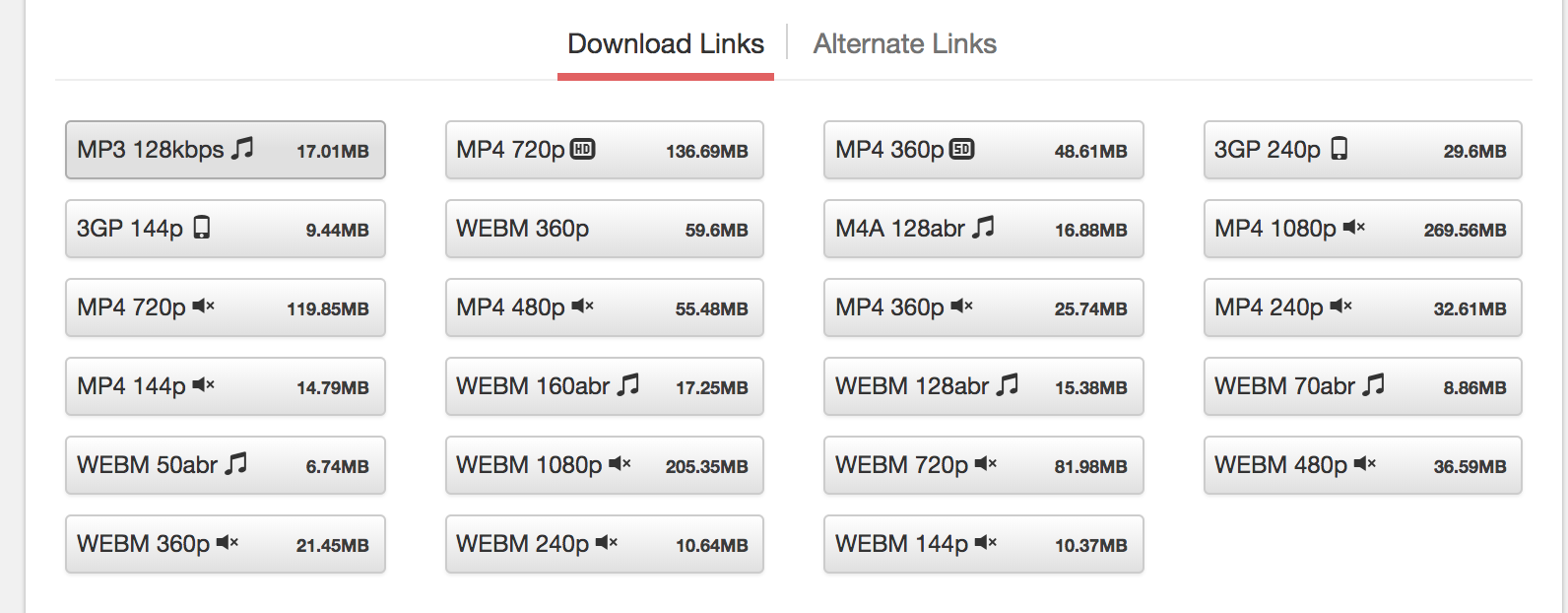
- This URL will lead you to the same video on GenYouTube’s page. Scroll down the page, and see your options for audio and video formats (including 3GP, WEBM, MP4, M4A).
- Select “MP3” to immediately start download.
Download MP3 from YouTube on Mobile Phone
You can also visit GenYouTube’s website from your mobile phone, and download from there.
Option 1 (search from YouTube):
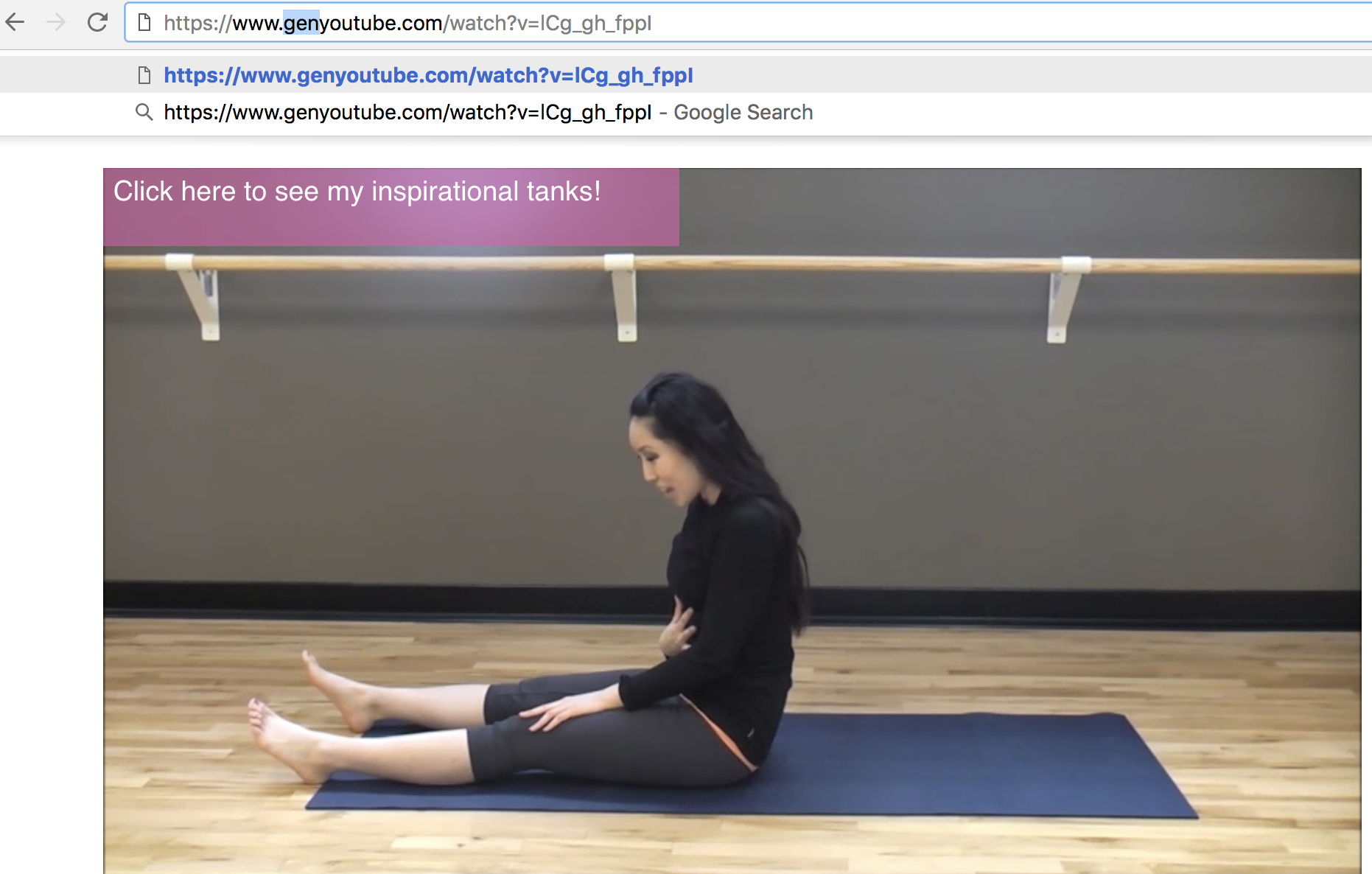
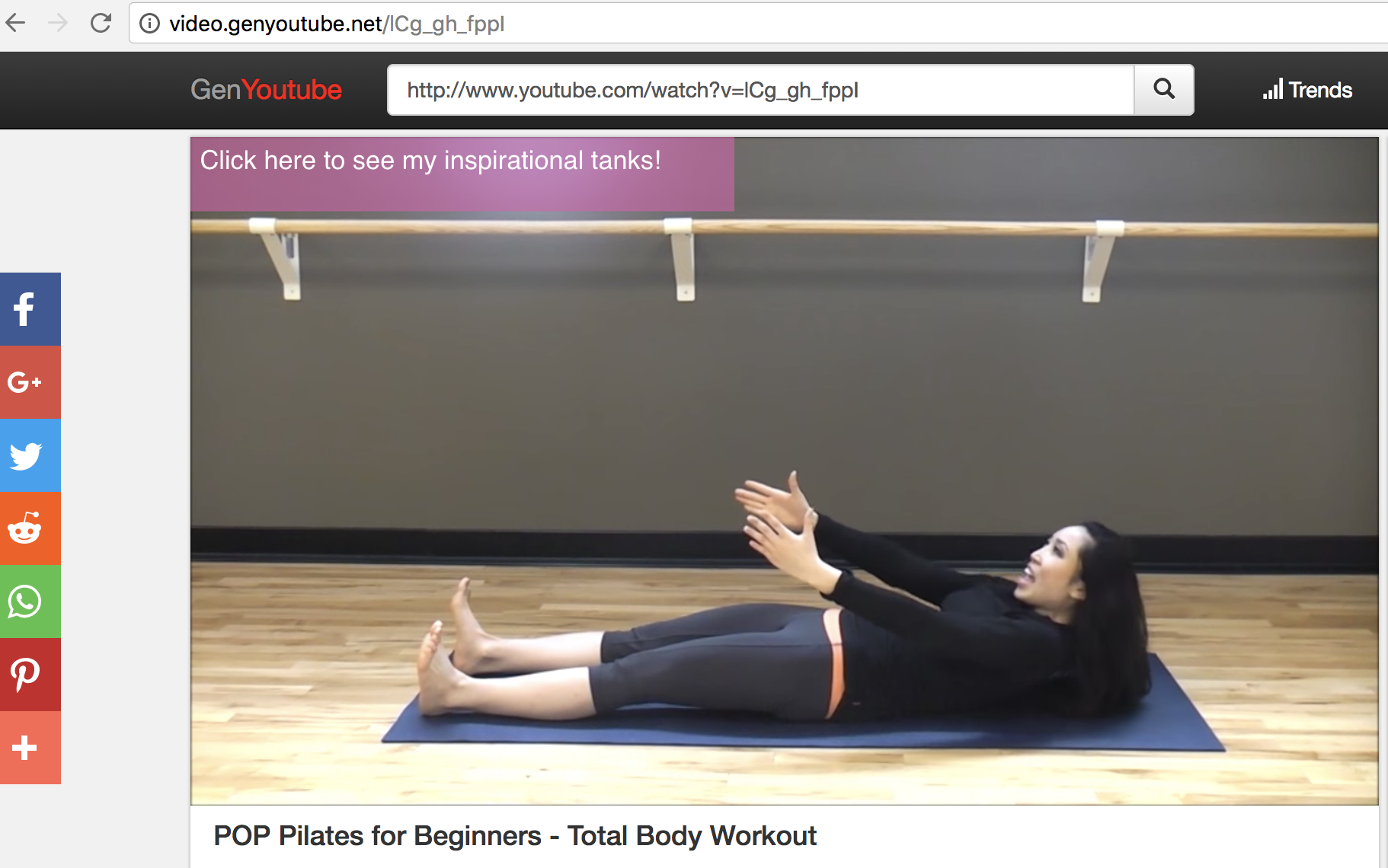
Option Two (search from GenYouTube … then follow same instructions as above):
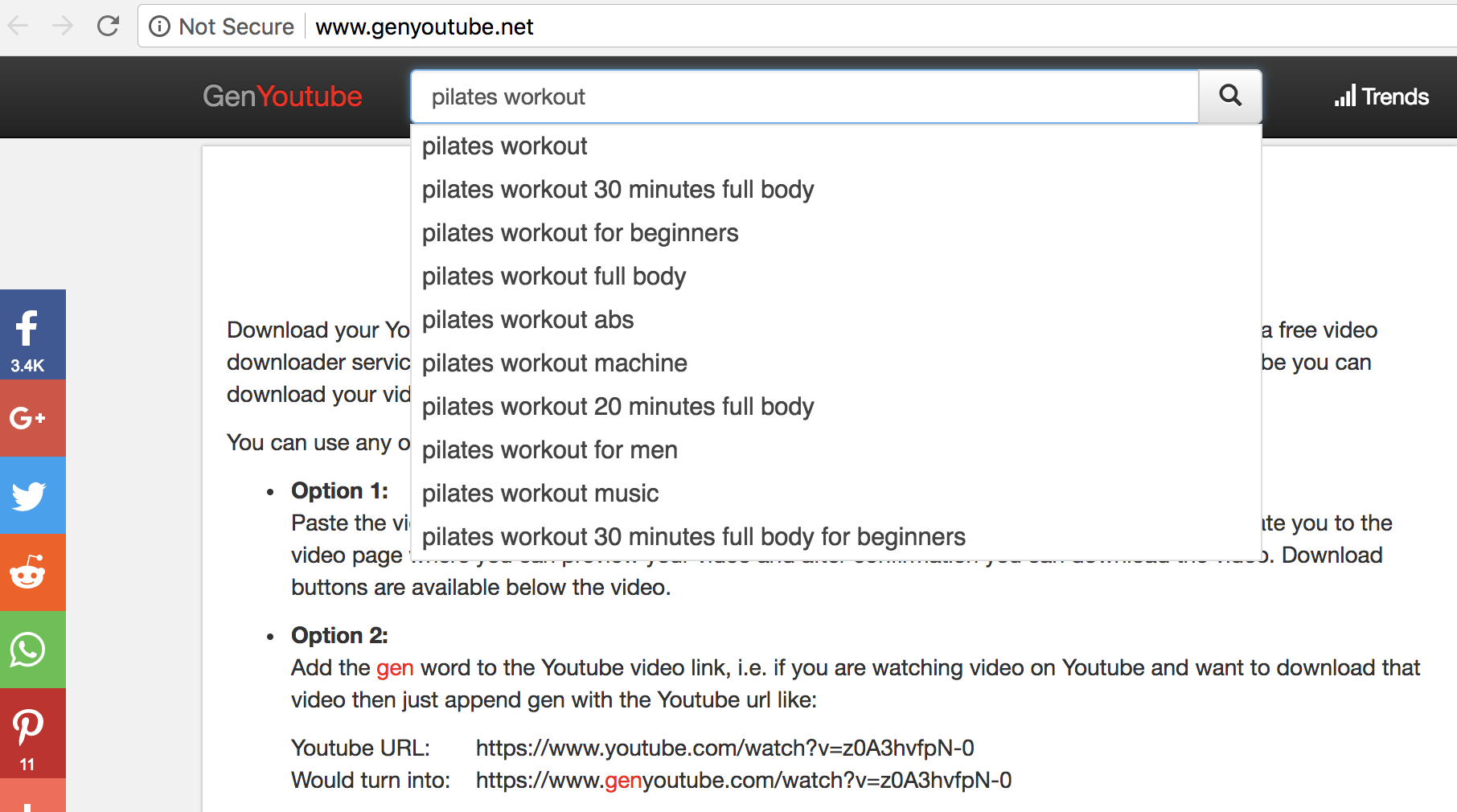
That’s it! You’re all set to listen and watch your favorite YouTube videos wherever, and whenever, you want.

The Best Coworking Office Spaces in Australia
It’s fair to say that Australia is one of the best places in the world to start a business, boasting a thriving tech industry and an entrepreneurial edge. But starting your own business comes with a ton of expenses — and one of the biggest is finding office space to work your magic in.
The good news is that you can vastly reduce this expense by opting to use one of Australia’s many coworking spaces, where you’ll also benefit from being in the midst of like-minded people who are willing to share ideas. (Not to mention, many of these spaces also offer free coffee!)
Sydney and Melbourne are two of the most active startup hubs in Australia, so we’ve put together a list of the best coworking spaces in each to help you find a space that works for you:
Sydney Coworking Spaces
- Fishburners
- Tank Stream Labs
- Spaces
- Hub Sydney
- Stone and Chalk
The Best Coworking Spaces in Australia
1. Fishburners

Image Source: Fishburners
Fishburners have locations in Sydney, Melbourne and Shangai, with the Sydney office alone boasting almost 300 companies working out of their space, as well as 500 visitors entering the premises each week. Fishburners also offers some handy perks such as free coffee and Red Bull, as well as a thriving community environment.
Pricing varies depending on the type of membership you choose, but you can take a free tour of Fishburners to get a feel for what membership package would best suit your needs. A huge bonus of joining Fishburners is that you get access to all of their locations mentioned above, regardless of your membership type.
2. Tank Stream Labs

Image Source: Tank Stream Labs
Tank Stream Labs (or TSL to those who know it well) bills itself as a “tech-focused, coworking community for startups and scaleups, with a global focus”. And it’s safe to say that they live up to that billing, with two offices in Sydney that house companies like Buzzfeed, Ashop, and formerly, GoDaddy. TSL also has a large community, with over 400 startups on the books in total and more than $300m raised to date by its members.
3. Spaces

Image Source: Spaces
Landing in Sydney’s Surry Hills from Amsterdam in 2016, Spaces offers 222 coworking desks to choose from, as well as three private meeting rooms. Spaces also provides a virtual office package that gives you access to a private office at Spaces locations for five days a month. If you’re not sure if Spaces is for you, they offer a free one-day trial so you can test their facilities out without dropping a cent.

Image Source: Startup Scene Australia
3. Hub Sydney
After originally opening a single office in Sydney’s William Street in 2013, Hub Sydney has now opened a second office located at Hyde Park in 2018. They offer day passes if you’re only passing through Sydney, or monthly memberships if you’d like a longer stay. Like Fishburners, you’ll get access to any of Hub Sydney’s other locations once you join the community. This means you can set up camp in places like Melbourne, London, Singapore, New York and Santa Monica.

Image Source: The Founder Lab
Based in Sydney’s Winyard Green, Stone and Chalk entered Australia as Asia’s largest Fintech coworking space, and it’s growing fast. It’s secured some impressive partners in Australia already, with the likes of NAB, HSBC and Suncorp amongst the many listed as corporate partners. Stone and Chalk also host regular in-office events with guest speakers from companies like Ernst and Young and Westpac.
Melbourne Coworking Spaces
- Framework
- Inspire9
- The Commons
- Hive Studio
- The Cluster
1. Framework

Image Source: Creative Spaces
Framework is one of the smaller coworking spaces on this list, but that doesn’t make it any less awesome. They’re based on the edge of Melbourne’s CBD with a tight-knit community of designers, developers, videographers, copywriters, marketing professionals and everything in between. Framework’s aim is to foster a social, professional and collaborative environment to nurture small business growth — you can even take the space for a test drive before making a decision.
2. Inspire9

Image Source: Creative Spaces
In business since 2011, Inspire9 is well known in the Melbourne startup community and has offices in both Richmond and Footscray. Like others on this list, Inspire9 holds regular in-office events and promote a strong focus on a collaborative environment between members. They’ve got packages to suit all needs, including daily and weekly passes, as well as a 24/7 residency package for the workaholics among us.
3. The Commons

Image Source: Creative Spaces
The Commons is one of the largest coworking spaces in Australia, with Eventbrite, Yeti and Almo among its members. The Commons has offices in Cremorne, South Melbourne and Collingwood, and offers a host of membership packages, including a customised private office. They’ve even got a photo studio and green screen if you need to get creative and save on the cost of a photo studio

Image Source: Hive Studio
4. Hive Studio
Located in Collingwood, Hive Studio offers a boutique workspace for small startup businesses, focusing on a community atmosphere and shared creative-minded environment. Depending on your needs, Hive Studio offers both desk space and office space, where you can rent up to seven desks in your own, lockable mini office. Pricing is also all-inclusive, so no hidden costs.

Image Source: Spacely
5. The Cluster
This is one of the best equipped coworking spaces on the list, with no less than six multimedia meeting rooms and 2,500m squared of high–tech office space that overlooks the Yarra River in Melbourne’s CBD. They offer a multitude of packages including flexi desks and private offices, while also providing a call answering service as part of their higher-end packages. Members of The Cluster include Amaysim, Mexia and Point Advisory.
Those are, in my opinion, some of the best coworking spaces you’re likely to find. But, there’s a plethora of others available if none of these suit your needs. If you’re in the process of starting your own business in Australia and aren’t quite sure what you have to do next, you can also take a look at this handy checklist to help you tick off the main items on your list.

How to Change Your YouTube Name
Perhaps the personal YouTube name you made when you were 14 isn’t cutting it anymore (I’m looking at you, SoccerLuvr4444). Or maybe you’re striving to create a new brand identity, and you’d like a new YouTube name to reflect that.
Whatever the reason, changing your name on YouTube is an easy three-step process. Before we jump in, it’s important to note that this guide will show you how to change the name displayed on your YouTube channel, and the one seen when you comment on people’s videos — these steps won’t change your YouTube account’s actual URL.
Also important to mention, changing your YouTube name will change your Google account name, as well. If you’re hoping to create a harmonious brand identity across your YouTube account, email, and website, this might be a good thing.
However, if you only want to change your YouTube name, but don’t want to affect your entire Google account, you’ll need to link your YouTube account to a separate Brand Account — here’s a tutorial for how to do that.
Now, let’s dive into the three easy steps you need to take to change your YouTube name.
How to Change Your YouTube Name
1. When you’re signed into YouTube, click on your user icon in the top right (I put a red rectangle around mine in the screenshot below). Then, click “Settings”.

2. In your Account Settings, click the “Edit on Google” link.

3. Here, you can change your First and Last name — for instance, I deleted my last name and replaced it with “Consulting”. It’s important to note this will change your name on all Google accounts. When you’re done, click “OK”.

4. Now, my official YouTube name is “Caroline Consulting”. When I comment on a post, that’s the name that’ll show up, and when someone searches for my channel, they’ll need to search Caroline Consulting.


And that’s it — you’ve changed your name. Remember, “first” and “last” refers to your first and last name, but you can certainly take creative liberties with those categories, as I did.
The only real challenge with the easiness of changing your YouTube name is the subsequent temptation to change it all the time (at least, that’s how it felt to me).

How to Remove the Background of a Photo in Photoshop or PowerPoint
You know what one of my biggest design pet peeves is? When I’m designing something, but there’s an unwanted background on the image I’m editing.
In this article, you’ll learn how to remove a photo background altogether, or make it transparent so the image assumes the look of any other background you put behind it.
Consider the above feature image. The image to the left would be so much more useful to my call-to-action, SlideShare presentation, blog post, or ebook if I could just remove that pesky background so it looked like the image on the right.

Or maybe you’ve downloaded another one of our collections of free stock photos that could also use a transparent background.
Luckily, there is something you can do about it. Using either Photoshop or PowerPoint, you can easily remove the background of your photo or image in no time. And I’m going to show you exactly how to do it.
First, grab an image to practice with. You can download one from our latest collection of royalty-free stock photo here … Got an image whose background you want to remove? Great — let’s get started.
Because some of you may not have Photoshop at your disposal, let’s start with instructions for PowerPoint. You can also jump down to the instructions for Photoshop here.
How to Make a Picture Background Transparent in PowerPoint
- Insert the image into PowerPoint.
- Click on your image. Then, under ‘File’ (on a PC) or ‘Adjust’ (on a Mac) in your toolbar, choose ‘Remove Background.’
- PowerPoint will automatically try to remove the background, but it might not get it just right.
- Using the options in the toolbar, click to mark areas you want to keep or remove from the final cropped image.
- Click somewhere outside of the image when you’re finished.
- Save the image as a PNG file to preserve its transparent background.
How to Remove a Photo Background in PowerPoint
Keep in mind that you’ll need to be using Office 2010 or later, and because PowerPoint isn’t as sophisticated as Photoshop, it may not work for some of the more difficult images. But if you don’t have access to Photoshop, this could be just what you need.
1. Insert the image into PowerPoint.
Images with white/solid backgrounds or those that have high contrast with the foreground are the easiest to manipulate in PowerPoint.
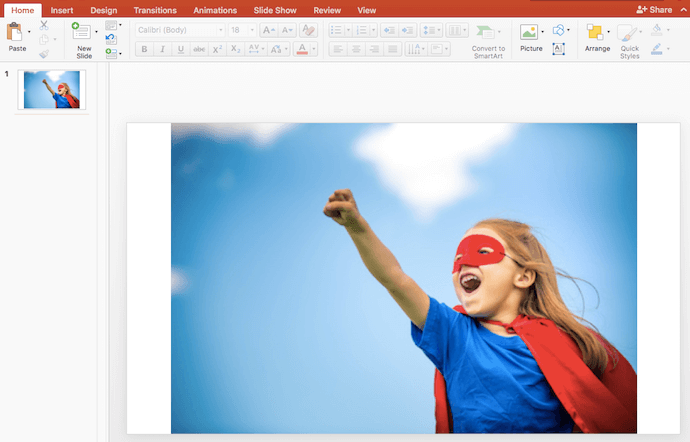
2. First, click on your image. Then, under ‘Picture Format’ on a Mac (or ‘File’ on a PC) in your toolbar, choose ‘Remove Background.’
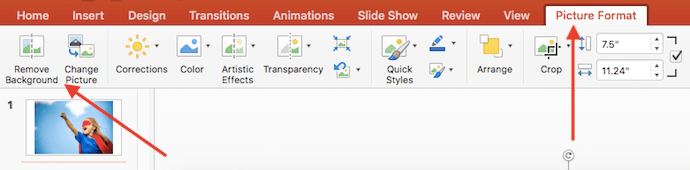
3. PowerPoint will automatically try to remove the background, but it might not get it just right.

4. Using the options in the toolbar, click to mark areas you want to keep or remove from the final cropped image.
See how it’s cutting off part of the girl’s torso and cape above? First, drag the box around the image so it includes the entire area of the image you want to keep.
Keep in mind that the areas highlighted in purple will ultimately be removed. Using your cursor, however, you can be even more precise about what you want eliminated. Hover over both the purple background and the subject in your picture — you’ll see your cursor produce either a plus sign or a minus sign. The minus sign, when hovering over your subject, allows you to mark areas to remove — simply click on any additional areas you would like to remove.
If there are purple areas you actually want to keep, hover over any purple spot and click to mark areas to keep — they will feature a plus sign.
To get a closer look at the areas you want to select, zoom in on your image. Below, you’ll see small minus signs surrounding areas of the girl’s hair — I clicked on these spots where I thought PowerPoint might get confused as to which parts of the background between strands of hair should go or stay.

PowerPoint could see these strands of hair as the edge of the girl, and not remove the background between this hair and the rest of her head. In this type of case, these minus signs can help you.
If you happen to mistakenly include or exclude something, just click on the plus or minus sign that covers the area, and it will disappear.
5. Click somewhere outside of the image when you’re finished.

Last but not least, save the image as a PNG file to preserve its transparent background.
How to Make a Background Transparent in Photoshop
Because Photoshop is much more sophisticated than PowerPoint, there are a few different methods you can use to make a background transparent. Each is good for a different kind of image. Click the links below to jump to the tutorial for each method:
- The Polygonal Lasso method is great for images with straight edges.
- The Quick Selection method is good for images with round edges.
- The Brush method is best for images whose edges require more precision.
The Polygonal Lasso Method: For Images With Straight Edges
Let’s say I want to remove the blue background (as well as the pole) from this “stop spam” image.

Because this image is made up entirely of straight edges, this method of background removal is perfect. Here’s how to make that blue background (and the silver pole) transparent.
1. Get your image ready in Photoshop.
The first thing you’ll want to do after you drag and drop your image into Photoshop is convert it into a “Smart Object,” and then rasterize it. Here’s how:
Click on the Layer dropdown in your Photoshop menu, highlight Smart Objects, and then click Convert to Smart Object.

Next, click on the Layer dropdown again, but this time, highlight Rasterize, and then click Smart Object.

Now you’re ready to convert that pesky background into a transparent one.
2. Zoom in on your image so you can be more precise with your background removal.
You can zoom in and out by clicking the View dropdown and choosing Zoom In or Zoom Out, or using the keyboard shortcuts as indicated.
3. Select the Polygonal Lasso Tool from the toolbar on the left.
The Polygonal Lasso Tool looks like this: 
Once selected, click on a starting point, and trace the part of the image you want to keep using a series of clicks from point to point. I prefer to get rid of the black border on the stop sign, so I’m tracing the sign just inside the outer edge of the white border.

4. Connect the line with your starting point.
Once you’ve made it all the way around your image, connect your line to the first point you started with. You’ll know it’s connected when your cursor includes a little circle, as shown below.
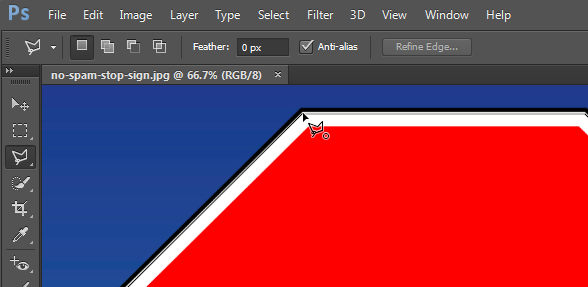
Once you connect your line to your first point, a flashing dashed line will form around your image, like so …

5. Select the background you want to delete.
Do this by clicking the Select dropdown in the top menu, and clicking Inverse. This will highlight the entire background you want to make transparent.

6. Delete the background.
Hit Delete on your keyboard, and the background will turn into a checkered grid like you see below. This is how you’ll know your background is now transparent.
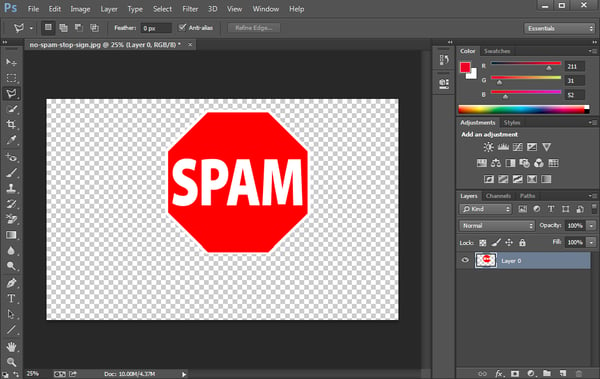
7. Save your image as a PNG file.
This will ensure your background transparency stays in tact.
The Quick Selection Method: For Images With Round or Wavy Edges
Okay, now let’s say your image isn’t as straight-edged as the image in the example above, and it’s got some curve to it, like the image below. Here, you’ll want to use the Quick Selection Tool.

1. Get your image ready in Photoshop.
Just like we did with the Polygonal Lasso method, the first thing you’ll want to do after you drag and drop your image into Photoshop is convert it into a “Smart Object,” and then rasterize it:
- Click on the Layer dropdown in your Photoshop menu, highlight Smart Objects, and then click Convert to Smart Object.
- Next, click on the Layer dropdown again, but this time, highlight Rasterize, and then click Smart Object. (See step 1 within the Polygonal Lasso method tutorial for screenshots if you’re stuck.)
2. Choose the Quick Selection Tool from the toolbar on the left.
The Quick Selection Tool is right below the Polygonal Lasso Tool, and it looks like this: 
3. Click the background to highlight the part you want to make transparent.
This tool takes some getting used to, but once you get the hang of it, it’s one of the fastest and easiest ways to remove the background from a photo.
Start clicking around on the background to highlight the parts you want to remove.

Adjust the size of the selection tool accordingly. I recommend starting with a larger size, since that will allow you to select larger sections of your background at a time, speeding up the process.
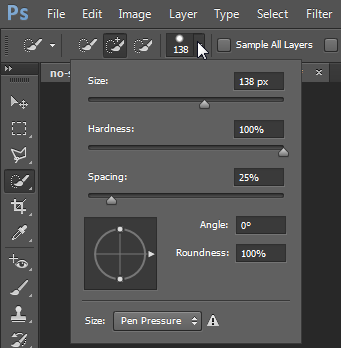
Repeat this process until the entire background of the image is selected:

4. Subtract selections as needed.
Oops! Let’s say you notice part of the image you want to keep is getting highlighted along with the background, like you see in the screenshot below.

Have no fear — you can subtract parts of the image that accidentally get highlighted:
First, click on the Subtract From Selection button in the toolbar at the top. (Alternatively, you can hold down alt while you click on a PC, or option while you click on a Mac.)

This is also something that may take some getting used to, but the trick is to position your cursor right along the inner edges of the part of the image you want to keep. You may want to adjust the size of your Quick Selection tool for some of the finer details. Then click so the incorrectly highlighted section gets detracted.
5. Delete the background.
Finally, click Delete on your keyboard to make the background transparent.
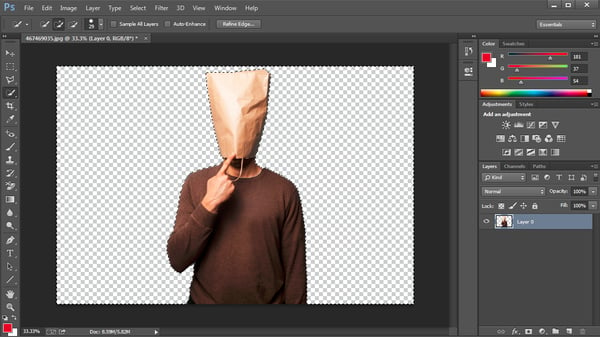
6. Save your image as a PNG file.
This will preserve the transparency of your background.
Pro Tip: Sometimes using the Quick Selection Tool results in jagged edges, especially on parts of the image where the edge should be a straight line. This tends to happen most on low-resolution images. If it happens to you, try smoothing out the jagged edges using the Polygonal Lasso method after first removing the background with the Quick Selection Tool.
The Brush Method: For Trickier Images
There’s a third method you can fall back on if the first two methods just aren’t cutting it. This is great for images that need a little bit more precision, although to be honest, the first two methods usually do the trick for me.
The one time this method comes in handy for me is when I need to clean up some of the edges of images whose backgrounds were removed via the first two methods. For example, I used the Polygonal Lasso Tool in Photoshop to remove the background of the shark boy image at the very top of this article, but I cleaned up the spaces in between his fingers (which needed a little bit more precision) using the Brush Method.
1. Get your image ready in Photoshop.
Just like the first two methods, the first thing you need to do after you drag and drop your image into Photoshop is convert it into a “Smart Object,” and then rasterize it:
- Click on the Layer dropdown in your Photoshop menu, highlight Smart Objects, and then click Convert to Smart Object.
- Next, click on the Layer dropdown again, but this time, highlight Rasterize, and then click Smart Object. (See step 1 within the Polygonal Lasso method tutorial for screenshots if you’re stuck.)
2. Select the Brush Tool from the toolbar on the left.
The Brush Tool is right below the Red Eye Tool, and it looks like this: 
3. Change the “Mode” and “Hardness” of the Brush Tool.
Right below the top menu, change the Mode to Clear. Then click the drop-down arrow next to the brush size box, and change the Hardness to 100%. This will essentially transform your Brush Tool into an eraser.

4. Brush away the background.
Erase your background by clicking and dragging. Adjust the size of your Brush Tool and zoom in on your image for more fine-tuned precision.

5. Save your image as a PNG file.
Once you have your image the way you want it, save it as a PNG. This will preserve the transparency of your background.
That’s it! Hopefully image background removal is now much easier for you using at least one of these methods.



This is How Blockchain Could Change Digital Marketing Forever
Some execs think it’s the future universal currency, while others consider it a “disgusting…noxious poison.”
What could elicit such extreme feelings in complete opposite directions?
Bitcoin, of course.
The price of the popular cryptocurrency has been up and down, shedding about 50% of its value in the first three months of 2018 before a slight recovery in the last two months. It’s a volatile investment, to say the least.
But the real story of Bitcoin and other forms of digital money isn’t their investment potential — it’s the technology behind them. Blockchain, as explained in a helpful post from Mimi An earlier this year, is a method of digital record-keeping that creates a ledger of transactions that is transparent and impossible to tamper with.
Even some experts who are skeptical of Bitcoin itself believe that blockchain technology is here to stay. And that’s because despite its current volatile early stages, blockchain could fundamentally change the way that several massive industries operate – including digital marketing.
How could blockchain influence digital marketing?
Many facets of business and communication could be affected by blockchain, but much of the discussion to date has been about its impact on banking and financial transactions. While those two areas alone are significant, blockchain’s impact could go beyond currency and finance to affect marketers of all products and services:
1. Changing Data Collection
Anyone can access the internet, but they have to go through traditional gatekeepers: ISPs and web browsers. These companies can learn almost everything we do online, from the things we buy to the articles we read to the people we talk to.
It’s great to think that these gatekeepers will always provide fair access to the web and do the right thing by consumers, but um, have you seen the headlines recently? Mark Zuckerberg has become the fall guy for a problem that extends far beyond Facebook: our personal data can easily be bought and sold to advertisers.
Blockchain could be a solution to this. A good case study for the data privacy problem is Blockstack, a network built on blockchain that touts itself as “a new internet for decentralized apps.” Because Blockstack’s network is built on blockchain-verified signatures, your personal data remains with you instead of existing on servers owned by your application. Visiting a site or using an app is like inserting a key into a lock: You keep a personal copy with you at all times, and once you place it in the lock, you take it out when you are done. There’s no running log kept of who used the lock and when.
Blockstack is just one example — there are several other projects in the crypto space aiming to achieve a similar goal, most notably Skycoin, touted by its creators as the fuel for a new decentralized internet. This P2P network that Skycoin miners power, known as Skywire, will be the foundation for messenger protocols, apps, and other common functions of the current internet, with one big exception: All user data will be encrypted and protected.
Consider how marketing would change if us marketers didn’t have access to all the user data we do currently – it could happen sooner than you think. Without a plethora of information about each individual browsing you or your clients’ websites, you’d have to rely on gathering data directly from prospects and customers to fill in the gaps.
You’d also need to customize your user experience on the specific things your audience is looking for (though the best marketers are already doing this). That’s because blockchain could soon allow users to voluntarily decide what type of content and ads they want to see.
2. Fixing Digital Display Advertising
While marketers are getting results from them, there are some serious flaws in online display ads. From the perspective of the advertiser, they can be expensive and complicated to understand and manage. Also, the inventory is almost completely controlled by two for-profit companies: Facebook and Google.
The issues with digital advertising from the user perspective are well-documented: Display ads are intrusive, annoying, and can drain your mobile device’s battery and waste bandwidth.
The Brave blockchain browser with its accompanying Basic Attention Token (BAT) is attempting to fix all of these issues by changing the way users interact with ads. Brave founder Brendan Eich has already earned his stripes in the tech world – he created JavaScript in the 90’s during his time working at Netscape, and is the co-founder of Mozilla.
Brave and BAT, which is powered by blockchain technology, are aiming to break up the current monopoly on digital ads by allowing users, publishers, and advertisers to trade on the value of online attention.
It works like this:
1. Advertisers buy ads using BAT. These are usually private tabs in the Brave browser, but they can also be push notifications and landing pages. Brave’s dev team is aiming for fewer, but higher quality ads in the ecosystem.
2. Users who opt in to viewing ads are compensated with BAT. You get to decide which kinds of ads you see. Not only does this provide more accurate consumer information to advertisers (anonymously), it helps users learn about the products and brands they actually want to hear from. Anyone who volunteers to get ads is paid a portion of the advertiser’s spend in BAT, for the value of their attention.
3. Publishers are compensated by both consumers and advertisers. Under BAT’s revenue sharing program, publishers receive a larger portion of ad spend than consumers. They can also charge BAT for access to premium content and subscriptions.
It’s a win for all parties: Marketers get better ad performance data and targeting, publishers get more revenue and control over ads they display, and users get fewer, better-quality ads related to their interests – without compromising their personal data, thanks to blockchain encryption.
Most importantly, the value of attention is given back to its owner. Imagine buying a subscription to Harvard Business Review or The New Yorker simply by opting in to receive ads related to your interests.
It’s still far from an everyday reality, but this kind of digital advertising utopia could make marketers think more closely about their target audience when creating ads. Companies trying to gain attention from prospects will be forced to provide a valuable, or at least entertaining ad experience, since users would no longer have to receive them.
3. Ownership and Security of Digital Assets
Everyone knows the story: The rise of the MP3 and digital music led to widespread piracy in the late 1990s and early 2000s. The music industry pushed back, and for a while both sides were at a standoff.
The modern solution to this situation is streaming services like Spotify, Tidal, and Apple Music. But it’s a very flawed model: Artists are compensated fractions of a penny per stream, and the complexity of licensing in the music business means streaming service payouts aren’t always made to the proper party.
Blockchain could be the next step in the evolution of the creative digital economy. Projects like Po.et, Tao, and Steem were designed with this intent. Imagine if musical artists, filmmakers, and photographers could offer their work to a massive audience without paying an intermediary like YouTube, Bandcamp, iTunes, or Shutterstock for exposure and security.
Tao, for example, envisions a world where artists create their own communities through what they call an Initial Artist Offering (IAO). Your band would create and sell a certain quantity of a crypto token, like the digital version of a baseball card or vinyl LP. Once you’ve sold a set amount to fans, you can then offer special releases, live experiences, even physical band memorabilia, in exchange for your token. The more popular you and your music get, the more value your token will have, and since blockchain also records transaction dates, length of token ownership could also be a consideration in offering content and access. Finally, your annoying friend who brags about liking a group before they got big can get rewarded for it!
In March, Young Dirty (Bar-Son James), the son of Wu-Tang rapper Ol’ Dirty Bastard, became one of the first artists to actually create this type of community. His new Dirty Coin will be used for both his music and content owned by his father’s estate.
This blockchain-based entertainment economy could allow artists to market themselves directly to their audiences without ceding control of their work or a share of their revenue to a platform like Facebook or SoundCloud. It would allow artists and groups to get recognized based on the value of their work, not because they paid extra money to have their songs listed first on a music platform. This model would shift entertainment marketing even more towards P2P communities, since fans could conduct transactions themselves and earn special privileges for being holders of artist tokens.
Possibility vs. Reality
It’s important to remember that these scenarios are ideal cases, based on technology and projects still under development. No one knows whether the vision of a blockchain-based world will become reality, especially since cryptocurrency is still in its highly-unregulated infancy.
But if even one or two of the commercial blockchain uses come to fruition, it could dramatically alter the way that marketers go about attracting buyer attention. One thing is for sure: With some of the brightest minds at the biggest companies working feverishly on cryptocurrency projects, there is sure to be lots of movement in the space over the coming months and years.

Using Human-Centered Design to Create Better Products (with Examples)
To understand what human-centered design is, let’s start with what it isn’t.
Imagine you work at a gaming design company, and one day your boss comes to you and says, “Teenagers these days — they need to get off their phones. Let’s design a crossword-puzzle board game for teenagers — they’d welcome the opportunity to get offline.”
Your boss has good intentions, but his intentions don’t match your consumer’s reality. His idea isn’t empathetic towards a teenager’s actual passions, and it isn’t a solution that fits their actual wants and needs.
What is human-centered design?
Human-centered design is a problem-solving method that requires you to put your consumer’s needs first when tackling an issue. To use human-centered design for your creative process, you must know your consumer deeply, empathize with a real problem they face, and come up with solutions they’d embrace. Human-centered design means creating products to solve your consumer’s struggles and help them live better, easier lives.
Now, let’s look at a real example of human-centered design: meal subscription boxes.
Take HelloFresh, which was founded in 2011 by Dominik Richter, Thomas Griesel, and Jessica Nilsson. The company delivers a box of fresh food to your door, with easy recipes included. The founders recognized people have trouble finding time to shop for groceries, and they also struggle to create healthy, affordable meals — they came up with a solution to both problems.
Unlike your boss in the first example, the HelloFresh founders didn’t come up with an idea unrelated to real consumer’s actual needs. Instead, they recognized a struggle someone was facing, and then worked to invent a solution. In this way, it’s arguable human-centered design is a safer and more trustworthy approach to problem-solving.
Whether your role requires you to pitch ideas in marketing meetings, or design the products your company sells, it’s critical you know the process of human-centered design. By putting your consumer at the forefront of your creative process, you’re ensuring each product you create and distribute is a true, long-term solution to your consumer’s needs. If done correctly, you’ll gain a much more reliable and loyal customer-base.
Now that we’ve covered the importance of human-centered design, let’s dive into the various stages of a human-centered design process, and take a look at some examples, so you feel confident implementing the strategy for yourself.
Human-centered Design Process
IDEO — the global design firm behind Apple’s first computer mouse, the Palm Pilot in 1998, and more — came up with three phases for the human-centered design process, which has helped them create such successful and long-lasting products.
The three phases of the human-centered design process are inspiration, ideation, and implementation.
If you want to improve a piece of software all you have to do is watch people using it and see when they grimace, and then you can fix that. — David Kelley, Founder of IDEO
Phase One: Inspiration.
The inspiration stage requires true on-the-ground research. You’ll need to engage with your target audience directly to understand their biggest problems and pain points. It’s important to research your target audience. You want to find out: what makes your consumer happy? What makes them frustrated? What do they do first in the morning? How do they devour content? What takes up most of their time?
Essentially, you want to see from their point of view.
There are a few different methods you could use to research your audience. For instance, you might send out surveys to customers via email, or create a survey submission form on one of your web pages. If you find it difficult to get people to fill out the survey, you might offer incentives — 10% off their next purchase, or a ticket for a raffle contest with a giveaway prize.
If you don’t feel comfortable with surveys, you could facilitate a focus group.
If you interact often with consumers on the phone or email, you might organically hear about issues they’re having.
If you’re still unsure of which direction to take, check out 17 Tools & Resources for Conducting Market Research for more ideas.
Once you’ve done your market research, make a list with your team of all the trivial and major problems with which your consumer struggles (within your skill set or products, of course). Consider the biggest hassles your consumer faces, and how your products could get better, to solve for those issues.
Phase Two: Ideation.
Like the HelloFresh founders, your team must envision a future that doesn’t exist yet. Now that you know what problems your consumer faces, what solutions could help them become better, happier, and more productive?
The ideation stage is your “no such thing as a bad idea” brainstorming session. It requires you and your colleagues to create a long list, and tweak it. Take good ideas, and make them better. Refine and tweak them. Imagine all the different ways you could solve a customer’s problem, big and small.
When you’re confident you have a realistic, human-centered idea to solve for a customer’s needs, you’ll need to envision how a product could solve that solution.
Let’s use our HelloFresh example to see this stage more clearly. In Phase Two, Ideation, you’ve already recognized people don’t have time to grocery shop and want healthy meals (that was Phase One). In this step, you’ve made a long list of potential solutions, i.e. “YouTube tutorials to create healthy meals? Write a cookbook? Pay for someone to come into your home and cook for you? Pay for a truck to deliver healthy food to your door?”
Ultimately, your team has decided — aha! We’ll create a meal subscription service.
Now, you want to create a prototype of this product and test it on your ideal persona.
Remember, the whole premise behind human-centered design is digging into your consumer’s actual needs and providing a solution to those needs. If you receive feedback on limitations of your product, don’t get dejected — get inspired. That feedback is exactly what you need to ensure your product will gain long-term traction with your target consumer-base.
Phase Three: Implementation.
So you’ve created and tested a prototype of your product, you’ve collected feedback, and the product seems ready for release to a wider audience.
Now, it’s time to market your product. Ultimately, you’ll want to imagine yourself in your consumer’s shoes, and then market to them from that point of view: How would I like to learn about this product if I were them?
Since your product revolves around your consumer’s struggles, you’ll want to come up with an effective marketing strategy to spread the word about your product as a long-term solution to a real struggle.
You also might want to consider partnering with other businesses who offer similar solutions or share an audience with similar problems. By partnering with a business, you’re able to offer the user more of an all-in-one solution.
Human-centered Design Examples
1. Colgate Toothbrush
Colgate-Palmolive’s toothbrush, Acti-Brush, was innovative in the 1990’s, but since then, competitor’s toothbrushes have surpassed Colgate’s on the market. Colgate-Palmolive hired Altitude, a design consulting firm focused on human-centered designs, to create a new toothbrush model.
The Altitude team extensively researched the audience, and then developed the Motion, a new, slimmer, high-powered toothbrush with oscillating heads and an arcing neck. The entire product, from superficial features to performance, centered around one critical question: will this serve our user’s needs? Ultimately, the Motion was successful by solving a user’s problem — needing a slender toothbrush that could still deliver on performance — the industry hadn’t previously addressed.

Image courtesy of Altitude Inc.
2. Spotify
Remember the days of paying $1.99 for one song, or hanging around the aisles of Walmart, searching for your favorite album?
One of the most impressive displays of human-centered design, I’d argue, is Spotify — a product that showed me my prior method for purchasing music was a problem, before I even recognized it as one.
Spotify succeeded by empathizing with their users’ struggle to pay for music from disparate sources, and created a solution we could all embrace. Thanks to Spotify, users are able to get all their music in one place, for one monthly fee. I’m willing to pay more for that kind of tailored, customized, helpful service.
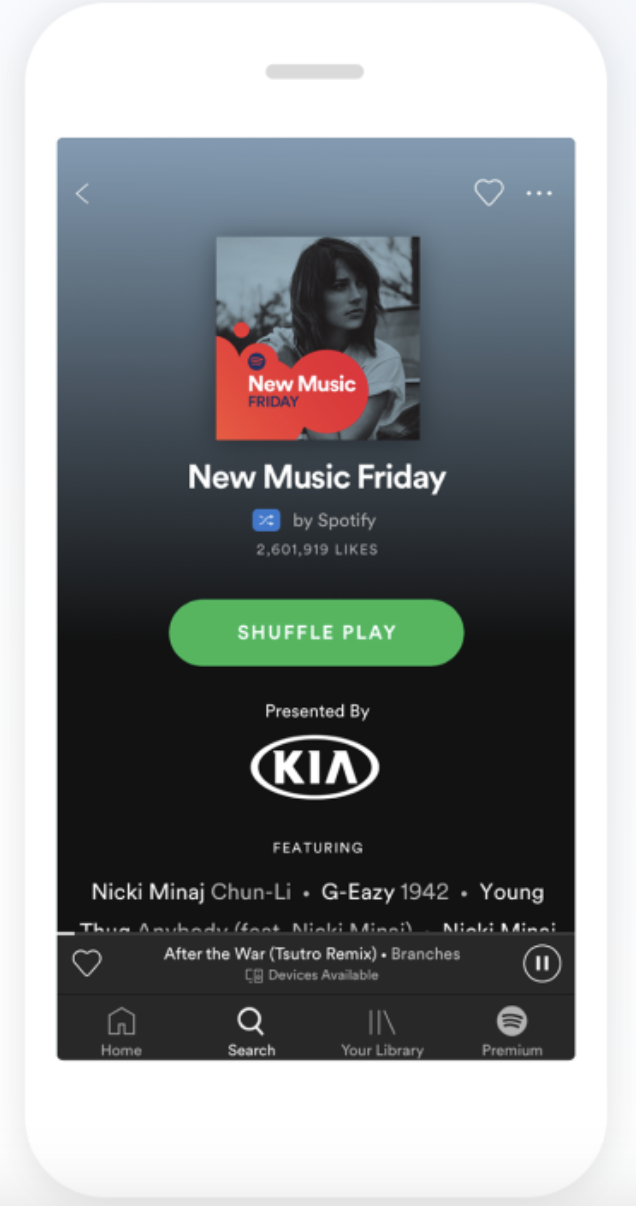
Image courtesy of Spotify.
3. Fitbit
Before handy fitness trackers, we’d have to estimate how many calories we burned in a day, and find inherent motivation to be more active (which, as we all know, is an untrustworthy source).
The invention of products like Fitbit is undeniably human-centered. The inventors of fitness trackers recognized people’s challenges with tracking and maintaining fitness goals, and provided a useful long-term solution. The product works with the user in mind, by telling the user how many calories she burned, and urging her to get more exercise.

Image courtesy of FitBit.
4. Venmo
Venmo is another example of a product which solved a problem before most people realized it was one. I personally didn’t see how cumbersome exchanging money was, until Venmo provided a solution.
In fact, the founders of Venmo, Andrew Kortina and Iqram Magdon-Ismail, stumbled across the idea of Venmo only when they themselves encountered the problem. They took a trip to New York City, and Iqram forgot his wallet. Andrew paid for everything, and at the end of the trip, Iqram wrote him a check.
During that exchange of money, they thought to themselves, “Why is this still the best way of exchanging money? Why can’t we do this on our phones?”
The Venmo founders needed to solve a problem they encountered, and built a solution from which other people could also benefit.
Image courtesy of Venmo.
Feeling Inspired?
Hopefully, these examples confirm the usefulness of human-centered design for creating long-lasting and innovative products. You’re now ready to tackle your creative process from a new angle — the human angle.
